There is a battle going on for the soul of marketing. It is a struggle between two competing forces -- technology and wisdom.
It is not unusual for technology and wisdom to be at odds. Technology moves in a straight line. Wisdom doesn't.
When our country was formed, about 250 years ago, the technology was remarkably primitive compared to today. No motor vehicles, no electricity, no antibiotics. But was there less wisdom? You'd have to be a mighty persuasive individual to convince any reasonable person that today's leaders are wiser than the "founding fathers."
This has been true throughout history. One of the reasons that the Bible and Shakespeare still appeal to us is that the follies of humans - the greed, envy, and betrayal - are constant while the technology moves from slingshots to spears to laser guided missiles.
If I had to make the case that humanity is any wiser today than it was 5,000 years ago, I'd be at a loss.
Nonetheless, today in the marketing industry we have foolishly equated technology with wisdom. The result is Mark Zuckerberg.
Facebook has utilized technological skill to create an immensely profitable business. But it has been run by callow oafs whose lack of wisdom has created a crisis for democracies, a dangerously cruel social environment for children, and an un-safe space for truth.
Not all technology is the province of the young and not all wisdom comes with age. But, as a rule, tech is the territory of youth, wisdom the territory of maturity.
In the world of marketing, the conflict between technology and wisdom has been no contest. All it takes is a quick stroll through the halls of any marketing or advertising enterprise and it becomes immediately apparent which side has won. In the US today, 42% of the adult population is over 50. But in the advertising industry only 6% of employees are over 50.
The result is that the marketing industry is drowning in technology and starving for wisdom. Technology, left unbalanced by wisdom, is currently responsible for some of the most wasteful, idiotic, and ineffectual follies in the history of commerce. Or does $16 billion in ad fraud not shock us anymore? Does relentless surveillance not concern us? Does public disgust not bother us?
The wisdom of advertising's great "founding fathers" -- the Bernbachs and Gossages -- are unknown or ignored. They knew nothing about our current technology so how they can they inform what we're doing today?... goes the argument.
Technology without wisdom is just an elevator without buttons.
Fabiana Garcia is an ultrasound specialist at GE Healthcare in Brazil. Once a year Fabiana does volunteer work providing healthcare to the indigenous people of the Amazon. Through the use of portable ultrasound machines developed by GE, a mother is able to see her baby's heartbeat for the first time without traveling days to to the nearest hospital.
GE works on things that matter. The best people and the best technologies taking on the toughest challenges. Finding solutions in energy, health and home, transportation and finance. Building, powering, moving and curing the world. Not just imagining. Doing. GE works.
I do like a good graphic. You know that old saw about a picture being worth a thousand words. And I have long been an advocate of better land use planning being essential to good transportation planning – and vice versa. This illustration is taken from a new draft publication from the Province of Ontario “Community Emissions Reduction Planning: A Guide for Municipalities” (downloadable as a pdf).
This Guideline has been prepared to support provincial land-use planning direction related to the completion of energy and emissions plans. The plans will typically include community-wide and municipal/corporate greenhouse gas (GHG) inventories, the setting of emissions reduction targets, and the development of strategies to reduce GHG emissions.
The Government of Ontario has established provincial GHG reduction targets of 15% below 1990 levels by 2020, 37% below 1990 levels by 2030, and 80% below 1990 levels by 2050. This Guideline describes how the activities of municipalities are vital to achieving these targets and for planning low-carbon communities..
The Guideline has two core objectives: to educate planners, other municipal staff, citizens, and stakeholders on the municipal opportunities to reduce energy and GHG emissions (in particular for land-use policy); and to provide guidance on methods and techniques to incorporate consideration of energy and GHG emissions into municipal activities of all types. To support the second objective, a detailed planning process is described.
What we were supposed to be doing in Metro Vancouver was to emulate Barcelona to avoid the fate of becoming Atlanta. The way to do that was summarised as “protect the Green Zone, build a compact urban region with complete communities and increase transportation choice”. Instead of investing in transit, the Province of BC decided to widen the freeways, build huge bridges and generally lock us into car dependence. You might also have seen that BC’s greenhouse gas emissions have been increasing in recent years. The two are not – as you can see – unrelated.
A few notes on bike lane snow clearance in Toronto
by Jun Nogami
City TV just did a piece on snow clearance of bike lanes during the winter.
I thought I'd amplify my comments in that piece with a few pictures that I took yesterday, just after about 5 cm of snow fell overnight.
It is true that the city is doing a very good job of keeping the Bloor bike lane plowed and salted, as shown in this photo.
I've also heard that they have been doing a good job with the Richmond Adelaide lanes as well. In all these cases, they are using special plowing equipment, and it helps that these bike lanes have a modicum of separation from traffic.
However, the situation is not nearly as rosy on streets with painted bike lanes. Here are some examples that I shot during the very same morning commute.
This section of the Dupont bike lane looks great.
However, as we all know, difficulties arise when there is curbside parking. The plot inevitably gives the parked cars a wide berth, leaving the bike lane essential unplowed.
Even worse, just past this point, the bike lane is no longer plowed, just when I'm headed under a railway bridge, where one could argue that the bike lane is needed most. The choice is then to take the lane where the road is clear, or to navigate through a layer of snow with god knows what underneath.
This next photo of Bloor headed west approaching Sherbourne also shows what a bike lane looks like if the roadway hasn't been plowed for a while, even in the absence of further snowfall.
The city has to recognize that if they are going to bother plowing bike lanes, they need to clear the bike lanes to a higher standard than the roadway. A car can drive through the debris shown above without much trouble, but a bike cannot.
Editor’s note: This was contributed by Kenny Au, co-founder of LUXSENS who writes about AI, blockchain, security, and sustainability. Kenny thinks about ways to build awareness, self-governance and collective consciousness. November 11 hosts one of the largest retail events in the world–11.11 also known as Singles’ Day. A total of over $38 billion was made through […]
Most of the time, a user will do a thing — mark some articles as read, for instance — and then Evergreen will tell the server (Feedbin, Feedly, etc.) right away. That’s good and easy.
The hard part is this: what happens when the server is not reachable for some reason?
Continuing the example: Evergreen could, in the case of the unreachable server, refuse to mark those articles as read.
It could insist that syncing works only when the server is reachable — which is not that weird, especially given that it can’t pull new data from the server unless it’s reachable.
But it’s weird enough. Consider that selecting an article marks it as read. This policy would make it impossible to even just read what you’ve already downloaded.
Offline Syncing
It’s clear that syncing requires some sort of offline ability.
Rather than set a policy for each possible user action (marking articles read, deleting a feed, etc.), I want to set a single policy and single structure for handling these actions.
(Note: there will be some things that do actually require a reachable server: downloading new articles and adding a feed come to mind. This design refers to actions where it would be okay to defer notifying the server.)
Proposed Policy
When the user performs a syncable and deferrable action, that action and the relevant parameters will be remembered.
Evergreen will attempt to notify the server periodically. Once it succeeds, it will forget that action and its parameters.
(Update 18 Jan: 2018: the original version of this design had a time limit, which has been removed. The concern was that this offline queue would grow unbounded — but it can’t, since if you can’t reach the server you can’t download new articles, which means the queue is limited to your current local data set.)
Proposed Implementation
When the user performs a deferrable action, the app tries immediately to notify the server.
If this first attempt fails, then the action is recorded in a SQLite database with a timestamp and with the parameters it needs to be able to make that call again later. Those parameters will be minimal — article IDs instead of entire Article objects, for instance.
The app will periodically attempt to empty this database: starting with the oldest action, it will notify the server of each. On success, a given action is removed from the database.
Undo
Evergreen supports undo as much as possible. For instance, if you mark a number of articles as read, you can undo it.
In this case, Evergreen will notify the server of the mark-read action, and then, upon undo, notify the server of a mark-unread action, thereby undoing the effect of the first action.
In the case where the mark-read action is in the offline action queue, that will be found and deleted, and there will be no queued action to reverse the effect.
Non-Deferrable Actions
Actions that require an immediate response from a reachable server include actions such as adding a feed. In the case where a user attempts one of these and the server can’t be reached, an error sheet will explain the problem. Such actions will not be queued.
There will not, however, be an error sheet for performing a refresh when the server is unreachable. Instead, in that case, a warning icon is placed next to it in the sidebar, a la Mail and similar apps. Clicking the icon will attempt a connection to the server, and an error sheet explaining the problem will appear if the server still can’t be reached.
Other Notes
Evergreen works like Mail and similar apps in that it has a set of accounts for services such as Feedbin, Feedly, and others, along with an On My Mac account that is not synced.
Each account has its own section in the main window’s source list; each account has its own set of folders and feeds.
Accounts will be added to Evergreen in Preferences, in an Accounts pane.
The policies of these accounts will be respected. For example, if the On My Mac account automatically marks articles as read after n days, it’s possible that some service does this after some other number of days, or never does that at all, and Evergreen won’t override those policies for that service.
Another example: the On My Mac account doesn’t support folders-within-folders — but if a feed service does support that, then the app will support it too, for that service.
(Current plan: Evergreen 1.0 will ship with Feedbin support, and Evergreen 2.0 will add support for more services.)
Let me know if any of the above sounds weird or if I missed anything. (There is contact info at the bottom of Evergreen’s main page.)
I have been riding bicycles for quite a long time now, but have never done it on city roads. Instead, I have been riding a rented bike in a park which has specific bike lanes (the same size as the car lane) and doing laps (it has sealed roads).
Now I want ride for my commute, but have no experience riding on roads with other cars.
I'm going to be buying a bicycle, but have no idea where to start looking. Here are my ideal features / requirements:
Somewhere below $600 USD (but the cheaper the better)
Good for riding on city roads and in traffic
My commute would be about 3-4km, I don't know if that changes anything
Safe
Fairly good for riding up hills (I live in quite a hilly area)
Hopefully still fun to ride
Is anybody able to give me some recommendations, pointers in the right direction or specific types / features to look into?
One time I was at somewhere hiring a bike and I really liked it, I'm fairly sure that it was an Avanti Giro F1, so possibly something similar?
Thanks and sorry for my newbie question, hopefully it isn't too broad ;P
No trains at all today because of a storm with up to 140km/h winds. Code Red in large parts of the country, until the afternoon. A good thing I had planned working from home.
This is a post describing a teacher's experiences "opening a brand new micro-school and to work on technology tools that were intended to personalize my students’ learning." It was AltSchool, the Silicon Valley startup where Emerich worked for three years, leaving last June. The company changed course last year from running schools to selling software. Emerich suggests a possible reason for the change in course: "It was isolating with every child working on something different; it was impersonal with kids learning basic math skills from Khan Academy; it was disembodied and disconnected." This is a good article, describing the experience at length and from a first-person perspective.
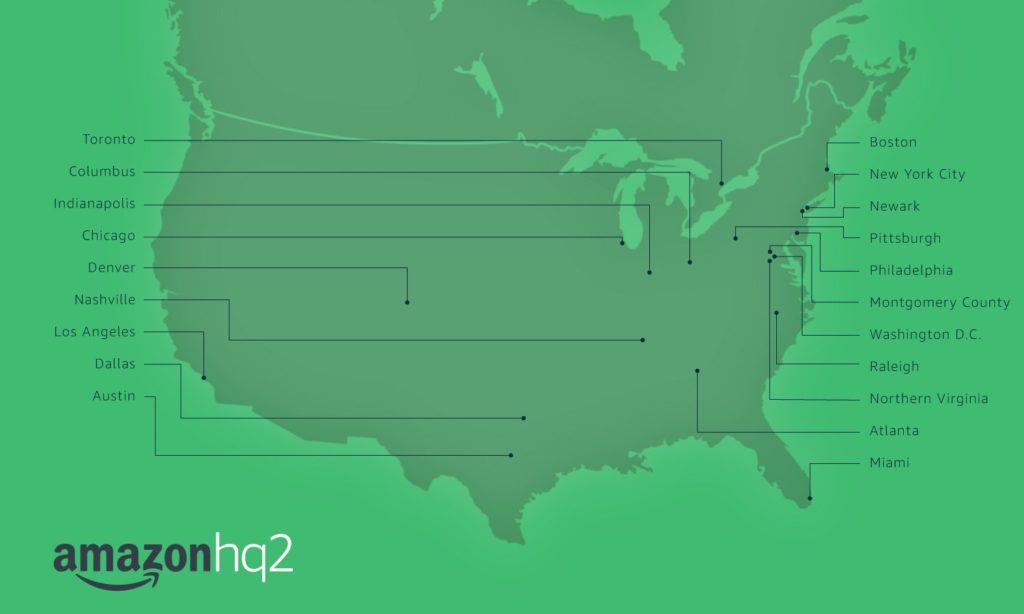
Global e-commerce giant Amazon has released its list of the top 20 cities in the running for the company’s second North American headquarters.
Unsurprisingly, the majority of the cities on the list are American. In fact, 19 cities are American, with a single exception: Toronto, Ontario.
The inclusion of Toronto isn’t entirely surprising, as previous reports from analysts outside of Amazon suggested that the city would certainly be a contender.
In November 2017, Bert Sperling’s BestPlaces city ranking website hypothesized that Toronto ranked 15 on a list of 64 cities that were most likely to make the cut. The only other Canadian city to make Sperling’s list was Vancouver, which placed 64th.
“Getting from 238 to 20 was very tough — all the proposals showed tremendous enthusiasm and creativity,” said Holly Sullivan from Amazon’s public policy team, in a January 18th, 2018 media release. “Through this process, we learned about many new communities across North America that we will consider as locations for future infrastructure investment and job creation.”
It’s important to note that Amazon’s list is alphabetical, and not organized by how likely it is that a particular municipality will be selected.
Sperling’s own list suggests that Atlanta, Georgia, might win out in the end.
Still, Ontario Premier Kathleen Wynne and Minister of Economic Growth and Development Steven Del Duca issued positive statements about Amazon’s announcement.
“The Government of Ontario welcomes the news that Amazon has placed the Toronto Region on its shortlist as a potential site for HQ2, with the promise of as many as 50,000 ongoing and well-paying jobs,” reads an excerpt from a January 18th, 2018 Government of Ontario media release. “Of the more than 238 bidding cities across North America, Toronto stands out as an ideal destination with its talented and educated workforce, leading research and educational institutions, competitive investment climate, outstanding quality of life and vibrant, diverse communities.”
Additionally, Toronto Global — the Toronto-region consortium helping coordinate the city’s bid — issued a statement as well.
“On behalf of all the Mayors and Chairs of the Toronto Region and our partners in Waterloo Region and Guelph, we are thrilled that our bid to attract Amazon’s HQ2 will be moving to the next stage in the selection process,” reads an excerpt from a January 18th, 2018 statement by Toronto Global chair Mark Cohon, vice chair Janet Ecker and CEO Toby Lennox. “It is an unmistakable signal that our region is regarded by the finest and most forward-looking employers from around the world as one of the very best destinations for investment and expansion.”
For their part, former Wind Mobile (now Freedom Mobile) founder and CEO Anthony Lacavera and Lavalife co-founder and The Disruptors co-host Bruce Croxon both believe that Amazon shouldn’t open up its second North American headquarters in Toronto.
Update 18/01/2018: Story updated with additional quotes from statements by Ontario Premier Kathleen Wynne, Minister of Economic Development and Growth Steven Del Duca as well as members of Toronto Global.
In an interview with Google design team lead Ivy Ross for the company’s own Keyword blog, the tech giant showed off a few early versions of its latest flagship smartphone, the Pixel 2, along with prototypes and sketches of other 2017 gadgets.
Among the various iterations of the black and white ‘panda’ variant of the Pixel 2 (shown above) are some intriguing ideas. Several split the top black part into one matte and glossy section vertically. There are also various sensor placements on the rear, a few have indented ‘G’ logos rather than silver and some have sharper edges than others.
As for the Pixelbook, one early version’s glass portion of the rear was black rather than white, while other versions show the team experimented heavily with the size of the glass panel.
The post also contains images of color-swatch picking for the Google Home Mini (above) and sketches of the Daydream View (below).
In the blog post, Ross says the most important design principle is the notion of making things ‘human.’
“By that I mean friendly, emotionally-appealing and easy to fit into your life and home,” she says in the interview, subsequently adding: “This is reflected in the fabric in Home Mini, Home Max and Daydream View, the texture of Pixel phones and Pixel Books, and the soft silicon pad where you rest your wrist while typing on the PixelBook.”
dekuNukem uses a Raspberry Pi 3, the Raspberry Pi camera module, and an OLED screen for the build. You don’t strictly need to include the OLED board, but it definitely adds to the overall effect, letting you view your daily and weekly screen time at a glance without having to access your Raspberry Pi for data.
As dekuNukem explains in the GitHub repo for the build, they used a perf board to mount the screen and attached it to the Raspberry Pi. This is a nice, simple means of pulling the whole project together without loose wires or the need for a modified case.
This face_recognition library lets the Pi + camera register your face. You’ll also need a well lit 400×400 photograph of yourself to act as a reference for the library. From there, a few commands should get you started.
Uses for facial recognition
You could simply use facepunch for its intended purpose, but here at Pi Towers we’ve been discussing further uses for the build. We’re all guilty of sitting for too long at our desks, so why not incorporate a “get up and walk around” notification? How about a flashing LED that tells you to “drink some water”? You could even go a little deeper (though possibly a little Big Brother) and set up an “I’m back at my desk” notification on Slack, to let your colleagues know you’re available.
You could also take this foray into facial recognition and incorporate it into home automation projects: a user-identifying Magic Mirror, perhaps, or a doorbell that recognises friends and family.
What would you do with facial recognition on a Raspberry Pi?
Bob Marley’s been gone a long time; longer than most people reading this have lived, I bet. But more than most deceased
musicians, it feels to me like he’s still out there; a quiet dub track woven into the universal quantum background
hum. Try to prove me wrong. No Woman, No Cry
is a good first entry for reggae in Song of the Day; Warm-sounding warm-heartedness;
what could be better in a Northern-hemisphere winter?
Reggae, it’s got this dark sweet warm pulse like molasses for the brain, but it’s not simple at all. I saw a documentary once
about Marley and the Wailers’ breaking into mainstream music. Island Records’ Chris Blackwell (someone all us mainstreamers owe an
immense debt of gratitude to, for making the big bet on Caribbean slum music) decided to hire a couple of big-name US session
players to make Bob’s tapes sound a little less foreign. They interviewed one of them for the documentary and he said, laughing, “I
eventually got the track down, but I sat there listening to it for twenty minutes first, trying to find the One” (he meant the “one”
in one-two-three-four). These rhythms, there’s nothing straightforward about them.
Having said all that, No Woman, No Cry is about as straightforward as reggae gets; one of the few songs that I always
sing along with when it comes on in the car.
The lyrics are interesting, too; nostalgia for a
simpler time, some poor-man’s anger, and then: No more tears. It’s a beautiful piece of work, and the band’s playing is divine.
A lot of people have covered this song; Joan Baez sings it regularly (and beautifully) and even released a record using it as a
title.
There’ll be more island music in this series. On those rare occasions when I get a few consecutive hours free to code or work on
a doc, if you come into my office you’ll usually hear a soft low Dub pulse keeping me company. Because of what Dub is, I’m not I’ll
ever be able to use any for Song of the Day, but I sure love it. If you’re not real familiar with dub and would like to be, you
could do worse than buying anything by
Israel Vibration.
Do you have a baby?
If so, you should definitely read
this parenting tip on how to use
Natty Dread, the record that No Woman, No Cry first appeared on, for helping put
a fractious infant
to sleep.
While the overwhelming majority of Android devices have yet to receive an 8.0 Oreo, it should come as no surprise that Google is nonetheless hard-at-work on the next version of the popular mobile operating system.
Common wisdom suggests that Google will continue the alphabetic and dessert-themed naming convention adopted with the Android 1.5 Cupcake operating system. All of which is to say, Android 9.0 will most likely be named after a dessert beginning with the letter ‘P.’
The question on everyone’s mind, of course, is which dessert will Google choose? Pound cake? Peanut butter cup? Pirate coins? Pudding?
As discovered by Twitter user Mishaal Rahman who found twofiles posted to the Android Open Source Project website, it seems that Google is internally referring to Android 9.0 as ‘Pi.’
Amusing: new commits in AOSP refer to the next version of Android as "Android Pi" which is clearly not a dessert, though maybe shorthand for Android Pie.https://t.co/LXxv4MUYhnhttps://t.co/DH0TlgxiBR
Pi is the 16th letter of the Greek alphabet and is also the mathematical symbol for the constant defined as the ratio of a circle’s circumference to its diameter. It’s the number that starts with 3.14159.
However, Pi is also phonetically similar to the popular dessert pie, therefore continuing Android’s dessert theme. Of course, as with the Key Lime Pie rumour, which ultimately became Android KitKat, there’s no doubt that this is a misdirect on the part of Google.
Interestingly enough, Google already had an Android version named after a dessert beginning with the letter ‘P’ — internally anyway. Though it never had an official name, Android 1.1 was internally referred to as ‘Petit Four.’
Today I picked up this very large, colorful French film poster for Mario Bava’s 1963 film gialloThe Girl Who Knew Too Much. It’s pretty special, and not just because it’s a cool piece of vintage film poster art for the home office—but also as a tribute to the bava blog. It’s something like a 12th birthday present. I love this blog, and it has loved me back a million times over with connections far and wide across the web. The bava is not only the place where I was able to build the foundations of my pathetic edtech career—providing the mental space to help shape everything from UMW Blogs to EDUPUNK to ds106 to Domain of One’s Own to Reclaim Hosting. But even more than that, it’s been the portal through which I got to come into contact, and in some cases get to know, some truly great people. All the while it has been a fairly faithful chronicle of the vicissitudes of fortune that make up one small life. I smile when I look at this poster because not only do I see an awesome film by a great Italian b-movie auteur, but I also see my life online. bavatuesdays started with a header from this very film with a close-up of Leticia Roman’s startled eyes that resonates deeply with the look she wears in the poster.
More than even the eyes, the blog is the window to the soul!
Harold Jarche uses a Twitter discussion to make the point that networks are not the same as communities. "Our networks are great places for serendipitous connections," he writes. "But they are not safe places to have deeper conversations or to expose our points of view." I think he is right but I'm not convinced by his example. The tweets are not (for the most part) addressed to him; they constitute a conversation by a set of third parties. Moreover, it felt to me that a number of these participants could easily have been robots autotweeting in response to the mention of an MBA. Jarche writes, "In an open network the potential for online outrage and group orthodoxy is large." Well yes, but that's true in a community as well.
Innovation is about what you produce. But it’s also about how you produce it. No matter what your job title is, you are likely to have multiple roles and activities that contribute to your work product—from planning to concepting to collaborating to presenting. The right workspace for the right task can boost energy and creativity—by providing both context and constraints. Here’s what I tried this week and how it worked for me.
Walk and talk: Explore big ideas
I believe the best way to face any blank page is on foot—and out loud. We think 60 percent more creatively when moving than we do at our desks, according to a recent Stanford study on the benefits of walking. That’s why I prepared a TEDx pitch during my morning dog walks this week.
I asked myself what my core belief was about my topic. And I spent the rest of the walk speaking out loud to an imaginary listener (wearing ear buds so it looked like I was on the phone). The more I talked, the clearer my thesis became. The supporting points flowed from there. I captured my best ideas on my voice recorder. And in the course of a few walks, I had the raw material for a full outline that I quickly typed up and submitted. I’ve used this strategy to craft client presentations, develop live storytelling performances, and conceptualize four books.
Home office: Be in command
My home office is command central for my planning and execution, with all of my essential tools and technology in arm’s reach. This week, I upped the ante by moving my desk to the Feng shui “command position.” Instead of facing the wall with my back to the door, I am now looking into the room and facing the door. This instantly changed my vibe from “backed into a corner” to “in control of my destiny.”
Plus, I took advantage of my privacy to experiment with a few other power moves. Before an important meeting, I swapped my afternoon coffee with a power nap, then pumped myself up with a few power poses. This boosted my energy and confidence, leading to a successful negotiation with a new prospect.
Around the house: Be flexible
Working from home also lets me easily shift contexts. I do my marketing consulting work at my desktop computer where I dress professionally, have a beautiful background for video meetings, and use an enormous screen to easily move between multiple documents and projects. This week, that’s meant researching and outlining a tech whitepaper.
When it’s time for creative work such as writing books, poems, or essays, I use my laptop, on my couch, in yoga pants with my feet up—typically in the evenings. The shift in contexts keeps each work practice sacred—and separate.
On site with a client: Become an insider
MIT researchers and I agree that live interactions are of great benefit to a team’s performance. That’s why I meet with clients in person whenever possible. This week, I spent a day on-site to kick off a video script I’m writing for a company’s flagship product.
Talking with the creative team around the design studio table immersed me in the client’s culture and brand in a way no creative brief ever could. As we discussed the value proposition of the offering and the arc of the narrative, I quickly became familiar with the company’s goals, voice, and product. And as my new team saw how I think and solve, they gained trust and confidence in me. I returned to my office prepared to translate the virtues of their product to story.
At cafés, I tend to execute on strategy. In the hum of anonymity with the ideal amount of generative background noise, I ride the wave of collective momentum to develop content, concepts, and campaigns. This week, my café workday was dedicated to completing the tech whitepaper I had researched a few days earlier in my home office. With the help of my laptop, source materials, and 16 oz. latte, I moved from outline to first draft in a fraction of the time it would have taken alone. Co-working spaces, public transportation, and hotel lobbies can also be satisfying makeshift workspaces when I want background buzz.
In a parked car: Maximize the margins
Because commute time is unpredictable, I often end up at my son’s school at least 15 minutes before pickup time. This has become my power quarter-hour. Seated with a laptop in the front passenger seat with no Wi-Fi distraction, focus softened by the late-afternoon drowsiness reported to be optimal for creative work, I sink into my writing. This week’s focus was the video script for my new client.
I use this strategy any time I have a sliver of time: in doctor’s waiting rooms, at my son’s sports practice, and sitting with foil wraps in the hairdresser’s chair. By competing with myself to make every minute count, I once wrote half a book in six months in these micro margins.
What’s your sweet spot?
It turns out that each workspace I explored this week was effective because of the unique set of constraints it offered. And I’m not alone in finding limitation to be a launchpad for creative thinking. You may find a breakthrough idea—or move from planning it to shipping it—working at a concert, in a library, or on your best friend’s front porch. Experiment to discover the contexts that inspire and equip you to create. And remember even those that seem sub-optimal at first may offer surprising benefits. When you synchronize work and environment, you can make your greatest contribution.
Sage Cohen is the author of Fierce on the Page, The Productive Writer, Writing the Life Poetic, and the poetry collection Like the Heart, the World. Since founding Sage Cohen Global in 1997, she’s been developing communication, education, and empowerment solutions that help people and businesses change the conversation.
Tyler Hamilton@50ShadesofVan
Parts of Toronto's shoreline encased in a thick layer of ice—recent large waves caused by an area of low pressure a… twitter.com/i/web/status/9…
Recently, scholars have begun paying attention to the legal limitations of so-called smart contracts. There are several salient critiques: smart contracts may imperfectly capture obligations; they may not fully account for changed circumstances; they may still require external interpretation. Taken together, these issues may well impede the legal utility of smart contracts “in the wild.” But there’s another set of issues at play, too: in the real world, contracts have social utility, and people use them in complex, strategic ways that often don’t align with their legal rights and obligations. These social functions require flexibility—often, the very flexibility that is intentionally short-circuited by smart contracts.
In my recent paper, “Book-Smart, Not Street-Smart: Blockchain-Based Smart Contracts and The Social Workings of Law,” I describe three common contracting practices that illustrate how contracts actually “work” in the social world. People may include contract terms that they know to be legally unenforceable in order to set behavioral norms for their contracting partners; for instance, “pay-if-you-stray” infidelity clauses in prenuptial agreements are generally unenforceable in court, but still communicate expectations about how the parties will treat each other. Or, people might include contract terms that are purposefully vague; particularly in long-term relations where the parties contract with one another repeatedly, it can promote stability to leave some expectations underspecified. Finally, parties might strategically decide not to formally enforce an enforceable contract. The looming shadow of a lawsuit can be enough to encourage people to bargain between themselves, and the outcomes of these bargains are often mutually preferable to what might result from formal adjudication.
Altogether, these uses of contract suggest that contracts are social resources as much as they are legal mechanisms. But smart contracts focus on the technical form of contract to the exclusion of social context; that’s what they’re designed to do. We might think of smart contracts as book-smart, not street-smart. While they may facilitate technically perfect and seamless implementation of agreements, the social friction required to negotiate and enforce a “dumb” contract can, in some cases, be functional and desirable. This doesn’t imply that there is no role for smart contracts in some social settings, but it does suggest that attention to the setting matters a lot. In the paper, I suggest that as a matter of policy, we ought to carefully consider the social characteristics of contracting environments—the goals of the parties, the longevity of the relationship, the availability of reputational mechanisms, and the like—before deploying smart contracts into them.
Wattpad has announced that it’s raised $61.25 million CAD in a fresh round of funding.
Investors include Tencent, BDC, Globe Telecom’s Kickstart Ventures, Peterson Group, and existing investor Raine. The Globe and Mail first reported that the online storytelling company was raising a round back in October, and its sources at the time said the company generated revenue at an annualized rate of $24 million per year.
To date, Wattpad has raised $146 million from international investors in Asia, the US, and Canada. Previous investors include OMERS Ventures, August Capital, Union Square Ventures, Golden Venture Partners, Khosla Ventures, AME Cloud Ventures, Northleaf Venture Catalyst Fund, and Version One Ventures.
The company plans to use the funding to support its machine learning capabilities and interactive storytelling, both of which have been a key focus as of late. Wattpad has found success in partnering with brands and entertainment companies through Wattpad Studios to co-produce Wattpad stories for film, including partnerships with NBCUniversal-owned Universal Cable Productions and TV5 Network in the Philippines.
“Entertainment is in a period of disruption, and how people find and experience stories is evolving.” – CEO Allen Lau
As the company looked to leverage machine learning in its products to find stories more likely to be co-produced by studios, it trimmed 10 percent of its staff in May 2017; the company said it is currently hiring across all departments. The layoffs were part of CEO Allen Lau’s vision for Wattpad’s future outlined in a blog post from November 2016, which said that emerging products, machine learning, further entertainment partnerships, and new content monetization strategies were part of the plan.
“Entertainment is in a period of disruption, and how people find and experience stories is evolving,” said Lau in a statement. “With our global community of users, hundreds of millions of stories and data-driven approach to helping people and partners find great content, Wattpad is leading both sides of this equation. We empower diverse storytellers all over the world, helping them build a community of passionate readers; at the same time, we also connect Hollywood with stories that have massive built-in audiences. This new funding from Tencent and our other investors shows that confidence in our vision is growing alongside our revenue, our success, and our community.”
By August 2017, Wattpad would launch a residency program allowing teams to build storytelling products within the company, and launch products like Tap and Raccoon, which enabled users to create video-based storytelling, allowing readers to see the person telling the story on screen. Tap currently has 3 billion taps to date on over 300,000 stories available, according to Wattpad.
The company said it will also use the funding to expand its reach in TV, film, digital media, and publishing, while also experimenting with new storytelling formats. It also said that it has 65 million people on the platform, and experienced 40 percent growth in its community in 2017.
“Wattpad has built a creative community for storytellers and story lovers,” said Martin Lau, president of Tencent. “The company is providing opportunities to new and established writers, transforming how entertainment is discovered and produced. We are glad to support Wattpad, a leader in digitizing and data enhancing the entertainment industry.”
The ability to customize and extend Firefox are important parts of Firefox’s value to many users. Extensions are small tools that allow developers and users who install the extensions to modify, customize, and extend the functionality of Firefox. For example, during our workflows research in 2016, we interviewed a participant who was a graduate student in Milwaukee, Wisconsin. While she used Safari as her primary browser for common browsing, she used Firefox specifically for her academic work because of the extension Zotero was the best choice for keeping track of her academic work and citations within the browser. The features offered by Zotero aren’t built into Firefox, but added to Firefox by an independent developer.
Popular categories of extensions include ad blockers, password managers, and video downloaders. Given the variety of extensions and the benefits to customization they offer, why is it that only 40% of Firefox users have installed at least one extension? Certainly, some portion of Firefox users may be aware of extensions but have no need or desire to install one. However, some users could find value in some extensions but simply may not be aware of the existence of extensions in the first place.
Why not? How can Mozilla facilitate the extension discovery process?
A fundamental assumption about the extension discovery process is that users will learn about extensions through the browser, through word of mouth, or through searching to solve a specific problem. We were interested in setting aside this assumption and to observe the steps participants take and the decisions they make in their journey toward possibly discovering extensions. To this end, the Firefox user research team ran two small qualitative studies to understand better how participants solved a particular problem in the browser that could be solved by installing an extension. Our study helped us understand how participants do — or do not — discover a specific category of extension.
Our Study
Because ad blockers are easily the most popular type of extension in installation volume on Firefox (more generally, some kind of ad blocking is being used on 615 million devices worldwide in 2017), we chose them as an obvious candidate for this study. Their popularity and many users’ perception of some advertising as invasive and distracting is a good mix that we believed could pose a common solvable problem for participants to engage with. (Please do not take our choice of this category of extensions for this study as an official or unofficial endorsement or statement from Mozilla about ad blocking as a user tool.)
Some ad blocker extensions currently available on AMO.
In order to understand better how users might discover extensions (and why those chose a particular path), we conducted two small qualitative studies. The first study was conducted in-person in our Portland, Oregon offices with five participants. To gather more data, we conducted a remote, unmoderated study using usertesting.com with nine participants in the US, UK, and Canada. In total, we worked with fourteen participants. These participants used Firefox as their primary web browser and were screened to make certain that they had no previous experience with extensions in Firefox.
In both iterations of the study, we asked participants to complete the following task in Firefox:
Let’s imagine for a moment that you are tired of seeing advertising in Firefox while you are reading a news story online. You feel like ads have become too distracting and you are tired of ads following you around while you visit different sites. You want to figure out a way to make advertisements go away while you browse in Firefox. How would you go about doing that? Show us. Take as much time as you need to reach a solution that you are satisfied with.
Participants fell into roughly two categories: those who installed an ad blocking extension — such as Ad Block Plus or uBlock Origin — and those who did not. The participants who did not install an extension came up with a more diverse set of solutions.
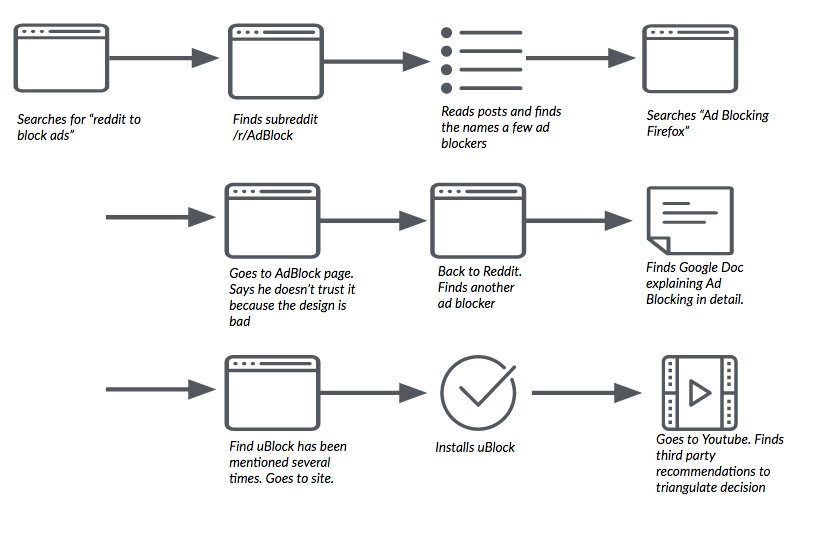
First, among the fourteen participants across the two studies, only six completed the task by discovering an ad blocking extension (two of these did not install the extension for other reasons). The participants who completed the task in this manner all followed a similar path: they searched via a search engine to seek an answer. Most of these participants were not satisfied with accepting only the extensions that were surfaced from search results. Instead, these participants exhibited a high degree of information literacy and used independent reviews to assess and triangulate the quality, reputation, and reliability of the ad blocking extension they selected. More generally, they used the task as an opportunity to build knowledge about online advertising and ad blocking; they looked outside of their familiar tools and information sources.
User journey for a participant who discovered an ad blocker to complete the task.
One participant (who we’ll call “Andrew”) in our first study is a technically savvy user but does not frequently customize the software he uses. When prompted by our task, he said, “I’m going to do what I always do in situations where I don’t know the answer…I’m going to search around for information.” In this case, Andrew recalled that he had heard someone once mention something about blocking ads online and searched for “firefox ad block” in DuckDuckGo. Looking through the search results, he found a review on CNET.com that described various ad blockers, including uBlock Origin. While Andrew says that he “trusts CNET,” he wanted to find a second review source that would provide him with more information. After reading an additional review, he follows a link to the uBlock Firefox extension page, reads the reviews and ratings there (specifically, he is looking for a large number of positive reviews as a proxy for reliability and trustworthiness), and installs the extension. For his final step, Andrew visits two sites (wired.com and huffingtonpost.com) that he believes use a large number of display ads and confirms that the ad blocker is suppressing their display.
The remaining participants did not install an ad blocking extension to complete the task. Unlike the participants who ultimately installed an ad blocking extension, these participants did not use a search engine or an outside information source in order to seek a solution to the task. Instead, they fell back on and looked inside tools and resources with which they were already familiar. Also, unlike the participants who were successful installing an ad blocking extension, these participants typically said they were dissatisfied with their solutions.
These participants generally followed two main routes to complete the task: they either looked within the browser in Preferences or other menus or they looked into the ads themselves. For the participants who looked in Preferences, many found privacy and security related options, but none related to blocking advertising. These participants did not seek out outside information sources via a search engine and eventually they gave up on the task.
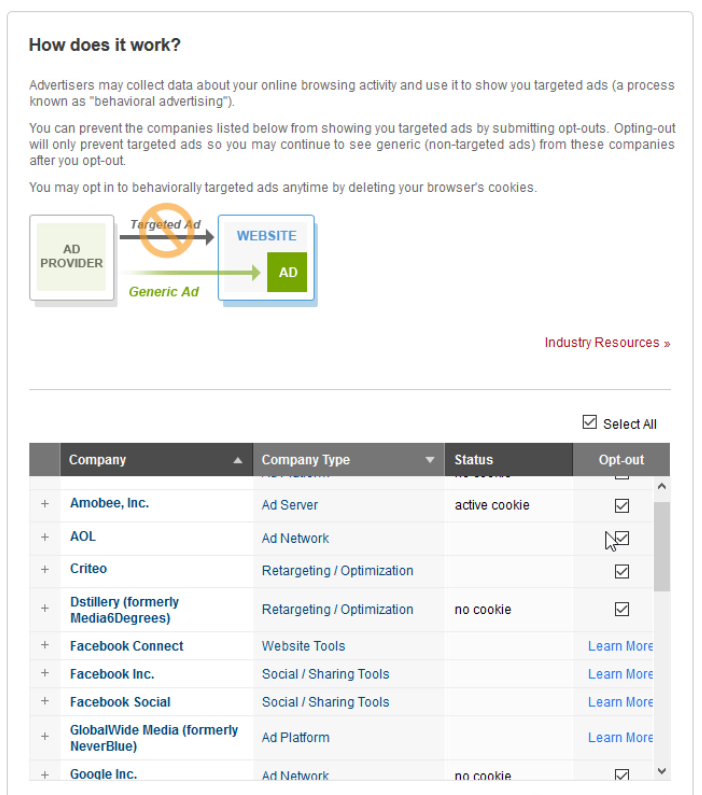
A participant (“Marion”) in our first study recalled that she had seen a link once in an advertisement offering her “Ad Choices.” Ad Choices is a self-regulatory program in North America and the EU that is “aimed to give consumers enhanced transparency and control.” Marion navigated to a site she remembered had display advertising that offered a link to information on the program. She followed the link which took her to a long list of options for opting out of specific advertising themes and networks. Marion selected and deselected the choices she believed were relevant to her. Unfortunately, the confirmations from the various ad networks for her actions either did not work or did not provide much certainty into her actions. She navigated back to the site that she visited previously and could not discern any real difference in display advertising before and after enrolling in the Ad Choices program.
Marion attempting to opt out of advertising online using Ad Choices.
There were some limitations with this research. The task provided to participants is only a single situation that would cue them to seek out an extension to solve a problem. Rather, we imagine a cumulative sense of frustration might prompt users to seek out a solution. We would anticipate that they may hear about ad blocking from word of mouth or a news story (as participants in a similar study run at the same time with participants who were familiar with extensions demonstrated). Also, ad blocking is a specific domain of extension that has its own players and ecosystem. If we asked participants for example to find a solution to managing their passwords, we would expect a different set of solutions.
At a high level, those participants who displayed elements of traditionally defined digital information literacy were successful in discovering extensions to complete the task. This observation emerged through the analysis process in our second study. In future research, it would be useful to include some measurement of participants’ digital literacy or include related tasks to determine the strength of this relationship.
Nevertheless, this study provided us with insight into how users seek out information to discover solutions to problems in their browser. We gathered useful data on users’ mental model of the software discovery process, the information sources they looked to discover new functionality, and finally what kinds of information was important, reliable, and trustworthy. Those participants who did not seek out independent answers, fell back on the tools and information with which they were already familiar; these participants were also less satisfied with their solutions. These results demonstrate a need to provide cues to participants about Extensions within tools they are familiar with already such as Firefox’s Preferences/Options menu. Further, we need to surface cues in other channels (such as search engine results pages) that could lead Firefox users to relevant extensions.
Thanks to Philip Walmsley, Markus Jaritz, and Emanuela Damiani for their participation in this research project. Thanks to Jennifer Davidson and Heather McGaw for proofreading and suggestions.
Despite the recent efforts by NPA Councilors DeGenova and Affleck on twitter to rile up opposition to the proposed Cambie Bridge bike lane, the public has responded in the same way they did in 2011 and 2014.
We like bike lanes
Yawn
It’s a handy barometer of public opinion going in to the 2018 civic election.
A reminder that some 20 job openings are available HERE. This has been and continues to be a terrific place to work.
Come and work at the Best Airport in North America! There are currently 20 job openings at Vancouver Airport Authority in areas such as Emergency Planning, Airside Safety, Baggage and Graphic Design. Join the team.
According to Google, the problem is caused when “Cast software on Android phones incorrectly sends a large amount of network traffic which can slow down or temporarily impact Wi-Fi networks.”
Google goes on to say that the impact will differ depending on the router in question and that the search giant plans to issue a fix on January 18th. In terms of a solution for now, Google suggests users reboot their Android phone, as well as to make sure their router is running the most recent firmware version.
Various router manufacturers, including Linksys and TP-Link, have already issued updates that solve this problem. In a recent blog post, a TP-Link engineer said the issue is caused by packets being sent out at a rapid rate when waking up a Cast-enabled device from sleep mode.


 GE's YouTube Videos.
















 CommitStrip.