One of the most important things that product managers do is listen to our customers. But what happens when they tell us something that feels like it’s coming entirely from left field? It could sound something like: They made a decision to go with a competitor, only bringing it up during a regular account review They told you they NEEDED this change to the product – only to change their...
Many product managers are faced with the challenge of building solutions for industries they have no hands-on experience with. Pilots and construction workers and doctors all need stuff, and it’s pretty likely you never flew a 747, operated a backhoe, or performed open-heart surgery before throwing it all away to become a product manager. But some of us lucky enough to build products for...
As a 21st century product manager, there’s a pretty good chance your product suite includes something that is connected to the Internet. And unless you’ve been hiding under a rock for the past few years, it’s become very apparent that hacks, viruses, and malware are no longer rare occurrences. Thanks to quirky-named critters like WannaCry, Bad Rabbit, and NotPetya foisted upon us by bad actors...
Today is Family Day in British Columbia, but it will be on another date next year. The Premier of British Columbia John Horgan has decided that this holiday first celebrated in this province in 2012 on the second Monday in February should probably stop being an outlier and be celebrated on the third Monday of February, like the other provinces who have adopted this holiday. All of the provinces have a February holiday in some form except for Quebec and Newfoundland and the territories. Manitoba calls this “Louis Riel Day”, Nova Scotia calls it “Heritage Day” and in Prince Edward Island it is “Islander Day”. The Yukon has a Friday in February they call “Yukon Heritage Day.”
British Columbia has this holiday before the rest of Canada, and it did not compete with the third February Monday which is “Presidents Day” when a lot of American visitors come up to British Columbia. Adding the second February Monday holiday generates an extra ten million dollars for the Province’s ski hills. Of course tourism benefited by an additional sets of people for the following long weekend too.
Synchronizing the holiday with the rest of Canada brought out the naysayers from the opposing Provincial political party, who said it “took aim” at tourism revenues. But the CEO of the Surrey Board of Trade welcomes the change stating “The misalignment of Family Day causes inconvenience, increased costs and lost opportunity for businesses of all sizes and in various industries.The economic benefit from this change will greatly assist our members, and especially small- and medium-sized businesses, across the province.”
Alberta was the province to start having a holiday in February in 1990. The premier of Alberta at the time stated that it was important for people to spend time with their families, and the holiday was to emphasize family values. Where ever you are, we wish you Happy Family Day from the editors of Price Tags Vancouver.
Outcast is a brand-new Watch app that lets you download and enjoy podcasts directly on your Apple Watch. This app handles it all. Everything from finding podcasts, downloading them, and listening is managed entirely on your Apple Watch eliminating the need to bring along your iPhone.
There are three ways to get podcast episodes into Outcast. You can search for shows on the Watch using its dictation or ‘Scribble’ handwriting feature. Alternatively, you can browse shows by category. Whether you enjoy comedy, politics, technology, or another topic, Outcast makes it easy to find the very best podcasts available. Finally, you can also use the export as OPML feature of many popular iPhone podcast players to copy a list of your favorite shows into Outcast.
Once you’ve picked an episode, tap the download button and enjoy. Outcast supports downloads over WiFi and cellular networks and includes a full set of playback controls including play/pause and skip ahead and back. You can even adjust playback speed by force-touching the playback screen.
Bringing all that functionality to the Watch’s tiny interface posed a substantial design challenge. As the creator of the Apple Design Award-winning habits app, Streaks, Outcast’s developer, Crunchy Bagel, was up to the challenge. The result is a beautiful, easy-to-use Watch app that’s the best way yet to enjoy podcasts on your Apple Watch without bringing along your iPhone.
For a limited time, Outcast is just $0.99. That price is going to go up, so take advantage of this deal now by going to the App Store to download Outcast now.
Our thanks to Outcast for sponsoring MacStories this week.
Support MacStories Directly
Club MacStories offers exclusive access to extra MacStories content, delivered every week; it's also a way to support us directly.
Club MacStories will help you discover the best apps for your devices and get the most out of your iPhone, iPad, and Mac. Plus, it's made in Italy.
The Northeast False Creek Plan goes to Council this week and Price Tags Vancouver has been looking for any rationale behind the city’s deliberate piercing of the City’s long-established view corridors. City staff are recommending three tall towers that will be way, way over the 300 foot height limit-The rationale for the two 425 foot, 48 storey towers at the intersection of Georgia and Pacific (and these are the words of the Council report) are to provide a “counterpoint”and a “gateway”. Just to balance things out another over height 400 foot tower is also proposed, as if to make the two 48 storey towers less obtrusive. You can view the plan here.
The whole point of the View Corridor Policy and the establishment of view cones was to ensure views of the mountains, sea, and adjoining areas from different vantage points in the city.. You can see what former planning Director Larry Beasley said about the view corridors here. Why congest up space and block views when density can be spread over the site or in other locations?
Here is what urbanist Melody Ma wrote out on twitter. It is a longer post, but contains salient information and is presented in its full form below.
Dear Vancouverites, City Council’s making a significant decision on Feb13 to allow towers by Concord & Pavco pierce thru a key public view (Cambie) of our skyline & iconic mountain backdrop for the Northeast False Creek plan. This decision has irreversible consequences. Here’s why.
When people think about what’s iconic about Vancouver, they think about our mountains & water. But the fact that our mountains are visible & not blocked by towers today didn’t happen by accident. They’re protected by view cone policies established in 1989 & fiercely protected since.
The view cones policy is possibly one of the most visionary planning policies in Vancouver. We’re one of the 1st cities in the world to have such a policy. But most people today aren’t aware of view cones & have misconceptions.
Misconception #1: View cones were created for the wealthy b/c they’re concentrated in wealthy neighbourhoods. Clarification: View cones were created for the public for public enjoyment. All of them are publicly accessible with vantage points in parks, bridges, plazas & streets
4. Misconception #2: View cones are car-centric. Clarification: Majority of view cone optimal vantage points are located in pedestrian-friendly areas like parks, plazas, seawalls & bridges. Ones with optimal viewing points on streets are still enjoyable & photo-worthy on sidewalks.
5. Misconception #3: Cambie view cone is irrelevant because can only be viewed optimally from car . Clarification: The mountainous backdrop is most iconic on Cambie & one of the most photographed public views. Losing it will translate to character of city being irreversibly lost.
6.Misconception #4: Vancouverites will get social housing & amenities in exchange for view cone penetration & thus a worthy trade. Correction: Damage to these free public views are permanent & irreversible. It sets bad precedent for developers to pressure City for same treatment.
7.Misconception #5: The additional density offered by these tall towers will bring more affordable housing supply to millennials & families. Clarification: The density proposed will be some of the most expensive multimillion dollar condos in Vancouver unattainable by most.
8. Misconception #6: If low density zones are upzoned, then no need to pile density on towers that pierce view cones. Clarification: Upzoning low density zones =/= No view cone piercings. Concord and all don’t usually build in low density areas, so 3 towers are site-specific asks.
9. Misconception #7: Housing for people or view cones. You can only pick one. Clarification: The two can co-exist as they have been since 1989 & before.
10. Misconception #8: Public views are an extravagance in an affordability crisis. Clarification: Public views are free public assets & amenities all Vancouverites can enjoy, especially if they don’t have access to private views of mountains in our unaffordable city.
11. Misconception #9: Vancouver will get tall towers of high architectural excellence that’ll be iconic. Clarification: No amount of arch excellence can be more iconic than mountains created by mother nature. Truly great arch works in harmony with surroundings, not damage it.
12. Misconception #10: View cones produce bulky unattractive buildings. Clarification: Form that follows finance produces bulky unattractive buildings. Buildings can be attractive w/out penetrating view cones.
13. Misconception #11: City already approved towers that block views of mountains from my home, so why care now?.Clarification: View cones protect public views that are for all Vancouverites to access & enjoy. They’re not the same as private.
14. Misconception #12: We don’t need to be concerned about the 3 towers’ rezoning allowance to protrude thru view cones b/c we can fight them later at their rezoning application stage. Clarification: Once the plan passes, rezoning allowance in it becomes law that supersedes view cone policy.
15.. View cones protect our public views, which are important public assets that make Vancouver unique & livable. Many have fiercely defended view cones for our benefit today, we need to step up & defend them for next generations.
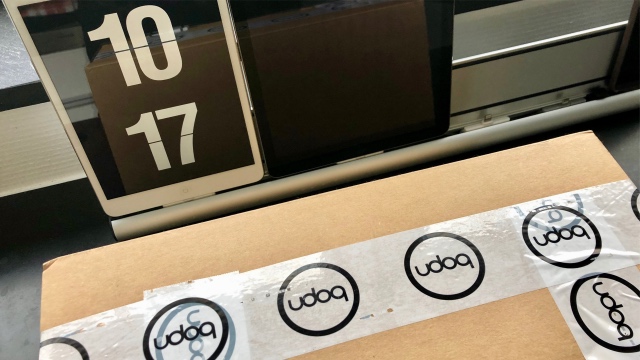
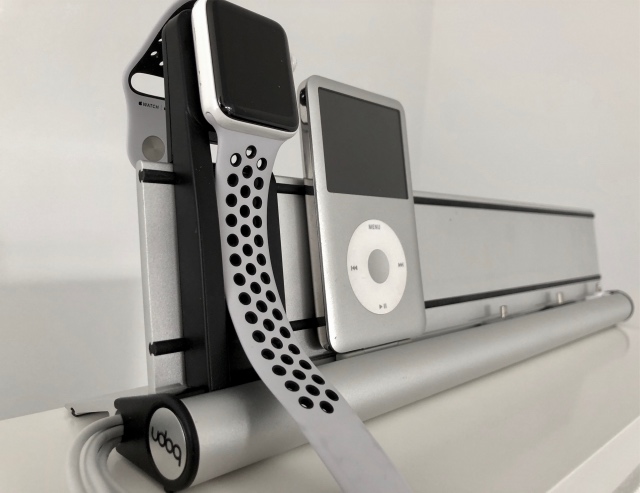
Post von udoq mit zwei kleinen Erweiterungen, beide aus Kunststoff: CboxS und Apple Watch Adapter.
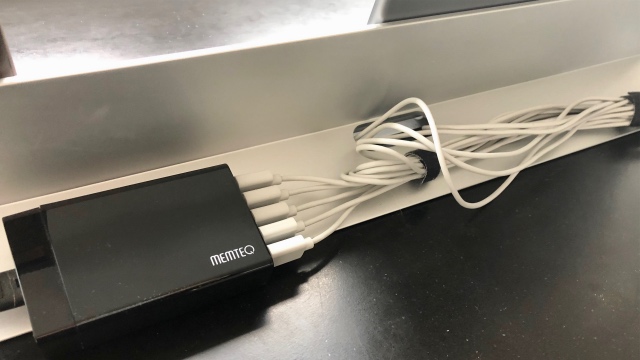
Ich habe die sehr langen Ladekabel hinten aus der udoq-Schiene herausgeführt, in Schleifen verlegt und mit Kabelbindern gesichert. Das sieht man bei uns nicht, weil die Schiene vor der Wand steht.
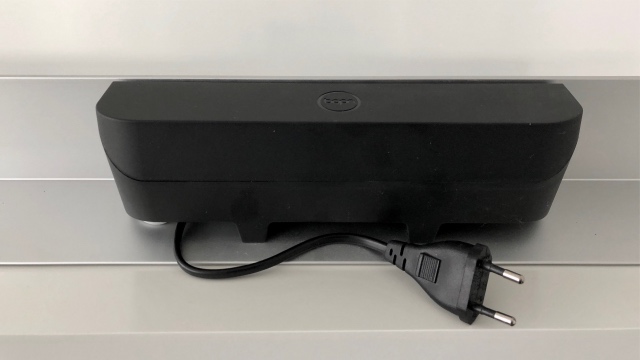
Die Kabelbox löst das Problem ganz elegant. Man zieht die Kabel von unten hinein, klickt den unteren Teil der Box in die ovale Öffnung und verstaut dann die Kabel zusammen mit dem Netzteil in der Box. Zuleitung unten rausführen, Deckel drauf und schon kann man die Schiene von allen Seiten anschauen.
Das schaut absolut super aus, egal ob die Schiene mitten im Raum steht oder direkt vor der Wand. Das Bild zeigt die CboxS an einer udoq 550. 9,90 € - absolute Kaufempfehlung.
Ein bisschen verhaltener bin ich bei dem Apple Watch Adapter, hier in einer udoq 400. Das Teil ist technisch brilliant integriert in die Schiene, ist aber nicht meine liebste Lösung. Der eigene Apple-Watch-Lader wird von hinten in die Adapter eingesteckt, dann schraubt man einen Deckel mit zwei kleinen Torx-Schrauben fest. Das Kabel führt man unsichtbar nach unten in die Schiene.
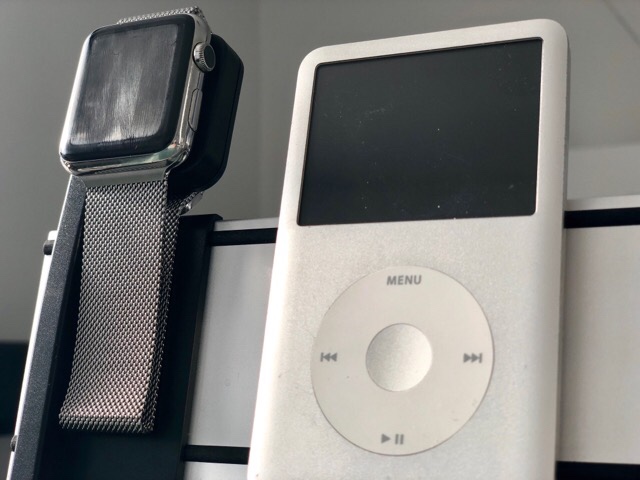
Was man auf dem Bild nicht gut sieht: auch ein Loop lässt sich von rechts über den Apple Watch Adapter streifen, so dass ein Milaneseband durchpasst. Der Adapter ist dann so solide verbaut, dass man für Reisen in jedem Fall einen zweiten Lader benötigt. Finanzieller Aufwand: 19,90 für den Apple Watch Adapter und 35 bis 45 € für das magnetische Ladekabel von Apple.
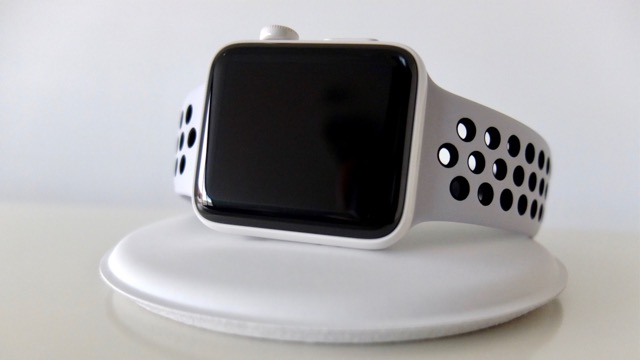
Ich habe statt dessen ein Apple Watch Magnetisches Ladedock. Das ist zwar mit 89 € ordentlich teuer, aber sehr wertig und gefällig auf dem Nachttisch.
Developed in 2012, the Declaration on Research Assessment "is a cross-disciplinary global initiative seeking to improve the ways in which scholarly research outputs are evaluated." The core idea is to move away from journal-based metrics for the evaluation of research output. In particular, it addresses "the need to assess research on its own merits rather than on the basis of the journal in which the research is published; and the need to capitalize on the opportunities provided by online publication." It shows up in my inbox from time to time as new organizations sign on, as the Open Access Scholarly Publishers Association (OASPA) did this week.
At the start, you should know two things about me: HomePod is the first smart speaker I've ever owned, and I'm all-in on the Apple ecosystem.
These facts make me the HomePod's perfect customer, and they will surely color my comments. I'm guessing if I had more experience with other smart speakers, or I didn't own nearly every modern Apple product, my thoughts on HomePod would be different. That said, here are my early impressions.
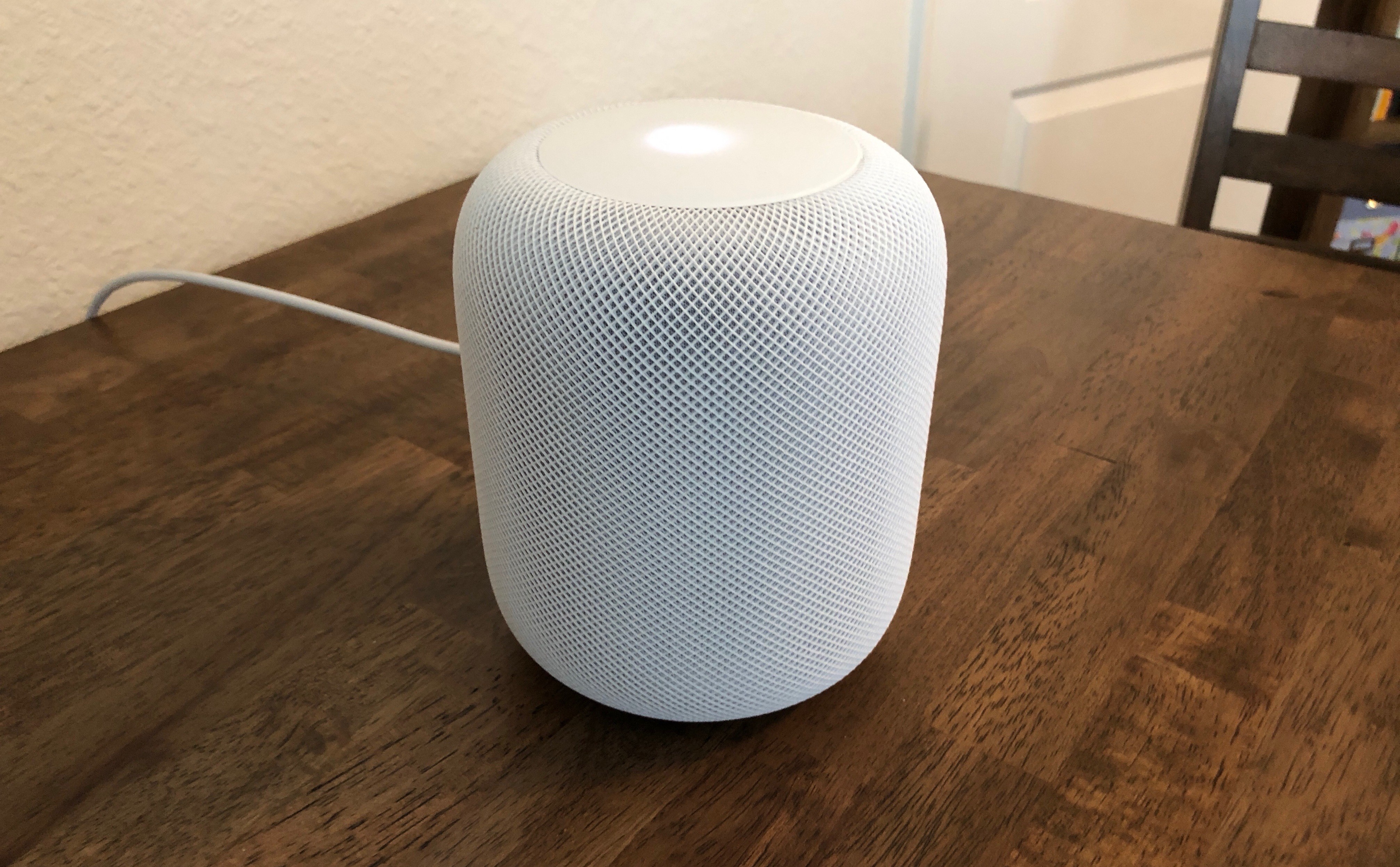
Out of the box, my first thought was that HomePod is the perfect size – not in any way close to being too big, but also not abnormally small. It's deceptively heavy though. For now I have both white and space grey models, and they each look truly fantastic – simple, modern, unassuming, and attractive. And I know it's silly, but that power cord is nice.
Setup of HomePod is a triumph. Apple's new product setup flow for devices like iPhone used to be long and cumbersome, and that's started to change of late. HomePod nails it from the start. Hold your iOS device next to the HomePod, tap through a few simple setup screens, and you're done. The best part comes near the end, when Siri on the HomePod instructs you by voice in perfect sync with the instructions being displayed on your device. I could trust a HomePod to any tech-illiterate iPhone owner I know and feel confident they'd have no problems with setup. No, it isn't AirPods level one-tap simple, but it's about as good as I could imagine.
The main purpose of HomePod is playing music, and it does that very well. It's probably not fair to write a HomePod thought piece with only a single paragraph covering its music capabilities, but there are plenty of people better qualified than me to review HomePod's sound quality – I'm impressed though. Bass is powerful for such a small speaker, and I especially love being able to hear each distinct instrument in a song well. On Saturday my wife and I just sat together a little while doing nothing but enjoying music – we never do that. It wasn't just background noise; the music was our main focus. If you want to know how HomePod sounds, the answer is that it sounds great.
Other writers seem to universally agree that HomePod's design, setup, and sound quality are all stellar. There's not much more worth saying on those matters, so I want to focus in these first thoughts on Siri, third-party apps, and some miscellaneous items.
Siri
Where Siri on HomePod is an unequivocal success is in hearing its trigger phrase. The HomePod's array of microphones does an excellent job of picking up "Hey Siri" from any reasonable distance at normal speaking volume. I can speak fairly softly in everyday chatter, so when I heard HomePod reviewers say that using your normal speaking voice worked fine, I read that with an asterisk, wondering if it would apply to me. Well, it does – I don't have to remember I'm speaking to a device, I simply have to speak.
Apple has designed HomePod to detect user commands no matter how much blaring music's being pumped out of it. Some of the most delightful HomePod moments I've had were when the volume was turned way up on a song or podcast, and I casually, without raising my voice at all, gave a command that Siri heard perfectly. Siri's success in these times isn't the exception, it's the rule.
After playing with HomePod much of the day Friday, by Saturday morning my brain had already re-wired to expect that speaking at normal levels, even while the HomePod was blasting music, was perfectly fine. And this didn't just apply to HomePod – Saturday I was giving HomePod commands in the midst of playing music around 60% volume, and I began having a conversation with my wife who was one room over. Funnily enough, I started that conversation speaking at a normal volume level, expecting my wife would be able to hear me. Of course, she couldn't. Siri has humans beat in that department.
Hearing your request is one thing, but answering it properly is another. In that area, Siri performs about the same as it does everywhere else. No, it can't do everything that it does on other platforms, but for the things it can do, it does them well the vast majority of the time – there are certainly hiccups though. For example, on Friday I was listening to music, then asked HomePod to play the Accidental Tech Podcast. It responded, "Okay, Accidental Tech Podcast coming up." It heard me well, understood exactly what I wanted, and responded in kind. Except, my music kept playing afterward. I asked Siri again, using the same phrasing, and it gave a similar response then started the podcast. On the plus side, HomePod knew exactly where I'd paused the show when listening on my iPhone an hour beforehand.
Siri's foibles in most areas – save third-party apps, which I'll get to – have been rare for me, though they certainly still happen occasionally. For the most part, the things it can do, it does well.
One way Siri has performed consistently is in its quick responses to queries. "Hey Siri" followed immediately by a request, with no pause in-between, gets results fast. This makes using Siri for audio playback more convenient than I expected it to be. Saying "Hey Siri skip this," or "Hey Siri turn it up," or "Hey Siri I like this" gets such a quick response; unlike Siri on the Apple Watch, where you often face a brief, but noticeable wait before Siri takes action, on HomePod that wait feels non-existent. Certainly a wait does exist, but it's so short that I've never wondered if Siri heard me or not.
Speaking of audio controls, I've been pleasantly surprised by the experience of controlling volume by voice. I never got used to having Siri control volume on my AirPods because it felt too cumbersome – double-tap, wait, make the request, wait more; Apple Watch is a much better volume remote. On my first day with HomePod, I found myself wanting to adjust volume from my iPhone or Watch – which can be done, but I didn't know that at first. Since I didn't know, I gave Siri a legitimate shot, and after learning the "system," I quickly got hooked on this method of input. Key details about that system:
Siri can set volume to any specific percentage between 0 and 100. Say "Set volume to 100%" and you'll get a warning about how loud that is before being asked for confirmation.1
Saying "Turn it up (or down)" will adjust the volume either direction by 10%.
Saying "Turn it way up (or down)" adjusts volume by 20%.
You can also ask Siri what the volume's set to.
If you use the controls on top of the HomePod, a single tap adjusts the volume by 5%.
The only improvement I'd like to this setup is that it'd be great to be able to specify a certain percentage to increase or decrease volume by. Right now, if you ask Siri to "Increase the volume by 40%," it will go up, but only by the default 10%. Regardless of what percentage you ask Siri to adjust things, it will move 10% only. This isn't a huge problem, but it is an inconsistency.
One Siri drawback called out by many reviews is that the assistant can't set multiple timers on HomePod. I hope we'll see an update before the year's out to fix that, because the other potential substitutes aren't great. Reminders are probably the best alternative, since they can be named, and once they pop up, you can mark them complete and they disappear. Reminders still aren't ideal though because HomePod won't notify you about a due reminder, only your other devices will. Alarms can also be named, and you can set as many of them as you'd like, but like on the iPhone, every alarm you create gets saved permanently – in this case, saved HomePod alarms can be accessed in the Home app. Also, good luck finding out how much longer until an alarm is scheduled to go off. If it's the first time you've used a certain named alarm, this isn't a problem – simple ask, "What time is my laundry alarm set for?" But after using the term "Laundry alarm" more than once, every time you query its remaining time, Siri will ask which of your many laundry alarms you're asking about.
Finally, one question I had about HomePod initially is how it would know when to respond to "Hey Siri" itself rather than letting one of my other devices respond. The answer is that, for the most part, HomePod is the Siri alpha of the pack – almost all the time, HomePod is the device that actively listens to my requests. I've run into a few occasions where my iPhone, iPad, or Apple Watch did instead, but those were surprises, and according to Apple's documentation, it was probably after I used Raise to Wake on a separate device.
The HomePod's biggest Siri problem right now is easily its limited number of domains. The good news is, Apple is almost certainly hard at work to fix that. Since HomePod's unveiling last year, Apple Notes support was added to the originally announced domains, and I suspect we'll see calendar support and more later this year.
Once Siri on HomePod gains more of the capabilities of iOS Siri, thereby reducing the current fragmentation issue, it should easily offer the best Siri experience to date. Right now it does in some ways, but the domain limitations hurt.
Third-Party Apps
The first batch of HomePod reviews contained little to no information about how well the device handles third-party SiriKit requests. Last October, Apple announced that SiriKit would be supported on HomePod in three initial domains: Messaging, Lists, and Notes.
Along with that announcement came the news of how SiriKit support would work. Similar to how apps on the Apple Watch initially ran, apps for HomePod would be dependent on a paired iPhone in order to work at all. Apple shared:
Siri recognizes SiriKit requests made on HomePod and sends those requests to the user’s iOS device for processing.
On the Apple Watch, this kind of iPhone-dependent system made for frustratingly slow Watch apps. One major difference between HomePod and the first Apple Watch though is that the smart speaker relays SiriKit requests over Wi-Fi, while the Watch was dependent on Bluetooth. In practice, this makes a huge difference.
Over the last few days, I've used HomePod to add to-dos to my preferred task manager, Things, as well as OmniFocus, and I've added grocery items to AnyList and created new notes in Evernote. Those functions all worked well, and worked fast.2 I couldn't tell a difference in response time between Siri handling a SiriKit request and a native request like playing a song; if you were worried about an Apple Watch-like experience with SiriKit, those fears can be put to rest.
Unfortunately, that's about the only good news I have to share regarding SiriKit. Besides the fact that it's extremely limited to this point, with an embarrassingly small amount of third-party support compared to major competitors, there are a few other issues I've run into.
First, several apps in supported SiriKit domains that work with Siri on iPhone haven't worked in my testing of HomePod. Airmail uses SiriKit's messaging domain for sending emails with the digital assistant, but no matter what syntax I used, HomePod wouldn't let me send a message using the app. Several times it would say something like, "Mail hasn't set that up yet," while other times it would apologize for being unable to handle email requests. The former response makes it sound like perhaps Airmail needs to be updated to work on HomePod, while the latter demonstrates a hyper-sensitivity to requests that sound similar to things HomePod can't do, like send email using Apple's Mail app. Another failed test involved TwIM, the Twitter direct messaging app, which Siri provided several different failed responses to. I also couldn't get Siri to recognize Todoist's name in my queries, despite using approved alternate pronunciations.
Another problem I encountered is what appears to be an iOS bug. Whenever my SiriKit requests did not need any sort of additional authentication, they worked fine, but when HomePod would prompt me to authenticate on my iPhone before proceeding, Face ID would do its thing, then I'd be met with a blank Siri screen and nothing would happen. Related to this, if an app hadn't previously had Siri approved to access its data, I'd run into the same issue, which was circumvented by first doing a Siri request on my iPhone, then granting Siri access, which would enable Siri on the HomePod to proceed with future requests. I'm running the iOS 11.3 beta on my iPhone X, so it's entirely possible these issues are beta-related, and won't be a problem for anyone running iOS 11.2.5, but on my devices the blank Siri screen keeps appearing.
Finally, one nitpick I have with SiriKit's current implementation is that it's tied to what HomePod calls Personal Requests. Along with first-party Personal Requests regarding Messages, Reminders, and more, SiriKit requests can only be performed when the paired iOS device is on the same Wi-Fi network as HomePod – and you can only enable Personal Requests from an iPhone. I currently have two HomePods in the house, and my plan was to tie one of them to my iPhone, and the other to my iPad. This way, even when I'm away from home with my iPhone, my wife could still add grocery items to AnyList on the HomePod nearest the kitchen because my iPad would be at home. But Personal Requests can't be tied to an iPad, only an iPhone.
SiriKit on HomePod was already at a disadvantage compared to Amazon Echo and Google Home because of the huge disparity of supported domains. Out of the gate, that sadly isn't the only issue – bugs aside, apps that support SiriKit on iPhone may still need updates before supporting SiriKit on HomePod, and depending on how confusing an app's name is (Todoist), or how similar that name is to non-supported first-party domains (Airmail), you may have a really hard time getting HomePod to accurately interpret your SiriKit request.
Miscellany
Apple TV. I know HomePod isn't technically built as a TV speaker, but since it's now the best speaker I own, and all my TV watching happens through an Apple TV, I wanted to see how well the two devices would work together. The result: passably.
It's possible AirPlay 2 will improve the Apple TV's connection to HomePod when it launches later this year, but for now, AirPlay 1 isn't a bad option. It can be set up easily enough by holding the Siri Remote's Play/Pause button on the Home screen, or by swiping down from the top of the remote while watching a video to select the HomePod as your speaker.
Once HomePod is tied to the Apple TV, it will stay connected up until HomePod is asked to stream another audio source. This means you can ask common questions of HomePod regarding the weather, a movie you're watching, or other queries without breaking the AirPlay stream; but if you ask HomePod to play music or a podcast, then the next time you turn on the Apple TV you'll need to reconnect it.
Up Next on iPhone. While Siri works great for all things music-related, I also enjoy having the ability to use my iPhone to see what song is playing or manage playback. Thanks to the new audio playback controls introduced in iOS 11.2.5, this is easy to do. Switching audio sources, either from Control Center or the Music app, allows you detailed control of playback and a glance at what's currently playing on each device. If you're in Music, you and any family members granted Home access can even view and rearrange the Up Next queue.
The HomePod isn't yet what it will become.
Apple has a history of releasing 1.0 products that are limited in severe ways, but that also do a few foundational things impressively well. HomePod continues that tradition.
It could be argued that, since competitors like Amazon's Alexa are already so dominant, Apple needed to come out of the gate with a stronger 1.0. As it stands today, HomePod is certainly not a mass-market device like the Echo or Google Home. It needs improved SiriKit support, most notably for audio domains so that Spotify users can give it a serious look. It also needs more first-party Siri domains in order to provide a consistent Siri experience across Apple devices.
Despite what it's lacking, though, HomePod does a few things very right. In my mind it's clearly the best looking smart speaker on the market, the setup process is ridiculously easy, and yes, as a music player it sounds incredible. The hardware that supports Siri is also great, with HomePod's microphone array providing near-perfect detection of "Hey Siri," even when the music's turned up.
It's not a product for everyone yet, but I think it can get there over time. A few software updates, and HomePod could potentially have much wider appeal. For now though, despite its current limitations, the HomePod still provides an impressive, quality experience for Apple users like me. If you're happy with Apple Music, and you're already invested deeply in Apple hardware, HomePod offers a lot to enjoy.
I wish this prompt only happened once, but unfortunately it repeats itself. If I only listened to music, I likely wouldn't use max volume much; when listening to a podcast, however, turning the volume up happens more often because it means I can move around the house freely while still listening to a show. ↩︎
I have heard of other people having issues with these things that worked fine for me, however. ↩︎
Support MacStories Directly
Club MacStories offers exclusive access to extra MacStories content, delivered every week; it's also a way to support us directly.
Club MacStories will help you discover the best apps for your devices and get the most out of your iPhone, iPad, and Mac. Plus, it's made in Italy.
Mary Margaret O’Hara, a daughter of Toronto, hasn’t recorded
much and hasn’t had hits and these are terribly sad things because she’s a gem, a wonderful unconventional songwriter and singer.
Her stuff gets pretty far out over the edge sometimes, but Dear Darling is a lovely straight-up country tune,
hardly weird at all, or only in places.
Ms O’Hara’s performances were legendary in Toronto of the Eighties, and when she finally went into the studio and came out with
Miss America, people thought she was on a rocket to the Top of the Pops.
Despite, one hears, a parade of record-company executives throwing themselves at her feet, she’s only ever recorded once since then,
on
the soundtrack to the 2001 move Apartment Hunting.
I’m not convinced she’d ever have been a Big Star though. I saw her once in a Toronto bar a hundred years ago, and you can see it
on video; a Mary Margaret O’Hara performance is a pretty strange piece of work; I’ve heard her approach described as “bouncing off
the music”.
In
Material as Metaphor,
the artist Anni Albers talks about how she came to choose
media in which she worked:
How do we choose our specific material, our means of
communication? "Accidentally". Something speaks to
us, a sound, a touch, hardness or softness, it
catches us and asks us to be formed. We are finding
our language, and as we go along we learn to obey
their rules and their limits. We have to obey, and
adjust to those demands. Ideas flow from it to us
and though we feel to be the creator we are involved
in a dialogue with our medium. The more subtly we
are tuned to our medium, the more inventive our
actions will become. Not listening to it ends in
failure.
This expresses much the way I feel about different programming
languages and styles. I can like them all, and sometimes do!
I go through phases when one style speaks to me more than
another, or when one language seems to be in sync with how I
am thinking. When that happens, I find myself wanting to
learn its rules, to conform so that I can reach a point where
I feel creative enough to solve interesting problems in the
language.
If I find myself not liking a language, it's usually because
I'm not listening to it; I'm fighting back. When I first
tried to learn Haskell, I refused to bend to its style of
functional programming. I had worked hard to grok FP in
Scheme, and I was so proud of my hard-won understanding that
I wanted to impose it on the new language. Eventually, I
retreated for a while, returned more humbly, and finally
came to appreciate Haskell, if not master it deeply.
My experience with Smalltalk went differently.
One summer
I listened to what it was telling me, slowly and patiently,
throwing code away and starting over several times on an
application I was trying to build. This didn't feel like a
struggle so much as a several-month tutoring session. By
the end, I felt ideas flowing through me. I think that's
the kind of dialogue Albers is referring to.
If I want to master a new programming language, I have to
be willing to obey its limits and to learn how to use its
strengths as leverage. This can be a conscious choice.
It's frustrating when that doesn't seem to be enough.
I wish I could always will myself into the right frame of
mind to learn a new way of thinking. Albers reminds us that
often a language speaks to us first. Sometimes, I just have
to walk away and wait until the time is right.
Although I’ve spent most of my working life as an employee, from time to time I’ve taken freelance writing jobs. Since I work here, my favorite tool for these is… well, you guessed right. One reason for this is Ulysses’ attachments feature. So, while I believe attachments are helpful to almost any writer out there, I would like to share some special tips for freelance writers, taken from my own experience.
For starters, Ulysses attachments can be keywords, goals, notes as well as images and PDF files. They belong to a sheet, but not to the text on that sheet, i.e. they will not be included when you export. You can access attachments via the paperclip icon on the editor toolbar.
Access attachments in Ulysses for Mac (left) and iOS (right)
To attach a certain type of attachment, click or tap the respective icon.
Attachments types: keywords, goals, notes and images/PDF files (from left to right)
Tip 1: Keep Everything You Need at Reach
I found that having to search my hard drive or mail inbox while I’m trying to finish a writing job will interrupt my flow and disrupt my focus. That’s why I like to have everything I need at reach for quick reference. With image attachments, I can not only add images in most formats, but even PDF documents. So attachments can perfectly hold a strategy paper, a website mockup, a keyword analysis, you name it, and provide me instant access. On the Mac, I can even detach images and PDFs, adapt the window size as I need and leave them permanently open.
Tip 2: Use Notes for Reference Links and Text Comments
If the information I need to reference regularly is on a website, I type it as a functional link into a note attachment. A note is for text comments, and you can use all of Ulysses’ markup here as well. So, if I receive a text briefing via email, I copy-paste it into a note. Plus I type down verbal agreements I made with the client personally or on the phone.
Tip 3: Track Your Progress With Writing Goals
Two pages of a magazine, one paragraph in a brochure: Freelance writers often work on a character limit. With goal attachments, I can determine how much I have to (or want to) write until I consider a text finished. Available goal types are about, at least and at most. I mostly use characters including spaces, and this is certainly common. However, you can also measure your progress in words, paragraphs, pages, even reading time. When the attachment bar is closed, a tiny circle icon in the upper right corner of a sheet will indicate the state of the goal.
Tip 4: Organize Your Workload with Keywords and Filters
If you’re a busy writer juggling with different clients and timelines, this might be just the right tip for you. I label my texts with keyword attachments, according to their state from new to finished – not only the freelance work but also blog posts and marketing copy I write for Ulysses. Additionally, I have set up a filter group that displays anything labelled with the keyword “Work in Progress”, so I can always see at a glance what I am currently working on. If you want, you can take that even further, with keywords and filters for text that are new, that need revision, have been submitted for approval or already published – just as an example. Actually, keywords can be anything that you think makes sense for your organization.
That’s it for the moment. If you’ve got a tip yourself or an idea for a workflow that you think might be helpful for other Ulysses users, please feel to drop us a line.
The iconic Toronto “Honest Ed” site is being redeveloped by Westbank at Bloor and Bathurst in the Annex area. The City of Toronto has gone with a straight up tower form without the podium massing commonly used in Vancouver. The development will have 801 units in five thin towers, the highest tower being 29 storeys. And no, they did not keep the Honest Ed’s sign intact, it was demolished. Spacing Toronto had a draw for a few light bulbs from the sign, as well as part of the sign with the letter “O”.
The City of Toronto has also launched a film series called “Street Level” and in the first film “Senior Planner Graig Uens explains how the redevelopment plans for Mirvish Village evolved based on community feedback & the City’s own planning policies”.
It is a fascinating take on how Toronto sees itself, its policies (the bike lanes!) and its processes. Graig’s talk describes the public process to get to the 29 storey tower massing, and mentions some of the heritage facade retention. The short film has a feel like the City of Angels film where Nicholas Cage viewed Los Angeles from the roof tops. Films on what city planners actually do are scarce~kudos to the City of Toronto for including their planner.
We have a chance to guarantee our right to repair electronic
equipment—like smartphones, computers, and even farm equipment. This is a once-in-a-generation
chance to protect local repair jobs—the corner mom-and-pop repair shops that
keep getting squeezed out by manufacturers.
Join the cause and tell your state representative to support Right to Repair. Tell them you believe repair should be fair, affordable, and accessible. Stand up for your right to repair!
The woman shall not wear that which pertaineth unto a man, neither shall a man put on a woman’s garment: for all that do so are abomination unto the Lord thy God | Deuteronomy 22:5
One of the many benefits of working from home is that I seldom have to contend with dress code questions. A question of Twitter the other day led me to zoom into the question of men wearing ties at work, and women’s relationship to high heels. It’s a strange confluence of gender, ritual, and etiquette, and goes back to the Old Testament.
…
The crisis consists precisely in the fact that the old is dying and the new cannot be born; in this interregnum a great variety of morbid symptoms appear.
| Antonio Gramsci
If you like this post, visit workfutures.org and sign up for the Work Futures mailing list.
The End of the Dress Code?
I posted a question on Twitter the other day, about why men wear ties:
I received a number of responses, but none very compelling. Jasmine Gartner cited ‘conspicuous consumption’. I somewhat disagree with Thomas Howe, who wrote,
Ties, in and of themselves, proclaim that you are a man. Not many options in that department.
After all, when women wear suits they often include a tie, at least occasionally. But he’s on to something. After all, very few men wear dresses, which is again a gender distinction.
Elena Perez says ‘male lingerie’, which made me smile, but is silly, since men wear ties in public, not generally in the boudoir.
So, the discussion points to the ritualized, gendered clothing that is embodied in the contemporary business dress code. The fundamental rules of the professional dress code have been codified something like this:
Men should wear — in formal or public situations, such as external-facing business meetings — business suits with collared shirts and ties, and leather shoes.
Women should wear — in formal or public situations, such as external-facing business meetings — a tailored business dress (arms covered, high neckline, hemline at knee or lower) or suit coat with dress, skirt, or pants, and close-toed shoes with low or no heels.
Note that these guidelines are relaxed in many contexts, like tech companies or creative agencies, and during the summer months. Also, women’s apparel choices overlap into what in earlier times would have been exclusively considered men’s clothing: a suit coat with pants and ‘masculine’ flat-heeled shoes. And men’s options do not include the most ‘feminine’ option, a dress and high heels. So, while women’s clothing has relaxed into the unisex zone, men’s clothing has not relaxed very much, for ‘white collar’ jobs.
Someone once remarked that instead of ‘blue collar’ and ‘white collar’ jobs, we really have ‘no tie’ and ‘tie’ jobs, so the tie is a badge, a caste mark that states the wearer is a professional, not a laborer: someone paid to apply his mind, not his brawn. And the use of ‘he’ is intentional, and apt.
The more interesting angle here is that in many companies the choice of clothing is not optional: many people have been directed, either in writing or through spoken communications as to what they must wear in the conduct of business.
In the newly charged #MeToo and #TimesUp times we live in and the recent past, things might be changing, though. Vanessa Friedmanwrote about an exhibition at the Museum at the Fashion Institute of Technology in 2016 called Uniformity, which unsurprisingly displayed uniforms and touched on the need for conformity in clothing styles:
Just before the museum’s show opened, for example, Britain was momentarily distracted from discussions over Brexit (leaving the European Union) by the news that Nicola Thorp, a temp worker, had been sent home from her receptionist job at PricewaterhouseCoopers for refusing to wear heels, as dictated by the dress code of her agency, Portico.
She took her cause public, starting a petition for a parliamentary hearing titled “Make it illegal for a company to require women to wear high heels at work.” If you get more than 100,000 signatures, Parliament will consider the petition, and as of Tuesday afternoon she had 140,712.
Almost immediately, ITV, the British television network, conducted a poll on whether employers should be allowed to require women to wear heels; social media freaked out; and Portico announced it had changed its policy: Flats were now acceptable for women (men, of course, could always wear them).
The final result? The UK government rejected the petition to bar companies from requiring women to wear high heels at work, but pointed out that existing laws make it illegal to discriminate on gender. Which seems like a non-answer, especially considering that its own Petitions Committee and Women and Equalities Committee found ‘potentially discriminatory dress codes are commonplace’, that ‘the existing law is not yet fully effective in protecting employees from discrimination at work’, and the committee asked Parliament to amend the Equality Act of 2010 to make it more effective in this regard.
And in the US, in 2015, the New York City Commission on Human Rights issued guidelines that prohibits ‘enforcing dress codes, uniforms, and grooming standards that impose different requirements based on sex or gender’, which means no employer can require men to wear a tie unless requiring women to do so too. Same for high heels or dresses.
Once gendered distinctions in clothing are out of fashion (yes, I had to) we are left with vague generalities — like ‘dress professionally’ — which are either unenforceable or are simply an attempt to continue gendered clothing customs without acknowledging them explicitly.
Perhaps this gendered clothing, men and their ties and women in dresses and high heels harkens back to Deuteronomy 22:5,
The woman shall not wear that which pertaineth unto a man, neither shall a man put on a woman’s garment: for all that do so are abomination unto the Lord thy God.
After all, what’s comfort compared to the pressure of thousands of years of conformity? Who will have the final word, the New York City Commission on Human Rights or the Old Testament?
I am making my own statement. Since I accept the cultural foundations, like wearing black at a funeral, and not picking my nose at the dining room table, I can accede to the cultural norm of ‘formal clothing’ in the interests of not offending others. However, it’s 2018, so I am opting for Chinese formal clothing. Look for me in a ‘Kung Fu’ style jacket and no tie:
Yes, I am aspiring to look like a Taoist sage.
And I suggest that women might consider ditching the high heels, but that’s their choice to make, not mine. And it shouldn’t be required by employers, either.
Links
The Teamsters Union wants United Parcel Service (UPS) to abstain from adopting the use of drones and driverless vehicles delivering packages. That’s coming from contract negotiations between the 260,000 union members who are employees of UPS, in a wold that looks quite different from 2013 when the previous contract was settled.
The rise of ecommerce has triggered an explosion in logistics: more ‘sortation’ centers, more trucks (and a corresponding truck shortage), more warehouses, and more volume. Much more.
The union are also working to limit schedule creep, saying Teamsters shouldn’t have to deliver packages after 9pm, even during the holiday rush in November and December.
They haven’t attacked the more complex issues of wages, which is yet to come, and could be subject to concessions. I’m betting that drones and driverless will be a bargaining chip they may have to give up on, in the near future.
Brigid Schulte points out that American businesses cover just 1 percent of the growing cost of child care, and if they want to squeeze more productivity out of workers — especially women — they may want to change that, especially considering profits are at an all-time high:
Unlike in other advanced economies, where child care is paid for by some combination of families, the government, and the private sector, American parents shoulder more than 60 percent of the cost of child care, according to an analysis by the Alliance for Early Childhood Finance. The government covers about 39 percent through subsidies to low-income families — though not nearly enough to cover all eligible children.
[…]
Yet fully 62 percent of American parents say they have a hard time finding and affording high-quality child care. The New America Care Report, calculated in conjunction with Care.com, found that the U.S. child care system is fragmented; uneven in quality; and, though costly for parents, subsidized by paying child care teachers poverty wages. The average cost of full-time care in child care centers is $9,589 a year, higher than the average cost of in-state tuition and nearly 20 percent of the median household income — twice what the U.S. Department of Health and Human Services considers affordable.
So what is corporate America’s anemic 1 percent contributing? Overall, 7 percent of employers offer on-site or near-site child care, according to the 2016 Society for Human Resource Management’s National Study of Employers, which is based on surveys of a nationally representative sample of more than 900 employers. Some big companies, such as Google, Cisco, and Home Depot, offer on-site care, but only at their headquarters. Most don’t.
[…]
Only 2 percent of American organizations help employees pay for the high cost of child care with subsidies or vouchers, SHRM found. And 5 percent offer emergency backup care for when care arrangements fall apart — reserving a block of subsidized emergency slots at child care centers or reimbursing the cost of an emergency provider.
Studies have found that nearly half of working parents miss an average of 4 days of work at least once every six months because of child care breakdowns.
And child care arrangements do fall apart routinely, particularly for low-wage workers working nontraditional hours. Studies have found that nearly half of working parents miss an average of four days of work at least once every six months because of child care breakdowns, costing U.S. businesses about $4.4 billion a year in lost productivity and working families $8.3 billion in lost wages.
Even the US Chamber of Commerce is recommending that US corporations shift their stance on this issue.
Consider Apple, that spent $5 billion on a brand-new campus with a wellness center, 11,000 parking spaces, and custom door handles, offers no child care for its 14,000 employees working there. Time to think different, I guess.
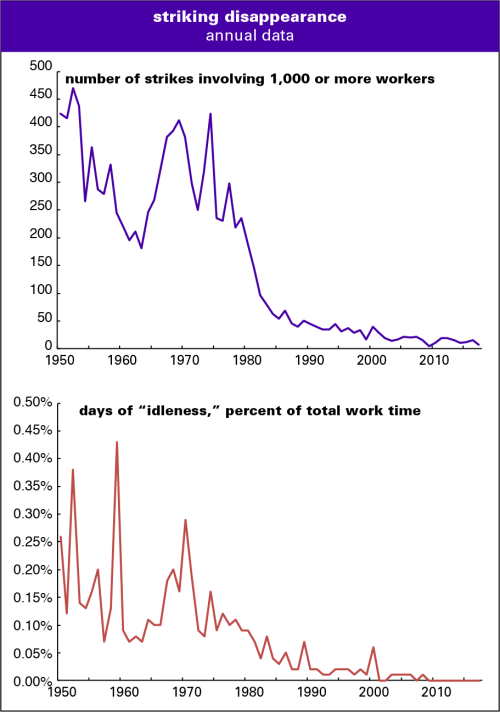
Unions have decreased the number of ‘major strikes’ — those involving more than 1,000 workers — down to seven, from the average of 303 per year in the period 1947 to 1979. and the number of hours in strike ‘idleness’ has fallen 97%.
This demonstrates how unions have been defanged — either by a changed regulatory environment, the ‘realities’ of the globalized economy, or the unions changing their tactics — effectively throwing away their most effective technique of inducing change.
For the record: I was a really good philosophy professor. Just as Erin Bartram, who recounts her story here, was probably a really good history professor. But after getting a PhD and being rejected for a tenure track position, she leaves it behind. All of it. "One response is to tell the person that this doesn’t mean they’re not a historian, that they can still publish, and that they should. 'You can still be part of the conversation!' Some of you may be thinking that right now. To that I say: 'Why should I?' ... we’re also asking people to stay tethered to a community of scholars that has, in many ways, rejected them, and furthermore, asking them to continue contributing the fruits of their labor which we will only consider rigorous enough to cite if they’re published in the most inaccessible and least financially-rewarding ways." I wonder how academia would change if journals were open access and if writers were paid for their contributions. Via Inside Higher Ed. More.
The Dropbox Security Team is responsible for securing over 500 petabytes of data belonging to over half a billion registered users across hundreds of thousands of businesses. Securing data at this scale requires a security team that is not only well-resourced, but also one that can keep ahead of the expansion of our platform. We focus on scaling our own leverage, so each new security person we add multiplies the impact of our team.
Over the course of this year—and beyond—we’ll go into more detail on how Dropbox approaches security and some of the projects we’ve tackled. Protecting Dropbox requires serious investments in security. We have a large number of security sub-teams and we’ll be hearing from many of them. Some of the themes we’ll look to explore in more detail include:
Culture, not training
It’s relatively easy to spin up an annual security training and declare your responsibility done. We do have security training, of course, but stopping there would be a mistake. A security team needs an open, ongoing relationship with the rest of the company, not a once-a-year checkpoint. At Dropbox, we’ve caught many attacks and internal problems early because of this partnership with Dropbox employees. By nurturing our culture of security, we’re scaling out our team’s instincts to the wider company.
Independent validation
The strongest defenses are the ones that are regularly tested and improved on an ongoing basis. I’ve been to dry board meetings in the past where I’ve been asked “do you get an annual pen test?,” as if an affirmative answer were all that’s needed for a robust security posture. We engage annually in not one, but multiple external paid product assessments: pen tests, product security assessments, and formal red team engagements. On top of these external tests, we have a dedicated internal Offensive Security team that performs adversarial testing day in, day out.
And we still do more. On top of that, we invite the broader security community to participate via our Bug Bounty Program. The bounties have helped us close many important bugs, and build strong relationships with researchers. We’ve seen a lot of success and we recently increased our rewards to industry-leading levels. We’ve effectively scaled out security testing to the internet at large.
Engineering advanced tooling
One of the best ways to scale a team is to write code and tools and have computers do the work. We use in-house engineering to counter attempted abuse of our product in many different ways (for example, deflecting password brute forcing attempts). We also use engineering to help with internal security challenges. Last year, we open sourced SecurityBot, a way to automate certain components of internal alerting. For critical applications where commercial tools are lacking, we’re not afraid to engineer open source replacements, such as for Mac OS host monitoring.
Enabling users to self-serve
Helping users to discover features that help them self-secure is a great way to scale. We’re an early supporter of multi-factor authentication and support very strong factors including U2F keys. But launching stronger authentication, ironically, may introduce scaling challenges in account recovery or risk more account lock outs. Our goal is to make strong security easy, so we launched linked mobile devices as a strong self-serve recovery option.
And sometimes it’s simple things like making sure the technology behind “standard” features—such as the password strength estimator—is doing a great job at guiding users to good choices that can have a big impact.
I’m excited for what the team will deliver in 2018. Follow our progress here.
Are the plants in your home or office looking somewhat neglected? Then build an automated gardener using a Raspberry Pi Zero W, with help from the team at Hacker House.
See how we built it, including our materials, code, and supplemental instructions, on Hackster.io: https://www.hackster.io/hackerhouse/automated-indoor-gardener-a90907 With how busy our lives are, it’s sometimes easy to forget to pay a little attention to your thirsty indoor plants until it’s too late and you are left with a crusty pile of yellow carcasses.
Building an automated gardener
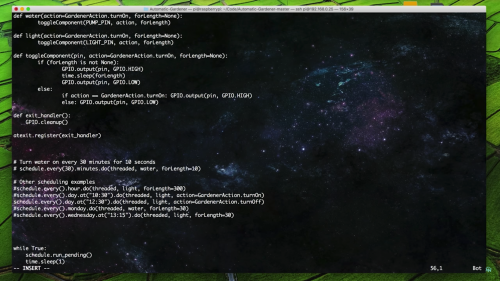
Tired of their plants looking a little too ‘crispy’, Hacker House have created an automated gardener using a Raspberry Pi Zero W alongside some 3D-printed parts, a 5v USB grow light, and a peristaltic pump.
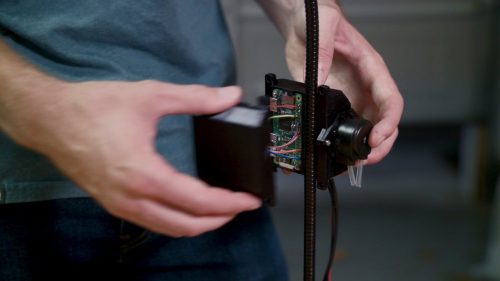
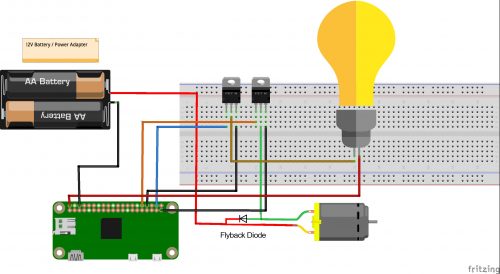
They designed and 3D printed a PLA casing for the project, allowing enough space within for the Raspberry Pi Zero W, the pump, and the added electronics including soldered wiring and two N-channel power MOSFETs. The MOSFETs serve to switch the light and the pump on and off.
Due to the amount of power the light and pump need, the team replaced the Pi’s standard micro USB power supply with a 12v switching supply.
Coding an automated gardener
All the code for the project — a fairly basic Python script —is on the Hacker House GitHub repository. To fit it to your requirements, you may need to edit a few lines of the code, and Hacker House provides information on how to do this. You can also find more details of the build on the hackster.io project page.
While the project runs with preset timings, there’s no reason why you couldn’t upgrade it to be app-based, for example to set a watering schedule when you’re away on holiday.
Raspberry Pis make great babysitters for your favourite plants, both inside and outside your home. Here at Pi Towers, we have Bert, our Slack- and Twitter-connected potted plant who reminds us when he’s thirsty and in need of water.
If you use a Raspberry Pi within your home gardening projects, we’d love to see how you’ve done it. So be sure to share a link with us either in the comments below, or via our social media channels.
Google Maps has become an indispensable part of almost every smartphone users’ life. Google has been continuously updating Maps with more features and data to keep it up to date. Despite all these improvements though, Google has also ensured that even Maps works on even older OS platforms.
Continue reading →
Qualcomm gave journalists the opportunity to take its premium Snapdragon 845 chipset out for a test drive in a reference device, revealing impressive graphics chops.
According to most tech publications, despite architecture changes, the CPU offers only incremental improvements. However, graphics performance is vastly improved with the new Adreno 630 GPU.
Qualcomm promises 30 percent better performance, 2.5 times faster display output and 30 percent estimated power reduction. Across benchmark tests from various platforms, including GFXBench, 3DMark and AnTuTu, the GPU vastly outperformed its predecessor (as tested in a variety of Android flagships from the past year).
The Adreno 630 was, however, edged out in some tests by Apple’s A11 Bionic processor in the iPhone X. The 2017 Apple flagship also beat out the Snapdragon 845 reference device by 15 percent on the Geekbench 4 overall test.
Of course, it’s important to note that benchmarking can only go so far towards evaluating the overall performance of the chipset, especially in a controlled environment and with a reference design that we know little about — though we do know it has a 2560×1440 resolution LCD and 6GB of RAM.
These benchmarks don’t show connectivity, camera performance, battery life, audio and security, among other things. Until the Snapdragon 845 chipset actually touches down in a real-world device, it’s impossible to make any broader statements about performance.
But, at the very least, we know graphics performance is promising.
In 2017, Essential shipped fewer than 90,000 Essential Phones units, according to the International Data Corporation (IDC).
In a tweet sent out this morning, IDC research director Francisco Jeronimo wrote that Essential shipped approximately 88,000 units last year, noting, “Andy Rubin’s Essential smartphone is still a long way from becoming a successful venture.”
. @Arubin's @essential smartphone is still a long way from becoming a successful venture. In 2017, it shipped less than 90K units (first six months after launch) pic.twitter.com/NHVlA2Gjzr
Even when one takes into account the fact that the Essential Phone had been available for less than a year at the end of 2017, 88,000 units shipped is a disappointment by any metric. For the sake of comparison, shipments of Google’s Pixel lineup grew to 3.9 million in 2017, according to Jeronimo. The Pixel lineup is considered a modest commercial success compared to the iPhone and Samsung’s Galaxy S-series.
Worse yet, actual sales are likely to be even lower, with units shipped not equating to units sold. Moreover, the majority of those sales almost certainly came after Essential dropped the price of the phone. In Canada, the Essential Phone is currently $460 outright.
Of course, going into the launch of the Essential Phone, no one likely realistically expected Essential to match Apple and Samsung on its first attempt. But IDC’s statistics reveal just how long and hard of a road the company has ahead before it carves a place for itself in the smartphone space.
Bloomberg’s Mark Gurman is reporting that Apple plans to bring Animoji to the iPad thanks to the release of a new model of the tablet that features the company’s Face ID module. Apple is also bringing Animoji to FaceTime, allowing iOS users to place a virtual emoji over their face while using the company’s video chat platform — a feature Apple should have launched Animoji with.
Universal apps that work across iPhone, iPad and Mac are also set to arrive with iOS 12, according to past rumours. This strategy will likely sound similar to anyone who is familiar with Microsoft’s Windows Universal App initiative that aims to encourage developers to create programs that run across PC, tablet, and phones, including even HoloLens in some cases.
Other new features Apple reportedly plans to add with iOS 12 include a redesigned Stocks app and improved ‘Do Not Disturb’ features.
Bloomberg is also reporting that the expected redesigned home screens for iPhone, iPad and CarPlay, won’t be released until 2019. In the case of the iPad, it’s likely that a significant update for the tablet version of Apple’s mobile operating system, won’t arrive until 2019.
In terms of the iPad, tabs — which have typically only been used in desktop browsers like Windows 10 and macOS — are coming as well, allowing several windows to run inside a single app, as well as he ability to run apps simultaneously, side-by-side.
The update is codenamed ‘Peace’, according to Bloomberg.
As always, all of the above information related to iOS 12 are only rumours at this point, though Bloomberg’s Mark Gurman is often a reliable source of leaks.
A new report from Bloomberg brings to light more details regarding what Google has planned for Android P, which will arrive later this year.
Citing sources “familiar with the situation”, Bloomberg says one of Google’s main goals with ‘Android Pistachio Ice Cream’ — the company’s internal codename for Android P — is to change the look of the operating system, in an effort to make it more appealing to iOS users.
Bloomberg also reports Android P will provide official support for camera notches, like the ones found on both the Essential Phone and the iPhone X.
Official support for display notches is likely on its way due to the fact more smartphone OEMs are working on devices that incorporate bezel-less displays. Recent rumours claim that Huawei and Lenovo are both working on phones with camera notches. The leak also indicates Android P will better support handsets with new designs, such as multiple displays — like ZTE Axon M — and foldable displays.
Google is also planning to more tightly integrate Google Assistant into Android. Bloomberg writes Google plans to allow third-party developers to integrate functionality from the personal assistant directly into their apps. Moreover, the search giant has been experimenting with different ways to more prominently feature Assistant.
Video game consoles typically have lifespans that run between five and six years in most cases, though some systems — the original Nintendo DS or PlayStation 3, for example — have deviated from this formula.
It looks like Nintendo believes the Switch, its latest console, will be an exception to that rule, too. During a recent investor question and answer session, Nintendo’s Shigeru Miyamoto, the creator of iconic video game series like Mario and The Legend ofZelda, stated that he believes that the Switch could have a long lifespan because of its hybrid nature.
“When you think about what can be done with the Nintendo Switch as a device that can be taken on the go and that every person has in their hands to play, you realize it has many features not available on any other hardware to date,” said Miyamoto during the investor’s call.
“Up until now, the hardware lifecycle has trended at around five or six years, but it would be very interesting if we could prolong that life cycle, and I think you should be looking forward to that.”
Nintendo director Shinya Takahashi also said that “junior” developers at the company are still working to “create interesting products,” hinting that the Japanese gaming giant still has future hardware ambitions.
“Behind the unceasing stream of Nintendo Switch software releases to date is an approach to development that concentrates on development, itself the fruit of efforts several years ago to integrate the software development teams, which has made it easier to organize teams,” said Takahashi.
It’s likely that while the Switch could have a lengthy lifespan, Nintendo will continue to release incremental upgrades to the console in order to continue to boost the system’s sales — think standard 3DS and ‘New’ 3DS. In general the Switch has been a massive success for the console, selling approximately 14 million units since its launch last year.
Nintendo recently confirmed that the Switch’s online services will launch in September. For more news on the Nintendo Switch, take a look at my retrospective on the console’s first year.
The hacker, who goes by the username NullHumanity, submitted their claim on the Freedom subreddit on Sunday evening, providing a screenshot of code that appears to show them successfully brute forcing user logins.
Brute force
In an email discussion with MobileSyrup, the hacker said that Freedom Mobile’s customer login system is “forced to the Phone Number/PIN model,” and that customers can’t change this even by calling support, making it easy to brute force logins.
This is because there are only 10,000 possible combinations for PINs (many of which are easy to guess due to their popularity, i.e. ‘1234’) and phone numbers are fairly easy to access.
“There are lots of services out there to identify carrier numbers,” NullHumanity wrote in the Reddit post.
The hacker said they have currently identified 2,000 at-risk accounts on Freedom Mobile’s MyAccount page, but do not intend to do anything malicious with the information they have gained. They believe it would be possible to target as many as 350,000 accounts based on their program’s failure rates and Freedom’s current subscriber numbers.
NullHumanity reported that the following data would be available if a hacker accessed a secondary API using the phone number and PIN combo: full name, date of birth, address, email, phone number, full call history and billing history.
“A phone number is predictable and a 4 digit PIN isn’t secure. Figuring out matching sets can be automated easily,” says NullHumanity.
Are PINs strong enough?
For its part, Freedom Mobile’s vice-president of external affairs, Chethan Lakshman, stated over email: “The security measures we have in place cannot protect against guessing common passwords. We continue to strongly encourage our customers to use unique PIN numbers that are not easy to guess, and to change their PINs frequently to best protect their personal account information.”
Lakshman also said that Freedom continuously reviews its security practices and is “committed to making improvements and changes as appropriate to continue keeping our customers’ information secure.”
Freedom’s security measures, said Lakshman, are designed to protect Freedom Mobile customers’ information from malicious activity while “meeting customer demands for a resonable login process.”
NullHumanity reports the process for accessing customer information is overly simple, however.
“I wrote a script of 23 lines of code. Anyone with basic knowledge can do it,” they wrote, adding that they would not share details of their process due to the potential of making more customers vulnerable.
Stosh Fabricius, a software engineer at digital payments platform Toronto company Pungle, offered context on how it relates to other industries that use similar four-digit solutions, like banking.
“The four-digit PIN is generally combined with something. In banking, when I do the four digit number I also have my card. Only I have my card, and I know my PIN. But phone numbers are easily available,” said Fabricius.
“Their flaw is that phone numbers are widely known and given that I know half of the log-in credential, brute forcing a four-digit PIN is not difficult.”
Password versus PIN
NullHumanity said they first brought the issue to the attention of Freedom Mobile on January 30th, but that they were rebuffed by a series of representatives from Shaw’s legal department.
One contact reportedly told them that four-digit PIN numbers provide adequate security, citing broad use in the banking industry.
A representative from the OPC told MobileSyrup via email the issue is currently “not something we are aware of,” adding that it has no information to provide.
According to NullHumanity, the same method used for hacking Freedom’s system doesn’t work for Rogers, Bell (which recently experienced its own cybersecurity breach), Telus, Fido, Koodo and Virgin, all of which they checked after finding the vulnerability.
“There is a risk that exists, but it is so heavily mitigated by the password system in comparison to the PIN system. Their […] systems however are more comparable to major providers such as Facebook and Google.”
MobileSyrup has reached out to the major Canadian carriers for comment on their security measures.
In the meantime, the hacker says those who are concerned about the vulnerability should create as unique a PIN as possible.
Correction: Article updated to clarify that NullHumanity stated they did not access any information beyond phone number and corresponding PIN.
According to images shared on Twitter, these notifications can be found in the “seen by” area in the bottom left corner when users view their own Instagram stories. In addition to the usual display of which specific viewers opened the story, the new feature has also added a circle shutter icon that will appear beside any user that shared the story through a screenshot.
Instagram confirmed the testing of the feature in a statement to TechCrunch, noting the company is “always testing ways to improve the experience on Instagram and make it easier to share any moment with the people who matter to you.”
It’s worth noting that some Twitter users are reporting a couple of workarounds to this new feature. First off, taking a screenshot of a story in-app while the phone is set to Airplane Mode will prevent the original poster from being notified.
As well, taking a screen grab of a story from Instagram on a web browser on desktop will also avoid will also prevent any notifications from being sent.
As with any feature being tested on social media, it’s currently unclear when — or if — story screenshot notifications will release to all users.
Apple doesn’t release the number of Apple Watches the company sells per quarter, instead opting to list the wearable in its “other products” category, which also includes Apple TV sales, as well as a number of other products.
That doesn’t stop analysts from estimating how well the company’s smartwatch is selling though. In this case, analysts suggest that Apple sold more than the entire Swiss watch industry combined in the last quarter.
The Federation of the Swiss Watch Industry includes, Rolex, Montblanc, TAG Heuer, Swatch and more. The Federation publicly released its Apple watch shipment statistics, comparing them to Canalys and the IDC’s numbers.
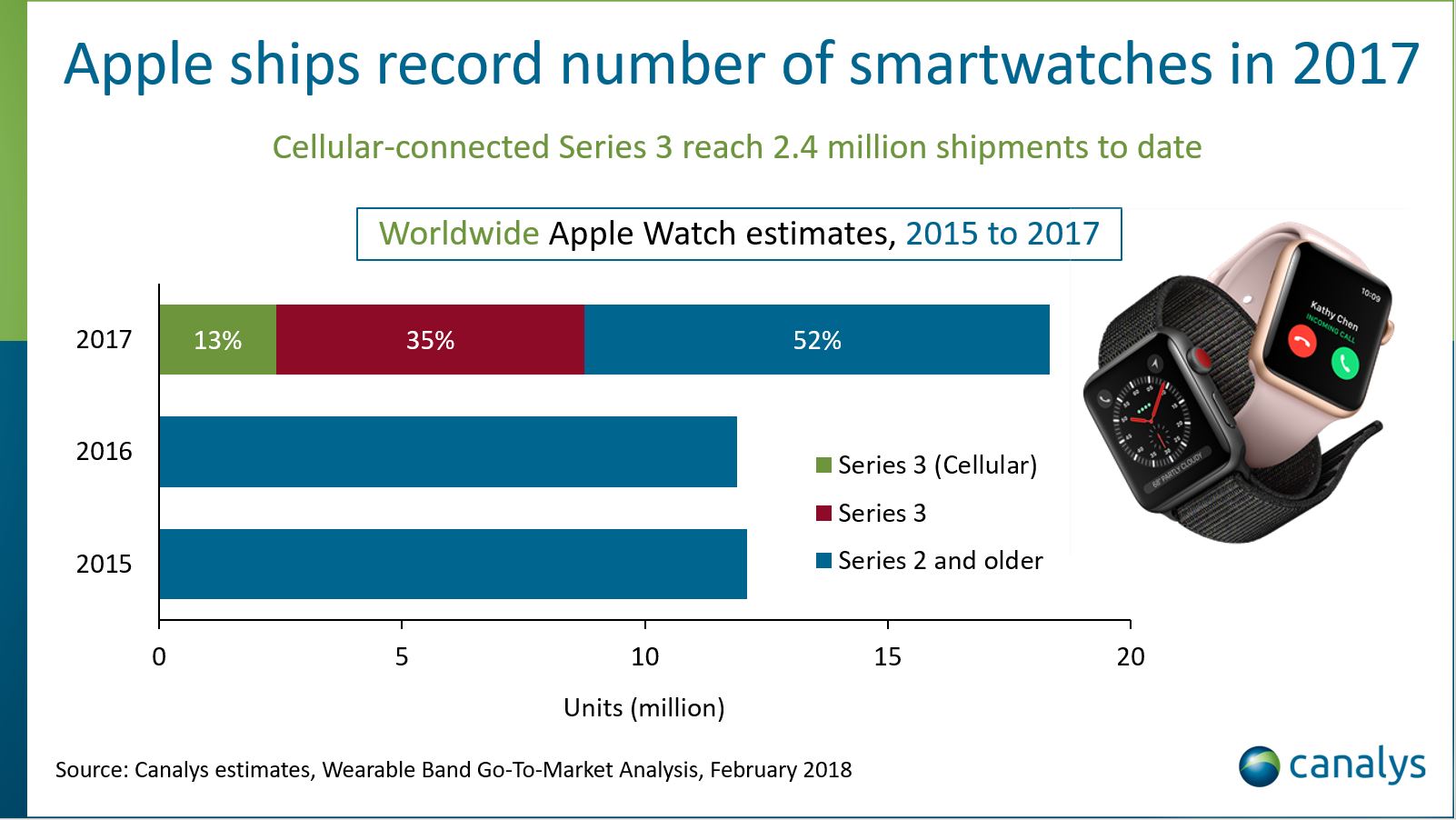
According to Canalys, Apple shipped more than 8 million Apple Watch units in the last quarter of 2017. In comparison, the Swiss watch making industry sold 6.3 million watches from October 2017 to December 2017.
“It was our best quarter ever for the Apple Watch with over 50 percent growth in revenue and units for the fourth quarter in a row and strong double-digit growth in every geographic segment,” said Apple CEO Tim Cook during the company’s earnings call on February 1st. “Sales of Apple Watch Series 3 models were also more than twice the volume of Series 2 a year ago.”
According to Canalys, the release of the Apple Watch Series 3 greatly affected the company’s sales as the wearable made up for a little less than half of the company’s smartwatch shipments for the year.
To an extent, these stats make sense given high-end watch manufacturers are targeting a very specific audience with their ultra-expensive time keeping devices.
That said, you could also argue that Apple’s smartwatch isn’t exactly affordable either, though its cost pales in comparison to a standard Rolex.
Torontonians looking for a quicker way to rent vehicles have a new digital solution on the market, courtesy of General Motors.
Maven is an Android and iOS app designed by General Motors that allows users to rent, locate and unlock consumer vehicles for personal users, with no sign-up or membership fees to begin using the service.
Users simply download the Maven app, reserve a car from a Maven pick-up location, unlock the vehicle using their phone, drive the car for as long as they need it, and then return the car to its original pick-up location when they’re done.
Additionally, users only pay for their vehicles when they’re in the car. Rates begin at $9 CAD per hour, including gas and insurance costs.
Users will have access to 40 vehicles at launch, including the Chevrolet Cruze, Malibu, Tahoe, Trax and Volt, as well as the GMC Acadia and Yukon and the Cadillac ATS and XT5.
Vehicle pick-up locations including Bloor West Village, Liberty Village, King West, the Entertainment District, Ryerson University, the Danforth and the Eaton Centre.
“Bringing Maven car-sharing to Toronto not only reduces congestion, but also represents the latest step in the development of General Motors’ mobility footprint in Canada,” said Steve Carlisle, president and managing director of GM Canada, in a February 12th, 2018 media release.
“The launch of Maven follows the recent opening of our Canadian Technical Centre — Markham Campus, the largest automotive technology development centre of its kind in Canada and furthers our ability to bring new solutions to existing problems and redefine the future of mobility in Toronto and beyond.”
All Maven vehicles will also come with the OnStar infotainment platform, Wi-Fi, Apple CarPlay, Android Auto and SiriusXM Radio.
Maven was announced by General Motors in January 2016, with a trial program at the University of Michigan at Ann Arbor, in Ann Arbor, Michigan.
And now in a few months Google will potentially unveil Android Pistachio Ice Cream.
According to Bloomberg, Google is internally calling Android P, the upcoming update for its Android operating system, Pistachio Ice Cream. As sweet as this would be, it’s likely that Google will not go ahead with this code name for the operating system. Bloomberg cites “people familiar with the situation.”
It wouldn’t be the first time Google didn’t use the same internal code name for its operating system as the name it announced. Android KitKat was referred to internally as Android Key Lime Pie. The company changed the name before launch.
We’ve also already had Ice Cream Sandwich, would Google really want us to have that much dairy?
What do you think about Android Pistachio Ice Cream? Let us know in the comment section below.


 Images: Metro News, Calgary Herald








 Ulysses Blog.


 Price Tags.


 Sleeve Fierce @Lesley_NOPE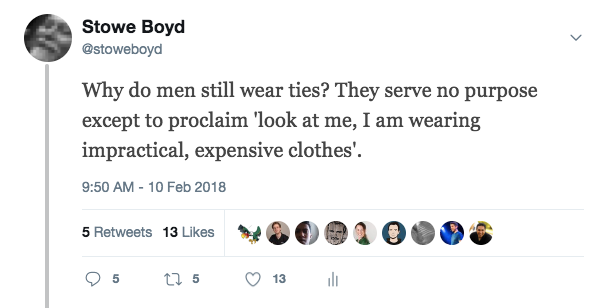




 Google Maps has become an indispensable part of almost every smartphone users’ life. Google has been continuously updating Maps with more features and data to keep it up to date. Despite all these improvements though, Google has also ensured that even Maps works on even older OS platforms.
Continue reading →
Google Maps has become an indispensable part of almost every smartphone users’ life. Google has been continuously updating Maps with more features and data to keep it up to date. Despite all these improvements though, Google has also ensured that even Maps works on even older OS platforms.
Continue reading →


(@readbyher) February 11, 2018