Thanks to the latest EU roaming regulation that went into effect last summer, it’s now possible to pretty much use a mobile subscription from any country in the EU in any other country in the EU at pretty much the same price like at home. Yes, there are quite some loopholes when it comes to the amount of data but let’s say the general rule holds true. In one particular case it is even significantly cheaper a mobile subscription abroad rather than in the home country: Making calls to a mobile subscriber in a third EU country.
When most people are in their home country, network operators usually charge them steep prices for calls to other EU countries, especially to mobile lines. Prices of one euro per minute or even more are no exception. From a financial point of view there doesn’t seem to be any reason for this as international interconnection charges are in the same order of magnitude as as national interconnection charges which are below one or two cents a minute. Prices for calls to EU mobile numbers have also not changed significantly over the years so market forces are definitely not working in this sector.
The situation reminds me of how things stood in fixed line networks at the end of the 1990’s. High prices due to missing competition. The fix at the time: Introduce competition by requiring incumbent operators to connect their users to alternative long distance operators with access numbers and take over billing for them. This way, users would dial the access code for a long distance operator without the need for any registration or separate bill settlement. Dead simple for the user and it changed the way we communicate beyond recognition and made the countries and the EU move closer together like never before.
Perhaps it’s time now to introduce the same in mobile? I would argue that this would even benefit mobile network operators as people would likely make more calls to international destinations from their mobile phones while at home rather than to look for alternatives. On the other hand, unlike back in the 1990’s there is competition for international calls today from Internet based companies. There are quite some companies out there now that offer mobile apps to make significantly cheaper international calls from mobile devices. In recent years I’ve met quite a number of people who, for example, use Viber on their phone over Wifi or over cellular with their monthly cellular data bucket to call abroad for a few cents a minute rather than a euro a minute or more.
So one could argue that the market for international mobile calls is working when taking mobile apps into account. Still, mobile network operators have the advantage that to some extent, calling apps are much less convenient and universal to use and that privacy minded people are not willing to let third party apps have a go at their address book. However, at least the first advantage won’t be there for much longer. Mobile operating systems are getting better and better at integrating such apps into the overall telephony experience so convenience is increasing. It’s time for mobile network operators to wake up…
Amazon.ca has discounted the Sonos Play:1 speaker, in both black and white colour variants, to $200 CAD.
The deal, first spotted by iPhone in Canada, discounts the Sonos’ original Play speaker by 20 percent, matching the deepest discount Amazon has ever offered on the Play:1.
Sonos Alexa support launched in Canada last week, but while the Play:1 doesn’t include native voice support for Alexa, it’s still possible to use the voice-activated assistant to control the speaker using either a Sonos One or an Echo smart speaker.
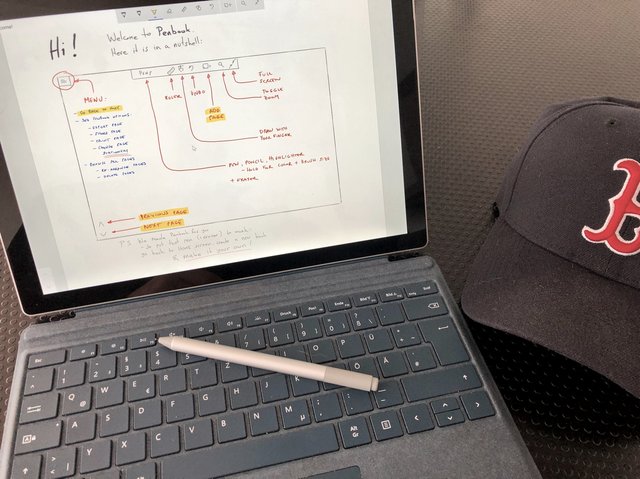
Penbook ist ein großartiges Programm, das Notizen auf dem Surface oder anderen Windows-Geräten mit Pen unterstützt. Es gibt jede Menge Vorlagen, inklusive Notenblätter, die man hinterlegen kann. Wenn man ganz spezielle Wünsche hat, kann man sogar eigene PDFs importieren. Sehr hilfreich ist, dass man spezielle Hintergründe für Calligraphie, isometische oder perspektivische Skizzen zunächt einblenden und später verbergen kann. Penbook organisiert die einzelnen Seiten in Notizbüchern und kann sie auch als PDF exportieren.
To aid his mother in reading the labels of her groceries, Russell Grokett linked a laser barcode reader to a Raspberry Pi Zero W to read out the names of scanned item.
My mom is unable to read labels on grocery items anymore, so I went looking for solutions. After seeing that bar code readers for the blind run many hundreds of dollars, I wanted to see what could be done using a Raspberry Pi and a USB Barcode reader.
Exploring accessibility issues
As his mother is no longer able to read the labels on her groceries, Russell Grokett started exploring accessibility devices to help her out. When he came across high-priced barcode readers, he decided to take matters into his own hands.
Camera vs scanner
Originally opting for a camera to read the codes, Russell encountered issues with light and camera angle. This forced him to think of a new option, and he soon changed his prototype to include a laser barcode reader for around $30. The added bonus was that Raspbian supported the reader out of the box, reducing the need for configuration — always a plus for any maker.
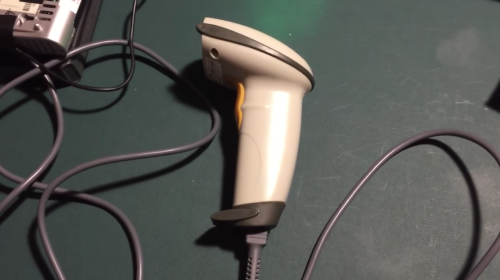
Russell’s laser barcode scanner, picked up online for around $30
No internet, please
With the issues of the camera neatly resolved, Russell had another obstacle to overcome: the device’s internet access, or lack thereof, when his mother was out of range of WiFi, for example at a store.
Another key requirement was that this should work WITHOUT an internet connection (such as at a store or friend’s house). So the database and text-to-speech had to be self-contained.
Russell tackled this by scouring the internet for open-source UPC code databases, collecting barcode data to be stored on the Raspberry Pi. Due to cost (few databases are available for free), he was forced to stitch together bits of information he could find, resigning himself to inputting new information manually in the future.
I was able to put a couple open-source databases together (sources in appendix below), but even with nearly 700000 items in it, a vast number are missing.
To this end, I have done two things: one is to focus on grocery items specifically, and the other is to add a webserver to the Raspberry Pi to allow adding new UPC codes manually, though this does require at least local network connectivity.
Read it aloud
For the text-to-speech function of the project, Russell used Flite, as this interface makes a healthy compromise between quality of audio and speed. As he explains in his Instructables tutorial, you can find out more about using Flite on the Adafruit website.
When an item is scanned, the Raspberry Pi plays back audio of its name
In order to maintain the handheld size of the scanner, Russell used a Raspberry Pi Zero W for the project, and he repurposed his audio setup of a previous build, the Earthquake Pi.
Make your own
Find a full breakdown of the build, including ingredients, code, and future plans on Instructables. And while you’re there, be sure to check out Russell’s other Raspberry Pi–based projects, such as PiTextReader, a DIY text-to-speech reader; and the aforementioned Earthquake Pi, a light-flashing, box-rattling earthquake indicator for your desk.
Dire Straits’ records have always been notably good-sounding, and
Brothers in Arms became the occasion for the
purchase of a brand-new CD player back in the day for many music geeks — I was one of them.
The title song sounds good too, but today we’re acknowledging its beauty and sadness and message.
The beauty, superficially, is in the exquisite guitar obbligatos that come in after each sad verse. But there’s more; while
nobody would call Mark Knopfler one of the great singers, he really gives it all he’s got on Brothers, suggesting notes
that are way out of his reach, and just the right amounts of room in between, here and there. Also, he had a beat-up old man’s voice
right from the start, and that’s what this song needs.
Also, the sound. If you’re one of those troglodytes who still has a “stereo” that you play “recordings” on, and also you happen
to have this recording, go put on this song and turn it up. Turn it up really loud; louder by a wide margin than the loudest you
ever go. Chances are, it’ll sound great. There’s something about this song (and also The Man’s Too Strong) that makes
it keep sounding good at huge, crushing, unreasonable levels.
And then there’s the message; sadness, men’s sadness specifically, the sad stupidity of men going to war especially, and losing
their homes, and the absolute companionship of being Brothers in Arms is not close to making up for it: It’s written in the stars / and
every line on your palm / We were fools to make war / on our brothers in arms.
Spotify
playlist.
This tune on
Spotify,
iTunes,
Amazon. There are loads of performances out there on video and it sure is an enjoyable way to
spend an hour, watching a half dozen or so. I picked four:
early & minimal (georgeous outro);
later and more musically ambitious, later again
in 1997 with a full orchestra,
and finally
2010, seated and with a little extra feeling.
At the end of the day you’re done with work, you go home—and you don’t spend any of your free time coding.
And that’s fine, you have other things going on in your life.
But your coworker does spend another 20 hours a week coding, and all that practice means they’ll end up better programmers than you, and so they’ll get promoted faster, and they’ll get paid more.
And that’s not fine.
It’s also not true.
That inadequacy you’re feeling is based on false assumptions, a misunderstanding of the skills it takes to be a good programmer.
Enthusiasts who love coding as a hobby are valuable, yes, but so are you: even if extra hours of coding result in better skills—often a very doubtful assumption—their approach is not inherently better.
All but the smallest of programming projects are team efforts, requiring a variety of skills, knowledge, and mindsets.
The mindset of someone who view programming as a tool to do their jobs—let’s call them pragmatists—is just as useful as the mindset of enthusiasts.
To understand why, let’s go through the lifecycle of the enthusiast programmer, see how their skills evolve, and compare them to the pragmatists’ approach.
As you’ll see, enthusiasts and pragmatists start out with different strengths, and software teams can benefit from both.
The enthusiast’s path
The enthusiast’s starting point is a love of programming: they love to code.
They take joy in writing software, and understanding the intricacies of the technologies they use.
Over time, as they become more skilled and experienced, they expand their point of view.
Instead of just wanting to write code, they want to write good code, high-quality code: they want to be proud of their work.
So now they focus not just on the joy of coding, but also on less enjoyable but important disciplines like testing.
If they continue to grow in skill and experience, they will eventually hit a point where they see code as a tool: a means to an end.
Software is still fun, yes, but it also needs to be written to achieve certain goals.
At this point quality becomes less of an obvious objective criteria: every situation is different, and what works in one situation doesn’t work in another.
Strengths and weaknesses: Enthusiasts often have a strong grasp of the tools and technologies they use.
On the other hand, they are sometimes prone to holy wars and zealotry (they feel it’s important to choose the very best tool), and until they finally realize software is a means, not an end, they have a harder time working towards goals that aren’t about writing software.
The pragmatist’s path
The enthusiast’s weaknesses are the pragmatist’s strength.
Pragmatists start out seeing software as a means to end: they will tell you “I like writing software, but mostly I care about what the software lets me do.”
So what can take the enthusiast years to learn—a focus on goals—comes naturally to the pragmatist.
With time and practice, the strengths of enthusiasts and pragmatists can converge.
Even so, different people will typically end up with different skillsets, different approaches, and different ways of building software.
This is how it should be.
Software projects are too big to be built by one person, too complex to be encompassed by one view point.
When you compare yourself to your peers, you shouldn’t ignore your weakness, but you should also value your own strengths.
You can and should learn from your colleagues, but chances are there’s something you can teach them.
A week later, I still haven’t quite caught up on my personal backlog, and as such I decided to take the time to systematically go through my notes and to-dos and make an attempt at consolidating them. Being a “checklist person”, I tend to use them to plan ahead, but lacking the time to follow through at home, I ended up with around a dozen lists whose top item was “Sort photos”.
And so I did–or at least started to.
My personal filing system is still the same: a plain, unadorned filesystem tree, with uniform filenames courtesy of jhead and a few Automator workflows:
However, things have become rather complex over the years:
I now have to deal with multiple sources: iCloud, OneDrive camera rolls, and the odd SD card. I haven’t plugged in a camera to any Mac for years.
Besides photos and several flavours of videos (most converted to MPEG-4), I now have an increasing number (and kind) of RAW formats, from DNG to CR2.
Reading metadata off all of those (and managing it) has become somewhat of a puzzle.
The current standard for sidecar metadata, XMP, is the ugliest piece of XML-insipred trash I’ve ever had the displeasure of dealing with.
…and, regrettably, darktable insists on creating XMP files all over the place, which somewhat complicates matters whenever I need to move or rename files.
But I’m learning to live with this (and have been adapting my workflow and scripts to cope), with the result that I have started making some headway into my photo backlog, which is now somewhere in mid-2017.
As always, shootShifter is invaluable whenever I come across events shot with multiple cameras and need to line everything up to the second, but it helps if I split photos across folders on a per-camera basis, so I revamped one of my old helper scripts:
#!/bin/env python3

import os, re, sys, subprocess, shutil

db_pattern = re.compile('^\d{4}-\d{2}-\d{2} \d{2}\.\d{2}\.\d{2}')
jhead_pattern = re.compile('^\d{14}')

files = os.listdir('.')
for f in files:
    name, ext = os.path.splitext(f)
    if db_pattern.match(name):
        os.rename(f, name.replace(' ','').replace('-','').replace('.','') + ext)

photos = filter(lambda x: '.jpg' in x.lower(),os.listdir('.'))
for name in photos:
    pipe = subprocess.Popen("jhead %s" % name, shell=True, stdout=subprocess.PIPE).stdout
    # yes, this is somewhat LISPy, but it saves me a lot of time:
    meta = {k: v for k, v in list(map(lambda x: map(lambda x: str(x.strip()), x.split(':',1)),map(lambda x: x.decode('utf-8').strip(),pipe.readlines())))[:-1]}
    try:
        print(meta)
        folder = meta['Camera model']
        name, ext = os.path.splitext(meta['File name'])
        if jhead_pattern.match(name):
            # split by year, month, day, camera (makes it easier to process dupes)
            folder = '%s/%s/%s/%s' % (name[0:4],name[4:6],name[6:8],folder)
        if not os.path.exists(folder):
            os.makedirs(folder)
        shutil.move(meta['File name'], folder)
    except Exception as e:
        try:
            print("Error %s while handling %s %s" % (e,folder,name+ext))
        except:
            print("Got %s" % e)
        pass
The above uses jhead to split files according to date and camera model. It only deals with JPEG files, but I have a very similar (and shorter) one with mdls that does a similar thing for all image formats macOS understands by looking for kMDItemAcquisitionModel, but this one is likely to be of more general interest.
Of course, regardless of how much automation you use for photography you still have to eyeball things, and my new iMac, thanks to its glorious 5K display and the 4K panel I have alongside, is hands down the best machine I’ve ever owned for photo work, so things are going fairly smoothly.
There are only two caveats:
No amount of CPU power will ever be enough to cope with RAW satisfactorily in my book
darktable can be dog slow when navigating large collections
The latter is not due to formats or any real processing, but seems to be a rather unfortunate side effect of the GTK layer it’s built upon and the current state of OpenCL support on the Mac.
It is so obviously an UI lag problem that I’m quite surprised it hasn’t been fixed yet. But most darktable users seem to be using Linux, and as such I have a feeling macOS support isn’t a high priority for the project (something that this issue and this one seem to confirm, seeing as they’re still extant and have had little to no attention).
Moving on to stuff I can control, I expect to spend some time addressing the lack of a photo gallery in this site fairly soon. I’ve been meaning to move off Flickr for years, and I’ve been doing some fairly neat OpenCV and neural network trickery, so there are a few things I want to try.
The final report and data from the 4th ALT annual member survey are now openly available from the ALT open repository. The data and report provide a really rich picture of the priorities and practicalities around implementing and supporting technology in education across the UK. This year it is very interesting to note the growing importance of staff development and professional recognition opportunities in terms of enablers for the use of learning technology. If you really want to know what is going on, where the immediate future is now then I would suggest that you have a look at the findings of the survey.
VLEs, e-assessment, blended learning are top priorities this year, and have been consistently. Why open education has taken a drop in priorities is something that I’m sure will be debated at #oer18 and at this year’s #altc conference in September. (NB There’s still time to submit to the conference, the deadline is 8 March).
Part of me wants to believe it’s because open educational practice and resources are now embedded and part of mainstream practice. However, another part of knows that it’s not quite that simple. Open-ness is often the first thing to get overlooked if there isn’t serious senior management commitment. I don’t think we have hit the sweet spot where the bottom up open practice that I see many people participating in has met a top down, sustained institutional, sectoral/ government level of support.
I want to highlight the richness of data that is now openly available via the survey. Please explore and use it, and encourage your colleagues do the same.
Source You often hear people rattle off their top lists as to where they’d love to travel to and on many of these lists you will hear the words ‘New Orleans’. What makes the Big Easy so sought after by travellers though? Being one of the oldest cities in the United States is a good […]
One of the landmarks on my commute in to work every day has been Honest Ed’s, a Toronto institution that has been in the process of being demolished. Back in December, I started taking a series of pictures, mostly from Bloor and Markham, where I would pull over briefly, just off the bike lane.
Here is the first picture from December 3, 2017, where most of the building south of the Bloor St. Facade was already gone.
Dec 8
Dec 12
Dec 27
January 4
Jan 10
Jan 13
Jan 30
January 30, from Bloor and Bathurst
February 5
At this point, I had to go out of town for a few days, and I didn’t manage to get the last pictures of the corner, but you can see an Instagram video here:
Feb 9: just as last bits of the corner entrance are demolished.
Feb12: From this panorama, you can see that all that’s left of the ground floor is a little section off Bathurst.
Feb 15
Feb 27. Even some of the hoarding along Bathurst has come down, and now you can see across to some of the properties on Markham St. that have yet to come down.
A gloss is "‘a brief definition or synonym, either in (your first or second language) which is provided with [a] text’ They can take many forms (e.g. annotations in the margin or at the foot a printed page), but electronic or CALL glossing is ‘an instant look-up capability – dictionary or linked’". It's where the term 'glossary' comes from. The question here is, do glosses help reading comprehension in language learning. But the more meta - and more interesting - question asks whether we can rely on meta-analyses to learn the answer to questions like the first question. "We need to be cautious about using meta-analyses and effect sizes... we cannot necessarily assume that the findings of meta-meta-analyses are educationally significant."
If you like a Samsung Galaxy S8, then you will like the S9 even better. It already has the Oreo Update, its fingerprint reader is finally in the right position, the screen is brilliant, the camera is solid. I don't see it superior to the other flagships like iPhone 8/X or Pixel 2. I also find these comparisons completely irrelavant. The differences are so little, that you can choose whatever your heart desires.
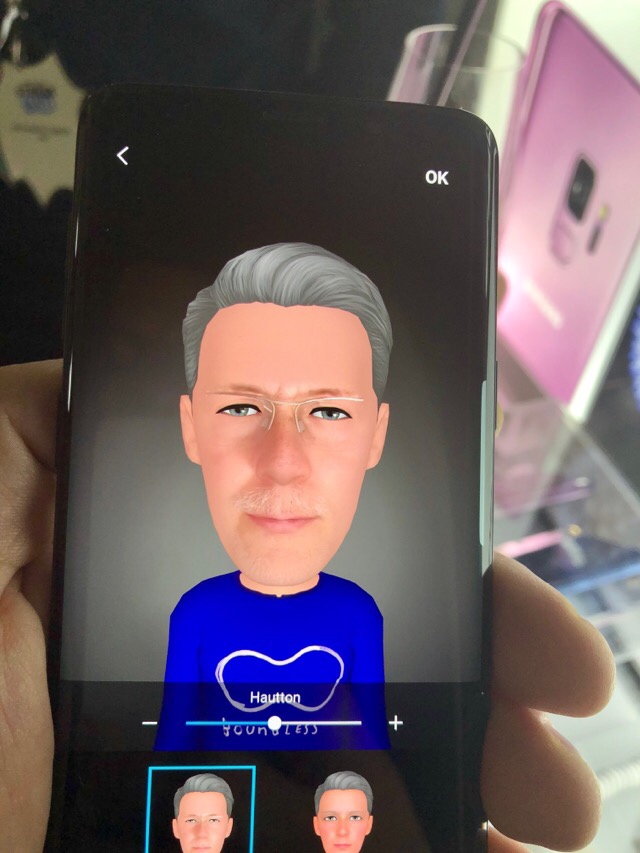
If you don't like Samsung phones, you can still find enough things to dismiss it. New features like the ARemojis are a terrible miss. Example in the photo above. This is supposed to be me. You can literally see the product manager trying to one-up Apple on their Animojis. S9 simply does not have the face tracking the iPhone X provides.
Same thing goes for the unlock with the front facing camera. Samsung combined two of last years features into one: face recognition, which works well in well-lit environments, and Iris recognition, which works well in low light, into one face unlock. Its false positive rate is high enough, that Samsung does not let you authorize purchases with it. But hey, face unlock. Check.
The 960 fps Slow Motion is a total gimmick. It only records a quarter of a second and renders those 240 frames into a six second 720p video. The Samsung PR rep was unable to shoot a single one indoors in normal lighting. Motion detection would not trigger, and without motion detection you will miss the moment. If you want to record 240 fps slo-mo in 1080p, you can do it for 5 minutes after which the S9 will stop recording to avoid overheating. The iPhone 8/X is more efficient and will record as long as you want, but I never wanted more than a minute, so that limit is irrelevant to me.
Do these gimmicks matter? Not in the least bit. They are just present as ammunition for people who like to one-up their friends. What did matter to me was better cases than Samsung presented with the S8 on launch. There is a really nice Alcantara Case that will protect the corners and covers the fingerprint magnet backside. It still leaves the rounded screen edge open. This is a good tradeoff between usability and protection.
Great new idea for a TV show: "Communist Eye for the Bourgeois Guy."
Five communists find one bourgeois Capitalist, seize his property, and put him into a labor camp to teach him that in a just society everyone has to work.
Does anything say ‘brutalism’ better than the Vancouver Masonic Centre on West 8th just off Granville? It gets a bad rap in part because the only part really visible is the back, as seen from West 7th:
The front is in the modified Vancouver brutalist style of the 70s: disguised to the point of invisibility with landscaping. (Wouldn’t you love to have read the architect’s rationale for this building in 1974 by Underwood McKinley Cameron Wilson & Smith?)
These buildings do present a dilemma for preservationists: they’re so hard to love even though they very much represent the style and ideology of the times. The centre actually has a C heritage rating.*
Take a last look, though – it’s coming down, to be replaced by a four-storey masonic hall and an 18-storey secured rental tower, designed by SHAPE Architecture.
*It’s a serious question: what brutalist building should we preserve to have a record of those times? Nominate your favoured one in Comments.
“Innovation and change make inordinate time demands on the executive. All one can think and do in a short time is to think what one already knows and to do as one has always done.”
Peter Drucker – The Effective Executive
Once again, Peter Drucker offers insights for today even though this was originally written in 1967. Taken at face value it suggests that innovation in today’s organizations is a fool’s quest. A few people—Cal Newport, for example, in “Deep Work”—have begun to pick up on this, but they are distinctly in the minority. They can be nearly impossible to notice or hear in the cacophony of productivity advice, inboxes littered with offers to write your best-selling book in 90 days, and workshops to design your business model in a weekend. We have always been enamored with speed and live in an environment that raises speed to a religion. Thinking hard has rarely been popular.
There are some counterexamples. Bill Gates was famous for his “Think Weeks” where he withdrew from his day to day responsibilities to look beyond the immediate. The question for mere mortals is how to create the time and space needed to do the kind of thinking needed for innovation. Recognizing the challenge is, doubtless, the first step. Few of us have the luxury or clout of a Bill Gates to dedicate entire weeks for deep thought; we can all recognize that some kinds of thinking and reflection require bigger chunks of time and carve out those chunks where they can be found.
Another thing worth doing is to get better at stringing those chunks together in more effective ways. I’ve taken a run at this before, for example,
Distraction is the enemy of reflection. What Drucker is pointing out is that the underlying time demands for innovative thought flow from the demands of clearing your mind of the immediate and building the internal mental models necessary for deep work. I think of it as learning to meditate in a particular direction. We know a good bit about step one from the lessons of meditation. But meditation tends to stop there. The second step is to point your thinking in a particular direction and provide useful supplies for the journey. There is a process and discipline to thinking about innovation that is learnable. It is a skill that can be improved with deliberate practice.
Last year, Google surprised everyone by releasing the first Developer Preview of Android O in mid-March. The company seems to be planning something similar this year as well as there have been numerous hints of the first Developer Preview of Android P being released in March.
Continue reading →
I really, really like this idea. But I think it lacks appointments and real maps to be truly useful, and even that would require a degree of back-end integration that might be too much.
Also, when’s the last time you actually sent an SMS instead of WhatsApp or iMessage?
Just posted some pictures from the Toronto International bike show over at Dandyhorse. My two favourite bikes at the show were the Tern GSD, and this Cherubim gravel bike commissioned by Blacksmith Cycle.
Ridiculously small fender clearance….and yes I’m wondering why the fender is crooked as well.
The other thing I’ll mention is this smart helmet: the Cyclevision Edge. It has front and rear 160° HD video cameras. You can check out all the features at their kickstarter page.
It will eventually retail for $660 AUS (versus $500 AUS on kickstarter). I couldn’t help comparing this to the Classon helmet, a kickstarter campaign for a similar helmet that was funded back in July 2016, with a promised delivery of April 2017, but appears to still be nowhere near production.
The big story this year seems to be e-bikes, and the prices are slowly coming down in the segment, with the cheapest bikes being of the order of $1800. Still with the recent news that local vendor BionX has just gone under, there is still a lot of shaking out that will happen before things settle down.
Head on over to Dandyhorse for many more pictures and words.
This recent article from UNEP highlights the case of Lake Chad, on the border of Niger, Nigeria, Cameroon and Chad in Africa, that is suffering from a very similar story to these other examples. A significant loss in the lake’s extent (90% over the last 60 years) as a consequence of drought, overuse and climate change impacts has furthermore lead to the numerous intertwined social-ecological problems of water scarcity, biodiversity loss, environmental degradation, food security, employment, displacement…
Local and regional cases from across the planet, but that point towards the very real impacts of climate change (that both drives, and is driven by, numerous other social and environmental issues) on our planet now- and in the context of the most fundamental of all resources for life: water.
From waaaay back in 1926, this one. What happened was, I wanted the series to drop by Willie Nelson, and my fave Willie
album is
Stardust, and song on it is Blue Skies. That whole album is salve for the wounded
soul I think, and Blue Skies maybe the sweetest and strongest. But, boy, does this one ever have a history.
Typing “Blue Skies live” into YouTube gets you into some surprising territory. Just so you don’t have to, I listened to versions
by Nina Simone, Frank Sinatra, Dinah Washington, Al Jolson, Earl Hines, and Ella Fitzgerald. I think the clear winners on musical
merit are Ella and Willie.
Then there’s this sub-sub-sub-genre of people who do weird shit with Blue Skies, notably
Al Jolson in the Jazz Singer, a little on the creepy side, and then
this
completely deranged jazz mashup starring Nat King Cole, Patti Page, Ben
Webster, and Gene Krupa. I guarantee you’ve never seen anything quite like it.
As for the song, it’s only got about thirty seconds worth of lyrics and a melody that goes around three times, but oh my goodness
that melody, it’s a keeper.
Spotify
playlist.
This tune on
Amazon,
iTunes,
Spotify.
Now, as for live video, it seems there’s one posted to YouTube for each of Willie’s many years of life, and he’s gotten into this
really mannered phrasing, where the beats are cruising by pleasantly, then Willie goes “BlueSkiesShiningAtMe…” all packed into
the first quarter of the line; I think he’s trying to introduce a little sadness? But it doesn’t work, because while every
singer fools with the phrasing on Blue Skies, you have to feel the attachment to the underlying beat, which by the way
Willie does effortlessly on Stardust. In
this Budokan show, Willie is better anchored; plus, he plays a pretty
cosmic guitar break.
Spending a few days at the Cayman Islands, where the WiFi is weak and the rum is strong. When I relax, I become creative and reflective. Writing helps me develop these creative thoughts and deepens my personal reflection. It's a virtuous cycle, because when I see my world, myself and my ideas more clearly, it helps me relax even more. Relaxing makes me write and writing makes me relax.
In PEI we are working towards bringing ‘maker sensibility’ to our classrooms and trying to come up with a functional approach to getting this done. I’m hoping to help support the pockets of creative projects that currently happening in our system with maker/tech and pedagogy supports that can allow teachers to feel as comfortable as possible putting student lead creativity at the centre of their classrooms.
I’m working towards a model I’m calling STELAM (Science, Technology, Engineering, Language Arts, and Math). It takes STEAM sensibility and embeds it deeply into the language arts classroom.
What do the words really mean?
The acronym STEAM (Science Technology Engineering Arts and Math) means different things to different people. The usage of the acronym STEM (without the arts) is fairly recent, its really only come into fashion in the last 10 or 15 years. It’s a response, partially, to the concern that some people have that we need more science-type people being trained in our schools. There is a greatdeal of debatearound whether this is true. I am comfortable, however, claiming that the kind of critical thinking that can come from exploring STEM style projects can be useful to students. Let’s take that as a shared premise and move forward.
The addition to the A (Arts) in STEAM is a recognition that there’s more to being a successful STEM person than just the STEM. You need creativity and the ability to communicate. I think of it as a way of mapping the STEM concern to the Maker movement. When you combine the research skills that come from STEM with the creativity that comes with art, you end up with the potential for a rich classroom experience that creates some connective tissue between our curricular silos. That’s when this gets really exciting.
In a day when everyone thinks, “There’s an app for that,” many educators believe that we’re missing the point of technology if we think its best use is programming kids to memorize math facts. Students don’t want to use apps — they want to make them.
The maker movement is committed to putting students at the centre of their learning. That learning ‘may’ involve the use of technology, or it may be building things out of cardboard, but it brings a hands on, student lead flavour to how we explore our curriculum.
Maker carts
Here in PEI we are taking a maker cart approach. Imagine a cart that you can roll into you classroom with everything from cardboard screws to 15 Microbits on it. That number ’15’ is relevant because we’re looking to populate the carts so that kids can work in pairs. The carts will also have an age appropriate collection of other things that can help you make things, both tech and craft. This gives us a bit more flexibility in terms of scheduling, and it is WAY easier to get one cart down the hallway, then to get 24 kids down a hallway :). You can also imagine the contents of a maker space divided into four or six carts that could be used at the same time by different teachers.
STELAM (Science, Technology, Engineering, Language Arts and Math)
So what are going do with this stuff? In a real classroom? Excellent question, thank you for asking. I want to work it into language arts. I mean, not only language arts necessarily, but its the real focus of my interest. i want kids to create an elephant out of cardboard, and build a robotic interface inside of it that lights up its eyes, or makes it roar when you get too close or… whatever. But i want them to use it as a communication object.
Why?
I have zero interest in measuring creativity
I have no interest in measuring how creative a kid is. I’m happy to encourage creativity all day. Reward particularly interesting bursts of it. Take pictures of it and post it online. But i have no interest in giving your cardboard elephant a 92 and your cardboard treehouse a 78. None. If we think of the maker process as a pedagogy… then i don’t have to. It’s the WAY that we go about learning something, not the something that needs to be learned.
More time for being creative
If I’m in a language arts classroom, working on a personal reflection about my elephant, or doing procedural writing about how to build it, or explaining to someone else what the elephant’s backstory is and turning it into a story – i have TIME. I have time to work on my creative process. I have time to get comfortable with the coding I’m using to make its eyes flash red. I have time to allow my project to iteratively improve. Too often these kinds of creative projects are rewards before Christmas break, or march break or after a long stretch of hard work. I want to provide the possibility to have it integrated into the work we’re doing. Weeks not hours.
Because it totally makes sense in language arts
But the journey of maker into language arts isn’t just a matter of finding time in the day. It makes sense because of narrative. So much of the creative is about coming up with a narrative for what you’re doing. Whether that’s just the name of the thing that has evolved out of your creative process or a whole story about it. The communication. The writing. The collaboration. The reflection. These are key skills that are needed for citizenship. Team that up with some coding and some maker skills and you’ve got a killer combination.
How does it work?
This is still emerging, I figure it will continue to evolve as we get more and more people involved in thinking about it. At the current time, we’re thinking about putting a clear guidelines for achievable tech projects (make the lights blink, launch an elastic band) in with the maker carts. We’re also working towards having trainers in the classroom (and the staff room) to help teachers work through things their first time or two. They would be flexible projects that you can build around. This figures that once teachers get their minds around it with projects that are maybe a tad more scripted than a traditional JUST MAKE classroom, they’ll be able to take it from there. We’re also talking about graduated carts that help kids develop (say, in grade 1) the skills they’re going to need (maybe by grade 5) for doing the programming, wiring and building up required for these projects.
The key, though, is to design these projects so that it isn’t just the geeky teachers that get involved. We want LOTS of teachers to think “hey, i can get started with this”. That diversity will bring more art, cooler LA projects and more practicality to the maker process.
No matter how lovely the vacation was, it’s great to be back in Vancouver — with Cherry Blossom season cranking up. It’s what I call the First Season, and always draws lots of people. More details about the season provided by the Vancouver Cherry blossom Festival. The site features tree location maps and approximate timing for blossoms.
This is apparently the Whitcomb cultivar, a famously early bloomer. It’s located near Nicola and Beach in the West End of Vancouver.
The Librem 5 is a big project. And like a lot of big projects, as you probably know, it can appear overwhelming, until you can break the parts down into logical steps. Like a large puzzle scattered on a table, our team has been organizing and beginning to assemble all the pieces. This is very exciting to progress through the initial daunting scope, accepting the tasks, start working and then… after some time, solutions emerge and almost magically align.
In our previous blog posts we described what we were starting to work on, and these efforts began to prove themselves out significantly during our week-long hackfest where part of our software phone team gathered last week in Siegen, Germany. In addition to myself, we therefore had Bob, Heather, Pedro, Dorota, Adrien, Guido, and Todd joining us.
Compositor and Shell
One of the most important parts of the phone user interface is the Wayland compositor and the UI “shell”. The compositor coordinates the drawing of surfaces, which basically are the different application windows, and the shell provides basic user interfaces for starting applications and e.g. control widgets like for connectivity, display brightness, rotation etc.
For a number of reasons—and after having evaluated several possible choices with upstream project maintainers (including GNOME Shell maintainers)—, we set out to develop a clean-slate Wayland-only compositor and shell based on Wlroots and Rootston. Guido is heavily working on this, and the results we’ve achieved within the short period of time are pretty amazing—it is the foundational work for the rest of the UI images below.
We now have a mostly complete compositor working on the i.MX 6 development boards working, based on Wlroots and Rootston, with a start of a small phone desktop shell (phosh) providing window handling, full-screening of application windows, a first start of controls menu also allowing runtime display rotation—so you can at runtime rotate the display to either landscape or portrait mode and running applications will automatically be resized to the new display geometry.
All of this is already running and working on the i.MX 6 board and proves to absolutely be performant enough to be usable for everything we need. This also proves that our approach indeed will work out. The shell component of it, Phosh, is still at a very early “proof of concept” stage but already allows launching some applications from it. The important part here is that all the infrastructure is in place to show such application chooser menus to exist and to launch applications from it. Now we can work on completing it and adhering to the designs that our design team has proposed.
Adaptive (“Responsive”) GTK+ Applications
One of the big challenges in writing graphical user interface applications is to design the UI in a way that it can be used on different screen sizes, geometries and resolutions. The phone is an extreme case of this because it has a very high resolution in a small form factor (about 5 inches) and is mostly used in portrait mode “but you can turn it into landscape mode” and you can connect it to an external larger screen… but you want to be able to use the same applications in all of these situations.
Therefore, graphical user interfaces need to adapt to their environment (window/screen size, orientation, resolution). We’ve seen this happen mainly in the website design industry in the last few years, what the industry calls “responsive” design.
Except we are officially calling it adaptive design, or adaptive applications. Not because we want to be fancy, but because “responsive” is a term that can have multiple meanings, and particularly, in the traditional software applications industry, can be interpreted as “performant”. A responsive application is something that reacts—or responds—swiftly to user interaction, and a non-responsive application is a hung up (or otherwise “not responding”) application.
At the moment most applications are not tailored for this kind of use case. So we looked into this issue and Adrien started to develop with a widget for GTK+ that could probably solve this problem—or at least make it a lot easier to create new adaptive applications and port existing ones to this new technology. The widget Adrien designed is an adaptive container widget allowing to automatically show or hide certain other widgets according to window size and geometry. As a proof of concept of how developers can simply modify an existing application to become adaptive, Adrien modified the GNOME Contacts application to use his new “responsive” box and this turns out to work quite nicely, as you can see in this rough video, again running on the i.MX 6 board:
The contacts application is a pretty simple application, at least concerning its user interface. As a next step Adrien will be testing the adaptive/responsive widget on an email client, stay tuned!
Input methods
Besides the compositor, shell, and UI layout, one of the most critical parts of a mobile device software suite is input method handling. Pushing buttons and reading text is one thing but you also want to be able to input text, and this requires a pretty complex row of software components talking to each other, involving namely the compositor and the toolkit used to develop the application. Dorota has worked on this and connected the necessary protocols and plugins, and now has a working input prototype based on the Wayland input method protocols, the Weston virtual keyboard, a GTK plugin and a sample application receiving the text in an input widget:
You can see text being typed in on the virtual keyboard and showing up in the test application. While doing this Dorota also came up with the necessary methods to show and hide an input method depending of the input widget focus, etc. The same should have also been working with Qt applications already but it did not, and so Dorota is working on getting this to work. We are confident that we can soon also support Qt applications with this input method.
The protocol used for the input methods is not bound to the Weston virtual keyboard, i.e. it can be applied to other input methods and makes developing or adapting such input methods much easier.
Telephony
Last time we presented a first SMS being actually sent from our development board through the modem to some other mobile device, and we promised to work on phone calls next. Bob did a lot of research in this respect and we are beginning to understand the inner workings of oFono and Telepathy ring a lot better. We are still not completely there yet, but are starting to fill-in how it can all be done. The nice thing about researching and taking the time to fully understand the interfaces and this code is that it will allow us to very easily plug this into a dialer application and have the call establishment working.
Documentation, SDK
Now that the software stack becomes clearer it is very important to keep track of collected knowledge and to document this. Over the past weeks Heather has started this effort. She is not only documenting existing developmental efforts, but also integrating the products of the developers into what will become an emulator and SDK for new developers. We want to provide an integrated development experience for new developers that—in some not too distant future—shall enable development for all Purism devices, be it the laptops or the phone. We also aim at being open to different programming technologies, be it languages such as C, C++ or Python, and toolkits such as Qt or GTK+. We are of course aware that this will not work 100% “from day one” but this is our goal, and we are laying the foundation for an inclusive development approach. Heather is currently working with GNOME builder since it support a wide variety of programming languages and toolkits and it has the built-in ability to create Flatpak packages. She is also working on easy test deployment strategies so that developers can directly deploy an application from Builder either into a virtual machine emulator for the Librem 5 or directly onto a connected development kit or phone device or into a Flatpak package that can be shared.
This work is of course especially useful for our development kit users that will receive the development boards in June. Before that time we will launch a complete new website dedicated to development for PureOS and the Librem 5 phone.
Hardware
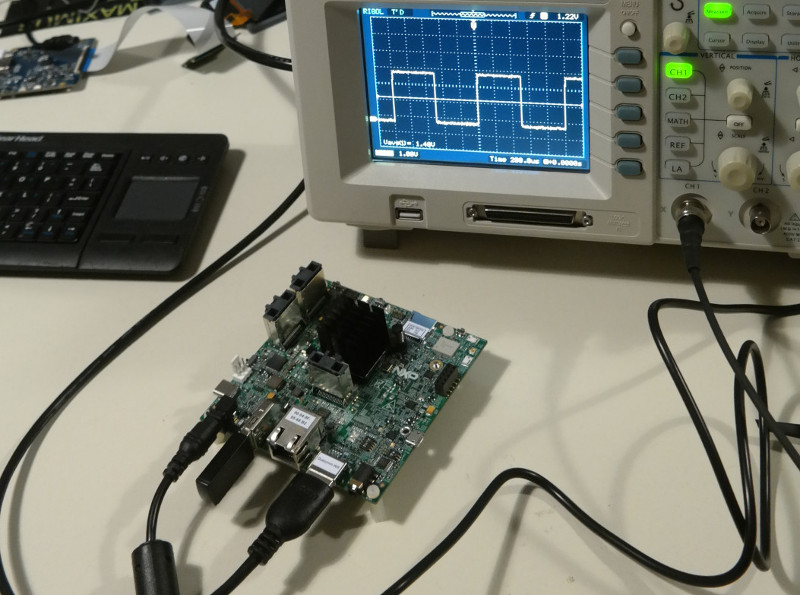
While our hardware team were not able to make it to Siegen, we did receive our first i.MX 8M evaluation kits last week and have begun evaluating these along with the software and drivers. We also will be evaluating a promising source for manufacturing and will be getting a factory tour from mid to end of March.
The pieces are coming together
A lot of pieces of our huge puzzle are snapping into place and these emerging shapes are starting to take proper form. We have a basis for the UI (compositor, shell), we have a proven way to adapt applications to the challenges of different screens (responsive box), we can input text to applications, the telephony stack becomes clearer and we have an approach for upcoming PureOS phone application developers.
We are extremely excited about the progress that we were able to make in such a comparably short amount of time. Stay tuned, a lot more things are coming…
Oakland-based Visual Supply Company has been supporting its photo editing app VSCO since it launched in 2011, since then it has become one of the best apps for photographers that want to edit on-the-go and be part of a photography community.
The original app started as a simple photo editing app that did a lot of things right. Since then it has added tons of feature on top of that core idea.
When you open VSCO, you’re greeted by a stark and minimalist design that is nice to look at — though getting used to its confusing layout can take time.
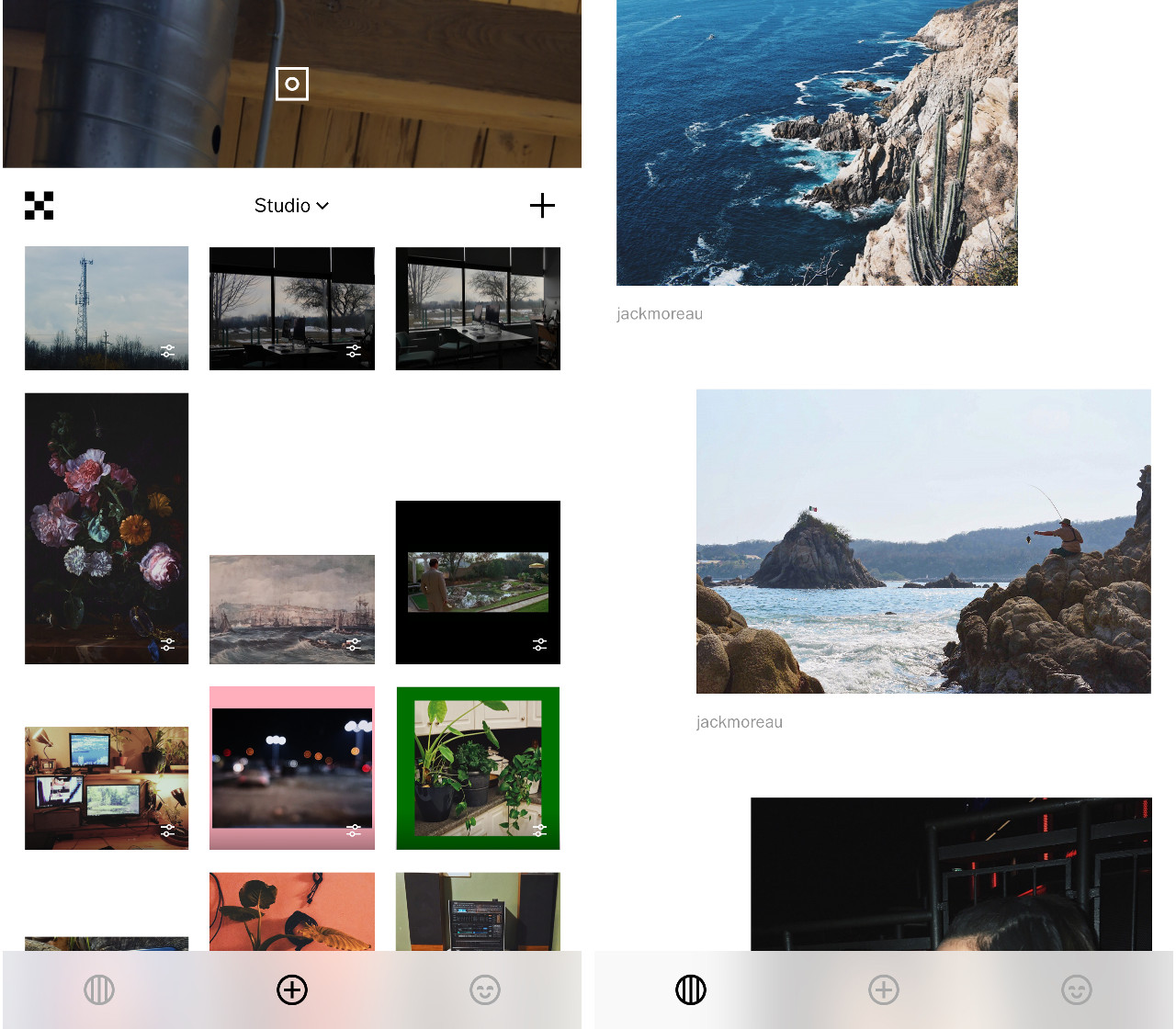
From there you are given a few options, upload a new photo to edit, look over a feed of pictures from other users or view your profile.
When you upload a photo, it gets added to your VSCO ‘Studio’ feed where you can then choose to edit it. The editing options are simple yet powerful.
The first stage of options lets you use sliders to control standard editing tools like saturation, contrast, grain, temperature and more. There are also more unique options such as the ability to add colourful borders, as well as colour-specific hue, saturation and lightness controls.
The next option is to add one of VSCO’s many filters. Most of these filters are unlocked via in-app purchases or by subscribing to VSCO X which unlocks all filters plus some other features and options.
The VSCO X specific filters are more customizable, giving users the option to adjust things like strength, character and warmth of the filter. The regular filters only have one slider for how much effect is applied to the photo.
Once all this is done, you can save your edits to a recipe to better help with future batch editing. If you are just editing a few photos with the same adjustments, you can copy and paste an edit scheme from one picture to another.
VSCO does more than just edit photos as it also has an in-app social network for sharing your photos with friends and people on the internet. One of the cool things about the social feed is it seems like users on it are less likely to post selfies and more likely to post photos that they are proud of and want to share.
This section of the app is interesting, and once again looks nice, but it falls into Moore’s law territory because it doesn’t have as many users as other photo sharing apps like Instagram, making it more of a niche product.
Users can also create journals with customized photo layouts to share on VSCO’s social feed.
VSCO recently also added messaging, but it is confusing and hidden away from the first page. To message someone through VSCO you need to go to their profile page and then message them from there This feature is currently only available to VSCO X subscribers but should come to all users soon.
The VSCO X superscription isn’t necessary but it does bring some new updates to subscribers each week consisting of new filters, or features.
All together VSCO’s strengths are very much in its ability to edit photos easily and with lots of options, The visual design is pleasing to look at but comes with a bit of a learning curve to use. All the functions and the social aspects are great. If you are really into photography and want to see what other people are doing away from the more popular photo sharing apps like Instagram.
It’s become commonplace for people to respond to President Trump by urging others not to take his statements seriously – not to give them attention or credence because “it’s a distraction.” Or “it’ll never happen.” No doubt, as a rule, Trump’s ideas are rarely well-thought-out. His policy proposals often seem to have been invented entirely off-the-cuff – as he speaks or as he tweets – and as such are hardly policy proposals at all.
Trump’s notion of arming teachers in the wake of the school shooting in Parkland, Florida might be a perfect example of this. “It’s a distraction.” “It’ll never happen.”
His call to “harden schools” does echo, some have suggested, a proposal the NRA made back in 2013 following the school shooting in Newtown, Connecticut. That proposal recommended hiring more school security officers and arming select teachers. There aren’t a lot of details in Trump’s plan – and so many unanswered questions about how it could possibly work – but that hasn’t stopped other politicians from making similar statements, from unveiling similar proposals.
They’re not simply demanding more weapons in schools. They’re demanding more weapons and anti-weapons technology, along with more surveillance capabilities. “We’ve got to invest in metal detectors,” Florida Governor Rick Scott said earlier this week. “We’ve got to invest in bulletproof glass. We’ve got to invest in steel doors. We’ve got to invest in upgraded locks.”
This is the second time I’ve written this year about guns and schools, something that I’d much rather not have to do – not because the topic strays from my focus here on this site on education technology. Rather, because all of this is ed-tech, but it’s rarely addressed as such.
To reiterate what I wrote in that other essay: we need to expand what is too often a narrow definition of education technology – one that obsesses with gadgetry but fails to consider the context into which gadgets are introduced; one that lauds “innovation” but refuses to understand systems, structures, histories; one that champions products but overlooks practices; one that embraces “what’s new” and ignores “what’s just”; one that insists that “technology” means “computers in the classroom” and “technology” means “progress.” This narrow definition circumscribes what we think of as ed-tech, how we talk about ed-tech, how we imagine its development and its usage, and how we address the technological systems and practices that are already deeply embedded in any educational setting.
“Hardening schools” is an education technology endeavor, whether or not we take seriously anyone’s suggestions about giving teachers guns. For now, “hardening schools” explicitly calls for hardware like those items listed by Governor Scott: metal detectors and bulletproof windows, as well as surveillance cameras and various sensors that can detect gunfire. It also implies software – social media monitoring and predictive analytics tools, for example, that claim they can identify students “at risk” of violence or political extremism.
The hardware and software already exist in schools – although we know that these technologies are not implemented evenly across all demographics or across all schools. Perhaps the emphasis should be placed less on insisting that arming teachers will never happen and more on recognizing the ways in which these disciplinary regimes are already in place, the ways in which data and assessments are so readily and efficiently weaponized, and the ways in which education technologies facilitate a culture of surveillance and compliance and control.

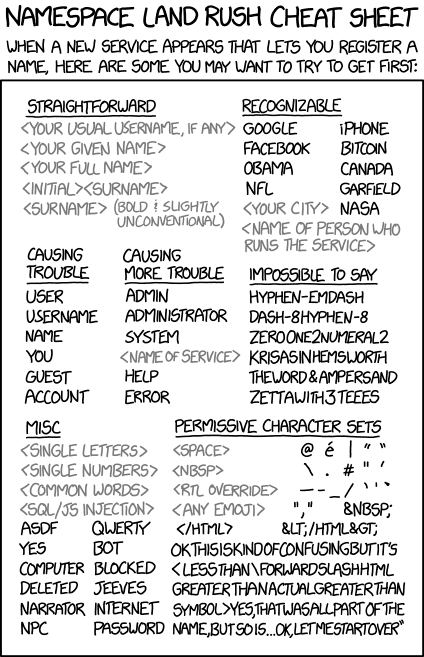
 xkcd.com.














 existentialcoms on Twitter.



 Last year, Google surprised everyone by releasing the first Developer Preview of Android O in mid-March. The company seems to be planning something similar this year as well as there have been numerous hints of the first Developer Preview of Android P being released in March.