Shared posts

20 Mar 19:52

Distrust of Symantec TLS Certificates

by Kathleen Wilson

A Certification Authority (CA) is an organization that browser vendors (like Mozilla) trust to issue certificates to websites. Last year, Mozilla published and discussed a set of issues with one of the oldest and largest CAs run by Symantec. The discussion resulted in the adoption of a consensus proposal to gradually remove trust in all Symantec TLS/SSL certificates from Firefox. The proposal includes a number of phases designed to minimize the impact of the change to Firefox users:

  • January 2018 (Firefox 58): Notices in the Browser Console warn about Symantec certificates issued before 2016-06-01, to encourage site owners to replace their TLS certificates.
  • May 2018 (Firefox 60): Websites will show an untrusted connection error if they use a TLS certificate issued before 2016-06-01 that chains up to a Symantec root certificate.
  • October 2018 (Firefox 63): Distrust of Symantec root certificates for website server TLS authentication.

After the consensus proposal was adopted, the Symantec CA was acquired by DigiCert; however, that fact has not changed Mozilla’s commitment to implement the proposal.

Firefox 60 is expected to enter Beta on March 13th carrying with it the removal of trust for Symantec certificates issued prior to June 1st, 2016, with the exception of certificates issued by a few subordinate CAs that are controlled by Apple and Google. This change affects all Symantec brands including GeoTrust, RapidSSL, Thawte, and VeriSign. The change is already in effect in Firefox Nightly.

Mozilla telemetry currently shows that a significant number of sites – roughly 1% of the top one million – are still using TLS certificates that are no longer trusted in Firefox 60. While the number of affected sites has been declining steadily, we do not expect every website to be updated prior to the Beta release of Firefox 60. We strongly encourage operators of affected sites to take immediate action to replace these certificates.

If you attempt to visit a site that is using a TLS certificate that is no longer trusted in Firefox 60, you will encounter the following error:


Clicking on the “Advanced” button will allow you to bypass the error and reach the site:

These changes are expected to be included in the final version of Firefox 60 that is planned to be release on May 9th, 2018.

In Firefox 63, trust will be removed for all Symantec TLS certificates regardless of the date issued (with the exception of certificates issued by Apple and Google subordinate CAs as described above).

Wayne Thayer
Kathleen Wilson

The post Distrust of Symantec TLS Certificates appeared first on Mozilla Security Blog.

20 Mar 19:52

The true cost of an amazing opportunity

by Paul Jarvis
I can count on zero of my fingers how many times someone’s told me about an “amazing opportunity” which actually turned into something awesome and beneficial for me or my business.
20 Mar 19:52

Linux Wifi Printing And Scanning – 10 Years Later – The HP OfficeJet 6950

by Martin

HP 6950 - Front ViewIt’s over 10 years now that I bought my first printer + scanner device with a Wifi interface, an HP C7280. I’ve had it ever since and it was doing a great job over the years. These days, however, my scanner software often only finds the device over the network after many retries and the quality of the scans are markedly deteriorating and wouldn’t much improve even after cleaning the optical components. Also, I’ve had a few ink leakages over the years of which I’m not sure if it was the fault of the printer or the 3rd party cartridges. So it was finally time for a replacement which was a good opportunity to make a comparison to the C7280 to see what has changed in the last decade.

Which Printer/Scanner to Buy?

Since I run Linux at home a new printer/scanner combination has to have good support for my setup. Pretty much all printer vendors today offer drivers for Linux but most of them are proprietary and closed source and I’m not very keen of running such software on my computers. HP is an exception as their Linux drivers and software (hplip) are fully open source and GPL licensed except for a few of their models which require a binary blob. In addition, Debian and Ubuntu have hplip in their repositories, so HP printers and scanners are supported out of the box.

An HP OfficeJet 6950 It Is!

There are lots of different HP makes and models and after comparing them for a while I chose the 6950 from the HP OfficeJet 69xx range. At €89 including tax it was the cheapest in the 69xx range and I specifically went for this model as I don’t need a color display, Ethernet port or a USB port in front to print from memory sticks which are included in the slightly higher priced 6960 and 6970 models. €89 is only a third of the price I paid ten years ago for the C7280. The C7280 had some options the 6950 doesn’t have such as a color display, an Ethernet port at the back and memory card interfaces at the front but I never needed them over the years.

HPLIP installation

Currently, I’m running Ubuntu 16.04 LTS which comes with a rather old hplip version in the repositories from back in 2016. Despite this, it was no problem to get the printer part working with the driver of an older device series (the OfficeJet 6800) but XSane would not detect the scanner part. Downloading and installing the latest hplip version via the HP website fixed this in a couple of minutes. While the HP software is open source I still prefer not to have it running in the background and fortunately it is easy to disable the tray icon and info pop-ups and to prevent the software from starting at power up by removing it from the startup applications.

Printer Power-Up and Disabling Printer Connectivity

When the printer is powered up for the first time it asks via its display whether it is o.k. for it to send statistical data to HP. Thanks, but no thanks! Also, I later disabled direct Internet access for the printer on my router as I definitely don’t need or want any web printing services and also to make sure stealth software updates won’t break functionality such as the use of 3rd party ink cartridges in the future (again).

Good Things

So far, so good. Other things I really like about the 6950 is that the internal paper tray holds up to 225 sheets of paper which is much more than the C7280 could.

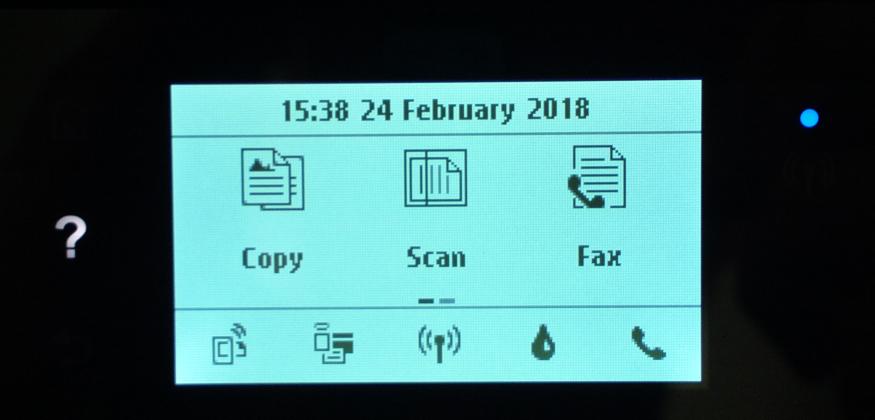
The displayTo connect the printer to a Wifi network the monochrome display can be used to select the network and enter the password. This works surprisingly well and except for the power button, there is no other button on the device. Everything is done via the touch sensitive display which reacts swiftly to touch and swipe events. That’s a significant difference to the C7280 which had lots of buttons on the front panel and came with front panel overlays in different languages. It probably reduces cost quite a bit, too. Despite the small size of the display, short animations explain how to do things like changing ink cartridges. Very nice!

Despite being a bit smaller than the C7280, the OfficeJet 6950 comes with a built in duplexer for two-sided printing. I don’t use the functionality a lot but it’s good to know it’s there for special cases.

Once the printer is connected to the Wifi network it can be configured over a web interface as well which looks quite nice. The web interface uses https and a self-signed certificate that is valid for the next 20 years (yes, I checked…).

Power consumption in standby seems to be refreshingly low, quite something has happened here in products over the last decade. The product specification lists a power consumption in sleep mode of 1.2 watts. That’s around 10 kWh a year or around 25 cents on my power bill per month to leave the printer in standby around the clock.

Things I Do Not Like

While I’m overall very happy with the 6950 there are a number of things about which I’m not really excited about. By default, Wifi-Direct is activated with a standard password. In other words, all my neighbors could see that I bought a new printer and send me their pictures to print. A bit too promiscuous for my taste.

One thing I really found annoying is that HP offers no software update so far that protects from KRACK Wifi attacks. Their only advice is to disable WPA TKIP on the the Wifi access point which doesn’t seem to help much to mitigate the problem or to disable Wifi and use the printer over USB. This would have been a showstopper if other vendors would have done a better job with this. Very disappointing!

Before I disabled Internet access for the printer I ran a manual software update. Unfortunately I couldn’t find any release notes for the software which is quite disappointing. Without transparency, that was the last software update that printer gets.

Another thing which is a bit irritating, but perhaps not the scanners fault, is that I now have to select manually between flatbed scanning and using the automatic top feeder in XSane. With the C7280 this was automatically detected. Also, when I put several pages to scan into the top feeder but only (accidentally) select 1 page to scan in XSane, only one page makes it into the program but the scanner still scans all 3. This was better with the C7280 for which XSane  would scan exactly the number of pages selected in the GUI.

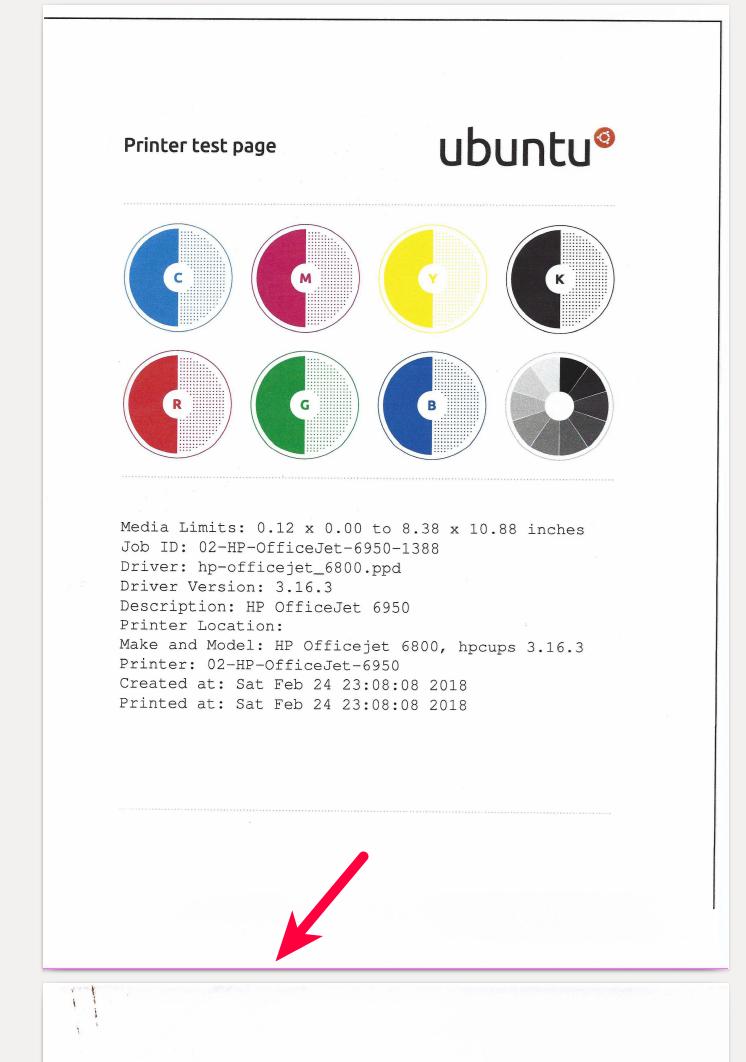
pink stripe issueWhich brings me to my final point I don’t like: When using the top automatic document feeder, a pink stripe appears at the bottom of most pages as shown in the picture on the left!? I played around with the settings in XSane for several hours but the problem would not go away. Things work fine if I use the flatbed for scanning but the stripe consistently shows up with the top feeder. I’m not sure at this point if this is the fault of the scanner or of the software but I never had this issue with the C7280.

Final Thoughts

So apart from the pink stripe issue I quite like my new printer/scanner combination (it still has a FAX option but it’s 2018, so I won’t bother…). At a 3rd of the price compared to a similar device from 10 years ago it was easy to install on Ubuntu Linux and I laud HP for their fully open source printer and scanner drivers and GUI software!

20 Mar 19:52

Qualcomm, National Security, and Patents

by Ben Thompson

From the New York Times:

President Trump on Monday blocked Broadcom’s $117 billion bid for the chip maker Qualcomm, citing national security concerns and sending a clear signal that he was willing to take extraordinary measures to promote his administration’s increasingly protectionist stance. In a presidential order, Mr. Trump said “credible evidence” had led him to believe that if Singapore-based Broadcom were to acquire control of Qualcomm, it “might take action that threatens to impair the national security of the United States.” The acquisition, if it had gone through, would have been the largest technology deal in history.

Mr. Trump’s decision to prohibit the blockbuster deal underscored the lengths that he is willing to go to shelter American companies from foreign competition. In recent weeks, the president has turned to an arsenal of tools — including tariffs and an obscure government review panel — to ward off foreign control in American industries and, in particular, thwart the rise of China. The president has focused many of these actions on the technology industry. While the United States has long claimed an advantage in tech, it is now facing emboldened rivals in China, where the government has heavily invested in everything from semiconductors to wireless networks to artificial intelligence. Through its recent actions, the White House has revealed its view that the country’s national security is tied to its advancement of those technologies.

I can see why the New York Times (and most other commentators) immediately attributed this decision to protectionism: not only does that match President Trump’s rhetoric both on the campaign trail and also in office, but it follows closely on the decision to impose tariffs on imported steel. Moreover, Broadcom is a Singapore-based company (and Singapore is a U.S. ally) that had promised to move back to the U.S.. National security, at least at first glance, looks like a fig leaf.

In fact, though, I think the Trump administration got this right.

Understanding Qualcomm

To understand why, go back to this Daily Update I wrote about Qualcomm in 2014:

Qualcomm’s situation is a little hard to understand, so let me try to unpack it. Please note I’ll likely oversimplify a bit!

  • Qualcomm has two primary businesses: selling chips (they are most famous for their systems-on-a-chip, but actually most of their revenue is from their communications chips) and licensing (Qualcomm has the vast majority of patents used in CDMA, and a good portion of LTE)
  • Chips drive more revenue than do licenses (they sell for much higher prices, but they also cost money to make), but licenses drive the most profit (all of the costs are amortized)
  • Qualcomm’s chip business, particularly its SoC’s, are threatened by the same headwinds that Samsung is facing: they are a premium product in a market where prices are dropping rapidly. And, just as Apple is locking Samsung and others out of the premium market for smartphones as a whole, Apple’s use of their own chips means the exact same thing is happening to Qualcomm. Meanwhile, just as Chinese manufacturers are eating Samsung on the low end, other SoC makers — especially MediaTek — are doing the same to Qualcomm on the low-end
  • This is not all bad news for Qualcomm: what makes their business so impressive is that they still make money on every phone for which they don’t supply chips because of their licensing business. Moreover, as I noted above, licensing has much higher margins, which helps drive Qualcomm’s profitability. This final point helps explain how Qualcomm’s earnings continue to increase while Samsung’s are starting to go down.
  • The problem for Qualcomm is that their licensing business is much riskier: unlike the chip business, where payment is very straitforward (I give you X, you pay me Y), licensing depends on contractual agreements, and contractual agreements depend on the regulatory environment in which they are struck. And needless to say, China’s regulatory environment – from which Qualcomm derives 50% of its revenue – is an uncertain one

That Daily Update was about China’s investigation of Qualcomm’s licensing practices, but the takeaway is not specifically about China: rather, note that Qualcomm’s business model is two pronged, that one prong is far more profitable, and that the other is far more cash intensive. This division has attracted activist investors eager to split the company apart; from a 2015 Daily Update in the wake of pressure from Jana Partners:

I don’t think there is any question that Qualcomm’s licensing unit in particular would be worth significantly more were it to be spun-out. That’s why, ultimately, I can’t really blame Jana Partners for pushing for a break-up…Qualcomm’s licenses by themselves would be a money gusher, at least for a few years, and while I think most investors are more long-term oriented than people think, I can absolutely understand the temptation — and associated price premium — associated with money in hand now.

Again, these Daily Updates were written in 2014 and 2015, when Qualcomm’s position was stronger than it is today: Android price points were higher (which directly impacted Qualcomm’s royalties), the company hadn’t lost its antitrust case in China, and Apple had neither started sourcing modems from Intel nor sued Qualcomm about its licensing fees.

Broadcom’s Plan

This is the context of Broadcom’s proposed $117 billion acquisition, which was to be financed with $106 billion in debt; the way these deals work is that acquirers — usually private equity firms, but sometimes companies (although one could argue that the current iteration of Broadcom is a chip-focused private equity firm) — use debt to acquire cash flow-rich companies, use that cash flow to pay off the debt, and in the meantime strip out all of the parts that don’t contribute to said cash flow. Oftentimes this is justified for reasons that go beyond maximizing cash flow — lots of companies would do better to return profits to shareholders than pursue management fantasies for which the company is fundamentally unsuited — but I’m not sure Qualcomm falls in that category. To go back to that 2015 update:

The bigger question, of course, is whether “maximizing shareholder value” is always the best course of action; more specifically, what is the proper time horizon? In the case of Qualcomm, licensing and chip-making may be very different from a financial perspective, but they’re wonderful complements from a strategic and sustainability point-of-view: chip-making produces patents, which in turn generate outsized profits that enable Qualcomm to invest significant resources into developing new chips. It’s a virtuous cycle. It’s also one that pays off over the very long run: licensing revenues are not maximized (because of potential antitrust issues), and some portion of the profits is funneled into the lower margin chip business with the promise that said investment will result in licenses in the future, a somewhat risky bet that itself won’t fully pay off because some of that profit will itself be reinvested…

Again, as I noted in the beginning, management tends to be very biased towards spending profits for its own ends and calling it long-term thinking; I don’t think it’s the worst thing in the world when investors insert some more accountability into capital allocation decisions. I do think Qualcomm is an exception though: I believe its current struggles are largely unrelated to its structure, and while that structure may not be ideal for short term returns, it is responsible for a remarkably innovative and durable company. I suspect this viewpoint will win out in the end, and to be fair, Qualcomm does have a lot of fat to trim when you compare its cost structure to that of rivals like Texas Instruments.

One can certainly make the argument that I got the balance wrong — as I noted above, Qualcomm is in even worse shape than they were when I wrote that. Perhaps, from a pure shareholder perspective, squeezing every last dime out of Qualcomm’s licenses was the best thing to do.

That, though, is precisely where the national security concerns come in. From the Committee on Foreign Investment in the United States’ (CFIUS’s) letter to Broadcom:

Reduction in Qualcomm’s long-term technological competitiveness and influence in standard setting would significantly impact U.S. national security. This is in large part because a weakening of Qualcomm’s position would leave an opening for China to expand its influence on the 5G standard-setting process. Chinese companies, including Huawei, have increased their engagement in 5G standardization working groups as part of their efforts to build out a 5G technology…While the United States remains dominant in the standards-setting space currently, China would likely compete robustly to fill any void left by Qualcomm as a result of this hostile takeover. Given well-known U.S. national security concerns about Huawei and other Chinese telecommunications companies, a shift to Chinese dominance in 5G would have substantial negative national security consequences for the United States.

CFIUS, during the investigative period, will continue to assess the likelihood that acquisition of Qualcomm by Broadcom could result in a weakening of Qualcomm’s position in maintaining its long-term technological competitiveness. Specifically, Broadcom’s statements indicate that it is looking to take a “private-equity”-style direction if it acquires Qualcomm, which means reducing long-term investment, such as R&R, and focusing on short-term profitability.

This is why the focus on Broadcom’s Singaporean domicile misses the point — and why Broadcom’s promise to re-domicile in the U.S. didn’t matter either (as for Broadcom’s further promise to not halt investment in 5G, well, that process is nearly over — the issue is really about 6G and beyond). The entire issue is that the structure of the deal itself said far more clearly than anything else that Broadcom wanted to feast off of Qualcomm’s past innovations and contribute far less to future ones than Qualcomm would on its own. And, given ever-increasing Chinese dominance of wireless, that is indeed a national security problem.

The Patent Problem

That noted, to the extent that Broadcom’s acquisition was a national security problem because of how future Qualcomm investment would be curtailed, the U.S. is lucky that Broadcom happened to be a foreign company — that is precisely why CFIUS’s review and President Trump’s order were even legal. Had Broadcom been a domestic entity CFIUS wouldn’t be involved at all, and President Trump would have much less discretionary power.

To be sure, there would still be ways to block the deal, particularly the antitrust issues that would be raised by combining the two companies. The more significant issue, though, is that at least one company and a whole host of willing financiers agree with activist investors that Qualcomm would be better off milking licenses than in inventing new technologies.

Again, some of the issues are structural: Apple’s dominance of the high-end market leaves would-be differentiated suppliers like Qualcomm stuck in the low-end. It’s worth noting, though, that other structural issues result from the U.S. government — specifically, patents. One more time from that 2015 update:

I’d also add that this entire episode is ultimately about the distorting power of patents: the entire reason why Qualcomm’s licensing unit is so valuable and such a reliable source of cash is because of government-granted monopolies. Jana Partners’ core dispute with the company is that it is using the results of its innovation to innovate more instead of simply collecting rent, an outcome certainly at odds with the reason the patent system was created in the first place.

There is a certain amount of irony here: the government is intervening in the private market to stop the sale of a company that is being bought because of government-granted monopolies. Sadly, I doubt it will occur to anyone in government to fix the problem at its root, and Qualcomm would be the first to fight against the precise measures — patent overhaul — that would do more than anything to ensure the company remains independent and incentivized to spend even more on innovation, because its future would depend on innovation to a much greater degree than it does now.

The reality is that technology has flipped the entire argument for patents — that they spur innovation — completely on its head. The very nature of technology — that costs are fixed and best maximized over huge user-bases, along with the presence of network effects — mean there are greater returns to innovation than ever before. The removal of most technology patents would not reduce the incentive to innovate; indeed, given that a huge number of software patents in particular are violated on accident (unsurprising, given that software is ultimately math), their removal would spur more. And, as Qualcomm demonstrates, one could even argue such a shift would be good for national security.

20 Mar 19:52

On Informed Complacency and the Potential Decline of Curiosity

by Clayton d'Arnault

If I were to ask you a question, and neither of us knew the answer, what would you do? You’d Google it, right? Me too. After you figure out the right wording and hit the search button, at what point would you be satisfied enough with Google’s answer to say that you’ve gained new knowledge? Judging from the current socio-technical circumstances, I’d be hard-pressed to say that many of us would make it past the featured snippet, let alone the first page of results.

The internet—along with the complementary technologies we’ve developed to increase its accessibility—enriches our lives by affording us access to the largest information repository ever conceived. Despite physical barriers, we can share, explore, and store facts, opinions, theories, and philosophies alike. As such, this vast repository contains many answers to many questions derived from many distinct perspectives. These socio-technical circumstances are undeniably promising for the distribution and development of knowledge. However, in 2008, tech-critic Nicholas Carr posed a counter argument about the internet and its impact on our cognitive abilities by asking readers a simple question: is Google making us stupid? In his controversial article published by The Atlantic, Carr blames the internet for our diminishing ability to form “rich mental connections,” and supposes that technology and the internet are instruments of intentional distraction. While I agree with Carr’s sentiment that the way we think has changed, I don’t agree that the fault falls on the internet. I believe we expect too much of Google and less of ourselves; therefore, the fault (if there is fault) is largely our own.

Here’s why: Carr’s argument hinges on the idea that technology definitively determines our society’s structural and cultural values—a theory known as technological determinism. However, he fails to recognize the theory of affordance in this argument. Affordances refer to the way in which the features of a technology interact with agentic users and diverse circumstances. While the technical and material elements of technology do have shaping effects, they are far from determined. Affordance theory suggests that the technologies we use and the internet infrastructures from which they draw, contain multipotentiality: they afford the potential to indulge in curiosity and develop robust knowledge while simultaneously affording the potential to relinquish curiosity and develop complacency through the comforts of convenience and self-confirmation.

Considering the initial sentiment of Carr’s argument (the way we think has changed) together with affordance theory, we can derive two critical questions: have we embraced complacency and become too comfortable with the internet’s knowledge production capabilities? If so, by choosing to rest on our laurels and exploit this affordance, what happens to epistemic curiosity?

There’s a lot to unpack, but in order to address these questions, we need to examine the potential socio-technical circumstances that could lead us down a path of declining epistemic curiosity, starting with the binary ideas of convenience and complacency.

Complacency is characterized by the feeling of being satisfied with how things are and not wanting to try to make them better. Clearly, in terms of making life more efficient, we are nowhere near complacent, as we constantly strive to streamline our lives through innovation—from fire to the invention of (arguably) our greatest creation to date and the basis for our modernity: information and communication technology. This technology affords us the ability to live more convenient, effortless lives by providing access to the world’s knowledge with the tap of a finger and the ability to do more in a few moments than previous generations could do in hours.

For instance, education has become much more convenient. Thanks to the internet, you can take advantage of distance learning programs and earn a degree on your own terms, without physically attending class. The workforce has also become more flexible, as technology allows us to maximize time and stay on top of our work through complete mobility, and in some cases, complete task automation. Economically, the internet allows us to sell and consume goods and services without the physical limitations of brick and mortar. It also allows us to communicate with friends, family, and strangers over long distances, document our lives, access current events with ease, and answer a question within moments of it popping into our heads.

These conveniences must make life better, right?

Think of these conveniences like your bed on a cold morning: warm and comfortable, convincing you to hit snooze and stay a while longer. This warmth and comfort can be a source of sustenance and strength; however, if we stay too long, comfort can get the best of us. We might become lazy, hesitating to diverge from the path of least resistance.

Just as it is inadvisable to regularly snooze until noon, it is concerning when information and knowledge are accessed too easily, too quickly. With the increased accessibility and speed of information, it’s easy to become desensitized to curiosity—the very intuition that is responsible for our technological progress—in the same way that you are desensitized to your breathing pattern or heartbeat. By following the path of least resistance, we can create a dynamic in which we perceive the internet as a mere convenience instead of a tool to stimulate our thoughts about the world around us. This convenience dynamic allows us to settle into a state of complacency in which we are certain that everything we think and believe can be justified through a quick Google search—because, in fact, it can be. That feeling of certainty and comfort that stems from this technical ability to self-confirm is, what I call, informed complacency.

The idea of informed complacency is especially fraught because it signifies a turning point in our perception of contemporary knowledge. Ultimately, it can encourage us to develop an underlying sense of omniscient modernity, which Adam Kirch discusses in his article for The New Yorker,Are We Really So Modern?”:

“Modernity cannot be identified with any particular technological or social breakthrough. Rather, it is a subjective condition, a feeling or an intuition that we are in some profound sense different from the people who lived before us. Modern life, which we tend to think of as an accelerating series of gains in knowledge, wealth, and power over nature, is predicated on a loss: the loss of contact with the past.”

In the past, nothing was certain. The information our ancestors had on the world and universe was constantly being overturned and molded into something else entirely. Renowned thinkers from across the ages built and destroyed theories like they were children with LEGO bricks—especially during the Golden Age of Athens (fourth and fifth centuries B.C.) and the Enlightenment (seventeenth and eighteenth centuries A.D.). Each time they thought they had it figured out, the world as they knew it came crashing down with a new discovery:

“The discovery of America destroyed established geography, the Reformation destroyed the established Church, and astronomy destroyed the established cosmos. Everything that educated people believed about reality turned out to be an error or, worse, a lie. It’s impossible to imagine what, if anything, could produce a comparable effect on us today”

Today, we still face uncertainty, albeit a different kind. With the glut of empirical evidence on the internet, multiple versions of objective reality flourish even as they conflict. These multiple truths create a dynamic information environment that makes it difficult to differentiate between fact, theory, and fiction, increasing the likelihood that whatever one thinks is true can easily be confirmed as such. With this sentiment in mind, by following the path of least resistance and developing a sense of informed complacency, we risk developing a sense of omniscient modernity and over-comprehending our ability to know, because we are certain that we know—or can know—everything, past, present, and future, with the click of a button or the tap of a finger.

Though a dynamic information environment has clear benefits for epistemic curiosity—better science, more informed debates, an engaged citizenry—the tilt of the affordance scale towards complacency always remains a lingering possibility. If we begin to lean in this direction, I contend that informed complacency is likely to take hold and lead us to ignorance and insularity amid a saturated information environment. This can create cognitive traps that, in the worst instance, diminish epistemic curiosity.

One of these traps is called the immediate gratification bias, which Tim Urban of Wait But Why, has playfully dubbed the “Instant Gratification Monkey”. He describes this predisposition as “thinking only about the present, ignoring lessons from the past and disregarding the future altogether, and concerning yourself entirely with maximizing the ease and pleasure of the current moment.” As a result of this predisposition, there is an increasing demand for instant services like Uber, Amazon Prime, Netflix, and Tinder, which testifies that the notions of ease and instancy have infiltrated our thought-process, compelling us to apply them to every other aspect of our lives. The increase in the speed at which we consume information has molded us to rely on and expect instant results for everything. Consequently, we are likely to base our information decisions on this principle and choose not to dig past surface-level.

Another trap is found in gluttonous information habits—devouring as much of it as we can, as quickly as possible, solely for the sake of hoarding what we consider to be knowledge. In all our modernity, it seems that we misguidedly assume that consuming information at a faster pace is beneficial to the development of knowledge, when in fact, too much information (information overload) can have overwhelming, negative effects, such as the inability to make the “rich mental connections” Carr describes in his article. This trap is amplified by pressures to stay “in the know” as well as the market of apps and services that capitalize on a pervasive fear of missing out, transforming the pursuit of knowledge from an act of personal curiosity to a social requirement.

The complex algorithms deployed by search engine and social media conglomerates to manage our vast aggregates of information curate content in ways users are likely to experience not only as useful, but pleasurable. These algorithmic curations are purposefully designed to keep information platforms sticky; to keep users engaged, and ultimately sell data and attention. These are the conditions under which another cognitive trap arises: the filter bubble. By personally analyzing each individual user’s interests, the algorithms place them in a filtered environment in which only agreeable information makes its way to the top of their screens. Therefore, we are constantly able to confirm our own personal ideologies, rendering any news that disagrees with one’s established viewpoints as “fake news.” In this context, it’s easy to believe everything we read on the internet, even if it’s not true. This makes it difficult to accurately assess the truthfulness and credibility of news sources online, as truth value seems to be measured by virality rather than veracity.

Ultimately, with his argument grounded in technological determinism, Carr overlooks the perspective that technology cannot define its own purpose. As its creators and users, we negotiate how technology integrates into our lives. The affordances of digital knowledge repositories create the capacity for unprecedented curiosity and the advancement of human thought. However, they also enable us to be complacent, misinformed, and superficially satisfied; that is to say, an abundance of easily accessed information does not always mean persistent curiosity and improved knowledge. To preserve epistemic curiosity and avoid informed complacency, we should keep reminding ourselves of this and practice conscious information consumption habits. This means recognizing how algorithms filter content; seeking diverse perspectives and content sources; questioning, critiquing, and evaluating news and information; and perhaps most importantly, always do your best to venture past the first page of Google search results. Who knows, you might find something that challenges everything you believe.

Clayton d’Arnault is the Editor of The Disconnect, a new digital magazine that forces you to disconnect from the internet. He is also the Founding Editor of Digital Culturist. Find him on Twitter @cjdarnault.


Headline pic via: Source

20 Mar 19:52

Latest Firefox available to users where they browse the web — laptop, Fire TV and the office. Plus, a chance to help with the next Firefox release!

by Nick Nguyen

This week, we’re happy to roll out not one, but three Firefox releases to our users. Now available in more of the places where they browse, Firefox users can access the web whether they’re relaxing at home with their laptop, in front of their TV with Amazon Fire TV, or at the office. Additionally, we’re running a contest (with prizes!) for users who want to help with the next Firefox Quantum release in May. So, without further ado, here’s information on this week’s Firefox releases:

  • Latest Firefox Quantum release for Desktop

Today, March 13, the latest release of Firefox Quantum for desktop users is now available. We’ve improved privacy for those who use Private Browsing mode. To learn more about the technical details on how that works, you can visit this blog post. And, we made changes under the hood where users may notice faster page load times. The latest version of Firefox Quantum is available for the Desktop and Mobile – iOS and Android.

  • Latest Firefox for Amazon Fire TV Available this Week

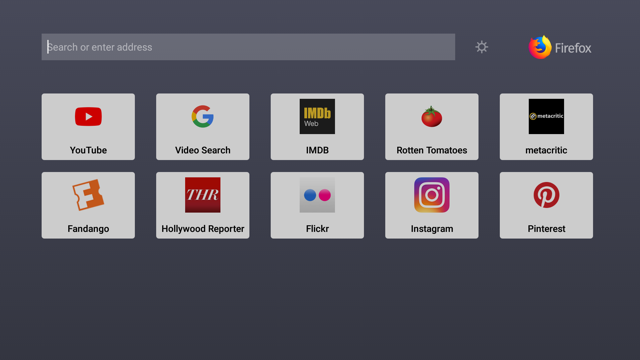
With this latest release, we’ve included a fresh new look to help you easily navigate the web on your Fire TV. No more typing in long URLs that you like to visit frequently. Users can now save their preferred websites by pinning them to the Firefox home screen. By using the menu button, you can easily remove any pinned websites at any time.

Add your favorite websites to Firefox on Fire TV


  • Firefox Quantum for Enterprise Available Wednesday in Beta

Starting on Wednesday, Firefox Quantum for Enterprise enters Beta, as a final step towards bringing a release version of Firefox Quantum to enterprise users. Needless to say, we’re all super excited to give millions of additional users an update to Firefox Quantum, as everyone deserves to have a super fast and well designed browser. To learn more about how we’re making it easier for IT professionals to install the new Firefox Quantum for their employees, visit our blog post and sign up for the beta of Firefox Quantum for Enterprise.


Want to help with the next Firefox Quantum release?

Did you know that back in 2008, Pocket won our Extend Firefox 3 contest? We’re bringing back the tradition of Firefox Extensions contests with our first Firefox Quantum Extensions Challenge this month! Whether you’re a developer or someone who likes to create fun, cool things, like one-woman Firefox theme machine, MaDonna, we’re looking for the next generation of Extensions. Since the next release of Firefox Quantum supports new WebExtension APIs, we’re on the hunt for new Extensions to make our users’ browsing experience productive, fast, and fun. The winners will be crowned by the next Firefox Quantum release in May. For more details about the contest and prizes, visit our site today and the Hacks blog on Thursday, March 15.


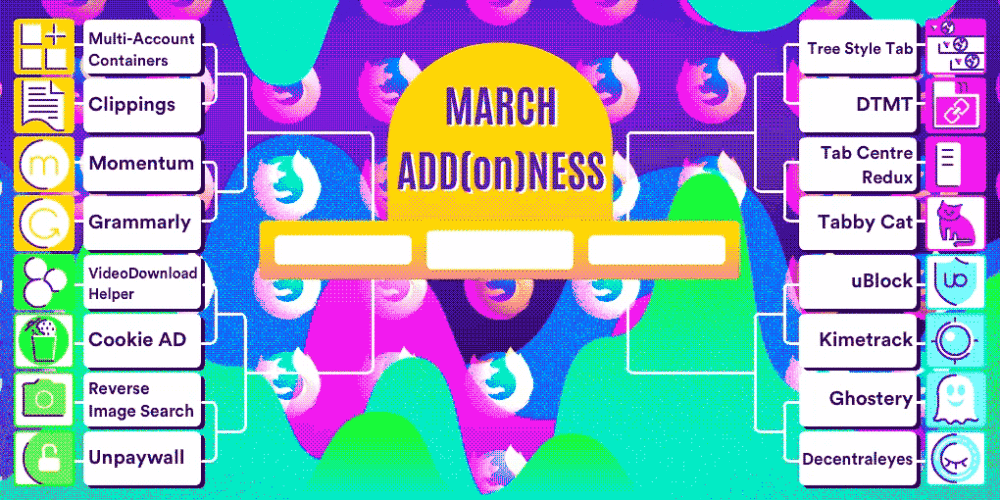
And in related Extensions/Add-on news, we’re holding our annual Firefox March Addonness. There are thousands of ways you can customize Firefox to make it your own web experience. So, we’re playing off the top Add-ons to find out who will walk away with the title as “the must-have, must-install extension” of our annual tournament. Learn more on the Firefox Frontier.


If you haven’t yet switched to the new Firefox Quantum browser, we invite you to download the latest version.

Release Notes for Firefox for Android

The post Latest Firefox available to users where they browse the web — laptop, Fire TV and the office. Plus, a chance to help with the next Firefox release! appeared first on The Mozilla Blog.

20 Mar 19:52

13 tips for thriving as an author within a company

by Josh Bernoff

When you write a book about ideas, it reflects well on both you and your company. Or at least it ought to. As with all corporate politics, the devil is in the details. I learned much of what you’re about to read while coauthoring three books and editing two others at Forrester Research. Since leaving, … Continued

The post 13 tips for thriving as an author within a company appeared first on without bullshit.

20 Mar 19:51

Our Surprisingly Large Team

by Ton Zijlstra

Yesterday me and all my The Green Land colleagues were at the Open Belgium annual conference (of which we were a sponsor) in Louvain-la-Neuve. We made this group picture, together with our cyberman (an artwork normally at home in our office). Seeing us all together made me realise we are with 8 of us at the moment. I am surprised by the size of our current team.

20 Mar 19:51

What Happens in Vagus…

by Dave Pollard


Evolution is a precarious process. Within every species, minor variations are constantly introduced and tested for ‘fitness’: If they help the creature survive, they are passed on to the next generation, and if they hamper survival, they will not be passed on. Many attributes won’t apparently affect survival one way or the other, so it’s a toss-up whether they’ll be passed on or not. Gaia keeps rolling the dice and trying new things.

Accidents happen in this process. Feathers apparently evolved in birds as a means of low-weight heat management; it turned out that they also enabled flight, which wasn’t necessary (the first birds and their feathered dinosaur forebears were ground-nesters with few natural predators) but which turned out to be a great evolutionary success.

Another early evolutionary trick was the emergence in the mammalian autonomous nervous system of neuroception, the autonomic fight/flight/freeze response when danger is sensed by the nervous system. This response is (for evolutionary reasons) vastly faster than the brain’s complex thought processing system. It’s regulated in part by a piece of the vagus nerve, which constantly assesses sensory data and helps ‘decide’ whether any given situation is (a) safe, (b) dangerous (and hence whether to fight or flight), or (c) inescapable (in which case the creature shuts down, plays dead and ‘hides’ in the hopes the predator won’t notice it).

I’ve seen this neuroception response change instantly — I watched three dogs playing together when suddenly one of them noticed a squirrel and barked. The three dogs (brilliantly, using body language signals that no human language could ever match) chased and cornered the squirrel, which at first fled, and then, knowing it was lost, lay down and played dead. The dogs lost interest, and soon after, the squirrel slowly arose, shook itself furiously, and scampered away.

The process in humans isn’t all that different (our form of playing dead is called fainting). The problem is that, for us, potentially dangerous situations aren’t as simple as predators, status challenges and falling objects. We are constantly facing worrisome situations, many of them chronic, and our autonomous nervous system is in a state of constant stimulation and overwork (ie chronic stress). And because fight, flight and freeze are rarely optimal solutions to the situations we now face, we’ve had to evolve a coping mechanism to deal with the disconnect between what the ‘hardware’ of our bodies and the ‘software’ of our enculturated brains thinks is good for us.

One of the leading theories is that, in social creatures (those, like humans, whose evolutionary fitness depends on group cooperation), the chronic stress response can be mediated by “safety cues”, starting with the mother’s soothing voice and touch, and including laughter, high-pitched songs and expressions of joy (as opposed to threatening low-pitched growls), sympathetic attention, reassuring facial expressions, tones of voice and postures, and (in bonobos at least) brief pleasurable sexual stimulation.

So now, each time a stressful occurrence happens, we first look for social reassurances from our tribe-mates, and if we receive (and reciprocate) such safety cues, our vagal nerve sends a ‘stand down’ notice to our autonomic nervous system (and the various body organs like lungs, heart and digestive organs that are involved in stress response), appropriate hormones kick in or cease, and we return to a peaceful state (what some call a ‘now time‘ state). In the absence of these safety cues, the body next goes into fight-or-flight mode. This is an autonomic ‘decision’ based on the body’s subconscious assessment of which strategy has the greater chance of success (for its own survival and that of the tribe and the balance of life in the community as a whole). We will probably never understand how that decision is ‘made’, but it is consistent with Gaia theory. However, if the assessment is that neither fight nor flight is a successful strategy, then the neuroceptors send out shut-down signals, for us, just as they do for a cornered squirrel.

When that happens, both the body and the mind shut down. The problem is that, in today’s complex modern civilized society, ‘freezing’ is almost never an effective strategy. Meanwhile we have lost the sense of community in which there is enough cohesion and trust to enable the clear, consistent, broadly-shared communication of safety cues (largely because this doesn’t scale beyond groups of 50-150 individuals). And very few of the things that cause modern humans stress are amenable to either fight or flight responses. So we’re chronically dealing with our body’s propensity to shut down, at the same time we’re told, and believe intellectually, we need to “buck up”.

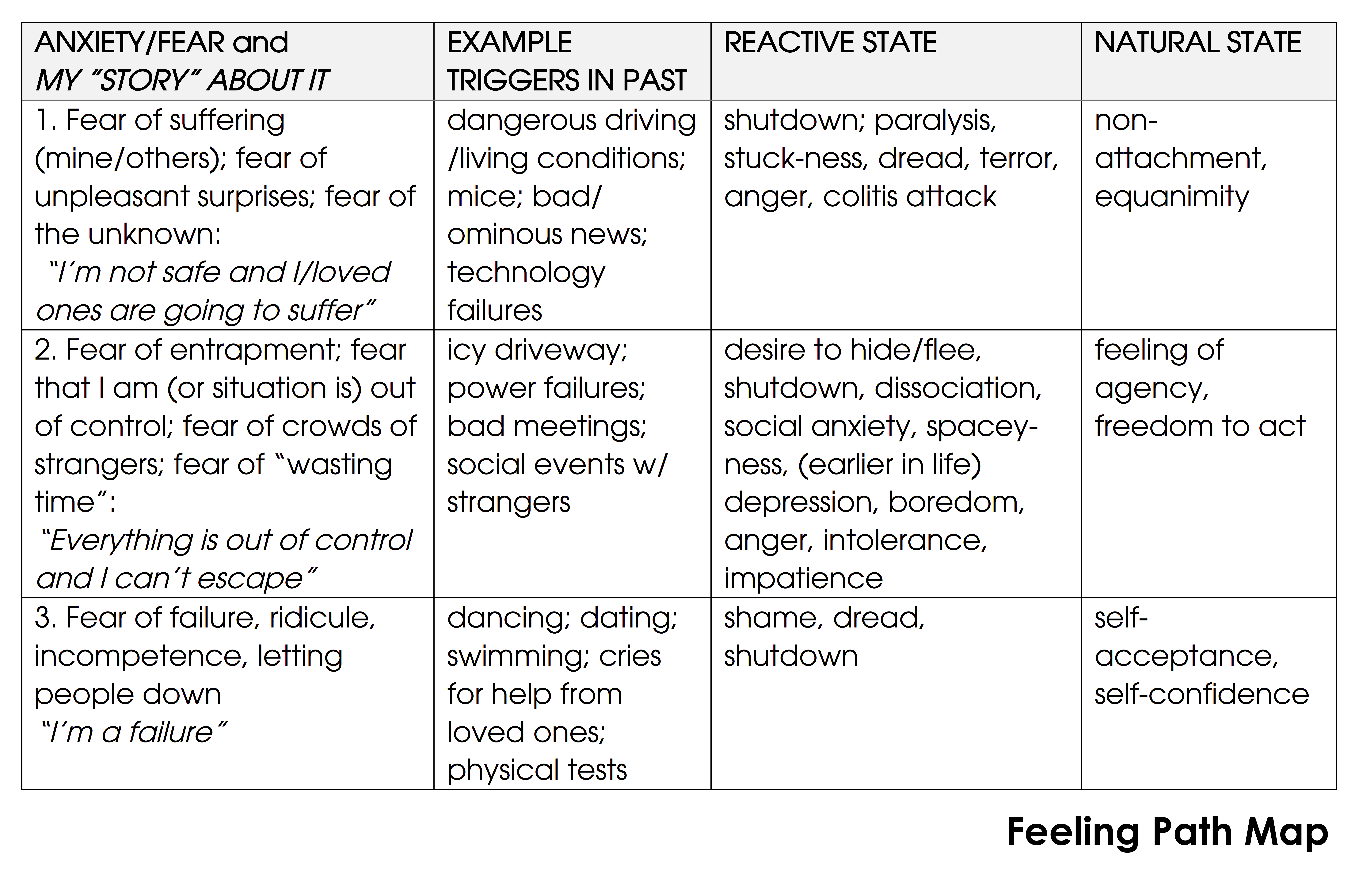
The chart at the top of this article (using the methodology in Joe Shirley’s book The Feeling Path) shows my personal triggers and the underlying anxieties and fears behind them. I ‘know’ (from experience and enculturation) that both my body’s and my mind’s reactions to these triggers are exaggerated, unwarranted and unhelpful. But tell that to my autonomous nervous system! And to my imaginative “worst-case-scenario” mind! Our response is based on a million years of genetic programming and we cannot help responding the way we do. It is how the body, and the mind, evolved to deal with stressful situations. This is why the idea that using cognitive processes like CBT and ‘flooding’ and ‘mindfulness’ we can somehow ‘reprogram’ ourselves to respond differently is simply ludicrous.

Although we may seem to modify our reactions over time, I would argue that there is something else at work. Here’s an example: I used to suffer (and make others travelling with me suffer) from what is called road rage. Reckless and careless driving in my immediate vicinity would produce almost hysterical fury in me, to the point I was tempted to confront the ‘guilty’ driver and was quite possibly only held back by fear that they would hurt me in a confrontation more than I would hurt them.

These days I still get that brief visceral reaction to dangerous, aggressive and incompetent drivers, but it passes much more quickly and doesn’t get reinforced by the stories in my head about what horrors it might have led to (such stories can in turn incite more anger, producing what Eckhart Tolle calls the self-reinforcing “pain-body/egoic-mind” cycle).

Does that mean that ‘I’ have changed, and that ‘reprogramming’ oneself is possible? I don’t think so. Three things have contributed, I think, to this apparent behaviour change, none of which ‘I’ had or have any control over:

  1. Enculturation: The people in my life who have witnessed road rage in me (and other fortunately rare displays of excessive and useless anger) have told me they find it frightening and inappropriate, and made me feel shameful about it. Hence I have gradually become enculturated by the relatively sensitive people around me to sublimate my anger.
  2. New safety cues: When these situations have arisen lately, the people in the car with me have given me verbal and body-language “it’s OK” safety cues that, over time, have dampened the ‘fight’ response. Now, even when driving alone, the memory of receiving these cues in similar situations calms my response.
  3. Shifting worldview: I have learned that we have no free will, and that everyone is struggling, so the stories I tell myself about dangerous driving behaviour are more sympathetic and less likely to fuel and sustain the anger.

My reaction in these situations continues to be subconscious, unaffected by any rational thought processes I may use or any practices I may follow. I had no choice over the people I hang out with, or our collective enculturation of each other, or over what I’ve learned. I’m blessed to have been attracted to sensitive people and to have had the time and curiosity to learn more about inherent human nature. These are all in increasingly short supply as our modern stress-riven culture is making us more and more dissociated (just look at our ‘leaders’), and leaving us with less and less time to learn and explore what’s important.

My example above was about the ‘fight’ response, and how it has been dampened through no control of my own in recent years. How about the ‘flight’ and ‘freeze’ responses?

Anger is most often a mask for fear (my road rage was mostly about fear of their poor driving getting me and my loved ones hurt). That’s a typical ‘fight’ response. A typical ‘flight’ response for me occurred this winter when my house was overrun with mice. I think mice are cute and don’t want to hurt them, but I mean overrun. They were everywhere. Life for a while involved hourly checking of the humane traps, and releasing them was complicated by a second consecutive near-record cold, icy, snowy winter that made my driveway impassable, and psychologically trapped me in the house. And finding all their entrance-points seemed endless and impossible.

For months, I couldn’t sleep, I couldn’t eat, I became hyper-vigilant, seeing and hearing things constantly everywhere I went. I became obsessed with bad weather reports and the risk of storms (which often also bring power failures where I live, leaving me without heat or light). I lost 15 pounds and had my first colitis attack in 10 years.

The fear, the anxiety, the shame, the grief of having ‘lost’ my safe home — all my reactions were ridiculous, wildly excessive, and seriously unhealthy. But all I could think about was getting away from this months-long nightmare. I live alone, so the sense of isolation (and the absence of regular safety clues from others) exacerbated my reaction. Actually ‘facing the fear’ (the individual mice) wasn’t an answer — it wasn’t the cute, scared mice I was afraid of. What was it?

It was the feeling of being trapped and being out of control (of myself and the situation), and the suffering that goes along with that. This is a primeval, ancient fear. I have witnesses animals in pain, and animals trapped or caged, and the latter are obviously far more stressed and suffering than the former. This is the reason, I am told, many indigenous people sleep in the open, not under trees that could fall and trap or seriously injure them. It’s the reason prisons are inherently inhumane and solitary confinement even more so. It’s the reason caged, factory farmed chickens peck themselves and others to death. From an evolutionary perspective, fear of being trapped is very sensible.

The fact that I wasn’t really trapped is irrelevant — my autonomous nervous system, without any safety cues to dampen it, was firing the ‘flight’ response as surely as if I were locked in a burning building or cornered by a tiger. And as soon as it became apparent there was no ready ‘flight’ path — boom — the ‘freeze’ response kicked in. My brain became mush and gave up its valiant arguments that “it’s really not that bad”. I felt paralyzed. My body, tired of the chronic stress without action to relieve it, said no. I started losing weight, and my colitis flared.

It had been 10 years since my previous colitis attack, and 10 1/2 since my severest, and first, attack. That one was triggered by horrible financial news that resulted in me having to pay a six-figure amount in taxes because of a management accounting error — with one month’s notice. I had saved up just enough money to allow me to write my book, and this news was devastating. I was outraged, grief-stricken. I felt victimized, and helpless. But mostly I was terrified. What suffering would this loss inflict on me and on my loved ones? What would this mean for my suddenly-unknown future, a future that I had planned out so carefully? The world suddenly felt unsafe, insecure, and I was filled with dread, and my mind filled with stories of deprivation, failure and struggle. That first colitis attack was severe — almost life-threatening — and for weeks I was so exhausted, terrified and in such agonizing pain I just wanted to die.

All because an autonomous nervous system reaction that had long outlived its evolutionary value led my body to say no, to say “enough, I give up”. (Paradoxically, my previous life-long coping-by-shutting-down mechanism in the face of chronic anxiety — depression — didn’t happen, and hasn’t really been a factor in my life since.)

The ‘flight’ and ‘freeze’ vagus nerve reactions don’t seem to lend themselves to the three factors that have helped mitigate my ‘fight response’ feelings of anger. Gabor Maté has written about how many human diseases (including colitis, addiction and depression) are the body’s way of saying no to our culture’s maladaptive ways of coping with chronic mental stresses. In his early work he prescribes seven recommended coping mechanisms, including self-acceptance, self-awareness, healthy forms of anger, healthy social attachments (so you get the social cues and support) and setting appropriate boundaries (learning to say no so your body doesn’t have to). But these mechanisms presume a degree of free will that even Gabor’s later books suggest we might not have (he has recently asserted that by far the best way to address the many diseases rooted in childhood trauma and neglect is to prevent such trauma and neglect from happening in the first place).

So what are those who struggle with chronic fears and anxieties to do? The Feeling Path approach that the chart above used, suggests that we can be sufficiently self-aware to recognize where we are on the ‘feeling path’ between the anxious/fearful state and the equanimous/empowered/self-accepting peaceful state, and therefore see the autonomous nervous system’s overreaction for what it is.

I’m not so sure. Recently, I checked into a hotel room and found the internet unplugged. Not a big deal; I’m sure it would have been fixed within 24 hours. But something in me was triggered (same thing that gets triggered when any of the hundreds of bugs in MS Office programs turn up). For an hour I tried to fix it, fussing and fuming. Insane behaviour. I just don’t like unpleasant surprises. But I couldn’t help myself. The feelings of loss of control and agency trumped my self-awareness that this was an overreaction. In the moment, I couldn’t even get myself to acknowledge that. I didn’t even get to the worst-case story-telling that might have ramped up and sustained my anxiety — this was just pure emotion. I could probably find some seminal event in my past in which some technology failure or other implicit promise let-down had caused great suffering, but I’m not sure what good that would do. Apparently, this character, hapless as it is with technologies, just can’t handle things that don’t work reliably (especially when it can’t easily ‘fix’ them so they do).

Stephen Porges, who is probably the leading theorist about the vagus nerve, recently recommended “becoming aware of what our autonomic nervous system is doing, picking up on the cues and honouring them, and seeking safety with those who care”, a process he calls “feeling oneself”. But that presumes we have the agency and ‘peace of mind’ to do so, and I’m not at all sure we do. Singing, breathing and meditation practices are recommended to mimic aspects of the safety cues we get from others which calm the autonomous nervous system by stimulating the vagal nerve. I do all of these, but I don’t have the sense that they’ve helped my reactivity, comforting as they can be for a while in the right circumstances.

Of course others recommend telling ourselves a different story from the ‘should’ stories (which are all about expectation and moral judgement) and the ‘could’ and ‘could have been’ stories (which are all about the past that never was and the future that never will be). Tell a different story, we’re told, and it will change the trajectory of your life. But what about the stories that some of us must carry all our lives of horrors that were absolutely true? The body remembers, and reminds us.

While stories are fiction, it may be helpful to tell our ‘true’ story for a different reason — to recognize that it, the story, while true, is a story, something separate from us, and perhaps then to be able to put some distance between us and it, and not identify with it as much.

So, no simple answers here. My thesis on dealing with the consequences of our autonomous nervous system’s maladaptation to modern civilized life, for now, is:

  1. We can’t be, think or feel other than as we are and do. We have no agency or free will over what and how we think or feel, or over how our body will react accordingly, including reacting in ways that seem illogical, unhealthy, and exaggerated.
  2. If we’re fortunate enough to live in a healthy cohesive community, we will probably receive and reciprocate safety cues and enculturation that will mitigate some of the damage our reactivity inflicts on our bodies, our psyches, and others.
  3. Singing, meditation, and breathing practices may make us feel better about all of this, but won’t change it. Getting lots of exercise and eating well (neither of which is easy to do any more) will likely increase our resilience to the effects of our reactivity, but won’t change our reactivity.
  4. Telling ourselves a different story from the one that is triggered by, and further triggers, an autonomic emotional/physiological reaction, won’t change anything, since all stories are fiction. But understanding our own apparently ‘true’ story could help us see it for what it is — that it is a story, and that it is not us.
  5. If the apparent self that underlies our triggers and the stories they reciprocally reinforce, falls away, and is seen to be illusory, then it’s likely the triggers, which are embodied, not just in our minds, will continue for a while. But with no ‘self’ to validate them and identify with them, they will eventually dissipate. Unfortunately, there is no path to rid ourselves of our ‘selves’; it’s a “useless piece of software” that co-evolved with big brains, and as maladaptive in the complex modern world as many of the autonomous nervous system’s responses.

This assessment may be unduly pessimistic. I’m going to try some unusual exercises, and a unique (non-CBT) form of therapy, to see if they can at least curtail some of the nastier effects of my autonomous nervous system’s excessive reactivity. Stay tuned.


20 Mar 19:51

A la carte Web Development

by Joe Gregorio

Stop using JS Frameworks is something I’ve been advocating for years now, and a legitimate question I get is what do you replace it with?

The answer is “a la carte” web development.

Instead of picking a monolithic solution like a web framework, you just pick the pieces you need. I don’t mean any old random pieces, below I am going to outline specific criteria that need to be met for some components to participate in a la carte web development.

To get a better feel for this let’s start by looking at what a web framework “normally” provides. The “normally” is in quotes because not all frameworks provide all of these features, but most frameworks provide a majority of them:

  • Framework
    • Model
    • Tooling and structure
    • Elements
    • Templating
    • State Management

All good things, but why do they have to be bundled together like a TV dinner?

A la carte

“A la carte” web development does away with the framework, says just use the browser for the model, and the rest of the pieces you pick and choose the ones that work for you. In a la carte development each bullet point is a separate piece of software:

A la carte

Tooling and structure
Defines a directory structure for how a project is put together and provides tooling such as JS transpiling, CSS prefixing, etc. for projects that conform that directory structure. Expects ES6 modules with the extension that webpack, rollup, and similar tools presume, i.e. allow importing other types of files, see webpack loaders.
Elements
A library of v1 custom elements in ES6 modules. Note that these elements must be provided in ES6 modules with the extension that webpack, rollup, and similar tools presume, i.e. allow importing other types of files, see webpack loaders. The elements much also be “neat”, i.e. just HTML, CSS, and JS. No SCSS or templating libraries.
Templating
Any templating library you like, as long as it works with v1 custom elements.
State Management
Any state management library you like, if you even need one.

The assumptions needed for all of this to work together are fairly minimal:

  1. ES6 modules and the extension that webpack, rollup, and similar tools presume, i.e. allow importing other types of files, see webpack loaders.
  2. The base elements are “Neat”, i.e. they are JS, CSS, and HTML only. No additional libraries are used, such as a templating library. Note that sets of ‘neat’ elements also conform to #1, i.e. they are provided as webpack/rollup compatible ES6 modules.

Obviously there are other guidelines that could be added as advisory, for example Google Developers Guide - Custom Elements Best Practices, should be followed when creating custom elements sets, except for the admonition to use Shadow DOM, which I would avoid for now, unless you really need it.

Such code will natively run in browsers that support custom elements v1. To get it to run in a wider range of browsers you will need to add polyfills and, depending on the target browser version, compile the JS back to an older version of ES, and run a prefixer on the CSS. The wider the target set of browsers and the older the versions you are targeting the more processing you will need to do, but the original code doesn’t need to change, and all those extra processing steps are only incurred by projects that need it.

Concrete

To move this proposal beyond just theoretical I’ve been developing and porting applications over to this model for the past few months.

We just published pulito, a stake in the ground for what a “tooling and structure” component looks like. You will note that it isn’t very complex, nothing more than an opinionated webpack config file.

Similarly we’ve published our set of “neat” custom elements skia-elements. A small set of elements that is still very much a work in progress. Documentation and live demos for skia-elements can be found on jsdoc.skia.org.

Our current stack looks like:

Tooling and structure
pulito
Elements
skia-elements
Templating
lit-html

We have used Redux in an experimental app that never shipped and haven’t needed any state management libraries in the other applications we’ve ported over, so our ‘state management’ library is still an open question.

Example

What is like to use this stack? Let’s start from an empty directory and start building a web app:

$ yarn init
$ yarn add pulito

We are starting from scratch so use the project skeleton that pulito provides:

$ unzip node_modules/pulito/skeleton.zip
$ yarn

We can now run the dev server and see our running skeleton application:

$ make serve

Now let’s add in skia-elements and add a set of tabs to the UI.

$ yarn add skia-elements

Now add imports to pages/index.js to bring in the elements we need:

import 'skia-elements/tabs-sk'
import 'skia-elements/tabs-panel-sk'
import '../modules/example-element'

And then use those elements on pages/index.html:

<body>
  <tabs-sk>
    <button class=selected>Some Tab</button>
    <button>Another Tab</button>
  </tabs-sk>
  <tabs-panel-sk>
    <div>
      <p> This is Some Tab contents.</p>
    </div>
    <div>
      This is the contents for Another Tab.
    </div>
  </tabs-panel-sk>
  <example-element active></example-element>
</body>

Now restart the dev server and see the updated page:

$ make serve

Why is this better?

Web frameworks usually make all these choices for you, you don’t get to choose, even if you don’t need the functionality. For example, state managament might not be needed, why are you ‘paying’ for it, where ‘paying’ means learning about that aspect of the web framework, and possibly even having to serve the code that implements state managment even if you never use it. With a la carte development you only include what you use.

An extra benefit comes when it is time to upgrade. How much time have you lost with massive upgrades from v1 to v2 of a web framework? With ‘a la carte’ developement the upgrades don’t have to be monolithic. I.e. if you’ve chosen a templating library and want to upgrade to the next version you only need to update your templates, and not have to touch every aspect of your application.

Finally, ‘a la carte’ web development provides no “model” but the browser. Of all the things that frameworks provide, “model” is the most problematic. Instead of just using the browser as it is, many frameworks have their own model of the browser, how DOM works, how events work, etc. I have gone into depth on the issues previously, but they can be summarized as lost effort (learning something that doesn’t translate) and a barrier to reuse. What should replace it? Just use the browser, it already has a model for how to combine elements together, and now with custom elements v1 gives you the ability to create your own elements, you have all you need.

Let a thousand flowers bloom

One of the most important aspects of ‘a la carte’ web developement is that it decouples all the components, allowing them to evolve and adapt to user needs on a much faster cycle than the normal web framework release cycle allows. Just because we’ve published pulito and skia-elements doesn’t mean we believe they are the best solutions. I’d love to have a slew of options to choose from for tooling, base element sets, templating, and state management. I’d like to see Rollup based tools that take the place of pulito, and a whole swarm of “neat” custom elements sets with varying levels of customizability and breadth.

20 Mar 19:51

My Affordable City: Vancouver Single Mother’s Quest for Community

image

My Affordable City is a series profiling people in cities to learn more about their housing situation, how they budget for urban life, and what cost-saving tips they can share. Email me if you, or someone you know, wants to participate!

Andrea recently moved with her 11-year-old son to a rented laneway house in the Arbutus Ridge neighbourhood of Vancouver, an area of predominantly single-family homes.  She has worked in administration and community-focused economic development for the past 7 years.

In our interview, she describes how she loves the walkability and sense of community in her new neighbourhood, but still struggles to stay on budget as a single parent.

How much of your monthly income goes toward housing?
Over half of my monthly income goes directly towards rent, utilities not included.

Are you satisfied with your current housing situation?
In many aspects, we are satisfied and happy in our home and neighbourhood.
My son is well established and excelling in his school, which is within walking
distance. We know our neighbours, have great parks close by and the area is quiet after 9:00 pm, family oriented, with little to no petty crime.

For the first time since moving to Vancouver 3 years ago, we have just enough living space. However, I am feeling the squeeze financially and have found it more and more challenging to make ends meet.

image

Is unaffordability affecting your quality of life?
Absolutely, all of my monthly income now goes towards rent, bill payments
and living needs, so there is zero residual income for savings or family vacations. In order to fulfill the goal of one day owning a house, I’ve had to think outside the box and look outside of Vancouver. I’ve been researching more affordable BC communities extensively, even though we don’t want to move.

Describe any lifestyle changes you have made to afford living in your city,
In 2015, we moved to Vancouver from a rural BC community for better employment opportunities. In order for things to be sustainable, I had to downsize exceptionally. We went from a 2-bedroom plus den with a fully fenced yard at a monthly rate of $1,150, to a 1-bedroom plus den condo at a monthly rental rate of $1,850. I minimized costs by only having basic utilities (no cable, no landline) and applied for Rental Assistance.

The condo was supposed to be transitional, however, by the time the 1-year lease was up, the vacancy rate in Vancouver had plummeted and the rental rates had skyrocketed. I found myself with very few options to find a more suitably sized and affordable home for my family. In July 2017, after an exhaustive search, I found our current laneway home. The rent is high, but it is the first we have felt “at home” since we transitioned from our prior community.

What are your favourite low budget activities in the city?
We utilize our community centres (swimming, table tennis, gym) and spend
time outdoors walking the parks and playing at the beaches. My son is in all
the school-funded team sports and we participate in community programs.

image

What are your money saving tips for living in the city?
Although the income ceiling for eligibility is low in comparison to the cost of living in Vancouver, families who meet the eligibility requirements can apply for the following subsidy programs in BC:

Vancouver Parks and Recreation Access Card

BC Housing Rental Assistance Program

Province of BC Sports Funding

Will you stay there long term?
I’m trying everything in my power to NOT have to move out of Vancouver. We
love our community and this is our home. There is so much for us to discover and experience here as we just got settled in. If I am left with no choice but to move on, we will.

What do you think needs to be done to make city living more affordable?
Does Vancouver want to continue to lose young families? This is a question
that’s on my mind often. If not, then beyond future plans to build more affordable housing, an immediate solution would be to increase the income ceiling on the eligibility criteria for provincial government subsidies such as the Rental Assistance Program, Leisure Access Pass and KidSports.

This will provide middle-income families with access to these subsidies, making it possible and sustainable to continue renting homes in Vancouver. As for affordability in the Vancouver real estate market, it’s going to take really innovative and collaborative thinking, such as co-ownership, more cooperative housing, and the opportunity for laneway house ownership.

Thanks, Andrea!

image
20 Mar 19:50

Bridges and LIDAR

by Benedict Evans

In 1999, when WAP was the future of mobile, the industry group behind SIM cards worked out a way to use the programmable space on a SIM to build a complete WAP browser. This meant that instead of having to wait for consumers to buy new phones with WAP built-in, mobile operators could push a WAP browser onto every phone already in use over the air and get people to start using these services straight away. 

This looked like genius - if you worked for the SIM industry group. The problem was that any phone that hadn't shipped with a WAP browser also, ipso facto, had no kind of dedicated data network access (GPRS at the time) and so would be accessing these services over dial-up at something under 9.6 Kbits/second (and paying per minute for call time), and also almost certainly only had a one or two line character-based screen. Adding WAP to such a phone would be almost totally pointless.  

This is an extreme example of a bridge product. A bridge product says 'of course x is the right way to do this, but the technology or market environment to deliver x is not available yet, or is too expensive, and so here is something that gives some of the same benefits but works now.'

Hence, retrofitting a WAP browser to existing phones was a bridge and, indeed, WAP itself was a bridge. It was self-evident even by 1999 that the ‘right’ approach was to put the web onto phones in some form (even if it was a mobile version of the web). But outside Japan, where NTT DoCoMo launched exactly this with i-mode in early 1999, phones and networks were not good enough to do that and WAP was something that could be done now.  

In hindsight, though, not just WAP but the entire feature-phone mobile internet prior to 2007, including i-mode, with cut-down pages and cut-down browsers and nav keys to scroll from link to link, was a bridge. The 'right' way was a real computer with a real operating system and the real internet. But we couldn't build phones that could do that in 1999, even in Japan, and i-mode worked really well in Japan for a decade. 

That is, all technology is a bridge in some sense - you're always shipping what you can ship now even though you know something better will be possible in the future. So there are two questions:

  • Do you have a long enough market window for people to use it before the 'right' approach (or the next bridge) becomes viable?
  • Is the experience you can do today good enough to be useful in its own right? 

WAP had a window of 5 years or so, but the experience was so bad even on phones that were designed for it that no-one ever used it, and it was a fiasco. Conversely, i-mode had a window of a decade and was a great product despite not quite being ‘the web’, and at its peak well over half of the Japanese population was using it (and the clones from the other Japanese mobile operators). Meanwhile, the problem with the Firefox phone project was that even if you liked the experience proposition - 'almost as good as Android but works on much cheaper phones' - the window of time before low-end Android phones closed the price gap was too short. 

Sometimes, though, it’s not clear which tech is the bridge.  Sometimes the ‘right’ way to do it just doesn’t exist yet, but often it does exist but is very expensive. So, the question is whether the ‘cheap, bad’ solution gets better faster than the ‘expensive, good’ solution gets cheap. In the broader tech industry (as described in the ‘disruption’ concept), generally the cheap product gets good. The way that the PC grew and killed specialized professional hardware vendors like Sun and SGi is a good example. However, in mobile it has tended to be the other way around - the expensive good product gets cheaper faster than the cheap bad product can get good. For example, multitouch smartphones running UNIX-based operating systems crushed featurephones, and short-range local wireless systems (DECT, CT2, PHS) lost out in public services to cellular. 

The most obvious bridge technology today, I think, is the use of LIDAR for autonomous cars. Everyone agrees in principle that at some point in the future we’ll be able to make fully autonomous vehicles that drive with vision alone - after all, people drive without LIDAR. And LIDAR sensors today are very expensive (tens of thousands of dollars per unit with several needed per car) and bulky. But the consensus amongst researchers in the field is that the science of computer vision is not good enough yet to do autonomy unaided, and will not be for perhaps 5 or 10 years, and so we use LIDAR (and sometimes radar) until then. LIDAR is a bridge - it’s not ideal, but it’s the sensor tech that works now. It’s the J2ME of autonomous cars. Meanwhile, autonomous driving itself doesn’t yet work even with LIDAR (for unrelated reasons), and LIDAR pricing and practicality is rapidly improving. So, will autonomy start working and vision get good enough before LIDAR gets small and cheap? If so, it might be forgotten (this is obviously Elon Musk’s bet at Tesla). Or, will autonomy work and LIDAR get cheap before stand-alone vision is good enough? Or will we always use lots of different sensor types? We’ll find out. 

20 Mar 18:45

Apple Acquires Texture, a Digital Magazine Subscription Service

by Ryan Christoffel

Today Apple announced the completion of its latest acquisition: Texture, a digital magazine subscription service.

Texture brings over 200 of the world’s best magazines to life, providing an easy way for users to read high-quality stories and entire issues of their favorite titles. With Texture, users enjoy the magazines they know and love, while discovering new content that fits their passions and interests.

Texture's iOS app was previously featured by the App Store editorial team as one of the best apps of 2016. Currently, you can still sign up for the service's $9.99/month subscription. There's no word in Apple's press release regarding whether Texture's existing app will shut down or continue running as-is.

Texture's Netflix-style model of subscription service feels like a perfect fit for future integration in Apple News. Individual subscriptions to publications like The Washington Post are currently available inside News, but this acquisition creates the potential for an official Apple service, similar to Apple Music, that bundles together the various magazine articles included in Texture. With Texture's existing catalog as a starting base, Apple could also be in the market for additional acquisition targets that would serve to beef up a future News-related service before its launch. Texture could just be the beginning.


Support MacStories Directly

Club MacStories offers exclusive access to extra MacStories content, delivered every week; it's also a way to support us directly.

Club MacStories will help you discover the best apps for your devices and get the most out of your iPhone, iPad, and Mac. Plus, it's made in Italy.

Join Now
20 Mar 18:44

Apple and Ito World Strike Bike Sharing Data Deal

by John Voorhees

Bike sharing data in Apple Maps got a big boost today in a deal struck with Ito World, a real-time transit data company. Apple Maps already included some bike sharing data, but according to TechCrunch, the partnership means Apple Maps now has bike sharing data in more than 175 cities in 36 countries.

If you type ‘bike sharing’ into Apple Maps, it will scroll to the bike sharing station closest to you. The app also supports searches near other locations, using queries like ‘bike sharing near Chicago Union Station.’ Each entry in Apple Maps provides the address of the bike sharing station and a link to the website of the company that operates it, but there are no details about the number of available bikes or parking spots.

Apple has struck several deals with third parties over the past couple of years to add data like electric vehicle charging stations and parking lot data to Apple Maps. I expect we will continue to see third-party arrangements like the one with Ito World because it’s a faster way for Apple to try to close Google Maps’ local data lead over Apple Maps than collecting the data itself.


Support MacStories Directly

Club MacStories offers exclusive access to extra MacStories content, delivered every week; it's also a way to support us directly.

Club MacStories will help you discover the best apps for your devices and get the most out of your iPhone, iPad, and Mac. Plus, it's made in Italy.

Join Now
20 Mar 18:44

Textor: The iOS Equivalent of TextEdit, Integrated with Files

by Ryan Christoffel

Over the weekend, developer Louis D'hauwe released a new plain text editor to the iOS App Store. Textor is about as simple an app as you could get: while it does offer support for modern iOS technologies, like Split View on iPad, and modern iOS screen dimensions, like the iPhone X and iPad Pro sizes, it doesn't offer any kind of innovative features to pull you in. In fact, it doesn't really contain much in the way of features at all.

D'hauwe created Textor as a result of exploring what new iOS tools he would need before making the iPad his primary computer. His recently launched terminal app, OpenTerm, birthed from the same roots.

Textor is unique in how utterly stripped down it is, and it's that simplicity that makes it so appealing. Launch the app – which is free and open-source – and you'll see iOS 11's new Files document browser. This enables opening existing plain text files stored in any app that serves as an iOS file provider. You can open directly from iCloud Drive, Dropbox, Google Drive, Working Copy, and more. You can also create a new document in any of these places by hitting the + button in the top-right corner.

Outside of the Files document browser, the only interface is found in the editor itself: a plain canvas with a purple blinking cursor. It's just you and the text.

Textor's lack of noteworthy features makes it a fitting TextEdit-equivalent for iOS. It also makes it unlikely to be the best text editor for you, unless your needs are extremely minimal.

Despite its bare-bones nature, I was excited to hear about Textor's launch because it happens to fit exactly the tiny niche I was looking for. My everyday writing is done in Ulysses, an app I absolutely love. But when it comes to editing other people's work, Ulysses isn't a great solution because its custom formatting engine doesn't play nice with existing Markdown drafts.

Every week as part of preparing the latest Club MacStories newsletter, I edit about ten different Markdown files stored in a GitHub repo and accessed through Working Copy. I've tried several quality apps for this job, including iA Writer, 1Writer, and Textastic – all can open files directly from Working Copy, but a variety of issues big and small make none of them the ideal solution. Textor does exactly what I need: opens documents via Files, allows me to edit them free from cumbersome frills, then saves them in place when I'm done editing.

There are a couple changes that would make Textor a better tool for me: auto-saving drafts so I don't have to hit the app's 'Done' button to save changes, and support for Markdown styling so I get a preview of what my document will look like when published. Those features aren't necessities though, and I don't expect to see Textor add them. Everyone will have their own list of two or three features they'd like, but Textor doesn't need to be feature-complete. The app exists to offer a no-nonsense writing experience with Files support, and it succeeds at exactly that.

Textor is available as a free download on the App Store.


Support MacStories Directly

Club MacStories offers exclusive access to extra MacStories content, delivered every week; it's also a way to support us directly.

Club MacStories will help you discover the best apps for your devices and get the most out of your iPhone, iPad, and Mac. Plus, it's made in Italy.

Join Now
20 Mar 18:44

The Menu Bar: Being Balanced Is Not Sexy

by Federico Viticci

I was a guest on The Menu Bar podcast last week, and I had fun talking with my friend Zac about my recent experiments with HomeKit, Apple's approach to privacy and ethics, and the modern era of music streaming services. You can listen here.

See also: my original appearance on The Menu Bar almost five years ago, which has been made available again to Menu Bar supporters on Patreon.

→ Source: themenu.bar

20 Mar 18:44

Philips Hue Outdoor Lights Arrive This Summer

by Ryan Christoffel

Philips has announced the launch of a major expansion in Hue lighting products into the great outdoors. Just in time for the season of neighborhood BBQs, the assortment of outdoor Hue products includes standard lighting units for mounting on your home's exterior, along with a couple products uniquely suited for occupying the grounds surrounding your house.

The new Lily product is a spotlight for highlighting different areas of your landscaping; it will be available in a 3-pack for $279. The Calla bollard is ideal for placement along a pathway, or at central gathering places in your yard; it will retail for $129. Both of these products feature the full range of color options available with many other Hue lights, while the wall-mounted lights will be limited to a white range and start at $49.

Hue's outdoor products will work similarly to its existing lineup of indoor lights, with the Hue bridge acting as a hub for them all, and full HomeKit support. They are scheduled to release in the U.S. and Europe in July.

Philips has established a strong reputation for its Hue products as the go-to smart lighting option, and for those invested in that ecosystem already, it's great to see new and diverse products continue to be made available.


Support MacStories Directly

Club MacStories offers exclusive access to extra MacStories content, delivered every week; it's also a way to support us directly.

Club MacStories will help you discover the best apps for your devices and get the most out of your iPhone, iPad, and Mac. Plus, it's made in Italy.

Join Now
20 Mar 18:41

Scientists Prove Cyclists Are More Awesome Than Those Who Don’t Bike

by Rex Hammock

Okay. Perhaps that headline is a bit hyperbolic.

However, it does turn out that according to 100% factual news from NPR that Ponce de Leon was looking in the wrong place for the fountain of youth. He should have checked out a bike shop. That way, he would have lived about 400 more years for bicycles to be invented.

Listen to this if you don’t believe me. (Except the article doesn’t mention Ponce de Leon.)

Quote

“What we found in the cyclists was that they had as many of these new T cells just coming out of their thymus as a 20-year-old, which means they should be better protected from all sorts of infections.”

Janet Lord, director of the Institute of Inflammation and Ageing
The University of Birmingham (England)

While it’s a great article, there’s one thing wrong with it:

Reporter Allison Aubrey makes it sound like the word “exercise” and the word “bicycling” are synonyms.

I ride a bike around 2,500 miles a year. (Unless it’s a good year and I ride more.)

Of those 2,500 miles, I ride exactly 0 miles for exercise.

Not even one.

In fact, I only have one rule for bicycling: Never do it for exercise.

For exercise, go to the Y and take a spin class. Maybe throw in a hot yoga session while you’re at it. I once did those two things back-to-back and immediately threw up.

For exercise, maybe you should buy one of those $2,000 Peolotons and then pay $40 a month to have some guy whose muscles have muscles make you ride so hard, you immediately throw up. I did that once, also.

That’s exercise.

There are only two reasons to ride a bike.

1. Transportation.
2. Fun.

When you say you are riding for transportation, it makes you sound like you are doing something productive.

You can say things like, “I can get four bags of groceries in my Ortlieb panniers.”

Or, “I can commute to and from Jeni’s ice cream and eat a large cone with two scoops of milk chocolate and salted caramel ice cream.”

Once I tried riding a bike for exercise, but I soon quit because I’m not a fan of exercising…or spandex.

I have not yet found a reason to quit something as fun as riding a bike.

And since I’m not aging, I’ll probably not quit for a long time.


Photo: Some bike-share bicycles in Milan. Note the cobblestones. They aren’t fun to ride on.

Warning: Earworm ahead:

13 Mar 03:12

8 tech essentials for your next business trip

by Alex

I have two stories in today’s Wall Street Journal: Tips for Keeping Your Tech Running Smoothly On the Road and It’s Time to Get Rid of the To-Do List.

My story about my favorite tech travel tools has led to a few inquiries about which specific products I use myself. So here’s the list:

  1. iclever charger has 3 AC outlets and 4 USB ports

    iClever Charger

    Portable Charger: I thought I was being really smart when I bought the sleek black iClever charger for our road trips…but then I accidentally ordered two, which led to us discovering that we basically need one of these in every room of our house. So now we keep our iClever chargers at home, and I use this even more compact version when I’m on the road. 

    UPDATE: A WSJ reader who is also an electrical engineer just emailed me to point out that our new compact charger might not be UL approved (UL is a safety rating). Sure enough, after inspecting my charger, there’s no UL stamp anywhere, so I’ll be returning it. I guess this is what writers mean when they say, “writing saved my life!”

    And now I see the iClever charger isn’t UL-certified either. So I’m going to do some digging and decide whether this something that warrants replacing every power strip in our house.

2. Battery: I have had many backup batteries in my day, But I’ve been very happy with this eeco charger because it is very lightweight and has ports for both USB-C and USB-A.

3. Video adapter: I got the Topoint USB-C to VGA/HDMI video adapter as the price of acquiring the new, all-USB-C MacBook Pro, and keep it packed for presentations. I haven’t actually used it yet, so I can’t confirm that it works.

4. USB-C adapters: Something like these Aukey USB-C adapters are essential for any Macbook owner. Keep one on you at all times.


5. VPN: After looking at a number of different privacy sites, I’ve selected NordVPN as the best way to protect myself online — and on the road.


6. Travel router: Our travel router is an older version of this router from TP-Link.


7. USB keychain: Sandisk Dual Drive supports USB-C and old-fashioned USB. You just slide that little button on top to pop out one connector or the other.

8. TV on the go: It drives me crazy when I’m forced to watch live TV like some kind of animal, so I travel with an Amazon Fire Stick that lets me access my Netflix and Amazon Prime Video accounts.


In case it’s not obvious from the list above, I am always on the hunt for my next life-changing gadget, so if there is anything you’d add to this this, please let me know!

13 Mar 03:10

Publishers and Platforms Need to Label Genres. Now, Please.

by mikecaulfield

Today, from Medium. News about Trump!

politics

See down there at the bottom? The headline about Trump? It’s yet another satirical headline showing up as like hard news. In 2018. A year and a half after we were supposed to fix this sort of thing. What’s going on?

So here’s a way to think about this. Think about my blog.

People have been coming to this blog for over a decade now, and the return visitors know what this blog is about. It’s analysis and opinion. It’s commentary. It’s not original research, it’s not hard news. It’s not satire.

For most of publishing history if you read an article you’d have a pretty good expectation of what genre to expect. If you picked up MAD Magazine you didn’t expect hard news. If you picked up the Washington Post, you could find various things in it, but they were mostly labeled to distinguish them and put in separate sections where possible.

Platforms tore away that context by taking everything and throwing it into one big bucket of content, platformatized and monetized. So now you get pieces in an endless feed from places you don’t even know; and where they are from places you know you don’t know *where* in the publication they are from or have any expectations about them. Which is why the avante garde of our current hoax and disinformation cycle was a bunch of liberals sharing unfunny Andy Borowitz columns they had had mistaken for New Yorker reporting. Again, if you had a subscription to the New Yorker, you’d know that section as the unfunny joke section towards the back. And on the site, it is clearly marked as satire, right up top:

borowitz


But in Facebook’s endless homogenized feed, Borowitz looks like this:

facebook2.PNG

I imagine it’s something similar with Medium above. The aggregation and recommendation tools strip this context out and repeatedly cause confusion.

It’s true that people do like having a standard interface for the feed, but the feed needs to figure out ways to parse this information and add the genre labels and indicators back in.

Sometimes you hear platforms companies complaining “Well, what do you want us to do?” Adding genre labels — and ideally then letting people the set the desired genre mix for their feed — is a simple solution that should have been done in 2014. The fact that it is 2018 and we’re still having this conversation is bizarre. Why not just get it done?

13 Mar 02:54

Technology is a Place Where We Live

by Eugene Wallingford

Yesterday morning I read The Good Room, a talk Frank Chimero gave last month. Early on in the talk, Chimero says:

Let me start by stating something obvious: in the last decade, technology has transformed from a tool that we use to a place where we live.

This sentence jumped off the page both for the content of the assertion and for the decade time frame with which he bounds it. In the fall of 2003, I taught a capstone course for non-majors that is part of my university's liberal arts core. The course, titled "Environment, Technology, and Society", brings students from all majors on campus together in a course near the end of their studies, to apply their general education and various disciplinary expertises to problems of some currency in the world. As you might guess from the title, the course focuses on problems at the intersection of the natural environment, technology, and people.

My offering of the course put on a twist on the usual course content. We focused on the man-made environment we all live in, which even by 2003 had begun to include spaces carved out on the internet and web. The only textbook for the course was Donald Norman's The Design of Everyday Things, which I think every university graduate should have read. The topics for the course, though, had a decided IT flavor: the effect of the Internet on everyday life, e-commerce, spam, intellectual property, software warranties, sociable robots, AI in law and medicine, privacy, and free software. We closed with a discussion of what an educated citizen of the 21st century ought to know about the online world in which they would live in order to prosper as individuals and as a society.

The change in topic didn't excite everyone. A few came to the course looking forward to a comfortable "save the environment" vibe and were resistant to considering technology they didn't understand. But most were taking the course with no intellectual investment at all, as a required general education course they didn't care about and just needed to check off the list. In a strange way, their resignation enabled them to engage with the new ideas and actually ask some interesting questions about their future.

Looking back now after fifteen years , the course design looks pretty good. I should probably offer to teach it again, updated appropriately, of course, and see where young people of 2018 see themselves in the technological world. As Chimero argues in his talk, we need to do a better job building the places we want to live in -- and that we want our children to live in. Privacy, online peer pressure, and bullying all turned out differently than I expected in 2003. Our young people are worse off for those differences, though I think most have learned ways to live online in spite of the bad neighborhoods. Maybe they can help us build better places to live.

Chimero's talk is educational, entertaining, and quotable throughout. I tweeted one quote: "How does a city wish to be? Look to the library. A library is the gift a city gives to itself." There were many other lines I marked for myself, including:

  • Penn Station "resembles what Kafka would write about if he had the chance to see a derelict shopping mall." (I'm a big Kafka fan.)
  • "The wrong roads are being paved in an increasingly automated culture that values ease."
Check the talk out for yourself.
13 Mar 02:52

Recommended on Medium: How we interview

My friend Lara Hogan posted a template for setting up on-site interviews, and it occurred to me that other engineering managers might find the overall process my teams at Etsy use for conducting interviews helpful. When I set this up I managed a group of four teams composed of roughly 25 engineers, and we’ve scaled it up to an organization of roughly 50 or so engineers. I’ve edited it lightly for public consumption.

We designed our hiring process with the following goals in mind:

  • Hire great engineers — we want people who are really good at writing software, or who will be as they grow.
  • Hire great teammates — being a good programmer is not enough, we want to hire people who we love working with, who uphold Etsy values, and who help all of us get better at our jobs.
  • Reduce the impact of unconscious bias on the hiring process and continue to build a diverse team. We want to choose people based on the attributes that are relevant to their performance at work, and not those attributes that our biases trick us into valuing.
  • Expose the engineers on the team to the interview process. We want people to have influence over who’s on their team. Becoming a better interviewer and getting comfortable in the interview setting is an important career skill for engineers.
  • Reduce the workload on teams that are hiring — teams that have open positions to fill are often really busy, and requiring them to fill all the interview slots from within the team can put them in a tough spot. Pulling interviewers from a much larger team smooths things out.

Here’s a rough outline of how we do hiring.

Step One: Review Résumés

Generally the recruiter and hiring manager sift through the résumés to figure out who we should phone screen. Aside from relevant skills, we tend to value people who include a cover letter, and whose resume (or cover letter) give us some indication of who they are as a person and why we might like to work with them. It would be cool to have some kind of “blind” process for evaluating candidates at this stage, but we don’t have that yet.

Step Two: First Phone Screen

The hiring manager generally does the first phone screen, and this interview is mostly scripted (I may post my phone screen script at some later time). We generally don’t do any kind of coding exercise in the phone screen, and that probably goes back to my distaste for those kinds of phone interviews (both as an interviewer and a candidate).

Step Three: Optional Second Phone Screen

If a candidate seems like they’d be worth bringing in for an on site interview, the hiring manager will oftentimes ask me to do a second phone screen as a sanity check. I generally do an unscripted interview and if it goes well, we bring them in. The managers on the team have good interviewing skills, and the second phone screen almost always leads to an on-site interview.

We’re currently considering replacing the second phone screen with a service like HackerRank in order to get a stronger read on technical skills prior to the in-person interview without subjecting people to the pain of coding over the phone.

A Note on Homework

Currently we do not ask candidates to do homework as part of the process. I actually like homework because it provides the candidate with the chance to show what they can do outside the high-stress environment of the interview room. I don’t feel like coding under pressure accurately models what it’s like to do the work of a software engineer, and so letting someone code on their own time feels more natural. However, it’s a competitive market, and asking people to put in hours of free labor to get a job seems unappealing. I also feel like the people least likely to get the job often spend the most time doing the homework, and that feels unfair to me. Going back to HackerRank, some kind of time-boxed exercise done before the interview feels like a reasonable compromise.

Step Four: On Site Interviews

This part is the most complicated, so I’ll handle it further down.

Step Five: Decision

The goal of the in-person interviews is to collect as much data as we can about the candidate. The job of the hiring manager is to synthesize that data and make a hiring decision. So basically, the other interviewers have some influence over who gets hired, but the decision ultimately rests with the hiring manager.

On-Site Interviews

Our on-site interview process is highly structured, with an eye to reducing the impact of bias on our hiring decisions. We do five interviews (including lunch) and we include a shadower in every interview both to insure that our interviewing approach is sound and to on-board people into the interviewing process through observation.

The interviews are:

  • Lunch — generally this is with the hiring manager (and me). Maybe one day we’ll hire people that I’ve never even met but that still feels weird.
  • Hands on keyboard — some kind of programming exercise. Generally we do a relatively easy programming question or for more senior candidates, an interview that tests their ability to manipulate log files. The main goal here is to get a sense for how people solve problems, interact with their text editor, and so forth.
  • Values — this interview is to see how aligned the candidate’s values are with ours, and just as importantly, to get a sense of what they’re like to work with. We have a standard list of questions that we pull from.
  • Subject Matter Expertise — this is a technical but not hands on interview. For this interview, we use Jocelyn Goldfein’s Recipe for an Interview and ask about a topic where they have a lot of experience. The topic should probably be decided as part of the pre-huddle.
  • Stakeholder — We usually have someone outside the team who’s a stakeholder interview the candidate, just to make sure they can communicate in a clear and compelling way with people who don’t have exactly the same job they do. We tend to prefer someone who’s not an engineer for this slot.

Three of the interviews (values, subject matter expertise, and stakeholder) are behavioral-style interviews. Our recruiting department provides a list of behavioral questions on a number of topics that we use.

Choosing Panelists

We have a spreadsheet with entries for every person we interview, which interviews performed which interviews, and how they scored the candidates. The goal is to make sure everyone on the team is getting to participate in the process, and that people are learning how to perform a variety of interviews. We also use it to get a sense of how people on the team tend to score candidate (yes, some people just put “Inclined” for everyone).

The general approach is to let people shadow a particular interview a couple of times before performing it themselves while shadowed by someone more experienced.

Shadowing

We know that in some ways, shadowing can make the experience slightly more awkward for candidates, but the benefits outweigh that. For one thing, shadowing is the only real way to get useful feedback on how to become a better interviewer. It also gives us a way to onboard people to the interview process so that they can observe the process before interviewing people themselves.

Preparation

For the first couple of on-site interviews for a new position, we tend to have in-person meetings to talk about the candidate and let the interviewers know which interview they’ll be doing. Then we tend to migrate to a preparation email. From now on though I’ll probably just use a version of the template Lara created.

Feedback

Entering somewhat detailed feedback into our recruiting tool is really important. Ideally feedback will be entered with enough time for the hiring manager to review and synthesize it prior to the wrap-up meeting. Feedback should state which interview you gave and include detailed information about what was asked and how the candidate did. In terms of scoring, the rubric is roughly as follows:

  • Strong Hire — You would be a “yes” on hiring them based on the information from your interview alone
  • Inclined — You are a yes if other people’s interviews went well
  • Not Inclined — You are a no, but could be persuaded to switch to “yes” based on other people’s interviews
  • Strong No Hire — You are absolutely opposed to hiring the candidate

Debrief

Usually we have a debrief meeting about the candidate the day after the interview. One important goal is to reduce the time between the interview and the offer (if the candidate is going to get an offer). Making people wait to hear back is really painful.

Traditionally, the debrief meeting consisted of people taking turns repeating their feedback on the candidate out loud, followed by some discussion in an effort to gain consensus on whether to make an offer or not. If it’s obvious there won’t be an offer, the debrief becomes a post-mortem on the interview process.

I prefer to have the hiring manager synthesize the feedback into broad areas of agreement and points to discuss. At the debrief, they present the areas of agreement and drive a discussion of the points to discuss, then ask if people have anything else to talk about. At that point, it’s usually obvious whether there will be an offer or not. If it’s not obvious, the hiring manager will make the call in the room or privately in consultation with their manager.

Creating a Positive Candidate Experience

The most important thing to remember about interviewing is that it is a window into our company for candidates. Assessing the potential of the candidates is important, but so too is making sure that the candidates have a great experience interviewing at Etsy. At the end of the interview, we want people to feel like their time was well spent, and we want them to want the job. Candidates also do a better job at the interview when they are relaxed and happy, so we want to do what we can to help them relax and be happy.

Explaining why Etsy is a great place to work is also part of everybody’s job during the interview. Obviously, they should spend plenty of time asking questions, but should also make sure to take some time to talk about their job, what’s good about it, and why the candidate might enjoy working here.

Open Questions

The document includes the following open questions that remain unresolved.

  • How might we make the “hands on keyboard” interview feel more like a sample of actual work the candidates will be doing?
  • Should we always require homework or a coding sample?
  • How might we do blind reviews of résumés?

Reference Material

Here are some references and reading material that underlie our approach:

13 Mar 02:51

Twitter Favorites: [rtanglao] Friday December 9, 2005 with @cbrumelle @bryanrieger @ddonat Did we get that "next version" of music we talked abou… https://t.co/nPA4zO5ijS

Roland Tanglao 猪肉面 @rtanglao
Friday December 9, 2005 with @cbrumelle @bryanrieger @ddonat Did we get that "next version" of music we talked abou… twitter.com/i/web/status/9…
13 Mar 02:51

Twitter Favorites: [seanorr] you guys know Sunday Bloody Sunday was a massacre in which civilians were murdered for marching for civil rights, r… https://t.co/Z0ZCS4hI2r

SEAN ORR @seanorr
you guys know Sunday Bloody Sunday was a massacre in which civilians were murdered for marching for civil rights, r… twitter.com/i/web/status/9…
13 Mar 02:44

Twitter Favorites: [CatherineOmega] Who the heck buys a shovel—and apparently only a shovel—at 9 in the morning? Trick question! It’s the guy wearing… https://t.co/nLXRQXKdZ1

Catherine Winters @CatherineOmega
Who the heck buys a shovel—and apparently only a shovel—at 9 in the morning? Trick question! It’s the guy wearing… twitter.com/i/web/status/9…
13 Mar 02:44

15 days in feedback at the group “Mozilla Social Support”

by rmcguigan

I had the pleasure of working with Christophe Villeneuve aka hellosct1in the beginning of February this year and he wrote a great review about his experience during the first two weeks in the Social Support Program. If you are on the fence about joining the Social Support program, check out this testimonial for what to expect in the first 15 days of the program. It can not only be rewarding it can be pretty easy to get started.

To get started check out the guidelines page to get started.

This is a good read for those of you that are interested in what the program is like.

From the desk of Christophe:

Since I joined the group “Mozilla Social Support” at the end of January 2018, I realized that I was already doing user support without really contributing to the support part. This was reflected mainly through my presence at events, media (press, radio…), answering questions after my talks or just just with my presence in some shows.

I’m going to give you a little feedback on my 15 days of activities, impressions and the process that I have in place at home to answer all the messages.

Before 2018

Before, of incorporating the team, I have been busy since the launch of Firefox OS in France in 2013, I took care of answering technical messages to arrive little by little to contribute directly on the Twitter accounts of @mozilla_fr and @firefox_fr. In addition, I do the same thing with the Facebook account FrMozilla and the Mastodon account @mozilla@mamot.fr.

I noticed that the majority of messages that arrive on these accounts were not tagged #fxhelp.

Tools

Tooling is important to answer easily, and it is not uncommon to have hundreds of tabs when we follow the news or make support. (On average I have 800 to 1,200 tabs).

That’s why, I pinned some tabs to avoid looking for them in my favorites or containers, like this I pinned Tweetdeck, the forums of mozfr (Mozilla fr), etc.

The point is to be able to quickly, and from time to time consult important pages to view new messages.

By the way, I installed alerts using IFTTT to retrieve the messages coming from these networks because I am not always connected with my computer. These alerts arrive directly on my Telegram account that I also use on my mobile phone, so I can react quickly, instead of waiting several hours (or days) for the person who is waiting for his answer.


Today

Since my arrival, 2 weeks ago, I have already closed more than 220 messages. This happens as follows:

I continue to respond on twitter, which is the first resource of my habits and I answer through the official accounts (@mozilla_fr, @firefox_fr) with serious answers. I do the same thing for Facebook and Mastodon.

Then I go to the ‘army of awesome’ page to answer the tagged questions #fxhelp and here I use my nick @hellosct1.

I can note a small regret [in the Army of Awesome app] about the number of characters available for the answer because I find the input area quite small compared to a twitter account that accepts 280 characters.

Finally, I go to the site ‘Buffer reply’ to process messages that are in French, and answer the different Firefox questions – my answers are made with my @hellosct1. In addition, from this account, I can check if all the questions have been answered and thus close the conversation.

Note the Army of Awesome app is still planned to be removed, the development of this has been post boned. Currently further development has not been prioritized.

Follow-up

Sometimes the user answers a question I asked for more information, or to thank me or to rest another. During the exchanges, we lose the hashtag #fxhelp that I try to put back if I answer, but it is not always intuitive, which means that there is a point to improve on the follow-up.

One of the ideas would be to replace the #fxhelp with @fxhelp with the risk of having an increase in the traffic or the volume of the messages.

During the exchanges, it is necessary to test more thoroughly a problem or a question that has been raised, until declaring it in bugzilla if the problem could be reproduced and qualified.

In summary

The Firefox browser must be pre-configured with the pinned tabs, allowing quick access to the media interfaces, which are for me:

  • Tweetdeck
  • Army of Awesome
  • Buffer Reply
  • forums.mozfr.org
  • etc.

Of course, this is a first comeback because I have little perspective on this activity, it is always possible to question me or to have more details.

Christophe Villeneuve aka hellosct1

  • Mozilla Reps
  • Team WebExtensions / Addons
  • Team Mozilla Social Champion
  • Team community Communication French
  • Team MDN Web Docs
  • Team Mozilla Social Support

Already a social contributor? Leave your feedback here

13 Mar 02:37

Android Wear might soon be rebranded to Wear OS

by Rose Behar

In a rare piece of promising news for Google’s Android Wear platform, a Redditor has stumbled upon a new icon and name for the wearables platform.

While setting up an Android Wear watch, Reddit user H3x0n found a new name, ‘Wear OS’ — a similar name to Apple’s ‘watchOS,’ and one that’s much more platform-agnostic than the smartwatch operating system’s current title.

Instead of the previous symbol, which is two oblong rectangles sandwiching a square over a blue circle, the new icon takes the shape of an abstract ‘W.’ It’s crafted out of two slashes and two dots, all in the typical Google blue, yellow, green and red colours.

9to5Google notes that with version 12.4 of the Android P Developer Preview, devices are referred to under the ‘Wear OS’ name, though the the current logo remains; however, with the latest beta, version 12.5, both the new name and logo are in use.

This news marks a show of interest in wearables from Google, which is significant because Android Wear has been languishing in recent years. Many brands have lost interest in the platform, and Android Wear devices were expelled from the Google Store after the Mountain View-based search giant nixed the inclusion of third-party manufacturers.

MobileSyrup has reached out to Google for comment on the potential rebranding, but it’s likely there won’t be any news on the matter until Google I/O 2018, if not a later date.

Source: Reddit Via: Android Police

The post Android Wear might soon be rebranded to Wear OS appeared first on MobileSyrup.

13 Mar 02:37

Snapchat will soon add user-made lenses to its app

by Brad Bennett
Snapchat

Photo and video sharing app Snapchat is adding a new feature to its app that lets creators make their own lens.

Lenses on Snapchat are small characters or animations that users can select when they are taking pictures to add some fun to their photos.

In late March Snapchat will start sharing custom made lens in an effort to be more creator-friendly.

To make a lens, creators can download an app from Snapchat.com called Lens Studio that lets users create augmented reality lens. These lenses can only be accessed by specific Snapcodes on the lens studio website and are only available after scanned for 24 hours.

Snapchat does offer custom Lens that will show up on users phones with out the Snapcodes, but it’s monetized and mostly used for advertising to a specific geographic area, similar to its geofilters, which will add an overlay to a photo depending on where the picture is taken.

The new feature is called ‘Creator Boosts’ and it will spotlight specific creators and the lens that they make by sharing them with the world for a brief period.

Snapchat made lenses come with a few rules. Creators will not be paid and they aren’t allowed to add branding to their lenses, but there will be a little information panel telling users who created the lens.

A screen shot of how a creator will be recognized and one of a user created lens.

A screen shot of how a creator will be recognized and one of a user created lens. Photo via Mashable

Source: Mashable

The post Snapchat will soon add user-made lenses to its app appeared first on MobileSyrup.

13 Mar 02:36

Apple now allows accessory manufacturers to make 3.5mm-to-Lightning cables

by Patrick O'Rourke

The world of the ‘dongle life’ is about to expand — at least in terms of officially licensed iOS accessories.

Along with updated logos for its MFi accessories program, Apple is now letting third-party accessory manufacturers to sell 3.5mm-to-Lighting cables, as well as USB-C ports in their products, according to a report from 9to5Mac.

As the industry slowly plods towards transitioning to USB-C — in Apple’s case, at least in terms of laptops — tiny shifts like this are important as the port technology progressively becomes more popular. This means that MFi-certified accessory companies that sell controllers, battery packs and even speakers, can now feature USB-C charging, while also maintaining Apple’s seal of MFi approval.

As is often the case with Apple, there are still unfortunate limitations: USB-C ports can’t be used for pass-through charging or syncing iPhones or iPads; so don’t expect a USB-C charging case to come to one of Apple’s devices in the future. When it comes to use cases for the specific 3.5mm to lightning cable, the cord could be utilized with standard 3.5mm headphones, as well as with speakers that include a standard aux input.

While this is a step in the correct direction for Apple’s ever-expanding accessory ecosystem, the tech giant still doesn’t allow third-party manufacturers to make Lightning to USB-C cables. This is the only way to connect an iPhone to one of Apple’s USB-C laptops.

Making matters worse, USB-C-to-Lightning cables are the only way to get real fast-charing with the iPhone X and 8, making the company’s official cable the only viable option.

Source: 9to5Mac

The post Apple now allows accessory manufacturers to make 3.5mm-to-Lightning cables appeared first on MobileSyrup.

13 Mar 02:36

Apple Maps launches Maps bike sharing station search feature in Montreal and Hamilton

by Bradly Shankar
Apple Maps on iPhone

Apple has announced that Maps will now allow users in Montreal and Hamilton to search for bike sharing stations. These are the first two Canadian cities to get the feature in Apple Maps.

Apple Maps

Those in Montreal using the BIXI bike sharing service can type “bike sharing” or BIXI” in the search bar to locate the nearest BIXI station.

Users of the sobi Hamilton bike sharing service can search for stations using the same method. Altogether, Apple Maps offers bike-sharing data for over 175 cities across 36 countries.

The post Apple Maps launches Maps bike sharing station search feature in Montreal and Hamilton appeared first on MobileSyrup.