Along with a high-speed train link to Seattle as reported in Price Tags Vancouver, there is a new “by sea option” too. After seven years of planning Harbour Air Group will work with Seattle’s Kenmore Air to fly four times a week between Coal Harbour and Lake Union in Seattle, very close to Amazon.com’s headquarters.
The big challenge for this route as reported by Glen Korstrom in Business in Vancouver has been obtaining a Canadian Border Services Agency approval for a customs desk at Coal Harbour. There already is an American customs facility at the Lake Union dock in Seattle.
The proposed flights will land passengers in Seattle under one hour. In the interim the B.C. government is also contributing financially for a business-case report on the feasibility of the high-speed train link, bringing these two Cascadia cities closer together along the “innovation corridor”.
Unlike any change ever seen in the political landscape — this movement has serious momentum.
Negotiations are now underway to decide whether Henrik and Daniel will be appointed premier and mayor for life, or whether our electoral system will remain basically unchanged while the #Sedins serve as constitutional monarchs. #Canucks
I read Israel as a follow-up to
The politics of anti-semitism.
They were both really fascinating and made me want to read more in that vein –
I haven’t read nearly enough history of the Arab world, for example.
I bought Street Fight, the book
about Janette Sadik-Khan’s successful mission to make New York bicycle and
pedestrian-friendly, at the local bookstore
on the 24th, and finished it in just a few days: it was lighter and faster-paced
than most of my books, and it had me rooting along as I went. I’d also love
to dive deeper into the specifics of street interactions and the math and research
that goes into such calculations.
Reads
Alex Baca’s series on Challenging the Cappuccino City is excellent,
as well as her gentrification isn’t ending piece.
I went to a live Chapo Trap House event
this month, and enjoyed it, but their follow-up podcast, recorded in San Francisco “The YIMBY Failing Project”
was really a disappointment - trotting out the same tired narrative about gentrification
and adding nothing from their political ideology. I’m on the hunt for more and better
material about housing policy.
Via that thread, Tom Lee turned me to Are We Postcritical?,
an essay that deeply resonated with me. I’ve been in multiple conversations with respected
circles of politically-change-minded folks who say “well, critical theory is this whole
discipline that has said so much on this topic” - but when I actually read critical
theory, it’s, bluntly, useless and lazily constructed. Realizing that this tradition
exists and starting to recognize its characteristics also prompted an ‘aha’ moment,
understanding why pieces like Xenofeminism never
resonated with me.
Thinking about homelessness in San Francisco, I’ve read
a variety of sources,
and one of the most interesting is the review
of Ronald Reagan’s influence,
which seems to be one of the most important pieces of our current failure. It’s something
to think about. Living in San Francisco, you’d have to be ignorant or callous to
skip over this topic, but at the same time I can’t help but see this city’s situation
as just one instantiation of a larger American issue. When folks from
the suburbs remark at SF’s failure to keep up with the homeless, I’m starting to get it:
the policies of Reagan and others have moved funding from cities to suburbs, have
abandoned cities.
Watching
I cancelled my Netflix account again, and I’ve checked off a few movies from
my to-watch list: Blade Runner 2049, The Dark Knight (re-watch to make sure it was
still good, and it is), John Wick, Foxcatcher. In April, I’ll try to keep to this
pattern: only watch movies, never space out to TV. It’s hard to stick to, unfortunately.
Listening
This was a pretty great month for new music - I added to my library:
Tim Hecker - Love Streams - Hecker is my
dedicated copyediting music, and one of the best musicians to leave on and just experience. I also
watched Annihilation recently, and got that soundtrack mostly
for the sake of the track ‘Alien’, which has very Hecker-ian vibes.
Das ist meine ideale Reisesteckdosenleiste. Aus einer Steckdose mach fünf. Kein lose rumliegendes Kabel, aber fünf vollwertige Steckdosen. Es gibt davon jede Menge Modelle. Ich habe auf dem Schreibtisch ein anderes befestigt, das nur vier Schukosteckdosen, dafür aber zwei USB-Anschlüsse hat. Statt eines Steckers hat dieser Powercube ein Kabel, das in den Bodentank geht. Ein der vier Steckdosen ist unten auf der Tischplatte. Darin steckt ein Adapter, den ich auf die Tischplatte geklebt habe. Ergo: drei Steckdosen, zweimal USB. Brauche ich mehr Dosen, dann packe ich den Reiseadapter oben rein. Bis 16 A kann man einen Turm bauen.
Mozilla is supporting 14 tech-for-good initiatives in Oregon, Texas, Tennessee, and beyond
Today, Mozilla is awarding $280,000 to community technologists who are leveraging gigabit internet for good.
We’re providing grants to 14 projects in five American cities: Lafayette, LA; Eugene, OR; Chattanooga, TN; Austin, TX; and Kansas City. Grants range from $10,000 to $30,000.
The projects are diverse: they include a virtual reality experience that shows first-hand the drastic effects of climate change; an interactive Python curriculum for students in low-income school districts; and a program that empowers high school students as environmental watchdogs with the help of advanced mapping software.
What all these projects have in common: they tap into high-speed fiber networks to improve local education and workforce opportunities.
“Each of these promising projects leverages lightning-fast internet to make a positive impact in their communities,” says Lindsey Frost Dodson, who directs Mozilla’s gigabit initiative. “This work — being led by school districts, nonprofits, and for-profits — can create more connected, open, and innovative U.S. cities.”
These 14 grants are part of the Mozilla Gigabit Community Fund, a partnership between Mozilla, the National Science Foundation, and U.S. Ignite. The Fund has granted more than $1.2 million to over 90 projects during its six-year history. Learn more about the Fund in the short film at the bottom of this post.
The Projects
Lafayette Gigabot Coding Initiative | Lafayette, LA This project trains elementary and middle school teachers in connected robotics and cloud-based programming. Teachers then integrate these topics into their curriculum. Led by Lafayette Parish Public Schools
Virtual Reality Ecoliteracy Curriculum | Lafayette, LA This project uses virtual reality to show students the real-world impacts of climate change and coastal erosion. It spotlights the plight of “climate refugees” — a displaced Native American tribe in coastal Louisiana. Led by University of Louisiana at Lafayette
A Community In Motion | Lafayette, LA This project trains high school students in livestream, broadcast and 4K technology, positioning them as community journalists and storytellers. Led by Youth Literacy Foundation of Acadiana
New Hope STEM Club Gigabot Project | Lafayette, LA For this project, middle school students will receive cloud-based programming lessons from members of the Black Male Leadership project at University of Louisiana. Led by New Hope Community Development of Acadiana
Giga-Scapes | Eugene, OR Using internet-connected board games, this project allows people hundreds of miles apart to play together. It also features STEM workshops for local students, taught by game-industry experts. Led by Tech Tone Graphix
Gigabit Residencies | Eugene, OR This project provides virtual reality and video game development training to teachers at low-income schools. Led by Lane Arts Council
Real Time Wetland Restoration Mapping and Analysis | Eugene, OR This project empowers at-risk students as environmental watchdogs — teens will use Geographic Information Systems (GIS) to track land restoration initiatives. Led by Bethel Education Foundation
Educational Equity VR | Eugene, OR This projects uses virtual reality training to help eliminate teachers’ unconscious biases — and, as a result, mitigate disproportionate suspensions and expulsions for minority students. Led by Treadwell Ventures LLC
Opening Access to Virtual Worlds | Eugene, OR This project provides training in the fields of virtual reality and video game development for community members. Led by Eugene Public Library
Cross-Community Kvasir-VR | Lafayette, LA and Chattanooga, TN This project allows middle and high school students to take interactive virtual reality field trips to solar energy plants. Led by University of Louisiana at Lafayette
Networking the Classroom of the Future | Chattanooga, TN and Austin, TX This project uses 4K streaming to bring content from museums and research facilities into classrooms. Led by The Enterprise Center
Path to Python | Austin, TX and Eugene, OR This project provides an interactive Python curriculum to students in low-income schools. Led by Kiwi Compute, LLC
LOLA-Enabled Puppet Theaters | Chattanooga, TN and Kansas City This project uses internet-connected robotic puppets, 3D printing, and other emerging technologies to teach history in local classrooms. LOLA stands for “low latency audio visual streaming.” Led by Red Bank High School
LOLA in Lafayette Pilot Program | Lafayette, LA and Chattanooga, TN This project uses low latency audio visual streaming to create a cross-city learning day on Make Music Day in June 2018. The two cities will share their musical traditions. Led by Acadiana Center for the Arts
A photo from the Mozilla-funded Gigabots project in Kansas City
Nature and the Internet both came without privacy.
The difference is that we’ve invented privacy tech in the natural world, starting with clothing and shelter, and we haven’t yet done the same in the digital world.
When we go outside in the digital world, most of us are still walking around naked. Worse, nearly every commercial website we visit plants tracking beacons on us to support the extractive economy in personal data called adtech: tracking-based advertising.
In the natural world, we also have long-established norms for signaling what’s private, what isn’t, and how to respect both. Laws have grown up around those norms as well. But let’s be clear: the tech and the norms came first.
Yet for some reason many of us see personal privacy as a grace of policy. It’s like, “The answer is policy. What is the question?”
Two such answers arrived with this morning’s New York Times: Facebook Is Not the Problem. Lax Privacy Rules Are., by the Editorial Board; and Can Europe Lead on Privacy?, by ex-FCC Chairman Tom Wheeler. Both call for policy. Neither see possibilities for personal tech. To both, the only actors in tech are big companies and big government, and it’s the job of the latter to protect people from the former. What they both miss is that we need what we might call big personal. We can only get that with with personal tech gives each of us power not just resist encroachments by others, but to have agency. (Merriam Webster: the capacity, condition, or state of acting or of exerting power.)
We acquired agency with personal computing and the Internet. Both were designed to make everyone an Archimedes. We also got a measure of it with the phones and tablets we carry around in our pockets and purses. None are yet as private as they should be, but making them fully private is the job of tech.
*BTW, I give huge props to the EU for the General Data Protection Regulation, which is causing much new personal privacy tech development and discussion. I also think it’s an object lesson in what can happen when an essential area of tech development is neglected, and gets exploited by others for lack of that development.
Also, to be clear, my argument here is not against policy, but for tech development. Without the tech and the norms it makes possible, we can’t have fully enlightened policy.
I don’t see why this should come as a surprise. The real question is what their developer experience is going to be like, and how accomodating it will turn out to be for those of us who use Macs as primary devices for cross-platform development.
I can see myself using an ARM-based Mac as long as it has a terminal and access to a customizable UNIX userland–but I can’t see myself using anything that does not provide me with a way to have at least nominal interoperability with Linux (virtualization would be super-nice, but I need to have something like brew at the very least).
I powered up my MacBook Pro with the intent of doing some writing this evening, and there was a surprising turn of events–it rebooted straight into the macOS installer, complaining that it couldn’t finish installing the OS:
This happened a day after having used the machine without a hitch, including upgrading the OS to 10.13.4, working a bit more, and shutting it down for the day.
For the record, I managed to get past this by booting into Safe Mode1 and am now re-downloading the 10.13.4 update, since the machine appears to have been snapshotted back into 10.13.3.
Needless to say, I’m livid. Regardless of the cause (I suspect some interaction between APFS and the 10.13.4 update), I’ve never been so squarely hit upon the metaphorical chin by Apple‘s incompetence at doing QA on what is essentially a closed system that they have absolute control over.
A piece of advice: When this kind of disaster strikes, pay a visit to Ask Different–Apple‘s support forums are completely useless, and the level of expertise you’ll find makes all the difference (pun intended). ↩︎
Walk into any ad agency in the world and in 10 seconds something will become obvious. Everyone is young.
While people over 50 comprise 42% of adults in the US, they comprise only 6% of agency employees. This is even more pronounced in creative departments where people over 50 make up about 0% of the population.
The reason for this is that young people are just more creative. Or are they? Let's have a quick look around...
There is only one Nobel Prize in a creative field. It is the prize for Literature. Last year it went to Kazuo Ishiguro who is 64.
The recent Pulitzer Prize awards were interesting.
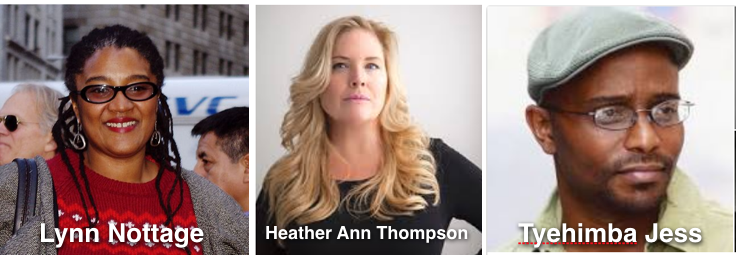
The Pulitzer for Drama went to Lynn Nottage who is 54.
The Pulitzer for History went to Heather Ann Thompson, age 55.
The Pulitzer for Poetry went to Tyehimba Jess, age 53.
Meanwhile at this year's Academy Awards, three of the four winners for acting were over 50: Francis McDormand, 60; Gary Oldman, 59, and Allison Janney, 58. The fourth, Sam Rockwell, will be 50 in November.
The Oscar for Best Director went to Guillermo del Toro, who is 53.
Next we move to television.
The Emmy for Best Drama Series went to The Handmaid's Tale. The novel was written by Margaret Atwood who is 79 and is creative consultant on the show.
The Best Comedy Series went to Veep, executive produced by Julia Louis-Dreyfus, 57. She also won for Best Actress.
Best Limited Series went to Big Little Lies created by David E Kelley, 62.
The Best Supporting Actor was John Lithgow, 73; Best Supporting Actress was Ann Dowd, 62.
Best Supporting Actor in a Comedy Series went to Alec Baldwin, 60.
So, let's recap.
People over 50 aren't creative enough to write a fucking banner ad, but they are creative enough to dominate in Nobels, Pulitzers, Oscars, and Emmys. I guarantee you, not one of these brilliantly talented people could get a job in an ad agency today. Not one.
Is there another industry on earth that is as steeped in intolerance and as thoroughly isolated from reality as the ad industry?
This is the first of Chopin’s Nocturnes, written when he was only about twenty. My love is not specifically for this
piece but for all twenty-one Nocturnes, but that’s hours of music and you have to start somewhere. No more
beautiful music for piano has ever been written.
Eleven years ago I wrote a
big long blog piece on the Nocturnes, with pictures and lots of
exposition; if you want to find out more, it’s a good place to start and I’m not going to reiterate. However, I did learn a couple
of things when I popped up the Wikipedia article on this piece. First, it was dedicated to Mme Camille Pleyel, a pianist who was
Chopin’s contemporary and apparently
quite a colorful person. Also, #2 in the series of Nocturnes is
“regarded as Chopin’s most famous piece”. Sorry, I’m sticking with No. 1. Because it sounds like an invitation. The
right thing to do is sit down late at night with an adult beverage and listen to all the Nocturnes end-to-end.
In 2018, I stand by my 2007 recommendation for
Arrau’s 1997 recording of the Nocturnes. Which may be unfair; loads of superb
pianists have recorded it, nobody could possibly have listened to all of them carefully, and quite likely some will please some sets
of ears more than Arrau does mine.
Spotify
playlist.
This tune on
Amazon,
iTunes,
Spotify.
I can’t find live video of Arrau doing this, but there is no shortage.
Here’s a
nice relaxed take
by Yundi Li. Shut your eyes and lean back; it’s not very long.
This is a 1959 bossa nova by
Antonio Carlos Jobim and
Newton Mendonça; the title means something like “Out of Tune” and
is exquisitely incorrect. It has been recorded a
staggering number of times. I’m here to talk about my favorite
version, with Jobim guesting on a recording by
Stan Getz and
João Gilberto.
It’s on a 1964 album called
Getz/Gilberto, which is fabulous end-to-end. It also includes Girl from Ipanema
which remains so beautiful all those decades later, although its gender politics probably haven’t aged well.
Here’s a story about this record: Down Beat, the jazz magazine, used to have this feature called the “blindfold
test” where they’d play some tracks for a musician without telling him or her who they were, and ask for one- to five-star ratings.
One time, the commentator was Miles
Davis, who was really a mean guy, and he pissed on several of the recordings — some now regarded as
classics — from a great height. But they put on Desafinado and he said:
Gilberto and Stan Getz made an album together? Stan plays good on that. I like Gilberto; I'm not particularly crazy about just anybody’s bossa nova. I like the samba. And I like Stan, because he has so much patience, the way he plays those melodies - other people can’t get nothing out of a song, but he can. Which takes a lot of imagination, that he has, that so many other people don’t have.
As for Gilberto, he could read a newspaper and sound good! I’ll give that one five stars.
I’m with Miles. But like I said, there are a whole lot of versions out there; chances are there are one or two I’d be
recommending here if I’d heard them. You really can’t
go far wrong with this tune.
And yes, I couldn’t be happier after getting the big inside scoop today that Trump’s name will finally be coming off the #Vancouver building. This is long overdue, & a victory for all those who refused to set foot in the building while it bore #Trump’s name. #VancouversTurn#af
While you can modify the above and peruse the list of packages/directories in tabular format or programmatically, you can also do a bit more work to get a visual overview of package size (click/tap the image for a larger view):
As I sit here at my desk typing away at this story, I’m forced to come to terms with a simple fact of the universe: Azio’s Retro Classic keyboard is not for me.
Make no mistake, I’ve been enamoured with the copper and leather keyboard’s overall steampunk aesthetic since the moment I laid eyes on it. However, every time my soft, mushy human fingers are forced to interact with the keyboard’s uncomfortable, hard keys, I’m immediately put off by how subjectively uncomfortable the whole typing experience has turned out to be.
Ignoring steampunk sensibilities, the Azio Retro Classic is very clearly meant to appeal to those users who have forever been unable to let go of the classic typewriters of the past in favour of something more modern. The resemblance to an actual typewriter ends at the keyboard’s visual aesthetic.
As far as I remember — and I should mention that it’s been quite some time since I used my grandfather’s Olivetti model typewriter that stood proudly on his office desk — typewriter keys aren’t supposed to feel so shallow. Granted the keyboard’s key-depth isn’t as shallow as something like the MacBook’s or MacBook Pro’s butterfly switches, but using the Retro Classic’s Azio ‘Typelit’ mechanical switches is a truly uncomfortable experience, nonetheless.
The shallow key-depth problem is further exacerbated by the fact that it takes quite a bit of effort to actually press down an individual key. I’ve never had to think about how strong my hands are before, but not only is using the Azio Retro Classic an uncomfortable experience, it’s a tiring one as well.
I say this without a single shred or trace of insincerity: my hands honestly hurt after typing on the Azio Retro Classic for more than an hour at a time. Playing my MOBA of choice, Heroes of the Storm, was an even more aggravating experience that left my hands bruised and in pain. My muscles ached, my fingers were red, and it felt like my fingernails were going to fall of.
Granted, I did notice that I was able to open jars more easily.
Beauty and the beholder
If one can get past these issues — and as a sucker for something like Cherry’s MX brown switches, I was unable to forgive this keyboard — there’s quite a bit to like about the pomp and circumstance packed into this device.
To begin with this is a startlingly pretty piece of technology.
The keyboard comes in four different colour and material variations. I tested the black and orange ‘Artisan’ model, comprised of a combination of black leather and matte copper for the frame. The ‘Onyx’ version is black leather, with a black chrome frame; the ‘Posh’ variant is white leather with a matte copper frame; while the ‘Elwood’ variant is an incredibly stunning combination of walnut wood and matte gunmetal.
Azio also packs in a complete collection of Mac and Windows keys in each box, which means that the keyboard can easily switch between the two operating systems. Additionally, even though Azio sells both Bluetooth and wired versions of the Retro Classic, the company includes a USB-C cable with the Bluetooth model, so that users can continue to type away, even while the device is charging.
Praising this keyboard for the inclusion of a charging cable might seem odd, but it’s important to note that there are still companies (Apple, notably) that continue to sell wireless products that either neglect wires altogether or are simply unusable while charging.
A steep price to pay
In many ways, the Retro Classic can almost entirely be described using equivocating statements. It’s an uncomfortable keyboard to use, but it’s admittedly very pretty. It’s not particularly useful, but Azio’s gone out of its way to reduce user stress as much as possible.
Of course, what will ultimately determine whether or not someone chooses to purchase this keyboard is their willingness to spend about $279 CAD on what is, in effect, a statement piece.
Doc Searls writes, at Linux
Journal,
about the site's re-launch plans. Linux Journal is
moving to an all-subscription model.
We believe the only cure is code that gives publishers ways to do exactly what readers want, which is not to bare their necks to adtech's fangs every time they visit a website.
We're doing that by reversing the way terms of use work. Instead of readers always agreeing to publishers' terms, publishers will agree to readers' terms.
The Linux audience tends to be early adopters of
privacy tools, which means that brands need new kinds
of metrics. When you're trying to reach niche early
adopters such as the open source and devops audiences
that Linux Journal serves, conventional
adtech and martech aren't enough.
The readers of Linux Journal have
overwhelmingly rejected web advertising. This
is strange, because as a former editor there
back when they had a print magazine, I recall
that readers didn't have much of a problem with
the print ads. We got the usual bragging that
ads don't work on me, but print ads don't
work the way that most people think they work
anyway.
The Linux Journal ads got crappy when they
went web-only. Instead of a sustainable revenue
source, the ad game became a race to the bottom.
And LJ almost lost that
game.
The good news is that the game is
changing because of hard work happening
on the browser side. Every time a user
turns on a privacy feature such as Firefox Tracking
Protection,
or installs a protection tool such as Better
by ind.ie or EFF Privacy
Badger, a
little bit of problematic ad inventory goes away.
When tracking protection tools keep ad money out
of the nasty corners of the internet, legit sites
can win. Here's how Aloodo plans to help LJ, and is
available to help other sites too.
Measure the tracking-protected audience. Tracking
protection is a powerful sign of a human audience. A
legit site can report a tracking protection percentage
for its audience, and any adtech intermediary who
claims to offer advertisers the same audience,
but delivers a suspiciously low tracking protection
number, is clearly pushing a mismatched or bot-heavy
audience and is going to have a harder time getting
away with it. Showing prospective advertisers your
tracking protection data lets you reveal the tarnish
on the adtech "Holy Grail"—the promise of
high-value eyeballs on crappy sites.
Higher-reputation publishers need
more and better data to take to numbers-craving CMOs.
Much of that data will have to come from the
tracking-protected audience. When quality sites
share tracking protection data with advertisers,
that helps expose the adfraud that intermediaries
have no incentive to track
down.
We look forward to working with Linux
Journal and the LJ readers.
As Urs said last week, security is one of the biggest issues of our time, and with the cloud, we are able to tackle it together. At Google Cloud, we’re always working to help organizations keep up with evolving threats, protect their sensitive data, and empower innovation—all while giving them control and visibility. That’s why over the past several days we’ve announced a broad range of security products and enhancements. With so much to share, we thought it would be helpful to put all the news in one handy location.
Here’s a recap of our security announcements in March.
Chrome Enterprise
1. New enterprise mobility management (EMM) partnerships
Cloud Identity is a new, standalone Identity as a Service (IDaaS) solution that offers premium features such as account security, application management and device management in one place. With Cloud Identity, employees get simple, secure access to their business-critical apps and devices, while administrators get the tools they need to manage it all in one integrated console.
Google Cloud Platform
5. Access Transparency
Trust is paramount when choosing a cloud provider, and we want to be as open and transparent as possible. Access Transparency gives you near real-time logs when Google Cloud Platform administrators access your content, offering an audit trail of actions taken by Google engineers and support whenever they interact with your content on GCP.
6. Cloud Armor
Cloud Armor, our new Distributed Denial of Service (DDoS) and application defense service, is based on the same technologies and global infrastructure that we use to protect services like Search, Gmail and YouTube. Global HTTP(S) load balancing provides built-in defense against infrastructure DDoS attacks. Cloud Armor works in conjunction with global HTTP(S) load balancing and enables you to customize defenses for your internet-facing applications. Its capabilities include IP blacklisting/whitelisting, geo-based access control, custom rules via a rules language and defense against application-aware attacks like SQL Injection.
7. Cloud Security Command Center (alpha)
The new Cloud Security Command Center (Cloud SCC) is a security and data risk platform that lets you view, analyze, and monitor an inventory of your cloud assets, scan storage systems for sensitive data, detect common web vulnerabilities and review access rights to your critical resources—all from a single, centralized dashboard. Detect threats and suspicious activity with Google anomaly detection as well as security partners such as Cloudflare, CrowdStrike, Dome9, Palo Alto Networks, Qualys and RedLock.
8. The Cloud Data Loss Prevention (DLP) API
Discover, classify and redact sensitive data at rest and in real-time with the DLP API, now generally available. And because it’s an API, you can use it on virtually any data source or business application, whether it’s on GCP services like Cloud Storage or BigQuery, a third-party cloud, or in your on-premises data center.
9. FedRAMP Authorization
GCP, and Google’s underlying common infrastructure, have received the FedRAMP Rev. 4 Provisional Authorization to Operate (P-ATO) at the Moderate Impact level from the FedRAMP Joint Authorization Board (JAB). Now, both G Suite and GCP have FedRAMP Moderate authorizations. Agencies and federal contractors can request access to our FedRAMP package by submitting a FedRAMP Package Access Request Form.
10. VPC Service Controls (alpha)
Currently in alpha, VPC Service Controls help enterprises keep their sensitive data private while using GCP’s fully managed storage and data processing capabilities. VPC Service Controls create a security perimeter around data stored in API-based GCP services such as Cloud Storage, BigQuery and Bigtable. This helps mitigate data exfiltration risks stemming from stolen identities, IAM policy misconfigurations, malicious insiders and compromised virtual machines.
Automatically flag emails from untrusted senders that have encrypted attachments or embedded scripts.
Warn against email that tries to spoof employee names or that comes from a domain that looks similar to your own domain.
Offer enhanced protections against spear phishing attacks by flagging unauthenticated email.
Scan images for phishing indicators and expand shortened URLs to uncover malicious links.
12. Default-on mobile management
Basic device management is automatically enabled for your mobile devices that access G Suite. Employees won’t need to install profiles on iOS and Android devices, and admins get added security management controls including the ability to enforce pass codes, erase confidential data, and see which devices access corporate data.
13. New additions to the security center for G Suite
We introduced the security center for G Suite earlier this year. Security center brings together security analytics, actionable insights and best practice recommendations from Google to help you protect your organization, data and users. Last week we introduced new additions, including:
New security charts to show OAuth activity and Business Email Compromise (BEC) scam threats specifically focused on phishing emails that may not have links.
New mobile management charts to help IT admins examine activity analytics and detect when devices have been hijacked, rooted or jailbroken.
Ways to reorganize the dashboard to focus on what is most important to your organization.
Ways to analyze your organization’s security health and get custom advice on security key deployment and protection against phishing scams.
14. Built-in protections and controls for Team Drives
New enhancements to Team Drives provide additional security controls, including the ability to limit file access privileges and add IRM controls to prevent users from printing, downloading and copying files. These new security features will roll out in the coming weeks.
Dome9, which has developed a compliance test suite for the Payment Card Industry Data Security Standard (PCI DSS) in the Dome9 Compliance Engine.
Rackspace Managed Security, which provides businesses with fully managed security on top of GCP.
RedLock’s Cloud 360 Platform, a cloud threat defense security and compliance solution that provides additional visibility and control for Google Cloud environments.
As we said last week, we believe a more secure business landscape is better for everyone, and we’re committed to finding new ways to help businesses be more secure. For more information, check out our security webpage.
Now with more and larger GIFs! Fresher but still annoying background music! And, uhh, a bigger version number! That’s basically it. See you in another 10 years!
In the wake of the Facebook scandal where all of us are concerned and debating over the rise of online privacy, here is an attempt to explain how web tracking works in a nutshell.
What is web tracking?
Web tracking is the practice by which websites identify and collect information about users, generally in the form of some subset of web browsing history.
Is it evil?
Web tracking isn’t 100% evil, but its workings remain poorly understood. From the perspective of website owners and of trackers, it provides desirable functionality, including personalisation, site analytics, and targeted advertising.
Without trackers, an e-commerce website will have to treat every user as a stranger and unable to present personalised content.
What is the bad side?
After you switch websites, advertisements for products you’ve just looked at, or products you looked at a few weeks ago reappear! The greatest concern is when the trackers come from third-party websites.
This Twitter thread describes how much of our information is being collected by Google and Facebook.
Twitter thread describing data privacy issue
Are you visiting just one site?
Say for example, when you go to nytimes.com, the New York Times knows you’ve visited and which article you’re reading – in this case, the New York Times is a “first-party”. Because you choose to visit a first-party, we are not particularly concerned about what the first-party knows from your visit. A third-party tracker like doubleclick.net – embedded by nytimes.com to provide, for example, targeted advertising – can log the user’s visit to nytimes.com.
The number of trackers that exist in any website depend on what the website owner has decided.
What is third-party tracking?
Third-party web tracking refers to the practice by which an entity (the tracker), other than the website directly visited by the user, tracks or assists in tracking the user’s visit to the site.
Third-party trackers are creepy
Once there is one third-party on a page, that third-party has the ability to turn around and invite any number of other third-parties to the first-party webpage.
Your personal information is valuable and it’s your right to know what data is being collected about you – your age, income, family’s ages and income, medical history, dietary habits, favourite web sites, your birthday…the list goes on.
The trick is in taking this data and shacking up with third-parties to help them come up with new ways to convince you to spend money, sign up for services, and give up more information. It would be fine if you decided to give up this information for a tangible benefit, but you may never see a benefit aside from an ad, and no one’s including you in the decision.
Tracking is not anonymous
You might think that this tracking is anonymous, since your real name is not attached to it. Many third-parties do know your real identity. For example, when Facebook acts as a third-party tracker they can know your identity as long as you’ve created a Facebook account and are logged in – and perhaps even if you aren’t logged in. It is also possible for a tracker to de-anonymise a user by algorithmically exploiting the statistical similarity between their browsing history and their social media profile.
Track the trackers!
Using Lightbeam, a privacy browser extension, discover who’s tracking you online while you browse the Web.
Lightbeam graph showing first and third-party website trackers
When you activate Lightbeam and visit a website, the browser extension creates a real time visualisation of all the third-parties that are active on that page. As you then browse to a second site, it highlights the third parties that are also active there and shows which third parties have seen you at both sites. The visualisation grows with every site you visit and every request made from your browser.
Conclusion
There is much more to web-tracking than what is written here. My curiosity for privacy started only last year when I interned with Outreachy – Mozilla for Lightbeam.
Stay safe and make the internet a healthier place!
With hundreds of thousands of IoT devices in mobile networks it seems that every now and then, bad behavior in failure scenarios on the application level leads to, well lets say, interesting behaviors on the network layer. While most network operators keep such incidents to themselves, Annex A of GSMA TS.34 (IoT Connectivity Guidelines about which I’ve already written here) contains a number of interesting scenarios that mobile network operators have been willing to share with IoT implementors in the hope that they think a bit before deploying their devices.
Annex A contains, for example, the following scenarios with more details:
Example 1: 375.000 devices in several countries with SIM cards of one network operator started resetting their GSM modules once a minute because the application on top could not talk to it’s server on the Internet anymore because it was down. The result: A massive HLR overload which resulted in all devices handled by that HLR being unable to location update and register. In the end, roaming interfaces had to be shut down to reduce the HLR load to stabilize the situation.
Example 2: (Only!) 59 IoT modules with GSM modules where hacked and misused to make 17.000 fake calls to expensive destination numbers with a few days. Financial loss to the company that deployed the 59 devices was €150k and would have probably been much higher if the network operator did not notice a spike in calls to a number of destinations.
Example 3: An external Radius server suffered a massive overload after an SGSN outage and tens of thousands of IoT devices trying to get a PDP context again once connectivity was restored. The external Radius server could only be stabilized after the network operator barred all IoT devices and only let them back into the network in smaller batches.
TS.34 contains a number of additional scenarios and I’m pretty sure those are just small harbingers of what will come in the future. Because if we are realistic, for each developer that reads and understand these scenarios and puts counter measures in place there will be at least 10 others that don’t care until they are bitten by reality. Unfortunately it’s not only to their disadvantage but has an impact on the service of others as well.
Die Woche nach Ostern ist beinahe so ruhig wie die nach Weihnachten. Dennoch gibt es zwei Events an der WHU und in Dresden, einen interessanten Kinostart, ein paar neue Alben und wichtige Gedenktage.
Something that hasn’t received a lot of press since the announcement of Apple’s new 2018 iPad, is the altered shade of gold the tech giant has chosen for back of the tablet’s ‘New Gold’ iteration.
The shade seems like the same colour that is used for the gold Apple Watch and the iPhone 8. Hue wise, it falls between ‘Rose Gold’ and the older gold colour Apple has used for devices in the past.
While we can’t confirm that all three devices use the same shade since we don’t have all the devices in those colours at the MobileSyrup offices currently, it seems likely that Apple will likely stick to one consistent colour across the gold version of its new devices
The cellular iteration of the new iPad also features a white bar along the top that nicely compliments this new gold flavour.
The 2018 Pad opting for this colour seems to define a trend of Apple shifting away from the old gold colour, to this new, more copper shaded gold. If this is actually a trend, it will be interesting to see if future MacBooks, or even if an alternate version of the iPhone X, eventually features this more champagne shade of gold.
I was curious, and Strava is a joyless data bank for the insecure. When The Washington Post reported in January that US military bases are visible in the GPS shadows of uniformed Stravites, I was not shocked. I had performed equally fastidious forensics on the cyclist’s Strava maps. Tracing her routes on that anxious morning and days to come, I could see where she lived, where she drank beer and got coffee. I knew how many calories she burned working out, and how often. I knew when and where and with whom she spent time (increasingly, my boyfriend).
Data without much context: enough to drive anyone a little nutty.
In my last post, I described what to do with document reviewers who say too little. But what about those who say too much? Here’s a comment from last week’s post: Josh, what is your advice for responding to the person who is asked to “review for accuracy only” and sends back an article completely … Continued
The story of Windows’ decline is relatively straightforward and a classic case of disruption:
The Internet dramatically reduced application lock-in
PCs became “good enough”, elongating the upgrade cycle
Smartphones first addressed needs the PC couldn’t, then over time started taking over PC functionality directly
What is more interesting, though, is the story of Windows’ decline in Redmond, culminating with last week’s reorganization that, for the first time since 1980, left the company without a division devoted to personal computer operating systems (Windows was split, with the core engineering group placed under Azure, and the rest of the organization effectively under Office 365; there will still be Windows releases, but it is no longer a standalone business). Such a move didn’t seem possible a mere five years ago, when, in the context of another reorganization, former-CEO Steve Ballmer wrote a memo insisting that Windows was the future (emphasis mine):
In the critical choice today of digital ecosystems, Microsoft has an unmatched advantage in work and productivity experiences, and has a unique ability to drive unified services for everything from tasks and documents to entertainment, games and communications. I am convinced that by deploying our smart-cloud assets across a range of devices, we can make Windows devices once again the devices to own. Other companies provide strong experiences, but in their own way they are each fragmented and limited. Microsoft is best positioned to take advantage of the power of one, and bring it to our over 1 billion users.
That memo prompted me to write a post entitled Services, Not Devices that argued that Ballmer’s strategic priorities were exactly backwards: Microsoft’s services should be businesses in their own right, not Windows’ differentiators. Ballmer, though, followed-through on his memo by buying Nokia; it speaks to Microsoft’s dysfunction that he was allowed to spend billions on a deal that allegedly played a large role in his ouster.
Culture is not something that begets success, rather, it is a product of it. All companies start with the espoused beliefs and values of their founder(s), but until those beliefs and values are proven correct and successful they are open to debate and change. If, though, they lead to real sustained success, then those values and beliefs slip from the conscious to the unconscious, and it is this transformation that allows companies to maintain the “secret sauce” that drove their initial success even as they scale. The founder no longer needs to espouse his or her beliefs and values to the 10,000th employee; every single person already in the company will do just that, in every decision they make, big or small.
As with most such things, culture is one of a company’s most powerful assets right until it isn’t: the same underlying assumptions that permit an organization to scale massively constrain the ability of that same organization to change direction. More distressingly, culture prevents organizations from even knowing they need to do so.
Thus my assertion at the top, that the story of how Microsoft came to accept the reality of Windows’ decline is more interesting than the fact of Windows’ decline; this is how CEO Satya Nadella convinced the company to accept the obvious.
The Easy Win: Office on iPad
A month after taking over as CEO, Nadella introduced Office for iPad. Quite obviously, given the timing, the work had been done under Ballmer; some reports suggest the initiative in fact started years previously. Ballmer, though, wouldn’t release it until there was a touch version for Windows 8; some wonder if he would have ever released it at all.
It’s all a bit of a moot point; in the end Ballmer’s delay gave Nadella an easy win that symbolized the exact shift in mindset Microsoft needed: non-Windows platforms would be targets for Microsoft services, not competitors for Windows.
That wasn’t the only news that week: Microsoft also renamed its cloud service from Windows Azure to Microsoft Azure. The name change was an obvious one — by then customers could already run a whole host of non-Windows related software, including Linux — but the symbolism tied in perfectly with the Office on iPad announcement: Windows wouldn’t be forced onto Microsoft’s future.
The Demotion: Nadella’s First Strategy Memo
It was another three months before Nadella wrote his first company-wide strategy memo explicitly departing from his predecessor:
More recently, we have described ourselves as a “devices and services” company. While the devices and services description was helpful in starting our transformation, we now need to hone in on our unique strategy. At our core, Microsoft is the productivity and platform company for the mobile-first and cloud-first world. We will reinvent productivity to empower every person and every organization on the planet to do more and achieve more.
What is striking about this articulation of “productivity and platforms” is that it is exactly how Nadella reorganized the company last week; the “Experiences & Devices” team is focused on end-user productivity, while the “Cloud + AI” team is all about building the platform of the future. The reason it took so long is the point of this article — Nadella had a Windows problem.
To that end, the most important aspect of Nadella’s memo was not what he said about Windows, but where he said it. I wrote in a Daily Update breaking down the memo:
Trust me when I say demoting Windows all the way to this point in the letter is a dramatic shift. Remember, it wasn’t that long ago that Steve Ballmer said “Nothing is More Important at Microsoft than Windows”; Nadella not even mentioning the OS for the first 2,000 words sends a very different message. Similarly, spending nothing more than a sentence on Surface and Nokia — in the entire email, the word “Surface” appears twice and “Nokia” once — makes it as clear as can be that neither is the future.
This was the next step after the initial symbolism of Office on iPad and the Azure name change: actually articulating a future where Windows didn’t matter.
The Retreat: Love Windows
Nadella, though, had a short-term problem: Microsoft’s most important customers — enterprises — hated Windows 8. The operating system may not have been Microsoft’s future, but it was still a massive cash cow, and the linchpin for all of Microsoft’s legacy products. To that end the company needed Windows 10 to get out the door sooner-rather-than-later.
This, I think, is the context for Nadella’s presentation at a January, 2015 event about Windows 10; Nadella said:
We absolutely believe that Windows is home for the very best of Microsoft experiences. There’s nothing subtle about this strategy. It’s a practical approach which is customer first. We want to give ourselves the best opportunity to serve our customers everywhere and give ourselves the best chance to help customers find Windows as their home. That’s what we plan to do…We need to move from people needing Windows to choosing Windows to loving Windows…We want to make Windows 10 the most loved release of Windows.
At the time I was very disappointed; suggesting that Microsoft experiences needed to be “best” on Windows suggested that Windows was dictating the direction of Microsoft services. A few months later, though, once Windows 10 shipped, Nadella made clear this was only a temporary retreat.
The Quarantine: Nadella’s First Reorganization
That summer Nadella undertook his first reorganization, separating the company into three divisions: Cloud and Enterprise, Applications and Services, and Windows and Devices. I wrote in a Daily Update:
We are rallying behind a single strategy as one company — not a collection of divisional strategies…
This was exactly wrong: by that point Microsoft had already lost the devices war and needed to focus on services that worked on iOS and Android. A “One Microsoft” strategy, on the other hand, kept all of those services subservient to Windows. However, with this new reorganization, Windows is off in the corner where it belongs, leaving the Cloud and Enterprise team and Applications and Services Group free to focus on building their businesses on top of all platforms.
I believe this reorganization was the turning point: not only were the two teams Nadella announced last week basically formed at this time, but more importantly, Windows was left to fend for itself.
The Inception: The Death of Windows Phone
Nadella’s most impressive bit of jujitsu was how he killed Windows Phone; while the platform had obviously been dead in the water for years, Nadella didn’t imperiously axe the program. Instead, by isolating Windows, he let the division’s leadership come to that conclusion on their own.
Naturally, departing Windows-head Terry Myerson blamed the rest of the company, stating, “When I look back on our journey in mobility, we’ve done hard work and had great ideas, but have not always had the alignment needed across the company to make an impact.” I wrote at the time:
This is such an utterly clueless explanation of why Windows Phone failed that it’s kind of stunning. Until, of course, you remember the culture-induced myopia I described yesterday: Myerson still has the Ballmer-esque presumption that Microsoft controlled its own destiny and could have leveraged its assets (like Office) to win the smartphone market, ignoring that by virtue of being late Windows Phone was a product competing against ecosystems, which meant no consumer demand, which meant no developers, topped off by the arrogance to dictate to OEMs and carriers what they could and could not do to the phone, destroying any chance at leveraging distribution to get critical mass…
Interestingly, though, Myerson’s ridiculous assertion in a roundabout way shows how you change culture…In this case, Nadella effectively shunted Windows to its own division with all of the company’s other non-strategic assets, leaving Myerson and team to come to yesterday’s decision on their own. Remember, Nadella opposed the Nokia acquisition, but instead of simply dropping the axe on day one, thus wasting precious political capital, he hung the Windows team out to dry let Windows give it their best shot and come to that conclusion on their own.
Nadella did the same thing with Windows proper: when Windows 10 launched Myerson claimed that the operating system would be on 1 billion devices by mid-2018; the company had to walk that back a year later, not because Nadella said so, but because the market did.
The Division: The End of Windows
And so we reach last week’s announcements: the Windows division is no more. It is an incredibly meaningful milestone, yet anticlimactic at the same time, thanks to Nadella’s careful management. It is worth noting, though, that Nadella had one critical ally in this journey: Wall Street.
Microsoft’s stock price since Satya Nadella became CEO.
If culture flows from success, then it follows that an attempt to change culture is far easier to accomplish when the most obvious indicator of success — one that has a direct impact on employee pocket-books — is moving up-and-to-the-right. What is fascinating to consider, though, is that Microsoft’s stock is up not only because the company has a vision that it is delivering on quarter-after-quarter, but also because the stock was depressed in the first place.
To put it another way, Nadella’s shift to a post-Windows Microsoft is the right one; to have done the same a decade sooner would have been better. It also, though, may have been impossible, simply because Windows was still the biggest part of the business, and it’s not clear the markets would have tolerated an explicit shift before it was painfully obvious it was necessary; without a rising stock price, Nadella’s mission would have been much more challenging if not impossible.
The Future: Why Microsoft?
It’s important to note that Windows persisted as the linchpin of Microsoft’s strategy for over three decades for a very good reason: it made everything the company did possible. Windows had the ecosystem and the lock-in, and provided the foundation for Office and Windows Server, both of which were built with the assumption of Windows at the center.
Office 365 and Azure are comparatively weaker strategically: Office 365 has document lock-in, but the exact same forces that weakened Windows in the first place weaken the idea of documents as well. It’s not clear why new companies in particular would even care. Azure, meanwhile, is chasing AWS, with a huge amount of business coming from Linux VMs that could run anywhere.
Unsurprisingly, both are still benefiting from Windows: Office 365 really does, as Nadella noted in his retreat, work better on Windows, and vice versa; it is seamless for organizations that have been using Office for years to move to Office 365. Azure’s biggest advantage, meanwhile, is that it allows for hybrid deployments, where workloads are split between legacy on-premise Windows servers and Azure’s public cloud; that legacy was built on Windows.
This, then, is Nadella’s next challenge: to understand that Windows is not and will not drive future growth is one thing; identifying future drivers of said growth is another. Even in its division Windows remains the best thing Microsoft has going — it had such a powerful hold on Microsoft’s culture precisely because it was so successful.
I recently made the decision to take advantage of Iceland Air’s free stopover policy to visit Iceland on my way from Vancouver, Canada to Europe. If you weren’t aware, Iceland Air allows anyone to stop for up to a week in Iceland without any additional charges. This is a brilliant marketing move, and it’s help Iceland become a hugely successful tourist destination in the last few years (one tour guide told me that fishing used to be about 70% of the economy, and now tourism is coming close to eclipsing that).
Before I arrived, I had heard stories about how expensive the country is. Let me be clear, those rumours are true. Compared to prices back in Vancouver, I would say most items in Iceland are 2-3x as expensive. For example, I had a small latte and a banana, which back home would probably cost me about $5 Canadian – in Iceland it was more like $10. Similarly a plate of fish and chips back home is $20 or so – I saw a restaurant while walking around that was offering fish and chips for the equivalent of $50.
That said, I found Iceland really clean and super efficient. Most of the busses I was on were high-end Mercedes models, and the majority of them had included WiFi (which when you are touring a foreign country is great to have for looking items up). Walking around felt really safe, and most of the streets and buildings were clean.
Getting from the airport to Reykjavik was really easy as I bought a Grey Line transfer. Once you enter the arrivals hall in the airport there is a person standing right in front of you with a Grey Line board, and he gave me instructions for how to find the bus which runs roughly every 30 minutes. It was about a 45 minute drive to Reykjavik, after which Grey Line transferred me to a smaller vehicle that took me to my hostel another 15 minutes away.
Many of us that arrived had overnight flights from North America, which meant we were at the hostel around 7:30am. This must be a common occurrence for them, but they didn’t really know what to do with us. We were told that we wouldn’t be able to check-in until 2pm, which is unfortunate but of course I understand since there were likely people still in the rooms. That said the common area had a few people that were mostly sleeping on their sofas for the morning since they didn’t really have anywhere else to go and were exhausted. I really wish more places would set aside a few rooms for people who come in overnight, or offer early check-ins (for a fee) to accommodate them. Since I had no room, I decided to have a $8 coffee instead. The hostel offered to watch my luggage for me, so I tossed my main suitcase into the hostel’s storage area so I could go outside and shoot some photos.
Exploring Reykjavik
I only had two days in Iceland, and booked a huge tour for my second day. So really I only had an afternoon to explore Reykjavik. I walked around for a few hours with my camera just taking photos, which was great. Reykjavik is certainly unique, and reminded me of a cross between Ushuaia, Argentina (which is in Patagonia on the Beagle Channel), and Wellington, New Zealand. Obviously fishing is a huge part of the economy in Iceland, which is evident based on all the seafood restaurants and fishing boats you see while walking around.
Reykjavik
Reykjavik Harbour
Reykjavik
I stayed at the Oddsson Hostel, which was one of the lower priced options I could find (but still $100 CAD for a night). I knew I wouldn’t be spending a lot of time in the hotel, so I just decided to try and keep it cheap. In general I had a good experience there, but didn’t really spend a lot of time interacting with the staff or other travellers on this trip.
Golden Circle Tour
One of the highlights of most visitors’ trips to Iceland is the Golden Circle Tour. The Golden Circle is a route around Iceland that takes you to various beautiful nature locations including several waterfalls and national parks. I booked an eight hour tour via Saga Travel and had a really great time. Here were some of the photos I shot while on the tour:
Volcanic Crater
Fixi Waterfalls
Icelandic Horse
Gullfoss Waterfall
Geothermal Geyser
Exploring the National Park
Exploring the park
After the tour the driver dropped me back off at the hostel. Since I had an early morning flight to Amsterdam, I just took it easy and got to bed early.
Summary
Up until a few years ago, very few people I know would have considered Iceland a tourist destination, but nowadays not only are many people talking about going, but I also have several friends who have already visited. And sure, it’s expensive, but unlike some other countries I have visited that were also expensive (I’m looking directly at you Singapore), Iceland seems to warrant it due to their isolated location and progressive nature of the entire country (most of the country runs on renewable resources – we could all learn some valuable lessons from them).
If you are in a time crunch, like I was, you can easily see some of the highlights of the country in just a few days. But if you do have more time, there is a really beautiful 1200km loop road around the entire country that I’ve heard is great for a road trip.
So if you’re looking for a unique destination to visit, I would highly recommend visiting Iceland. And if you’re making the trip from North America to Europe, it seems silly not to take advantage of Iceland Air’s free stopover policy to enjoy some of the sights and also help with the jet lag transition.
Inspired by Starman and Elon Musk's Tesla Roadster, Velo Orange has decided to launch its own payload into outer space. We're pleased to announce that we have successfully launched one Polyvalent into heliocentric orbit.
The first bicycle sent on an interplanetary mission, our Polyvalent has been launched towards Alpha Centauri, often touted as one of the most likely places for mankind to make alien contact. Our next-door neighbors in space, the three-star Alpha Centauri system seems like a great potential advertising market, and we want to beat NASA and SpaceX to it. Velo Orange co-owner, Adrian Nelson, says "It's good to be a first-mover in a situation like this. If there's an alien race 4.367 light years from us, we want to make sure we're the first ones to sell full coverage bicycle fenders to it."
Indeed, upon closer examination, you'll see the frame is decked out with Velo Orange's soon-to-be-released Wavy fenders. We have decided to dress this bike up, unlike the humans depicted in the Pioneer plaques on board the 1972 Pioneer 10 and 1973 Pioneer 11 spacecrafts. If other worldly beings come across the Polyvalent, we want to them to know we come in peace...and with style.
Co-owner Igor Shteynbuk says, "What's a better first introduction to the human race than a classically styled touring frame? 650b has been a persistent presence in the cycling world, so it should be a good representation of cycling for generations (or the potentially 78,000 years it may take the PolyV to get to Alpha Centauri). The bicycle has always been an egalitarian force, allowing for a more even social playing field for transport and recreation. We want the human race to be represented by such positive connotations."
The runner-up to being launched into space was Fairweather's B903 Bullmoose Bars. Noting their similarity to Worf's bat'leth though, this option was abandoned due to the fear of unintentionally sparking intergalactic warfare.
What will happen to the Polyvalent as it careens towards towards its destination? Find out by following the bicycle via this advanced image tracking system.
Really, this whole “working for yourself” as a freelancer or a company of one or whatever you want to call it, is so incredibly new, there are countless unknowns. Even for myself, 20 years in, I don’t know what things will be like for myself or anyone else working for themselves in another 20 years.
This post reads like marketing but it still makes a pretty good point. "Your customers aren't going to buy your course because they want to learn everything you know about XYZ topic. They’re going to buy your course because they want to achieve a specific result. To them, your course is just a way to learn how to get that result. It’s the result they value, not the information." If they get that result, the course was valuable, even if they didn't finish the course.


-20180402193550.jpg)














 The Official Google Blog.