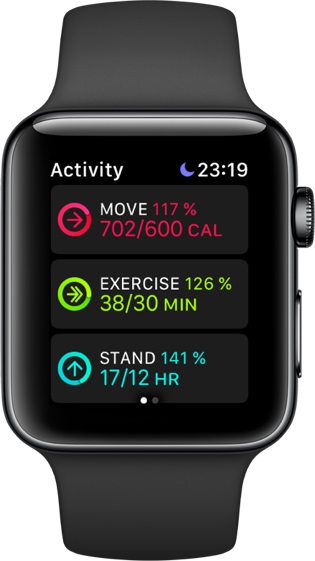
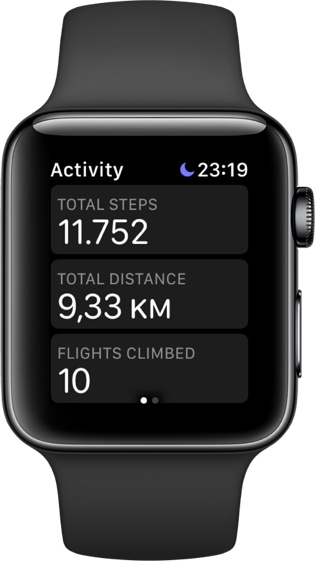
I missed the Move goal for the third time in three years. But on the other 364 days I still complete all three rings. It's a better life for me.
I missed the Move goal for the third time in three years. But on the other 364 days I still complete all three rings. It's a better life for me.
The Community Leadership Summit is proud to announce the 2018 keynote lineup.
Keynote speakers play a key role in the two-day conference by “setting the tone” each morning and by covering topics that are relevant, important, and widely applicable to the overall open source community and those in attendance.
Each keynote talk will be 15 minutes in duration and will take place on the main stage in front of a plenary audience.
We’re extremely excited to welcome the following 2018 keynote speakers to Portland:
Scott Hanselmann | Principal Community Architect for Web Platform & Tools, Microsoft

Nithya Ruff | Head of Open Source Practice, Comcast

Jorge Castro | Community Manager, Heptio

Danese Cooper | Head of Open Source, PayPal

Raymod Paik | Community Manager, The Linux Foundation

Kara Sowles | Manager of Community & Evangelism, Puppet

Todd Lewis | Creator and Chair, All Things Open & Open Source 101


This was by far the best news all week. I’m a fan of both the books and the series and rate them quite highly, because even if some of the plot devices could be tuned down a little the hard physics, sheer attention to detail and character dynamics make it a treat for both sides of the brain.
The biggest takeaway, though, is that SyFy is fundamentally incompetent at managing their assets – this is the latest in a series of fumbles and cancellations that shows they are completely missing the point of the genre they’re named after, and I’m very glad Amazon picked this up.
After all, this is the best Sci-Fi show in recent years, and it would be a near criminal waste to deny us this kind of glimpse into what could be the future of the human condition (regardless of the plot devices).
Yesterday we celebrated Y’s birthday, turning 2 years old. A fun day with lots of family and friends enjoying the beautiful weather in the garden. We did not finish the big birthday cake….

When I normally do a long ride, I get graphs that are kind of messy. The North Shore is notoriously hilly and so you get crazy graphs that show my heart rate and speed all over the place.
However, I live in Deep Cove and occasionally just go straight up Mount Seymour, back down and then collapse in a heap at my house. I'm not fast or fit, but I'm trying to get better.
This produces some satisfyingly nice graphs.
Elevation:

Then there's speed (yeah, I'm not fast):

And then the inverse, my heart rate (yeah, I'm not fit):

Most satisfying.

Rachel Metz,
MIT Technology Review,
May 31, 2018

The headline should probably read 'influence' rather than 'control'. Still, the idea of a movie you can influence with your mind raises new possibilities for interactive media. Whileyou wear a NeuroSky MindWave headset, "scenes, music, and animation change every time you watch it, depending on the meanderings of your mind." The movie, "a 27-minute avant-garde tale called The Moment," was created by Richard Ramchurn, a graduate student at the University of Nottingham.
Web: [Direct Link] [This Post]
At the beginning of the month I came back from my last few weeks of parental leave (thanks Mozilla!). While I was away Sarah Clements took over some Firefox Quantum release criteria work and I’m pleased to see that she managed to tackle everything well by herself.
Some of the major changes she made was to separate the Quantum criteria page into 32-bit and 64-bit. This simplifies the graphs and allows release stakeholders to see more clearly how one specific architecture is doing.

She also added the new release criteria for Firefox’s GeckoView efforts.

To learn more you can visit https://health.graphics to see the changes.
If you would like to contribute visit https://github.com/mozilla/firefox-health-dashboard.
Die Zeit 22/2018: “Die habe ich gesehen”. “Seit fünf Jahrzehnten ist die Identität einer geheimnisvollen Toten unbekannt. Doch jetzt gibt es eine neue Spur: Die Aussage eines norwegischen Fischers.” Von Tanja Stelzer.
Die Zeit 03/2018: Die Tote aus dem Isdal. “1970 wurde in Norwegen eine Frauenleiche gefunden: Verbrannt, entstellt, mit rätselhaftem Gepäck. Bis heute ist unklar, wer sie war. Eine Verrückte? Eine Agentin? Die Polizei ermittelt jetzt wieder. Neue Spuren weisen nach Deutschland.” Von Tanja Stelzer.
Der erwähnte Podcast findet sich hier – in englischer Sprache:
BBC: Death in Ice Valley. “An unidentified body. Who was she? Why hasn’t she been missed? A BBC World Service and NRK original podcast, investigating a mystery unsolved for almost half a century.”
It’s also available via iTunes, and you can listen to the first episode (with illustrations) here (31:50min).
See also The Independent: Death in Ice Valley: The new true crime podcast that’s the BBC’s answer to Serial. “It is hoped listeners will help solve the mysterious death of a Norwegian woman in 1970 outside Bergen, in this innovative podcast take on Nordic noir.”
More links in this MetaFilter thread: “Ich komme bald”. I especially recommend this article from the BBC:
BBC News: Isdal Woman: The mystery death haunting Norway for 46 years. By Helier Cheungm BBC News, Bergen. Published on 13 May 2017.
Back in January I had to make a critical decision. I had to determine if to separate the Firefox health dashboard (formely known as Platform health) into a backend and frontend projects or to keep it together.
The intent was to make it easier to maintain the project by reducing the complexity of having code that is presentational versus processing code. I also wanted to remove the boilerplate needed for webpack and babel. It was also beneficial to have the liberty of changing packages without worrying of regressing the frontend or the backend. The only disadvantages was to have to do the work and that we might need in the future coordinated changes (or versioned APIs). We did not see the disadvantage of code being duplicated since there wasn’t any (or much — I can’t recall now) shared between the two apps.

This all came from hitting a very odd production specific issue. I thought this was all caused from the complex webpack configuration the project had. Because we were not making progress determining the root issue I decided to switch to Neutrino. Switching to Neutrino made everything easier, however, it was unclear how to make it work with the original project’s design. The original design had the frontend files being served as static assets of the Koa app. Switching to Neutrino took away webpack headaches since it makes good default configuration options for the project.
Keeping both frontend and backend apps within the same repository complicated the deployment story since there were some Heroku restrictions. I tried using subtrees, however, it still required manual intervention (see explanation). I didn’t know at the time that we could have deployed the backend to Heroku while deploying the frontend to Netlify. This would have allowed to keep both project within the same repository. Alas! We now have two repositories.
If you want to look at the code changes you can see them here.

Ulysses 13 launched today for iOS and Mac, and it's all about putting more writing tools in your arsenal. It takes existing features of the app and makes them all better, leaving the app no more cluttered, but notably more useful. Improvements are in three areas: deadlines and daily writing goals, colored keywords, and syntax highlighting for code blocks.
Ulysses has long had a writing goal feature, which enabled you to set a goal for any given sheet measured by word or character count, reading time, and more; now that feature's getting a lot more useful thanks to the addition of deadlines and a daily goal option.
When you set a sheet's goal in Ulysses 13, you'll see the option to add a deadline. After you select your deadline date, the remaining number of writing days is displayed in the app's sidebar just underneath your current progress status. Overall it's a fairly simple feature, but a valuable one, and there are a couple clever implementation details worth noting. One is that you can specify whether or not to count the deadline date itself as a writing day, and another is that you can tell the app which days you never write on, so your deadline countdown will only consist of actual writing days. This not only helps you keep better on top of your work – it also enables Ulysses to provide an accurate estimate of how much you'll need to write each day to hit your goal.
On a related note to deadlines' daily writing estimates, Ulysses 13 enables setting yourself a daily writing goal. This can be done on a per-group basis: swiping left on a group, then tapping the settings icon, provides the option to add a goal for that entire group. One of those goal options is now an 'Every Day' goal, which will aggregate your total writing progress from all sheets contained in that group on a daily basis.
Unfortunately the daily goal system doesn't work well for the way I use Ulysses, because it only counts a sheet as long as it remains inside the same group, and my method of writing is to have all works-in-progress inside an 'Inbox' group, and move them to other groups once they've been completed and published. For those who use the app more traditionally though, with sheets always remaining in the same group, daily goals are a great tool for building a writing habit.
Continuing the theme of taking an existing feature and making it better, keywords in Ulysses can now be assigned one of eight different colors. These colors serve to make it easier to identify at a glance which keywords are assigned to which sheets. The flexibility of colored keywords means you can use them in whatever way best suits you, whether as a method of tracking a draft's status, as a tagging system of sorts, or any other organizational system you think of.
If you use Ulysses to do any technical writing involving code, Ulysses 13 improves code blocks in several key ways: they are now set in a monospace typeface to better stand out from your other text, they include syntax highlighting for over 40 supported programming languages, and they can import from and export to GitHub-style fenced code blocks. I don't write code myself, but these improvements seem really notable for those who will benefit from them.
I continue to use Ulysses every day for all of my MacStories-related writing, so I'm always excited to see the app get even better. I haven't put keywords or goals to much use before now, but the new improvements to those features make me want to change that.
Ulysses 13 is available now to all Ulysses subscribers, on iOS and Mac.
Club MacStories offers exclusive access to extra MacStories content, delivered every week; it's also a way to support us directly.
Club MacStories will help you discover the best apps for your devices and get the most out of your iPhone, iPad, and Mac. Plus, it's made in Italy.
Join Now
Despite Apple's message that the iPad Pro can be a viable PC replacement because, among other features, it natively supports a dedicated external keyboard, its software still isn't fully optimized for keyboard control. This isn't surprising at all: iOS was designed with multitouch in mind; as long as the iPad shares a common foundation with the iPhone, it'll always be first and foremost a touch computer. The iPad Pro line, however, is nearing its third anniversary, and its external keyboard integration still feels like an afterthought that's hard to reconcile with the company's marketing.
Take multitasking for example: after three years, Split View, one of the iPad's marquee exclusive features, still can't be controlled from an external keyboard. If you buy an iPad Pro with a Smart Keyboard and assume that you're going to be able to assign an app to a side of the Split View, or maybe resize it, or perhaps change the keyboard's focus from one side to another...well, do not assume. As much as Apple argued against vertical touch screen surfaces in laptops years ago, the iPad Pro ended up in this very situation: if you want to take advantage of all the great features iOS 11 offers to pro users, you will have to take your hands off the Smart Keyboard and touch the screen. There are dozens of similar instances elsewhere in iOS. For the most part, the iPad treats external keyboards as inferior, bolt-on input devices.
It's with this context that I want to cover Things 3.6, a major update to the task manager's iPad version that gives us a glimpse into what Apple could do with external keyboard control on iPad if only they understood its potential.
I've been able to play around with Things 3.6 on my iPad Pro for the past couple of weeks. This isn't another "keyboard-centric" update that only adds a handful of shortcuts to trigger specific commands. Instead, the developers at Cultured Code have focused on an all-encompassing keyboard control framework for the whole app, from task lists to popovers and multiple selections. With version 3.6, Things has the best implementation of external keyboard support I've ever seen in an iPad app.
The idea behind Things 3.6 is that you should be able to fully interact with and navigate through the app without ever leaving the keyboard.
There are a few key concepts at play here. First, there's selection of tasks in the app. Due to the lack of an external cursor on iOS, most iPad apps don't support creating a new selection with the keyboard. Unless you're dealing with a text view (which supports Apple's default keyboard shortcuts out of the box), iPad apps usually require you to touch an item to select it; only after a selection is active can you invoke one of the available keyboard shortcuts to execute a command. It's this constant back and forth between the screen and keyboard that makes certain pro apps so cumbersome to use on the iPad compared to the Mac.
Things 3.6 obviates the need to touch the screen to select items by letting you press ↓ to select the first item in any view of the app, which gets highlighted in blue. It couldn't be easier. As you can imagine, you can then navigate among multiple items with the ↓ and ↑ arrows. You can extend your selection up or down with ⇧↑/↓, and even extend the selection to the top or bottom of a list with ⇧⌥↑/↓. You can also quickly select or deselect everything at once with ⌘A and ⌥⌘A, respectively. These options alone sound remarkable for an iOS task manager, but we're barely scratching the surface of what you can do with the keyboard in Things 3.6.
Once an item is selected, the keyboard can control everything a finger can normally do in Things. Here's a practical example: after selecting a task by pressing ↓, you can reschedule it by bringing up the Jump Start menu with ⌘S. This is a popover that most iPad apps wouldn't treat as keyboard-enabled; in Things 3.6, you can either start typing a date in natural language and accept it with Return, or you can select each different option of the popover with the arrow keys. Once you reach the mini calendar, you can even use ← and → to move between days horizontally. And if you want to dismiss the menu, you can use ⌘. – a useful shortcut convention that Cultured Code adopted from the Mac throughout the entire app as a replacement for the ESC key.
The idea that the user should be able to select and control every popover and every field of the UI permeates Things 3.6. When a task is selected, you can press Return to expand it inline (this animation has always been one of favorite design touches of Things). In the task editor, you can Tab through the title, note, date, tag, checklist, and deadline fields. There's a blue highlight around fields that don't show a blinking cursor, so you instantly know which one is currently selected and waiting to receive input from the keyboard. Pressing Return again either activates or expands a field.

Cycling through a task's fields with the keyboard shows a blue highlight around the currently selected item.
Even more impressively, fields that open an additional layer of UI within a task can also be controlled from the keyboard. Pressing Return on the checklist button, for instance, creates a line of text as your first checklist item; you can add more by typing and pressing Return. The same shortcut that completes a task in Things – ⌘K – can be used to complete an individual checklist item when it is selected (or archive a heading in a project). These techniques can be used in the Quick Entry panel too, which you can invoke via ⌃Space, interact with using Tab, Return, or the arrow keys, and dismiss with ⌘. if you need to cancel.
The breadth and depth of Things' keyboard-powered app navigation is something I've never seen in any other iPad app before. You can move tasks to different lists and control the Move dialog with the keyboard (same for the Tag window); you can jump to the top sections of the sidebar with dedicated keyboard shortcuts; you can filter lists with a specific tag (something I do all the time for my Writing tasks1); you even have the ability to batch select multiple items and rearrange them in a list, tag them all at once, or reschedule them. You have to see it in action to believe how much you can accomplish in Things 3.6 from the keyboard alone.
Then there's Type Travel. This feature, which originally debuted in Things for Mac, is like a built-in Spotlight that lets you search for any task, view, or element of Things and instantly open it. Type Travel doesn't require a special activation method: to use it in Things for iPad, just start typing as if the screen you're looking at was an active search field. There are no key modifiers to press. As soon as you type a character, results appear in the middle of the screen, each of them carrying a different glyph whether it's a task, a tag, or a list. You can keep typing to refine your query, page through results with the arrow keys, and jump to a specific item by selecting it and pressing Return.

Type Travel in action.
The combination of Type Travel and external keyboard awareness of essential interface elements makes using Things 3.6 an experience unlike any other on iPad. In my years spent testing and reviewing third-party iPad apps, I've used dozens of apps that, despite being labeled as "pro", walked the uncomfortable line of offering a good selection of keyboard shortcuts while ultimately forcing you to touch the screen to navigate or confirm certain actions.
Things 3.6 upends this tradition, not because it has the largest number of keyboard shortcuts ever seen in an iOS app (apps like OmniOutliner or MindNode probably have more in terms of sheer quantity), but thanks to a pervasive keyboard control that supports selection of items, navigation, multiple layers of interaction in the UI, app-wide searches, and more. After using Things 3.6, I want all my most-used iPad apps to behave like Cultured Code's task manager.
While I appreciate Things' prioritization of keyboard navigation and interaction more than regular shortcuts, there are a few additions I want to call out.
The aforementioned ⌘., which acts as a replacement for ESC on iOS, is one of my favorite surprises of this update. As it turns out, Cultured Code has simply adopted a shortcut that is already universally supported in the majority of iPad apps (and which is available on macOS too). I didn't know about this before Things 3.6. You can use ⌘. to dismiss a search in Ulysses, for instance, or the message composer in Mail, or a draft in Tweetbot. I still would like to see a new Smart Keyboard with a proper ESC key, but ⌘. does the job pretty well.
In terms of managing tasks and projects, I've been using ⇧⌘T to assign a tag to a task and ⇧⌘M to move it to a different project. Inside the tag popover, you can use ⌥Space to toggle the selected tag on/off (though it's easier to just type a tag's name). There are even handy commands for dates, such as ⌃] to add 1 day to a start date or ⇧⌘D to add a deadline. For the full list of keyboard shortcuts supported in Things 3.6, I highly recommend reading Cultured Code's cheat sheet.
There are also some non-keyboard changes in this update worth noting. You can now apply tags and deadlines to multiple tasks at once; the option, which works on iPhone too, can be activated by tapping the ••• button after selecting multiple tasks.

How to tag multiple items at once in Things 3.6.
On the iPad, drag and drop can be used to move tasks to different projects and areas in the sidebar. Unfortunately, Cultured Code is still using their custom flavor of multiple item selection, so you can't add more tasks to one that you're already dragging by tapping on them once; instead, to create a multi-item drag and drop stack, you have to manually select items with Things' selection mechanism, then drag them away. Finally, Things on iPad now supports undo and redo (which, as you can imagine, belong to ⌘Z and ⇧⌘Z on the keyboard).
I've only run into a handful of scenarios where multitouch input was necessary to dismiss a screen or interact with a menu in Things 3.6. Date pickers can't be scrolled with the keyboard and you can't open hyperlinks contained in a task's note unless you tap them. These are small issues that do not compromise the big picture of this update. In an App Store where developers of certain iPad apps still think they're supposed to be making "lighter" versions of their "more serious" Mac counterparts, Cultured Code deserves praise for thinking deeply about the hard problems of item selection and app navigation on a touch-first device that can transform into a quasi-laptop form factor.
A true "pro" app for iPad – one that aims at reaching desktop-class levels of power and versatility – should cater to the hybrid nature of the iPad Pro as a computer that blends multitouch and external keyboard integration. Despite not being usually regarded among pro software for iOS, Things 3.6 is the first iPad app I've tried that embraces the keyboard like a Mac app would. With this update, Things for iPad essentially works just like Things for Mac; if anything, the iPad app has the advantage of multitouch input, which is arguably faster and more intuitive than a mouse cursor. It's the best of both worlds.
As you've probably concluded by reading this article, I love that I can finally use Things on my iPad without taking my hands off the keyboard. It feels like the app doesn't punish me for using an external keyboard, as is unfortunately the case with other iPad system features. There's a peculiar sense of nerdy pleasure in having an iPad app that is so well integrated with an external keyboard; it's almost a "We told you so" moment in response to Apple's poor implementation of keyboard control on iOS three years into the iPad Pro era.
Which is why I think Things 3.6 is also a statement of sorts – a message to developers of iPad apps, including those at Apple, to extend their keyboard integrations. Things 3.6 may be just an app, but the idea of complete keyboard control should be applicable to every area of an operating system as well. Can you imagine if iOS worked this way too?
Things 3.6 is available on the App Store for iPad and iPhone.
Club MacStories offers exclusive access to extra MacStories content, delivered every week; it's also a way to support us directly.
Club MacStories will help you discover the best apps for your devices and get the most out of your iPhone, iPad, and Mac. Plus, it's made in Italy.
Join Now

Celia de Anca, Salvador Aragón,
Harvard Business Review,
May 31, 2018

I talk about diversity as a core value in learning networks, so the question for me is whether this discussion of diversity adds to that. According to the author, reporting on a Spanish study, "diversity usually means one of three things: demographic diversity (our gender, race, sexual orientation, and so on), experiential diversity (our affinities, hobbies, and abilities), and cognitive diversity (how we approach problems and think about things)." Each of these seems to me to be trivialized in this article. None of the following are mentioned: culture, background, language, experience and trauma, disability, competencies, values, religion, and origin of a sense of self-worth.
Web: [Direct Link] [This Post]
Apple is planning to add additional functionality to the iPhone’s NFC (near-field communication) chip with iOS 12, according to a new report stemming from The Information.
The publication says that the NFC chip featured in iPhones will soon be able to unlocked doors, hotel rooms and even cars. It’s likely that if there is truth to this rumour, we’ll learn more about the feature at WWDC next week.
The iPhone 6 and up feature contactless payment NFC functionality, which is what powers Apple Pay for in-store purchases by holding the smartphone near a compatible credit card reader. The Information’s report says that Apple employees have been testing the functionality at the company’s new Cupertino, California ‘spaceship’ campus.
What makes Apple’s approach to NFC technology unique is the fact that the sensitive data is stored directly on a chip that’s isolated from the rest of the smartphone’s operating system. 9to5Mac notes that Apple began adding increased functionality to the iPhone 6’s NFC chip with the inclusion of CoreNFC framework in iOS 11, though it only works with RFID tags currently.
It’s likely that Apple will open its NFC-related API to at least some third-party developers, similar to how the tech giant now lets developers to add Siri integration to their apps. This would allow Apple to catch up with Android smartphone manufacturers and app developers in the NFC space.
In terms of Canadian-specific functionality, its possible that Metrolinx, the Ontario-based public transit Crown agency, could allow riders to not only load their Presto cards through Apple Pay, but also validate trips with NFC.
As it stands right now, the ability to tap on and off a Go Train ride will only be available for Android devices when it launches.
Source: The Information, 9to5Mac
The post iPhone will reportedly get NFC update that unlocks doors and vehicles with iOS 12 appeared first on MobileSyrup.

Alan Levine,
CogDogBlog,
May 31, 2018
This is a wrap-up from Levine's Networked Narratives class at Kean University. Mostly it's what we would expect, but I wanted to highlight this: "I have grown to love the concept I learned from Mia of having an over all shape or major parts of the course outlined as a “spine” but filling in details as we went, rather than committing everything to a detailed syllabus." Ah, the spine, linking in resources and services as needed. Enjoy my hand-drawn version of this old standby from 1997.
Web: [Direct Link] [This Post]
Former Google CEO Eric Schmidt says Elon Musk is “exactly wrong” about artificial intelligence.
Schmidt acknowledges that there are risks with AI, but the benefits outweigh the potential negatives.
“The example I would offer is, would you not invent the telephone because of the possible misuse of the telephone by evil people? No, you would build the telephone and you would try to find a way to police the misuse of the telephone,” said Schmidt in an on-stage interview at the VivaTech conference in Paris last week.
Schmidt argued against AI concerns from Elon Musk and scientist Stephen Hawking in the past.
Schmidt remains involved as a technical advisor at Google after stepping down as executive chairman in December. His work focusses on new applications of machine learning and artificial intelligence.
During the interview, Schmidt was also asked how AI and public policy can be developed so that some groups aren’t “left behind.”
Schmidt said the government should fund research and education around these technologies. Everyone will benefit from AI advancements, according to Schmidt. One example he shared was that data shows workers get higher wages doing more complicated jobs. AI can help them do these jobs.
The former CEO also argued that AI is a net positive for jobs. According to Schmidt, there will be “too many jobs.” As society ages, it will have less people working and paying taxes to fund crucial services. AI can help make the work force more productive and scalable to fill in the gaps.
“The fact of the matter is that AI and machine learning are so fundamentally good for humanity,” said Schmidt.
Source: TechCrunch
The post Eric Schmidt says AI is good for humanity, Elon Musk is wrong appeared first on MobileSyrup.

It looks like Google is close to launching the Continued Conversations Assistant feature it previewed at this year’s I/O.
Android Police recently conducted an APK teardown of the latest beta version of the Google app and found out additional details about how the feature will work.
To enable Continued Conversations to work without the “Ok, Google” trigger phrase, Google Home devices will keep listening for a brief period of time after each response. If a user starts speaking to someone else in the room and Google Home realizes, it will delete that recording from its memory.
Additionally, it appears this feature will only be available on Google Home devices, instead of all of the devices that support Google Assistant. It’s possible Google will roll out this feature to all Assistant-enabled devices at some point, but there’s nothing in the code to suggest that happening just yet.
At I/O 2018, Google said it will start rolling out the feature later this year, and from what we’ve seen from the beta, it looks like an official launch isn’t far.
Google also showed off a feature called ‘Multiple Actions’ at I/O. This feature will let users ask more than one command at a time. Nothing in the teardown suggests that feature has been implemented yet.
Source: Android Police
The post Google seems to be very close to releasing ‘Continued Conversations’ appeared first on MobileSyrup.
Under perfect skies, Metro Vancouver is celebrating the growing number of people who choose to ride their bike to work. Many, I’m sure, are creating their free BTWW accounts, creating routes, logging their trips, and hoping to win a bike or the big prize — a trip for 2 to Portugal.
The following pix are from Burrard and Pacific on Monday, May 28, one of over 80 Celebration Stations in a dozen municipalities in the region.
As a side observation, it’s encouraging to see the steady and conflict-free movement of people on two feet, two wheels, and four wheels through this intersection. This location was one of Vancouver’s highest crash-rate intersections prior to the rehabilitation.
As usual, click on any photo to get a large-size slide show of them all (with captions, no less).


By the way, to see one of the longest lists of sponsors and supporters one could expect to see for a free public event, check out HUB’s Bike to Work Week page.

Is storage of motor vehicles (a.k.a. parking) a topic that needs a further look? Or will it remain a blind spot?
Donald Shoup offers, for free, the introduction to his new book “Parking and the City” (93 pages).
The introduction itself is a short and updated version of “The High Cost of Free Parking“, his classic book from 2005 that changed city planners’ thinking about storing motor vehicles. And how parking solidifies motordom’s iron grip on our cities.
Shoup also tells us a bit about what follows his introduction:
The following 51 chapters then report on the subsequent flowering of research and action on three recommended parking reforms: (1) remove off-street parking requirements, (2) charge the right prices for on-street parking, and (3) return the revenue to pay for local public services. . .
Both The High Cost of Free Parking and Parking and the City severely criticize current planning policies. Condemning the way many cities now plan for parking is an indictment of strategy and tactics, not of motives. Whatever our differences, I am sure all planners share the same goal of improving city life. How to go about this task is the enduring question of our profession, and I hope this new book will spur a debate that brings us to a better answer. After all, that is why we are city planners.
Here is the link to pdf of a new book on parking and cities: https://t.co/JX2vvgDk0u pic.twitter.com/ZLE0BN6lde
— Donald Shoup (@DonaldShoup) May 27, 2018
Today I was at a session at the Ministry for Interior Affairs in The Hague on the GDPR, organised by the center of expertise on open government.
It made me realise how I actually approach the GDPR, and how I see all the overblown reactions to it, like sending all of us a heap of mail to re-request consent where none’s needed, or taking your website or personal blog even offline. I find I approach the GDPR like I approach a quality assurance (QA) system.
One key change with the GDPR is that organisations can now be audited concerning their preventive data protection measures, which of course already mimics QA. (Next to that the GDPR is mostly an incremental change to the previous law, except for the people described by your data having articulated rights that apply globally, and having a new set of teeth in the form of substantial penalties.)

My colleague Paul facilitated the session and showed this mindmap of GDPR aspects. I think it misses the more future oriented parts.
The session today had three brief presentations.
In one a student showed some results from his thesis research on the implementation of the GDPR, in which he had spoken with a lot of data protection officers or DPO’s. These are mandatory roles for all public sector bodies, and also mandatory for some specific types of data processing companies. One of the surprising outcomes is that some of these DPO’s saw themselves, and were seen as, ‘outposts’ of the data protection authority, in other words seen as enforcers or even potentially as moles. This is not conducive to a DPO fulfilling the part of its role in raising awareness of and sensitivity to data protection issues. This strongly reminded me of when 20 years ago I was involved in creating a QA system from scratch for my then employer. Some of my colleagues saw the role of the quality assurance manager as policing their work. It took effort to show how we were not building a straightjacket around them that kept them within strict boundaries, but providing a solid skeleton to grow on, and move faster. Where audits are not hunts for breaches of compliance but a way to make emergent changes in the way people worked visible, and incorporate professionally justified ones in that skeleton.
In another presentation a civil servant of the Ministry involved in creating a register of all person related data being processed. What stood out most for me was the (rightly) pragmatic approach they took with describing current practices and data collections inside the organisation. This is a key element of QA as well. You work from descriptions of what happens, and not at what ’should’ happen or ‘ideally’ happens. QA is a practice rooted in pragmatism, where once that practice is described and agreed it will be audited.
Of course in the case of the Ministry it helps that they only have tasks mandated by law, and therefore the grounds for processing are clear by default, and if not the data should not be collected. This reduces the range of potential grey areas. Similarly for security measures, they already need to adhere to national security guidelines (called the national baseline information security), which likewise helps with avoiding new measures, proves compliance for them, and provides an auditable security requirement to go with it. This no doubt helped them to be able to take that pragmatic approach. Pragmatism is at the core of QA as well, it takes its cues from what is really happening in the organisation, what the professionals are really doing.
A third one dealt with open standards for both processes and technologies by the national Forum for Standardisation. Since 2008 a growing list of currently some 40 or so standards is mandatory for Dutch public sector bodies. In this list of standards you find a range of elements that are ready made to help with GDPR compliance. In terms of support for the rights of those described by the data, such as the right to export and portability for instance, or in terms of preventive technological security measures, and ‘by design’ data protection measures. Some of these are ISO norms themselves, or, as the mentioned national baseline information security, a compliant derivative of such ISO norms.
These elements, the ‘police’ vs ‘counsel’ perspective on the rol of a DPO, the pragmatism that needs to underpin actions, and the building blocks readily to be found elsewhere in your own practice already based on QA principles, made me realise and better articulate how I’ve been viewing the GDPR all along. As a quality assurance system for data protection.
With a quality assurance system you can still famously produce concrete swimming vests, but it will be at least done consistently. Likewise with GDPR you will still be able to do all kinds of things with data. Big Data and developing machine learning systems are hard but hopefully worthwile to do. With GDPR it will just be hard in a slightly different way, but it will also be helped by establishing some baselines and testing core assumptions. While making your purposes and ways of working available for scrutiny. Introducing QA upon its introduction does not change the way an organisation works, unless it really doesn’t have its house in order. Likewise the GDPR won’t change your organisation much if you have your house in order either.
From the QA perspective on GDPR, it is perfectly clear why it has a moving baseline (through its ‘by design’ and ‘state of the art’ requirements). From the QA perspective on GDPR it is perfectly clear what the connection is to how Europe is positioning itself geopolitically in the race concerning AI. The policing perspective after all only leads to a luddite stance concerning AI, which is not what the EU is doing, far from it. From that it is clear how the legislator intends the thrust of GDPR. As QA really.

Iristel is continuing its fight for a larger slice of Canada’s wireless market with the forthcoming launch of wireless service in Eastern Quebec and Northern Ontario.
The launch of wireless services is enabled by the acquisition of Quebec-based i-MobileCa and its licensed spectrum.
The acquisition will allow Iristel, parent company of northern carrier Ice Wireless, to offer 3G and 4G LTE wireless services under its own brand beginning June 2018.
Currently, i-MobileCa focuses on machine-to-machine applications, and has spectrum licenses covering Kirkland Lake, Ontario, and Easter Quebec in the Lower Saint Lawrence, the Gaspesie, the North Shore and certain areas of the Beauce.
“This is really exciting for us to provide excellent cellular services at better prices for both residents and industries in this huge region from Quebec City eastward,” said Iristel president and CEO Samer Bishay in a press statement.
“The big three wireless oligopolists have done their best to keep our competitive and innovative wireless operations contained in the North, but no more. This is just the beginning.”
Bishay’s comments refer to Iristel’s often tense dealings with the incumbent national providers, Telus, Bell and Rogers.
Most recently, Bishay attempted to operate Sugar Mobile as a backdoor Wi-Fi-first MVNO using a roaming agreement with Rogers, but that approach was ultimately shut down by Canada’s telecom regulator, even after it was referred back for reconsideration by the federal Minister of Innovation.
The spectrum owned by i-MobileCa covers an area with a population of 535,000, according to Iristel’s release.
The price of the acquisition was not revealed, but Iristel stated i-MobileCa founder Dr. Hing-Sang Hum will retain a “significant equity position” and remain chairman of i-MobileCa, while Bishay will assume the title of president and CEO of i-MobileCa.
“This is more than simply offering the latest smartphones,” Bishay stated in the release.
“With Dr. Hum’s medical expertise, we envision many other applications such as enhanced telemedicine services to people in remote areas of northeastern Quebec and advanced IoT (Internet of Things) applications.”
In another recent advancement, the Canadian Radio-television Telecommunications Commission ruled in March that Iristel can compete with Eastlink in Alymer, Ontario.
The post Iristel to launch wireless service in Eastern Quebec and Northern Ontario appeared first on MobileSyrup.

Google will almost certainly unveil the Pixel 3 and Pixel 3 XL later this year.
Until then all we have are leaks and speculation regarding the upcoming duo of handsets. A leaked pair of Pixel 3 tempered glass screen protectors were recently tweeted out by ‘@SlashLeaks.’ The leak source gave the image a 45 percent trust score and it looks kind of sketchy, though it’s worth noting that it has been retweeted by two relatively credible sources, ‘@IccUniverse’ and ‘@OnLeaks.’
The leak showcases the Google Pixel 3 XL with a notch and the smaller Pixel 3 without a cutout.
#Google – #Pixel3 – Google Pixel 3 and notched Pixel 3XL tempered glass protector film surfaces https://t.co/FRwZDRP6ru pic.twitter.com/WBywxRJUOF
— /LEAKS (@Slashleaks) May 28, 2018
This tweet should be taken with a grain of salt, although Google actually adopting this strategy for its Pixel 3 devices actually makes sense.
With the surplus of notched Android smartphones, it’s possible that Google will follow suit with a notched handset of its own.
Google’s Pixel handsets will continue to sport stereo speakers. While the Pixel 3 includes a top speaker in an expected location, the Pixel 3 XL will place the top speaker within the notch, similar to the Huawei P20 series. Because of the bottom speakers, the handsets continue to feature larger than usual bottom bezels.
According the leak, Google’s Pixel handsets will sport a front-facing dual camera setup, a feature not typically seen on flagship smartphones.
The HTC U12+, however, also features a dual camera setup, considering Google acquired a part of HTC’s phone making business, it makes sense the Pixel 3 smartphones will also support the feature.
Source: @Slashleaks
The post Google Pixel 3 XL might feature an iPhone X-like notch, according to sketchy leak appeared first on MobileSyrup.

Google is rolling out support for five additional languages in Google Lens.
The company initially launched Lens in the Fall of 2017 when it enabled the feature via Google Photos on Pixel phones. Since then, Lens has made its way into all versions of the Photos and Assistant apps. Throughout all of this though, the company has not added support for any other languages besides English, until now.
Lens is confirmed by Android Police to be working with French, Spanish, German, Italian and Portuguese.
In my tests, Lens still doesn’t work with Canadian French. Hopefully support for Canadian French is forthcoming.
MobileSyrup has reached out to Google to see if they have a time line for when we can expect Lens to work with Canadian French. We will update this story with comment.
Source: Android Police
The post Google Lens now supports five new languages appeared first on MobileSyrup.

Amazon has picked up the recently cancelled The Expanse for a fourth season.
Syfy cancelled the critically acclaimed sci-fi series earlier this month due to declining viewership numbers. Following the cancellation, producer Alcon Entertainment said it was shopping the show around to other networks.
Amazon CEO Jeff Bezos made the announcement during last week’s International Space Development Conference in Los Angeles. Bezos, who is a big fan of the James S.A. Corey books the series is based on, confirmed at the event that The Expanse‘s next season will be available exclusively on Amazon Prime Video.
After The Expanse was cancelled, thousands of fans took to the internet to call for the series to be saved, posting on social media, signing petitions and even paying to fly a banner above Amazon Studios.
The Expanse takes place two hundred years in the future in a colonized solar system. The series starts when the destruction of an ice-hauling spaceship causes political tensions between Earth, Mars and the belt.
The third season of the series, which is still ongoing, will continue to air on Syfy.
Image credit: Alcon Entertainment
Via: The Verge
The post Amazon officially revives ‘The Expanse’ for a fourth season appeared first on MobileSyrup.

Apple is leaving the door open for Valve’s Steam Link app to return to the App Store.
The app was rejected from the iOS App Store last week due to ‘business conflicts.’ A number of people reached out to Apple regarding the issue, voicing disappointment and asking for clarification.
Apple’s marketing vice president Phil Schiller reached out to many of these people via email — which was later shared on Reddit — explaining the logic behind the rejection.
According to the email, the review team found the Steam Link app violates a number of guidelines around user generated content, in-app purchases and content codes.
“We’ve discussed these issues with Valve and will continue to work with them to help bring the Steam experience to iOS and AppleTV in a way that complies with the store’s guidelines,” Schiller said in the email.
Apple seems to be willing to work with Valve to bring Steam Link to the App Store. However, Valve may not be willing to make the required changes. Valve may have to remove certain parts of the Steam experience from the app in order to make it compliant.
Apple’s 30 percent cut for in-app purchases seems to be the cause of the issue. Steam already has an app on the App Store that allows users to access the Steam Store and make purchases. However, that content can’t be accessed on iOS. It facilitates an external transaction.
Amazon’s Kindle app has a similar problem. The app lets you read books you’ve already purchased, but you can’t buy a new ebook. The app would be required to pay the 30 percent fee for in-store purchases if you could. However, users can buy ebooks on Amazon’s website and read them in the Kindle app instead.
Steam Link may have to use a similar solution in order to get approval for release. As the app currently stands, there is no built-in access to the Steam store. However, users can still access the store using Big Picture mode according to Ars Technica. It is an interface Steam designed for use on televisions with a controller. In order to get approval, Big Picture mode may have to be changed, or removed entirely from the Steam Link app.
On top of that, users have started a Change.org petition in an effort to change Apple’s mind.
Steam Link released on Android on May 17th.
Source: Engadget
The post Apple open to working with Valve to bring Steam Link to iOS appeared first on MobileSyrup.
mkalus
shared this story
from  The Omni Group. The Omni Group.
|
OmniFocus 3 for iOS isn’t quite on the App Store yet, but you can pre-order it now.
You’ll get an alert once it’s available, and the app will automatically download to the device where you placed the order. (It will also download on any other iOS devices where you have enabled automatic downloads.)
The app itself is free to download. Standard and Pro versions are available via in-app purchases, once the app ships.
This means that pre-ordering it is free. No risk. Go do it now!
About discounts and upgrades: if you bought OmniFocus 2 for iOS, there will be a 50% discount for OmniFocus 3. And if you bought OmniFocus 2 for iOS after we announced OmniFocus 3 last October, then an upgrade to the same edition (Standard or Pro) will be free.
Also note: OmniFocus 2 for iOS has been removed from sale from the App Store, since OmniFocus 3 is shipping so soon.
mkalus
shared this story
from  Ulysses Blog. Ulysses Blog.
|

We have just released Ulysses 13 to both the App Store and the Mac App Store. The update adds one of our most requested features, enhances one of our most popular features, and colors one of our seemingly minor but most powerful features. It’s live already, and here’s what’s new…
This one’s on the list for years, and at one time we even stopped counting requests. I won’t go into details why this has taken us so long – it’s finally here, and for now that’s probably all you care about. If you care about GitHub-style fenced code blocks.
Ok, so code blocks now have all the good stuff, really: A fixed monospaced font, even if your editor preference says Sans Serif. Syntax coloring for dozens of languages, both in the editor and during export. True blocks, aka fenced, i.e., no more tagging each and every paragraph of a, well… block. We even ship with a nice syntax chooser, featuring auto-completion and recently used languages. Because you’ll love it, and we’re like that.
Here’s the thing: I participated in what was the second or third NaNoWriMo ever, and I regularly need to write articles and posts on a schedule. I’m also a statistics junkie, or at least I love looking at numbers and graphs and complain about how they are skewed for the argument, but whatever.
Point is, I wanted this one for years myself, but somehow… it always slipped to the backlog. Long story short, you can now set deadlines for goals, and you can set a daily writing goal to form a habit or such. And you can see how many words you need to write per day, to meet your deadline (yeah, we’re good at combining stuff). We even let you exclude weekends (or Mondays) from your schedule, because, again, we’re like that.
So… 50,000 words until November 30th? Better start now, or you’ll need to do 2,200 every work day. ;)
Some features can be explained in a few sentences; others need their own section in a community-powered knowledge base. And yet others can’t be explained at all. And then there are those features for which you’ll write a headline, and everything is… just… said. Colored keywords – there, you have it.
However, as always with us Ulysses people, there’s much more to colored keywords than just colors for your keywords. For example… well, who am I kidding? That’s pretty much it, to be honest: colors for your keywords. Colored keywords are mighty cool though, mind you. No, really. Try them, you’ll love them.
We’ve also fixed bits here and improved bytes over there, but that’s to be expected. For all details, check out the version history.
The update should be live already, so go and get it. If you’ve checked out Ulysses before but weren’t quite convinced, you can even download it again and give it another try – we’ve reset all trials to let you do exactly that.
Happy writing, have fun!
Three photos of people riding bikes on Vancouver’s very popular and busy Seaside Greenway. Shamefully, the section at Kits Beach Park is nasty and dangerous, but nothing gets done.

Click here for a PDF of the full-size poster by HUB Cycling.
Despite seeing over half a million bike trips annually, and being subject to many years of calls for change from users and residents alike, the Vancouver Park Board continues to operate under the assumption that routing people on bikes through a busy parking lot — including tourists, children and older folks — is A-OK.

Price Tags has been documenting the unfortunate story of the mowing down of provincial farmland ostensibly under provincial protection via the Agricultural Land Reserve (ALR), developed in 1972, and currently being ignored by municipal councils with highly questionable motives.
The City of Richmond is currently on a tear, looking to approve 61 development applications for 10,700 square foot mansions with 3,200 square foot second houses (for “the help”?); the land is being sold off for cheap, the estates being built are usually gated, and the ownership often offshore. And Richmond isn’t alone in their march to hand off as much of the ALR as they can.
The City of Delta has turned agricultural lands into industrial lands (and even a parking lot for trucks). Abbotsford and Langley also want to carve out agricultural land for industrial and residential uses. The City of Surrey wants to reclassify 235 hectares from rural to a bunch of urban uses, moving urban containment boundaries. And with the spotlight finally being shone on these questionable land deals, a dirty word has also begun to pop up — corruption.
First, let’s review what we’re talking about. This isn’t just any farmland. The rich, alluvial soil in Metro Vancouver is among the best in Canada, accumulating over 10,000 years thanks to proximity to the Fraser River. These soils aren’t just for cheap, low maintenance operations like blueberries, which do qualify for farm status, but offer low return; a wide range of vegetables can be grown on these lands, providing work for farmers, and providing food security now, and for future generations.
So why is Richmond City Council allowing farmland bought at farmland prices to be transformed into gated estates, and to remain exempt from the foreign buyer’s tax? Why are they taxed at agricultural land rates, yet mostly subject to skyrocketing increases in value, as plaguing most of the rest of the region? Where is the outrage of Metro Vancouver citizens seeing the squandering of this supposedly protected farmland for short-term developer profit?
There’s good news on the horizon. The City of Richmond has three elected folks who have stood up against the development barrage hammering away at our farmland. Mayor Malcolm Brodie, Councillor Carol Day, and ALR founding member, farmer and Councillor Harold Steves have said no to developing on farmland. The rest of the developer-driven City of Richmond Council, which has voted in favour of squandering the ALR, will be challenged by a progressive slate for City Council. This slate is comprised of people seeking to be something this current City Council is not: “a transparent and open city government that’s more accessible to the public and listening to what citizens actually want.”
Imagine — a council ready, willing and able to listen to residents, not developers. Running alongside Steves for Richmond council are Jack Trovato, Kelly Greene, and Judie Schneider. Endorsed by the Richmond Citizens’ Association, these candidates are active in the community and have been speaking out against the steady erosion of the ALR.
And citizens are finally speaking publicly about the farmland travesty in Richmond: Sabine Eich cogently wrote in the Richmond News:
“I went to Steveston Highway and No. 4 Road to photograph the mansion (as big as a shopping mall) that’s under construction on farmland. I asked myself why the community of Delta, our neighbour on the other side of the Fraser River, doesn’t have Richmond’s problems of excessively large houses on farmland. Can Richmond’s farmers legitimately claim to have needs that are so different from those of Delta’s farmers? Corruption grows slowly but steadily. Stamping out corruption slowly, however, is rarely effective. What is effective is to go cold turkey – to interrupt corruption abruptly. That’s one positive change an election could bring about, as long as we select the right candidates.”
The vote on October 20th gives the City of Richmond the chance, once again, to give citizens a voice on the stewardship of the most precious resource that made Richmond what it is today — farmland.
The municipal election is the opportunity for Richmond to turn the corner, from a Council kowtowing to developer profit, to one that is mindful of the stewardship of land for today and tomorrow. Once Class 1 farmland is built upon, it is gone forever.

Yvonne Mason, a former teacher, recently posted a picture of a letter she got from the president, with her corrections. This president prides himself on breaking senseless rules, including many grammar rules. It raises an interesting question: when is breaking rules an act of defiance that creates change, and when is it just laziness? Let’s … Continued
The post To break the rules, you have to know the rules appeared first on without bullshit.