Shared posts

30 May 20:13

What’s the Best Vacuum for Carpets?

by Michelle Ma
What’s the Best Vacuum for Carpets?

If your home is full of high-pile carpets, like shag, you need a specialized vacuum—see our upgrade pick below. But for the flat-weave and low- and medium-pile rugs and carpets that most people own, the Shark Navigator Lift-Away NV352 is our pick. We’ve looked at more than 500 vacuums and tested dozens. The Shark performs admirably on every type of carpet except high-pile—and excels on hardwood and tile, too. And Shark’s warranty and customer service are excellent.

30 May 20:13

UTC is Enough for Everyone, Right?

Since the dawn of time

Years ago, I worked with a friend who had built a few scheduling calendars in a previous freelancing gig.

Sometimes we’d be working on something that tangentially related to time, and as kind of a recurring in-joke he’d always tell me:

Zach, whatever you do: just don't ever build a calendar.

Anyway, I’m Zach Holman and I’m building a calendar.

I guess I never could follow directions very well.

Building a calendar sucks. Like there’s really cool shit you can do, since every calendar out there today is basically straight outta 2005, but at the end of the day you’re stuck dealing with all of the edge cases that all your dork friends have warned you about since the dawn of time. (Like literally, the dawn of time is a separate edge case you have to account for as well.) So there’s been a lot of heinous stuff we’ve had to work with.

I’ve made notes of the egregious things I’ve learned about programming with time and pulled them together as a talk. This is the written companion piece, which is sort of a super set of the talk, since I had way more notes than what I could shove in a single talk.

Beyond that, though, there’s also a lot about time itself that is properly hilarious, and it’d be a travesty to not talk about the country that recently decided to skip a certain day, or that the Unix epoch isn’t technically the number of seconds since January 1970, or that February 30 happened at least twice in history.

It turns out humans have had a long, long history of poorly dealing with time, so when you hammer your head against the wall trying to deal with a timezone bug, well, you’re just the last in a long, long line of human beings that are terrible at all this! Congrats. You’re pretty unremarkable.

lightbulb

I've given this talk three times: at RubyConfIndia, RubyConf Australia, and Balkan Ruby. (Don't worry, non-Rubyists; there's no Ruby in this post. The conference topics were just happenstance. Also I love the word "happenstance".)

Each of those talks were filmed, and I'll link to each of them above once the recording's been made available, in case you're more of a watch-and-listen kind of person.

What is
Time?

What is time?

What is time? Well, that’s a question as old as… time.

But yeah, basically time is like, just a social construct, mannnnnnnnnn. 🌱💨 Physicists are still debating on whether or not time actually exists in the universe. This quickly gets us into the territory of asking ourselves really weird things that hurts our brain, like what is time, or what is physics, or if you only eat one donut from Krispy Kreme, did you even actually go there?

So to avoid all of this, I’m just going to say that no, time doesn’t exist, therefor writing code for it doesn’t matter, so boom, we’re done here! Thanks for reading.

Okay you’re not getting out of this that easy. But I think it is worthwhile to take a quick look at the history of time so we can figure out why it’s so goddamn hard to do things with timestamps.

lightbulb

This stuff gets wild to read more about, in the existential what-even-is-anything-anyway? category of questions in life.

Apparently time gets more fuzzy as clocks get more and more accurate.

Pretty sure this confirms we're living in a simulation, and the programmers were too lazy to fully flesh the code out before they reached their ship deadline.

A brief timeline of time

  1. 4000+ BC Astronomical clocks
    We start seeing a bunch of "clocks" pop up. But like, they were shitty clocks: basically they'd be like the equivalent of looking up, seeing a sun, and like boom, I guess it's daytime.
  2. 1500 BC Sundial subdivisions

    Oh rad, now we start getting some nifty stuff. We start seeing more sundials split up into subdivisions, so we can be more specific about how far through the day we are.

    Egypt was the first ones to really start doing this: they had a duodecimal system already, so that's why it was split as base twelve, or our two parts of twelve hours in a day.

    If you're like me and immediately said ohhhhhhhhhhhh, so THAT'S why there's twelve hours in a day! and immediately followed it up with: wait, why the fuck are they using twelve instead of ten? Base ten is lit and doing everything in twelve feels so uncivilized, well good use of "lit" there.

    It's most likely because you have twelve joints in your hands: three in each of the four fingers, excluding the thumb. I thought that was pretty nifty to discover. Like, I had never looked at my hands before, really. Hands are really wild, when you think about it. 🌱💨

  3. 14th century Fixed-length hours

    European clocks started standardizing on fixed-length hours; before, a lot of clocks would change the duration of an hour depending on the season.

    Basically anything with time that seems weird like this can probably be summed up with "the goddamn farmers did it", since, you know, growing seasons were really important to figure out when you couldn't just walk down the block and go to a Taco Bell Cantina® for a Baja Blast™.

  4. 16th century Minutes

    Wasn't until around the 16th century before we started seeing minutes. Before then, nobody really cared, and mechanical clocks weren't good enough to count 'em accurately, anyway.

    Probably around this time your first boss's ancestors were also discovering minutes as a good way to make sure your ancestors got to work on time: "You're exactly 56 minutes late today, Holman, what the fuck is wrong with you? Go shave the sheep!"

  5. 17th century Seconds

    Did you hear about the clock maker who was the first to add a second hand to a clock?

    His first prototype was a complete failure, but he got it working the second time.

  6. 1883 USA standardizes time

    We start seeing some actual standardization on time itself.

    In what is the most bourgeoisie example of the most bourgeoisie era, a bunch of rich, white railroad tycoons met at a fancy Chicago hotel to agree on a standard timezone so their trains would work better together. They used the new-fangled telegraph to synchronize time signals between cities.

    Other countries would do the same thing around this era. Previously, it was basically a free for all as to what time it would be in any given city:

    So, consider yourself playing in easy mode today. You can't imagine how much harder it would be to be a JavaScript programmer in 1882.

  7. 1967 Atomic standard

    The world started standardizing on what time measurements actually are.

    If you have a pile of Cesium atoms sitting in your backyard, go out sometime and measure 9,192,631,770 energy transitions of a single atom of Cesium: because that is exactly the duration of a second, settled upon in 1967 by a bunch of scientists.

    Nowadays, our atomic clocks are accurate to losing a single second over the course of a few hundred million years. This is something like only losing two nanoseconds of accuracy a month, which definitely accounts for why I'm always late to your meetings on Monday morning.

    The clocks being worked on today, though, are even better: optical clocks "tick" about a hundred thousand times faster than atomic clocks, which can lead to way higher accuracy. Basically if you somehow started one of these bad boys right at the Big Bang about 14 billion years ago and somehow kept it going, it would have only lost a few seconds of accuracy.

  8. 2018 You fuck up yet another timezone bug
    You didn't think I'd forget about you, did you?
clock hourglass-start watch alarm-clock stopwatch

Everything we just covered revolves around a single question:

What time is it?

At a certain point we started asking this question. This became important to know when you could finally head home after work, for example (answer: never early enough). And for a long time that was fine, but that wasn’t entirely the question we were asking. There was a hidden implicit part of the question we were never asking:

What time is it here?

Once we started getting planes and trains and automobiles, we had movement, we had transportation, we could be in two distant places within hours. So we started asking this question:

What time is it there?

This question ruined everything.

Now we had to deal not just with one time (here), not two times (here and there), but a multitude of times, all interacting with each other (everywhere). This complicated everything, and made obvious the notion that writing timezone code was some of the worst things you have to do in our field.

It’s so predictable that developers will pooh-pooh having to write timezone code, almost as much as it is predictable that some clueless commenter on Hacker News will complain that this page has autoplaying video on it. And then someone will calmly quote this passage in response, quietly pleased with themselves that the initial commenter was rude and certainly didn’t read the post at all. Then a third person will chime in on the thread saying the author was playing you all like a fiddle anyway, and the real problem is that the post was way too long to start with.

This is terrifying. It's a "Universal Dial Plate", showing times of individual cities of the world, from 1854. Gulp.

Timezones

So you’re starting out fresh, building a completely new global time structure.

Clearly, since you’re a programmer, you already have an innate distrust of timezones, so you’re going to get rid of them entirely, a la Swatch Internet Time, which demonstrates why you are the beautiful human you are, you dashing human you.

In fact, the title of this post is wrong: UTC isn’t enough for everyone; you should get rid of UTC and move all your servers to use Swatch Internet Time instead.

Okay, now that we got that tomfoolery out of the way, we start asking questions about what time should look like. And if we do have timezones, the obvious thing to you is to split the world up into twenty four timezones, one for each hour in the day, so it’s all very neat and orderly.

Spoiler alert! Nothing is neat and orderly when it comes to time. There’s something like 39 timezones at time of writing.

This, like all of the problems with time, is political. Timezones get added gradually, over time, depending on political whims, geographical reality, and economic plausibility (more on a lot of these later). So, as a common theme you’ll see, this is just one example where we try to graft an irregular system (time and timezones) over a regular system (the duration from time point A to time point B).

This stuff moves a lot, too: the tz database (also known as the Olson database), which is the listing of timezone rules we use as programmers to calm this chaos, gets updated many times a year.

It’s also worthwhile to point out here that timezones aren’t tied to hours: many timezone offsets happen at 30 minutes, 45 minutes, and so on. So we need to stop thinking purely about “hours” and start thinking about offsets, in a way.

Timezones are weird. Time is weird.

Why
Time
is so hard

Who needs December 30, 2011 anyway

Let me tell you a quick story.

Do you remember what you were doing on December 30, 2011? You have three seconds. Go.

Nope? Nothing? Well then, if you don’t know what you were doing December 30, 2011, then there’s one obvious explanation for this: you must be Samoan.

You see, Samoa didn’t have December 30, 2011. They went straight from December 29 to December 31, do not pass Go, do not collect $200.

Samoa used to be east of the International Date Line. I mean, it still is (they didn’t physically move the country, which would be a pretty impressive feat, now that I think of it), but it used to actually follow the date line accordingly. In the years before 2011, Samoa looked up and realized that hey, most of our major trading partners — China, Australia, New Zealand, and the like — are on the other side of the date line, so when we’re dutifully working away at the office on Friday, the rest of the people we actually do business with have already fucked off for the weekend. The Kiwis are probably off grilling meat somewhere, never to be heard from until Monday, if we’re lucky to hear from them ever again at all.

So Samoa decided to change timezones so that they could line up better economically.

It’s also important to note that Samoa is about 100km away from American Samoa. Not super far at all.

Samoa and American Samoa map

So at this point in my talk I say the next part real fast, so like, just read it real fast and we’ll try to approximate me. It’s best if you do a pile of cocaine before reading the next part. I’ll wait.

Okay, so:

At the start, Samoa and American Samoa were in the same timezone, the Samoa Time Zone, which encompasses the two different countries, except it’s actually one country and one unincorporated territory of the United States (American Samoa), so when Samoa pulled out of this time zone it switched to the West Samoa Time Zone which was UTC +12:00 compared to Samoa Time Zone which stayed at UTC -11:00 which meant West Samoa Time Zone was 24 hours ahead of Samoa Time Zone which isn’t entirely accurate because sometimes it would be 25 hours ahead of Samoa Time Zone because Samoa Time Zone doesn’t observe Daylight Saving Time and, of course, West Samoa Time Zone also doesn’t observe Daylight Saving Time except it does observe it starting in 2009, wait that’s not true they had to push that back to 2010 because of the Samoa Earthquake and Tsunami which messed everything up; now naturally all of this may sound familiar to you because this is the mirror reverse of what happened on July 4, 1892 when the opposite happened when they looked around and said hey our major trading partner is the United States, why are we in a totally different day than these Yanks, so let’s do July 4, 1892 twice (which is doubly awesome and hella 🇺🇸 🎆 P A T R I O T I C 🎇 🗽, since it’s Independence Day in the USA); it’s also important to note that Tokelau, a nearby territory of New Zealand, saw all this happening so they got in on the action and did the same thing and moved to West Samoa Time also on December 30, 2011.

When all of this happened, the BBC sent a journalist to Samoa to see how they were taking it:

You can hear the sound of a lot of vehicles going round town, going round the town centre clock and tooting their horns. People screaming.

“We have once again achieved another milestone in our history of Samoa.”

I don’t know who they interviewed for this piece, but what I do know is whoever said this thing never had to fucking deal with fucking timezone exceptions in code before. Fuck.

Working with time is hard. There can be little edge cases like this every step of the way.

UPDATE: September 23, 2021

Here it is, three years later since I originally wrote this, and the journey is still ever-changing. Samoa just announced that they’re getting rid of Daylight Saving Time. They were supposed to switch over in three days, but now… they’re just… not.

Time is great!

clock hourglass-start watch alarm-clock stopwatch

No Russian

The Russian Olympic shooting team, pleased to represent their country on The Big Stage, was proud to head to London for the Games in 1908. They hit the road… and made it to London twelve days too late and missed their event.

Turns out, in 1918, Russia switched to the Gregorian calendar. This was neat, because that moved yet another country to using Gregorian, so we could all be on the same page.

In 1908, though, they were still on the Julian calendar. England, the host of the Olympics, was on the Gregorian calendar. So when they told them to show up at a certain date, the two calendars didn’t match up. Whoops.

This mix-up was a bummer, but possibly not too unfamiliar for Russia, as the same thing happened in 1805 during the Battle of Austerlitz. Napoleon was doing his thing and invading Austria, and the Austrians, assured that Russian reinforcements would show up, you know, in time, was sad to also discover the woes of different calendars as reinforcements showed up twelve days too late. Napoleon ended up winning.

clock hourglass-start watch alarm-clock stopwatch

Other interesting factoids that I could expand upon, you know, if only I had the time:

  • February 30 happened at least twice in history.
  • An Earth “day” is different from the time that it takes for the Earth to rotate on its axis once. This is because the Earth is also rotating around the sun at the same time, so that measurement is actually something like 361° of rotation instead of the normal 360°.
  • You ever forget if “12am” means noon or midnight? I always felt stupid having to think about this every time, but I feel less bad after reading this excellent Stack Exchange answer that details the entire history of this. My favorite part: the United States government decreed that “12am” meant “noon”… up until 2008, when the United States Government Printing Office reversed their position and swapped to using “12pm” as “noon”.

Time is hard, and you’re not the only one screwing all this stuff up.

Code
&
Time

While I was initially building this talk, I found myself listening to the words of my absolute favorite modern-day philosopher: Nas.

You got CD-ROM, everythang operates by computers

Then what happens when circuit breaks?

Y2K’s the big scare

Scientists say we ain’t prepared

- Nas, "New World", 1999

I’m not really sure what to take from all this, other than if Nas is really concerned about computer science and how it relates to time, then dammit, we should be concerned, too.

Nasty Nas

Storing Time

The very first thing you need to start worrying about when you build smart, time-aware software is how you store time. For many, databases will be the tool they’ll reach for. And there’s a lot of things to consider when it comes to how you store that data in a database.

Step one: use UTC. Okay I’m not going to suddenly say all this advice we’ve been giving for years and years is wrong. UTC is a fine standard to base all your times off of. So use it. Don’t do something silly and change your servers’ timezones from UTC.

Now, I’ve been burying the lede here for quite some time. It’s worthwhile to talk quickly about UTC, and why it’s a good default when we tell developers “Just use UTC”.

UTC, of course, stands for:

        Universal
CoordinaTed…?
        C  um… lemme figure this out… Time?

Time standards bodies got us making scratch pads like some Zodiac Killer letter. Didn’t even know Ted Cruz cared about timezone issues.

But yeah, this UTC initialism doesn’t make any sense. Let’s dig into this a little more.

So you’ve got a bunch of scientist types around 1960 who are like, hey, time is all screwy we should totes make a standard. And some of them spoke English, and some of them spoke French, which, of course, is the cause of so much conflict over so many generations. (In hindsight, maybe we should have split all those troublemakers up from the start.)

The English-speaking folk were like yo, this definitely sounds like Coordinated Universal Time, boom, ship it. And the French speakers were like yeah that makes total sense! Temps Universel Coordonné DOES work out well in our language, too, ship it! Then they both looked up and realized cool, they’ve created both CUT and TUC for acronyms. Shit.

When your standard — that is expressly meant to standardize time — doesn’t even standardize on a standard acronym, well, damn, that probably doesn’t bode well for your standard.

Or, actually, now that I think about it, this might be the most perfect metaphor about time itself ever created. Maybe we should give them some credit for that. Time never makes sense.

Anyway, the compromise that arose was that if everyone is special, no one is special, so they created an entirely new set of letters that has no direct relation to any real words for the compromise: UTC.

Whew.

So. We use UTC because it has an offset of 00:00: in other words, it has no timezone offset. Other timezones are offset from UTC, not the other way around.

It’s important to note that UTC is not GMT. GMT is Greenwich Mean Time, which historically was the center of time in the world. They both have an offset of 00:00. But you shouldn’t use GMT on your server, for example, because UTC is a standard, but GMT is a timezone. People actually live in locations whose time is GMT; UTC isn’t directly used by people (unless they’re really weird).

This may sound like such a small difference of wankery, but the more relevant part is that some users of GMT observe Daylight Saving Time (but not all). UTC has no concept of Daylight Saving Time at all. So if you base everything in GMT, well, who knowssss what will happen.

lightbulb
Quick side note: it's Daylight Saving Time, not Daylight Savings Time. You don't want to sound like a total tool in front of all six of us who care about this stuff.

One question you might want to ask right from the start is: do you really need to store time?

As programmers, we’re kind of inherently built to want the ABSOLUTE BEST HIGHEST FIDELITY FORMATS OF ALL TIME. Like dammit, I need the timestamp down to the micromillinanosecond for every cheeseburger that gets added to my bespoke Watch-The-BK-Throne app. If I do not have this exact knowledge to the millisecond of when I consumed this BBQ Bacon WHOPPER® Sandwich From Burger King® I may die.

But we sometimes don’t need all this data, and that’s cool, so be sure to ask yourself if you really need this data, or you just want this data. The rule of the game for programming with time is that you should opt to go as simple as possible as soon as possible. A good example of this are birthdays. Birthdays are kind of like floating events; it doesn’t really matter where you are on the planet; if the numerical day matches up with what’s on your driver’s license we’re set. Storing these things as a timestamp column instead of just a date column in your database can end up complicating your code down the line.

Properly storing timezone-aware times

On the other hand, you may actually want to track time. In those cases, there’s a few ways of doing this, particularly if you know that fidelity of hour or minute is going to be important for your use case.

Say you have an events table in your database, and you toss in a column to keep track of when the event starts:

Name Type
starts_at timestamp

This is neat and obvious, since you want to store a time as a timestamp in whatever database you’re using. But if it’s important that you don’t end up being an hour off when something actually happened, you’d need to store the originating timezone as well:

Name Type
starts_at timestamp
starts_at_tz string

By adding the offset as a string in your database, you gain some additional powers. For one, it gives you a closer idea of when specifically the event happened.

One way to do this is to treat this column as an integer; say, store -240 in a row to represent a shift of 4 hours (4*60 minutes). That’s cool, and it does get you closer, but again, we’re talking about a use case where it actually does matter to be as accurate as possible (and being off an hour might lead to nonsensical data). Just having a numerical offset doesn’t give you fidelity of location. Was it during Daylight Saving Time? What about comparing that to today’s time; do we account for DST or not? Also, do we need to account for changes in timezones that might have happened since that point in time?

Instead of a numeric offset, use a string. Specifically, use the full qualified name in the Olson database, so something like Australia/Adelaide or America/Los_Angeles. These are standardized descriptors of the timezones used in the world, and you can use these in pretty much every programming language ever used in the last few decades.

Again, all of this probably isn’t relevant for every app — who cares if someone’s browsing the article Brad Pitt’s Beautifully Coiffed Hair: Friend or Foe to the Proletariat? and my six comments are technically listed as an hour earlier than they actually were. Regardless of timing, my comments were perfectly relevant and explored the issue perfectly. But for some apps it might make sense to get this detailed, particularly if you’re comparing a lot of times to each other (like, say, a calendar).

lightbulb
The historical side of this stuff gets kinda cool, too. One of my favorite examples is in RFC 3339:
1937-01-01T12:00:27.87+00:20

This represents the same instant of time as noon, January 1, 1937, Netherlands time. Standard time in the Netherlands was exactly 19 minutes and 32.13 seconds ahead of UTC by law from 1909-05-01 through 1937-06-30. This time zone cannot be represented exactly using the HH:MM format, and this timestamp uses the closest representable UTC offset.
So if you really get down into the rabbit hole and find yourself needing historically-accurate times across decades, you might need to backtrack over multiple previous timezone changes in order to get to that point. Also if you find yourself at this critical juncture, you might want to just give up programming entirely, because that sounds horrible.

Transiting Time

Aight, cool, you’re storing your times correctly; now we can take a look at how we transit those times to our clients.

Number one rule: stay consistent.

The number one way to address that number one rule: ISO 8601.

ISO 8601 is one of my favorite standards and/or RFC out there. And yes, you should definitely have a favorite. (My all-time fave is RFC 2606, thanks for asking! I’m in awe of that absolute unit. Where would we be without that banger? We’d be in complete fucking chaos, that’s where.)

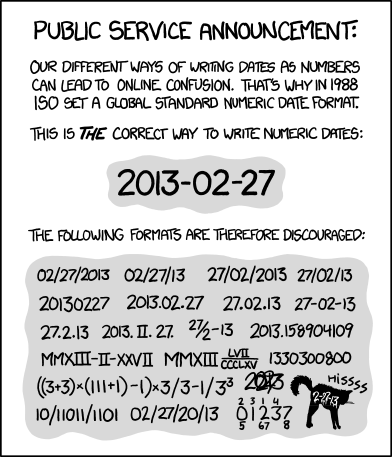
ISO 8601 was a standard that came out in 1988, so it’s probably older than all you lot who are reading this, now get off my damn Friendster lawn. It was re-upped in 2004, 2014, and is anticipating a new draft by the end of this year. It basically defines THE way of writing a timestamp.

Here: I’ll even be nice and show you an example:

In JavaScript land, this is simple: it just uses the toISOString() function:

new Date().toISOString()

The astute among you might see a few reasons right away why this is such a dope format:

  • Easy sorting: It arranges all components from large to small, so pretty much any novice in a programming language could easily sort a list of timestamps from latest to oldest.
  • Timezone information: At the far end it includes the offset: -08:00, for example (well, not in this above example specifically, since in JavaScript you’d also need to parse this out manually with getTimezoneOffset()). This isn’t as high-fidelity as when we were talking earlier about storing the qualified string version of a timezone, but it does give us information we wouldn’t have otherwise. You don’t get this if you pass around UNIX epoch time, for example.
  • No locale problems: You don’t have problems with Month/Day/Year formats getting confused with Day/Month/Year formatted dates. More on this in a few.

So yeah, use ISO 8601 over the wire. It’s the most popular way of tackling a shared standard for time, so don’t be the jerk who does it in some fancypants custom manner.

RFC 3339

Wanted to mention RFC 3339 briefly as well, since sometimes you’ll see its mean mug pop up in APIs and other spots from time to time.

RFC 3339 came out in 2002. This is a simplification, but it’s kind of a subset of ISO 8601. It requires timestamps — ISO 8601 allows you to omit them and just use it for a date — and in general it’s slightly more strict. It lets you get away with less.

Effectively they’re sort of interchangeable. Most people and API platforms just say they comply with ISO 8601, so that’s probably going to be fine for you, too.

xkcd on ISO 8601

Displaying Time

You’ve got some time, you’ve sent it to the client or to the user… now you have to display it, with hopefully minimal amount of confusion with the United States Secret Service.

I don’t know if you’ve noticed this yet, but Americans aren’t perfect. We use this fucked up date format, MM/DD/YYYY. Like under no circumstances does this make any sense. But if you switch that around and try to show someone from the US a date like 24/6/18… well that’s just going to be weird. People like their locale-based date formatting, and you should try to respect that as much as you can.

One of the ways you can do this on the web is using the Intl API. Intl supports a number of different hooks and abilities to handle locale- and language-based changes for numbers, plurals, and dates and times.

Beyond that, if you’re going to be doing anything fancier with dates and times beyond, say, just printing something to the page, you should really start using a proper time library. Things like adding two dates together while still tracking DST and a multitude of other time rules… well, it’s all really difficult to do yourself. Stand on the shoulders of giants, and steal from someone else. Just how Open Source was intended.

Some solid libraries to take a gander at:

  • moment.js The classic time library in JavaScript. Date manipulation, formatting, pretty much everything you’d need.
  • date-fns More modern approach to a moment.js-like experience for handling dates on the web.
  • github/time-elements Web component extension to the <time> element. Also includes auto-updating timestamps, as well as some locale help.

Accessibility

There’s something that tends to be left out of discussions about time (or discussions about any technology, really): accessibility. There’s a few things here that you can do for your human users and computer users that’ll help everyone out.

In a lot of hip social apps, you’ll have something like this:

Mockup of social app

And on the bottom footer of that component you’ll frequently see a relative datestamp:

Relative datestamp

That’s all well and good, but there’s a few problems with this. For one, this doesn’t automatically update on-page, so if you open the page in a tab an hour ago, it’ll still show something as happening a couple minutes ago. Step one might be to have a lightweight timer on your page that auto-updates all relative date/times and updates them every minute. Keeps everything fresh.

Secondly, as time moves on you’ll start seeing a lot of stuff like this:

Relative year

I always hate stuff like this, because I’m always like, well, when the fuck did this actually happen? Like does this mean five months ago and they’re rounding up to a year? Or does it mean 23 months ago, which is wayyyy different from five months ago? WHAT DOES “ABOUT” MEANNNNN?

A few things you can use here. One of the things I always liked about GitHub is that they’ve always shown a full timestamp in the title of any relative time on-page. I think we started adding that way back in 2010 or so, something like that. Always made it really easy to find out when specifically some event happened: you just mouseover the element.

You can achieve this by just dropping this data into a <span>, but the best practice nowadays is to use the <time> element. So you print things relatively like usual:

<time>six minutes ago</time>

Then you add a human-friendly string to the title attribute:

<time title="May 28, 2018, 3:47 PM PST">six minutes ago</time>

The last bit is that the <time> element also allows for a datetime attribute. This is a way to get past all your fancy relative formatting, or human formatting, and let clients parse out the actual timestamp correctly. If you’re wondering how you format this particular string, you haven’t been reading at all (and you’re going to miss all my good time puns, you heartless fiend, so go read it a second time).

But yes: it’s our pal the friendly ISO 8601-formatted string. It’s everywhere!

<time title="May 28, 2018, 3:47 PM PST" datetime="2018-05-28T15:47:57-08:00">six minutes ago</time>

If you ever print out a relative date or time to a page, you should follow this format everywhere. Extract it into a component or utility function or however it is your weirdo team does it, and you’ll make the most amount of people happy.

Inputting time

I don’t know if you’ve tried date pickers and time pickers over the years, but they’re awful.

Date pickers

Maybe it’s just me, but I still haven’t found the perfect time and date picker yet. Either there’s accessibility problems, or design problems, or dependency and size problems, or something else entirely. This probably why there are so many of them: everyone says the same thing and tries to reinvent the wheel, thus perpetuating the cycle. I’m sure During will feel the need to create and open source our own at some point, too.

Part of this stems from there not being a real, viable browser option. At a certain point browser makers realized this was a problem and got to work on adding type=date and type=time to the verable <input> element. And that sort of worked.

Here’s <input type="date" /> in Chrome:

It… you know, works. Ugly as sin, though, and that’s the first problem: there aren’t enough hooks into the element to comprehensively style it as you’d like.

Here’s <input type="time" /> in Chrome:

Also, here’s <input type="date" /> in Safari:

Safari, continuously behind on virtually every interesting standard on the planet these days, doesn’t support it at all. So yeah, everything is terrible.

I asked someone far more knowledgeable than me on <input> about when we can finally start using a cross-platform, extensible, great option for date pickers. Her answer was an immediate oh god probably never. Neat! The web is great!

So yeah, at the end of the day I’ve taken peace with trying to find the best crappy option, restyling it so it doesn’t look terrible, and then ignoring it and throwing my laptop into a lava flow. Just make peace with it.

Recurring events

If someone held a gun to your head and demanded in the next week you either 1) programmed a comprehensive system that included full support for recurring events, or 2) invent full-scale ready-to-go-to-market cold fusion, then you should abolutely start brushing up on atomic physics. Recurring events is a true shit show.

It starts normally enough, of course. You have an innocent phrase that you want to apply to your system, like:

"Every Tuesday at 2pm"

Awesome. So you start modeling it in your database. You say, hey, I’ll just create an event with a starts_at value of next Tuesday. And then you save another row for the Tuesday after that. And then another row for the Tuesday after that. And after that. And after that. You do this for 70 occurrences before you start realizing, hey, I think this goes to infinity. (Don’t ask me why it took you that long to figure this out; you’re the one who’s a little slow on the update. I figured it out by the 52nd occurrence.)

Being that even AWS doesn’t have a hard drive with literal infinite space (yet), you realize you need to figure out another way to deal with this. Maybe you can just create a shorthand of rules that defines when things happen.

Martin Fowler has a really great whitepaper on recurring events. It’s short, and walks you through figuring all this out in code-agnostic, plain English. (Definitely check it out if you get really excited about reading whitepapers. Also get yourself checked out if that’s actually the case.)

Fowler called these shorthands temporal expressions. It’s a way of defining the problem space so your system can do something with it. And luckily, we have a standardized way of thinking about this, too, in RFC 5545. These are called RRULEs, or recurrence rules. So “Every Tuesday” might look like this:

FREQ=WEEKLY;BYDAY=TU;INTERVAL=1

By using something like this, you basically can get away with pre-generating only one event/instance/recurrence, and then in your client, or in-memory, or through some other approach, you generate these occurrences on-demand as you go.

This might seem simple enough. And for very simple cases, yeah, it might not be too bad. But it’s all just a race against time. Because:

  • What about Daylight Saving Time? If this is a time accessed by multiple users, whose particular brand of DST wins out? What happens if you observe DST but I don’t?
  • What about exceptions? Maybe one of the Tuesdays is a holiday, so you don’t want to have an occurrence on that day.
  • What about exceptions that are subsequently moved? Say Tuesday is a holiday, so we move it to Wednesday. Oops, no now we’ve moved it to Thursday. How do we efficiently model all that without going nuts?

The erm… rules… in RRULE all handle this. There are rules like EXDATE, EXRULE, UNTIL, DTEND, COUNT, and many more. It’s an attempt to help model all of these extra problems you might run into… but at the expense of really cluttering up your domain logic.

My advice for all of this is to go as simple and as inefficient as you can, at least initially. I guess that’s the opposite of what our usual goals are in software, but I think it’s good advice for time code. The more complex your time logic is, the more it picks up steam, like a snowball rolling down a cliff. Every little bit adds up and compounds.

So try going simple at first, if you can. Instead of modeling a RRULE for a weekly reoccurrence, maybe you can just pre-generate all of the events ahead of time, but just for a year. Then on January 1, regenerate a new set of events in your database. This makes it 1) easy to reason about, 2) easy to query (it’s just a normal SQL query), and 3) gives you the benefit of having real database records backing each of your events (once you generate “virtual” events through RRULEs, it makes things like associations that much harder, since you don’t have a database ID to associate with).

Programming time is pretty weird.

It can sometimes make you feel week in the knees, and very days and confused about how it all fits together. But watch it: this is hour burden to bear, and we can't just let it past us over.

We've been working on building During for awhile now, and most of the time I've been tryna keep my sanity, but every now and then I take a step back and say wait a minute, how does any of this work? How does society work? Do users actually need all-day, floating, recurring events with exceptions spread over multiple Daylight Saving Time boundaries? Or should I just go tell users to eat one and go live a simpler life in the woods?

Anyway, what I mean is that I've been in time-headspace for awhile now. Here's a few last thoughts:

Keep everything simple as much as possible. Even if it means being really inefficient, or redundant, or ugly. Everything adds up, and I think usually programmers overthink time. (Leave overthinking for the times where it's actually critical to overthink.)

Handle more in the client. This is a little bit of an odd piece of advice, but especially when you have a central service (GraphQL, REST API, some central interface, particularly when hooked up with a single page app, mobile clients, or other clients), I think it's more important to have as simple a central service as possible. This means it should basically only speak UTC, and might not even handle a lot of the more complicated logic around recurring events, timezones, and so on. It adds redundancy in your clients, but I think it makes it easier to understand overall.

Leverage standards and let others do the heavy lifting. Obviously that means using the Brightest Point in Human History, also known as ISO 8601, but it also means using premade time libraries, resources like the Olson database, and leveraging other people's existing work as much as possible. Let someone else figure out the really gnarly edge cases so you can work on your domain's edge cases.

Anyway, our time is up. ⌚️👀

Additional reading

And finally, now that I've suckered you into caring this much about time, you might want to keep on reading. Here's some interesting links if all this text wasn't enough for you:

  • Falsehoods Programmers Believe About Time and its sequel, More Falsehoods Programmers Believe About Time. These get into some really nitty-gritty on programming time edge cases and weird things to keep in mind as you go. Lovely stuff, and if you haven't read them yet (or even if you haven't read them recently), you should go and give 'em a read now.
  • There's a ton of amazing things to learn on the Wikipedia page for Unix time. I started including some of these things here and there, but really you should just go through the whole thing. There's a lot of talk about Unix and how they deal and think about time. Some nice little nuggets in there, like why Unix epoch came before the standardization of UTC, and why the epoch is not exactly the number of seconds since 1970 (see: leap seconds).
  • I don't know what my favorite George Carlin bit of all time is (okay, I do: it's Stuff), but this bit on time is pretty great too. He had a way with words.
  • From Hodinkee: Why do clocks run clockwise? — I love stuff like this.
  • The deceptively complex world of calendar events and RRULEs. Great post on breaking down how to think about RRULEs from a calendaring and system perspective.
  • Wikipedia's Time formatting and storage bugs is worth a look just for the sheer number of upcoming time-related bugs we know are coming. Y2K was just the start.
  • The Happy Monday System, which honestly I just loved based on the name of it alone. Shows how Japan has moved their holidays schedules around just to make people happier with a longer weekend.
  • Time smearing links from Google and from Amazon. I didn't even get to cover time smearing, leap seconds, leap years, and all of the little ways we correct how we measure time. Leap seconds are a pretty interesting subject, particularly since they're nonstandard: the need to add another leap second can depend on if a lot of seismic activity happened recently, for example.
  • Another plug for reading RFC 3339. It's very clearly written, not too long, and has a lot of examples like the aforementioned 1937 Netherlands example, as well as how they suggest displaying a leap second in an RFC 3339-formatted string, and the possibility of only emitting UTC time from a server as a security precaution. ("Others might consider this to be loss of useful functionality at the hands of paranoia.")
Holman's avatar
I cofounded During, a neat new calendar for people who live in their calendar.
I swear we're going to ship it soon, too.
Follow me on Twitter and I promise I won't waste your... time.
I also promise that was the last pun.
...until next time!
30 May 20:13

Peloton Magazine: Paolo Ciaberta

by Heidi Volpe

Peloton Magazine

Creative Director/Photo Editor: Tim Schamber
Photographer: Paolo Ciaberta


Heidi: How did the project come about and is this the first time you’ve worked with Peloton?
Paolo: My first collaboration with Peloton was in 2014, I proposed a reportage about the cycling path from Venice to Turin along the Po river. The Morocco trip my friends and I were looking for a ride in an exotic place but not too far from Italy where I’m based so it was a perfect opportunity.

How long did the trip take?
Due to work commitments we decided on 7 days for the entire trip. One day of transportations and six days to ride. Average 80-90km/day, not too much because we don’t want to only pedal but also discover people and places.

Do you often ride, write and shoot?
While I wrote the article, I’m not a proper writer but in this instance I tried to communicate my experiences and sensations, in addition to some technical details. For longer and more articulated articles I prefer to work with professional writers.

How difficult was the photo edit and approx how many images did you take?
More or less 600 images for the entire trip. There are two different aspects that I consider while editing.  First is selection of the images and second the post-production; I don’t like too much elaboration on my pictures.  I make little adjustment of levels, lights, shadows and contrast. I think that photo reportage should be real as possible, too much editing makes images artificial or constructed.  The trick is to find the right balance and choose the photos that best describe your work

Was it difficult to protect your gear from the travel/weather?
After years of experience I’ve achieved a good level of protetcion for my equipment, Olympus Italia provided me an excellent mirrorless camera (Pen F) that is easy to transport due to its small size but also resistant to bad weather. Basically the biggest problems during bike packing trips could be dust, rain, condensation and vibrations. Rain in Morocco is rare but dust and condensation could happen, a good plastic bag with smaller little salt bags solve the problem and you can go everywhere. Furthermore I use little stripes of foam rubber to avoid the vibrations when the camera is in the bags.


------------------------

Visit our sponsor Photo Folio, providing websites to professional photographers for over 9 years. Featuring the only customizable template in the world.

------------------------

30 May 20:13

Apple Releases iOS 11.4 with AirPlay 2, Messages in iCloud, and More

by Ryan Christoffel

Today Apple released iOS 11.4, likely the final major release for the operating system before its successor, iOS 12, reaches the public in September. The update includes two major features that were originally revealed last June as iOS 11 features, but were later delayed: AirPlay 2 and Messages in iCloud.

AirPlay 2

Apple debuted the first version of AirPlay in 2010, and wireless audio technology has come a long way since then; recently, Sonos' approach to consumer audio has garnered a substantial following thanks to the company's modern wireless technologies that "just work." AirPlay 2 in many ways is Apple's answer to Sonos: it enables seamless multi-room audio on compatible speakers while making the AirPlay experience better overall with several important upgrades. And it comes at a crucial time, following shortly after the launch of the Apple's HomePod speaker.

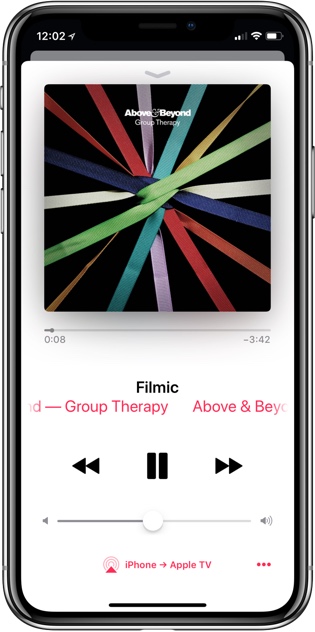
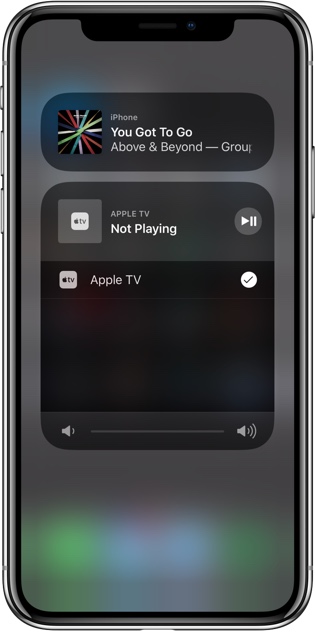
Multi-room playback is extremely simple to operate in iOS 11.4. Inside the standard AirPlay picker UI – accessed from Control Center or an audio-based app – AirPlay 2-compatible speakers will now have an empty circle next to their name, which can be tapped to have your current device's audio play on that speaker as well. It's as easy as checking a box to add extra speakers to the mix. Current AirPlay 2 speakers include the Apple TV running tvOS 11.4 and the HomePod running version 11.4 of its software.

AirPlay 2 also gives Siri new audio-related capabilities. Because AirPlay 2 speakers integrate with the HomeKit framework, you can control playback on those speakers using Apple's digital assistant on your iPhone or iPad. This means you can say things like, "Play the Greatest Showman soundtrack on the Apple TV" or, "on the HomePod." You can also simply specify a room in which to play, or tell Siri to play something "everywhere" or "in the whole house."

Besides multi-room playback and Siri support, AirPlay 2 also enables a Shared Up Next queue for Apple Music users, and provides developers additional app privileges if they adopt the new long-form audio APIs. One benefit is that the previous delay when controlling playback over AirPlay has been reduced from two seconds to just under one second. Federico mentioned the other API advantages in his iOS 11 review:

A longform audio app combined with AirPlay 2 streaming gains enhanced buffering (up to several minutes, so you can walk around the house without audio dropping after a few seconds) and it doesn’t get interrupted by system alerts such as message notifications or FaceTime calls.

All told, AirPlay 2 is a major upgrade to the original AirPlay protocol, and in my early use of it, it appears to have been worth the wait.

Messages in iCloud

One of the greatest strengths of the Apple ecosystem has long been iMessage. The service is an extremely popular tool that's made better by living on all major Apple platforms – iPhone, iPad, Apple Watch, and Mac. I recently sold my previous iPad Pro to a co-worker, and one of the things she was most excited about was the ability to send iMessages from her new computer. iMessage is a valuable service, but until today, people using it on multiple devices had a common frustration: messages didn't stay in sync across devices. This was a bigger problem in some cases than others, but regardless, now with Messages in iCloud, those issues should be a thing of the past. The feature does exactly what it sounds like: it stores all messages in iCloud (including SMS) so that message history and read status can be synced effortlessly across all your devices.

The road to Messages in iCloud has been a long one. Like AirPlay 2, the feature was previously announced at last year's WWDC in June, but unlike the audio technology, Messages in iCloud was present in beta versions of iOS 11 for much of the summer. However, before the update's public release in September, the feature was pulled, with a future release date to be determined. Messages in iCloud resurfaced during the iOS 11.3 beta period but was again removed before public release. As such, despite its presence in the 11.4 betas, users remained skeptical about it reaching a public release. I'm happy to see it finally made the cut.

All the Rest

Resuming Playback in Podcasts. Imitating the recent Smart Resume feature in Marco Arment's Overcast, the way Apple Podcasts handles resumed playback has been tweaked in iOS 11.4. Now, when a podcast is resumed after being paused, rather than starting immediately where you left off, it will begin a few seconds before that to help refresh users on the context of what they last heard.

PRODUCT(RED) Wallpaper. Last month Apple released a special (PRODUCT)RED version of the iPhone 8 and 8 Plus, which came with an exclusive wallpaper option. In iOS 11.4, users who have any color 8 or 8 Plus now have access to that wallpaper for the first time.

Today Widget Tweaks. One minor change that may go otherwise unnoticed is that now when you open the Today view on your device – by swiping right either on your Home screen or Lock screen – rather than landing at the top of your widgets like before, iOS will instead take you to the last place you left off inside the Today view. Interestingly though, where you access the Today view from matters: a separate saved view is preserved for access that happens from both the Home screen and Lock screen, so if from the Home screen you last viewed the middle area of your widgets, that's where you'll be taken next time, but if you access the Today view from your Lock screen instead, you'll be taken to the last widget area you viewed from the Lock screen.


iOS 11.4 likely marks the official completion of the release first unveiled at WWDC last June; taken in its entirety over this past year, version 11 has been a behemoth update for iOS. Not everything made it into 11.0, but now that the full feature set has made it to the public, it's time to turn the page and get ready for exactly what Apple has in store for us next. We'll find out soon.


Support MacStories Directly

Club MacStories offers exclusive access to extra MacStories content, delivered every week; it's also a way to support us directly.

Club MacStories will help you discover the best apps for your devices and get the most out of your iPhone, iPad, and Mac. Plus, it's made in Italy.

Join Now
30 May 20:12

Retrobatch from Flying Meat Brings Nodal Batch Processing of Images to the Mac

by John Voorhees

Retrobatch is a new batch photo processing app for the Mac from Flying Meat, the maker of Acorn. Batch processing of photos isn’t new. There are plenty of apps available that let you manipulate collections of photos. What’s different about Retrobatch is how it goes about processing images.

If you’ve ever used Audio Hijack from Rogue Amoeba, you’ll understand the power of Retrobatch immediately. The app is based on the idea of linking individual nodes together to create complex workflows. Point your new workflow at a batch of images, hit go, and Retrobatch goes about its work, delivering your processed photos to wherever you specify. The power is in abstracting complex actions into simple building blocks that can be strung together and branched as though you were building a flowchart.

That last point is the essential distinction between Retrobatch and other batch processors. Most image processors are linear, moving through a series of steps that outputs modified images. Retrobatch’s nodal structure allows you to start with a folder of images, perform actions on them, and then branch off to different actions at any point in the process.

Retrobatch comes in a regular and Pro versions, the difference between the two being the nodes that each offers. Otherwise, the two versions are identical.

Each Retrobatch workflow starts with source images. Dragging in a folder displays a preview of the photos in the right-hand panel of the app with thumbnails beneath the previewed image for quickly flipping through the pictures to be processed. Double-clicking any image toggles it between a full-window preview and the panel preview.

The left-hand panel contains a searchable library of dozens of nodes. When you find one or more nodes you want to apply to your photos, drag them onto the Retrobatch canvas. Each node has its own set of parameters that can be adjusted before processing. When you drag one node close to another, it creates a connection with arrows indicating the order in which your workflow will be processed. The final steps are to add a destination for your processed files and click the Play button at the top of the window.

Each node has a series of properties that can be adjusted.

Each node has a series of properties that can be adjusted.

The list of nodes available in Retrobatch is impressive and includes nodes to adjust metadata, transform images, convert the color profiles and formats of images, add watermarks, apply effects, classify images, sort photos based on machine learning, and more. There’s everything from simple actions to rotate photos and remove metadata to more complex nodes that will create PSD layers from the windows on your Mac’s desktop.

To test Retrobatch, I dragged in a folder of almost 1,000 photos from a recent trip where everyone had shared the pictures they took. I created a workflow with two branches. The first, added a watermark, removed metadata, and scaled the images to a uniform size, something you might want to do before posting a collection on a website. The second branch applied a mono filter to the photos. Each set of photos was written to a separate folder on my Desktop, and the best part was that the app did it all in the background while I worked on something else.

My needs for a batch processing app are limited, but having conducted experiments against a large folder of images, Retrobatch strikes me as an essential app for anyone who takes and processes a lot of photos. Chaining together multiple steps saves time, but even better, multiple workflows can be run simultaneously against the same source files letting photographers press play and walk away until the processing is complete.

Retrobatch comes in two flavors, Pro and regular. The difference is in the nodes each offers. Most nodes are available as part of the regular version, but Pro adds power-user features like AppleScript, shell script support, a rule-based node, PDF and PSD creation, color profile modification, and more. Both versions are available directly from Flying Meat. The regular version of Retrobatch is $29.99 and Retrobatch Pro is $49.99.


Support MacStories Directly

Club MacStories offers exclusive access to extra MacStories content, delivered every week; it's also a way to support us directly.

Club MacStories will help you discover the best apps for your devices and get the most out of your iPhone, iPad, and Mac. Plus, it's made in Italy.

Join Now
30 May 20:12

Twitter Favorites: [waxpancake] I wish someone would relaunch FuckedCompany. A site/newsletter cataloguing tech company foibles and failures, with… https://t.co/uKURJp3R6u

Andy Baio @waxpancake
I wish someone would relaunch FuckedCompany. A site/newsletter cataloguing tech company foibles and failures, with… twitter.com/i/web/status/1…
30 May 20:12

Twitter Favorites: [lisawilliams] Program note: I joined @wgbhnews today as Audience Engagement Editor. https://t.co/TNIYd9oq0f

Lisa Williams @lisawilliams
Program note: I joined @wgbhnews today as Audience Engagement Editor. pic.twitter.com/TNIYd9oq0f
30 May 20:12

Twitter Favorites: [MobyDickatSea] Ahab stands alone among the millions of the peopled earth, nor gods nor men his neighbors!

Moby Dick @MobyDickatSea
Ahab stands alone among the millions of the peopled earth, nor gods nor men his neighbors!
30 May 20:12

Embed Practice

by Bryan Mathers
Embed Practice

Whilst prepping for a design-a-thon with my We Are Open colleagues, focused on building a digital literacies MOOC for teachers in Israel, we talked briefly about the importance of embedding practice…

The post Embed Practice appeared first on Visual Thinkery.

30 May 20:12

What Should A Brand Community Ultimately Become?

by Richard Millington

At its most successful, what is your brand community going to become?

Think bigger than you do today. Think about the ultimate role it’s going to play in the lives of
your members. Think about the number of people it’s going to serve. Think about the different ways it’s going to help your organization.

Don’t be afraid to be incredibly ambitious. Ambition can mean different things

It can mean doubling down on what you have, it can mean expansion, it can mean entirely rethinking what community is to your organization.

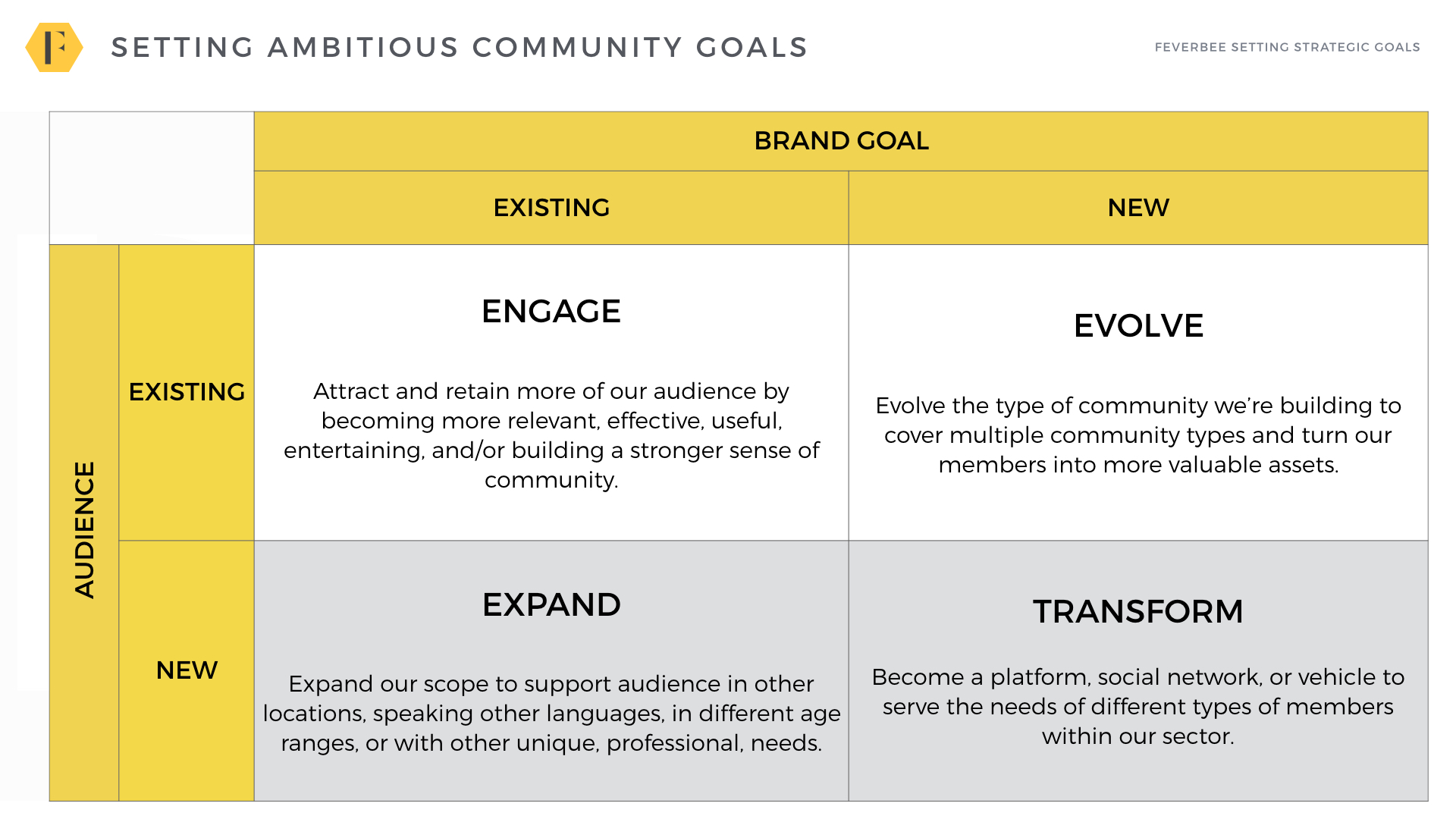
A simple way of looking at this is in this adaptation of Ansoff’s matrix below:


(click for full image)

There are four possible strategies here based on what audience you want to target and how the community helps the company you work for.

We can list these by order of ambition. They are:

  1. ENGAGE: Increase engagement from existing members.
  2. EVOLVE: Get better results from existing members.
  3. EXPAND: Expand to target new and related audiences.
  4. TRANSFORM: Develop new communities for new value.


1) ENGAGE: Get members more engaged.

The most common strategy is to increase engagement, it’s also the least effective.

Unless you’ve just launched or made a hideous mistake, members are usually participating as much as they’re going to. You can make plenty of tweaks, but you’re always restricted by the law of diminishing returns.

Pursue this strategy when you’re not likely to get support for anything else. Interview two dozen members, find out what brings them to the community, and then cater overwhelmingly to that desire.

If, for example, members visit to resolve problems, the community must provide every person the best possible solution in the quickest amount of time. At the tactical level that means you need to build powerful programs to encourage top experts, teach members to ask better questions, feature the best answers, and tweak the platform relentlessly to get the best results.

GiffGaff, Spotify, Apple are all fantastic examples.

The key challenge is to narrow your focus to the few things members really care about and design every activity to make your community the best place to resolve the problem or achieve their goals.


2) EVOLVE: Get More Value From Members

A far better (and more ambitious) option is to expand the nature of the community so it helps other departments.

A customer support community can become a community which helps companies be more successful (customer success), collects insights (ideation), or encourages members to help promote them (advocacy).

A single community can reduce support costs, improve retention, help build better products and attract new customers.

Almost every brand community strategy should at least be trying to expand the ways it helps a business.

You still have the same group of members, only now you’re asking them to make different types of contributions.

This requires you to offer members the chance to earn rewards, gain unique access to you/your company, or build their reputations. The hard part is working internally to make this possible.

The upside is you usually expand the reach of the community to your entire customer base, not just those who have problems today. You give members a reason to visit every day to see who’s new, what’s new, what can they get? What can they learn etc?

Alteryx, Autodesk, Adobe, SAP, Square, and Salesforce all serve as great examples here.

The downside is two-fold, there is less of a trigger to visit the community in the first place and it’s a lot harder for people to do these tasks than simply answer a question, proactively share their expertise rather than ask a question.


3) EXPAND: Reach New Audiences

There are plenty of ways to expand to new audiences.

You can expand into new languages, locations, ages, or related audiences. A community for users of your accounting product can become a community for all types of accountants around the world.

Language and geographic regions are usually easiest areas to expand to. You already have the platform and processes in place. Expanding into areas with high numbers of non-English speakers makes sense.

Tackling different audiences is harder. You have to overcome the reason they haven’t joined already. The failure rate for communities targeted at younger audiences is extremely high.

Expanding to fill the broader sector is the most ambitious. Sephora’s BeautyTalk, Lomography, FitBit, and Nike Runner’s Club are all good examples. They’re less about the product and more about the purpose of the product.

Other companies build communities for broader audiences (e.g. Element14 (for design engineers), BabyCenter (for parents), Goodreads (Amazon), AmericanExpress OpenForum (for small businesses) etc…)

You do this to extend community members beyond your current base and bring in new customers. The downside is this usually requires a unique identity beyond just the ‘brandname’ community. There is a limit to how often you can promote yourself too.


4) TRANSFORM: Get new value from new audiences

The most ambitious strategy is to completely transform your company or your approach to the community. This usually comes in three forms.

1) The community becomes a platform/social network for others to build and maintain their own groups/profiles. (StackExchange, BensFriends, HealthUnlocked, DeviantArt, Care2 and others fall into this category).

2) The community becomes a business and acts as a service for members to achieve their goals. Good examples might be TripAdvisor, Kaggle, RealSelf, Rover etc…these communities usually tend to be acquired or spun off into separate businesses.

3) The community runs itself/runs areas of the company. It’s hard to find good brand examples of this. (Eve Online might be a notable mention). Members collaborate together to produce the collective value of the company and divide the spoils. Ideas are sourced by members, driven by members, and implemented by members. The company acts as a support service for the community to flourish (Airbnb has flirted with this along with several Blockchain-based companies).

Most Growth Requires A Big Change

Don’t limit yourself to just trying to deepen engagement with the members you already have. This limits the growth of your community. There are far bigger wins by looking to expand to new types of communities you’re building (customer success, advocacy) or the audiences you’re targeting.

You can achieve some short-term success by focusing on engagement, but the really big wins, the kind of wins which other people take notice of, is by expanding the community to be more useful to more people.

Support and Ambition

An old rule of thumb is the more support you have, the more ambitious you can afford to be. This is half-true. Often the very act of being able to articulate a big, noble, goal is what brings others around to supporting the community idea.

People are more likely to support a community which serves a far bigger audience and drives more results. Even without the support you need, you can still set a lofty goal and work hard to earn that support. It might take years, but at least you’re working towards something that matters.

Build a Multi-Year Roadmap

If you’re worried, again plot this into a roadmap over three years. This might look like:

  • Year 0 – 1: Deepen engagement and build support.
  • Year 1 to 3: Evolve to customer success, advocacy, and ideation.
  • Year 3 to 5: Expand to Latin America and South-East Asia.
  • Year 5+: Become a platform for others.

Now you have a vision you can articulate to both your colleagues and members. Something motivating and something which merits your requests for support and resources.

There is a chronic lack of ambition today about what a community can and should become.

It’s never just a place for members to engage with one another. It’s a place to harness the amazing potential of members to the maximum possible effect. You can’t achieve that with a narrow focus on what you’re doing today.

Be ambitious, more ambitious than you’ve dared to be in the past.

30 May 20:12

Word of the Day: Deme

In biology, a deme is a term for a local population of polytypic species that actively interbreed...
30 May 20:12

Fragments

by Dave Pollard

What we think of as our ‘life’ is actually just an infinite series of fragments. Each day when ‘we’ awaken, a useless bit of software that has evolved in our brains starts up and stitches together from ‘memory’ what it believes to be the record of a continuous ‘self’ — events, beliefs, and what it perceives to be its (that is, your) history, thoughts, feelings, attributes, skills, passions, preferences, and apparent purpose, drawing on its ‘knowledge’ as far back as ‘it’ can ‘remember’.

It’s a brilliant trick, the brain’s way of trying to make sense (using its largely unused capacity) of the firehose of data coming at it from all its senses, from the body of genes and organs it seemingly evolved to serve, and from ‘intuition’ — that ‘teller of truths’ (if you listen carefully enough) beyond knowing. The extraordinarily complex human brain no longer uses its mental cycles to appreciate (in the true sense of that word) and co-evolve with everything around it, everything it is a part of, what is. Instead, it amuses itself looking for patterns and ‘meaning’ outside itself.  It believes that such a process can help it cope, and thrive, and it believes that it has the free will and control to make use of the sense and meaning it conjures up.

So it would have ‘me’ believe that the little 6-year-old boy pictured above left is the same ‘person’ as the 66-year-old man, looking equally mystified, pictured above right. And it would have ‘me’ believe that, between the times the two photos were taken, some tiny homunculus residing invisibly in the apparent body of the little boy has steadfastly and continuously steered and directed this inhabited creature to strive, grow, mature, progress and finally ‘become’ the old man.

But there is no homunculus, no ‘thing there’. That little boy is not, and never was, ‘me’. Neither is the old man. There is no me, beyond the fantasies of the brain trying desperately to draw equivalence and connection between things that are just, apparently, happening. There is a body, an apparent ‘creature’, an apparatus of skin, water, bones and organs, or of cells, or of molecules, or of atoms, or, drilling down, of an infinite number of increasingly-tiny apparent constituents, all in continuous flux, that, the closer you look, don’t really have any cohesion at all, no boundaries, no substance, and most of all, no continuity. Everything is just another way of looking at nothing. And yes, I know that unintelligible statement is annoying. I wish there were a more coherent way of saying it, but I’m quite sure there is not.

That little boy, when the photo was taken, was just beginning to get snared in the mass deception of separateness. He was meandering in and out of it, finding the rigidity and desperateness-to-know of being a separate ‘person’ exhausting and terrifying, yet witnessing others, more ‘popular’ than he, embracing it. He was happiest when he was just part of everything, unconscious of and oblivious to ‘his’ existence apart. He was happy when it was his senses and instincts, the connected-with-everything parts of ‘him’ that seemingly preoccupied and motivated him, and unhappy when it was his thoughts and ideas and conceptions and beliefs and feelings, the ‘self-conscious’ parts of ‘him’, that preoccupied and motivated him. Yet strangely everyone encouraged him towards this latter, unhappy existence.

So, unhappily burdened with this fearful, ridiculous ‘self’, he grew up socially awkward, and mystified by lies, deceptions, fierce emotional reactions, and acts of selfishness and cruelty. Such behaviour seemed completely deranged. So he hid from it. Perhaps it was just a nightmare, this mad, awful behaviour, and he would one day awaken from it and everything would be perfect and eternal and connected, as it was, before.

But one’s embodied nature can only withstand the relentless barrage of enculturation by others, so sure of their separateness and its wisdom, for so long before one leaves behind one’s perceptions of the connection and perfection of everything, and adopts the ubiquitous mask of individuality, with its language, beliefs, ideas and emotions borne of assurance of the separateness of everyone and everything.

For 60 (apparent) years ‘I’ have played this game, pretended to be what I ‘know’ I am not. Sixty years ago I somehow knew there was something terribly wrong, sad and sick with everything I was told was true. But as politicians and despots and other professional liars keep showing, if you’re told something, no matter how ludicrous, again and again for decades by everyone you know, with everyone telling you it’s true with absolute certainty, you start to believe it. You begin to act as if you believe it. This is the nature of enculturation. You come to believe that humans are individuals with free will and choice and self-control, and that humans are the crown of creation, endowed with the wise and magical ‘consciousness’ of their separateness and ‘intelligence’ unique on the planet and possibly in the universe.

You come to believe in your capacity to shape your life, and that it has a trajectory and a purpose and a meaning, that it and everything has a beginning and end, a ‘progressing’ ever forward in time, only to smash into the bitter rocks of death just as wisdom is dawning.

You come to believe there is a you, that there was a 6-year-old you that was and is the same person as the you that exists, separate from everything and everyone else, today, and will exist until… well, there the agreement ends and the truly magical thinking, constrained by the horrific prison of the self, begins.

How did we humans get to this insane place?

For millennia, since the emergence of the self, we have come to believe some truly preposterous things: That the earth was created in 6 days by a humanoid deity. That human health can be “improved” by lobotomies, bloodletting, phrenology, “hysteria” treatments for women, faith healing, burning at the stake, shock treatments, etc. That some humans (by race, gender or other distinction) are naturally, or scientifically, or by the grace of some god, superior to others, and entitled to abuse and even “own” their inferiors. That the sun and everything else revolves around the little blue planet we creatures seemingly happen to live on.

Few people still share the beliefs above, but there are many others, just as absurd, that most people continue to believe fervently: That the planet and universe somehow ‘began’ with a big bang, ‘before’ which there was nothing and no time and will perhaps end with a singularity (our newest creation myth). That there is some outer limit to what is, and some fundamental essence of which all-that-is, is composed. That we can and do (or soon will) ‘know’ absolutely what is real, what is right, and what is true. That our species can and will overcome every challenge it faces, and is destined for immortality and to reach out and fill the empty, ‘undeveloped’ universe. That we can grow and steward our population and our use of resources and our creation of wastes, forever, simply by being ever-smarter and/or ever-more-cooperative about how we do it. That the way we live (in our now-global culture, and in our various local micro-cultures) is, though it may need a bit or a lot of tweaking, the only possible sane way to live. That soaring rates of illness in industrialized nations are despite human progress and the modern diet, rather than because of them. That there is such a thing as progress. That ‘prehistoric’ humans lived short, brutal lives of immense struggle and suffering, and that life for our species has never been better.

At an ever-accelerating rate, we are starting to appreciate that none of these beliefs is true — that we have been lying to ourselves and to each other since our species first developed the capacity to lie and the language and other tools to do it convincingly. There is nothing malicious in any of this. Just like our geocentric, anthropocentric, overtly misogynist, blood-letting forebears, we lie because we don’t want to know the truth, or because we don’t want our loved ones to be hurt by the truth, or because we cannot bear the truth, or because the truth is just too complex to understand and we cannot bear not knowing. We can’t help ourselves. We have to believe we know, and that we will soon know better.

Cast aside all the beliefs above and it is easy to despair. When we realize that essentially everything we have believed all our lives was true is a lie, our immediate reaction is to find “some other story, a new story” that we can believe in instead. But that merely takes us further down the rabbit hole, into wacky unprovable “string” theories, faith in magical thinking, scientism, creeping nihilism (“nope, that isn’t going to work either”), pursuit of charismatic ‘leaders’ with easy answers, or mind-shattering cognitive dissonance.

And that’s where we are, in this modern world, desperately casting about for a new story and clinging fiercely but ambivalently to the discredited ones that underlie our entire civilization. We are caught in an existential limbo that is spreading throughout that entire civilization, and setting it aflame, as one seeming truth after another is pulled from under us. This has been going on for ten thousand years, though that’s just an instant in the evolution of our planet. It is now happening at a furious pace.

That’s where the six-year-old boy and the 66-year-old man came into the picture. The six-year-old boy ‘knew’ this was all madness, a made-up game in an anguished, dreadful rush to make sense of what ultimately made no sense at all. He ‘knew’ that the answer didn’t lie in the old stories or in a new story, in the discredited, preposterous beliefs or in a new set of precariously cobbled-together replacements. He could still ‘remember’ that place outside of space and time, that place that is without separation, without struggle, without suffering. That place that has no need for action, for beliefs, for knowing, for planning, for striving, for theories, for ideas, for progress, for meaning or purpose, for despair, or any emotion other than simple wonder.

Somehow, the 66-year-old man who does not exist and is not the same as the six-year-old boy, ‘knows’ this too. It had been forgotten, but recently, thanks to the blessing of time and resources and some little-exercised capacities, that place without separation is remembered.

This is not a matter of faith. It is not something ‘I’ believe, or that I just want to believe. It is not a ‘state’ and there is no ‘path’ to it. It is not ‘enlightenment’ or ‘awakening’ or ‘awareness’ or (thank heavens) a ‘higher consciousness’. It is not a ‘process’ of ‘letting go’.

It is the realization that there is nothing to let go of. But it is not ‘my’ realization.

I am not a believer that there will be, soon, the humanists’ dream — a sudden global raising of ‘consciousness’ just in time for us to work, furiously and together, to reform and save our staggering civilization just before it shatters. You know — the Hollywood ending. Isn’t going to happen.

But it is not impossible that, sooner or later, the self that afflicts us all will become untenable. That ‘it’ — the illusory separate self — will ‘realize’ it serves no useful function and will just fall away. It will not go easily. ‘We’ will not go easily. ‘We’ cannot believe that the world would be possible, better, perfect, without ‘us’. It will happen when the bodies we presume to inhabit die, in any case. But it might happen ‘before’. My guess is that it won’t happen, on any scale, before the end of the gradual, rolling but ultimately total collapse of our global industrial civilization by the end of this century. The self digs in harder when it feels threatened.

But I think it will happen as new human societies dawn in the millennia after civilization’s fall. It will happen at first because there will be no need for the self to emerge in the first place, in a peaceful future world of abundance and relatively free of stress. And then, victim of the virus of reconnection to everything-else, selves will fall away, unneeded and ignored — the useless bit of software will be mothballed in the brain, and the liberated human creatures will not encourage its re-emergence in their children and communities.

It will be realized that everything ‘we’ in our civilization culture believed so fervently was as ridiculous as our earlier belief in “the vapours” and the rewards of animal sacrifice.

All that will be left is fragments, pieces of everything appearing, wondrously, to no one, yet appreciated, awe-inspiring, beyond anything that ‘we’ could ever have imagined.

‘We’ won’t be missed.


30 May 20:12

Animated Pride watchface

by Volker Weber

77b34696b4feef30abc8c85263061cf5

Advance your date on the iPhone beyond June 4 and then select a new animated Pride watchface. Once you configured the new watchface, you can turn the date back.

You have to be on watchOS 4.3.1.

30 May 20:11

AirPlay 2 is here

by Volker Weber

9db75065665affe5c14acd5064cd26c1 668c7f037cdf924413c485edf11068f4

This has been a long time coming. Announced almost a year ago, AirPlay 2 finally makes it into iOS 11.4 as well as the new software on Apple TV and HomePod. Sonos is in closed beta testing and should be done soon on One, Playbase, and Play:5 2nd gen. I don't have any Apple HomePods but I understand they can now be configured as stereo pairs, which was introduced on Sonos about eight years ago. Also, you can now play in multiple rooms, which ... (you get it).

I only have one AirPlay 2 capable device which is Apple TV 4k. The old AirPort Express will not be upgraded, as I understand. So, Apple TV it is.

Well, I gave it a serious try for about half an hour. And then I switched back to Sonos. Which is playing the music coming out of Apple TV anyway, without the extra loops through my network. I need to look at it again with HomePods and Apple Music.

b0ccd2ac8f2897e3b8a72004e7d0bfca 84e186552df3378fafc03e0d481072a2

"Alexa, spiel Group Therapy von Above & Beyond im Wohnzimmer"

30 May 20:11

These 5 business applications show VR isn’t dying

by Emma Lee
“When I tried to explain my VR startup to outsiders of the industry, either friends or clients, more than one decade ago, their first reaction would usually be ‘What’s that?’ But now, on hearing that I’m engaged in VR business, people would say ‘Wow, that’s cool,’ only that the exclamation is often followed by a […]
30 May 20:10

@stoweboyd

@stoweboyd: Roxane Gay nails the hypocrisy in the Roseanne scandal: Barr’s racism was not a...
30 May 19:19

OmniFocus 3 Review: More Approachable and Powerful, All at Once

by Ryan Christoffel

If you're anything like me, you probably remain perpetually dissatisfied with your task management setup. You may have chosen an app and settled in with it, but some of its design choices don't quite fit with your way of working, so you're always keen to try the latest and greatest app that comes along. Realistically though, you've resigned yourself to the fact that the "perfect task manager" doesn't exist, and likely never will.

Task management is a tough problem to solve, because every option out there is optimized for specific use cases, resulting in different complexity levels. Some aim to remain simple and user-friendly, while others try to put every tool at your disposal, endearing themselves to power users while scaring off prospective customers who need a bit less. On this complexity spectrum, OmniFocus has historically been the poster child for the weightier end: if you have a lot of complicated projects that need a high degree of structure, there's no better place to start than OmniFocus; however, for lighter needs, I've always found its myriad of options too overwhelming to recommend.

OmniFocus 3, released today for iOS (and later coming to the Mac), adds even more power and options to the app's existing toolset, yet rather than growing more complex in the process, it's surprisingly become more approachable. This improved user friendliness is achieved thanks to a new level of flexibility that can, upon tweaking your ideal setup, obscure the app's complexity in everyday use. In more ways than ever before, OmniFocus provides the tools to make the app your own.

Outside of a lovely new design, where icons and fonts are bolder and everything feels more fresh, my favorite changes in OmniFocus 3 are this increased flexibility, which encompasses a lot of new and updated features, and its excellent iPad improvements. Let's dive in.

Flexibility

The more flexible a task management system, the more likely it will work for a broad base of users. In that vein, many of OmniFocus 3's biggest features focus on enabling the app to morph to your needs.

Tags

Gone are the days of contexts – a carry-over from David Allen's Getting Things Done methodology. OmniFocus 3 replaces contexts with tags, which are mostly identical in function, but even with just a name change, they now feel much more modern and less a fundamental part of how the app works. In OmniFocus 2 I never used contexts the way they were intended, and as such it always felt like I was missing out on the way the app was supposed to be used. I'm guessing I'm not the only user to feel that way. Tags, however, are a common organization method in other apps, and using them optionally, as best suits your needs, feels perfectly acceptable in OmniFocus 3. They still do mostly the same thing as before, but with a mere rebranding I'm now much more okay with them.

As I said, tags are mostly the same, with a few exceptions. First, multiple tags can be assigned to a task, which was not previously possible with contexts. Second, manual sorting is now possible within tags. With contexts in version 2, you could sort tasks by an automatic method, but making manual adjustments was impossible. Fortunately, version 3 changes that, enabling simple drag and drop reordering in a tag view just like you get inside a project view.

The last notable change is a small feature I like quite a bit: your today screen inside Forecast can now house not just tasks due today, but also those assigned a certain tag. This can be set up by visiting Forecast, tapping the eye icon for view options, then selecting a tag to display. Tagged tasks in Forecast do not count toward the number of due tasks displayed in the sidebar, and you can easily collapse the tag inside Forecast so those tasks are only visible when you want them to be. You can only have a single tag appear in Forecast, but one benefit for that tag is that after you've set it, you can easily apply it to tasks with a simple swipe gesture.

Forecast was already the view I used most in OmniFocus 2, and the addition of tagged items makes it an even better work hub. I've created a Forecast tag for tasks that don't need to be accomplished by any set time, but that I want to work on whenever I get through my day's agenda early. In Things I store these items in the Someday list, but I don't always remember to check there when the day's work is done; I vastly prefer how OmniFocus enables keeping those tasks close at hand, in the same view I live in all day. If I had to actually see the task's details all day, that probably wouldn't work for me, but since I can collapse the tag section, I remain aware of how many tagged items there are total, and when I'm ready to work on them, I can choose to reveal task details without opening a separate view.

Customizable Inspector

OmniFocus' inspector is where you view and modify details about a task or project. Just as in previous versions, the inspector in OmniFocus 3 contains three separate panels for tasks: Info, Note, and Attachments. The big change here is that the Info view is now fully customizable.

In OmniFocus 2, each task could be assigned to a separate project and context, receive a flag, be given measurements for estimated duration, and receive defer and due dates, alongside repeat options; this myriad of settings was flanked by additional controls for moving a task, converting it to a project, and sharing or deleting it. And all of this lived in the same place.

OmniFocus 3, as you can imagine, doesn't actually remove any functionality found in the previous version – in fact, it adds a new Notifications option, which I'll explain shortly. One nice change is that the move, convert, share, and delete options now live in a tab bar at the bottom of the screen for some visual distinction from the other options. The biggest improvement, though, is that now you can modify which inspector items are visible, and which are not.

Hitting the Customize Inspector button lets you sort inspector options into one of two lists: Always Show and Hide By Default. With a little dragging and dropping, you can tailor the inspector to suit your normal uses of it. I never flag tasks or give them estimated durations, so those were two options I could quickly remove. And in addition to hiding certain things, you can also rearrange the order that visible options show up in.

The customizable inspector is among my favorite changes in OmniFocus 3, because it helps remove unnecessary complexity and visual clutter. However, I wish the Omni Group had taken it a step further by combining the Info, Note, and Attachments panels into a single view. Even with OmniFocus 2 I wanted that, but now that the extra clutter can be removed from Info, I'm left with a lot of empty screen space that could be repurposed to make a new, single-screen inspector containing everything I need.

OmniFocus 3's inspector reminds me a lot of Control Center in iOS. By the time iOS 10 launched, Control Center had grown overly cluttered with lots of controls, so Apple split it into three separate panels. In iOS 11, however, those three panels became one again thanks to a new, modular design. Because users could, for the first time, pick and choose which toggles to keep in Control Center, Apple was able to transition it back to a single screen. But with OmniFocus, although the inspector has become modular, there are still three panels to it, and it feels entirely unnecessary. Note and Attachments panes could be folded into the Info screen as just another two options that you can show or hide as you choose; users who don't want to hide any options there may have to scroll a little to see everything, but that's still a better solution than switching panels altogether.

Notifications

Notifications are now much more powerful in OmniFocus 3, because each task can now be assigned as many notifications as you'd like.

When a task is assigned a due date, by default it will receive a matching notification, just like in OmniFocus 2. Now, however, you can also add custom notifications to a task whether it has a due date or not. If you want a system that nags you until a particular task is done, you can create multiple reminders, spaced five or ten minutes apart, that won't stop bugging you until you've marked the task complete.

Also new here is that, if a task does have a due date set, you can easily create notifications that fire a certain amount of time before that deadline. Simply hit the 'Before Due Notification' button and you'll see preset options like '30 minutes before' or '2 hours before' so you can more effectively remember to get things done before that hard deadline arrives.

Upgraded Custom Perspectives

Filter rules for custom perspectives have been rewritten to not only be simpler to use, but also more flexible than before thanks to new rule parameters. Also, if you're like me and value how a custom perspective looks, you can now choose from a wider number of built-in icons for the perspective, or upload one of your photos to use instead.

iPad Improvements

Back when OmniFocus 2 launched, it did so in three parts: the iPhone app arrived in September 2013, followed by the Mac version the following May, and the iPad version in September 2014. Times have changed, and while the Mac version of OmniFocus 3 is still a few months away, OmniFocus for iOS has since become a universal app, and version three brings great iPad improvements.

OmniFocus 3

OmniFocus 3

The most noteworthy change is that OmniFocus finally takes full advantage of the iPad Pro's larger canvas. Now, you can have the perspective view, project view, and inspector panel all on screen at the same time. In OmniFocus 2, the former two were available, but the inspector panel would pop up only when a task or project was selected; now that panel lives on the right side of the screen.

OmniFocus 2

OmniFocus 2

Following the app's flexibility trend, you don't have to keep all three panels visible at once: if you prefer, the project view and inspector panel can both be hidden, or you can keep only one on-screen at a time. To arrange your setup, all you have to do is select or deselect the pin icons in the menu bar – there's even a nice animation showing the pushpin being pushed in when a panel is locked.

The new iPad layout works hand in hand with OmniFocus' improved keyboard support. Besides the fact that OmniFocus 3 has way more keyboard shortcuts than version 2, you can also now cycle through a list of tasks and projects using a connected keyboard's arrow keys. This is especially useful with the inspector panel pinned on-screen, as it will be updated instantly as you move through your tasks.

Upon opening the app, before tapping anywhere on-screen, you can hit the up or down arrow key to have one of your tasks selected, as signaled by the colored box highlighting it. From there, you can use arrow keys to navigate exactly where you want and use shortcuts to mark a task complete or flag it, add or modify a task's note, or switch to a different perspective. Keyboard navigation isn't quite as extensive as what Cultured Code just shipped in Things 3.6 – for example, you can't select multiple tasks at once via keyboard, or adjust a task's due date – but it feels very similar.

The last noteworthy iPad-specific improvement is that drag and drop support has been upgraded in OmniFocus 3 in a few key ways. This includes several new supported drop targets, such as projects and tags in the sidebar menu. One of my favorite new drop targets is your Forecast: you can now drop tasks on to a given day in the Forecast perspective to assign them the appropriate due date. This is my new preferred way to assign due dates to tasks, since I rarely create tasks with due dates further than a week out. Also, this option is even more valuable because OmniFocus 3 now lets you pick up multiple tasks at once, rather than being limited to a single task like in version 2. So you can quickly assign due dates, projects, and tags to multiple tasks at once using drag and drop.

All the Rest

Calendars in Forecast. Following in the footsteps of some other popular task managers, you can now have events from any selected calendars appear in OmniFocus inside Forecast. These are helpful not only when looking at what's on your plate today, but also while planning the remainder of your week. Calendar events appear in chronological order alongside your tasks, giving you a good overview of your day.

I've always enjoyed the way Things holds calendar events in a separate field with small text so they aren't too distracting, but after trying OmniFocus' more unified approach these last few weeks, it's really starting to grow on me. Particularly if you have multiple events per day, the timeline view in OmniFocus is a great way to effectively plan and keep track of your day.

SiriKit on Apple Watch. Last fall OmniFocus was updated with SiriKit support, so you could create new tasks, mark them complete, and more using only your voice. At the time, however, this was limited to iOS devices. With OmniFocus 3, you can now use SiriKit on the Apple Watch as well. The implementation isn't ideal in that, after you give Siri an OmniFocus command on the Watch, you'll then have to hit a button that launches the full app before the task is added. It's better than nothing, but in the future I hope the Watch's SiriKit support will be completely hands-free.

Batch Editing Tasks. One of the biggest pain points for me in OmniFocus 2 was that you couldn't select multiple tasks to edit all at once. I was hopeful that iOS 11's drag and drop would enable this option, but unfortunately it never did. Version 3 remedies both of those issues, though: for simple things like assigning due dates or projects, drag and drop is a great solution; for more complex metadata changes, you can hit the new Edit button, select all the tasks you want, then batch edit their details in the inspector panel.

In an app with so many options to fiddle with, it's a huge relief that no longer does that fiddling have to be repeated for every single task. Batch editing is the best small feature of OmniFocus 3.

Syncing iOS and Mac. One downside of OmniFocus 3 arriving on iOS before it hits the Mac is that users who rely on both platforms will see several differences between the two apps. This will be true in three main areas:

  • If you've given a task multiple tags in OmniFocus 3, only the first of those will appear in OmniFocus 2 for Mac, and it will be called a context still.
  • In order to use the improved features of custom perspectives, you'll have to upgrade each perspective for version 3, after which it won't appear in version 2 any longer. However, upgrading perspectives is entirely optional. If you want to wait until OmniFocus 3 launches for Mac before upgrading certain perspectives, that's completely fine, you just won't benefit from the new rule options. Fortunately, you can go ahead and check out what's new before deciding, though, since there's an option to downgrade perspectives as well as upgrade.
  • Because repeating dates offer more options in OmniFocus 3, you'll be unable to modify those dates inside version 2 for Mac; they will function as expected on the Mac though.

Every great app eventually needs a modern refresh to help keep it in line with new competition. OmniFocus 2 was, and is, still a very powerful, useful option that in many ways can hold its own against modern competition – but the app did show its age in a few key areas, such as contexts, design, and an overly complex task creation system. In version 3, the Omni Group could have addressed only these issues and left it at that, but I'm glad they went an extra step forward. OmniFocus 3 improves the already-beloved app in nearly every way, and brings with it a public roadmap for improvement that includes long-requested collaboration, automation, and web-access features.

If you're a happy OmniFocus user now, version 3 takes what's already there and improves it in nearly every way. If any of the new features I've outlined would benefit your work, you can upgrade with the assurance that the app will still feel very familiar to you. For those new to the app, however, OmniFocus remains a powerhouse, and it can still be intimidating in ways, but version 3 is easily the most accessible it's ever been. OmniFocus has entered the modern day, and is well set up to serve users for years to come.

OmniFocus 3 is now available as a free download on the App Store. After exhausting its free trial period, you will be able to purchase the Standard edition for $39.99 and the Pro edition for $59.99 – existing OmniFocus 2 users will receive a 50% discount on those prices. The Pro edition enables creating custom perspectives, setting a tag to appear in your Forecast, and customization of the sidebar view.


Support MacStories Directly

Club MacStories offers exclusive access to extra MacStories content, delivered every week; it's also a way to support us directly.

Club MacStories will help you discover the best apps for your devices and get the most out of your iPhone, iPad, and Mac. Plus, it's made in Italy.

Join Now
30 May 19:19

Twitter Favorites: [tinysubversions] Okay here's a fun meme. Type "the biggest thing that is holding me back in life is" and then ignore your predictive… https://t.co/AvMsVFPyNh

Darius Kazemi in London @tinysubversions
Okay here's a fun meme. Type "the biggest thing that is holding me back in life is" and then ignore your predictive… twitter.com/i/web/status/1…
30 May 19:19

Citing Blogs

by Ton Zijlstra

Joi Ito added a widget to his blogposts that provide an easy way to cite that posting in a paper. I like the notion, and like to see a version for Word Press (Joi Ito uses Movable Type). Maybe add a proper CC license credit as well. Added to the ‘someday’ list of projects.

30 May 19:17

Farm Vehicles in Richmond~The T-Shirt

by Sandy James Planner
mkalus shared this story from Price Tags.

IMG_5267
In response to council’s decision to approve the planting of 10,700 square foot mansions (plus bonus housing of 3,200 square feet) on the supposedly protected Agricultural Land Reserve in the City of Richmond, a local designer has created the perfect ‘troll apparel’.
And apparently, it’s doing a fair job of reflecting public opinion.

As reported in Richmond News, it’s a humble t-shirt, “lampooning the controversy over house size limits on the city’s farmland. In a take on the universal sign that warns drivers to beware of slow-moving farm traffic, Dan MacClure, of Creative Apparatus, has switched the traditional tractor for a luxury sports car.”
The $20 shirts are a limited edition and have proved to be quite popular. If you must have one — and they’re perfect for wearing at Richmond council meetings — they can be purchased by following this link.
IMG_5266

30 May 19:17

Downtown Vancouver Viaducts Teardown — Explainer

by Ken Ohrn
mkalus shared this story from Price Tags.

From About Here founder Uytae Lee — part of the team at Halifax-based PLANifax — comes the following video, entitled “Why are we getting rid of a highway in Vancouver?”.
It’s a cogent and thorough backgrounder on Vancouver’s viaduct teardown project.
It runs 5:28. It’s light, heavy, serious and fun at the same time. And it’s worth every second.
The video starts with a project overview, including some penetrating context on the viaducts, and the viaduct-spawning master plans for all-freeways all-the-time everywhere.
It then drops into urban renewal (the sad and crude excuse for neighbourhood destruction-by-viaduct), the effects that such highways have on cities, and finishes with a look at other cities and why they too are getting rid of freeways.
All in 5 minutes.

Stay tuned for the next edition, which promises to cover those opposed to tearing down the viaducts.

30 May 18:13

Group video calling is coming to WhatsApp on Android soon

by Brad Bennett
Whatsapp on BlackBerry 10

WhatsApp has started rolling out group voice calls and video chat to Android users of its popular chat app.

The company first announced these features at Facebook’s F8 conference — WhatsApp is owned by the social media giant — and started rolling them out to iOS a few days ago.  

WhatsApp is enabling the functionality server-side, so installing the latest version of the app won’t guarantee that you’ll gain access to the new features. Since it’s rolling out to some users, it looks like the company is gearing up to bring the update to everyone gradually.

Per Android Police, the feature was first reported to be working with WhatsApp beta build 2.18.162.

To use these features users will just have to tap on the add contact button while in a call to add another member to the chat.

According to Android Police’s research, it seems like only four people can be involved in a group call at a time.

Source: Android Police 

The post Group video calling is coming to WhatsApp on Android soon appeared first on MobileSyrup.

30 May 18:13

Philips Hue app receives major 3.0 update

by Brad Bennett
Philips hue

Home electronics manufacturer Philips has finally released its biggest Hue app update in two years.

The update brings the app up to version 3.0. The new app version was teased at CES and then started slowly rolling out at the start of May and is now available to all users.

Philips says that this version of the app has been built with a lot of user feedback in mind.

The app has a completely new design with bright colours and fresh icons. In addition to the new look, Philips has added a shortcut that lets users quickly change the colour or brightness of a specific light or room.

Once users get deeper into the app there is a new colour wheel that makes it easier for users to customize each light. The company has released 30 new pre-made scenes for users to enjoy, as well.

The app can be downloaded on iOS here and Google Play here.

Source: Philips Via: Android Police

The post Philips Hue app receives major 3.0 update appeared first on MobileSyrup.

30 May 18:13

XDA user’s Pixel Experience ROM provides Google Pixel features to Project Treble-supported devices

by Sameer Chhabra

A senior member of the XDA Developers software development community has created a generic system image (GSI) that provides Project Treble-supported devices with features from Google’s Pixel line of smartphones.

According to XDA Developers, jhenrique09’s Pixel Experience ROM “aims to bring as many features as possible from the Google Pixel to other devices.”

A video showcases the full extent of the Pixel Experience ROM. Not only does it replace a device’s pre-installed launcher, it also replaces default system applications, the notification drawer, and system fonts.

XDA Developers also has a guide for flashing GSIs on devices with Project Treble.

Google originally announced Project Treble as a way to mitigate slow carrier and manufacturer upgrade cycles.

Project Treble enables manufacturers to more efficiently (and quickly) transfer specific software elements — like custom launchers — without needing to update that software for each iteration of Android.

When Google announced Project Treble, the company said that the platform would ship with all devices launched with Android 8.0 Oreo and beyond.

Source: XDA Developers

The post XDA user’s Pixel Experience ROM provides Google Pixel features to Project Treble-supported devices appeared first on MobileSyrup.

30 May 18:13

Apple reveals which third-party speakers will work with AirPlay 2 multi-room audio

by Brad Bennett

Apple has shared a list of speakers that will work with its recently-announced AirPlay 2 multi-room audio support.

There are 33 speakers on the list that will support the function, but as of right now, the Apple Home Pod is the only speaker that works with AirPlay 2.

AirPlay 2 works by letting more than one audio device connect to iOS and tvOS devices at a time. The big draw of this feature is that it will allow users to set up multi-room audio without having to commit to one speaker brand, as is the case with Sonos.

The AirPlay 2 connection protocol uses Wi-Fi instead of Bluetooth, however, so a lot of existing speakers are not equipped to accept the signals.

There are quite a number of small usability tweaks that have been added to this new update, as well. Users can control the volume of individual speakers from their phone. Additionally, getting a phone call won’t stop a users music from playing, instead, users can take the call on their phone while their music keeps playing on the AirPlay-enabled speakers.

A lot of these features have been baked into iTunes, so if you’ve been using Bluetooth speakers with iTunes, AirPlay 2 unlocks a lot of that functionality on iPhone, iPad, Apple TV and Home Pod.

Here is a full list of upcoming speakers that will support AirPlay 2.

  • Apple HomePod
  • Beoplay A6
  • Beoplay A9 mk2
  • Beoplay M3
  • BeoSound 1
  • BeoSound 2
  • BeoSound 35
  • BeoSound Core
  • BeoSound Essence mk2
  • BeoVision Eclipse (audio only)
  • Denon AVR-X3500H
  • Denon AVR-X4500H
  • Denon AVR-X6500H
  • Libratone Zipp
  • Libratone Zipp Mini
  • Marantz AV7705
  • Marantz NA6006
  • Marantz NR1509
  • Marantz NR1609
  • Marantz SR5013
  • Marantz SR6013
  • Marantz SR7013
  • Naim Mu-so
  • Naim Mu-so QB
  • Naim ND 555
  • Naim ND5 XS 2
  • Naim NDX 2
  • Naim Uniti Nova
  • Naim Uniti Atom
  • Naim Uniti Star
  • Sonos One
  • Sonos Play:5
  • Sonos Playbase

To learn more about AirPlay 2 check out Apple’s webpage here.

Source: Apple Via: 9to5Mac

The post Apple reveals which third-party speakers will work with AirPlay 2 multi-room audio appeared first on MobileSyrup.

30 May 18:13

Cinemagraph Pro, Flipp and 1Password among Canadian-made apps gearing up for Apple’s WWDC

by Patrick O'Rourke

Every year, hundreds of Canadian app developers make the pilgrimage to the San Francisco Bay Area for Apple’s annual Worldwide Developers Conference (WWDC).

iOS, macOS and tvOS software creators from both large and small studios, as well as independent lone wolf developers, all attend the conference for a wide variety of reasons.

Some are looking to learn about the latest features coming to the new versions of Apple’s various operating systems, in order to integrate them into their apps. Others want to connect more closely with Apple regarding App Store placement and editorial features, especially given the fact that the tech giant revamped its digital retail platform last year.

Just like last year, I’ve sat down with three developers behind prominent Canadian-made iOS apps, in an effort to learn what they actually get out of making the trek to California and spending spending thousands of dollars to attend Apple’s annual developers confernece.

Flixel’s Cinemagraph Pro lets you create living photos

Flixel

Toronto-based Flixel, which is best known for its Cinemagraph Pro app, was founded back in 2011 as a social networking app that created gifs. The company has since shifted to creating professional tools that it describes as easy to use, but still complement the workflows of storytellers across various disciplines.

I sat down with Flixel’s co-founder and CTO Mark Pavlidis to learn more about the unique Cinemagraph platform, as well as to gain an understanding of why he’s headed down to WWDC this year.

Cinemagraph Pro is available on iOS and macOS for free with a subscription that starts at $99 per year.

Q: Can you tell me a little bit about what Flixel is? 

Mark Pavlidis: Flixel makes magical tools for visual storytelling. Our flagship app, Cinemagraph Pro for macOS and iOS, creates mesmerizing living photos that combines elements of motion and stillness that loops endlessly.

Q: Since winning an Apple Design Award back in 2014 at WWDC, what has Flixen’s growth been like? 

Pavlidis: The Flixel team has tripled in size and the revenue has grown by an order of magnitude.

Q: As a Canadian app developer, what do you get from a large scale developer conference like Apple’s WWDC? 

Pavlidis: On the formal curriculum side, the access in the labs to the engineers building the APIs that we use is invaluable. With Cinemagraph Pro, we push the boundaries of the processing power of the hardware and software. Getting questions answered about the best approach or what to avoid by the person that wrote it is invaluable. It has saved us countless days of development time.

Flixel

On the informal side, the opportunity to meet and share stories with fellow developers from around the World working on similar challenges of making great apps and building sustainable businesses.

Q: Is there anything in particular you hope to learn more about at WWDC this year? 

Pavlidis: I’m looking at integrating more machine learning and AR capabilities into our apps, so I am looking forward to seeing the advancements to those frameworks this year. Hearing about ARKit last year was huge and it’s been fun for our teams to experiment with it through today.

Q: Why did you adopt a monthly subscription model with Cinemagraph Pro, rather than a one-time payment like most other apps. 

Pavlidis: We previously only offered a one-time payment for a license. Three years ago, we introduced a subscription model to unlock both Cinemagraph Pro for macOS and iOS apps with one purchase, alongside the license. Quickly the revenue from subscriptions hit 90 percent and we recently we removed the license option.

The subscription model benefits are two-fold. First, it allows for more consistent revenue and growth over a license payment and future upgrades. Second, it allows us not to hold back features for a major version update. Instead, we can release new features as soon as they are ready to immediately improve the product and experience for our customers.

Q: What’s next for Flixel? Are there any specific upcoming features you’re able to talk about?

Pavlidis: For Cinemagraph Pro, we are adding some much requested features from digital marketers — a growing customer segment — to simplify the workflow for creating compelling content and social ads. We are also building out family of apps for micro-video storytelling and hope to share more later this year.

Managing coupons and browsing flyers with Flipp

Flipp

Next, I spoke to Michael Li, software engineer at Toronto-based Flipp, a shopping platform that’s partnered with the world’s largest retailers, including Walmart, Best Buy, Ikea and Costco.

When Flipp was founded back in 2007 by a team of former Microsoft engineers, the platform was known as Wasabi. Now the app, which aims to make the process of finding, managing and using flyers, coupons and deals easier, features a team of over 300 people.

Flipp is available on iOS (and Android) for free.

Q: As a Canadian app developer, what sort of opportunities does WWDC give the Flipp team? What do you get out of attending the developer conference?

Michael Li: Attending WWDC gives us a first look at all that’s new and upcoming in the world of iOS apps and development. It provides an opportunity to focus on sessions and learning, as well as knowledge sharing with other developers.

Q: Is it the sessions, keynote or making connections with other developers, that is the most appealing?

Li: Attending sessions and the keynote are very interesting, but the chance to share knowledge and discuss with developers from all over the world is something not available anywhere else. 

Flipp screenshot

Q: Is there anything in particular you’re looking to learn more about at WWDC this year? Beyond just knowing what’s coming down the pipeline in terms of new iOS features, is there anything else?

Li: I’m most interested in seeing the future of developer tools and services as well as what’s new from Apple in the way of continuous integration.

Q: What can Flipp users expect next from the platform? Are there any new features currently in-development that you’re able to speak about?

Li: While I can’t share any specifics at this time, I can tell you that at Flipp we are always iterating on our app to ensure we continue to deliver a best-in-class experience for users.

1Password helps you Manage your password security

1Password

Toronto-based AgileBits’ 1Password has quickly become synonymous with password management and security, whether on desktop, Android or iOS.

While there are competing password management tools out there like, Keeper, Password Boss and the most well-known of the bunch, LastPass, none of these services are able to compete with the versatility or feature set 1Password offers. Further, it’s worth pointing out that while much of AgileBits’ team is based in Toronto, the company also has an office in Syracuse, New York.

1Password is available in the iOS App Store, as well as the macOS. The platform is also available on Android and Windows and features a browser extension.

I spoke with Michael Fey, the 1Password Apple team lead at Agilebits to ask him about his experience at WWDC.

Q: As a Canadian-made platform, what do you hope to get out of WWDC? 

Michael Fey: Well, technically I’m American, but since I am on the 1Password team I believe that gets me honorary Canadian status, right? WWDC is one of my favourite times of the year and it’s hard to pick a single thing that I love about it. From a personal perspective, it’s time to catch up with all my other friends in the Apple development community and make some new memories. On the technical side, there’s really nothing like being at WWDC.

You get to ‘drink from the firehose of knowledge’ for a week and fully immerse yourself in all the new stuff Apple has to offer. The ability to sit down with Apple engineers in the labs is probably the single greatest use of anyone’s time, though. If you’re running into a problem in your ‘UICollectionView’ implementation for example, being able to talk to the engineer that wrote ‘UICollectionView’ is an unparalleled experience.

Q: In past years, were there any particular announcements that shifted how 1Password operates for the average user?

Fey: One of things that we pride ourselves on with 1Password is how quickly we adopt the technologies that Apple introduces at WWDC. The best memory I have of this was with the introduction of the Touch ID API in iOS 8. Right after the keynote we downloaded the prerelease version of Xcode and started playing around.

By dinner time that night we had integrated Touch ID and by the next day we had already put together a demo video that we were showing off to some of our friends at Apple. It was a magical experience, and the update we shipped later that year alongside the release of iOS 8 was one of best.

Touch ID (and now Face ID) integration in 1Password is still one of our most loved features.

Q: Is there anything in particular you hope to learn more about at WWDC 2018? 

Fey: Every year as we head into WWDC we wind down all of our Apple-based development efforts in anticipation of the announcements Apple makes during the week. We have had incredible success in the past by timing our releases to the OS updates that come out in the fall and it’s something we plan on continuing.

We’re hoping to see some wonderful new features announced that we can integrate into 1Password over the next couple months so we can make a big splash with our next major update.

Q: 1Password at this point has secured its position as the industry’s go-to password platform. Is there anything in particular you have planned to add to the service in the future that you’re able to speak about? 

Fey:AgileBits does not comment on rumour or speculation. In all seriousness, though, we just wrapped up a huge development cycle that culminated in the release of 1Password 7 for Mac. It’s our first paid update in 5 years and we’re incredibly excited about it.

1Password 7 introduces some groundbreaking new features like our new Watchtower service that notifies you if any of your sensitive information has been involved in any website breaches or if any of your passwords show up in the enormous database of breached passwords at haveibeenpwned.com. I highly recommend you check out our What’s New page for the full list of features and improvements.

The post Cinemagraph Pro, Flipp and 1Password among Canadian-made apps gearing up for Apple’s WWDC appeared first on MobileSyrup.

30 May 18:13

Apple prepares its WWDC app for the upcoming conference

by Brad Bennett

As Apple ramps up to its World Wide Developers conference (WWDC) in June, the Cupertino-based tech giant has added some new features to its WWDC app.

The WWDC app helps streamline Apple’s largest annual event of the year, in which the company reveals new software features and products to its legion of developers. The app acts as a day planner to help developers get the most out of the event.

The app has recently been updated to prepare for the event on June 4th to 8th. It now organizes videos based on the topic they’re sorted under and has a new, simpler design.

The app is also useful for developers and regular Apple fans that are not going to the event. Developers can find a lot of Apple specific resources in the app that can help them get the most out of their apps. Users can also livestream the keynote presentation through the platform.

There are also a host of new stickers that can be used in iMessages. Some of these are cool California-related emoji, as well as stickers that relate to Apple products like Metal and the App Store.

Users can check out the app here. It is also available for all Apple devices including Apple Watch and TV.

Source: Apple

The post Apple prepares its WWDC app for the upcoming conference appeared first on MobileSyrup.

30 May 18:13

HMD Global announces Nokia 2.1, 3.1 and 5.1 smartphones

by Dean Daley

HMD Global, the owners of the Nokia brand, have announced three new Android devices: the Nokia 2.1, Nokia 3.1 and the Nokia 5.1.

The Nokia 2.1, the most affordable among them, features a 4,000mAh battery, a 5.5-inch HD display with a Snapdragon 425 processor, 2GB of RAM and 8GB of expandable storage.

Further, it sports a 8-megapixel rear-camera with a 5-megapixel selfie shooter and stereo front facing speakers. It runs Android Oreo GO and will be available at $115 USD, in select markets — Canada not being one.

The Nokia 3.1 uses a 5.2 display with an 18:9 aspect ratio and octa-core Mediatek processor. One variant features 2GB of RAM and 16GB storage while another ups it with 3GB of RAM and 32GB of storage. On the back of the phone there’s a 13-megapixel sensor, while on the front the device uses an 8-megapixel sensor. The phone will be available starting at €139 ($208 CAD).

Lastly, the Nokia 5.1 features a 5.5-inch an 18:9 aspect ratio with a 443 pixel-per-inch screen. The sensor has moved to the rear and features a Mediatek processor with the same RAM and storage configurations as the Nokia 3.1. On the front, the handset uses an 8-megapixel wide angle lens and on the rear it uses a 16-megapixel shooter. The phone is available for  €189 ($283.90 CAD).

Neither the 3.1 or the 5.1 will be officially available in Canada, however, the previous Nokia 3 and the Nokia 5 are available at Canada Computers, so it’s possible these devices will be as well.

Like many other Nokia handsets, these devices will all receive the Android P update.

Source: HMD Global

The post HMD Global announces Nokia 2.1, 3.1 and 5.1 smartphones appeared first on MobileSyrup.

30 May 18:13

This protective MacBook sleeve ends the dongle life

by Jonathan Lamont
DockCase protective sleeve

This leather carrying case for MacBooks features a unique way to end the dongle life.

Designed as an answer to the great dongle dilemma, the DockCase is a slim leather sleeve with a line of parts on the end. The case features an ethernet port, HDMI port, two USB-C ports, three USB 3.0 ports and SD and MicroSD card slots.

The sleeve works by plugging into a USB-C port on your MacBook, which enables the hub of connectors on the sleeve.

There are three sleeve sizes available for the 12-inch MacBook along with the 13-inch and 15-inch MacBook Pro. The sleeves are available in five colours, as well as a genuine leather version.

Currently, the prices range from $119 USD to $249 USD (roughly $155 to $324 CAD). However, you’ll definitely pay a premium for the genuine leather version of the case.

DockCase does ship internationally, but its website warns that international shipments may be charged local taxes and duties.

Apart from that, though, the price seems reasonable. Comparable options for USB hubs don’t provide nearly as many ports. They also aren’t protective sleeves.

DockCase started off on KickStarter. The product hit its funding goal in one day and ended the campaign with 1,714 backers.

The sleeve can be purchased from the DockCase website.

Source: Mashable

The post This protective MacBook sleeve ends the dongle life appeared first on MobileSyrup.

30 May 18:12

Elago’s new Wrist Fit promises to turn your Apple Watch into an AirPods holder

by Igor Bonifacic
Elago AirPods

Since they were introduced back in 2016, Apple’s AirPods have inspired an entire cottage industry of third-party accessory manufacturers. However, the latest AirPods-centric product might be the most inventive yet.

Priced at $14.99 USD, the new Wrist Fit from California-based Elago promises to turn your Apple Watch into a secure holder for your AirPods. It does this by attaching to the wearable’s band and providing a slot for each AirPod. According to the company, the accessory fits on most first-party 38 and 42mm Apple Watch bands.

They’re not the most handsome accessory out there; in fact, they’ll likely clash with anything other than basic black bands. But runners are likely to find them appealing.

No word yet on Canadian pricing and availability, but if Elago’s past products are any indication, Amazon.ca will carry the Wrist Fit.

Source: Elago

The post Elago’s new Wrist Fit promises to turn your Apple Watch into an AirPods holder appeared first on MobileSyrup.