My new talk. No maths, no code, no slides.
Rolandt
Shared posts
07 Jun 18:34

SotD: Badlands
I was never that huge a Springsteen fan, right through Born to Run; I think I was just too much of a head-banger at the time. But when Darkness on the Edge of Town came out I snapped it right up and went and saw the tour in Toronto. A lot of his songs over the years just go right by me. But Darkness is a hell of a collection of songs, and that tour… OMG.
There’s a lot of back-story here; Springsteen had been locked out of recording for three years by a legal fight with his ex-manager, and came out with a real chip on his shoulder. Quote: “More than rich, more than famous, more than happy – I wanted to be great.” At least for a while there in 1978, he got what he wanted.
Words can just not express how great a Springsteen show was, back in the day. They opened with a dark stage, then Springsteen hollered “Gimme some light!” A couple songs in, people were dancing in the eyes and he said “You guys gotta take it easy, you’re never gonna make it to the end.” Sometime in the middle of some song, he came down to the front of the stage and slowly, carefully, arranged himself into a guitar-hero pose, getting all the body parts in the right position just as the chorus came around, and ripped into a huge, arching guitar solo — he’s never gotten enough credit for his playing. Anyhow, the concert went on like forever and never let up for an instant. I wonder if anyone will ever play shows like that again?
Badlands, there’s nothing subtle about it, just a working man full of sorrow and hope, huge backbeat, big guitar line, unearthly singing.
If you’re a Springsteen fan you might enjoy his autobiography Born to Run; it’s doesn’t burn as bright as Keef’s but it’s sure educational, although it bogs down after Bruce gets rich.
This is part of the Song of the Day series (background).
Links
Spotify playlist. This tune on iTunes, Amazon, Spotify. Video: An incendiary performance from 1978.
07 Jun 18:34
BlackBerry Mobile to announce KEY² in two days
by Volker Weber

Photo @evleaks
BlackBerry KEYone gets a successor named KEY². The keyboard looks a bit larger and the right shift key is being replaced. Your guess is as good as mine, but this might a launch key. Power key moves to the right side, like on the Motion. I like the no-nonsense design. The internal specs should be similar to the Nokia 7 plus (SD 660). I hope it is going to come with Oreo 8.1 paving the way for an update for KEYone and Motion next month or August at the latest.
If you want a chiclet keyboard this is the only game in town. I expect BlackBerry Mobile to follow up with a cheaper fleet device, most likely with the KEYone specs.
07 Jun 18:34
Developing Apps for Your TV the Easy and Open Way
by bunnie
The biggest screen in your house would seem a logical place to integrate cloud apps, but TVs are walled gardens. While it’s easy enough to hook up a laptop or PC and pop open a browser, there’s no simple, open framework for integrating all that wonderful data over
the TV’s other inputs.
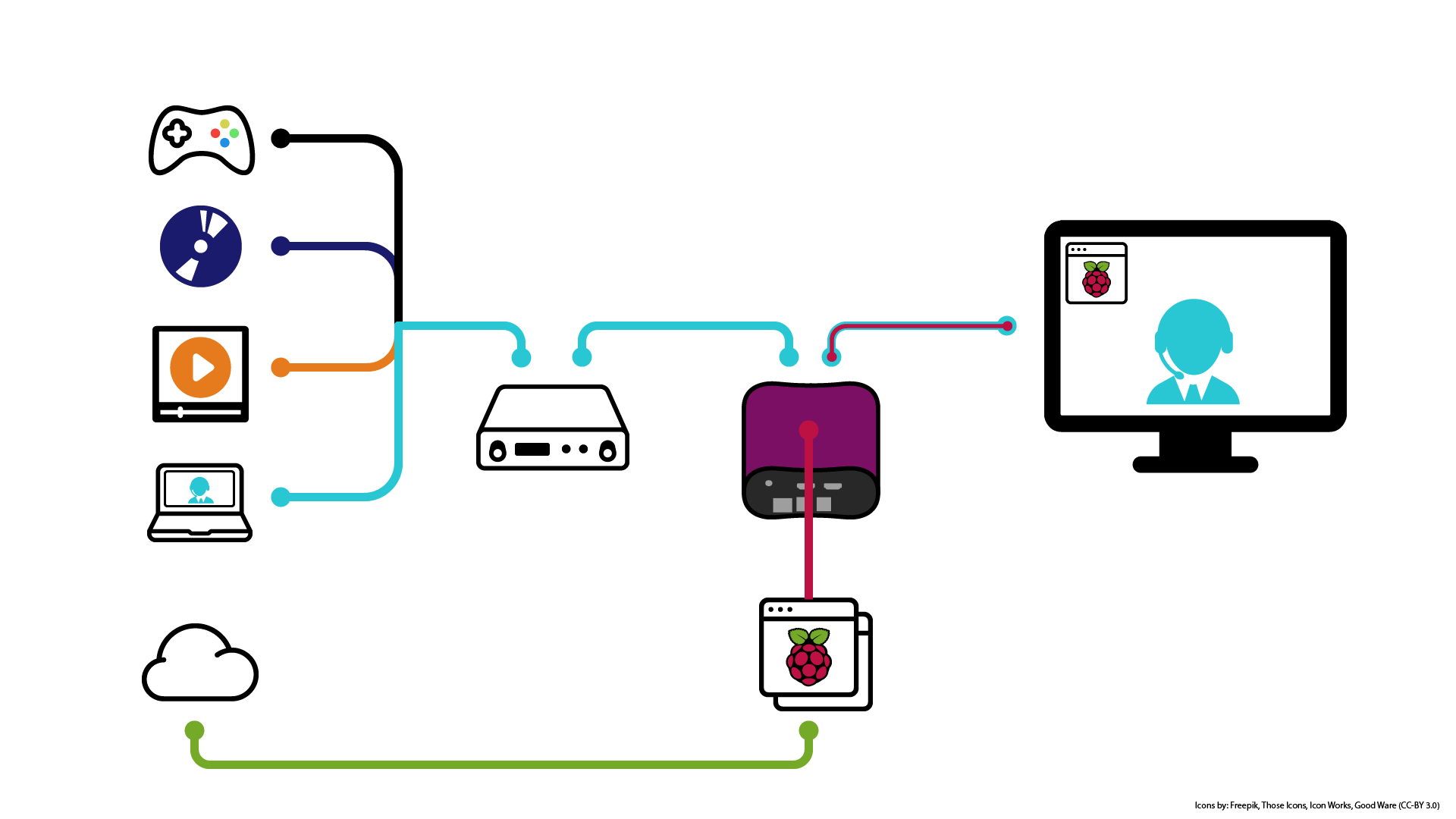
Until now. Out of the box, NeTV2’s “NeTV Classic Mode” makes short work of overlaying graphics on top of any video feed. And thanks to the Raspberry Pi bundled in the Quickstart version, NeTV2 app developers get to choose from a diverse and well-supported ecosystem of app frameworks to install over the base Raspbian image shipped with every device.
For example, Alasdair Allan’s article on using the Raspberry Pi with Magic Mirror and Google AIY contains everything you need to get started on turning your TV into a voice-activated personal assistant. I gave it a whirl, and in just one evening I was able to concoct the demo featured in the video below.
Magic Mirror is a great match for NeTV2, because all the widgets are formatted to run on a black background. Once loaded, I just had to set the NeTV2’s chroma key color to black and the compositing works perfectly. Also, Google AIY’s Voicekit framework “just worked” out of the box. The only fussy bit was configuring it to work with my USB microphone, but thankfully there’s a nice Hackaday article detailing exactly how to do that.
Personally, I find listening to long-form replies from digital assistants like Alexa or Google Home a bit time consuming. As you can see from this demo, NeTV2 lets you build a digital assistant that pops up data and notifications over the biggest screen in your house using rich visual formats. And the best part is, when you want privacy, you can just unplug the microphone.
If you can develop an app that runs on a Raspberry Pi, you already know everything you need to integrate apps into any TV. Thanks to NeTV2, there’s never been an easier or more open way to make the biggest screen in your house the smartest screen.
The NeTV2 is crowdfunding now at CrowdSupply.com, and we’re just shy of our first stretch goal: a free Tomu bundled with every board. Normally priced at $30, Tomu is a tiny open-source computer that fits in a USB Type-A port, and it’s the easiest way to add an extra pair of status LEDs to an NeTV2. Help unlock this deal by backing now and spreading the word!
07 Jun 18:33

Craig Federighi Shares More Details on Porting iOS Apps to the Mac
by Ryan Christoffel
Near the end of yesterday's WWDC keynote, Craig Federighi shared that Apple was at work on tools that would enable developers to more efficiently bring their iOS apps to the Mac. The ship date for those tools isn't until 2019, but this was still a major announcement, with plenty of questions left unanswered. Today Lauren Goode of Wired has published a new interview with Federighi in which a few additional details are shared on exactly how porting apps from iOS to Mac will work.
Federighi shares that this internal effort began two years ago, and largely involves an updating of UIKit to make it more Mac-friendly. Even after the release of this updated UIKit to developers, however, it won't be as simple as hitting a button to make an iOS app run on the Mac. Goode writes:
For app makers, some aspects of app porting will be automated and others will require extra coding. Using Xcode, Apple's app-making software that runs on Macs, a developer will be able to indicate they want to write a variant of their iOS app for macOS. Certain interaction UIs will happen automatically, like turning a long press on iOS into a two-finger click on a Mac. App makers may have to do some extra coding, though, around things like menus and sidebars in apps, such as making a Mac app sidebar translucent or making share buttons a part of the toolbar.
Translating iOS paradigms to the Mac will be full of challenging decisions for developers, but Apple is giving an early voice of direction – at least indirectly – by adding the previously iOS-only Home, News, Voice Memos, and Stocks apps to macOS Mojave. The company has made the Mac versions of those apps practically identical to their iPad counterparts, a sign that Apple expects the best path for developers will be designing two primary interfaces – one for iPhone, another for iPad and Mac – rather than three.
Some have speculated that Apple building a unified UI framework for iOS and the Mac is a stepping stone in its rumored transition to ARM-based chips for Macs. Goode touched on this point in her interview:
I asked Federighi whether the fact that iPhones and Macs run on different chip architectures would impact how the same app runs across both devices. "At this level, not so much," he said. "In a lot of our core APIs, things like Metal, we've done the hard work over the years of making them run well on both Mac and its associated CPUs and GPUs, and on iOS."
There certainly is a natural progression found in bringing iOS apps to the Mac now, knowing that later both platforms may live on the same chip architecture. However, clearly this upgraded UIKit isn't in any way dependent on Macs making the transition to ARM. That change might make things easier in the future, but for now, when iOS apps start making their way to the Mac in 2019, users shouldn't need a new Mac to get them running.
You can also follow all of our WWDC coverage through our WWDC 2018 hub, or subscribe to the dedicated WWDC 2018 RSS feed.
Support MacStories Directly
Club MacStories offers exclusive access to extra MacStories content, delivered every week; it's also a way to support us directly.
Club MacStories will help you discover the best apps for your devices and get the most out of your iPhone, iPad, and Mac. Plus, it's made in Italy.
Join Now
07 Jun 18:33
Latest Firefox Test Pilot Experiments: Custom Color and Side View
by Nick Nguyen
Before we bring new features to Firefox, we give them a test run to make sure they’re right for our users. To help determine which features we add and how exactly they should work, we created the Test Pilot program.
Since the launch of Test Pilot, we have experimented with 16 different features, and three have graduated to live in Firefox full time: Activity Stream, Containers and Screenshots. Recently, Screenshots surpassed more than 100M+ screenshots since it launched. Thanks to active Firefox users who opt to take part in Test Pilot experiments.
This week, the Test Pilot team is continuing to evolve Firefox features with two new extensions that will offer users a more customizable and productive browsing experience.
Introducing Firefox Color
One of the greatest things about the Test Pilot program is being the first to try new things. Check out this video from one of our favorite extensions we’re hoping you’ll try out:
New Firefox Color extension allows you to customize several different elements of your browser, including background texture, text, icons, the toolbar and highlights.
Color changes update automatically to the browser as you go, so you can mix and match until you find the perfect combo to suit you. Whether you like to update with the seasons, or rep your favorite sports team during playoffs, the new color extension makes it simple to customize your Firefox experience to match anything from your mood or your wardrobe.
You can also save and share your creation with others, or choose from a variety of pre-installed themes.
Introducing Side View
Side View is a great tool for comparison shopping, allowing you to easily scope the best deals on flights or home appliances, and eliminating the need to switch between two separate web pages. It also allows you to easily compare news stories or informational material–perfect for writing a research paper or conducting side-by-side revisions of documents all in one window.
The Side View extension allows you to view two different browser tabs in the same tab, within the same browser window.
You can also opt for Side View to log your recent comparisons, so you can easily access frequently viewed pages.
Join our Test Pilot Program
The Test Pilot program is open to all Firefox users. Your feedback helps us test and evaluate a variety of potential Firefox features. We have more than 100k daily participants, and if you’re interested in helping us build the future of Firefox, visit testpilot.firefox.com to learn more. We’ve made it easy for anyone around the world to join with experiments available in 48 languages.
If you’re familiar with Test Pilot then you know all our projects are experimental, so we’ve made it easy to give us feedback or disable features at any time from testpilot.firefox.com.
Check out the new Color and Side View extensions. We’d love to hear your feedback!
The post Latest Firefox Test Pilot Experiments: Custom Color and Side View appeared first on The Mozilla Blog.
07 Jun 18:31
Teaching Policy People to Code at the Harvard Kennedy School
by David Eaves
Part 1: hypothesis & goals Context This summer, digital HKS is excited to launch an experimental pilot that will help MPP and MPA students at the Harvard Kennedy School of Government (HKS) learn Python. Over the next two to three months, we’ll share more details about this experiment: why we are running it, how we are going about […]
07 Jun 18:30
Je rejoins Qwant
by Tristan

Alors voilà, après une bonne virée moto pour recharger mes batteries, je viens d’arriver chez Qwant, le moteur de recherche européen respectueux de la vie privée au poste de Vice-président Advocacy.
J’y retrouve d’anciens Mozilliens, et des figures de l’Internet français, dont Eric Léandri (président et fondateur de Qwant) et Guillaume Champeau (juriste et fondateur de Numérama/Ratiatum), sans oublier des équipes fort sympathiques et compétentes (j’ai vu quelques démos internes à couper le souffle).
Les valeurs de Qwant sont alignées avec les miennes, en particulier sur les notions de respect de la vie privée et des données personnelle et la souveraineté numérique. Le fait que chez Qwant Research le logiciel libre soit en plein essor[1] m’a donné l’envie de franchir le pas.
On me demandait hier sur Twitter ce que signifie le titre de mon poste, Vice-président Advocacy. Cela aurait pu être “Evangelist”, mais la connotation religieuse est gênante en France. Pour traduire advocacy en français, on dirait plutôt plaidoyer, que le Larousse définit de la façon suivante :
Plaidoyer, nom masculin : Discours ou écrit en faveur de quelqu’un, d’une idée, etc., ou qui combat une doctrine, une institution.
C’est bien ce que je vais faire : expliquer et promouvoir la mission de Qwant, ses valeurs, à l’oral et à l’écrit, en français et en anglais (Qwant a des filiales en Allemagne et en Italie). Les dernières actualités, dont les révélations du New York Times sur Facebook[2] qui offrait en open bar les données personnelles aux fabricants de téléphones montrent que la vie privée et la souveraineté sont des enjeux essentiels dans la révolution numérique. Qwant a des trésors de technologie (souvent sous licence libre !) sous le coude. Stay tuned!
Mise à jour du 8 juin :
- Tristan Nitot quitte Cozy Cloud pour Qwant ;
- Qwant recrute Tristan Nitot, fondateur de Mozilla Europe
- Après Firefox et Cozy, Tristan Nitot rejoint Qwant
- Qwant recrute Tristan Nitot, fondateur de Mozilla Europe ;
- Qwant annonce l’arrivée de Tristan Nitot en tant Vice-Président Advocacy ;
- RGPD : l’Europe fait-elle fausse route ? (réponse rapide : non, au contraire, il faut aller plus loin que cet excellent premier pas dans la protection des données, pour faire évoluer Internet vers plus de respect des individus et de leurs données personnelles).
- La flatteuse annonce par Cozy Cloud ;
- Tristan Nitot évangéliste pour le Google-Killer européen ;
Notes
[1] Il est un peu tôt pour en parler, mais je reviendrais sur le sujet, comptez sur moi !
[2] Voir en français l’article du Figaro
07 Jun 18:30
 ZTE shut down its main business operations back in May of this year, following a U.S. export ban of goods to the company.
Continue reading →
ZTE shut down its main business operations back in May of this year, following a U.S. export ban of goods to the company.
Continue reading →
ZTE and U.S. May Have Worked Out How to Get Company Back in Business
by Evan Selleck
ZTE shut down its main business operations back in May of this year, following a U.S. export ban of goods to the company.
Continue reading →
07 Jun 18:29


iOS 12 and watchOS 5: A Roundup of All the Little Things
by Ryan Christoffel
Every year when Apple introduces the latest versions of its software platforms at WWDC, information streams out in two major phases: we get the biggest, most important announcements during the opening keynote, then afterward, once the new beta builds are in the hands of developers, we find out all the additional details not meriting on-stage attention. In that vein, here's a roundup of all the smaller details we've discovered so far in iOS 12 and watchOS 5 that weren't covered in our initial overviews.
iOS 12
Chapter Support in Podcasts. Apple Podcasts has long had support for AAC chapter markers, but most podcasts – particularly lots of tech-focused podcasts – are formatted as MP3s, so their chapters wouldn't be available inside Apple Podcasts. That changes in iOS 12 though, as Podcasts now fully supports MP3 chapters for the first time.
One more thing in iOS 12: Apple Podcasts now supports MP3 chapters, which can be skipped using Siri. 🙌 h/t @mcobco pic.twitter.com/YP9KIYCUIE
— Ryan Christoffel (@iryantldr) June 5, 2018
The new Podcasts app also lets you adjust durations for skipping forward and back, and car and headphone controls can be configured to skip forward and back rather than changing podcasts altogether.
Richer Notifications. Similar to watchOS 5's new ability to load web content in things like Mail notifications, now rich notifications in iOS will automatically do the same. With Mail notifications this means that rather than seeing a plain text preview of a message, you'll be able to see a more accurate rendering of the message's contents.
Re-Trigger Face ID. While I'm a huge fan of Face ID, there's no denying I get more failed authentication attempts with it than with Touch ID. At first when this would happen, I would hit the side button to put the iPhone to sleep, then Raise to Wake to give it a second try. Fortunately, I later learned you could re-trigger an authentication simply by leaning the device away from you, then bringing it back where the TrueDepth camera can see you. This is a much better alternative, but it turns out Apple has an even better solution in iOS 12: when Face ID fails to authenticate, you can trigger another attempt simply by swiping up from the bottom of the screen, just like you do to go Home.
Expanded Markup Colors. The set of Markup tools used throughout much of iOS for screenshot annotating and more has received a welcome improvement: there's now a much wider selection of color options. The five core colors from previous versions of iOS are still front and center, but you can now open a new color picker window containing a whopping 120 additional colors.
iPhone X Safari Tabs. Despite a display size that actually measures larger diagonally than Plus-sized iPhones, the iPhone X adopts the size class model of 4.7-inch iPhones, which causes it to lose some UI benefits, particularly in landscape mode. One of those drawbacks is rectified in iOS 12, however: Safari will display an iPad-like tab view when your iPhone X is being used in landscape.
Force-Quitting Apps on iPhone X. In iOS 11, force-quitting apps was more difficult on the iPhone X than any other iOS device, because it required first pressing and holding on an app in the app switcher to activate force-quit mode, after which you could swipe up on apps to force-quit them. iOS 12 does away with the extra step, causing the iPhone X to fall back in line with other iOS devices with a simple swipe up to close an app.
New Wallpaper. As of beta 1, there is only a single new wallpaper in iOS 12, and it's available on both iPhone and iPad.
Automatic System Updates. Joining the already-present setting to turn on automatic updates for apps, you can now activate a similar option for system updates. Turn on automatic updates by visiting Settings ⇾ General ⇾ Software Update.
Search Lyrics in Apple Music and Tweaked Artist Profiles. Apple Music is largely unchanged in iOS 12, except for a couple tweaks: you can now use lyrics as a search term to find songs, and artist profiles feature larger artwork and a new button to shuffle the artist's songs.
watchOS 5
Customizable Control Center. After iOS 11 introduced a fully customizable Control Center, Apple Watch owners immediately put that feature on their watchOS wishlists, and fortunately we didn't have to wait long. While Control Center in watchOS 5 isn't quite as customizable as its iOS counterpart – you can't disable any of its options – it does allow you to rearrange all its toggles to your heart's content thanks to a new Edit button.
Overnight Updates. Several years into its life, the Apple Watch is still the most painful Apple device to download updates for. One new feature in watchOS 5 that will hopefully help alleviate the pain is overnight updates. Little is known about this feature because it doesn't appear to be present in the current beta; however, the word cloud doesn't lie.
Walkie-Talkie Details. Though the full Walkie-Talkie app isn't available in the beta of watchOS 5 just yet, The Verge published an article that shared some interesting details behind how the app works: essentially, Walkie-Talkie communications take place over FaceTime audio, only a special branch of FaceTime audio that automatically mutes the line at all the appropriate times.
Change Wi-Fi Network. In watchOS 5, directly from the Watch you can switch to a different Wi-Fi network. This is done by visiting Settings ⇾ Wi-Fi.
With the beta season just beginning, it's likely that even more details of changes in iOS and watchOS will be discovered in the coming days and weeks, particularly as future beta versions ship. It's going to be a fun summer.
You can also follow all of our WWDC coverage through our WWDC 2018 hub, or subscribe to the dedicated WWDC 2018 RSS feed.
Support MacStories Directly
Club MacStories offers exclusive access to extra MacStories content, delivered every week; it's also a way to support us directly.
Club MacStories will help you discover the best apps for your devices and get the most out of your iPhone, iPad, and Mac. Plus, it's made in Italy.
Join Now
07 Jun 18:29
Evil stuff on the Internet and following the money
Rule number one of dealing with the big Internet
companies is: never complain to them about all the
evil
stuff
they support. It's a waste of time and carpal
tunnels. All of the major Internet companies have
software, processes, and, most important, contract
moderators,
to attenuate complaints. After all, if Big
Company employees came in to work and saw real user
screenshots of the beheading videos, or the child
abuse channel, or the ethnic cleansing memes, then
that would harsh their mellow and severely interfere
with their ability to, as they say in California,
bro down and crush code.
Fortunately, we have better options than engaging with a process that's designed to mute a complaint. Follow the money.
Your average Internet ad does not come from some
ominous all-seeing data-driven Panopticon. It's
probably placed by some marketing person looking at
an ad dashboard
screen that's just as confusing
to them as the ad placement is confusing to you.
So I'm borrowing the technique that "Spocko" started for talk radio, and Sleeping Giants scaled up for ads on extremist sites.
-
Contact a brand's marketing decision makers directly.
-
Briefly make a specific request.
-
Put your request in terms that make not granting it riskier and more time-consuming.
This should be pretty well known
by now. What's new is a change in
European privacy regulations. The famous European
GDPR
applies not just to Europeans, but to natural
persons.
So I'm going to test the idea that if I
ask for something specific and easy to do, it will be
easier for people to just do it, instead of having to
figure out that (1) they have a different policy for
people who they won't honor GDPR requests from and
(2) they can safely assign me to the non-GDPR group
and ignore me.
My simple request is not to include me in a
Facebook Custom Audience.
I can find the
brands that are doing this by downloading ad data
from Facebook, and here's a letter-making web
thingy
that I can use. Try it if you like. I'll follow up
with how it's going.
07 Jun 18:29
Sorry, Bus Full: The Case for Vancouver’s Millennium Line Extension (Video)
by colinmstein

In April, Price Tags published a post on the UBC announcement regarding their desire to fund the remaining dollars — possibly up to $1 billion, depending on how you parse the extant project information floating in the ether (or who you know) — to bring the Millennium Line extension all the way to campus.
It remains our most-viewed post of 2018. It’s also our most-commented upon piece of all time. That’s 10,000+ posts over a dozen years.
So we decided to provide an update. Just one problem.
UBC is mum on any updates to their generous offer and unwilling to go on record with the media until details are sorted out with co-stakeholders, chief among them Translink and the City of Vancouver.
So there’s no way of knowing what the cost and the timeline may ultimately look like. But what about the rationale? It’s the reasons for a Skytrain extension in the first place that blew up our original post.
Here’s where we go to our new friend Uytae Lee of About Here. Uytae does these pretty slick, entertaining and informative explainer videos on urban planning issues, and they’re worth a good look.
This one about the Millennium Line extension clocks in at 5m30s, with the premise “why in the world would an extension end at Arbutus?” No, not for the Fletcher’s Fabricare, though it still has that killer ’50s mojo.
Uytae lays out all the data, and even tacks on the requisite UBC update at the end. Have a look:
07 Jun 18:29
The Travelling Eye…Spies Something Glowing
by colinmstein

Courtesy of Judy Bishop, a long-time Vancouver area technology marketing executive, and now apparently another one of those maddening people with “the best job in the world” (our take, anyways — she takes photographs for Getty Images).
Bishop recently found a special perspective on a building that, if you happen to spend any time in the wind channel tucked between the West End and Coal Harbour, you’ve seen a million times…but maybe you’ve never seen it like this.

I recall a slightly…different-looking building. Twenty years ago, much like The Empress in Victoria, or the original Hotel Georgia, The Banff was a stuffy, awkward building with oddly-angled spaces. It also had quite a bit of deep green trim that gave it a squat, impermeable look.
I visited it a few times prior to a terrible fire in 2002, which then led to a major restoration. Now, it appears quite beautiful (yes, even from ground level). And no doubt, it is once again a desirable place to live.
Thanks to Peter Ladner for the tip.

07 Jun 18:29
Professor retracts controversial plan to fix Vancouver housing affordability by importing rich foreigners and charging them C$1m each
by Ian Young
A prominent Canadian academic has retracted his proposal that the country restart a controversial Chinese-dominated millionaire migration scheme by having rich newcomers pay C$1million each to make housing more affordable in Vancouver.
Professor James Tansey, executive director of the Centre for Social Innovation and Impact Investing at the University of British Columbia, said on Monday he felt “almost regret” about including the immigrant investor proposal in last week’s...
07 Jun 18:29
 Soft tossing, Tee-Hitting Sleeve @Lesley_NOPE
I learned to program on an Apple IIe twitter.com/ruckin_/status…
Twitter Favorites: [Lesley_NOPE] I learned to program on an Apple IIe https://t.co/yEMDY0IiZe
I learned to program on an Apple IIe twitter.com/ruckin_/status…
07 Jun 17:56
@B_Ehrenreich
@B_Ehrenreich:
I have finally concluded that if you are a top advisor to the fiend who is ripping...
07 Jun 14:12

Gmail’s new web client enters general availability this July
by Igor Bonifacic
General availability for Google’s redesigned Gmail client will start in July 2018, the search giant announced on Monday.
While G Suite admins will have the option to allow their users to opt out of using the new web client (at least temporarily), Google will require all users to start using the new Gmail before the end of the year.
The company says it will start automatically migrating Gmail users to the new web experience eight weeks after general availability.
Users will have the option to opt out of using the new client for an additional four weeks. Afterwards, there’s no going back; users won’t have the option to delay moving to the new client after four weeks, nor will they be able to switch back to the old client after they’re migrated to the new one.
Google’s Waterloo team helped design some of the more noteworthy features of the new Gmail, including the client’s new Confidential Mode.
Source: Google
The post Gmail’s new web client enters general availability this July appeared first on MobileSyrup.
07 Jun 14:12

MacOS Mojave is getting rid of integrated Facebook and Twitter
by Brad Bennett
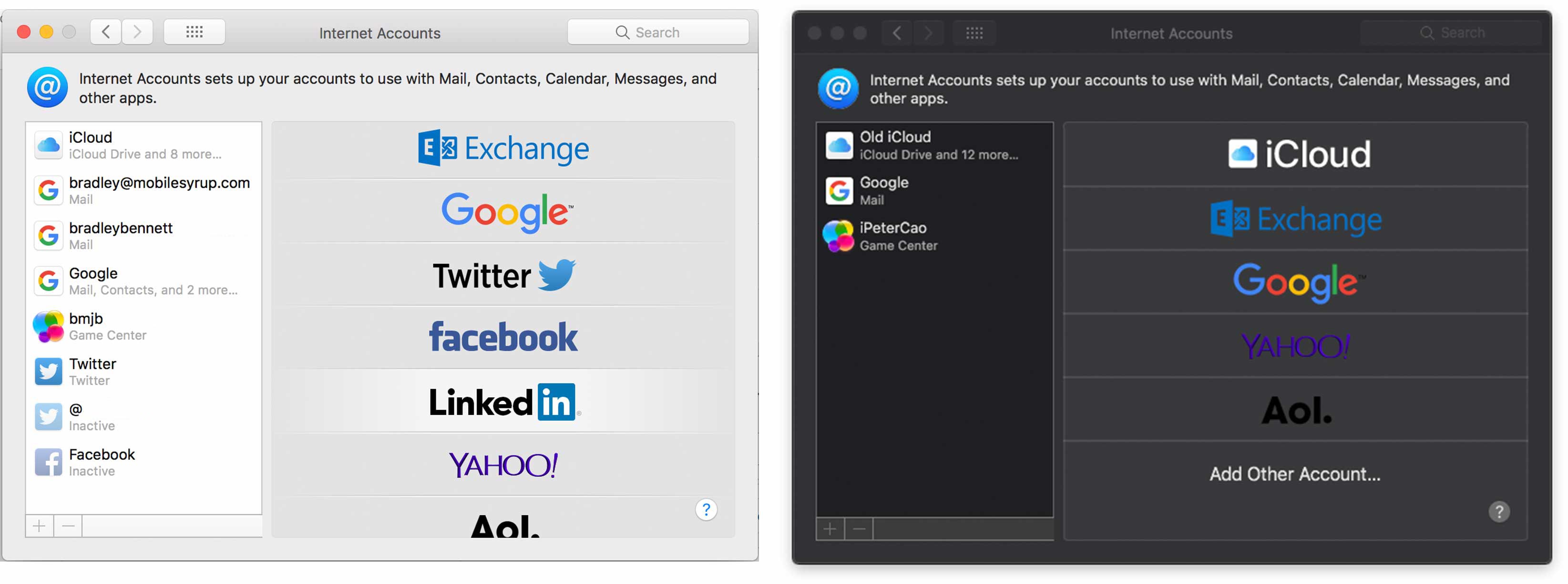
Apple has removed the ability to add your Facebook and Twitter accounts to macOS in the first macOS Mojave beta.
The company released the developer beta released yesterday. Since then, users have been finding small and subtle changes all over the operating system.
The old macOS account page on the left and the new one on the right.
One of these small changes was Apple’s decision to distance itself from Twitter and Facebook. The company removed the social networks from iOS 11 last year and it’s now clear that was the beginning of a trend
Apple has maintained that it respects users’ data and right to privacy. Not having built-in Facebook and Twitter functionality probably helps with keep that stance.
The company even took a few shots at Facebook while on stage at WWDC. When the company mentioned that social media share buttons can track users from website to website, they mentioned Facebook’s ad tracking as something they were shutting down on their browser.
Image Credit: 9to5Mac
Source: 9to5Mac
The post MacOS Mojave is getting rid of integrated Facebook and Twitter appeared first on MobileSyrup.
05 Jun 14:12
A to Z. Everything in one picture. Haarlem, on ...
by Ton Zijlstra
A to Z. Everything in one picture. Haarlem, on Oude Groenmarkt. By Marinus Boezem, commemorating Lennaert Nijgh.

05 Jun 14:12
Best roast goose in Hong Kong just a memory now Yat Lok closed – Tai Po restaurant’s version was almost flawless
by Bernice Chan
When we arrived at Yat Lok Barbecue Restaurant in Tai Po Market, the shutters were down. It was supposed to open in a few minutes but it seemed like no one was inside. This was four years ago, when the Post was on a mission to find the best roast goose in Hong Kong, and Yat Lok was definitely on our list. We had an appointment with the chef-owner, Chu Kin-wah.
Around 20 minutes after the shop’s supposed opening time, the roller shutters came up and Chu beckoned us inside. The decor for...
05 Jun 14:12
The Cost of Developers
by Ben Thompson
Yesterday saw three developer-related announcements, two from Apple, and one from Microsoft. The former came as part of Apple’s annual Worldwide Developers Conference keynote:
- The iOS App Store, which turns 10 next month, serves 500 million weekly visitors, and as of later this week will have earned developers over $100 billion.
- Sometime next year developers will be able to write apps for the Mac using iOS user interface frameworks (known as UIKit).
Microsoft, meanwhile, for the second time in three years, outshone Apple’s keynote with a massive acquisition. From the company’s press release:
Microsoft Corp. on Monday announced it has reached an agreement to acquire GitHub, the world’s leading software development platform where more than 28 million developers learn, share and collaborate to create the future. Together, the two companies will empower developers to achieve more at every stage of the development lifecycle, accelerate enterprise use of GitHub, and bring Microsoft’s developer tools and services to new audiences.
“Microsoft is a developer-first company, and by joining forces with GitHub we strengthen our commitment to developer freedom, openness and innovation,” said Satya Nadella, CEO, Microsoft. “We recognize the community responsibility we take on with this agreement and will do our best work to empower every developer to build, innovate and solve the world’s most pressing challenges.”
Under the terms of the agreement, Microsoft will acquire GitHub for $7.5 billion in Microsoft stock.
Developers can be quite expensive indeed!
Platform-Developer Symbiosis
Over the last few weeks, particularly in The Bill Gates Line, I have been exploring the differences between aggregators and platforms; while aggregators generally harvest already produced content or goods, developers leverage the platform to create something entirely new.

This results in a symbiosis between developers and platforms: from a technical perspective, platforms provide the fundamental building blocks (i.e. application program interfaces, or APIs) necessary for developers to build new experiences, and from a marketing perspective, those new experiences give customers a reason to buy the platform in the first place, or to upgrade.
The degree to which applications drive adoption of the underlying platform can, of course, vary; unsurprisingly the monetization potential of the platform relative to developers varies in a correlated way. Traditional Windows, for example, provided very little end user functionality; what made it so valuable were all of the applications built on top of its open platform.
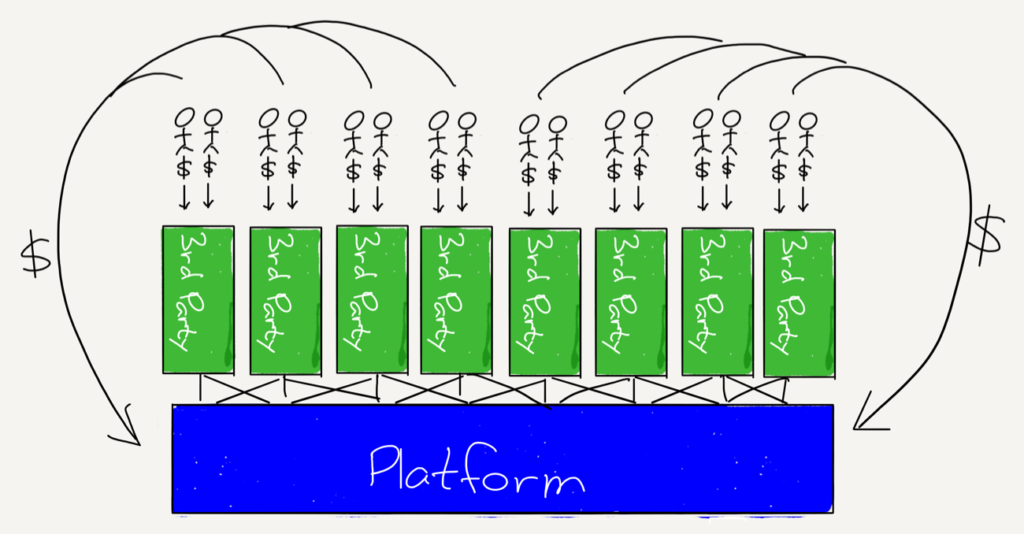
Here “open” means two things: first, the Windows API was available to anyone to build on, and two, developers built relationships directly with end users, including payment. This led to many huge software companies and, in 2003, to the creation of a platform on top of Windows: Valve’s Steam.
What Valve realized is that playing a game is only one part of the overall customer experience; the experience of discovering and buying the game matters as well, as does the installation and upgrade process. Moreover, these customer pain points were developer pain points as well; the original impetus to develop Steam, for example, was the difficulty in getting players to upgrade en masse, something that was essential for games in which players competed online. And, while Valve is a private company and has never announced Steam’s revenue numbers, reports suggest the platform generates billions of dollars a year.
Even that, though, pales in comparison to the iOS App Store: Apple took Steam’s app store idea and integrated it with the platform, such that iOS users and developers had no choice but to use Apple’s owned-and-operated distribution channel, with all of the various limitations and costs — 30%, to be precise — that that entailed.
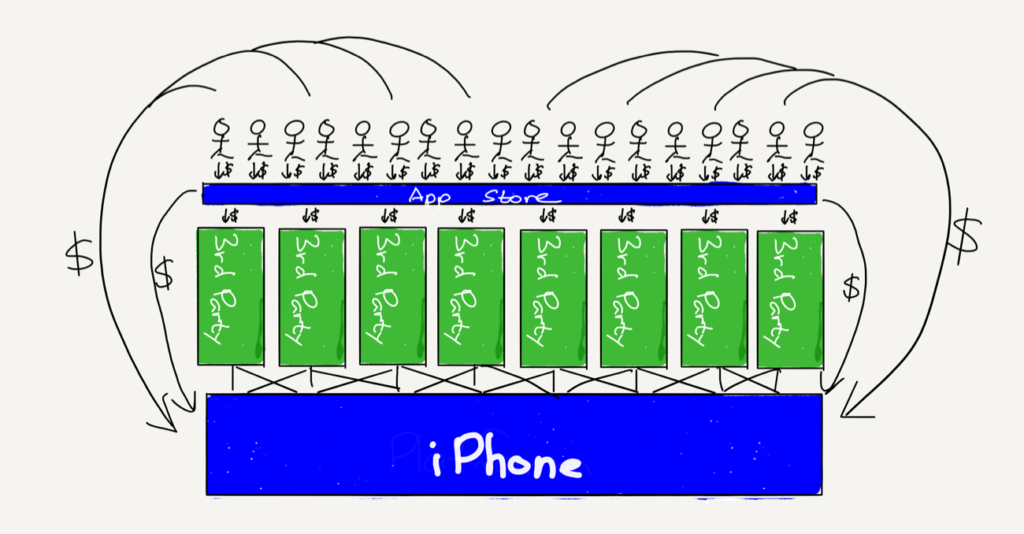
Apple was able to accomplish this first and foremost because the underlying products — the iPhone and iPad — inspired demand in their own right, independent of applications. Apple had the users that developers needed to make money.
Second, the App Store, like Steam before it, really was a better experience that drove more downloads and purchases by end users. This meant that developing for iOS wasn’t simply attractive because of the number of users, but also because those users were willing to buy more than they would have on another platform.
Third — and this applies to Steam as well — the App Store dramatically lowered the barriers to entry for developers; this led to more apps, which attracted more users, which led to more apps, both locking in apps as a competitive advantage and also ensuring that no one app had outsized power (leaving Apple free to restrict Steam-like competitors by fiat).
Apple’s Platform Announcements
This frames the two Apple announcements I noted above. Start with the news of $100 billion for iOS developers: that means that Apple has collected around $40 billion, and at a very high margin to boot.
Moreover, the vast majority of Apple’s announcements were, if anything, about competing with those developers: the first new app announced, Measure, should immediately wipe out the only obviously useful Augmented Reality apps in the store. Apple also announced a new Podcasts app for Watch, update News, Stocks, and Voice Memo apps, and the only third party demos were about how one of the largest software companies there is — Adobe — would be supporting Apple’s preferred 3D-image format. And why not! The implication of owning all of those high-value users is that, on iOS anyways, developers are cheap.
The Mac, though, is a different story: the platform is far smaller than the iPhone; that there remain a number of high quality independent software vendors supporting the Mac is a testament to how valuable it is for developers to be able to build direct relationships with customers that can span years and multiple transactions. Still, there seems little question that the number of Mac apps is, if not trending in the wrong direction, certainly not growing in any meaningful way; there simply aren’t enough users to entice developers.
That means Apple’s approach has to be very different from iOS: instead of dictating terms to developers, Apple announced that it is in the middle of a multi-year project to make it easier to port iOS apps to the Mac. This is, in a fashion, Apple paying for Mac apps; no, the money isn’t going to developers, but Apple is voluntarily taking on a much greater portion of the porting workload. Developers are much more expensive when you don’t have nearly as many users.
The Cost of GitHub
Still, whatever it is costing Apple to build this porting framework, it surely is a lot less than $7.5 billion, the price Microsoft is paying for GitHub. Then again, at first glance, it may not be clear what the point of comparison is.
Go back to Windows: Microsoft had to do very little to convince developers to build on the platform. Indeed, even at the height of Microsoft’s antitrust troubles, developers continued to favor the platform by an overwhelming margin, for an obvious reason: that was where all the users were. In other words, for Windows, developers were cheap.
That is no longer the case today: Windows remains an important platform in the enterprise and for gaming (although Steam, much to Microsoft’s chagrin, takes a good amount of the platform profit there), but the company has no platform presence in mobile, and is in second place in the cloud. Moreover, that second place is largely predicated on shepherding existing corporate customers to cloud computing; it is not clear why any new company — or developer — would choose Microsoft.
This is the context for thinking about the acquisition of GitHub: lacking a platform with sufficient users to attract developers, Microsoft has to “acquire” developers directly through superior tooling and now, with GitHub, a superior cloud offering with a meaningful amount of network effects. The problem is that acquiring developers in this way, without the leverage of users, is extraordinarily expensive; it is very hard to imagine GitHub ever generating the sort of revenue that justifies this purchase price.
Again, though, GitHub revenue is not the point; Microsoft has plenty of revenue. What it also has is a potentially fatal weakness: no platform with user-based leverage. Instead Microsoft is betting that a future of open-source, cloud-based applications that exist independent of platforms will be a large-and-increasing share of the future, and that there is room in that future for a company to win by offering a superior user experience for developers directly, not simply exerting leverage on them.
This, by the way, is precisely why Microsoft is the best possible acquirer for GitHub, a company that, having raised $350 million in venture capital, was possibly not going to make it as an independent entity. Any company with a platform with a meaningful amount of users would find it very hard to resist the temptation to use GitHub as leverage; on the other side of the spectrum, purely enterprise-focused companies like IBM or Oracle would be tempted to wring every possible bit of profit out of the company.
What Microsoft wants is much fuzzier: it wants to be developers’ friend, in large part because it has no other option. In the long run, particularly as Windows continues to fade, the company will be ever more invested in a world with no gatekeepers, where developer tools and clouds win by being better on the merits, not by being able to leverage users.
That, though, is exactly why Microsoft had to pay so much: buying in directly is a whole lot more expensive than using leverage, which can produce equivalent — or better! — returns for much less investment.
05 Jun 14:10
 daveo @uncleweed
Ran outta @MOO cards so whipped up a batch of “meta cards” - meaning cards featuring photos of making cards - arran… twitter.com/i/web/status/1…
Twitter Favorites: [uncleweed] Ran outta @moo cards so whipped up a batch of “meta cards” - meaning cards featuring photos of making cards - arran… https://t.co/W3XEBOvrnL
Ran outta @MOO cards so whipped up a batch of “meta cards” - meaning cards featuring photos of making cards - arran… twitter.com/i/web/status/1…

05 Jun 14:09

The Google Pixelbook is on sale for $300 off in Canada
by Dean Daley
Google’s own Chromebook, the Pixelbook, is on sale for $999 CAD on the Canadian Google Store. The Pixelbook is regularly priced at $1,299.
Google quietly started the sale on June 1st, 2018, and it’s only on until June 7th at 11:59pm PT (June 8th at 2:59am ET). The offer is not available in Quebec.
The offer is only available for the lowest model Pixelbook that includes an Intel Core i5 processor, 8GB of RAM and 128GB of SSD storage.
Google’s Pixelbook features a 12.3-inch 2,400 x 1,600 pixel resolution display. It uses the Chrome OS operating system and features dual speakers.
While Chromebooks have their faults, like not being able to easily download Windows or Mac desktop apps, the Pixelbook does have full access to Google Assistant and Google search.
Source: Google Store
The post The Google Pixelbook is on sale for $300 off in Canada appeared first on MobileSyrup.
05 Jun 08:33





iOS 12: The MacStories Overview
by Ryan Christoffel
Every year a major new version of iOS is released, adding a wealth of powerful improvements that transform the way we use some of our most important tools in life. In comparison to updates in recent years, iOS 12 – which Apple introduced at today's WWDC keynote – doesn't have as many flashy new features or major changes to system apps. When it gets in public hands this fall, lots of users may install it and not notice anything different. And that's partly on purpose.
Apple spent a lot of time this year focusing on performance improvements that make iOS run better on a wide assortment of devices. In iOS 12, even though your iPhone or iPad may not be getting a major Home screen redesign or anything similarly noticeable, one change Apple hopes you will recognize is that your device runs better than ever before. In addition to being available on all the same hardware as iOS 11, iOS 12 claims to bring a Camera that opens up to 70 percent faster from the Lock screen, apps that launch up to twice as fast, smoother animations system-wide, a keyboard that loads up to 50 percent faster, and more response typing. These may not be the kind of details that make for great marketing campaigns, but they make the tasks we do every day better.
It's not fair to call iOS 12 a release mainly focused on fixing bugs and improving performance, however. Apple has also put together an impressive assortment of features, big and small, which will empower you to do things with your device that wasn't previously possible. There are impressive new automation capabilities integrated deeply with Siri, improved tools for monitoring how you use your devices, excellent new features for Messages, FaceTime, Photos, and more, and the arrival of ARKit 2.
Here's an in-depth look at all that iOS 12 will bring when it launches this fall.
Siri & Shortcuts
A little over a year after Apple's acquisition of the Workflow team, we now know exactly what that team has been busy with: Siri Shortcuts.
Siri Shortcuts is the branding that encompasses several new Siri features and a brand new app, all of which help make Apple's digital assistant a true aid in productivity. This starts with a new API that enable all third-party apps to integrate with Siri, even if there's no dedicated SiriKit domain to match their app type. Apps using the new Shortcuts API will be able to expose quick actions to Siri that are tied to a user-set phrase. For example, you'll be able to set up a Siri quick action inside your favorite shopping app to activate voice ordering of your regular grocery order. This quick action can be triggered in the most natural way possible: using a custom phrase that you set up, such as, "Order the groceries." Actions you take using a custom phrase completely bypass the need to specify which app you want to use, unlike current SiriKit apps. Just tell Siri the exact words of your pre-set phrase, and it will execute the programmed action for you. Once iOS 12 launches, apps that integrate with SiriKit in this new way can use an in-app 'Add to Siri' button to help users take advantage of Siri Shortcuts.
Shortcuts can be as simple as a single action, but you can also create complex multi-step workflows that will run when you give Siri the appropriate command. Multi-step actions can be created inside Apple's new Shortcuts app, which will launch on the App Store alongside iOS 12. The Shortcuts app bears a strong resemblance to Workflow, with the ability to thread together strings of actions from different system and third-party apps that will execute in sequence.
Shortcuts you’ve created live in the app’s Library tab, and you can discover and save Shortcuts built by Apple’s team from the Gallery tab. One major improvement of Shortcuts compared to Workflow – besides the likely additional system integrations Shortcuts will include – is the activation method: no matter how complicated a shortcut is, all you have to do to run it is tell Siri the custom command you set up. The digital assistant will then immediately perform all actions in your shortcut, one after the other. This new voice-activated productivity will be available for Siri on iOS, watchOS, and the HomePod. And for the times you’d prefer not to use voice, another quick option for triggering shortcuts from the app is through its included widget.
Joining the Workflow-like aspects of Siri Shortcuts, Siri will now make more intelligent recommendations for actions you need to take, both from the Lock screen and inside the Siri Suggestions widget. If you have a habit of opening a certain app and taking a particular action at regular times, Siri will begin surfacing silent notifications on the Lock screen that serve as shortcuts to initiate those actions. These look largely the same as standard notifications, except they receive a nice dark UI to differentiate them. Also, in cases where, for example, you’re running late to a meeting, Siri can add intelligent options to the Siri Suggestions widget for messaging someone your ETA, or pulling up navigation in Maps.
Siri Shortcuts is undoubtedly Siri's most exciting new feature in iOS 12. As has been true in many prior updates, however, the assistant has also been upgraded with a few new areas of knowledge. Food knowledge lets you ask about the number of calories in a food item, racing fans will enjoy Siri's new motorsports knowledge, there's a wider array of celebrity trivia facts available, and Siri can also now help you find a password stored in iCloud Keychain.
Do Not Disturb, Notifications, and Screen Time
Under the banner of helping users gain more understanding and control of how they use their devices, iOS 12 introduces improved features for Do Not Disturb and notifications, alongside a brand new area of analytics and monitoring controls called Screen Time.
Do Not Disturb
Visiting the Do Not Disturb section of Settings doesn't reveal many changes to the feature. In fact, there's only one: a toggle to turn on Bedtime Mode. When this new mode is activated, notifications that come in while you're asleep won't appear on the Lock screen. This way, if you wake up in the middle of the night and grab your iPhone to check the time or quickly do something in an app, you won't first be confronted by the demands of the outside world. With Bedtime Mode toggled on, in the morning the first thing your iPhone will show is a 'Good Morning' screen with a little info about the weather. You can then choose to hit a button, in your own timing, which reveals all of the night's notifications.
While Bedtime Mode is a nice feature, the best improvement to Do Not Disturb is found in its new Control Center actions. In iOS 12, if you use 3D Touch or a long-press on the Do Not Disturb tile in Control Center, you'll see a few new options that activate the feature:
- For 1 hour
- Until this evening
- Until I leave this location
- Until the end of this event
The latter option will only appear if you're in the middle of a scheduled calendar event. While these improvements aren't as extensive as some users may hope for, they certainly make the feature more powerful than it was before. In iOS 12, it feels like Do Not Disturb finally understands the types of situations people want the feature for in normal day-to-day use.
Notifications
One of the biggest problems with notifications has been solved in iOS 12: all notifications are now automatically grouped together by app. Your notifications for each app are grouped in a way that resembles a stack of cards, and you can tap on a stack to view each individual alert. This frees up space on your Lock screen and enables easy triage: with a single tap, all notifications from a certain app can be dismissed at once. If you'd like to disable grouping, that can be done on a per-app basis.
The second noteworthy new feature with notifications is called Instant Tuning. This enables changing notification settings for an app without needing to open the Settings app. You can access Instant Tuning by swiping left on a notification and hitting the new 'Manage' button. Here you'll find options to turn off that app's notifications, open Settings, or have your notifications delivered quietly, which means they skip the Lock screen and don't show banners, instead going straight to Notification Center.
Finally, there's a new type of notification in iOS 12 designed for critical information. This opt-in alert will notify you even when Do Not Disturb is engaged. One use case Apple mentions for this feature is getting important reports from your healthcare provider, but it's unclear if these new 'critical alerts' will be limited to certain app types, or if any app will be able to take advantage of them.
Screen Time
Screen Time is a new assortment of tools designed to help users keep track of the way they use their devices. Inside iOS 12's Settings app, a new Screen Time section contains a host of data points regarding how your iOS device has been used recently.
The first thing you'll see in Screen Time is an overview of how much you've used your device that day – a total use time is displayed above a breakdown of how that time was distributed among various apps and app types. Tapping into this data shows a more detailed breakdown of both the current day and the last seven days, with in-depth statistics on how many times you've picked up your device that day, how many notifications you've received, and more. It truly is an extensive deep dive into the way you use your device – and looking at my data so far has been eye-opening.
This activity information is joined by new tools for managing how you use your device. You can schedule yourself downtime, during which time only apps you've pre-approved can be used. Also, time limits can now be set for apps; iOS will notify you when that time limit is drawing near, then provide a screen-filling notice when time's up. One nice detail is that these Screen Time features use iCloud to sync across devices, so you don't have to set them up separately on both iPhone and iPad.
Screen Time's tools can be great for personal use, but they'll especially be a boon to parents. If you use iCloud Family Sharing as a parent, you'll have an informative overview of exactly how your child is using their device, and you'll also be able to approve requests for additional screen time your child requests.
One nice feature of Screen Time is that you don't even have to open Settings to benefit from it: users will receive a weekly notification giving them a summary of their week's device activity, which can then be tapped on to view more data in Settings.
Communication
One of the strengths of the Apple ecosystem is Apple's two powerful messaging platforms: iMessage and FaceTime. iOS 12 brings improvements for both.
Messages
Apple isn't letting the Animoji train slow down in iOS 12. Facial tracking for Animoji has been expanded to include tongue detection, so you can send fun messages to your friends featuring, for example, the Unicorn's sparkly purple tongue. There are also new Animoji characters: Ghost, Koala, Tiger, and T-Rex. But perhaps the biggest Animoji news is the addition of something Apple calls called Memoji.
Memoji is a new Animoji type that can be customized to look just like you. This is made possible thanks to a wide assortment of options for modifying skin, hairstyle, head shape, eyes, brows, nose & lips, ears, facial hair, eyewear, and headwear. It's truly impressive the depth of customization made possible here. What's also neat is that you aren't limited to a single Memoji; you can make as many new characters as you'd like. And once you're ready to record a video with your Memoji or another Animoji, you'll be happy to find that recorded messages can now be up to 30 seconds long, an extension from the previous 10-second limit.
Photos is now an iMessage app in iOS 12, which frees up the Camera icon to take you straight into the full viewfinder upon a single tap. This is important because the Camera in Messages has a new effects menu, accessed by tapping the star icon in the lower-left corner of the screen. Here you'll find the option to overlay an Animoji on top of your face in real-time, add stickers from an iMessage sticker pack, add text, a filter, or one of several other markup tools. Many of these options seem to have been inspired by Apple's Clips app, and they're a great fit inside Messages.
FaceTime
FaceTime has long been a favorite feature for Apple users, but it's unfortunately received very little development attention from Apple over the years. That changes this year, as iOS 12 introduces Group FaceTime.
Group FaceTime goes big by enabling a whopping 32 simultaneous participants on a call. This huge number of people could easily become a UI mess, but Apple appears to have found an elegant solution: each member of a call has a square video tile that dynamically resized based on their participation in the conversation. If someone hasn't spoken recently, they'll probably be in the roster of tiles arranged horizontally along the bottom of the screen; recently active participants, however, will be visible front and center in either a large or small tile, depending on when they last spoke. Every time someone begins speaking, their tile resizes so you can focus on the right person at the right time; if you'd like, you can also double-tap a person's video tile to bring them to the forefront.
The UI for Group FaceTime looks fluid and beautiful – a clean, organized way to keep track of group conversations. The feature works on iPhone, iPad, and even the Mac. You can also take group audio calls on Apple Watch.
Getting one new feature would have been enough to satisfy regular FaceTime users, but iOS 12 also includes all of the new special Camera effects found in Messages, so you can overlay stickers, Animoji, filters, and more on to your video feed.
Rounding out FaceTime improvements, you can now initiate a FaceTime call straight from the Messages app. Inside any of your Messages threads, tapping the contact's name at the top reveals a new menu that includes the option to start a FaceTime call. This works both with individuals, and with threads containing a group of contacts.
Apps
Joining Messages and FaceTime, a number of system apps have been updated in iOS 12 in both big and small ways.
Photos
Navigation in the Photos app has been revised: gone are the Memories and Shared tabs, replaced by a new For You tab that consolidates both former tabs, and a new Search tab that's home to an improved search experience.
For You in Photos is a nice place to experience surprise and delight in the form of new Memories and Featured Photos, the latter of which is brand new and contains things like 'On This Day' highlights. You'll also find activity for all shared albums inside For You, and suggestions for sharing and Live Photo Effects that can be added to your images.
Sharing Suggestions are an exciting addition in iOS 12: Photos will intelligently identify people in your photos who are in your contacts, and suggest you send them any images from an event you were at together. Unlike with shared albums, all photos shared through suggestions are sent at full resolution.
The really nice thing about Sharing Suggestions is that, once a friend receives your shared photos, their own library will be scanned to see if they have any images from the same event, after which Photos will suggest they share those photos with you. It's a clever addition that will help make photo sharing more ubiquitous, even among those who would never otherwise take the initiative to share.
Search in Photos has received a big upgrade here too: visiting the new Search tab will surface suggestions for different events, people, places, categories, and groups of people, and typed searches can now consist of multiple search terms. You can also now search by business name.
Apple Books
iBooks is getting a major redesign in iOS 12, following in the footsteps of Apple's other media and store apps like Podcasts and the App Store. The new app's Reading Now screen consolidates all the books you're currently working on reading, and also has a section called Want to Read, in addition to recommendations of new books to check out. Books can manually be marked Want to Read or Finished, Goodreads-style.
The app's remaining four main sections are Library, Book Store, Audiobooks, and Search. Everything in the app has received a fresh new look, with beautiful graphics and widespread use of a distinctly un-iOS-like serif font. The one part of Books that remains largely untouched is the reading experience itself; the only change I've discovered is the presence of a true dark theme for the iPhone X.
Measure
Measure is a brand new built-in iOS app that takes the power of ARKit and uses it in a practical tool that can benefit users on a regular basis. The app is extremely simple, offering up the ability to measure items and function as a level. There are nowhere near as many options as those found in third-party alternatives like MeasureKit, but that's probably for the best in an app that feels like Apple's attempt at an AR demo for the masses.
Apple News
Apple News joins Books and Photos as another app with redesigned navigation in iOS 12. There are only three tabs now: Today, Spotlight, and Browse. The former is a rebranding of For You, Spotlight remains the same, and Browse consolidates the previous Following, Search, and Saved screens all into one.
I should have mentioned: that's the iPhone version of News I just described. On the iPad, there's a new left sidebar that removes the need for tabbed navigation altogether. This sidebar lives next to the main grid of news stories and contains a full listing of channels you follow, as well as Spotlight, search options, and more. It's a beautiful use of the iPad's extra screen real estate, and makes it far easier than before for you to go straight to a news source you love.
Stocks and Voice Memos
Two under-appreciated iPhone apps are getting some love in iOS 12. Stocks has received a ground-up revamp that looks great and brings the app to the iPad for the first time. One of the hallmark features of the new app is its integration with Apple News, populating business-related articles inside the app that you can view without leaving Stocks. Voice Memos has also been given its first iPad version, aided by the addition of iCloud syncing.
Safari
Safari across iOS and macOS is being equipped with new privacy-related features that block user tracking methods commonly employed by popular comment widgets and social media buttons across the web. Also, when users browse the web in Safari, Apple will show websites a simplified array of metadata that will make it harder for sites to employ tracking via system configuration.
A new option in Safari's settings enables activating favicons in tabs, a great way to quickly identify which tab is which – particularly when you have so many open that the text is truncated.
Health
While there aren't any immediate user-facing changes to the Health app, Apple announced today that a new Health Records API is being opened to developers. This new API builds on the Health Records feature introduced in iOS 11.3 earlier this year, and enables third-party health apps to add data types to Health Records like medication tracking, disease management, and nutrition planning. For users whose healthcare providers have adopted Health Records support, this will enable a more seamless handoff between data logged in third-party apps and the broader Health ecosystem.
ARKit 2
Apple continues to invest a lot of resources into building its AR platform of the future. ARKit 2 brings significant improvements to the year-old developer framework, adding improved face tracking, more realistic rendering, and 3D object detection. The latter was used in a demo on-stage to show a real-world LEGO building being complemented in an AR app by characters and additional scenery that provided a new playground for users.
The improvement in ARKit 2 that I'm most excited about is the ability to provide persistent AR experiences. This means that objects you interact with in AR can remain in-place across multiple sessions of using the app, rather than disappearing and needing to be rebuilt and reconfigured in every new session.
The final big change in ARKit 2 is what Apple calls Shared Experiences. Thanks to this new feature, multiple people using multiple devices can interact together in the same AR world – perfect for multiplayer games, but also potentially for creating shared environments for laying out furniture in an app like IKEA Place.
One other AR-related announcement Apple made is the introduction of a new file format, USDZ, which was created in collaboration with Pixar and is optimized for augmented reality. USDZ assets will be identified in Apple's apps with a special symbol – Apple demoed this by showing a USDZ preview of a guitar on Fender's website in Safari, which could then be viewed in the real world using AR. Among developers featured on-stage, Adobe pledged to offer native support for USDZ in its Creative Cloud suite of apps, so images, video, and text created in those apps could be brought seamlessly into a native AR environment.
All the Rest
iPad Gesture Changes. Ever since the iPhone X was released last fall, it's been difficult going back and forth between the iPhone and iPad because each device has had an entirely different set of gestures for things like opening the app switcher, Control Center, and more. In iOS 12, the iPad's gesture system is being revamped for the second year in a row, and it's all for the sake of bringing unity with the iPhone X: iPads running iOS 12 now have the exact same gestures as the iPhone X. Control Center has been moved out of the app switcher, now residing in the top-right corner of the screen. Swiping all the way up from the bottom of the screen takes you back Home, and you can open the app switcher with a swipe up, then pause.
Having only one set of gestures to remember is great. What's not so great is that this move means Apple is doubling down on keeping Control Center in the difficult-to-reach corner of the iPhone X's display.
CarPlay for Third-Party Navigation Apps. Long overdue, Apple is enabling third-party navigation apps like Google Maps and Waze to integrate with CarPlay. This means those apps will get all the benefits of Apple Maps on your car's in-dash screen.
Security Code AutoFill. Whenever you receive a two-factor authentication code via SMS, iOS 12 will identify the code and cause it to appear as an AutoFill suggestion. Thanks to this small feature, you'll no longer need to open the Messages app to first copy a two-factor code before logging into an app or service.
Password Manager API. One advantage Apple's own iCloud Keychain has had over third-party password managers like 1Password is that it can populate relevant account info inside the QuickType keyboard. That level of convenience is hard to beat, no matter how much more full-featured third-party apps may be. Fortunately, in iOS 12 a new Password Manager API will enable the same type of feature to be adopted by third parties.
Built-In Thesaurus. An addition to the built-in collection of dictionaries in iOS is an American English thesaurus, which, once installed, will enable viewing a word's synonyms from directly inside the Look Up screen.
Face ID Alternative Appearance. When Face ID launched last year, one major limitation compared to Touch ID is that only a single user's face could be stored for recognition. In iOS 12 it appears that may be changing: there's now an option in Settings to set up an 'alternate appearance' for Face ID. This feature is seemingly being pitched as a way to improve Face ID recognition for a single user, but in theory it's possible it could be used to add a second person's face to the recognition system.
iOS 12 leaves a lot of feature requests unanswered. There's very little for iPad fans to celebrate this year, and long-neglected apps like Reminders have remained untouched. However, despite all it doesn't do, there are plenty of improvements here that move the platform forward.
Siri's usefulness – reliability issues aside – has historically been hampered by its limited abilities. Siri Shortcuts are an exciting fix to that problem, opening up a world of Workflow-like possibilities with the aid of a user-set syntax. Changes to notifications and Do Not Disturb, while not revolutionary, are nonetheless valuable improvements that will benefit our daily lives. The myriad of changes to system apps is just as we've come to expect from a new version of iOS. And even ARKit 2 – which I'm still not convinced will convert me to a regular user of AR apps – helps bring us one day closer to a time when immersive AR experiences can become the norm (with the help of some future hardware products).
If an iPhone or iPad is a core computer in your life, iOS 12 will almost certainly make your experience with that device better. It may not be as impressive a release as some of its predecessors, but if Apple delivers on its promise of focusing on performance, and throws all these new features in too, it will be a release we're all happy to update to.
You can also follow all of our WWDC coverage through our WWDC 2018 hub, or subscribe to the dedicated WWDC 2018 RSS feed.
Support MacStories Directly
Club MacStories offers exclusive access to extra MacStories content, delivered every week; it's also a way to support us directly.
Club MacStories will help you discover the best apps for your devices and get the most out of your iPhone, iPad, and Mac. Plus, it's made in Italy.
Join Now
05 Jun 08:32


The 2018 Election and the Americanization of Vancouver City Hall
by Sandy James Planner
mkalus
shared this story
from  Price Tags. Price Tags.
|

There’s no question that the City of Vancouver’s civic election will pivot on two factors: affordability and accessibility.
People need affordable places to live. And if they can’t afford to live in Vancouver, they must be able to get in and out of the city. In his work on skyrocketing housing costs, ‘Duke of Data’ Andy Yan has demonstrated that wages have not kept pace.
That’s why the discussion of who will enter council chambers in the fall — and who will lead as mayor — is so important.
Will they be people who look at the best practices of infill housing and the missing middle? Will they be people who will separate the important role of city manager from political staff? Will they look at the background of the staff, and direct their activity and actions on the basis of the strength of their experience and knowledge base?
Over the past ten years, the City of Vancouver has seen a pivotal change — not just with the housing situation, but in how city hall is managed.
Vancouver experienced great success with their city manager model, where the position provided a constant hand on the wheel at city hall, despite political changes. This has meant that policy previously approved by other councils could be directed and implemented.
The current mayor and council changed that. City Manager Judy Rogers was abruptly fired, and Gregor Robertson and his Vision Vancouver councillors brought in their own hired guns. While both of their subsequent hires are seasoned performers, neither of them had the experience of working in nor understanding city hall, the way a steady line of predecessors did, like Fritz Bowers and Ken Dobell (through Engineering), as well as Rogers herself (through the Equal Employment Opportunities Office). Previous city managers innately understood the departments, their functions, and even knew most of the staff by name. That changed with the Vision dominance of council.
The upshot? The City of Vancouver now functions like any other American city. The City Manager is tied to the political well-being of the mayor and party in power, and will change each election.
Another change — informed staff were also no longer allowed to speak to the media on issues with which they had some expertise (or perhaps more accurately, great expertise), with the current council developing their very own media centre and hiring quite a lot of communications staff .
In 2017, Global News reported that since the current council came into office, “...thirty-three communications workers have been hired, including 12 managers and coordinators, and seven public engagement officers. Twenty-one of them are costing the taxpayers $2.3 million.” There was, at the time, an additional 12 temporary communications staff, but their salaries were not available.
There’s no question that times have changed, media has changed, and thus there is a need for communications staff. But in the last ten years, Vancouverites have largely heard from councillors or media handlers, and direct links between the public and the city staff has been constrained.
Meanwhile, developers are now talking about how Development Cost Levies (DCLs) and Community Amenity Contributions (CACs) should be cut so that more housing can be built more cheaply. They miss the point — these two charges provide items such as engineering infrastructure, park space, libraries, social and non-profit housing, childcare facilities and other public amenities. And there is no voice from City of Vancouver experienced staff to outline why these charges are so important.
Coriolis Consulting has produced a detailed report on CACs, pointing out that these charges are not the cause of rising house prices, but “have paid for amenities that otherwise would have been funded by property taxes, and in some cases have created affordable housing units.”
Those are the type of issues that need to be addressed by City staff and resolved. And for a new Mayor and Council to address affordability and accessibility head on, they need to take the muzzle off.
It will also be important for the new incoming leadership to manage from within, find out how city policies have worked and shaped the city, and learn from what has worked well.
The City of Vancouver had previously been perceived as a place of innovation in terms of policy and implementation of best practices for development, with a strong and informed staff. It’s time to bring them back.
05 Jun 08:30


Qualcomm reveals Snapdragon 850 chipset for Windows 10 PCs
by Rose Behar
Showing dedication to the category of always-connected PCs, chipset maker Qualcomm has announced the Snapdragon 850, a dedicated platform for Windows 10 PCs.
The San Diego-based chip manufacturer announced the news at the annual Computex conference in Taipei, Taiwan. The chip is the result of a join effort between Qualcomm and Samsung.
“To truly expand this category, our work with mobile leaders like Samsung is important to help us deliver the next generation of Always On, Always Connected PCs to consumers,” said Alex Katouzian, senior vice-president and general manager of the Qualcomm’s mobile business unit, in a press statement.
The ‘always on, always connected’ tagline is a key marketing point for mobile chipset-powered devices, delivering some of the most convenient benefits of smartphones to the desktop.
Always Connected PC reference design.
Laptops built on the 850 will stay constantly connected via LTE or Wi-Fi so that users can receive notifications and have their data constantly synced on the go. The architecture of mobile chipsets is also more power efficient. It is engineered to support up to a 30 percent system-wide increase in performance and up to three times AI performance over the previous generation of chipset used in Always Connected Windows PCs, the Snapdragon 835.
The 850 mobile compute platform features a Snapdragon X20 LTE modem, which Qualcomm promised would provide up to 1.2Gbps peak LTE speeds. As for battery, Qualcomm suggested devices running on the 850 could support up to 25 hours of continuous usage or multi-day battery life under normal usage conditions — though it’s impossible to verify the accuracy of this statement until device reviews come out.
The chipset is built on a 10 nanometer technology process, currently the smallest commercial node efficiency. When it comes to technology processes, a smaller process leads to a smaller and more power efficient the chip. Alternatively, a smaller process can also allow a company to pack more transistors onto a chip the same size, increasing processing power.
Qualcomm noted that Windows 10 devices powered by the 850 are expected to be available in retail before 2019.
Qualcomm and Microsoft revealed the first mobile chipset-based Windows 10 laptops, from Asus and HP, in December 2017. Reviewers of those devices, plus Lenovo’s Always Connected PC, were largely left unimpressed by performance — but with both Qualcomm and Microsoft working on improvements, there’s hope for the future.
The post Qualcomm reveals Snapdragon 850 chipset for Windows 10 PCs appeared first on MobileSyrup.
05 Jun 08:28
Principles focused evaluation and racial equity
by Chris Corrigan
I was happy to be able to spend a short time this week at a gathering of Art of Hosting practitioners in Columbus, Ohio. People had gathered from across North America and further afield to discuss issues of racial equity in hosting and harvesting practices. I’ve been called back home early to deal with a broken pipe and a small flood in my house, but before I left I was beginning to think about how to apply what I was learning with respect to strategy and evaluation practices. I was going to host a conversation about this, but instead, I have a 12 hour journey to think with my fingers.
My own thinking on this topic has largely been informed by the work I’ve done over thirty years at the intersection between indigenous and non-indigenous communities and people in Canada. Recently this work has been influenced by the national conversation on reconciliation. That conversation, which started promisingly, has been treated with more and more cynicism by indigenous people, who are watching non-indigenous Canadians pat themselves on the back for small efforts while large issues of social, economic and political justice have gone begging for attention. Reconciliation is gradually losing its ability to inspire transformative action. And people are forgetting the very important work of truth coming before reconciliation. Truth is hard to hear. Reconciliation is easy to intend.
As a result, I’m beginning to suggest to some non-indigenous groups that they should not think of their work as attempting to get to reconciliation, but instead to focus on work with indigenous communities that has a real and tangible and material impact on indigenous people. Reconciliation can then a by-product and a way of evaluating the work while we work together to achieve positive effects.
So my question now is, what if reconciliation was one of the ways we evaluated work done with indigenous communities, and not as an end in itself?
x x x
“Every action happens within a frame and the frame is very important.”
— Maurice Stevens, on Sunday prefacing a story he told about race.
Evaluation is a very powerful tool because it is often a hidden frame that guides strategic work. Ethical evaluators work hard to prevent their work from becoming an intervention that determines the direction of a project. In work that involves social change, poorly designed evaluation can narrow the work to a few isolated outcomes, and leave people with the impression that complex problems can only be addressed by linear and predictable planning practices.
Wielded unconsciously, evaluation can be a colonizing tool introducing ways of knowing that are alien to the cultures of the communities that are doing the work. Sometimes called “epistemic violence” this kind of intervention devalues and erases the ways participants themselves make sense of their world, know about their work and the standards by which they value an action as good.
Complexity demands of us that we work towards an unknowable and unpredictable future in a direction that we agree is good, useful, and desirable. Agreeing together what is good and desirable for a project should be the work of the people upon whom the project will have a direct affect. The principle of “Nothing about us without us” captures this ethical imperative. In complex adaptive systems and problems, outcomes are impossible to predict and the ways forward need to be discovered. Imposing a direction or a destination can have a substantial negative impact on the ability of a community to address its issues in a way that is meaningful to the community. Many projects fail because they became about achieving a good evaluation score. It is a powerful attractor in a system.
Evaluation frameworks are based on stories about how we believe change happens. I have seen many examples of these stories over the years:
- An orderly sequence of steps will get you to your goal.
- The people need to be changed in order for a new world to arise.
- Leadership must go tot the mountain of enlightenment and bring down a new set of brilliant teachings to lead the people in a different direction.
- We are feeling our way through the woods, discovering the truth as we go.
- Life is like navigating on a storm tossed sea and our ability to get where we are going relies on our ability to understand how the ship and the weather and the ocean works.
- If only we can put the parts together in a greater whole, then the collective impact we desire will be made.
You can probably name dozens of the archetypal stories that underlie the way you’ve made sense of projects you are involved in. But how often are these stories questioned? And what if the stories we use to frame our evaluation and ways of knowing about what’s good are based on stories that are not relevant or, worse, dangerous, in the context in which we are working?
I once sat with Jake Swamp, a well known Mohawk elder who told me a story of the numerous times that he met with the Dalai Lama. Jake said that he and the Dalai Lama often discussed peace as that was a key focus of their work, and their approaches to peace differed quite substantially. To paraphrase Jake, for the Dalai Lama, peace was attainable through individual practice and enlightenment, mainly through personal meditation. Jake offered a different view, based on the Great Law of Peace, which is the set of organizing principles for the Haudenosaunee Confederacy. In this context, individuals achieving a state of peace separate from their family and clan are dangerous to the whole. For Jake, peace is an endeavour to be worked on collectively and and in relationship and the difference for him was critical.
Imagine an evaluator then, working with the Dalai Lama’s ideas of peace and applying them to the workings of the Haudensaunee Confederacy. A de-emphasis on personal practice would get a failing grade. The story of how to achieve peace determines what the evaluator looks for and, if the evaluator was a practicing Tibetan Buddhist for example, they might not even be able to see how Haudenosaunee chiefs clan mothers, families, and communities were working on maintaining peace.
This happens all the time with evaluation practice. The stories and lenses that evaluators use determine what they see, and their intervention in the project often determines the direction of the work..
x x x
Recently several colleagues and I attended a workshop with Michael Quinn Patton who was introducing the new field of principles-focused evaluation. I got excited at this workshop, not only because Quinn Patton is an important theorist who has brought complexity thinking into the evaluation world, but also because this new approach offers some promise for how we might evaluate the principles that actively shape the way we plan, work and evaluate action.
Interventions in complex systems rely on the skillful use of constraints. If you constrain action too tightly – through rules and regulations and accountability for unknowable outcomes – you get people gaming the system, taking reductionist approaches to problems by breaking them into easily achievable chunks and generally avoiding the difficult and uncomfortable work in favour of doing what needs to be done to pass the test. It doesnot result in systemic change, but a lot of work gets done. However, if you apply constraints too loosely and offer no guideposts at all, work goes many different ways, money and energy gets stretched and the impact is diffuse, if even noticeable at all.
The answer is to guide work with principles that are flexible and yet strong enough to keep everyone moving in a desirable direction. You need a malleable riverbank, not a canal wall or a flooded field. Choose principles that will help keep you together and do good work, and evaluate the effectiveness of those principles to achieve effective means and not simply desired ends.
Quinn Patton gives a useful heuristic for developing effective principles for complexity work. These principles are remembered by the acronym GUIDE (explanations are mine):
- GUIDING: Principles should give you a sense of direction
- INSPIRATIONAL: Principles should inspire new action
- USEFUL: Principles should help you make a decision when you find yourself in a new context
- DEVELOPMENTAL: Principles should be able to evolve with time and practice to meet new contexts
- EVALUABLE: You should be able to know whether you are following a principles or not.
Because principles focused evaluation – and I would say principles-based planning – are context dependant, one has a choice about what principles to use. If I was evaluating the Dalai Lama’s approach to peace making I might use a principle like:
The development of individual mindfulness practice twice a day is essential to peace.
If I was working with Jake perhaps we might use a principle like:
A chief must be in good relation with his clan mothers in order to deliberate in the longhouse to maintain peace.
Principles are then used to structure action so that it happens in a certain way and evaluation questions are designed to discover how well people are able to use these principles and whether they had the desired effect. Using monitoring processes, rapid feedback, story telling and reflection means that the principles themselves become the thing that is also evaluated, in addition to outcomes and other learning that goes on in a project.
The source of those principles are deeply rooted in stories and teaching from the culture that is pursuing peace and peacefulness. It is very useful for those principles to be applied within their context, but very ineffective for those principles to be applied in the other context.
And so perhaps you can see what this has to do now with reconciliation – and racial justice – as a evaluation framework and not necessarily a stated outcome. If reconciliation and racial justice is a consequence of the WAY we work together instead of an outcome we know how to get to, then we must place our focus on evaluating the principles that guide our work together, no matter what it is, so that in doing it, we increase racial equity.
It is entirely possible for settler-colonial governments to do work that benefits indigenous communities without that work contributing towards reconciliation. The federal government could choose to fund the installation and maintenance of safe running water systems in all indigenous communities, and impose that on First Nations governments, sending in their own construction crews and holding maintenance contracts without involvement of First Nations communities. The outcome of the project might be judged to be good, but doing it that way would be against several principles of reconciliation, including the principle of working in relationship. Everyone would have running water – which is desperately needed – but the cause of reconciliation might be set back. Ends and means both matter.
x x x
So this brings me to practicalities. How can we embed racial justice, equity or reconciliation in our work using the evaluation of principles?
Part of the work of racial justice and reconciliation is to work from stories and ways of knowing of groups that have been marginalized by privilege and colonization. We often work hard – but often not hard enough – to include people in the design of the participatory strategic and process work that affects their communities but it is rare in my experience that those same voices and ways of knowing are included in the evaluation of that work. If reconciliation and justice is to ALSO be an outcome of development work, then the way to create evaluation frameworks is to work with the stories of community and question the implicit narrative and value structures of the evaluators.
This can be done by, for example, having Elders and traditional storytellers share important traditional stories of justice or relationship with project participants and then convening participants in a workshop to identify the values and principles that come through the teachings in these stories. Making these principles the core around which the evaluation takes place, and including the storytellers and Elders in the evaluation of the effectiveness of those principles within the project over time, seems to me to a simple and direct way to embed the practice of racial justice and reconciliation in the work of funding and resourcing projects in indigenous communities.
I am not a professional evaluator but my interest in the field is central to the work that I do, and I have seen for years the impact that evaluation has had on the projects I have been involved in. Anything that disrupts traditional evaluation to open up frameworks to different ways of knowing holds tremendous value for undermining the hidden effects of whiteness and privilege that threads through typical social change work supported by large foundations and governments.
But from this reflection, perhaps I can offer my own cursory principles of disrupting evaluation to build more racial equity into the work I do. How about these:
- Work with stories about justice and relationship from the communities that are most affected by the work.
- Have members of those communities tell the stories, distill the teachings and create the principles that can be used to evaluate the means of social change work.
- Include storytellers and wisdom keepers on the evaluation team to guide the work according to teh principles.
- Create containers and spaces for people of privilege to be stretched and challenged to stay in the work despite discomfort, unfamiliarity and uncertainty. As my friend Tuesday Ryan-Hart says, “relationship is the result.”
I’ll stop there for now and invite you to digest this thinking. If you are willing to offer feedback on this, I’m willing to hear it.