
In Mulhouse, summer 2018
If you’ve built, written or created something new, talk about it publicly more than just once. You don’t need to go overboard, but people generally want to know what you’re doing, want to support what’s new, and sometime miss things. 👏 It’s cool to be proud of what you’ve done.
— Zach Holman (@holman) August 7, 2018
The smaller you are, be it scrappy startup or just someone doing something solo on the side, the more important it is to stretch your own network out and get eyeballs where you can. Even marketing open source is worth talking about; projects don’t just happen to get popular, even if it’s a free altruistic thing. Sometimes it just takes effort to get the word out.
One way of doing this is to increase the volume: crank that Marketing Tool™ SaaS you pay money to each month and auto-tweet daily in all caps broadcasting to the void until, dammit, you get some fucking leads.
You don’t need to be that jerk, though. There’s a lot of reasonable things you can do to get the word out without driving people bonkers. Early on at GitHub we called this “double shipping”: namely, taking something you’ve done and finding ways to announce it more than once.
Public speaking can be a bit scary. It’s not just the talk prep that sucks; for almost everyone, getting up on stage is a little terrifying. And “just imagine everyone is naked!” is terrible advice.
I always thought the 200 people in front of me at the conference was the real audience for a talk. And then I realized that, potentially, it’s just a small, small segment. A few years ago I started writing up long-form versions of my talks. I’d do it right after I gave the talk (usually on the flight home, when it’s still fresh in my mind and I can easily regurgitate it into words), then I’d slap a nice design on it, and publish it like any other post or thing I did.
The result? The dozens of hours of preparation I put into the talk for the 200 people in the room ends up getting viewed by hundreds of thousands of people online. The physical talk itself ends up being kind of the small side show.
Leverage the work you’ve already finished so a wider audience can see it. Switching mediums can make for a much bigger impact; it’s neat.
As a jr. dev I was floored by how all the famous tech industry people had so much open source, blog posts, and *stuff* out there. Made me feel tiny.
— Zach Holman (@holman) August 7, 2018
I didn’t realize how much time plays a role, though. Give it a few years and you’ll be surprised at what you’ve built and learned.
This one took me a long time to really see for myself. I mean, I’d see it, when The Famous Blogger I Like keeps self-referencing great content in blog posts and tweets. But I just took this as, wow, this person is truly a Very Smart Person, look at all the stuff they’ve done!
It wasn’t until I started hanging around these Very Smart People when it became clear that they’re just Very Normal People Who Happen To Have Spent More Time In The Industry Than I Have.
The longer you build things, the more of a base you can leverage. It’s kind of hard to appreciate, at times. For example: I’ve been doing this to you all over this damn post. Up until this point, I’ve:
Some of these things I’ve linked to are years old and, hell, I don’t even know if I really agree with them anymore. But the point is: it’s pretty easy to slide these things in, since the longer you write, the easier it is to fall back on something tangentially related to what you wrote in the past.
And it does work: I’ll embed an older tweet or link in a post, and sure enough, I’ll start seeing it get picked up again. Sure, now that I’ve brought your attention to this trick, I’m not sure it’ll still work the rest of this post, but who knows.
Anyway, what I’m really saying is that technical programming interviews in our industry are really fucked up right now, and somehow that relates to all this.
One of the things we did all the time at early GitHub was a two-step ship: basically, ship a big launch, but days or weeks afterwards, ship a smaller, add-on feature. In the second launch post, you can refer back to the initial bigger post and you get twice the bang for the buck.
This is even more valuable than on the surface, too: you get to split your product launch up into a few different pieces, which lets you slowly ease into the full usage — and server load — of new code.
We did this all the time. I’m surprised more people didn’t call us out on this, really. When I shipped GitHub Issues, from the start we had always intended to ship Issue and Pull Request Dashboards soon afterwards.
GitHub Jobs had a pre-launch post and a pre-pre-launch post.
When we shipped GitHub Organizations in 2010, it generated a pretty ugly pricing reaction, which was a bit of a bummer. We waited a day, then posted a pricing update which fixed the problems… but also kept us in the headlines another day. (This time in a more positive light, luckily. But regardless, a lot of people knew that we had launched Organizations.)
Awhile back, I got into a lot of trouble with thought leaders on the internet who didn’t like that I had said Bad Words, like “fuck” and “shit” and possibly truly offensive things like “I like shell scripting”. Some creepy uncle took time out of his talk to complain that I had swore in my earlier talk (neglecting to notice that he ended up swearing more in his own talk; and yes, I later counted). Then the blog posts and tweets and comments started.
First post was 2011/11/03, second was 2011/11/08, and I finally decided to write about it myself on 2011/11/09. Didn’t bother me too much; everyone on Hacker News was talking about me and my talk for the entire week. It was great. Don’t underestimate spreading these things out if it fits the bill.
My primary concern isn’t that people will abuse all this and become annoying as they talk their book over and over again; that happens, but there’ll always be those people out there.
I’m more concerned about the number of people who spend hours — or much, much longer! — on something they care about, make a small tweet about it, and get dismayed that it didn’t immediately blow up and take the world by storm. And then that impacts their motivation to work on future projects.
It’s fine to hit the notes you want to hit more than once, especially if you can bring new value each time. (And in the tech world, adding simple follow-on features can be a great way to do that.)
Everyone’s not always standing by 24/7 to read up on what you’re doing. People want to see what you’re working on, and people will support you… if you help them help you.
The San Francisco 2018 All Hands flew by and so did the last two months. I cannot tell you how grateful I am to have been able to attend this event.
If I were to look back on some of the highlights, they would be pretty nitty gritty detailed. But I will share with you a few of them.
Meeting jscher2000 in person was quite an amazing experience. He is one of the contributors around the Mozilla Support Community present for over 10 years. He is certainly a people person, cares so much about helping the user with the easiest course of action to a better Firefox experience and continues to enjoy being a part of the community. Aside from him only being able to attend one day of the week, the interactions between him and the other contributors that were invited to attend were priceless. Many conversations that you may read from behind your computer on [https://support.mozilla.org/en-US/forums/contributors this webpage] came to life during that one day.
My second favorite highlight was meeting some of the French community – Pascal and Christophe. They showed me a lot of the content that they bring to events around France and the world to talk about Firefox VR development, Firefox FR support on social networks, and many other open source projects around the French community. Did you know they have had their own forum since before SUMO? (I hear some chuckles in the background) I also learned a lot about their culture and that many of their users are regular users just like you and me. (Compared to some of the power user communities out there) It opened my eyes to the many different communities all over the internet that provide help to Firefox users.
My third and final was talking to Cynthia and Noah about the upcoming motivations for the SUMO community and the engagement in the social program. During that hour we came up with different ideas on how to engage more people in the program and some of the ideas that they wanted to see happen as more contributors joined the program. (I know we have it on a post-it somewhere.)
(Also, don’t forget some of you went to In-n-Out for the first time! And I heard that some people tried riding electric bikes across the Golden Gate bridge on a nice brisk day! I am so happy that community members had this bonding experience!)
If you ever get an invitation to an All Hands, please go if you can. Witnessing the CIID research drive the SUMO team with Open Innovation to help prioritize experiments and projects for the second half of this year side by side with the community was amazing. These experiments are what is driving the community discussions right now. I would highly recommend you check them out as a member of the Mozilla Support Community. Please subscribe to them so you never miss an update.
At the SF All Hands, decisions were also made and are currently in the works. The projects that were prioritized in these discussions help these three SUMO objectives: improve community self-sufficiency, deliver support models for new products and support channels, increase returning user satisfaction when asking for user support.
So you may see the CSAT survey on the sumo site start to work again. You may see discussions around top user issue and see more reports around product releases. You may see a second experiment around Google Play Store reviews and you may see support channels for these new products become part of the support conversations on IRC or in the forums. New contributors are being recruited to help with mobile support, as well as helping monitor new experiments on social media and in the forums. The support is expanding beyond desktop, but also focusing on satisfying users with quality answers to encourage their return and continuous use of Firefox.
Mozilla and Marketing are focused on keeping the Firefox Desktop User, and enriching new mobile use experiences and visiting other planets. SF All Hands MoCo Plenary Session – June 12, 2018 (Watch the recap to understand “the other planets” reference)
The support.mozilla.org questions forums will still be the main official place for support. Even though it is mainly in English, content translated from English articles still support the majority of users that come to the site looking for help in a different language. There are also the Spanish, Czech, Finish, Hungarian, Indonesian(Rocket etc), Portuguese, Slovenian, Sebian and Turkish questions forums, with some being more active than others. There is not too much change on that front. But did you notice the new Firefox for Enterprise forum?
Trending user issues in the forum come from internal and external discussions around Mozilla’s products. (Reddit, Facebook, Twitter, WordPress, LinkedIn to name a few) However, what is being reported on The first are the continuous reports of top user issues around each of the releases since Quantum.
The team aspires to have a frequent top issues report for each release to communicate to the Product Project Managers and to continue those conversations for more ongoing user input for product decisions. Roland’s wiki pages, the community’s reported discussion threads from each release, and filed bugs from within the community and SUMO staff all contribute to this reporting effort. THANK YOU for helping giving a voice to the user from the SUMO support channels.
Please join in the latest: discussions here as we search for long term solutions for fixing dashboards and user issue dashboards mentioned in the previous blog post.
Ongoing, the Firefox for Desktop and Mobile browsers are starting to include more Shield studies for users that have opted in to provide feedback. Telemetry data help directly influence product decisions. So if you are using it, they are keeping it.
So what is next? Well, there are new products, like Firefox Reality, a new Firefox for Android, (known as Fenix) and a number of other mobile experiences like Scout, Notes, and a DNS for HTTPs coming to the Mozilla portfolio. So expect some new support strategies and potentially new support channels.
(Did you catch the Google Play Store Review Global Sprint? Remember that new tool?)
Does that mean there are going to be new platforms for support? No, but the current one is getting a facelift. The developer Statement of Work for the SUMO redesign was planned to get the site up to Mozilla’s global brand standards. This is way overdue, if you remember, the new design was back in July 2017, we just had a new brand announcement at the end of July as well. Check out the designs, aren’t they beautiful? https://dev.sumo.moz.works/en-US/
When it comes to more ”day to day” business, it’s mostly ”same old, same old”. We keep helping open source product users with the issues they encounter. We want to get more organized and more self sufficient, though. Can you imagine running the whole site on your own? ME TOO!
So what would you need a community manager for? Ideally day to day functionality on the site. Notifications, the site being up and making sure no bots or spam push the site off the network (darn DoS attacks!)
Never fear, you are not alone on this mission to support Firefox users. Isolation does not a community make. But just in case, one of the action items from our recent explorations was to have an emergency response plan for the community when something does go wrong. Remember “Contributors have ownership without agency” – that is where you come in!
In case you missed it…. See Mozilla Social Support and the next steps after the SF All Hands
Featured in our next blog post (Top issues and what an emergency response team can do about it) Want to write a blog post for SUMO? send a pm to an admin on the forums!

A few weeks ago, while our car honked its way through dense traffic in Delhi, I imagined an Onion headline: American Visitor Seeks To Explain What He’ll Never Understand About India.
By the norms of traffic laws in countries where people tend to obey them, vehicular and pedestrian traffic in the dense parts of Indian cities appears to lawless. People do seem to go where they want, individually and collectively, in oblivity to danger.
Yet there is clearly a system here, in the sense that one’s body has a circulatory system. Or a nervous system. Meaning it’s full of almost random stuff at the cellular traffic level, but also organic in a literal way. It actually works. Somehow. Some way. Or ways. Many of them. Alone and together. So yes, I don’t understand it and probably never will, but it does work.
For example, a four-lane divided highway will have traffic moving constantly, occasionally in both directions on both sides. It will include humans, dogs, cattle, rickshaws and bikes, some laden with bags of cargo that look like they belong in a truck, in addition to cars, trucks and motorcycles, all packed together and honking constantly.
Keeping me from explaining, or even describing, any more than I just did, are the opening sentences of Saul Bellow’s Mr. Sammler’s Planet:
Shortly after dawn, on what would have been drawn in a normal sky, Mr. Artur Sammler with his bushy eye took in the books and papers of his West Side bedroom and suspected strongly that they were the wrong books, the wrong papers. In a way it did not matter to a man of seventy-plus, and at leisure. You had to be a crank to insist on being right. Being right was largely a matter of explanations. Intellectual man had become an explaining creature. Fathers to children, wives to husbands, lecturers to listeners, experts to laymen, colleagues to colleagues, doctors to patients, man to his own soul, explained. The roots of this, the causes of the other, the source of events, the history, the structure, the reasons why. For the most part it went in one ear out the other. The soul wanted what it wanted. It has its own natural knowledge. It sat unhappily on superstructures of explanation, poor bird, not knowing which way to fly.
So I will disclaim being right about a damn thing here. But I will share some links from some brilliant people, each worthy of respect, who think they are right about some stuff we maybe ought to care about; and each of whom have, in their own very separate ways, advice and warnings for us. Here ya go:
Each author weaves a different handbasket we might travel to hell, but all make interesting reading. All are also downbeat as hell too.
My caution with readings that veer toward conspiracy (notably Martin’s) is one of the smartest things my smart wife ever said: “The problem with conspiracy theories is that they presume competence.”
So here’s what I’m thinking about every explanation of what’s going on in our still-new Digital Age: None of us has the whole story of what’s going on—and what’s going on may not be a story at all.
Likewise (or dislike-wise), I also think all generalizations, whatever they are, fail in the particulars, and that’s a feature of them. We best generalize when we know we risk being wrong in the details. Reality wants wackiness in particulars. If you don’t find what’s wacky there, maybe you aren’t looking hard enough. Or believe too much in veracities.
Ed McCabe: “I have no use for rules. They only rule out the possibility of brilliant exceptions.”
We need to laugh. That means we need our ironies, our multiple meanings, our attentions misdirected, for the magic of life to work.
And life is magic. Pure misdirection, away from the facticity of non-existence.
Every laugh, every smile, is an ironic argument against the one non-ironic fact of life—and of everything—which is death. We all die. We all end. To “be” dead is not to be in a state of existence. It is not to be at all. Shakespeare was unimprovable on that point.
To some of us older people*, death isn’t a presence. It’s just the future absence of our selves in a world designed to discard everything with a noun, proper or not, eventually. Including the world itself. This is a feature, not a bug.
It’s also a feature among some of us to, as Gandhi said, “Live as if you were to die tomorrow. Learn as if you were to live forever”: always interested, always open to possibilities, always willing to vet what we at least think we know, always leaving the rest of existence to those better equipped to persist on the same mission. So I guess that’s my point here.
Basically it’s the same point as Bill Hicks’ “It’s just a ride.”
*I’m not old. I’ve just been young a long time. To obey Gandhi, you have to stay young. It’s the best way to learn. And perhaps to die as well.
Ted’s feeling pretty good. He sits across from me in the conference room and says, “Program launch is solid. We’ve been working on the details for almost a month. We vetted the concept with all the affected teams and made tweaks, and now they’re fine. The only step left is sending the announcement to the whole company.”
“Nice work, Ted,” I say, “Huge amount of work.”
“Thanks.”
“You’re not remotely done.”
Ted, “Pardon?”
In the 23rd Century of the Star Trek universe, there exists a test for cadets on the command-track of Star Fleet. Via Memory Alpha:
The test primarily consisted of the cadet placed in command of a starship. The ship would soon receive a distress signal from the Kobayashi Maru, a civilian freighter within the Klingon Neutral Zone that had been heavily disabled. Being the only ship in range, the cadet usually either chose to withdraw from the rescue mission or enter the neutral zone and rescue the vessel in risk of violating the treaties. The ship would then be confronted by Klingon battle cruisers which typically engaged in a firefight.
The punchline? It is virtually impossible to win the scenario. The cadet cannot simultaneously save the Kobayashi Maru, avoid a fight, and escape the Neutral Zone intact. The test is one of character and decision-making.
A critical part of a manager’s job lies in their ability to appropriately act in unusually complex, unexpected, and perhaps no-win scenarios, but you know what’s better? Not getting in those situations in the first place.
The daily life of a manager is full of unexpected developments. The daily stand-up where you discover you’re a month late on a feature. The 1:1 where Justin first tells you his shields are down. The random conversation in a hallway where you discover the first hint of an impending professional disaster. These discoveries are standard operating procedure, and they never stop. Good luck.
A Kobayashi begins innocuously. A simple communication. A non-hasty and thoughtful launch of a program. A well-designed and well-tested feature now available to 100% of your customers. You’ve done this before, and you are not going through the motions which make the reaction… jarring.
A Kobayashi erupts immediately. The swift response starts with someone raising their hand virtually or otherwise and what they say or type immediately differentiates this situation from your unexpected daily developments. You think, but do not say, “Oh. Shit.”
If you are finding this piece uncomfortably vague and have no idea what I am talking about, I humbly suggest you stop reading right now because the rest of this piece will continue to read vague and unhelpful.
A Kobayashi is a system failure, and you understand this when the first bit of feedback arrives and it’s a combination of:
A Kobayashi is a system failure because the usual means of getting important work done in a group of humans failed spectacularly. A reorganization that felt obvious and non-controversial. An HR program that appeared a win for everyone. A well-intended disclosure of information planned to build trust on the team. The potential situations are endless, and the only true consistency is the two words. Your words. And there are two.
“Oh. Shit.”
The unfortunate truth of Kobayashi’s is the best way to prepare for them is to experience them. To do so, let’s create a hypothetical program that I’m about to launch. All good projects have a code name, so let’s call this one: The Good Place1.
These are the hypothetical specifics of The Good Place. It’s a company-wide program I’m launching later this month. It will only affect 5% of the engineering team and the affected folk’s day to day lives are mostly unaffected for a quarter. After that quarter, they’ll need to make some changes to how they work, but, hey, they have three months to prepare. No problem.
The Good Place shares attributes with all Kobayashi’s. Specifically:
Combined those attributes create the perfect Kobayashi. My guard is down, the change is hard to digest, and I’ve underestimated the number of affected humans. Since success is dependent on initial perception, when that larger than expected reaction emerges, I go into extreme denial and start lying to myself.
This is the bad place.
A useful article document on how to move into damage control mode and deftly handling this no-win scenario seems like a good idea, but wouldn’t it be better if this article explained how to not get into this situation in the first place?
Super.
My Kobayashi prevention protocol is conveniently the same process I follow for any significant change on the team. Let’s begin:
Frame the situation via a written artifact. You need to create a presentation or document that clearly explains what is going on, why it is happening, what success looks like because of this change, how we are going to measure success, and how anyone can give feedback on this development. This is simply a draft, and it’s going to change a lot before you’re done.
Vet the draft plan with three no-skin-in-the-game trusted humans. Take your draft and give it to three humans who are not affected by this change and who you trust to tell it to you straight. If there is only one piece of advice you should follow in this entire piece, this is it. Unaffected trusted humans are the ones who are most likely to see the obvious flaw in your plans and who are also eager to tell you about these flaws.
Write down a list of all people and teams that you expect will be affected by the change. This exercise is the first step of building out a communication plan, but right now it’s a sizing exercise. Write the list. Ok, how many folks are on it? Five? Just five? Why are you still reading this article if we’re talking about five affected people? I’ll tell you why. You can smell the larger-than-expected impact. Your spidey-sense is tingling. How many humans will really be affected? Not just direct, but indirectly. Humans who care about the directly affected humans. Humans who will have a strong opinion about the change. Humans who are going to raise their hands and speak. Yeah, put them all on the list, return to your three trusted humans and vet the list.
Draft your communication plan. With your framing and vetted list in hand, it’s time to operationalize this program. It’s called a cascading communications plan because you start with the most affected humans and slowly work your way towards less affected humans. Here’s the order of operation:
Have you ever sat at your computer with a huge message that you need to send to the team and you can’t hit the SEND key? You know why? You smell the Kobayashi potential of this message. You can sense there is an essential angle that you did not consider. There is one person who has critical feedback that you have not heard. You will know that you’ve done everything you can regarding Kobayashi prevention when it’s trivial to hit SEND.
Like most principled leadership applied with consistency, your reward for all of this Kobayashi Maru inoculation is nothing. Nothing happens. No one raises their hands. There is no drama. The team looks at your framing, crinkles their forehead, and then says, “Yeah, that makes sense. What’s next?”
No one celebrates when nothing happens. We all know when something significant goes wrong because suddenly everyone rushes around with great ferocity. Heroes and heroines appear when something goes wrong. They work for three days straight. We award spot bonuses for this exceptional effort. There are no spot bonuses for averted disasters because they are the results of capable leaders competently doing their job.
I, like Captain Kirk, don’t believe in the no-win scenario in business. There will always be system failures large and small in complex groups of humans combined with rapidly changing stacks of technology. There is win inside of each failure because there are lessons. There are essential discoverable lessons within each failure, and these lessons are essential new additions to the playbook we use to prevent that failure from happening again.
That’s how you win.

You can see and run all of my work for this blog post at Colabratory.
Pandas is a Python library for manipulating data. Wrapping my head around it took a while: I’ve been using it for ~6 months and I’m still learning how to use it “right.” It uses all kinds of syntactic sugar to optimize working with vectors and matrices instead of scalars. This makes working with Pandas very different than working with “vanilla” Python.
For example, let’s say you wanted to get a bunch of random dice rolls for playing Dungeons and Dragons. D&D uses 20-sided dice, so in normal Python, you’d probably do something like:
rolls = [random(1, 21) for i in range(0, 10000)]
In Pandas, it would be something like:
rolls = pd.DataFrame(np.random.randint(1, 21, size=(10000, 1)), columns=['roll'])
In D&D, rolling a 20 on the die is special and called a “critical hit.” It usually does good things for the player. If we iterate through rolls seeing how many critical hits we have in vanilla Python, it’s pretty fast:
%%timeit
count = 0
for roll in rolls:
  if roll == 20:
    count += 1

# Output:
1000 loops, best of 3: 267 µs per loop
If we do the same naive approach with Pandas, it’s, uh, slower:
%%timeit
count = 0
for roll in rolls.iterrows():
  count += (roll[1] == 20)
count

# Output:
1 loop, best of 3: 3.12 s per loop
That’s over 10,000x slower (267 µs -> 3.12 seconds). Like, they-must-have-put-a-sleep()-in-iterrows()-to-discourage-you-from-using-it slow.
So why use Pandas? Because it isn’t slow if you do it the “Pandas way”:
%%timeit
(rolls.roll == 20).sum()

# Output:
1000 loops, best of 3: 341 µs per loop
Nice! Only 1.3x slower than vanilla Python. Also, notice the syntactic sugar: you can pretend that the vector is a single number, comparing it to a scalar. If you look at (rolls.roll == 20), it’s a series of booleans:
(rolls.roll == 20).head()
0    False
1    False
2    False
3    True
4    False
When you take the sum() of that series, False is converted to 0 and True to 1, so the sum is the number of True elements.
If you’re attacking and your roll (as calculated above) is greater than the defender’s armor class (say, 14), then you roll for damage. Suppose you do 2d6 damage on a hit. If your attack roll is greater than or equal to 14, then you do 2d6 damage, otherwise the blow glances off their armor and you do 0 damage.
With vanilla Python, this would look something like:
for roll in rolls:
  if roll >= 14:
    damage = roll_damage()
  else:
    damage = 0
However, with Pandas, we shouldn’t loop through the rows. Instead, we’ll use a mask. Like a theater mask, a Pandas mask is an opaque structure that you “punch holes” in wherever you want operations to happen. Then you apply the mask to your Pandas dataframe and apply the operation: only the entries where there are “holes” will get the operation applied.
First we create the mask with the criteria we want to update:
mask = rolls.roll >= 14
mask.head()
0    False
1    False
2    False
3    True
4    True
Name: roll, dtype: bool
Now we want to:
True).
rolls dataframe.
First we’ll create a series that tracks all of the hits. We want to be able to merge that back into our original dataframe at the end, so we want to preserve the index of each hit from the original dataframe. Based on the mask above, this would be [3, 4, ...] and so on (wherever the mask is True). We get this with mask[mask], which is a series of all the True values with their associated index. Then we set every element of this series to a randomly generate 2d6 roll:
hits = pd.Series(index=mask[mask].index)
hits.loc[:] = np.random.randint(1, 7, size=(len(hits),)) + np.random.randint(1, 7, size=(len(hits),))
hits.head()
3     6
4     3
9     8
10    3
14    3
dtype: int64
Note that we’re generating a “1D” random int (randint(len(hits),)) for the damage instead of the 2D one above (randint(10000,1)) because this is a series (1D), not a dataframe (2D).
Then we can combine that damage back into the rolls dataframe using our original mask:
rolls.loc[mask, 'damage'] = hits
rolls.loc[~mask, 'damage'] = 0
rolls.head()
        roll	damage
0	8	0
1	8	0
2	6	0
3	17	7
4	15	7
This lets you quickly and selectively update data.
Also, I’m still learning! Let me know in the comments if there’s a better way to do any of this.


 Thanks to TransitMap.net
Work continues on the Cascadia High Speed Rail concept, and we’ve written about it HERE and HERE.
In a welcome escalation of interest, we now have a budding advocacy group that’s looking for you.
You can get a sense of the group from THIS talking points document and a sister organization called Cascadia Rail. (Follow @CascadiaRail on Facebook & Twitter)
You can contact the Vancouver organizer directly. Jacob Sayles: E-mail: Jacob@kanawha.design, or connect with the mothership CascadiaRail.org at contact@cascadiarail.org.
Jacob Sayles’ message:
I’m part of a new advocacy group focused on the topic of the high speed rail study the State of Washington has been undertaking for over a year now. Our goal is to educate the public that this study is even taking place and to get people excited about it by next June when the second phase is released. We have chapters in Seattle, Bellingham, and soon Portland and I’m part of the Vancouver chapter. I’ve recently moved up here from Seattle, where I was part of Seattle Subway, and many of those people are now involved in Cascadia Rail.
As I have only been in Vancouver for about a year and a half, I don’t know very many people. This makes it a little tricky to lead an advocacy and outreach group, although I’m excited for the challenge. I’ve gone to a few transit related meet-ups and events and have talked with Mr. Price on a few occasions, but not about rail. I’m hoping we can talk more about this topic and that I can ask for some help.
To start I’m tasked with expanding the attached messaging and talking points document they produced in Seattle and bringing in the Vancouver perspective. I think that might best be done over a drink or two although I’m open to any suggestions if you are open to helping us out.
I hope this is the start of many conversations to come. Thank you for your time.
I'm putting this here because it came up in a meeting and I thought it was a useful distinction.
A common question in the early days of GDS (and still a common question in lots of settings) was 'but aren't politicians very risk averse? how do you get to do risky new things?'
Francis Maude always had a good answer to that. 'We're not risk averse, we're surprise averse'.
This is worth remembering.
It explains why being pro-agile and anti-big bang launches is potentially popular with politicians and other people in positions of power.

Wikipedia,
Aug 15, 2018

Solid has made its Wikipedia debut with this new article." Solid (Social Linked Data) is a web decentralization project led by Tim Berners-Lee, the inventor of the World Wide Web. The project is run from the Massachusetts Institute of Technology. The project "aims to radically change the way Web applications work today, resulting in true data ownership as well as improved privacy" by developing a platform for linked data applications that are completely decentralized and fully under users' control rather than controlled by other entities."
Web: [Direct Link] [This Post]

Kev Quirk,
Aug 15, 2018

I've been spending a lot more time on Mastodon recently than I have on Twitter (still not a lot, but it's really nice to have a community of nice people I can talk to, especially on a lazy Sunday afternoon). Anyhow, Mastodon is just different enough from Twitter that it needs a bit of explaining. That's where this article comes in: it's an introductory article explaining what Mastodon is, what it's trying to do, and how to use it. What I like about Mastodon: it's open source, there are no advertisements, there's no 'algorithm' to priorize posts, and it's basically impossible for the trolls to gain a foothold.
Web: [Direct Link] [This Post]
Angela Brown,
AACE Review,
Aug 20, 2018

Here's the story: "The beta version of Scratch 3.0 will be released at beta.scratch.mit.edu. From August 2018 to January 2019 you can use Scratch 3.0 in this beta version. This period is a great opportunity to get kids involved in public beta feedback. The offline version of Scratch 3.0 is not available during the beta-phase."
Web: [Direct Link] [This Post]
In five years of research at Wirecutter, we’ve put hundreds of hours of work into finding the best tools to help anyone cool down. Through reporting, testing, and general life experience, we’ve also collected a lot of information on how to make this gear work better. Whether you’re not sure where to start or are looking to improve the efficiency of your existing setup, we’re here to help.
Niti Bhan on Berlin as a sustainable city:
Berlin is to an environmentally conscious, renewable energy, sustainable ecologically friendly lifestyle what Tokyo’s Harajuku Girls used to be to fast fashion. The pioneer, the path breaker, the evidence of quality of life balanced with conservation. I envy Berliners their city. It is a world city and its still affordable.
This brought to mind David Owen’s 2004 article in The New Yorker, Green Manhattan, where he wrote:
Most Americans, including most New Yorkers, think of New York City as an ecological nightmare, a wasteland of concrete and garbage and diesel fumes and traffic jams, but in comparison with the rest of America it’s a model of environmental responsibility. By the most significant measures, New York is the greenest community in the United States, and one of the greenest cities in the world. The most devastating damage humans have done to the environment has arisen from the heedless burning of fossil fuels, a category in which New Yorkers are practically prehistoric. The average Manhattanite consumes gasoline at a rate that the country as a whole hasn’t matched since the mid-nineteen-twenties, when the most widely owned car in the United States was the Ford Model T. Eighty-two per cent of Manhattan residents travel to work by public transit, by bicycle, or on foot. That’s ten times the rate for Americans in general, and eight times the rate for residents of Los Angeles County. New York City is more populous than all but eleven states; if it were granted statehood, it would rank fifty-first in per-capita energy use.
“Anyplace that has such tall buildings and heavy traffic is obviously an environmental disaster—except that it isn’t,” John Holtzclaw, a transportation consultant for the Sierra Club and the Natural Resources Defense Council, told me. “If New Yorkers lived at the typical American sprawl density of three households per residential acre, they would require many times as much land. They’d be driving cars, and they’d have huge lawns and be using pesticides and fertilizers on them, and then they’d be overwatering their lawns, so that runoff would go into streams.” The key to New York’s relative environmental benignity is its extreme compactness. Manhattan’s population density is more than eight hundred times that of the nation as a whole. Placing one and a half million people on a twenty-three-square-mile island sharply reduces their opportunities to be wasteful, and forces the majority to live in some of the most inherently energy-efficient residential structures in the world: apartment buildings. It also frees huge tracts of land for the rest of America to sprawl into.
Our own experience bears this out: when we lived in the country in the mid-1990s, having gone “back to the land” in as tepid and suburban a way as humanly possible, we drove our car almost every day, and were back and forth to Charlottetown or Cornwall frequently. The only place we could reasonably walk or cycle was Clow’s General Store, and even that was a stretch. We lived in a largely non-insulated house that took huge amounts of oil to heat.
Since moving to the city in 2000 our car stays parked most days and we walk or cycle frequently; my commute, across the street to my office, takes 35 seconds. Our home–only slightly more insulated than our country home, admittedly–is sheltered on two sides by larger homes, and thus is less exposed to the elements. Our lawn is small, and easily mowed with an electric mower. We’d be even lighter on the land, of course, if we moved into an apartment and didn’t occupy what, in global terms, is a huge amount of space; but compare to suburban lots, ours is relatively tiny.
 Garmin recently released an update to its most popular premium bike computer, the Garmin Edge 520. The Garmin Edge 520 Plus is an ambitious upgrade that includes limited navigation and true turn-by-turn capabilities. However, as we all know, when a new model comes out, the price of the old model usually goes down. With the result that there has never been a better time to buy a Garmin Edge 520 than right now!
The post There has Never Been a Better Time to Buy a Garmin Edge 520 appeared first on Average Joe Cyclist.
They created the hashtag #StillFlickring and the challenge: Every two weeks, each participant browses through the old images of the photographer they are challenging within the group and selects a photo for the photographer to recreate. There are ten rounds total so everyone is challenged at least once.
We chatted with the creator of the project, Liisa H. Hole, and with participating photographer and current Adobe Creative Resident, Laura Zalenga, to learn more about the backstory behind this fantastic idea.
Liisa: I came up with the idea for this project back in January. I was drowning in a massive study load and was in the middle of one of my most stressful exam sessions so far, and felt this sudden urge to look at my old work on Flickr. When going through my old photos, multiple things became very clear to me: 1) The artistic community on Flickr was so kind and supportive, and it’s sad how this sort of authenticity and generosity had vanished from social media 2) I really missed taking self-portraits and being more creative in my approach to photography; I felt a sense of wanting to return to my roots 3) I would do so many of my old concepts differently now, and definitely much better on the technical level 4) I realized that I probably wasn’t the only one feeling like this.
Liisa: Some of my very best memories were from the good old Flickr days. For example, back in 2012, I flew to the States to meet up with a bunch of complete strangers whose work I had followed on Flickr, and it ended up being the best thing ever. Those few days at the Midwest Flickr gathering were filled with so much passion, inspiration, creativity, and laughter. We went on little to no sleep, took so many photos and formed such strong bonds throughout it all. Later that year another person from Flickr came into my life – a weekend that was supposed to be a photography meetup led to falling in love instead, and now that person is my husband. It’s crazy, right?! I’m so thankful for joining Flickr about a decade ago, and for everything it’s brought into my life.
Laura: The whole community was very different on Flickr compared to now where everyone is mostly posting on Instagram, and no one ever gives you real feedback. On Flickr, people were giving you constructive criticism, and it was a lot more personal. It didn’t matter that much how many likes a picture would get, so it was a very different world, and I think we were all nostalgic and really missed that cool era of our photography.
Liisa: I feel like we often don’t give ourselves enough credit for how much we’ve actually evolved over the years – or maybe we don’t even notice it –, so this has been an amazing opportunity to see clear growth and acknowledge our entire artistic journey. For me personally it’s become crystal clear that while I’m terribly out of practice when it comes to self-portraits, I’ve definitely learned something in the past six years, despite the complicated, on-off relationship I’ve had with photography. I also tend to be very self-critical, but this project has allowed me to soften up a bit and cherish the current ‘me’ instead of feeling like the best was in the past. I’m not the same person who I was back then, but it’s a good thing. Different is anything but bad.
Laura: I know that technically I got so much better, and you’d think that I’d be able to recreate the images and that they would just look better, but I realized that it is not possible to do that, because you cannot mimic the mood or the intention that you had when you first took that photo. From the start, I knew that I would rather try and be inspired by the [old] photo or have the same theme, or see how the same topic now relates differently to me… It’s a nice challenge–looking back and seeing how much you’ve changed personally and photography wise.
Liisa: I feel like my photographic journey has been a rollercoaster ride. It’s been very reflective of the stages in my life. For example, I consider my photos from November 2012 to be one of my very best, to this day. I was madly in love and liked using blue tones and creating dreamy atmospheres. In 2014 I had to cut my hair short, and while it’s not really the biggest issue in the world, it challenged my self-image a lot. I felt like I wasn’t pretty and feminine enough to be in photos (at least not in the way I used to be), so I had to redefine my style a bit – I started experimenting with body paint and strong colors, and cared a lot less about looking pretty. Now I’ve got to a phase in my life where I’m stronger than ever, both physically and mentally, so I’m trying to convey that through my body language. I’ve always found the human body very inspiring and beautiful, but I never really dared to capture my own. Now that I feel content in my body and accept it with all its flaws, it’s empowering to use it as a tool in my work.
Laura: Style-wise, I still do self-portraits. While some of the others in the group started with self-portraits and then moved on to take photos of other people, I stuck to that topic, and it worked out in the end. I do a lot of talks about self-portraiture and how self-portraits are a very different thing from selfies. People seem to still be interested in the topic, especially in a time where everyone cares about themselves but never spends quality time alone. Self-portraiture is almost like meditation, but not many people see that.
Liisa: All of us kind of “met” on Flickr, and not all of us have met up in the real world. I’ve only met Ethan, Savannah and Håvard. Savannah has met Brittany, Ethan and me; Alex and Christian have met up with Brittany; Laura has met Ethan; Jana hasn’t met anyone (yet!).
Laura: We once had a meetup with people from over the world on Vancouver Island. I’d say we were fifty people, and we called it the Flickr island, and it was probably the biggest non-official but people-organized Flickr meetup. That was in 2014, and to me, that was a life-changing experience because it gave me so much inspiration. Funnily, I haven’t met most of the people who are part of the project in real life.
Check out the photos uploaded to Flickr so far and be sure to follow these ten young photographers for more beautiful work and inspiration!
Alex Benetel
Christian Benetel
Ethan Coverstone
Savannah Daras
Sophie Eggert
Liisa Harmson-Hole
Håvard Hole
Brittany Juravich
Jana Stormanns
Laura Zalenga
Last night I deleted all my tweets going back to the beginning of Twitter time. (Except for a mysterious 49 tweets that apparently can’t be accessed?)
And I tried to make my profile info very clear about me not being there any more. Removed avatar and background image. Changed bio to “Finished with Twitter.” Changed display name to the name of this blog.
* * *
My problem with Twitter remains the same: centralized social networking concentrates way too much power in one place.
Twitter is awful in other ways, sure, not just for that reason. (The issues with Nazis and harassment and abuse. The way it treats third-party Twitter developers.)
And Facebook, too, is awful in its own ways.
But, even if it were well-run, centralized social networking is still a deeply bad and unhealthy idea. Josh Marshall writes that we should be concerned about
…ceding so much of the public square to private platforms which really aren’t about free speech in any way and don’t have free speech in any way. They’re all ordered by algorithms designed to maintain time on site and service ad sales. In no sense are they open or free.
Twitter is not the public square. It just wants you to think it is. The web itself is the public square.
* * *
It’s not like I’m short on ways to read and write and connect: email, RSS, text messages, podcasts, Slack, the chat app my company uses, GitHub, my blog, my microblog. Plus real life!
* * *
I get it, though, when people think they need Twitter for exposure and marketing. In fact, I help with social media at my job — and I’m a professional, and I try to do the best job I can and get even better at it.
But I don’t need Twitter for me. For a long time there’s been just one thing I’d like to convince Twitter users of: that centralized social networking is harmful to society and to individuals.
I can make that point on Twitter — but it’s hollow there, since the medium really is the message. Better to make that point by not using Twitter at all.

 |
sillygwailo
shared this story
from |
 I am once again lucky enough to be in the early preview for OmniFocus 3 - this time on the Mac! What's important to keep in mind here is that this is a beta, and an early one at that - things can and likely will change between me writing this post and OmniFocus 3 for Mac being released - they may have already changed by the time you read this post!
This is a beta app so there's no guarantees, for me the app has been very stable - but I'm also running it on High Sierra. However as the builds can literally be released every few hours (depending on what is being added or changed) this could change at the drop of a hat - so be warned 😉.
We have the sketch icon again! It's cute, and helpful to distinguish between the two apps in your dock. Personally I put OmniFocus 2 in a folder in Applications called "OmniFocus 2" and the beta in a folder called "OmniFocus 3" (yes, I was feeling creative, however did you guess‽). This means if you launch the app via spotlight you get a helpful text hint about which version of the app you're launching too.

Interleaved tasks and calendar events have made their way to the Mac in the forecast view. This is really handy for putting my day together and I'm a big fan of this on iOS.


I find this view much more beneficial than the gantt style view in OmniFocus 2, just because it brings everything together.
OmniFocus looks different now, for example the toolbar across the top is much slimmer and by default includes fewer actions - though as always you can customise it by right clicking on it to add more options. The sidebar where the perspectives (and any starred custom perspectives) are listed, as well as the area where the project or tag list is shown have a dark background too, which I find helps me focus on the tasks area - the important things!


One place where you can see some subtle, but effective changes to the design is in the inspector. For example the status of the selected item has changed from a dropdown to segmented controls - the iOS equivalent of radio buttons (you have probably seen these in the maps app, to say that you want to see a map, transit, or satellite view). Tags of course have changed too, so that you could see multiple tags which are assigned to the current item at the same time.


In OmniFocus 3 for iOS we got custom repeats, and these have been brought over to the Mac as well. The place where this really shows is in the monthly where you can specify that a task should repeat on day X of the month, or you can specify a repeat on the yth zday of each month (e.g. the second Tuesday). These repeats have come in very handy for me - for example I submit my timesheet for last month on the first Monday of the next month.


Another feature we're now seeing on the Mac is enhanced custom perspectives. You can build these by nesting rules - if you've used Hazel or created smart folders in Finder then you'll be familiar with creating the rules (click the + to add a new one), and you can press ALT++ to add a nested rule. A new feature here that's not yet on iOS is the ability to change the overarching rule, on iOS it defaults to "all of", and this can be changed to "any of" or "none of" in the new Mac version - though at the time of writing this doesn't yet sync to iOS.


I'm very excited about the new OmniFocus 3 for Mac, and really looking forward to seeing how it evolves throughout the beta process!


“You can’t connect the dots looking forward; you can only connect them looking backwards. So you have to trust that the dots will somehow connect in your future. You have to trust in something – your gut, destiny, life, karma, whatever. Because believing that the dots will connect down the road will give you the confidence to follow your heart even when it leads you off the well worn path; and that will make all the difference.”
— Steve Jobs, Stanford University, June 2005
In 2012, I was seriously considering becoming a full time investor.
I’ve always loved startups and venture capital, and I had been fortunate enough after leaving LinkedIn to have a chance to work for Greylock Partners, one of the most successful firms in the industry.
In May of 2012, my daughter was born. While on parental leave, I remember receiving a note about a Greylock company that was looking to add to its executive team. I had visited that company just the month before, to help advise on strategies for organizing and executing on viral growth.
The role itself wasn’t the right fit, but for some reason that company stuck in my head. Did I really want to become a full time investor? Or did I want to go help build a company?
As it turns out, the company that I couldn’t get out of my head was Dropbox.

First moments after the birth of my daughter, May 2012.
Over my career, I’ve had the good fortune to work at three companies that grew to reach over 100 million users. After spending the past six years focused on building new companies, I’m excited about jumping back into the challenges of designing and shipping features for the more than 500 million people who use Dropbox to get things done.
With the proliferation of devices and ubiquitous connectivity of the modern workplace, I think there is a unique opportunity, right now, to help teams unleash their creative energy and find more enlightened ways of working together.
Drew has done a great job of sharing the high level vision for Dropbox, and I’m excited to dive into a space that has so much product potential. The era of walled gardens is over, and there has been an explosion of new applications and content types in the past few years. The challenge is to design an open ecosystem that helps bring all of those capabilities together in a way that doesn’t sacrifice simplicity in design.
For now, I just want to say thank you John Lilly for reconnecting me to the Dropbox team, and thank you to Quentin, Drew, and the entire Dropbox team for this opportunity. It is truly amazing how life connects the dots.

National wireless carrier Telus plans on launching a new renewal process for Premium and Premium Plus plan-holders.
According to documents obtained by MobileSyrup — and corroborated by a Telus spokesperson — Premium and Premium Plus plan-holders will be forced to migrate to in-market plans when renewing at all Telus locations as of August 14th, 2018 and all Best Buy locations on August 18th, 2018.
Platinum tier subscribers in Quebec will also be affected by the plan renewals.
Additionally, subscribers on a two-year share plan will be able to keep their existing plans and renew on a mid-tier level.
The documents also state that “‘Special, personal and limited times offers’ will all fall into this category.”
A Telus spokesperson clarified that the renewal changes will also affect grandfathered plans.
“Customers will only be required to move to an in-market plan if they are purchasing a new device on the Premium/Premium Plus tiers,” wrote Telus, in an email to MobileSyrup. “Customers will have the option to renew their plan on a mid-tier level.”
Mid-tier subscribers will not be forced to migrate to in-market plans, so long as their existing plans meet a $70 minimum. Additionally, all premium devices will now be available for purchase alongside mid-tier plans.
Telus says the new device purchase conditions will provide customers with “increase choice.”
The post Telus to change wireless rate plan renewal process August 14th, 2018 appeared first on MobileSyrup.

Tablets aren’t usually considered the best productivity devices but Samsung has done a good job with its newest tablet.
When Samsung unveiled the Galaxy Tab S4 productivity was the factor it chose to highlight and while a person could be productive with the company’s previous Galaxy Tab S3 tablet, with Samsung DeX on board, the Tab S4 can go much further.
The DeX Desktop is a feature available on the Tab S4 — and other Samsung devices like the Galaxy Note 8 and the Galaxy S9 (though they require the DeX Dock) — that allows the company’s Android-powered devices to function like a Windows laptop. Each application opens like a window, allowing users to multitask better than they would on a smartphone or other Android tablet.
The Samsung Tab S4 is comparable to Apple’s iPad Pro (2017) and Microsoft’s Surface Go, though they feature several key differences between them.
For starters, out of the trio of laptop-tablet hybrids, the Samsung Tab S4 is the only one that comes with a stylus out-of-the-box.

Appearance is another of one of the bigger differences between the three. Compared to Microsoft and Apple’s offerings, the Tab S4 features smaller bezels surrounding its 10.5-inch display. Samsung reduced the bezel by getting rid of the navigation buttons found on previous Tab S tablets.
Apple’s iPad Pro comes in 10.5-inch and 12.9-inch variants, while the Surface Go, the smallest of the three, only has a display size of 10 inches. Despite its size, the Surface Go weighs the most at 522g. The comparable 10.5-inch iPad weighs 469g and the Samsung Galaxy Tab S4 weighs 482g.

I was pleasantly surprised with the Tab S4, as I didn’t think I would be able to use the tablet-laptop hybrid as a replacement for my laptop. However, I stand corrected. By plugging in a mouse and using the Tab S4’s Book Cover Keyboard, I was able to work all day long.
The Tab S4 allowed me to write articles, listen to music and multitask with apps like Slack, Trello and Google Play Music.
However, Windows 10 2-in-1s like the Surface Go can snap two Chrome windows side by side, a feature that both the Tab S4 and the iPad Pro lack — and a functionality that definitely helps my productivity throughout the day.
Further, for my average sized hands, the Tab S4’s Book Cover keyboard wasn’t spaced out enough.
I found this to be an issue that lowered my productivity, as I mistyped words more often than not.
The attachable Microsoft Type Cover keyboard was slightly better than Samsung’s Book Cover because of its trackpad and larger size.
However, in terms of pure typing, the two keyboards felt similar. It felt as the key travel on the Type Cover and the Book Cover was nearly indistinguishable, though the keys on Samsung’s Book Cover were more rounded and had a little bounce to them.

The Tab S4 felt quick and snappy.
It uses an octa-core Snapdragon 835 processor and features 4GB of RAM. In Geekbench 4, the Tab S4 scored 1,854 in the tool’s single-core test and 6,449 in the multi-core test.
For perspective, the Google Pixel 2 XL scored 1,775 and 5,884, respectively, while the Samsung Galaxy S8+ scored 1,848 and 6,209. So from a benchmark perspective, the Samsung Galaxy Tab S4 runs more like a 2017 smartphone.
I did notice, however, that the Galaxy Tab S4 runs more smoothly and more quickly than the Microsoft Surface Go.
There was some lag when I had nearly 15 apps — including YouTube, Google Play Music, Gmail and Facebook — and even more Chrome tabs opened. However, closing some of the apps helped the Tab S4’s speed.
The Tab S4 could benefit from more RAM, which would help when running multiple apps and browser tabs.

I was impressed with the Tab S4’s battery.
With a 7,000mAh battery, I was able to get through an eight-hour-day.
When I tested the battery, I started the day with 80 percent battery remaining and wrote articles, used Trello, Slack and listened to music through Google Play Music. I also watched a few YouTube videos, probably equaling up to 20-30 minutes of streamed video content.
For comparison, Patrick O’Rouke, who reviewed the iPad Pro for MobileSyrup, found that the Pro can survive up to 10 hours. Meanwhile, Igor Bonifacic found that the Surface Go can survive only for four hours and 10 minutes.

The Tab S4 featured a well-lit display with a 1,600 x 2,560 pixel resolution. The panel showed movies on Netflix with accurate colours, dark shadows and very — almost too bright — highlights.
Images on the display looked life-like and were very detailed, helping with my photo editing experience.
In terms of its listening experience, the tablet has a full range and is very sturdy with a robust and powerful sound. The volume can also get very loud, enough to fill a bedroom. When watching Netflix movies, and using Dolby Atmos with the device’s four speakers, sound can get lush, rich and full, providing an immersive experience — at least for a tablet.

In my time with the Galaxy Tab S4, I only used the S Pen to write a few notes here and there, and to test out the ‘PENUP’ app. Penup is a social media application for artists. It lets them share work they’ve created with people from around the world. Anyone can submit pictures with the PenUp community.
The experience with the pen felt smooth and easy to use, with the ability to apply pressure for darker colours, similar to colouring with pencil crayons in real life.
The Tab S4 also has facial authentication, allowing users to log into the device with their face. The facial authentication works well, for the most part. However, it’s a little slow. It takes a moment to log on, and once the face is registered, it takes another few moments before the tablet unlocks.
The tablet also comes with an iris scanning functionality. However, I found that iris scanning functioned better on the Galaxy S9 smartphone. While using the tablet’s iris scanner, you have to either have to hold the tablet vertically or bring your face close to the tablet while it’s oriented horizontally.
‘Intelligent Scan,’ on the other hand, switches back and forth from iris scanner to facial authentication, attempting to differentiate which is best to use to unlock the device. It seems like Intelligent Scan typically finds facial scanning easier when it comes to authenticating the user.

The Tab S4 with 64GB of internal costs $869.99 CAD, while the larger model with 256GB of storage retails at $999.99.
An S Pen is included in the box with a Tab S4, while the the Book Cover is not and costs $199.99.
The Book Cover felt necessary when using the tablet, unless you connect the Tab S4 to another Bluetooth keyboard. However, the Tab S4 doesn’t have a kickstand which doesn’t allow it to stand up when used with a different Bluetooth keyboard.
There’s also a Samsung POGO charging dock which costs $89. The dock charges your Tab S4 and prompts the tablet to display the current time.
In comparison, the Microsoft Surface Go costs $529 plus another $169 for the Signature Type Cover — which features a trackpad. Microsoft users can also purchase an optional Surface Pen, which adds another $129.99 to the cost of the 2-in-1 device. Finally, the 64GB iPad Pro starts at $869 CAD, with a $219 Smart Keyboard and a $129 Apple Pencil.
The post Samsung Galaxy Tab S4 review: Productivity at its near-best appeared first on MobileSyrup.

Android’s newest release, Pie, is chock full of helpful new features and tweaks. However, not everything with Google’s newest OS update is great. Some actions take longer than they used to, for example.
Users over on Reddit have taken up arms against the new multitasking view for this very reason. Activating split-screen takes twice as long now, compared to past versions of Android.
In Oreo, for example, it was a simple as pressing and holding on the square button to activate split-screen. Then users selected the second app they wanted to display.
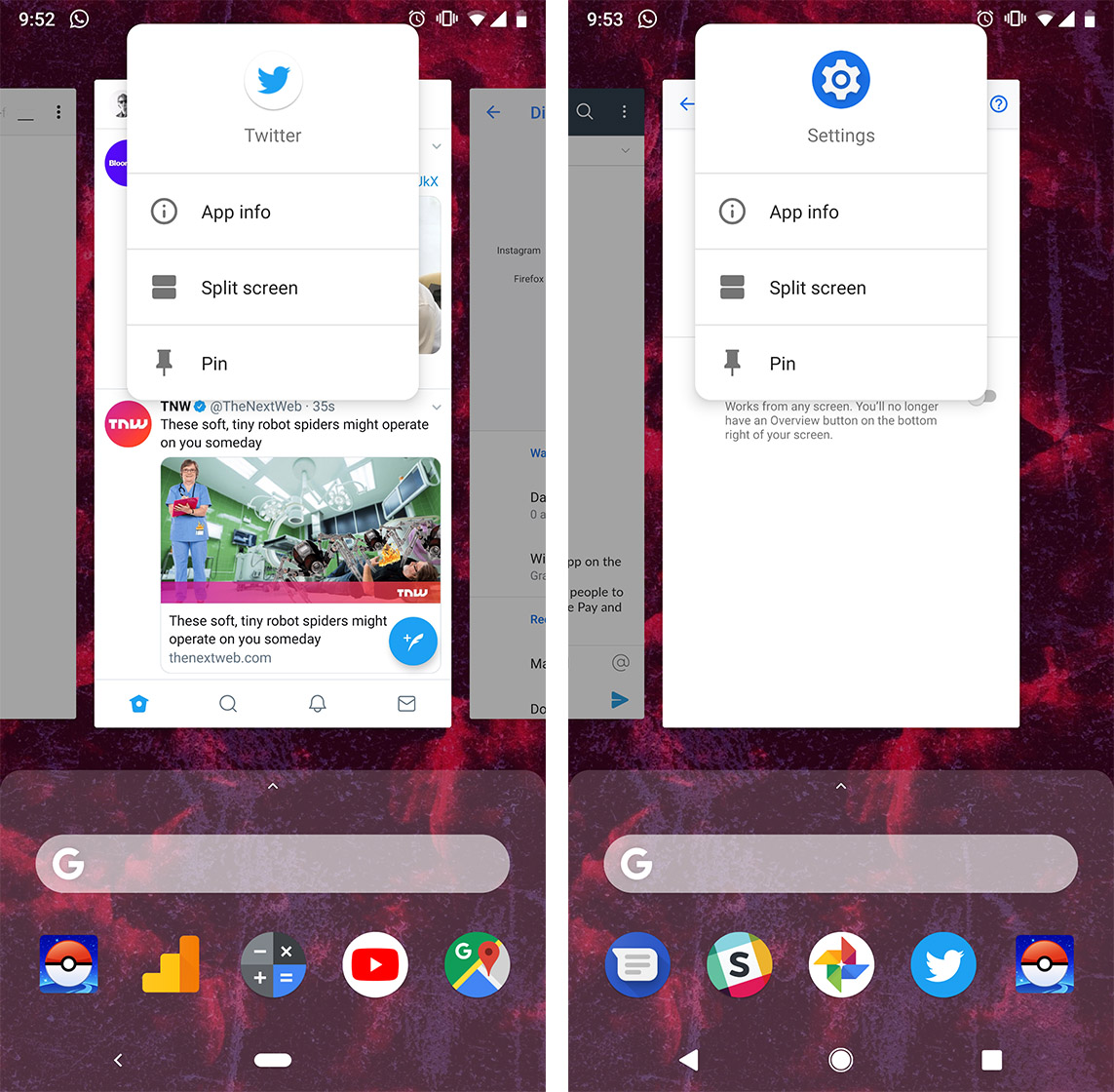
However Pie users must swipe up from the pill. Then they must tap the app icon above the app card in the multitasking view. Finally, the user selects split-screen from the menu and then chooses their second app.
While at first this doesn’t seem like a big deal, if you use split-screen often you’ll quickly find it annoying.
Worse, users discovered that switching back to the three-button layout didn’t fix the problem. The steps to enable split-screen are the same even if you use the three-button layout.
Ultimately, it’s a bit of a design regression from Google. Considering the company’s focus on gesture navigation, I’m surprised they haven’t come up with a gesture for activating split-screen.
One Redditor suggested Google copy Samsung’s approach and allow users to press and hold on the card and drag it to split-screen. However, that would likely interfere with the ability to copy and paste from any app card.
Hopefully Google can come up with a better solution for split-screen that’s more intuitive than the current offering in Pie.
Source: Reddit
The post Google changed split-screen in Android Pie and it sucks now appeared first on MobileSyrup.

Samsung’s Galaxy S7 smartphone is vulnerable to the Meltdown security vulnerability, according to researchers.
Researchers discovered the Meltdown glitch, along with Spectre, earlier this year. The glitches allowed unauthorized access to privileged memory. In other words, attackers could access memory reserved for CPU use and collect information from it.
Researchers previously though that the S7 was immune to the vulnerability. However, this new research shows otherwise.
The researchers, from Austria’s Graz Technical University, reportedly found a way to exploit the Meltdown vulnerability and attack S7 handsets.
The team will reveal their findings at the Black Hat security conference taking place in Las Vegas on Wednesday.
One of the researchers, Michael Shwarz, told Reuters that the team is looking into other smartphone models.
“There are potentially even more phones affected that we don’t know about yet,” he said.
“There are potentially hundreds of millions of phones out there that are affected by Meltdown and may not be patched because the vendors themselves do not know.”
In the case of Samsung, the company did know. The company rolled out patches in January and July to protect Galaxy S7 handsets against Meltdown.
Furthermore, there are no known cases of hackers using the vulnerability in the real world.
Samsung wouldn’t say how many Galaxy S7 devices were sold, but reports indicate it was one of the company’s most popular devices.
If you use a Galaxy S7, make sure you’ve downloaded all the security patches available for your device.
Source: Reuters
The post Samsung Galaxy S7 is vulnerable to Meltdown attack, research reveals appeared first on MobileSyrup.

Alongside the release of Android 9 Pie, Mountain View search giant Google is launching 157 new emoji that introduce more inclusive gender options and some cool updates.
Most of the new emoji are part of the Emoji 11.0 update, but a few are just redesigns of existing characters like taking the egg out of the salad emoji and waking up the droopy turtle emoji.
There are also new people emoji with the addition of curly, red or grey hairstyles along with an option for bald people. All of these new hairstyles support varying skin tones.
There’s a male and female superhero emoji now and of course, that means there’s a super villain too. The superhero option also supports various skin tones.
Some emoji were updated previously. In April 2018, Google changed the gun into a water pistol and in June 2018, Google added more inclusive gender options for families.
Source: Emojipedia Via: Android Police
The post Google crammed 157 new emoji into Android Pie appeared first on MobileSyrup.

Back in 2017, Wear OS users started reporting an issue where they weren’t able to properly utilize the platform’s ‘Play phone voice call on watch’ functionality. It now seems Google may have fixed the issue with Android Pie.
The bug caused Wear OS users to experience a call drop for 10 to 15 seconds when using any phone app that could transfer a call from a smartwatch to a phone. This happened even if the switch from watch to phone was never made.
Since the issue popped up, users have had to disable the call audio feature within Wear OS to make a phone call.
While Google hasn’t officially confirmed that the bug is fixed, many people have reported in the Issue Tracker that the update has stopped their problems.
However, Android Pie is only available on a small subsection of Android devices.
Other smartphone manufacturers such as Samsung, Huawei, LG and HTC may not push the update to their devices until sometime next year, which means users of those smartphones will continue to experience the problem with their Wear OS devices until Android Pie is more widely available.
At least Google Pixel users are in the clear for now.
Source: Issue Tracker Via: Android Police
The post Bluetooth call audio on Wear OS is fixed with Android Pie: report appeared first on MobileSyrup.

Roku is launching a web viewer for the Roku Channel, its hub for free movies and TV shows.
The Canadian version of the Roku Channel launched on July 23rd, allowing Canadians to watch a variety of content for free on their Roku devices.
Now, the company is launching a website called TheRokuChannel.com so users can watch this free content anywhere.
The website isn’t supported in Canada yet, but since we do have a version of the Roku Channel, it seems likely that we’ll get support soon.
MobileSyrup has reached out to Roku to find out if the channel is coming to Canada, and if so, when.
The post Roku launches its free video content channel on the web appeared first on MobileSyrup.

Bose has updated its QuietComfort 35 II wireless headphones to support Amazon’s Alexa voice assistant.
Prior to this week, the headphones already had Google Assistant integration.
To enable the feature, pair the headphones with Bose’s Connect app, ensuring that the app is updated to the latest version.
Once the app is updated, there will be an option to enable Alexa under the ‘See My Options’ tab. Then users need to pair the headphones to the Alexa app and things should start running smoothly.
The integration isn’t as seamless as with an Echo device since users need to tap the headset’s ‘action button’ to talk to the assistant. However, even with this drawback, it’s still pretty handy to have an assistant one tap away.
Source: Engadget
The post Bose QC35 II wireless headphones owners can now talk to Alexa on the go appeared first on MobileSyrup.


