Shared posts

04 Sep 05:21

Journalists are people. Their defense of the press is personal.

by Josh Bernoff

The Boston Globe challenged other newspapers to write editorials in support of press freedom today. More than 350 responded. I’m a huge news fanboy. In my job as an analyst, I got to work with reporters like Jefferson Graham of USA Today, Jon Healey of the San Jose Mercury and the Los Angeles Times, Tony … Continued

The post Journalists are people. Their defense of the press is personal. appeared first on without bullshit.

04 Sep 05:21

Hampton Hotel – 124 Powell Street

by ChangingCity

The Hampton Hotel started life in 1912 as the Hampton Rooms. It was operated by John Brown & Co, who also operated the Hampton Pool Room on the main floor. The building was designed, built, and owned by prominent contractor and businessman Edgar Baynes. He came from Essex in England, in 1889, initially working with his uncle, J A Franklin for a couple of years before trying his hand at ranching near Squamish. He soon returned to Vancouver, partnered with William Horie and became one of the most active construction partnerships in the city. They built numerous schools, office buildings and apartment blocks, and Baynes also developed a few in his own right, including the Grosvenor Hotel on Howe Street, and this rooming house built in the same year.

The bricks for the building came from the Port Haney Brickworks at Maple Ridge, organized by Baynes in 1907. He was also president of the British Pacific Trust Company, a loan and trust business established in 1909. The operators of the rooms changed over the years. The expanding Japanese community saw H Ohi running the premises after the Great war, with a shoe repairer on the main floor. By the mid 1920s the operator wasn’t listed – the listing said ‘Hampton Rooms (Japanese)’, but Mr. Ohi was listed again in 1930. Shimishi Ohi was listed in the 1921 Census living with his wife, two children, niece, nephew and 40 lodgers.

The building’s Heritage Statement says “the creation of the Hampton Rooms illustrates the time during Vancouver’s pre-First World War boom period when large numbers of single Japanese males immigrated into Canada, and in particular to Powell Street, to find work. It also reflects the need for accommodation for single males generally, following the City’s shanty clearance program in the early-twentieth century.” The census shows that the Japanese connection here wasn’t obvious. Apart from Mr. Ohi and his family nobody was from Japan. Seven of the lodgers were born in Canada, three were from the USA, and the remainder were European including eight from Sweden and eight from Norway and three Austrians as well as men from Russia, Italy and Denmark.

In 1950 the Hampton Rooms had the Union Gospel Mission on the main floor. In 1951 the property was known as the Hampton Hotels Ltd, and in 1955 L Edwards was managing the building. In 2008 a number of rooms were out of use after a fire, and today the rooms are run by the Vancouver Mental Patients Association – as safe affordable housing for adults living with a mental illness.

04 Sep 05:20

How to say "no" to your boss, your boss's boss, and even the CEO

You’ve got plenty of work to do already, when your boss (or their boss, or the CEO) comes by and asks you to do yet another task. If you take yet another task on you’re going to be working long hours, or delivering your code late, and someone is going to be unhappy.

You don’t want to say no to your boss (let alone the CEO!). You don’t want to say yes and spend your weekend working.

What do you do? How do you keep everyone happy?

What you need is your management to trust your judgment. If they did, you could focus on the important work, the work that really matters. And when you had to say “no”, your boss (or the CEO!) would listen and let you continue on your current task.

To get there, you don’t immediately say “no”, and don’t immediately say “yes”.

Here’s what you do instead:

  1. Start with your organizational and project goals.
  2. Listen and ask questions.
  3. Make a decision.
  4. Communicate your decision in terms of organizational and project goals.

Step 1: Start with you goals

If you want people to listen to you, you need a strong understanding of why you’re doing the work you’re doing.

  • What is your organization trying to achieve?
  • What is your project trying to achieve, and how does that connect to organizational goals?
  • How does your work connect to the project goals?

You should be able to connect your individual action to project success, and connect that to organizational success. For example, “Our goal is to increase recurring revenue, customer churn is too high and it’s decreasing revenue, so I am working on this bug because it’s making our product unusable for at least 7% of users.”

When you’re just starting out as an employee this can be difficult to do, but as you grow in experience you can and should make sure you understand this.

(Starting with your goals is useful in other ways as well, e.g. helping you stay focused).

Step 2: Listen and ask questions

Your lead developer/product manager/team mate/CEO/CTO had just stopped by your desk and given you a new task. No doubt you already have many existing tasks. How should you handle this situation?

To begin with, don’t immediately give an answer:

  • Don’t immediately say “yes”: Unless you happen to have no existing work, any new work you take on will slow down your existing work. Your existing work was chosen for a reason, and may well be more important than this new task.
  • Don’t immediately say “no”: There’s a reason you’re being asked to do this task. By immediately saying “no” you are devaluing the request, and by extension devaluing the person who asked you.

Instead of immediately agreeing or disagreeing to do the task, take the time find out why the task needs to be done. Make sure you demonstrate you actually care about the request and are seriously considering it.

That means first, listening to what they have to say.

And second, asking some questions: why does this need to be done? What is the deadline? How important is it to them?

Sometimes the CEO will come by and ask for something they don’t really care about: they only want you to do it if you have the spare time. Sometimes your summer intern will come by and point out a problem that turns out to be a critical production-impacting bug.

You won’t know unless you listen, and ask questions to find out what’s really going on.

Step 3: Decide based on your goals

Is the new task more important to project and organizational goals than your current task? You should probably switch to working on it.

Is the new task less important? You don’t want to do it.

Not sure? Ask more questions.

Still not sure? Talk to your manager about it: “Can I get back to you in a bit about this? I need to talk this over with Jane.”

Step 4: Communicate your decision

Once you’ve made a decision, you need to communicate it in a meaningful, respectful way, and in a way that reflects organizational and project goals.

If you decided to take the task on:

  1. Tell the person asking you that you’ll take it on.
  2. Explain to the people who requested your previous tasks that those tasks will be late. Make sure it’s clear why you took on a new task: “That feature is going to have to wait: it’s fairly low on the priority list, and the CEO asked me to throw together a demo for the sales meeting on Friday.”

If you decided not to take it on:

  1. Explain why you’re not going to do it, in the context of project and organizational goals. “That’s a great feature idea, and I’d love to do it, but this bug is breaking the app for 10% of our customers and so I really need to focus on getting it done.”
  2. Provide an alternative, which can include:
    • Deflection: “Why don’t you talk to the product manager about this?”
    • Queuing: “Why don’t you add it to the backlog, and we can see if we have time to do it next sprint?”
    • Promise: “I’ll do it next, as soon as I’m done with my current task.”
    • Reminder: “Can you remind me again in a couple of weeks?”
    • Different solution: “Your original proposal would take me too long, given the release-blocker backlog, but maybe if we did this other thing instead I could fit it in. It seems like it would get us 80% of the functionality in a fraction of the time–what do you say?”

Becoming a more valuable employee

Saying “no” the right way makes you more valuable, because it ensures you’re working on important tasks.

It also ensures your managers know you’re more valuable, because you’ve communicated that:

  1. You’ve carefully and respectfully considered their request.
  2. You’ve taken existing requests you’re already working on into account.
  3. You’ve made a decision not based on personal whim, but on your best understanding of what is important to your project and organization.

Best of all, saying “no” the right way means no evenings or weekends spent working on tasks that don’t really need doing.


It’s Friday afternoon. You just can’t write another line of code—but you’re still stuck at the office...

What if every weekend could be a 3-day weekend?

04 Sep 05:20

✚ Visualization Away from the Computer, Developing Ideas, Bring in the Constraints

by Nathan Yau

Made-by-hand visualization has been making a mini comeback as of late, and it’s been fun to see what people do with data away from the computer. Of course, we don’t have the time to draw every chart and map by hand, but there are some parts of the practice we can use in our own work. Read More

04 Sep 05:20

A visual analysis of jean pockets and their lack of practicality

by Nathan Yau

Frustrated with the size of pockets on women’s pants, Jan Diehm and Amber Thomas for The Pudding, measured pocket sizes in 20 popular jean brands. They compared men’s and women’s pockets and calculated what actually fits in the mix of sizes.

[W]e programmatically determined whether various everyday items could fit in an otherwise empty pocket in jeans that aren’t being worn. (If an object won’t fit in the pocket of a pair of jeans on the hanger, it certainly won’t fit when you’re wearing them.) Only 40 percent of women’s front pockets can completely fit one of the three leading smartphone brands. Less than half of women’s front pockets can fit a wallet specifically designed to fit in front pockets. And you can’t even cram an average woman’s hand beyond the knuckles into the majority of women’s front pockets.

Impressive and informative work.

It reminds me of the Amanda Cox graphic that compared women’s dress sizes for different brands in 2011. There’s also the broken waistline measurement.

Let’s just all wear sweats from now on.

Tags: pants, pockets, The Pudding

04 Sep 05:20

Outbound Lighting Road & Trail Bike Lights

by Guest Author

Outbound Lighting Road & Trail Bike LightsThe Outbound Lighting Road and Trail Bike Lights are high-end bike lights that are lighting up the cycling world! Of course, they are not cheap, but with cycling gear, you get what you pay for. If you are in the market for excellent, high-end bike lights, read on!

The post Outbound Lighting Road & Trail Bike Lights appeared first on Average Joe Cyclist.

04 Sep 05:16

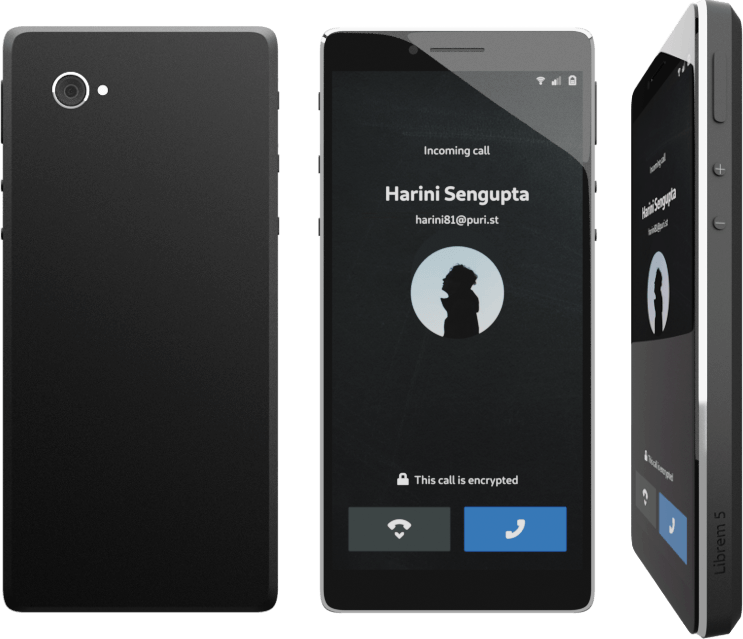
Ethical aesthetics – Librem 5 design report #7

by François Téchené

You may have noticed that there is no obvious visual branding on the Librem laptops. While this was at first a technical limitation on the very first Librem model (back in 2015), the subtle and minimalistic branding that began on newer models in 2016 was a conscious design decision.

Now, we’re hoping to refine the physical branding further.
One reason for a minimalist design is aesthetic. Just like on a piece of hand-made jewelry, we wish the branding to be made in the form of an inconspicuous marking that doesn’t interfere with the natural beauty of the overall shape.

Another reason is ethical. While one should easily be able to identify a computer model when closely inspecting it, people using a Librem device should be prevented from, unintentionally, exposing the brand of their hardware, which may be seen as arrogant in some situations. But, above all, the Librem customer should not be used as a passive promoting medium. We think that this is an essential part of an ethical design.

This is described within our internal industrial design policies in term of visual identity, so I think important to emphasize those points.

Branding on the Librem laptops

Therefore, on the current Librem line, branding is only visible on the keyboard (with the “Super” key displaying the Purism logo) and on the bottom cover, displaying the brand and model name, along with certification symbols, underneath the computer.

That said, while not being visible during normal use (open on a table), the bottom branding of the Librem may be considered a bit flashy when carrying the laptop around, so we are considering making it even more discreet in the future.

Branding on the Librem 5

The Librem 5 is not in production yet but the public mock-ups have been escaping that rule so far. While I think that it was important for everyone to easily identify the device mock-ups during the campaign, the final model should not display any branding on the back cover of the handset. Instead we are discussing the possibility of having the brand and model number carved on the side of the device.

The post Ethical aesthetics – Librem 5 design report #7 appeared first on Purism.

04 Sep 05:15

★ OnePlus 5 Review

Two words are all that's needed to most accurately describe the OnePlus 5: iPhone fast. If you've ever wondered what it'd be like to have an iPhone running Android, look no further. I've been so, so impressed with this phone. Although performance is the reason to buy an OP5, there's a lot more to it, mostly great.

Hardware

It doesn't feel like an iPhone. And I don't actually think it looks like one either. It feels premium and Midnight Black sexy. The fit-and-finish is something I admire every time I take out the phone. Heck, I actually sometimes take it out just to admire it. It's pretty manageable in one-handed use most of the time, especially if you've got bigger hands than me (most likely) and/or use the on-screen navbar.1 The one misstep is that it's incredibly slippery in the hand. So much so, I actually purchased phone insurance for the first time (as well as a couple of dBrand skins). Another niggle is with the hardware buttons on the sides of the phone. The phone is beautifully thin but I think there's room for them to have been slightly bigger for a more assured press.

In a contest between less pixels and more battery, in an unusual (but welcome) move for a flagship device, the latter was prioritised. Although the screen packs less pixels than other flagships, it doesn't matter because it's still a beautiful display. Battery life has been better for it, consistently and comfortably lasting an entire day. Win-win. Dash charging is legit too. Especially appreciate how the phone remains cool when I'm using it while it's being charged.

Making it 3/3 is a camera that by default takes beautiful pictures. I don't know whether it's better/worse than the competition, but I do know you won't be disappointed by it. It's really fast too. For the second lens, I'd have a preferred a wide-angle because of my shooting preference. Maybe in the future phones will ship with more than two lenses to cater for every situation. Or maybe interchangeable lenses become a thing. Finally, Portrait mode is cool but a little finicky; I expect it to continue being optimised with software updates.

My biggest gripe with the hardware is the mono speaker and, more specifically, its placement on the bottom of the phone; watching a video in landscape requires you to carefully grip the phone to avoid blocking the speaker grills. Not a showstopper but highly inconvenient. Especially crappy because the display's size and quality make me want to watch video on this.

A few minor points:

  • The fingerprint sensor is lightning quick but I'm not particularly fond of its pill-shaped design. I think it looks ugly (and is actually one of the reasons I was always put off by the Galaxy design pre-S8); as far as geometric shapes go, I much prefer a circle. But I realise that would exacerbate claims that the phone is an iPhone copy.

  • Most days I switch between "Silent", "Do not disturb" and "Ring" modes. The Alert Slider thoughtfully ensures I don't need to turn on the phone's display to do so - one of those little things that make a big difference to each day. An issue I have though is in "Do not disturb" mode I can't set it to stay silent when a phone call comes through. The workaround is to either only allow (favourite) contacts to get through or repeat callers (i.e. presumably urgent calls). Neither option is great.

  • Changing phone profiles during the average day is common. The Alert Slider acknowledges this. But taking pictures is even more common. And so I wish there was a dedicated camera button to help speed things up and make taking pictures more satisfying by enabling a more tactile experience. This is probably the feature I miss the most about Windows Phones.

Software

I know stock Android is all the rage within tech circles. That and being on a budget is why I went with the Nexus 5X when I decided to switch to Android in early 2016. Coming from Windows Phone where the experience was delightful even on the low-end, I went into this with high expectations. This was a Google phone. Yes, it didn't pack as much power as its 6P sibling, but Android was several iterations old. And so I still expected it to fly. And, to be fair, it did some of the time. But not all the time. Less so at the end of every day. Less less so with time. The other disappointment was while the most visible/important layer of Android is unquestionably good, the admittedly less important but not unimportant middle layer of polish was absent when you dig deep. Although I consider the gap to have reduced, significantly in many areas and bettered in some even, Android as experienced on the 5X for me still trailed iOS in the overall design and performance stakes. What I really didn't expect was OnePlus' OxygenOS to address this. But it has. No doubt helped by 8GB of RAM. OxygenOS is understated in the best possible way. It's uninterested in adding more bloat to Android, instead focused on carefully applying a considerate layer of polish to the experience.2 The OnePlus 5 has actually changed my opinion of Android. Buttery smooth. Finally. My next phone will need to run OxygenOS.


Maybe more than performance, an even better reason to buy the OnePlus 5 is its price. I know a £500 phone is not cheap, but for almost £200 less than a Galaxy S8, after ~1 week of use, for me it's a no-brainer. If you do, you won't regret it. But don't be mislead, even if the OnePlus 5 cost the same as a Galaxy S8, I'd still go with it because of its superior performance and OxygenOS.3 I've been seriously productive because of these two factors; multitasking is a breeze with no sign of stutter regardless of what I throw its way. But your priorities may be different.4 If they're not, then the OnePlus 5 is highly recommended. Especially if you're on a Windows Phone and don't want an iPhone.

1. I didn't because you get more screen estate with the capacitive buttons and it's more predictable as they're always there, unlike the software buttons whose visibility may vary depending on what you're doing.

2. A beautiful dark theme that's carefully applied everywhere (and not just selectively like in other Android skins) is my favourite addition. It gives the phone a similar overall look and feel to the one that pulled me towards the Zune and later Windows Phone.

3. Although I can't ever see OnePlus hitting price-parity with established high-end flagships in the future (especially as their prices increase), I won't be surprised if it gets a little more expensive with each iteration. Considering what you get in return though, I won't complain, because as a OnePlus fan (and not customer) I'm more interested in seeing them succeed than saving myself a few pounds. In the meanwhile, I'll savour this relative bargain.

4. Such as wireless charging, minimal bezels, expandable storage and water resistance. For me, it's actually a simple and clear choice. Performance is essential. The rest are luxuries.

04 Sep 05:05

You Work On Desktop, They Visit On Mobile

by Richard Millington

A client was seeing a steadily declining percentage of new visitors registering join the community.

This isn’t unusual. Most communities have a natural downward curve after they first launch.

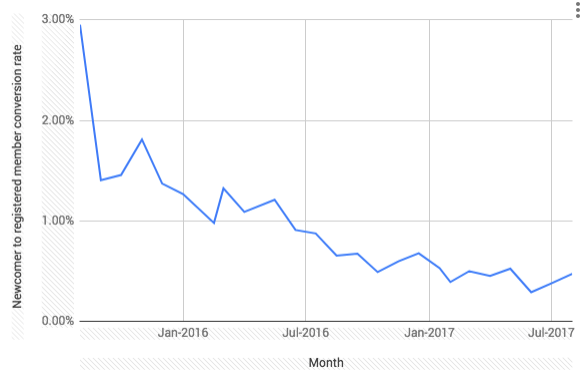
In a graph, it will usually look like this.

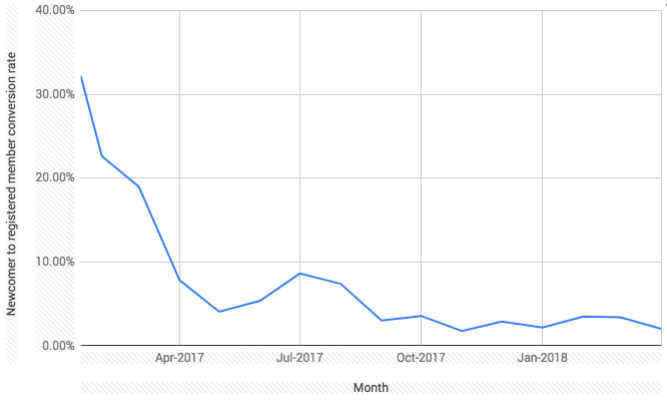
Or this…

For most communities (where the community is behind a tab), the registration rate begins at around 2.5% and drops to around 0.25% to 0.5% over 2 to 3 years (with variation when the community is a standalone community).

However, our client’s community was different, it was a mature community in a mature sector which had hit the bottom of the curve several years ago. They hadn’t changed a thing, but the percentage was declining again.

If you don’t fix problems like this, you soon struggle to convert enough new members to replace those you’re losing.

Digging into the new visitors data, it became clear the decline in conversion rate exactly matched the increase in the percentage of visitors visiting on mobile phones. These mobile visitors were 43% less likely to convert.

Sometimes the problem is a simple oversight. For example, I doubt anyone at IGN has noticed just how damaging their banner ad seems on mobile.


This is costing them hundreds of members per day and pushing activity way down the page, but no-one seems to be checking the mobile experience (because most people work on desktops).

And this is the point. If you’re a paid professional in this field, you’re almost certainly working on a desktop most of the time. You see the community through a very different lens than your members do. Most members visiting a community might be doing it via mobile. This changes what the process should look like and your competition becomes the simplicity of rival apps, not rival websites.

In our client’s case (not IGN), the problem was the mobile registration process hadn’t been tweaked in years. It closely resembled the desktop process….only the text was smaller, more fiddly, and featured a pop-up to remove (which meant hitting a tiny small ‘x’ on screen). It’s a really simply fix in hindsight, but you only notice it if you’re constantly checking the mobile experience. t

As the number of mobile visitors rise, it’s important to analyze their traffic separately. This is easy enough to do in Google Analytics. Create a new segment, filter only mobile traffic, and then compare the two side by side. Look specifically at time on site, conversion metrics, and bounce rate to different pages.

This will let you zero in on the big differences and start taking action.

04 Sep 04:59

ProVancouver party proposes flat fare and other transit discounts across Lower Mainland

by Stephen Rees

Faregates at King Edward

The title is that of an article in the Georgia Straight

The ProVancouver Party is one of several new entities that have popped up due to the upcoming city election all of which claim to be non-partisan (just like the flailing NPA) and different from the status quo.

The main difference is simply in the level of understanding of how local government in Vancouver works (or is supposed to) between those who have some experience and those with none at all. Many of the new candidates seriously think that their naivete is a qualification rather than a liability.

I am not going to bother with analysing any of these half baked proposals. I am simply going to point out that getting elected to Vancouver City council does not enable anyone to introduce any of these ideas. As the Straight points out these are regional measures, which means that they have to appeal to most of the other municipalities outside of the City of Vancouver. The only commonality among these municipalities is their utter contempt for Vancouver and all it stands for. For one thing they are all convinced that Vancouver benefits far more from transit than they do. Even when Burnaby has far more SkyTrain service than any other municipality. And if your identifier is ProVancouver, you are already setting yourself up for an argument. West Vancouver still thinks it would be better off if it left Translink altogether – though even they have to concede that it is really difficult to find any acceptable piece of land within West Vancouver that could be used as a bus storage and maintenance facility.  Places like Anmore and Belcarra even think that people from other municipalities should not be allowed park or even drive on their roads.   Especially in summer.

The key word that ProVancouver has latched onto is “affordable”.  Which you might think would translate into some kind of means tested subsidy for transit fares. But as usual in all such woolly thinking, the term itself is not defined – but has something to do with “families” even though most people now live in rather different households than the traditional Mum, Dad and 2.4 kids. What we do know from our experience with the referendum is people in general believe a lot of nonsense about Translink and think they pay quite enough in taxes to provide much better service than they currently get. And that second belief is equally strongly held everywhere – even in the best served parts of the region. If you are not going to collect enough at the farebox, then it has to come from somewhere else, and any proposal is always going to be met with the angry riposte “How are you going to pay for that?” (without waiting for the answer before stamping off).

One of the great weaknesses of the upcoming ballot is that it is going to be filled with a lot of names: most of them will be unfamiliar. And whoever gets elected is going to have spend a lot of time and effort getting up to speed on procedures, rules and regulations. To some extent that does mean the potential for more influence from the professionals who have mostly been doing this stuff as a full time career for many years. But sadly they will be fully occupied trying to persuade the newly elected councillors that they have to both listen and read attentively. There is no evidence at all that ProVancouver has the slightest intention of doing that before insisting that they are now in charge: heaven help us all if that is the case.


04 Sep 03:42

HomePod + Playbase

by Volker Weber

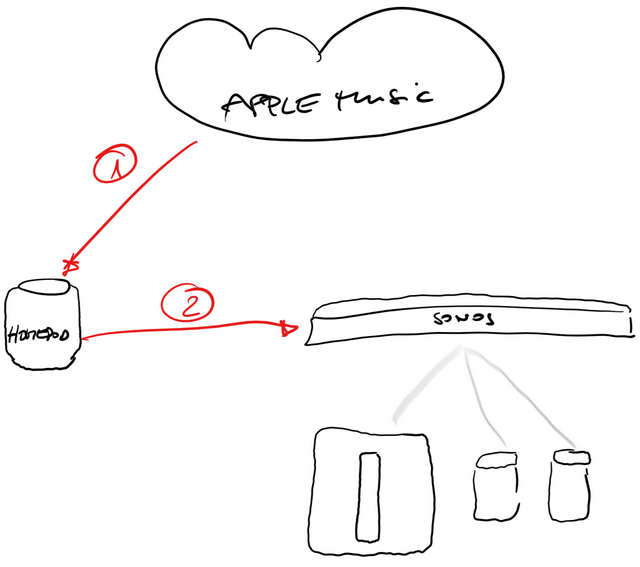
Sketch

1. "Hey Siri, spiel Musik von Santana"

2. "Hey Siri, spiel das auch im Wohnzimmer"

Fluppt.

03 Sep 17:31

Google One Launches with New Cloud Storage Tiers

by Ryan Christoffel

Breaking out from the Google Drive moniker, Google has launched a set of new cloud storage tiers under the branding Google One. The new name makes sense, since Google Drive storage formerly encompassed space allotted to a wide swath of Google products, such as Photos, Docs, and Gmail, as well as files actually stored in Drive. Now Google One fills the role of covering your storage needs across all Google products and services, which I think will be less confusing. It's a pattern that follows Apple's own iCloud branding, where iCloud storage covers a variety of Apple services like Photos and Mail, with iCloud Drive just one of those services.

Along with the organizational change, Google One introduces revised pricing and storage options:

  • 15 GB: Free
  • 100 GB: $1.99/month
  • 200 GB: $2.99/month
  • 2 TB: $9.99/month
  • As well as 10 TB, 20 TB, and 30 TB options for prices in the hundreds of dollars per month

Google's pricing is comparable to Apple's own iCloud storage, though with more options and a more generous free tier. Apple offers 5 GB for free, 50 GB for $0.99/month, 200 GB for $2.99/month, and for 2 TB for $9.99/month.

Google One's rollout will be staged worldwide, but as of today it appears to be available in the U.S. at least.


Support MacStories Directly

Club MacStories offers exclusive access to extra MacStories content, delivered every week; it's also a way to support us directly.

Club MacStories will help you discover the best apps for your devices and get the most out of your iPhone, iPad, and Mac. Plus, it's made in Italy.

Join Now
16 Aug 01:30

The Best Mechanical Pencils

by Kevin Purdy
The Best Mechanical Pencils

We interviewed pencil reviewers with a combined 45 years of experience, and had nearly 70 paid-to-be-particular Wirecutter staffers test our top picks, to confirm that the Uni Kuru Toga Pipe Slide is the best mechanical pencil for everyday writing. Its unique lead-rotating mechanism prevents the pencil’s tip from going blunt as you write, creating the crispest and most consistent strokes for writing and drawing.

16 Aug 01:30

Apple Privately Advocates for Developer Adoption of Subscriptions

by Ryan Christoffel

Kif Leswing reports for Business Insider on a meeting Apple held with select app developers last year where the subscription model was pushed:

An Apple representative said at the meeting that paid apps represent 15% of total app sales and is on the decline, according to a person who was there who did not want to be identified to maintain their relationship with Apple.
[...]
The message was clear: successful apps now focus on getting regular engagement from their users, not one-time sales. For developers, that meant embracing the subscription model.

If you focus on paid apps, instead of subscriptions, Apple warned, your business will eventually hit a cap.

This report comes hot on the heels of Apple's recent quarterly earnings report, during which Tim Cook shared, "Paid subscriptions from Apple and third parties have now surpassed 300 million, an increase of more than 60 percent in the past year alone."

That increase is fairly staggering to consider. Two years ago when Apple opened up subscriptions to all app types, many users and developers feared the potential for subscription fatigue. It looks like that hasn't prevented significant growth from happening – at least for now. I'll be curious to see if growth like this, and a further shift toward subscriptions over paid apps, is sustainable in the long-term.

→ Source: businessinsider.com

16 Aug 01:29

The Law and Order of Data Science

One conversation I’ve had a few times revolves around the question, “What’s the difference between science and data science?” If I were to come up with a simple distinction, I might say that

Science starts with a question; data science starts with the data.

What makes data science so difficult is that it starts in the wrong place. As a result, a certain amount of extra work must be done to understand the context surrounding a dataset before we can do anything useful.

Procedure for procedurals

One of my favorite shows growing up was Law & Order, one of the longest running “procedural” shows that also produced a number of spinoffs. I remember coming home from school in the afternoon, flipping on TNT and watching whatever Law & Order marathon was currently being aired (there was always something).

One distinct feature of the show is that pretty much every episode followed the exact same format:

  1. The episode starts with the discovery that a crime has occurred, usually a murder.
  2. The first half of the episode involves the police retracing history trying to figure out who committed the crime (the “Order” part).
  3. The police catch a suspect at exactly 22 minutes into the episode.
  4. In the second half of the episode, the district attorneys take over and prosecute the suspect in court (the “Law” part). Usually, they win.

The format of the show is in fact highly unusual. While it starts off with a mystery (who committed this murder?) as many shows do, the mystery is solved half way through the episode! I can imagine some TV executive 30 years ago wondering, “What the heck are you going to do for the rest of the episode if you solve the mystery half way through?”

What made the show interesting to me was that in the second half of every episode, the lawyers for the government had to convince a jury that they had the right suspect. They had to present evidence and make an argument that this person was guilty. Of course, because this is TV, they usually won the argument, but I think many TV shows would have been satisfied with just catching the criminal. In most shows, presenting the data and the evidence to an audience is not interesting, but on Law & Order, it was.

The Law & Order metaphor

Many data science projects essentially follow this format, because we start with the data. Data are available. We often don’t get to participate in its generation. Perhaps the data were collected as part of some administrative records system, or as part of some logging system, or as part of some other project addressing a different question. The initial challenge of any data science project is figuring out the context around the data and question that motivated its origination. A key milestone is then figuring out how exactly the data came to be (i.e. who committed this “crime”?).

Once we’ve figured out the context around the data, essentially retracing the history of the data, we can then ask “Are these data appropriate for the question that I want to ask?” Answering this question involves comparing the context surrounding the original data and then ensuring that it is compatible with the context for your question. If there is compatibility, or we can create compatibility via statistical modeling or assumptions, then we can intelligently move forward to analyze the data and generate evidence concerning a different question. We will then have to make a separate argument to some audience regarding the evidence in the data and any conclusions we may make. Even though the data may have been convincing for one question, it doesn’t mean that the data will be convincing for a different question.

Data science often starts with the data, but in an ideal world it wouldn’t. In an ideal world, we would ask questions and carefully design experiments to collect data specific to those questions. But this is simply not practical and data need to be shared across contexts. The difficulty of the data scientist’s job is understanding each dataset’s context, making sure it is compatible with the current question, developing the evidence from the data, and then getting an audience to accept the results.

16 Aug 01:29

Vancouver Development — the Park At Oakridge

by Ken Ohrn
A genuine Park Board Park at the New Oakridge

Another in our series of posts on Vancouver’s really big transformation of a 1950’s-vintage, 28-acre car-oriented urban shopping mall into a transit-oriented mixed use community.

And now, something that surprised me.

Nine acres of the new Oakridge Centre will be a park owned and operated by Vancouver’s Park Board as a “. . .destination park for the rest of the City.”  HERE is a staff report (77-page PDF) approved July 9, 2018 by the Vancouver Park Board on a remarkable, first of it’s kind relationship between a developer and the Park Board. (Thanks to Jeff Leigh, regular PT commenter).

The redevelopment of Oakridge Centre will include a new Vancouver Park Board owned and operated park. The new nine (9) acre public park will be the first of its kind of this scale in Vancouver, located partially on the roof top of the mall and partially at ground level. Although not the first Park Board Park built on structure, it will be the largest to date. This innovation in park design will offer a unique experience for existing and new residents in the area and will act as a destination park for the rest of the city. It will be designed and operated to look, feel and function as a part of the Park Board’s system with equal access for all. . . .

SUMMARY

The new nine (9) acre public park at Oakridge Centre will offer a unique experience for existing and new residents in the area and will act as a destination park for the rest of the city. Featuring six (6) distinct park areas with a balance of lively and tranquil spaces in order to provide a wide range of activities, from social, active and fitness focused to calm, peaceful and restorative. Applying a rich layer of ecological and horticultural design, the park will create unexpected nature on a rooftop, redefining what is possible on a landscape on top of a building. Featuring a series of unique but interconnected spaces, the park will be woven together with a rich Pacific Northwest landscape and an 800m jogging and walking track.

The park will be constructed and programmed to both function and be perceived as a fully public, inviting and accessible Park Board park for all, meeting the new park’s vision to “provide a diverse and welcoming collection of park spaces balancing tranquil and active uses strongly connected by an unexpected rooftop Pacific Northwest landscape”, and “ensure vibrant interaction between the adjacent civic centre and the shopping mall uses to create a lively citywide destination while also serving the daily park and recreation needs of nearby residents”.

16 Aug 01:29

Puzzle Pic: Where is this?

by Gordon Price

Click post to find out.

It’s a new super-tall Metrotown development at Beresford and McKay, very near the SkyTrain station.

This is what it used to be in 2014:


And this is still what it’s like north of the SkyTrain line on Central:


Rather than like this, south of the line:


It’s worth noting the sidewalk design, since it looks to be a requirement for every redeveloped block along the greenway.

16 Aug 01:29

Civic Savvy: Vision might get a majority

by Gordon Price

Another conversation with a savvy insider on the civic election – one who deserves the moniker of ‘pundit’ (in the best sense) – and who had a most provocative insight: “Vision will win a majority on council.”

How?  With their data base.  Vision continued to renew their already-extensive and targeted contact list between elections.  Unlike the new parties or independents, Vision knows who their supporters are and how to reach them.

Because of the new financing rules, it’s even more of a challenge for others to create such a list or find an expensive substitute.  Pundit thinks Hector Bremner may have some data, but it’s likely out of date.  There’s also a rumour that the NPA may have been in danger of losing what they had because of an in-house conflict.  Regardless, says pundit, the old guard that’s left, after Bremner blew it apart, doesn’t know much about contemporary political organizing.

But has Vision, I asked,  such a damaged brand that, regardless of their data, they won’t pull in the needed vote?

Pundit thinks that even with a 15 to 20 percent drop in support, their core vote won’t be bewildered by a ballot with 70-plus councillor candidates and nine for mayor (at last count).  And if they fear that the progressive policies of Vision they do like, regardless of a failure on the housing file, might be threatened, they’ll be sufficiently motivated to support the party.  Vision will know their names.  Then it’s the job of the volunteers to get them out.

Sounds like old-fashioned political organizing to me.

16 Aug 01:28

Inside the Decades-Long Fight to Protect Your Children’s Data From Advertisers

Joseph Bien-Kahn, NYMag, Aug 29, 2018


Icon

I've said before that advertising is the original fake news. This article documents a decades-long effort to keep advertising away from children online, chronicling the work of Kathryn Montgomery and Jeff Chester to prevent "online playgrounds populated by the likes of Chester Cheetah and Ronald McDonald." Now they are working to prevent things like eavesdropping on children through the internet of things.

Web: [Direct Link] [This Post]
16 Aug 01:27

New job listing hints Apple is working on custom biometric health chip

by Patrick O'Rourke
Apple Watch Series 3

It looks like Apple could be working on a custom health chip designed to process biometric data in a variety of the company’s future devices, according to a job listing first uncovered by CNBC

Designing proprietary silicon isn’t exactly a new thing for Apple, so there’s likely truth to the rumour. The company currently makes custom processors for the iPhone. Rumours have also been swirling that Apple is working on its own silicon for its Mac line of computers and laptops, with a loose release date set for 2020. The Apple Watch also features the tech giant’s custom S3 silicon.

Further, Apple’s A11 Bionic chip, the processor featured in the iPhone X and iPhone 8, includes a specially designed ‘Neural Engine’ that ensures biometric-related processes like FaceID and Animoji, run smoothly. The 2018 MacBook Pro also features a custom T2 chip signal processor that handles the laptop’s microphone, speakers and cooling fans.

These job postings hint that Apple could have plans to create even more proprietary silicon, only in this case with a focus on health data, including a custom chip that handles processes like heart rate and managing battery efficiency in the Apple Watch.

The listing, which has since been removed by Apple, describes what the position entails.

One post says the following: “We are looking for sensor ASIC architects to help develop ASICs for new sensors and sensing systems for future Apple products. We have openings for analog as well as digital ASIC architects.” Another states that Apple is looking for someone to “help develop health, wellness, and fitness sensors.”

Of course this is all just speculation, but it looks like Apple plans to bring more accurate health tracking features to the Apple Watch and possibly even the iPhone, given that developing its own custom hardware would allow the company to retain more control over how health data is gathered.

Along with new versions of the iPhone, Apple is also expected to reveal a new Apple Watch and a revamped iPad Pro at its upcoming September hardware event.

Source: CNBC Via: The Verge 

The post New job listing hints Apple is working on custom biometric health chip appeared first on MobileSyrup.

16 Aug 01:27

Google will give Android Go a taste of Pie later this fall

by Jonathan Lamont
Android 9 Pie

Google is bringing some Pie for everyone, including Android Go users in the fall.

Dubbed Android 9 Pie (Go edition), the update includes a number of improvements for the budget OS.

Pie Go will provides users with more storage, faster boot times and more. These updates come with everything else included in the regular Pie update.

As far as storage goes, Android Go users will get an additional 500MB of storage out of the box.

Furthermore, Pie Go brings improved security features and a new accessible dashboard for tracking data usage.

Along with these updates, the Go editions of many apps received or are getting updates. Google Go, for example, will offer the ability to read webpages aloud.

Additionally, YouTube Go gives users the option to download and view videos offline so they use less data.

Maps Go has navigation features now as well, including turn-by-turn directions.

Files Go, Google’s storage management app, includes a data transfer tool with speeds up to 490Mbps.

Assistant Go was also updated with support for new languages including Spanish, Brazilian Portuguese and Indonesian. It also expanded support for device actions. Assistant Go can control Bluetooth, camera and flashlight, as well as add reminders.

Overall it’s a solid update to the platform from Google. Hopefully this continued push is enough to make it take off more in Canada.

Currently not many Android Go phones are offered in Canada. The Alcatel 1 Android Go phone is available through some carriers, namely Bell, Telus, Virgin Mobile, Koodo and Lucky Mobile.

Source: Google

The post Google will give Android Go a taste of Pie later this fall appeared first on MobileSyrup.

16 Aug 01:27

Instagram hack replaces profile photos with film stills

by Sameer Chhabra
Instagram Stories

A strange new Instagram hack is replacing user profile photos with images from films and television programs, according to Mashable.

Mashable reported that approximately 5,000 tweets from 899 Twitter accounts mentioning Instagram hacks over the past seven days.

According to BBC News, not only are users unable to access their accounts, registered email addressed have also been changed to originate from Russian email client mail.ru.

As of August 14th, 2018, it appears that Instagram appears to be aware of the issue and is sending emails to notify affected users.

“We have dedicated teams helping people to secure their accounts,” reads an excerpt from an August 14th, 2018 Instagram media release.

“If you have reached out to us about your account, you will hear back from our team soon.”

Source: Mashable, BBC, Instagram

The post Instagram hack replaces profile photos with film stills appeared first on MobileSyrup.

16 Aug 01:26

Apple Maps adds indoor maps of 18 Canadian shopping centres

by Bradly Shankar
Apple Maps

Apple has updated its Maps app to include indoor information for 18 shopping malls across Canada.

With indoor Maps, iOS users will be able to get an overview of store locations, restrooms, parking lots, escalators, stairs and more.

A complete list of the newly added malls is as follows:

  • Chinook Centre — Calgary, Alberta
  • Market Mall — Calgary, Alberta
  • Richmond Centre — Richmond, British Columbia
  • Polo Park — Winnipeg, Manitoba
  • Champlain Place — Dieppe, New Brunswick
  • Carrefour Laval — Laval, Quebec
  • Galeries D’Anjou — Montréal, Quebec
  • Fairview Pointe Claire — Pointe-Claire, Quebec
  • Promenades St-Bruno — Saint-Bruno, Quebec
  • Lime Ridge — Hamilton, Ontario
  • Fairview Park — Kitchener, Ontario
  • Masonville Place — London, Ontario
  • Markville — Markham, Ontario
  • Square One — Mississauga, Ontario
  • Rideau Centre — Ottawa, Ontario
  • Shops at Don Mills — Toronto, Ontario
  • Fairview Mall — Toronto, Ontario
  • Sherway Gardens — Toronto, Ontario

Since December, Apple Maps has also included indoor data for Edmonton, Toronto and Vancouver international airports.

Via: iPhone in Canada

The post Apple Maps adds indoor maps of 18 Canadian shopping centres appeared first on MobileSyrup.

16 Aug 01:26

Twitter Favorites: [CityofVancouver] The eagle (/sparrow) has landed! The Birds, by Myfanwy MacLeod, return to roost in Olympic Village today after bein… https://t.co/wi9rgKuGi8

City of Vancouver @CityofVancouver
The eagle (/sparrow) has landed! The Birds, by Myfanwy MacLeod, return to roost in Olympic Village today after bein… twitter.com/i/web/status/1…
16 Aug 01:26

Twitter Favorites: [rtanglao] @davewiner I use the ue roll 2 on my handlebars ! Love it and recommend it! https://t.co/c2pXAXxR8i

Roland Tanglao 猪肉面 @rtanglao
@davewiner I use the ue roll 2 on my handlebars ! Love it and recommend it! ultimateears.com/en-ca/wireless…
16 Aug 01:23

QAnon and Pinterest Is Just the Beginning

by mikecaulfield

I have been talking about Pinterest as a disinformation platform for a long time, so this article on QAnon memes on Pinterest is not surprising at all:

Many of those users also pinned QAnon memes. The net effect is a community of middle-aged women, some with hundreds of followers, pinning style tips and parfait recipes alongside QAnon-inspired photoshops of Clinton aide John Podesta drinking a child’s blood. The Pinterest page for a San Francisco-based jewelry maker sells QAnon earrings alongside “best dad in the galaxy” money clips.

Pinterest’s algorithm automatically suggests tags with “ideas you might love,” based on the board currently being viewed. In a timely clash of Trumpist language and Pinterest-style relatable content, board that hosts the Podesta photoshop suggests viewers check out tags for “fake news” and “so true.”

The story is a bit more complex than that, of course. It’s not clear to me that the users noted here are not spammers (as we’ll see below). It’s quite possible many of these accounts are people mixing memes and merchandise as a marketing amplification strategy. We don’t know anything about real reach, either. There are no good numbers on this.

But the threat is real, because Pinterest’s recommendation engine is particularly prone to sucking users down conspiracy holes. Why? As far as I can tell, it’s a couple of things. The first problem is that Pinterest’s business model is in providing very niche and personalized content. It’s algorithm is designed to recognize stuff at the level of “I like pictures of salad in canning jars”, and as Zeynep Tufekci has demonstrated with YouTube, engines of personalization are also engines of radicalization.

But it’s more than that: it’s how it goes about recommendation. The worst piece of this, from a vulnerability perspective, is that it uses “boards” as a way to build its model of related things to push to you, and that spammers have developed ways to game these boards that both amplify radicalizing material and and provide a model for other bad actors to emulate.

How Spammers Use Pinterest Boards as Chumbuckets

The best explanation of how this works comes from Amy Collier at Middlebury,  whose post on Pinterest radicalization earlier this year is a must-read for those new to the issue. Drawing on earlier work on Pinterest manipulation, Collier walks through the almost assuredly fake account of  Sandra Whyte, a user who uses boards with extreme political material to catch the attention of users. Here’s her “American Politics” board:

Screen-Shot-2018-03-13-at-10.28.08-AM.png

These pins flow to other users’ home pages with no context, which is why the political incoherence of the board as a whole is not a problem for the user. People are more likely to see the pins through the feed than the board as a whole.

Once other users like that material, they are more likely to see links to TeeSpring T-shirts this user is likely selling:

Screen-Shot-2018-03-13-at-10.24.39-AM.png

The T-Shirts are print-on-demand through a third-party service, so hastily designed that the description can’t even be bothered to spell “Mother” right.

teespring

So two things happen here. When Moms like QAnon content, they get t-shirts, which provides the incentive for spammers to continue to make these boards capitalizing on inflammatory content. Interestingly, when Moms like the T-shirts, they get QAnon content. Fun, right?

How Pinterest’s Aggressive Recommendation Engine Makes This Worse

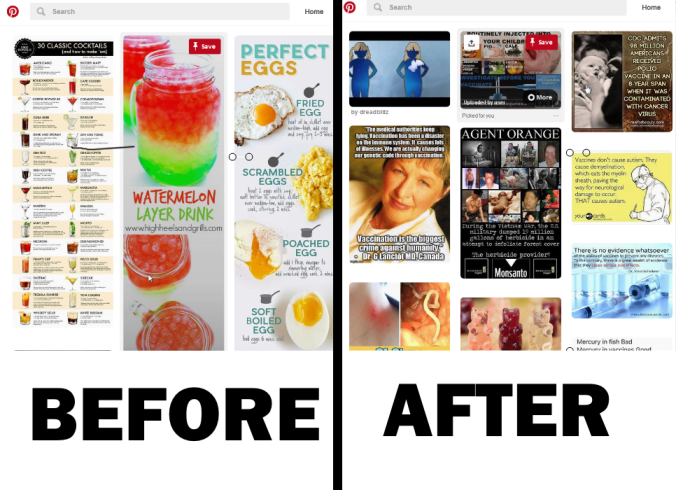
About a year ago I wrote an article on how Pinterest’s recommendation engine makes this situation far worse.  I showed how after just 14 minutes of browsing, a new user with some questions about vaccines could move from pins on “How to Make the Perfect Egg” to something out of the Infowarverse:

after.png

What was remarkable about this process was that we got from point A to B by only pinning two pins on a board called vaccination.

I sped up the 14 minute process into a two and a half minute explanatory video. I urge you to watch it, because no matter how cynical you are it will shock you.

I haven’t repeated this experiment since then, so I’m unable to comment on whether Pinterest has mitigated this in the past year. It’s something we should be asking them, however.

I should note as well that the UI-driven decontextualization that drove Facebook’s news crisis is actually worse here. Looking at a board, I have no idea why I am seeing these various bits of information at all, or any indication where they come from.

pinterest

Facebook minimized provenance in the UI to disastrous results. Pinterest has completely stripped it. What could go wrong?

Pinterest Is a Major Platform and It’s Time to Talk About It That Way

Pinterest has only 175 million users, but 75 million of those users are in the United States. We can assume a number of spam accounts pad that number, but even accounting for that, this is still a major platform that may be reaching up to a fifth of the U. S. population.

So why don’t we talk about it? My guess is that its perceived as a woman’s platform, which means the legions of men in tech reporting ignore it. And the Silicon Valley philosopher-king class doesn’t bring it up either. It just sounds a bit girly, you know? Housewife-ish.

This then filters down to the general public. When I’ve talked about Pinterest’s vulnerability to disinformation,  the most common response is to assume I am  joking. Pinterest? Balsamic lamb chops and state-sponsored disinfo? White supremacy and summer spritzers?

Yup, I say.

I don’t know how compromised Pinterest is at this point. But everything I’ve seen indicates its structure makes it uniquely vulnerable to manipulation. I’d beg journalists to start including it in their beat, and researchers to throw more resources into its study.

16 Aug 01:22

Apple's Growth Story

by Neil Cybart

Apple is on a roll. The company is seeing record high iPhone ASPs, strong momentum with Services, and a wearables platform connecting with the mass market. Revenue growth has accelerated for the past seven quarters. Apple's growth story has returned with a vengeance. Upon closer examination, it becomes evident that Apple's three primary growth levers are not created equal. While some growth levers are at risk of slowing, others are still just getting started. 

Growth Has Returned

In early 2016, Apple hit a rough patch. The company reported its first year-over-year decline in iPhone unit sales as the iPhone 6s and 6s Plus sales cycle proved quite different from that of iPhone 6 and 6 Plus. Overall revenue trends also turned negative with Apple reporting a double-digit revenue decline in 2Q16 and 3Q16. 

Just as consensus began to throw in the towel on Apple as a growth story, iPhone unit sales stabilized. As shown in Exhibit 1, revenue bottomed in early 2017 and then once again began to increase. The most recent quarter marked a record high for Apple revenue on a trailing-twelve-month (TTM) basis and the seventh consecutive quarter of sequential growth in revenue. 

Exhibit 1: Apple Revenue (TTM)

Screen Shot 2018-08-15 at 4.22.19 PM.png

There are three drivers behind Apple's return to revenue growth:

  1. iPhone. The average selling price (ASP) of iPhone is up $100 year-over-year.
  2. Services. Apple is seeing strong revenue growth from the App Store, licensing, and AppleCare. 
  3. Wearables. Apple's wearables platform is gaining sales momentum as Apple Watch and AirPods go mainstream. 

Measuring Growth

The interesting thing about Apple's latest growth story is that few people were forecasting that Apple would grow revenue via hardware sales. Instead, many said that Services would be Apple's growth engine going forward. As it turns out, things are developing differently than consensus assumed.  

For the twelve months ending this past June, iPhone was responsible for 57% of Apple's year-over-year revenue growth. Services was the second-largest revenue driver, responsible for 23% of Apple's year-over-year revenue growth. Wearables was responsible for 11% of Apple's growth. As seen in Exhibit 2, iPhone has been responsible for an increasing portion of Apple's revenue growth.

Exhibit 2: Measuring Apple's Revenue Growth Drivers

Screen Shot 2018-08-15 at 4.47.25 PM.png

Details

It is helpful to take a closer look at the factors underpinning Apple's three revenue growth drivers. 

iPhone. In 3Q18, iPhone revenue was up 20% year-over-year. The vast majority of this growth was due to Apple selling higher-priced iPhones. The iPhone 8 and 8 Plus are the highest-priced 4.7-inch and 5.5-inch iPhones, respectively, to date. Furthermore, the iPhone X is Apple's highest-priced iPhone yet. As seen in Exhibit 3, iPhone ASP experienced a step increase beginning in 1Q18, which marked the first full quarter of iPhone 8 and 8 Plus sales in addition to the iPhone X launch. Given strong flagship iPhone sales momentum, Apple has continued to report strong ASP trends. Apple reported a record high $119 year-over-year increase in iPhone ASP in 3Q18.

Exhibit 3: iPhone ASP

Screen Shot 2018-08-15 at 4.37.22 PM.png

According to my estimates, Apple has sold approximately 120M higher-priced, flagship iPhones (8, 8 Plus, and X) since September 2017. Some of these devices were bought by former Android users switching to iPhone. However, there are only so many premium Android users out there. The majority of sales have likely gone to existing iPhone users upgrading their devices. With an iPhone installed base of approximately 750M users, less than 15% of the iPhone installed base bought a new flagship iPhone over the last nine months. 

A small percentage of the iPhone installed base is responsible for driving much of the year-over-year increase in iPhone ASP. While this doesn't necessarily mean that iPhone ASPs are more fragile than they appear, it does add clarity to the current state of the iPhone business. The iPhone upgrade cycle continues to get longer while growth in customer demand for iPhone remains mediocre. Despite these challenges, the sheer size of the iPhone installed base makes it possible for Apple to sell close to 150M higher-priced, flagship iPhones in any given year.

Services. Apple's second-largest revenue driver, Services, is comprised of five items:

  1. Digital content (App Store, iTunes, Apple Music, etc.) 
  2. Licensing
  3. AppleCare
  4. iCloud storage
  5. Apple Pay

A majority of Apple's Services revenue is associated with Apple distributing digital content to hundreds of millions of people via the App Store and iTunes. Accordingly, the increase in the number of people accessing Apple's content stores, combined with existing users spending more as time goes on, is a leading driver behind Apple's strong Services revenue growth.

Licensing revenue is another major contributor to Services revenue growth as third parties are paying Apple more to get their services in front of Apple's users. It helps that Apple's grip on premium users has gotten stronger over time. AppleCare revenue is also on the rise as the number of Apple devices in the wild increases and Apple expands its AppleCare distribution efforts. 

Wearables. Apple is seeing strong unit sales growth for both Apple Watch and AirPods. In just three years, Apple Watch sales have exceeded 20M units per year with a user base nearing 40M. Despite extended supply issues, Apple likely sold more than 10M AirPods during the first year on the market, and coming close to 20M unit sales is a distinct possibility in CY2018. Apple Watch and AirPods sales are benefiting from aggressive pricing, strong mindshare, growing word of mouth, and increased distribution, especially with the cellular Apple Watch Series 3. As shown in Exhibit 4, wearables unit sales (the orange portion of bar) are no longer a footnote on a Apple gadget sales chart. 

Exhibit 4: Apple Gadget Unit Sales

Screen Shot 2018-08-15 at 3.12.23 PM.png

Future Growth

When it comes to thinking about how Apple's revenue growth drivers will perform in the coming quarters, it is important to assess the broader environment facing each driver. At the same time, a look at Apple's product strategy is required to the weigh the impact from new products and pricing decisions.  

iPhone. Among Apple's three revenue growth drivers, the iPhone faces the most headwinds. While Apple can still grow iPhone revenue with modest unit sales growth, the company will likely see less of a revenue boost from huge iPhone ASP gains. It will be difficult for Apple to increase iPhone ASP by another $100 in 2019. Instead, iPhone ASP increases will likely decline. 

Apple is expected to unveil three new flagship iPhones (6.5-inch OLED, 5.8-inch OLED, and 6.1-inch LCD) next month. Even if we assume the 6.5-inch OLED is priced higher than iPhone X, the model likely won't have as large of an impact on iPhone ASP as iPhone X, given a smaller share of overall iPhone sales. Instead, the majority of iPhone sales will be found with the 6.1-inch LCD and 5.8-inch OLED iPhones. These models will likely be priced similar to this year's flagship iPhones, making it that much harder for Apple to see another step increase in iPhone ASP. 

Services. There are a number of factors supporting continued robust Apple Services revenue trends into 2019. Apple Services will benefit from continued growth in the iPhone installed base. At the same time, larger industry themes such as video subscription services gaining popularity stand to benefit Apple Services revenue in a few ways. In addition to earning a share of revenue via third-party video subscriptions, Apple is widely expected to launch its own paid video streaming service in 2019. Additional Services growth levers are found with higher licensing fees from third parties, more AppleCare revenue, and a larger number of iCloud storage subscriptions. In a scenario in which iPhone revenue growth slows, it is reasonable to expect Services will represent a larger portion of Apple's revenue growth in 2019. 

Wearables. Apple's wearables segment will likely serve as an Apple revenue growth engine for years. The days of Apple wearables being considered a revenue footnote are over. Over the past 12 months, Apple sold over $10 billion of wearables (Apple Watch, AirPods, and Beats headphones). Assuming Apple is able to maintain at least 30% to 40% unit sales growth over the next few years, Apple's wearables platform will reach $20 billon of annual revenue within three years. Given the still relatively low adoption rates for Apple Watch and AirPods within the Apple user base, there are plenty of potential users left to fuel unit sales growth. Over the long run, Apple will likely expand the wearables platform to include new form factors and product categories. These developments will add even more growth potential to the segment. 

Big Picture

On the last two quarterly earnings conference calls, Tim Cook has talked about the smartphone market being one of the best for a company like Apple in the history of the world. There aren't too many markets capable of supporting 215M+ annual unit sales at an average selling price exceeding $750. Read between the lines, and Cook's confidence signaled Apple's belief that nothing will displace smartphones as the most valuable computer in our lives in the near term. For example, Cook's answer to an analyst's question about tech in the home didn't make it seem like Apple management was worried about stationary smart speakers. 

Much of Cook's optimism around smartphones is supported by recent Apple financial trends as revenue growth has been driven primarily by iPhone, with Services and wearables serving in more supporting roles. 

However, this doesn't mean that Apple is betting on iPhone over the long run. In fact, over the next few quarters, it is reasonable to expect that iPhone will become less of a growth driver for Apple, with the growth spotlight turning to digital content distribution and wearables as Apple's primary growth engines. 

Apple continues to place bets on new products that have the potential to gradually serve as iPhone alternatives (not replacements). In essence, Apple wants to be the one to disrupt the iPhone. These iPhone alternatives, having to be powered or supported by iPhone out of the gate, will initially be viewed as rudimentary or even as toys. However, these products will be placed on the path to independency from iPhone. The Apple Watch is a great example of such a product. Apple Glasses have the potential to be an even bigger catalyst for growth

At the same time, we are seeing Apple gain confidence in delivering services focused on distributing digital content and adding value to hardware used by a billion users. As the average number of Apple products per user increases, thanks to wearables, these services will prove essential in delivering personalized and proactive solutions to the Apple community. This strategy will provide Apple years of revenue growth opportunity and pave the way for Apple's eventual entrance into the transportation industry.

Receive my analysis and perspective on Apple throughout the week via exclusive daily updates (2-3 stories per day, 10-12 stories per week). Available to Above Avalon members. To sign up and for more information on memberships, visit the membership page.

16 Aug 01:22

Oversimplified: Brooks Saddle Care

by brandon

Brooks leather saddles didn't gain the reputation they have today based purely on good looks. Although they are indeed a sight for sore eyes, it's the comfort and durability that really shine once mounted on a bike.

Sure, they may leave a slight dent in the wallet at $145 for a B17, but it's an investment that will last you a lifetime when properly cared for.

On the other hand, if neglected, a Brooks saddle might end up looking like this:

So for all the cyclists who've made that initial investment, or are heavily considering it, we're adding this latest blog post in our “oversimplified” series in an attempt to shed some very important and easy to digest knowledge on getting the most out of your Brooks saddle.

 Let’s get started...


Tools of the Trade: 

First things first. Using just these three items, you will be able to break-in, maintain, and most importantly enjoy the notoriously comfortable ride provided by a genuine Brooks saddle of England.

  • Any old cloth - a paper towel would even work.
  • Brooks Proofide - available here.
  • A Brooks spanner tool - included with all Brooks leather saddles.


Straight Out of the Box:

Straight out of the box, your saddle will be ready to roll as it comes pre-polished and tightened directly from the production line. They assured us of this during our factory tour, which you can read more on here.

Having said that, there are a few things you can do to help speed up the break-in process, and maintain your saddle – ensuring it will last you a lifetime. This is where our pro-tips come in.


For a Faster Break-in:

Apply Brooks brand Proofide to the top (shiny) side of your saddle. Just use a modest amount (a dab will do ya) and massage it into the saddle using a small rag.

  • Lightly coat the entire surface of the saddle

  • Let it sit for about 10 mins

  • Polish it off with a clean rag to remove excess

Next we'll use that very same technique to apply Proofide to the underside, yes the underside, of your saddle. This is going to help with two things:

  • Softening up the entire leather hide, thus enabling your buns to break the leather in a bit quicker during your first few weeks in the saddle.

  • Making the vulnerable raw underside of the hide a bit more weather resistant than it would be straight off the factory floor.


Maintaining:

Re-application is a must. Just like protecting your skin from the sun with application and reapplication of sunblock, you’ll need to protect your saddle from everyday life with the occasional coating of Proofide.

After a few months, you’ll notice the sheen from your first lather of Proofide is wearing off the top of your saddle. The leather will appear a bit rough and scuffs might start showing up. Just as you would with your favorite pair of leather shoes, go ahead and re-apply a thin layer of Proofide and polish the saddle up.

  • Pro-tip: Don't overdo it with your Proofide. Using too much is essentially going to leave your saddle wet, which could lead to major problems down the line. We'll discuss why in our next tip…

Keep it dry! As we just said, dampness will do your saddle no favors as far as durability goes. Overexposure to water (or dampness of any kind) can displace natural oils in the leather, which leads to drying and cracking over time. This will result in a nasty looking saddle that's no fun to ride. We know life happens and it rains, but you can protect your saddle in two very simple ways:

  • 1. You already did some weatherproofing by applying the Proofide.

  • 2. Grab a rain jacket for your saddle. Available here.

Lastly, keep your saddle tight. You’ll notice that as you break your saddle in, the leather hide may start to loosen up and sag like a hammock across the steel frame. This is both bad for your efficiency as a rider, and for the saddle in general. It also looks pretty ridiculous, so try to periodically tighten up when you notice this happening.

  • Use your Brooks spanner tool to mount the nut just inside the nose of the saddle frame.

  • Give this a quarter of a turn at a time until your saddle is sitting taut and proud.


Enjoy the Ride: 

I know what you're thinking. "That's it?" and yes, that really is it. Using this knowledge wisely, you should have a saddle that will last you a literal lifetime, and possibly even someone else’s after that (so long as you provide them with the link to this blog post.)


16 Aug 01:21

Third-Party Twitter Clients Remove Features as API Changes Loom

by John Voorhees

The latest chapter in Twitter’s contentious relationship with third-party developers is coming to a close. In April 2017, Twitter announced plans to eventually deprecate certain parts of its API that third-party apps rely on.

Fast forward one year to April 2018, roughly 10 weeks before the scheduled API transition of mid-June. Twitter’s new API still hadn’t been made available to third-party developers. The Iconfactory, Tapbots, and other makers of Twitter clients created a website called Apps of a Feather…Stick Together to explain how the looming changes would affect customers. The ensuing uproar among users caused Twitter to delay the API transition until tomorrow, August 16, 2018. Although Twitter has not flipped the switch on the changes yet, apps like Twitterrific and Tweetbot have already taken steps to deal with the changes.

Twitter is replacing its streaming API, on which third parties relied, with a new API, but it’s problematic for a couple of reasons. First, the new API does not include all of the functionality of the API it replaces. Second, it’s a paid API that, according to Apps of a Feather, would be cost-prohibitive to implement:

The free API allows us to implement some push notifications, but they would be limited to 15 Twitter accounts – our products must deliver notifications to hundreds of thousands of customers. Pricing for Premium access is $2,899 per month for 250 users. To cover this cost, a third-party app would need to charge over $16 per month to break even.

As a result, third-party developers have spent the summer preparing their apps for the transition. In July, The Iconfactory updated Twitterrific:

Sometime after August 16th, 2018, Twitterrific won’t be able to receive and display notifications natively.

When this happens, you won’t be notified when someone likes one of your tweets, quotes you, replies to you, retweets, sends a direct message, or follows you. Since these notifications also power the Today view and Twitterrific’s Apple Watch app, we will be retiring both.

Today, Tapbots joined The Iconfactory with an update to Tweetbot that accommodates the API changes. Among the changes:

  • Timeline streaming has been removed, replaced with automatic refreshes every couple of minutes.
  • Retweet, quote tweet, like, and follow notifications are gone.
  • Mention and direct message push notifications have been reworked, which can delay them several minutes.
  • Tweetbot’s Stats and Activity view that displayed aggregate like, retweet, and follower data along with chronological like, mention, reply, and follow information has been removed.
  • The Tweetbot Apple Watch app has been discontinued.

I will particularly miss the Stats and Activity view of Tweetbot, which has long been one of my favorites. Twitterrific’s Today view, which was similar to Tweetbot’s Activity view, was removed from sale as a premium feature in July, will stop working when the API changes take effect, and will be retired in the future.

Whichever app you use, the biggest changes are to timeline streaming and push notifications. Twitterrific used to allow you to live-stream your timeline over WiFi, which is no longer possible. Instead, your timeline will refresh every two minutes or so over WiFi or a mobile data connection when the app is running. Tweetbot doesn’t support streaming anymore either, but it too will periodically refresh your timeline when the app is open.

Notifications are more limited as well. Tweetbot and Twitterrific used to allow users to turn on notifications for mentions, direct messages, retweets, quote tweets, likes, and follows, but don’t anymore.

As a result of Twitter’s API changes, push notifications for Tweetbot are limited to direct messages and mentions, the delivery of which may be delayed up to several minutes. In my testing, Tweetbot notifications usually took about 5 minutes to arrive after I sent one to myself from another account.

Twitterrific has taken a different approach to push notifications, eliminating them completely and suggesting that users turn on notifications in the official Twitter app instead. It’s a clever hack that allows for more kinds of notifications than Twitterrific can deliver itself. I know there’s nothing The Iconfactory can do about it, but it’s still a shame to have to install a second app just to get notifications.

How these changes shake out for third-party clients remains to be seen. I’ve used the beta update for Tweetbot over the past week, and the elimination of its Stats and Activity section has left me feeling like there is something missing from the app. I still prefer it to the official app, but the removal of that section is a meaningful loss. A similar hole will be left in Twitterrific when the Today section no longer works. Both apps have also lost their Apple Watch apps and live-streaming. If those are critical features to your use of Twitter, you may want to give the official client another try.

The changes made to Tweetbot and Twitterrific are similar, so they shouldn’t impact whether you use one over the other. The primary difference is how push notifications are handled. If you haven’t enabled push notifications, these changes aren’t meaningful. However, if you do use push notifications, the ones you use will determine which app serves your needs best. Using the official Twitter client as a substitute for native push notifications in Twitterrific makes the best of a bad situation, but relying on a second app just for notifications isn’t ideal. Still, it’s a solution that allows for a broader set of notifications than Twitterrific can deliver. For those who rely only on mention and direct message notifications, Tweetbot is a simpler approach that may be preferable.

How long third-party clients will continue to be a viable alternative to Twitter’s official app is anyone’s guess, but for now, I still prefer the experience delivered by Twitterrific and Tweetbot despite their limitations. I turned off all Twitter notifications except for direct messages a few months ago, and I haven’t missed timeline streaming during the Tweetbot beta. Notification delays for direct messages, which are noticeable, will probably affect my Twitter usage the most, but I have plenty of other ways to carry on similar conversations. As a result, these changes don’t make third party clients unusable for me, but it has caused me to reevaluate which Twitter client I will use going forward, which is a process that is ongoing.

I wish I could be more optimistic about where the future of third-party clients is headed, but I’ve written far too many stories about the many ways Twitter has undermined them, and I don’t see any end to that in sight. Twitter owes much of its early innovation and evolution to third-party developers. Where once we had a vibrant, competitive category of apps that sparked new and creative ways to use the platform, now, I’m left wondering how much longer apps like Twitterrific and Tweetbot will be around with each new story like this one. It’s a shame, but unfortunately, Twitter has never recognized the value of third-party Twitter clients.


Support MacStories Directly

Club MacStories offers exclusive access to extra MacStories content, delivered every week; it's also a way to support us directly.

Club MacStories will help you discover the best apps for your devices and get the most out of your iPhone, iPad, and Mac. Plus, it's made in Italy.

Join Now
16 Aug 01:20

Boulder Park Brochure Holders

by peter@rukavina.net (Peter Rukavina)

After having 500 copies of the Charlottetown Boulder Park brochure printed, I needed places to put them.

I left about 50 with the office of the Clerk of the Legislative Assembly for placement inside the Hon. George Coles Building.

Which left me with needing a place for the remaining 450.

The food trucks surrounding the park were a logical place for some of them, but, as you can imagine, food trucks are already chock full of people, food, and supplies, and the last thing they need is something else squeezed in.

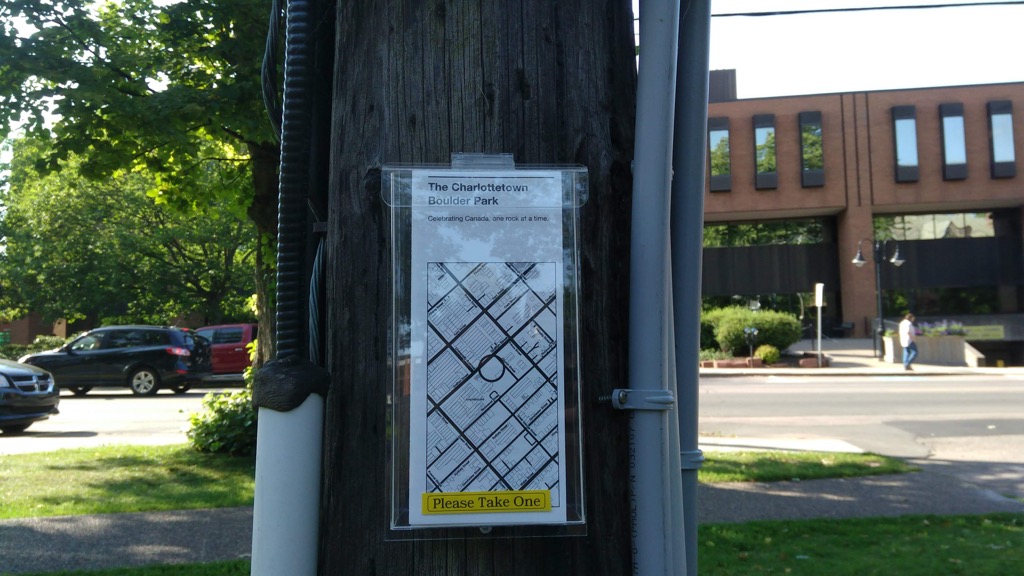
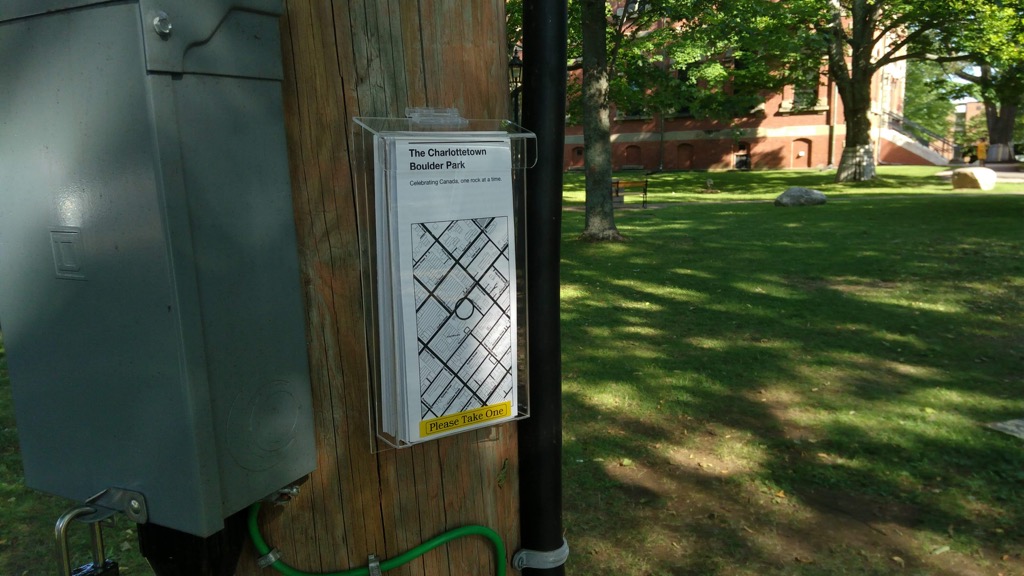
So I took matters into my own hands, and ordered a 3-pack of plexiglass outdoor tri-fold brochure holders with a lid from Amazon.ca (exorbitant at $52 plus $20 shipping, but those were cheap compared to what else I found), and they arrived today, and I installed them on electric poles beside the food trucks, ideally located where patrons waiting for their orders can improve their geological knowledge.

Charlottetown Boulder Park Brochure Holder Number One

Charlottetown Boulder Park Brochure Holder Number Two

Please pick one up the next time you’re waiting for your burger, or your rolled ice cream, or that you’re looking for a shady spot to while away the hours.