Shared posts

04 Sep 05:03

Should I become a manager?

Cap Watkins gives some coaching on the question of whether or not you should become a manager.

Being someone’s manager in a 1:1 is way different than being the person venting to their manager in a 1:1. Learning the ins and outs of an organization — what motivates different people, who you can ally with on things, who are blockers and how to navigate them, etc. — so that you can do your job is a huge shift from delivering a wireframe or some code.

Amen. For me, I think the hardest part was navigating the inevitable shift in what people talk to you about when you’re a manager. Suddenly, instead of calling you on your shit to your face, they’re doing so to each other where you can’t hear. You have to develop a whole new way to get the feedback you need to do your job.

⚓︎
04 Sep 05:03

Guest Post: How to engineer a raise

You’ve discovered you’re underpaid. Maybe you found out a new hire is making more than you. Or maybe you’ve been doing a great job at work, but your compensation hasn’t changed.

Whatever the reason, you want to get a higher salary.

Now what?

To answer that question, the following guest post by Adrienne Bolger will explain how you can negotiate a raise at your current job. As you’ll see, she’s successfully used these strategies to negotiate 20-30% raises on multiple occasions.

This article will answer some common questions, and explain some useful strategies, to help you—a software engineer—engineer a raise from your employer. I’ll cover:

  1. Researching your worth and options.
  2. Expectation setting.
  3. Strategies that I have used—and helped others use—to ask for a raise.

How much are you “worth”?

At the end of the day, an optimized salary in a more-or-less capitalist market is the highest salary you think you can get that passes the “laugh test.” If you ask for a salary or bonus, and your (theoretical) boss or HR head laughs in your face, then the number is too high.

Note that this number isn’t your laugh test number: many people, out of fear of rejection, are afraid to ask for a 25% raise rather than a more “modest” sounding 5% raise. But sometimes the 25% value is the right increase! Your number should not be based on fear: it should be based on research.

There are several ways to calculate your “market value” to an employer. To start, take 2 or 3 of the following quizzes to calculate median/mean salaries based on your demographics:

How much could you be worth in the future?

Take the surveys a second time. However, this time, give yourself a small imaginary promotion: 2 years more experience and the next job title you want—Senior Engineer, Engineer II, Software Architect, Engineering Manager, Director, whatever it is. How far away is that yearly salary amount from the first one? A little? A lot?

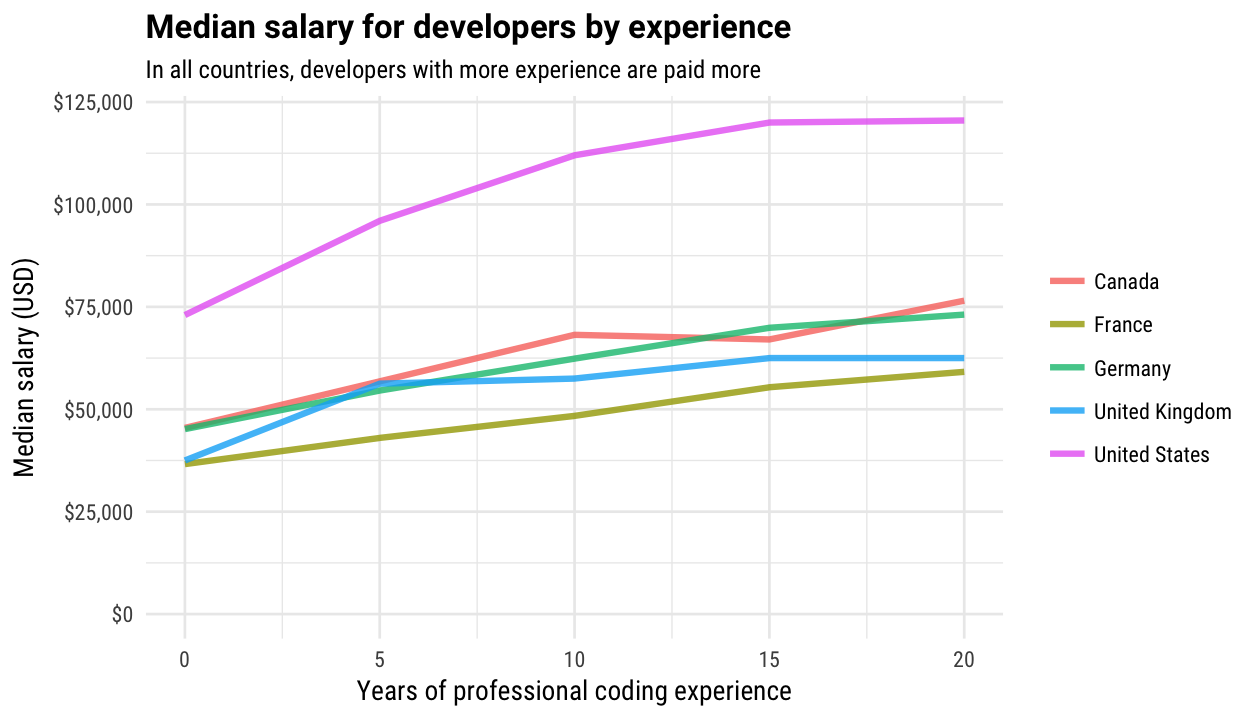
This is an important number, because the pay market for software engineers is not linear. Check out this graph created by ArsTechnica from the 2017 Stack Overflow salary data.

This graph shows the economics of a very hot job market: people with relatively little experience still make a good living, because their skills are in high demand. However, the median salary for a developer between 15 and 20 years of experience is completely flat. This isn’t the best news for experienced developers who haven’t kept learning (and some languages pay more than others), but for early career professionals, this external market factor is fantastic.

With data to back you up, you can ask for a 20 to 30% raise after only a year or two on the job with a completely straight face. I did it in my own career at the 2 and 4 year marks at the same company, and received the raise both times.

Adjust expectations for your company and industry

If you’ve come to the conclusion you are underpaid because you know what your colleagues earn, then you can skip this step. Otherwise, you have a little more research to do.

Ask your company’s HR department and recruiters: when hiring in general, does your company go for fair market prices, under-market bargains, or above-market talent? Industries like finance pay better than non-profits and civil service organizations whether you are an engineer or an accountant.

The bigger the company, the more likely you are to get standard yearly pay adjustments for things like cost-of-living expenses, but a bigger company is also likely more rigid in salary bands for a specific job title. HR at your company may or may not be willing to share the exact high and low range for a job title. If they are not, Glassdoor can provide a decent estimate for similarly size companies.

When to ask

Again, know your company. Does it have a standard financial cycle, with cost-of-living and raises allocated yearly 1-2 months after reviews are in?

If so, time your “ask” before your formal review by 3-8 weeks. That might be November if your yearly reviews are in December, or it might be January if company yearly performance reviews occur in March, after the fiscal year results from last year are in.

Why do this?

The problem with waiting until a formal review is scheduled is that is ruins plans you can’t see or are not privy to. Even in the best case where you were getting a raise anyway, the manager giving your review already has a planned number in their head and their accounting software. Asking a month beforehand gives your boss time to budget your raise into a yearly plan, which is much easier than trying to fight bureaucracy out-of-cycle.

You should not ask for a raise more frequently than every 2 years. If you feel like you have to, then you probably didn’t ask for enough last time. Consider that if you find yourself afraid to ask for as much.

If you are debating between asking for a raise and going job hunting because you feel undervalued, ask for the raise first. I suggest this because job searching is a huge time sink, especially if you don’t really want to change jobs.

You owe it to yourself to proactively seek happiness. If what you really want is more money and to stay at your current company, then give your employer a chance to make you happy. If you ask and are denied, then at least you’ve done all the research into compensation when you go looking.

How to ask

Ask for a raise both in writing and in person.

As email is still considered informal, this is one of those cases where an actual letter—printed out and hand-delivered to a scheduled meeting with your manager—is a good idea. The meeting gives the chance to explain what you want a little more, but the letter is a written record of what you want that goes to HR, as well as a way to keep yourself from backing out due to nerves or stress.

I once requested a raise from a manager who (unbeknownst to me) was let go 2 weeks later. However, because my raise request was also in writing, I received the raise from my new boss with no confusion after the transfer.

The letter should be 2-3 paragraphs long and:

  • Be addressed and CC’d to your manager and HR at your company.
  • List your current length of service with the company and affirm that you like working there.
  • Detail exactly what you want: a 20% raise? A $5,000 raise? Tuition money for school? More vacation days? Do not leave it ambiguous.
  • Detail why you believe you deserve it, and back it up with available data:
    • Do you have more experience now?
    • Earned a degree?
    • Learn new skills or programming language?
    • Has it been 3 years since you got a review because you work at a 20 person startup?
  • The exception to the previous point is if you know you are underpaid because a coworker with the same responsibilities is paid more: it’s enough to say that in general terms. Calling a specific coworker out is unnecessary.
  • List, in 2 sentences or less, any recent accomplishments that were especially impactful. This serves 2 purposes: reminding your boss how awesome you are, but also making it easy on them to justify your (deserved) raise to the people they are accountable to at the next level up in the company.
  • End with a request for a meeting discussing the contents of the letter.
  • Be signed and dated.

The letter (and subsequent meeting) should not:

  • Imply you will leave if you don’t get what you want, even if you are planning on it. Bluffing here is a good way to get asked to leave anyway. Even if you are planning to leave if you don’t receive a raise, threats put people on the defensive.
  • Sound angry or imply you have an ungrateful or deficient manager/employer. Position yourself as asking for something a reasonable person should want to give you. Have the most gentle and peaceful individual you know read your letter to double check tone. If all else fails, try your local Buddhist monk.

The meeting

Once you ask for a raise and a meeting to talk about it, nerves may kick in. Do your homework ahead of time and come in prepared. Bring a copy of your letter and, during the meeting, re-iterate exactly what it is you want and why you deserve it.

It’s fine to be nervous, but do not attempt any weird “Hollywood caricature of a car salesman” negotiating tactics. Don’t be short-sighted; remember that you have to perform your day job with your manager once the meeting is over.

If your employer declines

If you asked for your “laugh test” number and your employer can only meet you halfway or can’t increase your compensation at all, your response should be “Why? And what can I do to change that?”

Be proactive in determining where the problem is. At a big company, if there’s a salary band, you may need a promotion before you can get the raise. If the company isn’t making enough money for raises for anyone, it may be time to discreetly look for another job anyway.

Whether or not you choose to accept a compromise or counteroffer is up to you—but make sure that you can live with your choice, at least short term, because it won’t make sense to ask again for another few months.

And that’s Adrienne’s post. I hope you found it useful: I certainly learned a lot from it.

Of course, reading this article isn’t enough. You still need to go and do the work to get the raise. So why not start today?

  1. Do your research.
  2. Pick the right moment.
  3. Go ask for that raise!


It’s Friday afternoon. You just can’t write another line of code—but you’re still stuck at the office...

What if every weekend could be a 3-day weekend?

04 Sep 05:02

10th Annual Ride to Conquer Cancer Begins this Saturday August 25th in Surrey

by Average Joe Cyclist

10th annual ride to conquer cancerThe 10th Annual Ride to Conquer Cancer® presented by Wheaton Precious Metals™ benefiting the BC Cancer Foundation will begin this Saturday August 25th in Surrey

The post 10th Annual Ride to Conquer Cancer Begins this Saturday August 25th in Surrey appeared first on Average Joe Cyclist.

04 Sep 05:02

We read Tufte. It was great.

“It was really an awesome sight… all those words coming from all over the world, with so many thoughts, reflections and wisdom!” –@tiagombp

“I felt like I was in the middle of a beautiful brain.” –@SaraSaysData

Five weeks ago, I posted a blog post to announce a digital book club for data visualization books. The first book we read was “The Visual Display of Quantitative Information” by Edward Tufte.

For the next four weeks, I retweeted people’s reading experience as @datavisclub – a Twitter account which has 1000 followers by now 😱.

We all read the book,

we took notes,

and then, last Tuesday, we got comfortable in front of our computers:

And the amazing thing happened: We all met. Digitally. At the same time. In a notepad, in which everyone started to discuss what they got out of reading Tufte’s book: notes.datawrapper.de/p/bookclub-tufte

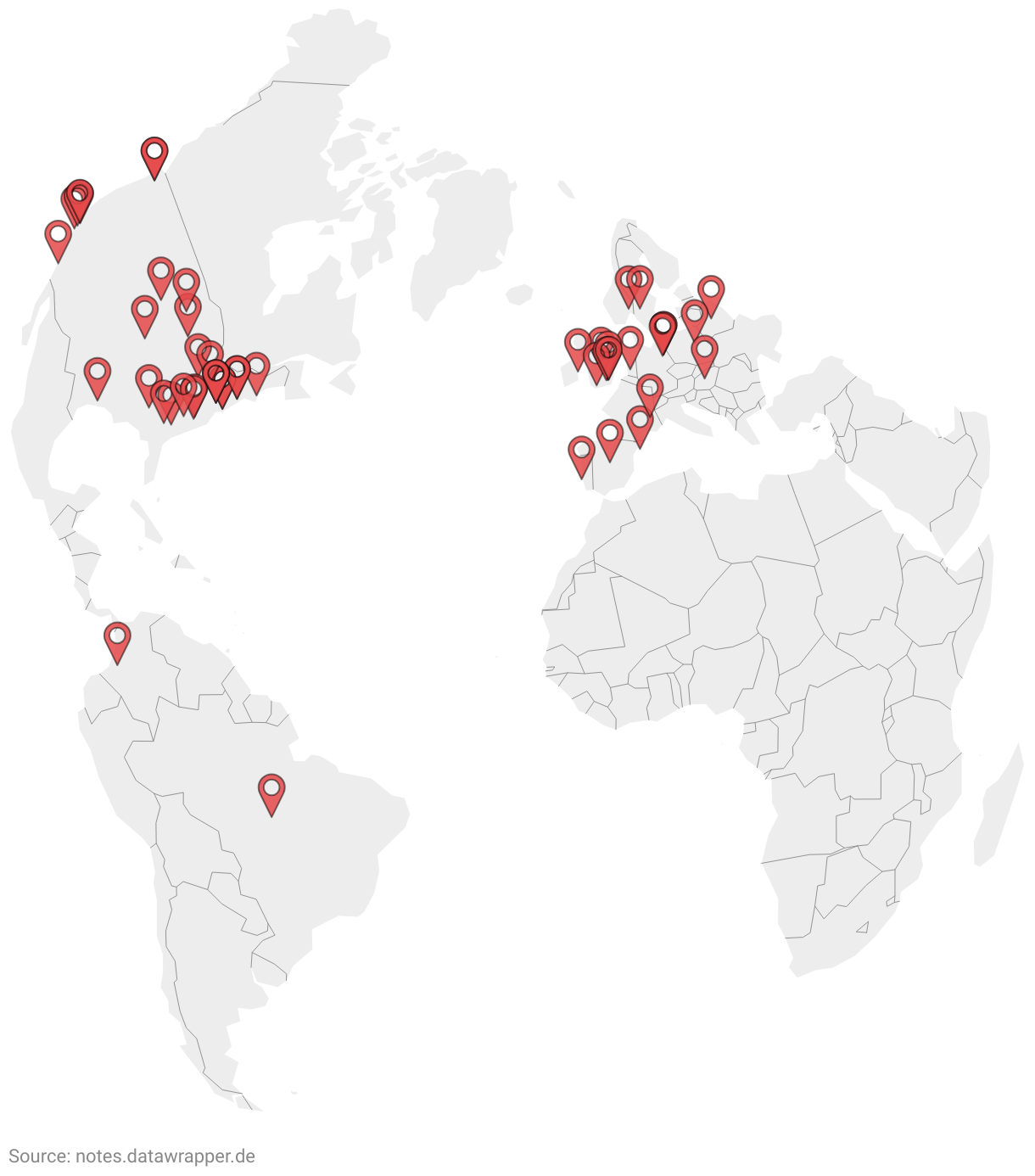
We were more than 50 Tufte readers, from all over Europe and North America – and even two peeps from South America:

You can find our whole conversation here: notes.datawrapper.de/p/bookclub-tufte. It’s still possible to type around in there and see the chat messages.

(Since we found that people use automatic translator programs in the notepad, it might be broken by the time you visit it. You can either use the clock symbol at the top to go back in time to a clean version. Or, if you want to see the notes in its original colors, visit this locked Google Docs document.)

The whole experience was short-lived because our hosted notepad (=Etherpad) crashed from time to time. As Elijah Meeks put it:

It was too beautiful/popular to survive. –@Elijah_Meeks

But it was magical to see all these people type at the same time. Sharing their opinions. Building a non-linear conversation, in which everyone talks at the same time, but still everyone is heard. A river of voices. It was fun to perceive how book club attendees typed their own opinions, then read the ones from others and reacted to them.

Apropos reactions; here are some about the general experience:

So what did we discuss? Here’s a summary of answers to each of the four questions I asked the book club attendees:

How would you describe Tufte’s book in a short sentence or three words?

In general, book club attendees found it a well-written and well-designed book: “Inspiring, beautiful, well written and edited: it’s got the substantive, the statistical and the artistic skills expressed in every page” said @muxevola. And Michal Mokwinski found that “compared to other data viz books it a very light lecture – this does not mean it’s not full of valuable information.”

Michael was also amazed that the book is still useful today: “I thought [Tufte]'s living in the past…It turned out that the book can be applied to today’s tools.”

Some attendees were surprised by Tufte’s strong opinions: “I didn’t expect Tufte to be so opinionated - even scathing at times”, said @hilarys728. Not everyone appreciated these opinions: “Tufte tries to make too many absolute theorems.”, “a one-sided view.”, “Good ideas. Silly ratios. Chartjunk sillier than expected.”

So what’s the main message of the book? According to Alexander Naylor, it’s “more of a guide for restraint in some respects”. And another book club attendee summed it up wonderfully: “Complex data. Simple visualizations.”

What was the most surprising thing you’ve learned?

This question quickly lead to discussions – and more questions. For example, are Tufte’s redesigns actually better than the originals? “I personally think most of his redesigns fail horribly,” Trud Antzée told us. “I even went around my workspace asking people what they could see in some graphs (especially on the redesigned boxplot) and almost no one understood what was being conveyed”,

Another Tufte concept that book club attendees discussed was sparklines. Why did they not catch on? The experiences ranged from “I use Excel’s sparklines a lot. They can be pretty effective” to “I have used them sometimes and clients say they don’t see the data very well 🤷‍ They miss the point of the sparkline, I guess they are not for everyone!”

Even more controversial were tables: Some book club attendees were very happy to see Tufte advocate for them: “I appreciated the idea that sometimes tables are the best option for displaying data.” Another person added: “Sometimes, tables are best!”

But people like Sian Williams Page disagreed: “Tufte’s advocacy of supertables surprised me (pg179). Especially his view that they are good at pulling a reader in. I can see how they are useful from an ease-of-looking-up-a-value point of view, but for an intriguing way of presenting a large dataset? Surely this is where well-designed visualizations can shine” Anneli Joplin added: “I’ve been wondering about that too – how often is it that the ACTUAL numerical value is the key takeaway?”. And Inga Silkworth “wrote a note next to that table saying ‘I don’t want to look at hundreds of numbers in a table’.”

What would Tufte say about one of your favorite data visualizations?

This question didn’t lead to as many discussions about Tufte as expected, but it was great to see everyone’s favorite data visualization. A lot of good ones were mentioned:

Accurat: “My reign for a (solved) paradox”

Moritz Stefaner: “Project Ukko”

Zan Armstrong, Nadieh Bremer: “Why Are so Many Babies Born around 8:00 A.M.?”

Cameron Beccario: “earth. a visualization of global weather conditions”

Jia You: “The visual proof of why vaccines do more good than harm”

xkcd: “Radiation Dose Chart”

Alessandro Zotta: “On Their Way”

Bram Zandbelt mentioned that his favorite visualization in the book was the one about frequency-of-repair records for cars on p. 174:

Shane Cone agreed and found it “shockingly good. Extremely easy to get the takeaway at a glance, but also easy to read in depth if you want. In fact, maybe that is a guiding principle going forward: Make your chart available / consumable to any level of interest. I can, in 5 seconds, see which car breaks down the most. Or, in 2 minutes, see how one car compares to the average on every part.”

Having read the book, what will you do differently the next time you design a chart?

The last question dealt with concrete takeaways for charts we will build in the future. The point that was mentioned most often was to simplify and to clean up the chart: “I’ll be (even) more conscious about whether each element on my charts serves a purpose.”, “Less clutter”, “increase my data-to-ink-ratio”, “I will think about the question my chart is attempting to answer or clarify” and “I’m going to think harder about what interactive elements are really needed for my web-based viz.”

Another takeaway for the future was to be more considerate with the elements that do exist on the chart. Book club attendees wanted to think about “what kind of annotations to add to graphics”, “make editing a larger part of my process”, “think more about gridlines, which role they play in my graphics” and “enrich my graphics with some multifunctioning elements when the right occasion turns out.”

And then there’s Ada Kepinska, who wants to “ask myself if it would appeal to ‘connoisseurs of the graphically preposterous.’ (p.118). Consider starting a club with that name.” Go, Ada!


Boy, that whole endeavor was fun. So much fun, indeed, that we’re immediately starting with two more books to read. Visit the blog post Read Tamara Munzner & Alberto Cairo with us to learn more, and join the book club!

04 Sep 05:02

Are categories Design Patterns?

by Eric Normand

People often ask ‘what are the design patterns of functional programming?’ A common answer is that categories from category theory, like monads and functors, are the design patterns. But is that true? I explore the consequences of that answer.

Transcript

Eric Normand: Are categories from category theory, design patterns? Hi, my name is Eric Normand. These are my thoughts on functional programming.

I often hear people ask, — these are object-oriented programmers — they are used to using design patterns just for context. They are used to learning the visitor pattern, the singleton pattern, the factory pattern, and they ask online what are the functional design patterns.

One common answer I see a lot is that categories, that is monads, monoids, functors. Those are design patterns that those are what functional programmers use when they are building their systems and their design patterns. That’s always struck me the wrong way.

It just doesn’t feel right. It’s only been recently that I’ve figured out why it doesn’t seem right to me. When I look at the design patterns, what I see is code patterns that are not reusable in the language.

In Java, you can’t write a visitor abstract class or visitor interface, then just implement that, and now you have a visitor. It is a whole coding pattern that requires you, the programmer to have a lot of discipline implementing that pattern.

Eric Normand profile image
Eric Normand
@ericnormand
twitter logo

In Java, you can't write a visitor abstract class or interface, then just implement that, and now you have a visitor for your data type. It is a whole coding pattern that requires you, the programmer to have a lot of discipline implementing that pattern.

ed.gr/zu7v

Wed Dec 26 20:01:20 +0000 2018
Twitter reply actionTwitter retweet action0Twitter like action5

A lot of people would say that the design patterns are actually workarounds for limitations in the language. When you say functor is a functional design pattern, it doesn’t carry that same connotation. You still with…in Haskell because the Haskellers are the ones that say functor is the design pattern.

Haskell are static type people. They will say, “Well, we have this thing called the functor type class and we implement it. Then we have a type that is a functor.” It doesn’t have that problem of it being a workaround for something that doesn’t exist in the language.

That’s why to me it doesn’t seem like that’s a design pattern. Why is that important? That idea that it doesn’t have…The language doesn’t have the feature that allows for that design pattern to be easily expressed because I feel what happens then is you don’t have people looking for patterns that don’t have features to support them.

If I were going to use functors in Clojure, or monads in Clojure, I would say that it’s a design pattern. I don’t like the word design pattern, but I’m going to work with the definitions and the terms that are out there. If you have a functor or a monad in Clojure because there isn’t any support for that stuff in the language.

In Haskell, you need the type system to basically make them work right. Because of that, I would say that they are a design pattern in Clojure. If you want to do a monad, it’s a lot of discipline from the programmer. You have to learn how to do the pattern. Then, you can code it up and someone else who looks at it, they have to learn this design pattern before they can understand it.

Where in Haskell, it’s written right there. This implements monad in this way, so there you are done. It’s not a thing that you have to learn separate as a pattern. The problem is then the Haskellers, as an example, when they use monads and call them a design pattern, they’re missing other patterns. They’re missing what their language doesn’t support but that they do all the time.

Those are the things that actually need to get written down. Those are the tribal knowledge. Those are the things that a new programmer needs to be introduced to before they can understand what’s happening. There’s no syntax to look up. It’s all discipline, and patterns and just coding practices.

If design patterns has any use at all, it’s as that. It’s as this thing that you can only recognize that it is part of the pattern because you understand the pattern. There’s no piece of code that says, “This is the pattern,” and then it’s checked by something.

The same thing happens in Clojure, let’s say, lazy evaluation. Lazy evaluation, you could say it’s a pattern. In some languages, they don’t have lazy evaluation, but then in Clojure, we do FOR sequences. If I come to Clojure and I call lazy evaluation a design pattern, FOR sequences, it’s not true, like a lazy list. It’s not a design pattern it’s just a fact of the language.

In another context, another language, you actually have to implement that. It has a little bit of discipline, in how do you use it that thing.

I think that at least in terms of Haskell, we shouldn’t say that the monads, the monoids and the applicative functors, they should not be design patterns because then it loses the meaning, the important meaning, that this is something that you need to learn that’s not part of the language.

That’s what we need to be looking for, to help people learn our language, to codify what we’re doing. That’s why the design patterns book was popular because people, they learn Java, they learn C++, they knew the language, but they’re like, “I need more, I need to figure out how to do more with this language.”

The design patterns gave them recipes and things that they could follow and learn to make them better programmers, to get them the power that they needed in their language. That’s what we need to look for, in Clojure, in Haskell, in whatever language we’re using, we need to be looking for those patterns that we use all the time that the language doesn’t explicitly support.

Eric Normand profile image
Eric Normand
@ericnormand
twitter logo

Design patterns are things people do that aren't part of the language. They give people recipes that they could follow and learn to make them better programmers, to get them the power that they needed in their language.

ed.gr/zu7z

Tue Nov 06 16:01:49 +0000 2018
Twitter reply actionTwitter retweet action0Twitter like action1

In Clojure, I look at stuff like, using HashMaps to represent entities. There’s nothing in the language that says you should do that, but it’s very common that we do that. A beginner looks at it and it’s like, “I don’t know how to do this, and there’s all these rules about it.” We’re going to use keywords for all of the attribute names. Then the values are going to be whatever type is appropriate for that.

What if we need to give it another bit of information about what kind of entity it is? That’s another pattern there. You can also use HashMaps as indexes. It’s an index where you get to look something up but the keys and the values are all the same type.

What’s an example of an index? If I wanted to look up entities by key, I can make a HashMap where the ID is the key, and the value is the value. These are patterns that we use that the language doesn’t have a name for, there’s nothing in the language that says Entity or Index, but we do those all the time.

Eric Normand profile image
Eric Normand
@ericnormand
twitter logo

If I wanted to look up entities by ID, I can make a Map where the ID is the key, and the entity is the value. Entity and Index: we use those patterns but the language doesn't have names for them. Because they're not in the language, they are patterns.

ed.gr/zu71

Sat Oct 13 15:02:48 +0000 2018
Twitter reply actionTwitter retweet action1Twitter like action6

That’s what we need to be looking for. That’s what I always look for, what does the language not give us that people do all the time?

If you want to get in touch with me, I’m Eric Normand. On Twitter, I’m @ericnormand, E-R-I-C N-O-R-M-A-N-D. You can also email me, eric@lispcast.com. This has been fun, see you later.

The post Are categories Design Patterns? appeared first on LispCast.

04 Sep 05:02

Beyond Engagement: How Top Community Pros Build Their Strategies

by Richard Millington

Most of our work over the past year has been focused on community strategy.

A lot of people running communities aren’t sure what they should be focusing on, what goals they should have, or what their community can become.

This is the reason we don’t get the support we need and our communities often achieve only a fraction of their potential.

Most of the time, people don’t even know what resources they need to ask for to achieve their goals.

This post is going to help you think about this problem the right way and explains the concepts we cover in depth as part of our Strategic Community Management course.


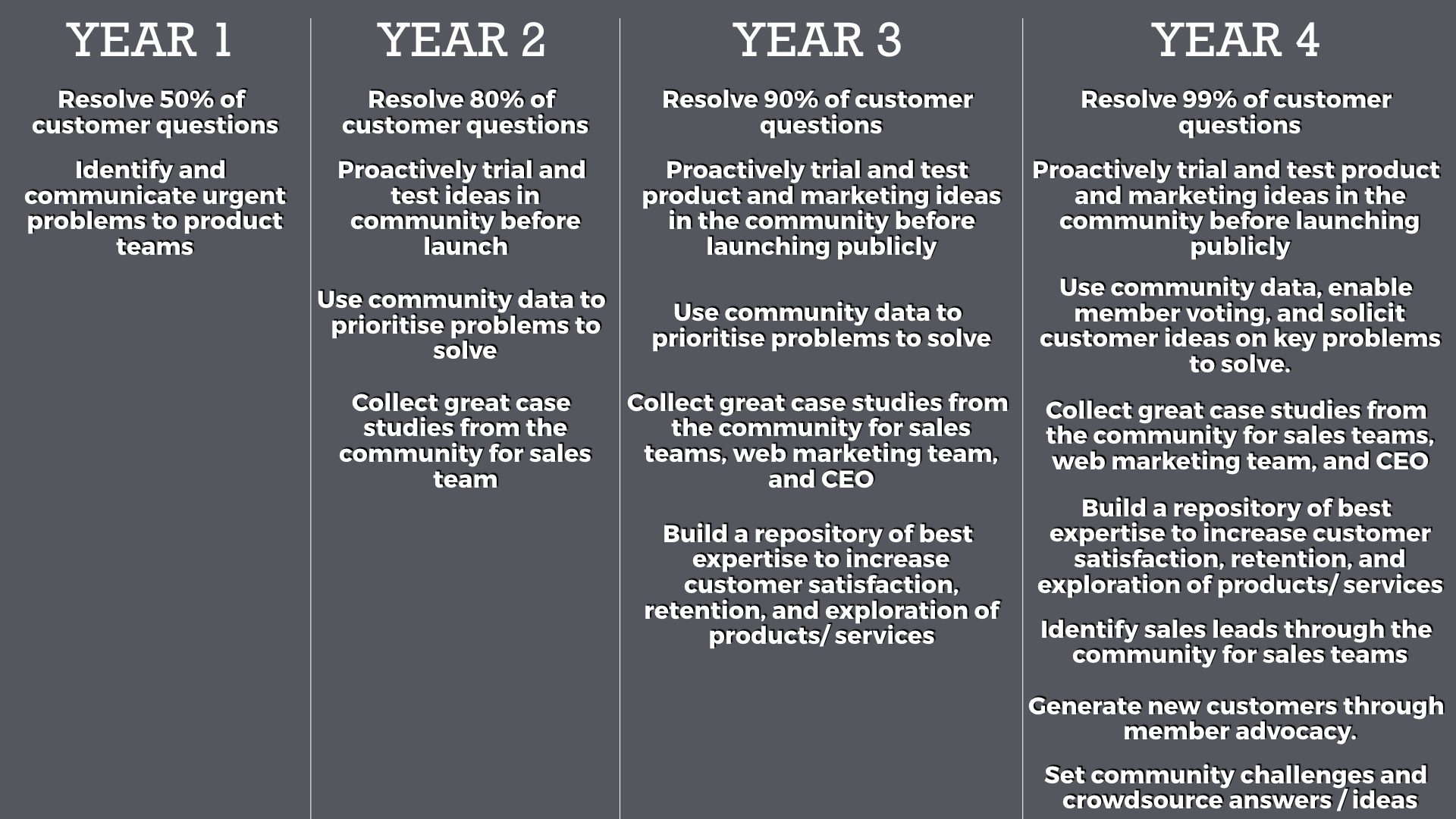
What Your Roadmap Might Look Like

When you’re just starting out, you usually begin with a single goal (this is usually customer support, collecting feedback, or customer success).

But over time you need to expand your goals until the community is supporting many areas of the business. This is how you can multiply the value of the community.

Alterx, for example, has one of the best brand communities I’ve seen. The community supports many areas of the business including customer support, training customers, events, gathering feedback, and a lot more we can’t see from the surface.

It’s so valuable to customers it even gets mentioned by the CEO on investor calls as a key pillar of the company’s strategy:

Forget engagement, that’s the level we want to aspire towards.

That’s what happens when your community is supporting multiple channels of the business. You become indispensable

When we teach participants to build a roadmap, we tell them to begin with a single goal which colleagues directly care about. Once that’s established, you can understand what other senior colleagues need and begin aligning the roadmap to those goals.

For example, it might look like the below:

Once you have a roadmap like this, it becomes a lot easier to explain where the community is going and what you need to get there. Once your colleagues know how the community will support them in the future it becomes easier to get support yourself.

When you have clearly progressive goals and know where you want the community to be in a few years’ time, you not only get a lot more respect, you also get to focus on doing the work that matters, not just driving more engagement.


IDENTIFYING THE RESOURCES YOU NEED

Too many community professionals make the same mistake. They ask for more resources to improve the community or drive more engagement.

No-one really cares about either outcome.

You should only ask for more resources to drive better results – this means tackling additional goals.

For example, you might ask for a part-time support staffer to identify and collect great case studies from the community for the sales team. Or you might ask for resources to build a platform which lets you easily track, escalate, and resolve more customer problems or set tasks for members to respond to etc…

These are directly connected to clear outcomes. Never ask for more resources to increase engagement, ask for more resources to capture more of the value a community creates.

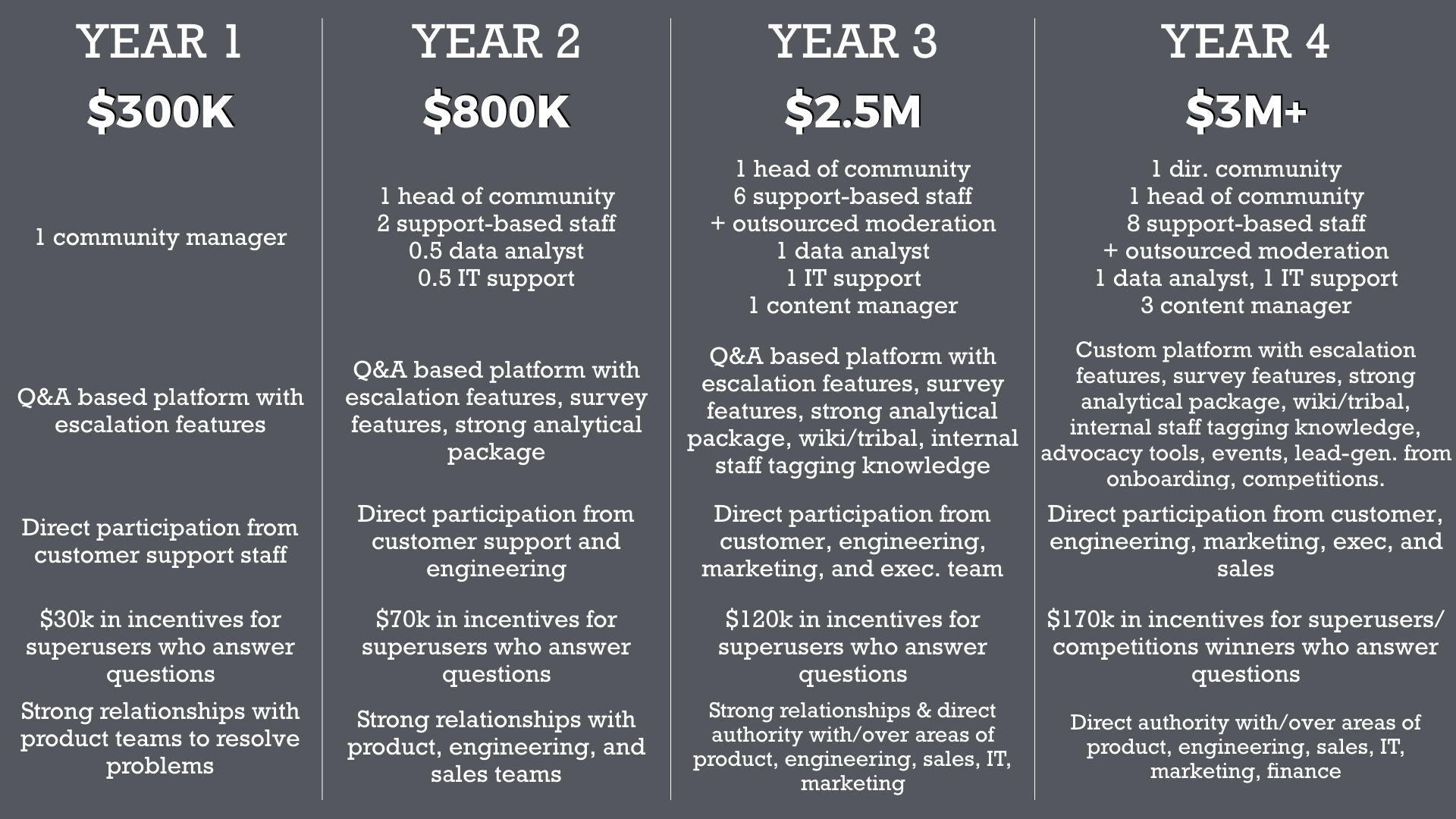
But you need to know what to ask for. This means you can take your goals roadmap and turn it into a required resources roadmap.

This highlights the technology, support staff, money, and processes you need to put in place to make the community reach its goal. For example, a (highly simplified) version might look like this:

Now you know exactly what you need to get to where you want to go. You can have a serious discussion about the trade-offs in getting more support and what you can deliver if you get that extra support.

You can present options to your boss and colleagues too.

“With [x] number of resources, I can deliver [y]. But with [xx], I can deliver [yy]”

These are the kinds of discussions that get you taken a lot more seriously than talking about the level of engagement you generated last week. It’s the level I believe everyone working with brand communities should be working at.

….and it’s the level we’re going to take you too if you sign up for our course.

04 Sep 05:02

Why Trump supporters believe he is not corrupt

Peter Beinart posits in the Atlantic that the corruption that I worry about — the influence of money on politics — isn’t the corruption that Trump’s supporters are worried about.

For many Republicans, Trump remains uncorrupt—indeed, anticorrupt—because what they fear most isn’t the corruption of American law; it’s the corruption of America’s traditional identity.

It’s a fascinating line of thought that’s a useful mental tool for the current zeitgeist. Still, it makes me sad that so many Americans identify with what I consider the worst parts of our identity instead of leaving those behind and moving towards the idea of America as the land of opportunity and freedom for all.

⚓︎
04 Sep 05:01

Synesthesia used to paint numbers through color

by Nathan Yau

Lucy Engelman has synesthesia, which is a perceptual response where one sensory pathway is stimulated, and a secondary sense is triggered. Daniel Mullen, in collaboration with Engelman, paints what she sees through the secondary sense.

In Lucy’s case, when she sees or thinks about time and numbers (days of the week, months, hours, years) as well as letters/words ie a person’s name, she experiences a different colour sequence in her mind’s eye. Additionally, time is spatial and coloured related, as in the days of the week, months, years, all have a coloured location in space and a shifting orientation. Essentially, she has an ever changing complex and luminous filter to view the abstract concepts of our world.

[via @mariuswatz]

Tags: color, paintings, synesthesia

04 Sep 05:01

The Art of the Personal Project: Those who got noticed in the press

by Suzanne Sease

The Art of the Personal Project is a crucial element to let potential buyers see how you think creatively on your own.  I am drawn to personal projects that have an interesting vision or that show something I have never seen before.  In this thread, I’ll include a link to each personal project with the artist statement so you can see more of the project. Please note: This thread is not affiliated with any company; I’m just featuring projects that I find.  Please DO NOT send me your work.  I do not take submissions.

Today’s featured artist:  Personal Projects that get noticed the press and in broadcast.  I often hear from photographers they done know what to shoot for a personal project.  I think you have to shoot from the heart and make it unique and special to you.  When I am looking for personal projects, I like to post ones that are a personal vision, something I have not seen before.  I am always thrilled when I see someone’s personal vision published in the press or broadcasted on television.  I remember when Grace Chon’s work was posted on a Today Show segment, Bob Carey’s lovely tutu project was on a national news segment, Jaime C. Moore was a feature on CBS Saturday morning or trending right now on Instagram @notengaged.  Some of these folks are professional photographers and several are not.  What they have in common is they created a project and put it out there and the internet Gods listened.

http://www.bobcarey.com/#/portfolio/portfolio/ballerina

https://www.gracechon.com/+projects/zoey-and-jasper/1

https://conornickerson.com/en/projects/childhood

https://www.instagram.com/notengaged

Rafael Mantesso & Jimmy Choo, the dog

Sioin Queenie Liaoand Queenie Liao and Wengenn in Wonderland

Jaime C. Moore  and her daughter as Influential Women through History

Marc Bushelle credits above for his project of his daughter dressed as History Makers  and more refined as  The Heroines Project

Theron Humphrey  This Wild Idea and featured in Time Magazine


APE contributor Suzanne Sease currently works as a consultant for photographers and illustrators around the world. She has been involved in the photography and illustration industry since the mid 80s.  After establishing the art buying department at The Martin Agency, then working for Kaplan-Thaler, Capital One, Best Buy and numerous smaller agencies and companies, she decided to be a consultant in 1999. She has a new Twitter feed with helpful marketing information because she believes that marketing should be driven by brand and not by specialty.  Follow her at @SuzanneSeaseInstagram


------------------------

Visit our sponsor Photo Folio, providing websites to professional photographers for over 10 years. Featuring the only customizable template in the world.

------------------------

04 Sep 05:01

Screenshots from the Console

by Yulia Startsev

Firefox DevTools has now added a screenshot command, so you can take screenshots directly from the Console (bug #1464461).

To access the command, open the Web Console via Tools → Web Developer → Console, type in :screenshot and press ENTER. A screenshot of the current document will be downloaded to your downloads directory.


You can also use the flags, as you could with the old screenshot command that was part of the GCLI. Here is a quick list, generated with screenshot --help

:screenshot --fullpage  // take a screenshot of the whole page
:screenshot --selector “.some-class”// take a screenshot of an element on the page
:screenshot --clipboard --fullpage  // take a screenshot of the full page and add it to your clipboard

About the syntax

You may have noticed the new colon syntax used for the screenshot command. We are using this to represent commands that are not part of the web environment, that can be accessed from the console. Moving screenshot to the console is part of the work we are doing to unship GCLI, you can learn more about this here. The GCLI used a UNIX style input grammar, and after some discussion we decided to keep it. The command is not part of the JavaScript language, or web APIs, and could potentially be confusing. This is why we use the : character to prefix commands. If this is something that works well, we may expand it to include other commands. For example, you can also try out :help to get the same result as help().

If there are other commands that you would like to see available in this format, let us know. If you are working on a web extension and would like to be able to implement your own web commands, let us know about that too, so we can work on getting you what you need.

Autocomplete

If you start typing a command prefixed by the : symbol in the console, you will see an autocomplete menu for commands (done in bug #1473923). At the moment it only contains the two available commands, :screenshot, and :help. We do not yet have support for the flags, but this may be added in a future iteration.

Future work

We have deprecated the “Upload to imgur” functionality with the new screenshot feature. In a future iteration, we plan to allow uploading to Firefox Screenshots directly, and be able to share them from your profile (you can read more about this feature here).

At present, the screenshot feature can be used from the browser console as well, but it will only capture the chrome of the browser and not the content window. This is planned for a future iteration (see bug #1474006)

Known bugs, and where to report issues

We have a couple of known bugs which can be found under this metabug. If you come across something that isn’t working as expected and hasn’t been listed, feel free to open a new issue.


04 Sep 05:01

These Weeks in Firefox: Issue 43

by mconley

Highlights

  • Today is the last day for Outreachy interns and GSoC students. Thank you for all your contributions! 🎉
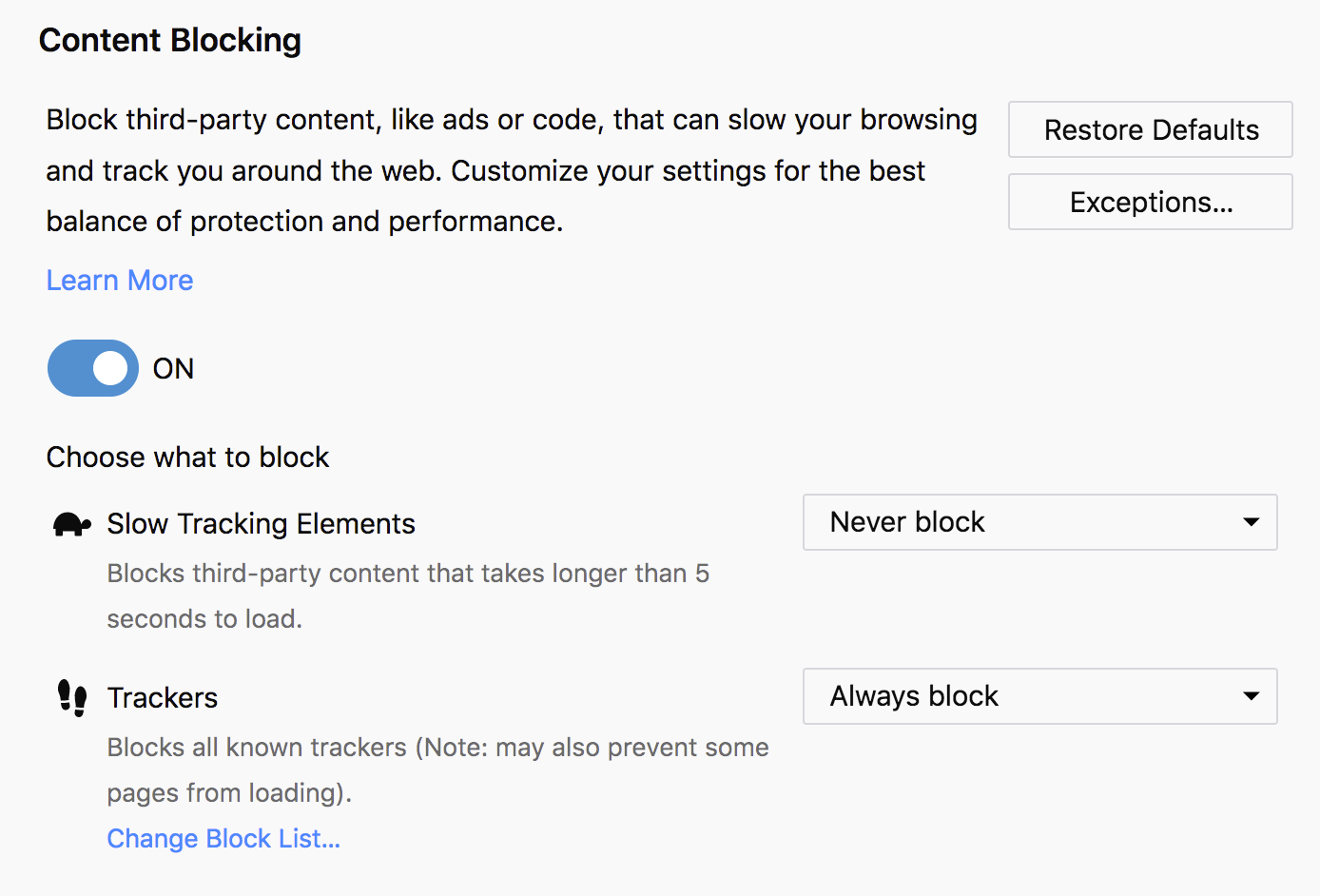
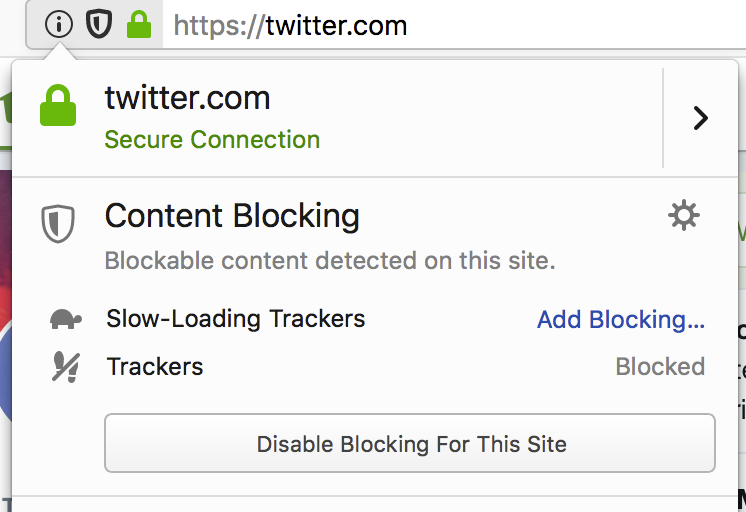
  • The Tracking Protection UI has been replaced with our new “Content Blocking” UI (almost) everywhere (Metabug). You can check it out in Nightly right now.
    • Showing the Content Blocking controls inside about:preferences.

      Shiny new controls for Content Blocking in about:preferences!

    • Showing the Identity Panel's new Content Blocking indicator and controls.

      The Identity Panel has been beefed up with Content Blocking powers too.

  • A new special kind of Topsites: Search Topsites. They emphasize to the user the option to search directly from the location bar with different search providers. Based on browser locale, relevant search providers will be pinned in the topsites area. There is also an option to add more search providers or remove them.
    • Showing the new default search engines in the Top Sites in Activity Stream

      Save yourself a step, and search directly from the address bar! Clicking these Top Sites will show you how.

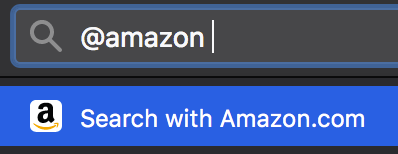
    • Clicking on a search topsite will pre-fill the location bar with the provider keyword and you can start searching!
      • Showing that you can search from the address bar using @amazon

        Typing @amazon followed by your search query is much faster than typing amazon.com, waiting for the page to load, and then starting your search.

  • Tab warming has been enabled by default on macOS, and is scheduled to ride the trains in Firefox 63! (This already rode out to Linux and Windows in Firefox 61)
  • A few issues with the new storage backend for WebExtensions were fixed, and it has been enabled on Nightly by default! This should improve performance for WebExtensions that make heavy use of the storage API – like AdBlock Plus.
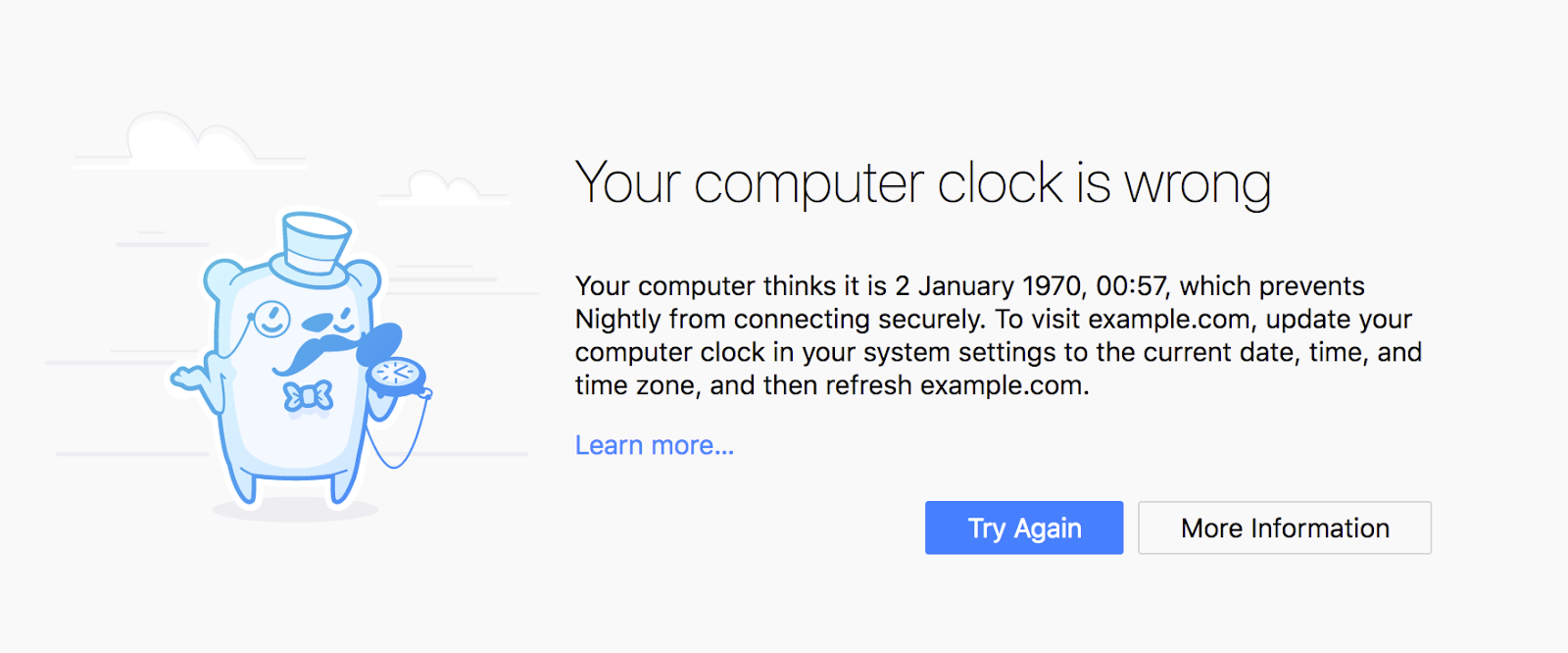
  • Thank you to Trisha Gupta for her great work on revamping the user experience on certificate error pages (including a brand new page just for system clock skew). You can try out the new error pages in Nightly and read more about her work in her post to firefox-dev.
    • The new certificate error page displayed when the computer clock is set incorrectly.

      Great Scott!

  • Thank you as well to Kanika Saini for all of her excellent work on the new about:policies page, which should be landing today in Nightly!
    • Showing off about:policies, which lists the policies currently set by system administrators.

      System administrators, rejoice!

  • Advance Test Pilot experiment launched!
    • Check out the blog post to read what that’s all about.

Friends of the Firefox team

Resolved bugs (excluding employees)

Project Updates

Add-ons / Web Extensions

Fluent

Lint

Mobile

  • Focus iOS launched 7.0 to our TestFlight beta testers last week

Performance

Policy Engine

  • Policy uplifts to ESR 60.2 have finished and are now being verified by QA
  • Kanika Saini’s Outreachy internship last day is today
    • She worked on 19 bugs, from policy improvements, new policies and a=the brand new about:policies page
    • Big thanks to Kanika for her work on these past 3 months! 🎉🎉

Privacy/Security

Search and Navigation

Address Bar & Search
Places
Other

Test Pilot

  • Screenshots
    • Bootstrap removal work is a Q3 goal (1422437)
  • Send Intern Emily Hou is done with her internship. She did a fabulous job working on the Send 2.0 update.

Web Payments

  • Completed
  • In Progress
    • Adding a card network dropdown
    • Working on nicer add/edit forms and improved error handling
    • DOM fixes thanks to Eden who has been re-hired!
04 Sep 05:01

170 Powell Street

by ChangingCity


These Powell Street buildings were designed by Fred Townley in 1912 for Major W R Dugmore, and constructed by Douglas & Ward at a cost of $45,000. We’re unsure whether the major was resident in the city, as he doesn’t show up in the street directories at all. We’ve looked for his history before in connection with the Dufferin Hotel, developed on Seymour and Smithe by Dickie & Dugmore.

We can find fleeting mentions of the Major in a few publications. In 1909 William A Dugmore of Vancouver was visiting Victoria, staying at the Dominion Hotel. In 1912 Major Dugmore was one of the invited guests at a military banquet in the Vancouver Hotel for a visit by the Governor General of Canada, the Duke of Connaught (Queen Victoria’s seventh child and third son). In 1912 he was reported to have been appointed as the Canadian representative for the Canadian Services’ Land Co, capitalized at $100,000, and headed by Alfred St George Hammersley, KC, and Sir Francis Lowe, MP. Hammersley had extensive Vancouver interests, but the new land company was set up to acquire Beaver Ranch at the north end of Nicola Lake. The advertisement in the Evening Standard said Major Dugmore was from the 72nd Highlanders, and had been awarded the DSO.

We’re reasonably certain W R Dugmore and W F Dugmore are the same person – William Francis Brougham Radclyffe Dugmore. A professional soldier for many years who had fought in at least seven campaigns, and awarded the DSO, Major Dugmore had married in 1910, and was clearly spent time in Western Canada, and invested in Vancouver even if he lived elsewhere. (There’s no sign of him in the 1911 Census anywhere in Canada, but he appears to have been living in the Channel Islands, aged 42). He joined the war in 1914, and was killed in action in 1917.

When the building first appears in 1914 it was listed as the Crown Rooms, with J Kamada, a second-hand dealer and barbers Jellick & Michael in the retail units. The name was unchanged in 1920, run by I & T Kutsukake, with M Kamada’s pool room and W Satta operating as both barber and pool room on the main floor. In 1938 the pool rooms were still here as the Powell Pool Rooms, but the accommodation was now the Newton Rooms, run by Mrs H Iwata. After the war the Japanese community had been forced out of the city, and the Chinese community often replaced the; in 1945 J Gon had a grocery store under the Newton Rooms, now run by P Jung. A decade later H Chow & Co had a warehouse next to Fisher Metal Products and The Newton Rooms were being run by H Jung.

The building were replaced in 2009 with ‘Smart’, an eight storey condo and retail building developed by Concord Pacific, and designed by Busby, Perkins + Will. The building has exterior corridors and minimal interior common space to keep monthly maintenance fees down for the 90 owners. The building sold out in five hours, and initial owners included 9 members of the architects’ office.

Image source: City of Vancouver Archives CVA 790-2419

04 Sep 05:01

Let’s look at Johnny Depp’s love life

Three days ago, the great Kate Rabinowitz posted a visualization by The Sun on Twitter:

I like this chart. I find it poetic to think about one’s life as a line that just keeps going and going. In most line charts, perfectly straight lines are a rare sight. But when it comes to age, anything else but a straight line would be a miracle. We’re aging at a very, very consistent rate.

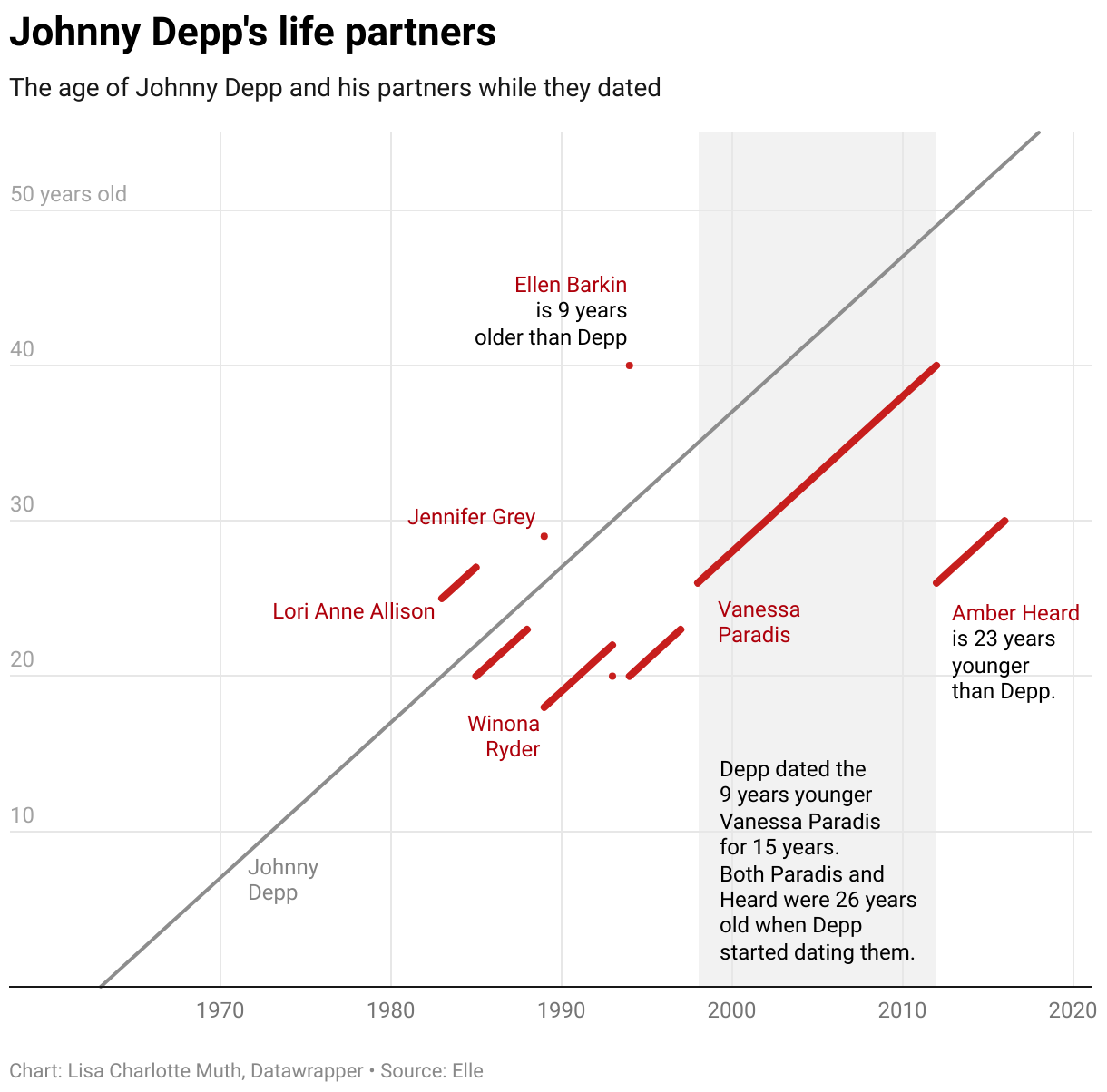
Although when starring at this chart, I saw potential for improvement. I wanted to see not only the aging of the Hollywood star, but also of their partners. Maybe Leo with his short interests wouldn’t be the perfect person to chart. So I randomly chose Johnny Depp instead:

I was happy with this chart type (it’s called a “Lexis Diagram” in demography). It shows well how other people join our “lifeline” with their own histories, become friends and partners and grow older with us.

But something still bugged me. I don’t think most Western people see their lives going up, from the bottom (left) to the top (right). In our culture, time “moves” from left to right. So if asked, I assume that most people would draw their lifelines from left to right. Like this:

This chart fails horribly. In fact, I was surprised how much it fails; how much less the chart becomes readable just because I rotated the chart by 45 degrees. The rotated grid is simply not intuitive. The bars overlap vertically, so it looks like Johnny Depp dated more than one person at the same time. And the bar suggests that Vanessa Paradis was together with Depp while he was 30 to 45 (not 35 to 50). This chart would need to abandon the age dimension to work well.

The difference in design between the two charts is a simple 45° rotation. But there are worlds between the usefulness of the first and second chart. Sometimes, little design decisions can improve a chart massively. Or, you know, worsen.

Edit 24/08: Franck Lebeau created a chart that still shows Depp’s life from left to right, but fixes all the problems of the second chart:

Genius! Thanks, Franck.


You will find a very similar chart on page 168 of Alberto Cairo’s “The Truthful Art”. Totally coincidentally, we will read exactly this book next in our Data Vis Book Club. Join us: You can find more information about the book club in this article. And I’ll see you next week!

04 Sep 05:01

Facebook is secretly rating your trustworthiness. Excellent!

by Josh Bernoff

According to the Washington Post, Facebook is rating your trustworthiness on a zero-to-one scale. Not only that, they won’t tell you how they rate people. Here’s why that’s a necessary first step in squashing the spread of fake news. First, let’s get this out of the way. Facebook is biased. All social media and search … Continued

The post Facebook is secretly rating your trustworthiness. Excellent! appeared first on without bullshit.

04 Sep 05:01

Ichiran Ramen – Tokyo, JP

by shokutsu
Ichiran Ramen Roppongi GM Building, 2F 4-11-11 Roppongi, Minato-ku Tokyo, Japan Tel: +81 3 3796 7281 Ask any visitor as they head to Japan in search of ramen, and they will likely say, if they’ve done any reasonable about of research, that Ichiran and Ippudo are the two names that pop up most frequently in […]
04 Sep 05:00

Using SQLite with Libreoffice Base on Linux

by Thejesh GN

I love SQLIte for its simplicity, portability and stability. Most of my personal projects use SQLite as the database. For most I suggest using DB Browser for SQLite (DB4S) project which has a great UI, is open source and cross-platform. But I still know some who like to use LibreOffice Base. LibreOffice is a powerful, Free and Open Source office suite. Base is part of this suite. Base is a full-featured desktop database front end designed for non technical users. It makes interacting with the database (local or remote) easy. It allows the users to create reports, forms etc.

Base is a full-featured desktop database front end, designed to meet the needs of a broad array of users. Base caters to power users and enterprise requirements, providing native-support drivers for some of the most widely employed multi-user database engines: MySQL/MariaDB, Adabas D, MS Access and PostgreSQL. In addition, the built-in support for JDBC- and ODBC-standard drivers allows you to connect to almost any other existing database engine as well.

So I thought it would be great to have SQLite work with Base. It would have been great if base allowed opening Sqlite file directly. But it doesn’t. But base does allow the user to connect to any database using ODBC. In this how-to we will do the same. We will also create a report as a test case.

System

Even though the steps I have here should be some what reproducible on any Linux system, I use Ubuntu on daily basis. Hence the commands to install are mostly for Ubuntu. You might want to run the specific commands for your distro, specially sudo apt-get install part.

Install SQLite3 and Libreoffice Base

Let’s start with installing SQLite3. We are choosing the latest SQLite available. We also need to install the SQLite3 development files. This can be done by installing libsqlite3-dev

sudo apt-get install sqlite3 libsqlite3-dev

My Ubuntu LibreOffice installation didn’t have base installed by default. So I had to install the Base manually

sudo apt-get install libreoffice-base

Install UnixODBC

Open Database Connectivity (ODBC) is a standard set of APIs for accessing database management systems (DBMS). Idea was to make the Application-DBMS interaction independent of platform or databases. UnixODBC is a standard ODBC implementation for *nix systems like Linux1.

You can install the unixodbc bin files and def files by running the

sudo apt-get install unixodbc-dev unixodbc-bin unixodbc

Install SQLIte ODBC Driver

ODBC driver is a translation layer between the your application and database. When it receives a specific query from the application it translates into a way that is required by the specific database. It is very specific to database and can vary for platforms. In our case we need to install SQLite ODBC Driver for Linux. Go to the project website and download the tar file. When I was writing this file it was sqliteodbc-0.9996.tar.gz. Extract it and then use make to compile and install 2

./configure && make
make install

Configure ODBC – Driver

Now that we are done with the installations we need to configure the ODBC Driver. Start with editing the file /etc/odbcinst.ini

nano /etc/odbcinst.ini:

and add the following definitions to ini file. It defines the ODBC Drive setup

[SQLite]
Description=SQLite ODBC Driver
Driver=/usr/local/lib/libsqlite3odbc-0.9996.so
Setup=/usr/local/lib/libsqlite3odbc-0.9996.so
Threading=2

Configure databases to be used by ODBC – Data Source Name (DSN)

To start create a dummy database called test.sqlite in your home folder. In my case it will be at /home/thej/test.sqlite. Also create a table called accounts with id and name as columns. We want to connect to this test.sqlite from Base and using the SQLite ODBC Driver To do this we need to define Data Source Name (DSN). We can have as many as we want depending on number of databases we want to connect. Make sure names are unique – thejtest

To define DSN, Edit ~/.odbc.ini (This is specific to your logged in user account) and add the following.

nano ~/.odbc.ini

It basically defines the name of this DSN, a description, Which ODBC driver to use and a database URI (in this case path).

[thejtest]
Description=My SQLite test database
Driver=SQLite
Database=/home/thej/test.sqlite
# optional lock timeout in milliseconds
Timeout=2000

Now we are ready to connect to our database from Base.

Use your SQLite in Libreoffice Base

Setup

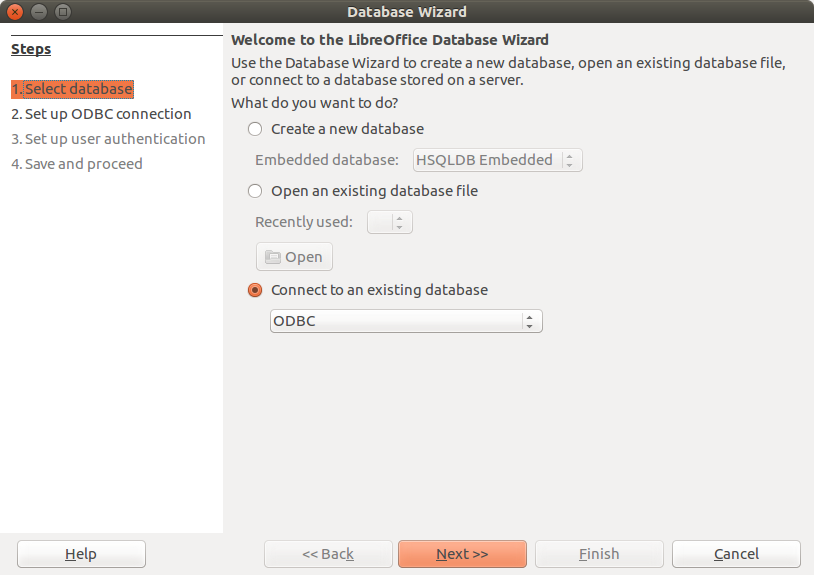
Start Libreoffice Base and Select the connection type as ODBC.

Start Libreoffice Base and Select the connection type as ODBC.

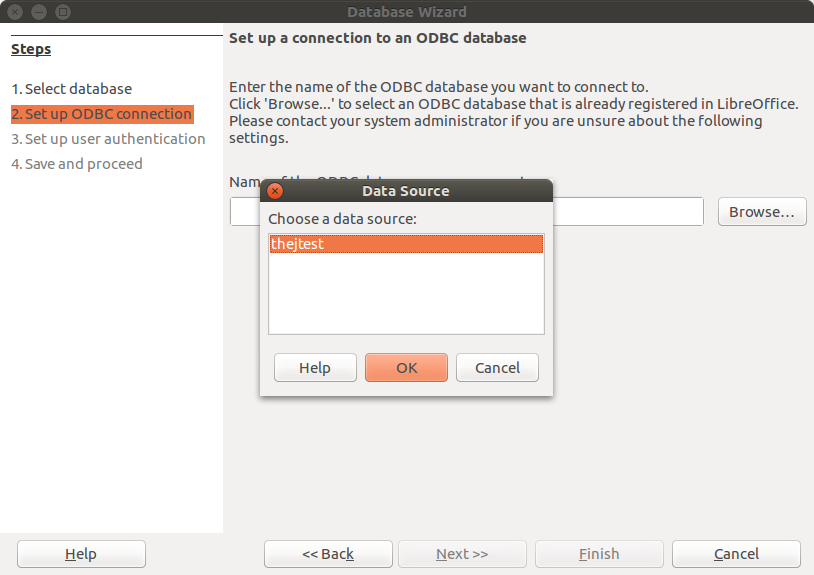
Select the connection (DSN) name that you have already setup.

Select the connection (DSN) name that you have already setup.

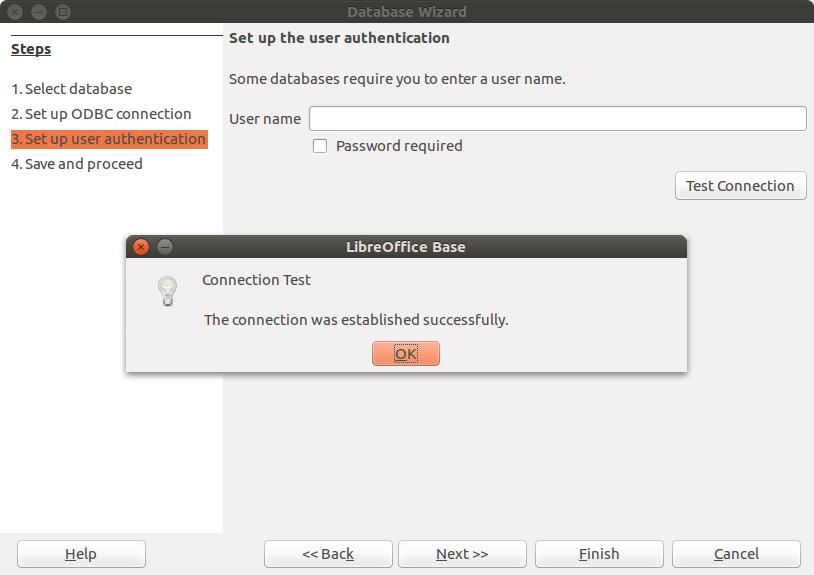
Test the connection.  SQLite usually doesn't have any passwords.  Test connection should work if everything is setup properly.

Test the connection. SQLite usually doesn’t have any passwords.
Test connection should work if everything is setup properly.

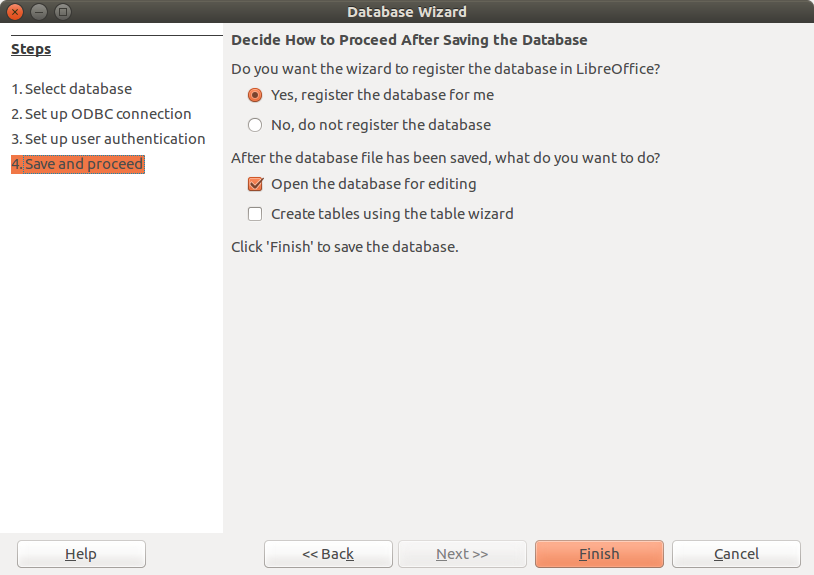
Save this registration.

Save this registration.

Now you can save the document for future use. The document will have .odb extension.

Create a Report

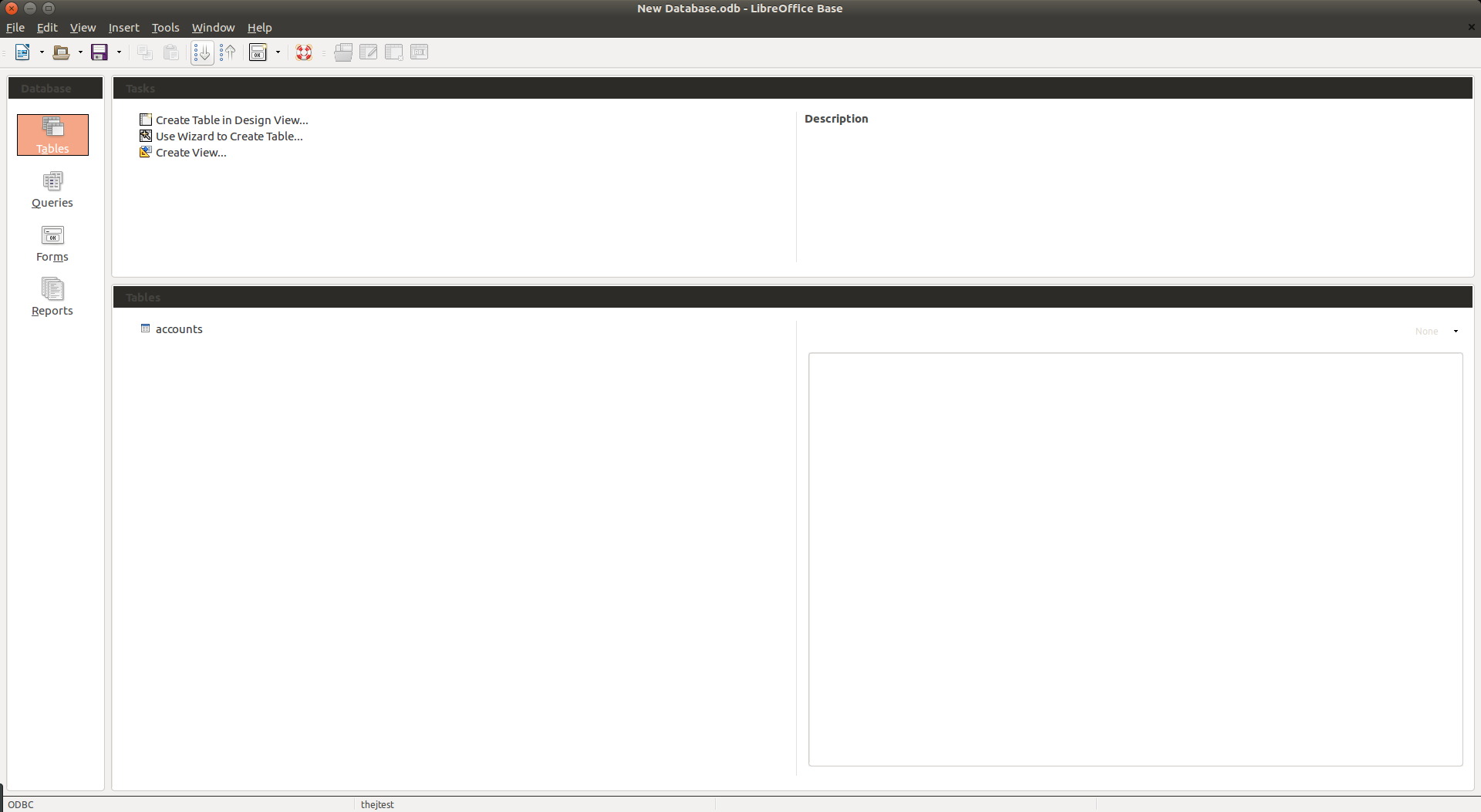
Once you open it should show you the list of tables in the database. You can see accounts here.

Once you open it should show you the list of tables in the database. You can see accounts here.

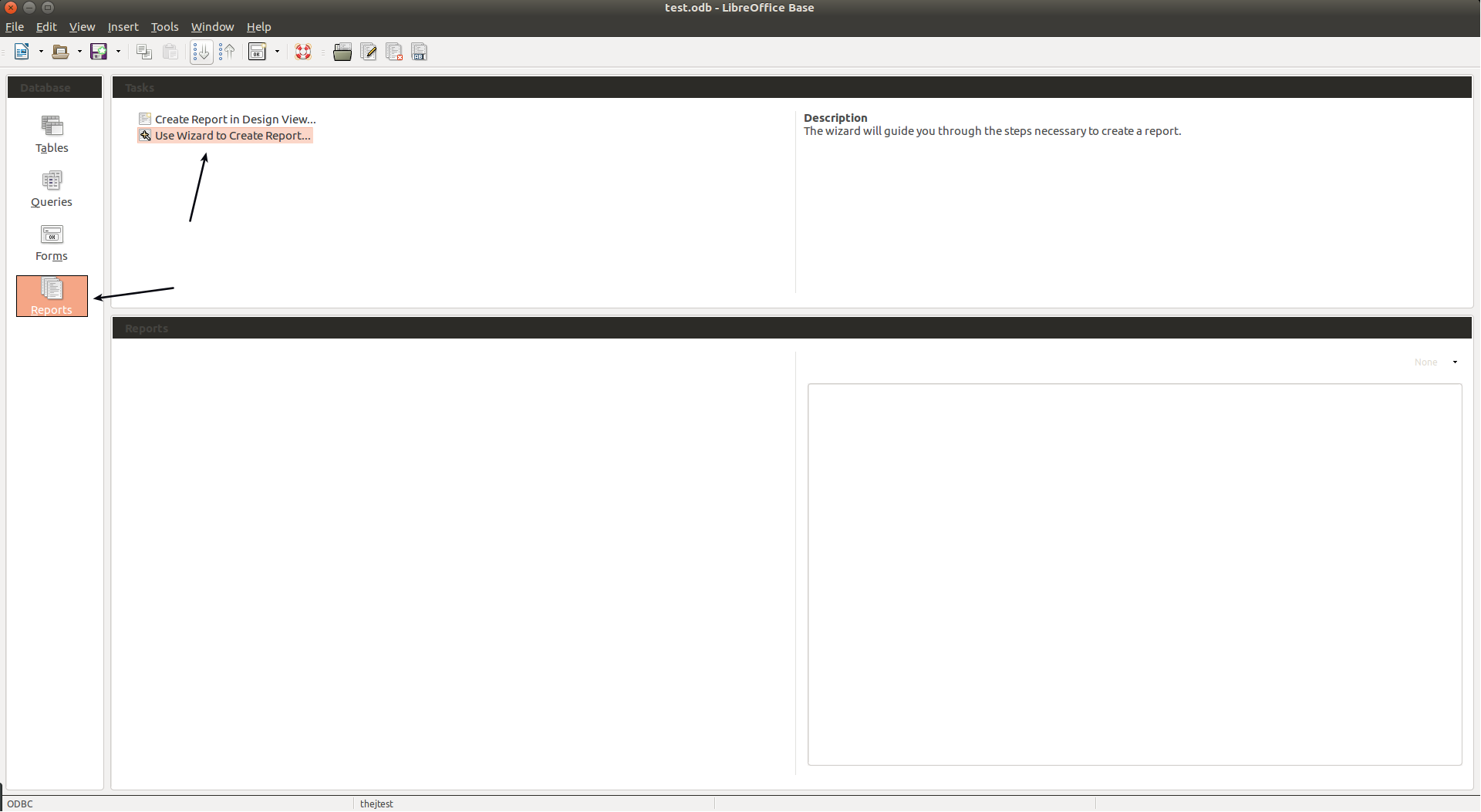
Go to reports tab at left and then select Wizard to create a report.

Go to reports tab at left and then select Wizard to create a report.

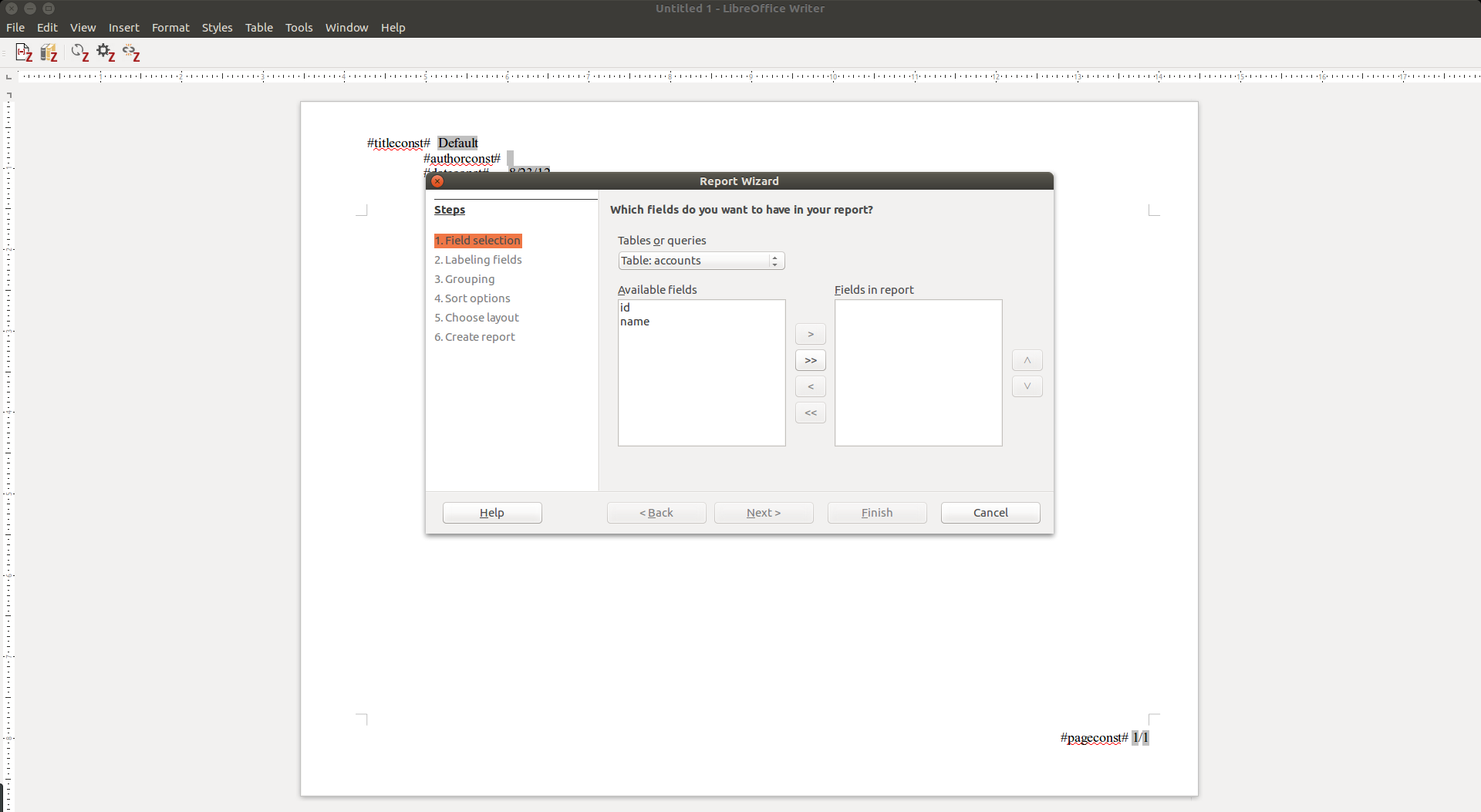
Now the base open writer and a wizard showing tables.

Now the base open writer and a wizard showing tables.

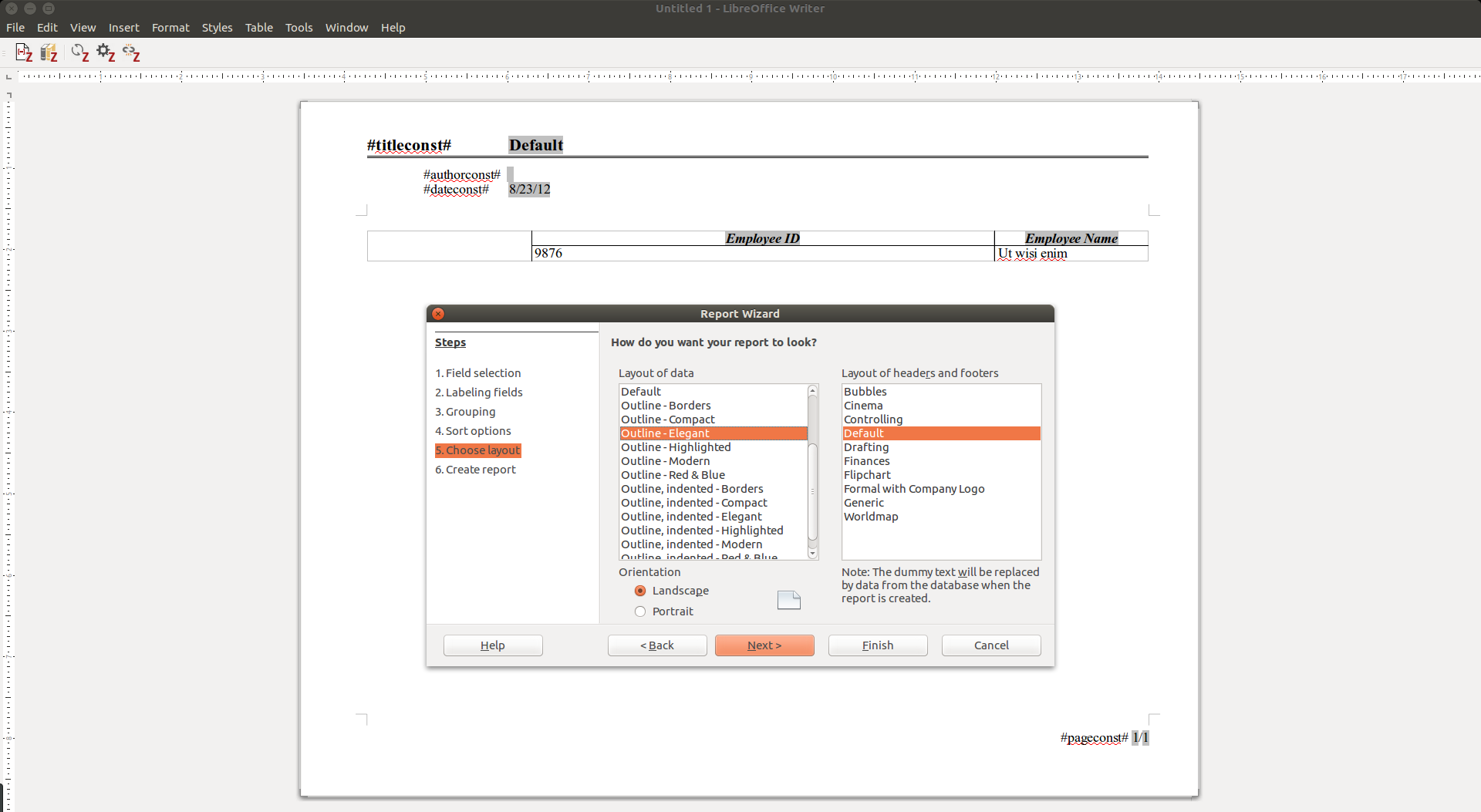
Once you select the fields, grouping and sorting, Select the layout.

Once you select the fields, grouping and sorting, Select the layout.

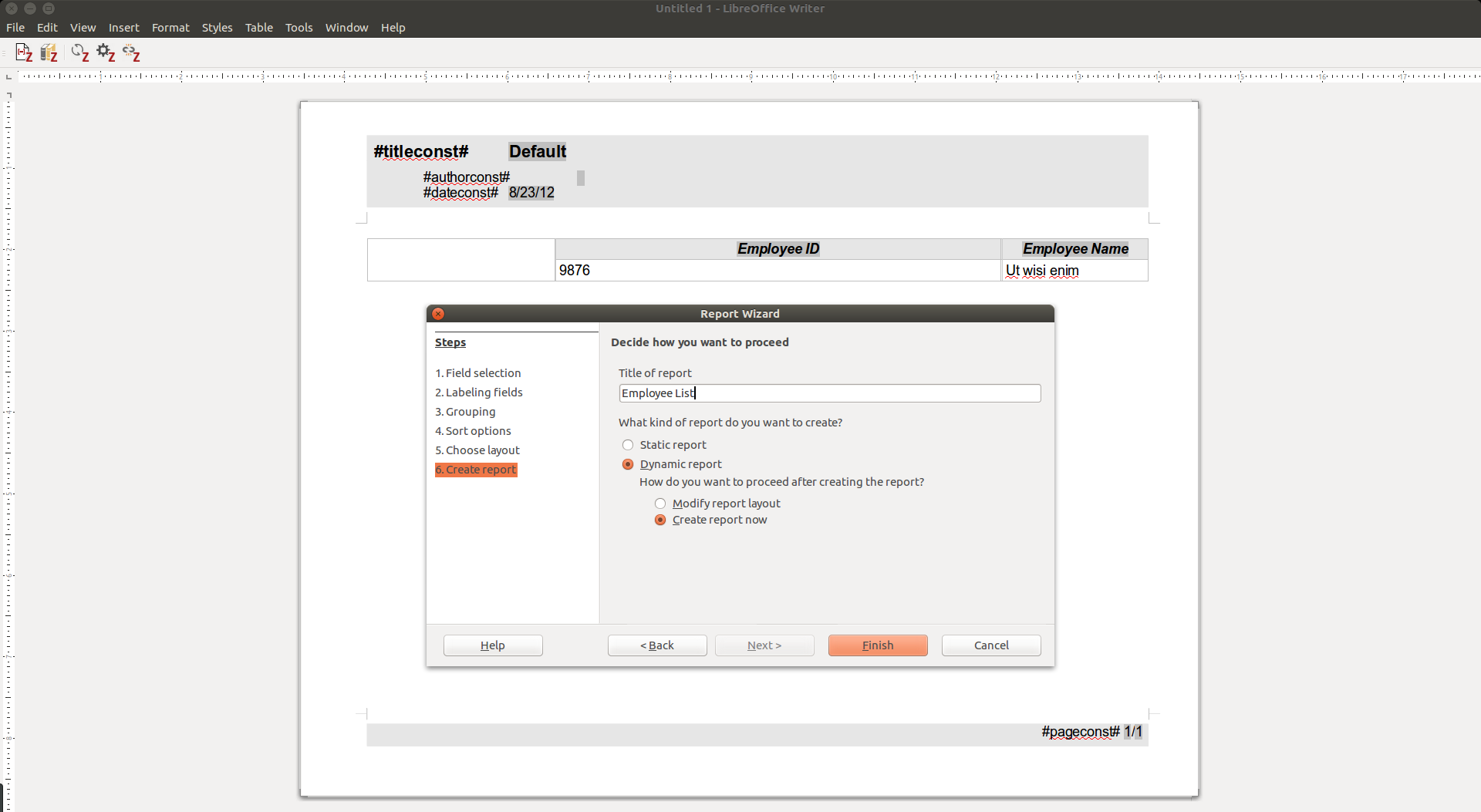
Give a name to the report and select the option dynamic report. So you will always get the report based on latest data.

Give a name to the report and select the option dynamic report. So you will always get the report based on latest data.

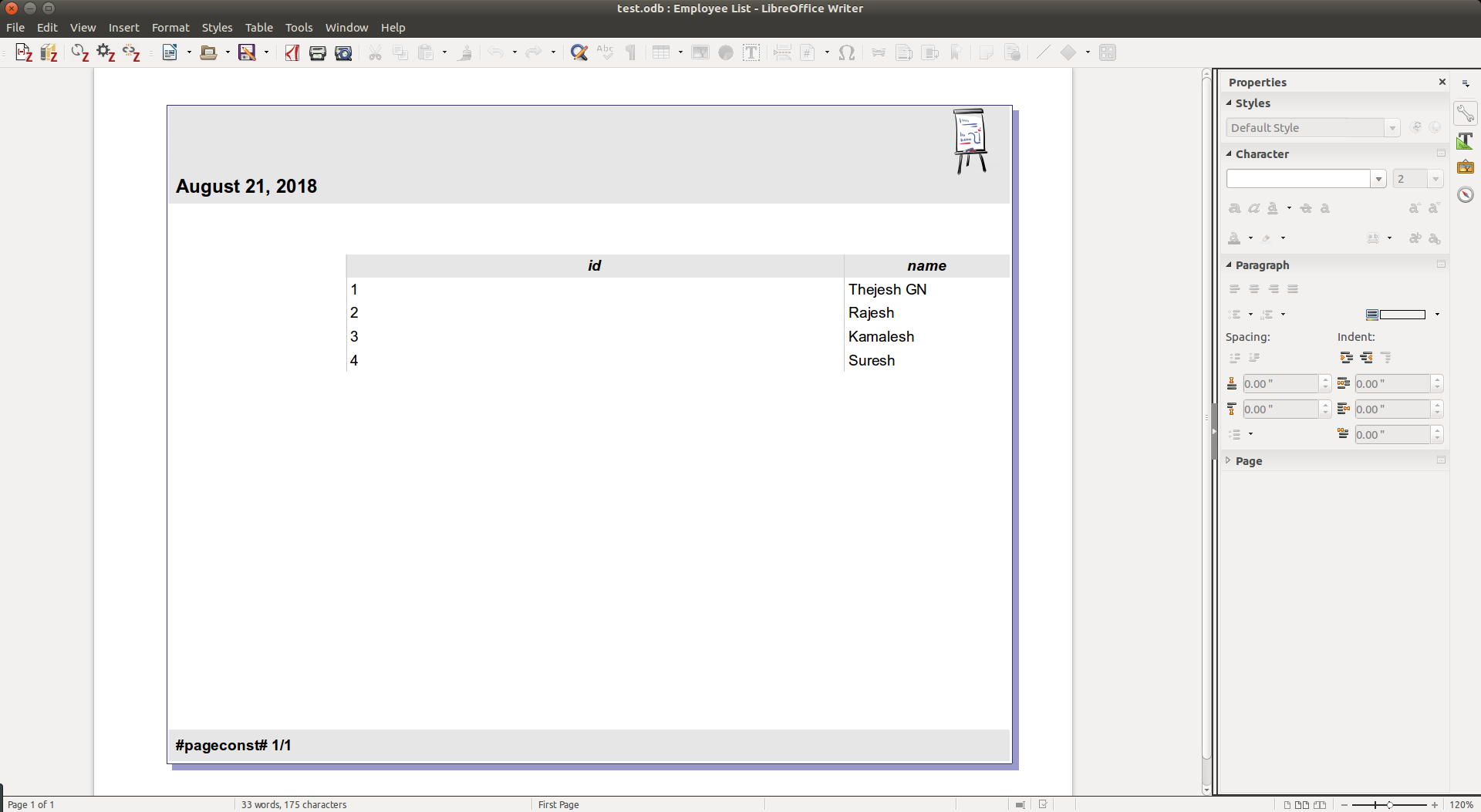
Save the odb file at this point so your report settings are saved.

Once its saved, it can be run fun from the home page any time.  You can do a lot of customization like colors, logos etc. I have not put that here.

Once its saved, it can be run fun from the home page any time.
You can do a lot of customization like colors, logos etc. I have not put that here.

Remember

  • In Base, all editable table needs primary keys.
  • The Base documents will have .odb extension.
  • You can send/share the .odb documents by email or using any other options. The receiver also needs to have corresponding SQLite database file. He also needs to configure ODBC on his machine
  • SQLite database can be updated independent of Base

Footnotes

  1. There is also iODBC – Independent Open DataBase Connectivity. Another FOSS ODBC implementation.
  2. Might need to do sudo
04 Sep 05:00

✚ Charting Pitfalls, Flexible Guidelines, Exceptions to the Rules

by Nathan Yau

Don't use this chart type. That's misleading. Make sure to only use this color scheme. That takes too long to interpret. Use this scale to show that thing. Sometimes it seems like there are so many visualization pitfalls, rules, and guidelines — often conflicting depending on who you ask — that it can be hard to keep track. Read More

04 Sep 05:00

dandyREVIEW – Building the Cycling City

by dandy

Review by Robert Zaichkowski. Photos provided by Modacity.

Over the past few years, members of Toronto’s cycling community have become connected with Melissa and Chris Bruntlett of the Modacity creative agency. Melissa, Chris, and their children Coralie and Etienne have been living car-free in Vancouver since the summer of 2010 and did a bike tour of the Netherlands in the summer of 2016. The five cities they visited – Rotterdam, Groningen, Amsterdam, Utrecht, and Eindhoven – form the basis of their book “Building the Cycling City: The Dutch Blueprint for Urban Vitality” which will be publicly available from Island Press on August 28, 2018.

“Building the Cycling City” starts off strong with some clear differences between the Dutch and Danish approaches to cycling. While the Danes focus most of their efforts on Copenhagen and prescribe copy-and-paste solutions, the Dutch excel in making their entire country bikeable with bicycles outnumbering motor vehicles in 202 Dutch cities and towns! The Dutch recognize one size doesn’t fit all for cycling infrastructure; a point they emphasize by using Rotterdam as the first of the cities discussed. Unlike the medieval cores of Amsterdam and Utrecht, North American cities can better relate to Rotterdam, whose city centre was destroyed during World War 2 and rebuilt with a focus on motor vehicles, wide streets, and segregated zoning bylaws. It is this abundance of space which allowed Rotterdam to more easily redesign their streets on a human scale and reinforce the chapter title about streets not set in stone.

Throughout the book, the Bruntletts not only describe their experiences in the five Dutch cities they visited, but also how North American cities are adapting Dutch best practices to their own context. In one case, New York City’s tactical urbanism under former transportation commissioner and Streetfight co-author Janette Sadik-Khan even inspired Rotterdam to install their own pop-up plazas (or “city lounges”) which were designed with extensive public feedback. A refreshing story on how cities inspiring others is indeed a two-way street.

Utrecht's Oog in Al School with their rooftop cycle path

“Building the Cycling City” brought up standout infrastructure such as the Rijnwaalpad cycle superhighway, the rooftop cycle path of Utrecht’s Oog in Al School, and Eindhoven’s “Hovenring”. However, the Bruntletts also stressed the need for a culture change from North America’s sport focus with road bikes in their bike shops and the labelling of people based on their mode of transportation. The Dutch instead cycle for transport with upright “Dutch” bikes which originated from the safety bikes of England in the late 19th century, electric assist for increased accessibility, cargo bikes for more efficient goods delivery, and integration of cycling education nationwide. The Bruntletts – like the Dutch – reject the label of “cyclist” by instead focusing on humanity’s intermodal nature; something the Dutch excel with the NS national railway service and the OV-Fiets bike share for the last mile.

Despite what North Americans may view as a cycling utopia, the Bruntletts ensured a balanced perspective by highlighting some of the challenges the Dutch faced past and present. Dutch immigrants tend to have a lower cycle mode share than the national average; partly due to a lack of access to bicycles or public transit (a.k.a. transportation poverty). Cities such as Amsterdam and Utrecht struggle to meet bicycle parking demand despite having entire parking garages dedicated to bikes. However, the Dutch experience from the 1960’s and 1970’s gives hope for North American cities struggling with road violence today with divergent movements such as Provos, Stop de Kindermoord and Fietsersbond (Dutch Cyclist Union) working towards the common goal of having a city not overwhelmed by cars.

The bicycle street (or Fietsstraat) such as this one in Gronigen makes it hard to imagine the Dutch designed their streets primarily for motor vehicles fifty years ago

Despite the lack of Toronto examples, the book’s lessons equally apply here. The tactical urbanism spirit can be found with the King Street transit pilot and pilot bike lanes on Richmond, Adelaide, and Bloor Streets; the latter of which was made permanent last November. The redesign of Queen’s Quay made Toronto’s waterfront so popular the City ended up with ten times more people riding bikes than anticipated at 6000 per day! Toronto’s integration of bicycles and transit is good with available racks on buses, stations with repair stands and bicycle friendly elevators, and the ability to bring bicycles on TTC subways and GO trains outside of peak hours; though their secure bicycle parking needs work. Finally, CultureLink’s BikeHost program helps connect newcomers to two wheeled transportation.

Overall, I would equate “Building the Cycling City” to riding a Dutch bike. You don’t want to rush through it like a road bike, but it hauls a lot of lessons from the Dutch cycling experience which are practical to North American cities and delivered in an upright, easy to read manner.

Melissa and Chris Bruntlett

Toronto residents will have opportunities to meet Chris and Melissa Bruntlett, as well as buy the book. They will be taking part in two events this Sunday which will be covered here on dandyhorse; those being The Reading Line (starts 1:00 p.m. at Bloor and Bathurst) and the sold-out Bikes and Transformation episode of BIKE MINDS (starts 6:30 p.m. at Todmorden Mills). On Saturday, September 8, Modacity and Vélo Canada Bikes will be hosting Toronto’s first ever cargo bike championship at the Bentway near Fort York.

Robert Zaichkowski is a Board Member of Cycle Toronto, an accountant, and writes the Two Wheeled Politics bike blog.

Upcoming: dandyREVIEW of Copenhagenize by Mikeal Collville-Andersen

04 Sep 05:00

ROM sites are falling, but a legal loophole could save game emulation

by Rui Carmo

As a fan of retro gaming who’s never managed to marshal the time and effort required to build his own home arcade (though not for lack of peer pressure), the most fascinating aspect of the entire rigmarole is not the whack-a-mole routine, but rather the gaping market void that could be filled by the copyright owners themselves.

Nintendo, in particular, has been notable by making a complete hash of its Virtual Console offerings (which I actually bought some of for the Wii), and no console manufacturer has yet taken the time to provide a classic game library that can pass muster. Sure, it would take revenue away from AAA titles–but it would massively increase customer loyalty (as a dad, I would very much like to see my kids playing some classic games) and provide additional revenue streams for publishers.

(Also, I suspect the required engineering effort to port/emulate older games would be much cheaper than what they’re spending on legal fees right now.)

04 Sep 05:00

See you at the Voice of Blockchain conference?

I'll be at the Voice of Blockchain conference in Chicago on Friday and Saturday. Two panels: "Journalism: Incentivizing the Truth" on Friday, and "Crowdsourcing, Bounties, and Democratizing Access to Jobs" on Saturday.

So what does blockchain have to do with incentivizing journalism?

One important reason that we have standards of fairness and accuracy in news is that news organizations sell advertising to mainstream brands. Brands that want to be able to sell to everyone, not just one side of a political or social issue. High-reputation news sites don't respond individually to the demands of advertisers, but the principles on which high-reputation news sites operate have developed in parallel with the needs of brand safety.

On today's web, reputation-based advertising is not so much of a thing. Adtech firms place ads from legit brands on brand-unsafe sites, usually without anyone at the brand knowing about it. Faris Yakob points out, By squeezing fees and margin procurement put incredible pressure on agency principals, who have obligations to hit certain targets from the holding companies. Rock meet hard place. Thus new sources of revenue were found, in media rebates, or opacity, or programmatic trading desks, or production fixing - all conflicts of interest that can be leveraged to try to appease both masters...for a time.

When agencies try to get ad impressions in front of the desired audience at a bargain price, a lot of ad money ends up with fraudulent or brand-unsafe sites. Even legit sites end up running 50 to 70 tracking scripts because they lack the market power to protect their audience from being tracked to cheaper sites.

Incentivizing journalism depends on helping users protect their personal information from being tracked from one site to another. As users get the tools to control who they share their information with (and they don’t want to leak it to everyone) then the web advertising business has to transform into a reputation contest. Whoever can build the most trustworthy place for users to choose to share their information wins.

Blockchains are slow and expensive compared to databases or conventional payment systems, but cheap compared to trust networks. As browsers take a more active role in protecting users from third-party tracking, reputable news sites will need a new technical infrastructure for Internet advertising that accurately reflects the trust relationships between brands, agencies, sites, and users.

What about "Crowdsourcing, Bounties, and Democratizing Access to Jobs"? This is a fun area. Learn market design is the new learn to code.

Developers would prefer to release open source software at a high quality level and get paid for it. Many users would prefer to use software at a higher quality level if they could pay for it. The current software market, though, incentivizes companies to release at a low quality level, in order to get early adoption and build network effects. One approach is to build a new kind of market, one that allows users to hedge their software quality risks while enabling developers to trade on the likelihood of bug fixes. More info: Rao et al.

IMHO, open source bounties still have problems with incentivizing partial work and meta work, so there are lots of opportunities to build better markets here. (Ever notice that there are more companies offering solutions to open source license risks than solutions to developer burnout risks?) Anyway, go read Sneha Sinha's piece on paid internships.

Bonus links

Has the GDPR law actually gotten European news outlets to cut down on rampant third-party cookies and content on their sites? It seems so

A web of anxiety: accessibility for people with anxiety and panic disorders Part 1

Targeted advertising (where the browsing habits of consumers are tracked and then used to provide them with more specific adverts) was another commonly cited source of anxiety, with many respondents feeling powerless to stop the intrusion. One described how “a lot of my particular anxieties came into full swing when I learned more about how online advertising works. When I noticed Facebook ‘Like’ buttons on unrelated pages and when ads follow me around. The feeling that I had no privacy was claustrophobic and has led to so many anxiety attacks I have lost count”.

Hackers Use Chipotle Ad To Spread Malware

The link from the Chipotle ad redirected consumers to an Amazon gift card scam that presents the viewer with a fraudulent message that is intended to prompt a click to steal the user’s personal information.

04 Sep 04:58

Five-word movie review: “The Avengers: Infinity War”

by sheppy

Why did I watch this?!?

04 Sep 04:30

I’m a Goddamn Social Media Professional

Social media is part of my job. And, frankly, it always has been (especially if you include blogging as social media).

I’ve joined Mastodon, and I find myself constantly confused. It’s not the idea of the federation — I get that. Not a problem. It’s just that the apps I’ve tried (including the web app) are difficult to use and/or don’t do the things I want them to do, or do them confusingly.

Some notes, in no particular order…

Please steal the best solutions from Tweetbot and Twitterrific!

I don’t ever care about the firehose timelines. Ever. If it were me writing the app, I wouldn’t even include these. Just hide them away somewhere if you have to have them. Most people are never going to care — they want to see toots from the people they follow and they want to see mentions/replies.

Support for multiple accounts is a must. I have two so far, and it’s entirely likely I’ll have more.

Goddamn social media pros like me sit in front of a Mac all day, because it’s the best way to be super-efficient. I need a good Mac app. Native. I can’t run yet another Electron app. (Two — Slack and this thing we use at work — is about all my computer can take.)

On the Mac, support for multiple accounts also means multiple windows so I can have different windows for my various accounts. (This is how I use Twitterrific on my Mac.)

The most important thing is to be able to participate in conversations. It should be easy to read a thread and reply. (See Twitterrific and Tweetbot.)

I want a tab for my mentions. I also want mentions in the main timeline.

I don’t need notifications about new followers. I’ll check my follower count once a week or so to make sure it’s going up.

I need to be able to check my follower count easily.

I don‘t need notifications about likes and boosts to be in my face — these can be tucked away for when I want to look.

I don‘t care about trends. At all. Ever. The thing I care about is people talking about my things or things that interest me. Trends could (and should, really) just go away.

Searching, on the other hand, is critical, and I need to set up persistent searches for my things and things that interest me.

iOS apps should support Dynamic Type or at least provide a way to change the font size. Pulling out my readers from my bag — while I’m on a crowded bus — is not going to happen. Mac apps should also provide a way to set the font size.

I need to be able to disable boosts on a per-user basis — some people are interesting but their boosts are not so much.

Simplify!

04 Sep 03:34

FRITZ! Mesh :: Finde den Fehler

by Volker Weber

Sketch

04 Sep 03:33

DJI improves the Mavic Pro. Again.

by Volker Weber

I find it absolutely amazing, how DJI keeps on innovating. Faruk has a great review. Challenge: count the number of cameras on this thing.

03 Sep 17:29

The History of Aperture

by Stephen Hackett

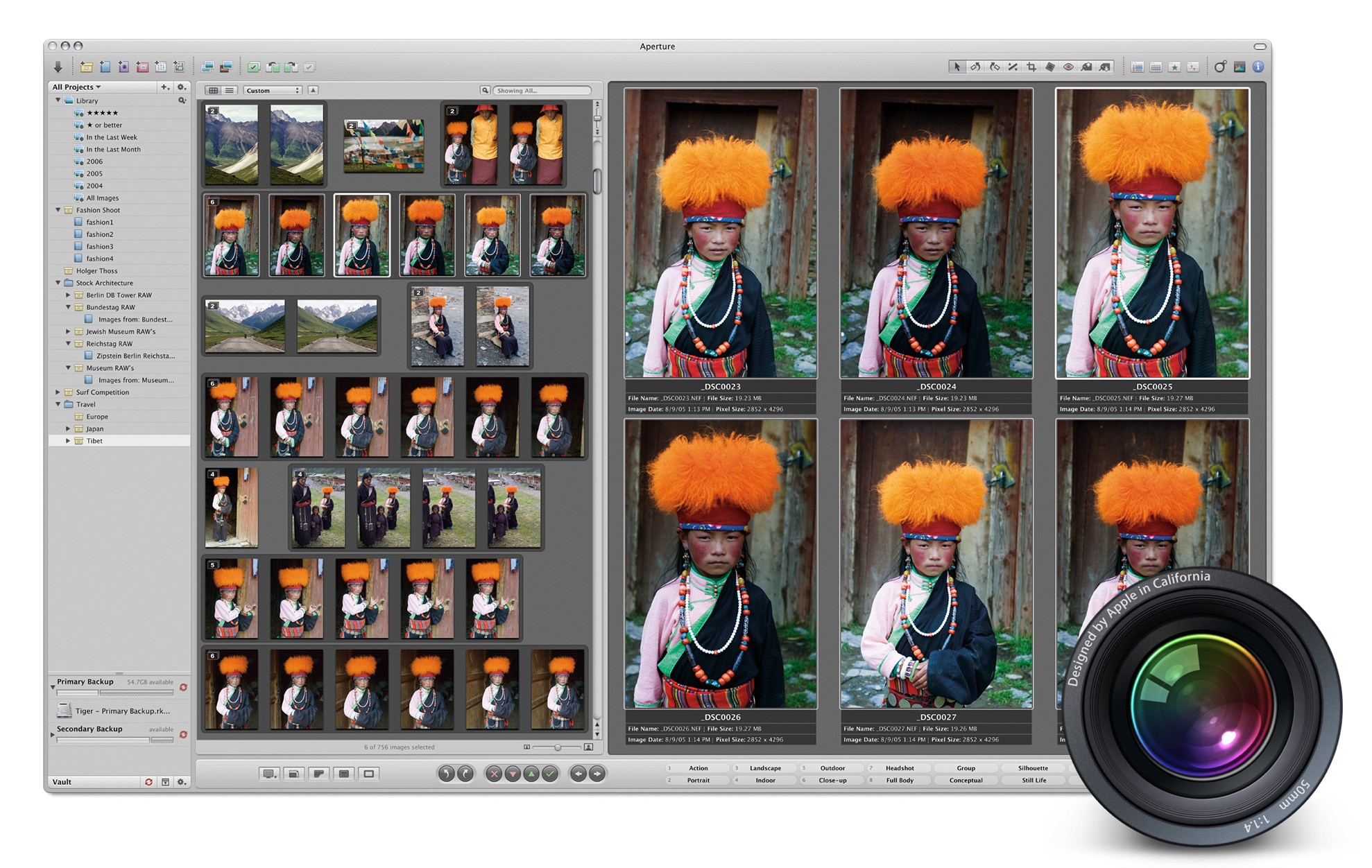
For years, iLife defined the Mac experience, or at the very least, its marketing. An iMac or MacBook wasn't a mere computer; it was a tool for enjoying your music, managing your photos, creating your own songs, editing your home videos, and more.

iLife was brilliant because it was approachable. Programs like iTunes, iPhoto, iMovie, iDVD, and GarageBand were so simple that anyone could just open them from the Dock and get started creating.1

Of course, not everyone's needs were met by the iLife applications. iMovie users could upgrade to Final Cut, while Logic was there waiting for GarageBand users. And for those needing more than what iPhoto could provide, Apple offered Aperture.

Aperture 1.0 was released in fall 2005. The pitch from Apple was pretty straight-forward:

“Aperture is to professional photography what Final Cut Pro is to filmmaking,” said Rob Schoeben, Apple’s vice president of Applications Marketing. “Finally, an innovative post production tool that revolutionizes the pro photo workflow from compare and select to retouching to output.”

“Until now, RAW files have taken so long to work with,” said Heinz Kluetmeier, renowned sports photographer whose credits include over 100 Sports Illustrated covers. “What amazed me about Aperture is that you can work directly with RAW files, you can loupe and stack them and it’s almost instantaneous—I suspect that I’m going to stop shooting JPEGs. Aperture just blew me away.”

Some may have written off this new program as a Photoshop competitor, but Aperture was really designed to compete with something like Adobe Bridge or later Adobe Lightroom. Ken Rockwell opened his review with this:

Aperture is software to help professional photographers select the very best out of hundreds or thousands of similar images. It also helps find relevant images out of the tens (or hundreds) of thousands of images in our archives. It allows fast and fluid sorting and browsing, even with RAW images. As you know, RAW images are slower to open and browse, so before Aperture it was difficult to flip through hundreds, or even dozens, of RAW images instantly.

Even here in 2018, RAW files can be difficult to deal with due to their size. In 2005, they were all but impossible to manage. Aperture set out to fix that, as Apple's website said:

Featuring a RAW-focused workflow, Aperture makes RAW as easy as JPEG, letting you import, edit, catalog, organize, retouch, publish, and archive your images more effectively and efficiently than ever before. From capture to output, you work directly with your RAW files, never having to first convert them into another format before viewing, adjusting, organizing, or printing them.

Aperture included traditional organization tools such as albums and folders, and features like the Light Table allowed photographers to recreate more analog workflows.

In short, Aperture was designed to let photographers import a mountain of large RAW files, sort them, perform light editing, and then export them to Finder, the web, or prints. If a user needed to carry out additional editing, Aperture included the ability to round-trip an image to Photoshop and back with just a click. If that all sounds like pro-level stuff, it was, and Aperture's $499 price point reflected that fact.

The specifications for Aperture 1.0 were as steep as the price. Apple created a free "Aperture Compatibility Checker" application to help determine if your system met the requirements.

Apple praised Aperture for its speed and performance, but those in the real world often complained that it would grind even the Power Mac G5 into dust when creating thumbnails or rendering RAW files. While Aperture could run on some PowerBooks, Apple's "recommended system" for the application was a Dual 2GHz Power Mac G5 with 2 GB of RAM and a beefy video card.

Then there were the complaints about the tools within Aperture. The program lacked many editing options found in other programs, as Dave Girard wrote at Ars Technica:

If [Aperture] could deliver on the promise of being both fast and produce flawless results, it would be the dream package. At this point it is an expensive and questionable alternative to Camera Raw, a free extension to Photoshop, and Adobe's Bridge which can batch produce better quality images in arguably less time. For US $500 (Photoshop itself retails for US $649), there is no excuse not to be aware of professional needs like a high-quality sharpen tool, DNG exporting or more basic things like curves, a sampler tool for RGB pixel readings, or retention of EXIF data on output.

Some were more forgiving, such as James Duncan Davidson, who wrote:

Is Aperture perfect? Not at all. It’s definitely a 1.0 product. There are a lot of places in the UI where the performance needs to be tweaked. There are too many places where the response feel of the application is just aggravating. The ultimate RAW conversion quality at 100% isn’t quite there. But for what I’m doing in the heat of the moment during my conference photography, it’s kicking some serious ass.

At the end of 2005, Apple shipped Aperture 1.0.1, which addressed several bugs, including Aperture's habit of botching EXIF data when exporting files to Finder.

However, Aperture 1's reputation was set: it was a program that needed a whole lot of computing power for tasks that could be done in other applications more easily.

In fact, by the spring of 2006, rumors were circulating that Apple had disbanded the team behind Aperture, as reported by Think Secret:

Sources familiar with Apple's professional software strategy said they were not surprised by the move, describing Aperture's development as a "mess" and the worst they had witnessed at Apple.

Aperture's problems stem not from any particular area that can be easily remedied but rather from the application's entire underlying architecture. In the run-up to Aperture's November release last year, for example, sources report that responsibility for the application's image processing pipeline was taken away from the Aperture team and given to the Shake and Motion team "to fix as best they can."

John Gruber did some digging and wrote:

Intrigued, I did some digging. I’ll note up front that my sources aren’t first-hand — i.e. I don’t know anyone directly involved on the Aperture team. That said, my sources at Apple confirmed the basic gist of Think Secret’s report. First, that even by the standards of 1.0 products, Aperture’s development did not go well. A little bit late is one thing; nine months late — which according to my sources is how late Aperture 1.0 was — is a disaster. The term “cluster f--k” is not generally used to describe minor hiccups.

He goes on:

Word within Apple is that Steve Jobs himself is enormously enamored of Aperture. There’s no question what Apple is going to do with Aperture: they’re going to fix it. The questions are just how, who, and when. And with Adobe breathing down their necks with Lightroom, my guess to the last question is “as soon as possible”.

Gruber was correct; Aperture was not killed off. In 2006, Apple swung again, this time with Aperture 1.5. By this time, the price had been cut to $299 after a free trial, and the program supported all shipping Intel Macs.

This release addressed a common complaint about how Aperture stored images on disk. Previously, the program stored all of the files it managed in a database, not unlike Photos today. While that's fine for many users, it rubbed some pros the wrong way, so Aperture 1.5 could simply reference photos stored in Finder and leave them in their existing locations. For those users juggling multiple hard drives, it was a big deal.

Aperture also gained several new editing tools with this update, including advanced color adjustments and better sharpening options.

Aperture 2.0

In February 2008 Apple released Aperture 2.0, a major overhaul to the battered title.

Aperture 2 boasted 100 new features. Included were an updated user interface that borrowed some things from iPhoto's then-new Events feature, better metadata editing options, complete control over thumbnails, and more. Tethered shooting was now possible as well, a big win for those working in studios.

Most importantly, Aperture had been re-engineered to be much faster. Importing and rendering RAW files was noticeably faster, and Apple included a "Quick Preview" feature that allowed a user to review a RAW image even as the system was still loading in data from the file.

Version 2.1 brought the addition of a plug-in architecture. This meant in addition to Apple's new Vignette, exposure, and contrast tools, third parties would be able to write their own adjustment tools for the application. Apple shipped the first plug-in, as highlighted by the company's PR team:

Available today as a free software update, Aperture 2.1 includes the Apple-developed plug-in, Dodge & Burn, which adds brush-based tools for dodge (lighten), burn (darken), contrast, saturation, sharpen and blur. Over the coming months, third party software developers will deliver image editing plug-ins for localized editing, filters and effects, noise analysis and reduction, fisheye lens correction and more.

[...]

“To date, maybe two percent of my photographs needed to be touched up outside Aperture,” said John Stanmeyer, founding member of the VII Photo Agency and contributing photographer for Time and National Geographic magazines. “Now that I can dodge and burn right within Aperture’s new plug-in, I can’t imagine when I’ll have to open any other application to tone my images.”

Things weren't perfect with Aperture 2; users of the program still had to wait for OS X updates to bring RAW support for new cameras. Plug-ins eventually started showing up, but the technology was slow to take off out of the gate.

Aperture 3

In early 2010, Apple released the final major version of Aperture. Like version 2, this release did more to make the program feel more familiar to iPhoto switchers. At the heart of this effort was the inclusion of Faces and Places, both of which made it easier to quickly find photos of a certain person or location in a large library.

For Aperture 3, Apple continued to focus on speed and stability. Aperture was never an incredibly fast program, but engineers made meaningful improvements this time around. Here's Ken Rockwell again, this time writing about Aperture 3.

Aperture does all its dirty work in the background, so it works fast regardless of the complexity of the task to which you've assigned it.

Finally.

The headline features of Aperture 3 were brushes and adjustment presets. Brushes allowed users to make fine-grained changes to very small sections of a photograph. Adjustment presets offered users one-click changes to their images. Out of the box, Aperture included numerous presets, including options to change white balance, convert to black and white or sepia tone, and a lot more.

Like plug-ins in version 2, this release of Aperture allowed users to install adjustment presets from others, allowing anyone to benefit from other users' methods of adjusting images.

A year after its release, Aperture 3's price was dropped to a mere $79.99 and the application found itself in the Mac App Store for the first time.

In 2012, Aperture and iPhoto were updated with the ability to open and operate from a single library. That meant an iPhoto user could upgrade to Aperture without needing to migrate their photos. That same user could even go back to iPhoto for some tasks if they wished.

The End of Aperture

Throughout 2012 and 2013, Apple shipped several additional updates to Aperture for compatibility with new Mac OS X releases and features like Shared Photo Streams.

Apple pulled the plug on Aperture at the same time it killed off iPhoto. Both applications were put to pasture when Photos shipped. Jason Snell, writing at Macworld:

“With the introduction of the new Photos app and iCloud Photo Library, enabling you to safely store all of your photos in iCloud and access them from anywhere, there will be no new development of Aperture. When Photos for OS X ships next year, users will be able to migrate their existing Aperture libraries to Photos for OS X,” reads a statement Apple released to Macworld.

While Aperture development (beyond minor updates to ensure OS X Yosemite compatibility) will cease, the company has no intention to abandon creative professionals. Development of both Logic Pro and Final Cut Pro continues.

As promised, the last revision of Aperture was version 3.6, shipped in October 2014 to add support for OS X Yosemite.

There are a lot of things to consider when thinking about Aperture's troubled existence.

No doubt the program struggled to shake its early reputation. The performance woes and underwhelming feature set in the first version tainted people's opinions in a way that was hard for Apple to shake. I have no doubt that some who paid that initial $499 price tag were disappointed by their investment.

Despite persistent rumors that it would be cancelled, Aperture improved through its two major revisions. Apple added much-needed tools and features, all while making the software more responsive and less frustrating to use.

However, even as it added pro-level features to Aperture, Apple also worked to bring features up from iPhoto. Many pros weren't interested in things like face detection, but Aperture gained it anyway.

While Apple has plenty of Aperture's blood on its own hands, Adobe may have been holding the actual murder weapon. In 2005, Adobe Bridge was taking off as an import and organization tool, and Lightroom grew out of that, launching two years later. Adobe poured resources into Lightroom, making improvements on a regular basis.

It was clear to photographers that Lightroom was a focus for Adobe, while Aperture was a side project at best for Apple, and at worst, a distraction.

Thanks to all of these factors, users found it difficult to fully trust Aperture in their professional workflows. As that was the whole point of the program, it was probably doomed to fail.


  1. As these things often do, over time these applications grew more complex and maybe even bloated, but that's a story for a different time. ↩︎

Support MacStories Directly

Club MacStories offers exclusive access to extra MacStories content, delivered every week; it's also a way to support us directly.

Club MacStories will help you discover the best apps for your devices and get the most out of your iPhone, iPad, and Mac. Plus, it's made in Italy.

Join Now
03 Sep 17:28

Preserving macOS History: The 512 Pixels Aqua Screenshot Library

by John Voorhees

Having just gone through the exercise of trying to find screenshots and other information about apps from the dawn of the App Store, I have a greater appreciation for how difficult that can be and the need to preserve the historically significant aspects of our digital world. Today, Stephen Hackett revealed a project he’s been working on for nearly a year: a collection of screenshots highlighting macOS from its debut in the Public Beta 17 years ago through today.

Hackett’s Aqua Screenshot Library, which you can find on 512 Pixels, was an enormous undertaking that currently includes 1,502 images that take up 1.6 GB of storage. I particularly like that all of these images were captured from Macs in Hackett’s collection. As Hackett explains:

These images came from the OS, running on actual hardware; I didn’t use virtual machines at any point. I ran up to 10.2 on an original Power Mac G4, while a Mirror Drive Doors G4 took care of 10.3, 10.4 and 10.5. I used a 2010 Mac mini for Snow Leopard and Lion, then a couple different 15-inch Retina MacBook Pros to round out the rest.

When you have a moment, browse the collection. It’s fascinating to see the evolution of macOS from its origins through today.

→ Source: 512pixels.net

03 Sep 17:28

Apple Celebrates US National Parks with Apple Pay Donation Program and Fitness Challenge

by John Voorhees

Apple is celebrating US National Parks by donating $1 for every purchase made in an Apple Store, on apple.com, and at its retail locations in the US from August 24th through 31st to the National Park Foundation.

Tim Cook, Apple’s CEO said:

“America’s national parks are treasures everyone should experience, and we’re proud to support them again this month by donating a dollar for every purchase made with Apple Pay at one of our stores,” said Apple’s CEO Tim Cook. “These awe-inspiring places are our national inheritance, and Apple is doing our part to pass them on to future generations — just as extraordinary, beautiful and wild as we found them.”

In addition to the its fundraising efforts, Apple has announced a fitness challenge for September 1st. To commemorate the 50th anniversary of Redwood National Park, Apple Watch users who log a 50 minute workout that day will earn a special award in the Activity app and stickers that can be used in the Messages app. The App Store also plans to feature apps for discovering the US national park system.


Support MacStories Directly

Club MacStories offers exclusive access to extra MacStories content, delivered every week; it's also a way to support us directly.

Club MacStories will help you discover the best apps for your devices and get the most out of your iPhone, iPad, and Mac. Plus, it's made in Italy.

Join Now
03 Sep 17:28

Fascinating Close-Up Video of Apple I Being Auctioned Next Month

by John Voorhees

Every so often, an Apple I comes up for auction. The number still in circulation is small. Even rarer are working Apple Is. Next month, auction house RR Auction will sell a working Apple I that’s been rated 8.5/10. The computer, along with peripherals and the original manual, is expected to fetch around $500,000.

Earlier this summer, I had the good fortune of seeing a working Apple I in person during a trip The Henry Ford Museum with Stephen Hackett who donated his collection of iMac G3s to the museum. In person, it’s hard to grasp that the Apple I’s simple circuit board covered with neatly organized, hand-soldered chips played such a critical early step in the history of personal computing.

More interesting to me than the auction though, is a video that the auction house put together to promote the sale, which dramatically pans around the Apple I’s surface revealing the smallest details. It’s a fantastic close-up of a significant piece of computing history that is far closer than you’ll ever be to one in a museum.

You can learn more about the Apple I in this excellent feature by Communications and Information Technology Curator Kristen Gallerneaux on the Henry Ford Museum’s website.


Support MacStories Directly

Club MacStories offers exclusive access to extra MacStories content, delivered every week; it's also a way to support us directly.

Club MacStories will help you discover the best apps for your devices and get the most out of your iPhone, iPad, and Mac. Plus, it's made in Italy.

Join Now
03 Sep 16:54

“You Can’t Be What You Can’t See”

Larry Cuban, Larry Cuban on School Reform and Classroom Practice, Sept 06, 2018


Icon

The key message in this post is that researchers should look beyond the typical data collected in educational studies. In particular, they should "take a broad view of impact" and "take the long view". In particular, "Research on the effects of an education initiative typically looks only at later educational outcomes, but these investigators examined the impact of preschool on the totality of these children’s lives." Also, "Most education research adopts a short time horizon, rarely looking at the impact of a program beyond two or three years." For example - the early lessons I had in writing and public speaking had a lifelong impact on my character and career, but this impact would be invisible to pretty much every educational research study out there.

Web: [Direct Link] [This Post]
03 Sep 16:54

I attended an academic conference and didn’t go to any sessions

Jennifer Polk, University Affairs, Sept 07, 2018


Icon

I've done this. Not on purpose, but I've had conferences get away from me, and I spend the entire time talking to people, doing interviews, working the trade show floor, and doing my own talks. But it's unusual and I really do try to see at least a representative sample of talks. But the point of the article - that there's a lot more to a conference than the presentation - is true.

Web: [Direct Link] [This Post]