Shared posts

04 Sep 04:18

Election results in pink & blue

Today, everything comes together. A few weeks ago, I wrote a blog post exploring alternatives to the stereotypical colors pink and blue that are used in charts about women and men. In that article I talked about rebranding pink and blue for non-gender data. And two days ago, I published an article explaining party colors in Germany, US and UK.

So this Weekly Chart is a map with election results – in pink and blue. It’s a map that compares which election district in Berlin had more votes for the left party “Die Linke” (pink) than the right-wing populist “Alternative für Deutschland” (“AfD”, in blue), during the German federal election in September 2017:

What can we see? A strong local pattern: At the last federal election, there was a preference for the left party over the right-wing populist party in the center of Berlin. There’s still a slight preference towards the left in the eastern parts of Berlin; while in the west, AfD got more votes than the left.

Map Choices

The map above clearly shows us the ratio between AfD voters and Linke voters. But there are other ways to show election results on a map:

We could show the actual vote shares. To create a map like that, for each election district we would check if the left or the right party got more votes and then just show the share of voters for this dominant party:

weekly chart

This map shows us that both parties received a higher vote share in the east than in the west. But it also artificially increases the polarisation: If the AfD gets just one more vote than the Linke, the whole district flips from pink to blue. And we would need to create a third category, “tied”, for the nine election districts in which there were exactly as many AfD voters as Linke voters. (The New York Times created that category for their “Extremely Detailed Map of the 2016 Election”.)

There is another option: We could show the percentage point difference between the two shares. To do so, we subtract the AfD votes from the Linke votes. If the result is positive, we show the district in blue. If it’s negative, we show it in pink.

What I decided on in the map above is to show the ratio between AfD and Linke voters. To do so, we divide the number of AfD voters by Linke voters. And again, if the result is positive, we show the district in blue; if it’s negative, we show it in pink:

weekly chart

weekly chart

I see you tilting your head, looking at these maps. I hear you thinking: “Sooo…doesn’t look that different, does it”. And yes, there’s not a huge difference between the map showing the ratios and the map showing the percentage point difference between AfD and Linke voters.

weekly chart

Here you can see the northern part of Berlin. Let’s use three districts there to compare all three maps closely:

weekly chart

Almost 23% voted for Linke in the election district I labeled with the number 1. Which makes it an ok-ish colorful area on the map with the actual vote shares. But this map doesn’t show the other 22% who voted for the AfD in this district. The small difference between 23% and 22% voters leads to a toned down color for this area in the other two maps.

weekly chart

District number 2 has a high share of AfD voters and a low share of Linke voters, with a difference of 20 percentage points. But the same 20%pt-difference would exist if there were 20% AfD voters and 0% Linke voters. Or 60% AfD voters and 40% Linke voters. The color fill of this district would be exactly the same, no matter the absolute values.

weekly chart

That’s something our ratio map fixes. District number 3 is darker on the ratio map than district number 2. Which is surprising: The difference between AfD voters and Linke voters in district 3 is small. But in this district, there were three times more AfD voters than Linke voters, while in our second district, there were only 2.2 times more AfD voters.

The ratio map tries to take both into account, the difference and the absolute values. Small absolute values with a medium difference between them result in election districts with a dark color fill. But for big absolute values, the difference needs to be much higher to result in the same dark color.

For example, an area with the numbers 5% and 20% would result in the same colorfill as an area with the numbers 20% and 80%. Both have a ratio of 4, although the absolute values and the percentage point differences (15% and 60%) vary a lot.


If you want to dig deeper into this topic, I recommend the Weekly Chart article “How to read a log scale: What Mike Bostock means” and Mike Bostock’s explanation “Method of Comparison, Compared”; both from June. And if you’re interested in the election results of all German parties in Berlin, not just from the AfD and Linke, have a look at this map by Berliner Morgenpost. I’ll see you next week, with a smaller Weekly Chart again!

04 Sep 04:18

Lenovo’s new Yoga Book replaces the keyboard with an E-Ink screen

by Rui Carmo

I like it. Even though the keyboard takes my subconscious deep into TouchBar cold sweat territory, I have to remember I am typing this on an iPad without any qualms.

And would love to get my hands on one, really. The E-ink side would be terrific while traveling (one of my personal gripes is that the iPad mini is too small to read A4 PDFs comfortably and go through all the academic papers I have queued up), but what I find more interesting is that Lenovo feels more innovative than Apple hardware-wise (even though everyone’s fawning over the new Watch leaks as I type this, I can’t help but notice that they have USB-C ports on both sides of this device…).

04 Sep 04:14

Unbrittle Events

At AWS, I’m now in the Serverless organization, which in 2018 is big fun. Someone asked me to check out the work being done at the Cloud Native Computing Foundation (CNCF), particularly around CloudEvents. There’s been a particularly interesting argument going on around there that I think has useful lessons for anyone who cares about designing network protocols.

I’m naturally interested in Eventing because it’s central, not just to serverless computing, but to modern application construction in general. Events are a good way to think about a lot of different things: Actual events from the real world (“Garage door opened”), infrastructure happenings (“database failed over”), user activities (“Leila signed in”), or data movement (“Object 894t7 uploaded to bucket JXYT8-33”). Events are nice, particularly in well-designed modern apps, because among other things you can feed them to functions and drop them onto messaging queues.

My first project at AWS was CloudWatch Events, and one of the essential things about a CloudWatch Event is that it’s got a fixed JSON wrapper with a bunch of top-level fields that are guaranteed to be there. We never wrote down a formal spec but there’s a reasonably straightforward description here. CloudWatch events JSON objects, and that’s all they are; nothing fancy about them.

Evidence suggests those choices were good; the service has been pretty successful; loads and loads of customers doing all sorts of basic meat-and-potatoes automation, and then some pretty imaginative apps combining built-in and custom events. So, I have a lot of sympathy with the CNCF work.

CNCF CloudEvents have an abstract definition not tied to any data format, with the idea that there could be multiple different representations, although most examples and conversations still revolve around JSON.

The Pull Request

The problem is summed up Pull Request #277 and issue #294. It’s basically about whether it’s OK to put unknown fields not defined in the spec (“extensions”) into the top level of a CloudEvent, or instead, banish them to an extensions container field. It’s not that crucial an issue and I can see both sides of it.

The argument being advanced in issue 294 and by Thomas Bouldin in Codelab: Versioning is Hard (aka the “SEF theorem”) is that if you allow adding “extensions” at the top level, that might break some software. In particular, it’s going to break anything that relies on Protocol Buffers (everyone says “protobufs”). Because they’re not textual and self-representing but binary and rely on an external schema to help software unpick the binary bits; and that doesn’t leave room for any old random new bits to be dropped into the top-level record.

It turns out that some organizations have bought into protobufs heavily; for the purposes of this discussion it doesn’t matter what their reasons were, or whether those reasons were good. So dealing with CloudEvents is going to be easier for them if they can rely on mapping back and forth between CloudEvents and JSON. Which they can’t if extraneous “extensions” might show up at the top level.

Lesson 1: The Internet isn’t abstract

I think the CloudEvents committee probably made a mistake when they went with the abstract-event formulation and the notion that it could have multiple representations. Because that’s not how the Internet works. The key RFCs that define the important protocols don’t talk about sending abstract messages back and forth, they describe actual real byte patterns that make up IP packets and HTTP headers and email addresses and DNS messages and message payloads in XML and JSON. And that’s as it should be.

Time after time, people have got the idea of sharing abstract objects across the Internet, and time after time it’s led to problems of one sort or another. There was a time when a lot of people thought that something like CORBA or DCOM or WCF would make objects-on-the-wire not only possible but straightforward, and free us from the tyranny of thinking about the bits and bytes in message formats. But as you may have noticed, those things are pretty well gone and the Web has outlived them; its klunky old ad-hoc tags and headers are how everything works, mostly.

To make this concrete: If CNCF had started out saying “A CloudEvents is a bag of bits which is a JSON Text” or “…which is a protobuf message”, well, issue #294 just wouldn’t ever have arisen. And neither choice would have been crazy.

Lesson 2: S, E, and F

Bouldin’s Versioning is Hard introduces the “SEF Theorem” where “S” is for Structured, by which he means “you need an external schema and you can’t just throw in extra fields”, “E” is for Extensible, i.e. you can go ahead and put in unannounced foreign fields without changing versions, and “F” is for Forward Compatible, which means you can add versions without breaking existing dependencies.

Given the choice, I’ll take “E” and “F” any day. When you’re pumping messages around the Internet between heterogeneous codebases built by people who don’t know each other, shit is gonna happen. That’s the whole basis of the Web: You can safely ignore an HTTP header or HTML tag you don’t understand, and nothing breaks. It’s great because it allows people to just try stuff out, and the useful stuff catches on while the bad ideas don’t break anything.

So what happened?

The committee took the trade-off I like. Which means you can extend CloudEvents pretty freely (good), but you can’t use protobufs and JSON interchangably and expect things to work (unfortunate). This way is less brittle but a little harder to deal with. Not gonna say that the right choice is a slam-dunk, but it is the right choice.

04 Sep 04:14

Book Review: A Computer Called LEO

by Martin

When I was at the Centre for Computing History in Cambridge for the first time back in December 2017 I noticed a small exhibition about the LEO, the first business computer built in the early 1950s by the Lyons tea company. By a tea company!?

Yes, by a tea company! But how could that be, I wondered at the time!? I also noticed that a number of books were written on this, the latest one back in the early 2004 by Georgina Ferry. After reading the book and having gone back to the museum to take another look at the LEO exhibition, things became a lot clearer but I’m still very much astounded.

In summary, the Lyons tea company was a pretty big company by the standards of the 1940s and 50s with thousands of employees and, as is still the case now, little profit is made in the catering business on a per piece basis. So every fraction of a penny that can be saved per cookie counts, if you will. That was hard to do at the time because there were no computers yet to track expenses, cost of production, cost of distribution and sales, payroll, etc. etc. All was done manually by ‘human computers’. And boring work it must have been. A few people at Lyons, however, could imagine the benefits electronic ‘computing’ of such tasks could bring to Lyons so they set out to find out more about the state of the art. Eventually, after a trip to the US, they found the team working on a scientific computer at the University of Cambridge in the late 1940s. When they realized that their design could be extended to also fit commercial applications, Lyons sponsored the development and then built their own LEO, the Lyons Electronic Office, based on the design. This was followed by the LEO II and LEO III, which were developed in a, by then, separate company and also sold to other companies with commercial rather than scientific problems. An incredible story that developed far away from the US, where the government poured billions of dollars into electronics and computer development for military and government after the second world war.

I fully recommend this book to anyone interested in computing history as it tells a great story about an episode in computing history that, while almost forgotten these days, nevertheless played a vital role in the history of commercial computing.

04 Sep 04:14

We’re Hiring: Senior Editorial Person

by David McCandless

Senior editor/writer/journalist/creative person required to spearhead an awesome new mega project.

Flexitime, remote working. Would suit a self-motivating self-starter.

A rare opportunity to join our unique, independent infodesign collective. If you’re an editorial person who loves graphics, get in touch. Closing date: Fri 28th Sep 2018.

 
» Details

04 Sep 04:14

Counting baseball cliches

by Nathan Yau

Post-game sports interviews tend to sound similar. And when you do say something out of pattern, the talk shows and the social media examine every word to find hidden meaning. It’s no wonder athletes talk in cliches. The Washington Post, using natural language processing, counted the phrases and idioms that baseball players use.

We grouped phrases that were variations of each other together (within a one- or two-word difference) into a list of roughly 20,000 possible cliches. Then came the subjective part. From that list, we chose the ones that were the most interesting, then grouped those with similar meanings. And voila — the phrases we considered to be the cream of the cliche crop.

I can’t decide if the word cloud to open the article is a fun hook or a distraction. I’m learning towards the former, but I think it would’ve been less the latter without the interaction.

Tags: baseball, cliche, Washington Post

04 Sep 04:14

Why developers should learn design skills to create great products

by Lilian Tula

Design skills can improve code like coding skills can improve design

Designers are often encouraged to learn basic coding skills to better understand the medium they design for. I believe the reverse is equally valuable — developers should learn design skills to enrich their craft and improve the connection between developers and design.

As a product designer, my most successful work comes out of good collaborative partnerships with developers. The partnerships that work best, are the ones where the developers really understand the creative process, or even better, take part in it themselves. When developers are included in the design stage, it only improves the product. This is why I try and make design transparency a natural part of my work.

Here are some benefits I have observed from collaborating with creative developers, and how it can make our work more impactful and more fun.

Understanding design means understanding the user

“Good design makes a product useful” – Dieter Rams, The 10 Principles of Good Design

As designers, our primary focus when creating is “who is this for and why do they need it?” We think about who the user is, what they might want or expect to see, and what their fears or pain points are. Design and empathy are closely linked, so understanding design is a direct path to understanding the user. Doing our jobs well means putting customers at the centre of what we do.

Putting the user, and not technical challenges, at the heart of our work

We can have those courageous conversations that start with, “I don’t think we should build this…” because we know that the reasons to build are aligned with the value the design gives the user. It makes it easier to have discussions about the product which are optimised for the best experience possible.

Train your creative eye and improve feedback

“Man invented things by imposing a shape on nature. Man discovered things by revealing the pattern of nature.” – Alan Fletcher, The Art of Looking Sideways

Sometimes it can be difficult to pin down why something doesn’t look right. Learning the fundamentals of design teaches the vocabulary to describe those feelings. You can train your eye to spot where things might be off balance, so you’ll essentially be able to peer under the hood of good design and see how it works.

Training your eye is a critical component for creating design systems — it strengthens your ability to identify design patterns, so you’ll know how to extend them, break them, and fix them.

It’s not always easy to single out discrepancies when things don’t render as intended. Despite our best efforts, creative software can be an untameable beast. Having a developer who can spot and communicate the differences between design and build can make a huge difference.

Minimise handover tension

“Design is relationships. Design is a relationship between form and content.” – Paul Rand, Conversations with Students

One of the most fretful parts of a designer’s process is the waiting period. Once we hand over our work to be implemented, we just have to wait. Sometimes you don’t know what’s going to come out the other end.  As designers, a lot of our job involves rationalising our work, which can automatically put us in defence mode, especially when it unexpectedly changes during implementation.

Establishing trust is essential to implementing design

Changes are inevitable. Digital mediums have infinite variables, and pixel perfection is practically a myth. These change conversations are best had when they are nurtured through early collaboration in the design process, when it’s easier to challenge ideas or ask for clarity. Creating a common understanding for how the design should behave, makes the whole process much easier and more enjoyable.

How can developers learn design skills?

It’s not always practical to pick up new skills when you have your own deadlines to contend with. But learning the basics of design can be easy if you have the right support in your team and from the designers you work with.

Ask to be involved in the early stages of the design process

These exploratory stages are critical when forming the design solution. The early stages are often when we define who the user is and what they need. This may take the form of user flows, personas, research, or mood boards. Whatever your team is starting with, ask to get in on it early.

Ask your designers to work in a transparent way

Establish which tools and rituals you’ll use to maximise the visibility of design work. Tools like Marvel make it much easier for designers to share their work as it’s being made without much extra effort. Discuss ways to make sharing frequently easier so everyone can be up to date with the design process.

Connect often and meaningfully

Design and development are often split up due to team structures or other organisational reasons, but you need to make sure you have an allied front when it comes to making decisions about design executions. Find your own way of connecting between teams and have regular touchpoints so you can discuss and align.

Share creative inspiration

Next time you find a product, poster, game, or website you think is visually and functionally interesting, share it with other designers with the reasons why you like it. This can spark ideas and innovation, and helps designers understand your own preferences and taste.

Make time for design

image by Mo Selim Art of three different drawings of spiderman showing how the quality of the artwork improves with more time and why for developers need design skills

Mo Selim Art – 10 Min 1 Min 10 Sec SPEED CHALLENGE

Add a design tax to build time that allows for feedback, collaboration, finessing, and reflection. This may feel like an extra overhead at first, but over time it becomes a reflex that will make your designs sharper and save on effort in the long run.

Ultimately product design is about communication, whether that’s between the product and the customer, or you and your team. Understanding the different disciplines in your team will help guide conversations that will end up creating great products.

At Zopa, we have a culture that encourages collaboration and learning new skills. If your workplace doesn’t have these schemes in place, picking up the basics is simple enough.

Some resources to get you started

book cover of The Design of Everyday things by Donald A. Norman for developers need design skills book cover for Color: a course in mastering the art of mixing colors by Betty Edwards for developers need design skills book cover of "Thinking with type" by Ellen Lupton for developers need design skills Developers need design - a book cover for Grid systems in graphic design by Josef Muller-Brockmann — The basics of layout design.

The Design of Everyday Things, Donald A. Norman — A great primer on design thinking.

Color, Betty Edwards — The basics of colour theory, tones, and palettes.

Thinking with Type, Ellen Lupton — The basics of typography, balance, and hierarchy.

Grid Systems in Graphic Design, Josef Muller-Brockmann — The basics of layout design.

You can also try doing a paid or free course with DesignLab, Treehouse, or Lynda.

Lilian is a product designer working on exciting up-and-coming things at Zopa. She is an EFFERVESCENT creative spark who spends most of her time seeking inspiration from video games, travelling, and cabaret.


The post Why developers should learn design skills to create great products appeared first on Zopa Blog.

04 Sep 04:13

Did Brianna Wu get shafted by the Globe’s choice of photos?

by Josh Bernoff

Brianna Wu may be the most tech-savvy candidate running for Congress in Massachusetts this year. But would you vote for her or her opponents on Tuesday, based on this set of photos that appeared in the The Boston Globe’s guide to the primary election? The guy on the left is incumbent Stephen Lynch, campaigning. The … Continued

The post Did Brianna Wu get shafted by the Globe’s choice of photos? appeared first on without bullshit.

04 Sep 04:13

19 Alternative Anniversaries

by Bryan Mathers
19 Alternative Anniversaries

We’re married 19 years – what is that? Nearly Sapphire? Stainless Steel? Blotting paper? This year, instead of writing me a card to mark our 19th wedding anniversary, my wife thought it would be a good idea to come up with a list of alternative anniversaries. So, over a shared plate of restaurant nachos, we set to work…

The post 19 Alternative Anniversaries appeared first on Visual Thinkery.

04 Sep 04:12

NetNewsWire Comes Home

After some years spent traveling the world, NetNewsWire is now back where it started! It’s my app again.

We’ve kept its room ready for all these years. And I am thrilled to welcome it home.

Thanks to Black Pixel

First thing: I want to thank Black Pixel for their stewardship. They released NetNewsWire 4 for Mac and iOS, and they even brought it to Apple TV. They wrote and deployed a syncing system — which is a massive challenge. (I happen to know, from several first-hand experiences, just how difficult syncing is.)

They kept it moving forward — the app is now 16 years old — and that’s huge.

And I want to thank them for a second thing: their incredible generosity in bringing it back to me. When I asked them about it, they told me they’d already been discussing it. There was never a need to convince them: they thought it was the right thing to do before I even said a word.

You might reasonably wonder if nevertheless they asked for some large amount of money. There was no charge. That’s what I mean by “incredible generosity.”

As a friend of mine said on this subject, “Sometimes life is poetic.” Thanks to Black Pixel for making that true.

If you haven’t already, you should read Black Pixel’s announcement.

What This All Means

Here’s the scoop:

You probably know that I’ve been working on a free and open source reader named Evergreen. Evergreen 1.0 will be renamed NetNewsWire 5.0 — in other words, I’ve been working on NetNewsWire 5.0 all this time without knowing it!

It will remain free and open source, and it will remain my side project. (By day I’m a Marketing Human at The Omni Group, and I love my job.)

Black Pixel will stop selling their versions of the app, and will turn off the syncing system and end customer support — all of which is detailed in their announcement. (Important note: I will not get any customer data from them, nor will I be doing support for Black Pixel’s NetNewsWire.)

My Goal

I want one thing: to make the very best versions of NetNewsWire ever made.

And, along the way, I’d love to have your help.

Nothing to Download Yet

I don’t actually have an app bearing the name NetNewsWire ready to download yet. I will have test versions ready soon, though. It’s still going to be a while before the final version of 5.0 ships.

The repository is on GitHub.

I’ll also be creating a website for it, of course. And I’ll have news about a Slack group you can join.

PS For Reference

I should outline NetNewsWire’s history:

  • 2002: NetNewsWire Lite 1.0
  • 2003: NetNewsWire 1.0
  • 2005: Bought by NewsGator. I continued working on NetNewsWire as a NewsGator employee.
  • 2011: Bought by Black Pixel. I remained at NewsGator, and stopped working on NetNewsWire.
  • 2015: Started work on Evergreen
  • 2018: NetNewsWire comes home; Evergreen renamed to NetNewsWire

It was acquired twice before now. I worked on it for nine years before it went to Black Pixel, and it was there for seven years. And now it’s back home.

For good!

PS Pardon the dust — there’s a bunch of renaming to do and ducks to line up. Things may be confusing at first. But where you see the name Evergreen, think NetNewsWire.

04 Sep 04:12

Back to School: How to Revamp your Personal Brand to get Hired!

by Samantha Lloyd

It’s that time of year again – back to school! If you’re not headed back to college campuses for “frosh” week with a new backpack slung over your shoulder and the sound of leaves crunching underfoot as you head to new classes, then you’re probably feeling a bit left out. The countless ads peppering every channel and medium available all point in one direction, and it’s a bit easy to become lost in nostalgia as you’re left reflecting on snippets of memory rather than forging ahead. You need to face the new season like those excited students and look forward! Regardless if you’re headed back to school or not, September always has that feeling of new beginnings, and you should take advantage of that inspired sentiment and make the most of the last bit of 2018 (how is it going by so quick – it feels like we were just talking about the new year ahead)!

This is a great time to focus on you and revamp your personal and professional brand online. Not only are people going back to school, but people are hiring. September is one of the high times of year to job hunt, as recruitment and hiring picks up after the summer slowdown. This is a great time of year to hunt for that dream job.

Despite the increasing odds in autumn of finding your perfect role, applying for a job with the same old resume and template cover letter does not do you any favours. An average job posting can attract nearly 250 candidates, and only 2% of applicants are actually contacted to move further through the interview process. There are a variety of ways to stand out in the job hunting process, and a unique and curated personal and professional online brand will certainly help you excel.

Create and Grow a Personal Brand on Social

A great place to start your online presence is on your social media channels. While it’s common knowledge that recruiters often take a peek through your social media, did you know that they also hire through social? Do yourself a favour and start growing your professional brand on Instagram, Twitter, and LinkedIn. Be sure your profiles align with one another and that your branding and message is consistent throughout. Over 40% of employers are verifying that you’re a cultural fit and testing your creativity when they are looking through your social media profiles. Build a brand that truly represents you and that you are proud of to put your best foot forward.

Pro Tip! Not sure where to start with creating a personal brand? Check out these tips to building a powerful personal brand that’ll resonate with your audience.

Grab your Name as a Domain Name

The best way to make it easy on employers who are researching you on search engines is to have your name as a domain name. It may not always be possible to snag your name as a .COM if you have a common name, however get creative and use a different domain extension to showcase your personality – with over 300 to choose from, it’s easy to find one that directly aligns with your niche or profession.

Pro Tip! Don’t have the time just yet to launch a full-fledged website? Easily redirect your domain name to your YouTube channel, your Instagram, or your LinkedIn.

Build a Website that Houses your Brand

Nowadays, you likely notice the section on applications that requests an optional website. This is a great section to use that domain of your name to share a website that houses your portfolio, resume, or projects. Your website can act as a reflection of you and the brand you put forth, plus link out to the social channels that you want employers to see.

Pro Tip! Make sure to install Google Analytics so that you will be able to track which employers are following up on your resume and viewing your website. This will give you an idea of which jobs your resume is most aligned to and which employers are more interested in you so that you can follow-up accordingly.

Take this lively, back-to-school time of year to invest in yourself and create a professional and personal brand that stands out online. Why wait until the new year to implement everything you want to create for yourself? Get started today!

04 Sep 04:12

Historical code: NetNewsWire Lite 4.0

NetNewsWire Lite 4.0 was the last version I shipped before the sale to Black Pixel, back in 2011. It was a free app on the Mac App Store.

I put the source up on GitHub.

I’m not publishing it as some kind of example app — some code is good, some is bad, and most is middlin’, and it’s all old. It’s published for historical reasons only.

However — if we can get it building, and I bet we can — I’ll end up making it available as a download.

I don’t know what to do about NetNewsWire 3.3.2, which was the last release of the non-Lite full version. That code is really, really old and I don’t even really want to publish it. But I might. Or I might get it building and release a 3.4 version of it.

We’ll see! No need to rush, of course.

04 Sep 04:12

48 Hours in Berlin

by peter@rukavina.net (Peter Rukavina)

When we last left the trail of our summer’s-end trip to Europe we were in Malmö, Sweden, preparing to head to Berlin.

On Monday morning we woke up to a dreary day in Malmö, with the threat of rain just over the horizon. We packed up the Swedish operation, had the last breakfast in our Airbnb (a lovely flat should you ever find yourself looking for lodging in the city). With the impending rain, and a wish to exercise every option available to destress the travel day, I ordered us up an Uber (only my third ever) and a friendly cab driver arrived 5 minutes later for the quick run to the Triangeln train station. A few minutes later we were whisked away on the Øresundståg across to Copenhagen.

As we were traveling first class (which was insignificantly more expensive than second class), upon arrival in Copenhagen we were able to retire to the utilitarian DSB lounge overlooking the main station floor; it was a busy, chaotic morning in the station, and while the lounge was absent canapés and butlers, the quiet and remove were worth every penny.

At 12:52 we boarded the first of three trains for the day: the first run was from Copenhagen to Fredericia, a main railway junction in the western Denmark area of Jutland in; from there it was a change of trains and south to Hamburg and in Hamburg we had a short 30 minute layover–just enough time to grab a pineapple popsicle from the DB lounge–before catching the final train, to Berlin.

Oliver on the Train

The train pulled into the main Berlin rail station, the Berlin Hauptbahnhof, at 8:30 p.m. We quickly hopped on the S-Bahn to Ostbahnhof, an 8 minute trip. From there we walked to the A&O Hostel on Köpenicker Str. where we arrived just before 9:00 p.m. We checked in, dumped our bags in our room, and walked at a brisk pace to Freiluftkino Kreuzberg, just 500 metres up Adalbertstraße. We bought tickets for The Shape of Water, and took our seats. At 9:15 p.m. Just as the show started. It was the travel equivalent of a perfect game.

Freiluftkino Kreuzberg is one of my favourite places on Earth, period. And it’s certainly my absolutely most favourite place to see films. It’s tucked into a courtyard beside Kunstquartier Bethanien (which also houses Druckwerkstatt, where I spent many happy Tuesdays printing back in 2011). The films are shown outdoors, on a large screen; seating is either in garden chairs or loungers. There is popcorn and German beer. And the scent of pot smoke in the air. And bats and birds flying around. On Monday night it was windy and threatening rain, and thus the perfect night to see a film about a watery monster falling in love.

It was the best way imaginable to start a trip to Berlin.

We woke up on Tuesday morning just a little exhausted from travel (and just a little more from the granite beds at the A&O). After the uninspiring but helpful hostel breakfast we headed over to Companion Coffee to seek an antidote to the hostel coffee (made out of the same materials as the beds, from the taste).

We then hopped on the U-Bahn into Mitte for lunch with my friend Igor, tucking into MUJI for some emergency stationery browsing for a few minutes before our appointment meeting time.

We enjoyed a very pleasant lunch with Igor and his office mate at Made in China on Schönhauser Allee, stopping for (excellent) ice cream at Cuore di Vetro on the way back. We bid our lunchmates goodbye and headed to do your read me?!, the magazine shop of magazine shops, then to R.S.V.P., the stationery store on Mulackstraße that has doubled in size since I was first there in 2011, spreading to a second location across the street. At R.S.V.P. I acquired a lovely Kaweco AL Sport fountain pen that’s just the right size for carrying around all the time, and some cord made from an exotic-sounding material called baumwolle that I later realized is simply cotton (“tree” + “wool”).

With a first round of stationery shopping out of the way, we retired to Hackbarth’s where we met my old friend James, a Canadian long a Berliner, as I’ve written before, a sharer of a childhood barber, and always someone I enjoy catching up with enormously.

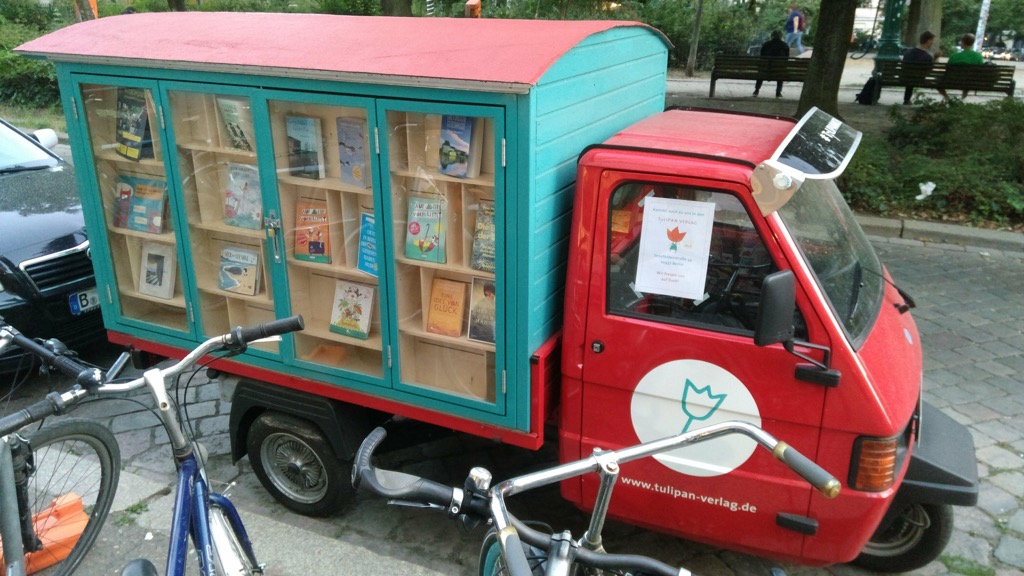
An interesting truck

My friend Morgan came along after work to join us for a drink (you’ll remember him from such episodes as The One Where I Blow Up the Car and I Am a Connection Machine) and afterwards we moved on to Salt n Bone for supper, where we were later joined by our friend Tiffany.

We rolled in to the A&O just after 10:30, happy to have spent a day with friends.

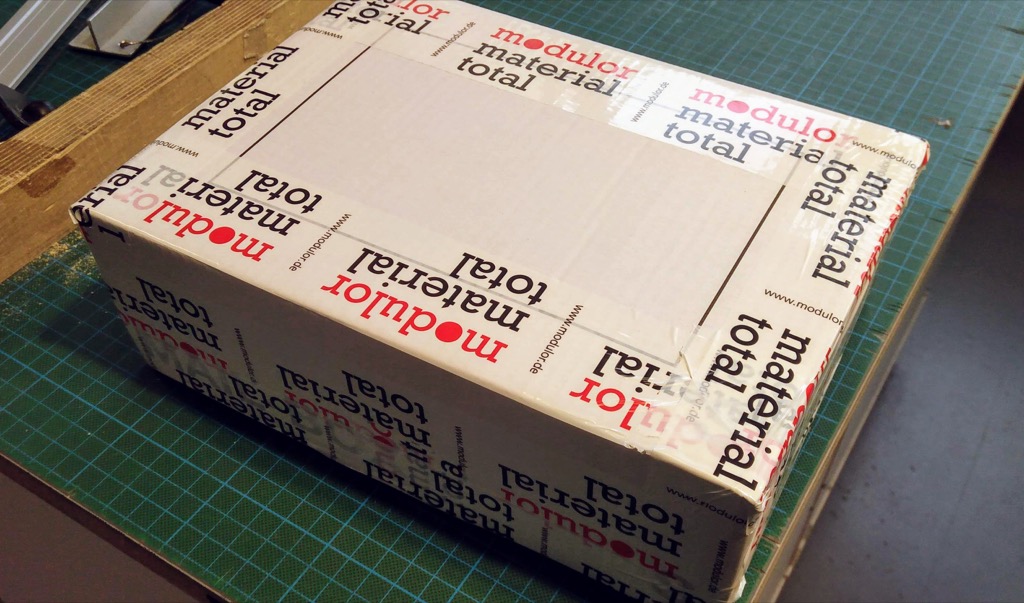
On Wednesday morning we subjected ourselves to the A&O breakfast again, but avoided the coffee in favour of an extended morning coffee break with friend Peter, whose office is as well-located an office as I’ve ever seen, embedded as it us in the same complex as Modulor, the world’s greatest stationery superstore. After catching up with Peter we spent almost 2 hours roaming the aisles of Modulor, finding enough unique items of interest to fill a small shipping box; so a trip to the post office around the corner was our next stop (Modulor helpfully has a packing and wrapping station, well-equipped with scissors, tape, kraft paper and string that made this much easier).

Modulor Box to Mail

For lunch we walked across the street from Modulor to Prinzessinnengarten and shared an meal of creamed chickpeas with cucumbers over rice and couscous while perched on a rattletrap table made out of tree stumps nestled between forest and garden. After lunch we toured the site, and stopped to make some sketches.

Lunch in the garden

The Garden

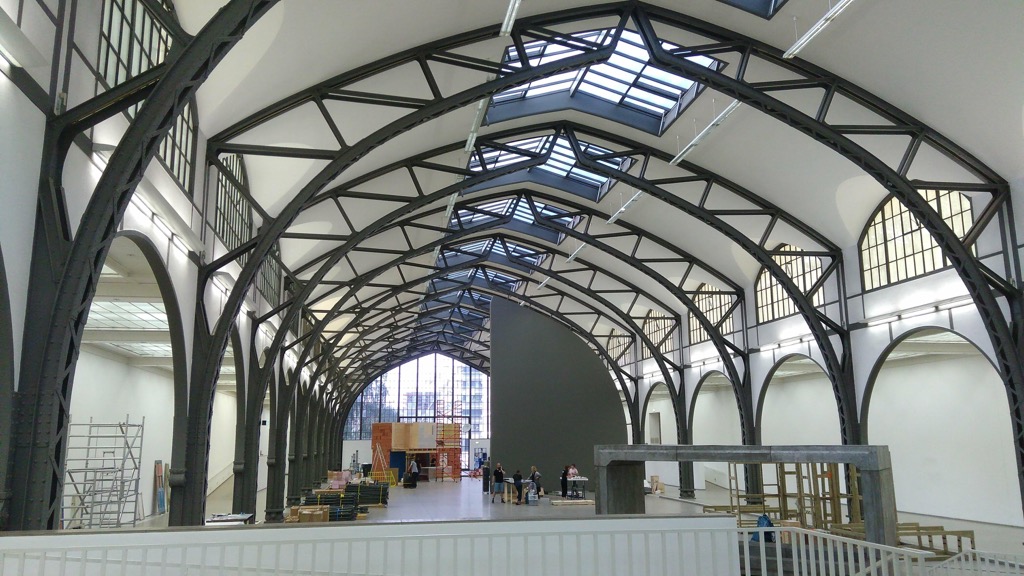
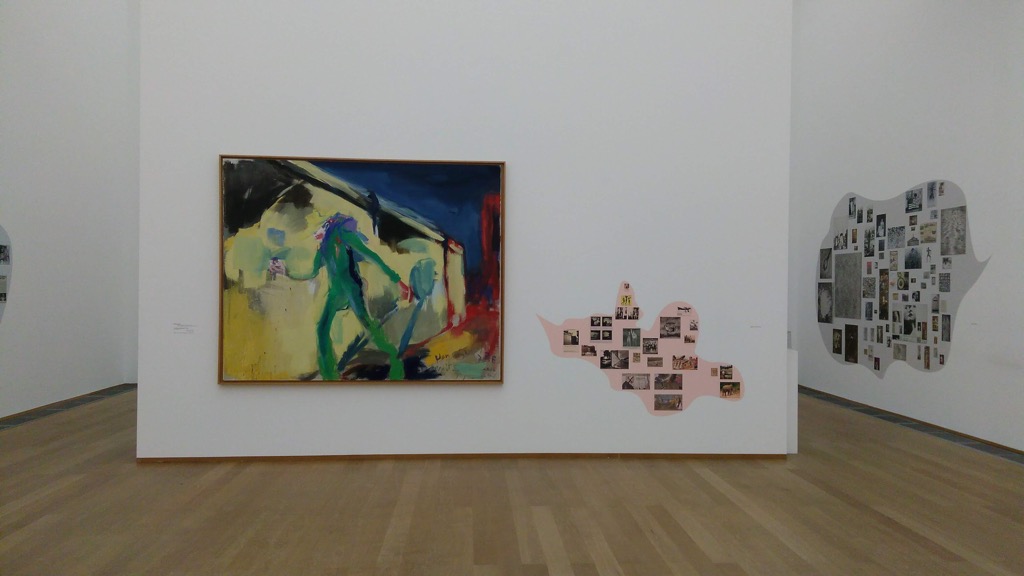
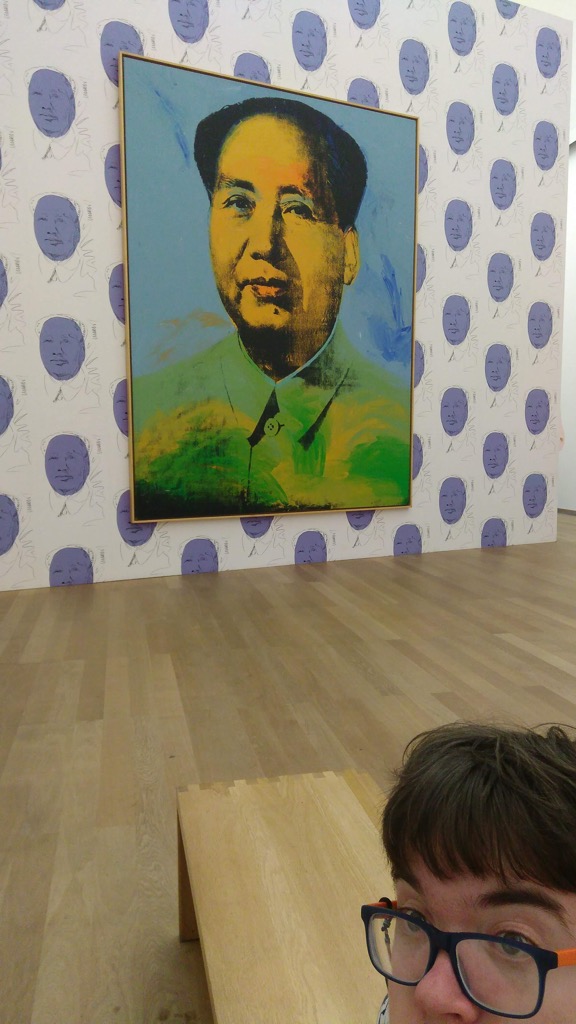
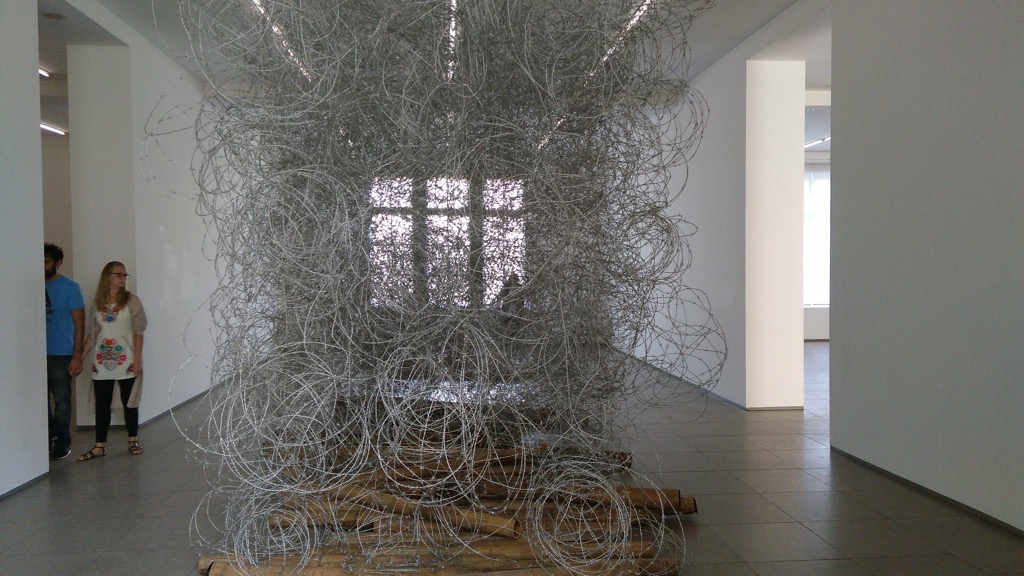
From the Moritzplatz U-Bahn that opens on to both Modulor and Prinzessinnengarten we rode into West Berlin to go to Hamburger Bahnhof, an art gallery in a former train station where we’d never been before, despite many visits to the city. We were lucky to find three intriguing exhibitions in place: a room full of works by Joseph Beuys, Andy Warhol, Robert Rauschenberg and Cy Twombly organized with “thought bubbles” beside each containing a collage of influencing imagery, Hello World, in the upper gallery, “a critical inquiry into the collection of the Nationalgalerie and its predominantly Western focus,” and, on the other end of the building, a monumental collection of installations by Qin Yufen.

Hamburger Bahnhof

Van Gogh Mauer by Rainer Fetting

Oliver and Warhol's Mao

Qin Yufen Piece

Once we’d toured the gallery we found ourselves tired and thirsty and I debated whether we should simply grab a coffee at the pleasant looking canal-side café attached to the gallery, or forge onward into West Berlin for something possibly more interesting. I channeled Catherine in this regard, and followed what I knew would be her advice to take the easy coffee at hand; this turned out to be exactly the right decision, and we emerged ready for the final activity of the day.

This final activity was a supper, thoughtfully organized by the aforementioned Morgan, at a Shaniu’s House of Noodles on Pariser Str. Morgan is a member of a ragtag group that, over the winter, gets together for a weekly TV watch-and-potluck; he called together a special summer session to visit Shaniu’s, and we were invited to join. The company was a diverse mix of people connected by myriad threads, all interesting; the food was transcendent, with several flavours that were completely new to me.

We arrived at the hostel at an “early” 10:00 p.m. and fell quickly to sleep after a quick round of preemptive packing.

Thursday morning we woke up at the unusually early hour of 7:00 a.m., ready to head east to the Netherlands.

Early Morning Berlin

In total we were in Berlin for a little more than 48 hours, and we managed to do a lot of visiting in that short time, and to visit my favourite haunts. Oliver was very, very generous and patient with me, indulging my stationery obsession and abiding many conversations with friends.

04 Sep 04:12

Farewell Megan, but not goodbye

by Dries

As you might have read on the Drupal Association blog, Megan Sanicki, the Executive Director of the Drupal Association, has decided to move on.

Megan has been part of the Drupal Association for almost 8 years. She began as our very first employee responsible for DrupalCon Chicago sponsorship sales in 2011, and progressed to be our Executive Director, in charge of the Drupal Association.

It's easy to forget how far we've come in those years. When Megan started, the Drupal Association had little to no funding. During her tenure, the Drupal Association grew from one full-time employee to the 17 full-time employees, and from $1.8 million in annual revenues to $4 million today. We have matured into a nonprofit that can support and promote the mission of the Drupal project.

Megan led the way. She helped grow, mature and professionalize every aspect of the Drupal Association. The last two years in her role as Executive Director she was the glue for our staff and the driving force for expanding the Drupal Association's reach and impact. She understood how important it is to diversify the community, and include more stakeholders such as content creators, marketers, and commercial organizations.

I'm very grateful for all of this and more, including the many less visible contributions that it takes to make a global organization run each day, respond to challenges, and, ultimately, to thrive. Her work impacted everyone involved with Drupal.

It's sad to see Megan go, both professionally and personally. I enjoyed working with Megan from our weekly calls, to our strategy sessions as well as our email and text messages about the latest industry developments, fun stories taking place in our community, and even the occasional frustration. Open source stewardship can be hard and I'm glad we could lean on each other. I'll miss our collaboration and her support but I also understand it is time for Megan to move on. I'm excited to see her continue her open source adventure at Google.

It will be hard to fill Megan's shoes, but we have a really great story to tell. The Drupal community and the Drupal Association are doing well. Drupal continues to be a role model in the Open Source world and impacts millions of people around the world. I'm confident we can find excellent candidates.

Megan's last day is September 21st. We have activated our succession plan: putting in place a transition team and readying for a formal search for a new Executive Director. An important part of this plan is naming Tim Lehnen Interim Executive Director, elevating him from Director, Engineering. I'm committed to find a new Executive Director who can take the Drupal Association to the next level. With the help of Tim and the staff, our volunteers, sponsors and the Board of Directors, the Drupal Association is in good hands.

04 Sep 03:55

@stoweboyd

@stoweboyd: Knowledge is objectively better than ignorance. | Paul Krugman. This shouldn’t be...
04 Sep 03:55

@stoweboyd

@stoweboyd: Donald Trump has slumped to the lowest approval rating of his presidency, with 60%...
03 Sep 18:48

Twitter Favorites: [ReneeStephen] @sillygwailo They wouldn't be nearly so successful if they did. Not knowing stuff is the key to audaciously claimin… https://t.co/t27wKklMkT

Renée Stephen @ReneeStephen
@sillygwailo They wouldn't be nearly so successful if they did. Not knowing stuff is the key to audaciously claimin… twitter.com/i/web/status/1…
03 Sep 18:48

NewsBlur Blurblog: Do We Need a New Theory and Name for “Bike Lanes”?

sillygwailo shared this story from Human Transit.

Important: I’m thinking out loud here!  The title is a question because I don’t have answers and am not proposing anything.

Now that we have scooters sharing bike lanes, I wonder if we’ll need to think more clearly about the different kinds of lane on a street and what their real defining features are.  This could lead to different words.

We separate traffic types for two reasons:

  • Speed, so that faster vehicles aren’t often stuck behind slower ones,
  • Width, so that we use less space to serve the needs of narrower vehicles, thus using scarce space more efficiently overall.

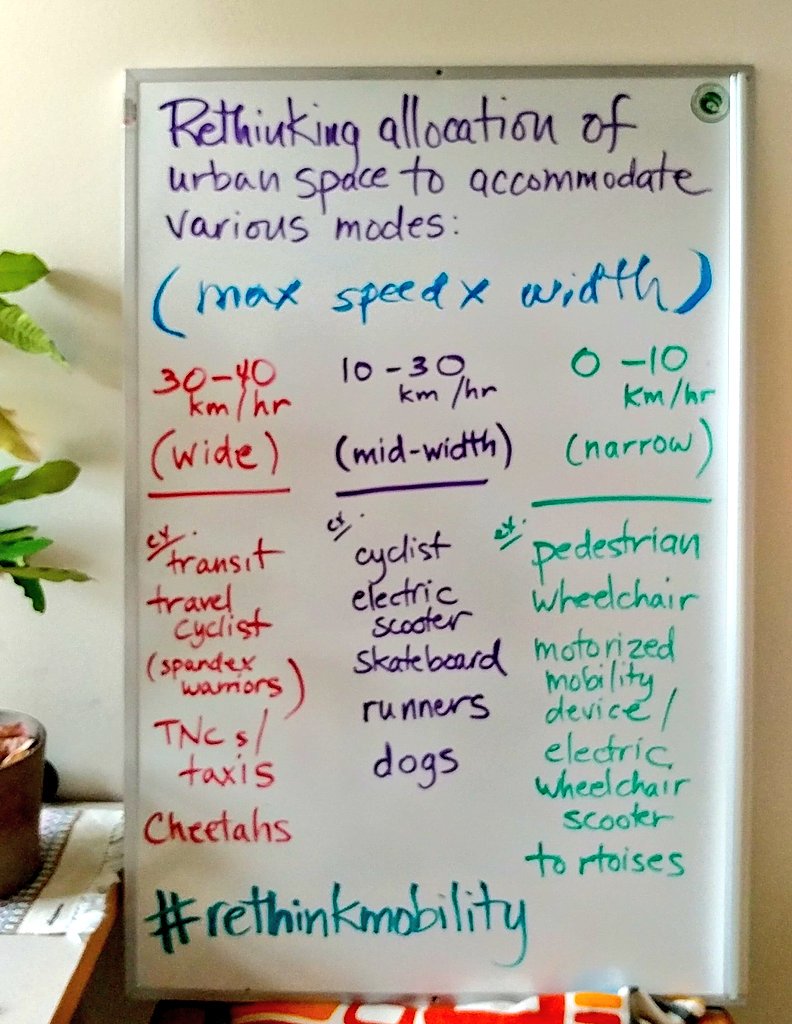
Sarah Iannarone and I were chatting about this on the bus this morning, and after that she went straight to the whiteboard and drew this:

The idea here is that a street with a speed limit over 30 km/hr will need to separate these three kinds of traffic, because they differ in both speed and width.  At lower speeds you can mix them more.

Where speed and width come apart, however, speed has to be the defining feature.  You can’t ride a motorbike at 30 km/hr down a “bike” lane, even though it may be narrow enough.  You have to ride it in the traffic lane, even though that’s a waste of space.

All this came up because I was trying to think of the correct new term for “bike lane” as we proliferate more vehicle types that run more or less at the speed and width of bicycles but are clearly not bicycles, such as electric scooters.  The two logical terms seem to be narrow lane or midspeed lane.  One way or another the two concepts will need to track with each other.

I wonder if this kind of language can make our sense of the role of these lanes more flexible, and thus less divisive.

There is a lot of room for individual choice here about which lane to use.  Cyclists, for example, already choose between midspeed “bike” lanes and full-speed traffic lanes, depending on their preferred balance of speed and safety.  Meanwhile, an 8-year-old learning to ride a bike should probably be on the sidewalk.  Another reason that “cycle lane” may be a misnomer.

This isn’t easy.  The things that might go in a midspeed lane have very different acceleration and stopping characteristics, all of which will cause friction.  When I raised this thought on Twitter, I got lots of responses expressing concern about different kinds of vehicles sharing a lane.  But even with just the few lane types that we already have, it’s hard to make them all fit.   We’ll never have a separate lane for every type of vehicle that needs a slightly different speed, acceleration, or stopping distance.  So again, I’m asking a question, not answering it.

Finally, Sarah assigns transit to the full-speed, widest lanes, but of course that leaves open the question of transit priority within that territory.  Where there’s demand and room for a bus lane, it should be automatic in my view.  It doesn’t even need to be “constructed” necessarily.  Just paint the lane red.


The post Do We Need a New Theory and Name for “Bike Lanes”? appeared first on Human Transit.

03 Sep 18:47

Twitter Favorites: [David_Moscrop] The strangest thing about living in Ontario again is waking up and not being three hours behind the news cycle.

David Moscrop @David_Moscrop
The strangest thing about living in Ontario again is waking up and not being three hours behind the news cycle.
03 Sep 18:47

Twitter Favorites: [shawnmicallef] If I may register a complaint 🙋🏼‍♂️there is too much news for one Friday to hold.

Buck-a-Burrata @shawnmicallef
If I may register a complaint 🙋🏼‍♂️there is too much news for one Friday to hold.
03 Sep 18:47

Twitter Favorites: [aehpalmer] Just saw the @RCAF_ARC @CFSnowbirds fly over downtown Toronto and it made me unbelievably happy. I have a special p… https://t.co/UmNMm5YlKK

Andrea Palmer @aehpalmer
Just saw the @RCAF_ARC @CFSnowbirds fly over downtown Toronto and it made me unbelievably happy. I have a special p… twitter.com/i/web/status/1…
03 Sep 18:47

NewsBlur Blurblog: NetNewsWire Comes Home

sillygwailo shared this story from inessential.com.

After some years spent traveling the world, NetNewsWire is now back where it started! It’s my app again.

We’ve kept its room ready for all these years. And I am thrilled to welcome it home.

Thanks to Black Pixel

First thing: I want to thank Black Pixel for their stewardship. They released NetNewsWire 4 for Mac and iOS, and they even brought it to Apple TV. They wrote and deployed a syncing system — which is a massive challenge. (I happen to know, from several first-hand experiences, just how difficult syncing is.)

They kept it moving forward — the app is now 16 years old — and that’s huge.

And I want to thank them for a second thing: their incredible generosity in bringing it back to me. When I asked them about it, they told me they’d already been discussing it. There was never a need to convince them: they thought it was the right thing to do before I even said a word.

You might reasonably wonder if nevertheless they asked for some large amount of money. There was no charge. That’s what I mean by “incredible generosity.”

As a friend of mine said on this subject, “Sometimes life is poetic.” Thanks to Black Pixel for making that true.

If you haven’t already, you should read Black Pixel’s announcement.

What This All Means

Here’s the scoop:

You probably know that I’ve been working on a free and open source reader named Evergreen. Evergreen 1.0 will be renamed NetNewsWire 5.0 — in other words, I’ve been working on NetNewsWire 5.0 all this time without knowing it!

It will remain free and open source, and it will remain my side project. (By day I’m a Marketing Human at The Omni Group, and I love my job.)

Black Pixel will stop selling their versions of the app, and will turn off the syncing system and end customer support — all of which is detailed in their announcement. (Important note: I will not get any customer data from them, nor will I be doing support for Black Pixel’s NetNewsWire.)

My Goal

I want one thing: to make the very best versions of NetNewsWire ever made.

And, along the way, I’d love to have your help.

Nothing to Download Yet

I don’t actually have an app bearing the name NetNewsWire ready to download yet. I will have test versions ready soon, though. It’s still going to be a while before the final version of 5.0 ships.

The repository is on GitHub.

I’ll also be creating a website for it, of course. And I’ll have news about a Slack group you can join.

PS For Reference

I should outline NetNewsWire’s history:

  • 2002: NetNewsWire Lite 1.0
  • 2003: NetNewsWire 1.0
  • 2005: Bought by NewsGator. I continued working on NetNewsWire as a NewsGator employee.
  • 2011: Bought by Black Pixel. I remained at NewsGator, and stopped working on NetNewsWire.
  • 2015: Started work on Evergreen
  • 2018: NetNewsWire comes home; Evergreen renamed to NetNewsWire

It was acquired twice before now. I worked on it for nine years before it went to Black Pixel, and it was there for seven years. And now it’s back home.

For good!

PS Pardon the dust — there’s a bunch of renaming to do and ducks to line up. Things may be confusing at first. But where you see the name Evergreen, think NetNewsWire.

03 Sep 18:47

NewsBlur Blurblog: A Remotely Controlled Kindle Page Turner

sillygwailo shared this story from Kindle hacks – Hackaday.

One of the biggest advantages of e-readers such as the Kindle is the fact that it doesn’t weigh as much as a traditional hardcover book, much less the thousands of books it can hold in digital form. Which is especially nice if you drop the thing on your face while reading in bed. But as light and easy to use as the Kindle is, you still need to hold it in your hands and interact with it like some kind of a baby’s toy.

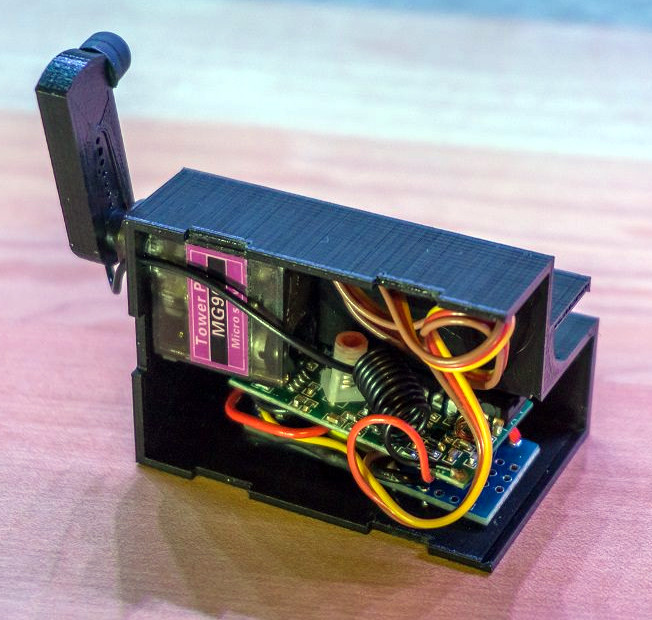
Looking for a way to operate the Kindle without having to go through the exhaustive effort of raising their hand, [Alex Mikes] designed and built a clip-on device that makes using Amazon’s e-reader even easier. At the press of a button, the device knocks on the edge of the screen which advances the book to the next page. Going back a page will still require you to extend your meaty digit, but that’s your own fault for standing in the way of progress.

The 3D printed case holds an Arduino and RF receiver, as well as a small servo to power the karate-chop action. There’s no battery inside, meaning the device needs to stay plugged in via a micro USB connection on the back of the case. But let’s be honest: if you’re the kind of person who has a remote-controlled Kindle, you probably aren’t leaving the house anytime soon.

To fool the Kindle into thinking a human finger is tapping the screen, the page turner’s arm has a stylus tip on the end. A channel is designed into the 3D printed arm for a wire to run from the tip to the Arduino’s ground, which triggers the capacitive screen to register a touch.

All joking aside, the idea holds promise as an assistive technology for individuals who are unable to lift an e-reader or operate its touch screen controls. With the Kindle held up in a mount, and this device clipped onto the side, anyone who can push a button (or trigger the device in whatever method they are physically capable) can read a book on their own. A simple pleasure that can come as a huge comfort to a person who may usually be dependent on others.

In the past we’ve seen physical buttons printed for touch screens, and an Arduino used to control a touch screen device. But this particular combination of physical and electrical interaction is certainly a unique way to tackle the problem without modifying the target device.


03 Sep 17:27

Privacy Policies Will Be Required for All Apps and Updates Beginning October 3rd

by John Voorhees

If you go to an app’s product page on any of Apple’s app stores, sometimes you’ll see a link to a privacy policy and sometimes you won’t. That’s because when iOS, macOS, or tvOS apps are submitted for beta testing or sale, developers have the option but aren’t required to link to a webpage with a privacy policy or, in the case of tvOS, include the policy directly in the app’s product page because the Apple TV doesn’t support web browsing. That will change soon.

As of October 3, 2018, any new app or update uploaded for beta testing or sale must include a privacy policy. Apple announced the change on its App Store Connect developer portal, which requires a developer account to access. Apple also noted in its announcement that a developer’s privacy policy link or text will only be editable when a developer submits a new version of their app for review.

Many app developers already provide privacy policies and are transparent about the information they collect from users and how they use it. I’m glad to see privacy policies become a requirement though because for some apps it’s not easy to track down how they use your data and there have been too many instances in the recent past where it’s been discovered that an app has used data in ways that users might not expect.


Support MacStories Directly

Club MacStories offers exclusive access to extra MacStories content, delivered every week; it's also a way to support us directly.

Club MacStories will help you discover the best apps for your devices and get the most out of your iPhone, iPad, and Mac. Plus, it's made in Italy.

Join Now
03 Sep 17:18

Black Pixel Transfers NetNewsWire to Brent Simmons

by John Voorhees

Today, Brent Simmons and Black Pixel announced that NetNewsWire will be returning to Simmons, the original developer of the app.

NetNewsWire is a Mac RSS reader created by Simmons in 2002. Simmons sold the app to NewsGator in 2005, which subsequently sold it to Black Pixel, where it’s been developed for the past 7 years. During that time, Black Pixel released version 4 for Mac and iOS and created an Apple TV version. Black Pixel also implemented a sync system to keep users’ feeds up to date on each platform.

Separately, Simmons has been working on a free, open source RSS reader for the Mac called Evergreen. According to Simmons’ post on inessential.com, Evergreen will be renamed NetNewsWire 5.0. The project is available on GitHub, and a beta version for testing will be released soon. Black Pixel has removed NetNewsWire from sale and will shut down its sync server in 60 days. Simmons plans to support a variety of third-party RSS sync solutions in NetNewsWire 5.0 starting with Feedbin.

As I’ve noted on AppStories before, RSS readers have stagnated on the Mac in comparison to iOS in recent years, which is why I’m glad to see that Simmons is rebooting NetNewsWire based the work on Evergreen that he’s already done. RSS is still my first stop for most of the news I read every day. Although reading on iOS devices may be the most natural platform for RSS, I’m optimistic that we’ll see a revitalization of RSS on the Mac between projects like Simmons’ and the prospect of Marzipan versions of iOS RSS readers coming to the Mac in the future.


Support MacStories Directly

Club MacStories offers exclusive access to extra MacStories content, delivered every week; it's also a way to support us directly.

Club MacStories will help you discover the best apps for your devices and get the most out of your iPhone, iPad, and Mac. Plus, it's made in Italy.

Join Now
03 Sep 16:42

The world is a terrible place right now, and that’s largely because it is what we make it.

Wil Wheaton, Wil Wheaton dot Net, Sept 13, 2018


Icon

Wil Wheaton has quit the tire-fire we call Twitter and now, because of an abusive reception, he has quite Mastodon as well and has sworn of social media altogether. Leo Laporte of TWiT has also signed off Twitter. I think Wheaton sums up the problem nicely. "I watched, in real time, as the site I loved turned into a right wing talk radio shouting match that made YouTube comments and CSPAN call-ins seem scholarly. We tried for a couple of years to fight back, to encourage Twitter to take a stand against bad actors. Twitter doesn’t care about how its users are affected by themselves, though."

I used to write about the concepts of 'push' and 'pull' a lot more than I do today. The idea is that the web (or anything else) could work one of two ways: either you you pull the stuff you want, or you let others push you content (and you filter the stuff you fdon't want, if you can). RSS is an example of pull; so is podcasting, so is the web itself. Email, radio, TV, social network feeds and telephones are examples of push. I have always been a proponent of pull. Push can be (and inevitably will be) abused by people. They will say we need suggestions, that there's too much choice, that we don't know what we want, that some messages are too important to be left to change, that there must be a common social fabric - whatever. But in the end it Always. Gets. Abused.

Web: [Direct Link] [This Post]
03 Sep 16:36

Learn to write games for the BBC Micro with Eben

by Eben Upton

Long-time fans of the Raspberry Pi will know that we were inspired to make a programmable computer for kids by our own experiences with a machine called the BBC Micro, which many of us learned with in the 1980s.

This post is the first of what’s going to be an irregular series where I’ll walk you through building the sort of game we used to play when we were kids. You’ll need a copy of BeebEm (scroll down for a Linux port if you’re using a Pi – but this tutorial can be carried out on a PC or Mac as well as on an original BBC Micro if you have access to one).

I’m going to be presenting the next game in this series, tentatively titled Eben Goes Skiing, at the Centre for Computing History in Cambridge at 2pm this afternoon – head on down if you’d like to learn how to make scrolling ascii moguls.

Helicopter tutorial

We’re going to build a simple helicopter game in BBC BASIC. This will demonstrate a number of neat features, including user-defined characters, non-blocking keyboard input using INKEY, and positioning text and graphics using PRINT TAB.

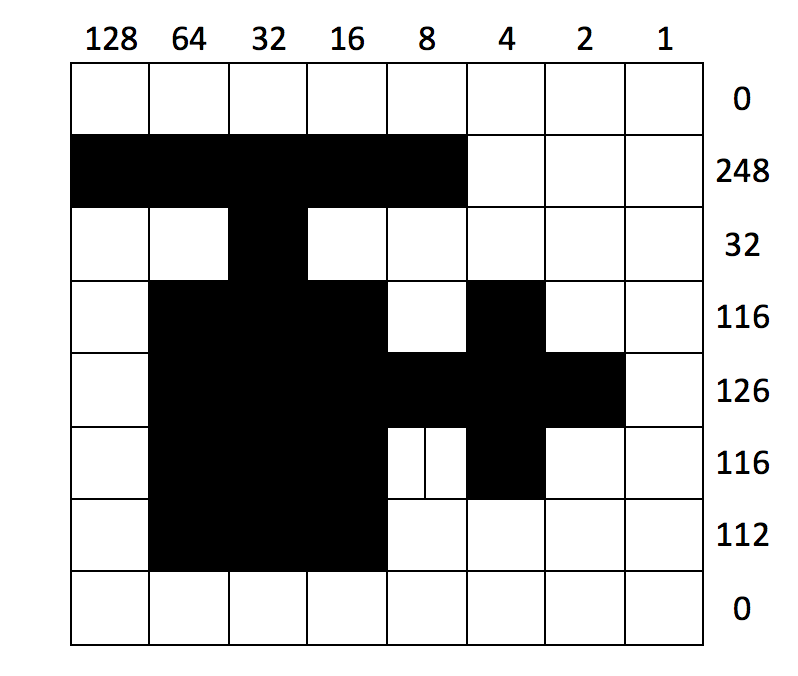
Let’s start with user-defined characters. These provide us with an easy way to create a monochrome 8×8-pixel image by typing in 8 small numbers. As an example, let’s look at our helicopter sprite:

Each column pixel position in a row is “worth” a different power of 2, from 1 for the rightmost pixel up to 128 for the leftmost. To generate our 8 numbers, we process one row at a time, adding up the value for each occupied pixel position. We can now create custom character number 226 using the VDU 23 command. To display the character, we change to a graphics mode using the MODE command and display it using the PRINT command.

Type the following:

10MODE 2

70VDU 23,226,0,248,32,116,126,116,112,0

RUN

PRINT CHR$(226)

You should see the little helicopter on the screen just above your prompt. Let’s define some more characters for our game, with character numbers 224 through 229. These represent leftward and rightward flying birds, a rightward flying helicopter, the surface of the sea, and a landing pad.

Type the following:

50VDU 23,224,0,14,12,104,16,28,8,0

60VDU 23,225,0,112,48,22,8,56,16,0

80VDU 23,227,0,31,4,46,126,46,14,0

90VDU 23,228,0,102,255,255,255,255,255,255

100VDU 23,229,255,255,0,0,0,0,0,0

Trying running your program and using print to view the new characters!

Now we’re ready to use our sea and platform characters to build the game world. Mode 2 on the BBC Micro has 20 character positions across, and 32 down. We’ll draw 20 copies of the sea character in row 30 (remember, rows and columns are numbered from zero) using a FOR loop and the PRINT TAB command, and pick a random position for the platform using the RND() function.

Type the following:

110FOR I%=0 TO 19

120PRINT TAB(I%,30) CHR$(228);

130NEXT

140P%=RND(20)-1

150PRINT TAB(P%,30) CHR$(229);

RUN

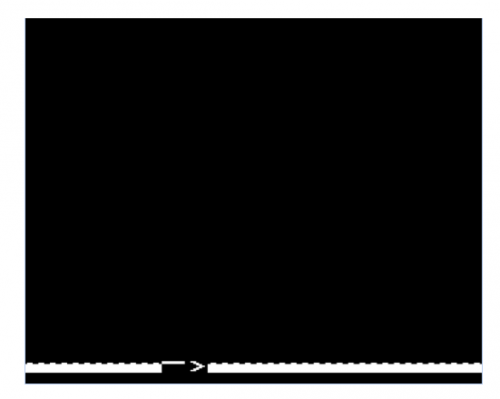
You should see something like this:

Don’t worry about that cursor and prompt: they won’t show up in the finished game.

It’s time to add the helicopter. We’ll create variables X% and Y% to hold the position of the helicopter, and Z% to tell us if it last moved left or right. We’ll initialise X% to a random position, Y% to the top of the screen, and Z% to zero, meaning “left”. We can use PRINT TAB again to draw the helicopter (either character 226 or 227 depending on Z%) at its current position. The whole thing is wrapped up in a REPEAT loop, which keeps executing until the helicopter reaches the ground (in row 29).

Type the following:

160X%=RND(20)-1:Y%=0:Z%=0

180REPEAT

260PRINT TAB(X%,Y%) CHR$(226+Z%);

290UNTIL Y%=29

RUN

You’ll see the helicopter sitting at the top of the screen.

We’re almost there: let’s give our helicopter the ability to move left, right and down. On each trip round the loop, we move down one row, and use the INKEY() function to read the Z and X keys on the keyboard. If Z is pressed, and we’re not already at the left of the
screen, we move one column left. If X is pressed, and we’re not already at the right of the screen, we move one column right.

Type the following:

210IF INKEY(-98) AND X%>0 THEN X%=X%-1:Z%=0

220IF INKEY(-67) AND X%<19 THEN X%=X%+1:Z%=1

230Y%=Y%+1

RUN

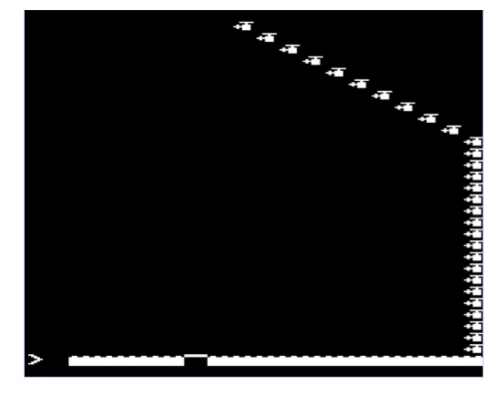
You should see something like this:

The game is much, much too fast to control, and the helicopter leaves trails: not surprising, as we didn’t do anything to erase the previous frame. Let’s use PRINT TAB to place a “space” character over the previous position of the helicopter, and add an empty FOR loop to slow things down a bit.

Type the following:

190PRINT TAB (%,Y%)"";

280FOR I%=1 TO 200:NEXT

RUN

Much better! This is starting to feel like a real game. Let’s finish it off by:

  • Adding a bird that flies back and forth
  • Detecting whether you hit the pad or not
  • Getting rid of the annoying cursor using a “magic” VDU 23 command
  • Putting an outer loop in to let you play again

Type the following:

20REPEAT

30CLS

40VDU 23,1,0;0;0;0;

170A%=RND(18):B%=10:C%=RND(2)-1

200PRINT TAB(A%,B%) "";

240A%=A%+2*C%-1

250IF A%=0 OR A%=19 THEN C%=1-C%

270PRINT TAB(A%,B%) CHR$(224+C%);

300IF X%=P% PRINT TAB(6,15) "YOU WIN" ELSE PRINT TAB(6,15) "YOU
LOSE"

310PRINT TAB(4,16) "PRESS SPACE"

320REPEAT UNTIL INKEY(-99)

330UNTIL FALSE

RUN

And here it is in all its glory.

You might want to try adding some features to the game: collision with the bird, things to collect, vertical scrolling. The sky’s the limit!

I created a full version of the game, using graphics from our very own Sam Alder, for the Hackaday 1K challenge; you can find it here.

Appendix

Here’s the full source for the game in one block. If you get errors when you run your code, type:

MODE 0
LIST

And compare the output very carefully with what you see here.

10MODE 2
20REPEAT
30CLS
40VDU 23,1,0;0;0;0;
50VDU 23,224,0,14,12,104,16,28,8,0   
60VDU 23,225,0,112,48,22,8,56,16,0
70VDU 23,226,0,248,32,116,126,116,112,0
80VDU 23,227,0,31,4,46,126,46,14,0
90VDU 23,228,0,102,255,255,255,255,255,255
100VDU 23,229,255,255,0,0,0,0,0,0
110FOR I%=0 TO 19
120PRINT TAB(I%,30) CHR$(228);
130NEXT
140P%=RND(20)-1
150PRINT TAB(P%,30) CHR$(229);
160X%=RND(20)-1:Y%=0:Z%=0
170A%=RND(18):B%=10:C%=RND(2)-1
180REPEAT
190PRINT TAB(X%,Y%) " ";
200PRINT TAB(A%,B%) " ";  
210IF INKEY(-98) AND X%>0 THEN X%=X%-1:Z%=0  
220IF INKEY(-67) AND X%<19 THEN X%=X%+1:Z%=1
230Y%=Y%+1
240A%=A%+2*C%-1
250IF A%=0 OR A%=19 THEN C%=1-C%
260PRINT TAB(X%,Y%) CHR$(226+Z%);
270PRINT TAB(A%,B%) CHR$(224+C%);
280FOR I%=1 TO 200:NEXT
290UNTIL Y%=29
300IF X%=P% PRINT TAB(6,15) "YOU WIN" ELSE PRINT TAB(6,15) "YOU LOSE"
310PRINT TAB(4,16) "PRESS SPACE"
320REPEAT UNTIL INKEY(-99)
330UNTIL FALSE


The post Learn to write games for the BBC Micro with Eben appeared first on Raspberry Pi.

03 Sep 16:26

Huawei Will Unveil the Mate 20 on October 16

by Rajesh Pandey
Huawei’s Mate series has managed to create quite a name for itself among power users. The devices in the series are filled to the brim with top-notch internals that will tickle the fancy of any power user. Huawei has now announced that it will be unveiling its next flagship Mate handset on October 16 in London. Continue reading →
03 Sep 16:26

Huawei Mate 20 Lite Launches in the UK in September with 6.3-Inch Display, Kirin 710, and Four Cameras

by Evan Selleck
Despite the fact that Huawei has already set some eyes on the future, announcing that it will be announcing the Mate 20 on October 16 in London, the company has also decided to launch the “Lite” version of that handset right now. Continue reading →
03 Sep 16:26

Google Isn’t Launching a Pixel Watch This Year

by Evan Selleck
Rumors have been popping up throughout the year that Google is finally planning on launching a smartwatch of its own, a true showcase of Wear OS (formerly known as Android Wear). Continue reading →