Shared posts

23 Sep 19:22

Things 3.7 Brings Siri Shortcuts and More

by Mick

Today’s update is packed with great new features for iOS 12 and watchOS 5 – including support for Siri Shortcuts, the Apple Watch Series 4 and the Siri watch face, Dynamic Notifications, Password AutoFill, and Landscape Mode for iPhone. Let’s dive in!

Things 3.7 for iOS 12

Siri Shortcuts

The biggest new feature in iOS 12 is Siri Shortcuts, a new technology that’s all about speeding up the things you do often. For Things, these shortcuts open up some exciting new avenues for productivity, and we’d like to walk you through five different ways you can use them.

1. Siri gets to know you better

Siri can now learn your routines and begin suggesting things that you might want to do. For example, if you open your Today list every morning around 9 AM to look over your to-dos, Siri will eventually pick up on this – and the next morning at 9, you might be greeted with a new “Show Today” shortcut right on your Lock screen. Tap the shortcut, and you’re instantly brought to the right place within Things. It removes a little bit of friction, and feels surprisingly delightful when it happens.

Siri Suggestions
If you do something repeatedly, Siri will suggest a shortcut on your Lock screen.

2. Build your own Quick Entry

Things is great for collecting stuff you want to review and act on later, like remembering things you have to do around the house, groceries you need to buy, work tasks, and so on. When an idea hits you, you would normally open Things to enter it, maybe apply a tag or a date, and then select a list where it should go. Instead of doing these same steps over and over, you can now record a shortcut to speed things up.

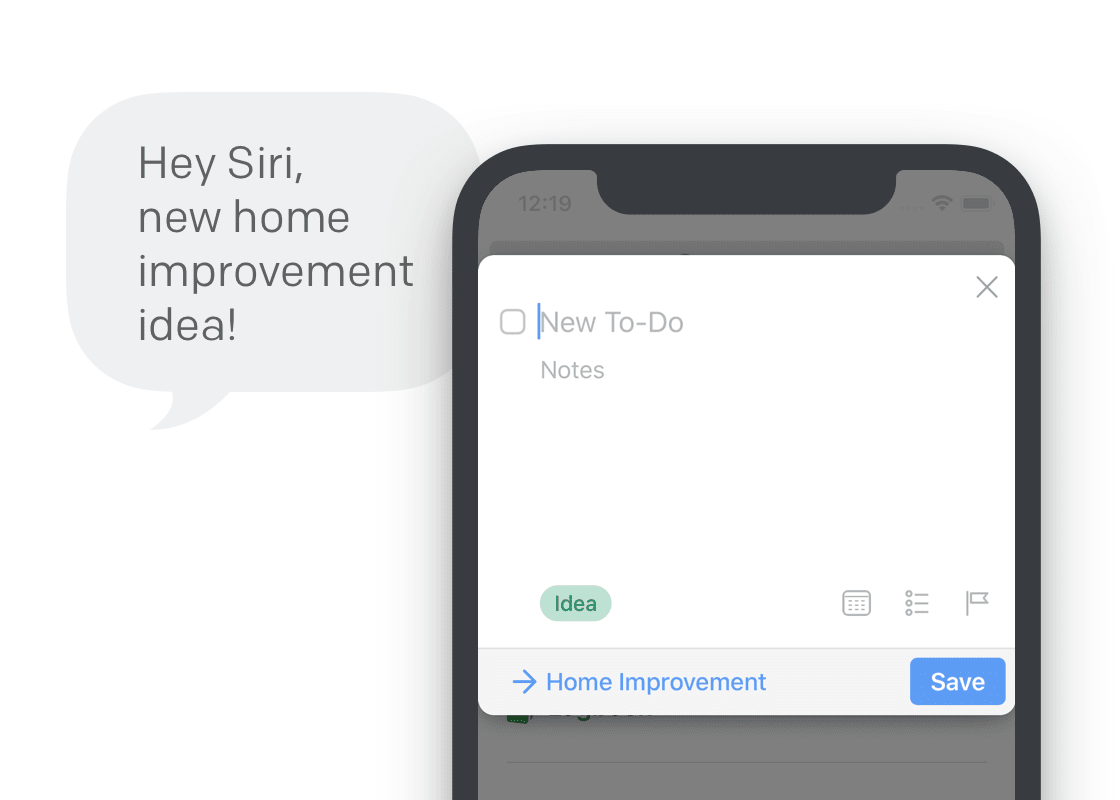
In Things, go to Settings > Siri & Shortcuts > Add To-Do. Fill out everything that’s always the same for this particular type of to-do, then tap Add to Siri and speak your own phrase, like “new home improvement idea”.

Now the next time you want to jot something down, you can just say “new home improvement idea”, and you’ll be presented with a prefilled Quick Entry popover. All you need to do is enter the title and hit save!

“Hey Siri, new home improvement idea!”
Record a phrase to show a prefilled Quick Entry popover in Things.

3. Ready-made to-dos

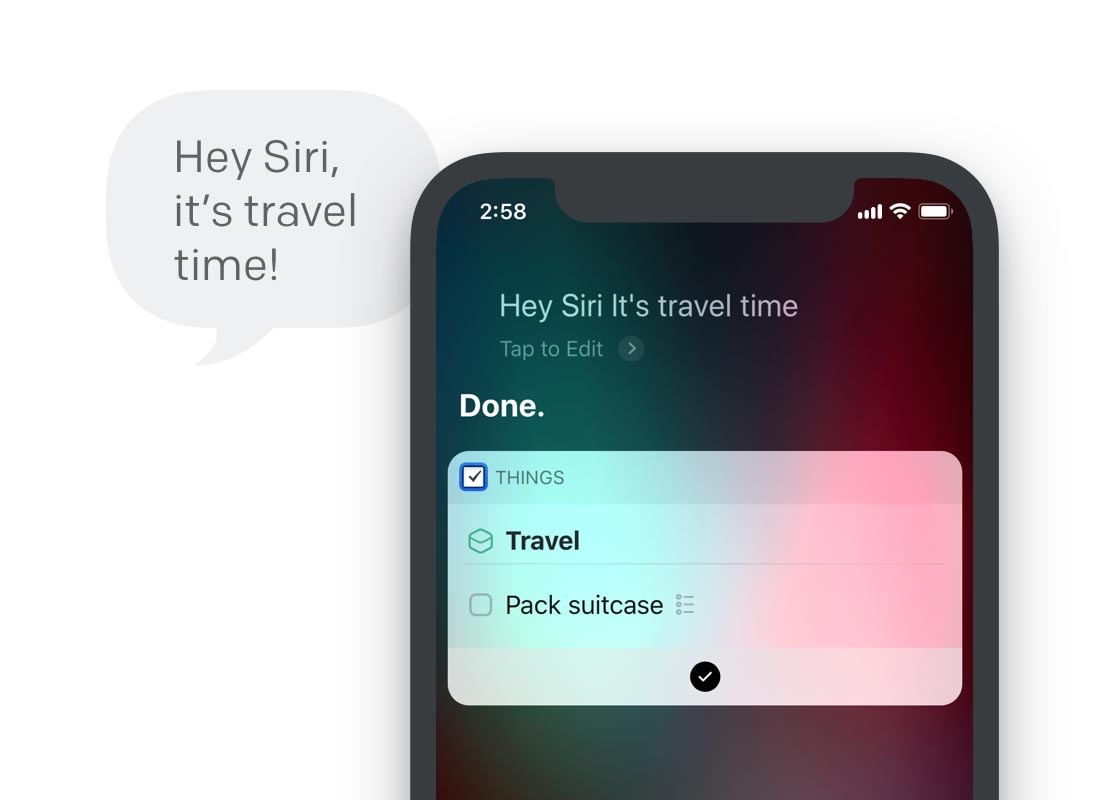
Some of the things you do are always exactly the same. Say you travel a lot – you probably have a well-refined packing list you run through before every trip. Now, at the command of your voice, you can instantly create a to-do with that packing list.

Just go to Settings > Siri & Shortcuts > Add To-Do, and fill out everything you need in your to-do. Make sure Edit in Things is deselected so the to-do is created in the background, then tap Add to Siri and record a phrase, like “it’s travel time”.

When a new trip is coming up, just say: “Hey Siri, it’s travel time.” You’ve forgotten your socks for the last time 😀

“Hey Siri, it’s travel time!”
Record a phrase to quickly create to-dos you need often.

4. Quick access to lists

If you have a specific list that you need to refer to often throughout the day, you can create a shortcut that quickly brings you there. Go to Settings > Siri & Shortcuts > Show List to record your custom voice phrase for it.

You can even set it up to filter that list when it opens. For example, “Hey Siri, show me today’s errands” can open your Today list and automatically filter it by your “Errands” tag.

5. Workflows!

Lastly – but for power users certainly not least – these shortcuts are integrated with Apple’s new Shortcuts app. What’s great about the Shortcuts app is that it allows you to pull actions together from multiple different apps into one powerful, multi-step workflow.

Matthew Cassinelli over at The Sweet Setup had an early go at creating shortcuts for Things and plans to share useful workflows he’s coming up with. We can’t wait to see the creative ways you’ll all put this to use!


Dynamic Notifications

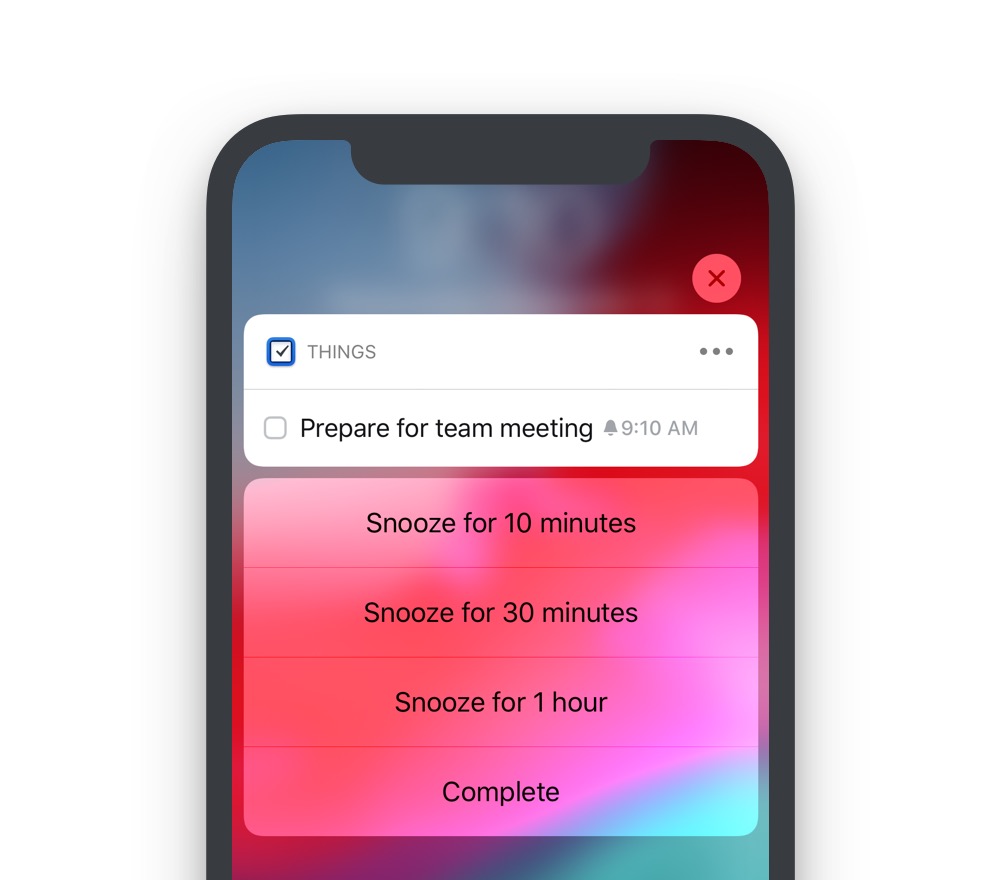
When you get a notification from Things, tap the Snooze button and you’ll notice that you now have granular control over the duration of the snooze: 10 minutes, 30 minutes, 1 hour.

Dynamic Notifications
The new options are revealed when you press the “Snooze” button.

Password AutoFill

Things supports iOS 12’s new Password AutoFill feature. It creates a strong password for you, keeps it safe, and automatically enters it for you when you log in on a new device. All of this now works with Things Cloud.


Landscape Mode

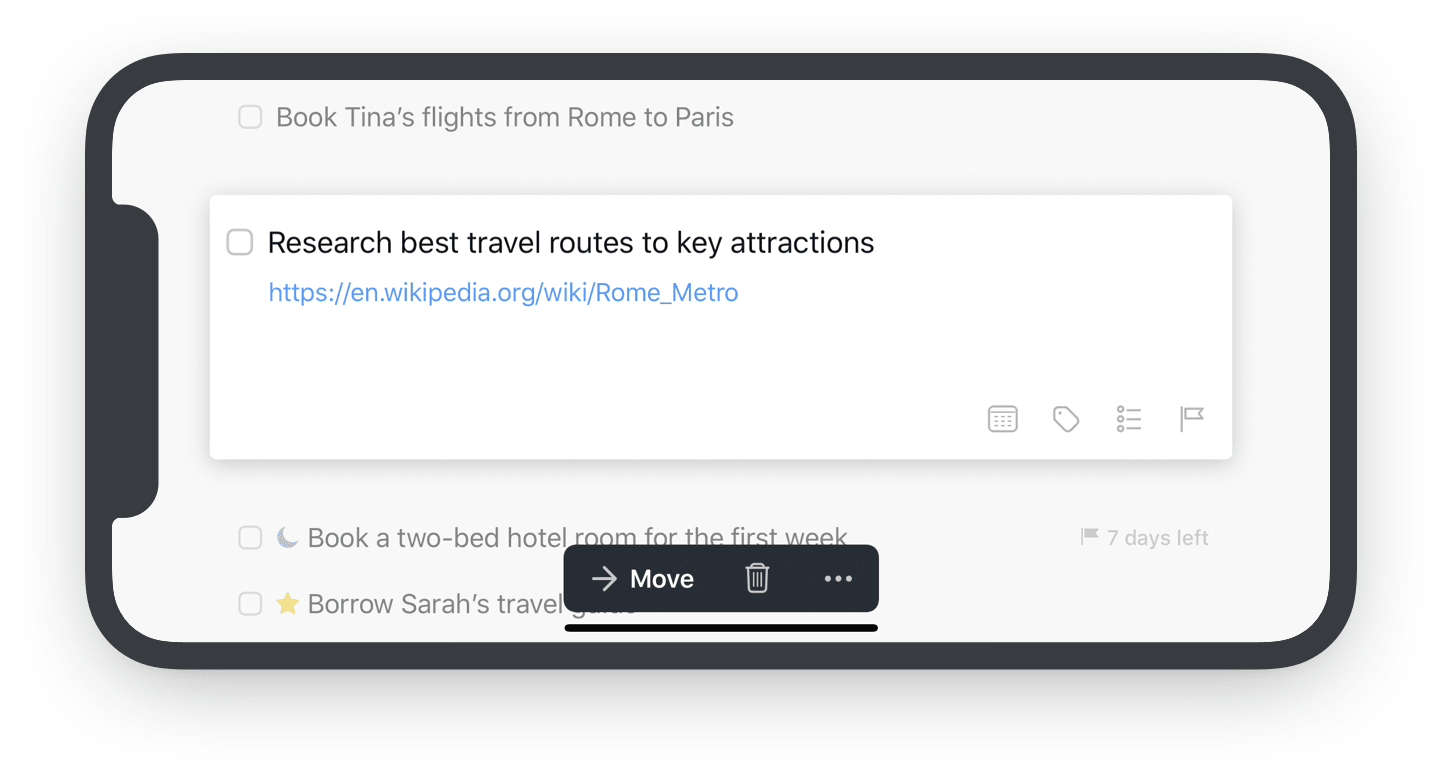
Turn your iPhone to the side, and behold – our shiny new landscape mode 🙃

Landscape Mode

Apple Watch

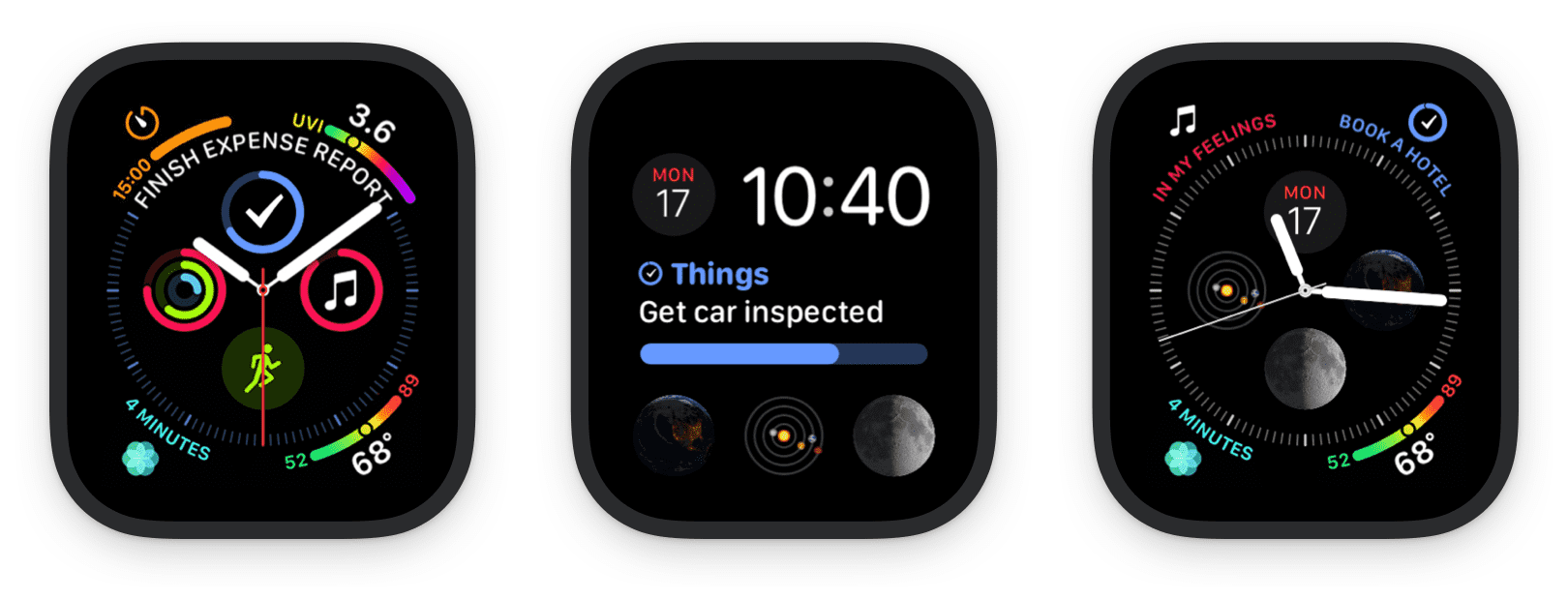
We’ve also added full support for watchOS 5 and Apple Watch Series 4. You’ll notice Things now appears on the Siri watch face; it shows the next to-do from your Today list, and how many to-dos are left for the day.

For the Series 4, we’ve built four great new complications for the new Infograph watch faces.

New Complications

Things 3.7 is available for download from the App Store now. We hope you enjoy these features!

Until we meet again. In the Mojave desert. At night. 😱

23 Sep 19:22

Launching my new book; The Indispensable Community

by Richard Millington

I’m incredibly excited to announce the launch today of my second book; The Indispensable Community – Why Some Brand Communities Thrive When Others Perish.

If you’ve ever struggled to explain the value of your community, if you’re not sure how to get the best results from your community, or your members aren’t doing what you need, you need to buy this book.

There are hundreds of thousands of brand communities around today, but how many are truly indispensable to either the brand or their members? How many brands or members would truly suffer if the community disappeared tomorrow?

Not many.

Far too many of us today are stuck driving engagement. We spend our days responding to what happens in our community, trying to get the metrics up, and creating content we hope will be popular. It’s a big mistake. Even if we succeed, we lose. Engagement doesn’t drive results.

This book will share a new approach towards building community, an approach which will help you stop driving engagement and instead work your members to get their best possible contributions to the community.

If you’re feeling stuck, struggling to prove the value of your work, get the support you need, or simply want to accelerate your career to a higher level, this book will help.

You can buy the book on Amazon.com.

A huge thank you to everyone that made this book possible.

23 Sep 19:21

UDP.

by Stanislav

This is a simple library for Ada, to replace the asinine GNATSockets item.

Supported:

  • Unixlike OS back-end.
  • Open/close datagram socket on given local IP and port.
  • Transmit datagrams of fixed length.
  • Receive (blocking) datagrams of fixed length, rejecting shorts, saving the originator’s IP/port.
  • Handle all possible OS error conditions.

Permanently unsupported:

  • Microshit back-ends.
  • TCP.
  • IPv6.
  • DNS.

You will need:


Edit (9/27) : diana_coman graciously baked a Keccak-V regrind of this item. I will mirror it here, along with her seals and mine. (I have taken the liberty of reformatting the file names to follow my sorting convention, this does not affect GPG signatures, and will not AFAIK confuse any existing Vtron.)

Add the above vpatch and seal to your V-set, and press to udp_errata.asciilifeform.vpatch.

The lib itself is 583 589 LOC, including commentary and C glue.

The demo set is reproduced below:

udp_echo_demo.adb:

with Ada.Text_IO; use Ada.Text_IO;
 
with UDP;
 
 
procedure UDP_Echo_Demo is
 
   Socket           : UDP.Socket;
 
   Local_Endpoint   : UDP.Endpoint := (Address => UDP.INADDR_ANY,
                                       Port    => 7000);
 
   Received_Payload : UDP.Payload;
   Received_Origin  : UDP.Endpoint;
   Received_Valid   : Boolean;
 
begin
   Put_Line("Opening socket on local endpoint " &
              UDP.IP_To_String(Local_Endpoint.Address) &
              " :" & UDP.IP_Port'Image(Local_Endpoint.Port) & "...");
 
   UDP.Open_Socket(Socket, Local_Endpoint);
 
   Put_Line("Waiting for payload...");
 
   UDP.Receive(Socket, Received_Origin, Received_Payload, Received_Valid);
 
   Put_Line("Received payload from " &
              UDP.IP_To_String(Received_Origin.Address) &
              " :" & UDP.IP_Port'Image(Received_Origin.Port) & "...");
 
   if Received_Valid then
 
      Put_Line("Sending received payload back to originator...");
 
      UDP.Transmit(Socket, Received_Origin, Received_Payload);
 
   else
 
      Put_Line("Received short payload, ignored.");
 
   end if;
 
   UDP.Close_Socket(Socket);
 
   Put_Line("Done.");
 
end UDP_Echo_Demo;

udp_tx_demo.adb:

with Ada.Text_IO; use Ada.Text_IO;
with Interfaces; use Interfaces;
 
with UDP; use UDP;
 
 
procedure UDP_Tx_Demo is
 
   Socket           : UDP.Socket;
 
 
   Local_Endpoint   : UDP.Endpoint := (Address => UDP.INADDR_ANY,
                                       Port    => 5000);
 
   Remote_Endpoint   : UDP.Endpoint
     := (Address => UDP.IP_From_String("0.0.0.0"),
         Port    => 7000);
 
   ----- Dulap test, replace with your own  -----
   --  Remote_Endpoint   : UDP.Endpoint
   --    := (Address => UDP.IP_From_String("161.0.121.200"),
   --        Port    => 7000);
   ----------------------------------------------
 
   Sent_Payload     : UDP.Payload;
   Received_Payload : UDP.Payload;
   Received_Origin  : UDP.Endpoint;
   Received_Valid   : Boolean;
 
begin
   Put_Line("Generating " &
              UDP.Payload_Size'Image(Sent_Payload'Length) & "-byte turd...");
 
   for I in Sent_Payload'Range loop
      Sent_Payload(I) := Unsigned_8(I mod 256);
   end loop;
 
   Put_Line("Opening socket on local endpoint " &
              UDP.IP_To_String(Local_Endpoint.Address) &
              " :" & UDP.IP_Port'Image(Local_Endpoint.Port) & "...");
 
   UDP.Open_Socket(Socket, Local_Endpoint);
 
   Put_Line("Sending turd to " &
              UDP.IP_To_String(Remote_Endpoint.Address) &
              " :" & UDP.IP_Port'Image(Remote_Endpoint.Port) & "...");
 
   UDP.Transmit(Socket, Remote_Endpoint, Sent_Payload);
 
   Put_Line("Waiting for echo...");
 
   UDP.Receive(Socket, Received_Origin, Received_Payload, Received_Valid);
 
   Put_Line("Received payload from " &
              UDP.IP_To_String(Received_Origin.Address) &
              " :" & UDP.IP_Port'Image(Received_Origin.Port) & "...");
 
   if Received_Valid then
 
      if Received_Payload = Sent_Payload then
         Put_Line("Echo came back equal to the send turd!");
      else
         Put_Line("Echo came back mutilated!");
      end if;
 
   else
 
      Put_Line("Received short payload, ignored.");
 
   end if;
 
   UDP.Close_Socket(Socket);
 
   Put_Line("Done.");
 
end UDP_Tx_Demo;

Now compile the echodemo and txdemo:

cd echodemo
gprbuild
cd ../txdemo
gprbuild

Run these as-is, or try the variant where the two are actually on physically-separated machines.

Questions, bug reports, etc. welcome.

23 Sep 19:21

First Impressions of iOS 12 and watchOS 5

by Rui Carmo

I’m going to be very concise and straight to the point, partly because I’m trying to get some stuff done tonight, and partly because I’m somewhat annoyed.

First, the good things:

  • My iPhone 6 is somewhat usable again, although I would not use the word “fast”.
  • Trackpad mode (holding down the space bar) finally works on a phone.

Now, for the bad things:

  • The keyboard switcher (world icon) and the number toggle key (123) are swapped on the iPad, but remain in the same positions on the iPhone. Whomever decided to change this is an unqualified moron, since the inconsistency is maddening and I am constantly hitting the wrong key.
  • The Shortcuts app broke pretty much every single workflow I had (which I was expecting), and can’t even access third-party storage providers outside iCloud Drive.

However, the changes that really got to me were on watchOS:

  • The Workflow app and complication vanished from my watch (which I was not expecting) and has no replacement in Siri shortcuts. This means that the workflows I used during my morning commute (which sent SMS to ask for public transport schedules from my various stops and similar things) are now useless to me.
  • Furthermore, Shortcuts have no UI on the watch whatsoever, so even triggering them by voice does not let me use the menus I had built for quick inputs.
  • The Siri watch face, incidentally, is still completely useless and seems to have no content customization options whatsoever.

Although change is usually towards progress, I was expecting most of Workflow to survive the transition. It didn’t, and I probably should have taken notice of this sooner (but this year I decided to skip all the betas). The upshot of this is that Shortcuts is pretty much useless to me in its current form, and realistically is likely to stay that way for the foreseeable future.

I fear that Apple has zero intention to bring these use cases back, since multiple choice menus and number input in Workflow inside the watch are likely to be too “advanced” for them to care (the “unfinished” excuse doesn’t apply here, since the whole thing was working before).

However, I’m pretty annoyed that something I have relied on every day for nearly a year has stopped working. Or, rather, I’m furious.

I know for certain this is still possible in Android Wear (I built an app with similar functionality when I was playing around with my Sony watch), and it is enough to offset any other improvements from the updates.

That said, I will update this post with more pluses/minuses if I find the time…

23 Sep 19:20

Fifteen Years of Tao of Mac

by Rui Carmo

Any way I look at it, this site is effectively fifteen years old this year–although it started out under another domain name, it’s been publicly called taoofmac.com since September 18th, 2003, and spotted by Netcraft in November of the same year. For most of that time I’ve written about the Mac, Apple or mobile tech in one form or another, and it’s been a rollercoaster in more ways than one.

The site itself has waxed and waned in popularity over the years, as has the balance between obligation and enjoyment in maintaining it, but it has chugged along throughout becoming a parent (twice), a number of medical incidents (of which this one was the most colorful, but certainly not the most serious), and three changes in employer (and industry).

Apple-related blogging was a niche thing fifteen years ago, and my not being in the US (or part of the anointed who actually attend Apple events) wasn’t a serious handicap in joining the fun, because most of the people who wrote about Apple and the Mac did so with their own voices and at a deeply personal level.

Right now it doesn’t really have the kind of popularity it had before social networks and commercial sites drew away the bulk of traffic by dint of hype and horrid fascination, but I still get enough visitors and feedback to make this more than a set of semi-personal notes–most of my audience doesn’t come from HackerNews or Twitter, and that’s a good thing.

Waves Of Change

Over the last decade and a half, the computing landscape changed tremendously, and even considering I enjoyed a ringside seat in the rise of mobility and connectivity1, the site soon stopped being just about the Mac and more about the iPhone–and, later, as the smartphone revolution raged on and my family grew, more about what tech I could squeeze in during my leisure time.

A nice change is that Linux, Android and Open Source are now everywhere, but that also means there is too much to cover and fiddle with, as well as the emergence of “new normals” for Apple’s ecosystem to compete with in several fronts.

As time moved on my priorities changed, but it’s fun to look back and watch some patterns emerge as mobility turned computers into phones and computing itself upside down. Software and applications bet increasingly on mass appeal2 over sophistication, and even if it meant seemingly endless variations on flashlight apps for mobile phones in the early days, billions more people have access to them now.

A broader audience also means that many niches became mainstream markets–just look at the size of Fortnite, which is today’s closest analogue to Quake, and how mobile gaming and streaming entertainment have grown into massive industries in their own right.

Behind The Scenes

The machinery running the site itself also changed a lot (and I’ve kept a list of the hows and wheres), but one of the main reasons the site lasted this long is that I removed nearly all the friction involved in authoring and publishing–for a long time now, I just drop Markdown files onto Dropbox and they pop up online, which is almost as easy as impulse tweeting even if it requires a lot more forethought and reviewing (which, as anyone in the writing business will readily point out, is the actual work it entails).

Fifteen years after I decided to go all out on the Mac to make my life easier, the Cambrian explosion of mobility and its demand for server-side compute has reached beyond carriers to the datacenter, and companies are (finally) following suit and moving their stuff to the cloud. Distributed systems and scalable software architecture is now the critical (but, alas, underrated) factor to grow a mass-market business, and high-impact, heavy demand workloads like machine learning are suddenly everywhere–so most software I care about these days is server-side software that runs on Linux, and not anything I can run on my Mac.

But I still develop on my Mac, and derive much more enjoyment from the experience than anywhere else3, even if the paradigms and user experience of the stuff I build have changed as dramatically as TV (which my kids can’t believe wasn’t pausable and rewindable before).

I can’t be sure that the Mac itself will be around (or in my life) for another fifteen years, but I had no guarantees back when I started writing, and what drove me to start (effortless, frictionless doing) is still valid today, and that is good enough for me.

Thanks for reading, and hope to see you around for another fifteen years.


  1. While I was at Vodafone (which resulted in dozens of posts with notes on phones, most of which were completely obsolete and have slowly been removed, and The Blue Packet, which is a parody of that grand failed experiment that was Vodafone 360). ↩︎

  2. Which, sadly, was largely about dumbing down both the apps themselves (and the experience) and the ways they are built (and no, I’m not happy about the rise of web apps, not technically). ↩︎

  3. Even working at Microsoft and quite liking Windows 10’s Linux subsystem, I still prefer using a Mac for creative work, although to be honest I’m perfectly happy with a decent console on any OS. ↩︎

23 Sep 19:20

iOS 12: The MacStories Review

by Rui Carmo

Essential reading that will bite off a fair chunk of your calendar. Parents should probably start here instead, though.

23 Sep 19:20

Fragment – Jupyter For Edu

by Tony Hirst

With more and more core components, as well as user contibutions, being added to the Jupyter framework, I’m starting to lose track of what’s possible. One of the things I might be useful for the OU, and Institute of Coding, context is to explore various architectural patterns that can be constructed in a Jupyter mediated environment that are particular useful for education.

In advance of getting a Github repo / wiki together to start that, here are a few fragments my my feeds, several of which have appeared in just the last couple of days:

Jupyter Enterprise Gateway Now a Top Level Jupyter Project

Via the Jupyter blog, I see the Jupyter Enterprise Gateway is now a top-level Jupyter project.

The Jupyter Enterprise Gateway “enables Jupyter Notebook to launch remote kernels in a distributed cluster“, which provides a handy separation between a notebook server (or Jupyterhub multi-user notebook server) and the kernel that a notebook runs against. For example, Jupyter Enterprise Gateway can be used to create kernels in a scaleable way using Kubernetes, or (I’m guessing…?) to do things like launch remote kernels running on a GPU cluster. From the docs it looks like Jupyter Enterprise Gateway  should work in a Jupyterhub context, although I can’t offhand find a simple howto / recipe for how to do that. (Presumably, Jupyterhub creates and launches user specific notebook server containers, and these then create and connect to arbitrary kernel running back-ends via the Jupyter Enterprise Gateway? Here’s a related issue I found.)

Running Notebook Cells One at a Time in a Terminal

The ever productive Doug Blank has a recipe for stepping through notebook cells in a terminal [code: nbplayer]. The player launches an IPython terminal that displays the first cell in the notebook and lets you step through them (executing or skipping the cell) one at a time. You can also run your own commands in between stepping through the notebook cells.

I can imagine using this to create a fixed set of steps for an activity that I want a student to work through, whilst giving them “free time” to explore the state of current execution environment, for example, or try out particular “given” functions with different parameters. This approach also provides a workaround for using notebook authored exercises in the terminal environment, which I know some colleagues favour over the notebook environment.

On my to do list is recast some of the activities from the new TM112 course to see how they feel using this execution model, and then compare that to the original activity and the activity run using the same notebook in a notebook environment.

Adding Multiple Student Users to a Jupyterhub Environment

Also via Doug Blank, a recipe for adding multiple users to a Jupyterhub environment using a form that allows you to simply add a list of user names: a more flexible way of adding accounts to Jupyterhub. User account details and random passwords are created automatically and then emailed to students.

To allow users to change passwords, e.g. on first run, I think the NotebookApp.allow_password_change=True notebook server parameter (Jupyter notebook – Config file and command line options) allows that?

The repo also shows a way of bundling nbviewer to allow users to “publish” HTML versions of their notebooks.

Doug also points to yuvipanda/jupyterhub-firstuseauthenticator, a first use authenticator for Jupyterhub that allows new users to create an account and then set a password on it. This could be really handy for workshops, where you want to allow uses to self-serve an environment that persists over a couple of workshop sessions, for example. (One thing we still need to do in the OU is get a Jupyterhub server up and running with persistent user storage; for TM112, we ran a temporary notebook server, which meant students couldn’t save and return to notebooks on the server – they’d have to download notebooks and then re-upload them into a new session if they wanted to return to working on a notebook they had modified. That said, the activity was designed as a “displosable” activity…)

Zip All Notebooks

This handy extension — nbzipprovides a button to zip and download a Jupyter notebook server folder.  If you’re working on a temporary notebook server, this provides and easy way of grabbing all the notebooks in one go. What might be even nicer would be to select a sub-folder, or selected set of files, using checkbox selectors? I’m not sure if there’s a complementary tool that will let you upload a zipped archive and unpack it in one go?

23 Sep 19:20

Take, Take, Take…

by Tony Hirst

Alan recently posted (Alan recently posts a lot…:-) about a rabbit hole he fell down when casually eyeing something in his web stats (Search, Serendipity, Semantically Silent).

Here’s what I see from my hosted WordPress blog stats:

  • traffic from Google but none of the value about what folk were searching for, although Google knows full well. WordPress also have access to that data from the Google Analytics tracking code they force into my hosted WordPress blog, but I don’t get to see it unless I pay for an upgrade…
  • traffic from pages on educational sites that I can’t see because they require authentication; I don’t even know what the course was on… So how can I add further value back to support that traffic?
  • occasional links from third party sites back in the day when people blogged and included links…

See also: Digital Dementia – Are Google Search and the Web Getting Alzheimer’s? etc…

23 Sep 19:20

Changing size analogies and the trends of everyday things

by Nathan Yau

When you try to describe the size of something but don’t have an exact measurement, you probably compare it to an everyday object that others can relate to. Using the Google Books Ngram dataset, Colin Morris looked for how such comparisons changed over the past few centuries.

I especially like the bits of history to explain why some words fell into and out of fashion.

Tags: language, n-gram, size

23 Sep 19:20

How to Trigger IFTTT Applets with iOS 12’s New Shortcuts App and Siri

by Federico Viticci

Among the actions that didn't make the transition from Workflow to the new Shortcuts app for iOS 12, built-in support for triggering IFTTT applets (formerly known as "recipes") is perhaps the most annoying one. With just a few taps, Workflow's old 'Trigger IFTTT Applet' action allowed you to assemble workflows that combined the power of iOS integrations with IFTTT's hundreds of supported services. The IFTTT action acted as a bridge between Workflow and services that didn't offer native support for the app, such as Google Sheets, Spotify, and several smart home devices.

Fortunately, there's still a way to integrate the just-released Shortcuts app with IFTTT. The method I'm going to describe below involves a bit more manual setup because it's not as nicely integrated with Shortcuts as the old action might have been. In return however, you'll unlock the ability to enable IFTTT triggers using Siri on your iOS devices, Apple Watch, and HomePod – something that was never possible with Workflow's original IFTTT support. Let's take a look.

Configure an IFTTT Webhook as a Trigger

The basic idea behind this is to use IFTTT's Webhooks as triggers for an applet. IFTTT describes webhooks as best suited for DIY projects or companies that want to get started integrating their platform with IFTTT. In practice, a webhook is a unique URL that accepts a request. Once the URL is "pinged", IFTTT recognizes it as a trigger and runs the applet. In the slightly more advanced version, the webhook can also receive request data, and therefore identify variables (IFTTT calls them "ingredients") in your request.

As you can imagine at this point, a webhook can be triggered from Shortcuts using the 'Get Contents of URL' action without having to configure any other parameters. Allow me to demonstrate how easy it is to set up IFTTT applets that can be triggered from Shortcuts.

For this example, I'm going to create an applet that runs a Sonos action because I want to use Siri to play one of my favorite playlists on my Sonos One. To configure this action, you first need to create a new IFTTT applet and choose Webhooks as a trigger; if it's the first time you're dealing with the Webhooks channel in IFTTT, you'll be asked to connect your account. Once you've done that, you'll see there's only one type of trigger you can choose in the following screen – "Receive a web request".

Connect your IFTTT account to the Webhooks channel.

Connect your IFTTT account to the Webhooks channel.

The only type of trigger supported by webhooks.

The only type of trigger supported by webhooks.

At this point, you have to create an event name. This is a short label that tells IFTTT which webhook to trigger in your account. You can enter any name you want; for the purposes of this example, I'm going to be using play_sonos. After entering an event name, tap 'Create Trigger' to continue.

At this point, choose an action that IFTTT should run after receiving the trigger. You can choose from hundreds of apps and services in this screen; as I mentioned above, the core strength of IFTTT is its excellent support for dozens of popular smart home devices and platforms that don't integrate natively with Shortcuts on iOS. In my case, I'm going to choose Sonos and the 'Play Favorite' action; of course, if it's the first time you're using Sonos with IFTTT, you'll also have to connect your Sonos account to the service.

Sonos actions supported by IFTTT.

Sonos actions supported by IFTTT.

In the final step of the applet creation process, IFTTT asks you to pick a favorite playlist (which has to be added via the Sonos app beforehand), a room where you want to play the item and, optionally, a grouped room. Review and finish creating the applet, and it'll be saved in your account, waiting for a trigger to activate it.

This is where Shortcuts comes in. To run an IFTTT webhook, you need to know which URL to ping as well as your unique account key. To find these bits of information, you have to visit the IFTTT Webhooks page and tap the 'Documentation' button in the top right corner, as pictured below.

Tap the Documentation link.

Tap the Documentation link.

The documentation page will present you with two essential items: your webhook key, which you need to save somewhere on your device, and an example URL to trigger a webhook. The URL looks something like this:

https://maker.ifttt.com/trigger/EVENT_NAME/with/key/1234

The Documentation webpage contains details for your Webhooks channel.

The Documentation webpage contains details for your Webhooks channel.

As you can probably guess, the event name is the label we created on IFTTT for the webhook, while 1234 stands for your unique, private key – which you have to keep safe and not share with anyone.

At this point, it's time to create a new shortcut in the Shortcuts app. To trigger an applet like my Sonos example, we just need four actions: two 'Text' actions for the event name and Webhook key, plus a 'URL' action and, finally, the 'Get Contents of URL' action. The final product should look something like this:

Triggering IFTTT webhooks from Shortcuts couldn't be easier.

Triggering IFTTT webhooks from Shortcuts couldn't be easier.

Once you've filled in the 'Text' actions with your event name and IFTTT key, run the shortcut, and, after a couple of seconds, the associated IFTTT action will run. In my case, this means I can run the shortcut and after a few seconds a specific playlist starts playing on my Sonos one.

This is all fun and useful, but it gets even better if you pair your custom shortcut with Siri and start invoking it with a personalized phrase. As I detailed in my review of iOS 12, you can do this by opening a shortcut's settings and tapping the 'Add to Siri' button.

Once you have a custom phrase, you'll be able to associate any webhook-based IFTTT applet with a Siri command. If you want to create multiple IFTTT shortcuts, you just need to replicate the shortcut template I described above but change the event name for each applet; your IFTTT key will always be the same. For example, here's how my friend (and review narrator) Myke Hurley can control his Roomba with the Shortcuts app and a simple Siri phrase:

IFTTT webhooks open up the Shortcuts app – and therefore Siri and iOS 12 as a whole – to hundreds of third-party integrations that aren't supporting native shortcuts yet. This is a powerful idea – imagine using Siri on the HomePod to control your Logitech Harmony remote or asking Siri on the Watch to set your Nest thermostat to a specific temperature. However, there's even more we can do with IFTTT and webhooks combined with Shortcuts.

Advanced Version: Pass Variables to IFTTT Actions

Certain IFTTT actions allow you to configure fields by using plain text and ingredients. An example of this may be the 'Add row to spreadsheet' action, which, as the name suggests, can add a new row to the bottom of a spreadsheet in your Google Sheets account. To configure this action, you type the document's name and path in the necessary fields, then select which ingredients to use based on what the trigger sent. With Shortcuts, in addition to triggering basic applets, we can also pass along variables to trigger actions that support customizable data fields.

As detailed by IFTTT, webhooks support receiving up to three values for ingredients that have to be sent along as part of a JSON body. We don't have to care about any JSON formatting because Shortcuts has a visual action that lets us assemble what IFTTT requires in just a few taps. Essentially, we just need to include values in our webhook request as pictured below:

Passing variables to IFTTT as custom ingredients.

Passing variables to IFTTT as custom ingredients.

Once again, let me explain a practical use case for this with an example. Let's say that I have a spreadsheet where I like to save interesting links I come across on the web. The spreadsheet has two columns – one for the webpage title, one for the actual URL. I want to have an easy way to copy a link from my iPhone and instantly send it to IFTTT so that it'll add it as a new row to the spreadsheet. With Shortcuts and iOS 12, we can create a custom shortcut that takes the contents of the system clipboard, formats it for IFTTT, and triggers the action from Siri, without having to open the Shortcuts app at all.

On IFTTT, create a webhook trigger and give it a unique event name. Then, choose the 'Add row to spreadsheet' action for Google Sheets and enter the document's name and path in your Google Drive account. The key part in this action is the 'Formatted row' field, where you'll have to enter ingredients for value1 and value2, which are the variables the Shortcuts app will pass to IFTTT.

Make sure to enter cell separators as pictured below:

How to configure the Google Sheets action for webhooks and ingredients.

How to configure the Google Sheets action for webhooks and ingredients.

Back in the Shortcuts app, create an IFTTT trigger (with the usual key, event name, and URL actions) but this time add actions for sending the contents of the clipboard as well. In my case, I had to use a handful of actions to get a URL from the clipboard, read its title, and encode it for IFTTT:

Finally, we need to modify the 'Get Contents of URL' action so that is becomes a POST request with a Request Body that contains value1 and value2, as required by IFTTT. Again, this is easy to do in Shortcuts because you just need to select a few UI elements without doing any "coding" yourself. To add values, add a new text field to the Request Body section and use Magic Variables as their actual value. In my Google Sheet example, the two values are the name of the webpage and the encoded URL.

How to add IFTTT ingredients to a web request in Shortcuts using Magic Variables.

How to add IFTTT ingredients to a web request in Shortcuts using Magic Variables.

At this point, with the IFTTT applet ready and waiting for a request, create a custom Siri phrase for the shortcut, then copy any link to the clipboard. After invoking the assistant with your phrase, wait a few seconds for the shortcut to run, then open the spreadsheet in Google Sheets. The new row consisting of a webpage title and URL will be there, waiting for you at the bottom of the document.

Saving a link from the iPhone's clipboard to a Google spreadsheet via Shortcuts and Siri.

Saving a link from the iPhone's clipboard to a Google spreadsheet via Shortcuts and Siri.

Links appended to a Google spreadsheet via a Siri shortcut and IFTTT.

Links appended to a Google spreadsheet via a Siri shortcut and IFTTT.

You just used Siri on your iPhone to format data from the device's clipboard and send it to a web service that appended it to a spreadsheet in your Google account – in less than four seconds. Now that's pretty cool.


Even though I would have preferred Apple to keep the original IFTTT action in Shortcuts, it's still possible to integrate the popular service with Apple's new app, using Siri as a bridge between your iOS device and hundreds of web services supported by IFTTT.

After experimenting with this concept for the past couple of weeks, I keep thinking of new possibilities created by the fact that shortcut phrases can be invoked on any Apple device and that the Shortcuts app can send any kind of variable to IFTTT. Whether you simply want to turn on a smart home device or send a list of ingredients to a web service, combining Shortcuts, Siri, and IFTTT into a single command is a fun, powerful idea that I'm going to apply to a bunch of services and accessories that do not support shortcuts in iOS 12 yet.

Add Clipboard Row to Google Sheet

Send a link from the iOS clipboard to IFTTT, which will add it as a new row in a Google spreadsheet.

Get the shortcut here.


Support MacStories Directly

Club MacStories offers exclusive access to extra MacStories content, delivered every week; it's also a way to support us directly.

Club MacStories will help you discover the best apps for your devices and get the most out of your iPhone, iPad, and Mac. Plus, it's made in Italy.

Join Now
23 Sep 19:20

Dear Marc: Please, *Do* Get Involved

by John Battelle

The Los Angeles Times was the first newspaper I ever read – I even attended a grammar school named for its founding family (the Chandlers). Later in life I worked at the Times for a summer – and found even back then, the great brand had begun to lose its way.

I began reading The Atlantic as a high schooler in the early 1980s, and in college I dreamt of writing long form narratives for its editors. In graduate school, I even started a publication modeled on The Atlantic‘s brand – I called it The Pacific. My big idea: The west coast was a huge story in desperate need of high-quality narrative journalism. (Yes, this was before Wired.)

I toured The Washington Post as a teenager, and saw the desks where Bernstein and Woodward brought down a corrupt president. I met Katherine Graham once, at a conference I hosted, and I remain star struck by the institution she built to this day.

And every seven days, for more than five decades, Time magazine came to my parents’ home, defining the American zeitgeist and smartly summarizing what mattered in public discourse.

Now all four of my childhood icons are owned by billionaires who made their fortunes in technology. History may not repeat, but it certainly rhymes. During the Gilded Age, our last great era of unbridled income inequality, many of America’s greatest journalistic institutions were owned by wealthy industrialists. William Randolph Hearst was a mining magnate. Joseph Pulitzer came from a wealthy European merchant family, though he came to the US broke and epitomized the American “self made man.” Andre Carnegie, Jay Gould, Cornelius Vanderbilt Jr., and Henry Flagler all dabbled in newspapers, with a healthy side of politics, which drove nearly all of American publishing during the Gilded Age.

Which brings us to the Benioffs, and to Time. This week’s announcement struck all the expected notes – “The Benioffs will hold TIME as a family investment,” “TIME is a treasure trove of the world’s history and culture,” “Lynne and I will take on no operational responsibility for TIME, and look only to be stewards of this historic and iconic brand.”

Well to that, I say poppycock. Time needs fixing, not benign stewardship. While it may be appropriate and politic to proclaim a hands-off approach, the flagship brand of the former Time Inc. empire could use a strong dose of what the Benioffs have to offer. Here’s my hot take on why and how:

  • Don’t play down the middle. What the United States needs right now is a voice of reason, of strength, of post-Enlightenment thinking. Not a safe, bland version of “on the one hand, on the other hand” journalism. As Benioff well knows, politics is now the biggest driver of attention in the land, and taking a principled stand matters more than ever.
  • Learn from Bezos. Sure, the richest man in the world didn’t mess with the editorial side of the house, but then again, he already had an extraordinary leader in Marty Baron at the helm. But Bezos did completely shift the business model at the Post, implementing entirely new approaches to, well, pretty much every operating model in the building. New revenue leadership, new software platforms and processes, even a new SaaS business line. He thoroughly modernized the place, and if ever a place needed the same, it’s Time.
  • Invest in the product – editorial. But thoughtfully.  First and foremost, the Benioffs should force the Time team to answer the most important question of any consumer brand: Differentiation that demands a premium. Why should Time earn someone’s attention (and money)? What makes the publication unique? What does its brand stand for, beyond history and a red band around the cover? What mission is it on? If anyone understands these issues, it’s Marc and Lynne Benioff. Don’t hold back on forcing this difficult conversation – including on staffing and leadership (I’ve no bone to pick with anyone there, BTW). American journalism needs it, now. I can imagine a Time magazine where the most talented and elite commentators debate the issues of our day. And what issues they truly are! But to draw them, the product must sing, and it must also pay. Abolish the practice of paying a pittance for an argument well rendered. It’s time.
  • Related, rethink the print business. Print isn’t dead, but it needs a radical rethink. There isn’t a definitive weekly journal of sensible political and social discourse in America, and there really should be. The New Yorker is comfortably highbrow, US News is a college review site, Newsweek is rudderless. Time has a huge opportunity, but as it stands, it plays to the middle far too much, and online, it tries to be everything to nobody. Perhaps the hardest, but most important thing anyone can do at a struggling print magazine is to cut circulation (the base number of readers) and find its truly passionate brand advocates. The company already did this a year ago, but it may not have gone far enough. Junk circulation is rife in the magazine business. It’s also rampant online, which leads to…
  • Please, fix the website. A  site that has a nearly 10-month out of date copyright notice at the bottom is not run like a lean product shop. Time online is a poster child for compromised business decisions driven entirely by acquiring junk audience (did you know that Time has 60mm uniques? Yeah, neither do they). Every single page on Time.com is littered with half a dozen or more competing display banners. The place stinks of desperate autoplay video, programmatic pharmaceutical come ons, and tawdry link bait (there are literally THREE instances of Outbrain-like junk on each article page. THREE!). Fixing this economic and product mess requires deep pockets and strong product imagination. The Benioffs have both. Invent (and or copy) new online models where the advertising adds value, where marketers would be proud to support the product. I’ve spoken to dozens of senior marketers looking to lean into high-quality news analysis. They’ve got very little to support at present. Time could change that.
  • Move out of Time Inc’s headquarters. Like, this week. The original Time Inc. HQ were stultifying and redolent with failure, but even the new digs downtown bear the albatross of past glories. It’s soul crushing. As an independent brand, Time needs a space that reclaims its pioneer spirt, and encourages its staff to rethink everything. Move to Nomad, the Flatiron, West Chelsea – anywhere but a skyscraper in the financial district.
  • Finally, leverage and rethink the cover. One of the largest single losses in the shift from analog to digital publishing was the loss of covers – the album cover (and its attendant liner notes), the book cover (and its attendant social signaling), and the magazine cover (and its attendant declarative power). The magazine cover is social artifact, editorial arbiter, cultural convener. The digital world still lacks the analog cover’s power. Time should make it a priority to invent its successor. Lock ten smart humans in a room full of whiteboards and don’t let them out till they have a dozen or more good ideas. Then test and learn – the answer is in there somewhere. The world needs editorial convening more than ever.

There’s so much more, but I didn’t actually set out to write a post about how to fix Time  – I was merely interested in the historical allegories of successful industrialists who turned to publishing as they consolidated their legacies. In an interview with the New York Times this week, Benioff claimed his purchase of Time was aligned with his mission of “impact investing,” and that he was not going to be operationally involved. Well, Marc, if you truly want to have an impact, I beg to differ: Please do get involved, and the sooner the better.


23 Sep 19:20

watchOS 5: The MacStories Review

by Alex Guyot

watchOS had a bumpy first few years. Some poor decisions and perhaps a premature initial launch forced significant design changes to be in order right away. It wasn't until last year's watchOS 4 release that it finally felt like the waters had calmed. Apple seemed to have solidified the brunt of its focus around fitness and audio, while also debuting a healthy backdrop of first-party apps, new watch faces, and machine learning features. The Siri watch face was the big addition for both of those last two categories, and while its initial introduction was underwhelming, the ideas behind it were intriguing. The redesigned Workout and Music apps along with background audio during workouts were excellent additions to the Apple Watch's core foundation. All things considered, Apple pushed a great update last year, and it only got better as the year progressed.

While it didn't ship in time for watchOS 4's launch in September, streaming from Apple Music was released late the next month in watchOS 4.1. The ability to stream music in the background during workouts freed runners and other athletes from being tied to their phones while they exercised. Paired with the redesigned Workout app – which put live statistics front and center while keeping Now Playing and workout controls just a swipe away – watchOS 4 established a truly better fitness experience for Apple's smartwatch.

The audio story that Apple told last year felt much less complete. Despite receiving a significant amount of attention in Apple's marketing efforts, the Apple Watch's music improvements seemed almost strictly geared toward workouts. Background audio was limited to workout apps and withheld from the platform as a whole, the first-party Now Playing screen continued to monopolize possession of volume controls, and the Music app only gave manual access to preselected songs instead of the full music library on your iPhone1. Audio on the Apple Watch had received some strong improvements, but the scope of those positive consequences felt unnecessarily limited.

Supported By

HabitMinder

HabitMinder, your healthy habit reminder and tracker. Change your habits, change your life!.

Thankfully, Apple seems to agree. This year's watchOS 5 update, released today for all Apple Watches Series 1 and later, fills in the gaps of the watchOS audio feature set. Third-party audio apps can now run in the background, and full audio controls including volume adjustment via the Digital Crown have been made available to them. watchOS 5 also introduces the first-party Podcasts app, which supports automatic syncing of new episodes that you're subscribed to and streaming of any show in the iTunes podcast directory.

Beyond audio, watchOS 5 also builds on the solid fitness foundation with activity competitions, expanded Workout types, automatic workout detection, and advanced running statistics. Siri has continued to receive attention as well, introducing third-party integrations to the Siri watch face and a raise-to-speak feature which truncates the inveterate "Hey Siri" prefix for the first time on any platform. A new Walkie-Talkie app marks the first return to novelty Apple Watch communication methods since Digital Touch, but this time I think Apple might have tapped into a legitimate, albeit niche use case. Top things off with improved notifications, the introduction of web content, and NFC-powered student ID cards and we have a substantial watchOS update on our hands.

Table of Contents

Fitness

Fitness is clearly the Apple Watch's breakthrough use case, and Apple is not dropping the ball on it for watchOS 5. Automatic workout detection takes aim at one of the biggest frustrations of the Watch's fitness system, new workout types expand fine-grained calorie counting to more audiences, and activity competitions further gamify daily activity streaks. Fitness in watchOS 5 sheds frustrations and boosts accuracy and addiction, an excellent formula for promoting healthier lifestyles for all Apple Watch users.

Activity Competitions

The new competitions feature in watchOS 5 pits you against your friends in seven-day competitions based on the Apple Watch’s three activity metrics: move, exercise, and stand. Competitions can be started via the notifications that you receive when your friends complete workouts, or from the Sharing section of the Apple Watch or iOS Activity apps. Each competition is between you and just one friend, but you can be involved in multiple overlapping competitions if you want to face off against more than one friend at a time. Once a competition request is accepted it will begin the following day.

Over the seven days of an activity competition, you and your friend’s activity will be tracked each day to generate points. The points are calculated based on the percentage of each activity metric that you fulfill, and you can both earn a maximum of 600 points each day. At the end of the week the participant with the most points wins the competition.

Point calculations are based on a simple formula. Stand, exercise, and move metrics are each worth 100 points if you achieve 100% of your goal for them on a given competition day. If you generate greater than 100% on any of these metrics then you’ll get more points based on that percentage. For example, 200% of your move and exercise goals will get you 200 points for each of those categories. If you stand for all 24 hours of a given day then you can get 200% of your stand goal too, but you’ll have a much easier time hitting 600 points by just pushing move or exercise higher than 200%.

The only enforced cap is 600 total points, so if you theoretically achieved 600% of your move goal while getting 0% of your stand and exercise goals then you would still receive 600 points for the day. On the other hand, if you achieved 600% on move and exercise in the same day, you'd still only end up with 600 points. This cap establishes an emphasis on consistency throughout the entire competition. You can't build a huge lead with a couple explosive performances and then coast to the finish line on rest days.

The great equalizer of activity competitions is the move goal. Exercise and stand goals for all Apple Watch users are set at 30 minutes and 12 hours, respectively. Move goals on the other hand are set by each user individually. Since competitions generate points based on the percentage achieved for each goal, having your move goal set to a higher calorie count than your opponent creates a handicap.

The obvious advantage of this handicap is that Apple Watch users who are less active than their friends can still enjoy competitions with them. The potential disadvantage is that people can easily win competitions just by setting their move goals to significantly lower calorie counts than their opponents. I think Apple made the right choice here; if you’re competing with a friend who’s setting a low calorie count just to win, the solution is to stop competing with that person.

If you want to compete with a group of friends instead of just one other person, you’ll need to coordinate to all challenge each other individually and make sure everyone accepts by the end of the same day. If you can make that happen then all of the competitions will begin the following day and proceed for the same period of time. This isn’t ideal since the competitions will all show up as separate entities, but it will at least achieve the outcome you're looking for. Competitions with multiple participants will be an easy win for this feature down the road, and I hope to see Apple implement that by watchOS 6.

You can check your status during an active competition at any time from the Activity app’s Sharing section on Apple Watch or iOS. Competitions are shown at the top with each participant's total points and the number of days remaining. You can tap these to expand a more detailed view including your opponent’s activity rings for the current day, the total points for the week and the current points from the day, and a small graph showing the point match-ups from every day of the competition. The graph is fairly featureless, showing only bars on Apple Watch and only bars plus daily points on iOS. I consistently find myself wanting to tap on a particular day to see the breakdown of move/exercise/stand stats for each participant, but unfortunately the graph cannot be interacted with in any way on either watchOS or iOS.

Beneath the graph you’ll find a “Total Wins” section which shows the overall results from all competitions you’ve had with this particular friend. You'll also find your friend’s activity statistics from the current day, and a button to send your friend a message. On iOS the send message button is replaced by options to mute notifications for the competition, hide your activity from your friend, or remove your friend entirely. It’s unclear why the “Hide my Activity” button exists in the competition view, because tapping it induces an alert which says you can’t hide activity from a friend while you are competing.

If you’re interested in seeing the full details from an earlier day in the competition, you need to go back to the top level of the Sharing tab and scroll down to find the day in question, then tap on the friend that you’re competing with to see their daily breakdown. To see your own daily breakdown you need to back out of there and tap on your own name from the same day. In the future I’d really like to see the graph in the competition view made tappable to expand this head-to-head data in a simpler and more intuitive way.

When an activity competition draws to a close, each member is presented with an Activity notification describing either their victory or their defeat, plus a button to kick off a rematch with your opponent. When you complete your first activity competition you’ll receive a Competition Complete award in the Activity app, and if you defeated your opponent you’ll also receive a victory award for that specific friend. Both of these awards are displayed with numbers below them indicating how many competitions you’ve completed and how many times you’ve defeated that friend.

As someone who has never drawn much motivation from just filling up my Activity rings every day, I was surprised by how much more motivated I was during my activity competition. I expected to be trounced by Federico’s daily workout regime, but my lower calorie burn goals allowed me to stay in it.

I did notice a couple days into the week that my calorie goal was excessively low since I hadn't paid much attention to it in years. Setting that metric to something a little more reasonable (although still lower than Ticci’s) put an end to my easy wins from the first two days, but it also made the competition much more enjoyable and pushed me to exercise and move more than I had for a while.

Competitions feel like a natural addition to the Apple Watch’s techniques for getting users to move more. Gamification of activity and exercise goals is always a winning strategy, and Apple’s implementation of this feature is well-considered and effective. There are definitely areas for improvement, but they’re all iterative – like making metrics more easily accessible from the graph screen and adding competitions with more than one opponent. For the time being, Apple has shipped a great feature which I encourage everyone to experiment with at least once. Competitions just might be the fuel you need to start living a more active life.

New Workout Types

A relatively small variety of workout types in the watchOS Workout app are optimized for higher accuracy calorie burn tracking. In watchOS 4 these workout types were Walking, Running, Cycling, Elliptical, Rower, Stair Stepper, High Intensity Interval Training, Swimming, and Wheelchair. For each of these specialized types of workouts, Apple has done extended research and testing to improve metric tracking. Any other types of workouts fall into the “Other” category, and for those your Apple Watch will calculate metrics equivalent to a brisk walk whenever its sensor readings are not available.

As of watchOS 5, Apple is adding two more types of workouts to that specialized selection: Yoga and Hiking. If you participate in either of these activities, make sure to pick the corresponding new type in the Workout app when you begin. For yoga sessions the improvements are mostly around calorie burn tracking, but the Hiking workout goes even further. Real-time elevation statistics will now be tracked for Hiking workouts, letting you know how many feet you've climbed.

Pace Alerts and Cadence

During outdoor running workouts you now have the option to set pace alerts for your average or rolling miles. Just choose a time goal for your miles and decide on a type of alert, then you’ll be tapped on the wrist with a pop-up after completing each mile. Average mile alerts will track your average mile time and tap you at the end of each mile. If you look at the pop-up you’ll see your current mile average as well as some large text informing you whether you’re ahead of or behind your target pace.

Rolling mile pace alerts will track only your single previous mile time. After each mile you’ll get an alert telling you what your pace was for that mile, and a text block displaying whether you were ahead of or behind your target pace. Your rolling mile pace will also be displayed as one of the statistics on the Workout app’s main view during your workout, so you can always check and see what the pace of your preceding mile was.

Pace alerts can be configured in the Workout app by tapping the “...” button in the top right corner of the Outdoor Run workout type (at the moment Outdoor Run is the only type that supports this feature). At the bottom of that screen you’ll see a “Set Pace Alert” button. Tap it to open the settings view for your alert, then tap the mile button at the top to set your target minutes and seconds for each mile (if you don’t set the target mile pace first you’ll find the remaining options to be grayed out). Next pick whether you want to be alerted with your average or rolling mile pace, then hit the back button in the top left corner to exit out. You’ll still need to hit that back button one more time to get back to the main workout view – I’m not sure why there isn’t a confirm button in the pace alert settings view to shortcut you back to the top level.

You can’t configure more than one type of pace alert at a time, so you’ll have to pick between average and rolling. If you want to switch then just go back to the pace alert settings as described above and change the type.

Once your pace alert is configured you’ll see the setting reflected on your Outdoor Run workout button in the workout selection view. Next time you start that workout you’ll get pace alerts after each mile.

Alongside the new rolling workout metric, watchOS 5 also enables tracking cadence during running workouts. This metric is shown below rolling miles on the main workout view while you run. Cadence is a measurement of strides per minute, so you’ll see it in the Workout app as “SPM”.

Cadence and pace alerts are a great addition to the Apple Watch’s workout tracking capabilities. In the future I hope to see Apple expand these options to other types of workouts besides Outdoor Run, but it makes sense for them to have started small for now. Tracking miles should be one of the easiest and most accurate metrics for the Apple Watch, so it’s not a big problem for it to automatically track pace by mile. For other workout types, such as swimming laps, this metric would be a lot harder to pin down accurately.

With that said, I’m not sure why the Outdoor Cycling workout didn’t receive the pace alert feature. This seems like another natural fit, and since miles are already being tracked for that workout type it should have been trivial to add alerts. On a similar note, I’d love to see cadence tracking added to Swimming workout types based on stroke frequency.

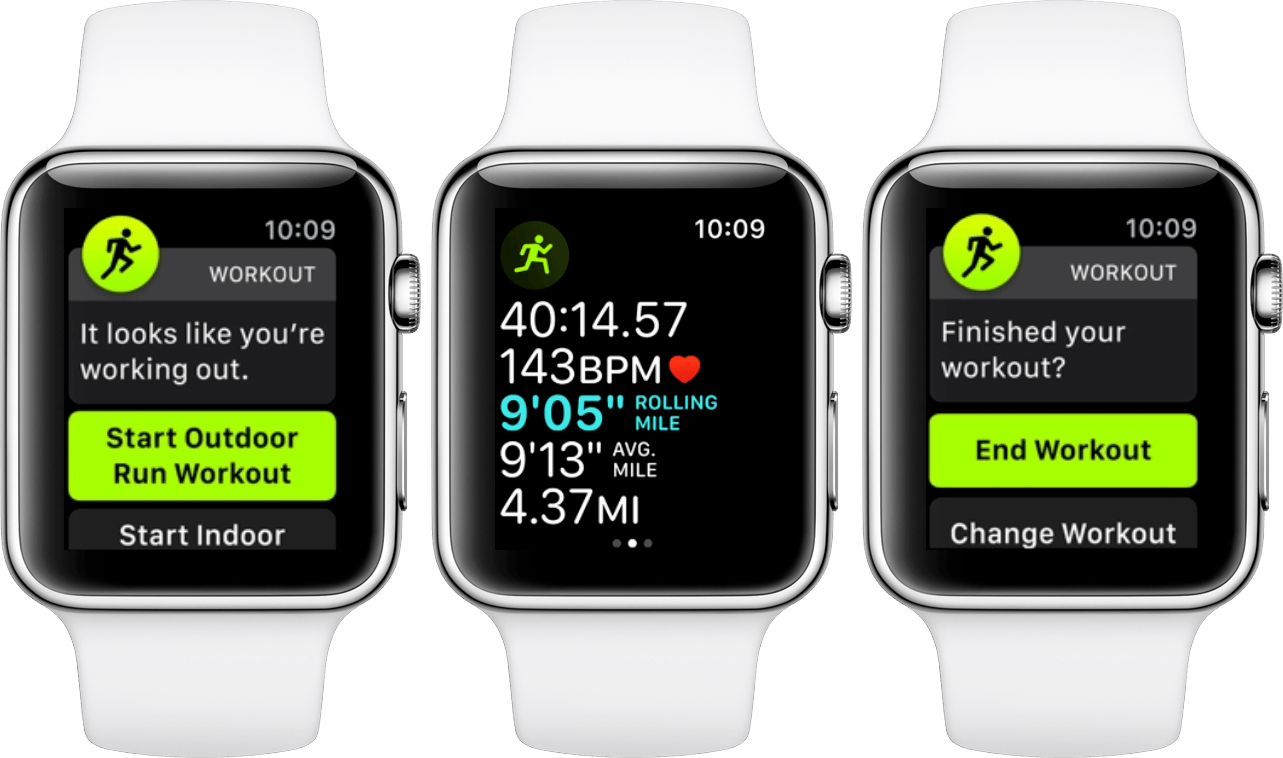
Automatic Workout Detection

A consistent annoyance since the original Apple Watch has been starting a workout physically but forgetting to start a software workout on the Watch. In the past there was no way to get that lost data back, your workout just wouldn't be tracked. With watchOS 5 Apple is taking a shot at solving this problem.

Automatic workout detection works like you'd expect it to: as your Apple Watch periodically monitors your heart rate and consistently monitors your movement, it can determine when your activity appears to be elevated. It's unsurprisingly a bit of a black box as to exactly how this determination is made, but the result is that your Apple Watch will now tap you on the wrist with a prompt when it thinks you may have started a workout. The prompt gives you the option to start a software workout in the Workout app, and if you accept that option it will tack on the time since it first detected that you might be working out.

On the other end of your workouts, automatic workout detection will also try to determine when your workouts have ended. In past iterations of the system, if you didn't manually end a workout then it would just continue to track forever. If you receive the prompt that your workout has been detected as possibly complete and you manually confirm that assumption, your Watch will now remove the excess workout time since it first detected the drop off in your activity.

A Little Too Eager

In typical Apple fashion this feature allows no manual tuning, which in my case means that every day as I take my ten minute walk to work I'm unable to stop my Apple Watch from asking if I'd like to start an Outdoor Walk workout. When the prompt comes during those walks it is generally around the seventh or eighth minute, but it shows up seemingly randomly. I'll often not receive it for days at a time – during which I'll think maybe some sort of machine learning has determined that I don't consider my brief walks to be workouts – but eventually the prompt comes again. If the Apple Watch wants to silently count that walking time toward my workout ring in the Activity app then that's fine, but I have no interest in manually starting and stopping a workout every day as I walk down the street to work.

You can of course disable the automatic workout detection alerts entirely, but I just want to turn them off for these specific situations. For other times, such as when I’m working out or running, I definitely want to keep the alerts on. Overall it’s not the biggest deal to be sometimes reminded unnecessarily, but the repetition of the alert paired with my never actually accepting it makes me feel like it shouldn’t be too hard for the Watch to decide to stop sending them.

If you do want to turn these alerts completely off, you can do so from the Watch app for iOS in the Workout app settings. Automatic workout detection is broken out into two options there, so you can individually enable or disable “Start Workout Reminder” or “End Workout Reminder.”

Automatic Workout Detection in Practice

One of my main sources of activity comes from playing ultimate frisbee each week. I try to start workouts on my Apple Watch during these weekly pick-up games, but often I forget. This is a perfect case for automatic workout detection, and it’s worked quite well for me in my testing.

There’s a lot going on in ultimate frisbee games, and I’m usually engaged enough in it that I don’t notice the tap on my wrist and thus miss the notification to start a workout. Thankfully, Apple thought of this possibility and accounted for it. If you miss one of the Apple Watch's automated prompts to accept that you've started a workout, you can still access it via the Workout app on your Apple Watch as long as your workout is still ongoing.

This summer when I’ve noticed mid-game that I haven’t started a workout, and also failed to notice the automated alert, I’ve been able to open up the Workout app and be presented with a new temporary card at the top. The card looks like the other workout type cards, but this one shows how much time has been automatically tracked on your current workout, as well as what type of workout the Watch thinks it is. Tapping this card tells the Apple Watch that a workout is indeed occurring, and tracking continues as usual from there.

Automatic workout detection is clearly a much-needed feature, and in practice I've been pleased with it overall. The feature is undoubtedly useful and will save a lot of headaches for users competing in new activity competitions or trying to keep their exercise ring streaks going. As more data points start flowing now that it is released to the public, I expect to see fewer false positive alerts over time. I still think that it could be useful for people to have a small amount of manual intervention in this regard, such as an added option in the notification to never ask you about this particular workout type at this time again. In the age of machine learning though, I expect Apple will just try to clean this up automatically instead of giving users manual controls.

Audio

On the audio side of things, watchOS 5 brings two key improvements: a new Podcasts app and the ability for third-party developers to run their audio apps in the background. On top of that, third-party apps can now include the default volume controls, which you may be used to seeing on Apple’s Now Playing screen. This means when you have a third-party app controlling your audio, you’ll still be able to raise your wrist and spin the Digital Crown to immediately control volume.

Ending the Volume Conundrum

In watchOS 4 Apple introduced a new feature called “Auto-Launch Audio Apps.” Available in the Watch app for iPhone and enabled by default, this setting allowed third-party apps on Apple Watch to automatically launch on wrist-raise if their iPhone counterpart was controlling audio playback. That sounds great in theory, but in practice it was often a pain due to those apps being unable to show the system volume controls.

For customers who use AirPods in particular, the Apple Watch is one of the quickest and easiest methods of controlling audio volume. The conundrum in question arose because if users just uninstalled the Apple Watch versions of their audio apps then raising their wrist would show Apple’s Now Playing screen instead. This first-party interface had instant access to playback and volume controls. When forced to choose between volume control and using a relevant third-party Apple Watch app, volume control won out for many users.

watchOS 5 finally democratizes volume control throughout the operating system. Third-party audio apps can display the system volume controls within their interfaces, and those interfaces can then be auto-launched without any disadvantages to the Now Playing screen. Assuming developers get their apps updated to make use of this, the incentive to uninstall these apps should be eliminated.

If you uninstalled any Apple Watch audio apps last year to resolve the volume problem, don’t forget to try reinstalling them once they update to work with watchOS 5. Volume controls paired with background audio means these apps could be significantly more useful than they were able to be in the past.

Background Audio

In previous years the only third-party apps allowed to continue running in the background on Apple Watch were workout apps. This led to some interesting strategies for podcast apps, such as starting fake workouts to get background privileges and then just playing audio. The downside of that method (other than risking rejection by App Review) is that during workouts your Apple Watch checks your heart rate more consistently and may fire up the GPS – both of which burn battery very quickly. With watchOS 5, developers of third-party audio apps will be able to execute in the background without eating through a workout-level amount of power.

Background audio mode on Apple Watch mostly only applies to when your Watch is out of range of its connected iPhone. When the iPhone and the Watch are in range, it's generally easier to have the iPhone play the audio and just control playback via your Watch. This is particularly true when you take battery into account: iPhones can play audio for hours and still last all day, but when the Apple Watch is the audio source it will consume power much more quickly than usual (although still at a slower pace than active workouts). Once the Watch loses connection to its companion though, background audio mode means you're no longer explicitly cut off from listening to audio from that application. Prior to watchOS 5 you were, with the exceptions of Apple's first-party Music app or any workout apps actively running workouts.

An important omission from the new background audio capabilities is streaming. When disconnected from an iPhone, third-party apps will only be able to play audio that was downloaded onto the device beforehand. This applies to cellular Apple Watches as well – streaming is limited to Apple Music via the Music app and podcasts via Apple's new Podcasts app for watchOS.

Podcasts

watchOS 5 marks the debut of Apple's first-party Podcasts app on the Apple Watch. Like the rest of Apple's Watch apps, Podcasts is simple and straightforward. In fact, Podcasts has the exact same design as the first-party Music app. I'm okay with this lack of distinction for a watchOS app. These apps should be as quick and easy to navigate as possible, and sharing a common design between apps will make it trivial for users to switch between them.

Like Music, the Podcasts app opens to a vertically-scrollable column of cards with one or two buttons at the very top (two if you're actively playing an episode, otherwise one). The cards in Podcasts display the show artwork for each podcast that has at least one episode downloaded to the Watch. If you've started any of these episodes then the corresponding card will have a progress bar at the bottom marking your playback position. As you scroll to each card, you'll see an episode name shown at the very bottom of the display. Tapping on the card will immediately begin playback of the specified episode.

The episodes triggered by the cards will always be the latest episode of the show unless you've already listened to a certain percentage of an older episode. I'm not sure what the exact percentage is, but after listening to a little over a minute of an hour and a half long Upgrade episode I saw the card switch to that older episode instead of the most recent one. Once you've completed an episode it will be automatically deleted from your Watch, and if it was the last episode of a particular show then that show's card will be greyed out on the main Podcasts screen.

If you want to specify an episode of a show other than the latest, you'll need to scroll to the top of the card list and tap on the Library button. This will open a list view of only the podcast names rather than full-screen cards with artwork. Find your podcast in the list and tap it to see all episodes that are downloaded to your Watch. Picking an episode from that list will begin playback and propel you to the now playing screen of the Podcasts app.

Podcasts' now playing screen features a play/pause button, 15 second skip back and 30 second skip forward buttons, and volume controls. On the bottom right is a number showing the current playback speed. This defaults to 1x, but just tap the number to cycle it by half steps. In total you can pick between half speed, full speed, one and a half speed, and double speed. On the bottom left you'll see a list icon, and tapping that will open a list of all episodes of the current podcast which have been downloaded to the Watch. This is a shortcut to jump between any of those episodes right from the now playing screen. Finally, force pressing on the now playing screen will show the AirPlay button, which can be tapped to select the audio output source for your podcast to play from. Unfortunately the Apple Watch itself is still not available as a playback source, so you can't listen to podcasts via your Watch's built-in speaker.

According to Apple, Podcasts is also able to stream any podcast episode available in the iTunes podcasts directory. There's no interface to search for these (even the podcasts in your library only show downloaded episodes, there's no way to access a full list of all episodes available), so your only option is to ask Siri to play the podcast you're looking for. Siri will then look it up and should in theory start playing the latest episode.

I don't have a cellular Apple Watch to test podcast streaming with, but I did try connecting my non-cellular model to Wi-Fi and asking Siri to play several podcasts that I had no episodes downloaded for. Siri understood my queries and seemed to do a good job figuring out which show I was asking for. Unfortunately, after informing me that my Watch was attempting to play the show in question, it would then fail after a few seconds and state that it couldn't play that podcast at this time.

This could just be a bug in the beta, but as of the GM seed it's still not functioning. It's also possible that it works on cellular Apple Watches and just not over Wi-Fi, but Siri certainly understands my requests and thinks that it can do what I'm asking, right up until it fails. Hopefully Apple gets this issue fixed in an update soon. In the meantime, your mileage may vary when attempting to stream podcast episodes on your Apple Watch.

Other than the streaming issue, I'm quite impressed by Apple's new Podcasts app. It's about as full featured as I could ask for, and since syncing new episodes happens automatically in the background I never actually found myself wanting to stream anything. All of my podcasts were always already waiting for me, and the card view made it easy to kick one off without digging through menus on the tiny screen. The Podcasts now playing screen is a little cramped, but it offers all the controls I'm looking for so I'm okay with that trade-off. On the new, larger Series 4 displays I'm sure it won't be cramped at all.

Siri

Siri is one of the Apple Watch's core interaction methods, and Apple isn't resting on its laurels when it comes to pushing the virtual assistant forward on the device. This year we see Apple continue to expand on its machine learning-powered Siri watch face, opening it up to third-party apps and Shortcuts. We also see the first change to Siri's core trigger phrase on any platform since its introduction: the "Hey Siri" prefix is no longer required at all.

Siri Watch Face Updates

The Siri watch face was introduced last year, and promised to surface intelligent suggestions on your Watch based on what you wanted to see or do at any given moment. It's a great idea, but I didn't think it delivered. In my watchOS 4 review I concluded the following:

I’m sold on the promise of the Siri watch face, but that promise is just not being fulfilled right now. I am optimistic though, and in future watchOS versions I think this watch face is one of the places to keep an eye on. If Apple can ever figure out how to make the data behind this feature actually intelligent then this could be a really great utility on the Apple Watch. I’d love to see support for third-party data sources added as well, but if Apple can’t even get the intelligence down for its own apps then I’m skeptical of how well it will do pulling data from third-parties. I hope that they can eventually pull this off.

A year later Apple is pushing the face forward by adding a new gray color scheme (you can pick this option in the face’s Customize view on your Watch or in the Watch app for iOS) and introducing the third-party integrations it was sorely lacking before. Unfortunately, in my testing this summer those third-party apps weren’t being surfaced, and the overall intelligence was not noticeably improved.

Apple claims that the watch face is smarter than ever before, but that hasn’t borne out for me. Over the past few months I ran iOS 12, watchOS 5, and used the Siri face the whole time. Even if the Watch was starting from scratch with its machine learning about me, three months should be more than enough time to gather data and start showing me relevant cards. Instead, I’ve been consistently presented with randomly selected stock price changes, old photos of ex-girlfriends, weather conditions from cities I’m not in, and a “Take a minute to Breathe” card that never seems to not be there.

I haven’t opened the Stocks app in years, I don’t know why I’d need to know the current weather in Cupertino while I’m in Minneapolis, and I haven’t used the Breathe app since my watchOS 4 review a year ago. As for the photos, Apple needs to learn the lesson that Google, Facebook, and other “this day a year ago” services learned the hard way: photos from a year or years ago are not always happy memories.

Apple’s version of the old photos problem feels particularly egregious because it displays directly on the face of your watch, and because getting rid of photos you don’t want to see isn’t easy to do. There’s no way to tap on a card and tell the Siri watch face to dismiss it. That card will stay active as long as Siri thinks it’s relevant (which, in the case of photos, seems to be the entire day every time one shows up). The only way to manually remove something is to open the Watch app on iOS, navigate to your Siri watch face in the My Faces section, and entirely disable the app that is showing the card you don’t want. Most people won’t know this, so they’ll either just deal with it for the day or switch faces to something more pleasant. I’m not sure why Apple doesn’t let you tap the card and choose to remove it. At least for me that option would go a long way toward making this not really an issue at all, and it seems like something that should be supported anyway to empower users to help tune the machine learning.

I did eventually turn off Photos, Stocks, and Breathe in the settings for my Siri face in the iOS Watch app. It’s not at all difficult to do that, but any time a setting needs to be changed it’s safe to assume that the vast majority of users are never going to touch it. I was hoping that the machine learning which Apple has lauded for this update would have made manually adjusting settings unnecessary, but for at least another year it looks like that won’t be the case.

Regarding third-party apps showing up on the Siri watch face, I'm unable to say for sure whether that feature is working at all. I’ve been running CARROT Weather, Overcast, UpHabit, ETA, and Shortcuts betas on my Watch for various amounts of time (all for more than three weeks, and Shortcuts in particular for about three months). Each of these apps claims to surface shortcuts or cards to the Siri watch face, but not once have I seen any of them show up for me.

There’s a hidden Developer menu that appears in Settings on your iPhone if you plug the device into a Mac that is running Xcode. Among other options, that menu includes a “Force Sync Shortcuts to Watch” button and a “Display Recent Shortcuts” toggle. The former is pretty self explanatory, but the latter will force the Siri watch face to show shortcuts or cards that apps have most recently served up for it to optionally display. This toggle exists so that developers can test their card recommendations on the Siri face without needing the machine learning to pick them by itself2.

I’m not recommending that you enable this toggle from the hidden menu. Quite the opposite in fact, you should definitely not enable it. Apps are allowed to send lots of different shortcuts and cards to Siri all at once, so when this toggle is enabled you will probably end up with something like six consecutive CARROT Weather cards showing the current or tomorrow’s forecast. This is perfectly fine for apps to be doing because the Siri face should be intelligently triaging these options and only exposing a relevant set.

I mention the menu because it’s the only way to determine for sure that apps are indeed successfully providing their suggestions to the Siri watch face. Once I was able to verify this on my Watch I turned the toggle back off and spent another few days waiting to see if Siri ever picked any third-party cards to display. It did not. Even though I check the weather with CARROT every single day, listen to podcasts in Overcast constantly, and run various Shortcuts I’ve put together pretty consistently, Siri never displayed any of these as cards on my watch face.

Take all of this with the usual “I’m running a beta” grain of salt, but as of the GM release I’ve still yet to see a third-party app show up unless I flip that Settings toggle to force it. The Force Sync Shortcuts to Watch button did not make any change here either. Maybe with the public release Apple will be flipping a switch to open the floodgates to third-party cards on the Siri face, but as of this review’s writing I can’t say that it’s worked at all for me. I hope it’s just something Apple needs to turn on, because if Siri’s “intelligent” suggestions are picking Stocks and Photos over the third-party apps that I use on a daily basis, then something is seriously wrong.

No More "Hey Siri"

With the lack of space for typing and swiping on the Apple Watch's tiny screen, Siri has always been the best choice of input methods on the device. Triggering Siri by prefixing a command with "Hey Siri" while the screen is on has been around since the very beginning. With watchOS 5, Apple is looking to streamline access to its virtual assistant even further.

If you're using an Apple Watch Series 3 or higher (no luck for Series 1 or Series 2 owners here) then after this update you'll be able to talk to Siri hands-free without actually having to say "Hey Siri." Just raise your wrist and start talking, and your Watch will detect it and start translating your incoming command. At least, in theory that's how it will go.

When I first heard this feature announced I was quite excited for it. Removing the monotonous "Hey Siri" prefix sounded great, but my excitement quickly gave way to trepidation. Executing this feature perfectly would clearly be difficult. If the threshold was set too low then Siri would start showing up whenever I check the time on my wrist whilst talking to someone. If the threshold was too high then Siri would frustratingly fail to trigger when I give it a command. Repeating an entire command because Siri didn't auto-detect it is even more inconvenient and time consuming than just saying "Hey Siri."

To their credit, I think Apple got very close on this feature. Unfortunately, very close isn't quite good enough in this particular regard. They did stray toward conservatism on their estimates, and I think that was the right decision. Throughout this summer of testing I never once noticed Siri on my Apple Watch activating when I wasn't trying to talk to it. I think that would have been far more annoying and could potentially make people more nervous about the Watch if it were falsely triggering consistently and transcribing whatever they happened to be saying or what someone else was saying around them.

In my experience though, activating Siri without its trusty wake phrase was far too finicky and unreliable. It may have worked about 75% of the time, but 25% is way too high of a failure rate for a feature to be particularly useful. Whenever it worked I absolutely loved it, but each time it failed left me more annoyed than the last. This was particularly so because in a failure scenario you either need to lower your wrist and then raise it again to get another potential shot at it realizing you're talking to it, or you need to repeat your query with a "Hey Siri" prefix. If you do the former then you're wasting even more time, but if you have to do the latter then there's no point in this feature anyway.

I'm hoping the Series 4 Watch will significantly improve detection for this feature over the Series 3. If you're a Series 3 owner then I'd at least give it a try for a while, maybe your Watch will do better than mine did. It seems to me that the Watch is using a combination of wrist movement and volume detection from the microphone. I got the best results when bringing my Watch all the way up to my mouth and speaking directly into the mic.

My failure rate on talking to Siri when I prefix with "Hey Siri" is almost zero, so ultimately I've gone back to just doing that. I'm sure Apple will be improving this detection over time, and I'm excited for when they're able to do so with high accuracy. Speaking straight into your Watch without a prefix clearly feels like the future. It takes a lot of the awkwardness out of Siri requests and it's quicker and easier when it works. I hope Series 4 will be better in this regard, but even if it isn't I'm excited for Apple to refine it over time.

If you decide you'd rather disable this feature altogether so that your Watch isn't even attempting it, you can do so in the Settings app on your Apple Watch in General ⇾ Siri.

Walkie-Talkie

Brand new in watchOS 5, Walkie-Talkie joins the short list of apps available on Apple Watch which do not have a companion app on iOS. It also joins the short list of Apple Watch-specific communication interfaces; a list which thus far has been a panoply of flops from the Friends interface to the giant 3D emoji GIFs to Digital Touch. The latter did eventually make it to iOS and does still persist in the Messages app, but I don't think anyone ever actually uses it.

Due to this category's troubled history, I initially struggled to rally optimism for another new Apple Watch communication method. As I've thought the feature over though, it's become clear that Walkie-Talkie brings a lot more to the table than usual.

The new app is actually embedded deep into the system, and it does pretty much exactly what its name suggests. If you enable Walkie-Talkie mode – a simple on/off slider at the top of the Walkie-Talkie app – you'll start seeing the app's small yellow icon flash briefly at the top center of your watch face every time you raise your wrist. At first I thought this was a bit heavy-handed for something I don't expect to use all the time, but once I realized what exactly that tiny yellow icon implied I was instantly on board.

When Walkie-Talkie mode is enabled, at any point in time any of the friends who you have added in the Walkie-Talkie app can start speaking to you through your Apple Watch's speaker. You don't have to accept the transmission, you don't get notified first by a tap on the wrist, your Watch just beeps once to indicate a Walkie-Talkie message and then starts streaming your friend's voice out into the air. Think about that. This is a major break from any previous system-level communication method on watchOS, iOS, or even macOS.

That little yellow icon is indicating that your system is in a state where it can start making noise unexpectedly at any moment. Moreover, that noise will be a voice and the Watch will be broadcasting that voice at whatever volume setting you left Walkie-Talkie mode in last. By default, it's quite loud.

The potential consequences of this are obvious, but the potential benefits should be as well. Actual walkie-talkies are an old technology which has remained in use for decades because it is extremely valuable in specific circumstances. The watchOS 5 Walkie-Talkie app brings essentially the exact same benefits, but works over the Internet and therefore across all distances.

Many walkie-talkies are put to use in areas where there is no Internet, and that's a clear flaw in this feature which is sure to keep the old technology relevant for now. Assuming Internet though, having a walkie-talkie attached to your wrist instead of the classically bulky, phone-like devices on your belt seems much nicer. Having that walkie-talkie also be a smartwatch that can do a myriad of other useful things is another big benefit over the old single-purpose devices.

To be clear, I don't think Apple is going after that market because the "walkie-talkie market," if there is one, is certainly not big business. It's interesting though to see Apple stepping into an industry that I don't think has seen much innovation in many, many years. Walkie-talkies fulfill a venerable idea which isn't utilized very often anymore. Maybe the relevance of that idea could rise once again if it were suddenly attached to hundreds of millions of wrists.

The Walkie-Talkie App

When you first open the new Walkie-Talkie app you'll be greeted with the yellow icon and a block of text briefly explaining how it works. Scroll beneath the text and you'll find your contacts list. To start talking to someone, pick their contact from the list and send them an invitation. They'll get a notification on their wrist informing them that you've invited them to walkie-talkie with you, and their only options will be to always allow or to dismiss. Choosing always allow means that any time either of you has Walkie-Talkie mode enabled, the other will be able to speak through your Watch speaker at any time.

If you miss the notification or dismiss it and then change your mind, as far as I can tell you'll need your friend to re-send it. This feels like a bug to me, but as of the watchOS 5 GM that notification doesn't show up anywhere once its gone, not in Notification Center and not even in the Walkie-Talkie app itself. If you want to take the initiative then you can just send an invite to your friend. Walkie-Talkie is strictly a two-way street, so the one accepting the other's invitation is also signing up to receive incoming audio at any time.

Once you've invited a friend and they've accepted, you'll see a big card with their name on it above your contacts list in the Walkie-Talkie app. If you want to talk to them, just tap their card to enter an interface which is just the friend's name at the top and a giant yellow "Talk" button occupying the remaining space. Tap and hold that button and you'll be instantly streaming audio to your friend's Apple Watch. Release the button and your stream will stop.

That's pretty much it for the Walkie-Talkie app. The interface is light and easy like any good Watch app should be. If you have a lot of friends that you're enabling this feature with, the giant card interface might start to get cumbersome. I think in general it will be a good idea to cull friends from there once the occasion that you require Walkie-Talkie for has ended. You can always add those friends back with a few taps the next time you need them to be available. To delete a friend in the Walkie-Talkie app, just swipe their card to the left to reveal a delete button.

Walkie-Talkie includes a simple launcher complication which you can add to your watch face to easily access the feature. That said, in most cases the complication should not be necessary because the small yellow icon that flashes at the top of your screen when you have the mode enabled actually acts as a launcher itself. In my experience the Walkie-Talkie icon always flashes first when it's enabled, so if you raise your wrist and then rapidly tap it you can access the interface quite quickly. It flashes fast, so personally I've had more luck accessing it consistently by double-tapping the icon. Even though it only requires a single tap, it's such a small target that tapping twice greatly increases my hit rate.

Walkie-Talkie Wrap-Up

Given its deep integration into the system, I think Walkie-Talkie stands by far the best chance yet of being an Apple Watch communication method that actually gains some traction. This is never going to be something that most people use on a regular basis, and it's never going to be a standard way that we communicate with our friends. However, it doesn't have to be a huge phenomenon to be successful.

Friends and giant emoji and Digital Touch were all trying to wedge themselves into our existing methods of communication, yet none of them were as good as existing methods. Walkie-Talkie is an entirely new communication paradigm. While it may seem like a simple feature, under the hood Apple has done some significant work throughout the system to enable this feature. I think this shows that Apple truly believes they're onto something with it.

Walkie-talkies don't need to be confined to campouts and multi-vehicle road trips. My sister got married this summer, and looking back on that day I keep thinking about how useful the Walkie-Talkie feature could have been to communicate across the large venue during the hours of setup throughout the afternoon. There were a lot of moving parts and a lot of texts flying around, but the day also involved changing into tuxes and dresses. Passing actual walkie-talkies around and keeping track of them would never have flown – it would have felt like overkill and been a strange annoyance. However, many of the people there were wearing Apple Watches. With watchOS 5 and Walkie-Talkie mode, communication could have simplified greatly with a minimal amount of preparation. That's the kind of communication paradigm that gains traction instead of falling by the wayside. Walkie-Talkie has a variety of clear niche use cases, and if Apple can do the work to make sure people know the feature exists, I think they'll actually utilize it.

Notifications

Notifications are one of the core selling points of the Apple Watch, yet they haven't seen much change over the past four years. One of the few features that was done well from the very beginning, they've managed to hold up better over time than many other parts of the system. In lieu of the notification changes that Apple made in iOS 12, this may have been the first year that Apple Watch notifications started to look long in the tooth. Thankfully Apple was right on top of this, and notifications have seen a nice bump in watchOS 5 to keep them in step with their iOS counterparts.

watchOS 5 notifications are more interactive, supporting customized controls which enable user action without having to open the corresponding app. If a third-party app supports interactive notifications, it can reload the notification interface based on buttons pressed by the user. Apple recommends that developers keep these interactions fast and simple. If a user needs to interact more than two or three times with a notification then it may be better to push them over to the app itself instead.

watchOS 5 notifications also now stack just like iOS 12 notifications. This means that if multiple notifications from the same app come in at once, they'll stack on top of each other and require a tap to expand them. I like this feature in most places on iOS 12, but on watchOS I haven't found myself as enthralled with it. In general on my Watch I want to be able to easily see all of the notification I've just received. While Apple claims they're trying to reduce scrolling with this feature, in practice they've actually just added a step to the process: before I can start scrolling through the notifications I've received I now need to tap to expand them.

I think the difference between iOS and watchOS for me comes because I almost always look at notifications immediately when they show up on my Apple Watch. On my iPhone I tend to let multiple notifications collect, so saving screen space by grouping apps is less of an annoyance. The Watch rarely receives so many notifications in a row that I feel the need to group some in order to streamline scrolling through the others.

Notification grouping can only be enabled or disabled on a per-app basis, there's no global setting for all of them. Apple Watch notification settings default to a "Mirror iPhone" option for all apps, and notification grouping is part of this. Thus, if you have any particular apps grouped or ungrouped on your iPhone with iOS 12 then your Watch will mimic that, unless you've changed your settings in the past to not mirror your phone. All of these settings can be found in the Notifications section of the Watch app for iOS, so you can hop in there and tune things to just how you want them.

Web Content

Four years in, WebKit is finally making the leap to Apple Watch. Prior to watchOS 5, Apple's smartwatch operating system did not contain the ability to load content directly from the web. Given its tiny screen and relatively slow data transfer speeds, I don't think this has been particularly missed. With the advent of cellular Apple Watches though, adding WebKit is another necessary stepping stone toward the devices maintaining full functionality when disconnected from their companion iPhones.

Web content can be found in two main locations in watchOS 5: Messages and Mail. Now when your friends send you texts with links, you can tap on those links in the Messages app for Apple Watch to open them in a miniature web view. The Apple Watch attempts to specifically tailor web pages for the small screen. If a page supports Apple's Reader mode then it will automatically be enabled, making text as easy to read as possible. Otherwise, the page will be loaded on the tiny display, and if the developer set up any media queries to target it then the formatting can lay out however they want it to. In practice this seems to work fairly well overall.

In Mail, web content is used to actually display formatted emails in full. Prior to watchOS 5, emails with formatted HTML content would just display as text with a note to try opening them on your iPhone if you want to see the full message. Now those messages can lay out directly on your Watch, making the Apple Watch Mail app significantly more full-featured and potentially useful.

All things considered, web content on Apple Watch probably won't fundamentally change how we use our smartwatches in the way that it changed how we used our cell phones. The screens are just too small to make navigating the web convenient or inviting. Still, the web doesn't have to fundamentally change the experience to be a great addition to the system. Now cellular Apple Watch users can feel even more empowered to leave their iPhones at home.

One other thing to note here: web content is only available on Apple Watch Series 3 and above. While that's a bit of a shame for Series 2 and earlier users, it makes sense given the even slower data transfer and processor speeds on those old devices.

Miscellany

Apple is trying to pose its new student ID card feature as a headline addition in watchOS 5. While technology-wise it's certainly interesting and ambitious, I'm classifying it as miscellany because it's impossible to test and is only going to affect a tiny fraction of users.

To sum it up, watchOS 5 Apple Watches can now act as ID cards for a select few prestigious universities. This feature appears to be using the same technology as Apple Pay: readers will be set up throughout campus and students can simply hold their Apple Watches near them to connect. These readers will offer access to buildings and dorms, or charge payments to student accounts for laundry, snacks, or dinner. Apple is using the same technology with their employees to allow access to areas of their new Apple Park campus at an individual level.

This is an awesome use case for Apple Watch, and I think students at these universities as well as Apple employees are going to love it. The launch partner schools are The University of Alabama, Duke, John Hopkins University, The University of Oklahoma, Santa Clara University, and Temple University. For most Apple Watch users though, the infrastructure requirements for this means that it won't be relevant to them for a very long time, if ever.

A more accessible new feature of watchOS 5 is the ability to schedule end times for Do Not Disturb mode. This addition is built into the Do Not Disturb button in Control Center on the Apple Watch (the moon button). In the past tapping that button would immediately toggle DND on or off. Now tapping it the first time will bring up a list of options: On, On for 1 hour, On until tomorrow morning, On until I leave, and On until end of event. The second to last will show your current address in small text at the bottom of the button, and the last will show you the title of any ongoing event you may have on your calendar. Using the schedule options will result in DND mode being disabled automatically at the specified time. You can of course always toggle it off manually via the Control Center button at any time.

The remaining miscellaneous items all showed up just last week with the announcement of the Series 4 Apple Watch. The new Watch models are going to feature larger screens with rounded corners, and the entire operating system has been updated to work within these loosened constraints. I'm very much looking forward to getting my hands on a Series 4 Watch and seeing all the work Apple has done here. For the purposes of this review though, I'll just point you to my Apple Watch Series 4 overview from last week. It goes into detail on the new hardware, and describes the six new watch faces that will be joining us with the Series 4 Watch.

Of these watch faces, four are also being released on previous Apple Watch models: Fire/Water, Vapor, Liquid Metal, and Breathe. All of these faces show simple watch hands with colorful, moving backgrounds. They support the same complication layout as the Utility watch face (two small upper corner complications and one large bottom one), and they're all pretty boring overall. If you use the Breathe app constantly then you may like the new watch face that ties into it, but otherwise these feel more like novelty faces.

The other two new watch faces look fantastic, and offer more complications than any faces we've seen before. Since these are strictly limited to the Series 4 Apple Watch though, I haven't been able to get my hands on them to test things out at this time. Make sure to check out that overview for more details on those faces and on what else to expect with the Series 4.

Conclusion

Between watchOS 5 and the Apple Watch Series 4, it really feels like Apple's smartwatch teams have hit their stride this year. For the first time the operating system feels like it's escaped the specter of its past mistakes and is forging forward unencumbered. The feature set of this year's update strikes a diverse number of regions across the system, and iterates upon all of them rather than rebuilding from scratch. This is a sign of an OS beginning to mature, and watchOS sure feels like it's heading in that direction.

Third-party developers are more empowered this year than they've ever been before. Their apps can run in the background as audio sources, their notifications can include rich interactions, and their shortcuts can be triggered via Siri and (in theory) displayed on the Siri watch face. Cap things off with access to the system volume controls, and we should expect to see a whole new crop of legitimately useful Apple Watch apps coming down the pike. The few I've beta tested bear this out, and I'm excited to see even more join over the coming weeks and months. watchOS is no longer a joke for developers, and that is fantastic news for Apple Watch customers.

On the fitness side of things, watchOS 5 brings a variety of smart and useful improvements. Runners definitely got the most love this year, but new workouts for yoga and hiking open the doors to new people. Everybody benefits from automatic workout detection, and I'm excited to see that feature continue to evolve moving forward.

The Siri improvements seem to falter in execution, but the declared features are all exactly what I was hoping for. Third-party apps on the Siri face and not having to say "Hey Siri" are both the right ideas. I hope other users have more luck with them than I have so far, but either way I'm sure by next year they'll be closer to par.

Walkie-Talkie mode feels like Apple at its best. It's a whimsical new feature that no one asked for or expected, executed impressively and baked deep into the system. This addition isn't going to change the world, but not every feature has to. Similar to its namesake, I expect Walkie-Talkie mode to occupy a small niche of usefulness, but be invaluable in those situations where it's useful. I just hope that by the time people are in need of it they haven't forgotten that the feature exists.

For both hardware and software, 2018 feels like a turning point for the Apple Watch. The device has seen its first significant redesign, including a big new display that will give the operating system some much-needed breathing room. watchOS itself is still young, but the growing pains that plagued it initially have been put to bed. watchOS 5 marks the first unhindered step into a new chapter for the Apple Watch. I can’t wait to see how things progress from here.


  1. This last decision always felt senselessly arbitrary, and indeed Apple finally reversed it in watchOS 4.3 last March↩︎
  2. It’s worth clearing up any potential confusion regarding the term “shortcut.” When you hear “shortcut” you’re probably thinking of the new custom automations that can be built in the iOS Shortcuts app. You’re not wrong, but the term actually holds an even broader meaning. A shortcut is an in-app automation surfaced by any app on the system. For the Shortcuts app, the automations it’s serving up are the custom actions that you build within it. All other apps on the system can also expose their own shortcuts though. For instance, Overcast might send a shortcut which is an action to start listening to the latest podcast episode in a specific playlist. First-party apps generate shortcuts too, such as a Clock app shortcut which sets an alarm for a specific time. The Siri watch face will receive generic shortcuts from any first- or third-party app, but it can also receive "cards" which apps build specifically for the face. CARROT Weather sends the Siri face cards showing today's or tomorrow's forecasts, and lots of the first-party apps like Weather, News, and Stocks create cards as well. The face will pick from all available shortcuts and cards to generate the final list which gets displayed to a user. ↩︎

Support MacStories Directly

Club MacStories offers exclusive access to extra MacStories content, delivered every week; it's also a way to support us directly.

Club MacStories will help you discover the best apps for your devices and get the most out of your iPhone, iPad, and Mac. Plus, it's made in Italy.

Join Now
23 Sep 19:12

Approaching E-Learning 3.0

by Stephen Downes

Who is this course for?

If you're reading this, then this course is for you. You've demonstrated the main criterion: some degree of interest in the subject matter of the course.

You might be thinking: this course looks too difficult, too technical, or too high level. This will be true for everyone, even me. But the course is structured so you can focus on what's interesting and accessible for you, and you can ignore the rest.

Read on... you'll see what I mean.

What's the Course About?

The course is titled 'E-Learning 3.0' and could be subtitled 'Distributed Learning Technology'. This is a course about the next generation of learning technology. It's a broad and challenging domain that I've broken down into the following topics:

I'm designing the course so that each week is one of these self-contained topics. This topic can then be approached from different directions, at different levels. The content is a starting point. I will provide a series of reflections. But I will be learning about each of these topics along with everyone else.

My objective is to make it so that these topics are not over anyone's head. It's a bit difficult; each week is the very tip of an abyss; I find myself drowning in it almost every day (today, for example, discovering a new technology I had never heard of, and failing to make a Google application work the way I want it to). But I'm hopeful; and people will be learning with me.

And I should be clear at the outset that the course isn't just about the technology. There's always that balance I try to reach in everything - between the tech, the education, the media and the philosophy. These are not tangential, and often not implicit. They need to be explicitly explored. So I'm approaching each topic as follows:

Here is the course outline. I encourage you to add your comments and suggestions.

How does it work?
 
This course is not like a typical online course or MOOC where you have to sign in to a learning management system or learning platform.

You don't 'register' for the course; you follow the course, and the way you follow the course is to a large degree up to you. A number of different technologies will be deployed, and you should find the combination of technologies that works best for you.

Here are some of the choices you will have:

- The course tag is #el30 and you can follow this tag by searching for it on either Twitter or Mastodon. I will use this tag to make announcements from my @Downes Twitter and Mastodon accounts. Other people are encouraged to use the tag to comment on any aspect of the course, point to resources, discuss with each other, or whatever.

- The course website is https://el30.mooc.ca and will be launched in the last week of September. The website will provide access to several course services, as follows:
      - The schedule of events, with links you can import into your calendar
      - Links to readings and resources
      - A course newsletter, which you can subscribe to by Email or RSS

- Webcasts will be broadcast using (probably) YouTube Live, so you can follow along with talks or interviews with featured guests, or wait and watch the videos later. We might use some prerecorded video, but I really prefer live video. Audio recordings will also be provided.

- Your own personal website or blogging application - if you use WordPress, Blogger, Tumbler or whatever (there are many choices, and we'll talk about them) you can create your own course content. You are encouraged to create your own course content. This content will be aggregated by the course website and shared in the email newsletter and RSS feed so everyone can read it. We'll help you with this.

- Your own gRSShopper Personal Learning Environment. This is experimental technology and definitely not for everybody. That said, for those who are interested, you can explore some of the topics in this course using technology that actually uses them (keeping in mind that it might not always work - remember, I'm learning along with all of you).

Course Activities

Each week we will be looking at different topics, and so the activities in the course will be specific to that topic. This means that over the ten weeks of the course you may be experimenting with a variety of different tools and creating content of different types, for different purposes.

For example, in one of the weeks the topic is 'community'. The issues look daunting - we're looking at consensus and the 50%+1 problem, theories of consensus, truth and post-truth. But we address these issues every day in very practical ways. For example, consider the case of the Wikipedia community. It meets these challenges with every single article. So one activity you can try involves working with Wikipedia to assess end edit an article.

Another way of looking at community is to look at how it makes decisions. There are applications that create forums for discussion and voting. So course participants may wish to spend the week creating an issue to debate in one of these applications and trying to come to a consensus. Can this be done?

But here is the key: while I and my course guests will be able to facilitate some of these activities, we cannot facilitate them all. Nor should we. So I will be actively recruiting people throughout the course to contribute and lead these activities. There will be a mechanism very similar to the assignment bank used in Jim Groom's DS-106 courses.

Where possible, I would like to showcase these creations; these are the new media of the future of E-Learning. If you are using gRSShopper, you can use these to create a portfolio for the course. If you are using your own blog application you can create posts linking to these activities. Or you can just make them and forget them. It's up to you.

How you will learn

It's a bit of a cliché, but it's true, that what you get out of this course will depend entirely on what you put into it. You can choose how to participate, and participate as much or as little as you want, and what you will learn is proportional to that effort.

The content of the course is merely a starting point. If you watch and read the content then you will acquire a basic level of understanding of the topics.

But the real knowledge you can learn is new knowledge that didn't exist before this course. It is the knowledge that you and the other co-participants in the course (including me) actually create while wrestling with the different aspects of the course. It's hard to predict what that will be, because it doesn't exist yet, and depends on everyone in the course.

I am hoping that people engaged in the course will come out of it with a different perspective on learning and educational technology. I'm hoping that this different perspective gives them a new and more powerful way to understand how we are shaping the future with new technologies, institutions and cultures.

I am also hoping some participants will acquire new technical skills using tools that might have been new to them, and new ways to use these in the day-to-day world of teaching and learning.

There are no tests, and no certificates. Though maybe we'll create some badges - who knows?

About Me

This is the section where I describe my background and explain why I think it important to offer this course.

My formal education and degrees are in philosophy, I am a former newspaper editor and journalist, I have studied computer technologies for the last 40 years, and I have worked as an instructional designer and learning technology specialist for two universities, one college, and for the last 17 years, for the National Research Council of Canada.

While at Assiniboine Community College I built a learning management system and with the University of Alberta I built learning and resources online community called MuniMall. I was the world's first educational blogger, back in the 1990s, the originator of the concept of E-Learning 2.0, and with my colleague George Siemens a co-developer of connectivism ('a learning theory for the digital age') and the developer of the world's first MOOC.

You can read more about me on my personal website and follow my research by subscribing to my daily newsletter, OLDaily (which I have published since 2001). I've written a lot of articles over the years and presented in something like 35 countries on every continent except Antarctica (and I'd go there in a heartbeat).

I want to offer this course now not because I'm an expert in all of these topics and thing that everyone should know what I know. I'm not that expert - and I don't think anyone is an expert in all these things (though there are certainly experts far more qualified than me in each of them). But I know enough, I think, that I can point a group of interested people in the right direction, ask the right questions, and maybe try the right things so that we, as a community, can come to understand all of these a bit more.

And it's important that we as a community - and here I refer to scholars and educators around the world - actually do come to understand these a bit more. We have already seen how dramatically the internet has changed our society, and how dramatically the second wave of social networks and chatbots has changed it yet again. What I see coming - and what I've called E-Learning 3.0 - is a series of changes of equal significance, and I think we should be prepared.


23 Sep 19:11

Explore the immersive web with Firefox Reality. Now available for Viveport, Oculus, and Daydream

by Sean White

Earlier this year, we shared that we are building a completely new browser called Firefox Reality. The mixed reality team at Mozilla set out to build a web browser that has been designed from the ground up to work on stand-alone virtual and augmented reality (or mixed reality) headsets. Today, we are pleased to announce that the first release of Firefox Reality is available in the Viveport, Oculus, and Daydream app stores.

At a time when people are questioning the impact of technology on their lives and looking for leadership from independent organizations like Mozilla, Firefox Reality brings to the 3D web and immersive content experiences the level of ease of use, choice, control and privacy they’ve come to expect from Firefox.

But for us, the ability to enjoy the 2D web is just table stakes for a VR browser. We built Firefox Reality to move seamlessly between the 2D web and the immersive web.

Designed from the virtual ground up

The Mixed Reality team here at Mozilla has invested a significant amount of time, effort, and research into figuring out how we can design a browser for virtual reality:

We had to rethink everything, including navigation, text-input, environments, search and more. This required years of research, and countless conversations with users, content creators, and hardware partners. The result is a browser that is built for the medium it serves. It makes a big difference, and we think you will love all of the features and details that we’ve created specifically for a MR browser.
– Andre Vrignaud, Head of Mixed Reality Platform Strategy at Mozilla


Among these features is the ability to search the web using your voice. Text input is still a chore for virtual reality, and this is a great first step towards solving that. With Firefox Reality you can choose to search using the microphone in your headset.

Content served fresh


We spent a lot of time talking to early VR headset owners. We asked questions like: “What is missing?” “Do you love your device?” And “If not, why?” The feedback we heard the most was that users were having a hard time finding new games and experiences. This is why we built a feed of amazing content into the home screen of Firefox Reality.
– Andre Vrignaud, Head of Mixed Reality Platform Strategy at Mozilla


From the moment you open the browser, you will be presented with immersive experiences that can be enjoyed on a VR headset directly from the Firefox Reality browser. We are working with creators around the world to bring an amazing collection of games, videos, environments, and experiences that can be accessed directly from the home screen.

A new dimension of Firefox

We know a thing or two about making an amazing web browser. Firefox Reality is using our new Quantum engine for mobile browsers. The result is smooth and fast performance that is crucial for a VR browser. We also take things like privacy and transparency very seriously. As a company, we are dedicated to fighting for your right to privacy on the web. Our values have guided us through this creation process, just as they do with every product we build.

We are just getting started

We are in this for the long haul. This is version 1.0 of Firefox Reality and version 1.1 is right around the corner. We have an always-growing list of ideas and features that we are working to add to make this the best browser for mixed reality. We will also be listening and react quickly when we need to provide bug fixes and other minor updates.

If you notice a few things are missing (“Hey! Where are the bookmarks”), just know that we will be adding features at a steady pace. In the coming months, we will be adding support for bookmarks, 360 videos, accounts, and more. We intend to quickly prove our commitment to this product and our users.

Built in the open

Here at Mozilla, we make it a habit to work in the open because we believe in the power of transparency, community and collaboration. If you have an idea, or a bug report, or even if you just want to geek out, we would love to hear from you. You can follow @mozillareality on twitter, file an issue on GitHub, or visit our support site.

Calling all creators

Are you creating immersive content for the web? Have you built something using WebVR? We would love to connect with you about featuring those experiences in Firefox Reality. Are you building a mixed reality headset that needs a best-in-class browser? Let’s chat.

Firefox Reality is available right now.

Download for Oculus
(supports Oculus Go)

Download for Daydream
(supports all-in-one devices)

Download for Viveport (Search for “Firefox Reality” in Viveport store)
(supports all-in-one devices running Vive Wave)

The post Explore the immersive web with Firefox Reality. Now available for Viveport, Oculus, and Daydream appeared first on The Mozilla Blog.

23 Sep 19:11

Helluva Job – Still Not Running Libvirt vagrant plugin on a Mac…

by Tony Hirst

Note to self after struggling for ages trying to install <span class="s1">vagrant-libvirt plugin on a Mac…

Revert to vagrant 2.0.0 then follow recipe given by @ccosby


Then more ratholes…

Try to start a libvirtd daemon: /usr/local/sbin/libvirtd  which I had hoped would write a socket connection file to somewhere that I could use as the basis of a connection (? /var/run/libvirt/libvirt-sock ) but that didn’t seem to work?:-(

Help (/usr/local/sbin/libvirtd --help) suggests:

Configuration file (unless overridden by -f):

$XDG_CONFIG_HOME/libvirt/libvirtd.conf

Sockets:

$XDG_RUNTIME_DIR/libvirt/libvirt-sock

TLS:

CA certificate:     $HOME/.pki/libvirt/cacert.pem

Server certificate: $HOME/.pki/libvirt/servercert.pem

Server private key: $HOME/.pki/libvirt/serverkey.pem

PID file:

$XDG_RUNTIME_DIR/libvirt/libvirtd.pid

but $XDG_RUNTIME_DIR/ doesn’t appear to be set and I can’t see anything in local dir… Setting it to /var/run/ doesn’t seem to help? So I’m guessing I need a more complete way of starting libvirtd such as passing a process definition/config file?

23 Sep 19:11

Complete Your Dissertation or Thesis in Two Semesters or Less (my reading notes)

by Raul Pacheco-Vega

I recently ran a poll on Twitter about whether I should write about books I did NOT like, and the majority ruled that it was important to know which ones and why not in order to make better decisions. This was a split decision, since 48% approximately suggested that I should NOT write about these volumes that I did not believe would be useful. I decided to type my reading notes for one specific reason: I may not have liked these volumes, but certainly, other people did. And if that’s the case, then it’s worth highlighting that what didn’t work for me, DID WORK for other people. Therefore, there’s value in these books.

The first one of (two so far) books I did not really like was Evelyn Hunt Ogden’s “Complete Your Doctoral Dissertation or Thesis in Two Semesters or Less“. Strangely enough, both books I didn’t like are by Rowman & Littlefield, a publishing house that I actually really, really like. This is just plain coincidence.

Anyhow, there are plenty of good tips in Ogden’s book, and in my Twitter thread, I shared them, but my main annoyance is that writing a doctoral dissertation in such short period of time is basically impossible and almost unattainable. Good goal to strive for, but not realistic. The tweet below shows exactly WHY I hated this book.

This timeline is, as I said in my tweet, entirely unrealistic. Even if EVERYTHING went your way, there is no way you can get this done within this unrealistic timeline. BUT, scheduling pipe dreams aside, the underlying premise is good: you should plan to achieve the best, but prepare for the worst (Ogden suggests the earlier approach, I suggest that you should combine with the latter one).

There are plenty of reasons why this approach could fail.

I can see the logic in Ogden’s premises, but the “perfectness” and “ideal world” conditions grated me. What if an advisor gets sick? What if the doctoral candidate gets sick? What if nobody in the committee responds? In theory, this process “let’s go all in” should work. My experience writing my own and supervising doctoral dissertations tells me that this is an unrealistic approach.

You need time to read, process and digest your thinking. A doctorate may be the only moment in your career when you get to do this, and be EXPECTED to read, and take time to think.

Lots of good pieces of advice IF you realize before reading the book that this is an unreasonable timeline for PhDs. his could potentially work for an undergraduate or even (pushing it) a Masters thesis. But a PhD needs way more buffers built in. his book has no room for contingency plans and the author assumes perfect working conditions. I wish this approach would work but hell no.

As I concluded, my assessment is that this book offers an unrealistic timeline, BUT is equipped with several good gems of advice. My concern is the inherent assumption that everything is going to go according to plan in a perfect world where the PhD candidate has control over everything, everyone including his/her own health and well being.

As I said on Twitter, there people for whom these books worked (see tweet below by Dr. Wiley). But she is absolutely clear about how she made them work: by extracting whatever gems of wisdom

I found Dr. Wiley’s approach extraordinarily helpful in determining whether to write about Ogden’s book – individually, all feel somewhat unreasonable, but put together, they demistify the process. Worth considering.

23 Sep 19:10

Urlaub gucken

by Andrea

WDR: Wunderschön: Kleinwalsertal – Öko-Urlaub in Österreich. Sendung vom 16.09.2018, Dauer 01:28:31 Std., in der Mediathek verfügbar bis 15.09.2019.

“Es ist ein kleines, überschaubares Tal, in dem Nachhaltigkeit gepflegt wird; es liegt in Österreich, ist aber nur von Deutschland aus erreichbar: das Kleinwalsertal. Tamina Kallert taucht ein in die hochalpine Bergkulisse und trifft Menschen, die etwas für ihre Heimat tun – und für die Natur, in der sie leben.”

André und ich waren im Sommer 2015 für eine Woche im Kleinwalsertal und haben viele der gezeigten Hütten besucht und Berge erwandert. Wirklich wunderschön!

23 Sep 19:10

My friend Geoffrey — the one with the big beard...

My friend Geoffrey — the one with the big beard in the pictures in the linked-to page — is opening Fair Isle Brewing in Seattle, in Ballard (my neighborhood), next year. They’re doing farmhouse and wild beer.

You can invest as little as $100 if this interests you. More about farmhouse beer:

Farmhouse beer is one of the most exciting and fastest growing segments in the beer industry. These special beers are fermented with a mixed culture that includes local, wild yeasts and bacteria; instead of the laboratory-isolated and tightly controlled commercial yeasts that are more typically used today. Farmhouse brewing techniques embrace the local environment. Like fine wines, Fair Isle’s beers are all about a specific place and a specific time.

I think it’s going to be a success — but that’s because I know Geoffrey. We’re talking about investing money here, so please make up your own mind!

23 Sep 19:09

Chapter Four: Reset

“There is no real ending. It’s just the place where you stop the story.” ― Frank Herbert

Every year, especially after my birthday, I try to take stock of my life — measure, assess and recalibrate — and this year was no different. 2018 has been quite monumental for me, first I crossed the one score and a decade age bracket, Lee is a few months from his second birthday(wild, I have been a father for almost 2 years, it still feels like a dream). In a couple of months, we will be celebrating our 5th wedding anniversary(I still remember asking Nene to marry me. It feels like yesterday. By the way Nene, I still have the receipt to your engagement ring) and I have hit handful goals and milestones.

Exactly 2 years ago, I joined Andela and boy, it has been an incredible ride. So what has happened in these two years? From the interesting airport encounter to working with amazing Andela partners(some which became friends), making good friends and hopefully, lasting relationships, a lot has happened. Loads of learning, growing, reflection, opportunities and most importantly, an opportunity to work with some incredible humans.

But as with everything in life, the journey ends here. It’s a bitter-sweet one, bitter because I will miss some of the incredible people that I spent the last 2 years working with, sweet because I had the opportunity to contribute in grooming the next technology leaders. For this opportunity, I will be eternally grateful.

So what’s next?

I will assume my full-time role as a house husband. This will afford me the opportunity to spend some time with Lee. I need to do this, especially now that he is becoming self-aware. Who doesn’t need their daddy?

In the last couple of months, I have also gathered a couple of books that time didn’t permit me to read. I will use this time to get back to them.

One of my goals for 2018 was to learn how to play the guitar, I should be doing that. I will also be taking swimming lessons — point me to any instructor on the mainland (Lagos).

Lastly, to everyone that made this journey incredibly exciting for me, I say thank you. God bless you all.

Onwards.

23 Sep 19:08

The European Union Versus the Internet

by Ben Thompson

Earlier this summer the Internet breathed a sigh of relief: the European Parliament voted down a new Copyright Directive that would have required Internet sites to proactively filter uploaded content for copyright violations (the so-called “meme ban”), as well as obtain a license to include any text from linked sites (the “link tax”).

Alas, the victory was short-lived. From EUbusiness:

Internet tech giants including Google and Facebook could be made to monitor, filter and block internet uploads under amendments to the draft Copyright Directive approved by the EU Parliament Wednesday. At their plenary session, MEPs adopted amendments to the Commission’s draft EU Copyright Directive following from their previous rejection, adding safeguards to protect small firms and freedom of expression…

Parliament’s position toughens the Commission’s proposed plans to make online platforms and aggregators liable for copyright infringements. This would also apply to snippets, where only a small part of a news publisher’s text is displayed. In practice, this liability requires these parties to pay right holders for copyrighted material that they make available.

At the same time, in an attempt to encourage start-ups and innovation, the text now exempts small and micro platforms from the directive.

I chose this rather obscure source to quote from for a reason: should Stratechery ever have more than either 50 employees or €10 million in revenue, under this legislation I would likely need to compensate EUbusiness for that excerpt. Fortunately (well, unfortunately!), this won’t be the case anytime soon; I appreciate the European Parliament giving me a chance to start-up and innovate.

This exception, along with the removal of an explicit call for filtering (that will still be necessary in practice), was enough to get the Copyright Directive passed. This doesn’t mean it is law: the final form of the Directive needs to be negotiated by the EU Parliament, European Commission, and the Council of the Europe Union (which represents national governments), and then implemented via national laws in each EU country (that’s why it is a Directive).

Still, this is hardly the only piece of evidence that EU policy makers have yet to come to grips with the nature of the Internet: there is also the General Data Protection Regulation (GDPR), which came into effect early this year. Much like the Copyright Directive, the GDPR is targeted at Google and Facebook, but as is always the case when you fundamentally misunderstand what you are fighting, the net effect is to in fact strengthen their moats. After all, who is better equipped to navigate complex regulation than the biggest companies of all, and who needs less outside data than those that collect the most?

In fact, examining where it is that the EU’s new Copyright Directive goes wrong — not just in terms of policy, but also for the industries it seeks to protect — hints at a new way to regulate, one that works with the fundamental forces unleashed by the Internet, instead of against them.

Article 13 and Copyright

Forgive the (literal) legalese, but here is the relevant part of the Copyright Directive (the original directive is here and the amendements passed last week are here) pertaining to copyright liability for Internet platforms:

Online content sharing service providers perform an act of communication to the public and therefore are responsible for their content and should therefore conclude fair and appropriate licensing agreements with rightholders. Where licensing agreements are concluded, they should also cover, to the same extent and scope, the liability of users when they are acting in a non-commercial capacity…

Member States should provide that where right holders do not wish to conclude licensing agreements, online content sharing service providers and right holders should cooperate in good faith in order to ensure that unauthorised protected works or other subject matter, are not available on their services. Cooperation between online content service providers and right holders should not lead to preventing the availability of non-infringing works or other protected subject matter, including those covered by an exception or limitation to copyright…

This is legislative fantasizing at its finest: Internet platforms should get a license from all copyright holders, but if they don’t want to (or, more realistically, are unable to), then they should keep all copyrighted material off of their platforms, even as they allow all non-infringing work and exceptions. This last bit is a direct response to the “meme ban” framing: memes are OK, but the exception “should only be applied in certain special cases which do not conflict with normal exploitation of the work or other subject-matter concerned and do not unreasonably prejudice the legitimate interests of the rightholder.”1 That’s nearly impossible for a human to parse; expecting a scalable solution — which yes, inevitably means content filtering — is absurd. There simply is no way, especially at scale, to preemptively eliminate copyright violations without a huge number of mistakes.

The question, then, is in what direction those mistakes should run. Through what, in retrospect, are fortunate accidents of history,2 Internet companies are mostly shielded from liability, and need only respond to takedown notices in a reasonable amount of time. In other words, the system is biased towards false negatives: if mistakes are made, it is that content that should not be uploaded is. The Copyright Directive, though, would shift the bias towards false positive: it mistakes are made, it is that allowable content will be blocked for fear of liability.

This is a mistake. For one, the very concept of copyright is a government-granted monopoly on a particular arrangement of words. I certainly am not opposed to that in principle — I am obviously a benefactor — but in a free society the benefit of the doubt should run in the opposite direction of those with the legal right to deny freedom. The Copyright Directive, on the other hand, requires Internet Platforms to act as de facto enforcement mechanisms of that government monopoly, and the only logical response is to go too far.

Moreover, the cost of copyright infringement to copyright holders has in fact decreased dramatically. Here I am referring to cost in a literal sense: to “steal” a copyrighted work in the analog age required the production of a physical product with its associated marginal costs; anyone that paid that cost was spending real money that was not going to the copyright holder. Digital goods, on the other hand, cost nothing to copy; pirated songs or movies or yes, Stratechery Daily Updates, are very weak indicators at best of foregone revenue for the copyright holder. To put it another way, the harm is real but the extent of the harm is unknowable, somewhere in between the astronomical amounts claimed by copyright holders and the zero marginal cost of the work itself.

The larger challenge is that the entire copyright system was predicated on those physical mediums: physical goods are easier to track, easier to ban, and critically, easier to price. By extension, any regulation — or business model, for that matter — that starts with the same assumptions that guided copyright in the pre-Internet era is simply not going to make sense today. It makes far more sense to build new business models predicated on the Internet.

The music industry is a perfect example: the RIAA is still complaining about billions of dollars in losses due to piracy, but many don’t realize the industry has returned to growth, including a 16.5% revenue jump last year. The driver is streaming, which — just look at the name! — depends on the Internet: subscribers get access to basically all of the songs they could ever want, while the recording industry earns somewhere around $65 per individual subscriber per year with no marginal costs.3 It’s a fantastic value for customers and an equally fantastic revenue model for recording companies; that alignment stems from swimming with the Internet, not against it.

This, you’ll note, is not a statement that copyright is inherently bad, but rather an argument that copyright regulation and business models predicated on scarcity are unworkable and ultimately unprofitable; what makes far more sense for everyone from customers to creators is an approach that presumes abundance. Regulation should adopt a similar perspective: placing the burden on copyright holders not only to police their works, but also to innovate towards business models that actually align with the world as it is, not as it was.

Article 11 and Aggregators

This shift from scarcity to abundance has also had far-reaching effects on the value chains of publications, something I have described in Aggregation Theory (“Value has shifted away from companies that control the distribution of scarce resources to those that control demand for abundant ones“). Unfortunately the authors of the Copyright Directive are quite explicit in their lack of understanding of this dynamic; from Article 11 of the Directive:

The increasing imbalance between powerful platforms and press publishers, which can also be news agencies, has already led to a remarkable regression of the media landscape on a regional level. In the transition from print to digital, publishers and news agencies of press publications are facing problems in licensing the online use of their publications and recouping their investments. In the absence of recognition of publishers of press publications as rightholders, licensing and enforcement in the digital environment is often complex and inefficient.

In this reading the problem facing publishers is a bureaucratic one: capturing what is rightfully theirs is “complex and inefficient”, so the Directive provides for “the exclusive right to authorise or prohibit direct or indirect, temporary or permanent reproduction by any means and in any form, in whole or in part” of their publications “so that they may obtain fair and proportionate remuneration for the digital use of their press publications by information society service providers.”4

The problem, though, is that the issue facing publishers is not a problem of bureaucracy but of their relative position in a world characterized by abundance. I wrote in Economic Power in the Age of Abundance:

For your typical newspaper the competitive environment is diametrically opposed to what they are used to: instead of there being a scarce amount of published material, there is an overwhelming abundance. More importantly, this shift in the competitive environment has fundamentally changed just who has economic power.

In a world defined by scarcity, those who control the scarce resources have the power to set the price for access to those resources. In the case of newspapers, the scarce resource was reader’s attention, and the purchasers were advertisers…The Internet, though, is a world of abundance, and there is a new power that matters: the ability to make sense of that abundance, to index it, to find needles in the proverbial haystack. And that power is held by Google. Thus, while the audiences advertisers crave are now hopelessly fractured amongst an effectively infinite number of publishers, the readers they seek to reach by necessity start at the same place — Google — and thus, that is where the advertising money has gone.

This is the illustration I use to show the shift in publishing specifically (this time using Facebook):

A drawing of Aggregation Theory - Facebook and Newspapers

This is why the so-called “link tax” is doomed to failure — indeed, it has already failed every time it has been attempted. Google, which makes no direct revenue from Google News,5 will simply stop serving Google News to the EU, or dramatically curtail what it displays, and the only entities that will be harmed — other than EU consumers — are the publications that get traffic from Google News. Again, that is exactly what happened previously.

There is another way to understand the extent to which this proposal is a naked attempt to work against natural market forces: Google’s search engine respects a site’s robot.txt file, wherein a publisher can exclude their site from the company’s index. Were it truly the case that Google was profiting unfairly from the hard word of publishers, then publishers have a readily-accessible tool to make them stop. And yet they don’t, because the reality is that while publishers need Google (and Facebook), that need is not reciprocated. To that end, the only way to characterize money that might flow from Google and Facebook (or a €10-million-in-revenue-generating Stratechery) to publishers is as a redistribution tax, enforced by those that hold the guns.

Here again the solution ought to flow in the opposite direction, in a way that leverages the Internet, instead of fighting it. An increasing number of publishers, from large newspapers to sites like Stratechery, are taking advantage of the massive addressable market unlocked by the Internet, leveraging the marketing possibilities of free social media and search engine results, and connecting directly with readers that care — and charging them for it.

I do recognize this is a process that takes time: it is particularly difficult for publishers built with monopoly-assumptions to change not just their business model but their entire editorial strategy for a world where quality matters more than quantity. To that end, if the EU wants to, as they say in the Copyright Directive, “guarantee the availability of reliable information”, then make the tax and subsidy plan they effectively propose explicit. At least then it would be clear to everyone what is going on.

The GDPR and the Regulatory Corollary of Aggregation

This brings me to a piece of legislation I have been very critical of for quite some time: GDPR. The intent of the legislation is certainly admirable — protect consumer privacy —although (and this may be the American in me speaking) I am perhaps a bit skeptical about just how much most consumers care relative to elites in the media. Regardless, the intent matters less than the effect, the latter of which is to entrench Google and Facebook. I wrote in Open, Closed, and Privacy:

While GDPR advocates have pointed to the lobbying Google and Facebook have done against the law as evidence that it will be effective, that is to completely miss the point: of course neither company wants to incur the costs entailed in such significant regulation, which will absolutely restrict the amount of information they can collect. What is missed is that the increase in digital advertising is a secular trend driven first-and-foremost by eyeballs: more-and-more time is spent on phones, and the ad dollars will inevitably follow. The calculation that matters, then, is not how much Google or Facebook are hurt in isolation, but how much they are hurt relatively to their competitors, and the obvious answer is “a lot less”, which, in the context of that secular increase, means growth.

This is the conundrum that faces all major Internet regulation, including the Copyright Directive; after all, Google and Facebook can afford — or have already built — content filtering systems, and they already have users’ attention such that they can afford to cut off content suppliers. To that end, the question is less about what regulation is necessary and more about what regulation is even possible (presuming, of course, that entrenching Google and Facebook is not the goal).

This is where thinking about the problems with the Copyright Directive is useful:

  • First, just as business models ought to be constructed that leverage the Internet instead of fight it, so should regulation.
  • Second, regulation should start with the understanding that power on the Internet flows from controlling demand, not supply.

To understand what this sort of regulation might look like, it may be helpful to work backwards. Specifically, over the last six months Facebook has made massive strides when it comes to protecting user privacy. The company has shut down third-party access to sensitive data, conducted multiple audits of app developers that accessed that data, added new privacy controls, and more. Moreover, the company has done this for all of its users, not just those in the EU, suggesting its actions were not driven by GDPR.

Indeed, the cause is obvious: the Cambridge Analytica scandal, and all of the negative attention associated with it. To put it another way, bad PR drove more Facebook action in terms of user privacy than GDPR or a FTC consent decree. This shouldn’t be a surprise; I wrote in Facebook’s Motivations:

Perhaps there is a third motivation though: call it “enlightened self-interest.” Keep in mind from whence Facebook’s power flows: controlling demand. Facebook is a super-aggregator, which means it leverages its direct relationship with users, zero marginal costs to serve those users, and network effects, to steadily decrease acquisition costs and scale infinitely in a virtuous cycle that gives the company power over both supply (publishers) and advertisers.

It follows that Facebook’s ultimate threat can never come from publishers or advertisers, but rather demand — that is, users. The real danger, though, is not from users also using competing social networks (although Facebook has always been paranoid about exactly that); that is not enough to break the virtuous cycle. Rather, the only thing that could undo Facebook’s power is users actively rejecting the app. And, I suspect, the only way users would do that en masse would be if it became accepted fact that Facebook is actively bad for you — the online equivalent of smoking.

For Facebook, the Cambridge Analytica scandal was akin to the Surgeon General’s report on smoking: the threat was not that regulators would act, but that users would, and nothing could be more fatal. That is because:

The regulatory corollary of Aggregation Theory is that the ultimate form of regulation is user generated.

If regulators, EU or otherwise, truly want to constrain Facebook and Google — or, for that matter, all of the other ad networks and companies that in reality are far more of a threat to user privacy — then the ultimate force is user demand, and the lever is demanding transparency on exactly what these companies are doing.

To that end, were I a regulator concerned about user privacy, my starting point would not be an enforcement mechanism but a transparency mechanism. I would establish clear metrics to measure user privacy — types of data retained, types of data inferred, mechanisms to delete user-generated data, mechanisms to delete inferred data, what data is shared, and with whom — and then measure the companies under my purview — with subpoena power if necessary — and publish the results for the users to see.

This is the way to truly bring the market to bear on these giants: not regulatory fiat, but user sentiment. That is because it is an approach that understands the world as it is, not as it was, and which appreciates that bad PR — because it affects demand — is a far more effective instigator of change than a fine paid from monopoly profits.

I wrote a follow-up to this article in this Daily Update.

  1. Full text of the “meme exception”:

    Despite some overlap with existing exceptions or limitations, such as the ones for quotation and parody, not all content that is uploaded or made available by a user that reasonably includes extracts of protected works or other subject-matter is covered by Article 5 of Directive 2001/29/EC. A situation of this type creates legal uncertainty for both users and rightholders. It is therefore necessary to provide a new specific exception to permit the legitimate uses of extracts of pre-existing protected works or other subject-matter in content that is uploaded or made available by users. Where content generated or made available by a user involves the short and proportionate use of a quotation or of an extract of a protected work or other subject-matter for a legitimate purpose, such use should be protected by the exception provided for in this Directive. This exception should only be applied in certain special cases which do not conflict with normal exploitation of the work or other subject-matter concerned and do not unreasonably prejudice the legitimate interests of the rightholder. For the purpose of assessing such prejudice, it is essential that the degree of originality of the content concerned, the length/extent of the quotation or extract used, the professional nature of the content concerned or the degree of economic harm be examined, where relevant, while not precluding the legitimate enjoyment of the exception. This exception should be without prejudice to the moral rights of the authors of the work or other subject-matter.

  2. That link is about Section 230, which is a U.S. law shielding Internet platforms from liability for what their users upload, but the same principle broadly speaking applies in the E.U. presently
  3. That $65 figure is an estimate of the amount paid out by streaming services like Spotify; the total number per listener is lower, thanks to family plans and shared accounts
  4. The first quotation is from EU Directive 2001/29/EC which is explicitly evoked in the new Copyright Directive, from whence comes the second quotation.
  5. The company does, of course, collect data to be used in advertising elsewhere
23 Sep 19:07

Google ceding control of AMP

by Dries

Google is moving the AMP project to an open governance model with a steering committee with representation from other organizations.

23 Sep 19:05

The Best Portable Solar Battery Charger

by Sarah Witman
The Best Portable Solar Battery Charger

After spending more than 60 hours testing 12 models, we found that the BigBlue 3 USB Ports 28W Solar Charger is the best portable solar charger for people who want to power a phone or small device off the grid or in an emergency. In addition to being easy to pack and water-resistant, its unique four-panel, three-port design helped it deliver more power to more devices than any other model we tested.

23 Sep 19:05

Google Maps Adds CarPlay Support

by John Voorhees

I just got home from a trip to my local drugstore using Google Maps’ new CarPlay integration. Once I had a destination selected and was on my way, the experience was fine, as long as I didn’t stray from the path. Overall though, from my very preliminary, single test drive, I wasn’t left wanting to switch away from Apple Maps.

Google Maps (left) and Apple Maps (right).

Google Maps (left) and Apple Maps (right).

I like the interface of Google Maps better than Apple Maps. As you can see from the comparison screenshot above, Google’s app has a cleaner look and isometric viewpoint, which is used even when you are not traveling a route, compared to Apple’s more cluttered looking top-down view. To be fair, these two screenshots aren’t zoomed into the same scale, and with a couple of taps of Apple Maps’ plus button I would have had a similar scale that would show fewer streets and look less busy, but I still prefer Google’s look. Also, you can see that when I pulled over to the side of the road to take the screenshots, Apple Maps was confused about which direction I was going, while Google Maps was not.

Starting a route.

Starting a route.

Navigation works as you’d expect. I’ll get into picking a destination below, but once you’ve found where you’re going, tap go, and Google Maps steps you through the route.

There were two drawbacks to Google Maps’ CarPlay implementation compared to Apple’s. First, when I left the route suggested by Google Maps, I wasn’t redirected based on the change. Despite tracking my position, Google Maps seemed unaware of it relative to the route. In a second test, I deviated from the route suggested to a local pizza restaurant. I went the opposite way around the block from what the app suggested. Google Maps still told me when I had arrived at the restaurant, but it said ‘Your destination is on the left,’ which it wasn’t because I went around the block the opposite direction.

Ways to pick a location in Google Maps.

Ways to pick a location in Google Maps.

Second, Google Maps doesn’t have access to Siri, which has a dedicated Siri button on my Honda Accord’s steering wheel. You can still use voice search by tapping a microphone button in Google Maps’ UI, but the Siri button is far more convenient (and safer) when you’re driving. You can also pick a nearby destination from categories like gas stations and restaurants, retrieve a list of recent searches, or type in a custom destination, but typing on a CarPlay screen is not a good experience.

When I left the route picked by Google Maps, it didn't reroute me.

When I left the route picked by Google Maps, it didn't reroute me.

I’ll be sticking with Apple Maps which works well where I live. If, however, you live somewhere where Google Maps has better data and use CarPlay, check out the update. There are some rough edges compared to Apple Maps, but overall the design is solid, and it gets you where you are going if you stick to the route suggested.

Google Maps is available as a free download on the App Store.


Support MacStories Directly

Club MacStories offers exclusive access to extra MacStories content, delivered every week; it's also a way to support us directly.

Club MacStories will help you discover the best apps for your devices and get the most out of your iPhone, iPad, and Mac. Plus, it's made in Italy.

Join Now
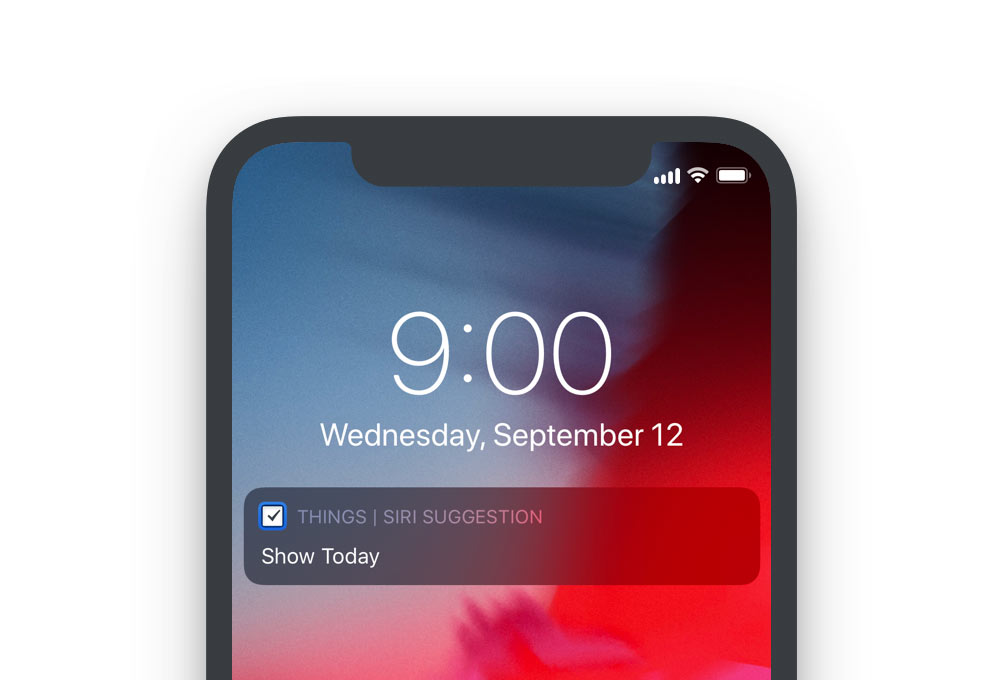
23 Sep 19:05

Revealed: how Canada border agency tried to conceal Chinese immigration mega-fraud files from tax collectors

by Ian Young
Last year, Canadian tax collectors and border officers were hailing their cooperation on the biggest immigration fraud case in Canadian history – that of unlicensed consultant Xun “Sunny” Wang, who helped Chinese millionaires fabricate evidence needed to maintain residency and obtain citizenship in Canada.“The CRA [Canada Revenue Agency] works closely with other law enforcement agencies and departments, including the CBSA [Canada Border Services Agency], to help maintain the integrity of the…
23 Sep 17:18

Ebike Trackers – Protect Your Ebike from Thieves

by Average Joe Cyclist

Ebike Trackers - Protect Your Ebike from ThievesLearn about how to protect your ebike with a GPS tracker. Many of these trackers use advanced technology to protect your ebike with the latest security features, including geofence zone alerts that could help you to stop a theft before it even happens. And if your ebike does get stolen, an ebike tracker will help the police to recover it for you.

The post Ebike Trackers – Protect Your Ebike from Thieves appeared first on Average Joe Cyclist.

23 Sep 17:18

CEOs and the Real World

by Matt

The downside of Zuckerberg’s exalted status within his company is that it is difficult for him to get genuine, unexpurgated feedback. He has tried, at times, to puncture his own bubble. In 2013, as a New Year’s resolution, he pledged to meet someone new, outside Facebook, every day. In 2017, he travelled to more than thirty states on a “listening tour” that he hoped would better acquaint him with the outside world. David Plouffe, President Obama’s former campaign manager, who is now the head of policy and advocacy at the Chan Zuckerberg Initiative, the family’s philanthropic investment company, attended some events on the tour. He told me, “When a politician goes to one of those, it’s an hour, and they’re talking for fifty of those minutes. He would talk for, like, five, and just ask questions.”

But the exercise came off as stilted and tone-deaf. Zuckerberg travelled with a professional photographer, who documented him feeding a calf in Wisconsin, ordering barbecue, and working on an assembly line at a Ford plant in Michigan. Online, people joked that the photos made him look like an extraterrestrial exploring the human race for the first time. A former Facebook executive who was involved in the tour told a friend, “No one wanted to tell Mark, and no one did tell Mark, that this really looks just dumb.”

There seem to be three communication gaps outlined here in Evan Osnos’s revealing profile of Mark Zuckerberg: one is getting unvarnished feedback from your employees. Speaking as a fellow CEO and founder, it’s certainly hard to pop that bubble — see “the bear is sticky with honey.” There are a few techniques like skip-level 1:1 meetings, anonymous feedback forms, interviewing new hires, and 360 reviews you can do to try to counter this, but there’s no panacea and this one requires constant work as you scale.

The second gap is getting the unvarnished truth from your users — much easier, as they’re quite happy to tell you what’s what. I’ve recently started cold-calling (yes, on the phone!) some of our Jetpack customers just to understand what they love and don’t love about the experience and about how we can help them solve their business challenges. There’s a casual intimacy to phone conversations that just can’t be replicated in other user feedback forums. Pair this with good instrumentation throughout your product so you see what people do and not just what they say and you’re golden.

The third and last communication gap is the connection to the world as most people experience it. If your status, wealth, or celebrity reach a point that they are shutting you out from “real” experiences, take some risks and get outside of your comfort zone. As it turns out, this new GQ profile of Paul McCartney offered a tip on that:

McCartney tells me a further such story of a time he took the Hampton Jitney, the slightly upmarket bus service that runs from the Hamptons into Manhattan, because he was deep into Charles Dickens’s Nicholas Nickleby and he wanted to finish it, and how he then took a local bus uptown, and when a woman blurted from across the bus, “Hey! Are you Paul McCartney?” he invited her to sit next to him and chatted all the way uptown. “It’s a way of not worrying about your fame,” he says. “It’s a way of not turning into the reclusive rock star. I often say to Nancy: I get in their faces before they get a chance to get in mine.”

Makes me wonder if Jack Dorsey still rides the bus to work every day. I think this is what Zuckerberg was attempting with his 30-state tour, and hopefully it was helpful even if the optics didn’t appeal to everyone — the daily habit of his 2013 resolution to meet someone new every day feels more powerful than the touristic 30-state one. But for an entity as large as Facebook maybe it’s moot, as Casey Newton pointed out in his newsletter last week it can be quite hard to pin the answers to Facebook’s real problems, and our democracy’s real challenges in the face of targeted online propaganda, to just one person.

23 Sep 17:18

We can do better than selling our data

by Doc Searls

fruit thought

If personal data is actually a commodity, can you buy some from another person, as if that person were a fruit stand? Would you want to?

Well, no.

Yet there is lately a widespread urge to claim personal data as personal property, and to create commodity markets for personal data, so people can start making money by selling or otherwise monetizing their own.

ProjectVRM, which I direct, is chartered to “foster development of tools and services that make customers both independent and better able to engage,” and is a big tent. That’s why on the VRM Developments Work page of its wiki a heading called Markets for Personal Data. Listed there are:

So: respect.

Yet, while I salute these efforts’ respect for individuals, and their righteous urges to right the wrongs of wanton and rude harvesting of personal data from approximately everybody, I also think there are problems with this approach. And, since I’ve been asked lately to spell out those problems, I shall. Here goes.

The first problem is that, economically speaking, data is a public good, meaning non-rivalrous and non-excludable. Here’s a table that may help (borrowed from this Linux Journal column):

Excludability Excludability
YES NO
Rivalness YES Private good: good: e.g., food, clothing, toys, cars, products subject to value-adds between first sources and final customers Common pool resource: e.g., sea, rivers, forests, their edible inhabitants and other useful contents
Rivalness NO Club good: e.g., bridges, cable TV, private golf courses, controlled access to copyrighted works public good: e.g., data, information, law enforcement, national defense, fire fighting, public roads, street lighting


The second problem is that nature of data as a public good also inconveniences claims that it ought to be property. Thomas Jefferson explained this in his 1813 letter to Isaac MacPherson:

If nature has made any one thing less susceptible than all others of exclusive property, it is the action of the thinking power called an idea, which an individual may exclusively possess as long as he keeps it to himself; but the moment it is divulged, it forces itself into the possession of every one, and the receiver cannot dispossess himself of it. Its peculiar character, too, is that no one possesses the less, because every other possesses the whole of it. He who receives an idea from me, receives instruction himself without lessening mine; as he who lights his taper at mine, receives light without darkening me. That ideas should freely spread from one to another over the globe, for the moral and mutual instruction of man, and improvement of his condition, seems to have been peculiarly and benevolently designed by nature, when she made them, like fire, expansible over all space, without lessening their density in any point, and like the air in which we breathe, move, and have our physical being, incapable of confinement or exclusive appropriation

Of course Jefferson never heard of data. But what he says about “the thinking power called an idea,” and how ideas are like fire, is essential in a very human way.

The third problem is that all of us as human beings are able to produce forms of value that far exceed that of our raw personal data.

Specifically, treating data as if it were a rivalrous and excludable commodity—such as corn, oil or fruit—not only takes Jefferson’s “thinking power” off the table, but misdirects attention, investment and development work away from supporting the human outputs that are fully combustible, and might be expansible over all space, without lessening density. Ideas can do that. Oil can’t, even though it’s combustible.

Put another way, why would you want to make almost nothing (the likely price) selling personal data on a commodity basis when you can make a lot more by selling your work where markets for work exist?

What makes us fully powerful as human beings is our ability to generate and share ideas and other combustible public goods, and not just to slough off data like so much dandruff. Or to be valued only for the labors we contribute as parts of industrial machines.

Important note: I’m not knocking labor here. Most of us have to work for wages as parts of industrial machines, or as independent actors. I do too. There is full honor in that. Yet our nature as distinctive and valuable human beings is to be more and other than a source of labor alone, and there are ways to make money from that fact too.

Many years ago JP Rangaswami (@jobsworth) and I made a distinction between making money with something and because of something. It’s a helpful one.

Example: I don’t make money with this blog. But I do make money because of it—and probably a lot more money than I would if this blog carried advertising or if I did it for a wage.

Which gets us to the idea behind declaring personal data as personal property, and creating marketplaces where people can sell their data.

The idea goes like this: there is a $trillion or more in business activity that trades or relies on personal data in many ways. Individual sources of that data should be able to get in on the action.

Alas, most of that $trillion is in what Shoshana Zuboff calls surveillance capitalism: a giant snake-ball of B2B activity wherein there is little interest in buying what can be had for free.

Worse, surveillance capitalism’s business is making guesses about you so it can sell you shit. On a per-message basis, this works about 0% of the time, even though massive amounts of money flow through that B2B snakeball (visualized as abstract rectangles here and here). Many reasons for that. Here are a few:

  1. Most of the time, such as right here and now, you’re not buying a damn thing, and not in a mood to be bothered by someone telling you what to buy.
  2. Companies paying other companies to push shit at you do not have your interests at heart—not even if their messages to you are, as they like to put it, “relevant” or “interest based.” (Which they almost always are not.)
  3. The entrails of surveillance capitalism are fully infected with fraud and malware.
  4. Surveillance capitalism is also quite satisfied to soak up to 97% of an advertising spend before an ad’s publisher gets its 3% for pushing an ad at you.

Trying to get in on that business is just an awful proposition.

Yes, I know it isn’t just surveillance capitalists who hunger for personal data. The health care business, for example, can benefit enormously from it, and is less of a snakeball, on the whole. But what will it pay you? And why should it pay you?

Won’t large quantities of anonymized personal data from iOS and Android devices, handed over freely, be more valuable to medicine and pharma than the few bits of data individuals might sell? (Apple has already ventured in that direction, very carefully, also while not paying for any personal data.)

And isn’t there something kinda suspect about personal data for sale? Such as motivating the unscrupulous to alter some of their data so it’s worth more?

What fully matters for people in the digital world is agency, not data. Agency is the power to act with full effect in the world. It’s what you have when you put your pants on, when you walk, or drive, or tell somebody something useful while they listen respectfully. It’s what you get when you make a deal with an equal.

It’s not what any of us get when we’re just “users” on a platform. Or when we click “agree” to one-sided terms the other party can change and we can’t. Both of those are norms in Web 2.0 and desperately need to be killed.

It’s still early. Web 2.0 is an archaic stage in the formation of the digital world. surveillance capitalism has also been a bubble ready to pop for years. The matter is when, not if. It’s too absurd, corrupt, complex and annoying to keep living forever.

So let’s give people ways to increase their agency, at scale, in the digital world. There’s no scale in selling one’s personal data. But there’s plenty in putting our most human of powers to work.

The most basic form of agency in the digital world is control over how our personal data might be used by others. There are lots of developers at work on this already. Here’s one list at ProjectVRM.

Bonus links:


23 Sep 17:11

If Toronto is turning into “Downton Abbey”, is Vancouver already “Upstairs Downstairs”?

by Sandy James Planner

16652-5537316652-55373

The Star and Toronto’s May Warren has reported on the cleaving of class in Toronto, where the downtown has service sector jobs, but the people in those jobs do not have affordable housing close to their workplace.

Warren observes“This dynamic of lower-paid suburban workers servicing downtown’s bankers, lawyers and “creative class Sunshine List professionals” is turning the city into a kind of “Downton Abbey,” according to one researcher who’s studied the phenomenon. It’s a divide that could lead to labour shortages in the core — as service workers forced to commute farther and farther lose the incentive to take those positions.”

While some service workers still live in the downtown around Kensington Market and Queen Street East, the numbers are in the 10 to 20% range, with suburbs in Scarborough and Etobicoke housing 30 to 35% of service workers.

So why do these workers commute to downtown jobs? One hotel worker noted  “Suburb hotels, they very rarely offer anything that’s at the point over minimum wage,” and there is a diversity of job opportunities in downtown hotels.

In a a 2015 report about “the working poor,” the Metcalf Foundation found the Toronto region had the largest amount of working poor in Canada with 9 per cent, or 264,000 adults living on poverty level wages. The reason for this high level of low wage earners was “a lack of better paying mid-range jobs, combined with higher rental and real-estate prices, driving lower paid workers farther out into the suburbs, and even into illegal rooming houses in Scarborough and North York.”

The lack of newly built subsidized housing means the “Manhattanization” of downtown Toronto, with commuters going longer distances to afford housing. There is also discussion about how to ensure workers across sectors can live within the city. The case of  Vancouver’s Solly’s bagel shop which had to temporarily close a location due to the lack of  employees is cited as a distinct possibility for Toronto too.

Ontario was to increase the minimum wage from 14 to 15 dollars an hour in January, but Ontario Premier Ford has said that will not be enacted. As Toronto concentrates service and sales industries downtown without supportive affordable housing and accessible quick transit, labour shortages and business closures are expected to increase in the coming years.

streetcar

streetcar
23 Sep 17:06

Should Students Listen to Background Music While They Read?

Daniel Willingham, Science & Education, Oct 01, 2018


Icon

This is interesting because it represents Daniel Willingham backing off a bit from a strict and unthinking application of the cognitive load theory. The idea of cognitive load is that we can only handle so much information at a time, and so in the past we've been told we should eliminate any distraction - extra content, background music, whatever. This would drive me crazy, in no small part because I have tinnitus and have to have background noise. And what's important here is that Willingham explicitly recognizes that sometimes background music, and even background talking, might actually help a person learn. "While mean of the grand distribution may show a small hit to comprehension when background music plays, it's NOT the case that every child reads a little worse with background music on." So, this is great. Understanding individual variability is key to understanding research in education.

Web: [Direct Link] [This Post]
23 Sep 17:06

eBook DRM and Blockchain play CryptoKitty and Mouse. And the Winner is...

Eric Hellman, Go To Hellman, Oct 01, 2018


Icon

I have been investigating Crypto-Kitties as part of my wider work looking at distributed ledger technologies. So I found interesting to read Eric Hellman's discussion of our digital feline friends in the context of digital rights management. "What if were possible to 'CryptoKittify' ebooks?" he asks. "Would that mitigate the sins of DRM, or even render it unnecessary? Would it just add the evils of blockchain to the evils of DRM? Two startups, Publica and Scenarex are trying to find out." Good questions. What is it that we even want to record - the sale of the book? Or the relation between the reader and the content. "Once Publica understands that memorializing readers supporting authors is where their success can come from, I think they'll realize that DRM, by restricting readers and building moats around literature, is counterproductive."

Web: [Direct Link] [This Post]