Shared posts

23 Sep 16:37

Purism launches Librem Key, the first and only security key to offer tamper evident protection to laptop users

by Jeff

New OpenPGP smart cards now available for purchase on Purism’s website

SAN FRANCISCO, Calif., September 20, 2018 — Purism, the social purpose corporation which designs and produces popular digital rights respecting hardware, software, and services, has launched its new security token, the Librem Key, which is the first and only OpenPGP smart card providing a Heads-firmware-integrated tamper-evident boot process. The new Librem Key, built with Open Hardware USB OpenPGP security tokens from Nitrokey, can store up to 4096-bit RSA keys and up to 512-bit ECC keys and can securely generate them directly on the device. Librem Keys are now available for purchase on Purism’s website, with Librem laptops or as a single order. Librem Keys will be able to provide basic security token functions on any laptop, but have extended features that work exclusively with Purism’s Librem laptop line and other devices that support Trammel Hudson’s Heads security firmware.

Purism developed the Librem Key through its partnership with Nitrokey. This integration allows Librem laptop users to add unprecedented protection to their device through a key they can insert at boot time to ensure the user is right where they left off without any tampering. Once inserted, if the key blinks green, then you’re right where you left off. If it blinks red, it signals tampering has occurred. The key is fully equipped to integrate with the Librem’s secure boot process with Heads-enabled TPM detailing the tamper evidence. The key enables users to directly test if someone has tampered with the software on their computer starting at the boot level.

With Librem Key, IT departments will have an integrated out-of-the-box solution for disk and email encryption, authentication, and tamper-evident boot security that’s easy to use.

In addition to its industry leading tamper evidence capabilities, the Librem Key also offers the standard security features available in generic security tokens:

  • Securely store user GPG encryption/signing keys to make it easier to use their keys in a secure way across devices
  • Store authentication GPG keys you can use for Secure Shell (SSH)
  • Using One-Time-Passwords (OTP) to login to websites or for two factor authentication (2FA)

Eventually, Purism plans to expand the Librem Key’s features to even further empower users to securely control their devices, such as:

  • Detecting tampering during shipping with tamper-evident boot enabled and configured on the laptop and Librem Key and each device shipped separately
  • Unlocking disk encryption (instead of having to enter a passphrase) when the Librem Key is inserted at boot
  • Locking the screen whenever the Librem Key is removed
  • Automatically logging the user into their desktop when the Librem Key is inserted

The launch of Librem Key furthers Purism’s mission to make security and cryptography accessible where its customers hold the keys to their own security. This launch arrives amid growing demand for heightened protection expectations from security key manufacturers.

“Purism’s work to make coreboot measured against an external security token is the realization of a dream we’ve had since 2005,” says Ron Minnich, coreboot Founder.

“It’s not feasible or healthy to monitor your computing devices every second – and that’s especially the case when you travel,” says Kyle Rankin, Chief Security Officer at Purism. “With the Librem Key, we are giving Librem users the keys to completely lock their computer if they’re in an unfamiliar network environment in the same way one would want to have the keys to their car if they needed to drive to an unfamiliar neighborhood.”

“Your privacy is dependent on your freedom. We believe that having true privacy means your computer and data should be secure whether you are with your device or not,” says Todd Weaver, Founder and CEO of Purism. “As we look forward to shipping Heads by default, the Librem Key combined with the rest of our security features will give users the peace of mind that their data is safer than it would be on any other laptop on the market.”

With Purism enabling users to leverage the Heads integrated TPM chip in new Librem 13 and Librem 15 orders moving forward, they will also have the option of purchasing a Librem Key by itself or as an add-on with a laptop order. For future add-on orders, Purism plans to pre-configure the Librem Key at the factory to act as an easy-to-use disk decryption key and ship laptops that are pre-encrypted. Customers will also be able to replace the factory-generated keys with their own at any time.

About Purism

Purism is a Social Purpose Corporation devoted to bringing security, privacy, software freedom, and digital independence to everyone’s personal computing experience. With operations based in San Francisco (California) and around the world, Purism manufactures premium-quality laptops and phones, creating beautiful and powerful devices meant to protect users’ digital lives without requiring a compromise on ease of use. Purism designs and assembles its hardware by carefully selecting internationally sourced components to be privacy-respecting and fully Free-Software-compliant. Security and privacy-centric features come built-in with every product Purism makes, making security and privacy the simpler, logical choice for individuals and businesses.

Media Contact

Marie Williams, Coderella / Purism +1 415-689-4029 pr@puri.sm See also the Purism press room for additional tools and announcements.

The post Purism launches Librem Key, the first and only security key to offer tamper evident protection to laptop users appeared first on Purism.

23 Sep 16:37

Introducing the Librem Key

by Kyle Rankin

A few months ago we announced that we were partnering with Nitrokey to produce a new security token: the Librem Key and I’m pleased to announce that today the Librem Key is available for purchase on our site for $59.

What is a USB Security Token?

In case you haven’t heard of USB security tokens before, they are devices typically about the size of a USB thumb drive that can act as “something you have” for multi-factor authentication. With so many attacks on password logins, most security experts these days recommend adding a second form of authentication (often referred to as “2FA” or “multi-factor authentication”) in addition to your password so that if your password gets compromised the attacker still has to compromise your second factor. USB security tokens work well as this second factor because they are “something you have” instead of “something you know” like a password is, and because they are portable enough you can just keep them in your pocket, purse, or keychain and use them only when you need to login to a secure site.

In addition to multi-factor authentication, security tokens can also often store your private GPG keys in a tamper-proof way so you can protect them from attackers who may compromise your laptop. With your private keys on the security token, you can just insert the key when you need to encrypt, decrypt, sign, or authenticate and then type in your PIN to unlock the key. Since your private keys stay on the security token, even if an attacker compromises your computer, they can’t copy your keys (and even if you leave the key plugged in, they need to know your PIN to use it).

Why Make a Librem Key?

There are many other vendors out there who offer their own security tokens, so why make our own? The first reason is that few security tokens out on the market align with our values here at Purism, in particular with respect to freedom. I’ve explained in a previous post why freedom is essential to security and privacy and this is especially true for a device that is holding some of your most sensitive secrets. We wanted a security token that used open hardware, free software firmware, and free software user applications and that is why we partnered with Nitrokey to produce a security token that respected your freedom from the beginning.

We also wanted to make the Librem Key because of all of the integration possibilities with our existing products that would make customers more secure in a way that’s also more convenient. When you can bundle a security token with your own laptop and operating system, there are so many interesting possibilities, especially when the firmware and user applications are free software so we can easily modify them to add even more features.

In addition to the standard features of a security token (GPG key storage and multi-factor authentication) that the Librem Key can perform on any computer, here are some of the interesting integration options with our Librem laptops we are already looking into with the Librem Key that will make security much more convenient for users who are facing average threats:

  • Insert the Librem Key at boot and automatically decrypt your hard drive
  • Automatically lock your laptop whenever you remove the Librem Key
  • Use your Librem Key to log in

Provable Security, Made Easy

One of the most exciting opportunities the Librem Key opens up to us is in integrating with our tamper-evident Heads BIOS to provide cutting-edge tamper-evident security but in a convenient package that doesn’t exist anywhere else.

Currently with Heads, when you want to prove that the BIOS hasn’t been tampered with, you need to set up a TOTP application on your phone and scan a QR code from within Heads. Then at each boot you compare the 6-digit code Heads displays on the screen with the code in your phone. If the codes match, the BIOS is safe. This method works but is a bit cumbersome and with the Librem Key we can do better.

We have worked with Nitrokey to add a custom feature to our Librem Key firmware specifically for Heads. This custom firmware along with a userspace application allows us to store the shared secret from the TPM on the Librem Key instead of on a phone app. Then when Heads boots, if the BIOS hasn’t been tampered with the TPM will unlock its copy of the shared secret, and Heads will send the 6-digit code over to the Librem Key. If the code matches what the Librem Key itself generated, it flashes a green light. If the codes don’t match, it flashes a red light.

So if you are concerned about someone tampering with your computer when you aren’t around, just boot with the Librem Key inserted. If it blinks green you are safe, if it blinks red you’ve been tampered with. There is no other product on the market today that offers this kind of simple but strong tamper-evident protection, much less one that respects your freedom where the keys are fully in your control.

Even Stronger Anti-Interdiction Protection

The Librem Key opens up possibilities for even stronger anti-interdiction protection for customers who need it. We will be able to link a Librem Key with a laptop running Heads at our facility and then ship them separately. Then when each package arrives you can immediately test for tampering with an easy “green is good, red is bad” test.

Convenient Security for the Enterprise

Many companies have already incorporated 3rd party security tokens into their engineering teams as a way for software engineers to sign their code pushes securely or as convenient multi-factor token. The Librem Key offers enterprises a way to combine all of the other features they are used to with other security tokens along with our cutting-edge tamper-evident boot process on our Librem laptops in an easy and convenient package where all of the keys are fully under their control.

Since the firmware and userspace tools are free software, that means enterprises can also easily customize these tools to suit their own internal policies whether with their own software teams or by working with Purism. That could mean anything from providing a customized error page to employees when Heads detects tampering to actively preventing employees from booting a tampered-with machine.

Only the Beginning

Knowing that our customers have a secure and freedom-respecting security token opens up all sorts of other possibilities and today we are only scratching the surface on what we will be able to do with Librem Key both for new customers and those that have been with us from the beginning. Stay tuned for future posts where I will dive deeper into some of the Librem Key’s features and explain how to get the most out of it. In the mean time you can order your own Librem Key from the Librem Key product page.

Update: read more in our follow-up post explaining the interaction between the Librem Key and our coreboot+Heads BIOS replacement to learn more about how the tamper detection works.

The post Introducing the Librem Key appeared first on Purism.

23 Sep 16:37

The iPhone 4S

by Stephen Hackett

We are used to a fall release schedule when it comes to iPhones, but that hasn't always been the case. The first four iPhones came out in the summer, usually after being announced at WWDC.

2011's iPhone 4S changed that for good, and in some ways that phone draws parallels to the new iPhone XS. Both are the second generation of a radical new design, and both boast improved cameras, networking, and battery life. That's not to mention how Siri is at the heart of the iOS version they both ship with.

The S Stands for...Specs?

Officially only the S in the 3GS has ever been defined as speed by Apple, but it certainly could have been true for the 4S as well. The phone featured the A5 processor out of the iPad 2. This chipset included a dual-core processor which ran twice as fast as the single-core processor in the iPhone 4. Onboard was a new Apple-designed ISP for image processing, but the real star was the dual-core GPU that was seven times faster than the one before it.

This made the iPhone 4S noticeably more powerful than its predecessor, as Jason Snell wrote in his review at the time:

The results of my general-performance tests showed the iPhone 4S to be roughly twice as fast as the iPhone 4. Apple claims graphics performance on the iPhone 4S has been boosted even more by the graphics component of the A5, with speed gains of as much as 7x. That’s a best-case scenario, but my tests with the GLBench Pro graphics benchmarking app did show enhanced graphics performance. One 3D test sequence played at roughly five times the frame rate of the same scene on the iPhone 4; another was roughly double the frame rate.

Of course, many people won’t be upgrading to the iPhone 4S from the iPhone 4, due to those pesky two-year phone contracts that cell carriers insist on. But a whole lot of people will be upgrading from two-year-old iPhone 3GSes. 3GS users will see an even larger speed increase, of course. The 4S had more than double the score on the GeekBench testing app, and loaded a test webpage in a third of the time.

This power gave the iPhone 4S better longevity than the 4, running up to iOS 9.3.5 before being retired.

The iPhone 4S offered more than a faster system on a chip. The camera received a lot of attention, and Apple pitched it as a point-and-shoot killer:

With 8 megapixels and all-new optics, this just might be the best camera ever on a mobile phone. It just might be the only camera you’ll ever need. And if you think that’s amazing, wait until you see your photos.

The new sensor in the iPhone 4S not only allowed for photos with higher resolution, but it also captured 1080p video for the first time. Coupled with a new f/2.4 aperture, this iPhone blew away previous models in terms of depth of field and low-light performance. Coupled with that new ISP, the iPhone 4S was the fastest smartphone in terms of time required to take a photo, critical for those consumers taking images of subjects like kids or even animals:

The S Stands for...Switching Antenna?

The iPhone 4's antenna made headlines for highlighting a common problem in smartphones: that when gripped tightly, they can experience dips in cellular reception.

The iPhone 4's issues were overblown, but Apple did take time in the iPhone 4S keynote to discuss some improvements to the antenna. The stainless steel band now contained two antennas, and the phone could switch between them automatically as needed.

This new design was met with crickets, exactly as all antenna designs should be.

The iPhone 4S could download data at a rate up to 14.4 Mbps on HSDPA networks. This was referred to as "4G" by other phone manufactures, and by Apple, as of iOS 5.1.

Most importantly, the iPhone 4S was a world phone, with support for both CDMA and GSM networks, meaning CDMA customers (like those on Verizon) could roam internationally on GSM networks.

The S Stands for...Siri?

The headline feature of the iPhone 4S was the inclusion of Siri, Apple's voice assistant. Apple had purchased Siri in April 2010 and baked the technology right into iOS 5, triggered by a long press of the Home button.

In his demo, Scott Forstall emphasized the importance of Siri understanding the meaning behind a user's words. It knew that "What's the weather?" and "Will I need a raincoat?" were really different angles into the same information. Siri was designed to clue into context and keep track of a conversation, he said.

Compared to today, this version of Siri is painfully limited. It could work with Phone, Messages, Music, Calendar, Reminders, Mail, Weather, Stocks, Clock, Contacts, Notes, Maps, and Safari. Like today, it fell back to a simple web search when needed, and could also pull information from sources like Yelp, Wikipedia, and Wolfram Alpha.

All of this was wrapped in an interface that is very much of the Forstall era:

Siri launched on the iPhone 4S as a beta, a rather unusual move for Apple. No doubt, this was meant to reflect its limited abilities. Some of these limitations are clear in Snell's hands-on video.

In addition to the Siri interface itself, Siri was present in the iOS keyboard in the form of Dictation, available in all applications.

The S Stands for...Sales Price?

The iPhone 4S, with its new CPU and GPU, updated camera, slightly better battery life, and Siri went on sale in October 2011 starting at $199 with a two-year contract for a 16 GB model. Both black and white phones went on sale on day one, unlike with the iPhone 4.

When it went on sale, an 8 GB iPhone 4 was sold for $99, while an 8 GB iPhone 3GS could be picked up free on contract.

What a world.

The S Stands for...Something New This Way Comes?

The iPhone 4S was the last of its kind. It was the last iPhone with a 3.5-inch screen, as the iPhone 5 would be taller, measuring in at 4 inches. The 4S was also the last to utilize the 30-pin Dock Connector and not offer LTE.

The iPhone X brought some design cues back, like the stainless steel band and glass back. In my eyes, it's the best looking phone since the glory days of the 4 and 4S design.


Support MacStories Directly

Club MacStories offers exclusive access to extra MacStories content, delivered every week; it's also a way to support us directly.

Club MacStories will help you discover the best apps for your devices and get the most out of your iPhone, iPad, and Mac. Plus, it's made in Italy.

Join Now
23 Sep 16:36

Are Sesame Street’s Bert and Ernie gay? A dialogue.

by Josh Bernoff

News broke this week that a writer at Sesame Street said the popular characters Bert and Ernie, two single guys who live together, are gay. The shows producers denied it. Who’s right? Here’s a dialogue between representatives of both perspectives, to help us all understand the crucial issues at stake. Of course they are: It’s … Continued

The post Are Sesame Street’s Bert and Ernie gay? A dialogue. appeared first on without bullshit.

23 Sep 16:34

✚ Chart Components and Working On Your Graphics Piece-wise

by Nathan Yau

Before you can form a set of steps to visualize data, you need to know the components of a chart that you can separate. Like making an outline for an essay, you look for sections that make sense rather than define how many periods and question marks you need to show. Once you can form that data graphics outline, that complex visualization project doesn't seem so daunting. Read More

23 Sep 16:34

Austin Mann’s Review of the iPhone XS Cameras

by Ryan Christoffel

In addition to the early slate of iPhone reviews from the press, it's become tradition in recent years for each iPhone to be graded as a camera by professional photographer Austin Mann. I especially enjoyed Mann's review this year of the iPhone XS camera system. He writes:

Most of the time my expectations for camera upgrades on “S” years aren’t so high, but after shooting with the iPhone XS for a week, I can confidently say it’s a huge camera upgrade. There’s a lot of little improvements, but Smart HDR definitely takes the cake. This is a feature and technology that improves virtually everything you capture with your iPhone camera. I think you’ll be really thrilled when you experience the results yourself.

As I shared in last week's issue of MacStories Weekly for Club MacStories, the iPhone XS and XR announcements caught me by surprise in that I expected there to be more change in the devices compared to last year's iPhone X. I've ordered a XS Max, but the primary reason for my upgrade was the additional screen real estate compared to my X; bigger display aside, September's keynote didn't provide much of a compelling reason for me to purchase a new phone this year. However, Mann's review and that of John Gruber have helped provide much-needed additional detail on the camera upgrades in the XS, which sound impressively significant.

One of the standout lines in Mann's review for me comes near the beginning, where he says, "iPhone XS captures what your eyes see." It's hard to find higher praise than that.

→ Source: austinmann.com

23 Sep 16:33

Reddit’s CEO on building community and dealing with crisis

by Liz Armistead

Photo of Reddit CEO Steve Huffman

Earlier this year, we traveled to The Gathering in Banff, Canada to meet with marketing leaders from the world’s most-coveted brands and learn how they guided their companies to cult status. While we were there, Shane Steele, Head of Global Brand Marketing at Dropbox, had a chance to chat with Steve Huffman, CEO and co-founder of Reddit.

Since launching in 2005, Reddit has achieved tremendous user growth, attracting approximately 330 million visitors every month. So how did they build such a massive community without massive marketing efforts? We sat down with Steve to find out how he and his team are transforming the front page of the internet into an iconic brand.

Working at a leading tech company in Silicon Valley, what kind of shift have you seen in terms of marketing approaches?
One of the the really powerful things marketing can do is help you grow your user base. Reddit has always kind of grown on its own. But we do have like a lot of ground to catch up in terms of explaining what Reddit is, closing what we like to call the perception gap or the relevance gap… getting people to understand that even if you’re not a Reddit user, you probably actually have a home on Reddit somewhere.

As the founder of Reddit, Hipmunk, and other companies, you’ve built several successful teams. What’s the secret to harnessing the collective genius of teams?
The strategy is different at different companies. At Reddit, we have the luxury of having a mission that people can get really excited about. We’re bringing community and belonging to everybody in the world. For a lot of the people who work at Reddit, Reddit has touched their lives in some way, so there’s a kind of close relationship. That’s a nice element for hiring.

At Hipmunk, we’re doing travel search. Convincing people to sling plane tickets, with the exception of their CEO, I think that wasn’t anybody’s childhood dream. So there, the pitch was more along the lines of let’s save people time. It doesn’t sound glamorous, but we can save people a few minutes a day and that adds up. “Come work with really smart people. Come work in a really great culture.” All of those things were kind of how we brought people together.

As new technologies emerge, they sometimes affect our ability to focus on meaningful work. How does your team use technology to collaborate more effectively?
That’s a great question. There are technologies for sharing and communicating that can be really effective. We use Dropbox at Reddit. I think you just have to be careful about not conflating technology tools with work. Technology can help you do work, but just using it doesn’t actually make you more productive. Whether it’s email or Slack or shared documents… It’s the content that matters. I think sometimes it is easy to lose sight of that. It’s also handy how technology’s enabled this whole kind of generation of people being able to work remotely and hire around the globe and have more freedom.

“When you’re in those moments of flow, you’re feeling really productive… You can make decisions all day long. You feel creative all day long. I think you have an infinite supply.”

At Dropbox, we think of creative energy as a resource that can be depleted or replenished depending on the work environment. In your career, when have you felt the most creative energy?
The times of my life where I’ve been the most productive are when the pressure is the greatest. When you find yourself saying, “That is just not important right now I can ignore it.” The way you can do that is when you have something that’s really important in front of you. The first couple of months of every company, I think it’s always like that. When I’ve been in times of crisis, it’s like that. The reality is, there are probably only a few things that are actually important in any particular moment…

But I do want to attack the question a little bit because I’ve heard of this concept of creative energy and being able to running out of it. Over the years, [I’ve talked] about decision fatigue: “I can only make decisions so many times a day.” Or people talk about discipline fatigue. I actually think that thought is not productive. When you’re in those moments of flow, you’re feeling really productive. You can work all day long. You can make decisions all day long. You feel creative all day long. I think you have an infinite supply if you want to have an infinite supply. You just have to play the mental gymnastics to have an infinite supply.

When you say you feel most in flow in moments of crisis, do you mean those circumstances make you more focused?
Yes, exactly. I’s not always negative. Crisis, I think, has a negative connotation. But when you know where you want to be and you want to be there immediately and you have that clarifying focus, that direction, it’s really powerful. The goal at work is to have that every day. Not just at work, but in your life—to know where you want go.

Have you ever felt that happening as a team, where there’s a collective flow and alignment with a group of people who are working together to solve that crisis?
Of course, all the time. There’s always something fun to chase down and work on. And we’ve got a bunch of big projects going on. The Reddit community itself is always doing something interesting. I think that’s what makes work fun. One of the things I talk about a lot when I think about business in general is… you know how the human genome is 99% the same as that of the fruit fly? I think companies are the same way. Most companies are 99% the same, and that 1% that’s different is a prize… The fun of working, the fulfillment of working is solving hard problems with your team. You can do that anywhere—at work or in your personal life. I think just having that in mind— the reward is the journey—can be really effective.

At Dropbox, we talk about the problem of “work about work,” where you’re just dealing with the processes or bureaucracy. How do you try to reduce that work about work?
There are a couple tactics. One is this notion [that] process becomes culture. A lot of times with teams, if you feel like the discipline isn’t there, and you’re not getting the results you want, you can put some process in, put some discipline in. Regular meetings, regular emails, whatever it is. Then eventually, it becomes second nature. This is the hard part—how you can shift the process so the culture will stay intact.

For more tips on taking the work out of getting work done, download our eBook, Friction to Flow.

Banner for Friction to Flow eBook

23 Sep 16:33

HomeCam 1.5 Adds Shortcuts to View Live HomeKit Camera Feeds in Siri, Search, and the Shortcuts App

by Federico Viticci

I previously covered HomeCam, a HomeKit utility by indie developer Aaron Pearce, as a superior way to watch live video streams from multiple HomeKit cameras. In addition to a clean design and straightforward approach (your cameras are displayed in a grid), what set HomeCam apart was the ability to view information from other HomeKit accessories located in the same room of a camera and control nearby lights without leaving the camera UI. Compared to Apple's approach to opening cameras in the clunky Home app, HomeCam is a nimble, must-have utility for anyone who owns multiple HomeKit cameras and wants to tune into their video feeds quickly. With the release of iOS 12, HomeCam is gaining one of the most impressive and useful implementations of Siri shortcuts I've seen on the platform yet.

HomeCam 1.5, available today on the App Store, brings a variety of welcome improvements to the core app experience. For instance, the grid has been slightly redesigned with connection status indicators and you can rearrange your cameras with drag and drop. There's support for keyboard shortcuts on iPad when you're viewing a camera, and you can now lock the app with a passcode, Touch ID, or Face ID to protect your video feeds from prying eyes. But these aren't my favorite changes in HomeCam 1.5. What I find remarkable in this update is the ability to invoke any camera stream as a shortcut either from Siri, the Search screen, or the Shortcuts app, and watch a live video feed without having to open HomeCam at all.

It's all very easy to set up. In the HomeCam app, you can open a camera then tap the '...' button in the top right corner to add a personalized Siri phrase for the camera's video stream. Alternatively, as with other app shortcuts in iOS 12, you'll be able to find shortcuts donated by HomeCam in Settings ⇾ Siri & Search ⇾ All Shortcuts, plus the 'Siri Suggestions' category of the Shortcuts app and its dedicated HomeCam entry.

You can view HomeCam shortcuts in Search and the Shortcuts app as well.

You can view HomeCam shortcuts in Search and the Shortcuts app as well.

No matter how you access a HomeCam shortcut, the end result will always be the same: in a couple of seconds, HomeCam's shortcut will connect to the camera you configured and you'll be able to watch a live video feed inside Siri or as a floating card in Search/Shortcuts. By leveraging the APIs in iOS 12 that allow third-party apps to offer shortcuts with video playback, Pearce was able to build an astounding demonstration of this new framework.

In my tests earlier this summer, iOS 12 suggested relevant HomeCam shortcuts at different times during the day based on my habits of checking my HomeKit cameras when I was on vacation and away from home. Siri's predictive system reminded me to ensure everything was okay at home without having to manually set reminders for myself. Even better, because shortcuts are supported everywhere, I even created a "home security" shortcut in the Shortcuts app that, among other things, loads a live video feed from HomeCam as a native action in just a couple of seconds.

While HomeCam featured a widget with support for live video before, there's something about the ability to invoke a camera feed by uttering a sentence to Siri that feels futuristic and genuinely useful. Apple's own Home app doesn't support shortcuts to bring up live camera views in Siri or the Shortcuts app; besides being a better alternative to Apple's solution for camera management, HomeCam 1.5 provides a native functionality that is absent from iOS 12 and fits the new shortcut APIs perfectly.

I fully expect Apple to copy Pearce's idea eventually. But until that happens, HomeCam remains the best iOS utility to view and act upon HomeKit cameras – now more than ever thanks to shortcuts in iOS 12.

HomeCam 1.5 is available on the App Store.


Support MacStories Directly

Club MacStories offers exclusive access to extra MacStories content, delivered every week; it's also a way to support us directly.

Club MacStories will help you discover the best apps for your devices and get the most out of your iPhone, iPad, and Mac. Plus, it's made in Italy.

Join Now
23 Sep 16:33

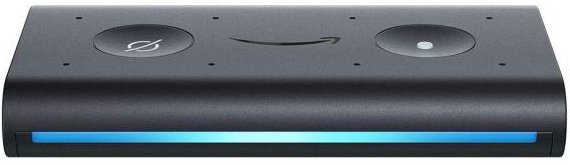
Jede Menge neue Amazon Echos

by Volker Weber

echo auto

Amazon hat rechtzeitig vor Weihnachten noch mal richtig Gas gegeben und jede Menge Geräte vorgestellt, die es zum Teil bereits jetzt zu kaufen gibt. Die Lautsprecher wirken weniger billig und sind nun mit Stoff bezogen.

  • Echo Input bringt Alexa auf vorhandene Lautsprecher, entweder per Kabel oder Bluetooth.
  • Echo Dot 3 bekommt einen besseren Lautsprecher und sieht deutlich besser aus.
  • Echo Plus 2 bekommt ebenfalls ein neues Design und enthält einen Home Hub.
  • Echo Show 2 hat einen größeren Bildschirm, einen Home Hub und unterstützt Skype Videotelefonie.
  • Echo Sub macht Bass. "Hey Alexa, dreh den Bass auf".
  • Amazon Smart Plug schaltet Strom per WLAN an und aus.

In USA gibt es noch mehr, zum Beispiel eine Alexa-Mikrowelle. Sogar ins Auto will Alexa. Ja, tatsächlich. Alles derzeit noch zu Listenpreisen, wobei ich den Sub nicht mal teuer finde. Kauft man ihn zusammen mit zwei Echo 2, gibt es sogar noch mal etwas Rabatt. Der Sub kann mit einem von beiden oder mit beiden als Stereopaar betrieben werden.

23 Sep 16:33

The Best Third-Party Inkjet Ink

by Ben Keough
The Best Third-Party Inkjet Ink

After more than 35 hours of testing, printing, and studying 7,000-plus pages, we think Costco’s Printer Ink Cartridge Refill Service is the best choice for people who are looking to save on printer ink and are already Costco members. It costs more than other budget options, but Costco’s ink comes closest to replicating the performance of original-manufacturer ink. Costco’s great customer service and consistent ink supply seal the deal.

23 Sep 16:32

Special Numbers in a Simple Language

by Eugene Wallingford

This fall I am again teaching our course in compiler development. Working in teams of two or three, students will implement from scratch a complete compiler for a simple functional language that consists of little more than integers, booleans, an if statement, and recursive functions. Such a language isn't suitable for much, but it works great for writing programs that do simple arithmetic and number theory. In the past, I likened it to an integer assembly language. This semester, my students are compiling a Pascal-like language of this sort that call Flair.

If you've read my blog much in the falls over the last decade or so, you may recall that I love to write code in the languages for which my students write their compilers. It makes the language seem more real to them and to me, gives us all more opportunities to master the language, and gives us interesting test cases for their scanners, parsers, type checkers, and code generators. In recent years I've blogged about some of my explorations in these languages, including programs to compute Farey numbers and excellent numbers, as well as trying to solve one of my daughter's AP calculus problems.

When I run into a problem, I usually get an itch to write a program, and in the fall I want to write it in my students' language.

Yesterday, I began writing my first new Flair program of the semester. I ran across this tweet from James Tanton, which starts:

N is "special" if, in binary, N has a 1s and b 0s and a & b are each factors of N (so non-zero).

So, 10 is special because:

  • In binary, 10 is 1010.
  • 1010 contains two 1s and two 0s.
  • Two is a factor of 10.

9 is not special because its binary rep also contains two 1s and two 0s, but two is not a factor of 9. 3 is not special because its binary rep has no 0s at all.

My first thought upon seeing this tweet was, "I can write a Flair program to determine if a number is special." And that is what I started to do.

Flair doesn't have loops, so I usually start every new program by mapping out the functions I will need simply to implement the definition. This makes sure that I don't spend much time implementing loops that I don't need. I ended up writing headers and default bodies for three utility functions:

  • convert a decimal number to binary
  • count the number of times a particular digits occurs in a number
  • determine if a number x divides evenly into a number n

With these helpers, I was ready to apply the definition of specialness:

    return divides(count(1, to_binary(n)), n)
       and divides(count(0, to_binary(n)), n)

Calling to_binary on the same argument is wasteful, but Flair doesn't have local variables, either. So I added one more helper to implement the design pattern "Function Call as Variable Assignment", apply_definition:

    function apply_definition(binary_n : integer, n : integer) : boolean
and called it from the program's main:
    return apply_definition(to_binary(n), n)

This is only the beginning. I still have a lot of work to do to implement to_binary, count and divides, using recursive function calls to simulate loops. This is another essential design pattern in Flair-like languages.

As I prepared to discuss my new program in class today, I found bug: My divides test was checking for factors of binary_n, not the decimal n. I also renamed a function and one of its parameters. Explaining my programs to students, a generalization of rubber duck debugging, often helps me see ways to make a program better. That's one of the reasons I like to teach.

Today I asked my students to please write me a Flair compiler so that I can run my program. The course is officially underway.

23 Sep 16:29

I’d rather be a blogger

by Paul Jarvis
Content marketing and blogging may be diametrically opposed to each other, but one isn’t bad and the other good. There’s just what’s right for how you want to operate and what you need your content to do for you or your audience. It’s just something to consider – does the intent of how you want to exist as a content creator online actually line up with how you’re operating? If it doesn’t, perhaps it’s time to change.
23 Sep 16:29

Firefox Performance Update #11

by Mike

Wow, it’s been a while1 since I posted one of these. We haven’t been resting on our laurels though – a bunch of work has been going on, and I want to highlight some of the big pieces that I’ve seen go by.

But first…

This Performance Update is brought to you by: getBoundsWithoutFlushing

For privileged JavaScript running in the browser, you have access to an interface called nsIDOMWindowUtils. These days, instead of doing a bunch of XPCOM gymnastics to get to that interface, you can access it via window.windowUtils. windowUtils exposes a handy function called getBoundsWithoutFlushing, and it delivers exactly what it says on the tin: you can pass it an element, and it’ll give you the most recently calculated bounds for the element without causing a style or layout flush.

That’s great! However, use with caution – because we’re getting information without flushing, the bounds information might be stale. For example, if you have an element that’s 50×50 pixels, and then were to apply some style in JavaScript that makes the element 500 pixels wide, using getBoundsWithoutFlushing immediately after seeing the style would still return the 50×50 pixel box. The information will only be brought up to date after the next flush, which either will occur from the refresh driver (good!) or some other code causing a layout flush (maybe bad!).

If you want a refresher on style and layout flushes, I highly recommend reading this document that the front-end team put together.

And now, without further ado, here’s what the Firefox Front-end Performance team’s been up to lately!

ClientStorage (Completed by Doug Thayer)

This is a big one if you’re on macOS. Doug’s work here allows us to communicate more efficiently with the GPU on Mac hardware, which should result in smoother animations, and hopefully less CPU (and power!) bandwidth being hogged with memory-copying operations.

This was so effective that it closed out the remaining performance bug on macOS that was preventing tab warming from landing! This means that tab warming should be shipping to our release channel on macOS in Firefox 63!

Experiments with the Background Process Priority Manager (In-Progress by Doug Thayer)

This project attempts to take advantage of our multi-process architecture by reducing the priority of processes that have no tabs being displayed in the foreground to the user2. This is the first time, at least to my knowledge, that we’ve attempted to fiddle with process priority on Firefox Desktop3, which means there are a bunch of unknowns for us to sort through.

Doug and I have been testing lowered background tab process priority for a few weeks, and have already identified one bug that has been recently fixed. Once that bug is available in Nightly builds, we’ll keep tinkering with it to see if any other bugs surface, and then we’ll considering testing it out on our Nightly audience.

If you want to experiment with it right now, you can go to about:config, and create a new bool pref called dom.ipc.processPriorityManager.enabled, and set it to true. Please be warned, this is still very much in the early stages, so you might see some odd behaviour.

Migrate consumers to the new Places Observer system (In-Progress by Doug Thayer)

Doug overhauled the Places Observer Notification APIs a month or so back, allowing consumers to take advantage of batches of notifications4. Doug is now in the process of converting a number of callsites within our Bookmarking code to take advantage of this. Once he puts out a few test failures and lands these patches, operations on large numbers of bookmarks should be handled more efficiently.

Document Splitting (In-Progress by Doug Thayer)

With our Graphics team getting closer and closer to making WebRender a reality, we’ve been looking at ways we can make our front-end code work more efficiently with it.

Disclaimer: I’m not 100% up-to-speed on the various nuances to this project, so I might get a few things wrong below. If someone from the Graphics team reads this and has some corrections or clarifications, please send them my way.

Document splitting will allow Gecko and WebRender to draw updates to the browser UI independently from web content. Historically, we’ve done something like this with layers and layer invalidation, but with WebRender, we have one giant display list that gets shipped over to the GPU thread to render for the whole window.

With document splitting, we’ll have independent structures for (at least for starters) the UI and web content. We suspect this will allow us to render more efficiently – especially when there’s a lot going on in web content (or there’s a lot going on in the UI!).

Make the RemotePageManager lazy (Completed by Felipe Gomes)

Felipe made it so that the RemotePageManager module isn’t loaded until necessary, and that saved us a handy 3.5% on content process start-up time, and 1% on base content memory used by JavaScript!

Smoother Tab Animations (In-Progress by Felipe Gomes)

The Photon UI shipped in Firefox 57 to great fanfare, and all of us front-end folk were pretty psyched about it. Unfortunately, as is always the case, there was some work that had to be cut for time.

Felipe is picking up some work that we cut that re-works how we do tab animations5. Our current animations involve growing and shrinking tabs, and for each frame of that animation, we calculate the change in style and layout and paint the change on the main thread.

The flashing occurs when we paint. Notice how the tabs flash as they open and close.

The new animations were designed from the ground up to take advantage of compositor-accelerated CSS6.

Felipe has some early try builds that he’s posted with the new animations, and we’re pretty excited to see where it goes. Or, if you don’t want to try a build, you can check out this video. Or this video (it’s the previous video in slow motion). Or this video for a variation!

Overhauling about:performance (In-Progress by Florian Quèze)

Florian and Tarek Ziade have proven out the platform work to support the new about:performance, and are now trying to bang out the final bits to make the new about:performance something we actually want to ship. They’re working with our UX team to figure out exactly what that looks like, but we’re hoping ultimately to give the user the most informed picture possible on what is eating up their CPU cycles.

You can try the new about:performance today in Nightly by setting dom.performance.enable_scheduler_timing to true, then restarting the browser, and then visiting about:performance.

Browser Adjustment Project (In-Progress by Gijs Kruitbosch)

Informed by the Firefox Hardware Report, Gijs has been fitted out with some new hardware that we think helps to encapsulate what we consider to be “average” consumer hardware, and “weak” consumer hardware. Gijs has been focusing on prior art by other browser engines, as well as operating systems to see how best we can stand on the shoulders of friends and not re-invent the wheel.

Again, this is still an early-days research project, so no code’s been written yet, but we hope to have a clearer picture on how best to proceed soon.

Avoiding spurious about:blank loads in the parent process (In-Progress by Gijs Kruitbosch)

This work should allow us to avoid some unnecessary work when we create new windows and tabs. This has involved changing a very large number of tests, and doing a bunch of plumbing to get Firefox ready for this change. The dependency tree on the bug gives you a bit of the picture.

Thankfully, I think we’re approaching the home stretch on this one. Hopefully, this should buy us some precious milliseconds when starting up and opening new windows.

Enable the separate Activity Stream content process by default (In-Progress by Mike Conley and Jay Lim)

Enabling the separate Activity Stream content process will allow users to take advantage of the script caching work that my intern Jay Lim did a few months back, which should let us render about:newtab more quickly.

Unfortunately, turning this separate content process on by default has been plagued with problems – most recently, a shutdown leak when running our automated tests. Thankfully, we’ve recently made a breakthrough on the leak, and we’re working on eliminating the cause.

Cheaper tabs in titlebar (In-Progress by Mike Conley)

We run a bit of JavaScript when rendering the browser UI to figure out how exactly to lay out the tabs in the titlebar.

Unfortunately, this JavaScript involves synchronous style and layout flushes, and ultimately we’re doing calculations that’s best left solely to the layout engine.

I’m working on swapping out the JavaScript for raw CSS. Running the benchmarks locally, this saved anywhere from 16-20ms on the window opening Talos benchmark. That might not sound like a lot, but from a performance engineer’s perspective, that’s a pretty solid gain.

Grab bag of Notable Performance Work

And without further ado, here’s a bunch of miscellaneous work that’s gone into the browser recently that has helped make it faster and better! Kudos to all the folk who landed these things! A bunch of these fixes are going out in Firefox 63 and Firefox 64.


  1. Like… 2 months. Oof. The blog guilt is overwhelming! 

  2. Across all windows, if you were worried about that. 

  3. It looks like we did something like this for Firefox OS though, since I believe the infrastructure we’re using to do this comes from that project. 

  4. Up until now, changes were handled one at a time. 

  5. Check out the “new tab motions” attachment in this bug for some videos by our talented designer epang! 

  6. Here’s a great post from some of our friends at Google about this sort of work. 

23 Sep 16:29

8 tips for hosting your first participatory workshop

by Tina Hsieh

Some practical suggestions from our workshop hosting experience.

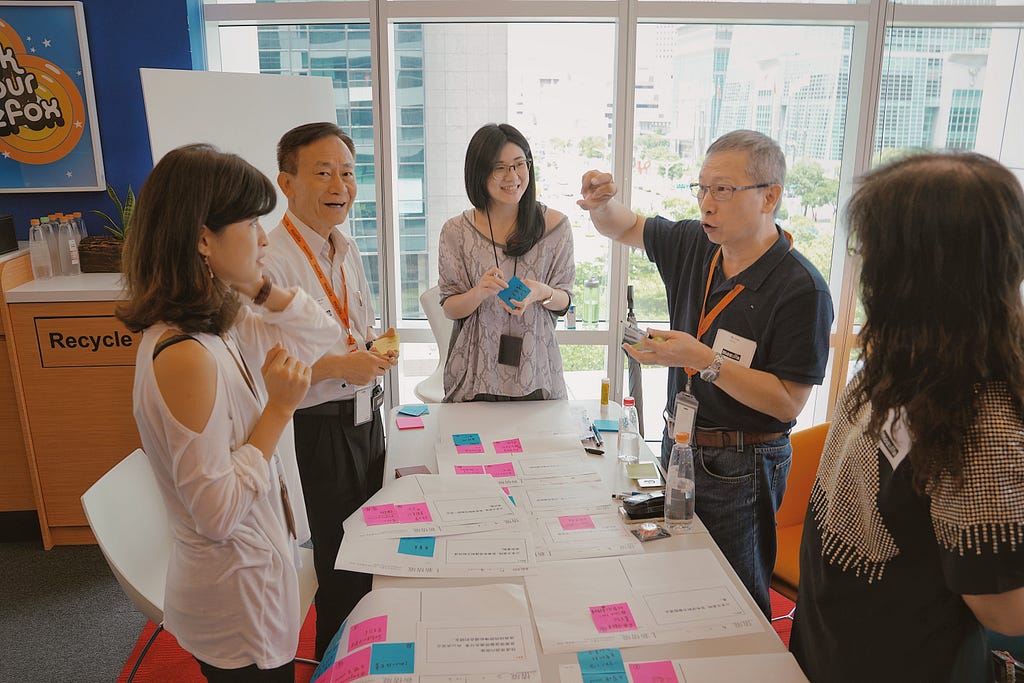
A scene of our participatory workshop

“Why not give it a try?” Ricky, our senior user researcher said.
“Design with people in my parents age without any design backgrounds? In-ter-est-ing……!” I couldn’t believe that he just threw such a crazy idea in our design planning meeting.

Before we go through the whole story, let me give you more context about it. Mozilla Taipei UX team is currently working on a new product exploration for improving the online experience of people between the age of 55~65 in Taiwan. From 2 month, 4 rounds of in-depth interviews we conducted with 34 participants, we understood our target users holistically from their internet behaviors, unmet needs, to their lifestyles. After hosting a 2-day condense version of design sprint in Taipei office for generating brilliant product concepts (more stories, stay tuned :)), we were about to reach the stage of validation.

How do we know if the concepts are solving users’ pain points? What will be the best validation method? We were discussing enthusiastically in the meeting. As designers with age 30+ years younger than our users, we weren’t fully confident with our concepts. Then we realized that participatory workshop might be a good approach especially for such a special segment of the target users.

We have lots of experience on hosting workshops, but most of them are internal. This is our first time hosting a participatory workshop externally, and also our first time having a group of participants who have lots of life experiences but zero for designing. That’s why I felt so anxious when we decided to give it a try. But in the end, we nailed it. We were so satisfied with what we learned from the whole process, and how efficient it is (compared to having individual user interviews).

Here are the tips summarized from our experience.

Set Goals

Starting with clear goals is the key for the entire workshop

Since we can’t accomplish all of what we have in mind in just one 2.5-hrs workshop, we need to make clear goals and scope at the outset to make sure we’re focusing on the right direction. During our planning session, we went through all the hypothesis and product concepts, and discussed about the questions we have for validation.

After the prioritization, the 3 goals we want to achieve through the participatory workshop are: validating the hypothetical scenarios, get users’ feedback for the product concepts, and get more insights from their crazy ideas.

Invite Participants

Participants who are extreme users help us get more valuable insights

Phone interviews are very useful for screening participants. Before we decided to hand out the invitation, we need to make sure that he/ she not only fit our participants’ criteria, but also is an expert on the use cases we set. Influencers with who can express their digital experience precisely are the best, because we’ll ask them to share their thoughts on the design topics, not just having Q&A interviews (from the previous street intercept experience, we found out that some of the people at this age bracket couldn’t do so).

The extreme user shared his cross-device online experiences with the team

3+1+1 is a magic combination of a team in the workshop

We set up 2 teams in the workshop. In each of the team, we have:

3 Participants
Consist of all genders, and from diverse industries.

A designer took notes from his observation

1 Designer
Considering our senior participants don’t have any design experience, we invited a designer to join the team’s designing conversation to avoid having 3 strangers staring at each other all the time. Surprisingly, our participants all expressed their thoughts quite well and contributed ideas smoothly.

However, senior participants preferred to speak out their thoughts instead of writing things down, so we switched the designer’s role immediately to note taker. From the learning we got, we suggest to have the designers to:

  • Listen and note down the differences between general users and participants.
  • Explore more insights and visualize the ideas.
A facilitator showed some examples to the participants

1 Facilitator
The facilitator will be in charge of maintaining the momentum in each session. Instead of brainstorming with participants, he/ she will focus on:

  • Create vibrant atmosphere and engage every single participant.
  • Trigger ideas by providing some examples.
  • Time control and redirecting to the topic when needed.

Design the Workshop

The warm up activity kick started the creative and imaginative atmosphere

The atmosphere was delighted from the outset

Don’t forget to add this most interesting session in your workshop! If you arrange the warm up activity successfully, the participants will not only practice creative thinking but also get more familiar with other team members in a delightful way.

The activity we ran is a super power game which is similar to the icebreaker in Gamestorming. In the first 10 mins, we asked participants and designers to share their own super power in their daily life, such as making 6 dishes at a time or finding the best deal of merchandise. This was a good chance for them to have a peek of other team members’ life and personality, and also for us to build a sense of the participants’ profiles.

Then, we provided a bunch of unrealistic terms on a sheet for them to select the ones they wish to own for their future superpower. The terms are so odd that they’re forced to discuss with each other to figure out what the meaning was, and got a sense of “nothing is impossible” through the activity.

Participants started some conversations by discussing the terms on the sheet

Validate the scenarios by asking true/ false questions

Answering right or wrong is easier than creating scenarios from scratch. We prepared 10 scenario cards related to the product concepts, and had a true or false question for each card. When designing the scenario cards, we intentionally keep the statements vague, so that we can ask participants to explain what the real scenarios look like without leading them. Here’s an example:

😟 “I want to bookmark this important article in my browser.”
😐 “I want to keep this important content in my space.”
😀 “I want to keep this important content organized in my space.”

As you can see, we replaced the “bookmark” by a broader term “keep”, so that it will be open to have more discussions on what’s their current methods for collecting things from the internet. It could be other words like “download”, “save”, “copy & paste”,…whatsoever, and that’s exactly what we want to learn from the participants. So does the reasons we replaced “ article” by “content”, and “browser” by “space”.

Mixing 2 related actions into one card can be another trick. By adding a word “organized” in the statement, we can have another round of discussion for validating a possible afterward behavior in the same section. Participants have rights to correct the scenarios we offered, so that we will get several validated scenarios in the end of the session.

Participants explained what their scenarios look like when answering true/ false questions

Prepared design components can help participants easily generate ideas

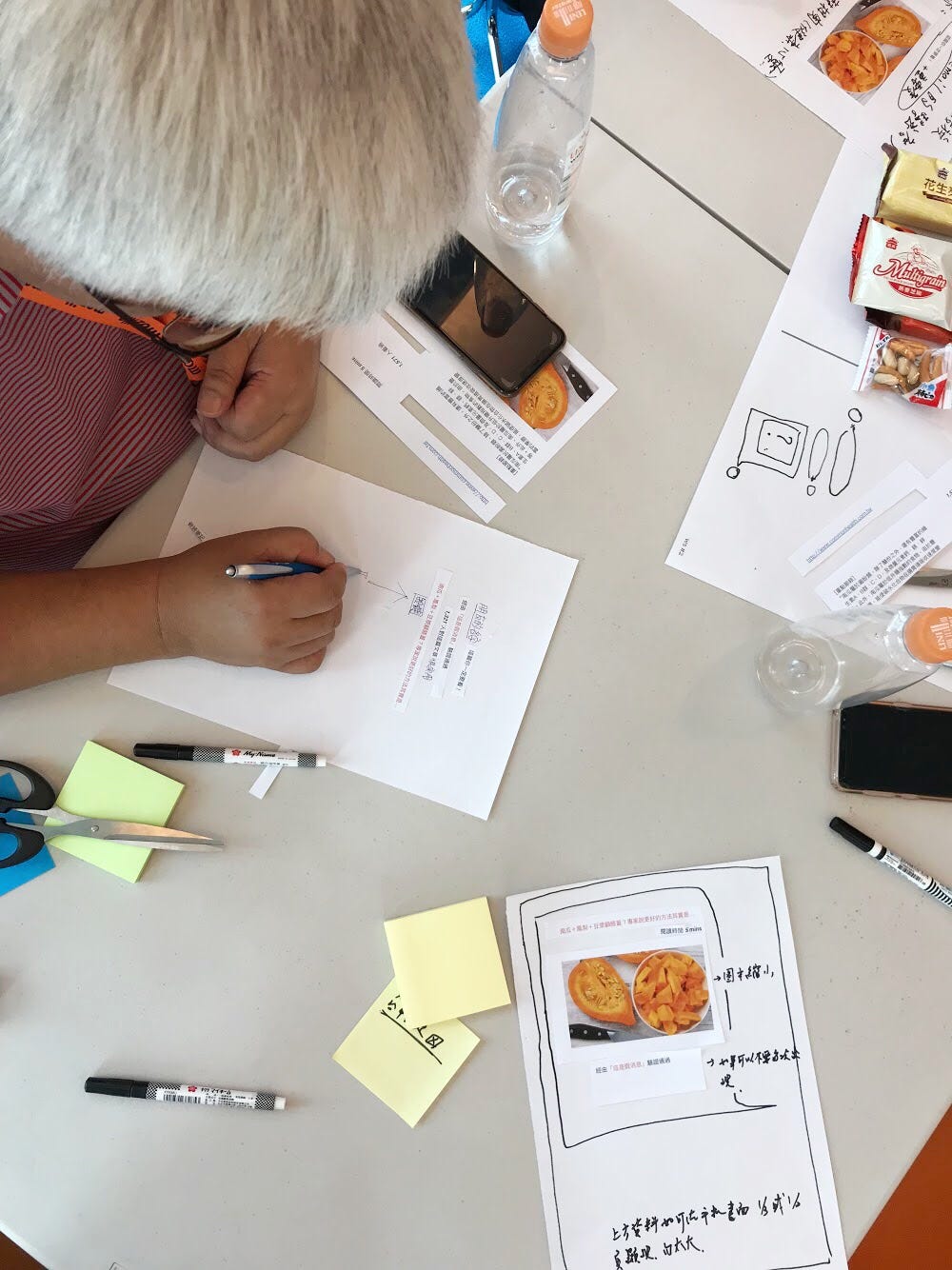
Using prepared design components to generate ideas is easier than starting with blank sheets

Participatory design isn’t asking people to do the job for designers. Actually, It’s an interactive approach, which is different from passive user interviews, for us to learn more about the underlying needs/ motive for each of the ideas. Therefore, the subjects we asked participants to design weren’t all feasible but allowed us to get more insights of their priority and preferences. After the workshop, our product concepts were refined by injecting some ideas that transformed from the co-design activities.

We ran 2 different types of brainstorming for each topic, free brainstorming and brainwiting. As we expected, the free brainstorming was a bit difficult for participants to get started. So we prepared some examples to inspire them. As for brainwriting, it didn’t work quite well for the senior participants due to their dislike for writing that I mentioned above. Thus, I collected some tips we learned from running the brainstorming session:

  • Reveal some design opportunities by pointing out some keywords of the subject that can help participants get started.
  • Provide some paper UI components on the table to empower participants to present their ideas physically by cutting and sticking.
  • Keep reminding participants to think wildly and forget feasibility concerns.
  • For getting insights, always step into the conversations to ask participants about why they came across these ideas.

While Hosting the Workshop

Time management is important

Remember to setup a timer when running a workshop. You can use free tools such as vClock and Timertimer to show a full-screen timer counting down on a big screen, so it will make more sense when facilitators have to pause any conversations and move participants forward. Showing how many major tasks need to be accomplished in the beginning of the workshop can also prevent participants from spending too much energy on unnecessary topics. Time is limited, so let’s make sure people can finish all tasks before they walk away from the room.

Know more about their thoughts by observing their non verbal language while discussing

We expected some debates happening in the workshop, especially in the brainstorming session. Every participant’s opinion weights equally to us, so it’s very important to have facilitators to assure everyone can speak out their thoughts. Having consensus from a group of seniors is more difficult than younger ages, so we experienced longer discussions than other typical workshops we hosted. However, having all team members agree on the same opinion wasn’t our main focus. So we kept having an eye on silent participants by observing their non verbal language and then we approached them individually by asking for their opinions. When we approached them, they were very generous to share more valuable feedback which help us understand more from the discussion.

“If I had asked people what they wanted,
they would have said faster horses.”

The most famous quote attributed to Henry Ford. Let’s don’t question if Ford ever said this, but focus on the quote itself. We literary ran through a similar process in our participatory workshop: asking people what they wanted. However, we were not pivoting to build the “faster horses” but involved in their discussion to look into the unmet needs behind their “faster horses” idea and then refined our product concepts based on the insights.

Participatory workshop isn’t a silver bullet for every project, but it’ll be one of the good methodologies for you to first-hand experience a user-centered design in an efficient way.

Special thanks to my colleagues: Ricky, Helen, Juwei and Mark for making this workshop happen, and our manager, Harly for the stunning photoshoots :)

References:
Participatory Design: what it is, what it isn’t and how it actually works
Design Thinking: Getting Started with Empathy


8 tips for hosting your first participatory workshop was originally published in Firefox User Experience on Medium, where people are continuing the conversation by highlighting and responding to this story.

23 Sep 16:28

1289 Nicola Street

by ChangingCity

This six storey, five unit proposal is for the corner of Nicola and Harwood, in the West End. Today there’s a four unit single storey building dating back to 1942. This proposal designed by Cornerstone Architecture would see a Passive House building with each floor having a 3-bedroom family sized apartment. While not yet confirmed, the initial idea is to use inslauted concrete forms for construction, which should increase speed and offer greater insulation levels.

There have obviously been issues with the design, as it was submitted in January, but has only just appeared. It may be in conjunction with the entrance to the underground parking, which is off the street (as the site has no lane access).

23 Sep 16:28

Are You Doing Indispensable Work?

by Richard Millington

The biggest reason why most communities aren’t indispensable is most community managers aren’t doing any of the work which makes communities indispensable.

If you were to make a list of all the tasks you’re doing today, it would probably include activities like:

  • welcoming newcomers
  • initiating new discussions
  • replying to current discussions
  • removing spam
  • replying to individual member queries
  • creating content etc…

Do these tasks make your community indispensable to your colleagues (or your members)? Or do they simply keep engagement metrics up?

While researching The Indispensable Community, there was a clear difference in the work of the typical community manager and the work of indispensable community manager.

The indispensable community manager spent far less time on the activities above and far more time doing the following:

  • Building internal relationships. They spent far more time attending meetings to build stronger internal relationships and understand exactly what colleagues need. They focus on urgent needs (i.e. not “generate more sales” but “collect powerful case studies”). They worked to proactively identify and overcome concerns.
  • Plug the community into broader goals. They pulled together all engagement activities (events, social, customer support, etc…) into a single unified community approach. This is far harder than it sounds.
  • Develop long-term roadmaps. They built long-term roadmaps which they used to drive discussions. These roadmaps highlighted which goals they would tackle, in which order, and what financial, people, and technological resources they needed to get there.
  • Build useful decision-making systems. They didn’t just collect data, but developed dashboards which highlighted where to focus limited time and resources to have the biggest impact. Activities were properly measured and acted upon. Most of this was automated.
  • Design unique user segments and journeys. They built unique user segments based upon a member’s time, talent, or motivation to contribute. These were validated into user journeys and for members through the community based upon their time, talent, or motivation to contribute. They validated these user journeys with data too.
  • Spend a lot of time talking directly to members. They tended to spend a lot more time in the field talking to members or scheduling calls and discussions with members.
  • Set specific activities for members. They didn’t just ask members to participate but identified specific valuable tasks (advocating, leading, learning, innovating, educating, and supporting) instead of just countable participants.
  • Establish clear technology goals. They didn’t randomly use whatever features came with their platform, they identified the specific tools they needed (from their roadmap) and went deep into ensuring they supported exactly what the community needed to do. Many even developed their own platform. They tended to spend a lot more time in really specific areas of the platform (notably gamification, integration, and onboarding journeys).
  • Develop a pipeline of future recruits. They didn’t wait for a job opening to start prospecting future recruits, they tended to attend events and build a pipeline of prospects they could reach out to when a job became available.

It’s not a comprehensive list. Once you pass a certain (low) level, engagement metrics become largely irrelevant.

Instead, it becomes far more important to make your community indispensable to your colleagues and your members. That requires a different set of skills, knowledge, and resources. It’s about time we adjusted to this work.

Join our private community for indispensables.

23 Sep 16:28

Dealing with resistance and difficulties

by Lilia Efimova

This is something that was in drafts for a while and I hesitated about publishing it – it is personal and about difficult things. Yesterday we had a discussion with other homeschooling parents about “everything is cool and easy” picture that you usually get from the social media profiles of others and the importance of talking about the reality which is challenging enough. And I thought that I should start with myself and share a bit more of the “difficult” stuff that we have to deal with.

The original text is two years old and comes from the document written as part of a certification by Stichting Keurmerk Thuisonderwijs in September 2016 (more from it is at Facilitating unschooling). We are much further now and I have more things to say on it, but that would take more time to put into words.

***

Alexander is visual-spatial learner. Grasping a new concept, recognising patterns and relationships, keeping an overview, all come in a natural way for him; attention to detail and routine tasks that require automatisation do not. He is a natural builder, who uses construction as a way to explore the world and to process and internalise new knowledge.

He has a strong motivation to explore subjects he finds interesting and a resistance to those that don’t make sense to him, even when extrinsic motivational factors are brought into play. He has a strong preference for learning that is embedded into real-life tasks or obviously related to them.

From an early age language was not Alexander’s strong side, complicated even more by multilingual environment of our family. At the moment, his main challenges lay with the written language and language use in situations with high expectations/significance (e.g. reading aloud when somebody sits next to him). In informal settings, Alexander rarely has a problem grasping new words; he is often asking questions and explaining his point of view. Alexander uses language functionally. For instance, he is not afraid to communicate with foreigners in English to explain a point, even though he is aware of his level in English.

All these personality traits make learning to use written language particularly challenging: it’s a process with a lot of sequential steps that require automatisation and there is lack of meaningful practical applications for intermediate outcomes. In addition, at some point difficulties with reading and writing begin to serve as a barrier, preventing independent use of written materials as a reference or for self-assessment.

Reading games, RussianWe use several strategies to address those challenges:

  • Decouple practices for developing persuasion with routine or boring tasks from “difficult” domains. Practice dealing with “stuff that has to be done even if it’s not so much fun” in situations where the need for it and its impact are obvious (e.g. helping with household activities). Provide opportunities to take end-responsibility and develop ownership of a task (e.g. responsibilities for timing and preparation for judo or swimming lessons).
  • Create an environment where use of written language has visible practical outcomes and rewards: navigation in the computer programs, lists and instructions essential for carrying out an activity, digital communication… Take care that language requirements lay within the zone of proximal development and do not become detrimental to working on a task.
  • Create opportunities to practice tasks that require automatisation in playful and engaging way, through meaningful activities, board games, computer programs and free play. Draw attention to “practice makes perfect” attitude and value of intermediate results when the progress is slow.
  • Provide low-text alternatives that build on Alexander’s strengths for independent exploration of new domains, practicing and self-assessment: hands on learning; making, building and experimenting; story-based communication; use of videos, visual material and infographics; games and computer programs with built-in feedback.

The post Dealing with resistance and difficulties appeared first on Mathemagenic.

23 Sep 16:27

A peek into China’s fast-changing mobile marketing scene

by Nicole Jao
Daisy Wu, Vice President of YeahMobi, talks about the different faces of mobile marketing and social media in China.
23 Sep 16:27

Mobike responds to claims of inflated numbers

by Nicole Jao
A Bloomberg article found that Mobike operation details in the recent Meituan Dianpin filing were at odds with previously made public claims by the company.
23 Sep 16:27

The rise and plummet of the name Heather

by Nathan Yau

Hey, no one told me that baby name analysis was back in fashion. Dan Kopf for Quartz, using data from the Social Security Administration, describes the downfall of the name Heather. It exhibited the sharpest decline of all names since 1880.

Talking to Laura Wattenberg:

Wattenberg says the rise and fall of Heather is exemplary of the faddish nature of American names. “When fashion is ready for a name, even a tiny spark can make it take off,” she says. “Heather climbed gradually into popularity through the 1950s and ’60s, then took its biggest leap in 1969, a year that featured a popular Disney TV movie called Guns in the Heather. A whole generation of Heathers followed, at which point Heather became a ‘mom name’ and young parents pulled away.”

Tags: Heather, names, Quartz

23 Sep 16:27

“They did a ‘magnificent job.’ President Trump says so himself. Have him come say that to my face.”

by Andrea

The New York Times: On Hurricane Maria Anniversary, Puerto Rico Is Still in Ruins. “By Frances Robles and Jugal K. Patel. September 20, 2018.

“A year ago, on Sept. 20, the deadliest storm to hit Puerto Rico in over 100 years slammed into the island’s southeast coast, just 14 miles south of where Ms. Cruz lives in Punta Santiago. The tourist and fishing town of 5,000 people bore a terrible share of Maria’s initial fury.

Almost 650 houses flooded with water from the sea; others were inundated by an overflowing lake, a river, and two ponds — and also raw sewage. Many homes lost walls and roofs in winds that reached 155 miles per hour when the storm made landfall.
[…]
Times journalists visited 163 homes in two neighborhoods in Punta Santiago to cover what progress had been made in the last 12 months.”

Link via MetaFilter.

23 Sep 16:27

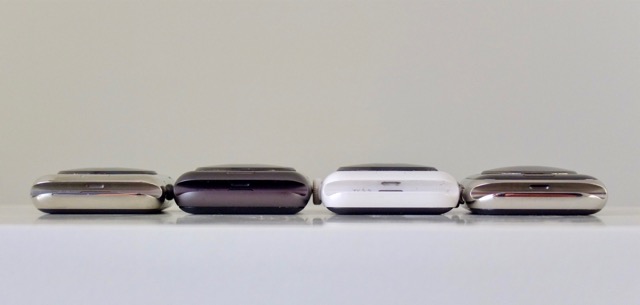
Four Apple Watch generations

by Volker Weber

ZZ59421344

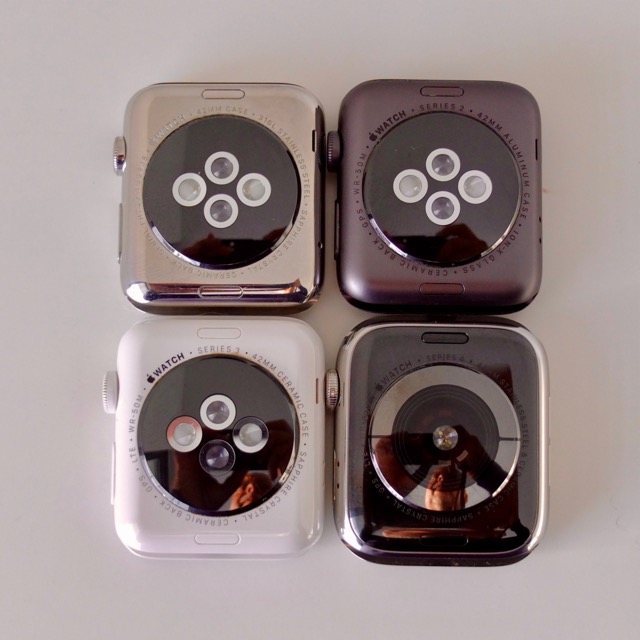
Number four is a complete redesign. And it is as thin as the original. The thickness never bothered by, but Apple Watch has gained from the original to the Series 3. Now it's back, and it does feel completely different.

ZZ569D9EEC

You can also see that it is slightly larger, but you will only notice it when they are arranged in this pattern. The back is now completely glass and ceramic, instead of two LEDs and two sensors, it has one LED (array) and eight sensors arranged in a circle. And you can see the two metal contacts to be used by the ECG/EKG.

23 Sep 16:27

A Roundup of Apps Updated for iOS 12 and watchOS 5

by MacStories Team

It's been a busy week of app updates. We've already covered many of them, but there are always more good examples of apps that show off feature of iOS 12 like Siri shortcuts or watchOS 5's new functionality. So, we've collected some additional favorite updates from this past week from Federico, John, and Ryan.

Halide

Apple's new Portrait Effects Matte. Source: Halide

Apple's new Portrait Effects Matte. Source: Halide

John: iOS 12 introduced a new Portrait Effects Matte (PEM) that camera apps can use to capture detailed depth data. The results from PEM are significantly better than camera apps could previously produce, especially for hair and glasses. The main limitation of the PEM is that it works for human subjects only. With the new technology, Halide applies a custom background blur that is different than the one Apple’s Camera app uses.

Halide, which we’ve covered before on MacStories, has also added support for shortcuts. Halide’s Advanced Settings include a ‘Set Up Siri Shortcuts’ button that opens a view explaining how Siri shortcuts work and links to Halide’s settings in Apple’s Settings app. There, under Siri & Search are a list of saved and suggested Siri shortcuts.

Source: Halide

Source: Halide

What you can add in Siri & Search depends on what parts of Halide you’ve used recently. One of my favorite shortcuts is the most simple: you can fire the shutter to take a photo hands-free. It’s like a voice-controlled remote control, which is perfect for taking a shot without worrying that you’re making your photo blurry by tapping the shutter button in the app and moving your iPhone in the process.

In addition to the new features, Halide’s developers say the app’s performance has been significantly improved. The numbers posted by the Halide team show that the app uses less CPU power than Apple’s Camera app.

Halide is available on the App Store for $5.99.

ETA

John: ETA is a travel time and directions app from Eastwood that we’ve covered before on MacStories. ETA has added a host of Siri shortcuts that allow users to add new locations, check travel times, and start turn-by-turn directions. The shortcuts can be enabled with a custom recorded command from ETA’s entry in the Settings App.

My favorite shortcut is the ability to capture locations quickly. When you’re on the go, especially in an unfamiliar place, stopping to figure out where you are isn’t always possible. With ETA’s Siri shortcut, you can add new locations and use the shortcut to return where you were, with the app providing directions and an arrival time estimate. The same tasks can also be accomplished from the Siri watch face for frequently visited locations, although whether the ETA card appears is up to iOS and watchOS and cannot be forced to display by users.

ETA is available on the App Store for $2.99.

WaterMinder

John: WaterMinder is a hydration tracker that we’ve covered on MacStories before. The latest update adds several Siri shortcuts that let users log their hydration, show their hydration status, report their last drink consumed, and show how much more they need to drink to meet their goal.

What I like best about WaterMinder’s implementation of Siri shortcuts is the rich interface that’s presented when you use one of the commands. WaterMinder presents an illustrated card similar to the main app’s design that depicts the information being requested or conveyed. For example, logging 8 oz of water consumed shows a card with the current status of your hydration. Siri asks if you’d like to add the water and you can verbally confirm or cancel the request, which Siri acknowledges.

Tracking apps like WaterMinder are going to benefit considerably from Siri shortcuts. As I said in my Streaks review, the hard part about tracking apps is removing the friction of tracking. It’s too easy for someone to quit tracking. With Siri shortcuts, WaterMinder and similar trackers are more likely to retain users and get them to use their apps more consistently.

Pedometer++

Source: David Smith

Source: David Smith

John: David Smith’s Pedometer++ is another app we've covered in the past and was one of the earliest Apple Watch apps. The debut version of the app pushed watchOS further and worked more reliably than almost any other Watch app I used. watchOS has evolved since then, and so has Pedometer++ with an all-new Watch app that takes advantage of the new capabilities of watchOS 5.

The main screen of the app includes the same data as before: step count, mileage, floors, and a graph of steps over time. If you swipe right to left, you can start one of six workouts: outdoor walk, run, hike, indoor walk, run, or ‘Indoor Other.’ The hiking activity is new to watchOS 5 and provides better tracking of elevation than picking a walk would.

Taking a page from Workouts++, another of Smith's apps, the real-time statistics displayed during your workout are highly customizable. You can pick from among duration, distance, step count, numerical or graphical representations of your heart rate, and elevation climbed, average speed or pace, and calories burned. Customization settings are available by swiping left to right on the watch face during a workout and tapping the gear icon.

Source: David Smith

Source: David Smith

Also, swiping right to left during a workout reveals playback controls for audio playing on your iPhone or Apple Watch, and if you’ve turned on GPS when you start a workout, a tiny map of your route. When the Apple Watch Series 4 is delivered to users, they can choose new Pedometer++ complications designed for the Infograph and Infograph Modular watch faces too.

Pedometer++ is available as a free download on the App Store, but you can leave a $1.99 tip from the iOS app's settings view, which is something I do periodically to support updates like this one.

Scriptable

Federico: As I promised on AppStories earlier this week, I plan to publish a full review of this app in the near future; in the meantime however, I want to highlight Scriptable, created by indie developer Simon Støvring, as one of the most interesting new releases this week, as well as the most powerful addition to my automation arsenal since Workflow.

The best way to think of Scriptable is the following: it's like Pythonista, but for JavaScript, and modernized for the current era of iOS 12 and Siri shortcuts. Scriptable lets you automate your iOS devices using JavaScript: in addition to a code editor that has access to the standard JavaScript library and supports syntax highlighting, what makes Scriptable unique is that it bridges native iOS APIs to JavaScript. This means that you can program native iOS frameworks, such as Reminders, Calendar, SiriKit Intents, and even basic UIKit elements in JavaScript, mixing and matching variables and functions with data from iOS itself.

Here's a selection of the native iOS APIs that are available via JavaScript in Scriptable:

  • Alerts
  • Calendar
  • Dictation
  • Document Picker
  • Files
  • Location
  • Mail
  • Messages
  • Clipboard
  • Photos
  • Quick Look
  • Reminders
  • Safari
  • Share Sheet
  • Speech
  • UITable
  • URL schemes
  • Web views

The idea of letting users create their own scripts to automate native iOS functionalities is an extremely powerful concept that allows for basic "programming" without the overhead of writing an app from scratch in Xcode. I argued the same years ago for Pythonista, and the same holds true for Scriptable today – with all the advantages that making an automation app in 2018 entails.

For instance, Scriptable comes with a FileManager object that, among other things, lets you save files into Scriptable's document container in iCloud Drive and optionally tag them – which is something that even Shortcuts can't do (yet?). It can also create native alert dialogs with buttons and text fields. And it comes with share sheet integration, so you can pass files from other apps to a script via the Scriptable extension, which will treat them as input arguments. Combine all these aspects together, and you get the script I used to save screenshots from the Photos app into dedicated Files sub-folders for my iOS review:

Saving screenshots to Files using Scriptable, which can apply tags to each file.

Saving screenshots to Files using Scriptable, which can apply tags to each file.

This custom save menu – which saved images at full resolution, renamed them, and applied two iCloud Drive tags – was based on this script:

var fm = FileManager.iCloud();
var baseDir = fm.documentsDirectory();

var folders = ['Setup', 'iPad', 'Well-Being', 'Communications', 'Shortcuts', 'Apps', 'Everything Else']
var folderLength = folders.length;

for (arg of args.images) {
  var ask = new Alert
  ask.title = 'Save File'
  ask.message = 'Choose one of the folders below.'
for (var i = 0; i < folderLength; i++) {
    ask.addAction(folders[i])
}
  ask.addCancelAction('Close')
  var fileName = ask.addTextField()
  var show = ask.presentAlert()
  var actionIndex = await show
  var selectedAction = folders[actionIndex]
  var screenTitle = ask.textFieldValue(0) + '.jpeg'
  var path = fm.joinPath(baseDir, '/Review/' + selectedAction + '/' + screenTitle)
  fm.writeImage(path, arg)
  fm.addTag(path, 'Assets')
  fm.addTag(path, 'Not Uploaded')
  var saved = fm.fileExists(path)
  if (saved) {
    console.log('Your image was saved.')
    }
}

My favorite feature of Scriptable, however, is that its JavaScript automation can be combined with shortcuts and custom intents to display any kind of data in Siri just by speaking a custom phrase. In the months I've been testing Scriptable, I've come up with custom scripts to display custom table views for my reminders, play video inside Siri, upload images to our CDN, and more – some of which I will share on Club MacStories soon. But you don't have to create complex scripts to take advantage of Scriptable's Siri integration via Shortcuts. Take the following example:

Who wouldn't want to have dog pictures readily available via Siri?

Who wouldn't want to have dog pictures readily available via Siri?

With Scriptable, you can show any picture from iCloud Drive in Siri with a personalized phrase. Think this is complex? Think again:

let fm = FileManager.iCloud()
let dir = fm.documentsDirectory()
let path = fm.joinPath(dir, "pups.jpg")
img = fm.readImage(path)
QuickLook.present(img)

With five lines of JavaScript, you can build something useful that, for some reason, still isn't natively supported by Siri. Now imagine what you can build if you spend a couple of hours tinkering with Scriptable and finding gaps in your daily iOS workflow.

I want to do Scriptable justice with a proper review here on MacStories and advanced scripts to share with Club MacStories members. What I can say for now is that, if it weren't for Scriptable's automation, I wouldn't have been able to save and sort nearly 450 screenshots for my iOS 12 review in three days. In big and small ways, Scriptable – together with Shortcuts – is opening new horizons for automation in iOS 12, and I highly recommend playing around with the app if you know the basics of JavaScript. The app is free to download, and it's one of the most exciting new releases of the year.

Twitter

Ryan: It may not be particularly popular among many MacStories readers, but I've been using the first-party Twitter app on iOS for nearly two years now, and it continues to receive interesting new updates at a regular clip, including quick adoption of major iOS features. Last year the app received iPad drag and drop support quickly, and this year the same proved true of shortcuts.

It may not have been on day one, but the day after iOS 12 launched, a Twitter update brought the power to create shortcuts for actions like creating a tweet or DM, scanning a QR code, searching Twitter, opening the search/explore tab in the app, and reopening a specific DM thread. Each of these is a standalone action that launches a specific function or area in the app, and none of them can be combined with input to pre-fill things like search boxes or DM fields. Despite that shortcoming, I can still see these shortcuts being useful timesavers, especially when run from places like the Shortcuts app's widget. Most of all, I'm just thankful to continue seeing Twitter care about adopting native iOS features in its app.

Evernote

Ryan: Evernote the company may be undergoing some challenging times, but those haven't stopped it from bringing immediate support for shortcuts on iOS, and in an impressive manner. While some writing apps have opted to provide only limited shortcut options, Evernote has done a good job letting users select for themselves from a wide array of possibilities.

Some of the most commonly used Evernote shortcuts will likely be those that launch you into specific notes or notebooks, or enable creation of new camera and audio notes. However, the app also includes more niche shortcuts, like one that copies a specific note's link to the clipboard, another that prints your current note, and a shortcut for converting your current note to a PDF. Finally, one of my favorite shortcuts lets you save a previous search query; running the search shortcut has worked extremely quickly on my iPhone X, immediately loading the search results with no further taps or actions needed. If you have a Premium subscription, this search shortcut becomes even more powerful because it will include results from inside note attachments.

With these shortcuts, Evernote also provides easy ways to create each of them, with options available throughout the app in various menus. While I'm still content with Apple Notes as my primary note-taking app, Evernote's extensive shortcut support out of the gate has me pleasantly surprised.

Agenda and Day One

Ryan: I group these two together partly because they're both writing apps, but more because each app has a fairly limited set of supported shortcuts.

Agenda offers a saved search feature in its app already, so the now-included shortcuts for those searches was a given. You can also setup shortcuts that open specific notes, projects, and overviews. Unfortunately I haven't discovered a way to create any shortcuts from inside the app itself, so Agenda users will need to check Settings.app for actions you've repeated multiple times so they'll appear as shortcut suggestions.

Day One's shortcuts support is exclusive to new entry creation. For each journal you keep in Day One, you can set up shortcuts to create a new text, camera, or audio recording entry in the app.


Support MacStories Directly

Club MacStories offers exclusive access to extra MacStories content, delivered every week; it's also a way to support us directly.

Club MacStories will help you discover the best apps for your devices and get the most out of your iPhone, iPad, and Mac. Plus, it's made in Italy.

Join Now

23 Sep 16:26

En vrac du vendredi

by Tristan

Lever de soleil à Paris

Lever de soleil à Paris

as a white, heterosexual, cisgender[1] man in America, I live life on the lowest difficulty setting[2]. Version française : en tant que mâle blanc, hétérosexuel, cisgenre aux USA, je vis ma vie au niveau de difficulté le plus facile.

Notes

[1] Le cisgenre est un type d’identité de genre où le genre ressenti d’une personne correspond à son sexe de naissance.

[2] J’aime la référence aux jeux vidéo, mais il oublie de dire qu’il est en plus éduqué donc d’un bon milieu et qu’il a un métier, deux choses essentielles dans le monde occidental aujourd’hui pour être vraiment dans une “vie en mode facile”.

23 Sep 15:59

Toronto Police warn of wireless payment terminal thefts across the city

by Brad Bennett

A September 20th, 2018 Toronto Police Services (TPS) media release suggests that there’s been an increase in wireless payment terminal thefts in the city.

According to the TPS, businesses in Toronto’s downtown core have reported stolen debit and credit card machines that are also used to fraud businesses.

Four Toronto businesses have been hit in the TPS’s 51st division, alongside a few more elsewhere in the city, according to 51st division detective constable Elliott Lee, who spoke with MobileSyrup over the phone.

It’s unclear how the machines can be used to commit fraud, but police are warning business owners to keep their terminals stored away securely when they’re not in use.

Additionally, Lee recommended setting up a password on wireless terminals and only sharing passwords with trusted employees. Not taking these warnings seriously can cost a business as much as $800 CAD for a new machine, on top of the possible costs associated with fraud.

All machines are different, but connecting with payment solution providers should let users set up a passcode.

Toronto Police have asked anyone with information to contact them online at 222tips.com or their Facebook page.

Tips can also be sent to the TPS tipline at (416)-808-5100.

Source: Toronto Police 

The post Toronto Police warn of wireless payment terminal thefts across the city appeared first on MobileSyrup.

23 Sep 15:58

Audible now available on Apple Watch

by Igor Bonifacic
Audible arrives on the Apple Watch

Audible users on iOS can now listen to audiobooks directly from their Apple Watch.

The enhancement comes courtesy of watchOS 5 and a just-released update to the Audible app.

You’ll still need an iPhone to sync Audible titles from your smartphone to Apple Watch.  Of course, you’ll also need a pair of Bluetooth headphones to listen via the wearable. Once that’s done, however, you’ll be able to leave your iPhone at home anytime you want to listen to an audiobook.

It’s even possible to control playback directly from the watch face.

MobileSyrup’s Patrick O’Rourke recently reviewed the Watch Series 4 and found it to be Apple’s best wearable to date.

Source: Audible

The post Audible now available on Apple Watch appeared first on MobileSyrup.

23 Sep 15:58

NCIX customer, employee data was for sale on Craigslist: report

by Sameer Chhabra

A database allegedly containing 15 years worth of customer and employee data belonging to former Canadian computer hardware retailer NCIX, is reportedly for sale on Craigslist, according to a September 18th, 2018 report from Privacy Fly.

Privacy Fly‘s Travis Doering reportedly came across the Craigslist post in question on August 1st, 2018.

The post itself “NCIX Database Servers – $1500 (Richmond BC)” was allegedly selling a database server from NCIX and a database reporting server.

Doering reached out to the seller, and didn’t hear back from anyone until August 21st, 2018.

“The seller proceeds to inform me that he has three NCIX server for sale for which he has the password required to login,” wrote Doering, in September 18th report.

Doering ultimately met with the seller on August 25th, 2018, at a warehouse in Richmond, British Columbia. According to Doering, the seller was an Asian man in his mid-thirties who identified himself as Jeff.

Jeff allowed Doering to review the contents of the server, which also contained XML files full of plain text names, usernames, passwords and addresses.

Doering wrote that Jeff said he possessed “NCIX’s entire server farm from the east coast which was shipped back to their Richmond warehouse several months ago.”

“I thought these revelations to be shocking enough, however I would later discover that the data on those servers was only the tip of the ice berg. Jeff and I agreed to meet again on September 5th, 2018 after he had located all the hard drives for me to analyze,” wrote Doering.

Doering said that he established a rapport with Jeff, who revealed that the current owner of the hardware in his possession is NCIX’s previous landlord.

NCIX reportedly abandoned the hardware when they didn’t pay past rent worth $150,000.

“Jeff stated that he was a former systems administrator for a Richmond based telecommunications company and was helping NCIX’s landlord recover the money he was owed in exchange for being able to copy the source code, and database to aid his development team on a project,” wrote Doering.

According to Doering, Jeff said that he still possessed approximately “300 desktop computers from NCIX’s corporate offices and retails stores, 18 Dell Poweredge servers, as well as at least two Supermicro server’s running StarWind iSCSI Software that NCIX had used to back up their hard disks.”

“In addition, there where also the 109 hard drives which had been removed from servers before auction and one large pallet of 400-500 used hard drives from various manufacturers,” wrote Doering.

“Jeff believed these contained a combination of functional but decommissioned hard drives used by NCIX and customer data from machine’s that had been in for repair at the time of bankruptcy.”

Doering was even able to access 13 years worth of data belonging to NCIX founder Steve Wu. The data included financial records, employment letters containing SIN numbers and “data from Mr. Wu’s home computer which featured personal documents and images of his family mixed in with numerous private photos of high-end escorts from mainland China.”

According to Doering, the data he was able to access “contained some the most damaging and extensive records I had ever come across covering at least seventeen years of business transitions.”

Jeff also told Doering that a foreign buyer has already purchased a collection of hard drives for $15,000 and that at least five other buyers were interested in purchasing the data that Jeff possessed.

Jeff also offered to allow Doering to copy data without all of the hardware included in the deal.

ZDNet reported that the Craigslist ad is no longer live. Additionally, a Royal Canadian Mounted Police (RCMP) spokesperson didn’t return a request for comment from ZDNet.

MobileSyrup has reached out to the RCMP for comment. This story will be updated with a response.

Source: Privacy Fly Via: ZDNet

Header image courtesy of Wikimedia.

The post NCIX customer, employee data was for sale on Craigslist: report appeared first on MobileSyrup.

23 Sep 15:57

Apple Watch Series 4 is now available in Canada

by Patrick O'Rourke
Apple Watch Series 4

The Apple Watch Series 4, the latest version of Apple’s smartwatch and the most significant revamp since the wearable’s launch, is now available in Canada.

The Series 4 features a roughly 30 percent larger display when compared to previous versions of the Apple Watch, and a 64-bit dual-core S4 processor that’s twice as fast as the Series 3. The smartwatch also features a built-in electrocardiograph (ECG) sensor — though the feature won’t be available at launch — fall detection and a Digital Crown that now includes haptic feedback.

I’ve spent roughly the last week and a half with Apple’s Series 4 smartwatch and I’ve been very impressed with the wearable, particularly its expansive display. You can find my full review of the Series 4 at this link.

Pricing for the Apple Watch Series 4 ranges from $519 CAD for the 40mm base model with GPS and a Sport Band, to $1,119 CAD for the 44mm cellular stainless steel gold option with a Milanese Loop band.

While the Apple Watch Series 4 is now available at retail stores and online at the Apple Store, various Canadian carriers are also selling the smartwatch.

With Rogers, the 44mm Apple Watch Series 4 can be purchased for $0 down plus $30.37 a month with the carriers’ Easy Pay plan, or $729 on a no term contract. Adding an LTE Apple Watch package to an existing Rogers plan is priced at $10 per month. This is the first time Rogers has sold and offered LTE plans for Apple’s smartwatch.

Through Bell, the 44mm Apple Watch Series 4 is available for a $0 initial payment plus $93.60 in taxes, along with $30 per month for 28 months. The upfront price with the carrier is $720. Bell’s LTE Apple Watch add-on plan is priced at $10 per month.

Telus is also offering the 44mm Apple Watch Series 4 at $0 on a two-year term at $30.41 per month for 24 months with the carrier’s Easy Payment 1 plus smartwatch plan offer. The outright price for the Series 4 through Telus is $730. Adding LTE data to the Series 4 is priced at $10 per month with Telus.

The post Apple Watch Series 4 is now available in Canada appeared first on MobileSyrup.

23 Sep 15:57

Canadians not willing to pay the high price for electric cars: Angus Reid

by Brad Bennett
2018

A recent report from the Angus Reid Institute (ARI) — a Vancouver-based not-for-profit public opinion research foundation — outlines what Canadians look for when buying a new car, and how interested they are in electric vehicles and hybrids.

The institute conducted an online survey from August 14th, 2018 to August 17th, 2018 of 1,500 random Canadian adults who are members of the ARI.

Are Canadians exposed to electric vehicles?

The report revealed that even though the Canadian electric vehicle market grew by 114 percent in first-quarter sales compared to last year, only 21 percent of Canadians have driven an electric vehicle.

To further reinforce that point, 91 percent of survey participants said that they’ve never owned an EV.

According to the report, only three percent of people in Canada own an electric vehicle, another five percent have a hybrid, and one percent owned one in the past.

British Columbia, Ontario, and Quebec have the most residents that have driven a battery-powered vehicle. These provinces all offer, or have offered, notable buying incentives, according to the report.

What Canadians look for when buying a new car

Subsidies and incentives seem to be critical to opening the door to the electric vehicle market in Canada.

According to the ARI’s report, 59 percent of Canadians believe that price is one of the most important factors that people consider when purchasing a new car.

Additionally, just over half of Canadians (56 percent) who participated in the survey said that the government should do more to incentivize car buyers to choose electric vehicles. In addition to that, 75 percent agree with the statement “I’m less inclined to buy an electric vehicle because they’re too expensive.”

Only 11 percent of participants valued environmental impact as one of the most important aspects when buying a new car.

EV charging is another aspect that’s holding back some Canadians from buying an electric vehicle.

Six-in-10 (62 percent) of those surveyed claimed they would be more likely to buy an EV if there were more charging stations around. Forty-eight percent are also dissatisfied with the amount of time it takes to fully charge an EV.

Charging infrastructure is defiantly lagging behind gas stations, but it is getting better, and Canadians are finding ways to live with the current framework.

One stat that doesn’t affect everyday drivers, but is crucial for some people, is how fun EVs and hybrids are to drive compared to gasoline cars. According to the report, 50 percent of drivers that either own, or have owned, an EV or a hybrid in the past said EVs aren’t as fun to drive as traditional gas vehicles.

Things are still looking up for clean energy vehicles. Most Canadians would at least consider an EV or hybrid when they buy their next car, but more are willing to give hybrids a chance compared to a plug-in EVs like a Teslas or the Nissan Leaf.

When asked “would you buy a hybrid if you had to buy a new car,” 42 percent of the 1,500 Canadians said they would definitely or probably consider one. When asked the same question about plug-in EVS, only 32 percent said they would heavily consider it.

Image Source: The Angus Reid Institute 

Source: The Angus Reid Institute 

The post Canadians not willing to pay the high price for electric cars: Angus Reid appeared first on MobileSyrup.

23 Sep 15:56

Thalmic Labs reportedly working on ‘North’ smartglasses project

by Sameer Chhabra
Thalmic hologram

Kitchener, Ontario-based wearables manufacturer Thalmic Labs is reportedly working on a smart glasses project with the intention of eventually releasing a consumer-facing product.

Advertisements for the company’s ‘North’ smart glasses brand first popped up in Toronto and New York City in September 2018.

The advertisements directed viewers to ‘Bynorth.com,’ a website that informed viewers that “Your smartest pair of glasses is coming.”

North’s website suggested that the company was working on a pair of glasses that would be able to send and receive text messages, utilize navigation apps and provide users with calendar information.

Apart from a privacy policy and information about a privacy officer who uses a Halifax PO box, North’s website provides very little additional information about the company or its product.

According to sources who spoke with BetaKit, Thalmic Labs is behind the advertisements.

BetaKit first reported about ocular-based patents obtained by Thalmic Labs in September 2018.

According to BetaKit‘s Douglas Soltys, among these patents was a filing for a “wearable heads-up display with integrated eye tracker” that utilized “optical power holograms.”

Thalmic Lab is best-known for its Myo gesture-control armband.

MobileSyrup has not had the opportunity to corroborate BetaKit‘s sources.

Source: BetaKit

The post Thalmic Labs reportedly working on ‘North’ smartglasses project appeared first on MobileSyrup.