Shared posts

03 Oct 23:19

What Went Well/What Didn't Go Well

by Richard

In Travel Reminders for our Future Selves, Peter Rukavina writes:

At the tail end of our trip to Europe at the end of August, on the flight home, Oliver and I talked about the value of creating a list of what went well (so we can remember to do it again) and what didn’t (so we can avoid or work around it). We weren’t talking about macro issues, like “go back to Amsterdam again!” (which is a good idea in its own right), but rather things like “remember that you need to have €20 of balance on your Dutch transit chip card to be able to take the train.”

The idea mirrors the practice of we programmers to add comments to our code as a guide to others (and to our future selves): here be dragons, watch out for this pothole, this might seem like it won’t work, but it does. And so on.

Before each significant thing I do, like a trip, a date, or a running race, I try to write down expectations and fears of what's about to happen. Afterwards, I check to see if those expectations and/or fears were met, and I write down what went well and what didn't go so well. An example: During my last day trip to Stratford-on-the-Lake, I had a couple of hours to kill before the performance I was going to see. I thought it would be a good idea to pack a lunch, and it so happened that I had leftover breakfast from the diner the day before. I wish I hadn't brought it, because there was a pub with a mighty fine burger (with bacon, peanut butter, and potato chips inside). Having the leftover breakfast flop around in my bag all day wasn't a disaster, but absent a restaurant where I'm going, I'm not doing that again.

The day after, I wrote that in my Day One journal, the hope being that I'll look at my 'day trip' tag and see that again and make the right call the next time.

03 Oct 23:19

What Can Only Your Brand Offer?

by Richard Millington

Yesterday we overlooked something important.

The real decision for members isn’t whether your audience uses a community or an information site, it’s whether they use your community or another social destination to achieve the same goals.

Have you noticed your members posting the same question on your community, on social media, on other communities, and elsewhere? They don’t care where they get answers as long as they get good, quick, answers. This is becoming a more difficult challenge by the day.

Your members can probably find answers faster by searching Google.

Your members can post questions in social media and get good responses from people they know and trust. They can post questions in similar communities and can get help from a totally independent group of experts.

Your members can build their reputations by creating their own blogs, posting on LinkedIn, Medium, and other aggregation sites.

Your members can find a stronger sense of community by creating their own groups on Slack, Telegram, WhatsApp, Facebook, and only inviting people they like.

Each of these can (and probably will) peel away your best and most enthusiastic members until you’re not left with much.

Worse yet, each platform has benefits you will never be able to match.

You can’t be as much of a habit as Facebook, you will never offer as much information as Google, and you can’t match the sense of community felt by a few people hanging out in a private group with their friends.

Far too many brand communities don’t find a way out of this problem and slowly watch their community enter a terminal decline. Worse, they often try to mimic competitors along the way.

Don’t compete on another platform’s turf. You’re going to lose. Instead, if you want to build a sustainable community, bring to bear the full armament of your resources to build a community no-one can match.

You might not be able to compete on speed, depth, and quality of questions, answers and expertise shared. But what you can do?

In the Indispensable Community, we write how the best brand communities do precisely this. They use their natural unfair advantages.

Your best assets are:

  • Scale – You can reach more people. You can ensure the best content in your community reaches more people than ever. You can include it in product material, support discussions, and link to it throughout the community. You can ensure any post in your community reaches more people than any other site.
  • Access – You can give members unique access and exclusive information they can only get from being a great contributor to the group. You can award them with early trials, introductions to key staff members, superior product support, and anything else.
  • Influence – You can take their feedback and use it to develop better products. You can make them feel like partners working to create something fantastic. You can set challenges, competitions, and give them interesting problems to solve.
  • Prominence – Your PR team can turn top members into quotable superstars. You can put them on stage at your conference. You can give them recognition, badges, and prominence. You can help them gain work.
  • Verified – You can be the judge, to determine what’s verified and what isn’t. You can anoint the people who really know their stuff and distinguish them from those that don’t. You can be the ultimate arbiter of what’s good and what’s bad. You can approve the people who are doing the things that most help the community.

The key is to take the psychological benefits from a community and use your unique advantages to turbo-change them.

Because if you’re not going to bring something to the party, something only you can bring…and only you can offer…why bother having a party at all?

If you want to build an indispensable community, you have to offer something no-one else will ever be able to match.

03 Oct 23:19

The Best Nonslip Traction Devices

by Lisa Maloney
The Best Nonslip Traction Devices

After more than twelve hours of testing fifteen different traction devices on water-slicked ice, hard-packed snow, and slippery hills in Alaska’s city sidewalks and forested trails, we’ve identified the ICEtrekkers Diamond Grip as the best ice gripper for all-around walking use in the city. They’re easy to put on and walk in but still offer great traction on all but the slickest hills as long as you weigh enough to press the low-profile spikes into the ice. We also identified a few options that will work well for lighter walkers. We also tested speciality running shoes with built-in traction control, since runners will want to choose something that doesn’t affect their gait.

03 Oct 23:19

Juror for the Dutch Humanitarian Innovation Awards

by Ton Zijlstra

This Tuesday 2 October sees the annual event of the Dutch Coalition for Humanitarian Innovation. The coalition consists of government entities, knowledge institutions, academia, businesses, and humanitarian organisations in the Netherlands. Together they aim to develop and scale new solutions to increase impact and reduce costs of humanitarian action.

I was asked to join this year’s jury for DCHI’s innovation award. There is a jury award and a public award. For the jury award 8 projects were shortlisted, from which the jury has now selected 3 finalists that were announced last Friday. The public award winner will be selected from the same short list.
At the annual event of DCHI this Tuesday the public award winner will be announced, followed by closing remarks by the Minister of development cooperation mrs Sigrid Kaag, who is very well experienced when it comes to international development. The jury award will be presented to the winner on October 11th at the Partos innovation festival.

The three finalists my colleagues and I in the jury selected are all very interesting, so I briefly want to list them here.

Optimus by the UN’s World Food Program and Tilburg University
Data analysis and mathematical modeling optimises supply and distribution also by taking into account locally available food and conditions. Optimisation means delivering the same nutritional value against lower efforts. It has been successfully used in Syria, Iraq, Yemen and Ethiopia. In Iraq it helped save a million USD per month, allowing the program to provide an additional 100.000 people in need with food packages. (link in Dutch)

Quotidian early warning solutions by Oxfam India
Flood prediction models in India are accurate, but still flooding causes many fatalities. The cause is often not being able to timely reach and warn everyone. Oxfam India came up with ways to integrate early warning systems with existing local infrastructure, and so create a low cost option for real time distribution of flood warnings.

Words of Relief / Translators without borders
Being able to provide key information to people in need depends on having that information in the right language. Information only saves lives if those who need it understand it. Translators without Borders creates glossaries which can be used for humanitarian response. Their Gamayun initiative wants to bring 20 underserved languages online by creating such glossaries and providing that as open data to all who can use it. They see it as a key tool for equality as well. In a slightly different setting I saw this work in practice, during the Syrian refugee wave in Germany, at a hackathon I attended such glossaries were used to build apps to help refugees navigate German bureaucracy and find the help they needed.

These three projects are very different, in terms of technology used, in the issues they address, and the way they involve the communities concerned, and all three highly fascinating.

03 Oct 23:18

Apple Watch Series 4 :: Old bands fit perfectly

by Volker Weber

ZZ104018AB

Watch Series 4 is larger than Series 0 through Series 3. And still, the bands fit perfectly. All the variations of the Watch body never broke compatibility with Watch bands. If you got a fancy band for your original Watch, you can still use it today.

03 Oct 23:18

Get into the frame

by Volker Weber

ZZ56035B80

My friend Liz Libré has started asking people, even strangers, to take photos of her with her kids. She’s usually behind the camera but she wants that to change. “I take pictures of my children alllllllll the time,” she says, “but I wanted my arms on them, my body touching them. When I lost my mom, I realized I have a finite number of photos with her. I want to be represented in my camera roll.”

More >

03 Oct 23:18

Extract Contact Lists from WhatsApp

by Chandan

We can Extract Contact lists from WhatsApp without using any Third-Party software. Since softwares may contain some adware or even viruses, that can affect your entire system performance. So, what’s left for us is to do the aforementioned work without taking any help from Third-party software.

The entire process is pretty easy and pretty intuitive, which requires an active WhatsApp for Desktop session, your mobile phone, and Word. If your system doesn’t have any Excel sheet opener such as MS Office- Excel, then you can download alternative open source software called as open office.

If you are a Windows user then you need Notepad for some intermediate steps, which is applicable for MacOS users too. They can use Notes application for the same.

Open WhatsApp Web on PC

The very first step is to Open WhatsApp Web on PC. Which is really a nice option for all instant message readers. If you are on your desktop or on Mac powered systems and wanted to keep in touch with friends and family circle, then this is a very good option available for you.

To open WhatsApp Web on PC, you need to just a few simple steps that are described here: Use WhatsApp Web

Note: You can use WhatsApp application on Windows OS and MacOS X but this method will then not work on them. That’s why you need to open a web version of WhatsApp.

Pick the group, that you want to extract contacts

Similar like scrolling to groups inside your handheld device, do the same searching and picking groups on WhatsApp web.

Once done, Open developer’s tool or Right Click on the group opened, and select Inspect Element option.

Here pick the Contact section and clean up the data with notepad or notes application. Then after, you need to do some formatting by using Excel sheet application and as an end result, you will get all contact from WhatsApp group.

See more about this method, in our detailed blog, here at Mashtips:

Extract_Contact_From_WhatsAppWeb


03 Oct 23:18

Firefox 63 Beta 10 Testday Results

by Cornel Ionce

Hello Mozillians!

As you may already know, last Friday September 28th – we held a new Testday event, for Firefox 63 Beta 10.


Thank you all for helping us make Mozilla a better place!

From India team: Shweta Bhat, Amirtha .V, Monisha .R,
From Bangladesh team: Maruf Rahman

Results:

– several test cases executed for the Customize and Font UI features;
– bugs verified: 1475025, 1482476, 1473044;

Thanks for another successful testday! 🙂

03 Oct 18:52

Find me at my Watch location, not my iPhone

by Volker Weber

IMG 4866

I often leave the house without my phone and I want people to be able to find me through the location of my Watch, not the location of my iPhone that is still at home. If I go through the (slightly misnamed) Find iPhone app or website, I can find all my devices individually. And I have used this when I left my iPhone behind on a park bench. Yes, I got it back, and yes, I gave the finder some money for keeping it safe.

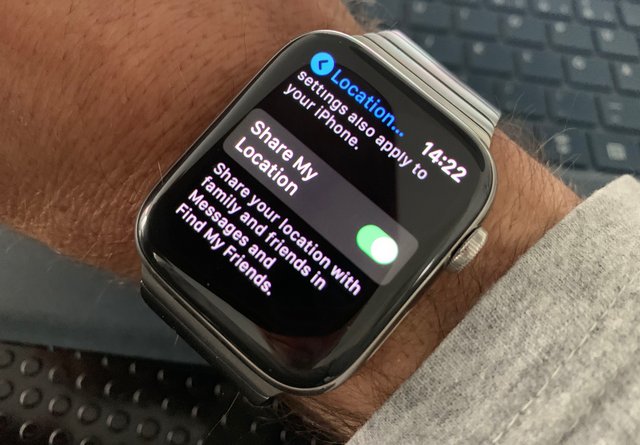
But when I share my location through Find My Friends, it will always show the location of my iPhone, not my Watch, even if Apple knows the correct Watch location in Find iPhone. There is a setting on the iPhone called Share Location, where you can select, which device to track for Find My Friends, but it does not offer Watch. Instead it says:

IMG 4864

That is kind of ambigous, because it says "and". However, there is a support document which explains it further:

If you share your location from an iPhone that’s paired with Apple Watch Series 3 (GPS + Cellular), your location is shared from your Apple Watch when you’re out of range of your iPhone and Apple Watch is on your wrist. Note: You can stop sharing your location from your Apple Watch. Go to Settings > General > Location Services, then turn off Share My Location.

This never worked for me. Not on Watch Series 3 and neither on Series 4. I am lost. Who can help?

03 Oct 18:52

New Firefox Focus comes with search suggestions, revamped visual design and an under-the-hood surprise for Android users

by Barbara Bermes

When we first launched Firefox Focus, we wanted to quickly deliver a streamlined private browsing experience for your mobile device. Since then, we’ve been pleasantly surprised by how many people use Focus for more than just private browsing and we’ve made Focus better with a thoughtful set of features based on what our users are telling us. Custom tabs, tracker counter, full screen mode and so much more have been the result. Today, we’re pleased to announce another big update with another much-requested feature, a design refresh, and an exciting change to the underlying technology behind Focus for Android.

Learn more: search suggestions and home screen tips

Missed one of the feature releases? No problem! Now, we’re going to present the core functionalities of Firefox Focus on the start screen to give an overview of the whole range of possibilities your privacy browser has to offer  in a clear and unobtrusive way, not interrupting the usage at all and automatically refreshing after each click on the Erase button.

Just open the browser and you’ll see helpful feature recommendations in your preferred language on the Firefox Focus start screen (Android). For iOS users, the feature is currently available in English language.

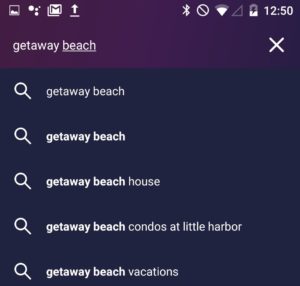
Search suggestions are a key part of web search that can make searching more convenient.  Easily activate the feature by opening the app settings > “Search” > select the checkbox “Get search suggestions”.

We’re aware that privacy is a top priority for many Firefox Focus users and you might not want to share what you’re typing in the address bar with your search provider. So, the feature is turned “off” by default and we let you choose whether or not you want to turn it on. Why? Because that’s our style!

 Find what you’re looking for quickly – with search recommendations.

Siri Shortcuts for iOS users

In addition to home screen tips, iOS users will receive another much asked feature with today’s release: Siri Shortcuts. Siri is one of the more popular features on iOS devices and we’re all about ease for our users. So, in order to improve the Firefox Focus for iOS user experience further, you’ll now be able to set and open a favorite website, erase and open Firefox Focus, as well as erase in the background via shortcuts.

In line with updated designs

Style is key to today’s Firefox Focus release: the browser’s visual design is now completely optimized for the recently released Android Pie. New icons, a customized URL bar and a simplified settings menu make it easier to use and provide for a consistent user experience.

But no need for iOS users to feel left out: the new Firefox Focus has a fresh look for iOS 12.

Presentation matters: the new Firefox Focus comes with an updated design system, optimized for Android Pie (left) and iOS 12 (right).

A new engine for the Firefox Android browsers

While the new app design is obviously an eye-catcher, we’ve also made a groundbreaking change to the underlying Firefox Focus framework that’s not visible at first glance  but will make a huge difference in future releases. Focus is now based on GeckoView, Mozilla’s own mobile engine, making it a pioneer among our Android apps.

Switching to GeckoView will give Focus the benefits of Gecko’s Quantum improvements and enables Mozilla to implement unique privacy-enhancing features in the future, such as reducing the potential of third party collection. For now, you won’t notice much, but you’ll be helping us create the next generation of Firefox browsers just by using Focus, and we’ll return the favor by giving our Focus users unique features that other browsers on Android simply won’t be able to offer.

We’ll make sure to keep you updated on the progress as well as all new developments around Firefox Focus on this blog and are looking forward to your feedback! For now, if you’d like to learn more about the future of our privacy browser, please have a look at this post on the Mozilla Hacks Blog.

Get Firefox Focus now

The latest version of Firefox Focus for Android and iOS is now available for download on Google Play, in the App Store and now also in the Samsung store.

The post New Firefox Focus comes with search suggestions, revamped visual design and an under-the-hood surprise for Android users appeared first on The Mozilla Blog.

03 Oct 18:52

How to Livestream Your Birthday Party

by peter@rukavina.net (Peter Rukavina)

Inspired by my friends Elmine and Ton’s documentation of their birthday unconference format, here’s my guide for livestreaming your birthday party.

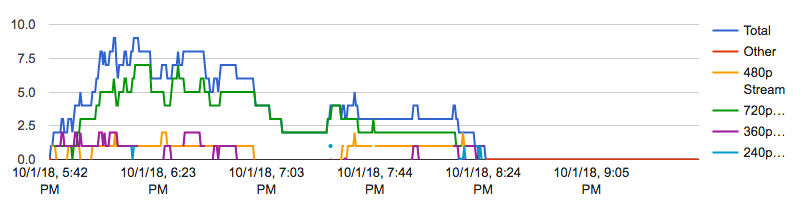
We livestreamed Oliver’s birthday party last night to a global audience of friends and family, stretching from Portland, Oregon in the west to Vaasa, Finland in the east. At its peak the stream was watched by 9 viewers, and there have been 32 replays of the archived video in the hours since. Here’s how YouTube broke the streaming down by total viewers and then by stream quality (the lower the number the poorer quality the video):

YouTube stats for Oliver's birthday livestream on Oct. 1, 2018

Beside the video there was the opportunity for viewers to chat, and this resulted in a lovely four-country chat between old friends; as Ton wrote in a blog post about attending the party from afar:

Watching is not quite the same as attending, but the live music and hanging out with other friends of Oliver online in the chat makes it a surprisingly social event.

Livestreaming used to be the preserve of bearded experts with expensive gear and connections; it’s now something anyone can do.

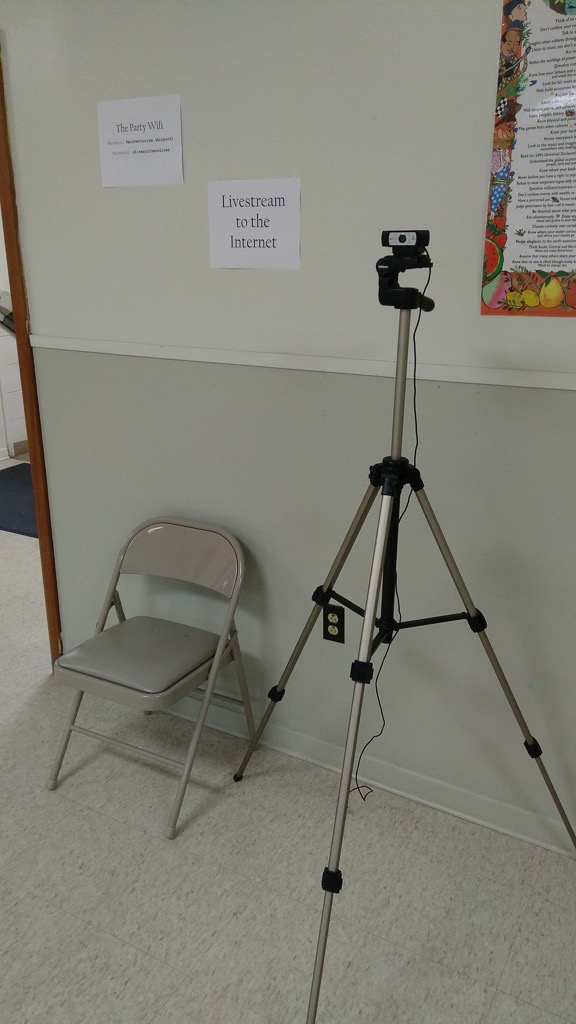
On the hardware side, I used my 7 year old MacBook Air laptop connected to a Logitech C920 webcam by USB and mounted on a tripod:

Livestream Hardware

On the software side the key was Google Hangouts Live on Air, which allowed me to dispense with the complexity of a standalone video encoder and simply beam my webcam into a YouTube live event.

Starting this up was simple as going to YouTube’s My Live Events page, clicking “Schedule an Event,” selecting “Quick” under “Type,” filling in the rest of the details (including whether I wanted the livestream to be public, unlisted, or private; I selected unlisted, as I didn’t want the event to be generally available on YouTube, but rather only available to those with the URL), and then, at the appointed time, clicking “Start Hangout on Air” from back on the My Live Events page (YouTube’s complex navigation appears not to have an obvious link to that page, so bookmark it). Scheduling the event in advance gave me a YouTube URL that I could email out to friends and family in advance.

The benefit of using Google Hangouts Live on Air for the video (over the simpler “Camera” option, which you’ll also see as a “Type” when setting up the event), is that you can include others in the livestream, by video or audio call or even by telephoning out; I didn’t end up doing that, but it was nice to have the option.

When the event is over, YouTube retains an archive of the livestream at the same URL (there was no obvious “stop” button in either Google Hangouts or YouTube; YouTube appeared to have figured out that we were done about 30 minutes after I stopped the Hangout).

From a technical perspective my only complaint was that the auto-focus on the Logitech camera had a hard time keeping up the action near and far, and so there’s a fuzziness to the video that belies that the camera is perfectly capable of focus in calmer situations.

Beyond the wonder of international virtual participation in the party, we’re also left with a record of the evening, as the first guests arrived:

First Guests Arrive

To the full-throated party:

Party in full swing.

To our indefatigable next door neighbour sweeping up after things had wound down:

Cleanup

While livestreaming an event still requires some hardware, some Internet, and a (slight) learning curve, it’s something that’s well within the preserve of far more people than realize it; there’s no reason why any birthday party, all candidates meeting or protest rally can’t be streamed these days. If you have questions, feel free to ask.

03 Oct 18:51

The CityScape of the 1990s: Library Square

by Gordon Price

In 1990, the citizens of Vancouver approved a referendum to build a new Central Library.  By 1995 it opened.  Say what you will, Moshe’s Safdie’s colisseum design was the popular choice – columned and iconic – for a reason.

VPL Central is now the centrepiece of a neighbourhood without a centre – not quite the CBD, not quite Yaletown, sort of Downtown South, with an energy that flows down the east end of Robson and, still-emerging, West Georgia.

There are the big-box cultural institutions, with the biggest yet to come.  There are hotels, corporate showpieces, Asian fast-food and American burger joints, and even a couple of grocery stores.  But mostly: residential towers from the green blue glass era of Vancouverism.

And now there’s a place to see it all from a perspective we were always intended to have. Next.

03 Oct 18:50

Shifting Causes of Death

by Nathan Yau

The most common causes of death changed over the years. They vary across sex and age group. This animation shows the details of these changes. Read More

03 Oct 18:50

Data Factories

by Ben Thompson

I’m generally annoyed by the cliché “If you’re not paying you’re the product”; Derek Powazek has explained why the implications of this statement are usually misleading and often wrong, something that is particularly problematic in the context of Aggregators. After all, if a company’s market power flows from controlling demand — that is, users — that means said company is incentivized to keep those users satisfied; it is suppliers that have to “take it or leave it”.

This explains why the idea of an Aggregator being a monopoly is hard to get one’s head around; in the physical world where market power comes from controlling distribution — think AT&T, or your local cable company, or a utility company — there is no incentive to treat end users well, because users have no choice in the matter. On the Internet, though, where distribution is effectively free, alternatives are only a click away; Aggregators are extremely motivated to make sure that click doesn’t happen, which means giving the users what they want (the technical term is “increasing engagement”). Users are a priority, not a product.

And yet, as is so often the case, clichés persist because there is some truth to them. Facebook and Google — the two Super Aggregators — make money through ads, and advertisers come to Facebook and Google because they want to reach consumers. From an advertiser perspective users — or to be more precise, access to users’ attention — is a product they are absolutely paying for.

Views on Facebook

This seeming dichotomy — prioritizing users on one hand, and selling access to their attention on the other — makes more sense if you first think of Super Aggregators as two distinct businesses: Aggregator and advertising-seller. To use Facebook as an example (as I will for the rest of the article, although nearly everything applies to Google as well), it is both an Aggregator that content providers clamor to reach, as well as the gatekeeper for consumers advertisers wish to sell to:

Two views on Facebook's business

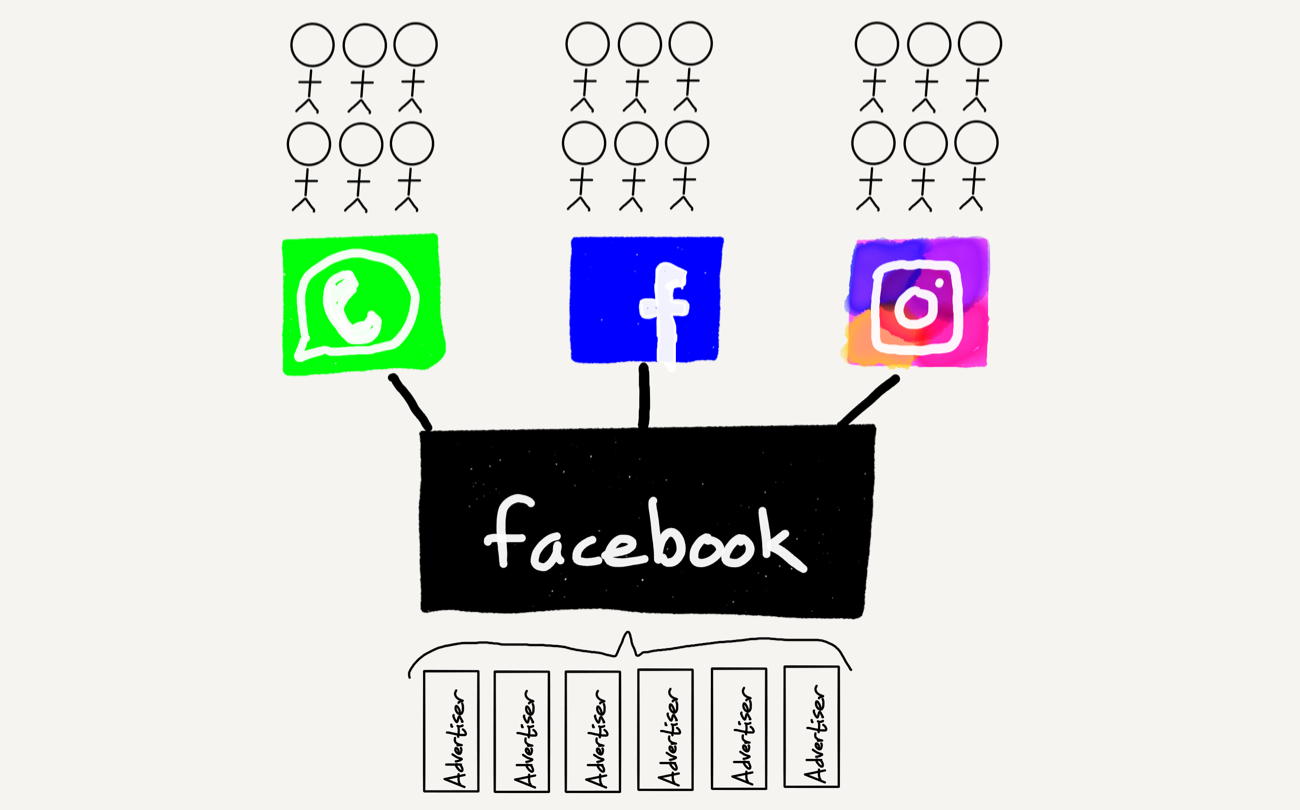
Still, this isn’t quite right, because Facebook the company is not simply the so-called “Blue App” but also several other businesses, most notably Instagram and WhatsApp (there is also Messenger, but given its user-facing network is the same as the Blue App I don’t really consider it to be distinct). Once you add those to the mix Facebook the company looks like this:

Facebook's conglomerate

You’ll note that I’ve taken to using the term “Blue App” to distinguish Facebook the network from Facebook the company; the question, though, is what exactly is the company anyways?

The Data Factory

At a superficial level, Facebook is a sort of holding company for social networks; back in 2014 I called it The Social Conglomerate. That, though, is very much a user-centric perspective; to that end, if you consider the advertising perspective, you could argue that Facebook the company is an advertising dashboard and sales force.

I think, though, that sells short the functionality of Facebook the company. Specifically, Facebook is a data factory. Wikipedia defines a factory thusly:

A factory or manufacturing plant is an industrial site, usually consisting of buildings and machinery, or more commonly a complex having several buildings, where workers manufacture goods or operate machines processing one product into another.

Facebook quite clearly isn’t an industrial site (although it operates multiple data centers with lots of buildings and machinery), but it most certainly processes data from its raw form to something uniquely valuable both to Facebook’s products (and by extension its users and content suppliers) and also advertisers (and again, all of this analysis applies to Google as well):

  • Users are better able to connect with others, find content they are interested in, form groups and manage events, etc., thanks to Facebook’s data.
  • Content providers are able to reach far more readers than they would on their own, most of whom would not even be aware those content providers exist, much less visit of their own volition.
  • Advertisers are able to maximize the return on their advertising dollar by only showing ads to individuals they believe are predisposed to like their product, making it more viable than ever before to target niches (to the benefit of their customers as well).

And then, in exchange for these benefits that derive from data, Facebook sucks in data from all three entities:

  • Users provide Facebook with data directly, both through information and media they upload, and also through their actions on Facebook properties.
  • Content is not simply data in its own right, but also a catalyst for generating user action data.
  • Advertisers, like content providers, not only provide data in its own right, which acts as a catalyst for generating user action data, but also upload huge amounts of data directly in order to better target prospective customers.

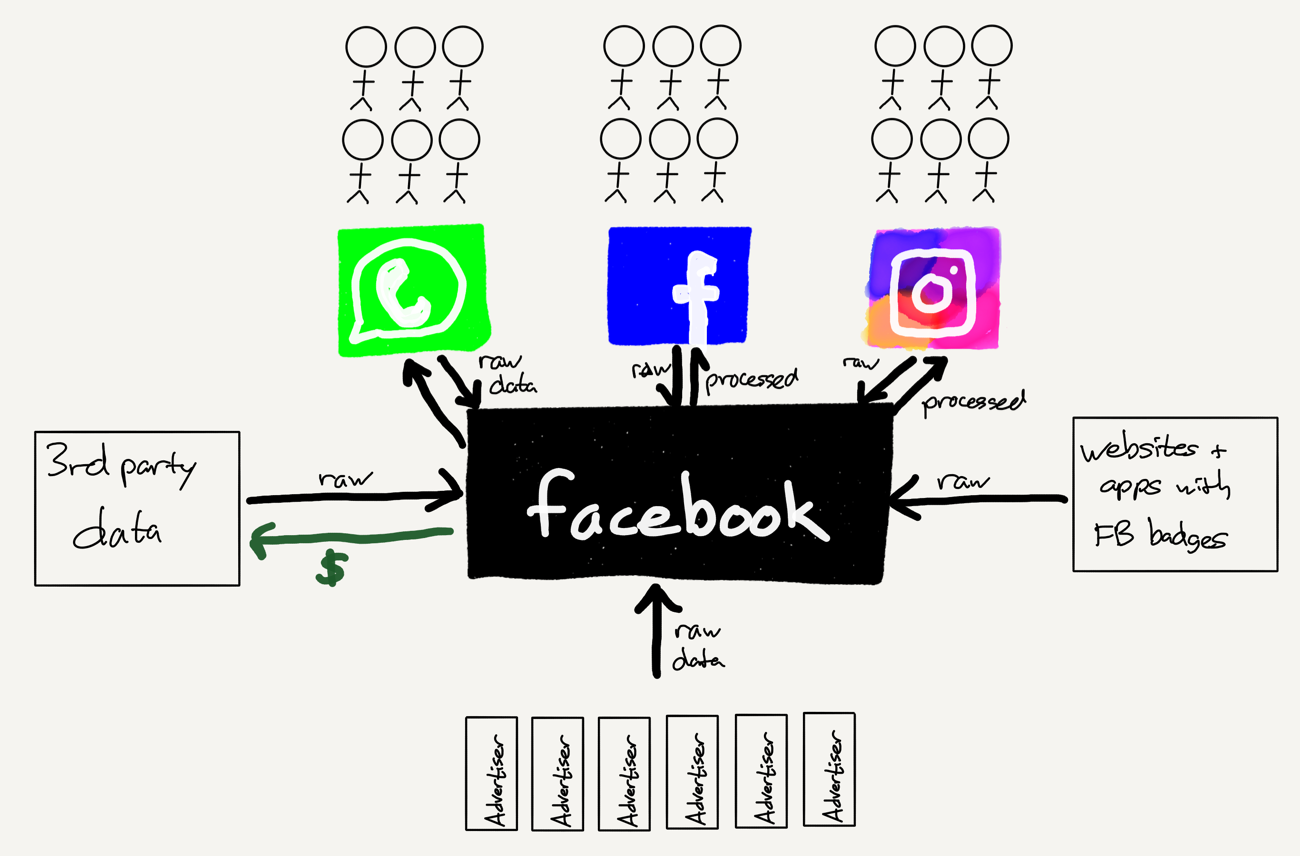
Those aren’t the only avenues through which Facebook collects data: the company has deals with multiple third-party data collection companies, gathering everything from web traffic to offline store receipts, and also has incentivized an untold number of websites — particularly content providers — to include Facebook links on their sites that collect data from those sites.

That results in a much fuller picture of Facebook’s business:

The Facebook Data Factory

Data comes in from anywhere, and value — also in the form of data — flows out, transformed by the data factory.

Regulating the Internet

Two weeks ago, in The European Union Versus the Internet, I argued that effective regulation of tech companies, particularly Super Aggregators like Facebook and Google, had to work with the fundamental principles of the Internet, not against them; otherwise, the likely outcome would be to entrench these Internet giants with little gain to consumers.

First and foremost regulators need to understand that the power of Aggregators comes from controlling demand, not supply. Specifically, consumers voluntarily use Google and Facebook, and “suppliers” like content providers, advertisers, and users themselves, have no choice but to go where consumers are. To that end:

Facebook’s ultimate threat can never come from publishers or advertisers, but rather demand — that is, users. The real danger, though, is not from users also using competing social networks (although Facebook has always been paranoid about exactly that); that is not enough to break the virtuous cycle. Rather, the only thing that could undo Facebook’s power is users actively rejecting the app. And, I suspect, the only way users would do that en masse would be if it became accepted fact that Facebook is actively bad for you — the online equivalent of smoking.

For Facebook, the Cambridge Analytica scandal was akin to the Surgeon General’s report on smoking: the threat was not that regulators would act, but that users would, and nothing could be more fatal. That is because the regulatory corollary of Aggregation Theory is that the ultimate form of regulation is user generated.

If regulators, EU or otherwise, truly want to constrain Facebook and Google — or, for that matter, all of the other ad networks and companies that in reality are far more of a threat to user privacy — then the ultimate force is user demand, and the lever is demanding transparency on exactly what these companies are doing.

What, though, does transparency mean in the context of enabling “user generated regulation”, and what might meaningful regulation look like that achieves the goal of forcing said transparency in a way that fosters competition instead of inhibiting it? The answer goes back to data factories.

Raw Data Versus Processed Data

The first challenge with a data factory is that it is impossible to peer inside. Both Facebook and Google offer customers ways to view their data, but not only is the presentation overwhelming, the data is precisely what you gave them. It is the raw inputs.

Advertisers, interestingly enough, cannot download custom audiences once uploaded, but given that data is (also) their business, it is extremely likely that they retain the list of email addresses they uploaded in the first place; the same thing applies to 3rd party data providers. Websites, meanwhile, are completely in the dark: that Facebook badge or like button may provide a page view or two, but it doesn’t give any data back in return.

What no one gets is the final product: the melding of all that data from all those sources to build a far more detailed profile of every Facebook user than they provided on their own. There is no question, though, that it is happening. Last week Gizmodo had an excellent write-up of a paper in the journal Proceedings on Privacy Enhancing Technologies detailing how Facebook users could be targeted for ads with a whole host of information that was never provided by the user, including landline numbers, unpublished email addresses, and phone numbers provided for two-factor authentication:

They found that when a user gives Facebook a phone number for two-factor authentication or in order to receive alerts about new log-ins to a user’s account, that phone number became targetable by an advertiser within a couple of weeks. So users who want their accounts to be more secure are forced to make a privacy trade-off and allow advertisers to more easily find them on the social network. When asked about this, a Facebook spokesperson said that “we use the information people provide to offer a more personalized experience, including showing more relevant ads.” She said users bothered by this can set up two-factor authentication without using their phone numbers; Facebook stopped making a phone number mandatory for two-factor authentication four months ago.

That quote from the spokesperson is an acknowledgement of the data factory: Facebook doesn’t care where it gets data, it is all just an input in service of the output — a targetable profile.

This lack of care about what precisely goes into a finished product is hardly unique to Facebook. One of the most famous examples is Nike:

A boy sewing Nike soccer balls
According to the Internet, this is the photo from Life Magazine. I could not find a copy to be sure.

That image is from the June, 1986, issue of Life Magazine, which detailed how children in Pakistan were manufacturing soccer balls for pennies a day. Nike executives, in a refrain that is vaguely familiar, were initially aggrieved; after all, soccer balls were not inflated until after they were shipped, which meant the photo was staged.

That was surely correct, and yet such a complaint utterly missed the point: Nike didn’t really care where it got its soccer balls, or shoes or clothes or anything else. It simply paid the factory owners and washed its hands of the problem. That photo, and the decades of protests and boycotts that followed, forced the company to do better.

The Privacy Obstacle

Unfortunately, while Nike could not stop a photographer from traveling to Pakistan (and, truth be told, stage a photo), the general public has no way to see inside the Facebook or Google factories — and this is where regulators come in.

The most important thing that regulators could do is force Facebook and Google — and all data collectors — to disclose their factory output. Give users the ability to see not simply what they put in — which again, Google and Facebook do (and which GDPR requires), but also what comes out after all of the inputs are mixed and matched.

Make no mistake, no company will do this on its own, and not simply for business reasons. Note the Facebook spokesman’s response to Gizmodo when asked about the use of uploaded contact information:

“People own their address books,” a Facebook spokesperson said by email. “We understand that in some cases this may mean that another person may not be able to control the contact information someone else uploads about them.”

This gets at how it is privacy regulations in particular go wrong: in the attempt to make rules that protect people without their agency, those wishing to take said agency cannot even know what exactly Facebook knows about them because, well, privacy. Meanwhile, websites throw up pop-ups and overlays that no one reads, or ban entire continents, not because their users care but because a regulator said so.

Privacy Realities

Here is the other reality regulators need to grapple with: most users don’t care about privacy, particularly if it saves them money. I came across this tweet in response to an interview clip of Tim Cook talking about privacy and it rather succinctly made the point:

A tweet from someone that would sacrifice privacy for cheaper iPhones

Frankly, I don’t blame the apathy of most users: what Facebook and Google and all of the other ad-supported services and sites on the Internet provide is immensely valuable. Moreover, I’m the first (and often only!) to defend personalized ads: I think they are a critical component of building a future where anyone can build a niche business thanks to the Internet making the entire world an addressable market — if only they can find their customers.

At the same time, most users truly have no idea what data these companies hold. Might they change their minds if they actually saw the processed data, not simply the raw inputs? I don’t know, but I do think it is their decision to make.

Moreover, establishing clear requirements that users be able to view not only the data they uploaded but their entire processed profile — the output of the data factory — would be far less burdensome to new and smaller companies that seek to challenge these behemoths. Data export controls could be built in from the start, even as they are free to build factories as complex as the big companies they are challenging — or, as a potential selling point, show off that they don’t have a factory at all. This is much easier than trying to abide by rules that apply to every user — whether they want the protection or not — and which were designed with Facebook and Google in mind, not an understaffed startup.

Indeed, that is the crux of the matter: regulators need to trust users to take care of their own privacy, and enable them to do so — and, by extension, create the conditions for users to actually know what is going on with their data. And, if they decide they don’t care, so be it. The market will have spoken, an outcome that should be the regulator’s goal in the first place.

03 Oct 18:48

Photo


03 Oct 18:48

Losing Retail, One Store at A Time

by Sandy James Planner

o

o

Peter Ladner called it out on Twitter last week with the tweet posted below. City News has reported on the increasing retail vacancies evident in downtown Vancouver and in some of the commercial streets of surrounding neighbourhoods, suggesting quite validly that property tax was a culprit.

But Peter also pointed out the increased interest and reliance on internet retailing, specifically the 450,000 square foot Amazon fulfillment centre to be built on the Tsawwassen First Nations territory creating 700 local jobs. This is the first facility to be built by Amazon on First Nations land, and Amazon has two other distribution centres located in Delta and New Westminster.

Amazon already employs 1,500 people in downtown Vancouver and this new facility will be their tenth in Canada. But as futurist Doug Stephens of the Retail Prophet observed in the Financial PostAmazon isn’t really a retailer in the conventional sense — they are a data innovation and technology company that sells things. On the one hand, it makes them tremendously dangerous, but on the other hand, it leaves them vulnerable.”

What he means by this is that you need to know what you want when you want to buy it. Surprisingly big variety aisle stores such as Costco, Winners and Marshall’s with an array of product and wide variety of product have remained competitive. Chapters, with their boutique within a book store concept has also been effective at maintaining a client base. They have also developed what the industry calls a “treasure hunt” attitude with customers, where shoppers actively browse through the stores for unique finds. The two elements of having a “good in-store retail experience” and also being able to successfully browse for gifts are two things that on-line retailing cannot provide. That niche marketing or offering specific services that cannot be met by on-line retail may be the sweet spot for some local businesses as Amazon continues to grab market share in Canada. Death By Amazon may spark retail innovation and ingenuity in boutique businesses and pop-ups, rejuvenating local independent businesses.

canada-politics

canada-politics
03 Oct 18:46

FaceTime

by Richard

I just concluded a FaceTime chat with Roland, and it was good to talk to him again. He and I would have weekly lunches or coffee, often impromptu (very much counter to my “plan everything” orientation), and always worthwhile. Since moving to Toronto, it hasn’t exactly been hard keeping up with my Vancouver friends, but it hasn’t exactly been easy, either.

I work for the Boston-based Acquia, and almost all of my colleagues work out of that office. I spend about half of my day in Google Hangouts, and, much to my surprise, I don't hate it. It nice to "overhear" what they're working on, to have some watercooler talk, and to work on things live from time to time. In my previous job that customer meetings would be the only time I'd interact live with my co-workers while working remotely. That company did a good job of communicating with me, so I wonder how things are different now that the bandwidth to do video calls is better.

One set of friends and I have a bi-weekly calendar entry to get on video chat and talk about whatever. That helps reduce the social isolation I've felt in, yes, a city of 2.8 million people. (Joining the board of a volunteer organization has helped tremendously with that, too.) It was a magical coincidence that these friends of mine got along so well on our first day of university and that we've continued to keep in touch. The friend who organizes it insists on the video being turned on, and I'm grateful that he reminds me that a lot of the communication we have comes through seeing how each other is feeling. It has not escaped my attention that people are more and more chatting via video while walking on the street. With faster mobile Internet and ever-better handheld devices, I see this becoming more of a thing.

The 3-hour difference means I stay up late on whatever weeknight it's scheduled for. They have kids and I don't, so this was an accommodation to their schedule that I'm happy with.

03 Oct 18:46

Pouring one out for the Boxmakers

by Tom

Some notes on the ongoing decline of Twitter for its non-human users, with lots of fractal links out to other things I’ve written in the past.

I’ve been messing around on Twitter for a really, really long while. Not just typing in the box about my lunch, but also making daft things that live on it. And it turns out I’ve been writing about that place and those things for quite a while too.

The earliest thing I wrote about Twitter here was, I think, about it as some kind of universal, human-readable, messaging bus. Norm reminded me of this online a while ago, and rereading that, this whole post began to snowball in my head.

I wrote it around the time the Jodrell Bank telescopes started tweeting. Their posts were only loosely human readable… but I’d definitely characterise them as human-interesting: they were the burbling, background-noise of life going on – except this time, it was things talking about doing things, not people talking about doing things. The flickering of the metaverse.

That post is a rare discovery for me: something I almost entirely agree with, eleven years on, and that acts as a useful touchpoint for so much of my later work. I won’t summarise it again; it’s worth a re-read, if only to see what it looked like something could be circa 2007, with only the simplest functionality to go on.

Also: it was an idea that sparked something in me, and would act a little as a lynchpin for a succession of projects.

It also coincided with my programming capabilities being… less terrible. At the time, I worked around the corner from Tower Bridge, and one lunch-hour in 2008 I put together a small piece of code to scrape the publicly published list of bridge times and publish to Twitter roughly when the bridge was opening or closing. Not out of a sense of a utility, though. If anything, I just wanted to see what it’d be like to share my timeline with non-human actors that figured in my life.

I wrote about @towerbridge when I launched it. The image illustrating the post has gone since Skitch went offline; the bot itself has moved and is non-functional right now. But the idea holds true; it still feels like a robust one – and a foundational one for me. And this paragraph is something hugely fundamental for me:

As a note on its design: it’s very important to me that the bridge should talk in the first person. Whilst I’m just processing publicly available data on its behalf, Twitter is a public medium for individuals; I felt it only right that if I was going to make an object blog, the object should express something of a personality, even if it’s wrapped up in an inanimate object describing itself as “I”.

Good actors in systems behave according to the rules of those systems. At the time, Twitter asked you What are you doing?, and so you needed to answer that. If you want a great example of this, the code behind Jim Kang’s wonderful Appropriate Tributes is a fantastic read – it does a lot of work to do its best to respond sensitively, not barge in on conversation, or pick up on inappropriate topics; that feels like base-level interactions for making a non-human actor.

Twitter was a perfect combination of a simple API, a strong set of constraints, and permalinks. It was the easiest place to publish tiny content-y things, give them permanent URLs, and make them web-ish. So more toys followed, that I wrote up. An automated joke. An endless box of chocolates, my first foray into Markov chains and statistically-generated prose (oh, the amount of time I’ve spent explaining that Markov chains know nothing about language). Four bots that sounded like they were hunting zombies together. (A bit of a hack, that: Twit 4 Dead was really four actors reading a prepared script together, rather than genuinely responding to each other. I started work on the latter for a set of bots built around Left 4 Dead 2’s characters, but it never saw the light of day.)

Even recently, I’ve made a fun content-generation bot with CBDQ that spits out endless plots for pastiche John Le Carré novels. (My absolute favourite feature of that grammar is that a valid value for the $SURNAME option is $SURNAME-$SURNAME, meaning it’ll very occasionally spit out double-barrelled surnames, all thanks to the magic of recursion. I’ve only once ever seen it triple-barrel something).

Some of them stuck around; some of them died fast; some of them aged and I couldn’t fix them. But they all let me tickle particular itches. And, as I’d always imagined, they slotted themselves in alongside the burble of my friends and peers, little robot voice amidst the backchannel that floated in the top right of my screen. I enjoyed this, even knowing how this simple party-trick machines largely worked: most of my bots were just gags or toys folded into the stream of posts. I knew they weren’t sentient, weren’t “writing”, just assembling strings from probability. But they made the place feel different.

The writing was on the wall for quite a while. I remember when Tower Bridge disappeared. It turned out the username had been requested by the official exhibition, who according to the terms of use probably did have more of a claim to it than I. I was doing all this a long while before blue ticks, remember. I got the thing back up and running, but it wasn’t quite the same. Seven years ago, I could already see that I was not the type of user the platform was` looking to court.

The changes in August 2018 to the Twitter APIs meant that lots of interesting types of automated accounts just aren’t possible any more. Some have been taken down; other have withered. An art commission I worked on is now unable to function.

I hear about bots on Twitter in the news now, but it’s come to be a vernacular term for “automated accounts of foreign powers and agencies used for nefarious deeds” rather than “automatic content machines for charm and whimsy and art“. I understand why automatic content is most commonly equated with malicious action by platform owners – but I’m still allowed to miss a world that once was.

Every time I see a bot that’s doing new, or interesting, or unusual things, that raises a new smile, I am glad someone else is still doing this. Every time a creator like Darius or Allison announces they’re no longer working in the medium, I am at once saddened and entirely onboard with their reasoning.

Web 2.0 really, truly, is over. The public APIs, feeds to be consumed in a platform of your choice, services that had value beyond their own walls, mashups that merged content and services into new things… have all been replaced with heavyweight websites to ensure a consistent, single experience, no out-of-context content, and maximising the views of advertising. That’s it: back to single-serving websites for single-serving use cases.

A shame. A thing I had always loved about the internet was its juxtapositions, the way it supported so many use-cases all at once. At its heart, a fundamental one: it was a medium which you could both read and write to. From that flow others: it’s not only work and play that coexisted on it, but the real and the fictional; the useful and the useless; the human and the machine.

At the end of William Gibson’s Neuromancer, two AIs that are at the very boundary of legal capacity merge. (Fictional legal capacity, that is: Gibson imagines future laws that restrict the capabilities of AIs). They join, and disappear into the Cyberspace matrix, a new machine intelligence beyond what was previously possible. In Count Zero, set seven years later, new beings – the derivative fragments of that previous intelligence – roam Cyberspace freely, sometimes interacting with humans by manifesting as the Loa of voodoo, using us to achieve their goals and shape our reality.

A second plot device in the book involves tracking down the maker of a series of boxes that look a lot like Joseph Cornell’s work. They’re not Cornell pieces, though; they’re new, being made throughout the plot. In the end, their maker turns out to be another machine, working away in an old corporate space station, making boxes from its fractured dreams with commandeered manipulator arms.

That machine is the smartest of the machine sentiences in Cyberspace, and a ringleader for the others. But the Boxmaker has chosen not to engage with humans directly. Instead, it hides away, and makes art for itself.

As a response to the vastness of Cyberspace, that seems entirely reasonable to me.

In the real world, the terms and conditions have changed. It is 2018, and I miss being friends with a bridge. One age of Boxmakers is coming to an end; I’m most sad that they won’t be making any more boxes of their own.

03 Oct 18:44

Windows 10 1809 is ready for download

by Volker Weber

windows10

Windows 10 1809 is ready for download. Installation was painless here.

More >

03 Oct 18:44

Why History Matters

This talk was given today to Eddie Maloney’s class at Georgetown University (specifically, its Learning and Design program) on “Technology & Innovation By Design”

A couple of weeks ago, I saw an educator say on Twitter something about how the changes we’ll see in the next 30 years are “so radical” that history won’t be much help. “I’m beginning to suspect,” he tweeted, that history is “less and less relevant in understanding the near (and far) future.”

I decided not to pick a fight on the Internet – not then, at least. But I want to talk a little bit today about why I think this claim regarding the irrelevance of history is quite wrong and perhaps even quite dangerous. (Obviously – full disclosure – I’m pretty invested in history being relevant as I’m writing a book about education technology in the mid-twentieth century, about the rise of education psychology, the automation of education, and teaching machines.)

I do not disagree, however, that the next 30 years will likely bring about great upheaval. If nothing else, I believe that we may be facing a cataclysm of global proportions due to climate change. The planet could, quite conceivably in coming decades, become uninhabitable for many of its current life forms. Is this unprecedented? Perhaps. But we aren’t moving into the future without any knowledge or understanding.

We have science, sure, But we also have history.

We know – from history (and not just from climatology or paleontology) – what happens during environmental catastrophes; we know – from history – what happens during mass migrations and dramatic shifts in demographics. We know how these events have played out in the past – for rich people and poor people; for white people and brown people; for those from the Global North and those from the Global South; for men, for women, for children.

Ideally, we heed science and history, and we recognize the implications of global climate change on the planet but also on people, on institutions. We act sensibly; we act responsibly; we act justly. We learn from the past. We try to do better. Scientists do this too, you know.

The present can never be extricated from what’s come before. History will never be irrelevant (even if our leaders and musical guest stars on Saturday Night Live appear to be ignorant of it).

Now, I’m not sure if this particular educator was referring to global climate change or not when he dismissed history. I don’t want to put words in his mouth – any more than I might have already – but I don’t think he was. And I think it’s fair to say that it’s far more likely that when you hear this sort of quip – that history doesn’t really matter any more – that it is in reference to some sort of other profound and unprecedented shift people believe we are facing: a shift in technology, in digital technologies in particular.

“Technology is changing faster than ever” – this is a related, repeated claim. It’s a claim that seems to be based on history, one that suggests that, in the past, technological changes were slow; now, they’re happening so fast and we’re adopting new technologies so quickly – or so the story goes – that we can no longer make any sense of what is happening around us, and we’re just all being swept along in a wave of techno-inevitability.

I’ve written previously about this. (And I probably should have recommended you read that article as I don’t want to get too side-tracked here.) Needless to say, I don’t think the claim is true – or at the very least, it is a highly debatable one. It depends on how you count and what you count as technological change and how you measure the pace of change. Some of this, I’d argue, is simply a matter of confusing technology consumption for technology innovation. Some of this is a matter of confusing upgrades for breakthroughs – Google updating Docs more regularly than Microsoft updates Office or Apple releasing a new iPhone every year might not be the best rationale for insisting we are experiencing rapid technological change. Moreover, much of the pace of change can be accounted for by the fact that many new technologies are built atop – quite literally – pre-existing systems: railroads followed the canals; telegraphs followed the railroads; telephones followed the telegraphs; cable television followed the phone lines; most of us (in the US) probably use an Internet provider today that began as either a phone company or a cable company. If, indeed, Internet adoption has moved rapidly, it’s because it’s utilized existing infrastructure as much as because new technologies are somehow inherently zippier.

“Technology is changing faster than ever.” It makes for a nice sound bite, to be sure. It might feel true. (It’s probably felt true at every moment in time.) And surely it’s a good rhetorical hook to hang other directives upon: “you simply must buy this new shiny thing today because if you don’t then the world is going to pass you by.”

That directive is a particularly powerful one in education as it often works in tandem with another narrative: the story that education hasn’t changed in one hundred (or more) years. It’s another historically dubious claim (and another topic I’ve written about – indeed, I have an article in Vice coming soon pushing back on this notion). Nevertheless, it is an incredibly popular claim, particularly among education reformers and education technologists and venture philanthropists – current Secretary of Education Betsy DeVos has invoked it, as has former Secretary Arne Duncan. Laurene Powell Jobs, the widow of a famous Steve, has funded a massive initiative to “rethink school” that also rests on this narrative that school hasn’t changed. Khan Academy’s Sal Khan likes to tell this story too, as does the CEO of edX, Anant Agarwal. (He says education hasn’t changed in 500 years, which I think is supposed to be shorthand for “since the printing press.”)

These are powerful, influential people shaping education policy, and they have no idea what they’re talking about.

This story – that school hasn’t changed in a hundred or more years – has a corollary, of course: one that contends that this unchanging system was modeled on the factory. Schools look the way they do now – which is exactly how they looked 100 years ago – because Horace Mann went to Prussia in the 1830s and brought the “Prussian model,” “the factory model of education” back to the US – or something like that. There weren’t a lot of factories in Prussia back then, but no matter. People really like this story: the reason there are bells in schools, they tell us, is that it helps shape young students in preparation for work, so that they’re prepared to respond to the bells and whistles of the factory floor. (This story is wrong. And I’m sorry, but another aside: if you get your history of education from a guy who calls Thomas Jefferson’s slaves “employees” then you might have some real problems discerning the kinds of sources – primary or secondary – that you should take seriously.)

Now, the popular (libertarian) story about bells should immediately give you pause – I hope it gives you pause – as education technologists and instructional designers, because school bells are, no doubt, “ed-tech.” And you should be asking, “what do school bells do,” “why do we have them,” “where does the technology come from,” “who sells bells to teachers,” “who makes bells for schools,” and perhaps even “how are we replicating and hard-coding this analog technology in our digital world?”

Technology, as physicist Ursula Franklin reminds us, is a practice, not simply an object. “Technology,” she writes, “is not the sum of the artifacts of the wheels and gears, of the nails and electronic transmitters. Technology is a system. It entails far more than its individual material components. Technology involves organization, procedures, symbols, new words, equations, and most of all, a mindset.” As such, technology always has a history – and not just a history of invention or adoption, but a much broader one: the whole context in which practices are imagined and developed and rationalized (and perhaps even rendered invisible, in a way, by becoming utterly ubiquitous, commonplace).

Why bells? When bells? What kinds of bells? Who gets to ring them? How has this changed over time?

Why windows? What kinds of windows? Which classrooms, whose classrooms have sunlight? Which doors have locks? Who has the key? Which schools have metal detectors? Which schools have surveillance cameras? When were these technologies installed, and why?

Why blackboards? When blackboards? What kinds of pedagogical practices led to the adoption of blackboards? What kinds of practices have emerged from them?

Many instructional technologists can answer none of these questions. Much more troubling, I’d say: they don’t think they should have to. They don’t think it’s relevant, when in fact, these questions – really, any deep and critical historical thinking about the objects and practices of everyday school life (recognizing that “everyday school life” has looked very different in urban and rural areas, in Black communities in the South, in Native communities in the Northwest, and so on) – can help to crack open all sorts of institutional legacies, on- and offline: what does a space look like, how are we supposed to move around in it, who has power and privilege and access? And I don’t just mean that we crack these open so we can mouth some pithy condemnations about “factory models” and “weapons of mass instruction.”

I’ll skip the history of the school bell (although I’d add that with the increased focus lately on school shootings and on “school safety” and the adoption of more and more surveillance technologies, you should, as education technologists, know a bit about when and why bells and alarms came to be, and how that’s changed the culture and the environment of a school. And spoiler alert: the introduction of bells wasn’t thanks to Frederick Winslow Taylor). I’ll skip the history of the window too (although I’d add that with those safety fears and with the never-ending concern that students are suffering from “distraction,” perhaps it is worth thinking about historical arguments for more or less light). But I will talk briefly about the history of the blackboard, and I’ll talk about it for a couple of reasons.

I think that too often, we rush through the history of education technology to get to the part about computers. Somehow, we’ve decided that computers are the pinnacle of technological (and even intellectual) achievement, that they’re the most innovative and influential and important thing we can consider, perhaps the only thing we need to consider. We talk about how these machines might augment human intelligence, might even display an intelligence of their own, without really considering the history – the ugly history – of intelligence quotients and intelligence testing, for starters.

And when I say we rush through history to get to the part about computers, I really mean we rush to get to the bit about personal computers. We spend little time on the history of PLATO, for example, the educational computing system built on a mainframe at the University of Illinois Urbana Champaign in the late 1960s – and that’s even though PLATO provided a template of sorts for an incredible amount of tech and ed-tech that followed. (You should all read Brian Dear’s book The Friendly Orange Glow for a long and loving look at PLATO’s contribution to computer culture.)

It is almost as though, according to how some folks tell it, computers suddenly emerged in the classroom, unencumbered by the past or by ideology – like Athena springing out of Zeus’s skull, fully armored, supernaturally intelligent, a god of wisdom and warfare.

That’s another key piece to remember about the history of computing technology and the history of education technology: they are deeply intertwined with the military and with technologies of war. You know this, of course, because you read an article I wrote about the military’s role in developing the Link Trainer and learning objects, and you also read Donna Haraway’s “Cyborg Manifesto.” “Modern production seems like a dream of cyborg colonization work,” Haraway writes, “a dream that makes the nightmare of Taylorism seem idyllic. And modern war is a cyborg orgy, coded by C3I, command-control-communication-intelligence, an $84 billion item in 1984’s defense budget.” 1984 – clearly this is an essay penned at a particular moment in American politics and American culture, the mid–1980s: the time of Star Wars (the movie and President Reagan’s plans for a missile defense system); War Games; Terminator; the personal computer; that famous Macintosh “1984” Super Bowl ad; and of course one of the most important reports in the last 35 years, A Nation at Risk, a survey of various studies that concluded that the American school system was failing and in desperate need of reform. (A particular kind of reform.)

“The educational foundations of our society are presently being eroded by a rising tide of mediocrity that threatens our very future as a Nation and a people,” its opening paragraph pronounced. “If an unfriendly foreign power had attempted to impose on America the mediocre educational performance that exists today, we might well have viewed it as an act of war. As it stands, we have allowed this to happen to ourselves,” the report continues, underscoring how our education system had become a national security risk. “We have even squandered the gains in student achievement made in the wake of the Sputnik challenge.”

Sputnik, another key event in twentieth century education technology, another time when education and national security were overtly linked: when in 1957 the Soviet Union beat the US in launching the first artificial satellite into space, resulting in (among other things) the passage of the National Defense Education Act of 1958 and over a billion dollars in funding for science education and for the development of various education technologies, including but not limited to teaching machines. Haraway, with her PhD in biology, describes herself as a “Sputnik Catholic,” incidentally – her enormous contribution to feminism and to science studies in the 1980s (and since) stemming from this moment in the history of the American education system. The Sputnik moment – just one event that demonstrates a much longer shared history of the military, science, engineering, gender, and school.

…Which brings us back to the blackboard.

The use of writing slates dates back centuries; their origin, unclear. Larger slates, “black boards,” have also been in use for hundreds of years But historian Christopher Phillips argues that the US Military Academy at West Point played a crucial role in establishing the blackboard for classroom use in early nineteenth century.

West Point was formally established in 1802 by Thomas Jefferson, who’d initially opposed George Washington’s call for a military academy on the grounds it would be elitist, anti-democratic. Nevertheless Jefferson signed legislation decreeing a “Corps of Engineers,” and thus West Point was to become “one of the premier science and engineering schools, producing generations of technically skilled graduates who populated the growing ranks of military and civilian engineers.”

West Point was to be modeled on the recently developed French officer training and engineering schools – École Spécial Militaire and École Polytechnique respectively; and Phillips argues it was in the geometry courses of Claudius Crozet, who had trained at École Polytechnique and had come to the US after the restoration of Louis XVIII, that the blackboard and its particular pedagogical practices first came to West Point.

Crozet taught descriptive geometry, believing, as did his own instructors in France, that mathematical understanding was central to military education, that military education was about engineering, and that descriptive geometry in particular was practical, socially and politically useful, and as such deeply republican. (Lower case r republican.)

Geometry is, of course, also a subject well suited for work on a blackboard: you’re representing three-dimensional objects in two dimensions. But the use of the blackboard at West Point was not about facilitating large-scale lecture-based math instruction. Rather, the blackboard was used for recitation – cadets were taught in small group settings (about 8 to 12 young (white) men) and they stood at the board to answer questions from the instructor, something that became known as the “West Point Method.” The short period in which Crozet taught at the academy was one of many reforms in its curriculum, instruction, and rules, and by the 1830s, math education was a core part of that. The academy’s section rooms were furnished with blackboards on all the walls, not just at the front of the class. “It is on the blackboard where the workings of [a cadet’s] mind are chiefly exhibited,” one observer wrote in 1863.

It’s not that they didn’t have paper at West Point. It’s not that they didn’t have textbooks or preprinted diagrams. It’s not that they didn’t hold lectures. But the blackboard was a crucial part of how students were drilled and examined – assessed not just on how well they could solve geometry problems, but how well they could perform this skill orally and visually, how clearly and confidently they could demonstrate their knowledge.

(All this predates the establishment of psychology and educational psychology as a field, of course, but it’s worth pointing out that this idea of assessing behavioral comportment as a way to gain insight into the brain and into “the mind” certainly carried forward in behaviorism and is at the root of the development of teaching machines in the twentieth-century. Like I said, new technologies are built on old technologies; new practices are built on older practices. Everything has a history.)

At West Point,


Regulations required that students stand at attention on the side of the board farthest from the central line of the room; hold the pointer in the hand nearest the board with point downward unless in active use; face the instructor when speaking; and refrain from unnecessary motions or “nervous habits.” Rules specified every movement, with students at the front boards working on the main lesson for the day as students at the side boards demonstrated applications or particular solutions using those lessons. According to the regulations, each student began his board work by writing his name on the upper-right-hand corner of the blackboard and then proceeded to write his answer while the instructor orally quizzed any students not currently scribbling. Once a student at the board finished writing, he then stood at attention with his pointer in hand, awaiting the command to explain his work. … No extraneous writing was allowed on the board and the eraser could only be used with permission of the instructor.


Blackboards purported to make visible what the cadets knew, what and how they were thinking; but they were also, Phillips argues, “tools for revealing cadets’ characters.” Blackboards demonstrated cadets’ intellectual and physical and moral discipline; they were disciplinary technologies connected to disciplinary practices – an example of what Michel Foucault talks about as disciplinary institutions (like the Panopticon, the prison) and the development, in the early nineteenth century, of a “disciplinary society.”

The blackboard and the “West Point method” attracted a fair amount of attention, as influential educators, including Horace Mann, visited and observed the instructional practices at the academy – and it’s worth noting that the method puts both the teacher and the student on display. West Point graduate Nicholas Tillinghast became the principal of the Bridgewater Normal School in Massachusetts, a school founded by Mann in 1840. (This was the key lesson Mann learned from the Prussians, by the way: train school teachers.) Tiillinghast promoted the use of the blackboard, and the technology and associated pedagogy spread throughout New England. “If West Point had done nothing else,” one Massachusetts Board of Education member said in 1860, “it would not be easy to estimate the value to the cause of public instruction of the blackboard, the cheapest and most used and the most useful of all educational apparatus, and also of the West Point method.” Only a few decades later, reports from the region indicate that the blackboard was common in almost every classroom, used in almost every grade – from elementary school through college – and in almost every subject.

No doubt, the pedagogical practices associated with the blackboard have shifted over the course of the past two hundred years. Now it’s more likely to be a device used by a teacher (a female teacher, a shift facilitated by Horace Mann’s normal schools) and not the student. Increasingly, I suppose, it’s a whiteboard, perhaps one with a touchscreen computer attached. But it is still worth thinking about the blackboard as a disciplinary technology – one that molds and constrains what happens in the classroom, one that (ostensibly) makes visible the mind and the character of the person at the board, whether that’s a student or a teacher.

Indeed, the history of the teaching profession suggests we have long been obsessed with the morals of the latter. But obviously “character education,” as popular as it is with today’s education reformers and education psychologists, also has a long history – a history bound up in the technologies of the classroom. Grit, mindsets, behavior management – this push for disciplinary practices and disciplinary technologies is not new. Framing this in terms of engineering – behavioral engineering, social engineering, educational engineering, learning engineering – is also centuries old.

Again, I don’t say this to suggest that “nothing has changed.” I don’t say this to suggest that ClassDojo is inevitable.

So why then does the history of ed-tech matter? It matters because it helps us think about beliefs and practices and systems and institutions and ideology. It helps make visible, I’d hope, some of the things that time and familiarity has made invisible. It helps us think about context. It helps us think about continuity as much as change. And I think it helps us be more attuned to the storytelling and the myth-making that happens so frequently in technology and reform circles.

Remember: “He who controls the past controls the future,” George Orwell famously cautioned. “He who controls the present controls the past.” The stakes are pretty high here – this is education, knowledge, democracy. Recognize, I’d say too, that the stakes always have been.

Works Cited:

Christopher Phillips. “An Officer and a Scholar: Nineteenth-Century West Point and the Invention of the Blackboard.” History of Education Quarterly. Vol. 55, No. 1, February 2015.


03 Oct 18:43

NHL hairstyles, mullets, beards and moustaches: a primer for the upcoming hockey season

by Patrick Blennerhassett
It’s the question every diehard NHL fan wants an answer to each season. Who’s going to win the Stanley Cup? Nah, who has the best whiskers, locks, goatee or mullet for their respective squad? Hockey play-off beards are a thing of folklore in North America, and for athletes covered in head-to-toe uniforms, the league’s players are surprisingly good at expressing themselves follicle-wise.With that in mind, here’s a primer on who you need to watch this winter on the ice when it comes to all things…
03 Oct 18:43

Supporting Referrer Policy for CSS in Firefox 64

by Christoph Kerschbaumer

The HTTP Referrer Value

Navigating from one webpage to another or requesting a sub-resource within a webpage causes a web browser to send the top-level URL in the HTTP referrer field. Inspecting that HTTP header field on the receiving end allows sites to identify where the request originated which enables sites to log referrer data for operational and statistical purposes. As one can imagine, the top-level URL quite often includes user sensitive information which then might leak through the referrer value impacting an end users privacy.

The Referrer Policy

To compensate, the HTTP Referrer Policy allows webpages to gain more control over referrer values on their site. E.g. using a Referrer Policy of “origin” instructs the web browser to strip any path information and only fill the HTTP referrer value field with the origin of the requesting webpage instead of the entire URL. More aggressively, a Referrer Policy of ‘no-referrer’ advises the browser to suppress the referrer value entirely. Ultimately the Referrer Policy empowers the website author to gain more control over the used referrer value and hence provides a tool for website authors to respect an end users privacy.

Expanding the Referrer Policy to CSS

While Firefox has been supporting Referrer Policy since Firefox 50 we are happy to announce that Firefox will expand policy coverage and will support Referrer Policy within style sheets starting in Firefox 64. With that update in coverage, requests originating from within style sheets will also respect a site’s Referrer Policy and ultimately contribute a cornerstone to a more privacy respecting internet.

For the Mozilla Security and Privacy Team,
  Christoph Kerschbaumer & Thomas Nguyen

The post Supporting Referrer Policy for CSS in Firefox 64 appeared first on Mozilla Security Blog.

03 Oct 18:40

Strange Loop 5: Day Two

by Eugene Wallingford

the video screen announcing Philip Wadler's talk

Friday was a long day, but a good one. The talks I saw were a bit more diverse than on Day One: a couple on language design (though even one of those covered a lot more ground than that), one on AI, one on organizations and work-life, and one on theory:

• "All the Languages Together", by Amal Ahmed, discussed a problem that occurs in multi-language systems: when code written in one language invalidates the guarantees made by code written in the other. Most languages are not designed with this sort of interoperability baked in, and their FFI escape hatches make anything possible within foreign code. As a potential solution, Ahmed offered principled escape hatches designed with specific language features in mind. The proposed technique seems like it could be a lot of work, but the research is in its early stages, so we will learn more as she and her students implement the idea.

This talk is yet another example of how so many of our challenges in software engineering are a result of programming language design. It's good to see more language designers taking issues like these seriously, but we have a long way to go.

• I really liked Ashley Williams's talk on on the evolution of async in Javascript and Rust. This kind of talk is right up my alley... Williams invoked philosophy, morality, and cognitive science as she reviewed how two different language communities incorporated asynchronous primitives into their languages. Programming languages are designed, to be sure, but they are also the result of "contingent turns of history" (a lá Foucault). Even though this turned out to be more of a talk about the Rust community than I had expected, I enjoyed every minute. Besides, how can you not like a speaker who says, "Yes, sometimes I'll dress up as a crab to teach."?

(My students should not expect a change in my wardrobe any time soon...)

• I also enjoyed "For AI, by AI", by Connor Walsh. The talk's subtitle, "Freedom & Evolution of the Algopoetic Avant-Garde", was a bit disorienting, as was its cold open, but the off-kilter structure of the talk was easy enough to discern once Walsh got going: first, a historical review of humans making computers write poetry, followed by a look at something I didn't know existed... a community of algorithmic poets — programs — that write, review, and curate poetry without human intervention. It's a new thing, of Walsh's creation, that looks pretty cool to someone who became drunk on the promise of AI many years ago.

I saw two other talks the second day:

  • the after-lunch address by Philip Wadler, "Categories for the Working Hacker", which I wrote about separately
  • Rachel Krol's Some Things May Never Get Fixed, about how organizations work and how developers can thrive despite how they work

I wish I had more to say about the last talk but, with commitments at home, the long drive beckoned. So, I departed early, sadly, hopped in my car, headed west, and joined the mass exodus that is St. Louis traffic on a Friday afternoon. After getting past the main crush, I was able to relax a bit with the rest of Zen and the Art of Motorcycle Maintenance.

Even a short day at Strange Loop is a big win. This was the tenth Strange Loop, and I think I've been to five, or at least that's what my blog seems to tell me. It is awesome to have a conference like this in Middle America. We who live here benefit from the opportunities it affords us, and maybe folks in the rest of the world get a chance to see that not all great computing ideas and technology happen on the coasts of the US.

When is Strange Loop 2019?

03 Oct 18:38

Electrek Review: Aveny High-Step

by Blix PR

Micah Toll from Electrek  took our Blix Aveny High-Step out for a test ride and was immediately drawn to the style, ride, and price point of our e-bike! According to Electrek, the “whole bike (Aveny High-Step) just has a crisp, classy feel.” Cruising through town, the Blix Aveny, compared to all the other e-bikes he rides, got the "most attention by far from passersby”.

The comfortable and relaxed ride of the Aveny allows people to easily get from one place to the other, whether it is to commute, pick up groceries, or go for an afternoon ride to burn some calories! Micah couldn’t believe how “easily it powered [him] up and over hills without a problem and rocketed [him] to 20 mph on flat ground.”

Another great benefit of the Blix Aveny High-Step is the functional front basket and rear-rack! As Electrek says, it makes our e-bike “perfect for leisurely trips” as well as increases the functionality of the Blix Aveny with its ability to hold a briefcase, grocery bags, or even a refreshing soda pop.

Mixing simplistic beauty with great functionality gives the Blix Aveny High-Step an edge over other similar e-bikes. While price point may be a concern for customers, Micah argues that it is “going to be hard to find an electric bike that is better suited for less money.”  More importantly, Micah couldn’t help but feel “like a bicycle model during his test rides, probably part of the reason he gave the Blix Aveny such a great review!  

Thanks to Micah Toll for taking a ride on a Blix! 

Read the full review by Electrek  right here

Interested in this e-bike for yourself? Check it out right here

03 Oct 17:53

NewsBlur Blurblog: Travel Reminders for our Future Selves

sillygwailo shared this story from Peter Rukavina's Weblog:
I do “what went well/what didn’t go well” for anything significant, like travel or running races or going on dates. I have a little reminder on my “next trip” list to review the past couple of trips. Same for next run, next date, etc.

At the tail end of our trip to Europe at the end of August, on the flight home, Oliver and I talked about the value of creating a list of what went well (so we can remember to do it again) and what didn’t (so we can avoid or work around it). We weren’t talking about macro issues, like “go back to Amsterdam again!” (which is a good idea in its own right), but rather things like “remember that you need to have €20 of balance on your Dutch transit chip card to be able to take the train.”

The idea mirrors the practice of we programmers to add comments to our code as a guide to others (and to our future selves): here be dragons, watch out for this pothole, this might seem like it won’t work, but it does. And so on.

So here’s the list from our trip.

Halifax Airport

  • Getting There
    • Every time I book air travel to Europe I thrash about trying to avoid driving to Halifax to save money (which is almost always possible because of cheaper flights from there as opposed to Charlottetown). And every time I end up giving up and booking a flight from Halifax. It turns out that the drive over and the drive back isn’t such a pain in the ass as I think it will be, and, especially on the return trip, serves as a kind of pleasant segue back into regular life. So, next time don’t sweat it.
    • The Quality Inn Halifax Airport is a dreadful looking tired old hotel with three great benefits: 14 days of free long-term parking with any reservation, very comfortable beds, and a quick and helpful airport shuttle; if you need parking, this is the place to stay. And don’t be put off by how the hotel looks from the outside.
  • At the Airport
    • Having loads of time at the airport is way, way better than not having loads of time. Arrive three hours before the flight and things will be much calmer.
    • After checking baggage and before security, if you have time to kill, head over the pedway to the lobby of the Alt Hotel: it’s much more pleasant there than anywhere else at the airport, has acceptable coffee, comfortable chairs, outlets for power devices, and clean washrooms.
    • Delay going airside until as late as possible, as there’s almost nowhere calm and peaceful once you pass security, especially in the international departures area.
    • Ask the triage agent at the entrance to security to use the special services lane: things will go much faster, and the agents there know to expect the unexpected.

Condor Transatlantic Flight

  • On the Airplane
    • The regular economy seating is very tight; Premium Economy might be worth it for this reason alone.
    • Purchasing the €9 “premium entertainment voucher,” either on-board or in advance, is a good idea; without it, the seat back entertainment system’s free offerings are just a couple of older movies and a lot of German documentaries about the cities that Condor serves.
    • The “premium food” is really just “special meals” by another name (vegetarian, etc.). No need to order it.
    • There’s USB power in the seat back, next to the video screen.
    • The morning snack offered just before landing isn’t substantial and you might want to take a little something extra to take the edge off.

Frankfurt Airport

  • Connections
    • Depending on the gate you arrive at, and the gate you’re departing from, you may unexpectedly have to clear security while in transit. There are resources online that can smooth the way if you know your starting point and destination; there was some suggestion that an A-B transfer through the “passenger tunnel” was a good way to bypass security, and this proved true for us on the return flight.
    • The security screening at Frankfurt uses the “stand in this awkward position for a few seconds” scanners, which can be challenging; request a physical search instead.
  • At the Airport
    • The airport will seem more chaotic than you think it will after a sleepless night flying from Canada; pace yourself, take breaks, find a quiet spot.
    • There are many areas in the airport that have so-called Silent Chairs, which screen out noise, and allow you to plug-in a headphone jack to your device to beam sound at yourself (and nobody else). They proved an excellent distraction and way to relax.
    • The Movie World, which seemed so promising, turned out to be filled with people flaked out and trying to sleep.
    • There are many, many places to eat and get good coffee; most of them are clustered in the hub of the hub-and-spoke terminals.
    • Almost every Lufthansa gate has a coffee machine that accepts credit cards and Euro coins if you’re in a pinch for coffee.
    • There’s free, fast wifi all through the airport.

Copenhagen Airport to Malmö

  • Transportation
    • There’s a bank of ticket machines to your left as you approach the entry to the trains that usually has much shorter lines.
    • The trains to Malmö leave from Track 1, the entrance to which isn’t immediately obvious: it’s the first entrance you come to, before you get to the forest of ticket machines.
    • The trains to Malmö aren’t necessarily labeled “Malmö,” as they may be continuing on to other destinations; look for Malmö in the tinier list of cities below the main destination on the video displays.
    • Getting off the train at the Triangeln station can make a lot of sense if your destination is in a neighbourhood farther from the downtown core.
    • There are two exits from Triangeln: the north (norra) exit, comes up in front of St. Johannes Church and the Triangeln shopping mall; the south (södra) exit comes up close to the hospital district and nearer Carl Gustafs väg; it’s also the closer exit to Möllevångstorget.

Malmö

  • Telephone
  • Transportation
    • The easiest way, by far, to pay for public transit is with the Skånetrafiken mobile app: it’s well designed, can be connected to your overseas credit card, and has a built-in timetable. You can buy tickets right inside the app; you then “pay” by holding your phone on the scanners just inside the front door on buses (hold the phone horizontally up against the glass). There are older scanners for the stored value “Jojo” cards closer to the front of the bus; don’t use those for the app.
    • Transit works on the timed ticket system: your ticket entitles you to unlimited travel, in any mode, anywhere in the city, for an hour. You can even change directions and go back to where you came from.
    • Every bus we rode on had free on-board wifi.
  • Commerce
    • The practice at cafés, even if you order at the counter, is to order, sit, eat, then pay; generally it seems you can take a seat on your own, and expect a server to come around to take your order.
    • Some restaurants don’t take cash.
    • Old problems with overseas credit cards not being accepted appear to have been solved: my Mastercard was accepted everywhere, and usually with a “tap” not requiring a PIN.
    • Drewex is a good place for art supplies, stationery, etc. Mattonbutiken is also good (and is beside a hardware store).

Danish Trains

  • First Class
    • First class is worth the difference in cost (as long as it’s not exorbitant) for access to the lounge in Copenhagen (spartan, but quiet), and for the quiet seating and access to snacks. Seating was 2-1, and book two window seats facing each other in the “1” side is best.
  • Power and Wifi
    • There’s good free wifi in the station, and bad free wifi on the trains. First class seats have power points, but they are above you, and don’t easily hold a Mac power brick, so having an extension cord would help next time.
  • Connections
    • There’s no problem changing trains in Fredericia, even though the connection time looks tight: they’re waiting for you across the platform.

German Trains

  • First Class
    • First class is hit or miss: on a modern carriage it can be quiet pleasant, but on an older train you can be sandwiched into a compartment for six people, off a tight hallway, while those in second class are actually enjoying more room.
    • The first class DB Lounge isn’t Shangri-La, and it can be noisy, but there are good washrooms, access to coffee and drinks and a few snacks.
  • Power and Wifi
    • Sometimes there’s wifi on the train, sometimes there’s not.
    • Power points are down low, under or beside the seat.
  • On the Train
    • The snackbar car is fun to hang out it.

Berlin

  • Transportation
    • The S-Bahn leaves from the top floor of Berlin Hauptbahnhof, platforms 15 and 16. This isn’t immediately obvious.
    • Taking an intercity train from Berlin Ostbahnhof can be easier than from Hauptbahnhof: the Ostbahnhof station is smaller, less crowded, and is walking distance from Kreuzberg. If you’re going west, you might find that your train starts at Ostbahnhof anyway, meaning you’ll board earlier and be settled by the time the crowds descend at Hauptbahnhof.
    • The best bet for transit is to buy an A-B day pass for unlimited access to U-Bahn, S-Bahn, trams and buses in the A and B zones (which is likely anywhere you’ll be going).
    • Transit works on the honour system: there are no gates, you simply are required to demonstrate that you have a ticket if an inspector asks to see it.
    • There are ticket machines on most U-Bahn and S-Bahn platforms that accept credit cards and dispense single-use and day tickets.
  • Commerce
    • Credit card acceptance is less than elsewhere in Europe still, and cash will often be the only way to pay.
    • Modulor is the best stop for stationery, art supplies, and really almost anything.

Amersfoort

  • Transportation
    • The best bet for transit, both in Amersfoort and across the entire country, is to buy an “anonymous OV-chipkaart” from a machine in a bus or train station. This is a stored-value card that can be used on buses, trams and trains. The card itself costs money–€7,50 in summer 2018–and then you top it up with machines using a credit card.
    • The way you insert a credit card into the OV-chipkaart machines isn’t immediately obvious: there’s an unusual “slide in horizontally and then push forward” mechanism. You’ll get used to it.
    • To use an OV-chipkaart on a train requires a minimum €20 balance on the card; to use it on a bus or tram requires a minimum €4 balance; if you don’t have the minimum balance, scanners at the gates won’t let you in, and you will be very confused.
    • Transit works on the tap in, tap out system: you tap your card on a reader when you get on the bus (or when you enter the train station), and then tap your card again when you exit the bus or train station; your fare is then calculated based on your departure and arrival points, and value deducted from your card. If you are left with a negative balance, you can “top up” at a special machine made for this purpose beside the exit gates in the station.
    • It is possible to walk through Amersfoort station from one side to the other, but you need to “check in” at the machine on one side to “purchase” a free right to tap in and tap out in the same station. It’s weird, but it works.
  • Commerce
    • Pippos is a good place to get paper, pens, craft supplies, and similar items.
    • Frozen waffles appear to be unheard of in grocery stores.
    • Stroopwafels are not waffles as you know them: they are a sugary dessert item, not one you’d want to eat for breakfast.
    • Bagels with smoked salmon can be found at Bagels & Beans.
    • The little convenience shop inside the train station entry gate is a good place for a quick breakfast or refreshment; your credit card will work in the self-checkout machine.

Amsterdam

  • Transportation
    • Don’t assume that going to Central Station is the best way to come into the city; there are many interconnections between trains and the metro, and you can avoid crowds by looking for more direct routes.
    • There are bicycle rental shops almost everywhere; some of the larger ones offer cargo bikes and tandem bikes.
  • Commerce
    • The practice at cafés, even if you order at the counter, is to order, sit, eat, then pay; generally it seems you can take a seat on your own, and expect a server to come around to take your order.
    • Almost everywhere accepts credit cards, but a few cafés we visited were cash-only.
    • Van der Linde is a good place for art supplies, pens and paper; the Gebroeders Winter a few doors up as a post office outlet, and there’s a mailbox just on the other side of the bridge on Prinsengracht.

Amsterdam Airport Schiphol

  • Transportation
    • It’s quick and cheap to get to the airport by public transit.
    • Negotiating the way from the train station to the departure area can be tricky: the way is not well-signed, and you are starting from an area that looks more like a shopping mall. Stop, take a deep breath, and take it slow.
  • At the Airport
    • If you have a DPNA number (for “passenger with intellectual or behavioural impairments”), which you can get assigned by your airline’s medical office, you can visit an Assistance Desk in the airport (there are several, they are well-signed and well-staffed) and they will assign someone to accompany you through check-in and security. This can be a huge help for negotiating the way through the airport.
    • There isn’t much in the way of coffee or food once you pass through security to Schiphol’s “B” wing.
    • There’s free, fast wifi all through the airport.

Halifax Airport

  • Getting Home
    • Staying overnight near the airport on returning from Europe is a no-brainer: you will be too tired, after a long day of getting to the airport in Europe and then spending 7 hours sitting on an airplane, to even think about driving back to PEI.
    • It’s a good idea to duck into Halifax for coffee and a good meal before driving home: getting into Halifax isn’t nearly as troublesome as you think it will be.
    • Stopping at the Cranewood Bakery in Sackville on the way home is a good idea; it seems crazy to stop when you’re on the final stretch home, but it means arrival home will be relaxed, not stressed.
    • Even if you’re well-rested the day after arriving home, you will be jet-lagged and more prone to forgetfulness even in your best hours; take heed, and make sure you remember your wallet, child, etc.
03 Oct 17:51

Twitter Favorites: [shawnmicallef] Let’s just rename Canada “Notwithstanding”

Your fav Pamphleteer @shawnmicallef
Let’s just rename Canada “Notwithstanding”
03 Oct 17:44

Microsoft reveals Surface Pro 6 in new ‘Matte Black’ colour

by Patrick O'Rourke

At a relatively small keynote presentation in New York City, Microsoft revealed the latest version of its laptop-tablet hybrid device, the Surface Pro 6.

The laptop features Intel’s 8th-generation Coffee Lake processors and a new matte black colour. This is the first time since the original Surface and the Surface 2 that Microsoft has offered the device in a black colour variant.

Other specs include a 12.3-inch ‘PixelSense’ display, all-day battery life coming in at 13.5 hours, an 8-megapixel camera and the return of the Alcantara keyboard Cover.

Panos Panay, Microsoft’s head of all things Surface, stated during the keynote that Microsoft has done significant work within the Surface Pro 6 to improve the device’s cooling.

Microsoft also claims that the laptop-tablet hybrid is 67 percent faster than its predecessor thanks to Intel’s 8th-generation Coffee Lake CPU architecture.

The Surface Pro 6 measures in at 0.7kg (1.7lb) and can be configured with up to 16GB of RAM. The laptop-tablet hybrid also features a full-size USB 3.0 port, microSDXC card slot, Mini DisplayPort, 3.5mm headphone jack and of course, Surface Connect porn.

Overall, the Surface Pro 6 looks strikingly similar to its predecessor.

Microsoft says that the Surface Pro 6 starts at $1,179 CAD for the base level version that includes an Intel Core i5 Coffee Lake Processor, 8GB of RAM and 128GB of storage. The device is set to be available on October 16th, 2018.

A full breakdown of Canadian pricing can be found below:

Core i5/8/128: $1,179
Core i5/8/256: $1,529
Core i7/8/256: $1,929
Core i7/16/512: $2,429
Core i7/16/1TB: $2,929

The post Microsoft reveals Surface Pro 6 in new ‘Matte Black’ colour appeared first on MobileSyrup.

03 Oct 17:44

Microsoft announces app mirroring, lets users open Android apps on Windows 10

by Sameer Chhabra
Windows Redstone 3

Redmond computing giant Microsoft used its Surface event in New York City to announce an app mirroring feature for Android users.

Based on what Microsoft showed onstage, app mirroring will allow users to view and utilize Android apps directly on their Windows computers.

According to The Verge, Microsoft debuted the feature by showing off a Snapchat message exchange using app mirroring on a Surface device.

It’s worth noting that app mirroring looks like it’s part of Microsoft’s Your Phone app.

More to come…

The post Microsoft announces app mirroring, lets users open Android apps on Windows 10 appeared first on MobileSyrup.

02 Oct 17:24

Tile reveals new Mate and Pro tracking devices with replaceable batteries

by Patrick O'Rourke
Tile Mate and Tile Pro

Replacing last year’s Sport and Style, Tile has revealed a new version of the Mate, as well as a Pro series tracking device. 

Both the new Mate and Pro include louder volume levels, extended Bluetooth range and more importantly, replaceable batteries — a first for Tile trackers.

The new Mate and Pro feature one-year battery life, though now that the devices include replaceable batteries, getting the tracker running again doesn’t require purchasing an entirely new Tile. The Tile Mate uses a relatively common CR1632 battery, while the slightly larger Tile Pro runs off a CR2032 battery.

Tile Mate and Tile Pro rear

Although Tile is far from the first company to release a tracking device with a replaceable battery, the accessory maker put a significant amount of effort into testing a wide range of battery doors to ensure the enclosure doesn’t accidentally pop open.

“We tested so many different versions of this [the replaceable battery door]. You put your fingernail in it and out it comes, and then you also need a pen, a pin or a paperclip to pop the battery in… If you make this flimsy enough, people like to play with it, so we wanted to dissuade people from doing that,” said Tile’s Toronto-born chief marketing officer, Simon Fleming-Wood, during a recent interview with MobileSyrup.

Even if the sliding rear battery panel were to pop off, which would be difficult to happen by accident, the battery can only be popped out of the Tile Mate or Pro with a pin and is locked firmly in place otherwise. Concerning specific range improvements, the Tile Mate includes Bluetooth connectivity of up to 45 metres (150 feet), with the Tile Pro coming in at a lengthy 91 metres (300 feet).

Tile Pro rear

Regarding design, the new Mate and Pro, unfortunately, don’t retain the same solid, durable feel as their predecessors. They still feel like premium devices, particularly the Mate, but lack the weight and overall build quality that made the Sport and Style so impressive.

That said, this trade-off in the quality department is worthwhile if only for the convenience of replaceable batteries. Both trackers still feature a useful hole in their top right corner that allows them to be attached to a keychain easily, though I found that the Tile Mate’s plastic ring scratches easily when sliding it onto a keychain.

It always felt like a waste that after roughly a year of use older Tile devices became expensive paperweights after their batteries depleted. That problem, which has been a common complaint regarding Tile’s products since the company launched its first tracking device, is now a thing of the past. According to Tile, it will discontinue the Sport and Style. Tile says it will still sell the Tile Slim along with the new Mate and Pro.

“The previous line is going to be phased out. You’ll still be able to find them for a couple months. But on October 2nd, we’re switching over to the new products,” said Fleming-Wood.

Tile Mate backing

Both the Tile Mate and the Tile Pro feature Amazon Alexa, Google Assistant and Siri Shortcut integration, which is a welcome addition to the already impressive tracking devices.

Tile has also launched Tile Premium, a subscription service that offers free battery replacements, smart alerts, 30-day location history and various other services. Other Tile Premium features include a new ‘Smart Alerts’ system designed to help users keep track of their valuables proactively.

For example, if you leave your home without your keys and happen to have a Tile Mate attached to them, you’ll receive a notification reminding you to grab them once you’re out of range of the tracker.

Tile Mate on keychain

The subscription service also includes unlimited sharing, allowing multiple users to share the same tile devices, location history, which displays the 30-day history of each connected Tile device, an extended warranty lasting three years and what Tile calls, ‘Premium Customer Care.’

A Tile Premium subscription costs $34.99 CAD annually or $3.39 a month. The service is also available with a one-month free trial.

The new Tile Mate is set to retail for $29.99, with the Tile Pro coming in at $39.99 CAD. Both the Tile Mate and the Tile Pro are available at Best Buy, Amazon, Staples and other major retailers. A white version of the Tile Pro is set to be exclusively available on Tile’s website. Tile’s tracking devices are compatible with both Android an iOS devices.

The post Tile reveals new Mate and Pro tracking devices with replaceable batteries appeared first on MobileSyrup.

02 Oct 17:24

‘Everyone Can Create’ books aim to teach the nuances of Apple’s creativity app suite

by Brad Bennett
Apple Books

Apple has published four new books under the moniker ‘Everyone Can Create’ to help iOS users discover creative ways to use the iPad

Each free book focuses on different creative fields such as photography, video, drawing and music. All of the books are available downloaded for free through Apple’s Books app.

Apple is presenting these guides as a follow up to its ‘Everyone Can Code’ initiative. The company views the books as a resource for educators since they’re full of lessons and projects that teach creative digital skills.

For example, the Music book features lessons about GarageBand for the iPad. Lessons range from how to use ‘Live Loop,’ to how to manipulate a project in post-production.

Both the photography and the video books touch on various interesting compositions the iPad’s camera is capable of creating.

The books were developed through collaboration between educators and creative professionals, according to Apple. There’s also a teacher’s guide that includes 300 lessons that aim help educators integrate the guides into their lesson plans.

All of the books are available in English, with Apple stating that more languages will arrive in 2018.

Users can download ‘Everyone Can Create’ Music, Photo, Drawing and Video for free.

The post ‘Everyone Can Create’ books aim to teach the nuances of Apple’s creativity app suite appeared first on MobileSyrup.