Shared posts

19 Oct 15:45

Removing Old Versions of TLS

by Martin Thomson

In March of 2020, Firefox will disable support for TLS 1.0 and TLS 1.1.

On the Internet, 20 years is an eternity.  TLS 1.0 will be 20 years old in January 2019.  In that time, TLS has protected billions – and probably trillions – of connections from eavesdropping and attack.

In that time, we have collectively learned a lot about what it takes to design and build a security protocol.

Though we are not aware of specific problems with TLS 1.0 that require immediate action, several aspects of the design are neither as strong or as robust as we would like given the nature of the Internet today.  Most importantly, TLS 1.0 does not support modern cryptographic algorithms.

The Internet Engineering Task Force (IETF) no longer recommends the use of older TLS versions.  A draft document describes the technical reasons in more detail.

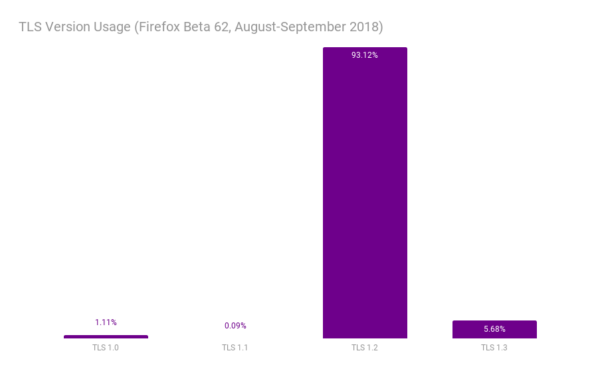
We will disable TLS 1.1 at the same time.  TLS 1.1 only addresses a limitation of TLS 1.0 that can be addressed in other ways. Our telemetry shows that only 0.1% of connections use TLS 1.1.

Graph showing the versions that we intend to remove (TLS 1.0 and 1.1) have low usage

TLS versions for all connections established by Firefox Beta 62, August-September 2018

Our telemetry shows that many sites already use TLS 1.2 or higher (Qualys says 94%).  TLS 1.2 is a prerequisite for HTTP/2, which can improve site performance.  We recommend that sites use a modern profile of TLS 1.2 unless they have specialized needs.

For sites that need to upgrade, the recently released TLS 1.3 includes an improved core design that has been rigorously analyzed by cryptographers.  TLS 1.3 can also make connections faster than TLS 1.2. Firefox already makes far more connections with TLS 1.3 than with TLS 1.0 and 1.1 combined.

Be aware that these changes will appear in pre-release versions of Firefox (Beta, Developer Edition, and Nightly) earlier than March 2020.  We will announce specific dates when we have more detailed plans.

We understand that upgrading something as fundamental as TLS can take some time.  This change affects a large number of sites.  That is why we are making this announcement so far in advance of the March 2020 removal date of TLS 1.0 and TLS 1.1.

Other browsers have made similar announcements. Chrome, Edge, and Safari all plan to make the same change.

The post Removing Old Versions of TLS appeared first on Mozilla Security Blog.

19 Oct 15:45

Behind the Door

by peter@rukavina.net (Peter Rukavina)

The thing I miss most about not having proximate day to day co-workers is office hijinks. Fortunately my colleague Alan, here in New Hampshire, stepped up this morning to fill this void for my visit.

19 Oct 15:45

Developers Show What They Could Make if Apple Opened Up Watch Face Development

by John Voorhees

Last week we linked to Marco Arment’s article critiquing Apple’s watch faces and calling for Apple to open up watch face design and development to third parties. By the next day, Steve Troughton-Smith had an Xcode project up and running that uses SpriteKit to simulate custom watch faces. Troughton-Smith posted pictures of the watch faces he created on Twitter, which drew a lot of interest from other developers.

Troughton-Smith uploaded his watch face project to GitHub, and in the days that followed, developers, including David Smith, who’s been making Apple Watch apps for his health and fitness apps since the Series 0 was introduced, began playing with Troughton-Smith’s code. Writing about the experience on his website Smith said:

There is something delightful about solving a problem that is superficially so simple and constrained. The constraint leads to lots of opportunities for creative thinking. Ultimately you just need to communicate the time but how you do that can take countless different forms. It reminds me of the various ‘UI Playgrounds’ that have existed in app design. For a while it was twitter clients, then podcast players and weather apps.

I spent the weekend following along as Troughton-Smith, Smith, and others designed all manner of personalized watch faces. The experience reminds me of the flurry of activity and excitement during the first months after the iPhone was released when developers reverse-engineered Apple’s APIs to create the first jailbroken apps even before there was an App Store. Let’s hope that history repeats itself and Apple opens up watch face development to third parties like it did with apps.

Below and after the break, we’ve collected tweets following Troughton-Smith's work and showing off some of the designs that have been created over the past several days.

https://twitter.com/stroughtonsmith/status/1051206536985542661


Support MacStories Directly

Club MacStories offers exclusive access to extra MacStories content, delivered every week; it's also a way to support us directly.

Club MacStories will help you discover the best apps for your devices and get the most out of your iPhone, iPad, and Mac. Plus, it's made in Italy.

Join Now
19 Oct 15:44

Fantasy Pools

by Richard

Have I told you that I’m part of a baseball fantasy pool? While growing up, I played and watched baseball, and being one of the taller players, naturally I was assigned first base. I distinctly remember the time I sat on the family home’s deck and told my parents I wanted to focus on basketball instead, which was the right decision. I would cheer for the Blue Jays, and now that I think about it, the 1994 strike coupled with graduating high school and focusing on my floundering at university (which I would recover from), I lost interest. Fast-forward to 2007, with only 3 channels on my TV, the CBC started showing Blue Jays games again. I bought an HD over-the-air receiver, and fell in love with a young utility player named José Bautista.

Years of fandom since then did not lead to an interest in joining a fantasy baseball team, though. I didn’t the appeal of following a list of players, or being an armchair GM for ballplayers across several teams.

At least not until saying yes last year. I got my chance to be creative with my team name (Batter’s Eye, after the background to what the hitter sees behind the pitcher so that he can see the ball betterf), and happily overpaid for Josh Donaldson following his MVP season. I haven’t made the playoffs yet, but it has been enjoyable to look at who’s trending for picking up on waivers and making trades that will hopefully benefit all parties.

I’ve since joined a basketball fantasy pool in order to feel better connected to the game, especially the NBA players. Being a big guy myself, I have mixed feelings about the trend towards three pointers. On the one hand, I get that you have to go with what works, but on the other hand, the big men are so athletic and fun to watch when they post up.

I named my team Paper Towels after the time that Trump “shot” paper towels to people waiting for provisions in Puerto Rico, with my icon being the paper towels as they leave the President’s hands. It symbolized a moment where he thought he was helping, was enjoying the moment, but seems to have misread the seriousness of the situation. Or maybe he didn’t care. It’s an iconic moment in my mind, so I wanted to memorialize it.

I don’t intend to win at all costs, but I also don’t intend to be a doormat. I dress active players as often as I can, and make trades when they seem good. I reject my fair of trades if it doesn’t work for me, though I don’t propose any, not really knowing what I need. It has been a fun way to keep track of individual players without cheering for a single team, that being an emotionally draining enterprise. At least with a fantasy pool, I have some measure of impact on the outcome.

19 Oct 15:43

No

by peter@rukavina.net (Peter Rukavina)

Radiolab aired an episode featuring Kaitlin Prest’s 2017 podcast miniseries No this week. Radiolab host Jad Abumrad prefaced the episode with a caution:

Just as a warning, there are scenes in what you are about to hear that are sexually explicit, very much so, at times, and strong language… probably not the kind of thing that you want to listen to with kids anywhere nearby.

I disagree with his suggestion: listening to No is something that people of all ages need to hear, especially young people. It is a powerful examination of desire, sex, power, consent, language, and behaviour. There is open and honest talk of sex, in real language, but falling back on euphemism would work against the series, adding cloudiness to a message that at its heart is about clarity.

From the first episode:

“Come on, gimme a blow job…”

He’s gonna make me say it again.

“Ah, no… I don’t want to”

[Sigh] “Come on… gimme a blow job”

It wasn’t easier the second time. At all. He puts my hand on his dick. This was the moment that I learned that saying no wasn’t enough. Someone could wear me down, little by little. That it would start to feel like a Twilight Zone moment. Where everything was normal before, and now suddenly the walls are bending in on each other and you learn that you’re actually a ghost. You start to think you’re crazy. You feel trapped. You’re having an argument about whether you’re gonna suck a guy’s dick, and even though the air is super-tense with this argument feeling, he still wants you to suck his dick. The only way for this awful moment to end is just to do what he says. And you do it.

Maybe you tell yourself that you’re enjoying it. Maybe you tell yourself that there’s something tender about this moment. At the same time, part of you is silently screaming. It’s like a dream: you open your mouth and nothing comes out.

This is only the first of many times that I will say no and it will be ignored.

Oliver and I listened to the Radiolab episode, and then to the first episode of No, in the car together this weekend. It led us to a conversation about consent, and how you know if and how somebody wants to have sex with you, and it led Oliver to email his high school principal “Need a Conversation with Students for #MeToo. We’re Living in a Different Age of Feminism.”

He is right. And No is one of the routes to helping us understand that more deeply.

(Prest has a new podcast, for the CBC, called The Shadows, released last month)

19 Oct 15:43

NDP has some things to fix with civic-election campaign law when this is all over

by Frances Bula

One of the big issues in this campaign season has been the discovery of holes and glitches in the province’s new campaign-finance law for local elections.

It turns out third parties can spend whatever they want up until 30 days before the election, independent candidates who are a team but don’t register as an official party can accept more in donations than a party, unions can pay staff to campaign among their members without any declaration of spending, and more.

For the last six months, that’s been a dominant theme, starting with this story back in April about the NPA raising money for “operating expenses,” something that was not limited until the NDP decided to amend this bit in June.

Then there was the issue that started to emerge as people realized they were not going to raising anything near the millions that Vision Vancouver and the Non-Partisan Association used to raise, which was the problem of it being hard to get the public interested in the election because of the lack of advertising dollars.

Then there was the intriguing issue of who paid for the billboards all over Vancouver touting Councillor Hector Bremner and his #LetsFixHousing Yes Vancouver party. It turned out the man behind that was developer Peter Wall, as the Globe discovered in late September. (And no one would ever have known if Wall hadn’t gotten his lawyer to provide the information, since there was no legal requirement to report any spending before the official Sept. 22 start of the campaign period.)

Following that, the issue of union efforts and contributions came up, as the Vancouver and District Labour Council decided to dedicate staff and money to promoting their slate of 27, headed by independent mayoral candidate Kennedy Stewart.

Our stories, here and here, detailed what the new rules were and made it clear that unions had a leeway to campaign that they wouldn’t get in provincial elections.

There was also the new wrinkle that independents who were tacitly operating together, but not an official party, could raise more than parties.

And then, finally, the whole issue about letting the public know about who donors are to campaigns in advance continued to boil. Although Seattle, for example, requires its candidates to post continuously in advance of elections about who their donors are, B.C. only requires disclosure three months AFTER the election is over.

But there’s been public and media pressure on people to disclose, so first they promised to and then some of them did, which revealed that the NPA still does well in the fundraising department, bringing in almost $850,000 two weeks before the election — a sum that outdid all the independents and parties on the left.

I expect quite the wrassling match over the next four years as provincial types debate how the rules should be changed again, especially once we see the full disclosures next January when voters may very well be asking: Why didn’t we know this before we voted.


19 Oct 15:43

A Model of Interceptors

by Eric Normand

I’ve been gearing up for what I think will be a fun and fruitful project. I wanted to review some of the fundamental abstractions we use in Clojure for building web applications, and see if I can’t find something super robust for building on top of.

The “classical” model is Ring, which defines Adapters, Middleware, and Handlers. Briefly, Handlers are functions from request to response. Middleware are higher-order functions that take a Handler and return a new Handler. They’re Handler transformers. Finally, Adapters are used to insert the Ring model into a “host”. For instance, the Java Servlet system could be a host. A Servlet Adapter will convert the Servlet request to a Ring request, and also convert the Ring response to a Servlet response.

The Ring model is pretty good, but it has the problem that it makes it hard to do asynchronous servers. Besides Adapters, the only things that handle requests are the Handlers. Those are just functions, so they consume a whole thread. It’s one thread per request, which doesn’t scale well and doesn’t let you do asynchronous operations.

Enter Pedestal. Pedestal introduced the idea of Interceptors. In Ring Middleware, you could transform the request before the Handler got it, and/or transform the response after the Handler returned. Interceptors defined the transform-on-the-way-in (:enter function) and transform-on-the-way-out (:leave function) as two separate operations (both functions). This basically reifies the two uses of middleware into a distinct object. If you add core.async to the mix, you can get asynchrony. Pedestal also adds an :error function for the third use case of Middleware, which was wrapping handlers in try-catch to transform Exceptions into responses.

Pedestal has machinery for running a request through an Interceptor chain. This machinery uses a stack and a queue for holding the :leave and :enter functions. The stack and the queue are held in a Context map, and that is what gets passed through each Interceptor. Each Interceptor returns a modified Context, which could modify the HTTP Request or Response, or it could modify the stack and queue. This lets Interceptors add other Interceptors to the end of the chain.

One thing I miss about Ring when using Pedestal is the cleanliness of the composition model. Handlers are general purpose functions, and Middleware, which just transform the Handler in the first argument, are easily composed using a nice thread-first macro. In the end, you’ve got one big function to call.

In Pedestal, they say “everything is an Interceptor”. But it’s not quite true. While a lot of the functionality of your service is written as Interceptors, the Interceptor chain itself is not an interceptor. You also have the ability to add Interceptors to the chain from within an Iterceptor. This makes it hard to predict what’s going to happen when an Interceptor is called. Since it’s adding Interceptors to the end, but the Interceptor itself doesn’t know what’s after it, there’s room for lots of trouble.

What I do like about Interceptors is that they separate out the three main uses of Middleware (transform request, transform response, and handle Exceptions). They reify that concept and eliminate the bit of boilerplate every Middleware has to implement (the wrap/call).

A first pass

Let’s simplify and formalize the concept of Interceptors.

First, an Interceptor is made of three functions, the :enter:leave, and :error. Their types are as follows.

;; :enter :: Request  -> Request
;; :leave :: Response -> Response
;; :error :: Request  -> Exception -> Response

All of them are optional. Let’s leave aside the :error function for now, and deal only with :enter and :leave. We’ll add :error back later. That means we have two functions. Both are of the form “take a thing, return it transformed”.

Now, given two of these, how do we compose them? It’s obvious that we can use function composition.

(comp enter2 enter1) ;; call enter1, then pass the return to enter2

That’s a really good sign. We can make a function that uses comp to compose two interceptors:

(defn chain [i1 i2]
  {:enter (comp (:enter i2 identity) 
                (:enter i1 identity))
   :leave (comp (:leave i1 identity)
                (:leave i2 identity))})

I’m calling it chain because that’s the language from Pedestal. Notice that the :leave functions are composed in the oposite order from :enter functions. We notice that chain is a monoid because it just uses comp, which is a monoid. That’s sweet! People talk about monads all the time, but monoids are where it’s at.

And we definitely want chain to be a monoid. I imagine Interceptors being assembled in different places, then finally being assembled into one big interceptor. Monoids give us that property.

Also notice that I’ve put the Interceptors in the order we expect to see them in. They’re kind of backwards in function composition.

Now we need a function that will run this chain. It simply threads the value through the enter and leave functions.

(defn run [interceptor value]
  (let [{:keys [enter leave]} interceptor]
    (-> value
        enter
        leave)))

Let’s build a test to ensure that we maintain this associative property. (Monoids are associative).

First, we’ll need a generator for some simple functions.

(def gen-integer-fn
  (gen/elements
   [identity
    (constantly 0)
    (constantly 1)
    inc
    dec]))

Nothing too fancy, because we’ll be generating some long Interceptor chains.

Now to generate Interceptors themselves.

(def gen-interceptor
  (gen/let [enter gen-integer-fn
            leave gen-integer-fn]
    {:enter enter
     :leave leave}))

And the test:

(defspec chain-associative
  1000
  (prop/for-all [a gen-interceptor
                 b gen-interceptor
                 c gen-interceptor
                 x gen/int]
    (let [x (mod x 100)
          i1 (chain a (chain b c))
          i2 (chain (chain a b) c)]
      (= (run i1 x) (run i2 x)))))

(Note: all of this testing is done using clojure.test.check.)

Converting to Vectors

I simplified the model of Interceptors to get a first approximation. The function composition version really feels nice to me. However, it’s missing a lot of stuff. I did try to add error handling and asynchrony to the function composition model, but it was really complicated and I wasn’t sure how to add some features. I won’t go over that here. It was an interesting exercise but ultimately I think it’s a dead end.

What I decided to do instead was to keep the Interceptors separate, make the run function a little smarter. Instead of composing the functions, the run function loops through the Interceptors first from begining to end, running the :enter functions, then back again to the begining running the :leave functions.

I still need chain to be a monoid. I shouldn’t have to change the test. There’s a nice existing monoid that will serve our purpose well. It’s Clojure’s very own Vector. If we keep the Interceptors in a Vector, we can define chain in terms of Vector concatenation, which is also a monoid.

Let’s go the full monty and define chain using Clojure’s monoid pattern. But first, I want to define an Interceptor a little differently. Now, an Interceptor is a Vector of zero or more maps. Each map can have :enter and :leave functions. We’ll get to :error in a bit.

Because we’re now defining Interceptors as a Vector, I will define a function normalize that will convert different stuff to that format.

(defn normalize [i]
  (cond
    (nil? i)
    []

    (= {} i)
    []

    (seq? i)
    (vec i)

    (vector? i)
    i

    (fn? i)
    [{:enter i}]

    (map? i)
    [i]))

That should be pretty straightforward. The notable things are that the empty Vector is the identity of chain, and that functions alone are converted into :enter functions.

Now chain has the full monoid definition, which includes all arities.

(defn chain
  ([]
   [])
  ([i1]
   (normalize i1))
  ([i1 i2]
   (let [i1 (normalize i1)
         i2 (normalize i2)]
     (into i1 i2)))
  ([i1 i2 & is]
   (apply chain (chain i1 i2) is)))

I’m not sure that’s the most performant possible version, but I’m not concerned about performance here. You build the chain once and run it many times. run will need to be performant.

run is an interesting situation now. If I were in a different Lisp, I’d have tail call elimination, and I’d just jump between functions in tail position with almost zero cost.

But Clojure doesn’t have tail call elimination. So I’ll use two functions, one for calling :enter functions and one for calling :leave functions. While it’s moving in one direction, it can just recur in a tight loop. Once it reaches the end of the :enter side, it defers to the other function that handles the :leave functions.

(defn run-enter [i v idx]
  (if (contains? i idx)
    (let [e (:enter (get i idx) identity)]
      (recur i (e v) (inc idx)))
    (run-leave i v (dec idx))))
(defn run-leave [i v idx]
  (if (contains? i idx)
    (let [l (:leave (get i idx) identity)]
      (recur i (l v) (dec idx)))
    v))

These look pretty similar to each other. The difference is that run-enter defers to run-leave when it runs off the end. And run-leave returns the value when it runs off the beginning.

Now, run just defers to run-enter:

(defn run [i v]
  (run-enter i v 0))

Rerun the tests and they pass.

Adding error handling

One of the important use cases of Middleware is to wrap a handler in a try/catch and handle errors. We want to enable that with our Interceptors model.

We augment the Interceptor definition. Now it’s a Vector of zero-or-more maps, where each map has an :enter:leave, and :error function (all functions are optional).

Errors act differently depending on if you’re in the :enter or :leave side. If you’re entering, if an :enter function throws a Throwable (or returns a Throwable), we immediately begin the :leave side with the Throwable as the value.

(defn run-enter [i v idx]
  (if (contains? i idx)
    (let [e (:enter (get i idx) identity)
          v' (try
               (e v)
               (catch Throwable t
                 t))]
      (if (instance? Throwable v')
        (run-leave i v' idx)
        (recur i v' (inc idx))))
    (run-leave i v (dec idx))))

When we’re leaving, if we have a Throwable, we call the :error function. Otherwise, we call the :leave function. That means that at any point, the :error function can return a non-Throwable value and it will go back to the :leave functions.

(defn run-leave [i v idx]
  (if (contains? i idx)
    (let [status (if (instance? Throwable v) :error :leave)
          l (get-in i [idx status] identity)
          v' (try
               (l v)
               (catch Throwable t
                 t))]
      (recur i v' (dec idx)))
    v))

The tests run, but we aren’t testing the error path. We need an :enter function to throw. This test sets up a chain where the last Interceptor in the chain throws an error. The first Interceptor has an :error function that returns its own error. We can test that we get that error out at the end.

(defn constantly-error [_]
  (throw (ex-info "Error" {})))
  
(defspec chain-errors
  1000
  (prop/for-all [i (gen/vector gen-interceptor)
                 x gen/int]
    (let [t (ex-info "My error" {})
          i (chain {:error (constantly t)}
                   i
                   {:enter constantly-error})
          x (mod x 100)]
      (identical? t (run i x)))))

We also want to test what happens when we don’t catch the error.

(defspec chain-error-not-caught
  1000
  (prop/for-all [i (gen/vector gen-interceptor)
                 x gen/int]
    (let [i (chain {:enter constantly-error} i)
          x (mod x 100)]
      (instance? Throwable (run i x)))))

We could really test this a lot, but I’ll skip over that.

Adding async

Another thing that Pedestal has is asynchrony. If your Interceptors return a core.async channel, Pedestal’s machinery will consider that an async Interceptor.

I would rather use Manifold, which is a cool abstraction for asynchronous values. That means that in my Interceptors, if your function returns something Manifold understands as a deferrable thing, the Interceptor chain will be considered an async chain. This change is not too difficult:

(defn run-leave [i v idx]
  (if (contains? i idx)
    (let [status (if (instance? Throwable v) :error :leave)
          l (get-in i [idx status] identity)
          v' (try
               (l v)
               (catch Throwable t
                 t))]
      (if (d/deferrable? v')
        (-> (d/->deferred v')
            (d/chain #(run-leave i % (dec idx)))
            (d/catch #(run-leave i % (dec idx))))
        (recur i v' (dec idx))))
    v))

(defn run-enter [i v idx]
  (if (contains? i idx)
    (let [e (:enter (get i idx) identity)
          v' (try
               (e v)
               (catch Throwable t
                 t))]
      (cond
        (instance? Throwable v')
        (run-leave i v' idx)

        (d/deferrable? v')
        (-> (d/->deferred v')
            (d/chain #(run-enter i % (inc idx))
            (d/catch #(run-leave i %      idx))))

        :else
        (recur i v' (inc idx))))
    (run-leave i v (dec idx))))

We can test this by making sure async chains return the same value as non-async chains.

(defn make-async [i]
  (-> i
      (update :enter #(comp defer-val %))
      (update :leave #(comp defer-val %))))

(defspec chain-async
  1000
  (prop/for-all [i (gen/not-empty (gen/vector gen-interceptor))
                 x gen/int]
    (let [ai (mapv make-async i)
          x (mod x 100)]
      (= (run i x) @(run ai x)))))

(defspec chain-async-one
  1000
  (prop/for-all [i (gen/not-empty (gen/vector gen-interceptor))
                 idx gen/int
                 x gen/int]
    (let [idx (mod idx (count i))
          ai (update i idx make-async)
          x (mod x 100)]
      (= (run i x) @(run ai x)))))
      
(defn constantly-error-async [_]
  (let [d (d/deferred)]
    (d/error! d (ex-info "Async error." {:async true}))
    d))
      
(defspec chain-error-async
  1000
  (prop/for-all [i (gen/vector gen-interceptor)]
    (let [e constantly-error-async]
      (:async (ex-data @(run (chain i e) 0))))))

Adding early return

A final thing that Middleware could do was to not call the handler. It could do something different, instead. I’m calling this “early return”. What I want to happen is have some way for an :enterfunction to immediately begin the :leave phase instead of continuing to the next :enter function.

We’ll take a page from the Clojure playbook and use reducedreduced is used in reduce for early returns. It signals that the computation is over. reduce checks for it, then unpacks the reducedvalue. We’ll do the same. Only :enter functions can do this.

(defn run-enter [i v idx]
  (if (contains? i idx)
    (let [e (:enter (get i idx) identity)
          v' (try
               (e v)
               (catch Throwable t
                 t))]
      (cond
        (instance? Throwable v')
        (run-leave i v' idx)

        (d/deferrable? v')
        (-> (d/->deferred v')
            (d/chain #(run-enter i % (inc idx))))

        (reduced? v')
        (run-leave i (unreduced v') idx)

        :else
        (recur i v' (inc idx))))
    (run-leave i v (dec idx))))

We can test this by saying that a chain of a should be equivalent to a early returning before b. It’s clearer in code.

(defn make-reduced [i]
  (update i :enter #(comp reduced %)))

(defspec chain-early-exit
  1000
  (prop/for-all [a gen-interceptor
                 b gen-interceptor
                 x gen/int]
    (let [x (mod x 100)
          i1 (chain a)
          i2 (chain (make-reduced a) b)]
      (= (run i1 x) (run i2 x)))))

That’s it! Check out the code here.

Conclusions

I’m happy with where this wound up. I’ve got a nice, concise implementation of Interceptors, ready for use in async web servers–though it’s not specific to the web. I’ve also got a nice suite of tests. The model is not quite as formal as I’d like. Some of the tests seem a little too specific. I’d love for them to be a few simple properties that guarantee the behaviors I’m looking for. Right now they feel ad hoc. I probably spent too much time on this. But I really enjoyed it! I’m looking forward to hear what you have to think about it.

The post A Model of Interceptors appeared first on LispCast.
19 Oct 15:42

The Short Game And The Long Game

by Richard Millington

We can all agree promising $1000 to the top contributor each month is short-sighted.

You will get a lot more activity, but it won’t be good activity. Within a month you will be left with a spam-filled shell of a community.

That’s the short game.

Any time you’re using tactics to get the activity up, you’re playing the short-game. Sure, you need some activity, but it’s far less than we imagine. Beyond a fairly low level, it’s the quality of activity that matters.

The long game improves the fundamental quality of the community.

When you play the long-game, you’re making the community better (not just bigger). You’re making the community a more desirable place to be (which in turn attracts more people to participate).

When you’re gradually building strong relationships with top experts, improving the signal to noise ratio, enforcing higher standards of contributions, you’re playing the long-game. The community is becoming a better resource. This pays off over the long-term.

When you’re building a more powerful sense of community, providing better ways for people to connect and build more genuine relationships, you’re playing the long-game.

When you’re enabling everyone to explore the cutting edge of the field, report back their findings, and learn from each other, you’re playing the long-game.

The problem with playing the long-game is there aren’t any easy metrics to tell if it’s working. You sacrifice short-term activity for long-term success.

Most of the communities which are growing rapidly today had a year or more of obscurity while the community professional gradually built the relationships, attracted the right members, and established the right quality norms of contributions.

If you’re playing the long-game, you can’t be held accountable to short-term metrics. You need to set the strategy, determine what your community is capable of being, and give yourself enough runway to take off.

19 Oct 15:42

Why Create a Frontier-Inspired Scripting App?

Let me tell you about Frontier.

It still runs (though on its last leg as a 32-bit app), but I’ll talk about in the past tense, because I’m talking about it in its heyday in the ’90s and early 2000s. I was working at UserLand — Dave Winer’s company, which made Frontier — at the time. I was a Frontier enthusiast before I joined the company. It was my dream job.

Frontier began life as a Mac scripting app, before even AppleScript. While it never lost that ability, it turned into a web scripting app around 1995, which is when I first started using it.

In those days — ’90s and early 2000s — Dave Winer invented, collaborated on, popularized, or fleshed-out a number of things we take for granted today: websites created with scripts and templates, weblogs, RSS, RSS readers, podcasting, OPML, and web APIs (XML-RPC).

It was an extraordinary run of creativity. You might just assume that Dave and his team were writing in Perl or Python or similar — but we weren’t. All this work was done in Frontier.

Does the tool matter?

It’s easy to say that the tool doesn’t really matter, that it was all about the people and that particularly fertile time. And it was about that.

But if the tool doesn’t matter, then why do developers care so much about their tools? Tools matter too.

Nothing in my entire career has ever matched Frontier for how it enabled me to make things quickly. Things that are difficult in other environments — persistence, debugging, seeing the results of a script — are so simple in Frontier. It’s just how the app works. It still feels to me like it comes from the future.

The bet I’m making is that there was something special in this design, that this particular tool was capable of unleashing a level of creativity capable of changing the tech world.

What Frontier Was Like

Frontier was a Mac app (yes, there was a Windows port eventually) with an integrated hierarchic database and scripting system.

The key is that it was a Mac app, in the very best sense — it had that old-school Mac philosophy of taking things that were abstruse and difficult and reserved for the priesthood and giving them an easy-to-use GUI. You browse the database and add, edit, and delete values. Everything lives in the database.

Even your scripts live in the database. Open a script in a window, edit it, click Run or Debug, jump to a different script, etc.

The database

Think of the database like a dictionary that could contain dictionaries. We call those tables, but they’re not at all tables in the SQL sense. (Think hash table.) A table can have subtables, and sub-subtables, and so on.

The database holds scripts, outlines, menubars (you can create menus and attach scripts to menu items), styled text, strings, arrays, booleans, numbers of various types, binary data, and more. (Even some things nobody uses anymore, such as QuickDraw rectangles.)

There’s one simple bit of power — it sounds small to say it, but it’s huge: persisting data from a script is as simple as this:

states.Nebraska.capital = "Lincoln"

In the code above, there’s a table named states with a subtable for each state, and it sets the value of capital for Nebraska to “Lincoln.”

Quit and relaunch the app — it’s still there.

Like dictionaries, tables have no schema. You can put anything you want into any table. And of course scripts have full power to create, edit, and delete tables and not just values (the database is fully scriptable — that’s the point).

Scripts

Just as you can refer to database values using dot syntax, a script can call another script the exact same way. In fact, you do that all the time, because the standard library is also stored in the database.

If you call file.readWholeFile(f) — which returns the contents of a file as a string, given the path — you’re actually calling a script readWholeFile that lives in a table named file, which contains the standard library’s file verbs.

And of course that works with your own scripts too. There are no import statements — you just call, using dot syntax, whatever you want to call.

The debugger has the standard things — step into, continue, etc. — and you can view the stack when you debug. The stack is just more tables! Which you can also edit, while you’re debugging, like any other Frontier tables.

And the debugger works across scripts — you can step into a call to another script and continue debugging. (This is super-common, even.)

Your one-off scripts are typically stored in the workspace table. For collections of scripts that work together — as a kind of app — you’d create a “suite” (a table containing scripts and data) or, in later years, you’d put them together in a separate “guest” database.

Getting around was super-easy — if you saw file.readWholeFile in a script, for instance, you’d cmd-double-click it to jump to that location in the database.

Brilliantly, and I think uniquely, scripts were written in an outliner. Scripts are, after all, tree structures — and using an outliner for code folding and reorganizing has huge advantages. It feels surprisingly natural, too. I know how how weird that must sound to anyone who’s never written code that way. But, really, all other code editors seem sad to me in comparison, like reindeer that can’t fly. The outliner spoiled me.

(Tabs vs. spaces was never an issue, at least!)

In the end

It was just so easy to start something, and then refine it and keep going, and make things that did useful things.

We wrote blogging software and RSS readers and all kinds of early open web things. (It even had a built-in webserver.) It was fun — it was a joy, even.

I think the Mac is missing this app. So my goal with Rainier (which is a mess at the moment) is to do a new, modern Mac app inspired by Frontier. It won’t be compatible with Frontier, and lots of details will be different, but I hope to capture that same lightning, which, I think, we could use right now.

I could be wrong! Worst case is that I’ll just get back the fun that I miss so much. Which is okay. :)

PS Somebody somewhere is thinking that this is like a very weird, not-object-oriented Smalltalk. It is! But that doesn’t make it less awesome.

PPS I’ve left out a ton of details, but I hope I’ve gotten the gist of this across.

PPPS If you’re interested in joining the Slack group and helping me with my thinking, just email me. (You can find my email on this page.)

19 Oct 15:42

Twitter Favorites: [bmann] Watched the first episode of “Salt Fat Acid Heat” on Netflix. Now I want to make Ligurian Focaccia. https://t.co/yrHpHZARnK

Boris Mann @bmann
Watched the first episode of “Salt Fat Acid Heat” on Netflix. Now I want to make Ligurian Focaccia. wiki.bmann.ca/recipe/liguria…
19 Oct 15:41

Kindle Paperwhite :: Jetzt wasserdicht und mit Audible

by Volker Weber

ZZ7AAE182E

Amazons bester Kindle ist der Oasis. Der ist zwar super, aber ganz schön teuer. Jetzt bringt Kindle einen neuen Kindle Paperwhite, der Eigenschaften des Oasis übernimmt:

  • Der neue Paperwhite hat eine glatte Front. Damit ist er viel leichter abzuwischen. Es sammelt sich kein Sand oder Staub mehr im Rahmen des Bildschirms.
  • IPX8: Man dann das neue Gerät problemlos im Pool oder der Badewanne benutzen. Eine Stunde in zwei Metern Tiefe sind kein Problem. Nur Kärchern hält er nicht aus. Aber wer macht das schon.
  • Paperwhite spielt nun auch Audible-Inhalte über Bluetooth ab. Wenn man sowohl das Buch als auch das Hörbuch hat, dann kann man an jeder Stelle hin- und herwechseln.

Der neue Paperwhite ist 8.2 Millimeter dünn und wiegt 182 Gramm. Wie beim Oasis gibt es zwei Modelle mit 8 und 32 GB. Den größeren Speicher braucht man für Bücher nicht. Da ist Platz für Tausende. Nur bei Hörbüchern, Zeitschriften oder Comics empfiehlt sich der größere Speicher.

Wofür braucht man LTE? Unterwegs Inhalte nachladen. Ich empfehle das vor allem bei älteren Herrschaften, die gerne ein neues Buch kaufen wollen, ohne sich mit der Technik beschäftigen zu müssen. Versierte Anwender nehmen halt den WLAN Access Point ihres Handys.

Wer heute bestellt, bekommt das Gerät ab 7. November geliefert. Das sind nur noch drei Wochen. Das ist übrigens ein sehr schönes Geschenk für jemanden, der seinen einfachen Kindle ohne Hintergrundbeleuchtung liebt.

19 Oct 15:40

Electronics 101.1: Electricity basics

by Alex Bate

In HackSpace issue 9, Dave Astels helps us get familiar with what electricity is, with some key terms and rules, and with a few basic components. Get your copy of HackSpace magazine in stores now, or download it as a free PDF here.

An animated GIF of Pickachu the Pokemon

tl;dr There’s more to electricity than Pikachu.

Electricity basics

Electricity is fascinating. Most of our technology relies on it: computers, lights, appliances, and even cars, as more and more are hybrid or electric. It follows some well-defined rules, which is what makes it so very useful.

According to Wikipedia, electricity is ‘the set of physical phenomena associated with the presence and motion of electric charge’. And what’s electric charge? That’s the shortage or excess of electrons.

Let’s go back (or forward, depending on where you are in life) to high school science and the atom. An atom is, at a very simplified level, a nucleus surrounded by a number of electrons. The nucleus is (again, viewing it simply) made up of neutrons and protons. Neutrons have no charge, but protons have a positive charge. Electrons have a negative charge. The negative charge on a single electron is the exact opposite of the positive charge on a single proton. The simplest atom, hydrogen, is made from a single proton and a single electron. The net charge of the atom is zero: the positive charge of the proton and the negative charge of the electron cancel – or balance – each other. An atom’s electrons aren’t just in an amorphous cloud around the nucleus: you can think of them as being arranged in layers around the nucleus…rather like an onion. Or perhaps an ogre. This is a very simplified visualisation of it, but it suffices for our purposes.

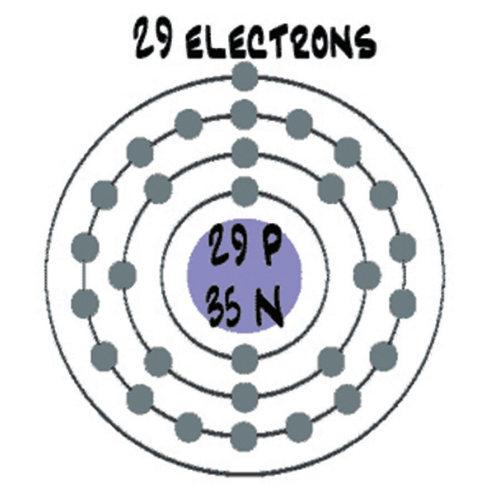
A diagram of a copper atom and the text '29 Electrons'

Figure 1: A very stylised representation of a copper atom with its electron shell

In a more complex atom, say copper, there are more protons, neutrons, and electrons, and the electrons are in more layers. By default, a copper atom has 29 protons and 35 neutrons in its nucleus, which is surrounded by 29 electrons. The way the electrons are distributed in their layers leaves the copper atom with a single electron in the outermost layer. This is represented in Figure 1 (above). Without getting further into subatomic physics, let’s just say that having that single electron in the outermost layer makes it easier to manipulate. When we put a bunch of copper atoms together to make copper metal (e.g. a wire), it’s easy to move those outermost electrons around inside the metal. Those electrons moving around is electricity. The amount of electrons moving over a period of time is called ‘current’.

A multimeter showing the figure 9.99 with a resistor connected via crocodile clips

A single 10 kΩ resistor reads almost 10 000 ohms (no electrical component is perfect).

We started by talking about electrons and charge. Look back at the Wikipedia definition: ‘presence and motion of electric charge’. Charge is measured in coulombs: 1 coulomb is approximately 6.242 × 10¹⁸ electrons. That’s 6 242 000 000 000 000 000 electrons. They’re very small. Actually, this would be -1 coulomb. +1 coulomb would be that many protons (or really, the net lack of that many electrons).

That’s charge. Now let’s consider moving charge, which is far more useful in general (unless your goal is to stick balloons to the wall). Consider some amount of charge moving through a wire. The amount of charge that moves past a specific point (and thus through the wire) over a period of time is called ‘current’ (just like the current in a river) and is measured in amperes, generally just called amps. Specifically, 1 amp is equal to 1 coulomb flowing past a point in 1 second.

Another common term is voltage. You can think of voltage like water pressure; it’s the pressure pushing the electrons (i.e. charge) through a material. The higher the voltage (measured in volts), the faster charge is pushed through, i.e. the higher the current.

The final term is resistance, measured in ohms. Resistance is just what it sounds like. It’s a measure of how much a material resists the movement of electrons. We said that copper allows electrons to move freely. That’s what makes it so common for wires, PCB traces, etc. We say that it is a good conductor. Glass, on the other hand, locks its electrons in place, not letting them move. It’s an example of a good insulator. There are materials that are in between: they let electrons move, but not too freely. These are crucial to making electronics work.

There’s an interesting (and useful) relationship between voltage, current, and resistance called Ohm’s Law (Georg Ohm was the fellow who explored and documented this relationship): the current (denoted I, in amps) flowing through a material is equal to the voltage across the material (denoted V, in volts) divided by the material’s resistance (denoted R, in ohms): I = V/R. This equation is foundational and, as such, very handy.

Lighting up

There aren’t many electronic devices that don’t have at least one LED on them somewhere, especially not gadgety ones. If you look at a simple Arduino Uno, it has LEDs for power, Tx, Rx, and pin 13. The first program using electronic components that most people try is one to blink an LED.

A colour spectrum from red to purple

Figure 2: The colour spectrum

LED stands for light-emitting diode. We’ll come back to diodes in a later instalment; all we need to know right now is that a diode has to go the right way around. So that leaves ‘light-emitting’. That simply means that it gives off light: it lights up. Specifically, it lights up when enough current flows through it. Be careful, though. Put too much current through it and it’ll likely crack in two. Seriously, we’ve done it. Best case scenario, you’ll get a bright pulse of light as it burns out. How much current do they like? 20 milliamps (20mA) is typical. Because an LED is a diode, i.e. a semiconductor (we’ll look at these in more detail in a future instalment too), it defies Ohm’s Law. How? It always has the same voltage across it, regardless of the current flowing through it.

An LED will have a specific Vf (f is for forward, as in ‘forward voltage’), which will be defined in its data sheet.

The voltage varies with the colour of light that the LED emits, but usually between 1.8V and 3.3V. Vf for red LEDs will typically be 1.8V, and for blue LEDs 3V–3.3V. As a rule, LEDs with a higher frequency colour will have a larger Vf. Figure 2 (above) shows the colour spectrum. Colours on the right end are lower in frequency and LEDs emitting those colours will have a lower Vf, while those on the left end have a higher frequency and a higher Vf.

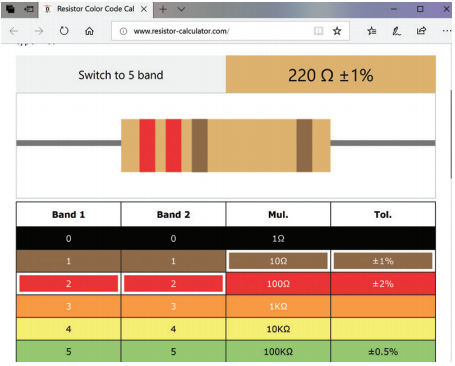
A screenshot of resistor-calculator website

Resistor colour bands show the resistance. Online calculators can help you learn the values.

So an LED will have a fixed Vf, and a typical LED that we’ll use likes about 20mA of current. An LED won’t do anything to limit how much current is flowing through it. That’s what we meant when we said it defies Ohm’s Law.

If we take a blue LED and hooked it to a 3.3V power supply, it will shine happily. Do the same thing with a red LED, and it will blink and burn out. So how do we deal with that? How do we use 3.3V or 5V to make an LED light up without burning out? We simply limit the current flowing through it. And for that, we need a resistor and Ohm’s Law.

Getting protection

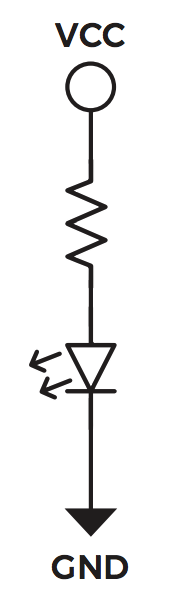
Figure 3: An LED with a current-limiting resistor

If we want to power a red LED from a 5V source, we know the following information: current has to be 20mA, Vcc will be 5V, and the voltage across the LED will be 1.8V. Consider the circuit in Figure 3. The voltage across the resistor will be Vcc – Vf, i.e. 5 – 1.8 = 3.2V. We said the current through the LED should be 20mA. Since there is only one path through the circuit that goes through the resistor as well as the LED, all current has to flow through both: whatever amount of current flows through the resistor has to flow through the LED, no more, no less. This is the crucial thing to realise. We can calculate the value of the resistance needed using Ohm’s Law: R = V/I = 3.2V/20mA = 3.2V/0.020A = 160 ohms.

The resistor should have a value of 160 ohms to allow 20mA of current to flow through the LED. Knowing that the 20mA and 1.8V values are approximate and that resistors are not exact (+/- 5 or 10 percent are the most common), we chose a slightly higher-value resistor. Considering common resistor values, go with 180 ohm or 220ohm. A higher-value resistor will allow slightly less current through, which might result in a slightly dimmer light. Try it and see. For practical purposes, simply using a 220 ohm resistor usually works fine.

Parallel lines

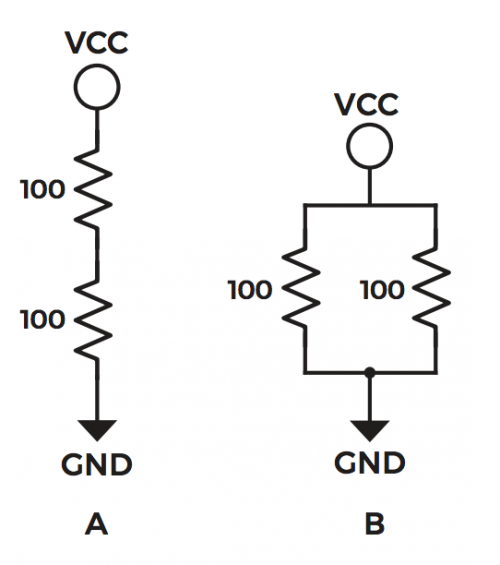
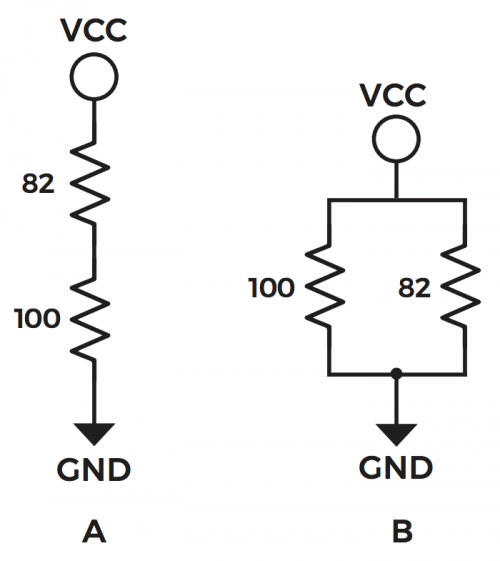
In the previous section we connected a resistor and an LED end to end. That’s called a series circuit. If we connected them side by side, it would be a parallel circuit. Consider the circuits in Figure 4.

Figure 4: A – series circuit; B – parallel circuit

We’ll use 5V for Vcc. What is the total resistance between Vcc and GND in each circuit? How much current is flowing through each circuit? What is the voltage across each resistor?

When resistors are connected in series, as in circuit A, the resistances are added. So the two 100 ohm resistors in series have a total resistance of 200 ohms.

When resistors are connected in parallel, as in circuit B, it’s more complex. Each resistor provides a path for current to flow through. So we could use an indirect method to calculate the total resistance. Each resistor is 100 ohms, and has one end connected to 5V and the other to 0V (GND), so the voltage across each one is 5V. The current flowing through each one is 5V/100 ohms = 0.05A, or 50mA. That flows through each resistor, so the total current is 100mA, or 0.1A. The total resistance is then R = V/I = 5V/0.1A = 50 ohms. A more direct way is to use the equation 1/Rt = 1/R1 + 1/R2 + … + 1/Rn, where Rt is the total resistance, and R1, R2, etc. are the values of the individual resistors that are in parallel. Using this, 1/Rt = 1/100 + 1/100 = 2/100 = 1/50. So Rt = 50. This is a quicker way to do it, and only involves the resistor values.

An image of a multimeter

A multimeter can read voltage, ampage, and resistance

Now for current. We know that the series circuit has a total resistance of 200 ohms, so the current will be I = V/R = 5V/200 ohm = 0.025A = 25mA. For one 100 ohm resistor the current is 5V/100 ohm = 0.05A = 50mA. This is expected: if the resistance is lower, there is less ‘resistance’ to current flowing, so with the same voltage, more current will flow. We already computed the current for the parallel circuit: 100mA. This is higher because we know that each resistor has 50mA flowing through it. In a parallel circuit, the currents are added.

A multimeter showing the figure 19.88 with a resistor connected via crocodile clips

Two 10kΩ (kiloohm) resistors in series read (almost) 20kΩ

The final question is what voltage is across each resistor. Let’s look at the parallel circuit first. One end of each resistor is connected to 5V, and the other end of each is connected to 0V (GND). So clearly, the voltage across each one is 5V. In a series circuit it’s different. We can use Ohm’s Law because we’ve calculated the current flowing through each one (0.025A), and that current flows through both resistors. Each resistor is 100 ohm, so the voltage across each one will be V = I×R = 0.025A × 100 ohm = 2.5 V. This makes sense intuitively, since the resistors have the same value and the same current is flowing through both. It makes sense that the voltage across each would be equal, and half of the total. Remember that it’s unlikely to be exactly half, due to the slop in the resistor values.

Let’s do this one more time with unequal resistors. See Figure 5.

Figure 5: A – series circuit; B – parallel circuit

For the series circuit, we simply add the resistances: 100ohm + 82ohm = 182ohm. The current is 5V / 182ohm = 0.0274725A = 27.4725 mA. Because resistors are inexact, it’s safe to call this 27.5mA. The voltages are 100ohm × 0.0275A = 2.75V across the 100 ohm resistor, and 82ohm × 0.275 = 2.25V across the 82 ohm one. The voltages always have to add up, accepting rounding errors. Relative to ground, the voltage at the point between the resistors is 2.75V. What will happen if we make the top resistor smaller (i.e. have a lower resistance)? The total resistance goes down, the current goes up, so the voltage across the 100ohm resistor goes up. This is what’s generally called a voltage divider.

For the parallel circuit we can use 1/Rt = 1/100 + 1/82 = 82/8200 + 100/8200 = 182/8200 = 1/45, so Rt = 45ohm. The total current is 5V / 45ohm = 0.111A = 111mA. For the individual resistors, the currents are 5V / 100ohm = 50mA and 5V / 82ohm = 61mA. Add these up and we have the total current of 111mA. Parallel resistors act as a current divider.

A multimeter showing the figure 4.96 with a resistor connected via crocodile clips

Two 10kΩ resistors in parallel read (almost) 5kΩ.

I encourage you to create these little circuits on a breadboard and measure the resistances, voltages, and currents for yourself.

Resistors in series for a voltage divider, resisters in parallel for a current divider

Consider what happens if we replace the resistor connected to Vcc in a series circuit with a variable resistor. The voltage between the resistors will vary as the value of the resistor does. As the resistance goes down, the voltage goes up. The reverse is true as well: as the resistance goes up, the voltage goes down. One use of this is to replace the variable resistor with a photoresistor. A photoresistor’s value depends on how much light is shining on it (i.e. how many photons are hitting it, to be precise). More light = lower resistance. Now the voltage divider can be used to measure the strength of light. All you need to do is connect the point between the resistors to an analogue input and read it.

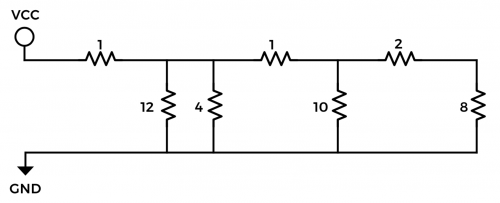
Figure 6 Combined parallel and series circuits

We’ve had a brief look at the basic concepts of electricity: charge, current, voltage, and resistance. We’ve also had a closer look at resistors and ways of combining them. We finished with a practical example of a series resistor circuit being used to measure light.

The post Electronics 101.1: Electricity basics appeared first on Raspberry Pi.

19 Oct 15:40

Open Source: Simplifying Serverless Secrets

by JP Robinson
Illustration by Jon Han

Over the past year, several New York Times engineering teams have been busy transitioning systems to run on either Google App Engine or Google Kubernetes Engine. We use these platforms to host systems like our games, email and core news applications. As we’ve transitioned to these technologies, we’ve also started adopting HashiCorp’s Vault as a unified solution to securely store, share and access application secrets like database passwords and API keys.

Our applications running on Google’s Kubernetes Engine use the sidecar container pattern to interact with Vault. Instead of requiring developers to add additional code to get secrets from Vault, the sidecar logs into the service, fetches the configured secrets and writes the secrets onto a dedicated and secure shared memory volume for the application to read on startup.

Unfortunately, applications on Google’s serverless solutions, which includes the App Engine Standard and Flexible environments, don’t have the option of configuring sidecar containers or shared volumes. This has forced us to fall back to injecting our secrets as environment variables at deployment time. A recent change to the App Engine console has enabled users to see these secrets in plain text, which is not ideal. We needed a more secure way of managing serverless secrets and we needed to unify our secrets solutions across different styles of infrastructure.

What We Built

Today, we’re happy to introduce gcp-vault, a new Go library that eases the use of Vault in the Google Cloud’s serverless solutions by reducing a four step interaction with Vault and GCP to a single function call.

Both gcp-vault and our sidecar solution rely on a Vault plugin that allows applications to authenticate against Vault using Google credentials. Once the plugin is added to a Vault installation, developers must give Vault access to their GCP project so it has the ability to verify Google-signed JSON web tokens (JWT). After this configuration is completed, an application must look up its default credentials, sign a JWT using Google’s IAM service and then login to Vault using that JWT. Our new library reduces all of that application-side work to a single GetSecrets() function.

Beyond simplifying the interaction required for accessing Vault from GCP, the library also includes a method for logging into Vault while developing locally and a small utility package to help mock out Vault and Google’s IAM and metadata services in unit tests.

How to Use it

To safely initialize secrets on application startup, we recommend users of App Engine’s legacy Standard Environment call the gcpvault.GetSecrets function within a sync.Once block and hook it into their application’s middleware. The process of logging into Vault is somewhat expensive and can take upwards of one second. To deal with this, we also recommend using Warmup or Startup requests to ensure the secrets are fetched before exposing the service to clients.

Users of the App Engine Flexible Environment and the new Go 1.11 beta runtime in the Standard Environment don’t have the same restrictions on network access as App Engine’s legacy Standard Environment (Go ≤1.9) so users can make the GetSecrets call on application startup inside their main() or init() functions.

We’ve included more information and a handful of examples of using the tool in our GitHub repository. Here are some links to help developers get started:

We’re open sourcing this project not only to aid the community, but also to ask the community to help make gcp-vault better. If you are interested in helping out, please feel free to contribute or reach out on the #gcp-vault channel in the Gopher Slack Community if you have any questions.

If you find solving problems like this interesting, we’re hiring! We currently have several open engineering positions:


Open Source: Simplifying Serverless Secrets was originally published in Times Open on Medium, where people are continuing the conversation by highlighting and responding to this story.

19 Oct 15:40

As if I didn't already have enough to worry about...

by peter@rukavina.net (Peter Rukavina)

Squirrel Guy Sign in Dublin, NH

19 Oct 15:40

At MozFest, Spend 7 Days Exploring Internet Health

by Mozilla

Mozilla’s ninth-annual festival — slated for October 22-28 in London — examines how the internet and human life intersect


Workshops that teach you how to detect misinformation and mobile trackers. A series of art installations that turn online data into artwork. A panel about the unintended consequences of AI, featuring a former YouTube engineer and a former FBI agent. And a conversation with the inventor of the web.

These are just a handful of the experiences at this year’s MozFest, Mozilla’s annual festival for, by, and about people who love the internet. From October 22-28 at the Royal Society of Arts (RSA) and Ravensbourne University in central London, more than 2,500 developers, designers, activists, and artists from dozens of countries will gather to explore privacy, security, openness, and inclusion online.

Tickets are just £45, and provide access to hundreds of sessions, talks, art, swag, meals, and more.

Says Mark Surman, Mozilla’s Executive Director: “At MozFest, people from across the globe — technologists from Nairobi, educators from Berlin — come together to build a healthier internet. We examine the most pressing issues online, like misinformation and the erosion of privacy. Then we roll up our sleeves to find solutions. In a way, MozFest is just the start: The ideas we bat around and the code we write always evolves into new campaigns and new open-source products.”

You can learn more and purchase tickets at mozillafestival.org. In the meantime, here’s a closer look at what you can expect:

Hundreds of hands-on workshops

MozFest is built around hands-on participation — many of your fellow attendees are leading sessions themselves. These sessions are divided among six spaces: Decentralisation; Digital Inclusion; Openness; Privacy and Security; Web Literacy; and the Youth Zone.

Sessions range from roundtable discussions to hackathons. Among them:

A scene from MozFest 2017

  • “Get the Upper Hand on Misinformation,” a session exploring concepts like confirmation bias, disinformation, and fake news. Participants will also suggest their own tools to combat these issues


  • “Tracking Mobile Trackers,” a session that teaches you how to detect — and jam — the mobile trackers that prey on your personal data


  • “Message Delayed: Designing Interplanetary Communication Tools,” a session exploring what interplanetary messaging might look like. It’s led by a researcher from MIT’s Media Lab


  • “Combating Online Distraction and Addiction,” a session sharing techniques and tools that help us have a more focused and deliberate online experience


  • “Build Your own Air Quality Sensor,” a session that teaches participants how to build an open-source device for monitoring pollution in their neighborhood


See all sessions»


Talks

The MozFest Dialogues & Debates stage features leading thinkers from across the internet health movement. This year, 18 luminaries from France, India, Afghanistan, and beyond will participate in solo talks and spirited panels. Among them:

A scene from MozFest 2017

  • “AI’s Collateral Damage,” a panel exploring artificial intelligence’s unintended impact on human rights. Featuring former YouTube engineer Guillaume Chaslot; Social Science Research Council president Alondra Nelson; author and former FBI special agent Clinton Watts; and Mozilla Fellow Camille Francois


  • “Data in Oppressive Regimes,” a panel exploring how citizens operate online when surveillance is routine and dissent is dangerous. Featuring Bahraini human rights activist Esra’a Al-Shafei and ARTICLE19 Iran programme officer Mahsa Alimardani


  • “Flaws in the Data-Driven Digital Economy,” a talk by Renée DiResta. Renée investigates the spread of disinformation and manipulated narratives across social networks. She is a Mozilla Fellow; the Director of Research at New Knowledge; and Head of Policy at nonprofit Data for Democracy

See all talks and panels»

Can’t make it to London? Don’t fret: You can also watch these talks online at mozillafestival.org

New Experiences

MozFest is always evolving — over nine years, it’s grown from a small gathering in a Barcelona museum to a global convening in the heart of London. This year, we’re excited to introduce:

A scene from MozFest 2017

  • Queering MozFest, a pan-festival experience that explores how internet issues intersect with gender and sexuality. Programming will reflect on the relationships between technology, normalisation, and marginalisation


  • Tracked, a game spanning the entire festival. The experience will engage players in various activities throughout the venue, demonstrating the trade-offs we each make when it comes to our personal data


  • Art + Data, a gallery of 36 interactive art installations that merge data and art — from ASCII scarves you can actually wear, to startling visualizations of the amount of personal data that’s public online


  • Mozilla’s second-ever *Privacy Not Included, a guide to help you shop for private and secure connected gifts this holiday season, will debut as MozFest. Some 70 products will be reviewed to reveal what exactly they do with your personal data


MozFest House

The Festival weekend — Saturday, October 27 and Sunday, October 28 — is where many sessions, talks, and experiences take place. But there’s an entire pre-week of programming, too. MozFest House runs from October 22 to October 26 at the Royal Society of the Arts (RSA) and extends the festival into a week-long affair. MozFest House programming includes:

  • A screening of “The Cleaners,” a documentary about the dark, day-to-day activities of online content moderators


  • “MisinfoCon,” a one-day conference exploring the spread of misinformation online — and how to fix it


  • “Viewsource,” a one-day conference where front-end developers and designers talk about CSS, JavaScript, HTML, Web Apps, and more

See all MozHouse programming»

~

MozFest couldn’t happen without the time and talent of our extraordinary volunteer wranglers. And it is made possible by our presenting sponsor Private Internet Access, a leading personal virtual private network (VPN) service. The event is also supported by Internet Society, the nonprofit working for an open, globally-connected, trustworthy, and secure Internet for everyone.

We hope you’ll join us in London — or tune in remotely — and help us build a better internet. mozillafestival.org

For press passes, please email Corey Nord at corey@pkpr.com.

The post At MozFest, Spend 7 Days Exploring Internet Health appeared first on The Mozilla Blog.

19 Oct 15:37

Optimized bubble tea consumption

by Nathan Yau

When you drink bubble tea, ideally you’d like to finish with the same proportions of boba and tea that you started at. Krist Wongsuphasawat took care of the math and provides a simulator for this ever important challenge:

This article simulates an optimized sip based on amount of boba and tea in the straw before sipping (method adopted from this post). The simulation assumes that all bobas sit in the bottom of the cup and stack on top of each other nicely. If you put a straw straight down when there are n layers of bobas, you will get n bobas in the straw. The rest of the straw up to the drink’s height is tea. The drinker sips until all n bobas are in his/her mouth then stop. After each sip these n bobas and tea inside the straw are gradually reduced from the cup.

The final recommendations: use a slim cup, minimize ice, and drink strongly. Mess around with variables here.

Tags: boba, simulation

16 Oct 23:16

Here are the Pixel 3 and 3 XL features coming to older Pixel devices

by Jonathan Lamont
Pixel 3 XL lying on top of Pixel 2 XL

Google’s latest flagships feature a number of new hardware changes, but the real story is in the software.

However, several of these features aren’t dependent on hardware, which means we’ll see them on older Pixel phones, too.

Here’s a comprehensive list of the new Pixel 3 features coming to the Pixel 2 and Pixel — and the features that aren’t.

What’s coming to the old Pixels?

Adjustable portrait blur

Adjustable portrait blur

One of the stand-out parts of the Google Pixel devices is the camera, and the portrait mode is no exception.

The Pixel 3 has an option for adjustable background blur, and Google confirmed to Android Police that the feature would come to older Pixels.

This is no surprise really — we’ve seen hints of the adjustable background blur option in the Photos app already.

Night Sight

Night Sight

The stunning low-light mode showed off at the Pixel 3 event in New York will also make its way to older phones. However, Google didn’t provide details about a release date.

Considering the feature isn’t yet available on the Pixel 3 either, it may be some time before we see it.

Gmail Smart Compose

Gmail has gotten a bunch of new features this year along with a new look. One of the stand-outs was Smart Compose, which offers suggestions when you’re writing an email. Users can press tab to complete the suggested phrases.

While the feature was only available for desktop at first, Google said it was “coming first to Pixel” at its event. Furthermore, the company has confirmed it would come to all Pixel devices.

Playground

Google’s rebranded AR Stickers app, Playground, is coming to Pixel 3 first. However, it will come to the older Pixels too.

Playground features several new AR items users can put into photos, including some Marvel characters like Iron Man.

Call Screen and Duplex

The craziest feature shown off at the Pixel 3 launch was Call Screen, which has the Assistant answer suspicious calls. The Assistant provides a transcript of the call for you along with various options for responding to it.

It’s a great way to avoid dealing with telemarketers. Even better, it’s coming to the older Pixel devices in November — at least in the U.S. As of yet, it’s not clear when the feature will come to Canada.

Call Screen utilizes Google’s Duplex technology as well, which the company previously showed off at I/O 2018. Duplex can make calls on your behalf to book appointments.

Pixel phones will also get the Duplex feature first as it rolls out to select U.S. cities next month. Again, there’s no word when it will come to Canada. However, based on the phrasing Google used, Duplex may come to other phones after the Pixels.

Exclusive Pixel 3 features

Since we’re focussing on the software side of things, we’re going to skip over some new Pixel 3 features.

It should be evident that features like wide-angle selfies and wireless charging won’t come to older Pixels. Those features rely on new hardware in the Pixel 3.

Top Shot

The impressive new camera feature that lets you select the best photo from a series taken at the time of capture will be a photo-saver for sure.

Unfortunately, it won’t come to the old Pixel phones.

Photobooth Mode

This fun camera feature that uses AI to recognize funny faces and capture them with selfies also won’t come to the old Pixel devices.

Motion autofocus

Another excellent camera trick, Motion autofocus will allow users to select an item to focus on and the Pixel 3 will do its best to track it and keep it in focus even if it moves. However, it is exclusive to Pixel 3.

Super Res Zoom

Instead of getting on the dual-camera trend, Google chose to incorporate a feature dubbed Super Res Zoom. It borrows from astrophotography techniques that capture fine details based on atmospheric interference.

For example, a photography technique like lucky imaging relies on taking several photos at short exposures and combining them. This helps avoid atmospheric turbulence (seen to the human eye as the stars twinkling) that would otherwise interfere with long-exposure images.

The Pixel 3 does something similar, using the slight movements of your hand to resolve finer details in far-away objects. Likely the process is computationally complex, and the older Pixels aren’t powerful enough to do it.

Lens Suggestions

Google Lens on the Pixel 3 is a bit easier to access as it’s built into the Camera app now. Additionally, it works on-device, meaning for many queries, you won’t need an internet connection. This is another Pixel 3 exclusive feature.

Flip to Shhh

Why Google decided to make this an exclusive for the Pixel 3 is beyond me. Its a relatively simple feature that lets you flip the phone on its screen to enter Do Not Disturb.


That about sums up the features we know will or won’t make their way to old Pixel phones. However, this list could change in the future for any number of reasons, so we’ll work to keep it updated if anything changes.

Considering the number of new features in the Pixel 3, there’s an impressive number coming to the older Phones.

Source: Android Police

The post Here are the Pixel 3 and 3 XL features coming to older Pixel devices appeared first on MobileSyrup.

16 Oct 23:16

Long-lost The Empire Strikes Back documentary now available on YouTube

by Bradly Shankar
The Empire Strikes Back Han Solo

Documentary film The Making of The Empire Strikes Back is now available in full on YouTube.

The one-hour inside look at the production of the acclaimed Star Wars film has long thought to be lost since releasing in 1980.

Jedi News UK reports that Adywan revisited — the YouTube channel that uploaded the documentary — acquired the previously inaccessible footage after he bought a DVD at an auction.

Notably, The Making of The Empire Stikes Back features backstage interviews with Mark Hamill (Luke Skywalker), Harrison Ford (Han Solo) and Carrie Fisher (Leia Organa), who talk about their on-screen (and, more subtly, off-screen) love triangle.

The documentary also dives into how the crew members designed some of the film’s iconic locations and characters, including the snowy planet of Hoth, floating gas mining colony Cloud City and the wise Jedi Master Yoda.

It’s currently unclear if Disney — the current owner of the Star Wars property — will allow the documentary to remain on YouTube, so if you’re interested, it might be best to check it out sooner rather than later.

Via: Polygon

The post Long-lost The Empire Strikes Back documentary now available on YouTube appeared first on MobileSyrup.

16 Oct 23:15

Here’s how Volvo’s new car subscription service works

by Ted Kritsonis
Volvo

Volvo has officially unveiled a subscription-based service called Care By Volvo that looks to change the very nature of car ownership.

If you’re thinking something along the lines of what Apple has done with iPhone subscriptions in the United States, then you’re on the right track. Volvo’s service will offer subscribers a fully-loaded luxury vehicle for a 24-month contract, with the option to upgrade after a year, all booked online via a computer or mobile device.

This model differs from financing or leasing in a variety of ways. For starters, there is no down payment at all. Aside from the $500 deposit — which is fully refundable up to the moment you sign for it — no financial commitment is required up front. There are no convoluted offers from dealerships nor wrangling over add-on packages.

It’s supposed to be a straight-up deal lasting up to two years. But, as always, there’s going to be a little fine print involved.

The details

Since Volvo is starting this now, subscribers will be able to go to the Care By Volvo site (in English or French) to sign up and order one of two models: the V60 luxury estate wagon or the S60 sports sedan. They can pick what colour they want, and in the case of the Momentum variants, either a black or blonde interior. The R Design for either model will come with a black interior, regardless.

There won’t be any add-ons to choose because they’ll already be included. Both vehicles will come with a Bowers & Wilkins audio system, in-car satellite navigation, CarPlay, Android Auto, in-car LTE with Wi-Fi hotspot, safety features and overall Sensus Connect infotainment system.

That will also include full access to the vehicle through the Volvo On Call app for iOS and Android, where you can remote start, lock/unlock and get diagnostic stats.

Volvo

While the contract is for 24 months, subscribers can pull out after 12 months, or upgrade to a newer model at that time. Mileage is capped at 24,000 km per year, with $0.16 per kilometre over and above that cap. Subscribers will need auto insurance the same way they would with any other ownership scenario, though Volvo does try to sweeten the pot, which I’ll get to later.

Pricing is set at $949 plus tax per month for the Momentum variant on both cars, and $1,049 for the R Design variant. The vehicles under Care By Volvo won’t be ready until January 2019, but pre-orders are available now. To put this in perspective, the S60 Momentum starts at $59,457 and the R Design at $63,557 outright. The V60 Momentum starts at $60,957 and the R Design at $65,057 outright.

Within 30 days of delivery, Volvo will send an online credit application. If not approved, reps told me financial professionals can step in to help find a possible resolution. If they can’t, the deposit is fully refunded and that’s it.

The package

Volvo dealerships will largely administer and process the physical part of the package. Interestingly, it includes storing and installing tires. Volvo reps told me that winter tires are included in the subscription. Users won’t pay to have them changed or stored, and in case they move, the tires will be shipped to another dealership closer to them free of charge.

The automaker is also throwing in a 24/7 virtual concierge service. Within 72 hours of signing up, users can choose phone, text or email as their preferred contact method. From there, appointments for maintenance, tires or whatever else related to the car can be done through concierge staff based in Toronto.

There’s also roadside assistance, in case of a flat tire, accident or some other problem. Volvo says it will waive the first $1,000 in damages in something it calls “Appearance Protection.” Basically, any scuffs, dings, scratches or minor dents won’t be a problem when bringing the car in for service. The $1,000 figure only applies when bringing the car back at the end of the term or when replacing it with a newer model. Taking it in during the subscription period to get fixed yields higher waiver coverage, though an exact number wasn’t confirmed.

Volvo

More serious damage from collisions will be treated the same as any other accident. The driver’s insurance will have to handle it, though the subscription isn’t cancelled as a result.

In-car data also comes with the car. Volvo will provide 3GB for up to six months, whichever expires first. Here’s the kicker, though. In the U.S., Volvo customers can get unlimited data for $20/month. The unlimited in-car data model has been gaining steam south of the border, with various automakers jumping on board. AT&T customers can add the vehicle to their Mobile Share plan for $10/month. The carrier does throttle the connection after 22GB, however.

None of that is available in Canada, since AT&T provides the data coverage in the country. Nor have the Big 3 opted to offer something similar, save for less integrated services that are terribly expensive by comparison.

For example, it’s $15/month for 1GB, $35/month for 4GB and $70/month for 10GB. A measly 250MB over a 24-hour period is $10. Pay $200 and you get 20GB you can use up over 12 months.

The value

That car ownership is going to change isn’t conjecture, it’s reality. Automakers have already opined about it, openly acknowledging that old business models must evolve. Care By Volvo is different from what, say, GM has done with Maven. The latter focuses on shorter-term rentals with little to no participation from dealers.

Volvo thinks it’s on the right track based on demand and demographics. A Harris Poll done in Canada on behalf of the company found 70 per cent of Canadians saying negotiating the price to be the most annoying part of buying a car. Up to 61 per cent agreed that a subscription model would provide better access to a luxury vehicle they couldn’t otherwise get.

Volvo

If those numbers actually ring true in the market, this model might resonate, though Volvo isn’t as popular as other brands in the country. The company says it will promote Care By Volvo through social media and other digital platforms, but didn’t give any specifics.

While largely digital, Volvo Canada has chosen to keep this as a browser-based experience. U.S. subscribers have access to ordering a wider range of vehicles through a dedicated mobile app for iOS and Android. When asked why the discrepancy with Canada, reps told me that “the experience wasn’t as good as we’d like it” on the app, though left prospects open to bringing it over later.

For the most part, Volvo’s service is more expensive than a typical luxury car lease, but the term is shorter and there’s no real negotiation involved. Whether paying the premium for the added convenience resonates with customers will be interesting to watch.

The post Here’s how Volvo’s new car subscription service works appeared first on MobileSyrup.

16 Oct 23:14

Amazon reveals revamped lighter, thinner Kindle Paperwhite

by Patrick O'Rourke
Kindle Paperwhite

Amazon has announced a new version of the Kindle Paperwhite, the company’s most popular e-reader.

The online retail giant says the new Paperwhite features a thinner and lighter design, a “sleek flush-front display,” twice the internal storage and waterproofing, moving the e-reader more inline in terms of features with Kobo’s Aura e-readers.

The new Paperwhite measures in at 8.81mm thick and 182g. The e-reader features a 1072 x 1448 6-inch display with a 300ppi pixel density and features improved brightness range when compared to its predecessor. Amazon says that the Paperwhite’s screen is “glare-free” thanks to five adjustable LED lights located behind its e-ink display, allowing the e-reader to easily be visible under direct sunlight.

Kindle Paperwhite

Although the new Paperwhite isn’t IP68 water resistant like most modern smartphones, it now features a rating of IPX8. Given water-resistance ratings are defined by the device manufacturer, Amazon says that the new Kindle can be submerged in up to 1 metre of water for 60 minutes.

The company says that the new Paperwhite has been tested in a bathtub, with of course, bubble bath, and even a hot tub.

The ‘invert colours’ setting featured in the Kindle Oasis is also now available in Amazon’s new version of the Paperwhite.

Storage wise, this new version of the Paperwhite comes in both 8GB and 32GB variants, which is a substantial step above the e-reader’s current 4GB of internal storage.

Kindle Paperwhite

Amazon is also launching an updated home display across all of its Kindle devices that aims to make it easier to find the next book you want to read, with recommendations being offered based on past books you’ve read as well as what your friends are reading. Further, it’s now possible to save multiple reading settings, including font, boldness level, display orientation and more.

Navigating to the e-reader’s menu from any book allows users to quickly change various settings, according to Amazon.

The new Kindle Paperwhite is available for pre-order now for $139 CAD, with both the 8GB and 32GB variant shipping on November 7th from Amazon.ca. Amazon is also launching various cases for the new Paperwhite that cost between $39 and $79.

Amazon’s Kindle line of e-readers has been available in Canada since 2009 through Amazon.com, with the device making its way to Amazon.ca in early 2013.

We’ll have more on Amazon’s new Paperwhite in the coming weeks.

Source: Amazon Canada

The post Amazon reveals revamped lighter, thinner Kindle Paperwhite appeared first on MobileSyrup.

16 Oct 23:14

Samsung likely to start beta testing Android 9 Pie soon

by Igor Bonifacic

Newly posted FAQ and EULA pages suggest Samsung is preparing to launch an Android 9 Pie beta program.

The support pages, first spotted by XDA Developers, don’t reveal a start date, but include details on how Galaxy S9 owners in the U.S. can take part.

As with last year, S9 owners on T-Mobile and Sprint, as well as those with unlocked devices, can sign up for the program using the Samsung+ app. It’s likely the beta program will be limited to 10,000 users.

XDA‘s Max Weinbach, citing an unnamed source, says Samsung plans to launch the beta program by the end of the month. Last year, Samsung started testing Android Oreo in November and began rolling out a final build in January.

It’s likely we’ll see Samsung follow a similar timeline with Android 9 Pie.

Source: Samsung (1), (2) Via: XDA Developers

The post Samsung likely to start beta testing Android 9 Pie soon appeared first on MobileSyrup.

16 Oct 23:14

Fido reportedly offering existing subscribers $75/10GB loyalty deal

by Brad Bennett

MobileSyrup reader has shared the latest offer they received from Fido, and it includes 10GB of data.

This is a loyalty offer for people who are already subscribed to Fido’s network. The plan offers users 10GB of data along with unlimited Canada-wide minutes and unlimited text, picture and video messaging, all for $75 per month.

Perhaps the most interesting aspect of this offer is that the reader has only been locked into their two-year Fido contract for a month.

Regardless, if you’re a Fido customer and you’re paying more than $75 for 10GB of data, it’s worth calling in to try and get this plan.

It’s worth noting that a MobileSyrup reporter subscribed to Rogers recently contacted Canada’s largest carrier and was offered 10GB of data for $75 per month, along with unlimited Canada-wide calling and unlimited messaging, as part of a retention deal.

Source: Twitter

The post Fido reportedly offering existing subscribers $75/10GB loyalty deal appeared first on MobileSyrup.

16 Oct 23:14

Huawei announces the Mate 20 X with 7.2-inch display and M Pen stylus

by Dean Daley

Alongside the announcement of the Huawei Mate 20, Mate 20 Pro and Porsche Design Mate 20 RS, Huawei has also unveiled the Mate 20 X.

The Mate 20 X looks like an oversized Mate 20. It features a 7.2-inch OLED display with 1080 x 2,244 resolution and waterdrop notch.

Additionally, it includes the company’s Kirin 980 processor, 5,000 mAh battery and IP53-certified water and dust resistance. It also supports a Note 9 S Pen-like stylus Huawei is calling the M Pen. It also has a vapor chamber and graphene film cooling system so that users can play on their phone longer without it heating it up.

Further, the new phablet sports the Mate 20’s triple rear camera setup with 40-megapixel, 20-megapixel and 8-megapixel sensors. Huawei also has a gaming accessory that’ll turn the phone into a gaming device with a D-Pad and analog stick. The device actually has a larger display and battery than the Nintendo Switch as well as a higher pixel resolution.

Other specs include 6GB of RAM and 128GB of internal storage.

The handset comes in two colours: ‘Midnight Blue’ and ‘Phantom Silver’.

The new handset will likely not make its way to Canada, but we’ve reached out to Huawei Canada either way. In Europe, the phone will launch on October 26th at 899 € ($1,346 CAD).

The post Huawei announces the Mate 20 X with 7.2-inch display and M Pen stylus appeared first on MobileSyrup.

16 Oct 23:13

Freedom Mobile brings Extended Range LTE coverage to Edmonton and Vancouver

by Ian Hardy
Freedom Mobile storefront

Following up on to its initial rollout last week in Calgary, Freedom Mobile has gone live with its Extended Range LTE network in Edmonton and the Lower Mainland in Vancouver.

Extended Range LTE uses Freedom’s 700MHz spectrum (Band 13) to provide better indoor coverage, particularly inside tall buildings, basements, and elevators.

“Extended Range LTE is our farthest reaching network coverage ever and represents a major milestone in our strategy to continually enhance your mobile network experience. The addition of Band 13 LTE (700MHZ low-band spectrum) to our network means we can strengthen and expand our coverage to even more places,” says Freedom Mobile on its website.

The carrier also notes that Extended Range LTE will soon come to the Greater Toronto Area and select locations in Southern Ontario.

Most of Freedom Mobile’s device lineup is compatible with Extended Range LTE, including the Google Pixel 3 and Pixel 3XL, Samsung Galaxy S9 and S9+, and the LG G7 ThinkQ. An update is coming soon to the iPhone device lineup that will enable Extended Range LTE.

Source: Freedom Mobile

The post Freedom Mobile brings Extended Range LTE coverage to Edmonton and Vancouver appeared first on MobileSyrup.

16 Oct 23:13

Google Maps now shows EV charging stations

by Brad Bennett

Google’s popular mapping service is getting a little better thanks to the addition of electric vehicle charging stations.

Electric vehicle owners haven’t been able to search for places to charge their cars on Maps, making it difficult to find a place to charge in a new city.

Now those drivers can search for keywords like ‘EV charging’ and Maps will display some nearby charging options.

Maps even displays information about businesses near the station, what vehicle charging ports it supports, how many ports there are and what speed it replenishes a vehicle.

Similarly to businesses and public places on Maps, drivers will see user uploaded photos and reviews of the station.

Globally, Maps supports information on Tesla and ChargePoint stations. Notably, ChargePoint has teamed up with Flo, Canada’s largest charging network so users can access both chargers with the same account information. It’s unclear if Google Maps also shows Flo stations in Canada, but MobileSyrup has reached out to Google for clarifications.

Maps is also partnering with SemaConnect, EVgo and Blink chargers in the U.S. In the U.K. users can also search for Chargemaster and Pod point stations. Finally, Maps in Australia is partnered with ChargeFox.

The feature is rolling out to Maps on iOS and Android today and should come to the desktop version in the coming weeks, according to Google.

The post Google Maps now shows EV charging stations appeared first on MobileSyrup.

16 Oct 23:11

Taking an Election Break — 3

by Ken Ohrn

It looks like a carefully curated theme, but really, there are just so many families with kids out there in the world of people who ride bikes.  They just keep on riding into my pix.

Autumn leaves
Autumn leaves Arbutus Greenway in October
16 Oct 23:08

Maximum Weight on VO Racks

by noreply@blogger.com (VeloOrange)
By Scott


"How much weight can does the Randonneur rack take?" is a common question we get. Frankly, it depends on several factors including how it's mounted, what type of road or un-road you plan on riding on, the bike, and what kind of gear you plan on hauling. With people moving towards more  front loading, we thought it would be a good opportunity to talk about max weight recommendations for our racks.

Polyvalent at the beach with just the essentials

All our racks are made from polished stainless steel tubing. This makes for a very strong design and if tested statically (not moving), a medium sized person could sit on a front Campeur rack and it wouldn't break. Dynamically, where the load can be affected by acceleration (in all directions), impacts, and general jostling, the maximum weight it can take becomes much lower.


When we initially tested the Campeur Front Rack, the testing protocol was to load the rack up with as much weight as we could put on it and ride it lots. So we put 50 lbs of stuff into panniers and rode it lots. We discovered three things: 1) it is actually really difficult to load your panniers up with 50 lbs of modern bicycle touring gear, so we resorted to dictionaries and other large books, 2) when you approach that weight, your arms (and mind) fatigue quickly trying to keep the bike straight, 3) even low-trail bikes lose their handling confidence, especially at low speeds. Therefore, we'd recommend a maximum weight of 40 lbs.

Loading up the rear rack with too much weight can create "luggage sway". That's the rack and frame flexing which can travel up to the front end and make handling challenging. Usually, you'll feel the bike want to go the opposite direction than where you want it to go, obviously not an ideal scenario. This effect most often manifests itself during out-of-the-saddle efforts, but is also evident negotiating obstacles such as potholes or debris, as well as seated difficult climbs. Using a rear rack with lowriders such as the Campeur Rear Rack can mitigate the above effect, but having a properly balanced load front to back makes your bike handle best. Or you can simply take less stuff! For the Campeur rear rack, we'd recommend a maximum weight of 40 lbs.

With our Randonneur Racks, we tell folks that the weight limit is about 12 lbs. Placing more then 12 lbs on most bikes, at that height above the axle, will make the steering feel heavy and you end up muscling the steering rather then gently steering the bike.


Most medium-sized Rando bags out there won't take much more then 12 lbs due to their size, i.e. it can be tough to physically put more than 12 lbs of stuff into the bag. If you want to carry a lot of heavy stuff, then the best answer is the Porteur Rack. Using the Surly rack struts to give it four points of contact, we've had folks carry a case of beer on it (about 40 lbs) without issue.

(Or a dog in a basket)

What's the oddest package/item/thing you've ever carried on your bike? Let us know in the comments and don't be shy.


16 Oct 23:06

How the Mercator Projection Distorts the True Sizes of Countries on Maps

jkottke:

Data scientist Neil Kaye made this map to show how much the popular Mercator projection distorts the sizes of many countries, particularly those in the Northern Hemisphere.

Mercator Adjusted

The distortion in the animated version is even clearer. Key takeaway: Africa is *enormous*.

See also the true size of things on world maps.

True Size Map

16 Oct 23:06

The Mega Sg is the modern Sega Genesis you’ve been waiting for

by Brad Bennett

Third-party console maker Analogue has been making retro systems with a modern twist for a while, and now it’s releasing a version that’s based on the Sega Genesis.

The new console is called the Mega Sg, and it plays cartridges from the Sega Genesis, the Mega Drive and the Master System.

The Mega Sg isn’t Analogue’s first high-profile console remake. The company received praise during the beginning of the year for its Super Nt, a modern Nintendo/Super Nintendo system.

The Mega Sg plays old games and outputs them in high-definition, which helps modernize the games for 2018. According to The Verge, the console supports more than 2,100 cartridges.

The device even supports old Genesis hardware. The original controller ports are still here, so gamers that have some old Genesis controllers lying around can finally use them again. It also connects to the original Sega CD and the Mage CD.

The console comes in four colours to match the original American, European and Japanese versions, plus a new white version.

The Analogue site hasn’t been updated as of yet with pricing, but The Verge claims that it costs $189 USD (roughly $244 CAD).

Source: The Verge

The post The Mega Sg is the modern Sega Genesis you’ve been waiting for appeared first on MobileSyrup.

16 Oct 23:01

Huawei Mate 20 X Features a 7.2-Inch Display, Kirin 980, and More

by Evan Selleck
It feels like ancient times when a device with a six-inch display was considered a tablet, but here we are in 2018 and Huawei is ready to continue to buck trends. Continue reading →