London Theater Reviews “White Teeth” at the Kiln Theater. Credit Mark Douet LONDON — If generosity of spirit were everything, “White Teeth” would be a triumph.…
If you decided you do not want a new iPad Pro, I have to apologize. I am completely at awe and there is so much stuff to discover and learn, that I will need to write a lot more posts about it.
One of the reasons this machine changes the game for me completely was my decision to go with the bigger one. I was coming from an iPad Pro 9.7 which was state-of-the-art two years ago. It still has a better screen than the current consumer iPad, but a slower chipset and was of course much more expensive. 9.7" is the original iPad screen size and it's perfect for lounging and browsing the web. If you want to read a book, you can go smaller to the iPad mini or better yet, to a Kindle.
As a serious work device, bigger is better. The new iPad Pro 12.9 is actually the third generation. The first one came out before the Pro 9.7, the second was released with the iPad Pro 10.5. The new iPad Pro 11 has the same size as the Pro 10.5, just a slightly larger screen.
If you put a first or second generation 12.9 next to the 9.7, the size difference between the two machines is even more pronounced. If you already have one of those machines, I don't really think you need to the new 12.9. Yes, the bezel is smaller, but you are already used to a large tablet. You are running exactly the same software and your chipset is most likely fast enough.
The new Pro 11 isn't small in any respect, but I was simply blown away by the larger one. Also, the keyboard is not constrained in any way. It's exactly the same size as my Apple desktop keyboard or any MacBook Pro keyboard. The 4x3 screen is taller than the typical 16:9 aspect ration found in modern laptops and even taller than the 3:2 Surface display. That's working in my favor since I can see more lines of texts and I am less interested in watching movies on this machine.
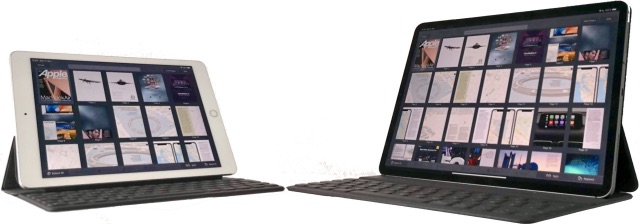
Where the larger screen makes a huge difference is when you have many items on screen or when you want to draw something with Pencil. In the first photo I have 10 pages plus 5 half pages on iPad Pro 9.7 vs 21 plus 7 on the iPad Pro 12.9. I am also using split screen view for multiple apps for the first time. The smaller iPad was always to constrained for this use. So far I have not included drag&drop between windows into my routine. I am still learning.
This feels like a paid placement on CNBC from a job skills company (but it's real news, so they wouldn't deceive is in this way, right?). It's based on a (sponsored) survey Freelancing in America 2018, released Wednesday, that says "freelancers put more value on skills training." I think it's true that the jobs of the future don't exist today, but the same could be said for any number of skills! Like, say, newsreader! The shift from degrees to competencies doesn't protect us from the future, and it's misleading to suggest that it does. The future of work won't be about degrees, sure, but it won't be about skills either. It will be about track record - what we have done, and (by inference from that) what we can do in the future.
As our civilization slowly falls apart over the coming decades, there are some technologies I will miss a lot more than others. Some of these are obvious — it’s now hard to imagine living without the Internet, running water, electric power, some life-saving drugs, and some almost indispensable appliances (fridge, laundry etc). With few possible exceptions, we’re going to have to learn to live without them all, since global economic collapse, the commensurate end of abundant, cheap, low-tech energy, and the massive migration that climate change will require, will utterly undermine the infrastructure, logistics and processes needed to keep these wonderful conveniences of modern life in production and in useful condition.
So I’ve started noticing and being grateful for these technologies, since I suspect future generations will see them slowly start to become unreliable or scarce, and, a few generations from now, our descendants will be mostly unaware they ever existed.
Here’s my top 10 technologies I’ll miss when they’re gone, beyond the obvious ones cited above. Thanks to their inventors and developers (almost always collective efforts, “building on the shoulders of giants”) for making my life easier, more joyful, and more comfortable. In no particular order:
The LED. A little technology that allows light in places that could never before afford it, reduces energy use by 85%, is more durable than what it replaces, and will soon power, and make lighter, all the monitors we use for so many purposes.
The digital camera and optical lenses. I am old enough to remember the mess and hassle of darkrooms, black and white photos, troublesome film, costly film development, and massive, clunky cameras. I appreciate how lenses can let us see what we could otherwise not: clear sight thanks to ever-more-sophisticated eyeglasses, and the marvels seen through incredibly inexpensive microscopes, binoculars and telescopes, and captured through zoom lenses.
Cotton and polyester fabrics. They provide astonishing warmth very inexpensively (robes and sleeping bags), versatile, care-free, no-iron clothing and other goods for every occasion, and are the “stuff” that most inexpensive soft toys are made from.
Wi-fi. Although still plagued by opportunistic lawsuits, this global protocol enables unprecedented collaboration, productivity virtually anywhere, and free telephony. What more could you ask for?
Detergents. Although they are not harmless, detergents are a simple invention that are less environmentally toxic than most cleaning chemicals, and the most effective cleaning ingredients ever invented.
Modern headset/earbud tech. Remember the tinny sound of transistor radios? The relatively simple but infinitely subtle technology of getting realistic sound to your ear is remarkable.
Books. Ancient tech, and an enormous consumer of finite resources, but still the most indispensable tool for learning. And then gift them to others!
Portable electric appliances. For tiny apartment kitchens (counter-top stoves, toaster ovens, kettles, coffee-makers, blenders, and yes, even microwave ovens), for emergency first aid (heating pads etc), and for unmatched pleasure (vibes etc) it’s hard to imagine how we ever did without these labour-saving devices.
Blogs. Maybe they’re socially obsolete, but having my own site with my own stuff organized as I like it and accessible forever has changed my life: Allowed me to think out loud and evolve my worldview, found me love, jobs, and my publisher, developed my writing skills, and serves as my auxiliary memory.
My treadmill desk. An extravagance, perhaps, but it’s the only exercise device I’ve ever kept using. I can do almost anything while exercising (so the tedium vanishes). To a substantial degree I owe my health to it. (Oops just thought of a #11:)
Flash memory. Up to a TB of durable storage for practically nothing. And no dependence on “the cloud”.
I’m sure I could think of others. But it’s more fun to think of the 10 worst technologies that I certainly won’t miss when they’re gone. Again in no particular order:
The cellphone. Dumbest invention ever. Incredibly expensive, tiny useless keyboard, tiny awkward annoying screen, outrageous monthly fees even without “roaming” charges, unreliable signals, rapid obsolescence, poor construction. Everything it does is done better by other, less expensive devices.
Bluetooth. Wi-fi but with a hopelessly limited range. Ridiculously unreliable. Devices that use it are generally shoddy. This century’s version of the walkie-talkie.
Private automobiles. Imagine the world we might be living in if this absurdly expensive invention had never come to pass, along with all the oil and land it has consumed, and all the pollution and time waste it has produced.
Mass media: TV, radio, newspapers — all the media that purport to inform and entertain but instead pander, propagandize and distract. What a monstrous waste of time, energy and human endeavour.
Money, and the banking industry: A grossly-overpaid, usurious industry that produces nothing of any value whatsoever, and through encouraging indebtedness creates massive misery, stress, dislocation and dysfunction. [Long rant omitted here]
QWERTY: And typing keyboards in general. Why is progress towards voice (and handwriting) recognition so slow that we still have to rely on this absurd 19th century invention for manual typewriters?
“Social” media: By which I mean media that pander to people and activities that are absolutely free of any original content. The cost of this utter waste of time, and the servers and machines and technologies and airtime needed to sustain it, and the psychological damage it causes, are incalculable. For what? So that people can tell others, who mostly don’t give a damn, what they like and don’t like, and what they’ve read that is probably incorrect, misunderstood, deliberately misleading and/or unactionable?
The mattress: Must be the consumer item with the most unjustified high markup (up to 900%) and the least real innovation of anything on the market. Air beds, water beds, memory foam — we spend a third of our lives on these things and this is the best they can do?
Heating systems: In affluent nations we’re living in bigger houses yet in smaller families than ever before. Most of the heat in our homes (and I presume, the “coolth” of air conditioners as well) is lost, wasted. Technology exists to essentially eliminate the need for heat or cooling, and to provide what is needed economically and sustainably, but almost no homes use it because it costs more up front. Insane.
“Widescreen”: As absurd as the 20th century’s “quadraphonic stereo”, this takes a bad idea (presenting all online media on a screen with landscape rather than the portrait orientation that we’ve used, sensibly, for books and other information media since they were invented), and makes it even worse. I give it ten years.
I’m sure I could add many technologies to this list too (eg email and “intellectual capital” might be contenders), but my purpose isn’t to rant or to get people charged up, it’s to reflect on my gratefulness for good technologies, and to remind myself not to waste time, money and energy on the bad ones.
Hope this has been fun for you to read, and inspires you to be grateful for some of the wonderful technologies that make our lives better, and to the brilliant minds that made them possible. We’ll miss them when they’re gone.
WebSummit is over and done with, at least until next year.
It was a busy week–I ended up spending a lot more time at WebSummit than originally planned for, which took its toll on my feet (as expected), but had a number of positive highlights that ranged from making new acquaintances to meeting old friends again.
It pains me, for instance, to realize that the power meter digit reader project I wrote about last March has essentially been dead for a year, and that the ramp-up back to where I was is going to take me at least a few evenings (which I don’t have, not until vacations swing by again).
So this weekend I started small: a few tweaks to my home automation setup (mostly cleanups and a little more testing, some of which will find its way into a follow-up post), automated a couple of my day-to-day tasks in Python on my iPad (Pythonista is amazing, all the more so when you tap into its Objective-C bridge) and started working through this site’s To Do list (which is still fairly extensive).
Metadata Is A Pain
One of the things I’ve been meaning to do (besides a proper blog archive) is add OpenGraph support to allow for nicer automated sharing in social media, which given the site’s plaintext back-end requires some extra parsing and indexing to take place (I need to figure out if there is a leading image, get its size and type info, etc., as well as figuring out a few extra things).
That is fine and good, but it also needs to be pushed up the stack until rendering occurs, and stored along the way in a SQLite database I use for indexing. Since I already had a simpler/legacy take on metadata, I’m refactoring it as I go along and removing unnecessary bits, so if the site breaks later in the week, then you’ll know there was something I didn’t account for in testing–but it’s going OK so far.
Down To The Metal
Since I spend too much time dealing with online stuff (including cloud infrastructure, DevOps flows and data munging), I’m looking at doing a few more hardware/IoT(ish) things for myself for the sheer fun of it, and after tossing around a few ideas I decided to go for a low-latency image processing trick that I want to try out on the Raspberry Pi.
It’s going to take time, of course, but hopefully I’ll have something to show after Christmas.
If you are looking for a Remembrance Day ceremony to go to tomorrow morn, the @fortyork one on the Garrison Common, a battlefield cemetery, is always beautiful & vivid. 10:45 pic.twitter.com/Wv1GfjGoYg
Spurred by a tweet from the best-shod man in Toronto, Shawn Micallef, instead of taking in Remembrance Day at Old City Hall like I have in past years here in Toronto, I took in the ceremony at Fort York. Little did I know that the historical military fortification would be open to the public before and afterwards.
I caught the parade of World War I recreationists as they made their way to the ceremony on the other side of the parking lot from the fort itself:
There were few people on the site main site before, so I got some snapshots of how it looked devoid of humanity:
The back door of the fort was open, so I wandered out to see what it looked like:
A WWI recreationist and his gas mask (in the pack on his chest):
The CN Tower was the backdrop for the ceremony held on the other side of the Fort York grounds:
A canon is pointed towards the Gardiner Expressway:
World War I never featured big in my Dutch education as the Netherlands stayed neutral, except for stories about the many refugees.
This however is an impressive project, at the centennial remembrance of the end of World War I. The Imperial War Museum has an image that shows sound registrations from around the time of the cease fire at 11:00 on November 11th 1918. It’s a ‘sound ranging’ image, a recording of sounds on photographic paper, which was used to determine the location of enemy guns. Together with Coda to Coda the IWM turned that image into a sound interpretation. So we can hear the minute around the actual cease fire. Put the volume up and listen a minute. It’s nothing short of amazing.
Of course taken on its own, as a single artefact, this is but a romantic notion of the end of war. As my friend Bryan Alexander extensively documents in his posting “When the guns stopped, but the future kept happening“, 11 November was hardly the end of violence across Europe.
Given that there’s a chance of a non-trivial amount of snow this Tuesday, I decided that it was time to pull the winter beater out from the back of the garage. It is a Norco Sub Zero I got back in 2013 that came complete with studded tires.
The fenders are definitely looking the worse for wear. Generally, a lot of the hardware that came with the bike was definitely not stainless. However, the frame itself is aluminum and is holding up really well.
It took a bit of using penetrating oil and grease to get this Japanese kickstand back in working order.
The chain is fine. I replaced it with a stainless one a while back and after wiping off the worst of the grime, a little coat of Chain-L and it is good to go.
Here you can see that I’m losing studs from the rear tire. This shows that the Kenda Klondikes are not as durable as the Schwalbe Winter Marathons I used on my former winter bike.
I’m a bit concerned about the rear drum brake sticking, but we’ll see how it goes.
Emily asks whether community experience or passion for the topic is more important when hiring community professionals.
Ideally, you want both. But when that’s not feasible, it depends upon the role.
The more the person has to engage directly with members, the more it helps to have a passion for the topic. At a junior level, you want people who can confidently answer questions which arise, initiate interesting discussions, connect naturally with people (and perhaps even be a known person in the field already).
At a more senior level, you want previous community experience. You want people up to level 3 and 4 on these benchmarks. You want people who have done tricky platform migrations, managed a community team, secured internal support, improved moderation systems, created dashboards, modeled variables etc…
Make sure you’re applying and recruiting for the right level.
Part 1 in the Functional architecture series. The Stratified Design, which I called “layered design” before, is a way of architecting your code as a series of layers of meaning. It’s a common way of organizing your code and structuring your application.
Transcript
Eric Normand: I want to talk a little bit more about stratified design. Hi, my name is Eric Normand, and these are my thoughts on functional programming. A few episodes ago, I explained something that I called layered design. I did a little bit more research about it.
It turns out it’s actually got a different name. It’s called stratified design. There’s a whole chapter on it in “Structure and Interpretation of Computer Programs.” Strata and layers, they mean the same thing. I just used the wrong term. I do want to talk more about it in more detail, and to really talk about it as an architectural pattern.
I talked about it in terms of organizing your code. As an architectural pattern, it’s useful from that perspective to talk about it. Just to recap really quickly, in stratified design, you start with your base language at the bottom. The stuff your language gives you. Maybe the standard library, the data structures, you’ve got functions, for loops, whatever you’ve got.
On top of that you build a layer of meaning. I don’t want to give an example yet, but I will. After that, you build another layer of meaning on top of that layer. You continue building layers of meaning until you’re at the layer of meaning where the solution to your problem is very clear and concise, and you can experiment with it at the right level of meaning and abstraction.
That’s stratified design. One thing that’ll you see in stratified design often is that, in a business context, you’re defining, say, at the bottom level, a very data model driven system. On top of that, you’re adding some business rules.
There’s probably more layers in between, where you have primitives that you then add on into combinations of those primitives until you have at the top of your strata, your layers. The top layer is dealing in business rules because that’s the stuff that changes the most. This strata idea also talks about where things change, the speed at which things change.
Notice the bottom layer is the language. That’s the thing that changes the slowest. Even if a language is getting released all the time, it’s not changing that much over time. Whereas your business rules, depending on the market conditions, depending on your business strategy, that could be changing all the time.
Then the stuff underneath the business rules is a little bit more stable because it needs to be more stable to build the business rules on top of. As you go down, things get more stable. This lets you gut check.
You might even be able to make metrics about this if you could figure out an automatically generated diagram from your code based on dependencies, how things change, and what layer it should be at. Like, “Ooh, this is weird. This thing is at a high layer, but changes slower than this other thing that it depends on, so maybe there’s something wrong there.” It would just highlight these code smells.
Structurally, another thing that happens is that your dependencies all point down. Otherwise, it’s not really a layer. They don’t point sideways. That’s another aspect of it. You could have two, say, modules at the same level of meaning, the same strata, but since they’re at the same strata, they have no dependencies between them. Something on top might depend on both of them.
There’s a directionality to the dependencies. There’s also a potential code smell in there, which is if you skip layers, meaning you start writing your business rules with the lowest level of language constructs when you really should have multiple layers in there.
This comes in even when you haven’t started with stratified design. It’s a code smell. Why am I using a for loop to determine the direction my business is going to take? You should be doing something higher-level. You shouldn’t be in there writing your business on assembly. You’re skipping too many levels.
Let me give an example that’s not code-related of this kind of stratified design. I like to cook. I’m not that good at it, but I like to cook. I like to cook from different cuisines. I like New Orleans cuisine, where I’m from. I also like Vietnamese cuisine, Chinese cuisine, Indian, French, Italian. I like all sorts of stuff.
I also like looking at what’s happening with a lot of modern cooking, which is breaking stuff down even further into chemicals. You start learning some chemistry. It turns out, if you start to map this out, you’ve got this base layer at the bottom. Let’s just call it chemistry.
You’re starting with proteins, lipids, heat, acids, and bases. All these chemistry items are at the bottom. These things change the least. Nothing’s going to change chemistry. On top of that, you add your basic techniques, let’s say.
This would be how to apply heat to something. We’re not talking about the something yet, but how to apply heat. The properties of your tool, your pan can transfer heat at a certain rate. You’re looking at this layer that’s built on chemistry. Heat transfer is a chemistry thing, but now you’re talking about a pan, which is decidedly not chemistry itself. It’s a layer on top of chemistry.
On top of that you might have a layer that talks about the preparation of ingredients. I’m not saying the ingredients themselves. That’s probably either a layer below it or in the same layer but an adjacent module.
This is stuff like chopping techniques, milling, boiling. Those kinds of things that are built out of these very basic techniques, like applying heat or cutting. We’re talking about chopping in one layer and then the next layer we’re talking about julienne.
It’s not just how to cut a very basic thing. It’s this other idea of the kind of shape that you’re trying to achieve out of your carrot. Then, on top of that, you’re going to have certain basic recipes, stuff like how to make a very basic sauce. On top of that you’re going to have your dishes.
I like to think of gumbo, because I cook gumbo, or jambalaya, or something like that. These are the dishes that are made out of these components. With a gumbo, you always start with a roux. A roux is a basic technique, because other dishes have roux in them as well. That’s really high-level.
You could go higher. You could start talking about how to prepare a whole meal. It depends on knowing how to prepare dishes. Your meal is like, “Well, I need an appetizer, and then the main course, and then a dessert.” You need dishes that fall into these categories. OK, I think you get the idea.
This is what I do when I’m programming, this is what functional programmers do, is they start to identify these layers. There’s this code smell that if you’re defining your jambalaya recipe in terms of chemistry, you’ve skipped layers. You can’t build up grains of rice from proteins, starches, and water. You’re not going to do that.
You’re not thinking about the chemistry in that way when you’re talking about jambalaya. You are thinking about it only one…You know the chemistry is there, but you’re usually only going one or two layers down. What this lets us do is build these things.
One, they’re understandable. Two, they’re capturing this notion of frequency of change, which is huge when you’re talking about architecture. Architecture is isolating changes that don’t need to be done together.
Here’s a really good example. You go to a different part of the world, you have a different cuisine. Chemistry is not going to change. Maybe the ingredients, you add some. A carrot is still a carrot. There’s new ingredients that are going to be added to the same…but you’re not changing how carrots works.
You’re not changing how cutting works. You’re not changing how your pan works. All those things are staying the same. At the top level, you are going to be changing stuff. Just a lot more churn in how things are defined. Then, of course, you’re probably going to throw out all the recipes and start with totally new recipes.
That’s how your codes should be structured as well. You should be making these layers, these strata of meaning, and identifying them so that you’re grouping them together in whatever is the appropriate way to group stuff in your language. That might be a module, or a library, or a namespace. It just depends on what you’re doing.
You also might get some help from your language because, in some languages, you can have circular dependencies. You’re going to enforce a certain direction to your dependencies, which is perfect.
This is part one of what I think will be a three-part series on functional architecture, so stay tuned. I’d love to hear examples of where you’ve used this stratified design. Like I said, I’m taking the name from Structure and Interpretation of Computer Programs, so it has some really nice pedigree. That’s my opinion. I’d love to hear from you.
I’m on LinkedIn. Just search for Eric Normand, Clojure, and you’ll find me. On Twitter, I’m @ericnormand. Follow me. Tweet at me. I love to get into discussions. You can take the discussions to email. I’m eric@lispcast.com. Be sure to subscribe and share this episode with your friends. All right, thank you so much. Bye.
The Urban Opus Society has completed membership agreements to join the Urban Technology Alliance (UTA), a new organization having a launch event on December 18th, 2018 at Keio University in Tokyo, Japan.
Urban Opus will be present at the launch and has committed to provide leadership in the development of data brokerage solutions enabling the harmonization open, corporate and citizen data streams.
UTA is a global non-profit organization providing city-scale testbeds from all around the world, to deploy, test and validate the latest smart city innovations. The UTA is providing trusted and neutral guidance to cities for their sustainable digital transformation, enabling them to face today’s economic, social and environmental challenges. The UTA is setting up a vibrant community including a complete smart city ecosystem composed of cities, industry, academy and non-profit organizations. UTA members will network, build partnerships, deploy and test concrete solutions in real-life environments and share best practice and success stories among members worldwide.
Craig Mod has a lot to say about iOS on iPad. Read the whole article. Some of his conclusions point you to why I am going in all the way:
Buy one of these new iPads. They’re seductive beyond reason. Buy it knowing well what its limitations may be. But knowing also that it will get better. That its engine is years ahead of its software. And in owning one you’ll be able to follow along as a contemporary operating system matures in real-time, beta-by-beta, before your very eyes. It’s not often we get to enjoy this.
For now, though, the iPad is still good for writing. Amazing for sketching. Reliable as a tank.
I'd heard about shadowy Russian influence campaigns and militaries fighting warfare with information. But the people I met there showed me there was another, very simple reason why people sent false and sensationalist news to Western audiences. It was for the money - they share it because we click on it.
Simple take-away: stay away from social media. It's a poison.
So, 100m or so people are doing things on PCs now that can't be done on tablets or smartphones. Some portion of those tasks will change and become possible on mobile, and some portion of them will remain restricted to PCs for a long time. But there are another 3bn people who were using PCs (but mostly sharing them) but who weren't doing any of those things with them, and are now doing on mobile almost all of the stuff that they actually did do on PCs, plus a lot more. And, there's another 2bn or so people whose first computer of any kind is or will be a smartphone. 'Creation on PC, consumption on mobile' seems like a singularly bad way to describe this: vastly more is being created on mobile now by vastly more people than was ever created on PCs.
I have seen this happen time and again. People who do absolutely everything on their iPhone and their iPad and who also struggled with their PCs.
Content authors want an easy-to-use page building experience; they want to create and design pages using drag-and-drop and WYSIWYG tools. For over a year the Drupal community has been working on a new Layout Builder, which is designed to bring this page building capability into Drupal core.
Drupal's upcoming Layout Builder is unique in offering a single, powerful visual design tool for the following three use cases:
Layouts for templated content. The creation of "layout templates" that will be used to layout all instances of a specific content type (e.g. blog posts, product pages).
Customizations to templated layouts. The ability to override these layout templates on a case-by-case basis (e.g. the ability to override the layout of a standardized product page)
Custom pages. The creation of custom, one-off landing pages not tied to a content type or structured content (e.g. a single "About us" page).
Let's look at all three use cases in more detail to explain why we think this is extremely useful!
Use case 1: Layouts for templated content
For large sites with significant amounts of content it is important that the same types of content have a similar appearance.
A commerce site selling hundreds of different gift baskets with flower arrangements should have a similar layout for all gift baskets. For customers, this provides a consistent experience when browsing the gift baskets, making them easier to compare. For content authors, the templated approach means they don't have to worry about the appearance and layout of each new gift basket they enter on the site. They can be sure that once they have entered the price, description, and uploaded an image of the item, it will look good to the end user and similar to all other gift baskets on the site.
Drupal 8's new Layout Builder allows a site creator to visually create a layout template that will be used for each item of the same content type (e.g. a "gift basket layout" for the "gift basket" content type). This is possible because the Layout Builder benefits from Drupal's powerful "structured content" capabilities.
Many of Drupal's competitors don't allow such a templated approach to be designed in the browser. Their browser-based page builders only allow you to create a design for an individual page. When you want to create a layout that applies to all pages of a specific content type, it is usually not possible without a developer.
Use case 2: Customizations to templated layouts
While having a uniform look for all products of a particular type has many advantages, sometimes you may want to display one or more products in a slightly (or dramatically) different way.
Perhaps a customer recorded a video of giving their loved one one of the gift baskets, and that video has recently gone viral (because somehow it involved a puppy). If you only want to update one of the gift baskets with a video, it may not make sense to add an optional "highlighted video" field to all gift baskets.
Drupal 8's Layout Builder offers the ability to customize templated layouts on a case per case basis. In the "viral, puppy, gift basket" video example, this would allow a content creator to rearrange the layout for just that one gift basket, and put the viral video directly below the product image. In addition, the Layout Builder would allow the site to revert the layout to match all other gift baskets once the world has moved on to the next puppy video.
Since most content management systems don't allow you to visually design a layout pattern for certain types of structured content, they of course can't allow for this type of customization.
Use case 3: Custom pages (with unstructured content)
Of course, not everything is templated, and content authors often need to create one-off pages like an "About us" page or the website's homepage.
In addition to visually designing layout templates for different types of content, Drupal 8's Layout Builder can also be used to create these dynamic one-off custom pages. A content author can start with a blank page, design a layout, and start adding blocks. These blocks can contain videos, maps, text, a hero image, or custom-built widgets (e.g. a Drupal View showing a list of the ten most popular gift baskets). Blocks can expose configuration options to the content author. For instance, a hero block with an image and text may offer a setting to align the text left, right, or center. These settings can be configured directly from a sidebar.
In many other systems content authors are able to use drag-and-drop WYSIWYG tools to design these one-off pages. This type of tool is used in many projects and services such as Squarespace and the new Gutenberg Editor for WordPress (now available for Drupal, too!).
On large sites, the free-form page creation is almost certainly going to be a scalability, maintenance and governance challenge.
For smaller sites where there may not be many pages or content authors, these dynamic free-form page builders may work well, and the unrestricted creative freedom they provide might be very compelling. However, on larger sites, when you have hundreds of pages or dozens of content creators, a templated approach is going to be preferred.
When will Drupal's new Layout Builder be ready?
Drupal 8's Layout Builder is still a beta level experimental module, with 25 known open issues to be addressed prior to becoming stable. We're on track to complete this in time for Drupal 8.7's release in May 2019. If you are interested in increasing the likelihood of that, you can find out how to help on the Layout Initiative homepage.
An important note on accessibility
Accessibility is one of Drupal's core tenets, and building software that everyone can use is part of our core values and principles. A key part of bringing Layout Builder functionality to a "stable" state for production use will be ensuring that it passes our accessibility gate (Level AA conformance with WCAG and ATAG). This holds for both the authoring tool itself, as well as the markup that it generates. We take our commitment to accessibility seriously.
Impact on contributed modules and existing sites
Currently there a few methods in the Drupal module ecosystem for creating templated layouts and landing pages, including the Panels and Panelizer combination. We are currently working on a migration path for Panels/Panelizer to the Layout Builder.
The Paragraphs module currently can be used to solve several kinds of content authoring use-cases, including the creation of custom landing pages. It is still being determined how Paragraphs will work with the Layout Builder and/or if the Layout Builder will be used to control the layout of Paragraphs.
Conclusion
Drupal's upcoming Layout Builder is unique in that it supports multiple different use cases; from templated layouts that can be applied to dozens or hundreds of pieces of structured content, to designing custom one-off pages with unstructured content. The Layout Builder is even more powerful when used in conjunction with Drupal's other out-of-the-box features such as revisioning, content moderation, and translations, but that is a topic for a future blog post.
Tues. 09.11.18 – The beauty of Venus and the new Moon setting behind Wheeler Ridge, Eastern Sierra Nevada Mountains, California. Photo by Ms. Jen from the Sherwin grade view point on the northbound Hwy. 395 with her Nikon D850 and a 50mm lens.
Wed. 10.17.18 – The beautiful golden leaved aspens at the delta where the Convict Creek meets Convict Lake. The light through the autumnal leaves was amazing in this space. Photo by Ms. Jen with her Nikon D850 with a 50mm lens.
This blog series is running about a week behind my actual work, giving me time to clean things up. The date the actual work was done is in the title, horizontal lines indicate when I stopped writing and started coding.
Fun Saturday nights lead to somewhat less fun Sunday mornings. Still going to try and make some progress on the collision detection problem, but definitely not firing on all cylinders.
I’ve managed to get most of a collision detection algorithm implemented, at least to the point of determining which polygons will collide and at what times.
The gist is:
Only work over convex polygons (I’ll handle this shortcoming later)
For each pair of polygons…
Treat the first polygon as stationary and increase or decrease the velocity of the second polygon so the same “relative motion” is happening
For each line segment in their polygon, determine it’s normal
For a line running along the vector (x,y) the normal is (-y, x)
Keep any normal that isn’t parallel to a normal I’ve already found
Two lines are parallel if their cross product is 0
Project each polygon in the pair onto each normal, producing two line segments per normal
This is just taking the dot product between the normal and the start and end point of each line segment, and keeping the min and max over the whole polygon.
Take those line segments, and determine if the one corresponding to the second polygon (the only one moving) is moving towards the other line segment
If not, they will never collide on that axis
If so, the distance divided by its velocity (projected onto the same axis) is the time to collision
The minimum time of collision on all axises, if any, is the time these two polygons will collide
I’ve now got both the time and the point of collision working. I’ve decided what I’m going to consider the point of collision is point halfway between the closest vertices and/or line segments of the involved polygons.
This boils down to:
I’m given two polygons that are “colliding”
For both polygons
Enumerate one of their vertices and the others line segments
Measure the distance between the found point and the vertex
Take all the vertices (and their paired points) with the smallest distance
There may be multiple!
If you have no vertices/points, then repeat the above but instead of measuring between vertices and line segments, compare only vertices
Average each set of points you found (one set is from the first polygon, one from the other) to create new points
Most of the time you’ll only have one, but if you’re in the case where two line segments are parallel and going to collide you’ll have more
The point of collision is the point halfway between these two average points
I’ve got some tests for these two separate algorithms covering collisions between different sized square, triangles, octagons, and pentagons. I have yet to stick the two system together into a generic “detect and resolve collisions”-pass, but I’m getting close.
Whelp, sticking them together revealed a real logic error. The algorithm I’ve implemented is reasoning about single axises, so I’m getting phantom collisions whenever two shapes overlap on a normal.
I’ve got some ideas on a fix, which I’ll get to exploring tomorrow.
Today, just in time for the holiday shopping season, the Firefox Test Pilot team is introducing Price Wise and Email Tabs — the latest experimental features designed to give users more choice and transparency when shopping online. These game-changing desktop tools are sure to make shopping a breeze with more options to save, share, track and shop. We’ve also made a few updates to the Test Pilot program itself to make it even easier to become a part of the growing Firefox users testing new features.
Price Wise – Track prices across major retailers and get notified when the price drops
Online comparison shopping is more popular than ever, but it’s often hard to know when to buy to get the best deal. With Firefox Price Wise, you can add products to your Price Watcher list and get a desktop notification automatically every time the price drops. Users can even click through directly from their list to purchase as soon as the price changes, making online shopping more affordable and efficient. The feature is currently only available in the U.S., and works with products from five major retailers: Best Buy, eBay, Amazon, Walmart, and The Home Depot. This list of retailers were among the top 10 visited by Firefox users and we’re working to expand to more retailers in the future.
Email Tabs – Save and share content seamlessly as you browse the web
While there are many tools to help users share and save links when browsing, research shows that most of us still rely on email to get the job done – a manual process that requires multiple steps and services. We think there’s a better way. With Email Tabs, you can select and send links to one or many open tabs all within Firefox in a few short steps, making it easier than ever to share your holiday gift list, Thanksgiving recipes or just about anything else.
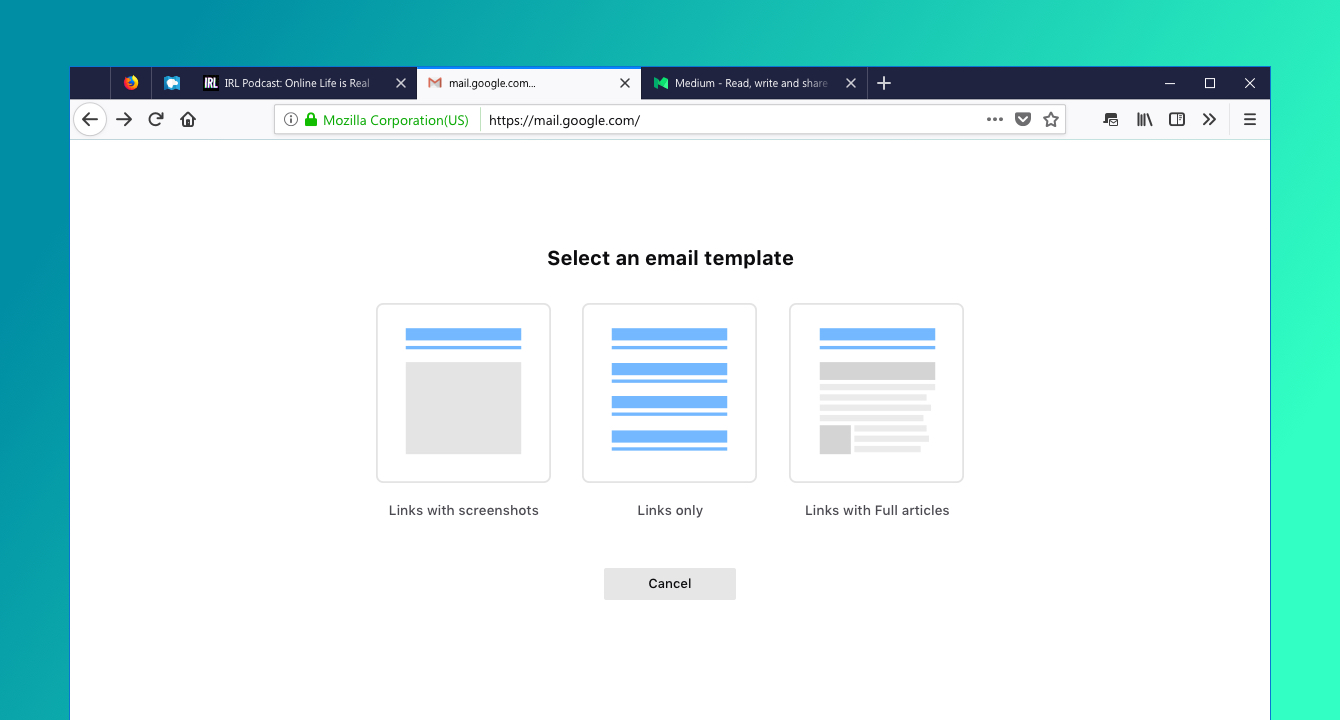
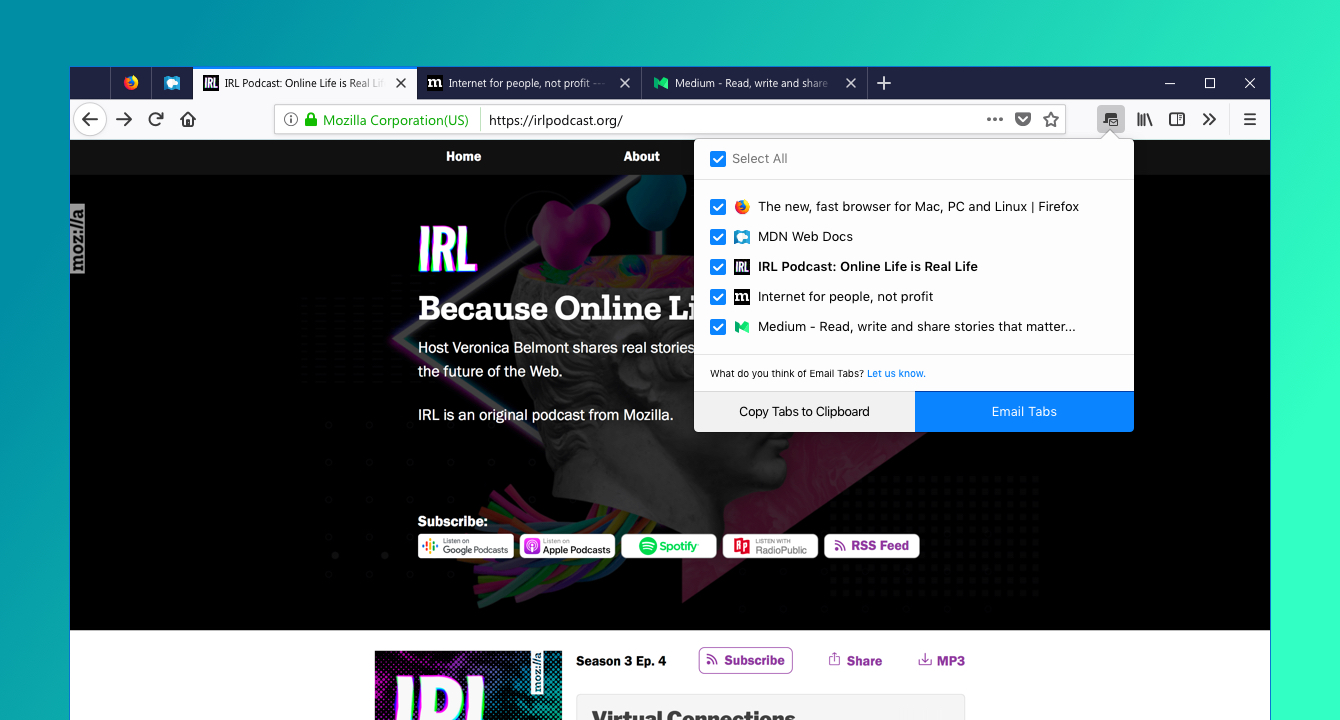
To start, click the Email Tabs icon at the top the browser, select the tabs you want and decide how much of the content you want to send – just the links, a screenshot preview or full text – then hit send and it’ll automatically be sent to your Gmail inbox.
Decide how you want to send whether its links, screenshot preview or full text
How about saving the links for future reference? Email Tabs also lets you copy multiple tabs to Clipboard for outside sharing. The feature only works with Gmail right now, but we’re working on adding more clients in the near future. This will be seamless if you’re logged into Gmail already, if not you can always log in once you’re prompted.
Copy one or multiple tabs to Clipboard
And of course, the best part of Price Wise and Email Tabs? With Firefox private browsing and content blocking features, you can shop online with extra protection against tracking this holiday season.
Improved Test Pilot for Users to Shape Firefox
We appreciate the thousands of Firefox users who have participated in the Test Pilot program since we started this journey. It’s their voice and impact that have motivated and inspired us to continue to develop features and services. Thanks to their support, we’re happy to share that several of our experiments are ready for graduation.
Send, which lets you upload and encrypt large files (up to 1GB) to share online, will be updated and unveiled later this year. Our Summer experiments, Firefox Color, which allows you to customize several different elements of your browser, including background texture, text, icons, the toolbar and highlights, and Side View, which allows you to view two different browser tabs in the same tab, within the same browser window, will graduate as standalone extensions.
We’re always working to improve our Test Pilot program to encourage Firefox users to participate and provide feedback on the latest Firefox features. With this version of Test Pilot, we’ve simplified the steps to make it easier for users to participate than before. To learn more about our revamped Test Pilot program and to help us test and evaluate a variety of potential Firefox tools, visit testpilot.firefox.com.
Technik, die früher dem Auto vorbehalten war, kommt verstärkt am Fahrrad zum Einsatz. Hersteller integrieren Komponenten wie Antiblockiersystem (ABS), Reifendrucksensoren oder Fernlicht in die Räder. Das führt dazu, dass in der Branche schon häufiger von Fahrzeugen und nicht mehr von Fahrrädern gesprochen wird.
Firmen, die sich zuvor hauptsächlich dem Auto widmeten, weiten ihr Geschäftsfeld aus. Bosch und Continental, die weltweit größten Automobilzulieferer, produzieren mittlerweile im großen Stil Motoren für den wachsenden Elektrofahrradmarkt. Auch Schaeffler experimentiert mit E-Bikes.
Viele der neuen Funktionen und Gimmicks haben mit dem E-Bike-Boom zu tun. Mehr Räder haben einen Akku an Bord. Der dient nicht nur dem Antrieb, sondern kann auch für andere Zwecke angezapft werden. Aber auch nicht elektrifizierte Fahrräder werden mit automatischen Schaltungen, taghellem Licht oder Abstandsradar zunehmend zum Hightechprodukt, wie der Überblick zeigt.
Beleuchtung: Autoscheinwerfer leuchten dank Xenon-, LED- oder Laserlicht viel heller als früher - ein ähnlicher Trend ist beim Fahrrad zu beobachten. Es gibt inzwischen sogar Fernlicht. Einmal aufgeblendet, erreicht beispielsweise der für S-Pedelecs zugelassene Topscheinwerfer des Herstellers Supernova bis zu 1600 Lumen Lichtstrom - mehr als mancher Halogenscheinwerfer am Auto.
Advertisement
Zudem hat der Scheinwerfer ein per Sensor gesteuertes Tagfahrlicht: "Der Wechsel zwischen Tagfahrlicht und Abblendlicht geschieht vollautomatisch, etwa wenn Sie in einen Tunnel fahren", sagt ein Supernova-Sprecher. Für seinen "kraftvollsten E-Bike-Scheinwerfer der Welt" verlangt Supernova satte 449 Euro. Im kommenden Frühjahr bringt auch Konkurrent Busch & Müller einen Scheinwerfer mit Fernlichtfunktion heraus. Aber auch die kräftigsten Akkuscheinwerfer fürs normale Fahrrad sind mittlerweile mit bis zu 1150 Lumen heller als alte Autofunzeln.
Beim Rücklicht tut sich ebenfalls etwas. Bisher reagierte die Bremslichtfunktion träge, wenn das Tempo abnimmt oder der Nabendynamo eine geringere Drehzahl meldet. Das erste "echte" Bremslicht von Supernova spricht dank eines elektrischen Signalgebers unvermittelt an. Angewiesen ist es ebenfalls auf die Energieversorgung aus dem S-Pedelec-Akku.
Automatikgetriebe: Beim Gangwechsel stehen die Zeichen auf Automatisierung. Das Hinterradnabengetriebe Enviolo (ehemals NuVinci) mit Planetengetriebe arbeitet stufenlos. Enviolo verspricht völlige Wartungsfreiheit. "Eine sinnvolle Entwicklung", findet Stephan Behrendt, Technikreferent beim Allgemeinen Deutschen Fahrrad Club (ADFC): "In Verbindung mit einem E-Bike-Mittelmotor können Sie eine Trittfrequenz festlegen - diese wird dann konstant gehalten."
Auch Rohloff hat eine teilautomatische Schaltung im Angebot. Dazu elektrifizierte der deutsche Hersteller seine 14-Gang-Nabe. Nun kann der Radler nicht nur rasch elektrisch die Übersetzung ändern, sondern auch einen Anfahrtsgang bestimmen. In diesen wechselt die Schaltung, sobald das Fahrrad zum Stehen kommt - zum Beispiel an der Ampel.
Auch Pinion, ein Produzent hochwertiger Tretlagerschaltungen, hat sich in der Pkw-Industrie etwas abgeguckt: Die Entwickler und Firmengründer lernten sich vor mehr als zehn Jahren bei Porsche kennen. Sie dachten gemeinsam darüber nach, wie sich ein Autogetriebe verkleinern lässt, um es fürs Fahrrad brauchbar zu machen. Herausgekommen ist ein Stirnradgetriebe, das linear schaltet - Gangüberschneidungen wie bei Kettenschaltungen mit Umwerfer gibt es nicht mehr.
Antiblockiersystem: ABS war erstmals im Jahr 1966 zu haben - im britischen Sportauto Jensen FF. Seit 2004 ist die Technologie in Autos Standard. Jetzt gibt es ABS auch fürs Fahrrad - von Bosch speziell für E-Bikes. "Beim Vorderrad-ABS überwachen Raddrehzahlsensoren die Geschwindigkeit beider Räder", erläutert Claus Fleischer, Geschäftsleiter in der E-Bike-Sparte. Das System soll Überschläge verhindern, wenn der Fahrer vorn zu heftig bremst. Sobald das Vorderrad zu blockieren droht, regelt das ABS den Bremsdruck schneller als jeder Fahrer.
Airbag: Wie einen Schal um den Hals tragen Radler den Fahrrad-Airbag der schwedischen Firma Hövding. Bei einem Aufprall entfaltet sich der Luftsack in Sekundenbruchteilen und umschließt schützend den Kopf des Radlers.
Abstandsradar: Garmin bietet einen Abstandsradar, der an die Sattelstütze passt. Das Gerät erkennt Autos im Rücken des Radlers bis zu einer Entfernung von 140 Metern. Je näher ein Fahrzeug kommt, desto heller strahlt die Radareinheit Licht nach hinten - sie fungiert auch als Rückleuchte. Gleichzeitig warnt das System den Radler optisch und akustisch.
Head-up-Display: Mit dem USEE hat die Firma Momes ein Head-up-Display vorgestellt. Das knapp 20 Gramm leichte Teil wird am Fahrradhelm montiert. Im Sichtfeld des Radlers zeigt es Navi-, Fahr- oder Fitnessdaten an. So müssen Radler den Blick seltener von der Fahrbahn abwenden. Kostenpunkt: 129 Euro - plus Helm, der dafür vorgerüstet sein muss.
Reifendruckkontrollsystem: Seit 2014 ist die Technik in neuen Autos Pflicht, nun erhält sie auch beim Fahrrad Einzug. So gibt es jetzt den "Tyrewiz". Das münzgroße Bauteil der US-Marke Quarq fungiert am Ventil als Luftdrucksensor. Von dort funkt es permanent Messdaten an Fahrradcomputer, Smartwatch oder Smartphone, so lange die Batterie hält - 300 Stunden sind versprochen. "Das ist etwas für Nerds", räumt Fahrradtechnikexperte David Koßmann ein. Greift der Radler dank des 259 Euro teuren Geräts häufiger zur Pumpe, verringert sich der Verschleiß am Reifen, die Kurvenfahrt wird sicherer, und das Fahren vergeudet weniger Energie, zählt ADFC-Experte Stephan Behrendt die Vorteile regelmäßigen Aufpumpens auf.
Fahrwerk: Auch eine Art adaptive Federung gibt es am Fahrrad schon. Spezialist Rock Shox hat vor einigen Jahren vorgelegt, nun bringt Konkurrent Fox aus Kalifornien für 2019 das System Live Valve für Mountainbikes heraus, ein elektronisches Fahrwerk der Extraklasse. Sensoren an Frontgabel und Heckschwinge nehmen Schläge wahr, die eine Software verarbeitet und das Fahrwerk in Sekundenbruchteilen einstellt. Ein elektromagnetisches Ventil kontrolliere den Ölfluss zwischen den Kammern im Dämpfer, erläutert Koßmann. So bereitet der Sensor an der Gabel den Hinterbau auf Unebenheiten vor. Selbst Sprünge erkennen die Sensoren und öffnen dann das Ventil für maximale Federwege bei der Landung. Der Technologietransfer von vier auf zwei Räder bedeutet beim Fahrwerk einen besonders gepfefferten Aufpreis. So wird allein das neue Rock-Shox-Fahrwerk 2000 Euro kosten.
Strom fürs Smartphone: Die Stromversorgung ist zu einem großen Wunsch der Radler geworden - auch wenn sie kein Pedelec fahren, und nur ein Smartphone laden wollen, das sie wie ein Navi im Auto als Wegweiser am Lenker nutzen. Fahrradhersteller Tout Terrain zum Beispiel montiert eine USB-Buchse oberhalb des Steuerrohres zentral am Lenker. Sie speist sich aus dem Nabendynamo. Auch Nachrüstlösungen sind für rund 60 Euro am Markt - zur Abwechslung fast mal ein Schnäppchen.
Zubehör als Kostenfalle?
Die neuen Systeme sind vielfach teuer - doch Radfahrer sind generell bereit, mehr Geld auf den Tisch zu legen. Der Durchschnittspreis für ein neues Fahrrad oder Pedelec ist von durchschnittlich 513 Euro im Jahr 2012 auf 698 Euro im vergangenen Jahr gestiegen, hat der Zweirad-Industrie-Verband ermittelt. In diesem Anstieg spiegelt sich neben teureren Komponenten auch der Boom der teureren E-Bikes wieder.
Was technikverliebte Radler jedoch bedenken müssen: Elektronische Komponenten seien anfällig und vertrügen Witterungseinflüsse weit weniger als nur Rahmen, Lenker und Reifen - was Reparaturen wahrscheinlicher mache, sagt ADFC-Mann Behrendt. "Je mehr dran ist, desto mehr kann auch etwas kaputt gehen." Noch eine Parallele zum Auto.
The U.S. has its fiscal stimulus. The Canadian economy? Well, it has its human stimulus.
The biggest population increase in six decades, driven by international migration, is one reason the Bank of Canada has been able to match the Federal Reserve hike-for-hike since June 2017 -- making the two easily the most hawkish central banks in the Group of Seven. In its latest increase Wednesday, the Ottawa-based central bank highlighted how the surge has bolstered consumption and housing activity.
“Labor income is being boosted by the larger population,” the Bank of Canada said in a report Wednesday that accompanied its decision to increase borrowing costs for a third time this year, keeping pace with the Fed’s three moves.
Under Prime Minister Justin Trudeau, Canada’s population has jumped by 1.4 percent over the past year, double the U.S. pace, driven by a surge in non-permanent residents like students and higher immigration levels.
“We’ve called it the ‘human stimulus,’” Brett House, deputy chief economist at the Bank of Nova Scotia, said in a phone interview.
Housing Patterns
Not only does more people equal more demand in the short term, House said, but these highly-skilled human imports have the ability to boost potential growth going forward. As an added bonus, the pattern of where the new arrivals end up helps decrease the odds of a destabilizing bust in home prices in major metropolitan areas.
“Immigrants also tend to settle in the handful of largest cities, especially Toronto and Vancouver,” House said. “That mitigates the risk of a huge housing correction because of persistent demand coming in.”
All this is helping Canada’s economy keep up with a U.S. boom that’s being juiced by President Donald Trump’s tax cuts -- the two countries are the fastest growing in the G-7 -- and allowing their monetary policies to remain in sync. Indeed, traders anticipate this united tightening will continue, pricing in roughly the same number of hikes from each central bank in 2019.
Canada actually gets the benefit of both population growth and U.S. stimulus. Positive spillovers from the American fiscal boost and the near-completion of a new trade agreement help fortify the outlook for Canadian exports and business investment, House said.
Scotiabank expects the Bank of Canada will hike rates to 3 percent by the first quarter of 2020, at which point it will have narrowed the gap between its policy rate and the Federal Reserve’s to just 25 basis points.
Quality Arrivals
Stefane Marion, chief economist at National Bank of Canada, said it’s not just the sheer number of people entering Canada, but also the quality of immigrants the country has been able to attract: younger, more educated people who help drive household formation and contribute to the economy’s resiliency.
“Of all the OECD economies, Canada has the most aggressive immigration policy that brings in work-ready immigrants,’’ he said. “We didn’t get fiscal stimulus on the same scale, but we’re still benefiting from the multiplier effect of the type of people we’re able to get from overseas.’’
To be sure, the larger population may be no panacea in the Bank of Canada’s quest to return rates to a neutral stance of between 2.5 percent and 3.5 percent. For example, there’s nothing they could do about an uncertain global growth backdrop that may force Governor Stephen Poloz to remain cautious. And new immigrants can’t relieve the existing debt burden of Canadian households, a factor that may be prove the single biggest reason for the northern central bank to lag behind the Fed.
“Canada is not at the same point in the credit cycle, tightening cycle, or housing cycle as the U.S., and the Bank of Canada isn’t going to be able to hike as much as the Fed,” said Frances Donald, head of macro strategy at Manulife Asset Management.
The acceleration of Canada’s population, though, will help to offset the impact of an aging workforce at a time when companies have been complaining about labor shortages.
“Since the financial crisis, we’ve seen fertility rates slide, but immigration has been skyrocketing and that’s driving population growth and growth in the labor force,” said Randall Bartlett, chief economist at the Institute of Fiscal Studies and Democracy. “It’s nice to see the Bank of Canada focusing on these structural factors that are growth-enhancing over the long term.”
"I have no intention of ever using a German passport."
Congrats, even now you feel the need to reaffirm how you are not Germany, or shall we say, an EU citizen.
Why did Britain vote BREXIT? Look into the mirror. There's your answer.
You are a good example of a good English man: You take what benefits, you reject what may give you a negative feedback. Well done, and very Guardian of you.
Eighty years ago, on the night of 9 November 1938, tens of thousands of German Jews were arrested in a nationwide pogrom that became known as Kristallnacht, the Night of Broken Glass, because of the thousands of windows that were shattered in Jewish-owned shops, businesses, homes and synagogues.
My father and grandfather went into hiding the following day, to escape arrest. Five months later, in April 1939, my father left Germany and sought refuge in Britain. His parents escaped a year later and fled to Portugal.
Last week my son, daughter, brother and I went to the German embassy in London to pick up our certificates of German naturalisation. We are now German citizens. (We remain, of course, UK citizens as well, and I have no intention of ever using a German passport.)
My father died last year at the age of 98 but he knew that we had applied for naturalisation, and understood our reasons. He could have applied as well but saw little point. Having served in a top-secret unit of British military intelligence during the second world war, and having lived in the UK all his adult life, he was every inch a proud and loyal British citizen.
He lost his German citizenship in 1941, when the Nazis introduced a decree that stripped any German Jew living outside Germany of their citizenship. However, once the Nazis had been defeated, new legislation enabled any former German citizens who had been deprived of it on political, racial, or religious grounds, as well as their descendants, to apply to have citizenship restored. Hence our trip to the embassy.
But if I don’t intend to make use of it, why did I bother? First, because after the Brexit referendum it was important to show that I retained a deep attachment to my European identity. I have lived and worked in France, Spain and Italy, and I resented Theresa May’s saying to the Conservative party conference two years ago: “If you believe you’re a citizen of the world, you’re a citizen of nowhere.” Second, because one day my son or daughter might want to live and work in the EU. Until the Brexit referendum they had always assumed that they would have that right. After March, however, they are unlikely to retain it if they are no longer citizens of an EU member state. So for them, it is entirely possible that German citizenship could be of real benefit.
But third, how better to demonstrate – for my own satisfaction if not for anyone else’s – that the Nazis’ genocidal project utterly and totally failed. If postwar Germany, which has so impressively confronted the full horror of its own history, enables us to undo at least a tiny part of the immense harm done to our forebears, then it would surely be ungenerous to refuse the offer of an outstretched hand.
As it happens, my family marks another anniversary this month. In November 1941, 77 years ago, my maternal grandmother, Ilse Cohn, was deported to Lithuania from her hometown of Breslau (now Wrocław in Poland), and murdered by a Nazi death squad in Kaunas. My mother, Ilse’s only child, had escaped to England barely a month before the outbreak of war, but Ilse’s application to come with her had been refused because, at the age of 41, she was considered too old.
I have visited Kaunas, and I have stood at the edge of the killing field where my grandmother and 2,000 other Jews, including 150 children, were murdered on the same day. The men who shot them were probably Lithuanian, not German – and the commander of the death squad, SS colonel Karl Jäger, was Swiss. (He escaped arrest at the end of the war and lived quietly as a farm worker until he was discovered in 1959. He killed himself while awaiting trial.)
Both my parents always insisted that they felt a deep sense of gratitude to Britain for having taken them in when their lives were in danger. In 1989, on the 50th anniversary of their arrival here, they threw a “thank you” party for all their friends, and my father’s speech moved several guests to tears. In his memoir he wrote: “I call Great Britain my ‘home country’, as I feel at home here, and I am glad this is where I lived my life, rather than anywhere else.”
I feel the same. I could have chosen to live in many different countries, but in all my travels during a long career as a journalist and broadcaster – nearly 90 countries and still counting – I have never found anywhere I would rather call home. So in no sense do I regard my newly-acquired German citizenship as a replacement for my British identity. It is an addition, and an explicit repudiation of the idea that one’s identity must be rigidly confined to national boundaries.
I was born and brought up in Britain, as a British citizen. I am not blind to its faults, nor do I deny its many virtues. But ask me how I identify myself and I will reply with a long list: I’m British, I’m European, I’m a Londoner, I’m a male, I’m a journalist, I’m a father and a husband.
Less than two weeks before I acquired my German citizenship, a gunman in Pittsburgh murdered 11 Jews in a synagogue. The following day I received an email from a woman I met four years ago on a visit to Germany with my father.
She wrote from Magdeburg, an ancient university town where some of my father’s family had lived, and from where three of his cousins were deported to Theresienstadt and Auschwitz. This is what she said: “It is 80 years since the synagogues were attacked here, and we all know that it was the prelude to millions of murders. Since 1945, and every year since then, when we remember what happened, we realise how important it is to fight back from the beginning.”
Robin Lustig is a journalist and broadcaster. He presented The World Tonight on BBC Radio 4 between 1989 and 2012.
Thoughtful essay by Craig Mod on the limitations and virtues of working from an iPad Pro. This point about breaking the flow of getting work done while moving across apps is extremely relatable:
Switching contexts is also cumbersome. If you’re researching in a browser and frequently jumping back and forth between, say, (the actually quite wonderful) Notes.app and Safari, you’ll sometimes find your cursor position lost. The Notes.app document you were just editing fully occasionally resetting to the top of itself. For a long document, this is infuriating and makes every CMD-Tab feel dangerous. It doesn’t always happen, the behavior is unpredictable, making things worse. This interface “brittleness” makes you feel like you’re using an OS in the wrong way.
In other writing apps, the page position might remain after a CMD-Tab, but cursor position is lost. Leading to a frustrating circus of: CMD-Tab, start typing, realize nothing is happening, tap on screen, cursor inserts to wrong position, long-press on screen to get more precise input, move cursor to where it needs to be, start typing. This murders flow. It creates a cost to switching contexts that simply doesn’t exist on the macOS, and shouldn’t exist on any modern computing device.
This stuff has been broken on iPad for years (essentially since 2015, when Split View was introduced in iOS 9). Don't even get me started on figuring out which app in a Split View pair is the "active" one receiving keyboard input (and therefore listening for keyboard shortcuts). These small interaction annoyances might have been okay three years ago as we all sort of imagined Apple was just getting started with bringing serious multitasking to iPad; now that we've reached this generation of iPad Pros, they're just downright inexcusable.
After my kitchen stereo project, I’d been thinking about the next stage in my multi-room, RaspberryPi-based audio setup: The Living Room! I had, in a box, unused for probably ten years, an old NAD C272 stereo amplifier. A pair of Paradigm Atom bookshelf speakers were gathering dust down in the basement that used to belong […]
On last week's episode of Connected, I mentioned having heard from a couple of MacStories readers who work at different Broadway production companies, who told me they're increasingly switching their workflows to be portable and iPad-only. Here's Samantha Murphy Kelly, writing for CNN (via David L. Jones):
Several shows, including Kinky Boots and Pretty Woman: The Musical, are shifting to a paperless system that packs the script, lyrics, videos, and costume and prop notes, into one spot for the director, crew and cast members.
The productions are leaning on an app from startup ProductionPro, which is already used at companies such as Walt Disney Studios to help produce film and TV shows.
During a recent rehearsal of Pretty Woman: The Musical attended by a handful of reporters, production stage manager Thomas Recktenwald ran lines with three cast members subbing in for an evening performance. Swiping through the ProductionPro app on an iPad Pro, Recktenwald showed off recent changes made to the script. It had notes scribbled into the margins via an Apple Pencil, and he tapped his way through videos that highlight blocking, broken down scene by scene.
Also interesting: ProductionPro can be tried for free, but unlocking the complete feature set (which includes collaboration and bigger file sizes) requires a $19.99/month subscription.




















 SPIEGEL ONLINE - Schlagzeilen.


 The Guardian:
 Uploads from Michael Kalus.



 NASAJuno on Twitter.
 NASAJuno
on Thursday, November 8th, 2018 9:35pm
NASAJuno
on Thursday, November 8th, 2018 9:35pm