Shared posts

11 Dec 04:03

How promoting a culture of fun helps Vans create breakthrough ideas

by Liz Armistead
Photo of Nick Street, Head of Global Marketing Strategy at Vans
Nick Street, Head of Global Marketing Strategy at Vans

Earlier this year, we traveled to The Gathering in Banff, Canada to meet with marketing leaders from the world’s most-coveted brands and learn how they guided their companies to cult status. While we were there, we had a chance to chat with Nick Street, Head of Global Marketing Strategy at Vans. Here’s how he helps support ideas from his internal team, rather than outsourcing to creative agencies.

Vans has been around for over 50 years. Could you tell us some of the high points in the timeline of your brand?

The brand started in 1966 when Paul Van Doren moved his family from the East Coast to Southern California to start the Van Doren Rubber Company. It was a physical store with a factory in the back where he made custom shoes for consumers. It was then that Paul decided that a direct model was the way to go and it positioned the company as one of the first direct-to-consumer stores back then.

From there on, Vans basically continued to evolve. As the surfers and the skateboarders adopted the brand, we adopted them. 52 years later, we’re still in the business of supporting action sports, but have also branched out to some of the other cultures like street culture, art and music.

“We no longer sponsor events in a traditional sense. We tend to go out and create our own experiences or support creative communities in a partnership.”—Nick Street, Vice President, Global Integrated Marketing at Vans

How did Vans decide to get into storydoing, and what do some of those programs look like?

What’s known as experiential marketing today has always been a core part of what Vans has been doing. When you’re supporting skateboarding and surfing, those sports live in experiences. We were always a cultural advocate for those sports and providing platforms for the athletes to be able to do what they needed to do and express themselves. It has never been about a marketing strategy but rather a grassroots approach to do hand-to-hand marketing from the beginning.

As Vans grew up with grassroots, it’s one of our core competencies. While we ‘sponsor’ less events today than before, we are now more focused on going out and creating those events ourselves. One example is the Vans Park Series we launched two years ago and was created by us as a brand, not an agency. It was the people within Vans who came up with the idea. Today, the Park platform has grown to such a level that it is one of the two disciplines of skateboarding that will be at the Olympics.

Your roots were in the skateboard culture, then you branched out into snowboarding. Now you’re the number one snowboarding brand. How did that transition happen?

It really is a natural evolution and can be tied to the history of Vans. We went from surf, to skateboarding, and then snowboarding was a sport that came next. Not to mention, BMX is another example of a sport we’ve been involved with pretty much from the beginning.

How can you tell when your grassroots efforts are working?

For us, it’s really about the engagement and how deeply are we connected with our consumers. For example, we’re liked on social media, which is great for brand awareness, but what we care about is the engagement that we’re driving with events offline, in the real world, and the experience that the consumer is having with the content that’s coming out of all those platforms.

“We’re not a brand that uses many external agencies. The ideas that you’re seeing in our brand platforms were all created in-house.”

What are some of the things you’re doing to foster collaboration on your team?

For us, it starts with talent first and foremost. The ideas that you’re seeing in our brand platforms were all created in-house. They’re not a pitched idea that we bought into. They were ideas that were born out of the people that work at the brand, and the athletes, the ambassadors that work with us and engage in the brand. Listening to what those people have to say and allowing those ideas to happen in a small way—because you don’t know how big an idea can be—is what we found really works for us. If the idea is good, you have the ability to start somewhere with that, then we will support it.

For us, having the right talent that is culturally connected has been a big success factor for us as a brand over the years—we’ve always had the right people that have been stewards of the brand and the cultures we are supporting.

“When we have global events, you’ll see the entire team having a role… It’s really about fostering collaboration beyond just the job title that you have.”

Speaking of the global aspect of your role and having teams in different markets, what are some of the things you do to promote teamwork across offices, across time zones?

We meet a lot, we talk a lot but we also have a lot of fun together, especially when we are hosting an event. For example, when Vans is activating a global event, you’ll see the entire team there having a role.

If we’re running a big event, you might be in digital marketing, but you’re looking after an area as a steward, and being a part of running that event. It’s trying to be as inclusive as we can with the platforms and about fostering collaboration beyond just the job title that you have.

I love that idea of having fun together being the key to what makes collaboration work well. What’s your favorite example of a collaboration when your team was really in flow?

There is never a day when that doesn’t happen. We are so hands-on as a brand. The word DIY really is true for Vans. We will jump from having to figure out how to run an event and order enough toilets for an event or get a permit, to having to produce strategic presentations. People are really working very much multi-dimensionally and they’re very multi-faceted in what they do.

For more ideas on keeping your team in flow, download our tips guide, From Friction to Flow.

Banner for Friction to Flow eBook

11 Dec 04:03

Process and Ritual

by Jim

ring of fireWhile there’s no obligation to explain your process to anyone, working it out for yourself does matter. There’s an observation from Aldo Leopold that’s pertinent:

The last word in ignorance is the man who says of an animal or plant, “What good is it?” If the land mechanism as a whole is good, then every part is good, whether we understand it or not. If the biota, in the course of aeons, has built something we like but do not understand, then who but a fool would discard seemingly useless parts? To keep every cog and wheel is the first precaution of intelligent tinkering.

In my previous post, I spoke about the broad spine of my process. There are aspects that feel important although I’ve yet to fully understand their fit and there are other elements whose purpose escapes me but I’m reluctant to set them aside. Learning, for example, appears in multiple non-obvious ways. I allocate substantial amounts of time to reading, of course; the world moves too quickly to rely simply on the accumulation of experience. I also try to have some topic I’m learning that is new to me; as a teacher, I want to always know what it feels like not to know something.

My writing practices have evolved over the years. I’ve gradually become more comfortable with letting writing evolve. When I wrote my first book, Ernst & Young provided us with an editor to work with us as we developed the manuscript. One day, John met me in my office. As I handed him the draft of my most recent chapter, I had to take a call from a client. As I spoke with my client, I was puzzled as John flipped past the first three pages and began reading the draft at the top of page four. When the call finished, I naturally asked John why. He gently explained that he had learned that I had a habit of clearing my throat for several pages and burying the lede; page four turned out to be a fairly predictable first place to look. I’ve gotten better at discovering my lede without outside assistance and putting it where I think it belongs intentionally.

Some find writing by hand a useful element of their process; my handwriting is both too slow and too illegible to help in that regard. What I have learned, however, is that it is valuable to capture snippets of ideas and phrasing as they occur to me. Technology makes that a more reliable process. What warrants further improvement is moving from snippet to finished product.

One practice that has helped at the outset of new projects is to write a “memo to self” that outlines a storyline of the effort as a whole. This is something other than a project plan. A project plan focuses on the sequence of tasks; the storyline is an attempt to find the intellectual thread that will connect facts, insights, and conclusions into a path forward.

I can’t necessarily explain why this works. But I treat it as a form of ritual. Whether you understand the ritual doesn’t matter; what’s important is that you commit to the practice. The open question is how to make these elements more visible to the people I am working with.

The post Process and Ritual appeared first on McGee's Musings.

11 Dec 04:01

Interview on Gutenberg and Future of WordPress

by Matt

Yesterday I was able to have a great conversation with Adam from WP Crafter, a popular Youtube channel with over five million views. Adam said it was his first interview but you can’t tell, we had an excellent conversation that covered Gutenberg, the 5.0 release, why WordPress has done well so far, and what’s coming in the future. If you’d like more context than text or tweets can give for what’s happening in WordPress today, check it out.

Of course Friday and Saturday are WordCamp US, which returns to Nashville this year. Everything will be live-streamed for free, including my State of the Word presentation on Saturday, you just need to pick up a free streaming ticket.

11 Dec 04:01

So Basic It’s Not Even Funny

Laura K. Curtis writes about book bloggers and lists a whole bunch you might want to subscribe to:

There are fewer book bloggers around now than when I started, but I’d like to encourage people to visit them, especially since you are more apt to find less well-known books by looking at blogs, books you might really enjoy, but might otherwise never find.

“Who has time to cruise all these sites?!” I hear you cry.

“No one,” I answer. “That’s why there are feed readers.”

What delighted me especially was this line: “It’s NetNewsWire for Mac and it’s so basic it’s not even funny.”

And I — earnestly — love this, since it describes my design and development aesthetic so perfectly. So basic it’s not even funny. I might even ask her if I can quote her on the NetNewsWire website. (Update: I did ask.)

* * *

I’ve always been a minimalist, but when I was younger I’d temper that — sometimes extremely (remember the releases of Glassboard with a wood grain background) — because I was afraid my intended audience wouldn’t like it. I was afraid I was too extreme.

I don’t know what the difference is now, but I am completely unafraid to be the designer and coder I am. Or, as a bit of advice I got early in my career put it: be the freak you are.

Maybe just because I’m older? Maybe tastes in general have shifted that way a little? Dunno. But I’m sure glad I got here.

So basic it’s not even funny!

* * *

Yes, I’m aware of the modern use of basic to mean something rather judgmental. I plainly don’t give a fig. (And I don’t think Laura meant it that way.)

11 Dec 04:00

Belkin Launches Wireless Charging Dock for iPhone and Apple Watch, USB-C to HDMI Adapter for Mac and iPad Pro

by Federico Viticci

In addition to Apple's clear case for the iPhone XR and 18W USB-C adapter, Apple online stores in Europe started selling Belkin's highly anticipated Boost Up dual wireless charging dock and USB-C to HDMI adapter earlier today.

The Boost Up is Belkin's latest take on an integrated charging dock that allows users to simultaneously charge an iPhone and Apple Watch on a single charging station. Unlike the old Belkin Valet dock, which was based on Lightning, the Boost Up is entirely designed around wireless charging and supports the Qi charging technology with up to 7.5W of power delivery – what Apple refers to as fast wireless charging for iPhones.

The Boost Up, which is available in black or white, doesn't unfortunately fulfill the same promise of Apple's AirPower: the iPhone and Apple Watch sit on two separate charging pads, with the Watch one being magnetic and featuring an angle that supports the device's Nightstand mode. However, unlike Apple's AirPower, Belkin's Boost Up actually exists and can be purchased today.

The Boost Up also comes with an additional 5W USB-A port in the back of the dock, which Belkin advertises as being ideal for charging AirPods, Beats headphones, or other accessories from a single station. Belkin's wireless charging mats are compatible with cases up to 3mm thick and they're certified to charge iPhones and other Qi devices at 7.5W. The Belkin Boost Up is available exclusively at Apple stores at £139.95/€159.95 starting today.

Today's second Belkin product release is one I have been particularly looking forward to as it extends the new iPad Pro's capabilities in ways no other third-party adapter can yet. Previously announced on October 30, soon after Apple's iPad Pro event, Belkin's new USB-C to HDMI adapter is, to my knowledge, the only one to support 4K output at 60Hz, HDR video, and HDCP 2.2 to stream protected content from Netflix and iTunes.

The product page on Apple's website lists compatibility with modern Macs and the third-generation iPad Pro, which is equipped with a USB-C port supporting the USB 3.1 Gen. 2 spec. An interesting difference worth noting between Apple's website and Belkin's original press release is that while Belkin's newsroom specifically mentioned Dolby Vision support, the listing on the Apple online store simply says "HDR video". Given that both HDR10 and Dolby Vision movies are available on the iTunes Store and considering what Belkin wrote in their original announcement, it's safe to assume the adapter supports both HDR10 and Dolby Vision, but I'll make sure to personally test this feature as soon as possible.

USB-C to HDMI adapters with support for 4K @ 60Hz and HDCP 2.2 (that weren't externally-powered docks) were already hard to find before the iPad Pro, but Belkin has gone beyond that by offering support for HDR video playback and iOS/macOS integration in what looks like a relatively compact package. These features don't come cheap though: the device is available at £49.95/€59.95, more than you'd probably expect for a small USB-C to HDMI adapter. I should be able to get my hands on Belkin's new USB-C to HDMI adapter on Friday, and I will post more details and technical notes in my ongoing iPad Diaries series.


Support MacStories Directly

Club MacStories offers exclusive access to extra MacStories content, delivered every week; it's also a way to support us directly.

Club MacStories will help you discover the best apps for your devices and get the most out of your iPhone, iPad, and Mac. Plus, it's made in Italy.

Join Now
11 Dec 04:00

Blix Rider Story: Mary's New World on her Aveny

by Blix PR

When Mary found her Blix Aveny Step-through, she also found a new world of exploration and adventure. As arthritis hindered her ability to ride fast and far, biking was no longer enjoyable for Mary and she needed to find a different solution to allow her to enjoy her vacation home in St. Petersburg, Florida. Mary tells her story below about her Blix Aveny and the joy she as found in biking once again!


"Our neighbors have eBikes, and we became interested. We looked around locally and did online research. The rave reviews led me to online video reviews, and ultimately to go with a leap of faith and order a Blix Aveny online. By the next day I had convinced my husband he would never keep up with me, so we changed our order to two green step-through models. A local bike shop, The Bike Room, assembled and delivered them, and pointed out some features they liked. Our leap of faith paid off, and we feel we now own excellent bikes that were a great value! The gears, the power assist, the throttle, the bell, the lights—all work great! The bikes are also very beautiful and quiet

I am 66 and have a great deal of osteoarthritis. My ankle is so bad that I need a transplant and cannot walk without pain. The Blix Bike has opened up a new world for me! Every day we have ridden 12-25 miles, allowing me to see more, enjoy glorious weather, and exercise without pain.

I am so grateful for the bikes, which are beautiful, reliable, and easy to use. I could not be more thrilled! Florida is our part-time home, so now we need to save for two more for home!

Thank you, Blix. We love our bikes!"


A big thank you to Mary for sharing her story with us!
If you would like to share your experience click here! We love to see our Blix Community in action!
Tag us and use the #OnABlix
Follow us:
Facebook            Instagram
 
11 Dec 04:00

“Yes, even as an astronaut you must do your weekly chores.”

by Andrea

Alexander Gerst’s ESA Blog: This week in space – 26 November . “As we enter the final month of ESA astronaut Alexander Gerst’s Horizons mission, it is time to reflect once more on the crew’s busy schedule. From science to spacecraft and even spacewalk preparation, there is never a dull moment in space.”

11 Dec 04:00

Mobile app update: stats on the go.

by Nihir Patel
Stats on the go

Stats have long been an important feature for the Flickr community. Going beyond the social aspect of photo sharing with mere faves and comments, Flickr stats provide valuable insight about your photos’ performance, views, and popularity. Whether you use stats to understand which of your photos are well-received to improve your photography or you just enjoy getting feedback in data form about your favorite shots, Flickr stats are crucial.

That’s why we’re happy to announce that we’re bringing advanced stats for our Flickr Pros to our mobile apps. Now no matter where you are or what you’re doing, you can grab a quick peek into the performance of your photos right from your mobile device.

To find your stats in the mobile app, tap the “person” icon and scroll right across the navigation until you see that “Stats” heading. We’ll be rolling this feature out over the next few days, so be sure to update to the latest version of the Flickr app.

Stats are limited only to Flickr Pros. If you’re ready to see how your photos stack up, you can upgrade to Flickr Pro for stats, unlimited storage, new 5K display resolution, partner discounts, and more. And if you hurry you can get 15% off your first year. Just upgrade by January 1, 2019. Learn more here.

11 Dec 04:00

A small blog neighborhood hiding in plain sight

by Jon Udell

For as long as I can remember, I’ve tweeted every blog post. As an experiment, I didn’t do that with this one. As a result, WordPress tells me that relatively few people have read it. But I’m not monetizing pageview counters here, why do I care? The interaction with those who did read that item was pleasant.

So, the experiment continues. Some items here, like this one, can enjoy a more intimate space than others, simply by not announcing themselves on Twitter. A small blog neighborhood hiding in plain sight.

11 Dec 04:00

So I’m Going to China Saturday. That Just Got Interesting.

by John Battelle

So yes, I am planning on going to China on Saturday. My first time, I’m a bit embarrassed to say. It’s not for a lack of opportunities, but rather a conviction that when I did go, I’d make a study of it, staying for at least two weeks, if not more.

But I’ve realized lately that in the past three decades of my career-related travel, I’ve never gone anywhere for more than one week. I admit, I’ve boxed China out, because I assigned it such import, such gravitas, that I needed to justify the 15-hour flight (and its attendant biome and geospatial shock) with a commitment of time I was never able to make.

So this year, I said fuggit. I’ll go when I can go, and for however long I can go. Dip a toe, go longer later. That’s my new approach. China has been looming at the edges of my self-imposed myopia for too long; plus my kids all speak Mandarin and have traveled there frequently. WTF is wrong with me?

So six or so months ago I received, and subsequently accepted, an invitation from a partner of mine, Club de Madrid, to participate in a conference in Guangzhou. The topic could not be more newsworthy: “Advancing Reform and Opening Up: Promoting Win Win Cooperation.” I mean….Win Win? China and the US?! Right?

The plan was to come in a day before, so as to get my jet-lagged shit together, and to leave the day after, so as to be truly in true gonzo form by the time I hit my daughter’s Intermezzo concert back in New York on Weds.

But then…this. The arrest of the CFO of a major Chinese technology company is jaw dropping, both objectively, given what’s going on geopolitically, as well as from my limited and admittedly self-centric point of view. A senior executive of one of the most powerful and important companies in the Chinese data economy – who happens also to be the daughter of the company’s founder– detained in Canada at the behest of the United States. Yeah, I kind of don’t care what the arrest was for (Iranian sanctions, FWIW). This is …A. Big. Fucking. Deal.

Let’s put this another and arguably more cynical way. The Trump administration is playing high stakes poker with China so as to divert attention from its domestic dumpster fires (um, Mueller, for those not playing along at home), and it’s using  the Chinese technology industry as a convenient and utterly defensible foil.

Because let’s be honest. It’s beyond believable that a company like Huawei might be in the thrall of the Chinese government. If you think that’s not a defensible statement, well, please leave your comments below, because I’ve no heard anyone I respect who studies China say otherwise.

So the stage is set.

And, by the way, why did Canada do Trump’s dirty work? That’s certainly outside the scope of my ramblings, but well worth investigation. Suffice to say, a scion of global capitalism is now in jail for geopolitical crimes, a first in the modern history of the western hemisphere, as far as I can tell. That she’s Chinese, and in Canada? Icing, folks, icing.

So this move could have been played at any time, but it’s simply perfect that it’s been rolled out now, just as the China trade tariff war has come to a boil, just as the stock markets, so beloved as a symbol of our president’s success, have been tanked by the uncertainty of the global deal between Chinese totalitarian capitalism and…well what now do we properly call the US version (Facebook capitalism? Nah. Google? Um, no. Amazon? Let’s try again….And Apple? Well, that’s complicated…Let’s just say coal capitalism, shall we! Yes, that’s it, coal!)

All of this is worth many more ponderings, and much more thinking out loud. Regardless, one thing I’m certain of: There won’t be a single senior US technology executive going to China for the next week or two, if not longer. And I’m sure simply publishing this piece will lower my odds of boarding a flight this weekend, but I must ask, out loud: Given the facts of today, would you travel to China on Saturday?

Asking for a friend.


11 Dec 04:00

The Unsubscribe Problem

by Richard Millington

I worked with one client this year where members were given the option to opt out of all automated email contacts from the community.

This works fine until people forget their passwords and ‘request password’ feature was covered by the above opt-out.

That’s an extreme solution to the ‘opt-out’ problem.

At the other extreme is to give members detailed choices in exactly what they wish to subscribe and unsubscribe from:

The problem with this approach is it’s fiddly and messy. Members have to opt out of multiple things to stop getting messages.

I think we can group options into three categories based upon a member’s level of interest in the community. I’d break this into three categories.

  • Automated. This is automated onboarding campaigns, unique user journeys, and weekly digests, announcements, gamification updates/notifications.
  • Reactions. This is notifications of reactions to contributions (responses to posts, news feed notifications etc…), @mention notifications etc…
  • Private messages. Private messages from other members, chat requests, messages from the community manager, etc…

Most of the time, we automatically opt members in when they join and offer members a clear opt-out from each category above.

11 Dec 03:59

Lord save us from official morons with Twitter

by Josh Bernoff

Donald Trump’s lawyer, Rudy Giuliani, doesn’t get how Twitter works. He thinks the technology is biased against him. Look: if you don’t know how to use a tool properly, own up to it and get help. Don’t flail around blaming technology for your own ignorance. Giuliani tweeted this: Mueller filed an indictment just as the … Continued

The post Lord save us from official morons with Twitter appeared first on without bullshit.

11 Dec 03:59

Line charts for distributions, not time

The last month of the year has started, which gives us a great reason to look back at what happened between the beginning of 2018 and…now. Turns out, lots of our users have built great charts and maps! I selected some of them and got in touch with their creators to ask them about their work. In the following weeks, I will share with you some of the (what I consider) most innovative Datawrapper charts I’ve seen this year.

Today we start with two line charts. Doesn’t sound so innovative, right? But in the following two charts, each line shows a distribution instead of a development over time:

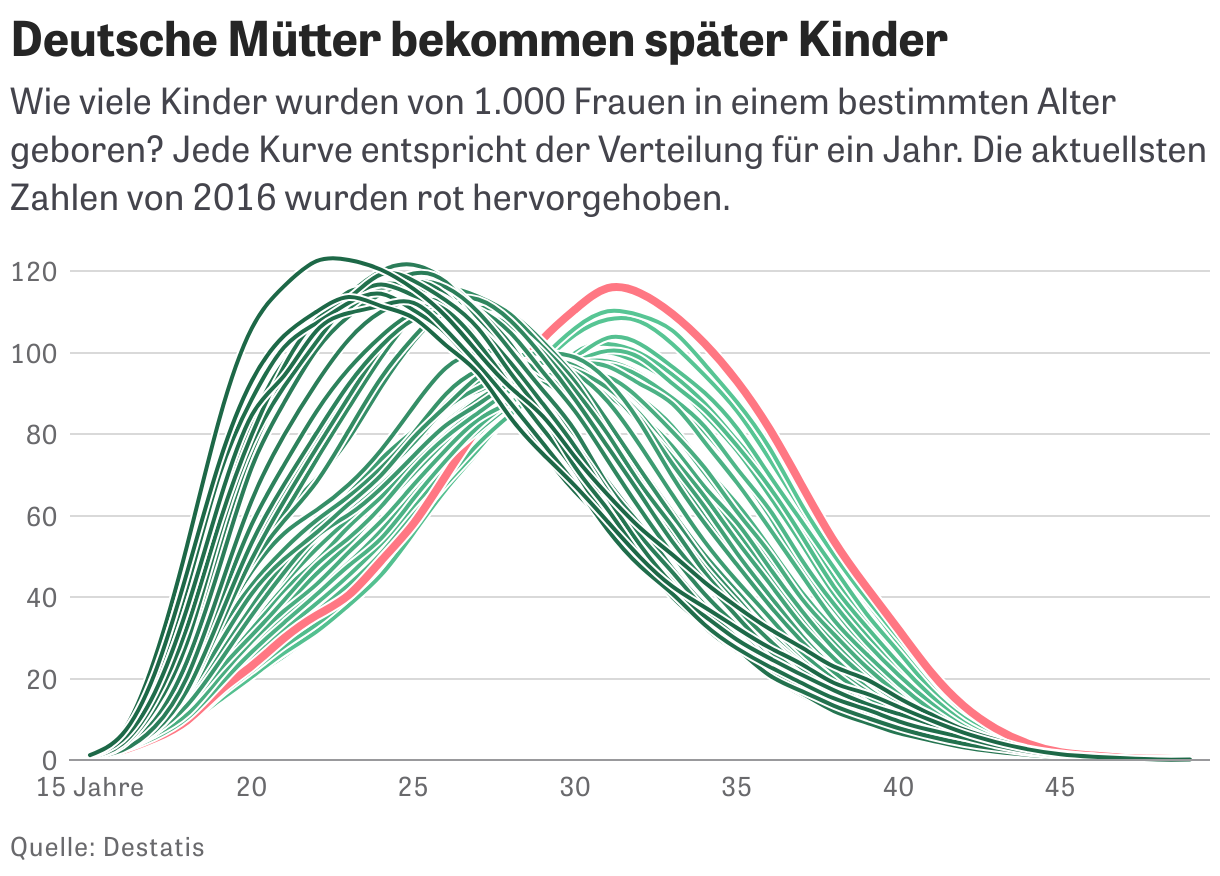
The first one is by data journalist Elena Erdmann from the German newsroom ZEIT Online. Besides her job, she’s part of the great initiative Journocode, which tries to “close the gap between journalism and data science”. Have a look at their website & advent calendar, if you don’t know them yet. You can find Elena’s chart in its original article here.

Elena’s chart shows the age of German mothers when they gave birth to their kids. Every curve shows one year between 1972 (dark green) and 2016 (red). We can read, for example, that for every thousand of 22-year-old women, 122 kids were born in 1972. 44 years later in 2016, only 32 kids were born to a thousand of 22-year-old women. The peak of the curve moved. German mothers give birth later than ten, twenty or forty years ago.

You might notice that in Elena’s chart, the area below some curves is greater than below others. That’s because she uses absolute numbers: In some years, fewer babies were born than in others. Let’s look at a distribution chart that shows shares – there, the area below each curve is the same:

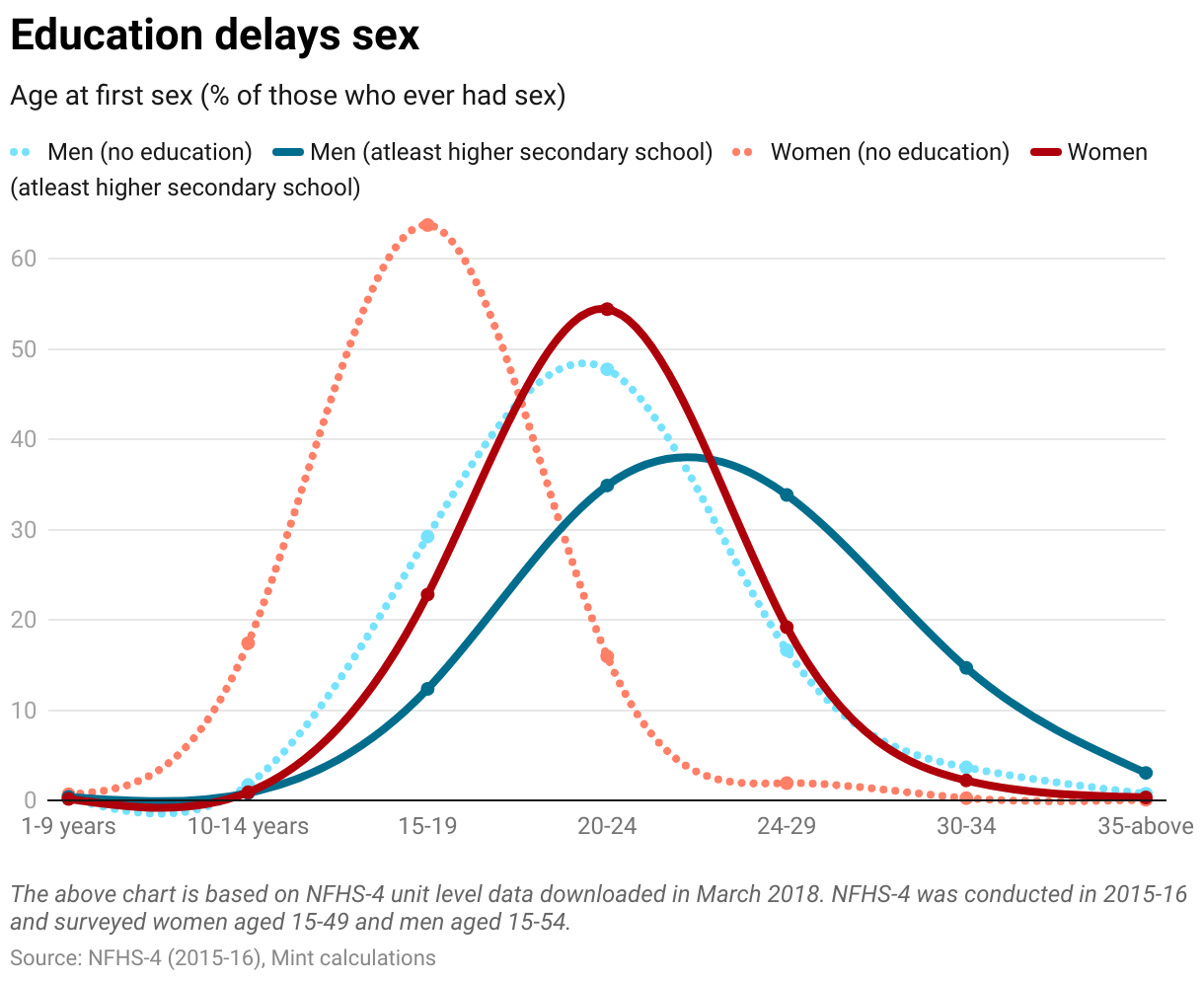
This second chart is by Pramit Bhattacharya, the head of the data journalism unit “Plain Facts” at New Delhi-based Mint. You can find the chart above (and four other ones!) in the original article here, a collaboration with Pramit’s former colleague Tadit Kundu.

Here we see the power of relative distribution charts. Not only do we learn that Indian women have their first intercourse earlier than men[1]. We also see that uneducated Indians experience their first sex in a smaller age window: The peaks of their distribution curves are higher than the peaks of the distribution curves that represent educated people.


Both Elena and Pramit use distribution to draw a more nuanced picture of reality than a simple average number could possibly achieve. We don’t just see the most common behavior, but also the outliers. Why is that important? Because many of us are outliers. Elena and Pramit communicate to us readers that there is not that one age when it’s “normal” to have sex or to have a child for the first time in our societies, but lots of options – and there are people who share our non-average experiences.

Next week, we will look at dozens of dots. See you then!


  1. Tadit and Pramit explain the reason for these distributions in their article: “People with higher levels of education tend to stay in college longer, and hence get married later. The age at first intercourse for such people therefore tends to be later.”

11 Dec 03:59

Jupyter is Not Just Notebooks

by Tony Hirst

Last week, I filled an hour in a department seminar showing ways in which we could use to Jupyter notebooks to support the creation and use of interactive educational materials.

I’ve no idea if it converted anyone to the cause.

I could have done any number of other talks — about the architecture of the Jupyter ecosysytem more widely (at least, insofar as I understand), or the way in which Jupyter makes sense for reproducible research and how it fits into a containerised / virtualised way of working.

Because Jupyter is not just about notebooks.

It’s also about string and glue.

Here’s something I suddenly grokked the other day whilst chatting to somebody about different ways of accessing applications that have a graphical UI… (on a desktop, on a desktop in a VM, via X11 (“what’s that?” they asked… sigh…), via a browser if is has an HTML UI, via novnc in a browser window if it doesn’t (albeit w/ borked audio support); note to self – try out this  novnc Jupyter extension.): if you wrap an application that has a command line interface using metakernel, you can access it in a notebook, or JupyterLab.

Obvious, right? But that means I can also access it via a web page using something like ThebeLab (or Juniper, or nbinteract), run via a container launched using Binderhub.

This is all tied up with a couple of the Big Ideas that underlies Jupyter: firstly, that it supports the read/write web. Secondly that it supports remote code execution (and as such enables the read/write/execute web).

So for example, one of the many metakernel based kernels is the gnuplot_kernel that lets you run Gnuplot commands from a notebook code cell and display the generated figure in a notebook. Here’s a forked version with the repo tweaked so it runs on MyBinder.

Using a gnuplot_kernel enabled Binder repo, we can now run Gnuplot commands via a web-browser using the ThebeLab Javascript package, for example, and display the result in the same web page. The container on the back is fired up in response to the first command issued from the page, which make take up to a minute or two, and will be used for future commands issued from the page in the same session.

Here’s what it looks like:

(The Gnuplot code is ripped from an example in the Gnuplot docs / gallery.)

The code seems to be repeated in the output, but I guess a tweak to the ThebeLab settings, or code, may fix that. Or maybe the kernel needs a tweak. But the proof of concept is there…

Here’s the code for the web page (image file, sorry… WordPress-com editor’n’sourcecode support sucks and I get fed up faffing around with tag brackets each time I re-edit the page):

That source code image does make a second point, though… Look closely, and compare the URLs in the two images above: I can edit an HTML file via the Jupyter notebook text file editor, and also render the page as a served HTML file.

So that’s a couple more things for my colleagues to say “ah, but it won’t work for my course because…”

Bring it on…

PS the code as a gist:

PPS Interested in keeping up to date with Jupyter news? Sign up to the Tracking Jupyter weekly newsletter.

11 Dec 03:57

iPad Diaries: The Many Setups of the 2018 iPad Pro

by Federico Viticci

iPad Diaries is a regular series about using the iPad as a primary computer. You can find more installments here and subscribe to the dedicated RSS feed.

One of my favorite aspects of working on the iPad is the flexibility granted by its extensible form factor. At its very essence, the iPad is a screen that you can hold in your hands to interact with apps using multitouch. But what makes iPad unique is that, unlike a desktop computer or laptop, it is able to take on other forms – and thus adapt to different contexts – simply by connecting to a variety of removable accessories. The iPad can be used while relaxing on a couch or connected to a 4K display with a Bluetooth keyboard; you can work on it while waiting in a car thanks to built-in 4G LTE, or put it into a Brydge keyboard case and turn it into a quasi-MacBook laptop that will confuse a lot of your friends who aren't familiar with iPad Pro accessories1. In a way, the iPad is modern computing's version of Kirby, the famous Nintendo character that is a blank canvas on its own, but can absorb the capabilities of other characters when necessary.

Thanks to its USB-C port, the new iPad Pro takes this aspect of the traditional iPad experience even further by enabling easier connections to external devices that don't come with a Lightning connector. At this stage, the new iPad Pro does not integrate with all USB-C accessories like any modern Mac would; also, connecting to Bluetooth keyboards has always been possible on iPad, as was interacting with external USB keyboards if you had the right Lightning adapter. But the point is that USB-C makes it easier to connect an iPad Pro to other USB devices either by virtue of using a single USB-C cable or, in the case of USB-A accessories, using existing USB-C hubs from any company that isn't Apple. Not to mention how, thanks to the increased bandwidth of the USB 3.1 Gen. 2 spec supported by the iPad Pro's USB-C port, it is now possible to connect the device directly to an external 4K/5K USB-C monitor, which can power the iPad Pro and act as a USB hub at the same time.

We haven't seen the full picture of built-in USB-C with the new iPad Pro: external drives still aren't supported by iOS' Files app, and other peripherals often require app developers to specifically support them. However, I believe the removal of Lightning is already enhancing the iPad's innate ability to adapt to a plurality of work setups and transform itself into a portable computer of different kinds. For the past few weeks, I've been testing this theory with Bluetooth and USB keyboards, a 4K USB-C monitor, USB-C hubs, and a handful of accessories that, once again, highlight the greater flexibility of the iPad Pro compared to traditional laptops and desktops, as well as some of its drawbacks.

Magic Keyboard + Fintie Cover or Studio Neat Canopy Stand

Despite lacking backlight illumination and the baffling decision to only offer the compact version in white, I've always liked using Apple's Magic Keyboard with the iPad Pro. The keyboard is sturdy thanks to its aluminum chassis; the keys are bigger than the ones on the Smart Keyboard (and are also more spaced out), and I prefer their feel to the Smart Keyboard or the butterfly switches of my girlfriend's 2017 MacBook Pro. The Magic Keyboard is quiet, lightweight and compact, and, perhaps best of all, it charges quickly thanks to a Lightning port, which means I can use my iPhone charger to top it up every few weeks.

Over the past few years, I have used the Magic Keyboard on and off as my main external iPad keyboard for big projects that involved a lot of typing, such as my look back at the first year of the iPad Pro or my iOS 11 review. The feature I like the most about the Magic Keyboard is its inclusion of F-keys that double as media shortcuts supported natively by iOS. The same keys that can change screen brightness, play audio and skip tracks, or change the volume and mute the speakers on a Mac can perform identical functions on an iPad out of the box.2 As a result, while the Magic Keyboard does not offer the standalone Home and Siri special keys that I appreciated in the old generation Brydge keyboard case 3, it is a solid option overall if you want to work from an iPad and control iOS without having to touch the screen as often as you would with a Smart Keyboard.

After years spent using a Magic Keyboard with an Italian layout, earlier this month I decided to abandon any semblance of European computer usage and go all-in with the US English keyboard layout. Typing on an American Brydge keyboard for over a year was enough to convince me that the placement of certain characters (such as square and curly brackets) is superior to the standard EU layout for the kind of Markdown writing and JS/Python coding I do on my iPad. I miss the elongated Enter key and accented characters, and I apologize to my fellow compatriots, but switching to an American keyboard layout was an obvious choice for how I like to work. I can be Italian for everything else.

For the past couple of years, I have used the Studio Neat Canopy as a carrying case for the Magic Keyboard and stand for the iPad Pro while typing. The Canopy is based on an ingenious idea: it holds the Magic Keyboard in place thanks to micro-suction pads4, and it unfolds into a "tent" structure that creates an ideal angle to use the iPad at a desk. The Canopy itself is lightweight and has that rustic Studio Neat aesthetic that makes it feel like it was lovingly handcrafted.

A closed Studio Neat Canopy case.

A closed Studio Neat Canopy case.

Having gone through two Canopy units myself (a first prototype that was kindly sent to me two years ago by the folks at Studio Neat, and a new one I bought earlier this year), I have come to understand the things I like about it as well as its issues. The Canopy is durable, but because of its fabric material, it is going to pick up grease and dirt over time if, like me, you sometimes work with your iPad at the kitchen table. That's not a big deal, but it's something I've noticed in two years. Also, while the Canopy is compatible with the new iPad Pros and doesn't prevent access to the home indicator for swipe gestures, its viewing angle is slightly too steep for me when typing at a desk. I wish the Canopy had more than one button to keep the closing latch in place to offer more viewing options for desk usage.5

The Canopy's viewing angle.

The Canopy's viewing angle.

Out of curiosity, a few weeks ago I was looking for alternatives to the Canopy and I came across Fintie's Magic Keyboard carrying case and iPad stand. This product borrows from the Canopy's concept but improves upon it in key ways. First off, it comes in multiple colors (including black) and its exterior is made of a leather-like material that is easy to clean and looks more stylish than the Canopy. Inside, the Fintie case is covered in microfiber lining, which keeps the keyboard protected and clean.

A closed Fintie cover.

A closed Fintie cover.

To hold the keyboard in place, the Fintie case uses a hard plastic shell designed to house the latest generation Magic Keyboard. In my experience, the Magic Keyboard was never accidentally removed from the plastic shell (which doesn't get in the way of pressing keys) but is still easy enough to detach by pulling somewhat strongly from one of the corners. There are no adhesives or suction cups involved in the process.

The Fintie case uses a magnetic closure to set up a stand for the iPad, which, like the Canopy, you place in front of the Magic Keyboard in landscape mode. The case features two tabs, each with a magnet in it, which attach to the top cover when the case is closed. When you open the other side of the cover, it folds into a trapezoid shape with the two tabs attached to each other via a magnetic connection, creating a stand for the back of the iPad to rest on.

The Magic Keyboard is held in place by a hard plastic shell.

The Magic Keyboard is held in place by a hard plastic shell.

Thanks to this design, I find opening and closing the Fintie case to be easier and faster than the Canopy. Also, the magnetic connection feels stronger than the button that holds the Canopy's strap in place, which has occasionally opened for me, causing the iPad to fall flat on my desk. More importantly, the Fintie stand has a better viewing angle for typing at a desk than the Canopy – as you can see from the picture below, it's not much of a change, but it makes a difference when typing for several consecutive hours on an iPad.

If I had to point out a single detail I didn't like about the Fintie carrying case, it would be that it makes the Magic Keyboard's power button slightly harder to access due to its placement next to one of the corners of the plastic shell that holds the keyboard. However, considering the price difference between the Canopy ($40) and the Fintie case ($13), that's a small design trade-off I'm willing to accept. Going forward, I will be using the Fintie case and stand to carry the Magic Keyboard around and type on my iPad Pro at a desk; I prefer its viewing angle, it's easier to fold, and it looks nicer next to other black and Space Gray hardware on my desk.

Magic Keyboard via Lightning to USB-C

Given the Magic Keyboard's built-in Lightning port and the iPad Pro's adoption of USB-C, I was curious to see whether the keyboard would treat a wired connection as an instant pairing request like it does on a Mac.

I connected my iPad Pro to the Magic Keyboard using one of Apple's old USB-C to Lightning cables. The good news is that you can type with a Magic Keyboard connected to an iPad Pro in wired mode, and the keyboard will also charge in the process. The slightly worse news is that in wired mode the Magic Keyboard's media shortcuts don't work. This means you won't be able to hit the F-keys in the top row to pause audio or adjust the volume. It doesn't seem like connecting the iPad and keyboard with a cable initiates the same pairing mode that is supported on the Mac – you'll still have to pair the keyboard to the iPad via standard Bluetooth.

I'm not sure why a wired connection prevents media shortcuts from working, but it's good to know you can at least do basic typing and charge the Magic Keyboard at the same time with a single USB-C cable and no adapters in the middle.

Matias Mini Tactile Pro Keyboard

I don't remember when it happened exactly, but at some point in the past two years I tried typing one of my articles on a mechanical keyboard and instantly fell in love with the feel of it.

This may sound strange coming from someone who's long professed his admiration for Apple's flat and thin and minimal laptop keyboards, and it's hard to describe in an article without actually testing one, but I genuinely believe that typing on a good mechanical keyboard makes me a faster typist and reduces strain on my hands and wrists. As someone who tends to produce longform pieces and take copious notes about all kinds of topics on a weekly basis, moving from "flat" keyboards (Smart Keyboard, Magic Keyboard, other laptop keyboards, etc.) is a night/day difference. Yes, mechanical keyboards are ridiculous in that they tend to look like the keyboards your parents used to type on in the 80's (because that is kind of the point), and they are loud due to their clicky nature, but if physical feedback is what you're after when typing, a great mechanical keyboard can easily become one of your setup's crown jewels.

As soon as Apple announced that the iPad Pro was going to feature a USB-C port, I knew it was time to put in action a plan that was inspired by Jason Snell's experiments with the previous generation iPad Pro. I had done my research on mechanical keyboards for Mac users, so I knew that I wanted to get a Matias Mini Tactile Pro for Mac with a US English layout. This Matias keyboard connects via USB-A to a computer, comes with additional USB-A ports to act as a hub at USB 2.0 speeds, and is designed specifically for Mac users. The keyboard features classic Apple keys such as Command, Option, and Control, plus it supports the same media keys found on the Magic Keyboard with the option to revert them to standard F1-F12 functionality with a Fn modifier key.

The Mini Tactile Pro.

The Mini Tactile Pro.

Before I describe how I've been using the Matias keyboard with the 2018 iPad Pro, let me share some context on why I chose this keyboard.

Besides its Mac-first layout, the Mini Tactile Pro uses Matias' popular mechanical key switches, which aim to be a "faithful recreation" of the popular Alps switches. Unlike linear switches, the Matias switches come with a click leaf – a folded metal spring that rests inside the switch and protrudes towards the slider. I am oversimplifying this, but, essentially, when a key is depressed, the leaf clicks; press hard enough, and the mechanism snaps back, providing the clicky and tactile sensation that you can't get on other flatter keyboards. As the folks at Matias put it, these switches "were born to click". They're loud (but they're not echo-y thanks to Matias' modifications to the original Alps switch design) and are effectively designed for people who can appreciate the sound of a vintage typewriter. Having grown up with my dad, who was a newspaper journalist with an Olivetti typewriter, I think I've always been naturally inclined to appreciate this sound. My girlfriend hates this keyboard, but she puts up with me.

I absolutely love the feel and sound of the keys in the Mini Tactile Pro. It is, by far, the most satisfying keyboard I have ever typed on in nearly 10 years of MacStories. But there's more to this keyboard than the Alps-inspired switches and Mac-specific keys. The keytops are sculpted, which means that your fingers can naturally rest in the middle of a key and quickly slide to other keys as it's easier to feel their position. The keyboard is compact (it's not that much wider than the 12.9" iPad Pro) and it has two small plastic feet at the bottom that you can open to raise the keyboard slightly if you want to have a steeper typing angle (I do).

Furthermore, the symbols aren't simply printed on the keycaps, they're laser-etched – basically burned into the plastic itself with a laser. Thanks to this technique, the symbols do not deteriorate over time, as is often the case with keyboards where the symbols are merely printed on plastic. All these little details, combined with anti-ghosting technology (the keyboard will not drop characters if you're a really fast typist because each key has its own diode) and exquisite tactile feel make the Mini Tactile Pro one of my favorite nerdy purchases in a while. I'm typing more quickly with this keyboard, my fingers and hands feel better after long sessions, and its sound is just fun to hear. I want to try more mechanical keyboards in the future, but I'm very satisfied with the Mini Tactile Pro already.

Now, typing with a heavy plastic keyboard designed to act like it's 1984 again while using the non plus ultra of modern iOS hardware may feel a bit...anachronistic. Or odd, to say the least. But thanks to USB-C on the new iPad Pro and iOS' built-in support for wired USB keyboards, everything is surprisingly intuitive and flexible at the same time. Let's go over some of my favorite configurations.

Apple USB-C to USB-A Adapter

This is the basic dongle that Apple sells to connect USB-A accessories to USB-C devices. It does not support power passthrough as it doesn't have an additional USB-C port for power delivery, but the iPad Pro can output 7.5W of power via its USB-C port, which is enough to power the Mini Tactile Pro when connected via USB through this adapter.

Besides the fact that you can't charge an iPad while using this dongle, I haven't noticed any issues when typing with the Matias keyboard in this mode. From a physical standpoint, however, the setup is not ideal: if you prop up the iPad Pro with a Smart Folio in "media mode", the thick Matias keyboard will cover the lower edge of the iPad's screen, preventing you from easily swiping on the home indicator unless you create a wide gap between the keyboard and the iPad in upright position. Which brings me to...

Viozon Vertical Stand

This was another Jason Snell recommendation that I have been using with my iPad Pro for the past year, and which is compatible with the 2018 iPad Pros. The Viozon stand looks like a mini-iMac foot made of aluminum, with a weighted base that prevents it from tipping over. At the top, the stand has a hinge attached to an adjustable plastic arm that hooks onto two sides of an iPad in portrait mode. The arm applies just enough pressure to each side to keep the iPad secure, but doesn't damage it because the attachment points are covered in rubber.

The Vizion stand's hinge.

The Vizion stand's hinge.

When the iPad is placed into its cradle, you can rotate the hinge however you want, so you can use the iPad in vertical or horizontal orientation. The benefit of this approach, of course, is that the iPad will be elevated to your line of sight, so you won't be staring down at a display sitting on a table, which can cause neck and shoulder strain injury over a long period of time. While I wouldn't mind having an even higher stand (if you have recommendations, please send them my way), I like how the Viozon stand lets me use an iPad almost like I'd use an external display with a keyboard sitting underneath it.

This is indeed my favorite setup when I want to work at the kitchen table: the iPad Pro in landscape mode inside the Viozon stand, and either the Magic Keyboard or Mini Tactile Pro below it. The viewing angle provided by the stand is much better than just propping up the iPad with a Smart Folio, and I find interacting with iOS via touch to be easier because tappable elements are in front of my eyes with no keyboard in the way.

My favorite writing setup.

My favorite writing setup.

iOS has a long way to go in terms of being able to fully control it from an external keyboard, but this configuration strikes a good balance of physical comfort, typing performance, and portability. When I'm done typing or just want to change context for a bit, I can remove the iPad from the stand, disconnect the keyboard's cable, and sit on the couch for a while to continue working with the same apps, but different ergonomics. That wouldn't be as easy with a desktop computer.

Charging and USB-C Hubs

Assembling a modular desktop-like iPad setup at a desk or kitchen table begs an obvious question: what about charging?

When I'm using a Magic Keyboard, that is not a concern as the keyboard connects via Bluetooth and I can run a two-meter Apple USB-C cable from the wall (where it's plugged into an Apple 60W charger). The only thing I have to be mindful of is my two dogs bumping into the cable.6 This becomes a problem, however, if I want to use my Matias USB keyboard and charge the iPad Pro at the same time.

As I mentioned above, Apple's USB-C to USB-A adapter doesn't feature a second USB-C port for power delivery. I could use Apple's own Digital AV Adapter (which Silvia owns), but while it supports USB power delivery (at 60W) and USB 3.1 Gen. 1 transfer speeds, it's limited to two ports (the USB-C one is for charging only), and I wanted to find something a little more versatile. I had to turn my attention to third-party USB-C hubs, and even though I am not 100% convinced this is the best option for the next couple of years, I have found something that works for now.

If you look on Amazon, you're going to find dozens of USB-C hubs and docks that support a variety of USB-A, USB-C, and HDMI ports. I've spent days looking and testing different options, and, to my knowledge, none of the popular USB-C hubs support USB 3.1 Gen. 2 transfer speeds (supported by the iPad Pro) or HDMI output with 4K @ 60Hz and Dolby Vision – the latter launched yesterday with a new adapter from Belkin. I'm going to spend more time on this topic in a future installment of iPad Diaries about USB-C, but in short:

  • Ideally, to future-proof my iPad Pro as much as possible, I wanted to find a hub that supported USB-C power delivery, USB-C ports with USB 3.1 Gen. 2 transfer speeds (10 Gbps), standard USB-A ports (also at 3.1 speeds), and HDMI output with 4K @ 60Hz;
  • In practice, most existing hubs (which are MacBook Pro hubs, not specifically designed for the iPad Pro yet) support power delivery up to 60W but don't come with USB 3.1 Gen. 2 transfer speeds; some of them support USB 3.1 Gen. 1 (5 Gbps transfers as opposed to Gen. 2's 10 Gbps). Some of them include support for 4K output @ 60Hz (without HDR10 and Dolby Vision), but most of them are stuck on 4K @ 30Hz. Most of them feature a variety of SD, microSD, and headphone ports that I personally don't care about. Very few of them have built-in Ethernet. All of them tend to look somewhat ugly or uninspired.

You may be wondering why USB 3.1 Gen. 2 is such a big deal when the iPad Pro cannot even interact with old USB 2.0 drives for now. Again, for me it's all about buying for the future and knowing that I have USB-C hardware capable of supporting power delivery and the fastest speeds whenever iOS will be ready for them. Plus, I like doing research and buying the best option I can find.

When I first started looking into USB-C hubs, my first thought was that I wanted something that could snap to a side of the iPad by connecting to its single USB-C port and sitting flush along one of the edges. I remembered that Hyper made one of these hubs for the MacBook Pro – again, accessory makers haven't shipped iPad Pro-specific hubs yet – so I started looking on their website and came across the HyperDrive Solo 7-in-1. Unlike their other USB-C hubs that feature two adjacent USB-C connectors for the MacBook Pro, the Solo has one USB-C connector and is short enough to be placed on a side of the 12.9" iPad Pro without protruding from the top or bottom.

The Solo hub.

The Solo hub.

From a specs perspective, the Solo hub didn't tick all my requirements, but it was close enough, and I figured that the elegant, Apple-like design could make up for slightly outdated ports. The Solo hub turns a single USB-C port into seven ports featuring:

  • HDMI video output at 1080p @ 60Hz or 4K @ 30Hz
  • USB-C with power delivery
  • Two USB-A ports at USB 3.1 Gen. 1 speeds
  • SD and microSD card readers
  • Audio jack input

Again, not perfect, but close enough, so I decided to get one from Amazon and test it with my iPad Pro and various accessories.

Unfortunately, I cannot recommend this Hyper hub to iPad Pro owners because it is clearly designed for laptop use and I shouldn't have assumed it was going to work well with the iPad Pro.

For whatever reason, the Solo's USB-C connector doesn't perfectly attach to the iPad Pro's USB-C port, leaving a 1mm gap in between the device and the hub. As a result, the hub sort of wobbles when touching the iPad's display, giving the impression that it is going to snap off if you don't pay close attention to it. More worrisome, though, is the fact that even when the hub wasn't moving the USB-C connection was not reliable enough – I found myself having to push the connector into the port to keep receiving power from the charger and for the iPad Pro to see the USB keyboard connected to the hub. The connector in the hub feels flimsy when attached to the iPad and doesn't inspire a lot of confidence.

Not exactly made for iPad Pro.

Not exactly made for iPad Pro.

Again, I'm responsible for assuming that a USB-C hub designed for laptops and desk use was also going to work well with an iPad (but you can understand why I made that assumption) and I'm sure that this accessory works well when implemented for its intended use case. I'm also fairly certain that Hyper itself is aware of the difference between USB-C hubs for MacBooks and iPads: their upcoming iPad Pro-specific hub, set to launch in the near future, will come with a "removable and replaceable translucent C-shape grip made of soft polycarbonate and ABS material [that] securely holds the USB-C hub in place without blemishing the iPad Pro surface". It looks like a clip made of two parts that you need to screw together to keep the hub more closely attached to the iPad:

Oh well.

Oh well.

After looking at Hyper's pictures for the new hub's attachment, I guess I should have expected to run into the issues I encountered when trying to use a snap-on MacBook hub with the iPad Pro. Lesson learned. That said, for science, I'm going to order their iPad Pro hub and report back as soon as possible.

So, at least for now, it looks like the best option for iPad Pro owners interested in a USB-C hub is to get one with a short USB-C cable. There are plenty of options on Amazon and I recommend checking out the Wirecutter's guide for an overall roundup of the best picks.

OWC Travel Dock

Coincidentally, just as I started researching USB-C hubs for the new iPad Pro last month, the folks at OWC were kind enough to send me a review unit of their USB-C Travel Dock, a small puck that, via a short USB-C cable, can be attached to a modern Mac or 2018 iPad Pro and extend its I/O capabilities.

OWC's Travel Dock is compatible with the Mac and iPad Pro.

OWC's Travel Dock is compatible with the Mac and iPad Pro.

The Travel Dock is a lightweight square-shaped accessory weighing 91 grams and measuring 3.2-by-3.2 inches. While it’s limited to USB 3.1 Gen. 1 speeds, the dock supports USB-C power delivery up to 60W and brings the convenience of five extra ports in a compact form factor. The Travel Dock is equipped with one USB-C port, two USB-A ports (all USB ports are compliant with USB 3.1 Gen. 1), one SD card reader (compatibile with UHS-II), and one HDMI 2.0 port that supports 4K resolution up to 4096 x 2160 @ 30Hz.

While these specs could be improved, given the current limitations of USB access on iOS, I believe the Travel Dock strikes a great balance of portability, fast-enough USB speeds, price ($29 for the holidays), and versatility. While I would have liked to see a slightly longer USB-C cable, support for 4K @ 60Hz over HDMI, and USB 3.1 Gen. 2 speeds, the portable design of the Travel Dock allows me to use the accessory with my Mac mini7 at my desk but, more importantly, with my iPad Pro whenever I need to plug in more than one USB device, such as a keyboard and a microphone.

There are times when I’m writing at the kitchen table and want to charge my iPad Pro while also typing with the Matias keyboard. With the Travel Dock, I can connect the Matias keyboard via USB-A to the hub and keep the iPad Pro charging by plugging the cable of my 60W adapter into the dock, then connect the dock to the iPad via USB-C. This was possible with Lightning adapters before, but I wouldn’t have had the freedom to use any of my existing USB-C chargers and cables (the same ones my girlfriend uses for her MacBook Pro), nor would I have had the option to use the same dock with a Mac as well.

A mobile podcasting and voiceover rig, powered by the OWC Travel Dock and H6 audio interface.

A mobile podcasting and voiceover rig, powered by the OWC Travel Dock and H6 audio interface.

While USB-C is a confusing, fragmented spec – and Apple should probably have done a better job at explaining the differences between charging, data transfers, and Thunderbolt 3 – once you take the time to understand what you can and cannot do with it, you’re rewarded with the freedom to use the same accessories across multiple platforms. The real divergence between the Mac and iPad’s adoption of USB-C ultimately lies in how software takes advantage of it, which is why I hope Apple is seriously considering growing the iPad Pro’s USB capabilities in future iOS updates. I’d love to be able to plug my external USB-C SSD drive into an iPad someday, or to use my H6 audio interface to record separate audio channels like I can on my Mac mini. The hardware is all there, but the software isn't ready yet.

I’m going to keep using the OWC Travel Dock to extend the iPad’s inputs beyond its single USB-C port. It’s not perfect: I’d love to have a portable dock that supports USB 3.1 Gen. 2 and a longer built-in cable so that the dock wouldn’t hang off the iPad when I’m using it at a desk with a keyboard and the Viozon stand, as pictured above. For now, this is the best option I've found that works well for my sometimes quasi-desktop, sometimes portable use of the iPad Pro.

Using the iPad Pro with an External Display

Lastly, I'd like to cover how I've been using my iPad Pro alongside the LG UltraFine 4K display that I bought for my new Mac mini last month.

As I mentioned on AppStories and Connected over the past few weeks, I chose to buy the 4K version of the UltraFine instead of the newer 5K version because the older 4K unit is a USB-C monitor (with DisplayPort over USB-C), while the 5K is a Thunderbolt one. The connector looks the same – it's a USB-C plug – but USB-C and Thunderbolt are different specs and the iPad Pro does not support Thunderbolt. Again, I think Apple should have communicated this better: saying that the iPad Pro supports "up to 5K external displays" implies that the LG UltraFine 5K, which Apple sells in its own store, is supported, but it isn't, and 5K displays based on DisplayPort over USB-C are hard to find.

I went with the UltraFine 4K for two reasons:

First, I strongly believe that the future of iPad should be a self-contained computer that can transform from a tablet into a full-fledged workstation depending on what you need to work on. A piece of glass that can be a tablet with cellular connectivity, a laptop with a built-in keyboard, or a "desktop" computer that puts iOS on the big screen. A compatible USB-C display is the first step to start building that future.

Second, while I could have bought another display and used it as an external monitor for the iPad via HDMI adapters, I didn't want to run into latency-related issues that have always affected how iOS needs to encode video-out signals to H.264 over Lightning. Due to its limited bandwidth, Lightning cannot send raw HDMI data through the HDMI adapter, generating latency and causing various video artifacts that have frequently been observed by many in games or other high-performance apps with video-out support. USB-C, on the other hand, can send a native, lossless signal over a compatible cable, with the added benefit of power delivery to charge an iPad from the display and treating the display itself as a hub for other downstream USB devices. As I mentioned in the first article of this series, one of my goals over the next year is to use the iPad Pro as a workstation for video and photo editing as well as a console for graphically intensive games; thus, finding a compatible USB-C display that tapped into the iPad Pro's native support for the USB 3.1 Gen. 2 spec was an obvious choice.

Using an iPad Pro with an external display is far from an ideal experience at this point due, again, to limitations of iOS.

Essentially, iOS mirrors the same content you see on the main iOS device to the bigger screen, but app developers can integrate with the barebones external display API (which has existed since 2012) to show different content on the iOS device and the external display. Adding a secondary display to an iPad, whether wirelessly or via cable, doesn't work like on a Mac, where you get a second desktop and more room for different app windows; on iOS, the system just mirrors what is already on screen, projecting the primary interface to an external monitor. While some app and game developers have done the work to show full-screen content on an external display when an iPad is connected (e.g. VLC and Real Racing 3), most of the time you'll be looking at an enlarged, pillarboxed version of the iPad's UI because, by default, iOS doesn't optimize the interface to fill the screen. And, of course, forget about being able to use an external pointing device to control the iOS UI on the bigger screen: the iPad can mirror its UI to a 4K display, but you can't connect a mouse or trackpad and control the mirrored UI "remotely" – you'll always have to touch the screen of the iPad if you need to select UI elements.

Apple has a lot of work to do if they want to turn this glorified presentation mode into proper external display support for the iPad Pro. Despite all these shortcomings and limitations, however, I've found myself increasingly sitting down at my desk and working (or playing games) with my iPad Pro connected to the UltraFine 4K. Let me explain why, and how.

Even if iOS' external display support is limited and stuck to six years ago, I love seeing iOS apps on a large 21.5" display with crisp resolution and a 60Hz refresh rate (the UltraFine supports 4K @ 60Hz over a single USB-C cable). I particularly like writing and editing pieces in iA Writer on the big screen or catching up on RSS and Twitter via lire and Tweetbot. For single tasks that require focus without using Split View, iOS on an external display allows me to work as usual, but without the neck or eye strain involved with looking down at a 12.9" display for several hours. When I don't need to multitask but just want to write for a few hours in iA Writer, having the app on a bigger display is not functionally different than having it on the iPad, but everything is larger and easier to see – and I can still have access to all my other iOS apps, notifications, and shortcuts because I'm not using a Mac.

iA Writer for iPad running on an external display.

iA Writer for iPad running on an external display.

With this kind of setup, navigating iOS with an external keyboard is paramount – I want to limit the number of times I need to reach out and touch the screen as much as possible. In this case, even though it still needs to grow, iOS has better support for external keyboards than it does for external displays. I can ⌘-Tab to other apps, ⌘-Space to open Search and select apps with the arrow keys, change views in Tweetbot and scroll tweets, and format text in iA Writer using keyboard shortcuts. And that's not to mention all the other document shortcuts for text selection and manipulation that are supported by iOS but have never been officially documented by Apple. For instance, did you know that text views in most third-party iOS apps support the following keyboard commands?

  • Command-Return: Toggle text editor focus.
  • Command-B: Boldface the selected text, or turn boldfacing on or off.
  • Command-I: Italicize the selected text, or turn italics on or off.
  • Command-U: Underline the selected text, or turn underlining on or off.
    Option-Delete: Delete the word to the left of the insertion point.
  • Control-H: Delete the character to the left of the insertion point. Or use Delete.
  • Control-K: Delete the text between the insertion point and the end of the line or paragraph.
  • Command–Up Arrow: Move the insertion point to the beginning of the document.
  • Command–Down Arrow: Move the insertion point to the end of the document.
  • Command–Left Arrow: Move the insertion point to the beginning of the current line.
  • Command–Right Arrow: Move the insertion point to the end of the current line.
  • Option–Left Arrow: Move the insertion point to the beginning of the previous word.
  • Option–Right Arrow: Move the insertion point to the end of the next word.
  • Shift–Command–Up Arrow: Select the text between the insertion point and the beginning of the document.
  • Shift–Command–Down Arrow: Select the text between the insertion point and the end of the document.
  • Shift–Command–Left Arrow: Select the text between the insertion point and the beginning of the current line.
  • Shift–Command–Right Arrow: Select the text between the insertion point and the end of the current line.
  • Shift–Up Arrow: Extend text selection to the nearest character at the same horizontal location on the line above.
  • Shift–Down Arrow: Extend text selection to the nearest character at the same horizontal location on the line below.
  • Shift–Left Arrow: Extend text selection one character to the left.
  • Shift–Right Arrow: Extend text selection one character to the right.
  • Option–Shift–Up Arrow: Extend text selection to the beginning of the current paragraph, then to the beginning of the following paragraph if pressed again.
  • Option–Shift–Down Arrow: Extend text selection to the end of the current paragraph, then to the end of the following paragraph if pressed again.
  • Option–Shift–Left Arrow: Extend text selection to the beginning of the current word, then to the beginning of the following word if pressed again.
  • Option–Shift–Right Arrow: Extend text selection to the end of the current word, then to the end of the following word if pressed again.
  • Control-A: Move to the beginning of the line or paragraph.
  • Control-E: Move to the end of a line or paragraph.
  • Control-F: Move one character forward.
  • Control-B: Move one character backward.

After years of working on the iPad, I've grown accustomed to using these shortcuts with the Smart Keyboard and Brydge keyboard, but they are especially useful when you're working at a desk and would like to always keep your hands on the keyboard. I believe that Apple should take a look at what Cultured Code has done with keyboard control in Things 3.6 and implement similar ideas to control the entire iOS interface (including multitasking) from a keyboard, but it's also likely that the iPad already supports more shortcuts than you imagine.

I'm always free to choose the setup I prefer without switching apps, devices, or platforms.

At my desk, some days I prefer to plug the Matias keyboard into the UltraFine (via a USB-C adapter) and use it with my iPad Pro in hub mode, some days I just type with the Magic Keyboard over Bluetooth while looking at the display with the iPad next to me. Some days I start writing in the kitchen with the Viozon stand and Matias keyboard and, after a few hours when the iPad needs charging, I move to the bedroom and keep writing on the iPad connected to the UltraFine. Other days I just move to the couch and edit articles with the software keyboard. I'm always free to choose the setup I prefer without switching apps, devices, or platforms.

Speaking of the iPad next to me on my desk, something I've recently started doing is using the iPad as a "trackpad" for what's on the big screen thanks to the Apple Pencil. Using a Cable Matters USB-C cable that supports USB 3.1 Gen. 2 and video, I can keep the iPad flat on the desk, next to the display, but also close to where I'd rest my hand when using a trackpad. Then, while looking at the UltraFine, I can scroll lists in apps, tap UI elements, or, say, make edits in Lightroom using the Pencil on the iPad Pro. It's sort of like using a Wacom tablet, but the iPad is also a computer with its own display, so I can glance down at it when needed. The downside of this approach is that Face ID won't work unless I hunch over the display.

In addition to writing, reading, and editing photos with the Apple Pencil and Lightroom, I've also been playing iPad games on an external display. This is a lovely experience if the game you want to play supports MFi controllers – I wouldn't recommend holding the iPad in your hands and using touch controls while the game is being mirrored with a cable to an external display. So while playing Fortnite at 60fps on a large display may not be an option at the moment (until Epic adds support for MFi controllers), games that integrate with external controllers look fantastic and play great over USB-C.

In my tests, I've played the excellent Grimvalor, GRID Autosport, Real Racing 3, and NBA 2K using a Nimbus SteelSeries controller, and I didn't experience any lag or image artifacts thanks to USB-C. While I wouldn't describe the graphics of these games as Xbox One S-level (as Apple claimed for NBA 2K at their October event), GRID and NBA 2K are getting close to that kind of graphical performance and, most of all, they run on a lightweight tablet without a spinning drive or fan. Audio is passed through to the UltraFine and, in the case of Real Racing 3, the game runs in full-screen (without black bars) on the external display because EA implemented iOS' second screen APIs.

I'm used to playing games with my Nintendo Switch, PS4 Pro, and Xbox One X on a 55" LG OLED TV, so playing on a much smaller LCD panel is obviously a downgrade, but for quality iOS games that I can't get on consoles – and yes, there are a few of them – this setup is a comfortable alternative to playing directly on the iPad Pro's display. If anything, the biggest drawback I've noticed so far is that most games haven't been optimized for the new iPad Pro's screen, and it's going to take a while for developers to fully unlock the graphics capabilities of the A12X SoC. I'm looking forward to Feral's adaptation of Tropico, and I hope we'll continue seeing more console-class games such as GRID and Grimvalor find their way to iPad Pro in the future.

GRID Autosport running on the iPad Pro.

GRID Autosport running on the iPad Pro.

NBA 2K.

NBA 2K.

Until Apple ships a full-fledged external display API for iOS with support for multiple app columns, pointing devices (if only for accessibility purposes), and separate workspaces, I'd like to see developers make the best of what we have now by updating their iPad apps with support for second-screen mirroring and the 2018 iPad Pro's more powerful hardware.

VLC, for example, fully supports native video-out mode and has no trouble playing a 4K video by filling the entire UltraFine 4K. My 4K YouTube videos downloaded to Dropbox with youtube-dl look glorious with this system.

Playing a 4K video via VLC for iPad connected to a 4K display.

Playing a 4K video via VLC for iPad connected to a 4K display.

I'd love to see Markdown text editors add support for an idea proposed by John Sundell a while back – having a text editor on the iPad and a real-time HTML preview on the big screen. I want to see Apple support second-screen mirroring with more of their own apps; I'd like to play more games that have been updated with enhanced graphics for the iPad Pro and full-screen mirroring for external displays.

The combination of USB-C and external displays have the potential to turn the iPad Pro into the dream of professional portable computing – a single piece of glass that turns into a workstation when docked, with support for high-resolution displays, fast data transfers, and connected peripherals. While I've been enjoying what is already possible today, this vision is only partially realized, and I hope it won't stay this way for years to come.

A Future of All Inputs

My last few weeks with the new iPad Pro have been characterized by a recurring theme: the freedom to experiment with different setups and accessories. A multiplicity of input systems, form factors, and work contexts that don't turn the iPad into something it isn't, but rather add to it to make it more versatile and, ultimately, useful. Some of these ideas were possible before, but everything has been greatly simplified and made more powerful or flexible thanks to USB-C.

It's in the iPad's nature to be a hybrid machine that can adapt to the context you're using it in. This concept has been true since the days of the first iPad with the weird-looking keyboard dock, was reimagined by Apple in 2015 with the Smart Keyboard and Pencil, and is now reaching into classic desktop territory thanks to USB-C. Whether I'm using a Bluetooth keyboard and an aluminum stand or a 4K display with a wired USB keyboard and game controller, one thing's for certain: flexibility and user customization have always been at the very core of the iPad experience. The new iPad Pro takes both principles further than they've ever been, adopting traditional computing ideas and rethinking them for a new era.

But this process isn't complete, and likely won't be for a while. We need to wait for another part of Apple to catch up to a transformation of the overall iPad story that is abundantly clear at this point, yet still unfinished. We need to wait for the iPad's software to accept and welcome what its hardware has become.


  1. I speak from personal experience here. ↩︎
  2. The F3 and F4 keys, which are dedicated to Mission Control and Launchpad on macOS, respectively, haven't been associated with the multitasking app switcher on iOS, but that's a limitation I can accept. ↩︎
  3. iOS supports a ⌘-H shortcut to go back to the home screen, but it can't be used to invoke the multitasking app switcher. ↩︎
  4. Which can hold onto the bottom of the keyboard but don't leave any glue residue when removed. ↩︎
  5. And I wish it had multiple color versions as well because I'm not a fan of the gray and brown mix, but that's an issue I have with other Studio Neat products too. I love their docks, for instance, but I wish they came in more colors than brown because they don't fit the modern style of our apartment at all. ↩︎
  6. I miss MagSafe and I wish Apple made a new version of it based on USB-C, but I digress. ↩︎
  7. My Mac mini is connected to an UltraFine 4K display, which doesn’t have any USB-A ports, which means I can’t connect my old USB drives directly to the display acting as a hub. I could plug the drives into the back of the Mac mini, but I don’t want to move it from its position on my desk where all the cables are neatly managed. With the Travel Dock, I can just connect the extra hub to the UltraFine via USB-C, then plug USB-A drives into the dock. It works just fine. ↩︎

Support MacStories Directly

Club MacStories offers exclusive access to extra MacStories content, delivered every week; it's also a way to support us directly.

Club MacStories will help you discover the best apps for your devices and get the most out of your iPhone, iPad, and Mac. Plus, it's made in Italy.

Join Now
11 Dec 03:57

Becoming a supporter of feminism.

by Chris Corrigan

I was always a social justice minded kid. But on December 6, 1989, when I was 21, my lifelong support for the feminist struggle was cemented.

Every year I publish the list of women who died that day and whose deaths changed the lives of so many of us.

Never forgotten are:

• Geneviève Bergeron (born 1968), mechanical engineering student

• Hélène Colgan (born 1966), mechanical engineering student

• Nathalie Croteau (born 1966), mechanical engineering student

• Barbara Daigneault (born 1967), mechanical engineering student

• Anne-Marie Edward (born 1968), chemical engineering student

• Maud Haviernick (born 1960), materials engineering student

• Maryse Laganière (born 1964), budget clerk in the École Polytechnique’s finance department

• Maryse Leclair (born 1966), materials engineering student

• Anne-Marie Lemay (born 1967), mechanical engineering student

• Sonia Pelletier (born 1961), mechanical engineering student

• Michèle Richard (born 1968), materials engineering student

• Annie St-Arneault (born 1966), mechanical engineering student

• Annie Turcotte (born 1969), materials engineering student

• Barbara Klucznik-Widajewicz (born 1958), nursing student

11 Dec 03:57

I Came Second Place In Helping People Out for the 504 Streetcar

by Richard

You might remember such blog posts as my thoughts on the King St. Pilot and my long thread on Twitter on the subject. Since the pilot has started, I have used the Transit app more and more to give me transit directions. It does things like notify me when I'm two stops away and when my stop is approaching, useful only when GPS is available (i.e. not underground in the TTC subway). In August, it introduced Go, a crowdsourced real-time vehicle location feature. Many transit agencies, the TTC included, give the public access to real-time location of buses and streetcars, but the Transit app developers claim it can be 30 seconds out of date. With this new feature, riders are the source of information, and it feeds back to Transit's servers.

As a way to entice people to turn tracking on, the developers gamified it by counting how many people you've "helped" along the way. Presumably these are people who are sending their location to the app in the background, or looking at the app currently. They are not necessarily people thinking of using the route I'm on, but just people nearby. Over the course of a month, the number of people "helped" is aggregated and I'm ranked among other people who are doing the same thing. For November 2018, I came in second place:

I imagine the person who came in first tracked their trips for every rush hour during weekdays, whereas I worked from an undisclosed location couple of days in November and forgot to press "GO" a few times I did commute to the office along King St.

Some interesting problems came up: I sometimes take the 503, but it's not always listed as an option in the Transit app. It's truly the Secret Streetcar! I counted it as 504 for the purpose of the game. It did sometimes ask me if I was on the 503 or the 504, and I told the truth each time. Midway through using Transit Go, the 504 changed how it was split. Long story short, instead of two routes, 504 and 514, it changed where they turned off and kept 504A and 504B as the route numbers. The Transit app doesn't seem to differentiate between the two. That works out fine for me, since I'm aware of the difference, and even once a 504B caught up with a 504A (which I wanted to be on eventually), so I hopped off the streetcar that would turn left at Dufferin and got on the streetcar that would take me to Roncesvalles.

I don't know what happens if I end up 1st since I haven't ended up as 1st on any of the routes I take over the course of a month. There doesn't appear to be an API that I can tap into (to get where I went, how many people I helped, which place I'm currently in for a route). There are real-time updates to the directions (e.g. when I might miss a connection), but I haven't tested updated instructions for times when I stop at a transfer point to do something, like go to a coffee shop. It's still neat to try to get to the top and to wonder who it is that's more eager to give their location data away for free than I am, though.

11 Dec 03:57

On Overcoming Pain

by bunnie

Breaking my knee this year was a difficult experience, but I did learn a lot from it. I now know more than I ever wanted to know about the anatomy of my knee and how the muscles work together to create the miracle of bipedal locomotion, and more importantly, I now know more about pain.

Pain is one of those things that’s very real to the person experiencing it, and a person’s perception of pain changes every time they experience a higher degree and duration of pain. Breaking my knee was an interesting mix of pain. It wasn’t the most intense pain I had ever felt, but it was certainly the most profound. Up until now, my life had been thankfully pain-free. The combination of physical pain, the sheer duration of the pain (especially post-surgery), and the corresponding intellectual anguish that comes from the realization that my life has changed for the worse in irreversible ways made this one of the most traumatizing experiences of my life. Despite how massive the experience was to me, I’m also aware that my experience is relatively minor compared to the pains that others suffer. This sobering realization gives me a heightened empathy for others experiencing great pain, or even modest amounts of pain on a regular basis. Breaking a knee is nothing compared to having cancer or a terminally degenerative disease like Alzheimer’s: at least in my case, there is hope of recovery, and that hope helped keep me going. However, a feeling of heightened empathy for those who suffer has been an important and positive outcome from my experience, and sharing my experiences in this essay is both therapeutic for me and hopefully insightful for others who have not had similarly painful life experiences.

I broke my knee on an average Saturday morning. I was wearing my paddling gear, walking to a taxi stand with my partner, heading for a paddle around the islands south of Singapore. At the time, my right knee was recovering from a partial tear of the quadriceps tendon; I had gone through about six weeks of immobilization and was starting physical therapy to rebuild the knee. Unfortunately that morning, one of the hawker stalls that line the alley to the taxis had washed its floor, causing a very slick soup of animal grease and soapy water to flood into the alley. I slipped on the puddle, and in the process of trying to prevent my fall, my body fully tore the quadriceps tendon while avulsing the patella – in other words, my thigh had activated very quickly to catch my fall, but my knee wasn’t up for it, and instead of bearing the load, the knee broke, and the tissue that connected my quads muscle to my knee also tore.

It’s well documented that trauma imprints itself vividly onto the brain, and I am no exception. I remember the peanut butter sandwich I had in my hand. The hat I was wearing. The shape and color of the puddle I slipped on. The loud “pop” of the knee breaking. The writhing on the floor for several minutes, crying out in pain. The gentlemen who offered to call an ambulance. The feeling of anguish – after six weeks in therapy for the partial tear, now months more of therapy to fix this, if fixable at all. I was looking forward to rebuilding my cardiovascular health, but that plan was definitely off. Then the mental computations about how much travel I’m going to have to cancel, the engagements and opportunities I will miss, the work I will fall behind upon. Not being able to run again. Not being able to make love quite the same way again. The flight of stairs leading to my front door…and finally, my partner, who was there for me, holding my hand, weeping by my side. She has been so incredibly supportive through the whole process, I owe my good health today to her. To this day, my pulse still rises when I walk through the same alley to the taxi. But I do it, because I know I have to face my fears to get over the trauma. My partner is almost always there with me when I walk through that particular alley, and her hand in mine gives me the strength I lack to face that fear. Thank you.

Back to the aspect of pain. Breaking the knee is an acute form of pain. In other words, it happens quickly, and the intensity of the pain drops fairly quickly. The next few days are a blur – initially, the diagnosis is just a broken kneecap, but an MRI revealed I had also torn the tendon. This is highly unusual; usually a chain fails at one link, and this is like two links of a chain failing simultaneously. The double-break complicates the surgery – now I’m visiting surgeons, battling with the insurance company, waiting through a three-day holiday weekend, with the knowledge that I have only a week or two before the tendon pulls back and becomes inoperable. I had previously written about my surgical experience, but here I will recap and reframe some of my experiences on coping with pain.

Pain is a very real thing to the person experiencing it. Those who haven’t felt a similar level of pain to the person suffering from pain can have trouble empathizing. In fact, there was no blood or visible damage to my body when I broke my knee – one could have also possibly concluded I was making it all up. After all, the experience is entirely within my own reality, and not those of the observers. However, I found out that during surgery I was injected with Fentanyl, a potent opioid pain killer, in addition to Propofol, an anesthetic. I asked a surgeon friend of mine why they needed to put opioids in me even though I was unconscious. Apparently, even if am unconscious, the body has autonomous physiological responses to pain, such as increased bleeding, which can complicate surgery, hence the application of Fentanyl. Fentanyl is fast-acting, and wears off quickly – an effect I experienced first-hand. Upon coming out of the operation room, I felt surprisingly good. One might almost say amazing. I shouldn’t have, but that’s how powerful Fentanyl is. I had a six-inch incision cut into me and my kneecap had two holes drilled through it and sutures woven into my quads, and I still felt amazing.

Until about ten minutes later, when the Fentanyl wore out. All of a sudden I’m a mess – I start shivering uncontrollably, I’m feeling enormous amounts of pain coming from my knee; the world goes hazy. I mistake the nurse for my partner. I’m muttering incoherently. Finally, they get me transferred to the recovery bed, and they give me an oral mix of oxycodone and nalaxone. My experience with oxycodone gives me a new appreciation of the lyrics to Pink Floyd’s “Comfortably Numb”:

There is no pain, you are receding
A distant ship smoke on the horizon
You are only coming through in waves
Your lips move but I can’t hear what you’re saying

That’s basically what oxycodone does. Post-op surgical pain is an oppressive cage of spikes wrapping your entire field of view, every where you look is pain…as the oxycodone kicks in, you can still see the spikey cage, but it recedes until it’s a distant ship smoke on the horizon. You can now objectify the pain, almost laugh at it. Everything feels okay, I gently drift to sleep…

And then two hours later, the nalaxone kicks in. Nalaxone is an anti-opioid drug, which is digested more slowly than the oxycodone. The hospital mixes it in to prevent addiction, and that’s very smart of them. I’ve charted portions of my mental physiology throughout my life, and that “feeling okay” sensation is pretty compelling – as reality starts to return, your first might be “Wait! I’m not ready for everything to not be okay! Bring it back!”. It’s not euphoric or fun, but the sensation is addictive – who wouldn’t want everything to be okay, especially when things are decidedly not okay? Nalaxone turns that okay feeling into something more akin to a bad hangover. The pain is no longer a distant ship smoke on the horizon, it’s more something sitting in the same room with you staring you down, but with a solid glass barrier between you and it. Pain no longer consumes your entire reality, but it’s still your bedfellow. So my last memory of the drug isn’t a very fond one, and as a result I don’t have as much of an urge to take more of it.

After about a day and a half in the hospital, I was sent home with another, weaker opioid-based drug called Ultracet, which derives most of its potency from Tramadol. The mechanism is a bit more complicated and my genetic makeup made dosing a bit trickier, so I made a conscious effort to take the drug with discipline to avoid addiction. I definitely needed the pain killers – even the slightest motion of my right leg would result in excruciating pain; I would sometimes wake up at night howling because a dream caused me to twitch my quads muscle. The surgeon had woven sutures into my quads to hold my muscle to the kneecap as the tendon healed, and my quads were decidedly not okay with that. Fortunately, the principle effect of Ultracet, at least for me, is to make me dizzy, sleepy, and pee a lot, so basically I slept off the pain; initially, I was sleeping about 16 hours a day modulo pee breaks.

In about 2-3 days, I was slightly more functional. I was able to at least move to my desk and work for a couple hours a day, and during those hours of consciousness I challenged myself to go as long as I could without taking another dose of Ultracet. This went on for about two weeks, gradually extending my waking hours and taking Ultracet only at night to aid sleep, until I could sleep at night without the assistance of the opioids, at which point I made the pills inconvenient to access, but still available should the pain flare up. One of the most unexpected things I learned in this process is how tiring managing chronic pain can be. Although I had no reason to be so tired – I was getting plenty of sleep, and doing minimal physical activity (maybe just 15-30 minutes of a seated cardio workout every day), I would be exhausted because ignoring chronic pain takes mental effort. It’s a bit like how anyone can lift a couple pounds easily, but if you had to hold up a two-pound weight for hours on end, your arm would get tired after a while.

Finally, after bit over forty years, I now understand why some women on their period take naps. A period is something completely outside of my personal physical experience, yet every partner I’ve loved has had to struggle with it once a month. I’d sometimes ask them to try and explain to me the sensation, so I could develop more empathy toward their experience and thereby be more supportive. However, none of them told me was how exhausting it is to cope with chronic pain, even with the support of mild painkillers. I knew they would sometimes become tired and need a nap, but I had always assumed it was more a metabolic phenomenon related to the energetic expense of supporting the flow of menses. But even without a flow of blood from my knee, just coping with a modest amount of continuous pain for hours a day is simply exhausting. It’s something as a male I couldn’t appreciate until I had gone through this healing process, and I’m thankful now that I have a more intuitive understanding of what roughly half of humanity experiences once a month.

Another thing I learned was that the healing process is fairly indiscriminate. Basically, in response to the trauma, a number of growth and healing factors were recruited to the right knee. This caused everything in the region to grow (including the toe nails and skin around my foot and ankle) and scar over, not just the spots that were broken. My tendon, instead of being a separate tissue that could move freely, had bonded to the tissue around it, meaning immediately after my bone had healed, I couldn’t flex my knee at all. It took months of physiotherapy, massaging, and stretching to break up the tissue to the point where I could move my knee again, and then months more to try and align the new tissue into a functional state. As it was explained to me, I had basically a ball of randomly oriented tissue in the scarring zone, but for the tendons to be strong and flexible, the tissue needs to be stretched and stressed so that its constituent cells can gain the correct orientation.

Which lead to another interesting problem – I now have a knee that is materially different in construction to the knee I had before. Forty plus years of instinct and intuition has to be trained out of me, and on top of that, weeks of a strong mental association of excruciating pain with the activation of certain muscle groups. It makes sense that the body would have an instinct to avoid doing things that cause pain. However, in this case, that response lead to an imbalance in the development of my muscles during recovery. The quads is not just one muscle, it’s four muscles – hence the “quad” in “quadriceps” – and my inner quad felt disproportionately more pain than the outer quad. So during recovery, my outer quad developed very quickly, as my brain had automatically biased my walking gait to rely upon the outer quad. Unfortunately, this leads to a situation where the kneecap is no longer gliding smoothly over the middle groove of the knee; with every step, the kneecap is grinding into the cartilage underneath it, slowly wearing it away. Although it was painless, I could feel a grinding, sometimes snapping sensation in the knee, so I asked my physiotherapist about it. Fortunately, my physiotherapist was able to diagnose the problem and recommend a set of massages and exercises that would first tire out the outer quad and then strengthen the inner quad. After about a month of daily effort I was able to develop the inner quad and my kneecap came back into alignment, moving smoothly with every step.

Fine-tuning the physical imbalances of my body is clockwork compared to the process of overcoming my mental issues. The memory of the trauma plus now incorrect reflexes makes it difficult for me to do some everyday tasks, such as going down stairs and jogging. I no longer have an intuitive sense of where my leg is positioned – lay me on my belly and ask me to move both legs to forty-five degrees, my left leg will go to exactly the right location, and my right leg will be off by a few degrees. Ask me to balance on my right leg, and I’m likely to teeter and fall. Ask me to hop on one foot, and I’m unable to control my landing despite having the strength to execute the hop.

The most frustrating part about this is that continuous exercise doesn’t lead to lasting improvement. The typical pattern is on my first exercise, I’m unstable or weak, but as my brain analyzes the situation it can actively compensate so that by my second or third exercise in a series, I’m appearing functional and balanced. However, once I’m no longer actively focusing to correct for my imbalances, the weaknesses come right back. This mental relapse can happen in a matter of minutes. Thus, many of my colleagues have asked if I’m doing alright when they see me first going down a flight of stairs – the first few steps I’m hobbling as my reflexes take me through the wrong motions, but by the time I reach the bottom I’m looking normal as my brain has finally compensated for the new offsets in my knee.

It’s unclear how long it will be until I’m able to re-train my brain and overcome the mental issues associated with a major injury. I still feel a mild sense of panic when I’m confronted with a wet floor, and it’s a daily struggle to stretch, strengthen, and balance my recovering leg. However, I’m very grateful for the love and support of my partner who has literally been there ever step of the way with me; from holding my hand while I laid on the floor in pain, to staying overnight in the hospital, to weekly physiotherapy sessions, to nightly exercises, she’s been by my side to help me, to encourage me, and to discipline me. Her effort has paid off – to date my body has exceeded the expectations of both the surgeon and the physiotherapist. However, the final boss level is in between my ears, in a space where she can’t be my protector and champion. Over the coming months and years it’ll be up to me to grow past my memories of pain, overcome my mental issues and hopefully regain a more natural range of behaviors.

Although profound pain only comes through tragic experiences, it’s helped me understand myself and other humans in ways I previously could not have imagined. While I don’t wish such experiences on anyone, if you find yourself in an unfortunate situation, my main advice is to pay attention and learn as much as you can from it. Empathy is built on understanding, and by chronicling my experiences coping with pain, it helps with my healing while hopefully promoting greater empathy by enabling others to gain insight into what profound pain is like, without having to go through it themselves.


My right knee, 7-months post-op. Right thigh is much smaller than the left. Still a long way to go…

11 Dec 03:56

Why “Green Growth” Is an Illusion

by Stephen Rees
Power Lines

Photo by Pixabay on Pexels.com

Again, found in my in box but intriguing enough for me to go and find out something about the people who sent it to me

Changing the Conversation

Economists and finance professionals still promote free market fundamentalism, shrinking from drawing even obvious conclusions about the dangers of unfettered markets. Fiscal austerity and deficit reduction continue to be watchwords of both policymakers and theorists, even as global inequality increases exponentially and unemployment equals or exceeds levels of the Great Depression in many countries. Politics chokes reforms that could bring growth and relief to millions, while the many challenges of sustainable development and environmentally friendly innovation are brushed aside.

Neoclassical economics fails to address these challenges, but the resistance to change is substantial — both inside the discipline and in the world at large.

So that in itself recommended the article to me, but there are other things right now that need my attention. So I am going to simply cut and paste the text (with the links) from the email – and expect to get some reaction in the comments below.

I will say this. During my career there was initially a sort of consensus (known as “Butskellism“) about the need for public sector investment and social programs. That was overturned by the arrival of Thatcher – and a lot of people I found myself working for, who were genuinely convinced of the integrity of the intellectual underpinnings of neoclassical economic theory. I was at best skeptical, but over time became convinced that it was simply the same old reactionary attitudes of the privileged. Yes communism collapsed, but that does not mean that Marx was entirely wrong, and anyway Leninism – and later Stalinism and Maoism – were some distance away from Marxism. Not only that but I was sure Keynes was right since I had grown up during the period when people from my background were at last seeing some benefit from his policies. At least, once we had paid off the huge US dollar loan, which the rest of Europe had escaped due to the Marshall plan. What I also saw was the sheer greed of the people who always yacked on about the Dutch “problem” (of gas revenue being spent on social welfare programs) while they gleefully stuffed their own pockets with the profits from oil and gas drilling in the North Sea and the increasingly dodgy Private Finance Initiative.

In the wake of this fall’s IPCC report on the growing dangers of climate change—including to the economy—a new paper and supplementary analysis from the Institute for New Economic Thinking (INET) find that the conventional wisdom of the dynamics between climate change and the economy actually understates these dangers. It finds that, contrary to popular belief, we cannot have it both ways: We cannot have carbon emissions reduction while also maintaining current levels of economic growth. There is instead an inexorable tradeoff between economic growth and preventing climate catastrophe. The paper is from leading economists on climate change, Enno Schröder and Servaas Storm.

Among its highlights, based on original research and a new set of data regressions:

  • “Green growth” is an illusion: Contrary to optimistic claims by Barack Obama and a host of others, you can’t grow your way to a better climate; consumption growth necessarily drives increasing CO2 emissions. The research finds that outsourcing production to other countries may hide this relationship between economic growth and emissions, but it’s not possible to de-link the consumption that accompanies rising living standards with rising emissions.
  • To stabilize the climate, future economic growth must be well below the historical income growth rate of 1.93% (1971-2015)—even with unprecedented reductions in carbon and energy intensity. The hard truth is that, based on even optimistic assumptions concerning future reductions in energy and carbon intensities, future global growth will be compromised by such climate constraint.
  • The present fossil fuel-based socioeconomic system, which was built over two-and-a-half centuries, now must be comprehensively overhauled in just 30 years, and not in a few countries, but globally.
  • To avoid a climate catastrophe, a radically different strategy—a concerted policy shift to deep de-carbonization—is needed. That means a dramatic shift from current practices: a fundamental disruption of hydrocarbon energy, production, and transportation infrastructures, a massive upsetting of vested interests in fossil-fuel energy and industry, and large-scale public investment.

The supplementary analysis I mentioned is the full debate INET is hosting on the topic. It includes analysis by Gregor Semieniuk, Lance Taylor, and Armon Rezai that reinforces many of Schröder and Storm’s findings, as well as a comment from Michael Grubb, professor of energy and climate change at University College London, who offers a more optimistic view of growth during decarbonization, and subsequent response by the aforementioned scholars.

Like I said I hope that others will take a hard look at this, particularly since I am immediately concerned about issues like climate justice – fair and equitable climate action. Plus, of course, reversing the recent rapid growth of inequality.

11 Dec 03:56

On Using Stock User Interface Elements on the Mac

The genius of the Mac is its consistency. Users brand-new to any well-done Mac app are able to understand how to use it pretty quickly, in part because they see familiar buttons, popup menus, sidebars, toolbars, and so on that they see everywhere.

While it’s tempting to put your own stamp on things — as you kind of need to on iOS — on the Mac you can relax and use what Apple has provided.

Not least because Apple has already done a better job than you will. Apple’s controls support various accessibility features, and they behave the way Mac users expect. Both of those things are very easy to get wrong, and when you do it wrong the app feels wrong, and people notice.

Mac users love the Mac because of the user interface, not despite it. Remember this.

Another thing worth considering: it’s cheaper. Writing your own custom UI — and maintaining it across macOS releases — takes resources. The more you use Apple’s controls, unmodified (or minimally modified), the easier time you’ll have when the Mac gets new features and behavior updates.

I’m not saying you should avoid beauty and delight. You want your app to be gorgeous; you want your app to make its users happy. Totally! I’m saying that you should design within the constraints of building a good Mac app. And that working within those constraints makes it more likely, not less, that you’ll reach that goal.

11 Dec 03:54

Top 5 Reasons Your Jira Backlog Fails You

by Richard White

There’s a strong chance you and your dev team are already relying on Jira for backlog management of technical projects, assigning bugs and scheduling sprints. And while Jira can be fantastic for managing these aspects, it has downsides as a thorough system of record for product management; most importantly, Jira often becomes a dumping ground for feedback and ideas without any purposeful...

Source

11 Dec 03:54

Digital Footprint

by John Stewart

As part of the 23 Things MOOC from the University of Edinburgh, I did a little bit of searching today to see what my digital footprint looks like. 

I have an extremely common name, so most of what I found with a Google search was links for information about Jon Stewart and links for the Green Lantern. There are various important historical John Stewarts (John Stewart Mill for one), so my footprint is buried.

However, if you Google search John Stewart OU, you’ll find a lot more about me. Most of the Google results from my computer (influenced by my Google search history and all of the other data Google has on me) pointed at my blog and my other professional profiles.

I have taught workshops on how to manage your digital presence, so this pretty well fit with my expectations. In these presentations, I stress that you should create a digital presence that you control rather than letting people stumble upon your old photos from Facebook. While it’s still possible to find pictures of me doing dumb things as an undergrad, most people will click instead on my blog or LinkedIn account or other, professional profiles. 

I am interested in the multiple personas/facets that we each present out on the internet. You might have an Instagram persona – the you that lives your best life. You might even have multiple Instagram personas. There might be a different you on Facebook that your parents and grandparents can deal with. On Twitter, we might find the the media critic version of you that watches Netflix all day and shares some thoughts. There are probably some professional profiles and some less than professional relics of earlier days floating around. Perhaps one day, we’ll have a centralized collection of our stuff that we can mete out to people based on which version of ourselves we want them to see, hiding the other personas behind a wall. For now though, if you post it online, assume that your mom, your grandparents, and your future employer will all find it.

11 Dec 03:54

% Of Visits From Mobile

by Richard Millington

This is data from one client:

Here is data from another:

And here’s another:

Two important things here. The first is the range. 15% to 80% of traffic comes from mobile. This depends far less on global trends than upon the nature of your community. If it’s a community people visit to get answers while doing work, expect it to be low. If it’s a community people visit to see what’s new, what others are doing etc…expect it to be much higher.

The second point is it’s stalling in many of our clients right now. It might fluctuate, but we’re seeing (at least in markets with high mobile penetration), the percentage of visits by mobile has likely peaked.

This means you should allocate your resources (time, energy, money) by where people visit today instead of extrapolating from past trends. i.e. if 85% of your visits land at a desktop version of your site – spend 85% of your resources there (and vice-versa).

Aside: we generally see desktop traffic to be much more valuable. People tend to browse on mobile but make their best contributions when sitting at a laptop.

11 Dec 03:50

The Best Wireless Powered Bookshelf Speakers

by Brent Butterworth
The Best Wireless Powered Bookshelf Speakers

The best wireless bookshelf speaker system we’ve found priced under $800 is the Edifier S1000DB. With built-in Bluetooth and both analog and digital inputs, this active speaker pair connects to smartphones, computers, and TVs, and lets you easily create a stereo system without a separate amplifier or receiver. The SB1000DB doesn’t include Wi-Fi audio streaming or a phono input for a turntable, but those features are easy to add (and if you’re a vinyl enthusiast, we have a turntable-ready pick for you too).

11 Dec 03:46

✚ Visualization the Medium, the Amorphous Blobby

by Nathan Yau

A couple of famous directors were defending animated films as a medium rather than a genre of film meant for kids. I got to thinking about the parallels to visualization. Read More

11 Dec 03:17

Riding an early SkyTrain in 1986 with Jack Webster

by Sandy James Planner

hqdefaulthqdefault

There is an extraordinary video on YouTube with Vancouver television host Jack Webster taking an early ride on the SkyTrain from New Westminster to downtown in January 1986. The video has some funny angles~Mr. Webster whose Scottish brogue made him often undecipherable has to pay fifty cents for a senior’s fare on the bus, and does not have the change. He has to dismount the bus and walk across to the station, something he grouses about.

He is greeted by Michael O’Connor, who was the Chief Administrative Officer for the former “GVRD”, the Greater Vancouver Regional District (now Metro Vancouver) and later became head of B.C. Transit.  Mr. O’Connor now heads up NaiKun, the project harnessing wind power off Haida Gwai. The “Mr. Hodgson” who is chairman of the GVRD board is actually the highly respected  Stuart Hodgson who was the first Commissioner of the Northwest Territories and worked at bringing services to run at the  community level in remote arctic towns.

It is interesting to listen to the diction  people used thirty years ago, and of course what they talked about. The doors on the SkyTrain opened for only thirty seconds to exit/board customers  when the train was not on schedule~if it was on schedule, customers could board with a more leisurely two-minute boarding time. And you learn there were customer care employees on the trains, and see real paper dollar bills being used for transit tickets in the machines.

Michael O’Connor discusses with Jack Webster the “rock throwing” on the tracks which was happening east of Nanaimo Street, and we are reminded of a more gentle definition of what vandalism and bad acts meant at that time.  And when the group disembark the SkyTrain, they speak to a young couple with a baby  from Bonanza Alberta~that gentleman today contributes to public service as Reeve Alvin Hubert  of  the county of Saddle Hills Alberta.

Take a look at the YouTube video below, and have a ride from New Westminster to downtown Vancouver in 1986.


11 Dec 03:16

Word Out of Mouth: “Anecdata”

by Gordon Price


This comes from the Cambie Reports Slack, where several contributors illustrate this useful word made up of ‘anecdote’ and ‘data’ for our often fact-free times.

It’s admittedly anecdata but my Surrey based students are supportive of SkyTrain. The LRT was apparently not going to help them much.

The anecdata is that the wages and make-up of jobs south of Fraser is entirely different than those in the Vancouver core.


11 Dec 03:16

Why Tim Davis ❤ Amsterdam – 2

by Gordon Price

In this second part, Tim Davis takes a look at how Amsterdam priorizes pedestrians.  (I’ve left the emphases intact to capture some of Davis Speak.) 


For those who think that Amsterdam prioritizes cyclists over pedestrians, the *opposite* is true. In fact, the very center of Amsterdam is so dense (especially in summer, when these were taken) that NO ONE bikes.

And I didn’t even include the VERY crowded “Dam” or central train station area in these shots; in both of those areas, *no one* is biking. Everyone is either walking, taking transit or in the canals themselves.


More importantly, Amsterdam is the only city on Earth (as far as I know, anyway) that both prioritizes and funds transportation modes in the *correct* order: 1. Walking 2. Cycling 3. Public transit 4. Movement of freight 5. Private auto use. This benefits ALL users of the streets. It’s by FAR the easiest city in which to drive of any big city I’ve ever driven. Thus, if you MUST drive, you easily CAN drive because so very few people are driving. It’s SUCH ideal land use, planning, transportation, vibrancy, local business success, happiness index, etc.

In fact, Amsterdam has gotten SO popular that they just announced that they’re *removing* the super large & iconic tourist-magnet “I Amsterdam” sign. Amsterdam city officials want the city to serve the people who live there and not just tourists. American cities could learn a lot from this. So now, people can have more peaceful walks in the “Museumplein” area and actually go into museums or whatever they’d like to do, rather than get absolutely mobbed by enormous tourons (tourist morons) who take a billion selfies by the “I Amsterdam” sign. So, the tourons will have to find something actually culturally interesting to do now in Amsterdam–or find another city with a giant tourist-oriented magnet that attracts the lame selfie-taking crowd. 🙂

Check out the interesting article!


I LOVE this quote from the article–and it makes me love Amsterdam all the MORE!!

“The decision to remove the letters, which have been a popular draw with tourists for 14 years, was taken by the left-wing green party GroenLinks, now the biggest on the city council. GroenLinks councillors say the slogan has become a symbol for mass tourism and individualism in a city which stands for solidarity and diversity.”

11 Dec 03:16

The 1970s are Coming Down – 6

by Gordon Price

This little Brutalist building at Georgia and Cardero is already gone.

There were a few of these overbuilt blocks (really, three storeys in concrete?) scattered around the city and suburbs, typical of the 1970s.  Was there an architectural firm that specialized in them?  Were there economic reasons for their popularity?  Inquiring minds want to know if someone has answers.

The reason for their demolition is obvious, however.  This is what’s under construction now:


It’s ‘Cardero’ by Bosa.  The architect?  Here’s the home page:

Except the architecture hype doesn’t give the name of the architect!

It’s Henriquez Partners Architects.


11 Dec 02:14

Twitter Favorites: [counti8] @karenkho I like cycling an unreasonable amount, so I rented a @CopenhagenWheel bike and went all around and ate th… https://t.co/GFo8ieuiCa

Karen Quinn Fung | 馮皓珍 @counti8
@karenkho I like cycling an unreasonable amount, so I rented a @CopenhagenWheel bike and went all around and ate th… twitter.com/i/web/status/1…