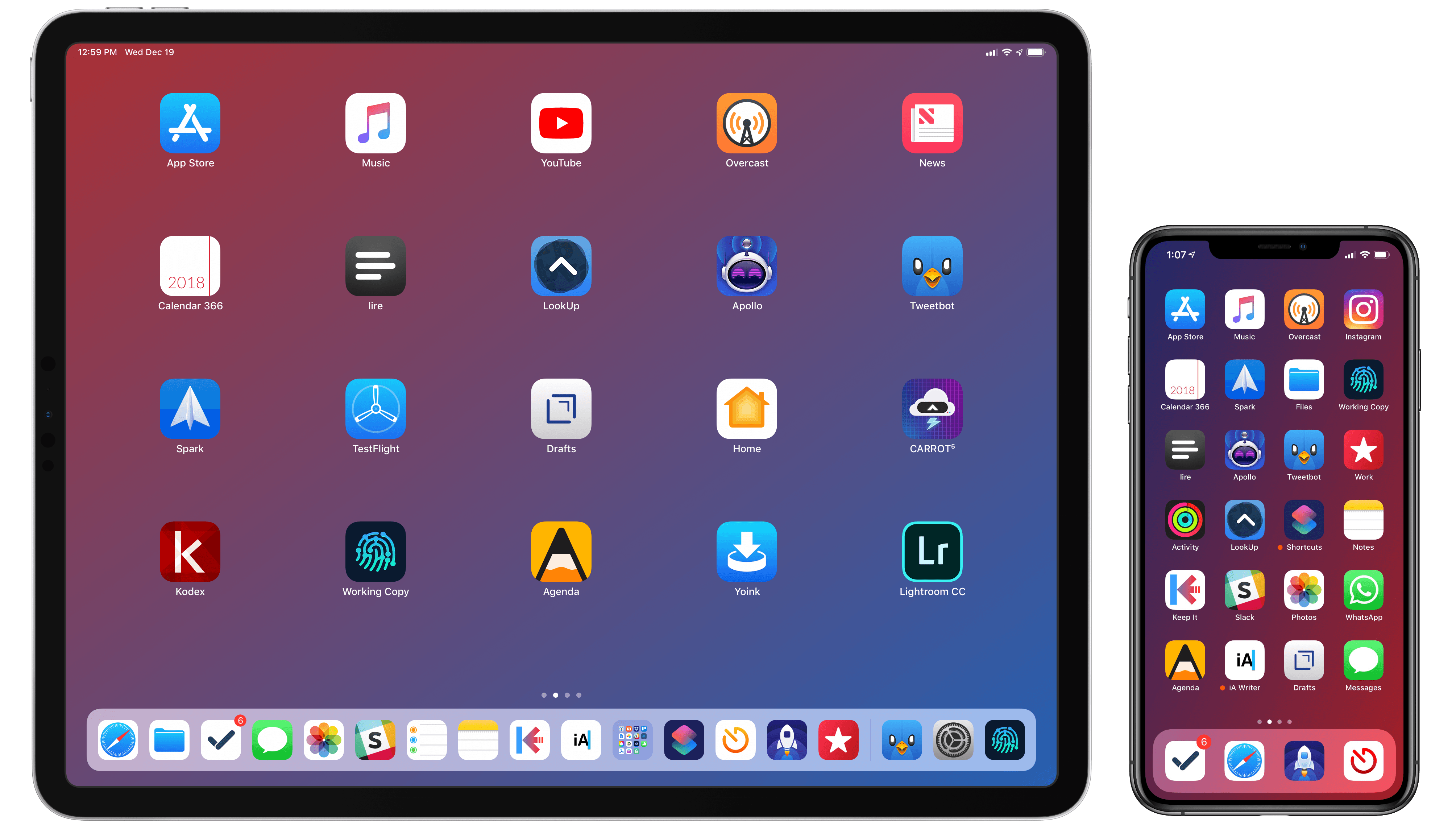
Putting together my annual list of Must-Have iOS Apps is an exercise in analyzing the trends of the year and considering which ones had the biggest impact on how I use my iPhone and iPad. Two years ago, it was web services and open APIs; last year, I focused on collaboration with the MacStories team and making my workflow consistent across devices; this year, there isn't a single overarching theme behind this list, but rather a collection of trends and changes that I've observed over the course of 2018.
First and foremost is the switch to a subscription-based business model by some of my favorite apps. As we noted in our look at the modern economics of the App Store earlier this year, it is becoming increasingly challenging for indie developers – the ones who make the apps we tend to use and cover most frequently on MacStories – to find a balance between reaching new customers with paid app updates and supporting an app over the span of multiple years for existing users who already paid once.
A subscription seems like an obvious solution: new customers can try an app for free and later decide to subscribe; longtime users of an app get to support their favorite app over a longer period of time; developers are more incentivized to keep making an app better thanks to the financial security provided by an ongoing revenue stream. Recurring subscriptions for all apps launched two years ago just before WWDC, and it feels like we've only now reached a point where more and more developers are willing to experiment with them. This major shift in app pricing wasn't always met favorably by longtime users of existing apps, which has resulted in developers testing different approaches such as optional subscriptions, bundles containing subscriptions and In-App Purchases, or even multiple ways to unlock the same features. In looking at the apps included in this list, I was surprised by how many now include some form of recurring subscription; I think this transition will only become more prominent in 2019.
The second trend I noticed in my usage of third-party apps is a strong preference for those that fully embrace modern iOS technologies. From Siri shortcuts (by far, the most important iOS developer framework of 2018) to Files integration and support for external keyboards on iPad, I tend to prioritize apps that eschew proprietary functionalities and adopt native APIs such as iCloud, the Files document browser, or Reminders. With iOS growing more powerful and complex each year, I think it's only natural that I've stuck with apps that shy away from Apple-provided solutions as little as possible; those frameworks are always going to be more integrated with the rest of the system than any alternative a developer can come up with, and I seek that level of integration because I enjoy the comfort of an ecosystem where all the pieces work well together.
Lastly, I've noticed some overall changes in the kinds of apps I consider my must-haves for iPhone and iPad. In the "pro" app department, the Photography and Development lists have grown to include apps such as Lightroom, Scriptable, Darkroom, and Halide – all new entries this year. One of my goals with the new iPad Pro is to use it as a workstation for editing photos and programming my own little additions to iOS; I felt like my increased usage of these apps warranted some changes in the annual picks. You will also find more apps designed to interact with macOS as a result of my purchase of a Mac mini (which I'm using as a home server for various tasks) and different utility apps as some of the old ones have been replaced by Shortcuts. An app that, by the way, I can no longer include in this roundup due to my self-imposed rule of not featuring Apple apps because they're kind of obvious choices for an iOS user (this also applies to Shazam, officially acquired by Apple this year).
Below, you'll find a collection of the 60 apps I consider my must-haves on the iPhone and iPad, organized in nine categories; whenever possible, I included links to original reviews and past coverage on MacStories. What you will not find is the usual list of awards for best new app and best app update, which we've relaunched as a team effort under the MacStories Selects name this year. Instead, at the end of the story you'll find my App of the Year, which is also joining MacStories Selects as an award that recognizes an overall outstanding iOS app that had a profound impact on my workflow over the past year, regardless of its release date.
Let's dig in.
Table of Contents
Work Essentials
iA Writer. After changing text editors several times over the years (I've been unhappy with most of them since Editorial was essentially discontinued), I settled on iA Writer a few months ago for a variety of reasons. iA Writer is an excellent Markdown text editor with features designed for writers such as a customizable keyboard popup, focus mode, and a family of monospaced and duospaced fonts designed by iA themselves. iA Writer comes with a native syntax highlight mode that can be customized to highlight adverbs, adjectives, and other parts of speech in a document's text; as a non-native English speaker, I find this feature to be an amazing aid for editing my articles.

There are several great touches about iA Writer (I could mention its elegance, or its support for versions, or the fact that it stores plain text files in iCloud Drive), but what convinced me to switch is its integration with external apps such as Working Copy thanks to iOS' 'Open in Place' feature for directories. As I detailed last month, I have been able to integrate iA Writer with GitHub via Working Copy, which allows me to keep a continuous backup of my documents in an external app, ready to be committed to GitHub and thus shared with my team. iA Writer may be an "opinionated" app, but when it comes to integrating with native iOS technologies, it is one of the best text editors I've found, and I enjoy writing in it.
Drafts. For those long-form stories that require more than a couple weeks of editing and that embed lots of custom formatting and template placeholders (such as my iOS reviews), I use Drafts. While most people would think of Drafts as the "where text starts" app with a minimal UI designed for ephemeral note-taking, it is possible to turn Drafts into a full-blown text editor made even more powerful by actions and JavaScript automation. Over the past year, I've created actions and scripts to handle footnotes, insert special tags for Reminders, paste MacStories-specific markup, merge multiple chapters into a single compiled copy of a story, and more. When an article needs extra attention and editing, Drafts is my replacement for Editorial – especially because it is now compatible with MultiMarkdown, which we use at MacStories. [Review and previous coverage]
Dropbox. I don't think this one needs an explanation. While I moved some of my work files to iCloud Drive, I still use Dropbox for critical work documents that need versioning and entire folders I share with the MacStories and Relay teams. I also rely on Dropbox's open API for cloud automations based on Zapier that save files into specific Dropbox folders, such as YouTube videos converted to 4K .webm versions by my Mac mini. If Apple ever adds tools to restore deleted files, browse versions, and share folders with other users through iCloud Drive, I may consider switching from Dropbox, but I don't think that is happening any time soon.
GoodTask. It's been a long journey, but after having tried all the major task management services out there, earlier this year I settled on Apple's Reminders. The built-in iOS task management system has less friction than any other todo app when it comes to creating new tasks as it's deeply integrated with Siri on the Apple Watch and HomePod. However, Apple's Reminders app is terrible. If you're serious about Reminders and want to turn this system feature into a powerful task manager, you need GoodTask.
The beauty of Reminders is that it's an open API third-party developers can build upon for their own clients and integrations. GoodTask is a full-featured, advanced Reminders client that uses Reminders as the database and sync service for tasks, but enhances it with functionalities such as quick actions, smart lists, and custom view settings. GoodTask is the OmniFocus of Reminders: every aspect of the experience can be customized and fine-tuned to meet your needs, to the point where it won't even feel like the app is actually using Reminders under the hood.

GoodTask's smart lists can also be configured as Siri shortcuts.
For example, GoodTask lets you add hashtags to reminders, which can then be used as filters in complex rules to create smart lists for reminders based on multiple conditions. In my GoodTask setup, I have a 'Writing' smart list that looks at all the tasks contained in an 'Articles' lists, filters them to extract the ones tagged "writing" and due in the next three days, and presents them in a custom list with its own view options. These smart lists are fantastic when working on big projects as they allow you to break everything down in multiple areas without creating multiple Reminders lists.
I could go on and on for hours to talk about what makes GoodTask special (have I mentioned you can customize notification actions as well as snooze settings per-list?), but I'm just going to say this: if Apple ever relaunches Reminders on iOS, they should take a serious look at the power-user features GoodTask has implemented over the years. If you like using Reminders but are fed up with Apple's rudimentary app, you need GoodTask in your life. [Review]
FileBrowser for Business. My favorite FTP client for iOS following Transmit's demise. At the time, I purchased FileBrowser for Business because it was the only version of the app that supported SanDisk's iXpand Lightning drive, but because SanDisk hasn't made a USB-C version of the drive yet, I don't use the original Lightning accessory anymore. These days, I use FileBrowser to connect to my remote server or Mac mini. FileBrowser's contextual menu offers plenty of options to perform actions on selected files and folders, and there's even the ability to browse connected locations in iOS' Files app by adding FileBrowser as a third-party location. The UI of FileBrowser isn't as pretty as Transmit, but it's regularly updated, packed with features, and well integrated with iOS, including support for Siri shortcuts in iOS 12. [Review]
Working Copy. The MacStories team wouldn't function as efficiently as it does without Anders Borum's Working Copy. Since we implemented GitHub in our Markdown collaboration setup two years ago, Working Copy has been at the center of our shared workflow to edit and submit feedback on each other's articles. Working Copy is the app we use every week to store copies of the articles we're working on in shared GitHub repositories, and it's how we manage to assemble new issues of MacStories Weekly for Club members every week.

Besides being a terrific GitHub client for iOS, Working Copy is one of the apps in this collection that truly taps into the power offered by modern iOS APIs. Working Copy supports drag & drop on both the iPad and iPhone (in-app), has a document provider extension, works with Siri shortcuts, features advanced x-callback-url commands, and was one of the first apps to support iOS' 'Open in Place' API for files and entire folders. If Apple adds a new productivity feature to iOS, there's a good chance Working Copy will be among the first apps to support it. This app is the definition of a "work essential" for me, and I cannot imagine collaborating with my team any other way.
Keep It. I discovered Reinvented Software's Keep It earlier this year when I was looking for an alternative to DEVONthink. The developers at DEVONtechnologies seem to be prioritizing their Mac app in lieu of the iOS counterpart; I wanted to find a similar product with feature parity between platforms – a reference management app that would allow me to organize my database of documents with tags, saved searches, sub-folders, and other advanced features. Keep It turned out to be exactly what I was looking for. Think of it as a mix of DEVONthink and Evernote, but not as bloated as the latter, more integrated with iOS than the former, and nicer looking than both of them.

Some of my folders and saved searches in Keep It.
Keep It can store all kinds of documents, from PDFs and images to web archives, rich text and Markdown notes, and even videos. The app syncs with iCloud across platforms and, unlike DEVONthink, the iOS version supports nearly every feature available on macOS, including the ability to create saved searches, bundles, and shortcuts to favorite items. Keep It has a powerful URL scheme to create notes and append data to them, and it supports Siri shortcuts to reopen frequently accessed notes; it also comes with extensive SiriKit integration to create notes and append text to them via voice.
Keep It played an essential role in the making of my iOS 12 review earlier this year, and it's the app I use every day to store both personal and work-related documents, which I can easily search (via full-text search) and browse thanks to rule-based saved searches. It's also where I store "cold" bookmarks via a shortcut that lets me turn Safari webpages into offline .webarchives saved in the app. I believe Keep It has a bright future, and I recommend it to anyone who's not happy with Evernote or just wants to save documents in an app that is more flexible than Files or Notes.
Calendar 366. I switched to this third-party calendar client a few months ago because, as was the case with Reminders, I'm tired of waiting for Apple to update their system app after years of neglect. Two things are unique about Calendar 366: it supports plenty of view settings and it lets you switch between calendar sets.

My 'Podcasts' calendar set (left) and the 'Main' set in agenda view (right).
A set is a custom view that displays specific calendars and Reminders lists, which you can load with one tap by tapping on colored indicators in the app's bottom toolbar (or sidebar on iPad). In my case, I created a 'Podcasts' set that contains my Podcasts and AppStories calendars plus my Podcasts list in Reminders, and a second 'Personal' set that only loads my Family calendar and Family, Grocery, and Dogs lists from Reminders. With this approach, it's easy for me to get an overview of my upcoming week based on different areas of responsibility. It's also the perfect example of why sticking to iOS' native calendar and Reminders frameworks unlocks an interoperability that would never be possible with third-party task managers and proprietary systems.
Calendar 366 has a few other handy features (I like the complications of the Watch app, and the Agenda view is useful), but I mostly just use it because of calendar sets, which are an excellent differentiator. I may switch back to Fantastical in the future if Flexibits ever brings calendar sets to iOS (Calendar 366 effectively copied this feature from Fantastical for Mac), but I also need a better calendar app today, and Calendar 366 does the job well.
Screens. As the owner of a new Mac mini, I want to be able to access it from my iPad to check on the status of my Homebridge server or Hazel rules. Edovia's Screens continues to be the most versatile, polished VNC client I've tried on iOS. The app launches quickly, supports trackpad mode, and can transfer the contents of the system clipboard between the Mac and iOS. When I open Screens, start connecting to my Mac, and feel a tap from my Apple Watch because the device automatically unlocked the nearby desktop computer, I'm reminded of how nice and handy Apple's integration of hardware and software can be. Just like Luna Display, Screens is one of the most important tools in my arsenal of utilities designed to take advantage of a Mac mini server that is always on. [Review and previous coverage]
Luna Display. There are times when I don't want to quickly log into my Mac mini but want to use the iPad as a secondary display for my Mac or, in some cases, the primary display to work in a shared macOS/iOS environment. I've tried various software-based solutions to turn the iPad into an external display without additional hardware, and, in my experience, none of them get close to the performance, image quality, and reliability of Luna Display. This app requires a USB-C (or DisplayPort) adapter that you can plug into your Mac to "pretend" you're connecting a display to it. In reality, the accessory acts as a bridge for the Luna Display app running on iPad, which becomes the external display from which you can control your Mac.

macOS as an app.
Running Luna Display on an iPad is going to mess with your brain at first. It's macOS, running in full-screen and Retina quality on an iPad, just like any other app that you can open when needed. You can control macOS with your fingers or the Pencil, and type with the Smart Keyboard – as if the iPad was always meant to emulate a Mac like that. But it's not emulation, and it's not magic either – Luna takes advantage of native APIs and hardware acceleration to make it possible for the iPad to become a high-resolution display. I use Luna Display almost every day in two ways: when I'm podcasting, I keep the iPad next to my UltraFine 4K and use it as an additional monitor where I park the Audio Hijack, Skype, and QuickTime windows; alternatively, when I need to get something done that isn't supported by iOS, I fire up Luna on my iPad, put an app window on the iPad's display with a keyboard shortcut, and do what I have to do before "going back" to iOS.
I never thought I'd effectively be including "macOS as an app" in my annual roundup, but I can now thanks to Luna Display. This little accessory is one of the most impressive pieces of hardware I own, and the iPad app has never let me down.
Spark. We switched to Spark as the email client for the MacStories team earlier this year and it has dramatically improved how we deal with incoming messages about interesting news or app releases we want to cover. Thanks to Spark, we can share emails with each other without forwarding them and even chat at the bottom of an email without the original sender seeing what we're talking about. We struggled with the issue of sharing email messages within our team for years, and Spark finally provided an elegant solution that works well across the iPhone, iPad, and Mac. The app's not perfect (sharing a message to Reminders won't attach a deadline as a due date, for example) but, as someone who works with a team of other people who also receive a ton of email every day, it's better than anything else I've tried on iOS. I do wish the app had a proper rich text editor and support for viewing three columns at once on the 12.9" iPad Pro, though. [Review and previous coverage]
Agenda. I consider Agenda to be the most impressive app debut of the year: the app launched in January (it was Mac-only at the time) and offered a novel take on note-taking that combined the best aspects of Notes with Markdown and a date-focused approach. Agenda later launched on iOS, and the developers have been updating both versions for the past few months, including a major update that brought support for attachments last week.

"Scheduling your notes" isn't something you may think you need in your workflow, and it takes a while to understand what Agenda aims to accomplish. Once it "clicks" though, Agenda reveals itself as a unique take on the note-taking genre with no equal on iOS. I use Agenda to take structured notes that will have to become actionable and due at some point in the future. These include show notes for podcasts and Skype meetings, outlines for articles I'm working on, and ideas for shortcuts I'll have to build either for MacStories or the Club. This very article, for instance, started as a note in Agenda that I exported as Markdown to iA Writer. Agenda is a note-taking app for a particular type of user, and I've found its approach to resonate with my research and writing habits this year. [Review and previous coverage]
Google Docs. Look, I don't love Google Docs for iOS. I don't think anybody who's moderately in tune with what good iOS apps are like has the capacity to appreciate the Google Docs app. It feels non-native to iOS because of its weird text selection, popups that ask you whether you want to open links in Safari or Chrome, and consistently delayed support for new iOS devices and APIs. But: the Google Docs app is the only way to use the Google Docs service on iOS, and Google Docs is the best collaborative writing service I've ever tried (and, trust me, I've tried many over the years). There is a profound disconnect between the quality of Google Docs as a service and Google Docs as an iOS app, but there's nothing I can do about it.
Trello. At MacStories, we use Trello to organize our editorial calendar in the busiest periods of the year (such as June, September, and December) as well as to plan sections of MacStories Weekly at the beginning of each week. I like Trello because it supports web automation via Zapier and Shortcuts. The Trello app for iOS isn't great (like Google Docs, the folks at Trello are slow at supporting new iOS screen sizes), but it gets the job done and supports launching URL schemes from a card's note field, which is perfect for my automation setup on iPad.
Airtable. If you're a Club MacStories member, you should be familiar with the Workflow Essentials Archive, a webpage where I list all the shortcuts I've ever created for the Workflow Essentials section of MacStories Weekly. This webpage is generated by a shortcut that contacts the Airtable API and turns a database into a Markdown document. Airtable makes it easy to create information-dense databases where each item contains rich metadata such as dates, on/off switches, images, interactive lists, and more – objects that would never be supported in a traditional spreadsheet app like Google Sheets or Numbers. The Airtable app, like Google Docs and Trello, isn't the best iOS citizen – it's an okay solution to interact with a much better web app. I enjoy working with the Airtable API via Shortcuts, which I plan to explore further in my free time during the holidays.
Slack. Rounding out this accidental sub-section of "barely passable iOS clients designed to access web apps" is Slack, the app for the communication service I use every day with the MacStories and Relay FM teams. The only good thing about Slack for iOS is that it supports iPad multitasking and external keyboard shortcuts. Everything else, from text selections to contextual menus and in-app notification banners, feels like Slack is trying too hard to emulate the UI of its Electron client in an iOS app.
1Password. This is one of the few apps that has always been included in this annual roundup since I started publishing the series years ago. I don't need to explain why I use 1Password or why you should, so I'm just going to focus on how 1Password got even better in iOS 12. Thanks to the Password AutoFill API, 1Password can be integrated with the QuickType keyboard on the iPhone and iPad so that you can fill logins in apps and websites with one tap. Even better, loading the 1Password extension from the keyboard will also copy one-time authentication codes to the clipboard, allowing you to paste the code directly without copying it yourself. 1Password's integration with iOS 12 has increased my usage of the app and, as a consequence, adoption of two-factor authentication for my most used web services. [Review and previous coverage]
iThoughts. I don't create mind maps for all of my articles, but when I do, I like using iThoughts. Years ago, I set up a template with a particular style of mind map (San Francisco font, right-angled branches, rainbow color theme with auto-sizing) and I've been using it every summer to outline chapters of my iOS review. iThoughts is full of great little touches such as pasting links and images into nodes, and I'm especially fond of the ability to use the app in Split View and drop text into a mind map. An upcoming update to the app will bring support for storing maps in iCloud Drive and third-party locations in the Files app, which I'm excited to try.
Yoink. I'm a big fan of iOS' drag and drop functionality for iPad, but I remain convinced that the system needs a "shelf" or reimagined clipboard to temporarily hold bits of content dragged from apps. Yoink, which was for a long time a Mac-only utility, made the leap to iOS with a mobile version that combines the aspects of shelf apps and clipboard managers in one cohesive, powerful package.

You can drop anything you want in Yoink for iPad.
Any kind of file you're dragging on an iPad can be thrown into Yoink and picked up again later; for each dropped item, Yoink will keep multiple flavors of it in its own storage, so you can decide if, say, you want to copy the URL or rich text hyperlink from the same item. But you can also paste items from the clipboard into the app, or add them from an extension, a widget, and Siri shortcuts. There's a custom keyboard to paste Yoink items anywhere on the system, and you can also browse its items in a location of the Files app. Plus, Yoink's clipped items sync between the iPhone and iPad with iCloud, and you can share them through Handoff with the Mac version of the app, which I've been using quite a bit on my Mac mini. Yoink is the shelf app Apple should have made for iOS 11, and I highly recommend it to anyone who deals with multiple files and text clippings on a daily basis. [Review and previous coverage]
Development
Pythonista. After six years, I still turn to Python and Pythonista whenever I want to script something that can't be automated with Shortcuts. While developer Ole Zorn is working on a major update to Pythonista with support for Siri shortcuts and custom keyboards, the current version of the app works well on iOS 12 and is still compatible with the share sheet for integration with other apps. The biggest advantage of Pythonista is the maturity of Python (the app lets you choose between the Python 2.7 and 3.6 interpreters) and the fact that it lets you install additional packages if you know what you're doing. I use Pythonista to extract information from the MacStories RSS feed, read the contents of individual actions in a shortcut, and I'm also working on adapting youtube-dl to it. If the app's next update is as powerful as teased by its developer, I feel like Pythonista will gain a more prominent role in my workflow in 2019. [Review and previous coverage]
Scriptable. Developed by Simon Støvring, Scriptable is what would happen if Pythonista came out in 2018 and worked with JavaScript instead of Python. Scriptable is a JavaScript IDE that lets you create JS programs but also integrate with modern iOS frameworks not supported by Pythonista such as Files, Siri shortcuts, rich notifications, and Safari View Controller. In blending these two aspects, Scriptable is reshaping the iOS automation landscape like only Pythonista and Shortcuts did before.

Who wouldn't want to load cute dog pictures with JavaScript?
I use Scriptable to show me specific images and PDF documents in Siri; I created scripts for my iOS 12 review to tag and move hundreds of image files across folders in iCloud Drive; I've adapted Python scripts for image uploads to work with Scriptable and its native Files picker. Scriptable is one of the best new apps of 2018, and it speeds up my everyday work like few other apps can.
Prompt. Panic's command line utility for iOS is my favorite app to SSH into my Mac mini and execute shell commands. Prompt looks pretty (something that can't usually be said about terminal apps) and integrates with the Panic Sync service, so all your servers and locations will stay in sync between devices as well as Coda on Mac and iOS. I like Prompt because it's customizable: in addition to changing the app's color scheme and font size, Prompt lets me create clips for reusable commands that I frequently run on my Mac mini. Plus, the app is available on both the iPhone and iPad and supports the new iPad Pro's screen sizes.
Kodex. This app has become my default text editor for opening plain text files (of any format) and making quick changes to them. Kodex is special for two reasons. First, it's heavily inspired by Sublime Text and brings several features of the popular desktop text editor to iOS; Kodex comes with support for multiple cursors, customizable keybindings, a document mini-map, themes, and powerful in-document regex search. Kodex feels like using a mobile version of Sublime on iOS; as someone who used to write in Sublime as his primary text editor years ago, I can tell you – Kodex is an impressive approximation of what a native Sublime Text would look like on iOS.

Kodex supports multiple cursors and Sublime-inspired keyboard shortcuts.
At the same time, Kodex also integrates with modern iOS APIs in that it's one of the few apps to support Files' 'Open in Place' mode for documents. To open existing text files, Kodex brings up a Files picker that lets you choose documents from any location in iCloud Drive or third-party apps; once a document has been edited, changes are saved back to the file in its original location without creating a duplicate version. I've been using Kodex to make changes to .js files stored in the Scriptable folder in iCloud Drive; I use it to edit long Markdown pieces stored in iA Writer or Working Copy; it's the app I open every time I have to make changes to a JSON file that provides data to some of my advanced custom shortcuts. If the idea of an iOS version of Sublime Text appeals to you, I can't recommend Kodex enough.
Social
Tweetbot. One of my goals for 2018 was to spend less time on Twitter every day, and looking back at my stats collected in Toggl, I think I've largely succeeded. When I do want to catch up on Twitter and scroll through my mentions, I still use Tweetbot.

Why can't more Twitter apps for iPad implement this layout?
In many ways, I consider Twitterrific to be a superior Twitter client because it's more frequently updated and has more options. However, there's something about Tweetbot that pushes me back to the app every time I try to switch. I don't know if it's because of the fluidity of scrolling the timeline, or perhaps the fantastic two-column layout of the iPad app, but Tweetbot feels like home and it's the only way I can tolerate using Twitter these days. [Review and previous coverage]
Instagram. Some of the "social time" that I've taken away from Twitter has gone into Instagram this year. I'm posting more photos on a regular basis, I've started following more people, and I keep up with what my friends are up to thanks to the massive, global adoption of Stories. I'm annoyed by the lack of a native Instagram app for iPad, but that doesn't change the fact that Instagram feels like a safe haven of inspiration and cute dog portraits where I don't see news of tragic events or politics every few minutes. I'm not a fan of the company behind Instagram (how can anyone be?), but the people who use the service make it more relaxing and fun than what Twitter has turned into.
Linky. This utility by indie developer Benoît Bourdon has been a must-have for me since the days of iOS 8 thanks to its powerful extension that simplifies sharing text, images, and links to Twitter. The custom tweet sheet of Linky supports syntax highlighting for text and hyperlinks; it comes with auto-completion for usernames; and it supports switching between multiple accounts. The majority of my tweets about MacStories articles are sent with Linky, and I can't recommend this handy little app enough if you share a lot of screenshots and links every day. [Review and previous coverage]
WhatsApp. There was a time when I would have said "I don't love WhatsApp, but I have to use it because all my friends are on it". While I don't love the company behind WhatsApp (just like Instagram), the app has gotten a lot better in recent months, particularly in the image and audio sharing departments. In many ways, I think WhatsApp is ahead of iMessage, such as when it comes to managing groups or attaching GIFs to conversations. There are other changes I've grown to like over time: WhatsApp now brings up a custom contextual menu when long-tapping messages, and it can also play multiple audio messages in a row if a contact sends you multiple voice messages in a conversation. What I said about Instagram is true for WhatsApp as well: there should be an iPad app for WhatsApp – I shouldn't have to keep my iPhone next to me at all times if I'm writing on the iPad and need to text my girlfriend. Maybe next year.
News
Lire. As a result of cutting down the time I spend on Twitter and Facebook every day, I have turned to good old RSS for my news consumption habits. Lire is my favorite RSS reader for iOS because it's fast, has fantastic caching controls for full-text extraction and images, and looks native to the iOS platform thanks to its polished design.
This year, lire was updated with a host of useful new discovery features to browse your subscriptions in different ways: lire can now surface "hot links" that several publications have linked to, display "calm feeds" with posts from websites that don't publish often, and even show you articles from specific authors. Plus, all of these views can be added to Siri as shortcuts. I've been enjoying lire for the past couple of years; as an Inoreader user, this client does everything I need and looks great on the new iPad Pro. [Previous coverage]
Apollo. Over the past year, I've started visiting a handful of sub-reddits (r/iPad, r/shortcuts, r/iOSGaming, and r/NintendoSwitch, to name a few) both for news related to a specific subject and to engage with the community. Apollo is hands-down the best iOS app to access Reddit and tailor the experience to your needs. There are too many new features to call out individually, but I'd like to highlight filters and notifications.

With keyword filters, browsing a sub-reddit in Apollo is akin to using Tweetbot to curate your Twitter timeline – you can specify topics you're not interested in and posts containing those keywords will be hidden by Apollo. It's a great way to hide bug reports from r/iOSBeta, for instance. Notifications are part of the Apollo Ultra package, and they allow you to stay up to date on new posts, comments, and replies thanks to a server-side component that instantly sends push notifications to your iOS devices. I could mention the amazing custom icons, excellent media player, or the jump bar that we selected as one of our favorite app features of 2017, but that still wouldn't be enough to sum up Christian Selig's magnificent work. Apollo isn't just the best third-party Reddit client for iOS – it's one of the finest news apps currently available on the App Store. [Review]
Entertainment
Overcast. At the beginning of the year, I thought I would spend the rest of 2018 listening to podcasts using Apple's official app, but Marco Arment's excellent work on updating Overcast for iOS 12 drove me back to his podcast client again. Thanks to Siri shortcuts, Overcast 5 is just as deeply integrated with iOS and HomePod as the Apple Podcasts app: I can resume playback with a Siri phrase and play specific podcasts or playlists by requesting them with my voice. I even created custom widgets via Shortcuts to start Overcast playback in the background without interacting with Siri at all. These enhancements complement a thoughtful redesign of the Now Playing screen and advanced features that are nowhere to be found in Apple's app such as Smart Speed, Voice Boost, and, new in version 5.0, full-text search and episode release frequency. The adoption of Siri shortcuts has leveled the playing field between Podcasts and Overcast, which allows me to enjoy the exclusive features of Arment's app without missing the convenience of Siri. [Review and previous coverage]
YouTube. My YouTube consumption has increased this year thanks to the launch of YouTube Premium in Italy. I can't imagine going back to watching YouTube ads and having to wait for videos to start; I also enjoy the ability to cache videos for offline watching. I'm not completely happy with the YouTube experience on iOS though: the app still doesn't support Picture in Picture on iPad (not even for Premium subscribers) and can't display 4K content natively on iOS. The latter is the result of a disagreement between Apple and Google on which codec to implement – hopefully, the industry's adoption of the superior AV1 codec will end these divergences once and for all.
iShows TV. My favorite app to track TV shows with trakt.tv integration, Couchy, was discontinued earlier this year. In its place, I've started using iShows – a longtime MacStories favorite that doesn't have the same features of Couchy, but which gets the job done. iShows looks great on the new XS Max and its UI is customizable, so you can change the background color and size of posters embedded within the app. I wish that marking episodes as watched from the main view was a bit quicker, but at least the app has a Calendar view (Premium-only) that shows you upcoming episodes in an easy-to-read list format. [Review]
Plex. As the owner of a new Mac mini that I bought with the intention of setting up a home server, this is an obvious choice. With Plex Media Server running on the Mac mini and scanning folders on external drives for new TV shows, YouTube videos (downloaded with youtube-dl), and music, I can use Plex on my iPad Pro and iPhone XS Max to stream those videos both on my local WiFi network and 4G.

YouTube videos downloaded locally on my Mac mini and ready to be streamed via Plex.
Because I invested in a six-core mini with 16 GB of RAM, I enabled the "Make my CPU hurt" option of the Plex transcoder, which results in the Mac mini's fans spinning up for a few minutes when transcoding a 4K video that, however, starts playing immediately without stuttering on all of my devices. It's remarkable what Plex can accomplish with a powerful Mac server. The Plex app for iOS recently gained an experimental video player, which looks nice, as well as new sections on the main page that can be disabled and customized to your needs.
VLC. If all else fails, or if I just need to play a video with a peculiar format without uploading it to my Mac mini first, there's always VLC. This app can play anything you throw at it, from MKV files to videos streaming from a URL and content stored in your Dropbox account. VLC supports it all, including 4K and HDR content. VLC runs great on the new iPad Pro, supports video-out mode for external displays, and lets you customize the player with custom gestures. I keep VLC on all my devices (including the Mac) because it has never disappointed me over the years.
Shonen Jump. I dreamt of this moment since I was a kid buying manga at his local comic books store. Shonen Jump, Japan's leading weekly manga publication, has a new iOS app based on a $1.99/month subscription that gives you access to the entire back catalog of Shonen Jump chapters with the added benefit of same-day releases as Japan. If you're into manga, you know that this is a big deal: you can now read all chapters available in English on Shonen Jump on your iOS device for $2/month and you're going to find new chapters from the likes of Dragon Ball Super and One Piece as soon as they become available in Japan.

Viz Media, the American company behind the western edition of Shonen Jump, has done a fantastic job bringing the tradition of Shonen Jump into the modern era of iOS apps with subscriptions, making this one of the most exciting app launches of 2018 for me. The new Shonen Jump supports the new iPad Pros and, more importantly, is a major milestone for reading digital manga in a legal fashion outside of Japan.
Photography and Images
Lightroom. One of my goals for the next few months is to learn more about iPhone photography and the intricacies of editing RAW. I'm curious about this topic and have always been fascinated by the idea of being able to precisely control every aspect of a picture when editing it. As part of this process, at the advice of some close friends I signed up for Lightroom a few months ago and have been slowly learning my way around its controls, editing RAW photos that I later share on Instagram or use for MacStories articles.

Lightroom has its quirks, such as a UI design that is unique to Adobe apps and that needs to be understood over time – kind of like Microsoft's Office apps have their own UI paradigms and behaviors that somewhat differ from the rest of iOS. However, Lightroom's controls make sense to me because everything is labeled, and the app produces consistent results that don't leave me wondering if I touched something I wasn't supposed to tweak. Lightroom comes with its own Creative Cloud subscription package, which will also give me access to Photoshop on iPad next year.
Darkroom. On the other end of the photo editing spectrum is Darkroom, which launched on iPad earlier this week after several weeks of beta testing. I use Darkroom whenever I want to apply one of the app's filters or for quick edits to a RAW image that doesn't need advanced retouching with Lightroom's healing tool. Darkroom, unlike Lightroom, doesn't force you to use a separate library for photos; instead, the app integrates with the system's photo library so that you'll be able to see all your photos and albums, pick the files you want to edit, and switch between multiple images without having to manage an additional library.

Darkroom takes advantage of the iPad's screen with a multi-column layout.
Both on the iPhone and now on the iPad too, Darkroom is easy to use, makes it easy to separate different kind of shots such as Portraits and RAWs, and features some fantastic built-in filters that appeal to a wide range of artistic expressions. It may not have all the advanced controls of Lightroom, but Darkroom still offers plenty of options and it's a pleasure to use on the big screen. [Review]
Halide. Editing RAW pictures is only the second half of the process – first, you have to actually shoot in RAW. My favorite manual camera app to shoot RAW on iPhone is Halide, which has received a series of remarkable updates over the course of 2018. Unlike other advanced camera apps that inundate you with a barrage of icons, sliders, and text labels, Halide keeps the UI simple and elegant while still allowing for fine control over ISO, exposure, lenses, and focus. I love how Halide lets me swap the indicators I see above the shutter button with a customizable control row, and I find myself often playing with the manual focus slider to get different flavors of bokeh out of the iPhone's camera. The Halide team even built their own version of Smart HDR for RAW pictures called Smart RAW that produces better RAW pictures on the latest iPhone XS and XS Max. Halide is one of the most technically impressive apps I have on my iPhone, and it's helping me understand how to take better pictures. [Previous coverage]
Annotable. There is no better image annotation utility than Annotable on iOS. This app started as an alternative to the discontinued Skitch for iOS, but over time it has evolved into a professional annotation utility that is even more versatile than Apple's Preview app for macOS. I use Annotable whenever I need to add call-outs or magnification loupes to screenshots for MacStories, and I recommend it to writers, developers, or designers who deal with tons of image assets on their iOS devices on a regular basis. [Review]
Pixelmator. Until Photoshop or Pixelmator Pro arrive on the iPad, the standard Pixelmator app is my favorite solution for quick image adjustments and compositions that can't be performed in the Photos app. I mostly use Pixelmator to create a blank canvas for pasting images of framed iPad and iPhone screenshots, which I later resize for appropriate scaling. I understand the UI of Pixelmator well at this point, which is why I'm a bit more excited about seeing Pixelmator Pro come to iPad than Photoshop, which I fear is going to be too complex for what I have to do. We'll see. [Review]
Snapthread. I love using Becky Hansmeyer's utility to stitch together Live Photos and turn them into short videos I can share with my friends and family. There are other apps like Snapthread on the App Store, and I could probably replicate the app's core functionality with Shortcuts, but I prefer the intuitive design of Snapthread. The app comes with lightweight editing tools for text and audio soundtracks, and it's easy to add more photos to a project if you want to make longer videos. [Review]
Health
AutoSleep. Developed by David Walsh, AutoSleep is the premier utility for using the Apple Watch as a sleep tracker. All you need to do is wear the Apple Watch at night and let AutoSleep figure out how much you slept once you've woken up and got out of bed. There is nothing to configure on the Watch and no special modes to activate before sleeping. On the iPhone, the AutoSleep app – which received a major update to version 6.0 earlier this week – allows you to tailor the experience to your habits by selecting the amount of sleep you want to get each night and the reminders you want to see from the app.

...I need to catch up on sleep during the holidays.
AutoSleep has been simplified and improved compared to older versions: it's more powerful than ever thanks to new stats for sleep wellness, trends, and deep Siri shortcuts integration, but it's also more accessible than before with a cleaned up design, clear explanations throughout the app, and lots of pretty charts and colors all around. AutoSleep has always been a marvel of HealthKit app engineering, but the latest version is a fantastic update that pushes AutoSleep an entire generation ahead of other similar apps for iPhone and Apple Watch. It's one of my absolute must-haves that keeps getting better and better over time. [Review and previous coverage]
HeartWatch. Also by David Walsh, HeartWatch is to heart rate monitoring what AutoSleep is to sleep tracking. Unlike AutoSleep, which adds a feature that doesn't exist natively on the Apple Watch, HeartWatch expands the Health app's built-in heart rata data collection feature with more views, options, and stats. I use HeartWatch because it presents me with a comprehensive dashboard about my average heart rate that I can't get in Apple's app. The calendar-based approach of HeartWatch, combined with its colorful circles to indicate heart rate trends for each day, makes it easy for me to appreciate trends of decreasing average resting heart rate if I'm working out more intensely or sleeping more regularly. If you care about monitoring the heart rate information captured by the Apple Watch, HeartWatch is the app to get. [Previous coverage]
Zones. If you're into high-intensity interval training, Zones lets you visualize different "areas" of a workout with colored bar charts that represent peak heart rate, cardio, fat burn, and warm up sequences. You can customize what each zone means for your heart rate, as well as set weekly goals for workouts. In its Pro version, Zones lets you drill down into more specific insights and trends about your workouts as logged in HealthKit, offering custom views and report cards that aren't available in Apple's Activity app. Zones makes for an excellent companion utility if you want to extract more details out of your intervals and overall trends.
Gyroscope. This is where every piece of data I collect about my lifestyle through the Apple Watch, social networks, and location sharing comes together in a unified dashboard. Gyroscope is a futuristic "quantified self" service that aims to provide you with analytics about your life using stats and numbers that you normally wouldn't be able to aggregate and correlate with one another yourself. Gyroscope collects it all: your workouts, how much you sleep, where you go, what music you listen to, which pictures you share on Instagram and Twitter.

Gyroscope has one of the most captivating app UIs on iOS.
Unlike other similar services, Gyroscope has an actual business model based on letting users pay to unlock key features such as additional graph layouts, themes, goal tracking, and more. I started using Gyroscope years ago, and as a result I've accumulated a treasure trove of information about my old and current lifestyle that I find useful to analyze every once in a while. My only wish is for Gyroscope to work on the iPad too in addition to the iPhone and the web – I'd love the ability to view charts and generate reports on the large screen of the 12.9" iPad Pro.
Home
Home. I've been using Matthias Hochgatterer's third-party Home app for years to view accessory details and set up automations that are natively supported by the HomeKit API, but which aren't available in Apple's own Home app. This year, Home was updated with the ability to set up AND/OR conditions for automation and a new camera widget that lets you view real-time video feeds of HomeKit cameras from the widget view of an iOS device. If you're serious about converting your home to a smart home powered by HomeKit, you're going to need the advanced features enabled by Hochgatterer's app.
Logi Circle. Of all the cameras we've tried in our house over the years, we like Logitech's Circle 2 wired cameras the best. These cameras have a wide viewing angle, support HomeKit, and they never fail to connect when we want to watch a video stream remotely. The performance of the camera's wired version is superior to the wireless one due to the lack of low-power mode, and we're now in the process of selling all the other cameras we have and putting multiple Circle 2 units around the house. We use the official Logi app to manage the Circle 2 cameras we have, and I like how the app lets us easily switch between multiple rooms as well as watch recorded clips. For some reason, the Logi app is also faster at loading video streams than Apple's Home app.
HomeRun. A runner-up for our favorite app debut of 2018, Aaron Pearce's HomeRun is what Apple's Home app for Apple Watch should have been. Rather than replicating the design of the iOS Home app with a clunky carousel of interactive tiles, HomeRun lets you set up a custom grid of HomeKit scenes that you want to trigger from the Apple Watch. Each scene in the grid can be personalized with a custom color and icon, and all it takes to execute a scene is one tap.
With the latest 1.1 update, HomeRun gained the ability to set up custom complications that launch HomeRun and automatically run an associated scene. I use HomeRun multiple times a day to change the color of our lights and switch inputs on our LG TV thanks to Homebridge. I fully expect Apple to copy some parts of HomeRun's approach in the future – it's that good. [Review]
Utilities
CARROT Weather. This app started as a simple, joyfully sadistic way to check the weather and, thanks to Brian Mueller's judicious iteration, matured into one the most powerful and advanced weather apps for iOS. The evolution of CARROT Weather hasn't compromised its character: the app still features delightful illustrations and varying degrees of malevolent forecasts. At the same time, CARROT Weather now supports multiple weather sources, can load data from your own weather station, and comes with a highly customizable Watch app. Powerful, flexible, and unique. [Review and previous coverage]
PCalc. I don't need to explain why PCalc is the best calculator app you can find on iOS. Instead I'm going to highlight how its developer James Thomson, despite being the creator of one of the oldest apps I know, is constantly ahead of the curve and experimenting with new ideas to make PCalc more powerful and ensure it keeps up with the times. This quality – the curiosity and audacity to experiment despite having a vested interest in maintaining an existing app – is incredibly hard to find among indie app developers, especially when their apps reach a certain age. James Thomson's character is embedded in his creation, a calculator app that has been around for a long time but that still manages to innovate and be at the forefront of modern API adoption. [Review and previous coverage]
LookUp. As a non-native English speaker, I'm constantly seeking new ways to improve my vocabulary by learning new words. For years, I practiced this by keeping a plain text list of new words I encountered and asking my girlfriend to quiz me on their meaning. Earlier this year, I switched to LookUp 5, a fantastic update to the LookUp app that brought the ability to organize words in collections and keep them synced across devices.
Version 5.0 keeps the visual approach that's always been unique to LookUp and extends it with Siri integration (which I use to check out the app's word of the day), liked words, and user-created collections. And that's not to mention the larger selection of definitions and examples that have turned LookUp into a full-fledged dictionary app for iOS. LookUp makes for an excellent reading companion and looks great on the XS Max and new iPad Pro. [Review]
Launch Center Pro. Contrast's popular app launcher is back after a few years without major updates and it's already reclaimed its spot on my home screen. Since I started testing the new Launch Center Pro a couple of months ago, I've enjoyed the app's new integration with NFC stickers as well as support for custom icons. I tap on the Launch Center Pro icon multiple times a day to open Google searches, run specific shortcuts, and play specific playlists on Apple Music. There's a lot Contrast is working on for future updates, and I plan to spend more time setting up actions and shortcuts over the holidays. [Review and previous coverage]
Deliveries. There is no better app to track packages from Amazon or the Apple online store than Deliveries. In my experience, Junecloud's app has the richest database of international shipping companies and works better than anything else when it comes to Amazon tracking links. Deliveries has been excellent for a long time, but it got even more convenient with iOS 12 thanks to shortcuts that let you check on your upcoming package arrivals via Siri. The only reason I don't put Deliveries on my home screen is that this app almost makes me want to buy more stuff from Amazon, and I need to keep my shopping habits in check. [Review]
Text Case. It's not common to find apps like Text Case, a utility designed to address the needs of a specific niche – modifying copied text using different capitalization formats. Not only does Chris Hannah's app do this very well, but it even integrates with Siri shortcuts and the Shortcuts app so that its capitalization commands can become system features. And to top it all off, Text Case supports the Chicago Manual of Style style guide for headline capitalization, which we use at MacStories.
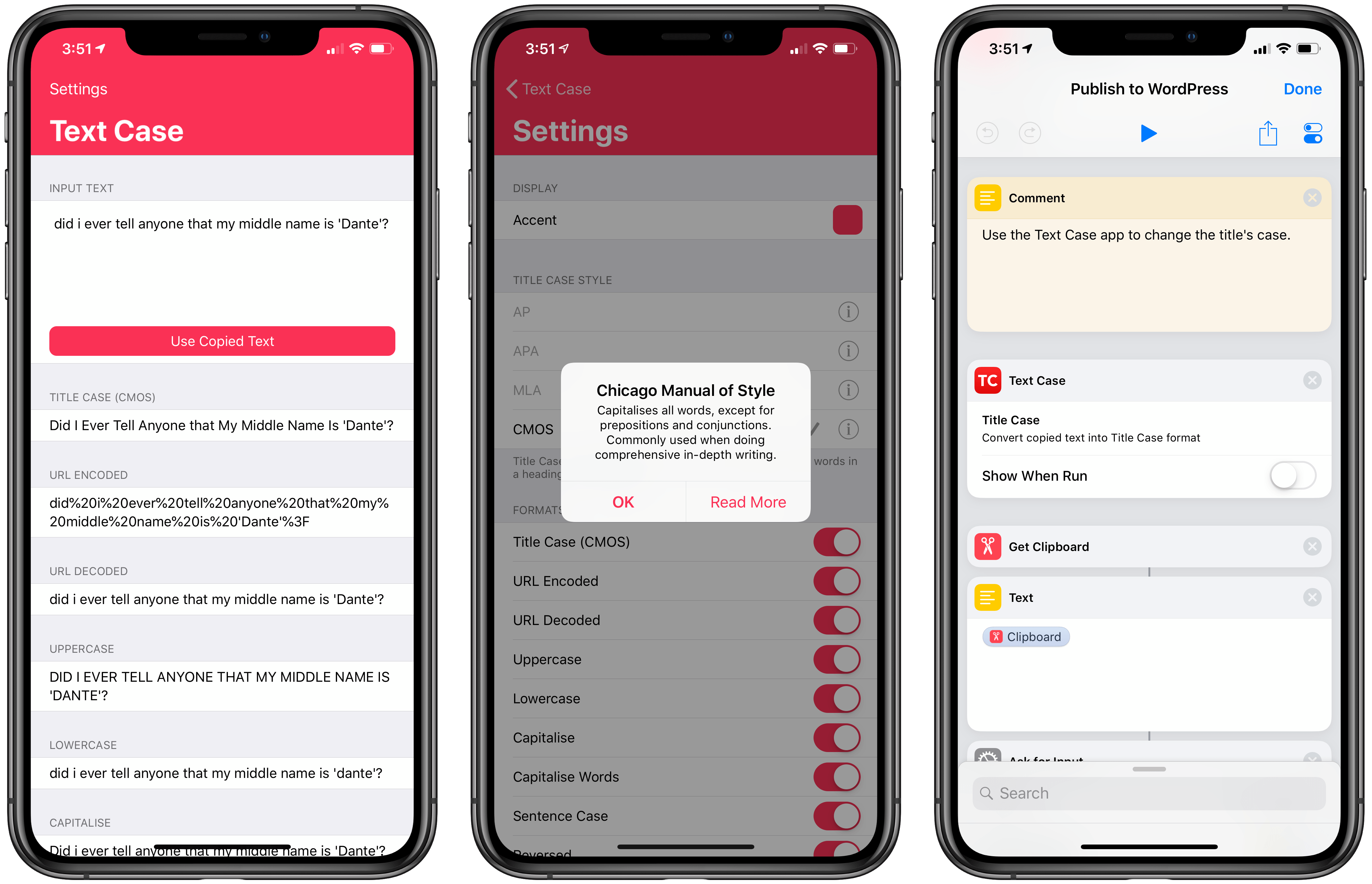
Text Case offers text capitalization shortcuts that can be used in the Shortcuts app (right).
I feel like Chris Hannah made this app specifically for me, but I hope our readers can find it useful too. [Review]
AnyFont. I've been using AnyFont to install custom fonts on my devices for years and it's always one of the first utilities I download from the App Store when installing iOS from scratch. In the past year, I've relied on AnyFont to install San Francisco Mono in Drafts and San Francisco Text in Keep It. Until iOS supports installing additional fonts out of the box, AnyFont's workaround will do it. [Review]
1Blocker X. I'm not against advertisement on the web per se – I mean, this very website is made possible by sponsors – but certain websites have gone way too far in the direction of creepy, intrusive trackers and scripts that slow down Safari, consume battery life, and follow you around the web. I use 1Blocker to make my Safari browsing experience better by blocking those trackers and other annoying webpage elements such as popups, persistent cookie consent dialogs, and invasive newsletter signup prompts. I can't imagine going back to browsing the modern web without a content blocker installed, and I find 1Blocker X to be the best, most customizable option on iOS thanks to its built-in rules and visual webpage editor.
Google Maps. It's going to be several years until the new Apple Maps reaches Italy. Until that happens, Google Maps provides more accurate data for local businesses, points of interests, and traffic that simply can't be found in Apple Maps. I actually do prefer the way Apple Maps looks, but Google's data is more accurate for our area and Google Maps supports crowdsourced details for busy times at nearby stores, which Apple Maps doesn't have. Apple Maps is prettier, but Google Maps is a more efficient way to browse the world around us.
PDF Viewer. There is no shortage of great PDF editors for iOS, but I prefer PDF Viewer because it's the only actively developed one that also uses Files' document browser as the main view of the app. With PDF Viewer, you don't have to worry about where the app stores its documents: the system's built-in Files app is PDF Viewer's "library" – this is a rarely used iOS API that the PSPDFKit team has aptly baked into their app, resulting in a seamless experience for managing and sharing PDFs.

PDF Viewer uses the standard Files view as its main library page.
A side benefit of this, of course, is that any document from third-party apps can be opened in place using PDF Viewer – for instance, I can edit PDF documents from Keep It's file provider in PDF Viewer without creating duplicate versions. It also helps that PDF Viewer, particularly in its Pro version, comes with solid editing tools, such as document merging, image annotations, comments, and more. I wish more apps were as integrated with modern iOS frameworks as PDF Viewer. [Review and previous coverage]
Stocard. I discovered this app at the beginning of the year as I was waiting in line at the supermarket and saw somebody in front of me open it (I tried not to look creepy while attempting to read the app's name on his home screen). Stocard lets me keep all my loyalty and rewards cards in one place, which means my wallet is now much lighter and thinner. Stocard can add new cards either by scanning their code or entering details manually, and most cards from popular shops and chains are included in the app's database (at least in Italy, but I'm pretty sure the app works with U.S. retailers as well). The app even supports geofences: if you're in the proximity of a store that accepts one of the cards stored in the app, you'll get a notification on the lock screen telling you that you shouldn't forget to scan your card. Thank you, random stranger at the supermarket, for showing me a better way to shop with my iPhone (we should talk about your home screen layout next time though).
Grocery. This app is to shopping lists what GoodTask is to task management. Like GoodTask, Grocery uses Reminders as a database and lets you keep using Siri on multiple Apple devices to save the things you want to buy. But there's a twist: in addition to presenting a different UI for a specific Reminders list, Grocery uses machine learning to automatically sort items based on the order in which you tend to check them off the list while shopping. The app learns from your habits and automates sorting so that it reflects the order of products at the grocery store, which is a genius idea. There are plenty of other nice details in Grocery: the app supports multiple stores, can de-duplicate items, split a single sentence in multiple items (e.g. "buy milk and eggs and bread"), and display notifications for items added to a shared list. With Grocery, I don't have to give up the convenience of saving items with Reminders, but I end up with a smarter, better designed app when I'm shopping and need to see what's on my list.
App of the Year
GoodTask
When I decided to move back to Apple's Reminders as my task manager earlier this year, I quickly realized the stock Reminders app wasn't going to scale to bigger projects such as my iOS 12 review and iPad Diaries series. Fortunately, I came across GoodTask, a masterful blend of power-user task management features and the inherent simplicity of Reminders. Created with the goal to offer a better Reminders app to iOS users, GoodTask strikes a rare balance of combining power-user functionalities (such as smart lists, themes, and customizable Siri shortcuts) with deep system integration provided by the Reminders framework and background iCloud sync.
GoodTask has helped me make sense of the busiest moments of the past year, and it's the kind of ingenious app that reminds us (no pun intended) why it's important to support and celebrate indie developers and their wild, risky, useful ideas. For these reasons, and thanks to its superb integration with Reminders on iOS, GoodTask is my 2018 App of the Year.
Runners-Up
Working Copy
A remarkable example of what third-party developers can create with the right idea for a pro iOS app, a sustainable business model, and respect for modern iOS technologies and conventions. Working Copy continues to be one of my essential apps to get work done on iOS.
iA Writer
Don't overlook what iA has accomplished with this text editor. iA Writer is a full-featured Markdown text editor with beautiful (and painstakingly crafted) typographic choices and integration with native iOS APIs that are often ignored by other apps, such as 'Open in Place' and iCloud versions. One of my favorite surprises this year.
Keep It
A reimagined Evernote with support for iCloud, iOS automation, rich text and Markdown notes and, more importantly, desktop features such as saved searches and full-text search. I'm glad I switched to Keep It before the summer, and I'm looking forward to major updates in 2019.
2018
I concluded last year's roundup with an optimistic take on Apple's then-unknown rethinking of Workflow. That wish paid off with Shortcuts, which, as has been clear from my coverage since September, has allowed me to incorporate more utility apps into Shortcuts as features. Looking ahead at 2019 and the next WWDC, I fully expect Shortcuts to continue growing and assimilate more functionalities that are still part of apps included in this collection today.
What I got wrong last year, and which I'm therefore deferring until iOS 13, was the lack of meaningful software enhancements for iPad and iOS productivity in general.
By and large, iOS 12 was a consumer-oriented release, one focused around improvements to photography, communications apps, and stability – with the exception of the Shortcuts framework. As far as the iPad Pro is concerned, it is abundantly clear that the latest hardware is one step ahead of its underlying software platform. By this time next year, I expect iOS for iPad to sport drastic improvements to file management and multitasking; it'll be interesting to see the effect a more powerful iOS will have on the third-party app ecosystem, and if I'll find myself using fewer apps, more pro tools, or perhaps new and different apps that are impossible to imagine right now.
As always, let's check back in a year.
Support MacStories Directly
Club MacStories offers exclusive access to extra MacStories content, delivered every week; it's also a way to support us directly.
Club MacStories will help you discover the best apps for your devices and get the most out of your iPhone, iPad, and Mac. Plus, it's made in Italy.
Join Now