Shared posts

04 Jan 02:11

What am I doing /now?

by peter@rukavina.net (Peter Rukavina)

Inspired by Patrick Rhone (who, in turn, was inspired by Derek Sivers), I have created a /now page. As outlined here, this is a that fills a gap that exists amidst blogging, social media et al:

No. If I wonder how someone is doing these days, it doesn’t help me to see that they went on vacation last week, are upset about something in the news, or even got a new job. That’s not the big picture.

Think of what you’d tell a friend you hadn’t seen in a year.

Like, “Still living in Dallas, though considering moving to Austin. Working at ABC. Really getting into cycling. The kids are age 3 and 6. I’m reading a lot of Pema Chödrön, and listening to a lot of jazz piano especially Brad Mehldau. I’ve stopped taking on web design clients, since I’d rather keep improving my back-end database work.”

That’s what a now page is for. You can’t get that big picture from any other outlets I’m aware of.

I was also inspired, covering the same terrain, by Austin Kleon’s post Don’t discard. Keep all your pieces in play., especially:

Margaret Atwood once said, “You’re supposed to do one thing. If you do more than that, people get confused.”

It’s not just that other people get confused – you yourself get confused. You love all these things, but you feel like you’re supposed to pick one.

My answer to “what do you want to do when you grow up?” is “everything.” Which is born out by my coding, writing, printing, bookbinding pursuits.

I’ve long admired the weeknotes of my friend Ton, and the monthnotes of my friend Peter, but I’ve never got it together enough to be that regularly retrospective; I’m hoping I’ll be more successful at this project; I’ve already got a reminder to update the /now on January 28, 2019.

(See also Less, More and None, a similar but different effort; I don’t have it in me to be that declarative right now; via University of Winds).

04 Jan 02:11

Quality Service from Khoaw Pon

by peter@rukavina.net (Peter Rukavina)

Khoaw Pon Authentic Thai on Great George Street has become one of my regular lunch stops: the food is well-made and well-spiced, the staff are friendly, they serve cold water in a tall ice-free glass, and the prices are reasonable.

Today I stopped in for lunch to find the placed slammed: there was a table of about 25 people taking up almost all the available seating, with several take-out orders waiting for food.

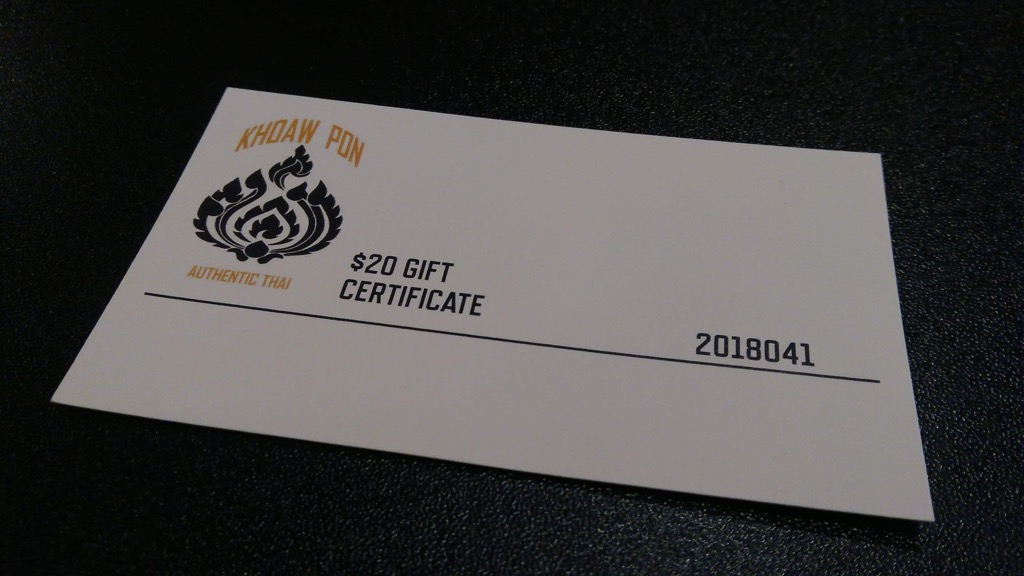
They handled the situation with aplomb, however: they offered me a seat in the (almost empty) burger place next door and, when my food, understandably, took about 30 minutes to arrive, they presented me with a $20 gift certificate for my troubles.

As a result they turned a bad situation, where I might drop them from my lunch rotation and recommend against others eating there, into a good situation where I’m lauding them.

Bravo.

Photo of $20 gift certificate from Khoaw Pon

04 Jan 02:10

Jason Snell Goes Hands-On with Brydge’s Upcoming Keyboard for the 2018 iPad Pro

by Federico Viticci

Jason Snell tested a pre-production unit of the Brydge keyboard for the 2018 iPad Pro (in the 12.9" flavor) and it sounds like this will be the iPad keyboard worth waiting for:

To attach the iPad to the Brydge 12.9 Pro, you slide it into two hinged clips covered with rubber padding. As with previous models, it takes a little practice to get the feel right. My main concern once the new iPad Pro was unveiled was if Brydge would be able to design a clip small enough to only cover the iPad’s much smaller bezels that also held the iPad securely. I’m happy to report that the answer is yes—there’s enough room and once the iPad is attached, the connection feels solid.

The clips are the same size front and back, meaning you can remove the iPad, flip it around, and insert it back into the clips to use the Brydge as a “movie mode” stand, or even fold it down and use it as a double-thick, double-weight tablet. (I don’t really see the appeal, but Brydge says that some customers requested it.)

In a nice touch, the Brydge 12.9 Pro comes with a slight indentation at the bottom of the wrist-rest space (below where a trackpad would be, if it had a trackpad). This creates a natural lifting point to open the “laptop”, which was sometimes tricky on the previous models.

Once I was able to get my hands on a functioning unit of the original Brydge keyboard, I fell in love with the idea of turning the iPad into a "convertible" computer that could work both as a laptop and a tablet. I later upgraded to the second-generation Brydge keyboard and used it until I upgraded to the latest iPad Pro in November. Products like the Brydge keyboard tie into the iPad's hybrid nature – the multiplicity of input systems and work contexts that make it, as Jason also notes, more flexible than a traditional laptop or desktop computer. I was concerned that the smaller bezels of the 2018 iPad Pro were going to be an issue for a redesigned Brydge keyboard, but it seems like the company has not only worked around the iPad's new design constraints, but even improved upon previous generations of the keyboard case. I'm going to pre-order one as soon as possible.

→ Source: sixcolors.com

04 Jan 02:08

Dave Winer on Medium

Dave Winer, Scripting News, Dec 28, 2018
Icon

I've commented off and on recently that blogging remains a vital force on the web. It's true that a lot of blogs have disappeared from Blogger and WordPress, but it's equally true that Medium is becoming the site-of-record for a lot of leading edge developments in technology (for example, if you're studying blockchain online, you'll be reading a lot of Medium articles). I have a Medium blog (but I don't like it; Medium doesn't understand that blog posts and comments are different, and nobody sees it anyways) and I have a Medium membership, so I guess I'm in the ecosystem. Still, I heed Dave Winer's warnings here. "They haven't made any comittment to keeping their archive accessible, nor do they give people the ability to move their content off Medium without breaking links.. they could fail to find a business model, and shut down, leaving a huge hole in the web, over many years." Via Aaron Davis.

Web: [Direct Link] [This Post]
04 Jan 02:08

What does it take to be the ‘best and brightest’?

Gillian Light, A macgirl in a pc world, Dec 28, 2018
Icon

"When you see another media report or education ‘expert’ discussing how important it is that we recruit our ‘best and brightest’ to teaching," says Gillian Light, "consider what attributes being the ‘best and brightest’ might entail." It's a good point. She is focusing specifically on whether we should allow "ATAR (Year 12) score of those applying to teacher education courses" to define "best and brightest" (it shouldn't) but I think this is something we should think about more broadly. I'm not happy with simple referents as "best" and "brightest" at all, because they presuppose there are people would designate as such. But of course, the "best of us" is often "the least of us", and often has a lot more to do with attitude and effort than test scores.

Web: [Direct Link] [This Post]
04 Jan 02:08

Briefing: Ele.me teams up with Bilibili to target China’s indoorsy crowd

by Emma Lee
Joint membership is an increasingly popular means for Chinese tech giants to tap into a wider or more niche user base.
04 Jan 02:08

Goals for 2019

by Kristina Chodorow

Followup from last year’s post:

Programming: I really dug into Pandas and not I feel pretty comfy with Python & Pandas. This year, I’d like to focus a bit more on stats and machine learning.

Work-life balance: I am freakin obsessed with my job, which is terrific. But I also feel comfy taking days off and leaving at a reasonable time to walk Domino. So, solid win on that front. I’d like to keep that going this year.

Had many fun adventures with Andrew. We’ve kind of made that a priority this year and I’d like to continue doing that.

Baking: made all sorts of cool things. Highlights were Georgian cheese bread (which tasted like crack but sat like a bag of cement), apple cider donut muffins (they’re muffins, so they’re healthy!), and cinnamon pull-apart bread (I killed the yeast and they were still delicious).

Boxing: started going to sparring regularly, which is incredibly fun and hard.  However, one of the women I spar with is several inches taller than me, solid muscle, and just got down to 30lbs lighter than me for a fight. While I don’t feel the need to be that skinny, I’m thinking maybe I should lose a couple pounds next year. Speaking of:

Eating better: we ate weekly salads this year (thanks to Andrew!) but I wouldn’t say we ate more healthily overall. I think we have a solid plan for next year, though.

Finances: not sure if I saved more than usual from my paychecks, but the MongoDB IPO was a nice bump! Dropping this from goals for next year.

Travel: failed miserably, had to go to California many times for work. However, I think I’ve figured out the basics of air travel to the extent that I no longer feel totally screwed over every time I fly.  I even got a free upgrade last trip! Dropping this from goals for next year, I’m going to have to continue to travel a bunch. And playing Assassin’s Creed: Odyssey is making me want to visit Greece.

Read a couple of books: success! My favorite books this year were Spinning Silver and Bad Blood. Dropping this from goals for next year.

Writing: despite feeling like I wasn’t writing anything, actually did manage to hit my goals.  Also, started writing on Medium, since it’s a GV investment.  I’d like to continue with attempting 6 posts next year.

Went camping and hiking a couple times and it was very nice, aside from the one time we got caught in the rain several miles from the trailhead.  But that was fun too, just not at the moment.

Home improvement: fixed most of our toilet’s innards and it works so much better now.  Brings me joy with every flush!

Finally, it was fun to think about this list and what I had done so far all year, looking forward to following up around New Year’s.  So, hopefully it’ll be the same next year.  Happy 2019!

04 Jan 02:07

MacStories Selects: The Best New Accessories of 2018

by MacStories Team

iOS devices and Macs sit at the center of our computing lives, often accompanied by a host of accessories. And each year brings a few standout new accessories that extend what our favorite devices can do in meaningful ways – 2018 was no exception. From dongles and hubs to cameras and headphones, the MacStories team tried a wide range of gadgets this year that made an impact on our daily lives. Below is our favorite, along with our runners-up.

Best New Accessory

Netgear Orbi Outdoor WiFi Satellite

John: There are few aspects of my computing life more important than a reliable, fast connection to the Internet. There are several good options available when it comes to WiFi mesh networking systems, but it’s Netgear’s Orbi Outdoor WiFi Satellite that makes its system stand out and has added the kind of flexibility to my setup this year that wasn’t possible before.

Federico and I both use Netgear’s Orbi WiFi router and indoor satellite to blanket our homes in WiFi. I started with an Orbi router and one satellite. The router sits in my basement where our Comcast service enters the house, the satellite sits in the kitchen, and recently, I added an Orbi Wall-Plug on the second floor. That combination of Orbi devices alone has been enough to blanket the interior of my house in fast WiFi and handle around 40 connected devices when my entire family is home.

This past January at CES, Netgear announced it was adding to the Orbi lineup with the Orbi Outdoor Satellite, an extender for the Orbi router designed to withstand the elements. Admittedly, there’s probably no one more susceptible to the promise of outdoor WiFi than me sitting at home staring out at the snow while reading roundups of CES gear. Still, I waited until the device was released and reviewed before finally giving in early this past summer.

Functionally, the Orbi Outdoor Satellite is nearly identical to the indoor version, though it’s bigger to accommodate the weatherproofing. The device can sit on a stand or be mounted on a wall and requires an electrical outlet for power. One additional feature the outdoor satellite has though is an LED light that can be scheduled to turn on and off using the Orbi iOS app, which I use as extra lighting by my back door where the Orbi sits.

The Orbi Outdoor Satellite caught my eye during CES because of the flexibility it promised. When I’m at my desk, I use a fast wired connection. Elsewhere in the house when I’m on WiFi, speeds are solid too, but I could never get a good WiFi connection outside my home, which meant it was hard to stream music to WiFi-only devices consistently. My MacBook Pro also had trouble maintaining a stable connection, which made working on the web frustrating and contributed to draining the computer’s battery too quickly. With the Orbi Outdoor Satellite in place, those are no longer problems.

Netgear says the Orbi Outdoor Satellite covers 2,500 square feet, which seems about right based on my experience. Now I consistently get an equally strong WiFi signal inside and outside my home at speeds that support uninterrupted streaming and frustration-free work. Since getting the outdoor extender, I’ve also added Canary WiFi security cameras outside, which benefit from the same strong signal. Summer is preciously short where I live, and with the Orbi Outdoor Satellite I’ve been able to enjoy more of the warm weather than before, even when I’m busy, without having to resort to tethering over LTE and burning through my mobile data. It may not be a necessity, but sitting in the sun writing away sure has been a significant quality of life improvement. [Website and Amazon product page]

Best Accessories: Runners-Up

Sony WH-1000XM3 Noise-Cancelling Wireless Headphones

Federico: I've tried many wireless headphones over the years, and I've been regularly dissatisfied with all of them due to a combination of physical discomfort (I can only wear over-ear headphones for long periods of time), Bluetooth reliability issues, poor sound quality, or lackluster noise cancellation. That is, until I got my hands on Sony's latest WH-1000XM3 earlier this year.

I'll cut right to the chase: the WH-1000XM3 are the best wireless headphones with noise cancellation under $400 I've ever tried. The idea of "best" for headphones is highly subjective, so let me put it this way: these headphones are lightweight and comfortable to wear thanks to their large ear cup design; they feature balanced sound with warm bass, producing a rich soundstage that doesn't lack detail; they can last up to 30 hours and can be charged via USB-C (which means my iPad Pro can, in fact, charge my headphones now); their noise cancellation is, in my opinion, superior to the Beats Studio3 and Bose QuietComfort, and it also comes with an ambient mode to hear what's happening around you. In short, the WH-1000XM3 offer a fantastic combination of elegant design, rich sound, comfort, and modern USB tech that I wasn't able to find in other similar products.

In late October, I traveled in the span of two days from Rome to New York and back to attend Apple's Brooklyn event. I had to finish writing some articles on my way to the United States, and I knew that I was going to be busy writing about the new iPad Pros on my way back to Italy. I wore the WH-1000XM3 on both trips with noise cancellation enabled, and not only did they manage to considerably attenuate the plane's engine noise, but they were also comfortable to wear for several consecutive hours and their battery didn't run out (I only charged them at home before leaving). In everyday situations, these have become my "good headphones" to enjoy music, but I also put them on whenever I want to eliminate distractions around me and focus on writing.

If I had to nitpick, it'd be nice to have more reliable touch controls in a future iteration as I find the current touchpad gestures to be somewhat awkward to perform. It'd also be nice to have support for multi-device Bluetooth pairing. Overall though, the Sony WH-1000XM3 have been a terrific upgrade both in terms of comfort and sound quality over my previous headphones, and they're among my favorite purchases of 2018. [Website and Amazon product page]

Satechi USB-C Hub for iPad Pro

Federico: I was able to get my hands on this accessory after I published my article about the different setups of the 2018 iPad Pro, and it launched late in the year, but it deserves a mention because Satechi was able to deliver the first truly portable USB-C hub specifically designed for the new iPad Pro.

Satechi's hub can be plugged into the iPad Pro's USB-C port and, unlike other hubs I previously tested, sits flush against the side of the device without wobbling (unless you force it to). Its footprint is minimal and the device feels like a solid, premium accessory for the iPad Pro. What ultimately matters, however, is that for $60 Satechi made the right compromises in terms of design and actual features: in addition to a USB-A port at USB 3.1 Gen. 1 speeds (5 Gbps), you'll also find a USB-C port with support for power delivery up to 18W, one HDMI port with support for 4K video output at 30 Hz, and a standard 3.5mm headphone jack. In my tests, this hub has allowed me to charge the iPad Pro, connect my Matias mechanical keyboard, and plug in my wired B&O H6 headphones (which I use for podcasting and video recording) without any issues.

These specs could be improved: ideally, video output should support 4K@60Hz with HDR, there should be more USB-A ports with Gen. 2 speeds, and power delivery should support higher wattages. However, if you consider that currently only one (expensive) adapter exists for 4K@60Hz with HDR (and it's not small) and that bigger hubs with more ports aren't nearly as compact as this one, I believe Satechi achieved a good balance of price and portability that should satisfy the needs of most iPad Pro users right now. I'm sure that, by the end of next year, we'll have much better and cheaper USB-C hubs designed for the iPad Pro with support for modern specs; for now, if you want a hub that extends the iPad's I/O options, is relatively cheap, and can be easily attached to the device with no wires in the middle, I recommend getting this one. [Website]

Luna Display

Federico: You've probably heard of Luna Display – it's a tiny adapter that you plug into your Mac so you can use the iPad as a secondary display. Luna Display sponsored this website in the past, but my recommendation comes from the perspective of a customer who personally bought one of their USB-C adapters to use with his new Mac mini. There are aspects of the Luna Display I don't like (it's too fiddly to set up as a secondary display because you'll have to figure out how to move windows between displays – which I will write about next year; audio mirroring isn't supported either), but, overall, I genuinely believe it is one of the most technically impressive accessories I've acquired in 2018.

Thanks to Luna Display, I can use macOS on my iPad Pro as if it were just another app on my device. I can resize and move windows, type and invoke keyboard shortcuts with the Smart Keyboard, and even tap on smaller UI elements with the Pencil. It all just works. Performance is solid on my home network too: if I'm in the kitchen working on the iPad and need to do something with the Mac mini, I can execute one of my shortcuts to wake and log into the Mac mini, then open the Luna Display app on my iPad and wait a couple of seconds for the connection to be established. After that, I can move windows to my iPad Pro and start using macOS on the same device that also runs iOS. I've tested other solutions that promised to turn the iPad into a secondary display for your Mac via software alone, but, in my experience, none of them were as fast, reliable, or easy to set up as Luna Display.

If you, like me, have always wanted to use macOS as a "compatibility layer" of sorts to overcome the limitations of iOS directly on your iPad, or if you're a professional Mac user and want to convert the iPad into a secondary display, I can't recommend Luna Display enough. It's incredible what this tiny, colorful adapter can accomplish. [Website]

DJI Osmo Pocket

John: I have only had the DJI Osmo Pocket for a few weeks, but I can already tell it has the potential for being a game-changer for portable video recording. DJI, the maker of drones like the Mavic Pro, Spark, and Phantom, has taken a tiny drone camera and 3-axis gimbal combo and mounted them on a small candy bar-sized handle that houses a battery and screen for monitoring what you record. The result is astounding.

The tiny package, which measures about 122 x 37 x 29 mm, can shoot amazingly smooth 4K/60fps video at 100Mbps thanks to its integrated gimbal. The camera, which has a wide 80º angle f/2.0 aperture lens can also shoot slow-motion video at 1080p/120fps, time-lapse video, panoramic still shots, and 12MP stills. Everything is recorded to a Micro SD card and can be transferred to a Mac or iOS device with an SD card reader or DJI’s Mimo iOS app.

With a screen that’s only about 1” x 1” square, I expected the Osmo Pocket to be difficult to use, but it’s not. The screen is touch sensitive and legible, allowing you to swipe through menus to pick settings and switch between modes. Additional ‘pro’ settings are available if you attach the camera to a smartphone and use it with DJI’s Mimo app.

I have only just begun exploring the use cases for the DJI Osmo Pocket, but travel videos are a natural fit. No matter how light you are traveling, the advantage of the Osmo Pocket is its size. Although it’s thicker than a smartphone, it’s not as wide or tall as most phones, making it easy to throw in a bag or pocket. The Osmo Pocket seems perfect for creating YouTube videos too, whether that’s for a vlog or B-roll footage.

You’ll undoubtedly be hearing more from me about the DJI Osmo Pocket in 2019 as I have a chance to spend more time with it. [Website]


Support MacStories Directly

Club MacStories offers exclusive access to extra MacStories content, delivered every week; it's also a way to support us directly.

Club MacStories will help you discover the best apps for your devices and get the most out of your iPhone, iPad, and Mac. Plus, it's made in Italy.

Join Now
04 Jan 02:07

2019 Goals

My goal: I'm going to beat last years time of 4:19 and do the Whistler Gran Fondo in September 2019 in 4 hours.

That seems absurdly ridiculous on the face of it, but the fact that I was able to shave off 23 minutes this year was nothing short of miraculous to me. So let's try shaving off another 19 minutes. How am I going to do this?

  1. Get serious about losing weight again. I've done it in the past and then I revert. This year I'm aiming for a race weight of 160 lbs. In the past I've been around 180 lbs by the time I do the Gran Fondo.

  2. Improve my watts per kg. The amount of power you can output is important so I've got to lose weight without losing muscle. I did an estimated 236w power last Fondo, if I can do the some power output and weigh less I'll push up my time.

Actual things I'm going to do to meet these goals:

  1. Do a half marathon. I'm in the BMO Half in May. I've done 4 10k races so far and I found the last one a bit slow and painful. I need to get comfortable at doing 5k every day and a 10k regularly.

  2. Cycle regularly in the Steed group 2. That's the faster group than I normally ride in.

  3. Complete the Seymour Hill Climb in under 1 hour. My top time is 1:15:34 and according to Strava I'm 4924 / 6151. There's room for improvement there.

  4. Do lots of work at the gym to work on my core, leg and back muscles.

I can totally do this.

Disclaimer: I might just say screw it and not do this. It's my life.

04 Jan 02:07

State of the Universe

by Stephen Downes
Yes, the world probably existed before me, and it will probably continue to exist after I'm gone, but for me, my life is the universe, and vice versa. This is the state of it.

This coming year I will turn 60, which I suppose will leave me in a state of reflection for the next twelve months or more. It's hard to know how far to plan ahead. I'm as eager to start new things as I ever was, but there's a horizon there.

In The Denial of Death Ernest Becker writes that we essentially live our lives as if there is no end, because there's no alternative. This 'immortality project' is what allows us to transcend the end of our physical existence, by building a heroic and symbolic legacy that carries on no matter what.

So, yeah, everyone is the hero of their own story, and I am no different, and while surely there will be a time to rest, it is not now, and so I continue to work and learn as though that horizon is infinitely receding.

Two main themes dominated my year:

First, this is the year that my travel slowed down to a crawl. I made only two long trips (still more than most people, I acknowledge) - one to Colombia, and the other to Saudi Arabia. I don't know why I stopped getting invitations, but I'm fine with it. I think my reach in general decreased this year, as the number of newsletter readers dropped by a lot.

Second, I had a lot more room this year to pursue my own interests in the workplace. We've reverse polarity, and no instead of defining innovation from the top down our office is enabling researchers to define and create innovations themselves. I've taken advantage of this and greatly extended my knowledge and capacity in a range of technologies that cumulated with my work on E-Learning 3.0.

On the home front, the main theme for Andrea and I was consolidation. We've finally turned the corner on the debt created by moving to Casselman, and we were about get out and enjoy ourselves more - some football games, baseball games and hockey games, as well as another short trip to Mont Tremblant. I had to buy a new bicycle this year, but I also cycled 2100 kilometers, a personal record.

We also bought a new car, a Clarity plug-in hybrid, which set us back quite a bit financially (we're still waiting for the Ontario government incentive money to arrive). So even though we live in the country we consume less energy than we ever did.

That's about it.

Just one final note. Every day now I take some time to take in just how amazing life is, how beautiful the world is, and how wonderful it is to experience so much of it. This isn't something I'm telling myself to do, it's just something I'm simply feeling.


04 Jan 02:06

No Big Deal

by Eugene Wallingford

I love this line from Organizational Debt:

So my proposal for Rust 2019 is not that big of a deal, I guess: we just need to redesign our decision making process, reorganize our governance structures, establish new norms of communication, and find a way to redirect a significant amount of capital toward Rust contributors.

A solid understatement usually makes me smile. Decision-making processes, governance structure, norms of communication, and compensation for open-source developers... no big deal, indeed. We all await the results. If the results come with advice that generalizes beyond a single project, especially the open-source compensation thing, all the better.

Communication is a big part of the recommendation for 2019. Changing how communication works is tough in any organization, let alone an organization with distributed membership and leadership. In every growing organization there eventually comes the time for intentional systems of communication:

But we've long since reached the point where coordinating our design vision by osmosis is not working well. We need an active and intentional circulatory system for information, patterns, and frameworks of decision making related to design.

I'm not a member of the Rust community, only an observer. But I know that the language inspires some programmers, and I learned a bit about its tool chain and community support a couple of years ago when an ambitious student used it successfully to implement his compiler in my course. It's the sort of language we need, being created in what looks to be an admirable way. I wish the Rust team well as they tackle their organizational debt and tackle their growing pains.

04 Jan 02:06

My Year in “Social Exile”

by Eric Karjaluoto

TL;DR: Social media is hard to avoid, and leaving it won’t solve your problems. Stepping back might lend some perspective, though. I left Facebook one year, two months, and some-odd days ago. (At the time, I wrote about my decision to do so.) Some say that quitting Facebook will wholly improve your life. I’m not […]

The post My Year in “Social Exile” appeared first on Eric Karjaluoto.

04 Jan 02:05

The Wrong Choice

by Stephen Downes

Joanne Jacobs links to an article titled Why I Wish I Hadn’t Gone to College by Keri Savoca.

Savoca writes that she would have been a lot better off had she spent the 11 years doing something else. "I watched my peers who didn’t go to college establish businesses, get into specialized trades, become social media influencers, or do exactly what I was doing, but without the student loan debt."

I don't know who her peers are, but I think she imagines life very differently from the reality for high-school graduates. Here's what she thinks she could do (in italics) along with my commentary:

If I had never gone to college in the first place, I could have:
  •     started a business 11 years ago, right out of high school
With what? People fresh out of high school have neither the start-up funds nor the expertise to start a business. Your life experience out of high school will mostly likely be fast food work or cleaning or some such thing. These are hardly the skills on to start a business.
  •     started to build a social media following 11 years ago
Well, yeah. But you could have done that either way. The people who I know who have become a social media success developed their network and their following while in college. If you're not in college it's a lot harder to develop a social media following - harder to access a computer, harder to find the time, harder to live on nothing while your network slowly builds.
  •     started writing books 11 years ago
You don't come out of high school ready to write books. It takes a long time to build the knowledge and skills and most writers go though years of failure before publishing. And while you're not making money from your writing career you need to be working at whatever job your high school education will get you - something hard, low-paid and with long hours. You would have had more time to start writing while in college - and been developing skills all that time too.
  •     started coding 11 years ago
Again, if you don't have any education, you're not going to make money coding right away. So you have to work at some menial job while you're learning to code. Good luck buying a decent computer. And anyway, you can learn coding while in college. Even if that's not your major. You'll certainly have more free time and space to code at college than you would working at McDonald's.  

  •     built a recording studio 11 years ago
Seriously? With what? Did you inherit tens of thousands of dollars? Or is your job at 7-Eleven going to pay for recording equipment? No, this would not have been an option. It's probably not an option until after you've landed that decent job your education should be paying for.
  •     taken an office job 11 years ago, and worked my way up to a management position
Maybe there was a time once when you could do that, but that time disappeared no less than thirty years ago. To earn a management position today you have to have a degree (probably one in management). Any management job that doesn't require a degree is a 'management' job - all the responsibility and none of the pay.

For that matter, there aren't very many office jobs available for people without a degree. Remember, a degree doesn't guarantee a job. That means that all those people with degrees are applying for these office jobs. Which means that someone with only a high school education doesn't have a chance.

  •     done an apprenticeship 11 years ago, and worked my way up to a high-paying union job
This might have been the best of the options listed, because it actually involves going to school. Sure, it's a trade school, but at least you're learning a skill. But even with the skill, you won't get "a high paying union job" - at least, not in the U.S., where most unions have been legislated out of existence. But in most other countries, earning a trade is a great way to get ahead.

All this goes to show that the alternatives to college aren't really realistic. People who think they can just 'make it' without an education are deluded. Sure, sometimes it happens. You could be Justin Bieber, maybe. But if it hasn't happened for you by the time you're 20, it's not goine to happen.

What about people like Bill Gates, Mark Zuckerberg and PewDiePie? Sure, they achieved fame and fortune without a university degree. But they developed these while they were in college and have no degree because they dropped out of the program. Even if you don't finish the program, being in college gives you advantages (especially if you were lucky enough to drop out of Harvard).

But here's where we see the real lesson: going to college isn't about succeeding at college, it's about preparing for your future.

And that was where Keri Savoca made her real mistakes.


Savoca's timeline is a bit opaque in the article, but it's like this: after high school, she went to university for six years. She took an undergraduate degree in music production and arts management in three years, went to graduate school to study theater sound design. Then, she writes, "Turns out that full-time jobs in theater are hard to come by, and at the time, they paid about $40,000 a year. In New York City."

So she then earned an education degree, thinking, "if I teach for 10 years while making on-time payments, the remaining balance will be forgiven! By age 33, I’ll be debt free!After that, she taught for five years." Here's the lament: "I taught for 5 years, got a chunk of the loans forgiven, and realized that I was still in trouble. After paying rent, car insurance, and Sallie Mae, I had literally nothing left at the end of each month. Zero. Nada."


So what went wrong? She says it herself - she spend all of her time working on her college program, and none of her time working on herself. "From 9:00 AM until midnight each day, I worked on my craft," she writes.

But here's what she didn't do:
  • she didn't start a business, or develop any sort of sideline at all
  • she didn't start building a social media following
  • she didn't start writing books
  • she didn't learn to code
If she had done any of these she would have have left herself in a better position on graduation. She would have developed those day-to-day skills you need in addition to your university degree to be successful. Yes, she might have only finished one degree in four years, instead of two in three, but she would have built the foundation for a better future.

You might ask, how do I know all this?

Well, I took the other route at first. The one she says she wish she had taken. It wasn't by choice; I had neither the grades nor the money to go straight into university. And I discovered first-hand that there is a very limited ceiling when you have only a high-school education.

Then I took the university route. I majored in philosophy, for which I'm sure there are even fewer openings than there are openings in music production and arts management. And sure, I taught for a while. But my actual career began when I was able to apply the other skills I had honed alongside my studies at university, especially writing and coding.

And here's the thing: even if you do everything right, success might still elude you.


But this is not an argument for less skills. You won't be further ahead if you stop learning after high school. If you want to avoid debt - great. But for most people in most places, you're looking at college, whatever the cost. Just remember - the degree isn't the goal. It's the pathway. You are the goal.

And even if you find yourself still in debt at 28 like Keri Savoca, keep working, keep developing skills and experience, and don't give up. Make of yourself everything you can, don't look back, and savour the experience. Life - even when it is hard - is beautiful.
04 Jan 02:05

Taking stock as a motivational strategy: Sum up what you’ve accomplished, not what you haven’t done

by Raul Pacheco-Vega

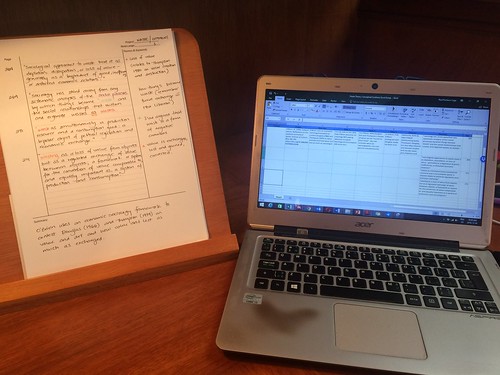
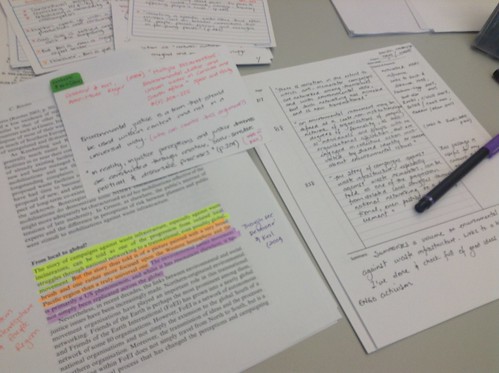
My students often come to me frustrated to my office and tell me “Professor Pacheco-Vega, I am making such slow progress with my dissertation/thesis/paper. I feel like I need to read faster, or read more”. I know this feeling. I often feel like I haven’t done enough. What I always tell them is what I try to live by as well: “take stock of what you’ve read, learned, digested, comprehended, understood. THAT should be your measuring yardstick”. And for me, visually taking stock (seeing in print, in handwriting, electronically) of all I have done is quite important.

Taking stock

One article read and highlighted produced 3 pages of quotations in Cornell Notes, plus one row in a Conceptual Synthesis Excel Dump.

Note-taking techniques

I think the biggest challenge is to not let the mountain of work looming in the horizon beat you down. Little by little, you can get things done. I survived 2018, I should know.

For me, taking stock is a key strategy to keep myself motivated. Yes, I have four bazillion things to do, but this year I accomplished a lot and that is what I am reminding myself, over and over.

04 Jan 02:04

2018 in review

by Rui Carmo

An unusually busy holiday break made it difficult to reminisce about the past year in any systematic fashion, but I decided to have a stab at it anyway for tradition’s sake.

Things weren’t improved by a persistent flu I managed to repeatedly worsen by going out to meetings in cold places, so this wasn’t exactly the best holiday break ever, but family-wise it was more than good enough–I just didn’t have much time (if any) to do the stuff I intended to do at my leisure…

Work, Cloud and The Industry At Large

Work remained hectic this year, but has taken a few tiresome turns that sapped my motivation and interest at times. The background story here is that cloud is going mainstream in a big way, but getting things up there is a constant grind, and I’m really tired of tiny, cookie-cutter projects in a tiny market.

In essence, I miss two things: working on international projects (I’m in several circles where I spend more time with colleagues from abroad, but seldom in actual projects), and owning the end result–i.e., running a product pipeline and a business.

Which means that setting up my own business is more appealing by the day, but the Portuguese market is simply too small, even with the Web Summit hype, so I’m biding my time and exploring new things to replenish my enthusiasm.

Working at Microsoft does provide me with an unusual perspective, and I try to make the best of it in that regard. The GitHub acquisition made for some good moments, as did Meltdown and Spectre, which were… interesting. Watching both kinds of events unfold inside a major cloud provider made for some fascinating learning experiences, and I often muse about future consequences in terms of technology choices and their impact on how we do computing at large.

To some degree, I’m really happy to not have gone into security. GDPR, on the other hand, was (and still is) largely a dumpster fire. I have an entire e-mail folder dedicated to GDPR notices (well over a hundred of them), and yet it still amuses me to see which companies I most certainly deal with (on a personal level) who’ve made little or no effort to get in line.

Kubernetes

I can’t seem to called to help out on anything infrastructure-related that isn’t related to Docker and Kubernetes somehow, and it all boils down to whether you can actually re-architect your apps properly (which, in most cases, often involves figuring out ways to fit in legacy components).

In my case (at least and so far) it’s seldom been about scalability but more about future-proofing and DevOps, although I’m getting a bit tired of the amount of incidental complexity involved at times, since agile has come to mean a lot of things that container deployments do essentially nothing to address when taken from a purely technological perspective.

After eight years of using containers myself, I am more and more certain that we’ve barely scratched the surface of what can be done, but a bit less confident that Kubernetes is going to take the world by storm–there is a lot of low-hanging fruit in terms of deployment and lifecycle management that it is too complex to tackle to my satisfaction.

Machine Learning and IoT

These are two other things I do a lot as part of my work–either riding the hype cycle rollercoaster or debunking it. And yet, despite some work with Tensorflow, I have little of public interest to report on the first (a lot of ML work is data-intensive, and those are usually the more interesting bits, and take the most time to get right).

But thanks to the second I actually found the time to do some hardware-related projects over the course of last year, and had the good fortune to mix and match both work and leisure time to do some interesting things in the IoT space.

Besides my growing collection of Zigbee sensors, Raspberry Pis and ESP8266 development boards (which, ironically, I now develop for on a new 3B+, which is my lab “desktop”, I am now the local Azure IoT champion, which provided me with the time I needed to delve deeper into “real life” IoT.

I got an Azure Sphere MT3620AN MCU and an MXCHIP AZ3166 (which is very nice and matches the micro:bit expansion connector) and used them for a few customer engagements.

Although I have (as yet) very little to report on a personal level, they’ve been interesting devices to work with–if I can find the time, I’ll try to write a bit about each of them.

Home Office and Personal Gear

My home office had a number of upgrades this year, the most notable of which was that I got an iMac back in February, after 8 years of using a Mac mini as a desktop.

Although I am quite fond of its 27” 5K display, I’m still not sold on the form factor, and if I knew what the new mini would turn out to be like (after its 1475-day stint in limbo) I would probably have waited, got that instead and shopped around for a matching set of LG monitors.

I’m not unhappy about how things turned out, but am getting really tired of Apple not having any sort of hardware roadmap besides shipping a new iPhone every year. Oh, and an iPad Pro every now and then1.

Speaking of which, I am much happier with my iPhone XS than… well, just about any other piece of hardware, really (and I recently got a new work laptop I intend to write about when I find the time).

The camera has a few quirks (and I’ve yet to sort out my workflow to deal with Live Photos to my satisfaction), but the thing runs like greased lightning and I’ve caught myself enjoying YouTube videos on it, which is a first for me on any phone.

It does, however, have a fatal flaw that I can’t forgive Apple for: it does not have an USB-C port, and is fast turning into the one special snowflake I hate having to carry around a different cable for.

Personal Pursuits

I don’t think many people ever get to celebrate fifteen years of anything these days, but I am quite satisfied with having run this site for that long, as well as having finally moved it to Python 3 and got archives going.

Nothing much has happened on the photography front since March, and although I invested some time in darktable, it is still borderline unusable on macOS, so I gradually shifted to using Affinity Photo for editing, and am reasonably happy2 with it other than the lack of some form of asset management.

I ended up dabbling in home automation more than a fair bit than I anticipated–I will be writing a bit more about that, but let’s just say that after a while you need to devise strategies for lowering maintenance time, and I’m now optimizing away a few components and investing a bit more on Zigbee.

Another surprise was that I had a lot of fun playing Quake again after all these years, which is something I hope to keep doing every now and then (if at most once a month).

But, overall, my biggest hobby is still reading. Thanks to an intensive bout of reading over Summer, I ended up diving into more than 60 books this year, which felt wonderful and was a welcome distraction from the idiosyncrasies of work.

By far the most significant of those was Why we Sleep, which confirmed a lot of what I had been observing by using AutoSleep. As I get older and crankier I tend to be more interested in ways to age better and improve my quality of life rather than traipse around willy-nilly, and one of the things I haven’t been doing is sleeping well (either due to work concerns or to various minor ailments like sinus trouble and neck aches associated with RSI).

Lack of proper exercise (which I make a stab to fix after every Winter) has a role here, but I ascribe most of my sleeping troubles to stress, and my current focus on finding new hobbies is a different angle on tackling that.

Stuff that fell by the wayside

Well, for starters, I never managed to go deep into Kotlin like I expected to. With the emphasis on containers, Kubernetes and serverless, I ended up doing much less traditional back-end stuff than I expected and spent entirely too long dealing with Node JS dumpster fires.

Given that both Node and .NET Core play critical roles in a lot of what is done in Azure these days (the former quite regrettably, and the latter in much more interesting ways), I can’t see myself doing a lot on that front right now, and deplore the lack of opportunity to do more development at scale.

I also haven’t written much about using Azure in general, because although I do take the time to make reusable (and reasonably agnostic) projects to help other people use Terraform, go the extra mile and use asyncio with Azure Storage, and (in general) take better advantage of DevOps/automation processes, day-to-day work simply does not afford me the time to do much writing.

Ironically, although this kind of thing is highly valued in Microsoft at large, it is routinely squeezed out of our priorities and forgotten about at a local level, and what little writing I do tends to be reserved for weekends and for my own stuff.

Another thing I haven’t been doing much (both personally and professionally) is learning new technical stuff in depth and as a matter of course, other than circumstantially and ad hoc.

So after a thousand days I am becoming tired, not of the role I have at Microsoft (although I miss having a team), but of the circumstances I have to perform it in, and of how it limits my ability (and time) to learn and do it better.

I did do a lot of IoT and ML work this year (and learned tons within a few strict domains), but in general I have to rate this year as a bust in terms of personal growth3.

Next Year

I don’t have any big plans (well, I do, but they’re strictly under wraps). For now, my priorities are going to be to take a more systematic approach at learning the stuff I want, and to sleep better–not necessarily more, but towards having better days in general.


  1. That is the single most remarkable Apple device of the year for me, and I suspect I will be getting one, given that my iPad mini is getting very long in the tooth. But I am trying to put it off until my budget recovers from this Christmas… ↩︎

  2. I can’t use it on any of my own iPads (the mini 4 is, bafflingly, unsupported), but it shows promise for whenever I upgrade and (eventually) tackle moving my photo workflows to iOS↩︎

  3. I breezed through work training requirements largely based on what I already knew, and even though I got a few new arrows under my quiver certification-wise and spend a lot of time explaining things to people as part of my work, I just need to learn more and do more meaningful work to be happy. ↩︎

04 Jan 02:03

Tulip fields in Lisse, Netherlands

by Mathew
04 Jan 02:03

Prestige, Power, Exclusivity

by Richard Millington

The people with the most seniority, expertise, and influence rarely participate in public communities.

This isn’t a tactical problem, this is a strategic problem.

These same people love to talk to each other in exclusive groups, share advice on stage at major events, and give up hours of time to be featured in trade publications.

If you want them to be involved in your community, you need to craft a setting that makes the community an emotive priority.

Academic journals thrive on prestige. Industry events thrive on status. Private gatherings thrive on exclusivity.

You can’t fake this setting. You might only invite the top 30 people to a private group, only feature the very highest status people in media interviews/events, only allow verified experts to submit long-form content. But it has to be real.

Thankfully, a setting is self-reinforcing. Once you have 1 ‘top’ person interviewed, in a private group, or submitting a detailed post it’s easy to get 2, 4, 8 etc…

This is what a great strategy does. It defines the approach you will take to get members to do the things you need them to do.

Too often we either pester the top people or ignore them. A better approach is to engage them strategically. See what they already do and create a better setting for it within your community.

04 Jan 02:02

Why I Wish I Hadn’t Gone to College

Keri Savoca, The Ascent, Medium, Dec 31, 2018
Icon

Joanne Jacobs links to this post by Keri Savoca. The gist is that university didn't prepare her for a career, and left her in debt, so she should have done something else instead. But her alternatives (start a business, build a recording studio) are unrealistic. The advice in the article is poor advice - poor enough that I authored a response pointing out why her argument is wrong, and how she could have improved the likelihood of success after college with a little planning.

Web: [Direct Link] [This Post]
04 Jan 02:02

Preserve Process Knowledge

by Eugene Wallingford

This weekend I read the beginning of Dan Wang's How Technology Grows. One of the themes he presses is that when a country loses its manufacturing base, it also loses its manufacturing knowledge base. This in turn damages the economy's ability to innovate in manufacturing, even on the IT front. He concludes:

It can't be an accident that the countries with the healthiest communities of engineering practice are also in the lead in designing tools for the sector. They're able to embed knowledge into new tools, because they never lost the process knowledge in the first place.
Let's try to preserve process knowledge.

I have seen what happens within an academic department or a university IT unit when it loses process knowledge it once had. Sometimes, the world has changed in a way that makes the knowledge no longer valuable, and the loss is simply part of the organization's natural evolution. But other times the change that precipitated the move away from expertise is temporary or illusory, and the group suddenly finds itself unable to adapt other changes in the environment.

The portion of the article I read covered a lot of ground. For example, one reason that a manufacturing base matters so much is that services industries have inherent limits, summarized in:

[The] services sector [has] big problems: a lot of it is winner-take-all, and much of the rest is zero-sum.

This longer quote ends a section in which Wang compares the economies of manufacturing-focused Germany and the IT-focused United States:

The US and Germany are innovative in different ways, and they each have big flaws. I hope they fix these flaws. I believe that we can have a country in which wealth is primarily created by new economic activity, instead of by inheritance; which builds new housing stock, instead of permitting current residents to veto construction; which has a government willing to think hard about new projects that it should initiate, instead of letting the budget run on autopilot. I don't think that we should have to choose between industry and the internet; we can have a country that has both a vibrant industrial sector and a thriving internet sector.

This paragraph is good example of the paper's sub-title, "a restatement of definite optimism". Wang writes clearly and discusses a number of issues relevant to IT as the base for a nation's economy. How Technology Grows is an interesting read.

04 Jan 02:00

An update on Python's governance

by Brett Cannon

This post is meant to act as a summary of the current state of Python's governance as of the end of 2018. If you want to see an alternative take on what I present here, LWN has an article.

What did Guido provide us?

When discussing how the Python project used to run, you need to understand what services our BDFL, Guido van Rossum, provided us on the core team.

Design guidance

From the language perspective of the project, Guido ultimately dictated the "feel" of Python, typically through the PEP process. Sometimes Guido would delegate decision powers on a PEP to what is known as a "BDFL delegate" (and what has slowly been renamed a "PEP delegate"). But other times Guido himself would take on the role of whether a PEP would be accepted or not. But regardless of whether Guido or someone else was making the final decision, Guido would often provide feedback on a PEP which provided guidance to the rest of us on what he was thinking about a topic.

Guido would also espouse his opinion on occasion, implicitly communicating how he felt the language should feel. This could be anything from shutting down conversations on python-ideas which he felt were dead-ends to simply commenting on something. Either way, Guido communicated in various ways about what should be considered Pythonic as his brain has the closest definition of what that truly entails.

Project lead

Guido also provided a backstop position for all decisions regarding the project. If there was ever a disagreement, Guido could step in and make it be known what the resolution would be and that was that. Granted that didn't happen very often (day-to-day running of the project hasn't needed Guido for quite a long time), but it did provide some form of stability to know that there was a higher power to appeal to in order to reach a final decision when it came to the project itself.

On July 12, 2018 ...

Up until 2018-07-12 the role Guido played was what was discussed above. But then we got a fateful email one morning from Guido where he announced that he was taking an indefinite vacation from being the BDFL (although in my opinion I view the "FL" part of "BDFL" as true and still consider Python to be Guido's language, he's just letting others run things even more now on his behalf). When Guido announced his retirement he also said that he was not going to make any final decision about how we as a group were going to govern ourselves moving forward, and so we had to figure that part out on our own.

How we dealt with the problem

We quickly decided as a group that we would solicit PEPs that proposed how to govern ourselves and that we would vote on which one to accept. We accepted PEPs up until November 01 (although that was not the initial date as things slipped), and then voted December 01 - 16 (once again, later than planned due to things slipping).

In the end we ended up with 7 governance proposals. They varied from an elected dictator structure to anarchy. Since we know the result of the vote I'm not going to go into each of them (I'll discuss the results later).

As for voting, we came up with PEP 8001. We ended up using a ranked ballot and the Condorect method to determine the winner (there's a couple ways to calculate the winner using the Condorcet method, but the winner won regardless of method details so specifics don't really matter here). Voting was open to all core developers as we couldn't come up with a reasonable criteria that we all agreed to as to what defined an "active" core dev and we kept it to core devs since they would be the most impacted by the results of the vote.

And the winner is ...

In the end PEP 8016, the steering council proposal, won. The details of the vote are available, but the key thing is that the PEP clearly won no matter what way you calculated the winner and it was a decisive win against second place. Out of 96 eligible voters we had 62 votes cast, and so I feel there's no real questioning of the legitimacy of the outcome of the vote (which we worried about since we didn't want to give people a reason to complain about the outcome's legitimacy).

So what does PEP 8016 give us? The PEP is heavily modeled on the Django project's organization (to the point that the PEP had stuff copy-and-pasted from the original Django governance proposal). What it establishes is a steering council of five people who are to determine how to run the Python project. Short of not being able to influence how the council itself is elected (which includes how the electorate is selected), the council has absolute power. But the PEP does say the expectation is that the council will work to minimize having to do anything, essentially devolving power as much as possible when reasonable.

But it's the council's mandate which really defines what they are supposed to do. Remember earlier where we said that Guido acted as a project lead and language designer? Based on what PEP 8016 says, the council directly provides us the former, but not the latter. That means the result of the vote prevents us from ever having the Python project be leaderless again, it doesn't directly solve how to guide the language's design.

My guess is the vote turned out this way because PEP 8016 was most people's second or third choice. So when people split between PEP 8011 and PEP 8012, most people seemed to agree on PEP 8016 as their alternative. And I think people did that as a way to potentially still get the approach they prefer.

What's next?

The next step is we elect the council. It's looking like nominations will be from Monday, January 07 to Sunday, January 20 and voting from Monday, January 21 to Sunday, February 03.

After the election the council will start figuring out how the Python project is going to function. Implicitly that also includes figuring out how the design of the language will be handled. That already doesn't seem to please some people who have PEPs they want to be pronounced on as that whole process will have to be chosen before any pronouncement can occur.

But a key point I hope people understand is that while we solved the issue of project management that stemmed from Guido's retirement, the council will need to be given some time to solve the other issue of how to manage the design of Python itself.

04 Jan 02:00

Gratitude to my partners

by Chris Corrigan

Several years ago I made it a goal to work wth more collaborators than clients. I think I did it again this year. These days there is a beautiful blend between those with whom I collaborate and create projects and those whom I call friends.  

I want to extend my heartfelt gratitude to my partners this year, who make me way better at what I do.  Happy New Year to all.

02 Jan 19:48

Photo


02 Jan 19:42

Drawdown

by Stephen Rees

The last post of the year is going to be positive. And it will not, like every other message in my inbox, include a plea for you to donate. There are 80 solutions presented here – all of which are based on existing technologies, and all of them have benefits beyond reducing ghg emissions. The cost is moderate and the return on investment significant, so the old arguments about favouring the environment over the economy are simply wrong headed. We ought to be doing these things even if there was no convincing evidence of human caused climate change – which, of course, is not and has not been the case for many years.

The other 20 are emerging technologies – but you don’t need to worry about those.

You can also see the whole list on the website

Electric Vehicles #26

Ships #32

Mass transit #37

Trucks #40

Airplanes #43

Also the good news is that if you go to the TED site linked to the video there is a transcript, and sources, and a reading list.

I am pretty pessimistic right now about the state of BC, Canada and Britain. Having watched this video I am less pessimistic about our collective ability to address the biggest problem facing human civilisation.

Happy New Year

02 Jan 19:41

Nokia 9 With 5 Rear Cameras Revealed in New Leaked Image and Video

by Evan Selleck
It has been quite some time since we last heard about the incoming Nokia 9, but here are one day away from the end of 2018 and the phone has resurfaced. Continue reading →
02 Jan 19:37

Essential Phone won’t be restocked, company confirms

by Igor Bonifacic
Essential Phone

Stock of the Essential Phone is sold out and won’t be replenished, Essential confirmed in a statement issued to 9to5Google on Friday afternoon.

“We are sold out of Essential Phone on essential.com and won’t be adding any new inventory,” said a spokesperson for the company. “We are now hard at work on our next mobile product and will continue to sell accessories and provide speedy software updates and customer support to our existing community.”

Essential has reiterated multiple times in the past that will update to the PH-1 to Android Q when the time comes.

For what it’s worth moreover, Jason Keats, the company’s head of research and development, took to Twitter on Saturday to say reports of Essential’s impending demise are premature. “We aren’t done, not by a long shot,” he wrote.

While it’s unlikely Essential fans will see a direct Essential Phone successor, a recent report from Bloomberg suggested the company is working on an AI-powered smartphone that will make extensive use of voice commands.

Source: 9to5Google

The post Essential Phone won’t be restocked, company confirms appeared first on MobileSyrup.

02 Jan 19:37

Samsung rolls out Android 9 beta with touchscreen fixes for Note 9

by Brad Bennett

Korean electronics giant Samsung is rolling out the latest version of its One UI beta to Note 9 devices with a handful of bug fixes.

Samsung is working on bringing its Android 9-based ‘One UI’ to all of its major 2018 flagship devices, including the ever-popular Galaxy Note 9.

Samsung brought One UI to the Galaxy S9 series of devices on December 24th, but hasn’t done the same for its latest flagship, the Note 9.

The Note 9 joined the One UI beta on December 4th, and since then it has been steadily getting smaller updates, like today’s touchscreen fix.

The beta is software version number N960FXXU2ZRLT, according to 9to5Google.

It focuses on bug fixes, like a home button issue, a bug that caused the gallery app to crash and another problem that caused parts of the keyboard to become unresponsive.

While it does seems like Samsung is thoroughly working its way towards a full One UI release it likely won’t hit the masses until sometime in February, according to 9to5Google. 

Source: 9to5Google

The post Samsung rolls out Android 9 beta with touchscreen fixes for Note 9 appeared first on MobileSyrup.

02 Jan 19:37

Google reportedly working on fix for laggy tablet mode on Chrome OS devices

by Bradly Shankar
Pixel Slate

Recently some Chrome OS users have reported laggy performance when using their devices in tablet mode.

Thankfully, Google appears to be working on a fix.

As spotted by ChromeUnboxed, a recent bug tracker has revealed that Google plans to fix Chrome OS tablet mode multitasking screen lag. Based on the tracker, it seems that the poor frame rates can be attributed to how Chrome OS renders the screen’s rounded corners.

“A lot of animation jank seems to be coming from the use of Mask Layers to create rounded corners. This combined with background blur adds a lot of additional steps in the paint/rendering pipeline,” reads a message in the tracker.

“The performance (fps increase) and memory improvement (tiles [don’t] get discarded and we actually see the content) is quite significant on Nocturne Celeron when rounded corners are removed.”

For example, the tracker notes that removing the corners on the Pixel Slate resulted in a “significant” improvement in performance.

It’s unclear when Google will roll out a fix, however.

Via: 9to5Google

The post Google reportedly working on fix for laggy tablet mode on Chrome OS devices appeared first on MobileSyrup.

02 Jan 19:37

Popsugar’s Twinning app leaked hundreds of thousands of selfies

by Patrick O'Rourke
Twinning

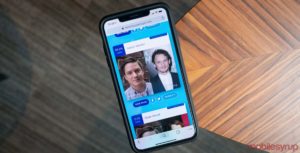
Twinning, Popsugar’s celebrity matching tool, has inadvertently leaked hundreds of thousands of selfies, according to a new report from TechCrunch.

Similar to many other photo sharing apps out there, every image uploaded to the service is stored in the cloud through Amazon Web Services. The difference with Twinning is the web address of this data bucket is available right in the code on the Twinning app’s website. TechCrunch says that when the site is opened in a browser, it’s actually possible to view a real-time stream of the photos being uploaded to the service.

TechCrunch went so far as to verify its findings by uploading a dummy photo with a specific file size. The publication then scraped the list of file names uploaded during that time period, downloaded them, and found that uploaded image available in the site’s code.

TechCrunch says that it reached out to Popsugar regarding the security breach, but initially didn’t hear back when the story was first published.

That said, the user data was locked down shortly after. Mike Patnode, the company’s SEO, also eventually reached out to the publication to confirm that “the bucket permissions weren’t set up correctly.” As it stands right now it looks like the security breach has been fixed.

Twinning works by analyzing a selfie and then comparing to a database of photos of celebrities, resulting in a ‘twinning percentage’ along with your top five celebrity lookalikes.

As security breaches go, this one is relatively inconsequential. After all, most people using Twinning likely publically shared their photo on a social media platform.

Still, this is yet another reminder that free apps are never actually free, as well as that there’s no guarantee how secure your personal data is when you use them.

Twinning is a browser-based app and doesn’t feature a dedicated iOS or Android app.

Source: TechCrunch 

The post Popsugar’s Twinning app leaked hundreds of thousands of selfies appeared first on MobileSyrup.

28 Dec 17:34

This Upgraded Mac Toolbar is Used by Engineers at Google, Facebook, and LinkedIn

by MobileSyrup

There’s no question that Macs are more user-friendly than PCs, but there’s one Mac feature that’s beginning to show its age: the dock. It was cool and cutting edge in 2001, but it’s a little outdated in 2018. Fortunately, there’s a new third-party program that can breathe new life into your dock and completely transform your Mac toolbar: uBar 4 Toolbar for Mac.

This Mac dock replacement is used by engineers at Google, Facebook, and LinkedIn, and is a must-have for power users. It gives you great new features like tab grouping, window previews, and in-dock reminders. It also lets you see app activity, app badges, app flashes, app progress, and app status in one simple, centralized interface. Whether you’re looking to dramatically improve your computer’s performance or just give it a few new abilities, this is the toolbar enhancer your Mac needs.

The uBar 4 Toolbar for Mac normally costs $40.13 CAD, but you can get it now for just $20.06 CAD.

Buy it here.

Want your products featured in The MobileSyrup Shop? Learn more about how to sell your products online!


The post This Upgraded Mac Toolbar is Used by Engineers at Google, Facebook, and LinkedIn appeared first on MobileSyrup.

28 Dec 16:50

The Best Slow Cooker

by Anna Perling, Christine Cyr Clisset, Camille Chatterjee, and Lesley Stockton
The Best Slow Cooker

We’ve been recommending the Hamilton Beach Set & Forget 6 Quart Programmable Slow Cooker since we first published this review in 2013. And after testing it against eight new competitors, we’ve found that it still offers the best performance and features of any available slow cooker. The Set & Forget consistently cooked foods at a gentle simmer, making the most tender roast in our tests. It’s one of the few cookers we tested with a locking lid that seals tightly for easy transport, as well as a probe thermometer so you can cook to a target temperature.