The recommendations are: create a space, set achievable goals, form a group, get out a calendar, and have fun. All reasonable. So are the bonus tips: take notes, and quiz yourself. But there's one more thing, and it's really important. Do the work. Online learning is very different from traditional learning in that in online learning there's no such thing as 'getting by'. When you're in online learning, you're in it for yourself. Not for the school. Not for the teacher. So you need to do the work.
Web: [Direct Link] [This Post]Rolandt
Shared posts
Community Strategy Breakdown Webinar And Other Resources
During Tuesday’s community strategy breakdown, we touched upon a lot of the concepts we teach to students in our Strategic Community Management course.
This includes:
- Why most community strategies are pretty terrible.
- Why it’s important to define the problem (or opportunity) before suggesting solutions.
- The components of a community strategy.
- How to collect and interpret community data.
- And a lot of practical tips on deciding and executing your tactics.
Don’t worry if you missed it, you can now watch it below (or click here).
We also highlighted a lot of the resources we share and teach people to use during the course. This includes:
- A big strategic community management resource.
- Our list of 1600+ brand communities.
- Our member survey template.
- A (simplified) example roadmap.
- A typical project plan template.
- Our community benchmarks.
- And our detailed community strategy template (course only)
I believe learning to think strategically about a community and putting together a clear and comprehensive strategy you actually execute is a skillset every one of us should have.
If you’re working without a strategy today (or if your strategy is missing key elements such as a logical plan of action, risk factors, governance, resource allocations, etc), this course will help.
The course fee rises this Friday, you can sign up using the links below:
- Click here to sign up for Strategic Community Management ($675 USD)
- Click here to sign up for Psychology of Community ($675 USD)
- Click here to sign up for both courses ($1100 USD)
After three years on Medium, Signal v Noise goe...
After three years on Medium, Signal v Noise goes indie again:
…we’ve grown ever more aware of the problems with centralizing the internet. Traditional blogs might have swung out of favor, as we all discovered the benefits of social media and aggregating platforms, but we think they’re about to swing back in style, as we all discover the real costs and problems brought by such centralization.
It’s great to see David, Jason, and company take their blog back again. For a long time, Medium seemed like a great place to be. The design and typography were lovely, their discovery mechanisms were pretty great, and boy can they drive readers to an article.
But… there’s no place like home.
A Reflection on Improv, Audiences and Recording
My recorded output is divided sharply into live and “studio” recordings. The equipment and audio process are identical for them both but the presence of a live audience completely changes the experience. When I’m in the studio (such a professional sounding euphemism for “the corner of the bedroom”) my audience is me, my aesthetic decisions, my moment to moment assessment of what needs to happen to is made in relation to my own taste, in dialogue with my own history, with whatever I’ve been working on and the lingering shadows of whoever has been inspiring me of late.
But live, the audience are present on the music. I interpret their presence, I respond to who’s there, to the sounds and gestures that I’m aware of while playing, and to my projected imagining of what their experience is like. I play to them, and for them but also with them and I become them, projecting my own understanding of what my experience would be were I not the one with a bass in my hands…
Listening back to any recording is a fascinating exercise in time-shifting the audio record of that moment, live or studio, and re-experiencing it with its own extant nature as a factor instead of the sense of possibility that exists in the unfolding.
So recordings are a translation of that experience and its quite possible for something to “work” on the moment but not as a recording or vice versa to feel like a failure live and then blossom under scrutiny.
I’ve been listening to my latest solo album on the way to work this morning, which is without doubt my favourite thing I’ve ever recorded. It’s also the most “successful” thing I’ve released in many many years. I was trying to remember the experience of improvising it all and some of the performances are still vivid in my mind (aided by the video that exists on YouTube of the actual recordings
)
Beauty And Desolation by Steve Lawson
Anyway, here it is if you want to hear it – just remember that, first time through, you share the sense of becoming that I had as it emerged in the moment. Second time through, you’re experiencing something wholly new – improvised music that now exists in relation to the memory of itself.
Garmin und Mercedes-Benz bringen Wearables ins Auto
Die CES 2019 in Las Vegas ist vorüber und hat uns spannende Tech-Innovationen präsentiert. Garmin zeigte im Bereich Automotive interessante Produktneuheiten im Zeichen der Mobilität. Ein Highlight bildete dabei die Garmin vivoactive 3 GPS-Multisport-Smartwatch. Wearables von [...]
Replied to Walking away from facebook by Chris ...
Back in December I announced my intention to take a sabbatical from Facebook ...... I would encourage people to go back to, or start blogging, and I’d encourage you to do it in the spirit of 2001 blogging, not in the spirit of “blog as PR tool” that we see today: share things, speculate, use it as a platform for what I call “Open Source Learning.” Use it as a gift exchange, not as a digital business card. Embed links to other people and add to the gifts of knowledge you receive before passing them on.
You’re right Chris. I disengaged from FB for much the same reasons in November 2017. And it has heavily influenced my blogging. Both writing about the small stuff, and the deeper content have increased by a lot. So welcome ‘back’ on the Indieweb side, outside the silos. Like you I do still maintain a FB profile (but an empty one, with its 11 years history discarded). Mostly because for some parts of my professional network, FB is the internet, and they have no reliable other way, other than email to reach out.
As you use WP, you may want to check out the IndieWeb plugins, especially the Webmention plugin, which allows you to follow conversations distributed over multiple blogs like in the olden days.
Let’s Save Blogging
The message is this: "The independent blog has been in decline for years. It doesn’t have to be that way. Here’s why you should start a blog in 2019—and host it yourself." It's a longish read, looking at the 'early' days (2009), the impact of social media, the fate of Tumblr, covering your costs, and how federation might move blogging back toward independence. “The fediverse is built in such a way that anyone can create a new tool for it, and each one makes the network more useful to everyone in it,” Baer added. “So cooperation is usually more important than competition—if you want people to use your software, you want it to work well with others.”
Web: [Direct Link] [This Post]RE: Why I Don't Trust OnePlus
I've been a OnePlus customer since the summer of 2017, starting with the OnePlus 5 and then the 5T, which is what I carry today. It was, and remains, a great value for money. It also felt really good to support the underdog. Or so I thought. Mike Elgin writes:
The company was founded by former OPPO vice president, Pete Lau, and former OPPO marketing chief, Carl Pei. They claimed to have left OPPO to strike out on their own, and they made a big deal about this "origin story."
When Lau announced the founding of OnePlus, he said: "Today is my last day at OPPO."
In fact, they never left OPPO.
They lied about their founding.
To be honest, even if the origin story wasn't improvised, then I'd most likely have bought a OnePlus at some point, especially considering how they're possibly now offering even greater value for money compared to industry titans' flagships. That said, the lack of authenticity does make me feel uncomfortable. Like Mike, I've nothing against giant corporations but when you're pretending to be something you're not in order to connect with people's natural tendency to gravitate towards the underdog, that I've a problem with.
Search on Windows 10
The latest Windows Insider build separates Search and Cortana:
Going forward, we’ll be decoupling Search and Cortana in the taskbar. This will enable each experience to innovate independently to best serve their target audiences and use cases.
I actually tweeted about Search on Windows earlier the same day:
Search on Windows 10 is so broken. Can't believe something so fundamental to productivity could be allowed to suffer for this many years.
— Bardi Golriz (@mtrostyle) January 16, 2019
I know there are already moves in play to enhance the usefulness of Search. That's encouraging. But to re-iterate the above sentiment, I'm genuinely shocked that Windows 10's ability to effectively and efficiently search your computer has remained mostly unreliable for 3.5 years. Asked sincerely, in this time has Satya Nadella never performed a search on Windows? If yes, and if I was the Microsoft CEO who has challenged employees to re-invent productivity, then I'd have made strict demands to fix Search as a matter of the highest priority.
Inside out map of the Grand Canyon
John Nelson turned the Grand Canyon inside out to understand the magnitude better:
Some of my earliest memories of the place had to do with the trippy feeling of my eyes and mind trying to make sense of the scale. I had seen many mountain ranges and vistas, including some on the way, but the vast negative space played havoc with my perception of magnitude. I’ve felt it a few times since, but never like that first Grand Canyon overlook.
Instructions included on how to do this in ArcGIS Pro.
Tags: Grand Canyon, John Nelson
Orange Stab
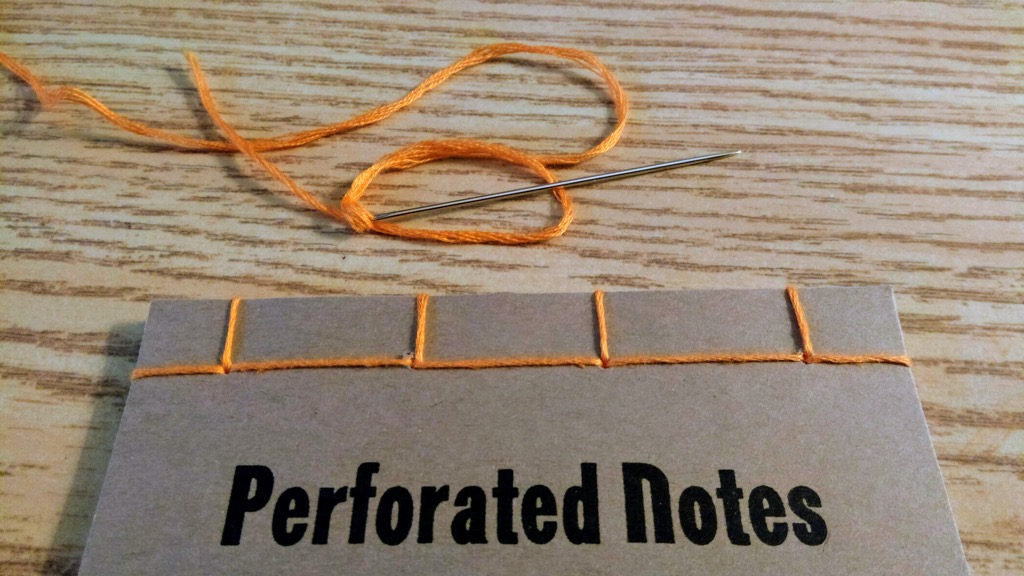
I’m eleven notebooks into the binding of the 23 Perforated Notes notebooks, and I think I’m finally getting a handle on the hand contortions needed to render a clean-looking result.

Lost Sheep
From Archdeacon John Clarke’s blog, describing a church event that included farm animals:
I didn’t get to see if for myself but, after the worship (when most of us were enjoying the potluck), as they were putting the animals back into the truck, the sheep made a dash for it. I can only imagine the hilarious sight of Stephen and Harley chasing a sheep in -14 degree weather. I can only imagine being the innocent guy just out for a stroll on a Sunday when suddenly he sees a sheep running towards him, being chased by two people. This heroic stranger managed to corral the sheep long enough for Stephen and Harley to capture the sheep and return it to the truck.
New(ish) Work: Wikimedia Foundation
Last year, I was engaged by the Wikimedia Foundation to do a usability and community deep dive into their Wikimedia Commons platform, thinking about how it might be improved or adapted with a critical eye on:
- what the system is like for new folks,
- how new institutional partners could be attracted,
- a sideways glance at the Structured Data Commons initiative, and
- some dreaming about what a future of the Commons platform could be like.
As well as an internal presentation to the WMF crew, I ended up writing a public-facing version of the work, How could Wikimedia Commons be improved? A conversation with designer George Oates, that was published in October 2018.
I ended up becoming really interested three main things:
- Differences in the administrative feel of different language communities,
- The diversity challenges faced by the platform, and especially comparing the way the “elders” of the community governed with how the community at Flickr managed to get along without too many car crashes. Very interesting to compare those two different, huge communities to see how different they are, and
- Organic vs top-down information systems and how that plays out in the intense Commons “category” system, a topic that’s dear to my heart.
It was super interesting and complex.
The Art of the Personal Project: Liz Von Hoene
The Art of the Personal Project is a crucial element to let potential buyers see how you think creatively on your own. I am drawn to personal projects that have an interesting vision or that show something I have never seen before. In this thread, I’ll include a link to each personal project with the artist statement so you can see more of the project. Please note: This thread is not affiliated with any company; I’m just featuring projects that I find. Please DO NOT send me your work. I do not take submissions.
Today’s featured artist: Liz Von Hoene
A print and motion collaboration centered around LA Artist Mimi Haddon’s textured fabric sculptures and brought to life between highly creative and visionary women. Wear The Wild Things Rgives you a glimpse into an eerie urban world of vibrant colors and odd shapes where model, wardrobe and sculpture delicately play off one another to become one. The graphic simplicity to the environment and shaping of light and shadow made for the perfect playground and helped further celebrate this surreal and wild vision.

To see more of this project, click here.
APE contributor Suzanne Sease currently works as a consultant for photographers and illustrators around the world. She has been involved in the photography and illustration industry since the mid 80s. After establishing the art buying department at The Martin Agency, then working for Kaplan-Thaler, Capital One, Best Buy and numerous smaller agencies and companies, she decided to be a consultant in 1999. She has a new Twitter feed with helpful marketing information because she believes that marketing should be driven by brand and not by specialty. Follow her at @SuzanneSease. Instagram
The post The Art of the Personal Project: Liz Von Hoene appeared first on A Photo Editor.
------------------------
Visit our sponsor Photo Folio, providing websites to professional photographers for over 10 years. Featuring the only customizable template in the world.
------------------------
My TED Video on the Future of Work
I was thrilled to participate in TED’s new video series, The Way We Work, and not surprisingly I made the case that distributed work is where everything is headed.
It has over 130,000 views already! What I really love about this video in particular is that we get into the specifics of how a company can start to embrace a culture of letting employees work from anywhere, even if it started out as a traditional office with everyone in the same place. Automattic never started that way, so even as we’ve scaled up to more than 840 people in 68 countries, there’s never been a question — it’s now built in to our entire culture.
For distributed work to scale up, it’s going to require more CEOs, workers, and managers to test the waters. Any company can experiment with distributed work — just pick a day or two of the week in which everyone works from home, I suggest Tuesdays and Thursdays, then build the tools and systems to support it. Yes, that may require some shuffling of meetings, or more written documentation versus verbal real-time discussion. But I think companies will be surprised how quickly it will “just work.”
If the companies don’t experiment, workers may force them to do it anyway:
I don't think tech folks quite understand how pervasive remote work has become. It's not even a debate anymore, it's a full on revolution. Hard to do any recruiting these days and not constantly run into talented folks who will never go back to working in an office again.
— Max Lynch (@maxlynch) January 14, 2019
Introducing the 2019 Luggage Lineup!
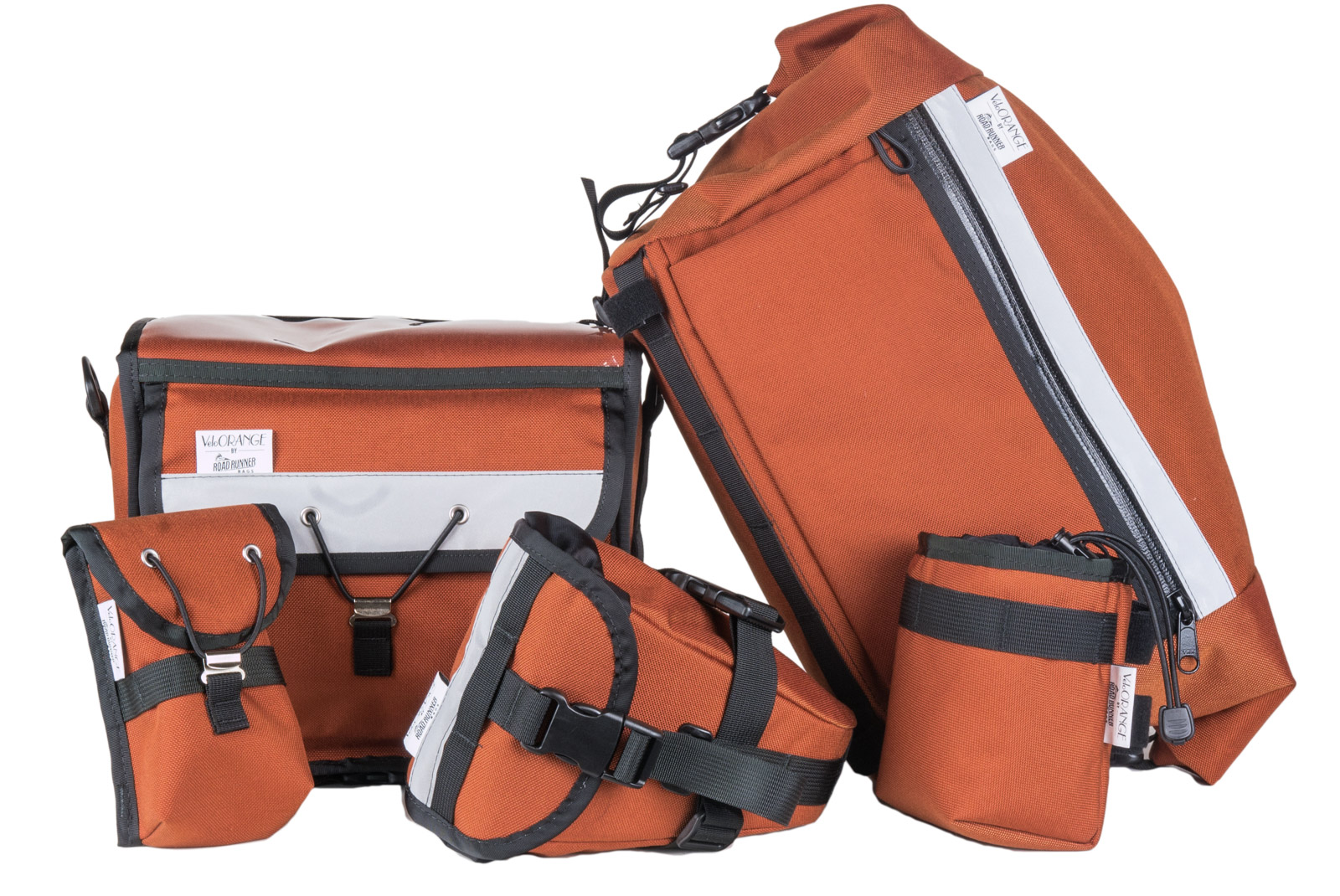
The Transporteur has received removable lower straps. The idea is that if you take the bag on and off the bike often, the lower straps can be affixed to the bottom of your Porteur Rack or Wald Basket. That way you can quickly connect and disconnect the bag without the need to string the lower straps through the openings, which can be a pain if you're using a basket with a small grid pattern. You also won't have anything dangling from the bottom of your bag when you walk through the office, grocery store, or cafe. You can also keep the straps attached to the bag if you frequently lock your bike up on the street for extended periods of time.
![]() |
| Thanks to Chip of WhatBars for the push to get this design change into production! |
We also dialed in the fit and position of the strapping to keep even the most fully-loaded bags super stable and secure over the roughest terrain.
✚ Datawrapper Review: A Focused Charting Tool That Requires No Code
Datawrapper is an online tool that helps you make nice-looking charts for the web. No code is required. Instead, a focused interface lets you load data, pick your chart type, refine, and publish. Read More
Tim Cook Calls for US Privacy Regulations in Time Op-Ed
User privacy is one of the social drums Tim Cook has been consistently beating for years now, and today that's continuing in an even stronger way with a new op-ed by Apple’s CEO published by Time. Cook writes:
I and others are calling on the U.S. Congress to pass comprehensive federal privacy legislation—a landmark package of reforms that protect and empower the consumer. Last year, before a global body of privacy regulators, I laid out four principles that I believe should guide legislation:
First, the right to have personal data minimized. Companies should challenge themselves to strip identifying information from customer data or avoid collecting it in the first place. Second, the right to knowledge—to know what data is being collected and why. Third, the right to access. Companies should make it easy for you to access, correct and delete your personal data. And fourth, the right to data security, without which trust is impossible.
In addition to outlining these four principles, Cook gets more specific in calling for a particular organization to be formed that counteracts a “shadow economy that’s largely unchecked” whereby people’s data is sold by retailers and other companies without express knowledge or consent. He writes:
Meaningful, comprehensive federal privacy legislation should not only aim to put consumers in control of their data, it should also shine a light on actors trafficking in your data behind the scenes. Some state laws are looking to accomplish just that, but right now there is no federal standard protecting Americans from these practices. That’s why we believe the Federal Trade Commission should establish a data-broker clearinghouse, requiring all data brokers to register, enabling consumers to track the transactions that have bundled and sold their data from place to place, and giving users the power to delete their data on demand, freely, easily and online, once and for all.
Apple has established a consistent practice of standing for user privacy, partly owing to its highly publicized standoff with the FBI in 2016, but it seems that in 2019 the company wants that value to be even more pronounced. First there was the unavoidable banner at CES touting the iPhone's privacy advantage, and now today's op-ed. It will be interesting to see if any of the ideas Cook pushes bring about productive discussion on this issue, leading to practical change in US policy.
→ Source: time.com
Thinking Different: Keys to Adopting an iPad-First Workflow

No matter how tech-inclined a person may be, no one sits down at their first computer and instantly finds themselves at home with the device. We all have our own tales of computing learning curves – figuring out how menus, file systems, and other traditional software elements work. Similarly, when making the move from one type of computer to another, there's an adaptation cost in acquainting yourself with all that's new. This is true when switching from a PC to a Mac, and also a Mac to an iPad.
Before the iPad Pro debuted in late 2015, transitions from Mac to iPad were extremely scarce. The iPad's hardware and software were both far too limited to compel many switchers. The software has advanced since that time – thanks to Split View, drag and drop, and Files, it's far easier to work on an iPad than before – but there's plenty more progress still to be made. The hardware, however, is where the iPad has shined most, especially with the newest iPad Pros.
Compare the iPad Pro's hardware to Apple's modern Mac lineup and the difference is striking. The iPad has Face ID, while Macs are stuck with Touch ID; the iPad has a Liquid Retina display with ProMotion, and Macs are still Retina only; the iPad Pro benchmarks comparably to the most powerful portable Macs; iPads can include LTE, while Macs cannot; and where Mac keyboards are vulnerable to specs of dust, the iPad's Smart Keyboard Folio can endure any crumbs you throw at it – plus, with the iPad you can choose the keyboard that's best for you. To top off all these advantages, the iPad Pro is also more affordable than most Macs.
Software limitations aside, the iPad clearly has a lot going for it; the iPad Pro is a more attractive Mac alternative than ever before. But moving to the iPad still involves some growing pains. The longer you've used a traditional computer, the harder an iPad transition can be. There are a few key things, however, that can help make your iPad adoption a success.
Cloud Storage
Cloud storage is the only sane way to maintain files on the iPad. While many apps can save data locally to your device, that method doesn't work at all like storage on a traditional computer – it's not the default, instead it's a niche, largely legacy feature. For the most seamless, pain-free file experience, the cloud is the way to go.
There's no shortage of cloud storage options on the iPad, and your only requirement should be picking a service that integrates with iOS' Files app. The default option is iCloud Drive, which comes built-in as part of iOS; alternately, you can download apps for Dropbox, OneDrive, Google Drive, or any other storage provider you prefer. In some cases you may even want to mix and match services – as long as you use Files, separate storage providers essentially just act as folders in the overarching Files ecosystem.
Once all your documents are in the cloud, you can browse and search for them in Files just as you might in the Mac's Finder or Windows' File Explorer. The biggest difference to note between those systems is that the iPad doesn't offer much control of which files are stored offline. You can download documents on-demand in Files, and they'll stay offline for a time, but at any given point iOS may decide that it needs that storage space back, and suddenly those offline files are back to cloud-only. Many apps for third-party services have their own offline storage methods that are more dependable, but generally speaking, the iPad's file system is built to depend on an Internet connection.
Learn the Systems: Dock, Multitasking, and Files

The average iPad adopter benefits from a history of experience with the iPhone, providing a leg up when learning Apple's tablet because the vast majority of iOS works the same across both devices. There are, however, a few key iPad systems that are especially important to familiarize yourself with: the dock, multitasking, and Files.
Dock
The iPad's dock used to be just like the iPhone's: namely, a holding place for a handful of apps that's available across all your home screens. Starting with iOS 11, though, the dock on iPad became much more powerful. The modern dock can now hold up to 15 apps, depending on your display size; it can be accessed not only from the home screen, but also from within any app via a short swipe up from the bottom of the screen; and finally, it's the most convenient way to engage the iPad's multitasking setups. Your dock should be loaded with the apps you use most, and any apps you use in Split View often. Once your dock set up is complete, avoid the urge to constantly go back to the home screen to switch apps, and train yourself to invoke the dock first instead.
Multitasking

The iPad is a tremendous tool for focus, with its one-app-at-a-time philosophy a helpful aid in both work and leisure contexts. That said, there are definitely times when viewing a single app can be a drawback rather than a benefit. For such occasions there's the iPad's multitasking system, which enables working in two apps at once with Split View, keeping a third app close at hand via Slide Over, and watching video or making FaceTime calls using Picture in Picture.
The way you engage Picture in Picture is simple: just hit the PiP icon on compatible videos. Activating Split View or Slide Over, on the other hand, is a lot less obvious. Each mode requires physically selecting an app from your dock, then moving it elsewhere on-screen: either on top of your current app, which loads the new app in Slide Over, or to the left or right edge of your current app, which creates a side-by-side Split View. Neither of these methods are discoverable in the slightest, but once you get the hang of them, they feel more natural than you'd expect.
Slide Over and Split View are most easily engaged with apps from the dock, but you can also pull in apps for multitasking via the Search screen. A quick Command–Space keyboard shortcut activates Search, where you can start typing an app's name, then upon seeing its icon appear, simply touch the icon and drag it away – Search will immediately be dismissed so you can place the app in Split View or Slide Over.
Files
If you're an iPhone user you likely already have Files installed on your phone, but chances are you've never used it. That will need to change if you want to get the most out of your iPad. As I alluded to when covering cloud storage providers, Files is the glue that can bind them all together. While it's possible to manage your documents from a cloud provider's native app, in most cases you're better off using Files because of the system benefits it offers.

Files enables accessing documents from different cloud sources all in one location, which you can't do any other way. It's also the only place you'll find data for apps that depend on iCloud Drive – such as Shortcuts, iWork, Pixelmator, and iA Writer. A growing number of apps base their entire user interface on Files by adopting its document browser, so choosing Files as your sole document source will make for a more consistent experience across the OS. All things considered, since you're almost guaranteed to need Files for some of your document management, it makes sense to just go all-in on the app.
Embrace Change in How Things Work

One of the biggest mistakes you can make when using a new computer is assuming everything will work like your old computer. Just as PC-to-Mac switchers face their own pain points – like using Command for keyboard shortcuts rather than Control – so are there challenging transition costs when moving to the iPad.
Being a master of the iPad's dock, multitasking system, and Files app will move you a long way toward getting the most out of your device. Nonetheless, additional frustrations will surely pop up that require adapting the way you work. For example, moving data between different apps is a common computing function, but you may need to change the way you do that on the iPad. There are a host of options at your disposal – drag and drop, the share sheet, apps' export functions, the clipboard, and more – but you'll need to discover through trial and error the best tool for each use. Additionally, certain tasks might be overly repetitive on iOS at first, but you'll discover that in many cases those make prime candidates for shortcuts. It's a learning process, and the more you lean into that, the quicker you'll feel at home on the iPad.
Don't Look Back
In the early days of your iPad use, you will undoubtedly be tempted to run back to a Mac for certain tasks. Don't do it. Part of embracing change on the iPad is resolving to stick with the iPad through its learning curve. When you hit a wall and don't know what to do, rather than jumping quickly to the machine that you're familiar with, stay on iPad and find the solution. Those early speed bumps will make way for a much smoother road in the future, but only if you push through. If you abandon the iPad every time a task seems difficult, you'll simply continue encountering those same frustrations over and over again. But if you stick it out and discover how to accomplish those tasks with your iPad, you'll be investing in an easier future for yourself.
The iPad isn't for everyone. Depending on your needs, it may not be the best tool for you. But there's no denying that it can be a successful Mac alternative for some – myself included.
An iPad Pro has been my primary computer for over three years, and the device has continually grown more capable during that time. There are still some things a Mac does better, but the iPad's trade offs are worth it for me. The more time you spend with the device, the more you may learn its weaknesses, but the same is true of its strengths.
As with any computer transition, moving to the iPad isn't cost-free; it requires a healthy dose of time, and the patient commitment to power through pain points. If you're willing to think different about how a computer should work, though, you may just find your new favorite one.
Support MacStories Directly
Club MacStories offers exclusive access to extra MacStories content, delivered every week; it's also a way to support us directly.
Club MacStories will help you discover the best apps for your devices and get the most out of your iPhone, iPad, and Mac. Plus, it's made in Italy.
Join NowJasmine Greenaway and Burke Holland used a bunc...
Jasmine Greenaway and Burke Holland used a bunch of statistics and a little bit of machine learning to attempt to decipher who is behind the Twitter parody account @horse_js.
This leads us to believe that if we looked at who @horse_js quotes most often, we could examine common followers of all of these accounts and that would leave us with a pool of possible suspects. Here is a chart of all the people that @horse_js quoted more than 5 times in the past two years.
A lovely report on a fun side project.
Hover’s 10th Anniversary Sale: Deals on Domains & Mailboxes
Hover is 10 years old – and we can hardly believe it! Some of you have been with us since the very beginning when Tucows first announced us, or came by recently, or are just finding out about us now. No matter how long you’ve been with us, we wanted to share some cool sales with you. Our sales only run for three day periods each, so make sure you grab the domains and mailbox deals while you can!
Rogue Amoeba’s 2019 Status Report

It’s the beginning of a new year, which means it’s once again time for a Rogue Amoeba status report. This post offers a look at what we did in 2018, as well as a glimpse at our plans for the future.

Impressive Release Numbers
Last year, we shipped an astonishing 65 releases, averaging well over one per week. That number represents our highest raw number of releases ever for a calendar year, and it was almost twice what we shipped in 2017. We worked hard to provide users with bug fixes, minor improvements, and compatibility with new operating systems. We were also pleased to have all of our software ready for MacOS 10.14 (Mojave) well in advance of Apple shipping it to the public.
Major Updates
2018 also saw us ship a brand-new product, a major upgrade, and major features and functionality in several of our existing applications.
In January, we unveiled Farrago, a new soundboard app that provides podcasters, theater techs, and more with an easy way to play sound bites, music clips, and audio effects. That initial release was followed Farrago 1.1 in April, which added a dark mode and undo support, and by Farrago 1.2 in July, which made it possible to control things via MIDI. If you’re looking for a great soundboard app for the Mac, be sure to check out Farrago.
Our home audio streamer Airfoil received multiple improvements to continue supporting the latest hardware and devices. Apple’s HomePod began shipping in February, and we quickly had Airfoil for Mac 5.7 available, to stream audio to the new smart speaker. In the summer, Sonos became the first third-party vendor to ship AirPlay 2 compatible speakers, and Airfoil was updated to version 5.8, with Sonos support.
Updates on the PC side took a little bit longer. In August, Airfoil for Windows 5.5 brought support for the HomePod, as well as long-awaited Chromecast support. Just a month later, Airfoil for Windows 5.6 was released, with Sonos support.
Airfoil’s been around for well over a decade on both platforms, and we continue to make it easy for you to stream audio everywhere you want, with support for new protocols and devices.
Our flagship audio recording product Audio Hijack saw a major update which brought even more value to a subset of users. In June, we shipped version 3.5, which now lets you use Audio Hijack to broadcast audio across the internet. It supports MP3 and AAC streaming to remotely hosted servers, making it a perfect tool for livecasting podcast recordings, creating the internet stream for a terrestrial radio station, and more. Anyone who used our now-retired Nicecast broadcasting tool will want to have a look at Audio Hijack. As for Nicecast, read on for more information there.
We finished up 2018 by shipping Loopback 2, a massive overhaul of our powerful audio routing tool. This update included plenty of new functionality, from more powerful audio monitoring to myriad volume controls. The biggest change, however, was seen in the user interface itself. We worked hard to redesign Loopback to be more intuitive, showing how your audio will flow, and we’ve been very gratified to hear tremendously positive feedback on this new version.
Assorted Company News
Software releases are always our main focus, but there are other things we do throughout the year.
New Revenue Streams
Farrago was actually just one of three new sources of revenue we unveiled in 2018. Though it’s not of direct use to most of our readers, software developers were pleased when we began licensing our audio capture technology for use in other Mac applications. Now, in addition to making products that solve our users’ audio needs, we’re assisting other developers in making their own products work better. From screen sharing tools to game streamers, our ACE technology is now helping several different applications on the Mac, with more on the way. If you’re a developer who needs to capture audio on the Mac, get in touch via our Licensing page.
On the consumer side, our new Ultimate Podcast Bundle has proven to be quite popular. Several of our tools have long been the go-to solutions for podcasters, and this bundle allows users to save when purchasing them together. If you’re interested in creating a podcast, the Ultimate Podcast Bundle is the place to start.
Holidays with Rogue Amoeba
While I write much of the content for this blog, we also get great contributions from the other Amoebas. This year, that included two different holiday-related posts. In April, Lee Falin described how he pranked his own children using a combination of Fission, Airfoil, and Farrago. Meanwhile, Neale Van Fleet worked alongside his young son to make a truly great Halloween setup, with help from Farrago and Airfoil. Our tools are designed to help you be productive, but mischief is definitely encouraged as well.
Other News
As I noted above, our old stand-alone broadcasting tool Nicecast has been retired. We announced this at the end of February, with a detailed post discussing the change. It’s sad to end development of a product, but Apple’s pending removal of support for 32-bit apps in MacOS combined with gradual but substantial market changes to make this the right move. We encourage all former Nicecast users to check out our post “Migrating Your Broadcast From Nicecast to Audio Hijack”. It will guide you on transitioning, and our support team is always here to help.
It wasn’t all retirements, though, as July saw the hiring of our newest employee Nathan. He’s already done solid work adding MIDI support to Farrago, and he’s now focused on a major update to SoundSource. You’ll see more of Nathan’s work in the near future.
As we marked Rogue Amoeba’s 16th anniversary in September, I took a moment to write about the long progression of part of our software, our license window. This small piece of our apps has evolved over the years, and it was interesting to review the different iterations.
Finally, we closed out 2018 as the grateful recipients of several awards and honors. We’re extremely proud to see the love people have for Audio Hijack, Farrago, and indeed, all of our products.
The State of the Mac in 2019
In recent years, Apple’s pace of updates to Mac hardware has slowed considerably. After the Worldwide Developers Conference passed in June with no new Mac announcements, we were concerned enough to write about the issue. This piece was widely shared, with many heads nodding in depressed agreement.
Happily, Apple shipped some major Mac updates in the fall, giving us renewed hope in Mac hardware. Of note for our users, the new Macs Mini and MacBooks Air both feature improved built-in audio hardware. We hope to see continued positive signs for the Mac in 2019, particularly the long-awaited new Mac Pro.
Support Improvements
We doubled the size of our support team in 2017, and that extra manpower led us to change and improve our support systems throughout 2018.
The most visible change is the re-design of our support center. Each product now has its own section, with app-specific information. As well, the underlying knowledge base is now fully searchable, providing fast access to information the goes beyond the product manual. We’re now frequently adding more knowledge base content, enabling users to find instant answers to many questions, rather than needing to email us.
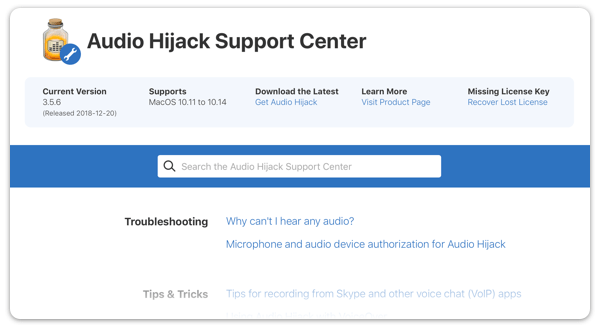
Audio Hijack’s Support page, showing several Knowledge Base articles
However, if you do need to contact us directly, don’t hesitate! We strive to provide friendly and responsive support via email, and that’s only gotten better. We recently made our contact form simpler and more powerful, even providing carefully curated suggestions to knowledge base articles which could help you instantly. We’re also using a more modern support backend, Help Scout, to better process support requests. This has enabled us to integrate several tools which allow for even more rapid responses.

That covers last year pretty well. Now, let’s have a look behind the curtain to discuss our plans for 2019. We’re always busy keeping all of our current products running smoothly. That means providing support for the likely release of MacOS 10.15 (this year’s guess: Sonoma), as well as updates small and big for the entire line-up. Beyond the standard maintenance releases, we have specific plans for several larger releases.
A Major SoundSource Update
We plan to ship a major update to SoundSource in the first half of 2019, and it’s going to change the way you listen to audio on your Mac. We’re very excited to get this update out to our users, hopefully in the very near future! For now, here’s a carefully cropped sneak preview:

A vision of SoundSource to come
Focusing on Audio Hijack
We’re also hard at work on the next iterations of our flagship product, Audio Hijack. Since the initial release of Audio Hijack 3 in 2015, we’ve shipped a steady stream of large updates to add functionality and improve the product, and we have plans for much more.
We’re currently working on additional interface refinements based on user feedback and other work we’ve done. We’re also adding and improving features in ways that will please both existing users and new customers. We should have more to share about Audio Hijack updates later this year.
Loopback 2.1, and Beyond
The recently released Loopback 2.0.0 is certainly not the last update we plan for Loopback. Prior to unveiling version 2, we had a rough roadmap for additional versions, and now user feedback has helped us flesh that out further. Look for Loopback 2.1 in the coming months, as well as further updates throughout 2019.
Stay Tuned
Our software’s built-in version checking is the best way to ensure you have the very latest releases, but you can also stay up to date with Rogue Amoeba in one (or more!) of the following ways:
-
Subscribe to this very blog.
-
Follow us on Twitter.
-
Like us on Facebook.
-
Follow Rogue Amoeba on Instagram.
That’s all for now. All the folks here at Rogue Amoeba wish you a happy and healthy 2019! Stay tuned for more news from your favorite Mac audio software company.


Ada Lovelace Fellowship awarded
Having had to keep it under wraps for a month: I am extremely delighted to announce that I’ve been awarded one of six inaugural Ada Lovelace Fellowships, providing three years of guaranteed tuition and stipend support, by Microsoft Research.
The Fellowship is aimed at supporting underrepresented student populations, and in my case will be used to continue my current work on gender, identity and AI. I am utterly overjoyed at the peace of mind and relative security this brings, as well as the obvious compliment it represents. Many, many thanks go to David, Charlotte, Gary, Anna, Cindy, Meredith and Julie for all of their support in making this somehow happen!
Now, if you excuse me: I’m going to go sleep until the CSCW deadline.
Why You Should NOT Quit Facebook or Twitter
As most readers know, I quite Facebook about 2.5 years ago, but still use Twitter. Neither is particularly wholesome, but Twitter at least appears to try to be ethical. So why should we stay on these services? Wesley Fryer's list isn't exactly a wholehearted endorsement. Not everyone is a target for trolls, he writes. If we want to change bad corporate behaviour, we need group action, not individual action. The social network platforms, he continues, offer frictionless idea-sharing (I would dispute that, however...). Finally, he says, "I’m a firm believer in our need for 'a technology correction' which includes external, governmental regulation of Facebook as well as grassroots efforts to champion personal privacy rights."
Web: [Direct Link] [This Post]Currently in a taxi with very obnoxious driver who voted for Brexit. Actually there are three other people trying to drive the taxi too and they’re all shouting at each about directions and trying to grab the steering wheel. I didn’t even order a taxi
|
mkalus
shared this story
from |
Currently in a taxi with very obnoxious driver who voted for Brexit. Actually there are three other people trying to drive the taxi too and they’re all shouting at each about directions and trying to grab the steering wheel. I didn’t even order a taxi
BorderIrish
on Thursday, January 17th, 2019 10:44am1381 likes, 328 retweets
Google acquires Fossil’s smartwatch technology for $40 million

Google is buying Fossil’s smartwatch technology for $40 million to pursue its smartwatch vision.
This is a huge deal since Google has yet to release a Google or Pixel branded smartwatch to show off a premier version of Wear OS.
A smartwatch from the search giant could be closer than we think too. TechCrunch is reporting the deal includes a watch that is already in development. The report also mentions that a team of employees at Fossil will join Google to continue work on the device.
“The addition of Fossil Group’s technology and team to Google demonstrates our commitment to the wearables industry by enabling a diverse portfolio of smartwatches and supporting the ever-evolving needs of the vitality-seeking, on-the-go consumer,” said Wear OS VP Stacey Burr.
It’s exciting that Google chose to start its smartwatch hardware program with Fossil since the company has been outputting stellar Wear OS watches for a while.
Perhaps what’s more exciting is that Google is now in a position to make a big play in the Apple-dominated wearable market. Ideally, it will bring new ideas and features to the market, giving users another reason to consider a smartwatch.
This isn’t the first time that Google has bought a portion of a company to make Google products. It pulled a similar stunt when it purchased a slice of HTC’s smartphone business.
Source: TechCrunch
The post Google acquires Fossil’s smartwatch technology for $40 million appeared first on MobileSyrup.
Nokia 9 PureView in-display fingerprint scanner animations leak

A new rumour regarding Nokia’s unannounced Nokia 9 PureView smartphone, a device that features five rear-facing cameras, has surfaced online.
The rumour, sourced from 91mobiles, suggests the Nokia 9 PureView will launch in early to mid-February. Similar to Samsung, HMD Global will likely unveil its latest smartphone before Mobile World Congress.
The phone will reportedly sport a 5.9-inch QHD display, 128GB of storage, 8GB of RAM, Android 9 Pie and a 4,150mAh battery. Additionally, it will feature a Snapdragon 845 processor. Other rumours suggest HMD Global is looking into a variant with a Snapdragon 855 processor and is 5G capable.
Also similar to Samsung’s rumoured Galaxy S10, the Nokia 9 PureView will reportedly feature an in-display fingerprint scanner.
YouTuber Love Nokia has reportedly looked into the coding of the ‘settingsapk’ and discovered animations for the fingerprint sensor.
Image Credit: MySmartPrice
Source: 91mobiles
The post Nokia 9 PureView in-display fingerprint scanner animations leak appeared first on MobileSyrup.
Recommended on Medium: Why Total Task Schedulers are Never “Free”

“Do you have some free time?”
There is a particular kind of ultra-busy professional who doesn’t understand this question. But people who belong to this cohort are not crazy, or overwhelmed with work. They simply think about time usage differently; in a way that‘s empowering.
Awhile back, they accepted the notion that there is never, ever enough time to do everything. Nor will there ever be.
In other words, they accept the fact that there will always be a gap between the time represented by all the tasks they want to complete and their personal, available time. With only 168 hours per week, they recognize there’s a hard limit to the number of “time demands” they can complete. (What’s a “time demand”? An internal, individual commitment to complete an action in the future.)
Other people, however, see this as a problem to be resisted. They try to cut their time demands by limiting their total number or duration. In their minds, it’s the only way to avoid the guilt that comes from not doing everything they think they should do.
However, Total Task Schedulers who put everything they are going to do in their calendars aren’t phased. If you happen to be one, you know the truth: you will never finish every time demand because your mind is an infinite, creative source of new obligations. As a result, you understand there are two separate, independent parts of your brain at play.
One region creates time demands. It responds to a 24–7 array of triggers by adding new ones, even in our sleep.
Another part of your brain tries to determine (in the heat of the moment) what must be worked on in the next instant, later this week, six months from now, or by the end of the year.
As these two mental processes do their thing, they are governed by some hard realities. One is that of a 168 hour limit per week. Another is that completing a time demand now means saying no to all the other ones which remain incomplete. Fortunately, if you have visited ScheduleU, these physical truths may no longer be a problem. In your self-learning, you already taught yourself how to permanently eradicate the Zeigarnik Effect, the nagging sensation which pings us when a task is unfinished.
However, when asked by someone else for some “free time,” you still may find yourself reacting with suspicion or even irritation. Why?
The use of the phrase indicates the person making the request is mistaken. He/she assumes you have set hours aside for a few important things, leaving unassigned, spare time lying around available for other stuff.
As one of the busiest one percent, you can’t identify with this practice.
Instead, all your time is important. In fact, it’s so valuable, you have decided to run a permanent deficit, as I mentioned earlier.
Your colleague who asks for some of your free time doesn’t appreciate that accepting his/her request is not simple. It means you must say “No” to something else that you already deem important.
Whereas he/she may be used to the idea of retaining a pool of extra time, you don’t engage in such a practice. In fact, you are a serial optimizer, always seeking to juggle competing priorities.
Therefore, before you react adversely to their innocent query, take a deep breath.
Furthermore, if you are familiar with The Goal by Eli Goldratt you may understand the concept of a bottleneck. Your calendar is actually a “Herbie” — the author’s affectionate term for a place in your workflow which limits your throughput.
In this context, (and only for the busiest one percent), your calendar is a bottleneck to the management of your ambitions. To accomplish your goals, you must treat it carefully, making sure that nothing in your schedule is wasted.
Some oppose this idea. Coming from the old paradigm they see it as an instant recipe for overwork.
Many popular gurus agree. You must have empty spaces in your calendar to prevent stressful overload.
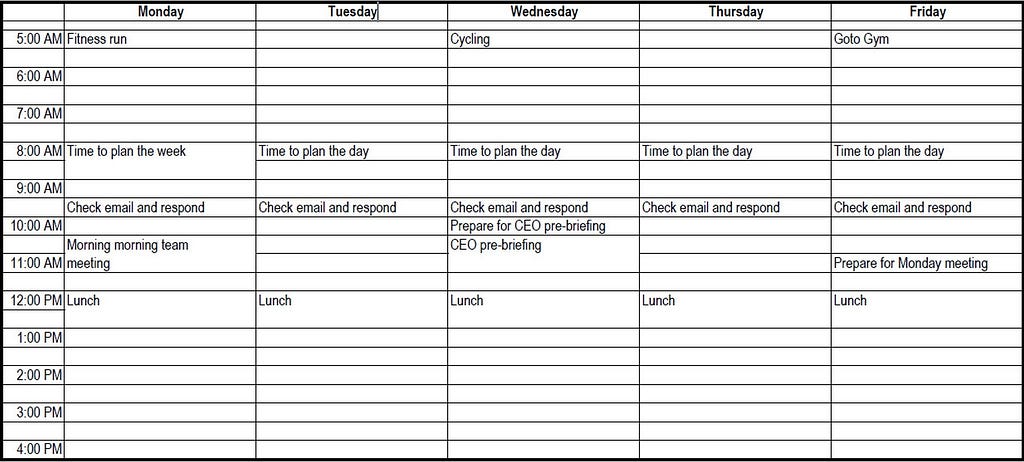
This piece of advice doesn’t work for you. This diagram shows why — it’s similar to the first calendar I advise a member of the busiest one percent to put together.

Notice that is has times for meals, exercise and daily planning and reflection. If it were mine, it would also include time to take a coffee nap each day.
By design, it’s an act of self-care. Here, in one place, are the activities I undertake each week to take care of myself. Before anything from the outside world intrudes, this is my underlying, essential schedule I use to start time-blocking.
By the time appointments and tasks are added each week from meetings, projects or other work activities, there is no “spare time.” My calendar is full.
By taking care of yourself first, you have ensured that a sharp increase in time demands won’t drive you over the edge. In fact, a decision to add more working hours is one you can make cautiously, because you know it means saying an explicit “No” to stuff intended for the care of self or others.
Unfortunately, using your calendar in this way puts you in the minority. Most people don’t understand the practice, hence their requests for “spare time.”
The irony is that they are more likely to use gut feelings under pressure. It means stealing a few hours here and there from their “free” pool of hours. In other words, they make a blind sacrifice.
It often ends badly. Why? Soon, their manager realizes that there’s a hidden pool of “free” hours, so they just keep asking for more. Over time, they come to expect it. A handful may realize what’s happening and put a stop to it, but most won’t. Case in point: recently, a friend of mine was told to find another job if she couldn’t work the regular plus emergency hours her boss needed.
The obvious conclusion is that being conscious and explicit about your schedule beats being unconscious and implicit. It leads to clearer decision-making, especially if you consider yourself to be a high-performing professional.
My advice is to expand your drive for results to include all aspects of your life, bar none. Your schedule is the key to getting all the rest, sleep, recovery time, slack time and transition time you need.
So go ahead. If you are among the busiest one percent, be as ambitious as you want and create all the time demands you can. Keep pushing yourself from all angles.
Just do so with the right tools, using both parts of your brain in concert. It’s the only way to maintain the elusive balance necessary for sustainable high performance.
Why Total Task Schedulers are Never “Free” was originally published in 2Time Labs on Medium, where people are continuing the conversation by highlighting and responding to this story.
My personal year of learning about evaluation
For a number of years I have been studying and learning about evaluation. To be honest, working primarily in the non-profit world and working for social good and social change, evaluation always seemed to me to be the bugaboo that ruined the party. While we’re out there trying to create new things, innovate and respond to novel challenges, build relationships and community, and experiment and fail, evaluation loomed over us like a dark spectre, scolding us for being flakey or demanding that we be more grown up and more responsible.
More than that, I had many experiences of evaluation being used as a weapon of power to exert control over the way projects were unfolding. Controlling the money and controlling the standards under which it is spent is hugely powerful. That power can be used badly or by people who don’t want to let go of control over their agendas. And it’s costly and frustrating for people in small organizations to feel like your strategic vision is always subservient to the evaluation framework.
So my foray into evaluation began when I started learning about Developmental Evaluation, and from there, learning about all the cool things that evaluators are doing to try to help organizations and communities makes sense of action in complexity. It has led me into powerful learning relationships with colleagues like Trilby Smith from the Vancouver Foundation, with whom I have been learning through a long term Theory of Philanthropy project with that organizations. I’ve connected with Art of Hosting practitioners like Rita Fierro (with whom I’m developing a course) and Nancy Fritsche-Eagan who are really curious about how to do deep participatory facilitation work in the service of good evaluation. And I’ve developed the start of some really beautiful learning relationships with Jara Dean-Coffey who is spearheading the world of Equitable Evaluation and Kim Van der Woerd and Billie Joe Rogers from Reciprocal Consulting who use culturally responsive evaluation to decolonize learning and research.
All of this learning and relationship has made me a more conscious facilitator and strategist. It has turned me from someone who is afraid of evaluation to someone who embraces it as a beautiful way to deepen learning, innovation, and strategic work. And it has equipped to confront people who abuse evaluation practice by using it to hide bald faced power grabs and subtle colonization.
Yesterday I got to play with one of my new learning and working partners, Carolyn Camman and their podcasting pal Brian Hoessler as a guest on their EvalCafe Podcast where we explored the intersection of evaluation, facilitation and complexity. This February Carolyn, Trilby, Rita, and Jara will join me to run an online course exploring these topics with my buddies at Beehive Productions. I invite you to join us there for what will be a really amazing set of conversations intended to open up our practices and apply these tools to complex projects.
I’m excited by the fact that I’m doing work in which facilitation and evaluation meet and moosh together. It’s making me better at what I do.
Colin Devroe writes that RSS is not dead. Subsc...
Colin Devroe writes that RSS is not dead. Subscribing is alive.