
It makes them feel good, it makes them feel proud, it makes them feel happy. theatlantic.com/ideas/archive/…


In my last post, I played with using a grey colour (#999999) for all words that represent things that aren’t real — that is, they exist only as constructs of the mind, and in the absence of anyone, they simply don’t exist. It’s actually an extraordinarily large list. Our languages are built around the reality of these non-existent things, which is probably why wild creatures, absent their need or capacity for abstract mental constructs, have no need or capacity for abstract languages.
On the other hand, the list of what is actually real (ie what exists independent of the mind), which I showed in green (#008000) in my last post, is pretty small. For a start, these things are merely pointers; what is actually real cannot be known or understood by the separate person. And what really is, is both real and unreal; it is an appearance out of nothing. Aggravatingly to the separate person, one of these words that point to what is real-and-unreal, is ‘everything’.
So just for fun (or perhaps annoyingly) here are some words in each category:
Words that represent what is not actually real, but only a mental construct:
|
Words that represent what is both apparently real and unreal, ie appearances out of nothing:
|
The problem with restricting conversation or writing to only what is both apparently real and unreal (ie actually real), is that you are limited to tautologies: All there is, is this. Everything is perfect, just as it is. It’s complete. Everything is unconditional love. There is no ‘you’. In languages where meaning (to the individual) is everything, such communications are, tautologically, meaningless, useless.
So what is the radically non-dual writer to do? Just be aware, I suppose, of what is written that refers to what doesn’t really exist. Write grey words, but accept that they describe only illusion, as compelling and as prevalent and as excruciatingly persistent as that illusion is.
And then, in oral conversation, and in thought, do the same: recognize when you are speaking, and thinking, grey words.
Aha.

I just pre-ordered my copy of The Ventriloquists, a novel that tells the story of Faux Soir, a Belgian satirical newspaper slamming the occupying Nazis.
In this triumphant debut inspired by true events, a ragtag gang of journalists and resistance fighters risk everything for an elaborate scheme to undermine the Reich.
Brussels, 1943. Twelve-year-old street orphan Helene survives by living as a boy and selling copies of the country’s most popular newspaper, Le Soir, now turned into Nazi propaganda. Helene’s entire world changes when she befriends a rogue journalist, Marc Aubrion, who draws her into a secret network publishing dissident underground newspapers.
From reading the Wikipedia entry on Faux Soir it’s amazing and beautiful how satire can be such a strong point of resistance.
Seems relevant given the satirical Washington Post put out today by “trickster activist collective” the Yes Men & their previous New York Times special edition.
While riding my bike home last night and driving into work this morning, I listened (on a safe little speaker) to two podcasts (episodes?) that
(1) Reminded me what a powerful thinker and speaker Barbara Jordan was before her death
(2) Introduced me to Will Hurd, the only black GOP member of Congress who used to be a CIA agent and whose district runs hundreds of miles along the southwestern border.
(3) Show that a stories told without video or a slide deck can be as powerful as stories supported by video. But it takes a rare talent to pull it off.
Disclaimer: I think what Hurd says in this Daily interview makes great sense. However, I have no idea where he stands on other issues or, frankly, anything. On the issue of “the wall,” he’s a voice of reason.
Here are links to the two posts.
Where Have You Gone, Barbara Jordan? Our Nation Turns Its Lonely Eyes to You (This American Life)
A Republican Congressman from Texas Who Opposes the Wall (The Daily)
Photo: GettyImages
Robert Booth for The Guardian:
The Wellcome Trust is considering moving all of its 800 head office staff to a four-day week in a bid to boost productivity and improve work-life balance.
[..]
It is believed the Wellcome Trust would become the biggest organisation anywhere in the world to try a four-day week. The idea comes amid arguments from trade unions that the fruits of advances in computer technology and artificial intelligence, which improve productivity, should be shared among workers by changing to a shorter working week.
Wellcome’s idea means that by the time everyone else’s weekend has started, its employees could have spent a day volunteering, studying another skill or spending time with loved ones.
It begins.
For historical context, in the United States, the five-day week was pioneered in 1908. It took another six years before the idea was advanced. That's more than a century ago. About f'ing time! But, also noteworthy is that it wasn't until the 1938 Fair Labor Standards Act went into effect, that mandated a maximum 40-hour workweek, when the two-day weekend was finally adopted nationwide. Hopefully the wait won't be as long this time around.
There was a three-year period with my previous employer where I was allowed to work a four-day week with the fifth spent studying (part-time) for my MSc in Human-Computer Interaction. My work didn't suffer, and, actually, I worked better — when you've less time, unless you're a hopeless slacker, you optimise to make sure the output is at least the same. Since recently going indie, due to childcare arrangements, I've actually had to adopt a four-day week. The family are already feeling the benefits.
Microsoft’s Cortana digital assistant has fallen behind Google Assistant and Alexa over the past year, and now the software maker is taking a different approach to the competition. Speaking to journalists at a media event earlier this week, attended by The Verge, CEO Satya Nadella revealed that Microsoft no longer sees Cortana as a competitor to Alexa or Google Assistant. “Cortana needs to be that skill for anybody who’s a Microsoft 365 subscriber,” explains Nadella, referencing Microsoft’s new consumer subscription push. “You should be able to use it on Google Assistant, you should be able to use it on Alexa, just like how you use our apps on Android and iOS so that’s at least how we want to think about where it’ll go.”
I've been using Windows 10 daily for more than three years. In this time, I've never asked Cortana for anything. And I don't believe Cortana has ever volunteered assistance or insight that I've found helpful/useful. On the other hand, a deeply integrated Alexa and/or Google Assistant should at worst provide at least increased utility. That is to say, this is a correct move. 1 Like Windows Phone previously, even if this inevitably manifested into the obvious path to follow, it wouldn't have made the decision an easy one. This is what I admire most about Satya Nadella — he's not interested in winning short-term popularity contests, or occupying third spot in anything. As an aside, today's reveal did get me intensely curious on what Nadella's strategy would've been if he was promoted to CEO immediately after the iPhone was announced in 2007 — would make a fascinating alternate timeline.
That’s over a hundred kilometers of course, which it took three days to achieve.
I’m enjoying learning how to deploy that electric-Jag power gracefully. Yeah, you can floor it, which is shocking if brutish fun and might damage your neck vertebrae. But you know what’s way sweeter? Coming out of a corner, or around a slower car, and easing the accelerator down, and then further and further down, smoothly. You can’t do this for more than a few seconds without being in seriously unlawful territory anywhere this side of the Autobahn, but oh my goodness those are really very pleasing seconds; the pool of acceleration is bottomless.
I’ve had two charging experiences so far (haven’t needed any, just trying to learn the ropes), both from ChargePoint, both perfectly smooth. You plug in the big heavy connector, fire up the app, hold your phone up to the machine, and away it goes.
But I’m glad I’m going to have my own charger before the month is over, because the “fast” chargers like the one illustrated here are in demand and not well maintained; of the two in the picture, one is out of order and apparently has been for a couple of months

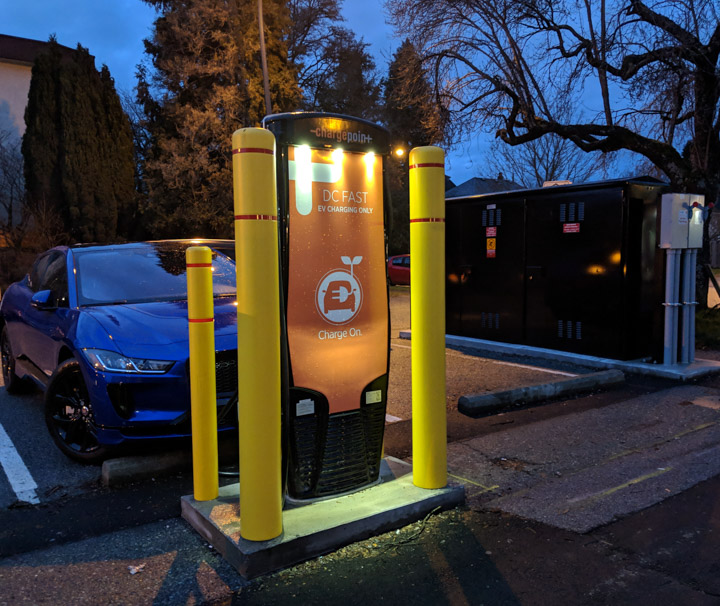
Above, charging in progress; below, another angle. The black box at the right below is supporting infrastructure; the label on the side says 80A worth of 3-cycle power.
There’ve been stories of people having trouble getting their I-Paces to connect to one charger model or another, but I’ve had none on two out of two experiences. The “fast charger” took me from 86% to 96% full in a half-hour. (That’s 11.26 kWh, or almost exactly one Canadian dollar’s worth at residential rates.) This is not as lame as it sounds, because the charging speed declines as the battery fills up, notably slowing down past 80%. Thus, when on a road trip, it’s considered to be smart and courteous, at a roadside fast-charger, to unplug and go at 80%.
The turning radius is large, bigger than our old Honda van’s. Maybe something to do with the wheels being pushed out to the corners? This is particularly annoying because any fool can get into the rhythm of jamming a shift-stick back and forth between Drive/1st and R while three-pointing on a narrow street, but my fingers are nowhere near learning how to hit the Jag’s D and R buttons without looking.
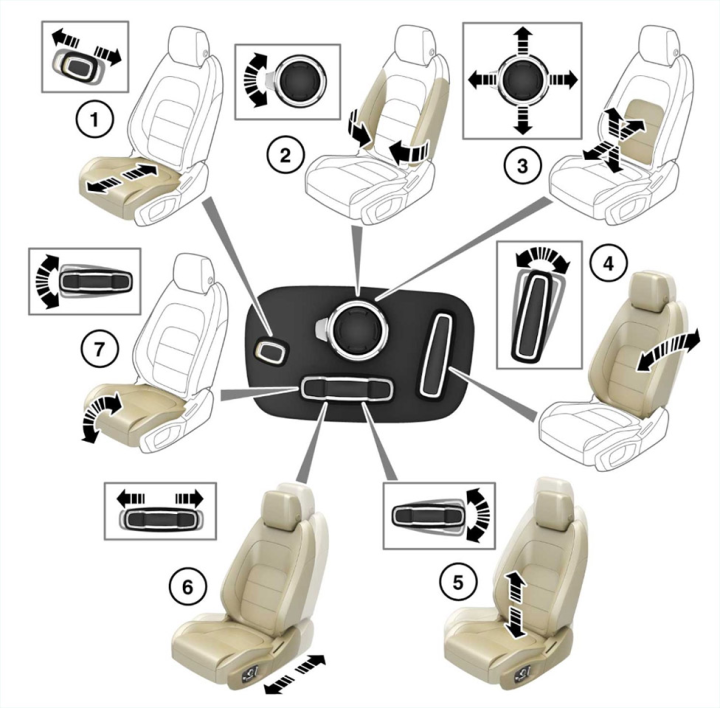
I’m dealing with angst about the seat position; it’s a paradox-of-choice problem, there are just too many controls. I may have to go all engineer and take a systematic approach, making one change at a time on one lever at a time. I should be clear that it’s a fabulously comfortable seat, it’s just that I can’t prove it couldn’t be better.
The “Park Assist” feature, which has two dedicated buttons, doesn’t work. It’s not just me, I asked my peers and everyone agrees that yeah, it’s just broken. Shame on Jaguar, other modern cars get this right. I wonder if it can be fixed in software?
In fact, it’s a good thing that the I-Pace is so much fun to drive, because it’s generally a pain in the ass to park. The visibility through the tiny dim near-horizontal back window is laughable, the rear-view camera is a little laggy (great picture though), and the car is wide. I’m sure I’ll figure out a way to curve into place, reasonably close to and parallel to the curb, but I haven’t yet.
Driving my fossil car to work was dumb and this one being electric doesn’t change that. Parking is still expensive, as are the L2 chargers in Vancouver office-building basements.

On Exponent, the weekly podcast I host with James Allworth, we discuss AWS, MongoDB, and the Economic Realities of Open Source.
Listen to it here.
mkalus
shared this story
from  mrjamesob on Twitter. mrjamesob on Twitter.
|
Boris Johnson doesn’t want ‘no deal’. Just like he didn’t want Brexit. He’s looked at all available positions and, ignoring all knowledge & conscience, picked the one that best advances his leadership ambitions while not actually wanting it to prevail.
Again.
 mrjamesob
on Saturday, January 19th, 2019 8:59am
mrjamesob
on Saturday, January 19th, 2019 8:59am
mkalus
shared this story
from  HumansOfLate on Twitter. HumansOfLate on Twitter.
|
There's a massive snowstorm headed our way tomorrow. Travel is expected to be dangerous.
This is what @jiminypeak, a ski resort in my area, is telling its workers: pic.twitter.com/xhgOR66rls

 EoinHiggins_
on Saturday, January 19th, 2019 6:37am
EoinHiggins_
on Saturday, January 19th, 2019 6:37am HumansOfLate
on Saturday, January 19th, 2019 5:35pm
HumansOfLate
on Saturday, January 19th, 2019 5:35pm
Back in November last year I wrote about ‘The Supermen‘, the story of Seymour Cray and the birth of supercomputing and mused about my personal reasons to learn about this particular piece of computing history. Reading about something is one thing, getting hands-on experience with technology from the 1960s quite another. Not possible you say?
Online Access to a Supercomputer of the 1960s
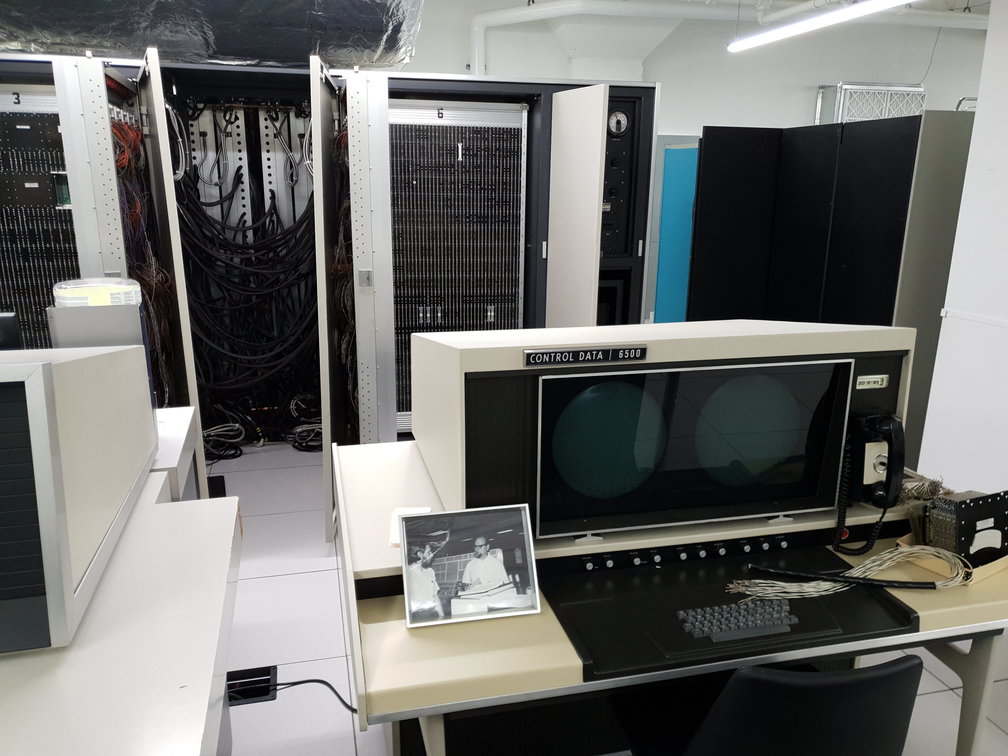
At first I thought so, too. But then I remembered that I read somewhere about the Living Computer Museum + Lab in Seattle’s and its mission to not only exhibit old computers but to have them up and running and accessible to the public, locally and over the Internet. So I had a look and indeed, they have a working CDC-6500, a machine of the first family of supercomputers and designed by Seymour Cray, which can be accessed over the Internet. All original manuals required to work with the machine are available in PDF format. There’s a PDF document on how to use the Interactive Terminal Facility (IAF) via ssh, a guide to the NOS operating system, programming manuals for Basic and Fortran and, very importantly, the PDF version to ‘Design of a Computer – The Control Data 6600‘ by Bob Thornton written in 1970. The combination of this material together with online access to the real machine and not only to a simulation creates a wonderful experience if one is willing to spend some time on the subject.
It’s Basic!
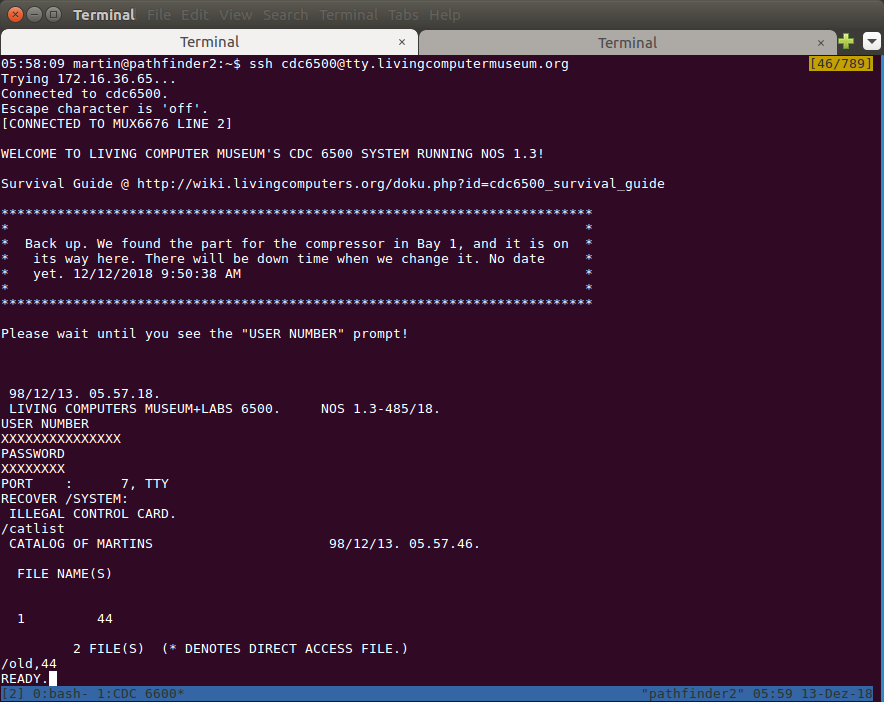
The first thing I did once I had access to the system was to write a small Basic program and run it. I have to admit that this felt a bit strange. I always thought of Basic being a programming language for small microcomputers of the 1980s and not for supercomputers. But there I was, typing-in a Basic program on the IAF console and running it. Except for minor details, the procedure is identical to programming Basic on a home computer 15 years later. Each line needs a line number that is used to sort the program and to act as a jump destination. Just typing the line number deletes it and correcting or changing code on a line requires typing out the full instruction again. In other words, the same thing on the multi-million dollar computer and a home computer a decade and a half later. Who would have thought that? Not me.
Let’s Do The ‘Real Thing’ – Fortran
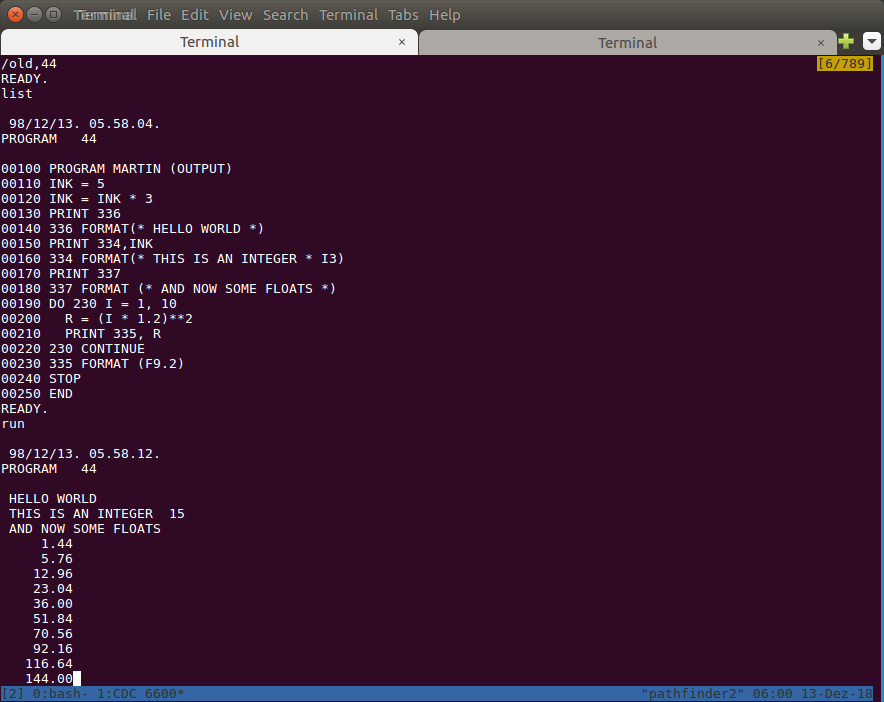
But o.k., so lets do something a bit more professional I thought and started to read the Fortran manual. As the 1960s was the domain of punch cards and batch driven computing, the manual was focusing on this method of interaction which made it a bit difficult to get my first Fortran program running as there are some differences between Fortran on punchcards and interactive programming on the terminal. But after an hour or so of trial and error and searching for demo programs from that area online, I finally managed to get my program to compile and run. Later, I discovered that it would not have been necessary to venture out to the Internet, the solution was nearer than I thought as there were some Fortran examples in the IAF manual further down in the text. I might have spotted them earlier if I had the printed version to browse. But reading the manual sequentially on the tablet didn’t make it obvious. An interesting take away, I have to browse more in the future even in electronic versions of a manual.
Hardware Peculiarities
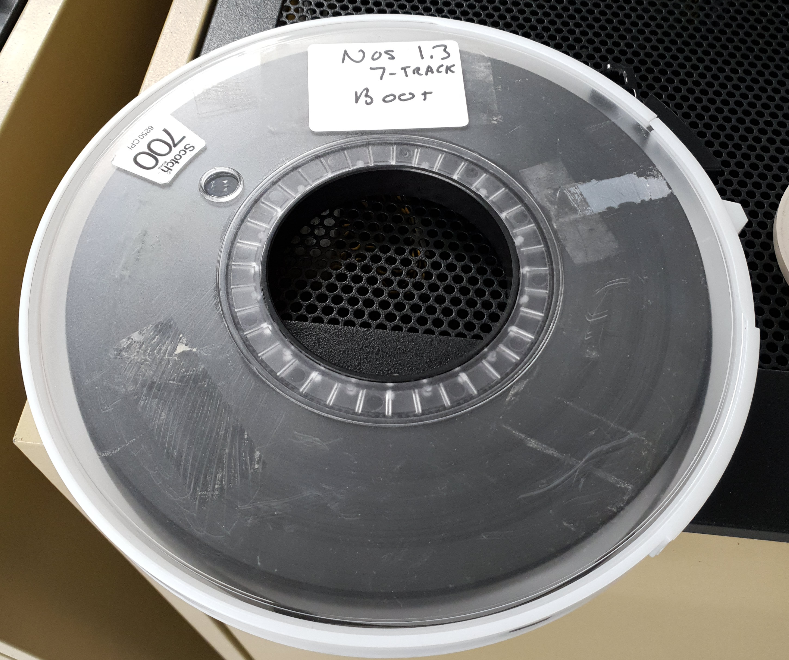
What made the 6500 line of CDC computers different from other systems was that the main CPU was there for number crunching and not for interaction with the user or peripherals. Most of the operating system and interaction with printers and storage media such as tapes and disks was the domain of 10 peripheral processors that had their own memory. Communication with the main CPU was done through main memory that all peripheral processors and the main CPU could access. Don’t bother the number-crunching CPU with benign interaction tasks, let it run and do its job while the peripherals do the rest. Multitasking in hardware if you like. Due to this significant difference of how the machine is set up compared to computers on our desks today, it was very worthwhile to read J. Thornton’s hardware description of the machine.
Files That Are Not Files
Another interesting thing I have learned is the different meaning of technical terms then and now. The term ‘storage’ at the time was not only used for tapes and disks but also for main memory, i.e. what we call ‘RAM’ today. Also, ‘files’ to store programs and data were not quite like what we would refer to as ‘files’ today. On the CDC 6500, a file was more like an abstraction of punch cards with individual records inside that could be sorted.
Evolution of the Console
Working with the computer on the console is like looking back in time as well. On the one hand, it feels familiar to type-in commands on the console and get a response back. But there is no directory structure, files are not really files and everything is still tailored around physical teletypes that would print out commands and responses on endless paper. The notion of a simple backspace key that can be used to delete characters, color, a searchable command line history or let alone a cursor that can be moved up and down is not part of the NOS experience, as these things were not possible with a teletype and only became possible with ‘glass-ttys‘ that abstracted and extended the teletypes.
In summary, I am very grateful for the Living Computer Museum to keep these machines alive and accessible to the public from any place in the world. It’s one thing to read about the beginning of supercomputing and mainframes but quite another to actually interact with one and experience the past directly rather than just by reading about it. I especially want to thank Bruce Sherry of the LCM+L for the time he took to answer all my questions and, of course, for keeping this and other machines alive together with his colleagues!

Students across Canada can now learn coding and computational skills, while also developing their knowledge of the Ojibwe language through a new version of MicroWorlds JR.
The software encourages children from pre-readers to grade 4 to learn how to code without requiring reading comprehension. The program uses simple point-and-click operations, “child-friendly” symbols, and audio directions that are now accessible in Ojibwe.
LCSI, the developers of the MicroWorlds line, and non-profit TakingITGlobal collaborated with Jason Jones, Ojibwe language coordinator at the Rainy River District School Board in Fort Frances, Ontario, to get the most accurate translations. Jones consulted community experts and elders for the program, including his grandmother Nancy Jones, who provided the audio recordings.
MicroWorlds JR is a part of TakingITGlobal and LCSI’s Code to Learn Initiative funded by CanCode. The initiative has reached over 50,000 Canadian students to date.
“This is the first ever coding language available in Ojibwe,” said Michael Quinn, president of LCSI. “This will enable children to reinforce their knowledge of Ojibwe and make them extremely proud of their heritage. In addition, as highlighted as a Call to Action in the Truth and Reconciliation Report, teachers and students will now be able to create culturally appropriate interactive curriculum units.”
MicroWorlds JR also incorporates art from Anishinaabe visual storyteller Nyle Johnston, which was featured in the Connecting with Our First Family exhibit at the Art Gallery of Ontario last year. Coding students will be able to use this artwork, allowing them to create interactive cultural stories and games.
“With 2019 being celebrated as the United Nations Year of Indigenous Languages, efforts are underway to offer additional Indigenous language versions of MicroWorlds JR in the coming months,” said Michael Furdyk, director of innovation at TakingITGlobal.
Download MicroWorlds JR in Ojibwe free of charge for Windows or macOS here.
Image credit: Unsplash.
This story was written by Sera Wong and was originally published on BetaKit.
The post New government supported software teaches kids to code in Ojibwe appeared first on MobileSyrup.

Apple shared five new videos on its YouTube channel today, all of which center around working on an iPad Pro. Each video covers a different iPad workflow, as described by the following titles:
What I love about these videos, each of which are just over a minute long, is that they demonstrate the actual apps and workflows you can use to accomplish these tasks on the iPad Pro. For example, the podcast hosting video features Anchor for recording, editing, and publishing the podcast, Files for adding audio from an external source, and GoodNotes for holding your speaking notes. The video on taking notes features Notability exclusively, highlighting the app's versatility for handwritten and typed notes, drawings, and audio recordings.
Each of the five videos ends the same way, by stating that the video was filmed, edited, designed, and made entirely with the iPad Pro. I can't imagine a better way Apple could push the message that the iPad is a device for getting real work done.
Club MacStories offers exclusive access to extra MacStories content, delivered every week; it's also a way to support us directly.
Club MacStories will help you discover the best apps for your devices and get the most out of your iPhone, iPad, and Mac. Plus, it's made in Italy.
Join NowWhat makes for a good data scientist? This is a question I asked a long time ago and am still trying to figure out the answer. Seven years ago, I wrote:
I was thinking about the people who I think are really good at data analysis and it occurred to me that they were all people I knew. So I started thinking about people that I don’t know (and there are many) but are equally good at data analysis. This turned out to be much harder than I thought. And I’m sure it’s not because they don’t exist, it’s just because I think good data analysis chops are hard to evaluate from afar using the standard methods by which we evaluate people.
Now that time has passed and I’ve had an opportunity to see what’s going on in the world of data science, what I think about good data scientists, and what seems to make for good data analysis, I have a few more ideas on what makes for a good data scientist. In particular, I think there are broadly five “tentpoles” for a good data scientist. Each tentpole represents a major area of activity that will to some extent be applied in any given data analysis.
When I ask myself the question “What is data science?” I tend to think of the following five components. Data science is
My contention is that if you are a good data scientist, then you are good at all five of the tentpoles of data science. Conversely, if you are good at all five tentpoles, then you’ll likely be a good data scientist.
Listeners of my podcast know that Hilary Parker and I are fans of design thinking. Having recently spent eight episodes discussing Nigel Cross’s book Design Thinking, it’s clear I think this is a major component of good data analysis.
The main focus here is developing a proper framing of a problem and homing in on the most appropriate question to ask. Many good data scientists are distinguished by their ability to think of a problem in a new way. Figuring out the best way to ask a question requires knowledge and consideration of the audience and what it is they need. I think it’s also important to frame the problem in a way that is personally interesting (if possible) so that you, as the analyst, are encouraged to look at the data analysis as a systems problem. This requires digging into all the details and looking into areas that others who are less interested might overlook. Finally, alternating between divergent and convergent thinking is useful for exploring the problem space via potential solutions (rough sketches), but also synthesizing many ideas and bringing oneself to focus on a specific question.
Another important area that design thinking touches is the solicitation of domain knowledge. Many would argue that having domain knowledge is a key part of developing a good data science solution. But I don’t think being a good data scientist is about having specific knowledge of biology, web site traffic, environmental health, or clothing styles. Rather, if you want to have an impact in any of those areas, it’s important to be able to solicit the relevant information—including domain knowledge—for solving the problem at hand. I don’t have a PhD in environmental health sciences, and my knowledge of that area is not at the level of someone who does. But I believe that over my career, I have solicited the relevant information from experts and have learned the key facts that are needed to conduct data science research in this area.
Over the past 15 years or so, there has been a growing discussion of the importance of good workflows in the data analysis community. At this point, I’d say a critical job of a data scientist is to develop and manage the workflows for a given data problem. Most likely, it is the data scientist who will be in a position to observe how the data flows through a team or across different pieces of software, and so the data scientist will know how best to manage these transitions. If a data science problem is a systems problem, then the workflow indicates how different pieces of the system talk to each other. While the tools of data analytic workflow management are constantly changing, the importance of the idea persists and staying up-to-date with the best tools is a key part of the job.
In the scientific arena the end goal of good workflow management is often reproducibility of the scientific analysis. But good workflow can also be critical for collaboration, team management, and producing good science (as opposed to merely reproducible science). Having a good workflow can also facilitate sharing of data or results, whether it’s with another team at the company or with the public more generally, as in the case of scientific results. Finally, being able to understand and communicate how a given result has been generated through the workflow can be of great importance when problems occur and need to be debugged.
In previous posts I’ve discussed the importance of context, resources, and audience for producing a successful data analysis. Being able to grasp all of these things typically involves having good relationships with other people, either within a data science team or outside it. In my experience, poor relationships can often lead to poor work.
It’s a rare situation where a data scientist works completely alone, accountable to no one, only presenting to themselves. Usually, resources must be obtained to do the analysis in the first place and the audience (i.e. users, customers, viewers, scientists) must be characterized to understand how a problem should be framed or a question should be asked. All of this will require having relationships with people who can provide the resources or the information that a data scientist needs.
Failures in data analysis can often be traced back to a breakdown in human relationships and in communication between team members. As the Duke Saga showed us, dramatic failures do not occur because someone didn’t know what a p-value was or how to fit a linear regression. In that particular case, knowledgeable people reviewed the analysis, identified exactly all the serious the problems, raised the issues with the right people, and…were ignored. There is no statistical method that I know of that can prevent disaster from occurring under this circumstance. Unfortunately, for outside observers, it’s usually impossible to see this process happening, and so we tend to attribute failures to the parts that we can see.
Applying statistical methods is obviously essential to the job of a data scientist. In particular, knowing what methods are most appropriate for different situations and different kinds of data, and which methods are best-suited to answer different kinds of questions. Proper application of statistical methods is clearly important to doing good data analysis, but it’s also important for data scientists to know what methods can be reasonably applied given the constraint on resources. If an analysis must be done by tomorrow, one cannot apply a method that requires two days to complete. However, if the method that requires two days is the only appropriate method, then additional time or resources must be negotiated (thus necessitating good relationships with others).
I don’t think much more needs to be said here as I think most assume that knowledge of statistical methods is critical to being a good data scientist. That said, one important aspect that falls into this category is the implementation of statistical methods, which can be more or less complex depending on the size of the data. Sophisticated computational algorithms and methods may need to be applied or developed from scratch if a problem is too big to work on off-the-shelf software. In such cases, a good data scientist will need to know how to implement these methods so that the problem can be solved. While it is sometimes necessary to collaborate with an expert in this area who can implement a complex algorithm, this creates a new layer of communication and another relationship that must be properly managed.
Even the simplest of analyses can produce an overwhelming amount of results and being able to distill that information into a coherent narrative or story is critical to the success of an analysis. If a great analysis is done, but no one can understand it, did it really happen? Narratives and stories serve as dimension reduction for results and allow an audience to navigate a specified path through the sea of information.
Data scientists have to prioritize what is important and what is not and present things that are relevant to the audience. Part of building a good narrative is choosing the right presentation materials to tell the story, whether they be plots, tables, charts, or text. There is rarely an optimal choice that serves all situations because what works best will be highly audience- and context-dependent. Data scientists need to be able to “read the room”, so to speak, and make the appropriate choices. Many times, when I’ve seen critiques of data analyses, it’s not the analysis that is being criticized but rather the choice of narrative. If the data scientist chooses to emphasize one aspect but the audience thinks another aspect is more important, the analysis will seem “wrong” even though the application of the methods to the data is correct.
A hallmark of good communication about a data analysis is providing a way for the audience to reason about the data and to understand how the data are tied to the result. This is a data analysis after all, and we should be able to see for ourselves how the data inform the conclusion. As an audience member in this situation, I’m not as interested in just trusting the presenter and their conclusions.
When thinking of some of the best data scientists I’ve known over the years, I think they are all good at the five tentpoles I’ve described above. However, what about the converse? If you met someone who demonstrated that they were good at these five tentpoles, would you think they were a good data scientist? I think the answer is yes, and to get a sense of this, one need look no further than a typical job advertisement for a data science position.
I recently saw this job ad from my Johns Hopkins colleague Elana Fertig. She works in the area of computational biology and her work involves analyzing large quantities of data to draw connections between people’s genes and cancer (if I may make a gross oversimplification). She is looking for a postdoctoral fellow to join her lab and the requirements listed for the position are typical of many ads of this type:
This is a job where complex statistical methods will be applied to large biological datasets. As a result, knowledge of the methods or the biology will be useful, and knowing how to implement these methods on a large scale (i.e. via cluster computing) will be important. Knowing techniques for reproducible research requires knowledge of the proper workflows and how to manage them throughout an analysis. Problem-solving skills is practically synonymous with design thinking; working as part of a multidisciplinary team requires negotiating human relationships; and developing narratives and stories requires excellent written and verbal communication skills.
A good data scientist can be hard to find, and part of the reason is because being a good data scientist requires mastering skills in a wide range of areas. However, these five tentpoles are not haphazardly chosen; rather they reflect the interwoven set of skills that are needed to solve complex data problems. Focusing on being good at these five tentpoles means sacrificing time spent studying other things. To the extent that we can coalesce around the idea of convincing people to do exactly that, data science will become a distinct field with its own identity and vision.
You’re applying for jobs, you’re hoping to get an offer soon—and when you do you’ll have to face the scary issue of negotiation.
If you read a negotiation guide like Valerie Aurora’s HOWTO (and you should!) you’re told you need to negotiate: you need to ask for more. And that’s good advice.
The problem is that asking for more is scary: it feels confrontational, your body will kick in with an unhelpful adrenaline surge, it’s just not comfortable. And honestly, given you only negotiate your salary every few years, that adrenaline surge probably isn’t going to go away.
But I think you can get past that and negotiate anyway—by embracing your inner 6-year old. In particular, a 6-year old negotiating for snacks on a playdate.
Let’s set the scene.
A 6-year old named Emma is visiting her friend Jackson, and now it’s time for a snack. Jackson’s parent—Michael—now needs to feed Emma.
Michael would prefer the children not eat crackers, but he has a problem. Michael has some authority over Jackson since he’s his parent, and some knowledge of what Jackson is willing to eat. So he can say “you’re eating one of these mildly healthy snacks” and that’s the end of it.
But Emma is just visiting: Michael has less authority, less knowledge, and a hungry 6-year old is Bad News. So Michael comes up with an acceptable range of snacks, and tries his best to steer towards the ones he considers healthier.
The conversation goes something like this:
Michael: “Would you like some fruit?”
Emma: blank stare.
Michael: “How about same cheese?”
Emma: shakes her head.
Michael: “Yogurt?”
Emma: shakes her head.
Michael: “Crackers?”
Emma and Jackson: “Yes!”
Michael has committed to feeding Emma something, he doesn’t want her to go hungry—but he doesn’t have the normal leverage he has as a parent. As a result, Emma can just stall until she gets what she wants. Particularly enterprising children will ask for candy (even when they would never get candy at home!), but stalling seems well within the capacity of most 6-year olds.
The dynamic of hiring a new employee is surprisingly similar.
Whoever is making the offer—HR, an internal recruiter, or the hiring manager—has already committed to hiring you. They’ve decided: they had interviews and meetings and they want to get it over with and just get you on board.
So they come up with an acceptable salary range, and offer you the low end of the range. If you accept that, great. And if you say “can you do better?”
Well, they’ve already decided on their acceptable salary range: they’ll just move up within that range. They’re not insulted, they’re used to this. They’re not horrified at a hole in their budget, this is still within their acceptable range.
You went from fruit to crackers, and they can live with that. All you have to do is ask.
Much of what determines your salary happens before you get the offer, when the decision is made about what salary range to offer you.
You can influence this by the language on your resume, by how you present yourself, how you interview, and by noting you have competing offers. It may not feel like negotiation, but it’s all part of the process—and while it’s a set of skills you can master as an adult, that part is far beyond what your 6-year old self could do.
But the actual conversation about salary? Pretend you’re 6, pretend it’s a snack, and ask for more—chances are you’ll get some delicious crackers.
Alan Levine recently posted his description of how to add an overview to your blog of postings from previous years on the same date as today. He turned it into a small WordPress plugin, allowing you to add such an overview using a shortcode wherever in your site you want it. It was something I had on my list of potential small hacks, so it was a nice coincidence my feedreader presented me with Alan’s posting on this. It has become ‘small hack’ 4.
I added his WP plugin, but it didn’t work as the examples he provided. The overview was missing the years. Turns out a conditional loop that should use the posting’s year, only was provided with the current year, thus never fulfilling the condition. A simple change in how the year of older postings was fetched fixed it. Which has now been added to the plugin.
In the right hand sidebar you now find a widget listing postings from earlier years, and you can see the same on the page ‘On This Blog Today In‘. I am probably my own most frequent reader of the archives, and having older postings presented to me like this adds some serendipity.
From todays historic postings, the one about the real time web is still relevant to me in how I would like a social feed reader to function. And the one about a storm that kept me away from home, I still remember (ah, when Jaiku was still a thing!).
Adding these old postings is as simple as adding the shortcode ‘postedtoday’:
There is 1 post found on this site published on February 10
Another example of a very familiar skyline that has changed so radically in the last few years, it seems to be a different city.


Click to see its context.


Bose’s QuietComfort 25 acoustic noise-cancelling headphones are on sale for CAD $169.99 as The Shopping Channel ‘Today’s Showstopper’.
The original sale price of the headphones is $299.99.
While it doesn’t have the Bluetooth or VPA capabilities like the QuietComfort 35, the headphones still sport an inline mic/remote for calls and controlling music playback.
It’s important to note that the QuietComfort 25 is designed for use with the iPhone, iPad, and iPod. As such, the mic/remote will not work with Android devices.
Included in the box are the headphones, the 1.42m incline mic/remote cable, airline adapter, a carrying case, and AAA batteries.
Source: The Shopping Channel
The post The Shopping Channel discounts Bose QuietComfort 25 noise-cancelling headphones to $170 appeared first on MobileSyrup.

Microsoft is officially ending support for Windows 10 Mobile devices in December 2019.
Despite stopping development of new features and hardware in 2017, the company has continued pushing out security and software updates. As of December 10th, these updates will no longer come to users.
Further, a Microsoft support page noted that Windows 10 Mobile version 1709, released in Octobober 2017, was the last update.
Additionally, Microsoft recommends Windows 10 Mobile users switch to iOS or Android devices.
When the company ends support in December, some features like device backups for settings, along with some apps, will continue until March 10th, 2020. The company also says that some features like photo backup and restoring a device from an existing backup may continue to work for up to another 12 months after the end of support.
Microsoft has focused on Android and iOS for some time and has released several apps for both platforms. Further, the company has turned to Android as the mobile version of Windows, releasing a launcher on the platform and developing PC-phone connectivity software as well.
While Windows 10 Mobile users now face a choice between iOS and Android, for those who want to stay in Microsoft’s ecosystem, Android is the clear choice.
Source: Microsoft Via: The Verge
The post Microsoft is ending support for Windows 10 Mobile in December 2019 appeared first on MobileSyrup.

Following a report late last year that Linux apps on Chrome OS would get GPU support, a new commit — which adds the latest code changes to a source code — spied by About Chromebooks reveals that GPU support could arrive soon.
The new feature should arrive shortly in Chrome OS Canary — an early, experimental build of Chrome OS used for testing. Further, GPU support will only come to select high-end Chromebooks.
According to the commit posted on the Chromium Gerrit, an online collaboration tool for Chrome developers, the GPU support feature was merged for ‘Nami’ and ‘Eve’ boards.
Eve represents the Pixelbook, which we already suspected would get the feature. However, several manufacturers use the Nami board in their Chromebooks, including:
GPU support is a long-requested feature on Chromebooks that support Linux apps. As it currently stands, several Linux apps either don’t work or work poorly because they can’t access the GPU.
However, with the introduction of this feature, that should be set to change.
Source: Chromium Gerrit Via: About Chromebooks, 9to5 Google
The post Linux apps to get GPU support in Chrome OS soon appeared first on MobileSyrup.

Have you ever looked at your smartphone and thought, “man, I really wish my phone case had a removable fork and spoon built into it?”
No? Me neither.
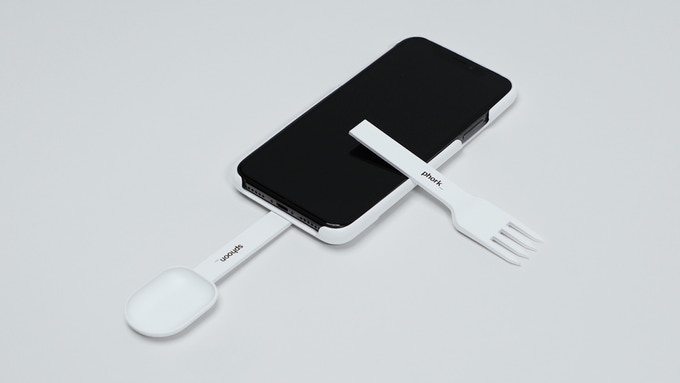
As we’ve seen in the past with other wacky products that don’t exactly make sense, this hasn’t stopped someone from creating a Kickstarter focused on the case I described above, complete with an eye-roll inducing name — the ‘Sphoon_phork.’ That said, the case’s Kickstarter page is still somewhat amusing, though it has only raised $122 CAD of its $14,686 goal three days into its campaign. The campaign is set to end on February 14th.
“For over 12,000 years, humankind has strived to create the perfect civilization. We invented agriculture. We invented the wheel. We created a system of laws. We sent people to space. Now, a new chapter in our history has begun. Ladies and gentlemen, we bring you: the Sphoon_phork,” reads an excerpt from the case’s Kickstarter Page.
The page then goes on to state that it took the team behind the Sphoon_phork roughly “a year to achieve the perfect design for a seamless experience of simultaneously eating while browsing.” It seems that the case’s ultimate goal is to allow you to continue to scroll through Instagram while still mowing down on food.
The way the actual case works seems relatively straightforward as you may have already guessed. The spoon or fork attaches to the base of the smartphone case, allowing you to awkwardly still use your chosen utensil while watching Netflix’s new Fyre Festival documentary. As far as I can tell, that really is all there is to it.
The Kickstarter page states that the case will launch for the iPhone 7, iPhone 8, iPhone X and iPhone XS first, with plans to release additional versions in the future, including specific cases designed for the Samsung Galaxy S9, Galaxy S9+, Note 9, Google Pixel 3, Pixel 3 XL and a variety of other Android devices.
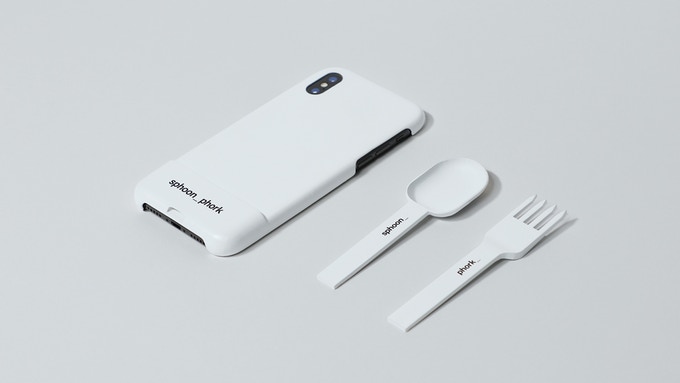
It also looks like the Sphoon_phork will first release in white, though the ridiculous case’s Kickstarter page says that “more funky colours” are coming in the future.
Kickstarter Early Bird pricing starts for the Sphoon_phork starts at $39 CAD with a June 2019 shipping date.
What a time to be alive.
Image credit: Kickstarter
Source: Kickstarter
The post Eat food and watch Netflix simultaneously with this fork and spoon-equipped smartphone case appeared first on MobileSyrup.
Earlier in the month I printed myself a fountain pen on my 3D printer. Without a nib assembly–the only part I couldn’t print myself–I wasn’t able to actually use the pen, however. This changed today when a Rosetta JoWo #6 Fountain Pen Nib, Ruthenium, Broad assembly arrived in the post from ipenstore.com. It screwed right into the barrel of the pen, I installed a J. Herbin larmes de cassis ink cartridge and, voila, I had myself a new pen:
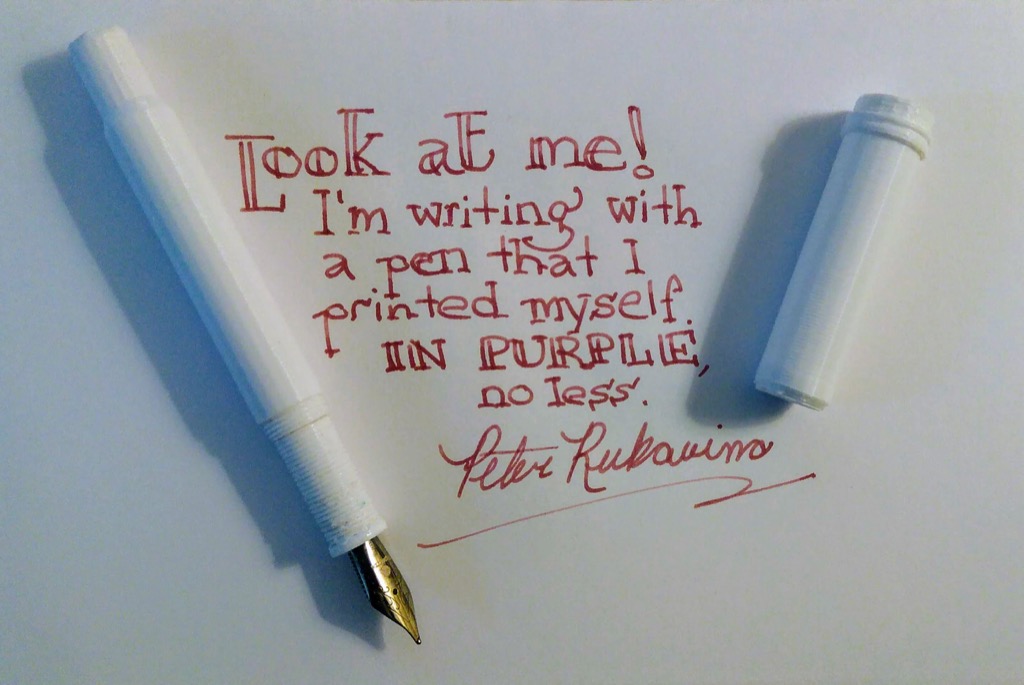
J. Herbin translates its larmes de cassis ink as “tears of blackcurrant,” which has got to be about the best name for an ink I can imagine; they continue: “this ink with a dark purple hue is the symbol of grievance and penitence.”
I will use the pen accordingly.
Regarding the Ruthenium-plated nib, my choice, it seems, was predestined; from Wikipedia:
Ruthenium is a chemical element with symbol Ru and atomic number 44. It is a rare transition metal belonging to the platinum group of the periodic table. Like the other metals of the platinum group, ruthenium is inert to most other chemicals. Russian-born scientist of Baltic-German ancestry Karl Ernst Claus discovered the element in 1844 at Kazan State University and named it after the Latin name of his homeland, Ruthenia.
My great-grandfather John’s record in the 1911 census shows Galicia as his “country of origin,” and Ruthenian as both his “racial or tribal origin” and “nationality.” He was born in Серафинці (Serafyntsi) in what is now western Ukraine, and arrived in Canada in 1908.
