Shared posts

23 Jan 20:58

Goodbye Google+

Alastair Creelman, The corridor of uncertainty, Jan 21, 2019
Icon

I don't want to write a lot about the demise of Google+ because other people have covered the ground pretty well, for example, that "the main lesson here is that platforms and tools come and go." But I do want to suggest that there might be an Act II for Google+, maybe in the form of (semi-)private collaboration networks for GSuite customers (think Slack, but fully integrated with Google's other services). That would explain why Google is inelegantly shutting down the service. And it would fill a pretty obvious gap in the GSuite line.

Web: [Direct Link] [This Post]
23 Jan 20:58

Let's talk about voice assistants. Seriously.

by Volker Weber

Satya Nadella is a smart man, probably the smartest CEO of any American company. He called off a lot of un-winnable races. He scrapped the Nokia investment, he called off Windows Mobile/Phone. And now he has pronounced Cortana dead. Not dead dead, but no longer competing with the two and a half incumbents: Alexa, Google, Siri.

Alexa and Google are currently in a silly race. I don't see a plan for recuperating the mounting losses. How is Google going to advertise on Google Assistant? And how many Amazon purchases does Alexa generate? Siri may be lagging behind, but at least it is playing the privacy card.

Microsoft is finally correcting its Cortana course. Windows Search will be unbundled from Cortana, starting with the spring 2019 release of Windows 10 Cortana will no longer ruin the setup experience. Microsoft will also cut back on the Crapware currently installed into the default Start menu.

Samsung, take note, and scrap your Bixby. It's an abomination. Map that Bixby button to the camera by default.

23 Jan 20:58

Briefing: Huawei CEO on unprecedented media tour amid international scrutiny

by Cassidy McDonald
Ren made an effort to assuage customers’ fears, saying that it would be Western countries’ loss if they didn’t buy Huawei products. 
23 Jan 20:58

Wohlstand ist planbar: prosperity macht auf Altersvorsorge aufmerksam

by Carsten Thomas
    Raus aus der „Zufriedenheitsfalle” – Jung und Alt müssen sich mit dem Thema Altersvorsorge befassen, sonst drohen Geldsorgen im Alter Als Plattform für die Analyse, den Aufbau und die Absicherung von Wohlstand geplant: [...]
23 Jan 20:58

Looking for common misspellings

by Nathan Yau

Some words are harder to spell than others, and on the internet, sometimes people indicate the difficulty by following their uncertainty with “(sp?)”. Colin Morris collected all the words in reddit threads with this uncertainty. Download the data on GitHub.

Tags: Reddit, spelling

23 Jan 20:58

vowe's magic flying circus auf Microsoft Kaizala

by Volker Weber

ef8c073869ded6ac5d8e23d23a5f2e30

Kaizala was launched as a (Microsoft) Garage project on 22 Feb 2016. By April, it was being used by Andhra Pradesh government officials for group communication during large scale events. Kaizala was used to effectively manage and coordinate a festival attended by 20 million people. Many government and state departments in India took notice and began using Kaizala, as did other well-known organizations in the country.

Kaizala ist mittlerweile Bestandteil von Office 365, aber in Deutschland nicht kommerziell erhältlich. Man kann es einfach kostenlos nutzen, ohne die Enterprise-Funktionen.

Schaut Euch mal die Website an. Und wenn Ihr Lust auf noch einen Messenger habt, dann könnt Ihr Euch uns hier anschließen. Das ist ein lockerer Chat zwischen den Lesern dieser Website.

Gut: Kaizala basiert zwar auf Handy-Nummern, aber Ihr könnt nur das sehen, was jeder Teilnehmer in seinem Profil von sich preisgibt. Jeder kann jeden auch privat anschreiben und lästige Teilnehmer kann man blocken. Eine Bitte habe ich: Benutzt bitte Euren vollen Namen und wenn möglich, ein Bild von Euch. Immer dran denken: ISCH BIN DER ADMIN. :-)

Kaizala hat eine Menge sinnvoller Funktionen eingebaut. Umfragen mit einer oder mehreren Fragen, Checklisten, Foto-Stories. Das ist für mich der interessanteste WhatsApp-Ersatz.

More >

23 Jan 20:57

Twitter Favorites: [j_mcelroy] "The Clerk's Office appears to have shown poor judgement in its expenses, but even worse judgement in its choice of… https://t.co/wsfvVjAI8d

Justin McElroy @j_mcelroy
"The Clerk's Office appears to have shown poor judgement in its expenses, but even worse judgement in its choice of… twitter.com/i/web/status/1…
23 Jan 20:57

Twitter Favorites: [MobyDickatSea] Thou art as unprincipled as the gods, and as much of a jack-of-all-trades.

Moby Dick @MobyDickatSea
Thou art as unprincipled as the gods, and as much of a jack-of-all-trades.
23 Jan 20:56

Available now – Conceptualising the digital university: the intersection of policy, pedagogy and practice

by admin

So after a couple of years talking the idea around, another year or so getting a decent proposal together for a publisher, and about 9 months of writing, our book Conceptualising the Digital University: the intersection of policy, pedagogy and practice is now published.

Writing the book has been quite a journey for myself and my fellow authors, Bill Johnston and Keith Smyth. We have been working, presenting and producing papers on the topic of the digital university for a number of years now. I think the first joint blog post Bill and I wrote about it was back in 2012. Having the time and support to be able to write a whole book is undoubtedly a big perk of “the job”, but it is still a bit of a labour of love and lost holidays/weekends. When I get an actual hard copy that will be all but forgotten.

Our intent for the book was not to give a blueprint for what a digital university is, or should be. Rather it is an exploration of the current neoliberal context universities (particularly in the UK) are working in. What we have attempted to do is to provide a critique of current and potential developments based underpinned by critical pedagogy. Or as the blurb puts it

Despite the increasing ubiquity of the term, the concept of the digital university remains diffuse and indeterminate. This book examines what the term ‘digital university’ should encapsulate and the resulting challenges, possibilities and implications that digital technology and practice brings to higher education. Critiquing the current state of definition of the digital university construct, the authors propose a more holistic, integrated account that acknowledges the inherent diffuseness of the concept. The authors also question the extent to which digital technologies and practices can allow us to re-think the location of universities and curricula; and how they can extend higher education as a public good within the current wider political context. Framed inside a critical pedagogy perspective, this volume debates the role of the university in fostering the learning environments, skills and capabilities needed for critical engagement, active open participation and reflection in the digital age.

The role of open education does feature heavily in the book. However we were caught in the open paradox in terms of making this open access. One of the first discussions we had with the publisher when they approached us was around an open access version of the book. However, that option was just not financially viable for us, we didn’t (and still don’t) have spare £10k. We could have self published, but to be honest having the pressure of a contract and publisher deadlines meant that we actually wrote the book and didn’t just have great conversations every time we met. We managed to do both – though at times the chat was very distracting! We are now working with the publisher to try and get some chapters of the book openly available.

We see the book as just the start of even more conversations and debate around the future of universities. There were many areas we just didn’t have the space to cover adequately. However, we are looking forward to working through some of our ideas/approaches at a workshop at the OER19 conference in April. If you are interested in reviewing the book you can request a review copy here and if you do, please let me know.

22 Jan 07:11

Twitter Favorites: [bvansomeren] @geerlingguy https://t.co/BkeyYIPcN6

22 Jan 07:10

UBC Skytrain Campaign

by Ken Ohrn

UBC has launched a campaign aimed at getting Canada’s Federal Gov’t and the Provincial Gov’t of BC to throw in a few billions of funding to build the currently-funded Millennium Skytrain extension all the way to UBC.  It’s good pre-election timing.

Slow and low capacity just won’t do.  And the B-line is past capacity limits.

As usual, Kenneth Chan at Daily Hive has written a clear and detailed story on the UBC line and its design tradeoffs.  It appears that you’ll have to fight UBC in a cage match to oblivion in order to get LRT on that route. Given the ridership numbers in evidence, I’d have to agree that fast high-capacity tech is the answer. Don’t forget integration with the rest of the region’s Skytrain tech.

The accompanying sketches show the Skytrain route passing near to the massive Jericho development.  But true to it’s oddly silent nature, there is no mention of any transit opportunity there. There is a coy little jog as the sketched route crosses Alma, and a station at Alma.

Still, these are mere details until the big issue is resolved:  the money.

UBC is Exploring a Financial Contribution

UBC is committed to working with regional partners, agencies and governments to accelerate planning and construction of a SkyTrain extension to campus.

Recognizing that Metro Vancouver transit projects are typically cost-shared between three levels of government (regional, provincial and federal), UBC is exploring ways to make a meaningful financial contribution to the regional share of the project without diverting any funding from its academic mission including provincial grants, current endowments, research funding nor student tuition.

Project costs will be more fully understood as detailed planning and design advances, but UBC’s contribution may take many forms:

  • Providing land for stations as York University recently did for the Toronto-York Spadina Subway Expansion
  • Charges collected from developers as the City of Richmond is doing for the new Canada Line Capstan Way station
  • A direct financial contribution from new revenues enabled by rapid transit as YVR did to support the Canada Line

Yet to be rolled into the planning is the massive land lift sure to follow at the UBC extensions’ stations and surrounding neighbourhoods.

22 Jan 07:09

Sustainable activism

by Liz

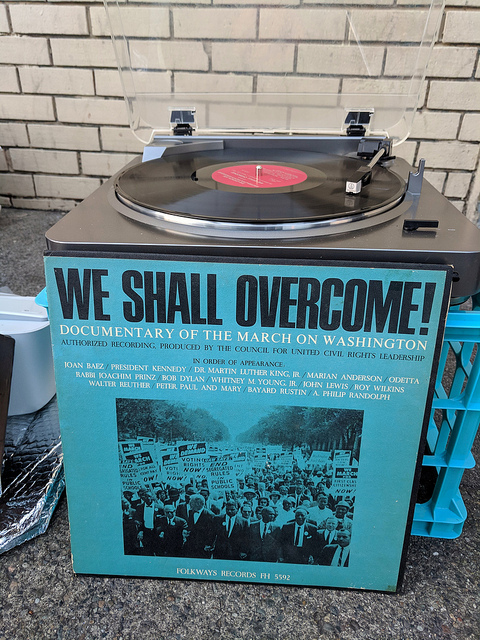
My friend Zach was out today with a pretty cool setup. Just out on the local streetcorner with a giant homemade amp (made from parts from Noisebridge) and a record player, powered from his mobility scooter battery. The album is titled WE SHALL OVERCOME! Documentary of the March on Washington and has speeches and songs from the 1963 March for Jobs and Freedom. Anyway, he was playing MLK’s speech just hanging out there on the sidewalk at the bus stop. He had a photo of MLK in a frame with flowers around it. People were honking as they went by and stopping to listen and chat. It was really nice.

mlk-album

The thing is it is too hard for him to get to any of the actual events in town right now because of mobility, health & so on. I admire him making his own event at his own pace right on our block and what he could sustain doing, bringing all his skills in making electronics stuff, special power supplies and power converters, and scavenging, along with a super awesome sensibility that you can celebrate the life and ideas of Martin Luther King Jr. by making this beautiful bit of culture out on the sidewalk on an ordinary street corner. As a result anyone else who couldn’t get to a special thing downtown, or wherever, but had to go about their ordinary day, got this piece of community added to their day.

21 Jan 21:48

Tesla increases Supercharger prices as it looks for new revenue sources

by Brad Bennett

Tesla is raising the costs of its Superchargers around the world, according to a report from Eectrek

The automaker is removing the free Supercharger credit Tesla buying incentive, and it looks like alongside this shift, the price of charging is also going up.

In Canada Tesla drivers who Supercharge get billed per minute, with the price shifting depending on the charging tier they’re using.

Tier one chargers cost $0.25 per minute and tier two chargers are priced at $0.50 a minute, according to Tesla’s website.

That said, a Tesla driver from Ontario has posted on the Model 3 Owners Club that it costs $0.20 for charging below 60 kWh (tier one) and $0.40 per minute to charge at a rate above 60 kWh (tier two).

There’s no mention on the forums or the manufacturer’s website regarding Tesla’s charging prices going up in Canada.

Electrek is reporting that the prices are jumping an average of 33 percent, so drivers should expect an increase in that range.

Both Electrek and the Canadian Tesla owner suggest that Supercharging costs will increase by different amounts based on local demand, but Tesla’s website has no mention of this.

All in, it looks like Tesla is trying to figure out a new way to bring in additional more revenue as the company works to bring down the cost of the Model 3 car.

MobileSyrup has reached out to Tesla to get more clarity regarding the issue. This story will be updated with additional information as it becomes available.

Source: Electrek, Tesla, Model 3 Owners Club

The post Tesla increases Supercharger prices as it looks for new revenue sources appeared first on MobileSyrup.

21 Jan 21:47

Mozilla working on ad-blocker for Firefox Focus 9.0

by Bradly Shankar

A new ticket in Mozilla’s Bugzilla bug tracking platform suggests that the company is set to add an ad-blocker in Firefox Focus 9.0.

Focus would previously only block some tracking-related ads.

Focus 9.0 is slated to release on February 12th, at which time all ads will be blocked for Firefox users. However, the feature will only roll out to 50 percent of users at first as part of a three-week testing period.

During this time, the developers intend to learn how ad-blocking affects average page load time and how many users will use it, according to the ticket.

Source: XDA

The post Mozilla working on ad-blocker for Firefox Focus 9.0 appeared first on MobileSyrup.

21 Jan 19:37

What Do Members Want?

by Richard Millington

Some 20 years ago, I used to play an online video game called Red Alert 2.

I once racked up 45 straight wins and my username was listed among the top 10 players in the world with a unique ‘unstoppable’ badge.

I don’t think I ever played another game using that account. The fear of losing my top 10 status and breaking my streak was too high.

Instead, I created another account and began playing for fun again.

To a game designer, it probably made a lot of sense to list and celebrate the top players – especially those with great streaks like mine. But they didn’t truly emphasize with how it made top players feel.

We make these mistakes all the time in our communities too and it’s what our psychology of community course is really about.

It’s about being able to very clearly see and understand what members want.

There aren’t any Jedi mind tricks here, just a practical understanding of how to identify what different segments want (you can’t just ask them) and deliver on those wants.

This depth of understanding should inform everything you do, from developing the community platform to welcoming newcomers, rewarding members to punishing members etc…

The more you understand how members actually think, the easier it becomes to deliver on their wants and avoid common mistakes. Some examples:

  • Members care far less about any reward than what the reward represents. How many people received it? How publicly was it given? How does it relate to other rewards?
  • Once you begin calling members experts or giving them badges, they feel pressured to always have the right answer and maintain their reputation (see above). This is as likely to reduce their level of motivation than increase it.
  • Members care far less about 1 million people liking their post than 10 close peers loving their post. If the top 10 people in a field love their article, they’re thrilled.
  • Letting members submit ideas without being able to see the impact of those ideas (even if they’re rejected) harms their motivation and attitudes towards the company.
  • Members want consistent moderation processes, yet they want to feel special and unique when you engage with them.
  • It’s far more motivating for members to participate in a small, exclusive community than it is for a big, mass community. Mental associations with a community are critical in determining when and how people participate.
  • Asking someone to help out in a small way is likely to drive people away, creating a big opportunity only a tiny number of people can apply for attracts people.

Psychologists have long dropped the notion that people are rational actors who make decisions based upon which option offers them the biggest tangible reward.

It’s time we did too.

Instead, your members (and you) are far more likely to take action based on how you conceive your own identity in relation to the group you feel you/want to belong to.

If you want to get better at understanding what your members truly want, I recommend signing up for our Psychology of Community course.

21 Jan 19:36

Uber is working on autonomous scooters and bicycles: report

by Patrick O'Rourke
Uber Jump Bicycles

The first time I rode a Bird scooter during a work-related trip to San Jose, California last year, I nearly fell off it twice in roughly 10 minutes.

A few hours later and I managed to get the hang of riding an electric scooter. I found services like Bird and Lime a great way of making ‘last-mile’ transportation a little more enjoyable.

According to a new report, it looks like Uber aims to take the burgeoning scooter rental market more seriously. The company is reportedly working to integrate autonomous driving sensor technologies into its electric scooters and bicycles, according to a recent The Telegraph interview with 3D Robotics CEO Chris Anderson.

The ridesharing company is reportedly in the process of hiring new employees for a “micromobility robotics'” team that is set to be part of its Jump bicycle division. Uber acquired the bike and scooter rental startup jump last year and has continued to offer electric bikes and scooters under the jump brand.

According to the report, Uber’s autonomous scooters and bicycles would be able to drive to rider’s locations and also dock on their own at charging stations. Regarding Canada, Bird has yet to make its way to a Canadians city, while Lime, the company’s main competitor in the scooter rental space, is running a pilot program in Waterloo, Ontario.

I completely understand the concerns surrounding electric scooters, mainly that anyone with a driver’s licence can rent one, as well as the fact that people often drop them in the middle of sidewalks when they’re done with them.

However, at this point it’s clear companies like Lime and Bird aren’t going anywhere. With that in mind, it’s likely better local governments find a way to work with scooter rental services rather than outright ban them.

Source: The Telegraph

The post Uber is working on autonomous scooters and bicycles: report appeared first on MobileSyrup.

21 Jan 19:36

Apple honours Martin Luther King Jr. on U.S. website

by Andrew Mohan

Apple is commemorating Martin Luther King Jr. Day with a cover photo and an iconic quote on the home page of its U.S. website.

The quote is “Injustice anywhere is a threat to justice everywhere,” which Martin Luther King Jr. wrote when he was jailed in Birmingham, Alabama.

Apple CEO Tim Cook also commemorated MLK Day, saying that we should “remember our own duty to do good.”

https://platform.twitter.com/widgets.js

Cook also took the time to help out the San Jose community with Dorsa Elementary students and Apple volunteers.

https://platform.twitter.com/widgets.js

Apple has suggested four apps to encourage other people to engage with their community as a way to honour Martin Luther King Jr.

GoFundMe and Golden Volunteer Opportunities are two obvious choices, because these are used to help others, whether it’s physically or financially. Airbnb and Eventbrite are the other two apps, since the former has a social impact section and the latter involved with charities and causes.

MLK: In His Own Words is also promoted on the American App Store.

Martin Luther King Jr. Day is an American federal holiday that commemorates MLK’s birth. King is known for his non-violent approach to protesting racial discrimination through his ‘I have a dream’ speech, one of the most iconic statements in American history.

Source: 9to5Mac

The post Apple honours Martin Luther King Jr. on U.S. website appeared first on MobileSyrup.

21 Jan 19:24

Using Selenium to Support Teaching and the Production and Maintenance of Teaching Materials?

by Tony Hirst

At the OU, we tell ourselves lots of myths, but don’t necessarily act them out. I believe more than a few of them, not least the one that we’re a content factory. I also believe we used to be really innovative in our production methods, but I think that’s largely fallen by the wayside in recent years.

The following is an example of a few hours play, though each step has probably taken me longer to write up in this post than the documented proof of concept code for each step took to produce.

It’s based on a couple of observations about Selenium that I hadn’t fully grokked until I played with it over the weekend, as described in the previous post (a recipe for automating bulk uploads of Jupyter notebooks to nbgallery), and then a riff or two off the back of them.

First up, I think we can use this to support teaching in a several ways.

One of the strategies we use in the OU for documenting how to use software applications is to use narrated screencasts, which is to say, screen-recordings of how to use an application with a narrated audio track explaining what’s going, and/or overlaid captions.

I wrote my nbgallery script as a way of automating bulk uploads, but its not hard to see how it can also be used to help in the automation of a screencast:

In that case, I did a test run to see where the browser was opened, then used Giphy to record a video of that part of the screen as I replayed the script.

The last time I recorded one of these was a couple of years ago and as I recall was a bit of a faff as I read from a script to dub the audio (I’m not a natural when it comes to the studio; I’m still not that comfortable, but still find it easier, recording an ad libbed take, although this is may become a bit fiddly when trying at the same time to control an application with a reasonable cadence).

What might have been easier would have been to script the sequence of button presses and mouse actions (though mousing actions would be lost?)

That said, it is possible to script in some highlighting too…

For example:

import time

#https://gist.github.com/dariodiaz/3104601
def highlight(element, sleep=1.0):
    """Highlights (blinks) a Selenium Webdriver element"""
    driver = element._parent
    def apply_style(s):
        driver.execute_script("arguments[0].setAttribute('style', arguments[1]);",
                              element, s)
    original_style = element.get_attribute('style')
    apply_style("background: yellow; border: 2px solid red;")
    time.sleep(sleep)
    apply_style(original_style)

gives something like this:

A couple of different workflows are possible here.

Firstly, we could bake timings in and record a completely automated screen-capture using time,wait() commands to hold each step as long as we need (or long enough so an editor can easily pause the video at a particular point for as many frames as are required).

Alternatively, we could use the notebook to allow us to step through the automation of particular actions.

What’s more, the notebook could include a script. Here’s an example in a step-through style:

One of the big issues with creating assets such as these is knowing the storyboard — what you expect to see at each step. This is particular true if a software application or webpage is updated, and an automation script breaks.

At a technical level, knowing what the original paged looked like as HTML can help, but the best crib is often a view of the original rendered display.

Which makes me think: it’s trivial to grab a screenshot of each step and insert those back into the notebook?

Here’s a code fragment for that:

import tempfile
from IPython.display import Image

#Create a temporary file for now
imgfile = tempfile.mktemp(suffix='.png')

#Get a browser element - this would be any old step
driver.find_element_by_id("uploadModalButton").click()

#Grab a screenshot fo the browser
driver.save_screenshot(imgfile)

#Display the screenshot in the notebook
Image(imgfile)

Not only can this help us document script at a step level, but it also sets up an opportunity to create a text document (rather than a video screencast) that describes what steps to do when.

Can we also record a video of the automation? Selenium appears not to offer that out of the can, but maybe ffmpeg can help (ffmpeg docs)? Alternatively this Selenium docker image looks to support video capture, though I don’t see offhand to drive it from Python?

I also wonder: do the folk who do testing use this sort of automation, and if so, why don’t they share the knowledge and scripts back with us as a way of helping automate production as well as test? After all, that’s where factories are useful: mechanisation / automation helps with the scaling.

Once we start thinking about creating sorts of media asset, it’s natural to ask: could we also create a soundtrack?

I don’t see why not…

For example, pyttx3 is a cross-platform text-to-speech application, albeit with not necessarily the best voice:

#!pip3 install pyobjc pyttsx3

import pyttsx3
engine = pyttsx3.init()

def sayItToMe(txt):
    ''' Simple text to speech. '''
    engine.say(txt)
    engine.runAndWait()

We can explicitly create text strings, but I don’t see why we should also find a way of grabbing relevant text from markdown cells?

TXT = '''
The first thing we need to do is log in.
'''
sayItToMe(TXT)

TXT = '''
Select the person icon at the top right of the screen.
'''
sayItToMe(TXT)

element = driver.find_element_by_id("gearDropdown")
highlight(element)
element.click()

Okay, so that’s one way in which we may be able to make use of Selenium, as a way of creating reproducible scripts for creating documentation in a variety of media of how to use a particular web application or website.

How about the second?

I think that one of the claims made for using Scratch in our introductory computing module is that you can get it to control animated things, which can help novices see the actions of particular steps in an animated way originally designed to appeal to primary school children. (And yes, I am prepared to argue an androgogy vs. pedagogy thing, as well as a curriculum thing, about why I think we should have used BlockPy.)

If you want shiny, and animated, and perhaps a little a bit frightening, perhaps (surprisingly) useful, and contextualised by all sorts of other basic computing stuff, like how browsers work, and what HTML and the DOM are (so you can probably make synoptic claims too…), then automatically launching a browser from a script and getting it to click things and take pictures might be seen as a really cool, or fun, thing to do — did you know you can…? etc. — and along the way provide a foil for learning a bit about scripting too.

Whatever…

PS longtime readers will note the themes of this post fit in with a couple of oft-repeated ideas contained elsewhere in this blog. For example, the notion I’m trying to work up of “reproducible educational materials” (which also doubles as the automation of rich media assets, and which is something I think is useful from production, testing and maintenance perspectives in a content factory (though no-one else seems to agree:-(,l and the use of notebooks for everything (which again, most people I know think is just me going off on one again…:-(.

21 Jan 19:23

Tumblr HTTP and HTTPS

So, I tried to tweak a line in my stoweboyd.com Tumblr theme when I was in China last week, and ran...
21 Jan 19:23

Alexander Street – unit block, north side

by ChangingCity

We have seen a number of the buildings on this block in earlier posts, but not all of them. The one on the left of our 1996 image is the oldest on the block. The owners, Lowtide Properties, would have you believe it dates back to 1896. In fact it dates to 1900, when owner Thomas Dunn moved his ship’s chandlery business here to a rectangular brick building he commissioned, designed by N S Hoffar. It was three storeys over a basement, with the top floor having huge arched windows. Dunn operated the building for only a very short time, until 1902. In 1903 hardware dealers Wood, Vallance & Leggett were based here, having bought out Thomas Dunn’s chandlery, with Dunn continuing in the hardware business in premises a short distance away on Water Street. They also took over his Cordova Street premises (in the building he developed with Jonathan Miller).

This building was sold to Boyd, Burns and Company Ltd., dealers in engineering and mill supplies, who moved here in 1904. They added a new warehouse in 1907, hiring Parr and Fee a year before to design a new 26 feet wide building to the east costing $60,000, angled differently to line up with the rest of Alexander Street. They then sold their company to Crane Co, a Chicago based business in 1908. Crane retained the plumbing interests, initially based here, but sold the ship’s chandlery part of the business to a newly formed company, Simson-Balkwill Co. Ltd. Ship Chandlery and Engineering Supplies. Boyd ran that company from the new eastern half of the building, and built a bigger Powell Street warehouse in 1911. They were replaced by H W Petrie’s machinery company.

By 1914 the building was vacant, and the older half was still empty in 1916, although the newer half saw Vancouver Scale & Butchers Supply Co move in, and the situation prevailed to the end of the Great War. By 1920 both buildings were occupied, although the tenants were not as prestigious as in the early years. The Canadian Pacific Junk Co were in 5 Alexander, and Fujita & Co in 7 Alexander. They were importers and exporters, with Y Uchida managing. They occupied the building for several years, while there was consistent turnover of tenants in the older building, including the British Wire Rope Co, anf Gibsons Ltd who were “Manufacturers and Wholesale Distributors of Modern Logging  Equipment, Wire Ropes, Welded Chains, Donkey Engines, Logging Blocks, Oil Burning Equipment, Mill Supplies, iron, steel and “Gorilla” Axes. They had moved out, leaving the building empty again in 1926, and Alexander Murray & Co moved in to the younger building, dealing in roofing and flooring materials. They were still there in 1930, and a number of other businesses had moved into the older building including Canadian Western Cordage. A decade later all the businesses in 1 Alexander had changed, but Alexander Murray still operated from 7 Alexander, and by 1950 they had expanded to use space in the older building, joined by Aero Surplus who sold radio supplies and a firm of mechanical engineers.

Next door, in our 1996 image, the Alexander apartments are under construction, with the adjacent Alexis apartments completed a year earlier. The Alexander incorporates the two storey façade of the building built for the B.C. Market Company, approved in 1906 to cost $25,000. Thanks to Patrick Gunn we now know this was designed by Alexander Maxwell Muir, a Victoria architect. As far as we know this is the only significant building he designed in Vancouver.

In October The Daily World announced a slight delay in construction under the heading ‘Dr. Underhill’s Very Latest Problem’ “I do not see what we can do with these Indians,” said. Medical Health Officer Underhill, this morning. “I have been down to see the encampment on the site of the proposed building of the B. C. Market company, next to the Boyd-Burns building. These Indians have just come from hop picking and on their way home to the vicinity of Port Rupert and Port Harvey. They have money to spend for supplies for the winter and it is only fair that local merchants should get the benefit. Still at the same time their encampment, where they are, is very bad, from many standpoints. It is a physical and moral menace. But where can I send them? The Indians have been in the habit of camping along the foreshore after the canning and hop picking seasons for many years I have been urging the finding of a suitable place for them to camp for some time and the police have also had something to say about the matter. The police have urged, and wisely, too, that the encampment should not be put anywhere where it could not he easily supervised.” This 1898 picture shows that First Nations had been camping on the beach beyond the tracks at Alexander Street for many years.

In 1908 the builders, Smith & Sherborne, had to go to court to get final payment for the building’s construction. The building was last occupied by the Vancouver Supply Company, before both buildings were offered for sale in the mid 1980s. The Alexis has an earlier 4-storey façade of a 1907 building first occupied by first by Knowler and McCauley, candy distributors. That was designed for Alderman Jonathan Rogers – a prolific developer – and cost $12,000, although we don’t know who he hired to design it. In the 1930s all three buildings were used by the Supply Company, a wholesale grocery business. Two buildings we’ve already looked at can also be seen; the Captain French apartments can be seen just tucked in behind the flatiron of the Hotel Europe.

Historic image source; City of Vancouver Archives CVA IN N12

21 Jan 19:22

Patent Filing May Have Revealed Lenovo’s Foldable $1,500 Motorola RAZR

by Evan Selleck
Word on the street is that Motorola, which is owned by Lenovo, is going to bring back the RAZR brand in a big way this year. Continue reading →
21 Jan 19:20

Should Views to the “Van East Cross” Public Art Installation be Protected?

by Sandy James Planner

OLYMPUS DIGITAL CAMERA

OLYMPUS DIGITAL CAMERA

Thirty years ago the Public Art Program began at the City of Vancouver. It has supported local talent with  88% of civic commissions ,100% of neighbourhood grant projects and 75% of private development commissions being awarded to local artists.

One of the most talked about pieces of public art in Vancouver is Ken Lum’s large and recognizable “Van East Cross” located near 6th Avenue and Clark Drive. The Van East Cross was installed in 2010 and was part of the 2010 Winter Olympics Olympic and Paralympic Public Art Program, Mapping and Marking.

But one of the issues~and it has come up with the Van East Cross~what happens in a densifying city when a public art hallmark is going to be overshadowed?

The Van East Cross was built on a lot purchased by the City along with several others  to secure the Millennium SkyTrain Line and access to Clark Drive and the Vancouver Community College Station. When the sculpture was placed on the lot, the City’s Real Estate Department worried about the loss of investment potential in the land’s purchase and the fact that those funds could have been used for other public benefits. But what happens when a public art sculpture on a city lot is overshadowed by other development in the area?

Nature’s Path is building a 125,000 square foot eight storey structure for 1,200  employees at 2102 Keith Drive, at the corner of East Sixth Avenue close to Clark Drive. The architectural firm DIALOG is working on the building. Artist Ken Lum has been contacted about relocating the sign, or placing it on top of a building so that it can maintain its iconic exposure. Mr. Lum has refused this but the architect is working to maintain views of the cross from the northwest to the Expo SkyTrain line according to the CBC.

While the City of Vancouver maintains that Mr. Lum knew that this adjacent site would eventually be redeveloped, Lum expressed  “his concerns about how a tower would block people’s views of the glowing cross from some angles. I wrote back and said if they develop this site then basically this piece is over.”

Meanwhile  Nature’s Path, which ironically has been in the City of Vancouver just as long as the Public Art Program and wants to be a good neighbour responded:  Nature’s Path values Ken Lum’s East Van Cross and has been working with the building’s design team since purchasing the land to ensure it remains a vibrant part of the community.”

What needs to happen? Do public art installations need to explicitly state that they will may eventually be overshadowed by area development, or may be relocated? What happens when the piece of land that a public art installation is located on becomes valuable as civic  developable land in a densifying city? Where is the balance between maintaining views to public art and other civic goals of affordability and accessibility?

naturespath

naturespath

Image: TheStraight.com


21 Jan 19:19

Tokyo Motivates Transit Use, Encourages Off~Peak Commuter Travel

by Sandy James Planner

SA340114

SA340114

I have been writing about the importance of making public transit fun and accessible and the dearth of publicly accessible washrooms on the Metro Vancouver transit system. There does seem to be a breakthrough and universally accessible washrooms and (gasp) free internet  are being considered this year. No surprise that in surveys 72 percent of people said that public washrooms would make the transit system better.

But how do you motivate people NOT to use a system at peak hours? Intelligent Health UK has a Beat The Street program that offered incentives for school children who would get off London’s Underground a stop earlier and walk the last distance to school. And as The Telegraph reports  The Tokyo Metro Company will ease peak time overcapacity by giving commuters coupons for a soba noodle bowl  if they  take earlier trains before peak hours for ten days in a row.

And here’s the best part~Tokyo Metro’s noodles are an opt-in deal and require 2,000 people to sign up. If 3,000 people go on earlier trains, Tokyo Metro will add tempura to the coupons available.

How crowded is the Tokyo Metro?

Between 7:50 a.m. and 8:50 a.m the Tozai line carries 70,000 people, nearly 200 percent overcapacity. Tokyo also suffers from the same platform issues as the Expo Line~extra train cars could be added, but it would require extensive upgraded platform lengths at each station along the system.

 “We hope the campaign will contribute to reducing congestion during peak hours as more people take trains at different times,” said Takahiro Yamaguchi, a spokesman for Tokyo Metro. We are aware that the Tozai Line is chronically overcrowded, which has caused passengers trouble,” added Mr Yamaguchi.


Here’s a YouTube video illustrating the crowds at rush hour on a Tokyo commuter train.


21 Jan 19:19

Tesla CEO Elon Musk tells the truth (mostly) about layoffs

by Josh Bernoff

In a layoff, a company gets rid of people to boost profits. Everyone knows it; no one ever actually says it. Except Elon Musk. Rather than using corporate layoff doublespeak like downsize, rightsize, and RIF (reduction in force), why not tell the truth? Take a look at what Musk said and how he said it. Tesla’s stock price took a … Continued

The post Tesla CEO Elon Musk tells the truth (mostly) about layoffs appeared first on without bullshit.

21 Jan 19:00

All EU Citizens Should Be Allowed To Stay In The UK, Says Jacob Rees Mogg

by Original Jedi Watching
mkalus shared this story from Original Jedi Watching's YouTube Videos.

From: Original Jedi Watching
Duration: 02:12

All EU Citizens Should Be Allowed To Stay In The UK, Says Jacob Rees Mogg. Jacob Rees-Mogg has criticised the government over the charges that EU citizens are having to pay to apply for "settled status" in the UK post-Brexit. Today marks the day that the millions of EU citizens can start applying for settled status in the UK as the post-Brexit registration system opens nationwide, paying £65 for the privilege. Nick Ferrari has been inundated with calls from worried Europeans living in the UK who said they are worried about their future because of the process. And Jacob Rees-Mogg said the process was completely wrong and he wants all the people who moved here from the European Union to stay without exception.Speaking on Ring Rees-Mogg, he told: "It's absolutely fine that when you or I need a passport, we have to pay to register it. We want the passport to go abroad and to use it for some purpose. Likewise for a driving licence. "But we are saying to people who have been living here legally, who have had all the right papers to be here, that they must have a new paper for which they must pay. They should have it free in the same way that birth certificates are free. "I feel very strongly about this. "The tone of the debate about EU nationals here has often been very wrong. "If any of your listeners are EU nationals and I'm sure that many of them are, I think we should be really honoured that they came to this country. They came here legally. "They have contributed to our society, they have worked very hard and very often, they have send money back to their families at home. "To say to them that because we've changed our relationship with the European Union that their lives should change is to my mind unfair. We should have said in June 2016 they could all stay and we weren't going to do anything that would upset that. "The £65 charge should be waived, I think it's unreasonable." Uk Politics World News GE2018 Brexit G20 OJW Donations Welcome. https://www.paypal.com/cgi-bin/webscr?cmd=_s-xclick&hosted_button_id=DPK4PYVL8ZSZN

21 Jan 19:00

Victoria Range Light Sketch

by peter@rukavina.net (Peter Rukavina)

Last week I learned there’s such a thing as a “grey marker”–I don’t know why this came as a surprise to me–and so I purchased one from The Bookmark, and tried it out over the weekend with this sketch of the range light in Victoria:

Sketch of Victoria Lighthouse

It was a good first try, I think: I liked having the grey in my arsenal for shading where I otherwise would have used crosshatching.

21 Jan 18:59

Conservative MP, former spymaster urge Trudeau to ban Huawei

by Shruti Shekar

As Huawei faces more scrutiny over its 5G networking equipment, the national security adviser to former prime minister Stephen Harper and Conservative Member of Parliament Erin O’Toole are strongly urging the Canadian government to ban Huawei.

Over the weekend, Richard Fadden, Harper’s national security adviser from 2013 to 2015, penned an editorial in The Globe and Mail stating his concern as to what China could do if it had access to Canada’s networks.

“If China would resort to putting Canadians to death to defend its corporate national champion, what might it do if the Chinese Communist Party had unfettered access to Canada’s vital communications network?” Fadden asked in the January 20th, 2019 piece.

Fadden was referring to Robert Schellenberg who was sentenced to death on January 14th, 2019 for drug smuggling. Schellenberg’s death sentence has been viewed as another form of retaliation by China against Canada for arresting Huawei’s chief financial officer Meng Wanzhou in Vancouver on December 1st, 2018.

Meng was arrested on fraud-related charges. She was granted bail but faces extradition to the U.S.

Former Canadian diplomat Michael Kovrig and entrepreneur Michael Spavor were previously detained shortly after Meng’s arrest and are currently held in custody by Chinese authorities.

Canada has had a relationship with the telecommunications giant since 2008. Since coming here, Huawei has built research partnerships with several universities and is working with Bell and Telus to provide 5G equipment.

MobileSyrup reported on January 19th, 2019 that Vancouver-based carrier Telus released a memo sometime last week to about 30,000 employees last week defending its use of Huawei equipment.

Telus’ executive vice president of technology strategy, Eros Spadotto, penned the memo. Further, Spadotto concluded it by saying: “Clearly, Huawei remains a viable and reliable participant in the Canadian telecommunications space, bolstered by globally leading innovation, comprehensive security measures, and new software upgrades.”

On January 19th, 2019, Montreal-based carrier Bell also sent a memo to its employees defending Huawei.

The memo notes that there are no safety related concerns with the Huawei smartphones Bell offers to Canadian consumers. It added that the debate is about a network that hasn’t even been launched in Canada yet.

Out of fear of cybersecurity attacks, the U.S. banned the company from providing 5G equipment in August 2018.

Following the U.S., Australia and New Zealand have also banned the company. The three countries are part of the Five Eyes-intelligence sharing alliance. Other members include Canada and the U.K., both countries currently are still working with Huawei.

Public Safety Minister told reporters during the Liberal cabinet retreat in Sherbrooke, Que. that the government continues to look into the security implications and technical standards that relate to the deployment of 5G networks in Canada.

“The process is obviously ongoing, we are examining the security issues as well as the technical issues with a great deal of care. We’ve made it abundantly clear that we will not compromise national security,” Goodale said on January 18th, 2019.

However, Goodale told The Canadian Press on January 21st, 2019, that there were other firms that can build out 5G networks.

Right now, Canadian officials are conducting two reviews separate to 5G rolling out in Canada, one with regards to spectrum, and another concerning national security.

But Fadden said that if China will do anything to protect its country, Canada should be forceful and do the same.

“Denying Huawei participation in our 5G network is not a rejection of engagement with China. There is no option to not engage with China, which is an emerging superpower with no real counterweight in the West, thanks to an unpredictable U.S. administration.

“The current spat will be resolved not through public exchanges but through back channels, perhaps through an interlocutor. But in the meantime, Canada cannot be deterred from defending its interests by strong words from Beijing,” he said.

O’Toole, who is also the foreign affairs critic for the Tories, said during an interview on Global News’ West Block that Prime Minister Justin Trudeau needs to show “leadership” by banning Huawei.

“This is at its heart, Huawei,” said O’Toole. “We’ve been calling for some time for Canada to be clear like our other allies in the Five Eyes. Huawei should not be part of our 5G network.”

Image Credit: Government of Canada, Twitter

Source: Globe and Mail, Global News

The post Conservative MP, former spymaster urge Trudeau to ban Huawei appeared first on MobileSyrup.

21 Jan 18:59

Vivo’s Apex 2019 ‘Waterdrop’ will have no buttons or ports: report

by Dean Daley

Vivo’s upcoming Apex 2019 “Waterdrop” smartphone, will reportedly be something out of a science fiction novel.

According to smartphone leaker Ice Universe, the upcoming device won’t feature buttons, holes or a display cutout.

We haven’t seen many rumours about the Apex 2019 in terms of concrete specs and features, so the device is mostly a mystery at this point. However, the fact that it won’t have any buttons is interesting. It suggests the device won’t have a volume rocker or power button; with no holes, the phone will likely lack a USB-C port for charging, as well as a SIM tray, and even a speaker grill or microphone.

While the comparison to metal soap isn’t too helpful, it paints a picture of a very smooth smartphone.

The device might also feature a pop-up camera like the Vivo Nex S or sport two sides like the Vivo Nex Dual Display Edition. It’s also possible Vivo may have created some other amazing way to hide the phone’s cameras.

Although Vivo doesn’t officially sells its phones in Canada, I’m still very excited to see what the company has up its sleeve.

Source: Ice Universe

The post Vivo’s Apex 2019 ‘Waterdrop’ will have no buttons or ports: report appeared first on MobileSyrup.

21 Jan 18:59

Concepts for iPad: An Adaptable Infinite Canvas to Suit Anyone’s Needs

by John Voorhees

Concepts, an iOS drawing app featuring an infinite canvas, sat untouched on my iPad forever. I’d seen some buzz about it online, and the idea of an infinite canvas intrigued me. I’m not much of an artist though, so I was unsure how I’d use the app.

What broke my mental logjam was the new Apple Pencil. Attached to the side of my iPad Pro, the Pencil is always within easy reach, so I use it more now than ever. That, in turn, set me on a quest for the best apps that support the Pencil.

I started with familiar apps like GoodNotes, which I reviewed last week, and Linea Sketch from The Iconfactory, two of my long-time favorite apps. I’d used both apps for a long time, but with the new Apple Pencil, I found myself using them more often. Especially with Linea Sketch, I found myself using the Pencil to map out articles and other projects in a loose, free-form style consisting of lots of handwritten notes embellished with splashes of color and doodles. Free from the constraint of orderly lines of text, ideas evolved more organically, which I’ve found works exceptionally well during the early stages of a project.

What led me to dive into Concepts though was a single wall I hit with Linea and GoodNotes. The canvas of both apps is constrained to a single digital sheet of paper. That’s not a deal-breaker in some circumstances, but for more sprawling projects and loosely-defined brainstorming, it’s problematic. The one-page-at-a-time interface of both apps also made it hard to annotate more than a single screenshot per page without running out of space.

Concepts affords me an infinite canvas free of space constraints. It also offers a level of control over the tools I use that fits well with how I approach text editors. Like many writers I know, I like to adjust every detail of how my words appear onscreen, including the typeface I use, its size, the line height, and column width. As I’ll explain in more detail below, Concepts allows a similar level of control over its tools, which I love. I may not take advantage of those tools or their customizations to the same extent as an artist might, but I appreciate their power nonetheless.

So, I spent time over the holidays sketching out plans for 2019 in Concepts. The more I used the app, the more I became convinced that it merited a place in my iPad workflow. Still, I wondered if a review from my non-artist’s perspective made sense for an app so focused on drawing. What finally convinced me to write the review was the interview Federico and I did with Yarrow Cheney that we released on AppStories today.

Cheney co-directed The Grinch and The Secret Life of Pets, was the production designer for the Despicable Me movies and The Lorax, and has been involved in many other animated feature films since the 90s. He’s a fantastic artist and uses Concepts to create the concept art for the films on which he’s worked.

What struck me most about our conversation though was Cheney’s insight that he uses the iPad Pro with an Apple Pencil and Concepts because the combination reduces the distance between the idea in his head and recording it onscreen. That allows him to iterate more quickly and evolve ideas organically in an ever-expanding canvas from which he then pulls the best ideas.

Concept art from The Grinch posted by Yarrow Cheney (instagram.com/yarrowcheney) on Instagram.

Concept art from The Grinch posted by Yarrow Cheney (instagram.com/yarrowcheney) on Instagram.

Listening to Cheney’s explanation, I realized that the primary value of an app like Concepts lies in helping users record and refine their ideas. Whether your ideas result in something like Cheney’s whimsical concept art for The Grinch or my messy soup of notes, screenshots, and highlighting, the core utility of Concepts, which is right there in its name, is the way it facilitates the exploration of ideas. That's an important distinction that makes Concepts an appropriate choice for iPad users regardless of whether you're an artist.

The Gallery

The starting point for navigating Concepts is the Gallery, which is divided into Projects. Projects behave like full-screen folders. However, you don't see every Project when you open the Gallery. Instead, swiping across the open project moves you from one project to another.

At the bottom of the Gallery view, is a plus button. With a tap, the plus button creates a new document in the current project. Long pressing the plus button reveals options to add a new drawing, section, or project, or to paste from the clipboard, import a compatible file, or take a picture.

Each project includes at least one Section too, which contains drawings and can be collapsed with a tap like folding from the heading of an outline. Long pressing a section's title lets you rename or delete it. The same gesture lets you duplicate or delete individual drawings. Also, drawings can be rearranged within a project and between projects and sections with drag and drop. The top right corner of the bar across the top of the app includes a button for sorting drawings manually, by date created, date updated, and alphabetically too.

The Gallery view is probably my least favorite part of Concepts. I have only been using the app for a couple of months, but I can tell that with long-term use, Concepts' shallow document structure could become overcrowded. Collapsible sections help with that, but I suspect the Gallery could still become problematic for heavy users.

I have the same criticism of Concepts that I had with GoodNotes. Drawings exist solely in Concepts. Because the app doesn't integrate with the Files app, there is no way to store drawings in project files with other types of documents.

Concepts drawings don't sync between multiple iOS devices either. You can export drawings in Concepts' native format and open them on an iPhone or another iPad, but currently, your drawings reside solely on the device where they are created, and moving them around requires the kind of export/import dance that could be avoided if the app used iCloud sync. The issue is not a deal-breaker because I rarely want to open a sprawling Concepts drawing on my iPhone, but especially now that the app has a presentation mode, I can imagine situations where someone would want to access a drawing from multiple iPads more easily.

Workspace

Concepts' main view for drawing is where the app shines the brightest. Before diving into Concepts' workspace though, it's worth noting that the drawings you create with the app are vector art. That means you have extraordinary freedom to manipulate what you draw without degrading its quality. At its most basic level, this means you can scale a small drawing to a much bigger size without it becoming a fuzzy, low-res mess. However, you can also do things like manipulate the curve of individual lines with pinpoint precision. It's that flexibility that is at the heart of much of the power built into Concepts.

Concepts has many options for customizing your workspace.

Concepts has many options for customizing your workspace.

There are several options for setting up your work environment, the majority of which are accessed from the gear icon on the right side of the bar at the top of the main drawing view. Concepts makes good use of tabbed settings popups to organize the large number of customizable elements available in the app. Tapping the gear button reveals a settings popup with sections titled Workspace, Stylus, and Gestures. I won't go through every detail, but from here you can customize your workspace with ten different backgrounds that simulate different paper types. You can also set a custom color as a background or leave the background transparent.

Once you have a background picked, you can choose among four different grids, constrain the size of the canvas, and specify a scale setting and the measurement units used. The stylus settings govern how the double-tap gesture works with the current-generation Apple Pencil, pressure response, and other settings. In addition to Apple Pencil settings, you can also modify how a variety of styluses from other manufacturers work. Finally, gestures allow customization of one, two, three, and four-finger taps as well as how tap and hold behaves.

There's a lot to explore in the workspace settings, but once I landed on a background and grid style I like, I've found that I haven't spent much time in them anymore. It bears noting though that all of the controls in the bar along the top of Concepts are hard to tap with a finger. The bar, which is roughly the height of the status bar, is very narrow. The approach maximizes the drawing space but makes tapping buttons difficult unless you're using the Pencil. It helps that you don't need to use those buttons frequently when creating a drawing, but the touch targets should be bigger.

The Tool Wheel

The tool wheel is your shortcut to the features of Concepts that you'll use most often. The wheel is divided into rings. The outer-most ring includes buttons for eight tools plus undo and redo.

The next ring has three sections dedicated to line width, opacity, and line smoothing for the tools assigned to the outer ring, which can be adjusted by tapping or dragging out from each. One of my favorite touches is that when you tap on the inner ring, it displays a new ring that changes along with any line width and opacity adjustments you make so you can see what the result will look like before you try the modified tool with it.

The center of the tool wheel displays the currently selected tool's color. Tapping on the center of the tool wheel expands the tool wheel outward with additional rings of COPIC color swatches you can use to change the selected color.

Adjusting line width (left) and using the color picker (right).

Adjusting line width (left) and using the color picker (right).

Everything about the tool wheel is customizable, including its position. You can pick between ten different onscreen locations for the tool wheel along the sides or partially tucked into one of the corners. You can also swipe the tools away to hide them completely. However, the tools will also fade away as you draw near them to allow you to draw without having to manage the position of the tools frequently.

Because I'm left-handed, I've found that placing the tool wheel in the top right-hand corner of the screen works best. That way, I can write and draw while holding the iPad Pro in my lap with my right hand near the top corner where I can effortlessly tap tools with my right thumb as I work. It's a natural-feeling way to work that allows me to use both hands at the same time without thinking about what I'm doing.

Concepts has a HUD for moving its tools to one of ten possible positions.

Concepts has a HUD for moving its tools to one of ten possible positions.

The brushes and tools on the wheel are selected by tapping on the one you want to use; tapping on a selected brush or tool again opens its settings. Here, you can adjust the selected brush or swap it on the wheel with a different tool. The full set of brushes includes:

  • Pen
  • Fountain
  • Dynamic Pen
  • Fixed Width
  • Wire
  • Soft Pencil
  • Hard Pencil
  • Marker
  • Watercolor
  • Airbrush
  • Fill
  • Dotted

The eight slots in the tool wheel can also be assigned to selection, nudge, hard eraser, soft eraser, text, and pan tools. Those options are just the start though.

Concepts includes extensive customization for brushes, tools, and colors.

Concepts includes extensive customization for brushes, tools, and colors.

Users can define their own brushes, add more brushes from the app's brush market, and edit any existing brush's line width, opacity, and smoothness. To test your changes to a brush, there's a section at the top of the popup where you can doodle to test your brush. That eliminates a lot of back and forth experimentation that would be required if you had to return to the canvas every time you wanted to check the effect of an adjustment. Tapping a selected tool also opens any settings it has that can be modified.

The other tab of the tool wheel's settings manages colors. The currently selected color is displayed at the top of the popup view and tapping it opens the same color swatch-style picker that radiates out from the image of the selected color. Colors can also be defined with COPIC, HEX, RGB, or RSB values. There's a slider beneath the HEX and HSB sections for sliding along the spectrum of each, but it's a very narrow strip that's hard to see and tap, so I don't recommend this method of color picking.

Concepts has several built-in color palettes you can use, or you can create your own. When creating a color palette, you can drag in colors from other palettes or other apps that support color dragging and dropping. There are also dynamic color palettes available that change based on the colors you are currently using. Whichever palette is selected, shows up just below the tool wheel on your canvas where you can tap to pick colors or swipe to access one of the dynamic palettes.

That's a lot of brushes, tools, and color options. I've been using the soft pencil, wire pen, and marker brushes most often. The first two work well for taking notes and the marker set at a low opacity is an excellent highlighter. The tools I use most are selection, for manipulating individual elements like screenshots, and the hard eraser, which I've got set to completely erase whatever it's applied to, whereas the soft eraser fades a drawing a little bit with each pass.

Other Tools

Layers and Precision

Tapping 'Layers' and 'Precision' expands them to reveal additional options.

Tapping 'Layers' and 'Precision' expands them to reveal additional options.

The Layers tool does what you'd expect if you're familiar with image editors. Layers allows you to draw on multiple layers without affecting inactive layers. Each layer can be hidden, copied, locked, duplicated, renamed, selected, and manually or automatically sorted. Opacity can be adjusted by layer too, which is handy for tracing over an image on another layer.

Precision includes Grid, Snap, Measure, and Guide tools. Grid turns the background grid you picked for your canvas on or off and can open the settings to change the grid. Snap controls whether and how lines drawn snap to points on the grid and to other objects you've drawn when you move them. Unfortunately, the feature does not work as you draw, which I'd like to see added in the future. Measure displays a real-time measurement of any line you draw in points or any other scale you picked in settings. Finally, Guide can overlay a dashed line, arc, angle, ellipse, or rectangle on the screen. You can drag the guide around the screen and resize it, then trace it to create a uniform shape in your drawing.

Import and Export

The final onscreen tools in Concepts are Import and Export. Import lets you add art from Concepts' market to your drawing as well as photos from your iCloud Photo Library or the camera on your device, and PDFs, Adobe CC, and other files. My primary use for this has been taking screenshots of apps I'm reviewing. It's been a terrific way to annotate several screenshots in one drawing that wouldn't fit if I used an app that is constrained to a single page of text and images.

Export supports eight file formats as well as exporting an entire canvas or just what you see onscreen. There are also options to include the paper background and grid or export on a plain white background only. Finally, you can scale the exported image to 1x, 2x, or 4x, which can generate a huge image depending on the size of your drawing. I've used this to create quick flow chart-style mind maps.


Now that I've used Concepts for a while, I've gotten over my hangup of feeling like I need to create beautiful drawings to use it. The experience reminds me of a time when I used to spend long hours in meetings and on conference calls taking notes. Early on, I made do with the low-quality pens, pencils, and pads of paper supplied at my office. Over time though, I gravitated toward pens, pencils, and notebooks designed for artists that I bought myself. I was especially fond of soft lead pencils made for sketch artists because I liked the look and feel of the thick, dark line I could create as I wrote.

Concepts has been the same sort of process for me. I'm using a tool meant for artists to take notes, doodle, and mark up screenshots. I could use the drawing features of Notes or some other app, but I appreciate the ability to fine-tune each of the tools I use, whether it's a pencil with just the right color and line width or a palette of colors at opacities that are perfect for highlighting. The key is that I can make the tools look and feel exactly the way I want. Coupled with its infinite canvas, Concepts has found its way into my regular iPad workflow.

Yarrow Cheney's Cindy-Lou Who from Concepts to final art (Source: instagram.com/yarrowcheney).

Yarrow Cheney's Cindy-Lou Who from Concepts to final art (Source: instagram.com/yarrowcheney).

As for whether Concepts is an app artists should try, my doodler's point of view says yes – there's a wealth of tools here that in the right hands can result in wonderful art. In case my chicken scratching isn't convincing though, take a look at the concept art that Yarrow Cheney created with the app for The Grinch and listen to him describe his process on AppStories.

Trying Concepts couldn’t be easier with a business model that helps scale the app to meet individuals’ needs. The infinite canvas, 16 brushes, and five layers are all part of the free version of the app. To add custom brushes, infinite layers, shape guides, additional export options, and other features, a one-time payment option is available for $9.99 as part of the app's Essentials Pack. If you buy Essentials, libraries of objects, PDF import and export, and object creation can be purchased separately too. If you'd prefer to get everything at once though, there are also monthly ($4.99/mo.) and annual ($29.99/yr.) subscriptions that unlock everything above, plus library and color palette sharing.

There are a lot of tools and customizations possible with Concepts. At first, it can be a little overwhelming. Especially if you are approaching the app as someone who hasn’t used pro-level drawing apps in the past, I suggest downloading the free version before diving too deep into the paid features. It’s a great way to digest the basics first and then explore what add-on features or a subscription might add that fits with your needs.

Concepts is available on the App Store as a free download with optional In-App Purchases and subscriptions that unlock additional features.


Support MacStories Directly

Club MacStories offers exclusive access to extra MacStories content, delivered every week; it's also a way to support us directly.

Club MacStories will help you discover the best apps for your devices and get the most out of your iPhone, iPad, and Mac. Plus, it's made in Italy.

Join Now

21 Jan 18:58

Institutional Innovation - I Have a Dream

John Hagel, Edge Perspectives, Jan 21, 2019
Icon

I'm not sure how appropriate it is to use Martin Luther King day in the service of institutional innovation. In any case, the transformation Hagel describes involves something called 'scalable learning ' - "learning in the form of creating new knowledge through action and reflection on results – it’s not about sharing existing knowledge or just coming up with new ideas." Fair enough, though not exactly new or novel. Hagel outlines the process in terms of motivation (away from the financial, toward passion and need), practices (from static and routine, to dynamic and challenging) and environment (from departments and hierarchies, to workgroups and networks). Image: eBay.

Web: [Direct Link] [This Post]