bigsnit has posted a comment:
want. put me on the list.

Graffiti, broken windows and trash isn’t just a problem because it looks bad, it’s a problem because of what it represents; neglect.
Who wants to buy a home, start a company, or participate in a neglected community?
For most of us, spam isn’t the problem it once was. Our neglect instead shows up in a lack of fresh content, a page of unanswered questions, and an antiquated, poorly designed platform.
If a member visits a homepage and sees a list of unanswered questions, why would they post their own?
If a member sees the last blog post/news update was posted more than a month ago, will they come back often to see what’s new?
If other platforms are clearly better designed and easier to use, why would they use the old, neglected one?
You might get away with each of these for a while, but the harsh reality is your growing community might start to seem neglected.
Responding to every question within 24 hours is great when you’re getting 10 questions a day. Every visitor can see recent questions that received a response. But when you get 100 per day, the 10 that appear on the homepage might not have an answer.
This happens in technology too. There might be nothing wrong with the technology you use today, it stills works fine, but people want to use the best and easiest tools out there.
I suspect the moment the community begins to seem neglected is the moment when you think you’re doing a ‘good enough’ job instead of aiming for better, getting more resources, and always striving to create a better community.
Privacy. While it’s the buzzword for 2019, it has always been a core part of the Mozilla mission, and continues to be a driving force in how we create features for Firefox right from the start. For example, last year at this time we had just announced Firefox Quantum with Opt-in Tracking Protection.
We’ve always made privacy for our users a priority and we saw the appetite for more privacy-focused features that protect our users’ data and put them in control. So, we knew it was a no-brainer for us to meet this need. It’s one of the reasons we broadened our approach to anti-tracking.
One of the features we outlined in our approach to anti-tracking was Enhanced Tracking Protection, otherwise known as “removing cross-site tracking”. We initially announced in October that we would roll out Enhanced Tracking Protection off-by-default. This was just one of the many steps we took to help prepare users when we turn this on by default this year. We continue to experiment and share our journey to ensure we balance these new preferences with the experiences our users want and expect. Before we roll this feature out by default, we plan to run a few more experiments and users can expect to hear more from us about it.
As a result of some of our previous testing, we’re happy to announce a new set of redesigned controls for the Content Blocking section in today’s Firefox release where users can choose their desired level of privacy protection. Here’s a video that shows you how it works:
Firefox Enhanced Tracking Protection lets you see and control how websites track you on the web
When it comes to user privacy, choice and control are first and foremost. To see the new redesigned Content Blocking section, you can view it in two ways. Click on the small “i” icon in the address bar and under Content Blocking, click on the gear on the right side. The other way is to go to your Preferences. Click on Privacy & Security on the left hand side. From there, users will see Content Blocking listed at the top. There will be three distinct choices. They include:
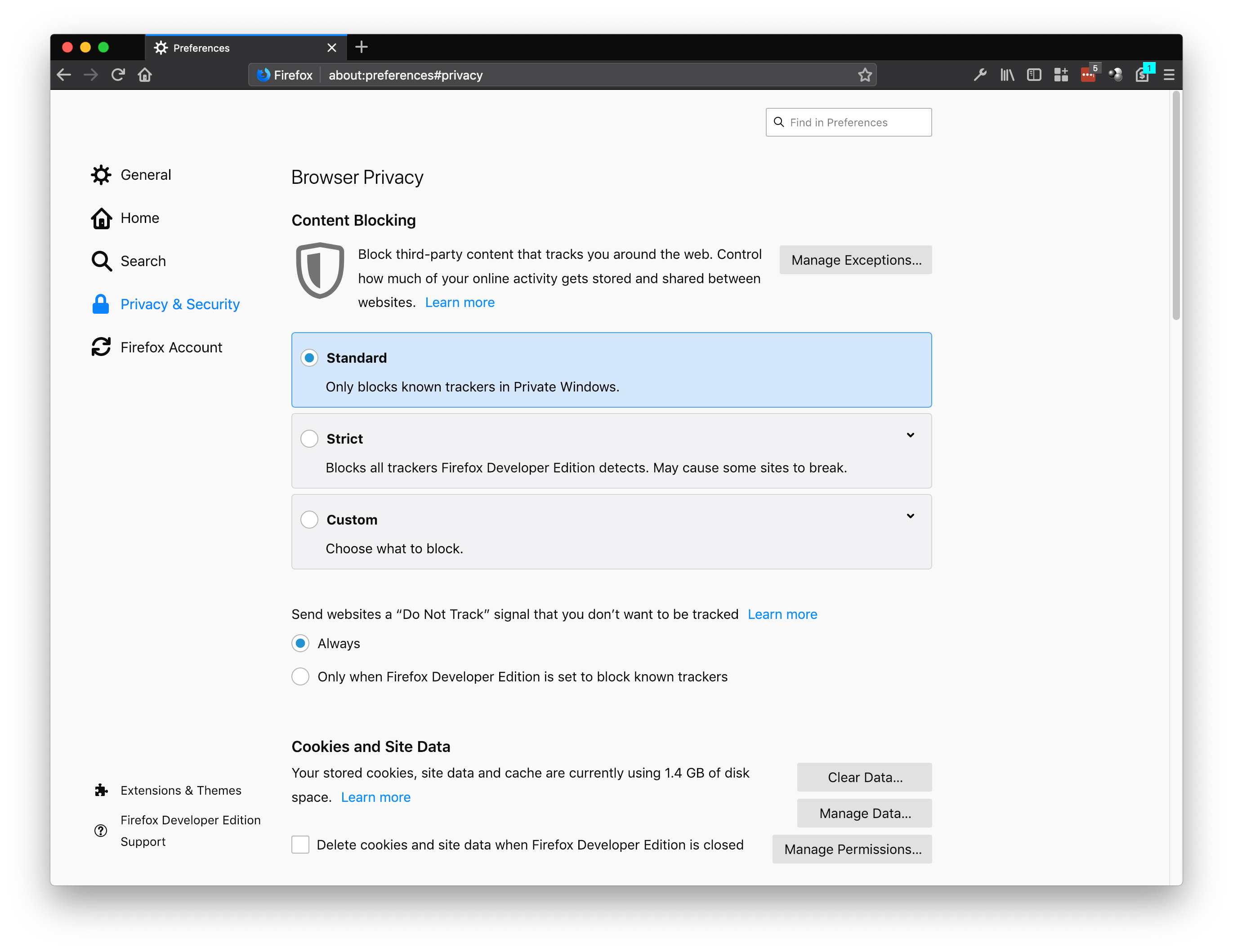
Block known trackers in Private Browsing Mode
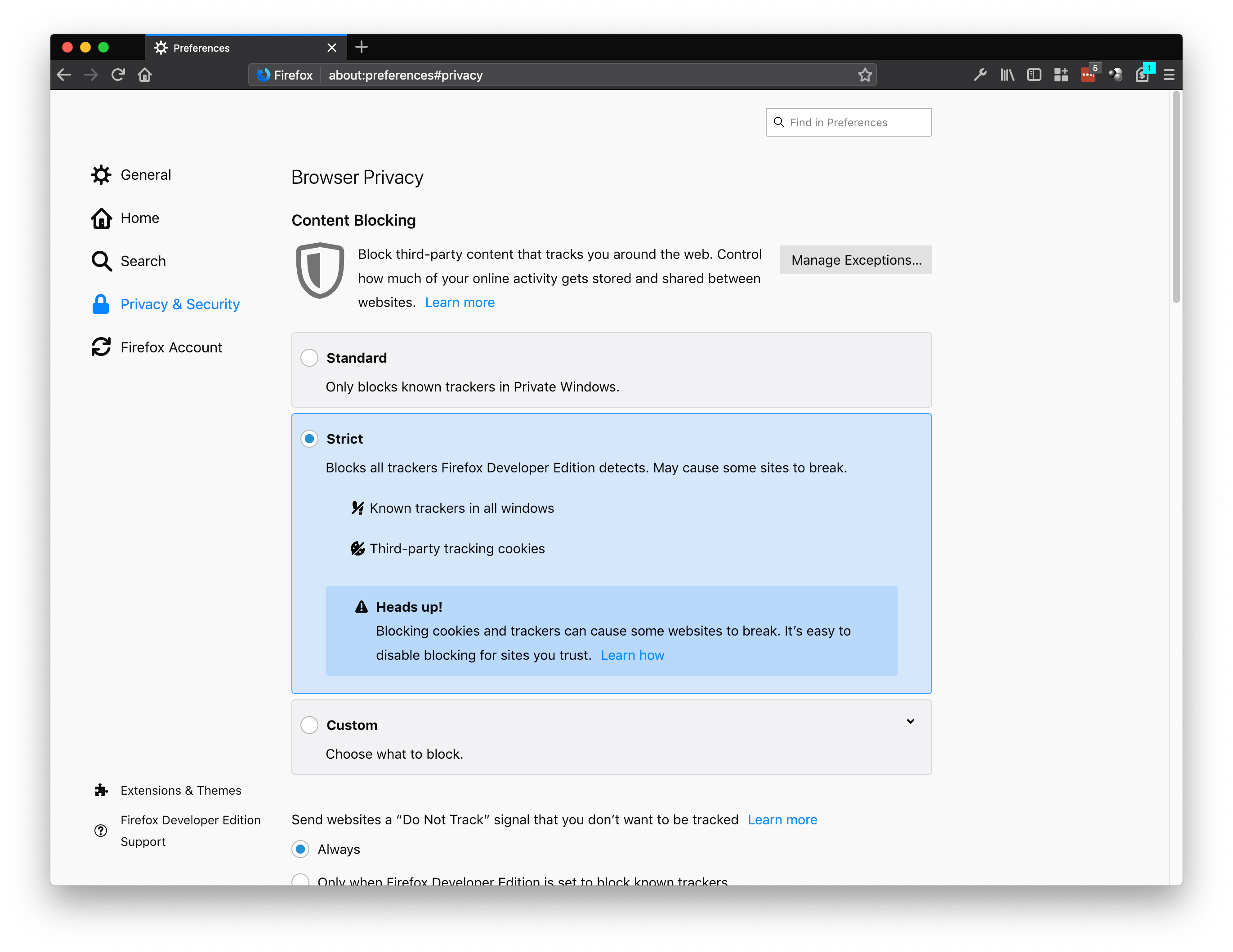
Block known trackers by Firefox in all windows
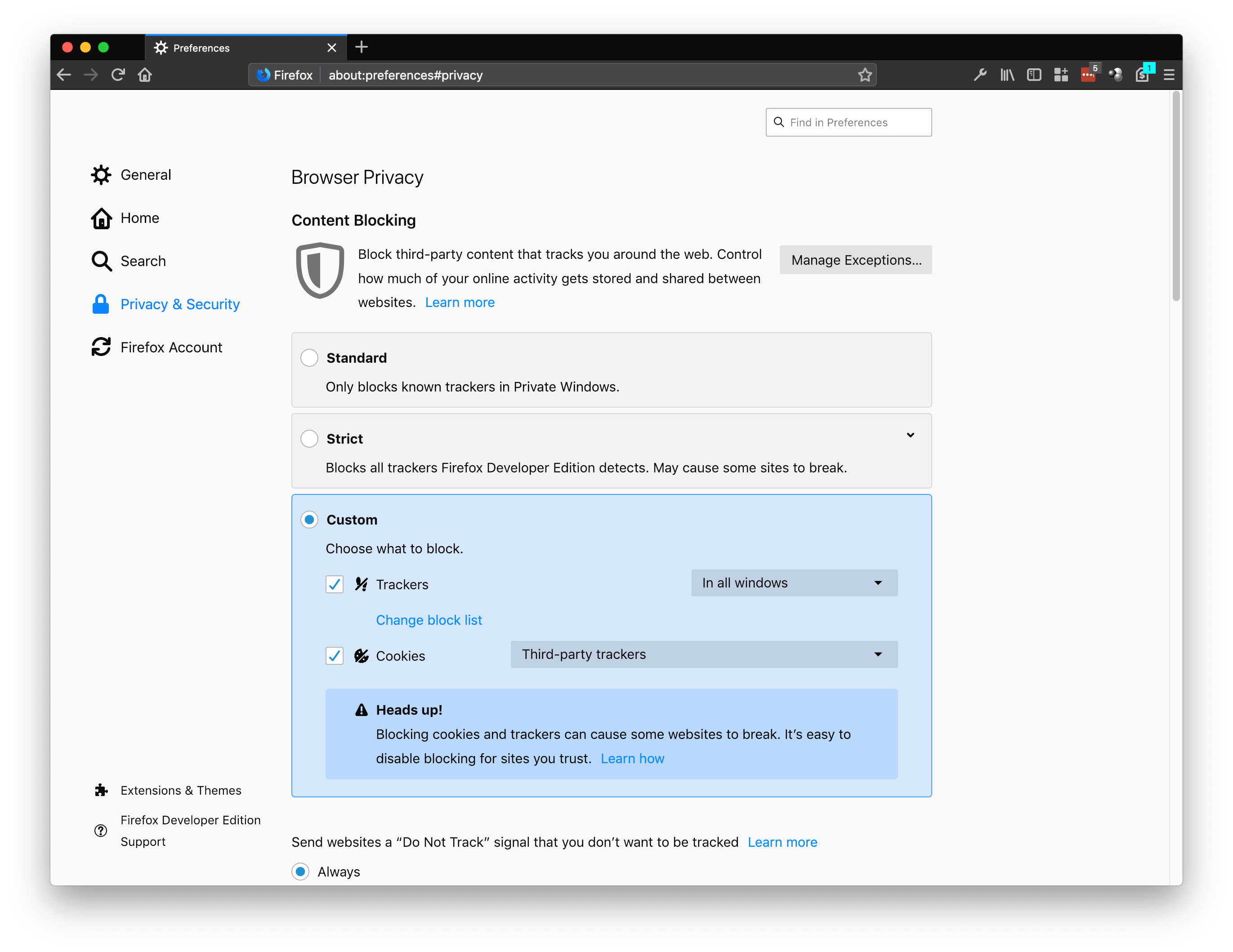
Pick and choose what trackers and cookies you want to block
For the complete list of what’s new or what we’ve changed, you can check out today’s release notes.
Check out and download the latest version of Firefox Quantum, available here.
The post Today’s Firefox Gives Users More Control over their Privacy appeared first on The Mozilla Blog.
Aetna, the health insurance provider, has announced a new Apple Watch app forthcoming for its customers that was developed in partnership with Apple. The app, named Attain, will serve as a way to track fitness data and provide an incentive for healthy living. Joe Rossignol has the details for MacRumors:
Through the use of an Apple Watch, the Attain app will provide Aetna members with personalized goals, track their daily activity levels, and recommend healthy lifestyle choices. For completing these actions, participants will earn points, which can be put towards the cost of an Apple Watch or gift cards.
Attain will motivate participants to complete personalized daily and weekly activity challenges based on their age, gender, and weight. Attain's definition of activity includes walking, running, swimming, yoga, and other activities that can be tracked in the Workout app on the Apple Watch.
We've seen Apple partner with insurance providers in the past to offer the Apple Watch free or subsidized to its members, but this is a different spin on that approach, focusing more on continuous incentives for active lifestyles.
Tim Cook recently stated that health would end up becoming Apple’s greatest contribution to mankind, a bold claim that indicates we’ll continue to see more announcements along these lines moving forward.
→ Source: macrumors.com

AirBuddy by Guilherme Rambo is one of the handiest Mac utilities I’ve tried in a while. AirPods connect almost instantly to iOS devices, but the process of pairing them to a Mac is not as simple, often requiring fiddling with your Mac’s Bluetooth settings from the menu bar or System Preferences. AirBuddy solves that problem, making it as trivially easy to connect AirPods to a Mac as it is to do the same with an iPhone.
The app works with a Mac that supports Bluetooth LE and is running macOS Mojave and any headphones that include Apple’s proprietary W1 chip. That means in addition to AirPods, AirBuddy can also control Beats headphones that have a W1 wireless chip. The app runs in the background as a helper process, so you won’t usually see a window or dock icon while it’s running. Nor is there a menu bar icon. Instead, once you’ve adjusted the app’s handful of settings to your liking, the app appears almost immediately when you open your AirPods case near your Mac or turn on your Beats headphones.

AirBuddy's settings.
AirBuddy has a few settings that are available by opening the app from the Finder. There are checkboxes for enabling the app to work with AirPods and other W1 headphones and display options for picking where onscreen you want AirBuddy to appear when it detects nearby headphones.
Once you have the app set up, opening your AirPods case near your Mac causes a window to slide down from the top of your screen that looks just like you’d see if you did the same thing in proximity to your iPhone or iPad. For AirPods, you’ll see rotating images of your AirPods and their case with a charge indicator beneath them. The same sort of window appears when you turn on Beats headphones nearby.

The AirBuddy Today widget.
AirBuddy doesn’t just provide the status of your AirPods though. It also allows you to connect them to your Mac with a single click. There is a Mac Today widget that provides battery status for your Mac and any headphones or iOS devices you’ve ever connected to your Mac too. It’s easy enough to check the battery of devices sitting nearby without the help of AirBuddy, but it’s nice that I can also see that the battery of my iPad sitting two floors above me is running low and should be plugged in if I want to read in bed tonight.
In the past, I’ve rarely connected my AirPods to my Mac. Instead, I used headphones with my Mac’s 3.5mm audio jack because AirPods weren’t worth the trouble. In my tests of AirBuddy though, the app works as expected every time eliminating the friction from the connection process. AirBuddy is so simple and works so well that it begs the question of why Apple hasn’t built this sort of functionality into macOS. For whatever reason, Apple hasn’t, which is a shame. Perhaps Apple will add a similar feature to macOS in the future, but unless and until that happens, anyone with AirPods and a Mac should download AirBuddy.
Rambo is selling AirBuddy using a ‘name-your-price’ model with a suggested price of $5.
Club MacStories offers exclusive access to extra MacStories content, delivered every week; it's also a way to support us directly.
Club MacStories will help you discover the best apps for your devices and get the most out of your iPhone, iPad, and Mac. Plus, it's made in Italy.
Join Now

Tomorrow, Vancouver City Council will receive a report from engineering about public engagement on proposed improvements to the Granville Bridge that would add safe, accessible facilities for cycling and walking, and connect up to similar facilities at either end.
What might that look like? Details aside, we already know the likely, big picture outcomes — you can see them on Burrard Bridge, and most recently, on Cambie Bridge.
Speaking of which, our friends at small places have a new before and after video called Cambie Connected: Cycling Smithe, Nelson, Beatty, and the Bridge. So yes, this is what the City of Vancouver now does with over-built bridges, from outdated eras, that are under-utilized and insufficient for the needs of the present day — repurpose them for more people to get around in more ways. And you can see, the results are transformative.
Can you even imagine Granville Bridge becoming as connected and accessible as the Burrard and Cambie bridges have just become?
Oh right — you can:


OK, I admit, I'm linking to this because I love the idea of a virtual spacewalk and I want to try it as soon as I can! That said, reading through the article naturally brings to mind additional thoughts. Like: what if I want to move? How would they handle that? In space, you could move in a full 360x360 degree sphere of directions, presumable with some simple jet-pack controls (one of the reasons I like No Man's Sky so much is that it really allows you to move freely and fluidly through the environment). But capturing the video for this kind of movement would create a crazy amount of data! I imagine we would scale up to is, and full-motion VR would be quantified by some sort of 3d movement resolution scale. The lowest would be '2', which is what we get in Google Street View - forward and backward, or maybe '4', which is what we get at an intersection. Maybe '6' would also allow you to move up and down. And so on.
Web: [Direct Link] [This Post]
Apple has just published its financial results for Q1 2019, which is the company’s holiday quarter. The company posted revenue of $84.3 billion, which is the first holiday quarter decline in sales since the iPhone’s introduction. Apple CEO Tim Cook said:
“While it was disappointing to miss our revenue guidance, we manage Apple for the long term, and this quarter’s results demonstrate that the underlying strength of our business runs deep and wide,” said Tim Cook, Apple’s CEO. “Our active installed base of devices reached an all-time high of 1.4 billion in the first quarter, growing in each of our geographic segments. That’s a great testament to the satisfaction and loyalty of our customers, and it’s driving our Services business to new records thanks to our large and fast-growing ecosystem.”
Apple's original revenue guidance for Q4 2018 fell between $89 billion and $93 billion but was revised downward to $84 billion in a letter from CEO Tim Cook to shareholders that was released on January 2, 2019. Gross revenue which was originally estimated to be between 38% and 38.5%, was revised to 38% in Cook’s letter.
Going into today’s earnings call, Bloomberg reported that:
For Apple, the slowdown is expected to continue with fiscal second-quarter revenue of $59 billion, according to analyst estimate data compiled by Bloomberg. That would be a year-over-year decline of about 4 percent.
In the year-ago quarter (Q1 2018), Apple earned $88.3 billion in revenue. During that quarter Apple sold 77.3 million iPhones, 13.2 million iPads, and 5.1 million Macs. As announced on Apple’s last earnings call, the company did not report Q1 2019 unit sales for any of its products.
Below, we've compiled a graphical visualization of Apple's Q1 2019 financial results.


Apple's guidance for the next quarter:
• revenue between $55 billion and $59 billion
• gross margin between 37 percent and 38 percent
• operating expenses between $8.5 billion and $8.6 billion— jeffersongraham (@jeffersongraham) January 29, 2019
Other segments and YOY percentage changes:
Americas: $36.9b (up 5%)
Europe: $20.4b (down 3.3%)
Japan: $6.9b (up 1%)
Asia-Pacific: $6.9b (up 0.8%)— Six Colors liveblog (@sixcolorsevent) January 29, 2019
Here’s the year-to-year geographic comparison: pic.twitter.com/j1Thb2I6FQ
— MacJournals.com (@macjournals) January 29, 2019
For reference, here are the changes from 2018 “revenue” -> 2019 “net sales by category”:
iPhone: $61.576B -> $61.104B
iPad: $5.862B -> $5.755B
Mac: $6.895B -> $6.824BThese are all for Q1 FY18 (the year-ago period), first as reported at the time as “Revenues” and now as “sales”
— MacJournals.com (@macjournals) January 29, 2019
Tim Cook (TC): Over 100% of our worldwide revenue gap from guidance is due to Greater China.
— MacJournals.com (@macjournals) January 29, 2019
Tim: Record performance in large markets, including US, Canada, Germany, Spain, and Korea.
— Six Colors liveblog (@sixcolorsevent) January 29, 2019
JUST IN: Apple now has $245,000,000,000 of cash on hand, up 3% from last quarter. https://t.co/IFm4rlohlG pic.twitter.com/mgWhEmNddt
— CNBC Now (@CNBCnow) January 29, 2019
Over 50 million Apple Music subscribers. iTunes had it’s best revenues ever.
— Rene Ritchie (@reneritchie) January 29, 2019
The battery program was the right thing to do for #AAPL. Not because they are a charity business but because it means delaying revenue rather than upsetting customers and losing them!
— Carolina Milanesi (@caro_milanesi) January 29, 2019
$AAPL's @tim_cook: Now talking about Apple's lead in silicon. Pointing out how AI is being built into the technology. "It does all this while keeping personal information private."
No mention of FaceTime Bug though while banging the privacy drum.
— Ian Sherr (@iansherr) January 29, 2019
Apple confirms 900m active iPhone base
— Benedict Evans (@benedictevans) January 29, 2019
Club MacStories offers exclusive access to extra MacStories content, delivered every week; it's also a way to support us directly.
Club MacStories will help you discover the best apps for your devices and get the most out of your iPhone, iPad, and Mac. Plus, it's made in Italy.
Join NowBlockchains have become both a kind of a fashion item and a religion. Not having one on display can be considered as a sign of bad taste, ignorance, misplaced skepticism, Luddism or heathendom.

This series of posts (3) is a rebuttal of the blockchain bandwagon on to which so many are willing to jump without engaging their brains: remember Farmingdale (link), a $24 million iced tea company had its stock jump 200% when it declared moving into the blockchain business? How engaged were the brains of those who decided to invest in the 1,000+ cryptocurrencies (link) that failed in 2018? And if 92% of blockchain projects have failed (link) does it mean that the other 8% have succeeded? Or that they are on the soon-to fail waiting list?
A recent call for tenders by the European Commission for the Study on Blockchains: Legal, Governance and Interoperability Aspects specified:
“The study will enquire for legal and regulatory aspects related to blockchain-inspired technologies and their applications as well as for socio-economic impacts of the Blockchain technology. […] The study should reinforce or complement the work of the EU Blockchain Observatory and Forum, while providing useful and meaningful inputs for the deployment of a EU Blockchain Infrastructure in 2019.
So, now it’s a given, there will be a “deployment of an EU Blockchain Infrastructure in 2019” and therefore we just have to study “legal and regulatory aspects” to “reinforce” the work of the EU Blockchain Observatory and Forum, an “observatory” who’s primary mission is not to “observe” but :
“to promote blockchain in Europe by mapping existing blockchain initiatives, analysing and reporting on important blockchain themes, promoting blockchain education and knowledge sharing and holding events to promote debate and discussion.”
The general contractor of the so called “observatory” is ConsenSys AG, a blockchain technology provider… It’s a bit like if Shell had been contracted by the European Commission to lead an observatory on global warming… Or the Vatican an observatory on paedophilia… It’s true that each of them have first hand experience with the subject matter.
Ite missa est (1) the Blockchain deacon says. To which we are expected to respond: Blockchain gratias. That is for the catholic (which means universal) interpretation of the Blockspell, the public Blockchain worshiping the Power of Work—and global warming! There is also the schismatic branch worshiping the Power of Stake, i.e. the power of the wealthy, the plutocrats, and the many sects with their own interpretation of the Blockspell which main message is: “distrust each other, the way I distrusted you” Satoshi 15:12.
The pollution of discourses with blockchains masks a much more sinister and worrying reality: a form of acceptance that we will have to live in a society based on distrust and therefore, the need for a technology that could thrive on it. And what better technology than public blockchains for that purpose? Instead of developing technologies that could contribute to rebuilding trust, a Web of Trust, we are invited to compete in developing the technologies that do not just ignore trust, but for which trust is treated as a liability, a mortal sin: public blockchains are based on fierce competition between the so-called miners; any form of cooperation would destroy the very foundations of public blockchains. Trust is the mortal enemy of public blockchains. Public blockchains have achieved what in their wildest wet dreams the founders of De Beers couldn’t have imagined.
If there is a growing problem with trust, or rather the lack of it, and who could deny it, there is no alternative to address it but… by rebuilding trust. A world without trust might be possible, but is it the one we want to live in? Rebuilding trust needs technologies that capture, elicit and activate trust, not technologies based on the assumption that trust is a liability. A technology building trust should be… about trust. It’s about Trust, Stupid!
Does it mean that we should ban blockchains from our set of tools? Certainly not! Certain types of blockchains could be valuable solutions to certain types of problems (c.f. next post). But it is quite exhausting to hear the born-again-Blockchain-believers for whom, like the person holding a hammer, everything looks like a nail. The blockchain is sometimes presented as the new panacea needed to heal the wrongs of the world. It is not just superficial, it is plain wrong: some applications of blockchain technologies can make things worse than they were, like the Bitcoin and other cryptocurrencies that are not just boosting traditional criminal activities but enabling new ones, not to mention global warming.
In the following posts, we will explore through a concrete example, how the quest for blockchain applications can lead to the fabrication of a false problem based on a backward-looking vision of the reality. This leads to the paradox of the exploitation of a pretend “new technology” to enforce visions and values of the past, not to mention the deleterious effects on innovation, trust and the empowerment of individuals and communities.
1- “Go it is the dismissal” generally improperly translated as “go, the mass is over.”
NB: I would like to thank Bert Jehoul for his comments, suggestions and criticisms on the content of this series of posts. If you find any mistake or inaccuracy I’m the person to blame for it, not Bert. Ibid. for the vigour of the style.
As in past quarters, Jason Snell has prepared a transcript of Apple’s earnings call on Six Colors.
This quarter marked the first time since the iPhone was introduced that Apple saw a year-over-year revenue decline for the holiday quarter. It was also the first quarter since the company announced that it would no longer report unit sales for its major product categories. Although Apple reported less information than in the past, the earnings call included some interesting tidbits including some insights into the company’s services business and hints regarding the company’s anticipated video service, which makes Snell’s transcript a great resource for prognosticators and anyone who would rather read it than listen to the recorded version.
→ Source: sixcolors.com
Shriram Krishnamurthi, in Books as Software:
I have said that a book is a collection of components. I have concrete evidence that some of my users specifically excerpt sections that suit their purpose. ...
I forecast that one day, rich document formats like PDF will recognize this reality and permit precisely such specifications. Then, when a user selects a group of desired chapters to generate a thinner volume, the software will automatically evaluate constraints and include all dependencies. To enable this we will even need "program" analyses that help us find all the dependencies, using textual concordances as a starting point and the index as an auxiliary data structure.
I am one of the users Krishnamurthi speaks of, who has excerpted sections from his Programming Languages: Application and Interpretation to suit the purposes of my course. Though I've not written a book, I do post, use, adapt, and reuse detailed lecture notes for my courses, and as a result I have seen both sides of the divide he discusses. I occasionally change the order of topics in a course, or add a unit, or drop a unit. An unseen bit of work is to account for the dependencies among concepts, examples, problems, and code in the affected sections, but also in the new whole. My life is simpler than book writers who have to deal at least in part with rich document formats: I do everything in a small, old-style subset of HTML, which means I can use simple text-based tools for manipulating everything. But dependencies? Yeesh.
Maybe I need to write a big makefile for my course notes. Alas, that would not help me manage dependencies in the way I'd like, or in the way Krishnamurthi forecasts. As such, it would probably make things worse. I suppose that I could create the tool I need.
I’ve resisted getting a resin printer for years for a number of reasons (which I’ll outline shortly) but recently the Anycubic Photon printer went on lightning sale on Amazon at a price that was too tempting to put off any longer.
This 3D printer works quite a bit differently than my other printers which are known as FDM (filament deposition modeling) which deposit liquid plastic filament, one layer at a time onto a build surface. The main difference is print quality. A typical FDM printer can print from 300-100 microns (0.3mm – 0.1mm layer heights). The Photon can print 50-10 microns (0.05-0.01mm). So really fine details at super high resolution.
The Photon works using DLP (digital light projection) which basically has an LCD screen on the bottom (facing up), a tray of resin with a clear, film bottom (known as FEP) that allows the LCD display to project each layer up using an ultraviolet light instead of a regular LED you’d find on a normal LCD screen. This ‘exposure’ then cures the resin for that layer and then the build platform moves up a little to allow more resin to flow into the space and be cured on the next layer.
I’ve described this process for years as being something out of science fiction since your object literally grows out of the resin goo right before your eyes. Here’s a timelapse of a rocket being printed on the Photon (not my video) that shows you the process:
Here’s my thoughts after having it for a week.
First of all, my reasons for not having one sooner are as follows:
It wasn’t for lack of trying though. To date, I’ve backed three different resin based printers on Kickstarter. The first, the Peachy, crashed and burned after some embezzlement issues. The second, the ONO (aka OLO) is still in progress after a number of years. The third, and arguably my best bet to get into ‘the resin game’ despite being burned previously is the Sparkmaker FHD which is expected to ship in the next month or so.
But, like I said, the price point on the Photon (on sale at least) was just too good to pass up. The Lightning sale price was $479 Cdn all in with 2 day Amazon Prime delivery.
While I waited for Prime to deliver the Photon, I watched this video a few times…it goes over the basics really well and answered most of my questions about printing with resin in general and the Photon specifically.
Of all the 3D printers I’ve bought/owned over the years (last count was about 23 different models), this was easily the best out of box experience so far. The box comes with everything shown here:

It comes almost completely assembled. The only thing you really have to do is add the door knob to the cover which takes 30 seconds. The user manual is one of the best I’ve seen with clear, easy to follow instructions with great photos.

The machine is a solid, powder coated metal box that reminds me of my MakerBot Mini. There is a bright, clear touchscreen display for controlling the unit. It does beep when you are navigating around but you can turn off the beep in the settings.

Unfortunately, my touchscreen has a piece of fluff or dirt in the middle (above the M in System) that seems to be sandwiched between the screen layers. Not bothered enough to return the unit since it still works fine, just a minor annoyance.
After following the bed leveling procedure (shown very well in the video above), I was ready to pour the resin in and try my first print.

The onscreen preview of the files to print is a really nice touch….no more guessing if it’s the right one.

I usually hate printing test cubes or ‘sample’ prints that come with new printers since that’s not what I bought the printer to make. So my first print was a Millenium Falcon model that was optimized for resin printing (hollowed and drain holes added).

The slicing tool for the Photon is fairly straightforward if you’ve used Cura or any FDM slicing tool before. One thing I’m still learning is the right amount of support structures to add. I’ve been using the auto-support function and it seems to work fairly well but it can be a little aggressive sometimes but you can easily add/remove any support as desired.


One thing I really like is the layer preview that is shown on the screen during the printing process. I just wish the text was easier to read since the cyan on white is hard to see since its quite small.

Once the print is finished, you get to put on gloves and remove the print bed from the printer and hopefully, the print will come off easily using the included plastic scraper. I’ve had good success printing directly onto the build plate without a raft but it can be tricky since it is on there quite well vs a raft that has more give but it will depend on the model.
The process is pretty easy – you just unlock the red knob and pull the plate out. I use a tray to remove the prints onto using paper towel or shop clothes. Then it’s off to the baths.
The post processing system I use is a hybrid of what I’ve seen online…everyone has a different way of doing it. I was trying to find a reliable source of isopropyl alcohol (IPA) higher than 91% and most of my local places were either sold out or had lower concentrations. In the video above, he mentions using methyl hydrate since it’s easier/cheaper to acquire where he lives (Australia). Turns out Canadian Tire has a 4L jug of it for $10. But I’ve also been using 91% IPA from Walmart.
My process has been to drop the print into a glass jar (easily obtained at Dollarama in various sizes with a lid) of IPA or MH and swish it around for a bit. Then I drop it in water and do the same. Depending on the model, it goes back into the IPA/MH bath for a bit and maybe gets cleaned with a toothbrush to get rid of all uncured resin. Some of my earlier prints suffered from white residue which seems to be due to curing before it was fully clean or dry.

I looked at a lot of options for curing the prints after cleaning which is required to harden the resin. You can do this simply by putting the print in direct sunlight for a while or you can buy/make a UV lamp. Fortunately, Amazon has a ton of options (look for UV Nail Lamp) that is normally used for curing gel nail polish. I bought this one because it has an open bottom, is USB powered and has timers on it. It doesn’t however, have an unlimited/ON button….the longest it can stay on is 99 seconds. It does the job just fine and it can be stood on its end to cure larger prints…I have a rotating platform that can spin the print around for even curing.

I can also just put prints on a mirror and it seems to cure all around quite well if it fits inside the lamp.
Here’s some photos of the prints I’ve done so far:


As you can see, the detail is insane. Probably the best benchy I’ve ever printed. I also printed the Anycubic test file which took nearly 6 hours but turned out fantastic. The rook particularly impressed me since the finish on the stairs and top turret look like they were laser cut in acrylic.


I also tried printing some buttons and dpad for my Odroid Go which turned out amazing.

So far, I’ve just been using the included resin from Anycubic (it comes with 250ml) but also bought some Elegoo resin due to its good reviews with the Photon as well as I read that it smells less than other resin brands (which is true). Green resin from both companies seems identical.
I have had a few failures…mostly due to running out of resin or having too small of a surface area to adhere to the build plate.

The downside to a failure is that it can sometimes leave free floating cured resin in the tank which could cause issues later. I also had a small piece adhered to the tank film – which if I didn’t catch, may have forced the build plate to press down on it and potentially damage the film and/or the LCD screen below it. So inspect the vat carefully after each print to ensure you don’t damage anything.

One thing I’m going to do is add an exhaust vent to the back and vent the printer out the window more efficiently. I’m currently running the printer in a spare room with the window open and it doesn’t seem to permeate the house like printing with ABS did. This is a replacement panel (printed on my Ender 3) for the back of the Photon that easily mates up with a dryer hose. I’m also going to use an inline fan to help it along. You could also connect it to a charcoal filter if you really want to clean it.
So far, I’m really impressed with the quality of everything about the Photon. From the unboxing to the printing, it’s been a great experience. I still have much to learn about tweaking the settings, different support structures and model orientation. But so far, the default settings have been working really well. I did change the slicer settings for the Elegoo resin based on a review (11s exposure time, 1s off time, 95s bottom exposure and 5 bottom layers). I’ve also discovered a more universal slicer, Chitubox, which I have yet to print with but you can hollow your models and add drainage holes (so that resin isn’t trapped inside a sealed print) from within the slicer so it’s worth looking further into.

I’m surprised how far the resin goes. My first thought about a 250ml bottle was that it didn’t seem like very much material for the price. But I’ve been printing everyday for a week and only just ran out of the initial bottle of resin. The objects are much smaller so there is that.
I wouldn’t recommend this printer to anyone that has a small place…FDM printers aren’t ideal for that either…but the Photon has a fairly loud fan and you will smell the resin in a small apartment or condo (although you could vent it like I’m planning on doing). You wouldn’t want to sleep in the same room as the printer when it’s printing either…I’m still surprised people do this with FDM but I guess if you don’t have another spot to use the machine you make do. A heated workshop or garage is a better place for this printer. Colder temps can affect print quality.
Time to go refill the tank with more resin.
UPDATE: Here’s some more print photos:


Tom Durning sends this rather literal comprehension of signage:


It looks like Apple was likely aware of FaceTime’s widely reported eavesdropping security flaw before it became a major story.
Although the majority of news stories have credited Twitter user Benji Mobb (@BmManski) with discovering the bug, new information has emerged indicating Apple was likely aware of the security flaw over a week ago, according to MacRumors’ Joe Rossignol.
My teen found a major security flaw in Apple’s new iOS. He can listen in to your iPhone/iPad without your approval. I have video. Submitted bug report to @AppleSupport…waiting to hear back to provide details. Scary stuff! #apple #bugreport @foxnews
— MGT7 (@MGT7500) January 21, 2019
@tim_cook This is real…trying to get Apple’s attention to get this addressed. I’m just a mom of a teenager who found a huge problem in your new update. I’ve verified it myself…someone from Apple should respond to us. https://t.co/S6qyXts6GF
— MGT7 (@MGT7500) January 21, 2019
Tweets dated to January 20th from Twitter user ‘@MGT7500′ that are also directed at Apple’s ‘@AppleSupport‘ Twitter account, detail the FaceTime Group Chat security flaw. Further, a follow-up tweet on the 21st from the same account reiterates the glitch.
Although it is possible Apple could have missed @MGT7500’s multiple attempts to contact the company, the number of avenues the person took make that scenario seem unlikely.
One of many emails sent to Apple 1 week ago attempting to report the Group FaceTime bug. @cnbc @cnn @foxnews @9to5mac pic.twitter.com/l9IFMZmKh6
— MGT7 (@MGT7500) January 29, 2019
FYI- I called, FB messaged, faxed, emailed and tweeted Apple exhaustively last week to no avail. Submitted official bug report also. Tried to keep it private b/c of the security concerns. Never heard from them.
— MGT7 (@MGT7500) January 29, 2019
As it stands right now, Apple has disabled FaceTime’s Group Calling feature. The company says it’s currently working on a fix for the bug that will be release later this week. The public version of iOS 12.2 is expected to solve the Group FaceTime eavesdropping issue.
The fact that the bug doesn’t exist in the iOS 12.2 public likely indicates Apple was aware of the glitch before January 28th.
VIDEO: Here is a video, recorded & sent to Apple by a 14 yr old & his mom, on JAN 23rd, alerting them to the dangerous #FaceTime bug, that has threatened the privacy of millions. I've removed sensitive / private info on behalf of the mother (an attorney), whom I just spoke to. pic.twitter.com/YIBKXEP3mI
— John H. Meyer (@BEASTMODE) January 29, 2019
For the bug to work prior to Apple disabling Group FaceTime chat, users needed to call a phone number and then add the number of an additional contact.
While waiting for the first person to pick up, if the second participant answers, the audio feed from the first contact is automatically turned on, allowing you to hear what their mic is picking up even if they don’t answer.
Source: MacRumors, Twitter @MGT7500
The post Apple reportedly was aware of FaceTime security flaw over a week ago appeared first on MobileSyrup.

Google has put its Play Store through several tests in an effort to find a layout that works best for users.
The most recent attempt has landed some users with a weird top bar containing only two options: ‘Apps’ and ‘Games.’ The other tabs, like ‘Movies & TV,’ ‘Books’ and ‘Music’ no longer inhabit the space beneath the search bar.
It’s an odd choice of layout. To me, it doesn’t make sense to relegate all the media tabs to the side menu. It seems like that would drive less traffic to those stores as they’re not as visible.
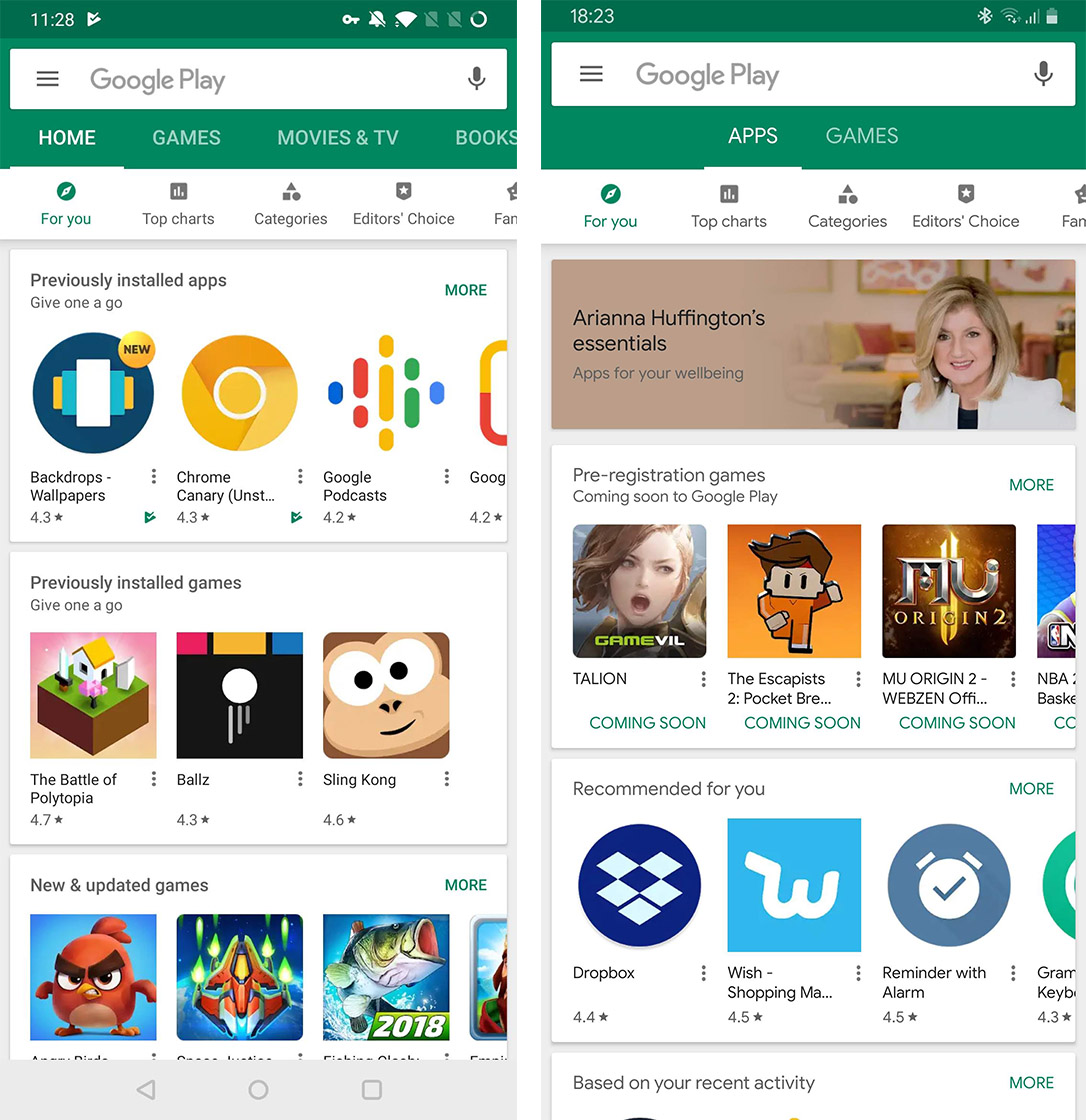
Left: Google Play Store’s old tab layout. Right: Play’s new layout.
Further, while have a separate Apps and Games section is nice, they aren’t actually separated. The Apps tab still shows games, but the Games tab at least appears only to have games.
Thankfully, this layout appears to be part of a server-side test. It’s not clear whether Google will implement this Play Store layout, but hopefully it chooses not to.
I think there are significantly better ways to layout the Play Store that this.
Source: Android Police
The post Google tests new Play Store layout with only ‘Apps’ and ‘Games’ tabs appeared first on MobileSyrup.

Rogers has added a new ZTE Wi-Fi hub to its mobile internet device offerings.
The carrier, Canada’s largest by subscriber base, said it made the new hub, the ZTE MF279T Rocket Hub, available to mobile internet customers late last week.
Notable features of the device include a design that features built-in antennas and a wired Gigabit Ethernet port.
Moreover, according to Rogers, the hub’s 3,000mAh battery is capable of powering the device for up to 18 hours of standby on a single charge. It also supports multi-SSD, allowing for both 2.4GHz and 5GHz connections. Up to 20 devices can connect to the hub simultaneously.
The hub is currently $259 off contract. Otherwise, subscribers can get it for $0 down on a two-year term with monthly payments of $10.79 for 24 months.
The carrier’s mobile internet data plans start at $10.
Source: Rogers
The post Rogers adds ZTE MF279T Rocket Hub to mobile internet device lineup appeared first on MobileSyrup.

Jaybird has announced the follow-up to its 2017 AirPods competitor, the Run XT.
The 2018 refresh of the XTs brings a design revamp, new colours and a podcast mode all at the same price as the previous model — $229.99 CAD.
The XTs bring some other significant quality-of-life improvements as well. For example, the new true-wireless earbuds feature IPX7 water resistance to help them stand up to the elements and sweat.
Further, the Run XTs keep the one-touch controls from last year’s model coupled with four-hour battery life and a carrying case with another eight-hour battery.
Jaybird is also pushing its smartphone app as an essential part of the earbud experience, with custom equalizer settings and other audio tweaks.
Part of that experience is a new podcast playlist that offers curated playlists of various shows and episodes. The playlist is designed to encourage and provide learning opportunities during workouts.
It’s an interesting addition to the Jaybird app, but I question the necessity of it. Most people who want to listen to a podcast in 2019 already have a solution for doing so.
Regardless, Jaybird makes some excellent audio products, especially for those who love to exercise.
The Run XTs are available now from Jaybird’s website in black and gree, or blue and grey.
Source: Jaybird
The post Jaybird launches refreshed Run XT true-wireless headphones appeared first on MobileSyrup.

Metrolinx’s Presto app is finally available on Android and iOS for everyone.
Metrolinx released a beta version of the app back in December. The app lets users manage their cards from their mobile devices.
Users can add additional funds to their cards with either debit or credit.
Additionally, the app lets users add their transit passes to their accounts. Users have the choice to add transit passes from a variety of transit agencies around the Greater Toronto Area.
It’s also possible to see recent transactions, as well as add multiple Presto cards. Users can even purchase a Presto card from the app and ship it to their home.
PRESTO! We have an app for that.
The PRESTO App is officially out of beta testing and available to everyone on Android or iOS. A special thanks to all of our App testers.
Download it here: https://t.co/NvXlt3YPHc pic.twitter.com/wysuRxVU7Z— PRESTO card (@PRESTOcard) January 28, 2019
What’s probably the best thing about the app is the ability to load funds to your account immediately on Android.
If you have the Presto card nearby you can hold the card against your device, which will load it immediately using a phone’s NFC functionality. If the card isn’t nearby you’ll have to wait a while before the money gets onto the account.
This is a great feature because when using the Presto website it takes at least a couple of hours before the money reaches the account. Unfortunately, on iOS users have to wait as well.
What’s missing from the app is NFC trip payment, via tapping a digital card against a Presto machine. According to Metrolinx this functionality is coming to the Android version of the app in the future.
To download the Android app, click here and the iOS app, here.
The post Metrolinx’s Presto app is now officially available on Android and iOS appeared first on MobileSyrup.

Although we’ve known Apple is working on a video streaming service for many months, the platform’s specific launch window has remained unknown until now.
A new report from The Information indicates Apple’s long-awaited movie and TV streaming service will likely launch in mid-April. The news regarding the tech giant’s streaming service was mentioned in a broader story focused on Amazon’s plans for Prime Video.
Previous rumours indicated Apple planned to release its streaming service in early 2019. The Information’s more specific timeline corroborate this earlier speculation.
Along with original movies and TV shows, Apple’s streaming platform will also feature content from third-party services like HBO and STARZ. Given Bell holds the exclusive rights to HBO content in Canada, it’s unlikely the Canadian version of Apple’s streaming platform will include the premium television service’s content in Canada.
Current HBO content was recently added to Bell’s Crave streaming service for an additional $9.99 per month on top of the platform’s base $9.99 monthly fee.
The Information’s report states that Apple plans to launch its video streaming service in the United States first but also says that the tech giant has plans to bring it to more than 100 countries before the end of 2019.
More than a dozen original television shows are reportedly in the works for Apple’s service, including a multiyear deal with Oprah Winfrey, a dystopian show called See, a thriller from M. Night Shyamalan, a drama set in Space from Battlestar Galactica Ron Moore, a reboot of Steven Spielberg’s Amazing Stories and many more.
Source: The Information Via: MacRumors
The post Apple’s movie and TV streaming service set to launch in April: report appeared first on MobileSyrup.

As is the case every month, a number of shows and movies are leaving Netflix this February.
It’s worth noting that Netflix may only be removing certain shows and movies for a specific amount of time. Series like Avatar: The Last Airbender, Gossip Girl and the movie Shrek have all left the subscription-based service and then returned to Netflix months or years later.
In fact, the movie Shrek left Netflix in January only to come back in February.
Below, find the shows and movies leaving the platform:
The post Here are the shows and movies leaving Netflix Canada in February 2019 appeared first on MobileSyrup.

Google’s Gmail redesign is starting to roll out to users on Android and iOS following its massive overhaul on web last year.
The new look continues with Google’s new Material theme, changing most of the app white and using colour to highlight essential elements.
Overall, the new app looks cleaner and lighter than before.
Further, users will notice heavy use of the Google Sans font, new icons and more. The account switcher has moved as well. Google has integrated it into the search bar at the top of the screen.
The redesign brings new spacing options as well, with default, comfortable and compact views.
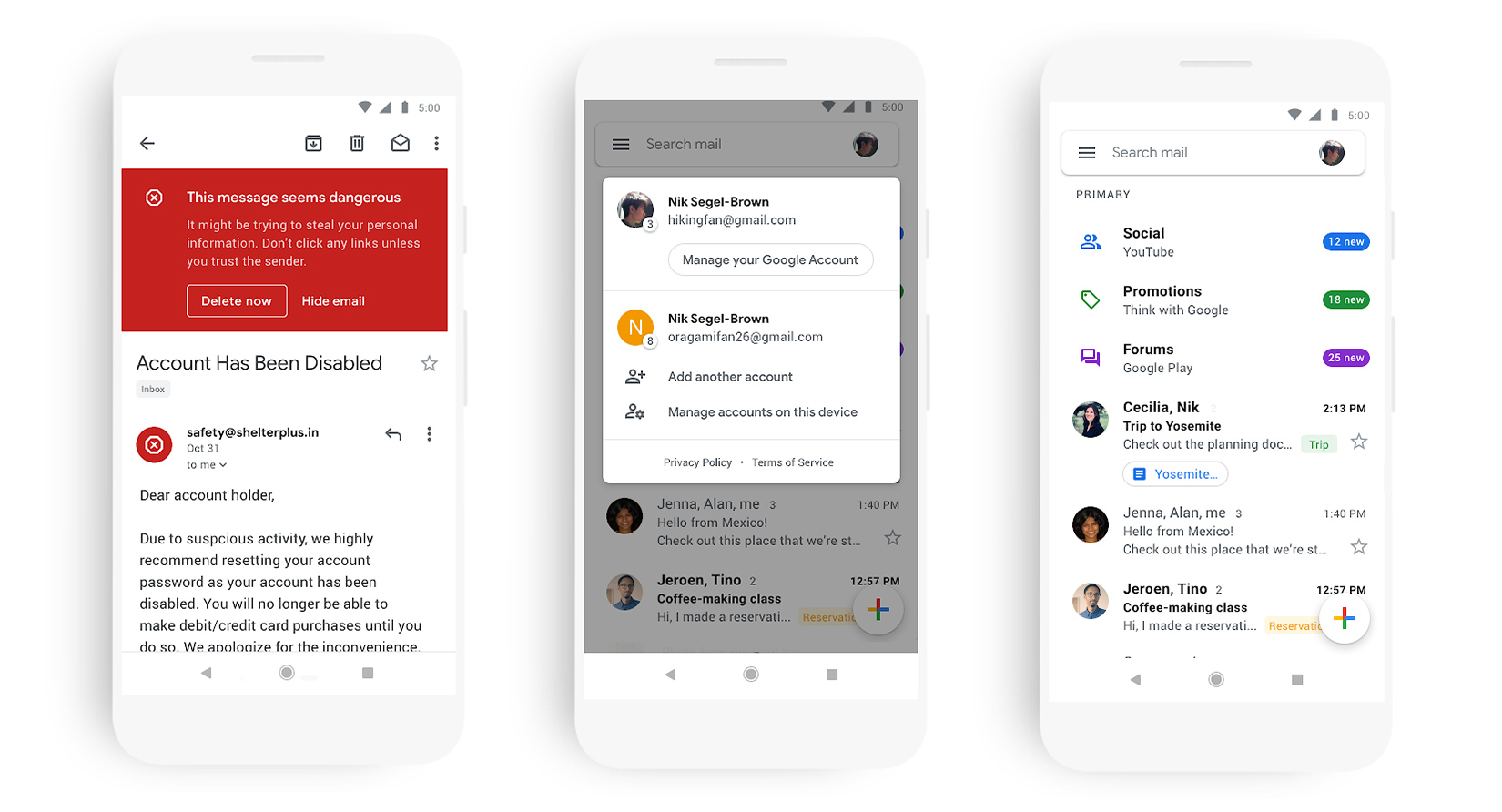
Default spaces things out a fair bit and adds small buttons to directly view attachments in an email, while the comfortable view makes the app look more like the old Gmail app. Compact reduces the space and turns sender avatars into checkboxes.
It has a modern look, but it is still Gmail. If you’re a fan of Inbox — like I am — the new Gmail won’t replace it when it’s gone.
Google says the rollout will be “gradual,” starting January 29th on Android and continuing to iOS through the coming weeks.
Source: Google
The post Gmail Material Design revamp begins rolling out to Android and iOS appeared first on MobileSyrup.

Apple has announced more than 50 new ‘Today at Apple’ sessions.
The new sessions, which Apple will offer starting on January 31st, are categorized into three different formats: skills, walks and labs.
For the most part, the categories of workshops are self-explanatory. In Skills workshops, for example, participants will learn new skills related to Apple’s lineup of hardware and software products. One of the new Skills session Apple is offering involves participants learning photo editing techniques.
Walks, meanwhile, see participants leaving the confines of their local Apple Store to put the skills they learned in-store to use. One new Walks session will see participants learning how to capture cinematic camera shots, while another is focused on health and fitness.
Lastly, Labs involve taking on a personal project. In the past, Apple has had help designing Labs from artists like Florence Welch of Florence + the Machine.
According to Apple, since it first launched Today at Apple back in 2017 it has hosted more than 18,000 free learning sessions. To date, the company says several million individuals globally have taken part in the courses. The 50 new sessions Apple announced today marks the single largest expansion to Today at Apple since the company first launched the initiative.
Alongside the news that the company is introducing new workshops, Apple announced that it’s adding additional design elements to its existing retail locations to better facilitate the courses. For instance, at some of its flagship stores, the company plans to add what it’s calling “The Forum,” an area where visitors will be able to gather around a large TV screen to take part in a workshop.
Apple senior vice-president of retail Angela Ahrendts recently spoke about retail plans, including the company’s emphasis on education, in an interview with Vogue Business.
Canadians can register to take advantage of a Today at Apple session at their local Apple Store by visiting the company’s website.
The post Apple introduces more than 50 new Today at Apple learning workshops appeared first on MobileSyrup.

If you take transit, Google Maps is rolling out a new feature you’ll appreciate.
When you’re looking at a point-of-interest on the map, Google will list nearby public transit stops and stations.
The feature appears to be part of a server-side test and is popping up under different names for some users. Whether titled ‘Public transport nearby’ or ‘Transit nearby,’ it does the same thing.
Below the ‘Popular times’ and above the ‘Photos’ sections in the information panel for a location, a scrollable list of cards shows all the nearby transit options.
Further, the cards show how far away the stop or station is from the location and all the lines that service them.
The feature also appears to work anywhere Google supports the public transit system. This includes Canada, at least in the cities with transit networks that work with Google Maps.

The feature worked for me in Toronto and Oshawa, Ontario, as well as in Vancouver. However, if you can get transit information for your city on Google Maps, this feature should work as well.
Further, the new feature worked for me running Maps 10.8.1 for Android, but reportedly some users with version 10.8.2 and even 10.9.0 couldn’t see the new section.
The new feature also wasn’t present when I tested Google Maps with an iPhone XS.
As with most server-side updates, you may just have to wait patiently until Google pushes it to you.
Source: Android Police
The post Google Maps now shows nearby transit in a location’s information panel appeared first on MobileSyrup.

Apple’s Q1 2019 financial results reveal that the company’s overall revenue fell to $84.3 billion USD ($111 billion CAD), a decline of roughly five percent when compared to the same period last year where the company pulled in $88.3 billion USD ($117 billion CAD).
“Revenue from iPhone declined 15 percent from the prior year, while total revenue from all other products and services grew 19 percent,” writes Apple’s CEO Tim Cook in a recent press release.
Regarding iPhone sales, Apple earned $52 billion USD ($69 million CAD) in revenue in Q1 2019 compared to $61.1 billion ($81 billion CAD) in Q1 2018.
“While it was disappointing to miss our revenue guidance, we manage Apple for the long term, and this quarter’s results demonstrate that the underlying strength of our business runs deep and wide,” writes Cook.
Apple’s installed base of devices now amounts to 1.4 billion, which Cook states is “a great testament to the satisfaction and loyalty of our customers, and it’s driving our services business to new records thanks to our large and fast-growing ecosystem.”
Leading into Q1 2019’s earnings, Apple issued a rare earnings guidance revision, citing lagging iPhone sales in China and upgrades to the iPhone XS, iPhone XS Max and iPhone XR not being as strong as the company had hoped.
Apple lowered its forecast by $9 billion USD ($12 Billion CAD) to a total of $84 billion USD ($114 billion CAD). This means that Apple’s final Q1 2019 earnings fell within the tech giant’s predicted range.
The Cupertino, California-based company initially predicted revenue between $89 billion ($121 billion CAD) and $93 billion ($126 billion CAD) for Q1 2019.
As expected, Apple didn’t break out individual sales of the iPhone, iPad or Mac in its earnings. Apple decided to remove specific device sales numbers from its earnings back in November, causing many analysts to view the move as an admission that device sales are beginning to decline.
That said, Apple did break out the revenue of its services business, which includes iCloud, the App Store, Apple Pay, iTunes, AppleCare, Apple Music and more.
“Revenue outside of our iPhone business grew by almost 19 percent year-over-year, including all-time record revenue from Services, Wearables and Mac,” wrote Cook. Further, Mac saw gains of 9 percent, iPad of 16 percent and the recently renamed ‘Wearables, Home and Accessories’ category experienced an increase of 33 percent.
“Our non-iPhone businesses have less exposure to emerging markets, and the vast majority of Services revenue is related to the size of the installed base, not current period sales.”
Apple’s services business is expected to grow significantly in the coming years as the company prepares to launch its own streaming video and television service.
Source: Apple
The post Apple earnings decline 5 percent year-over-year as iPhone sales fall 15 percent in Q1 2019 appeared first on MobileSyrup.

Apple CEO Tim Cook says that the tech giant plans to lower iPhone pricing in specific regions, according to a recent interview with Reuters.
To be clear, Cook doesn’t go into specifics. As a result, it’s unknown if the cost of the iPhone XS, iPhone XS Max and iPhone XR will be adjusted in the Canadian market. That said, back in early January, Apple revealed that the company experienced record iPhone activations in the U.S. and Canada on Christmas Day.
“When you look at foreign currencies and then particularly those markets that weakened over the last year those [iPhone price] increases were obviously more,” said Cook in an interview with Reuters.
“And so as we’ve gotten into January and assessed the macroeconomic condition in some of those markets we’ve decided to go back to more commensurate with what our local prices were a year ago in hopes of helping the sales in those areas.”
Apple’s Q1 2019 financial results reveal that the company’s overall revenue fell to $84.3 billion USD ($111 billion CAD), a decline of roughly five percent when compared to the same period last year where the company pulled in $88.3 billion USD ($117 billion CAD).
Regarding iPhone sales, Apple earned $52 billion USD ($69 million CAD) in revenue in Q1 2019 compared to $61.1 billion ($81 billion CAD) in Q1 2018.
Given that the iPhone XS starts at $1,379 CAD and the iPhone XS Max is priced at $1,519 CAD, compared to $999 USD and $1,099 USD respectively, there’s certainly room for an iPhone price cut in Canada.
Even the entry-level iPhone XR, on the other hand, starts at $1,029 CAD, with the U.S. cost coming in at $749 USD.
Source: Reuters
The post Apple plans to lower iPhone price in specific countries appeared first on MobileSyrup.

Along with the company’s Q1 2019 earnings, Apple also revealed that there are more than 900 million active iPhones currently in use around the world.
Further, Luca Maestri, Apple’s chief financial officer (CFO) stated that in total Apple now has an active user base of 1.4 billion.
This means there are now 1.4 billion active Apple devices in the world, consisting of iPhones, Macs, iPads, Apple TVs, Apple Watches and of course, iPods. This number does not include Apple’s various accessories like the company’s Bluetooth AirPods.
Further, Apple Music now has 50 million paying subscribers, according to the company.
“Our active installed base of devices reached an all-time high of 1.4 billion in the first quarter, growing in each of our geographic segments,” said Apple CEO Tim Cook during the earnings call.
Apple’s Q1 2019 financial results reveal that the company’s overall revenue fell to $84.3 billion USD ($111 billion CAD), a decline of roughly five percent when compared to the same period last year where the company pulled in $88.3 billion USD ($117 billion CAD).
The post Apple says there are over 900 million active iPhones in the wild appeared first on MobileSyrup.
... the iMac Pro was released in December 2017, but standard 21.5-inch and 27-inch iMac models have not been updated in over a year and a half. Since the original iMac launched in 1998, the computer has typically been updated at least once per year, with the sole exceptions being 2016 and 2018.The Mac line-up is weird right now. Outdated iMacs, a confusing collection of MacBooks, an iMac Pro as a stepping stone to a new Mac Pro.The iMac is not alone. The 12-inch MacBook and Mac Pro have also set record-long spans of 602 days and 1,866 days and counting respectively since their last refreshes.
It's a mess.

The United States Department of Justice (DOJ) has officially sent its extradition request to Canada against Huawei’s chief financial officer Meng Wanzhou after announcing 13 criminal charges against the Chinese telecommunications giant, Meng, and its affiliates in the U.S. and Hong Kong.
Vancouver authorities arrested Meng on December 1st, 2018. She was subsequently granted bail.
BREAKING: Department of Justice officials confirm to Global News that Canada have received the formal request for extradition of Huawei CFO Meng Manzhou to the United States #cdnpoli #Huawei #China
— Mike Le Couteur (@mikelecouteur) January 29, 2019
On the evening of January 28th, Global News confirmed that the DOJ had submitted its request to formally begin the trial to extradite Meng.
Earlier that day, acting U.S. attorney general Matthew Whitaker said the charges against the company, Meng and its affiliates are of bank and wire fraud and are related to Huawei’s affiliate Skycom, a telecom equipment seller that operates in Iran.
Skycom is originally based in Huawei, and Whitaker alleges that it did business on behalf of Huawei in Iran.
 “Huawei claimed Skycom was a separate company and not an affiliate and asserted all its business was in compliance with U.S. sanctions,” Whitaker said during a press conference.
The CBC, on January 28 indicated that Huawei released a statement of disappointment.
“The company denies that it or its subsidiary or affiliate have committed any of the asserted violations of U.S. law set forth in each of the indictments, is not aware of any wrongdoing by Ms. Meng, and believes the U.S. courts will ultimately reach the same conclusion,” Huawei’s statement said.
According to the DOJ documents, Meng is charged with bank fraud, wire fraud and conspiracy to commit the two crimes.
Huawei and Skycom are charged with several counts of bank and wire fraud. Huawei USA and its parent company are both also charged with conspiracy to obstruct justice.
According to the CBC, China’s Foreign Ministry has urged the U.S. to stop the “unreasonable suppression” of Chinese companies. It has asked to lift the arrest warrant against Meng.
According to the DOJ indictment documents, Huawei managed to clear more than $100 million between 2010 and 2014.
The DOJ said it also charged 10 charges of wire fraud, trade theft and obstruction of justice against two Huawei executives who tried to steal trade secrets. These executives have allegedly stolen robotic technology from U.S. telecommunications carrier T-Mobile.
Whitaker noted during the conference that these were not “rogue employees” and did not act on their own.
It’s important to note that in Canada, Huawei Canada has been in the country since 2008. It has been working with Bell and Telus to provide equipment to deploy 5G mobile network technology.
Meng is set to appear before the Canadian court on January 29th in Vancouver to discuss her bail terms.
Source: CBC, Department of Justice, Reuters
The post Huawei charged with 13 counts of bank, wire fraud, CFO Meng to appear in court appeared first on MobileSyrup.

With the advent of YouTube, Twitch and other video streaming platforms, the popularity of home video production has soared. As such, gadgets like ring lights have become increasingly popular with amateur creators as they offer bright, uniform lighting that gives videos a more professional feel.
Many videos and streams feature a ‘talking head’ style of content. Ring lights excel in these videos, especially in popular content like video game streams or makeup tutorials, where the creator’s face is featured prominently throughout the video.
A quick search on Google pulls up several videos about why you should use a ring light, where to get ring lights, which ring lights offer the best bang-for-your-buck, and so on. And, of course, that Google search brought many, many links to available ring lights on Amazon.
One such light, Aukey’s Aura ring light, stands out from the rest. While not necessarily designed with video production in mind, this unique LED desk lamp works for many uses, from video to photography to just looking fly.
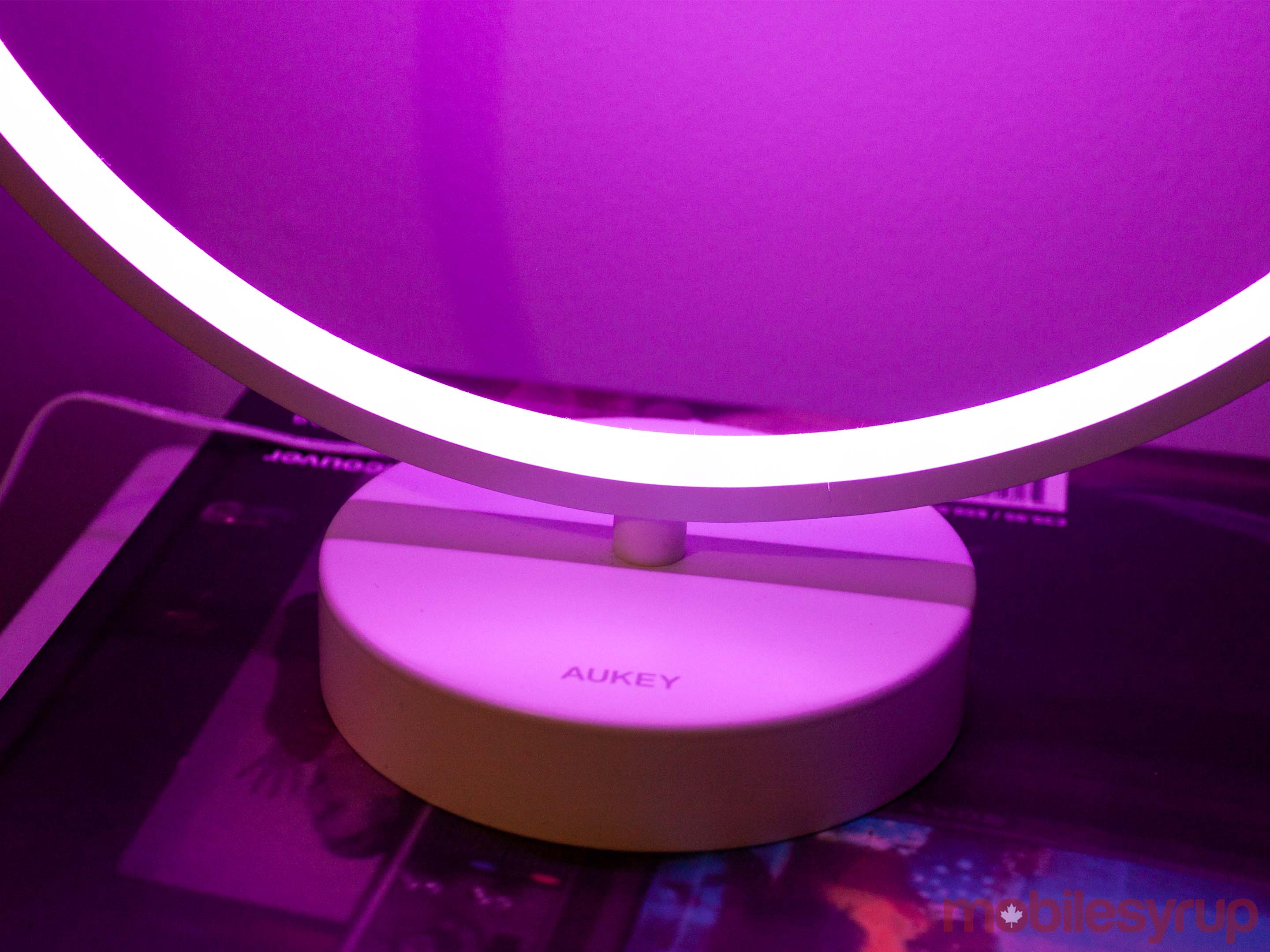
I don’t make YouTube videos, and while I have streamed on Twitch occasionally, I wouldn’t call myself a streamer. However, when I first saw the Aura, my thoughts went immediately to reviving my long-dead Twitch channel with improved lightning, courtesy of Aukey.
This wasn’t meant to be — my Twitch channel will stay dead for now — but I did find several other uses for the Aura.
First and foremost, the Aura made for excellent photography lighting. I take a lot of photos of phones and other tech for work. However, when I work from home, it can be challenging to find good lighting to take pictures.
The Aura has mostly solved that problem for me. While it isn’t perfect — frankly, the lighting in my apartment is abysmal at best — with some effort, the Aura can create unique scenes for my photos. If you read MobileSyrup regularly, you may have seen the picture below heading a story about dark mode coming to Google Assistant.
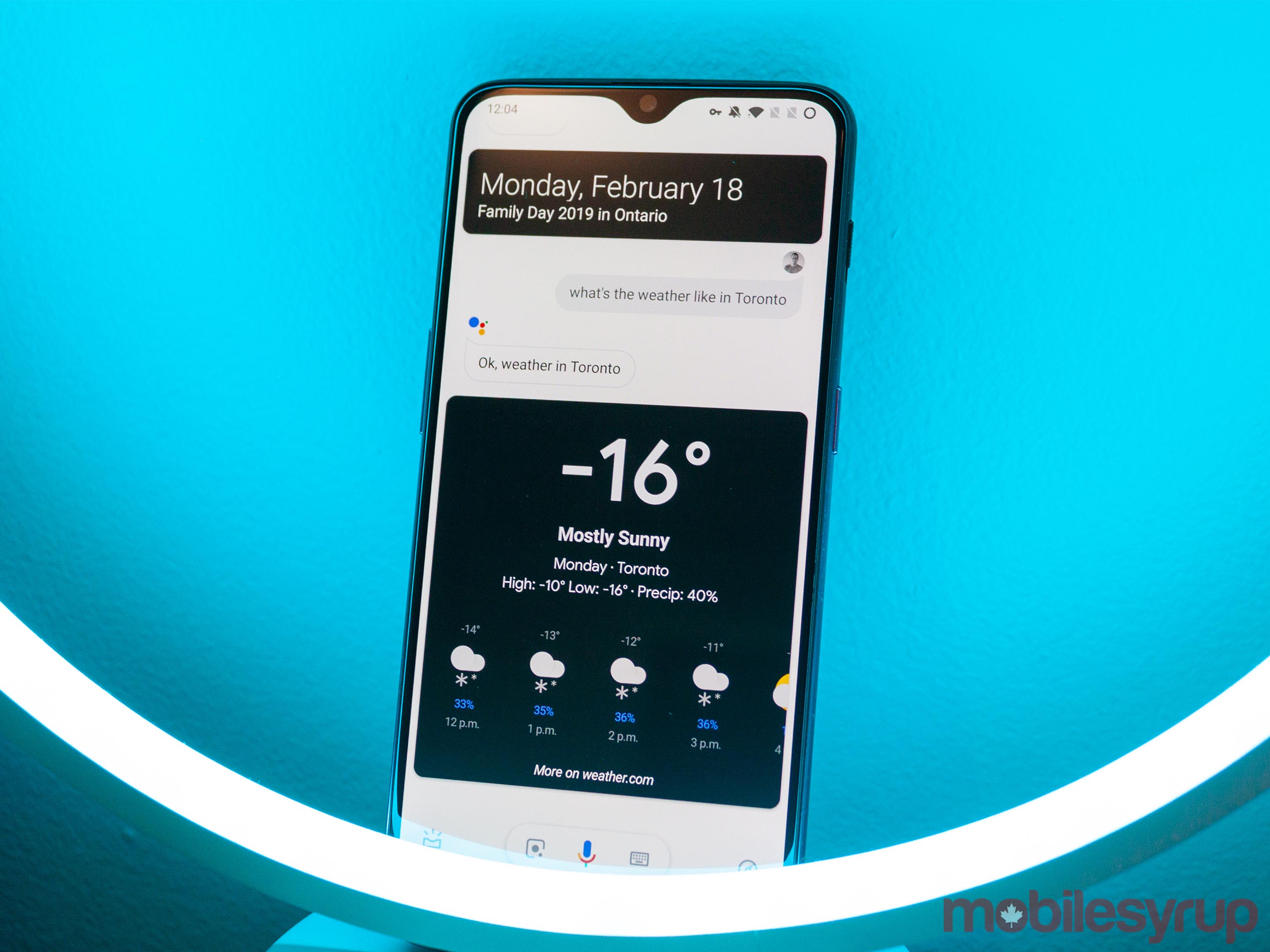
The Aura has several different colours it supports, including purple, turquoise, yellow, blue, green and red. Thanks to these colours, I can often tailor the scene to work precisely with the item I’m photographing.
When I’m not on the job, the ring light makes for a great addition to my room. The white colour option is a nice warm light, not overly harsh. Plus, the brightness is adjustable, making the Aura an excellent reading light.
Further, if I want something more exciting, the Aura offers several ‘moving’ light modes. Options include a ‘filling’ animation where the circle slowly fills up with light or a ‘breathing’ animation where the light pulses gently. There are also several ‘spinning’ options, with one colour, four colours and more. Finally, you can also pick ‘auto’ mode where the Aura will cycle through all the colours it supports.
Overall, the Aura has a lot going for it. Thanks to the wealth of colours, animations and settings, this ring light can serve multiple purposes dutifully. However, there a few areas holding back the Aura.

For me, the biggest issue with the Aura was its reliance on a remote control to function.
To be clear, I don’t mean that the remote worked poorly. To the contrary, the remote worked exceedingly well — I could control the lamp with it from an entirely different room in my apartment.
My first issue with the remote is its construction. Its plastic shell felt shoddy at times. Some buttons, mainly the centre ‘Mode’ button, would click other buttons if you pressed with any force.
As for the buttons themselves, if you don’t have the user manual, it can be hard to determine what some of them do. I misplaced my manual shortly after setting up the light and spent most of my time with it testing buttons to see what they did.
Thankfully, I learned later that Aukey allows you to download a PDF of the manual from their website, which includes instructions on which buttons do what. However, the whole experience of learning how to control certain features wasn’t great, especially considering that the remote is the only way to control the light.
Worse, if the two triple-A batteries in the remote — which aren’t included — die, or if you lose or break the remote, it means you can’t control the Aura light anymore.
It’s a frustratingly simple problem to solve, and there are a variety of solutions as well. For one, the base of the light could have featured a few control buttons. Alternatively, Aukey could have made the remote rechargeable, so users wouldn’t need to worry about batteries.

Better yet, why not allow users to control the light with an app on their phone? Aukey already has a ‘Home’ app for controlling its smart gadgets — that same tech could easily extend to this light.
And for that matter, I should be able to control the Aura with Google Assistant or Alexa.
Any or all of these solutions would have significantly improved the usability of the Aura light. Instead, the omission of these features stands as a glaring flaw.
One other nitpick I had with the lamp was that its cord was quite short. It’s hardly a deal breaker, but I did find it restricted my options regarding where I could plug it in.

Aukey’s Aura light stands out for its ability to fill many needs. From a ring light for your burgeoning YouTube channel to a unique reading lamp, the Aura can handle just about any need you have of a light.
It also offers several lighting options, presets and colours. All told, there’s a lot packed into this lamp that helps justify the $120 price tag, especially compared to other ring lights on Amazon. In a preliminary search, I found most quality ring lights available were in the same price range but lacked the versatility of Aukey’s lamp.
That said, the Aura misses on a few key areas that I think would make it a significantly better buy for most people. Assistant and Alexa support, or even just the ability to control the light with a smartphone app, would have made the Aura an easy sell.
Ultimately, unless you really need the ring-shaped light, I think you’d be better off with something like a LIFX Wi-Fi smart bulb. LIFX bulbs offer many of the same features along with Assistant and Alexa support, options to control the light with your phone and, depending on the light you buy, a lower price too.
The post Aukey’s Aura ring lamp is a versatile light lacking major smart features appeared first on MobileSyrup.
