Shared posts

30 Jan 22:27

Zucked :: Waking up to the Facebook Catastrophe

by Volker Weber
The dystopia George Orwell conjured up in “1984” wasn’t a prediction. It was, instead, a reflection. Newspeak, the Ministry of Truth, the Inner Party, the Outer Party — that novel sampled and remixed a reality that Nazi and Soviet totalitarianism had already made apparent. Scary stuff, certainly, but maybe the more frightening dystopia is the one no one warned you about, the one you wake up one morning to realize you’re living inside.

Roger McNamee, an esteemed venture capitalist, would appear to agree. “A dystopian technology future overran our lives before we were ready,” he writes in “Zucked.” Think that sounds like overstatement? Let’s examine the evidence.

Take it from the horse's mouth. McNamee is an early Facebook investor.

More >

30 Jan 22:27

Apple Maps :: Nummer zuerst

by Volker Weber

e38fab214889cb75d6e250d1701ac54b

Das ist vielleicht eines der besten Tricks, die ich in letzter Zeit gelernt habe: Immer erst die Hausnummer eingeben, wenn man eine Adresse sucht. Das spart eine Menge Tipparbeit, weil man nach den ersten Buchstaben meistens schon die Straße sieht, die man sucht.

Eigentlich kein Wunder. Die Software kommt aus USA und da stehen die Hausnummern vor der Straße.

Ja, ich benutze Apple Maps. Google Maps ist nicht mal installiert.

30 Jan 22:27

Evolution of the alphabet

by Nathan Yau

Matt Baker provides this nifty diagram on how the alphabet changed over the centuries, evolving to what it is now. Grab the print.

Tags: alphabet, evolution, Matt Baker

30 Jan 22:27

Twitter Favorites: [ReneeStephen] Best Ontario winter memory: going outside with wet hair, shaking my head, and hearing my frozen ringlets clatter to… https://t.co/rJJcbj6AGT

Renée Stephen @ReneeStephen
Best Ontario winter memory: going outside with wet hair, shaking my head, and hearing my frozen ringlets clatter to… twitter.com/i/web/status/1…
30 Jan 22:27

The politics of translation and the role of staff in Sudbury schools

by Lilia

In the last few months, I’ve got involved into translating some of the materials of Sudburyschool Hardewijk from Dutch into Russian. This is a strange experience: I’m into the topics of self-directed education for quite a while but didn’t dive in-depth into the specifics of Sudbury schools until recently. Since my reading on it is primarily in English I am not familiar with the choices made when terminology is translated into Russian. So I’m translating from Dutch without knowing corresponding Russian terminology or having an in-depth experience with English sources behind it.

So I asked about existing translations of terminology and got into a chat with Russian-speaking people doing a lot of translations of SDE materials and putting those ideas into practice locally in different forms. It’s interesting to see how much comes to the surface when you are “just” looking for a good word to translate a concept and how much of that has little to do with the linguistics.

One thing that makes it easier for me it’s triangulation between the languages. Like the concept of Corporations/Societies that run specific interest areas of the school community – Kitchen, Arts or . Once you see the Dutch “gezelshappen” you know that the Russian use of “corporations” doesn’t really fit in as a translation.

But the most interesting I found the discussion around translating the word staff used to describe adults working in the school for hire. There are no literal translation into Russian and various existing options do not fully convey the essence. While discussing the choices for a Russian translation different arguments were put forward:

  • Enabling strong connection with an international audience by using an English term literally or choosing the one in Russian that is most likely to be translated back into English as staff, so there is no “lost in translation” discrepancies.
  • Being immediately understood by the Russians by using an existing Russian term closest meaning-wise, while not fully addressing the meaning.
  • Creating a new term in Russian to make sure that it sufficiently describes the nuances of the role of adults in a democratic school.
  • Choosing for a word that reverses the hierarchy, giving children more responsibility and the choices than to the adults and pushing adults into a serving position in relation to the kids (as a way to emphasise the need to get out of the current hierarchy).
  • Looking at the terminology already in use and the future “usability” of the term in practice in Russian democratic schools.

At the end all of those come to two issues: audience to connect to and the message to convey with the translation. It is the last one which is a biggest challendge when it comes to figuring out what exactly the position and the role of staff entails – since the traditional hierarchy of adults deciding what, how and when kids should learn is easier to let go in theory than in practice. And once you start practicing the devil is in the details.

Some background stuff and more reading on the nuances:

The post The politics of translation and the role of staff in Sudbury schools appeared first on Mathemagenic.

30 Jan 22:26

Instead of freaking out about screentime for ou...

Instead of freaking out about screentime for our kids, Jordan Shapiro suggests that we lean in to parenting our wired children.

After Shapiro’s divorce, he found himself solo parenting two little boys (now 11 and 13) who were obsessed with video games. He started playing the games simply as a way to connect with them. Then he discovered connections between the emotional catharsis and interactive storytelling on the screen, and thinkers like Carl Jung and Plato. He came to realize that part of his job as a parent was to help his children make sense of their online experiences and teach them how to uphold enduring values in the new world they are living in.

It’s a really lovely counterpoint that I’m thinking a lot about for my son.

30 Jan 22:26

Fast Static Maps Built with R

by hrbrmstr

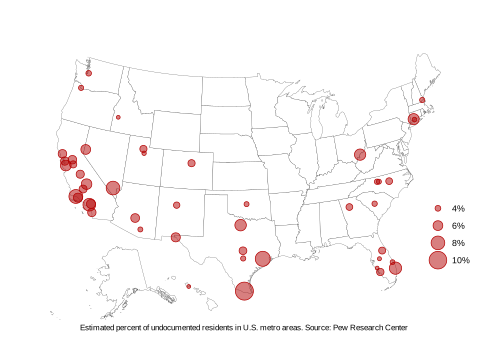
Luke Whyte posted an article (apologies for a Medium link) over on Towards Data Science showing how to use a command line workflow involving curl, node and various D3 libraries and javascript source files to build a series of SVG static maps. It’s well written and you should give it a read especially since he provides the code and data.

We can do all of that in R with the help of a couple packages and by using a free geocoding service which will also allow us to put more data on the map, albeit with some extra work due to it returning weird values for Hawaii locations.

library(albersusa) # git.sr.ht/~hrbrmstr/albersusa | git[la|hu]b/hrbrmstr/albersusa
library(rgeocodio) # git.sr.ht/~hrbrmstr/rgeocodio | git[la|hu]b/hrbrmstr/rgeocodio
library(tidyverse)

# the data url from the original blog
fil <- "https://query.data.world/s/awyahzfiikyoqi5ygpvauqslwmqltr"

read_csv(fil, col_types = "cd") %>% 
  select(area=1, pct=2) %>% 
  mutate(pct = pct/100) -> xdf # make percents proper percents

gc <- gio_batch_geocode(xdf$area)

The result of the geocoding is a data frame that has various confidences associated with the result. We’ll pick the top one for each and then correct for the errant Hawaii longitude it gives back:

map2_df(gc$query, gc$response_results, ~{
  out <- .y[1,,]
  out$area <- .x
  out
}) %>% 
  filter(!is.na(location.lat)) %>% 
  select(area, state = address_components.state, lat=location.lat, lon=location.lng) %>% 
  mutate(
    lat = ifelse(grepl("Honolu", area), 21.3069, lat),
    lon = ifelse(grepl("Honolu", area), -157.8583, lon)
  ) %>% 
  left_join(xdf) %>% 
  as_tibble() -> area_pct

area_pct
## # A tibble: 47 x 5
##    area                                        state   lat    lon   pct
##    <chr>                                       <chr> <dbl>  <dbl> <dbl>
##  1 McAllen-Edinburg-Mission, TX                TX     26.2  -98.1 0.102
##  2 Houston-The Woodlands-Sugar Land, TX        TX     29.6  -95.8 0.087
##  3 Santa Maria-Santa Barbara, CA               CA     34.4 -120.  0.081
##  4 Las Vegas-Henderson-Paradise, NV            NV     36.1 -115.  0.08 
##  5 Los Angeles-Long Beach-Anaheim, CA          CA     33.9 -118.  0.075
##  6 Miami-Fort Lauderdale-West Palm Beach, FL   FL     26.6  -80.1 0.073
##  7 Dallas-Fort Worth-Arlington, TX             TX     33.3  -98.4 0.069
##  8 Washington-Arlington-Alexandria, DC-VA-MD-… WV     39.2  -81.7 0.068
##  9 Bridgeport-Stamford-Norwalk, CT             CT     41.3  -73.1 0.067
## 10 San Jose-Sunnyvale-Santa Clara, CA          CA     37.4 -122.  0.065
## # … with 37 more rows

The albersusa package provides base maps with Alaska & Hawaii elided into a composite U.S. map. As such, we need to elide any points that are in Alaska & Hawaii:

us <- usa_composite()
us_map <- fortify(us, region="name")

hi <- select(filter(area_pct, state == "HI"), lon, lat)
(hi <- points_elided(hi))
area_pct[area_pct$state == "HI", c("lon", "lat")] <- hi

Then, it’s just a matter of using ggplot2:

ggplot() +
  geom_map(
    data = us@data, map=us_map,
    aes(map_id=name), 
    fill = "white", color = "#2b2b2b", size = 0.1
  ) +
  geom_point(
    data = area_pct, aes(lon, lat, size = pct), 
    fill = alpha("#b30000", 1/2), color = "#b30000", shape=21
  ) +
  ggalt::coord_proj(us_laea_proj) +
  scale_y_continuous(expand=c(0, 3)) +
  scale_radius(
    name = NULL, label = scales::percent_format(1)
  ) +
  labs(x = "Estimated percent of undocumented residents in U.S. metro areas. Source: Pew Research Center") +
  theme_minimal() +
  theme(axis.text = element_blank()) +
  theme(axis.title.x = element_text(hjust=0.5, size = 8)) +
  theme(axis.title.y = element_blank()) +
  theme(panel.grid = element_blank()) +
  theme(legend.position = c(0.9, 0.3)) -> gg

ggsave(filename = "map.svg", device = "svg", plot = gg, height = 5, width = 7)

Unlike the post’s featured image (which has to be a bitmap…grrr) the resultant SVG is below:

FIN

There is absolutely nothing wrong with working where you’re most comfortable and capable and Luke definitely wields the command line and javascript incredibly well. This alternate way of doing things in R may help other data journalists who are more comfortable in R or want to increase their R knowledge replicate and expand upon Luke’s process.

If you’ve got alternate ways of doing this in R or even (gasp) Python, drop a note in the comments with a link to your blog so folks who are comfortable neither in R nor the command line can see even more ways of producing this type of content.

30 Jan 22:24

„Bin ich der Sklave meines Handys?“

by Externer Autor
Für viele Menschen wird es immer schwieriger, offline zu sein. News und Unterhaltung auf Abruf, Kontaktbörse, aber auch Zeitfresser und Kontrollinstrument – das Smartphone bewegt sich irgendwo zwischen Helfer und Suchtfaktor. „Es geht nicht darum, [...]
30 Jan 22:24

Wired Wednesday: Glow, Scout & Mute+

by John

This week on News 1130 radio in Vancouver, I spoke about these tech topics for Wired Wednesday with Ben Wilson:

  • Casper’s Glow: A magical light for better sleep (source)
  • Amazon’s Scout delivery robots hit the street (source)
  • Mute+ adds an extra level of privacy to your smart speaker (source)

Listen here

The post Wired Wednesday: Glow, Scout & Mute+ appeared first on johnbiehler.com.

30 Jan 22:24

Facebook loses Apple developer certificate after reports it paid users for data access

by Sameer Chhabra
Facebook crash dialogue Android

Apple has reportedly revoked Facebook’s enterprise developer certificate, following a TechCrunch report alleging that the Menlo Park social networking giant paid users to install a virtual private network (VPN) that gave the company access to user’s phone and web activity.

TechCrunch reported that the ‘Facebook Research’ VPN circumvents the iOS App Store, and was employed to gather data on user habits.

Facebook allegedly began the program sometime in 2016, and paid users between the ages of 13 and 35 approximately $20 USD per month — including referral fees — to install the Facebook Research app on their iOS devices.

According to January 30th, 2019 tweets from Cheddar reporter Alex Heath, Apple has now revoked Facebook’s access to the Cupertino computing giant’s ‘Enterprise Developer Program’ that lets developers distribute “in-house apps to your employees.”

“Facebook has been using their membership to distribute a data-collecting app to consumers, which is a clear breach of their agreement with Apple,” reads an excerpt from an Apple statement sent to Heath.

“Any developer using their enterprise certificates to distribute apps to consumers will have their certificates revoked, which is what we did in this case to protect our users and their data.”

Menlo Park told TechCrunch that Facebook will shut down the iOS version of the Facebook Research app, but that the company will continue to run the Android version of the program.

News of the Facebook Research app comes in the wake of a series of privacy incidents plaguing the company, including the Cambridge Analytica data privacy scandal that occupied much of the company’s 2018 news cycle.

It’s worth noting that Facebook and Apple’s disagreements on data privacy are documented.

Apple CEO Tim Cook’s defence of privacy as a human right during an MSNBC interview reportedly upset Facebook co-founder and CEO Mark Zuckerberg so much that he told Facebook employees to stop using iPhones.

In a November 15th, 2018 Facebook media release following a critical New York Times report, the company wrote that “Tim Cook has consistently criticized our business model and Mark has been equally clear he disagrees.”

“And we’ve long encouraged our employees and executives to use Android because it is the most popular operating system in the world,” reads an excerpt from the same November 15th media release.

MobileSyrup has reached out to Facebook and Apple for comment. This story will be updated with a response.

Source: Twitter, TechCrunch

The post Facebook loses Apple developer certificate after reports it paid users for data access appeared first on MobileSyrup.

30 Jan 22:24

Finding Kafka’s throughput limit in Dropbox infrastructure

by Peng Kang

Apache Kafka is a popular solution for distributed streaming and queuing for large amounts of data. It is widely adopted in the technology industry, and Dropbox is no exception. Kafka plays an important role in the data fabric of many of our critical distributed systems: data analytics, machine learning, monitoring, search, and stream processing (Cape), to name a few.

At Dropbox, Kafka clusters are managed by the Jetstream team, whose primary responsibility is to provide high quality Kafka services. Understanding Kafka’s throughput limit in Dropbox infrastructure is crucial in making proper provisioning decision for different use cases, and this has been an important goal for the team. Recently, we created an automated testing platform to achieve this objective. In this post, we would like to share our method and findings.

Test platform

The figure above illustrates the setup of our test platform for this study. We use Spark to host Kafka clients, which allows us to produce and consume traffic at an arbitrary scale. We set up three Kafka clusters of different sizes so that tuning cluster size is as simple as redirecting traffic to a different destination. We created a Kafka topic to generate the producing and consuming traffic for the test. For the sake of simplicity, we spread the traffic evenly across brokers. To achieve that, we created the testing topic with 10 times as many partitions as the number of brokers. Each broker is leader for exactly 10 partitions. Because writing to a partition is sequential, having too few partitions per broker can result in write contention, which limits the throughput. Based on our experiments, 10 is a good number to avoid letting write contention become throughput bottleneck.

Because of the distributed nature of our infrastructure, the clients are in different regions of the United States. Given that our test traffic is well below the limit of Dropbox’s network backbone, it should be safe to assume that limit found for cross region traffic also applies to local traffic.

What affects the workload?

There is a rich set of factors that can affect a Kafka cluster’s workload: number of producers, number of consumer groups, initial consumer offsets, message per second, size of each message, and the number of topics and partitions involved, to name a few. The degree of freedom for parameter setting is high. Therefore, it’s necessary for us to find the dominant factors, so that test complexity can be reduced to a practical level.

We explored different combinations of parameters that we considered relevant. Unsurprisingly, we concluded that the dominant factors to consider are the basic components of throughout: the number of messages per second (mps) produced and the byte size per message (bpm).

Traffic model

We took a formal approach to understanding Kafka’s limits. For a specific Kafka cluster, there is an associated traffic space. Each point in that multidimensional space corresponds to a unique traffic pattern that can be applied to Kafka, and it’s represented by a vector of parameters: <mps, bpm, # producers, # consumer groups, # topics, …>. All traffic patterns that don’t cause Kafka to overload form a closed subspace, and its surface will be the Kafka cluster’s limit.

For our initial test, we chose mps and bpm as the basis of the limit, so the traffic space is reduced to a 2D plane. The set of acceptable traffic forms a closed area. Finding Kafka limit is equivalent to plotting this area’s boundary.

Automate the testing

In order to plot the boundary with reasonable accuracy, we need to conduct hundreds of experiments with different settings, which is impractical to do manually. We therefore designed an algorithm to run all the experiments without human intervention.

Overload indicator

It’s critical to find a set of indicators which allows for programmatically judging Kafka’s healthiness. We explored a wide range of candidate indicators, and landed on a small set of the following indicators:

  • IO thread idle below 20%: this means the pool of worker threads used by kafka for handling client requests are too busy to handle any more workload
  • In-sync replica set changes over 50%: this means when traffic is applied, 50% of the time we observe at least one broker failing to keep up with replicating data from its leader

These metrics are also used by Jetstream to monitor Kafka health, and they are the first red flags raised when a cluster is under too much stress.

Finding the boundary

To find one boundary point, we fix the value in bpm dimension, and tried to push Kafka to overload by changing mps values. The boundary is found when we have an mps value that is safe, and another value close to it that causes overload. We then consider the safe value to be a boundary point. The boundary line is found by repeating this process for a range of bpm values, as is shown below:

It’s worth noting that instead of directly tuning mps, we tuned with different numbers of producers having the same produce rate, which is denoted with np. The main reason is that the produce rate of a single producer isn’t straightforward to control because of message batching. In contrast, changing the number of producers allows for linear scaling of the traffic. According to our early exploration, increasing the number of producers alone won’t cause a noticeable load difference to Kafka.

We start with finding a single boundary point with binary search. The search starts with a very large window of np [0, max], where max is a value that will definitely cause overload. In each iteration the middle value is chosen to generate traffic. If Kafka is overloaded at this value, then this middle value becomes the new upper bound, otherwise it becomes the new lower bound. The process stops when the window is narrow enough. We then consider the mps value corresponding to the current lower bound to be the boundary.

Result

We plotted the boundaries for Kafka of different sizes in above graph. Based on this result, we conclude that the maximum throughput we can achieve in Dropbox infrastructure is 60MB/s per broker.

It is worth noting that this is a conservative limit, because the content of our test messages are fully randomized to minimize the effect of Kafka’s internal message compression. When traffic reaches its limit, both disk and network are extensively utilized. In production scenarios, Kafka messages usually conform to a certain pattern, as they are often constructed by similar procedures. This gives significant room for compression optimization. We tested an extreme case where messages consist of same character, and observed much higher throughput limits, as disk and network became much less of a bottleneck.

Additionally, this throughput limit holds when there are as many as 5 consumer groups subscribing to the testing topic. In another word, this write throughput is achievable when read throughput is 5 times as large. When the number of consumer groups increases beyond 5, write throughput starts to decline as the network becomes the bottleneck. Because the traffic ratio between read and write is much lower than 5 in Dropbox production use cases, the obtained limit is applicable to all production clusters.

This result provides guidelines for future Kafka provisioning. Suppose we want to allow up to 20% of all brokers to be offline, then the maximum safe throughput of a single broker should be 60MB/s * 0.8 ~= 50MB/s. With this we can determine cluster size based on estimated throughput of future use cases.

Leverage for Future work

The platform and automated tester will be a valuable asset to the Jetstream team down the road. When we switch to new hardware, change network configuration, or upgrade Kafka versions, we can simply rerun these tests and obtain the throughput limit in the new setting. We can apply the same methodology to explore other factors that may affect Kafka performance in different ways. Finally, the platform can serve as test bench for Jetstream to simulate new traffic patterns or reproduce issues in an isolated environment.

Wrap up

In this post we presented our systematic approach to understanding Kafka’s limits. It is important to note that we obtained these results in Dropbox infrastructure, so our numbers may not apply to other Kafka instances due to different hardware, software stack, and network conditions. We hope the technique presented here can be useful for readers to understand their own systems.

Many thanks to members of Jetstream: John Watson, Kelsey Fix, Rajiv Desai, Richi Gupta, Steven Rodrigues, and Varun Loiwal. Additionally, special thanks to Renjish Abraham for helping review the results. Jetstream is always looking for engineers who are passionate about large scale data processing using open source technologies. If you are interested in joining, please check out the open positions at Dropbox and reach out to us!

30 Jan 22:20

If Facebook is so smart, why can’t it get rid of the catfish spam chicks?

by Josh Bernoff

The strangest thing happened to me the other day. And I’m wondering why Facebook doesn’t have the (artificial) intelligence to catch it. This attractive woman who I didn’t know sent me a friend request on Facebook. Has that ever happened to you? It has? So it’s not just me? In fact, since I’ve been on … Continued

The post If Facebook is so smart, why can’t it get rid of the catfish spam chicks? appeared first on without bullshit.

30 Jan 22:20

Facebook Receives Retribution from Apple for Violation of Enterprise Program Guidelines

by Ryan Christoffel

Facebook is in the news again, and unsurprisingly it's not the good kind of publicity.

Yesterday Josh Constine of TechCrunch exposed a "Facebook Research" VPN that Facebook has been using to harvest extensive phone data from users age 13 to 35 in exchange for payment from the company of up to $20/month. The practice was made possible by Facebook's enterprise developer certificate from Apple, but after the story came to light, Apple swiftly responded by revoking that certificate from Facebook and publicly condemning the company's misuse of Apple's Enterprise Developer Program. That action caused the immediate end of the Facebook Research initiative on Apple platforms, but it also has reportedly brought widespread consequences throughout the entirety of Facebook's company operations. Tom Warren and Jacob Kastrenakes, reporting for The Verge:

Apple has shut down Facebook’s ability to distribute internal iOS apps, from early releases of the Facebook app to basic tools like a lunch menu. A person familiar with the situation tells The Verge that early versions of Facebook, Instagram, Messenger, and other pre-release “dogfood” (beta) apps have stopped working, as have other employee apps, like one for transportation. Facebook is treating this as a critical problem internally, we’re told, as the affected apps simply don’t launch on employees’ phones anymore.
[...]
Revoking a certificate not only stops apps from being distributed on iOS, but it also stops apps from working. And because internal apps by the same organization or developer may be connected to a single certificate, it can lead to immense headaches like the one Facebook now finds itself in where a multitude of internal apps have been shut down.

This is more than a slap on the wrist, but it seems like a fitting response to Facebook's blatant abuse of the Apple enterprise agreement. My main hope is that it causes Facebook to think twice before implementing any similarly shady initiatives in the future.

→ Source: theverge.com

30 Jan 22:20

Revisiting Evernote: Checking in with the Former Note-Taking King

by Ryan Christoffel

Evernote is still alive. The popular note-taking app celebrated its tenth birthday last summer, but the last few of those years haven't been easy, with two CEO transitions and sizable layoffs at several points. Still, the core product keeps pushing forward.

I last reviewed Evernote in early 2017, when version 8 of its iOS app launched as a major redesign. I concluded then that one of the service's greatest strengths, particularly when compared with competitors like Apple Notes, is that Evernote strives to be more than just a note-taking app. It's a solid way to take notes, but it also aims to make those notes easily accessible, to create connections between notes, and ultimately serve as a valuable aid to productivity.

Though Evernote has retained a large user base all these years later, and in fact became cash flow positive nearly two years ago, there are a lot of former users who left the service long ago and haven't looked back. Personally, while I've kept an eye on Evernote over the years, I never put its recent updates to the test – until recently, that is, when I set out to revisit the popular note-taker.

As part of checking back in on Evernote, there were three core features I wanted to focus on evaluating: Templates, Context, and Dark Mode. These are some of the major developments Evernote has touted in its last few years of work, and they make for an interesting case study on the company's future direction.

Templates

Templates aren't an altogether new concept to Evernote, as the service has promoted unofficial templating methods for years, such as saving template-style notes to a particular notebook, then copying those notes when you need them. However, last fall Evernote debuted a new, user-friendly template feature across all its platforms. Now, whenever you create a new note, you'll see an option in its body field to choose from an existing set of templates. Evernote has its own gallery of templates to choose from, with options spanning from checklists to journals to calendars, meetings, and more. Selecting one of these templates automatically applies it to your note.

Where templates get really exciting is in user customization. If you're an Evernote Premium or Business user, you can customize any of Evernote's existing templates or create and save your own from scratch. To do this, while viewing a note simply open the options menu in the top-right corner (denoted by three dots) and choose 'Save as Template.'

Templates are a true power user feature: the average person will probably never use them, but for those who take the time to customize templates to their needs, they can be a productivity boon. Templates are a big time saver for common types of notes, and they make consistent formatting of your notes – something I care a bit too much about, perhaps – completely effortless. I'm surprised that more note-taking apps don't offer customizable templates.

Context

Context, a Premium- and Business-exclusive feature, debuted to a host of controversy all the way back in late 2014. The feature was originally touted by the company as a major development, but many perceived it as a form of advertising or even an invasion of privacy, and it never really caught on. These days it takes some work to find any mention of Context on Evernote's website, though the feature does still exist. From a support article with a broken YouTube embed, here's how Context is described:

Based on intelligent indexing of your notes, Context means your related notes, people, and high-quality articles are shown to you when you need them most.

Our goal is to show you information that will help you improve the quality of your work, without you having to think about searching for it. It’s like having a super smart research assistant always by your side.

I'm late to the game giving Context a try, largely because Evernote's iOS app had the feature stripped from it when version 8 debuted, and it was only re-added this past year. However, I think it has the potential to be really powerful.

Research is an essential part of every writer's workflow, and Context seeks to streamline the research process by intelligently suggesting articles or notes so that the information you need is close at hand. Its aim is to remove the need for searching the web or your own notes to obtain research material, because Context will do that work for you and suggest its findings at the bottom of each note.

In concept, Context is a game changing idea. In execution, though, while it can be great at times, it can also be frustrating. When irrelevant article suggestions clutter up your workspace, it's easy to see Context as a nuisance. Surfacing truly intelligent suggestions is a hard feat to accomplish; that said, the potential gains make it absolutely worth pursuing.

Currently, Context's web sources are far too limited in scope to make meaningful article suggestions to all Evernote Premium and Business users. It would take a lot of hard work to change that, but it's work that can and should be done. For now at least, I've found that Context's biggest benefit for me in everyday use lies elsewhere: in its related note suggestions.

Let me share a real-life workflow comparison from my use of Apple Notes and Evernote. When I'm jotting something down and need to reference a related note, here's what that process looks like in each app:

  • Notes: Hit the back button to return to the note list, then in many cases hit back again to return to the folder list, then find the right folder, find the right note, read what I need to, and do the whole exercise over again to get back to my original note.1
  • Evernote: Tap the note suggested by Context, then hit the back button when I'm done reading what I need.

This dance between different related notes is a very common practice for me, and Evernote is the clear winner. Not only does it make the process of switching between notes seamless, it also surfaces related materials that, from a collection of ~1,200 notes, I may not even have realized I had.2

I realize that this example would be less of a problem in a world where Notes on iOS supported tabs and keeping multiple notes on-screen at once, but in our present reality, with those features sadly nonexistent, it makes clear what a practical aid Context can be.

Evernote wants to be your digital brain, and every digital brain should have features like Context. In fact, I wish Context-like features were a part of every document-based app. Every app doing its own version would be a mess, but something resembling Context feels like it'd be a perfect addition to iOS' existing 'Siri intelligence' feature set. With a heavy iOS focus on machine learning and Siri features already, 'Related suggestions' could be a great new system framework for document-based apps. It would be cross-app, baked right into the existing Files system, and as with Apple's other ML initiatives, it would take user privacy seriously. Apple, make it happen.

Dark Mode

Dark mode is one of those features that's been asked for since the very beginning, and that Evernote's team continually ignored demand for. Maybe it was on the roadmap, but it was so far down the bottom of that list that it seemed like it would never come to fruition.

Because of that history, I was entirely shocked when Evernote's iOS and Mac apps were updated with dark mode late last year. Out of all the (non-Apple) apps I thought would never get a dark mode, Evernote may have been number one. It felt surreal that after so many years without it, suddenly in late 2018, dark mode would come to Evernote. But it's here, and it's pretty great.

Evernote's dark mode uses varying shades of black and grey to effectively divide sections of its interface. Unlike in some dark themes which turn everything a single grey or black color, you never lose a sense of space and layout in Evernote because its diversity of shades informs your eyes as to exactly what they're seeing at all times. On iOS the darkest shade belongs to the navigation bar, with the note browser a touch lighter, and the editor even lighter.

Dark mode may not be a productivity enhancement the way templates and context are, but it's a great feature to have and one that the heaviest users will benefit from most.


Productivity has always been at the core of Evernote's DNA, but the company seems to be doubling down on that focus as a differentiator for its product. Templates and Context both serve power users in very intentional ways, and even dark mode is a particularly valuable feature for those who spend all day in a digital writing environment. From a PR perspective, Evernote has expanded its productivity-geared push through a new 'Focus Culture' podcast and regular blog posts. There's a theme here that's undeniable.

If I could highlight one other recent Evernote feature, it would be Spaces, the collaborative workspace for teams that launched last year. Unfortunately it's exclusive to Business accounts, which limits its appeal significantly; it also has received surprisingly little improvement since first debuting. However, Spaces serves as yet more evidence of this focus on productivity.

There's real opportunity here for Evernote. Where apps like Apple Notes and Bear are positioned as tools for the mass market, Evernote can be a product that uniquely equips users to get things done more effectively and efficiently than before. The service, and even the very features I've mentioned, still have lots of rough edges – which new CEO Ian Small will maybe remedy? – but there's potential for the future.

Evernote can be a productivity aid today, but what I'm most excited about is what it may grow into in the coming days. Perhaps the next time I revisit it, I'll find a service compelling enough to go all-in on once more.


  1. Alternately, I could hit the back button to return to the note list, then pull down and access the search field to find the note I'm looking for, then do the same when I'm ready to go back to my original note. The problem with that is it requires me to remember the titles or other significant search terms from each note that will help me find what I'm looking for through search. Those are details I don't naturally remember. I'll remember where a note's filed, but it takes some conscious mental effort to think of what search terms to use to find a note, and my efforts aren't consistently reliable either. Browsing the folder structure, while time consuming, is more automatic for me. ↩︎
  2. Another example of Evernote making note-switching workflows better is its Shortcuts screen, where the app lists recently accessed notes so you can easily return to them with little effort. ↩︎

Support MacStories Directly

Club MacStories offers exclusive access to extra MacStories content, delivered every week; it's also a way to support us directly.

Club MacStories will help you discover the best apps for your devices and get the most out of your iPhone, iPad, and Mac. Plus, it's made in Italy.

Join Now

30 Jan 22:19

First episode of Amazon Prime Original series Hanna will air after Super Bowl LIII

by Dean Daley
Amazon Prime Video

A new trailer for Amazon Prime Original series ‘Hanna‘ (seen below) will air during the Super Bowl.

The trailer also announces that Amazon plans on launching the first episode of the show following the Super Bowl game, with it only being available between 9:30pm ET on February 3rd until February 4th at 9:30pm ET for Amazon Prime members.

The full season of Hanna will premiere in March.

Hanna is the mixture of a thriller and a coming-of-age drama. The eight-episode series follows the life of Hanna, a young girl raised in a forest. Throughout the show, Hanna leaves her forest, makes friends and evades an off-the-book CIA agent.

The new series stars Esme Creed-Miles, Joel Kinnaman and Mireille Enos.

Amazon Prime is priced at $79 CAD per year with a 30-day trial period. For those located in Quebec, there’s no trial, but the cost is $79 for a 13-month subscription. Included in your Amazon Prime membership is Amazon Prime Video.

Amazon Prime Video is available for Android, iOS, Amazon Fire TV, Google TV, PlayStation, Xbox and many other platforms

The post First episode of Amazon Prime Original series Hanna will air after Super Bowl LIII appeared first on MobileSyrup.

30 Jan 22:19

It’s about Trust, Stupid! Why Blockchain-based BlockCerts are the wrong solution to a false problem (0/3)

Serge Ravet, Learning Futures, Jan 30, 2019
Icon

This is the first of what may be three or four articles on the subject. The key point in the this first post is this: "Trust is the mortal enemy of public blockchains." Or, to put the same point another way, the core message of blockchain technology is this: "distrust each other, the way I distrusted you." I would have though we had learned the limits of trust in this era of hack attacks, online scams and fake news, but maybe not. But more, even the tone of this article fails to inspire trust - the metaphors and imagery seem more appropriate to a junior year fraternity chat room that to a reasoned discussion of blockchain and academics.

Web: [Direct Link] [This Post]
30 Jan 22:19

Is it possible to decolonize the Commons? An interview with Jane Anderson of Local Contexts

Jennie Rose Halperin, Creative Commons, Jan 30, 2019
Icon

I admit to having mixed feelings about traditional knowledge (TK) lables. These are lables that denote traditional ownership and limitations on the use of indigenous cultural heritage and artifacts. You can view the lables here. I certainly understand the sentiment behind these lables. As the video accompanying the article makes clear, the colonial past has resulted in the appropriation and debasement of traditional knowledge from around the world, transforming it into Disney princesses or hot yoga. At the same time, I am not comfortable with limitations to the concept of public domain and limitations on access and use based on gender. And while in some cases the stewardship of traditional knowledge is known and obvious, in many other cases, it is not clear who speaks for a given tradition and why we should listen to just any voice telling us what we can and cannot do. I enter into any such discussion with an attitude of respect, of course, but respect does not entail obedience.

Web: [Direct Link] [This Post]
30 Jan 22:19

Different Types of Learning Theories – Understanding the Basics

Thais, My Love for Learning, Jan 30, 2019
Icon

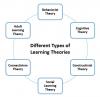
This is a quick outline description of some major learning theories. It appears in a new blog called My Love for Learning. The author is named Thais and promises to "share information about learning theories, instructional strategies, current trends in this industry, real examples and tools to help you grow in your eLearning career."

Web: [Direct Link] [This Post]
30 Jan 22:19

You can now listen to Apple Music without in-flight Wi-Fi on U.S. American Airlines flights

by Patrick O'Rourke

Apple has announced that Apple Music subscribers will be able to access the music streaming platform on all U.S. American Airlines flights without the purchase of in-flight Wi-Fi.

The service is set to be available starting on February 1st.

The music will be streamed through Viasat satellite technology, says Apple. American Airlines is the first commercial airline to offer access to Apple Music without the purchase of in-flight Wi-Fi.

“For most travellers, having music to listen to on the plane is just as important as anything they pack in their suitcases,” said Oliver Schusser, vice president of Apple Music, in a recent press release.

“With the addition of Apple Music on American flights, we are excited that customers can now enjoy their music in even more places. Subscribers can stream all their favourite songs and artists in the air, and continue to listen to their personal library offline, giving them everything they need to truly sit back, relax and enjoy their flight.”
While convenient, you could just as easily download music prior to the flight taking in order to keep pumping Apple Music tunes when you don’t have a data or Wi-Fi connection.

The service works on the iPhone but also is also likely compatible with the Mac, PC and Android devices. Apple music subscriptions are priced at $9.99 per month for an individual plan, $4.99 for a student plan and $14.99 a month for a family plan.

It will be interesting to see if more airlines, particularly Air Canada, eventually offer similar free in-flight access to music streaming services.

During the company’s recent Q1 2019 earnings call Apple revealed that Apple Music now has 50 million subscribers.

Source: Apple Via: MacRumors 

The post You can now listen to Apple Music without in-flight Wi-Fi on U.S. American Airlines flights appeared first on MobileSyrup.

30 Jan 22:19

Scandale Facebook de la semaine : Onavo, le VPN espion

by Tristan

Voilà, c’est le (principal[1]) scandale Facebook de la semaine : Facebook paye des jeunes 20 dollars pour espionner leur smartphone.

En fait, c’est un scandale à ramifications. Il faut revenir en arrière, car c’est peu ou prou un truc qu’ils faisaient déjà plus ou moins l’année dernière, que c’est contraire aux guidelines d’Apple, donc ils ont arrêté, avant de recommencer et de se faire choper à nouveau. Petit récapitulatif :

  1. Février 2018 : Facebook propose une option “Protect” dans son Appli, qui est en fait l’application de VPN Onavo. Un VPN, c’est un système de chiffrement pour protéger son trafic Internet des gens mal intentionnés. Seulement voilà, en croyant se protéger, on refile tout son trafic Internet… à Facebook ! C’était — ironiquement — juste après que Zuckerberg ait promis de “réparer Facebook”. À l’époque, ça avait fait pas mal de bruit :
    1. Blog du Modérateur : quand on passe par un VPN proposé par Facebook, il faut dire adieu à la confidentialité de ses données ;
    2. BusinessInsider : People are furious about Onavo, a Facebook-owned VPN app that sends your app usage habits back to Facebook,
    3. Gizmodo : Do Not, I Repeat, Do Not Download Onavo, Facebook’s Vampiric VPN Service,
    4. CNBC : Facebook is suggesting mobile users ‘Protect’ themselves…by downloading a Facebook-owned app that tracks their mobile usage (without disclosing it’s a Facebook-owned company),
    5. Wired : Don’t Trust the VPN Facebook Wants You to Use) ;
    6. Daring Fireball : This is spyware.
  2. Mars 2018 : On comprend mieux comment Onavo fonctionne ;
  3. Aout 2018 : Apple met à jour les règles de son Appstore et quelques jours plus tard, demande à Facebook de retirer l’application de l’AppStore car contraire aux nouvelles règles. On note que Google ne bouge pas sur le sujet : l’application espion est toujours disponible sur Google Play Store !
  4. Janvier 2019 : On constate que Facebook l’a réintroduite en douce sur l’Appstore en faisant croire que c’est une application pour les employés de Facebook. Elle porte un nouveau nom : Facebook Research App. Là aussi, c’est contraire aux règles. Apple prend la mouche et fait empêche le téléchargement de Facebook Protect.

Face à cela, on[2] pourrait souhaiter qu’Apple sanctionne Facebook pour avoir violé deux fois les règles, mais Facebook est bien trop populaire pour que l’iPhone puisse être vendu sans cette application.

Pour quelles raisons Facebook fait cela ? Surveiller le trafic réseau d’utilisateurs permet de repérer avant tout le monde les services qui fonctionnent bien, explique le Wall Street Journal. Cela permet de les racheter ou de produire une copie conforme de leur produit. C’est ainsi que WhatsApp a été racheté 19 milliards de dollars alors que la startup Houseparty, pour sa part, a été délaissée car Facebook a décidé de lancer Bonfire, une copie conforme.

Au final, ce qui arrive pour les utilisateurs est bien expliqué par mon collègue Guillaume Champeau :

Quelque part c’est exactement à ça qu’aboutirait l’idée que poussent certains de faire qu’on puisse vendre nos données personnelles. Vendront toute leur vie privée ceux pour qui 20 dollars c’est pas rien. Pourront préserver leur vie privée ceux qui pourront refuser ce chèque.

Souvenez-vous, si vous continuez à utiliser Facebook et ses services annexes (Instagram, WhatsApp, Messenger, etc.) c’est que vous tolérez les mensonges et scandales que nous sert Zuckerberg. Et si, comme moi, vous quittiez Facebook ?

Mise à jour

  • Sheryl Sandberg continue d’affirmer que les mineurs ont effectivement consenti à installer l’application Facebook Research qui pompe encor eplus de données. Pourtant, d’après cet article, il est extremement probable que ça n’est pas le cas (un mineur ne peut donner son consentement que si ses parents sont d’accord et ça ne semble pas prévu par le processus de validation de l’app).
  • Amusant : quand Apple a révoqué le certificat de Facebook pour bloquer l’appli en question, cela a aussi bloqué toutes les applications internes de Facebook dont certaines sont très importantes : le Workplace interne (messagerie instantanée d’entreprise), Ride (appli pour prendre les navettes de Facebook) ou Mobile Home, leur intranet. Quelques réactions d’employés : “We can’t aspire for good press while continuing to not play by the rules”. “Self-inflicted wound. When are we gonna learn?” Indeed !
  • Les résultats financiers de Facebook sont excellents. Comme le titre Gizmodo, Il se trouve que détruire la société est extrêmement profitable, et ça prouve bien qu’on a un sérieux problème.
  • Et Google dans tout ça ? NextINpact nous renseigne : “les applications « d’espionnage volontaire » de Facebook et Google ont été supprimées de l’App Store, des certificats ont été révoqués puis restaurés, et deux des plus importants géants du Net ont présenté leurs excuses. Les versions Android restent cependant disponibles. Il sera difficile à Google de le reprocher à Facebook puisqu’elle-même pratique ce type de collecte. À la différence toutefois que les finalités de l’application sont mieux expliquées chez Google que chez Facebook.”
30 Jan 22:19

European Union is considering proposals to ban Huawei amidst Canada tensions

by Shruti Shekar

The European Union is looking at proposals that would ban Chinese telecommunications giant Huawei from providing equipment for next-generation 5G mobile networks.

Four EU officials that were not named in the January 30th Reuters article, put forth the proposal, which is still in very early stages. The proposals are a demonstration of what the EU’s stance could be.

The ban would be welcomed by three of the five members of the Five Eyes intelligence sharing organization that have already banned the company. The U.S. banned the company in August 2018, followed by Australia and New Zealand. Canada and the U.K. are still working with Huawei regarding deploying 5G, the next iteration of mobile technology that would help function smart cities, autonomous vehicles and possibly even fixed wireless internet services in rural Canada.

In Canada, Huawei is partnered with 13 Canadian universities to research the next mobile technology and is working with Bell and Telus to deploy infrastructure and prepare the country for when 5G technology makes its mark.

According to the Reuters article, the four officials want to amend language in the 2016 cybersecurity law to also include 5G mobile networks in the definition of critical infrastructure.

The law currently requires businesses that are involved in critical infrastructure to take the appropriate security measures. The amendment would prevent any business from using equipment from a country that is suspected of spying or sabotage.

According to a draft of China’s national intelligence law that was released in 2017, all Chinese companies “shall support, cooperate with and collaborate in national intelligence work, and maintain the secrecy of national intelligence work they are aware of.”

It has also been reported that the U.S. President Donald Trump was drafting an executive order to bar U.S. companies from using any equipment from a country that is suspected of participating in espionage.

Tensions rose in December when Vancouver authorities arrested Huawei’s global chief executive officer Meng Wanzhou on fraud-related charges. The U.S. charged 13 counts of bank and wire fraud against her, Huawei, and its subsidiary Skycom. She currently faces extradition to the U.S.

Canada is currently conducting two studies, one on 5G technology in Canada and another on Huawei’s presence in Canada.

Public Safety Minister Ralph Goodale said to reporters that the process was ongoing and that the government was “examining the security issues as well as the technical issues with a great deal of care.”

Source: Reuters

The post European Union is considering proposals to ban Huawei amidst Canada tensions appeared first on MobileSyrup.

30 Jan 22:19

A feast of Kapampangan food - Inquirer.net

30 Jan 22:18

Craig Hockenberry wrote up a simple WebKit feat...

Craig Hockenberry wrote up a simple WebKit feature request: Add limits to the amount of JavaScript that can be loaded by a website.

30 Jan 22:18

Winner, Name that Ware December 2018

by bunnie

The ware for December 2018 is from a 454 Sequencer. The direction of flow is actually from a single input port, splitting into two separate ports, each driven by independent peristaltic pumps downstream of the splitter. The four black boxes are customized Introtek “IntroFlow” ultrasonic non-invasive flow detectors. It’s interesting to see that many readers assumed the flow went in the combining direction, not the splitting direction.

I originally thought the ware was a simple flow splitter because the machine had a single reagent cartridge, and reagents are expensive so if they needed reagents in two spots it would be worth it to include a mechanism for splitting and measuring the flow. But after reading Stuart’s comment, I think he’s probably right, it’s a bubble trap. When I removed the device from the machine, I hadn’t quite traced the pipes back far enough — the inlet goes to a valve that looks like it can either select from a set of reagent sources, or a port that is labeled “air out”. So congrats to Stuart, email me for your prize!

30 Jan 22:18

Name that Ware January 2019

by bunnie

The Ware for January 2019 is shown below.

Thanks to Jesse for contributing this handsome retro-ware.

This one should be a cakewalk — I did not blur out the part numbers because I felt like by the time I finished obscuring the ware there wouldn’t be much left for guessing! Instead, I’m just appreciating a retro-ware for what it is — a reminder of a time when not everything could be done in software, and we had to rely on special purpose chips to do even the simplest of things.

I also included a picture of the back side of the board because it illustrates a common problem seen in PCBs from the 80’s — namely, what happens when soldermask is applied directly over tin/lead plating. Tin/lead can be used as an etching barrier; conveniently, once the etch is done, the tin/lead plating doubles as the solderable finish for the PCB. So, if you scrape back the soldermask of the older PCBs like this, you won’t immediately find bare copper: you’ll first encounter a layer of tin/lead plating.

Unfortunately, when the PCB is subject to reflow temperatures (and particularly wave soldering), the entire tin/lead layer liquifies, and excess solder from the pads will flow under the soldermask, creating the wrinkling, ripples and bumps seen under the larger traces.

Modern PCBs still use a tin mask as an etch barrier, but the tin is stripped off entirely before the soldermask is applied (hence the term “SMOBC”, or soldermask on bare copper), and then solder is re-applied to all the pads using a HASL (hot air solder leveling) process (or ENIG, OSP, or whatever finish is required). Seems like a lot of work to apply a finish only to strip it off, but bare copper won’t allow solder to seep underneath the soldermask, so it’s worth it.

30 Jan 22:18

RT @SLevelt: US: our politics are the worst s**t show UK: hold my beer US: hold my beer UK: hold my beer US: hold my beer UK: hold my beer…

by SLevelt
mkalus shared this story from iandunt on Twitter.

US: our politics are the worst s**t show
UK: hold my beer
US: hold my beer
UK: hold my beer
US: hold my beer
UK: hold my beer
US: hold my beer
UK: hold my beer
US: hold my beer
UK: hold my beer
US: hold my beer
UK: hold my beer
US: hold my beer
UK: hold my beer


Posted by SLevelt on Wednesday, January 30th, 2019 12:50am
Retweeted by IanDunt on Wednesday, January 30th, 2019 11:44am


1273 likes, 416 retweets
30 Jan 22:18

Google is testing a ‘look-alike URL’ warning in Chrome

by Jonathan Lamont

Google Chrome is testing a new way to combat a popular online scam technique.

The feature first turned up in Chrome Canary version 70 for testing. Spotted by ZDNet, users can enable it in Canary by turning on a flag. The feature will then warn users of ‘look-alike’ URLs.

It’s probably happened to you at some point: you quickly punch in a website in the address bar and hit enter, not realizing you’ve made a typo. Next thing you know, you’re on a sketchy site.

Google Chrome URL warning

Malicious actors like to lockdown these look-alike URLs in an effort to trick the unsuspecting into giving up login credentials. For example, someone who wanted to scam Paypal users could get the URL ‘www.paypai.com’ in hopes a typo could land someone on their fake website instead of the real paypal.com.

Google hopes to combat this by warning people when they mistype a common URL. With the feature turned on, Chrome presents a small banner under the omnibox with the proper URL. In the case of our Paypal example, the banner reads: ‘Did you mean to go to http://paypal.com/?’

If you’re running Chrome Canary on your machine, you can test out the new feature by copying this address into your omnibox and turning the feature on: ‘chrome://flags/#enable-lookalike-url-navigation-suggestions.’

That will work on regular Chrome as well, but the feature won’t yet detect any mistyped URLs. It appears Chrome developers are still working on the feature, so the functionality is limited to Canary.

Eventually, the warning system should make its way to a full Chrome release, but it’s not clear if or when that will happen.

Image credit: ZDNet

Source: ZDNet Via: Engadget

The post Google is testing a ‘look-alike URL’ warning in Chrome appeared first on MobileSyrup.

30 Jan 22:18

Modern OSI Model

mkalus shared this story from xkcd.com.

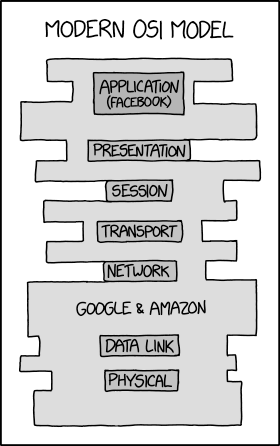
In retrospect, I shouldn't have used each layer of the OSI model as one of my horcruxes.
30 Jan 22:18

Sonos should learn from Facebook

by Volker Weber

0cf45ddc9e2aee095acc72e213e6c697

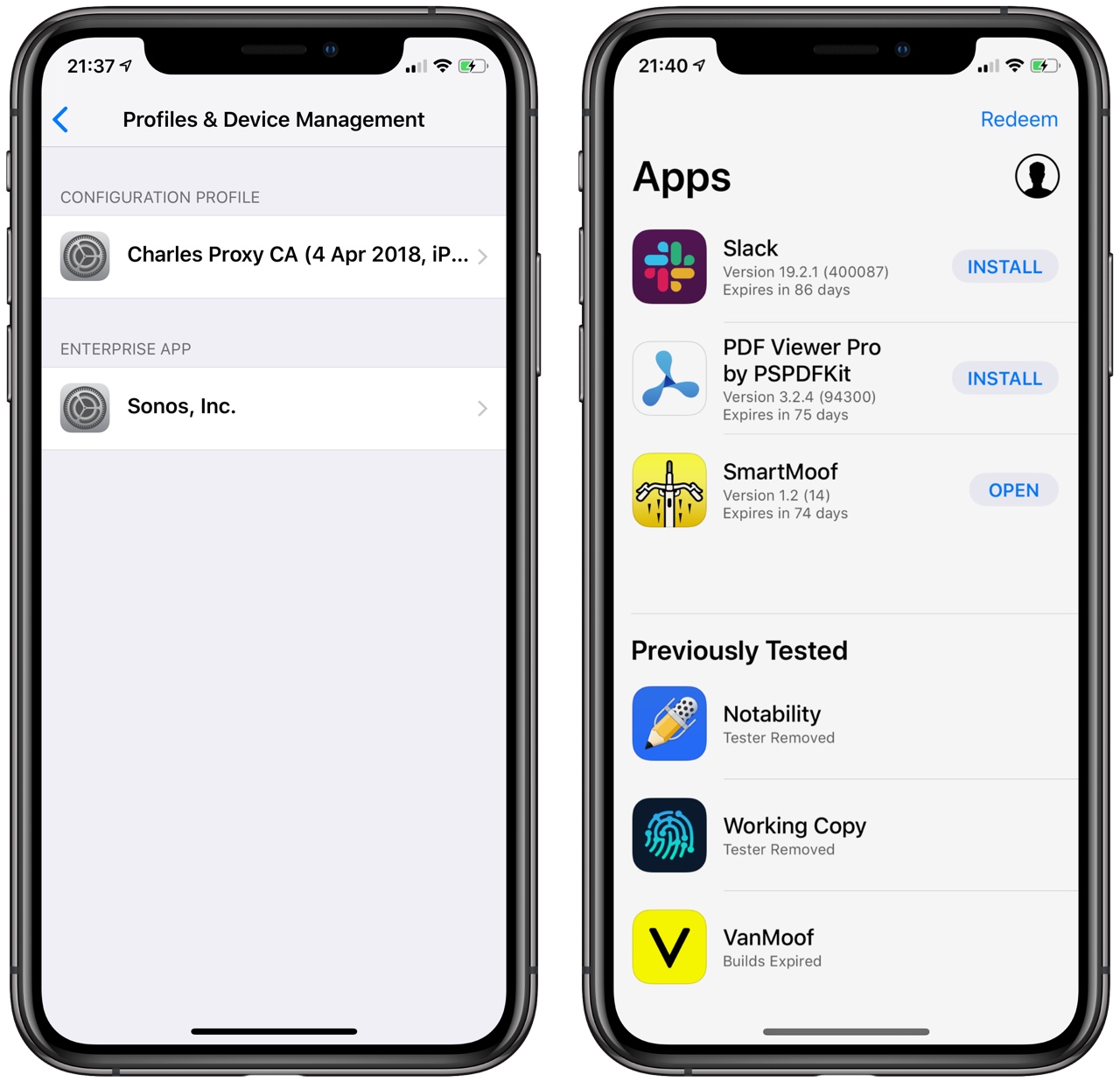
Apple pulled the rug out from under Facebook today by revoking their Enterprise Developer certificate. You deploy this on your employees' iOS devices so you can distribute apps without going through the App Store process.

Facebook used this mechanism to deploy their spyware and Apple simply killed those apps by revoking the certificate. Collateral damage: all other internal apps using the very same certificate also died the very same minute.

Sonos is still using the same process to distribute their betas outside the company and I would wager they violate the same terms and conditions as Facebook. The proper way to do this is use TestFlight, like everybody else.

30 Jan 22:18

The High Cost Of Online Trash

by noreply@blogger.com (BOB HOFFMAN)

The online advertising ecosystem is impossibly complex. Today, I will try to provide a highly simplified overview written for non-media-savvy, non-tech-savvy readers. The idea is to give civilians like copywriters, marketing managers, and auto dealers a big-picture view of the online display ad environment and a point of view on its pitfalls. I have tried my best to write it in plain English and make it so simple even a CEO can understand it.

As a copywriter, I am not an expert on media buying so be warned. To account for that, I have bounced this off some digital media experts who have assured me that it is as accurate as you can reasonably expect from a dumbass blogger. This is excerpted from my forthcoming book "Delusional: How Marketers Waste Billions on Fraud and Fairy Tales" which will be published later this year. Okay, here we go...

                                                 *****                                                               
“...We keep feeding the beast by pouring incredible sums of money into this unproductive, unmanageable abyss. Remarkably, we keep doing so even though we know that only 25 percent of every digital dollar reaches the consumer. … [that] represents more than $20 billion in marketing waste, inefficiency and ineffectiveness.” Bob Liodice, CEO, Association of National Advertisers
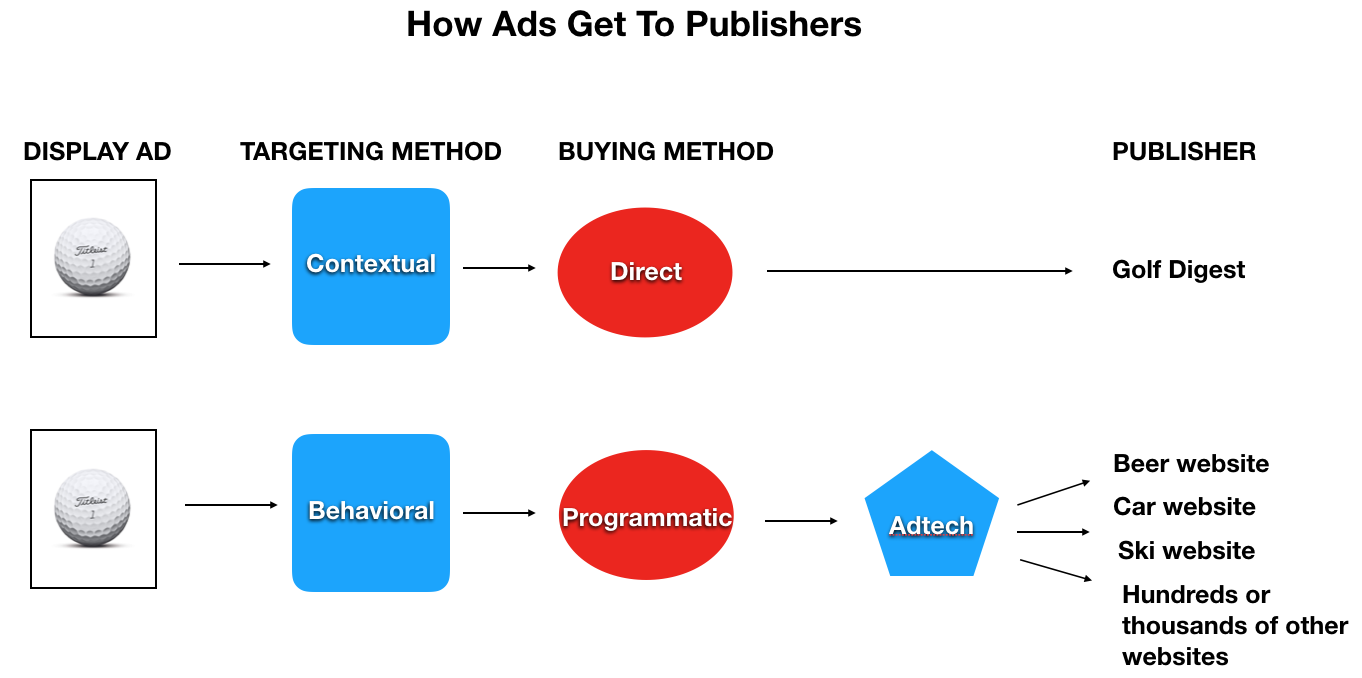
There are basically two ways to buy online display advertising.
  • Contextually — Buying “contextually" means you buy the old-fashioned way. If you’re trying to reach golfers, you buy ads on the Golf Digest website. The context of the website determines the buying criteria.
  • Behaviorally  — Buying behaviorally means you don’t buy ads on a specific website, you follow presumed golfers wherever they go on the web and buy ads wherever they land e.g., a beer website or an airline website. The behavior of the target determines the buying criteria, not the nature of the website. 
The big difference between traditional advertising and online advertising is that previously we could never know the behavior of individuals. Now, with "tracking" we can follow people across the web as we were never able to do with TV, radio, or print and reach them wherever they go.
    The advantages of buying behaviorally are presumed to be…

    Economy: Behavioral targeting reduces costs by allowing you to find those who are presumed to be golfers at cheaper locations than Golf Digest. By following a golfer to someplacecheap.com you can show her the same ad you might have shown her on the Golf Digest website, but at a lower cost. This results in lower CPMs (costs-per-thousand.) Keep this in mind because it will become important later.
    Precision: Adtech helps you identify not just golfers in general, but left-handed women golfers over 35. Presumably, this results in "more relevant" advertising.
    The concept of behavioral targeting has been widely adopted by the advertising industry. As a general rule, behaviorally targeted ads are bought programmatically (by software.) Programmatic buying currently represents about 80% of online display advertising.

    On the other hand, for the most part contextual advertising is bought directly from the publisher or the publisher’s network. While it may employ the use of some software, it is most often not bought programmatically.* 


    The question for advertisers is this -- is it more efficient to buy behaviorally or contextually? Because of the complexity of the system, it is almost impossible to compare apples to apples. But let’s try our best.

    There are at least four aspects of behavioral targeting that are problematic:
    • Accuracy: How accurate is the targeting data? Behavioral advertising is only as good as the data that informs it. There is troubling evidence that data residing in the adtech ecosystem -- particularly data bought from data brokers --- is not as accurate as might be hoped. We experience it every day when we get ads for stuff we bought three months ago and ads for products we have no interest in. In one test, targeting data bought from a data broker was able to correctly intuit the sex of an individual 43% of the time. A cat flipping a coin would be right 50% of the time.
    • The “tech tax:” According to the World Federation of Advertisers and others, adtech, the technology that drives behavioral buying, costs about 60% of every ad dollar. In other words, buying, managing, and verifying the data that is needed for a programmatic buy eats up about 60¢ of every ad dollar. This means that of every dollar spent on behaviorally targeted advertising, only 40% is “working media.” Said another way, every ad dollar buys 60¢ of technology and 40¢ of advertising.
    • The “fraud tax:” The web is riddled with ad fraud. The actual amount of fraud in the system is controversial, with estimates running from 5% to over 50%. Experts would agree that in open ad exchanges web fraud is probably at least 20% greater than it is when buying direct. Many would say it is far higher.
       
    • The "long tail" of trash: There are tens of millions of websites. Many of them are pure junk. Many of them buy fake traffic to appear successful. Many of them aren't even real but are software that mimics a website for the purpose of attracting ad dollars. But they all sell ad space very cheaply. Programmatic systems see low prices on these junk sites and fake sites and bid on the worthless ad space they are selling to meet CPM goals. A famous case history involves Chase bank. They were advertising on 400,000 sites every month. They reduced the number of monthly sites to 5,000 (a reduction of almost 99%) and saw no difference in performance. An astounding number of the sites they were buying from programmatically were worthless.
    One of the big problems in marketing today is math illiteracy. Too many people in advertising simply don’t know how to “do the math.” Let’s do some simple math and see where it leads us.

    - We know adtech eats 60¢ of every programmatic ad dollar. This means when we buy programmatically we have 40¢ left for working media.

    - If fraud takes another 20% of our 40¢, it means we have 32¢ left for working media.

    - So, if directly-bought (contextual) advertising delivers 100% working media, and programmatically-bought (behavioral) advertising delivers 32% working media, behavioral advertising has to perform at about three times the level of contextual advertising to be a break-even proposition.** Put another way, the technology we are paying for only pays out if the resulting media buy is three times as effective.

    Experts I have spoken to tell me that it is highly unlikely that behavioral ads can perform at three times the level of contextual ads. In fact, it is not unusual for them to perform at a lower level.

    There are other reasons why programmatically-bought behavioral advertising is questionable:
    Brand safety: When you buy directly you know where your ad is going to run. When you buy programmatically it can run almost anywhere.
    Data abuse: When you buy directly you greatly reduce the need for the adtech industry to collect the massive amount of data that drives behavioral targeting and leads to data abuse and privacy abuse.
 Additionally, the data you use to target and track your most likely customers programmatically are fed into the adtech system and become easily available to your biggest competitors. It's called "data leakage."
    Fraud abatement: When you buy directly you greatly reduce the potential for fraud. You usually pay directly to a publisher which means there is much less opportunity for fraudsters to insert themselves into the complexity of the process.
    Transparency: The complexity of the programmatic ad ecosystem makes the tracking of ad dollars grossly opaque. This has resulted in scandal after scandal and is now the central focus of an FBI investigation. Directly bought advertising is far more transparent. You know who and what you are paying for and you know what you’re getting.
    Behavioral targeting and its cousin, programmatic buying, are flawed concepts that have been sold to the marketing industry by people who have invested billions in systems designed to extract money from the ad buying industry. The more these people can complicate the system and insert themselves between the advertiser and the publisher, the more money they can extract.

    Why is 80% of online advertising now bought programmatically? One very simple reason -- the "extractors" have convinced marketers that lower CPMs equal better value. As we said earlier, behavioral targeting often results in lower CPMs. But credible studies on this subject show that lower CPMs are not necessarily the result of more efficient buying. They are often the result of bottom-feeding -- more trash, more waste, more bots, more fraud and less value.

    In traditional media -- where you know exactly what you're buying and the ecosystem isn’t drowning in trash and fraud -- using CPMs to evaluate efficiency is sensible. But online, where tens of millions of worthless and imaginary websites compete for your ad dollars by offering very low costs, using CPMs as a measure of efficiency is a mistake. Low CPMs are a truer indication of how much trash you're buying than how much efficiency you’re getting.

    As regular readers know, I believe the adtech ecosystem -- and its evil spawn of tracking and surveillance -- are a dangerous and corrupting influence on advertising and on society. I hope this piece has demonstrated to the uninitiated that it is also bad business.

    * There are hybrid ways to buy (e.g., programmatic direct) but we're trying to keep things simple here.

    ** In an effort to compare apple-to-apples and keep the math simple, I have given programmatic a working media number of 40% and direct buying 100%. In reality, direct buying doesn't produce 100% working media and programmatic buying doesn't produce 40% working media. The Association of National Advertisers says that programmatic buying only produces 25% working media I don’t know where that other 15% of “waste” for programmatic goes, so to be fair I’m going to assume that it is applicable to both programmatic and direct buying methods. In other words, direct buying probably results in something like 85% working media and programmatic something like 25% working media. But to keep the math simple I have given them both a 15% percent promotion to 100% and 40%.