
Yonge Street will always be Toronto’s Main Street.

I mentioned as much on Instagram a few days ago, but May 22nd marked the 39th birthday of Pac-Man, which was released on that day in Japan but would not hit North American until October of 1980. What’s wild is that Tim and I actually own an original Pac-Man arcade machine which we acquired this March. That game marks the beginning of my deep love of arcade cabinets, and I was unapologetically knee-deep in Pac-mania in the early 80s. It was the game I was best at, having memorized patterns through the second or third key, and owning a video game like this was beyond my wildest dreams until recently. But given Reclaim is seriously considering opening up an old gold arcade in Fredericksburg, it only made sense to start building the collection—which has grown yet again this past week with the addition of a Track and Field cabinet from 1983.
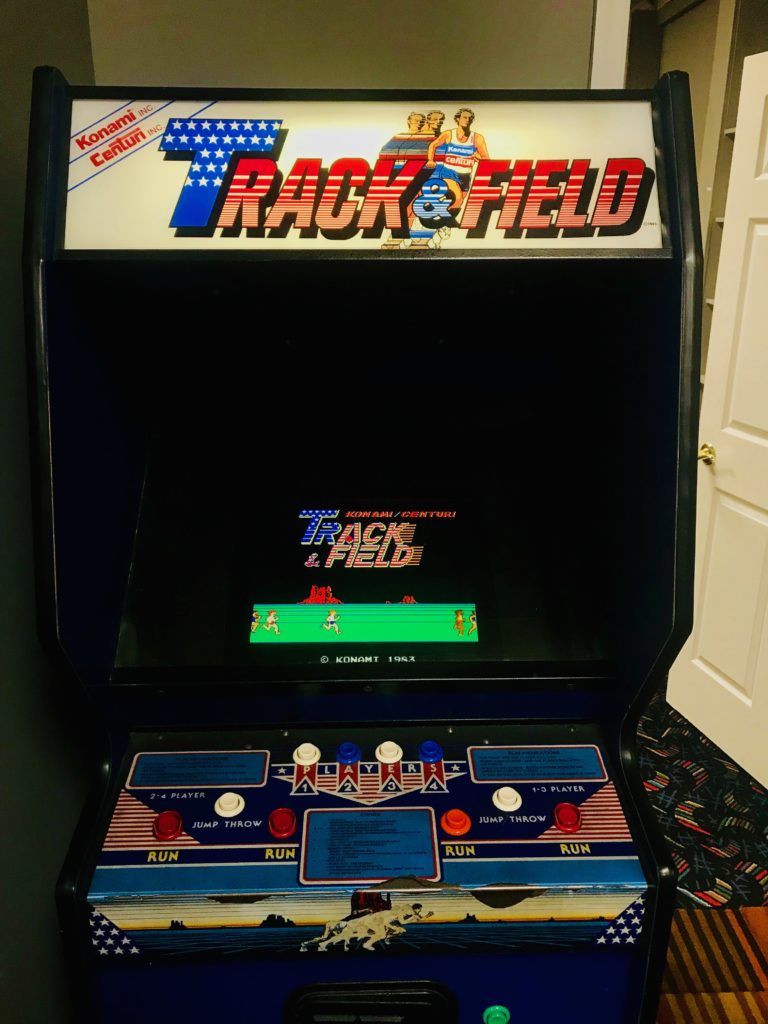
The generative power of a game like Pac-Man on my imagination is hard to quantify. I rank it up there with films like Star Wars and Alien when it comes to helping define a burgeoning sense of what culture meant to me—whether popular or not was not even a question yet. These were things that filled me with wonder while at the same time were not unique to me, they were shared broadly as a kind of popular phenomenon becoming iconic of 80s culture. What’s more, it was kind of ground zero for video games becoming part of the public discourse more broadly, something that has only gained more and more momentum and relevance since.
If you are looking for some more insightful history around Pac-Man beyond my nostalgic longings, the Arcade Blogger has a great post on the development of Pac-Man that Tim shared with us the other day and I highly recommend it. Some take-aways I did not know were the following: Galaxian was the first game to use color RGB graphics (we own it); the Japanese name of Puck-Man was changed to Pac-Man for export given the possible variations North American teenagers might come up with; and the power pills were inspired by Popeye’s transformation after eating spinach.
Happy birthday Pac-Man, you have aged quite well! In fact, to their great credit the twelve 1980s cabinets we have acquired not only feature impressive gameplay, but also have withstood the ravages of time quite impressively. They are closing in on four decades of gameplay and they remain remarkably solid and simple, making them relatively easy to troubleshoot and repair. Long live the arcade culture of the 80s!
In this my third post sharing my reflections on being the Chair of ALT I’m going to look at one of the most important governance functions of any Board of Trustees – finance, audits and accountability.
Last week I chaired the second Board meeting of the year, and for part of it we were joined by our external auditor, Nicola Cadwallader, who ran us through the findings of her interim audit.
Meeting with Nicola and having the opportunity to discuss in more detail her role as auditor and the wider obligations ALT has as part of its charitable status was a really worthwhile experience for all the Trustees.
Although Daniel Clark our Honorary Treasurer has considerable accounting experience, it is key responsibility for any Board, and particularly the Chair, to ensure that they understand fully the financial environment in which their organisations operates. As the Chair, I need to ensure the financial integrity of the Association on behalf of our members.
An interim audit is not necessary for an organisation the size of ALT, however I think that it is a very worthwhile exercise. As we have recently moved all our key financial systems online we need to ensure that everything is working and our process are robust. This year’s interim audit has clearly illustrated that ALT is on a sound financial footing.
Nicola also explained to us the role of any auditor in terms of their wider commitment around reporting any issues to the Charity Commission. Given ALTs turnover, we aren’t legally bound to undertake an external financial audit. However, all of the Board agreed that it was essential that we did continue with regular audits to give our members reassurance that their money is being used wisely and appropriately to support the mission and values of the Association.
It was pleasing to see from the draft report that in our first year of operations as an independent virtual organisation our financial procedures are robust and our projected income and expenditure are firmly on track.
There are small areas for improvement, which with Nicola’s advice we will be able to implement. The accounts will be submitted as part of our annual report during the AGM at our annual conference in September and then will be openly available via our website.
ALT, like all organisations with charitable statues abides by the rules of the UK Charity Commission, and every year our accounts are uploaded onto the Charity Commission website.

From the visualisations on the site (which btw are in flash, so maybe that needs to be updated!) you can see that ALTs finance have been very stable for the past three years, and long may that continue.
I remembered the thing I didn't remember last week.
It was this fantastic New Yorker piece about age (and trying not to).
These fragments are pertinent:
"The work of the AgeLab is shaped by a paradox. Having been established to engineer and promote new products and services specially designed for the expanding market of the aged, the AgeLab swiftly discovered that engineering and promoting new products and services specially designed for the expanding market of the aged is a good way of going out of business. Old people will not buy anything that reminds them that they are old. They are a market that cannot be marketed to."
"This paradox is, well, old. Heinz, back in the nineteen-fifties, tried marketing a line of “Senior Foods” that was, essentially, baby food for old people. It not only failed spectacularly but, as Coughlin puts it, poisoned an entire category. The most perverse of these failures is perhaps that of the PERS, or personal-emergency-response system, a category of device—best known for the hysterically toned television ad in which an elderly woman calls out, “I’ve fallen and I can’t get up!”—designed as a neck pendant that summons emergency services when pressed. It is simple and effective. “The problem is that no one wants one,” Coughlin says. “The entire penetration in the U.S. of the sixty-five-plus market is less than four per cent. And a German study showed that, when subscribers fell and remained on the floor for longer than five minutes, they failed to use their devices to summon help eighty-three per cent of the time.” In other words, many older people would sooner thrash on the floor in distress than press a button—one that may summon assistance but whose real impact is to admit, I am old."
"The most effective way of comforting the aged, the researchers there find, is through a kind of comical convergence of products designed by and supposedly for impatient millennials, which secretly better suit the needs of irascible boomers. The best hearing aids look the most like earbuds. The most effective PERS device is an iPhone or an Apple Watch app.
Such unexpected convergences have happened in the past. Retirement villages came to be centered on golf courses, Coughlin maintains, not because oldsters necessarily like golf but because they like using golf carts. It’s the carts that supply greater mobility in and around the village. The golf comes with them. This process of “exaptation” has now accelerated. TaskRabbit and Uber and Rent the Runway—services that provide immediate help for specific problems—are especially valuable for an aging population."
"We’re doing a lot of work in the on-demand economy, which was made for millennials but is working better for boomers. Meals are delivered—these are amazing, assisted-living services that can come to anyone’s house. Older women in particular are saved from microdeficiencies in their diet. So, while the millennials want them for convenience, the boomers want them for care for their parents, or themselves.”
Every few years, in the advertising business someone writes a piece about how the advertising industry ignores old people. About how they're a massive target audience. About how we should get over advertising's obsession with youth. That is probably true. It's an understandable omission though, given that old people themselves seem to share the same attitudes.
RELATED
This Don Norman piece about how design doesn't take old people into account did the rounds earlier in the week. Also true. Also accurate.
I can't help thinking though, who designed all these door handles and utensils that are so ubiquitous now? Well, it was people who were successful designers, at the peak of their influence and power about 20 years ago. People who are old designers now. We did it to ourselves.
Don't design for old people. Design for your future.
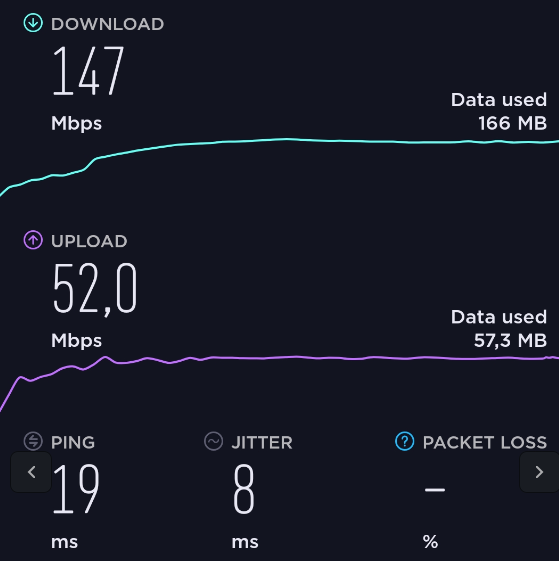 Things are good in the network when you get downlink and uplink throughput results like in the first screenshot on the left. Downlink speeds are in the 150 Mbit/s range, uplink is in the 50 Mbit/s range and the round trip delay time is around 19 ms. Unfortunately, this is not always the case. I’m a bit disappointed that I sometimes have to discover that in places such as large train stations with thousands of people in close proximity, networks are only on air with a single LTE carrier. No carrier aggregation and no small cell deployment anywhere to be seen.
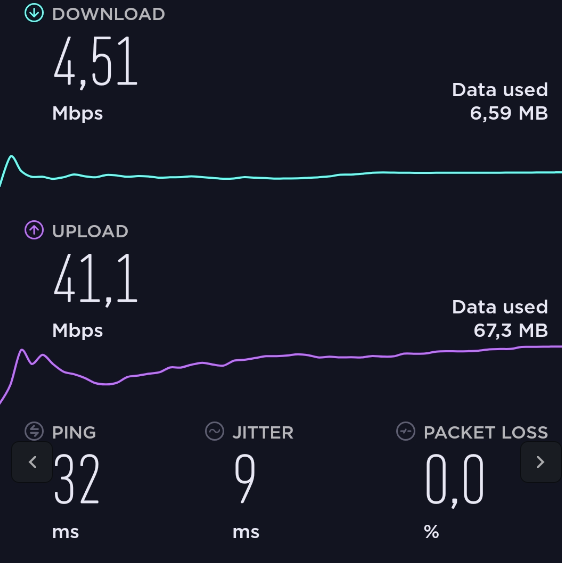 And in such places, networks are pretty much fully loaded and congested most of the time during the day. The second picture on the left shows a typical congestion scenario. Most people consume data on a large scale rather than sending a lot in the uplink direction, so my downlink speeds were around 4 Mbit/s while the uplink was mostly uncongested at 41 Mbit/s. 10 times the speed in uplink, a sight to behold.
Now you might argue that 4 Mbit/s is still quite o.k. in a train station, you can even watch Youtube videos at such a speed in HD quality. True, perhaps, but when you wait for a train and want to get things done on your notebook that involves larger data transfers, you really wished for more. Also, as people’s data consumption keeps rising, things will continue to go downhill. It’s definitely a place for a network upgrade at the earliest convenience.
But I’m writing this post because I thought the downlink throughput curve is quite interesting in the congestion scenario. What I consistently see is that for the first second or two, the network transfers data more quickly than for the rest of the transmission. Have a look at the second screenshot and the green line again. At the beginning of the speed test, my downlink data rate is much higher for a moment than for the rest of the data transmission. So I wonder if this is the scheduler making sure that reasonably sized web pages load fast while larger stuff is then averaged out with all other traffic? I have no idea if that is really the case but I do see this little hill consistently in congestion scenarios.
A fair bit of time ago the {gdns} package made its way to CRAN to give R users the ability to use Google’s (at that time) nascent support for DNS over HTTPS (DoH). A bit later on Cloudflare also provided a global DoH endpoint and that begat the (not-on-CRAN) {dnsflare} package.
There are actually two ways to make these DoH queries: one via an HTTPS GET REST API and the other via HTTPS POST queries that use DNS wireformat queries and replies. While the POST side of DoH is pretty standardized/uniform the GET/REST API side is kind of the Wild West. I wanted a way to have support for both wireformat and REST idioms but also not have to write a gazillion packages to support the eventual plethora of diverse DoH GET/REST API services.
I “solved” this by first augmenting my (not-on-CRAN) {clandnstine} package to support the POST wireformat DoH queries (since the underlying {getdns} library supports decoding wireformat responses) and creating a very small {playdoh} package which provided generic support for (hopefully) any DoH GET/REST endpoint.
I made the {clandnstine} package primarily to support making DNS over TLS (DoT) queries but it makes sense to combine both DoH and DoT functionality into that package. The problem is that the legacy platform most of y’all R users are on (i.e. Windows) makes using that package problematic. Therefore, by separating out the DoH GET functionality into a standalone package I don’t have to write a DNS wireformat pure R response handler.
There are performance and other differences between DoH and DoT. I suspect most DNS providers and also most open source DNS server will eventually support both DoH and DoT so which one you use will be up to your clients and use cases.
We’ll issue a few queries over DoH and DoT to a few servers to ensure we’re getting the same results.
library(clandnstine) # both of these are on sourcehut (~hrbrmstr/pkgname),
library(playdoh)     # or gitlab/gitugh (hrbrmstr/pkgname)

# DoT
x <- gdns_context()
gdns_query(x, "example.com", rr_type = "a")$just_address_answers$address_data
## [1] "93.184.216.34"

# DoH POST (wireformat)
doh_post("example.com", "a", server_path = doh_servers$quad9$url)$answer$rdata$ipv4_address
## [1] "93.184.216.34"

# DoH GET (rest)
doh_get("example.com", "a", service_path = doh_servers$securedns_eu$url)$data[1]
## [1] "93.184.216.34"
To support the, er, diversity of requirements across various GET/REST endpoints the playdoh::doh_get() function has an extra_params parameter which lets you specify any required extra REST query params. Both packages have an exposed global variable doh_servers which has both the URL and any required extra parameters.
As usual, kick the tyres, file issues and PRs where you like and if you do end up using either package drop a note in the comments.
Find me at the Fairmont hotel lobby bar at 4 pm on Monday (June 3).
I don’t expect a large group — not like the Micro.blog meetup or Automators meetup. So I think we can keep it simple and just meet there in the hotel. (It’s a pretty big lobby.)

painting “In Deep Conversation” by Irish artist Pam O’Connell
“It’s about negotiating the surrender of our whole way of living,” writes Dougald Hine. Dougald was the co-founder ten years ago of the Dark Mountain project he is now leaving behind, and he’s just written a poignant and thoughtful essay titled After We Stop Pretending, his Dark Mountain swan song. “Negotiating the surrender of our whole way of living” is his current answer to the question: What is the work that seems worth doing now?
I had the pleasure of meeting Dougald and Paul a few years ago in Totnes, and then fell out of touch with both of them. I sensed they were being sucked back into useless debates about collapse (what was being said about it; what could or should be ‘done’ about it), and I was disappointed that what I’d read of the contents of their writing anthologies never approached the brilliance of their original Manifesto. But I still agree with the original Dark Mountain mandate: to simply chronicle civilization’s collapse, through whatever our media of choice may be, without prescribing what to do about it, since nothing can, or need, be done. It is enough to witness it, articulately and compassionately.
It is enough to point out what is so obvious few can see it, as Dougald does again in this essay, writing from Sweden about his co-venture called Home, which is “a gathering place and a learning community for those who are drawn to the work of re-growing a living culture”, and reminding us of Vinay Gupta’s observation that “What you people call collapse means living in the same conditions as the people who grow your coffee”.
Still, all collapsniks keep getting asked the same question What do we do now?, so I thought it was interesting that Dougald has seemingly learned to sidestep that answerless question by instead addressing the more sensible question What is the work that seems worth doing now?
Dougald, like me, has become intrigued by the Extinction Rebellion movement, which seems a much younger, more radical, more intent and less idealistic movement than the Occupy movement, somewhat more akin to the Idle No More movement. He admires their energy, their doggedness, their Direct Action work that dares to say no to a culture that no longer serves us, and predicts “there will be other movements along soon, other kinds of rupture and other kinds of work to be done”.
I’m not so sure. Dougald’s new venture of “re-growing a living culture” resonates with the mandate of Extinction Rebellion to co-create a “regenerative culture”, and that of the latest generation of food system activists to promote “regenerative agriculture”. Sustainability and resilience are dead, apparently; long live “regeneration”!
I find reading about these ‘new’ terms depressing: it’s all about “improvement”, “design”, and (etymologically) “making things over”. Whereas permaculture and complexity science teach us about observing and learning humbly from nature and adapting accordingly, “regeneration” (literally “being born again”) is about humans once again front and centre doing things a better way (than nature?) When will we ever learn?
I think part of the problem with sussing out the work that seems worth doing now is that anyone’s answer will be contingent upon their personal story of what has been, of where ‘we’ are now, and of what the future will hold. As I have argued before, stories are convenient fictions. They are what we want to believe, not what is true — no story can convey what’s really true. 45, who is now certain to be remembered in history as the most incompetent businessperson in the history of the planet, is a master story-teller, spinning tales that so many desperately want to believe to be true that it is now quite conceivable that this incoherent, clueless sociopath will actually be re-elected. How can we persuade ourselves, after looking at his example, that changing our world is as absurdly simple as “changing our story”? Damn stories.
Dougald’s answer of “negotiating the surrender of our whole way of living” is likewise laden with his story, one that many affluent progressives obviously sympathize with and relate to. It’s a poetic and lovely statement, one I wish I’d come up with. But what does it mean? To what or whom are we surrendering exactly? What does it mean to surrender when you only do it when you have no other choice?
And given the chasm between ‘our’ way of living and our coffee grower’s, is it just us, the mostly northern and western beneficiaries of this obscene and destructive culture, who should be surrendering our way of living? Most of the world’s people would love to surrender their way of living, if there only were one on offer that was easier to cope with than the precarious way they’re living now.
So, I sense that, while the new question What is the work that seems worth doing now? is at least more honest and useful than the old question What do we do now?, my answer to both questions remains the same: There is nothing to be done. What we do each moment, in the deluded belief we have some personal choice about it, is the consequence of our conditioning and the circumstances of the moment, and it’s beyond our control.
I could spend hours talking with Dougald — he’s a brilliant, imaginative, and unusually articulate guy. But I wouldn’t be interested in talking about regeneration, or about surrender, even if we could agree on what those hubris-laden terms actually mean.
What I’d rather talk about, I think, is how we might hone our capacity for paying attention, which I think underlies all great art, as unbearable as paying attention in a world in collapse can often be. I’d rather talk about how we might foster an attitude of “contemplative gratitude” — reflection, acceptance, compassion, kindness and equanimity — that might enable us to be of more use to others in these challenging times, and might allow the great ‘works’ of art that are waiting for us to get out of the way so they can be expressed through us, to emerge.
And I’d rather talk about what JA Baker in The Peregrine might have been getting at when he said, after spending a lifetime trying to see the world as a falcon saw it, “The hardest thing of all is to see what is really there.”
There would be no plan of action, no ‘work plan’. Just a conversation. Fun, actually. Play, not work at all. Play, perhaps, that seems worth doing now.
Are macros still useful? I think yes. Macros give the users ability to programmatically script the content. This can be really useful in many situations to automate the stuff. Of course there are many reasons not use them. Historically they have been proven very dangerous. Specifically the documents that you receive through email or download from the web that have embedded macros. By default I consider any macro I receive from others as dangerous and wont run it. I usually use macros that only I have written or checked out from “official” git repo of the institution that I am involved with. With that caution, let’s proceed.
Macros are useful but writing macos in Basic is hard. Hence Python. In this how-to we will learn about the ways to
You can control the macro security from Tools-Options-Security-Macro Security. I always have the security at Very High or High. Very rarely I have it medium. And  never at Low . Even if I have the security level at High, Once I am done with the work, I make it Very High again. Also like I said I prefer manually running the macro than auto run and hence Very High works.
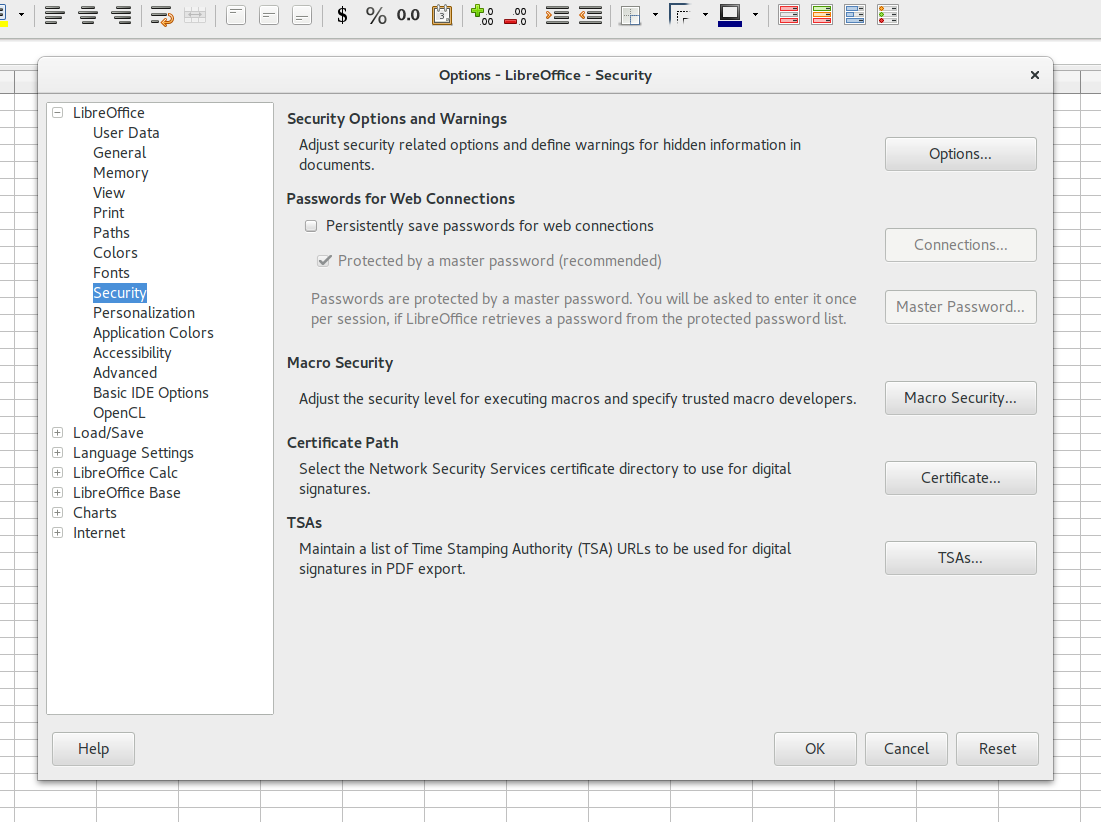
Libreoffice Option Settings
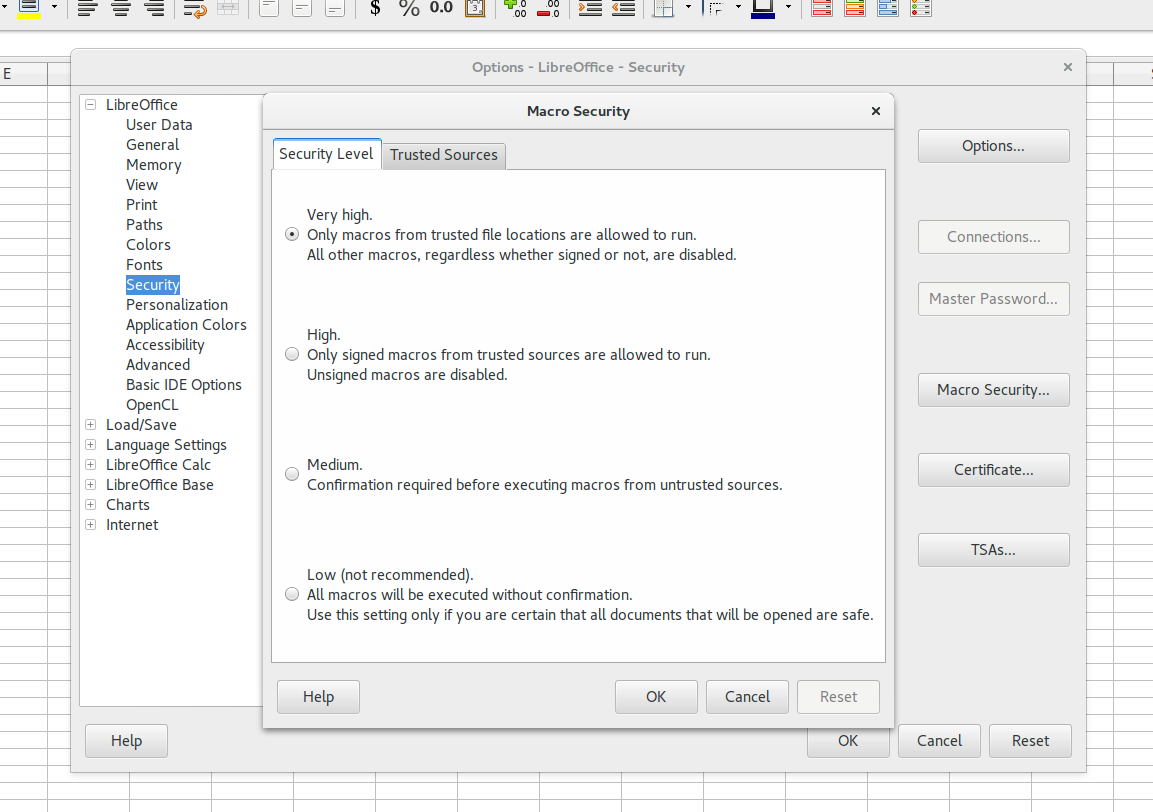
LibreOffice Macro Security settings
Libreoffice also allows you to have trusted paths on your computer. If a macro is opened from these paths then they are always executed. Its a good option if you like to run the macros often. This way you can have Very High Security level and also can run Macros without issues.
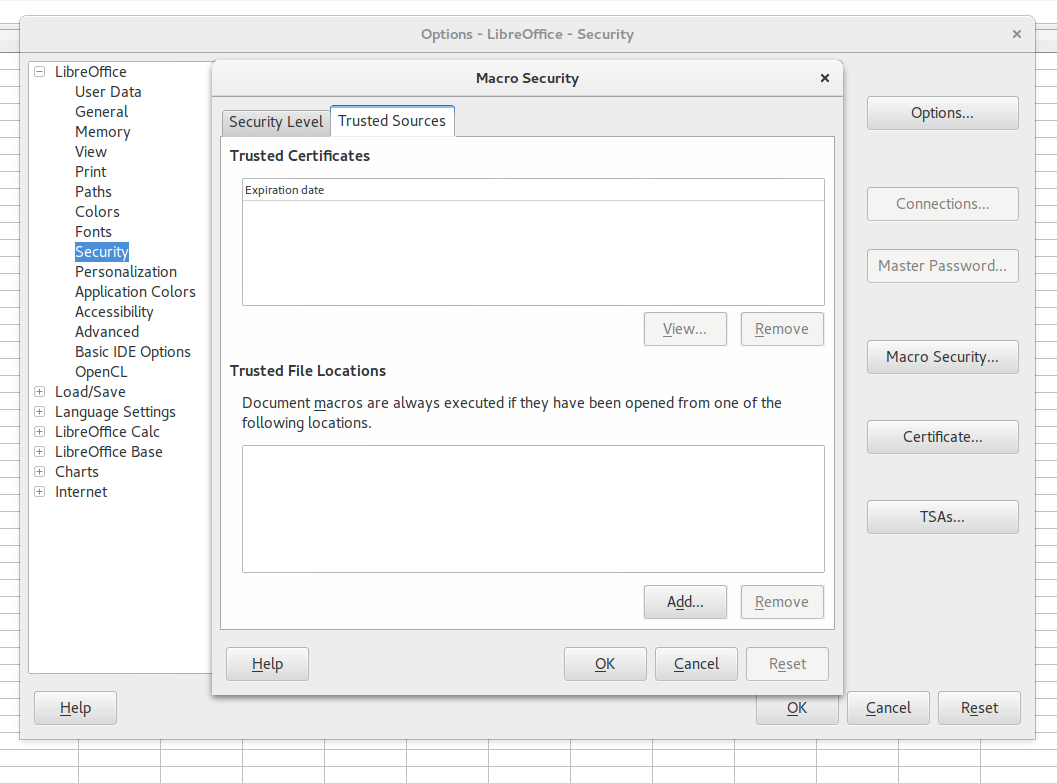
Macro trusted paths
LibreOffice comes with Basic Scripting built in. But to support any other scripting language you need to install the specific packaage. For python install
sudo apt-get install libreoffice-script-provider-python
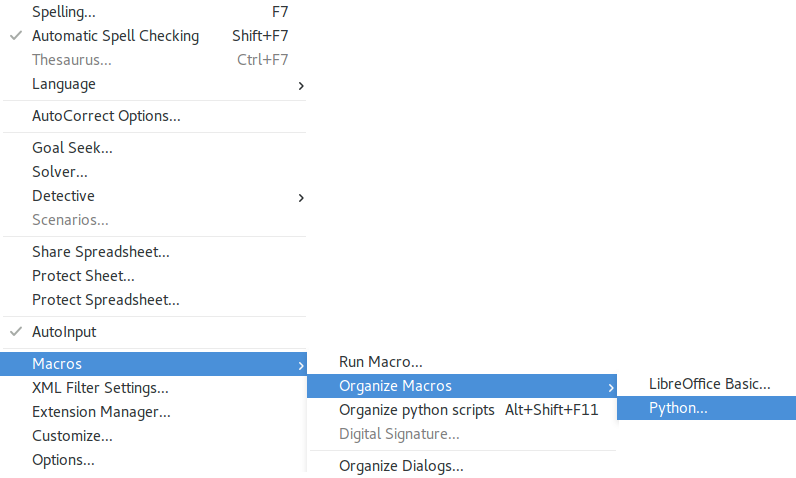
Python Macros Menu
Once you install restart your LibreOffice (Calc or Writer) and Go to Tools and Macros, you will find Python Macros.
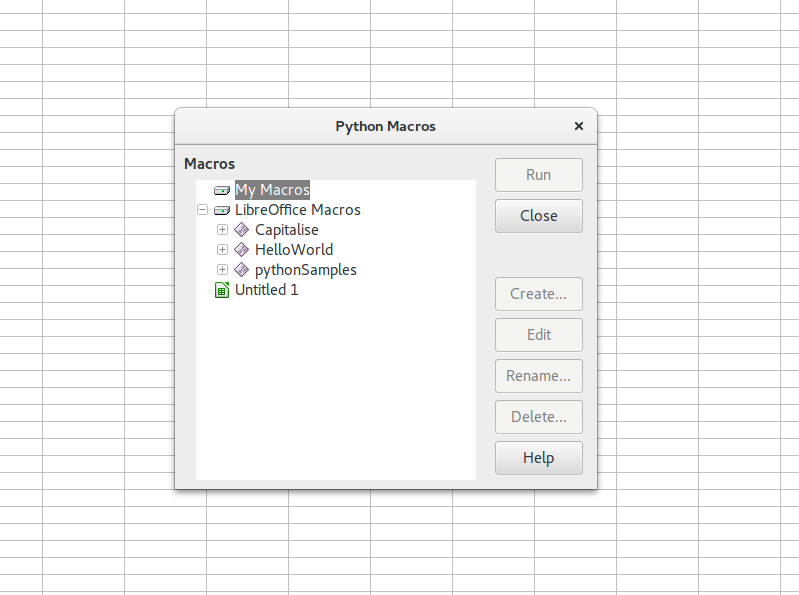
Python Run Macro Screen
Create python directory inside the user folder. Where your all system level scripts will be store.
~/.config/libreoffice/4/user/Scripts/python
Now you should be ready to write your first script. Whatever you write in the Scripts folder should appear in the Menu to run. But these default screens are not useful enough to write any practical scripts. We need access to python REPL, IDE and Debugger. This is where the community is great. There are great tools available as extensions. We will install couple of extensions to make it developer friendly.
APSO – Alternative Script Organiser for Python. Its a great tool for developing and managing the python scripts. It gives you console and debugger access etc
First install the APSO Extension from LibreOffice website. Restart the libreOffice to see the menu item Organize Python Scripts (ALT+Shift+F11) in Tools – Macros folder.
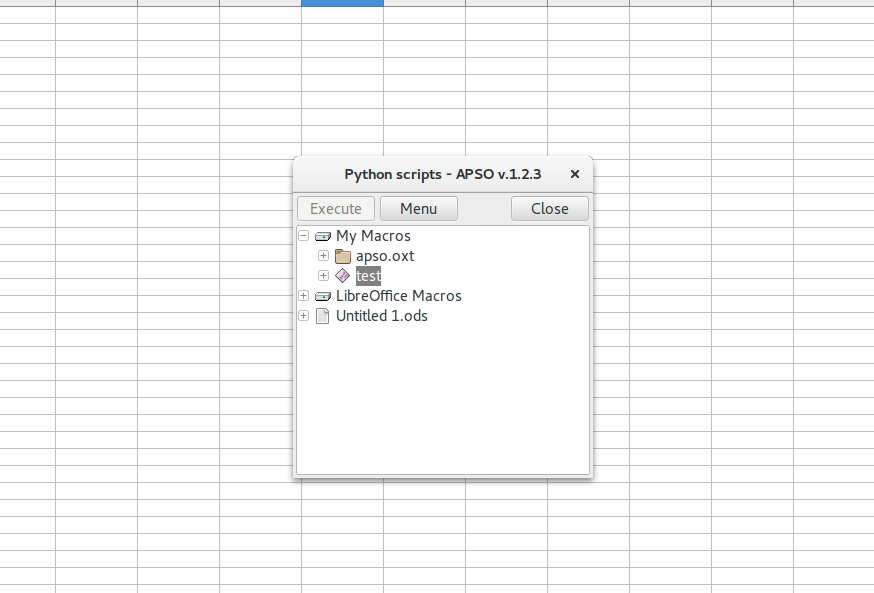
APSO dialog
Now you are ready to develop.
Let’s start developing like a Pythoner in REPL mode. Create a new LibreOffice Calc sheet. Save it some where. Create a sheet called welcome sheet. Now we will start a console and try to get the sheet name.
import uno
context = uno.getComponentContext()
desktop = context.ServiceManager.createInstanceWithContext("com.sun.star.frame.Desktop", context)
document = desktop.getCurrentComponent()
sheet = document.Sheets[0]
sheet.getName()
The code is above but we can run in REPL mode so we can experiment as we go. Launch APSO and click on Menu and Launch console. It should launch your standard Python console. Launch will also print Python Version. Make a note of this. This is the version you will develop for.
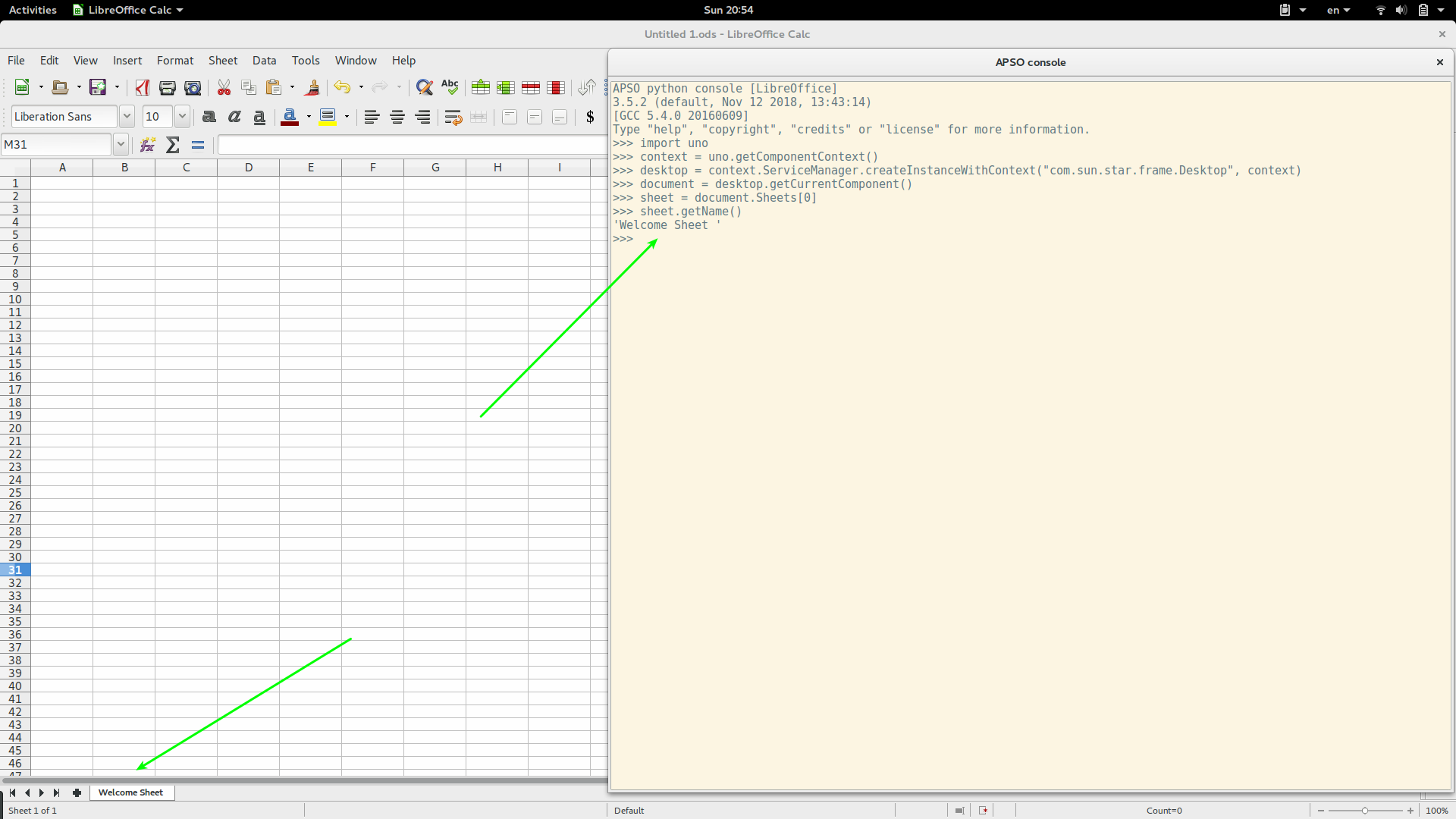
Python Console
Now that you have a script. Create a module – Edit and save it as def hello_world. APSO usually opens your default editor (GEDIT) for you to edit.
# -*- coding: utf-8 -*-
from __future__ import unicode_literals
import uno


def hello_world():
	context = uno.getComponentContext()
	desktop = context.ServiceManager.createInstanceWithContext("com.sun.star.frame.Desktop", context)
	document = desktop.getCurrentComponent()
	sheet = document.Sheets[0]
	sheet.getName()
You can also start debugger from APSO menu. It opens a window and works just like any other debugger. Its simple and easy to use.
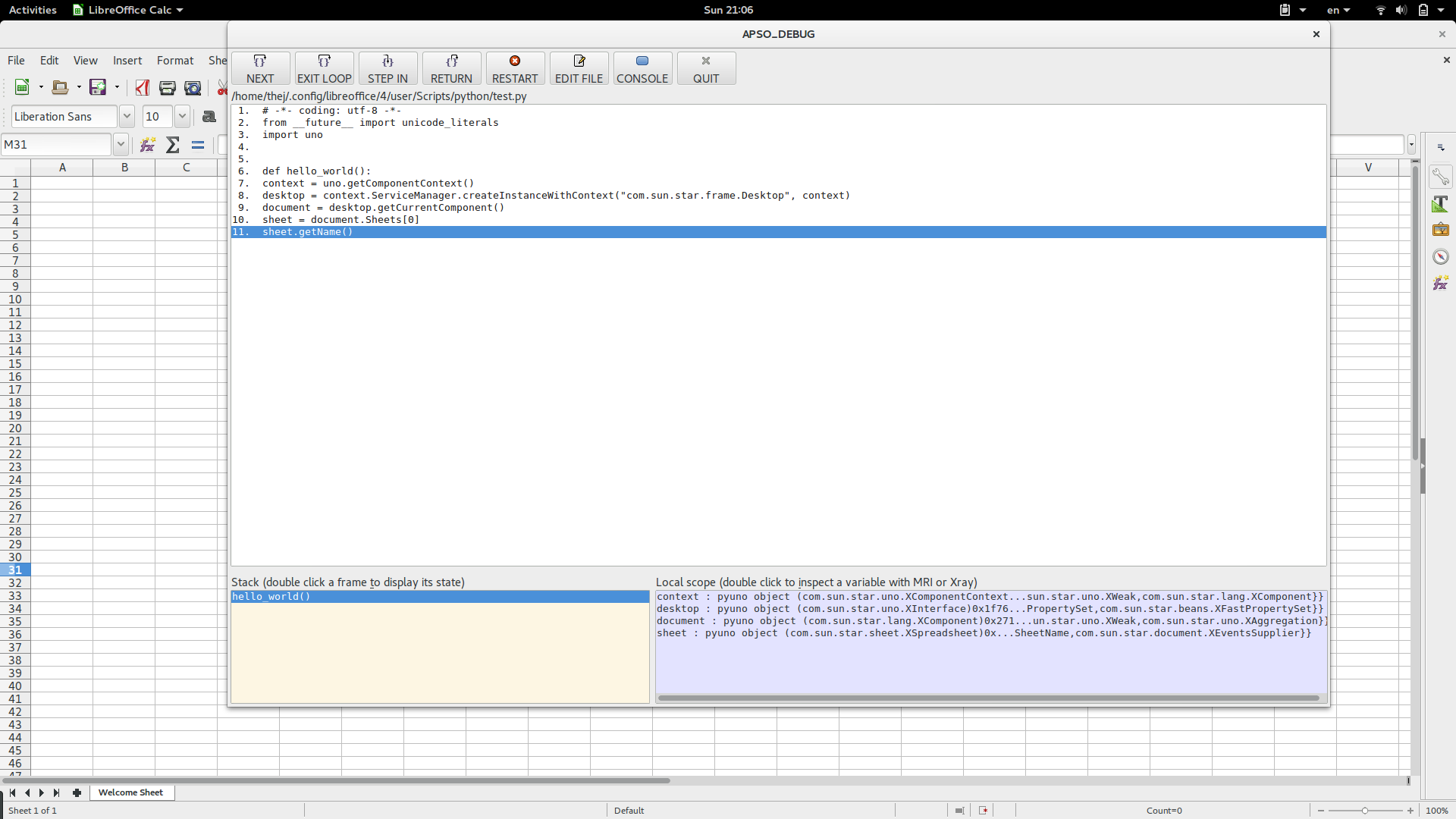
APSO debugger is simple and very friendly to use.
Also if you like to use a different editor then you can go to Extensions-APSO-Options and give the path of your favourite editor. I use sublime text.
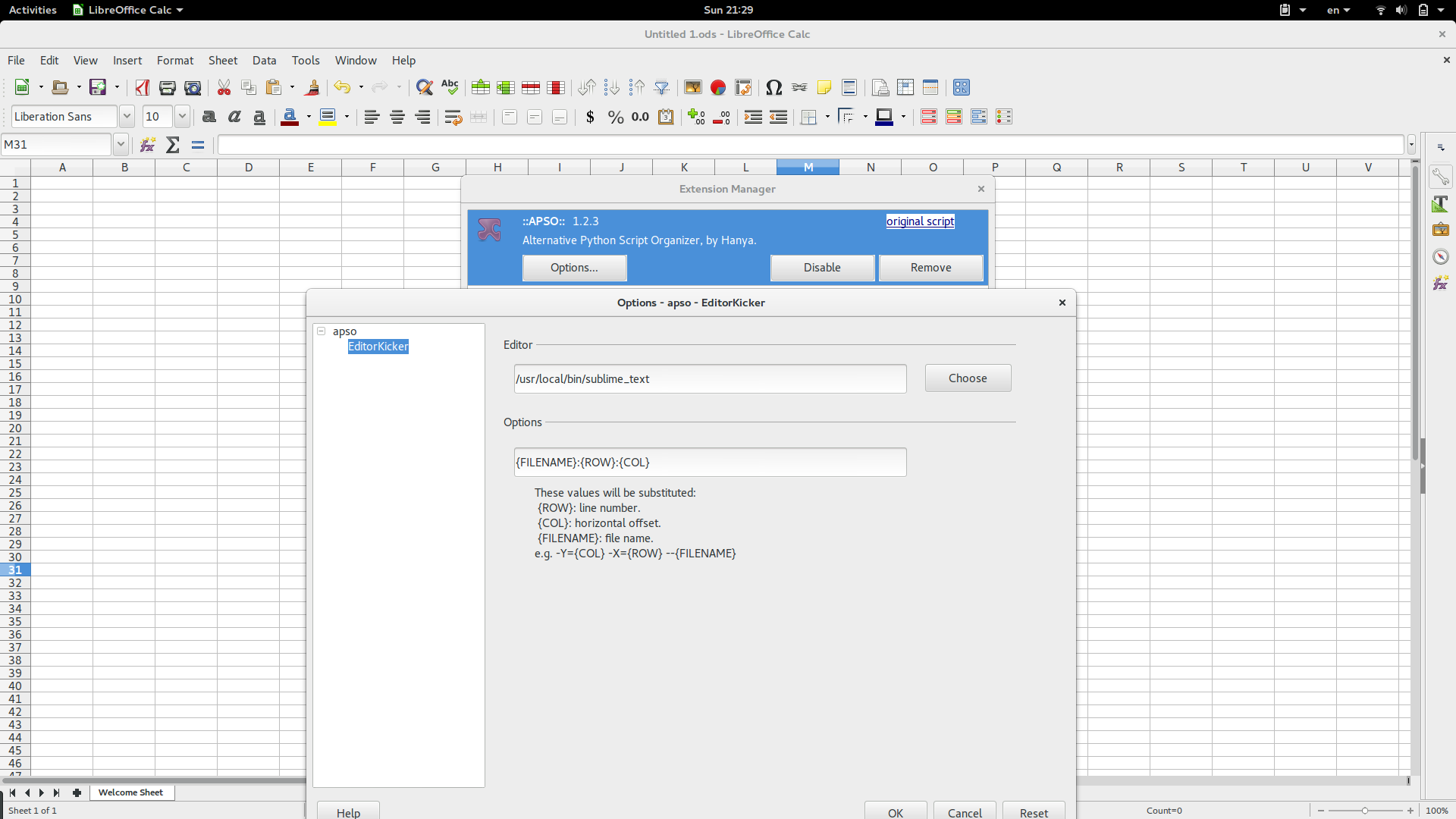
APSO custom editor settings
That’s it for this tutorial. You can also refer LibreOffice Wiki for more details. In the next tutorial we will explore the uno objects and document structure. We will also develop a real and useful Python macro.
In my position I probably shouldn’t have a favorite AWS product, just like you shouldn’t have a favorite child. I do have a fave service but fortunately I’m not an (even partial) parent; so let’s hope that’s OK. I’m talking about Amazon Simple Queue Service, which nobody ever calls by its full name.
I’d been thinking I should write on the subject, then saw a Twitter thread from Rick Branson (trust me, don’t follow that link) which begins Queues are bad, but software developers love them. You’d think they would magically fix any overload or failure problem. But they don’t, and bring with them a bunch of their own problems. After that I couldn’t not write about queueing in general and SQS specifically.

The perfect Web Service I mean: There are no capacity reservations! You can make as many queues as you want to, you can send as many messages as you want to, you can pull them off fast or slow depending how many readers you have. You can even just ignore them; there are people who’ll dump a few million messages onto a queue and almost never retrieve them, except when something goes terribly wrong and they need to recover their state. Those messages will age out and vanish after a little while (14 days is currently the max); but before they go, they’re stored carefully and are very unlikely to go missing.
Also, you can’t see hosts so you don’t have to worry about picking, configuring, or patching them. Win!
There are a bunch of technologies we couldn’t run at all without SQS, ranging from Amazon.com to modern Serverless stuff.
The API is the simplest thing imaginable: Send Messages, Receive Messages, Delete Messages. I love things that do one thing simply, quickly, and well. I can’t give away details, but there are lots of digits in the number of messages/second SQS handles on busy days. I can’t give away architectures, but the way the front-end and back-end work together to store messages quickly and reliably is drop-dead cool.
Why not entirely perfect? Well, SQS launched in 2006. Most parts of the service have been re-implemented at least once, but some moss has grown over the years. I sit next to the SQS team and know the big picture reasonably well, and I think we can make SQS cheaper and simpler to operate.
When it launched it cost 10¢ per thousand messages; now it’s 40¢ per million API calls. “Per-message” can be a bit tricky to work out because sending, receiving, and deleting makes three calls per, but then SQS helps you batch and most high-volume apps do. Anyhow, it’s absurdly cheaper than back then, and I wonder whether, in a few years, that 40¢/million number will look as high as 10¢/thousand does today.
So let’s go back to Mr Branson’s tweet-rant. He raises a bunch of objections to queues which I’ll try to summarize:
They can mask downstream failures
They don’t necessarily preserve ordering (SQS doesn’t).
When they are ordered, you probably need to shard to lots of different streams and keep track of the shard readers.
They’re hard to capacity plan; it’s easy to fill up RAM and disks.
They don’t exert back-pressure against clients that are overrunning your system.
Here’s his conclusion.
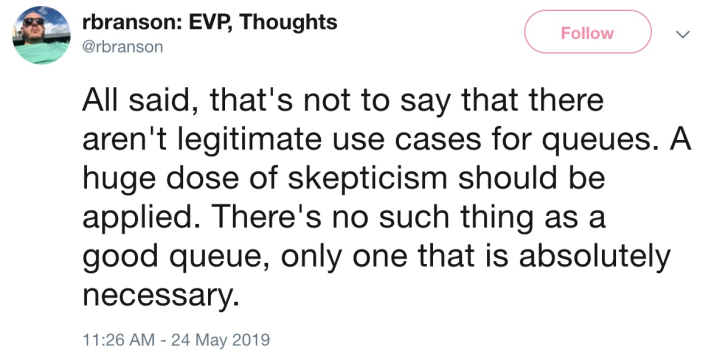
While there are good queues, I agree with his sentiment. If you can build a straightforward monolithic app and never think about all this asynchronous crap, go for it! If your system is big enough that you need to refactor into microservices for sanity’s sake, but you can get away with synchronous call chains, you definitely should.
But if you have software components that need to be hooked together, and sometimes the upstream runs faster than the downstream can handle, or you need to scale components independently to manage load, or you need to make temporary outages survivable by stashing traffic-in-transit, well… a queue becomes “absolutely necessary”.
The proportion of services I work on where queues are absolutely necessary rounds to 100%. And if you look at our customers, lots of them manage to get away without queues (good for them!) but a really huge number totally depend on them. And I don’t think that’s because the customers are stupid.
Mr Branson’s charges are accurate descriptions of queuing semantics; but what he sees as shortcomings, people who use queues see as features. Yeah, they mask errors and don’t exert back-pressure. So, suppose you have a retail website named after a river in Brazil, and you have fulfillment centers that deliver the stuff the website sells. You really want to protect the website from fulfillment-center errors and throttling. You want to know about those errors and throttling, and a well-designed messaging system should make that easy. Yeah, it can be a pain in the butt to capacity-plan a queue — ask anyone who runs their own. That’s why your local public-cloud provider offers them as a managed service. Yeah, some applications need ordering, so there are queuing services that offer it. Yeah, ordering often implies sharding, and so your ordered-queue service should provide a library to help with that.
More kinds of queues, I mean. AWS has six different ones. Actually, that page hasn’t been updated since we launched Managed Streaming for Kafka, so I guess we have seven now.
We actually did a Twitch video lecture series to help people sort out which of these might hit their sweet spot.
With a whole bunch of heroic work, we might be able to cram together all these services into a smaller number of packages, but I’d be astonished if that were a cost-effective piece of engineering.
So with respect, I have to disagree with Mr Branson. I’d go so far as to say that if you’re building a moderately complex piece of software that needs to integrate heterogeneous microservices and deal with variable sometimes-high request loads, then if your design doesn’t have a queuing component, quite possibly you’re Doing It Wrong.
It’s no exaggeration to say that @BryanMMathers changed my aesthetic life indelibly when he began visually animating @reclaimhosting’s soul. We love this guy! And he is an amazingly generous collaborator. https://t.co/eo14nVNNiN
— Jim Groom (@jimgroom) May 24, 2019
It’s been over 4 years since I met Bryan Mathers in Barcelona, and I regularly count my lucky stars for that chance encounter. While shooting the shit at a table with a selection of fine folks Bryan quickly sketched out what would be the iconic image of Reclaim Hosting, one that remains near and dear to my heart. The Reclaim Vinyl icon:

It’s so beautiful!
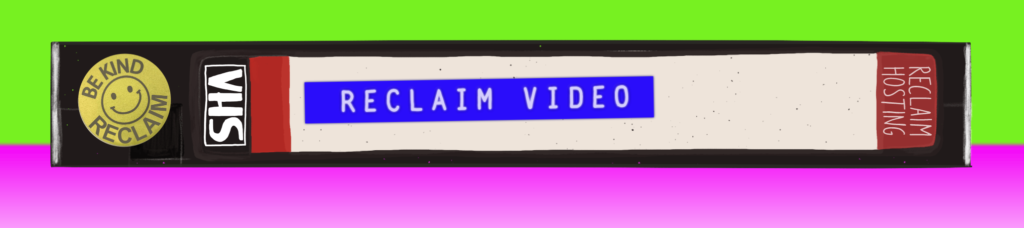
Since then we have collaborated on quite a few projects and he has been an absolute joy to work with. He is the best kind of art therapy for your organization  In fact, a believe it is the Reclaim aesthetic, which has evolved to the VHS tape, that has provided us the freedom to actually create fun projects like Reclaim Video and Reclaim Arcade with a certain amount of impunity. I personally think the power of art is woefully undervalued or overlooked in edtech, which is a shame given how much an organizing visual principle makes for good design. In fact, the coolest thing about Reclaim Hosting has been the ability to collaborate with artists like Bryan Mathers, Michael Branson Smith, and Ryan Seslow. And hopefully we will get the opportunity to work closely with Amy Burvall here soon as well, I think we can play with a whole Putin-inspired 80s Soviet revival In fact, Domains19 is very much premised on the idea that we should be focusing more on art to communicate what is happening with tech that everywhere surrounds us. it is a tall order, but in the spirit of #ds106 we are all artists, and we should spend a lot more time exercising this facility that everyone has access to.
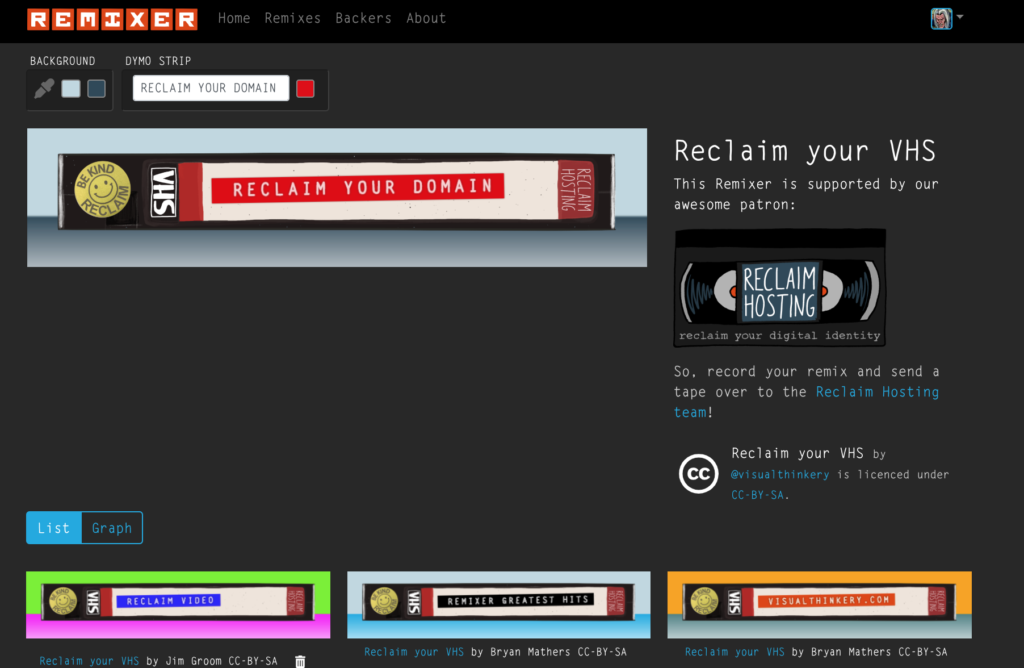
Anyway, I’ll step off my soapbox here for a second to plug our most recent collaboration with Bryan Mathers in which he has created the Reclaim VHS tape as remixable object in his amazing Remixer machine. He wrote a most kind post about the project, and we are happy to regularly support his work in all its wonderful emanations. In fact, you should too. In these troubled times I want to believe it is the artists, not the politicians, that will light the way forward and give is a vision to believe in, so I’m gonna double-down on that belief with my support, and a Remix or two

A version of this post was sent to our weekly newsletter mailing list. If you’d like to receive this in your inbox, subscribe here.
We have always valued the input of our sharp-eyed readers, who ask important questions and challenge us when we aren’t clear. That’s why our comments sections are often as helpful as the reviews themselves.
Our community managers, Erin Price and Janet Towle, wanted to share some of the ways our readers have improved our work recently. Here are some reader questions, suggestions, and corrections that spurred fixes to our reviews:
In our review of portable power stations, a commenter noticed a discrepancy between the stated capacity of these giant batteries and our test results. We consulted with an electrical engineer and discovered we had miscalculated the power factor of a fan. We adjusted said test results, and thankfully no picks were affected.
—With gratitude to Randy
A reader emailed to say that in our list of upgrades we’d make to any bathroom, the price of one of our recommended shelves was showing up as $4,338,870. Not exactly a deal. We discovered that it was due to an issue with how the information gets relayed to our buying buttons.
—With gratitude to Caleb
Several commenters alerted us to the fact that the top pick in our guide to dry food storage containers, the Rubbermaid Modular line, was discontinued. We now plan to test that Rubbermaid set’s replacement, the Brilliance line.
—With gratitude to three attentive commenters
A reader emailed to question whether we’d meant to write in our gear for travel guide that the Plantronics BackBeat Go 410 “can” match the Bose QuietComfort 20. Oops—we meant to say “can’t.”
—With gratitude to Julie
If you have something you want to bring to our attention, send a note to notes@wirecutter.com. We’re always listening and grateful that our readers help us do a better job.
Also, a tip for my fellow breadmaking nerds: If it pains you (as it pains me) to throw out your sourdough starter discard because you feed your bread starter high-end flour, try making more waffles and pancakes. Sam Sifton’s New York Times recipe is a classic. (The New York Times is Wirecutter’s parent company.) But I’ve also had great success with The Perfect Loaf’s recipe. I made some of the pancake batter, which calls for a half-hour rise versus an overnight resting period, and I added the rising agents (baking soda, baking powder, and salt) right before cooking to maximize the rise. I cooked them (very quickly) in our budget waffle iron pick, the amazingly inexpensive Cuisinart WMR-CA Round Classic, which I’ve been using for six years running now.
The Best Rear Bike Rack
Published May 20
Our Favorite Kids Beachwear
Published May 20
Father’s Day Gifts Your Dad Will Love
Published May 20
Streaming TV May Not Be the Cable Replacement You Hoped For
Published May 20
Leesa Mattress Review: An Honest Assessment
Published May 21
Saatva Mattress Reviews: An Honest Assessment
Published May 21
Iced Coffee at Home: Cold-Brew Coffee Makers vs. DIY
Published May 21
The Best Smart Sprinkler Controller
Updated May 22
The Best Ukulele for Beginners
Updated May 22
The Best Bike Basket
Published May 23
Purple Mattress Review: An Honest Assessment
Published May 23
Tuft & Needle Mattress Review: An Honest Assessment
Published May 23
Is Financing a Mattress Worth It?
Published May 23
Deals We Love From REI’s Anniversary Sale 2019
Published May 24
The Best Gaming Laptop
Updated May 24
Uber Visa Card Review: Is 4% Back on Dining Too Good to Be True?
Published May 24
Some good listening, watching, and reading you may like
“There is no bad time of day to eat! This ode to eating early should convince you that dinner while the sun is still out is not just suitable for the oldest among us.”
—Daniel Varghese, associate staff writer
“Do you watch Chernobyl on HBO and want to know more about the series? Check out the official Chernobyl podcast. Each week, writer and producer Craig Mazin discusses the true stories that shaped each episode.”
—Justin Tucker, senior software engineer
“Season 2 of Fleabag is out now, and if you haven’t seen this funny, bleak, dry British comedy starring Phoebe Waller-Bridge yet, you owe it to yourself to watch it. The way she incorporates talking to the camera is masterful and totally unique, especially in this new season.”
—Daniela Gorny, associate managing editor
Today was the 30th annual City of Toronto Group Commute. Here we gather at the High Park start point on a brilliantly sunny morning.

Albert recruited a few of us to cycle in turtle costumes, in reference to the agonizingly slow pace of bike infrastructure construction across the city.

This year’s shirts are red/pink.

The TPS explains corking just before we take off.

Revved up and ready to go.

And we’re off. That’s Meri from Gord Perks’ office in the lead.


This bike dad was riding a nicely accessorized Costco cargo bike.

Climb, John, climb.

Corking, TPS style.

The lead group.

We were handed off to a bike based unit at Dufferin.


Bromptons well represented today.

This fellow was not on delivery yet.

Alberto always shows up with an interesting art bike.

He has a show of his work that opens on June 1 at 7 pm and runs for the month. Most of the artwork will be fish related. @the mezz, 1546 Queen St. W.

Turning south at Yonge.


Running into old friend Mikey of WHPSC fame. He didn’t have to ask about the turtle costume as he knows how slow I am.

Off we go.


This is an interesting low step over bike.

Arriving at NPS.


Friends with Bromptons. Rumor is that there is going to be a Brompton Ride during the August 18 Open Streets TO event.


Perhaps the youngest Brompton owner in town.

Picture time with Mary Margaret.

Albert and Joe Cressy after having a few words.

Nice to see Geoffrey working on a bike that is not painted white.

Turtles listening to updates about the Bike Plan.

Inevitably, they are somewhat disappointed.

Turtle video linked below.
Is Toronto City Hall too slow in putting bike lanes on Bloor, Danforth, and Yonge? Our turtles tell the story in today’s race with the City of Montreal. pic.twitter.com/9c5al13Nd6
— Bells On Bloor (@BellsOnBloor) March 24, 2019
Some of us wanted to remind people that cyclists are still dying on the streets.

Bike Law continues to push for Vulnerable Road User legislation.

I was told that the legislature is voting on amendments to Bill 107 today, to bring in more in line with Bill 62, which was Jessica Bell’s private member’s bill (now tabled). Figures crossed.
Nice to see so many people out, but we still await the day when people feel safe commuting by bike without the benefit of police escort.
Having installed 2 WordPress sandboxes for #indieweb things, I’m now working my way through getting things working. First up is the original issue I had on my blog: authorisation headers.
What’s odd this time is that last time’s fix doesn’t work, even if my IndieAuth plugin reports “Authorization Header Found. You should be able to use all clients.” Using any clients, or servers like Aperture, Quill or Monocle all result in the dreaded 403 Forbidden error, saying “Unauthorised”.
What does work is logging into the Meso sandbox with this blogs credentials, by providing the url of this blog. That is a small win at least

Photo Caption: New favorite writing spot on this magical lanai  @maxkiesler
Photo taken at: Waikiki, Hawaii
Instagram filter used: Normal
Your writer is stuck. The piece seems hopeless. How can you get them unstuck? Probably by asking a question. It’s best to ask these questions in a conversation, in person or on the phone, rather than in editorial comments. That leads to a dialogue. It makes the writer think. And that leads to solutions to … Continued
The post 15 questions editors can ask to get writers unstuck appeared first on without bullshit.

Way back in 2016, in the era of iOS 9, I laid out the tentpole features I wanted to see come to iOS and the Mac. Now, three years later, so many things from that wishlist have become a reality that it's probably a good time to revisit the topics that haven't yet come to pass, and plan a new wishlist for the years to come. I originally planned this list to have a Developer/User split, but it became clear that the two go hand-in-hand; if you're doing complex things on iOS today, using the various automation apps, you are but steps away from needing the same things that developers do.
Much has changed since 2016 for development on the iPad, but much still stays the same. Apple introduced Playgrounds that year, and provided their very own Swift IDE for iPad. Playgrounds is fantastic, but you still cannot build and install an app using it, and you cannot mix and match C and Objective-C code with your Swift. It has no project structure, so all of your code has to take place in one file, which is fine for teaching material but not for anybody wanting to create something more complex. In 2017, Apple changed the App Store rules to finally enable programming apps to live on iOS without fear of being removed, albeit with unfortunate restrictions like not being able to display the output of an app in more than 80% of the screen. However, there is still no way for a third-party programming app to run code out-of-process, so any user mistakes can crash the app completely, and of course there's no way to build and install an app locally using one of these IDEs.

Pythonista for iOS.

There is still an incredible need for something to bridge this gap – a programming environment on iOS that lets you design, write, build, sign, and install an application without having to resort to using a Mac. No third party can build this, because Apple has App Store rules and platform restrictions that prevent anybody else from being able to. Thus, Apple has to be the one to build this 'Xcode for iOS' and make it as powerful as a developer might need, whilst also building the mechanisms into the OS to make it as safe and secure as possible. In 2016, many of the fundamental pillars necessary to build an Xcode like this didn't exist in iOS, like a user-accessible file system, drag and drop, multiple windows, and floating panels – but they do now (or will shortly, if rumors are to be believed).
Much like the file system, for a certain class of user the need for a command-line environment of some kind hasn't gone away as I'm sure Apple had hoped. Now, with Apple's own Shortcuts app, more users than ever are automating tasks on iOS – it makes perfect sense to provide something more for the power users that need it, especially if Xcode for iOS becomes a reality. After 2016, I went and built the sandboxed Terminal app I described in my post and populated it with the core BSD utilities from Apple's Darwin as a demonstration. We've seen Mosh, and OpenTerm, which do much of the same. Now, there's iSH, which goes as far as emulating an X86 Linux environment just to try and provide a working shell on iOS.

A beta version of iSH for iPad.
All of these apps are sandboxed and using public APIs, but only Apple is capable of building the real thing. I shouldn't have to install an X86 emulator on my iPad just to be able to curl a URL and untar it, or to run ffmpeg to convert a local video file. A sandboxed Terminal doesn't need to let you mess with the system or other apps, or provide ways to execute unsigned code or kill processes; it should be able to live in its own jail and let you do whatever you want inside it in much the same way as a GUI user gets to do whatever they want in Shortcuts while maintaining the safety and security of the OS.
Four years post-Apple Pencil, and still Apple provides no developer APIs for drawing, sketching, and markup. Every app has to reinvent the wheel if they want to have Pencil-based drawing, and while that may suit the couple of developers who have invested a lot of time and effort into their own drawing engines, it excludes every other developer who happens to have a good idea for a way to integrate sketching into their own app.

Apple has provided sample code in the past for this, sadly OpenGLES-based, but if you want anything more appropriate you're left to scour GitHub. Building a drawing engine that looks good and feels responsive at ProMotion's 120Hz is incredibly difficult, yet Apple has their own great drawing framework in the OS which they use in the Notes app that would be perfect to provide to developers.
There are several apps sitting on my shelf that would benefit greatly from a built-in API for a drawing view; I hope Apple gets around to this sooner rather than later.
Extensions have powered so many new APIs in iOS and macOS, completely obviating the plugin model with a robust out-of-process signed and sandboxed mechanism. However, developers cannot define their own extension points, and thus cannot use them to empower their own apps. A programming environment for iOS should be able to run its code in an extension – a separate process that can be securely scoped to just the task it's supposed to do, and if it crashes it won't bring down the host app with it. This is, of course, exactly how Apple's Playgrounds app works, but it isn't something third parties are allowed access to.
Similarly, you should be able to define your own UI-based extension point such that other apps can implement an extension that would show up inside your app. If you've ever used the Audio Unit extension point, this is exactly what it lets you do – presenting the custom UIs from various instrument or audio processing apps you have installed, in a region inside your own app's UI – but only if you're an audio app using CoreAudio.
There are many ways developers could innovate by providing their own extension points; in fact, so much of the custom URL ecosystem on iOS sprang up because there's no standardized way for apps to talk to each other or use functions from each other. Apple's own Shortcuts app, née Workflow, was born out of the custom URL ecosystem, and Apple realized its potential was so great that it acquired Workflow and built it into the OS. Your own extension point could be exposed as an action to the Shortcuts app, to let it call it transparently as part of a workflow, with or without UI, instead of the dosado between apps that custom URLs involve today.
It seems crazy that in 2019 you are still unable to track raw keyboard events on iOS – there is no way, barring using a private API, for an app to allow you to hold down physical keys as input (like WASD keys for a game), or as modifier keys (like holding Shift while resizing something in an app like Photoshop to maintain aspect ratio). A developer only knows when a key has been pressed, not released, or a shortcut has been invoked. This restriction seems so pointless today, and incredibly restrictive, affecting everything from professional creative apps to games. iPad needs robust hardware keyboard support, and shouldn’t be chained to a restriction formulated a decade ago for a very different world.
In much the same way, it’s time for robust mouse and trackpad support on iOS. With UIKit coming to the Mac, the framework has had to add a bunch of interactions like right click, hover, and scroll bars; why not bring this to iPad too so that users can benefit from it if they choose, or if their workflows demand it?
While controlling the UI with absolute coordinates is an important function of the mouse, let’s not forget too that mouse-capturing and relative movement is essential for games, remote desktops, and emulators. UIKit thus needs to let you capture the mouse cursor for your own needs, and not just to click things onscreen. Combine this with robust keyboard support and you would be able to play games like first-person shooters on iPad just like you can on a Mac or PC. Quake 3, anyone?
Android has supported mice for nearly a decade and it hasn’t done anything to lessen the touch experience, so there’s no need to worry about it doing so on iOS. For users or workflows that truly want or need a mouse, iPad will always be a non-starter until it supports one. Time for that barrier to go away.
There are times, however, when the computer I want on my desk is a 30” iOS drafting table. iPad is essentially a blank canvas – truer now that it has no front-facing buttons – and a bigger canvas begets entirely new experiences. I am dying to see iOS scale to desktop-sized workflows, with several apps onscreen at once. If not a desktop iOS device itself, why not an Apple-quality large external touch screen?
I would love a 15” iPad, too: I haven’t used a Mac laptop since 2013 – iPad has completely obviated that form-factor as it grows ever more powerful – and I can’t imagine ever going back, but for people like me Apple needs to offer an even bigger model iPad than 12.9”. The 12.9” iPad Pro already gets custom UIs with expansive layouts and three-column views, and UIKit on the Mac will behoove developers to create apps and layouts that can scale to 27” screens anyway. I'm deeply envious of Microsoft’s Surface Book (that is, of course, until you turn it on), and something along those lines running iOS would suit my needs incredibly well.
MFi might be gone with the USB-C iPad Pros, but developers need public APIs to write user mode drivers for anything you wish to plug in to your iPad. I want to be able to plug in my various EyeTV tuners and have the EyeTV app happily init them like it does on the Mac. I want my Game Capture HD60 to work on iOS, so I can record footage from my gaming PC and actually be able to edit and render it in the fastest computer in my house (the 2018 iPad Pro). I want to plug in my Raspberry Pi’s FTDI cable and view its serial output on my iPad without buying crazy MFi-based serial adapters. If I, for whatever workflow I might have, need to burn a CD or DVD, I should be able to plug in a disc drive and do so using any app designed for the task. This should "just work" in a way iPads simply can’t do today.
By now, this is on everybody’s wishlist. Need I say more? It is so long overdue that I can’t imagine Apple holding off much longer. But I’d like to go further...
I don’t just want to read my drives: I need to be able to manage them, too. Erase, partition volumes. Understand multiple file systems. Image them to a file, or apply a disk image to them.
The Mac’s pervasive disk image support is genuinely one of its crowning achievements. As a result, I have a ton of disk images from two decades on macOS. I use disk images every day; I create CD and floppy images to pass files to/from VMWare and Qemu. If user file system access becomes a core part of using iPad, we need the rest too. If I choose to never use a Mac again, Apple is telling me that all my old data is lost.
"AppleScript for iOS" was one of the items on my 2016 list, but the Apple automation landscape has shifted dramatically since then. Apple acquired Workflow, now Shortcuts, and the perception is that AppleScript may not be long for this world, slowly pushed out in favor of a sandboxed, secure, and modern extensions mechanism employed by Shortcuts. Scripting is still incredibly important, as evidenced by the hundreds of Shortcuts workflows used by anybody who takes iOS seriously for work these days. So if not AppleScript, then what?

Scriptable for iOS.
What I really want to see is a textual interface to Shortcuts that lets you do all the same things without having to navigate and fiddle with a UI filled with actions, so that the class of advanced user who prefers writing scripts can do the things they need. Scripts need a way to run "silently" without presenting a UI onscreen or jumping between apps. And scripting should be extended to the UI layer, letting developers build richly scriptable apps like they can today on the Mac with AppleScript. It is easy to envision Shortcuts scripting using JavaScript or Swift, and Shortcuts already has a scripting action that lets you run JavaScript on a webpage.
It's hard to see Apple supporting virtualization on iOS, as virtual machines require things like Just-In-Time compilation to execute arbitrary code in memory which violates one of the core foundations of the iOS security model, and burns through battery life like few other tasks. However, Apple provides WebKit on iOS, which also requires those special security exceptions to execute code in memory, and on macOS provides Hypervisor.framework, a lightweight virtualization system that lets developers build virtual machines easily.

Running mini vMac on iPad Pro.
I'm the kind of user who would love to see Hypervisor for iOS; let companies like VMWare and Parallels bring their expertise to the iPad, and offer approved ways to run ARM-based Linux or Windows (or, in a couple years, macOS perhaps). X86 emulation may be out of the question for now, but perhaps that won't always be the case; I'm sure I'm not the only developer with a library of VMs for everything, from DOS to NEXTSTEP to older versions of macOS and the iPhone SDKs. I can, of course, use these VMs on iOS today, with open-source apps like Bochs or mini vMac sideloaded onto my device, but because they don't have the ability to JIT, they have to run entirely using CPU emulation which is significantly slower and burns more battery.
Finally, that brings me to entitlements. The entitlement system in iOS is what allows Apple to have fine-grained control over which developers can access which features; if you wish to use iCloud in your app, your app must be signed with an iCloud entitlement, with similar requirements for Health, Home, Apple Pay, and many other parts of iOS. CarPlay, for example, needs a special entitlement that isn't given freely to developers – in fact, you have to apply to Apple and get your app idea approved before they'll even let you test the feature in your app. If an app or developer is ever found to be abusing their privilege, their entitlements can be revoked by Apple, and the app remotely disabled. Thus, entitlements are a great way for Apple to entrust developer partners with special access to features that other developers can never use or misuse.
With that in mind, Apple could entrust e.g. Google, Microsoft, or Mozilla with the entitlements they need to use their real browser engines on iOS instead of WebKit – real Chrome, real Firefox. VMWare and Parallels could be entrusted to build virtual machines or emulators, without leaving this open as an attack vector for malicious third-party apps. Disk utilities could be permitted to partition disks, IDEs could be permitted to run background processes, install apps, or attach a debugger to running apps. So many of these things, given freely to developers, would arguably make iOS a much less safe place (read: just as powerful as a desktop computer), but with the entitlement mechanism in place Apple could still keep the control they want and not let it get out of hand. Seeing past the inter-company politics, iOS is going to need methods to do all of these things eventually, especially if the iOS app ecosystem is to supplant the Mac app ecosystem in due course. A Mac without the ability to build and install apps, or attach a debugger, would be unimaginably crippled.
We've come a long way from the fear that enabling third-party apps on iPhone will bring down the cell networks; trying to actively build the future on iOS today is like having your hands tied behind your back. iOS has for too long relied on the fact that the Mac exists as a fallback to perform all the tasks that Apple isn't ready to rethink for its modern platforms, but that doesn't mean these problems aren't relevant or worth solving. This has left us in a situation where iOS moves forward with new ideas, but the Mac stands still, needing to keep compatibility with the iOS ecosystem whilst tiptoeing the line between keeping things as they are, or losing the freedom and power of old systems for the active development and enthusiasm of the new. The correct path forward is not to simply revert to the mechanisms available on the desktop, with all of the baggage that comes with that, but to rethink all of these things to fit in a modern, secure world.
iOS has for too long relied on the fact that the Mac exists as a fallback.
iOS is exponentially better with a working Files app, with drag and drop, with automation, background tasks, and split-screen multitasking. iPad too, with a stylus and hardware keyboard.
What iPad does so well is completely hide its complexity from the user who doesn't need to know about the mechanics of the system beyond tapping an app to open it, and swiping the Home indicator to close it. All of these things, added to iOS, haven't made the OS harder to use. They're so transparent that I'm sure most users don't even know they exist, but for the users who do need them they have become essential tentpoles of the iOS experience.
With UIKit on the desktop, it's time to revisit just what an iOS app can and can't do; after all, they're no longer "iOS apps": they're just "apps" now.
Club MacStories offers exclusive access to extra MacStories content, delivered every week; it's also a way to support us directly.
Club MacStories will help you discover the best apps for your devices and get the most out of your iPhone, iPad, and Mac. Plus, it's made in Italy.
Join Now
Earlier this spring, in its last major update, Ulysses added Split View editing on the Mac, a feature that was thoughtfully implemented and which I immediately wished existed on iPad. Today, in version 16 of the app, Ulysses on iPad gains its own powerful split view editor, plus adds a new native publishing option: Ghost joins the existing WordPress and Medium integrations.
Nine years into the iPad’s life, one way the device continues to be underutilized, particularly considering its screen real estate, is that most apps can’t display more than a single document on-screen at a time. Although many iPads have screens as large as common Mac laptops, Apple doesn’t yet provide a standard way for apps on iOS to adopt support for multi-document display modes. Because of that, while developers can always roll their own solutions, most don’t bother. Off the top of my head I can only think of two other apps I’ve ever used that support displaying multiple documents on iPad. Ulysses makes three, and its implementation is easily the best one to date.
Ulysses’ split view mode works very similarly to the iPad’s own Split View feature of iOS, whereby two apps can share the iPad’s display in an adjustable split. The similarities start with how split view is engaged in Ulysses. When working in a single sheet, you can tap and hold a second sheet in the sheet list sidebar and drag it away using drag and drop; moving it to the right edge of your first sheet and dropping will load the second editor on the right side of the screen, while you can also drop it to the left of your first sheet to open the new sheet on the left. Anyone who has used iOS 11’s multitasking system, which itself centers around drag and drop, will feel entirely at home with Ulysses’ identical implementation. In addition to using drag and drop though, Ulysses’ second editor can also be toggled on and off from the app’s display settings (the Aa icon in the top-right corner), or via a keyboard shortcut (Command-Option-3).

When you first open a second sheet in split view, Ulysses evenly splits the display 50/50. If you’d like though, you can adjust that split to be 66/33 or 33/66, such that one sheet or the other takes up the majority of the screen. Again, this feels exactly like iOS’ own system feature. You even adjust the split in the same way, by grabbing and dragging the dividing element that sits at the split point. It’s remarkable how much Ulysses’ team was able to do to make split view feel entirely natural for users familiar with iPad multitasking.
There are ways Ulysses’ system is actually better than what Apple has done in iOS, however. I already mentioned the ability to toggle a second editor with a keyboard shortcut; there’s another shortcut1 that enables jumping back and forth between active sheets, a feature iOS would do well to adopt for cycling which on-screen app is keyboard-active.
Ulysses’ split view is a perfect tool for working in two documents at once, as I expect to do a lot going forward. It has a secondary benefit though: you can use it to edit a sheet on one side of the screen while viewing an export preview for that sheet on the other side. You can do this for any of the supported export types, such as Publishing, PDF, HTML, and more. The split view export preview is engaged by long-pressing the share icon in the sheet you want to preview, then hitting ‘Export in Second Editor.’ The beautiful thing about the export preview is that it updates in real-time as you continue working in the editor, so you can see what the final product will look like right as you work, without any delay or need to view a preview later. For me this means I can see, as I write, what a Ulysses article will look like when published on MacStories thanks to a custom MacStories publishing theme.

The only aspect of split view I’ve been disappointed by is that you can’t use it in combination with iOS’ own Split View feature.2 Meaning, in order for Ulysses to display its second editor, it has to be the only app you have on-screen; adding a second app via Split View will immediately close Ulysses’ second editor. Fortunately the app remembers its second editor state, so if you need to put a second app in Split View for a bit, then go back to just Ulysses on-screen, Ulysses will remember its former split view state from the last time it had the whole screen to itself, and adjust accordingly. Also, it’s worth noting that Ulysses intelligently handles which editor it keeps on-screen when a second app is added – whichever sheet is currently active remains available, while the inactive sheet is hidden.
Limiting split view to only work in full-screen is unsurprising, as Apple’s own Safari works the same way with its split screen feature for viewing two websites at once. It would still have been nice, particularly on the 12.9-inch iPad Pro, to have a second app on-screen as needed, but doing that with Slide Over is a fair compromise.
I don’t use a Ghost site, so I haven’t been able to try the new Ghost publishing option that’s been added in this update; however, based on my years of experience using the WordPress publishing feature, the addition of Ghost support will be a boon to users of Ghost sites. Ulysses’ native integrations with publishing platforms is a feature I would have a really hard time giving up if I ever switched to a different text editor.
We’re right on the heels of WWDC, where Apple will hopefully announce iOS 13 features that make it easier for developers to add things like document split view to their own apps. I’m really glad Ulysses didn’t wait for that possibility though. What’s been accomplished in Ulysses’ split view demonstrates how much more the iPad is capable of than current iOS frameworks enable. I love how Ulysses sticks with system norms for engaging split view, so that users don’t need to learn a whole new system to get the most out of the app. At the same time, enhancements like keyboard shortcuts and a powerful preview mode make this a truly standout update.
Ulysses was already my favorite writing app, but version 16 cements it as one of the most powerful apps on iPad.
Club MacStories offers exclusive access to extra MacStories content, delivered every week; it's also a way to support us directly.
Club MacStories will help you discover the best apps for your devices and get the most out of your iPhone, iPad, and Mac. Plus, it's made in Italy.
Join Now
The document is behind a spamwall (here's a direct link that might get you past it, and here's a direct link to the 21 page PDF) and they've trademarked the term 'social assessment'. But here's the feature: "Social Assessment leverages modern workplace learning capabilities and experiences to help organizations improve employee engagement by facilitating regular, constructive feedback from stakeholders across the enterprise-including experts like managers, coaches, and mentors as well as peers-and encouraging iterative employee improvement." The main thing happening here, though, is that D2L has devised a strategy to move into corporate learning (where there's no teachers marking papers).
Web: [Direct Link] [This Post] The Realme 3 Pro comes with a 16MP shooter at its rear which is similar to the one found on the OnePlus 6T. It might not be as impressive as the 48MP Sony IMX586 sensor found on the Redmi Note 7 Pro but it can still hold its own. If you own a Realme 3 Pro, you can further improve the overall photo quality by using the modded Google Camera app.
Continue reading →
The Realme 3 Pro comes with a 16MP shooter at its rear which is similar to the one found on the OnePlus 6T. It might not be as impressive as the 48MP Sony IMX586 sensor found on the Redmi Note 7 Pro but it can still hold its own. If you own a Realme 3 Pro, you can further improve the overall photo quality by using the modded Google Camera app.
Continue reading →

It looks like Google is working on a new way to incorporate Android apps in Chrome OS, despite the search giant’s claim it has no plans to do so.
9to5Google uncovered a few bits of evidence on the Chromium Gerrit — an online collaboration tool for sharing, editing and merging code into Chromium — that point to a new way to handle Android apps. Dubbed ‘ARCVM,’ the new app handler borrows heavily from how Chrome OS handles Linux apps.
Currently, Chrome OS uses custom tools developed by Chromium developers called ‘crosvm’ and ‘Termina’ to run Linux apps inside a virtual machine (VM). The benefit of this is security, as a VM isolates the application from the rest of the Chromebook system, so if something goes wrong, Chrome OS isn’t affected.
However, there are some drawbacks as well. For one, apps inside the VM currently don’t have access to the GPU, so visually intensive tasks like gaming don’t work well. Further, using a VM can reduce performance.
As for Android apps, Chrome OS uses the Android Runtime for Chrome (ARC++) to run the apps. However, the Chrome team knows ARC++ is an imperfect solution with some security issues.
If you haven’t pieced it together yet, ARCVM stands for ARC Virtual Machine, and some of the Gerrit code suggests it’ll leverage crosvm and Termina to run Android apps in a VM. This should solve the security issues with ARC++.
Another bonus would be the ability to more easily sideload apps, as well as improve testing for developers. Like with Linux apps, if anything went wrong, users could just close the VM and not worry about adverse effects to the system.
ARCVM, however, is very much a work in progress. While the prospect is exciting, Google could cancel development before it sees the light of day.
Source: Chromium Gerrit Via: 9to5Google
The post Google may be working on a new way to run Android apps in Chrome OS appeared first on MobileSyrup.
It’s Bike to School Day, so this seems appropriate – from Dianna.
Somebody is training these kids right. Today while riding around Kits, I saw a little girl on her bike, maybe all of three or four years old, following her mom along the bike/pedestrian walk (’cause there are no separated bike paths). Mom called back to her: “you’re doing such a great job.” And the young rider responded, “I watched where I was going, and you looked at the sky.”
Not them, but this pic from Michael Alexander seems right:


| mkalus shared this story . |
Seven months after the legalization of recreational cannabis, Garnet Amundson's worries have not abated.
Amundson is chief executive of Calgary-based Essential Energy Services, with nearly 400 workers, including 350 in safety-sensitive roles in the oilpatch.
Topping his list of concerns is having employees who can pass any type of drug test on any given day and arrive at work without any impairment.
Not only does his company drug test employees in certain instances, but the staff may also be tested when they perform work at a facility owned by a different firm. In that case, Amundson said his workers have to meet the standards of the other company.
"Employees have to be completely clean at all times, so they can access these top customers and get on to their job sites," he said.
It's a situation underscoring the human resource and legal issues created by the legalization of cannabis for industries where any sign of impairment is closely monitored and safety is a priority.
The oilpatch, for example, has worked hard to get a handle on substance abuse for several years and the legalization of recreational cannabis presents another challenge for companies dealing with the often thorny issue of drug testing.
Testing for cannabis is not as advanced as using a breathalyzer to gauge someone's impairment from alcohol. A urine test for cannabis, for instance, can detect THC, but can't necessarily judge a person's level of impairment.
"I think people maybe have been a bit misinformed believing that there is a completely accurate and reliable way to test for impairment with cannabis," said Amundson.
No wonder the legalization of cannabis is proving to be a logistically challenging for Amundson and other employers across the country.
Legal grey areas and a lack of definitive tests mean "complete abstinence from some of these substances is required," Amundson said.
Watch as industrial firms deal cannabis legalization:


CBC News Calgary
Legal use of recreational cannabis may make it harder to find workers for the oilpatch, says Garnet Amundson
    Playback Status: ready

Assigned test group: None

Identifier: mediaId 1527309891889

Asset: Undetermined

Bitrate: Undetermined

Streaming URL:

Events Log:
Impairment is a concern in many industries such as oil and gas, forestry, mining and transportation, where workers are at a high risk of injury.
Other companies in different sectors also continue to grapple with the legalization of cannabis and, in particular, how to respect a worker's right to consume the substance while also ensuring no one is impaired on the job.
"It's a challenge for all employers in Canada, but especially small and medium-sized businesses that don't have the financial or technical resources to manage this themselves," said Tim Salter with the Drug and Alcohol Testing Association of Canada.
The major active ingredient in cannabis, tetrahydrocannabinol (THC), can be found during urine testing up to 30 days after a worker uses cannabis, said Salter, but that only provides so much information.
"There's really no way for employers to reasonably screen for impairment," he said, "outside of doing a blood test which is not going to happen at the workplace."
That's where legal issues can occur. If there is an accident on a job site, a company is allowed to do post-incident drug testing. The urine sample may find traces of THC, but again, the test can't judge the level of impairment. That's why a company may not be able to say whether the worker was at fault because of cannabis or not, since there is no definitive proof that THC contributed to the accident.
"Employers are just forced into this corner of promoting abstinence," said Salter. "It's most definitely a mess because the governments really haven't done a great job of preparing the industry for the legalization of cannabis."
Eventually, Salter said the court system will have to decide on many of the issues cannabis presents for employers.
One workplace dispute was in front of the Newfoundland Supreme Court recently focusing on a construction labourer who was working on the Lower Churchill hydroelectric project in Labrador.
The man was prescribed cannabis to manage pain due to Crohn's disease and osteoarthritis, since other medication wasn't as effective. His company tried to accommodate his use of cannabis, but couldn't.
Ultimately, the construction company wouldn't give the man any work because of the risk of impairment in the safety-sensitive job site. The province's top court agreed, pointing to how accommodating the worker "would amount to undue hardship" for the company.
Each case is different, but the court ruling shows how companies could refuse work to those who use cannabis, medically or not, depending on the dose and the type of job.
So far, the legalization of cannabis has not contributed to an increase in workplace accidents, according to Murray Elliott, the chief executive of Energy Safety Canada, although it's too early for reliable statistics.
"There has been very little impact or change in impairment in the workplace," said Elliott.
While testing techniques for cannabis are evolving, Elliott said the accuracy is good and there are general guidelines companies can follow to gauge what level of THC in someone's body is a significant risk of impairment.
"There is not necessarily a direct link between the levels of cannabis that show up in testing and whether there is impairment or not. It's really only a risk of impairment," he said.
In preparing for legalization, companies took a range of approaches, such as updating their existing drug and alcohol policies.
Sinopec Canada, an oil and gas producer, spent nine months before legalization to create a policy that would respect the rights of workers, legally protect the company, and also ensure a safe workplace.
Kara Bennik, a human resources advisor with the company, said they set out to be as informed as they could about the issue, consulting different departments to incorporate a range of views.
"We're still evolving and growing our program," said Bennik. "The reality is that future legislation is going to continue to come in."
Watch as an energy industry official discusses reliability of cannabis testing:


CBC News Calgary
Kara Bennik, with Sinopec Canada, on the reliability of current testing methods for cannabis
    Playback Status: ready

Assigned test group: None

Identifier: mediaId 1526838339522

Asset: Undetermined

Bitrate: Undetermined

Streaming URL:

Events Log:
Considering the struggles of the oilpatch in recent years, the sector hasn't hired too many workers, but when that happens, Amundson, with Essential Energy Services, worries there will be fewer qualified applicants than before because of the pre-employment drug test.
Already during some hiring, Amundson said the applicants are asked at the end of their interviews if they would pass a drug test.
"They look at us and say most of the time, 'what do you mean?' I don't think a lot of the time we get an unequivocal 'Absolutely!'"
Often, he said they ask if they can come back in a few weeks.

How do you choose the right solution when theres too much guidance for any one person to make sense of? Bonnie Smith Whitehouse, an English professor at Belmont University in Tennessee, has a marvelously simple answer. Go back to the classics. She offers this Latin phrase for your consideration: Solvitur ambulando. Loosely translated, this means, It is solved by walking, and by it Whitehouse means practically anything.
Walk with me.
