Shared posts

25 Jun 06:29

Privacy Without Exclusivity Rarely Makes Sense

by Richard Millington

There’s little point in having a private community if it’s not exclusive.

You lose all the benefits of an open community, without the gains in intimacy, privacy, and sense of belonging.

Exclusivity means members are either invited or have to apply. It also means you reject the majority of applicants (people soon realise when everyone is accepted).

Exclusivity means there is a barrier applicants have to cross (skill acquired, experience gained, track-record established, contributions made, relationships nurtured, payment processed etc…) to be one of the whole group.

The purpose of having a private community (or area of the community) is to enable members to share information which might harm them if made public, create a sense of belonging, or ensure a high standard of contributions.

If your private community isn’t doing that, why make it private at all?

25 Jun 06:29

When the ‘Punishment’ is a Benefit: Plain Text

by Ton Zijlstra

I mentioned it here six months ago, that US National Public Radio (NPR) provides a GDPR based choice: get tracked or get text.

If you don’t agree to their tracking ….

[We] use cookies, similar tracking and storage technologies, and information about the device you use to access our sites to enhance your viewing, listening and user experience, personalize content, personalize messages from NPR’s sponsors, provide social media features, and analyze NPR’s traffic. This information is shared with social media services, sponsorship, analytics and other third-party service providers.

…then you have the option to see their content in plain text, which is hosted on a separate subdomain, text.npr.org.

I find I only access NPR now through plain text. The pages are made from straight forward HTML, no loading of any other files or snippets, and are therefore as fast as can be. A breath to read, no distraction etc.

NPR’s plain text news page

NPR plain text article

Only HTML, here NPR’s news page in full. No frills, so very fast

The only downside might be that without imagery, self-starting videos, distracting calls to action and ads, you might notice that a lot of news stories are without much informational content. You can’t blame NPR for that, because news itself as a format has worn a bit thin. GDPR and AdTech (not advertising) are at extreme odds. I like the look of AdTech being stripped away, even if it makes the early 1990’s web fashionably Retro.

I wish more sites would offer the ‘get tracked or get text’ option.

25 Jun 06:28

Multiple machines, multiple OSs, narrowing apps? - washere


Alexander Deliyannis wrote:
Thanks for the feedback; I have no doubt about the cloud trends. It's an
>irony that this is happening as more processing power is available in
>one's pocket than ever before.
>
>
>washere wrote:
>>I read a couple of tech news articles last month about leaks from MS,
>>you'll have to Google around yourself if interested. Basically they're
>>thinking of killing off office and making office only cloud based, 365
>>version. But goes further, they're thinking of migrating Windows from a
>>desktop os to a cloud OS. Pre-empt Chromebook popularity. Apparently
>not
>>caring about some areas of third world, rural etc where broadband or
>>even internet might not be available constantly or at all. No money
>>there anyway comparatively for them. I don't think these are leaks,
>>they're probably sending up balloons to test reactions. Eventually
>>though, if not a couple of years, they will. Hence Linux.
>

It's basically a beefed up version of MS Lite os for which screenshots and more details are available and might be released this year as a beta, taking over Windows proper in time completely. Cloud OS is unavoidable for commercial OSes and is a creeping coup already, not just in chrome os.

The reasons for move towards Linux:

+ Many preferring desktop os to cloud OSes for various reasons
+ Linux distros gradually getting better whereby one or more becoming popular for masses within a couple of years is very possible
+ Full privacy control vs commercial OSes
+ Open source, community driven + afew corp backed for funding
+ Hardware & driver support getting as good, again some corp funding
+ More & more incremental under the bonnet sys updates, vs complete overhaul updates, + easy hardware upgrade portability even beyond commercial OSes emerging in a few distros
+ Customization of sys theming, docks, font packs, languages, etc much more due to open source etc
+ Last and not the least: APPS, light to medium to heavy, increasing considerably in quantity & quality, many of which are free or cheap.


25 Jun 06:28

What is a higher-order function?

by Eric Normand

Higher-order functions are used a lot in functional programming. They are functions that take other functions as arguments or return functions as return values, or both. You’ll probably be familiar with map, filter, and reduce, which are higher-order functions. In this episode, we go kind of deep on them.

Transcript

Eric Normand: What is a higher-order function? By the end of this episode, you should be able to identify them, understand why they’re useful, and have some higher-order functions to study and learn, if you don’t already know them.

My name is Eric Normand, and I help people thrive with functional programming. Higher-order functions play a big role in functional programming. You’ll hear the term a lot, and we’re going to learn about what the term is. They’re a powerful way to abstract out functionality.

Let’s get to it. First, the definition. A higher-order function is a function that either takes a function as an argument, returns a function as its return value, or both. We tend to use this all the time. If you’re a JavaScript programmer, if you’ve ever done any JavaScript, you’ve probably used them all over the place.

Many functions in JavaScript take a callback function as an argument. Any of those functions that take a callback function, those are higher-order functions. You might be more familiar with the classical three main functional higher-order functions, which are Map, Filter, and Reduce.

Map takes a function and an array or a list, and it returns an array of the F to function applied to all the elements of the argument. Filter takes a function, a predicate function, and a list of elements. It keeps all the ones that return true when you call the predicate on it.

Then, Reduce takes a function, an initial value, and an array, and runs the function on the initial value and each of the elements in the array, iteratively, and then returns the value at the end. These are all functions that take a function as an argument. We’ll call them first-order functions.

Where does the term come from? I don’t know if there’s a real origin, if this is the actual origin, but the way I like to think of it is there’s the notion of the order of a polynomial. A polynomial in math is some equation that’s like, 4x^2+3x+2. You could have, 7x^3+4x^2+3x+2.

Those are polynomials, but the order of the polynomial is the biggest exponent on the x. A third-order polynomial is going to have a three, a second order polynomial is going to have a two in the exponent. I like to look at it like that. That a zero-order function is a function that takes values, non-functions. It just takes values and returns values.

A first-order function is going to take a function. A second-order function is going to take a function that takes a function. It starts to get pretty abstract and hard to work with, but that first-order level is useful.

Why would we do this? Well, if you look at the examples of Map, Filter, and Reduce, they are basically specific use cases of for loops or recursion, perhaps, if that’s how you want to implement them, that are very useful and repeated a lot.

You could write the recursion yourself, or the for loop yourself, that transforms all the elements in a list and returns that new list with the new elements. You could do that, and every time you’d write the same for loop or the same recursion over and over again.

What Map does is it lets you not repeat that for loop and talk about what’s different, and that’s nice. It’s way less error-prone to have the thing be…The looping is done for you. All you have to do is provide this function, and the function turns out to be the body of the for loop.

Whatever you were doing inside that for loop now, you just put it in a function and you pass it in. Same with Filter. You could write the loop that goes through each element and checks it to see if it’s greater than 10. If it’s greater than 10, it adds it to a list. If it’s not greater than 10, it ignores it.

It loops through all the things. At the end, you’ll have a list of all the things in the original list that are greater than 10. What Filter lets you do is abstract that away.

You say, “I do not need to care about the for loop anymore, there’s a lot of errors that I could do in the for loop. Right now, I’m just going to pass the greater than 10 in as a function,” and Filter will take care of the rest. Reduce is similar. This lets us build new abstractions that help us reduce that repeated code.

Map, Filter, and Reduce are pretty universal. You’ll find them in a lot of languages, in the standard libraries. Because if you’ve got a general purpose language, these are general purpose tools, they work very well, like in any domain.

You could have some in your domain that wouldn’t make sense to be put in a general purpose languages, standard library. You can find them and you can write them yourselves. That’s why we had to learn higher-order functions.

If you’re using higher-order functions, you should be able to find these abstractions that can be turned into functions, and adding new features should get easier over time, because you’re increasing the number of abstractions that you have at your disposal.

Each time, you should be eliminating bugs, you should be making it easier to write, things like that.

We talked about functions that take functions as arguments. What about functions that return a function? We don’t see that so much in JavaScript. It’s not so common. We tend to want to write our functions ourselves in those languages. What would be an example of this?

Imagine a function, a very simple function, that takes an argument and then it returns a function that always returns that argument, no matter what arguments you pass it, it’s constantly. You pass a three, it will return a function that always returns three, so it’s constantly three.

Now, this function that always returns three is very easy to write. You can say function return three, and you’ve got that. As a little construct, it might be faster to say constantly three than to write out a whole function. Depends on how verbose your language is.

That’s an example of a function that takes an argument, just a number, or whatever value, and it returns a function that always returns that value. That’s not so useful, but sometimes it’s exactly what you need. It’s exactly what you need, but the [laughs] reason it’s not useful is because it’s so easy to write that function yourself. It makes a good example.

Imagine another function that takes a function and returns a function that returns the opposite of it. You pass in the function, “even,” so, “isEven,” which says, it returns true if the number is even and false if it’s not. You pass in this function, “isEven,” and it returns a function basically with “not” wrapped around it.

It’s a new function, but it’s calling “notIsEven,” so that’s odd. Now, of course, this is easy to write on your own. You can easily do that. When you build up a collection of these little combinators, is what they’re called, little functions that return or transform functions, return new functions, you can compose them.

You can do a thing that composes constantly with a not, with whatever you want, do it three times. There’s all sorts of things you could do to transform this thing so that you’re operating at this higher level. Instead of writing out the code, you’re doing higher-order transformations and stuff.

You don’t want to get too abstract. Sometimes it’s better to just write it out, but it’s possible. When you get to the next level of thinking, that’s where these things actually start to become very useful. I do want to say, I sometimes see this as related to what, in the object-oriented world, people call, dependency injection.

Dependency injection often, to me, looks like it’s an object’s constructor that takes objects as arguments. You’re passing in behavior. It’s like you’re passing in a function. It’s a similar idea to higher-order function that’s kind of higher-order objects. Objects made of other objects that get their behavior from those other objects.

Instead of referring to the objects in the global space or constructing them themselves, they allow them to be passed in.

Let me recap the definition of higher-order functions. These are functions that either takes a function as an argument, returns a function, or both. That’s possible, too. We use them all the time in JavaScript. So many functions have callbacks. Every time we’re passing a callback to another function, that function is higher-order.

You need first class functions for this to work. You need to be able to pass functions as arguments and return them as return values. Some common ones that you might know — Map, Filter, and Reduce. I call these the three functional tools. They’re your basic tool set for doing functional data transformation.

Higher-order functions help you build new abstractions. Notice, you don’t need to have a lot of the constructs of your language. Like the syntactic constructs can be rewritten in terms of higher-order functions. That’s something to try.

Try to write a conditional, like a function called, “If.” I know you probably can’t call it “If,” you can call it, “myIf,” that takes a Boolean and two functions, one for the then and one for the else. Give it a shot, see if you can do it.

You can also return a function. That is something that does come in handy, but we’re not going to go too deep into that. I think it’s related to dependency injection.

Do give that a shot. I’ll give you a little assignment. Try to write a conditional function that takes a Boolean and two other functions and decides which function to run based on that Boolean’s value.

All right. My name is Eric Normand. This has been my thoughts on functional programming. You can find this episode and all other episodes at lispcast.com/podcast.

You will find video recordings, audio, and text transcripts of everything there. You’ll also find links to subscribe and how to follow me on social media, how to get in touch with me. Awesome. I appreciate you being here, and rock on.

The post What is a higher-order function? appeared first on LispCast.

25 Jun 06:28

Catalyst Can Rescue the Mac and Grow the iPad

by John Voorhees

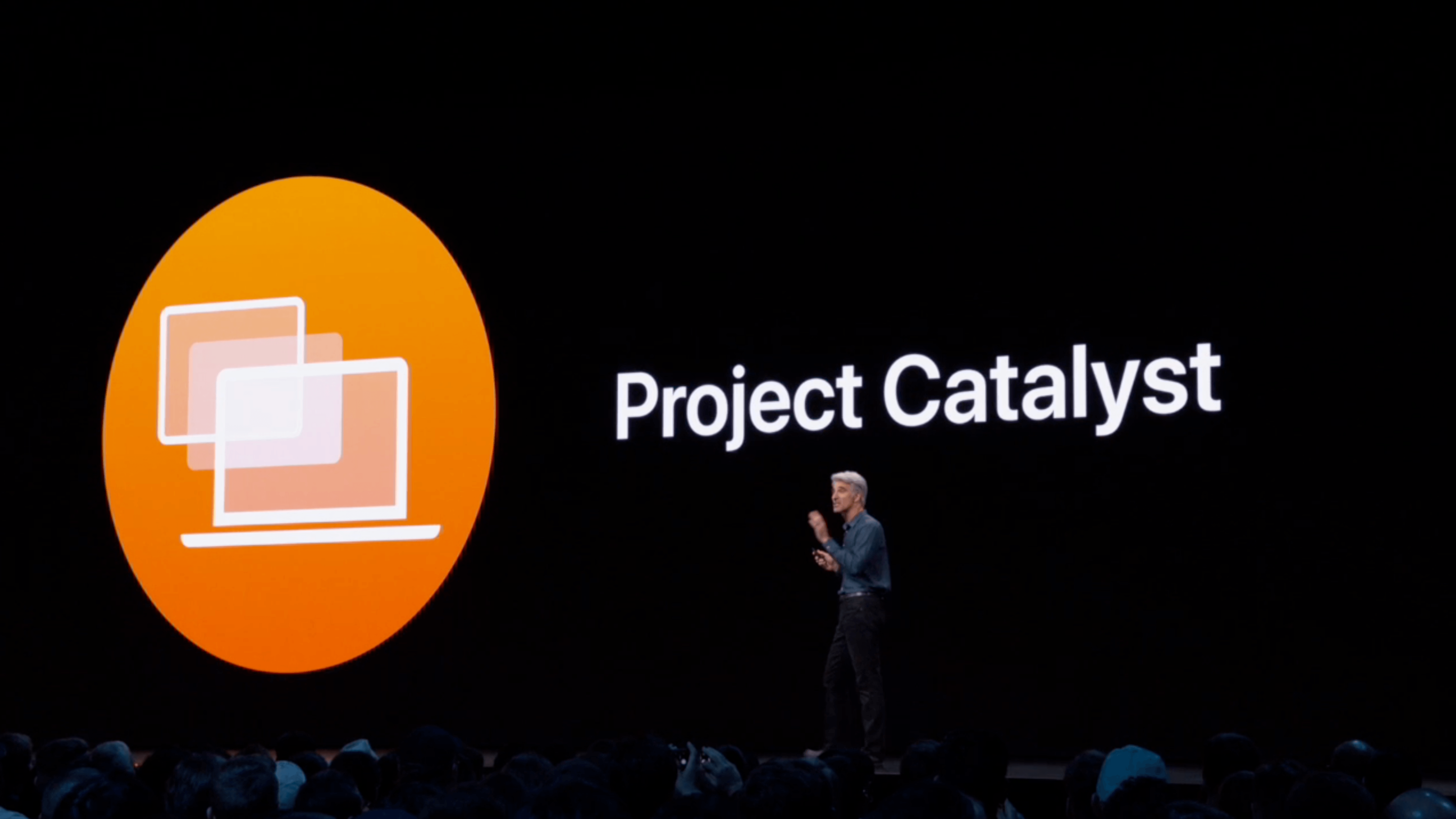
At WWDC 2018, Craig Federighi provided a sneak peek at what everyone was calling Marzipan: an as-yet-unnamed way for iPad app developers to bring their apps to the Mac. So, it came as no surprise when Federighi retook the stage in 2019 and revealed more details about the project and its official name: Catalyst.

What caught a lot of developers off guard though was SwiftUI, a declarative approach to building user interfaces that was also announced at WWDC this year. SwiftUI, known before the conference as Amber, its rumored project name, was on developers' radar almost as long as Catalyst, but it's fair to say that few anticipated the scope of the project. The purpose of SwiftUI is to allow developers to build native user interfaces across all of Apple's hardware platforms – from the Apple Watch to the Mac – using highly-readable, declarative syntax and a single set of tools and APIs. If that weren't enough to get developers' attention, using SwiftUI carries the added advantage of providing features like dark mode, dynamic type, and localization automatically.

The message from WWDC was clear: SwiftUI is the future, a unified approach to UI development designed to simplify the process of targeting multiple hardware platforms. It's a bold, sprawling goal that will take years to refine, even if it's eagerly adopted by developers.

However, SwiftUI also raises an interesting question: what does it mean for Catalyst? If SwiftUI is the future and spans every hardware platform, why bother bringing iPad apps to the Mac with Catalyst in the first place? It's a fair question, but the answer is readily apparent from the very different goals of the two technologies.

SwiftUI serves the long-term goal of bringing UI development for all of Apple's platforms under one roof and streamlining it. It won't take over immediately though. There's still work to be done on the framework itself, which Apple will surely expand in capability over time.

By contrast, Catalyst is a shorter-term initiative designed to address two soft spots in Apple's lineup: the stagnation of the Mac app ecosystem, and the slow growth of pro iPad apps. The unstated assumption underlying the realignment seems to be that the two app platforms are stronger tied together than they are apart, which ultimately will protect the viability of their hardware too.

The impact of Catalyst on the Mac and iPad remains murky. It's still too early in the process to understand what the long-term effect will be on either platform. There's substantial execution risk that could harm the Mac or iPad, but despite some troubling signs, which I'll get to in due course, I'm convinced that Catalyst has the potential for meaningful improvements to both platforms, especially the Mac. Let's take a closer look at what those could be.

The Promise of Catalyst Isn't Just Another 'Sweet Solution'

Ever since Mojave shipped last fall with four lackluster Catalyst apps, skepticism about the project‘s viability has run high. SwiftUI seems to have compounded that sentiment. For example, in commenting on the importance of SwiftUI to Apple’s future, John Gruber recently declared: 'effectively, Catalyst has already been deprecated.' Others have compared it to Steve Jobs' suggestion in 2007 that web apps were a 'sweet solution' to third-party apps on the iPhone. Although I agree with Gruber on the importance of SwiftUI to the future of app development, I think he and others have been too quick to brush aside Catalyst's potential over the next several years as SwiftUI is refined and matures.

Any major transition like Catalyst is fraught with risk. History is littered with 'write once, deploy anywhere' failures. To be fair, though, that doesn't strike me as what Apple has in mind with Catalyst. Judging from the WWDC sessions, the goal isn't to automatically port iPad apps as-is onto the Mac, but to provide iPad developers with a head start on building Mac apps.

It's a tricky message to deliver. On the one hand, the whole point of Catalyst is to make it easier for iPad developers to bring their apps to the Mac. By simply checking a box in Xcode, Catalyst can take an iPad app far down the road to becoming a Mac app thanks to over 40 frameworks that Apple added to the Mac from iOS.

On the other hand, WWDC sessions also reveal a more nuanced message. There's more to converting an iPad app into an excellent Mac app than just checking a box. Not all UIKit APIs map to the Mac, and there are aspects of being a good Mac app that extend beyond what any bare iPad port can accomplish. For example, support for features like custom menu bar items, hover events, toolbars, and the Touch Bar all require work above and beyond checking a box in Xcode.

So, if Catalyst isn't fully automatic and SwiftUI is the future of UI development across all Apple's platforms, why introduce Catalyst now? The answer lies in a product realignment of the Mac and iPad relative to each other and the rest of Apple's product line that's designed to address weaknesses in both platforms' software ecosystems.

Repositioning the Mac and iPad

By aligning their underlying frameworks, Catalyst promises to reposition the Mac and iPad as products.

By aligning their underlying frameworks, Catalyst promises to reposition the Mac and iPad as products.

On the Mac side, the problem is stagnation and slowing growth. I use a Mac every day, and there are a lot of excellent Mac apps available. However, I also use an iPad every day, and although there are examples of great apps that support both platforms, it's the exception rather than the rule. I know because I've used a lot of them. Apps like iA Writer, Ulysses, Things, Yoink, Agenda, and MindNode are all full-featured, high-quality apps that are regularly updated on both platforms. The trouble is though, the bench of apps like them isn't very deep.

Many apps I use all the time on iOS have never made it to the Mac, and of those that have, a lot of them aren't updated with nearly the regularity of their iOS counterparts. On top of that, the rate at which new, innovative apps appear on the Mac has slowed dramatically over the past several years, replaced mainly by Electron apps and web-based solutions. Tellingly, there wasn't a single Mac app among the Apple Design Award winners this year except The Gardens Between, an excellent game that is also available on iOS.

As I've written in the past, the situation isn't dire for the Mac, but better that Apple address the issues now rather than wait for conditions to get worse. The question remains though, what does the iPad app market have to offer Mac users that they're currently missing? Certainly games and entertainment apps will be a big part of the story, if only because those sorts of apps already dominate the App Store. Games alone comprise 35-40% of all apps by some measures.

Catering to game developers makes sense in light of Apple's upcoming Arcade service. Entertainment apps are woefully underrepresented on the Mac too with big names like Netflix, Amazon Prime, and Hulu all absent. However, just because games and entertainment apps will likely play a substantial role in the influx of Catalyst apps on the Mac doesn't mean productivity apps won't also benefit.

The Mac has always had great productivity apps and still does, which masks the platform's troubles. While it's true that I can still get my work done on the Mac with a robust set of first-class apps, it's also true that the depth and breadth of choices I have are limited. Moreover, every year that passes, I find myself drawn more and more to iOS for specific tools that I can't get, or which are inferior, on the Mac. On one level, that's perfectly fine. I'm just as comfortable working on iOS as I am on a Mac. However, I'd rather pick the platform I use for a particular task than be forced to use one over the other because of app availability.
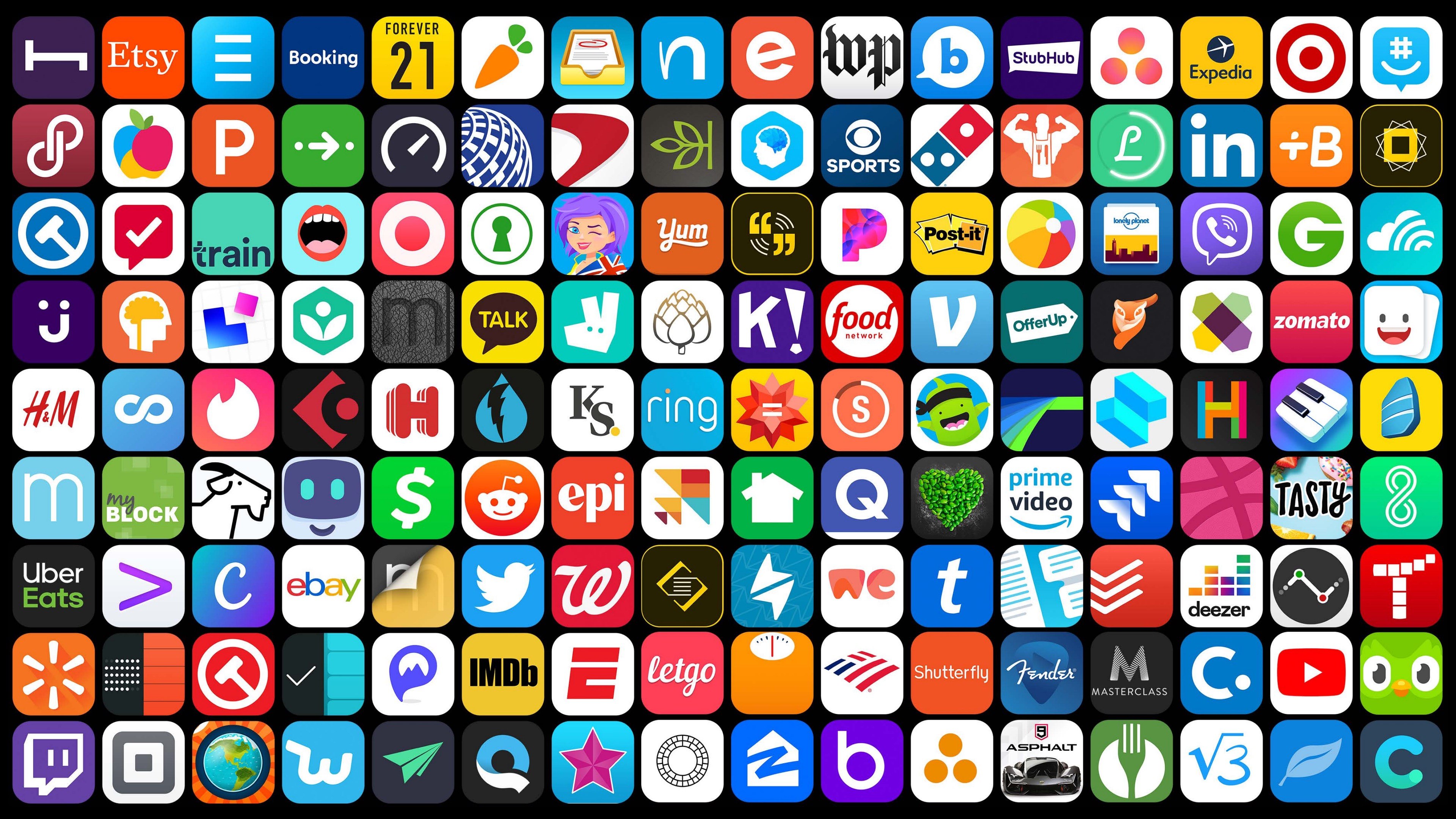
A wide variety of compelling iPad apps aren’t available on the Mac.

A wide variety of compelling iPad apps aren’t available on the Mac.

I compiled a very long list of iPad apps I'd like to see come to the Mac as I researched this story. I'll spare readers the full list of over 60 apps and instead focus on a handful of categories that I think would benefit the most from Catalyst.

It probably comes as no surprise that I want to start with writing tools. Text editors are well represented on the Mac, but the apps I use to write extend beyond text editors, and many aren’t available on the Mac. For research, I'd love a Mac version of the Reddit client Apollo. Christian Selig's iOS Reddit client is continuously updated with new and useful features that are better than any similar app I've found on the Mac.

I'd also like more dictionary options. On my iPad, I turn to LookUp and Greg Pierce's Terminology1 regularly. However, on the Mac I'm stuck with the system dictionary app, which is fine but not as good as my options on iOS.

Two other apps I use every day that aren't available on the Mac are Timery for Toggl and Working Copy. Timery, which I reviewed recently, is hands-down the best iOS client for Toggl's time tracking service, but it's made by just one person and isn't on the Mac, which makes it the perfect candidate for Catalyst.

I use Working Copy every day to collaborate with the MacStories team using GitHub as a way to share the stories we're working on for the site and track changes. When I'm at my Mac though, I'm stuck with GitHub Desktop, an Electron app with limited functionality. GitHub Desktop gets the job done, but it doesn't have the advanced functionality or polish of Working Copy, and I'd rather use the same app on both platforms than deal with two ways of doing things depending on the screen in front of me.

If you listen to AppStories you won't be surprised that I think RSS readers are lacking on the Mac too. Sure, there are options, but few RSS readers are available on both iOS and the Mac and my favorites, Fiery Feeds and lire, aren't on the Mac at all. Nor are other solid options like Unread and Inoreader. I use Inoreader’s sync service, which allows me to use Reeder on the Mac and either Fiery Feeds or lire on iOS, but I miss having the same functionality available on both platforms. Reeder has far fewer advanced features than my iOS readers and has historically been updated at a glacial pace compared with the best iOS readers. Moreover, if you don't use a third-party RSS sync service like I do, using two different apps isn't a practical option, which narrows your options even further.

The iPad has more to offer the Mac than games and streaming video.

There is a long list of powerful audio, video, and photography apps you won't find on the Mac either. Ferrite for podcast editing, Auxy and Figure for making electronic music, LumaFusion for video, and Darkroom and BestPhotos for photography are all top-notch iPad apps that I'd love to see come to the Mac. Add to that smaller utilities I use throughout the week like Grocery for making grocery lists, CalZones for scheduling calls in different time zones, Annotable for marking up screenshots, Linky for promoting MacStories articles on social media, Streaks for forming good habits, and Canary for checking on the video cameras monitoring my home. I think you probably get the picture.

Another category Apple hopes will benefit from Catalyst is apps where development on the Mac hasn't kept up with the iPad version of the app. I use Due and GoodNotes regularly on my iPad, but both could use refreshes on the Mac. Due, which hasn't been updated in over a year on the Mac, still sports a pinstripe-style UI that looks outdated compared to its iOS version, and GoodNotes, which used to be available on the Mac App Store, no longer is. I'd also love to see the Electron apps I rely on converted to native Catalyst apps, but I'm less optimistic that the companies behind apps like Slack, Trello, and Grammarly will embrace Catalyst because it doesn't help them on Windows or the web.

The bottom line is that I spend a lot of time in front of a Mac and iPad and any way Apple can make the transition between the two more seamless with cross-platform native apps will have tangible daily benefits. Some of the apps I've mentioned would help me get my work done if they were on the Mac. Others are better as mobile apps, but would be convenient to have on the Mac too in the same way that I don't prefer to write in a text editor on my iPhone, but I'm glad I have one when that's the only device with me. Ultimately, what should be apparent from the examples above is that great apps are missing from the Mac that should be there but aren't. Catalyst is how Apple intends to close the gap between Mac and iPad apps before the Mac falls any further behind.

Catalyst isn't just about the Mac though. It's meant to benefit the iPad too. The iPad started life in 2010 as not much more than a big iPhone. It's an approach that made sense at the time. Three years into the iPhone, people were just becoming accustomed to using apps on a multitouch display. Extending the identical interaction model and UI to a tablet got the iPad off to a quick start.

From there, though, it languished. Sales peaked and then began to fall. Initial interest from developers waned, and the pro apps that many of us hoped would arrive were too few and far between. The situation wasn’t that different from the lack of breadth and depth of choice that the Mac struggles with now.

However, the tide has begun to turn for the iPad. With hardware that rivals many of Apple's Mac laptops, more pro-level apps have started to emerge. I expect that will be helped further by the introduction in the fall of iPadOS as a separate operating system from iOS. Features like better multitasking and a much-improved Files app are essential, but so is Catalyst.

While the iPad may have started life as a big iPhone, Catalyst aligns the iPad as a stepping stone to the Mac. Developers who build iPadOS apps that take advantage of the latest features like multi-window support, keyboard shortcuts, dark mode, and others will be one step closer to having a full-fledged Mac app. In turn, taking the extra step to extend a sophisticated iPad app to the Mac will give developers access to an even bigger pool of potential customers. The promise of Catalyst is a virtuous cycle that raises both platforms, but it’s not without substantial challenges.

Catalyst‘s Challenges

Although I am optimistic at the prospect of Catalyst revitalizing the Mac app ecosystem and encouraging the creation of sophisticated iPad apps, it's not something that's going to happen overnight, and Apple already has substantial self-inflicted hurdles to clear.

One of the most troubling is the lack of high-quality Catalyst apps from Apple itself. The four apps included with Mojave – News, Home, Voice Memos, and Stocks – are not great Mac apps and have barely been touched since last fall when macOS was released.

Moreover, Podcasts and Find My are the only known new Catalyst apps in the first two macOS Catalina betas. Although they’re higher-caliber apps than their Mojave siblings, Podcasts in particular appears to be using Catalyst features that aren't yet available to third parties. If Podcasts sets a good design example for developers that they can't follow, that leaves just Find My, which is hard to imagine making a meaningful impression on third parties when more important system apps like Messages, Maps, and Shortcuts don't use Catalyst.

The dearth of new system Catalyst apps and poor quality Mojave-era apps send mixed signals to developers and doesn’t make a very compelling argument for third-party adoption. The failure to adhere more closely to Mac conventions also seems directly at odds with the message delivered at WWDC. To his credit, Apple's Craig Federighi said in an interview last week that the Mojave Catalyst apps will be updated to be more 'Mac-like' in the public beta of Catalina that should be out very soon. Why it's taken Apple so long to update the original Catalyst apps is anyone's guess, but it's encouraging to hear refinements are coming.

Apple will not offer a way to package a Catalyst Mac app with its iPad counterpart at launch.

Apple will not offer a way to package a Catalyst Mac app with its iPad counterpart at launch.

Another significant challenge some developers will face with Catalyst is that a Mac app built using Catalyst is not a Universal app. Sold through the Mac App Store, the app will be a separate app that cannot be sold for a single price along with the iPad app from which it was built. Nor can an iPad app and Catalyst Mac app share In-App Purchases.

The situation with subscriptions is bad too. A Catalyst Mac app and iPad app cannot be part of the same subscription unless the developer implements their own server to validate and coordinate receipts between the two apps. That adds complexity, cost, and user data management that wouldn't be a factor in a Universal app that combined an iOS, iPadOS, and tvOS app, for instance. I’m also concerned about the lack of TestFlight for Mac App Store apps and cross-platform bundles, which would provide easier beta testing and greater business model flexibility for developers.

These aren't insurmountable hurdles, but they need to be fixed sooner rather than later for Catalyst to get traction with developers. Apple's Catalyst apps should align with the message they delivered at WWDC and developers need the same flexibility they have across iOS, watchOS, and tvOS for bringing iPad apps to the Mac to make economic sense for as many developers as possible.


Whether Catalyst can serve to realign the Mac and iPad in a manner that makes each stronger going forward remains to be seen. I’m optimistic that we’ll end up with better Mac and iPad apps in the end, but I’m also realistic. There will inevitably be many bad Catalyst Mac apps just like there are many terrible iOS apps today. However, that won’t be any better measure of the health of the Mac and iPad app ecosystems than it is of iOS'.

The test will be in how tightly and seamlessly users can work across every platform, whether the same breadth and depth of apps are available no matter what device someone chooses to use, and whether developers take advantage of and respect what makes each platform unique. Failing that, we’ll end up with nothing more than faster versions of the ill-fitting Electron apps that frustrate so many Mac users already.

Perhaps Catalyst is Carbon to SwiftUI's Cocoa, as many have suggested. However, to dismiss Catalyst as unimportant because it's a transitional technology would be a mistake. Catalyst is part of the path that leads to SwiftUI. It's the bridge designed to span the gap from where things are today to a SwiftUI future, and in the process, stabilize the Mac and enhance the iPad.

What’s most unusual about Catalyst is that it was revealed to the world before it was fully-baked but wasn't labeled a beta. That’s not something that often happens at this scale. Still, I remain optimistic that the shortcomings we see today will be worked out before developers lose interest and set their sights on the SwiftUI horizon.


  1. As I've explained on Club MacStories in the past, I've added the Terminology dictionary to my Mac's system dictionary, which is a neat trick, but still no replacement for the app's full functionality. ↩︎

Support MacStories Directly

Club MacStories offers exclusive access to extra MacStories content, delivered every week; it's also a way to support us directly.

Club MacStories will help you discover the best apps for your devices and get the most out of your iPhone, iPad, and Mac. Plus, it's made in Italy.

Join Now
25 Jun 06:28

The Only Test Of Brand Purpose

by noreply@blogger.com (BOB HOFFMAN)

The message from Cannes this year is very clear. Every brand in the world is now trying to woke-wash itself to appear more acceptable to socially conscious consumers. Much of it is cynical bullshit.

The key to understanding which companies are truly doing the right thing, and which ones are using token "brand purpose" as a PR gimmick is very easy. There is only one conclusive touchstone to knowing who is truly committed to social welfare and who is a cynical poseur...

To what lengths do they go to avoid paying taxes?

The most serious attempts to create a better society are substantially funded by tax dollars: education; affordable housing; civil and personal rights; job training; infrastructure; health care. Companies who take unusual and excessive measures to pay little or no taxes are depriving our citizens of the tools we need to improve our societies.

The hitching of a brand purpose initiative to a politically fashionable cause while behind the scenes going to great lengths to avoid paying a fair share of taxes is a deplorable and cynical manipulation of public perceptions.

The fact that these tax gimmicks may be technically legal does not impress me one bit. It is perfectly legal for me not to support charitable causes, but as a responsible citizen I choose to be better than the law requires.

As far as I'm concerned, corporations who use advertising and marketing dollars to pound their chests about their trendy brand purpose cause-du-jour, but employ legions of lawyers to avoid the true cost of improving society are nothing but scum.

25 Jun 06:27

Survey Says~We are Ready for Denser Neighbourhoods

by Sandy James Planner
empty two black chair
empty two black chair Photo by Saviesa Home on Pexels.com

Vancouver’s man with numbers Mario Canseco has his finger on the pulse of Vancouver and his latest survey in Business in Vancouver suggests we are moving towards inclusive ways to house and age in place in neighbourhoods, and that we still value neighbourhood character.

Firstly around modular housing~74 percent of people surveyed were in favour of building more housing for the homeless. From Provincial sources there is now  data showing that despite the fears  of some residents modular housing placed in Marpole has the “lowest number of emergency services of all the modular housing buildings in the city”  and no calls for overdoses.

Secondly, survey respondents value older heritage housing, which provides a grounding between the past and present of Vancouver. Seventy-four percent of those surveyed wanted heritage buildings maintained even if it meant less rental housing construction.

Lastly when asked whether duplexes, fourplexes, townhouses and three-to four-storey apartment buildings should be allowed in our “single-family” zones, 71 percent were in agreement with densifying that way, with only 22% disagreeing with that. The majority of those against the diversity of housing in single-family zones were over 55 years of age.

The discussion of what should or should not be in “single family housing areas” has also been picked up by CityLab.

In talking about single family housing areas, there are lots of different interpretation of what a “formal family” is according to zoning by-laws across this continent, but most of them preclude unrelated people from legally “co-habiting” a house. CityLab talks about the  “Scarborough 11” who sued in Massachusetts court that their family of 8 adults and three children did indeed constitute a family and could live in a single family house in a single family zone. They argued that the discrimination they faced was because their family was functional, not formal as described by the zoning code.

While Mario Canseco’s survey shows Vancouverites are more likely to accept different housing forms in single family areas, we need to morph the definition of who a single family house functions for as well. Can this form be housing be for a group home or a group of retired seniors living together (with a nurse in the basement suite?).

Lack of acceptance of societal change is not an option to discriminate between different forms of housing occupancy.  Mario Canseco’s survey shows that we are ready to have the discussion on how to make our neighbourhoods denser with  housing forms that will also ensure more sustainability and affordability for the people that live here and in the future.

You can take a look at Research.Co’s poll results here.

dedb6363e1a8844aaad6bcfe291e8543baec09c684fb4def506f737da7047c8f

dedb6363e1a8844aaad6bcfe291e8543baec09c684fb4def506f737da7047c8f


25 Jun 06:27

The Easy Way Out

by L. M. Sacasas

When Facebook recently announced Libra, the company’s global currency, it expressed the hope “to offer additional services for people and businesses, like paying bills with the push of a button, buying a cup of coffee with the scan of a code or riding your local public transit without needing to carry cash or a metro pass.”

When JetBlue came under pressure for using facial-recognition software for check-in services, it explained in a press release that “the boarding touchpoint is an area that needs innovation and we feel biometrics will change the future of air travel as we look to create a more seamless journey throughout the airport.”

If you are concerned about how Echo, Amazon’s home assistant, uses the data it collects about you, or about Amazon employees occasionally listening in on your conversations, the company mostly wants to make sure that you know about how Alexa will “make life easier” for you with a list of tips.

My convenience is often bought at someone else’s expense. Inconvenience returns in new or unanticipated forms for everyone

In each of these instances, we see the value of convenience in action as a rationale for technology: It will provide comfort and eliminate “friction,” making your life as an individual proceed more smoothly. The desirability of this can seem self-evident. Why wouldn’t we want things to be easier, more efficient, more comfortable? Think of desire paths. These improvised paths created over time by walkers that refuse to stick to less convenient routes illustrates our penchant for what is more efficient.

But when so many of our often costly “trade-offs” are framed as being for convenience’s sake, it’s worth reconsidering its self-evident character: Prioritizing convenience at the expense of other values is not simply natural or automatic — it has a history. In a recent piece for One/Zero, “The Tyranny of Convenience,” Colin Horgan argues that “it’s convenience, and the way convenience is currently created by tech companies and accepted by most of us, that is key to why we’ve ended up living in a world we all chose, but that nobody seems to want.” This unwanted world includes compromised privacy, micro-targeted ads, algorithmic recommendations, and YouTube radicalization. In Horgan’s view, these are the price we pay for our intrinsic desire for the convenience of weather apps, ride-hailing services, hands-free searches through digital assistants, and on-demand entertainment.

Horgan suggests that since convenience is a value “we hold personally,” it ends up “outweighing the more abstract ideas like privacy, democracy, or equality.” Convenience, however, can be a cloak veiling an undisclosed exchange not merely between me and some future society that I am robbing of “privacy” but between me and other people right now: My convenience is often bought at someone else’s expense. These hidden costs tend to exacerbate existing forms of inequality and injustice. For instance, the deployment of facial recognition might make it more convenient for some to work their way through security checkpoints while simultaneously making life far more precarious for those who are more likely to be misidentified by such software. Privacy, democracy, and equality can be experienced as abstract ideas only by those who have the luxury of taking them for granted.

Moreover, as these abstract ideals lose their hold, inconvenience returns in new or unanticipated forms for everyone. Eventually convenience stops facilitating other aims and becomes an all-controlling end in itself, equipping us with more time and tools at the expense of a sense of purpose.


Though it predates the commercial internet, sociologist Thomas F. Tierney’s 1993 work The Value of Convenience: A Genealogy of Technical Culture remains a useful exploration of how convenience shapes our technological milieu. It contextualizes convenience as more than a spontaneous and inherent proclivity for ease and comfort. In Tierney’s view, it is not “freely chosen by individuals, but is demanded by various facets of the technological order of modernity.” That is, convenience is not something we merely opt into but rather is to some degree imposed on us. The question then is how we come to embrace this value as our own, even at the expense of compromising other, seemingly more substantive ideals.

Unlike Hannah Arendt, who, in her account of modernity, argued that individuals cared primarily for the biological life of the body, Tierney believed that modern convenience reflected “a certain contempt for the body and the limits it imposes.” Modernity proposes that these barriers can be overcome through “the consumption of various technological devices.” When technologies promise convenience, Tierney argues, this is what they are promising: overcoming the body rather than carefully attending to its demands.

This perspective leads Tierney, somewhat counterintuitively, to frame convenience as a kind of asceticism rather than self-indulgence or selfishness. But this move helps put a set of quirky Silicon Valley fads into context: Jack Dorsey’s intermittent fasting and meditation retreats; Elon Musk’s sleep deprivation; Ray Kurzweil’s diet- and pill-driven drive for the singularity. The logic of meal-replacement company Soylent especially epitomizes this link between convenience, asceticism, and self-mastery. The body’s demand for nourishment is not something to be abided, much less enjoyed. It is something to be eliminated as efficiently and joylessly as possible. This attitude culminates in Silicon Valley posthumanism, which configures having a body itself as entirely inconvenient and imagines a future when human beings will lay aside bodies altogether. After all, death itself is the ultimate limit to overcome.

Convenience is not something we merely opt into but rather is to some degree imposed on us

Reflecting on death as a problem to be solved, Tierney cites astronomer Robert Jastrow’s 1981 work of futurology, The Enchanted Loom: Mind in the Universe. “At last the human brain, ensconced in a computer, has been liberated from the weaknesses of moral flesh,” Jastrow writes. “Connected to cameras, instruments, and engine controls, the brain sees, feels, and responds to stimuli. It is in control of its own destiny.”

The point is not that such posthumanist fantasies will materialize. Rather it is that they amount to a reductio ad absurdum of convenience as a value: a refusal of the body’s limits to the point of doing away with a body. According to Tierney, orienting our use of technology around convenience reflects the triumph of the ascetic and even nihilistic assumptions built into it. Would we not do better to understand our limits as “inducements to formal elaboration and elegance, to fullness of relationship and meaning,” to borrow a phrase from Wendell Berry, rather than as obstacles to be overcome?


Convenience is a paradoxical desire: “The need to do things and get places as quickly as possible is a need that can never be satisfied,” Tierney argues. “Every advance imposes a new obstacle and creates the need for a more refined or a new form of technology.” We might think here of financial markets determination to shave milliseconds off of transaction times, or, more prosaically, how easy it is to become accustomed to Amazon’s ever shrinking delivery times culminating in the aspiration implicit in “Amazon Prime Now.”

Because it chiefly concerns means and purports to be neutral about ends, convenience is well suited to the liberal order, which is premised on championing the individual’s right to choose their own goals. Convenience is thus not about where you are going or what you are doing, but making the journey more expedient and more comfortable. What is advertised is convenience for convenience’s sake. Rarely are we encouraged to ask whether convenience fits the end we are pursuing or if its promise of leisure is ever fulfilled. The point is simply to keep going, ever faster and more efficiently.

Constant motion in whatever direction, of course, is no “end” at all. It is fruitless to save time if you don’t know what — or, for that matter, who — you are saving it for. Tierney cites Ruth Schwartz Cowan’s classic 1983 study of time-saving household technologies, More Work for Mother, which demonstrated how the adoption of early 20th-century technologies like washing machines, vacuum cleaners, and dishwashers rarely translated straightforwardly into more leisure time for American women. These time-saving technologies reconfigured roles within the family and restructured expectations in such a way that housewives often ended up taking on more rather than less work. Here’s how she summarized her findings:

Some of the work was made easier, but its volume increased: sheets and underwear were changed more frequently, so there was more laundry to be done; diets became more varied, so cooking was more complex; houses grew larger, so there were more surfaces to be cleaned. Additionally, some of the work that, when done by hand had been done by servants, came to be done by the housewife herself when done by machine …. Finally, some of the work that had previously been allocated to commercial agencies actually returned to the domain of the housewife — laundry, rug cleaning, drapery cleaning, floor polishing — as new appliances were invented to make the work feasible for the average housewife.

Cowan’s analysis speaks specifically to a particular time and demographic, but these patterns recur whenever new technologies enter into a social or institutional ecosystem. Gains for some turn out to be losses for others, roles are reconfigured, new tasks are generated, cooperative structures may be displaced, and so on. In other words, the fulfillment of the promise of convenience tends to be complicated, and even the ostensible beneficiaries may lose more than they gain.

In his 1992 book, Technopoly, Neil Postman observed that the “winners” in the technological society are wont to tell the “losers” that “their lives will be conducted more efficiently,” which is to say more conveniently. “But discreetly,” he quickly adds, “they neglect to say from whose point of view the efficiency is warranted or what might be its costs.” Postman presciently asks, “To what extent has computer technology been an advantage to the masses of people? … Their private matters have been made more accessible to powerful institutions. They are more easily tracked and controlled; they are subjected to more examinations; are increasingly mystified by the decisions made about them; are often reduced to a mere numerical object.”

The system grants convenience and asks only that we be re-made in its image

Because convenience is oriented toward efficiency, it does not produce leisure. Instead, it often intensifies the demand for productivity, making us accountable for more output. So the needs served by technologies of conveniences are not, strictly speaking, the needs of consumers. Building on the work of Marxist scholars of Taylorism and Fordism, Tierney notes that saving time at home became increasingly necessary as the workplace became more exacting in its demands: “The needs of modern workers for various time- and labor-saving commodities … can convincingly be interpreted as needs of the production process.”

For Tierney, what appears to consumers as convenience is, from the point of view of producers — “the leaders of technological progress, the scientists and technicians” — a desire to dominate nature. Admittedly, “the domination of nature” may sound archaic applied to digital technology. But as C.S. Lewis noted in The Abolition of Man, “power over Nature turns out to be a power exercised by some men over other men with Nature as its instrument.” Digital tools, once lauded as tools of liberation, now appear at least as likely to be tools of oppression. If they once appeared to some as democratic tools, they now reveal themselves to be what Lewis Mumford called “authoritarian technics,” centralized systems of power and control.

Mumford, writing in 1964, understood the role convenience played in their adoption. “The bargain we are being asked to ratify,” Mumford observed, “takes the form of a magnificent bribe. Under the democratic-authoritarian social contract, each member of the community may claim every material advantage …: food, housing, swift transportation, instantaneous communication, medical care, entertainment, education.” But there was one condition, he believed: “that one must not merely ask for nothing that the system does not provide, but likewise agree to take everything offered, duly processed and fabricated, homogenized and equalized, in the precise quantities that the system, rather than the person, requires.”

Horgan worries that “convenience doesn’t simply supersede privacy or democracy or equality in many of our lives. It might also destroy them.” The immense wealth and power accumulated by the leading technology companies over the past two decades seems to bear that out. And by and large, they have achieved this position by offering convenience: the convenience of shopping from home, the convenience of effortlessly keeping up with friends and family, the convenience of instantaneous access to information and entertainment.

It’s less clear, however, that we have chosen convenience on its merits. Perhaps that’s what we tell ourselves to keep from acknowledging that we’ve taken a bribe. But Mumford was right, it is a bribe, however magnificent. The system grants convenience and asks only that we be remade in its image. To update the terms, Amazon offers us the convenience of same-day shipping so that we may become the kind of people who can’t imagine living without Amazon. The bribe works. It’s compelling, as even Mumford noted.

Rejecting such convenience on its own, of course, will not be enough to make everything right again. That may very well play into the same illusion that sustains the myth of convenience: that personal agency can be exercised without external costs or social consequences. Instead we might recognize convenience as a peculiar siren song that would make us believe that tying ourselves to the mast will be its own reward.

25 Jun 06:27

The Hidden Economics of Ideas

by Stowe Boyd

Ideas are getting harder and harder to find

https://medium.com/media/50ec6d832e33ad9f57d6cbc628596725/href

There is a widely held view in Silicon Valley and within the zeitgeist of entrepreneurialism that good ideas are commonplace, and that execution of ideas is what matters for business success. However, there is compelling evidence that knocks that conventional wisdom off its pedestal.

A group of economists, Nicholas Bloom, Charles Jones, John Van Reenen, and Michael Webb, have released a working paper — Are Ideas Getting Harder To Find? — that argues the opposite:

Across a broad range of case studies at various levels of (dis)aggregation, we find that ideas — and in particular the exponential growth they imply — are getting harder and harder to find.

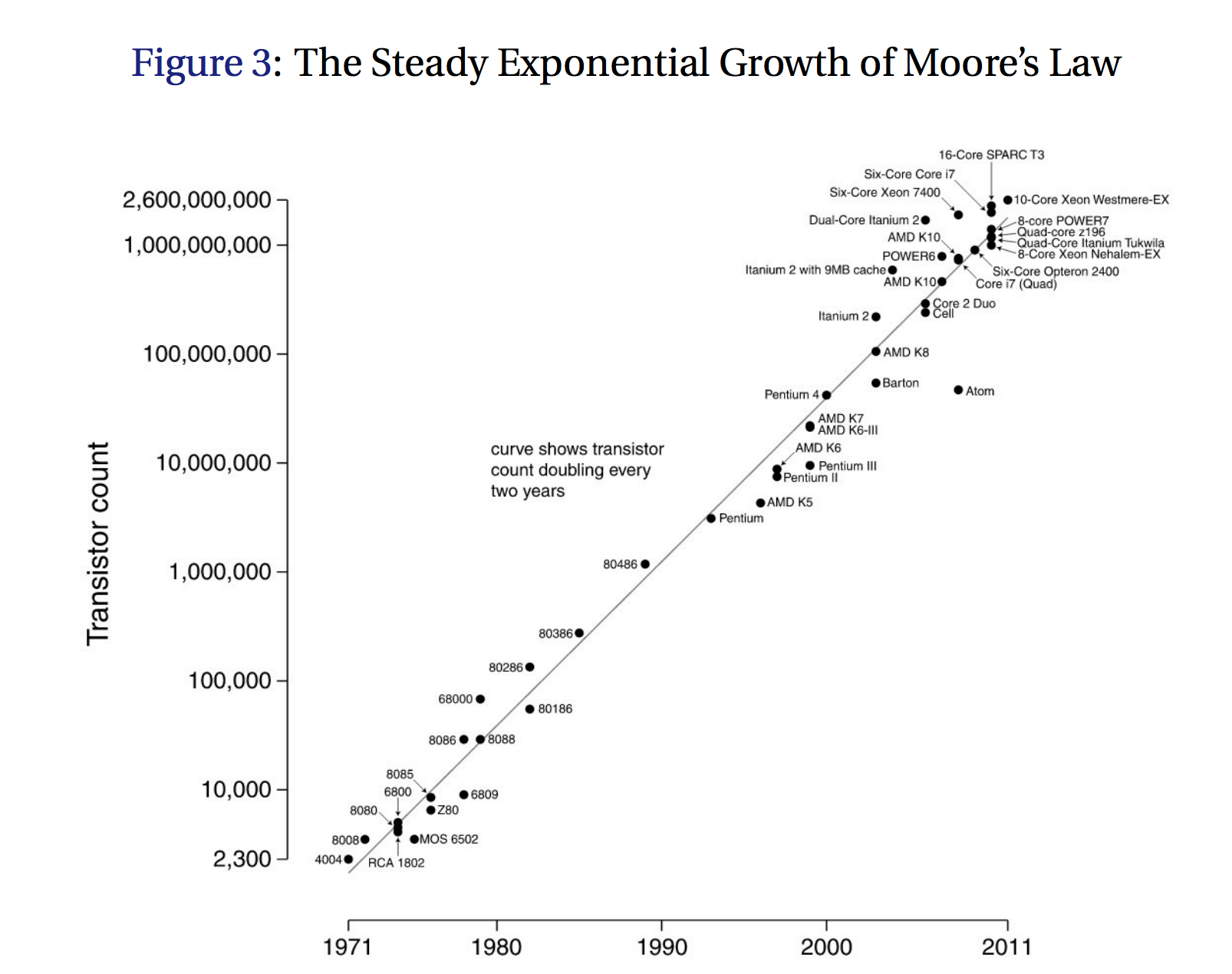
The authors use Moore’s Law as the pivotal example of the increasing numbers of researchers needed for continuation of historic rates of productivity increase. Moore’s Law is named for Intel cofounder Gordon Moore, who mentioned in 1965 that the number of transistors on integrated circuits had doubled every year. It has been somewhat rejiggered to focus on computer processing speeds, which double every two years.

Such doubling corresponds to a constant exponential growth rate of around 35% per year, a rate that has been remarkably steady for nearly half a century. As we show, this growth has been achieved by putting an ever growing number of researchers to work on pushing Moore’s Law forward. In particular, the number of researchers required to achieve the doubling of chip density today is more than 75 times larger than the number required in the early 1970s. At least as far as semiconductors are concerned, ideas are getting harder and harder to find. Idea TFP in this case is declining sharply, at a rate that averages about 10% per year.

Moore’s Law 1971–2011

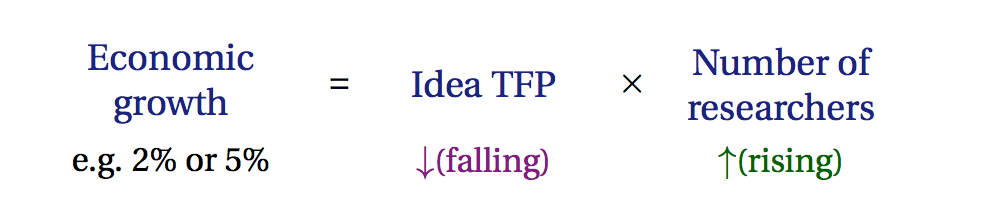
They offer a simple equation to concisely get this general case across (but note for Moore’s Law, the growth rate isn’t 2%, it’s something like 63% annually, to get the doubling every two years).

TFP is total factor productivity, the ‘portion of output not explained by the amount of inputs used in production’, which equates to how efficiently resources are used. So, idea TFP is a measure of how efficiently ideas are being applied, and that factor is falling.

The authors also looked at agricultural productivity, cancer mortality rates, and elsewhere. To summarize, they write:

We find substantial heterogeneity across firms, but idea TFP is declining in more than 85% of the firms in our sample. Averaging across firms, idea TFP declines at a rate of 12% per year.
[…]
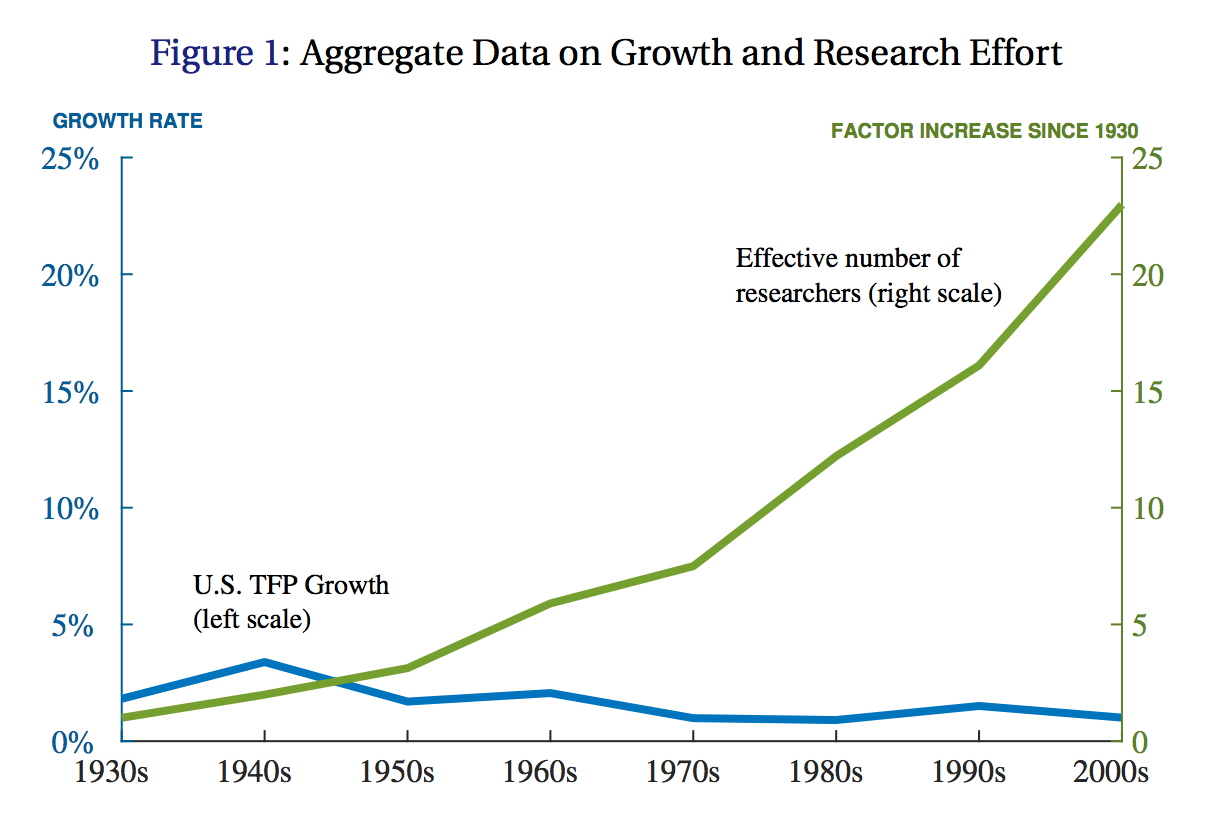
We find that idea TFP for the aggregate U.S. economy has declined by a factor of 48 since the 1930s, an average decrease of more than 5% per year.

These are staggering observations, and are corroborated by other researchers:

Griliches (1994) provides a summary of the earlier literature exploring the decline in patents per dollar of research spending. Gordon (2016) reports extensive new historical evidence from throughout the 19th and 20th centuries. Cowen (2011) synthesizes earlier work to explicitly make the case. Ben Jones (2009) documents a rise in the age at which inventors first patent and a general increase in the size of research teams, arguing that over time more and more learning is required just to get to the point where researchers are capable of pushing the frontier forward.

US TFP Growth v Researchers

The researchers believe they have answered the question: can a constant level of research effort generate constant exponential growth in the entire economy or in specific economic niches? The answer seems to be ‘no’. Turned around, constant exponential growth requires a growing number of researchers.

One of the seemingly paradoxical outcomes of this economic understanding¹ is that idea TFP is declining most quickly in those sectors with the fastest growth rates, like semiconductors. The paradox is explained by the general purpose value of faster semiconductors. As the authors put it:

Demand for better computer chips is growing so fast that it is worth suffering the declines in idea TFP there in order to achieve the gains associated with Moore’s Law.

The lasting takeaway from this research on the growing investments needed in research is this: idea TFP is falling fast everywhere, across the economy.

Taking the U.S. aggregate number as representative, idea TFP falls in half every 13 years — ideas are getting harder and harder to find. Put differently, just to sustain constant growth in GDP per person, the U.S. must double the amount of research effort searching for new ideas every 13 years to offset the increased difficulty of finding new ideas.

One simplistic way of looking at those stats: we will have to employ at least twice as many researchers 13 years from now just for the economy to keep growing at the current rate, or make a lesser number of researchers significantly more productive.

A final observation: when people wonder why productivity growth has slowed, there is a simple reason. We aren’t investing enough in research.

  1. Known as a a semi-endogenous growth model.
25 Jun 06:25

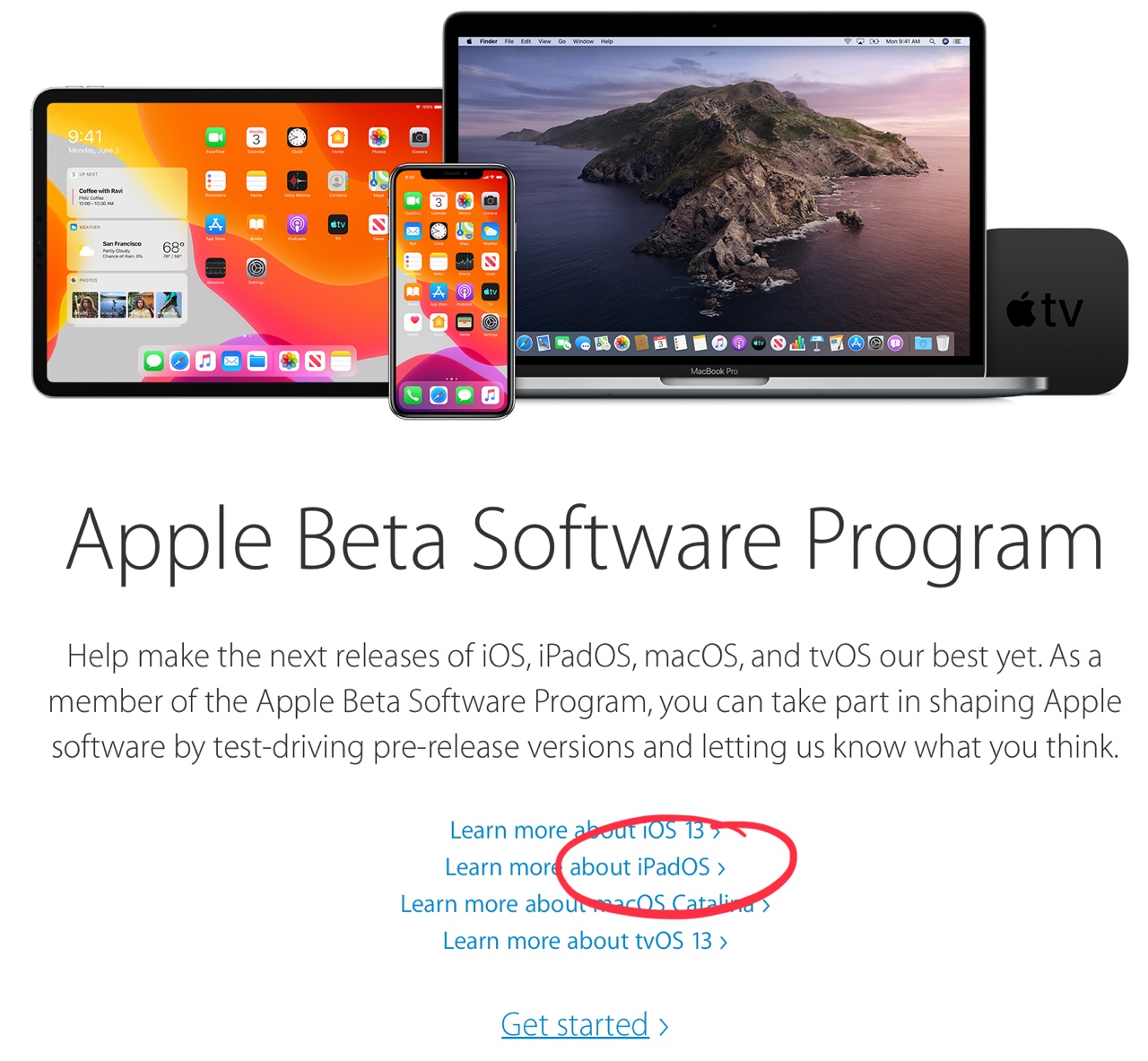
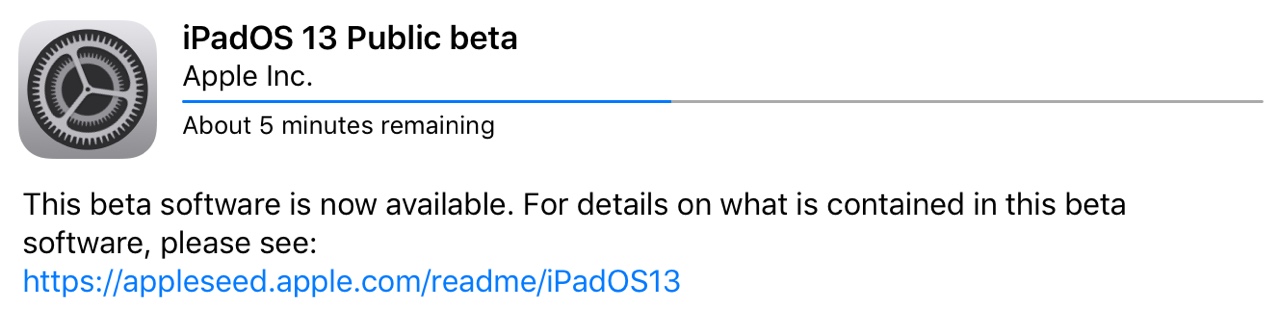
Apple Launches First Public Betas for iOS 13, iPadOS 13, macOS Catalina, and tvOS 13

by Ryan Christoffel

Today Apple has released its first public beta versions of its forthcoming software updates. iOS 13, iPadOS 13, macOS Catalina, and tvOS 13 are all available as public betas. As in years past, there is no public beta available for the Apple Watch or HomePod.

Users interested in trying out the latest versions of Apple’s software platforms can enroll in the beta program at beta.apple.com. However, this should only be done with appropriate caution and a willingness to endure buggy, unreliable software. These first public beta releases come a mere three weeks following the initial wave of developer betas, which themselves were especially unstable; as such, these releases are likely to be less reliable than even the public beta versions of years past.

If you’re wondering what all is new in these beta releases, you can read our full overviews of iOS 13, iPadOS 13, macOS Catalina, and tvOS 13. We’ll have continuing coverage of all the new features coming to Apple’s software platforms throughout the summer, leading up to their release this fall.


Support MacStories Directly

Club MacStories offers exclusive access to extra MacStories content, delivered every week; it's also a way to support us directly.

Club MacStories will help you discover the best apps for your devices and get the most out of your iPhone, iPad, and Mac. Plus, it's made in Italy.

Join Now
25 Jun 06:25

Raspberry Pi 4

by Rui Carmo

This is awesome, and a very welcome upgrade. I wish they’d added some on-board storage instead of the extra HDMI out (2GB of RAM and a little flash would have been the sweet spot for me), but 4GB RAM is way above what I expected for this iteration, and if I could spare the cash I’d buy a half-dozen and build myself a new cluster.

But this will be a killer solution for digital signage (time to dust off the stuff I wrote years back for Codebits and PixelsCamp, perhaps?).


25 Jun 06:25

Apple releases first public betas

by Volker Weber

63f915a3d0e5c1a0ea56ca3bf02b6bcf

I am not going to endanger my iPhone, but I am pretty pumped about iPadOS. If all else fails, I can just switch to a different machine.

5e76cd97a3182daca1a3467537719100

More >

25 Jun 06:25

Geoffrey Hinton and Yann LeCun Deliver Turing Lecture

Geoffrey Hinton, Yann LeCun, Jun 24, 2019
Icon

It's hard to get a higher level set of talks than this, but they are also very accessible. Hinton's talk is entitled, "The Deep Learning Revolution" and LeCun's talk is entitled "The Deep Learning Revolution: The Sequel." Hinton: "One model is what I call 'intelligent design' and you call 'programming'." Some good comments - for example, language translation is a great task for neural networks, because it's symbols in and symbols out - but it works best when it's all vectors in between. And on the future of understanding reasoning - but not with inferences and rules, because that's enpty of any content. And the explanation of short-term memory - short-term changes in synapse weights. Great stuff.

Web: [Direct Link] [This Post]
25 Jun 06:25

On Public Betas

Person on Slack: “Public betas are up”

Me: “Bummer”

We go through this every summer. Public betas are a moving target, and they have bugs — and people think that app developers can fix any issue immediately.

If you need to get your work done — or, heck, even if you just expect your AirPods to work — you should install public betas on devices and machines that are not your main machine.

Even if you get extremely lucky and everything works with one release, the next public beta could change all that.

Also

Right now I don’t know of any bugs with NetNewsWire 5.0 alpha on the Mac public beta. But it’s so early, and I haven’t personally tested it.

The Omni Group just put up a blog post that recommends caution with public betas.

Our friends at Rogue Amoeba have tweeted about their apps not being compatible yet. (They’re working on it, of course.)

There’s a classic Merlin Mann tweet on the subject.

And… shouldiinstallios13publicbeta.com

25 Jun 06:24

Back on my bullshit!

by Liz

I’m back from my trip to Seattle, Vancouver, Whistler, and beyond! Now that I’ve taken the Coast Starlight train to all its destinations I can’t wait to take some more long distance train journeys!!

Danny has often pointed out to me how I go down a social class for every bag I’m carrying and it was even more true for this trip. As I went from my friend Els’s house near the giant geodesic dome thing in downtown Vancouver, to the train station, at 4:30am, laden with giant backpack hanging off the back of my wheelchair, smaller backpack at my feet, and duffel bag balanced on my lap, a little group of maybe 30-somethings was heading away from the crosswalk I was approaching. One of them veered off towards me holding out a bag. “Would you … would you like breakfast?”

Now…. what a question since I was just looking around wondering if anything was open so I could get a muffin or whatever before getting on a 3 hour bus to Seattle where I’d get back on the train. Perhaps this young man had been at some sort of … early meeting rife with donuts, or was a baker carrying home some fresh pastry and a MAGICAL CROISSANT was going to appear for me.

Thus I paused a bit, consideringly, and said “Um… what is it?”

“It’s my leftover McDonald’s pancakes. Please, take it, go on!” (Earnest eye contact, look of deep and pained concern.)

Maybe I should have taken it so he could feel good about himself but I did not and I may have giggled inappropriately without explaining but I did smile and was as nice as possible at 4:30 am on the street. Then I passed through a sort of encampment in the park and at the train station a cab driver was screaming at a definitely homeless dude who was asking for change and so I gave the homeless dude my leftover Canadian money mentally attributing it to the nice man with the free bag of (gross!) Mcdonalds pancakes.

Completing my downwards journey to squalor I then just flat out laid down and fell asleep on the (relatively clean) floor of the bus.

p.s. I did get breakfast from a nice man in the train station who opened a tiny cafe at 5am and sold me a slice of lemon cake!!!

p.p.s. Wait staff in Vancouver AND Whistler sensitively offered me a straw, multiple times! They lean over and say it with soulful discretion, while making eye contact and touching my arm a little! “Would you like a STRAW, ma’am?” (They have HEARD that disabled people have this whole straw thing so…….)

More about the amazing adventures on my trip later !!! A little at a time!!!

p.p.p.s. CRIPS!!

25 Jun 06:24

Capstone: a tablet for thinking - Paul Korm

Very interesting. The features in the main demo video remind me of similar features in ZoomNotes, on iOS and macOS.
25 Jun 06:23

What Constitutes Pro?

A legitimate question is starting to appear now that full frame mirrorless is starting to flesh out: what is it that constitutes "pro gear"? 

Note: this article is really only directed at full frame mirrorless. …

25 Jun 06:23

Twitter Favorites: [Planta] Nahlah Ayed is a terrific reporter, so she's a splendid choice for Ideas. Though I will miss her reporting from aro… https://t.co/OeD8YLHGB2

Joseph Planta @Planta
Nahlah Ayed is a terrific reporter, so she's a splendid choice for Ideas. Though I will miss her reporting from aro… twitter.com/i/web/status/1…
25 Jun 06:23

Dynamic loading of native code with .NET

I maintain SQLitePCLRaw, a .NET wrapper for SQLite. In one sense, this project is not terribly unusual. Plenty of other packages exist to provide a .NET-friendly way to access a native library. For example, SkiaSharp is a .NET wrapper around the Skia graphics library.

But even in this category, SQLitePCLRaw faces challenges that are uncommon, if not unique.

  • There is more than one notion of "the SQLite library". We have plain SQLite. And then there is SQLCipher (derived from SQLite, developed by Zetetic). And Windows 10 has a SQLite library built-in (winsqlite3.dll). Android has one too, and then in version N they decided that people can't use it anymore. Apple provides a SQLite library with iOS and MacOS. People have custom builds of SQLite so they can configure it with compile options. All these SQLite libraries can be different versions, and can be compiled with different features. And SQLitePCLRaw tries to work with all of them.

  • SQLite (in all its various forms) is extremely ubiquitous. It runs on everything from servers to embedded devices, and people use it for all kinds of things. .NET has become very diverse as well. We have .NET Framework, .NET Core, Mono, Xamarin, Unity, Windows, Mac, Linux, Windows Phone, UWP, and so on. Basically, SQLitePCLRaw tries to support .NET in all its forms.

So the number of scenarios in play here is like a matrix with N flavors of SQLite as the rows and M platforms as the columns. As an offhand count, I can name enough items to say that N is 9 and M is 11, so there are roughly 100 configurations to worry about. Not every matrix cell is special, so that might be overstating things a little, but it's the right ballpark.

DllImport

The most common way of calling native code with .NET is P/Invoke. This is done with an extern method definition that has a DllImport attribute which specifies the name of the unmanaged library in which it should be found. For example:

[DllImport("libc.dll")]
public static extern int abs(int x);

This says "In the shared library 'libc.dll', find a function called 'abs' and treat it like it returns an int and has one parameter of type int." Note that the actual signature of the unmanaged function must match the method definition, and nothing verifies this for you. So for example, if the parameter for abs() were actually a pointer, you could expect Bad Things to happen when you call it with the P/Invoke definition above.

It is also worth observing that the trivial example above does not show much of the power of P/Invoke. Here's something a bit more complicated:

[DllImport("libc.dll")]
public static extern int strlen(byte[] a);

This says "In the shared library 'libc.dll', find a function named 'strlen' which returns an int, and takes one parameter, and the actual type of the parameter is a pointer, but from the .NET side, let's pretend that the function takes an array of byte, and just do the right thing, mkay?" So, when you call this method from C#, P/Invoke will take the byte[] and pin it, to prevent the garbage collector from moving it around while the unmanaged function has it. And then when the native function returns, P/Invoke will automatically un-pin it.

P/Invoke can do all kinds of stuff to bridge the gap between managed and native code. We call that stuff "Marshaling".

As powerful as P/Invoke is, I have one major complaint with it, and it goes back to the DllImport attribute. Because DllImport is, well, an attribute, its parameters have to be constant. So, the name of the unmanaged library has to be hard-coded at compile time. But in my world, SQLite is running around using more names than Jason Bourne.

Like DllImport, but more dynamic

For several years my solution to this problem has been to take the P/Invoke part of my code and compile it multiple times, once for each name I need to give to DllImport. I refer to the instances of this module as "providers", and they are somewhat like plugins. The core of SQLitePCLRaw needs one of these providers to be registered.

Anyway, having all these providers is inelegant. It makes the build system awkward. It increases the number of assemblies and packages. For a long time I've been wanting to rework this code to use dynamic loading instead of DllImport. I envisioned writing a Do-It-Yourself equivalent for DllImport, but without using attributes, so the library name wouldn't have to be hard-coded.

The starting point for me was to think about how DllImport is implemented. Conceptually, I pictured it like this:

MyDelegateType DoThatDllImportThing(string libraryName, string functionName)
{
    string path = FindTheLibrary(libraryName);
    IntPtr hLibrary = LoadTheLibrary(path);
    IntPtr hFunction = LoadTheFunction(hLibrary, functionName);
    return CreateTheDelegate(hFunction);
}

I figured FindTheLibrary() would be easy, because it's just path stuff.

And LoadTheLibrary() is just a LoadLibraryEx() on Windows and dlopen() everywhere else. Similarly, LoadTheFunction() is either GetProcAddress() or dlsym(). So those are not a problem.

But CreateTheDelegate() would be a lot of work, because I would have to implement all that magic that P/Invoke does. Well anyway. It would be worth it.

Skipping ahead to today, I do now have dynamic loading implemented for SQLitePCLRaw 2.0 (a prerelease of which is now available on nuget.org), but things didn't go at all like I thought they would.

It turns out that my expectations about difficulty were almost completely backwards.

CreateTheDelegate() is already provided by the platform. Once you have the function pointer, all the stuff I thought would be hard is actually done by Marshal.GetDelegateForFunctionPointer().

But FindTheLibrary() is not "easy". In fact, implementing this in a cross-platform manner appears to be impossible. As far as I can tell, there are some .NET platforms where it just can't be done. FindTheLibrary() (or something like it) must exist, because DllImport uses it, but it is not public.

Side Rant: People think the hard part of software is because of tricky algorithms or difficult concepts. But very often, software is hard because you're trying to do something the platform won't let you do, because the platform only provides a higher-level interface, which, ironically, was intended to make things easier. For me, I almost always want the lower level APIs. You want to give me an HTTP library? Fine, but I still need sockets.

Success and failure

All I want here is for the tooling to support a way for me to include a dynamic library (dll | so | dylib) and put it somewhere such that I can find its path at runtime. But every .NET implementation does this a little differently.

Xamarin iOS and Android are both kinda weird (in different ways). In part, this is because of constraints of the underlying platforms (such as static linking on iOS), but it is also apparent that both of them were just designed to support DllImport (which is understandable). If either of these Xamarin platforms have a documented/supported way of doing what I want, I have thus far been unable to find it.

A bit surprising is that .NET Core 2.x is one of the most difficult situations. It stores unmanaged libraries in a folder called runtimes and then in a subfolder named for the RID, but (1) at debug time, this is in the packages directory, which is weird and not discoverable relative to the executing assembly, and (2) there is no public API to get the RID. I could try to figure out the RID myself, but that approach looks bug-prone.

Strangely, the .NET Framework is one of the easier cases, because it doesn't try to do anything in this area. It just lets me do. So I can provide a nuget targets file that copies the dynamic libraries to the output directory at build time. And then I use GetExecutingAssembly() and get its location and from there I can find the files I need.

Despair

The frustration of trying to solve this problem has driven me to some weird places.

"It's a %*($^#@ file and I just want it stored next to my executable. Why can't I do that? The tooling does it for images. Why can't I do this for an arbitrary file? Hey, maybe this would work if I just change the suffix from .so to .png?"

And I am apparently not alone in this. In my search for answers I found a repo provided by the Quicken Loans team (see https://github.com/RockLib/RockLib.EmbeddedNativeLibrary). In a nutshell, they package the native library as an embedded resource inside an assembly and then at runtime they load the resource and write it to disk and then load it.

Along those same lines, I've come really close to writing code to take a (dll | so | dylib) and encode it as base64 and dump it out as a string literal in C# source file.

All this silliness is also part of my motivation for exploring various ways of compiling C (and things like it) for the CLR. I've had early success compiling WASM to MSIL, and I've made significant progress doing the same for LLVM bitcode. If I could have SQLite compiled as a .NET assembly, all this pain would go away. Granted, it would be replaced by new and different pain, but I'm ready to welcome that.

But alas, .NET Core 3.0 is arriving with a breath of fresh air.

System.Runtime.InteropServices.NativeLibrary

I first learned about this new API from Brice Lambson of the Entity Framework Core team. Basically, it provides FindTheLibrary(), LoadTheLibrary(), and LoadTheFunction() in a cross-platform way. It is pretty much exactly what I need, a way to load unmanaged libraries without the limitations of the DllImport attribute.

As I write this, .NET Core 3.0 is in preview, so the docs on this API are a bit sparse. But after some experimentation and a bit of "Use The Source Luke", I've been able to get things working nicely.

One tricky part was that NativeLibrary.Load() has two overloads.

public static IntPtr Load(
    string libraryPath
    );

public static IntPtr Load(
    string libraryName, 
    System.Reflection.Assembly assembly, 
    Nullable searchPath
    );

The second call (the one that takes a "libraryName") is the one that has knowledge about where to look for unmanaged libraries. The simpler first overload wants a "libraryPath", and seems to be just a trivial wrapper around LoadLibraryEx/dlopen, the thing to use when you already know the path of the (dll | so | dylib) you want.

Looking forward

So why am I excited about this API when I can only use it on .NET Core 3.0?

Mostly, because of the .NET 5 announcement. I'm assuming that when .NET 5 ships (in late 2020), the Xamarin platforms will support the NativeLibrary API. Eventually, I will be able to use NativeLibrary everywhere and get rid of DllImport completely.

In the meantime, I'm using the NativeLibrary API as the pattern for implementing similar functionality for other platforms whereever possible. For example, for .NET Framework support, I have implemented my own clone of (a subset of) NativeLibrary. In the end, I still have to ship several of the old Dllimport providers with hard-coded names, but still, dynamic loading killed off some of the complexity, resulting in fewer packages and a simpler build.

25 Jun 06:23

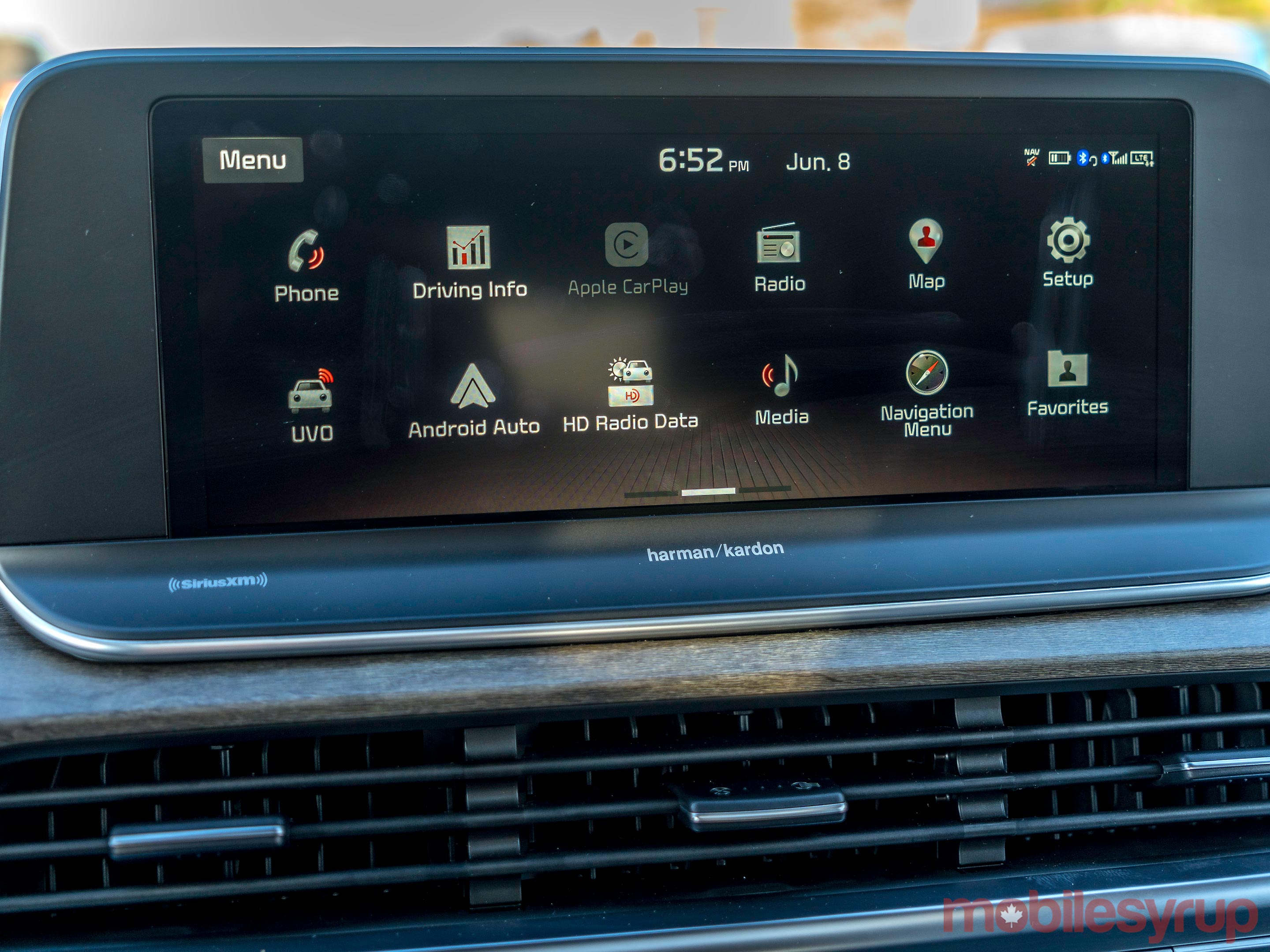
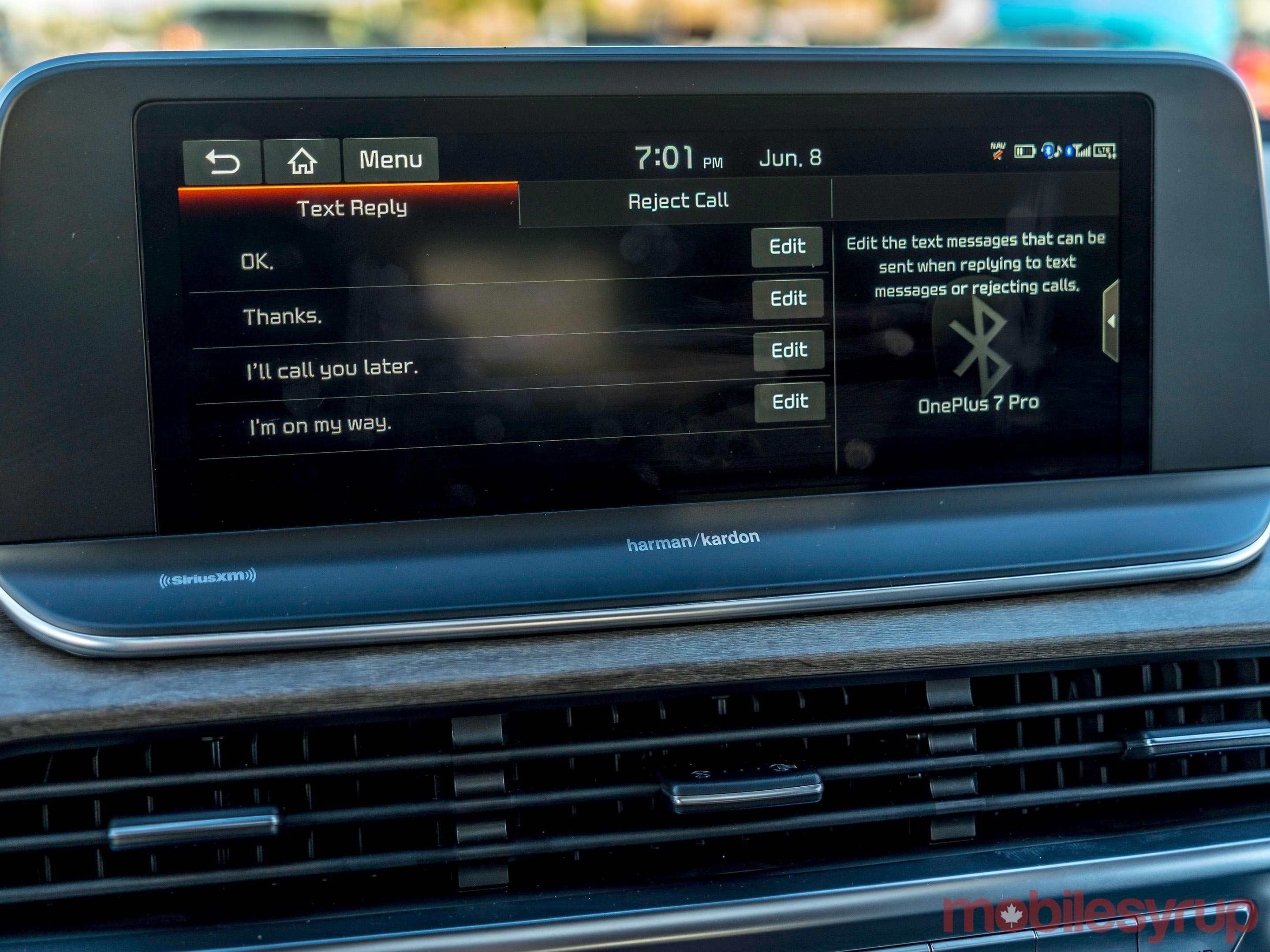
2020 Kia UVO Infotainment System Review: Growing confidence

by Ted Kritsonis

Kia’s UVO infotainment system has gone through a bit of a visual makeover, but there are additional features and controls that are helping the evolution along.

The latest iteration of the platform is relatively widespread in the automaker’s various models. That range includes the 2019-20 Rio and on up to the sedans, SUVs and minivans, like the Optima, Sorento and Sedona. The latest version seen in many of the 2020 model vehicles builds off of what came before.

I tested it out on the 2020 Kia Telluride, an 8-seat SUV that is on the higher end in the company’s portfolio. The 2020 Telluride comes in three trims: EX, SX and SX Limited. The SX trim I rode in comes in at $49,995. All of them offer UVO Intelligence, CarPlay, Android Auto and in-car navigation and the Harman/Kardon sound system only offered on the SX and SX Limited.

The basics

As before, UVO functions on two pillars. First, there’s the system in the dash that handles all connectivity within the vehicle. Second, is UVO Intelligence running through the free app for iOS and Android to control some vehicle features remotely.

For the most part, these two still run the same way, which is to say that they complement each other, rather than run concurrently. For example, it’s possible to remote start the engine, lock/unlock doors and even flash the four-way lights using the app. So long as you’re connected to LTE or Wi-Fi, you can do it from pretty much anywhere. The vehicle diagnostics and maintenance scheduling largely remains the same.

That familiarity still misses on certain features. For instance, I wasn’t able to send a destination address to the in-car navigation. Perhaps less of a factor now that Google Maps and Waze work on both Android Auto and CarPlay.

Once in the car, Kia still eschews native third-party app support, preferring to defer all that to Apple and Google. There is some limited functionality, like with calls and text messages, but nothing else integrated, as we sometimes see with other automakers.

Siri Eyes Free still works with iPhones via straight-up Bluetooth audio streaming connections, but still won’t work with Google Assistant. When pairing an Android device, hitting the voice button on the steering wheel brings up Kia’s own voice assistant.

Connections and layout

Unlike the Rio I test drove almost two years ago, the Telluride was laden with USB-A ports. There was the primary one for phones in the front under the dash, with another in the storage bin in the centre console, next to the 12-volt socket. There were two more, each built into the back and front passenger seats for people sitting in the back to charge their devices. Kia even threw in an additional 12-volt socket and three-pronged power outlet on the lower portion of the centre console facing rear passengers.

Notably missing from the connection layout was an Aux-In port. There isn’t one, and Kia has essentially abandoned the old 3.5mm jack to give way to USB and Bluetooth as primary alternatives. There is a wireless charging pad under the USB port, and it is standard on all Telluride trims.

Bluetooth connections can handle up to five phones, but can’t keep two connected simultaneously. For example, if you have a work and personal phone, you can only keep one paired. And without the Aux-In port, you don’t have that as a fallback option. USB is one way to connect, but even then, the system will prioritize one over the other based on the mode you’re in. If it’s CarPlay or Android Auto, that device gets dibs. If it’s Bluetooth audio, then that device takes precedence.

The built-in SIM card is for enabling UVO Intelligence to work with the app, but unfortunately, still doesn’t allow for an in-car Wi-Fi hotspot.

UVO Intelligence is neat in its own way. Starting the car or locking the doors (in case you forgot) through the app is convenient. It’s just not practical if you’re standing close to it. The signal’s triangulation takes up to 30 seconds to actually go through — and that was on full bars. With a spottier connection, it takes longer.

That’s okay if you’re walking to the car in a big shopping mall or just want to heat it up or cool it down before getting in, but the regular keyfob was a lot faster in closer quarters.

New screen and interface

Kia has been getting progressively bigger with the screens it uses, and the 10.25-inch panel in the Telluride is a prime example. It is pretty vibrant and offers full touch-based control.

It also sports a different interface than before through the use of widgets. These widgets split the screen into three sections, making the home screen look more like a multitasking setup. By default, it shows navigation, audio and weather, though a few other options are available.

One of these is called Driver Talk, whereby in-car microphones pick up the driver’s voice and play it through speakers in the rear. That way, drivers don’t need to raise their voices to be heard, especially if children are sleeping in the car. Another is a Voice Memo feature that lets drivers or passengers save reminders they can hear at a later time on demand.

If you want car diagnostics or vehicle-specific information, there’s a widget shortcut for that, too. CarPlay and Android Auto fall under the media widget, so if either one is active, they will appear in that box anytime you go to the home screen.

The widgets complement an app drawer that you can get to by swiping left, but it’s only necessary to go to if you want to get to a feature or setting that’s not in the widget menu. I recognize some of this may sound confusing, but in practice, it actually flows quite well. My one gripe is that the physical button layout below the display is missing a dedicated home button. I always had to touch the screen to get to it.

Using Kia’s voice control is another way to get around within the interface. It knows the different sections and can bring them up on command. The only thing is the delay in doing so. The easiest method was to push the voice button on the steering wheel and say it from there.

CarPlay and Android Auto

There is a difference in how these two platforms appear on the large display. Apple had optimized CarPlay to make use of extra screen real estate, which is why 10 apps can appear on the grid at one time. Apps running on the platform also stretch out and cover the display, and it looks nice.

That’s not the case with Android Auto — at least not yet. Though still largely optimized for smaller screens, Google already announced a refreshed iteration of the platform at Google I/O that will include optimizing for larger displays. When that happens (supposedly this summer sometime), it should appear that way on the UVO system as well.

Both Siri and Google Assistant are the de facto voice platforms when CarPlay or Android Auto run, respectively. That’s unchanged since the Rio I previously tested. Google Assistant is still the better of the two in a variety of ways. Being able to tell it what song, artist, album or playlist to play on Spotify was super convenient. I couldn’t do that with Siri. The furthest I could get was a specific artist.

The in-car navigation takes a backseat to both platforms as well, but that’s okay. I find Google Maps and Waze are often better for city driving anyway. When venturing out of town, utilizing the satellite connection to save on data was where Kia’s maps came in handy.

The post 2020 Kia UVO Infotainment System Review: Growing confidence appeared first on MobileSyrup.

25 Jun 06:22

Apple to launch 16-inch MacBook Pro in September, refresh MacBook Escape, MacBook Air

by Igor Bonifacic

Apple will unveil its long-rumoured 16-inch MacBook Pro in September, according to an investor note obtained by Forbes.

“We foresee that Apple will release a new product [at the] Sep’19 Apple event if there’s no unexpected development issue,” writes IHS Markit analyst Jeff Lin in the latest Emerging PC Market Tracker report.

According to Lin, the new model will feature an LCD display, not an OLED display as previously rumoured, with a 3,072 x 1,920 pixel resolution. The current top-of-the-line 15-inch model features a 2880 x 1,800. Moreover, Lin writes Apple will source the new computer’s screen from LG Display.

In the same note, Lin writes that Apple will update the 13-inch MacBook Pro and MacBook Air with new processors. Based on the fact the company only updated the TouchBar MacBook Pro lineup in May, the assumption here is that Apple will release a new base model MacBook Pro — that is the model that features an escape key and function keys instead of a Touch Bar.

Missing from the report is any mention of an update to the MacBook, which minus a new gold option, Apple hasn’t updated in more than two years.

As MacRumors notes, Apple doesn’t typically update its computers in September, preferring instead to wait until October. In either case, however, it appears several new MacBook models are on the way.

Source: Forbes Via: MacRumors (1), (2)

The post Apple to launch 16-inch MacBook Pro in September, refresh MacBook Escape, MacBook Air appeared first on MobileSyrup.

25 Jun 06:22

Microsoft’s dual-screen Surface ‘Centaurus’ might run Android apps

by Jonathan Lamont

For some time, Microsoft has been working on a couple of experimental new devices codenamed ‘Andromeda‘ and ‘Centaurus,’ two potential folding Surface devices steeping in rumours and speculation.

While Andromeda has typically held the spotlight, Centaurus recently took the stage when London, U.K.-based information provider IHS Markit told Forbes that the device could come in the first quarter or half of 2020.

IHS Markit cited supply chain information and also claimed that Centaurus would have two 9-inch displays and a 4:3 aspect ratio. However, the more intriguing detail from IHS Markit is that Centaurus would run Android apps.

According to IHS, the device would run Android apps as part of Windows Core OS (WCOS), which Microsoft has been developing as the underpinnings for a lightweight, adaptable version of Windows to power dual-screen devices as well as massive screens like the Surface Hub 2S.

Specifically, Centaurus and other dual-screen devices, especially those targeted as Chromebook competitors, would run something codenamed ‘Windows Lite,’ which appears to be a stripped-down version of Windows for dual-screen devices like Centaurus.

Unfortunately, adding support for Android apps to WCOS or Windows Lite seems an unlikely prospect, as it would go contrary to a lot of Microsoft’s other projects, particularly the struggling Universal Windows Platform (UWP). There’s also the issue of Microsoft needing to make its own Android app store, as well as convince developers to modify their apps to work without needing Google Play Services, which is no small feat.

On top of this, IHS Markit says the new dual-screen Surface device will use Intel’s new 10nm processors and have LTE or 5G connectivity. According to The Verge, Microsoft and Intel have worked closely together on Centauraus, and the chip-maker is pushing manufacturers to create dual-screen hardware as well.

Microsoft also teased Centaurus during an internal, employee-only event, suggesting work on the device has progressed to the point that it could be shown publicly soon. Considering the company likes to hold Surface events in October, it’s possible we could see Centaurus for the first time soon.

Source: Forbes Via: The Verge

The post Microsoft’s dual-screen Surface ‘Centaurus’ might run Android apps appeared first on MobileSyrup.

25 Jun 06:22

Apple’s iOS 13 and iPadOS public betas are now available in Canada

by Patrick O'Rourke

Hot on the heels of the developer betas, the public betas for the next version of Apple’s mobile operating system, iOS 13, along with its new tablet-focused offshoot, iPadOS, are now available to download in Canada.

While iOS 13 brings anticipated new features to the iOS, including Dark Mode, Sign-in with Apple, new Maps functionality and a revamped Photos app, iPadOS is arguably the more interesting update.

Through new features like external storage working with all iPad models, a revamped screenshot feature and of course, Sidecar, Apple has answered a number of complaints about the tablet — particularly the iPad Pro — as well as made the device more desktop-like.

In order to download the iOS and iPadOS public beta, you first need to navigate to Apple’s public beta program page, sign-in, and then enroll either your iPad or iOS device in Apple’s program.

After enrolling, navigate to ‘Settings,’ then ‘General’ and finally, ‘ Software Updates’ on either your iPhone or iPad. Right now the enrollment says, “We’ll be back. We’re busy updating the Apple Beta Software Program Website and will be back soon” for some users. The page will likely be back up soon (it took me a few tries before it worked).

We’ll have more on Apple’s public beta for iOS 13 and iPadOS in the coming days. macOS Catalina, the new version of Apple’s desktop operating system, is expected to launch later this week as well.

The post Apple’s iOS 13 and iPadOS public betas are now available in Canada appeared first on MobileSyrup.

25 Jun 06:22

Bill Gates says his greatest mistake is whatever allowed Android to thrive

by Jonathan Lamont
Bill Gates

If you’ve followed developments in the mobile space for a long time, you’re likely familiar with Microsoft’s missteps in the mobile space. Bill Gates is familiar with these missteps as well, and in a recent interview at venture capital firm Village Global, Gates said his “greatest mistake ever” was whatever caused Microsoft “not to be what Android is.”

You can read the full quote below, or watch the recording of the interview — Gates’ statement about mobile platforms begins at 11:42.

“In the software world, particularly for platforms, these are winner-take-all markets. So the greatest mistake ever is whatever mismanagement I engaged in that caused Microsoft not to be what Android is. That is, Android is the standard non-Apple phone platform. That was a natural thing for Microsoft to win. It really is winner take all. If you’re there with half as many apps or 90 percent as many apps, you’re on your way to complete doom. There’s room for exactly one non-Apple operating system and what’s that worth? $400 billion that would be transferred from company G to company M.”

For those interested in the history, Google acquired Android back in 2005 for $50 million USD. Former CEO Eric Schmidt said Google’s initial focus was beating Microsoft’s early Windows Mobile efforts. During a 2012 legal fight with Oracle about Java, Schmidt said that “[a]t the time, we were very concerned that Microsoft’s mobile strategy would be successful.”

Ultimately, Android killed Windows Mobile and Windows Phone and became the equivalent of Windows in the mobile world.

Gates’ involvement in the fall of Windows Mobile

The Verge notes that Gates’ statement is a surprising one, as many attribute the mobile failings to Steve Ballmer. Ballmer missed the importance of touch and laughed at the iPhone for not having a keyboard.

The misunderstanding of the importance of touch made up a crucial part of Microsoft’s early mistakes. Internally, the company spent months arguing over whether it should abandon Windows Mobile, which wasn’t touch-friendly and came from an era of stylus-powered devices.

In an emergency meeting in December 2008, Microsoft decided to scrap Windows Mobile and completely reboot its efforts with Windows Phone. Former Windows chief Terry Myerson, as well as Microsoft’s Joe Belfiore, were involved in that meeting, but Microsoft likely also sought Gates’ advice.

Gates stepped down as CEO in 2000 and took the role of chief software architect during the years leading up to Windows Phone and Windows Vista. He remained in that role until 2008, before carrying on as Microsoft’s chairman until Satya Nadella took over as CEO in 2014.

While Gates may not have been directly involved in the management of some of Microsofts’ mobile decisions, his departure came amid those crucial years.

Gates still provides input at Microsoft, with the Edge team seeking his thoughts on moving to Chromium, as well as assisting on a mysterious ‘personal agent’ project in recent years.

Meanwhile, Microsoft seems to have survived its mobile missteps, and its cloud business is doing well. Still, mobile is a massive market that has, unfortunately, excluded Microsoft.

Source: The Verge

The post Bill Gates says his greatest mistake is whatever allowed Android to thrive appeared first on MobileSyrup.

25 Jun 06:22

Sidewalk Labs reveals $1.3 billion plan, questions loom about privacy, expansion

by Aisha Malik

Google’s sister company Sidewalks Labs outlined its MIDP as reporters continued to question the project and its privacy concerns during a press conference held on June 24th,

The Master Innovation and Development Plan (MIDP) outlines Sidewalk Labs’ $1.3 billion plan for its smart city project in the Waterfront area of downtown Toronto.

The company’s CEO Dan Doctoroff confirmed that a significant number of the plans outlined in the proposal require approval from the three orders of government – federal, provincial and municipal.

He stated that it was important to have the data publically accessible, but that it was up to the government to adopt this.

Doctoroff reiterated that Sidewalk Labs aims to implement “unprecedented” privacy protection means.

He stated that Sidewalk Labs “will not sell personal information, we will not disclose personal information to third parties without explicit consent.”

Further, Doctoroff stated that the project will facilitate the “responsible data use policy that prioritizes public good” and will put forth an “unprecedented privacy regime,” but he didn’t expand on what that ‘regime’ would be.

The Alphabet-owned Google affiliate began working with Waterfront Toronto after it was solidified in October 2017. The Waterfront Toronto board of directors later approved a Plan Development Agreement (PDA) with Sidewalk Labs in July 2018.

As a result of the 58-page PDA, Sidewalk Labs said that it would invest approximately $40 million USD (roughly $52.87 million CAD) to develop the Master Innovation and Development Plan (MIDP).

Of that total figure, Sidewalk Labs set aside $2.6 million USD (approximately $3.52 million CAD) to examine legal, regulatory and policy issues, including data privacy and digital governance.

The MIDP and what it proposes

The over 1,500-page proposal focuses on five aspects that are meant to benefit Toronto. It hopes to lead to job creation and economic development, housing affordability, sustainability and climate-positive development, new mobility, and urban innovation.

Doctoroff described the plan as “highly responsive to urban issues.”

The MIDP “outlines a new vision for how cities can integrate physical and digital policy innovations,” according to Doctoroff.

Dubbed Quayside, the smart city project would be constructed on a 12-acre plot of land in the Waterfront area of Toronto and will be equipped with residential and commercial plots. The plan states that the development would lead to around 3,900 jobs, and could hold 4,200 residents at its full build.

An expansion of the project would see the implementation of the Villiers West development. This would house 1,700 residents and facilitate 7,400 jobs. The expansion of the project beyond the 12-acre plot is surely something that will come into discussion as the proposal progresses.

The overall plan is meant to lead to a 1.5 million square foot innovation campus and would see to the expansion of Google Canadian headquarters. Google might also be expanding its headquarters in Kitchener, Ontario.

The development is meant to be a “global hub for the urban innovation industry” according to the MIDP. Additionally, the plan also hopes to use roadways more efficiently and expand the light rail system. The space will also include community programming.

The plan also touches on the different environmentally friendly initiatives that will take place. For instance, the smart city aims to prioritize public transportation and cycling as opposed to using vehicles.

It outlines the different types of innovative measures that will take place in the smart city. For instance, traffic lights will prioritize pedestrians.

The MIDP said Sidewalk Labs could agree to 10 percent of profit sharing with the government for 10 years for certain technologies first developed in the space.

The proposal outlines that the total cost of the real estate projects at Quayside and Villiers West will total $3.9 billion.

Doctoroff mentioned that the projects would lead to an annual of $14.2 billion added to Canadian gross domestic product.

When prompted by reporters whether residents agree with the plan, he mentioned that there is “dramatic” support among Toronto residents for the plan.

The proposal aims for the project to be led by a public administrator to ensure public accountability.

However, a reporter pointed out that Waterfront Toronto did not agree to Sidewalk Labs as being the primary developer of the project. Doctoroff said that Sidewalk Labs would work out the relationship with Waterfront.

Doctoroff mentioned that Sidewalk Labs will work with the relevant governments to secure commitments for parts of the project, including the expansion of the light rail system.

The next step of the project is the MIDP public consultation.

Waterfront Toronto’s reaction to the MIDP

Waterfront Toronto has since acknowledged that it did not co-create the MIDP with Sidewalk Labs, and had concerns regarding it.

https://platform.twitter.com/widgets.js

Waterfront Toronto is concerned about the data collection, data use, and digital governance, and requires more information to determine whether they are in compliance with its principles.

Globe and Mail reporter, Josh O’Kane, outlined Waterfront Toronto’s concerns with the MIDP.

One of the other concerns is the fact that Sidewalk Labs proposed a development that exceeds beyond the 12-acres of land in Quayside. The statement also outlines that the expansion of public transportation is not a commitment that Waterfront Toronto can make.

The post Sidewalk Labs reveals $1.3 billion plan, questions loom about privacy, expansion appeared first on MobileSyrup.

25 Jun 06:21

Google Camera app to support DCI-P3 wide colour gamut

by Dean Daley
Pixel 3a

New code within the Google Camera app suggests Google will soon allow users to capture photos using the wide DCI-P3 colour gamut. XDA Senior member ‘cstark27’ discovered the code and shared it with XDA Developers.

Currently, Android devices take pictures in the sRGB colour gamut, which is capable of displaying fewer colours than DCI-P3. To be exact, P3 features a 25 percent greater colour range than sRGB. The wider colour gamut allows for pictures to appear more life-like.

Google first announced that it planned to add DCI-P3 capture support back in May, but did not, at the time, provide a specific launch date.

XDA suggests Google plans to officially launch this feature alongside the Pixel 4. Android apps don’t offer enough colour management options, and therefore cannot properly display DCI-P3 photos. This even includes social media platforms on Android.

Currently, Samsung Gallery app is able to do so. Google Photos is also implementing support, but so far it’s only rolling this out to select users.

One thing to note is that even though a phone is capable of capturing wide-gamut photos, it’s not necessarily a good idea to do so; DCI-P3 photos will look wrong and oversaturated if they’re viewed on a device that is only capable of outputting at sRGB. It’s for this reason that most professional photos share their sRGB versions of their photos, even if their cameras are capable of capturing much more colour information.

Source: XDA Developers

The post Google Camera app to support DCI-P3 wide colour gamut appeared first on MobileSyrup.

25 Jun 06:21

Ride-hailing companies not meeting Toronto’s goal to reduce emissions and traffic: report

by Aisha Malik

Toronto’s ride-hailing companies aren’t meeting the city’s planning goals to reduce emissions and mitigate traffic congestions, according to a recent study from Ryerson Urban Analytics Institute.

The report outlines differences between taxi companies and Private Transportation Companies (PTCs), and suggests that the gap should be filled, as outlined by the Toronto Star.

Researchers suggest that “regulations must be streamlined to improve the well-being of drivers, operators, owners, and, more importantly, passengers.”

The report outlines that PTCs contribute to an increase in traffic in the city and adds numerous additional trips.

There are a number of differences in requirements between the two different types of services. Interestingly, the number of taxis in the city is restricted to around 5,000. However, around 70,000 PTC licenses are issued to ride-hailing service drivers, according to the report.

The report also states that an increase in PTC rides could have shifted around 30 million trips from public transit annually.

Additionally, PTC drivers need to be a minimum of just 18-years-old, while cab drivers need to be at least 25-years-old due to insurance requirements. Another difference between the two services is the fact that taxis are required to have cameras, while PTC vehicles do not.

Toronto’s licensing committee is expected to discuss new rules for ride-hailing companies this week.

Source: Ryerson Urban Analytics Institute Via: The Toronto Star

The post Ride-hailing companies not meeting Toronto’s goal to reduce emissions and traffic: report appeared first on MobileSyrup.

25 Jun 06:21

Here are macOS Catalina’s 5 best new features

by Patrick O'Rourke
macOS Catalina

While Apple’s macOS updates are rarely as exciting as the new functionality the tech giant brings to iOS every year, the new version of the tech giant’s desktop operating system typically includes at least a few notable features.

With macOS Catalina, that trend continues with features like Sidecar, Screen Time and the long-overdue end of iTunes.

It’s worth noting the death of 32-bit apps with Catalina could be an issue for some users. For example, in my case apps like uTorrent, Scarlett MixControl and Lumix’s camera tethering app, no longer work on Apple’s desktop operating system. To be clear, I haven’t encountered an app I use on a daily basis that hasn’t been updated to 64-bit, but for those out there with older, less frequently updated apps they frequently use, Catalina could create frustrating issues.

I also ran into a problem with Lightroom CC where Catalina caused Adobe’s photo editing app to no longer recognize my library because my MacBook Pro’s hard drive was listed incorrectly as ‘read-only.’ Thankfully, I was able to solve the problem by using the Terminal command ‘sudo mount -uw /’

I’ve spent the last few days testing out the macOS Catalina’s second developer beta, which should be similar to the upcoming public beta.

Here are my early thoughts on the operating system.

1. iTunes is finally dead

TV App macOS Catalina

In a move that should have happened many years ago, Apple’s iTunes app is now finally dead. With macOS Catalina, Apple has broken iTunes up into three separate apps with far more modern user-interfaces.

First, there’s Apple Music, which takes over the desktop portion of Apple’s music streaming platform. If you’re still clinging to your downloaded iTunes music library, you’ll also be able to access that content from within the Apple Music app.

Then there’s the Apple TV app, which features all of the company’s movie and television show offerings, along with its upcoming premium Apple TV+ platform when it launches later this year.

Finally, there’s now an Apple Podcasts app, breaking the content away from iTunes and Apple Music. In stark contrast to Apple’s bloated iTunes platform, all three apps feature clean user interfaces that are simple and easy to navigate. It’s also worth noting all content is synced through iCloud. As a result, you no longer need to sync with iTunes to keep your devices up to date.

Though these three apps are only available in beta right now, they seem much faster than iTunes, at least at the outset.

2. Screen Time

macOS Catalina Screen Time

Screen Time on desktop is terrifying.

While not as useful as the iOS version of the same feature, realizing precisely how much of my day is spent using different apps is eye-opening.

That said, given I often have an app like Spotify or Photoshop open all day and running in the background while I’m working, the fact that both apps run roughly seven hours a day on my MacBook Pro doesn’t actually mean much. Hopefully, Apple changes how Screen Time for macOS Catalina works so it records how often you have an app open on your screen, and not just that it’s open and running in the background.

Screen Time for macOS Catalina also includes the ability to limit what apps certain users have access to, as well as restricting computer use with scheduled downtime. These two features could be beneficial for parents concerned with how often their children are using technology.

3. New ‘Find My’ app

macOS Catalina 'Find My' app

Apple’s new macOS Catalina ‘Find My’ app, which is also available on iOS 13, combines both ‘Find My Friends’ and ‘Find My iPhone’ functionality into one clean, easy-to-use app.

With Find My, Apple states users will be able to locate their Mac via Bluetooth even if it’s not connected to Wi-Fi. Apple says the feature is end-to-end encrypted and that the Bluetooth locating technology doesn’t alter the MacBook’s battery life.

While a relatively minor update compared to some of macOS Catalina’s other features, if your Mac gets stolen or you happen to misplace it, this new functionality could come in handy.

Apple also updated its Reminders app on macOS with a revamped design and additional features.

4. Apple commits to iPad apps on the Mac

While Microsoft’s universal app strategy never truly panned out, if any company is capable of making it work, it’s Apple given the control the tech giant has over third-party app developers.

We caught a glimpse of iPad apps on macOS last year with Mojave and Marzipan. This year Apple is taking things a step further with a new suite of tools called Catalyst that allow developers to create apps that run across iPadOS and macOS without significant effort.

While most iPadOS-to-macOS apps likely won’t be worth using, this is still a good sign for Apple’s desktop app ecosystem. There are some iPadOS-only apps like Philips Hue app, various games and even order apps like Ritual that I’d likely use on macOS if they were available.

Apple’s macOS Catalyst apps currently include News, Home, Stocks, and Voice Memos, all iOS ported apps that were already available in Mojave, the previous version of Apple’s desktop OS. Apple software chief Craig Federighi has confirmed that all four of these apps will be updated based on Project Catalyst technology in the final version of Catalina.

5. Sidecar sounds awesome

macOS Catalina Sidecar

Sidecar is perhaps the most exciting feature coming to macOS Catalina and iPadOS. While I haven’t had the chance to test out Catalina’s second-screen iPad functionality yet — I’m still waiting for the public beta to download on my iPad Pro (2018) — on paper, it sounds great.

Along with being able to extend and mirror the display of your macOS device, an iPad can also act as a touchpad with certain apps. For example, you can mark-up screenshots as well as edit photographs with apps like Adobe Lightroom CC. As someone who shifted their workflow to mostly editing images with Adobe CC on an iPad Pro, Sidecar will definitely come in handy.

Sidecar also works both wirelessly and wired.

This story will be updated with more information about Sidecar when I’ve had the chance to go hands-on with the feature.

The post Here are macOS Catalina’s 5 best new features appeared first on MobileSyrup.

25 Jun 06:20

Microsoft partners with University of Waterloo to solve problems with AI

by Jonathan Lamont

Microsoft has announced a partnership with the University of Waterloo’s Artificial Intelligence Institute (Waterloo.ai) to work and solve some of the world’s most significant challenges.

Waterloo.ai is a joint venture of the university’s faculties of Engineering and Mathematics. It also includes researchers from the Arts, Applied Health Sciences, as well as Environment and Science, as Waterloo’s leaders know AI is bigger than just Computer Science. It has the potential to impact nearly every industry and solve many problems.

The partnership will see Microsoft provide access to the leading Azure technology as well as funding and expertise to help leverage AI for social good.

Microsoft will support several Waterloo AI research grants, including leveraging massive computational power and machine learning to find new ways to improve emotion discovery for people with autism, as well as climate change projections, fall detection for the elderly and disaster response, among many more.

The Redmond, Washington-based company believes AI is the defining technology of our time. Further, Microsoft says its Waterloo partnership is part of its commitment to accelerate the growth of AI in Canada, build Canada’s future AI workforce and create a more sustainable world.

One of the growing drivers of Canada’s economy, according to Microsoft, is AI. In 2018, $548 million in venture capital was invested in Canadian AI companies — approximately 50 percent more than in 2017. Additionally, between June 2015 and 2017, Canadian job opportunities in AI grew by nearly 500 percent.

This announcement comes as part of Microsoft’s broader AI for Good initiative. The initiative includes a $115 million over five years to provide funding, technology and expertise to individuals, non-profits, academic institutions and organizations to tackle some of society’s significant challenges.

Further, the initiative includes aiding in humanitarian efforts through AI for Humanitarian Action, improving accessibility with AI for Accessibility and addressing environmental challenges with $50 million allocated explicitly to AI for Earth. Microsoft says Canadian research teams from across Canada are undertaking several AI for Good projects. Canada ranks second of all countries globally in the number of grantees.

You can learn more about Microsoft and its AI solutions here.

The post Microsoft partners with University of Waterloo to solve problems with AI appeared first on MobileSyrup.

24 Jun 04:43

Proposed governance structure

Solid, Jun 24, 2019
Icon

Some interesting dialogue in Tim Berners-Lee's Social Linked Data (Solid) project. As the community has increased in size, governance has become more of an issue. It doesn't help that aspects of the project have bogged down, with decisions being left unresolved for years, while at the same time there are numerous depreciated and obsolete implementations. This proposal posits three major elements - a development team, a panel, and a decision-making mechanism. Long-time developers aren't exactly happy about the idea of a panel, but it does raise the question, "who represents the users?" See also this issue and this comment in Gitter that drew my attention to the issue.

Web: [Direct Link] [This Post]