Recently a U.S. presidential candidate announced a proposal to pay off all student debts. What surprised me was not the announcement so much but the wave of teachers and professors denouncing the idea. There is this myth, you see - and it is a myth - that people won't value something if it's free. Really? The next time you breathe, tell yourself that. The next time you make a friend, tell yourself that. The next time you fall in love, tell yourself that. The next time you wank down an open road, tell yourself that. Tell yourself that you value none of these things because they're free. See, here's the thing about this sort of argument - they're always about other people. Of course, I would have valued my education no matter what, but other people, they're of lesser moral character (insert apocryphal example here) and they would abuse it. Bah.
Web: [Direct Link] [This Post]Rolandt
Shared posts
Software for collaborative writing (with partners expecting MS Word) - Daly de Gagne
Daly
The End of the Genius Era
Excellent piece by Dieter Bohn at The Verge following news of Jony Ive’s coming departure from Apple:
While Apple might have a good story about having been founded in a garage, the true founding myth of Apple is the myth of genius. You know the fable, which has the benefit of also being true. When Steve Jobs was in charge, Apple made amazing things: the Apple computer, the Mac. Jobs not in charge: the very bad ‘90s with Scully and the Newton. Jobs back in charge: the renaissance, the iPod, the iPhone.
After Steve Jobs, that mantle was passed to Jony Ive. And he quietly (quite literally) took it. It was important to our concept of Apple that there be a single, discerning decision maker. Somebody uncompromising about quality. Somebody with very good taste. A capital G Genius.
Bohn makes the case, based on solid evidence from other sources, that Apple has operated for years without being driven by a singular “genius” but rather a collaborative, highly-capable team – and while that seems to have been more true than ever lately, to a degree it’s always been the case. In spite of the mythos surrounding Steve Jobs, responsibility for Apple’s best work falls not just on his shoulders, but on that of the team he was surrounded by.
Ive’s absence will certainly be felt, but the hole he leaves is likely much smaller than his “legend” would imply. As Bohn remarks, “we should stop thinking of Apple as the singular expression of one person’s genius. History has moved beyond the Great Man theory, and so too should our ideas about how Apple operates.”
→ Source: theverge.com
Close to an 8-Bit Overflow On This Blog
Time flies and I am always astounded that I’ve been writing this blog since 2005. Over the years, quite a number of posts have accumulated. As my current WordPress profile bundles them in pages of 10 posts, I’m now on page 255 and thus close to an 8-bit overflow. If you don’t get it, you are probably too young and never lived through the 8-bit home computer era ^^
Software for collaborative writing (with partners expecting MS Word) - J J Weimer
>As a researcher using a Mac I have always asked myself why we keep
>sending around Word documents.
Any writing app can be used as long as everyone on the team has it, is conversant enough with it to write the required document in a base format for final submission, and follows a common approach to using it for the collaborative writing. Word checks the first two boxes most often. You and the team just have to assure that the third guideline is met. In this regard, I have found the best approach is to ask everyone up front to respect a few guidelines:
1) During the writing, use cite keys in the document (carry over from LaTeX) rather than a numbering approach. For example, cite{Barns2019, Jones2017, Smith2006a} references documents that are tagged by the representative keys.
2) Assign one person on the team to manage the citations. He or she handles them during the writing and compiles them into the final document at the end. Everyone sends their citations to the one person in a library format such as BibTeX or RIS and cross-referenced using the cite key standards.
3) Assign one person as the final arbitrator of any conflicts in proposals for editing.
4) Use a common cloud storage for the document; avoid email. This keeps documents from getting misplaced among other things.
5) Be religious about versioning the files at every step and about the notations used for to denote different file versions. For example, a file titled document v03 jjw,cn denotes (release) version 3 of the document that has recently been annotated by jjw followed by cn.
6) Establish up front that you will set defined points in time (e.g. on a weekly basis every Friday) to compile the document to a "release version". This avoids that annotations accumulate beyond reasonable control.
>Personally, I suspect that a third reason that no one speaks about is
>the real death blow for online collaborative writing in academia: They
>make it bloody obvious who contributed how much and when. There is no
>hiding behind "Oh, I did write a whole paragraph but forgot t send it
>around" followed by a hectic writing session in the afternoon.
Hence the reason for agreeing on guideline 6. OK, so you wrote that paragraph this morning but did not post it before our review session. What you wrote will have to be added to the next release.
Otherwise, the debates on who added what and when happened even in the days of the old fashion method of sending hard copies around. So, no this is not a death blow to online collaborative writing, it is a death blow to doing good team work during the writing process itself.
>People
>feel uncomfortable when their writing activity is visible to others in
>real time, if only in theory.
This is perhaps closer to the truth as far as why on-line, interactive collaborative writing is not gonna happen for bigger documents. In such a case, I don't want or indeed need someone looking over my shoulder while I write. I prefer to hack about in the document during my own time away from the internet, post my edits for review, and then have a video conference or phone call to discuss the proposed inputs and reach a consensus on the release version.
The opposite is perhaps true of memo style documents, where immediate and dynamic feedback is demanded during the editing in order to create a document that has a true consensus of all involved.
>As you may guess, Word and Bookends (yay, I I did not give in
>completely) it is for me still. If anyone has found a solution that I
>have overlooked please let me know.
I prefer LaTeX for my own work but accept that others prefer Word. I won't ever do the work to compile citations or to generate in-line figures in Word documents. I have at times taken an entire Word document over to LaTeX format to create a final submission.
I am transitioning to Bookends for my own personal citation management. I would have continued to used Papers but ... it is just taking too long in its transition to Papers/ReadCube (among other reasons) to remain a viable team player. When I can control the choice, I demand the use of a cloud storage option for citation management with teams. By example, I require each of my students to create their own private group in Mendeley and share it with me. For each report or publication that they write, I require them to create a Mendeley folder in their shared drive and stores all of the associated citations to that report or publication.
interesting long piece about Evernote - xtabber
A Unicorn Lost in the Valley, Evernote Blows Up the ‘Fail Fast’ Gospel
https://www.nytimes.com/2019/06/28/business/evernote-what-happened.html
Multiple machines, multiple OSs, narrowing apps? - Dr Andus
Dr Andus, if you get a chance, and perhaps in a new thread, I would be
>quite interested in how you use Dynalist for research as a Zettelkasten.
>Now that I am primarily using a Chromebook, and loving it, I have
>wondered about using Dynalist more intentionally for notes and bibdata.
>I would use date and time as a unique identifier - 2019 06 23 2045h,
>and appropriate tags.
My system is quite simple. I have a separate file for Zettelkasten, which only holds my reading notes.
Each entry's title starts with a date identifier: 2019-06-29 15:25 Author (pub. year) descriptive title of entry
Then in the note section of the entry there is either a quote or my summary of the point.
I may have an additional "NOTE" section for some meta observation.
Then comes a "See also" section where I add the links to other already existing Zettels in the system.
Then comes the bibliographic info, and URL link to the source, if a web source. Plus "Date accessed:"
And at the bottom I list all the categories in a single row: @Einstein if it relates to a human, and #topic for all other categories.
I also use a few CSS style sheets with the Stylus extension in Chrome, to enhance the visual presentation. Row separator creates the "Zettel" (or card) effect, and the Darknest Hour colours in URLs and tags, so they can be more easily spotted. Coloured Pills is for marking out Zettels for further attention.
Darknest Hour v.1.2
https://userstyles.org/styles/141020/darknest-hour-v-1-2
Dynalist Row Separator
https://userstyles.org/styles/134412/dynalist-row-separator
Dynalist coloured pills
https://userstyles.org/styles/161369/dynalist-coloured-pills
The Create Link Chrome extension is also helpful for pasting in Markdown-formatted links of web sources.
interesting long piece about Evernote - Wojciech
>What are the alternatives that have
>Evernote's functionality?
Has anybody tried to replace Evernote by Notion? I've just noticed their promo: 'Tired of Evernote? Say hi to Notion'
https://www.notion.so/evernote
and wonder whether it is something worthy of trying?
"The original is unfaithful to the translation."
Just Another Recalibration
I started supporting the IndieWeb with a small ...
I started supporting the IndieWeb with a small monthly contribution. You can do too if you want.
During the introductions at IndieWeb Summit, Ma...
During the introductions at IndieWeb Summit, Malcolm Blaney showed his site Unicyclic, which is set up as an IndieWeb reader. He has an overview page of recent IndieWeb related postings. To have your own postings incorporated, you need to follow his IndieWeb page and send it a WebMention. Upon receiving the WebMention it will look for a feed to follow on your own site. That sounded like a fun thing to try.
Adversarial Interoperability
Adversarial interoperability is the consumer’s bargaining chip in these coercive “negotiations.” More than a quarter of Internet users have installed ad-blockers, making it the biggest consumer revolt in human history. These users are making counteroffers: the platforms say, “We want all of your data in exchange for this service,” and their users say, “How about none?” Now we have a negotiation!
Adversarial Interoperability, a useful concept to keep in mind. In part the IndieWeb is a form of this, as it offers a way of staying outside walled gardens, while still being able to pass messages back and forth through its gates (i.e. API’s), through POSSE / sometimes PESOS. Though some platforms, Facebook actually, made the ‘counter offer’ of switching off their API’s. Twitter similarly has been on a path of absorbing into itself all kinds of apps (e.g. Tweetdeck) that were independent parts of the ecosystem growing on Twitter’s API, and increasing the threshold for access to the API.
Interoperability is a core value to maintain. Use it.
CintaNotes once more - WSP
I forgot to mention, incidentally, that CN does not offer an iOS version, but it will sync with Simplenote on my iPhone if I wish or -- my preferred solution -- I can very easily export an HTML file and then import that (from Dropbox) into a synced folder in the Documents app my phone. This file is of course static but is attractively formatted and easily searchable. Bringing it up to date from time to time takes only a few keystrokes.
How to mount an Android phone on a Mac using SSHFS
Because I was raised in an era when we were willing to conceive of mobile devices as servers as much as clients, it’s always bothered me that the ability to mount an Android phone’s storage on a desktop PC or Mac disappeared when Google removed USB Mass Storage Mode from its operating system.
My phone is a powerful sensor array, it can have a Linux command line, making it a programmable mobile powerhouse. Not being able to easily transfer files to and from its storage is disabling.
But there’s a solution for this.
On the Phone
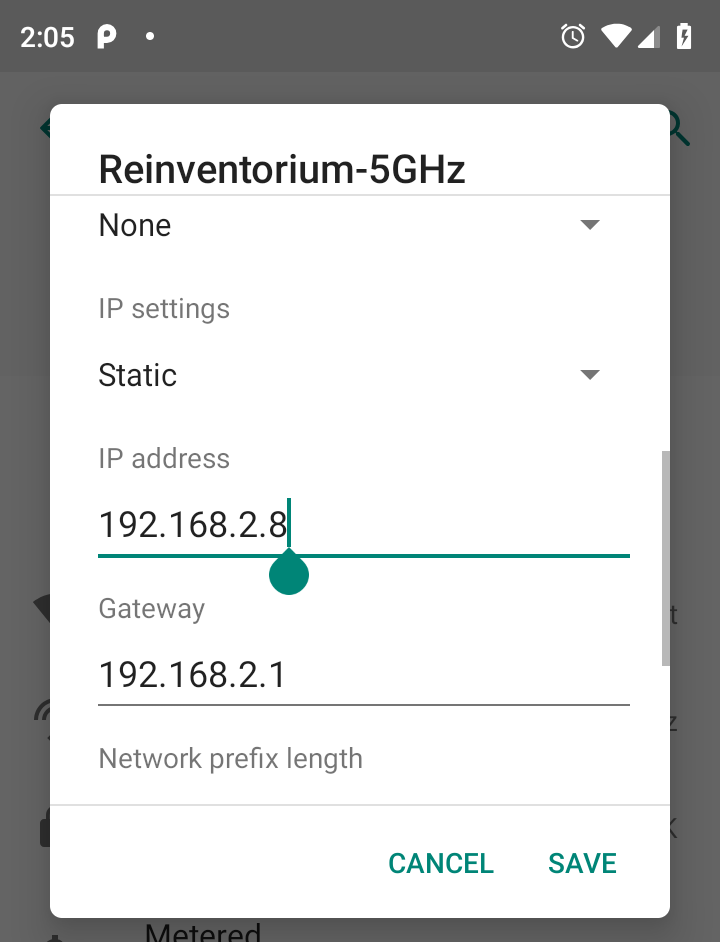
For greatest ease, assuming your version of Android supports it, assign your phone a static IP address on your wifi network; on Android Pie you’ll find this under the “Advanced” settings for your wifi connect:

Install Termux, either from Google Play or from F-Droid.
Once it’s installed, start the app, and start an SSH server with:
sshd
On the Mac
For greatest ease, add an entry in /etc/hosts for your phone like this:
192.168.2.8 phone
You can do this with:
sudo nano /etc/hosts
Next, assuming you already have Homebrew installed (look here if you need to install it):
brew cask install osxfuse
brew install sshfs
This will install SSHFS, which you’ll use on your Mac to mount the Android storage.
Once it’s installed, create a directory where you’d like to mount the phone storage, and do the mount:
mkdir motog7
sshfs phone:/storage/emulated/0 ~/motog7 -o volname=motog7 -p 8022
In that sshfs command:
- phone is the name I assigned to my Android phone’s static IP address in /etc/hosts
- /storage/emulated/0 is the Android path I want to mount on my phone
- ~/motog7 is the directory I created on my Mac for the mount
- -p 8022 sets the SSH port to use for the mount as 8022, which is what Termux uses by default
You might get a warning dialog “System Extension Blocked” when you attempt the mount; you can allow this to proceed under System Preferences > Security & Privacy.
Use your new superpowers…
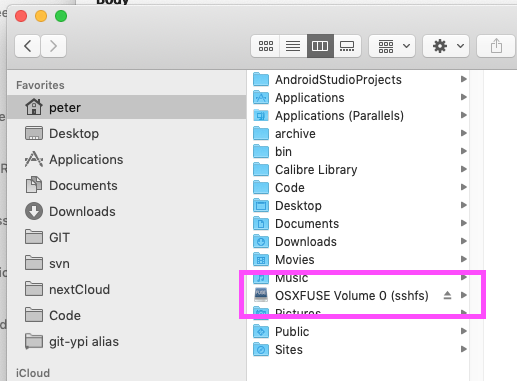
Assuming all went according to plan, you now have the Android’s storage mounted on your Mac.
It will show up in the Finder:

And it will be accessible from the command line:
macmini:~ peter$ ls ~/motog7
Alarms Download Recordings bluetooth
Android Movies Ringtones osmand
BROTHER Music Signal osmdroid
Cardboard Notifications Telegram osmtracker
DCIM Pictures Vespucci
Documents Podcasts alt_autocycle
You can treat it like another disk drive.
To Unmount
To umount the phone:
umount ~/motog7
You may find that the mount kills itself if the Termux app on your phone is terminated by Android.
Project Oak
Something interesting from Google. "The goal of Project Oak is to create a specification and a reference implementation for the secure transfer, storage and processing of data." The thinking here is that while we can lock down and encrypt data when we're transferring it, when it gets into the recipient computer it is unlocked and any system on the computer can access it, making it insecure. So this project posits what are called "enclaves" in recipient computers where all the data processing will happen in an area locked away from the rest of the computer. "Enclaves protect data and code even from the operating system kernel and privileged software, and are intended to protect from most hardware attacks." Of course, what enclaves also protect data from are computer users. They are the modern incarnation of 'trusted computing' - that is, a part of your computer that you can't access, and hence is 'trusted' by content providers (like the purveyors of digital rights management solutions). Beware the Oak bearing gifts.
Web: [Direct Link] [This Post]Jony Ive Is Leaving Apple
![]()
There have been hints (and there will be no end of “no more TouchBar/better keyboard” jokes) but this is both interesting timing and probably long overdue.
Like Gruber points out, Apple’s product pipeline and planning cycle is long enough for the effects to be latent, but it is still something to worry about in this age of relentless business operations Tim has brought to the company.
After all, if both your software and hardware innovation starts petering out, you lose your competitive edge.
Or, like Steve would have probably said, your soul.
Software for collaborative writing (with partners expecting MS Word) - Alexander Deliyannis
>As a researcher using a Mac I have always asked myself why we keep
>sending around Word documents.
Thanks for this excellent wrap-up of options. I am on Windows and Linux and the options I see are just about the same.
While Word may be built for Windows, it is definitely _not_ built for collaborative editing. In theory one can avoid multiple conflicting versions (usually a result of sending the 'latest' version around via email!) by integrating Word with Dropbox, but this only means getting a warning when someone else is working on the same file as you are, not integrating both (or more) concurrent users' changes.
At our office we have since several years relied on the Google suite for collaborative editing. I have also managed to convince external collaborators to work on single Google documents (or spreadsheets) when acting as the coordinator --thankfully, responsibility usually implies choice of method and tools. When someone else is leading, it is usually a shared Dropbox folder at best (at worst, SharePoint!)
We have used Atlassian Confluence extensively for specific projects (where the structuring of many documents is required). While not ideal for concurrent editing of the same document ('page' in Confluence speak) either, it can work well by assigning separate parts of the overall structure to the relevant users. It is also very extendable and can produce a large variety of outputs starting from the same content. I've mentioned this as a relevant reference in the past: https://contentmarketinginstitute.com/2015/02/technology-behind-language-of-content-strategy/
While some programming may be required for extensive customisation, actual users only see a quite friendly WYSIWYG interface.
Some years ago, there was an interesting offering specifically for collaborative writing, Quip: https://quip.com/about/product This has now been acquired by Salesforce and taken a more specific direction (not sure if the direction was the result of the acquisition, or the reason for it).
>Personally, I suspect that a third reason that no one speaks about is
>the real death blow for online collaborative writing in academia: They
>make it bloody obvious who contributed how much and when. There is no
>hiding behind "Oh, I did write a whole paragraph but forgot t send it
>around" followed by a hectic writing session in the afternoon. People
>feel uncomfortable when their writing activity is visible to others in
>real time, if only in theory.
Oh, this happens in academia as well? I thought it was mostly an issue in proposal and report writing ;)
Nownownow
I think I might do this sometime in the future (it's 4:31 on the day before my summer vacation so I'm not starting anything just right now). " Many personal websites, including this one here, have an “about” page. It’s a page that tells you something about the background of a person or about the services provided. But what this page often doesn’t answer... is what this person really is up to at the moment. A page that answers questions like: What are you focused on at this point in your life? What have you just started working on that excites you like nothing else? Did you just move to a new town? Did you start a new career as a Jengascript wrangler? To answer all those questions, Derek suggests to create a 'now page'." It's a neat idea. Here are some examples of sites with Now pages. Via Chris Coyier.
Web: [Direct Link] [This Post]Google Maps reveals most crowded transit lines around the world

While Toronto and Vancouver didn’t make the top of Google Maps’ most crowded transit lines in the world, the tech giant has listed which stops are the busiest in each of the Canadian cities.
In Toronto, Google Maps indicated that routes 68, 501 and 103 are the busiest transit routes.
On route 68, the most crowded stops are, Warden Ave. at Manhattan Dr., Warden Ave at Marble Arch Cres., and Murray Glen Rd.
On route 501, the most crowded stops are Queen St. East at Sudbury St., Queen St. West at Bathurst St., and Queen St. East at Brooklyn Ave.
On route 103, the most crowded stops are Hurontario St. at Ray Lawson Blvd., Brampton Gateway Terminal, and Sir Lou.
In Vancouver, Google Maps said routes 319, 14 and 49 are the most crowdest routes.
On route 319, the most crowded stops are Northbound Scott Rd. at 75A Ave. Westbound 72 Ave. at 126 St., and Westbound 72 Ave. at 122A St.
On route 14, the most crowded stops are Northbound Granville St. at W Broadway, Eastbound W Broadway St. at Balaclava St., and Eastbound W Broadway at Fir St.
On route 49, the most crowded stops are Westbound E 49 Ave at Fraser St., Westbound E 49 Ave at Elgin St., and Westbound E 49 Ave at Wales St.
According to Google Maps, the top ten most crowded transit lines (including subways, metros, commuter rails and other heavy transit) include:
1. Buenos Aires Urquiza Line
2. Sao Paulo Line 11 (Coral)
3. Buenos Aires Line A
4. Sao Paulo Linha 8 Diamante
5. Paris Line 13
6. Buenos Aires Line C
7. Tokyo Chuo Line
8. Sao Paulo Line 9 (Emerald)
9.Tokyo Nippori-Toneri Liner
10. New York L train
According to the blog post, the “crowdedness predictions come from optional feedback directly from the people who use Google Maps.”
Individuals receive notifications asking them about how crowded their subway train or bus ride was after navigating in transit mode, Google Maps said.
Results were taken from users from October 2018 to June 2019 during peak commuting hours (6am – 10 am) and “identified which lines had the highest number of crowdedness reports.”
Source: Google Maps
The post Google Maps reveals most crowded transit lines around the world appeared first on MobileSyrup.
The five best times Jony Ive was a disembodied voice in an Apple video

On Thursday, Apple made the surprise announcement that its design chief, Jony Ive, plans to leave the company later in the year.
It goes without saying, but in the more than 20 years Ive spent leading Apple’s design team, the soft-spoken British designer left an indelible mark on the Cupertino, California tech giant.
Like any career of note, Ive’s tenure at Apple has had its share of ups and downs. For every design tour de force like the iPhone 5s and MacBook Air, Ive also delivered his share of design blunders — see: the 2016 MacBook Pro’s butterfly keyboard, the Magic Mouse 2 and the company’s use of pentalobe screws, to name but a few examples. It also must be said that under his recent oversight, Apple products have become less useable, sustainable and repairable.
But this is not a look back at Ive’s career as a designer. Instead, it’s a tribute to a much more fun aspect of his time at Apple.
I’m talking of course of Ive’s role narrating Apple product videos.
Not only were these videos imminently memeable, but they also provided a rare — if oftentimes overly serious and grandiose — behind-the-scenes look at how Ive and company created Apple’s most popular products. They also helped to create the myth, in my mind at least, of Jony Ive as a reclusive mad genius.
Now that we’ll likely never hear his disembodied voice narrate another Apple video again, I’ve dug through the company’s video archives to highlight the five best times Jony Ive was a disembodied voice.
Apple iPhone 5 — humble beginnings
Compared to most of the other videos on this list, we see more of Ive — and his hairy chest — in this clip than any of the others. What’s more, in the pantheon of Jony Ive videos, the iPhone 5 showcase is Ive at his most prosaic; there’s no earth-shattering proclamation here. He also shares the limelight with other Apple executives like Bob Mansfield and Scott Forestall.
So why then is this video on the list? It all comes down to presentation. The official iPhone 5 video is the first time Apple paired Jony Ive’s narration with music — in this case, a soft, plaintive piano. The video, therefore, establish the footprint for every other Jony Ive video to come.
Apple Watch Sport — Say ‘aluminum’ like you mean it
If one were to pinpoint a specific reason Jony Ive entered into the mainstream cultural psyche, it’s likely because of his pronunciation of the word “aluminum.”
Instead of using the more common American pronunciation, Ive has always called on the Queen’s English to say the word. So it’s fitting then that Apple produced an entire two-minute video in which Ive could wax poetic about the material.
Filtered through Ive’s voice, a sentence like, “raw aluminum of exceptional purity is first heated to a molten state,” sounds more like a philosophical statement of intent than mere marketing material.
Truly sublime stuff.
12-inch MacBook — peak Jony Ive
While the 12-inch MacBook will probably go down as one of Apple’s less significant products, the accompanying design video sees Ive and his disembodied voice at their absolute best.
The video has everything: it’s full of larger than life statements like “it’s a product that couldn’t exist without invention across many disciplines,” gratuitous footage and a soundtrack that alternates between modern and classical modes. Moreover, there are ample over-the-top cutaways and diagrams to show off the MacBook’s internals.
Most importantly, however, we never once see Ive during the entire four-minute and 26-second runtime of the video. Instead, it’s merely his voice that guides us through this meditative experience.
In hindsight, this video is also significant for giving us our first look at Apple’s then-new butterfly keyboard mechanism. At the time, it was impossible to tell what a misstep the keyboard would represent for the company.
iPhone 5C — “beautifully, unapologetically plastic”
The design video Apple released alongside the 5c represents in ways the apex of Ive’s career as a disembodied voice. While Ive has yet to complete his transformation his into full-on design apparition (we see a short frame of Ive and his signature bald head and husky frame), the video features the best Iveism of all time.
In his most deadpan voice, Ive declares: “iPhone 5C is beautifully, unapologetically plastic.” It’s impossible not to laugh and smile at the seriousness with which Ive talks about is essentially a repurposed iPhone 5.
iPhone X — aka the animoji-theosis of Jony Ive
What could possibly surpass the iPhone 5c in the canon of Jony Ive design videos?
I can only speak for myself of course, but for me, the absolute highlight of Ive’s career narrating Apple videos came in 2017 when the company released the iPhone X.
For its most drastic iPhone redesign, Apple ratcheted up the production values and tasked Ive with distilling the essence of its newest and greatest smartphone yet in a mere three minutes and 39 seconds. It was a goal only a soft-spoken British gentleman like Ive could accomplish, and he did so in style.
“For more than a decade, our intention has been to create an iPhone that is all display. A physical object that disappears into the experience,” says Ive, grandiose as ever, as a soft harp eases the viewer into the video.
The video features everything: Ive’s soothing voice, an overwrought script and the smoothest of b-roll. We even see a scene with the ill-fated Air Power.
However, it’s the video’s penultimate moment that is etched permanently in my mind.
“The TrueDepth camera also enables new experiences,” says Ive as he moves to describe the iPhone X’s TrueDepth camera system and its then-new Animoji feature.
“By mapping more than 50 facial muscles, in real-time: so you can be happy or sad or cross,” adds Ive, as the background music swells and his visage is variously transformed into that of a monkey, unicorn, rooster and, of course, a piece of poop.
Even if it was just for the briefest of moments, in those short few seconds, one of Apple’s products felt exciting again, and, yes, even a bit of fun.
Bonus — “A computer absolutely can be sexy”
Did you know Jony Ive wasn’t always bald? It’s true: tech’s most famous — and dare I say sexy — bald man didn’t come into this world with a shiny head with an aluminum-like sheen to it, he grew into it. Long before most Apple fans knew who Jony Ive was, the designer appeared in a short interview video way back in 1999, full with a luscious head of hair, exposing the view that a computer could, in fact, be sexy.
Hot stuff, indeed.
Thanks to everyone who tweeted suggestions. Let us know your favourite Jony Ive video moments in the comment section below.

The post The five best times Jony Ive was a disembodied voice in an Apple video appeared first on MobileSyrup.
Dear @WashingtonPost
This is wrong:
Because I’m not blocking ads. I’m blocking tracking.
In fact I welcome ads—especially ones that sponsor The Washington Post and other fine publishers. I’ll also be glad to subscribe to the Post once it stops trying to track me off their site. Same goes for The New York Times, The Wall Street Journal and other papers I value and to which I no longer subscribe.
Right now Privacy Badger protects me from 20 and 35 potential trackers at those papers’ sites, in addition to the 19 it finds at the Post. Most of those trackers are for stalking readers like marked animals, so their eyeballs can be shot by “relevant,” “interest-based” and “interactive” ads they would never request if they had much choice about it—and in fact have already voted against with ad blocking, which by 2015 was already the biggest boycott in world history. As I point out in that link (and Don Marti did earlier in DCN), there was in that time frame a high correlation between interest in blocking ads and interest (surely by the ad industry) in retargeting, which is the most obvious evidence to people that they are being tracked. See here:
Tracking-based ads, generally called adtech, do not sponsor publications. They use publications as holding pens in which human cattle can be injected with uninvited and unwelcome tracking files (generally called cookies) so their tracked eyeballs can be shot, wherever they might show up, with ads aimed by whatever surveillance data has been gleaned from those eyeballs’ travels about the Net.
Real advertising—the kind that makes brands and sponsors publications—doesn’t track people. Instead it is addressed to whole populations. In doing so it sponsors the media it uses, and testifies to those media’s native worth. Tracking-based ads can’t and don’t do that.
That tracking-based ads pay, and are normative in the extreme, does not make right the Post‘s participation in the practice. Nor does it make correct the bad thinking (and reporting!) behind notices such as the one above.
Let’s also be clear about two myths spread by the “interactive” (aka “relevant” and “interest-based”) advertising business:
- That the best online advertising is also the most targeted—and “behavioral” as well, meaning informed by knowledge about an individual, typically gathered by tracking. This is not the kind of advertising that made Madison Avenue, that created nearly every brand you can name, and that has sponsored publishers and other media for the duration. Instead it is direct marketing, aka direct response marketing. Both of those labels are euphemistic re-brandings that the direct mail business gave itself after the world started calling it junk mail. Sure, much (or most) of the paid messages we see online are called advertising, and look like advertising; but as long as they want to get personal, they’re direct marketing.
- That tracking-based advertising (direct marketing by another name) is the business model of the “free” Internet. In fact the Internet at its base is as free as gravity and sunlight, and floats all business boats, whether based on advertising or not.
Getting the world to mistake direct marketing for real advertising is one of the great magic tricks of all time: a world record for misdirection in business. To help explain the difference, I wrote Separating Advertising’s Wheat From Chaff, the most quoted line from which is “Madison Avenue fell asleep, direct response marketing ate its brain, and it woke up as an alien replica of itself.” Alas, the same is true for the business offices of the Post and every other publisher that depends on tracking. They ceased selling their pages as spaces for sponsors and turned those spaces over to data vampires living off the blood of readers’ personal data.
There is a side for those publishers to take on this thing, and it’s not with the tracking-based advertising business. It is with their own moral backbone, and with the readers who still keep faith in it.
If any reporter (e.g.@CraigTimberg , @izzadwoskin, @nakashimae and @TonyRomm) wants to talk to me about this, write me at doc at searls.com or DM me here on Twitter.* Thanks.
*So far, silence. But hey: I know I’m asking journalists to grab a third rail here. And it’s one that needs to be grabbed. There might even be a Pulitzer for whoever grabs it. Because the story is that big, and it’s not being told, at least not by any of the big pubs. The New York Times‘ Privacy Project has lots of great stuff, but none that grabs the third rail. The closest the Times has come is You’re not alone when you’re on Google, by Jennifer Senior (@JenSeniorNY). In it she says “your newspaper” (alas, not this one) is among the culprits. But it’s a step. We need more of those. (How about it, @cwarzel?)†
[Later…] We actually have a great model for how the third rail might be grabbed, because The Wall Street Journal wrestled it mightily with the What They Know series, which ran from 2010 to 2012. For most of the years after that, the whole series, which was led by Julia Angwin and based on lots of great research, was available on the Web for everybody at http://wsj.com/wtk. But that’s a 404 now. If you want to see a directory of the earliest pieces, I list them in a July 2010 blog post titled The Data Bubble. That post begins,
The tide turned today. Mark it: 31 July 2010.
That’s when The Wall Street Journal published The Web’s Gold Mine: Your Secrets, subtitled A Journal investigation finds that one of the fastest-growing businesses on the Internet is the business of spying on consumers. First in a series. It has ten links to other sections of today’s report.
Alas, the tide did not turn. It kept coming in and getting deeper. And now we’re drowning under it.
† I did hear from Charlie Warzel (@cwarzel), who runs the Privacy Project series at the Times , and assured me that they would be covering the issue. And (Yay!) it did, with I Visited 47 Sites. Hundreds of Trackers Followed Me, by Farhad Manjoo (@fmanjoo). This was followed by critique of that piece titled Privacy Fundamentalism, by Ben Thompson in Stratechery. I responded to both with On Privacy Fundamentalism. So check those out too.
Quick hit: ‘dig’-ging Into r-project.org DNS Records with {processx}
The r-project.org domain had some temporary technical difficulties this week (2019-29) that made reaching R-related resources problematic for a bunch of folks for a period of time. Incidents like this underscore the need for regional and network diversity when it comes to ensuring the availability of DNS services. That is, it does no good if you have two DNS servers if they’re both connected to the same power source and/or network connection since if power goes out or the network gets wonky no client will be able to translate r-project.org to an IP address that it can then connect to.
I’m not at-keyboard much this week so only had time to take an external poke at the (new) r-project.org DNS configuration late yesterday and today before the sleepyhead vacationers emerged from slumber. To my surprise, the r-project.org current DNS setup allows full zone transfers, which means you can get the full “database” of r-project.org DNS records if you know the right incantations.
So, I wrote a small R function wrapper for the dig command using {processx}. Folks on the legacy Windows operating system are on your own for getting a copy of dig installed but users of proper, modern operating systems like Linux or macOS should have it installed by-default (or will be an easy package manager grab away).
Wrapping dig
The R-wrapper for the dig command is pretty straightforward:
library(stringi) # string processing
library(processx) # system processes orchestration
library(tidyverse) # good data wrangling idioms
dig <- function(..., cat = TRUE) {
processx::run(
command = unname(Sys.which("dig")),
args = unlist(list(...)),
) -> out
if (cat) message(out$stdout)
invisible(out)
}
We expand the ellipses into command arguments, run the command, return the output and optionally display the output via message().
Let’s see if it works by getting the dig help:
dig("-h")
## Usage: dig [@global-server] [domain] [q-type] [q-class] {q-opt}
## {global-d-opt} host [@local-server] {local-d-opt}
## [ host [@local-server] {local-d-opt} [...]]
## Where: domain is in the Domain Name System
## q-class is one of (in,hs,ch,...) [default: in]
## q-type is one of (a,any,mx,ns,soa,hinfo,axfr,txt,...) [default:a]
## (Use ixfr=version for type ixfr)
## q-opt is one of:
## -4 (use IPv4 query transport only)
## -6 (use IPv6 query transport only)
## -b address[#port] (bind to source address/port)
## -c class (specify query class)
## -f filename (batch mode)
## -i (use IP6.INT for IPv6 reverse lookups)
## -k keyfile (specify tsig key file)
## -m (enable memory usage debugging)
## -p port (specify port number)
## -q name (specify query name)
## -t type (specify query type)
## -u (display times in usec instead of msec)
## -x dot-notation (shortcut for reverse lookups)
## -y [hmac:]name:key (specify named base64 tsig key)
## d-opt is of the form +keyword[=value], where keyword is:
## +[no]aaonly (Set AA flag in query (+[no]aaflag))
## +[no]additional (Control display of additional section)
## +[no]adflag (Set AD flag in query (default on))
## +[no]all (Set or clear all display flags)
## +[no]answer (Control display of answer section)
## +[no]authority (Control display of authority section)
## +[no]besteffort (Try to parse even illegal messages)
## +bufsize=### (Set EDNS0 Max UDP packet size)
## +[no]cdflag (Set checking disabled flag in query)
## +[no]cl (Control display of class in records)
## +[no]cmd (Control display of command line)
## +[no]comments (Control display of comment lines)
## +[no]crypto (Control display of cryptographic fields in records)
## +[no]defname (Use search list (+[no]search))
## +[no]dnssec (Request DNSSEC records)
## +domain=### (Set default domainname)
## +[no]edns[=###] (Set EDNS version) [0]
## +ednsflags=### (Set EDNS flag bits)
## +[no]ednsnegotiation (Set EDNS version negotiation)
## +ednsopt=###[:value] (Send specified EDNS option)
## +noednsopt (Clear list of +ednsopt options)
## +[no]expire (Request time to expire)
## +[no]fail (Don't try next server on SERVFAIL)
## +[no]identify (ID responders in short answers)
## +[no]idnout (convert IDN response)
## +[no]ignore (Don't revert to TCP for TC responses.)
## +[no]keepopen (Keep the TCP socket open between queries)
## +[no]multiline (Print records in an expanded format)
## +ndots=### (Set search NDOTS value)
## +[no]nsid (Request Name Server ID)
## +[no]nssearch (Search all authoritative nameservers)
## +[no]onesoa (AXFR prints only one soa record)
## +[no]opcode=### (Set the opcode of the request)
## +[no]qr (Print question before sending)
## +[no]question (Control display of question section)
## +[no]recurse (Recursive mode)
## +retry=### (Set number of UDP retries) [2]
## +[no]rrcomments (Control display of per-record comments)
## +[no]search (Set whether to use searchlist)
## +[no]short (Display nothing except short
## form of answer)
## +[no]showsearch (Search with intermediate results)
## +[no]split=## (Split hex/base64 fields into chunks)
## +[no]stats (Control display of statistics)
## +subnet=addr (Set edns-client-subnet option)
## +[no]tcp (TCP mode (+[no]vc))
## +time=### (Set query timeout) [5]
## +[no]trace (Trace delegation down from root [+dnssec])
## +tries=### (Set number of UDP attempts) [3]
## +[no]ttlid (Control display of ttls in records)
## +[no]vc (TCP mode (+[no]tcp))
## global d-opts and servers (before host name) affect all queries.
## local d-opts and servers (after host name) affect only that lookup.
## -h (print help and exit)
## -v (print version and exit)
To get the DNS records of r-project.org DNS we need to find the nameservers, which we can do via:
ns <- dig("+short", "NS", "@9.9.9.9", "r-project.org")
## ns1.wu-wien.ac.at.
## ns2.urbanek.info.
## ns1.urbanek.info.
## ns3.urbanek.info.
## ns4.urbanek.info.
## ns2.wu-wien.ac.at.
There are six of them (which IIRC is a few more than they had earlier this week). I wanted to see if any supported zone transfers. Here’s one way to do that:
stri_split_lines(ns$stdout, omit_empty = TRUE) %>% # split the response in stdout into lines
flatten_chr() %>% # turn the list into a character vector
map_df(~{ # make a data frame out of the following
tibble(
ns = .x, # the nameserver we are probing
res = dig("+noall", "+answer", "AXFR", glue::glue("@{.x}"), "r-project.org", cat = FALSE) %>% # the dig zone transfer request
pluck("stdout") # we only want the `stdout` element of the {processx} return value
)
}) -> xdf
xdf
## # A tibble: 6 x 2
## ns res
## <chr> <chr>
## 1 ns1.wu-wien.ac… "; Transfer failed.\n"
## 2 ns2.urbanek.in… "R-project.org.\t\t7200\tIN\tSOA\tns0.wu-wien.ac.at.…
## 3 ns1.urbanek.in… "R-project.org.\t\t7200\tIN\tSOA\tns0.wu-wien.ac.at.…
## 4 ns3.urbanek.in… "R-project.org.\t\t7200\tIN\tSOA\tns0.wu-wien.ac.at.…
## 5 ns4.urbanek.in… "R-project.org.\t\t7200\tIN\tSOA\tns0.wu-wien.ac.at.…
## 6 ns2.wu-wien.ac… "; Transfer failed.\n"
(NOTE: You may not get things in the same order if you try this at home due to the way DNS queries and responses work.)
So, two servers did not accept our request but four did. Let’s see what a set of zone transfer records looks like:
cat(xdf[["res"]][[2]])
## R-project.org. 7200 IN SOA ns0.wu-wien.ac.at. postmaster.wu-wien.ac.at. 2019040400 3600 1800 604800 3600
## R-project.org. 7200 IN NS ns1.urbanek.info.
## R-project.org. 7200 IN NS ns1.wu-wien.ac.at.
## R-project.org. 7200 IN NS ns2.urbanek.info.
## R-project.org. 7200 IN NS ns2.wu-wien.ac.at.
## R-project.org. 7200 IN NS ns3.urbanek.info.
## R-project.org. 7200 IN NS ns4.urbanek.info.
## R-project.org. 7200 IN A 137.208.57.37
## R-project.org. 7200 IN MX 5 mc1.ethz.ch.
## R-project.org. 7200 IN MX 5 mc2.ethz.ch.
## R-project.org. 7200 IN MX 5 mc3.ethz.ch.
## R-project.org. 7200 IN MX 5 mc4.ethz.ch.
## R-project.org. 7200 IN TXT "v=spf1 ip4:129.132.119.208/32 ~all"
## cran.at.R-project.org. 7200 IN CNAME cran.wu-wien.ac.at.
## beta.R-project.org. 7200 IN A 137.208.57.37
## bugs.R-project.org. 7200 IN CNAME rbugs.urbanek.info.
## cran.ch.R-project.org. 7200 IN CNAME cran.wu-wien.ac.at.
## cloud.R-project.org. 7200 IN CNAME d3caqzu56oq2n9.cloudfront.net.
## cran.R-project.org. 7200 IN CNAME cran.wu-wien.ac.at.
## ftp.cran.R-project.org. 7200 IN CNAME cran.wu-wien.ac.at.
## www.cran.R-project.org. 7200 IN CNAME cran.wu-wien.ac.at.
## cran-archive.R-project.org. 7200 IN CNAME cran.wu-wien.ac.at.
## developer.R-project.org. 7200 IN CNAME rdevel.urbanek.info.
## cran.es.R-project.org. 7200 IN A 137.208.57.37
## ess.R-project.org. 7200 IN CNAME ess.math.ethz.ch.
## journal.R-project.org. 7200 IN CNAME cran.wu-wien.ac.at.
## mac.R-project.org. 7200 IN CNAME r.research.att.com.
## portal.R-project.org. 7200 IN CNAME r-project.org.
## r-forge.R-project.org. 7200 IN CNAME r-forge.wu-wien.ac.at.
## *.r-forge.R-project.org. 7200 IN CNAME r-forge.wu-wien.ac.at.
## search.R-project.org. 7200 IN CNAME finzi.psych.upenn.edu.
## svn.R-project.org. 7200 IN CNAME svn-stat.math.ethz.ch.
## translation.R-project.org. 7200 IN CNAME translation.r-project.kr.
## cran.uk.R-project.org. 7200 IN CNAME cran.wu-wien.ac.at.
## cran.us.R-project.org. 7200 IN A 137.208.57.37
## user2004.R-project.org. 7200 IN CNAME r-project.org.
## useR2006.R-project.org. 7200 IN CNAME r-project.org.
## user2007.R-project.org. 7200 IN CNAME r-project.org.
## useR2008.R-project.org. 7200 IN CNAME r-project.org.
## useR2009.R-project.org. 7200 IN CNAME r-project.org.
## user2010.R-project.org. 7200 IN CNAME r-project.org.
## useR2011.R-project.org. 7200 IN CNAME r-project.org.
## useR2012.R-project.org. 7200 IN CNAME r-project.org.
## useR2013.R-project.org. 7200 IN CNAME r-project.org.
## user2014.R-project.org. 7200 IN CNAME user2014.github.io.
## useR2015.R-project.org. 7200 IN CNAME r-project.org.
## useR2016.R-project.org. 7200 IN CNAME user2016.github.io.
## useR2017.R-project.org. 7200 IN CNAME r-project.org.
## useR2018.R-project.org. 7200 IN CNAME user-2018.netlify.com.
## useR2019.R-project.org. 7200 IN A 5.135.185.16
## wiki.R-project.org. 7200 IN CNAME cran.wu-wien.ac.at.
## win-builder.R-project.org. 7200 IN A 129.217.207.166
## win-builder.R-project.org. 7200 IN MX 0 rdevel.urbanek.info.
## www.R-project.org. 7200 IN CNAME cran.wu-wien.ac.at.
## R-project.org. 7200 IN SOA ns0.wu-wien.ac.at. postmaster.wu-wien.ac.at. 2019040400 3600 1800 604800 3600
That’s not pretty, but it’s wrangle-able. Let’s turn it into a data frame:
xdf[["res"]][[2]] %>% # get the response text
stri_split_lines(omit_empty = TRUE) %>% # split it into lines
flatten_chr() %>% # turn it into a character vector
stri_split_regex("[[:space:]]+", n = 5, simplify = TRUE) %>% # split at whitespace, limiting to five fields
as_tibble(.name_repair = "unique") %>% # make it a tibble
set_names(c("host", "ttl", "class", "record_type", "value")) %>% # better colnames
mutate(host = stri_trans_tolower(host)) %>% # case matters not in DNS names
print(n=nrow(.)) # see our results
## # A tibble: 55 x 5
## host ttl class record_type value
## <chr> <chr> <chr> <chr> <chr>
## 1 r-project.org. 7200 IN SOA ns0.wu-wien.ac.at. postmaster.wu-wien.ac.at. 2019040400 3600 1800 …
## 2 r-project.org. 7200 IN NS ns1.urbanek.info.
## 3 r-project.org. 7200 IN NS ns1.wu-wien.ac.at.
## 4 r-project.org. 7200 IN NS ns2.urbanek.info.
## 5 r-project.org. 7200 IN NS ns2.wu-wien.ac.at.
## 6 r-project.org. 7200 IN NS ns3.urbanek.info.
## 7 r-project.org. 7200 IN NS ns4.urbanek.info.
## 8 r-project.org. 7200 IN A 137.208.57.37
## 9 r-project.org. 7200 IN MX 5 mc1.ethz.ch.
## 10 r-project.org. 7200 IN MX 5 mc2.ethz.ch.
## 11 r-project.org. 7200 IN MX 5 mc3.ethz.ch.
## 12 r-project.org. 7200 IN MX 5 mc4.ethz.ch.
## 13 r-project.org. 7200 IN TXT "\"v=spf1 ip4:129.132.119.208/32 ~all\""
## 14 cran.at.r-project.org. 7200 IN CNAME cran.wu-wien.ac.at.
## 15 beta.r-project.org. 7200 IN A 137.208.57.37
## 16 bugs.r-project.org. 7200 IN CNAME rbugs.urbanek.info.
## 17 cran.ch.r-project.org. 7200 IN CNAME cran.wu-wien.ac.at.
## 18 cloud.r-project.org. 7200 IN CNAME d3caqzu56oq2n9.cloudfront.net.
## 19 cran.r-project.org. 7200 IN CNAME cran.wu-wien.ac.at.
## 20 ftp.cran.r-project.org. 7200 IN CNAME cran.wu-wien.ac.at.
## 21 www.cran.r-project.org. 7200 IN CNAME cran.wu-wien.ac.at.
## 22 cran-archive.r-project.… 7200 IN CNAME cran.wu-wien.ac.at.
## 23 developer.r-project.org. 7200 IN CNAME rdevel.urbanek.info.
## 24 cran.es.r-project.org. 7200 IN A 137.208.57.37
## 25 ess.r-project.org. 7200 IN CNAME ess.math.ethz.ch.
## 26 journal.r-project.org. 7200 IN CNAME cran.wu-wien.ac.at.
## 27 mac.r-project.org. 7200 IN CNAME r.research.att.com.
## 28 portal.r-project.org. 7200 IN CNAME r-project.org.
## 29 r-forge.r-project.org. 7200 IN CNAME r-forge.wu-wien.ac.at.
## 30 *.r-forge.r-project.org. 7200 IN CNAME r-forge.wu-wien.ac.at.
## 31 search.r-project.org. 7200 IN CNAME finzi.psych.upenn.edu.
## 32 svn.r-project.org. 7200 IN CNAME svn-stat.math.ethz.ch.
## 33 translation.r-project.o… 7200 IN CNAME translation.r-project.kr.
## 34 cran.uk.r-project.org. 7200 IN CNAME cran.wu-wien.ac.at.
## 35 cran.us.r-project.org. 7200 IN A 137.208.57.37
## 36 user2004.r-project.org. 7200 IN CNAME r-project.org.
## 37 user2006.r-project.org. 7200 IN CNAME r-project.org.
## 38 user2007.r-project.org. 7200 IN CNAME r-project.org.
## 39 user2008.r-project.org. 7200 IN CNAME r-project.org.
## 40 user2009.r-project.org. 7200 IN CNAME r-project.org.
## 41 user2010.r-project.org. 7200 IN CNAME r-project.org.
## 42 user2011.r-project.org. 7200 IN CNAME r-project.org.
## 43 user2012.r-project.org. 7200 IN CNAME r-project.org.
## 44 user2013.r-project.org. 7200 IN CNAME r-project.org.
## 45 user2014.r-project.org. 7200 IN CNAME user2014.github.io.
## 46 user2015.r-project.org. 7200 IN CNAME r-project.org.
## 47 user2016.r-project.org. 7200 IN CNAME user2016.github.io.
## 48 user2017.r-project.org. 7200 IN CNAME r-project.org.
## 49 user2018.r-project.org. 7200 IN CNAME user-2018.netlify.com.
## 50 user2019.r-project.org. 7200 IN A 5.135.185.16
## 51 wiki.r-project.org. 7200 IN CNAME cran.wu-wien.ac.at.
## 52 win-builder.r-project.o… 7200 IN A 129.217.207.166
## 53 win-builder.r-project.o… 7200 IN MX 0 rdevel.urbanek.info.
## 54 www.r-project.org. 7200 IN CNAME cran.wu-wien.ac.at.
## 55 r-project.org. 7200 IN SOA ns0.wu-wien.ac.at. postmaster.wu-wien.ac.at. 2019040400 3600 1800
FIN
Zone transfers are a quick way to get all the DNS information for a site. As such, it isn’t generally recommended to allow zone transfers from just anyone (though trying to keep anything secret in public DNS is a path generally fraught with peril given how easy it is to brute-force record lookups). However, if r-project.org zone transfers stay generally open, then you can use this method to keep a local copy of r-project.org host info and make local /etc/hosts (or the Windows equivalent) entries when issues like the one this past week arise.
I can’t help but picture the 15-year-old — or 4...
Rolandtor maybe all these people are writing in node.js and other webby tools like jsfiddle? js is the new scripting? localhost running js is the new command line?
I can’t help but picture the 15-year-old — or 45-year-old — who’s never programmed before, and who reads a little bit about Ruby on some website and is intrigued and wants to try learning it.
Maybe they have a thing they want to do, or maybe they’ve always just been curious about programming and this seemed like a nice way to start.
Are we going to ask that person to figure out how to install Ruby? If there are one-click installers out there, are we going to ask them to figure out which one is actually reputable and safe?
Curiosity like this is one of the ways new developers are made. I worry that the less the Mac is tinkerable out-of-the-box, the fewer developers we’ll get.
Or: we’ll only get certain kinds of developers — the ones of the right age and background who can go get a CS degree.
Using FreshRSS to "Like" blog posts via Webmention
This is a post about gluing some things together, and about the IndieWeb. It started, however, with a photo of a child on a bicycle.
I liked that photo, and I wanted to express that somehow in a public fashion.
I didn’t want to leave a comment on that blog post, as my aspirations were simply to express admiration for the photo and its subject; I was looking for something more “hej!”
It turns out that there’s IndieWeb for that.
One way of thinking about the IndieWeb is “all the plumbing of corporate social networks, without any of the corporate social networks required.”
In other words, in this case, “a like button for the web.”
Another way of thinking about the IndieWeb is to focus on the Indie: it’s a decentralized jam that allows us all to bring our own tools to the table, but to interoperate.
In my case the tools I needed to glue together are FreshRSS (the RSS feedreader where that bicycle photo originally caught my eye) and Drupal, which I use to write this blog.
Click the Star in FreshRSS
The way I decided to make this all work is to wire up “favouriting” a post in FreshRSS to sending a Webmention.
So I do this:
and I cause this to happen:

Pull The Favourites
My original approach was to try to code up a FreshRSS extension that would make this all happen in real time; I quickly decided that I didn’t want to have to grok a new MVC framework to make this happen, and that real time liking didn’t really need to happen.
I decided, instead, to simply extract favourites from FreshRSS on a regular schedule and to create new Drupal posts for new ones I encounter.
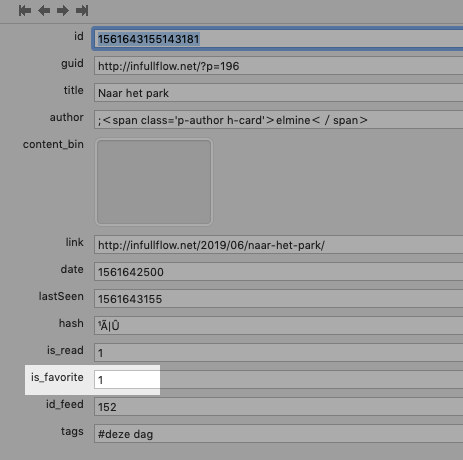
FreshRSS’s “entry” table makes this easy, as there’s a boolean field for each entry called is_favorite:

I only want to create a post in Drupal once, so I created an additional table, favourites_rss, to track those I’ve already processed. The result is that I can extract the details of new favourites by this bit of SQL:
SELECT en.id,title,link,date,website,name
from freshrss_peter_entry en,freshrss_peter_feed
where
(freshrss_peter_feed.id = en.id_feed) and
(is_favorite = 1) and
en.id not in (select fav.id from favourites_rss fav)
This returns me all the information I need about each favourite:
- The title of the post
- The link to the post
- The date of the post
- The title of the blog where the post lives
- The link to the blog
Post the Favourites
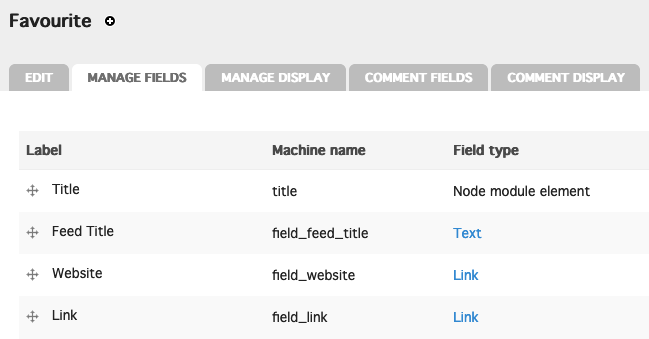
I created a new Drupal content type called Favourite with fields for each of these pieces of information:

With that in place I can programmatically add new favourites in Drupal like this, in PHP:
foreach($favs as $key => $row) {
$node = new stdClass();
$node->type = $nodetype;
node_object_prepare($node);
$node->language = 'und';
$node->title = html_entity_decode($row['title']);
$node->uid = 1;
$node->status = 1; //(1 or 0): published or not
$node->promote = 0; //(1 or 0): promoted to front page
$node->comment = 0; // 0 = comments disabled, 1 = read only, 2 = read/write
$node->field_feed_title[$node->language][0]['value'] = html_entity_decode($row['name']);
$node->field_website[$node->language][0]['url'] = $row['website'];
$node->field_website[$node->language][0]['title'] = html_entity_decode($row['name']);
$node->field_link[$node->language][0]['url'] = $row['link'];
$node->field_link[$node->language][0]['title'] = html_entity_decode($row['title']);
if($node = node_submit($node)) { // Prepare node for saving
$node->created = $row['date'];
node_save($node);
webmention_send($node->nid);
}
}
The post that got created for the bicycle photo is here; if you look at the HTML of that post, you’ll see that the link includes the CSS class u-like-of:
Naar het park
The call to webmention_send() is the secret sauce that sends a Webmention to the original favourites post, a Webmention that signals “I like you” because of that CSS class.
Release the Favourites!
With all my favourites now safely tucked away in Drupal posts, with Webmentions sent to their hosts, I can also expose everything I’ve favourited to all-comers.
Drupal makes this easy using Views, which I used to create this Favourites page, that lists them all, in reverse chronological order; I also used Views to create an RSS feed of my favourites that you can plug into your RSS reader, should you like (and to allow the river of love to overflow its banks ever further).
Although it took some fiddling to make all this happens, now that the fiddling is fiddled, it just works: I click the star in FreshRSS and the favourite appears on this list, in this RSS feed, and, should the blog I favourited the link from support Webmentions, as a “like” on the original post.
Wer hat so ein Kabel zu viel?

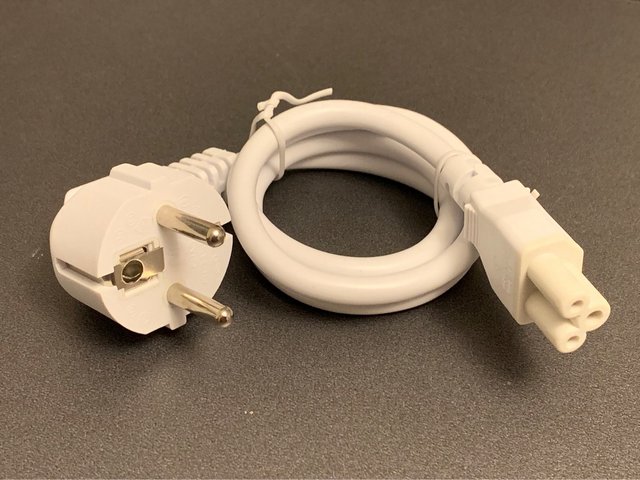
Wenn ich irgendwelche Technik entsorge, behalte ich stets die Kabel und die Netzteile. Netzteile gehen kaputt und müssen ersetzt werden. Kabel haben nie die richtige Länge oder die richtige Farbe. Oder den falschen Stecker. In meiner ganzen Sammlung mit viel zu vielen Kabeln gibt es nur eins nicht: Ein kurzes weißes Stromkabel mit abgewinkeltem Schukostecker und einem Kleeblatt am anderen Ende. Samuel schickt mir jetzt eins - das ist sein Bild. Hat noch jemand eins in seiner Kabelkiste? Länge zwischen 50 und 70 cm.
The End of the Ive Era
Great piece by John Gruber on Jony Ive leaving Apple and the end of the Ive era at Apple:
I think Tim Cook is a great CEO and Jeff Williams is a great COO. But who’s in charge of product design now? There is no new chief design officer, which, really, is what Steve Jobs always was. From a product standpoint, the post-Jobs era at Apple has been the Jony Ive era, not the Tim Cook era. That’s not a knock on Tim Cook. To his credit, Tim Cook has never pretended to be a product guy, which is exactly the hubris that John Sculley succumbed to back in the early ’90s, leading to the Newton being launched far before it was ready and the Macintosh platform languishing.
My gut sense for years has been that Ive without Jobs has been like McCartney without Lennon. Or Lennon without McCartney — take whichever analogical pairing you prefer. My point here is only that the fruit of their collaborations were, seemingly magically, far greater than the sums of the duos’ talents and tastes.
Assuming Ive's exit has been planned for a while, it makes little sense to me that Apple's new design leaders (Hankey and Dye) are reporting to Jeff Williams, the company's chief operating officer – unless Apple has bigger plans for him in the near future. Then again, Gruber's point still holds: who's Apple's Chief Design Officer now?
→ Source: daringfireball.net
RT @BethRigby: This from the first minister of Wales. twitter.com/fmwales/status…
|
mkalus
shared this story
from |
This from the first minister of Wales. twitter.com/fmwales/status…
We cannot afford the economic damage being done every single day as a result of Brexit uncertainty – I’ve written to Welsh MPs to urge them to continue to take action to block a no deal & to force UK Gov to bring forward a referendum bill by 31st July. pic.twitter.com/F8wMiqoEc1
![]()
Posted byfmwales on Wednesday, June 26th, 2019 9:10am
571 likes, 235 retweets
BethRigby
on Wednesday, June 26th, 2019 12:04pm
mrjamesob
on Wednesday, June 26th, 2019 5:45pm715 likes, 253 retweets
Das US-Militär - einer der größten Klimasünder in der Welt
|
mkalus
shared this story
from |
Militärtransportflugzeug C-17 Globemaster III. Bild: DoD
Für die globalen logistischen Lieferketten produziert das US-Militär so viele Emissionen wie Schweden oder Dänemark
Das US-Militär ist einer der größten Klimasünder in der Geschichte, verbraucht mehr flüssige Kraftstoffe und emittiert mehr Kohlenstoff als die meisten Länder, belegt eine neue Studie von Wissenschaftlern der Durham University und der Lancaster University, die von der Royal Geographical Society in Großbritannien veröffentlicht wurde.
Die neue Studie ermittelt die Auswirkungen des US-Militärs auf den Klimawandel durch eine kritische Analyse ihrer globalen logistischen Lieferketten. Um die globale Einsatzfähigkeit aufrecht zu erhalten, benötigen die Streitkräfte ein ausgedehntes Netzwerk an Containerschiffen, Lastkraftwagen und Frachtflugzeugen, um so ihre Niederlassungen und Operationen überall in der Welt mit all jenem zu versorgen, was vor Ort benötigt wird, von Bomben über humanitäre Hilfe bis hin zu Treibstoffen.
Zuständig für diese Infrastruktur ist die Defense Logistics Agency. Anfragen auf Basis des Freedom of Information Act an diese Behörde lieferten den Forschern die Basisdaten für ihre Untersuchung. Die Wissenschaftler ermittelten auf Basis dieser Daten, dass die US-Streitkräfte, wenn sie ein Nationalstaat wären, der 47. größte Emittent von Treibhausgasen in der Welt wären, wenn man nur die Emissionen aus der Kraftstoffnutzung berücksichtigen würde. Damit würde das US-Militär alleine mehr Emissionen verursachen als Portugal, Schweden oder Dänemark.
Im Jahr 2017 benötigte das US-Militär jeden Tag etwa 42,9 Millionen Liter Öl, dabei wurden mehr als 25 Millionen Tonnen Kohlendioxid emittiert. Die US-Luftwaffe kaufte im selben Jahr Treibstoffe im Wert von 4,9 Milliarden US-Dollar, die Marine 2,8 Milliarden US-Dollar, gefolgt von der Armee mit 977 Millionen US-Dollar und den Marines mit 36 Millionen US-Dollar, wodurch mehr klimawirksame Gase emittiert wurden als von den meisten mittelgroßen Länder.
"Unsere Forschung zeigt durch die Analyse der Lieferketten, dass das US-Militär ein wesentlicher Akteur beim Klimawandel ist", sagt Oliver Belcher von der Durham University. Die Ergebnisse zeigen den enormen CO2-Fußabdruck des US-Militärs und dessen wesentlichen Einfluss auf den Klimawandel.
Co-Autor Dr. Patrick Bigger vom Lancaster University Environment Centre dazu: "Das US-Militär hat längst verstanden, dass es nicht immun gegen die potenziellen Folgen des Klimawandels ist - es erkennt es als einen Bedrohungsmultiplikator an, der andere Bedrohungen verschärfen kann - und hat auch seinen eigenen Beitrag zum Problem nicht ignoriert. Doch ihre Klimapolitik ist grundsätzlich widersprüchlich - sie konfrontiert die Auswirkungen des Klimawandels und bleibt gleichzeitig der größte institutionelle Verbraucher von Kohlenwasserstoffen in der Welt."
Es ist kein Zufall, dass die militärischen Emissionen der USA in Studien zum Klimawandel eher "übersehen" werden, da es relativ schwierig ist, konsistente Daten vom Pentagon und von den US-Regierungsbehörden zu erhalten, so die Forscher. Tatsächlich bestanden die Vereinigten Staaten sogar auf einer Ausnahmeregelung für die Meldung militärischer Emissionen im Kyoto-Protokoll von 1997. Dieses Schlupfloch wurde zwar durch das Pariser Abkommen geschlossen, aber mit der Trump-Administration, die sich 2020 aus dem Abkommen zurückziehen wird, wird sich auch diese Lücke wieder auftun. (Andreas Krebs)