Just like Stackoverflow does it.
Rolandt
Shared posts
15 Oct 23:44


Why Has Participation Dropped?
by Richard Millington
We’re doing work on using data better as part of FeverBee’s coaching program.
A big part of this is building out decision trees which shows what you will do with data before you collect it.
This removes the bias from you and your team. It guides you to the right answer instead of what you want to work on.
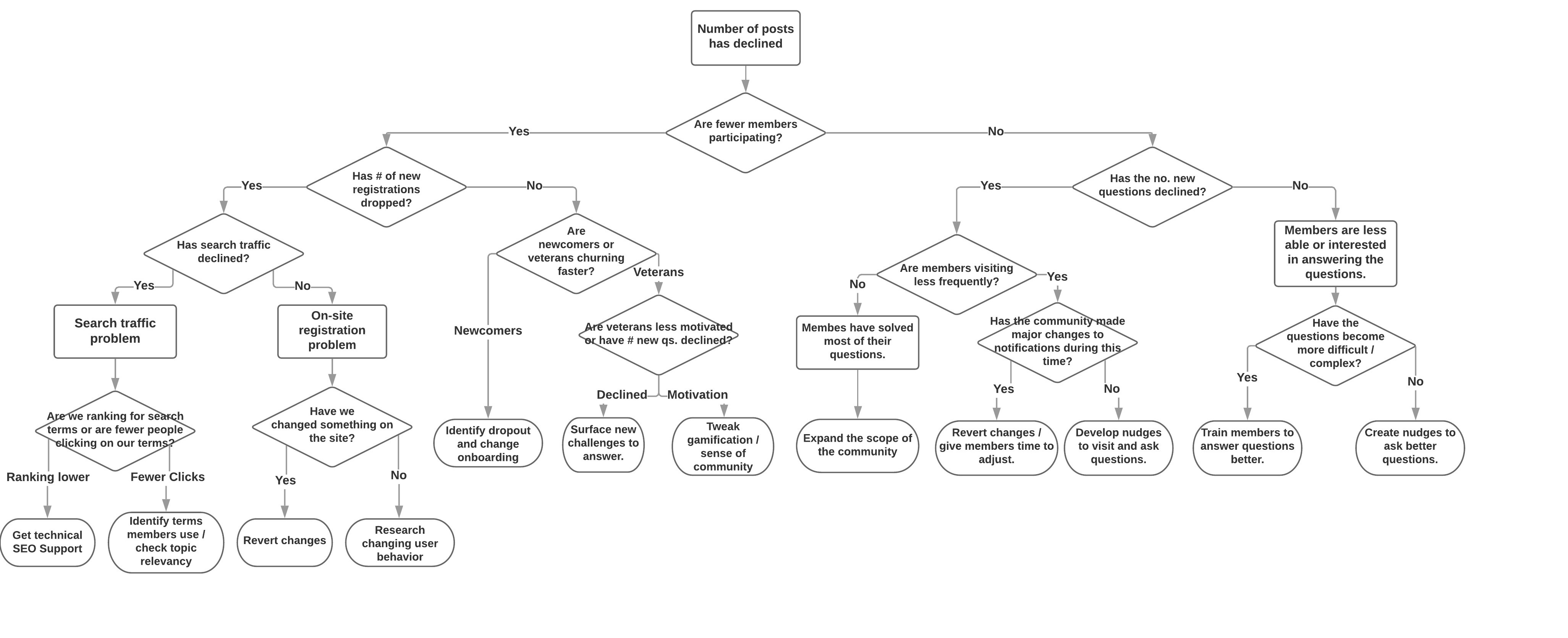
For example, if the level of participation drops, you can create a series of binary decisions to guide you to the answer.

(click for larger image)
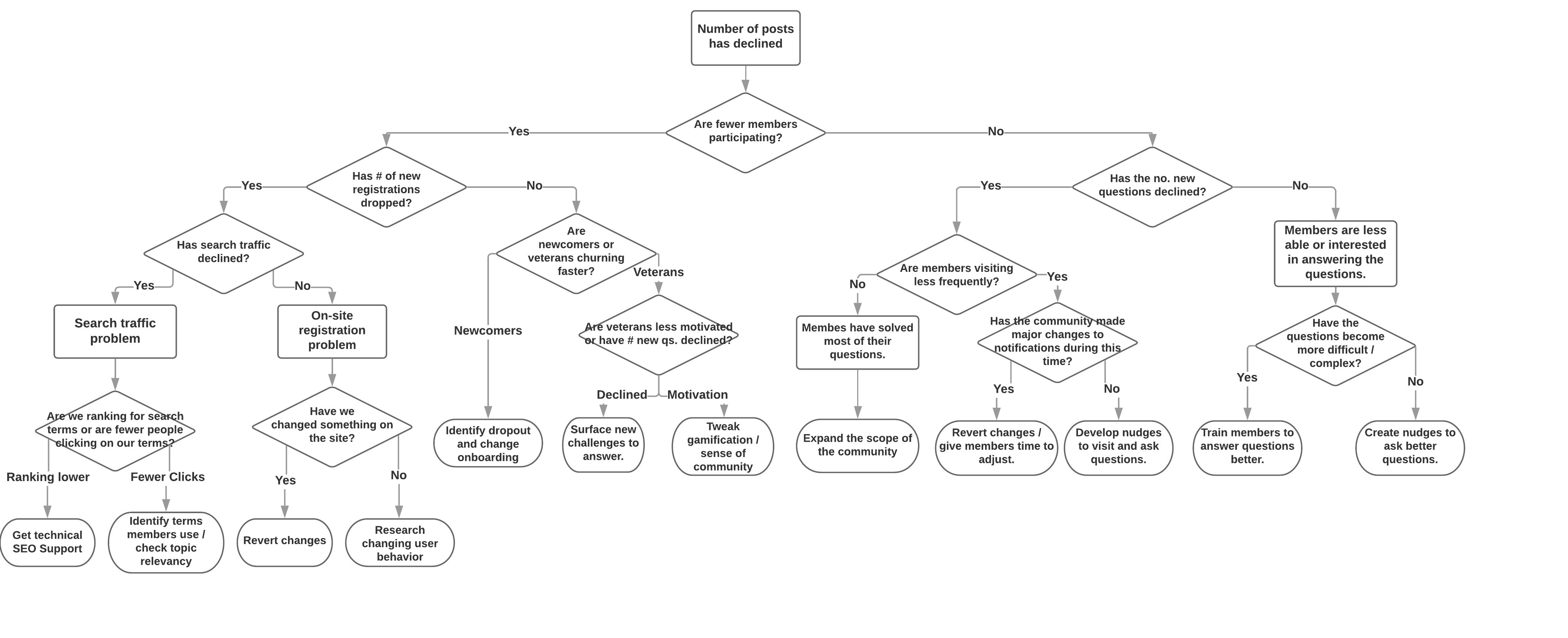
Building a decision tree requires creating a series of decisions which relate to an internal or external cause.
If a metric has significantly changed, it’s typically because of an internal or external cause.
Either something internal to community has changed (new design, onboarding journey, community manager etc… ) or something external has changed (new competition, changing needs, decline in customers etc..).
The decision tree means creating a series of decisions to identify the precise problems to ensure you’re working on the right solution.
There’s no point working on a new gamification program to increase participation if the problem is external to the audience. For example, if most members have solved most of their problems, a gamification problem is a waste of time.
Without decision trees in place, you’re almost certainly:
- Working on the wrong things.
- Not benefitting at all from the data you collect.
- Failing to create a system your team/next community manager can use.
If you need help, join our FeverBee Coaching program.
15 Oct 23:43
New Pythons
by Rui Carmo

Even though the Python 3.8 release is getting all the news coverage in the Python universe today, PyPy 7.2 is a lot more interesting to me since it has full 3.6 support and some of the fixes I’ve been waiting for.
I’ll be updating my runtime images when I can find the time.
15 Oct 23:43
This file contains bidirectional Unicode text that may be interpreted or compiled differently than what appears below. To review, open the file in an editor that reveals hidden Unicode characters.
Learn more about bidirectional Unicode characters
A tiny tiny 0.49″ 64 x 32 Graphic I2C OLED Display with Arduino
by Cindy Wu
In this article we look at the tiny 0.49″ 64×32 graphic OLED from PMD Way. It is a compact and useful display, that only requires a small amount of time to get working with your Arduino or compatible board.

The purpose of this guide is to get your display successfully operating with your Arduino, so you can move forward and experiment and explore further types of operation with the display.
This includes installing the Arduino library, making a succesful board connection and running a demonstration sketch. So let’s get started!
Connecting the display to your Arduino
The display uses the I2C data bus for communication, and is a 5V and 3.3V-tolerant board.
Arduino Uno to Display
GND ---- GND (GND)

5V/3.3V- Vcc (power supply, can be 3.3V or 5V)

A5 ----- SCL (I2C bus clock)

A4 ----- SDA (I2C bus data)
I2C pinouts vary for other boards. Arduino Leonard uses D2/D3 for SDA and SCL or the separate pins to the left of D13. Arduino Mega uses D20/D21 for SDA and SCL. If you can’t find your I2C pins on other boards, email admin at tronixstuff dot com for assistance.
Installing the Arduino library
To install the library – simply open the Arduino IDE and select Manage Libraries… from the Tools menu. Enter “u8g2” in the search box, and after a moment it should appear in the results as shown in the image below. Click on the library then click “Install”:

After a moment the library will be installed and you can close that box.
Now it’s time to check everything necessary is working. Open a new sketch in the IDE, then copy and paste the following sketch into the IDE (you may find the “view raw” link at the end useful):
This file contains bidirectional Unicode text that may be interpreted or compiled differently than what appears below. To review, open the file in an editor that reveals hidden Unicode characters.
Learn more about bidirectional Unicode characters
| // Display – https://pmdway.com/collections/oled-displays/products/0-49-64-x-32-white-graphic-oled-i2c | |
| // Guide – https://pmdway.com/blogs/product-guides-for-arduino/tutorial-using-the-0-49-64-x-32-graphic-i2c-oled-display-with-arduino | |
| #include <Arduino.h> | |
| #include <U8g2lib.h> | |
| #include <Wire.h> | |
| U8G2_SSD1306_64X32_1F_F_HW_I2C u8g2(U8G2_R0, /* reset=*/ U8X8_PIN_NONE); | |
| void setup() { | |
| u8g2.begin(); | |
| } | |
| // fonts https://github.com/olikraus/u8g2/wiki/fntlistall#4-pixel-height | |
| void loop() | |
| { | |
| u8g2.clearBuffer(); // clear the internal memory | |
| u8g2.setFont(u8g2_font_u8glib_4_tf); // choose a suitable font | |
| u8g2.drawStr(0, 5, "Hello,"); // write something to the internal memory | |
| u8g2.drawStr(0, 10, "World…"); | |
| u8g2.drawStr(0, 15, "I'm tiny…"); | |
| u8g2.drawStr(0, 20, "So tiny!"); | |
| u8g2.drawStr(0, 25, "However you can"); | |
| u8g2.drawStr(0, 30, "have six lines"); | |
| u8g2.sendBuffer(); // transfer internal memory to the display | |
| delay(1000); | |
| u8g2.clearBuffer(); // clear the internal memory | |
| u8g2.setFont(u8g2_font_t0_11_tf); // choose a suitable font | |
| u8g2.drawStr(0, 10, "Hello,"); // write something to the internal memory | |
| u8g2.drawStr(0, 20, "World…"); | |
| u8g2.drawStr(0, 30, "I'm tiny…"); | |
| u8g2.sendBuffer(); // transfer internal memory to the display | |
| delay(1000); | |
| u8g2.clearBuffer(); // clear the internal memory | |
| u8g2.setFont(u8g2_font_tenstamps_mf); // choose a suitable font | |
| u8g2.drawStr(0, 12, "ABCD"); // write something to the internal memory | |
| u8g2.drawStr(0, 30, "1234"); | |
| u8g2.sendBuffer(); // transfer internal memory to the display | |
| delay(1000); | |
| for (int a = 999; a >= 0; –a) | |
| { | |
| u8g2.clearBuffer(); // clear the internal memory | |
| u8g2.setFont(u8g2_font_inb24_mr ); // choose a suitable font | |
| u8g2.setCursor(0, 24); | |
| u8g2.print(a); | |
| a = a – 47; | |
| u8g2.sendBuffer(); // transfer internal memory to the display | |
| delay(100); | |
| } | |
| delay(1000); | |
| } |
Your display should go through the demonstration of various font sizes and so on as shown in the video below:
You can see how we’ve used a different font in the sketch – at lines 19, 30 and 38. The list of fonts included with the library are provided at https://github.com/olikraus/u8g2/wiki/fntlistall.
Note that the initial location for each line of text (for example in line 20):
u8g2.drawStr(0, 5, "Hello,"); // write something to the internal memory
The x and y coordinates (0,5) are for the bottom-left of the first character.
If you want to display values, not text – such as integers, use:
u8g2.print();
… an example of which is show around line 49 in the example sketch.
Where to from here?
Now it’s time for you to explore the library reference guide which explains all the various functions available to create text and graphics on the display, as well as the fonts and so on. These can all be found on the right-hand side of the driver wiki page.
And that’s all for now. This post brought to you by pmdway.com – everything for makers and electronics enthusiasts, with free delivery worldwide.
To keep up to date with new posts at tronixstuff.com, please subscribe to the mailing list in the box on the right, or follow us on twitter @tronixstuff.
15 Oct 23:42
The ten years we have just experienced were expected to be some of the most fruitful and productive in the history of advertising. We had amazing new tools and stunning new media that we never had before. The whole thing was head-spinning and certain to engender all kinds of remarkable opportunities for advertisers.
Our ability to reach consumers one-to-one with web-based platforms was sure to make advertising more personalized, more relevant, and more timely.
Brands' abilities to listen to consumer conversations through social media and react quickly couldn’t help but connect us more closely with our customers.
Consumers themselves would be one of our biggest assets by engendering conversations about our brands and helping us understand and define what our brands should represent.
Further, the web would have a democratizing effect on society and particularly in the business sphere where new brands could flourish without spending lavishly on marketing.
And yet, the past decade has been the most disappointing and disheartening period that I’ve experienced in my long advertising career.
It is widely believed inside and outside the ad industry that on the whole the state of advertising has gotten worse, not better.
Consumer research shows that regard for our industry is at a new low. It's gotten so bad that we have half the trustworthiness of lawyers.
Marketers are disillusioned. They don’t trust us. Their trade organization, the ANA, has officially stated that they believe corruption in our industry is “pervasive.”
Brands are facing strong headwinds. A recent study by Nielsen reported that consumers say they are 46% more likely to change brands than they were just 5 years ago, and only 8% say they are strongly brand loyal.
Regulators and governments are after us with a passion. They want to know what we are doing with data and whether we are acting illegally in collecting, trading and selling personal private information about consumers.
By steadfastly defending the abusive and creepy surveillance practices of our adtech ecosystem, the "leaders" of our industry are clearly on the wrong side of history.
As for consumers, one study showed that of all forms of advertising, the eight types rated the lowest by consumers were all forms of online advertising. Ad blocking apps are reportedly present on somewhere between one and two billion devices.
Meanwhile tens of billions of dollars are being stolen annually from our clients by online ad fraud.
Marketers are taking their advertising duties in-house and hiring consulting firms to do what we used to do.
As for the democratizing effect, it has been just the opposite. The web has produced advertising and marketing monopolies (Google, Facebook, Amazon, YouTube, etc) that would never be tolerated on dry land. Our industry has been right in the middle of scandals that have undermined our confidence in free and fair elections.
To say that the last decade has not lived up to expectations is like saying the Titanic was a boating mishap.
Our industry is in trouble. I believe we've had a lost decade. We have allowed ourselves to be bamboozled by the suspect assertions of articulate people -- and more than a few clowns -- masquerading as experts. We have lost any healthy degree of skepticism. It has cost us dearly.
Our industry needs to take a good hard look at our assumptions and where those assumptions have led us. It's time for the pretending to end.


Advertising's Decade Of Delusion
by noreply@blogger.com (BOB HOFFMAN)
The ten years we have just experienced were expected to be some of the most fruitful and productive in the history of advertising. We had amazing new tools and stunning new media that we never had before. The whole thing was head-spinning and certain to engender all kinds of remarkable opportunities for advertisers.
Our ability to reach consumers one-to-one with web-based platforms was sure to make advertising more personalized, more relevant, and more timely.
Brands' abilities to listen to consumer conversations through social media and react quickly couldn’t help but connect us more closely with our customers.
Consumers themselves would be one of our biggest assets by engendering conversations about our brands and helping us understand and define what our brands should represent.
Further, the web would have a democratizing effect on society and particularly in the business sphere where new brands could flourish without spending lavishly on marketing.
And yet, the past decade has been the most disappointing and disheartening period that I’ve experienced in my long advertising career.
It is widely believed inside and outside the ad industry that on the whole the state of advertising has gotten worse, not better.
Consumer research shows that regard for our industry is at a new low. It's gotten so bad that we have half the trustworthiness of lawyers.
Marketers are disillusioned. They don’t trust us. Their trade organization, the ANA, has officially stated that they believe corruption in our industry is “pervasive.”
Brands are facing strong headwinds. A recent study by Nielsen reported that consumers say they are 46% more likely to change brands than they were just 5 years ago, and only 8% say they are strongly brand loyal.
Regulators and governments are after us with a passion. They want to know what we are doing with data and whether we are acting illegally in collecting, trading and selling personal private information about consumers.
By steadfastly defending the abusive and creepy surveillance practices of our adtech ecosystem, the "leaders" of our industry are clearly on the wrong side of history.
As for consumers, one study showed that of all forms of advertising, the eight types rated the lowest by consumers were all forms of online advertising. Ad blocking apps are reportedly present on somewhere between one and two billion devices.
Meanwhile tens of billions of dollars are being stolen annually from our clients by online ad fraud.
Marketers are taking their advertising duties in-house and hiring consulting firms to do what we used to do.
As for the democratizing effect, it has been just the opposite. The web has produced advertising and marketing monopolies (Google, Facebook, Amazon, YouTube, etc) that would never be tolerated on dry land. Our industry has been right in the middle of scandals that have undermined our confidence in free and fair elections.
To say that the last decade has not lived up to expectations is like saying the Titanic was a boating mishap.
Our industry is in trouble. I believe we've had a lost decade. We have allowed ourselves to be bamboozled by the suspect assertions of articulate people -- and more than a few clowns -- masquerading as experts. We have lost any healthy degree of skepticism. It has cost us dearly.
Our industry needs to take a good hard look at our assumptions and where those assumptions have led us. It's time for the pretending to end.
15 Oct 23:42

Roku Devices Gaining Apple TV App Today
by Ryan Christoffel
Roku announced in a press release that the Apple TV app would be available on its streaming devices starting today:
For the first time ever, Roku users can add the Apple TV app via the Roku Channel Store to discover and watch movies, TV shows and more, including accessing their iTunes video library and subscribing to Apple TV channels directly on Roku devices. Starting November 1, Apple TV+, Apple’s home for all-original shows and movies from the world’s greatest storytellers, will be available on the Apple TV app on the Roku platform.
Like the TV app on Samsung smart TV sets, the Roku version of the app offers access to all iTunes movie and TV show content, as well as all Apple TV channels options, such as HBO, CBS All-Access, and soon Apple TV+. However, content from non-channels like Hulu or Amazon Prime Video, which are accessible on iOS and tvOS devices, will not be present on the Roku version of the TV app because it lacks third-party app integrations. Moving forward though, I expect that all of Apple’s new content partners with the TV app will be full-on channels rather than legacy app integrations.
Earlier this year Apple announced that the TV app would also be arriving on Amazon Fire TV devices and TV sets from more manufacturers, so as we get closer to the November 1 launch of Apple TV+, I expect we’ll see those other vendors all follow Roku’s lead.
→ Source: newsroom.roku.com
15 Oct 23:40


New Beats Solo Pro Headphones Featuring Apple’s H1 Chip Are Available for Pre-Order
by John Voorhees
Apple subsidiary Beats has announced a new version of the Beats Solo Pro noise cancelling headphones, which can be pre-ordered now and will begin shipping at the end of the month.
The new headphones, which retail for $299, feature Apple’s H1 chip that also powers the second-generation AirPods and Powerbeats Pro. The H1 chip enables hands-free ‘Hey Siri’ commands and the ability to share audio with someone using the Audio Sharing feature that Apple debuted with iOS and iPadOS 13. The headphones also have volume, track, and call controls on the right ear cup and a button for turning noise cancellation and their Transparency feature on and off on the left ear cup.
Unfolding and folding the Solo Pros turns them on and off.
The Beats Solo Pros feature active noise cancellation to filter out external sound and what Beats calls Transparency that uses external microphones to allow some sounds through, so users remain aware of their surroundings when using the headphones. According to Beats, the headphones, which are turned on and off by unfolding and folding them, get 22 hours of battery life with noise cancellation and Transparency turned on. If those features are turned off, the company says the battery life lasts 40 hours. The company also says that a ten-minute charge provides up to 3 hours of battery life. The Solo Pros charge with a USB-A to Lightning cable for the first time too.
The Solo Pros come in six colors: light blue, red, dark blue, ivory, black, and gray. Although The Verge and other sites report that the new headphones will begin shipping on October 30th in the US, apple.com currently lists the ship date as October 29th during the pre-order checkout process.
Support MacStories Directly
Club MacStories offers exclusive access to extra MacStories content, delivered every week; it’s also a way to support us directly.
Club MacStories will help you discover the best apps for your devices and get the most out of your iPhone, iPad, and Mac. Plus, it’s made in Italy.
Join Now
15 Oct 23:40

Why Are Police Officers Still Vulnerable Highway Users in the 21st Century?
by Sandy James Planner

Drivers – you are required to SLOW down and MOVE over when there are flashing blue, red or yellow lights on a vehicle at the side of the road. Narrow miss that could have been much worse for officer and motorist. Thanks to dashcam, car owner got $368 ticket. pic.twitter.com/HRCYlekzeL
— Delta Police (@deltapolice) October 11, 2019
It’s hard to believe in this time of technology that we still require police officers to be vulnerable road users outside of their vehicles to flag over motorists for speed transgressions on Canadian highways. Not only are they subject to being crashed into by the vehicle they are flagging down, they also may be hit by other inattentive motorists.
I have written about how Switzerland has become the safest country in Europe on the roads by regulating speed limits. In five years from 2001 to 2006 Swiss speed camera enforcement resulted in a fatality decrease of 15 percent per year, bringing road deaths from 71 annually down to 31. No need to have police flagging you down on the autoroute, a $330 ticket for driving 16 kilometres an hour over the speed limit is in the mail.
The maximum travel speed is 120 km/h and it is rigidly enforced, making Swiss motorways the safest according to the European Transport Safety Council. Managing speed makes the roads easier to drive on, with consistent motorist behaviour and plenty of reaction time due to highway speed conformity.
A poll conducted by Mario Canseco last year shows that 70 percent of people in British Columbia are now supportive of the use of a camera system similar to the Swiss to enforce road speed limits in this province. While the Province has located 140 red light camera at intersections with high collision statistics, speed on highways does not have similar technology.
On the Thanksgiving weekend police forces across British Columbia announced a drive safely campaign, notifying that they would be out on highways looking for anything that took away from safe highway driving. Anyone driving on highways from Abbotsford to Vancouver quickly saw the difference, with motorists staying to posted speed limits on highways.
But last month one Delta Police Force member was nearly struck by a vehicle driver that was weaving in and out of traffic along a busy section of highway as the officer was outside of his vehicle attending to another stopped car. That officer was nearly clipped and this was caught on a dash camera.
“The footage shows the driver speeding excessively and weaving through traffic while an unmarked police car has another driver pulled over. The police car had its red and blue flashing lights activated at the time, which means the driver should have slowed down and moved over.”
Sadly, the vehicle owner was only fined $368 for an action that could have led to a fatality. It’s one more reason why speed enforcement by automated cameras is simply the right thing to do, making roads safer and saving lives, health care costs and trauma. This approach also values the health and safety of police officers to do work that does not expose them as vulnerable road users. It’s the 21st century, and time for technology to assist in changing driver behaviour for safer, speed regulated highways.
You can view the event as recorded here:
Image: Wrexham history.com
15 Oct 23:40
Find Your Co-Conspirators
by Leanne
On October 30th, Mandy Moore and I will be celebrating the launch of the fourth printing and tenth anniversary edition of our book Yarn Bombing: The Art of Crochet and Knit Graffiti. For this special anniversary, we’ve added a new chapter featuring new yarn bombing works that delight us. Yarn Bombing: The Art of Knit…
The post Find Your Co-Conspirators appeared first on Leanne Prain.
15 Oct 23:39
Close to the Metal
by Emma R. Norton
BAD METAPHORS is an ongoing series that takes a critical look at the figures of speech that shuttle between technology and everyday life. Read the others here.
In the 1940s, when computers were the size of rooms, it took one’s entire body to program them. It demanded movement, reaching and hauling cables, adjusting complex series of switches that presented themselves as arrays in physical space. Programming, that is, was rooted in an embodied understanding: It was not merely thought but felt, through a constant confrontation with the limits of both the hardware and our own physical capabilities.
That physical effort was part of what it meant to be “close to the metal” — programmers’ jargon for computing that dealt directly with materials of machines. Instead of writing code for communication between operating systems and drivers, programmers “close to the metal” affect the hardware itself, dealing with the machine’s transistors, resistors, and other material components at the base level of the computer’s performance. Being close to the metal meant understanding the machine’s switches before they are covered by layers of abstraction. To the mostly male programmers of the era, that conveyed a sense of their exclusive dominance over machines.
As the mouse brought users into a more intimate symbiosis with the machine it also distanced them from the “metal”
In 1968, when computers were the size of desks, Douglas Engelbart invented the computer mouse as part of his “oN-Line System” (NLS). As John Markoff describes in What the Dormouse Said: How the ’60s Counterculture Shaped the Personal Computer, the audience who saw its initial demonstration at a San Francisco computer conference were surprised, in the era of mainframes, to see the system “being used interactively with all its resources appearing to be devoted to a single individual.” Mainframe computers then required separate operators for inputting data and analyzing the output. The oN-Line System reimagined computing, staging all the processes for a single user. In Engelbart’s system, the body was not reaching for the computer; the computer became an extension of the body.
As Paul Dourish notes in Where the Action Is, there “has been a long transition from interacting with computers using a soldering iron to interacting using a mouse.” As the mouse brought users into a more intimate symbiosis with the machine, offering direct command over it, it also distanced them from the metal — from the computer as a physical, material object. It brought us into a world where the computer can appear as an immersive world in itself. Users were not close to the metal but at one with it.
But this shift did not destroy the desire of some to be “close to the metal” in the sense of having exclusive or privileged access. It did, however, change its terms: Simpler interfaces meant that it no longer required soldering circuit boards to retain a sense of a superior mastery of machines. Just knowing how to code the software that sat on top of the computer’s increasingly small silicon chip meant you were among the elite. This meant that programmers retained status not by being physically closer to material but by dictating and controlling others’ interfaces.
If we can’t get into the hardware or even the software, then closeness to the metal is about getting into the consequences of using them
Now, human-computer interaction is shifting away from the mouse and toward even more intimate interfaces: Touch devices are another step toward the forgetting of the body as it merges with machine. Like the mouse but more so, touch provides the illusion of even more direct agency and therefore of being in more control. But if you are closer to the physical metal when using a laptop’s trackpad or touchscreen, you are no closer to understanding how it works or, more important, how you work on your laptop and how it works on you. “As computer interfaces increasingly shift toward touch pads and touch screens,” Ali Na warns in “The Fetish of the Click: A Small History of the Computer Mouse as Vulva,” “it is important to avoid understanding this transition as one toward more direct or unmediated contact with the digital.” The more direct the interface seems to ordinary users, the more likely they are to take it for granted and ignore how their experience is being mediated. This in turn allows the would-be programming elite to remain “close to the metal” by taking advantage of those users’ ignorance (even as coding itself becomes more automated and distant from the machine).
But closeness to the metal need not imply users becoming ever more fused with machines, and being ever more manipulated by a programming elite a few steps ahead of them. Instead, we can reconceive what “being close to the metal” could mean, return it to the sense of physicality and friction that it once implied, and update the ethos for programmers accordingly.
If we can’t get into the hardware or even the software, then closeness to the metal is about getting into the consequences. It’s about making connections between people’s lives, their bodies, and how computationally built systems have an effect on them. Closeness to the metal can signify a push back against elitism and dominance, toward a more inclusive and more inquisitive understanding of computers.
The removal of the body from our understanding of computers can seem to imply a removal of accountability from the programmer. Many digital platforms tend to urge this perspective by pushing responsibility into the hands of the user where users only have a very limited set of agencies. But remembering the mouse can be helpful here. With the touchscreen dominating our interactions, the mouse, which once seemed to grant agency (albeit through narrowly prescribing the form of our interactions), has been recontextualized. It now appears as full of friction, which gives it the potential to interrupt the perceptions of computing that it once facilitated.
Contrasting mouse use with touch screens illustrates the speed at which computing technology urges us to move, and what it has overlooked in the process. That is, mouse use can now bring us closer to the metal in the sense of encouraging us to pause. It can be a moment for the programmers to take their hands off the keyboard and consider how their code might have an effect on a real life.
This can be helpful in considering different bodies, different sorts of users — how the friction of an interface is always relative to the person using it regardless of the interface’s ultimate goal: efficiency. The mouse has potential to remind us of the body. It can, in turn, bring us closer to understanding the complex history of how computers came to be personal and very much about the bodies who brought them to where they are today.
If you are close to the metal now, then you are committed to re-evaluating complex systems in order to have a fuller understanding of them
Today, being “close to the metal” can be an acknowledgment by technologists that there is value in questioning and complicating what we think we know about the machine’s deepest workings. If you are close to the metal in this sense, then you are committed to re-evaluating and reframing complex systems to have a fuller understanding of them. It is recognizing that there is work to be done toward undoing computational systems which prioritize algorithmic prowess over people’s lives. Coding a new machine learning model, for example, takes us even one step further away from the metal, where mathematical representations of bodies have unprecedented and often negative effects on bodies. Being closer to the metal means insisting on accountability for the social implications of these systems.
This contemplation is about re-prioritizing the body over the computer, ensuring that the computer is something between bodies as opposed to in control of them. Like the reaching arms of the programmers in the 1940s, many of whom were women, the mouse can bring us back into our body as we learn to live with and through computers.
Many technologists today are “close to the metal” in this sense. Committed to unearthing these negative effects before they ever reach the human body, data scientist Rumman Chowdhury leads the group Responsible AI at Accenture Applied Intelligence. The group, which operates on the basis that technology is always directly shaped by its makers, develops tools to ensure the fairness of a data set or algorithmic process. While addressing potentially harmful technology through adjusting the technology itself is important, so is disseminating resources on existing technology’s effects. The Detroit Community Technology Project conducts research, creates educational material, and sustains initiatives which are committed to data justice and the equitable access and use of technology. They recently published “Our Data Bodies: Digital Defense Playbook,” which is meant to support groups involved “in intersectional fights for racial justice, LGBQ liberation, feminism, immigrant rights, economic justice, and other freedom struggles, to help us understand and address the impact of data-based technologies on our social justice work.” Also committed to unearthing technology’s effects on human lives, Ruha Benjamin, associate professor of African American studies at Princeton University, has presented research in a talk entitled “A New Jim Code?” which explores technology’s built-in discriminations through the “world of biased bots” and “altruistic algorithms.” Benjamin asks us to “question not only the technologies we are sold, but also the ones we manufacture ourselves” by providing information and tools which can help us to dissect the technologies that we are confronted with on a daily basis. And there are many more examples: Joy Buolamwini, Cathy O’Neil, and Wendy Hui Kong Chun, to name only a few.
To be close to the metal, then, is considering the social implications of the code. Knowing what’s inside the tiniest of computer chips is no longer be a priority when beginning the work of deconstruction of large computational systems.
15 Oct 23:39
Exponent Podcast: The Abyss Stares Back
by Ben Thompson
On Exponent, the weekly podcast I host with James Allworth, we discuss The China Cultural Clash.
Listen to it here.
15 Oct 23:39
Study retracted after finding a mistaken recoding of the data
by Nathan Yau
A study found that a hospital program significantly reduced the number of hospitalizations and emergency department visits. Great. But then the researchers realized that the data was recoded incorrectly, and the program actually increased hospitalizations and emergency department visits. Not so great.
The identified programming error was in a file used for preparation of the analytic data sets for statistical analysis and occurred while the variable referring to the study “arm” (ie, group) assignment was recoded. The purpose of the recoding was to change the randomization assignment variable format of “1, 2” to a binary format of “0, 1.” However, the assignment was made incorrectly and resulted in a reversed coding of the study groups. Even though the data analyst created and conducted some test analysis programs, they were of the type that did not show any labeling of the arm categories, only the “arm” variable in a regression, for example.
Here’s the original, now-retracted study. And here’s the revised one.
Data can be tricky and could lead to unintended consequences if you don’t handle it correctly. Be careful out there.
Tags: recode, retraction
15 Oct 23:39

Openwashing
by Bryan Mathers
Inspired by For-profit, faux-pen, and critical conversations about the future of learning materials – a blog post by Rajiv Jhangiani.
The post Openwashing appeared first on Visual Thinkery.
15 Oct 23:39

 Give thanks to the landscape designers of the 1970s, beginning with Cornelia Oberlander and her allee of trees along Hornby next to Robson Square. Or, as above, the double rows along Georgia Street from the park to Cardero – a consequence of the Greening Downtown study of 1982 (by the Toronto firm of Baird/Simpson in collaboration with Hotson/Bakker).
Giving Thanks
by Gordon Price
When experiencing the glory of a double row of street trees in fall, it’s a good time to give thanks to those who had the vision to realize the city we have today.
Give thanks to the landscape designers of the 1970s, beginning with Cornelia Oberlander and her allee of trees along Hornby next to Robson Square. Or, as above, the double rows along Georgia Street from the park to Cardero – a consequence of the Greening Downtown study of 1982 (by the Toronto firm of Baird/Simpson in collaboration with Hotson/Bakker).
Approved by council in the 1980s; planted, development by development, in the 1990s; only maturing now, with the final blocks still to come.

15 Oct 23:38
Google Pixel 4 vorgestellt
by Volker Weber
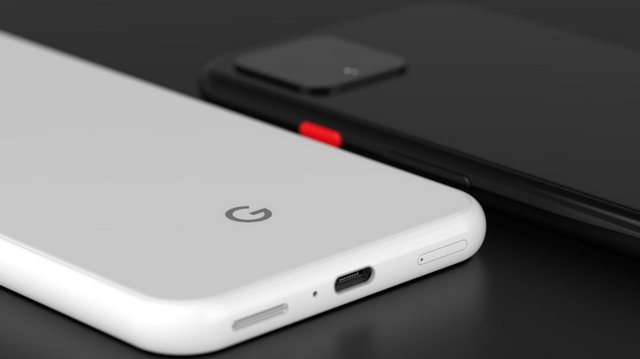
Schon seit Wochen hat Google die Bloggerszene mit zahlreichen "Leaks" zum neuen Pixel 4 versorgt. Wir wussten also bereits bestens Bescheid, was da heute kommt. Ich habe mir den Launchevent trotzdem angeschaut und fand ihn erwartungsgemäß etwas langweilig. Aber eine Stelle hat mich richtig beeindruckt: Die Geschwindigkeit und Präsision der Transkription des Sprachrekorders. Ein fehlerloses Diktat, und das im Flugmodus, das ist unglaublich nützlich. Das wünsche ich mir auch von Apple. Die Gestensteurung erscheint mir als Gimmick, die Kamera und die schlanke Software mit blitzschnellen Updates werden mir weiterhin gefallen. Aber ich frage mich ernsthaft, ob es nicht auch ein Pixel 3a tut. Wie geht es Euch?
15 Oct 23:38
A Different View on Apple and China
by Neil Cybart
Last week, a firestorm erupted over Apple’s decision to remove HKmap.live from the App Store in Hong Kong. Apple claimed the app, which mapped crowd-sourced information regarding police activity, broke App Store guidelines and local laws. Hours earlier, Apple had been threatened by China’s People’s Daily newspaper about continuing to make the app available.
In the past, such a decision would have been accompanied by a debate regarding Apple’s decision to continue to do business in China. However, things are different this time. Instead of a debate, virtue signaling is rampant. U.S. ideologies are being weaponized in a broader U.S. versus China debate, and Apple is finding itself caught in the middle.
Based on narratives in the U.S. press, Apple should become some type of political entity tasked with undermining political institutions. iPhones and iPads are to be used as indoctrination weapons for Apple’s beliefs. If such objectives represent Apple’s future, the company will first need new management, employees, customers, and a different board of directors, as Apple is not in the business of waging political wars.
How did we get to this point? Are we seeing a byproduct of U.S. and China trade tensions boil over? Did the NBA versus China clash a few days prior to Apple removing the app in Hong Kong touch a nerve in the U.S.?
Instead of publishing an article on Apple and China last week, I used the Above Avalon daily updates to share my initial thoughts on the developments. After sending out updates last Wednesday and Thursday, I received comments from Above Avalon members who live outside the U.S. They saw the situation from a different perspective. Simply put, they saw the complexity associated with the latest developments in Hong Kong and China. That same complexity is missing from U.S. press coverage of the situation.
There are pros and cons associated with Apple doing business in China just as there are pros and cons found with doing business in a long list of other countries. Even Apple’s decision to engage with the U.S. administration on certain issues can be debated. In some countries, like the U.S., Apple can discuss where it stands on social and political issues. In other countries, like China, such openness is not possible. This has led some to call Apple a hypocrite for “pontificating” on certain ideals only to be willing to do business in a country that doesn’t follow the same ideals.
Apple is no stranger to criticism regarding its decision to do business in China. Back in 2016, Cook said the following in response to critics who said he shouldn’t engage with the government:
“From my American mindset, I believe strongly in freedoms. They are at the core of what being an American is, and I have no confusion on that. But I also know that every country in the world decides their laws and regulations.”
Cook then alluded to “The Man in the Arena” passage from U.S. President Theodore Roosevelt’s “Citizenship in a Republic” speech:
“It is not the critic who counts; not the man who points out how the strong man stumbles, or where the doer of deeds could have done them better. The credit belongs to the man who is actually in the arena, whose face is marred by dust and sweat and blood; who strives valiantly; who errs, who comes short again and again, because there is no effort without error and shortcoming; but who does actually strive to do the deeds; who knows great enthusiasms, the great devotions; who spends himself in a worthy cause; who at the best knows in the end the triumph of high achievement, and who at the worst, if he fails, at least fails while daring greatly, so that his place shall never be with those cold and timid souls who neither know victory nor defeat.”
In most politically dicey situations, Cook has followed Roosevelt’s advice and picked engagement. While Cook has become more comfortable talking about the ideals that guide Apple’s culture such as environmental responsibility, privacy, and equality, he doesn’t weaponize them to issue ultimatums to foreign governments. Instead, Cook uses his position as CEO to explain to the world which ideals guide Apple employees and the company’s mission to create tools for people.
This brings up a few questions: What drives Cook to follow Roosevelt’s advice and engage? Why does Apple put itself in what appears to be compromising positions in terms of doing business with certain countries if it doesn’t intend to leverage its position to push for immediate change?
My suspicion is that Cook doesn’t want Apple to become an idealistic mirage of itself with closed-mindedness reigning supreme. If Apple only did business in countries that have laws matching its beliefs, Apple would operate in just a handful of countries. Such a strategy would represent a big step back in Apple’s toolmaking mission as the biggest loser would be the Apple customer. In my view, that is a good enough reason for Apple to remain engaged with China and other countries rather than retreat into some kind of self-imposed bubble. The fact that the preceding opinion is now viewed as extremist in the U.S. shows just how far the narrative involving China has shifted. Ongoing issues between China and the U.S. regarding intellectual property theft and economic prowess have taken over the discussion, making Apple’s “engaged” strategy seem naive and out of date.
Another factor that likely plays a role in Cook’s engaged strategy is how Apple views its customers. I don’t think of Apple as a U.S. company. Instead, Apple is a global company headquartered in the U.S. That may seem like a subtle difference in terminology, but it speaks volumes. Apple doesn't look at its customers as Americans, Chinese, Russian, or German. Everyone is an Apple customer. This becomes apparent when attending an Apple product event at Apple Park. The cultural diversity found in the audience isn’t visible when watching the keynotes online. English ends up being just one of many different languages spoken at Apple events.
While governments around the world play a role in how Apple is able to reach its customers, as seen with Apple’s most recent app removal controversy in Hong Kong, that doesn’t take anything away from the ideals that guide Apple’s toolmaking mission. Those who think Apple should abandon China at whatever cost fail to recognize that China is now home to approximately 15% of Apple’s customers. Advocating that Apple should succumb to various pressures and shun anyone who may disagree with its ideals is the very definition of closed-mindedness.
As for the increasingly popular claim that Apple isn’t just doing business in China but is instead going so far as to kowtow to the government, the supporting evidence is underwhelming. Following local laws is not kowtowing. For example, removing an app that delivers news from a publication banned in a country is not kowtowing to China. Apple would do the same in any other country with similar laws. Instead, kowtowing would involve breaking other country’s laws merely because China told Apple to do so. Another example of kowtowing would be Apple telling its employees to change their ideals because China told them that is the only way to do business in the country. We simply don’t see Apple exhibiting such behavior, contrary to what is being reported in the U.S. press.
One example of kowtowing to China would be international companies agreeing to refer to Hong Kong, Macau, and Taiwan as part of China. However, the uniqueness found with that example is duly noted. Given how following economic sanctions imposed by the U.S on other countries end up being another example of companies kowtowing to a government, it’s clear that the topic deserves a much more nuanced debate.
While Apple executives struggle at times with how best to do business in China, the company has shown little to no hesitation in its broader engagement strategy. For example, Apple’s apparent final decision to pull HKmap.live from the App Store in Hong Kong took nearly a week to play itself out. Apple initially pulled the app only to reinstate the app and then pull the app again. However, at the end of the day, it was Cook who wrote a message to Apple employees explaining his decision - a decision that was met with intense skepticism by those in Hong Kong and the U.S.
There is no playbook for Apple management to follow when it comes to leading a trillion dollar company with a billion customers around the world. Cook’s decision to engage Apple will mean that there will be more controversies such as HKmap.live. Apple may not be completely ready for such controversies, but the company will likely be willing to confront them. Such a stance shouldn’t take anything away from Apple’s steadfast pursuit to leave the world a better place.
I don’t know what will unfold politically in China in a month, a year, or a decade from now. No one does, not even Apple. However, I am confident that Apple will continue to develop tools for improving people’s lives. It was this tool-making mission that initially led Cook to begin building Apple’s supply chain and manufacturing apparatus in China in the late 1990s. Cook saw how China, not the U.S., could support such a global apparatus capable of making a lot of high-quality products in a short amount of time.
Receive my analysis and perspective on Apple throughout the week via exclusive daily updates (2-3 stories per day, 10-12 stories per week). Available to Above Avalon members. To sign up and for more information on membership, visit the membership page.
15 Oct 23:36

Uber lays off 350 employees mostly based across U.S., Canada
by Shruti Shekar
Uber has laid off 350 employees across different departments within the company, which it says is the third and final phase of layouts that began earlier this year.
The company’s CEO Dara Khosrowshahi told employees in an email that affected persons are from Eats, performance marketing, Advanced Technologies Group, and recruiting. Some from various teams in the global rides and platform department are also getting laid off. The email also noted that some employees might be relocated.
“Days like today are tough for us all, and the ELT and I will do everything we can to make certain that we won’t need or have another day like this ahead of us,” Khosrowshahi said in the email, which was obtained by TechCrunch. “We will all have to play a part by establishing a new normal in how we work: identifying and eliminating duplicate work, upholding high standards for performance, giving direct feedback and taking action when expectations aren’t being met, and eliminating the bureaucracy that tends to creep as companies grow.”
TechCrunch reported that these layoffs represent about one percent of the company and they come about a month after Uber laid off 435 employees from product and engineering teams and less than three months after it laid off 400 people from marketing.
More than 70 percent of those affected in this round of layoffs are based in the U.S. and Canada, TechCrunch noted. Uber has let those employees know on October 14th.
“As you know, over the past few months, our leaders have looked carefully at their teams to ensure our organizations are structured for success for the next few years,” Khosrowshahi wrote. “This has resulted in difficult but necessary changes to ensure we have the right people in the right roles in the right locations, and that we’re always holding ourselves accountable to top performance.”
Source: TechCrunch
The post Uber lays off 350 employees mostly based across U.S., Canada appeared first on MobileSyrup.
15 Oct 23:35

Google reveals new clamshell Chromebook, the Pixelbook Go
by Patrick O'Rourke
In what seems like an effort to convince the world to forget about the ill-fated Pixel Slate, during its hardware keynote in New York, Google revealed the Pixelbook Go. The device has a lot in common with the original Pixelbook but features a slightly different design.
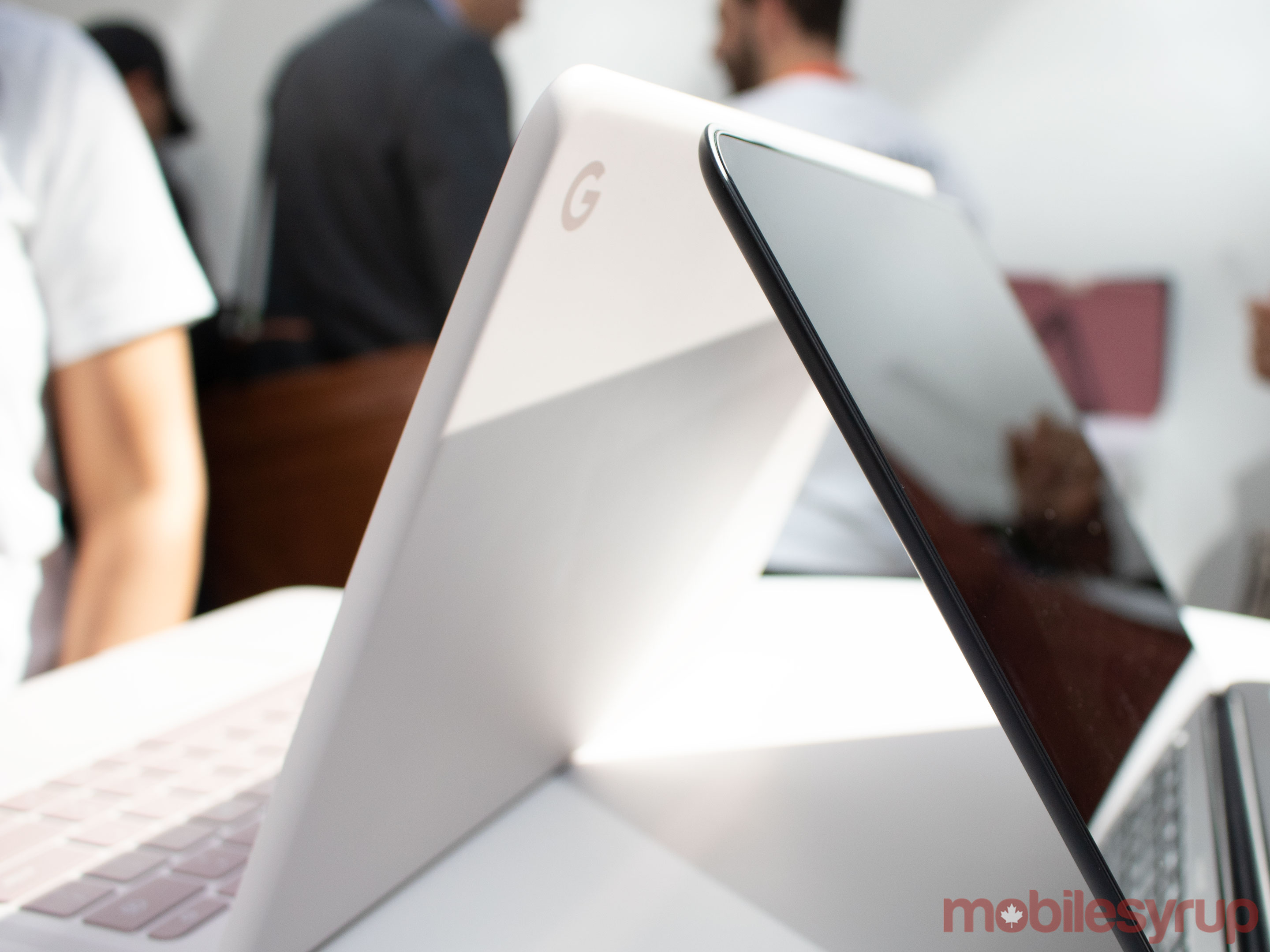
Instead of a 2-in-1 design like 2017’s Pixelbook, the Pixelbook Go features a more traditional laptop-like clamshell. This means the Chromebook’s 13.3-inch display can’t flip around 360-degrees to turn into a tablet.
Overall, the Pixelbook Go’s design is far more curved when compared to the original PixelBook. It also features ridges on its base that give the Chromebook additional grip, along with what Google calls quieter ‘hush keys.’ Battery life measures in at 12 hours, with the Pixelbook Go charging two hours of battery life in 20 minutes, according to Google.
Regarding technical specifications, the Pixelbook Go features two USB-C ports, a 3.5mm headphone jack, dual front-firing speakers, two mics and 8GB or 16GB of RAM along with either 64GB, 128GB or 256GB of storage.
Processor wise, the Pixelbook Go comes in Intel m3, i5 and i7 variants. While the standard Pixelbook Go features a 1920 x 1080 pixel resolution (1080p), there’s also a high-end 4K version with a resolution of 3820 x 2160 pixels. The device’s camera measures in at 2-megapixels with an f/2.0 aperture.
The new Pixelbook will be available in two colours, though only ‘Just Black’ will be available in Canada at launch. The laptop’s cooler-looking ‘Not Pink’ variant is “coming soon” to Canada, according to Google.
The post Google reveals new clamshell Chromebook, the Pixelbook Go appeared first on MobileSyrup.
15 Oct 23:35

Third-party partners required to pass security review before accessing Google Nest devices
by Shruti Shekar
Third-party partners will be required to “to pass a security review” before they can access Nest devices, Google said during its fall hardware event in New York.
During the event, Rishi Chandra, vice-president and general manager of Google Nest stated that the company wants to focus on privacy especially for its devices that have Google Assistant.
This new security update requirement is for any third-party partner that intends to work with Google Assistant.
“We are working with partners to migrate to Nest, but doing it built on privacy and security,” Chandra said.
“For example, we are requiring partners to now pass a security review before they can access your Nest device. You should have confidence in how Google and its partners are protecting your home data. And instead, you can focus on the benefits of the helpful home.”
During the keynote, Google announced its new Nest Mini, the successor to the Home Mini. It is slightly smaller than the Home Mini and features better sound quality.
The Nest Mini will be priced at $49 USD (about $64.75 CAD) and will be available in 23 countries starting October 22nd.
More to come…
The post Third-party partners required to pass security review before accessing Google Nest devices appeared first on MobileSyrup.
15 Oct 23:35

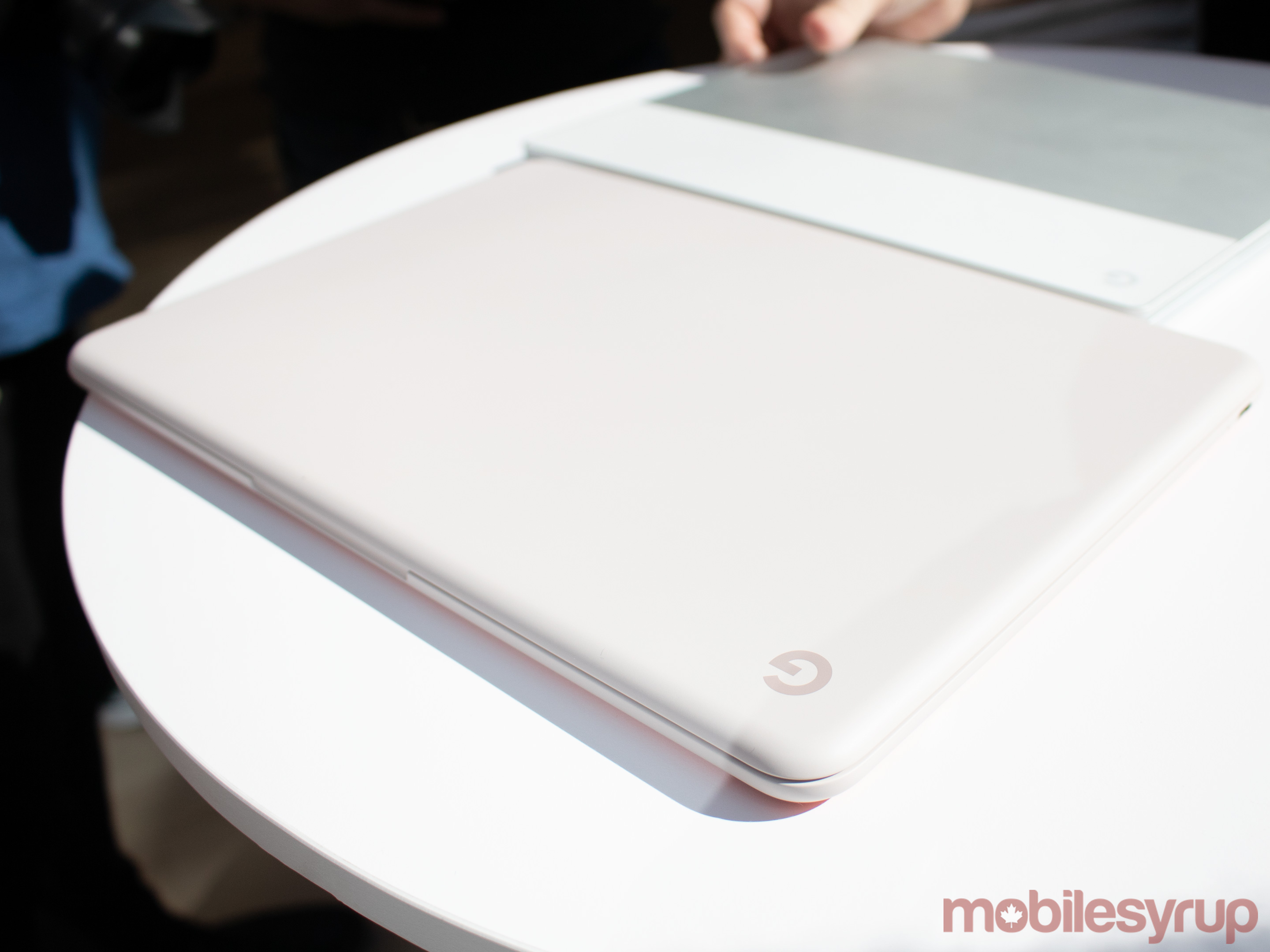
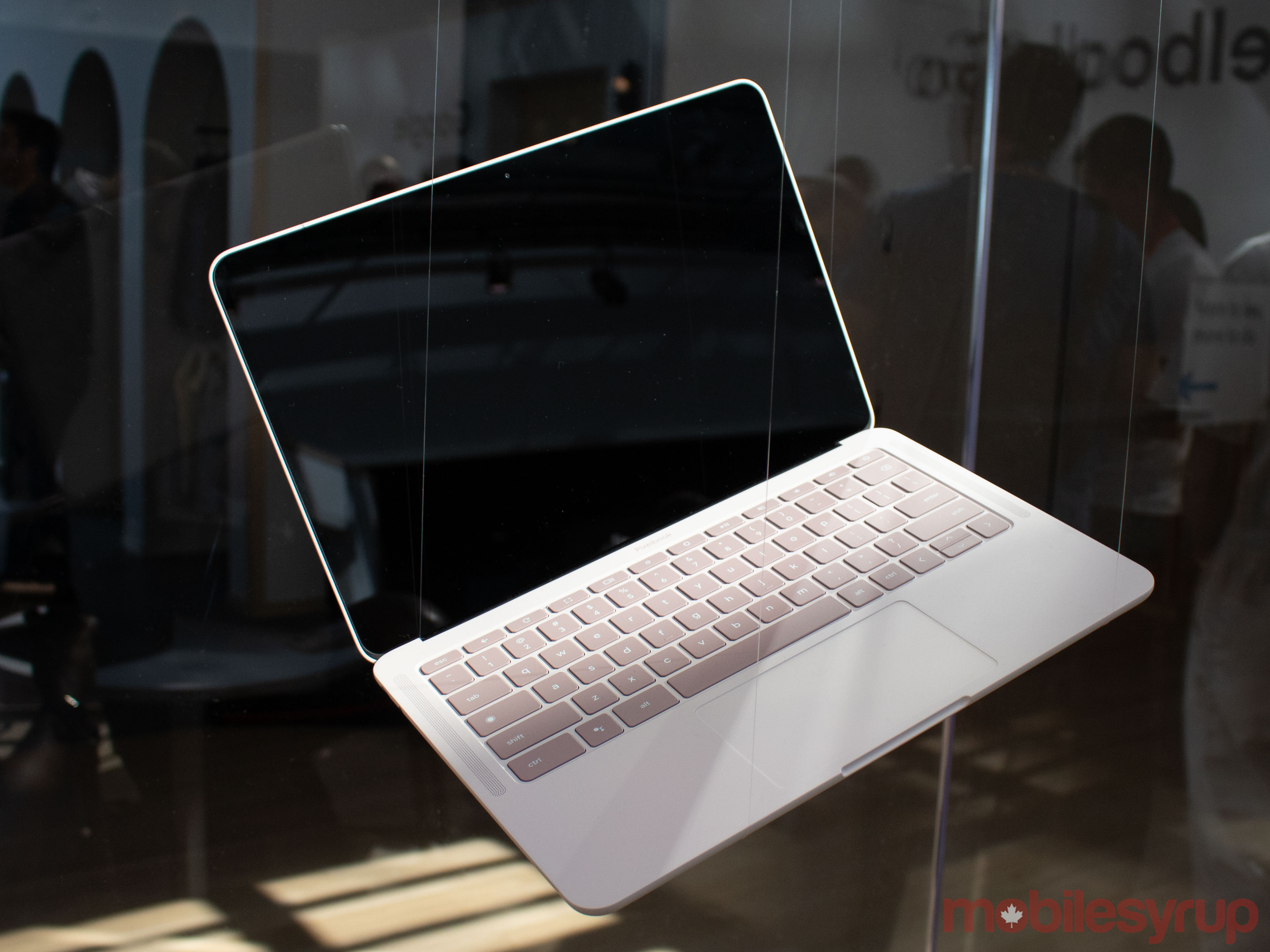
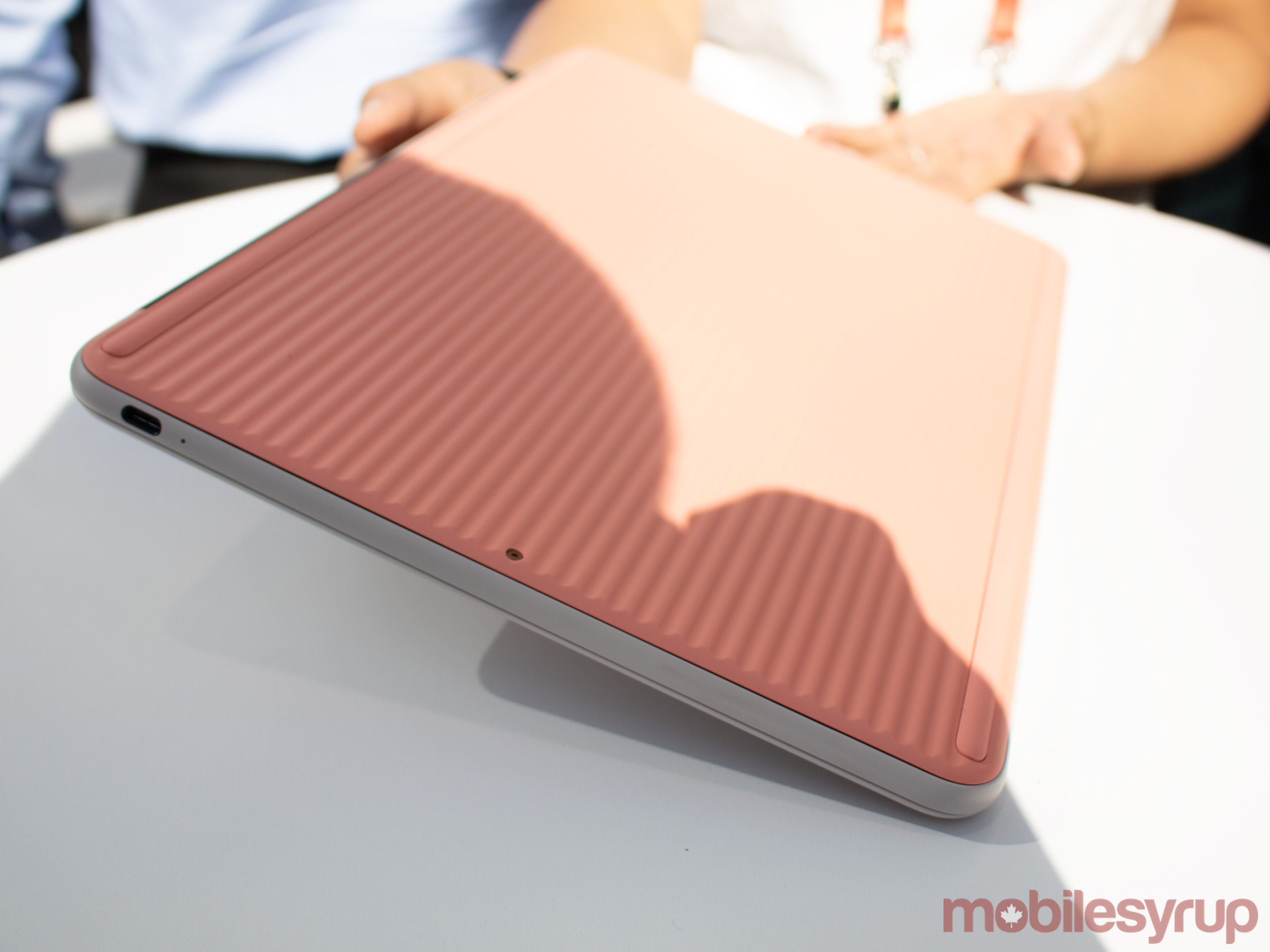
Pixelbook Go Hands-on: Google’s Chromebook laptop
by Patrick O'Rourke
The Pixelbook line has returned, but this time, Google’s Chromebook is a little different.
The Mountain View, California-based company is positioning the new Pixelbook Go as its entry-level Chromebook, though given the laptop’s expensive $879 CAD starting price tag, it’s difficult to imagine someone looking for a cheap Chromebook opting for it over the other far more affordable options out there.
Still, while I only spent a brief amount of time with Google’s new Pixelbook offshoot, I walked away impressed with what the new Chromebook has to offer. That said, I question the ‘budget,’ entry-level’ positioning of the device.
Unlike the 2017 Pixelbook’s display, which featured a 360-degree hinge allowing the Chromebook to turn into a tablet, the Pixelbook Go features a more traditional laptop clamshell design.
The excellent build-quality featured in the original Pixelbook returns, though. The sleek-looking Pixelbook Go features a magnesium build and a ridged bottom. Google says this wavy rear is designed to give the laptop more grip. While this is likely true, the bottom of the Pixelbook Go is a little offputting at first. It’s likely that the somewhat strange look of the base will grow on me, though.
The one downside to the design of the Go is that the raised, rubberized palm rests from the Pixelbook are gone. This means that the laptop’s display sits very closely to its new keyboard, similar to nearly every laptop out there. If you happen to place the Pixelbook Go in a heavy backpack with a lot of stuff in it, you’ll likely end up with key indents in the laptop’s display. This is an issue I’ve encountered with every laptop I’ve ever used, with the Pixelbook being the only exception.
Speaking of the Pixelbook Go’s keyboard, Google says the new laptop includes extra quiet “hush keys.” In my brief experience with the Go, the laptop’s keys feel just as satisfying to press as the original Pixelbook’s. They’re also slightly quieter, even when typing particularly aggressively — which I sometimes tend to do.
The Go is also exceedingly light, coming in at under 1,090g (2.4lbs). When I briefly held the Chromebook in one hand, it almost felt non-existent.
Regarding technical specifications, the Pixelbook Go features two USB-C ports compared to its predecessor’s one, a 3.5mm headphone jack, dual front-firing speakers and two mics. It comes in either 8GB or 16GB of RAM variants, along with either 64GB, 128GB or 256GB of storage.
Processor-wise, the Pixelbook Go comes in Intel m3, i5 and i7 processor variants. While the standard Pixelbook Go features a 1920 x 1080 pixel resolution (1080p), there’s also a high-end 4K version with a resolution of 3820 x 2160 pixels (331ppi). The device’s camera measures in at 2-megapixels with an f/2.0 aperture.
The main issue with the Pixelbook Go is that it runs Chrome OS, Google’s snappy, lightweight operating system that is unfortunately still limited in some cases. For example, the Adobe Creative Cloud apps I use on a daily basis for work aren’t available natively on Chrome OS (though Adobe CC’s Android apps are optimized for Chrome OS).
The same goes for Android app compatibility with Chrome OS. While some Android apps have been optimized for Chrome OS’ desktop interface, like Netflix, VLC, Slack, and Microsoft Office, many aren’t. Also, they generally still feel like you’re using a stretched out mobile app on a desktop, which is far from ideal.
The average person looking for a laptop to browse the web, do some light word processing or watch YouTube videos will definitely be happy with Chrome OS. Those looking to use a Chromebook for more could find Google’s desktop operating system limiting.
The new Pixelbook will be available in two colours, with only ‘Just Black’ being available at launch in Canada. The laptop’s more interesting looking ‘Not Pink’ variant — which looks similar to last year’s white Pixelbook, but with a slightly pink tinge — is “coming soon” to Canada, according to Google.
The Pixelbook Go is set to release in Canada starting at $879 CAD for the Intel M3 version of the laptop with 8GB of RAM and 64GB of storage. Pre-orders are set to launch on October 15th, with the device releasing on November 4th.
MobileSyrup will have more on the Pixelbook Go in the coming weeks.
The post Pixelbook Go Hands-on: Google’s Chromebook laptop appeared first on MobileSyrup.
15 Oct 23:34

Interac Debit expands Apple Pay and Google Pay in-app purchases in Canada
by Bradly Shankar
Interac has announced that support for Apple Pay and Google Pay debit in-app and in-browser purchases is now widely available in Canada.
Over the past year, in-app and in-browser debt purchases were supported by ATB, Canada’s Credit Unions, Coast Capital, Desjardins, Moneris and National Bank. Now, Scotiabank and Tangerine have joined the list of financial institutions enabling the feature.
It’s important to note that businesses still need to allow this functionality on their end. Some of the participating companies include SkipTheDishes, foodora, Second Cup, Shell Canada, Maison Simons and MTY Group.
A full list of supporting businesses can be found on Interac’s respective Apple Pay and Google Pay pages.
Source: Interac
The post Interac Debit expands Apple Pay and Google Pay in-app purchases in Canada appeared first on MobileSyrup.
15 Oct 23:34

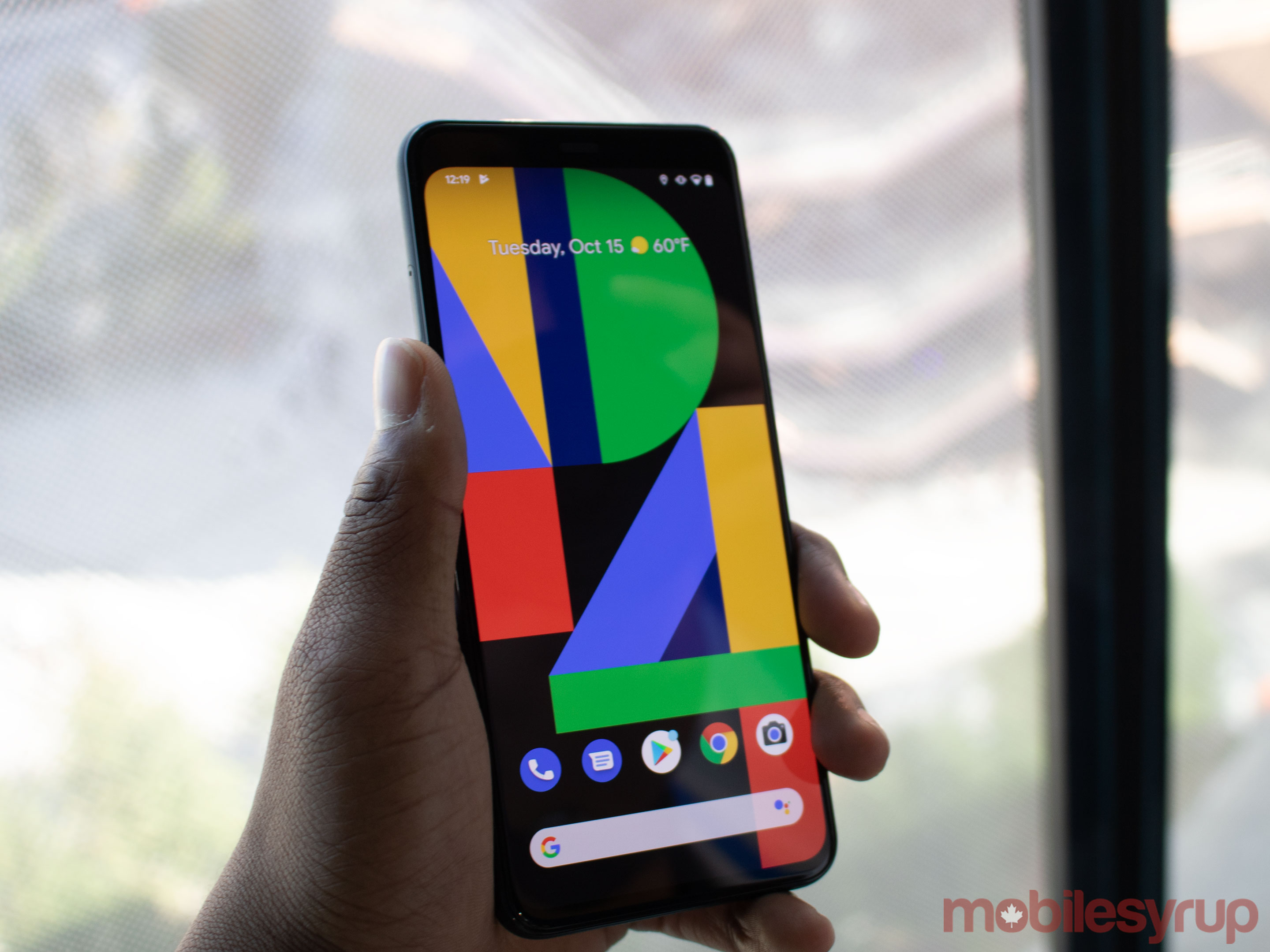
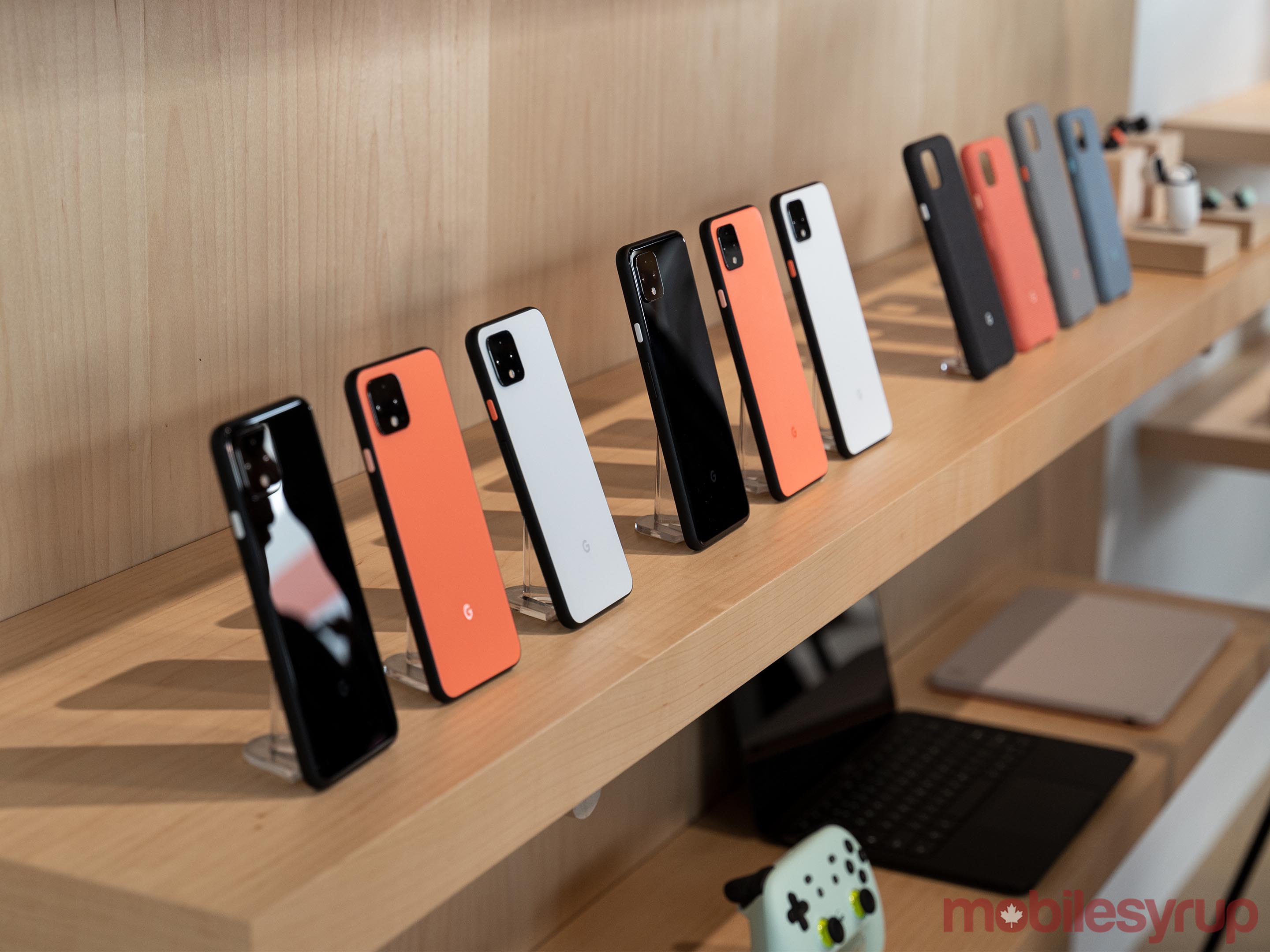
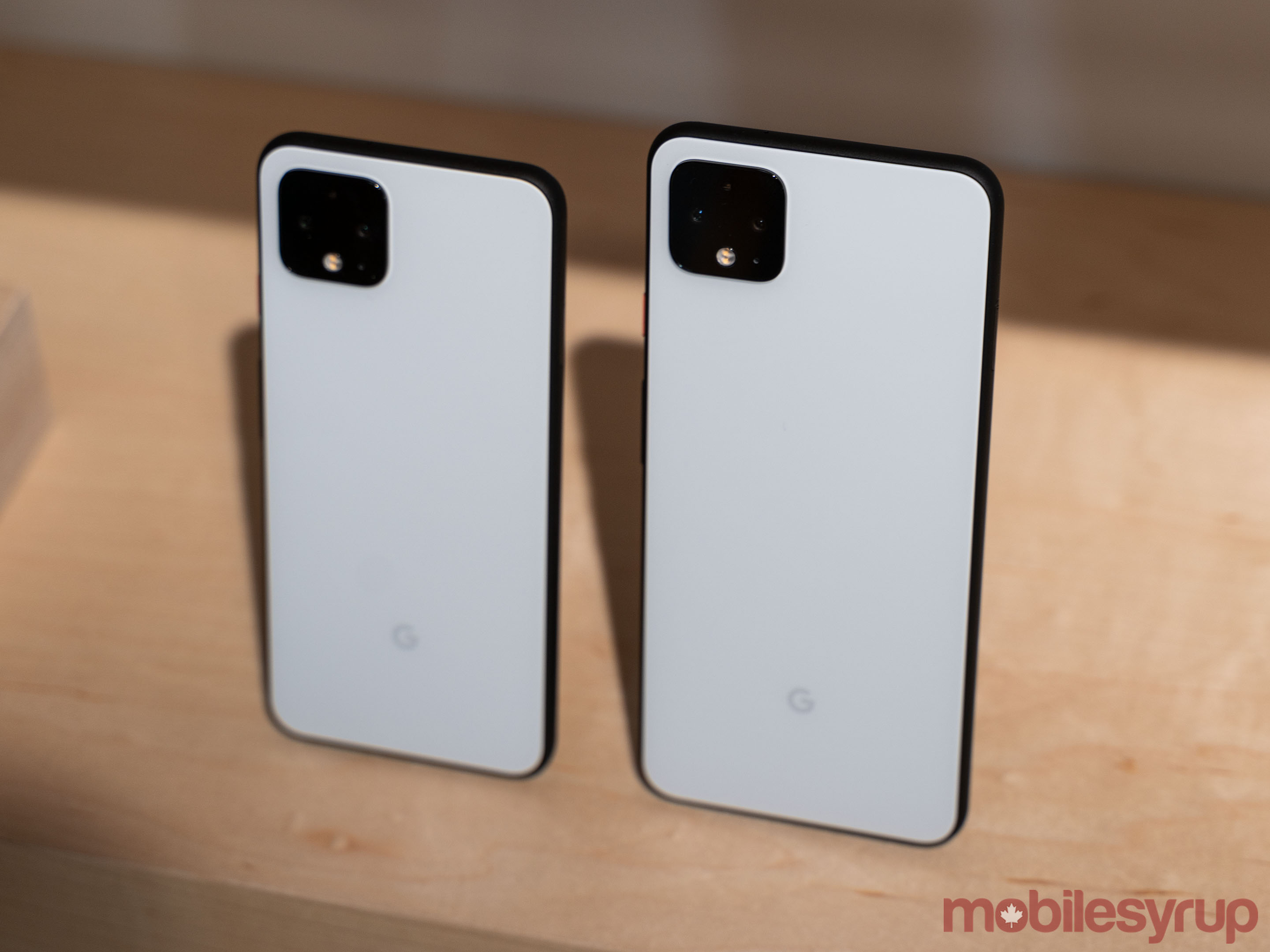
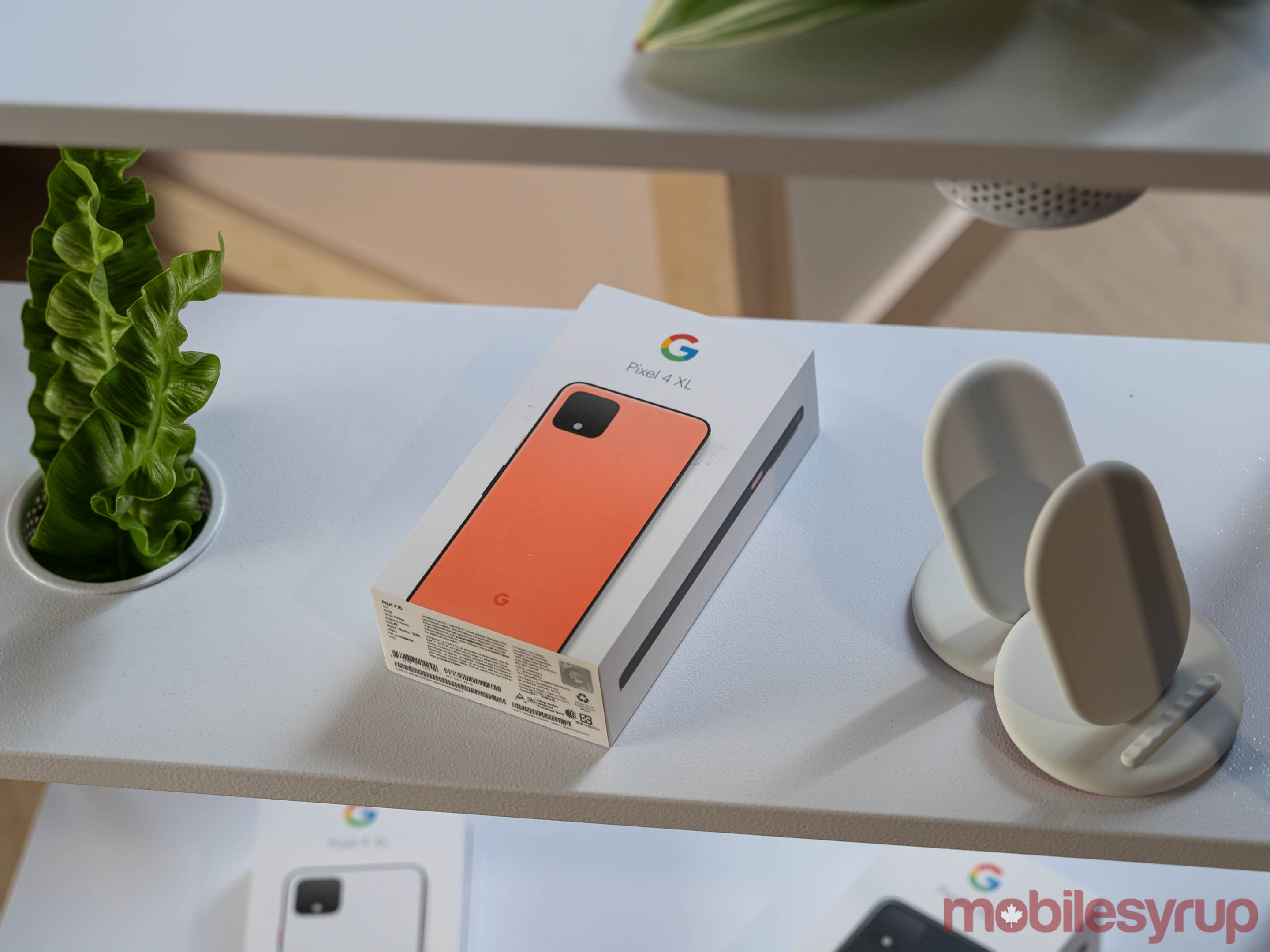
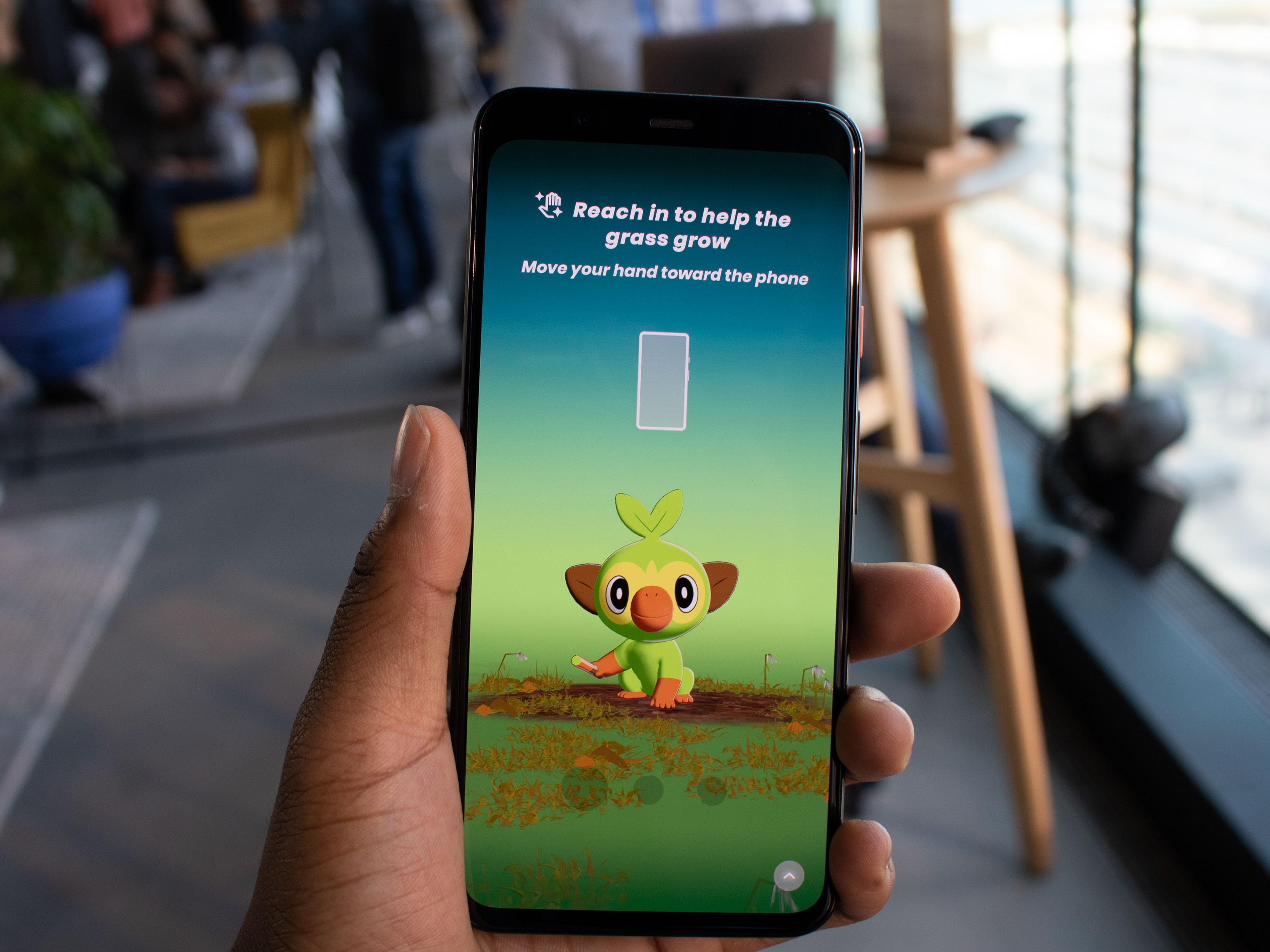
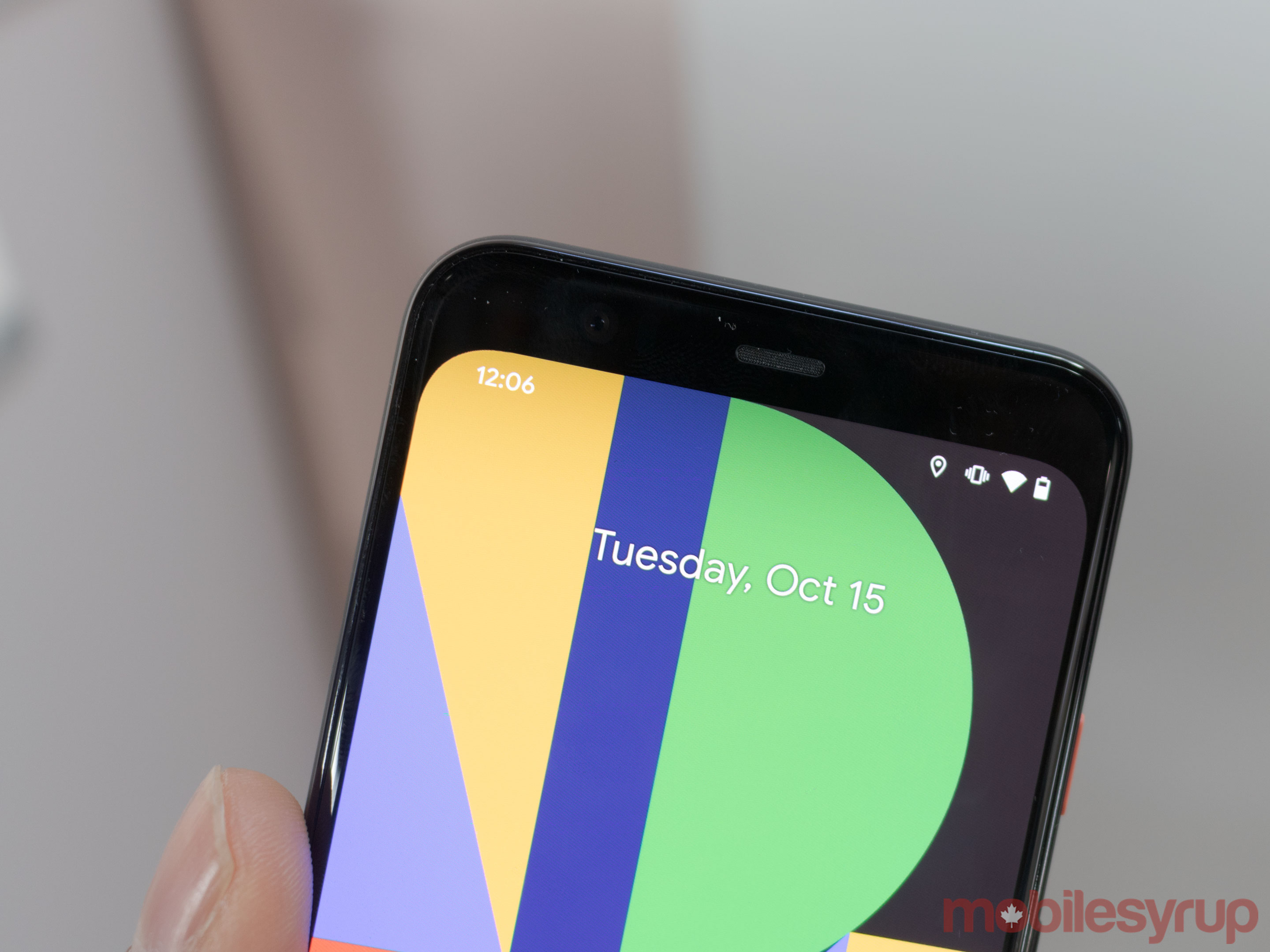
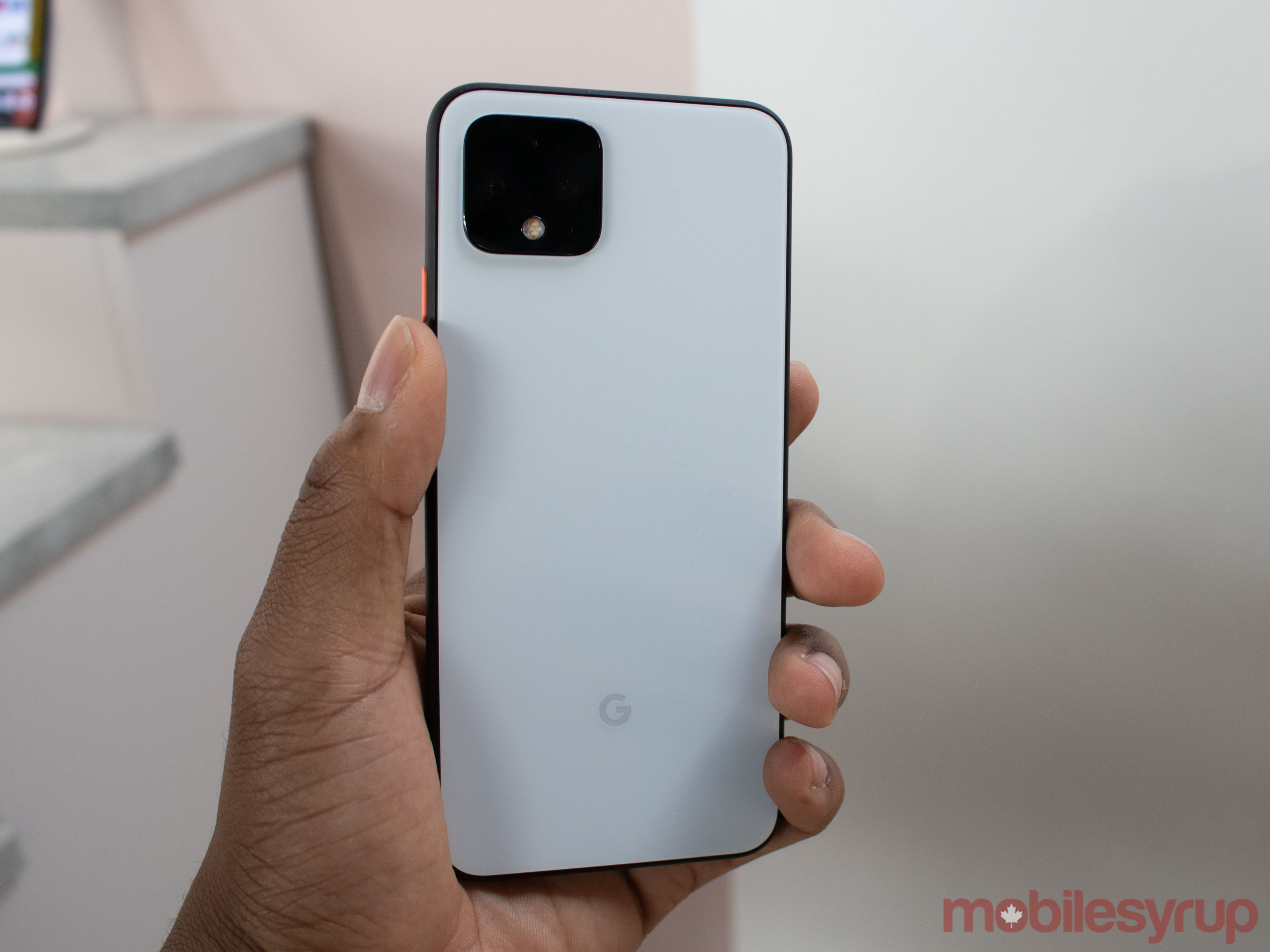

Pixel 4 and 4 XL Hands-on: Wave hello
by Jonathan Lamont
You knew this was coming.
Hundreds of rumours and leaks later, the Pixel 4 and Pixel 4 XL are here. Nearly all the rumours you’ve seen before are correct, but they don’t tell the full story of what the Pixel 4 is.
As always, Google’s flagship is more than the sum of its parts. It’s more than just the hardware and software. It may not feature the most cutting-edge hardware — there’s no edge-to-edge display, curved screen or hole-punch camera cut out or quadruple-camera set-up and 5G.
Instead, the Pixel 4 and 4 XL are smartphones where form follows function. They’re devices with tasteful additions and new features. You’ll spend less time interacting with Google’s latest flagships and more time accomplishing what the phones enable you to do.
But before we dig into our initial thoughts and impressions of the Pixel 4, we wanted to clarify that throughout this hands-on we’ll refer to both phones as the Pixel 4, except when it makes sense to discuss them separately. Beyond size of screen and battery, both devices are functionally the same.
You really have to hold it
Every photo or video of the Pixel 4 that surfaced ahead of the launch left us thinking one thing: what an ugly phone.
Google transitioned away from the notch with the Pixel 4, opting instead for a massive top bezel. The company also added a large, square camera bump to the back of the device and, in a lot of leaked photos, the Pixel 4 looked rather thick.
However, most of that changes when you hold the device in your hand. We can debate the looks of the Pixel 4 all day, but it feels great in your hand.
First up, Google added this wonderful matte texture to the back of the phones. It feels very similar to the back of the Pixel 3, but more pronounced than before. Unfortunately, the textured back glass is only present on the ‘Clearly White’ and ‘Oh So Orange’ variants. ‘Just Black’ features a glossy back that, while nice looking, is a fingerprint magnet and not nearly as pleasant to hold.
Google also textured the sides of the phone, which are black no matter which device colour you pick. Again, these textured sides help make the phone more grippable and don’t show off fingerprints or grease.
The sides of the Pixel 4 are comparable to the iPhone XS in style, but instead of the stainless steel — which is a nightmare to try and keep clean, not to mention incredibly slippery — you get this textured metal material.
The problem with all the matte and texture is how durable it’ll prove over time. The Pixel 3 had some minor issues with scratching, but we’ll need to spend more time with the Pixel 4 to determine if it’s susceptible to similar problems.
One other interesting note with the Pixel 4 is that it appears to be quite thick. It even feels thick. But when compared to the Pixel 3, it doesn’t actually look any thicker. This is likely because of the boxier design of the smartphone.
The form highlights the function
The other two major design decisions, the top bezel and camera bump, accomplish two tasks.
Google indicated to MobileSyrup that the design of these elements was meant to highlight the functionality within the device.
Take the rear camera, for instance. Google added several sensors, including a second telephoto lens to help with ranged photography. The square bump balances the two lenses and other sensors, highlights their presence and contrasts them from the rest of the phone.
Similarly, the top bezel accommodates the sensors required for Google’s ‘Motion Sense’ and face unlock features. While opinion on how it looks may be torn, the form again highlights the presence of these sensors.
Even better, the software works with the sensors too. When you interact with the Motion Sense tech, the top edge of the display glows and follows your gesture. It’s impressive to see how the software and hardware blend and respond to users’ interactions.
And really, that’s the story behind the design of the Pixel 4. It isn’t about the phone; it isn’t about the hardware. It’s about what you can do with it. The device offers subtle cues about what it can do, then gets out of your way so you can do what you need to accomplish.
Double exposure controls are the next step in phone photography
Google has done a lot of work with both the front-facing and rear-facing shooters.
On the back, the Pixel 4 sports two cameras and features a 12.2-megapixel sensor, while the other is a telephoto zoom camera with 3x optical zoom and a 16-megapixel sensor. The telephoto shooter also features 8x digital zoom.
One of the highlights of the camera is the ability to quickly double-tap on the desired target, causing the viewfinder to instantly shift to 3x zoom. Google calls this feature ‘Super Res Zoom,’ and even though I didn’t get to test it out a lot, pictures looked good and were still detailed. After 3x zoom, the images lost a lot of their detail. While, I didn’t directly compare it to the P30 Pro, we could tell immediately that Huawei’s handset beats the Pixel in the zoom department.
But that might be the only place where Huawei’s phone excels.
The Pixel 4 series can adjust exposure in two points. There are now two sliders that allow users to change the highlights and the shadows featured in an image. This is typically a problem with most smartphones when you attempt to adjust exposure. They often make dark skin brighter, but overexpose the background lighting, and vice versa.
The Pixel 4’s double exposure should fix this problem, at least in theory. We tested it out a bit, and it seemed like the feature worked well. We need to spend more time with the functionality before passing final judgment, but Google might have made the best phone camera for people of colour and bright lighting conditions.
There’s also an astrophotography feature that we got to see pictures of but were unable to test out ourselves. Astrophotography seems cool, especially if you’re camping or live in a more rural area. Since I live in Toronto the feature probably won’t work well due to the city’s light pollution.
It’s important to note that Google’s HDR+ camera feature seems to be always on by default. It’s unclear if there is a way to turn off the feature in the Pixel 4’s camera settings. Although, this can be remidied by using the multiple exposure controls to make pictures appear like they wearn’t shot in HDR. This time around Google has even made its viewfinder screen reflect what the picture will look like when you take it. This means that it shows you the HDR output so you have more control over your shots.
Similar to the Pixel 3 series, the 4’s portrait pictures also look great.
On the front, Google got rid of the Pixel 3’s secondary camera, and now the device only features a lone 8-megapixel shooter. Thankfully, it comes equipped with a wide 90-degree lens to help capture pictures of you and your friends. The selfies shot with it looked spectacular, though we couldn’t tell if they were much better than the Pixel 3’s. This isn’t necessarily a bad thing given that the Pixel 3 delivered excellent selfies.
Change songs without touching your phone
Alongside the front-facing shooter, there’s also the Google’s Soli radar chip that powers ‘Motion Sense,’ and two infrared sensors for face unlock.
Motion Sense is Google’s new feature that lets users perform gestures without touching the device. We watched a live demo of this, and it worked seamlessly. The Google representative quickly change songs on Spotify and YouTube with a few simple swipes of her hand. The feature performed smoothly and flowed well. When we tried it, on the other hand, we could barely get it to work right away.
With a few more tries, we got it up and running not as quickly or smoothly. However, we think this will likely improve with more practice. What’s good about Motion Sense is the little white/blue bar that appears at the top of the screen to inform the user that Motion Sense is in-use. Users can also swipe away a timer and reminder with the functionality.
After using the LG G8 ThinQ’s Hand ID and Air Motion, it seems like LG did more with touchless gestures, but Google’s might be smoother. Similar to other Pixel 4 features, we need to perform more testing before coming to any conclusions.
Google got rid of the fingerprint scanner
What’s likely the strangest thing about the Pixel 4 is the smartphone’s lack of a rear-facing fingerprint sensor. Instead, Google took a page out of Apple’s playbook and now only features facial recognition in the smartphone. First, we watched a live demo of face unlock and the Google representative was able to glance at the phone on the desk and the device quickly unlocked.
We also set up the feature and it unlocked faster than any Android device we have ever used. This includes the LG G8 ThinQ and the Mate 20 Pro. Those two handsets feature 3D depth-sensing technology in their bezels to work with facial recognition, so this is impressive on Google’s part.
Dean wasn’t able to get the phone to unlock from his desk. However, he believed it could be because of any number of reasons, including lighting, where he placed the phone, his positioning and more. Even skin colour could be a factor as the initial iPhone X reportedly suffered from issues with people of a darker colour. Jon had no issues getting the face unlock feature to work.
New Assistant not coming to Canada at launch
One of the best features that the Google representative showed off was ‘New Assistant.’ Unfortunately, the new version of Google Assistant will not be coming to Canada at launch. The New Assistant works quickly, allowing users to barrage it with questions and commands rapidly. The New Assistant accomplishes this through the combination of on-device machine learning and the ‘Continued Conversations’ feature. With Assistant on-device, it works a lot faster as it doesn’t need the information from the Cloud.
So far, Google’s Pixel 4 and 4 XL are excellent devices. We’ll put features like the battery, the camera, face unlock, Motion Sense, and the Qualcomm Snapdragon 855 processor through their paces before our final review. In the future, we’re also looking to compare the Pixel 4 to the iPhone 11 Pro’s cameras, so stay tuned for a direct camera comparison.
The ‘Just Black’ and ‘Clearly White’ Pixel 4 devices are now available for pre-order, with Google releasing both versions of the smartphone in Canada on October 24th.
The 64GB Pixel 4 costs $999 CAD, and the 128GB model has a price of $1129. Additionally, the 64GB Pixel 4 XL costs $1129, and the 128GB model features a $1259 price tag.
The post Pixel 4 and 4 XL Hands-on: Wave hello appeared first on MobileSyrup.
15 Oct 23:33

Crave is finally getting 5.1 surround sound
by Patrick O'Rourke
It looks like Bell’s Crave streaming video service is finally getting 5.1 surround sound, according to a page on the platform’s official website.
In fact, Bell says that 5.1 surround sound is already available with some titles as long as you’re running the streaming platform on a 4th-generation Apple TV. 5.1 surround sound compatibility with “other platforms” is coming soon, according to Crave.
“We’re rolling out 5.1 surround sound video now. It is currently available on certain titles on Apple TV Gen 4 devices. We’ll be rolling it out to other platforms soon!,” reads the page.
It’s unclear what content is specifically available in 5.1 surround sound. MobileSyrup has reached out to Bell for more information.
Back in August Bell revealed that Crave has 2.7 million subscribers across Canada. Unlike competing services such as Netflix, Bell has yet to add a 4K streaming tier to Crave.
Crave is available on desktop, iOS, Android, Apple TV, Samsung Smart TVs, Xbox One and Amazon Fire TV. There is not yet a Crave app available on the PlayStation 4.
Crave’s base subscription is priced at $9.99 per month, with the service’s additional HBO tier costing an addition $9.99. This brings the monthly cost for Crave to a total of $19.98 per month. Users can also add STARZ content can also be added for $5.99 CAD.
Source: Bell
The post Crave is finally getting 5.1 surround sound appeared first on MobileSyrup.
15 Oct 23:33

Google’s Pixel 4 box doesn’t include earphones, USB-C to 3.5mm adapter
by Aisha Malik
Google’s new Pixel 4 phone won’t be shipped with earphones or a USB-C to 3.5mm adapter in the phone’s box.
This is interesting considering that the tech giant’s own truly wireless earphones, the wireless Pixel Buds, aren’t set to be released until next year.
This means that other companies that offer wireless headphones could potentially capitalize on Google’s decision to not include an adapter or earphones.
Prior to the Pixel 4, every Pixel phone box included an earphones option. The phones would either come with a USB-C to 3.5mm adapter, 3.5mm headphone jack, or a pair of USB-C earphones.
This is the first time that the tech giant has not included any of these options in its phone boxes.
Check out MobileSyrup‘s hands-on with the Pixel 4 and 4 XL.
Source: The Verge
The post Google’s Pixel 4 box doesn’t include earphones, USB-C to 3.5mm adapter appeared first on MobileSyrup.
15 Oct 23:33

Apple TV app rolling out to Roku devices in Canada now
by Brad Bennett
The Apple TV app, home to Apple TV+ the tech giant’s upcoming streaming service, is beginning to roll out to Roku devices in Canada today.
At the company’s keynote presentation in March, it said the service would be available on RokuOS, Fire TVs and a ton of smart TVs along with the Apple TV set-top box, other Apple hardware devices and the web.
Until now, it hasn’t launched on any platforms beyond Apple’s products.
If your Roku device supports the new app you can download it from the Roku Channels Store. You can find a list of supported devices on Roku’s support page. To discover if your device is compatible, go to Settings > System > About.
The app will be similar to the version on the AppleTV set-top box, but it won’t source content from other apps on the Roku platform.
Users will still be able to rent and watch content from Apple’s video store plus subscribe to Apple TV Channels. These are like apps that provide content for users inside of the Apple TV interface.
Either way, now Roku owners can be ready for Apple TV+ to roll out on November 1st.
The post Apple TV app rolling out to Roku devices in Canada now appeared first on MobileSyrup.
15 Oct 23:33

Beats announces new Solo Pro noise-cancelling headphones
by Patrick O'Rourke
Apple has announced new Solo Pro noise-cancelling headphones.
The headphones are essentially Beat’s popular Solo 3s, but with the addition of noise-cancelling, including greater frequency response and more balanced sound. This means that the headphones should, in theory, be less bass-heavy than the current Solo 3s.
The new headphones also feature redesigned ear cushions that are more comfortable, along with a revamped headband, according to Beats. Similar to Beat’s Studio 3 headphones, Beats says that an algorithm continuously monitors and adjusts the sound to your listening environment in order to adapt its noise-cancelling feature to the environment. There’s also a button hat that instantly turns this feature off.
Other features include Siri integration, 22 hours of battery life with noise-cancelling or 40 hours with the feature disabled. In the U.S. the Beats Solo Pro is set to start shipping on October 30th for $299 USD.
It’s unclear when the headphones will be released in Canada or how much they are set to cost. MobileSyrup has reached out to Apple for more information.
Via: CNET
The post Beats announces new Solo Pro noise-cancelling headphones appeared first on MobileSyrup.
15 Oct 23:33

Google Clips, Daydream View, first-gen Pixel Buds disappear from Google store
by Aisha Malik
Amid the news of Google’s new products, the tech giant has removed a number of older products from its store.
The Google Clips camera, the Daydream View VR set and the first generation of Pixel Buds have all been removed from the Google Store.
The direct links to the product pages now redirect you to the Google Store homepage.
Android Police reported that the pages previously displayed a “no longer available” message that replaced the purchase button.
Although the Pixel Buds will be replaced with a significant update in 2020, there weren’t any announcements regarding the Google Clips or Daydream View at during the Made by Google 2019 keynote.
Source: Google Store, Android Police
The post Google Clips, Daydream View, first-gen Pixel Buds disappear from Google store appeared first on MobileSyrup.
15 Oct 23:33

Google isn’t offering free unlimited photo backups with Pixel 4 purchase
by Brad Bennett
Google is skimping on Pixel 4 perks, by not adding in the usual free Pixel feature which includes unlimited full-resolution photo backups.
Beyond not offering full-quality photo backups for free, users are also not getting headphones or a headphone adapter in the box for the first time.
This means that users are only going to get to upload their photos in ‘High-Quality’ for free. This is a compressed version that still looks decent, but it’s not perfect. Users can still upload the full version of their photos, but the pictures will take up space in their Google Cloud storage plans.
This is the second Pixel phone that doesn’t include the feature beyond the Pixel 3a. It made more sense for Google not to offer it with the 3a since it was a mid-range phone at a low price. It feels cheap for the company not to bundle it in with the Pixel 4 since it’s an expensive flagship.
The Pixel 3 launched with unlimited photo backups until 2022.
Instead of the free photo backups, Google is offering people who buy the Pixel 4 three free months of Google One, which is the company’s cloud storage subscription. The free trial includes 100GB of online storage. Once the trial ends, this costs $2.79 per month or $27.99 per year.
Source: The Verge
The post Google isn’t offering free unlimited photo backups with Pixel 4 purchase appeared first on MobileSyrup.