Shared posts

11 Dec 19:14

Quality

by Richard Millington

It’s tempting to believe you can nurture the first sparks of activity into a thriving community.

Any sparks will do…right?

Wrong!

Any activity won’t do.

If newcomers visit a site filled with low-quality, repetitive, beginner-level content they won’t come back. You don’t just need any activity, you need good activity to get started.

High-quality contributions trumps high-quantity contributions. And if you don’t get the former, the latter won’t happen anyhow.

But you can’t expect anyone to create quality contributions if you don’t explain what quality is and how members can create quality contributions. Some useful rules for you and for your members:

  • Contributions shouldn’t already exist anywhere else.
  • Contributions should be something you cannot Google.
  • Contributions should be placed in context. Share the context of the question, what the contributor is trying to achieve, what resources they have available, and what they’ve tried already.
  • Contributions should be succinct, direct, factual, (or, in rare cases, highly entertaining).
  • Contributions should go the extra mile to bring something unique and special.
  • Contributions should be brave and unafraid to be contrarian.
  • Contributions should be honest, trustworthy, and open.
  • Contributions can be videos or photos – especially if they’re easier to understand than text.
  • Contributions should be empathetic.

These are all examples of course, your definition of quality and what it takes to make a quality contribution might be different

Just remember that no-one can create quality contributions if you don’t tell them what quality is.

11 Dec 19:14

[RIDGELINE] That Floating Feeling

by Craig Mod
I figure I was peaking on some variant of high — runners high or completionist high or forest bathing high — for a solid three or four hours Sunday afternoon. I had entered that space of total “floating consciousness” I’ve written about before. The body was just a machine. It was so obvious, so clear: the body, just a meat sack over which I had some third person point of view, from up and behind.
11 Dec 19:14

Folding Text and Xpath - Paul Korm

FoldingText's documentation discusses uses of XPath for queries:

http://www.foldingtext.com/foldingtext-for-atom/documentation/api-reference/

The forum is still active and is a better place to contact the owner about technical use cases:

https://support.hogbaysoftware.com/c/foldingtext
11 Dec 19:14

Twitter Favorites: [sufferfest] @daringfireball Away has given me $187,000 but here is my unbiased post. 😆

RIch W @sufferfest
@daringfireball Away has given me $187,000 but here is my unbiased post. 😆
11 Dec 19:11

Why I created an R package to use Datawrapper’s API and how to use it

feature image showing the DatawRappr logo

Hi! This is Benedict Witzenberger , a data journalist at Süddeutsche Zeitung. In my job, I’m trying to find stories in data and write code to automate all kinds of things.To make our stories more appealing and understandable for our audience we’re using a lot of visualizations. That’s why I’ve been working a lot with Datawrapper – for years now. But only a few months ago, I came across their API. They’ve just released a new version of it – for which I wrote a package in the programming language R, called DatawRappr. That’s when Lisa asked me to write a guest post on the whys and hows.

Why we need DatawRappr

Datawrapper is probably one of those rare tools data journalists can agree on. They all use it – or at least have used it in the past. You can’t say that about the programming languages the people in the community use: Some are evangelists for Python, others for R. But whatever language you code your analysis in – to get data from a script into Datawrapper has always been kind of cumbersome.

The best way was to wrangle your results into a CSV-like form and put it in the clipboard.

The more common way was more like this: Export your results as a CSV and upload that into Datawrapper. Or upload it to your own web server and use their “Link external dataset”-feature. The latter has a big advantage: This method will update your data once the CSV changes. At least for 30 days, if you don’t hit “Publish” again.

Datawrapper's data upload options

This keeps your data up-to-date, but not the surrounding elements: title, intro or sources are not extracted from the CSV data and are not touched if the data changes. Of course, you could always change those manually. But that’s a lot of work. Let’s look at some examples.

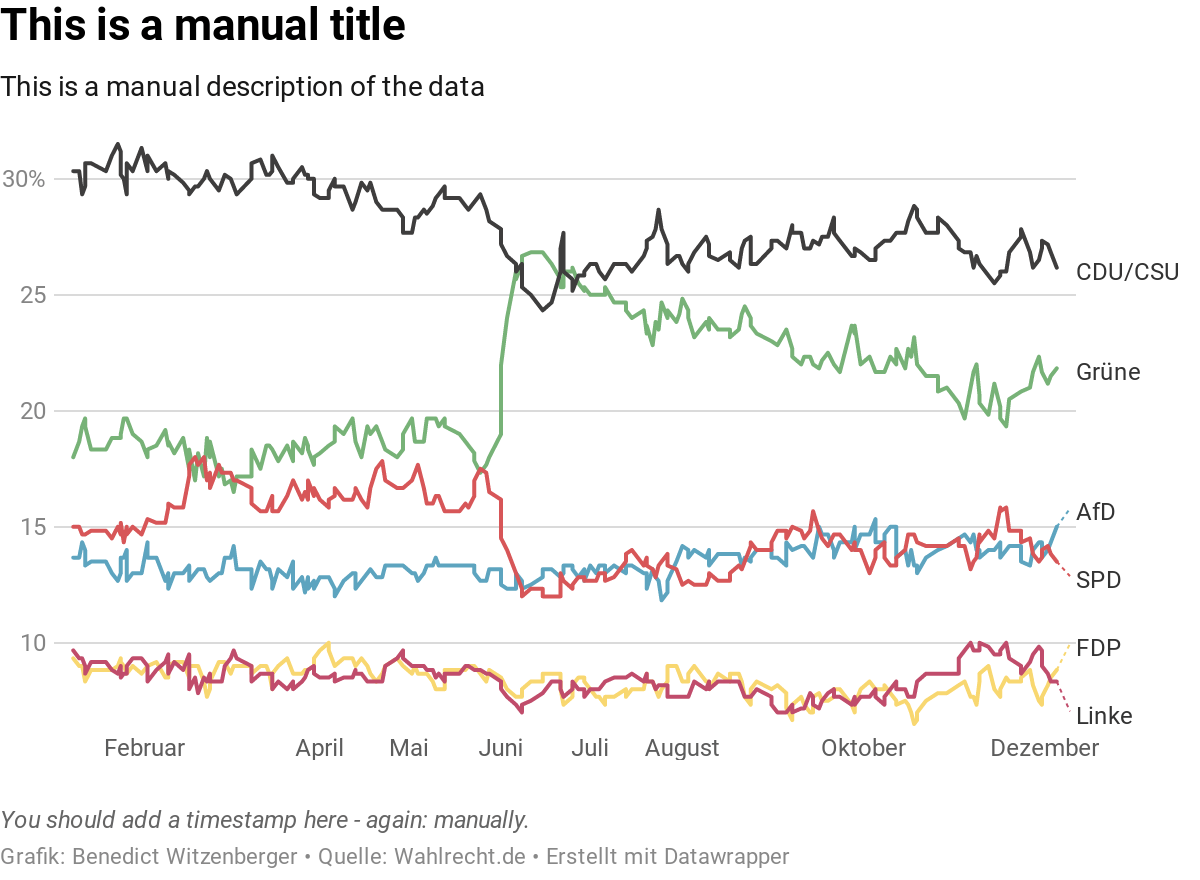
You might want to build a poll tracker (like a lot of media companies do) to keep track how citizens intend to vote on election day.

To do so, you probably get every single poll for the election you want to track and calculate some kind of average. You might want to take the sample size into account, or maybe you want to decrease the impact of older polls over time. In the end, you come up with a number for each party. You then want to update your poll tracker chart and create a custom headline for the chart depending on what it shows. The more effort you put into different possibilities, the better it might get. You’ll also want to add an “Updated at”-timestamp and a text that contains all the pollsters you used for your tracker.

While you can simply upload your calculated average to Datawrapper, it’s not easy to upload your headline, timestamp or source within your script. You still have to open your browser, head to app.datawrapper.de, find your chart and change the lines. A lot of boring, error-prone work. At least the chart looks quite interesting:

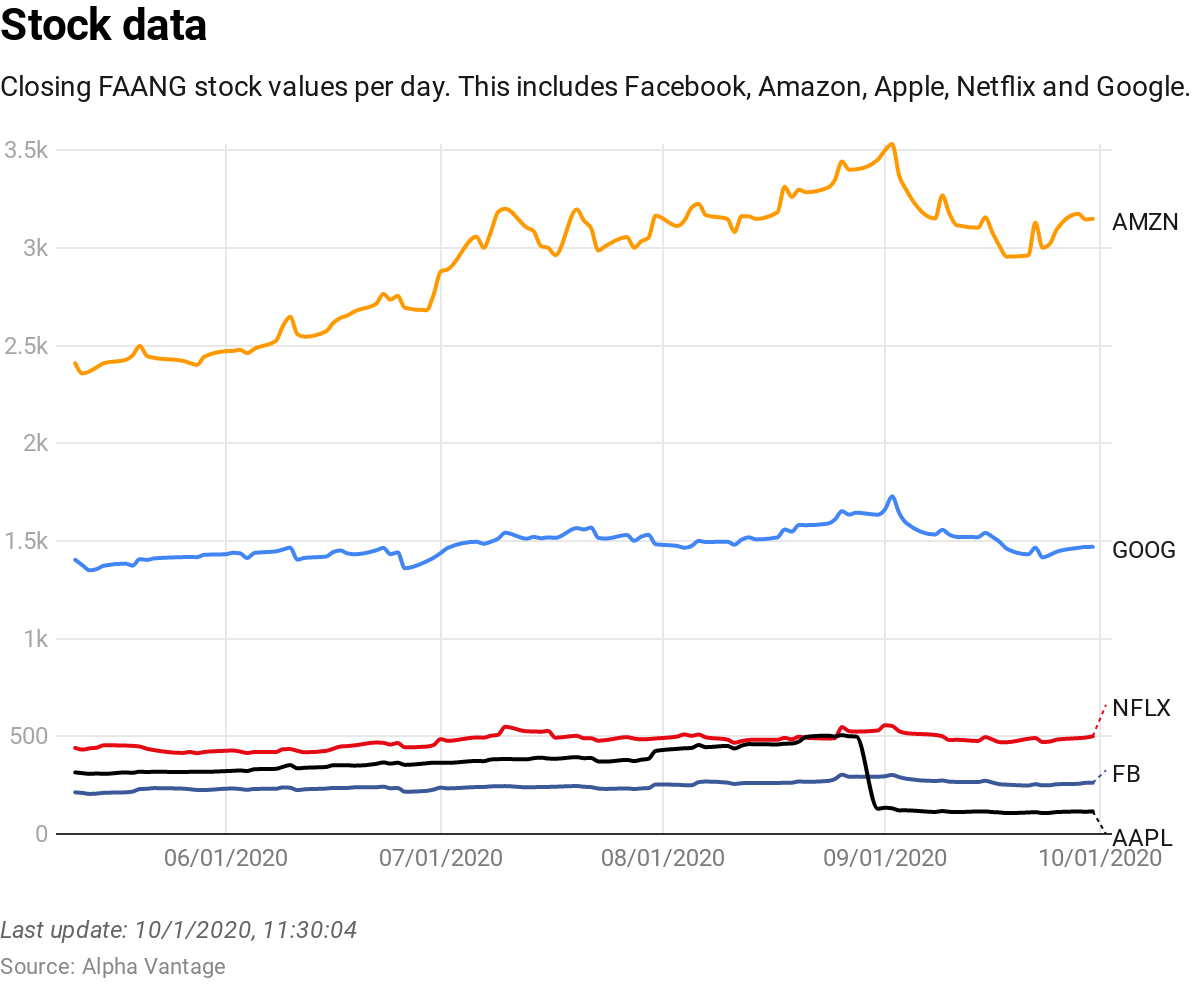
Another example: a share price tracker. It basically works the same as a poll tracker, but gets updated a lot more often. So you really need to have an exact timestamp:

To make my point: you want something that helps you to automate things. Datawrapper provides an application programming interface (API) for their services. Instead of making all your changes manually on Datawrapper’s website, you can change everything programmatically.

Using the API to show snow heights

Datawrapper just released a new version of the API a couple of weeks ago. In the corresponding blog post, I learned that the whole user interface of datawrapper.de is actually talking to this API. So should we.

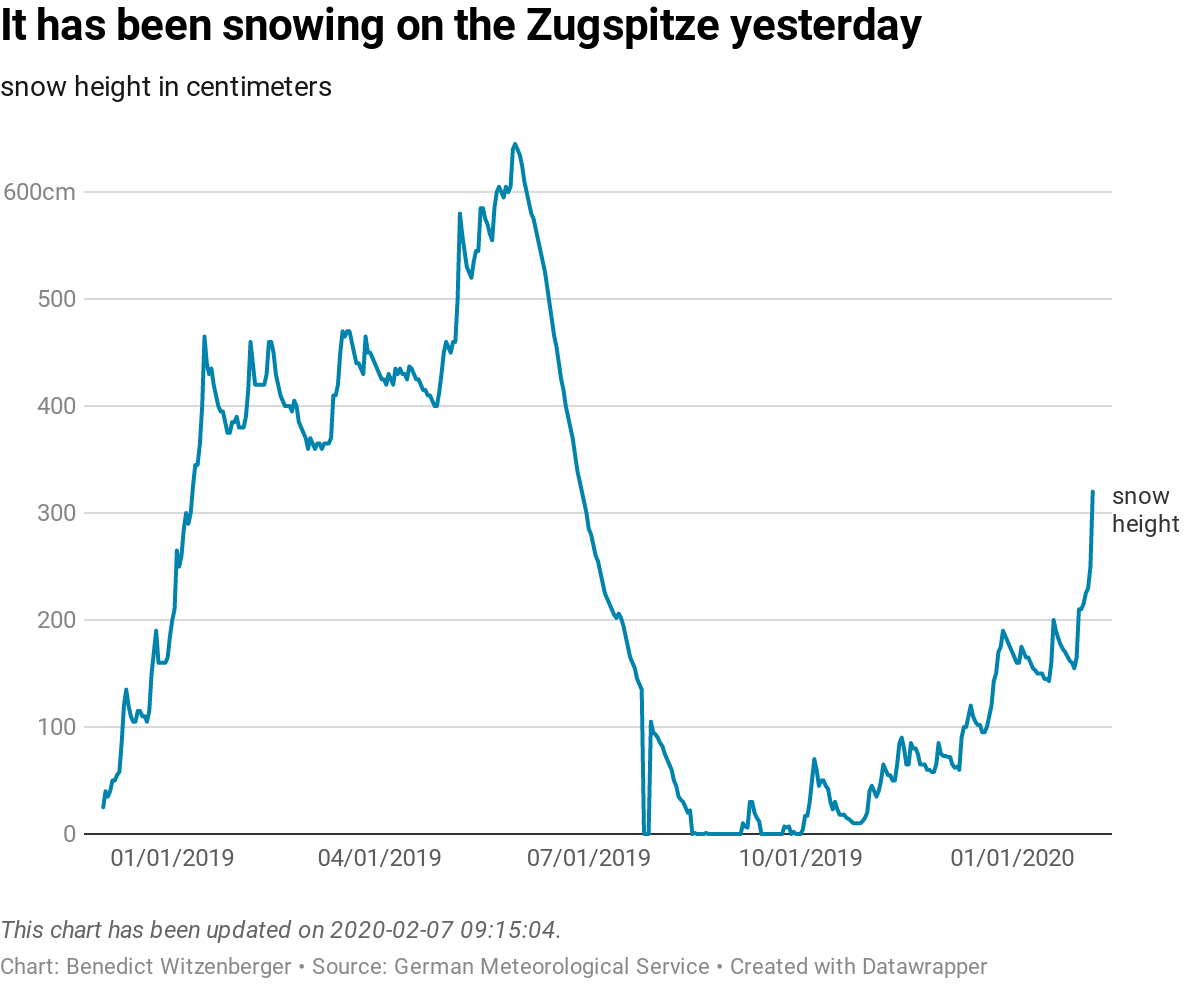
You can use any programming language to talk to their database with this API, send data to your charts, create new charts or change titles or sources. Like I did for this chart of the snow heights on Germany’s highest mountain, the Zugspitze in Bavaria, which is updated each day at 9 in the morning:

To create this chart, I’m running a script on a web server. It loads an open data file from the German Weather Service that includes a bunch of meteorological data for all of their weather stations. In an R script I calculate the daily changes of the snow height and derive some headline from the data:

  • It has been snowing on the Zugspitze yesterday (if the snow height increased)
  • The Zugspitze lost [calculated value from the data] cm of snow during the last two days (if the snow height decreased)
  • Yesterday there’ve been [snow height from the data] cm of snow on the Zugspitze (if the snow height didn’t change)

I then use my package DatawRappr to talk to Datawrapper’s servers and update my chart. I’ve pushed the full script on GitHub - check it out, if you like.

You can easily use my package to edit every aspect of your charts. But to be honest: I prefer the direct visual feedback I get from changing something on Datawrapper’s web interface. So I recommend using my package to create an empty chart, push your data to it, then head to app.datawrapper.de and finish the visual elements. When you’re rerunning your calculation, you can simply change titles and sources and republish your chart with DatawRappr. Let me show you how it works:

How to use DatawRappr

To use DatawRappr, you will need to be familiar with R – at least you should know how to install a package like DatawRappr (There are a lot of free resources to learn R). To talk to Datawrapper’s API you will also need an API key, which you can obtain in your settings. DatawRappr can store that key for you on your machine, so you don’t have to specify it in every call to the API:

datawrapper_auth(api_key =  "1234567")

You can now create a new chart. If you add it to a variable (which is done with a <- in R) you can use that to make changes to that chart – without having to care about the chart ID (which you would otherwise need to tell Datawrapper which chart you want to edit):

my_chart <- dw_create_chart()

You can then upload data to the chart, from within R:

dw_data_to_chart(my_dataframe_in_R, my_chart)

If you want to change the headline or other parts of the chart:

dw_edit_chart(my_chart, title = "my new headline", intro = "a updated intro", source_url = "https://www.datawrapper.de")

Then you might want to (re-)publish your chart:

dw_publish_chart(my_chart)

These are the essential elements of the package, but there is also longer documentation available. Feel free to play around with it, and please have a look at the public source code on GitHub if you encounter any problems. I also write about projects I work on in R (sometimes also in Python) from time to time on the blog of my website.


Hi there, Lisa here. I hope you enjoyed Benedict’s guest post! If you’d like to write one yourself, get in touch with me at lisa@datawrapper.de. Like always, I’m looking forward to hearing from you.

11 Dec 19:11

Linea Sketch Adopting Subscription Model in 2020

by Ryan Christoffel

The Iconfactory has announced that Linea Sketch, its popular iPad sketching app, will be moving from paid up front to a subscription business model. This transition will take place in early 2020 with the release of Linea 3.0.

We tried hard to avoid a subscription, but the costs to maintain the app are much higher than the income from new sales. This is obviously not a sustainable situation! We have two options:

  1. Let the app die a slow, painful, and unsupported death
  2. Find a source of recurring revenue

They mention that the recent 2.7 update to Linea took over 200 hours of work, and most of that time was simply spent adapting the app to work well with iOS 13’s new system dark mode. The cost of simply maintaining the app to function well with system updates is high, and The Iconfactory wants to do much more than just maintain the app. For example, they preview the roster of changes coming to Linea 3.0, which will include a universal app across iPad and iPhone, and the following:

  • Time-lapse to capture your creation as it evolves
  • Templates with adjustable intensity
  • Custom backgrounds with adjustable paper color and texture
  • App themes and beautiful new app icons for your home screen
  • QuickToggle: two-handed drawing is all we’re going to say :-)

Linea’s subscription will cost $.99/month or $9.99/year, and include both the iPad and iPhone versions of Linea, since the two will become a universal app. On a related note, the Mac companion app Linea Link is now available as a free download.

Many users hate seeing the apps they use switch to subscriptions, but sometimes developers truly don’t have much of a choice. As was mentioned above, development costs for Linea are currently much higher than sales revenue, which is clearly an unsustainable situation. Either The Iconfactory finds a sustainable option for Linea, or the app will eventually disappear. And because of Apple’s unwillingness to allow upgrade pricing on the App Store, subscriptions are one of the only viable options.

→ Source: blog.iconfactory.com

11 Dec 19:10

Lightroom 5.1 Adds Direct SD Card Importing on iPad and iPhone, Plus New Export Options

by John Voorhees

As promised this fall, Adobe has updated Lightroom for iPad and Lightroom Photo Editor for the iPhone with the ability to import image files from SD cards directly inside the app. The company has added new options when exporting your photos too. I’ve been using the beta of Lightroom 5.1 for the past couple of weeks, and the update has worked exceptionally well, reducing the friction of getting images into the app and adding flexibility to getting them back out again.

Direct Image Import from SD and microSD Cards

iOS has supported the ability to import images from SD cards for a long time. However, until now, the process has required the Photos app, or more recently, the Files app’s file provider functionality. Because Photos or Files had to act as an intermediary, it was easy to end up with multiple sets of the same images: an edited collection in Lightroom, an unedited set in Photos or Files, and depending on your workflow, another unedited set on your SD card. That’s because Lightroom would copy the image upon import, leaving you to go back and clean up the original files, something which I wasn’t very good about doing. As a result, I’d end up with duplicate, unedited images in Photos or Files and on my SD card, too, if I added pictures to Files from the card’s file provider. If I didn’t clean up the originals immediately, I’d forget which were already in Lightroom and hesitate at deleting anything, which meant the mess would never be resolved.

Lightroom 5.1 fixes this by integrating SD card import functionality directly into the app that works effectively the same as importing into Photos. When you tap on the app’s import button in the lower right-hand corner of the screen, you’ll see a new option called ‘From Camera Device.’ If nothing is plugged in, the choice is grayed out.

Connecting an SD Card to Lightroom for the first time.

Connecting an SD Card to Lightroom for the first time.

When you first connect an SD card to an iPhone or iPad, the OS will prompt you for permission to connect to an ‘external camera.’ After granting permission, a ‘Device Connected’ popup opens regardless of where you are in Lightroom’s UI, alerting you to the connection. Tapping ‘Continue’ takes you to an import view, but even if you tap cancel, you can always get to the import screen by tapping the ‘From Camera Device’ option that’s available when you tap the import button.

I tried the new import feature using SD and microSD cards plugged into a small Anker USB-C card reader, and I connected my Sony a6500 camera to my iPad Pro with a USB-C to Micro USB cable, all of which worked as expected. I also connected an SD card to a current-generation iPad mini and my iPhone 11 Pro Max using Apple’s Lightning to SD card adapter, which worked too. The SD card I tested had about 11GB of JPG and RAW images on it. Lightroom loaded previews of all the photos quickly over USB-C and Lightning, but the USB-C to Micro USB setup took longer, which isn’t surprising given the transfer rates Micro USB can handle.

Picking and filtering images from an SD card in Lightroom's direct import view.

Picking and filtering images from an SD card in Lightroom’s direct import view.

When the import view opens, you can pinch to adjust the size of the preview images, which are organized by date. You can also change the thumbnail size from the ellipsis button in the top right corner of the screen, which provides options for selecting or deselecting all of the photos on the card and filtering what file types to display in the import view too.

Lightroom’s direct import process is familiar and straightforward since it’s very similar to importing from an SD card into Photos. At the same time, it’s also powerful because it handles both importing and deleting images. In fact, even if you don’t have anything new to import, you can use the direct import view to cull the photos on a card or delete everything.

Whether you’re importing or deleting photos, you can select them individually by tapping on each image or in groups by date by tapping the checkbox next to a date. Alternatively, you can tap the Import All button at the bottom of the screen to grab everything. You can also tap and hold then drag a finger to select a range of photos.

At the top of the screen, you’ll see the location where your selected images will be imported. Tapping on the location allows you to switch from an album to ‘All Photos’ or create a new album. You cannot, however, navigate from one album to another from the direct import view, which means that if you don’t start in the album to which you want to save your photos, you’ll have to close the import view and navigate to another album and then reopen the import screen, which is a clunky interaction. I would much prefer the ability to navigate my albums from inside the import view.

Once imported, you have the option to keep or discard images on your SD card.

Once imported, you have the option to keep or discard images on your SD card.

After you’ve imported the images you’ve selected, Lightroom asks whether you want to keep or delete them. Again, it’s a simple option, but it streamlines the process by giving you the chance to decide what to do with the photos on your SD card as part of the import process, which is the most relevant time to do so.

It’s worth mentioning that like Photos, direct import into Lightroom works only with SD and microSD cards, not external storage. I connected a Gnarbox 2.0 SSD, Western Digital SSD, and a Samsung T3 SSD to my iPad, and unsurprisingly none of them triggered direct import. To access images on external storage, you have to tap Lightroom’s import button, then ‘From Files,’ and navigate the system file picker UI to access the files from the connected storage. That was possible before the latest update, and it works well, but having tried direct import, I‘d love to have the same option available from the iOS and iPadOS file picker for external storage too.

New Export Options

Lightroom 5's share menu (left) and Lightroom 5.1's new share menu (right).

Lightroom 5’s share menu (left) and Lightroom 5.1’s new share menu (right).

Lightroom 5.1 also has expanded export options. Tapping the share button in Lightroom’s toolbar reveals new export options under the ‘Share to…,’ ‘Open In,’ and ‘Export as…’ entries. For each, you now have the option to export images as TIFF files, resize photos to custom dimensions, pick image quality in 10% increments, customize or use date-formatted file names, use output sharpening with settings for screen, matte paper, or glossy paper, and choose between sRGB, Display P3, Adobe RGB, and ProPhoto RGB color spaces. Sharing options can also be accessed from the Gallery by long-pressing an image.

There are lots of new options for exporting images from Lightroom.

There are lots of new options for exporting images from Lightroom.

Changing the ‘Share To’ and ‘Open In’ settings persists between exports. If you have a one-off export that uses different settings, ‘Export As’ is the option to pick. The added flexibility of Lightroom’s export options is a welcome addition to the app that will allow users to integrate it more seamlessly for a wider variety of workflows.

There’s one final change in Lightroom 5.1 I should mention. Adobe’s beta release notes say that anyone invited to share a Lightroom album will be able to see the shared album inside the Lightroom app and add photos as a contributor. However, I haven’t been able to test that feature since it requires a second person with the Lightroom beta.


I’m glad to see Adobe focusing on how Lightroom fits into workflows beyond the confines of Lightroom itself. A hallmark of pro apps is the ability to use them in conjunction with other tools, passing files and data between them to create a more complex workflow. Making it easier to get photos into Lightroom from SD cards and out of the app with robust export options is a fantastic start. Like Federico, I’d like to see Adobe use the Files framework to create persistent connections to external storage too. I’m also looking forward to Photoshop for iPad integration, which the company announced last month. Still, Adobe continues down the path of regularly expanding Lightroom’s capabilities, which has made it one of my favorite image editors.

Lightroom for iPad 5.1 and Lightroom Photo Editor 5.1 for iOS are free updates and are available on the App Store.


Support MacStories Directly

Club MacStories offers exclusive access to extra MacStories content, delivered every week; it’s also a way to support us directly.

Club MacStories will help you discover the best apps for your devices and get the most out of your iPhone, iPad, and Mac. Plus, it’s made in Italy.

Join Now
11 Dec 19:10

Drafts for Mac: It’s Action Time

by Rosemary Orchard

When Drafts for Mac first arrived, I knew there were great things to come – not that it wasn’t an excellent app already! But since that time, Drafts for Mac has evolved. What was previously a functional app is now functional, automatable, and more importantly a flexible tool that can mold to fit your workflow.

Since Drafts first released, there have been numerous new features. Notably, it now supports multiple windows. This means you can have as many Drafts windows open at once as you like. I’ve taken to assigning different Spaces to different projects, enabling me to have Drafts open with its relevant Workspace in the same area as other apps.

As well as this, Drafts for Mac added batch tagging (and untagging) drafts. This has improved my workflow dramatically, as I can process the items that land in my inbox and need filing much faster. Another excellent feature is the addition of dictation (for macOS Catalina users). Especially with the demise of Dragon Dictate for Mac, this feature is a great way to talk at your computer and let it do the typing.

The headline new feature, though, is something Drafts for iOS fans consider the heart of the app: actions.

An action is something you can add to Drafts to give yourself a button (and optionally a keyboard shortcut) to do something. What that something is, is entirely up to you. From integrations with WordPress and Dropbox, to scripting and custom HTML previews, the combination of steps you can combine to do your bidding is positively mindboggling.

Drafts for Mac ships with five action groups, which by themselves greatly increase the power of the app; these include: Basic, Editing, Markdown, Tools, and Processing. The names of these groups are fairly self-explanatory, and they deliver plenty of punch so you can easily do more with Drafts – even without looking into the wealth of actions available in the action directory.

Drafts window with the action bar and action list.

Drafts window with the action bar and action list.

There are three ways to use the actions you now have in Drafts: keyboard shortcuts, the action list on the right side of your draft, and the action bar at the bottom of the window. Keyboard shortcuts work regardless of which action groups are active, and you can control the action list and the action bar independently of one another.

What I love most of all is that I can create my own groups of actions, for any location, control which actions show up where, and even if they should work differently on different devices (so actions can do one step on your iPhone or iPad, but another on your Mac).

My MacStories Workspace in Drafts.

My MacStories Workspace in Drafts.

My favorite way to use Drafts is Workspaces. These combine a filter for drafts (a search based on tags or text), with a specific action list and action bar if you set them to do so. This means when I open my MacStories workspace I automatically see the Markdown action bar, and an action list I created for MacStories on the right.

Editing the Mail action in the Basic action group.

Editing the Mail action in the Basic action group.

When you create an action on the Mac and then add a step, you see a toggle which allows you to enable this step on iOS or macOS. These are both enabled by default – which makes perfect sense as the vast majority of action steps work perfectly on both platforms.

Unfortunately, because apps work differently on different platforms, some actions don’t work on Mac. These include Evernote, Event (calendar integration), Open In, and Run Shortcut. As Shortcuts doesn’t officially exist on the Mac outside of my nerdy dreams, the latter is hardly a surprise. The first four are due to limitations of the Evernote app and macOS – the latter extends to creating a rich text message in Mail as well, as for some unknown reason this feature doesn’t work properly. URL schemes might not be the same across platforms either, so a Fantastical action which works perfectly on iOS might not work on your Mac. This is, however, why you can control which steps in your action run on which platform. So if you have a “Parse in Fantastical” action with two Callback URL steps: the first would be enabled on iOS and open fantastical2://parse?sentence=[[draft]], whereas the one enabled on the Mac would be x-fantastical2://parse?s=[[draft]]. (You can download an action to parse your whole draft in Fantastical here.)

I spend a lot of time in Drafts, so the ability to use the application for multiple purposes while still having a clean separation when I need it really works for me. And on the odd chance that I tag something incorrectly, I can search all of my Drafts – something which was problematic in my previous workflows, as the text might actually be somewhere else entirely, leading to a lot of lost time searching different applications and all of my storage.

For many people Drafts has been where text starts for a long time. And it can continue to be that. For me, however, Drafts is where text starts and often lives until archival or deletion. I can customize this app to do practically anything I want.

One of my many workspaces is for ScreenCasts ONLINE. I write a monthly magazine article and store information about each month’s article in Airtable. I’ve created custom scripting actions that pull from this Airtable database, create a draft with the relevant information, and update the Airtable record with the UUID of the draft, which automatically updates where I see it. I can also pull from my list of ideas and update my current draft when I need to choose my topic. Finally, when I’m done writing, I use an action that formats the text correctly and pushes the information to Zapier, which handles sending it off properly to the right systems I need the information to be in.

Another workspace is for my blog writing. I confess I borrowed the vast majority of these actions from Tim Nahumck’s excellent review of Drafts 5.4, but I also have templates for different kinds of posts I create. Previously I had a lot of these in Shortcuts, but when actions came to the Mac I set aside time to migrate everything over to Drafts actions, and now I feel like I can really get writing done on my Mac, instead of only some writing and necessary screenshots.


The recent enhancements to Drafts for Mac have cemented the app’s place in my writing workflow. Naturally, I’m a big fan of automation, but anyone with the Drafts Pro plan can create their own actions, which can be as simple as “insert text” or combining multiple existing actions, to as complex as custom WordPress functionality and scriptwriting. The action directory and active user forums make this even easier, with a wealth of knowledge available to everyone. If you’re looking for a writing app that can wear many hats, Drafts can do it. Or maybe you just need a specific set of tools in a writing app – you’ll find a way to make that happen in Drafts.


Support MacStories Directly

Club MacStories offers exclusive access to extra MacStories content, delivered every week; it’s also a way to support us directly.

Club MacStories will help you discover the best apps for your devices and get the most out of your iPhone, iPad, and Mac. Plus, it’s made in Italy.

Join Now
11 Dec 19:10

“Link In Bio” is a slow knife

by Anil Dash
“Link In Bio” is a slow knife

We don’t even notice it anymore — “link in bio”. It’s a pithy phrase, usually found on Instagram, which directs an audience to be aware that a pertinent web link can be found on that user’s profile. Its presence is so subtle, and so pervasive, that we barely even noticed it was an attempt to kill the web.


Links on the web are incredibly powerful. There are decades of theory behind the role of hyperlinks in hypertext — did you know in most early versions, links were originally designed to be two-way?  You'd be able to see every page on the web that links to this one. But even in the very simple form that we've ended up with on the World Wide Web for the last 30 years, links are incredibly powerful, opening up valuable connections between unexpected things.

For a closed system, those kinds of open connections are deeply dangerous. If anyone on Instagram can just link to any old store on the web, how can Instagram — meaning Facebook, Instagram’s increasingly-overbearing owner — tightly control commerce on its platform? If Instagram users could post links willy-nilly, they might even be able to connect directly to their users, getting their email addresses or finding other ways to communicate with them. Links represent a threat to closed systems.

Precarity and Scarcity

Here's the thing, though: people like links. So closed systems have to present a pressure release valve. Hashtags are a great way out. They use the semiotics of links (early versions of hashtags on social platforms were really barely more than automated links to a search for a particular term) but are also constrained by the platforms they live on. A hashtag is easier to gather into a database, to harvest, to monetize. It’s much easier, sure, but it also doesn’t have all the messiness of a real link. Instagram doesn’t have to worry that clicking on its hashtags will accidentally lead people to Twitter, or vice versa.

And the ultimate triumph of being anti-web is to make links scarce. The smallest possible number of links a platform could allow is zero, so Instagram gets as close to that theoretical limit as possible, and gives you… one. You can have one link. Aren’t you grateful? One!

There are some legitimate reasons platforms limit links. Spammers abuse links. Trust is hard to verify around links — too many scammers make links that look real, but lead to sketchy sites. Building a system to monitor all the links being posted on a big platform does take some cost. Maybe you can have a link again, if you are already in the 1% most influential users on the platform and put it in a story — the part of Instagram's experience that drives the engagement metrics they care about. Maybe you just give up, and pay for links, by buying advertising.

But killing off links is a strategy. It may be presented as a cost-saving measure, or as a way of reducing the sharing of untrusted links. But it is a strategy, designed to keep people from the open web, the place where they can control how, and whether, someone makes money off of an audience. The web is where we can make sites that don’t abuse data in the ways that Facebook properties do.

Links take us to places where we can make choices that Instagram never would.

Imagine Something New

With billions of people using the major social platforms, and the people who remember a pre-social-media web increasing in age while decreasing as cultural force on the internet, we’re rapidly losing fluency in what the internet could look like. We’ve almost forgotten that links are powerful, and that restraining links through artificial scarcity is an absurdly coercive behavior.

I don’t care about the imagined “good old days” of the web, and I’m not a pollyanna about the wild, open web being some panacea for all the harms that technology and the internet can enable. But I do think coercive methods of controlling people are a danger, and some of the most insidious techniques are when a platform subtly erases empowering opportunities for its users. So let’s look at all the apps that live under our thumbs, and interrogate the choices they’re making, and then imagine what they would look like if we demanded that our tools don’t tie our hands.

Flashback: From 2011, Facebook is gaslighting the web.

11 Dec 19:07

Apple Releases iOS and iPadOS 13.3 with Communication Limits, Removable Memoji Stickers, and tvOS 13.3 with Alternate Top Shelf for TV

by Ryan Christoffel

Apple today released what are surely its last major point releases of software for the year, iOS, iPadOS, and tvOS 13.3, alongside minor updates for the company’s other platforms. In fitting the trend of an out-of-the-ordinary software release cycle, which was largely caused by a particularly buggy iOS 13.0 release, today’s releases don’t contain the number of features we’ve grown to expect from a point update. iOS and iPadOS 13.3 include only a couple noteworthy improvements: Communication Limits have been added to Screen Time, and Memoji stickers can be removed from the emoji keyboard. On the tvOS side, 13.3 re-introduces the option for the TV app to display your Up Next queue as its Top Shelf behavior rather than auto-playing video instead.

Communication Limits

Communication Limits includes two main features, one of which is a security feature geared toward parents, while the other could be equally useful for parenting or simply gaining more control of your own device.

Communication Limits includes two main features: During Allowed Screen Time and During Downtime.

Communication Limits includes two main features: During Allowed Screen Time and During Downtime.

Upon visiting the new Communication Limits page inside Screen Time, the first option shows which categories of people can contact the device. Options are limited to Everyone and Contacts Only. If you’re a parent who’s concerned about your child receiving communication by someone you don’t know, the latter option is a nice catch-all for preventing unauthorized communication. There’s also, helpfully, an ‘Allow Introductions in Groups’ toggle, which determines whether someone in your child’s contacts will be able to add a non-contact to a group conversation with your child.

The second Communication Limits feature is still useful for parents, but it also has utility for any user wishing to allow only important communication through at key times. Under the ‘During Downtime’ option, you can choose to allow communication only with specific contacts of your choosing. So the next time you’ve activated Downtime, perhaps to help aid your focus while at work, you can ensure that certain important people in your life can still reach you.

Memoji Stickers

Emoji keyboard with Memoji stickers (left) and without (right).

Emoji keyboard with Memoji stickers (left) and without (right).

One new feature of iOS 13.0 was that Memoji and Animoji stickers were added to the emoji keyboard. Even though technically these stickers weren’t emoji themselves, Apple added them to the keyboard so users would be more aware of them. This default behavior annoyed some users, however, and fortunately Apple has now provided a way to alter it.

When visiting Settings ⇾ General ⇾ Keyboard, at the bottom of the screen there’s now a toggle that can be used to remove Memoji stickers from the emoji keyboard altogether. Once removed, they can still be accessed from the iMessage app row that lines the top of the standard keyboard inside Messages.

tvOS Top Shelf Behavior

The new, old Top Shelf behavior for the TV app.

The new, old Top Shelf behavior for the TV app.

Following the theme of undoing something new to 13.0, the one standout feature of tvOS 13.3 is that you can revert the TV app’s Top Shelf behavior to its previous function. Prior to tvOS 13, keeping Apple’s TV app in your dock meant it would display your Up Next queue above it as its Top Shelf feature. This enabled quickly jumping into whatever show or movie you wanted to watch next. In 13.0, however, Apple changed this behavior so Top Shelf would instead feature an auto-playing video advertising specific TV app content, whether that be a TV+ show, an iTunes movie, or something else.

Now in 13.3, by visiting Settings ⇾ Apps ⇾ TV ⇾ Home Screen, you can change the Top Shelf behavior back to the Up Next option that was previously the default. While most users will never go to the trouble of doing this, I’m glad Apple makes the option available for those who want it.

Update: In addition to the aforementioned software updates, Apple also released iOS 13.3 for HomePod earlier today. The update brings improvements for multi-user voice support, which was introduced in October with iOS 13.2, and adds the ability to let individual family members enable or disable personal requests on HomePod for their user accounts.

Furthermore, Safari for iOS and iPadOS 13.3 has added support for physical security keys for authentication purposes. As discovered earlier in the iOS and iPadOS 13.3 beta cycle, Safari can authenticate users using FIDO2-compliant NFC, USB, and Lightning keys on websites that support this technology for greater security and account protection. For a great introduction to physical security keys and which accessories to buy, check out this guide by Paul Stamatiou.

Apple also released macOS Catalina version 10.15.2 today. The latest version updates several apps along with addressing bugs:

  • News: The layout of News+ stories from newspapers like The Wall Street Journal has been modified
  • Stocks: Apple added new ‘Breaking’ and ‘Developing’ labels to Top Stories and added links to related news stories and access to additional stories from the same publication at the end of posts
  • Music: It’s true, the iTunes Column Browser has been restored
  • iTunes Remote: Although it hasn’t shown up on the App Store yet, Apple says an update to the app will allow users to control the Music and TV apps from an iPhone or iPad
  • Photos and Mail: Resolves several bugs

Apple’s full release notes for macOS 10.15.2 are available here.


The second half of 2019 has been an especially strange one for Apple’s software, with what’s usually a clean, synchronized release schedule across various platforms being split into separate releases all over the calendar. And now the year comes to an end with point releases that feel far more minor than their release numbers would indicate. I appreciate the trend of giving more options to the power users who will find them, and who care about them. However, I can’t help but feel that Apple’s ready to put 2019 behind them and hopefully move into a year that better reflects the kind of unified software strategy that the company typically pulls off seamlessly.


Support MacStories Directly

Club MacStories offers exclusive access to extra MacStories content, delivered every week; it’s also a way to support us directly.

Club MacStories will help you discover the best apps for your devices and get the most out of your iPhone, iPad, and Mac. Plus, it’s made in Italy.

Join Now
11 Dec 19:07

Mac Pro and Pro Display XDR Unboxings and Impressions

by John Voorhees

Earlier today, Apple began accepting orders for the all-new Mac Pro, which will start shipping to customers in 1-2 weeks. Reminiscent of what Apple did when it released the iMac Pro, the new Mac Pro was provided to a very limited set of reviewers with video production experience in advance of pre-orders.

Marques Brownlee shares his impressions after using the Mac Pro and two Pro Display XDRs to edit all of his YouTube videos for the past two weeks. His main takeaways? “One, it’s really quiet, Two, it’s really fast.” So fast, in fact, that he was able to render 8K video more quickly than the time it would take to watch.

For two unboxings and a look at the setup process, be sure to watch these videos by Justine Ezarik and Jonathan Morrison.

To learn more about what it’s like to edit video on using Final Cut Pro X, a new Mac Pro, and Pro Display XDR, don’t miss Episode 514 of Mac Power Users on Relay FM, on which David Sparks and Stephen Hackett interview Thomas Grove Carter.

Finally, director and photographer Vincent Laforet shares his impressions of Apple’s newest hardware on his blog along with the first project he created with it.

More than anything else, the thing that struck me about each of the impressions shared by this small group is their sense of wonder and amazement at the speed and power of the new Mac Pro. This isn’t a computer for most people, but if you need it, the Mac Pro clearly opens up new possibilities.


Support MacStories Directly

Club MacStories offers exclusive access to extra MacStories content, delivered every week; it’s also a way to support us directly.

Club MacStories will help you discover the best apps for your devices and get the most out of your iPhone, iPad, and Mac. Plus, it’s made in Italy.

Join Now
11 Dec 19:07

Elimination

by russell davies

I'm always looking for reasons not to buy things I like. ie: there are lots of products I might buy, lots of good reasons to do so, but that doesn't help with making choices, what I really need is more reasons to eliminate things.

For instance, John Smedley

On paper they're right up my street. Made in the East Midlands. High quality. Comfortable but fashion-y enough. I'm always tempted by a bit of John Smedley. But now - hurrah! - I don't have to be. They've ruled themselves out by giving Boris a Get Brexit Done scarf. I can never think about them again.


11 Dec 19:07

The fluid nature of time

Dave Truss, Daily-Ink, Dec 10, 2019
Icon

Time isn't real. Or, perhaps I should say, insofar as time is real, it is nothing like what we think it is. Oh, I know I have cited J.E. McTaggert on this in the past. But it's not just a question of ontology. As a recent BBC report makes clear, we create the past (and use much the same tools to create the future). "As we lay down memories, we alter them to make sense of what’s happened. Every time we recall a memory, we reconstruct the events in our mind and even change them to fit in." Our memories aren't a recording of past events. Rather, they're a resource we create in order to predict the future. That's why our memories are selective, creative, and imaginative. So what should we say in response to Dave Truss here? Time doesn't pass faster or slower depending on age. It's your perspective that's altering that perception. A fear of loss, perhaps, that makes each moment seem as though it's fleeting.

Web: [Direct Link] [This Post]
11 Dec 19:07

“I’m stuck between loving him and hating him because of what he did.”

by Andrea

The Washington Post: ‘Why did you do this?’ “His brother confessed to gunning down 17 people in Parkland. But he’s the only family Zach Cruz has left.” (Published January 25, 2019)

“Fourteen students and three staff members were killed that Valentine’s Day at Marjory Stoneman Douglas High in Parkland. Seventeen others were injured, left with lasting scars, physical and mental. Hundreds more had their lives upended: parents suddenly without children, students rallying for gun control by day and dealing with panic attacks at night, first responders denounced for the choices they made amid the chaos.

Some of those people were here in the courtroom, and sliding into a bench beside them now was another person whose life was derailed that day. Zachary Cruz was 17 when his older brother became one of the deadliest school shooters in American history.”

11 Dec 19:07

Paypal muss seinen Service verbessern

by Volker Weber

Es ist eine unendliche Geschichte, aber ich habe nur zwölf Tage zugeschaut, wie sie immer wieder die Hotline angerufen hat und dabei als Verbrecher hingestellt wurde. Wie sie Mails an irgendwelche Abteilungen geschrieben hat und nicht mal eine Empfangsbestätigung bekam. Wie sie immer wieder wartete, um wenigstens an ihr Konto zu kommen.

Und dann ist mir der Kragen geplatzt. Ich habe auf LinkedIn eine Paypal-Mitarbeiterin angeschrieben, die sich eingesetzt hat. Und dann am Ende Erfolg hatte. Vielleicht waren es auch die vielen Freunde, die alle in der Paypal-App geduldig den Support immer wieder angechattet haben.

Binnen einem Tag und nach 10.000 Views auf Twitter und 3.000 auf LinkedIn hat sich Paypal entschuldigt und das Konto wieder eröffnet. Ich finde, es sollte nicht nötig sein, so massiv zu werden. In der jetzigen Form ist Paypal nicht in der Lage, einen angemessenen Service zu leisten, welcher die groben Fehler von algorithmengetriebenen Sperrungen zu heilen versucht.

Das kann so nicht bleiben.

More >

11 Dec 19:07

Twitter Favorites: [bmann] Pull - a Github app to keep your forks up to date: “Pull app will automatically watch and pull in upstream’s defaul… https://t.co/2Koj20EGOq

Boris Mann @bmann
Pull - a Github app to keep your forks up to date: “Pull app will automatically watch and pull in upstream’s defaul… twitter.com/i/web/status/1…
11 Dec 18:38

Canada charges Volkswagen for violating environment laws

by Shruti Shekar

Canada has accused Volkswagen of importing over 120,000 cars that violate its environmental laws.

According to Reuters, the country has charged the automaker 60 counts of violating the Canadian Environmental Protection Act and two counts of providing misleading information.

Volkswagen has said it intends to cooperate with Environment and Climate Change Canada. The automaker indicated that it wants to resolve the issue as soon as possible.

“At the hearing, the parties will submit for the court’s consideration a proposed plea resolution and seek its approval,” the spokesperson told Reuters.

There is no indication in terms of a settlement and what that would look like if there was one. A similar case took place in the U.S., which resulted in Volkswagen paying about $25 billion USD (about $33.1 billion CAD) for having imported 500,000 vehicles that violated the United States Environmental Protection Agency.

Volkswagen’s cars that were imported included defeat devices. The system would detect EPA tests in the U.S. but during the car’s operation, it was turned off. Turning this off increased the vehicle’s power and performance but caused emissions up to 25 times the legal amount.

Volkswagen and Canada have had a very close relationship. More recently, Electrify Canada, which is owned by the automaker, indicated it was on the verge of opening the first-ever EV charger for its Canadian charging network in the Greater Toronto Area.

Source: Reuters

The post Canada charges Volkswagen for violating environment laws appeared first on MobileSyrup.

11 Dec 18:37

OnePlus might launch its own truly wireless Bullets earbuds

by Dean Daley
OnePlus Bullets

It looks like OnePlus might be working on true wireless Bullets earbuds. This rumour comes courtesy of Max J (@Samsung_News_).

The image seems to be an internal concept created by OnePlus. That said, the document is unconfirmed and should be approached with skepticism.

Currently, OnePlus’ Bullets connect with a flexible neckband that attaches the two earbuds together.

If this concept design is accurate, the Oppo-owned company is late to the party. Apple, Samsung, Sony, Libratone and more have already released wireless earbuds, with other companies like Microsoft, Google and Amazon planning to launch their own wireless earbuds next year.

Source: @Samsung_News

The post OnePlus might launch its own truly wireless Bullets earbuds appeared first on MobileSyrup.

11 Dec 18:37

Apple Watch Series 4 and 5 on sale at The Source up to $50 off

by Dean Daley

The Apple Watch is discounted at The Source right now for a one-day sale. The devices are being offered for up to $50 off.

The sale is only available for the Apple Series 5 and the Series 4.

Below are The Source’s deals on the smartwatch:

  • Apple Watch Series 5 44mm: now $549.99, was $569.99
  • Apple Watch Series 5 40mm: now $509.99, was $529.99
  • Apple Watch Series 4 44mm: now $509.99, was $559.99
  • Apple Watch Series 4 40mm: now $469.99, was $519.99

This version of the Apple Watch does not have access to the LTE.

Both the Apple Watch Series 4 and Series 5 also support the new electrocardiogram app that allows users to detect unnatural heart rhythms.

The post Apple Watch Series 4 and 5 on sale at The Source up to $50 off appeared first on MobileSyrup.

11 Dec 18:36

iOS 13.3 adds support for security keys, option to hide Memoji stickers

by Jonathan Lamont
iPhone XS and security key

A new iOS update is rolling out to compatible devices now with the usual bug fixes, along with support for security keys.

iOS 13.3 now supports the use of FIDO2-compliant USB-C, NFC and Lightning physical security devices with Apple’s Safari browser. Thanks to the addition of native support, app developers should be able to add support for security keys more easily. Previously, iOS apps had to individually add support to their apps.

Considering Yubico launched a Lightning security key in August, the feature is a welcome addition.

If you’re not sure about security keys, they can be a great way to bolster online security. It acts as a physical token to verify your identity when logging in online and works on a variety of services, including Gmail, Twitter, Outlook, Dropbox, Facebook and more.

Alongside the addition of security keys, iOS 13.3 brings improved RAM management — according to beta testers — as well as Screen Time communication limits for phone calls, iMessage, FaceTime and iCloud contacts.

iOS 13.3 also brings an option to hide the Memoji stickers in the keyboard settings, a welcome addition for all those who despise the presence of the stickers.

To get the free update, head to the Settings app, then to ‘General’ > ‘Software Update’ to start the download.

Source: The Verge

The post iOS 13.3 adds support for security keys, option to hide Memoji stickers appeared first on MobileSyrup.

11 Dec 18:36

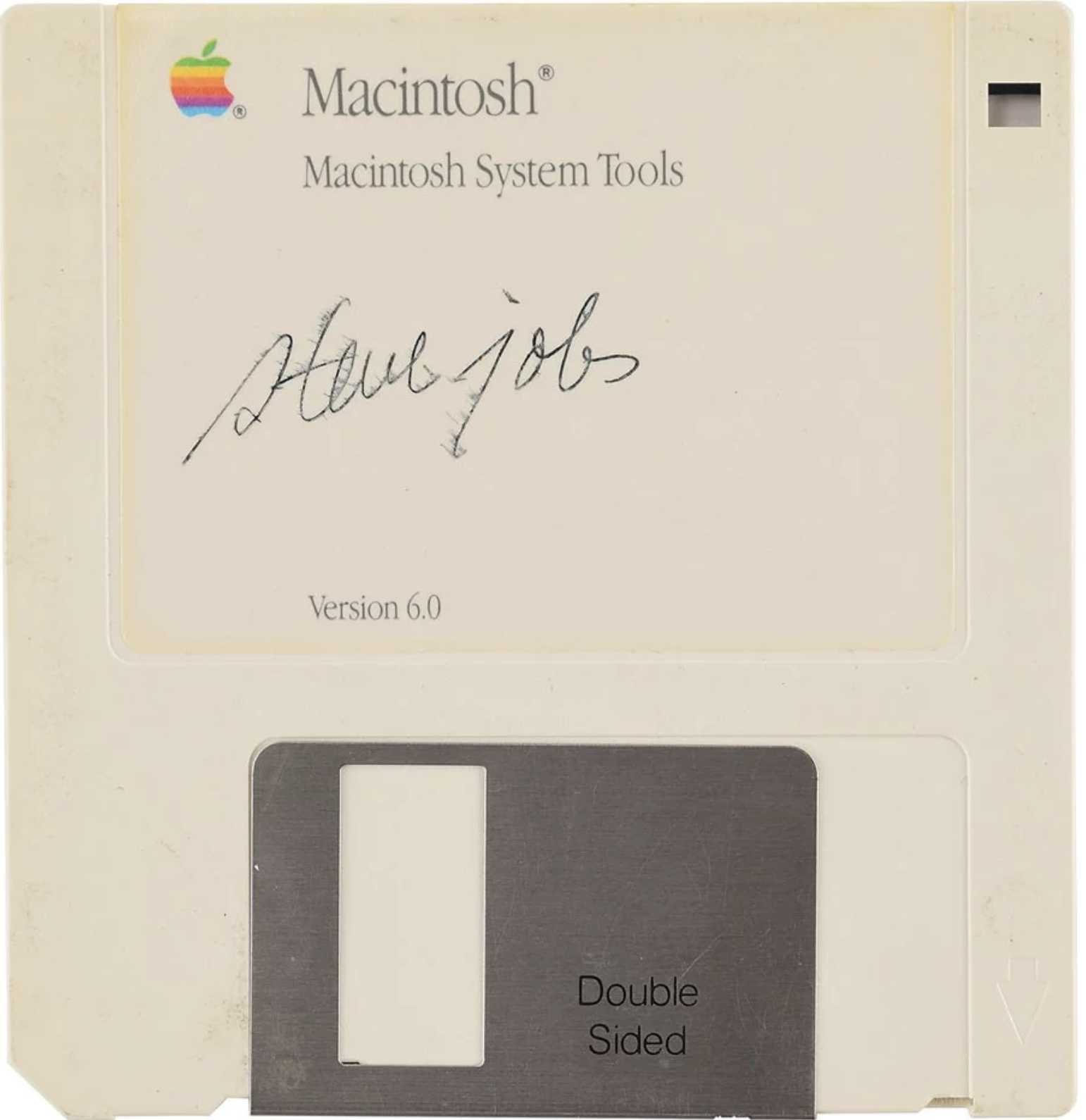
Floppy disk signed by Steve Job sells for $84,115

by Dean Daley

If you thought the $74,000 CAD highest-end Mac Pro was expensive, a floppy disk signed by Steve Jobs recently sold at auction for $84,115 USD (roughly $111,381 CAD).

According to iMore, the bidding started at $1,000 USD (about $1,327 CAD) and was only expected to sell for around $7,500 USD (approximately $9928 CAD).

RR Auction states that Jobs often declined to sign items, which explains why this signed floppy disk ended up costing more than a Tesla.

“Macintosh System Tools Version 6.0 floppy disk, signed in black felt tip, ‘steve jobs.’ In fine condition, with slight brushing to the ink. A hugely desirable format for Jobs’s seldom-seen autograph — known as a reluctant signer, he often declined to comply with the requests of collectors. As a piece of Apple’s iconic Mac OS software, boasting Jobs’s elegantly stylish lowercase signature, this is a museum-quality piece of computing history.” reads RR Auction’s description.

Image credit: RR Auction 

The post Floppy disk signed by Steve Job sells for $84,115 appeared first on MobileSyrup.

10 Dec 19:14

The Blue Tape List

The Blue Tape List

I've often thought there's something magical about your first month at a new job - you can meet anyone and ask any question, taking advantage of your "newbie" status. I like this suggestion by Michael Lopp to encourage your new hires to take notes on things that they think are broken but reserve acting on them for long enough to gain fuller context of how the new organization works.

Via @brunns

10 Dec 19:14

Apple’s new Mac Pro is available now and maxes out at $73,396 in Canada

by Brad Bennett
Mac Pro

Apple’s high-end Mac Pro and Pro Display XDR are available to order from Apple.com if you’ve got the pocketbook to support it.

The base model starts at $7,499 CAD and comes with a 3.5GHz 8‑core Intel Xeon W processor that can Turbo Boost up to 4.0GHz, 32GB of DDR4 RAM, a Radeon Pro 580X with 8GB of GDDR5 memory and 256GB of SSD storage.

While not that ridiculous of a price tag for all that hardware, the 256GB of storage seems a little odd. This price doesn’t include the top of the line Pro Display XDR either.

The display starts at $6,299 and goes up to $8,798 if you want to add the stand and Nano textured glass.

After looking at the price breakdown, below are a few highlights:

  • 1.5TB (12x128GB) of DDR4 ECC memory — $30,000
  • Wheels — $480 CAD
  • 2.5GHz 28‑core Intel Xeon W processor, Turbo Boost up to 4.4GHz — $8,400 CAD

In the coming soon section, Apple says that it’s also going to add Radeon Pro W5700X with 16GB of GDDR6 memory and two Radeon Pro W5700X cards with 16GB of GDDR6 memory each option. There is also an 8TB storage model coming in the near future.

To be clear, the Mac Pro and the Pro Display XDR aren’t for regular consumers. These devices are designed for when massive companies like Disney-owned Industrial Light and Magic, for example, is looking to refresh its work computers before the next Marvel blockbuster.

Source: Apple Canada

The post Apple’s new Mac Pro is available now and maxes out at $73,396 in Canada appeared first on MobileSyrup.

10 Dec 03:59

Generations

by Gordon Price

Blenz, Davie at Bute

10 Dec 03:59

Can Road Pricing Arrest the SUV in Cities?

by Sandy James Planner

Finally the SUV (sport utility vehicle)  epidemic which is killing pedestrians and responsible for an alarming uptake in automobile emissions is getting  national press attention.  I have been writing about the fact that SUVs are the second largest contributor to the global increase in CO2 emissions in the last ten years. The power industry is the biggest contributor. Other industries such as cement, iron and steel production and trucks and aviation lag behind the emissions produced by these vehicles.

The SUV is the automobile manufacturer’s cash cow, getting around the usual standard safety regulations required for cars because it is built on a truck platform. These SUVs are not built for city driving where they are now recognized as killing machines. Trucks and SUVs suck up 60 percent of all vehicular sales, and the SUV is solely responsible for a 46 percent increase in pedestrian deaths. A pedestrian is twice as likely to die being hit by the higher front end of an SUV.  Statistics show that drivers in these massive rolling living rooms are 11 percent more likely to die driving one.

Here’s the math: currently 25 percent of global oil is for vehicular consumption and related CO2 emissions. SUVs are responsible for an  emission increase by .55 Gt CO2 to 0.7 Gt CO2, as they require 25% more energy than the average mid-sized vehicle. Even with more “efficient” SUVs, this form of vehicle is the reason that there is a 3.3. million oil barrels a day of growth in the last eight years. That’s 3.3. million barrels a day of oil so that people can ferry themselves and family around in an overbuilt, oversized den-like vehicle.

The International Energy Agency has a big warning that the enchantment with SUV’s will undo the progressive shift to electric cars, by requiring an additional two million barrels a day of global oil by 2040, directly offsetting the carbon emission savings from nearly 150 million electric cars.

As Naomi Buck in the Globe and Mail states: Savvy marketing persuades buyers that SUVs are safe, comfortable and prestigious. And even if the ads show them carving through magnificent outdoor landscapes or parked next to glinting oceans, that’s not what these vehicles are really about. To quote Mercedes-Benz’s promotion of its latest G-class SUV: “More spacious. More special. Welcome to the great indoors.”

Ms. Buck points out: “Drivers of SUVs enter the traffic fray confident that if it comes to a confrontation, those in their vehicle are in a much better position than those in, say, a Honda Fit or a Mini Cooper…The 18-per-cent decline in emissions from cars since 1990 has been cancelled out, and then some, by the more than doubling in total emissions from pickup trucks, vans and SUVs.

Much depends on vehicle design, and not all SUVs are built equal. But the truly dark side of a high, blunt-faced vehicle is that, whereas a sedan will typically hit a pedestrian in their lower half and send them over the hood, large SUVs strike higher, at the level of a child’s head or an adult’s vital organs and are likelier to send the body under the vehicle.”

While Europe with its stronger policies for automobile emission abatement  has seen less of a trend towards SUVs, they still make up a third of all their  vehicular sales. The difference in Europe has been a stronger policy reaction to SUVs. The City of Lausanne Switzerland has petitioned their Council for a ban on SUVS within the city. Fees in France and other European countries tax drivers of high-emission vehicles, providing those funds back as rebates to drivers of  low-emission vehicles.

As Ms. Buck states ” The rates are progressive, meaning that every gram of carbon dioxide produced per kilometer counts toward determining the penalty or boon to the car owner. Since the system’s introduction, the average carbon output of France’s fleet has steadily dropped.”

I have  written about the Netherlands approach reducing daytime highway speeds across the country to lower auto emissions.  European law and policy requires that nitrogen oxide emissions be mitigated before new roads,housing and airports are constructed.  With a plan for 75,000 new housing units in the next year, the Dutch government is also considering a vehicular driving ban on Sundays.

London England has  implemented their Ultra Low Emission Zones which operate on a 24 hour basis . Fees are based upon the type of vehicle and emissions associated with the vehicle. London estimates that half of all pollution is from vehicles and aim to restrict and regulate. They also have an outright ban on large trucks which statistically kill pedestrians and cyclists in the inner city, and  are now charging SUV-like vehicles more for entering  downtown.

it is time to consider how to regulate the use of SUVs in cities?

Without the same clear policy initiative in North America to reduce auto emissions it will be up to the provincial and local governments to develop regulations for pollution standards and safety of their cities and rural places. It calls for a road pricing review to regulate the volume of vehicles using highways and to make public transit alternatives more attractive.

That’s where road pricing by vehicular size, weight and carbon emissions might make sense to shift towards public transit, and less ecologically damaging ways to travel.


10 Dec 03:52

5 Common Dog Behaviors And Their Meaning

mkalus shared this story from TheMindCircle.

Dogs are incredible creatures that we as humans are very lucky to have by our side. While some take them for granted, most people treat their dogs better than they treat themselves. Due to this extreme love that we have for our dogs we usually can understand them in some weird way. However, some of the dog behaviors are just a little too out there for us to really understand. Today we will be going over the real reasons for some of your dog’s behaviors and what may cause them. Have a seat and make sure to grab your best friend as we discuss dog behaviors.

&lt;iframe class="giphy-embed" style="position: absolute;" src="https://giphy.com/embed/mokQK7oyiR8Sk" width="100%" height="100%" frameborder="0" allowfullscreen="allowfullscreen"&gt;&lt;/iframe&gt;

Puppy dog eyes

The first dog behavior that we will be talking about is the ever famous puppy dog eyes. Besides simply existing, this behavior is one of the cutest behaviors that your dog can partake in. If you happen to see your dog giving you puppy dog eyes then you can guarantee that your dog truly loves you. This is also a huge sign of trust as well. If your dog does do this, do not worry. It is not bad behavior or one that needs to stop. Most people actually reward their pup with a tasty treat to show love and trust back to their dog.

puppy dog eyes

Awaiting your approval

The next behavior that we will touch on is when your dog or young puppy awaits your approval. More times than not, you can probably find your dog staring or looking at you often. Most of the time you can see this right before your dog is about to do something. When your dog exhibits this type of behavior, it means that your pup respects your opinion it also desires it. Your dog really wants to make you happy without getting in trouble throughout the process. By looking at you, he or she is basically asking you if you are okay with what they are about to do. Your dog knows who the “pack leader” is if they do this.

dog awaiting your approvalcrozefeet

Squinting or blinking of the eyes

Another odd behavior is when your dog squints or if they begin to blink their eyes a lot. Usually, this type of behavior means that your dog wants attention from you. This is an excellent time to bond with your dog and spend quality time together. If you do happen to notice this behavior with your dog, you should probably really think about the last time you gave him or her attention. You may not have given enough attention before. Naturally, some dogs cannot get enough attention in general from their owners so it is possible to see this behavior more often than not.

Squinting or blinking of the eyes

Tongue out studying you

Next on our list of dog behaviors is when your dog stares or seems to study you rather while their tongue hangs out. Most people who own dogs know exactly what I am talking about and let us be honest, it is a pretty funny look for your dog. This is another one of those incredibly adorable looks that come with having a dog. This behavior means that your dog is relaxed, mellowed out, and most importantly happy. You will usually see this expression after a long session of getting the attention that they have been craving all day from you.

dog tongue out studying you

Straight pointed tail and forward ears

A very common behavior that all dogs show at some point is a straight pointed tail and forward-facing ears. Not only do dogs show this type of behavior, but most other animals do as well. This usually means that your furry best friend is very curious about something in the environment. It is very possible that your dog heard a strange noise or they could even smell something different. At this point, your dog is at his or her most curious and most likely will do what they can to figure out the mystery of the noise or smell and play detective.

dog straight pointed tail and forward ears

From staring to floppy tongues hanging out of your dog’s mouth, canines have a lot of odd and cute behaviors. There are still many more behaviors that your dog may exhibit that we did not cover in our article today. If you have any behavioral issues with your dog that you cannot rectify on your own, you may want to consider speaking to your veterinarian about seeing a behavioral specialist.

10 Dec 03:52

Twitter Favorites: [Sean_YYZ] Streetcars, a restored Union Station, and a historic shopping plaza are just some of the reasons why Kansas City’s… https://t.co/sWWlZr11e0

Sean Marshall @Sean_YYZ
Streetcars, a restored Union Station, and a historic shopping plaza are just some of the reasons why Kansas City’s… twitter.com/i/web/status/1…
10 Dec 03:51

Twitter Favorites: [MrSteveTweedale] Is there an established term for using deliberative processes to give oligarchical or technocratic fiat a veneer of… https://t.co/CdocJJkKHe

Stephen Tweedale @MrSteveTweedale
Is there an established term for using deliberative processes to give oligarchical or technocratic fiat a veneer of… twitter.com/i/web/status/1…
10 Dec 03:51

You can now send emails as attachments in Gmail

by Dean Daley
Gmail for Android

Google is bringing an update to Gmail that lets users attach an email to another without downloading them first.

Google says that sometimes it makes more sense to attach an email instead of merely forwarding separate emails. The new feature will let you attach multiple forwards related to a single topic with one single step.

Additionally, “sending emails as attachments allows you to write a summary email message to your recipients, and attach the set of supporting emails that recipients can directly open in their mail client,” according to Google, which is another reason why a user would want to do this.

Users will be able to do attach an email to another by dragging and dropping an email into the draft window. Also, users will be able to select emails they want to send and then from the three-dot menu select ‘Forward as attachment.’

The attached emails will open as a new tab, and they will save as an .eml file. Users can also attach as many emails as they’d like.

This feature will be on by default and is rolling out gradually over the next couple of weeks to all G Suite editions.

Users will know that the feature is available when they see the ‘Forward as attachment’ option in the three-dot More menu.

Source: Google Blog

The post You can now send emails as attachments in Gmail appeared first on MobileSyrup.

10 Dec 03:51

Better presentations through storytelling and STAR moments

Last week I completed GSBGEN 315: Strategic Communication at the Stanford Graduate School of Business.

The course has a stellar, well deserved reputation. It's principally about public speaking, and I gained a huge amount from it despite having over fifteen years of experience speaking at conferences.

Some of the things that really stood out for me (partially in the form of catchy acronyms):

  • Every talk should start with an AIM: Audience, Intent, Message. Who are the audience for the talk? What do you intend to achieve by giving the presentation? With those two things in mind, you can construct the message - the actual content of the talk.
  • Try to include at least one STAR moment - Something They'll Always Remember. This can be a gimmick, a repeated theme, a well-selected video or audio clip. Something to help the talk stand out.
  • The human brain is incredibly attuned to stories. If you can find an excuse to tell a story, no matter how thin that excuse is, take it.
  • Presentations are most interesting if they are structured with contrasts. These can be emotional high and low points, or content that illustrates what is compared to what could be. Sparklines are a tool that can be used to think about this structure.

That last point about stories is where things get really interesting. We reviewed the classic hero's journey story structure... but with a twist.

When giving a talk, position your audience as the hero. They start in position of comfort and safety. Your job is to call them to adventure - guide them towards a dangerous and unknown realm, encourage them to take on new challenges, learn new things and finish the adventure in a new, advanced state of mind.

You're not the hero - you're more the mentor who they meet along the way.

One of the course texts was Nancy Duarte's Resonate, which explains this model of presenting in great detail. It's a really clever and surprising way of thinking about a presentation.

My JSK backstory

The backstory is a core tradition of the JSK fellowship I'm participating in this year at Stanford. Each week, one of the 19 fellows tells the story of their career and how they came to journalism.

Last Wednesday was my turn. The timing couldn't have been more fortunate, as I got to apply the lessons I'd learned from Strategic Communications in putting together my presentation.

I think it was one of the best pieces of public speaking I'd ever done. Backstories include details that aren't necessarily intended for a public audience so I won't be sharing much of it here, but mindfully constructing an emotional sparkline and seeking out STAR moments worked out really well for me.

Since GSBGEN 315 is only available to Stanford GSB students, I'll throw in a strong recommendation for reading Resonate as an alternative if this has sparked your interest.

Also this week

Preparing my backstory took up much of my time this week. I ended up losing my streaks against both email checking and Datasette contributions, but I'm hoping to pick those back up again now that the presentation is out of the way.

I posted the following museums to Niche Museums - one of which, the Centennial Light, we got to see on Saturday:

I'm getting concerned about how many not-quite-finished Datasette features I have outstanding now (I started exploring another one just the other day). I'm going to try to resist the temptation to pick up any more until I've shipped at least some of the 47 currently open feature tickets.