Shared posts

20 Mar 17:51

Fitness in the time of physical distancing

by Michael Kalus
Fitness in the time of physical distancing

With Gyms closed the question is how to stay fit and strong.

Firstly it should be said, at the time of this writing, most of us aren’t locked into our homes. So things like running, biking and definitely going for a walk is a good idea. Just don’t do it in groups. So no group runs or rides for the time being.

But what about strength training at home?

How Muscles get strong

Some background first as to how you get stronger / larger muscles:

To summarize this video series very crudely: As you overload your muscles, they break down and then rebuild stronger. There is of course a lot more going on and I recommend watching the series, but with this in mind even at home the goal is getting to the point where you get to that stage without the help of heavy weights.

There are in general two ways to overload the muscles:

  1. Heavy Weights
  2. Many repetitions.

Now unless you happen to have a full squat rack and plates at home the first option probably won’t work, so we will have to concentrate the second part.

Maximum Sustained Power (MSP)

For the last two years I have been following the MSP approach to strength training.

Traditionally people did three sets of 8 or 12 with ample recovery time between sets (gotta check that Social Media while at the Gym after all). MSP is different. It greatly reduces the recovery time between sets and increases the number of sets.

A typical complete set for me consists of sets of:

5, 4, 4, 3, 3, 3, 2, 2, 2, 2, 1 reps

Between each set there is a 15 second recovery.

The weight for the first five reps should be so that you can finish the set with only a little bit of power to spare. So it shouldn’t be too easy but also not to the point where muscles are totally fatigued.

So now to adopt this without the help of heavy weights, we have to increase the number of reps in each.

I do have a 30lbs bar at home I can use as an additional resistance, but my current set for squats for example will look like this:

50, 40, 40, 30, 30, 30, 20, 20, 20, 20, 10

Now how well this is going to go we’ll have to see, I am starting this today, but if I cannot finish the entire set all it means is that I will continue with it on my next workout. Once the set is easy to complete the solution is to up the reps and keep going until you reach the outcome.

The same will be done with pushups, though here I will go for a lower number but with a similar distribution.

How many reps you should chose is going to be a bit of a trial and error and depends heavily on how strong / fit you are right now. Experiment!

Other exercises you can do.

Burpee

Rope Skipping

Walking

I mentioned this before, but going for a walk is a great idea as well. Just chill, keep your distance to others and you can get a good, low intensity cardio workout. Do it in a park / the woods for some extra calm.

Watch your form

A final video I want to share is about how to do body weight exercises correct. A lot of what he addresses here I have seen and some I have even done. Well worth a watch.

Improvising weights

One little note here is that if you do not have any weights at home you might be able to improvise some. For example a gallon / 4l jug of milk / water can be repurposed as a weight. If you have crates / boxes you can fill them with something heavy, say books, and use that for additional resistance.

At the end of the day, use your imagination, it might not be ideal, but it may turn out to be a lot of fun.

20 Mar 17:51

Patient 31

by Andrea

Reuters: The Korean clusters. “How coronavirus cases exploded in South Korean churches and hospitals” (Updated March 3, 2020.)

I’m sure you all get more than enough information on the Covid-19 pandemic everywhere, so I’ll collect some links here that are a bit more “off the beaten path”.

20 Mar 17:50

Twitter Favorites: [Sean_YYZ] “Please take care of each other. See you all soon.” https://t.co/zwiGam97XE

Sean Marshall @Sean_YYZ
“Please take care of each other. See you all soon.” pic.twitter.com/zwiGam97XE
20 Mar 17:50

The Endless Flat Rate

by Martin

Fun post today: Once upon a time, the term ‘flat rate‘ for Internet connectivity meant that you pay a monthly fee and could use the Internet as much as you wanted. But then a lot of mobile network operators started to misuse the term. While still offering a fixed monthly price, the amount of data was limited. Once that amount was used up a speed step-down to a few kilobits per second would be enforced for the rest of the month. At these speeds, Internet connectivity is pretty much useless these days. So much for the ‘flat rate’, the term was totally burned.

Now, more and more operators have started to offer ‘real’ flat rates without a speed step-down. But how do you advertise this? One German network operator has decided to use the German word “endlos” (endless). I admit I had to smile. After years and years of using English words in advertisements because it’s hip and cool, they had to revert back to German as they’ve run out of English words and ideas that haven’t been misused in this context.

20 Mar 17:50

Opportunities Are Everywhere

by Richard Millington

Challenging times present opportunities to unite members in a community.

As more people are forced to work from home, you might initiate discussions like:

  • Working from home? Share your routine here.
  • What does your home office look like?
  • What are your best home-office hacks?
  • What are your tips to work from home and not be distracted?
  • Healthy home-work habits – any advice?
  • Do you do housework while working from home?

The information will naturally be useful, but even more useful will be members feeling better connected to one another.

20 Mar 17:50

Keep Paddling

by Eric Karjaluoto

TL;DR: Coronavirus presents a threat to many. Some businesses won’t survive it. Yours might if you act decisively, cut costs, and commit to working as hard—and consistently—as ever. I don’t need to tell you that we’re in a bad spot. You know that Coronavirus presents an existential risk for many. You’re also well aware of […]

The post Keep Paddling appeared first on Eric Karjaluoto.

20 Mar 17:50

Extending the transition period: Johnson’s chance to lead

by Chris Grey
As foreshadowed in my post two weeks ago and amplified in last week’s post (most of which remains relevant, although last week feels almost a lifetime ago) the key, pressing and now really sole Brexit issue is whether the coronavirus pandemic is going to lead to an extension of the transition period. If so, that is going to have to be applied for by the end of June. Hence it really is a pressing issue in the context of the near certainty that all of the current coronavirus restrictions - if not even more stringent ones - in both the UK and EU countries will still be in place by then. Attempts to run this week’s scheduled negotiations remotely foundered, and they were cancelled. Subsequently, Michel Barnier tested positive for the virus.

In any logical world an extension would be a no-brainer (£), and clearly in the interests of both the UK and the EU. Yet, as a very good discussion of the issue by Luke McGee of CNN shows, it presents a massive political dilemma for Boris Johnson. This flows directly from his own insistence that there will be no extension but, beneath that, from the implacable opposition to it from within his own party. The Brexit Ultras do not work on normal logic, and could punish any backsliding on the date. As has been the case throughout the Brexit saga – but with consequences which are now more dramatic than ever - these diehards have a hold on the fate of the whole country which is quite disproportionate to their numbers.

Brexit still matters

For as long as the current timetable remains in place, it is both legitimate and necessary to go on talking about Brexit. It is becoming increasingly common to hear it said that, in the face of coronavirus, Brexit is unimportant and neither it nor the extension question should be discussed. That is an inane proposition unless or until the government pause and postpone. For without that happening Brexit will still be underway and decisions being made that will affect us for a very long time. It’s entirely asinine to say simultaneously that Brexit must go ahead despite coronavirus but that we shouldn’t discuss it because of coronavirus.

In any case, it’s perfectly reasonable to recall that Brexit is making coronavirus more difficult for the UK to handle. The number of nurses from the EU who have been put off working in Britain since the Referendum is one obvious example. The potential delays it will cause access to a future vaccine, mentioned in my last post and analysed in more detail by Professor Martin McKee and others this week, is another. The reluctance of the government to avail itself of the EU’s accelerated procurement process (£) for ventilators and testing kits is a third (even if it is dropped, that reluctance is telling).

The latter example, in particular, bespeaks of the continuation – despite coronavirus – of the Brexiter’s enthrallment with their culture war. Witness the glee with which Nigel Farage and others greeted the UK being exempted from the US’s European travel ban. It was mistaken in its own right (the initial ban was on Schengen area countries, not EU countries per se) but in any case the ban was rapidly extended to include the UK. But the point – as with all the articles suggesting that coronavirus somehow justifies Brexit (£) – is that, once again, Brexiters cannot stop making bogus claims as if they are still campaigning for Brexit, rather than accepting its real consequences.

Extension isn’t about stopping Brexit

Stuck in that culture war groove, many Brexiters are wrongly treating the growing calls for an extension as some kind of remainer rearguard action against Brexit. That’s total, paranoid nonsense. As of 31 January that battle was over. The issue is how Brexit is done and the need for a common sense recognition that coronavirus has massively reshaped the political and economic landscape. Even before its economic effects have fed through into official data the UK economy was at a virtual standstill and manufacturing exports at a three year low (£). There is only so much damage that can be absorbed in such a short period – this week’s dramatic sterling falls show how coronavirus and Brexit are interacting to inflict further damage - and ending the transition, whether with a deal or without, at the end of the year will increase it totally unnecessarily.

I suppose it is possible that, in the end, the magnitude of government economic intervention to mitigate the effects of coronavirus may also cushion the additional Brexit damage. But, even if so, the effects of post-Brexit terms of trade will matter for many years. Equally importantly, so will the long-term effects of all the other arrangements for regulation and cooperation (or otherwise) over security, education, energy and so on.

Nor is the issue just about mitigating the simultaneous economic effects of coronavirus and the end of the transition period. It is also about the lack of governmental capacity to undertake the negotiations at the present time, as civil servants, rightly, prioritise work on coronavirus. As is widely remarked upon, the coronavirus measures are the biggest set of social restrictions since the Second World War. It just can’t make sense to try to undertake at the same time the biggest re-configuration of international economic and political relations since the same date. For that matter, governmental capacity within the EU is also heavily circumscribed by the coronavirus crisis (and, note, the EU also has the right to apply for transition extension, seeking UK agreement).

The same is true for businesses. They now face all of the damage and disruption of coronavirus whilst also having to prepare for whatever the end of the transition period may bring (here’s Professor Anand Menon, giving Select Committee evidence to that effect this week). It’s not even just a matter of dealing with two independent events, but of the trade-offs between them. As one business leader, quoted by the Daily Telegraph’s Europe Editor, Peter Foster, pithily put it “am I supposed to be making ventilators or hiring customs agents?”

Beyond the capacity of the British economy and polity to deal with Brexit and coronavirus simultaneously lies another important consideration. The magnitude of the virus crisis is such that there is really no way of knowing what the British, European and global landscape is going to look like once it is over. In the absence of that knowledge, the kind of relationship that Britain is going to need with the EU, and vice versa, is also unknowable. Even if it could be done, any deal struck this year may be completely unsuited to those future needs. Why rush into it blind?

There’s nothing magical about 31 December

Overall, the key point is that there is absolutely nothing magical about the date of 31 December 2020. It has been made talismanic by Johnson and the Brexiters, but it can be unmade. Yes, it is ‘enshrined in law’ (by the Withdrawal Agreement Act), but that could be re-legislated. In any case it only arises as the legacy of May’s deal, and, at that time, was linked to the original departure date of 29 March 2019 which would have allowed for a much longer transition period. It also arises from synchronizing with the EU budget cycle, but it would seem strange if Brexiters regarded that as sacrosanct.

As things stand, there are now numerous well-sourced reports that the UK will seek an extension. Yet this continues to be publicly denied by Boris Johnson and other ministers. The government is pushing on with the Trade Bill (though a straw in the wind may be that it does not give a date for the end of the transition period). Indeed according to the Foreign Secretary Dominic Raab this week the coronavirus crisis strengthens the case for sticking to the current timetable. This amounts, as the MP Ben Bradshaw put it, to “reckless insanity”. And David Davis (£) – the former Brexit Secretary who is invariably wrong about Brexit – after repeating the usual nonsense about the deal that Donald Tusk supposedly promised proposes that since coronavirus will depress cross-border trade it will make it easier to handle customs delays. About the best that can be said of that is that it shows that he has finally grasped that the UK is not going to have the “exact same benefits” as an EU member.

The sheer wart-hog obstinacy of the likes of Raab and Davis is beyond belief. I get that they want to leave the EU, and they’ve got their way. But faced with this unprecedented crisis, with an entire country and continent in or close to lock down, how can they not even concede the existence of the case for delaying the settlement of future terms? Of all the mad and irresponsible stances the Ultras have taken in recent years, this is surely the worst and most dangerous.

When not if?

Even so, I agree with the many commentators who think it almost certain that an extension will be applied for and agreed, perhaps badged in terms of ‘Britain’s Special Status’ or similar, which will appeal to some voters. It will most likely be announced when the coronavirus outbreak is at its height, so as to attract less attention and also to mute Ultras’ objections. If so, the key issue to watch will be whether a one-year or two-year extension is sought. Either is possible under the terms of the Withdrawal Agreement but – at least in principle – the decision can’t then be changed. That is, one year can’t later be upgraded to two (though I wonder if it came to it whether it would really be impossible to find a way), although two years could be truncated were a deal to be reached.

If the UK only seeks a one-year extension, it is unlikely to be enough (especially as we have no way of knowing how long the coronavirus crisis will last) and the inference will be that it has been kept to a minimum to, once again, try to placate the Ultras. If so, it will be folly. Much better, if there is a political hit to be taken for extending, to extract the maximum ‘reward’ for it in terms of time for manoeuvre (not that even two years gives much breathing space). But, more likely, the supposedly easier route will be taken and, before we know it, that new deadline will be looming.

Not, of course, that there is absolute certainty that there will be an extension. Despite, as stated above, its obvious logic, if these Brexit years have taught us anything it is that normal logic no longer applies. But perhaps that should be refined a little. Whilst Brexit Ultras may not work on normal logic, they do have a logic of their own in which expectation of betrayal is central. Thus they fear that, even now, Brexit might somehow be reversed and that an extension to the transition period might allow that.

I do not think they are right, and my reasons for advocating an extension are not animated by an expectation that it will have that outcome. In any case, reversal would presumably have to mean an application to rejoin – there is no other mechanism now that the UK has left. Even so, it’s not inconceivable that post-coronavirus the world will look so different that Brexit is very widely seen by the electorate as a terrible mistake and rejoining gains popular support. Yet that is just as likely – possibly even more likely – to be so if a botched deal (or no deal) is rushed through as it is if an extension occurs. Indeed Brexiters should be very wary about this. For whilst there is currently little public clamour for an extension, if we begin to emerge from the coronavirus crisis only to immediately face a fresh Brexit crisis toward the end of the year the backlash would be substantial.

Johnson’s chance to lead?

Given this and the near inevitability of extension, Boris Johnson actually has an opportunity – and also a need – to make a virtue of that necessity. Rather than have it forced on him by events in a few weeks’ time, he could advocate it now. In the process he could throw down the gauntlet to the ERG and, in the circumstances, very likely face them down. Thereby, he would have a reasonable claim to have transcended the gulf between leavers and remainers and be governing in the interests of the whole country.

More than anything, his biggest challenge now, which will likely define his political legacy, is to gain public trust and to repay it. Whilst he is remembered as the man who repeatedly fronted the £350M Brexit bus lie, despite the corrections of the UK Statistics Authority, his pronouncements about “sending the virus packing in twelve weeks” come across as more dodgy sloganeering and appeals to “follow the science” ring hollow. But if he were to tell the truth about the need for an extension, he might finally move beyond being the Brexit campaign leader to being the ‘nation in crisis’ leader he clearly craves to be seen as.

20 Mar 17:50

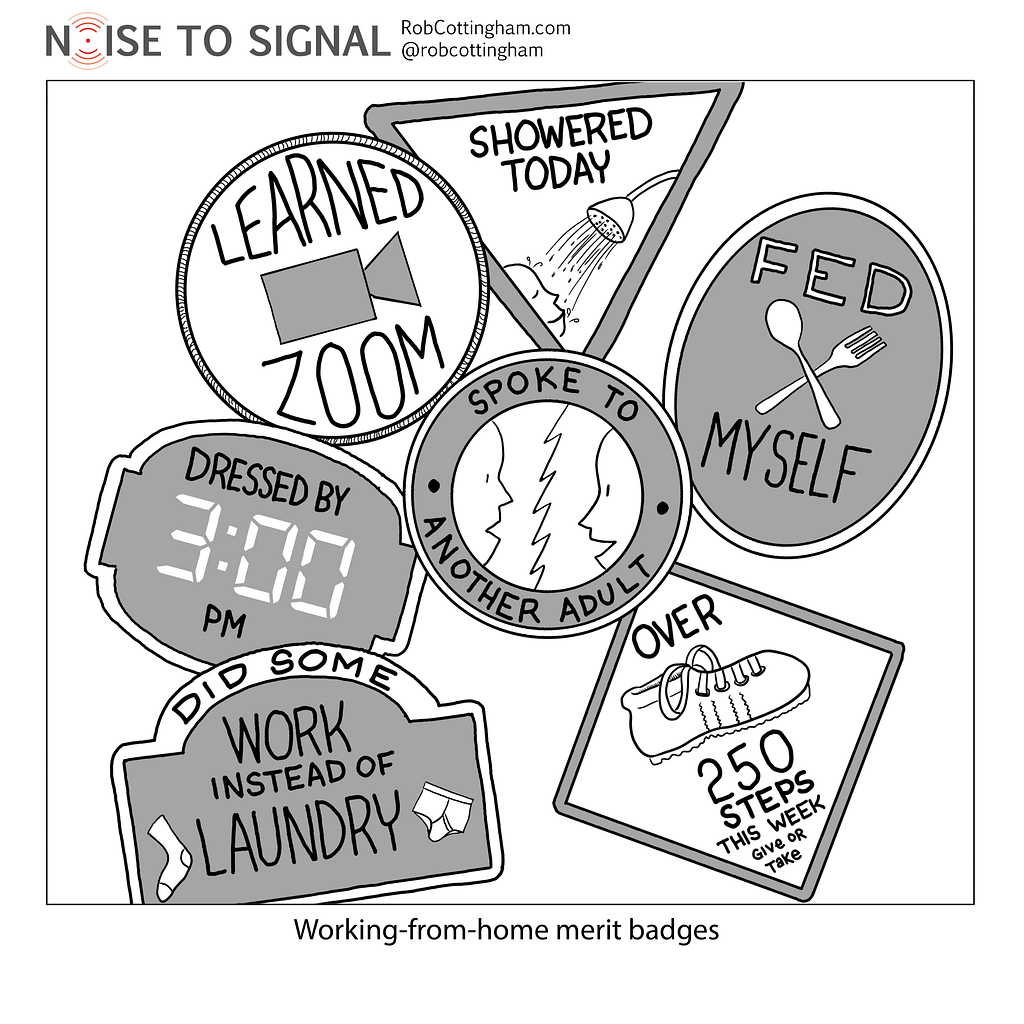
Recommended on Medium: Merit badges for working from home

Working from home is the new reality for a lot of people.

They’re just now learning the bliss of remote work: The joys of sharing a sometimes-tight workspace with kids. The surprisingly appealing siren call of doing the dishes when you should be entering data. And how the deft skill of dressing from the waist up from your webcam can be undone instantly when you spill coffee in your lap and stand up suddenly.

But there are also people who can’t work from home. Some have the tough choice of either coming in to work and risking exposure, staying home without pay or losing their jobs completely. And some are doing essential work we all count on. I don’t have a merit badge for them — just respect and solidarity.

20 Mar 00:29

Intent and Outcome

by Richard Millington

Datarobot uses Khoros’ Value Analytics tools to help determine both the intent and the outcome of community visitors.

If you don’t know why members came to the site and whether they got the outcome they wanted, it’s very hard to improve the community experience.

The first survey question is good for this:


[click here if image doesn’t appear]

Only a small percentage of members will complete the survey, but the data will be tremendously useful.

The second question asks if they satisfied their goals by visiting the community.

The third question asks what they would have done if they hadn’t achieved their goals in the community. This is tremendously useful if trying to calculate call deflection.


[click here if image doesn’t appear]

The fourth question asks how satisfied members are with the community.


[click here if image doesn’t appear]

And the final question calls for any other feedback and recommendations from members.

Once you have data like this you can create simple archetypes and determine which groups you’re satisfying at the moment. You might be surprised just how valuable it is to know why people are visiting your community and whether they are achieving their goals.

Even if you can’t do a pop-up survey, there’s no excuse for not dropping similar questions into SurveyMonkey, Typeform, and Google forms and sending an email to your members.

19 Mar 21:23

HMD Launches Nokia 8.3 5G, World’s First Smartphone to Support Global 5G

by Mahit Huilgol
Smartphone manufacturers are live streaming their events after MWC was canceled due to coronavirus outbreak. As expected HMD unveiled three new devices today. The company pulled the wraps from Nokia 5.3, 1.3 and 8.3. Continue reading →
19 Mar 21:22

RT @SebDance: Like flies to 💩 people like Farage are drawn to crises like these. Barely containing their glee they find whatever angle the…

by SebDance
mkalus shared this story from mrjamesob on Twitter.

Like flies to 💩 people like Farage are drawn to crises like these.

Barely containing their glee they find whatever angle they can to try and drive a wedge between us.

It’s awful but it’s high time the rest of us organised and beat them at their own game. pic.twitter.com/CdKZXg5uUg


Retweeted by mrjamesob on Thursday, March 19th, 2020 9:23am


3205 likes, 565 retweets
19 Mar 21:22

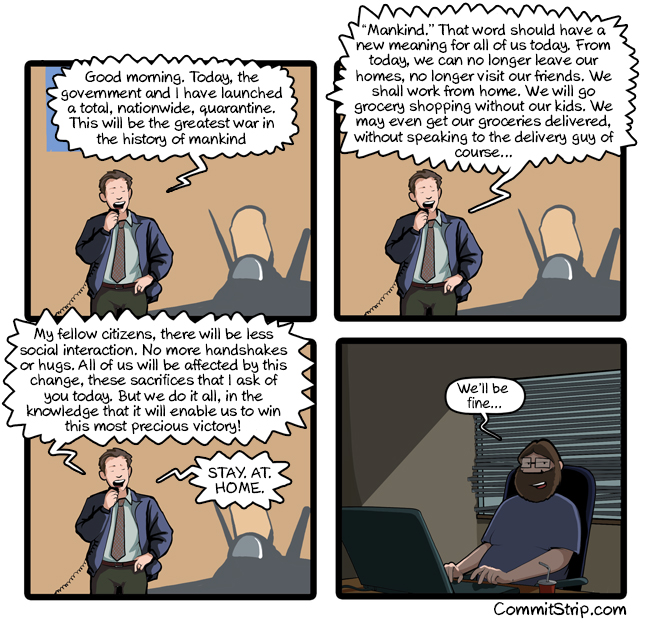
Stay. At. Home.

by CommitStrip
mkalus shared this story from CommitStrip.



19 Mar 21:22

Vote for Your Most-Loved Mac in 512 Pixel’s Mac Madness

by John Voorhees

I was immediately excited when Stephen Hackett told me a couple of nights ago about an idea he had. With bad news dominating the headlines, events canceled around the world, and people stuck at home with new-found time on their hands, he wanted to create a fun diversion for Mac fans. What he came up with is Mac Madness, a March Madness basketball tournament-inspired face-off among 32 beloved Macs.

Hackett has all the details on 512pixels.net where you’ll also find this video introducing the match-ups:

The initial matchups were chosen randomly, which adds to the fun because there are some very tough choices to make when you vote. Remember, the goal is to find the most-loved Mac, which doesn’t have to be what you’d consider the ‘best Mac.’

Round one voting closes tomorrow, March 20th, and the final winner will be announced on Friday, April 3rd. Along the way, Hackett will be live-streaming each bracket’s winners on the Relay FM Twitch channel and posting the videos later on 512 Pixels where he’s set up a special page to collect all the results. So, join in on the fun and vote now to see if your most-loved Mac takes home top honors.

→ Source: 512pixels.net

19 Mar 21:22

We are all executives in a knowledge economy

by Jim

Photo by Roberto Lopez on Unsplash

Peter Drucker is one of those intellectual heroes you end up with if you’re of a certain business/nerdish bent. What can you say about the guy generally thought of as one of the first management gurus who also observed that:

I have been saying for many years that we are using the word ‘guru’ only because ‘charlatan’ is too long to fit into a headline.

One of my favorite Drucker books is *The Effective Executive.* I did a fairly lengthy review a couple of years ago (Effective Executives Are Design Thinkers). His  argument is that executives must focus on being effective—on doing the right things—and not worry terribly much about whether they are efficient.

He would be bemused by today’s obsession with productivity and “getting things done.” He had no objection to doing things right; he simply thought it was a very distant second to doing the right thing.

Drucker is also credited with coining the term knowledge worker. Lately, I’ve been thinking that the term “worker” is misleading. A worker is someone who operates within the structure and guardrails laid down by those executives focusing on doing the right think. If we’re not careful, this absolves the worker from responsibility for choosing what constitutes “the right thing.”

How often have you heard someone claim that they are only a “worker bee?” Perhaps you’ve said it yourself at some point. This is an attempt to deny responsibility for effectiveness; to ask someone else to make the hard decisions about the right things to do.

What the knowledge economy does is to remove the distinctions between executive and worker. We are all both and own the problem of choosing the right things to do. Each of us needs to work out and continually update our list of right things to do; we are each responsible for becoming effective.

That’s much more demanding work than being efficient. Being efficient means optimizing within the context of a stable environment. Who wouldn’t like that?

The last few weeks have been a powerful reminder that we don’t operate in a stable environment. That has been true for some time. Now, it’s harder to pretend otherwise.

If we want stability, then we must create it from the choices we make.

This was Drucker’s insight about executives. Their first responsibility was to make conscious choices about what were the right things to do. What executives do is to create stability. And this responsibility now belongs to each of us.

The post We are all executives in a knowledge economy appeared first on McGee's Musings.

19 Mar 21:22

Instagram won’t add new AR filters anytime soon due to COVID-19

by Aisha Malik

Instagram has said that it is not going to approve any new augmented reality (AR) filters until further notice due to COVID-19.

The reviewers who are tasked with approving new filters have been sent home in response to the virus. Creators and developers can still submit filters to be reviewed, but they won’t be reviewed anytime soon.

“We’re actively exploring ways to offset this disruption and let creators get back to publishing. We can’t yet provide exact timing on when this will happen,” the company wrote in a Facebook post.

Instagram says that it will provide updates when it has some to share with the creator community.

Although this is a small change, it wouldn’t be surprising if we see more significant changes in terms of social media being impacted by the virus.

Source: Instagram 

The post Instagram won’t add new AR filters anytime soon due to COVID-19 appeared first on MobileSyrup.

19 Mar 21:21

4 Most Important Things To Remember With eLearning

Nick Gehl, The Art of Education, Mar 19, 2020

Here are the four things (quoted, edited):

  1. Develop a plan for student success - start by identifying what students will need to be successful in this new environment.
  2. Plan eLearning assignments with an equity lens - plan assignments with a variety of options and choice, provide extended deadlines for longer assignments, differentiate your instruction.
  3. Remember the “why” in your curriculum - select one or two aspects of the project and think about how students can accomplish those at home.
  4. Check-in with students - The first priority is always your students’ well-being. Find a way to check-in with students on the phone or video chat.

Solid, well thought-out, good advice.

Web: [Direct Link] [This Post]
19 Mar 21:21

Supervisors: What Not to Do to Teachers New to #RemoteLearning

Lisa Nielsen, The Innovative Educator, Mar 19, 2020
Icon

In a time of crisis like this people need to be told what they can do or perhaps should do. It is important to send a message of empowerment and action. When confronted with a series of "do not" messages there is a danger of being frozen into inaction. So posts like this should be recast as statements leading people in the right direction, rather than the endless task of preventing them from going in the wrong direction. (I posted this as a comment on her post, but it wasn't approved, so I post it here.)

Web: [Direct Link] [This Post]
19 Mar 21:21

Apple to make ‘substantial donation’ to Italy amid COVID-19 pandemic

by Aisha Malik

Apple CEO Tim Cook says that the tech giant is going to make a ‘substantial donation’ to aid Italy amid the COVID-19 pandemic.

Cook took to Twitter to announce that the donation will include medical supplies to help first responders, medical personnel, and volunteers who are working to save lives.

Apple has already donated more than $15 million USD (about $21 million CAD) to help with COVID-19 efforts around the world. The tech giant has also said that it is going to match employee donations two-to-one.

Source: Tim Cook (@tim_cook) Via: 9to5Mac

The post Apple to make ‘substantial donation’ to Italy amid COVID-19 pandemic appeared first on MobileSyrup.

19 Mar 21:21

Slow down: a reminder for facilitators working online

by Chris Corrigan

Facilitators are getting inundated with panicky requests to host meetings online. Some of us have the tech know-how to do this, and others don’t. Clients are feeling pressure and urgency to get teams up and running online and folks are hoping the important meeting that they have been working with for months can suddenly go online and get the same kinds of results.

Here is some stuff to help you out.

Slow down. Just because you are not hosting face to face does not mean you are not hosting. Make sure that you do the due diligence in designing and hosting the meeting. You will need to talk to your clients and coach them and give a sense of some of the realities of what is possible and what isn’t, and you are going to need to remind them that this will be clunky and difficult as people learn new ways to work together. Have them invite the group to be patient as everyone learns how to do this.

Work with a tech person and a harvesting person. No matter what platform you are using. hosting online takes a special kind of presence and attention, and it is helpful if you have a small team of people to help you. Notably, if you can have someone managing the tech – including taking participants with technical problems offline – that helps a lot. Also harvesting and documenting as you go is important. As in all processes I run, I try to get folks to co-create the harvest, and when working online you can do that in a Google document where you can set up a template beforehand. If you aren’t able to get everyone to work on the Google document – because people are connecting by phone, for example – then make sure someone is keeping good notes of decisions. At a minimum type these in the chat function, but don’t forget to save the text before exiting the meeting.

Keep it simple. You might be super interested to use all the new tech tools and apps, but bear in mind that your participants are most interested in connecting and getting their work done. Use the easiest mode possible, even if that is a good old fashioned conference call, and taking notes with paper and a pen.

Design together. Let your clients know that it will be helpful to design well. At the very least you should have a conversation with them about the urgent necessity for the meeting and the purpose, the outputs that you are looking for, and the structure and flow of the meeting that will serve that. You can download the Chaordic Stepping Stones tool for a deeper dive into design, or just keep it simple and high level. But let them know that just because you are going online does not mean you can shirk on design time.

Consider the check in. Check ins are really important parts of meetings. It brings people into the meeting space and helps them ground. Invite folks to do these things:

  • Shut down all their other apps and programs and clean up their monitor view. This will help people not get lost navigating between windows and will prevent them from getting distracted, and it also conserves bandwidth and makes connections more stable. My friend and colleague Amanda Fenton today shared that it is a kind of aesthetic practice, to create a clean and beautiful workspace for work.
  • Give a moment of silence. Just invite a breath, There is a lot going on. Bring a bit of calm into the space.
  • Invite people to check in on the google document or in the chatbox. Doing this invites people to immediately participate, by typing and seeing other people working. It helps focus attention on the work at hand and prevents a distraction.

Attend to dynamics:

  • Be aware of grief. Everything is shitty right now. People are not coming into work situations in the best mood and some may be experiencing crippling anxiety or grief. If you have an intense meeting coming up with important content, consider offering the check-in as a special gathering an hour or two in advance, just so people can connect with their colleagues and share their emotions. At the very least, remember that in stressful times, people swing wildly in their responses to things. You may need to intervene more often than usual and offer silence and regrounding.
  • Be aware of the hum of rush. There is a hum running under everything that is making folks feel rushed. It’s as if the meetings I have hosted or participated in have been running at about 500rpm higher than normal. It’s barely noted consciously, but I’ve noticed that it spins people into intensity. Add to that any technical glitches and frustrations, and it’s difficult to keep it together. So between grief and the hum of rush, pay attention to the emotional tone of the meeting. Focus on the important urgent matters with the right urgency.
  • Get ready to let go of your design. That should go without saying in any facilitation, especially if you are facilitating in turbulent and complex situations, but it’s even more true now. Take time to design, but as my friend and colleague Carolyn Camman remarked today, “really be ready to let things go, to find out what the need is again, and respond to that.”
  • And this one from Amanda Fenton: “Everything takes a little bit longer. If you ask a question, wait twice as long as you would when hosting face-to-face. People are working harder to sense cues from each other on who might be ready to speak or be fumbling for their un-mute button. If you use break-out rooms, give a minute of informal reintegration before transitioning. Welcome those little pauses.” Good advice.

And finally, attend to your practice. Remember when we used to facilitate face to face meetings? You are still that person, and you still have that practice. Take some time in the next few days to sit down and remind yourself of that. Just because we are doing things in a different way doesn’t mean that we aren’t needed in the same way.

Please share more tips and practices below, especially as it relates to the role and practice of hosting and facilitation and less about tools and software.

19 Mar 05:58

The New iPad Pro and Magic Keyboard with Trackpad: The MacStories Overview

by Federico Viticci
The new iPad Pro and Magic Keyboard.

The new iPad Pro and Magic Keyboard.

With a press release published earlier today, Apple officially announced the fourth generation of its iPad Pro line. The new iPad Pro models – available, as with the current generation, in 11-inch and 12.9-inch flavors – feature the all-new A12Z Bionic chip, a new camera system that includes an ultra-wide camera and LiDAR scanner for augmented reality, and integration with a long-awaited accessory, which will become available starting in May: the new Magic Keyboard with trackpad.

A12Z Bionic Chip

As is tradition with a major refresh of the iPad Pro line, the new iPad Pro models come with a new SoC, this time called the A12Z Bionic. While we’ll have to wait for benchmarks and tests to get a sense of the actual performance improvements over the current iPad Pros with the A12X Bionic chip, here’s what we know from Apple’s marketing materials today: the A12Z Bionic packs an 8-core CPU and 8-core GPU featuring “enhanced thermal architecture and tuned performance controllers”. The A12Z Bionic supports up to 1 TB of storage (as before) and drives the Liquid Retina display, which appears to be unchanged from the current generation with its support for wide color gamut (P3), ProMotion, and True Tone. Notably, the new iPad Pros still deliver up to 10 hours of battery life.

Cellular

Briefly mentioned in Apple’s announcement today, the new iPad Pros support faster Wi-Fi and gigabit-class LTE connections. The new iPad Pro models fully integrate with the Wi-Fi 6 spec (including 802.11ax) for speeds up to 1.2 Gbps (up from 866 Mbps on the current-generation iPad Pro). On the LTE side, the new iPad Pros support 30 bands instead of the older models’ 29. I’m no LTE expert, but I guess an extra band can’t hurt.

More Microphones

Joining the iPad Pro’s current 4-speaker system are 5 studio-quality microphones which, according to Apple, should allow users to capture “super clean audio” with the “quietest details”. Apple’s press release mentions that an update to DoubleTake by FiLMic Pro, available next month, will take advantage of the new microphone system in the updated iPad Pros. Following the studio-quality microphones of last year’s 16-inch MacBook Pro, I’m keen to test the quality of the iPad Pro’s new microphone system with apps such as Skype and FaceTime.

New Camera System

Wide, ultra-wide, and LiDAR.

Wide, ultra-wide, and LiDAR.

As has been widely speculated over the past few months, the new iPad Pros follow in the footsteps of 2019’s iPhone 11 line by offering a 10 MP ultra-wide camera in addition to the 12 MP wide camera. As we’ve seen with the iPhone 11 camera system before, the ultra-wide camera allows you to capture a much larger field of view. I’ve never been an iPad photographer myself, but it’s nice to see consistency in the camera department (which includes the design of the camera bump, pictured above) across the iPhone and iPad lines.

The big addition to the iPad Pro’s camera system – and a feature that is expected to find its way to new iPhone models later this year – is the LiDAR scanner which, according to Apple, makes the new iPad Pro “the world’s best device for augmented reality”. The LiDAR scanner, in short, is a sensor that can more accurately measure the distance between the iPad Pro and surrounding objects with greater precision and higher performance. Here’s how Apple describes it:

The LiDAR Scanner measures the distance to surrounding objects up to 5 meters away, works both indoors and outdoors, and operates at the photon level at nano-second speeds.

As others have pointed out already, that’s how lasers work. Besides the technical jargon, the addition of a LiDAR scanner is a noteworthy enhancement for Apple’s ARKit developer framework, which feeds into the company’s bigger plans for augmented reality down the road. In the short term, this means that ARKit-enabled apps can integrate with the LiDAR scanner on the new iPad Pro to become considerably more precise, faster, and – potentially – useful: the new iPad Pros can combine depth points captured by the LiDAR scanner with data coming from cameras, motion sensors, and Vision algorithms to assemble a more detailed understanding of a scene in the real world. Practically speaking, here are some examples mentioned by Apple today:

  • The IKEA Place app will gain a new Studio Mode to let you furnish entire rooms with multiple pieces of furniture, more quickly;
  • Hot Lava, an Apple Arcade game, will have a new AR mode that transforms your room into an obstacle course;
  • The built-in Measure app will make it faster to calculate someone’s height. The app will also gain a new Ruler view for more granular measurements with the ability to save screenshots for future use.
The upcoming Hot Lava update.

The upcoming Hot Lava update.

Apple has been betting big on AR over the past few years, and while it is somewhat surprising to see a major addition such as a LiDAR scanner find its way to the iPad Pro before the iPhone, it’s not that surprising if you consider how this gives iPhone app and game developers several months to play around with new APIs before – if the rumors are correct – the next iPhone also receives a LiDAR scanner with faster, more precise AR support.

Magic Keyboard and Trackpad Support

The new Magic Keyboard for iPad Pro.

The new Magic Keyboard for iPad Pro.

Along with the new iPad Pro, Apple also announced a new Magic Keyboard with trackpad specifically designed for the iPad Pro line. The Magic Keyboard ships in May, is available at $299 for the 11-inch iPad Pro and $349 for the 12.9-inch model, and will be backward-compatible with the 2018 iPad Pro line.

Unlike other external keyboards with trackpads by third-party manufacturers we’ve seen on iPad so far, Apple’s new Magic Keyboard doesn’t use a traditional clamshell design. Instead, the Magic Keyboard relies on a so-called “floating cantilever design” that lets you attach the iPad magnetically to the keyboard (which also doubles as a protective case when closed, just like the Smart Keyboard Folio) and adjust the viewing angle. Unlike other keyboard cases, including Apple’s existing one for the iPad Pro, the iPad Pro will float atop the Magic Keyboard thanks to these cantilevered hinges, which support a viewing angle of up to 130 degrees.

It floats!

It floats!

But there’s more. The hinge itself contains a USB-C passthrough port which, according to Apple, will be used for charging the iPad Pro. Presumably, power will be transferred from the USB-C port in the keyboard to the Smart Connector on the back of the iPad Pro (I’m curious to hear about charging times when used this way). This also means that, thanks to USB-C passthrough in the Magic Keyboard, you’ll be able to connect external accessories such as drives or monitors to the iPad Pro’s own USB-C port while charging the device at the same time without having to purchase a separate USB hub.

Furthermore, the Magic Keyboard follows the 16-inch MacBook Pro and new MacBook Air in implementing a scissor mechanism with hard key caps and 1 mm travel. For the first time in an iPad keyboard made by Apple, the new Magic Keyboard with trackpad will also offer backlit keys. As I mentioned above, the Magic Keyboard will be compatible with the existing 12.9-inch and 11-inch iPad Pro models, which suggests it will take advantage of the Smart Connector available on those devices.

Along with the new Magic Keyboard, Apple has also announced that iPadOS 13.4, due to be released on March 24, will bring a new system-wide cursor whenever an external trackpad or mouse is connected to any iPad Pro that can run iPadOS 13. This includes the upcoming Magic Keyboard of course, but also the company’s Magic Mouse 2, Magic Trackpad 2, and any third-party mouse connected to the iPad Pro via USB or Bluetooth.

The new system-wide cursor.

The new system-wide cursor.

In the weeks leading up to today’s announcements, some speculated that Apple may add cursor support to iPadOS but limit the feature to selecting text in text fields. Instead, iPadOS’ new cursor – which is different from the AssistiveTouch accessibility cursor launched last year – will appear as a circle that can highlight any UI element, text fields, and apps on the Home screen and dock. In short demo videos shared by Apple today, it appears the cursor is a mix of the Mac’s classic cursor and tvOS’ focus engine for selecting UI elements: the cursor appears to automatically “snap” to elements such as toolbar buttons and text fields; Apple says it is contextual and “intelligently adapts to content” shown onscreen. Judging from today’s images and videos, what Apple built is much more than just a cursor for text fields – it appears to be a comprehensive, sophisticated system for controlling a touch-first UI that complements the iPad experience to bring additional versatility, easier navigation, and more precision.

More examples of iPadOS' new cursor from Apple.

More examples of iPadOS’ new cursor from Apple.

According to Apple, most third-party apps will work with the new system-wide cursor (which, again, does not require the new Magic Keyboard) with no changes at all. However, there will be specific APIs for developers to fine-tune their apps’ UIs to the cursor (presumably, to better integrate with aspects such as hover states). The company also mentioned that the iWork suite of apps will be updated with full cursor integration soon (plus new features such as more templates, drop caps, and folder-based iCloud Drive collaboration).

In addition to the cursor, the Magic Keyboard’s trackpad will also support multitouch gestures in iPadOS 13.4. The trackpad will let you switch between apps, reveal the dock, open Control Center, interact with apps in Slide Over, and return to the Home screen. As Apple notes, in designing the new Magic Keyboard and adapting it to iPadOS, they’ve done more than replicate the macOS experience:

Rather than copying the experience from macOS, trackpad support has been completely reimagined for iPad. As users move their finger across the trackpad, the pointer elegantly transforms to highlight user interface elements.

Examples of the various multitouch gestures that will be supported by the trackpad in iPadOS 13.4.

Examples of the various multitouch gestures that will be supported by the trackpad in iPadOS 13.4.

So far, it’s unclear whether iPadOS’ multitouch gestures will be exclusive to the Magic Keyboard or if they’ll work on Apple’s Magic Trackpad 2 as well. We’ll follow up on this once iPadOS 13.4 with cursor support releases next week.

Price and Availability

The new iPad Pro is available to order starting today and will ship next week. Both versions of the new iPad Pro are available in silver and space gray finishes. The new iPad Pro starts at $799 and $999 for the 11-inch and 12.9-inch Wi-Fi-only models, respectively, and $949 and $1,149 for the Wi-Fi + Cellular models. Apple also announced new Smart Folios for the new iPad Pros today.

Flexible Pro

I have several questions about the new iPad Pro, its cursor support, and the new Magic Keyboard that can’t be answered today. Will the Magic Keyboard’s floating design be comfortable enough to use the iPad Pro on my lap? Will existing third-party apps really require no changes to support the new system-wide cursor? And will third-party manufacturers like Logitech and Brydge be able to replicate all of the features of Apple’s trackpad, including its multitouch gestures to control multitasking, or will those remain exclusive to Apple’s Magic Keyboard?

What I do know after today’s reveal, however, is that Apple has been listening to iPad Pro users who have been asking for increased versatility and more input options. At its very core, the iPad Pro is still a tablet – a single piece of glass you can hold in your hands and use with multitouch gestures with no external accessories. At the same time, however, the iPad Pro can be a new kind of modular computer that supports a variety of accessories – from an intelligent stylus and external keyboards to external displays and now trackpads. As I argued in my story last year, I see a fundamental beauty in this idea of owning a computer that can adapt to your lifestyle and work requirements and be flexible enough to support multiple use cases.

Ever since the first iPad Pro came out in 2015, Apple has been steadily upending the definition of “computer” for the masses. Today’s announcements are a validation of that vision; I look forward to testing these changes in hardware and software next week.


Support MacStories Directly

Club MacStories offers exclusive access to extra MacStories content, delivered every week; it’s also a way to support us directly.

Club MacStories will help you discover the best apps for your devices and get the most out of your iPhone, iPad, and Mac. Plus, it’s made in Italy.

Join Now
19 Mar 05:54

Concrete curbs on Bloor

by jnyyz

A couple of days ago, Cycle Toronto posted some pictures of the installation of additional protection for the Bloor bike lane between Bathurst and Spadina.

Today I had to check it out for myself. Here is what greeted me as I rode east on Bloor just past Bathurst.

Pratically every place where there was a painted tapered buffer zone before or after car parking on the south side has now been replaced by these curbs.

In a couple of places there was this arrangement. I am really curious to see what they are going to do with the protected spaces.

I assume that these would be perfect spots for a little bike parking, similar to what is common in Vancouver.

April 6 update: the islands defined by the curbs have now been filled in with paving stones, and the curbs themselves have been anchored down with rebar. It is encouraging that the city has moved to precast curbs, as this is a much faster and probably cheaper way of putting in additional bike lane protection.

19 Mar 05:54

Corona Photos

by Alex Press
My day job requires me to spend a lot of time looking through Getty Images. For the past few days, that's meant searching "coronavirus" and scrolling through hundreds of photos.

There are photos of blue and green and red shipping containers from Taipei in the Port of Los Angeles, the nation's busiest container port, which is seeing lots of ship cancellations.

There are photos of "disinfectant teams" cleaning historic sites. Istanbul's Grand Bazaar, with the team's reflections visible in the glass of a darkened store, their bodies mingling with the purses visible behind the glass. A lone police car, lights flashing, keeping watch on an otherwise abandoned plaza in Madrid.

There are photos of people in masks: Jair Bolsonaro, who either does or does not have coronavirus (I think he does but his son denies it, which caused a rare rift between the right-wing family and Fox News, who had reported Bolsonaro's son as confirming the positive test result). Someone waiting for the subway on the 34th Street platform in Manhattan. A USPS worker, delivering mail. NHS nurses waiting for a patient at a drive-through coronavirus testing site in Wolverhampton, England. A particularly eerie photo of what appears to be a transit worker standing on a train platform and looking directly at the camera, as a young passenger inside the crowded train, without a mask, stares at him. Italian mechanics at a garage, working on a cute little red European car (auto workers in the country recently went on strike to protect themselves against exposure to the virus). An Uber eats delivery bicyclist (I can't find the photo). That naked cowboy guy who hangs out in Times Square (in one photo, someone is in his arms; the disease can't get in the way of a good photo, I guess).

Empty airports in Japan, a police officer riding a Segway amid out-of-use lanes for directing passengers. Doctors in protective face masks and overalls taking a patient into a newly built temporary hospital in Rome. Empty meat shelves in a supermarket; empty toilet paper shelves in a supermarket.

Unless you read the caption of each photo, they could be any country. This thing's global; you can't escape it. Such a scale is definitionally hard to conceptualize, and indeed, I find myself getting dizzy trying to trace the supply chain impacts the virus is having on industries, travelling from China, to Italy, to Brazil, to New York. But here it is: the photos are just one country: illness. We all live here now, if we didn't already. Face the facts.

There are just so many photos, thousands up on Getty now. In "Photographs of Agony," John Berger wonders how photos of the Vietnam War could be published in capitalist mass media. Their effect "is not what what it was once presumed to be," he writes. Where we might assume horror gives rise to anti-war mobilization, Berger says the truth is the opposite. What the viewer experiences, after the shock of the photograph, is another shock, that of his own "moral inadequacy." As Deborah Nelson puts it, these photographs "operate like a traumatic event—that is, they take place out of time." "The picture becomes evidence of the general human condition," writes Berger, "It accuses nobody and everybody."

I'm not trying to compare a global pandemic to an imperialist war—for many reasons—but looking at photo after photo of this virus's effects, seeing it engulf more of the planet by the hour, and anticipating what genres of photo might emerge (bodies in hospital beds and graves, crying children, starving families), the feeling provoked is powerlessness, and bewilderment. Where are the pharmaceutical companies, the lean-production process, the gutting of hospitals, the crowding of prisons, the ultra-financialization and the superrich who benefited from it? What do we do?

19 Mar 05:54

Last year, I commissioned Colin Upton to create this Vancouver...

by illustratedvancouver


Last year, I commissioned Colin Upton to create this Vancouver transit comic for me. I’ve since donated it to SFU Special Collections.

19 Mar 05:54

Announcing the Purism Librem Mini

by Purism

Our small form-factor mini-PC that puts freedom, privacy and security first. We’re really excited about the Librem Mini, it’s a device our community have wanted and we’ve wanted to offer for some time.

The Librem Mini is accessible, small, light and powerful featuring a new 8th gen quad core i7 processor, up to 64 GB of fast DDR4 memory and 4k 60 fps video playback. It’s a desktop for your home or office, a media center for your entertainment, or an expandable home server for your files and applications.

Like our other products the Librem Mini will feature state of the art privacy and security with PureOS, Pureboot and Librem Key support. Find out more about the privacy and security features on the Librem Mini product page.

The Librem Mini is available to order now from $699 for the base configuration with 8gb of memory and 250gb SSD. Shipping starts one month after reaching the pre-order goal.

Get your Librem Mini

Hardware Specifications

Processor Intel Core i7-8565U (Whiskey Lake)
Active (fan) Cooling
Graphics Intel UHD 620
Memory DDR4 2400MHz 1.2V, 2 SO-DIMM slots
Max 64GB Support
Storage
1 SATA III 6GB/s SSD/HDD (7mm)
1 M.2 SSD (SATA III/NVMe x4)
Video 1 HDMI 2.0 4K @ 60Hz
1 DisplayPort 1.2 4K @ 60Hz
USB Ports 4 USB 3.0
2 USB 2.0
1 Type-C 3.1
Audio 3.5mm AudioJack (Mic-in & headphone out combo)
Networking 1 RJ45 Gigabit Ethernet LAN
optional WiFi 802.11n (2.4/5.0 GHz) via Atheros ATH9k module
Bluetooth optional Bluetooth 4.0 included in WiFi module
Power 1 Powerbutton, DC-IN Jack
Dimensions Width 12.8cm (5.0 in)
Height 3.8cm (1.5 in)
Depth 12.8cm (5 in)
Weight 1 kg (2.2 lbs)

The post Announcing the Purism Librem Mini appeared first on Purism.

19 Mar 05:53

Sense-making in real time

by Chris Corrigan

I put a call out on twitter yesterday, inviting topics for blog posts that could be helpful. I’m happy to take requests! Today my friend Trilby Smith, the brilliant Director of Evaluation at the Vancouver Foundation, replied with this:

Sense making in real time. Like what are the practices we can use to make sense of what is happening to us as it happens? And how can those of us who work in orgs support our colleagues to do this work?— Trilby Smith (@TrilbySmith) March 17, 2020

The last few days have been full of information. It comes streaming through twitter, facebook, texts, emails. And the way the COVID-19 crisis is moving and changing means that we have to look at stuff coming in, sift through it and make some decisions.

This is true in any fast-moving, data-rich situation, but COVID-19 gives us a chance to practice in real-time. So what are some simple tools? Here are a few, rooted in, and derived from, Participatory Narrative Inquiry and Human Systems Dynamics.

Observe the situation. Just watch things for a bit. Whatever the situation, see if you can gather a bunch of data points about it. If this is a meeting, have people bring in a bunch of notes about the situation. These notes should be observations, relatively free of interpretation. Fine-grained data objects, like stories, tweets, news items, reports, stats are all good. Anything that helps describe what you’re all seeing. And having everyone do this ensures that you get a diversity of perspectives. Have everyone come to a meeting with 10 data objects. Or start your meeting by having people sit around and tell some little stories and share observations about the situation, placing each data point on a post-it note. It should only take you less than 20 minutes to generate dozens of data points if you work in pairs. This, by the way, is what we call “situational awareness.”

Look for patterns. In complexity, you’re trying to work with patterns. My go to is to have the group sort through the data and find things that are similar. Cluster these together. These start to look like patterns. From there do a couple of things…

Inquire. I sometimes think that looking at data is a bit like nosing whisky, or appreciating the scent of a wine or a coffee. You begin with overall impressions and then you use specific techniques to get the most out of the experience. Same with data. When you are sifting through data with a group start by recording what people notice in general. Overall first impressions are useful. Keep it open.

After that you can drill down with a little more discipline and rigour, Royce Holliday offers these questions, from her piece on pattern spotting:

  • Generalizations: “In general, I notice…
  • Exceptions: “In general I notice…but…
  • Contradictions: “On the one hand I notice…but on the other hand…”
  • Surprises: “I am really surprised that…”
  • Curiosity: “I wonder if…”

These questions help you to find differences in the patterns and differences are what give you the potential to act.

Look at what is keeping these patterns in place. If a problem is complex, you will probably start to notice patterns that are stable and hard to change. Alternatively, you might notice a lot of turbulence and wonder what you can stabilize. Looking at what is keeping patterns in place is fairly straightforward. A system or a set of problems is made of connected agents interacting with a space defined by attractors and boundaries.:

  • Attractors hold things together coherently. Think of these as the things that grab your attention or the rhythms that dictate your work.
  • Boundaries separate things. These can be tight or loose or permeable or hard.
  • Connections in a system describe how agents are connected to one another. Think of a murder mystery where the detective is always trying to figure out how things are related in a meaningful way.
  • Exchanges are what flows over connections including information, power and resources.
  • Identities come into play and can skew a system with power dynamics, expertise or the diminishment of voice and ideas.

Once you can find a few of these constraints that are at play, you can list things that are in your control and make adjustments. In general, to stabilize a system, you tighten constraints. To break up a system, in order to break patterns or learn new things, you have to loosen constraints. The art is in deciding how much and in monitoring and adjusting as you go. Choose constraints that matter that you have some degree of control over, and you will be able to shift things more easily.

I reckon you could do this quickly in 1:45 or so if you had to generate data objects to start with, less time if people are collecting data objects before the meeting. A sample flow might look like this:

  1. Check in and framing (15 minutes)
  2. Break into small groups to generate data objects (20 minutes)
  3. Randomize the data objects and cluster them into themes (15 minutes)
  4. Ask each person to look at the patterns and answer the inquiry questions individually (10 minutes)
  5. Small groups to compare notes and find commonalities and differences (10 minutes)
  6. Finding ABCEI constraints in small groups (use this template) (10 minutes)
  7. In small groups decide on a small action to shift things. (use this template) (5 minutes)
  8. Compare these actions across the group and wrap up (20 minutes)

In the comments, I would be interested to hear if this is helpful and what kinds of specific situations folks are needing to make sense of.

19 Mar 05:52

These Weeks in Firefox: Issue 71

by Mike Conley

Highlights

  • Pour one out because irc.mozilla.org is no more! Now raise a cup, because we’re all chatting on Matrix now, come join us!
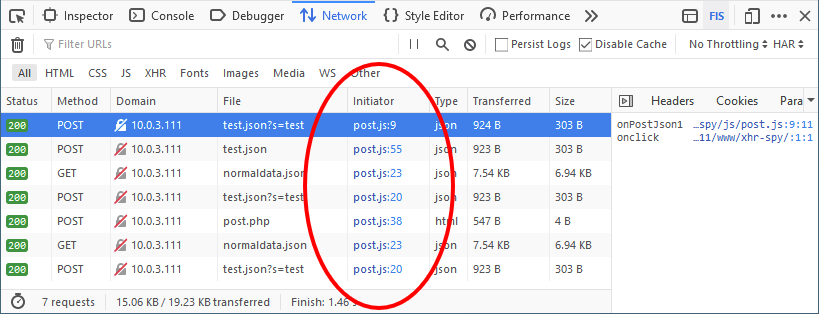
  • The Network Monitor now shows links to the place where the request was initiated. Clicking on the links navigates the user to the Stack Trace side panel, with the entire stack trace showing.
    • The Network Monitor Developer Tool is showing a list of outgoing network requests in a table. One of the columns is Initiator, and it lists the file and line number where the request was initiated. That column is circled.

      🎶 Where did you come from, where did you go? 🎶

  • The password doorhanger icon now appears (by default) as soon as a password field is edited on a webpage. This allows the password to be saved to Firefox on any site where the user hasn’t chosen to never save! Please file bugs on this new feature.
  • Today’s Firefox 74 release includes Picture-in-Picture toggle adjustments for Instagram, Udemy and Twitch
  • The new search configuration format has now been turned on for Nightly builds. If you see anything unexpected with your default (Firefox-provided) search engines, please let us know by filing a bug.
  • Both Pocket Collections and Pocket stories in en-GB are in beta, and moving along to release now. We have a smoke test experiment going out in beta.

Friends of the Firefox team

Resolved bugs (excluding employees)

Fixed more than one bug

  • aarushivij
  • dw-dev
  • Florens Verschelde :fvsch
  • Itiel
  • KC
  • Kriti Singh
  • Outvi V
  • Sebastian Zartner [:sebo]
  • Thal Marcelin
  • Tim Nguyen :ntim
  • Uday Mewada

New contributors (🌟 = first patch)

Project Updates

Add-ons / Web Extensions

WebExtensions Framework
  • Fixes related to geolocation and browserSettings optional permissions (Bug 1618398, Bug 1618500).
  • privacy is now supported as an optional permission (Bug 1618399).
  • Starting from Firefox 74, the dns permission doesn’t trigger a permission prompt anymore (Bug 1617861). uBlock has recently started to use this API to block trackers that disguise themselves as first party, but the wording for the DNS permission in the prompt was confusing (e.g. See Bug 1617873).
WebExtension APIs
  • Starting from Firefox 75, tabs.saveAsPDF supports two new optional properties: fileName and pageSettings (Bug 1483590). Thanks to dw-dev for contributing this!
  • The browserSettings API now supports the new zoomSiteSpecific and zoomFullPage settings (Bug 1286953), thanks also to dw-dev.
  • Tom Schuster fixed an issue triggered by calling browser.find.highlightResults with result objects that are missing the option rangeIndex parameter (Bug 1615761).
Addon Manager & about:addons
  • about:addons ot a small fix to make sure that the options menu doesn’t reopen when the user clicks on it again while it’s already opened (Bug 1603352)

Applications

Sync and Storage

  • Durable Sync, a project to port the Sync storage backend to Rust, is rolling out to more users! We’re going from 50% of new Sync users to 75% on March 11th.

Developer Tools

Console

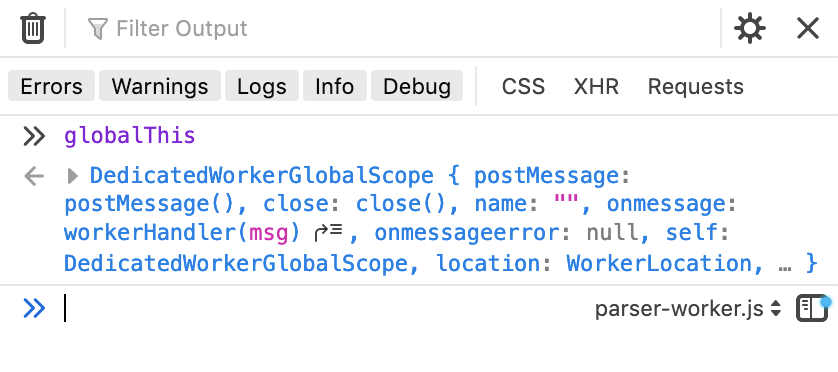
  • In the Browser Toolbox, you can now select the context in which you want to evaluate a given expression (Bug 1605329)
    • A dropdown at the bottom of the Browser Toolbox console displays a dropdown that lets the user choose which context to run JavaScript in. parser-worker.js is currently selected.

      Context is important!

Network Monitor

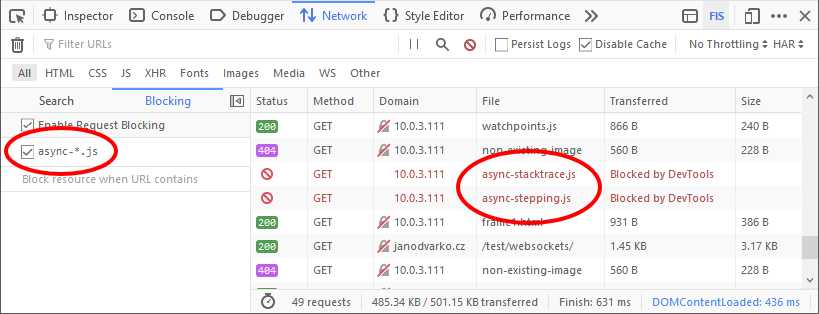
  • It’s possible to use wildcards to block requests. See async-*.js example of the following screenshot.
    • A table in the Network Monitor developer tool shows a series of requests. Two of the requests are marked as "Blocked by DevTools", and a column shows that this block is due to a regular expression in the Blocking pane.

      Blocked by DevTools!

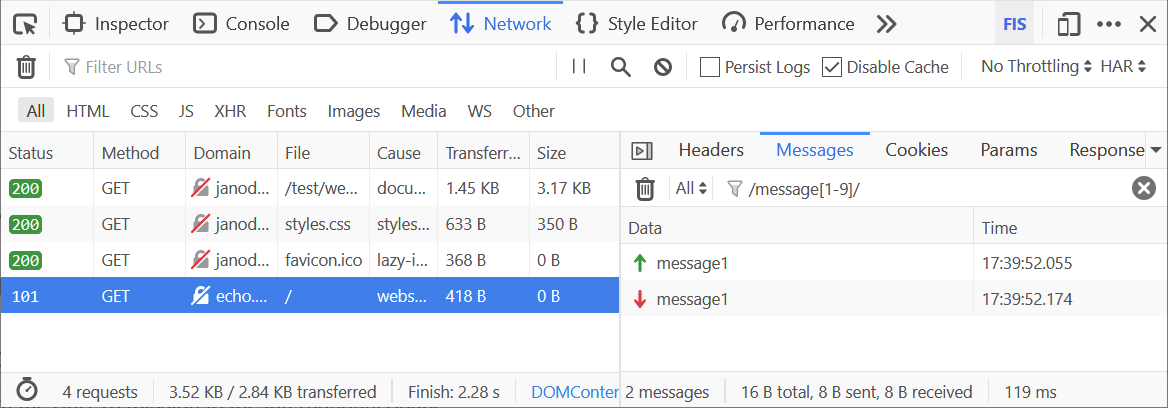
  • It’s possible to filter WebSockets messages with regular expressions (bug)
    • A table in the Network Monitor Developer Tool shows a series of requests, one of which is a WebSocket connection. The messages being sent over the WebSocket connection are being filtered by a regular expression in the side pane.

      This can be pretty handy if there’s lots of traffic going over the WebSocket.

Fission

  • Bernard finished his first fix, to get the unselected tab hover ported to Fission. This allows video decoding to start when hovering over a tab one might switch to.
  • Porting front end actors/components to JSWindowActors is now ⅔ complete.

Installer

  • Started work to move the installer UI out of NSIS and into a web based framework so that developers can make UI changes using plain ol’ (literally, it has to run in the old Internet Explorer rendering engine! 🗿) HTML and CSS.

Lint

Mobile

  • Fenix has support for WebPush! 🌐🖐 You can now get push notifications from sites that support it (e.g. Instagram, Twitter). Please file bugs for sites that don’t work.

New Tab Page

  • Starting to work on moving v2 recommendation code into a web worker.
  • We’ll also be exploring some new New Tab layouts designed for higher engagement, and exploring story density configuration. This gives the user back the ability to configure how much Pocket they see.
    • Both these ideas are in early design and likely see dev work in 77.
  • All development is now happening in mozilla-central (GitHub repo is frozen), and docs are updated. See this mailing list thread.

NodeJS

  • `mach vendor node` and other automation work is being scoped out. Anyone potentially interested in helping out with implementation is highly encouraged to ask @dmosedale or in the #fx-desktop-dev room on Matrix!

Password Manager

Performance

Performance Tools

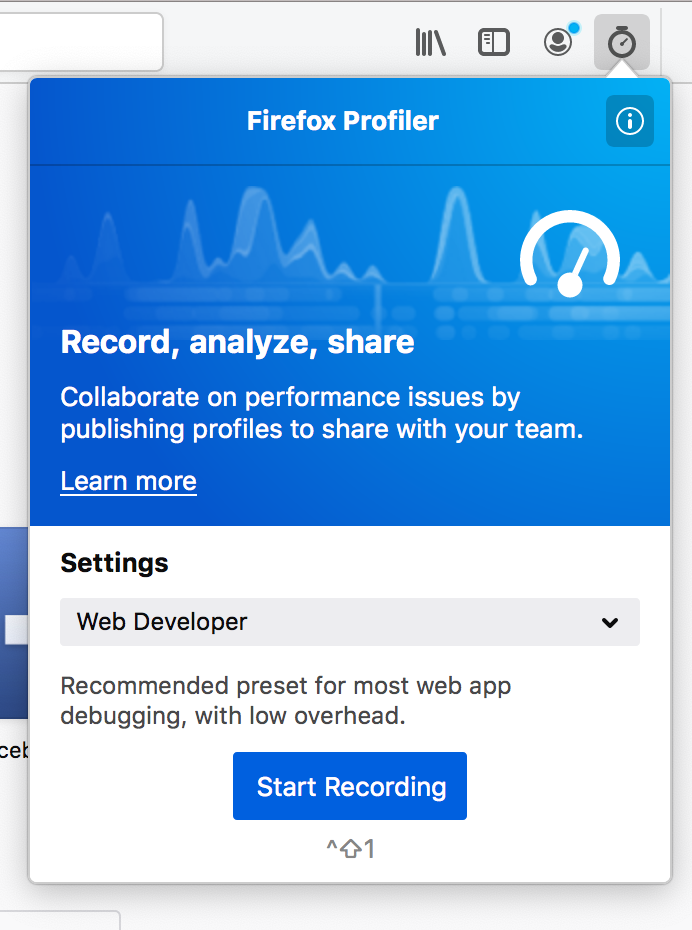
  • The brand new capturing workflow has landed and you can use it on Firefox Nightly! You can enable it on profiler.firefox.com if you haven’t already.
    • A new panel for the Profiler Toolbar icon is displayed. It shows a single dropdown allowing users to select domain-specific settings. The current setting is "Web Developer".

      Shiny and new, and easy to use too!

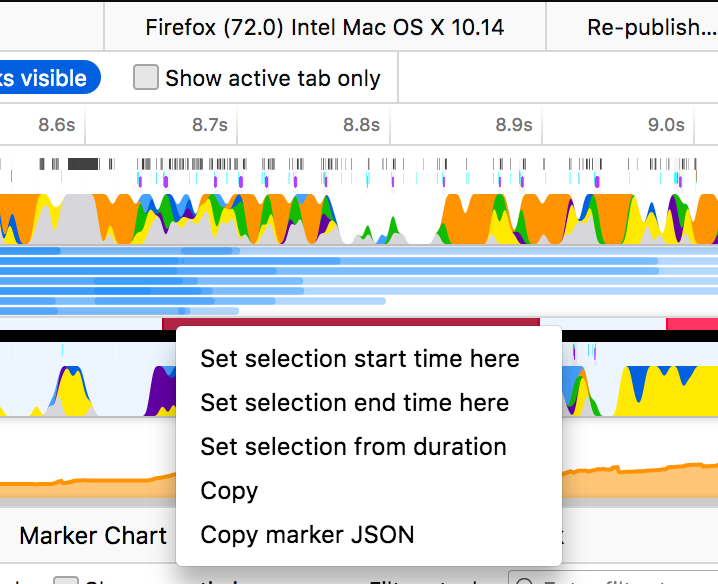
  • There is a context menu for the timeline markers now.
    • A context menu is displayed over the tracks in the Firefox Profiler letting the user perform various actions on the region that was clicked.

      This is a very handy addition to the profiler UI!

  • Now you can drag and drop the profiles into profiler.firefox.com even though there is an opened profile already.

Picture-in-Picture

Search and Navigation

Search
  • Dale has fixed an issue with right-clicking and selecting search when using DuckDuckGo Lite.
  • Mark fixed an issue where shutting down in the middle of search engine startup could write an incomplete cache.
Address Bar
  • Notable changes:
    • Unified address bar and search bar clickSelectsAll behavior across all the platforms (prefs have been removed) – Bug 333714
  • Visual redesign (update 1)
    • Release scheduled for Firefox 75
    • Will run a pref-flip study in 74
    • Various minor fixes around design polish, telemetry and code cleanups
    • When Top Sites are disabled in the new tab page, the address bar fallbacks to the old list – Bug 1617345
    • Top sites are shown when the address bar input is cleared – Bug 1617408
  • Make Address Bar modules more easily reusable by other projects
    • Making the code more self-contained and less depending on the browser code layout
  • Address Bar results composition improvements
    • Aimed at improving results composition by fixing papercuts and improving frecency
    • Don’t suggest switching to the current tab – Bug 555694

Updater

User Journey

19 Mar 05:50

Canadian co-developed Alto’s Adventure, Odyssey now free to encourage social distancing

by Bradly Shankar
Alto's Odyssey

Alto’s Adventure and Alto’s Odyssey, the hit endless snowboarding games from Team Alto, are now free on the App Store and Play Store for one week.

Team Alto, which consists of Toronto-based Snowman and developers from the U.K., have made the games free “to help anyone who may be practicing social distancing or self-isolation” during the coronavirus outbreak, according to the official Alto’s Twitter account.

Alto’s Adventure launched on iOS February 2015, while Odyssey released on iOS in February 2018. Both games have since come to Android and received many positive reviews and mobile game awards.

Alto’s Adventure can be downloaded for free from both the App Store and Google PlayAlto’s Odyssey is also free on both the App Store and Google Play.

The post Canadian co-developed Alto’s Adventure, Odyssey now free to encourage social distancing appeared first on MobileSyrup.

19 Mar 05:50

Tiny Ruins

by peter@rukavina.net (Peter Rukavina)

Haunts, a 2013 EP from New Zealand’s Tiny Ruins, is a good way to remind yourself about why music is a good thing.

A collection of older songs/B-sides. Recorded live in the bush surroundings of the Waipu Gorge, by Jonathan Pearce on an 8-track tape machine.

Days Are Long, Nights Are Longer and Always You, Tiptoeing Through are my favourite tracks.

Tiny Ruins’ spring tour of France has been cancelled, so why not buy some recordings in solidarity.

19 Mar 05:49

Lake: As Schools Shift to Virtual Learning, Educators Worry That Online Instruction Is Inequitable. But No Learning at All Is Worse

Robin Lake, The 74, Mar 19, 2020
Icon

I took part in an online panel on Tuesday and the general tenor of the questions and comments was that online learning is inequitable. Concerns were raised about the exploitation of adjuncts, the need for accessible resources, and how we support those without internet access. This seems to be almost the unanimous response from the educator community; I'm hearing these concerns over and over. And they are valid concerns, and our failure to address them properly over the last 25 years is reprehensible.

But my concern today is that constant expression of these concerns will freeze well-meaning people into inaction. Things like this: "Washington’s higher-poverty districts are simply closing. With no plan. In large part, this seems to be in response to the conundrum over requirements under the Individuals with Disabilities Education Act." And that's exactly the wrong thing. Instead of voicing complaints, we should be responding like Heather Ross does regarding academic integrity: when we raise a concern, calmly describe how to address it. And do so in a way that allows everyone to be able to address the concern, not just those with resources.

Web: [Direct Link] [This Post]
19 Mar 05:49

Physical Distancing

by Matt

I’ve really had enough of this term “social distancing.” That is not at all what we are looking for, is it? It should be “physical distancing.” In these times of rampant loneliness (especially for seniors), disconnection, and lack of empathy and compassion, we need the opposite — social connecting. And we need it under these circumstances more than ever. Let’s be creative in finding new ways to come together.

Adam Gazzaley, M. D., Ph. D, University of California, San Francisco

Update: On March 20th, the World Health Organization has officially updated it’s recommendation to “physical distancing.”