Shared posts

04 Sep 22:45

What Every Community Needs

by Greg Wilson

Yesterday I wrote that every project should make its governance discoverable. Here are a few other things that would help programming communities:

  • tldr pages: one-line manual pages with practical examples.

  • explainshell: automated drill-down explanations of commands.

  • this vs. that: short explanations of the differences between things that are frequently confused.

  • a glossary: preferably subsetted from a shared one because why reinvent the world?

  • concept maps: or other remixable illustrations of key ideas.

Please let me know what else is on your list: I’m always grateful for pointers.

04 Sep 22:44

Carbonara

Carbonara

Truffle Shuffle (1,2) announced a class on carbonara, and this time I signed up on my own ticket because I really like carbonara. Also, I’ve got some anchors that range from Peter Merholz’s excellent Bay Area Carbonara to the carbonara they serve at La Carbonara in the Piazza de Fiore.

This was an amped-up carbonara with fresh taglietelle and a tartufata of mixed truffles and white mushrooms, with chiffonaded (!) snap peas added at the last minute for some textural and color variety. It was fun to make pasta with French Laundry alumni, and it turned out great. It was fun, too, to see the auteur behind pastagrannies.com discuss the making of pasta.

If you don’t cook a ton, that’s OK: these online classes are great for you. They send all the ingredients, including a suitable cocktail with which to relax. This one had a Paolo Mandini, which is a cocktail intended for carbonara. They also take care to keep you out of the weeds; in fact, I wish they were a little more liberal in their criticism. (I think, in part, Truffle Shuffle is a fantasy of culinary school as it ought to have been, where the kids are all above average.)

Back when the end of the world as we knew it began, I observed that in The Art Of Escapist Cooking, Mandy Lee had developed an alternative theory of flavor. Here, between Truffle Shuffle and Pasta Grannies, is another: it's just dinner (or lunch) but it's important even so to Do It Right, even if you’re old and infirm. An interesting observation of pasta grannies is that each granny knows maybe two or three pasta shapes; the idea that there are zillions of shapes for zillions of sauces is a product of travel and scholarship, not the Way Things Ever Were.

02 Sep 17:09

Recently

by Tom MacWright

I wrote a thing about the web, which ‘got people talking.’ I guess there are some notes now.

Alex Russell disagreed with the problem statement and pointed to this talk which raises a pretty good point: the mobile web is the most important part of the web, growth-wise, and it is in danger. Enhancing mobile web apps through Project Fugu and other PWA systems is the way forward. It’s a pretty compelling point. The ability for millions of people to use the web is more important than our need to have a creative little niche.

One person – a former Mozilla distinguished engineer – had a post lined up already which argues against, which is split between generalized pessimism (change isn’t possible, people won’t do it) and technical pessimism (static documents won’t be a performance win). The generalized pessimism cuts to the core of collaborative standards versus democratic or ground-up standards: we see new standards with quick adoption and total consensus emerge all the time, just that they’re always led by enormous tech companies. It’s only impossible to start a new standard and convince everyone to use it if you can’t force them to.

Finally, technology reflects our biases and assumptions. My opinions certainly do. A web that was better for text communication, for example. When I started using computers in the late 90s, the web was pseudonymous and text-heavy. Video was rare. We knew some websites were popular, but the only thing to confirm it was a little “hit counter” that could be, for all we knew, fake. Any vision of the web will have different priorities: if I was a business-economics person, it would have to include payments. The current view of “social media” would be an intensely personal video & photo sharing site with minimal text. The security-minded web would be just like NoScript everywhere.

A web that advantages text and allows pseudonymity feels right to me partially because of history and partly because it would work for me, and partially because some visions of the internet (especially those that look like Instagram) feel very wrong.

Reading

I finished reading Capital, and wrote a review of it and a few notes. I took quite a lot of notes on this book. I’m thinking about writing quick explanations of its points, like I’ve done with the executive pay question.

I had some articles queued up but the only one I’ll link to is umair haque’s “We Don’t Know How to Warn You Any Harder. America is Dying.” It’s one-note, an article for a one-note year of decline, terror, and disappointment. There’s little space for originality or hope in this kind of article anymore. Humor is no longer appropriate. I’m going to keep doing rituals, probably ineffective, like mailing people to encourage them to vote. But I and a lot of folks I talk to feel like we’re pretty far from controls: we’ve clustered in Democratic strongholds. The votes that matter are held by ‘swing voters’ with stochastic opinions.

I know: Biden isn’t ideal. But as I’ve said before, we’re not picking favorites. Have your reservations about him, express them, and then vote for him, and continue to push him to do better.

A quick break

I’m going to take a break from Twitter this month. Tweeting isn’t hurting my mental health, I’m not getting bullied off the platform, and I’ll be back in October. Approaching a year of quarantine, my country’s slide into fascism, and my inability to travel more than 5 miles from my apartment, what I am trying to recover most is differentiated time. Some days should be different than others. I’ll replace Twitter with something else for a little while, and hopefully that’ll seem different.

02 Sep 17:08

Five Canadian startups selected for Google’s program for women founders

by Aisha Malik

Google has unveiled the first cohort of its ‘Startups Accelerator for Women Founders’ virtual program, which includes five Canadian companies.

The tech giant says that it received hundreds of applications and has chosen 12 startups from across North America to take part in the three-month program.

One of the Canadian companies selected for the program is based in Saskatoon, Saskatchewan and is called Coconut Software. It’s a startup that focuses on customer engagement solutions that modernize how banks and credit unions engage.

Hamilton, Ontario-based Herilume has also been selected for the program. The company makes trademark registration simpler by providing a self-serve professional search and application program.

Another one of the Canadian companies is based in Calgary and is called Livestock Water Recycling. It focuses on using machine learning to create value for food producers by digitizing their waste outputs and allowing for reduced expenses and environmental impact.

Next, Montreal-based My Intelligent Machines specializes in helping life-science companies use their big data and AI to maximize food and drug production.

Lastly, Vancouver-based Zennea Technologies is a startup that’s developing technology to bring digital efficiency into the physical world and helping businesses thrive in the new economy.

“Collectively, these founders are solving many of the world’s largest challenges – from access to education to global environmental sustainability,” the tech giant outlined in a blog post. 

Google says that these companies will receive mentorship and technical project support, along with access to workshops on product design and customer acquisition.

Source: Google

The post Five Canadian startups selected for Google’s program for women founders appeared first on MobileSyrup.

02 Sep 17:08

Google’s new updates make working from home on ChromeOS easier

by Dean Daley

Google has launched a new update for Chrome OS today.

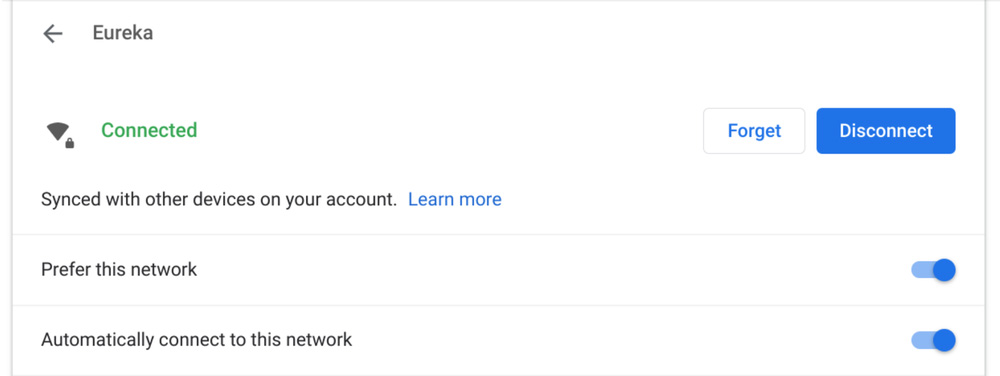
One of the new features included in the update is ‘Wi-Fi Sync,’ which securely saves Wi-Fi password information to the user’s account. This means that when a user changes Chromebooks, the password follows them.

Additionally, the update includes ‘Instant Tethering,’ which automatically links your Chromebook to an Android phone’s hotspot when you’re on the go.

m85_micSlider

Chromebook Settings are also easier to access thanks to an improved design and a new intelligent search model. With the update, when a user types in a query like ‘wifi,’ they’ll now get results for any settings related to the suggestions. Additionally, users will be able to search through the Settings menu from the launcher.

Google also added a microphone slider so users can access this from their Quick Settings menu to control how loud or soft they sound on calls.

m85_cameraapp

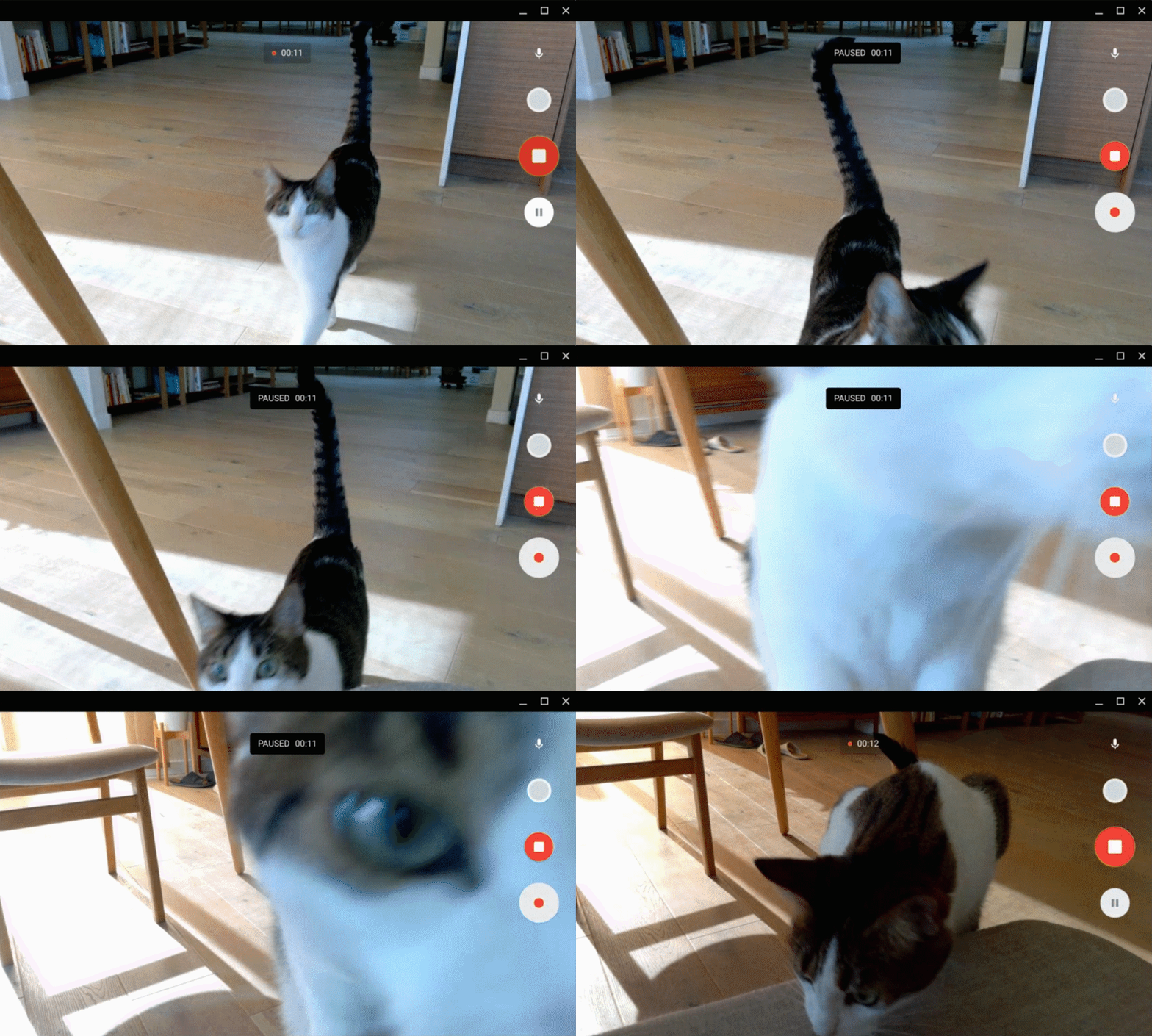
Lastly, users can now pause and resume video recording and take a snapshot while recording. These videos are saved in MP4 format.

Google says it will have more Chrome OS updates in the next couple of months.

Source: Google Blog 

The post Google’s new updates make working from home on ChromeOS easier appeared first on MobileSyrup.

02 Sep 17:08

Instapaper Liked: On Twitter usernames with lots of numbers

Since Dec 2017, Twitter has not allowed you to pick your username during the signup process. Usernames like "jsmith12345678" don't indicate you're a bot. They…
02 Sep 17:07

Twitter Favorites: [nicolehe] am i irrational for feeling optimistic that i may actually be able to attend a friend's wedding in hawaii next june

Nicole He @nicolehe
am i irrational for feeling optimistic that i may actually be able to attend a friend's wedding in hawaii next june
02 Sep 17:07

PureOS for Creatives Part 3: Studio and System Set Up with JACK

by Tre Scranton

[This is part three of a three part series by our guest blogger Tre Scranton: PureOS for Creatives – covering music creation.  If you hadn’t read part one covering music production with LMMS but would like to, click here. For part two covering audio engineering with Ardour and Mixbus, click here.]

In the PureOS for Creatives series, we’ve covered how the Librem line of products work for  creative use, particularly for recording studios: commercial or home. There are many more tools like Ardour and LMMS, available from the PureOS Software Store (where everything is free as in libre) and ready to go right after download. Many of the dependencies needed for the programs to run as intended are available on your Librem computer out of the box, such as ALSA (Advanced Linux Sound Architecture) and PulseAudio – which both provide low-latency audio suitable for professional music production.

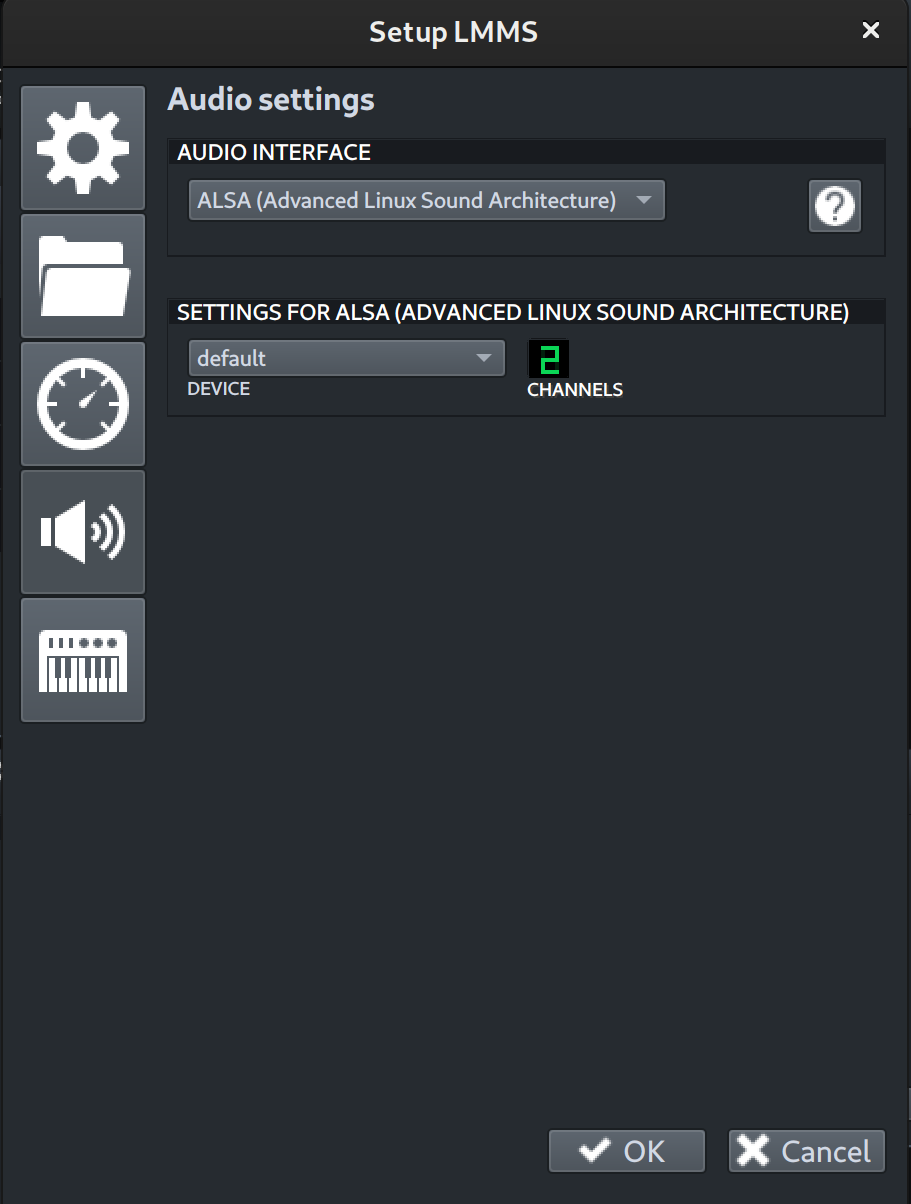
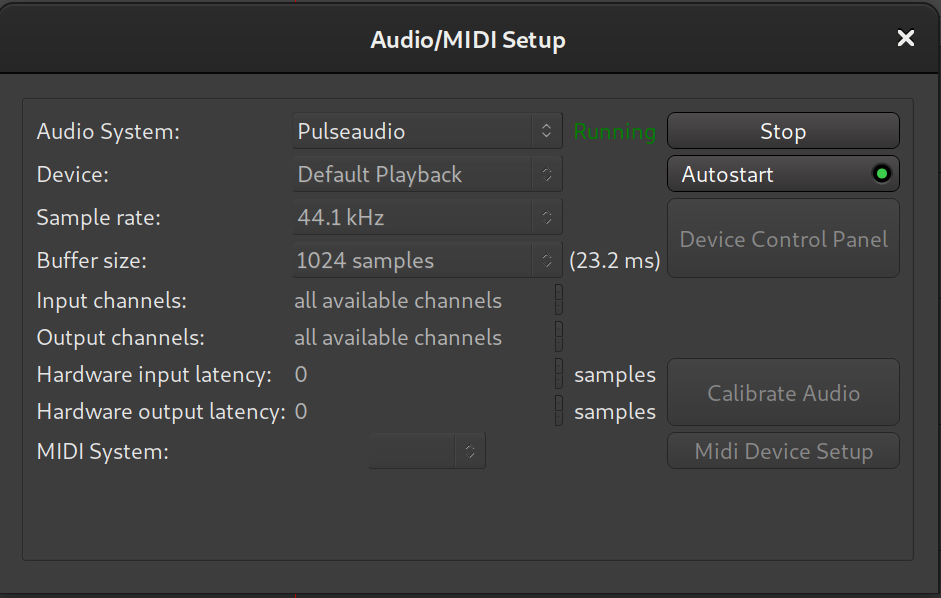
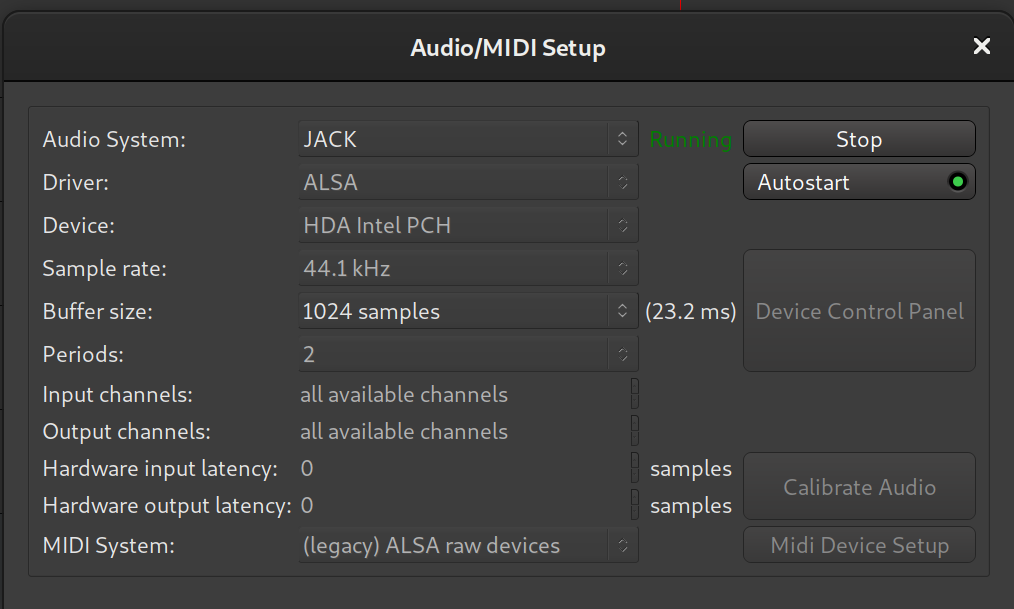
ALSA and PulseAudio are integrated within the audio/MIDI settings for all music creation software, and both are great audio systems for MIDI and audio handling. But if you need two programs to share audio between one another or any external studio gear that you would like to communicate with each other as well as the DAW (Digital Audio Workstation), you might want to familiarize yourself with JACK

ALSA in LMMS audio settings
PulseAudio in Ardour setup settings

JACK is the standard audio server for working with professional audio on Linux. JACK, which is an acronym for ‘JACK Audio Connection Kit’, functions like a traditional studio patch bay. It allows you to connect inputs and outputs from one program into another, and even sync audio programs to start and stop together that would not otherwise work in that manner.

JACK takes the traditional audio signal and let’s you connect specific audio or MIDI tracks from one program to an Audio Track within another program, even system audio. This creates an endless possibilities for connecting drum machines, guitar effect boxes, or merge whole productions together without tedious import and export processes. You can even sync all connected apps while assigning one to control the rest using JACKSync! While JACK itself is an powerful free software sound architecture platform, it doesn’t come with it’s own UI. Visit the PureOS Software Store to get GUI programs to control JACK – like QJackCtl or Patchage.

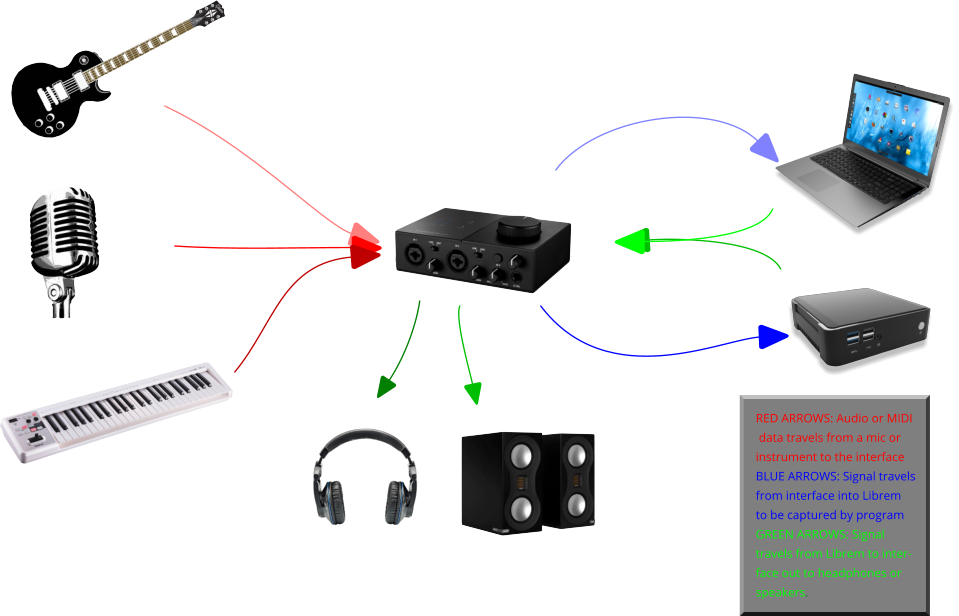
Traditional Audio Signal Flow Image

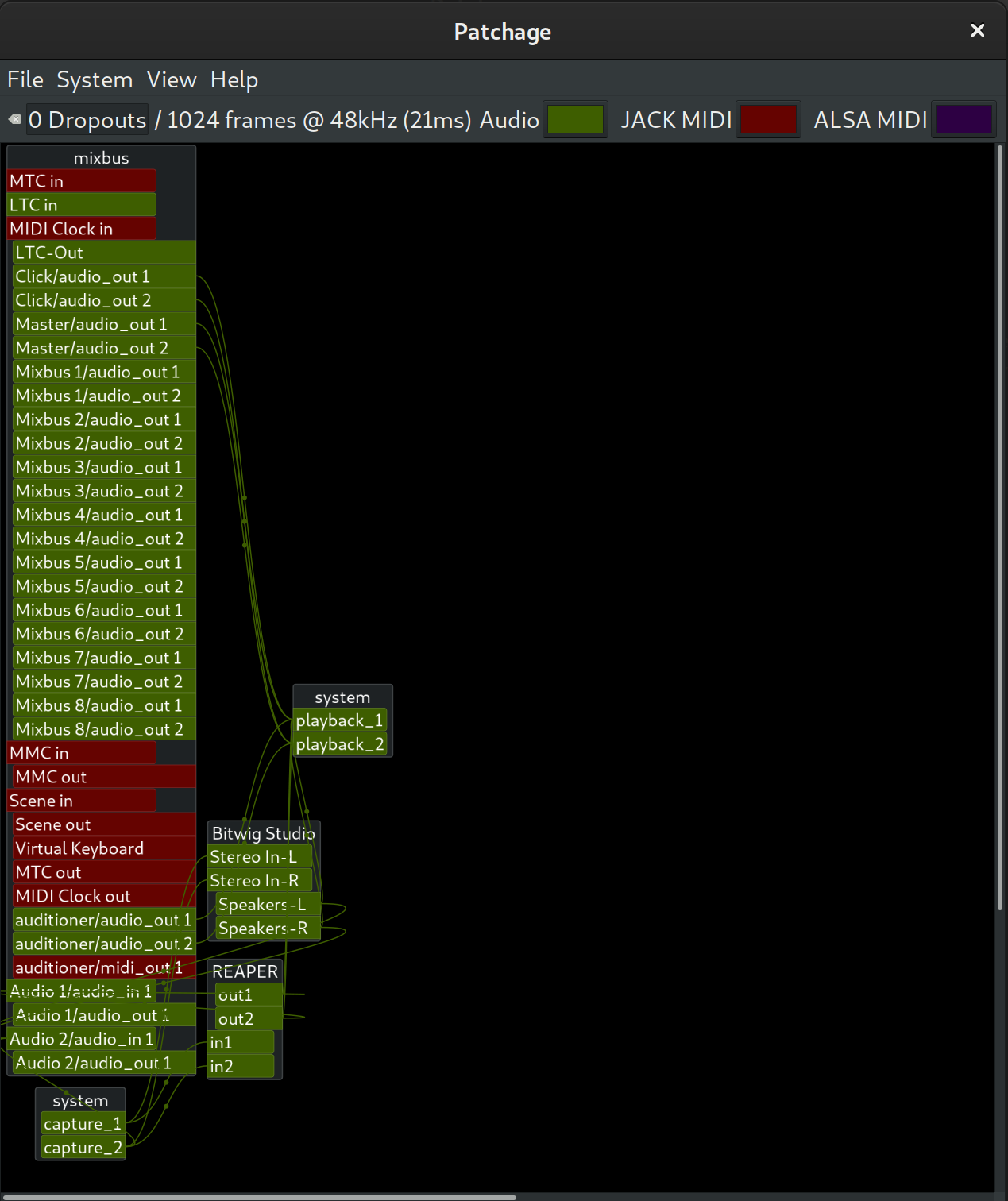
Patchage is a very good visual connection manager for JACK. It gives you an overview of all your connections. Audio and MIDI ports are color coded so it is easier to identify your connection types. Creating connections is as simple as clicking and dragging from an output port to an input port.

Patchage

Qjackctl is a powerful JACK manager. It allows you to access a large amount of JACK’s settings and includes a connection manager, transport controls and even a manager for JACK session, which is a session management program.

For broader insight into how you can incorporate JACK into your audio development workflow, check out the video below. Also, if you enjoyed our PureOS for Creatives demonstrations and would like to see more PureOS workshops for artists, designers, photographers, and more – let us know!

About the Author

Tre Scranton is an open source advocate, electronic musician, and writer for LBFQ. He likes researching about current practices in the Cybersecurity and Data Analytics fields.

The post PureOS for Creatives Part 3: Studio and System Set Up with JACK appeared first on Purism.

02 Sep 04:00

Twitter Favorites: [BrooksRainwater] The pandemic is not emptying out America’s cities Data actually shows that most housing markets, urban and suburba… https://t.co/yDXQImBU8D

Brooks Rainwater @BrooksRainwater
The pandemic is not emptying out America’s cities Data actually shows that most housing markets, urban and suburba… twitter.com/i/web/status/1…
01 Sep 20:16

Ten Big Ideas of Knowledge Management

Nancy Dixon, conversation matters, Sept 01, 2020
Icon

This is a pretty good set of reflections. It's interesting to me that so much of the value of knowledge networking is based on structure - how we connect, how many we connect, what we do when we connect. Also relevant: we learn when we talk. "We organize information differently when we talk, than when those ideas are just swimming around in our heads.  And by mentally organizing the information in preparation for speaking, we create greater understanding for ourselves." Note, though, that knowledge doesn't always originate in individuals and then percolate up - knowledge emerges through conversation (or interaction generally), so it's important to have an external perspective on these conversations (and not just the summation of the conversation). That's why sharing is so important. I'm less a fan of things like the 1-2-4-All model, which is really based for in-person sessions. The same with sitting in a circle. What's really important is that all voices are equal and everyone gets a voice.

Web: [Direct Link] [This Post]
01 Sep 20:16

Apple Releases iOS 13.7, Bringing COVID-19 Exposure Notifications Express to the Public

by Ryan Christoffel

For the first time that I can ever recall, Apple is releasing a point update to iOS just a week after the update’s first beta debuted. iOS 13.7 is rolling out now to iPhone users, bringing the COVID-19 Exposure Notifications system to users without the need to download a separate third-party app. This version of the system is being dubbed Exposure Notifications Express. Per an Apple-Google quote provided to The Verge:

As the next step in our work with public health authorities on Exposure Notifications, we are making it easier and faster for them to use the Exposure Notifications System without the need for them to build and maintain an app. Exposure Notifications Express provides another option for public health authorities to supplement their existing contact tracing operations with technology without compromising on the project’s core tenets of user privacy and security.

After installing the update, from Settings ⇾ Exposure Notifications users can either opt-in to the new system, which was developed in a partnership between Apple and Google, or sign up to be notified when the system becomes available in their region. Currently, even though a separate app download isn’t necessary anymore, Apple is still only activating its system in areas where public health authorities are explicitly on board and have the processes in place to utilize data gathered from iPhones and Android devices for the sake of contact tracing. This means availability still doesn’t extend to all iPhone users, but it will hopefully expand quicker than when a separate app download was required. In the US, Exposure Notifications Express will launch in Maryland, Nevada, Virginia, and Washington D.C. with more states expected to be supported throughout the remainder of the year.


Support MacStories Directly

Club MacStories offers exclusive access to extra MacStories content, delivered every week; it’s also a way to support us directly.

Club MacStories will help you discover the best apps for your devices and get the most out of your iPhone, iPad, and Mac. Plus, it’s made in Italy.

Join Now
01 Sep 20:15

More about notebooks

by Stephen Rees

Since the beginning of the Covid-19 shutdown I have been keeping a journal. Not another blog but the old fashioned kind that you put on paper in a book with a pen.

The idea came from someone I knew from WordCamp or some similar blogging conference years ago. On Facebook she was encouraging people to write about their experiences, because she is an archivist and she is concerned about what will happen in the future. It is unlikely that the technology we now use to store blogs and pictures will be readable indefinitely. She suggested twenty years – but that seems a bit pessimistic to me. After all I know many people who still use film in their cameras and vinyl discs on their stereos and both are long superseded technologies. Even so I quite liked idea, since I have been writing in notebooks for a while. Most of my early blog posts started off as notes taken at meetings. I could scribble far faster than I could type, so I was able to make good contemporaneous notes – a skill I had developed at work back in the days before laptops or tablets. Before PalmPilots even, remember them?

So the first entries in what I called The Plague Diaries were written in a Moleskine notebook that I had lying around.

That is what now appears at the top of this document. In the original version a scan I had made with my phone using a Google app appeared here – with a complaint about Canon software. That has now been updated and I can once again use Image Capture to operate my scanner. But I am blowed if WP block editor will actually allow me to put the new scan into this space which is where I wanted it. So I have got rid of one problem just to find two more.


And it turns out that I was wrong. I could have bought a refill for the fountain pen I was using. It was just that the shop I went to did not know that.

The Moleskine I had was bought in 2005, when journalling was recommended by whoever it was I was sent to deal with depression. Well it didn’t help then but the Moleskine did get used for a variety of purposes, and I thought that it would last. It did not seem likely that I would need much more than a replacement pen. And anyway there are notebooks lying around unused. My partner seems to get one free whenever she does some professional development course or other. Trouble is they are nothing like as good as a Moleskine. Well, I did get something free myself from The Guardian, as thanks for my subscription. That became Volume 2 (14 March to 29 April) and Volume 3 is from an unknown source but the paper was highly absorbent, bled through (i.e. making it hard to be legible when written on both sides) and was actually falling apart and had to be repaired with duct tape.

There are some of the healthcare pro freebies but all have lined paper.

I went to Granville Island thinking that I could buy a new Moleskine – just like Volume 1 – at Paper~Ya. Somewhat to my surprise the sales lady said that I could do better for cheaper. After all, you are paying quite a lot for the brand name alone. Midori paper is much better than that used by Moleskine, and the notebook is considerably cheaper. The lack of a hard cover is not an issue since I won’t be carrying it around with me and it is anyway too large for my pockets at A5 (European standard).

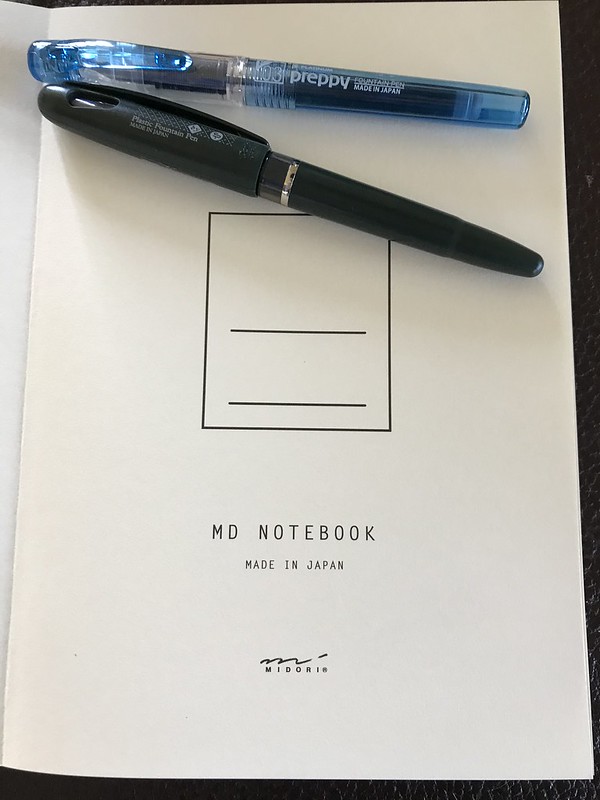
Midori notebook made in Japan

It was also in  Paper-Ya that I found these pens – for very little money.

Japanese Notebook and pens

This is the inside first page. The black pen is a Pentel Plastic Fountain Pen. Made in Japan. The nib is 24 carat plastic. Refillable! I wish I had known that sooner as I recently threw an empty one away! The blue one is a Platinum Preppy F 0.3 which comes without the cartridge being inserted for use, but loose inside the pen. Also Made in Japan.

I am now ending Volume 3 and will start on Volume 4 tomorrow, but I can say categorically that writing in the Midori is a great pleasure – even though I am still using the cheap Chinese pen I bought on line when the previous Pentel Plastic ran out. By the way, beware of online ads. The Jinhao X450 I bought from https://livesmartglobal.com/ for nearly $20 is available elsewhere for $5! It has also had to be repaired twice (Gorilla Glue) as the pencap and its plastic liner kept parting company. It works well enough and you might even be able to find cartridges for it but I bought a bottle of Quink – something I haven’t done for many years.

The one thing I have not done is try to go back to italic writing something I taught myself to do from a book my brother bought. He had a very legible hand. Mine looked much worse – and was not really much better with a proper calligraphic pen. It was also far too slow for note taking – but pretty useful for slowing down creative writing since it needed more care and thought.

I have no intention of publishing The Plague Diaries.  Anymore than I have of turning this blog into a book. You will have to outlive me as my heirs will be instructed to delay any circulation of them until there is a general wave on interest into how ordinary people coped with the pandemic of 2020. Though I fear there will be more pandemics before then.

01 Sep 20:15

Why 'Education' Can't Be Fixed

Marc Prensky, Medium, Sept 01, 2020
Icon

Education, says Marc Prensky, can't be fixed. "It no longer meets our needs, nor will it ever meet them again." It needs to be replaced, he says. But with what? Something that not only responds to technological change but also the sea change in what we believe and how we relate to each other in the world. And the changes we are seeing now make the 1960s look like a minor blip. So we need what he calls 'post-education'. A lot of what Prensky proposes accords with my own thinking. You have to read about half way through this longish article to get to it (but it's worth the read):

"The old ends (of 20cE) are to improve individuals intellectually — so that they can, ideally, go off later and improve the world. (But we never check if they do.) The new ends of Post-Education are to improve the world immediately, through teams of kids’ accomplishing real-world projects with Measurable Positive Impact, and for those who do to get better and better at it through constant practice and improvement." That's not bad, but I would draw an important distinction between enabling them to change the world rather than forcing them change it. That's why we need (what he calls) the key future elements of empowerment, that is: new beliefs, accomplishment, uniqueness and symbiosis (contrast with my key elements of autonomy, diversity, openness and interactivity). Image: UMSU.

Web: [Direct Link] [This Post]
01 Sep 20:15

a11y is web accessibility

Chris Coyier, CSS-Tricks, Sept 01, 2020
Icon

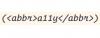
Acronyms are used all the time, and they often mix numbers and letters and sometimes even Roman numerals. They're an easy target for critics concerned about accessibility, but they shouldn't be, at least, not without a little diligence. Unless the acronym is one that everyone knows, in news writing the standard practice is to write out the term in full the first time the acronym is used; readers will notice I follow this practice on OLDaily, and it is recommended in this CSS-Tricks article. Additionally, when it is being introduced, the acronym can be introduced semantically with an abbr tag. It seems like a good idea to me, though it needs to be implemented in text editors (the editor I use automatically deletes the tag as invalid).

Web: [Direct Link] [This Post]
01 Sep 20:15

Adapting To The Medium

by Richard Millington

I’ve been thinking about this tweet.

It’s written for Twitter but it highlights something important.

The most important information you want to distribute to members will be ignored if it’s improperly adapted to the medium(s) you’re using to send it.

This rule gets violated often. I’ve spent too much time trying to persuade clients to stop sending email announcements with big blocks of text to their community.

Over time certain types of content are best suited to different mediums. Whenever you have a message to distribute to the community, you need to identify the right way of doing it.

On some platforms that’s to publish an announcement.
On others it’s to share a video (even a video broken down into smaller videos for each social media platform).
On others it might be to host a live discussion about the topic.
On others it might be to ask a question or make a short, definitive, statement.
On others it might be to have influencers share the message adapted to their own audiences.
On others it might be to post a short banner announcement.
On others it might be a scannable list of key points.

Once you know what type of content is popular on each medium, it becomes a lot easier to adapt your message to match.

01 Sep 20:14

[RODEN] SOLD OUT Toast, Fuji X-T4, Emotional … Intelligence?

by Craig Mod
Fine Roden Folk — Another month (or has it been sixteen years?) has passed and I, Craig Mod, your inbox interloper am here once again with Roden — a newsletter sometimes about humidity, sometimes about photography, always implicitly about far away volcanoes and sleeping under the wing of your light aircraft beneath the stars. Kissa by SOLD OUT Last month I announced my new book, Kissa by Kissa. And then, in a scant forty-eight hours … it sold out.
01 Sep 20:11

New Lightroom Feature to Compare Photo Edits

by Jeffrey Friedl

I haven't been posting on my blog this year, but I've still been working, and have just released a feature for Lightroom that's interesting enough to warrant a mention here: the Compare Photo Edits feature of my Bag-o-Goodies plugin.

As the name implies, it reports on the differences in how two photos have been edited. This includes not only develop changes, but also editable-metadata changes. It also reports on whether collection membership is the same.

It can be useful in figuring out, for example, the difference in look between two photos, or to figure out why a virtual copy exists.

Sometimes one creates a virtual copy and ends up not doing anything with it, so it's an exact duplicate of its master or of a sibling virtual copy. These can be found catalog-wide via another new feature I just released, Find Superfluous Virtual Copies.

01 Sep 19:49

Alex Warning for Apple Gear

by Volker Weber

It's the time of the year for Apple to be shipping new devices within the next two months.

Almost a given:

  • Two iPhone 12 with 5.4" and 6.1" screens
  • Two iPhone 12 Pro with 6.1" and 6.7" screens
  • Watch Series 6 and Watch SE

Likely:

  • New iPad Air
  • AirPods Studio over-ear headphones

Overdue:

  • AirTags
  • HomePod mini
  • New Apple TV

New devices require new O/S versions. iOS 14 will ship right before any new iPhones, new Watch needs new watchOS, which needs new iOS.

Not in the next event, but due before the end of the year is new Macbook with Apple silicon. I am pretty sure they will start with a superlight version, followed by a new iMac design with Apple silicon.

01 Sep 19:49

Shure Aonic 50 :: Nicht nur mein Favorit

by Volker Weber

ae2f62ca6005896073add2bcec2a6302

Der hochgeschätzte Kollege Marco Dettweiler hat sich für die FAZ den Shure Aonic 50 angeschaut:

Von den von der Redaktion bisher erprobten Modellen gefällt der Klang dieses Kopfhörers am besten. Der Aonic 50 kann noch etwas mehr beeindrucken, als es der Momentum Wireless von Sennheiser, H9 von Bang & Olufsen und WH-1000 XM3 von Sony bisher getan haben. Das liegt vermutlich an der Klangphilosophie von Shure, welche die Entwickler beibehalten haben. Das amerikanische Unternehmen kommt aus dem Profibereich und versorgt seit Jahrzehnten viele Musiker mit Mikrofonen und In-Ear-Monitoren.

Mich haben die Kopfhörer bereits in den ersten Minuten überzeugt. Es gibt auch noch einen technischen Grund: Hubraum. Während bei den anderen Headsets Treiber mit 40 mm Durchmesser Stand der Technik ist, setzt Shure auf 50 mm große Treiber. Und da der Radius mit dem Quadrat eingeht, sind das gut 50% mehr.

More >

01 Sep 15:26

A Follow-up on Costs in the Cloud

by Reverend

Some new Reclaim Cloud art from Bryan Mathers, isn’t it beautiful?

Yesterday marks the first full month of my being a paying customer in Reclaim Cloud. I wanted to take the occasion to follow-up on my post in July where I started projecting what the costs of hosting on Reclaim Cloud might look like given you only pay for what you use, and that will be variable over time. The uncertainty of variable pricing can be scary, but at the same time once you have a sense of what to expect it starts making a lot more sense. So, below is a look at my total monthly cost for August hosting this blog, ds106.us, my own Jitsi instance (which I turn on and off as needed), Etherpad, a YouTube Downloader app, as well as a number of parked applications I’m experimenting with.

And the verdict is in, I spent $87.42 in August, and that breaks down as follows:

  • bavatuesdays (WordPress): $35.73
  • ds106.us (WordPress): $26.70
  • ds106club (Ubuntu VPS): $5.93
  • bavanotes (Etherpad): $5.77
  • bavameet (Jitsi): $4.23
  • Youtube Downloader: $2.89

These are the apps I regularly used, and that works out to $81.25, the other $6.17 was spent on the Ghost ($3.04) and Discourse instance ($3.04) the former of which I eventually shutdown and archived to a static site. The remaining .09 cents I spent on testing various environments with a few different apps.

The nice thing about the Cloud billing is it gives you insight into exactly how many resources you used and what they cost at the container level and beyond. Above I exploded the view for this blog and you can see the costs are split up given I moved the environment mid-month. The costs are predominantly for the LEMP application server ($31.37) and the rest is for the dedicated IP address ($3) and the CDN I installed ($1.36) brings the total to $35.73. This is about half what I would be paying with Kinsta, which is nice to know, and about $5 more than Digital Ocean, although that did not include a CDN.

The big win for me once Tim added the Edgeport CDN service that Reclaim Cloud is utilizing is that I really had no more reason to pay Cloudflare for their CDN and caching service, effectively saving me $20 per month (actually $40 if you include I also had a pro plan for ds106). So, I am effectively $90 monthly for my web services through Reclaim Cloud, with a fair bit of room to experiment. I could probably shave off $8 or $9 if I started and stopped Etherpad and the Youtube Downloader application. I think this kind of monitoring of usage makes me consider not only what I am spending, but what resources I am using. And this is a bit different then just minding money—I could probably skip the bill and no one would say anything 🙂 —it’s the fact it makes me more mindful of what I can shutdown to save resources—such as Discourse and Ghost—it goes back to the idea of turning off the lights when you are not in the room. Same thing here, and it is what is unique about the Cloud, in shared hosting I spend far less, but at the same time I hog resources with the 15-20 applications I have installed (maybe two of which I am actively using) and never think twice about it.* I’m not sure sustainability is the right word given its environmental connotations, although it might be, but it does make sense in terms of ensuring our shared hosting infrastructure is not overburdened with accounts that demand more resources, such as mine.

Anyway, I guess I am still blogging about this because I’m so used to paying $30-$100 a year to host any and everything I want on a shared hosting server and I am trying to come to terms with a digital life outside the “free” third party trap services is something I have to start accounting for, and as a result budgeting accordingly.

___________________________________

*At least until Tim gently reminds me other folks are paying for those resources you are burning.

01 Sep 15:12

August Reading

by Caterina Fake

The stand out here, was of course, Middlemarch. I had read it in college and remember thinking to myself, “am I really going to expend my youth reading about agricultural practices in 19th century rural England?” But of course, it is so much more. Many people have called it the greatest English novel, and, to disprove this opinion, I would have to read a whole lot more English novels. So I provisionally agree. 

Last month’s reading of Faulkner required the antidote of Morrison, and I read her essays, and her first novel The Bluest Eye.  Also of undisputed greatness–though censors the world over have been trying to suppress it for years. I doubt they’ve read it. 

The book that left me straddling the fence, wavering in opinion, and wondering about its suitability for prize-winning, was the International Booker Prize winner, The Discomfort of Evening–which announcement and ceremony I accidentally happened upon as it was taking place live online. Prizes invite dispute, which enlivens book reading in general, so I welcome them. The book was great, but green. I was amazed to learn that the distinguished judges read all the contenders, starting with 128 books. 

And if you haven’t already read Signs Preceding the End of the World, run don’t walk to your local bookstore, and pick it up curbside. 


01 Sep 15:08

Risk: micromorts, microCOVIDs, and skydiving

There’s a standard way to understand the relative danger of any activity. A micromort is a unit of risk defined as one-in-a-million chance of death (Wikipedia). For example:

  • skydiving is 8 micromorts per jump
  • running a marathon: 26 micromorts
  • 1 micromort: walking 17 miles, or driving 230 miles

Generally being alive averages out at 24 micromorts/day.

Assuming a 1% mortality risk, being infected with Covid-19 is 10,000 micromorts.

But what about the risk of catching Covid in the first place?


The microCOVID project: 1 microCOVID = a one-in-a-million chance of getting COVID.

From the white paper:

For example, if you live in a region where about 1 in 1,000 people currently has COVID, then you could calculate based on studies of other indoor interactions … that meeting a friend for coffee indoors has about a 1 in 17,000 chance of giving you COVID. Such small numbers are hard to think about, so we can use microCOVIDs instead. Your coffee date would be about 60 microCOVIDs. …

One benefit of using microCOVIDs is that you can straightforwardly add up microCOVIDs to estimate your risk over longer periods of time.

– The microCOVID Project, We measure the riskiness of interactions in “microCOVIDs”

There’s a calculator for regular activities (try it!) from which I can see that

  • going out to buy groceries is 20 microCOVIDs
  • having a small party, indoors, with no masks is 3,000 microCOVIDs
  • a 30 minute commute on the train is 100-200 microCOVIDs

The calculator takes into account the virus prevalence where you live.

So I might decide that I have a risk-tolerance of 10,000 microCOVIDs per year (i.e. a 1% chance of contracting Covid per year). That is, I really don’t want to get Covid, but I’m also not prepared to never, ever leave the house.

That gives me a budget of a little under 200 microCOVIDs per week. And I can measure my activities against that.

(I’m not sure, from the calculator, how to account for household risk: do we have this budget between us, or each?)

I find these kind of calculators useful to educate my intuition.

For example, an outdoor restaurant is only 30 microCOVIDs vs 500 indoors. A significant difference! Especially against my weekly budget of 200. Commuting via public transport is out if I want to do anything else. Useful to know.


Back in May, I was speculating about realtime, hyperlocal pandemic forecasts:

Maybe your phone could track your location and give you a live exposure number over the day, like a badge? It’s 2pm and you’re at 40 co-rads today. We recommend you leave before rush hour and take this 20 co-rad route home, also WASH YOUR HANDS.

And this microCOVID calculator is the foundation of this. If you could automatically plug in realtime regional prevalence figures, you’d be able to make a risk assessment like short journey on the bus vs slow journey walking.


The framing of the microCOVID project gives me pause: it’s about personal risk.

But there are three distinct reasons why I follow the government lockdown advice:

  • risk to my personal/household, which is the focus of the microCOVID project
  • risk to others I might meet. I don’t want to accidentally infect my mum, for example
  • society a.k.a. public health – we beat this pandemic through collective action, by bringing down Re, the effective reproduction number.

Re isn’t a measure of prevalence. It’s a measure of how easily the virus spreads. It spreads more easily when people are meeting lots of other people without masks; it spreads less easily when social contact is reduced.

If Re is below 1, prevalence decreases; above 1, and it goes up.

I think of society as a whole having an Re budget. The figure I heard, at the beginning of lockdown, was that we needed to reduce in-person social interactions by 75%. I assume that social interactions are the key factor in Re (or at least, were believed to be at the time). Other factors might be: % people wearing masks; proportion of unique vs repeat people encountered.

There are some people we need to spend against the Re budget: health workers, anyone involved in the grocery supply chain, and other key workers. I am happy to reduce my in-person interactions by, say, 90% if that means that key workers need to reduce by only 60%.

Is there a translation between microCOVIDs and Re? I don’t know. Maybe +100 microCOVIDs/week/person in a region with a population density of such-and-such contributes +0.1 to Re.

I’d love to have that connection between personal activity and social good.


This pandemic has given us a whole new vocabulary around virality that wasn’t commonplace before. I wonder how we’ll use it in the future?

How many micro-RTs does one of my tweets have, where 1 micro-RT is a one in a million chance of it going viral?

Can we measure the effective reproduction rate of a given social media influencer?

And so on.


I mentioned skydiving at the top of this post (8 micromorts). Of course, there are also externalities. And that reminds me of something else I read:

In the UK, skydiving is a common way to raise money for charity.

BUT…

The injury rate in charity-parachutists was 11% at an average cost of 3751 Pounds per casualty. Sixty-three percent of casualties who were charity-parachutists required hospital admission, representing a serious injury rate of 7%, at an average cost of 5781 Pounds per patient. The amount raised per person for charity was 30 Pounds. Each pound raised for charity cost the NHS 13.75 Pounds in return.

Conclusion: Parachuting for charity costs more money than it raises.

Here’s the paper:

Lee CT, Williams P, Hadden WA. Parachuting for charity: is it worth the money? A 5-year audit of parachute injuries in Tayside and the cost to the NHS. Injury. 1999;30(4):283-287.

01 Sep 02:25

Twitter Favorites: [kumailn] I get a penny every time I see a straight couple with the woman wearing a mask and the man not wearing a mask and a… https://t.co/5fGrdzN0MV

Kumail Nanjiani @kumailn
I get a penny every time I see a straight couple with the woman wearing a mask and the man not wearing a mask and a… twitter.com/i/web/status/1…
01 Sep 01:13

✚ How to Untangle a Spaghetti Line Chart (with R Examples)

by Nathan Yau

Put multiple time series lines on the same plot, and you quickly end up with a mess. Here are practical ways to clean it up. Read More

31 Aug 23:44

The Best Trail Cameras

by Sarah Witman
Two trail cameras pictures with greenery.

There’s nothing quite like seeing an animal in the wild, whether it’s a bear wandering into your backyard or a deer silently gliding through wooded backcountry.

But to catch these moments, you often need good timing and a little luck (or an adventure in the woods).

When you don’t have those, a great trail camera can do the work for you.

Since 2020, we’ve tested nine cameras in the wild—putting many of them through rainstorms, freezing conditions, and whipping winds—and reviewed hundreds of photos and videos.

We recommend the Bushnell Core S-4K No Glow Trail Camera because of its image quality, ease of setup, reliability, and two-year warranty.

31 Aug 23:42

Governance

by Greg Wilson

I had another good conversation with Mike Hoye this week about life, the Internet, and everything. I always learn a lot talking with him, and what I realized this time is that governance should be discoverable. Pretty much every open source project has a LICENSE.md file in their root directory these days, and most now have a CONDUCT.md file as well. These files tell passers-by how they’re allowed to use the software and what social norms they’re required to adhere to if they want to contribute to it.

But how can they find out who decides what the project is going to do next, or who gets a say in deciding that? Large organizations like the Python Software Foundation typically have bylaws—as registered non-profits, they’re legally required to—but most smaller organizations don’t explain any of this. They may have a CONTRIBUTING.md file, but that usually describes how to set up a build environment and how to file bug reports, not how decisions are made or by whom.

Spelling this out helps people make their first contributions, which helps projects grow. It’s also better ergonomics: if you don’t know who to ask or whose consent you need, whatever you want probably won’t happen. But most importantly, it’s essential to making a project genuinely inclusive. Every organization has a power structure; the only question is whether it’s accountable or not. If a group says it doesn’t have rules, what it’s really saying is that it’s an old boys’ network, and that getting things done depends on your personal connections with unofficial influencers and on how self-confident and assertive you are. If you didn’t get drunk with one of the core developers in college and you’re not willing to barge into discussions, then no matter how hard you work you might be a second-class citizen of this project forever.

This is why I’m convinced that every open project should have a file in its root directory called GOVERNANCE.md that explains:

  1. Who gets a say in which decisions (where “gets a say” means “must approve” or “can veto”—promises of consultation are a social nicety without such guarantees).
  2. How to get a decision made.
  3. How to find out what decisions have been made.
  4. How to become part of the decision-making process (e.g., how to get a vote).
  5. How to change these rules (i.e., how to amend the constitution).

To make explicit governance easier and more consistent, projects should be able to choose a model from a small set of tried-and-tested alternatives, just as they pick an OSI-approved license license or adopt the Contributor Covenants. For example, a project with a single decision maker (typically the founder) could copy the bucks stops here file into its repository, while a consensus-based team project could use Martha’s Rules. I don’t think we would need many more, but agreeing on names and wording, making rules findable, and providing a simple guide would make life a little bit easier for a lot of people.

Update: http://lua-users.org/lists/lua-l/2008-06/msg00407.html explains how the Lua project runs itself and why.

31 Aug 23:42

Open is not forever: a study of vanished open access journals

Mikael Laakso, Lisa Matthias, Najko Jahn, arXiv, Aug 31, 2020
Icon

There's a good lesson in this article (31 page PDF). The authors find that 192 open access journals disappeared between 2000 and 2019 (they would even know about them were it not for the work of Internet Archive and the Keepers, which preserved some but by no means all of the vanished journals). The missing journals are from all disciplines (with social sciences and humanities especially vulnerable) and from all geographic locations.

Web: [Direct Link] [This Post]
31 Aug 23:41

Trekking Bars - The Original Alt-Bar

by noreply@blogger.com (VeloOrange)
*this is a re-publishing of a post from November, 2017. We have updated some links, photos, and dates.

By Scott

It's hard to believe that it has been nearly 7 years since we launched the Crazy Bar. In a world of drop bars and flat bars, the Crazy Bar was polarizing. But, we'd be remiss if we didn't dig back further into the realm of alternative bars to an original one - the Daija Trekking Bar.

Sometimes referred to as Trekking Bars, Butterfly Bars, or Pretzel Bars, I remember seeing these bars on bikes ridden by an older Austrian couple in New Zealand back in 2001. The bars fit well with the front and rear panniers, rack top bags, and trailer they were each pulling around the south island of New Zealand.

Compared to flat bars, Trekking Bars offer more hand positions. You can use the sides to rock up a hill, you can stretch out forwards in a headwind, or keep your hands close to the brakes and shifters.


In terms of set up, there seem to be two camps. You either have the open end of the bars face towards you or away from you. A search of photos on the net shows more people run them with the opening towards the rider, thus keeping the brake levers and shifters close to you. Go ahead, do the Google search, we can wait.

OK, so now that you have seen the myriad of cockpits out there, you can see how this bar is the ultimate in individualizing a handle bar. I've never seen flat bars or drop bars get built up with such a personalized feeling about them. In the photo above, we put tape along the sides, but you could easily use another set of grips there as well for more cushioning.


For those of you who are now intrigued by these, some basic spec's. The clamp area is a 25.4 mm, standard for flat bars. The straight section where your main grips, shifters and brake levers would fit is a 22.2 mm clamp area and is 15 cm long. They work best with a 25.4 mm threadless stem, as trying to get a quill stem around all those curves could prove to be a nightmare. If you had a quill stem with a removable faceplate, that would work as well (wink, wink, nudge, nudge).

( Photo taken by Endlessvelolove )

So how many folks out there are fans of alt bars and how many just want a flat bar with a bit of curve/bend to it?
31 Aug 23:41

RT @gabliotecaria: Get in, fellow nerds!

by Gabby (gabliotecaria)
mkalus shared this story from iandunt on Twitter.

Get in, fellow nerds! twitter.com/JSTOR/status/1…

We've expanded our free online reading program until the end of 2020: You can read 100 articles for free online every month, without institutional affiliation.

Create a free JSTOR account and start exploring. bit.ly/30PLu4C pic.twitter.com/djtnujN7XK


7545 likes, 5075 retweets

Retweeted by Ian Dunt (IanDunt) on Monday, August 31st, 2020 8:58am


150 likes, 58 retweets
31 Aug 23:34

The Design of SoundSource 5

by Neale Van Fleet

Not so long ago, I wrote about the design of SoundSource 4. That version marked SoundSource’s transition from a simple audio device selector into a much more powerful app. Recently, we released the new SoundSource 5, featuring many improvements, both technical and in terms of design.

Getting Better All the Time

When I think of the design process for SoundSource 5, a single word comes to mind: refinement. We revisited every part of the user interface, to deliver an update that goes well beyond the sum of its parts. The new interface both looks better and works better.

In this article, I’ll go over some of the refinements we implemented to make SoundSource 5 both useful and delightful.

Compact View

SoundSource 4 started out very small and compact, but as features were added, the main window grew. While it wasn’t massively oversized, we knew we wanted to find ways to slim things down.

The most obvious way SoundSource 5 accomplishes this is with the new Compact view. As you can see below, when SoundSource is switched to its Compact view, many text labels are removed. This significantly reduces the width of the main window, which is particularly handy if you leave SoundSource pinned open. Clarity in the Compact view is somewhat reduced, but toggling back to the Standard view quickly restores it.

The Compact view also removes text from the device selector, cutting it down to a fraction of its standard length. The device icons which remain work particularly well if you have a small number of devices attached to your Mac, as most users do. To create consistency, we also added those icons to the Standard view, where they serve as a secondary visual cue.

Animation

SoundSource does most of its work while in the background, with its only visible part showing in the menu bar. When it is open, we wanted the app to feel snappy and vibrant. One of the ways we accomplished that was by adding subtle animations throughout. This is most noticeable in the toolbar at the top of the main window, where each icon subtly moves between states.

Here are two of the animations from the toolbar:


The size and pin toggle animations, enlarged and slowed to show details

All of these animations are native CoreAnimation assets, built with a tool called Kite Compositor. Kite builds pre-packaged animation archives, which allowed me to iterate super quickly on the animations. I could open, tweak, and re-export animations without much work from the developer.

Reducing Visual Clutter

Before starting work on SoundSource 5, I took some time away from version 4. When I came back with fresh eyes, I noticed a busier interface than I wanted. The bubbles within bubbles within bubbles were logical, but visually cluttered. The best example of this was the nesting that occurred with effects.


Effects were nested two levels in

We knew we could do better. In SoundSource 5, we cleaned this up significantly, and un-matryoshka’ed those nesting shapes. The selection indicator became full width, which rid us of the bubble around individual effects. We also moved the full version of our built-in 10-band equalizer into a popover, matching the way Audio Units are loaded. This enabled us to make the entire Effects area much more uniform. Moving the EQ’s advanced controls out of the main window also allowed it to fit better in the Compact view.


SoundSource 5, with fewer nested shapes

Overly-nested interface elements are harder to parse, so this new design is a big win for readability.

Accent Colours

For many years, MacOS has made it possible to adjust the hue used for all kinds of standard controls, such as sliders, buttons, and checkboxes. Changing the accent colour setting in the General System Preference lets the OS color those controls in many applications.

Though Rogue Amoeba’s applications use many standard controls, some also use what we call a “key colour”, which overrides the system’s accent colour. For example, our soundboard app Farrago has a purple theme, and many of its controls are thus tinted purple.


Farrago’s purple key colour in action

In a similar fashion, SoundSource 4 used its green key colour on almost all the elements in the UI. For version 5, we toned this down quite a bit. SoundSource now uses neutral greys and blacks in many places, and its remaining green elements can all be re-coloured programmatically:


The default tint

This change allowed us to also provide a new appearance preference. When the “Follow System Accent Color” checkbox is turned on in SoundSource’s preferences, the interface will respect the system’s accent setting, adjusting controls to use the selected colour. Here’s a composite, showing all the system tints SoundSource can take on:


Sorry, this trippy rainbow mode is not available in the app.

These changes should make the app feel at home in almost any setup. And of course, all of these tints look great in both light and dark mode.

Big Sur’s Influence

At the virtual WWDC 2020, Apple announced MacOS 11 (Big Sur), which will bring a wholesale redesign of MacOS. Development of SoundSource 5 was nearly complete when Big Sur was first shown off, so these changes didn’t cause much in the way of updates. Fortunately, many of our design choices for SoundSource 5 already aligned quite well with Apple’s new design guidelines.

However, we did make one change specifically as a result of Big Sur. You may have seen that one of the most talked-about changes in the new OS is its updated style of app icon:


Big Sur’s updated icon style

We don’t plan to rush out updates to all of our app icons to match this style. However, SoundSource’s icon adapted rather easily, so we updated to the new, boxier style for SoundSource 5.

The impact on SoundSource’s icon

We’re hard at work on updates for Big Sur (watch our Status page and social media for more), so this new icon will fit in nicely on Big Sur soon.

Handling Applications

The last big change I’ll touch on is how SoundSource handles configuring per-application audio control. In the previous version, controlling an application’s audio required you to manually add the app to SoundSource. We overhauled this rather dramatically with SoundSource 5. Now, when an app produces sound, it automatically appears in SoundSource’s main window. It’s then immediately ready for adjustment, with less setup required.

This improved behavior seems very natural now that it’s implemented, but it didn’t occur to us for SoundSource 4. Sometimes you arrive at a new solution to a problem, and it’s so obvious that other solutions no longer make sense. That was very much the case here.

Try It Yourself

One of the major areas we focused on for SoundSource 5 was doing existing things better. The update is faster, smarter, and takes up less space on your screen. Overall, it’s a tremendous leap forward in quality, and we couldn’t be more pleased.

If you’re new to SoundSource, learn more on the main SoundSource page. For existing users, we have a helpful “What’s New in SoundSource 5” page available. SoundSource has become an indispensable tool for controlling audio on our Macs, and we hope you’ll find it similarly useful.