Shared posts

18 Nov 05:11

“Why Virtual Offices Suck”

by peter@rukavina.net (Peter Rukavina)

 I pointed to this 19 years ago; it’s since disappeared from its home place, but the Wayback Machine kept a copy.

I have been working remotely from my clients since 1995, and, on balance, it suits me. But on days the basement shop seems more like a prison bunker than an escape pod, I would chuck it all in for the stresses and pleasures of real coworkers. Sometimes you really do want some to ask “how was your weekend?”

18 Nov 05:11

RT @allymayn: Fox News and Facebook did to our parents what they said video games would do to us.

by Ally Maynard (allymayn)
mkalus shared this story from iandunt on Twitter.

Fox News and Facebook did to our parents what they said video games would do to us.


Retweeted by Ian Dunt (IanDunt) on Tuesday, November 17th, 2020 11:30am


164227 likes, 25720 retweets
18 Nov 05:11

Not going to lie. It was quite fun to trawl through Hansard looking at what peers were saying about video game addiction in the early 80s. Behold, for instance, the depraved moral threat of Space Invaders. pic.twitter.com/kJwL31pfSw

by Ian Dunt (IanDunt)
mkalus shared this story from iandunt on Twitter.

Not going to lie. It was quite fun to trawl through Hansard looking at what peers were saying about video game addiction in the early 80s. Behold, for instance, the depraved moral threat of Space Invaders. pic.twitter.com/kJwL31pfSw


180 likes, 22 retweets
18 Nov 05:11

RT @doctor_oxford: God give me the confidence of a man who has chosen to set up a whole new political party based around his pandemic opini…

by Rachel Clarke (doctor_oxford)
mkalus shared this story from iandunt on Twitter.

God give me the confidence of a man who has chosen to set up a whole new political party based around his pandemic opinions... yet who has never even heard of an incubation period 😳 twitter.com/Nigel_Farage/s…

The PM came into contact with a Covid case on Thursday.

If he gets a swab test in the morning and is clear then there is absolutely no need to isolate for 14 days.

Get tested @BorisJohnson, get back to work and Get Brexit Done.


10811 likes, 1806 retweets

Retweeted by Ian Dunt (IanDunt) on Tuesday, November 17th, 2020 1:28pm


6483 likes, 933 retweets
18 Nov 05:10

Playing on Hard Mode

by Ben Thompson

One way to understand how the Internet is different is to not only examine what business models work, but also the history of how those business models came to be. Start with text and images, long the province of newspapers: the first attempts at website monetization placed ads alongside article text; after all, that is how advertising was done.

Incredibly enough, it was a mere eight years ago that Facebook IPO’d with this as its business model: content that was important to you was in the center of the webpage, and ads were on the side (mobile didn’t monetize at all, which was why growth in mobile usage was listed as a risk factor in Facebook’s S-1); the company was optimistic that the Facebook Platform would provide a more traditional-to-tech means of monetization that could augment its ads business.

That, though, was the other “problem” with mobile: it made Facebook just an app, not a platform. It turned out, though, that this was the best possible thing that could have happened to the social media company: freed to be “just an app” the company doubled down on the News Feed, which already delivered personalized content, as the primary means of delivering personalized ads.

The rest, as they say, is history:

Facebook's stock price since IPO

Today would-be experts talk about Facebook’s business model as if it were always inevitable, that of course the same mechanism would work for Instagram, not to mention the company’s ever increasing number of competitors like Snapchat and TikTok; I presume they all purchased the company’s stock when it was down 50% from its IPO price in the fall of 2012, five months after the Instagram purchase. For the rest of us, though, including Facebook, it wasn’t obvious at all: succeeding on the Internet didn’t simply mean making a digital product, but also finding a business model that was native as well.

Easy Mode

And yet, for all of Facebook’s initial challenges, the truth is that the company was, relatively speaking, playing on easy mode. Yes, the company practically invented the modern growth hacking discipline and feed advertising, but its core product was about digitizing offline relationships that already existed, and the means by which it did that — text and photos, at least at the beginning — were native to the Internet. To the extent it was difficult to figure out how to monetize advertising it was because advertising was so easy that there was effectively infinite inventory.

You can make a similar argument about Google: yes, Larry Page and Sergey Brin created something truly superior with PageRank and the Google search engine, but once deployed Google instantly had access to an entire universe of web pages seemingly tailor-made to to make Google better at giving you the results you need. If anything the ease with which Google came to dominate the web has hindered the company in adjacent markets where skills like marketing and sales make a difference.

Twitter and Snapchat, in contrast to Facebook, had to create networks in Facebook’s shadow; Twitter focused on the interest graph, while Snapchat defined itself by being the anti-Facebook for a new generation. This was a more difficult path, but one still defined by zero marginal costs in terms of distribution and monetization. Google’s vertical search competitors faced a similar challenge: build something unique and differentiated in Google’s shadow, acquiring not just demand but also supply along the way. Still, like Facebook’s challengers, all of these companies are safely cocooned in the virtual world.

Amazon, in contrast, has played on a much higher difficulty setting from the beginning, selling and shipping physical items, with all of the marginal costs that entails. If anything the company has doubled down on the physical world, investing billions to deliver items in one day; I don’t think it is a coincidence it is Amazon that is Google’s true competitor.

OTAs and Pizza

Perhaps the easiest mode of all, though, was layering the Internet on top of real world business models. Consider OTAs — “Online Travel Agents” — the name gives it away! Instead of calling up a travel agent and being inherently limited to their knowledge and connections (and paying their commission), customers could access search engines that aggregated every flight and every hotel, displaying them in a way that was easy to compare and contrast. From a customer perspective it was a better experience in nearly every way: both more comprehensive and cheaper as well.

Of course, like most suppliers in an Aggregator-based value chain, hotels weren’t too pleased, but given that demand was increasingly concentrated on the likes of Booking.com they had no choice but to come onto the platform on the OTAs terms. Their response was, rationally, to consolidate and focus on loyalty programs and repeat customers. The OTAs, meanwhile, could simply take a skim off of all of the bookings they made, without needing to build their own hotels on one hand, or worry about infinite inventory depressing prices on the other.

There was a similar dynamic in an industry like pizza delivery: a company like Dominos existed for decades relying on phone calls for delivery; with the advent of the smartphone, though, the company quickly pivoted to mobile ordering, augmenting that capability with innovative apps and tracking services that let you make the exact pizza you wanted whenever you wanted and trace its route to your front door. The company’s success has been extraordinary, much like the OTAs, and for similar reasons: the Internet made an existing real world business model better, even as the real world constraints ensured the money-making opportunity existed.

Airbnb and Trust

There will be time over the next few days and weeks to get into the particulars of Airbnb and DoorDash’s businesses, but I thought this observation from FinTwit regular @modestproposal1 was notable:

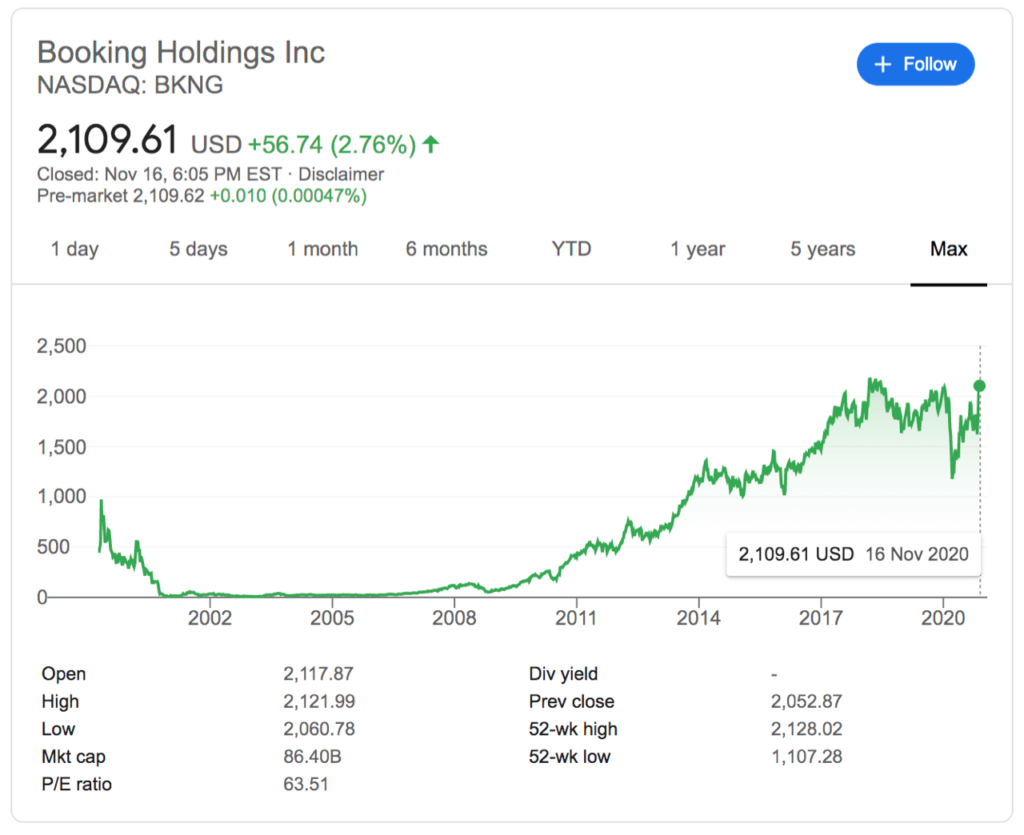
This is, in a vacuum, a valid point; frankly, the biggest takeaway from my perspective is that Booking was drastically undervalued circa 2011 — the stock market certainly agrees:

Booking.com's stock price over time

The truth is that, as I just explained, the company was playing in easy mode: OTAs were an obvious business, with real world constraints that brought digital’s advantages to bear without its commoditizing downsides. At the same time, notice how BKNG’s share price has leveled out: over the last few years in particular, Google, the Super-Aggregator, has been extracting an ever greater share of OTA margins. Indeed, that’s the downside to having a business built on easy mode: anyone else can play the game just as easily.

Airbnb, on the other hand, has been building something truly unique; the company explains in its S-1:

Travel is one of the world’s largest industries, and its approach has become commoditized. The travel industry has scaled by offering standardized accommodations in crowded hotel districts and frequently-visited landmarks and attractions. This one-size-fits-all approach has limited how much of the world a person can access, and as a result, guests are often left feeling like outsiders in the places they visit.

Airbnb has enabled home sharing at a global scale and created a new category of travel. Instead of traveling like tourists and feeling like outsiders, guests on Airbnb can stay in neighborhoods where people live, have authentic experiences, live like locals, and spend time with locals in approximately 100,000 cities around the world. In our early days, we described this new type of travel with the tagline “Travel like a human.” Today, people simply refer to it with a single word: “Airbnb.”

Unsurprisingly Airbnb frames the commoditization of hotels as a negative, but it was precisely this commoditization that unlocked the OTAs, even as the OTAs accelerated said commoditization in a way that benefited customers with low prices and wide selections. And, as noted, left the OTAs susceptible to Google. Airbnb’s relationship with Google, though, is different:

We focus on unpaid channels such as SEO. SEO involves developing our platform in a way that enables a search engine to rank our platform prominently for search queries for which our platform’s content may be relevant.

The company explained in its Key Factors Affecting Our Performance:

We grow GBV by attracting new guests to book stays and experiences on our platform and through past guests who return to our platform to make new bookings. We attract most guests to Airbnb directly or through unpaid channels. During the nine months ended September 30, 2020, approximately 91% of all traffic to Airbnb came organically through direct or unpaid channels, reflecting the strength of our brand. We have also used paid performance marketing, for example on search terms including “Airbnb,” to attract guests. Our strategy is to increase brand marketing and use the strength of our brand to attract more guests via direct or unpaid channels and to decrease our performance marketing spend relative to 2019.

Airbnb did not, as far as I could see, specify the exact split between brand and performance marketing, but it makes intuitive sense that the company would be less dependent on Google search ads than other OTAs: its supply is unique, and its brand is a verb.

This is, to be sure, a far more difficult path to building a business than the OTAs on one hand, which simply layered digital onto real world business models, and search engines and social networks on the other, which created new business models with supply that was inherently digital. Airbnb created an entirely new sort of supply that previously didn’t exist. As the company notes in its S-1 introduction, the key was trust:

In 2008, Nate, a software engineer, joined Brian and Joe, and together the three founders took on a bigger design problem: how do you make strangers feel comfortable enough to stay in each other’s homes? The key was trust. The solution they designed combined host and guest profiles, integrated messaging, two-way reviews, and secure payments built on a technology platform that unlocked trust, and eventually led to hosting at a global scale that was unimaginable at the time.

I wrote about Airbnb and trust back in 2015 in Airbnb and the Internet Revolution:

In the interest of full disclosure, I’m actually writing this post while sitting in an apartment rented through Airbnb. The pictures were ok, but the plethora of reviews were effusive in their praise of this surprisingly large one-bedroom apartment with easy access to the train, so I took the plunge. Indeed, the reviews were spot-on: the apartment is beautiful, and I couldn’t be happier with my choice. One more thing — my family and I are working really hard to keep the place as pristine as it was when we moved in. After all, while I trusted the ratings over the pictures, future Airbnb sublessors will surely care greatly about my rating as well.

There isn’t the sort of community that Chesky promised; I haven’t met our sublessor in person, and likely never will. I don’t know his favorite coffee shops or taco places (or ramen joints for that matter), and I very much feel not at home. But despite that fact, some of the most important trappings of community do exist: the shared mores, and common accountability. My sublessor is incentivized to provide a great place, and I’m incentivized to keep it that way, and that more than anything is what makes Airbnb work. And, by extension, one of the big advantages of hotels — the trust instilled first by the concept and reinforced by the brand — begins to erode.

The commoditization of trust is far more injurious to hotels than you might think: it’s not simply that Airbnb is more competitive on one particular vector; rather, the “trust” vector was by far the biggest priority for both travelers and hosts. Hotels could be infinitely more inconvenient, expensive, or sterile relative to your typical homestay and it wouldn’t matter. In the pre-Airbnb days travelers — and sublessors — justifiably prioritized trust above all else. In other words, the implication of Airbnb building a platform of trust is not that a homestay is now more trustworthy than a hotel; rather, it’s that the trust advantage of a hotel has been neutralized, allowing homestays to compete on new vectors, including convenience, cost, and environmental factors. It turns out homestays are quite competitive indeed: to return to my personal anecdote, I am living in a beautiful, remodeled one bedroom apartment in one of the best neighborhoods in this city, and paying a fraction of the cost of a mid-tier hotel for the privilege.

This is what it takes to succeed in hard mode: Airbnb took a core differentiator of hotels — trust, a differentiator that OTAs depended on — and digitized it. But, critically, that digitization and resultant commoditization happened only on Airbnb, and was thus captured exclusively by the company. This, by extension, is what the comparison to OTAs miss: Airbnb is not riding the same wave that Booking et al did a decade ago, but are instead undertaking something far more ambitious: creating their own wave where none previously existed.

DoorDash and Selection

DoorDash has been playing on hard mode as well: while a company like Dominos created its own standardization and commoditized product designed for delivery, now with tech on top, DoorDash has undertaken the more Herculean task of creating a three-sided market of restaurants, drivers, and customers. This is the ultimate example of seeking to “make it up in volume”; the company explains in its S-1:

Our local logistics platform benefits from three powerful virtuous cycles:

  • Local Network Effects: Our ability to attract more merchants, including local favorites and national brands, creates more selection in our Marketplace, driving more consumer engagement, and in turn, more sales for merchants on our platform. Our strong national merchant footprint enables us to launch new markets and quickly establish a critical mass of merchants and Dashers, driving strong consumer adoption.
  • Economies of Scale: As more consumers join our local logistics platform and their engagement increases, our entire platform benefits from higher order volume, which means more revenue for local businesses and more opportunities for Dashers to work and increase their earnings. This, in turn, attracts Dashers to our local logistics platform, which allows for faster and more efficient fulfillment of orders for consumers.

  • Increasing Brand Affinity: Both our local network effects and economies of scale lead to more merchants, consumers, and Dashers that utilize our local logistics platform. As we scale, we continue to invest in improving our offerings for merchants, selection, experience, and value for consumers, and earnings opportunities for Dashers. By improving the benefits of our local logistics platform for each of our three constituencies, our network continues to grow and we benefit from increased brand awareness and positive brand affinity. With increased brand affinity, we expect that we will enjoy lower acquisition costs for all three constituencies in the long term.

DoorDash's flywheel

We have been successful in becoming the category leader in U.S. local food delivery logistics because of the value we create for merchants, consumers, and Dashers. DoorDash only works if it works for merchants, consumers, and Dashers, and we continually strive to improve how we serve all constituents.

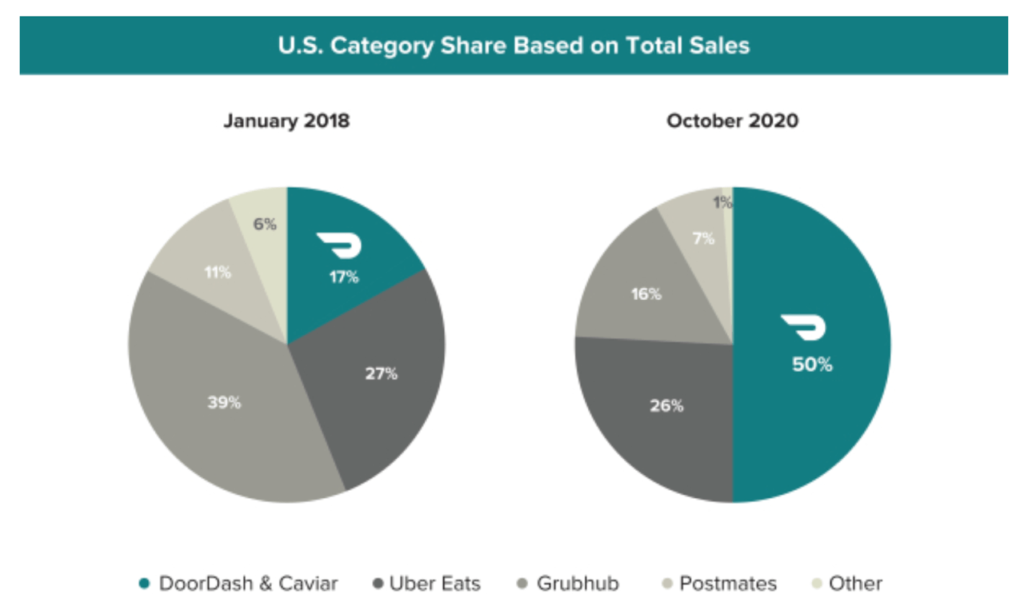
DoorDash’s success relative to its competitors, particularly UberEats, is noteworthy:

We believe that the value we deliver to merchants, consumers, and Dashers is a key reason why we have become the largest and fastest growing business in the U.S. local food delivery logistics category, with 50% U.S. category share and 58% category share in suburban markets.

DoorDash versus the competition

What made DoorDash different from UberEats is that the former focused on maximum merchant selection and suburban markets, while the latter initially prioritized efficient delivery in urban areas. The problem for UberEats, though, is that it was not competing with only DoorDash, but also local delivery networks, and the shop with carryout right down the street. DoorDash, meanwhile, was creating an entirely new market in places filled with little else other than the aforementioned Dominos, which would always be far more efficient, with far less choice.

To put it another way, whereas Airbnb digitized trust, DoorDash digitized the urban experience of a wide selection of options and relative convenience for a suburban population that had the added benefit of large order sizes and convenient parking. And now, given the fact that both restaurants and drivers can multi-home, DoorDash can increasingly rely on its dominant share of customers to drive the other two sides of its market.


This isn’t all there is to say about these two companies: both deserve deeper dives into their financials on one hand, and a consideration of their broader societal impact on the other.

What both companies represent, though, is what it means to play on hard mode. Neither lodging nor logistics is inherently digital; both companies had to make them so, creating new markets that didn’t previously exist. That both Airbnb and DoorDash have done so to a sufficient degree to go public is not only impressive, but will increasingly be a roadmap for new startups, and a model for how the Internet will transform more and more components of the “real” world.

18 Nov 05:10

The Best Electronics Kits for Kids and Beginners

by Signe Brewster
A view of the SmartLab Smart Circuits

An electronics kit is so much more than wires and LEDs — it’s an introduction to how everyday gadgets work, and a gateway to STEM projects like engineering and coding.

After testing 13 top-rated models with the help of kid testers, we found the SmartLab Smart Circuits to be the best electronics kit for kids 8 and older (and anyone else) who’d like to experiment with electronics concepts at home.

The Smart Circuits kit offers the best combination of educational instructions, easy-to-use pieces, and interesting projects that will grab and hold kids’ attention.

18 Nov 05:10

Apple M1 Mac Review Roundup: Big Performance and Battery Gains

by John Voorhees

Last week, Apple unveiled M1-based models of the MacBook Air, MacBook Pro, and Mac mini. With deliveries of the computers beginning to arrive around the world, reviews are out, and I’ve rounded up some of the most interesting tidbits from them.

The reviews are overwhelmingly positive with a few caveats. However, reviewers were universally impressed by the new Macs’ performance and the laptops’ battery life. The experience of Wired’s Julian Chokkattu was common:

Spend a day with the new MacBook Air and the improvements are immediately noticeable. The thing’s as powerful as many of the higher-end Intel-powered Macs, blowing past the speed limits of the higher-tier MacBook Air from earlier this year. The M1 is no Mac evolution, it’s a Mac revolution.

What’s especially remarkable about these Macs is that they are low-end models as Jason Snell observes on Six Colors:

It’s all too easy to overlook the fact that these are low-end models, given how fast they are. But this is just Apple’s first step in what the company says is a two-year-long transition. The M1 chip, which appears to be a next-generation riff on the A12X processor in that 2018 iPad Pro, has a bunch of limitations that will undoubtedly not exist on future Apple-designed Mac processors: It only supports two Thunderbolt ports and up to 16GB of RAM. It has no support for external GPUs or discrete graphics of any kind. It can drive a maximum of two displays. It is, by every definition, a low-end chip, the slowest and least capable Mac chip Apple will ever make.

And yet…

Based on my testing, it’s also safe to say that all three M1-based Macs, these low-end systems at the bottom of Apple’s price lists, are among the fastest Macs ever made.

Jason and Myke Hurley also interviewed Apple’s Tim Millet and Tom Boger on Upgrade about the M1 Macs.

The new MacBook Air has no fan, which means it has to throttle performance at times to remain cool. Even so, the results are impressive, according to Dieter Bohn of The Verge:

The MacBook Air performs like a pro-level laptop. It never groans under multiple apps. (I’ve run well over a dozen at a time.) It handles intensive apps like Photoshop and even video editing apps like Adobe Premiere without complaint. It has never made me think twice about loading up another browser tab or 10 — even in Chrome.

The MacBook Pro results were impressive too. Matthew Panzarino for TechCrunch:

I personally tested the 13” M1 MacBook Pro and after extensive testing, it’s clear that this machine eclipses some of the most powerful Mac portables ever made in performance while simultaneously delivering 2x-3x the battery life at a minimum.

These results are astounding, but they’re the product of that long early game that Apple has played with the A-series processors. Beginning in earnest in 2008 with the acquisition of PA Semiconductor, Apple has been working its way towards unraveling the features and capabilities of its devices from the product roadmaps of processor manufacturers.

The MacBook Pro runs so coolly, in fact, that Joanna Stern of The Wall Street Journal had a hard time getting the fans to spin up at all. As always, Stern’s video is hilarious, cutting right to the heart of what sets the MacBook Pro apart from its predecessors.

The Verge’s experience with the MacBook Pro was similar.

I’ve seen fewer reviews of the Mac mini, but as Chris Welsh of The Verge notes:

Like that machine, the mini has a fan for cooling, but it also has the most efficiently cooled chassis of all the new M1 Macs. As a result, it’s technically the best performer — even if only by a smidge.

Welsh notes, however, that fewer USB-C ports, a RAM cap of 16GB, and no support for eGPUs like older Mac minis limits are all downsides to Apple’s smallest desktop computer.

Matt Burns of TechCrunch also reviewed the mini and came away impressed:

In our tests, we found Apple’s M1 system on a chip (SoC) to outperform its rivals, regardless of price. With the M1 at its core, the Mac mini is faster in most regards than every Apple computer available except for the ultra-expensive Mac Pro — and sometimes the Mini is faster than the Mac Pro, too. What’s more, this performance increase is noticeable throughout the system and not just limited to raw computing tasks in purpose-built applications. The system is snappy, responsive and feels like the start of a new era of computing.

What’s not so great about the new M1 Macs? The webcams on the laptops are still 720p, although there have been some improvements based on the M1’s new image signal processor, according to Joanna Stern of The Wall Street Journal.

Reviewers weren’t very impressed with iOS and iPadOS apps on the Mac either. Matthew Panzarino:

The current iOS app experience on an M1 machine running Big Sur is almost comical; it’s so silly.

Dieter Bohn writing for The Verge felt similarly:

What I found [on the Mac App Store] was a gallery of abandonware, mostly apps from developers that haven’t been updated to be aware of newer devices. Developers have the option to opt their apps out of being made available on the Mac, and many, many developers have done so. Instagram, Slack, Gmail, and many others simply aren’t available. I suspect these developers made that choice because they wanted to make sure they didn’t have a messy, weird app experience on the Mac.

Because iOS apps on the Mac are a messy, weird experience. Apple should have slapped a beta label on this feature.

If you’d prefer to watch video reviews of the new M1 Macs, there are plenty of options:

Each of the new M1-based Macs looks the same as past models, and in the case of the laptops, that means the same subpar webcam on the laptops, but it’s clear from these initial reviews that the transition to the M1 chip has unleashed unusually large gains in performance and battery life. I’ve ordered a MacBook Air, which should arrive in about a week, and I can’t wait to put it through its paces and share my results.


Support MacStories Directly

Club MacStories offers exclusive access to extra MacStories content, delivered every week; it’s also a way to support us directly.

Club MacStories will help you discover the best apps for your devices and get the most out of your iPhone, iPad, and Mac. Plus, it’s made in Italy.

Join Now
18 Nov 05:10

Firefox 83 introduces HTTPS-Only Mode

by Christoph Kerschbaumer


Security on the web matters. Whenever you connect to a web page and enter a password, a credit card number, or other sensitive information, you want to be sure that this information is kept secure. Whether you are writing a personal email or reading a page on a medical condition, you don’t want that information leaked to eavesdroppers on the network who have no business prying into your personal communications.

That’s why Mozilla is pleased to introduce HTTPS-Only Mode, a brand-new security feature available in Firefox 83. When you enable HTTPS-Only Mode:

  • Firefox attempts to establish fully secure connections to every website, and
  • Firefox asks for your permission before connecting to a website that doesn’t support secure connections.


How HTTPS-Only Mode works

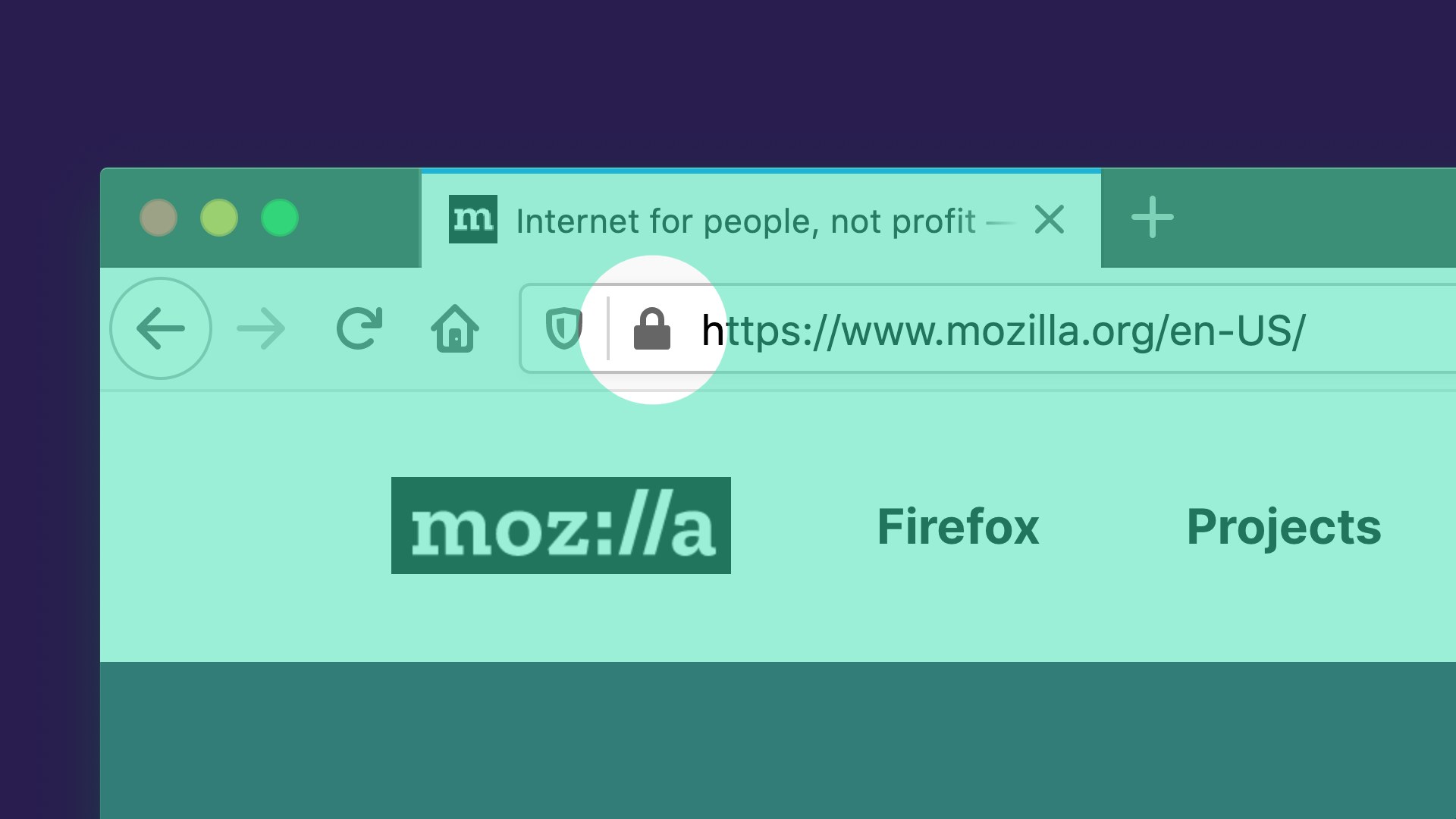
The Hypertext Transfer Protocol (HTTP) is a fundamental protocol through which web browsers and websites communicate. However, data transferred by the regular HTTP protocol is unprotected and transferred in cleartext, such that attackers are able to view, steal, or even tamper with the transmitted data. HTTP over TLS (HTTPS) fixes this security shortcoming by creating a secure and encrypted connection between your browser and the website you’re visiting. You know a website is using HTTPS when you see the lock icon in the address bar:

The majority of websites already support HTTPS, and those that don’t are increasingly uncommon. Regrettably, websites often fall back to using the insecure and outdated HTTP protocol. Additionally, the web contains millions of legacy HTTP links that point to insecure versions of websites. When you click on such a link, browsers traditionally connect to the website using the insecure HTTP protocol.

In light of the very high availability of HTTPS, we believe that it is time to let our users choose to always use HTTPS. That’s why we have created HTTPS-Only Mode, which ensures that Firefox doesn’t make any insecure connections without your permission. When you enable HTTPS-Only Mode, Firefox tries to establish a fully secure connection to the website you are visiting.

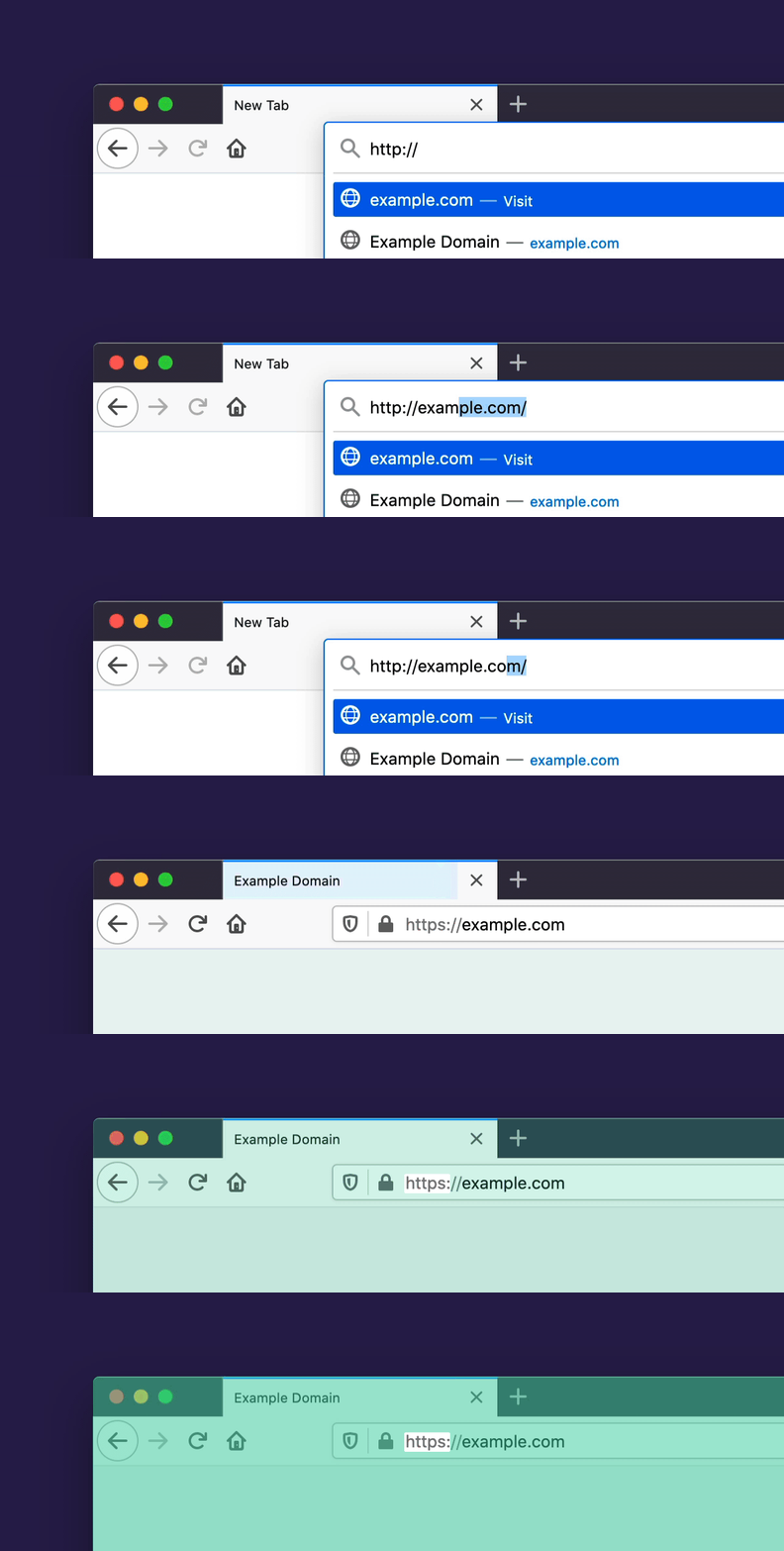
Whether you click on an HTTP link, or you manually enter an HTTP address, Firefox will use HTTPS instead. Here’s what that upgrade looks like:


How to turn on HTTPS-Only Mode

If you are eager to try this new security enhancing feature, enabling HTTPS-Only Mode is simple:

  1. Click on Firefox’s menu button and choose “Preferences”.
  2. Select “Privacy & Security” and scroll down to the section “HTTPS-Only Mode”.
  3. Choose “Enable HTTPS-Only Mode in all windows”.

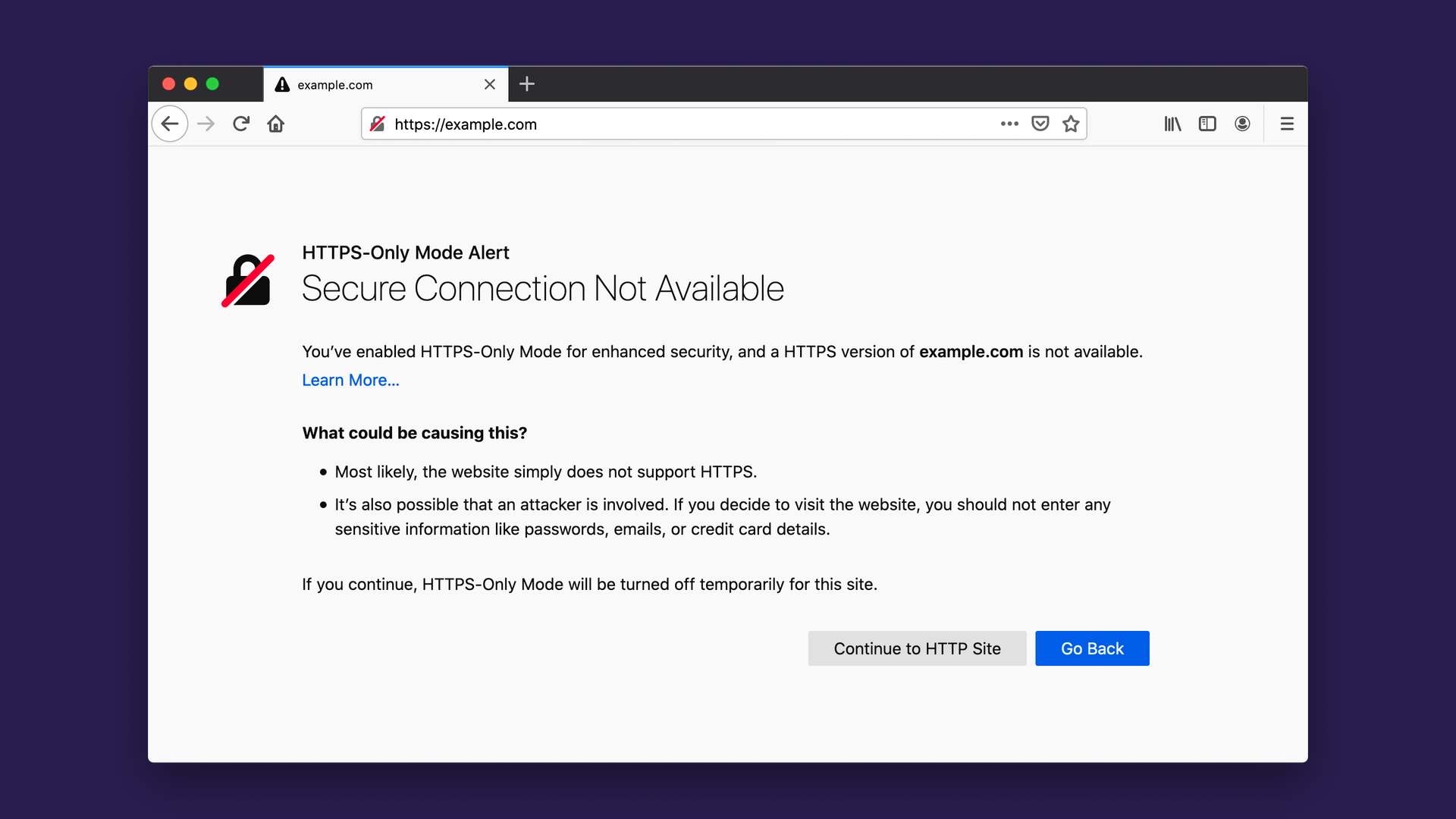
Once HTTPS-Only Mode is turned on, you can browse the web as you always do, with confidence that Firefox will upgrade web connections to be secure whenever possible, and keep you safe by default. For the small number of websites that don’t yet support HTTPS, Firefox will display an error message that explains the security risk and asks you whether or not you want to connect to the website using HTTP. Here’s what the error message looks like:

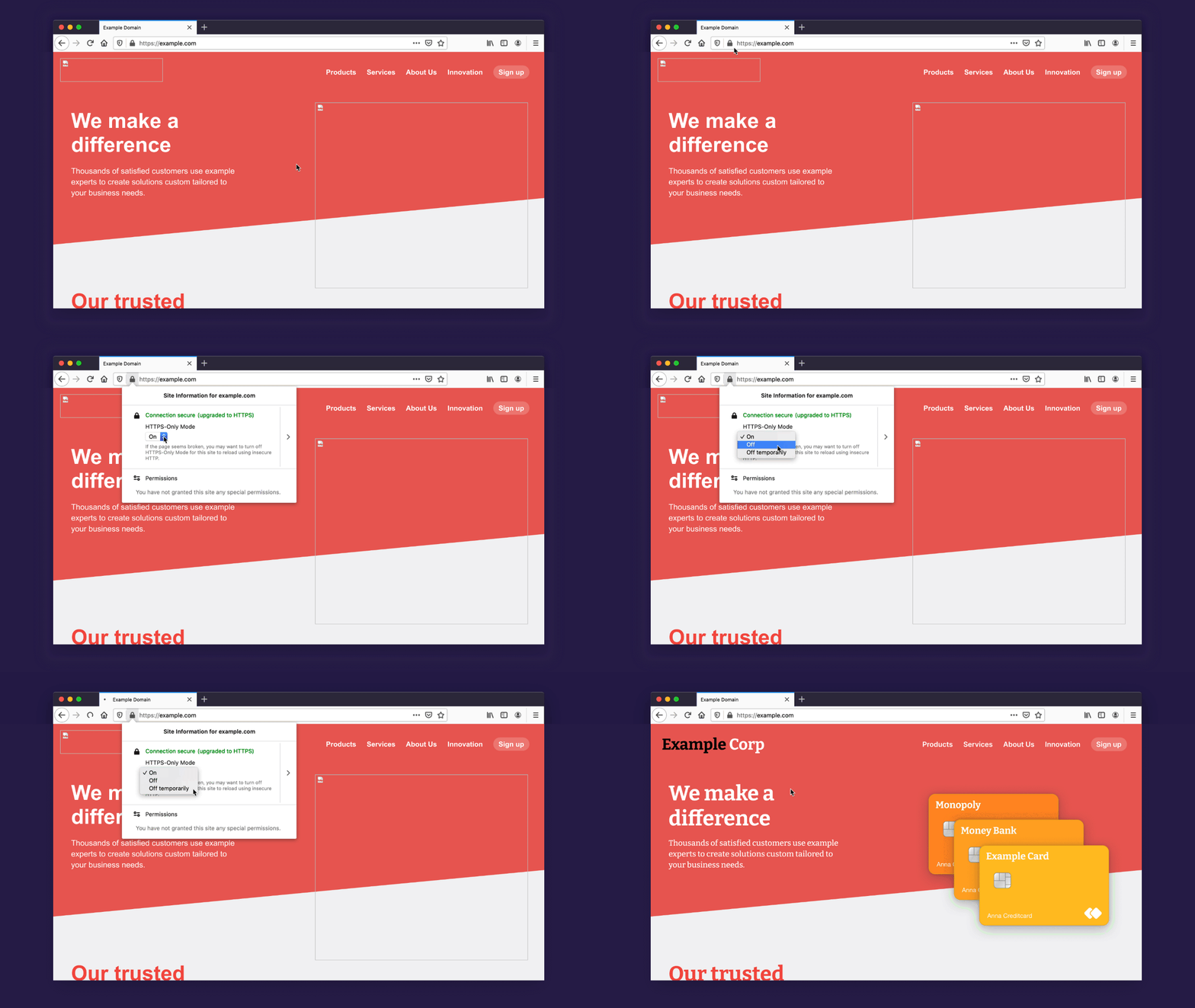
It also can happen, rarely, that a website itself is available over HTTPS but resources within the website, such as images or videos, are not available over HTTPS. Consequently, some web pages may not look right or might malfunction. In that case, you can temporarily disable HTTPS-Only Mode for that site by clicking the lock icon in the address bar:

The future of the web is HTTPS-Only

Once HTTPS becomes even more widely supported by websites than it is today, we expect it will be possible for web browsers to deprecate HTTP connections and require HTTPS for all websites. In summary, HTTPS-Only Mode is the future of web browsing!

Thank You

We are grateful to many Mozillians for making HTTPS-Only Mode possible, including but not limited to the work of Meridel Walkington, Eric Pang, Martin Thomson, Steven Englehardt, Alice Fleischmann, Angela Lazar, Mikal Lewis, Wennie Leung, Frederik Braun, Tom Ritter, June Wilde, Sebastian Streich, Daniel Veditz, Prangya Basu, Dragana Damjanovic, Valentin Gosu, Chris Lonnen, Andrew Overholt, and Selena Deckelmann. We also want to acknowledge the work of our friends at the EFF, who pioneered a similar approach in HTTPS Everywhere’s EASE Mode. It’s a privilege to work with people who are passionate about building the web we want: free, independent and secure.


The post Firefox 83 introduces HTTPS-Only Mode appeared first on Mozilla Security Blog.

18 Nov 05:09

The Best USB-C Laptop and Tablet Chargers

by Nick Guy
Our four picks for best USB-C laptop and tablet chargers, placed next to a laptop that is being charged with a USB-C cable.

Buying a new laptop charger was once an arduous and expensive ordeal, but computers with USB-C charging have made it much easier and more affordable.

The best choice for almost any modern tablet or laptop is Nekteck’s 60W USB-C GaN Charger. This adapter is just as powerful and reliable as a replacement from your laptop’s manufacturer, and it’s smaller than almost any other we’ve seen. It’s safety-tested and certified, and it comes with its own USB-C charging cable, making it a particularly great value at its very low price.

18 Nov 05:09

RT @AdamBienkov: Spectator editor Fraser Nelson was on the BBC earlier denying that his magazine has ever defended Greek neo-nazis. Here’s…

by Adam Bienkov (AdamBienkov)
mkalus shared this story from mrjamesob on Twitter.

Spectator editor Fraser Nelson was on the BBC earlier denying that his magazine has ever defended Greek neo-nazis.

Here’s an article he published while editor, as it originally appeared on their website. pic.twitter.com/iPvLnLpfOn


Retweeted by James O'Brien (mrjamesob) on Tuesday, November 17th, 2020 3:26pm


1289 likes, 477 retweets
18 Nov 05:09

RT @jdportes: So @Frasernelson claims that this, which appeared in the @spectator is not a defense of the neo-Nazis of Golden Dawn. A simpl…

by Jonathan Portes (jdportes)
mkalus shared this story from mrjamesob on Twitter.

So @Frasernelson claims that this, which appeared in the @spectator is not a defense of the neo-Nazis of Golden Dawn. A simple, straightforward lie, and he knows it. pic.twitter.com/am9ToaN77c


Retweeted by James O'Brien (mrjamesob) on Tuesday, November 17th, 2020 3:58pm


354 likes, 122 retweets
18 Nov 05:09

Amstelvar

Amstelvar

A real showcase of what variable fonts can do: this open source font by David Berlow has 17 different variables controlling many different aspects of the font.

Via @markboulton

18 Nov 05:09

Vancouver Through Two Plagues~Fundraising Webinar to Benefit Vancouver Archives

by Sandy James Planner


If you have not been on a walking tour or an event and met Vancouver historian John Atkin, now is your chance to hear him moderate a fascinating panel on the impact and outcomes of the 1918 Spanish Flu and the 2020 Covid-19 Pandemic.

The 1918-19 influenza outbreak and our current CoViD-19 pandemic have many parallels in government action, public reaction, and a concern for the economy.

Join our panelists Dr Margaret Andrews, Professor of History at Washington State University  and  Simon Fraser University’s Duke of Data Andy Yan for an enlightening discussion on pandemics then and now.

Funds raised for the Friends of the Vancouver City Archives, whose contributions support the work of the City of Vancouver Archives, including making materials from its holdings available online.

This event is sure to be oversubscribed so get your reservation in. The suggested cost is $15.00 CAD plus tax, and if you wish to provide a donation over $25.00, you will get a tax receipt.

Date: Thursday December 3, 2020

Time: 7:00 p.m. Pacific Time

You can reserve your space by clicking on this link.

Image: VIA


18 Nov 05:08

Remember those Future Climate Refugees Coming North? Is it Happening Now?

by Sandy James Planner

It was always a surprise to be in Vancouver’s downtown commercial areas and help tourists with directions in what would be the most blinding heat of a pre-Covid Vancouver summer.Tourists from the southern United States would almost universally respond how great it was to be out of the humid heat of their own hometowns.

Price Tags has already posted about the fact that projection models are showing the movement of millions of people to American northeast and northwest cities, with populations in places like Minnesota, Michigan and Vermont  growing by ten percent.  These areas will become more temperate and inviting. It’s expected that cities like Detroit, Rochester, Buffalo and Milwaukee will be sought after for relocating climate refugees for the “excess capacity in infrastructure, water supplies and highways”.

Access to fresh water, cooler temperatures and  less fire hazards were perceived as priorities. Add in the need for Covid pandemic physical distancing, and some of that migration has already started.

In the Pacific northwest median sales prices  in Bellingham Washington have increased 16.5 percent, and the number of homes sold has increased 26 percent. As one managing broker stated “People are relocating from areas like Seattle, Portland and California. I’ve helped several clients relocate from Seattle because they want to get out of the city.”

How far north will climate refugees travel to have “liveable” usable summers?

Propublica’s data in this article by L. Waldron and A. Lustgarten  suggests that climate “damage” will mean that the southern third of the United States will become so hot it will disrupt the economy “erasing more than 8% of its economic output and likely turning migration from a choice to an imperative.”

“Wet Bulb” temperatures when deadly heat and humidity combine will be in effect for one day out of every twenty in Louisiana. It is estimated that Maricopa County in Arizona will have six months of temperature days over 95 degrees fahrenheit or 35 degrees celsius.  Growing food will be challenging, and sea rise will transform the coast lines.

And there is a bigger question in the future of this climate refugee migration. Who will be migrating to a more temperate climate, and what happens to the people, due to economic or other factors, that are left behind?

Here is a short YouTube video that outlines Propublica’s findings.

18 Nov 05:08

Acquia switches from Marketo to Campaign Studio (aka Mautic)

by Dries
The image reads: 'Breaking news:

When Acquia acquired Mautic Inc (now named Acquia Campaign Studio), we believed that the world needed to move beyond closed, legacy marketing solutions like Marketo.

At the time of the acquisition, Acquia was a Marketo user. As of November 2020, Acquia moved completely off Marketo to Campaign Studio.

While this move probably won't come as a surprise, it still is an important milestone for us. Marketo was a critical part of Acquia's marketing operations.

The freedom to innovate

Our marketing team needed flexibility to experiment with new technologies. Marketo limited them to using integrations within its own ecosystem. With an Open Source solution like Acquia Campaign Studio, we took charge of our own destiny. We can now build all the integrations and customer experiences we want.

Thinking beyond email

Today, almost every interaction with a customer is multi-faceted. Customers may be using mobile, voice, chat or any number of other channels. Marketo still only includes email in its communications offering. With Campaign Studio, Acquia can reach customers and prospects through multichannel communications, including email, direct social messages, SMS, web notifications and more.

Enterprise features without complexity

Many enterprise software tools (Marketo included) lock customers into their proprietary ecosystems. Getting data out of these platforms is much harder than getting it in. This is one of the reasons why it took some time to migrate off Marketo. It feels great to take control back over our own data.

Embracing open marketing

Overall, an open approach to marketing will provide Acquia with many advantages. We're no longer locked into a vendor's roadmap and limited partner ecosystem. Instead, we can move quickly to create the exact solution we need to make our customers' experiences better and more personal.

Many technology solutions shape what you can do for the customer experience. Starting today, we're letting the customer experience shape the solution.

18 Nov 05:08

What is the riskiest (non-human) thing to touch in the age of Covid

by Gordon Price

An escalator rail? ATM machine? Weights in a gym?  Computer keyboard? Pushbuttons of any kind?

Nope.

It’s this.  (Click title):


Testing Reveals High Contamination Levels of Everyday Objects in Major U.S. Cities; Gas Pump and Mailbox Handles are Among the Dirtiest. 


18 Nov 05:08

Retro-iPad: Die Geschichte von Apples Newton MessagePad

by Volker Weber
Zu früh, zu ambitioniert: Mehr als zehn Jahre vor der Vorstellung des iPad brachte Apple bereits ein Tablet heraus. Das Newton MessagePad blieb erfolglos.

More >

18 Nov 05:04

Apple’s future: A look at M1-powered MacBook Air, MacBook Pro and Mac mini

by Patrick O'Rourke
M1 Mac lineup

After years of rumours, Apple’s first ARM-based M1-powered Mac devices have finally arrived.

While early reports indicated that Apple would start the two-year transition to its own proprietary silicon by releasing a refreshed version of the now-dead 12-inch MacBook, the tech giant has instead jumped in head-first with a wide range of new M1 Macs.

Likely because they’re the tech giant’s most popular devices, Apple has released three M1-powered Macs: the MacBook Air, the 13-inch MacBook Pro and the Mac mini.

Apple, as expected, makes lofty claims about its first ARM-based system-on-a-chip (SoC). The chip itself is one of the first in the industry to be designed with 5-nanometer technology. Further, instead of individual chips for the CPU, GPU, security, I/O and memory, the M1 combines everything onto a single discrete SoC.

While this has several benefits, it primarily allows a Mac’s various components to communicate more effectively.
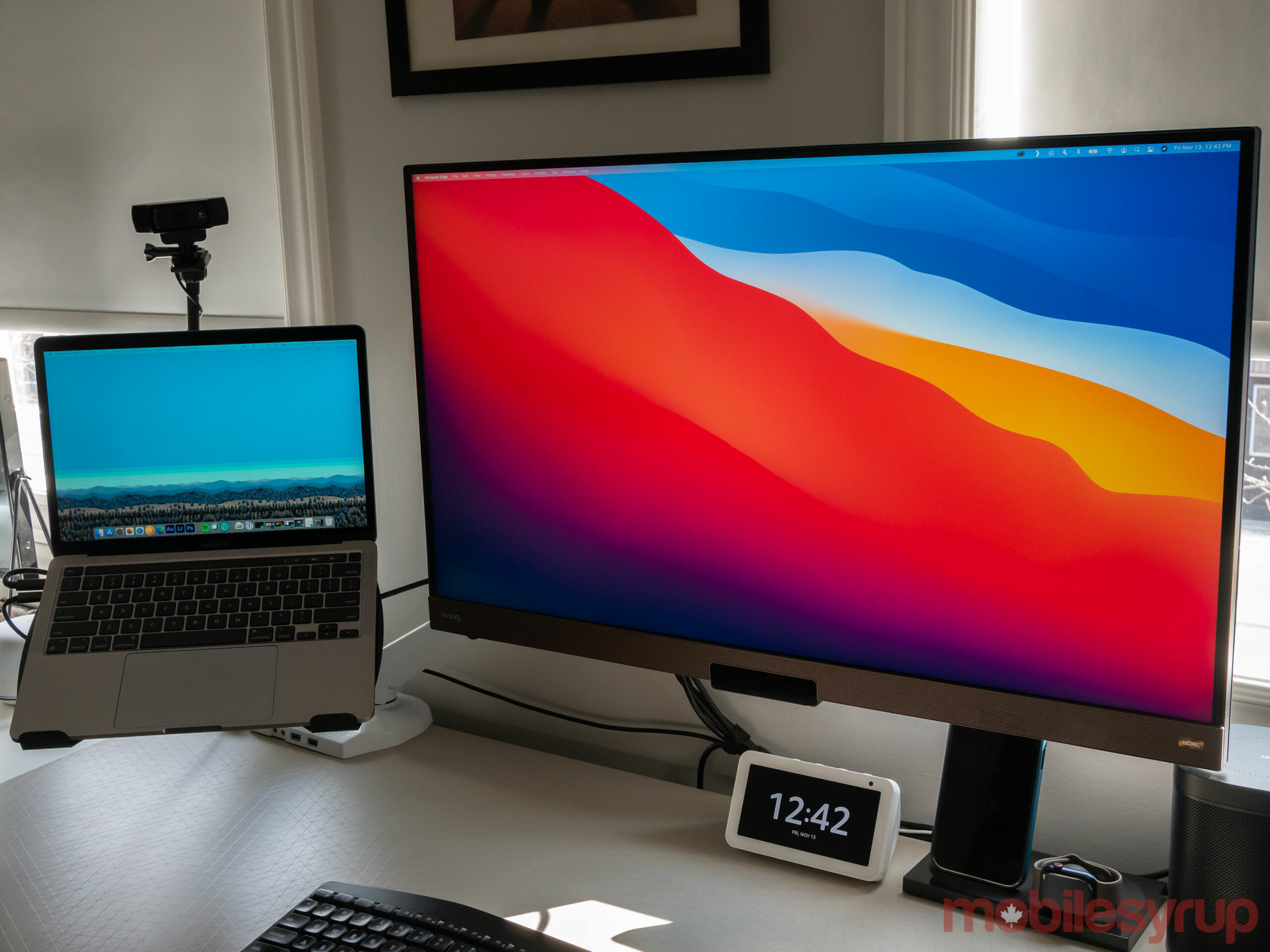
MacBook Pro connected to 4K monitor

Though I’ve only spent a brief amount of time with all three new Macs, including the MacBook Air, the 13-inch MacBook Pro and the Mac mini, most of Apple’s claims regarding its new chip seem accurate (more on this later).

Apple says that its 8-core CPU features four high-performance cores and four high-efficiency cores, offering an up to 3.5x increase in CPU performance. On the GPU side of the equation, the 7- or 8-core GPU (the entry-level MacBook Air features a 7-core GPU due to chip binning) amounts to up to 6x faster graphics performance across the board.

There’s also a 16-core Neural Engine capable of computing 11 trillion operations per second, and 16GB of RAM built directly into the M1 chip.

Make no mistake, what Apple has accomplished with the M1 chip feels, at least in some sense, like a generational leap forward for the Mac line in terms of raw power.

That said, the transition away from Intel’s chips isn’t entirely smooth.

Note: This story is a brief look at Apple’s M1 chip and new Mac devices. I’ll have full reviews of some of Apple’s M1-powered Mac computers in the coming months. 

Rosetta II emulation and growing pains

For apps to truly take advantage of Apple’s new chip, they need to be entirely redesigned to run off the M1.

While the tech giant’s entire software suite, including Final Cut Pro, Logic Pro, Xcode, Create ML, FaceTime and more, have been optimized for the M1 chip, the majority of major third-party app developers still need to update their software. That said, there are some M1 versions of third-party apps already available, including DaVinci Resolve and Pixelmator Pro 2.0.

For many, however, the M1 version doesn’t exist or is still in the works. This includes Adobe’s entire Creative Cloud software suite, which I use daily to do my job. Lightroom support is coming soon, and Photoshop will arrive at some point in 2021. When the rest of the Adobe CC suite will transition to Apple’s M1 chip remains unclear.

The same can be said about nearly all the software I use on my MacBook Pro, including Microsoft’s Edge browser, GIF Brewery, Private Internet Access, Logitech Options and more. Google Chrome also doesn’t have an M1 version. As for Edge, it’s worth noting that Microsoft maintains a version of the browser compatible with ARM-based CPUs for Windows devices like the Surface Pro X, so it’s possible an M1 variant for Mac computers isn’t far off.

This Intel-based software is emulated through Apple’s new Rosetta 2 platform, an evolution of the Rosetta software the company used during the transition from PowerPC to Intel processors back in 2006.
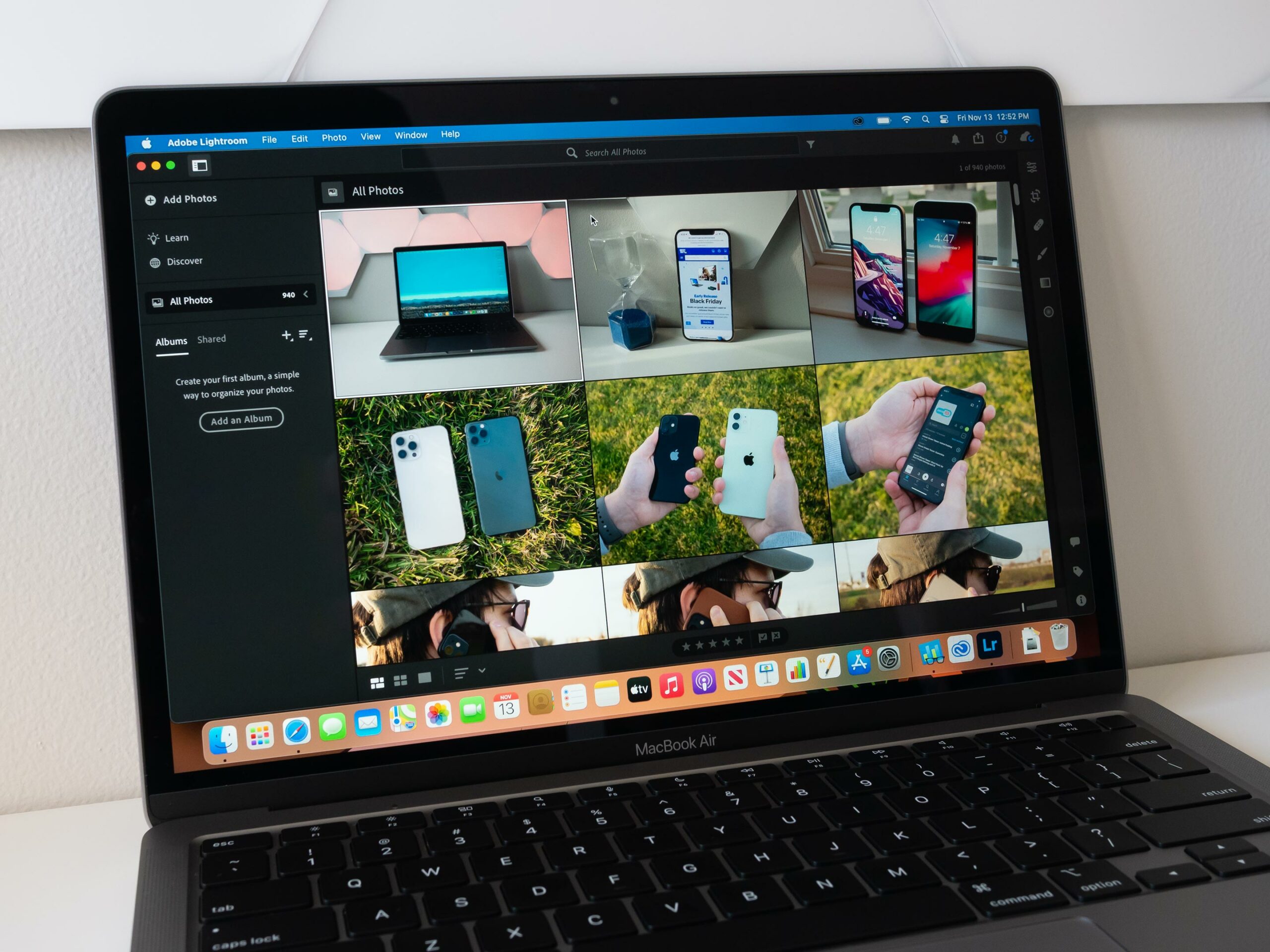
MacBook Air with M1 running Lightroom

While Rosetta 2 makes an admirable effort to emulate Intel Mac software, the experience isn’t perfect. Launching each app for the first time typically results in it taking twice as long to load, especially when it comes to Adobe’s CC apps like Photoshop and Lightroom. Once the apps are open, performance is roughly on par with my experience using the apps with the Intel i5 13-inch MacBook Pro (2020) I typically use. However, I did encounter the occasional bout of lag when working with multiple RAW image files.

I’ve also experienced several issues with Logitech Options, the Mac software I use to connect the company’s M720 mouse and K850 keyboard via a USB unifying receiver. Likely because Logitech’s connection software is being emulated, both the keyboard and mouse experience lag when connected to Apple’s USB-C-to-USB-A adaptor and the third-party USB-C-to-A hub I’ve been using for several months. Bypassing the unifying receiver and connecting directly through Bluetooth seems to solve the problem, but I still encounter the occasional mouse pointer stutter.

Then there’s Microsoft’s Edge browser, which, unsurprisingly, is still designed for Intel Macs. I do most of my day-to-day job within Edge, including accessing web-based apps like Slack, WordPress, Gmail and more. Of course, I could switch to the M1 version of Safari, but it would be a lot of work to shift everything over to Apple’s browser. While Edge runs decently through Rosetta 2, it does feel slightly sluggish at times, especially when launching apps like Slack and Gmail.
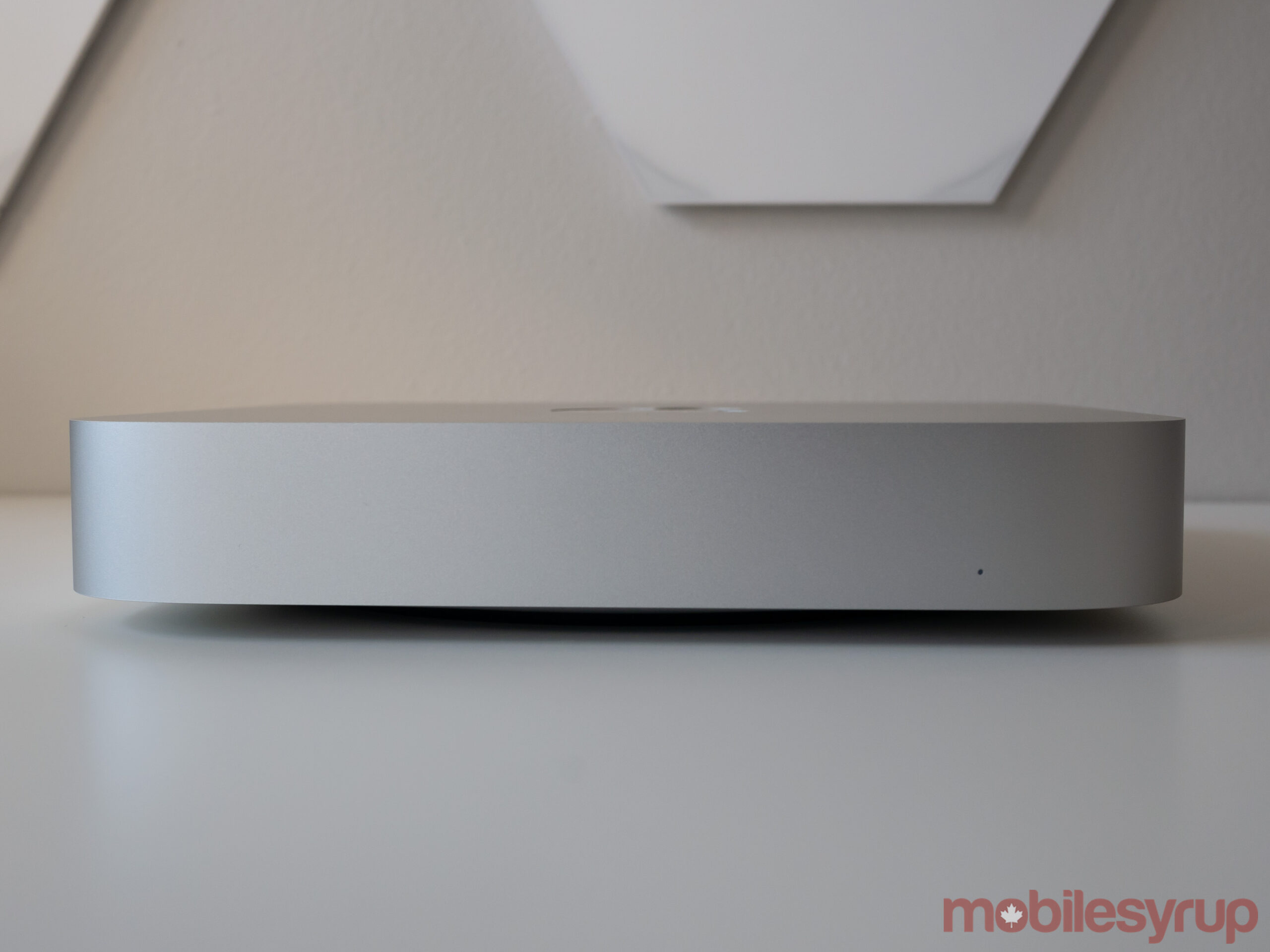
Mac mini

It’s also worth noting that restoring a new M1 Mac from a Time Machine backup is both time-consuming and somewhat frustrating. Following the restoration, the M1 MacBook Pro locked up several times. In fact, some Adobe CC apps wouldn’t even open initially until I restarted the computer. I’d suggest doing a clean install if you’re moving from an Intel to an M1-based Mac.

To be fair, these issues will start to disappear as more app developers port their software over to Apple’s M1 chips. The issue is it’s unclear how long that’s going to take.

The first M1 Macs

All three devices, including the MacBook Air, 13-inch MacBook Pro and the Mac mini, all look identical to their Intel counterparts.

Apple will almost certainly subtly change the design of all three devices since the architecture of the M1 probably gives it the ability to reconfigure the look of the Air and MacBook Pro. Unfortunately, that hasn’t happened yet.
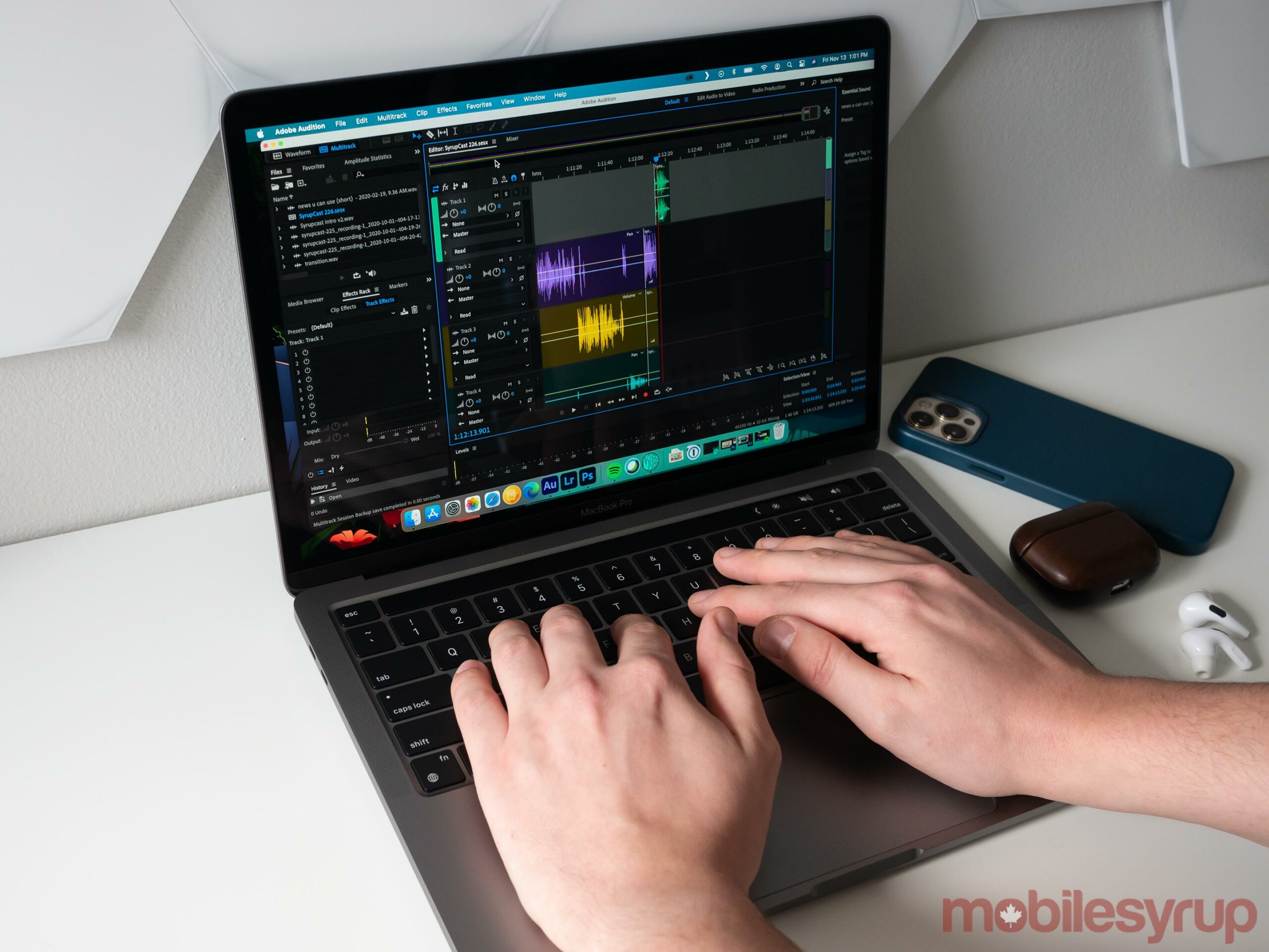
13-inch MacBook Pro with M1

The Mac mini looks the same as its Intel-based counterpart, and so does the MacBook Air. The M1 MacBook Pro, on the other hand, replaces the entry-level Pro that only features two USB-C Thunderbolt 3 ports.

The fact that the new M1 MacBook Pro only features two USB-C ports is strange and disappointing. Apple claims that it opted for two ports simply because the new M1 Pro replaces the two-port Intel variant. While true, it’s also likely a limitation of Apple’s M1 processor to some extent, or possibly related to its license to use Intel’s Thunderbolt technology.

This forced me to reconfigure my work from home setup considerably. First, my USB-C-to-USB-A hub needed to be moved to the laptop’s left side along with the USB-C cable I used to connect to my 32-inch 4K BenQ EW3280U monitor. Further, when both of these devices are connected, I’m unable to use my USB-C SD card reader, forcing me to use a USB-A SD card reader with my hub.
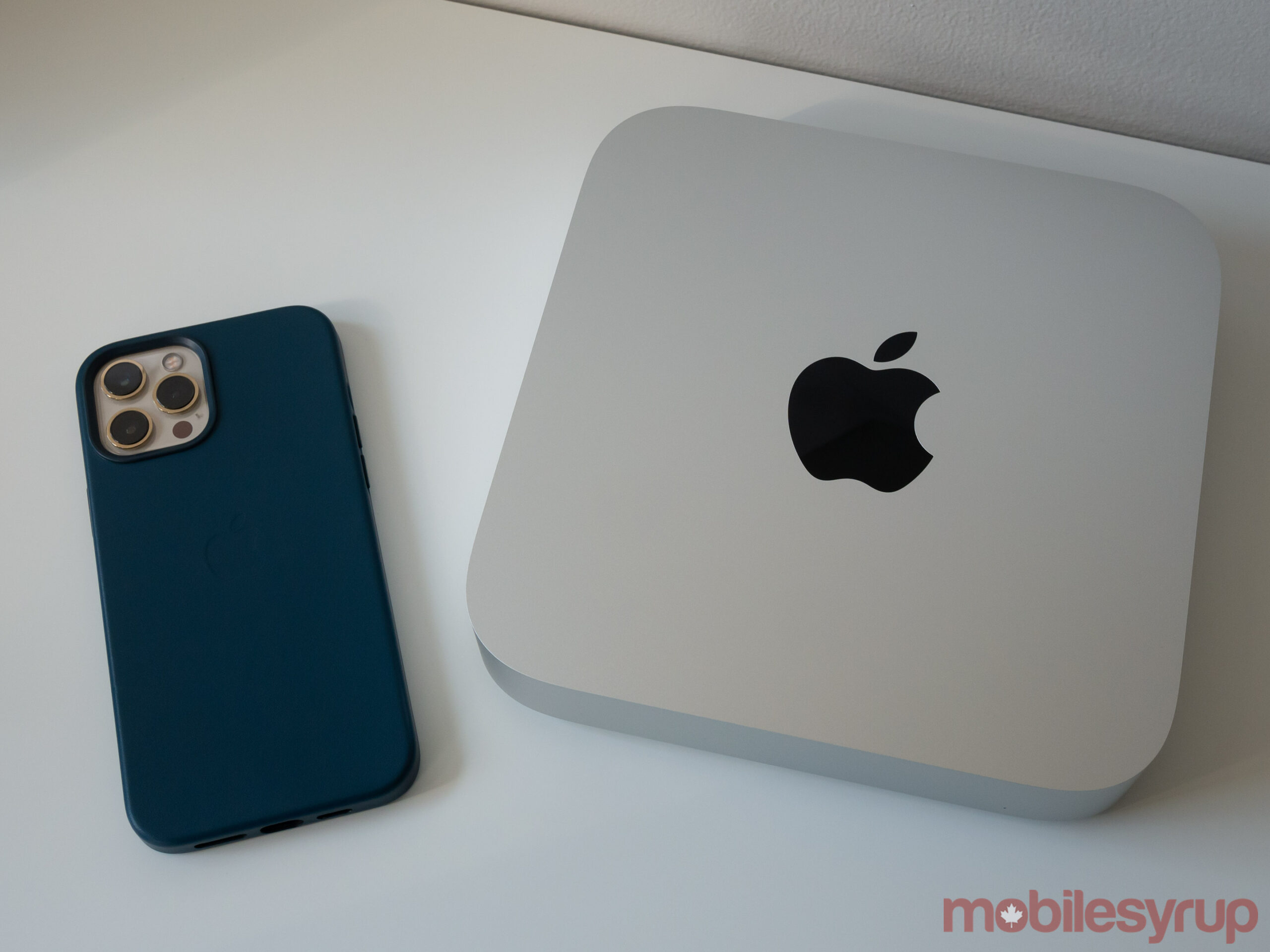
Mac Mini with M1

There’s also a power issue with my USB hub where as soon as I plug the USB-C card reader in, it disables the Logitech Unifying receiver. I realize that these issues are specific to me, but other people will likely experience similar problems if they plan to make the jump from a four USB-C port MacBook Pro to a two USB-C port M1 MacBook Pro.

Since the MacBook Air also only features two USB-C/Thunderbolt 3 ports, I experienced the same issues with Apple’s lightweight laptop.

While minor inconveniences in the grand scheme of things, in the era where many of us work from home, pain points like this are frustrating.

It’s also worth noting that all of Apple’s M1 devices can only be configured with 16GB of RAM, which seems to be a limitation of the M1’s architecture.

All M1 devices feature the same processor

The first thing to note about Apple’s first M1 Macs is that the MacBook Pro and the Mac mini are technically more powerful than the MacBook Air.

While all three new M1-powered Macs feature the same CPU and GPU and can theoretically run at identical speeds, the fact that the MacBook Pro and the Mac mini feature a fan, allows the computers to run at peak performance for longer. On the other hand, the MacBook Air doesn’t feature a fan and, as a result, features cooling that isn’t as efficient as Apple’s other two M1 launch computers.

Generally, modern CPUs run faster when they feature better cooling.
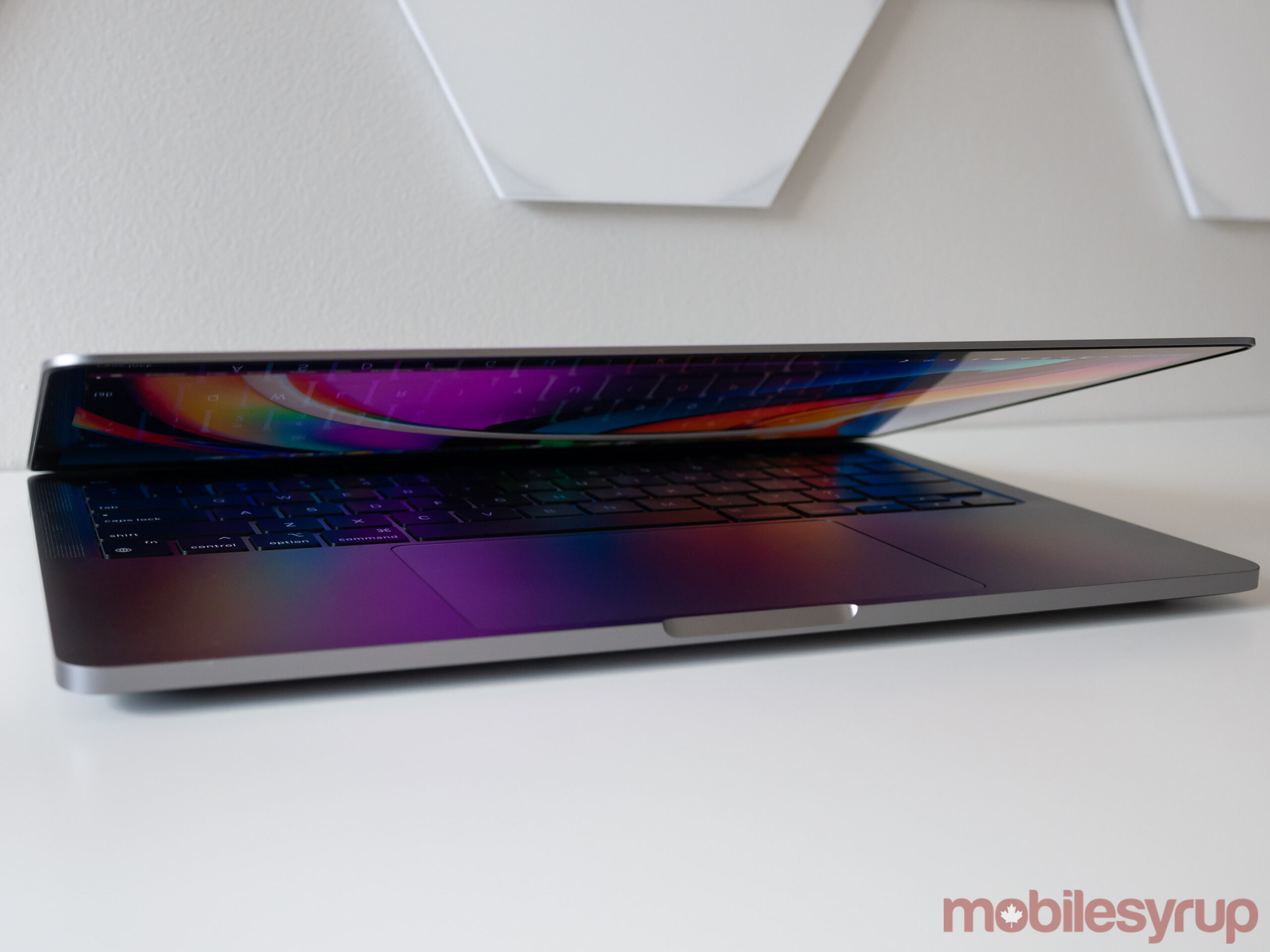
MacBook Pro with M1 closed

While I haven’t spent that much time with the new M1 Macs, this seems to be accurate based on the benchmarks (seen below) and my actual experience with the devices. For example, I connected the M1 13-inch MacBook Pro to my 4K monitor, opened Lightroom CC, Photoshop CC and edited several RAW images. On top of this, I played a 4K video from YouTube on my monitor and had several Edge windows running simultaneously.

While this would normally result in my 13-inch MacBook Pro (2020) with an Intel Core i5 processor and 16GB of RAM lagging quite a bit, the new M1 MacBook Pro’s fans didn’t turn on for several minutes and I didn’t experience any slowdown. I experienced similar results with the new M1 Mac mini, which also features a physical fan.

When performing this same experiment with the M1 MacBook Air, the fans turned on almost immediately. While things did run more smoothly with the new Air when compared to its Intel counterpart, there were instances where I’d be stuck with a spinning beach ball for several seconds, especially with Adobe’s software.
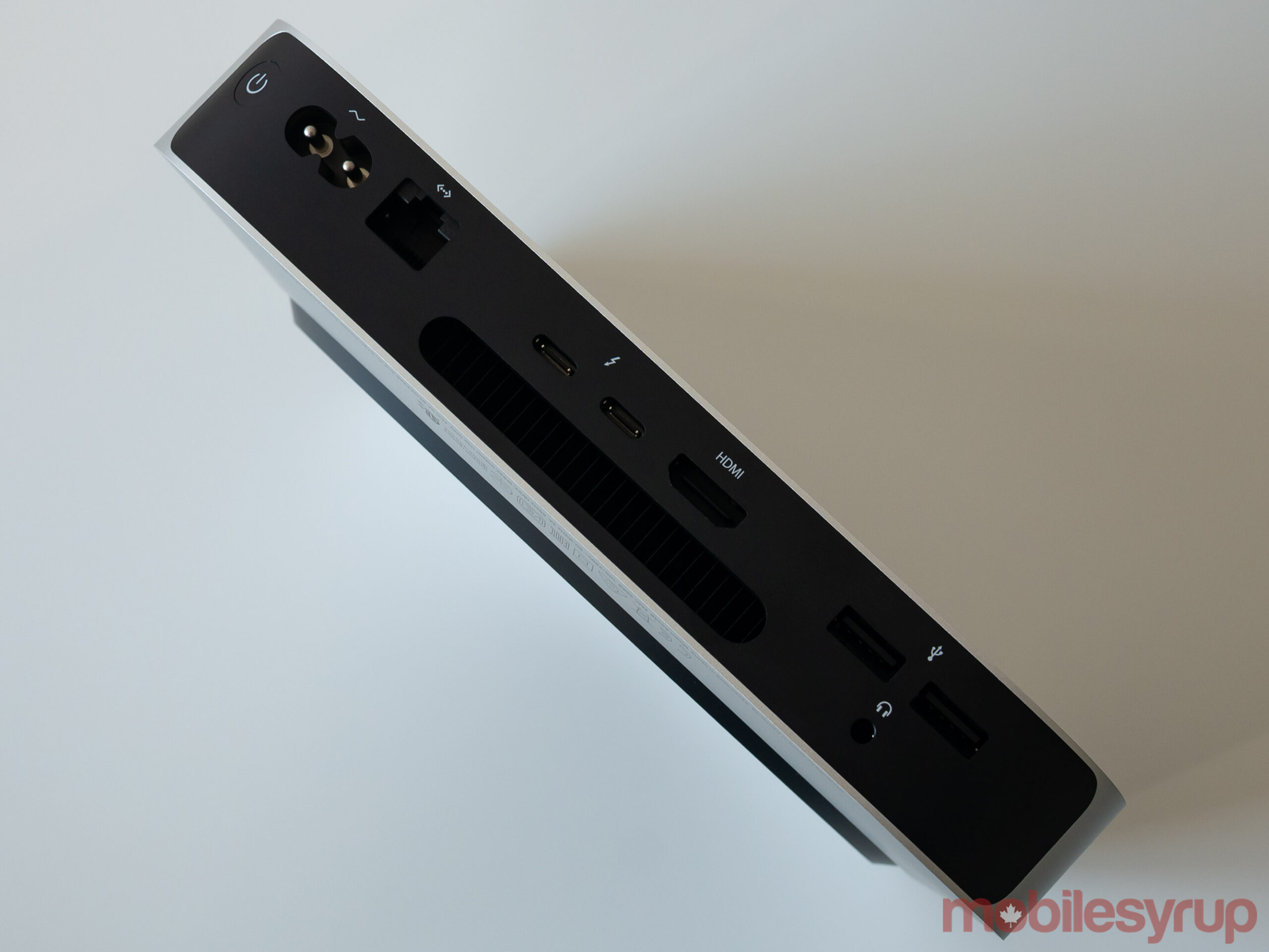
Back of Mac mini with M1

It’s important to note that all of this software is being emulated through Rosetta II. It will be interesting to see how the real-world performance changes once the apps I most frequently use get dedicated M1 versions.

Though battery life seems improved across all three devices, it isn’t easy to definitively know if Apple’s claims are accurate given I’m emulating software via Rosetta 2. On paper, Apple says the MacBook Air with M1 can get 15 hours of web browsing and 18 hours of Apple TV app movie playback (it’s unlikely most Mac users will only be watching video through the Apple TV app). The MacBook Pro, which features a larger 58.2Wh battery compared to the MacBook Air’s 49.9Wh, can get up to 17 hours of web browsing and 20 hours of Apple TV movie playback.

Battery life does seem improved across the board and in some ways, reminiscent of the classic Macbook Air from several years ago, though more testing is definitely necessary. I can say that I wrote most of this feature and edited photos for it with the M1 MacBook Air, and the battery still had 30 percent left after starting from nearly a full charge and working from roughly 11 noon to 6pm. This is very impressive and well beyond what the Intel MacBook Air is capable of.

One major question that still remains surrounding Apple’s new M1 Macs is when the tech giant plans to introduce GPUs that aren’t integrated into the M1 chip. Though it’s still unclear, the tech giant likely plans to do this with the 16-inch MacBook Pro with M1 when it inevitably appears likely in early 2021.

M1 benchmarks are impressive

Though benchmarks don’t always tell the full story when it comes to devices, and this is especially apparent with Apple’s new M1 Macs given nearly all apps are still emulated, they still show off what a true generational leap the M1 is when it comes to the future of Apple’s Mac line.

Across the board, the single-core and multi-core performance of the M1 is well beyond what I expected.

MacBook Air
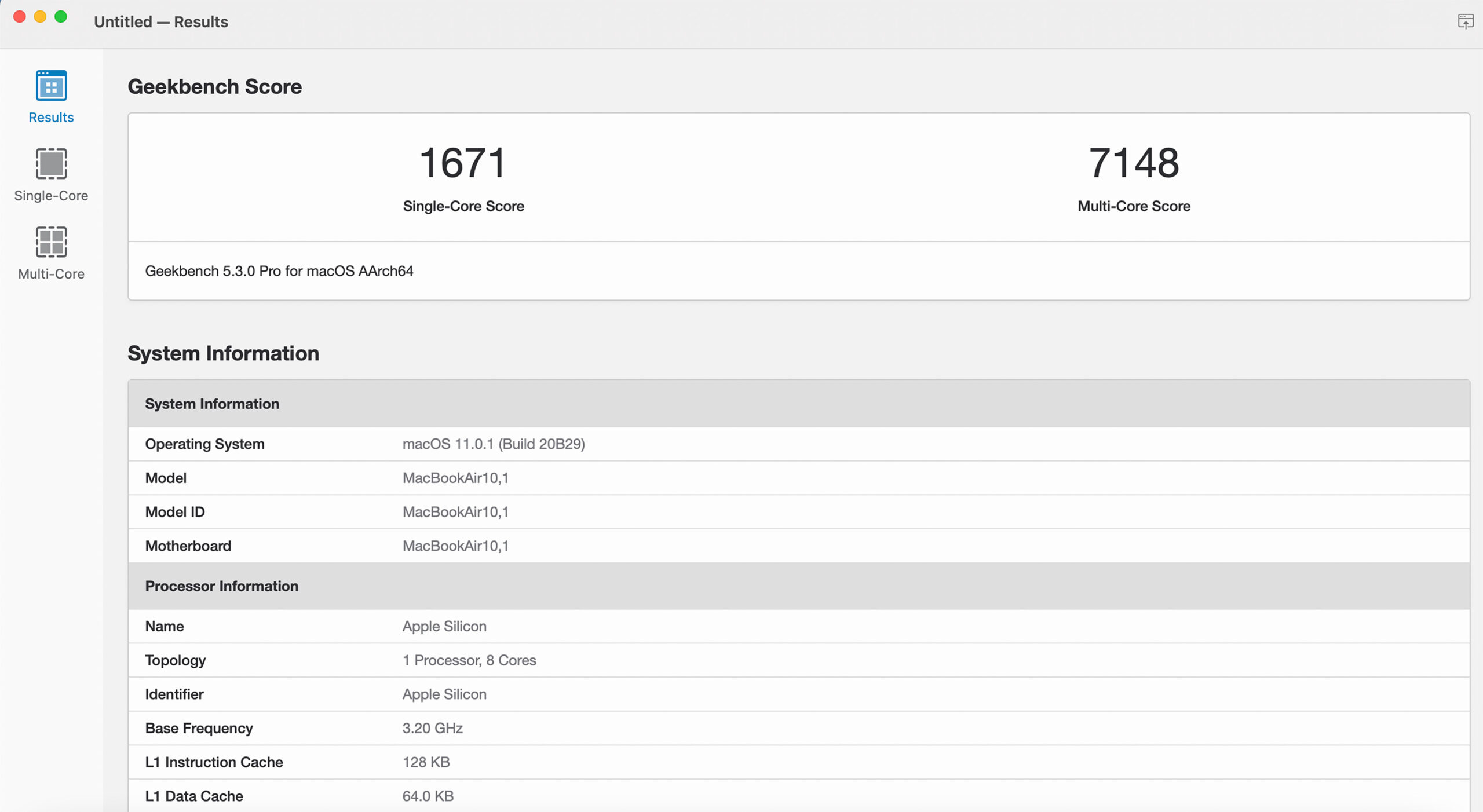
MacBook Air with M1 benchmark

The MacBook Air with M1 hits 1,671 for single-core and 7,148 for multi-core performance. This, shockingly, makes it more powerful than the 16-inch MacBook Pro (2019) with an Intel Core i9-9980HK processor in terms of multi-core performance, which comes in at 6,880.

Regarding single-core performance, the MacBook Air with an M1 chip comes in at 1,588, which is well above the Intel Core i5-1038NG7 13-inch MacBook Pro (2020) (1,147), the laptop I use every day.

MacBook Pro
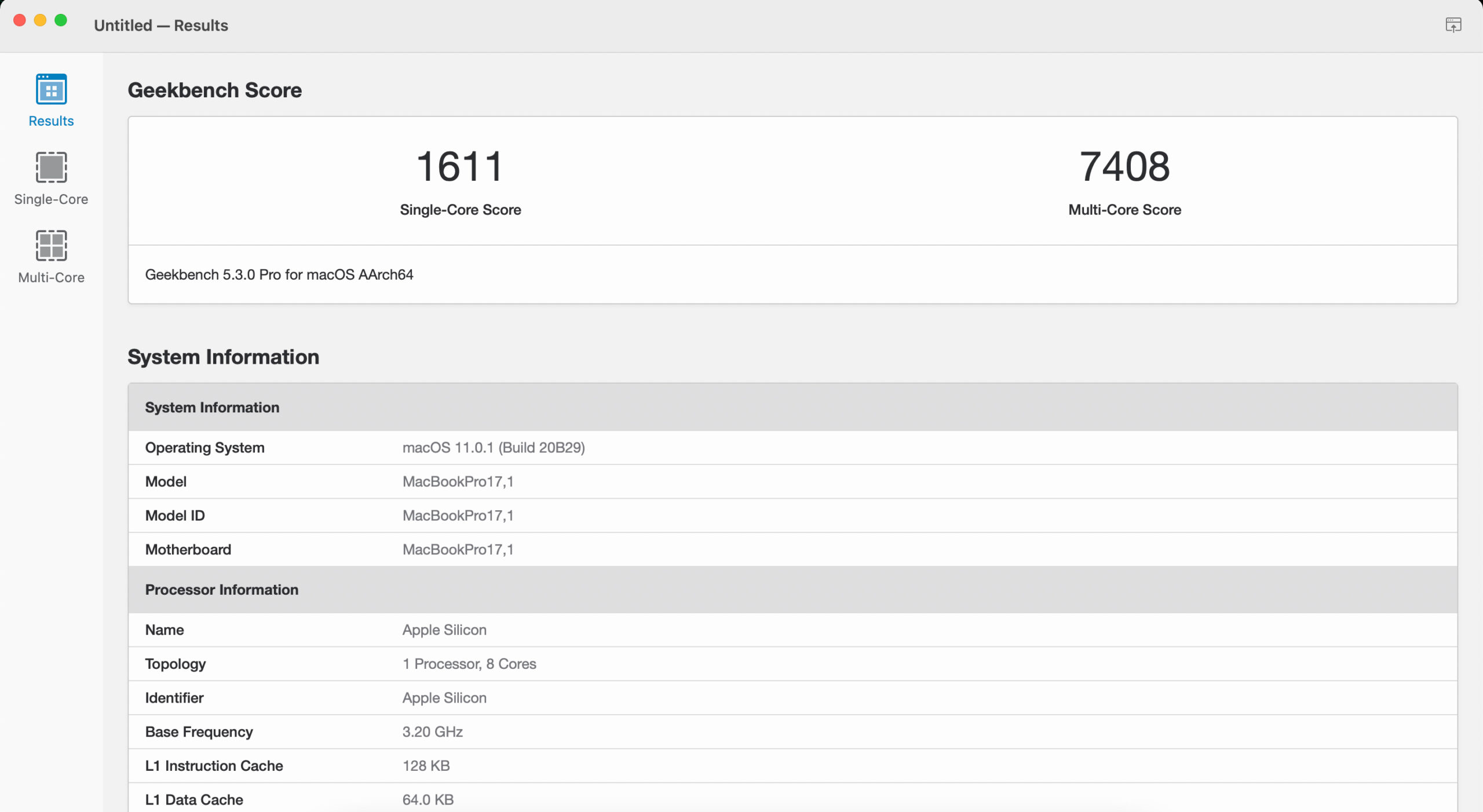
MacBook Pro with M1 Geekbench benchmark

Apple’s 13-inch MacBook Pro with M1 hits 1,611 for its single-core score and 7,408 for its multi-core score.

In terms of multi-core performance, this is higher than the 6,880 the 16-inch MacBook Pro (2019) with an Intel Core i9-9980HK is capable of achieving and even surpasses the 27-inch iMac with an Intel Core i9-9900K processor (8,273).

This makes the laptop substantially more powerful than the Intel Core i5-1038NG7 13-inch MacBook Pro (2020) I use as my daily driver (1,147) and even the 27-inch iMac (2020) (1,248), in terms of single-core performance.

Mac mini
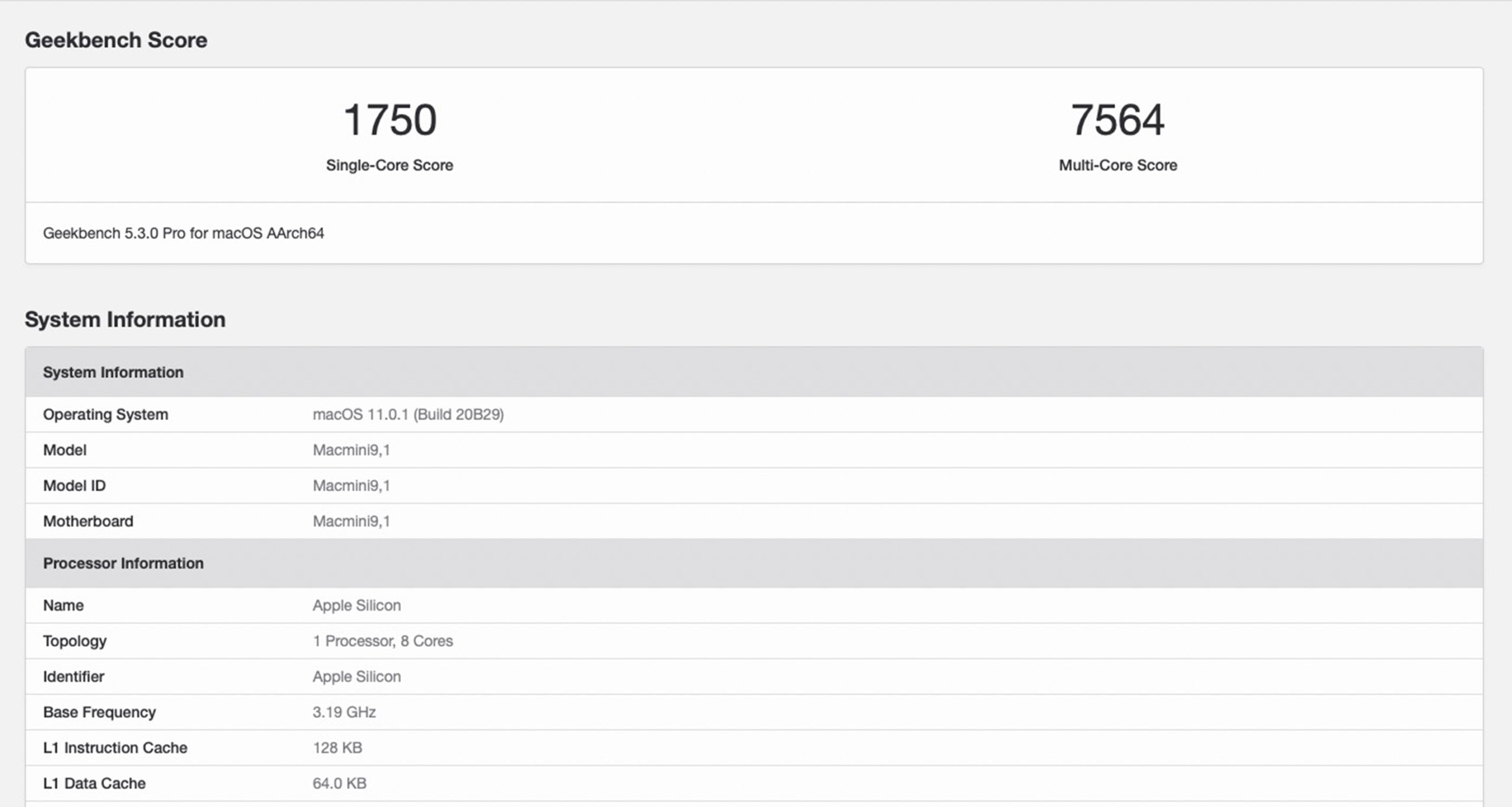
Mac mini benchmark

Finally, Apple’s M1 Mac mini hits 1.750 for single-core and 7,564 for its multi-core score. This puts it just below the 27-inch iMac (2019) with an Intel Core i9-9900k processor, which hits 8,273 for multi-core, but above the 16-inch MacBook Pro (2019) with an Intel Core i9-9980HK processor (7,989). It’s also way above the Mac mini (2018) with an Intel Core i7-8700B processor (5,495).

Similar to every other M1 device, this puts the Mac mini above the 27-inch iMac (2020)’s 1,248 single-core score and leagues ahead of the Mac mini (2018) with an Intel Core i7-8700B processor (1,102).

Should you buy an M1 Mac now?

The answer to this question is somewhat difficult. While the performance of Apple’s new M1 Mac line is undeniably impressive, Rosetta 2 emulation still needs work. This means that those who live in a world where they only use Apple’s own apps and services — and a lot of people do — the transition will be fine, and they’ll really appreciate the additional hardware power and battery life the M1 offers. For everyone else, it’s likely worth waiting until more third-party developers release M1 optimized apps.

In my particular case, Adobe’s CC suite is the missing link with the new M1 Macs. We know that Adobe’s most popular apps will likely get dedicated M1 versions, but it’s unknown when that will happen. MobileSyrup reached out to Adobe for more information regarding Creative Cloud’s release on M1 Macs and did not receive a response from the company.
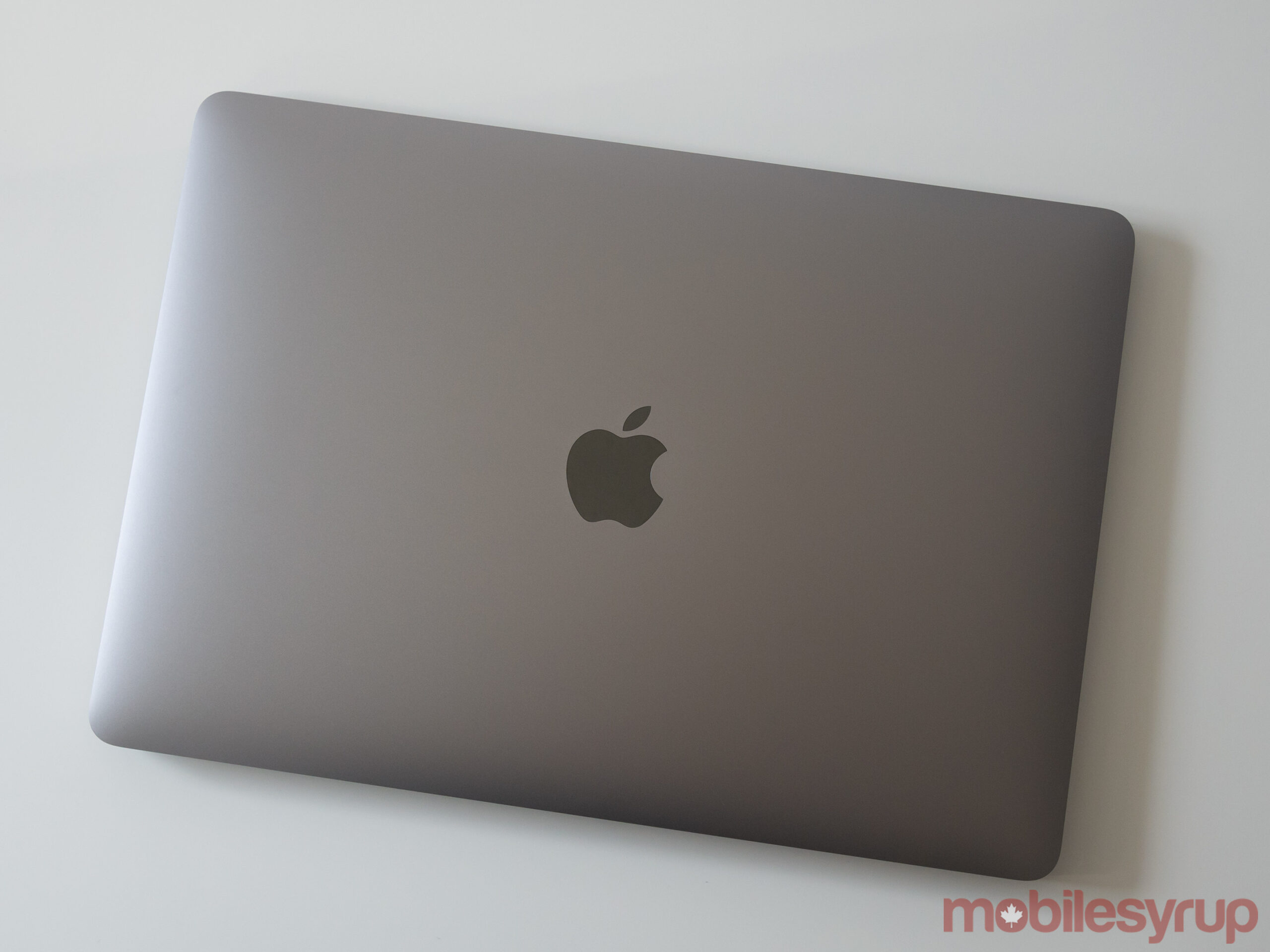
Further, Microsoft releasing an M1 optimized version of its Edge browser would also help convince me to switch to an M1 Mac since moving between browsers is often a little tedious. Yes, I could switch to Safari, but I also work on Android and Windows devices, so this would ruin my ability to jump between platforms.

It’s also still unclear if Apple’s Universal App strategy that allows iOS and iPadOS apps to run on M1 Macs natively will pay off because they’re not yet widely available. While it will be great to see the macOS app ecosystem expand significantly, every touchscreen-based app likely won’t translate that well to mouse/trackpad input. That said, the introduction of mouse/trackpad compatibility on iPadOS will hopefully help make iPad apps translate better to macOS.

With all that said, it’s clear the M1 is the future of Apple’s Mac line — unfortunately, as expected, there’s just going to be growing pains for the next few months.

The new 13-inch MacBook Pro with M1 starts at $1699 for the 8GB of RAM, 256GB of storage iteration. Apple is still selling Intel-based versions of the MacBook Pro. The 8GB, 256GB of storage MacBook Air with M1 starts at $1,299. The M1 version of the Air replaces the Intel variant. Finally, The base-level M1 Mac mini now starts at $899 and ranges up to $2,149 if you add the 2TB hard drive and 16GB of RAM add-ons. Apple is still selling the 6-core Intel-based Mac mini for $1,399 CAD.

The post Apple’s future: A look at M1-powered MacBook Air, MacBook Pro and Mac mini appeared first on MobileSyrup.

18 Nov 05:04

Microsoft’s new Pluton chip will enhance security on Windows PCs

by Jonathan Lamont
Microsoft logo

Microsoft announced its new ‘Pluton’ security processor, a ‘chip-to-cloud’ security technology designed to protect key areas of computers that currently can’t be reached by traditional hardware and software protection methods.

The Redmond, Washington-based company collaborated with silicon partners, including AMD, Intel and Qualcomm on the Pluton security processor. Microsoft says Pluton was pioneered in Xbox and the Azure Sphere. Microsoft explained that enhancements in Windows 10 have made things more difficult for attackers. As such, attackers have changed targets and now focus on the seams between hardware and software, which can’t be monitored for breaches using traditional tools like anti-virus software.

Microsoft says that the Pluton security processor will make it significantly more difficult for attackers to “hide beneath the operating system” by exploiting the seams between hardware and software. Further, Pluton will improve the company’s ability to guard against physical attacks, prevent credential and encryption key theft and improve recovery from software bugs.

Pluton builds security directly into the CPU, reducing physical attack vectors

To understand the benefit of Pluton, it helps to know where PC security is coming from. Currently, many PCs maintain OS security with a chip separate from the CPU called the ‘Trusted Platform Module’ (TPM). TPMs are hardware components used to securely store keys and other security measures that can verify the integrity of the system. Windows has supported TPMs for over a decade, and that they power critical tech like Windows Hello and BitLocker.

Microsoft says that the effectiveness of TPMs have made them a target for attackers. For example, attackers can target the communication channel between the CPU and TPM (typically a bus interface). These channels allow the CPU and TPM to share information, but some physical attacks could allow a malicious actor to steal or modify information in transit between the security chip and processor.

The new Pluton security chip removes the vulnerability of the communication channel by building security directly into the CPU. Microsoft says that Windows PCs using the new Pluton architecture will first emulate a TPM that works with existing TPM specs and APIs. This allows customers to immediately benefit from Windows features that rely on TPMs. Further, it means that devices with Pluton will use the security processor to protect credentials, user identities, encryption keys and personal data. Microsoft claims that none of this information can be removed from Pluton, regardless if an attacker installs malware or gains physical access to a PC.

By storing sensitive data within the Pluton processor, it prevents emerging attack techniques like speculative execution from accessing key material. Additionally, Pluton provides the unique ‘Secure Hardware Cryptography Key’ (SHACK) technology, which makes sure that keys are never exposed outside the protected hardware, even to the Pluton firmware itself.

Pluton improves the security firmware update process

Another benefit of Pluton is that it can streamline the system firmware update process. Currently, customers can receive security firmware updates from a variety of different sources, which can be difficult to manage and lead to wide-spread patching issues. Pluton, however, offers a flexible and easy-to-update platform that’s authored, maintained and updated by Microsoft. Plus, Pluton will integrate with the Windows Update process similar to how Azure Sphere Security Service connects to IoT devices.

Microsoft says it introduced the Pluton design on the Xbox One console in 2013 as part of its integrated hardware and OS security capabilities. The company says it’s taken what it learned about mitigating attacks with hardware to deliver its Pluton chip-to-cloud security vision to future Windows PCs. Those interested in learning more about how Pluton works can check out this talk from Microsoft BlueHat, which goes over the chip worked in the Xbox One.

Pluton will provide next-gen hardware security protection to Windows PCs and will be integrated in future chips from AMD, Intel and Qualcomm. It’s not clear when these new chips will be available, however. For those who build their own PCs, or those who prefer Linux, this announcement shouldn’t cause any worry. For PC builders, Pluton should make things easier by eliminating the need to search for motherboards with TPMs as Pluton will already be available in the CPU. Plus, Microsoft already uses Pluton on Linux through its Azure Sphere devices — there aren’t any details about Linux support for Pluton yet, but it will likely become available when CPUs with Pluton begin shipping.

Source: Microsoft

The post Microsoft’s new Pluton chip will enhance security on Windows PCs appeared first on MobileSyrup.

18 Nov 05:04

Proposed privacy bill promises transparency for Canadians, hefty fines for organizations

by Aisha Malik

Innovation Minister Navdeep Bains has introduced the proposed Digital Charter Implementation Act to modernize Canadian privacy laws.

Bains noted in a press conference that the act will give Canadians increased control over their data and provide transparency about how personal information is handled by companies.

The new legislation creates a new Consumer Privacy Protection Act, which removes the electronic documents section of the Personal Information Protection and Electronic Documents Act (PIPEDA).

If the bill is passed, companies could face fines of up to five percent of their revenue or $25 million, whichever is greater, for serious offences. Bains stated that this would be the “strongest fines among the G7.”

The act gives the privacy commissioner order-making powers, including the ability to force a company to comply with laws. The act also gives the commissioner the power to order a company to stop collecting data or using personal information.

The commissioner would also have the power to recommend fines for companies that do not comply with the law. It’s worth noting that Privacy Commissioner Daniel Therrien has been asking for these abilities for years, and outlined an urgent need for modernized privacy laws in his annual report released last month.

Under the act, a new Personal Information and Data Protection Tribunal will be created to levy these fines and hear appeals of the orders.

Bains outlined that the legislation will give Canadians the freedom to move their information from one organization to another in a secure manner. It also aims to ensure that Canadians have the ability to demand that their information be destroyed when it’s no longer needed.

He also stated that the legislation will ensure that when Canadians go online, consent requirements they’re presented with will be provided in plain simple language, and not in long or confusing legal language. 

The minister also stated that the act will be beneficial for businesses, and that they will be allowed to ask the privacy commissioner to approve practices and certification systems. He noted that the legislation provides a clear framework for organizations and will help them pursue “responsible innovation.”

Further, the act would allow businesses to disclose de-identified data to public entities under certain circumstances for “socially beneficial purposes.” This point is beginning to raise concerns from Canadian advocacy groups.

The Public Interest Advocacy Centre says it is “aghast that the federal government feels it can weaken consumer privacy with a doublespeak bill that removes a consumer’s right to protect his or her personal information that is used for any ‘business activity’ if it is ‘de-identified’ or used for what the government deems is a ‘socially beneficial purpose’.”

The Canadian Registration Authority (CIRA) has praised the bill and stated that “companies that handle massive troves of personal data must be held accountable for protecting that data, be transparent about how they use it, and face real consequences should they break the trust of their users.”

Bains has stated that the legislation will help Canadians embrace the new digital world amid the COVID-19 pandemic where many services are being brought online.

“For Canada to succeed, and for our companies to be able to innovate in this new reality, we need a system founded on trust with clear rules and enforcement. This legislation represents an important step towards achieving this goal,” Bains stated in a news release.

The act introduced today essentially puts into action the tasks outlined in Bains’ mandate letter given by Prime Minister Justin Trudeau, in which he was tasked with drafting a digital charter.

The government has outlined that this proposed act is an “initial step” towards a comprehensive reform of Canada’s privacy framework. It’s also proposing to modernize the Privacy Act, which applies to the federal public sector.

Image credit: @navdeepbains

The post Proposed privacy bill promises transparency for Canadians, hefty fines for organizations appeared first on MobileSyrup.

18 Nov 05:04

TikTok’s new features give parents more control over their teens’ accounts

by Aisha Malik
TikTok app on Google Play

TikTok has expanded its family pairing feature in Canada with new tools to give parents more oversight and control.

Family pairing lets parents link their TikTok account to their teen’s in order to guide their experience on the app.

One of the features lets parents decide if their teen can search for content, users, hashtags or sounds. Parents can also decide who can comment on their teen’s videos. Another feature lets you decide whether your teen’s account is private or public.

Parents can also choose who can see the list of videos their teen has liked. TikTok notes that “many people enjoy watching videos that others they follow have also enjoyed, so this feature empowers families to decide whether others can see those ‘liked’ videos.”

Family pairing was introduced earlier this year with features that let parents set screen time limits, along with a tool that limits the appearance of content that may not be appropriate for teens’ ‘For You’ feeds.

“As young people start to build a presence online, we believe it’s important to give families tools so parents and teens can set guardrails together,” TikTok outlined.

TikTok notes that some parents may just want to use family pairing when their teen starts on TikTok, while some may choose to stay connected to their teen’s account for longer.

Earlier this year, TikTok came under fire for its inability to control the spread of a gruesome video depicting a graphic suicide. The video had appeared in millions of peoples’ ‘For You’ pages and raised concerns among parents.

It seems that TikTok is aiming to prevent similar instances by giving parents more control of their teens’ accounts.

Source: TikTok

The post TikTok’s new features give parents more control over their teens’ accounts appeared first on MobileSyrup.

17 Nov 20:27

HomePod mini ist mini. Zu mini? Keineswegs!

by Volker Weber

3dab79aa3bcbe648632c6ea83c2c8f22

Es ist witzig, dass diese beiden sehr unterschiedlichen Smart Speaker ähnlich heißen, denn sie sind sehr unterschiedlich. Homepod wiegt achtmal so viel wie Homepod mini und hat entsprechend mehr rumms. Homepod hat einen fetten Basstreiber, sieben Tweeter und sechs Mikrofone. Homepod mini hat nur einen Breitband-Treiber und zwei passive Membranen und dazu vier Mikrofone. Während der HomePod in den Raum horcht und durch Beamforming ganz gezielt Klang projizieren kann, straht der Homepod mini nach unten ab und lenkt den Sound über einen Konus in alle Richtungen.

Man könnte also meinen, dass die kleine Kugel dem großen Brummer weit unterlegen ist. Dennoch könnte sie viel attraktiver sein, weil sie zwei Jahre neuer ist. Der erste wichtige Pluspunkt geht an den U1 Chip. Damit kann der HomePod mini sehr viel genauer die Intention erkennen, wenn man den Sound vom iPhone auf den Lautsprecher übertragen will. Das geht mit Musik, aber auch mit Telefongesprächen: Einfach mit dem iPhone gegen den Lautsprecher tippen, schon geht die Audioverbindung über. Noch mal antippen und sie kommt wieder zurück. Das ist beim großen Homepod etwas Gefummel und klappt weniger zuverlässig.

Durch die neuere Hardware hat HomePod mini außerdem eine Unterstützung für das Thread-Protokoll, das von Nanoleaf und Eve mit den neuesten Geräten unterstützt wird. Ausprobieren konnte ich das noch nicht, aber Thread verspricht ein Mesh-Netzwerk zu bilden und damit auf eine höhere Reichweite zu kommen. HomePod mini kann's, HomePod nicht.

Dann gibt es natürlich viele Gemeinsamkeiten: Beide hören wie ein Luchs, wenn man Hey Siri sagt. Die Erkennungsleistung auch von vielen Metern Entfernung durch laute Musik und andere Nebengeräusche ist spooky, so gut wie das funktionert. Und man kann gleich weitersprechen, ohne auf einen Prompt zu warten.
fb3c48093f0a92de9e278773c92cddf8
Beide HomePods lassen sich als Stereopaar konfigurieren, aber nur untereinander. Ein HomePod lässt sich nicht mit einem HomePod mini paaren. HomePod kann alleine oder zu zweit den Ton eines Apple TV 4k wiedergeben, HomePod mini nicht. Da fehlt das Beam Forming. Beide taugen als Home Hub für Homekit. Alle HomePod und Apple TV arbeiten dabei zusammen. Einer ist der Chef, die anderen arbeiten mit, in dem sie Verbindung zu Homekit-Gerätschaften halten.

Die Einrichtung ist simpel und läuft über die Home App auf iPhone oder iPad. Beim HomePod mini ist das besonders einfach. iPhone ins WLAN bringen und an den neuen HomePod mini halten, das geht so einfach wie bei AirPods.

cc4bdae19500e863327ad9d4e61175f0

Beide HomePods haben ein fest verbundenes, geflochtenes Kabel, das viel zur Qualitätsanmutung beiträgt. Beim HomePod endet es in einem Euro-Stecker. beim HomePod mini in einem USB-C Stecker. Ein passendes 20 W Netzteil liegt bei. Dieser Power Adapter kostet bei Apple einzeln knapp 25 Euro, ein einfacheres Kabel dieser Länge würde gerne 30 Euro kosten. Das wäre schon mehr als der halbe Preis des Gesamtpakets. Für Apple ist der Homepod mini geradezu ein Schnäppchen.

Und wie ist nun die Performance einzuschätzen? Ein HomePod schlägt einen Sonos One knapp, ist aber einem Sonos Five deutlich unterlegen. Der HomePod mini spielt schmaler auf, schlägt aber einen Amazon Echo Dot oder einen Nest Mini. Worauf man beim Test achten sollte: Das Klangbild bleibt bei jeder Lautstärke erhalten. So hört man tiefe Frequenzen auch dann noch, wenn man die Musik leiser stellt. Was beide HomePods besser können: Es spielt kaum eine Rolle, wo man sich relativ zum Lautsprecher aufhält. Die Abstrahlung ist in alle Richtungen gleich.

Die Assistenten muss man kaum noch vergleichen. Wer im Apple-Ökosystem lebt, will Siri und Homekit. Amazon-Haushalte wollen Alexa und Echos. Und Android-Fans sind definitiv bei Google Assistant am besten versorgt. Auch wenn Apple Siri stetig schlauer macht, so liegen Alexa und Assistant weiter vorn. Apple punktet mit der Integration von HomePod mit iPhone. Stellt man eine Frage, dessen Antwort man ohne Display nicht versteht, dann schickt HomePod die Informationen ans persönliche iPhone. Auch die Integration von Apple Music ist vorbildlich. Schickt man den Sound der Playlist an HomePod, dann übernimmt der automatisch auch die Rolle des Players. HomePod besteht damit anders als andere AirPlay-Targets den Bier Test: Man kann die Party verlassen, um neues Bier zu holen, ohne dass die Musik stoppt, weil das iPhone nicht mehr da ist.

Bei mir haben die HomePods und Apple TV alles andere verdrängt. Alexa war mir zu pushy und Google Assistant will zu viel von mir wissen und mitschreiben. Die Spracherkennung bei Sonos hat nicht das geliefert, was ich mir versprochen habe. In Folge waren die Sonos-Player lange mit smarten Steckdosen vom Strom getrennt, bevor ich sie in bessere Hände gegeben habe. Ich benutze die HomePods lieber, auch wenn sie nicht den gleichen Klang wie Sonos bieten. Aber als Stereopaar sind sie gut genug für mich. Die HomePod mini sehe ich eher in Nebenräumen. Und für den Fall, dass ich es mal richtig krachen lassen will, habe ich zwei Play:5 und einen Sub behalten.

17 Nov 20:27

U.S. military buys location data from apps

by Nathan Yau

Joseph Cox, reporting for Motherboard:

Some app developers Motherboard spoke to were not aware who their users’ location data ends up with, and even if a user examines an app’s privacy policy, they may not ultimately realize how many different industries, companies, or government agencies are buying some of their most sensitive data. U.S. law enforcement purchase of such information has raised questions about authorities buying their way to location data that may ordinarily require a warrant to access. But the USSOCOM contract and additional reporting is the first evidence that U.S. location data purchases have extended from law enforcement to military agencies.

Oh.

Tags: government, Joseph Cox, location, mobile, Motherboard, privacy

17 Nov 20:25

Belka, a Soviet dog who went to space in the Sputnik 5. She returned to Earth safely. August 1960. pic.twitter.com/bEmODeye8M

by Things from the past 📷🎥 (moodvintage)
mkalus shared this story from moodvintage on Twitter.

Belka, a Soviet dog who went to space in the Sputnik 5. She returned to Earth safely. August 1960. pic.twitter.com/bEmODeye8M


774 likes, 113 retweets
17 Nov 20:25

The Elizabeth Bridge in Budapest, 1930s. pic.twitter.com/3kmSawRrIp

by Things from the past 📷🎥 (moodvintage)
mkalus shared this story from moodvintage on Twitter.

The Elizabeth Bridge in Budapest, 1930s. pic.twitter.com/3kmSawRrIp


1475 likes, 119 retweets
17 Nov 20:25

To Do List Claustrophobia

by peter@rukavina.net (Peter Rukavina)

Remember time claustrophobia?

I have a new claustrophobia to add to the canon: the weight of the mostly undocumented, and thus theoretically endless, list of tasks to be completed around the house. Not the “install a new septic system” or “get the roof replaced” list, the “fix the wobbly step” or “touch up the paint in the bedroom list.”

I had cause to quickly commit my personal list, for 100 Prince Street, to paper this weekend, and here’s what I came up with:

  1. Front vestibule screen door doesn’t close properly. Best case scenario it can be straightened so that it does; fallback position is to replace it. 
  2. Main front door needs weatherproofing: I’d had weatherstripping in place previously, but had to remove this as it made the door too difficult for Oliver to close and lock. As it stands it’s very drafty and seems like low-hanging fruit for cutting down on heat loss. 
  3. In the upstairs hallway an old stove pipe that was plastered over has emerged through the plaster, leaving the wall in need of repair and painting. 
  4. At the top of the stairs there’s loose/squeaky stair that I’ve been meaning to have addressed for 20 years. 
  5. When we had our bathroom renovated 20 years ago, there was never a door sill installed between the bathroom and the hall, leaving bare plywood. It would be nice to have something there. 
  6. When we first moved into our house we ripped up blue shag carpet that covered the entire house. We only partially replaced the quarter-round that came out with it, and it would be nice to have this replaced now. There are two upstairs bedrooms and the upstairs hall without it. 

I was pleasantly surprised to find the list only has 6 items on it. And, to be honest, if the upstairs bedrooms went without quarter-round for the rest of my life, I wouldn’t lose a lot of sleep.

With the exception of the screen door, which I think needs the skills of a professional, I think I can probably take on the rest of the list myself over the winter.

With the list committed to paper, its claustrophobic powers are much reduced.

17 Nov 02:47

GitHub Reinstates youtube-dl, Commits to New Policies for Protecting Developers

by Alex Guyot

Last month, GitHub removed the code repository of the popular media tool youtube-dl following a DMCA takedown request by the Recording Industry Association of America. This move was met with widespread criticism, including the EFF stepping into the fray.

Today GitHub has responded decisively by reinstating youtube-dl, revising its DMCA takedown policies, and establishing a $1M developer defense fund. The new policies seem designed to extend more of the benefit of the doubt to developers, and will hopefully put an end to repositories being taken down by frivolous claims before any investigation has occurred. Make sure to check out GitHub’s post (which explains all of this quite well) to see exactly what policies they’re adjusting. As for the developer defense fund, GitHub has this to say:

Developers who are personally affected by a takedown notice or other legal claim rely on non-profits like the Software Freedom Law center and the Electronic Frontier Foundation (EFF) to provide them with legal advice and support in the event that they face an IP claim, under the DMCA or otherwise. These organizations provide critical legal support to developers who would otherwise be on their own, facing off against giant corporations or consortia.

Nonetheless, developers who want to push back against unwarranted takedowns may face the risk of taking on personal liability and legal defense costs. To help them, GitHub will establish and donate $1M to a developer defense fund to help protect open source developers on GitHub from unwarranted DMCA Section 1201 takedown claims. We will immediately begin working with other members of the community to set up this fund and take other measures to collectively protect developers and safeguard developer collaboration.

If you want to support developers facing legal challenges, you can consider supporting SFLC and EFF yourself as well.

I’m pleased to see GitHub take these sweeping actions in response to this issue. Hopefully developers can now feel more at-ease when hosting their code on the industry’s largest version-control platform.

→ Source: github.blog

17 Nov 02:29

Samsung’s new Smart Monitors are basically tiny smart TVs

by Brad Bennett

As many people continue to work from home, Samsung has released a new lineup of Smart Monitors packed with interesting new features.

While this functionality might be gimmicky to some people, at least some of these features could be super helpful to others.

For instance, this monitor allows users to access Microsoft 365 cloud documents without being attached to a PC. The new Smart Monitor has a built-in Wi-Fi connection allowing users to view, edit and save documents in the cloud.

Since the display is Wi-Fi enabled, it can also wirelessly connect to a computer through a feature called ‘Remote Access.’ It also has support for Wireless Samsung Dex and Apple’s AirPlay 2 connection standard.

Further, the monitor can take audio and video files via USB-C. This means that if you want to connect your phone with USB or Bluetooth, you can play music back using the monitor’s stereo speakers.

Since this is a Smart Monitor, it acts like a tiny Smart TV. That means you can do things like watch Netflix and YouTube without a connection to a mobile device or PC. There’s even a remote control in the box to make using the device as a small TV more manageable.

If you have a Samsung phone or tablet, you can use the company’s Bixby voice assistant to control the monitor via voice commands.

Much like many high-end phones, the new Smart monitor has a light sensor inside that allows it to match the screen’s hue to the light of the room it’s in. That means that if you’re sitting by a window, your screen fades from a white-light backlight to orange as the sun starts to go down. Samsung says that the company is also using tech to reduce the amount of blue-light its monitors produce overall.

So far, Samsung hasn’t released pricing for its new Smart Monitors.

Source: Samsung

The post Samsung’s new Smart Monitors are basically tiny smart TVs appeared first on MobileSyrup.

17 Nov 02:28

Ex-Essential employees starting up ‘OSOM’ phone company

by Brad Bennett

If you were a fan of the Essential Phone, then you might be in luck because a pack of ex-Essential employees is starting up a new company.

The company is being helmed by Jason Keats, who was apparently the first person hired by Andy Rubin at Essential. The new company is called OSOM Privacy, which stands for ‘Out of Sight, Out of Mind.’

In an interview with CNETKeats said that the reason Essential failed was that it only had 80 percent of an idea. OSOM, on the other hand, has a singular focus on making an Android device that’s super private.

I’m not sure this idea is the right foil to Essential, which in part failed due to its CEO’s sexual assault allegations. However, personal data privacy is becoming much more important in 2020, so a phone that focuses on that for Android users might sell well enough to at least warrant a sequel.

Ideally, this device will give people a better handle on their digital privacy, allow for better location access controls and block metadata from images shared from the phone. Some other phones and apps can do this on existing phones, but OSOM wants to make it easy enough for anyone.

This is a smart approach. However, I’m not sure the niche of people looking for advanced data protections is the same people who appreciate easy-to-use devices. That said, I was a fan of the digital privacy app Jumbo that took a similar approach to make privacy easy to understand.

The company plans to release a slate of devices over the next few years, but it’s not ready to share anything yet. Hopefully, these new devices are built as well as the Essential Phone, which is still one of my favourite physical phone devices ever.

Source: OSOM, CNET

The post Ex-Essential employees starting up ‘OSOM’ phone company appeared first on MobileSyrup.

17 Nov 02:27

RT @Peston: On 23 September I asked the government why the UK was not buying Moderna vaccine and I was told “because they won’t do a deal w…

by Robert Peston (Peston)
mkalus shared this story from mrjamesob on Twitter.
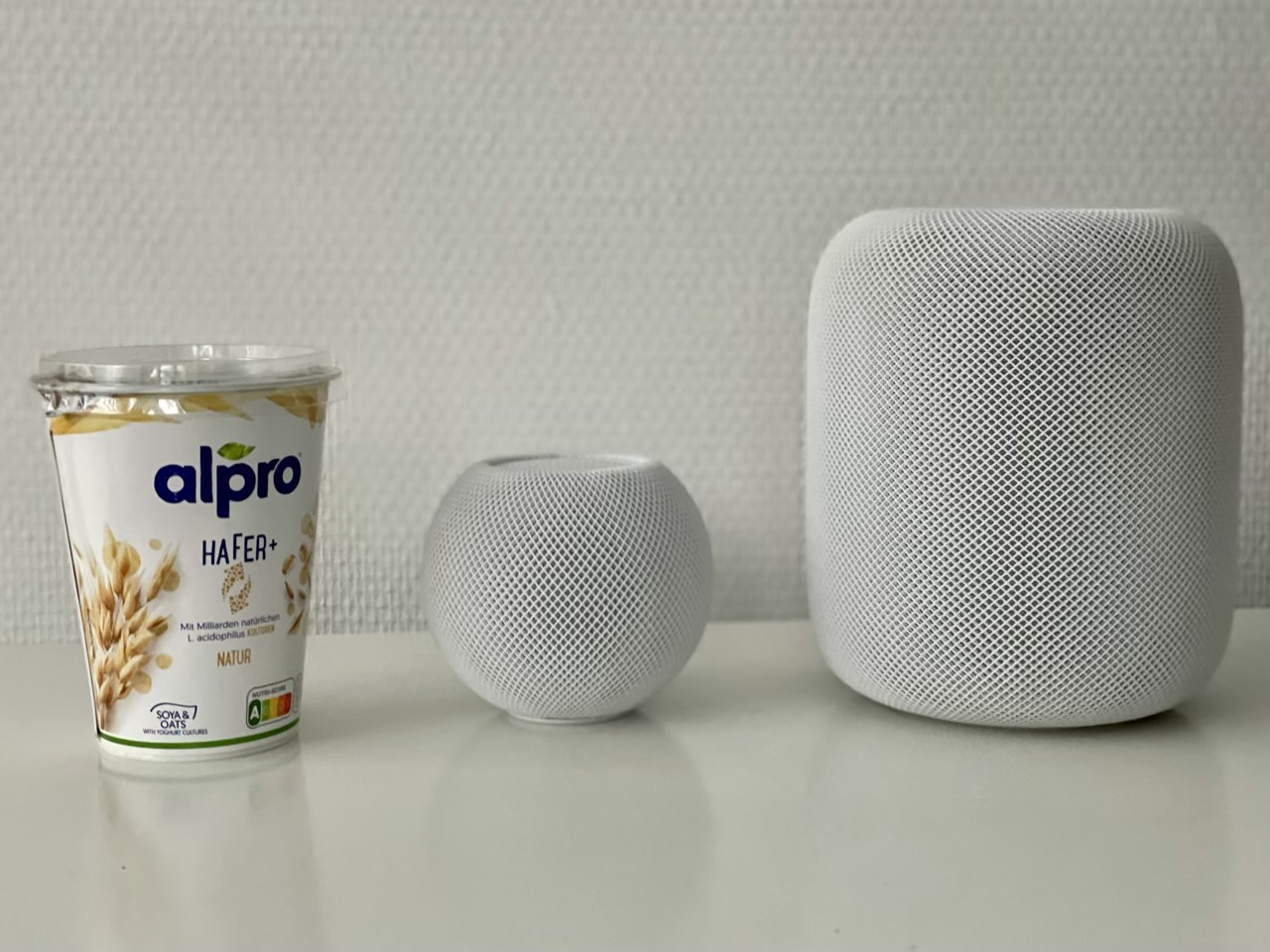
On 23 September I asked the government why the UK was not buying Moderna vaccine and I was told “because they won’t do a deal with anyone outside the US”. I then pointed out that a month earlier on 25 Aug EU announced it and member states bought 160m doses of it (see attached)... pic.twitter.com/VOkyONgHfz


Retweeted by James O'Brien (mrjamesob) on Monday, November 16th, 2020 2:32pm


2485 likes, 1094 retweets