Follow people on any platform, from [[RSS]] feeds to [[Twitter]] to YouTube to [[TiddlyWiki]]. Rather than individual items, focused on recently active people.
Desktop app (without online sync) or [[Browser Extension]] for Firefox or Chrome.
There is no news feed. Rather than showing you a massive inbox of new posts to sort through, you see a list of recently active individuals. No one can noisily take over this page, since every follow has a summary that takes up a mere two lines.
You can certainly expand this ‘line’ to see a list of recent titles (or excerpts) from the individual - or click the name of the follow to read the individual on their network.
Follow Support
Feeds (RSS, Atom or JSON Feed). This is how Fraidycat reads blogs, Tumblr, Medium, Mastodon, micro.blog, Wikipedia, Kickstarter or Stack Overflow. If only every network used RSS!
Twitter, Instagram, SoundCloud. These sites don’t support RSS, so Fraidycat does its best to pick things out of their web pages.
Pinboard, YouTube and Reddit. These sites do offer RSS, but it’s not advertised very well. So Fraidycat figures out where to find the RSS feeds for you.
Twitch. Fraidycat now also shows when a follow is live.
TiddlyWiki. Fraidycat reads the whole wiki and treats it like a giant RSS feed. Be aware that giant wikis may load down Fraidycat.
While it’s great that so much data was uncovered during the writing of the Evidence-based software engineering book, trying to locate data on a particular topic can be convoluted (not least because there might not be any). There are three sources of information about the data:
the paper(s) written by the researchers who collected the data,
my analysis and/or discussion of the data (which is frequently different from the original researchers),
the column names in the csv file, i.e., data is often available which neither the researchers nor I discuss.
At the beginning I expected there to be at most a few hundred datasets; easy enough to remember what they are about. While searching for some data, one day, I realised that relying on memory was not a good idea (it was never a good idea), and started including data identification tags in every R file (of which there are currently 980+). This week has been spent improving tag consistency and generally tidying them up.
How might data identification information be extracted from the paper that was the original source of the data (other than reading the paper)?
Named-entity recognition, NER, is a possible starting point; after all, the data has names associated with it.
Tools are available for extracting text from pdf file, and 10-lines of Python later we have a list of named entities:
import spacy

# Load English tokenizer, tagger, parser, NER and word vectors
nlp = spacy.load("en_core_web_sm")

file_name = 'eseur.txt'
soft_eng_text = open(file_name).read()
soft_eng_doc = nlp(soft_eng_text)

for ent in soft_eng_doc.ents:
     print(ent.text, ent.start_char, ent.end_char,
           ent.label_, spacy.explain(ent.label_))
The catch is that en_core_web_sm is a general model for English, and is not software engineering specific, i.e., the returned named entities are not that good (from a software perspective).
An application domain language model is likely to perform much better than a general English model. While there are some application domain models available for spaCy (e.g., biochemistry), and application datasets, I could not find any spaCy models for software engineering (I did find an interesting word2vec model trained on Stackoverflow posts, which would be great for comparing documents, but not what I was after).
While it’s easy to train a spaCy NER model, the time-consuming bit is collecting and cleaning the text needed. I have plenty of other things to keep me busy. But this would be a great project for somebody wanting to learn spaCy and natural language processing
What information is contained in the undiscussed data columns? Or, from the practical point of view, what information can be extracted from these columns without too much effort?
The number of columns in a csv file is an indicator of the number of different kinds of information that might be present. If a csv is used in the analysis of X, and it contains lots of columns (say more than half-a-dozen), then it might be assumed that it contains more data relating to X.
Column names are not always suggestive of the information they contain, but might be of some use.
Many of the csv files contain just a few rows/columns. A list of csv files that contain lots of data would narrow down the search, at least for those looking for lots of data.
Another possibility is to group csv files by potential use of data, e.g., estimating, benchmarking, testing, etc.
More data is going to become available, and grouping by potential use has the advantage that it is easier to track the availability of new data that may supersede older data (that may contain few entries or apply to circumstances that no longer exist)
My current techniques for locating data on a given subject is either remembering the shape of a particular plot (and trying to find it), or using the pdf reader’s search function to locate likely words and phrases (and then look at the plots and citations).
Suggestions for searching or labelling the data, that don’t require lots of effort, welcome.
Read this to get some relief from your impostor syndrome.
* * *
During a family Zoom, a relation mentioned they might need to ask for my help with a thing (sharing videos) that I know nothing about.
Almost every single other person on that Zoom would have been a better-than-me choice on this particular topic. But I’m a computer programmer, so people look to me for tech support.
You’ve run across this too, right? Friends and family think, because you’re in tech, that you’re a computer tamer who’s on intimate terms with every feature of every app. They think you know how to make computers sit up straight and mind their manners.
You and I know that’s not true. You and I know that being in tech means that you wish, with a frequency and fervor that would astonish outsiders, that a cleansing fire would one day ignite that burns up all the computers in the world.
“The computers earned it. They brought this on themselves,” we’ll say. While everyone else panics, you and I will know that this fire is, at long last, justice.
* * *
I’ve noticed many times that a developer as senior as I am — now with 40 years writing code on Apple computers — is assumed by newer developers to be a kind of Jedi. As if I’m on intimate terms with every API in every framework; as if I’m deeply learned in every single tool, from Git to Jenkins to AppFigures; as if I know how to make App Store Connect sit up straight and mind its manners.
I don’t know about other senior developers, but I can tell you about me. I have decades of experience and an amount of wisdom. I’ve written some bad, some good, and a couple great apps over the years.
But I’m no Jedi.
This tweet I posted on Saturday has, at this writing, almost a thousand likes. I conclude that it resonates.
I had an app on day one of the App Store — and now, 12 years later, I realize I still have no mental model of how signing, certificates, and provisioning profiles work.
Whenever I need to do something, I just fuck around till it passes the tests.
Maybe there are senior developers who have both breadth and depth — they know everything and know it all well — but I suspect that’s the rare case.
Experience and wisdom count for more than vast technical knowledge. And, in fact, I don’t have that knowledge, except in the few places where I need it. (You couldn’t even call me a Mac power user. Outside the realm of Xcode and app development I use my Mac in the simplest of ways.)
I know how to get technical knowledge, though. I look things up. I learn. I ask questions. I ask for help. Same as you!
And I find some tools — such as Apple’s for setting up app IDs, certificates, and so on — to be as impenetrable and frustrating as everyone else does.
Last month, I noticed a former client launching an event series very similar to a failed experiment from 3 years ago.
Another recently changed their web design to a version very similar to one which underperformed in nearly every metric.
When asked, both told the same story. The community team had moved on since our collaboration. The new team didn’t know what had or hadn’t been tried before. The former had documented our work but it hadn’t reached the new team. The latter hadn’t documented anything.
These aren’t rare occurrences. I’ve seen several communities repeating the same failed tactics every couple of years.
But if you don’t know what has or hasn’t been tried before, you can easily come up with ideas that sound great but have been shown to fail.
New community staff need a guide to the community. They need to know it’s history. They need to know that the visible community they see is the outcome of a long-running process of trial and error.
Communities are the outcome of an ongoing and iterative process of trial and error. Part of your legacy isn’t just going to be the community, but the documentation you leave behind outlining the decisions you’ve made and why.
If people who come after you don’t know what did and didn’t work, they might repeat the same mistakes over and over again.
I reckon my favourite month is probably Prairial, and my least favourite the one we’re entering right about now — Frimaire.
For those scratching their heads, I’m referring to the French Revolutionary Calendar (also called the ‘Republican’ calendar) which divided the year up in the following way:
The Republican calendar year began the day the autumnal equinox occurred in Paris, and had twelve months of 30 days each, which were given new names based on nature, principally having to do with the prevailing weather in and around Paris. The extra five or six days in the year were not given a month designation, but considered Sansculottides or Complementary Days.
When you think about it, although it’s useful to have everyone in the world using the same calendar, doing so is almost an act of cultural violence.
I live in the North East of England, a place that historically has been known as Northumbria. What would a Northumbrian calendar look like? I don’t think it would be so different to the French Revolutionary one, except we’d probably use month names like ‘Clarty‘:
Autumn:
Vendémiaire (from French vendange, derived from Latin vindemia, “vintage”), starting 22, 23, or 24 September
Brumaire (from French brume, “mist”), starting 22, 23, or 24 October
Frimaire (From French frimas, “frost”), starting 21, 22, or 23 November
Winter:
Nivôse (from Latin nivosus, “snowy”), starting 21, 22, or 23 December
Pluviôse (from French pluvieux, derived from Latin pluvius, “rainy”), starting 20, 21, or 22 January
Ventôse (from French venteux, derived from Latin ventosus, “windy”), starting 19, 20, or 21 February
Spring:
Germinal (from French germination), starting 20 or 21 March
Floréal (from French fleur, derived from Latin flos, “flower”), starting 20 or 21 April
Prairial (from French prairie, “meadow”), starting 20 or 21 May
Summer:
Messidor (from Latin messis, “harvest”), starting 19 or 20 June
Thermidor (or Fervidor*) (from Greek thermon, “summer heat”), starting 19 or 20 July
Fructidor (from Latin fructus, “fruit”), starting 18 or 19 August
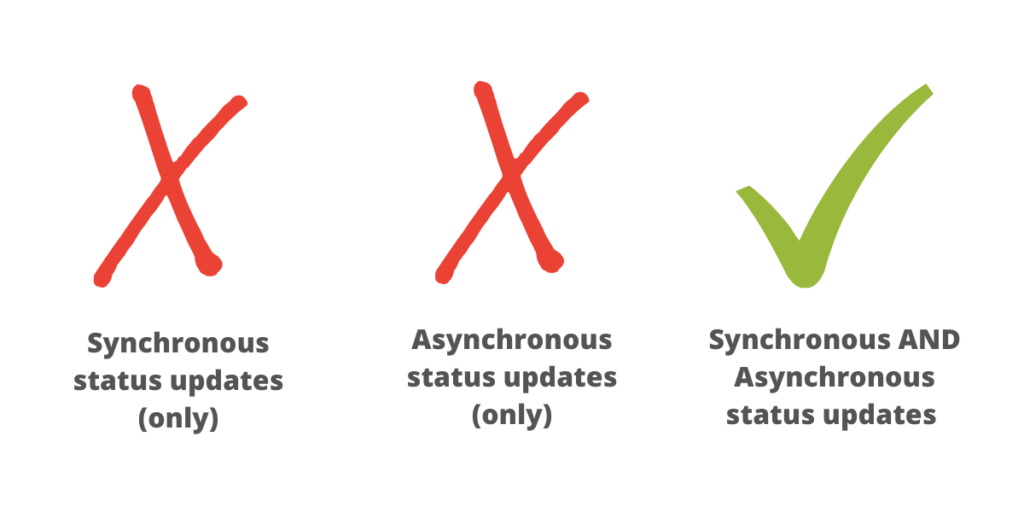
As a consultant, I find that there are, broadly speaking, three types of teams and organisations when it comes to project updates:
Synchronous updates (only)
Aynchronous updates (only)
Asynchronous and synchronous updates
The purpose of this post is to explain why the third of these is by far the better option.
1. Synchronous updates (only)
The most popular (the default, even!) are those only doing synchronous project updates. This means that the team, group, or other unit of organisation finds out the whole picture of what’s going on in the weekly team meeting.
Advantages: every project update can come with full context and, if someone doesn’t understand, or has a question, this can be addressed immediately. If the project team is meeting face-to-face or via video then facial expressions and body language can convey additional information.
Disadvantages: if the project team is only receiving updates on the day of the meeting, then the information they have can be up to six days out of date at any given time. Also, anyone who misses the meeting has to rely on the notes.
2. Asynchronous updates (only)
Other teams, groups, or other units of organisation only do asynchronous project updates. This means that meetings are rare, and the main way to find out what’s going on is to check the place where updates are made.
Advantages: anyone with the necessary permissions can get involved, which is why this approach is common to Open Source Software projects. What you see is what you get, and combined code repositories and issue trackers (e.g. GitHub) provide a decent workflow to get things done.
Disadvantages: with the human element removed, it’s difficult for the full context (including relative importance) of an update to be conveyed, and for serendipitous links to be made between projects.
3. Asynchronous and synchronous updates
The best teams I’ve come across do a combination of asynchronous and synchronous project updates. They meet regularly face-to-face or by video and provide updates in a dedicated space between meetings.
Advantages: everyone on the project gets full context around an update, either in the dedicated space or by asking a question about it in the meeting. There is now more time in meetings for forward planning and innovation.
Disadvantages:none that I can think of!
N.B. Workplace chat solutions such as Slack are great for many things. Given the potentially low signal/noise ratio, project updates are not necessarily one of them. Instead, I recommend using a dedicated space — e.g. Trello or Nextcloud Deck.
Warning, this post might be stretching a metaphor a bit too far, but there is something that has been bubbling in my head for the last week so this post is an attempt to make some sense of it.
Last week I joined the Jisc Joint building digital capability and digital experience insights community of practice online event. Co-hosted with the University of Derby, it was a really useful day with lots of presentations from colleagues across the sector around what they have been doing to support staff and students over the past 8 months. There was also a preview of this year’s Jisc Digital Insights surveys, but lips have to be sealed on that one. It was a really useful event, so thanks to all at Jisc and Derby for organising and running it.
Anyway, as I was listening to the keynote presentations from Derby – a really comprehensive overview from strategic vision to hands on implementation, it suddenly struck me that in education, we might be suffering from a bit of an Ikea situation when it comes “the digital”. Bare with me as I try to explain. Apologies in advance for this very western metaphor.
So we have our shiny, glossy strategies that layout the vision, mission purpose and the high level overview of the where, what, why and when of “stuff”. They’re a bit like the Ikea catalogue, where every room has that look of if not perfect, but attainable, useful, organisation, practicality and comfort. If you’re anything like me, there’s always something in the layout of the rooms in the catalogue that appeals, alongside that nagging worry if anyone does actually live in that wonderment of perfectly organised storage . . .
So we have our catalogue and we can see the vision for the “perfect” and practical home. We all want a bit of that don’t we? That’s like our strategies – they all make perfect sense, who wouldn’t want to do all the things they set out. The implementation of the strategies – not always so straightforward. Perhaps a bit like when we actually go into an Ikea store.
Despite the homogenous layout, the friendly arrows, you can get very easily get lost, (I spent what felt like 2 hours trying to work out how to get back downstairs once) or distracted, or (in precovid days) get caught behind a family of 20 having a day out with no way to overtake them. It strikes me that this is a bit what has happened as we have tried to develop digital capabilities across universities.
Everyone has seen the shiny catalogue and has seen what they want or how they could possibly improve what they have. So they build their digital strategy. And then they let staff and students go into the store. Many get caught in an endless loop in the market place deciding on just what and how many digital bits and bobs they need. Others are a bit more strategic and know not to get distracted in the market place and just move to where they really need to be. Others are even more experienced (perhaps battle-scared) and know at least one short cut to get to where they need to be. They might even be able to do self check out without having to get assistance!
So I’m not saying that our institutional systems are built like Ikea wardrobes, tho’ at times it might feel like that! I think it’s more in terms of how we use technology, it’s like we all have a “billy book case”. We’ve past the test of finding and buying it we’ve built it but since March this year we really had to use it. I think pre covid, there were many people who treated the VLE (and lots of other learning technology) a bit like the Billy bookcase Ikea flat pack. Only use if you really have to, never read the instructions when you are building it, and you know as long as it sort of looks ok, and it doesn’t fall over, you can live with a degree of wonkiness and let’s just not worry about the left over screws and nails . . . they weren’t that important anyway . . . the shelf will stay up if you carefully balance things on/under it . . .
Thing is we’ve had the instructions for quite a while, it’s just that not everyone saw how important and quite often, how easy they actually were to follow. Now people are having to engage with “the instructions”, and can’t really get away with wonky shelves. Not just at the event last week, but over the past 8 months I see /read/hear so many similar stories of how TEL/academic development units have become front and centre of the ‘pivot’ and the response to the pandemic. People are engaging in ways they never did before, accessing material, resources/support/courses they never thought to before. I have said it before but I’ll say it again, it’s quite sad that it took a global pandemic to get some staff to engage with their institutional VLE.
To me this highlights a couple of things. One is the gap between strategy and actual practice. Having a shiny catalogue doesn’t mean that all your ‘rooms’ will actually look (and work!) like that. Developing digital capabilities for all staff and students needs to to be centred in all university practice and strategic development, and units that support this can’t be seen as optional extras or something to forget about when we “get back to normal”. We can’t just provide instructions that no-one reads, we need to be helping people out of the market place, finding the shortcuts and routes they need and ultimately giving people the confidence to build all the furniture or make an informed decision about why they might just want to go to another shop.
Anyway, this might all be a metaphor too far, but would love to hear what you think in the comments.
A big thank you to Loftie for sponsoring my blog and RSS feed this week.
Did you know the alarm clock needed reinventing? Because it did. Why? One word: Smartphones.
When we set our smartphone alarms for the night, they, and all the stress they bring along, practically follow us into bed. Then, they’re there to ‘greet’ us when they go off first thing in the morning. And when we’re trying to drift off to sleep or start the day with a fresh perspective, the last things we need are worrying news alerts, extra emails from the boss, and texts from our exes. Cock-a-doodle don’t.
Loftie is a technology wellness company that’s here to bring much needed peace and calm to your bedside. Their brand-spanking new flagship product, the Loftie clock, is designed to help you break up with your smartphone alarm and get a better night’s sleep. Featuring a unique two-stage alarm, cozy nightlight, bespoke wellness, meditation and even insomnia-friendly storytime content, Loftie is everything you need, and nothing you don’t, for a dreamier (read: less tech-addled) bedroom vibe.
Get $25 off Loftie with an exclusive Swiss Miss discount today through Cyber Monday. Click here or use code SWISSMISS.
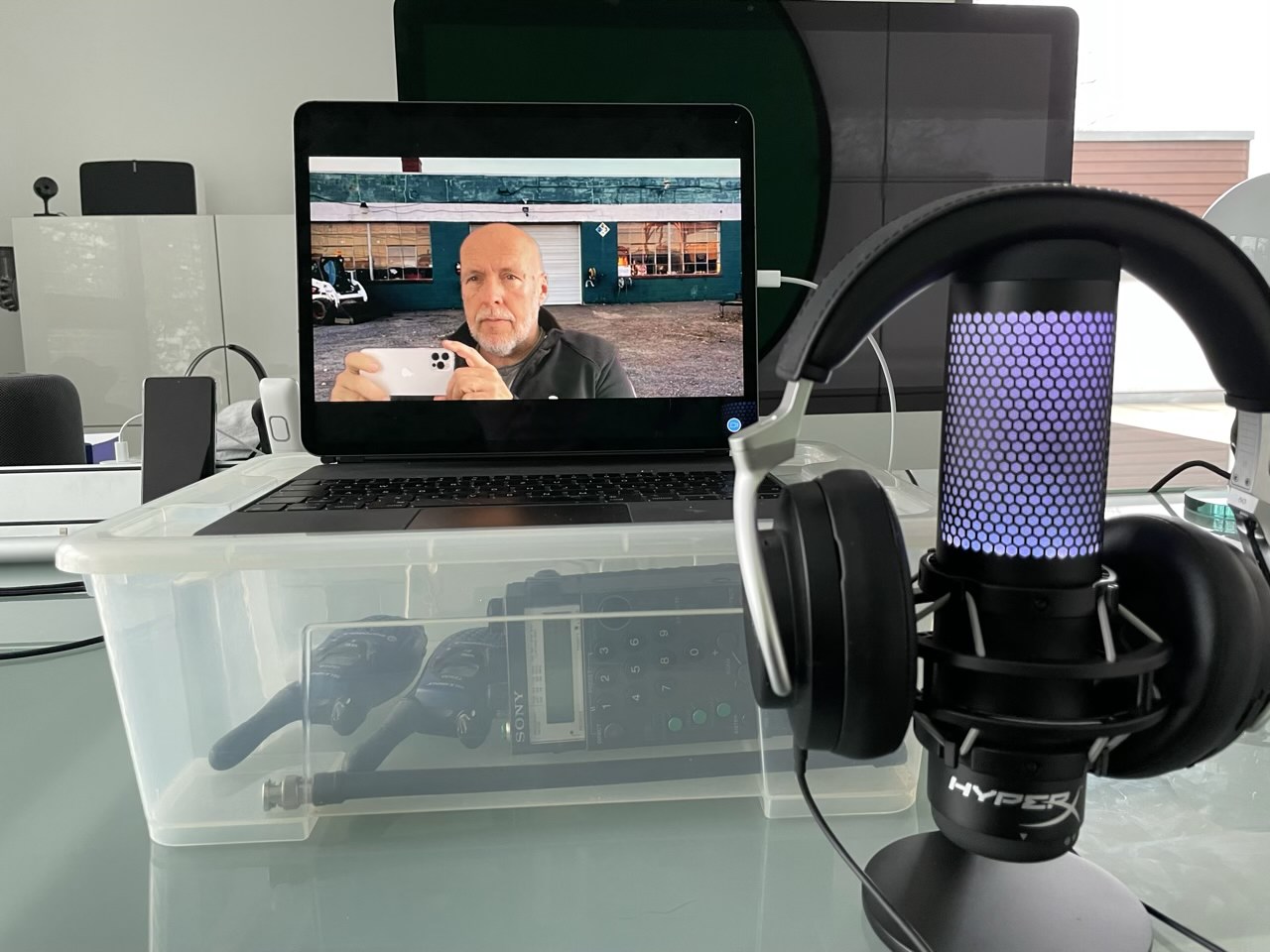
Demnächst werde ich mal eine Logitech Brio ausprobieren, aber solange hat das iPad Pro die beste Selfiekamera, wenn ich vom iPhone absehe. Das ist mein Setup:
Ein iPad Pro mit Magic Keyboard auf einer IKEA-Kiste, damit die Kamera auf Augenhöhe kommt
Ein Neewer Greenscreen, aktuell immer wieder mal im Angebot für unter 29 Euro
Zoom unterstützt Hintergrundbilder und das funktioniert wesentlich besser, wenn man einen Greenscreen hat und das auch aktiviert. Bei Teams ist die Situation verwirrend. Der iPad Client kann nur weichzeichnen, da nehme ich die blaue Seite. Der Windows-Client dagegen kann den Hintergrund setzen. Da mache ich das allerdings anders, in dem ich eine virtuelle Kamera in OBS definiere. Bei OBS kann man das Keying sehr fein einstellen. Über OBS habe ich schon mal geschrieben.
Ich bin ziemlich sicher, dass Teams das Keying mit einem Greenscreen bald auch nativ unterstützt. Eigentlich machen die alles, was Zoom kann, einfach nach.
A small gathering of 10 people or fewer can seem like a low-risk activity, and at the individual level, it’s lower risk than going to a big birthday party. But when a lot of people everywhere are gathering, small or large, the collective risk goes up. For FiveThirtyEight, Maggie Koerth and Elena Mejía illustrate the reasoning.
The collective part is where many seem to get tripped up. “Flattening the curve” only works when everyone works together. Lower your risk, and you lower the collective risk. You’re helping others. You’re helping those you care about.
I just want to note the existence of this product. Basically, it's encrypted cloud storage combined with authoring applications (docs, slides, spreadsheet, whiteboard, kanban) that are encrypted on the client side. Access to the documents can be shared by providing an access key, without which the documents cannot be decrypted. " Because sensitive assets can only be decrypted using user access credentials, CryptPad is less valuable as a target when compared to traditional cloud services." CryptPad Whitepaper.
This is a good article that will probably not resonate with people who do not believe education is activism (which is probably the majority). Why share it then? It discusses activism and organizing and makes the point that "we must start with understanding and connecting the local before moving to the global." It's tempting to think your activism could go viral and reach a global audience, but first, it probably won't, and second, it probably shouldn't. And it's this second point that is important even to people who do not believe education is activism. We are moving away from a mass society with mass media and toward a networked society with community media. And the calculus of the community is different, as you move beyond organizing everyone who thinks the same as you, to working with people who think differently than you.
A family plays a memory game together, using what is available in their shelter.
Tunakujenga is a family learning program designed to empower caregivers to engage in nurturing and playful parenting to support their children’s social and emotional development. This report summarizes findings from a pilot in Tanzanian refugee camps.
Thanks to the generosity of our friends Oliver and Cheryl, Oliver and I had the pleasure of attending Superfest in October, on Zoom. One of my favourite parts of the weekend of films and panels were these comments from Thomas Reid, host and producer of Reid My Mind radio podcast, about what makes for good audio description:
Yeah. So let me break that down into some of the components of what I think is good audio description and talk about it in that sense.
Good audio description or AD has several components.
It’s about being respectful, meaning you don’t try to explain the plot because blind people can figure out the plot by themselves. You don’t over describe the movie. For example, when a phone is ringing, there’s no need to tell me a phone is ringing. I heard the phone. Right?
So you don’t censor those things you find offensive. Because if it’s on the screen and if it’s in the story, we should know about it. Right? Good AD means good audio. I shouldn’t have to ride the volume control up and down to hear the audio describer and then higher or lower to hear the actual film.
You take the time to make that audio right. Good audio description doesn’t step on dialogue. Right?
At its core it’s about providing access to the visuals. Those who see the film learn certain information about a character that can be their color, sometimes ethnicity, or race. Other indicative information about the person, it can be relevant to how they interpret that film.
Blind viewers also should have access to that information.
It’s worthwhile reading the entire transcript, as Reid goes on to talk about the representation of race in audio description and reflects on the audio description of the film we’d just all watched.
There’s also a two-part series on Reid’s podcast, Flipping the Script on Audio Description (Part One, Part Two) that offers many additional insights.
In the spirit of Reid’s words, I’ve been working to pay more attention to the “alt tags” in the images I include here on the blog, using the same points to guide me.
The strength of this article is that each of the eight ways is illustrated with a number of examples. Thus, for example, for the way outcomes may be innovative, we see cases looking at different success skills, career pathways, purpose, target populations, and levels. It's also the article's weakness. These examples tend to be private or small-scale, implemented in special circumstances, specially funded, with a limited track record. They should be treated as prototypes, not blueprints. As experiments, not results.
This is a longish and fairly detailed account from CNN (full-text plus video) describing the ascent of Zoom and the recent history of videoconferencing generally. The lesson should be obvious to everyone: people want online services that are easy to use (whether or not they are in the enterprise). And they will sacrifice a lot to get that - features, security, suitability. I mean, after all, ask yourself, why did the pivot to remote learning take to Zoom rather than established online learning applications that had been in development over the last 20 years? Why did they turn away in droves from already installed WebEx instances? "Customers grew frustrated with the quality of the product. They wanted (it) to work reliably and more intuitively. And above all else, they wanted video to run seamlessly... No one wants to download an app or sign up for an account if they don't have to. They just want the thing to work."
When more people started cooking at home, the NYT Cooking engineering team rushed to make software improvements.
By Tiffany Peón
Illustration by David Huang
Most years, the writers and editors of the New York Times Food section begin preparing Thanksgiving stories in the summer, sometimes cooking entire turkeys in their sweltering homes to test recipes. The engineering team for NYT Cooking starts preparations just as early, though our work doesn’t usually involve sweating over poultry. When decorative gourd season still seems impossibly far away, we start planning technical improvements to handle our annual traffic increase.
While most of the year is spent working on new features, we take a break as the holiday nears to ensure that we’re ready for our ever-growing traffic. In late July we revisit the list of discoveries from the last Thanksgiving traffic bump to determine whether performance optimizations or infrastructure changes should be prioritized in the fall to make sure we don’t find ourselves in a crunch. After the holiday, we review how everything went and we make plans for improvements that we implement throughout the year.
Early this year, we had just finished some of the post-holiday work — a database upgrade and API performance improvements — when we were brought a new challenge in the form of unprecedented traffic to NYT Cooking in March. As many people began staying home because of the coronavirus pandemic, they started baking no-knead bread and learning how to use that Instant Pot they had never taken out of the box.
By April, traffic to NYT Cooking hit Thanksgiving levels every day.
Until that point, all of our efforts to improve site stability and performance hinged on the assumption that our traffic was seasonal and came in short but predictable bursts. But in April, our database was overloaded, our free-trial enrollment system was backed up by a week and our web servers were unable to process the number of requests coming in at once.
With no end to our new traffic baseline in sight, we needed to act quickly. Luckily, we bought ourselves some time with the changes we made at the beginning of the year, and had a list of potential improvements to address right away.
Finding and fixing slow database queries
Our site gets the majority of its data from a Postgres database that holds our recipe, collection and user information. As our traffic increases year over year, we find that certain parts of our application begin to stress our database due to non-performant queries. In the month leading up to Thanksgiving, we rely on monitoring tools like DataDog to find bad queries and investigate endpoints that experience latency increases during periods of high traffic.
Depending on the data needed for each page, we take different approaches to fix these bottlenecks.
In some cases, we simply need to rewrite our database queries to be more efficient. In past years, we looked at the data from the month of November to find problem areas that needed to be fixed. However, due to the sustained high traffic we’ve experienced this year, we’ve been able to identify more of these non-optimal queries and have been working to improve them.
In other cases, the recipe data that we need for some pages is also available through a GraphQL API that is maintained by a number of teams at The Times. In early 2019, we switched the way we access the data, calling the GraphQL API rather than querying our database. This helped relieve some of the load across all of our recipe pages, and throughout the year we continued to move database calls over to the API wherever we could.
We realized that Postgres wasn’t always the right tool for some features — like Recently Viewed, which keeps track of each recipe a reader views — so we rewrote the features to use a different data storage method. Before last Thanksgiving, we migrated our Recently Viewed service from a Postgres database where we used a json_blob data type that was non-performant for writes. We moved to Google Cloud Platform’s datastore, which allowed us to optimize for both writes and reads.
Diagnosing web request timeouts
One unintended effect of relying on more external APIs to relieve our database load was that our web server workers began timing out at lower traffic rates. Our application’s back-end is written in Ruby, which has a blocking I/O, meaning that a worker has to wait for each request to be resolved before it can respond to a new request.
Last Thanksgiving, we discovered that our web servers were throwing errors during high-traffic periods because all of the workers were in use. As a quick fix, we adjusted our autoscaling policy to allow Amazon Web Service’s EC2 to scale up to a larger number of web instances. The fix worked, but a colleague pointed out that the CPU usage on our web instances remained low, even with no available workers. This meant we weren’t making the most of the available resources on each web server and we were paying for extra instances that we didn’t need.
In April, we changed our web server configuration and increased the number of workers per web instance. After some monitoring with DataDog, we confirmed that by processing more requests with each instance, we could reduce the number of web servers we use in EC2 again, which saved us some money and allowed us to get more from our existing instances.
Speeding up asynchronous tasks on the back-end
Any new user who comes to our site is automatically enrolled in a free trial for NYT Cooking. We don’t require credit cards or any sort of opt-in, so this number scales proportionally with new traffic to the site.
Before April of this year, we knew that periods of high traffic led to a backup of free-trial jobs. This was caused by the library we use, DelayedJob, which doesn’t perform well when there are over 100,000 jobs in the queue.
In order to alleviate this, we separated our free trial jobs into their own queue. Then we introduced worker pools that can simultaneously process the free trial queue and a queue for all other jobs. Additionally, our colleagues on the Subscription Management team improved the average speed it takes for our back-end to check whether or not a visitor is eligible for a free trial, allowing us to work off our backlog of free trial enrollments within a week.
Thanksgiving 2020 and beyond
Due to the extreme traffic we experienced in the first half of this year, we were pushed to complete a good deal of the stability work we would usually wait until the fall to address. By the end of September, the work we started discussing in July was defined and ready for development.
In a shift from previous years, this year’s preparations for Thanksgiving involved improvements to our SEO and content strategies, with only two performance-based initiatives we had decided were not critical in the spring.
While we have learned the value of making incremental improvements and the cumulative impact they can have on our stability, this year has taught us that setting aside time to do major software upgrades can help improve our ability to maintain our applications and identify issues. NYT Cooking is growing, and with this new approach, we can ensure that our software grows along with it.
Tiffany Peón is a Lead Software Engineer for NYT Cooking. She spends her free time in the kitchen, likely making recipes from NYT Cooking.
Traffic, Turkey and No-Knead Bread was originally published in NYT Open on Medium, where people are continuing the conversation by highlighting and responding to this story.
Von CD, Stick oder Festplatte booten kennen wir alle. Das man sein DOS aber auch von einer Schallplatte booten kann, darauf wäre ich im Leben nicht gekommen. Anders als Jozef Bogin. Der kam nämlich auf diese Idee und hat das dann einfach mal gemacht. Ich will ehrlich sein: Ich habe nicht die geringste Ahnung, was da vor sich geht – und ich möchte auch nicht, dass irgendwer versucht, es mir zu erklären.
The turntable spins an analog recording of a small bootable read-only RAM drive, which is 64K in size. This contains a FreeDOS kernel, modified by me to cram it into the memory constraint, a micro variant of COMMAND.COM
Sub $200 gaming PCs. There are a lot of examples on YouTube that show they can be done, but that they can also be downright good performers for the budget minded gamer. But for some in this world like myself, the Macintosh life is just too ingrained to give up. Gaming on a Mac has long been laughed off, as many of the Mac product lines just aren’t capable of anything beyond lightweight gaming, and the computers that are capable are very high budget. But is it impossible for a Mac user to build a respectable gaming computer for less than $200? I decided to track down the answer to that question.
The Mac Pro
The 2006 Mac Pro. A beast long past its prime.
This is my new to me 2006 Mac Pro that I bought off of eBay for $85 plus $40 shipping or a total of $125. The particular listing drew me to it with its specs. An original Intel Mac Pro, or 1,1 that was equipped with two Xeon dual cores clocked at 2.66ghz, effectively a Core 2 era quad core setup. In addition, I was getting 6gb of ECC DDR2, and a relatively ancient Geforce 7300gt. All of this in the absolutely beautiful Cheesegrater Mac Pro chassis, which was pictured in very good condition.
This would be the perfect basis for my $200 gaming Mac build. While it wasn’t going to run the latest MacOS, it was capable of running 10.11 El Capitan using unofficial patching methods and Windows 10 Professional would be able to handle the gaming side of things. All I needed to do was find some cheap storage, and upgrade that GPU with something much more respectable and I would be golden.
But that isn’t the computer that I ended up receiving. Instead, I received a Mac Pro in much rougher shape but at the same time, a one that was a pleasant surprise.
The Mac Pro(n)
The 2008 Mac Pro. Now with more cores and porno!
This is my new to me 2008 Mac Pro, 3,1 equipped with two Xeon quad core processors at 2.8ghz, for an effective 8 cores of computing performance. Inside its unfortunately damaged case, which included battered feet and handles, I found 2gb of ECC DDR2, an ATI Radeon HD 2600xt, and a Girls Gone Wild 2 dvd as a slightly revolting bonus. After a much needed HazMat grade sanitizing, the Mac Pro(n) was able to begin its journey from aged workstation beast to capable gaming machine. To get going I needed to purchase a couple of upgrades. Storage, RAM, and a GPU with $75 to work with.
Upgrades Gone Wild
Graphics cards EVERYWHERE.
Getting a different Mac Pro than I had expected quickly threw my original upgrade plans out the window. My original plan hadn’t included any thought of RAM, as I had decided the 6gb it was coming with would handle the games I would be trying just fine. With what I received only having 2gb, RAM quickly jumped to the top of the priority list. While MacOS can be efficient with that tiny amount of RAM, Windows 10 was going to be unusable. And so, I took to eBay to find myself some additional ECC DDR2. Last time I had bought similar RAM was a couple of years ago, and I was able to find 32gb for roughly $30 shipped. Times have changed though, and the best I was able to find was 16gb for $25 shipped. While I could have gotten by with 8gb easily, it was only a $5 cost difference between the two capacities, and I decided to go bang-for-the-buck in this instance.
For storage, I decided to be extra cheap. While I would have loved to have bought a bargain basement SSD, using ~$20 of my remaining $50 for a 128gb SSD was not something I was okay with while still needing a GPU. I went ahead and grabbed two used 500gb Western Digital Blue hard drives for $5 off each Facebook Marketplace and called it good. One would be able to hold MacOS, the other would have Windows 10, and as a spry young person, I would be able to afford waiting a few years each time I need an OS to boot.
My final part that I needed was a better GPU. With only $40 left this would be a little tricky. Using a Mac Pro presents a few small issues as MacOS really only likes to run on a very small set of GPUs natively, and there are very few third party cards that are fully supported. With their limited supply, fully supported GPUs for a Mac Pro tend to demand higher prices than the Windows equivalents. Another issues stems from the PSU. While being rated for 980 watts, the PSU does not have any standard 6 or 8 pin connectors available to use. Instead, the motherboard can deliver that power through two mini 6 pin ports, which were included with the machine. But these issues could be worked around. Since I already had the ATI Radeon 2600XT that came with the machine, and was fully supported, I decided to use a second, unsupported card to do the lifting in Windows and gaming.
Not too long ago, I wrote about swapping my Vega 56 with an RX 460 I had laying around and whether it would meet my needs as a gamer. Well, it just so happens I had purchased that RX 460 off Facebook Marketplace for a whopping $40! Meaning, I could slap that card in the Mac and I would be in business! The RX 460 required no extra power beyond what was supplied by the PCIe slot, so the need for the mini 6 pin cables went away. As an added bonus, the RX 460 is partially supported in newer versions of MacOS so I could use it for the MacOS side as well.
OR, I would have if this computer supported the card. Turns out, the RX 460 requires SSE 4.2 support from the CPU to work on Mac, something the Harpertown Xeons in this Mac Pro do not have. So, for the second time in this gaming build, I am changing plans. Instead, I jumped online, and was able to acquire a GTX 670 4gb model for a steal at $37 locally. This card would handle everything I throw at it with ease, but presented a challenge of its own. Power. My particular GTX 670 required an 8 pin and a 6 pin connector to be powered adequately. The two mini 6 pin plugs on the mainboard can easily be adapted to two regular 6 pin connectors, but getting an 8 pin and a 6 pin would be harder to accomplish. I ended up having to buy a couple of adapters on Amazon to tackle this problem. The first adapter is a two mini 6 pin to single 8 pin cable, and the other is a dual SATA to 6 pin cable. This put me slightly above budget, having cost $12 for the two adapters, but I was willing to let that slide if it meant getting the 670 to work.
OR so I thought again. Turns out that my janky adapter strategy wasn’t going to work. The GTX 670 just refused to display anything when in the Mac Pro, despite working fine in other computers. So I had to rethink my plan again. This Mac Pro is no longer a computer. It is a rollercoaster. I don’t like rollercoasters.
Not wanting to spend a few more days waiting for a new graphics card to arrive, or have to buy another graphics card at all, I set about searching around my piles of parts looking for anything that might fit the bill. My savior came in the form of a GTX 660 Ti my friend’s dad had given me in a computer he no longer used. The card would provide me limited support in MacOS 10.13, but that would once again mean I only had to deal with the 2600XT when I needed recovery or the boot screen. The card also had lower power requirements and therefore hopefully better compatibility with the Mac Pro, needing only two 6 pin power connectors. For the sake of the budget, I went ahead and looked at local deals and eBay to see what a fair price would be for the 660 Ti, and came out with a figure $40. After struggling with the previous two card, it was a relief when the 660 Ti was able to boot into MacOS without issue.
Everything showing successfully in MacOS High Sierra.
Unfortunately, I had still needed to deal with Windows.
Installing Windows itself ended up being simple. This Mac Pro is too old to support Windows 10 through bootcamp, and installing straight from a USB drive was a no go as well. But working around this was easy! All I had to do was install it on a different computer and steal the hard drive! Or rather, take one of the two hard drives I had bought and shove it in another computer temporarily. First boot using the stock 2600XT worked great, and things were looking promising. But, like most of thus build, it all fell flat. Windows refused to show any output on the 660 Ti until I installed drivers for it, and Nvidia drivers refused to install while I was using the ATI card I had running alongside. While I could have just put the hard drive and 660 Ti back in the computer I used to install Windows, and install the graphics drivers from there I decided to make my life difficult and elected to fix the problem in the Mac Pro.
In addition to my 2008 Mac Pro, I recently bought a 2009 Mac Pro. That Mac Pro came with an Nvidia graphics card, the GT 120.With my patience wearing thin, I pulled the GT 120 from the 2009 and violently shoved it into the 2008, hoping and praying that perhaps two Nvidia cards would play better together than an ATI and Nvidia card like before. To my relief, this double Nvidia combo allowed the 660 Ti drivers to install and the card instantly became useable in Windows! With that taken care of, I was able to throw the 2600XT back in the system, verify everything still worked, and move on to gaming!
Using the $200 Mac Gaming Computer
A powerhouse computer sits next to an aging workhorse.
Using the Mac Pro on the MacOS side is throughly enjoyable. Even with its hard drive, applications feel snappy and the whole system feels responsive. Web browsing and video streaming is handled easily, and light photo editing happens without slowdown. Even though I have been accustomed to the blazing speeds my more recent MacBooks present, the Mac side of this gaming computer is perfectly usable for everyday tasks.
Switching between MacOS to Windows presents a small annoyance, but nothing too terrible. In order to boot into Windows, I had to plug the monitor into the 2600XT so that I could see the boot screen to make my OS choice, and then plug the cable back into the 660 Ti once Windows began to boot. Tedious, but not a deal breaker in order to get the benefit of both OSes.
In contrast to the MacOS side, the hard drive that Windows is installed on makes general usability very bleak. Apps take a long time to load and processes seem to randomly freeze up. Outside of gaming, daily tasks should be confined to the MacOS side of the machine unless you want to suffer endless frustration.
Gaming is a different story though.
Benchmarks
To test the performance of the $200 Gaming Mac, I selected a small set of games and Cinebench R23. The games were selected because they are ones that I have been playing recently and I believe them to be a good mix of CPU and GPU bound games. Where possible, I ran MSI Afterburner to get more in depth statistics, but for some reason it refused to cooperate with a couple of the tests.
Oh boy. That didn’t age well…
Starting with Cinebench R23, the Mac Pro yielded a multicore score of 3127 and a single core score of 407. Despite having 2 physical CPUs and 8 cores, the aged architecture and relatively low clock speeds show their shortcoming here, being handily beaten out by laptop chips, even those a few generations old. And to show how much progress has happened in the Apple lineup, let’s compare it with something newer. My new Apple Silicon based M1 MacBook Pro comes in at a multicore score of 7708, and a single core score of 1511, absolutely stomping the Mac Pro.
Moving on to the games, I started with Valorant. As a free-to-play game, it tends to run well even on modest hardware. Using the low graphical settings at 1440p, the gaming Mac Pro was able to average 59 frames per second, with 1% and .1% lows at 43 and 38 respectively. These numbers were gathered across three Deathmatch rounds, where I was able to perform about as well as I do on my main gaming PC. Which means I at least wasn’t last place. I would be perfectly content playing Valorant on the Mac Pro on a daily basis.
The next game was Destiny 2. Running at 1440p with low settings again, Destiny was very playable for me. Sprinting around and shooting enemies in the EDZ region, the Mac Pro provided an average of 35 frames per second, with 1% lows of 28 and .1% lows of 24. 30 FPS is fine for me, but for those looking to get closer to 60, lowering your resolution to something like 1080p will likely tickle your fancy a bit better.
Civilization VI provided a good test for the dual Xeons in the system. Running the built in benchmark, which simulates a late game scenario, the Mac Pro averaged 24 frames per second, with a resolution of 1440p and using the High preset. With the slow pace of Civilization games, 24 FPS works out alright and being CPU bottlenecked means you are looking at about the best you will get, even if you turned down settings.
Finally, I ran Cities: Skylines. This test was a little peculiar. Loading up a medium sized city of about 31,000 population, I was greeted with reported averages of 12 frames per second at 900p with high settings. Changing to 1440p and high presented zero change, with the reported average continuing to be 12 FPS. Despite that gameplay felt smooth, and I would have easily been able to play for an extended period of time. What makes this a strange result is that the city was built on a PC using the exact same graphics card, but an even weaker Core 2 Quad Q6600, where it averaged 24 FPS. Inconclusively, I am chalking this up to FPS counter error, I think?
Overall, gaming on the Mac Pro was fine for what I played. I believe that all but the newest titles would be enjoyable to play, assuming the CPUs are compatible with the games.
Conclusion
Is the $200 Gaming Mac practical? Is it something I plan to use moving forward? Is it something I recommend other people trying to replicate? No, no, definitely not. There were too many levels of torture involved in this build. And the need for additional hardware to get things working rules out all but those who for some reason have a million other computers lying around to assist your ill-advised scheme. It is also heavily dependent on someone sending you the wrong Mac Pro to get anywhere near the results I was able to get. But in most regards, this project was a success. If you really did want to put yourself through everything to build this Mac Pro, you would have a pleasant gaming experience in Windows, and a usable Mac side for daily tasks. But I think shortly into the experiment the question changed from “Can you build it?” to “Should you build it?”, and the answer to that question is a resounding “No”.
Mobile/Desktop convergence is something that Purism had planned and has been developing since the launch of the Librem 5.
It all started with the amazing work that Adrien initiated with the libhandy library, that let the default Librem 5 applications be adapted from the exact same applications running on the laptops.
Now the Librem 5 team is moving a step further by letting the Librem 5 being used as a real desktop computer by simply plugging it into an external monitor, keyboard and mouse through a single USB hub. The feature is still under active development at the time of writing this article, but the different components are starting to come together and it is already pretty functional.
3D Graphics mockup that was made to promote convergence during the Librem 5 crowd funding campaign.
I was in charge of making a video to promote that feature and, even if it is a commercial teaser, I wanted to avoid using special effects and I wished to show the real device and the real features in action. In general, shooting the real thing is what generates the most realistic output anyway.
So my plan was to do this video with a real artist working on her own art with the Librem 5 and professional creative software. Therefore, I prepared everything and scheduled a shooting with the artist. Almost everything went fine, but a few days before the shooting, my country’s government imposed a country-wide lock-down to the population, which prevented me to do the shooting as planned.
Instead of canceling or postponing the shooting to an undefined date, I decided to do it anyway with what I had at home. So I asked my wife to be the actress (she is a nurse in the real world), I took some of the gear from my digital studio, I setup an old animation project of mine and did the shooting at home. We had to modify the script a bit, with my wife pretending to draw but we used the real Librem 5 device to shoot everything that is shown on any screen in this video.
Here is the final result, which I am pretty proud of! And you know, I am being very objective when I say that 😉
I was myself blown away by the simplicity of use and the potential of such a great feature. It is just a matter of plugging and playing! Moving a mobile application away from a mobile screen to expand it as a desktop application on a 24″ monitor, and vice versa, is something I had never seen before and it is pretty amazing. Even my wife, who is not much into computers was amazed.
This is a short scene that didn’t make it in the final video (because of timing and continuity reasons) and that shows exactly what I am talking about.
Thanks for your interest and your support. This is only the beginning of a beautiful project that is the Librem 5. Stay tuned for more updates!
Discover the Librem 5
Purism believes building the Librem 5 is just one step on the road to launching a digital rights movement, where we—the-people stand up for our digital rights, where we place the control of your data and your family’s data back where it belongs: in your own hands.
A few months back, I learned about the Chorleywood bread process, invented 1961. 98% of shop-bought bread in the UK is now made this way (caveat: source is from 2009). It uses additives to bake quicker.
Before, if you’d said to me something like “they’re putting stuff in the food that’s making everyone gluten intolerant” I think I would have filed that as a food conspiracy theory. Now? I think I’d lean in that direction.
Here’s what I read.
Some would say that 1961 was a bad year for bread. It was the year that Chorleywood Bread Process came into being. Developed by the Flour Milling and Baking Research Association in Chorleywood, the process revolutionised the baking industry. This high-speed mechanical mixing process allowed the fermentation time to be drastically reduced, and meant that the lower-protein British wheats could be used in place of the more expensive North American imports. Various chemical improvers and antifungal agents are necessary ingredients, as are certain hydrogenated or fractionated hard fats. This is high-output, low-labour production, designed to maximise efficiency and profit at the expense of the consumer.
Mass-produced bread is almost undoubtedly worse for you. Apart from the dubious additives and fats it contains, the short fermentation makes the wheat harder to digest. Indeed, some believe the Chorleywood processing method is to blame for a sharp increase in gluten intolerance and allergy. It is also probable that the prolific crossbreeding and modification of modern-day wheat, to produce strong, tougher, harder-to-digest gluten, has contributed to wheat intolerance.
Somewhere in the region of 98 per cent of bread in this country [the UK] is mass-produced, and most of it comes from around a dozen huge plant bakeries.
Incidentally, Stevens’ Bread is a great recipe book. Good British recipes, restaurant standard, well laid out, straightforward. Love it. Stevens clearly has a bee in his bonnet re handmade vs industrial bread, and that’s exactly who I would want to be writing such a book.
the amount of yeast of the bread is doubled which drives fermentation faster
fermentation alone (the yeast breaking down the flour) is traditionally an overnight process; with Chorleywood the entire loaf takes only 3.5 hours
“improvers” are used – chemicals that break down the flour, and other chemicals that provide structure to the crumb (there isn’t enough time for the structuring gluten to develop otherwise)
the “improvers” are no longer shown on labels. In the 1990s, the old chemicals were replaced with enzymes (which pre-digest the flour, etc). But enzymes aren’t an ingredient, they’re part of the industrial process, and so they don’t need to be listed.
I’ve no idea whether it matters that the yeast isn’t given much time to ferment the flour. Is it possible that there is a different, harder-to-digest kind of gluten that is formed when the additives drive the process so much faster? Are there implications of having extra yeast hanging around? Does all of this have a long-term negative effect on human health?
Especially because 1961 is relatively recent. I was born in 78; it would have take a while for Chorleywood to ramp up. So my generation - plus a little older - is really the first generation to have grown up eating bread like this. Is that why so many people now get bloated from wheat and ill from gluten… or is it merely that we’re more aware of the effects now?
Honestly, I have zero idea whether any of this truly matters.
It makes my systems-thinking spidey-sense tingle though.
So I bake my own bread now and I’m cautious about what I buy.
I didn’t know about Chorleywood before, but now I do. And although I’m not convinced that industrial bread is bad for me, I am open to the idea enough, and the consequences are bad enough, that I have changed my diet.
The wider implication, for me, is this:
If bread, then what else?
Back to bread.
Last week, I tried adding diastatic malt powder to my sourdough. I mainly use recipes from the excellentHandmade Loaf by Dan Lepard and he recommends adding a spoon of (handmade) powdered barley malt at the start.
I didn’t make the malt myself. I bought it.
It turns out that adding malt is like a cheat code for baking bread.
My loaf proved a little faster, the crumb was more open, and the loaf had a lovely chew. All good. My starter has been sluggish in the cold weather, and this malt has been the antidote. Excellent.
It turns out that malt works in a pretty interesting way.
Malt contains amylase, which is an enzyme. I remember it from biology at school – if you hold a piece of bread in your mouth, it begins to taste sweet, and the amylase in your saliva is the reason why.
Amylase cuts up non-sweet starches into simple, sweet sugars which are more easily digested by the yeasts.
Point, the first. I find it wonderful and amazing that a traditional baking ingredient turns out to be biochemically active and there’s a metabolic reason why it’s there. I wonder when amylase was discovered and this connection made.
Point, the second. Amylase is one of the enzymes in the Chorleywood bread process.
So am I now on the path to industrial bread?
How do I draw the line?
And at what point should I stop?
This, it occurs to me, is the whole question of technology in a nutshell. Or in a banneton, as the case may be.
As feared, ActiveTO has come to a close. On the last day possible, I did get out to the eastern eastern section of the Lakeshore Boulevard Activeway, and there were few others there. I learned of some routes to the east side of Toronto that should come in handy during the warmer months, especially if there are activities at Woodbine Beach. Taking transit there was a bit of a slog pre-pandemic anyway, and there are safe bike paths even without closing the street to cars. The mission was to see the eastern section of it before it ended, and my mission was more than accomplished.
I biked along the eastern section of the Lakeshore Boulevard Activeway today for the first time, on what was presumably the last possible day of 2020 one could do so. #ActiveTOpic.twitter.com/pb6QgAjM9D
I see the tweet that started the above thread appeared in Cycling Magazine and Toronto Storeys along with others who celebrated the freedom to cycle on a major city street.
In less excellent news, my fridge went kaput. This after almost 5 years of living here. It's not a secret that I'm using my building's common area fridge (because I left a detailed note with my contact info in it), and the delivery date for a new one keeps getting pushed out. I made an order from Best Buy for a mini fridge after striking out on Kijiji. I would have liked to give a used fridge another home, but that was not to be. The Best Buy fridge will fit in a good spot, and I imagine I'll be able to sell it when I don't need it. It was also cheap enough that maybe I'll keep it, which would mean having to move with it when that time comes.
I'm about as busy at work as I was before the pandemic. I'm still on the board of two non-profits, with no plans to change that. While the Icelandic club has met on its regular schedule and convened virtual events, my neighbourhood association has been less active. From reading the websites of other neighbourhood associations, I get the sense this has been common.
I'm worried about not finding a replacement activity to keep myself moving (it's going to be running, isn't it?), and I'm worried about having to cancel travelling to British Columbia for the holidays. I'm much less concerned about myself getting the coronavirus than I am passing it on to my parents, who are senior citizens. A co-worker decided that because of the pandemic, it's fine if you say this year doesn't count. He meant towards aging, but I'm applying it to my yearly streaks of going home for the holidays and running in a race.
The very, very good news about an apparently effective and likely safe vaccine was a payoff for my optimism at the outset of the pandemic. I don't expect to receive a vaccine until well into the new year, but this is more or less on schedule for what we have been told to expect. It is, in the words of Churchill, the end of the beginning.
Adrianna Tan@skinnylatte
Maybe this is why bánh mi was the first Vietnamese word I could pronounce correctly. Also because I eat a lot of it. twitter.com/tanchunkiet/st…
well at least i'm glad we're acknowledging that the personal vehicle-based transportation system is a mass-murder machine for once pic.twitter.com/mUlu2rs3hj
Word was that it would snow a fair bit yesterday, so I got the winter beater out of storage before the snow descended. I’m going to try Muc Off chain lube this year.
One of the things that I’m concerned about is corrosion of the brake fittings on the bike. Granted I’m not diligent about keeping the bike clean during the winter, but the salt from four or five winters has really done a number on some of the fittings.
There was a bike share station recently installed just down the street, and so I’m seriously considering using bike share this year, and saving the winter beater for when I really need studded tires. Here is a photo of some of the brake linkages on a bike share bike. They seem to be in pretty good shape by comparison.
One more thing that I have to fix on the Garneau is the wiring to the front dynamo. In the meantime, I’ve installed a new Planet Bike headlight. Review of this unit to follow soon……
Here is proof that it did snow on Sunday,
although by this morning, the roads were clear, and I imagine all the snow will be gone by midweek.
That means fans of Microsoft’s Surface Pro X can finally use Photoshop with — hopefully — no issue. Early reports indicate the beta Photoshop for ARM works well, but I’ll have more to say about that in the coming weeks. For now, all you need to know is that the beta Photoshop is the first Adobe app to arrive for ARM-powered Windows devices since the company announced support for Windows 10 on ARM over a year ago.
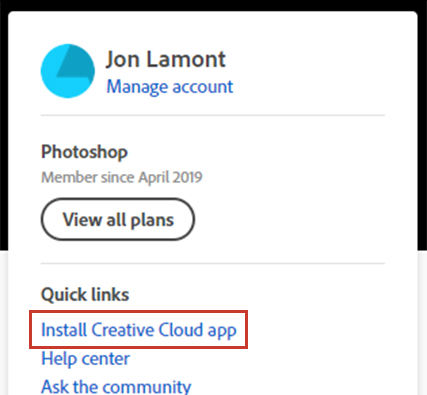
If you’ve got a Windows device running on ARM, such as Microsoft’s SQ1 or SQ2 Surface Pro X, here’s how to install the Photoshop beta. First, head to Adobe’s website and sign in with your account, open the Creative Cloud section and click ‘Install Creative Cloud app’ from the ‘Quick links’ section under your account and plan information. For me, this link automatically installed the beta version of Adobe’s Creative Cloud app to my Surface Pro X (2020) — you’ll need the Creative Cloud beta app as the others don’t play nice with ARM.
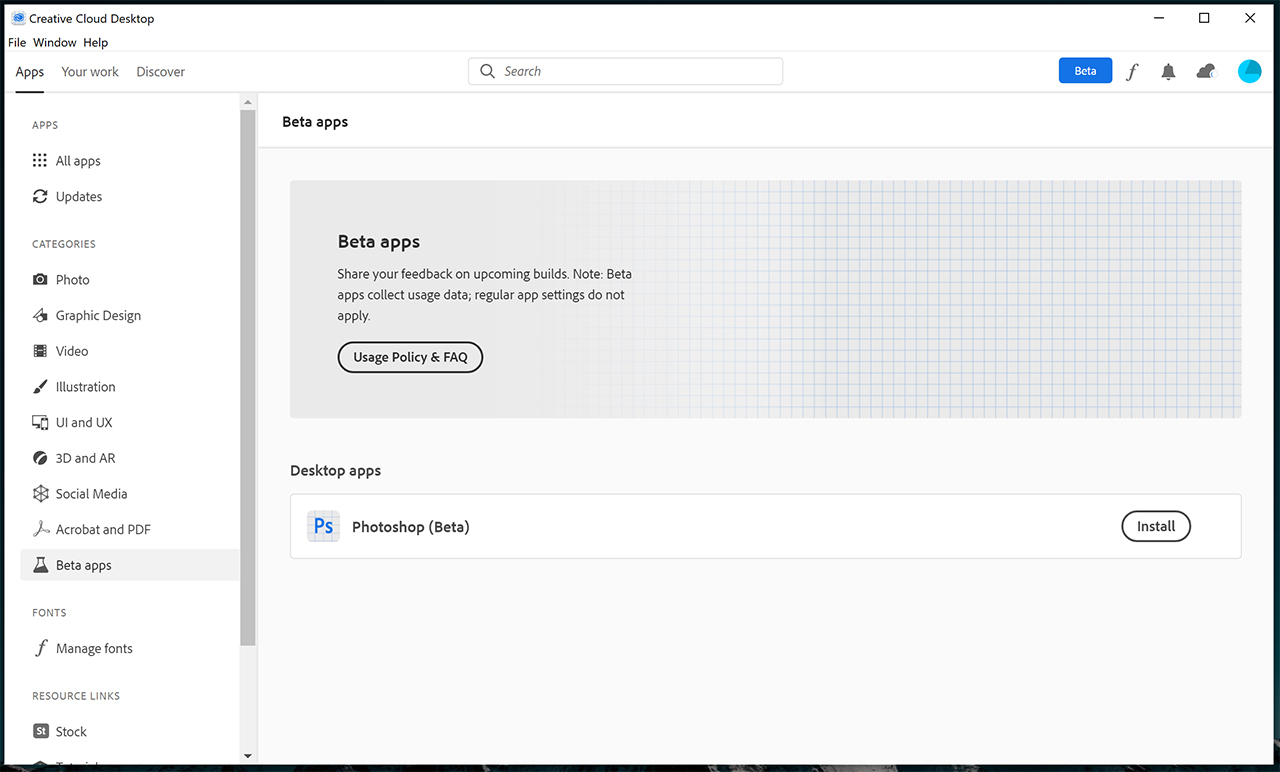
Once installed, sign in to the Creative Cloud app with your Adobe account again then look for the ‘Beta apps’ section in the sidebar. In my case, I had to refresh the page by clicking over to the ‘Discover’ tab at the top and then back to the ‘Apps’ tab to get the Beta apps option to show up.
Once it appears, you should be able to install the Photoshop beta from that section of Creative Cloud and launch the app once it’s ready to go.
Hopefully this means that it won’t be too much longer until Adobe rolls out more apps with ARM support.
Nokia has announced that Telus is going to deploy a range of its solution to deliver greater network scale and performance.
The solutions will help Telus strengthen and expand its 5G service offerings, while also providing service capabilities required to meet increasing customer demands.
“Our 5G network, strengthened by the expertise of our infrastructure partners, like Nokia, will form the foundation of Smart Cities and Industry 4.0, next-generation virtual healthcare, immersive education, agriculture technology and next-level gaming,” said Telus CTO Ibrahim Gedeon, in a news release.
Nokia says that the solutions will allow Telus to cost-effectively manage its network through near zero-touch automation, while helping it deliver ultra-low network latency, reliability and security to its customers.
The company outlines that Telus will be able to establish a cloud-enabled network architecture for faster delivery of new residential, business and mobile services.
“This deployment speaks to the breadth of Nokia’s ability to truly connect the network to the business at scale and strengthens Nokia’s position as a market leader in 5G core network deployments,” said Jeffrey Maddox, the president of Nokia Canada, in the news release.
Telus launched its 5G network earlier this year in June, and is partnered with Nokia, Ericsson and Samsung as its network infrastructure partners. The carrier says that by the end of the year, nearly 50 communities will be able to access its 5G network.















 shadytel on Twitter.

 Das Kraftfuttermischwerk.
 Let’s Talk Budget Gaming.





 wtyppod on Twitter.


 moodvintage on Twitter.