Shared posts

03 Feb 03:06

Long Links

Welcome to the Long Links look-back at January 2021. Once again I assemble long-form pieces that I’m fortunate enough to have time for due to my lightly-employed condition. Probably few have time (or inclination) to plow through all this stuff, but one or two might reward your time.

I can’t imagine anyone reasonably literate not having enjoyed reading John Le Carré, and I really enjoyed My Dinners with le Carré. It seems like he was a very decent and very impressive human being. I neglected to read a few of his later books but I’ll go back and do so. My favorite under-appreciated Le Carre is The Little Drummer Girl; what’s yours?

For a variety of reasons I’ve been studying the larger issues around content moderation. Mike Masnick offers Masnick's Impossibility Theorem: Content Moderation At Scale Is Impossible To Do Well. It isn’t that long, but it’s important and his argument is powerful. He’s not arguing for giving up on moderation, either.

State of CSS Report 2020, by Raphaël Benitte and Sacha Greif, is delightful. I have a vexed relationship with CSS. I admire what it can do, and I’d like to do some of those things in the space that you’re now reading, but damn it’s hard; the days when you could View-Source and dope it out are way past us. Maybe one of these years I’ll go to school full-time for a few months, which I think you need to do these days to get on top of CSS.

Just possibly you enjoy sci-fi and haven’t read any Gene Wolfe. Oh my goodness; stop whatever it is you’re doing and go pick up The Devil in a Forest or The Fifth Head of Cerberus or The Book of the New Sun. [Those are Amazon Affiliate links, careful.] Gene Wolfe Turned Science Fiction Into High Art gives those of us who already know about Mr Wolfe a quick tour through his life, pretty prosaic to be honest, and his slow, slow path to the very top of his genre’s heap. I hadn’t known that the Fifth Head was a very early work — I’ve been known to argue that it may be the finest sci-fi novel ever written.

George Orwell famously wrote “The object of power is power” and he was right, but money is a pretty powerful object too. To the extent that all around the world people exercise power to enrich themselves in ways entirely contemptuous of legality and morality. Thus Countering Global Kleptocracy: A New US Strategy for Fighting Authoritarian Corruption is highly relevant. It offers specific recommendations for the incoming US administration. I think this is important because not only is crushing corruption good for the planet’s civic health, but it’s good politics too. Some (not all) of the targets are soft, but all are worthy of determined attack.

Look, at this point in history I’m not going to defend my habit of watching the NFL. I tried to give it up but fell off the wagon, partly because I so loved playing football in my youth. At certain points, certain humans can do things that are beautiful and shocking and just unimaginably excellent, and just at this moment Kansas City quarterback Patrick Mahomes is such a person. What Makes Patrick Mahomes So Great is an extended statistics-backed appreciation of why.

Another thing I’m not going to particularly defend is my audiophilia. One of the underappreciated benefits of being a devotee of good sound is reading the High-End HiFi magazines, notably Stereophile and The Absolute Sound. Yes, the front part of the magazine enthuses over overpriced shiny boxes, but you know what? It turns out audiophiles tend to have excellent taste in music, and I’ve discovered many of my favorites in the back pages of those magazines. Every year, Stereophile offers a recommendation roll-up: Records to Die For 2021 is the most recent. A must-read for music lovers.

You hear it on the Internet: “Pictures or it didn’t happen!”. How about “Pictures and it didn’t happen!” Because images are just a bunch of bits which can be and regularly are faked. On top of which, certain “enhancement” techniques routinely applied by professionals come just this side (maybe) of fakery. Anyhow, using technology to automate a reliable provenance chain for images has to be a good thing. Adobe and certain partners have been working on this for a while and results are starting to decloak: The Content Authenticity Initiative shows its first real-world samples of CAI-attributed images. Check it out if you care about pictures and also the truth.

Here is a treat. I’m With Her is Sara Watkins (violin, guitar and ukulele), Sarah Jarosz (banjo, mandolin, octave mandolin and guitar), and Aoife O'Donovan (keyboard and guitar), all of whom are fine, successful musicians. I’m With Her — Live at House of Blues (from May 2019) is eighty minutes of music not one second of which is dispensable. There were half a dozen occasions when I found myself tearing up or closing my eyes to listen harder. The songs, the singing, and the playing are beyond awesome. A few of the mandolin/fiddle breaks may overheat your speakers. I can’t wait for there to be concerts again.

'Our souls are dead': how I survived a Chinese 're-education' camp for Uighurs is by Gulbahar Haitiwaji. Never forget this is happening. Never excuse any official representative or unofficial lackey of China’s barbaric regime. There can’t be enough reminders so here’s another. Read it and be angry.

I’ve been blogging since 2003 and the single piece I’m proudest of is Just Too Efficient from May last year. Efficiency is the holy grail at all the institutions in the world where they train anyone to manage anything, and it’s just gone too far. Jeremy Schmall offers From Dayton, Ohio to Donald Trump Why our obsession with efficiency is incompatible with democracy, which is mining the same ground as my piece, but takes a very different and more personal angle. When every store is a mall and every vendor is a global monopoly we’re living in a bad place; getting there involves a successive reduction in the number of choices we have available as citizens. And leads, as Schmall argues, to consequences which include Donald Trump.

Sorry, I can’t let a month go by without taking a whack at the slow-motion catastrophe that is cryptocurrency in 2021. I’m a little nervous about linking to The Bit Short: Inside Crypto’s Doomsday Machine because its author chooses to stay anonymous. But the reportage smells like truth to me.

The title Once & Future Bride of the Sea refers, not to what you think it might, but to Jaffa, an interesting city on Israel’s Mediterranean coastline. It’s on YouTube, a half-hour walking tour offered by Sami Abou Shehadeh, a Palestinian Israeli citizen and Jaffa city councillor, in Hebrew (with subtitles). Yes, of course it’s drenched in the Israeli/Palestinian trail of tears; how could it be otherwise? But Sami’s a charming host and it’s a scenic place and I think might expand many minds.

Of all the legal hammers that need to be applied to reform Big Tech, I think the highest priority should be given to beating up Google and Facebook to unfuck the advertising business and give 21st-century journalism a fighting chance. Not convinced? Read Behind a Secret Deal Between Google and Facebook and I suspect you’ll understand why I’m so dogged on this subject.

I bet you didn’t expect to find a lengthy release from the Trump White House in here. I refer to Statement from the Press Secretary Regarding Executive Grants of Clemency, which describes all of the last-minute pardons granted by That Asswipe as he shuffled off to Florida. I don’t know why I popped it open but I found it oddly compelling and read the whole thing. At some level, it casts a useful light on American dysfunction from a novel direction.

Researchers release massive Twitter dataset of voter fraud claims is not actually a long piece, but it’s about a massive database. I think the fact that the Republicans were able to mount and sustain an entirely-false legend that the 2020 election was stolen, and get literally tens of millions of Americans to believe it, illuminates a central problem of modern civic society: How do you promote truth and fight falsehood? Understanding how this happened is important. Which we don’t yet, but here’s the data you need to work on the problem.

I’m not sure why this was in The Financial Times. In California, a journey to the end of the road is a lyrical, beautifully-photographed visit to California’s Salton Sea, which most would regard as something of a hellscape. Now it’s a place where you can live for free and not starve. If you don’t mind the landscape. Compelling.

There’s this guy called Will Wilkinson who’s a fine writer and tries to be an American Centrist, a tough row to hoe these days. He’s politically well to my right, but I tend to read whatever he writes because it’s always smart and good. Anyhow, he used to be a staffer at the Niskanen Center, which tries to be institutionally centrist. Until, last month, he tweeted “If Biden really wanted unity he’d lynch Mike Pence.” Which is cruel and tasteless and funny and got him fired. It didn’t take him long to launch his own Substack (of course), with Undefined Cancel Game. Did I mention good smart writing? This is that. Very good and very smart.

Another of my odd habits, of which not in the slightest bit ashamed, is a weakness for surf-guitar instrumentals. I’m not the only one worshipping this flame, thank goodness; check out Top 10 Modern Bands Keeping Surf Rock Alive And Well In 2019. This is happy, happy music and we can all use that.

Speaking of things that are good and happy, let’s close with The Women of Wikipedia Are Writing Themselves Into History. I’m in awe of these woman and of what they’ve accomplished. They deserve everyone’s support.

03 Feb 03:05

Golems, smart objects, and the file metaphor

I often wonder what it would be like to have “Open File” and “Save As” for lightbulbs, online grocery stores, and messaging apps.

It’s hard to explain what files used to be like because they’ve changed so much.

Files used to be independent from apps. The way it used to work was that you would open a standard file format in an app, say a TIFF (image) or an RTF (text file) or an MP3, and you would play the file or edit it. And then you would open the exact same file in a different app for different capabilities.

Nowadays, if an app deals with files at all, you import files into the app and maybe export versions later, but the working doc itself is sealed in a library, or in a special format that nothing else can open.

Files used to be objects you could manipulate. Nowadays apps take care of versioning, and sharing, and often organising. But before, you would duplicate the file object directly, or drag it onto a chat window, or whatever. You can’t drag a Google Doc; the file isn’t a directly manipulable “file” so much as the visual depiction of a save point.

The upshot was that you owned your own files. And when a new application came along, it was exciting because you could try it out by using it with those exact same files, maybe switching back, maybe not.

So when I talk about files, I mean these

  • standard file types, shared between applications
  • where the file is the working document itself; it doesn’t have to be imported or exported
  • and the file icon is directly manipulated: shareable, printable, versionable, independent from the app.

(And yes, I know it was never as clear cut as this, but in an idealised kind of way.)


A file is a boundary object

What is a file?

There’s a technical answer. If you do the archeology and go back to source code from the 1970s, a file is a handful of properties: an address on disk; a size (i.e. how long to read the disk for); and some metadata like which owns these bytes, and do these represent an executable app or a document, and so on. Here’s the code. It’s less than a page. (Photo from Lion’s Commentary on UNIX 6th Edition, as previously discussed.)

But that’s not a definition that works for “documents” on cloud services, where a saved Google Doc is more likely to be a bundle of dynamic lookups from a database, rather than a run of bytes on disk. So…

There’s the design answer. A file is what it looks like: an icon. There’s a fantastic oral history of the hamburger menu (the three-lined menu button that you see in the top corner of a ton of websites), and it goes all the way back to the Xerox Star, which was the first commercial computer to actually have windows, menus, a mouse, etc. The history includes commentary from Dave Canfield Smith who mentions icons, which I’d invented at PARC for my thesis.

And he makes the distinction between file icons and the hamburger menu, THUS:

I don’t understand the fascination with the hamburger menu symbol, because it’s not even an icon–it’s just a symbol. Icons had both visual and machine semantics, whereas this menu button had only the former. You don’t do anything with a menu. It just sits there on the screen. You poke at it and a menu pops up, you move the cursor away and the menu goes away. That’s all it does. An icon is an object in a metaphoric world that you can do things with in the real world, the world that is being modeled.

– Dave Canfield Smith, An oral history of the hamburger icon (Dale Berning Sawa)

That’s the key quality. Files are meaningful to computers, but they are also meaningful to users, and both can manipulate the same object. The two of you inhabit different worlds, but you’re talking about the same thing.

There’s a great paper from Microsoft Research called, simply, What is a File?

For over 40 years the notion of the file, as devised by pioneers in the field of computing, has been the subject of much contention. … we suggest that files continue to act as a cohering concept, something like a ‘boundary object’ between computer engineers and users.

– Microsoft Research, What is a File? (ACM CSCW 2013)

A boundary object is a term from sociology. From Wikipedia: boundary objects have different meanings in different social worlds but their structure is common enough to more than one world to make them recognizable, a means of translation.

The user can tell the computer what to do with a file without having to know the details of the inode structure or how to program their instructions; the computer can make a file available to a user without having to anticipate every single goal that a user may have in mind.

The “boundary object” quality of a file is incredibly empowering, magical really, one of the great discoveries of the early decades of computing.


A file is what you put in the golem’s mouth

The file made sense for desktop computers and bytes stored on disk. What could the file be now, in the era of the cloud and smart devices?

There’s a clue, I think, in this kids’ toy, the Yoto Player: A carefully connected screen-free speaker. Made for children, controlled with physical cards and playing only the audio content you want them to listen to.

It’s cute!

It reads bedtime stories!

Kids “program” it by inserting a card!

My niece has one of these. She loves it.

What neat is that you can make your own cards. I’m guessing the cards are just blank playing cards with a RFID tag inside. You program each card using a phone app. Once programmed, Yoto Player will play the relevant audio or podcast, and show pixel graphics on the front of the device.

BUT ALSO you can draw on and decorate the card, and you can keep them in a snazzy green wallet. So you can match the cards with interests, put educational ones with your school stuff, fun ones with different toys, private ones with your diary, keep some back for treats… all that good stuff. And all without Yoto having to pre-decide what kids might want to do (and having to design an app to do all of it).

Yoto Player is a golem. The golem, the animated anthropomorphic being that is created entirely from inanimate matter from ancient Jewish folklore. A statue, an ancient robot, but not autonomous. Specifically:

It was believed that golems could be activated by an ecstatic experience induced by the ritualistic use of various letters of the Hebrew Alphabet forming a “shem” (any one of the Names of God), wherein the shem was written on a piece of paper and inserted in the mouth or in the forehead of the golem.

– Wikipedia, Golem

If you think of apps, or executables, as essentially inanimate clay - code which is pure potential, and brought to life by the loading of the user’s own file - then the file is the shem, or rather a generalised kind of shem, not a divine name as such, but a set of instructions, inserted into the mouth.

(Now go and read Ted Chiang’s sci-fi short about golems and software Seventy-Two Letters.)


Maybe lightbulbs can be golems too

I have 1 (one) smart plug. I used it to control the Christmas tree lights (so I didn’t have to reach back on the floor twice a day) then nabbed it to control a lamp across the room from my desk. Currently it has been requisitioned to monitor the power usage of a water pump: I’m concerned there is a slow leak and the pump is switching on at odd times in the night. The plug will confirm this for me.

I would love to encode these configurations, and more, onto cards: the name, the room, who can use it, maybe some power user features such as where logs are sent, and how alerts are dispatched, and so on. These cards, physical or virtual, would live in a stack somewhere (on my bookshelf or in a shared Dropbox), and I could swap back and forth, and other family members would be so empowered too.

What about lightbulbs? Lighting scenes are a pain to create. A standard “file” for lights, not just bulbs but whole setups, would allow for

  • having different scenes for summer and winter, packed and unpacked at the turning of the season
  • giving away carefully created scenes in magazines and online – maybe you could get a movie director’s tuning colour temperatures to use when you’re watching on of their films
  • making a “virtual home” app, so I can create the lighting scene file in the app, maybe on behalf of a friend who hasn’t nerded out about the topic, and then share it with them (or debug it with them, texting the file back and forth).

Do I literally mean that the lightbulb needs a little slot like the golem’s mouth, into which you insert your instructions stamped on microfiche? I’m tempted but no. But metaphorically.

What about an online grocery store? If my preferences and purchase history were a file, it would make it a ton easier to switch from one store to another. But that’s just export/import, service portability.

What makes the file, as a metaphor, so magical is that other, unexpected software can open the same thing.

So what I’m imagining is a “Let’s Go Vegan” app which loads the grocery file, deletes any meat and dairy from my purchase history (so I don’t get tempting recommendations) and seeds my shopping basket with a starter pack. Or a “Shop Local” campaign that looks at my purchases and sets up accounts (and regular orders) with appropriate neighbourhood stores – or vice versa, if the supermarket can beat them on price and that’s what I want!

The trick is that these aren’t apps calling an API, because an API is bespoke to every store, and it’s not a matter of export/import because that misses the point of the file being a shared object that multiple different apps operate on simultaneously: a genuine shared file.

(APIs mean that a healthy ecoystem is a tough N^2 problem: every service needs to be tested with every other service. Shared files reduce this to an N problem. Each service needs to be tested with precisely one other thing, the file spec.)


What does it mean to have a file for a cloud service?

I’m afraid this opens up more questions than it answers.

  • If it were possible to “Save” from WhatsApp and “Open” in Signal, then where is the user’s metaphorical filesystem kept, given it needs to be always available?
  • How is the “file” (whatever it is) kept up to date, given that files where invented for documents, which are punctual in time, versus cloud services which have streams which run and run?
  • How do you have standard file formats that don’t also prevent new interfaces and new metaphors?
  • How does this sit alongside protocols which, in the context of video conferencing services, might be a way to have interop, cross-platform presence, and dialtone and video calls.

Let’s pretend I somehow got to run my Orthogonal Technology Lab – this is research programme #1. There’s no new technology here. Just a series of ideas to explore that seems like they might unlock a tech ecosystem with good values, and the trick is to chase it down with small-scale prototypes, to begin with, and then speculative specification docs, and sketches of business models, etc, publishing it all, and using the whole activity to demonstrate to both founders and policy-makers that another future is possible, basically continuing the pile up the whole edifice until someone decides to come along and do it.

03 Feb 03:04

Blog all dog-eared pages: The Ministry for the Future

by russell davies

I read Kim Stanley Robinson's The Ministry of the Future back in November. Still thinking about it now. These are the bits I highlighted:

"Do you know Fourier, Charles Fourier, the French utopian? No, Mary said. Tell me. He was a utopian, he had followers in France and America, they started communes based on his ideas, and in his books he went into great detail about everything. Verne loved his work, he’s a kind of secret influence on Verne. And for him the animals were very important—they were going to join us, he said, and become a big part of civilization. So at one point he says, The mail will be delivered by lions. By lions! Mary exclaimed. That’s right. The mail will be delivered by lions!"

Not a lot of significance to that. I just like the idea of the mail being delivered by lions.

"State-owned enterprises using a lot of big data and Red Plenty algorithms became less lumbering than they had been, avoiding the old bad inefficiencies, while keeping the good inefficiencies in ways that were important for resilience and justice."

'Good inefficiencies for resilience and justice' is a good thought.

"Over all of it, in the most literal sense because of the banner, and the air itself, the immense flux of information was often summed up well by what was being called the Big Index or the Big Number, meaning the parts per million of CO2 in the atmosphere. This had now dropped 27 parts per million in the previous five years. It was down to 451 now, same as in the year 2032, and it was on a clear path to drop further, maybe even all the way to 350, the pre-industrial high point on the 280–350 ppm sine wave that had existed for the previous million years, marking shifts in the shape of Earth’s orbit around the sun."

I don't think we have this yet; the Big Number. It's hard to know what to promote or grasp. Temperature? Temperature change? Rate of temperature change? Parts per million. Something else.

"The 58th COP meeting of the Paris Agreement signatories, which included the sixth mandated global stocktake, concluded with a special supplementary two-day summing up of the previous decade and indeed the entire period of the Agreement’s existence, which was looking more and more like a break point in the history of both humans and the Earth itself, the start of something new. Indeed it can never be emphasized enough how important the Paris Agreement had been; weak though it might have been at its start, it was perhaps like the moment the tide turns: first barely perceptible, then unstoppable. The greatest turning point in human history, what some called the first big spark of planetary mind. The birth of a good Anthropocene."

I love this thought. The importance of Paris and the fact that it's already happened.

"...blooming buzzing confusion..."

I've come across this a lot in the last few months, for some reason. It's William James apparently.

"Everyone knows everything. The invisible hand never picks up the check. The money is already here, it just isn’t evenly distributed. Which is to say properly distributed."

Had never thought about the lack of justice in the William Gibson original.

"The Hebrew tradition speaks of those hidden good people who keep the world from falling apart, the Tzadikim Nistarim, the hidden righteous ones. In some versions they are thirty-six in number, and thus are called the Lamed-Vav Tzadikim, the thirty-six righteous ones."

That's going to be a film. If it's not already.

These bits aren't especially representative of the book. Just things that struck me. I thought it was great. Both terrifying and optimistic. Is very plausible about how geo-engineering will happen, and terrorism. And encouraging about central banking. Not a phrase I thought I'd ever type.


03 Feb 03:04

iPhone mit Apple Watch entsperren

by Volker Weber

ce44a5ae715319d2dc80d87f278f9921

Mit iOS 14.5 und watchOS 7.4, beide aktuell in beta, kann die Apple Watch das iPhone entsperren, sodass man seine Maske nicht abnehmen muss.

03 Feb 03:03

🕵️ Using Plausible analytics

by Duncan Davidson

Web analytics tools have long needed a reboot. We shouldn’t have to tie understanding how people are using our websites to surveillance capitalism. Even if you don’t mind feeding that particular beast, Google Analytics has become a beast to use.

Plausible fills the need perfectly. It bills itself as a lightweight and open-source tool that’s fully compliant with the GDPR, CCPA, and PECR regulations. You can host it yourself from source as a container, or you can pay Plausible to do the heavy lifting.

This isn’t a paid placement, I’m just a happy subscriber.

03 Feb 03:03

Creating Better Community Content

by Richard Millington

The purpose of community content is to disseminate the best expertise from members across the rest of the community.

Too often communities have blogs filled with content like ‘top 5 ways to [xyz]’ or ‘how to [xyz]’ – often created by an author who isn’t an expert on the topic. Sometimes this content is created without even attempting to gather and validate the incredible expertise of members.

Our approach with clients is different.

1) Source the topic ideas. Aim to create one ‘pillar’ content per quarter. Post a question in the community and invite members to suggest what topics they want covered. Remember who shared each idea.

2) Let members vote on the topics. Once the list is created, use a survey or poll and invite members to vote on the topics to find the top 2 to 3.

3) Create a shared Google Doc and let members list the sub-topics to cover. Specifically ask members to list any challenges within the topic. You can @mention the members who voted and suggested the topic to help guide this process.

4) Post questions in the community asking for experiences and expertise. In each section, post questions asking members to share how they overcame the challenge, share relevant resources, and any other useful tips.

5) Invite members to share any useful templates they use. In most topics, having some useful diagrams or templates can be handy. If members don’t have any they can share, help co-develop your own with members.

6) Co-write the resources. You might need to take the lead on pulling all this together, but invite feedback at each stage of the journey. Ask your small group of insider members to proof-read it and make comments.

7) Create a specific page for it (forget eBooks). eBooks help gather email addresses, but over the long-term, creating specific pages for this content works better. You can see this on our ROI, strategy, or superuser articles. If they were published as eBooks they wouldn’t have had anywhere near the longevity. You should set aside a small budget for the design and development of this work.

8) Plan a promotional campaign. In the weeks leading up to the publication, reach out to members to promote it when it goes live and plan to host a launch day sharing the best advice. You might even put a small social ads budget here too.

9) Keep it updated once per year. The hard part isn’t just creating a useful resource, but keeping it updated. This allows newcomers to pose new questions, new expertise to emerge, and helps with search optimisation too.

This type of content is frequently referred to newcomers and outsiders, typically becomes a useful landing page, and provides the most value to members over the long-term.

This process takes a lot longer, but it also creates content that helps the majority of members, which makes members feel proud, and puts the incredible expertise of your members to work.

03 Feb 03:02

Working with a Personal Trainer

by add1sun

One thing I’ve done recently that had a big impact on my health was to work with a personal trainer (online). I wasn’t really sure what that would be like so I thought I’d share why I found one to work with and how that went for me in case others are curious.

Why a personal trainer?

For a little context, I’ve been working out regularly for 2 years. I’ve mostly worked out at home following various programs (mostly FitnessBlender and some FitBit and Garmin plans). In the summer of 2020 (while COVID-19 was very low here in Denmark) I joined a functional fitness gym (aka non-branded CrossFit), mostly because I wanted to lift weights and I wanted to have someone there to make sure my form was good and I wasn’t completely messing up the exercises. While that worked to some degree, and I did enjoy my classes, between COVID-19 precautions and the fact that I didn’t get to steer the specific exercises I wanted to do, I decided I needed to find another solution. I wanted to be able to work out at home, with the equipment that I already have, and get instruction on the specific things I wanted to be able to do. Related to that thought, I also felt that I was just “working out” and not really getting anywhere. I have some personal exercise goals that I’d like to achieve, but I’ve had a hard time staying focused on making progress towards long-term goals.

This is a pretty clear case for a personal trainer, and then I had one more thing that was niggling at me that pushed me over the edge, related to my nutrition. I’d finally dialed in a good way of eating that I liked and helped me lose some of the body fat I’d been wanting to drop. I’d finally gotten to a place where my body fat was comfortably below 30% and I didn’t feel the need to keep losing a lot of fat/weight. But I wasn’t sure how to adjust my nutrition in a way to a) not wreck the work I’d done and b) support my goals to gain strength and muscle.

So to sum up, I wanted customized workouts, at home with my equipment, working toward specific exercise and nutrition goals. All of this combined made me start looking around at my options for some online help.

How did I find someone?

Now my only experience so far with personal trainers was when I joined a gym maybe 15 years ago. The gym offered personal trainer sessions, which sounded like a great idea. I signed up, and while my trainer was very fit and very enthusiastic, he almost killed me on the first day. I actually almost passed out in the locker room and had other people worried about me. I recovered enough to walk out the door after a while, but let’s just say I didn’t do that again. It wasn’t a great experience for trust.

This time around I wanted to be sure I’d have someone who wasn’t going to give me a cookie-cutter workout that didn’t suit me. Since I’ve been into fitness generally for the last 2 years now, and I’d been looking more into specific things, like kettlebells, I’d started following a variety of people on social media. Through following folks I could get a sense of their fitness philosophy and I gravitated towards women who were realistic and science-based about health and fitness goals.

Once I decided to get a personal trainer, I could see that some folks I followed offered personal training and I looked around for others to follow so I could get a feel for them. Then I reached out to set up an interview to see if they seemed like a good match for me. I wanted to see what questions they asked me and how they were going to figure out what I needed. Did they really hear me, and my challenges? I found what I was looking for from someone I followed on Instagram, Hannah Hutson (@getupwithhannah).

What did we do?

Once Hannah and I agreed to work together, we got right down to it. I told her my goals and the areas I was struggling with. She had me track my food for a week or so to get an idea of what and how much I was consuming, and she set up my first weeks of exercise programming. She also set me up with a tracking spreadsheet (for things like nutrition and sleep) and a daily log. We would check in once a week, but I also had access to her any time I had questions or needed her to update workouts through a messaging app called Voxer.

Since this is all custom, she created workouts each week for the equipment I had and where I would be. We recently bought a lake house here in Denmark and we move back and forth between that and the city apartment pretty regularly. I have different equipment in the 2 locations. Hannah would swap out my exercises as I moved around. She would also update my workouts based on how I did with what was assigned and how I was feeling. This was great because my program exactly matched my life any given week. I could also video myself doing any of my exercises, share that with her and then she could give me form feedback. This was a big deal for me, because I’m always worried about not doing an exercise properly, especially with something new like kettlebells. Getting specific form feedback was awesome and gave me a lot of confidence.

About half way through my 3 month contract with her, I noticed that Fridays were tough for me. I was working out 4 days a week (which is what I requested at the start) and I was just feeling uninspired by the end of the week. She suggested I try dropping down to 3 days a week, skipping Fridays, and see how that felt. She redid my workouts for the new schedule and I found I really liked it. I’d been working out in so many programs that insist on 4-5 days a week that I didn’t really have a feel for 3 days of workouts. Hannah knew that 3 days was good enough for me and that it would be better for me to have energy for all of them instead of pushing myself harder than necessary. She’s a big fan of proper rest.

On the nutrition front, one of the first things she said to me is “you need to eat more”. I’d been running on a calorie deficit for about 4-5 months when we started. She gradually increased my nutrition goals each week until she got me up to the levels she wanted to see. In addition to an overall calorie increase of about 200 calories, she also upped my water intake and protein requirements. It was made with small changes each week so I could work on it slowly. Believe it or not, it can be hard to suddenly start eating more. Some days I just didn’t want to eat that much, especially for breakfast. So we went slowly, and then one week suddenly my metabolism kicked in hard. I was hungry and I was busting out my workouts. When we started the program, I would feel worn out and sometimes even light-headed after my workouts. I didn’t have enough fuel in me to push hard. By about week 4, I had a lot more energy to really push my workouts and I was feeling much more energetic overall.

What I think of the experience

I said at the beginning of this post that this had a big impact on me. Over 3 months, I gained confidence, focus, and strength. I could see and feel the progress on my goals. My body feels great and I learned a lot about why that is. My nutrition changes were huge because I was too afraid to mess with it and I needed expert advice to guide me through the change. My fitness changes were great because she kept me on target towards my specific goals, while mixing my workouts up so I didn’t get bored and so I could use the equipment I had available any given day.

Hannah has a fitness philosophy that really resonates with me. She’s focused on taking care of your body, not punishing it, and she very much wants to share her knowledge. I learned so much in my time with her that I feel very confident moving ahead on my own for a while. I’m not going to lie, this was a very expensive spend on my self, and so I needed to wrap up after 3 months. That said, it was time and money well spent because the progress I made physically and mentally in the last few months was lightning compared to where I was.

I realize I’m privileged to be able to afford something like this. If you do happen to have an opportunity to get one-on-one coaching and you really want to work on your health and fitness, I highly recommend it. My biggest recommendation is to get to know some trainers before you choose one. Follow them on social media to see where they’re coming from and then interview them to really see if you will have a good working relationship with them. Do you feel like they understand your goals and challenges? Do you feel like you will be able to actually learn from them?

If anyone has questions about what it’s like to work with a trainer or how to find someone, feel free to give me a shout.

03 Feb 03:02

💥 BlastDoor is an awesome security feature name

by Duncan Davidson

Samuel Groß at Google’s Project Zero dug deep into iMessage security in iOS 14 to see how Apple had upgraded security. He found and documented a new security sandbox that Apple implemented to decode messages security called BlastDoor. What a great name.

03 Feb 03:02

5 Tools for Live Captioning Your Zoom Class

by John Stewart

Since we’ve all dived head first into Zoom, I thought I’d take a look at a few different options for captioning videos. If you are on a Pro or Educational license, Zoom will automatically create a transcription of a meeting after it’s completed. I also wanted to see what we could do for live captions during the meeting to improve accessibility. Over the last week I’ve played with several tools for live captioning your Zoom meeting:

Google Docs

One of the first solutions I came across was using voice typing tool in Google Docs to capture the conversation. If you are using the Chrome browser, you can activate voice typing from the Tools menu or by pressing command+shift+S.

By tapping into the Chrome recording tool, this Google voice typing offers passable accuracy (80%+) for both you, the user, and anyone else in the Zoom meeting. To share this “captioning,” you can either do a screen share or share a link to the document with the other people in the meeting, so that they can load it in a browser on their own computer.

There are a couple of drawbacks to using Google Docs. The biggest problem is that it doesn’t automatically add punctuation, paragraph breaks, or timestamps. The “captioning” is thus a long string of words.

This option also requires that you use the Chrome browser (it doesn’t show up in other browsers). I switched to FireFox as my main browser a while ago, primarily because Chrome is a resources hog, chewing up a lot of memory and CPU. The combination of Chrome and Google Docs also means that you’re welcoming Google data collection into your Zoom meetings.

Recommendation: I would only use Google Docs if I was talking through a project with collaborators. We could edit the notes that it captured as we go or after the fact.

Otter.ai

Otter was recommended to me by both Joe Sabado at UCSB and Kate Sonka at MSU, and it has lived up to the hype. In my brief testing, it has provided the most accurate voice capture of any of the tools.

Unlike Google Docs, Otter creates a new line of text each time a new speaker starts talking. It also inserts punctuation and line breaks whenever it thinks there’s a paragraph break. These features combine for a much more readable account.

Here’s a demo from Union College Instructional Technology of Otter recording both before and during a Zoom recording:

Otter requires that you create an account. Each meeting is recorded into it’s own notepad, which has a nice rich text editor, reminiscent of Medium. These notepads can be shared during the meeting or afterwards using links similar to what you find in Google Docs.

Otter offers 600 minutes of free transcriptions per month. At the premium level ($5/month or $50/annually for a student or teacher), you get 6000 minutes of transcription per month.

Recommendation: This is the tool I’ll use moving forward. The free version should be sufficient for a lot of faculty, and the premium version is reasonably priced.

Streamer.solutions

Streamer Solutions is similar to Otter in terms of the accuracy of its transcriptions, and it offers a lot of additional functionality. Streamer feels a bit like a mashup between Otter and Slack. It wants to be an entire platform for sharing transcriptions of anything. They put together a video on live captioning that both demos the tool and gives a sense of the market they are trying to tap into or create.

As with Google Docs, you have to use the Chrome Browser to record in Streamer. Also like Docs, you have to use verbal cues for punctuation. I suspect that Streamer is using the Chrome speech to text engine which is why both the functionalities and mediocre accuracy are so similar to what I found in Google Docs.

Streamer does provide some additional functionalities as compared to Google Docs. It has an overlay tool that reduces the screen real estate needed as compared to other tools. It also encourages users to log into its platform and create accounts. It uses the user profiles to label who is speaking in the text transcription.

Recommendation: I didn’t like Streamer as much as Otter, and I think that the functionalities are overkill for an individual faculty member. If your whole school is looking for an enterprise tool for captioning, this might be an interesting solution.

PowerPoint

Everyone at OU has an Office 365 account. Because of this, we can use the built in subtitle feature in O365’s version of PowerPoint to capture and even translate subtitles during a presentation.

In the video below, Chris Menard walks us through how to turn on Subtitles in PowerPoint and alter a few settings. I would suggest confirming your settings before you start a Zoom meeting. Welcome the students as the come into Zoom, and then go ahead and launch your screen share to share the captioning with your students.

Recommendation: If you’re going to be sharing a slide deck in Zoom, this seems like a good way to do it. It seems like the voice to text is more accurate than what you get in the similar Google Slides functionality. However, if you’re a GSuite school, you likely don’t have access to O365.

I would also suggest just doing a recording of your voice over PowerPointt with captions and then sharing that file ahead of time with your students. Then, if you need to do a Zoom session, you can focus more on Q&A.

3Play

3Play imports captions directly into Zoom through an API connection. While the other services mentioned above use screen sharing to show their captions, 3Play’s captions can be displayed without doing a share screen.

The downside of 3Play is that it appears to be set up for enterprise level use. They do not display their pricing anywhere, but I suspect that this would be cost prohibitive for most individual faculty and possibly even at the college level.

Recommendation: 3Play and similar tools are really slick, but expensive.

03 Feb 03:01

OK Google, play CBC Radio One

by peter@rukavina.net (Peter Rukavina)

It’s tricky to get my Google Home to play CBC Radio One: depending on the way I ask, it’s as likely, for reasons unknown, to play the private radio station CFCY instead.

Here’s a transcript of my attempts:

Me: OK Google, play CBC Radio One.

Google Home: Streaming 95.1 FM CFCY from Tunein.

Me: OK Google, stop. OK Google, play CBC Radio.

Google Home: Streaming 95.1 FM CFCY from Tunein.

Me: OK Google, stop. OK Google, play CBC Charlottetown.

Google Home: Streaming CBC Radio One from Tunein.

I’ve almost trained my brain to do this the right way every time, but I still get it wrong about 20% of the time.

03 Feb 03:01

Apply for a Fellowship to the America Walks “Walking College”

by Sandy James Planner
Photo by Katie E on Pexels.com

The leadership program is open to anyone in North America looking to hone their skills and knowledge around creating vibrant, safe, accessible communities for all people, regardless of age, race, income level or physical ability. In this sixth year of the program, we are seeking 30 Walking College fellows who want to be part of bringing about transformative change.

Participants, paired with experienced leaders in the field and peers working in similar capacities across North America, learn about the historical underpinnings of the car-centric transportation landscape and the basics of design and policy that foster safe, inclusive, accessible design for non-motorized transportation while developing essential leadership skills. Over the course of the program, they also create a blueprint for taking action on a particular problem in their community.Previous fellows have worked to implement Complete Streets policies; developed walking school bus programs to promote non-motorized travel to school; created awareness campaigns to raise the profile of walkability challenges and benefits; used the arts to make their communities more people-friendly; and conducted comprehensive audits of their surroundings to aid in prioritizing improvements.

Beyond the imperative, hands-on skills that Fellows will learn, perhaps the true glue of the program is the life-long relationships and highly connected walkable communities network that Fellows join by way of taking part in the Walking College and in working with America Walks – a resource that is regularly utilized and worked within once they begin to activate those skills in their communities.

Applications will be open throughout the month of February.

For further information click here.

03 Feb 03:00

How Does Education Fix Poverty? Spoiler Alert...

Peter Greene, National Education Policy Center, Feb 02, 2021
Icon

The spoiler, of course, is that it doesn't. Peter Greene explains: "two things are being conflated here. One is that education can help an individual escape poverty. That one makes sense... But the second idea--that education can end poverty as a whole--seems more problematic." An individual can move from a lower-paying job to a higher-paying one, but the lower-paying job is still there, and will still be filled by someone. "If everyone in the country has a masters degree, does McDonalds start paying its burger flippers $20/hour?" And the economy as a whole, despite increasing productivity and economic growth, remains a zero-sum game. Greene writes - and I agree - "My cynical non-economist view is this-- 'education will fix poverty' is an excellent way to absolve all the other players." See also the original post, which has some comments.

Web: [Direct Link] [This Post]
03 Feb 03:00

Upgrading Mailsteward Pro Had 2 Small Issues

by Ton Zijlstra

As I’ve moved to a new laptop, I’m migrating the various tools I’m using beyond the basic stuff needed for everyday work. One of those tools is Mailsteward Pro. That is a piece of software that provides a MySQL database and interface to my e-mail archive. When I stopped using Gmail some years ago, I had 21GB of mail to store someplace else. I chose Mailsteward Pro for the task, using MAMP Pro for the needed MySQL server locally.

I upgraded MAMP Pro, and bought an upgrade license, and also needed to upgrade Mailsteward Pro with an unpgrade license.
Starting Mailsteward Pro requires you to first provide the settings for the mysql database you want to use, and it asks for the socket for the server. I basically followed my 2016 blogpost on how to set up Mailsteward Pro, with one difference. On my new laptop what used to be called the Applications folder is now called the Apps folder. So I set the path to the socket as /Apps/MAMP/tmp/mysql/mysql.sock. That resulted in an error message that the socket was unreachable. I tried various things to no avail, and only then looked in the mysql error log. To my surprise it contained a message that the socket location was actually /Applications/MAMP/tmp/mysql/mysql.sock, same as before and regardless of that folder showing itself as ‘Apps’ on my system. Afterwards I realised they’ve used Apps as the Dutch translation of Applications, where it was Programma’s before. I didn’t realise I was looking at the localised name of the folder, because Apps is not a Dutch word to me.

Then I could proceed with buying and adding an upgrade license for Mailsteward Pro (20 USD, a full license is 99 USD). Entering the new license key led to the second error message: it said my license key wasn’t in the approved list of license keys with Mailsteward Pro. I mailed them to ask, and they suggested to delete the preferences file at [your home directory]/Library/Preferences/com.pubblog.MailStewardPro.plist, which can be found by going to the Finder Go menu, choosing Go to Folder, and entering ~/Library/Preferences. Doing that and restarting Mailsteward fixed things.

03 Feb 02:55

During a v. moving speech on #HolocaustRemembranceDay , @Cha_Knobloch asked MPs “to take good care of our Germany”. She then addressed far-right AfD: “You will continued to fight for your Germany, and we will continue to fight for ours. You have lost your fight 76 years ago.” twitter.com/ARD_BaB/status…

by Helene von Bismarck (HeleneBismarck)
mkalus shared this story from HeleneBismarck on Twitter.

During a v. moving speech on #HolocaustRemembranceDay , @Cha_Knobloch asked MPs “to take good care of our Germany”.
She then addressed far-right AfD:
“You will continued to fight for your Germany, and we will continue to fight for ours. You have lost your fight 76 years ago.” twitter.com/ARD_BaB/status…

"Sie haben Ihren Kampf vor 76 Jahren verloren" – Charlotte Knobloch richtet deutliche Worte an die AfD beim Gedenken an die Opfer des Holocausts. pic.twitter.com/ajBIH31FLE


7100 likes, 1723 retweets


59 likes, 14 retweets
03 Feb 02:51

The Extreme Protection of the Rocky Mountains

by noreply@blogger.com (Cliff Mass Weather Blog)
mkalus shared this story from Cliff Mass Weather Blog.

The Rocky Mountains,  a few hundred miles to our east, offer profound protection for our region from the bitter winter cold of the interior of North America.

During the next week, this protective shield will be put to a severe test and will not be found wanting.  Let me show you.

The terrain map below show the double terrain protection our region enjoys.  To the east are the Rockies, with plenty of terrain rising to 8000 to 10,000 ft.  To the east of the Rockies are the Great Plains of the interior of our continent, which provides a flat, low-elevation conduit from the frigid, snow covered Arctic directly into the middle of the continent.


The Arctic is a particularly good place to generate cold air.   Covered with snow, which is a very effective emitter of infrared radiation to space.  Little solar radiation in winter.  Generally light winds and high pressure dominating.  

 Think of the Canadian Arctic and the nearby ice-covered ocean as the refrigerator for North America.

But to drive the air southward effectively you also need the right large scale wind flow, one that produces strong northerly (from the north) flow over the interior of the continent.

And we will have that in spades!

Take a look at the forecast upper-level (500-hPa pressure level, about 18,000 ft)  weather map for 4 PM PDT on Friday.  

Wow.  HUGE ridge (high pressure) over the West Coast, with a deep trough to the east of the Rockies.  The result of this highly disturbed upper level flow pattern is strong northerly flow pushing southward over the Great Plains


Now, let me show you a sequence of surface air temperature forecasts this week, which will allow you to view the invasion of cold into the hinterlands of North America.

Start with today at 1 PM.      The coldest air is found in the northern Canadian Arctic.


By Wednesday afternoon at 4 PM, the cold air is moving southward, with a notable extension into Alberta.  Note how the Rockies keep the cold air to the east!
By 4 AM Sunday, frigid air has plummeted through the Canadian plains into the northern plains of the U.S., with the Rockies providing protection for the western U.S.   Huge north-south extend of the cold air, with the source region in northern Canada. 

And by 4 AM Wednesday of next week the cold air moves eastward, into the upper mid-West and the northeast U.S. But we in the Northwest remain untouched!

Finally, to impress you with the temperature contrasts, here are the forecast temperatures for 10 PM Saturday.   36F in Seattle...which is cold for us, but -25 to -30 over Albert and as low as -11 in Montana. A four hours drive from Spokane (28F) to Great Falls, Montana (-10F) would be quite a shocker.


So if you don't get the cold air you grave during winter, you know one source of this warm affliction...the Rocky Mountains.


02 Feb 18:42

Switching to Windows

Around 2015, I started to realize that I was no longer part of Apple's target audience. I've since found that Windows, and the devices available on the Windows side, from gaming laptops to convertibles to custom-built PCs, are just a better match for my requirements.

At this point, I have only one piece of Apple hardware still in active use: a 17-inch MacBook Pro[^best] that runs Coda and EagleFiler.

[^best]: Also known as the best MacBook Pro.

Since a lot of people seem to be making the switch now, maybe it's helpful to talk about some things I'm doing to make Windows more amenable to my Mac habits. Here's what I do when I set up a new Windows PC.

Things to Install

QuickLook

QuickLook is one thing I genuinely miss on Windows. Fortunately, there's a great open-source alternative available on GitHub. It even has a plugin system, which makes it possible to preview even more obscure file formats - STLs, for example.

PowerToys

On Macs, I always launch apps using Spotlight's Cmd-Space shortcut. On Windows, you can just hit the Windows key to open the Start menu, and type the app's name to launch it, but if you prefer the lightweight OS X-style Spotlight UI, PowerToys makes it available on Windows. It also does a bunch of other really cool stuff, like providing a global color picker, and adding an image resizer and a bulk file renamer to the Explorer's context menu.

FileMarker.NET Pro

I often made use of the ability to tag files in OS X, and Windows lacks a similar feature, but FileMarker.NET Pro[^filemarker] solves that problem.

[^filemarker]: I can't help myself, I still always read that as "FileMaker Pro."

PeaZIP

Windows does support file compression natively, but I prefer PeaZip. As far as I can tell, 7-zip is more widely recommended amongst Windows users, but what do they know? PeaZip has a very clean UI, and nice green icons, so it's very obviously the better choice.

WinDirStat

One of the first things I install on any Mac I use, because I'll always need it sooner or later, is OmniDiskSweeper. There's no OmniDiskSweeper on Windows, but there is WinDirStat, which does the same thing, with the added benefit of having Pac-Man.

An alternative to WinDirStat is WizTree. Its main advantage is that it is insanely fast. It analyzes my whole disk in a few seconds.

AutoHotKey

I was a little worried about not having AppleScript, but nowadays, it really doesn't work all that well on Macs, either, and when I found AutoHotKey, all was well.

Other Stuff

I'm now using Edraw Max instead of OmniGraffle, but I'm not entirely satisfied with it. Also, I use WSL2 for Unix-y goodness, the new Windows Terminal, and Chocolatey or winget instead of Homebrew.

I also usually install MSI Afterburner to customize the graphic card fan curve, and the official GPU drivers from Nvidia or AMD, instead of relying on whatever Windows auto-installs.

Finally, Windows has built-in screen sharing, but only if you have a Pro license. You can upgrade your license if your computer didn't come with a Pro license.

Settings I Change

Here are some of the settings I change on all Windows PCs I use.

Make the Start Menu Full-Screen

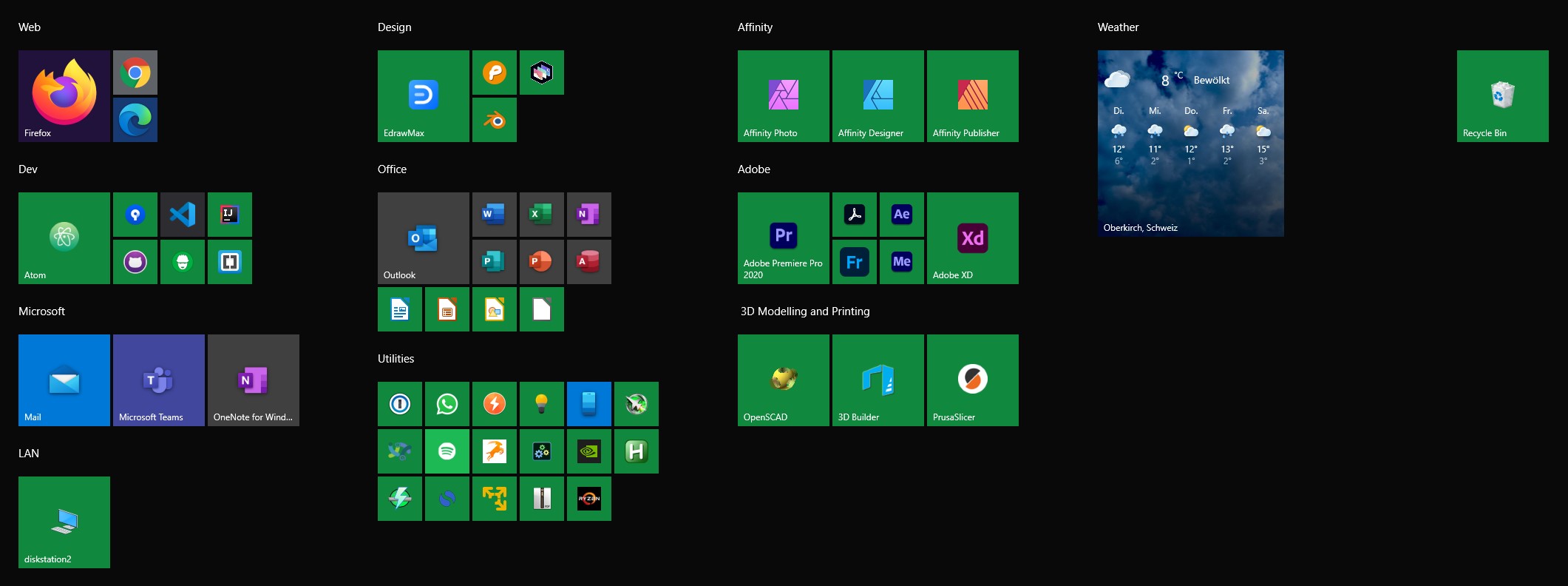
When I hit the start menu, it's because I want to launch an application. I don't need to see the rest of the desktop. So why is the Start menu by default only occupying a small portion of the screen, and wasting the remaining space? I switch my Start menu to full-screen. It looks good, and it gives Windows a nice little home screen.[^home]

[^home]: Windows 8 was the best version of Windows. And that's just a fact.

Windows Full-Screen Start Menu

Turn Off Wallpaper Sync

By default, if you log in with the same account on multiple PCs, Microsoft will sync some settings between these devices. That's nice. One of these settings is the wallpaper. That's not nice. I turn it off in the Accounts settings.

Set Up Clipboard Sharing and Multi-Clipboard

In the Clipboard settings, I turn on "Save multiple items in the clipboard to use later." It's super annoying to forget to turn it on, because when you need it, it's too late. Why isn't this just turned on by default? Also, I turn on "Sync across devices," so I can copy on one device, and paste on another. I also set up the Smartphone app, so I can copy on my Android phone, and paste on Windows - great for things like two-factor authentication codes.

Make the Cursor Black

Black with a white outline is the correct color for the mouse pointer. Most of the stuff on most people's screens is white. It makes no sense to have a white mouse pointer.

Fortunately, it's easy to change the default Windows cursor to the correct color in the Mouse pointer settings. Unfortunately, even when changed to black, the misshapen Windows mouse pointer's stem still doesn't align with its point.

Add the Trash to the Start Menu, and Remove It from the Desktop

Since Windows' window management works much better than what OS X's does, and guides users towards tiling their windows, the desktop on Windows is almost always covered by windows. So I just add the Trash can (or, as these peculiar Windows users like to wrongly call it, "Recycle bin") to the Start menu, and then remove it from the Desktop altogether. This can be done in the Theme settings by clicking on "Desktop Icon Settings."

Stuff to Remember

Here are some additional things to keep in mind when switching from a Mac to Windows.

Screenshots

Hit Win-Shift-S instead of Cmd-Shift-4. "S" does kind of make a little more sense for "screenshot" than "4", I think. You might want to install the Snip & Sketch tool if it isn't installed by default, and turn on its notifications, so that after creating a screenshot, you get a popup of the screenshot you just took. Click on the popup to edit the screenshot.

Screen Recordings

You can make screen recordings using the Xbox Dashboard by hitting Win-G.

Launching Apps

Instead of Shift-Space, just hit Win, and start typing the name of the app you want to launch.

Further Reading

I like this list from Scott Hanselman.


If you require a short url to link to this article, please use http://ignco.de/780


designed for use cover

But wait, there's more!

Want to read more like this? Buy my book's second edition! Designed for Use: Create Usable Interfaces for Applications and the Web is now available DRM-free directly from The Pragmatic Programmers. Or you can get it on Amazon, where it's also available in Chinese and Japanese.

01 Feb 20:49

🧑‍🏫 Now building with Next.js

by Duncan Davidson

One of my New Year’s resolutions was to dig a bit deeper into React. It’s part of a personal project to rehabilitate my negative bias about the JavaScript ecosystem and to dig deeper into the details that I find really interesting. Also, I’ve been watching the Next.js framework for a while. Now that it supports static website generation, I decided it was time to dive in re-build my duncan.dev site using it, which you’re reading now.

About that bias of mine: I find most of the JavaScript ecosystem to be a layered hot mess. It has developed over time by a steadily accelerating accretion of ideas. Because of that, it can be tough to see the gems. Next.js looks to be one of the gems. Paired with TypeScript, I’m finding that I’m enjoying it.

01 Feb 20:49

💉 Europe’s vaccine shortage

by Duncan Davidson

Europe was feeling pretty good about its vaccine policy for COVID-19. But now, not so much. In fact, Europe is looking for a way out of a vaccine fiasco. It’s falling behind many other regions in the world, including the US and UK.

Barbara Wesel reports in Deutsche Welle:

The problem is that the vaccines were developed much faster than expected, and the companies don’t have the large capacities needed for production, said Jutta Paulus, a German health expert for the Green Party in the European Parliament. And the production processes can’t be created that quickly for MRNA-based vaccines like those by Pfizer and Moderna, either.

That’s leading to threats being thrown between the UK and EU. Benjamin Mueller and Martina Stevis-Gridneff write in the New York Times:

The feuding in Europe holds echoes of the dark, early days of the pandemic, when scores of countries banned or restricted the export of protective equipment and medical devices. Nearly a year later, far from abating, that spirit of protectionism has been exacerbated

Given that these vaccines were developed in record time and need to be shipped in record numbers, there will be some bumps. Hopefully, this is one of those bumps that will soon be a memory and won’t result in regrettable policy decisions.

01 Feb 19:08

Weeknote - 31 January 2021

This seemed like a really quick week. A lot of digging on things on the work side of things.

Read

A Day in the Life of Your Data from Apple is quite well done. The audience for it is more developers than the general public, but it can be a good handbook for them as well. Apple released this to help developers and application owners understand the impact the actions with data have on their users.

It was great to read M.G. Siglar writes about location-based service Gowalla coming back to life, which was one of my favorite apps and used for location based service and recommendations. The t-shirt I got for them was adopted about 10 years ago as a night shirt and he still wears it. I’m happy he may get to understand Gowalla is and use it.

Listened

I used one of the Apple Music algo playlists “Pure Chill” to find some calming background music for work stumbled upon Zimmer’s self-named album Zimmer and the song Rey which I really liked, as it starts some with a light rhythm that builds a little bit, but in a way that it feels like a rising wave of deep emotion. It wasn’t work music (the rest of the album works rather well for that, and yet I’m pulling together this weeknote to it on loop just fine), but it was an amazing piece that washes over you. I don’t remember a song doing that before.

I really enjoyed 99% Invisible’s Beneath the Skyway episode about the skyways in Minneapolis. Seattle and Spokane had skyways when I was a kid, but not an abundance, and they were deeply fascinating. Visiting Chicago, I found they had even more around Wacker Drive, then there are the underground path systems in Montreal and Toronto which are massive. But, learning about what Minneapolis’ skyway did to street traffic, the downtown use patters, but also who it included and shunned was a really good perspective.

I was entertained and sent into a some deep thinking for a day or two from Postlight Podcast - Are Conspiracy Theories Just Bad Theories With Good UX?.

Today (I normally don’t include the Sunday I’m pulling together weeknotes in the weeknote, but it was too good to push a week) I was listening to Jorge Arango’s The Informed Life - Kourosh Dini on DEVONthink podcast. I’ve pushed the meat of this down to the Productivity section below.

Food

Sunday steak and eggs is getting to be something of a ritual. Steak isn’t exactly the right term as it could be different cuts of beef, like: tri tip, hangar steak, strip steak, flank steak, etc. They are relatively inexpensive cuts just salted, garlic granules, and pepper, seared in a cast iron pan to medium rare (so 3 to 4 minutes a side) and taken out to rest and slice against the grain. Often some sliced or large diced shitake mushrooms are added to the pan with a little salt to cook down and get a little meaty just before I add the beef. After the beef is out, the pan deglazed with a healthy dose of red wine (Cote du Rhone has been the favorite go to if on hand) and a table spoon or two of Dijon (Trader Joe’s is a fav) mustard are added and the pan scrapped down and tipped to put a corner / side of the pan over the flame to reduce. The sliced beef is plated and thee sauce put over and a eggs quickly scrambled in a non-stick pan for large curd with chopsticks or spatula. Then my son and I just enjoy.

Productivity

I’ve long been a fan / follower of Kourosh Dini’s workflow models, as his OmniFocus tips and tricks changed how I used it for a long time (I’m not using OmniFocus at the moment, which is a longer discussion and nothing really to do with OmniFocus). I’ve started following Kourosh’s work around note taking flows and his are close to what I’ve been doing and tweaking where I use DevonThink (DT) to search and build connections. I’ve used DT for more than 15 years now and scarily all in one database. But, my use of tags with DT is light its search and AI driven search is so good normal use of tags isn’t quite needed, but I tag with project context (writing piece I’m using it in or for, as well as work project collection used in), author, source (if those two are highly relevant and not called out in the pieces well), and tag terms used that are not in the piece. The tagging is more meta as it is about construct of use for refinding in that context. But, I don’t take notes in DT, I point DT to where my notes are and index that location with DT or sometimes feed it in, but always keep the notes in their grouping.

This week another IA and long time productivity cohort, Austin Govella dug into note taking and particularly evergreen notes. There are some interesting things in this and some really good links in it. I am still teasing this one apart and may post something mid-week or later.

01 Feb 19:07

This is one of two hot chocolate + pastry combo...

This is one of two hot chocolate + pastry combos we got at Bench Bakehouse as part of the Vancouver Hot Chocolate festival: a kouign aman covered in caramel & filled with maple cream. The sign photo has the full decadent list of flavours.

01 Feb 19:07

Moa Party is a Mastodon / Twitter cross posting...

Moa Party is a Mastodon / Twitter cross posting tool by @foozmeat.

I just inquired in the issue queue whether I can help fund getting the Instagram API working again <github.com/foozmeat/…>

01 Feb 19:03

Mirror of Your Mind

by Isabel Munson
Full-text audio version of this essay.

Gazing into TikTok’s For You Page — an algorithmically curated, personalized feed that shows videos the platform thinks you will like, learning over time what kind of content will increase your engagement — can be like looking into a hall of mirrors. It’s hard to know if its at times uncanny accuracy stems from superior analytics and data harvesting (which are widely mythologized and which companies are often incentivized to oversell) or from the fact that most users can be guided to generally predictable categories. On TikTok, comments like “so we’re really all living the same life huh?” are not uncommon. There may also be an availability bias to those occasions when the algorithm guesses really, really right: We remember those, while forgetting the videos that didn’t click.

Sometimes the For You Page algorithm is extremely literal, clumsy, and obvious in its techniques: Watch a video of a girl who happens to be a hijabi; be presented with three more hijabis the next day. Despite this, the algorithm can begin to seem to know users better than they know themselves. Its occasional clumsiness and errors in taste may lower users’ defenses, creating a randomness that may offset the creepiness of being accurately pigeonholed.

It can feel easier to open up to a stranger than to friends; seeing videos from strangers may allow users to forget what they think they know and just listen to what is being said

Whatever the reason for its power, the For You Page is central to TikTok’s success, which in turn further enhances the oracular aura of its algorithms in a kind of self-fulfilling prophecy. What you see on TikTok can then make you question who you are, as if the app must know something you don’t. The crystal-ball effect of TikTok can be especially strong when the algorithm suggests something surprising: Users wonder, why does TikTok think I’m ____ (bisexual, a man, a parent of two kids, an alcoholic, ADHD, etc.). Searching Twitter for TikTok thinks I’m turns up many examples of people bemused by the algorithm mistaking their identity.

Through its algorithmic recommendations, TikTok essentially diagnoses thousands of people of all ages with medical conditions by showing them, unprompted, videos about ADHD, autism, and more. It’s easy to find comments, for example, on an ADHD video along the lines of “I don’t think I have ADHD but I keep seeing these videos and it’s making me question.” The substance of these videos vary wildly, ranging from the surprising ways ADHD and autism may present and how these conditions are underdiagnosed in women, to ways an individual might “mask” their illness, to management tips, like how to organize when you have depression, how to stop a panic attack, or techniques for breaking an overwhelming to-do list down into manageable steps. Users may provide a tour of their filthy “depression room” or share what mania looks like for them.

TikTok is rich with such mental health and self-help content, perhaps because the app’s direct and intimate format lends itself to such material. Clips often consist of a person’s face and torso, close to the camera as though they are FaceTiming a friend, and there is no time or need for fancy intros like on YouTube. There’s just someone quickly and eagerly spilling their experiences, presumably in the hope that it helps you. Because videos on the For You Page are strictly served algorithmically, they’re often from strangers. In the same way that sharing personal information with a stranger can feel easier than opening up to friends, seeing videos from strangers may allow users to forget what they think they know and just listen to what is being said.

Videos explaining how symptoms of ADHD may present themselves have resonated with hundreds of thousands of women; the comment sections are full of testimonials like “This explains my whole life” or “I just went to the doctor and got diagnosed, I’m 32 and wish I knew this earlier.”

I had a similar feeling: Until TikTok’s For You Page served me these videos, I didn’t knew that ADHD individuals have a different brain chemistry and structure as well as chronically lower dopamine levels, which contribute to distractibility and greater risks of addiction. ADHD symptoms also commonly mirror those of trauma and CPTSD, and women are frequently undiagnosed with ADHD. Basically, I felt like I was hearing all my problems explained to me in under a minute. Years of therapy had never given me such insight.

The experience of TikTok itself may come to feel therapeutic: In some ways it reverses the pressure that platforms like Instagram place on users to show only their best moments, prettiest pictures, and most desirable experiences. On TikTok, your most embarrassing story or childhood photo can become a piece of social capital, a ticket to virality. The platform’s proliferation of tremendously weird, “unflattering,” and simply “normal” content can feel like a relief. It also cultivates a sense of anonymity, a confessional environment, given that most people don’t primarily use it to connect with people they know IRL.

Many mental health professionals have praised the platform for offering accessible information that is destigmatizing and reaches people who otherwise might not be open to therapy or have access. I was served a video of a teenage girl sharing her large bald spot from trichotillomania, a condition that I’ve had for over a decade. The comments section was full of hundreds of people saying that they thought it was just them, saying that they had no idea it was a disease, and thanking the user for bravely sharing her experience. I’ve also been served videos about people obsessing over their pores and popping pimples in the mirror, a condition called dermotillomania. Again, the comments section was packed with young people who didn’t know this was a recognized disorder. Understanding that “it’s not just me” or “not my fault for being like this” can be a tremendous relief.

At the same time, receiving mental health advice from TikTok can be problematic. The videos are one minute at most, designed for virality, and not vetted by a therapy board or peer review. Anyone can make a mental health video, and the simplistic, short-form nature of the content risks implying that the experience shared within is universal or that the individual is an expert. In addition, the algorithm is expressly designed to present people with information they want to hear. It is not likely to present challenging rebuttals or prompt questioning of their stance. In therapy, your therapist may push back against what you say. On a platform designed to increase engagement and keep people hooked, that seems unlikely.

TikTok is a space designed to create confirmation bias — or more accurately, engagement bias. Whereas a therapist might question the usefulness of identifying oneself as permanently aligned with whatever struggle one is experiencing, engagement-driven platforms help frame conditions as points of identity, badges of honor. If users find they are rewarded primarily for producing content on a certain condition, belief, or identity, it can skew their motivations and self-definition, making them believe at some level that it is the most interesting and likable thing about them. Some individuals exaggerate or fake “tics” or “stimming” for the likes, or they indulge in self-diagnosing with certainty. As much as it’s important to destigmatize neuro-divergence and mental illness, there are risks when these struggles are glorified for clout or presented as static and unchangeable. There’s a fine line between destigmatizing and incentivizing, especially on social media platforms with built-in feedback mechanisms.

The diagnostic procedures of TikTok are not limited to showing some users videos that pertain to specific medical conditions. The logic of diagnosis is embedded in every piece of content, each new piece of content functioning as a probe to reveal and assign personality traits, potential hobbies, and obsessions. Identity itself is configured as a condition to be uncovered rather than articulated or expressed.


With how routinely social media platforms are now derided for fomenting surveillance, conspiracy, and polarization, it can be easy to forget that they were once heralded for ushering in a new emphasis on self-expression. If you signed up you could “share” your activities and ideas to a wider range of people and seem to expand the contours of what the self could be. Initially, this process was a novelty, but as social media became more routine, skillful self-presentation became a familiar and necessary skill, almost a self-care ritual, driven by how other people and algorithms respond to your posts.

Your therapist may push back against what you say. On a platform designed to increase engagement and keep people hooked, that seems unlikely

With traditional markers of life progress and self-definition — home ownership, marriage, kids, stable careers — becoming less normative as well as less broadly attainable, it can make sense to treat social media as an opportunity to restabilize identity, a chance to turn inward toward something we can control: the aesthetic and the personality we project, the labels we apply to ourselves. Many social media bios are a collection of such identifiers: astrology sign, pronouns, gender and sexual orientation, political orientations, mental illnesses, disabilities, location, age, Myers-Briggs type, fandoms, jobs, hobbies, and more.

That is to say, social media platforms drive not just self-expression but self-discovery. They are a means of production for identity, which affects our sense of what identity is for and what motivates how we refine it. For example, user profiles are both uniquely personal yet also deeply standardized, and the density of social connection prompts both a demand to post creatively and to conform to popular formulas for content. This drives the pursuit of uniqueness and niche identities, as self-differentiation represents a profit opportunity, much like product differentiation within advertising.

Just as capitalism engenders the belief that our value is determined by our productivity, “social” as a business category influences our concept of the self, encouraging us to see self-categorization on platforms not only as self-realization but as a source of capital. Our value then is based on effective self-branding, on the ongoing ability to reproduce the stable and refined self we project online. Mastery of this process has itself become a career option: “influencing,” which requires a dedication to producing content and a talent for translating a persona into legible posts. The more easily understood the persona, the wider an audience it can reach.

The capitalist logic of platforms and their use as a means of self-discovery are thus deeply interconnected. Just as the apps seek to categorize users, personalize content, and accurately target them with advertising, users seek to categorize their self, interests and identities and accurately convey their essence in a profile. This model of the self mimics that of the feed — an endless source of content that will keep flowing, generating data, refining, indexing, and articulating identity. The platform’s business tools — like recommended content and people to follow — are presented as helpful tips for further discovery and refinement. Algorithms and engagement metrics act as feedback mechanisms, aiding the user in articulating their self-categorization by perpetually refining new content and evaluating its effectiveness.

No platform is more committed to this — or successful at it — than TikTok. On Twitter and Instagram, the user self-selects what and who they want to follow and how they want to define themselves. Though feeds are sorted algorithmically and the platforms recommend content and topics, users’ feeds are primarily propagated with accounts they’ve chosen to follow. On TikTok, however, the For You Page algorithm does all the categorizing for you, steering you down paths it thinks will lead to the most engagement.

Eugene Wei ascribes TikTok’s success to this distinction, and the app’s unprecedented ability to surface content from users’ “interest graph” rather than their “social graph,” like other platforms have. By creating an experience based chiefly on catering to user’s interests, with zero on-boarding required other than scrolling, TikTok avoided common friction points in creating a popular network, like the potentially anxiety-inducing challenge of personally curating your feed, given what such choices say about your economic value.

While the majority of attention on the app goes to the mainstream “straight TikTok,” — full of hype houses, viral dances, and accounts with millions of followers, like Charli D’Amelio and Chase Hudson (“Lil Huddy”) — TikTok also generates countless niche culture-less subcultures, sometimes from a single video. FrogTok comes to mind, but there’s also “cottagecore” TikTok, Prison TikTok, WitchTok, Anti-Lawn TikTok, Bean TikTok, DeepTok, Foraging TikTok, CartelTok, to name a few. Recently, Sea Shanty TikTok experienced a wave of popularity.

The fixation on reaching the deepest sides of the platform reflects the emerging fantasy of reaching the source of a stream that is endless by design

People have even made videos mapping out the journey the algorithm has taken them through different TikTok micro-communities. These maps define a landscape of different content destinations that are passed through or avoided on the quest to reach the “deepest” levels of TikTok, with the weirdest, rarest, or “best” content. Searching the phrase “You’ve reached” on TikTok reveals a huge variety of these declarations, with creators or commenters defining a topic or genre as a destination. These different TikTok subcultures are typically trends that don’t last as a genre, but the urge to label what “side” of TikTok a user has stumbled upon reveals the desire to define stable categories and destinations amid the flux, to aid users with future articulation of their own tastes and identity. The fixation on reaching the deepest sides of the platform reflects the emerging fantasy of reaching the source of a stream that is endless by design.

Identity, too, is accordingly structured as endless and unstable; one never reaches the final destination where they have “completed” evolving. The lack of a finish line is not a deterrent; users instead continually try to turn endlessness into stability. The constantly refining feed becomes a stable backdrop, and the quest for a “solved” fixed identity becomes perpetual.

It’s paradoxical to seek stability within platforms that incentivize flux, virality, and mimetic copying. But TikTok, and algorithmic feeds in general, make this broader contradiction seem coherent: Identity can be both stable (who you “really” are) and constantly changing (a form of “human capital” that can be accumulated and manipulated as circumstances demand).


There is something sinister about the algorithmically supported push to define, diagnose, declare, and “solve” the self. Medical diagnosis and definition can absolutely be valuable, even life-saving. But when everything is indexed and flattened to a profile, we enter the passive role of content consumer surfing the waves of infinite new videos and posts to try and find ourselves within.

The search for the self is now framed as a pastime, easy to pursue, and embedded within the logic of the platforms down to the design of interfaces, algorithms, and features. But this search runs counter to the idea that the best way to find value in oneself is by becoming a part of the whole — connecting with others, helping others, and shedding the idea of a “self” distinct from the rest of the world. In theory, platforms could cultivate this sense of interconnectedness and intrinsic worth in every individual, as people are more ubiquitously connected and networked than ever, but platforms instead tend to promote differences, create niches, and elevate conflict and division for engagement.

Without ever arriving at this insight, people may be resigned to constantly solving and diagnosing themselves, condemning others, and getting lost in the slipstream of online spaces in an attempt to make sense in a senseless world. Knowledge is power, but an endless stream of videos and tips and tricks can end up serving as compulsive distraction. You pry yourself away from the feed as if from a fugue state, both having learned everything and nothing.

01 Feb 19:02

Toronto Area Libraries Reach Out to Pandemic Isolated Seniors Through Library Cards

by Sandy James Planner

Who touches every household during the pandemic and knows where seniors live? Canada Post still goes door to door in many areas, and knows whether mail is being picked up or not.

But libraries in the metro Toronto area went one step further during the pandemic when their public areas were closed down.

They called their senior library card holders-who number over 20,000-to ask how they were doing.

Starting last summer, twenty staff members made a list of their clients between the ages of 80 to 100 years and  have made calls to 10,000 individuals. That was so effective,  library staff are now calling the next cohort, those aged between 70 and 79.

The library staff ask how the senior is doing, and also lets them know what library services are available to them during Ontario’s lockdowns, and how they can continue to access reading materials. The staff explain how the curbside pickup service works, and also how ebooks can be borrowed. There is also a delivery service for those who are immobile.

Each call takes about ten minutes of staff time.

As written by Emanuela Vega in The Star, librarian Emoke Gall stated “People are really surprised when we call them, that it’s not a call that we’re selling anything or asking anything of them, We’re literally just checking in to see how they’re doing.”

Here is a YouTube video from CityNews describing the service.

Image:TorontoLife

01 Feb 19:01

A Look at iMessage in iOS 14

mkalus shared this story from Project Zero:
It’s quite impressive how serious Apple seems to have taken past exploits. Will be interesting to see if / when / how someone overcomes this implementation.

Posted By Samuel Groß, Project Zero

On December 20, Citizenlab published “The Great iPwn”, detailing how “Journalists [were] Hacked with Suspected NSO Group iMessage ‘Zero-Click’ Exploit”. Of particular interest is the following note: “We do not believe that [the exploit] works against iOS 14 and above, which includes new security protections''. Given that it is also now almost exactly one year ago since we published the Remote iPhone Exploitation blog post series, in which we described how an iMessage 0-click exploit can work in practice and gave a number of suggestions on how similar attacks could be prevented in the future, now seemed like a great time to dig into the security improvements in iOS 14 in more detail and explore how Apple has hardened their platform against 0-click attacks.

The content of this blog post is the result of a roughly one-week reverse engineering project, mostly performed on a M1 Mac Mini running macOS 11.1, with the results, where possible, verified to also apply to iOS 14.3, running on an iPhone XS. Due to the nature of this project and the limited timeframe, it is possible that I have missed some relevant changes or made mistakes interpreting some results. Where possible, I’ve tried to describe the steps necessary to verify the presented results, and would appreciate any corrections or additions.

The blog post will start with an overview of the major changes Apple implemented in iOS 14 which affect the security of iMessage. Afterwards, and mostly for the readers interested in the technical details, each of the major improvements is described in more detail while also providing a walkthrough of how it was reverse engineered. At least for the technical details, it is recommended to briefly review the blog post series from last year for a basic introduction to iMessage and the exploitation techniques used to attack it.

Memory corruption based 0-click exploits typically require at least the following pieces:

  1. A memory corruption vulnerability, reachable without user interaction and ideally without triggering any user notifications
  2. A way to break ASLR remotely
  3. A way to turn the vulnerability into remote code execution
  4. (Likely) A way to break out of any sandbox, typically by exploiting a separate vulnerability in another operating system component (e.g. a userspace service or the kernel)

With iOS 14, Apple shipped a significant refactoring of iMessage processing, and made all four parts of the attack harder. This is mainly due to three central changes:

1. The BlastDoor Service

One of the major changes in iOS 14 is the introduction of a new, tightly sandboxed “BlastDoor” service which is now responsible for almost all parsing of untrusted data in iMessages (for example, NSKeyedArchiver payloads). Furthermore, this service is written in Swift, a (mostly) memory safe language which makes it significantly harder to introduce classic memory corruption vulnerabilities into the code base.

The following diagram shows the rough new iMessage processing pipeline, with the name of the respective service process shown at the top of each box.

The iMessage processing pipeline in iOS 14 and macOS Big Sur. An iMessage arrives in apsd as a push notification from Apple’s servers. From there, it is first passed to identityservicesd, which decrypts its payload using the local iMessage private key, then to imagent. Imagent then delegates the majority of the parsing work to the BlastDoor service. Afterwards, if the iMessage contains any attachments, they are downloaded from iCloud servers by IMTransferAgent. If the iMessage contains plugin data (such as a URL with a preview image), the serialized plugin data is again processed by the BlastDoor service and a preview message is generated from it. Finally, IMDPersistenceAgent stores the iMessage into the messages database, triggers a user notification, and returns to imagent, which sends the delivery receipt to the iMessage servers and thus to the sender.

As can be seen, the majority of the processing of complex, untrusted data has been moved into the new BlastDoor service. Furthermore, this design with its 7+ involved services allows fine-grained sandboxing rules to be applied, for example, only the IMTransferAgent and apsd processes are required to perform network operations. As such, all services in this pipeline are now properly sandboxed (with the BlastDoor service arguably being sandboxed the strongest).

2. Re-randomization of the Dyld Shared Cache Region

Historically, ASLR on Apple’s platforms had one architectural weakness: the shared cache region, containing most of the system libraries in a single prelinked blob, was only randomized per boot, and so would stay at the same address across all processes. This turned out to be especially critical in the context of 0-click attacks, as it allowed an attacker, able to remotely observe process crashes (e.g. through timing of automatic delivery receipts), to infer the base address of the shared cache and as such break ASLR, a prerequisite for subsequent exploitation steps.

However, with iOS 14, Apple has added logic to specifically detect this kind of attack, in which case the shared cache is re-randomized for the targeted service the next time it is started, thus rendering this technique useless. This should make bypassing ASLR in a 0-click attack context significantly harder or even impossible (apart from brute force) depending on the concrete vulnerability.

3. Exponential Throttling to Slow Down Brute Force Attacks

To limit an attacker’s ability to retry exploits or brute force ASLR, the BlastDoor and imagent services are now subject to a newly introduced exponential throttling mechanism enforced by launchd, causing the interval between restarts after a crash to double with every subsequent crash (up to an apparent maximum of 20 minutes). With this change, an exploit that relied on repeatedly crashing the attacked service would now likely require in the order of multiple hours to roughly half a day to complete instead of a few minutes.

The remainder of this blog post will now look at each of these three changes in greater depths.

The new BlastDoor service and its role in the processing of iMessages can be studied by following the flow of an incoming iMessage. On the wire, a simple text iMessage would look something like this, encoded as binary plist:

{

    // Group UUID

    gid = "008412B9-A4F7-4B96-96C3-70C4276CB2BE";

    // Group protocol version

    gv = 8;

    // Chat participants

    p =     (

        "mailto:sender@foo.bar",

        "mailto:receiver@foo.bar"

    );

    // Participants version

    pv = 0;

    // Message being replied to, usually the last message in the chat 

    r = "6401430E-CDD3-4BC7-A377-7611706B431F";

    // The plain text content

    t = "Hello World!";

    // Probably some other version number

    v = 1;

    // The rich text content    

    x = "<html><body>Hello World!</body></html>";  

}

As such, the minimal steps required to parse it are:

  1. If necessary, decompress the binary data
  2. Decode the plist from its binary serialization format
  3. Extract its various fields and ensure they have the correct type
  4. Decode the `x` key if present, using an XML decoder

Previously, all of this work happened in imagent. With iOS 14, however, it all moved into the new BlastDoor service. While the main processing flow still starts in imagent, which receives the raw but unencrypted payload bytes from identityservicesd (part of the IDS framework) in -[IMDiMessageIDSDelegate service:account:incomingTopLevelMessage:fromID:messageContext:], messages are then more or less immediately forwarded to the BlastDoor service through +[IMBlastdoor sendDictionary:withCompletionBlock:] which creates the reply handler block and then calls -[IMMessagesBlastDoorInterface diffuseTopLevelDictionary:resultHandler:]. At that point processing ends up in Swift code that deserializes the binary payload and sends it to the BlastDoor service over XPC.

Inside BlastDoor, the work mostly happens in BlastDoor.framework and MessagesBlastDoorService. As most of it is written in Swift, it is fairly unpleasant to statically reverse engineer it (no symbols, many virtual calls, swift runtime code sprinkled all over the place), but fortunately, that is also not really necessary for the purpose of this blog post. However, it is worth noting that while the high level control flow logic is written in Swift, some of the parsing steps still involve the existing ObjectiveC or C implementations. For example, XML is being parsed by libxml, and the NSKeyedArchiver payloads by the ObjectiveC implementation of NSKeyedUnarchiver.

The responses from BlastDoor can be seen by breaking on the reply handler function in imagent (the function can be found in +[IMBlastdoor sendDictionary:withCompletionBlock:] or by searching for XREFs to the string “Blastdoor response %p received (command: %hhu, guid: %@)” in IMDaemonCore.framework). A typical BlastDoor response for a simple text message is shown below:

(lldb) po $x2

TextMessage(

    metadata: BlastDoor.Metadata(

        messageGUID: D391CC96-9CC6-44C6-B827-1DEB0F252529,

        timestamp: Optional(1610108299117662350),

        wantsDeliveryReceipt: true,

        wantsCheckpointing: false,

        storageContext: BlastDoor.Metadata.StorageContext(

            isFromStorage: false, isLastFromStorage: false

        )

    ),

    messageSubType: MessageType.textMessage(BlastDoor.Message(

        plainTextBody: Optional("Hello World"),

        plainTextSubject: nil,

        content: Optional(BlastDoor.AttributedString(

            attributes: [

                BlastDoor.BaseWritingDirectionAttribute(

                    range: Range(0..<11), direction: WritingDirection.natural

                ),

                BlastDoor.MessagePartAttribute(

                    range: Range(0..<11), partNumber: 0

                )

            ],

            string: "Hello World"

        )),

        _participantDestinationIdentifiers: [

            "mailto:sender@foo.bar",

            "mailto:receiver@foo.bar"

        ],

        attributionInfo: []

    )),

    encryptionType: BlastDoor.TextMessage.EncryptionType.pair_ec,

    replyToGUID: Optional(6401430E-CDD3-4BC7-A377-7611706B431F),

    _threadIdentifierGUID: nil,

    _expressiveSendStyleIdentifier: nil,

    _groupID: Optional("008412B9-A4F7-4B96-96C3-70C4276CB2BE"),

    currentGroupName: nil,

    groupParticipantVersion: Optional(0),

    groupProtocolVersion: Optional(8),

    groupPhotoCreationTime: nil,

    messageSummaryInfo: nil,

    nicknameInformation: nil,

    truncatedNicknameRecordKey: nil

)

One can roughly associate every field in this data structure with parts of the on-wire iMessage format. For example, the plainTextBody field contains the content of the `t` field, while the content field corresponds to the content of the `x` field.

Besides simple text messages, iMessages can additionally contain attachments (essentially arbitrary files which are encrypted and temporarily uploaded to iCloud) as well as rather complex serialized NSKeyedArchiver archives, which have been the source of bugs in the past.

For these types of iMessages, the following additional parsing steps are necessary:

  1. Unpack attachment metadata (NSKeyedArchiver format)
  2. Download attachments from iCloud server
  3. Deserialize NSKeyedArchiver plugin archives and generate a preview for the notification

As an example, consider what happens when a user sends a link to a website over iMessage. In that case, the sending device will first render a preview of the webpage and collect some metadata about it (such as the title and page description), then pack those fields into an NSKeyedArchiver archive. This archive is then encrypted with a temporary key and uploaded to the iCloud servers. Finally, the link as well as the decryption key are sent to the receiver as part of the iMessage. In order to create a useful user notification about the incoming iMessage, this data has to be processed by the receiver on a 0-click code path. As that again involves a fair amount of complexity, it is also done inside BlastDoor: after receiving the BlastDoor reply from above and realizing that the message contains an attachment, imagent first instructs IMTransferAgent to download and decrypt the iCloud attachment. Afterwards, it will call into -[IMTranscodeController decodeiMessageAppPayload:bundleID:completionBlock:blockUntilReply:] which forwards the relevant data to the IMTranscoderAgent, which then proceeds into +[IMAttachmentBlastdoor sendBalloonPluginPayloadData:withBundleIdentifier:completionBlock:] and finally calls -[IMMessagesBlastDoorInterface defuseBalloonPluginPayload:withIdentifier:resultHandler:].

In the BlastDoor service, the plugin data decoding is then again performed in Swift, and dispatched to the corresponding plugin type, as determined by the plugin id. For RichLinks (plugin id com.apple.messages.URLBalloonProvider), processing ends up in LinkPresentation.MessagesPayload.init(dataRepresentation:), which deserializes the NSKeyedArchiver payload and to extract the preview image and URL metadata from it in order to generate a preview message.

Sandboxing

The sandbox profile can be found in System/Library/Sandbox/Profiles/blastdoor.sb and appears to be identical on iOS and macOS. It can be studied statically, and for that purpose can be found here, or dynamically, for example by using the sandbox-exec tool:

> echo "(allow process-exec (literal \"$(pwd)/test\"))" >> ./blastdoor.sb

> clang -o test test.c   # try to open files, network connections, etc.

> sandbox-exec -f ./blastdoor.sb ./test

The sandbox profile states:

;;; This profile contains the rules necessary to make BlastDoor as close to

;;; compute-only as possible, while still remaining functional.

And indeed, the sandbox profile is quite tight:

  • only a handful of local IPC services, namely diagnosticd, logd, opendirectoryd, syslogd, and notifyd, can be reached
  • almost all file system interaction is blocked
  • any interaction with IOKit drivers (historically a big source of vulnerabilities) is forbidden
  • outbound network access is denied

Furthermore, the profile makes use of syscall filtering to restrict the interactions with the core kernel. However, as of now the syscall filter seems to be in “permissive” mode:

;; To be uncommented once the system call whitelist is complete...

;; (deny syscall-unix (with send-signal SIGKILL))

As such, the BlastDoor service is still allowed to perform any syscall, but it is to be expected that the syscall filtering will soon be put into “enforcement mode”, which would further boost its effectiveness.

Crash Monitoring?

An interesting side effect of the new processing pipeline is that imagent is now able to detect when an incoming message caused a crash in BlastDoor (it will receive an XPC error). Even more interesting is the fact that imagent appears to be informing Apple’s servers about such events, as can be seen by setting a breakpoint on -[APSConnectionServer handleSendOutgoingMessage:] in apsd, the daemon responsible for implementing Apple’s push services (on top of which iMessage is built). Displaying the outgoing message will show the following:

(lldb) po [$x2 dictionaryRepresentation]

{

    APSCritical = 1;

    APSMessageID = 543;

    APSMessageIdentifier = 1520040396;

    APSMessageTopic = "com.apple.madrid";

    APSMessageUserInfo =     {

        c = 115;

        fR = 13500;

        fRM = "c-100-BlastDoor.Explosion-1-com.apple.BlastDoor.XPC-ServiceCrashed";

        fU = {length = 16, bytes = 0x3a4912626c9645f98cb26c7c2d439520};

        i = 1520040396;

        nr = 1;

        t = {length = 32, bytes = ... };

        ua = "[macOS,11.1,20C69,Macmini9,1]";

        v = 7;

    };

    APSOutgoingMessageSenderTokenName = 501;

    APSPayloadFormat = 1;

    APSTimeout = 120;

    APSTimestamp = "2021-01-06 19:52:10 +0000";

}

As can be seen, imagent is apparently informing the iMessage servers that the message with the UUID 0x3a4912626c9645f98cb26c7c2d439520 (fU key) has caused a crash in BlastDoor.

It is unclear what the purpose of this is without access to the server’s code. While these notifications may simply be used for statistical purposes, they would also give Apple a fairly clear signal about attacks against iMessage involving brute-force and a somewhat weaker signal about any failed exploits against the BlastDoor service.

In my experiments, after observing one of these crash notifications, the server would start directly sending delivery receipts to the sender for messages that hadn't actually been processed by the receiver yet. Possibly this is another, independent effort to break the crash oracle technique by confusing the sender, but that is hard to verify without access to the code running on the server. In any case, it is worth noting that this “spoofing” of delivery receipts by the server is generally possible as the message UUID, which is more or less the only content of a delivery receipt, is part of the non-end2end encrypted payload and is thus known to the server (break on -[APSConnectionServer handleSendOutgoingMessage:] and inspect outgoing iMessages to verify this, the UUID will be in the U key, while the e2e-encrypted data will be in the P key). This is most likely necessary so the server can track which messages have already been delivered and which ones it still needs to keep around for delivery in the future.

Previously, when exploiting an iMessage memory corruption bug, a “crash oracle” could be used to reveal the location of the shared cache region in memory: the attacker would trigger the memory corruption bug in a way that would cause an access to a memory location somewhere in the region 0x180000000 - 0x280000000 (where the shared cache can be mapped). If the memory was valid, no crash would occur and imagent would then send a delivery receipt to the attacker. However, If a crash occurred, no such receipt would be delivered, informing the attacker that the address was unmapped. Through clever selection of the queried addresses, the location of the shared cache could be revealed in logarithmic time, with only about 20 messages.

However, with iOS 14 Apple has added a mechanism to re-randomize the location of the shared cache region for an “attacked” process, thus breaking a fundamental assumption of this technique and rendering it ineffective. This is significant as the crash oracle technique was likely one of very few, if not the only, fairly generic ASLR bypass techniques usable in 0-click iMessage attacks.

To understand how the shared cache resliding works, one can start by looking at the kernel. In iOS 14, the kernel can now have two active shared cache regions: the “regular” region and a “reslided” region. During an attack, the following then happens:

  1. When an attacker attempts to use a crash-oracle-based technique, the attacked process would quickly end up accessing unmapped memory in the range 0x180000000 - 0x280000000 (where the shared cache is mapped) and crashes
  2. The kernel handles the segmentation fault generated by the CPU, and sets a specific flag in the crash info that signals that the crash happened inside the shared cache region
  3. At the same time, the kernel will mark the currently active reslided shared cache region (if one exists) as stale, causing it to be recreated and thus re-randomized the next time it is used
  4. launchd (as the parent process of the crashed service) receives the crash info, notices the OS_REASON_FLAG_SHAREDREGION_FAULT flag, and sets the ReslideSharedCache property on the service associated with the crashed process (see `launchctl procinfo $pid` and search for `reslide shared cache = 1`)
  5. The next time the service is restarted, launchd then adds the POSIX_SPAWN_RESLIDE attribute for posix_spawn due to the ReslideSharedCache property
  6. In the kernel, this flag now causes the newly created process to be given the reslided shared cache image. However, as no active reslided region currently exists (the previous one was marked as stale in step 3.), a new one is created at a newly randomized address.

The result of this is that whenever an attacker attempts to use a crash-oracle to break ASLR, the attacked service would receive a different shared cache region every time it is launched, thus preventing the attack from succeeding. For the time being, this feature appears to only be active on iOS though, but it would be expected to come to macOS as well.

While this mechanism would in principle also protect 3rd party apps from similar attacks, protection for those is currently somewhat weaker, likely in order to first evaluate the real-world performance impact of this change (the shared cache is a significant performance optimization of the OS). In particular, step 3 is currently only performed if the crashing process is a platform binary (essentially binaries that ship with the OS and are directly signed by Apple) such as the services handling iMessages. However, for 3rd party processes, it would only happen if the global vm_shared_region_reslide_restrict is set to zero:

/*

 * Flag to control what processes should get shared cache randomize resliding

 * after a fault in the shared cache region:

 *

 * 0 - all processes get a new randomized slide

 * 1 - only platform processes get a new randomized slide

 */

Which is controlled by the vm_shared_region_reslide_restrict bootarg. This currently seems to be set to one. In essence, for 3rd party apps this means:

  1. When the attacked process first crashes, the kernel will still set the OS_REASON_FLAG_SHAREDREGION_FAULT flag, and launchd will add the ReslideSharedCache property, but the current reslided region won’t be invalidated
  2. The restarted service is then restarted and now uses the “reslided” shared cache region
  3. When the service crashes the next time, and if that service is the only one currently using the reslided shared cache region (which should usually be the case, but could possibly be influenced by the attacker), the region’s refcount drops to zero, and the shared cache region is marked for removal.
  4. However, removal will only actually happen after two minutes. As such, if the service is restarted within two minutes, it will receive the same shared cache region at the same location in memory.

As a result, a third-party app could still be attacked through a crash-oracle technique if it automatically sends some form of delivery receipt to the sender and restarts quickly enough after a crash. This could, however, be prevented for example by enabling ExponentialThrottling for these services. Ideally, and assuming that the performance penalty is reasonable, Apple would enable re-randomization for all apps in the future.

Another thing we suggested back in 2019 was to limit the number of attempts an attacker gets when attempting to exploit a vulnerability. This was mostly important to defend against the crash-oracle technique, but would also help to prevent brute force attacks (e.g., given enough attempts, one could simply brute force the location of the shared cache region). The new ExponentialThrottling feature in launchd seems to achieve just that.

To use it, a system daemon or agent has to opt-in by setting "_ExponentialThrottling = 1” in its Info.plist (essentially the service metadata), as can be seen below for the BlastDoor service:

> plutil -p /System/Library/PrivateFrameworks/MessagesBlastDoorSupport.framework/Versions/A/XPCServices/MessagesBlastDoorService.xpc/Contents/Info.plist

{

  "CFBundleDisplayName" => "MessagesBlastDoorService"

  "CFBundleExecutable" => "MessagesBlastDoorService"

  "CFBundleIdentifier" => "com.apple.MessagesBlastDoorService"

  ...

  "XPCService" => {

    "_ExponentialThrottling" => 1

  }

}

Apart from the BlastDoor service, it is also used for imagent:

> plutil -p /System/Library/LaunchAgents/com.apple.imagent.plist

{

  "_ExponentialThrottling" => 1

  ...

but doesn’t appear to be used for any other service, as can, for example, be seen by looking at the output of the launchctl dumpstate command, which will only show “exponential throttling = 1” for com.apple.imagent and com.apple.MessagesBlastDoorService.

Presumably, the _ExponentialThrottling property instructs launchd (the macOS and iOS init process), to delay subsequent restarts of a crashing service. While it is somewhat challenging to statically reverse engineer launchd due to the lack of source code or binary symbols, it is fortunately fairly easy to experimentally determine the impact of the _ExponentialThrottling property, for example by installing a custom daemon that writes the current timestamp to a file before crashing. By default, so without ExponentialThrottling, one would see the following:

Service started on Wed Jan  6 13:56:03 2021

Service started on Wed Jan  6 13:56:13 2021

Service started on Wed Jan  6 13:56:23 2021

Service started on Wed Jan  6 13:56:33 2021

As can be seen, by default, a service is, at the earliest, restarted ten seconds after it was previously started. However, using the following service plist which enables ExponentialThrottling:

> # Start service with

> # launchctl bootstrap system /Library/LaunchDaemons/net.saelo.test.plist

> plutil -p /Library/LaunchDaemons/net.saelo.test.plist

{

  "_ExponentialThrottling" => 1

  "KeepAlive" => 1

  "Label" => "net.saelo.test"

  "POSIXSpawnType" => "Interactive"

  "Program" => "/path/to/program"

}

One can observe the following:

Service started on Wed Jan  6 10:42:43 2021

Service started on Wed Jan  6 10:42:53 2021 (+10s)

Service started on Wed Jan  6 10:43:03 2021 (+10s)

Service started on Wed Jan  6 10:43:13 2021 (+10s)

Service started on Wed Jan  6 10:43:33 2021 (+20s)

Service started on Wed Jan  6 10:44:13 2021 (+40s)

Service started on Wed Jan  6 10:45:33 2021 (+80s)

Service started on Wed Jan  6 10:48:13 2021 (+160s [~2.5m])

Service started on Wed Jan  6 10:53:33 2021 (+320s [~5m])

Service started on Wed Jan  6 11:04:13 2021 (+640s [~10m])

Service started on Wed Jan  6 11:24:13 2021 (+20m)

Service started on Wed Jan  6 11:44:13 2021 (+20m)

Service started on Wed Jan  6 12:04:13 2021 (+20m)

Here, the exponential increase in the time between subsequent restarts is clearly visible, and goes up to an apparent maximum of 20 minutes. And indeed, launchd does contain the following bit of code in a function presumably responsible for computing the next restart delay (search for XREFs to the string "%s: service throttled by %llu seconds"):

  if ( delay >= 1200 )

    result = 1200LL;                 // 20 minutes

  else

    result = delay;

With this change, an exploit that relied on brute force would now only get one attempt every 20 minutes instead of every 10 seconds.

The PoC exploit against iMessage on iOS 12.4 relied heavily on faking ObjectiveC objects to gain a form of arbitrary code execution despite the presence of pointer authentication (PAC). This was mainly possible because the ISA field, containing the pointer to the Class object and thus making a piece of memory appear like a valid ObjectiveC object, was not protected through PAC and could thus be faked. With iOS 14, this now seems to be changing: while previously, the top 19 bits of the ISA value contained the inline refcount, it now appears that this field has been reduced to 9 bits (of which the LSB appears to be reserved for some purpose, leaving an 8-bit inline refcount, see the bit shifting logic in objc_release or objc_retain), while the freed-up bits now hold a PAC, as can be seen in objc_rootAllocWithZone in libobjc.dylib:

    ; Allocate the object

    BL              j__calloc_3

    CBZ             X0, loc_1953DA434

    MOV             X8, X0

    ; “Tag” the address with a constant to get a PAC modifier value

    MOVK            X8, #0x6AE1,LSL#48        

    MOV             X9, X19

    ; Compute PAC of Class pointer with tagged object address as modifier

    PACDA           X9, X8

    ; Clear top 9 bits (inline refcnt) and bottom 3 bits (other bitfields)       

    AND             X8, X9, #0x7FFFFFFFFFFFF8

    ; Set LSB and inline refcount to one

    MOV             X9, #0x100000000000001

    ORR             X9, X8, X9

    ; Presumably, the refcnt isn’t used for all types of classes...

    TST             W20, #0x2000

    CSEL            X8, X9, X8, EQ

    ; Store the resulting value into the ISA field

    STR             X8, [X0]

However, currently the ISA PAC appears to never be checked, as such, it doesn’t yet affect any exploits. The most likely reason for this is that the ISA PAC feature is being rolled out in multiple phases, with the current implementation meant to allow in-depth performance evaluation, in particular of the reduced size of the inline refcount, which will likely cause more objects to use the more expensive out-of-line refcounting (used once the inline refcount saturates). With that, it can be expected that, in the absence of major performance issues, future releases of iOS and macOS will use PAC for the ObjC ISA field, thus likely breaking exploits that have to rely on faking ObjectiveC objects to achieve arbitrary code execution.

This blog post discussed three improvements in iOS 14 affecting iMessage security: the BlastDoor service, resliding of the shared cache, and exponential throttling. Overall, these changes are probably very close to the best that could’ve been done given the need for backwards compatibility, and they should have a significant impact on the security of iMessage and the platform as a whole. It’s great to see Apple putting aside the resources for these kinds of large refactorings to improve end users’ security. Furthermore, these changes also highlight the value of offensive security work: not just single bugs were fixed, but instead structural improvements were made based on insights gained from exploit development work.

As for the alleged NSO iMessage exploit, it may have been prevented from working against iOS 14 by any of the following:

  • The bug was fixed in iOS 14, for example due to the rewrite of large parts of the iMessage processing pipeline in Swift
  • The mere fact that processing happens in a different process, which could for example break a heap layouting primitive
  • The shared cache resliding would break their exploit if their exploit relied on some form of crash oracle to break ASLR
  • The stronger sandbox of the BlastDoor service, which could prevent the exploitation of a privilege escalation vulnerability after compromising the BlastDoor process

While these are some possible scenarios, and it could be the case that the exploit “just” needs some re-engineering to function again, the fact that these security improvements were shipped is certainly a positive outcome.

31 Jan 21:15

Week Notes 21#04

by Ton Zijlstra

January is already over. Due to the reallocation of work, this week felt calmer. Even if most things still feel colorless and bland, and lacking in inspiration or fun, there was no undue stress. This week some handover activities still played a role. Next week I hardly have any fixed appointments, and only a few different things on my hands. This means I hopefully can work to fully focus on just a few things, diving deeper into it and not mentally repeating the things I’ve left undone because there’s no time.

This week I

  • Worked more hours than I hoped on sustainable infrastructure for a client, including a late night followed by a very early morning of work.
  • Had a client meeting on intergovernmental audits, and how taking a different approach to data sources and indicators can make those audits more useful to those being audited.
  • Did the payroll processing, including the bonuses resulting from the system we tested in 2020.
  • Ordered screens to keep out mosquitos for our first floor windows, which will be delivered in March.
  • Handed over most of my work for a provincial data publishing platform to colleagues, except for finishing a role and process description.
  • Wrote a decision document for an open data set for the same province, to ensure the organisation actively decides on the data release, and so the document can be used as a template moving forward.
  • Received access to the online working environment of a new client project and explored their tools and set-up
  • Had several introductory interviews with people involved in the client project
  • Did the Q4 book keeping, and the VAT returns for Q4 for my and E’s companies, and the Open Nederland association.
  • Had the weekly project call for the Citizen Science project w.r.t. air quality in Rotterdam
  • Worked on the first design of a tool to gather stories from the public w.r.t. the air quality project
  • Had an all hands session to set our collective goals for 2021 and Q1.
  • Found time to read a bit of non-fiction

20210125_141115
We had a few chilly but sunny days. Y took the opportunity to chalk some letters on the sidewalk.


This is a RSS only posting for regular readers. Not secret, just unlisted. Comments / webmention / pingback all ok.
Read more about RSS Club
31 Jan 21:14

Global PC shipments increased 35 percent in Q4 2020: report

by Aisha Malik
Lenovo Yoga C940

The Global PC market increased by 35 percent year-over-year as shipment hits 143.7 million units in Q4 2020.

A new report from Canalys reveals that total shipments for 2020 increased by 17 percent to reach 458.2 million units, which is the highest volume since 2015.

“The holiday quarter brought continued strength to tablets, with shipments hitting an all-time high of 52.8 million units, for a 2020 total of 160.6 million units and 28 percent growth over 2019,” the report outlines.

Lenovo led the market in the last quarter of 2020 and for the full year, as it reached shipments of 28.8 million and 87 million units, respectively.

“On the back of a stellar performance in iPads, second-placed Apple managed to close the gap with Lenovo and shipped 26.4 million Macs and iPads in Q4, a total of 81.4 million units for the full year,” Canalys notes.

HP, Dell and Samsung rounded out the top five, as all three manufacturers posted double-digit shipment growth in Q4 2020.

Interestingly, Apple furthered its dominance in the tablet market, as it saw shipments increase by 40 percent. The tech giant had its best iPad performance since Q4 2014.

Samsung maintained its spot in second place in the market with 9.9 million tablets shipped, up from 41 percent from Q4 2019. Amazon reached third place amid the strong holiday season demand and shipped 6.5 million tablets.

It’s not surprising that PC and tablet shipments are increasing, especially since people all around the world are continuing to work and learn from home amid the pandemic.

Image credit: Canalys

Source: Canalys

The post Global PC shipments increased 35 percent in Q4 2020: report appeared first on MobileSyrup.

31 Jan 21:14

The Illusion of Communication

by Dave Pollard


Image by Armin Schreijäg from Pixabay CC0

“The great enemy of communication is the illusion of it”, William Whyte (not GB Shaw) famously said. The functioning (and dysfunction) of our whole society rests on the myth that what the speaker says and what the listener hears are at least close to the same thing — that communication and understanding have been conveyed.

The cognitive linguist George Lakoff describes how our language and our conditioning, from very early in our lives, form our beliefs, hopes and expectations (collectively, our worldviews), and that the way we think is primarily though frames and metaphors (we learn metaphorical thinking at age two). Our worldviews in turn directly affect what we do and don’t do.

“The theory that communication is embedding thoughts and ideas into language and then transmitting them to another who then assimilates the same thoughts and ideas, simply doesn’t work”, George says. Only if the sender and receiver share worldviews, frames and metaphors will there be understanding, and without understanding there is no communication. And what is not understood — which is everything that doesn’t fit the listener’s worldview and ways of thinking — will simply not be heard.

We are also, George asserts, incapable of learning about anything we don’t care about, since we will not even be trying to understand.

This is our nature, and we’ve evolved this way for many good reasons. We have to filter out much of the firehose of information directed at us, to avoid overload and overwhelm, and whether we care about the issue tends to be an excellent filter. And essential communication for most species is direct and unambiguous, and reinforced in multi-sensory ways to ensure understanding (picture a mother bird scolding and warding off a predator, or a couple of wild creatures in a mating ritual). There is no need to use  metaphor (although there is evidence, in bees relating a pollen source for example, that they use movements of their whole bodies as metaphor). And there are not a lot of different frames in which their vocalizations and other communications can be taken.

By contrast, our human languages have had to adopt abstraction and metaphor and navigate different frames because of the vast complexity and specificity of messages our complex civilized cultures need and want to convey.

During my last year working in a corporate environment, I tried, as an experiment, to capture how much understanding and true communication was actually happening in meetings and conferences. I would take notes during the inevitable Powerpoint presentations, and then afterwards ask a cross-section of attendees what they thought was the most important message communicated during the presentation.

Even when the most important points had been stressed at least three different times, what I found was that fewer than one person in ten answered “correctly” (ie what the presenter expected them to answer). Much of the “error” rate was due to inattention (they just didn’t — couldn’t — care about the subject). Even more was due to the fact that each attendee picked up on what they thought was the most important thing, through their worldview lens, which was rarely in accordance with the speaker’s.

When I spoke to presenters afterwards they simply didn’t believe me, and in some cases they were angry with me. Their worldview included beliefs that theirs was a respectful, successful, diligent organization, that attendees would be paying attention and shared their sense of priority and their means of making sense of things, and that the “say it three times to make sure the audience hears it” actually works. They were wrong on all counts.

The pandemic, with its many Zoom recordings and videos, has given me the chance to focus my attention not just on what the presenter is saying, but on how the questions and discussions — the whole back-and-forth — demonstrates how impossibly hard conveying and receiving a clear understanding is, and how the “selective listening” (from very different worldviews, frames and metaphorical ways of thinking) of each participant almost completely precludes any real communication. And, observing myself participating in such events, I realize I’m no better than anyone else at communicating and understanding.

This is actually quite excruciating to observe, and now I’m finding it harder and harder to just ignore the obvious, huge disconnect between what’s being said and what’s apparently being heard by all the participants in discussions. It’s perhaps like bad kerning — once you’ve learned to notice it you can’t not see it anymore.

The Q&A in many Zoom discussions is an interesting case study in this. You can see the questioner doing one of several things:

  1. Asking a question that clearly shows they didn’t understand much if anything of what was presented.
  2. Making a declaration about themselves (it’s embarrassing to witness just how absolutely self-centred we all are; I’m starting to see narcissism everywhere), with the expectation that the presenter will somehow be able to make the mental leap to understand why that declaration was made and what, if anything, it had to do with the presentation, showing that the questioner either couldn’t or wasn’t actually paying attention, or don’t much care what was presented).
  3. Attempting, usually dismally, to paraphrase something that was said in the presentation (usually not what the presenter was focused on), with an implicit “did I understand that right?” question at the end of it. Or, if they’re arrogant, without the implicit question, expecting the presenter to confirm the paraphrasing. This is at least an attempt to find common ground in the chasm between the presenter’s and listeners’ worldviews, though more likely to provoke a groan than a nod. We really are doing our best.
  4. Arguing with the presenter.

The presenter, if they’re skilled, then has to shift gears to respond in a way that will not have the rest of the audience scattering for the exits (or muting and hiding their video on Zoom so no one can see they’re no longer paying attention — and don’t tell me you’ve never done this). Best strategies for the above four situations seem to be:

  1. Don’t answer the question asked. Instead, answer a question that you think would be a good, clarifying question, that you have an articulate answer for, and somehow allude to the questioner’s actual question to conceal the subterfuge.
  2. Either ask, gently or not, if “there’s a question in there” to quickly move past the irrelevant declaration, or alternatively, say something very brief and compassionate and then suggest that “some people have said/asked…” to get the discussion back on topic, and reply to that instead.
  3. Either try correct the misunderstanding, or ignore it and restate what you intended to convey. Good luck with that.
  4. Don’t bite. Tell the arguer you’d be pleased to discuss the issue with them one-on-one at a later time. Since they’re probably not ready/able to understand your argument, and/or you’re not ready/able to understand theirs, best possible outcome is that the “later time” never comes.

“Roundtable” discussions, without a presenter, work pretty much the same way: Substitute “speaker” for “presenter” and “listener” for “attendee” in the examples above (acknowledging that in such discussions we play both roles), and the same dysfunctional process seems to apply.

It’s useful, if you can manage it and are courageous, to watch the facial and body language of others when you are speaking, either as presenter or questioner/discussant. It’s surprisingly easy to see who cares about what you’re saying, and to read the rare, sad, lovely signs of concurrence (usually meaning you’re helping them confirm their existing worldview, meaning they already understood and agreed with you, which is, I guess, better than nothing).

The signs of disagreement are harder to read: It’s hard to differentiate body language saying “that’s crap” from that saying “what the hell are they on about?” or even “how can I politely get out of here?” If you’re seeing these signs of torment from several different people, probably best to wind up quickly and let someone else talk.

As agonizing as this awareness of non-communication and non-understanding is, it has been a useful, and humbling, learning experience. It’s one thing to realize we’re all alone, and even to realize that the people we think we know are actually unfathomable to us, and that who we think they are is just a projection of who we imagine or want them to be. It’s yet another thing to realize that all our attempts at communication, at least those trying to convey anything profound with words, depend entirely on the congruence of worldviews and the readiness of the listener to appreciate what has been communicated.

I think music and poetry and the arts have something to teach us here: What they convey, versus what the author(s) intended to convey, is really not that important — what counts is that some manner of emotional and intellectual pleasure is appreciated by the listener or viewer. We cannot predict just what that will be, or what manner of communication or understanding was received. It has to be enough that the listener or viewer believes something (pleasurable, or inspiring, or insightful) has been communicated or understood. The rest, as Eliot said, is not our business.

If you accept that we’re all products of our biological and cultural conditioning, responding the only way we can given the circumstances of the moment, this might seem to suggest that all serious attempts to communicate with and to understand others are doomed to failure. Beyond the transmission of factual information, can we ever really win anyone over, change someone’s mind, provide some idea or insight that transforms someone’s understanding and hence affects their worldview and subsequent behaviours?

My sense is that we can, if we’re reasonably competent at articulating it (or, if we’re dishonest, cleverly manipulative), and if the listener is ready to hear and internalize it.

I wrote recently about all the things I used to believe that I no longer believe, and over the past decade my worldview has changed repeatedly and quite dramatically. The incidents and messages that wrought those changes came at a time when the weight of my conditioning to date had opened me to such a change. Some old beliefs had been shaken. Some new ideas and possibilities were rattling around in my brain. I had become aware of new frames and metaphors for thinking about things. In short, I was starting to “make sense” of things in a somewhat different way, and the incident or message came at just the right time to infiltrate and work itself into my evolving worldview, which, at least in my case, is always tentative, always being challenged.

In many cases the change required several books or presentations or discussions, repeating the message with reasonable articulation until the point finally permeated my thick skull and the well-protected worldview of beliefs, hopes and expectations contained in it.

Some people, I think, will always be more open than others. I think most people get less ready to shift their worldview, frames and metaphors as they get older, though that doesn’t seem to be true for me or those closest to me.

So, best, I think, to be an artist, to use the wiles of song and paint and poetry (full of metaphor and reframing) to slip into the spaces where the listener’s or viewer’s worldview is not locked tight, and to accept that, while your work may transport and even transform them, that will happen in ways you cannot control or even imagine.

And if you are not an artist, and disposed to muddle with the messy imprecision of words, you can only try to throw as many interesting, provocative, imaginative, ideas, possibilities, insights, connections, confirmations, refutations, imaginings, challenges, and stories at your poor, unsuspecting audience (hopefully articulately and fairly and not manipulatively), and see what sticks, what their lifelong conditioning has made them, just now, ready to hear, to entertain, and to admit.

In doing that, you might well change their conditioned beliefs, worldview, and future behaviours. Though of course, that only happened because your conditioned beliefs and worldview necessitated that you try to do so.

When it comes to communication, that’s the best we can do, or hope for.

31 Jan 14:47

Coldest delivery of the year?

by jnyyz

The weekend closest to the last day of January has been the traditional time for an organized “Coldest Day of the Year” ride. Unfortunately such group rides are not possible this year. However, Saturday also offers the chance to ride with the Bike Brigade, so I decided to call today’s ride the coldest delivery of the year. It was about -11 earlier this morning, but by 1 pm, it was a balmy -5°C and sunny,

Lanrick also felt that he had massively overdressed.

I also upgraded the pogies on my cargo bike to a pair from Rock Bros. Ordinarily I would have sourced them from a domestic company (like the coldbike pogies on my other winter bike), and I tried to find a pair of safety orange pogies from Dogwood Designs but they were out of stock everywhere I looked.

The Rock Bros version work well on handlebars that are swept back.

Action shot.

They were almost too warm today. Looking forward to testing them out when it is colder. Strike that, I want it to start warming up now.

Coldest Day of the Year Ride 2019

Coldest Day of the Year Ride 2018

Coldest Day of the Year Ride 2017

Coldest Day of the Year Ride 2016

Coldest Day of the Year Ride 2015

Coldest Day of the Year Ride 2013

Coldest Day of the Year Ride 2012

Update: it was definitely colder delivering on Feb. 6.

31 Jan 14:41

Feedback to Ben

I read Ben Werdmüller’s post on his Medium experiment and started writing in his comment form, and ended up here1.

Mean time to comment is an interesting metric to think about for the different channels in which readers read your blog.

I didn’t email you because I am in my RSS reader or in my browser and the effort level of ALL the stuff I have to talk to you about crowds out the brief comment ;)

This is totally not an average user thing, but Medium like “comments that are blog posts” is maybe interesting.

The way I’ve thought about this is, use Micropub! You have a comment form, and people write in there, but you give the option to authenticate to their Micropub blog. I would write a post, but it would end up as a reply on my own blog.

Also: logging in via Twitter and posting to Twitter would work too (or Mastodon). And probably be much more widely used.

Or: check a box and say “email these comments to Ben and don’t publish them” or however to word that.

I currently use Micro.blog. I only get comments via Twitter. I need to wedge Webmentions in there but self hosted that plus Bridgy plus various ways I need to set that up… unlikely to happen. Plus I’ve been thinking about what to use for subscribe to my blog by email, since RSS doesn’t work for everyone.

Reply by email to comment —which Discourse forums do — is another thing.

Also: because you have a form — I wrote a TON and just hit submit! Which will likely lead to an email back and forth!

Can I pay for social comments?

Last idea, because you want to build community, is that Discourse forums can be set up so that every blog post gets a forum thread.

It is relatively easy to setup for someone technical like you or me, costs about $10/month on Digital Ocean.


  1. I ended up posting to my own site, because I wrote so much that the submit button scrolled out of view on mobile! [return]
31 Jan 14:39

Remote Comments

by Stephen Downes

I've had an idea in the back of my mind for a long time now, and as I get closer to a real-world gRSShopper other people can actually use I began to ask around is anyone had seen an implementation. In a word, the response was "no". So I decided to create an implementation of it to see whether people can show me why it's such a bad idea. Or - maybe - take it as something useful.

Here's the background:

I want people to comment on my web posts. But I don't want to host those comments. That's a common sentiment, and has led to the creation of things like Disqus and Hypothes.is and the like. But these are all centralized third-party services that exist to monetize our comments to each other and do things like insert tracking cookies onto website. After all, they have to pay for those centralized servers somehow! No thanks.

Now there is a decentralized approach to commenting called WebMention. It's a W3C specification and pretty simple to implement. If you write a post, you can put a 'webmention end point' in your headers. It looks like this:

If I want to comment on your post, I go back to my own blog and write a blog post. Then I send a request to your webmention end point specifying a source - ie., my comment - and a target - ie., your post. My request might look like this:

GET http://www.mooc.ca/cgi-bin/api.cgi?source=downes.ca/post/1234&target=mooc.ca/post/4556

What do I do when I receive this WebMention request? Whatever I want. I could put a link to your comment under my post. I could check and make sure the comment comes from a friend of mine, or a subscriber, or whatever, and then post the link. I could fetch the entire comment and post it as a comment under my post. Or I could just ignore it. It's totally up to me.

But all that's a lot of work. I have something much more elegant in mind. Here's the idea:

I have a webpost and I want people to comment on my web post. So I give them a comment form. It looks just like every comment form you've ever used. You can type your comment into the form and click 'Submit'.

There's just one difference. I don't want your comment to be posted on my web server. I want it to be posted on your web server. It's just like the WebMention I described above, except you're creating your comment in a form I've provided right on my page, instead of forcing you to go back to your website to write your comment.

That's what I asked about.

You can read the thread yourself, but the gist was that it would be pretty difficult and/or clumsy and/or insecure. But I know something like this can be done, because there are so many other ways we do it for other things.

Anyhow, that's what I've implemented.

Here's how it works:

I put a comment form on my blog post, just as I described above. It might look like this:

You can view the actual working comment form on my website here: https://mooc.ca/rmail.html

In order to comment, you need to enter two things: first, the comment itself, in the big comment field (I could probably have made that smaller, but I like long comments; none of this microcontent stuff for me).

And second, you need to enter the URL for comment submission on your own website. This is where your comment will actually be posted. This needs to be the exact URL (you can't redirect it with a .htaccess, so I learned) and it needs to be able to accept a POST request.

(Back in the day I created something called mIDm which did something very similar, but instead of forcing people to type their URL every time I put it in the web browser headers. It was a brilliant solution to a vexing problem, but OpenID came out as a concept five days later, and then sites like Google and Facebook and Twitter took over decentralized logins and essentially killed OpenID for widespread use, so... anyhow, you have to type it into the form. At least for now.)

What this form does is take the URL you've typed into the form and makes it the 'action' part of the form. In other words, instead of submitting this form to my website, it's going to submit the form to the URL you just typed in (I found out how to do this here; it uses jQuery but obviously I could also write it in plain Javascript ).

Now you might be thinking, "Wait a minute!!! Isn't this really insecure?"

Well, there's nothing in this HTML form that anybody anywhere couldn't create. So if this is insecure, my website was already insecure. Because anybody could have been creating forms like this (but actually disguising them or hiding them in something else) all along.

I have forms on my website, as do many other people. I protect my website by requiring that the user be logged in to my website before making a comment. I have exactly one user account on my website: me. (I could have more if I wanted, but I'm keeping this really simple for now). To log in, I have to enter a userid and password. What's nice is that I can stay logged in as long as I want (or as long as the website allows me).

So here's the URL I would put into the form if I were making the comment:

http://www.downes.ca/cgi-bin/admin.cgi

This is the link to my own gRSShopper system running on my website. That's what I used to implement this system. I know, it's old-style CGI, but but it could be implemented however you want. The details aren't that important, except for the security thing.

If I put this URL into a form and submit a comment, the website will handle my request because I'm already logged in. But if you put this URL into the form and try to submit a comment, it will reject you, because you're not logged in (at least: it should reject you, otherwise I have a serious problem). If you want to post your own comment, you will need your own version of remote commenting.

(And I have you covered here - if you go to my repository on GitHub you'll find instructions for creating your own container running gRSShopper, and them you'll be able to put your own URL into the form - something like

https://env-5384513.ca.reclaim.cloud/cgi-bin/api.cgi

, say - and successfully enter the comment. Then the post will display on your web page, on the website you are hosting in your container. If you have any difficulties making that work, send me an email, though it should mostly be working now).

I also do a bunch of other stuff to stay secure. For example, gRSShopper will only accept an action of 'rcomment' from a remote site; try any other action and you'll get an error. It limits the input to just the content in the form. It also sanitizes the content coming in. So even if a website somehow tricks me into clicking on such a form (which it has always been able to do, remember) I have protected myself against such spoofing. Is it enough? It's hard to say - but I'm not risking anything more than my own website; it's not like it's a large centralized website with thousands of userid codes and passwords.

That's the gist of it. Here are some more details:

The form actually provides a number of hidden fields. Here's what it the code looks like:


You can see the WebMention URL in the head, an the Javascript that takes the URL you submit and converts it into the form action. There's also a hidden field called 'action' which has the value 'rcomment'. For gRSShopper, this is mandatory. In my world, I also provide some information about the post I'm commenting on: the author of the post, the post title, and the feed or website that hosts the post. These are optional, but I like to be able to add these to my own comment. There's also the textarea for the post description (which could be a wysiwyg text editor, if you wanted to be fancy). 

This post is submitted to admin.cgi. You can view the full source of admin.cgi on GitHub, but let me highlight what's happening.


This is the script in admin.cgi that handles 'rcomment' requests. Yes, it's written in Perl, and so may appear archaic to most people, but the same functionality could be implemented in any language you want. Here's what it does:

Sanitize Input

It sends all of the input (inside the variable $vars) to an input sanitization function designed to prevent things like SQL injection, secret programs, embedded scripts, and other sorts of nastiness. It will also prevent the comment from being created unless the user (ie., me) is allowed to comment (I can turn that off any time in gRSShopper's permissions screen).

Create the Post Object

I create my comment as a 'post' object on my website. I get the URL of the original blog post from the HTTP referrer value (yes, the referrer can be spoofed, but I don't think there's any way to leverage that) and define that as $post->{post_link}. The rest of the 'post' object is then created (as $post).

I don't like to have more than one post for each external resource I comment on, so I enforce a uniqueness constraint (for both the URL and the title). Obviously you might not want to have this for yourself.

Submit and Print Record

First of all, I store the post object in the database (my function, &db_insert(), used Perl's DBI and does more error checking and SQL injection preventing). I then create separate records for each of the author and the feed (there can be more than one, separated by a semi-colon) and associate them in the graph with my comment. I then print the record onto my website.

Here's what my comment looks like:

The title comes from the original title of the post I'm commenting on, though I can change that. The text 'This is my great comment' is the actual text I typed into the comment field. The author and feed ('Stephen Downes' and 'mooc.ca' respectively) were found to already exist on my system, so this new comment was associated with these existing objects. Printing the post produced the header and the footer. And if you look at the source of the post, you'll see:


which means, yes, you could comment on my post the same way (if I added an rcomment form, which I'll do once I think the system all works; WebMention works now and would leave a link to your comment at the bottom of my post).

Send WebMention

After the post is printed, my website sends the WebMention back to the original website host. It's a simple GET request executed by the script. 

Return to the original post

This is the piece de resistance. Everything described above was done silently by my website. It's done, and there were no errors, so it sends you right back to the blog post you commented upon to continue your day. You can tell you were successful because it's added a #postid to the end of the URL.

What will you experience when you return? It depends on the website. The comment will probably have disappeared from the form. Maybe the link to your comment will have appeared on the wwebsite - it depends on how fast it processes the WebMention, and whether it posts them at all. 

Usually, what the remote website will do, if it supports WebMention, is it will automatically check your comment page. It's looking for some hidden fields on the page telling who authored the comment, when it was posted, even a small image icon, etc. These will appear alongside the link to your comment. 

But the main thing is, you've entered your comment, it exists on your site, and you haven't had to do anything more complicated than to submit that URL into the form.

---

So that's it. Remote Comments. I'd love to hear your thoughts. You'll have to drop them into the form here and wait for them to be moderated, though. Blogger doesn't support rcomments.

Yet.


Update, February 1, 2021

Some experimentation has convinced me of the wisdom of adding a confirm comment page into the process, just so the commenter is aware of what is being commented. This is similar to the 'confirm tweet' page posted from services that offer to add a tweet to twitter for you.

While I'm writing, I also should note that on my website I enabled Cross-Origin Resource Sharing (CORS) while setting up my API services, and this may be playing a role here in making Remote Comments possible. This is what I did on Apache. Here's some more information.