Shared posts

03 Feb 03:18

OpenBSD on the Lenovo ThinkPad X1 Nano (1st Gen)

Lenovo has finally made a smaller version of its X1 Carbon, something I've been looking forward to for years.

side profile of thinkpad x1 nano on desk

Hardware

The X1 Nano is basically a 13" version of the 14" X1 Carbon, reducing its footprint, thickness, and weight. Availability in the US has been fairly limited (and expensive) at the moment, offering no WWAN or any customizable options, and Core i7 models are not shipping out for months. I purchased the Intel Core i5-1135G7 model with 16 GB of RAM and a 1 TB NVMe SSD. The only screen option currently available is a matte non-touch 2K display.

The X1 Nano (X1N1?) weighs 2.0 lbs compared to my previous X1C7's 2.4 lbs. The width is reduced from the 14" X1 Carbon's 12.71" to 11.53", depth from 8.54" to 8.18", and thickness from 14.95mm to 13.87mm.

On the left side of the laptop are two Thunderbolt 3-enabled (USB 4) USB-C ports and a headphone jack. The PCI ethernet device and its required dongle are no longer available, which is not really needed these days with non-Thunderbolt USB-C ethernet adapters being able to max out a gigabit ethernet connection (at least on non-OpenBSD platforms).

On the right side are just the fan vent and power button, which is now moved from about the middle of the side to the far-right edge. I find the power button very hard to press now, especially to hold it in for how ever many seconds it takes to force a hard power-off.

The Dolby Atmos sound system remains with its unfortunate branding still present on the left side of the keyboard deck. There are two up-firing speakers at the top of the keyboard deck, which sound excellent and loud.

The 13" 2K (2160x1350) matte, non-touch IPS screen looks great and is the same horizontal resolution as my 13" MateBook X which I've still been using for years. The resolution is high enough to use 1.5x scaling but low enough to not draw a lot of power. It can get very bright at 450 nits, and most of the time indoors I'm using it at about 40% brightness. I did a color calibration and it wasn't too far off the factory default.

The Nano has a ThinkShutter device to physically cover up the webcam lens as my X1 Carbon did, and retains the black "ThinkPad" branding on the keyboard deck.

The screen hinge is tight and cannot really be opened one-handed due to the reduced weight of the laptop. However, the lid does not wobble at all when typing.

The keyboard still seems full-sized, though the function-row keys are shorter. The X1 Nano further reduces the X1C7's key travel from 1.5mm to 1.35mm, though I still find it very enjoyable to type on and it retains a chunky tactile feel. The keys do have a bit of a creaky sound when typing or just moving fingers on keys without pressing them, though adding keyboard grease/lube under the most egregious offenders quieted them down significantly. The keyboard is backlit and offers two levels of adjustment with Fn+Space or through wsconsctl keyboard.backlight on OpenBSD, or through software utilities like xdimmer.

The Elan touchpad surface remains soft and easy to glide fingers across, and its integrated "diving-board-style" button has a quiet thud for a click with no play in its mechanism. The three physical TrackPoint buttons between the keyboard and touchpad have a shallow click. The TrackPoint still operates over a legacy PS/2 attachment and the touchpad is a Windows Precision Touchpad connected over I2C as on the X1C7.

I am again using a far-superior "soft rim"-style TrackPoint cap as I did on my X1 Carbon, though the cap for the X1 Nano is even shorter at 3mm.

close-up of keyboard showing new trackpoint cap installed, with old cap next to it
new trackpoint cap height compared to keyboard key height

A square USB-attached fingerprint sensor sits unused next to the touchpad which I'd honestly forgotten was even there until I just looked at a picture.

Wireless connectivity is provided by a non-socketed Intel AX201 802.11ax WiFi and Bluetooth 5.1 chip. The original SSD was a Western Digital PC SN530 removable m.2 2242 form-factor SSD mounted under a heatsink, which I've since upgraded to a SanDisk WD PC SN740 2 TB SSD.

There is no audible coil whine. The fan has a tendency to come on rather eagerly when the CPU is allowed to use its full frequency with turbo, and to remain on for what seems like a long time even after the CPU-intensive operation has stopped and the surface of the laptop is cool to the touch. Fortunately the fan is rather quiet (~33 dBA about an inch from the exhaust outlet at the fan's highest setting) and has a neutral white-noise sound without any high-pitched whining. Perhaps a future update to the firmware/EC will adjust the temperature thresholds for the fan to come on less eagerly, and not stay on so long.

inside of x1 nano

Firmware

The X1 Nano defaults to a graphical firmware upon pressing F1, which can be switched back into a simple text mode. F12 can be used to temporarily select a different boot device. Pro-tip: press Fn+F1 to mute the speakers before pressing either of these options to prevent a loud, annoying beep.

I recommend enabling the "F1-F12 as Primary Function" option to not require using the Fn key to register these keys.

Installing a different boot logo is still possible through Windows, which also gets rid of the new "TCO Certified" logo in the bottom-right corner.

Secure Boot must be disabled in the BIOS menu to boot OpenBSD, and a "CSM Support" option is no longer available (nor needed).

Unfortunately the X1 Nano is an "Intel Evo" platform device, which means it no longer has a normal ACPI S3 suspend mode. The X1C7 had a firmware option to disable this "Modern Standby" and enable "Legacy S3 standby mode", but the X1 Nano no longer has this option.

As of firmware version 1.43 the X1 Nano has a normal S3 suspend mode with the sleep option in the firmware menu set to "Linux".

Current OpenBSD Support Summary

Status is relative to OpenBSD-current as of 2023-06-13.

Component Works? Notes
Audio Yes Intel audio with Realtek ALC287 codec and supported by azalia. Microphone can be disabled in the BIOS.
Battery status Yes 48Whr battery, status available through acpibat.
Bluetooth No Attaches as a ugen device, but OpenBSD does not support Bluetooth. Can be disabled in the BIOS.
Fingerprint sensor No Synaptics 00bd via USB, might be supported by libfprint with some extra firmware. Can be disabled in the BIOS.
Keyboard backlight Yes Supported natively by the EC. Can be toggled with Fn+Space and with wsconsctl keyboard.backlight values of 0, 50, and 100.
Hibernation Yes Can be triggered by ZZZ.
SSD Yes The Western Digital PC SN530 SanDisk PC SN740 NVMe drive is supported by nvme.
Suspend / resume Yes ACPI S3 suspend support requires a BIOS update and the S3 Sleep option set to "Linux".
Thunderbolt 3 Yes Thunderbolt ppb bridges magically appear when devices are plugged in; tested with nvme and bge.
Touchpad Yes Elan I2C, supported by imt.
TrackPoint Yes Supported by pms.
USB Yes The 2 USB-C ports work fine.
Video Yes inteldrm supports accelerated video, DPMS, gamma control, and integrated backlight control. HDMI output through a USB-C adapter works.
Webcam Yes Chicony USB, supported by the uvideo driver when the kern.video.record sysctl is enabled. Can be disabled in the BIOS.
Wireless Yes The non-removable Intel AX201 802.11ax wireless chip is supported by iwx.

Updates

2021-01-17: The usual round of PCI device ID additions have been made, and iwx has been updated to attach to the AX201 device found in the X1 Nano.

There are some minor issues with DPMS that cause the screen to take a few seconds longer to wake up after being shut off. Sometimes when returning to my laptop after it's been locked (and the screen turned off via DPMS) it blinks a few times before showing the screen contents.

2021-01-25: I've been experimenting with adjustable fan control in acpithinkpad to silence the fan at all times. It doesn't seem to raise the temperature too high, and the laptop seems capable of passively cooling itself down fairly well once CPU-intensive tasks have stopped.

2021-01-27: I've also been working on adding support for Intel HWP as a modern replacement for OpenBSD's hw.setperf, where the processors/firmware dynamically adjust their frequency on their own in response to work load, rather than the OpenBSD kernel doing it.

2021-06-27: The X1 Nano now has a firmware update that adds a "Sleep State for Linux" option which emulates S3, however resuming does not yet work properly with OpenBSD.

2021-09-13: The S3 suspend and resume issue has been fixed with proper TPM 2.0 support in the tpm driver, so the X1 Nano can fully suspend and resume in OpenBSD now as long as the BIOS is updated and the TPM is enabled in the BIOS.

2023-06-13: I upgraded the original 512 GB Western Digital PC SN530 SSD to a 2 TB SanDisk WD PC SN740 SSD. While it's difficult to find a fast, high-capacity, single-sided SSD in 2242 form factor, the PC SN740 is a single-sided 2230 drive that is readily available in large capacities and can be adapted to 2242 size to fit the X1 Nano.

I also discovered by accident that Thunderbolt magically works without any driver support on OpenBSD. I plugged in a Thunderbolt NVMe enclosure to check whether it would fall back to USB attachment, but ppb, pci, and nvme devices attached. I verified with an Apple Thunderbolt 2 ethernet device (through a Thunderbolt 2 to 3 adapter) and it also attached as bge as expected, and detached properly when unplugging.

2024-06-22: I created an internal USB port board to replace the fingerprint reader with a USB port to carry around my Logitech mouse dongle.

2024-06-24: I 3d-printed TPU replacements for the TrackPoint nub and fingerprint reader slots, and painted the TrackPoint buttons as an homage to Dolch systems:

31 Jan 21:40

Today in the WSJ: What I’ve learned from two decades of remote work

by Alex

Let go of the eight-hour workday.

That’s the single most crucial piece of advice I have for any newly remote worker, after more than two decades of work in which I’ve been based from home for most of the time. Today in the Wall Street Journal, I share my most vital tips for learning to work productively and happily from home, including:

Respect and work with your natural energy cycles: When you’re working in an office, you have to show up and put in a regular day’s work whether you’re bursting with energy or burned-out and in desperate need of a break. When you’re working from home, you have more flexibility to work with these natural cycles—as long as you don’t let them rattle you.

Read the full story here.

31 Jan 21:34

The definitive guide to Google Drive

by Alex

When the senior editors at Medium approached me about writing the definitive guide to Google Drive, they weren’t expecting the Sext-o-matic: a Google sheet that automates the tedious job of sending sexy text messages to your lover. But I couldn’t resist building it–along with many other templates—so that this jam-packed guide would have something for every scenario.

But don’t worry, Google Drive can do more than send dirty messages! This 92-minute-read (yep, you read that correctly) covers how to use Docs and Sheets to…

  1. Handle life’s logistics — from keeping your house in order to streamlining chores
  2. Stay motivated — from goal setting to job hunting
  3. Collaborate at work – from brainstorming with colleagues to managing your own time
  4. Strengthen relationships — from prioritizing your key peeps to making hosting effortless
  5. Improve your health — both mental and physical
  6. Get on top of your finances — at tax time and year round
  7. Find more joy — from hobbies to creative outlets
  8. Fight for change — by organizing and sharing information

And of course, we cover all the basics: how to organize your folders, how to sync files to your computer, how to comment or edit a shared Doc, and much more.  You’ll get much more than just my ideas, tips and templates: There are tons of resources from other Drive-lovers, too.

Dive in now and find out how Google Drive can make every corner of your life easier.

31 Jan 21:32

Beauty, Sans Beholder

by Dave Pollard


actors clockwise from top left: Maude Adams 1897, Cléo de Mérode 1900, Ione Bright 1912, Anicée Alvina 1968, Nastassia Kinski 1974, Adèle Exarchopoulos 2013. First three colourized by Olga at Klimbim

I‘ve often described myself as a hedonist — literally “a lover of pleasure above anything else”. The word beauty has a similar etymology — meaning “pleasing to the senses”. Both words have the sense of something we’re (for whatever reason) drawn to — the word attractive means “pulling towards”, while appealing means “pushing towards”. Somewhat surprising, then, that so many terms — pretty (from the same roots as “pratfall”), stunning, knockout etc — seem to imply that that draw is a little dangerous!

Paul Heft got me thinking about the nature of beauty and aesthetics when he sent me an article about what the author called elegance (that word’s etymology is “carefully chosen” — it’s intrinsically a term of snobbery, of caste preference, and a suggestion that, with practice and acquired taste, we can choose “better” what we find to be beautiful). While I can be awed by expensive architecture designed by ‘masters’, it just isn’t in me to consider that anything can more beautiful than the natural space that was razed to allow humans to construct it. Especially when, without a ton of costly maintenance (etym: “keep from changing”), it will quickly become the opposite of beautiful.

And people are “drawn” to what are to me some truly horrific things: expensive watches, unrestricted power, and absurdly impractical sports cars for example. Is that because they believe their possession of these things somehow makes them more beautiful? And is there such a thing, I wondered, as objective beauty? Is there anyone who doesn’t find a kitten’s purr, the song of a house finch, the warmth of the sun, or the sound of the surf, beautiful?

So I did some reading on the subject of aesthetics, particularly our human neurological responses to stimuli, and I found a very long list of attributes that tend to correlate with us calling something (a person or animal or plant, a work of art or music, a natural sight or sound, an experience, a physical place) “beautiful”:

  • pattern/repetition
  • familiarity
  • association/memory
  • complementation/composition (how the elements go together)
  • symmetry
  • chemistry/instinctual attractiveness (visceral reaction, pheromones etc)
  • differentiation/exaggeration (what stands out)
  • novelty/imagination
  • recognition
  • resolution
  • distillation (less is more)
  • concealment/mystery
  • calmness/serenity/relaxation
  • energy/passion/intensity
  • strength/fitness
  • resonance
  • provocation/stimulation/arousal
  • generativeness
  • narrative (causing you to think of a past or future or invented story)
  • contrast/juxtaposition
  • engagement/transportation/movement
  • invitation
  • vulnerability/youth (baby animals etc)
  • contour/blending
  • metaphor
  • truth/learning/understanding
  • nuance/secret/subtlety
  • salience/noticeability
  • sublimation/uplifting-ness

Any of these attributes can evoke a response that “that is beautiful”. Defining some of them in aesthetic terms is fraught, so I’ll let you provide your own interpretation of what scientists and artists mean by them. Some of them seem almost contradictory, but perhaps not: There is, for example, something in an experience that is both relaxing (opening you) and arousing (focusing you) at the same time, that is beyond what something that evokes just relaxation or just arousal can offer.

As a recent convert to the belief that everything we do is a consequence of our biological and cultural conditioning in the circumstances of the moment, I can appreciate that some things have been considered beautiful only in certain eras or in certain cultures, and not in others, while others seem to transcend time and place (hence the image above). And my sense is that most individuals’ aesthetic sensibilities change more slowly than those of the culture around them.

And while biological vs cultural conditioning is likely one ‘dimension’ of our aesthetic preferences, another is perhaps the four ways in which we ‘relate’ to things: intellectually, emotionally, sensorially, and instinctually. To me, for example, a great poem must (as Eliot insisted) provide both emotional (“transporting”) and intellectual (“fresh understanding”) pleasure. That is perhaps why IMO some of the most beautiful art and music has been crafted either over a period of time during which the artist has been in different states, or by several different artists who bring different and complementary sensibilities to the work.

Yet the attributes above could not easily be ‘tagged’ as being necessarily either biologically or culturally conditioned, or as being primarily intellectual, emotional, sensory or instinctual responses. Our perceptions and conceptions of beauty are more complex than that.

I seem to respond in a certain sympathetic way to major seventh, suspended fourth, and minor ninth chords, no matter how well disguised they are. I cannot stop myself from moving when I hear certain exotic rhythms, while the culturally more-familiar rhythms of most rock/pop music leaves me cold.

And music can move me to tears the way nothing else seems to. I loved Barber’s Adagio for Strings from the very first hearing (and have never seen any of the films featuring it, so there is no context bias to my reaction to it). But while it makes me cry it is not a cry of sadness or grief, but one of a pure appreciation of beauty. I am smiling, astonished as the movement cleverly but quite consistently transports me. To me it is uplifting, inviting, encouraging — not depressing at all.

Looking at one’s appreciation of beauty, and at the things one cannot come to appreciate despite effort and repeated attention (like, for me, opera), requires an examination of one’s prejudices. In the collage above, I just noticed that all the faces are white. What is that about?

And is our perception of beauty really all about attention? Most humans’ relentless need for attention, appreciation and reassurance is understandable in the context of our terrible, anonymous, hypercritical modern culture. And we will never appreciate something (as beautiful or not) unless we first give it our attention, which for most of us these days is in short supply. If we really paid attention to something, really looked at it until we really saw it, would we inevitably find it beautiful? I know some people who seem to see the world that way.

Is the perception (and conception) of beauty unique to the human species? It is clear that other animals have very strong preferences and appreciations, which could simply be their conditioning in the circumstances of the moment. Is our appreciation of beauty anything more complex, any deeper than that?

Perhaps our appreciation of beauty is just a value judgement, a conditioned response that falls out automatically from our incessant effort to make sense of the world and everything in it.

The over-worn cliché says that beauty is in the eye of the beholder. So what if, as radical non-duality claims, that nothing makes sense, that everything is just an appearance, for no reason — that there is no beholder? If this were seen, would beauty then be seen in everything, “equally”, or would it be seen in nothing? Would it cease to have any sense, any meaning at all? Would that be liberating, or disappointing?

My sense is that it might be both. It might be seen that everything is equally wondrous, and so, in a way, equally beautiful. Humans are the only creatures that strive to ‘have’ beautiful things and to make themselves appear more beautiful. Giving up that striving would likely be an immense relief. Would there still be crying when Adagio for Strings came around on my playlist? Perhaps not.

We foolish, deluded, obsessive humans, it seems, have nothing, and everything, to lose. Especially the insane and endlessly-reinforced belief that nothing, including ourselves, can ever be quite beautiful enough.

But oh, sweet perfect impossible beauty, it would be so hard to let you go.

31 Jan 21:31

Why Mobility Pricing is So Immobile

by Gordon Price

The mobility-pricing conversation has been mostly about technology and social engineering.  Mostly speculation, not specifics.

No matter how much sense it makes, few places have done it.  The first cities that implemented a cordon-pricing congestion charge between 1998 and 2013 are still the only ones that have.

Economists agree that pricing a scarce resource is better for pretty much everything*, so why is  there only a handful of green dots on the map?  What’s the impediment?

We all know what the problem is: the closer a proposal gets to a visible tax on the citizen/driver, the more politically toxic it becomes.  There’s not been a good enough return for the political capital that would have to be spent.

Watch what happens every time another report on mobility pricing is released – like, most recently, this one:

Report is released in the morning.  By nightly news, after the media have done the afternoon scare pieces with interviews of incredulous citizens, accountable leaders are in full assurance mode that nothing is going to happen anytime soon.  Or ever.  Next morning, report is toast.

There is unanimous agreement, however, that no matter how often a decision is deferred, we have to keep talking about mobility pricing.

Here is the latest from Moving in a Livable Region – a consortium of organizations in Metro concerned with improved mobility and land-use planning.  They have produced this very accessible graphic to find out what’s happening now – and what needs to happen. Plus an opportunity for feedback.


Why keep the conversation going?  Because it’s just a matter of time before the time for mobility pricing in some form will arrive.

Is there any reason to think this it that time?  Well, possibly – and it’s because of another inescapable pain greater than the one incurred by the prospect of road pricing.  It’s not the imposition of a new tax; it’s the loss of an old one: the gas tax.

On that there is no choice – a decision must be made.  Electrification of the vehicle fleet is inevitable, as a technological reality and now a legislative one.  The fossil-fueled vehicle will be on its way out by the end of the decade.

This literally came in on my news feed as I was typing the previous sentence:

So ends a major source of revenue that funds infrastructure, maintenance and, in our case, transit.

Okay, what should we do now?  Answer in the next post.


*From the San Francisco County Transportation Authority:

  • Get traffic moving so people and goods get where they need to go
  • Increase safety for people walking, biking, and driving
  • Clean the air to support public health and fight climate change
  • Advance equity by improving health and transportation for disadvantaged communities
31 Jan 21:31

The Best External Hard Drive

by Justin Krajeski
The Western Digital My Passport Ultra (5 TB) plugged into a Macbook.

Whether you need to back up your computer or get more space for a growing media library, external hard drives are the easiest, most cost-effective option for more storage. Portable drives like the Western Digital My Passport Ultra (5 TB) require only a single USB cable attached to your computer, so they’re convenient to use and carry with a laptop in more than one place. Desktop drives require both a USB cable and a power outlet but are generally faster, so they’re better suited to everyday work with files on the drive rather than occasional access or backups.

31 Jan 21:31

Twitter Favorites: [Amywalshharris] Skating at Christie Pitts on Toronto. Oil on canvas. #Toronto #christiepitts #Torontopaintings https://t.co/GgahlLCvSG

Amy Walsh-Harris @Amywalshharris
Skating at Christie Pitts on Toronto. Oil on canvas. #Toronto #christiepitts #Torontopaintings pic.twitter.com/GgahlLCvSG
31 Jan 21:28

Windows Terminal Preview 1.6 Release

by Kayla Cinnamon

Welcome to our first Windows Terminal release of 2021! This release brings new features to Windows Terminal Preview version 1.6 as well as moves Windows Terminal to version 1.5, which includes the features from this previous blog post. You can download both versions from the Microsoft Store or from the GitHub releases page. Below are some of the highlights in this release, however we recommend checking out the release notes to see everything that has improved with version 1.6.

Settings UI

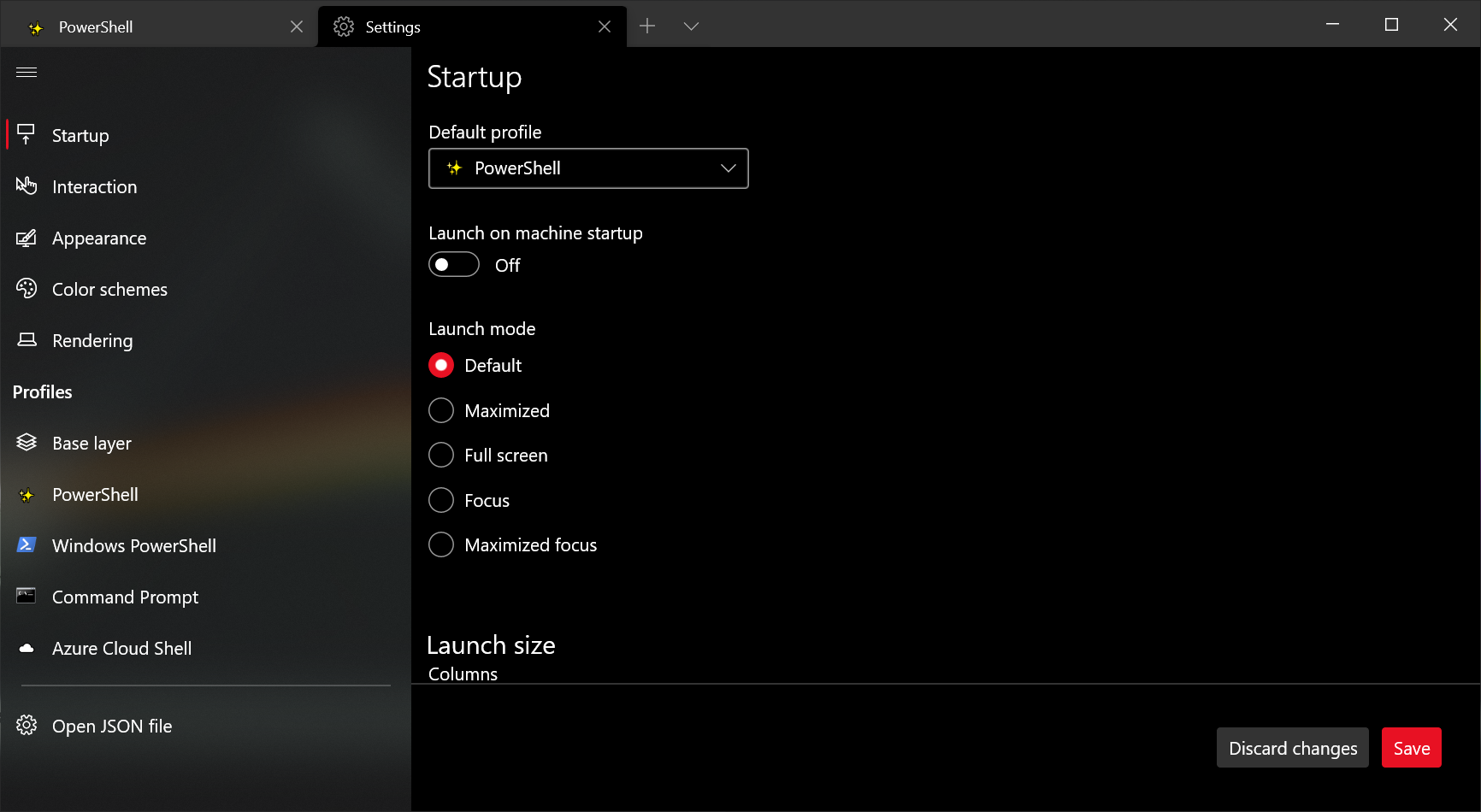
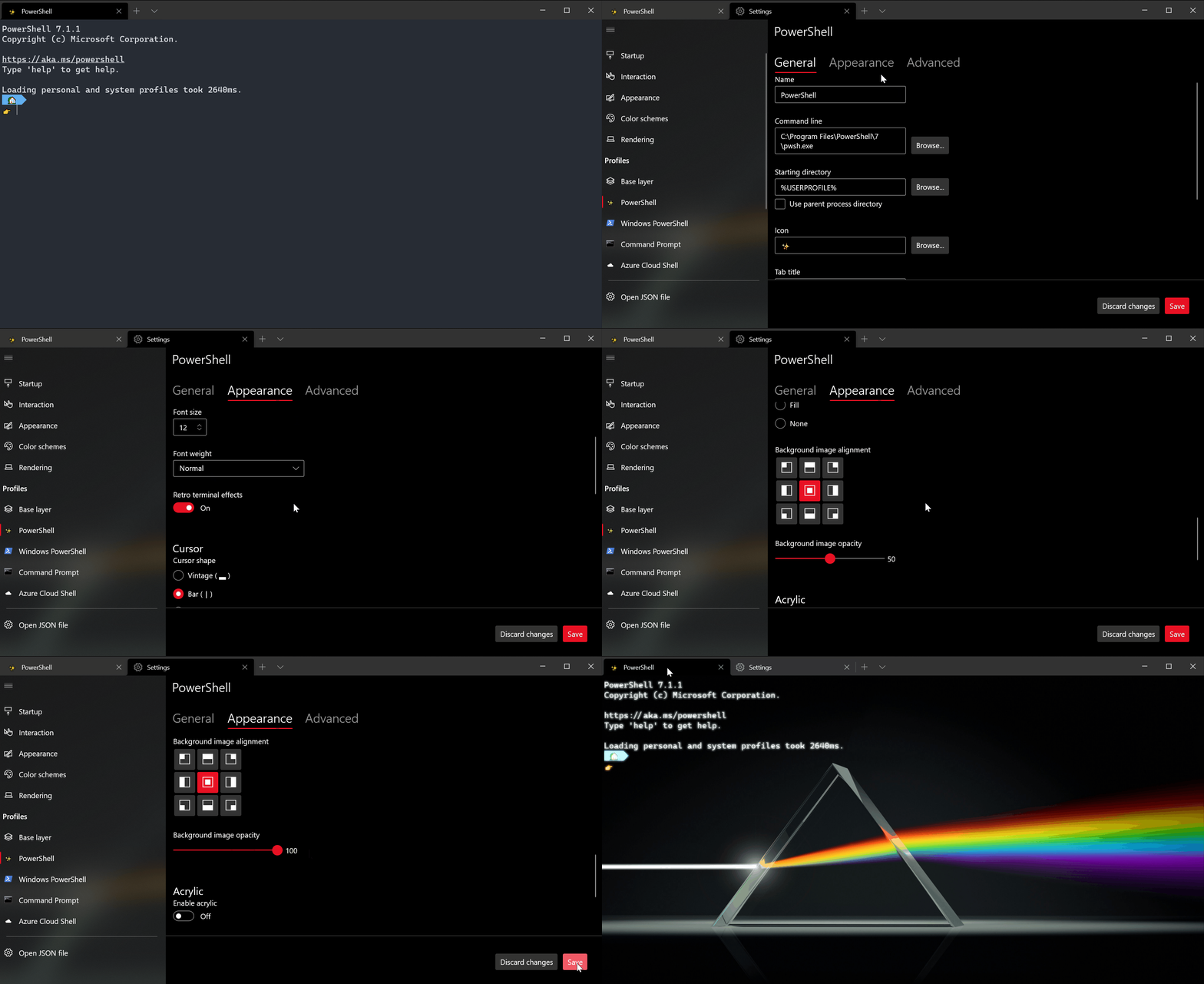
It’s finally here! Windows Terminal Preview now includes the alpha release of our new settings UI. The settings UI is not yet bound by default and will not open when clicking the settings button in the dropdown menu, so you will need to add an action to your settings.json file in order to open it with either the command palette or your keyboard.

Image settings ui

Image settings ui blog

How to open the settings UI

To bind the settings UI to Ctrl+Shift+,, add the following to your actions array (or keybindings if you have an older version of the settings file):

{ "command": { "action": "openSettings", "target": "settingsUI" }, "keys": "ctrl+shift+," },

Image open settings ui

Settings file backups

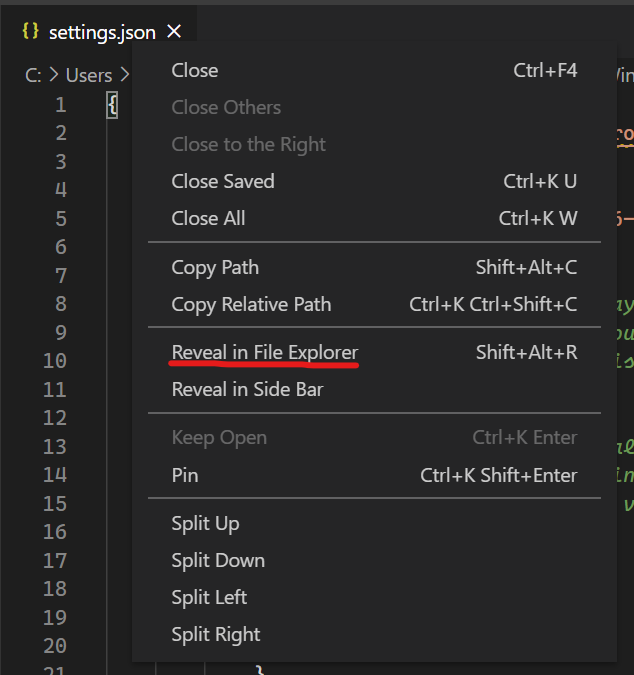
While the settings UI remains in preview, we will be generating backups of your previous settings files in case something were to go wrong with editing your settings and you need to revert. These backup files can be found in the same location as your settings.json file. The easiest way to navigate here is to right click on the tab of the settings.json file in Visual Studio Code and select “Reveal in File Explorer”.

Image reveal in file explorer

Thank you to the community

We’d like to give a special shoutout to those who have contributed to the settings UI. It originally started as a hackathon project and we built upon it to deliver the experience you see today. We’d like to thank @almedina-ms, @xerootg, @scott-armiger, and @vineeththomasalex for their hard work in helping us get the settings UI up and running!

What’s up next

We are still actively working on the settings UI and will be continuously shipping updates. Here are a few things we’re working on now:

  • Ensuring the settings UI includes intuitive keyboard navigation and improved accessibility.
  • Adding actions and key bindings into the settings UI.
  • Providing functionality to reorder your profiles.

If you’d like to follow along with the progress of the settings UI, feel free to follow this issue on GitHub.

Startup actions

Have you been wanting to start your terminal in a custom configuration when you launch it? Well today is your lucky day! You can now set startup actions in your global settings to configure how your terminal launches (Thanks @Don-Vito!). The startupActions setting accepts wt command line arguments. More information on command line arguments can be found on our docs site.

// Launch terminal with multiple tabs
"startupActions": "new-tab; new-tab"

//Launch terminal with one tab split into a PowerShell pane and an Ubuntu pane
"startupActions": "split-pane -p PowerShell ; split-pane -p Ubuntu"

👉 Note: This setting is not yet available in the settings UI and is only available by editing the settings.json file.

Progress indicator

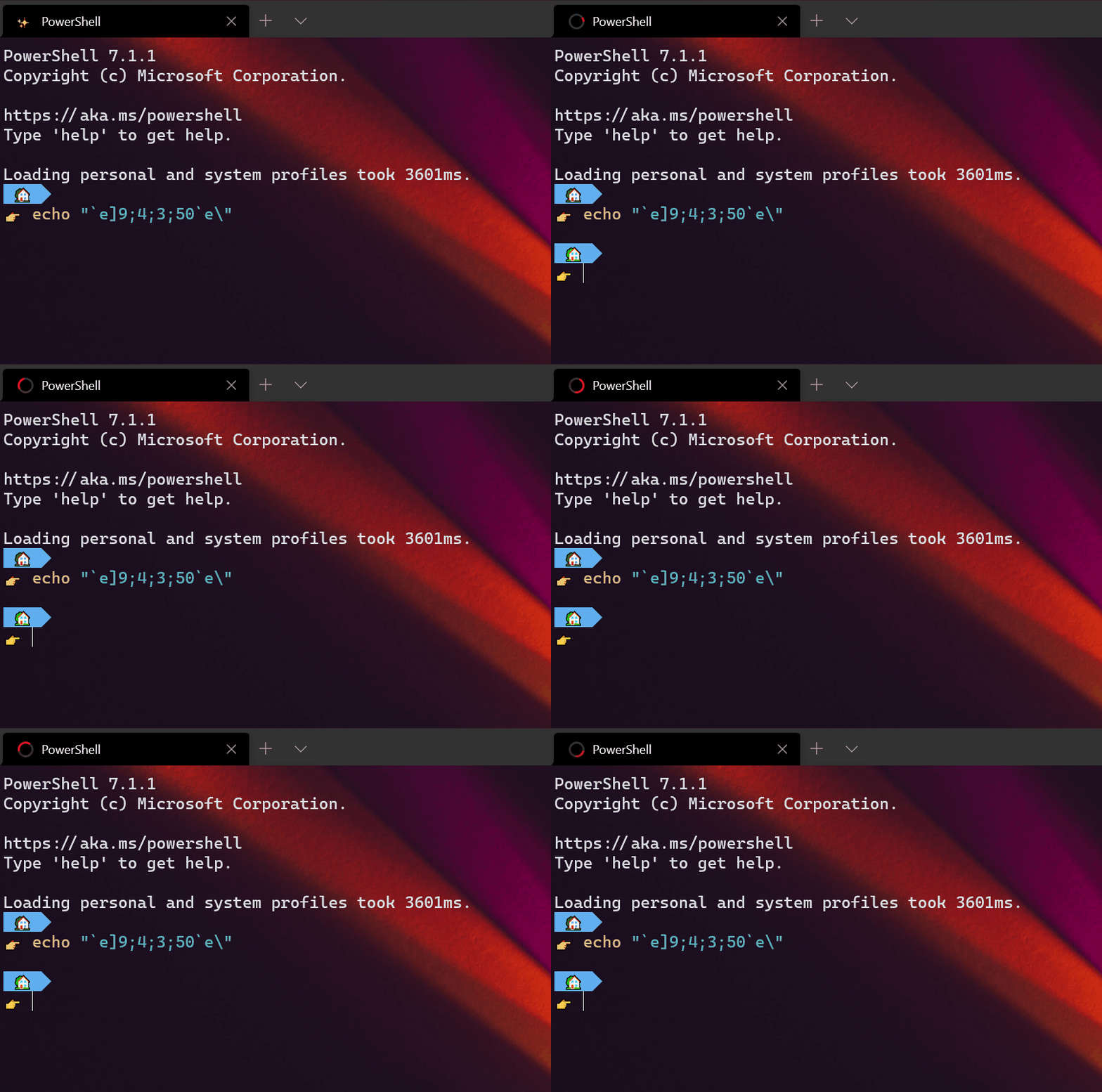
The terminal will now display a progress indicator in the tab and taskbar whenever an OSC 9;4 sequence is received. More information on remaining tasks and documentation for the progress indicator can be found on GitHub.

Image progress ring

Pixel shaders

As a new experimental feature, you can now use HLSL pixel shaders inside your profile (Thanks @mrange!). Some examples of shaders can be found in our repository.

"experimental.pixelShaderPath": "C:\\temp\\invert.hlsl"

Image pixel shaders

👉 Note: This setting is not yet available in the settings UI and is only available by editing the settings.json file.

New actions

Scroll to the top and bottom of history

You can use the scrollToTop and scrollToBottom commands to scroll to the beginning or end of the text buffer (Thanks @Hegunumo!).

{ "command": "scrollToTop", "keys": "ctrl+shift+home" },
{ "command": "scrollToBottom", "keys": "ctrl+shift+end" }

Focus on most recently used pane

The moveFocus action has gained a new direction, previous, that will let you navigate to the last used pane with your keyboard.

{ "command": { "action": "moveFocus", "direction": "previous" }, "keys": "ctrl+alt+left" }

Move tabs

You can now move your tabs backward (left) and forward (right) using the keyboard with the moveTab command (Thanks @Don-Vito!).

{ "command": { "action": "moveTab", "direction": "backward" }, "keys": "" },
{ "command": { "action": "moveTab", "direction": "forward" }, "keys": "" }

👉 Note: This action is not bound by default.

Other features

🌟 The splitPane action and split-pane, sp command line argument now accept a size parameter to define the size of the pane.

🌟 The move-focus command line argument has also been added, so you can specify which pane to focus when launching the terminal using the command line.

🌟 You can now specify a tab color for each new tab or pane through the command line with --tabColor #rrggbb (Thanks @Don-Vito!).

🌟 The terminal now supports ConEmu’s OSC 9;9 sequence, which sets the current working directory. If you emit OSC 9;9;<Windows path>, creating a duplicate of that pane or tab will use the Windows path you specified (Thanks @skyline75489!).

🌟 When you emit a BEL, the terminal will display the bell icon in the tab. You can also now set the bell style to "visual", which will cause it to flash the taskbar.

🌟 You can now have a double underscore cursor in the terminal (Thanks @rhorber!).

🌟 The command palette now supports "launchMode", which can be set to "action" or "commandLine" (Thanks @Don-Vito!).

Miscellaneous improvements

🛠 The “Open Windows Terminal here” menu item will now show up inside directories (Thanks @hereafter!).

🛠 The command palette, while in command line mode, will now parse and validate commands you’ve typed and display recently used commands (Thanks @Don-Vito!).

🛠 Windows Terminal will now display italic fonts (Thanks @j4james!).

🛠 Starting a search with text selected will now copy that text into the search field (Thanks @Don-Vito!).

🛠 The terminal has received approximately a 33% performance improvement in the total runtime of bulk text output (Thanks @austin-lamb!).

Bug fixes

🐛 Hyperlinks will display an underline on hover even when the window isn’t focused (Thanks @Hegunumo!).

🐛 When most-recently-used tab switching is enabled, closing a tab will move you to the previously-used tab (Thanks @Don-Vito)!.

🐛 Right-click + paste now clears any active selection (Thanks @Don-Vito!).

🐛 The profile menu and command palette will now prefer your shortcut keys over the built-in ones (Thanks @Don-Vito!).

Top contributors

This is our biggest release since we initially launched in 2019 and we’d like to acknowledge the community members who went above and beyond!

Contributors who opened the most non-duplicate issues

🏆 Don-Vito

🏆 j4james

🏆 vefatica

Contributors who created the most merged pull requests

🏆 Don-Vito

🏆 Hegunumo

🏆 j4james

Contributors who provided the most comments on pull requests

🏆 Don-Vito

🏆 skyline75489

🏆 mdtauk

Cheers!

Full documentation for all of our features can be found on our docs site. If you have any questions or feedback, feel free to reach out to Kayla (@cinnamon_msft) on Twitter. If you find any bugs or would like to request a new feature, you can file an issue on GitHub. We hope you like this latest release of Windows Terminal Preview and we’ll see you at the next one!

Image 08 2020 signatures

The post Windows Terminal Preview 1.6 Release appeared first on Windows Command Line.

31 Jan 21:26

Stopping Declaration Dan

by Richard Millington

You know the type.

Every statement the member makes is written as a debate-ending truth.

More savvy and empathetic members know it’s best to preface or caveat their statements i.e.:

“According to….[xyz],”
“In my experience…[xyz]”
“I feel…[xyz]”

Now a debate can continue with conflicting sources of information, experiences, and opinions without heading into an argument. Prefacing your belief with the source of that belief allows an ongoing discussion.

We once wrestled with this problem recently in a small community of practice. A handful of Declaration Dans were causing arguments and ending discussions simply by their belief in their own rightness.

We first tried soft messages to reason with them, but these were largely ignored. So we tried social pressure instead. We created a cartoon character called Declaration Dan which appeared on the homepage sidebar with a short warning to “Don’t Be Declaration Dan”. The image was clickable and gave (made up) examples of Declaration Dans and what they should do instead.

Two volunteer members also helped by calling out the next few examples of Declaration Dan they saw. Other members began picking up on it too and referring to similar comments as Declaration Dan.

Soon becoming a Declaration Dan was a term of light mockery and a sign of one’s insecurity.

It didn’t completely eradicate the problem. But it drastically reduced it.

31 Jan 21:26

This period will shape the post-Brexit narrative

by Chris Grey
The stories of Brexit disruption catalogued in my last few posts continue apace, not least because firms which had built up stockpiles in anticipation of the end of the transition period are now starting to replenish them. However, remaining stockpiles and the new* trade barriers, plus the pandemic, mean that freight movements between the UK and the EU are still 38% down on this time last year. Some 65% of trucks returning to Calais/Dunkirk are empty, over twice what is normal, and there are daily reports of companies struggling, or failing, to deal with export processes (£).

The UK is not yet imposing full import controls, but even without that there are numerous reports of customers astounded to find that they have to pay customs duties, import VAT and handling charges on goods delivered to them from the EU. This links with reports of uncollected incoming freight piling up at ports (£).

There are now the very beginnings of hard data about the aggregate effects, including indications of a harp drop in services exports. Obviously Covid is playing a big part, but the fact that the UK figures are worse than the US, France and Germany amongst others is suggestive of a Brexit effect, and the IMF has reduced its forecast for UK output growth for the first quarter of 2021 by 1% as a result of Brexit disruption.

The long-term effects of Brexit on trade have yet to be seen but the fundamental reality remains, not as a matter of doctrine but as matter of plain definition: Brexit creates new barriers to trade with the EU and so suppresses trade with the EU. As I argued in a piece in Byline Times this week these barriers are in the process of becoming structurally embedded, and small firms are the biggest losers (£). Of course it may, now, be creating new opportunities – for customs agents, say, as when the government said Brexit was ‘growing the customs sector’, or for staff at Kent lorry parks – but it would be perverse to call these, in any substantive sense, ‘benefits’.

That is not to deny that there are numerous business benefits of Brexit. It’s just that they don’t accrue to British businesses and people. EU countries are the happy beneficiaries of financial services leaving London (£). Irish ferry companies are mopping up business by creating new routes to bypass Brexit Britain to the detriment of Welsh ports (activity through Holyhead has dropped by 50% and through Fishguard by a whopping 75% since the end of the transition period). Dutch, and no doubt other, warehousing and logistics firms are experiencing a boom as UK firms seeks bases in the EU.

The latter connects with the most extraordinary Brexit story of the week, with it being reported that government officials are advising British firms to set up EU subsidiaries (and, hence, to shift employment) to avoid the problems of Brexit. The reason this is extraordinary is not in the idea of firms doing so – that is simply the economic logic of the situation Brexit has created – but in the fact that a government extolling the virtues of Brexit is providing such advice. That said, it’s a story that needs to be treated with a little caution in that it’s not clear how widespread this advice is, nor whether it is official advice as opposed to informal suggestion.

Brexiters’ reactions

It is interesting, and politically important, to see how leading Brexiters are reacting to what is happening, not least because this may set the tone for how leavers, especially, in the general public respond. It’s a mixed bag, but mainly depressing. Some are simply boneheaded refusals to understand it, as with John Redwood calling for the government to intervene to ensure the free flow of goods between Great Britain and Northern Ireland. But of course the end to such a free flow was integral to the Withdrawal Agreement. Since Redwood stood on a manifesto to which that agreement was central, voted for it in parliament, and the government signed it his comment is either stupid or dishonest.

Others resort to sophistry, to put it more charitably than is probably warranted, such as former Brexit Party MEP Ben Habib. He claimed this week that the plight of the fishing industry was not down to Brexit but caused by the pandemic suppressing demand as restaurants in the UK and EU were closed, by the Trade and Cooperation Agreement (TCA) having given EU fishing boats unfettered access to UK waters so that EU fishermen could supply EU restaurants (even though Habib says these are closed), and by the bureaucracy created by the TCA for UK fish exporters to the EU.

Where to begin? The pandemic has been going on for a year, but the rotting fish piles only began when the transition period ended, so they plainly are very much to do with Brexit. It can’t be because EU fishermen have taken all the fish, or these fish piles would not exist, and these fish piles are there not because there are no customers for them but because they can’t be shipped to those customers. That is, indeed, because of the bureaucracy that now attaches to UK exports, including fish, to the EU. Which is, precisely, down to Brexit because it was created by leaving the single market and customs union, as advocated by Habib.

A different account was given this week by another Brexit Party ex-MEP Lance Forman, who himself works in the fish industry (he owns and manages a smoked salmon business). He offered a more coherent argument, yet one which still denies that what is happening is a problem of Brexit. Rather, he suggested it is a problem of lack of preparedness for the bureaucracy entailed by Brexit. It’s a fine distinction, in that the bureaucracy is, itself, a problem of Brexit which adds new costs to trade with the EU. But it’s true that some of the export delays might well have been avoided with better preparation. However, a big reason for that lack of preparation was that, until far too late, Brexiters refused to admit that there would be new bureaucracy – denouncing warnings as Project Fear – and because they regarded any extension to the transition period, which might have aided preparation, as unconscionable.

Forman also bemoaned the fact that the EU is applying import controls when the UK is not doing so. But that arises simply because the UK government is not ready to do so, again an argument for extending transition, but not some unreasonable disparity of treatment. Thus, whilst the tone is more urbane, it is all of a piece with reports, such as the Daily Mail’s, which speak of the “dirty tricks” of “pernickety jobsworths” in enforcing the rules which the 17.4 million – who, don’t forget, knew exactly what they were voting for, and it is remainer elitism to suggest otherwise – voted for.

Whatever the tone, the meaning is the same: a refusal to accept that the damage that is being done to British business, well beyond fishing, is the direct consequence of Brexit and the unavoidable responsibility of those who advocated it. This isn’t surprising, because it has long been the hallmark of Brexiters that they abjure responsibility – it’s always someone else’s fault or because, as its apologists are wont to say of Communism, Brexit inevitably hasn’t been done ‘properly’. In May 2018 I compiled a list of six excuses that Brexiters make for why the consequences of Brexit are nothing to do with them. They continue to be rolled out.

Brexit really does mean Brexit

But I think there are some other features of Brexit mentality lurking in all this as well. One is the frequent implication that the EU is some kind of cuddly uncle who will or ought to be ‘nice’ to Britain. That’s sometimes found amongst remainers, too, but it is far more bizarre from Brexiters who, having spent decades denouncing the EU for every evil under the sun, now seem to expect that it will just benignly waive the rules in order to help the UK out of a mess of its own making. Linked to that is the phenomenon, which I have also noted in the past on this blog, whereby some Brexiters seem to think that leaving the EU was a kind of symbolic act, rather than one with concrete legal effects. So it seems to come as a surprise and, somehow, ‘not fair’ when the EU applies the rules to Britain that apply to other third countries.

It is neither surprising nor is it ‘petty’ or ‘vindictive’ to do so, as was said during the recent row (£) about the confiscation of a ham sandwich. This rule exists and is enforced because of the very real dangers of African swine fever, which can devastate pig farming, or even of foot and mouth disease. Indeed this is why, back in 2019, the British government launched a campaign warning tourists not to bring such items back home with them. So what, exactly, do Brexiters expect EU border officials to do? Just shrug and say that because you’re coming from Britain the rules don’t apply? Or let you off because you didn’t realize these rules existed and that Brexit would mean they applied to Britain?

What of the future?

There is an obvious linkage between this lack of realism and the idea that the adverse effects of Brexit are the fault of the EU, or ‘punishment’ from the EU. To the extent that this narrative takes hold there is little chance of any honest appraisal of Brexit. Equally, it contributes to the continuing antagonism with which the Brexiters seem determined to conduct relations with the EU post-Brexit.

The ongoing row over the diplomatic status of the EU’s Ambassador is a good example of this. It’s not just that this is – indeed – petty, it’s also, as Georgina Wright argues on the Institut Montaigne blog, misguided in terms of the UK’s interests and global standing. Britain’s stance on this is causing serious anger across the EU’s member states (£) and it is intensifying, with the EU now cancelling a meeting with the UK’s Ambassador (£).

That matters, because apart from growing the economic costs of Brexit, the geo-political ones have also been profound. As Dr Rudolf Adam, of the University of the Federal Armed Forces Neubiberg (Munich), writes “the enduring legacy of Brexit is a massive loss of respect and sympathy for a country that for centuries was admired as a bastion of pragmatism and liberal values. The UK is losing soft power faster than hard power.”

Amongst other things, that implies the UK needs to work constructively with the EU through the TCA partnership apparatus and also, especially, to make the Northern Ireland Protocol work via the Joint Committee. Moreover, there are and will be a huge range of security and foreign policy issues – Hong Kong, Russia – where the UK will need the support and friendship of the EU and, no doubt, vice versa. And any idea that the UK can take a leading role in international responses to climate change, or anything else, whilst maintaining a ‘dog in the manger’ attitude to the EU is absurd.

From that point of view, there’s no conceivable benefit to Britain in taking this position of the EU Ambassador. It would seem to be explained partly by the visceral hatred that Brexiters have for the EU. It may also be a prelude to far more substantive conflicts over the TCA and may have the effect, if not the intention, of providing a ready-made narrative to justify pulling out of it.

Equally, again in effect if not intention, continued and growing antagonism towards the EU serves to divert attention from the Brexiters being held to account for what they have done, because it enables them to present the consequences of Brexit as being the fault of the EU and to deflect anger onto the EU. In this way, Brexiters can continue to re-fight the battles of the referendum.

It’s hard to resist the conclusion that this lies behind current attempts to justify Brexit by reference to the failures of the vaccination programme in the EU or the row over vaccine delivery (£), which needless to say is more complicated than the tabloids allow (see also, for the wider context of the issue, this report in Politico). Tellingly, as Maria Tadeo, Bloomberg TV’s Europe reporter, says, within EU countries, the narrative of this row is not generally framed in terms of Brexit at all. It certainly has little to do, or should have little to do, with the case for a long-term strategic partnership between the EU and the UK.

Shaping the narrative

The coming few months will therefore be very significant for two reasons. Firstly, because this is the period during which the effects of Brexit will be most visible and, therefore, during which the possibility of holding Brexiters to account is the greatest. This is why it is important to keep highlighting those effects and challenging attempts to deny them. If they manage to implant a narrative that these effects are nothing to do with Brexit, or are down to the EU being unreasonable, that may well become established and much more difficult to challenge later. For, by then, the visible effects will have declined (though the underlying damage will continue) and, of course, the longer-term effects will be difficult to definitively disentangle from those of Covid, in particular.

That cuts both ways, of course, in that it makes highly dubious the current attempts to claim that, had Brexit not happened, the UK’s vaccine programme would have suffered compared with how it actually is. That may or may not be true – any such claim requires a long string of counterfactuals about what would and would not have been done by multiple actors in that alternative universe. Clearly that isn’t so for straightforward cases such as that leaving the customs union creates new processes and costs for exporters.

Secondly, and even more importantly, although the damage of Brexit itself is now unavoidable regardless of who is held to be responsible for it, it is not inevitable that post-Brexit UK-EU relations have to be added to the list of that damage. As I have been arguing for months, the mandate of the 2016 referendum has now been fully discharged. Nowhere in that vote was there a mandate for Brexiters to permanently sour UK-EU relations post-Brexit, nor should those relations continue to be seen through the prism of the now dead question of whether the UK should remain a member of the EU.

So the current period is potentially crucial for changing the tone of those relations and shifting them from the virulently hostile ones the Brexiters are seeking to embed. It’s clear, as with the vaccine row, that they will weaponize whatever comes to hand in that attempt. The chances of such a change of tone are, in any case, negligible given that we have a government which is Brexiter to the core. But they are not non-existent because no government has complete control of the narrative. Other politicians, journalists, grass roots organizations, and civil society generally also have a role. And then, as the old cliché has it, there are ‘events, dear boy, events’.


*Some people dislike the term ‘new’ in this context, because what is happening is, rather, the re-imposition of barriers which had been removed by the customs union or single market. However, I think it is a reasonable usage for two reasons. First because, obviously, it is intended to mean ‘new as compared with when the UK was an EU member’. Second, because in a certain sense we are not simply facing a return to pre-customs union, pre-single market days as these rules are now being applied in the context of a very different economy to when the UK joined the EEC in 1973, in particular as regards the realities of international supply chains.

31 Jan 21:25

"Write short sentences" is bad advice

A common writing advice is to keep your sentences short and simple. The argument goes that writing is better when it is concise, because you’re more efficiently communicating your ideas. Long sentences take more energy for the reader to process, and you shouldn’t require that of the reader if it’s not necessary. That seems to be the logic.

This is bad advice.

Sentence length and rhythm are linguistic tools at the disposal of a writer just like word choice and grammar. Short sentences are useful for certain things, and long sentences are useful for other things. To tell a writer to only use short sentences because long sentences are hard to understand is patronizing to both the writer, whose ability to compose good sentences you have just insulted, and the reader, whose reading ability you have also underestimated.

If you keep your sentence lengths short all the time, and your sentence structures minimal all the time, you don’t get good prose, you get a nursery rhyme. Something with such monotonic and one-track rhythm that it becomes tedious to read.

Imagine if I only wrote the shortest sentences I could. I cut out all my asides. I remove redundant words. I keep my ideas concise. It gets boring to read. My ideas no longer connect from one sentence to another. They can’t congeal in the mind. Reading writing like this feels disjointed and stuttery. You eventually focus too much on the broken rhythm. How are we to communicate eloquently like this? It’s madness.

Instead, consider this:

Short sentences are sometimes useful. They’re useful for making a sharp point, like a fast cut in a film synchronized to the sudden pang of a gunshot. They’re also useful for stating a claim: long sentences are fine. But many times, you write for a purpose greater than to simply transplant a logical assertion from your brain to the brain of another human. Like a single cut in a film that follows a character sprinting across a burning battlefield with bombs raining down, long sentences stretch out time and build tension through the words. Composers, who think deeply about the importance of variety in phrasing, know the importance of this variation intimately.

Sometimes what you want is indeed a sharp, pointed sentence.

Keep your sentences short. Make simple points. Hold the reader’s attention. Don’t make them think harder to understand what you mean.

But many times, the meaning isn’t in the words we use but how we say it.

If you trust in the reader, if you trust in the strength of your idea spoken through your words to hold their hands steadily and firmly through your maze of ideas bubbling through, you might occasionally take the leap of faith to build tension and anticipation through a longer sentence – perhaps one just like this – to build to a great release at the end. A breath of relief; a point made.

Telling writers to write short, concise sentences is like telling a director to keep their cuts 2-4 seconds in length for whole movie, or telling a composer to only use 2-measure phrases for an entire song. It’s nonsense that covers up the true problem with long sentences: writing well-constructed long sentences is a skill to be practiced. The solution isn’t to ban long sentences, but to learn how to construct them artfully.

The correct advice should be, “write sentences that are easy to understand.” This is different than “don’t write long sentences.”

Write long sentences, if you must. Write short sentences, if they are fit to serve. Write whatever the hell kind of sentence you want. I don’t care. But whatever you do, write sentences that carry the full weight of your meaning, where you don’t have to chop up your ideas to fit short sentences or stretch out your ideas to cover long ones.

Writing is more than what you say, it’s also how you say it. Sentence length and rhythm are just two other tools in the toolbox of the writer, and we should learn to use them well rather than shy away from their sharp edges.

31 Jan 21:18

The Best Home Printers

by Ben Keough
Our top pick for home printers: Brother HL-L2460DW

From the beginning of Wirecutter’s existence, we’ve been testing printers, totaling nearly 550 hours of research and trying dozens of models.

In general, we’ve found that a black-and-white, print-only laser machine is the way to go for most people, and the Brother HL-L2460DW is the best one you can get. This printer is reliable, cheap to buy and run, and simple to operate. And unlike an inkjet printer, it won’t clog if you leave it sitting idle for weeks or months at a time.

If you need to scan occasionally, consider a mobile scanning app rather than a printer with a built-in scanner. But if you have more demanding business needs that require more frequent scanning, if you want to print in color, or if you like to print glossy photos to stick on the fridge, take a look at the other printers we recommend below.

31 Jan 21:18

The Best Ice Scraper and Snow Brush

by Tim Heffernan
A person holding the Hopkins SubZero 80037, our pick for best ice scraper.

Freeing a car of snow and ice is an annual chore in many parts of the US, but—judging by an informal poll of Wirecutter staffers—a lot of people have only ever used the cheapest, lamest ice scrapers they could find. If you live where it regularly snows, the small cost of a high-quality, durable tool makes the chore a whole lot easier.

31 Jan 20:44

Jewish space lasers, Marjorie Taylor Greene, and conspiracy narratives

by Josh Bernoff

Marjorie Taylor Greene, the wacko Georgia Congresswoman who supports QAnon, has also posted about a novel conspiracy theory on her Facebook page: that a Jewish cabal caused lasers from space to start the California wildfires of 2018. Yeah. I’m not making this up. Her Facebook post on the topic has been deleted, and she says … Continued

The post Jewish space lasers, Marjorie Taylor Greene, and conspiracy narratives appeared first on without bullshit.

31 Jan 20:44

The new Gowalla, and open data around places

I saw that Richard Eriksson shared news about the “new Gowalla”.

I replied to Richard’s tweet:

I haven’t delved into it, have you see anything about data licensing?

I’ll just come right out and say that I’d love for the basics of location data to be openly licensed, maybe synced or improved with OpenStreetMap over time. <twitter.com/bmann/sta…>

I then headed over to LinkedIn and posted there to see if I could get some mapping friends to weigh in, tagging Will Cadell of Sparkgeo of and Eric Gunderson of Mapbox:


I am completely uninterested in spending a bunch of time on a platform which doesn’t have AT LEAST non-commercial re-use of data around locations.

Do you all know anything about state of the art location (business, place, etc) licensing?

Are people syncing back to Open Street Map as a shared layer?

Can we include IndieWeb protocols like Micropub “check ins” so we can extend beyond a silo from day one?

Any info, speculation, or hard earned learnings welcome ;)


I’d be happy to participate in Gowalla-like activities – but I don’t want to do it if the links, identifiers, and data are all owned by another locked down platform.

The location of a store, what type of store it is, and user “enrichment” like photos, reviews, etc. shouldn’t be locked in one data silo.

There is more awareness around these issues, so maybe we can raise them early, and get these platforms to address this up front.

31 Jan 20:44

Trying Out a Bonus System

by Ton Zijlstra

In our company we wanted to be able to give more to our team when we do better. When it comes to bonus rewards I’m very hesitant. I know both from literature and from personal experience it doesn’t aid motivation, and can be detrimental to it even.

I’ve worked in a company where there was a bonus system which on paper worked both for collective results and individual results but which ultimately was mostly geared to individual results. The current status of your individual bonus was presented in weekly spreadsheets which I ultimately loathed. To me it felt like it increased and emphasized differences and inequality in the company. Also, the company’s owners, as they worked in their company much as I and my partners do, participated in the system, and being the most active and experienced took home most of what was available for bonuses. That struck me as odd, because whatever the company made in profit would go to them anyway.

At the same time, I do think that if we’re doing well, better than needed, or better than expected, that everyone in the company should share in that additional result.

In late 2019 we discussed how we could approach it and came up with a way of establishing who would get what. For 2020 we then initiated the system.
The key elements we planned for at the start were:

  • We will collectively set yearly goals and quarterly goals derived from them. But those goals will not be financial, and goals are not targets. The goals are mostly qualitative and relevance, quality and development focused. Financial results will follow as a result from choosing and doing our work well.
  • The first type of collective reward is that we’ll celebrate if we achieve our (quarterly) goals as a team. How we celebrate is up for discussion at the same time as we set a goal. If we achieve 70% of our goal, we’ll celebrate modestly, if we achieve more, we’ll celebrate more extensively. All of us participate in this.
  • The second type of collective reward is financial. If our turnover grows beyond what we budget as break even point, 10% of the additional turnover for the first extra 100k, and up to 25% of additional turnover beyond that will be reserved for individual bonus payments, and partly for additonal ‘celebrations’ budget.
  • The individual bonuses are only for employees. Additional profit will flow to partners ultimately anyway, so we don’t participate in this part of the system.
  • I’ve incorporated this into the company budget. As we discuss the financial situation of the company transparantly with the entire team every month, there will be regular feedback on where we stand.
  • We assume that everyone contributes to the company’s results (if not, it will be part of reviews, and it has no bearing on the bonus system), and therefore all employees share on the same basis in the bonus system: the number of months of the year they were employed in the company. E.g. this year two colleagues were there the full year, one colleague 4 months, so the total bonus sum was divided through 28 months, and two received 12/28, and one 4/28. In 2021 there will likely be 3*12 plus 6 or so (if we find someone), equals 42 months as the basis for dividing the available bonus.

Of course the pandemic turned 2020 into a very different year from mid-March onwards. Many of our original goals became less relevant, team mental and physical wellbeing became much more relevant, or rather the prime concern. Due to the pandemic restrictions there wasn’t much opportunity to celebrate as a team either. Though we did grab the moments where we could, having a team lunch (sitting at a distance) al fresco, going for team walks (at a distance) etc. Business however was good in 2020, not in the least because we worked closely together as a team, much more so than we would have under the previous conditions when we would have been much more spread out at client offices. In the end we did much better than 2019. I regard it as validation of our principle of focusing on the relevance, quality and development of our work, and not on the financials. Those financials of course do matter, introduce potential constraints and opportunities, but are foremost a consequence of doing the right things well, not how we decide what doing the right things well is.

With the 2020 result, getting close to what I thought would be a stretch when I drafted the 2020 budget, we were able to grow our financial buffers as originally planned and provide our three employees with a nice additional pay day.

These weeks we’ve been formulating our 2021 goals. In the coming 11 months we’ll find out if the good result of 2020 was a fluke, or whether we think our system and its underlying assumptions hold water.

Unrelated, at the end of 2020 we also had a change of partnership structure. M offered his shares to us, as he has been busy with a different venture, and we invited J to join us as partner. We opted to keep a percentage of shares inside the company as well, with an eye of possibly making them employee owned in a next step.

31 Jan 20:22

Filtered for lo-fi strange new worlds

1.

Eigengrau’s Essential Establishment Generator starts with a description of a town, in text, like:

Corevorn is a town located in the temperate river coast, where the vegetation is lush.

It’s different every time. From there you can read about the streets and the establishments:

There’s a nice little square, Princess Square, where there is The Sanctuary of Divine.

And you can tap on The Sanctuary of the Divine, discovering that it’s a temple with a main room which pentagonal in shape and is decorated with mostly squalid looking holy art. And you can tap to read about the priestess (Donella Leffery), who is a gnome, and tap again to read about her early life (born in a forest, an only child), and tap again to read about her son who is a pastry chef: The most notable physical trait of Dabbledob is that he has fingernails cut to the quick.

And, again, this is different every time.

There’s a little moment of sadness when you hit RESTART and you can’t go back, but then you can start exploring again, these intimate stories of a little town and its people and its history, all of which exist right now only for you, and you just discovering as you go.

2.

One of all my all time favourite Twitter bots is Uncharted Atlas.

It’s a different map of a different non-existent place with a different non-existent language, every hour:

  • The Marches of North Olmgurpils
  • Empire of Schuchzizh
  • The Upper Wilderness of High Mabaa

The artist Martin O’Leary has a long, wonderful, interactive essay of how the terrains are generated.

Random coastlines and hills! Erosion! Realistically meandering rivers! Cities! (And a whole fake language to name them.) All drawn by the computer to look like old-fashion pen and ink maps.

I remember waking up on long haul flights and looking out the window at random valleys and hills, sometimes seeing a road down there, or a few buildings, and imagining what it would be like to hike through that wilderness. So there’s something similarly transporting here, so tiny each square frame, really, and yet so vast.

The point about these lo-fi worlds is that you don’t need 3D cinematic graphics and VR headsets and all the rest. How can these outlines, deft and clever but outlines, how do they feel so alive, like exploring the streets and alleys of a new town?

(I would kinda love this in the form of Google Maps too – just an app that I pan and pan and pan and pan and pan. There’s a whole visual vernacular right there.)

3.

Like many Brits of a certain age, my first experience of a procedurally generated universe was the space trading game Elite on the BBC Micro in the early 1980s. You can now play Elite in the browser.

Despite the wireframe spaceships and the minimal descriptions of planets, it felt like there was an infinity of stars and details, but it’s actually all unfolded from smart programming and three randomly chosen seed numbers: 23114, 584, 46931.

This fantastic and technical article digs into how the universe of Elite ACTUALLY WORKED – walking through the (surprisingly simple) code:

Procedural content generation: Creating a universe.

Get this: the data for the universe is several hundred kilobytes big. The BBC Micro, one of the launch platforms for the game, only had 32KB of RAM.

And here’s the first star system in the game, software-generated, and wow the name is etched in my memory:

  • Name: Lave
  • Location: 20,173
  • Economy: Rich Agri
  • Government: Dictatorship
  • Tech level: 5
  • Productivity: 7000
  • Radius: 4116
  • Population: 3bn
  • Description: Lave is most famous for its vast rain forests and the Lavian tree grub.

(I’ve written about Elite and procedural generation before.)

4.

Nested is a universe outline.

It’s pretty unique. You just hit the disclosure triangles and keep digging down.

Universe > galactic supercluster > galaxy > arm > star system > telluric planet > continent > sky > cloud > water > oxygen > proton > up quark > …

But.

If you click around a few different triangles.

If you’re LUCKY.

Then:

… telluric planet > explored continent > kingdom of Storagag > scorched county > village > farm > Cecily Greenforest (peasant) > psyche > memories > Wandering the wild expanses with my mother when I was a child.

So.

Then you glance back at all the galactic superclusters with triangles you haven’t yet opened, with all their stars and all their villages and all their people and all their thoughts and memories, too many to explore, too many to count, just software, just text, not even prose, and yet…

Total perspective vortex.


There’s a quote from Darius Kazemi that has stuck in my head since I first read it. Here it is:

A simple for loop can, in a few seconds, generate more information than a human being can consume in a lifetime. When we make art with code, we have to confront this fact. So how do you compose for infinity?

– Darius Kazemi, botwiki: learning
31 Jan 20:15

Get Faster Device Switching and Enhanced Effects With SoundSource 5.3

by Paul Kafasis

If you’re reading these words, it means that a big update to SoundSource is now available. SoundSource 5.3 is the latest version of our superior audio control utility, and it includes more than two dozen new features, enhancements, and bug fixes. With one click, you can download it right now.

Want to know more first? OK!

Fast Device Switching and Keyboard Control

Speeding up the process of changing the Mac’s default audio devices has always been one of SoundSource’s strong suits. With our newest in-app keyboard shortcuts, switching your devices is now faster than ever. Use SoundSource’s global hotkey to reveal SoundSource, then hit Cmd-0 to select the default output device. Arrow to your desired device, hit Return, and you’re done. Similarly, Cmd-Hyphen (-) gets you to the Mac’s default input device, while Cmd-1 through Cmd-9 will let you adjust application-specific output devices.

Many other areas of the app also feature supercharged keyboard control. When a slider is selected, typing a numerical value will now set it precisely. In addition, modifiers are now supported when using arrow keys to adjust sliders, with Shift-arrow providing a 10x modification and Option-arrow providing a 0.1x modification. Finally, tabbing between Audio Unit controls has been refined, making keyboard entry a breeze.

Major Effects Improvements

Speaking of Audio Units, they’re now hosted in a separate process, which prevents misbehaving plugins from crashing SoundSource. On the newest M1 Macs, this enables top-notch support for Intel-based plugins running in emulation. To improve the Audio Unit experience still more, the display of MacOS’s built-in Audio Unit effects has been streamlined, with a more appealing interface that avoids redundancy.

If you frequently make adjustments to effects in SoundSource, you’ll love the new “Bypass Effects” option. With it, you can quickly disable all effects processing on individual applications or the default output device, making it easy to A/B test your changes. Even better, the handy “Bypass Effects” keyboard shortcut (Option-Command-B) makes experimenting to get the perfect sound lightning fast.

There’s lots more when it comes to improvements for audio effects. The “Headphone EQ” effect can now load custom-created profiles, as well as files exported from Room EQ Wizard (REW). Effects can now be duplicated by copy and pasting. Using generic interfaces with Audio Units is now even easier, with an Option-click loading the generic interface once, while holding option when adding an Audio Unit will automatically toggle on the “Use Generic Audio Unit Interface” setting.

If you use SoundSource to adjust audio with effects, this update will be a great leap forward.

A Slew Of Additional Enhancements

There are so many other updates worth noting that we must now turn to our trusty friend the bullet list:

  • Even Better Undo Support: SoundSource now supports more robust Undo throughout the entire app, making it a breeze to revert settings changes.

  • Single-Key Shortcuts: The “Show SoundSource” global hotkey now supports using a single key shortcut to bring SoundSource forward. F13 is a lovely choice for desktops.

  • No Input? No Problem!: A helpful new visual is now shown for Macs which have no input device attached, such as the Mac Mini.

  • Multi-Slider Select: It’s now possible to select and adjust multiple sliders at once with the 10-Band EQ.

  • High-Contrast Support: The entire interface now better supports the “Increase contrast” setting found in the “Accessibility” System Preference.

  • Corrections for Slider Readouts: VoiceOver now correctly reads volume slider values after they’ve been adjusted.

  • Minimizing VoiceOver Impact: To avoid negatively impacting VoiceOver’s guidance, SoundSource now intelligently disables audio adjustments to “System Speech” when VoiceOver is active.

There are many more refinements, as well as a handful of bug fixes. As always, the latest version is the greatest version, so get it now.

Details

SoundSource 5.3 is another free update for all users of version 5. If you’re already rocking with SoundSource, just click the “Check for Updates…” button in SoundSource’s Preferences window.

If you’re a SoundSource 4 user, visit the “What’s New in SoundSource 5” page to learn more about version 5, and to access discounted upgrade pricing.

Finally, if you made it this far, yet still haven’t tried out SoundSource? Click right here to download the free trial. You’ll be glad you did.


Big Sur and M1 Updates Are Now Complete

With this update to SoundSource, all of our products are now fully compatible with the new M1-based Macs, powered by Apple Silicon. Of course, they also have full compatibility with MacOS 11 (Big Sur) running on Intel.

Just make sure you have the latest versions of our products, and you’ll be set.

31 Jan 20:14

little pig cider

by peter@rukavina.net (Peter Rukavina)

You should almost certainly not take alcohol advice from me: you’ve likely had more to drink in the last hour than I’ve had in the last year.

But let me put in a good word for little pig cider, made in Hazel Grove, Prince Edward Island with actual pig involvement (they eat the windfall around the orchard). Oliver and I have split a bottle with supper a few times, and I’ve really liked it.

31 Jan 20:14

IMAG: What Event Planners Need to Know

by Sean

Between the high-profile guest speaker lineups, thousands of excited attendees, and a several-day conference, corporate events are every event planner’s dream.

But the success doesn’t come without caveats.

Large-scale events also mean coordinating with nearby hotels, reaching out to new vendors, and learning how to adapt to a larger space than usual.

Take a step back and breathe!

Each of these new hurdles has a tried-and-true solution.

And one of those solutions is IMAG.

When an event includes PowerPoint presentations or speeches by industry leaders, the pros turn to IMAG to ensure no guest misses a moment.

So, as an event planner, what do you need to know about Image MAGnification?

Not all corporate events—or even sweet sixteens—will need IMAG. 

What Is IMAG?

IMAG is an abbreviation for “image magnification,” a technology you’ve likely enjoyed at least once or twice without even realizing it.

This innovative tool records an on-stage performer (i.e., keynote speakers, musicians, or lecturers) with a high-def video camera. The camera then magnifies the feed, projecting it onto large screens elsewhere in the venue.

Every audience member, even those in the back row, can see:

  • Facial expressions
  • Body language
  • The speaker’s mouth moving (oddly enough, this convinces us we hear better)
  • Fine details (a dripping tear, hairstyle, necklace, etc.)

This innovative technology is standard in concert halls, large-scale conference centers, and 50,000-seat stadiums. It’s the same innovation that allows you to see a drummer rocking out from the lawn seats or a ref’s hand signals from the bleachers.

Thanks to IMAG, there are no bad seats!


When IMAG Makes Sense (And When It Definitely Doesn’t)

The second you download a new app, buy a new HD camera, or learn a new skill, you’ll find any excuse to use it. Truthfully, IMAG is no different. The problem with this tool is that, depending on the situation, using it or not using it can ruin an audience’s entire experience.

Let’s talk about when it does and doesn’t make sense to use IMAG.

When to Use IMAG

The entire purpose of IMAG is to magnify a hard-to-see speaker or performer. Relying on this innovative technology makes the most sense for events with:

  • Hundreds (or thousands) of attendees packed into one room
  • At least 20 feet between the stage and back row
  • Large chambers (i.e., hotels, conference centers, stadiums)
  • Speakers or performers (i.e., comedians, preachers, motivational speakers)
  • Large venues where seating is up high (like a stadium) or far back (like longer concert halls)

Some common IMAG uses include large sporting events, concerts, keynote presentations, and church events. If those in the rafters miss what’s happening on stage or on the field, it’s nice to have IMAG.

When to Skip IMAG

You wouldn’t need a zoomed-in video feed for the average bridal shower or Bat Mitzvah unless it’s a packed or unusually large venue.

Bypass IMAG completely if:

  • Everyone can see the stage clearly (even those in the back row).
  • You’re bouncing between two or more speakers rapidly (configuring multiple camera angles is challenging for a solo technician).
  • You’re transitioning between a PowerPoint and a speaker often.
  • The budget is tight.

Chances are, you’ll be using IMAG sporadically in your business-dealings. And only then, it’s for events in huge venues attracting hundreds of ticket holders.

Ask yourself: Will a guest feel slighted or miss something important without IMAG?


Requirements for a Successful Event With IMAG

How to Use IMAG

There’s just something about the latest IMAG innovations that bring out your more creative side. But tackling this A/V strategy isn’t as simple as showing up on event day with cameras in tow.

A successful IMAG event requires:

A Large, Spacious Room

That sprawling conference room can squeeze in 500 to 700 attendees, easy. Yet, when everyone’s in their seats and ready to enjoy the show, is there any room left over for the IMAG gear itself?

A large, spacious venue will have extra room for:

  • 10-20’ screens on either side of the stage
  • A bulky camera in the middle of the auditorium (without blocking anyone’s view)
  • Multiple broadcast cameras (and their camera operators)
  • Several projectors
  • Audio speakers and microphones

If this arrangement will be distracting to viewers or make the room feel cluttered, find a more spacious venue. Or scrap the IMAG altogether—it might not be necessary.

Don’t allow clients to convince you otherwise unless they’re willing to cough up the full cost of IMAG (as you’ll see below, it can get pricey).

The Right Camera/Lens Setup

The right camera and lighting combination will be the difference between a memorable event and snarky whispers in the audience.

A seamless IMAG event needs camera lenses with at least 80x zoom capabilities to capture every fine detail of the keynote speaker. A stable tripod, 45-degree front lighting, and an on-hand light technician can ensure a picture-perfect stream.

A Non-Clashing Backdrop

The only thing more distracting than a humming microphone and glitchy video is a clashing backdrop.

That keynote speaker might be detailing stories of heartache and perseverance, but her black shirt and crisp black background give her a “floating head” appearance.

You have two options to avoid this nightmare:

  1. Coordinate ahead of time with all speakers to find out what they’re wearing.
  2. Have multiple backdrops ready to accommodate any outfit.

Make sure the backdrop isn’t too busy, either, to dodge audience eye strain.

Audio Considerations

IMAG handles the video end of an event’s A/V. But what sense does having HD video make if the back row can’t hear the presentation?

Every IMAG event needs a microphone, cabinet speakers, and amplifiers placed strategically throughout the room. Most venues hide their A/V systems in the rafters and the bleachers.

Ask the management how to connect to their system to provide a full auditory experience (without lip reading). Bringing a sound engineer on board can prevent dreaded audio delays if needed.

A Strategy (Put Yourself in a Visitor’s Shoes)

There’s no sense in using IMAG technology if the sole projection screen is 200 yards away. Every attendee should have a nearby screen that doesn’t strain their necks to view!

Check out each section and ensure everyone has a near-equal view. And block off seating that might distort the experience.


The Cost of IMAG Solutions

Hiring a videographer already adds $750 to $3,000 to a project estimate. But, it’s safe to say that IMAG goes about a dozen steps beyond a standard event highlight reel.

How much does IMAG cost?

Well, it depends on whether you buy the cameras, lenses, big screens, and lighting equipment yourself, or hire a video production company (with their own equipment).

Here’s the difference between these two strategies:

The Hard Truth: How Much Does IMAG Gear Cost?

An IMAG setup can be whatever your budget allows.

A 4K camcorder, 38” x 69” easel video projection screens, and a 4000W lighting kit could run you $3,000 total. That seems like a steal, but those aren’t the highest quality products. So, this defeats the entire purpose of IMAG, which is to give all attendees a close-up and crisp video experience.

A professional IMAG setup will probably run up a $30,000 receipt.

But if you’re regularly planning corporate events and willing to add IMAG to your a la carte services, it could be worth the investment. It might require an annual price increase to help offset the equipment fees without sacrificing revenue.

Make sure it’ll pay itself off before taking the plunge!

Hiring a Professional IMAG Crew

How to hire an IMAG crew

Owning IMAG gear saves you the hassle of subcontracting. But even though you can do it yourself, some things are best left to the professionals.

Hiring a professional crew will probably cost less than $4,000 for the day, including:

  • Wages for media technicians and directors
  • PowerPoint and social media integration
  • Pre-production
  • Equipment “rentals”

If most of your events are too small to need IMAG, but this event could really benefit from it, a one-time IMAG crew will do!

Related: How to Run a Successful Event Planning Business


Using IMAG as a Marketing Tool

IMAG gives all attendees front-row seats, even if they’re way up in the nosebleeds or it’s a standing-room-only event.

But with a tech-savvy twist, you can use this tool to reach audiences across the globe, or even just special guests who couldn’t attend in person!

To use IMAG as a free (or almost free) marketing tool, try:

Live Streaming Your Events

TED Talks are a prime example of IMAG’s true potential.

The CEOs, entrepreneurs, and other movers and shakers might spend $5,000+ for the allure of attending live. But thanks to live-streaming technology, those 1,000 guests can quickly turn into 10,000 or more.

Whether you’re a Periscope, Instagram, or Facebook fanatic, live streaming can:

  • Allow home attendees to feel like they’re there (wide shots, audience pans)
  • Ramp up event revenue by offering web tickets at a steep discount
  • Build your social media following with impressed viewers
  • Give viewers a taste for your event planning style
Caution: IMAG won’t automatically stream a feed online. You’ll need to coordinate with the director to create a hybrid IMAG/stream combo feed.

Using Clips for Marketing

Sharing pics from that authentic Scottish wedding or spooky Halloween expo might gather 20 or so likes. But when a potential client is teetering between you and a competitor, your IMAG archive could come in handy.

Open Final Cut Pro and get to work editing a short marketing reel. Or, hire a freelancer if seamless transitions and heart-stopping editing effects strike your fancy.

Unless you happen to meet a potential customer at one of your events, IMAG clips will be the closest they get. From full-capacity crowd shots to incredible lighting and unforgettable guest speakers, it’ll feel like they’re actually there.

Boost it on Facebook, advertise on Instagram, and share it with your email list!

Find more marketing tips in these articles: Lead Generation for Freelancers.


Other Event Planning Tools You Should Know About

Hiring an IMAG contractor and renting out the venue are steps one and two. But as thousands descend upon your next show, you’ll wish you also pounced on other opportunities to make your event planning less hectic.

These four tools can connect the remaining dots:

EventBrite

With fire codes, a hometown caterer, and room rentals to worry about, tracking (and capping) RSVPs can prevent day-of mayhem.

Eventbrite is the unofficial event planning ticket hub!

Simply create and advertise the event, then watch RSVPs arrive in real-time. Never worry about empty rows, buffet shortages, or revenue losses again.

Social Tables

Formal events like weddings and galas are only as professional as you plan them. Without seating arrangements for each and every table, things can get chaotic.

  • Guests intentionally move chairs (some tables have 17 people, others just 4).
  • Some expensive crystal centerpieces go completely unused—what a waste!
  • Separating exes, frenemies, and angsty in-laws goes out the window.

With Social Tables, you can better manage seating charts with an easy drag-and-drop diagram. Last-minute planning and randomized seat placards are rookie mistakes.

Cvent

Cvent is like the Costco of event planning apps. It has a little bit of everything!

From invoice tracking and event registration to attendee check-ins and workflow management, Cvent is as high-end as these nifty apps come.

Of course, that shows in the $1,000+/year price tag. Unless you’re hosting companies like Johnson & Johnson or legitimate A-list celebrities, Cvent will be a little costly.

Bloom

A CRM can turn an event planning hobby into an award-winning business. With rates as low as $9/month, Bloom slashes the price tag on Cvent’s top features:

Don’t thumb through dozens of apps to cover menial tasks! Turn those hot leads into booked clients, and be their first call when the next big event rolls around.

Try Bloom FREE for 14 days!


Conclusion

With a tool like IMAG in your back pocket, you’ll look for any excuse to flaunt it.

But does a five-year-old’s T-rex birthday party really need a video production crew? Or what about a pop-punk concert in a tight 100-person venue?

If you can’t justify the $30,000 gear or lumping it into your pricing plans,

Pass!

Instead, hire a freelance IMAG team when you need their services. And don’t use stages or echoey auditoriums if a more personal room will do just fine.

Reserve IMAG for the lavish, large-scale, real-life events!

The post IMAG: What Event Planners Need to Know appeared first on Bloom.

31 Jan 20:11

Weeknote 04/2021

by Doug Belshaw

This week confirmed two things:

  • Emotional labour is work
  • I’m paid to have awkward conversations

It’s not that the interactions that proved to be awkward were that awkward, it’s just that I wasn’t expecting to have them. So it was a bit like when you’re in a car and there’s a dip in the road. When you’re prepared for it, no drama; when you’re not, your stomach lurches into your mouth.


I’m currently project managing a Catalyst-funded sector challenge project which you can read about here. The aim is to remove barriers for the 25% of people who are eligible for Universal Credit, but who, for various reasons, don’t claim it. There have been some comings-and-goings with organisations (and individuals representing those organisations) in the first few weeks of the project. So it’s all fun and games. We’ll get there.

As I mentioned last week, Laura is project managing another Catalyst-funded project for We Are Open Co-op which kicks off soon. I’m also on the team. That one involves 11 different organisations (as opposed to the three with the sector challenge one I’ve got) and you can read an introductory blog post about it here.


It’s been mostly Catalyst work this week, although I’ve done some internal co-op work with Laura, and all of us attended a Sociocracy 101 workshop with Outlandish. Unusually, not only is that my second time doing the workshop, but I’ve also been helping the team at Outlandish develop new events and resources under the banner of Building OUT (Openness, Understanding, and Trust). More about that on the playbook page I started for them.


Last October, when the (now resolved) co-op drama was in full swing, I applied for a couple of jobs. One I went for didn’t sound that interesting, so I withdrew. The other, with the Wikimedia Foundation as Director of Product for Anti-Disinformation, I didn’t hear back from before Christmas.

Earlier this month, however, they got in touch inviting me to interview. I was surprised, and somewhat conflicted, giving I’d re-committed myself to the co-op. However, it seemed, as one of my friends put it, a “once in a decade opportunity”. So I went for it.

Long story short: I got to the fourth stage (of six) before they decided not to progress my application further. I’m not disappointed given that I’ve talked previously about remaining unmanaged. I realised this morning that I haven’t actually applied for and got a job for over a decade: my Mozilla and Moodle roles were offered to me, and the rest has been co-op and consultancy.


On a completely different note, I made a small amount of money this week with cryptocurrencies, after paying attention to the GameStop debacle. I won’t go into what happened, other than to say how delighted I was to see that a group of people became self-aware enough to realise they could stick it to the 1%.

What I noticed on Thursday evening, however, was that there was pent-up energy at a time when places to buy and sell stocks had suspended trading. Some people had started putting their money into Dogecoin, a fun way to tip content creators that never really want mainstream.

Converting most of my crypto stash to buy thousands of Dogecoin proved to be a smart move, as the ‘GameStop energy’ meant that it went up ~350% overnight. We live in a world where internet culture is just culture, with all of the real-world ramifications that entails.

I didn’t get rich, sadly, but we did have a nice takeaway on Friday night 🙂


Next week, it’s more Catalyst stuff, along with planning and Open Badges workshop (I haven’t done that for a while!) and recording a podcast episode with Laura.


Photo of the top of our car from last Sunday.

The post Weeknote 04/2021 first appeared on Open Thinkering.
31 Jan 20:11

Parler Whack-a-Mole

by hrbrmstr

(this is an unrolled Twitter thread converted to the blog since one never knows how long content will be preserved anywhere anymore)

It looks like @StackPath (NetCDN[.]com redirects to them) is enabling insurrection-mongers. They’re fronting news[.]parler[.]com .

It seems they (Parler) have a second domain dicecrm[.]com with the actual content, too.

dicecrm[.]com is hosted in @awscloud, so it looks like Parler folks are smarter than Bezos’ minions. Amazon might want to take this down before it gets going (again).

They load JS via @Google tag manager (you can see in the HTML src). The GA_MEASUREMENT_ID is “G-P76KHELPLT

BGP Info for the IPs associated with the domain

In site source screenshot in the first tweet there’s a reference to twexit[.]com. DNS for it shows they also have leftwexit[.]com (which is a very odd site).

"Twexit" is being enabled by @awscloud @GoDaddy and @WordPress/@automattic plus @StackPath.

While the main page has (unsurprisingly) busted HTML, they’re using their old sitemap[.]xml — https://carbon.now.sh/mdyJbvddCvZaGu2tOnD6 — which has a singular recent (whining) entry: http://dicecrm[.]com/updates/facebook-continues-their-confusing-hypocritical-stifling-of-free-speech-

Looks like @Shareaholic is also enabling Parler. Their “shareaholic:site_id” is “f7b53d75b2e7afdc512ea898bbbff585“.

shareaholic id capture

One of the CDN content refs is this (attached img). It’s loading content for Parler from free[ ]pressers[.]com, which is a pretty nutjob fake news site enabled by @IBMcloud (so IBM is enabling Parler as well). the free[ ]pressers Twitter is equally nutjob.

I suspect Parler is going to keep rejiggering this nutjob-fueled content network knowing that AWS, IBM (et al) won't play whack-a-mole and are rly just waiting for our collective memory and attention to fade so they can go back to making $ from divisiveness, greed, & hate.

protip: perhaps not spin up a new FQDN with such hastily-crafted garbage behind it when you know lots of very technically-resourced 👀 are on you.

Originally tweeted by (@hrbrmstr) on 2021-01-29.

31 Jan 14:59

Automation workflows with GitHub Actions and Webhooks

by Hugh Rundle

This is the third in my series on the Library Map. Part One dealt with why I made the map. Part 2 explained how I made it. This post is about strategies I've used to automate some things to keep it up to date.

What is a GitHub Action?

A GitHub Action is an automated script that runs on a virtual machine when triggered by some kind of event. Triggers for actions are defined in a "workflow" configuration file at .github/workflows in your GitHub repository. The terminology can be a bit confusing, because "GitHub Actions" is what GitHub calls the whole system, but an "action" within that system is actually the smallest part in the series:

Workflow
- Job1
  - Step1
      - Action1
      - Action2
  - Step2
      - Action3
- Job2
  - Step1
      - Action1
      - Action2

GitHub Actions are really just GitHub's version of a Continuous Integration / Continuous Deployment (CI/CD) tool. I say "just", but it's extremely powerful. Unfortunately that does mean that even though GitHub Actions are quite extensively documented, the docs aren't necessarily all that clear if you're starting from scratch, and the process is quite confusing for the uninitiated. I spent a couple of days failing to make it work the way I wanted, so that you don't have to.

GitHub Actions ...in action

There are a zillion things you can use GitHub Actions for — auto-closing "stale" Issues, adding labels automatically, running code linters on pull requests, and so on. If you've read my previous posts, you might remember that I wrote a little Python script to merge the data from library_services_information.csv into boundaries.topo.json. But doing that manually every time the CSV file is updated is a tedious manual task. Wouldn't it be better if we could automate it? Well, we can automate it with GitHub Actions!

What we want to do here is set up a trigger that runs the script whenever the CSV file is changed. I originally tried doing this on a push event (every time code is pushed to the default branch), and it worked, but ultimately I decided it would be better to run it whenever someone (including me) makes a Pull Request. I'm in a reasonably consistent habit of always creating a new git branch rather than committing directly to the default branch, and there's less chance of something going wrong and the TopoJSON file being corrupted if the merge is done at the Pull Request stage and then manually pulled in — if there can't be a clean merge, GitHub will tell me before I break everything.

To set this up, we need to write a workflow configuration file, listing the jobs we want done, and the actions within each job. Jobs within each workflow are run concurrently unless the workflow configuration tells them to wait for the previous job, though in our case that doesn't matter, because there is only a single job. The structure is:

Workflow ('topo auto updater (PR)')
 - Job1 ('auto-topo-updater')
   - Step 1: git checkout code
   - Step 2: add labels
   - Step 3: merge files
   - Step 4: git commit updated code

The first step uses an Action provided by GitHub itself. It runs a git checkout on the repository before anything else happens. This means nothing will happen in the actual repository if anything in the workflow fails, because the virtual machine that checked out your code just gets destroyed without checking the code back in.

Step 2 will use an Action created by Christian Vuerings, and automatically adds labels to an Issue or Pull Request, based on whatever criteria triggered the workflow.

Step 3 runs the python script to merge the CSV data into the TopoJSON.

Step 4 (care of Stefan Zweifel) commits and pushes the updated changes into the pull request that triggered the workflow. This is where the real magic happens, because it simply adds a second commit to the pull request as soon as it is received and before the PR is merged. I initially had set this up to create a second pull request with just the merged TopoJSON changes and then tried to work out how to auto-merge that new pull request, but someone on Mastodon helpfully asked me why I would bother creating a pull request if I wanted to auto-merge it anyway. The thought of auto-committing terrified me initially because I had no idea what I was doing, but on reflection a second PR was indeed a bit silly.

Writing the config file

To get all this to happen, we need to write a configuration file. This is written in YAML, and saved in a special directory at the top of the repository, called .github/workflows. You can name this file whatever you want, but it has to end in .yml.

First we provide some kind of trigger, and include any conditions we might want to apply. I want this workflow to happen whenever someone creates a pull request that includes changes to the website/data/library_services_information.csv file:

name: topo auto updater (PR)

on:
  pull_request:
    paths:
    - 'website/data/library_services_information.csv'

  workflow_dispatch:

The on directive lists the different 'events' that can trigger the workflow. The first one is clear enough, but what about workflow_dispatch? This event simply means "when triggered manually by pressing a button". I don't know why it has such an obscure name.

Once we've told GitHub when we want the workflow to run, we can tell it what we want it to do. First we list our jobs:

jobs:
  auto-topo-updater:
    runs-on: ubuntu-latest
    steps:
			# steps go here

The first line under 'jobs' is the name of our job (this can be anything, but without spaces). runs on tells GitHub which runner to use. A 'runner' is a special environment that runs automated continuous integration tools. In this case we're using GitHub Actions runners, but runners are also commonly used in other automated testing tools. Here we are using the "latest" Ubuntu Linux runner, which is currently using Ubuntu 18.04 even though Ubuntu 20.04 is actually the latest Ubuntu LTS release. Now we've outlined the trigger and where we want to run our steps, it's time to say what those steps are:

steps:
- uses: actions/checkout@v2
  with:
    ref: ${{ github.head_ref }}
- uses: christianvuerings/add-labels@v1
  with:
    labels: |
      auto update
      data
  env:
    GITHUB_TOKEN: ${{ secrets.GITHUB_TOKEN }}

- name: Merge CSV to TopoJSON
  run: |
    python3 ./.github/scripts/merge_csv_to_topojson.py

- uses: stefanzweifel/git-auto-commit-action@v4
  with:
    commit_message: merge csv data to topo

Whoah, that's a lot! You can see there are two ways we describe how to perform an action: uses, or name + run. The uses directive points to an Action that someone has publicly shared on GitHub. So uses: actions/checkout@v2 means "use version 2 of the Action at the repository address https://github.com/actions/checkout". This is an official GitHub action. If we want to simply run some commands, we can just give our action a name and use the run directive:

- name: Merge CSV to TopoJSON
	run: |
    python3 ./.github/scripts/merge_csv_to_topojson.py

In this example, we use a pipe (|) to indicate that the next lines should be read one after another in the default shell (basically, a tiny shell script). The first step checked out out our code, so we can now use any script that is in the repository. I moved the python merging script into .github/scripts/ to make it clearer how this script is used, and now we're calling it with the python3 command.

To pass data to an action, we use with. The step below passes a list of label names to add to the pull request ('auto update' and 'data'):

- uses: christianvuerings/add-labels@v1
  with:
    labels: |
      auto update
      data

Finally, for the labels step we need to provide an environment variable. For certain activities, GitHub requires Actions to use a GITHUB_TOKEN so that you can't just run an action against any repository without permission. This is automatically stored in the "secret store", to which you can also add other secrets like API keys and so on. The env directive passes this through to the Action:

env:
GITHUB_TOKEN: ${{ secrets.GITHUB_TOKEN }}

Putting the robots to work

Now when a pull request is sent, it gets tagged auto update and data, and a commit updating the topo.json file is automatically added to it:

screenshot of an updated pull request

You can see the full config file in the Library Map repository.

I've also worked out how to reduce the filesize of my GeoJSON file, so I was able to check it in to the repository. This allowed me to automate the transformation from GeoJSON to TopoJSON whenever the GeoJSON file is updated, with a workflow that runs some commands over the GeoJSON and creates a new pull request. One little gotcha with this is that the action I used to process the GeoJSON file into TopoJSON also cleans up the GeoJSON, which means triggering the action on any change to the GeoJSON file creates a recursive loop whereby every time the new pull request is merged, it creates a new one. To get around this, I probably should just make it auto-commit rather than create a pull request, but for now I added an if statement:

jobs:
  processJson:
    if: "!contains(github.event.head_commit.message, 'from hughrun/geo-to-topo')"
...

 - name: Create Pull Request
    uses: peter-evans/create-pull-request@v3
    with:
      commit-message: Update TopoJSON boundaries
      title: Update TopoJSON boundaries
      body: 'Clean & minify GeoJSON'
      branch: geo-to-topo
      labels: auto update,data

The last action creates a pull request on a new geo-to-topo branch, so if the commit message includes "from hughrun/geo-to-topo" the job won't run. Recursive pull request problem solved!

What is a Webhook?

I really like cherries, but they're not always season. Imagine me sending a text message to the local greengrocer every day in early summer, to ask whether they have any cherries yet. They text me back: usually the answer is "no", but eventually it's a "yes". Then I hit on an idea: I call them and ask them to just text me when cherries are in stock.

The first approach is how an API call works: you send a request, and the server sends a response. The second is how a webhook works — you get the response without having to even send the request, when a certain criteria is met. I've been playing around with APIs and webhooks at work, because we want to connect Eventbrite event information to a calendar on our own website. But GitHub also offers webhooks (which actually pre-dates GitHub Actions), and this is the final piece of the Library Map automation pipeline.

The big difference of course is that sending an HTTP request and receiving an HTTP request are quite different things. You can send an HTTP request in many different ways: including by just typing a URL into a browser. But to receive a request you need some kind of server. Especially if you don't know when it will be sent. Conveniently I already have a VPS that I use for a few things, including hosting this blog. So we have something to receive the webhook (a server), and something to send the webhook (GitHub). Now we need to tell those two things how to talk to each other.

What we want to do here is automatically update the data on the Library Map whenever there is an update in the repository. I could make this easier by just publishing the map with GitHub pages, but I don't want to completely rely on GitHub for everything.

Sending the webhook

First of all we need to set up the webhook. In the repository we go to settings - webhooks and then click on Add webhook. Here we enter the Payload URL (the url we will set up on our server, to receive the webhook: https://example.com/gh-library-map), the Content type (application/json), and a secret. The secret is just a password that can be any text string, but I recommend using something long and hard to guess. You could try one of my favourite URLs to create it. We want the trigger to be "Just the push event" because we don't want to trigger the webhook every time anything at all happens in the repository. Unfortunately there doesn't seem to be a way to trigger it only on a push to the primary branch, but in future we could probably put some logic in at the receiving end to filter for that. Make sure the webhook is set to "Active", and click "Add webhook".

screenshot of GitHub webhooks page

Receiving the webhook

So setting up the webhook to be sent is reasonably straightforward. Receiving it is a bit more complicated. We need to set up a little application to hang around waiting to receive HTTP requests.

First of all, we set up nginx to serve our domain — in this post I'll refer to that as 'example.com'. Then we secure it using certbot so GitHub can send the webhook to https://example.com.

Because we might want to use other webhooks on other systems for different tasks, we're going to go with a slightly over-powered option and use Express. This gives us a bit of control over routing different requests to different functions. Express is a nodejs framework for building web apps, so first we need to make sure we have a recent version of nodejs installed. Then we create a new package metadata file, and a JavaScript file:

npm init
touch webhooks.js 

In our empty webhooks.js file we set up some basic routing rules with Express:

npm install express --save
// webhook.js
const express = require('express')
const port = 4040

const app = express()
app.use(express.json())

app.post('/gh-library-map', (req, res, next) => {
	// do stuff
})

// everything else should 404
app.use(function (req, res) {
  res.status(404).send("There's nothing here")
})

app.listen(port, () => {
  console.log(`Webhooks app listening on port ${port}`)
})

This will do something when a POST request is received at https://example.com/gh-library-map. All other requests will receive a 404 response. You can test that now.

Returning to the delicious cherries: what happens if someone else finds out about my arrangement with the greengrocer? Maybe a nefarious strawberry farmer wants to entice me to go to the greengrocer and, upon discovering there are no cherries, buy strawberries instead. They could just send a text message to me saying "Hey it's your friendly greengrocer, I totes have cherries in stock". This is the problem with our webhook endpoint as currently set up. Anyone could send a POST request to https://example.com/gh-library-map and trigger an action. Luckily GitHub has thought of that, and has a solution.

Remember the "Secret" we set when we set up the webhook? This is where we use it. But not directly. GitHub instead creates a SHA256 hash of the entire payload using your secret and includes the resulting hash in the payload itself. The hash is sent in a header called X-Hub-Signature-256. We know what our secret is, and we can therefore check the hash by running the same process over the payload at the receiving end as GitHub did at the sending end. As long as we use a strong secret and the hashes match, we can be confident the request did indeed come from GitHub, and not a nefarious strawberry farmer. The crypto library is included in nodejs automatically, so we can use that check:

// webhook.js
const crypto = require('crypto')

app.post('/gh-library-map', (req, res, next) => {
  const hmac = crypto.createHmac('sha256', process.env.LIBRARY_MAP_GH_SECRET)
  hmac.update(JSON.stringify(req.body))

  // check has signature header and the decrypted signature matches
  if (req.get('X-Hub-Signature-256')) {
    if ( `sha256=${hmac.digest('hex').toString()}` === req.get('X-Hub-Signature-256') ){
      // do something
    } else {
      console.error("signature header received but hash did not match")
      res.status(403).send('Signature is missing or does not match')
    }
  } else {
    console.error('Signature missing')
    res.status(403).send('Signature is missing or does not match')
  }
})

Now we just need to "do something" when the hash matches 😆.

Push and Pull

So what is the something we're going to do? The Library Map server simply contains a copy of the repository, sitting behind an nginx web proxy server. What we need to do to update it is run git pull inside that directory, and it will pull in the latest updates from the repository. Our webhook will end up calling this action more often than is strictly useful, because a "push" action happens every time someone creates a pull request, for example, but it's pretty harmless to git pull more often than necessary.

First we create a new function:

// webhook.js
const util = require('util')
const exec = util.promisify(require('child_process').exec) // run child_process.exec as a Promise/async

async function gitPull(local_repo, res) {
  try {
    const { stdout, stderr } = await exec(`cd ${local_repo} && git pull`);
    let msg = stderr ? stderr : stdout // message is the error message if there is one, else the stdout
    // do something with message
    res.status(200).send('Ok')
  } catch (err) {
    console.error(err)
    res.status(500).send('server error sorry about that')
  }
}

This function is async because we need to await the git pull before we can do something with the output. To make it "awaitable" we use util.promisify() which is another built-in function in nodejs. We call this function back in our express route, where we said we would "do something":

// webhook.js
const local_repo = "/path/to/website/directory"
if (req.get('X-Hub-Signature-256')) {
	if ( `sha256=${hmac.digest('hex').toString()}` === req.get('X-Hub-Signature-256') ){
    gitPull(local_repo, res)
	} else { ...
	}
...
}

Sweet! Now every time someone does a git push we can do a git pull to add the change to the website! Maybe we want to be sure that happened though, so we can add a final piece to this, by sending ourselves an email using emailjs every time the webhook is successfully received:

npm install emailjs
// webhook.js
const { SMTPClient } = require('emailjs')
function sendEmail(msg, trigger) {

  const client = new SMTPClient({
    user: process.env.EMAIL_USER,
    password: process.env.EMAIL_PASSWORD,
    host: process.env.SMTP_DOMAIN,
    ssl: true,
  });
  
  // send the message and get a callback with an error or details of the message that was sent
  client.send(
    {
      text: `GitHub webhook for ${trigger} has triggered a "git pull" event with the following result:\n\n${msg}`,
      from: `Webhook Alerts<${process.env.EMAIL_SEND_ADDRESS}>`,
      to: process.env.EMAIL_RECEIVE_ADDRESS,
      subject: `GitHub triggered a pull for ${trigger}`,
    },
    (err, message) => {
      console.log(err || message);
    }
  );
}

async function gitPull(local_repo, res) {
  try {
    const { stdout, stderr } = await exec(`cd ${local_repo} && git pull`);
    let msg = stderr ? stderr : stdout 
    sendEmail(msg, 'mysite.com')
    res.status(200).send('Ok')
  } catch (err) {
    console.error(err)
    res.status(500).send('server error sorry about that')
  }
}

We can now test the webhook:

node webhooks.js

Express will start up. We can use curl to send some test payloads from a new console session on our local machine:

curl -d '{"key1":"value1", "key2":"value2"}' -H "Content-Type: application/json" -X POST https://example.com/gh-library-map

curl -H "X-Hub-Signature-256: blah" -d '{"key1":"value1", "key2":"value2"}' -H "Content-Type: application/json" -X POST https://example.com/gh-library-map

Both requests should return a 403 with Signature is missing or does not match, but in the server console the second one should log a message signature header received but hash did not match.

The last thing we need to do is set up our little express app to run automatically as a background process on the server. We can do this using systemd. I personally find the official documentation rather impenetrable, but there are lots of helpful tutorials online. Systemd helps us with two tasks:

  1. keeping the app running
  2. making the environment variables available to the app

First we create a "unit file" called webhooks.service at /etc/systemd/system:

# /etc/systemd/system/webhooks.service
Description=Keeps the webhooks express server running
After=network.target

[Service]
Type=simple
ExecStart=/usr/bin/node webhooks.js
Restart=always
RestartSec=10
User=username
WorkingDirectory=/home/username/webhooks
EnvironmentFile=/etc/systemd/system/webhooks.env

[Install]
WantedBy=multi-user.target

The User is your username, and WorkingDirectory is wherever you installed your express app. Since we're responsible server administrators, we have unattended-upgrades running, so occasionally the server will reboot itself to finish installing security updates. We can ensure the webhooks service always comes back up by setting Restart to always.

Next we create the EnvironmentFile mentioned in the unit file:

# /etc/systemd/system/webhooks.env
LIBRARY_MAP_GH_SECRET="your GitHub secret here"
EMAIL_USER="user@mail.example.com"
EMAIL_PASSWORD="top secret password"
SMTP_DOMAIN="smtp.example.com"
EMAIL_SEND_ADDRESS="webhooks@mail.example.com"

This is where all those process.env values come from in the webhooks.js file. We could hardcode them, but you might want to share your file in a blog post one day, and you definitely don't want to accidentally leave your hardcoded GitHub secret in the example!

Make sure we've stopped the app, so we don't have two conflicting installations, then run:

sudo systemctl enable webhooks.service
sudo systemctl start webhooks.service

Our webhooks service should now be running. Go back to the GitHub webhooks page in your repository settings and you should see an option to send a "ping event". This simply checks that your webhook is working by sending a test payload. Send the ping, wait a few moments, and we should see an email appear in the EMAIL_SEND_ADDRESS inbox:

screenshot of email from webhook service

What's next?

That was a pretty long and technical post, sorry not sorry. Now that I've set up all that automation, it would be great for library people to help correct and complete the data. As for me, I'll be looking for other things I can do with automation. Maybe automatically tooting release notes for ephemetoot. We'll see.


31 Jan 14:48

“Life’s too short to spend days of wall-clock t...

“Life’s too short to spend days of wall-clock time reading slightly new ways to say the same old thing.”

@kemitchell celebrates his standardized NDA, Waypoint, turning 2 years old.

31 Jan 14:48

A few things I learned this month

by 2021-01-30 - January Learnings.txt

Below, a quick roundup of a few of the things I learned in December, 2020 and January 2021.

Coast redwoods are among the oldest living organisms in the world. They can live for more than 2,000 years. (Treehugger)

Archaeologists have found thousands of paintings from people who lived in the Amazonian rainforest 12,500 years ago. (Guardian)

All of the ten best-selling books of the last decade had female protagonists. (Tyler Cowen)

10% of the GDP of Nepal comes from people climbing Mount Everest. (Zachary Crockett)

The richest 1% produces twice the carbon emissions of the poorest 50%. (WaPo)

Honeybees in East Asia are coating their hives in animal dung to repel giant hornets. (NatGeo)

A rocket booster used to take an unmanned spacecraft to the Moon in 1966 has re-entered Earth orbit after 54 years. (arstechnica)

Experiments on the ISS find that without gravity, spiders need a light source as a frame of reference when weaving webs. (Gizmodo)

Swedish tax laws allowed the cost of musicians’ costumes to be deducted against tax, but only if they were wild enough that they could not be worn for everyday use. (99pi)

Globally, 2020 ties with 2016 for warmest year recorded. This makes the last six years the warmest six on record. (Copernicus)

The most commonly assigned book in US colleges is Frankenstein, according to Degree Query, which used information from the Open Syllabus Project to compile lists of the most commonly assigned books across disciplines. (LitHub)

The old story that NASA spent millions of dollars developing a pen that could write in space is untrue; the Fisher Space Pen was created by an American entrepreneur who then sold the pens to any space agency. (99pi)

With 242,000 acres, Bill and Melinda Gates are America’s largest private farmland owners. (Land Report)

28 Jan 15:09

Why are there so many Wikipedia articles in Swedish and Cebuano?

Hey, it’s Ivan – developer here at Datawrapper. This week we’ll look at why the Cebuano and Swedish editions of Wikipedia have the 2nd and 3rd highest number of articles out of all the languages.

Wikipedia is divided by language into separate editions - there are currently 317 in total. The three editions with the most articles at the time of writing are:

  1. English (6,236,745 articles)
  2. Cebuano[1] (5,492,702)
  3. Swedish (3,432,900)

English holds the top spot – this is presumably because it’s the largest language by number of speakers, with approximately 1.268 billion speakers. But how can Cebuano, with an estimated 20 million speakers, and Swedish, with 10 million speakers, have the 2nd and 3rd highest number of Wikipedia articles?

It turns out that there is indeed a catch: most articles for Cebuano and Swedish Wikipedias were not written by humans.

Up until 2012, the number of articles in most Wikipedias was growing “organically” - that is, human authors were writing them. Then, in 2012, a bot called Lsjbot was launched. It started writing articles for Swedish and Cebuano Wikipedias with lightning speed. Within a few years, it took these two editions into 2nd and 3rd place.

You might ask: but why specifically Swedish and Cebuano? It turns out that Sverker Johansson, the programmer who created Lsjbot, is Swedish. And Cebuano is the native language of his wife.

Each Wikipedia edition has rules on what articles are accepted and whether bots can write them. The Swedish and Cebuano Wikipedia communities evidently decided to allow submissions from bots, but at some point around 2017 - 2018, this decision was reversed. As can be seen in the chart, the rate of new articles has considerably flattened out.

The articles written by Lsjbot are typically very short and factual and have been criticized for lacking meaningful content. So we’re still some way away from quality Wikipedia content being automatically generated by bots.

There are other bots that write Wikipedia articles, but none of them have been as prolific as Lsjbot.

Getting the data

Getting the data was easy thanks to the Wikipedia Statistics portal, which I can recommend if you want to explore data on Wikipedia. Here is an example URL which shows the monthly count of articles on the English Wikipedia.

Chart choices

To visualize the data, I used a line chart, which is perfect for illustrating trend changes over time. To focus on the story, I de-emphasized the lines of Wikipedias other than English, Cebuano, and Swedish by using a gray color. Finally, I used a highlight range and a text annotation to communicate the Lsjbot launch date.


Maybe next time you’re on Wikipedia, you’ll be reading an article written by a bot! Let me know on Twitter or at ivan@datawrapper.de if you have any questions about the chart or the article. We’ll see you next week!


  1. I did not know what Cebuano was before writing this Weekly Chart – it’s a language spoken in the southern Philippines. ↩︎

28 Jan 14:28

WhatsApp rolls out biometric authentication for web and desktop platforms

by Aisha Malik
WhatsApp iOS

Facebook-owned WhatsApp is rolling out a new biometric authentication feature for PC and web access to enhance security.

“Today we’re starting to roll out a new security feature for WhatsApp Web and Desktop: face and fingerprint unlock when linking devices,” the company said in a tweet.

This extra layer of security is meant to prevent others from linking to your account without your permission or knowledge.

WhatsApp notes that it does not see your face or fingerprint data. The app will now ask users to go through an authentication process when they link their account to WhatsApp Web or Desktop. Once your identity is verified, you’ll be asked to scan a QR code.

The current process for linking just relies on a QR code, so the additional security step should help ensure that your account is secure. It’s worth noting that the new feature will only work if your device has enabled biometric authentication.

WhatsApp notes that the feature will work with all iPhones operating iOS 14 and above. In terms of Android devices, it’ll work on any phone compatible with biometric authentication.

The company recently delayed its upcoming privacy policy amid confusion regarding what it entails. WhatsApp is trying to reassure users that it can’t read users’ messages, as thousands of users are switching to its competitors, such as Signal and Telegram.

Source: WhatsApp

The post WhatsApp rolls out biometric authentication for web and desktop platforms appeared first on MobileSyrup.

28 Jan 03:02

Apple Breaks Records with $111.4 Billion in Revenue for Q1 2021

by John Voorhees

Apple has just published its financial results for Q1 2021, with the company posting revenue of $111.4 billion. Apple CEO Tim Cook had this to say about the company’s record-setting quarter:

This quarter for Apple wouldn’t have been possible without the tireless and innovative work of every Apple team member worldwide. We’re gratified by the enthusiastic customer response to the unmatched line of cutting-edge products that we delivered across a historic holiday season. We are also focused on how we can help the communities we’re a part of build back strongly and equitably, through efforts like our Racial Equity and Justice Initiative as well as our multi-year commitment to invest $350 billion throughout the United States.

Estimates and Expectations for Q1 2021

As was the case with Q4 2020, Apple did not provide financial guidance for Q1 2021 during its last earnings call due to the ongoing global pandemic. Nonetheless, reportedly strong iPhone sales and a flurry of new products late last year set high expectations among analysts.

Going into today’s call, Yahoo Finance said that:

The Zacks Consensus Estimate for revenues is currently pegged at $102.61 billion, indicating growth of 11.8% from the year-ago quarter’s reported figure.

Moreover, the consensus mark for earnings is currently pegged at $1.39 per share, unchanged over the past 30 days and indicating 11.2% growth from the figure reported in the year-ago quarter.

Graphical Visualization

After the break, we’ve compiled a graphical visualization of Apple’s Q1 2021 financial results.

Apple Q1 2021 on Twitter


Support MacStories Directly

Club MacStories offers exclusive access to extra MacStories content, delivered every week; it’s also a way to support us directly.

Club MacStories will help you discover the best apps for your devices and get the most out of your iPhone, iPad, and Mac. Plus, it’s made in Italy.

Join Now
28 Jan 02:58

Apple adds password sync to iCloud app on Windows, requires Chrome extension that doesn’t exist

by Jonathan Lamont

If you use Apple’s iCloud Keychain to manage your passwords on an iPhone or iPad, but also use a Windows PC, your life may soon get easier. Apple is working to bring iCloud Keychain to Windows, but with a few limitations.

Initially spotted by MacRumors, it looks like Apple rolled out Keychain on Windows as part of its iCloud for Windows 10 app. However, it requires a Google Chrome extension as well, and that isn’t available yet.

Those who updated to the latest version of the iCloud for Windows 10 app may have spotted “Support for iCloud Passwords Chrome Extension” in the list of new features. Additionally, the app now has an option to sync passwords. If you check the box, you’ll get a login prompt and a request for two-factor authentication (2FA). You’ll need 2FA turned on for your account to make use of the feature (and you probably should have it enabled anyway).

Theoretically, once you log in, you’ll be able to sync passwords. However, the app just prompts users to download the iCloud Passwords extension for Chrome, and the download button links to a webpage that doesn’t exist (and a Google 404 page). Plus, searching for the extension turns up no results.

It seems Apple may have pushed out the iCloud for Windows 10 app update prematurely (or is late with the Chrome extension). Whatever the reason, hopefully, Apple gets the Chrome extension online soon. Having access to Keychain passwords on multiple devices, including non-Apple computers, would go a long way to making the feature more accessible.

One drawback to the extension method is that anyone who doesn’t use Chrome or a Chromium-based browser won’t have access to Keychain sync (unless there’s also a Firefox extension in the works that the iCloud for Windows 10 app doesn’t mention). Granted, there are many more people using Chrome or Chromium-based browsers than not, but this choice still cuts out a good chunk of people.

For those who want a password manager that definitely works on everything, it could be worth checking out a dedicated app like Bitwarden, Dashlane, 1Password or countless others.

Image credit: The Verge

Source: MacRumors Via: The Verge

The post Apple adds password sync to iCloud app on Windows, requires Chrome extension that doesn’t exist appeared first on MobileSyrup.

28 Jan 02:58

Apple continued to dominate the wireless headphones market in 2020: report

by Aisha Malik
AirPods and AirPods Pro

Apple continued to dominate the global wireless headphone market in 2020, as the tech giant made up almost 50 percent of the market.

A new report from Strategy Analytics reveals that the wireless headphone market saw a growth of nearly 90 percent last year.

“While the pandemic slowed demand briefly during the first half of the year, sales rebounded strongly during the second half. The work from home shift benefitted the entire Bluetooth headset category in terms of sales volume growth,” the firm outlines.

Xiaomi came in second place in terms of global sales and Samsung rounded out the top three. Huawei and Realme came in fourth and fifth place respectively.

Although Apple dominated the market last year, its share is shrinking as competition intensifies. Strategy Analytics predicts that strong competition is expected from other manufacturers this year.

“Strong competition is expected from Xiaomi, Samsung, and Huawei in 2021,” the report states. “The TWS (true wireless stereo) headset market is already hugely overcrowded and despite a strong sales outlook, there will inevitably be consolidation in the years ahead.”

Interestingly, the report outlines that the adoption of wireless headphones is still quite low, as less than one in ten people own a Bluetooth headset globally.

Strategy Analytics also notes that since tech giants are no longer bundling wired headsets with new smartphones, there will be greater potential for wireless headphone sales.

Image credit: Strategy Analytics 

Source: Strategy Analytics

The post Apple continued to dominate the wireless headphones market in 2020: report appeared first on MobileSyrup.