This post talks about the community around the Perl programming language, but it could be talking about any of the ed tech communities that so often refer to themselves as (say) the OER community or the learning technology community. At best, as in the case of Perl, "what we have is a loose, and at times fraught, federation of communities." Some things to note. "In a grassroots community of volunteers, like ours, I think that culture has to 'bubble up': not be imposed in a top-down fashion, and leadership should be seen in terms of service to your community." Image: opensource.com
Web: [Direct Link] [This Post]Rolandt
Shared posts
OBS Ninja
In my previous post about working with OBS one of the things I mentioned was the website/tool OBS Ninja that allowed me to pull Paul Bond’s video into a shot seamlessly by using a URL as a video capture source. It is quite a powerful tool, and gives the illusion that Paul and I are in the same space (assuming he has a green screen) given once his video is a source I can add a Chroma Key filter and effectively make his background transparent.

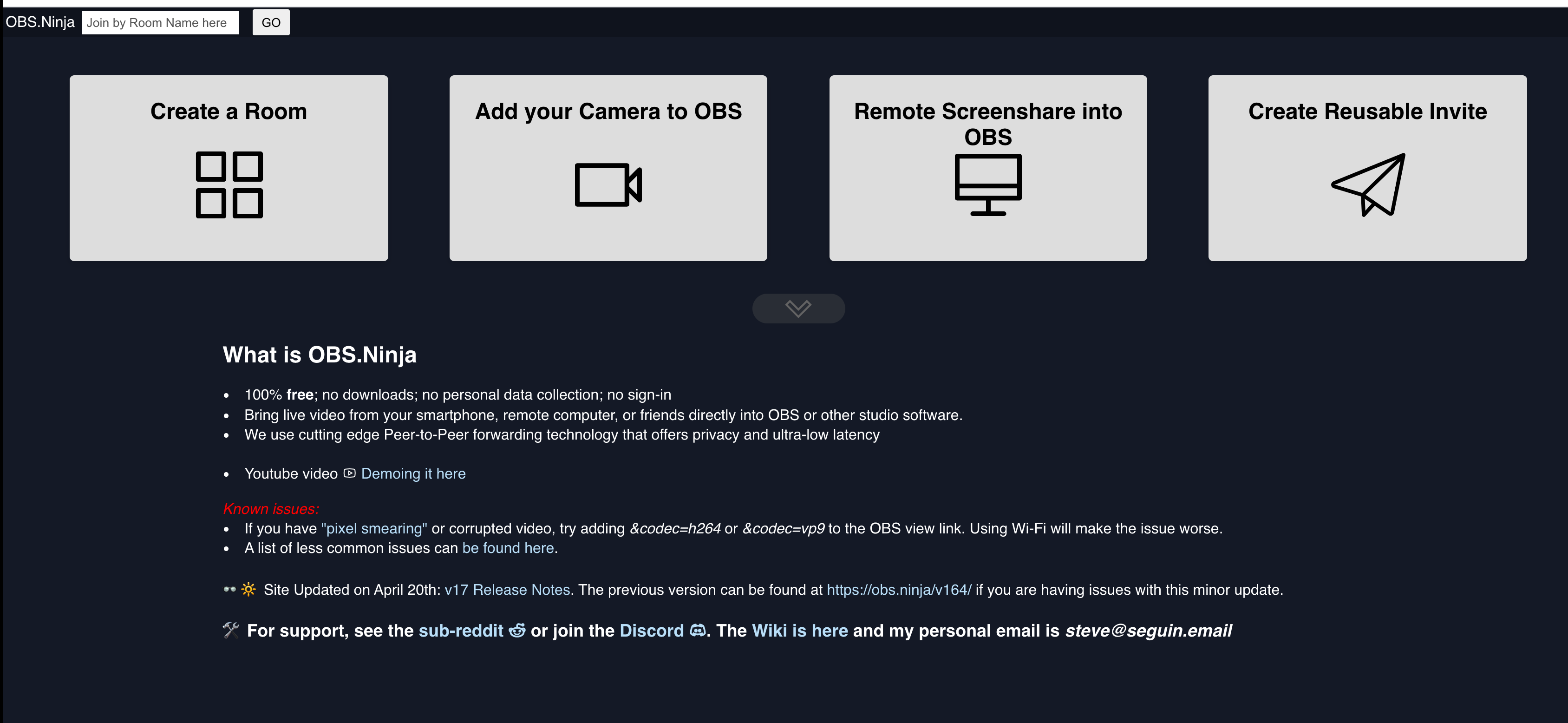
This is done by going to the obs.ninja website and creating a room:

OBS Ninja Homepage

Creating a Room in OBS Ninja
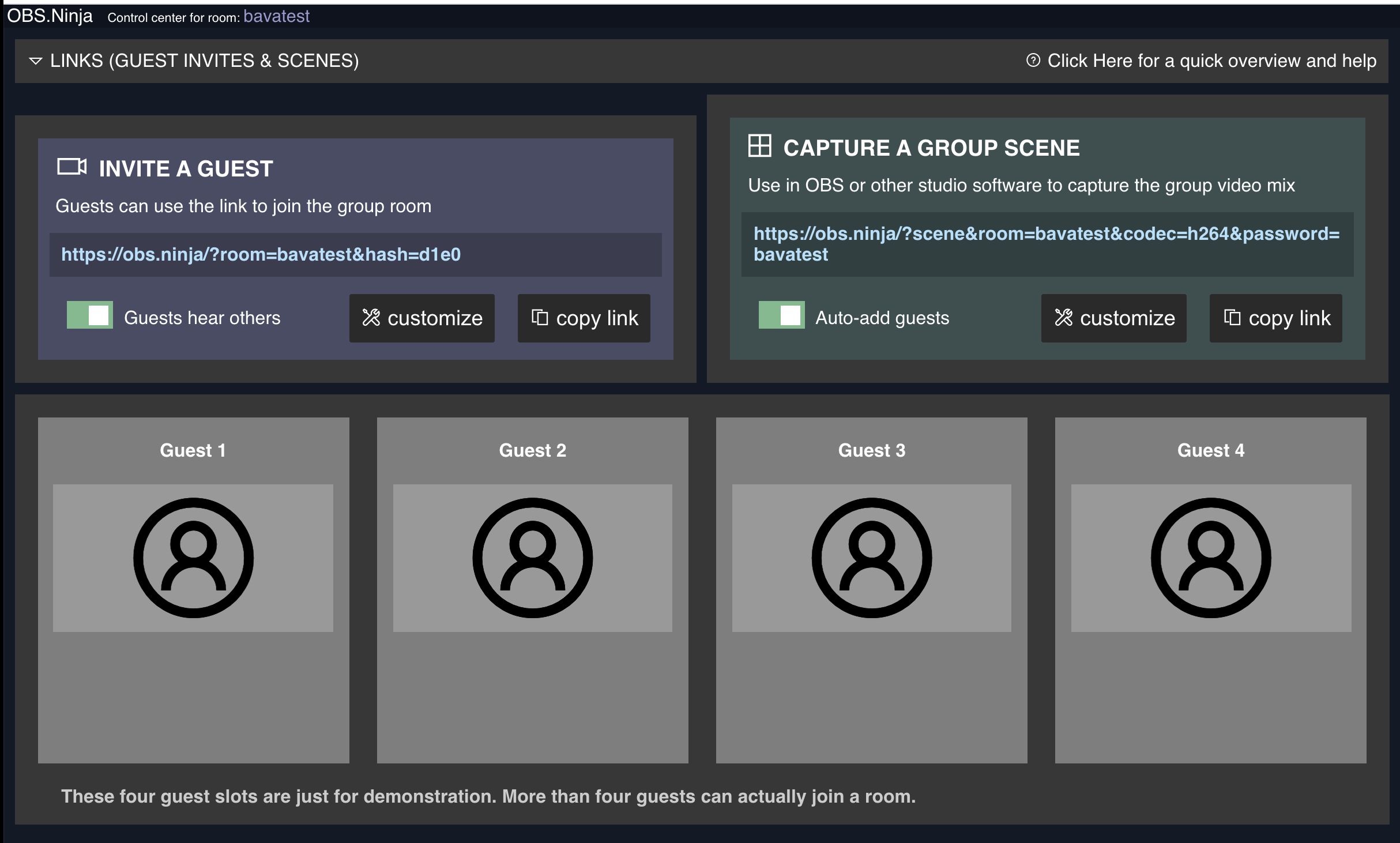
After you created and protected the room, you can invite guests and they show up below where Guest 1, Guest 2, Guest 3 etc. are and each will have a unique URL.

OBS Room to invite Guests that can then be captured as video sources

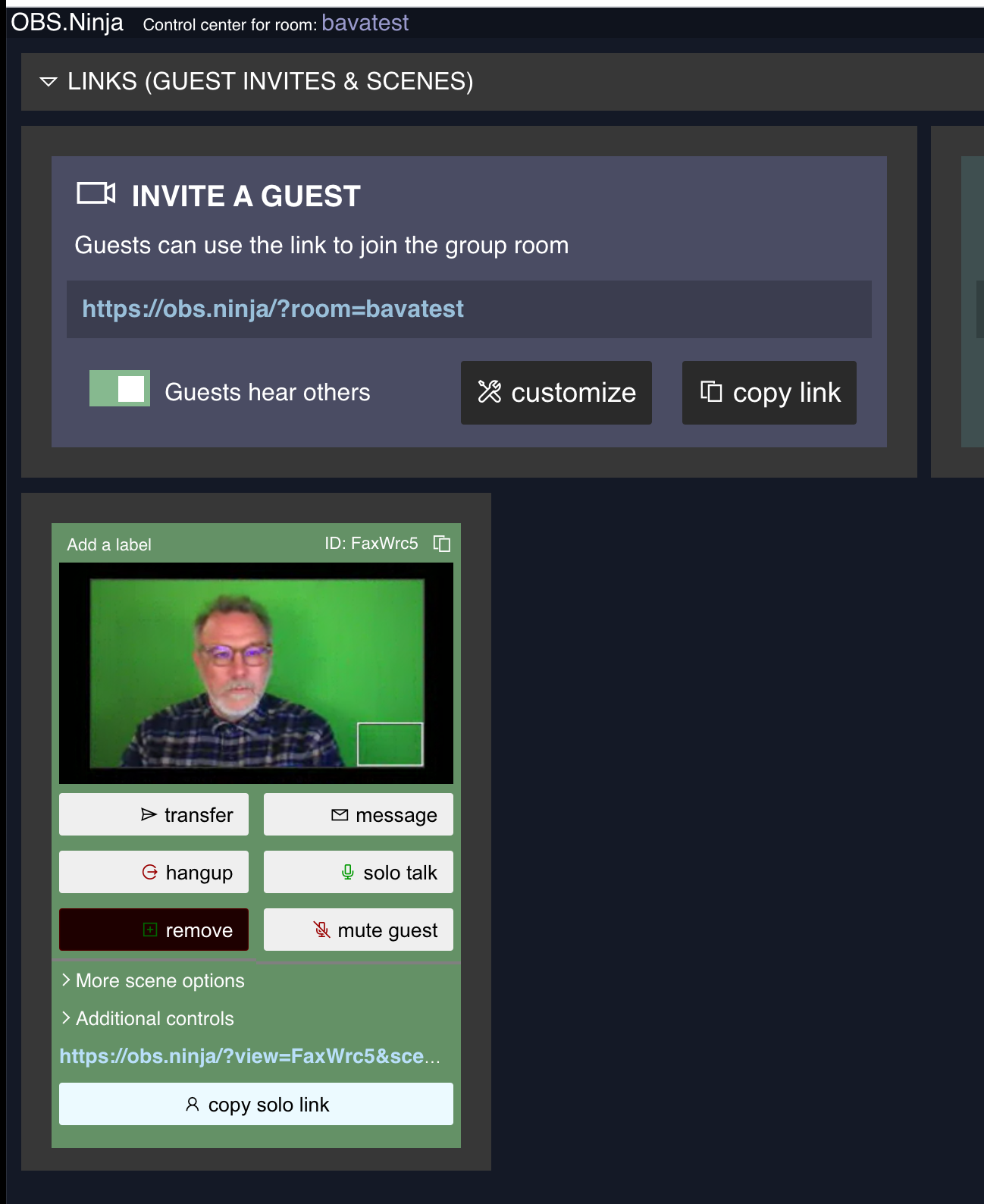
Copy the ink to the Guest Video in OBS Ninja
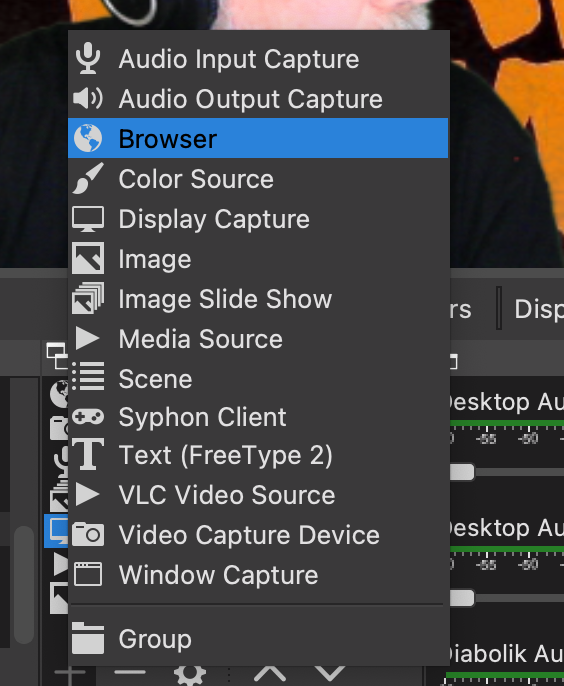
Once the person has entered, you copy the unique URL under their video source and paste it into the Browser Source:

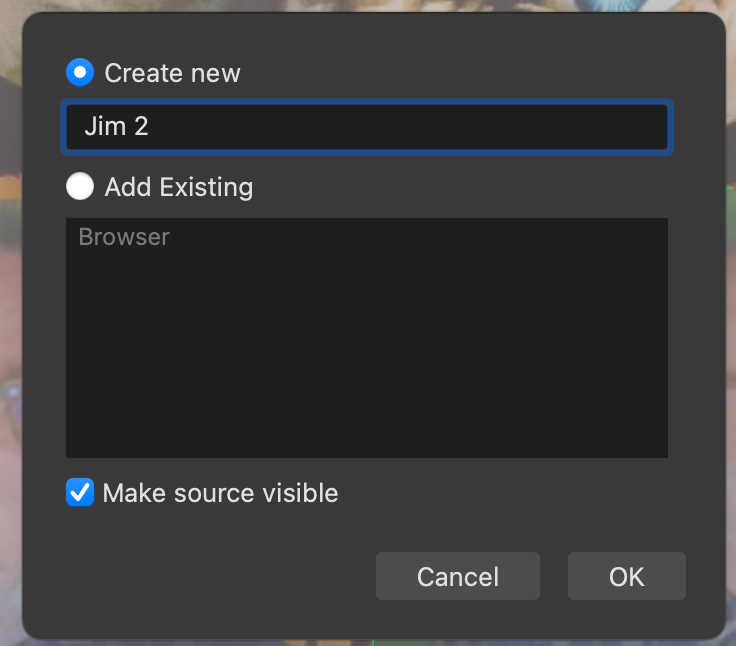
Name the new Browser Source:

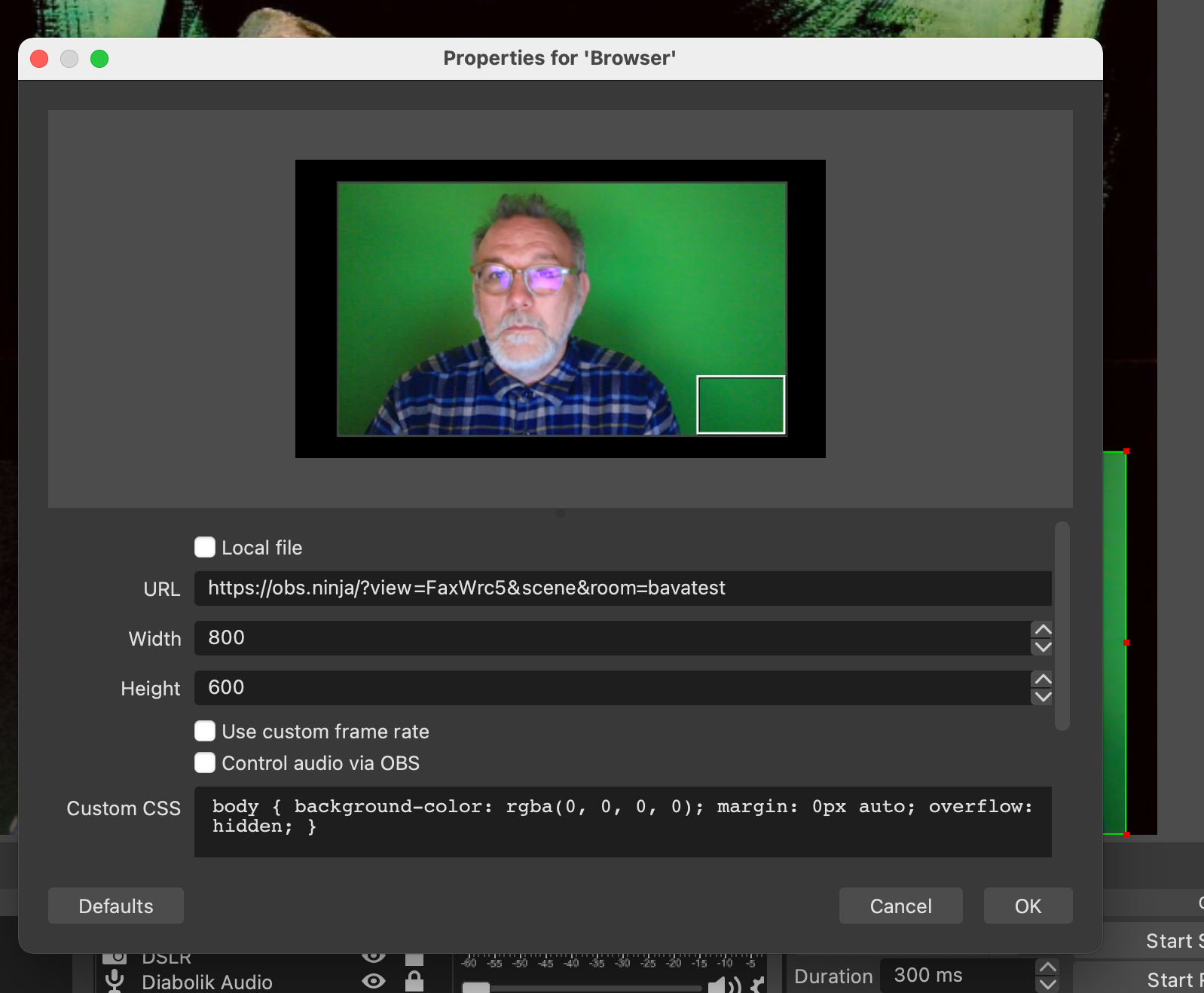
The you will be given the option to add the URL, which should then bring in the video source.

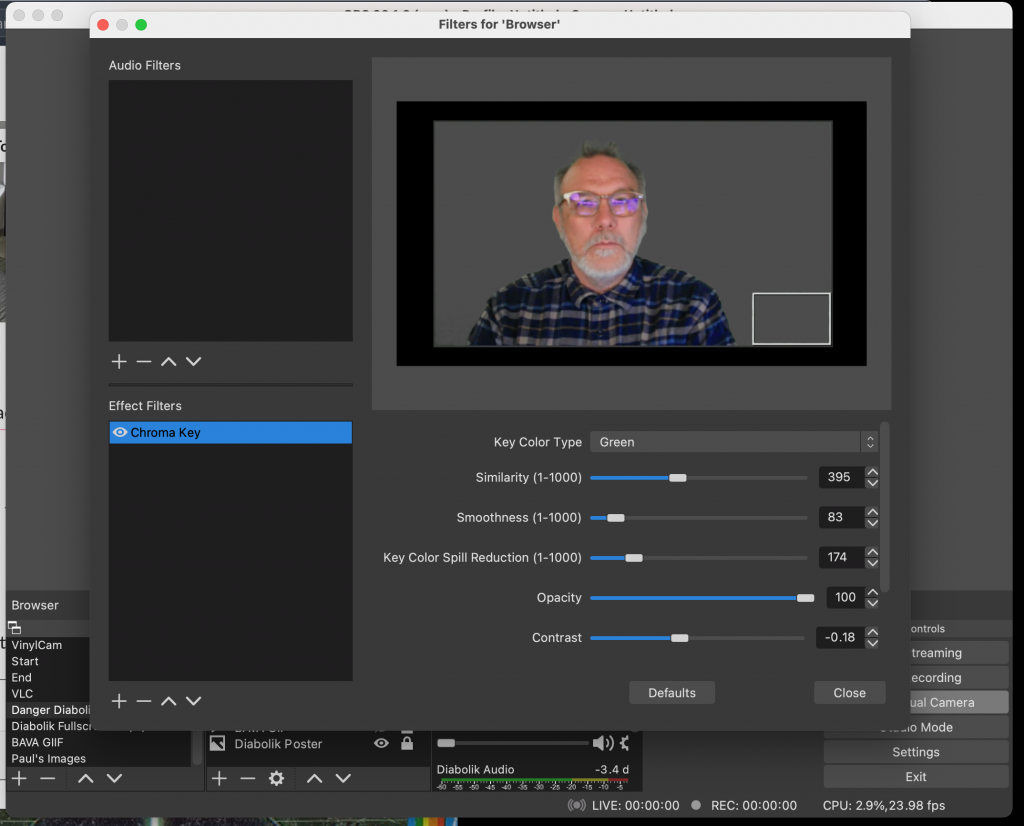
After that you can CTRL + click on the Browser Source and add a filter, in particular the Chroma Key that will allow you to dial in the green screen so the video participants background disappears. This tutorial does a nice job of explaining how to dial in the Chroma Key for a green screen.

Use the Chroma Key filter to make the guest background transparent so you can appear to be in same place at same time
After that, you would simply need to move and manipulate where you want the browser video source on the screen:

Unlock the Browser source to move it around, scale, and crop as needed
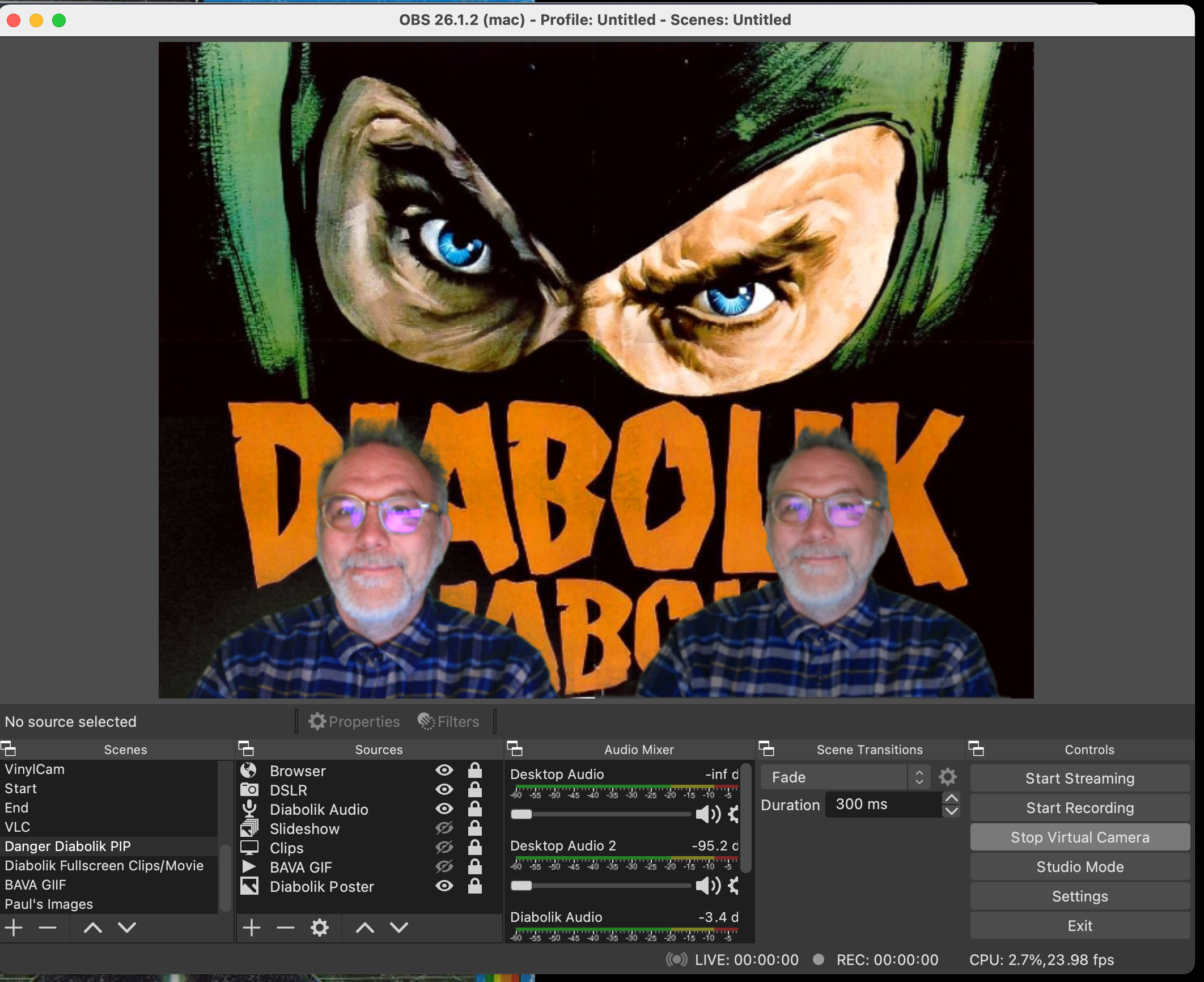
At this point you can add any other video capture sources and have multiple videos in the shot. Because the only thing better than one Jim is two Jims:

Two bavas are better than one bava
I have to say this was pretty fun to do, and it worked quite well. I have more to figure out with this, but I think the key for me is that it was pretty easy to get up and running with quickly. Plus, it highlights how cool and brilliant an open source community can be when it comes to quick, elegant, and cheap solutions to a potentially difficult and expensive feature.
IBM Wiring
I'd seen the photo a few times, but this is the first I'd read about what was actually being wired up. Turns out it's a semi-mechanical pre-computer for accounting and it's even more interesting than it first looked.
Apple releases WebKit security fix for iPhone, iPad, Mac and Apple Watch

Apple has released an important security update across nearly all of its major operating systems, including iOS/iPadOS 14.5.1, macOS 11.3.1 and watchOS 7.4.1.
The update fixes an arbitrary code execution present in WebKit, Apple’s framework that renders the majority of web-based content on the tech giant’s devices.
The updates essentially fix a hole that could potentially allow malicious websites to run code on your device.
In simple terms, this isn’t the type of update you put off for a few weeks. iOS 14.4 and 14.4.2 also fixed similar exploits. You can find the full update notes at this link.
Source: Apple
The post Apple releases WebKit security fix for iPhone, iPad, Mac and Apple Watch appeared first on MobileSyrup.
Good News at the End of a Long Year, v2.0
A couple of weeks ago, a former student emailed me after many years. Felix immigrated to the US from the Sudan back in the 1990s and wound up at my university, where he studied computer science. While in our program, he took a course or two with me, and I supervised his undergrad research project. He graduated and got busy with life, and we lost touch.
He emailed to let me know that he was about to defend his Ph.D. dissertation, titled "Efficient Reconstruction and Proofreading of Neural Circuits", at Harvard. After graduating from UNI, he programmed at DreamWorks Interactive and EA Sports, before going to grad school and working to "unpack neuroscience datasets that are almost too massive to wrap one's mind around". He defended his dissertation successfully this week.
Congratulations, Dr. Gonda!
Felix wrote initially to ask permission to acknowledge me in his dissertation and defense. As I told him, it is an honor to be remembered so fondly after so many years. People often talk about how teachers affect their students' futures in ways that are often hard to see. This is one of those moments for me. Arriving at the end of what has been a challenging semester in the classroom for me, Felix's note boosted my spirit and energizes me a bit going into the summer.
If you'd like to learn more about Felix and his research, here is his personal webpage The Harvard School of Engineering also has a neat profile of Felix that shows you what a neat person he is.
Jaywalking in Canada: How Street Shaming Tamed Pedestrians

“If one lives in the Canadian Pacific port and has not heard the term “jaywalker” then he or she can claim a particular merit as a law abiding citizen” the 1918 Vancouver Sun proclaimed.
The word Jaywalker appears to have originated in Kansas around 1907 where a newspaper article talked about jay walkers and jay drivers, with the word jay meaning a “greenhorn or a rube’, someone who was unsophisticated, poor, or a simpleton”.
A jaywalker described someone who was “stupid by crossing the street in an unsafe place or way, or some country person visiting the city who wasn’t used to the rules of the road”. You can take a look a this work by Peter Norton that outlines the history behind making vehicle drivers more important than pedestrians in the United States.
In Canada the term “jaywalker” first appears in the 1913 Ottawa Citizen and is described as being “invented for the pedestrian who steps out carelessly to cross the street without looking for approaching vehicles. It is jay-walker and is a fit companion for “joy-rider”.
It is a disparaging definition, assigning guilt and lawlessness to the most vulnerable road user, the person without a vehicle.
In Canada it appears that Vancouver is the place where jaywalking is first identified and scorned. The Montreal Gazette in August 1918 had an article entitled “The Jaywalker”, and identified that a “peculiar expression that had arisen in Vancouver”. The article then describes a jaywalker as someone who crosses the street but not at the intersection and that rules to make persons cross at intersections had fallen into “innocuous desuetude”. The article then points out that in the United States not crossing the street correctly proclaims “himself to be a foreigner”.
As most of these historic newspaper articles are behind a paywall, I have posted them on my twitter feed if you want to read them as they were written.
In doing a deep dive into jaywalking, there are over 40 references to jaywalking in Vancouver papers before 1920. When you think of that time, vehicles could be driven on streets without insurance and a licence, and were seen as an example of a new age of industrious progress.
Early Vancouver newspapers describe crashes with pedestrians as “collided” incidents, and then usually listed all of the fractures resulting for the victim. Vehicles had long blind spots in front of them, could not brake well, and there was no conformity of all to travel, signal, or behave on the road.
It was truly the wild west, and thousands of people, many who were children were dying on city streets. In 1928 28 pedestrians died in Vancouver, 72 were injured, and there were 10,500 crashes.
In 1930 40 people died on Vancouver roads.
Car manufacturers needed to sell vehicles and conformity was needed to ensure that vehicles could be operated on the street without pedestrian interruption.

Pedestrians were used to doing mid-block crossings, where traffic could be looked for in two directions, left and right. Vehicle culture preferred treating pedestrians the same way as vehicles, and having pedestrians cross at intersections, where there were four different direction of vehicular movement to be aware of instead of two.
The campaign to shame and blame pedestrians was on.
It was the Vancouver Automobile Club that in 1918 worked with City of Vancouver staff towards “fencing off” pedestrians on the street, by painting white “jaywalking lines” for pedestrians to cross within. To ensure conformity, the Vancouver Sun notes that if pedestrians did not cross in the straight and narrow “jaywalking lines” the automobile driver would not exactly be allowed to regard them as fair game, but might be entitled to plead contributory negligence on their part”.
That’s a pretty direct way to get pedestrians to conform.
The City of Vancouver agreed to pay $50.00 to paint white “jaywalking lines” at several intersections at Hastings, Main, and Cambie Streets downtown. Perhaps more telling, the City also installed “silent policemen” or bollards on the curb of corners, to keep vehicles from wildly steering up the curb towards any pedestrian on the corner.
While cities like London and Paris were trialling glass lights that were green or red to indicate when to cross the road, Vancouver used policemen to direct early traffic, with another officer on the busy street corners to enforce pedestrian behaviour to the new rules. The Vancouver Archives image below is that of Constable Duncan McTavish operating the hand traffic signal at Abbott and Hastings Street around 1925.

Of course some people still insisted on crossing mid-block by foot, most notably Vancouver writer and botanist Julia Henshaw. Michael Kluckner has written a graphic novel about Mrs. Henshaw, who wrote in the Vancouver Sun that it did not matter what they fined her, she would darn well be crossing mid-block where traffic was only in two directions and was therefore much safer.
An article in the Vancouver Sun in 1918 wished that Vancouver had the “degree of civilization prevailing in Paris” where under the Civil Law Code if a pedestrian was struck by an automobile, the victim could be placed under arrest. The Vancouver Sun decided that enforcing people to walk within the painted white “jaywalking lines” were the best alternative. The newspaper wrote out the locations of all of the jaywalking lines on downtown street corners so that motorists knew where they were and pedestrians could conform.
It would be another five years before Paris installed the first traffic light in 1923, with Berlin following in 1924 and London in 1927. In Vancouver “Stop and Go” Signs were activated by a policeman and were implemented in 1923, with the officer using a whistle for “go” and another whistle for “stop”.
Finally in 1937 pillar type traffic lights would be installed in Vancouver, as shown in the prototype below.

From 1939, here’s a YouTube video that demonstrates a British device designed to catch jaywalkers that stray onto the street.
imagesVancouverSun,VancouverArchives
Claiming that software is AI based is about to become expensive
The European Commission is updating the EU Machinery Directive, which covers the sale of machinery products within the EU. The updates include wording to deal with intelligent robots, and what the commission calls AI software (contained in machinery products).
The purpose of the initiative is to: “… (i) ensuring a high level of safety and protection for users of machinery and other people exposed to it; and (ii) establishing a high level of trust in digital innovative technologies for consumers and users, …”
What is AI software, and how is it different from non-AI software?
Answering these questions requires knowing what is, and is not, AI. The EU defines Artificial Intelligence as:
- ‘AI system’ means a system that is either software-based or embedded in hardware devices, and that displays behaviour simulating intelligence by, inter alia, collecting and processing data, analysing and interpreting its environment, and by taking action, with some degree of autonomy, to achieve specific goals;
- ‘autonomous’ means an AI system that operates by interpreting certain input, and by using a set of predetermined instructions, without being limited to such instructions, despite the system’s behaviour being constrained by and targeted at fulfilling the goal it was given and other relevant design choices made by its developer;
‘Simulating intelligence’ sounds reasonable, but actually just moves the problem on, to defining what is, or is not, intelligence. If intelligence is judged on an activity by activity bases, will self-driving cars be required to have the avoidance skills of a fly, while other activities might have to be on par with those of birds? There is a commission working document that defines: “Autonomous AI, or artificial super intelligence (ASI), is where AI surpasses human intelligence across all fields.”
The ‘autonomous’ component of the definition is so broad that it covers a wide range of programs that are not currently considered to be AI based.
The impact of the proposed update is that machinery products containing AI software are going to incur expensive conformance costs, which products containing non-AI software won’t have to pay.
Today it does not cost companies to claim that their systems are AI based. This will obviously change when a significant cost is involved. There is a parallel here with companies that used to claim that their beauty products provided medical benefits; the Federal Food and Drug Administration started requiring companies making such claims to submit their products to the new drug approval process (which is hideously expensive), companies switched to claiming their products provided “… the appearance of …”.
How are vendors likely to respond to the much higher costs involved in selling products that are considered to contain ‘AI software’?
Those involved in the development of products labelled as ‘safety critical’ try to prevent costs escalating by minimizing the amount of software treated as ‘safety critical’. Some of the arguments made for why some software is/is not considered safety critical can appear contrived (at least to me). It will be entertaining watching vendors, who once shouted “our products are AI based”, switching to arguing that only a tiny proportion of the code is actually AI based.
A mega-corp interested in having their ‘AI software’ adopted as an industry standard could fund the work necessary for the library/tool to be compliant with the EU directives. The cost of initial compliance might be within reach of smaller companies, but the cost of maintaining compliance as the product evolves is something that only a large company is likely to be able to afford.
The EU’s updating of its machinery directive is the first step towards formalising a legal definition of intelligence. Many years from now there will be a legal case that creates what later generation will consider to be the first legally accepted definition.
Twitter Favorites: [aimee_dandrea] @sillygwailo That's amazing, Richard!!! I hope you find all the info you're looking for and more. Rediscovering the past is so fascinating.
@sillygwailo That's amazing, Richard!!! I hope you find all the info you're looking for and more. Rediscovering the past is so fascinating.
Amazon Q1 2021
Amazon announced their financial results for the January to March quarter last Thursday. I was reading them when an email popped up asking if I wanted to talk about them on CNBC Squawk, which I did. In preparation, I re-read the report and pulled together a few talking points; here they are.
Top line
Amazon’s gross revenue increased 41% year-over-year, to $108.5B. To use a technical term: HOLY SHIT! This sort of growth on that sort of base is mind-boggling. Granted, shoppers suffering from Covid coop-up played a substantial role. But still, at some point you have to run into the Law of Big Numbers.
Branching out
But maybe not. One way to increase revenue is to enter more markets, and does Amazon ever do that. The quarterly summary mentioned online pharmacy, NFL merch, “Amazon One” payment tech, “Amazon Business” global procurement system with 5M customers and a $25B top-line, Prime Video’s partnership with the New York Yankees’ media empire, wireless earbuds, and video doorbells. Is there any business sector Amazon is not charging into?
Which brings us to…
AWS
Revenue moved up to a $54B annual run rate, the highlight being 30%-ish growth with 30%-ish operating margin, generating 47% of Amazon’s overall profit. I’d use another technical term but you get the idea.
AWS benefits less from Covid than the rest of the company, I guess; but at this revenue level, both those 30% numbers are pretty astonishing. People wonder why Andy Jassy got the CEO job, but these numbers are all you need to know.
There’s lots more room for growth, too. AWS is like $54B/year these days and my guess is that’s probably around a third of global public-cloud spend. Global Enterprise IT spend is a much, much, bigger number, so there’s no risk of the Cloudistas hitting the limits of their addressable market any time soon.
On the other hand, as I’ve said before, there’s a major potential headwind here. Anyone who’s spending say $1M/month with AWS has to be thinking that they’re sending $3.6M/year to Amazon’s bottom line, and that’s not a very comfortable feeling if Amazon is competing with you, which it probably is, and if it isn’t, apparently will be next year.
If I were an Amazon shareholder (I’m not) or executive, I’d seriously look at doing that AWS spin-off while they can do it the way they want, not the way Washington DC, which seems unusually flush with antitrust energy, says, while pointing a gun at them.
Climate emergency
Moved up the carbon-neutral date from 2030 to 2025, yay! Journalists: Keep a close eye on them for evidence of dodgy carbon accounting, which is not exactly rare in the business community. If they manage to pull this off, that’s a titanic achievement and I hope they share lots of details, because Amazon is a reasonably typical enterprise, just bigger; plenty to learn here.
The other interesting thing is the Climate Pledge, which now has over 100 signatories including a whole bunch of famous names. This may be significant; when Amazon announced the Pledge, I was too polite to say that it looked like it’d been hastily cooked up and there weren’t many, as in any, other recognizable names attached. The Pledge’s zero-carbon date is 2040, which is way too late, but still, let’s hope this turns into a good thing for the world.
People issues
In Jeff’s goodbye letter he said they were adding top-level corporate goals, and they have. The new text: Amazon strives to be Earth’s Most Customer-Centric Company, Earth’s Best Employer, and Earth’s Safest Place to Work. The last two out of three didn’t used to be there. And I place a whole lot of weight on the last one, about safety. It didn’t get that much public traction, but I thought the most damaging Amazon reportage of the last couple of years was the series of stories about elevated injury rates at Amazon warehouses. Credit is due to Will Evans and the people at RevealNews.
I really sincerely hope that Amazon can bend this particular curve in a better direction.
But while that’s important, there’s a way more important “people” issue. When I got on CNBC, the host (in a segment omitted from the excerpt above) asked me about the unionization story and Amazon announcing a general warehouse-worker raise and so on. He asked “So, are they doing enough?”
No, obviously.
The developed world’s egregious inequality curve, which has been getting monotonically worse since the Seventies, is not going to be addressed by another buck an hour to powerless entry-level workers. Anyhow, it’s not an Amazon problem, Amazon is a symptom. And if you have to take a disempowered entry-level job, there are way worse places to go that Amazon.
I don’t claim to understand American Politics, but I do note that both Bernie Sanders and Josh Hawley are mad at big tech in general and Amazon in particular. But it seems obvious to me that, going forward, a central issue for business leaders — maybe the central issue — will be dealing with political pressure to redress society’s imbalances.
Once again, if I were in leadership, I’d be working on getting out in front on this stuff while I still have the reins in my hands.
You’re In A Bubble
You’re in a bubble.
When you go to work (or log in to work), you’re interacting with people who are highly engaged with your brand.
When you talk to members, they feel highly engaged with what you’re saying.
When you see your organization featured in the news, it reinforces how important your organisation is within your field.
If you solicit the thoughts and ideas of prospective members about the community, they will probably tell you it’s a great idea. They’re picking up on your cues and telling you what you want to hear (and there’s no downside).
Almost everything you see, hear, or do within your work is likely to further confirm that people are far more engaged with your brand than they actually are.
This often leads to two common problems.
The first is believing a community will be easier to get started than it actually is. Instead of spending weeks, even months, developing and refining a magnetic community concept, we instead spend our time on the technology and assume people will naturally join.
The second is believing the community should have more engagement than necessary. Why aren’t people who clearly love your brand more engaged in your community? What’s wrong?
You need to pop this bubble quicker.
Think about it this way. How many communities do you participate in? 2 to 3? Maybe?
Particularly, how many brand communities do you participate in? I’m going to guess it’s not many (if any!). There’s a good chance you don’t participate in any communities for the topics (or brands) you’re most passionate about. And if you don’t participate in these communities, why would you assume your audience does?)
The reality is there is a ferocious battle for the time and attention of your audience. Your community is coming up against everything else your members can be doing at that moment. If members don’t seem to care that you launched a community, it’s probably because you’re not particularly interested in the community launch of a brand you like.
This is a long way of saying that it’s far harder and takes a much bigger emotional pull to persuade people to stop watching Netflix and spend that time in your community instead.
The post You’re In A Bubble first appeared on FeverBee.
2021-05-02 BC
Vaccine Clinics
The current mitigation measures are supposed to end on 25 May. Three weeks before that is 4 May, which means that anybody vaxxed by Tuesday will have their full first-shot-immunity by the time the restrictions are up.
By my calculations, by Tuesday we will have vaccinated almost two million people, double how many were vaccinated by when the restrictions started, almost 40% of the population. These are really good numbers!
Two nice charts from the Master of Charts Justin McElroy on our vaccine progress:


I’d like to point out that at BC’s worst period of the pandemic, we are still doing pretty damn well. This shit is HARD, many places have done much worse.
Outbreaks
There is a nasty outbreak going in Peace River South — bad enough that they are in the middle of a two-week whole-of-community vaccination drive in Dawson Creek, which started last Monday (26 April) and will end on Friday (7 May).
The MLA for Peace River South and former mayor of Dawson Creek reports that he and his family all got COVID despite following All The Rules and getting vaccinated last week. Unfortunately, he caught it a few days before he got vaccinated. 
2021-05-02 General
Vaccines
You know how I keep saying we are going to have SO MUCH VAX?From an April 22 Economist article (emphasis mine):
“Last week, the billionth dose of covid-19 vaccine was made. It is a sign of how greatly capacity has expanded over the past six months that the next billion could be produced by May 27th, according to Airfinity, an analytics firm (see chart).”

A preprint says that COVID antibodies are still present in some people who got infected a year earlier. Yay!
Variants
The spread of variants in the US is interesting, not just because they are RIGHT NEXT to us, but because it gives a crude measure of the relative transmissibility of several VOCs:

It’s a little hard to read, but that top label says “Brazil Variant”. The light purple is “New York Variant”. Note that the grey, unmarked area is COVID Classic.
People ask me, “Aren’t you worried about some scary new variant that evades all the vaccines??!?!??” My answer is NO.
- I kind of feel like COVID has already given us its best shot. (I can’t entirely justify this — there was a scientific article I read that said basically that, but I can’t remember where I saw it, nor what arguments it had, so I acknowledge that’s a weak argument.)
- Regulatory agencies have said that they would require much less from clinical trials and documentation for vaccines against variants. (Both Moderna and Pfizer made boosters against B.1.351, but I haven’t heard boo about them, probably because their current vax works well enough against B.1.351.)
- The mRNA vaccines are magic, and can be developed very fast now. It took two days from the time the SARS-CoV-2 virus was sequenced to design a vaccine for it. Two days!
- The mRNA vaccines can be manufactured quickly now. Pfizer takes sixty days to make vax, and more than half of that is testing. Frequently in manufacturing, making a small batch can be done much more quickly than the normal production runs.
- The mRNA vaccines can be manufactured in bulk now. (See above.)
- We are better at pandemicking now. We have practice at it, and our leaders have learned that we need to act fast and hard. If we get COVID-19 under control and loosen all the restrictions, we will know what to do if COVID-22 comes at us. Like the countries who got practice with SARS, we will know to slam all the borders shut right away. We will have processes for quarantining. We will know exactly where to set up the mass vax clinics. We got this.
Disease Mechanism / Long COVID
There’s a really interesting experiment reported on here: they built little pseudo-viruses studded with spike proteins but with no actual virus. They injected those into lab animals and found that they caused damage which looked similar to COVID!
Remote Support with a Self-Hosted Remotely Instance

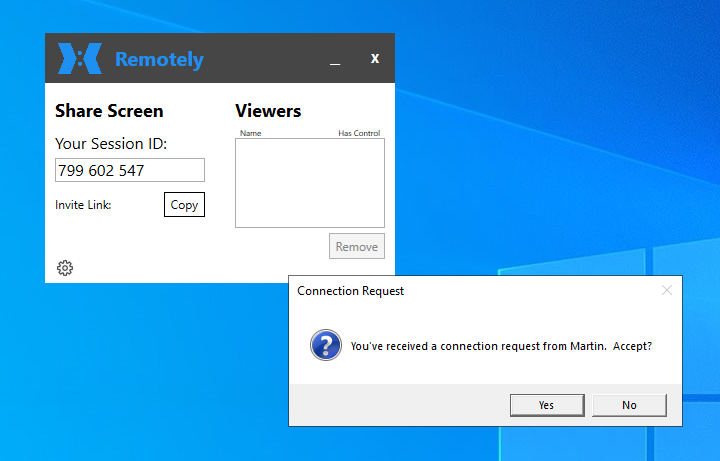
I’m always on the lookout for solutions to improve my remote working and support capabilities and recently came across ‘Remotely‘, an open source and self-hostable remote support solution for Windows and Linux. Self-hosted and open source, hm, sounds interesting, I thought, just what I like for privacy and confidentiality reasons. So I had a closer look!
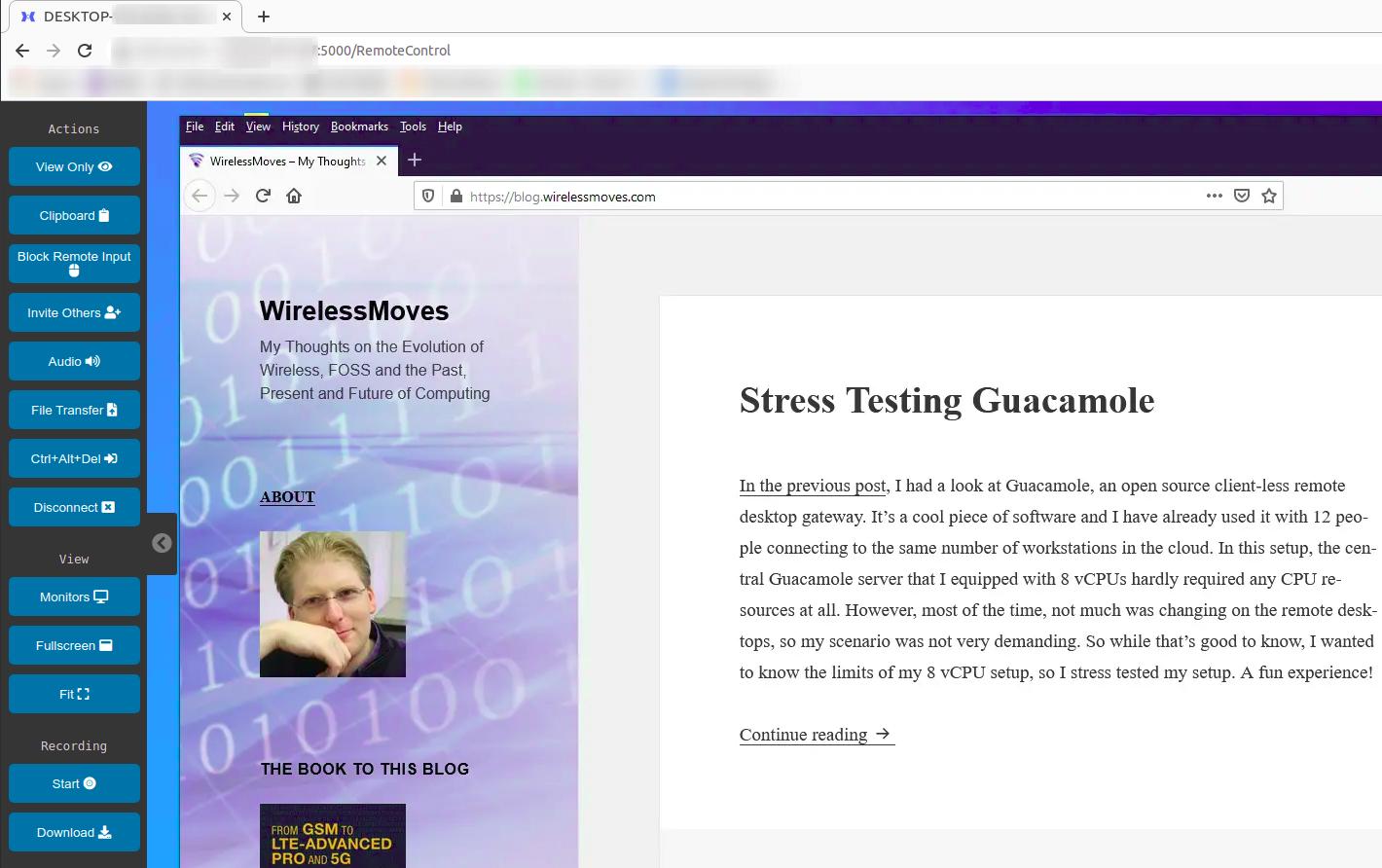
Developed by Jared Goodwin, the sources and detailed information can be found on Github. Remotely is based on a central server to which the remote device and the supporter connect. This is necessary to get around NAT limitations of the typical Internet home connection that prevents direct peer to peer communication. While a Linux/Windows program needs to be executed on the remotely supported device as in any other remote support solution, everything on the supporter side runs in the web browser. WebRTC protocol is used for remote screen, keyboard and mouse interaction. How nice!

For trying out things quickly, Jared has put a demo instance of the central server part on a cloud based server, so one can try out things very quickly. Creation of an account is required but the email address is not checked and hence does not necessarily have to be connected to anything. Once logged-in, connecting to a remote desktop session is as easy as clicking on the ‘Remote Control’ button in the web browser and typing in the 9 digit support code that was generated by the remote support application that was started on the client side.
When I tried this out, I was a bit disappointed at first, because reaction to mouse and keyboard input and changes on the remote screen in the browser was very slow with a delay of at least 3 seconds. In other words, hardly usable. I quickly found out, however, that the reason for this was that I and my test-VM running Windows were in Europe, while Jared’s server was in the US and had a round trip time of 400 ms across the Atlantic. That makes it 800 ms in total when the supporter and the supported device is in Europe.
But using the demo server was not what I had in mind anyway, I wanted my own server instance. The configuration procedure looks a bit daunting, but the project provides a ready to use Docker image on Docker Hub and a docker-compose.yml file. So I launched a new Ubuntu 20.04 VM in the cloud of my preferred hosting company in Germany and started a new Remotely server Docker container. This took me less than 5 minutes. Perfect! While the Docker image is rather large at 500 MB, running the Remotely server ‘only’ takes less than 150 MB of RAM.

On the client side, the support executable can then be downloaded from this server. Afterwards, one thing that has to be done by hand is to change the web server details in the settings of the client program, as it points to the demo instance per default. Perhaps that is something to be improved for the Docker image in the future. The supporter also connects to the central server and has to create an initial account. The first account created automatically receives administrator rights and further account creation on the server is automatically blocked. In other words, the private instance remains private unless opened again.
It’s also possible to install a permanent client service on a device that then enables remote access to the device without a pass-code. Also, the device appears in a device list on the server and basic health parameters such as processor load, RAM utilization and remaining disk space are shown. When I first tried this, my Windows 10 client running in a virtual machine on Virtualbox in ‘headless mode’ would disconnect every very minutes. This is only a bit annoying with the background service running, as it automatically reconnects, but it’s a major problem in Desktop support mode, as the user has to frequently send a new code to the supporter. Whether this is an issue on the supporter side, the server, or on the client is not quite clear to me at this point. I will have to try this on a physical Windows 10 machine at some point, as this is the second use case I have in mind.
Another thing I noticed when using the solution is, that probably due to the use of WebRTC screen sharing, the remote screen is typically refreshed in low resolution at first, while the full resolution of the part of the screen that has changed only appears a few seconds later. That’s not a problem for a remote support scenario, but it’s not well suited for working on a remote physical or virtual computer for a longer time. Also, while the German keyboard layout is supported, special assignments such as the @ character, which is ALT-GR+Q on the German keyboard, do not make it to the other side.
Overall, I very much like this approach and I have a number of use cases in mind for which I want to use it in the future. The major thing that needs to be fixed, however, are the frequent disconnects I suffer when I remotely use a Windows 10 installation in a virtual machine. In a follow up post I will have a look at whether the disconnects disappear on a physical device running Windows 10 as supported device, and if I can run the Remotely server behind my default reverse proxy setup I use for my other ‘dockerized’ services.
Adding GeoDjango to an existing Django project
Work on VIAL for Vaccinate The States continues.
I talked about matching last week. I've been building more features to support figuring out if a newly detected location is already listed or not, with one of the most significant being the ability to search for locations within a radius of a specific point.
I've experimented with a PostgreSQL/Django version of the classic cos/sin/radians query for this but if you're going to do this over a larger dataset it's worth using a proper spatial index for it - and GeoDjango has provided tools for this since Django 1.0 in 2008!
I have to admit that outside of a few prototypes I've never used GeoDjango extensively myself - partly I've not had the right project for it, and in the past I've also been put off by the difficulty involved in installing all of the components.
That's a lot easier in 2021 than it was in 2008. But VIAL is a project in-flight, so here are some notes on what it took to get GeoDjango added to an existing Django project.
Alex Vandiver has been working with me on VIAL and helped figure out quite a few of these steps.
Activating PostgreSQL
The first step was to install the PostGIS PostgreSQL extension. This can be achieved using a Django migration:
from django.contrib.postgres.operations import CreateExtension
from django.db import migrations
class Migration(migrations.Migration):
dependencies = [
("my_app", "0108_previous-migration"),
]
operations = [
CreateExtension("postgis"),
]
Most good PostgreSQL hosting already makes this extension available - in our case we are using Google Cloud SQL which supports various extensions, including PostGIS. I use Postgres.app for my personal development environment which bundles PostGIS too.
So far, so painless!
System packages needed by GeoDjango
GeoDjango needs the GEOS, GDAL and PROJ system libraries. Alex added these to our Dockerfile (used for our production deployments) like so:
RUN apt-get update && apt-get install -y \
binutils \
gdal-bin \
libproj-dev \
&& rm -rf /var/lib/apt/lists/*Adding a point field to a Django model
I already had a Location model, which looked something like this:
class Location(models.Model):
name = models.CharField()
# ...
latitude = models.DecimalField(
max_digits=9, decimal_places=5
)
longitude = models.DecimalField(
max_digits=9, decimal_places=5
)
I made three changes to this class: I changed the base class to this:
from django.contrib.gis.db import models as gis_models
class Location(gis_models.Model):
# ...
I added a point column:
point = gis_models.PointField(
blank=True,
null=True,
spatial_index=True
)
And I set up a custom save() method to populate that point field with a point representing the latitude and longitude every time the object was saved:
from django.contrib.gis.geos import Point
# ...
def save(self, *args, **kwargs):
# Point is derived from latitude/longitude
if self.longitude and self.latitude:
self.point = Point(
float(self.longitude),
float(self.latitude),
srid=4326
)
else:
self.point = None
super().save(*args, **kwargs)
srid=4326 ensures the point is stored using WGS84 - the most common coordinate system for latitude and longitude values across our planet.
Running ./manage.py makemigrations identified the new point Point column and created the corresponding migration for me.
Backfilling the point column with a migration
The .save() method would populate point for changes going forward, but I had 40,000 records that already existed which I needed to backfill. I used this migration to do that:
from django.db import migrations
class Migration(migrations.Migration):
dependencies = [
("core", "0110_location_point"),
]
operations = [
migrations.RunSQL(
sql="""
update location
set point = ST_SetSRID(
ST_MakePoint(
longitude, latitude
),
4326
);""",
reverse_sql=migrations.RunSQL.noop,
)
]
latitude/longitude/radius queries
With the new point column created and populated, here's the code I wrote to support simple latitude/longitude/radius queries:
from django.contrib.gis.geos import Point
from django.contrib.gis.measure import Distance
def search_locations(request):
qs = Location.objects.filter(soft_deleted=False)
latitude = request.GET.get("latitude")
longitude = request.GET.get("longitude")
radius = request.GET.get("radius")
if latitude and longitude and radius:
# Validate latitude/longitude/radius
for value in (latitude, longitude, radius):
try:
float(value)
except ValueError:
return JsonResponse(
{"error": "latitude/longitude/radius should be numbers"}, status=400
)
qs = qs.filter(
point__distance_lt=(
Point(
float(longitude),
float(latitude)
),
Distance(m=float(radius)),
)
)
# ... return JSON for locations
In writing up these notes I realize that this isn't actually the best way to do this, because it fails to take advantage of the spatial index on that column! I've filed myself an issue to switch to the spatial-index-friendly dwithin instead.
Getting CI to work
The hardest part of all of this turned out to be getting our CI suites to pass.
We run CI in two places at the moment: GitHub Actions and Google Cloud Build (as part of our continuous deployment setup).
The first error I hit was this one:
psycopg2.errors.UndefinedFile: could not open extension control file "/usr/share/postgresql/13/extension/postgis.control": No such file or directory
It turns out that's what happens when your PostgreSQL server doesn't have the PostGIS extension available.
Our GitHub Actions configuration started like this:
name: Run tests
on: [push]
jobs:
test:
runs-on: ubuntu-latest
services:
postgres:
image: postgres:13
env:
POSTGRES_USER: postgres
POSTGRES_PASSWORD: postgres
POSTGRES_DB: vaccinate
options:
--health-cmd pg_isready --health-interval 10s --health-timeout 5s --health-retries 5
ports:
- 5432:5432
steps:The postgres:13 image doesn't have PostGIS. Swapping that out for postgis/postgis:13-3.1 fixed that (using this image).
Our Cloud Build configuration included this:
# Start up a postgres for tests
- id: "start postgres"
name: "gcr.io/cloud-builders/docker"
args:
- "run"
- "-d"
- "--network=cloudbuild"
- "-e"
- "POSTGRES_HOST_AUTH_METHOD=trust"
- "--name"
- "vaccinate-db"
- "postgres"
- id: "test image"
name: "gcr.io/cloud-builders/docker"
args:
- "run"
- "-t"
- "--network=cloudbuild"
- "-e"
- "DATABASE_URL=postgres://postgres@vaccinate-db:5432/vaccinate"
- "${_IMAGE_NAME}:latest"
- "pytest"
- "-v"I tried swapping out that last postgres argument for postgis/postgis:13-3.1, like I had with the GitHub Actions one... and it failed with this error instead:
django.db.utils.OperationalError: could not connect to server: Connection refusedIs the server running on host "vaccinate-db" (192.168.10.3) and acceptingTCP/IP connections on port 5432?
This one stumped me. Eventually Alex figured out the problem: the extra extension meant the PostgreSQL was taking slightly longer to start - something that was covered in our GitHub Actions configuration by the pg_isready line. He added this step to our Cloud Build configuration:
- id: "wait for postgres"
name: "jwilder/dockerize"
args: ["dockerize", "-timeout=60s", "-wait=tcp://vaccinate-db:5432"]It uses jwilder/dockerize to wait until the database container starts accepting connections on port 5432.
Next steps
Now that we have GeoDjango I'm excited to start exploring new capabilities for our software. One thing in particular that interests me is teaching VIAL to backfill the county for a location based on its latitude and longitude - the US Census provide a shapefile of county polygons which I use with Datasette and SpatiaLite in my simonw/us-counties-datasette project, so I'm confident it would work well using PostGIS instead.
Releases this week
-
django-sql-dashboard: 0.11a0 - (22 total releases) - 2021-04-26
Django app for building dashboards using raw SQL queries
TIL this week

Bob Cassette Rewinder :: Hacking Detergent DRM

Bob Cassette is an all-in-one detergent cartridge for the Bob dishwasher. It only lasts 30 washes, after which you will need to buy a new one for quite a bit of money.
An EEPROM memory chip inside the cassette tracks how many washes are left. With Bob Rewinder, it can reset the count back to full, and you can then easily refill the cassette with commerical detergents for massively reduced operating cost.
In my case, the cost-per-wash went down from 48p (67c) to 0.8p (1.1c), a staggering 98% cost saving!
Daan has lifted the old expensive-fluid-in-a-cartridge scheme from inkjet printers and applied it to a cute dishwasher. But there is a solution.
Could we build Newtonian mechanics on purpose?
One of the greatest domain models ever built was Newtonian mechanics. Why did it take physics, as a field, thousands of years to figure it out? What can we learn from Newtonian mechanics to help us model our own domains?
The post Could we build Newtonian mechanics on purpose? appeared first on LispCast.
Users Guide to the Pandemic Swerve. Angela Mitropoulos: Pandemonium
Mighty
"We're headed for a generational overhaul in the way web browsers work," said this intro in Protocol, "and this looks like part of the answer." 'This' is called Mighty, and the idea is to take your entire web browser and put it into the cloud. It's an intriguing idea that solves some problems for web users: first, the need for greater bandwidth to access heavy websites, and second, the need for local processing of Javascript and video-heavy web sites. And while it may seem inefficient to stream your browser from the cloud, at a certain point, it's more efficient than doing all the page requests and processing on your own computer. My only problem is that it's Chrome, and what I really would want is Firefox. It's waitlist only right now; I've signed up and if I get access I'll describe how it feels.
Web: [Direct Link] [This Post]New Sidebar Puts You in Touch With What You Need, When You Need It

As you read email, your sidebar shows you more by connecting you to your calendar, contacts, and email attachments.
Do you ever wish you could schedule an event without switching between your email and calendars? When you're busy with emails, would it be helpful to know what's ahead on your calendar as you work?
Would life be easier if you could quickly refresh your memory before emailing people, so you know when you last spoke and what you talked about?
If you’ve said yes to any of these questions, what you're looking for is context. Good news! Fastmail's sidebar is here to fill in the gaps by connecting what you're doing now to related information in your email history, calendar events, and address book.
Get the big picture in one look
Your busy life has many interrelated parts. Fastmail puts your email, calendar, contacts, and email attachments in one place. Your sidebar is there to draw connections between what you're doing now and the other information you have in all areas of Fastmail.
Your sidebar works by surfacing the information you need as you read or write emails. If you expand the sidebar while writing a new email, you'll be able to see and search your calendars and contacts. Alternatively, if you open the sidebar next to a conversation, you'll see your calendar, as well as contacts and attachments related to the thread.

See your calendar as you work
Email messages often initiate calendar events, so it makes sense that you'd want to see your email and calendars side-by-side. As you discuss a meet-up or special activity, you can use your sidebar to add the event to your calendar and avoid scheduling conflicts. You can also use your sidebar to show you what's happening today as you work.
Your sidebar calendar is more than just a reference point. It is your full-featured Fastmail calendar that you can search, add events to, and use to send calendar invitations. You can also switch between viewing all your Fastmail calendars, multiple calendars at a time, or calendars in a calendar group.
Send invites out for new events and respond to emails faster without leaving your inbox. Take a look at your schedule by the week or by month using the mini-calendar in your sidebar.

Drag and drop contacts to compose new emails
Are you sending out invites to a virtual birthday party? Do you have to remind your team about an upcoming meeting? Group conversations are easy to start with the sidebar. You can view all your contacts, just recent contacts, only your VIPs, or any other contact groups.
When you start writing your new email, your sidebar gives you the ability to drag and drop contacts you want to talk to into your draft.

See what you know about your contacts
Just like when someone you can't place waves to you at the grocery store, it can be hard to recall how you know someone when you interact with them online. Your sidebar shows you details for the contact you're emailing, so you can identify them in the world and in your life.
The People tab is where you'll find the information you've saved about the people you know—like what they look like, where they're based, and what they do.
Now that it's clear who they are, you can save time by sending more thoughtful emails and event invitations.

Send more personal and perceptive correspondence
You get hundreds of emails; it can be difficult to remember where your conversation left off.
Your sidebar helps to jog your memory when you could use a reminder. Below each contact's basic details, you'll find the history of your past interactions with that person ranging from conversations you've had to events you've shared.
You'll be able to search these interactions to find what you need so that when you catch up, you can pick the conversation up right where it left off. It will help you ask questions like, "How's your new baby?" "What college did you choose?" or "Are you still looking for a photographer?". Details like this show your friends and colleagues that you care or help you win new business!

Find attachments specific to this conversation
No one wants to be scrambling to pull up an attachment, especially if you need it now.
From meeting minutes to contracts to tickets to the show, the sidebar's Attachments tab collects the files attached to your email conversations. It makes it easy to find the one you’re looking for, without the hassle of scrolling through a long thread.

Work smarter with your sidebar
Your tour of the sidebar has come to an end, but better productivity has only just begun. Go into the world with the power of all areas of Fastmail beside you as you work. With this level of connection to your information, you can be more prepared—leading to faster and more informed communications.
Here's a handy to-do list for the smartest sidebars:
- Import a calendar (from Google, iCloud, etc)
- Bring in your contacts (from Gmail, iCloud, etc)
- As you use your mail today, open the sidebar in the upper right corner of your account in your desktop web browser to check it out!
At Fastmail, we're all about helping you streamline your daily tasks. If you're new to Fastmail, give us a try to see this feature in action.
Least Surprising Headline of the Month
From the New York Times:
The research, published online Monday in the Proceedings of the National Academy of Sciences, found that in cities where bike infrastructure was added, cycling had increased up to 48 percent more than in cities that did not add bike lanes. …
But in public transit research, the effect of adding bike lanes is a matter of debate.
“It’s like a chicken and egg problem,” said Mr. Kraus, a doctoral candidate in economics at the Mercator Research Institute on Global Commons and Climate Change in Berlin. “There can be this reverse causality that, actually, if you have a lot of cyclists, they will demand better infrastructure, and it’s not really the infrastructure that creates more cycling.” …
Bicycles, unlike cars, do not emit greenhouse gases. Matthew Raifman, a doctoral student in environmental health at the Boston University School of Public Health, found in a separate study that investments in infrastructure for cycling and walking more than paid for themselves once the health benefits were taken into account. …
“There’s indications from mobility behavior research that as soon as you find another way of getting around, then you might actually stick to it,” Mr. Kraus said. “So I’m confident that if you keep the infrastructure, that people will continue cycling.”
Coffee Chronicles 003

"Official" tasting notes and background information.
Brewing Method AeroPress
I am following James Hoffman's "The Ultimate AeroPress Technique". 11 grams of coffee and 200 grams of water. Steep 2 minutes, then swirl and let settle for 30 seconds before fully pressing it through.

A first whiff of the beans when opening the package gives only a slight hint of coffee, it's a very subdued experience.
This continues with the first sip, a very light, airy roast. The beans themselves are also small, compared to the previous too. Which makes me think, without having looked at the official tasting notes yet, that this is coffee grown at higher and / or drier altitudes.
The tasting notes speak of melon but I have a hard time actually getting it. I do get a hint of sweetness, which I find more subdued than in yesterday's batch. Overall it is a nice, light combination but not something that is wowing me.
Rating: 2.5/5
Brewing Method French Press
For the second taste test I prepare it in a French Press. At a ratio of 1:17 coffee to water and a 3 minute steep.

First thing I noticed when pouring it is how much redder it is than the AeroPress version. As it cools down the hue starts changing more towards orange.
Much like with the AeroPress there is not a whole lot of aroma coming off of it. Best way to describe it is: "It smells like coffee".
That pretty much continues with the actual tasting. It's more bold than in the AeroPress, with roughly the same amount of sweetness but a more punchy bitterness that wasn't there with the AeroPress.
Rating: 2.5/5
Why American Education is Broken
|
mkalus
shared this story
from |
Everyone agrees that American education leaves much to be desired. American students consistently report lower test scores than their peers in countries like China, Finland, and Vietnam. But why? Are American students just dumb? Are our teachers too lazy or too ineffective? Or is something else to blame? Nikhil Goyal, sociologist and education activist, joins us to explain.
Join us on Patreon, and help keep our videos free: https://www.patreon.com/gravelinstitute
Make a one-time contribution: https://secure.actblue.com/donate/gi-youtube/?refcode=cross&amount=4.20
Get Institute Merch: https://gravelinstitute.org/merch
Twitter: https://twitter.com/GravelInstitute
Instagram: https://www.instagram.com/gravelinstitute/
Facebook: https://www.facebook.com/GravelInstitute/
0:00 Intro: The Big Lie
0:55 Savage Inequalities
2:20 A Tale of 2 School Systems
5:20 The Scourge of Poverty
6:40 Credits
ok twitter.com/azfcrs/status/… pic.twitter.com/CLEbWK0T2w
|
mkalus
shared this story
from |
Please stop comparing U.S. transportation to Europe pic.twitter.com/aCcQTIN3Hb
![]()
5646 likes, 1105 retweets
310 likes, 36 retweets
Black man enslaved by South Carolina restaurant manager is owed $546,000, court rules | South Carolina
|
mkalus
shared this story
from |
A former restaurant manager serving 10 years in prison for effectively enslaving a man, forcing him to work more than 100 hours a week without pay, must double the restitution he pays to his former employee – to more than half a million dollars, a court ruled.
Bobby Paul Edwards, a 56-year-old white man who ran a restaurant in Conway, South Carolina, has now been ordered to pay John Christopher Smith, a Black man with intellectual disabilities, $546,000.
A recent appellate court ruling declared that Smith should receive double the $273,000 he was initially awarded in restitution after being enslaved and physically abused for five years.
Edwards pleaded guilty to a forced labor charge in 2019, after failing to pay Smith any wages from 2009 to 2014 when he was working as a buffet cook, and was sentenced to 10 years.
“When an employer fails to pay those amounts (regular and overtime pay), the employee suffers losses, which includes the loss of the use of that money during the period of delay,” the court of appeals for the fourth circuit recently ruled.
Smith first began working at J&J Cafeteria when he was 12, the Post and Courier reported.
Edwards eventually took over the business from relatives in 2009 and forced Smith to work 100 hours a week with no days off.
Smith was kept from his family, called racial slurs, whipped with belts and kitchen pans, and burned with metal tongues that had been dipped in hot grease during what court documents called a “reign of terror”, the Washington Post reported.
“Most of the time I felt unsafe, like Bobby could kill me if he wanted,” Smith said, according to court records. “I wanted to get out of that place so bad but couldn’t think about how I could without being hurt.”

A woman named Geneane Caines had a daughter-in-law who worked at the restaurant and had knowledge of Edwards’ treatment of Smith. Caines reported the restaurant owner in 2014, NBC reported.
“For stealing his victim’s freedom and wages, Mr Edwards has earned every day of his sentence,” Sherri Lydon, US attorney for the district of South Carolina, said when Edwards was convicted.
“The US attorney’s office will not tolerate forced or exploitative labor in South Carolina, and we are grateful to the watchful citizen and our partners in law enforcement who put a stop to this particularly cruel violence.”
Another Amazon warehouse in Peel Region, Ontario ordered to partially close

Another Amazon warehouse in Peel Region in Ontario has been partially closed to a COVID-19 outbreak.
The Amazon fulfillment centre located at 7995 Winston Churchill Boulevard in Brampton has been ordered to partially close. A partial closure can apply to a mass dismissal of a shift or work area, according to Peel’s website.
Peel Region is allowed to order businesses with five or more reported cases of COVID-19 to close either fully or partially. The new rules came into effect on April 23rd and have led to sixteen workplaces being ordered to close.
Last week, two other Amazon locations in Peel were ordered to partially close. The warehouses are located at 8050 Heritage Road in Brampton and 12724 Coleraine Drive in Bolton.
The region says closures will allow Peel Health to stop further spread of COVID-19 between employees while cases in workplaces are investigated.
Source: Peel Region
The post Another Amazon warehouse in Peel Region, Ontario ordered to partially close appeared first on MobileSyrup.
2021-05-01 General
Vaccines
This graph comes from a tweet from someone I don’t know claiming to use Our World in Data data. I have not verified it, but it looks plausible:

Note that 80% of the doses in Uruguay are Sinovac. Hungary uses a lot of different vaccines — Pfizer, Moderna, AstraZeneca, Covishield, Sinopharm, Sputnik V, and Convidecia — but I don’t know what the proportions are of which vaccine. Many of those are from either Russia or China and ah might have issues.
Duke University is trialing a combined flu+COVID-19 vaccine using influenza vaccine infrastructure. They did this by basically splicing some COVID-19 DNA into a flu DNA, and showed that this frankenvirus can be used in the normal flu vaccine process and give resistance in vitro to both that flu strain and COVID-19. (Duke is also working with the US NIH to make an mRNA vaccine against many (all?) influenza varieties, which is cool and shows that they have expertise with influenza, but I don’t think the two vaccines are related.)
So you were still worried about P.1? I keep telling you, it’s not that scary. Here’s a preprint showing that as vaccination (mostly Sinovac, but some AZ) in people over went up, deaths went way down.
I missed this yesterday: Canada is holding off on distributing the J&J vax (which just arrived) because of concerns about quality control at the Emergent plant in Baltimore. (Here’s another article from the Globe&Mail that I like better, but it’s paywalled.) Canada originally thought that the J&J it just got was not from the US plant, but it turns out that the active ingredient was made at the Emergent plant and then shipped somewhere else for “fill and finish” i.e. putting the goo into bottles.
The Globe & Mail article made me realize why the J&J shipment had to get thawed when it arrived: to test it. It makes perfect sense that when a shipment of vax comes in, that there are some acceptance tests the government does on the shipment to make sure it’s legit. We wouldn’t want counterfeit vax to show up and just move right into the distribution network.
Coffee Chronicles 002

"Official" tasting notes and background information.
Brewing Method AeroPress
I am following James Hoffman's "The Ultimate AeroPress Technique". 11 grams of coffee and 200 grams of water. Steep 2 minutes, then swirl and let settle for 30 seconds before fully pressing it through.

I have to say my taste buds fail me here. It is a very subtle flavour with nothing really jumping out to me. "Clean" would be a good way to describe it.
Unlike yesterday, I also did not get a huge whiff right when opening package which continues for me with the actual tasting. At the very end I get some sweetness come through, but overall it's not really a standout for me.
Rating: 4/5
Brewing Method Chemex
I am using the standard Chemes brewing method with a paper filter. 13 grams of coffee, with 221 grams of water.

I found in the past that a Chemex with filter papers is really good in removing excessive bitterness from the brew. In the case of this one, it actually does manage to make an already light coffee even a bit lighter. The sweet end note seems to disappear. Overall I prefer the AeroPress preparation.
Rating: 3.5/5

One year of TILs
Just over a year ago I started tracking TILs, inspired by Josh Branchaud's collection. I've since published 148 TILs across 43 different topics. It's a great format!
TIL stands for Today I Learned. The thing I like most about TILs is that they drop the barrier to publishing something online to almost nothing.
If I'm writing a blog entry, I feel like it needs to say something new. This pressure for originality leads to vast numbers of incomplete, draft posts and a sporadic publishing schedule that trends towards not publishing anything at all.
(Establishing a weeknotes habit has helped enormously here too.)
The bar for a TIL is literally "did I just learn something?" - they effectively act as a public notebook.
They also reflect my values as a software engineer. The thing I love most about this career is that the opportunities to learn new things never reduce - there will always be new sub-disciplines to explore, and I aspire to learn something new every single working day.
My hope is that by publishing a constant stream of TILs I can reinforce the idea that even if you've been working in this industry for twenty years there will always be new things to learn, and learning any new trick - even the most basic thing - should be celebrated.
Hosting SQLite databases on Github Pages
I've seen the trick of running SQLite compiled to WASM in the browser before, but this comes with an incredibly clever bonus trick: it uses SQLite's page structure to fetch subsets of the database file via HTTP range requests, which means you can run indexed SQL queries against a 600MB database file while only fetching a few MBs of data over the wire. Absolutely brilliant. Tucked away at the end of the post is another neat trick: making the browser DOM available to SQLite as a virtual table, so you can query and update the DOM of the current page using SQL!
Via Hacker News