Shared posts

28 Oct 06:52

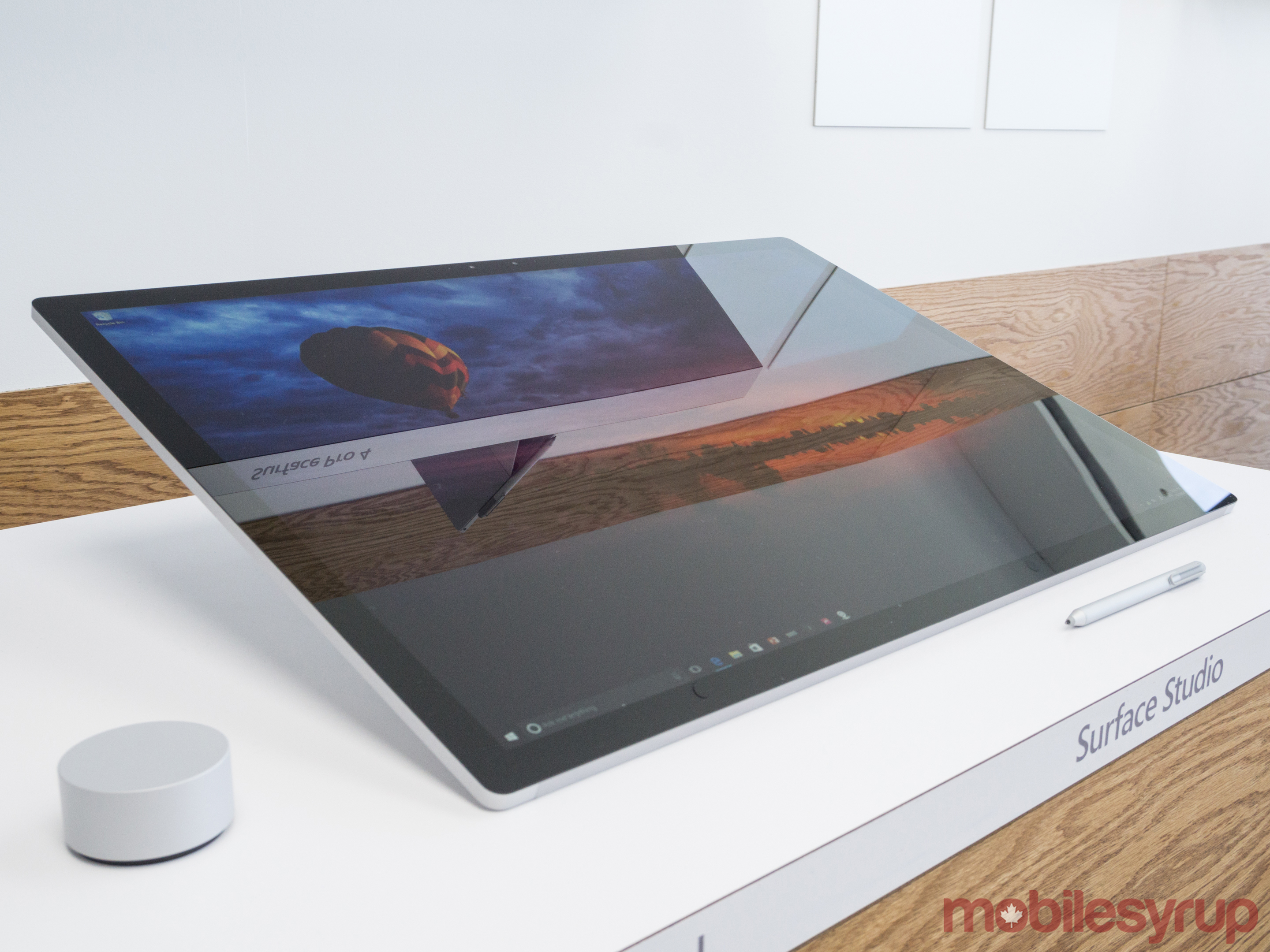
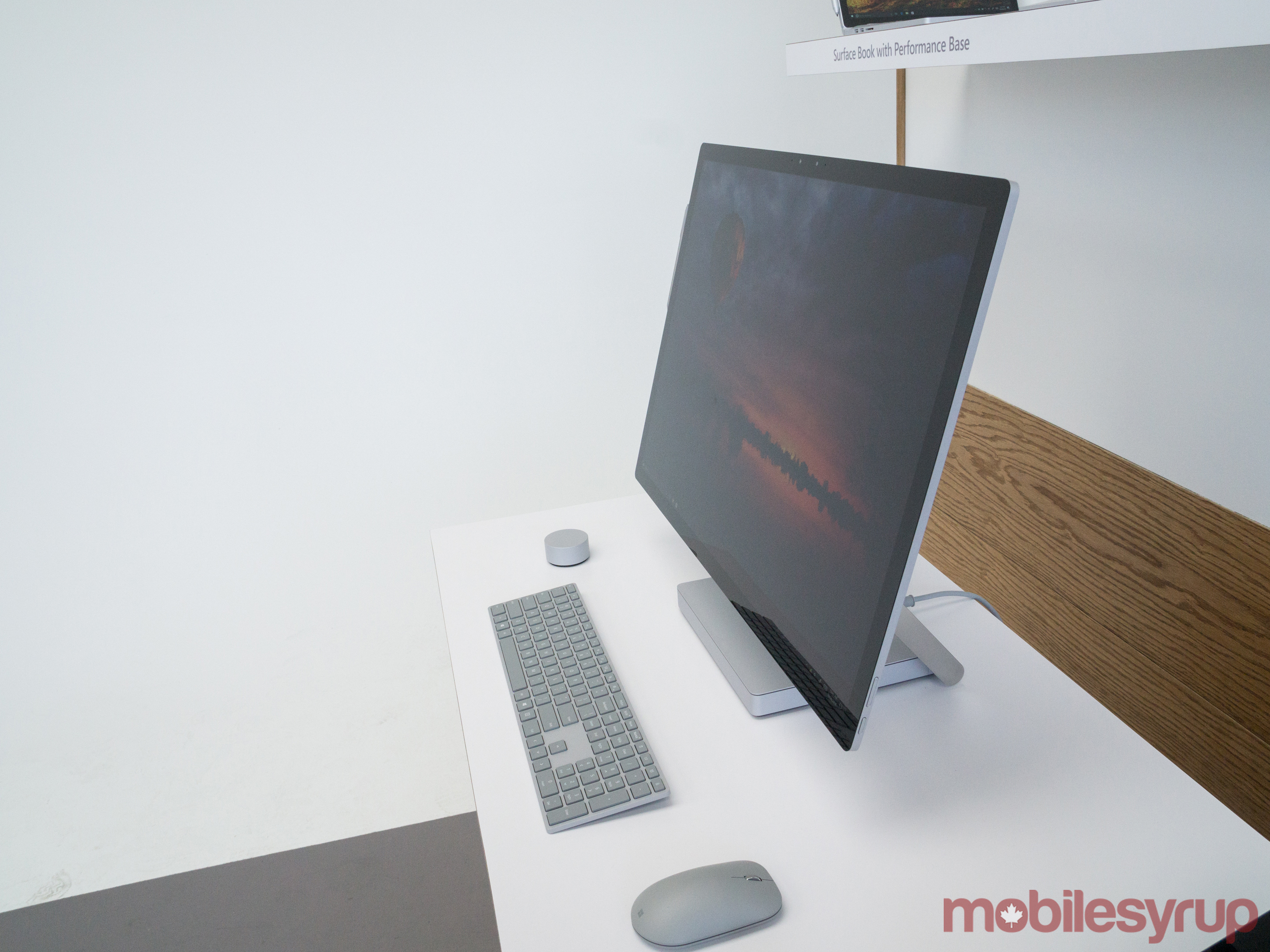
Surface Studio

by Rui Carmo

With a 28”, 13.5K touchscreen display. Even though this is a high-end, aspirational device, it brings into sharp focus Apple’s decision to not build touch into macOS when they had a clear lead, and the disrepair of their desktop line.

Let’s see what the market says, and whether or not Apple will actually launch new desktops tomorrow. But a touch bar on a laptop feels like a feeble improvement against a screen this sophisticated.

Oh, and did I mention the keyboard it’s photographed with has an Esc key?

27 Oct 01:24

Microsoft’s Surface Book i7 available in Canada for pre-order starting at $3,129

by Rose Behar

Microsoft’s newest addition to the Surface Book line, the Surface Book i7, is now available to pre-order via Microsoft’s Canadian online store starting at $3,129 CAD for the 256GB model.

The other two variants come in at 512GB and 1TB of internal storage, and retail for $3,629 and $4,379 respectively. All versions of the Surface come equipped with Intel’s Core i7 processor. The 256GB model features 8GB of RAM, while iterations with more internal storage carry 16GB of RAM.

surface 3

The new laptop-tablet hybrid is available for pre-order immediately, and is set to be released on November 11th, 2016.

The new Surface Book is also getting a power boost thanks to its new processor, which Microsoft states allows the device to operate at speeds twice that of the current 13-inch MacBook Pro. The laptop-tablet hybrid also gains a 2x graphics boost over its predecessor thanks to the the inclusion of Nvidia’s GeForce GTX 965M GPU graphics card.

Related: Microsoft announces new Surface Book i7 with major graphics boost

27 Oct 01:23

Getting the Most from Learning Management Systems

files/images/terryanderson.png


Terry Anderson, Contact North, Oct 29, 2016


I'm looking forward more to the latter two parts of this three-part series in which Terry Anderson "explores the learning management system (LMS), social media, and personal learning environments – and how they might best be used for enhanced teaching and learning" but as only the first part is available today we'll have to settle for that. Anderson offers a brisk overview of the LMS and then examines the challenges: "as the number of features increases, so does the complexity and challenges of easy adoption," he writes, while " perhaps the greatest challenge is the inherent 'school focus' of the LMS." We don't really get to the promise of this article - how to get the most out of an LMS - but perhaps what that means is using social media or personal learning environments instead.


[Link] [Comment]
27 Oct 01:23

Are Datasets the New Server Rooms?

Josh Nussbaum has an interesting post over at Medium about whether massive datasets are the new server rooms of tech business.

The analogy comes from the “old days” where in order to start an Internet business, you had to buy racks and servers, rent server space, buy network bandwidth, license expensive server software, backups, and on and on. In order to do all that up front, it required a substantial amount of capital just to get off the ground. As inconvenient as this might have been, it provided an immediate barrier to entry for any other competitors who weren’t able to raise similar capital.

Of course,

…the emergence of open source software and cloud computing completely eviscerated the costs and barriers to starting a company, leading to deflationary economics where one or two people could start their company without the large upfront costs that were historically the hallmark of the VC industry.

So if startups don’t have huge capital costs in the beginning, what costs do they have? Well, for many new companies that rely on machine learning, they need to collect data.

As a startup collects the data necessary to feed their ML algorithms, the value the product/service provides improves, allowing them to access more customers/users that provide more data and so on and so forth.

Collecting huge datasets ultimately costs money. The sooner a startup can raise money to get that data, the sooner they can defend themselves from competitors who may not yet have collected the huge datasets for training their algorithms.

I’m not sure the analogy between datasets and server rooms quite works. Even back when you had to pay a lot of up front costs to setup servers and racks, a lot of that technology was already a commodity, and anyone could have access to it for a price.

I see massive datasets used to train machine learning algorithms as more like the new proprietary software. The startups of yore spent a lot of time writing custom software for what we might now consider mundane tasks. This was a time-consuming activity but the software that was developed had value and was a differentiator for the company. Today, many companies write complex machine learning algorithms, but those algorithms and their implmentations are quickly becoming commodities. So the only thing that separates one company from another is the amount and quality of data that they have to train those algorithms.

Going forward, it will be interesting see what these companies will do with those massive datasets once they no longer need them. Will they “open source” them and make them available to everyone? Could there be an open data movement analogous to the open source movement?

For the most part, I doubt it. While I think many today would perhaps sympathize with the sentiment that software shouldn’t have owners, those same people I think would argue vociferously that data most certainly do have owners. I’m not sure how I’d feel if Facebook made all their data available to anyone. That said, many datasets are made available by various businesses, and as these datasets grow in number and in usefulness, we may see a day where the collection of data is not a key barrier to entry, and that you can train your machine learning algorithm on whatever is out there.

27 Oct 01:22

Samsung Galaxy S8 could feature an optical fingerprint scanner

by Patrick O'Rourke

With the dust barely settled surrounding Samsung’s Note 7 recall debacle, Galaxy S8 rumours are beginning to crop up at a rapid pace.

It seems the S8 will feature a full, edge to edge screen similar to Xiaomi’s heavily touted Mi Mix, a phone that likely won’t make its way to Canada. Because of the S8’s reported lack of a bezel, the fingerprint sensor would need to shift from its traditional location of the centre of the phone’s base.

This means that Samsung could opt to include the still unannounced flagship’s fingerprint scanner directly within its screen, removing the need for a physical home button. This rumour, like so many others, stems from a user on Chinese messaging service Weibo, so believe its validity with caution.

An optical fingerprint scanner would reportedly result in improved accuracy and speed. It’s also possible that Samsung could take a page out of the Pixel’s design strategy and opt for a rear-facing fingerprint scanner.

With Samsung still reportedly trying to figure out exactly what caused the Note 7 and subsequent replacement devices to malfunction, it’s likely the South Korean company’s attention is divided right now between the development of the S8 — which is expected to be revealed at Mobile World Congress in February — and uncovering exactly what went wrong with its dearly departed Note 7.

SourceWeibo
27 Oct 01:22

Chatbots with Social Skills Will Convince You to Buy Something

files/images/sara1.jpg


Will Knight, MIT Technology review, Oct 29, 2016


What happens when the chatbot we think is there to help us is actually a skilled sales agent? This adds a different flavour to the use of such applications to, say, support students or provide advice. We might think that's what they're doing, but in fact they may be more interested in persuading us to buy some software or to sign up for the advanced tutorial. Or they may be programmed by some company to recommend their staff and affiliates as experts within a domian. If there's no truth in advertising, what will we then say about adbots? This article discusses Sara, an unreasonably persuasive chatbot was developed by Justine Cassell at Carnegie Mellon University.

[Link] [Comment]
27 Oct 01:22

The myth of the sophisticated hack

files/images/man-in-middle-attack-8ef2a8d42b908f9ff543fc0ffa314e3f.png


Andrew Peterson, Desmos, Oct 29, 2016


Good article about hacking. It relevant as there has been a spike in recent activity, probably timed to coincide with the election (I'm hoping so; my own website is being caught in the crossfire). It's important to note, though, as this article makes clear, the majority of hacks are really very simply technologically. Hackers often go after the must vulnerable component: the user. Whether trying commonly used passwords, or tricking people into giving up personal information, these attacks rely not on technology but on social engineering. The article also looks at other attack types, such as the 'man in the middle', SQL injection, and endpoint attacks using USBs or mobile devices. If you're not familiar with these terms, read this article. I would have includes 'denial of service' (DOS, or DDOS) attacks, not because they're hacks (technically they're not) but because they're behind so much recent disruption.

[Link] [Comment]
27 Oct 01:21

Finally: A Museum That Brings Virtual Reality to Women’s History

by Josie Thaddeus-Johns for The Creators Project

Behind the scenes of Emblematic Group's VR experience about the life of Mary Katherine Goddard. Photo courtesy Emblematic Group

In Colonial America, publisher and postmaster Mary Katherine Goddard was the first printer of the Declaration of Independence. Yet, despite this illustrious background and fascinating personal history, not a single biography has been published of this pioneering woman. Immersive journalist and virtual reality innovator Nonny de la Peña redresses this lack of research in a VR experience commissioned for the proposed Women’s History Museum in Washington D.C.

“Unlike a lot of men from that time, there's not a ton written about her. It wasn't like choosing Eleanor Roosevelt!” de la Peña tells The Creators Project.

Having been the only newspaper publisher to continue printing throughout the American Revolutionary War, Goddard then printed and signed her full name on the first Declaration of Independence that contained all the names of its signatories.

Behind the scenes of Emblematic Group's VR experience about the life of Mary Katherine Goddard. Photo courtesy 8i

“It’s a first because it was treason,” de la Peña explains, noting that at the time, the punishment for women who committed treason was being burned alive at the gallows. With the Women’s History Museum proposal, to be submitted to Congress in November 2016, de la Peña wants to break boundaries with her choice of subject in this commission. “Goddard is obviously just a totally badass woman. I wanted to do something that would make Congress feel and understand the value of this particular story.”

Breaking boundaries is something of an everyday occurrence for de la Peña, who has been one of the foremost proponents of virtual reality technology, particularly in terms of mining the possibilities for journalism. Her breakthrough VR work, Hunger In Los Angeles, was a machinima film that showed a man collapsing in line at a food bank from hunger in 2012, and subsequent works (such as Project Syria) have placed the viewer on a street in Aleppo when a bomb goes off, demonstrating the horror of events unfolding in the region in a commission for the World Economic Forum.

Behind the scenes of Emblematic Group's VR experience about the life of Mary Katherine Goddard. Photo courtesy 8i

De la Peña's since extended the technological possibilities of VR immeasurably through her experimentation, and continues to break new ground with the work she hopes to show at the Women’s History Museum. “In order to make this, we're really pushing the boat out. We worked with photogrammetry—photos that you can walk around literally, then videogrammetry. This marriage of technologies has never been done together,” she says.

The project is a pioneering one, as it’s commissioned to be part of the very first museum of women’s history in the United States. In general, the archiving of women’s achievements, even in the more democratic online world, receives morbidly scarce attention and funding. Perhaps this is why the Women’s History Museum is hoping to appeal to a wide range of audiences, with this decision to look to the future in getting its message across.

Behind the scenes of Emblematic Group's VR experience about the life of Mary Katherine Goddard. Photo courtesy Emblematic Group

“This is going to be a very forward-facing museum and it's going to use the kind of tech that will attract all audiences. I'm sure no congressional report has ever had a VR component to it before!” says de la Peña.

de la Peña’s projects in VR have earned her the moniker of “Godmother of VR.” “It would be good to be a ‘pioneer’ and good to be an ‘innovator,’ but I guess I'll just accept ‘godmother’ and go with it,” she says. It’s hard not to see the parallels between de la Peña and Goddard, both of whose revolutionary efforts have changed paradigms, shifting ideas about what can be achieved in their fields.

Nonny de la Peña’s work on Mary Katherine Goddard is currently crowdfunding on Indiegogo. The Women’s History Museum will report to Congress in November 2016.

Related:

The Future of VR Will Be Social, Culturally Diverse—Oh, and It's Already Here

Is Virtual Reality The Future Of Journalism?

Meet the Guerrilla Gorillas Making Patriarchy Art History
27 Oct 01:21

Microsoft Studio

by Volker Weber

Impressive industrial design, very expensive, no announcement for Germany yet.

27 Oct 01:20

Pocket Launches Explore Page on the Web

by Federico Viticci

Interesting announcement from Pocket today: the company has launched an open Explore section to browse and search for the best content saved on Pocket:

For the first time, we are opening up Pocket’s understanding of what’s good and worthwhile on the Internet, and making it easy for anyone to search and discover the best of the best on any topic. No Pocket account necessary.
[...]
When you first visit Pocket Explore, you’ll be greeted with a question: What interests you?

While Google is great at helping to answer a question, and Pinterest is a great place to search around an idea or thing to do, never before has there been a specific and intentional place to go when you want to satisfy a curiosity or surface the best content around a specific topic you care about.

I switched to Pocket late last year, and their recommendations have been, by far, the best article recommendations I've ever been given by a read-later service of this kind. There's no shortage of great articles and longform stories nowadays, but being able to browse the best options in a single place seems convenient. Potentially, this could also become a better research tool than Google for specific topics.

→ Source: getpocket.com

27 Oct 01:20

PDF Viewer Delivers Free PDF Viewing and Editing Tools

by John Voorhees

PDF Viewer's name belies the power under its hood. This is more than just a viewer app. PDF Viewer includes powerful PDF editing tools on par with, and in some cases more extensive than, some of the best PDF apps I’ve tried. That's not to say that there aren't a few rough edges and limitations, but for a free app, PDF Viewer should suit the PDF viewing and editing needs of most people.

PDF Viewer was created by PSPDFKit. You may not have heard of PSPDFKit before, but there's a good chance that you have used its PDF engine, which is built into many other apps This explains why an app as feature-rich as PDF Viewer is free. It's designed to showcase PSPDFKit’s PDF frameworks to potential customers.

The core functionality that I expect from any PDF viewer app is all here. You can open PDF files from multiple sources depending on the apps you have installed or send a PDF to PDF Viewer from another app using the 'Open In' command from the Share Sheet. Once open, you can navigate the pages of PDFs by swiping from page to page or scrolling though thumbnails of those pages for longer documents. One nice customization touch is that you can set PDF Viewer to scroll through PDFs horizontally or vertically.

PDF Viewer's appearance and scrolling settings.

PDF Viewer's appearance and scrolling settings.

The viewing experience is further customizable in settings. There are three different themes that can be applied to PDFs - standard black text on a white background, a sepia-toned background with black text, and white text on a black background. You can also control brightness and whether PDFs scroll page-by-page or continuously. Overall, the viewing experience and customization is on par with other PDF apps I've used.

PDF Viewer's editing tools.

PDF Viewer's editing tools.

PDF Viewer also includes a full suite of editing tools including:

  • Customizable pen and marker tools with a companion eraser tool;
  • Text markup tools with regular and squiggle underlining, strikeout, and highlighting;
  • Tools for adding text to a PDF, creating text call-out bubbles, and signing PDFs;
  • A sticky note-style comment tool;
  • Arrow, line, and shape tools;
  • Photo, stamp, and audio annotation tools;
  • A multi-item selection tool; and
  • Undo and redo buttons.

That's a lot of editing tools. In fact, there are more editing tools in PDF Viewer than in many other PDF apps.

PDF Viewer's Document Editor.

PDF Viewer's Document Editor.

The final major component of PDF Viewer is the Document Editor. Tapping the Document Editor button displays thumbnails of each page in your PDF. In this mode, you can add, delete, duplicate, move, and rotate pages. You can also create a new document from any pages you select.

PDF Viewer is not without some limitations. Annotations can only be exported using the 'Open In' option from the Share Sheet, which duplicates an editable or flat copy of your PDF, resulting in two copies of the same document in two apps. Another limitation is that there is no mechanism in PDF Viewer to sync PDFs among multiple iOS devices. Nor is there a Mac version. Finally, PDF Viewer froze and crashed a few times in my testing when leaving and returning to the app in the middle of editing a PDF. I didn't lose any data, but this does appear to be a bug.

That said, I am impressed with PDF Viewer. It stacks up well against the features of popular PDF apps like PDF Expert and PDFpen, which is impressive for a free app. I would be concerned about the sustainability of a free app of PDF Viewer's complexity, except for the fact that it's intended as a showcase for PSPDFKit's development frameworks. The byproduct of that business model is a sophisticated PDF viewing and editing app that is entirely free, which is great for iOS users.

PDF Viewer is available on the App Store as a free download.


Like MacStories? Become a Member.

Club MacStories offers exclusive access to extra MacStories content, delivered every week; it’s also a way to support us directly.

Club MacStories will help you discover the best apps for your devices and get the most out of your iPhone, iPad, and Mac. Plus, it’s made in Italy.

Join Now
26 Oct 20:41

Stories of explanatory depth

by russell davies

I continue to wonder why Massive IT Failures are so happily tolerated in most large organisations. Actually, 'tolerated' might be wrong. 'Accepted' may be better. Regarded as something inevitable, something that just has to put up with, something that can't be prevented.

Some of it, I suspect, is to do with Illusions of Explanatory Depth. People and organisations create folk understandings of how IT systems work. These are poor, unhelpful explanations which don't usefully predict or explain disasters, but no one offers better ones.

I suspect 'stories' are part of the problem. Stories are not good ways to understand systems.

26 Oct 17:43

Twitter Favorites: [JohnBiehler] So this just happened. Thanks for being a part of #3DCanada, Mike! #MikesCanada https://t.co/FGEW84SLfg

John Biehler @JohnBiehler
So this just happened. Thanks for being a part of #3DCanada, Mike! #MikesCanada pic.twitter.com/FGEW84SLfg
26 Oct 17:42

Twitter Favorites: [CraigSJ] Shades the only vaguely reasonable character on this show. He's like rap game Littlefinger.

Craig Bro Dude @CraigSJ
Shades the only vaguely reasonable character on this show. He's like rap game Littlefinger.
26 Oct 17:41

Twitter Favorites: [iamdanw] We wanted to be interaction designers https://t.co/F6nHV5Yaqh

Dan Williams @iamdanw
We wanted to be interaction designers pic.twitter.com/F6nHV5Yaqh
26 Oct 17:41

Twitter Favorites: [shawnmicallef] 25 yrs today Princess Diana visited Toronto's Casey House & shook hands w AIDS patient w no gloves. Was big stateme… https://t.co/7Kgr6AhJDs

Shawn Micallef @shawnmicallef
25 yrs today Princess Diana visited Toronto's Casey House & shook hands w AIDS patient w no gloves. Was big stateme… twitter.com/i/web/status/7…
26 Oct 17:41

Twitter Favorites: [leppert] It’s that time of year when lost headphones reveal themselves in jacket pockets.

Greg Leppert @leppert
It’s that time of year when lost headphones reveal themselves in jacket pockets.
26 Oct 17:41

Twitter Favorites: [dethe] I miss https://t.co/pQBKID18Sn

Dethe N. Takses @dethe
I miss fuckedcompany.com
26 Oct 17:39

Twitter Favorites: [dbarefoot] I often wonder what percentage of laptop users always (or almost always) connect to an external monitor.

Darren Barefoot @dbarefoot
I often wonder what percentage of laptop users always (or almost always) connect to an external monitor.
26 Oct 17:39

Twitter Favorites: [leppert] Guess Jony Ive must be an Emacs user. https://t.co/4kXoXQs4aK

Greg Leppert @leppert
Guess Jony Ive must be an Emacs user. pic.twitter.com/4kXoXQs4aK
26 Oct 17:38

Twitter Favorites: [ThePalateDeck] Not sure what the difference is between gueuze and gose? This guide to sour beer from @LuckyPeach is a great primer: https://t.co/HkBwThSkeO

The Palate Deck @ThePalateDeck
Not sure what the difference is between gueuze and gose? This guide to sour beer from @LuckyPeach is a great primer: luckypeach.com/guides/guide-s…
26 Oct 17:38

Microsoft announces new Surface Book i7 with major graphics boost

by Rose Behar

Microsoft has announced a new addition to its Surface Book line, the Surface Book i7, which the company promises is 3x more powerful than the 13-inch MacBook Pro thanks to its new Core i7 processor.

The laptop-tablet hybrid has a detachable 13.5 PixelSense display and a ‘Dynamic Fulcrum Hinge,’ which allows the screen to balance at any angle, though the hinge seems identical to the technology featured in the original Surface.

In addition to its new processor, the Surface Book also features twice the graphics performance with the inclusion of the powerful NVIDIA GeForce GTX 965M GPU.

As for battery life, the laptop-tablet hybrid promises 16 hours of battery life, a 30 percent improvement over its predecessor.

surface book 1

Ports included are two full-size USB 3.0, an SD card reader, a Surface Connect port, headset jack and Mini Displayport.

The 256GB Surface Book is listed as $3,129 CAD on the Canadian Microsoft store website, with a November 11, 2016 release date. Meanwhile, the 512GB7 variant is $3,629 and the 1TB comes in at $4,379. All variants feature the Core i7.

surface book

Related: Microsoft debuts all-in-one PC called the Surface Studio

26 Oct 17:38

Microsoft debuts all-in-one PC called the Surface Studio

by Rose Behar

Microsoft has added an all-in-one (AIO) PC computer to its Surface line with the Surface Studio, a device that it says emphasizes creativity.

According to Microsoft, Surface Studio features the thinnest LCD monitor ever built, with a 28-inch, 12.5mm touch screen and 3:2 aspect ratio. The AIO has a PixelSense display and contains 13.5 million pixels — 63 percent more than a 4K TV.

“The only thing you won’t be able to see on this screen specifically is a pixel,” joked Microsoft devices lead Panos Panay at the October 26th unveiling event in New York City.

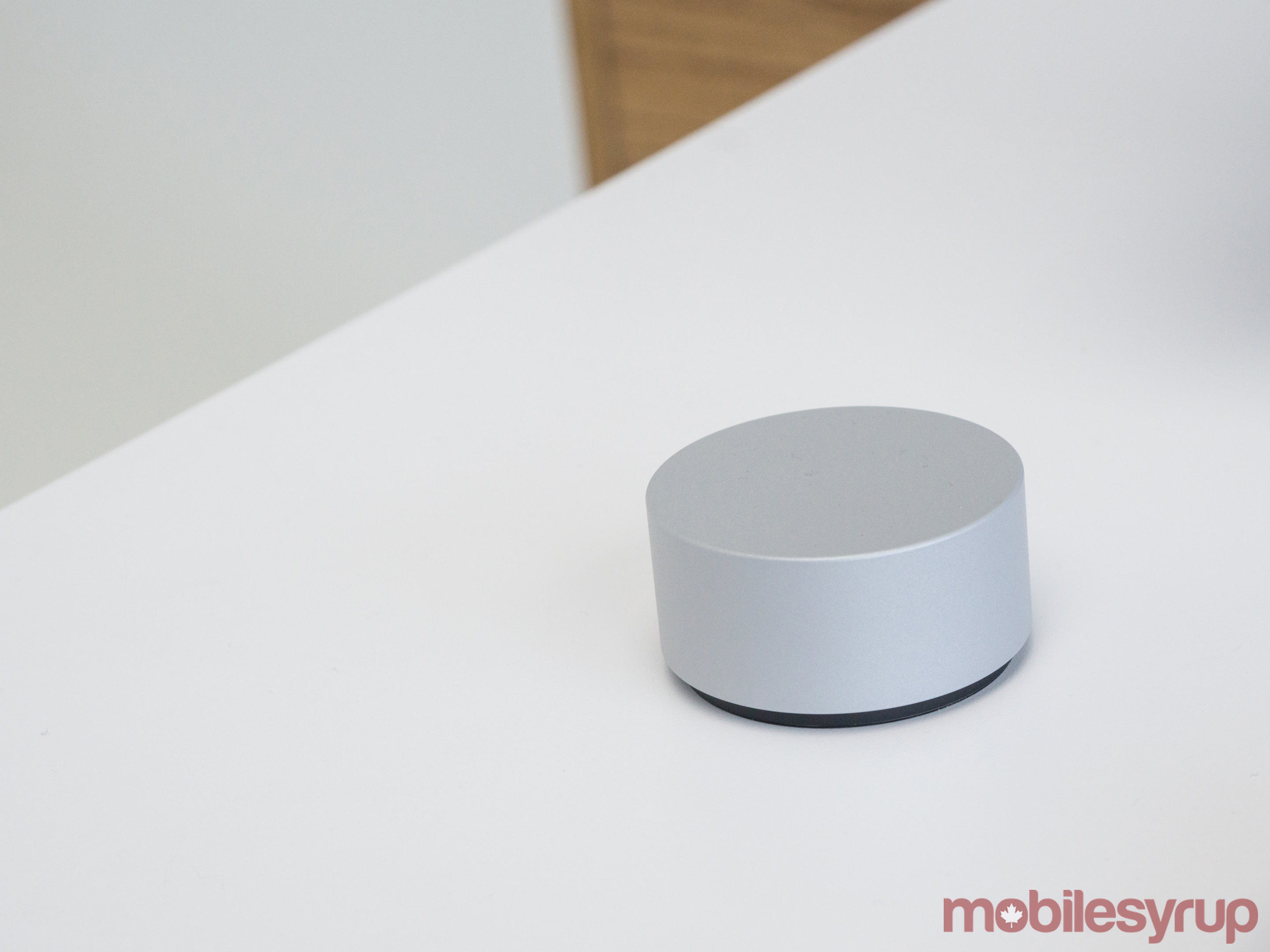
Additionally, the new AIO features the Surface Dial, a puck-like controller that can be placed on the screen to manipulate various programs.

Another important design aspect of the computer is its ‘Zero Gravity Hinge,’ which allows the screen to go from a 20-degree, drafting board tilt to a full upright position.

surface-studio-flat

The PC starts at $2,999 USD, which buys customers a version with Intel’s Core i5 processor, 1TB of storage, 8GB of RAM and the NVIDIA GeForce GTX 965M 2GB GPU. The middle tier version is priced at $3,499 USD and brings with it a Core i7 processor, 1TB of storage, 16GB of RAM and the same 2GB GPU. The highest-priced variant is $4,199 USD and has the Core i7 processor, 2TB of storage, 32GB of RAM and NVIDIA GeForce GTX 980M 4GB GPU.

Previous to the launch of this device, Microsoft typically produced tablets and laptops under its Surface brand. With the launch of the Surface Studio, it enters competition with Apple’s iMac desktop computer, which is popular in design fields.

surface-studio-setup

The U.S. release date is set for December 15th, 2016. There is no word yet on Canadian pricing or availability but we’ll update this story when we receive more information.

Related: Xbox One S to get Dolby Atmos surround-sound support

26 Oct 17:38

You Can Now Control Amazon’s Alexa With A Fire Tablet

by Ashlee Kieler
mkalus shared this story from Consumerist.

Last month, Amazon announced that sometime this fall or winter it would put its Echo-connected speaker digital assistant, Alexa, on mobile devices — as long as they were made by, you know, Amazon. That time has come, with Alexa officially making its debut on the Amazon Fire tablet this week. 

The Verge reports that starting this week Amazon is adding Alexa to its Fire tablet lineup as a free over-the-air software update.

Alexa, which has lived in the Echo speaker since 2014 and moved to third-party products like the Triby and Sonos speakers this year, will function differently on the Fire tablets than consumers might be used to.

For example, instead of screaming commands at Alexa like you would on the Echo speaker, users of the tablet will have to press the Fire’s home button to launch the assistant — a process similar to that of Siri on Apple products or Cortana on Windows.

Amazon says that despite the different call-up for Alexa, the assistant will bring nearly 3,000 of her Echo “skills” to the tablets.

The Verge reports that the addition of Alexa to the Fire tablet also comes with a new feature: information cards that offer to take the user to an outside site or simply provides additional info on your desired task.

Amazon has also provided customers who have both an Echo speaker and Fire tablet with the ability to have the devices work together. This means that if you summon Alexa on the Echo, your Fire tablet will show a visual representation of the request.

Amazon’s Alexa now works on tablets, but the best new feature involves an Echo speaker [The Verge]


26 Oct 17:37

EpiPen Competitor Auvi-Q Relaunching Next Year

by Ashlee Kieler
mkalus shared this story from Consumerist.

Almost exactly a year after pharmaceutical maker Sanofi recalled nearly 500,000 epinephrine injectors after finding they might not provide the correct dosage to patients, the product is gearing up for a comeback, potentially creating a less expensive competitor to the highly scrutinized EpiPen.

Kaleo, which regained the rights to Auvi-Q from Sanofi earlier this year, announced the intention in a statement Wednesday, allowing potential customers to opt-in to receive updates on when the product will be available during the first half of 2017.

CEO of Kaleo, Spencer Williamson, tells Bloomberg that the company has yet to settle on the price for the Auvi-Q injector when it relaunches.

The medication cost around $500 prior to its recall, Business Insider reports, putting it in line with the current EpiPen price. Still, Williamson says the company is doing all it can to create a lower-cost option for patients.

“We’re working with multiple stakeholders including wholesalers, pharmacy benefit managers, insurers, etc., to establish a comprehensive access program,” he said. “We’re focused on minimizing the out-of-pocket costs for the patient.”

The return of Auvi-Q comes as Mylan, the maker of the EpiPen, continues to face backlash for the 600% increase in the cost of its life-saving device since it acquired the rights to the product in 2007.

The auto-injector pen contains about a $1 dose of the drug epinephrine, yet somehow costs 400% more on the wholesale market, and the cost to insurance companies and patients forced to pay retail has probably increased even more.

While the EpiPen is a 25-year-old device, there is no direct generic equivalent — yet.

In addition to Auvi-Q’s planned return to the market, pharmaceutical maker Teva is reportedly working on a potential competitor for the EpiPen.

Teva’s product was initially delayed by an intellectual property lawsuit filed by Mylan (a lawsuit that is at the center of a separate antitrust investigation by the West Virginia attorney general), only to have the FDA reject that product in early 2016 for “major deficiencies.” Teva says it is trying again and hopes to have the item available before 2018, though there is no guarantee that will happen or that Teva, which recently sought to acquire Mylan, would price its product significantly lower than EpiPen.


26 Oct 17:37

Google Fiber Hitting “Pause” On Expansion; CEO Departing, Layoffs Planned

by Kate Cox
mkalus shared this story from Consumerist.

The CEO of Google Fiber wants you to know that Fiber is doing great. Super great, y’all. So great, in fact, that he’s leaving, employees are being laid off, and expansion into any “potential” city is totally halting immediately.

Yeah. If you’ve been hoping Google Fiber would be heading to your city to induce some badly-needed competition in the internet space anytime soon, well, today is a bad day for you.

You’ve got to hand it to Google for spin, though. The blog post in which it announces the troubles starts off with the headline, “Advancing our amazing bet,” before launching into a couple of paragraphs gushing about how great Fiber is.

Then the shoe drops. “We have to continue not only to grow, but also stay ahead of the curve — pushing the boundaries of technology, business, and policy — to remain a leader,” CEO Craig Barratt writes. To that end, Google has “refined its plan” for how to do those things while perhaps not losing giant Scrooge-McDuck-worthy piles of money.

In short, Google is saying: this isn’t working, so we’re scrapping it and doing something else.

Barratt then admits that the changes “will have some immediate implications,” and that’s where the really bad news starts to hit. Cities where Fiber already exists, or where construction is already underway, will continue to have service (or construction) continue. But the shortlist of potential cities is now, potentially permanently, on pause.

That means Los Angeles, Portland, Phoenix, Oklahoma City, Dallas, Tampa, Jacksonville (FL), and Google’s own San Jose/Mountain View/Palo Alto backyard are out of luck.

The news may not exactly come as a surprise to residents of those luckless cities. News leaked out over the summer that plans for rolling out Fiber in Portland and greater San Jose (including Mountain View and Palo Alto) would not be moving forward on schedule. That those plans are basically scrapped entirely, however, is still a disappointment.

Barratt does hint that wireless may be the wave of the future, saying that he is “confident we’ll have an opportunity to resume our partnership discussions once we’ve advanced our technologies and solutions.”

As to when or how gigabit-capable wireless tech can realistically be deployed to cities, though… well. Your guess is as good as anyone’s, but we wouldn’t recommend holding your breath.

Fiber is on a “strong trajectory,” Barratt concludes, and he “remain[s] confident” about the future. Oh and P.S., Barratt adds — I’m out, too. Or, in corporate speak, he says “this is the right juncture to step aside from [his] CEO role.”


26 Oct 17:37

Microsoft’s Surface Dial will be compatible with the Surface Pro 3, Surface Pro 4 and Surface Book

by Rose Behar

Along with its brand new iMac competitor, the Surface Studio, Microsoft has announced an intriguing new accessory — the Surface Dial.

The Dial is puck-shaped and can be used to interact with Microsoft products in a truly unique way. Users can place the dial on the Surface Studio’s screen and use a radial menu by twisting the device. For instance, artists can use this to easily choose between different colours, making it somewhat like an electronic palette.

surface-studio-dial

Working with the Dial will feel familiar, since Microsoft is using haptic feedback to communicate the different options as it clicks through.

The company has also noted that it won’t be exclusive to the Surface Studio. The Dial is set to be compatible with the Surface Pro 3, Surface pro 4 and Surface Book.

surface-dial-on-screen

The Surface Dial available for pre-order today in the U.S. for a $99 estimated retail price and will be released in the United States on November 10th. There is no word yet on Canadian pricing and availability but we’ll update this story when we know more.

Related: Microsoft debuts all-in-one PC called the Surface Studio

26 Oct 17:32

35,000 Drivers, Pedestrians and Cyclists in 2015. That’s the population of Penticton.

by Sandy James Planner

walking-pedestrians-900

Did you know that 35,092 Americans died on roads last year. They were drivers, pedestrians and cyclists. They all had families. They didn’t think they would be dead.  A population of 35,092 is similar to the population of Penticton, Powell River, or Prince Albert. It is a lot of people.

Tree Hugger author Lloyd Alter notes the contradiction of the unfortunate and strange policies in the City of Toronto, “where the mayor wants to reduce congestion and speed traffic up, while at the same time, reducing the carnage on the road that killed or injured a thousand people since June, and which can mainly be done by slowing traffic down”.

It’s absolutely clear that vehicles and their movement have precedence over vulnerable road users, those pedestrians and cyclists. “Especially troubling, this national data shows that the most vulnerable road users – people walking and biking, statistically more likely to be old or very young, poor, or of color – are, each year, an increasingly larger proportion of traffic fatalities. These fatalities, and the more than 2.4 million serious and life-altering injuries that happen annually on U.S. streets, are statistically predictable and preventable through better street design and reduced vehicle speeds”.

There is actually a paradox right now-while cars equipped with airbags and seat belts have been saving the lives of folks driving them, the environment for pedestrians and cyclists has really not improved in the same way. Vehicles are getting better, and are becoming mobile living rooms, with video players and distractions. It is suggested that this increased distraction coupled with busier roads is the reason that American pedestrian deaths were up 10 percent last year, the biggest increase ever.

We know that road speed can mean the difference between life and death for a vulnerable pedestrian or cyclist. NACTO (National Association of City Transportation Officials) “have proven that better street design, coupled with smarter, automated speed enforcement, is the best way to increase safety and save lives on U.S. roads. In Seattle, shortening pedestrian crossing distances on Nickerson Street reduced crashes by 23% and brought excessive speeding down from 38% to less than 2%”

Redesigning our streets is absolutely key, because car drivers drive at the speed the road is designed for. Anyone driving Highway 17 out to Langley can attest that no one is driving the posted 80 kilometers per hour on that stretch. And there are many arterial roads in Metro Vancouver  where drivers are speeding above the posted speed limit.

Sure we can lower speed limits, but we need to couple that with road design and enforcement. Sweden has led the way with the Vision Zero program. The Medical Health Officer of British Columbia’s Annual Report this year, Where the Rubber Meets the Road calling for lower speed limits and better road design to halt the 280 deaths and 79,000 injuries resulting from annual vehicle crashes. As Lloyd Alter notes, we can’t wait for driverless car technology to save us. We need to start this conversation now.

road-report


26 Oct 17:32

Owning Networked Things

Tesla recently announced self-driving as an add-on feature for future models. Buried in the legal jargon is this: You’re not allowed to use your self-driving Tesla “for revenue purposes”. Who owns this car?

Tesla legal jargon


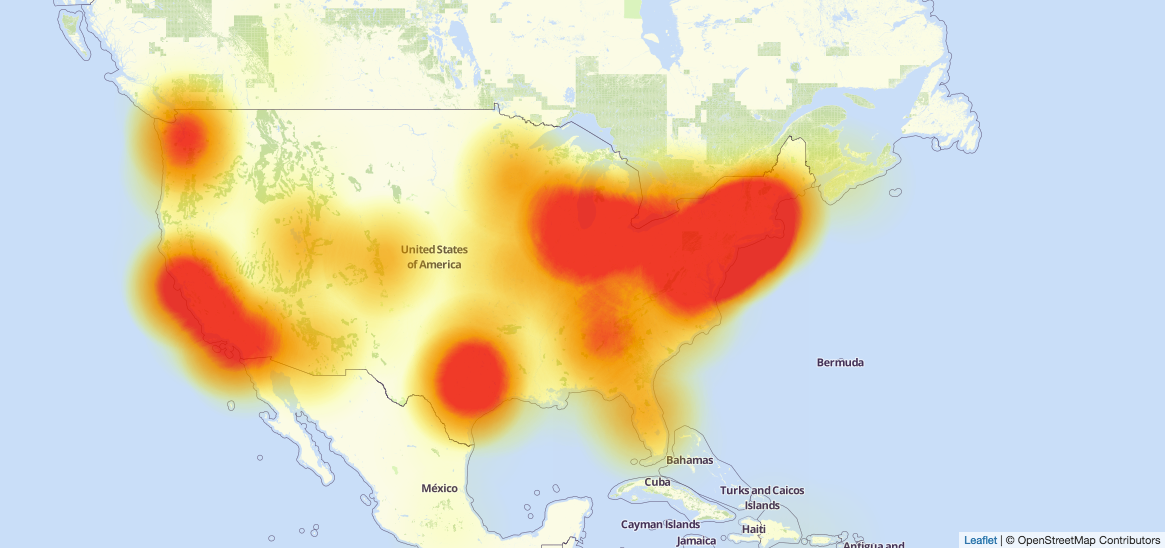
On Oct 21, 2016 a massive botnet took down DNS service Dyn, shutting down access to many large sites in North America.

2016 DDOS map

The botnet was mostly made up of zombie webcams infected by Mirai – viral malware designed to turn IOT devices into a DDOS army.

On Oct 24, the webcam manufacturer Hangzhou Xiongmai, recalled the insecure devices that had made up a large part of the botnet. But this single webcam model is hardly the root cause.

We live in a future where you can buy a $16 Linux computer the size of a stick of gum. Solar panels, webcams, cars, toasters, candles… Everything will be a little smart. Everything will be hackable.


Some questions:

  • Who will own these smart things?
  • What does ownership mean when a hacker can compromise them?
  • Is “ownership” a realistic goal for a networked thing? Is it desirable?
  • When everything we own is a little bit smart, will all those smart things have overlapping and competing legal agreements?
  • If so, who decides what is fair?
  • Who will be responsible when things go wrong?
  • How will we know what EULAs we are breaking and what EULAs we are keeping?
  • With thousands of competing EULAs, how will conflicts be enforced? Automated settlements?

26 Oct 17:05

Aspect-to-Aspect

Aspect-to-aspect storytelling freezes a moment in time to explore space:

This static story arc creates a sense of “Being There”.

I suspect my favorite VR storytelling will be aspect-to-aspect. Making moments in space.

See also: ma and panel-to-panel.