Shared posts

11 Dec 17:40

The Best Car GPS

by Eric Adams
car gps garmin tomtom split screen

After spending more than 70 hours researching the latest car GPS models and testing the top contenders over 1,200 miles of rural, suburban, and urban orienteering, we recommend the new Garmin Drive 51 LMT-S as the best in-car navigation device for most people. It’s easier to use and more driver-friendly than the competition. For a reasonable price, you get Garmin’s highly rated interface, more precise voice directions, excellent navigation tools, and the ability to connect with your smartphone via Bluetooth to get extra trip info or to share your location so other people can track your progress.

11 Dec 17:39

How to Find the Right Tires for Your Car or Truck at the Best Price

by Eric C. Evarts
A partial view of a car and tire turned at an angle.

After putting in more than 50 hours of research, talking to several tire experts, and comparing the websites of more than a dozen tire retailers, we found that it’s impossible to recommend a single tire that will suit most people because so much depends on a driver’s specific car and driving environment. But we did find that Tire Rack provides the best overall shopping experience for most people. It offers better shopping tools than its competitors, a large selection, competitive prices, and a wide network of installers.

11 Dec 17:39

95 West Hastings Street

by ChangingCity

95-w-hastings

Here’s another long-anticipated Downtown Eastside project. Holborn have owned the site across Abbott Street from Woodwards for many years. Now they’ve submitted a rezoning application to build a 10-storey mixed-use building with 132 units of secured market rental housing over commercial space on the ground floor. The proposed building is shown on the left of the render.

The architect is Gair Williamson, who has designed a number of other projects in the area. The design respects the Victory Square design guidelines, and the east 7 storey segment of the Hastings Street elevation aligns with the Paris Block 2 lots over, while the west 8 storey segment aligns with the historic Woodward’s façade across Abbott Street. Levels 8-10 of the east segment are set back 8 feet from the street, while levels 9 and 10 of the west segment are recessed one foot from the lower façade.


11 Dec 17:39

Five-word movie review: Eye In the Sky

by sheppy

Gripping. Compelling. Frustrating. Sad. Excellent.

11 Dec 17:28

What Does A Community Manager Bring To A Support Community?

by Richard Millington

In a support community, the community manager shouldn’t be dealing with spam or regurgitating information from one place (published product information) to members of the community.

Cheaper moderators and machines can do that.

A community manager should participate if they can only add remarkable value. That might include:

  • Taking the time to truly understand the problem. This means asking additional questions, clarifying the problem, getting to the core problem and ensuring your solution will uncover it.
  • Ensuring the poster feels they are treated as an individual. This means empathizing with them, being specific to their situation, and responding personally to the information they have shared and not situations ‘like this’ in general.
  • Closing the loop. Ensuring that the person with the problem had their problem resolved. That means checking in that the solution worked and there aren’t any additional problems. It means ensuring that any promises made are kept.
  • Escalating the issues that matter. Knowing how to take the information being shared and identify trends or escalate problems to the right people to get a resolution.

If you’re not going to take the time or effort to do any all of the above, it’s best to let the moderators and machines do the work instead.

11 Dec 17:20

Android Security – Swiss cheese pt. IV

by windsorr

Reply to this post

RFM AvatarSmall


Another horrible hack that Google is powerless to address. 

  • The worst part of this latest breach is that the hackers are targeting vulnerabilities in Android that have been well known for some time which no-one appears capable of fixing.
  • This only serves to reinforce my view that Google’s only way out of the nasty mess of Android fragmentation where virtually no phones can be properly updated remains to take Android fully proprietary.
  • 3m Google users appear to have had their accounts stolen which are now being used to generate $320,000 per month in fraudulent advertising scams.
  • The Gooligan exploit is a variant of Ghost Push which came to light in September 2015 some 14 months ago meaning that there has been plenty of time to issue a fix.
  • The problem with Android is not that it has any particular flaws that make it less safe than iOS or Windows but that none of the fixes for these problems ever make it onto the affected devices.
  • There remain two reasons for this:
    • First: The infrastructure for updating Android devices is horribly fragmented with each manufacturer or operator having control if its updates.
    • With all the different variations and add-ons, extensive testing is required to ensure that the variations and add-ons don’t break when the phone is updated.
    • Furthermore, because none of these players own the end relationship with the customer they have no incentive to improve it.
    • I think that this is Google’s most pressing problem (see here).
    • Second: Most Android handsets cannot be updated.
    • Android is a commoditised, brutally competitive market meaning that in the mid-range, every cent of cost matters.
    • Making a device updateable means that extra storage and memory must be added to the device which are never reflected in the price.
    • Hence, the vast majority of Android devices are not updateable to later versions of Android as there is no incentive for the device maker to add this capability.
  • The net result is that there is very little prospect for owners of these devices ever to be free from this problem or any of the others that have emerged for Android without buying a new device.
  • This is far beyond the means of most Android users meaning that they will constantly be exposed to any new threat that emerges with little prospect of it ever being fixed.
  • This is just another reason why usage of Android devices is likely to continue trailing that of iOS and why these devices are likely to yield a much lower return for the ecosystems that run upon them.
  • For example, RFM estimates that Google can earn $31.6 per user per year from an iOS device whereas its own Android devices can only generate $14.0 per user per year on average.
  • Part of this is due to the differences in demographics between the two ecosystems but I am certain that most of it is due to the fact that Android devices are more difficult to use, less secure and as a result generate much less traffic.
  • Consequently, I think that Google has to take control of Android because in its current state, it is very unsecure where very little is likely to change.
  • I continue to believe that this may happen in 2017 as Oracle has provided Google with the perfect excuse to do so (see here).
  • I remain pretty cautious on Alphabet preferring instead Tencent, Baidu and Microsoft.
11 Dec 17:02

Workflows of a Casual Apple Pencil User

by Ryan Christoffel

One year ago, Apple launched a new product to accompany its first ever iPad Pro: the Apple Pencil. Presented not as a replacement for touch input, but as a tool geared toward specific tasks, the Pencil immediately endeared itself to creatives who sketch or illustrate. In the weeks following the announcement, I remember scouring Twitter and Instagram for any first impressions I could find from people who had tried this new device. Some of the best came from Apple's visits to Disney and Pixar, where many of my favorite movie makers seemed thrilled about the Pencil. It looked like the perfect tool for artistic tasks.

Apple's pride in creating the Pencil has been clear since they first announced it. In its already jam-packed September 2015 keynote, the company dedicated significant time and attention to the product, including a video introduction from Jony Ive and three live demos that put the Pencil to use. In this past March's keynote, when Apple announced the 9.7" iPad Pro, Phil Schiller called the Pencil "the greatest accessory Apple has ever made." High praise from a proud parent.

My initial take on the Pencil was that it seemed like a great device, but it wasn't for me. I don't sketch, I'm not a fan of handwriting notes, and using the Pencil for system navigation never appealed to me. But I bought one to give it a try. Apple's return policy made sure no money would be wasted if the Pencil became merely a pretty paperweight in my life. Within a few hours of use I discovered that while the Pencil isn't a daily-used tool for me, it is a device that, for specific tasks, I would never want to be without.

Editing Photos

Since its introduction in 2010, the iPad has always felt like a natural device for editing photos because it is thin, light, and comfortable to hold. A more intimate form of interaction is possible with the iPad. In a very real sense you can hold a photo in your hands, free from the obstructions of a keyboard or other attachments. Hardware aside, photo editing is also more enjoyable on the iPad because of software benefits like the pinch to zoom gesture. Though pinch to zoom started on the iPhone, it feels like it was made for photo editing on an iPad.

One main problem with photo editing on the iPad has historically been the lack of precision that a finger supplies versus a trackpad and cursor on the Mac. The Apple Pencil solves this problem.

My app of choice for editing photos is the well-loved Pixelmator. There's something that feels so nice about having an iPad on your lap while interacting directly with photos using the Pencil. The Pencil can be used for practically everything in the app, but a couple tasks I particularly enjoy are removing unwanted objects from a photo with the Retouch tools and adding strokes of color with Paint tools. Both can be done with care and minimal errors with the Pencil's precision.

Adding color to a photo in Pixelmator

Adding color to a photo in Pixelmator

For a much simpler option in photo editing, iOS 10 brought Apple's Markup tools to the Photos app. I use Markup to easily draw or write on images with the full benefits of the Pencil's pressure sensitivity, all from within a very simple interface. These same tools can also be invoked via the Messages app before sending a photo off to someone.

Editing photos on the Mac has never felt natural to me. It feels like there is a huge barrier between me and my photos – like it's a chore. The exact opposite is true on the iPad Pro with Pencil: the experience is a delight and technology gets out of the way. I don't edit photos every day, but the times I do are made substantially better by the Pencil.

Annotating Written Documents

As part of my day job, I periodically need to review documents written by others and send them back with suggested edits. On a Mac this task is a pain. Apps like Pages and Microsoft Word can be used to add comments to someone's work, but I've always found that method too messy and unintuitive. What I want to do when reviewing someone's work is hold it like I'd hold a piece of paper and write on it like I'd write on paper. I want to be able to write in the margins, underline and highlight words, add punctuation, and scribble things out. And that's exactly the experience the iPad Pro and Apple Pencil give me.

Word for iPad allows you to draw annotations right on top of a file, which is great, but more often my practice is to export a Word document to PDF and work from there. I've used PDF Expert and Notability for this in the past, and both are excellent, but more recently I've been enjoying the just-launched PDF Viewer. The app has clear, easy to identify tools to do everything I need, and it works well with the Pencil, so I can make the changes I want then send an edited file right back to its author. I can't imagine going back to accomplishing this task on a Mac.

PDF Viewer includes a number of useful annotation options

PDF Viewer includes a number of useful annotation options

Even if you never have to annotate someone else's written work, I'm guessing you have some experience with signing digital documents. This is, of course, another area where the Pencil excels. I can write a genuinely accurate signature on PDFs, not the fake imitation signature that might appear when trying to sign for a package or verify a credit card purchase. Forms that require more information than just a signature are also a delight to fill out with the Pencil. No more printing a form, filling it out by hand, then scanning and submitting it. You can simply open the digital file, fill it out by hand using the Pencil, then send it away. I do this regularly with Apple Mail and Markup.

Fun Extras

My Pencil use isn't restricted solely to work. Most of the time the Pencil is used to get things done, but there are a few ways I use it in more leisurely activities.

Most of my book reading is done using iBooks, and when that's on my iPad rather than iPhone, it's done with Pencil in hand. Highlighting with the Pencil in iBooks is as simple as running its tip along the words you want to highlight. Tap a single word and just that word is highlighted. It's quick, easy, needing nothing more than a light tap, and it's a nice way to mark content that stands out while reading.

Highlighting in iBooks

Highlighting in iBooks

Adult coloring books have become quite a thing in the past couple years, and Pigment is an app that fills that space on the iPad with full Pencil support. Coloring isn't a regular thing for me, but on those rare occasions I'm in the mood, it's a nice way to relax.

Coloring in Pigment

Coloring in Pigment

The last regular use of the Pencil is one I recently tried for the first time: handwritten iMessages. Though, as I mentioned, taking notes by hand isn't my thing, handwriting messages is a nice experience in iOS 10. The animation used when writing – and when receiving a handwritten message – is quite sharp. I don't foresee using this iMessage feature all the time, but it will be fun to pull out on occasion.

Not a Stylus

The Apple Pencil caused quite a stir when it was first announced because of Steve Jobs' famous words, "Who wants a stylus?" Jobs argued that multitouch was a superior way to interact with screens; of course, history has proven him right. But the Pencil was never intended to replace our fingers; it isn't Apple backtracking on Jobs' words.

The Apple Pencil is a tool for specific tasks. It's a tool that was designed to be a better fit than multitouch for certain jobs. Admittedly the Pencil's biggest appeal is to those who sketch or illustrate, but count me as at least one person outside that camp who has found it an important part of my workflows.

The Apple Pencil makes my work easier and more enjoyable, and there's not a much higher compliment you can pay it than that.


Support MacStories Directly

Club MacStories offers exclusive access to extra MacStories content, delivered every week; it’s also a way to support us directly.

Club MacStories will help you discover the best apps for your devices and get the most out of your iPhone, iPad, and Mac. Plus, it’s made in Italy.

Join Now
11 Dec 17:02

How Aqua and Bondi Saved Apple

by John Voorhees

Stephen Hackett of 512 Pixels has published a book called Aqua and Bondi: The Road to OS X & The Computer That Saved Apple, a history of the critical role OS X and the iMac G3 played in Apple’s comeback from the brink of financial ruin in the late 90s. As Hackett explains in the introduction to the book,

OS X and the iMac’s stories are intertwined, but are often told separately. Apple’s strength is most obvious when its hardware and software are working in harmony, and that’s what was needed to save Apple in the late 1990s. Turns out, it worked.

Aqua and Bondi shares that story for those who haven’t read it before. It’s a consideration of Apple at a very interesting time in its life and the products it shipped.

I had the pleasure of reading an advance copy of Aqua and Bondi and love it. Not only is the story of OS X and the iMac G3 told in a compelling and accessible way, but the book is full of fantastic photos drawn from numerous sources, including Hackett’s own collection of colorful iMacs.

Aqua and Bondi is available from the iBookstore and as a PDF from aquaandbondi.com for $3.99.


Support MacStories Directly

Club MacStories offers exclusive access to extra MacStories content, delivered every week; it’s also a way to support us directly.

Club MacStories will help you discover the best apps for your devices and get the most out of your iPhone, iPad, and Mac. Plus, it’s made in Italy.

Join Now
09 Dec 23:27

Twitter Favorites: [MRC_SLC] Is there a term similar to mansplaining, which describes someone who drives all the time trying to explain walking, biking, and transit?

Mike Christensen @MRC_SLC
Is there a term similar to mansplaining, which describes someone who drives all the time trying to explain walking, biking, and transit?
02 Dec 20:30

Specs leak for Nokia’s rumored D1C Android smartphone, report indicates two sizes

by Rose Behar

Nokia’s allegedly forthcoming D1C Android smartphone will come in two display size variants — 5-inch and 5.5-inch —  according to “reliable sources and protos” cited by Nokia Power User. The publication also published detailed specs for the two models, which are expected to run Android Nougat out of the box.

Besides the display size, the two variants will differ in RAM amounts and camera packages, reports NPU. Where the smaller (and less expensive) device stocks 2GB of RAM, the larger has 3GB. In terms of camera setup, the 5-inch device has a 13-megapixel rear shooter, while the 5.5-inch handset has a 16-megapixel rear-facing camera.

Otherwise, the smartphones appear to be identical, with a 1.4GHz Snapdragon 430 processor, 1080p display, an 8-megapixel front-facing camera and, surprisingly, 16GB of internal storage.

In addition to the specs, images and renders of the D1C devices have emerged via various Chinese media outlets.

nokia d1c render

In August, Nokia stated that three or four Nokia-branded Android devices (both smartphones and tablets) would be unveiled in the fourth quarter of 2016 — though the announcements have likely been pushed to the Mobile World Congress in February, 2017. The company also confirmed that those devices will be HMD-designed and Foxconn-produced.

The Nokia brand has gone through a period of transition recently, with Foxconn’s FIH Mobile and HMD purchasing the Nokia feature phone division from Microsoft in May 2016. That same month, an HMD executive told ZDNet that the company has been granted an exclusive ten-year license to build Nokia-branded mobile products and that it planned to start building those products for Android in late 2016.

Related: New video shows Nokia’s cancelled ‘Moonraker’ smartwatch in action

02 Dec 20:30

Fitbit reportedly set to acquire Pebble for a ‘small amount’

by Ian Hardy

Fitbit is reportedly set to acquire Pebble for an undisclosed amount of money, according to a new report stemming from The Information.

The deal is near completion but its terms have not been finalized, though rumours indicate the transaction is “thought to be for a small amount” of money. Fitbit is likely seeking additional market share in the wearable space and is also interested in Pebble’s intellectual property. The report indicates that the Pebble brand will eventually be phased out once the papers are officially signed.

Pebble laid off 25 percent of its total staff in March and it’s been rumoured for months that the company is experiencing financial difficulties. Fitbit and Pebble have declined to comment on The Information’s report.

The company’s first product, the original Pebble smartwatch, was backed by 68,929 people for a total pledge amount of $10,266,845 USD on Kickstarter in 2012. The company has since released a number of other wearable products, including the Pebble Time and Pebble Time Round. The Pebble 2 was released in September 2016 and retails for $179 CAD and features a built-in heart rate monitor, signalling the wearable manufacturer’s shift towards fitness-focused devices.

The Pebble Time 2 and Pebble Core, which were funded along side the Pebble 2 on Kickstarter, have yet to be released. Both devices were originally set to drop in November exclusively to Kickstarter backers and then other retailers in early 2017.

Eric Migicovsky, Pebble’s Vancouver-born founder, graduated from the University of Waterloo systems design engineering program. Migicovsky first founded Allerta, which created a watch for BlackBerry devices. He then went on to start Pebble and raised over $26 million in funding from various investors, including Charles River Ventures.

Update 12/01/16: According to a report stemming from TechCrunch, Pebble declined an offer by Citizen in 2015 for $740 million and Intel in 2015 for $70 million. The report notes that Fitbit is paying between $34 and $40 million USD for Pebble. Pebble’s official Twitter account also tweeted “¯_(ツ)_/¯” earlier today, though the Tweet was eventually deleted.

Related: Pebble Time Round review: The notification master

30 Nov 22:27

The Best Wi-Fi Mesh-Networking Kits for Most People

by Jim Salter
five tested networking systems on bookshelf with books and gold pineapple

Mesh-networking kits, which use multiple access points spread around your house, are a great alternative to traditional routers for large and troublesome homes where a single powerful router won’t cut it. After spending over 50 hours testing nine mesh Wi-Fi networking kits in a large, complicated, multilevel home, we’re confident the Netgear Orbi kit is the best choice for most people. Our testing, however, also showed that most people will still be fine with our current router pick.

30 Nov 22:27

Stealing project management language for change in education

by dave

I’m starting out a new role here in Prince Edward Island. I’ve always been interested in the way that educational systems work, they way they were formed, how their systems match their goals. It seems that I’m now going to get the opportunity to work inside another system and see if I can be of any help with the aligning of goals and strategies, and the refinement of objectives and tasks. I find this change process endlessly fascinating, but, as with anyone who spends too much time with a given topic, my language gets lazy and I tend to not explain ourselves very well. I thought it might be useful to take some time at the start of this work to redefine my own framework for turning the input that people give me into reality.

For many of you this is just your day to day. It took me several years to come to terms with how I felt about this language and to believe it was important. I have now come to believe that great ideas only become reality if you can turn them into a plan. Hard to believe I ever had to ‘come to believe’ that in the first place…

I should also say that I am sensitive to how this can be see to support the corporatization of education. This is certainly not my intent. I believe that learning is a complex system that needs to be dealt with outside of a structure that counts ‘winning and losing’ in the same way it counts money. That being said… we need a way to organize our work so that we can get it done. I like to think of myself as having stolen something useful from the other team rather than having gone over and joined them 🙂

Establishing a common language
Half of the misunderstandings (yes, exactly half :P) that people have are because they don’t mean the same things by the words they are using. In the first two days that I’ve been working here I’ve asked questions like “what do you mean by curriculum?” or “when you say learning what do you mean in this context?” a bunch of times. I think it’s necessary to make this negotiation a constant presence in any change discussion.

For today I want to go through how I feel about four different words: Goal, Objective, Strategy and tasks. I’m in no way claiming that these are the ‘true’ definitions of these words but, rather, this is the story that I attach to them.

Why do we need to categorize these things anyway?
I’m going to be working with people from across the sector on projects. Today I’ve spoken to two teachers (one in an administrative role, one not) one person from the strategy end of the department and one curriculum consultant. Each of them is critical to an effective education system, but they all work in very different environments. As I (as one teacher said) get a sense of their ‘day in the life’ I’ll be listening to their stories and seeing where they might fit with the stories being told by others. Some of those stories might be around goals for the system “we need students to be more independent” or objectives “we need more students to be doing unsupervised work”. One of those things is a measurement of the other… maybe. But we don’t want our goals to be restricted by a single measurement – “hey, we have 10% more students doing unsupervised work” does not mean that we suddenly have independent students.

Goals
Goals (IMO and you can insert that IMO in the rest of what I’m going to say here) are the vision that we have for ourselves. It is the conceptual change we are looking to make. They are hard to create, and are better if everyone involved in the process contributed to their creation and is on board. People need to ‘believe’ in goals. They aren’t things that are true, necessarily, but rather something that we all think represents a valuable direction. They are by their nature nebulous, and, because of this, they need help.

Objectives
Objectives are the change that happens that contributes to a goal. As illustrated above, an objective may or may not ACTUALLY contribute to a goal, and alignment and realignment is critical in any change process. It’s usually good to have several objectives (whether simultaneous or sequential) in order to cross reference success. Objectives are often (though not always) things that can be observed in the world. Countable objectives are nice “10% more students are submitting independent projects” but sometimes we are interested in non-counting nouns – “students are happier in class”. In the latter case, some kind of qualitative collection mechanism is required, but I’m as likely to trust a collection of teacher stories as I am a number like 9.7%.

Strategies
This is the plan part of project plan. What are we going to go about doing to try and make that change. This involves a heavy bit of historical research – the change you’re trying to make has probably been tried before. Find out what happened, what the successes were, what pieces of it are left over? From there you need to include all the players in the conversation. What kinds of things have you been trying, do you have pilots that have worked, what kinds of obstacles are in your way?

Strategies are the heavy lifting of any project, but they are worse than useless if they don’t map up to objectives and goals. Every strategy you propose is going to have an ‘opportunity cost’. If you try this opportunity, you aren’t going to be able to do something else. You are going to be taking valuable people not only away from what they do everyday, but you are crowding out other ideas that could better serve your goals. Also, even if your strategy is perfectly executed, if you don’t have a mechanism for showing people how this change is actually happening (achieved objectives) your project will. not. last.

I hate a project that doesn’t last. Unless it’s not supposed to.

Tasks
Tasks have people and they have due dates. If you have a strategy that doesn’t have people attached to it, with time allotted in their schedule to finish the work by a given date – it is destined to live on a shelf. It might be beautiful. It might align perfectly. And there certainly is a place in the world for pieces of art like this… but they will not make change happen. I lied earlier, this is the actual heavy lifting on a project. This is where the project manager comes in. Someone has to wake up in the morning wondering if the tasks that were assigned to everyone have been completed.

Tasks should not be complex… they require more resilience and time allocation than deep thinking. Without them, though, you will be destined to be in meetings where people say things like “yeah, we should really get around to doing that”. I do not like those meetings.

How does all this help?
I’m going to use this simple PM framework throughout the first steps on my new role to keep track of the ideas and challenges that I’m hearing from people. People always believe that some change needs to happen to any education system – and that’s great. I’m very happy that people are passionate about education. The challenges identified by some people require task level solutions, some are entire goals all by themselves. As I bring them all together, I’m going to try and see where they fit with each other, where overlaps and possibilities exist. This kind of framework helps keep me honest. And, more importantly, it allows me to take what I’ve been collecting and show it to the next person. To keep the conversation growing.

A final word on 1% (marginal) change
I like to keep a separate list while I’m doing this kind of work of “things we could just fix”. Every system contains pieces that are important to the members at a local level, but don’t really have a mechanism for improvement. It might not be a big enough problem by itself to make it to a senior table so the problem persists. What I have found is that if you can collect several of these problems together, you can bring those to a senior table and have them looked at. If you bring ten and get approval to fix six of them, you’ve made important change at a local level in six places.

These things add up. A little fix here, another fix there, and soon the whole system is getting better. It’s the change version of take care of your pennies because the dollars take care of themselves.

Looking ahead
I’m not committed to ‘change’ as a ‘good in the world’. I just happen to like helping to fix the things we’ve agreed can get better. I’m more than happy to look at something and say “that’s awesome just the way it is”. As often as not when you categorize stuff in this way, that just what you find… things are actually ok. And, if they aren’t ok, you are halfway to solving the problem already 🙂

30 Nov 22:27

Hardbound Expands into Daily News with The Nightcap

by Ryan Christoffel

Earlier this week the team behind Hardbound, a visual storytelling app, launched version 2.0 on the iPhone with a major new feature called The Nightcap.

Up until now, Hardbound has been focused on sharing stories that educate users about a particular topic, such as How Explosions Work or How the Electoral College Became a Thing. Each hand-crafted narrative takes advantage of a touch-first mobile platform by using text, visuals, and interesting transitions to tell a story that users can simply swipe through. You could say each story is a top-quality Prezi focused on an interesting topic.

The Nightcap represents a new direction for Hardbound. The old form of educational stories will continue under the app's first tab, Hardbound Weekly, but it is now joined by a second tab dedicated to The Nightcap.

The Nightcap is a curated summary of some of the top news stories of the day, produced and published every Monday-Thursday night. It consists of six of the day's most important or interesting news stories, as determined by the Hardbound team. The first three of those stories garner more attention, each receiving about eight pages of content, while the latter three are summarized on one page each.

Example pages from a story in The Nightcap

Example pages from a story in The Nightcap

For anyone who regularly views Snapchat Stories, Twitter Moments, or Instagram Stories, The Nightcap will feel very familiar. You simply tap or swipe through each page of the story. Taps will always move you forward one page, while swipes can take you either backwards or forward. A progress bar at the bottom of the screen helps you keep track of how much you've read. Alternately, you can also swipe down at any point and find a precise record of which page you're on and how many pages there are total in that edition of The Nightcap.

The design of stories in The Nightcap is perhaps its biggest strength. Pages are clean, with easily readable text and quality photos. I love how each main story begins with a visual 1, 2, or 3 indicator, and that number then moves to the top-left corner for the entirety of the story to give you an ever present sense of context. Another nice touch is that each of the main stories ends with a single "Our Take" page containing brief commentary from Hardbound's editors. The decision to keep commentary separate from the main content of each story and use it as a bookend was a good one. I'm also glad they've decided to keep that commentary short and sweet so it doesn't outweigh the actual story.

Our Take gives brief commentary on each story

Our Take gives brief commentary on each story

In the past when I tried Hardbound, I found its stories to contain too much variation in content placement and transition types from page to page. For some people I'm sure it's fine, but it was never an enjoyable experience for me. I don't like having to move my eyes with each new page to find the text; I prefer for text to stay in a somewhat predictable place on the screen. The Nightcap, at least to this point, seems to stick with more predictable content placement and simpler transitions. For my tastes at least, this is a big improvement and provides a more pleasant reading experience.

I do have a couple of concerns about The Nightcap that deserve mentioning. I share those concerns in the context of a day and age in which fake news is an issue and people increasingly get their news from places like Facebook rather than traditional media outlets.

The three main stories of the day

The three main stories of the day

My first concern is that each edition of The Nightcap is devoid of links to source articles. The first page of each story lists the story's source authors and publisher, but currently there are no links given to original articles. If you want to read more about a particular story, or fact check The Nightcap's summary to verify it's an accurate reflection of the story, there is no way to do that from within the app. Instead you'll have to perform a search in your preferred browser and hope you can easily find the source.

My second concern is related to the first one. While each of The Nightcap's three main stories contain references to their source articles, the three single-page stories that follow typically contain no sources at all. No links to sources, no references to sources – nothing. I understand it must be difficult to fit a full story onto a single page, but in my opinion references should be mandatory.

Three brief news summaries to round out The Nightcap

Three brief news summaries to round out The Nightcap

I applaud the Hardbound team for creating a product that's intended to better educate a mobile-first generation. Making news simple and compact is a move that will likely win over some people who would never have bothered to keep up with news before, or whose only news digest comes from reading headlines as they scroll their News Feed. Increased education is a good thing, but there's more that Hardbound's team can and should do.


The Nightcap is an interesting, well-polished news tool. It makes the day's stories quick and easy to digest, and it does so with style. Even if you've tried Hardbound before and found it wasn't for you, it is certainly worth checking out again for The Nightcap. I look forward to the notification this evening informing me that today's edition of The Nightcap is live.

Hardbound for iPhone is available on the App Store as a free download.


Support MacStories Directly

Club MacStories offers exclusive access to extra MacStories content, delivered every week; it’s also a way to support us directly.

Club MacStories will help you discover the best apps for your devices and get the most out of your iPhone, iPad, and Mac. Plus, it’s made in Italy.

Join Now
30 Nov 22:27

#BelshawBlacksOps16 (Pt.2) has begun. See you in 2017!

by Doug Belshaw

As usual, I’m taking December off from social media, personal email, blogging, podcast-recording, and newsletter-writing. You may still see some of my stuff published if I’m doing some work for a client, but that’s it. You can still contact me via my Dynamic Skillset or We Are Open Co-op email addresses, but keep it work-related please.

I can’t tell you how much I’m looking forward to my digital hiatus this year. What a year 2016 has been! I think we’re all suffering from mild collective  PTSD. I’ll be spending December resting more, spending more time with my family, and taking the opportunity to think more deeply about things I’ve put on hold for too long.

If you’ve got some potential work for me in early 2017, please do get in touch before Christmas. I’ve enjoyed helping clients with a whole range of things this year — edtech strategy, digital skills/literacies, Open Badges. I guess, in general, I translate things that could be seen as complicated into things that are easier to understand.

One of the best things to have happened this year is that a few of us founded a co-op called We Are Open. That’s been a ray of sunshine in a year of trouble within the wider world. So my joyful thanks to co-founders Bryan, John, and Laura for keeping me sane.

My biggest thank you, however, is reserved for my wonderful wife, who not only has had to come to terms with the ups-and-downs of me being self-employed over the last 18 months, but has stepped up to do the admin and finances for both my consultancy and the co-op. Thank you, Hannah. You’re awesome.

See you all in 2017! If you tend to celebrate them, I hope you enjoy both Christmas and New Year.

30 Nov 22:27

Vision Zero Summit

by dandy

vision-zero-new
Image by Jeff Carson  from dandyhorse July 2015

Vision Zero’s approach to infrastructure: Making mobility safe from the start

By Andrea Bodkin, HC Link

This post is part of a blog series leading up to Canada’s Vision Zero Summit on November 29, 2016. Learn more about Sweden’s Vision Zero approach and Parachute’s Canadian approach.

The Summit, which is happening today, at Daniels Spectrum in Toronto will examine the implementation of Vision Zero in Canada, drawing on international examples of Vision Zero and the application to Canada. Examples will include Sweden, Edmonton and New York City's implementation of Vision Zero road safety initiatives. Speakers will be drawn from Canadian and international road safety leaders and researchers, including Dr. Matts-Åke Belin of the Swedish Transport Administration and Gerry Shimko of Edmonton's Office of Traffic Safety.

Vision Zero involves planning, designing and building roads and infrastructure to increase safety and reduce fatal accidents. Vision Zero believes that safety aspects must be built into the system and included when planning new infrastructure projects. The ultimate goal is to build roads and infrastructure that meet capacity and environmental challenges without compromising traffic safety.

In 2008, Montreal set a goal of reducing serious accidents by 40 per cent over 10 years. Between 2003 and 2015, the island of Montreal has seen the number of accidents causing injury or death drop by 26 per cent, to 5,203 accidents. In roughly the same period, the population has grown by four per cent, the number of cars by 12.5 per cent, and the number of people who cycle regularly has doubled, rising to 116,000 a day. Montreal’s Vision Zero plan pledges to:

  • expand photo radar speeding sectors to eight from the current five
  • reduce speed limits on certain main streets to 40 kilometres per hour
  • reduce limits on local roads to 30 km/h (where boroughs accept the change)
  • update traffic lights
  • further improve security measures at 57 of the city’s underpasses, in some cases by adding cycling lanes
  • mandate city standing committees to study the idea of prohibiting trucks of a certain size from driving in heavily populated areas, or limiting the hours when they can make deliveries
  • look into having reserved bus-taxi lanes that can also accommodate bicycles, which is presently illegal under the highway code in most cases
  • increase the number of bike boxes, putting cyclists ahead of vehicles at intersections; installing priority lights for cyclists; adding cycle lanes and boosting knowledge of the dangers of dooring.

What happens however, on existing streets, where these changes have yet to take affect? As a full-time cycle commuter in a large and busy city, I know what it’s like to bike in an environment that’s not built to keep me safe. At times like these, vulnerable road users take matters into their own hands to try to make the environment safer.

One of my favourite examples of this is Warren Huska, who Toronto cyclists have dubbed “Noodle Man” after media attention in Toronto and internationally. A year and a half ago Ontario introduced Bill 31, which requires drivers to keep at least 1 metre between the motor vehicle and the bicycle when passing cyclists on Ontario roads, where possible. Despite a $110 set fine and two demerit points, few motorists are following the law. Warren took the law into his own hands by attaching a pool noodle to the back of his bike, a visual representation of the 1 meter passing law.   Effectively, Warren makes his own bike lane where there is no bike lane, resulting in motorists giving him the space the law requires. Warren’s desperate move has hit a nerve, as the 1 million + hits to the Toronto Star video showing Warren’s noodle hack attests. Warren hopes that his pool noodle will keep the conversation about cycling safety going and influence the thinking of motorists. Colin Browne, a spokesman for the Washington Area Bicyclist Association, quoted in a Washington Post article about Warren, says “it’s frustrating that we’re relying on hacks from cyclists when really it’s a driver behavior problem,” Browne said. “The law (in Washington) says to pass beyond three feet. You shouldn’t have to attach a pool noodle to the back of your bike to make people do that.”

This is where initiatives like Vision Zero should come in. If the built environment makes the safe choice  the only choice, wouldn’t this increase the chances of everyone using roads safely? While Colin Brown applauds Huska’s homespun approach, he said cyclists really need more bike lanes and off-road trails, more physical buffers between them and cars, and better police enforcement of safe-passing laws.

I consulted my fellow cyclists to find out how they try to be safe when the built environment doesn’t support safe cycling. 

Many of them shared stories of being passed to closely by car drivers and lack of enforcement – or even awareness- of Bill 31 by police officers. Jess Spieker shared her terrifying story of being T-boned by a car driver at an intersection in an area that has no bicycle infrastructure. In addition to safer infrastructure, Jess is calling for a Vulnerable User Road Law which would have car drivers sentenced appropriately. 

Chloé Rose bikes through parks even though there are perfectly good (if more dangerous) roads beside said parks, or adding kilometers to her route because it's safer than going straight along an arterial road. Not only does this add time onto cycling journeys, this also directly impacts businesses located on main arterials who lose out on having cyclists as a customers. Other cyclists take advantage of flex hours, changing the times of day where they travel in order to avoid high traffic times.

Another unfortunate side effect of lack of safe infrastructure is that cyclists resort to “illegal” measures such as riding on the sidewalk or riding the wrong way down one way side streets (salmoning) because it feels safer. Says Toronto cyclist Gerry Brown “my belief in the ability of Vision Zero to reduce road injuries and deaths is because of its focus on design changes that will make people do that. I have very little faith in our ability to change behaviour with education and PR campaigns, but with sound and proven design changes we can make everyone safer.”

HC Link’s blog series on Vision Zero

Vision Zero: No more road deaths

Why I’m SO Excited about Vision Zero

Vision Zero’s approach to infrastructure: Making mobility safe from the start

Looking to learn more about Vision Zero?

Sweden’s Vision Zero Website http://www.visionzeroinitiative.com/

Parachute’s Vision Zero Website http://www.parachutecanada.org/visionzero

Montreal’s Vision Zero Plan https://mairedemontreal.ca/en/vision-zero-commitment-pedestrian-and-cyclist-safety

Canada’s Road Safety Strategy 2025 website features a Road Safety Measures Database.

Parachute is a charity that aims to lower, and ultimately eliminate, preventable injuries in Canada. This is not necessarily restricted to cycling related incidents. Parachute's hope is to achieve prevention through; education, public policy and social awareness. Their website is an invaluable resource of how to be a conscientious citizen. With cycling specific "Bike Safety" PSAs in multiple languages. Alongside summaries of policies and legislation and how they impact people of all ages.

From drowning to driving to concussions and cycling Parachute is hoping to make Canadians safer through education. With efforts like Vision Zero Summit they want to widen the conversation. Head to their website to see their other campaigns and resources.

Related Articles

Vision Zero: A Road Safety Plan for Toronto 

Toronto's Vision Zero Plan Leaves a Lot to Desire

Vision Zero supported by public works but little love for Bloor bike lanes

Youth leaders present vision for cycle-friendly Ontario


30 Nov 22:27

Recap: Canada’s Vision Zero Summit 2016

by dandy

img_0510
Poster from Vision Zero Summit Photo by Andrea Bodkin 

By Robyn Kalda, Health Promotion Specialist – Technology Specialization, HC Link

This post is part of a blog series leading up to Canada’s Vision Zero Summit on November 29, 2016. Learn more about Sweden’s Vision Zero approach and Parachute’s Canadian approach. It was originally  published here.

After opening words from Parachute’s Pamela Fuselli, City Councillor and Public Works Committee Chair Jaye Robinson, spoke with optimism and determination about Toronto’s progress towards Vision Zero . Some highlights she noted included, “watch your speed” signs near schools, red-light cameras at 79 priority locations, a plan to double bike infrastructure (hurray!), and an education campaign beginning in 2017. She also said that Vision Zero has had strong – and much appreciated -- support from the media.

A panel on Vision Zero around with speakers from around the world followed, moderated by Dr. Ian Pike. Dr. Pike spoke to five key areas for laws that help reduce road deaths: speed, drunk driving, helmets, seatbelts, and required child restraints.[dandyhorse Ed's note: there is no evidence that we are aware of that shows helmets reduce road deaths caused by motorists.]

Dr Mats-Åke Belin, speaking via video from Sweden and by a previously recorded presentation, noted that Vision Zero is a scientific, systematic approach to safety, putting responsibility on professionals instead of blaming road users. Implementation isn’t one-size-fits-all, however; and as more countries adopt the approach, we can learn from each other.

img_0509

Poster from Vision Zero Summit Photo by Andrea Bodkin 

Dr. David Sleet spoke from his experience at the Centres for Disease Control in the US, noting that on the list of public health achievements of 20th century, #10 was advances in road safety: road safety is the intersection of transport and public health. As Europe saw 50% a reduction in alcohol-related and 47% in non-alcohol related road deaths over 10 years, he said, Vision Zero can be a philosophy, useful in keeping people’s eyes on the eventual goal of zero deaths. Implementation requires goals & targets to be set, the use of evidence-based strategies, and mechanisms to assess impact.  Examples of interventions included rumble strips (which reduce run-off-road crashes by 40%) and graduated licensing, in particular reducing the number of passengers allowed in cars driven by new drivers. Each city’s mayor must commit to endorsing #VisionZero, among other requirements for designation – an interesting indicator!

Ian Grossman (@AAMVAConnection) from the American Association of Motor Vehicle Administrators (the body that represents US and Canadian driver authorities) spoke about the Toward Zero Deaths document (the US strategy on highway safety) and the Road to Zero Coalition. Toward Zero Deaths is a data-driven approach, with proven countermeasures listed in the report. Areas of emphasis in the report include drivers & passengers, vulnerable users, vehicles, infrastructure, emergency medical services, and safety management. He noted that trying to shift safety culture is the big game-changer: of course it isn’t easy, but it has been done – for example, motorbike helmets. He encouraged everyone to explore the clearinghouse for initiatives at http://www.towardzerodeaths.org/resources/.

A question came up at the end of the panel: What should Canada do? Something at the national level? At the provincial level? City level? Answers: Yes, yes, and yes.

Ned Levitt of Parachute’s Board challenged everyone – in memory of his 18-year-old daughter, who was hit by a car while out running and died -- to never give up the fight for safer roads.

An award was presented to the Ambassador of Sweden, Per Sjögren, to recognize Sweden’s lead on Vision Zero.

The next panel, moderated by Dr. Marie-Soleil Cloutier, covered the Canadian road safety environment.

Christine Le Grand of the Canadian Council of Motor Transport Administrators talked about Canada’s Road Safety Strategy 2025. It focuses on a number of specific risk groups as well as the general population. A database of safety measures that have been proven or are promising is available at http://crss-2025.ccmta.ca/en/road-safety-measures.  

The Canadian Urban Institute’s Glenn Miller (@CANURB) focused on seniors and mobility, because Canada is aging: 1 in 6 Canadians is over 65, and it will be 1 in 4 by 2041. The Age Friendly Communities initiative aims to reduce the need for seniors to drive. They define mobility as the ability to travel SAFELY where and when you want.

Tony Churchill from the Canadian Association of Road Safety Professionals, spoke the blunt truth when he said Vision Zero is NOT about cyclists and pedestrians, but about all road users. We need to make sure messaging reaches everyone, because people ARE traffic. Semantics are important: accidents vs. collisions, aspirational vs. realistic, target/goal vs. vision….

Finally, Traffic Injury Research Foundation President and CEO Robyn Robertson named drugs, distraction, and automated vehicles as the three priority road issues for the next decade. Drivers testing positive for alcohol have declined in recent years, but positive drug tests have increased. Issues in implementing drug-impaired driving interventions include both the complexity of the science and popular misconceptions about the riskiness of the behaviour. TIRF’s drug-impaired driving learning centre will be available in December. Distracted driving kills about 300 people per year in Canada, especially 20-34-year-olds; a national strategy is coming in January.

img_0511

Poster from Vision Zero Summit Photo by Andrea Bodkin 

The after-lunch panel was moderated by Linda Rothman and talked on a more practical level about what Vision Zero efforts are happening in Canada.

Gerry Shimko from the Office of Traffic Safety in Edmonton opened the panel. Edmonton was the first city in Canada to approve Vision Zero as their road safety strategy in their 2016-2020 plan. Targeted implementations, including right- and left-hand turn alterations, have helped Edmonton reduce road injuries from 8200 in 2006 to 3800 in 2015. At one intersection there used to be 35 crashes a year and that has now dropped to only two. “You have to do something illegal to crash there now,” he said.

Roger Browne, Manager of the City of Toronto Traffic Safety Unit Toronto talked about Toronto’s new five-year, $80M road safety plan. It has six primary emphasis areas with specific countermeasures proposed for each: pedestrians, school children, older adults, cyclists, aggressive drivers & distraction, and motorcyclists. Many agencies were partners in creating the plan as part of a large working group – again, a theme of the day; virtually all successful Vision Zero efforts involve large, diverse partnerships or coalitions. Organizational transformation inside the City is key: there must be a fundamental shift from an opportunistic to a strategic approach. They also changed focus. Since 74% of fatalities were vulnerable road users over past 5 years, it made sense to focus on these serious crashes instead of on routine fender-benders. Browne’s key lessons: 1. Be data driven. 2. Be more strategic than opportunistic. 3. Leverage existing resources.

Greg Hart of Safe Calgary talked a lot about the word “should” and how it’s a red flag. "Should" is a product of attention & willpower: to do something you “should” do, you must be paying attention AND have the necessary willpower, interest to act. But both attention and willpower are extremely limited, much more limited than we think, and so decisions about driving are made based on environmental cues you're not consciously processing. Instead, we need to use a high emphasis on design. Enforcement should be for the lowest-performing 10% of users because design should ensure normal users do the right thing. Since people who feel vulnerable drive more carefully, design can incorporate features that make people feel more vulnerable: novel, variable, ambiguous, complex, unauthorized, proximal, opaque…. In Calgary they are aiming for safe and smooth mobility for everybody. Smooth means presenting design so people do the safe thing -- you create more successful situations so we criminalize fewer people and have fewer injuries.

The working part of the day wrapped up with a forward-looking charrette session led by the George Brown Institute Without Boundaries to get people to tease out thoughts about actions, drivers of change, and more. They’ll pull the results into a report for Parachute.

The day ended with a very welcome reception.

Thanks to Andrea and Robyn for this coverage, originally prepared for Parachute Canada's Vision Zero Summit.


Related Articles

Vision Zero Summit

Vision Zero: A Road Safety Plan for Toronto 

Toronto's Vision Zero Plan Leaves a Lot to Desire

Vision Zero supported by public works but little love for Bloor bike lanes

Youth leaders present vision for cycle-friendly Ontario

30 Nov 22:26

Can Apple’s iPad Pro actually replace a laptop?

by Zachary Gilbert

Most modern tablet ads emphasize how the iPad or Surface can become your daily device, completely replacing the functions of a traditional Mac or PC. But can a tablet really replace your laptop or desktop?

Over the last few weeks I set out to find the answer after switching over to the 12.9-inch iPad Pro for many of my daily tasks.

Both Apple and Microsoft are currently running various ads attempting to sell the idea that people can use their iPad, particularly the iPad Pro — or in Microsofts world, the Surface — as both a laptop and a tablet. Over the past month, I’ve been using a combination of my MacBook Pro and the 12.9-inch iPad Pro, and I’ve concluded that Apple really does makes a compelling argument that the Pro is capable of offering the same functionality as a standard Mac.

Overall, I like the 12.9-inch iPad Pro’s large display and the ample screen real-estate it gives me for spread sheets, various applications and of media content like Netflix or YouTube. I’ve also found that the Apple Pencil (it’s unfortunately sold separately) adds functionality for both creative and business use cases. Lastly, the optional Smart Keyboard has made a significant difference as well in terms of the tasks I’m capable of completing with the iPad Pro.

Here is a brief look at how the iPad Pro fit into my day as MobileSyrup’s social media manager:

Friday 5:45am — My alarm goes off

fb-tweet

At 5:45am my alarm goes off and my Phillips Hue lights flip on signalling the start of my day. If I was still using my Mac, I would have had the laptop sitting on on my night side table, but that’s no longer the case with the iPad Pro. I open my eyes, attempt to get adjusted to the brightness, and flip open the iPad Pro.

Next, I open Facebook and Twitter side by side using the iPad’s multitasking feature in order to get caught up with any news I’ve missed while sleeping. Then I open MobileSyrup and look at what content was published throughout the night and to see the comments the community has written. At this point it’s about 6:15am, and my final task is a quick check of the site’s social media accounts before preparing to head into the office.

7:00am — My commute

suits1

MobileSyrup’s office is located in downtown Toronto and I live within about an hour drive of the city. Unfortunately driving into the city at 7:30am is torture, so I typically take the Go Train. It’s now 7:39am and the train is pulling into the station. I grab a seat and pull out my iPad. My commute on the train is about an hour, so I have a decent amount of time to get some work done, or watch Netflix.

The particular iPad Pro I’m using right now features LTE connectivity, so I’m able to check my email or watch an episodes of the Walking Dead on the train (if I wasn’t using the LTE version I could always tether to my iPhone). I sometimes use this time to catch up on Sunday’s Walking Dead episode. Is Glen okay? That episode was a whirl wind.

Next on my commute ritual is my daily email session. With the iPad Pro I have my email and iMessage app open side by side, multitasking for the win! Now we’re at Union station and it’s time to pack up the tablet, which is an easier process when compared to a traditional laptop. It requires less work than booting up my computer and trying to straddle is on my lap in a crapped train car.

8:45am — At the office

sprout

When I started this experiment I spent a lot of time sitting at my desk thinking, “can I actually got through a day with just this iPad Pro?” though those thoughts slowly disappeared after a few days.

Next, I open Sprout Social, our social media platform, an easy process. Now I get an email and hit command tab on the iPad keyboard in order to flip between sprout social and mail. This is when it clicked for me and I began thinking to myself “I can do this.” Now I need to edit an image in Photoshop; okay I’ll need to use my Mac for this one, but thats okay. The keyboard case made typing emails and replying to comments from the MobileSyrup community easy. Touchscreen keyboards are nice, but nothing beats full physical QWERTY input.

12:00pm — Lunch

ipad

On a typical day I’ll use Uber Eats or Ritual to order my lunch. This is where the iPad Pro once again comes in handy. It of course has access to the full iOS App Store, so I can use the native app for either food platform.

It looks like Nook has a deal on for double the points; I’ll go with that.

3:00pm – Newsletter time

Time has surprisingly flown by and using the iPad for most of my daily tasks instead of the MacBook has been surprisingly easy. I’ve only had to use my Mac a few times, but to some extent, I expected that’s how things would pan out. Now it’s time for me to build our weekly newsletter (signup for MobileSyrup’s newsletter if you haven’t).

To completely this task I unfortunately can’t use the iPad Pro. I need to use advanced Photoshop features along with a few desktop specific applications. I really wish the iPad Pro supported mouse input because that would make completely tasks like this actually possible. Luckily I’m still able to do a quick transfer of the photos needed for the newsletter from the iPad to my Mac with iCloud. I was also able to use the Apple Pencil to mockup the newsletter in Adobe Comp CC or use it to Fill & Sign to fill out a PDF.

4:00pm – Days end

mail-ipad

As the work day draws to a close I typically do one last check of my emails, an incredible easy task to complete with the iPad. Next, I use the Pro one last time to schedule content in order to fill out our weekend social presence. Thanks to the the iPad Pro’s multitasking feature this process is a breeze. And, I’m done! That was easier than I expected.

6:30pm – I’m home

The day is now over and I managed to use the iPad Pro for about 90 percent of what I need to accomplish on a daily base. Now, today wasn’t a day that I needed to update any spreadsheets, but I don’t think it would have been an issue if I needed to. The tablet supports Microsoft office, so there are no issues there. While today ran smoothly, I’m still hesitant when it comes to using the Pro as a full-time laptop replacement — I’ll have to sleep on that one.

So there you have it, this has been my day using almost only the iPad Pro.

In my role at MobileSyrup I could almost use an iPad Pro as a daily driver, but I feel it fits better into my daily workflow as a more accessible supplement to my laptop. There are many occasions where the iPad Pro is more convenient, for example, like during my train ride into the city. I think there is added benefit to using the iPad Pro around with the keyboard in situations where I don’t want to carry a heavier laptop in my bag, or if I’m headed to the cottage for the weekend.

For many people, depending on their job and expectations, the iPad Pro, whether it’s the 9.7-inch or 12.9-inch iteration, could actually be a laptop replacement. For me, however, I’ve found it to be a solid supplement to my Mac.

Related: 9.7-inch iPad Pro review: The hybrid device conundrum continues

30 Nov 22:26

Here’s what HTC’s Android Nougat skin looks like

by Igor Bonifacic

HTC began rolling out Android Nougat to U.S. HTC 10 devices last week.

And while Canadian users will have to wait at least another week or two to get their hands the software update, they can get a look at what Android 7.0 looks like on their smartphone thanks to HTC’s Elevate fan community.

“Globally (all markets), we’ll be updating HTC 10, HTC One M9, and HTC One A9 to Nougat. HTC 10 has already started rolling out the update to the US unlocked SKU, while carrier-specific versions and other markets will roll out through the remainder of 2016 and into 2017. M9 and A9 are following soon, too,” said HTC in a statement to MobileSyrup.

Elevate’s Aaron Baker posted a video to the community’s YouTube channel. In it, Baker highlights some of the new Nougat-flavoured additions coming to HTC’s Sense skin. He doesn’t go into excessive detail during the three-and-half-minute long video, but the overview is just long enough to see that HTC has kept the look and feel of the 10’s software close to stock Android. For the most part, if you’ve seen or used Nougat in the past, then HTC’s take should be familiar territory.

Check out the video below:

Of course, the question most Canadian HTC users are curious about is when Android Nougat will roll out to their device.

In the video, Baker says the update is scheduled to come out to unlocked HTC 10 devices around the world “very soon.” He then adds, “carrier devices will be updated in due order.” Neither of those statements is specific, unfortunately, and the carrier websites aren’t any more helpful. Bell, the one carrier that did carry the 10 in Canada, does not maintain an extensive software update schedule page like Telus and Rogers.

For what it’s worth, Telus does note the HTC One M9 is set to get 7.0 “soon.” Based on a tweet HTC sent out earlier in the year, devices older than the One M9 and A9 won’t get updated to Nougat.

SourceYouTube
30 Nov 22:26

Distant is the next game from the Toronto-based team behind Alto’s Adventure

by Patrick O'Rourke

Built By Snowman, the creator of critically acclaimed mobile title Alto’s Adventure, has revealed ‘Distant,’ a game created in partnership with Australian indie developer Slingshot & Satchel.

Not much is known about the game so far, but a dark, dreary trailer featuring a caped, glowing hero jumping between column-like structures in a massive cave, has been released.

“With Distant we’re really focusing on movement — both as a game mechanic, and as the emotional response a player feels when they’re moving. It was one of our key focuses with Alto’s Adventure (establishing a really great sense of flow on the mountainside), and it’s definitely just as important in Distant. I can’t say much more about the gameplay at the moment, but we’re really spending a lot of time making sure the game both looks and feels great,” said Ryan Cash, Built By Snowman’s founder in an interview with MobileSyrup.

There’s no release date or price for the app yet, but the game is coming to Mac, PC, consoles and Apple TV. Unlike the developer’s previous titles, it looks like Distant isn’t coming to iOS and Android.

In a press release, Snowman says, “Distant takes you on a wondrous voyage through pastel dreamscapes, to prevent a calamity from consuming the world you once knew. Along the way, you’ll confront an inescapable past, and learn how much you’re willing to sacrifice in your search for solace.”

distant-1

Snowman says its acting as the games publisher as well as a “creative partner” and that the title was originally created by Slingshot & Satchel.

Aesthetically, the game looks very similar to Alto’s Adventure, Snowman’s skiing endless runner that focuses on relaxing gameplay and more importantly, backflips.

Snowman is also working on Where Cards Fall with The Game Band.

SourceSnowman
30 Nov 22:26

Some Google Pixels are locking up when users launch the camera app

by Igor Bonifacic

Don’t call it cameragate just yet, but it appears Pixel users in some countries are experiencing a peculiar issue related to the camera software included with Google’s latest smartphone.

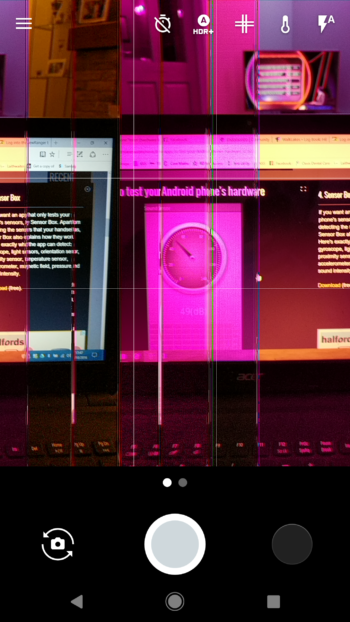
In a post on the Google product forums dated to October 27th, an individual named Mike Fox complains of his Pixel’s camera app locking up, with unsightly purple and pink vertical lines appearing as a byproduct. Fox includes screenshots of the error, which can be seen below.

pixel-camera-issue

Since that initial post went live, the thread has been flooded with other users reporting that they’ve experienced the same issue. After a number of early attempts to troubleshoot the issue, representatives from Google have stopped responding to comments, causing understandable amounts of consternation from those experiencing the issue.

Based on the efforts of the community, it appears the problem may be limited to international Pixel and Pixel XL models and may have something to do with poor 4G connectivity. Moreover, third-party apps that leverage the camera aren’t exempt from the problem, and a number of users have also reported getting a replacement phone only to experience the same issue.

pixelcameramalfunction

We’ve reached out to Google to inquire about the issue. We’ll update this article when we hear back from the company.

In the meantime, it should be noted this is not the first issue to crop up involving the Pixel. Shortly after the device shipped here in Canada, users started reporting LTE connective issues. Google addressed that issue in the Pixel’s latest OTA update, which is to say chances are Google is already working on fixing this issue.

If you’ve experienced this issue, please tell us in the comments section.

30 Nov 22:25

A 3D-Printed Ear Explores What It Means to Be a Machine

by DJ Pangburn for The Creators Project

Images courtesy the artist

Networked with the internet, a 3D-printed ear appropriately titled, Ears After All, explores what it means to be a machine. Created by Saurabh Datta, a multimedia artist who incorporates science, technology and philosophy into his practice, the “hearing post” is fixed to a wall and listens to anything spoken in front of it.

Upon hearing phrases, the ear goes online and searches words related to itself like “hearing” and “sounds.” As this process unfolds, observers see this action on a side projection from what Datta calls the ear’s “backend terminal soul.” To represent the audience, Datta built a speaking post that recites poems filled with words related to sound (contributed by CyRus).

To wire up the 3D-printed ear, Datta combined a hacked TP link router running openWRT along with a USB sound card, microphone, ext root from a micro-SD card, range finder, Arduino Nano, and power module. The listening station is made of an Arduino nano, mp3 module, servo, and speaker.

“We are surrounded by technologies that the majority of us do not understand,” says Datta. “They have become a ubiquitous part of our lives intentionally or unintentionally, both by technocratic as well as marketing/consumerist decisions. We intend to use these technologies without understanding a basic brief of how they govern and impact our lives and opinions.”

“[Another] aspect it's trying to ascribe is how behaviors and underlying architecture can be deciphered with applying behavioral ascriptions—a.k.a., metaphorical representations—to working machines,” he adds. “The last ascription is about what it means to be a being as a machine. To really understand we have to detach ourselves from being a being of our definitions and [think] both aesthetically and action-wise as that of the subject, a.k.a., machine.”

So, while Datta’s Ears After All shows viewers how to understand the consumer technology that we use, not to mention how future AI may work, it also tells us something about being human. That is, how we think of the self, based not just on words from our mother tongues, but how input from our other senses impacts our brains and therefore our conscious realities. Watch it in action below: 

EarsAfterAll from Saurabh on Vimeo.

Click here to see more work by Saurabh Datta.

Related:

This DIY Electronic Soundsystem Turns Your Body into an Instrument

This Tiny Satellite Sculpture Is a Solar-Powered Synthesizer

Inside a Giant Seashell, Hear the Sounds of Outer Space

30 Nov 22:25

This Film Festival Offers Solutions to Climate Change

by Eleanor Lambert for The Creators Project

A photograph featuring the Jury members and attending winners of the Film4Climate Global Video Competition.

As the COP22 Film4Climate Global Video Competition begins, the mood is somber: it's the end of the first week of the Conference of Parties and just five days after the announcement of Trump’s election win. While uncertainty and fear for the future are palpable, there's also a sense of hope, as this is where the efforts for taking action on climate change merge with the creative medium of filmmaking.

Part of the World Bank Group’s Connect4Climate initiative, the Film4Climate competition features the winners of various categories for under-one-minute PSA videos, and short films under five minutes. Winning productions portray both singular and comprehensive, oftentimes highly self-made movies that reflect the realities of and actions taken by many on the ground.

Jeffrey Sachs, Professor at and director of Earth Institute at Columbia University, addressing the audience at Film4Climate Global Video Competition. “So much talent in this room,” he begins, “and you have to listen to an economist. Go figure that.”

“It’s extremely important to use your voice and your reach to explain what’s at stake,” says Professor and director of Earth Institute at Columbia University, Jeffrey Sachs, during his opening speech. “The people that want their grubby hands on the steering wheel in Washington are ExxonMobil and Chevron and people who bought this [American] election,” he says. Citing “the names that are being kicked about in the US media”—including Trump’s selection of Myron Ebell to oversee the EPA transition team—Sachs expounds a stern but necessary reminder of the battle ahead. “It’s fine to be ignorant, just don’t do it in Washington. Because we’ve got important things to do, and we really don’t have time for really greedy, nasty, or completely scientifically ignorant people to be anywhere near decision-making right now.”

This year’s COP is also the CMA1, which is the first Meeting of the Parties to the Paris Agreement. Beyond the policies for implementation that everyone hopes will be successful here, it will take more than these efforts to raise the necessary awareness, funding and collective drive to face the behemoth of global warming.

“They know how to do the old stuff,” Sachs notes of certain powerful players, “and we have to show the new stuff.” Throughout the Film4Climate event, this “new stuff” is portrayed through themes like carbon sequestration and reforesting, simple but straightforward imagery of global warming’s dire and dangerous effects, and stories of small yet powerful efforts being made by communities around the world. One film, A Sun At Night, won the short film “Young Award” and tells the story of how solar lamps replaced oil-burning lamps on one Indian street. It was entirely narrated, edited, and directed by 15 year-old Rameshwar Bhatt.

Director Fernando Meirelles awards the 1st Prize for the 18-35 Group Short Film to Director Spencer Sharp, USA. The winning video is entitled “3 Seconds” and is a plea for Mother Earth made in collaboration with Prince Ea.

Environmentally-rooted crises like those in Syria and Standing Rock show that profit-driven interests consistently take political precedence over the protection of human lives and civil rights, and it is no longer realistic to count solely on a few politicians or legislators to take responsibility and mobilize for change. The globalized status quo possesses “unbelievable momentum,” pillaging the planet and repeatedly exploiting land that is rightfully relied upon by many indigenous peoples for their livelihoods. “This juggernaut just keeps going straight,” Sachs continues, “and even when you see the cliff right ahead of you, it just keeps going!”

“So when you learn that [reality],” says Sachs, “you should steer it, just turn the wheel a bit.” Thus, the Film4Climate winners document the climate shifts and ecological burdens that come with unsustainable practices like fracking, deforestation, and burning fossil fuels. Materializing new solutions, the resounding message is clear: “It’s not good enough ever in a political battle like this just to talk about what's at stake. The only way to win a battle like this is to show what to do.”

“You have really important movies,” Sachs reminds the winners. “Reach out! Get the media, get the superstars, get the actors and actresses, get the people of talent in this world—and you are they,” he broadcasts to the few celebrated actors and directors in the audience, many of whom are jury members for the competition. Propelling filmmakers’ commitment to documenting and engendering evolutionary action, these videos rise above the passive observation and horror we often experience through Facebook newsfeeds and CNN push notifications. Implementing change means not just shifting our collective attention towards the realities of global warming, but our common attitude and action as well. Here at the Cinema Le Colisée theatre in Marrakech, filmmakers are committed to the decisions being made at the COP, trying to turn the wheel away from the impending climate cliff.

The World Bank Group’s 2016 Film4Climate Global Video Competition took place at Marrakech’s Cinema Le Colisée theatre on November 13, 2016 as part of the UNFCCC’s COP22. Film4Climate is an extension of the Connect4Climate effort, and all the winning videos can be found here.

Related:

At COP22, Young Photographers Give a Face to Climate Change

90 Tons of Glacial Ice Melt in Front of the Paris Climate Talks

Surreal Photographs Reveal Africa's Environment in Crisis

30 Nov 22:23

China Wants To Assign Every Citizen A Credit Score For Their Lives

by Laura Northrup
mkalus shared this story from Consumerist.

Imagine if the authorities compiled a score based on your everyday actions, which followed you around and affected your ability to do everything from get your kid into college to booking a stay in a fancy hotel. While this sounds like a particular plot line from the most recent season of the Netflix series Black Mirror, it’s actually a new way that the Chinese government has devised to exert control over its citizens.

In this real-world application, a few local governments are trying out the idea of social credit scores. The Wall Street Journal spoke to a woman who got a $6 fine for using her son’s transit pass, but was warned that the infraction could affect her social credit score, affecting other areas of her life. It could even affect her son by limiting what schools he can get into in the future.

This is a system being tested locally in some cities now, and the Communist Party wants to deploy it nationwide by the end of the decade. Sure, the Party keeps files on every citizen, but the score is a way to make antisocial behavior affect them instantly and in more areas of their lives.

Spreading misinformation online (“misinformation” here being what the government considers to be false)? Jaywalking? Getting pregnant with an unauthorized additional kid? Neglecting your elderly parents? All of these are offenses that would become part of your “social credit” score, which the government uses to decide their worthiness for a variety of services.

Normal credit score infractions like paying a loan back late count too, of course, but compiling things like pedestrian crimes, birth control failures, and online activities is new and a bit frightening.

Human rights activists in China and around the world find this just a little bit terrifying. If you don’t, ponder one of the program’s slogans: according to the WSJ, planning documents repeat that the scores would “allow the trustworthy to roam everywhere under heaven while making it hard for the discredited to take a single step.”

(via Technology Review)


30 Nov 22:22

Watch the Story Behind the Photo That Launched the Largest Relief Effort Since WWII

by A Photo Editor

Mass tragedies, as photojournalist James Nachtwey says, happen to individuals. His focus on the individual victims of Somalia’s famine led to the saving of 1.5 million lives.

See more of Time’s 100 Most Influential Images of All Time http://100photos.time.com

------------------------

Visit our sponsor Photo Folio, providing websites to professional photographers for over 9 years. Featuring the only customizable template in the world.

------------------------

30 Nov 22:21

How Google Is Challenging AWS

by Ben Thompson

Big companies are often criticized for having “missed” the future — from the comfortable perch of a present where said future has come to pass, of course — but while the future is still the future incumbents are first more often than not. Probably the best example is Microsoft: the company didn’t “miss mobile” — Windows Mobile came out in 2000 — but rather was handicapped by its allegiance to its license-based modular business model and inability to envision a world where its core product (Windows) was a planet orbiting mobile’s sun; everything about Windows Mobile’s design presumed the exact opposite.

One could make the same argument about Google and the enterprise; both G Suite (née Google Apps for Your Domain) and Google Docs launched a decade ago and enjoyed modest success, particularly in smaller businesses and education; unsurprisingly, both markets share broadly similar characteristics to Google’s core consumer user base — limited configurability and a low price were good things. Traction was harder to come by in larger enterprises, though, and in fact over the last few years Office 365 has well out-paced G Suite, not only growing faster but winning back customers.

Still, for all the success Microsoft has had with Office 365, the real giant of cloud computing — which is to say the future of enterprise computing — is, as is so often the case, a company no one saw coming: the same year Google decided to take on Microsoft Amazon launched Amazon Web Services. What makes AWS so compelling is the way that it reflects Amazon itself: it is built for scale and with clearly-defined and hardened interfaces. Customers — first Amazon but also companies around the world — access “primitives” that can be mixed-and-matched to build a more efficient, scalable, and secure back-end than nearly any company could build on its own.

AWS’ Primitives

Earlier this year in The Amazon Tax I explained how Amazon’s AWS strategy sprang from the same approach that made the company successful in the first place:

The company is organized with multiple relatively independent teams, each with their own P&L, accountabilities, and distributed decision-making. [The Everything Store author Brad] Stone explained an early Bezos initiative (emphasis mine):

The entire company, he said, would restructure itself around what he called “two-pizza teams.” Employees would be organized into autonomous groups of fewer than ten people — small enough that, when working late, the team members could be fed with two pizza pies. These teams would be independently set loose on Amazon’s biggest problems…Bezos was applying a kind of chaos theory to management, acknowledging the complexity of his organization by breaking it down to its most basic parts in the hopes that surprising results might emerge.

Stone later writes that two-pizza teams didn’t ultimately make sense everywhere, but as he noted in a follow-up article the company remains very flat with responsibility widely distributed. And there, in those “most basic parts”, are the primitives that lend themselves to both scale and experimentation. Remember the quote above describing how Bezos and team arrived at the idea for AWS:

If Amazon wanted to stimulate creativity among its developers, it shouldn’t try to guess what kind of services they might want; such guesses would be based on patterns of the past. Instead, it should be creating primitives — the building blocks of computing — and then getting out of the way.

Steven Sinofsky is fond of noting that organizations tend to ship their org chart, and while I began by suggesting Amazon was duplicating the AWS model, it turns out that the AWS model was in many respects a representation of Amazon itself (just as the iPhone in many respects reflects Apple’s unitary organization): create a bunch of primitives, get out of the way, and take a nice skim off the top.

AWS’ offering has certainly expanded far beyond infrastructure like (virtualized) processors, hard drives, and databases, both in terms of further abstraction (e.g. Lambda “serverless” computing) and up the stack into platform and software services, but the foundation of its success continues to be Amazon’s pure platform approach: they provide the pieces for enterprises to build just about anything they want.

Google is a Product Company

Google, meanwhile, has never really been a platform company; in fact, while Google is often cast as Apple’s opposite — the latter is called a product company, and the former a services one — that only makes sense if you presume that only hardware can be a product. A more expansive definition of “product” — a fully realized solution presented to end users — would show the two companies are in fact quite similar.

Make no mistake: the differences between cloud services and hardware are profound (which I explored at length in Apple’s Organizational Crossroads), but so are the differences between being a product company and being a platform one. The ideal product, whether it be a smartphone or a search box, achieves simplicity and a great user experience through tremendous effort in design and engineering that, ideally, is never seen by the end user. Indeed, this is why integrated products win in consumer markets, and make no mistake, Google’s consumer-focused services have traditionally been as integrated on the back-end as iPhones are.

Note, though, that this is the exact opposite of the model employed by not just Amazon but also Microsoft, the pre-eminent platform company of the IT era: instead of integrating pieces to deliver a product AWS went in the opposite direction, breaking down all of the pieces that go into building back-end services into fully modular parts; Microsoft did the same with its Win32 API. Yes, this meant that Windows was by design a worse platform in terms of the end user experience than, say, Mac OS, but it was far more powerful and extensible, an approach that paid off with millions of line of business apps that even today keep Windows at the center of business. AWS has done the exact same thing for back-end services, and the flexibility and modularity of AWS is the chief reason why it crushed Google’s initial cloud offering, Google App Engine, which launched back in 2008. Using App Engine entailed accepting a lot of decisions that Google made on your behalf; AWS let you build exactly what you needed.

Google’s Platform Antidote

The Windows example is instructive when it comes to thinking about how Google has since changed its approach: the massive ecosystem built around Microsoft’s extensive API ended up being the ultimate lock-in. Most obviously the apps built for Windows were not easily ported to other operating systems, but just as important was the huge network of partners and value-added resellers that made Windows the only viable choice for enterprise. Amazon is hard at work building the exact same sort of ecosystem.

And yet, it has never been more viable to not use Windows, first for consumers but also for enterprise, and the reason is the web: here was a new runtime that sat on top of Windows but did not depend on it,1 and on the consumer side Google was the biggest winner. Indeed, the rise of the browser explains AWS as well: any new business application is built for the web (including apps that run on web-based APIs) and it is accessible on any device.

It turns out that over the last couple of years Google has undertaken a sort of browser approach to enterprise computing . In 2014 Google announced Kubernetes, an open-source container cluster manager based on Google’s internal Borg service that abstracts Google’s massive infrastructure such that any Google service can instantly access all of the computing power they need without worrying about the details. The central precept is containers, which I wrote about in 2014: engineers build on a standard interface that retains (nearly) full flexibility without needing to know anything about the underlying hardware or operating system (in this it’s an evolutionary step beyond virtual machines).

Where Kubernetes differs from Borg is that it is fully portable: it runs on AWS, it runs on Azure, it runs on the Google Cloud Platform, it runs on on-premise infrastructure, you can even run it in your house. More relevantly to this article, it is the perfect antidote to AWS’ ten year head-start in infrastructure-as-a-service: while Google has made great strides in its own infrastructure offerings, the potential impact of Kubernetes specifically and container-based development broadly is to make irrelevant which infrastructure provider you use. No wonder it is one of the fastest growing open-source projects of all time: there is no lock-in.

But how does that help Google? After all, even if Kubernetes becomes the standard for enterprise clouds Amazon’s broader ecosystem lock-in is still present (and the company has its own container strategy that further locks customers into AWS); Google needs a differentiator.

Costs Versus Experience

Here again the desktop is instructive: the open nature of the web running on platform-agnostic browsers did not make Google successful per se; rather, the openness of the web created the conditions for the best technology to win. And not only did Google have the best search engine, but the reason it was the best — its reliance on links instead of simply page content — meant that as the web got bigger Google, unlike its competitors, got better.

I think this is an idea that can be abstracted to be broadly applicable; indeed, it’s a core piece of Aggregation Theory: as distribution (or switching) costs decrease, the importance of the user experience increases. To put it another way, when you can access any service, whether that be news or car-sharing or hotels or video or search etc., the one that is the best will not only win initially but will see its advantages compound.

This is Google’s bet when it comes to the enterprise cloud: open-sourcing Kubernetes was Google’s attempt to effectively build a browser on top of cloud infrastructure and thus decrease switching costs; the company’s equivalent of Google Search will be machine learning.

Machine Learning and Data

It seems certain that machine learning will be increasingly dominated by cloud services: both are about processing scale and massive amounts of data, and only a select few behemoths will have the financial capability to not only build out the infrastructure required but also have the wherewithal to employ the best machine learning engineers in the world. That, by extension, means that for most enterprises the differentiation arising from machine learning will derive first and foremost from whether or not their data is in the cloud (there will be on-premise solutions, but I expect them to fall more and more behind over time), but secondly from which cloud provider they choose.

That raises the stakes for cloud providers themselves; superior machine learning offerings can not only be a differentiator but a sustainable one: being better will attract more customers and thus more data, and data is the fuel by which machine learning improvement comes about. And it is because of data that Google is AWS’ biggest threat in the cloud.

I described how Google’s enterprise business was limited by its consumer focus above, but the big advantage that Google has is that it has been working with massive amounts of data for nearly two decades, and developing powerful machine learning algorithms for the last several years. Still, it’s the data that matters most-of-all, and the best evidence that is the case came last year when Google open-sourced TensorFlow, a blueprint for machine learning: as I noted in TensorFlow and Monetizing Intellectual Property Google’s willingness to share its approach was an implicit admission that its superior data and processing infrastructure was a sustainable advantage.

We’re just now starting to see that advantage applied to Google’s cloud offering. Just before Thanksgiving Google made a series of product announcements that clearly leveraged its data advantage:

  • The Cloud Natural Language API, which uses machine learning to analyze text, graduated to general availability
  • A premium edition of the Cloud Translation API, which uses machine learning to massively improve accuracy in translating eight languages (above-and-beyond the standard edition that supports over 100 languages)
  • A big price reduction for the Cloud Vision API, which uses machine learning to analyze images
  • A new Cloud Jobs API that uses machine learning to match potential employees with jobs

These four join the Cloud Prediction API that uses machine learning to, well, make predictions. It, along with the first three APIs above, is clearly derived from various Google consumer products; the Jobs API likely builds on an internal Google tool, as well as Google’s wealth of data from all over the web. In each case Google has spent years honing its algorithms so that by the time they are applied to a corporate data set the results are very likely superior, or at least far down the training funnel. I expect this advantage to persist and be meaningful.

Still, Google will have to do more, which is why the other big announcement was the creation of the Google Cloud Machine Learning group headed by Fei-Fei Li and Jia Li: this group will be charged with building new machine learning APIs specifically for business; to put it another way, they are tasked with productizing Google’s machine learning capabilities.

That, in a roundabout way, gets to the genius of Google’s strategy: the company was outpaced by Amazon in the first wave of cloud computing because success rested on being the best platform; by open-sourcing Kubernetes in an attempt to shift the industry to vendor-agnostic containers, Google is trying to move the plane of competition to products. After all, it’s often easier to change the rules of competition than to change your fundamental nature as a company.


To be sure, Google’s success is not assured: the company still has to grapple with a new business model — sales versus ads — and build up the sort of organization that is necessary for not just sales but also enterprise support. Both are areas where Amazon has a head start, along with a vastly larger partner ecosystem and a larger feature set generally.

And, of course, AWS has its own machine learning API, along with IBM and Microsoft. Microsoft is likely to prove particularly formidable in this regard: not only has the company engaged in years of research, but the company also has experience productizing technology for business specifically; Google’s longstanding consumer focus may at times be a handicap. And as popular as Kubernetes may be broadly, it’s concerning that Google is not yet eating its own dog food.

Still, Google will be a formidable competitor: its strategy is sound and, perhaps more importantly, the urgency to find a new line of business is far more pressing today than it was in 2006. Most importantly, the shift to cloud computing is still in its beginning stages, and while Amazon seems to be living the furthest in the future, the future has not happened yet; it will be fascinating to watch Google’s attempt to change the rules under which said future will operate.

  1. ActiveX notwithstanding
30 Nov 15:52

A security update for Raspbian PIXEL

by Simon Long

The more observant among you may have spotted that we’ve recently updated the Raspbian with PIXEL image available from Downloads. With any major release of the OS, we usually find a few small bugs and other issues as soon as the wider community start using it, and so we gather up the fixes and produce a 1.1 release a few weeks later. We don’t make a fuss about these bug fix releases, as there’s no new functionality; these are just fixes to make things work as originally intended.

However, in this case, we’ve made a couple of important changes. They won’t be noticed by many users, but to those who do notice them and who will be affected by them, we should explain ourselves!

Why have we changed things?

Anyone who has been following tech media over the last few months will have seen the stories about botnets running on Internet of Things devices. Hackers are using the default passwords on webcams and the like to create a network capable of sending enough requests to a website to cause it to grind to a halt.

news

With the Pi, we’ve always tried to keep it as open as possible. We provide a default user account with a default password, and this account can use sudo to control or modify anything without a password; this makes life much easier for beginners. We also have an open SSH port by default, so that people who are using a Pi remotely can just install the latest Raspbian image, plug it in, and control their Pi with no configuration required; again, this makes life easier.

Unfortunately, hackers are increasingly exploiting loopholes such as these in other products to enable them to invisibly take control of devices. In general, this has not been a problem for Pis. If a Pi is on a private network in your home, it’s unlikely that an attacker can reach it; if you’re putting a Pi on a public network, we’ve hoped that you know enough about the issues involved to change the default password or turn off SSH.

But the threat of hacking has now got to the point where we can see that we need to change our approach. Much as we hate to impose restrictions on users, we would also hate for our relatively relaxed approach to security to cause far worse problems. With this release, therefore, we’ve made a couple of small changes to improve security, which should be enough to make it extremely hard to hijack a Pi, while not making life too difficult for users.

What has changed?

First, from now on SSH will be disabled by default on our images. SSH (Secure SHell) is a networking protocol which allows you to remotely log into a Linux computer and control it from a remote command line. As mentioned above, many Pi owners use it to install a Pi headless (without screen or keyboard) and control it from another PC.

In the past, SSH was enabled by default, so people using their Pi headless could easily update their SD card to a new image. Switching SSH on or off has always required the use of raspi-config or the Raspberry Pi Configuration application, but to access those, you need a screen and keyboard connected to the Pi itself, which is not the case in headless applications. So we’ve provided a simple mechanism for enabling SSH before an image is booted.

The boot partition on a Pi should be accessible from any machine with an SD card reader, on Windows, Mac, or Linux. If you want to enable SSH, all you need to do is to put a file called ssh in the /boot/ directory. The contents of the file don’t matter: it can contain any text you like, or even nothing at all. When the Pi boots, it looks for this file; if it finds it, it enables SSH and then deletes the file. SSH can still be turned on or off from the Raspberry Pi Configuration application or raspi-config; this is simply an additional way to turn it on if you can’t easily run either of those applications.

rconf

The risk with an open SSH port is that someone can access it and log in; to do this, they need a user account and a password. Out of the box, all Raspbian installs have the default user account ‘pi’ with the password ‘raspberry’. If you’re enabling SSH, you should really change the password for the ‘pi’ user to prevent a hacker using the defaults. To encourage this, we’ve added warnings to the boot process. If SSH is enabled, and the password for the ‘pi’ user is still ‘raspberry’, you’ll see a warning message whenever you boot the Pi, whether to the desktop or the command line. We’re not enforcing password changes, but you’ll be warned whenever you boot if your Pi is potentially at risk.

warn

Our hope is that these (relatively minor) changes will not cause too much inconvenience, but they will make it much harder for hackers to attack the Pi.

Is there anything I need to do to protect my Pi?

We should stress at this point that there’s no need to panic! We are not aware of Pis being used in botnets or being taken over in large numbers; your own Pi is almost certainly not currently hacked.

It’s still good practice to protect yourself to avoid problems in future. We therefore suggest that you use the Raspberry Pi Configuration application or raspi-config to disable SSH if you’re not using it, and also change the password for the ‘pi’ user if it’s still ‘raspberry’.

To change the password, you can either press the ‘Change Password’ button in Raspberry Pi Configuration, or type passwd at the command line, and follow the prompts.

cpass

This issue has caused quite a lot of discussion at Pi Towers. The relaxed approach we’ve taken thus far has been for very good reasons, and we’re reluctant to change it. However, we feel that these changes are necessary to protect our users from potential threats now and in the future, and we hope you can understand our reasoning.

How do I get the updates?

The latest Raspbian with PIXEL image is available from the Downloads page on our website now. Note that the uncompressed image is over 4GB in size, and some older unzippers will fail to decompress it properly. If you have problems, use 7-Zip on Windows and The Unarchiver on Mac; both are free applications which have been tested and will decompress the file correctly.

To update your existing Jessie image with all the bug fixes and these new security changes, type the following at the command line:

sudo apt-get update
sudo apt-get dist-upgrade
sudo apt-get install -y pprompt

and then reboot.

Please note that installing this update on an existing Raspbian install will not change the status of SSH on that machine; if SSH is enabled, installing the update leaves SSH enabled, and vice-versa.

The post A security update for Raspbian PIXEL appeared first on Raspberry Pi.

30 Nov 15:51

Kickstart – Hope, Change and Climate in the Age of Trump

by pricetags

By Gord Price

I think it’s time to cut the comment responses on Trump’s Climate Legacy – 2.  But to give those of you who care about this issue, well, there’s this from the NY Times:

Earth Isn’t Doomed Yet. The Climate Could Survive Trump Policies.

Is the battle to contain global warming now lost?

Don’t give up just yet. True, international diplomacy will become more difficult as China and India weigh their own energy policy commitments in the light of the possibility that the United States will walk away from its promises. But President Trump’s climate policy — or his lack of one — could work out in surprising ways.

Ted Nordhaus and Jessica Lovering, in a report published on Tuesday by the Breakthrough Institute, pointed out that real progress on reducing carbon in the atmosphere has been driven so far by specific domestic energy, industrial and innovation policies, “not emissions targets and timetables or international agreements intended to legally constrain national emissions.” …

As Robert Stavins of Harvard University put it, “The most important factor in terms of carbon emissions in the United States is the price of natural gas.”

And for all the hand-wringing over the future of the Clean Power Plan, its demise might not even make that much of a difference. The shift from coal to gas will continue to happen anyway. …

This is not to say that the world could survive forever an American administration that doesn’t believe in climate change and does nothing to contain it. …

“If a Trump administration lasts only four years, the process could maybe absorb that,” said Oliver Geden, head of research at the German Institute for International and Security Affairs.

The bomb is ticking, but the world still has some time.


30 Nov 15:51

Netflix Gains Offline Playback for All Streaming Plans

by Evan Selleck
Netflix has an expansive library of content, from TV shows, documentaries, and movies, but for some customers it’s a bit limited in availability due to hogging plenty of bandwidth. Continue reading →
30 Nov 15:51

Cheeky Sign Artworks Say What Everyone's Really Thinking

by Beckett Mufson for The Creators Project

Images courtesy the artist

If someone could catch their random walking-down-the-street thoughts and leave them on the sidewalk for others to pick up, they'd probably look like the witty street signs of Australian artist Michael Pederson. Posted illegally, photographed, and then left to the elements, Pederson's ephemeral works package the spirit of graffiti into a city council-approved aesthetic.

His pieces often resonate with the kind of inner dialogue pedestrians faced on November 8: panic and a desire to scream in public. The Vicarious Yelling Station offers a sort of reprieve from that emotion, encouraging viewers to imagine a surrogate stationed in the wilderness letting out an open-throated bellow in their stead. "The idea of outsourcing your rage seemed sort of funny to me. Even though it's obviously fiction, I genuinely hoped the words would have some sort of cathartic effect," Pederson tells The Creators Project.


Pederson made The Vicarious Yelling Station more than a year ago, but felt it was an appropriate time to share it. "I posted the images again in light of a certain world leader's election, and the genuine rage a lot of people (myself included) don't know what to do with. Laughing can sometimes help too."

His other theraputic pieces include a clock that recalibrates relaxed breathing, a set of buttons to press in various states of emergency, and a squishy cube to kick if imagining someone else's scream isn't strong enough.

Outside of assuaging minds trapped in public spaces, Pederson's body of work also offers wry observations and clever interventions into seldom-thought-about aspects of public life. A velvet rope protecting a dandelion both lampoons the idea that such a barrier can influence anyone's behavior, and highlights the beauty of the overlooked plant. Miniature cones placed around street trash follow a similar train of thought, while placards identifying banal moments in an area's history remind us of all the stories contantly playing out around us.

"Some of my pieces occur to me after coming across a location or object while I'm out and about. Sometimes I already have the piece in mind and search for the right space," Pederson explains. Unlike a graffiti artist, he doesn't worry about the law when planning his art. He uses small and easily-removable materials. such as a waterproofed heavy-duty print mounted on board. His approach is different from artists like Brooklyn-based Steve Powers, whose surreal ICY SIGNS in New York look like actual metal signs, NYC-based Ryan McGinness, whose Signs series (a version of which we traveled to Monatuk to see) look like pole-mounted skateboards, or Richard Ankrom, whose fake sign over LA was so realistic it went unnoticed for eight years. Pederson's Vicarious Yelling Sign lasted four days before being removed.

Pederson majored in painting when he was younger, but didn't pursue a career in the art world. Now based in Sydney, he makes his living in mental health, helping people reestablish themselves into communities. "I had a photographic show at Above Second in Hong Kong this year, but I'm not sure how much I want to pursue shows like that," he says. "I think the pieces work better in an outdoor context, and if I pursued gallery shows in the future I'd probably take another approach entirely."

In his next work, Pederson says he'd like to "explore the interactive side more," which, "might involve calming elements." Whew. 

See more of Michael Pederson's work on his website.

Related:

This Fake Street Sign is a Public Art Masterpiece

A Giant Neon Sign Brings 'Understanding' to Brooklyn

Hong Kong's Farewell to Thousands of Neon Signs