Shared posts

13 Dec 23:16

Computing is a mess, and it's not improving

by Rui Carmo

I find myself yearning for simpler computers. Not simpler as in iOS simple, but rather in the general sense. This is partly because computers are still unreasonably inefficient and unresponsive despite having the fastest chips we’ve ever designed, and partly because, to be honest, the ratio of computing power versus actual usefulness of computation these days is appalling.

Native Deniability

As if the increasing complexity of browser engines did not rank them on an almost equal footing with full-blown operating systems, modern cross-platform desktop applications are increasingly shipping with their own private browser runtimes and a gaggle of weird custom interfaces that make a mockery of native UIs, in no small part thanks to Electron and its cousins.

So instead of “native” apps, what we’re really getting are multiple (subtly different) copies of the Chromium runtime to fill our SSDs and crummy, half-baked pseudo-UIs that often make it hard (or nigh on impossible) to handle such bare essentials as cut-and-paste and proper accessibility (or, on the Mac, that are opaque to scripting, system services, and all the other niceties that made using the Mac desktop environment a sublime experience until Apple started punting on them).

I find this trend worrisome given the web is still a smörgåsbord of incomplete implementations of convoluted standards that can only charitably be called “evolving” (in contrast to “utterly misguided”). Even if it is saving people time and money in the short term, I keep wondering how much technical debt we’re getting ourselves into as an industry.

The app economy is also to blame, I think – turning mobile phones into appliances that run sandboxed, often (frustratingly) single-purpose apps begat a mindset where it’s acceptable for apps to be largely self-contained silos, and if you consider that we’re now running increasingly deeper stacks of transpiled code on what are effectively desktop-class CPUs, it’s pretty obvious that today’s computing model has a lot of overhead.

Hailing from simpler times (my first computer was a Sinclair ZX81, with barely more computing power than a digital watch), I find it all more than a bit decadent – and I’m not even going to go into the way a good chunk of the app economy hinges on siloing and locking away your own data…

The Missing Plan

I’ve been following the Plan9 mailing lists over the past year or so (MARC is a nice enough way to peek in, if you’re curious), out of a grim fascination for its community (which is hard to peg, although it has faint echoes of the VAX mailing lists I subscribed to back in the dialup era) and the way it steadfastly hangs on – at least nominally – to the platform.

Plan9 is not a viable option for modern computing (it doesn’t support most modern hardware, follows antique UX paradigms and, most tellingly, can’t run any of the mainstream browser engines), but the idea of it is interesting. After last year’s deep dive into its little universe I had a Raspberry Pi running it on my home office for a while, and found it to be equal parts practical and infuriating1.

The bits that make it the most fascinating aren’t its antiquated UI, its reliance on three-button mice or the sparseness in software or features, but how cohesive and straightforward it feels when compared to today’s computing environments. Putting aside Apple‘s stuff, both Windows and Linux are a quagmire of inconsistent UX that has been piled on for decades, and I, for one, could do with much less clutter – albeit not without some visual flair and polish.

But bringing Plan9 up to modern standards is never going to happen, so if like me what you most value is a cohesive user experience and raw, unmitigated speed (the kind that makes me turn to vim to edit text and stick to Safari for browsing the web) there aren’t any real choices out there.

The Internet of Shit is not about Hardware

For me at least, the prevalence of JavaScript has been a grinding sore of late.

Like Ethernet, it is a fast enough, easy enough, common enough technology that is encroaching itself into every aspect of computing – even, it seems, in VR, as John Carmack mentioned in his (as ever, inspiring and utterly deserving of the label “legendary”) keynote at Oculus 2016. And, again, like Ethernet, it’s getting a bunch of forklift upgrades to cope with the load.

And even if we assume there’s now a somewhat broad (if rolling) agreement on the technology thanks to the rise of WebKit (and Blink), the business and content landscape is a mess – we’ve gone from banner ads to Flash ads to pop-ups and interstitials and all manner of clutter, and just as the demise of plugins and the onset of ad blockers was making the Web useful again, content producers (ever so hesitant in actually creating better content instead of churning out dozens of five-paragraph junk “articles” around a single piece of news) are now trying to block the ad blockers.

Things are spiraling out of control, and everyone appears to be losing when it comes down to ease of use, performance, and user satisfaction.

On the hardware side, if you discount tablets (which, for some people, are a noncommital limbo) and look for the simplest possible approach, one is left with the uneasy idea that Chromebooks are likely to be the future (at least in spirit) of what mainstream computing, with the dismal consequences you’d expect in terms of consistency and user experience – all the advantages of the web, with all the shortcomings, caveats and poor engineering we keep heaping atop it.

This seems like a good enough reason to keep avoiding doing any sort of front-end work and focus instead on back-end stuff, as well as shifting my projects increasingly towards languages that generate native, highly performant code.

The tendency of those lower-level languages to have stable ecosystems whose age is measured in decades rather than days is just icing on the cake, but, more importantly, should give pause to those who are trying to carve out a market for themselves atop the latest and greatest tech.

Me, I’ll just keep doing what I do until they eventually figure it out by themselves.


  1. The most frustrating bit for me is that the weirdness involved in accessing other machines via SSH and VNC (both of which required compiling my own client software) is completely fixable – but in the end it’s just easier to run Linux instead. ↩︎

13 Dec 23:15

Our iOS App is Now Free

by Anthony

For the first time since it’s release in 2011, Hype Machine for iOS is available for free in the App Store!

Here’s what’s new in this release:

We’ve added an easier way to read blog posts when playing a track: just swipe up on the artwork to see the list.

There are a few other changes: we’ve removed the offline mode to comply with SoundCloud’s Terms of Service. This update also makes it easier to jump to your synced favorites in the SoundCloud app—tap the button on your profile screen.

13 Dec 23:15

Are you ready for blended learning?

files/images/Continuum-of-technology-based-teaching-2-1-548x281.jpg


Tony Bates, online learning and distance education resources, Dec 15, 2016


The key question to emerge from Tony Bates's review of a survey on learning technology in universities: "What happens when we go to 85% or more of the teaching being blended? The current learning technology support model just won’ t be able to handle this expansion, certainly not at the rate that it is being predicted." But if universities have no realy idea how to implement blended learning, why would we think this is the way forward?

[Link] [Comment]
13 Dec 23:15

What I have learnt from the course "Advanced Theories of Communication”

files/images/cropped-img_6534.jpg


imcyndi, Tomorrowland, Dec 15, 2016


A lot of what underpins communications theory as described here also underpins theories of transactional distance in education theory (see  the work of Michael G. Moore for example). The idea is that "the process of communication involves the process by which a sender conveys a particular message to the audience" and "effective communication occurs when the receiver can acquire the exact meaning intended by the sender." Pretty standard stuff. About three quarters of the way through, the author looks inward and discusses the elements of dialogue with oneself. I like this a lot, but it makes me wonder, when we communicate with ourselves, is communication always effective? I don't think it is, for a variety of reasons. And I ask whether communication is really the sending of a specific message with any sort of meaning at all. Via Pierre Levy.

[Link] [Comment]
13 Dec 23:15

What Is A Customer Support Community For?

by Richard Millington

panasonic
No-one saw the contradiction.

Closing your community down at the exact moment when people are most likely to begin using your products is nuts.

Closing your customer support line at the same time is even worse.

Ultimately, what is a customer support community for?

Is it for handling customer queries that slip through the usual customer service net? (perhaps non-standard problems, problems in different languages/cultures, support during out-of-hours moments?)

Or is it to handle the bulk of customer queries and leave the difficult personalized stuff to customer support? This means being as fast as direct support, ranking highly for relevant search terms, directing most people to the platform, being more accurate and communicating with greater empathy.

Pick one.

13 Dec 23:14

China Ecosystems – All about vertical.

by windsorr

Reply to this post

RFM AvatarSmall


Greater verticalisation looks like it is coming to China. 

  • It looks like Qihoo is having another go at the smartphone market with the purchase of Blephone but behind this I see the next stage of competition between the Chinese Ecosystems.
  • Baidu, Alibaba, Tencent, (BATmen) Qihoo are all very good at what they do but in the mind of the users they are quite focused in their particular niches.
  • This is why the Chinese market is so fragmented as most users use services from all of these providers rather than sticking with just one.
  • In developed markets, users predominantly spend their Digital Lives in one ecosystem or another but not so in China.
  • This is how the sum of all the users of BATmen and Qihoo services is comfortably more than 3x the number of total smartphone users in China.
  • While the market and usage is growing, these players can grow nicely but as it begins to slow, they will need to compete more aggressively with each other in order to maintain their growth.
  • RFM research (see here) indicates that the best way to encourage users to try a new service over one that it is already established in the market, is to install the service on the device at the factory and set it as default.
  • This is common place in developed markets but in China devices are effectively blank when the reach the user and the user then picks and chooses which services he wants to download and use.
  • This is why I think Alibaba has purchased a controlling stake in Meizu and why it has created its own version of Android called Yun OS.
  • Now it looks like Qihoo is going the same way with the purchase of Blephone following its ill-fated relationship with CoolPad during 2015.
  • Qihoo has nearly 900m users of its mobile security software on mobile devices from which it derives advertising revenues but it has been trying to diversify away from this for some time.
  • The areas into which it is diversifying bring it directly into competition with the much bigger and much stronger BATmen but if it has control over hardware it has a chance to encourage users to try its service over those from the BATmen.
  • The problem of course is that Blephone does not have the volume of devices in the market to make a real difference but it is this same thought process that could lead to the acquisition of Xiaomi.
  • Xiaomi has all of the elements required including a good user experience and good volume in the market making it a prime candidate for acquisition by one of the BATmen.
  • Here I would put Baidu or Tencent at the top of the list as neither have yet made a play to assert greater control over hardware.
  • Xiaomi faces another very difficult year in 2017 and while it drifts sideways, I can only see its valuation continuing to sink and its investors getting itchy feet.
  • In China Tencent and Baidu remain my top two choices.
13 Dec 23:14

It was 20 years ago today

by russell davies

not to be moved

(Not quite today, September 1996 apparently)

Tom recently pointed this out from the Wired archives. He was editing a bit of it and I must have sent this in. I don't remember it to be honest. I dimly remember working on a project for a nascent train timetable business and seeing this secret online timetable system in a warehouse in Derby, near the station. And reading it back I can see myself trying to capture some sort of unjustifiably angry tone. Strange.

Also odd to see myself writing something from the fag-end of British Rail, just as the nostalgistes try to revive it:

"Porn, gambling and railway timetables: three dead-cert killer Internet apps. Sure enough, online gambling is booming after overcoming regulatory hurdles by secreting servers in places like Belize (see www.vegas.com/wagernet/, for example), while porn is, well, pretty much ubiquitous.

But you just try to use the Web to check what time the first London train gets into Derby. Go on. I challenge you. (It is possible, BTW. Start at www.germany.net/.) But back here in the UK, aside from some localised timetables maintained by exasperated philanthropists (thank you to Brian Meek for www.kcl.ac.uk/kis/off_campus/rail/railindx.html), the national train timetable remains marooned in an off-line siding.

Internal politics within BR's rotting carcass are to blame. If the newly-formed train operating companies and Railtrack would only stop bickering for a moment (see www.rail.co.uk/ for their assorted corporate detritus), the entire timetable could be up on the Web next week for a relative pittance.

What makes the whole debacle doubly galling is that, somewhere within the remnants of BR, there is rumoured to reside just such an online timetabling system. There's even an application that lets you check real arrival times as displayed on station indicator boards around the country. Could it be that the train operators simply don't want anyone knowing how punctual (or otherwise) their trains are? I dunno, but I'm mighty pissed off with them all for denying me access to information that would help me to use their services. Utterly insane."

13 Dec 23:14

Fitbit buying Pebble will NOT help it crack the code on smartwatches

by charlie

For some reason, discussions of smartwatches make me twitch. Maybe it’s because I got my first smartwatch over 10 years ago.* Maybe it’s because I’ve watched “the next great category” of mobile devices come and go or fling themselves repeatedly on the rocks of disappointment. Maybe it’s because I’ve played with sensors, data, mobiles, and wearables for a long time and have not seen anyone “crack the code.”

OK, call me a cynic and a curmudgeon. Yes, there are many others in the industry who (should) know more than I do. Though, I don’t see anyone really “getting it.” And, admittedly, I don’t like doing the “I can tell what’s not right” thing, rather than the “let me help you to the right place” thing of figuring out where the fusion of sensors, mobile, and wearable devices will head (though I do have many inklings).

A pebble in your shoe
The Fitbit CEO says they bought Pebble to help them crack the code on smartwatches. He says:

“We don’t think there’s been any product out there in smartwatches that combine general purposes, functionality, health and fitness, industrial design, and long battery life into one package.” [from: Fitbit CEO says buying Pebble could help it crack the code on smartwatches, The Verge]

Does he mean that not even Pebble has cracked the code? Because if Pebble hasn’t, then buying them won’t automagically impart the ability to crack the code to Fitbit.

In any case, the CEO of Fitbit is looking in the wrong place. I do not see anyone who has all the pieces in place to actually crack the code on smartwatches.

The future is here but unevenly and all that jazz
I mentioned I got a smartwatch over 10 years ago. It was a Suunto T6 (pictured), which connected to a heart rate band and a foot pod accelerometer (I didn’t buy the GPS pod because I already had a GPS pod for my phone). Suunto hasn’t stopped making, what they called, wrist-top computers. Nor have Garmin or Polar, Suunto competitors since that time. A good example of how these watches have evolved is, my favorite, the Garmin Fenix 3.

What lessons can Fitbit learn from Garmin, Suunto, Polar who have knocked it out of the park with smartwatches (ugh, “smart” is so stupid, can we just call then “watches” fercryingoutlout)?

True, Fitbit, and all the others, want to hit the large “consumer” market. Since Fitbit is obsessed with measurement, they mean “consumers” are all those people who don’t HAVE to measure themselves, such as the chronically ill, or those who aren’t DRIVEN to measure themselves, such as athletes or QSers.

Fitbit and peers seem to be proposing WHAT folks should measure and HOW. But their lack of success in getting traction with those consumers suggest that these WHATs and HOWs do not match the WHATs and HOWs that capture the consumer market.

By focusing on a driven segment, Garmin, Suunto, and Polar have been able to hone their offering to their customers and prove that watches with a lot of computing power and location awareness are something a segment of folks will pay for and keep using.

What’s the equivalent catch that will match what Fitbit and Pebble bring to the consumer segment with what the consumer segment really wants out of these devices?

Sales flop
We all know that these devices – from the fancy Fitbit pedometers to the expensive Apple watches – are not holding folks’ attention, especially when compared with the rabid attachment folks have for their phones. Everyone likes to track the sales of these devices that Fitbit and others are churning out. Why are we not talking about usage rather than sales?

Back in my day, Nokia wasn’t only bent on selling phones, but also thrilling the user so that the devices would drive up ARPU (average revenue per user, aka meterable usage) for carriers and a repeat purchase of a phone. Device success wasn’t just tied to sales, but usage and repeats sales.

What’s the equivalent of ARPU for Fitbit, Pebble, Apple, and others? What’s the churn? What’s the repeat purchase for subsequent models?

Can someone find me those metrics?

I’m not the first to grumble about this. There are been articles (here’s one from 2015) and analyst reports (PDF report from 2014), on churn and usage for some time.

Why don’t the vendors report these metrics?

Wooden strategy
The Palm had its humble origins in a wooden block that the designer carried around to capture how he would use a mobile handheld computer. Who is doing the equivalent to Palm and the wooden block, but with watches?

I have no idea how Fitbit and others are actually designing their mobile devices. But from what I see, there are folks approaching wearables from the device and sensor perspective, pushing the product promise around steps, accuracy, sleeping measurement, heart rate sensors, and so forth. Another group seems to approach wearables from the data perspective, focused on showing data galore to users.

The answer lies somewhere in between, where the success of wearables will be in the fusion of data, devices, and, most importantly, in how the user experiences that data and those devices. Hence, nobody seems to have the right go-to-market approach. Most of the vendors focus on the data and the device, the apps and developers, not the core human need that would get someone to buy it in the first place, that is, a need that is relevant to the general consumer.

Taking the measure of Fitbit
Fitbit (and I feel all the others) are using measurement as the main draw of all their watches and gizmos. Measurement is what folks who are DRIVEN or folks with chronic conditions HAVE to do. But is that what the general public wants out of a device they carry with them everywhere?

Fitbit, based on the quote above, has missed the trick if they want to get into the general consumer world of watches. And I know what happens when device manufacturers can’t think beyond their device features.

If you want to make a digital device on someone’s wrist absolutely essential, it’s not going to be due to wiz-bang sensors or measurement, or fantastical dahsboards or indicators of my steps or fitness.

A digital watch will be essential when it helps me work better, be better, communicate better, know better, feel better, get through my day and relationships better.

Ah, of course, we already have that digital device – it’s our phone.

My challenge to you
Put a frakkin’ wooden block on your wrist. Tell me why you look at it or want it to do something as you go about your day. How does it complement the things you carry, such as your keys, phone, and wallet – the things you check for before heading out the door, the things you would turn around for and go back home to get?

If anyone is studying this, let me know. If you think I’m full of krap, let me know.

Until then, I’ll be a curmudgeon, twitching every time someone thinks they can “crack the code” around smartwatches.


*Hey, if you go “WTF, the T6 isn’t a smartwatch.” Of course, by today’s expectations.  That’s like saying the PowerBook 100 wasn’t a laptop.

13 Dec 23:14

Update zum Thema Diensthandy

by Volker Weber

ZZ4A06619A

Ich habe sehr viel Email zu diesem Thema bekommen. Viele Emails spiegeln das wieder, was auch in den Kommentaren steht. Und das hat die ganze Bandbreite von "ich will das trennen" bis zu "keine Lust auf zwei Geräte". Ein Trend ist da nicht zu erkennen.

Aber eins hat mich überrascht: es gibt viel mehr Unternehmen, vor allem große, die alles außer iPhones rauswerfen. Das habe ich nicht erwartet. Die Markanteile in Deutschland suggerieren einen Durchmarsch von Android. Die Gründe sind vielfältig, von Anwenderwunsch über Sicherheit bis zu Wartung und Kosten. Der Anschaffungspreis ist eben nicht alles.

Und eine weitere Überraschung: ein sehr großes Unternehmen hat die perfekte Mobil-Policy, die ich auch als Best Practice empfehle. Alle Geräte ins MDM aufnehmen und möglichst wenig regeln. Sechsstellige PIN, die nicht turnusmäßig geändert werden muss, Support für Touch ID. Anwender darf alles, was nicht explizit verboten ist. Und das ist sehr wenig, z.B. Jailbreak. Alle betrieblichen Apps und Konten sind "managed". Private Nutzung kann man für einen geringen monatlichen Betrag erwerben.

13 Dec 23:13

New region boundaries based on commutes

by Nathan Yau

Geographers Alasdair Rae and Garrett Nelson used commuting data from the American Community Survey to identify “megaregions” in the United States:

The emergence in the United States of large-scale “megaregions” centered on major metropolitan areas is a phenomenon often taken for granted in both scholarly studies and popular accounts of contemporary economic geography. This paper uses a data set of more than 4,000,000 commuter flows as the basis for an empirical approach to the identification of such megaregions.

Tags: commute

13 Dec 23:13

"Hegemons are rarely content with what they’ve got."

“Hegemons are rarely content with what they’ve got.”

- Antony J. Blinken, What Is America Without Influence? Trump Will Find Out.
13 Dec 23:13

the-future-now: Scientists Have a Plan to Nuke Deadly Asteroids...


the-future-now:

Scientists Have a Plan to Nuke Deadly Asteroids Out of the Sky

If an enormous asteroid struck the Earth, humanity would be, in a word, screwed. To prevent that from happening, and hopefully inspire a sweet Armageddon reboot in the process, a team of scientists is exploring the possibility of nuking asteroids out of the sky. Yes, you heard that correctly.

Well, what else would we use? Ping pong paddles? Harsh language? Haven’t you even seen Armageddon?

13 Dec 23:13

politicalprof: Useful. From Vanessa Otero I think the WSJ...


politicalprof:

Useful.

From Vanessa Otero

I think the WSJ should be shifted a few nudges toward hyperpartisan. Anyone that supports tax cuts for the rich as a way to stimulate the economy and to benefit the working class is hyperpartisan.

13 Dec 23:13

theverynearfuture:Bad News. Maybe ‘Fiction’ and ‘Faction’ is...


theverynearfuture:

Bad News.

Maybe ‘Fiction’ and ‘Faction’ is better, because the facts have a well-known liberal bias.

13 Dec 23:13

Fun Christmas idea:

lavahag:

runonsentencesaboutemotions:

edens-blog:

edens-blog:

Hang mistletoe but instead of kissing you have to FIGHT whoever else is under it

Mistlefoe™

Fist-eltoe

Fist-a-foe.

Wait, that’s something different.

In Norse mythology, the dart that killed Baldur, the son of Odin, was crafted by Loki from mistletoe. So shape it like a dart.

13 Dec 23:05

Vancouver Housing Prices up 40%, Despite Foreign Buyer’s Tax

by Sandy James Planner

7e5370ce6d32533a1fecaa6e91e25452

This article by Bloomberg News via Frances Bula says it all.While housing price increases went up by 40 per cent in the last year in Vancouver, there is a dearth of houses listed for sale.  “What you see instead is the shortest list of homes for sale in almost a decade, even as the price of a typical single-family home surged to C$1.5 million ($1.1 million), about 20 times what the median household earns in a year”.

” Vancouver isn’t the only place in the world, or even in Canada, where house prices have soared beyond the reach of residents: it’s happening in the global economy’s poster-towns, like London and San Francisco, and in less-feted Auckland, Stockholm and Toronto too. A common thread that links such cities is curbs on the availability of land for building. Yet as the Vancouver boom turned into a crisis of affordability, and authorities moved to tackle the problem, housing supply wasn’t the direction they were looking”.

The approach in British Columbia was to pinch demand for housing by imposing a 15 per cent foreign-buyer tax on Vancouver property coupled with the tightening of restrictions on mortgage eligibility.While this cooled the market, it did not address the supply side, which is adding housing for affordability, economic job growth, and viability. As demand was capped, housing supply did not increase, moving Vancouver’s housing market towards “boutique” status-a nice place to hang out in, but pretty challenging to live in.

Director of the City Program Andy Yan noted that single family home ownership is “one of the highest paper-wealth vocations” in the City of Vancouver. While sales are down, prices are up on the east side of the city, and Mr. Yan does not see the foreign-buyer’s tax as limiting off shore sales. “It is more of a speed bump”.

laneway


13 Dec 23:02

Rumored ChromeOS-Android Merger Is Not Happening, Says Hiroshi Lockheimer

by Rajesh Pandey
Squashing rumors of Android and ChromeOS merger codenamed Andromeda, Google’s VP of Android, Chrome OS, and Play Hiroshi Lockheimer has said in an episode of All About Android podcast that there is “no point” in merging both OS’es for the company. Continue reading →
13 Dec 23:01

Apple releases iOS 10.2 to the public, debuts over 100 new emoji

by Rose Behar

After seven betas, Apple has released iOS 10.2 to the public. The second major update to iOS 10 brings with it new emoji (including ones for bacon and selfie), and a wide variety of updates and fixes for applications such as Photos, Messages, Music and Mail.

Canadians won’t see the new ‘TV’ app revealed at Apple’s October Mac unveiling event, however. The app is akin to a personalized TV guide and is a major aspect of the update in the U.S.

Amongst the over 100 new emoji delivered in the new update are clown face, face palm, fox face, avocado, croissant and many professional emoji with both gender options.

The update also brings new wallpapers, stabilization improvements for Live Photos and a fix for the issue of Memories being created from screenshots, whiteboards or receipts. Additionally, new love and celebration full screen effects are now available in Messages, while Apple Music has added the ability to swipe up the Now Playing screen for easier access.

Last but certainly not least for those who frequently use wireless devices, the new update promises better Bluetooth performance and connectivity with third party accessories.

Check out the full change log in the source links below.

Related: Apple’s ‘Designed by Apple In California’ book now available in Canada, pricing starts at $279

13 Dec 23:01

Bluetooth 5 features faster connections and expanded range

by Dean Daley

The fifth generation of Bluetooth wireless technology is here, at least for developers.

The Bluetooth Special Interest Group (SIG) has dubbed their newest generation of the wireless communication software, Bluetooth 5.

Bluetooth 5 features twice the speed and four times the range of its predecessors, allowing for entire home and outdoor coverage, as well as a more consistent overall Bluetooth connection. According to the SIG, the company behind the wireless protocol, Bluetooth 5 also has an increased broadcast message size, allowing Bluetooth enabled technologies to communicate with more devices, as well as improved location technology. Bluetooth 5 also aims to improve the Internet of Things experience.

“Bluetooth is revolutionizing how people experience the IoT. Bluetooth 5 continues to drive this revolution by delivering reliable IoT connections and mobilizing the adoption of beacons, which in turn will decrease connection barriers and enable a seamless IoT experience” said Mark Powell, executive director of the Bluetooth SIG in a recent press release sent to MobileSyrup. 

Bluetooth 5 also lays the groundwork for improved Bluetooth audio which will boost audio quality and helps diminish potential interference with other wireless devices. Device makers and developers now have the chance to work with Bluetooth 5, though it could be some time before we see cell phones and smart appliances featuring the technology. 

So don’t expect Bluetooth 5 in those new wireless speakers you’re getting for Christmas. Bluetooth 5 likely will not be available in new devices for about six months. 

SourceBluetooth
13 Dec 22:58

Pressing Your Phone Camera Against Your Finger Will Not Measure Your Blood Pressure

by Laura Northrup
mkalus shared this story from Consumerist.

The tiny sensors in our smartphones can do amazing things, but what they cannot do is substitute for a blood pressure cuff. That’s unfortunate, because having your blood pressure measured can be painful and unpleasant. However, one app-maker ran afoul of federal regulators by claiming that your smartphone camera could be used to accurately check your vitals.

According to the Federal Trade Commission, developer Aura’s Instant Blood Pressure app did three things to cross the legal line.

First, it marketed the app by bragging about how accurate it is compared to a blood pressure cuff, which the FTC points out is not actually the case.

Second, the company’s own CEO left a review in Apple’s App Store without disclosing his relationship to the company.

Finally, the company’s website was full of enthusiastic testimonials, which the FTC determined were from employees and their family members.

Right.

Part of what the app uses to calculate your blood pressure are the average figures for someone of your height, weight, and age. It supposedly combines that with data from the camera and microphone to give you a measurement. The tiny problem with that is that it doesn’t work.

“[S]tudies demonstrate clinically and statistically significant deviations between the App’s measurements and those from a traditional blood pressure cuff,” the FTC noted in its complaint [PDF] against the company. That’s minor if you’re just measuring your blood pressure for fun, but not if you’re depending on the device to replace your home blood pressure monitor.

The company charged $3.99-$4.99 to download the Instant Blood Pressure Monitor in Apple and Google’s app marketplaces, taking in a total of around $600,000. The FTC found the app’s marketing to be “false or misleading,” and the company was not able to substantiate its claims, because the technology it advertised does not seem to exist.

The FTC has imposed a judgement of $595,945.27, but suspended it because the company and its executives are unable to pay.

The epilogue, though, is that there are still plenty of apps like this available in the app stores for both iOS and Android phones. You can still download and buy an app that claims to measure your blood pressure through your phone camera. Some of them say that they’re for “prank” use, or “for entertainment purposes only.” Right.

Consumerist asked the FTC why they pursued Aura Labs and these other apps are still for sale, and they responded by explaining that the agency’s resources are limited, so they made an example of what was the most popular apps of this type at the time.

“The Instant Blood Pressure App sold by Aura Labs was one of the top grossing health and fitness apps when we started our investigation,” an FTC attorney explained to Consumerist in an email. “The impact of this case goes beyond just this particular app because people can apply the lessons of this case to other apps they may be thinking of buying. Other app developers should be looking at those lessons, too.”

Watch out, makers of those other apps. Annoyed users might start reporting you to Apple and Google as “inappropriate.”


12 Dec 23:24

TV App Review

by Ryan Christoffel

Today Apple released tvOS 10.1 and iOS 10.2, both of which bring several additions to the operating systems. Chief among all additions, the clear centerpiece of these updates is a brand new app called TV. When Tim Cook announced this app onstage earlier this fall, he plainly stated its purpose: TV exists to create a unified TV experience, one place to access all TV shows and movies.

Does it succeed? Is this the best television experience available today?

Before answering those questions, it's important to consider the history of underwhelming television endeavors that brought Apple to this point.

Steve Jobs introduced the first Apple TV set-top box over ten years ago, in September 2006. That product unveiling came at the tail end of a keynote focused on the iPod and iTunes, where Jobs announced the additions of Movies and TV Shows to the iTunes Store. At its birth, the Apple TV was not meant to revolutionize television; it was made to support the iTunes ecosystem Apple was building.

Throughout its first three iterations, the Apple TV was never a hallmark product like the iPod, Mac, or iPhone; it was simply a hobby for the company. It was Apple dipping its toes in the TV market. But the fourth generation Apple TV represented a shift. With modern hardware, a new operating system dubbed tvOS, and a vision that the future of TV is apps, Apple dove full force into the television market. It set out to create the best TV experience possible.

The newly released TV app is a significant step forward in realizing that goal.

TV is intended to address a modern issue. While the future of television may be apps, up until now Apple's implementation of that vision has been lacking; it's been lacking because the more video apps you have, the more navigating it requires to find the content you love. More time navigating means less time watching. TV was built to solve this problem.

The TV app on tvOS and iOS centralizes content from a wide array of video apps in one place, presenting that content in a simple and familiar interface. No one wants to juggle an assortment of video apps, jumping from one app to another to find the content they're looking for. We've all learned to tolerate it, but none of us wants it. So Apple built TV to be the new hub of our video-watching life.

Table of Contents

Digital Hubs Need Inputs

Since TV's value is found in its ability to pull content from various providers into a single unified experience, a TV app with no content feeding it is useless. You can only have a great experience with the TV app if you pay for content. The more content you pay for, the more valuable TV becomes.

For anyone paying for traditional cable or satellite service, a new feature called Single Sign-on is the best way to funnel content into TV.1 Before the TV app and Single Sign-on, every video app with content you wanted to watch would require an independent verification that you're a paying customer. But with Single Sign-on, that annoyance is solved; you simply enter your TV provider credentials once, in the Settings app. Your credentials are stored in iCloud, meaning they populate across all devices, and they automatically sign you in to every app that your TV plan entitles you to.
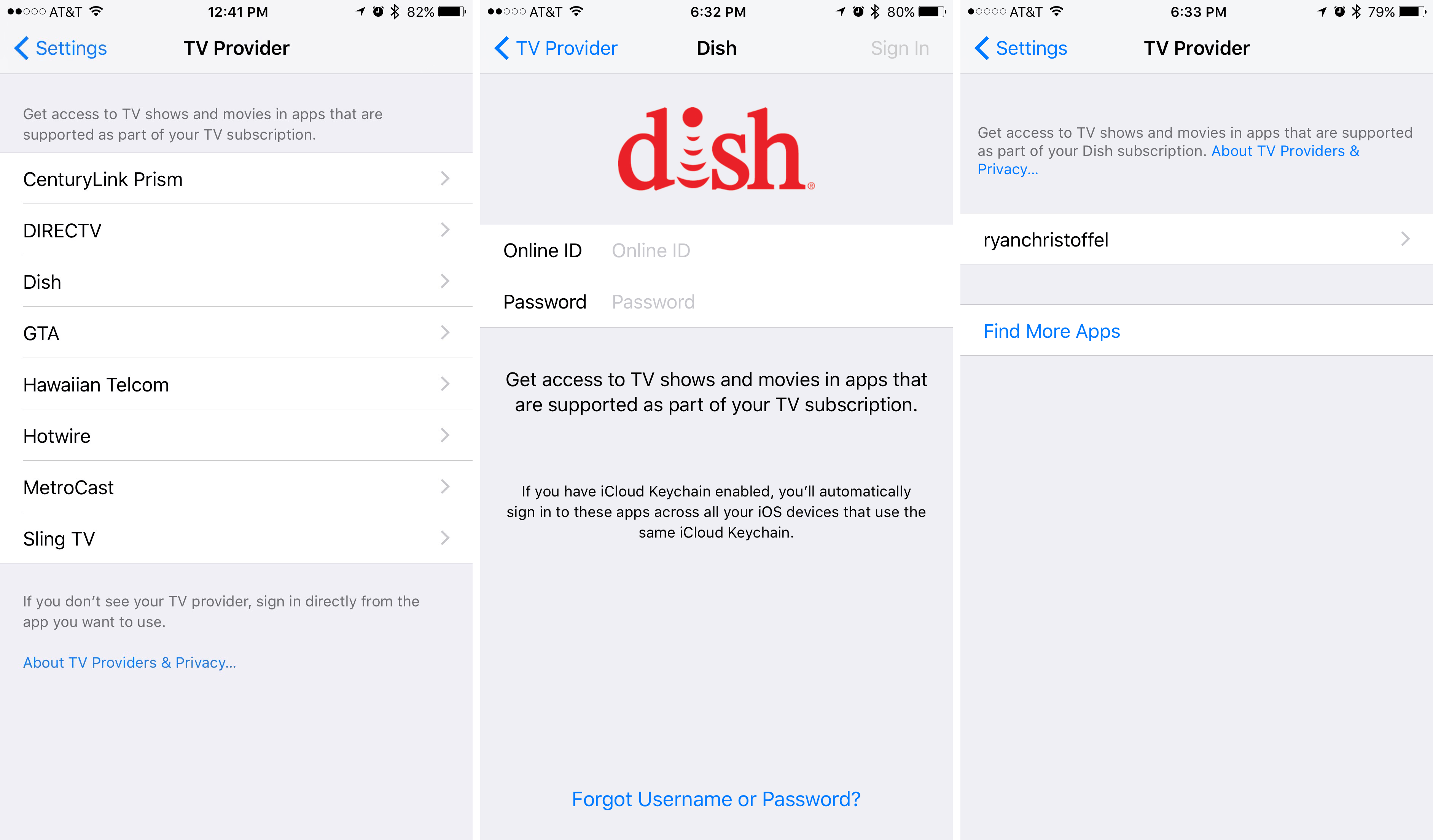
Visit the TV Provider menu in Settings to setup Single Sign-on; on tvOS it's under Settings > Accounts > TV Provider

Visit the TV Provider menu in Settings to setup Single Sign-on; on tvOS it's under Settings > Accounts > TV Provider

In addition to solving the problem of having to log in multiple times, Single Sign-on also solves a discoverability issue on Apple TV. Previously, as a cable or satellite subscriber, you never knew for sure which apps would accept your credentials and which wouldn't. The only way to find out was to download each app and go through the login process, hoping for success. Single Sign-on makes this a non-issue by presenting a list in the App Store of apps tailored to your specific television provider. You can download anything you'd like, and with minimal effort you have access to all the content you qualify for. No searching for apps or additional logins required.

Download an app, then grant permission for it to use your Single Sign-on credentials

Download an app, then grant permission for it to use your Single Sign-on credentials

If you don't pay for a traditional cable or satellite package, there will likely be a lot less content available to you in the TV app. You'll be limited to content that comes from streaming services like Hulu, HBO Now, or Showtime. If the TV app integrated with every major streaming service, this likely wouldn't be an issue, but at TV's launch there are two major holdouts that do not have their content available in TV: Netflix and Amazon Prime Video. The omission of these big players hurts. It weakens what Apple is trying to do with TV. I understand why these companies aren't waving the white flag and giving Apple full user interface control, but if Apple truly wants to offer users the best experience, something has to give. The company must work relentlessly for one of two results: either make these holdouts an offer they can't refuse, or make the TV app such a hit with users that any company not on board will be missing out.

When an app integrates with TV, it presents a permission dialogue when you play a video, or the next time you visit TV after downloading the app – whichever comes first

When an app integrates with TV, it presents a permission dialogue when you play a video, or the next time you visit TV after downloading the app – whichever comes first

It should be noted that Netflix and Amazon Video are not the only video apps without TV integration, but they do seem to be the only major players who are intentionally abstaining from the platform. Similar to how Apple launched Apple TV's Siri search last fall with a limited number of partners, but expanded that roster of partners in the weeks and months that followed, I think we'll see a similar story play out with TV integration.

Speaking of Siri search, the TV app does benefit from the search partnerships Apple formed in the past year, even if those search partners aren't directly integrated with TV. For example, although Netflix won't show its content in the main section of TV, Watch Now, the full catalogue of Netflix titles will still show up through any searches you perform. You can then watch those titles in Netflix with the simple tap of a play button.

Navigating TV

Once you have content providers in place, the TV app goes to work doing what it does best. It presents a clean, attractive, user-friendly ecosystem for videos to call home.

TV's interface follows the design example of iOS 10's Music, News, and Home. It's marked by bold headers, large buttons, and strategic splashes of color, all of which make the app feel very familiar to any iOS 10 user.

On both tvOS and iOS the app consists of four main sections: Watch Now, Library, Store, and Search.

Watch Now

Watch Now is the flagship section of TV, its name communicating the problem it solves. Gone are the days of navigating various apps and menus to find the right video. Nobody wants to go on a content scavenger hunt, we all want to "watch now," and this is where that's made possible.

The content that appears in Watch Now depends on apps you've given permission to connect with TV. Once an app is connected with TV, its content will appear in Watch Now even if you don't pay for that app's streaming service. You won't be able to play the content, however, without first being sent to the source app and signing up for service.

My preference is to keep Watch Now filled only with content I have immediate access to. This is achieved through not giving an app permission to connect with TV unless I pay for its service. If you've already connected the app, its permission can be revoked in the Settings app under TV.

If you set things up as I have, with only content you qualify for in Watch Now, there will be no signing into anything in this section. The beauty of having all video content in one place is realized here; if it's in Watch Now, you'll be able to start watching it with a single tap.

Revoking an app's permission to connect with TV

Revoking an app's permission to connect with TV

When you select a video in Watch Now, it doesn't actually play in the TV app, but in the source app that content is pulled from.2 Despite this, Apple's intent is that users feel as if they've never left the TV app. The execution of this vision is mixed, with tvOS better fulfilling it than iOS. Often a video will load on tvOS without even a sign of the content provider's logo, whereas on iOS, after hitting the play button you're usually greeted not only by a logo, but at times even by much of the video app's interface as your selection loads. The same is true after a video's conclusion. In my testing of the CBS app, after an episode of Supergirl ended on tvOS the next episode of the season autoplayed, whereas on iOS I was bumped back into the CBS menu interface. This experience varies from app to app, but generally speaking iOS frequently breaks the illusion of not leaving the TV app.

Because TV works as a hub for other apps to feed their content through, you must have those video apps installed on a device if you'd like to play their content. Automatic downloads between Apple TV and iOS devices makes it easy to keep apps on all your devices, but in those times you want to watch something on a device that's lacking a particular app, Apple has made the issue simple to remedy. The missing app's video will still appear in Up Next, and upon trying to play it you'll receive a pop up dialogue asking if you'd like to install the app. Hit yes and the download begins, while a new message informs you that the video will begin playing as soon as the download is complete. It's a nice experience that prevents ever having to navigate away from Watch Now to find your device's missing app.

Installing a missing app through TV

Installing a missing app through TV

Apple rightly made Watch Now the primary tab of the TV app in tvOS. It's the first place you'll land upon opening the app, and it's also the place you'll arrive when hitting the Siri Remote's remapped TV button.3

Curiously, Watch Now's position in the tab bar is not the same on iOS as on tvOS. iOS makes it the second tab, following Library. This may be for sake of consistency with the iOS Music app, where Library is also first tab, but in TV it makes no sense. TV's Library only contains iTunes content, which is unlikely to be what you'll want to watch the majority of the time. Hopefully with TV now out in the wild, Apple can learn from users' behavior and move iOS's Watch Now to the prime position it deserves.

Up Next

Up Next is the first section you'll find in Watch Now. It contains several types of videos that TV believes you'll want to watch soon, including:

  • Videos you've started but haven't finished.
  • The next episode in a series you've been watching.
  • Recent iTunes Movie or TV Show purchases you've made.
  • Videos you've added using the "Add to Up Next" action.

All of these are grouped together in your Up Next list, and they're each marked by a couple different identifiers. First, every video shows you which app it will play in, whether it's Hulu, Showtime, etc. Second, an identifier tells you which of the four categories listed above the video belongs to. If it's a video you left without finishing, the word "Continue" will appear along with a bar indicating how much progress you've made in that video. If the video belongs to a television series you're watching, it will say "Next Episode" or "New Episode" along with the season and episode numbers. If the video is a new iTunes purchase it will say "Purchased" and list the runtime of the video. Finally, anything you manually added to Up Next will say "Recently Added."

Videos can be added to Up Next from anywhere in the app

Videos can be added to Up Next from anywhere in the app

On tvOS each video in your Up Next queue is complemented by an accompanying image that fills the screen and provides a glimpse of the content. This is the only portion of Watch Now that contains such an effect, and it's an attractive presentation. iOS goes a different route, opting to fit in with the other sections of Watch Now that follow it. Each offering fits well on the platform it calls home.

Up Next is the primary place for users to watch videos, so Apple has created options for accessing it without even opening TV. This is possible both on tvOS and iOS, but in different ways. On an Apple TV, if the TV app is in your top shelf then Up Next selections will be accessible right above the app icon. You can swipe through these and go straight to your content of choice. On iPhone and iPad, installing the TV widget allows instant access to Up Next items from your Search screen. Optionally, on compatible devices you can 3D Touch the TV app icon to get a glance at the first thing in your Up Next queue and load it directly from there.

Each section that follows Up Next is determined by the amount of content feeding into Watch Now. As such, some of the following sections may appear for you, but some may not.

What to Watch

Each titled highlighted here is given greater screen real-estate than most of the content in Watch Now, and as such each includes a brief description of the title along with a photo and genre.

TV Spotlight / Movie Spotlight

There's no apparent rhyme or reason to content appearing here, other than that you're paying for it through your various subscription services, so TV thinks you'll probably want to see it.

Browse by Category

This section contains a few very broad categories, but each leads to menus full of more specific options.

  • TV Shows
  • Movies
  • Kids
  • Collections

Visiting the TV Shows or Movies sections presents you with many of the same things you might see in Watch Now, such as Top or New TV Shows or Movies, as well as curated collections of content tied together by a theme. The one unique aspect of these sections is that each contain a list of genres. Selecting one of these genres, such as Comedy, Thriller, or Animation, presents you with more video options than you might see in Watch Now. So if you want to discover something new, and you're in the mood for a certain genre, this is a great way to find what you're looking for. Another nice bit of curation for anyone with young children: the Kids section includes content that's categorized by age groups, so ages 2-4, 5-7, and so on.

New TV Shows

New TV Shows has a title that may be a bit misleading. These are not newly launched TV shows, but instead shows with newly available episodes. Content is arranged chronologically from newest to oldest, so shows with the latest episodes will appear first. This is a handy way to keep up with which shows have aired new episodes most recently, though if you already watch those shows, you'll likely see them in Up Next first.

Curated Collections

The next section in Watch Now is reminiscent of the topical collections Netflix puts together. Apple's team has assembled a number of unique collections that tie several TV shows or movies with a theme that transcends simple genre. Each collection has a title and a short tag line that either clarifies what the title refers to or merely serves to add written flavor.

Examples of several curated collections

Examples of several curated collections

Top TV Shows / Top Movies

These next sections of Watch Now are self-explanatory, each containing a list of content recommendations you can horizontally swipe through.

Apple provides no details about how videos land in these sections, but presumably what's offered up here is the most viewed content from each of the various apps feeding into Watch Now.

Recently Watched

The last section in Watch Now is, perhaps appropriately, one you may not utilize too often. It simply contains a running list of the last several videos you've watched in the TV app. The main use I could see for this is not rewatching videos, but easily referencing them if you want to tell someone about that great show or movie you just watched. No need to hunt it down, simply open TV and there it is.

Library

Following Watch Now,4 the next main section of TV, Library, is home to all movies and TV shows you've ever purchased through iTunes. On iOS it replaces the now-removed Videos app, while on tvOS its utility overlaps with the iTunes Movies and TV Shows apps, but those apps are still around.

If you regularly purchase video content from iTunes, this section will serve the same essential purpose as Videos once did, albeit with a nicer interface. But if you never buy videos from iTunes, there may be absolutely nothing for you to see here, which is a shame for a section with so much prominence in TV.

Navigation in Library is done through a simple menu in the upper left-hand corner that contains the following options:

tvOS

  • TV Shows
  • Movies

iOS

  • Recently Added
  • TV Shows
  • Movies
  • Downloaded5

On iOS, Movies and TV Shows can be sorted either by title or by genre, while tvOS gives no sorting options; it defaults to sorting by title.

Both menus are self-explanatory. The interesting point is not in what's there, but in one option that isn't there on the tvOS side. While iOS allows you to download content as you wish and store it on-device, there is still no user-facing system to do this on tvOS. There's a system in place, but it isn't one that users have any control over, and that can lead to some frustration.

On one hand, I've been pleasantly surprised at times to begin watching a video and find that it's already been fully downloaded. For some reason tvOS thought I would want that video on hand, which is a nice bit of behind-the-scenes magic.

I don't have any problem with my Apple TV downloading what it thinks I'll be watching soon. The frustration lies in the fact that I can't manually tell it to download – or delete – anything. If I'm going to have friends over for a movie night, best to have the film downloaded and ready to go. Or if I want to take my Apple TV on a trip so I can watch movies on any hotel room's television, hotel Wi-Fi won't suffice. A little more control here would be nice.

Store

The third main section of TV, Store, is the place to go when you'd like to funnel more content into Watch Now. The first thing you'll see under the Store heading is a group of large banner images highlighting featured content from various apps. These banners each focus on a specific show, such as Westworld for HBO Now or The Big Bang Theory for CBS. But even though a show is being highlighted, the banners are ultimately advertising not the shows, but the apps for those video services. Selecting a banner will take you to the App Store page for that app, not to the specific show's listing in Apple's video database.

A few simple sections follow the featured banners in Store.

New Releases on iTunes

This is a nice alternative to visiting the full iTunes Store to search for what's new. At launch this section consists only of Movies, not TV Shows, but it's possible that may change in the future. Selecting one of the movies brings you to that title's detail page.

Buy or Rent on iTunes

Here you'll find a few simple options advertising categories of iTunes content such as Movies or TV Shows, Movie Bundles, and Free TV Episodes.

Start Watching Now

Each of the apps highlighted here feature video content that can be accessed via subscription, with no traditional television plan required. Most of these are paid subscriptions, but this list also includes apps with free video streaming such as The CW.

Watch with Your TV Provider

This next section offers apps with videos that can be accessed by those who have not yet joined the cord-cutting ranks. They allow signing into the account you hold with your television provider to gain access to content. Unfortunately these listings are not specific to the plan you have, so it's possible that downloading one of these and attempting to sign in will do you no good. If you don't pay for the channel already through your TV provider, they won't give away their content for free here.

Search

The last of TV's main sections, Search, may not be the most exciting tab, but it is one everyone will have to use at some time or another, and Apple has done a few nice things here.

First, search is impressively fast. On my Apple TV, 12.9" iPad Pro, and iPhone 7 Plus I can begin typing a query and get quick, live results that continually adjust as I keep typing, and there's very little lag between keys being typed and search results being filtered. Speed is one of the most important parts of any search engine, and Apple has gotten this one right.

Search results include Movies, TV shows, and Cast & Crew. It's important to note that this type of search is not the same as a Siri search you might perform, meaning you can't search by genre or other abstract terms (e.g. James Bond films); search terms are very specific. For Movies and TV Shows, only title searches will do. For Cast & Crew, you have to search by name. And there is no crossover between these categories. So if you search "Doctor Strange," it will find the Marvel film, but it won't find Benedict Cumberbatch's actor profile.

I haven't hit it big in Hollywood just yet

I haven't hit it big in Hollywood just yet

The main search page contains two helpful lists on it: Trending Movies and Trending TV Shows. Depending on what you're looking for, these may save you from even needing to make a search. And unlike trending searches you might see in Apple Music, which list only strings of text, each of TV's trending items is accompanied by official artwork, making them more pleasant to navigate.

Selecting a title from a search brings you to a rich page full of helpful information about that show or movie, which I will cover in full detail in the next section. Also, I should note that search results include some unreleased videos as well. If an item is available for pre-order on iTunes, it will show up in TV's search results with the full information page.

Unreleased movies appear in search results with the option to pre-order through iTunes

Unreleased movies appear in search results with the option to pre-order through iTunes

TV's Search section does a lot of things right, but there is one notable omission: at this time there is no available history of past searches. Apple Music has this feature, and I think it would be just as useful here as it is there. Hopefully we'll see this added in future updates.

Miscellaneous Extras

The tabbed interface of TV ends with the Search tab, but there are a few other features and design touches that deserve mentioning.

Rich Content Details

Since its introduction in fall 2015, tvOS has included a rich database of information about movies and TV shows. Selecting a title brings you to a page filled with helpful information, such as a film's runtime, related titles, and more. With the iOS version of the TV app, all of that information is now presented on the iPhone and iPad in a way that fits best on those platforms.

As you can see below, these content screens on iOS follow the design lead of the TV app as a whole, and as such they're lovely to look at. Movie pages tend to have more information than that of TV shows, but both provide just the sort of data I'm usually looking for when researching a title. And that is true on both iOS and tvOS.

Below is a breakdown of what the average title's page consists of. I will focus on the iOS presentation of this information, but it is all available on tvOS as well.6

Title Heading

The first thing you see on a title's information page is a beautiful header image that gives the page its own unique flavor. Below this is the title itself, plus official artwork such as a theatrical poster, and a bevy of quick-hit info including genre, MPAA rating, which services the title is available from, film summary, and more. Lastly there is a "Play in ___" button and a hidden menu behind the ellipsis containing other options to watch the video. These include services that may not integrate with Watch Now, such as Netflix.

Trailers

Trailers all load in-app, and on the iPad you can view them using Picture in Picture. Swipe horizontally to navigate through them all. Depending on the title you're viewing, you might find movie clips in addition to the list of trailers.

Seasons

For TV shows, a Seasons section replaces the Trailers section. You can view all episodes from a season, with each episode represented by its title and a thumbnail. Tapping "More Seasons" lets you switch to a different season so all of its episodes will appear in-line.

When you tap on an episode, you're presented with a larger version of the episode's photo, plus show runtime, a description of the episode, and an "Available On" section at the bottom that includes action buttons. Each button accompanies services where that show is available. The three types of action buttons are:

  • Play - This show can be played immediately with no further action.
  • Open - This show is available in a certain app, but you need to open the app and potentially sign up for that service before playing it.
  • [Cost] - The last type of button is a price you can tap to purchase the show from iTunes.

Related

A simple list of content suggestions for other movies or TV shows that may interest you. In my experience these have been fine, albeit not the best I've seen from a video service.

Ratings and Reviews

First up is an average rating from iTunes viewers, then the Common Sense Media rating, and lastly two data points from Rotten Tomatoes: the average Tomatometer score, and quotes from critics' reviews of the film.

Cast and Crew

You can swipe through a list of featured actors and crew members, each of which lists their name, their role (such as name of the character they play, or their title as Director, Producer, etc.), and their headshot.

Selecting a member of the cast or crew will take you to their own dedicated page.7 Each of these contains the person's name, headshot, date and place of birth, and a short bio from Wikipedia if available. Below that you can find the person's filmography, which is divided into several different categories depending on which different roles they've played in film production. Acting appearances are listed under the categories Movies, Shows, and Guest Appearances. Major behind-the-camera roles are each listed as their own category, such as Director, Actor, and Writer. Though all of these categories are useful, I find the Guest Appearances section to be particularly special because it highlights videos you probably would never have known about otherwise. If you're a fan of a particular actor, being able to see all their obscure guest appearances and go to just the right one with a single tap is a great feature.

One bit of Cast and Crew polish worth mentioning is that in certain cases an actor's headshot will differ depending on what title you're viewing. For example, Lauren Graham's photo accompanying Gilmore Girls comes from the time that show was airing, while her photo with Parenthood is a later shot. I've seen this variance of photos primarily within TV shows, while movies seem restricted to a single headshot per actor. It appears Apple is pulling from official cast photo shoots on a show by show basis, which may not be terribly important, but it is a nice touch.

Information and Languages

The final section of each title's unique page repeats much of the information given in the first section, adding little aside from the producing studio and additional languages the content is available in, if applicable.

Goodbye IMDb

As you can see, most if not all of the information you may be looking for about a film or TV show is available within the TV app. Apple has done a great job here, and because of that I know I'll be visiting IMDb far less often in the future.

There is one oddity worth mentioning regarding these content pages. All of the information outlined above is presented when accessing a title from Watch Now, Store, and Search, but not from Library on iOS. In Library on iOS the data presented to you is less comprehensive than what I've outlined. There are no trailers, related titles, ratings and reviews, or cast and crew photos. It's likely an oversight, but greater consistency would be nice, especially since Library on tvOS doesn't share this issue.

Siri

The team at Apple has worked hard since Siri's debut on the iPhone 4S to expand the digital assistant across all major product lines. The iPad followed the iPhone, then later the Apple Watch, Apple TV, and Mac all gained Siri support. But as Siri expanded to new platforms, it also grew more fragmented. One particularly relevant example of this fragmentation is that when the fourth generation Apple TV launched in late 2015, Siri became an expert in movies and TV shows – but only on Apple TV. You could ask, "What are the best new action movies?" and it would find them for you. Siri even knew the names of some famous fictional characters, so queries like, "Find James Bond films" would work. While all of this new knowledge was great, at the time it was restricted to Siri on the Apple TV. Ask Siri those questions on an iOS device and you would be offered a web search.

In its October keynote that announced the TV app, Apple highlighted one new Siri feature for iOS. In a demo, Apple's presenter used Siri to play a video on an iPad, saying, "Play Brooklyn Nine-Nine." Siri knew exactly which episode was located in TV's Up Next queue and played it immediately. When you know exactly what you want to watch, Siri can be very useful in bypassing the TV app interface altogether.

A Siri feature the company didn't demo in October was the digital assistant's ability to perform complex video searches on iOS. Now any type of search you could make with Siri on the Apple TV can also be done on the iPhone and iPad. So you can say things like, "Show me some great comedies," or, "Let's see some Jennifer Lawrence films," and Siri will get the job done. And just like on the Apple TV, Siri on iOS can also handle follow-up commands to refine searches, such as, "Only the best ones," "Only the new ones," or, "Only the ones from the last two years."

Siri showing off its sequential inference skills

Siri showing off its sequential inference skills

One appeal of the TV app is that it provides the same basic experience across multiple platforms. It's nice that that's true not only for the app itself, but also now for Siri's knowledge base in the realm of video content.

Remapped Button on Siri Remote

Apple has made the interesting decision to remap the Home button on the Apple TV's Siri Remote. In previous versions of tvOS, the button with the picture of a television would take you back to the Home screen. That has changed. Now the same button instead takes you directly to Watch Now in the TV app.

I think this is an interesting decision because it seems to strike a compromise between two viewpoints users may have. On the one hand, since the TV app is meant to be the place to go for all your video watching needs, some might suggest that TV should be the primary interface of the Apple TV – the first place you land when your device boots up. This rationale may be informed by a belief that the iOS-style grid of apps doesn't belong on the big screen. On the other side of the debate there are users who like the standard Home screen. Perhaps they find a grid of apps more familiar and comfortable, or they tend to use their Apple TVs for more than just watching videos.

In a way Apple is meeting the needs of both groups of users with this Siri Remote change. Though the Apple TV will still boot to its traditional Home screen, those who spend all their time in the TV app can reach their destination with a simple push of a button – scarcely ever seeing a grid of apps. These users will especially appreciate the remapped button when finishing up a video, as it allows getting back to TV without seeing the Home screen or the menu of whichever app was playing the video. One button press and you're where you want to be. If, however, you belong to the camp that prefers navigating the Home screen, you can now long-press the Menu button to get back Home. Or, if you really don't like the button change, there is an option in Settings to switch the TV button's function back to what it was before.

Settings

Both tvOS and iOS have a Settings screen for the TV app. In tvOS it's under Settings > Apps > TV, while in iOS you'll find it in the main Settings screen sandwiched between the Music and Photos & Camera options.

TV's options in Settings include:

  • Turning Up Next on or off.
  • Seeing which apps are currently feeding content into TV, and turning that permission on or off.
  • Clearing your play history.
  • iOS Only: Adjusting playback quality and cellular data settings for iTunes Videos.

Pushing the Vision Forward

The TV app has come at a key time in the television industry. Cord-cutting options are multiplying, and that trend will only continue. Services like DirecTV Now are incentivizing cord-cutting by offering a free Apple TV to users. Change in the long-stagnant television industry is finally here.

Apple is playing the long game with its TV app. Its bet is that more and more content providers will integrate over time, making TV more valuable. The biggest outstanding problem is not with the app itself, but with the lack of important integrations like Netflix and Amazon Prime Video. If Apple could get the content those companies offer into the TV app, I'd never have a reason to watch television elsewhere.

As it stands today, TV provides the best experience I've found for watching movies and TV shows, and it provides that experience seamlessly across the Apple TV, iPad, and iPhone. Silly as it may seem, from now on my decisions regarding which movies and shows to watch will be influenced by a new factor: can I watch those things in the TV app? Because if not, I'll be settling for a lesser experience.

I'm sure some people don't mind having to navigate through different apps and interfaces to find what they want to watch. That's fine; to each their own. But for myself, and anyone who wants more watching and less navigating, the question we need to answer is: How long are we willing to sacrifice a great TV experience for the sake of Netflix and Amazon?

Which leads to another question: How many paying customers are Netflix and Amazon willing to sacrifice in order to keep control of their own walled gardens?

Both of these questions may be unanswered for now, but as I said, Apple's playing the long game.

Apple is in the position to provide a television experience that merits the company's name. The fourth-generation Apple TV represented the first step away from viewing television as a hobby, and now the next step has come.

Future improvements can be made, as is true for all products, but what TV offers today is something we all stand to benefit from. It offers the promise of a unified TV experience – if only we'll get on board the Apple train.


  1. Assuming you live in the U.S. and your television provider is one of the Single Sign-on partners. ↩︎
  2. The one exception to this is iTunes purchases played in the iOS version of TV. ↩︎
  3. More on this later. ↩︎
  4. Again, only in tvOS does this order stand true. ↩︎
  5. This only appears if you have content downloaded. ↩︎
  6. Though all the content is the same between platforms, oddly some of the ordering of various sections differs between iOS and tvOS. ↩︎
  7. These pages are currently on tvOS only, but hopefully that will change with a future update. ↩︎

Support MacStories Directly

Club MacStories offers exclusive access to extra MacStories content, delivered every week; it’s also a way to support us directly.

Club MacStories will help you discover the best apps for your devices and get the most out of your iPhone, iPad, and Mac. Plus, it’s made in Italy.

Join Now
12 Dec 23:23

International bike spotting – Alison Piper

by dandy

To help us get through the next couple of colder months, dandyhorse is going to be profiling cyclists from around the world! Folks who love to cycle, here in Toronto and further afield, will give us insight into what it's like to cycle in their cities. Want to add your voice to the bikespotting series? Get in touch with us at: cayley@dandyhorsemagazine.com

Alison Piper, Filmmaker - Glasgow, Scotland

What is it like biking in your city? 

Cycling is the quickest and most enjoyable way for me to get around Glasgow. I’m fully waterproof, which helps.

How are the bike lanes? 

The bike lanes are sporadic, some areas of the city are well equipped with bike lanes and some areas are not. Potholes are an issue, as are cars parking in bike lanes and forcing cyclists out in the road. It's good but there's a lot of work to be done.

What can the city do better?

Where possible, continue to build segregated bike lanes and create better legislation that would enable groups like Sustrans to work in Scottish cities and build cycle routes without spending years navigating bureaucracy. The Bears Way project is a great example of this, it would provide a safe cycle route to in and out of Glasgow, to connecting towns and also to Mugdock country park, but sadly there’s a lot of opposition from Bearsden residents who are concerned that the works would disrupt their commute during the building stage. I find this short-sighted opposition incredibly frustrating.

 Where else would you like bike lanes? 

In the countryside. I often work outside the city and it can be dangerous to cycle on narrow roads. I’d also love to see more protected cycle paths built on roads that are wide enough. There’s an excellent stretch of road past Eaglesham Moor where bike lanes take priority over car lanes. Traffic management like this wouldn’t work everywhere but it’s encouraging to see this kind of pragmatism painted on tarmac in the right places.

What is the relationship between cars and bikes? 

It’s not great. I’m a driver and a cyclist so I get abuse from both sides; a lot of drivers don’t understand which parts of the road cyclists have a right to occupy, and some cyclists can be very dangerous. Last year I nearly hit a cyclist with my car in the dark who didn’t have lights or a helmet on, terrifying. Most people who live in Glasgow are awesome but naturally a few of them arseholes, and some of them drive cars and some of them ride bikes.

If you could summarise city cycling in one word what would it be? 

Efficient.

Alison's most recent short film Stalactites is currently doing the festival circuit. You can learn more about Alison's work over here

Related Articles

dandy Scotland part 1: Kits and kilts

dandyCommute: Chris Sleath of Dynamo Works in Scotland

Story of a bike type in Scotland


12 Dec 23:23

Google’s iOS keyboard with in-app search is now coming to Android

by Rose Behar

Gboard, Google’s in-app searchable keyboard, is now making its way from iOS to Android.

Ever since the app launched in May 2016, Android users have been pining for the keyboard, which allows users to complete Google searches, GIFs and emojis in whatever app they are currently using. Now Gboard is coming to Android in the form of the version 6.0 update to Google Keyboard.

gboard_gif_regularSearch


The update is still rolling out, according to Android Police, but is also available immediately as an APK from Google. Other features noted in the release notes include a pop-out toolbar that allows access to things like themes and settings, an optional dedicated number row, up to three active languages (previously had to switch) and gesture typing (in the manner of SwiftKey).

For more information on how Gboard works, check out our initial post here.

SourceAPKMirror
12 Dec 23:23

Woah, 'Planet Earth II' Ends with a Mega-City Hyperlapse

by Beckett Mufson for The Creators Project

The historically neon-dominated megacity of Hong Kong plays muse to architectural photographersaerial filmmakers, and as of last night's Planet Earth II season finale, David Attenborough. While Attenborough and the Planet Earth team are masters at filming wildlife, they enlisted hyperlapse artist Rob Whitworth to zoom out on the illuminated metropolis for a segment about the effect of electric light on city-dwelling animals, their first look at a man made environment.

Whitworth's impressionistic journies through Barcelona, Dubai, and Pyongyang have earned him a distinct, instantly-recognizable style, even in the wide world of timelapse filmmakers. "By moving time-lapse cameras through cities we created 'hyperlapses' that condense space and time to give a feeling of just how busy cities can be," the BBC describes his process. "Then by using transitions between shots, rather than the conventional cut in the edit, we were able to go on a continuous, seemingly impossible, journey through the urban environment."

Planet Earth II is the combined effort of 22 cameramen and over 40 production staff, who embarked on 117 expeditions in 40 countries over the course of 2,089 shooting days and capturing more than 50 species. We've watched iguanas race with snakes, sloths search for true love, and baby turtles hatch—apparently with aid from the Planet Earth crew—throughout Attenborough's six-part spotlight on a natural world rich with drama. 

Below, watch an extended cut of the Hong Kong hyperlapse without Attenborough's narration.

Planet Earth II Episode 6, Cities was the season finale, but the BBC is airing a compilation episode called "A World of Wonder" on January 30, 2017. Find more of Rob Whitworth's work on his website.

Related:

Meet The Filmmaker Behind Unreal Hyperlapse Tours Of Barcelona

Flow Motion Hyperlapse Offers a Death-Defying Look at Dubai

Take A Timelapse Tour Behind The North Korean Border

12 Dec 23:23

Katniss At The White House

KATNISS EVERDEEN, WHITE HOUSE INTERN APPLICATION by Cora Frazier.

I have wanted to be a White House intern ever since November 8, 2016. That night, my younger sister looked up at me and said, “What are we going to do, Katniss?” and I got out my computer, made a user name and password, uploaded my high-school transcript, and turned to her and said, “Go see if Peeta has any thread and old bread sacks, because I’m going to need business-casual clothes. And a recording device.”

“I’m pleased that soon the manufacturing jobs will be coming back to District 12.”

12 Dec 23:23

HTML Interactive Form Validation

by Chris Dumez

Creating forms in HTML has always been complicated. You first need to write the correct markup, then you need to make sure each field has a valid value before submitting, and finally you need to inform the user when there is a problem.

Thankfully, new features were introduced in HTML5 to make this a lot easier. In particular, the form controls were extended to support constraints, allowing the browser to validate form content client-side, without the need for JavaScript.

WebKit already had partial support for this. It was possible to use attributes on form controls to describe constraints and then query the validity of a form control or a whole form using the checkValidity() API in JavaScript. It was also possible to understand which constraint was violated using the ValidityState API.

However, WebKit did not support HTML interactive form validation, which occurs on form submission (unless the novalidate attribute is set on the <form> element) or using the reportValidity() API. We are pleased to announce that this is now implemented in WebKit and enabled in Safari Technology Preview 19. Upon interactive form validation, WebKit will now check the validity of all form controls in the form. If there is at least one form control that violates a constraint, WebKit will focus the first one, scroll it into view, and display a bubble near it with a message explaining what the problem is.

Validation Constraints

Input type

Some input types have intrinsic constraints. Setting the type to “email”, “number” or “URL” will automatically check that the value is a valid email, number or URL, e.g.:

<input type="email">

Validation attributes

The following attributes can be used to describe constraints on form controls:

  • required: Indicates that the user must enter a value.
  • pattern=“[a-z]”: Indicates that the user must enter a value that matches the JavaScript regular expression provided.
  • minlength=x: Indicates that the user must enter a value that has at least x characters.
  • maxlength=y: Indicates that the user must enter at most y characters.
  • min=x: Indicates that the user must enter a value that is greater than or equal to x.
  • max=y: Indicates that the user must enter a value that is less than or equal to y.
  • step=x: Indicates that the user must enter a value that is min + an integral multiple of x.

Constraint validation

Constraint validation can happen in several ways:

  • It is possible to call checkValidity() on a form element or on a specific form control. This will simply return false if any constraint is violated, and true otherwise. It will also fire an event named “invalid” at the invalid element(s). It is possible to check which constraint was violated using the ValidityState object which is exposed via the “validity” attribute on form controls.
  • It is possible to call reportValidity() on a form element or on a specific form control. This triggers interactive validation of the constraints. In addition to doing the same things as checkValidity(), reportValidity() will also focus the first invalid element, scroll it into view and show a bubble near it with a message explaining the problem.
  • Interactive form validation also happens when submitting the form, unless the “novalidate” attribute is set on the <form> element.

Custom constraints

It is possible to implement more complex validation constraints or provide more useful error messages for an invalid input using JavaScript to do the validation and then using the setCustomValidity() API.

JavaScript can be triggered by listening for a given event (e.g. onchange, oninput, …) on a form control. The executed JavaScript code can then validate the form control’s data and update the control’s error message using setCustomValidity():

<label for="feeling">Feeling:</label>
<input id="feeling" type="text" oninput="validateFeeling(this)">
<script>
 function validateFeeling(input) {
   if (input.value == "good" || input.value == "fine" || input.value == "tired") {
     input.setCustomValidity('"' + input.value + '" is not a feeling');
   } else {
     // The data is valid, reset the error message.
     input.setCustomValidity('');
   }
 }
</script>

Validation message bubble

Upon interactive form validation, a bubble with a message explaining the problem will show near the first form control that has invalid data, like so:
validation
There is a default set of localized validation messages for builtin constraints. If you wish to customize the validation message, consider using the setCustomValidity() API. Note that WebKit also supports the JavaScript internationalization API which can help with the localization of custom validation messages.

Conclusion

HTML interactive form validation is now supported in WebKit and enabled by default in Safari Technology Preview 19. Please give our live demo a try and experiment with the feature. Bug reports are welcome.

12 Dec 23:23

State of the Word, 2016

by Matt

The full video and Q&A from 2016’s State of the Word last week in Philadelphia is now online. This year was especially exciting because it wasnt’ just a look back at the previous year, but sets out a new direction for where WordPress will be in 2017 and beyond.

If you want just the slides, here they are:

Like every year, there was a ton of help bringing this together. Mark Uraine led the slides, and at various points these folks pitched in as well: Mel Choyce, Tammie Lister, Michael Arestad, Ashleigh Axios, Ian Dunn, Corey McKrill, Martin Remy, Josepha Haden, Alex Kirk, Marina Pape, Alx Block, Cami Kaos, Matias Ventura, Donncha O Caoimh, John Maeda, Barry Abrahamson, Nikolay Bachiyski, Chrissie Pollock, Sam Sidler, Boris Gorelik, Dion Hulse, Brooke Dukes, Sarah Blackstock. I also got input and suggestions from Petya Raykovska, Tony Perez, Joe Casabona, Helen Hou-Sandi, Jon Bossenger, Jason Cohen, Daniel Bachhuber, Drew Butler, Ryan Boren, Andrew Roberts, Joost de Valk, Stephane Daury, Dion Hulse, Gary Pendergast, David Bisset, Ryan McCue, Alex Shiels, Brian Krogsgard, Joe Hoyle, Sean Blakeley, Andrew Nacin, Mark Jaquith, John Blackbourn, and thank you to Rose Kuo for inspiring the poetry theme which featured prominently this year.

Tavern and Post Status wrote up the talk itself. As a follow-up I did interviews with both to expand on some of what was discussed in the speech. The Post Status one is now up and you can watch it here:

12 Dec 23:22

Long awaited TTC Presto rollout won’t take place until 2018

by Jessica Vomiero

Presto machines have been popping up all over the city of Toronto, all with the understanding that the format would eventually become the city’s one-size-fits-all transit solution.

Eventually, the TTC will phase out other payment methods like Metropasses and tokens, to replace them with Presto. It may take a little bit longer for that to happen, as the TTC’s Presto likely won’t happen until 2018.

The Presto rollout was supposed to be completed part way through 2017, though the date was pushed back a few months ago. Original reports from MobileSyrup go so far as to mark the original completion date for the end of 2016.

The Toronto Star recently reported that this won’t happen until sometime in 2018, and no estimated date has been announced. In addition to this news, fare prices are also going up on January 1. Happy holidays.

Source Toronto Star
ViaBlogTO
12 Dec 23:22

Computer Science Is Not That Special

by Eugene Wallingford

I'm reminded of a student I met with once who told me that he planned to go to law school, and then a few minutes later, when going over a draft of a lab report, said "Yeah... Grammar isn't really my thing." Explaining why I busted up laughing took a while.

When I ask prospective students why they decided not to pursue a CS degree, they often say things to the effect of "Computer science seemed cool, but I heard getting a degree in CS was a lot of work." or "A buddy of mine told me that programming is tedious." Sometimes, I meet these students as they return to the university to get a second degree -- in computer science. Their reasons for returning vary from the economic (a desire for better career opportunities) to personal (a desire to do something that they have always wanted to do, or to pursue a newfound creative interest).

After you've been in the working world a while, a little hard work and some occasional tedium don't seem like deal breakers any more.

Such conversations were on my mind as I read physicist Chad Orzel's recent Science Is Not THAT Special. In this article, Orzel responds to the conventional wisdom that becoming a scientist and doing science involve a lot of hard work that is unlike the exciting stuff that draws kids to science in the first place. Then, when kids encounter the drudgery and hard work, they turn away from science as a potential career.

Orzel's takedown of this idea is spot on. (The quoted passage above is one of the article's lighter moments in confronting the stereotype.) Sure, doing science involves a lot of tedium, but this problem is not unique to science. Getting good at anything requires a lot of hard work and tedious attention to detail. Every job, every area of expertise, has its moments of drudgery. Even the rare few who become professional athletes and artists, with careers generally thought of as dreams that enable people to earn a living doing the thing they love, spend endless hours engaged in the drudgery of practicing technique and automatizing physical actions that become their professional vocabulary.

Why do we act as if science is any different, or should be?

Computer science gets this rap, too. What could be worse than fighting with a compiler to accept a program while you are learning to code? Or plowing threw reams of poorly documented API descriptions to plug your code into someone's e-commerce system?

Personally, I can think of lots of things that are worse. I am under no illusion, however, that other professionals are somehow shielded from such negative experiences. I just prefer my pains to theirs.

Maybe some people don't like certain kinds of drudgery. That's fair. Sometimes we gravitate toward the things whose drudgery we don't mind, and sometimes we come to accept the drudgery of the things we love to do. I'm not sure which explains my fascination with programming. I certainly enjoy the drudgery of computer science more than that of most other activities -- or at least I suffer it more gladly.

I'm with Orzel. Let's be honest with ourselves and our students that getting good at anything takes a lot of hard work and, once you master something, you'll occasionally face some tedium in the trenches. Science, and computer science in particular, are not that much different from anything else.

12 Dec 23:22

Bring in the Goddamn Adults Already

Like every crank who has been in the startup world for awhile, I’m starting to appreciate experience.

Tech’s disruption fetish

The tech industry pushes such a youngin’s narrative: take kids fresh from their second year of university, shove them into a venture-backed position, and kaPLOWEY! Money and fame rains from the sky! Money party time!

It makes sense, though: their half-semester course in undergraduate sociology definitely qualifies them to manage their employees’ livelihoods.

Most of this focus is on disruption, which, come to think about it, used to be a negative word back when it happened to your water supply or the regional power grid. Now it’s good to disrupt old industries, and we throw a lotta bright-eyed bushy-tailed kids on magazine covers to promote that. And some extent of it is true: younger perspectives lend themselves toward being ignorant enough to try something new, to rethink unchanged processes. Granted, that can go hand-in-hand with the “most startups fail” narrative, but who am I to get in front of a good cliché.

It’s different

The thing that kills me — and I hear it every few months — is when young startup founders make dumb decisions because they don’t have any historical context to inform their decisions. They haven’t been there before. And yeah, that tends to work for product, where you’re inventing something new, but there’s a really good chance you shouldn’t be experimenting with your people.

Time and time again, the young startup promotes their longest-tenured young engineer to become CTO of their 20-something startup. And it makes sense on the surface, because it’s their “best” engineer. And why not? They’ve been there for so long that they know the system they’ve built more than anyone else.

But now they have two problems: they lose their “best” engineer, and on top of that, they gain what’s probably a shit manager.

I’ve heard startups tackle this in all number of manners. One startup was confident when they said, “Yeah, we’ll send him to take management classes and spin him up to speed in no time; he’s a super fast learner”, neglecting to realize that he’s a fast learner when it comes to new programming languages, not understanding humankind.

Do you know who the best managers were early on at GitHub? The ones who had done it before, preferably for years, and preferably at companies who had a strong management culture (think Microsoft, for example).

Yes, you can A/B test managers and employees with satisfaction surveys to optimize over time. Yes, you can learn management on the job, starting from nothing. But you’d also be a fucking moron to rely upon that for the whole organization.

With product, if you deploy a breaking change, you can also usually roll back in minutes. Unless you’re building heart EKGs or something similarly mission critical, you can afford to be a bit cavalier. Okay, I’ll even say it: you can be disruptive. And disrupting product is lit, or whatever the kids in Brooklyn say these days.

Disrupting people is not lit. If you deploy a breaking change to your organization — i.e., hire an incompetent manager who is a huge dickbag — you can’t rollback the number of people who quit, go through real emotional issues, or are otherwise become dysfunctional in the organization.

The fresh-outta-college thing

This isn’t a young-versus-old issue, although that can inherently play a part. It’s a matter of experience, and being exposed to these things, either directly or even indirectly.

I’ve gotten asked a lot over the years whether someone should drop out to instead pursue their dreams of starting a startup. I kinda had some wiggle room initially in my responses, but now the question itself seems kinda mind-boggling to me.

Of course spend at least a couple years working for someone else. There’s such a bonkers amount of lame shit that you learn that will serve you in spades down the line: how does insurance work? How are salaries dealt with? How do good companies deal with firing people? Bad companies? How does product get built competently? What did you like about your experience, and what did you hate? A little bit goes a long way.

Follow people who have that experience

One of the tweets I’ve referred back to over and over again in conversation is this reply from Startup L. Jackson (may he rest in peace):

Sometimes you gotta fuck up — or get fucked up — to learn how to avoid making those same mistakes in the future. And then you’ll make more mistakes, and a few of your employees will run off and start their own thing, vowing to never make the mistakes you made. And then they’ll make their own mistakes.

It’s a wonderfully shitty cycle. 💖