As the article notes, Europe has embraced the MOOC and is creating its own distinct flavour (one that I would say is closer to the original MOOCs than the commercial American products). This article summarizes that movement with reference to numerous resources, including two surveys of the HOME project (Higher education Online: MOOCs the European way), the 2015 JRC-IPTS survey on open education in Europe, and the Porto Declaration on European MOOCs signed by more than 70 organizations.
Much of my time since being on the road for almost all of October has been locked into Reclaim Hosting support (oh yeah, there’s also been conference planning and a newoffice as well). It’s been a fairly intense Fall, and Lauren, Tim and I are not letting up as the next few months will surely attest to. That said, it’s worth taking a moment to point out the reason we have been fairly successful thus far: stellar support.
Reclaimers ratings of their support over last 30 days
I like to remind myself of this because it’s grounding. From the very beginning Reclaim Hosting benefitted greatly from the work we did at UMW, an awesome community (hi ds106!), and a broader need in higher ed for web hosting. But at the end of the day, no matter how much people want to help—and believe me they do—when you’re hosting their personal, course, or institutional sites they just want them online. They also appreciate a heads up when they’re not, because at some point they won’t be. But more than anything they want someone to finally say yes and offer to help them when they’re trying to teach online. I think this last part is where Reclaim has nailed it. While we’re only 3 full-time employees (smaller than most ed-tech groups), I would be so bold to suggest we provide better support than hosts with 10x as many people working for them. The proof is in the pudding, check out the stats from the last 30 days in Zendesk:
Almost 90% of all tickets were answered within 45 minutes as opposed to the industry average of 16 hours! Additionally, we have almost 5x as many tickets as the industry average. Earlier this year we got rid of chat support which became onerous, even for a company that responds as quickly as we do. We moved from Intercom back to Zendesk in the Spring. On top of cutting our monthly support software nut in half, we lost nothing in the way of response time after entirely to email. We have discussed possibly offering phone support in the future once we settle into the Reclaim office, but that remains a question mark. And while there are few folks who missed chat, and a few who would appreciate phone support, by and large folks are happy after dealing with us because email doesn’t seem so bad when responses are lightening fast and they solve your issues. Additionally, a move to email-only support forces people to spell-out their issues in more depth which cuts down significantly on the one word requests like “HELP!!!” we would often get in chat.
Now that we’ve been doing this for a few years we also have a sense of the flow of the work. Things slow down significantly around Thanksgiving, but steadily pick up over the last few weeks of the semester. In fact, in the chart above you can see the spike over the last week which tells the story of a semester wrapping up. We will fall off a cliff here pretty soon as classes end and schools break for the holidays. Late December and early January is our window to turn to infrastructure and add new servers, retire old ones, as well as for getting new schools up and running.
I’ve really enjoyed doing support fairly intensely the last 6 weeks, there’s no question Tim is still the master, but I think I’ve become pretty competent in most support issues and migrations—and I’m also studying and employing his method closely. Tim always goes the extra mile for folks, and that has made all the difference. I am also doing a lot of the lower-level server maintenance and support. I’m nothing to behold just yet, but I am building a fairly solid base-level competence as server admin. It’s gotten to the point where I work as much from terminal as I do in the cPanel web interface. Also, StackExchange has become my best friend.
But all of our jobs right now consists predominantly in supporting Reclaimers, and we do it a lot and we are getting even better. A year or two ago it was all Tim, but Lauren and I have been working hard this past year, and I think the load is beginning to be a bit more evenly distributed—which allows us all to do more. We are being deliberate about our growth, and part of that is to make sure we don’t forget why people are excited about hosting with us. We help them do cool things for their day job. We point them to useful WordPress plugins. We’ve been known to recommend a theme or two. We help them setup beta versions of Omeka-S. We experiment with self-hosted instances of Mastodon (nightmare!). We point them elsewhere if they need something beyond a shared hosting environment (their own VPS, a Docker container, Sandstorm.io, etc.). And on and on.
I’m proud of the work we do at Reclaim, and 99% of it is supporting students, faculty, and ed-techs-not that much has changed Tim hates my braggy support posts because I think he believes it’s bad form, but this is the internet and Donald Trump is soon to be the President of the USA—bad form is all the rage!
According to the City, “Robson Square complex is the largest public space in downtown Vancouver, aside from the Seawall and Stanley Park. What sets this site apart from these larger public amenities is that it offers an introspective view of the city. Whereas Vancouver has successfully capitalized on its natural beauty and surroundings, Robson Square represents a tremendous opportunity to celebrate Vancouver’s vibrant urbanism.”
To capitalize on this opportunity, the City released the 800 Robson plaza design concept last week, which promises lots of public space goodies: open space connected to retail and bike lanes, moveable seating, landscaping, defined edges, and lighting.
While these features are nice for adults and seniors, there is no mention of playful features that appeal to children. Whenever I take my son downtown, I feel that there is nowhere for him to run, play and have freedom. This seems to be reserved for the city’s parks and playgrounds.
Even the North Plaza, which is the other missing puzzle piece in Vancouver’s central public square, is currently undergoing a substantial renovation that does not include play features. I am not talking about dropping a large playground into any of these spaces. Kids are creative and there are many simple ways to make public spaces appeal to them. For example, the ground level water features in Chicago’s Millennium Park:
Photo: Project for Public Space Blog
The slide in San Francisco’s Golden Gate Park:
Even the birds in Vancouver’s Olympic Village are a source of fun for children:
Photo: Jason Payne
It is still early days for the Robson Square design concept, but when I took the public survey a few months ago asking what I want to see in the revitalized Square, all the questions seemed to point respondents towards answers that did not mention children and play.
Why do we only consider children when planning playgrounds and parks, but not central plazas?
According to the Project for Public Space’s wheel, one measurement of a successful public space is the number of children, women and the elderly enjoying the space. Some of the design objectives for Robson Square allude to this concept, such as its goal to “be an adaptive and flexible space that appeals to a wide range of users,” and “be welcoming, inviting, and comfortable to all people regardless of age, ability, or
demographic.”
As the city’s largest public gathering space, Robson Square will have to appeal to a broad range of people and uses, so it should not serve as a haven for kids. We can still add simple features that make the space meaningful and fun. Some suggestions would be to add little water features, interesting use of colour (like the rainbow sidewalk on Davie), fun public art, even chalkboards or public pianos, so that parent and guardians can sit and relax while the kids entertain themselves.
If we want more children to live in cities, we need to create space for them to play in our downtown core, not just on the fringes in the city’s parks and waterfront spaces.
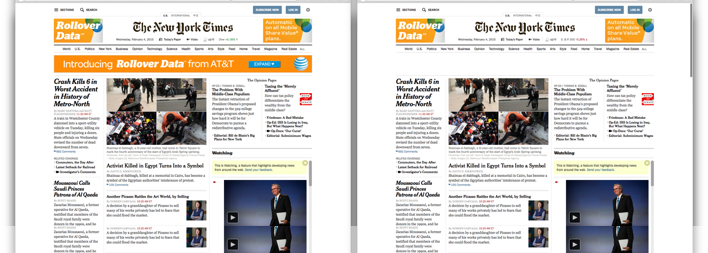
A recently landed feature in the experimental Firefox Nightly build integrates proactive tracking protection for Firefox Nightly users coupled with Do Not Track (DNT). With tracking protection active, ads and tracking technology are blocked before they reach the user’s browser. Subsequently, tracking ads and tracking pixels are not loaded by the browser and are not visible to the user. Further, by not loading the ads, tracking protection speeds up page load times.
NYTimes with Tracking Protection Off and Tracking Protection On.
In January 2015, the Firefox user research team conducted a three-day diary study with twelve demographically-diverse Firefox users in the US to understand their experience with Firefox Nightly’s implementation of Polaris tracking protection. For the diary study, participants were asked to download and install Firefox Nightly. Participants were instructed to turn on Tracking Protection in Firefox Nightly use it as their primary browser for the duration of the study. Participants responded to cues and direct questions while keeping notes of their daily online activities. After the diary study was completed, we conducted hour-long follow-up interviews with four of the participants via Vidyo.
We wanted to answer the following questions:
What does “tracking protection” mean to participants? How do they define it? How do they believe it works?
How does the implementation of tracking protection in Firefox Nightly match participants’ mental models of what tracker blocking means?
Does tracking protection disrupt participants’ current experience of browsing the web?
Findings and Observations
Definitions of Tracking and Tracking Protection Most participants understood that tracking involved a third party using a tool or technology to identify unique browser users and to collect data about those unique users’ activity online. Participants provided different descriptions of how they believe tracking works and what information being tracked. Most participants used more general vocabulary to describe the more tangible aspects of tracking, such as tracking technologies track “my likes based on my website visits” (P15) or “what I might be interested in.” (P10) A small number of participants described the technical details of how online tracking works with a high level of accuracy.
Who Do Participants Believe is Tracking Them? Overall, the majority of participants were able to describe at least one or many employers of tracking technology. While most participants did not describe the ecosystems of tracking and the relationships among companies involved in tracking, they did mention the piece of tracking technology that is most visible to them: targeted ads.
We also asked all the participants: “who do you believe is tracking you online?” Most participants mentioned Google, Facebook, or “marketing companies.” Two participants said the US government was engaged in tracking online activities
Benefits about Tracking Protection Feeling more secure and private. The most commonly cited benefit among participants was the feeling of greater security and greater privacy. Although some participants who said this did not articulate specifically how tracking protection worked or made them feel more private and secure. Some participants clearly believe the tracking protection feature’s labeling and/or its visible effects (e.g., blocking the display of some ads).
Fewer ads, less clutter. Among the participants who noted the absence of targeted ads with tracking protection on generally viewed the absence of targeted ads as positive benefit. Most of these participants viewed ads as “clutter” (P2) on a site or as a “distraction” (P4) from their intended browsing activities. A few of these participants said that they have sometimes found targeted ads helpful, but also said they did not miss the ads when they were absent.
Faster page loading. Some participants believed tracking protection speeded up their browsing experience by blocking tracking technologies that took extra time to load on a page. This extra speed was seen as a benefit. In our follow-up interviews, two participants believed that tracking protection slowed down their browsing because “the browser has to do extra work.” (P2). The other two participants described how tracking protection improved the speed of page loading.
Brings attention to the issue of tracking ads. A few participants noted how their relationship to and understanding of tracking changed over the course of the study. As P2 wrote, “It was very thought provoking because even though I did not use the internet much on my phone or computer I started to think about what a difference tracking can make…”
Relevant for mobile. Further, when asked about tracking protection on mobile, many participants said they hadn’t considered online tracking on mobile before. As P10 wrote, “None of my other devices give me the option of turning tracking on and off. And Firefox Nightly has definitely changed my perception of tracking because being that it gives me the option to turn it on and off it also makes me curious what the other browsers are using…It’s led me to various questions.”
Frustrations with Tracking Protection Confusion when targeted ads disappeared. Some participants found the blank areas of missing content where targeted ads were blocked as visually jarring and confusing. As P8 said, “I did notice unusual behavior with page loading or missing content. My reaction to the missing content were usually were Ads would appear…I eventually closed the page because it was odd.” Eventually, participants who mentioned the blank content grew to like having targeted ads blocked.
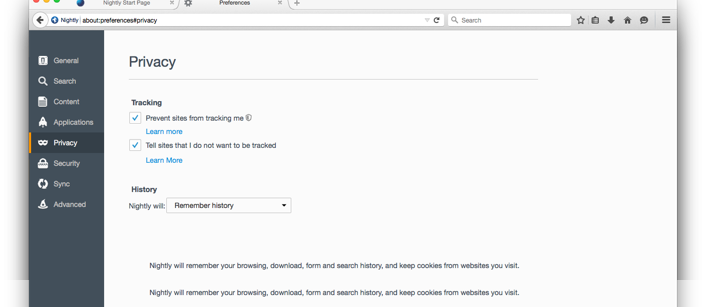
Options/Preferences Labels unclear. Some participants did not understand the functionality of the opt-in selections in the Options/Preferences menu. The two options sound very similar: “Do Not Track” is a technical framework to send a signal to ad servers requesting to opt out of tracking and “Prevent sites from tracking me” refers to the Firefox Nightly tracking protection feature. For these users, these two selections are a distinction without a difference.
Preferences page for Privacy in Firefox Nightly with Tracking Protection activated.
Limited discoverability of interface and alerts. Participants were only alerted to the presence of the shield icon in day two of the study. Only one participant (P15) said he noticed the icon before it was pointed out in the instructions. Once they discovered it, participants did express an accurate understanding of the shield’s functionality to turn tracking protection on and off for the site.
Perceived video playback issues. Video playback, page loading issues, and crashing were issues participants attributed to tracking protection. In our subsequent tests, we demonstrated it is unlikely that tracking protection was the actual cause of instability or video playback issues. Regardless, likely because their attention was focused on the tracking protection feature as the subject of the study, tracking protection was perceived by some participants as the cause of these problems.
Additional Observations
A feature for more than a privacy-centric niche. We sometimes think that privacy protection tools are valuable to only a small portion of privacy-centric users (3–8% depending on the study) or general users at specific moments (for example, using the private browsing window). It is noteworthy how many of the participants found value in tracking protection.
Most participants in this study were not already focused on tracking and privacy-related issues. Tracking protection in Firefox Nightly exposed them to a tool that offered them a good deal more privacy than they were accustomed. Some participants responded positively and wanted to continue to have tracking protection as an option. A few other participants said they would like to use tracking protection after they perceived it becoming more stable. As P2 said, “I do plan to use tracking protection beyond this study because I liked the way things loaded better and I feel safer for some reason. I will not seek out additional tools because I don’t think I use the internet enough that I would need something like that.”
Invisible and visible. Participants focused almost exclusively on the visible manifestations of privacy such as targeted ads. During the follow-up interviews, we asked participants about the aspects of trackers that they could not see. P4 and P12 described ad networks and Google but did not fully convey the complex web of relationships among advertisers and tracking technology. Instead, participants only described the targeted ads they saw or did not see with tracking protection active. This more limited understanding makes a good deal of sense given the abstract nature of privacy concerns and the behind-the-scenes nature of tracking tools.
In order to improve the user experience of the tracking protection feature, we recommended at the time a few changes to the design:
Better labeling in the interface, using more common language to distinguish between “Do Not Track,” “Tracking,” and “Privacy.”
Show the invisible aspects of tracking to users to demonstrate visually (via a counter and a list of blocked trackers) to users what is being block on the sites they visit. Making the invisible elements more visible would allow us to show more fully the impact of tracking protection. As some participants indicated in their diary study, these details are valuable to them and enlightening about tracking in general.
Many participants did not mind targeted ads disappearing, but some did find the missing ads affected the design of sites they visited. Whether users support ads or not, many sites are designed with space for ads. In order to retain the intended design of a site, we recommended filing in these empty spaces with wireframes of the ads being removed. Wireframes would also benefit new tracking protection users who were uncomfortable with sites appearing empty. [This proposal may be technically challenging to implement with accuracy.]
Tracking and privacy are complex and sometimes abstract issues. Introducing the tool with on-boarding and a visual tutorial is essential for adoption and education.
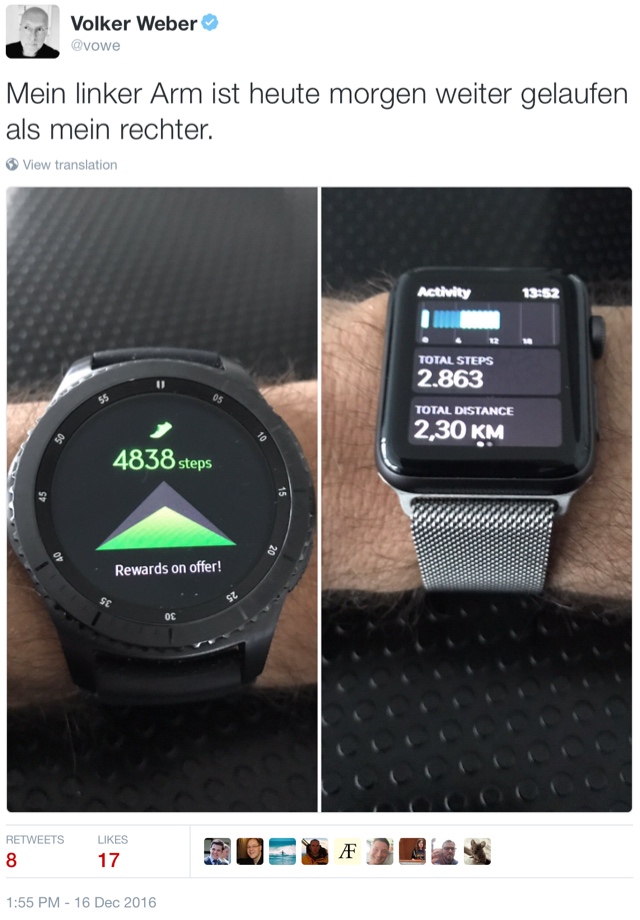
Große Heiterkeit gestern bei diesem Tweet. Die beste Antwort kam von @mosmann:
Rundungsfehler.. Manchmal ist man vom Rumsitzen total fertig und weiß nicht warum,.. dabei hat man aus Versehen 2000 Schritte gemacht...
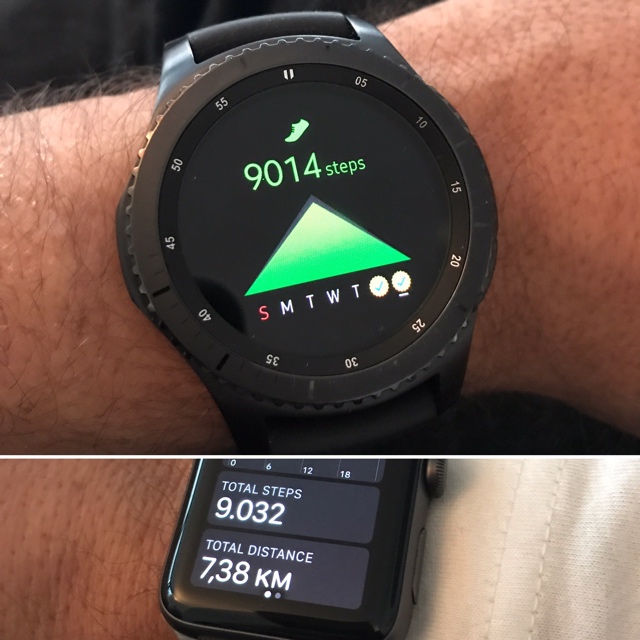
Nein, das war's nicht. Ich hatte der Apple Watch erzählt, ich steige jetzt auf's Fahrrad. Und dann bin ich statt dessen gelaufen. Wenn ich mich nicht einmische, so wie heute morgen beim Brötchenholen, dann sind sich die beiden einig:
Schritte zählen am Handgelenk ist keine exakte Wissenschaft. Abweichungen um 10% sind normal (und irrelevant), größere Abweichungen durchaus üblich. Man sollte die Uhr deshalb nicht an der dominanten Hand tragen. Was man früher ohnehin nicht gemacht hat, um mechanische Uhren vor Erschütterungen zu schützen. Bei mir geht das nicht, da ich "ambidexterous" bin. Ich mag das Wort, es heißt einfach nur beidhändig, im Sinne von "kann beide Hände gleichberechtigt benutzen". Heute morgen stimmen die Werte so genau überein, weil ich die Uhren angezogen habe und gleich intensiv gelaufen bin, ohne andere Sachen zu machen.
Nach gut eineinhalb Jahren mit der Apple Watch, und davor noch einem Jahr mit der Pebble, bin ich der Ansicht, dass die mitgelieferte Software stimmen muss. Was man nachträglich installiert ist oft lieblos oder wenig hilfreich. Bei der Apple Watch benutze ich das Fitness Tracking und die Benachrichtigungen vom iPhone. Dazu die ganzen Hilfsprogramme wie Wecker, Timer etc. Und Apple hat bis zum watchOS 3 gebraucht, bis die Uhr gut nutzbar wurde.
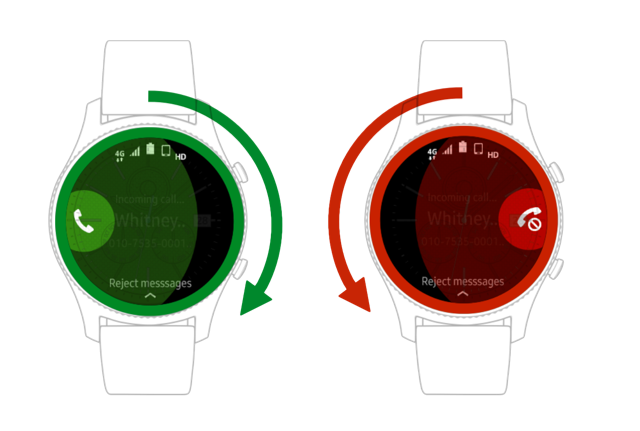
Ich weiß nicht, wie lang Samsung schon übt. Das aktuelle Tizen hat die Version 2.3.2.1 und stammt aus der Ahnenkette Maemo und Meego. Nokia-Fans werden sich erinnern. Und mit dieser Uhr hat Samsung ein sehr überzeugendes Bedienkonzept vorgelegt, das sich im Sinne des Wortes um die Lunette dreht. Mit einem Dreh an diesem großen Rad wechselt man im Ruhezustand zwischen seinen Widgets und löst andere Aktionen aus, oben beispielhaft Annahme oder Ablehnen eines Anrufs. Das funktioniert unglaublich gut, mit nassen Fingern oder mit dicken Skihandschuhen. Das passt zum runden Display. Vieles andere passt nicht so gut. Wenn man etwa Nachrichten oder Emails liest, dann wird der Text zentriert und franst an beiden Seiten aus.
Die Uhr hat nicht nur die Drehlunette sondern auch einen Touchscreen, den man eigentlich eher selten braucht, sowie zwei Knöpfe an der rechten Seite. Die Navigation in Tizen muss man lernen, aber ich habe mich leichter getan als mit dem watchOS.
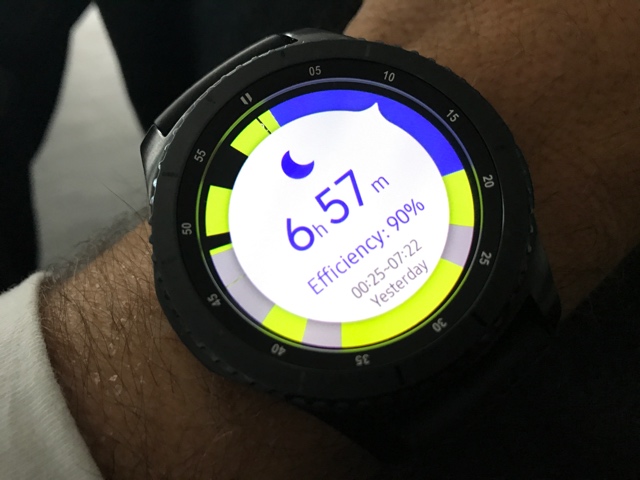
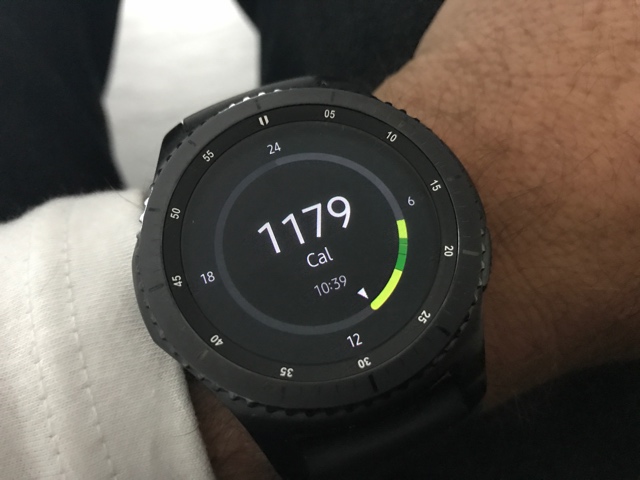
Fitness Tracking kann die Apple Watch gut. Aber S Health ist auch ganz wunderbar. Jeden Tag gibt es eine Übersicht, alle 24 Stunden in einem Kreis. Das ist gewöhnungsbedürftig, weil das Zifferblatt ja 12 und nicht 24 Stunden hat. Hier sieht man zum Beispiel, dass ich gestern knapp 7 Stunden am Stück geschlafen habe.
Der Kreis zeigt auch Ruhezeiten (grau) und aktive (grün) an. Im schwarzen Sektor habe ich die Uhr nicht getragen. Das gilt auch für diese Nacht:
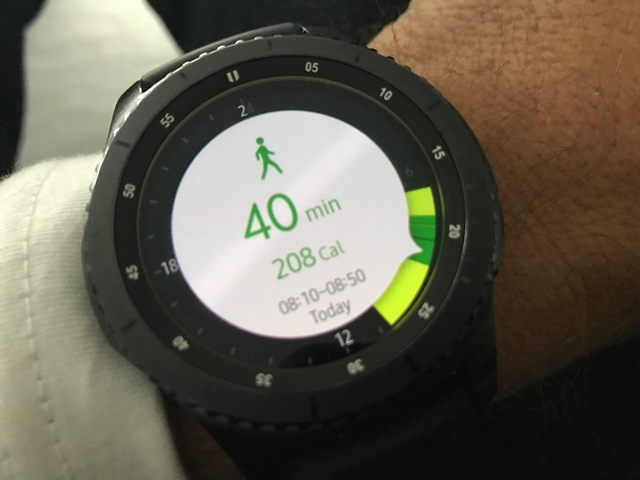
Die Schlaferkennung geht automatisch. Die Uhr erkennt selbst, wenn man einschläft und wieder aufsteht. Sie erkennt auch sportliche Betätigung. Das zeigt zum Beispiel der dunkelgrüne Bereich an. Dreht man an der Lünette, dann zeigt die Uhr an, was sie erkannt hat:
Für Darmstädter: Das ist der Rückweg vom Oberfeld um die Lichtwiese nach Hause in Bessungen. Davor gibt es noch einen weiteren Sektor mit dem Hinweg, genau genommen sogar zwei wegen eines kleinen Schwätzchens. Das Schöne ist, man muss nicht vorab eingreifen. S Health macht das alles automatisch. Und ich hatte weder das Smartphone dabei noch GPS eingeschaltet.
Das ist alles sehr überzeugend. Was übrigens nicht für S Voice gilt, das Siri niemals gefährlich werden kann. Und man sollte bedenken, dass Tizen keine bevorzugte Plattform für App-Entwicklung ist. Am besten nimmt man an, dass es gar nichts gibt, dann ist man ob der Ausnahmen immer hoch erfreut.
We’ve gotten two storms worth of snow in the last three days, and it’s been fun being out and about with my winter bike: a Louis Garneau Sub Zero. It came with Kenda Klondike studded tires, which are a bit narrower and knobbier than the Schwalbe Winter Marathons on my previous winter bike, and they’ve been fine in a variety of snowy conditions.
The only additions that I’ve made to the bike are a rear rack, a Japanese kickstand, and Handlebar Bootie pogies that are now sold under the Metal Tiger brand. The pogies add an easy 10C to the temperature rating of my gloves, and they cut the wind besides.
Also, I swapped out the galvanized chain (that rusted solid after two seasons) with a stainless chain.
I don’t ride this bike nearly as much as my other bikes (since I only ride it during the winter, but I’ve managed just enough so that I’m under $2 per ride).
The only other things I’m going to add are mudflaps to keep my feet drier on those days where there is a lot of snow melt in the bike lanes. Perhaps Buddy Flaps, which have done really well on the pink bike.
Donald Trump’s barnstorming tour across the states that won him the White House continues to feature far more taunts of triumph than notes of healing after a bruising election.
Thursday’s rally in Hershey, Pennsylvania, found the president-elect calling for the mostly white crowd to cheer for African-Americans who were “smart” to heed his message and therefore “didn’t come out to vote” for his Democratic opponent Hillary Clinton.
“That was the big thing, so thank you to the African-American community,” Trump said.
Even for Trump, this is a new low. Praising the outcome of efforts to decrease voter turnout. What a slimeball, sleazebag, asshat.
“Economists predict disaster where none occurs. They deny the possibility of events that then happen. They oppose the most basic, decent, and sensible reforms, while offering placebos instead. They are always surprised when something untoward (like a recession) actually occurs. And when finally they sense that some position cannot be sustained, they do not re-examine their ideas. Instead, they simply change the subject.”
This lively and witty volume by anatomist Abby Hafer examines the question of Intelligent Design by asking, “just how intelligently designed are we?” She begins with the observation that male genitals are vulnerable to all sorts of maladies and discomforts that any industrial designer would immediately remedy, and that any magazine reviewer would ridicule. She immediately sends a letter on the topic to her Unitarian minister, who used the argument in a sermon on Faith and Testicles.
In fact, it would be easy to design people better. Kangaroos have a much easier time with childbirth. Rabbits can eat wood; people have the organ that lets rabbits digest sawdust, but in people it functions only to give us appendicitis. Our ancestors negligently lost a crucial mechanism for producing our own vitamin C: most mammals make plenty of the stuff but monkeys, awash in tasty fruits, didn’t notice that they were broken until they moved to Norway and got scurvy.
Susan Fowler@susanthesquark
Am I the only person that thinks the whole idea behind Universal Basic Income is super condescending and elitist? I can't be.
Significant mental fatigue is one of the side effects of long-term chemo treatment. On a personal level, thinking is compromised. On a social level, conversations become exhausting.
Sometimes it helps me cope, to take a quiet day.
To recap: On Sunday, December 11th, I completed Cycle 24 Week 4. I have Multiple Myeloma and anemia, a rare blood cancer. It is incurable, but treatable. From February to November 2013, I received Velcade chemo through weekly in-hospital injections as an outpatient. Since February 9th 2015, I have been on Pomalyst and dexamethasone chemo treatment (Pom/dex).
Weekly chemo-inspired self-portraits can be viewed in my flickr album.
Shortly after announcing its pending shutdown in October, Vine has given its users more information regarding the social media platform’s closure in the form of a Medium post.
The post went on to explain that in 2017, Vine would transition into a “pared-down” camera app called Vine Camera. The camera app will still allow users to make six-second looping videos and either post them director to Twitter or save them your phone.
Furthermore, the streaming service will be releasing a way for anyone that followed you on Vine to easily follow you on Twitter as well. A “Follow on Twitter” notification will reportedly release soon.
All the Vines recorded on the service will be preserved on the vine.co website, and in addition users will now be able to download their Vines through the app or through the website.
Twitter acquired Vine in 2012 for a reported $30 million before the app launched in 2013. Three years later, in October 2016, Twitter announced the discontinuation of Vine in the midst of its own financial struggle.
While it’s strange to witness the fall of a video app in the age of video, it seems that Vine just couldn’t keep up with the Instagrammers and Snapchatters of the world.
With Google’s Daydream View headset and platform now out in the wild, some have questioned whether Samsung would even opt to release another Gear VR headset.
According to Samsung electronics vice-president Sung-Hoon Hong, however, the South Korean tech giant is actually working on two new virtual and augmented reality headsets: a successor to its Gear VR mobile-powered headset, and a mixed reality device similar to Microsoft’s HoloLens or the Magic Leap.
Wearable Zone, a wearable-focused publication, put together a long writeup of Hong’s recent talk at this week’s Virtual Reality Summit in California. During the presentation, Hong revealed that Samsung is working on a “light field engine” that has the ability to product “really, really realistic” holograms and that they look “really touchable.” He also emphasized that augmented reality has better business development possibilities than virtual reality and hinted that the experimental technology could be revealed at this year’s Mobile World Congress in February.
The Gear VR, released back in 2016, was co-created with Facebook owned Oculus. Samsung has also promised to release a phone that’s compatible Google’s Daydream, which could perhaps indicate the company plans to support both virtual reality platforms simultaneously.
Just a few a few months ago Samsung released an upgraded, slightly more comfortable Gear VR that features USB-C. Following the debacle that became the overheating Note 7, however, the tech giant has remained relatively quiet about this headset.
According to recent data released by the Windows Phone app developers network AdDuplex, 78.2 percent of Microsoft mobile OS users are still running Windows Phone 8.1 despite the fact that several of the most popular Windows Phone devices can be updated to Windows 10 Mobile, which comes with numerous refinements.
This might have something to do with the upgrade process, which – unsurprisingly for Microsoft – is unnecessarily convoluted. Whereas Apple and Android users get a notification if there is an OS upgrade available, owners of Windows phones need to install an app to see if their device is compatible with Windows 10 Mobile.
Thankfully, the process after that is straightforward and we’ve made it even easier with our guide to upgrading below. So, if you are still on Windows Phone 8.1 and are ready to make the leap to 10, read on:
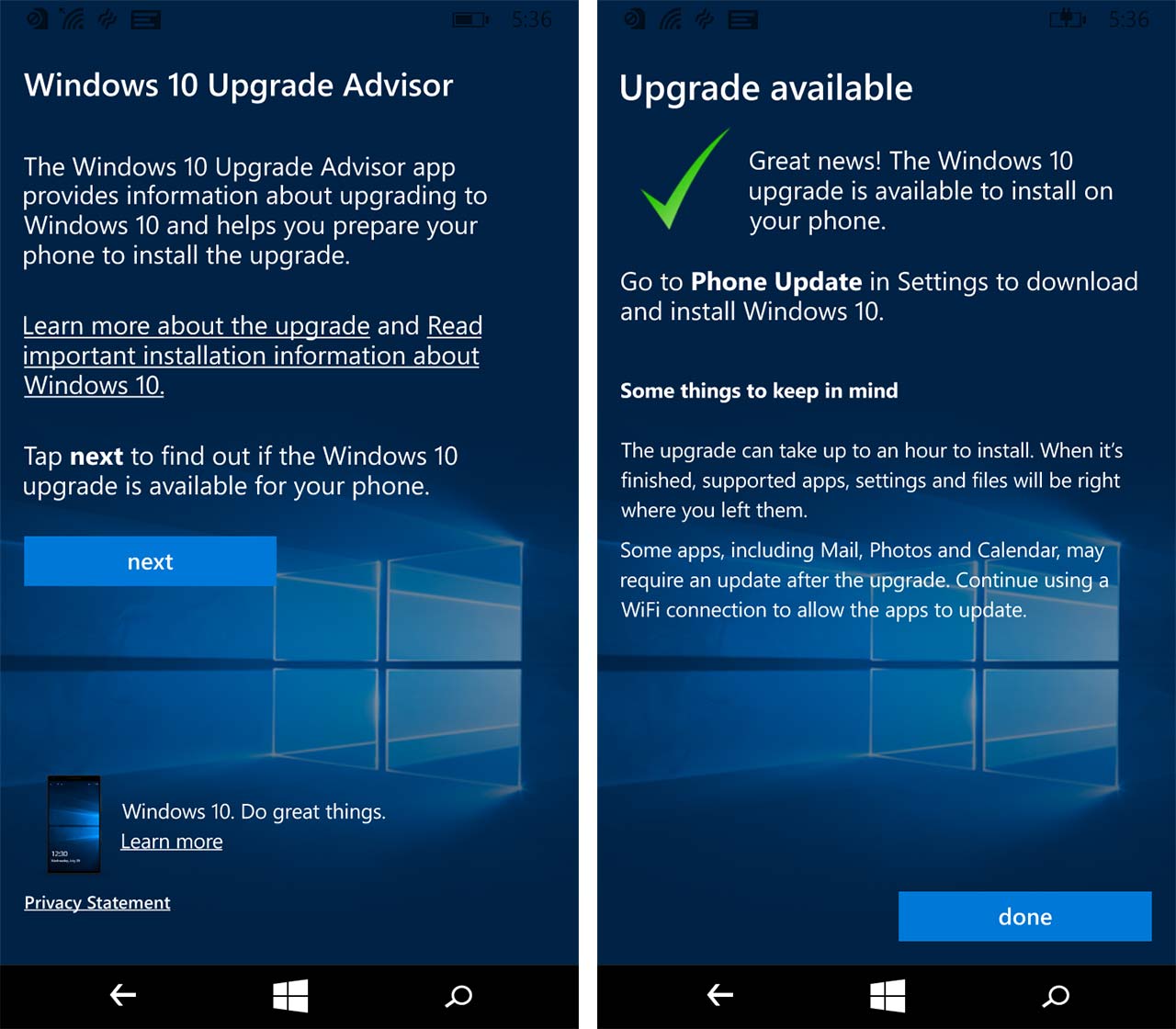
The first thing you need to do is open the Microsoft app store by tapping on the Store icon either on your Start Screen or in the alphabetical list of apps displayed when you swipe the Start Screen from right-to-left. Once the Store app has opened, you need to tap on the magnifying glass at the bottom to activate Search. Typing in “Upgrade Advisor” should bring up the icon for the app. After you tap on this you should see the app’s Overview page in the Store. Tap on ‘install’ at the bottom of the screen to download and install the app.
Once the app has downloaded and installed, a ‘view’ option should appear at the bottom of the screen. Tapping on this takes you to the list of apps that are installed on your phone and you should see Upgrade Advisor highlighted. One of the improvements made in Windows 10 Mobile is to eliminate this extra step whenever you want to open an app as soon as you have installed it. In Windows 10 the ‘view’ option has been replaced by ‘Launch’.
Launching the Upgrade Advisor app in Windows Phone 8.1 will bring up a page that briefly explains what the app does. If you want to see if your device can be upgraded, tap ‘next.’ The app will check for available updates and respond with “Great news!” if your phone is Windows 10-compatible. It also warns you that the upgrade process can take about an hour so if you need to have your phone available, do the update at another time.
When you are ready to perform the upgrade, tap ‘done’ to close the app. Then open your phone’s Settings app and look for ‘phone update’. In Windows Phone 8.1 this is under ‘update+backup’ near the bottom of the list of options in the Settings app. Swipe up until you find it, tap on it and select the option to check for updates if an available update is not already displayed. If an update is available, go ahead and install it.
It might take some time to download the update and the status of the download will be displayed at the top of the screen. Once the download is complete, installation will begin. This will involve your phone rebooting and two cog wheels will appear on the screen with another status bar showing the progress of the update. Once that is complete, your phone will restart and begin a third stage of updating that includes yet another status bar and a cheery message assuring you that the whole process will be worth the wait.
Your phone might reboot again but eventually the Windows 10 Mobile lock screen will appear. The font might be smaller but otherwise it won’t look much different to the Windows Phone 8.1 lock screen. You can still access your phone by swiping up, too. When you do that, you will find a more refined Start Screen and more developed look overall that is consistent with the desktop version of Windows 10.
You are almost done but your phone might still need what Microsoft is calling its Anniversary Update. This is a major update that makes several tweaks to the Windows Mobile operating system. Some apps won’t install without it and you’ll get a message saying as much if you try to download them from the Store. To check if the Anniversary Update is available, go to your new Settings app, swipe almost to the bottom of its main menu, look for Update & Security and then tap Phone Update. Search for an update if one is not displayed. If you are prompted to do so, restart your phone as directed. You should also check back periodically thereafter in case there are more updates to install.
Microsoft has announced a Holiday Super Sale, including deals on PCs, Xbox, and mobile devices. It includes free expedited shipping, for people looking for “last minute gifts”. Standout deals include:
$180 off select Surface Pro 4 tablets, and $328 off select bundles
laptops as much as 47% off
Xbox One bundles as much as $110 off
$25 off select Xbox One games
up to $30 off Fitbit devices
Lumia 950 XL smartphone on sale $200 off (now only $399)
HP Elite X3 3-in-1 (laptop/desktop/smartphone) $200 off (making it $799)
The sale runs until Monday night at midnight (PST).
Here’s a wrap up post for the UX activities hosted at the Mozilla work week, originally posted by Tiffanie Shakespeare on Medium…
This past work week in Hawaii (aka #mozAloha), the Connected Devices UX team put together the following two activities.
Drink-O-Vate
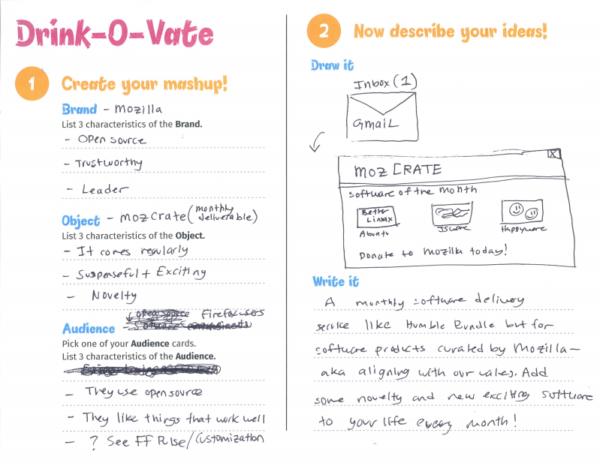
The first was Drink-O-Vate hosted on Thursday after the electives. Using a UX methodology called Mash Ups, people created new and whacky product ideas. For our session, we used the format “what if [a company] created [an object] for [an audience]?” I think one of the harder ones was “what if Polaroid created a dishwasher for people with arachnophobia?” The results can be hilarious, but the method can also be incredibly useful to break out of a brainstorming slump.
Drink-O-Vate was a huge success and everyone who attended our session had a lot of fun. It was fantastic to see so many people from all over Mozilla come out and participate.
An example Mozilla idea from Drink-O-Vate
MyrderHouse
The other activity was MyrderHouse located in the CD Homeroom (Kona 5). This ended up being a collaboration between MoCo and MoFo and was a lot of fun to set up. We provided a dollhouse and props for people to create a short film about their very own IoT murder scenario (basically IoT going sideways). While it was clear that our filmmakers had fun, the location of the activity really hurt participation.
Many thanks to our Drink-O-Vate idea generators, MyrderHouse filmmakers, MoFo collaborators (Kevin Fann, Jordan Gushwa, and Natalie Worth), Emily Dunham, and the CD UX team.
Hopefully you were able to participate in one of our activities and we’ll see you in SF!
The CIA officially determined that Russia intervened in our election, and President-elect Donald Trump dismissed the story as if it were a piece of fake news.…
Are we witnessing the death of Chinatown — in Vancouver and across North America? By Douglas Quan VANCOUVER — As dusk fell over Chinatown recently, a line…
Karen Quinn Fung 馮皓珍@counti8
@sillygwailo they should consider the kind of citizen engagement @andreareimer is able to achieve by posting to FB during council meetings.
I have been speaking with several community members about Activate Mozilla, a new campaign that the Participation team has launched.
I believe there are some potential tasks around Nightly that might fit well into Activate Mozilla. To this end, several of us met back in November and hashed out some possible ideas – you can see the notes from that meeting here.
The idea is that we create an Activate Mozilla campaign around something community can work on at a meetup or hackathon, for example. During the last meeting I suggested that bug triage might be one good task. On a daily basis there are new bugs being filed in Nightly that need to be moved into the correct component, or need additional information in order to move along and be fixed. This is a area where community can really have an impact on the Firefox project.
Another area that would be interesting to explore would be to have a campaign around a new feature in Nightly. Each cycle there is feature work being done, and I think our first “proof of concept” for Activate Mozilla may be around an upcoming feature. The work on our end will be create a clear document which explains how the feature is supposed to work, and how
you would go about testing it.
Some of the challenges we may have will be training community to be able to do these tasks – and the solution to that may be a combination of some training events as well as good online documentation. When we first started the Triage Bot project it seems some of the first individuals who triaged did not read the documentation. The end result is that they started triaging bugs and not doing it correctly, which can actually be detrimental to the project. So we do need participants to do some preparation by reading documentation prior to the event, so that they are ready to go when the event happens. This is a technique I employed when I was working on the BuddyUp project, and it worked well from a preparation standpoint.
There are some additional challenges around working with contributors who are at different levels. My approach in this situation is to make sure you have enough mentors and facilitators available with the specific subject area knowledge available to answer questions at the event.
Finally, I have given some thought to ways that we might promote Nightly tasks now that we don’t have One and Done. Someone suggested we try using github. I am definitely open to other suggestions if you have them.
If you are interested in helping with this effort, please feel free to contact me at marcia at mozilla dot com. I am hoping to be able to host several small Nightly themed events (in conjunction with the l10n team) next year, so stay tuned for more information regarding these.


 Tim hates my braggy support posts because I think he believes it’s bad form, but this is the internet and Donald Trump is soon to be the President of the USA—bad form is all the rage!