When Libyan assassins come to a small Vermont town, seeking revenge for a covert US Intelligence operation some thirty years ago, they find that this old man has a good deal left in the tank. To a considerable degree, this is the companion of James Grady’s Six Days of The Condor – the song of Experience to the older book’s paean to innocence, not least because Perry finds a way to redeem the older thriller’s creepy but indispensable sequence of kidnapping and seduction. Plenty of loose ends remain at the end, but perhaps that’s part of the point: stuff goes wrong – often very wrong – and you try to continue with whatever you’ve got.
Last week, I tried and failed to get our little city’s little Democratic City Committee to take a stand, however feeble, against mass deportation.
It’s possible that Trump will be stopped elsewhere, that this struggle it won’t come to our doorstep. Residents of our town cheered pretty much the same notion about slavery in 1830: “liberty and union, now and forever, one and inseparable.” It didn’t work then, and (like pretty much every Massachusetts town) we have an elaborate Civil War monument to remind us what that cost.
Like all those other Massachusetts memorials, it recalls the men who loosed the fatal lightning of his terrible swift sword. Few plaques recall the generations of enslaved black people whose lives fell in the gap between our town’s knowledge that we were wrong and its willingness to take a stand for what was right.
Once we were willing to bear any burden and pay any price. I expect we shall be willing once more. For the moment, it appears that people need to be more thoroughly frightened. I don’t doubt that the Republican Party will, in a short space of time, do exactly that.
With the release of Firefox 52 to all users worldwide, we now have the final Windows XP-supported Firefox release out the door.
This isn’t to say that support is done. As I’ve mentioned before, Windows XP users will be transitioned to the ESR update channel where they’ll continue to receive security updates for the next year or so.
And I don’t expect this to be the end of me having to blog about weird clients that are inexplicably on Windows XP.
However, this does take care of one of the longest-standing data questions I’ve looked at on this blog and in my career at Mozilla. So I feel that it’s worth taking a moment to mark the occasion.
I went to see Goldie playing with (a subset of) The Heritage Orchestra the other day. Was very good. The drumming was magnificent. Equipped only with human hands and arms they'd managed to reproduce the machine gun clatter of early Goldie drum programming / sampling. Something I remember being entranced by because it was so super-human, so beyond human. It was something no human would think to play because they couldn't imagine being able to do so. The computer created a possibility, the humans explored it, and now can push on again.
I wonder if there's a useful metaphor in there about machines/computers/AI as tools and how they'll stretch and subvert the imagination, not just replace it.
Related: I keep thinking about this piece and, particularly, this paragraph:
"Jazz musicians have always improvised over different rhythms but, if you go to a jazz gig these days, you’re likely to hear a lot of musicians playing over the “slugging” beat popularised by the hip-hop producer J Dilla. It’s that wonky, slightly drunken-sounding funk beat that seems to have joined the arsenal of rhythms used by jazz musicians, alongside such mainstays as swing, bossa nova and the jazz waltz. “It’s basically the sound of someone sampling a funk beat on an Akai MPC sampler and editing it wrong,” says Rob Turner, drummer in the Mercury-nominated Manchester jazz trio Go Go Penguin. “Instead of starting the sample at the ‘transient’ – the start of the beat – it starts fractionally after that point. So the snare drums and hi-hats are all in slightly the wrong place. It sounds sluggish and disjointed and slightly screwed up, but it also sounds quite cool. And it’s something that young jazz drummers have worked out how to play. Go around music colleges and you’ll hear student drummers dividing up a bar into countless subdivisions and working how to ‘slug’ fluently – somewhere between ‘swung’ crotchets and ‘straight’ crotchets. Nowadays, so many young jazz drummers have learned to play like that we’ve started to call it the ‘college beat’. It shows you how jazz musicians have thoroughly internalised the hip-hop they’ve grown up with.”
Firstly, that's just interesting and cool. Secondly, I really like the very subtle, very musicianly disdain that radiates from the name 'college beat'. Thirdly, that's a similar thing isn't it? Humans impersonating machine artefacts and stretching their capabilities - and therefore their imaginative possibilities.
The biggest losers under the change would be older Americans with low incomes who live in high-cost areas. Those are the people who benefited most from Obamacare.
For some people, the new tax credit system will be more generous. The winners are likely to be younger, earn higher incomes and live in areas where the cost of health insurance is low.
I am a longtime Keynote user and I am generally very happy with the software. However, there were two problems: I needed to use an Apple device when presenting, and I did not see much affection from Apple for the software. When I moderated the European Cyber Security Challenge I also learned how well you can organize an event if everybody is on the same software. We had two important people in the crew. One was running audio through a mixer remote on his iPad and the other was running all presentations from his PC. There were no breaks in the delivery. He simply froze the projection, loaded the next Powerpoint file, unfroze the projections for the next speaker. It just felt very professional, and that with little effort.
I made the decision to switch to Powerpoint at some point in the future. And then came Surface and with that the opportunity to do live inking during the delivery. That was my style of presentation before there were PCs. I'd just write on the overhead projector. This is back now with Surface. I just put a white page into the slide deck and then write on that when I get there. You can also use that in the Q&A part. Draw a mind map with all the questions and then check them off. Brilliant.
What really helps me in this switch is the fact that my presentations are just photos and very few words on plain white or black slides. I use very few transitions or animations. My signature "Magic Move" from Keynote is called "Morph" in Powerpoint.
That was far easier than expected. And it works on all of my devices, across Windows 10, macOS and iOS.
A Wikipedia discussion of the cost of furniture purchased for the Wikimedia Foundation proceeded this morning to a question that’s increasingly common for Wikipedia:
Kaldari, are you a Jew? Staszek Lem (talk) 03:28, 8 March 2017 (UTC)
Wikipedia has systematically allowed the marginalization of Jews and women by encouraging editors to freely insinuate that any Jew (or suspected Jew) and any woman (or suspected woman) is an irrational agenda-pusher. The anti-Semites behind this, as usual, have suffered no consequences beyond the praise of their Gamergate pals.
Keep in mind the now-daily reports of desecrations of Jewish cemeteries and bomb threats directed at Jewish community centers and elementary schools.
I was in the midst of presenting to a conference in Australia last Wednesday night when it struck me just how amazing some things are that I consider to be ‘everyday’. There I was, getting praise, pushback, and questions via Twitter in realtime while I presented, lag-free, to the other side of the world.
Similarly, I take for granted my blogs, and the ability to connect to people around the world. When I step back and think for a moment, it’s truly amazing to be able to have an idea one moment, and communicate it to a worldwide audience, the next.
I’ve now been blogging for around a third of my life. In 2005, after some brief dalliances with dajbelshaw.co.uk (no longer available, even via the Internet Archive) I was inspired to start my own blog by reading the work of Will Richardson and others.
This led to a fertile period of blogging at teaching.mrbelshaw.co.uk from 2005 to 2007. My main focus was on History teaching and related education issues. However, as my career developed, my writing started to cover other areas, so I started a new blog (this one!) to focus on education, technology, and productivity.
Since 2008, my interests have diversified to such an extent that it’s made sense to have several blogs, on different platforms, as well as a newsletter and a podcast. If there’s anything I’ve learned over the past 12 years, it’s that most people care too much about intellectual property and not enough about owning their own data.
You’ll notice that, these days, I release almost all of my work under a Creative Commons ‘zero’ license. In effect, this is donating my work to the public domain. It’s not that I over- or under-value my work by doing so. Instead, it’s driven by a desire to spend more time creating than worrying about who’s remixing my work.
On the other hand, I do obsess about the tools and platforms that I use. I try to use Open Source wherever possible which, to my mind, is just a sensible way of investing in the sustainability and longevity of my work. I don’t think anyone should be able to shut down the platform on which I share my stuff. Even on the odd occasion I’ve used a proprietary platform, I’ve at least manged to hook it up to a domain name I own.
Anyway, this was meant to be simply a brief post to mark a milestone. If you’ve been reading my work since the beginning, as I know some of you have, then thank you. For those of you new to my work, there’s a list of the various places I update on a regular basis at dougbelshaw.com.
One of the key reasons that Drupal has been successful is because we always made big, forward-looking changes. As a result, Drupal is one of very few CMSes that has stayed relevant for 15+ years. The downside is that with every major release of Drupal, we've gone through a lot of pain adjusting to these changes. The learning curve and difficult upgrade path from one major version of Drupal to the next (e.g. from Drupal 7 to Drupal 8) has also held back Drupal's momentum. In an ideal world, we'd be able to innovate fast yet provide a smooth learning curve and upgrade path from Drupal 8 to Drupal 9. We believe we've found a way to do both!
Upgrading from Drupal 8.2 to Drupal 8.3
Before we can talk about the upgrade path to Drupal 9, it's important to understand how we do releases in Drupal 8. With the release of Drupal 8, we moved Drupal core to use a continuous innovation model. Rather than having to wait for years to get new features, users now get sizable advances in functionality every six months. Furthermore, we committed to providing a smooth upgrade for modules, themes, and distributions from one six-month release to the next.
This new approach is starting to work really well. With the 8.1 and 8.2 updates behind us and 8.3 close to release, we have added some stable improvements like BigPipe and a new status report page, as well as experimental improvements for outside-in, workflows,
layouts, and more. We also plan to add important media improvements in 8.4.
Most importantly, upgrading from 8.2 to 8.3 for these new features is not much more complicated than simply updating for a bugfix or security release.
Upgrading from Drupal 8 to Drupal 9
After a lot of discussion among the Drupal core committers and developers, and studying projects like Symfony, we believe that the advantages of Drupal's minor upgrade model (e.g. from Drupal 8.2 to Drupal 8.3) can be translated to major upgrades (e.g. from Drupal 8 to Drupal 9). We see a way to keep innovating while providing a smooth upgrade path and learning curve from Drupal 8 to Drupal 9.
Here is how we will accomplish this: we will continue to introduce new features and backwards-compatible changes in Drupal 8 releases. In the process, we sometimes have to deprecate old systems. Instead of removing old systems, we will keep them in place and encourage module maintainers to update to the new systems. This means that modules and custom code will continue to work. The more we innovate, the more deprecated code there will be in Drupal 8. Over time, maintaining backwards compatibility will become increasingly complex. Eventually, we will reach a point where we simply have too much deprecated code in Drupal 8. At that point, we will choose to remove the deprecated systems and release that as Drupal 9.
This means that Drupal 9.0 should be almost identical to the last Drupal 8 release, minus the deprecated code. It means that when modules take advantage of the latest Drupal 8 APIs and avoid using deprecated code, they should work on Drupal 9. Updating from Drupal 8's latest version to Drupal 9.0.0 should be as easy as updating between minor versions of Drupal 8. It also means that Drupal 9 gives us a clean slate to start innovating more rapidly again.
Why would you upgrade to Drupal 9 then? For the great new features in 9.1. No more features will be added to Drupal 8 after Drupal 9.0. Instead, they will go into Drupal 9.1, 9.2, and so on.
To get the most out of this new approach, we need to make two more improvements. We need to change core so that the exact same module can work with Drupal 8 and 9 if the module developer uses the latest APIs. We also need to provide full data migration from Drupal 6, 7 and 8 to any future release. So long as we make these changes before Drupal 9 and contributed or custom modules take advantage of the latest Drupal 8 APIs, up-to-date sites and modules may just begin using 9.0.0 the day it is is released.
What does this mean for Drupal 7 users?
If you are one of the more than a million sites successfully running on Drupal 7, you might only have one more big upgrade ahead of you.
If you are planning to migrate directly from Drupal 7 to Drupal 9, you should reconsider that approach. In this new model, it might be more beneficial to upgrade to Drupal 8. Once you’ve migrated your site to Drupal 8, subsequent upgrades will be much simpler.
We have more work to do to complete the Drupal 7 to Drupal 8 data migration, but the first Drupal 8 minor release that fully supports it could be 8.4.0, scheduled to be released in October 2017.
What does this mean for Drupal developers?
If you are a module or theme developer, you can continually update to the latest APIs each minor release. Avoid using deprecated code and your module will be compatible with Drupal 9 the day Drupal 9 is released. We have plans to make it easy for developers to identify and update deprecated code.
What does this mean for Drupal core contributors?
If you are a Drupal core contributor and want to introduce new improvements in Drupal core, Drupal 8 is the place to do it! With backwards compatibility layers, even pretty big changes are possible in Drupal 8.
When will Drupal 9 will be released?
We don't know yet, but it shouldn't matter as much either. Innovative Drupal 8 releases will go out on schedule every six months and upgrading to Drupal 9 should become easy. I don't believe we will release Drupal 9 any time soon; we have plenty of features in the works for Drupal 8. Once we know more, we'll follow up with more details.
In the last two days, updates to the official Twitter and Dropbox apps for iOS have added an option to clear the contents of their caches.
Cache management has always been an issue on iOS: some apps can accumulate several hundred MBs of cached data and there isn't an easy way to purge all these separate app caches, which is why companies are implementing their own custom solutions. Currently, Facebook has a cache of 534 MB on my iPhone; Twitter and Instagram have 365 MB; Super Mario Run, GIPHY, and Google Maps have 340 MB stored in cache.
These numbers add up, particularly if you don't buy Apple's highest-capacity iPhone models. I appreciate that developers are fixing this problem themselves, but Apple should add a native option in the iOS Settings app to clear app caches more easily.
Her shutter shifts and her flash fires. Her moments are captured and shared with the world. For International Women’s Day, Flickr continues our work featuring the beautiful photography of female artists with a round-up of 50 of Flickr’s Best Female Photographers. Their stories range from surreal and ethereal queens to the homey mommy blogger’s day to day live. They are food fanatics and outdoorsy women, and we celebrate the best of their work. If you aren’t following these artists we encourage you to. Click to their profiles and see the world #ThroughHerLens!
If you have a female photographer you think we should add to the list link a photo of her’s in the comment section below using the format [FLICKR LINK].
I’m going to enjoy watching how this plays out - although this is a completely different thing to all the hype around ARM laptops doing the rounds these days, the writing has been on the wall for a while now.
Most of your traffic will come via search to specific community discussions (often very old discussions).
This means most newcomers won’t see the carefully crafted messages on your homepage.
They won’t see the large registration button or go through the expertly designed journey to increase conversion.
If you want to convert more of your visitors, you need to find a way to target messages where they visit. This means alongside existing discussions (or content), links from within discussions, or (sigh) pop-up boxes on the most popular discussions.
This also means your community homepage is better suited to regular visitors than newcomers. Prioritize content and activities for regulars rather than newcomers to the group.
There were some ripples in the space time continuum recently about a pizza and a pie chart. It looked like a pie chart but was actually just a pizza with numbers around it. Those numbers didn’t sum to 100 percent, so there were pitch forks and burning and like I said, ripples in the space time continuum.
Here, have a look for yourself:
It’s social media filler content, so whatever. And yeah, the chart, if you want to call it that, isn’t any good. But let’s not lose sight of the big picture here, and that is that pie charts are okay sometimes.
Plus, we might not even understand how people read pie charts from a perception point of view anyways.
Back in 2014, when I was still at Mozilla, I wrote a post entitled Towards an architecture of participation for episodic volunteering. I bemoaned the lack of thought that people and projects put into thinking through how they’re going to attract, retain, and encourage the volunteers they crave.
‘Architecture of participation’ is a term used to describe systems designed for user contribution. It’s a term I use relatively often, especially at events and thinkathons run by our co-op. Not only is it a delightful phrase to say and to hear, but (more importantly) it’s a metaphor which can be used to explore all kinds of things.
In my 2014 post, I made some suggestions for ways to improve your project’s architecture of participation. I’ve updated and improved these based on feedback and my own thinking. Based on my experience, to build an effective architecture of participation, you need:
A clear mission – why does this project exist? what is it setting out to achieve?
An invitation to participate – do you have an unambiguous call to action?
Easy onboarding – are there small, simple tasks/activities that new volunteers can begin with?
A modular approach – do volunteers have to commit to helping with everything, or is there a way which they can use their knowledge, skills, and interests to contribute to part of the project?
Strong leadership – do the people in control of the project embody the mission? do they have the respect of volunteers? have they got the capacity to make the project a success?
Ways of working openly and transparently – does the project have secret areas, or is everything out in the open? (this post may be useful)
Backchannels and watercoolers – are there ‘social’ spaces for members of the project to interact over and above those focused on project aims?
Celebration of milestones – does the project recognise the efforts and input of volunteers?
Most of the links I can find around architectures of participation seem to be tied to Web 2.0 developments pre-2011. I’d love to see a resurgence in focus on participation and contribution, perhaps through the vehicle of co-operativism.
If you’ve got another couple of features that lead to a positive and effective architecture of participation, I’d love to hear them. Then this can be a 10-point list! As ever, this post is CC0-licensed, meaning you can do with this whatever you like.
(Image drawn by audience members during a keynote I gave at Durham University in 2015)
TL;DR We need you! There are 3 ways to give feedback on the draft of Mozilla’s Community Participation Guidelines. The draft is available in both English and Spanish (and yes, more languages will be included in future!).
1. By joining our #Mozillians Telegram Group or on Twitter tomorrow, Thursday March 9th at 7 AM PST (your time).
2. Directly on Discourse – English or Spanish.
3. Via the Activate Campaign (which comes with recognition of completion) – English or Spanish
Longer version!
D&I lead at Mozilla Larissa Shapiro, and her team have been working very hard on a 2.0 version of our Community Participation Guidelines, you can find the current version online here.
Why are we revisiting and improving our guidelines.
Diversity is the mix of people, and Inclusion is getting the mix to work well together.
The Community Participation Guidelines draft is intended to support a diverse and inclusive Mozilla by laying out expected behavior, consequences and reporting. Please help us make this resources one that enriches our experiences – making Mozilla an empowered, safe and rewarding place to be.
There are 3 ways to give feedback (and hear from others)
By joining our #Mozillians Telegram Group or on Twitter tomorrow, Thursday March 9th at 7 AM PST (your time).
Inquiring readers are asking, “What’s up with The DAM Book 3?” Wasn’t that supposed to be published by the end of 2016? As John Lennon famously sang (borrowing a phrase), Life is what happens to you while you’re busy making other plans. In the case of 2016, family obligations once again took me in an unexpected direction. We had some significant health challenges (that seem to be successfully met) as well as some other significant family milestones.
One of those milestones has reprioritized my writing schedule. We moved my dad out of his house of 55 years, and this has left me in possession of a massive family photo archive to manage. There are tens of thousands of photos in all formats – from daguerreotypes to glass plates, to vintage and modern prints, many thousands of slides, negatives, framed prints, scrapbooks and more. There are more than 10,000 images sitting on this cart, and that’s just a part of the archive.
There is some real urgency here. First, I need to get this stuff sorted and put away so I get my studio back. But more importantly, I need to get my dad to help me tag these images. He’s the only one left who can identify a large percentage of the people shown. Here is a small selection of the framed prints we copied.
A new DAM Book Guide
Working with my daughter Josie, we’ve been able to sort, triage, digitize, annotate and curate a growing share of this collection. And we’re making a book from the experience, Digitizing your Photos. It’s a multimedia volume that will give you a step-by-step cookbook for managing this entire process, using a digital camera to scan and Lightroom to control the optimization and management.
We expect to be shipping digital versions in April. The manuscript is essentially complete and I’m currently shooting photos and videos. I’m really pleased with the results of our scanning and with the comprehensiveness and clarity of the book. Stay tuned for more info as release nears.
Okay, so what about The DAM Book 3?
Our plan is to make 2017 the year of the book. I’m fully committed to getting TDB3 out the door this year (along with one other book as well). The DAM Book is a lynchpin to our entire publishing effort, and I feel a deep commitment to modernizing it. So, yes, barring some other curveball, I’m looking forward to pick it back up well before the solstice.
Bumpr is a clever Mac menu bar utility that is set as your default web browser and email client to give you more choice of how you open web and email links. That seems counterintuitive at first because setting a default usually means picking one app over another, but here’s how Bumpr works. Instead of opening a particular app, Bumpr intercepts the link and opens a menu of options for each of the browsers or email clients installed on you Mac depending on whether you click a web or email link.
Bumpr is more than just a cool trick, though. Not everyone uses multiple browsers or email clients, but if you do, Bumpr gives you a level of control that eliminates frustration. For instance, if you use separate email clients for work and personal messages, you can use Bumpr to pick which email client to use when you click an email link. Likewise, if you want to use an extension that only works in one of your browsers or you want to test how a webpage looks in a particular browser, Bumpr makes the process easier.
If you only want to use an alternate browser or email client periodically, Bumpr has you covered too. In Bumpr’s preferences, you can set it to trigger the browser or email client pop-up only when you shift-click a link. That way, unless you hold down the ‘Shift’ key, links will open with the default apps you specified before installing Bumpr. It’s worth noting that if you are already in a particular browser, Bumpr doesn’t suggest alternate browsers when you click a link; it only does so when you click links in other apps, the assumption being that you want to stay in the browser you are already using. From preferences, you can also limit which apps appear in Bumpr’s menu.
Clicking an email link opens Bumpr's menu with each of your installed email clients.
My only issue with Bumpr is the way its pop-up menu behaves. Clicking away from Bumpr’s menu doesn’t dismiss it. If you click somewhere else or switch apps with Command+Tab, Bumpr’s menu remains visible, but no longer works when clicked, though clicking an option is the only way to dismiss the menu. It’s not a big deal, but it wasn’t the behavior I expected.
The way Bumpr exploits how app defaults work on macOS is ingenious. I’ve set it up to trigger only when I hold down the shift key because I don’t need to pick where links open often but am glad I now have that option. If you’ve ever found yourself wishing for more granular control over where links open than macOS’s standard default app settings, Bumpr is a great tool to have on your Mac.
Here’s a great post, with a video, about how to fix a flat bike tire, with very few tools. If you’ve been wanting to learn how to fix a flat bike tire, this post plus video should make it a snap.
iPad Diaries is a regular series about using the iPad as a primary computer. You can find more installments here and subscribe to the dedicated RSS feed.
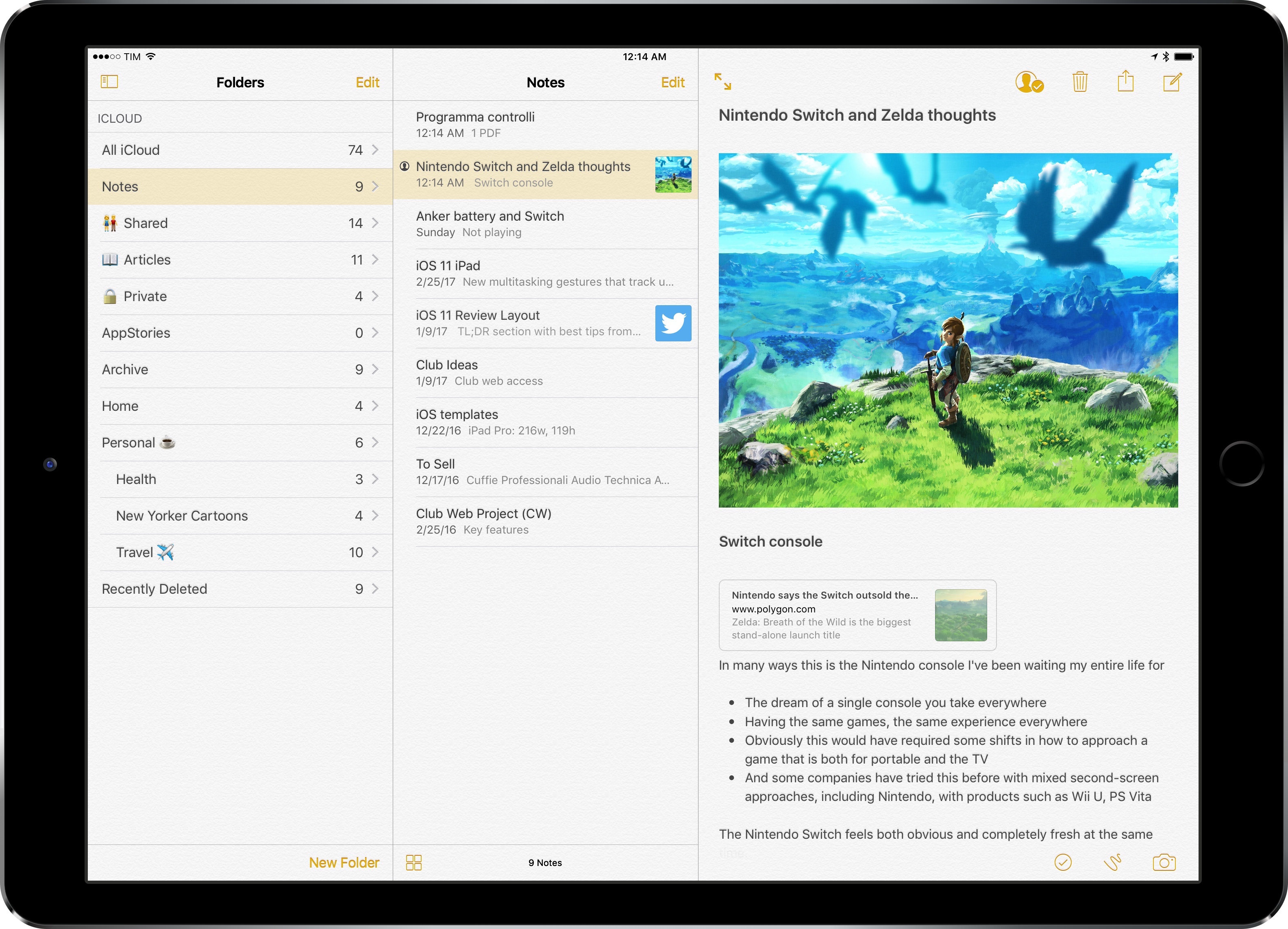
Apple's refreshed note-taking app landed with impeccable timing: it supported the then-new iPad Split View in the first beta of the OS released in June, and Apple deftly positioned Notes as a nimble, multi-purpose tool that many saw as a much-needed escape from Evernote's bloated confusion. I almost couldn't believe that I was switching to Apple Notes – for years, it had been derided as the epitome of démodé skeuomorphism – but the app felt refreshing and capable.
Notes in 2017 isn't too different from its iOS 9 debut. Apple added integration with the Pencil in late 2015, private notes with iOS 9.3, and they brought sharing and collaboration features in iOS 10, but the app's core experience is still based on the foundation laid two years ago. Unlike, say, Apple Music or Apple News, Notes has remained familiar and unassuming, which gives it an aura of trustworthiness and efficiency I don't perceive in other built-in Apple apps (except for Safari).
I keep some of my most important documents in Notes – from bank statements to health records – and anything I want to save for later tends to be captured with Notes' extension. Apple Notes is my brain's temporary storage unit – the place where I archive little bits of everything before I even have time to think about them, process them, and act on them. Some of the content I save in Notes is eventually transformed into DEVONthink archives or Trello cards; other notes live in the app and they're continuously edited to reflect what's on my mind. I rely on Apple Notes and it's one of my most used Apple apps (again, along with Safari).1
Apple Notes, however, is not a great pro iPad app. Notes falters where other Apple software falls short: it's entrenched in iPhone paradigms at the expense of more advanced controls and customization options for iPad users. While Apple showed some promising steps towards "power-user features" with the three-pane layout added in iOS 10, I've long wished for a deeper degree of personalization in Notes for iOS. And given Apple's reluctance to tweak Notes' structure and functionality, I've come up with my own workarounds.
Get More iOS Productivity Tips and Workflows
With a Club MacStories subscription, you’ll gain access to weekly iPad workflows, iOS app recommendations, and other exclusive extras.
Starting at $5/month, Club MacStories includes MacStories Weekly – a newsletter delivered every Friday with a focus on iOS productivity and showcasing new and interesting iOS apps. One of MacStories Weekly’s regular sections is the Workflow Corner – a weekly assortment of iPad workflows, iOS automation tips, and tutorials curated by Federico and the MacStories team.
As a new member, you’ll also receive complete access to our back catalogue of over 80 newsletter starting from September 2015.
You can find out more about Club MacStories here, or subscribe directly below.
A Folder for Shared Notes
In my workflow, sharing notes over iCloud with friends and colleagues has become as commonplace as sharing a link to a Dropbox file. I have notes shared with my girlfriend; notes that I use as reference material for the MacStories team; and notes with scripts and workflows I made for friends that I share as private wikis. I love the simplicity of Notes collaboration, but I wish I could view all notes that have been shared at a glance.
All my shared notes in a folder.
Apple Notes doesn't have a smart folder or search filter for 'All Shared Notes', but I recently realized that I could manually create a folder and drop shared notes into it to keep them all in one place for quick access. Now, whenever I'm working on a note I know I'll end up sharing, I move it to my 'Shared' folder; then, when someone asks me for a link to that note again, I can open the folder, find the note, and copy the link.
This process requires more manual management on my end, but it's the best compromise I've found given Notes' lack of smart folders or a tagging system where the same note can live in multiple locations.2 Until Apple adds a dedicated screen for shared notes, I'm going to store them in a folder.
Emoji in Folder Names
Another aspect of Apple Notes that I don't like is the absence of visual differentiation between folder names in the app's sidebar. Aside from missing any kind of sorting option for folders3, Notes doesn't let you assign colored labels or indicators to folder names, resulting in a dull list of folders, sorted alphabetically, with no highlights or colors to mark up the important ones.
For a while now, I've been putting emoji next to the names of folders I frequently access. My Shared, Articles, Private, Personal, and Travel folders have been customized with emoji that make them stand out when I open Notes and want to find something in a couple of seconds. Human eyes parse symbols and colors faster than words, so emoji are the perfect complement to Apple Notes' folder naming system. Plus, they add some much needed flair to the app.
But there's more: as you can see from the screenshot above, some of my folders have an emoji before the name, while others feature an emoji at the end. The choice is not random. Because iOS Notes defaults to sorting folders alphabetically, some of my frequently used folders (such as Shared and Private) ended up floating towards the bottom of the sidebar, which made them harder to find.
If you put an emoji before the name of a folder, though, Notes' alphabetical sorting will put emoji at the top of the list, before folders starting with a number or the letter "A".4 This way, important folders are both highlighted with emoji and they're available underneath the top-level 'Notes' folder. Other folders where the emoji is at the end of the name are just highlighted – they don't get promoted to the top of the sidebar, but they're still easier to find.
Notes Sub-Folders on iOS with Puffin
One of the most glaring omissions from Notes on iOS is the inability to create sub-folders by nesting a folder inside another. This feature is available on Notes for Mac via drag & drop; despite the two years Apple had to achieve feature parity with the desktop version, iOS can only sync sub-folders from the Mac, but not create them. In previous years, this forced me to fire up Notes on my MacBook just to add a new sub-folder and make it sync with iCloud.
A few weeks ago, I remembered that Puffin – an alternative web browser that I don't use on a regular basis – offered a trackpad feature to simulate having a mouse on iOS. I haven't seen the same option in other browsers5, but I understand how it might be useful for those websites that, in 2017, still don't adapt to modern web standards and touch interactions. By simulating the hover properties of a mouse cursor, Puffin can ensure compatibility with websites that are broken in iOS Safari.
Drag & drop with trackpad mode in Puffin.
Out of curiosity, I enabled trackpad mode in Puffin and headed over to iCloud.com and opened the Notes web app. I didn't think it would work, but I enabled the gesture to simulate drag & drop, selected a folder, and dragged it into another one. The process didn't feel as natural or smooth as the real Safari for Mac, but it worked: Puffin's trackpad mode managed to create a sub-folder, which synced back to my iPad in a couple of seconds.
There are some caveats. For one, everything feels somewhat buggy – the web app is slow to load in Puffin, emoji aren't displayed correctly, and you can't expand existing sub-folders because clicking the triangle button will do nothing. Clearly, Puffin's trackpad mode is a workaround to overcome the lack of basic drag & drop and hover states on iOS. However, if all you need to do is nest a folder into another one and don't own or want to use a Mac, Puffin for iOS should get the job done.
Self-Sharing and Note Launchers
When I reviewed Bear last year, I praised the app's support for individual note links, which allowed me to reference and open specific notes directly from outside Bear (an aspect that I also lauded when I covered DEVONthink). Ever since I moved back to Notes, I've been trying to replicate that functionality without asking Siri to open a note. While not ideal, I've found a way to create launchers for specific notes that I can use anywhere on my iPad.
When you share a note with someone, iOS generates an icloud.com/notes link with a unique reference to the note; tapping that link displays a 'Retrieving...' dialog for a couple of seconds before Notes launches, opening the associated note. Obviously, you wouldn't want to share notes with other people just to create re-usable links, but there's an easier way: share a note with yourself, copy the link, and use it as a launcher elsewhere.
I can launch specific notes with iCloud.com shareable URLs and Magic Launcher.
Here's what I did: I shared every note I wanted to access more easily by adding my phone number as a collaborator. In a note, you can tap the collaboration button in the toolbar, select 'Copy Link' as an option, and then add yourself to the note. After doing this, you won't see your profile picture in the list of collaborators, but you'll have a unique link to the note available in your clipboard. You can then turn this link into a launcher for Launch Center Pro, Workflow, and any other launcher utility you might have installed. I created a few Notes launchers in Magic Launcher (which I've been using as a widget dashboard lately) and I'm saving a lot of time as I don't have to search for notes manually anymore.
You'll always see this dialog for a second before launching a note URL.
There are downsides to this method. Notes protected with a password or Touch ID can't be shared, so you won't be able to create launchers for them. Furthermore, because these links depend on resolving an icloud.com URL before opening, you'll always get the 'Retrieving...' dialog upon tapping Notes links, which won't work if you're offline.
Despite the limitations of this workaround, I've found note links to be an effective solution to the problem of referencing different notes and jumping between them. I wish there was a better way, but at least I can quickly open specific notes now.
Apple Notes has become the default location for quickly archiving and outlining anything I don't want to forget. Notes isn't a replacement for more advanced apps like DEVONthink, and I would love to see Apple expand the app's feature set with deeper search filters, smart folders, and a modernized interface.
In two years, however, I've come to accept Notes' quirks and shortcomings, and I've optimized the app to my iPad needs. Notes is dependable, straightforward, and surprisingly powerful – three essential characteristics for one of my most-used iPad apps.
As I feared when I reviewed Bear last year, I couldn't stick to the app because of its lack of sharing features and issues with conflict resolution. Bear is an excellent note-taking app, but I was missing Apple Notes too much. ↩︎
In an app like Bear, for instance, I'd tag the same work-related shared note with "macstories" and "shared", and the note would appear in two separate tag screens. This isn't possible with Notes. ↩︎
It'd be nice to sort folders by modification date, for example, or to display badges on folders that contain shared notes that have been updated on another device. ↩︎
Interestingly, emoji are also sorted. I assume it's done alphabetically based on the official character description that isn't exposed to the user. Strangely enough, sorting is different in the Mac app and emoji aren't prioritized in the sidebar. ↩︎
I was surprised to see that trackpad mode isn't included in iCab's ever-growing list of advanced settings. ↩︎
Support MacStories Directly
Club MacStories offers exclusive access to extra MacStories content, delivered every week; it’s also a way to support us directly.
Club MacStories will help you discover the best apps for your devices and get the most out of your iPhone, iPad, and Mac. Plus, it’s made in Italy.
I host my websites through Reclaim Hosting. I’ve been with them for a few years now, ever since they were known as ‘Hippie Hosting’ and an offshoot of the amazing work done by Jim Groom and team at the University of Mary Washington’s Division of Teaching and Learning Technologies.
Companies often talk about their commitment to customer service, but I’ve never known anything like that which receive from Reclaim Hosting. It’s insane. For example, in the last six months, amongst other things, they’ve:
Responded within a minute to a query about my wiki being down, and had fixed it for me within five minutes.
Worked with me to rectify a persistent spamming problem on my sites (that was my fault, not there’s)
Migrated my sites from US servers to ones based in the EU within 24 hours of me tweeting that I’d like them to do so.
On top of that, they charge me a very low price. I’m a huge fan, as you can tell.
The last of the bullet points is an important one as President Trump continues to rip up the good work carried out by his predecessors. For example, earlier this month, The Register reported on a joint letter sent by Human Rights watch and the ACLU which outlines in detail how Trump’s executive orders are underming the US-EU Privacy Shield. Bloomberg reckons that the EU are ready to pull out of it.
It’s 2017, so it seems strange to be talking about things that seemed more important in the early days of the web, such as where your server is located. But, of course, given the nationalist turn we’ve taken in the west, these things matter.
They matter because he location of your server is still of vital importance, despite recent protestations, that data in transit through the US makes it subject to US law. What you put on your own web space isn’t just the front end stuff that everyone sees, it’s the backend stuff as well — family photos, private emails, and the like.
Some people have asked why I’ve chosen to host my data in Germany, rather than in the UK. Well, for a start, I still consider myself as more European than British, despite ‘Brexit’. Second, Germany has stronger privacy laws than the UK (and certainly the US). Finally, and more pragmatically, it’s the EU option offered by Reclaim Hosting (mainly, I believe, because Digital Ocean offer block storage in that zone)
I perhaps spend more time thinking about these things than most, but that’s because it’s something I deem important. Ironically, most of my readers are in the US, so this move actually adds a few milliseconds to their page load times. Sorry about that…
I know competences are the next big thing and that a lot of time and money i being devoted to competency-based education, but I can't help feeling uneasy about them. This article identifies some reasons why. First "is the myth that employers always know best... the problem with employers is that they tend to look to the present or the short term future in defining skills requirements." Second is "the relationship between ‘ competence’ and knowledge and how to define performance to meet such competence." Finally, "I would be deeply suspicious of just what they mean by 'tuition model is subscription based'? This seems like just another attempt to package up education for sale in nice chunks: a step forward in the privatisation of education."
Open online learning entered the mainstream with the growth and popularity of MOOCs, but while interest in open online courses has never been greater MOOCs represent only the first step in a broader open learning infrastructure. In this keynote Stephen Downes will describe several key innovations shaping the future of open learning: distributed social networks, cloud infrastructures and virtualization, immersive reality, and personal learning environments. The talk will outline the challenges this evolving model will pose to learning providers and educational institutions and recommend policies and processes to meet them. Link to hosted video.
SUNY Open COTE 2017, Syracuse, New York (Keynote) Mar 09, 2017 [Comment]
Hootsuite, one of Canada’s startup tech darlings, has been touted as a unicorn (or narwhal, if you will) since 2014. This week, however, Bloomberg Business and Technology reporter Gerrit De Vynck raised some doubts about the company’s valuation and therefore the illustrious label as well.
Uber has once again found itself in the midst of a bad news cycle as further sexual harassment accusations have come out of the woodwork. If that weren’t enough, Uber’s CEO Travis Kalanick was also the center of attention after a video of his heated exchange with a driver surfaced. These incidents have followed an already tumultuous 3 months for the company, leaving the CanCon team wondering if it time for a leadership change at Uber.
In CanCon news, Rob Kenedi, one of the original CanCon crew, is going to be traveling to the states for TWG a lot more in the coming months. With recent border changes under the new US administration, the introduction of Bill C-23, and stories of people being required to unlock their technological devices for border security, the CanCon team is asking Rob how he will protect his data’s integrity on his new ventures.
Tune in as CanCon’s podcast crew – Erin Bury, Managing Director of 88 Creative, Rob Kenedi – TWG’s Entrepreneur in Residence and host of the amazing #smallrooms podcast, Gerrit De Vynck, Technology reporter for Bloomberg Business, and Douglas Soltys, BetaKit Editor in Chief – gives founders of tech startups some much needed communications and PR tips.
Have some hot takes on the topics that were covered? Maybe you want to suggest something for a future podcast! Perhaps you have a burning question about something you read in tech news that we didn’t cover. Email us, post a comment below with the answer or question, or better yet, rate CanCon 5-stars on iTunes and post your thoughts there.
In recent months, the Google support forums have been flooded with Pixel and Pixel XL users reporting that one or more of the microphones on their smartphones have stopped working. The problems have become widespread enough that Google has issued an official response.
According to Brian Rakowski, a Google employee actively engaged in the thread, two manufacturing defects are the cause of the issues.
In some instances of one or more of the microphones is malfunctioning, there’s a hairline crack in the solder connecting the audio codec to the Pixel’s microphones. As a result of the minute nature of the defect, factors like ambient temperature or how a person holds their phone can temporarily alleviate the issue without offering a permanent fix. Rakowski says Google believes less than 1 percent of devices are affected by this issue. He also notes the defect could show up after months of normal use after an unfortunate drop.
Meanwhile, the consistent failure of a single mic is caused by a faulty microphone. Rakowski says this issue is even rarer than the damaged solder.
In either case, the company recommends affected users contact support and request a return. Rakowski says Google has already trained its support staff the staff from any third-party retailer that carries the Pixel and Pixel XL on the issue. However, the return process will play out differently depending on where Pixels owners bought their phone.
For individuals that bought their phone directly from Google, the company will send a replacement immediately. Google will place a hold on the owner’s credit card until it has verified the returned device suffers from a manufacturing defect.
Meanwhile, if the device was purchased from a third party, the company will only ship a replacement once it has received the device and verified it’s broken, in which case some Pixel owners may be without a smartphone for several weeks.
Has your Pixel smartphone had issues with its microphones? Tell us in the comment section.
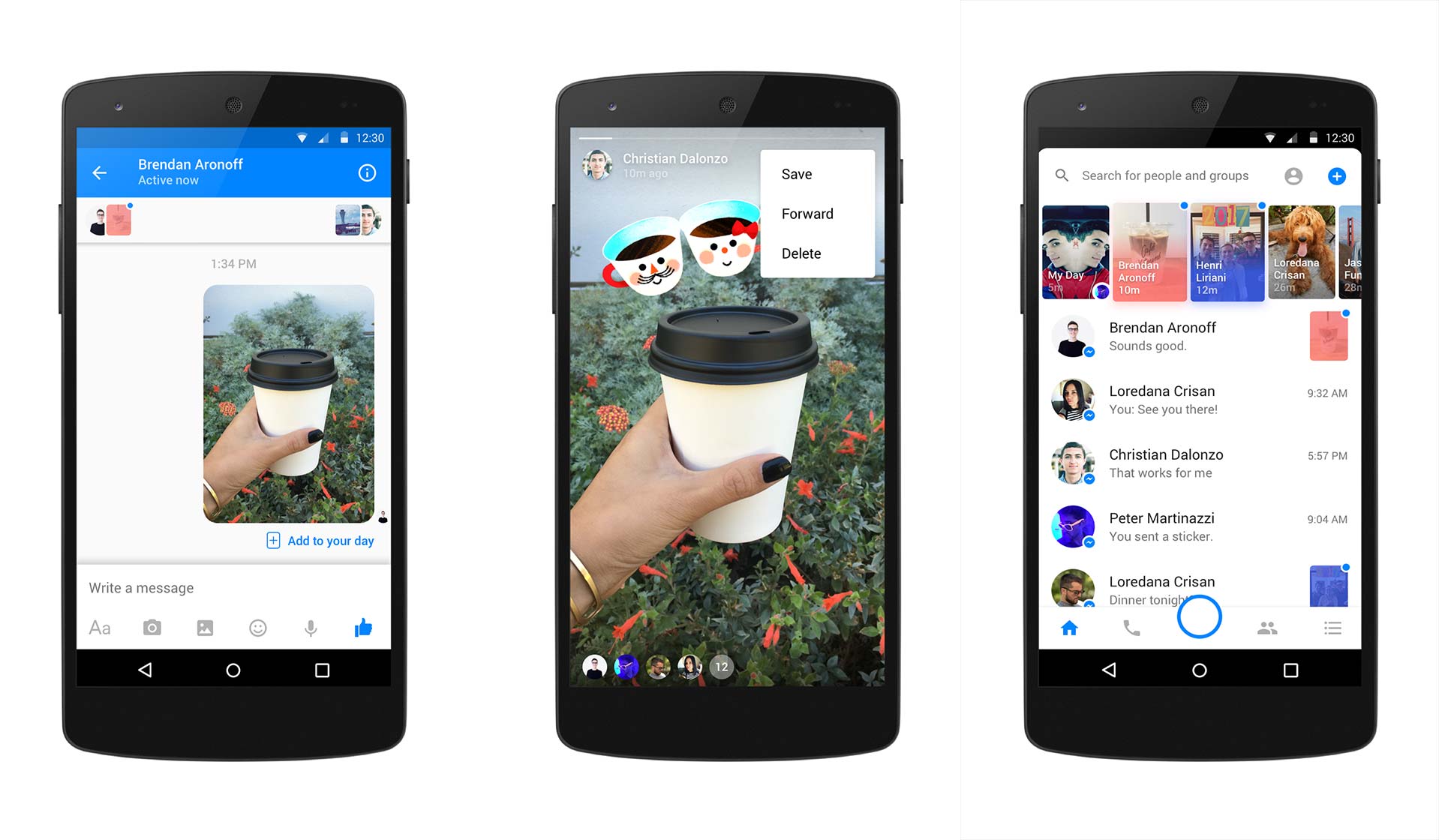
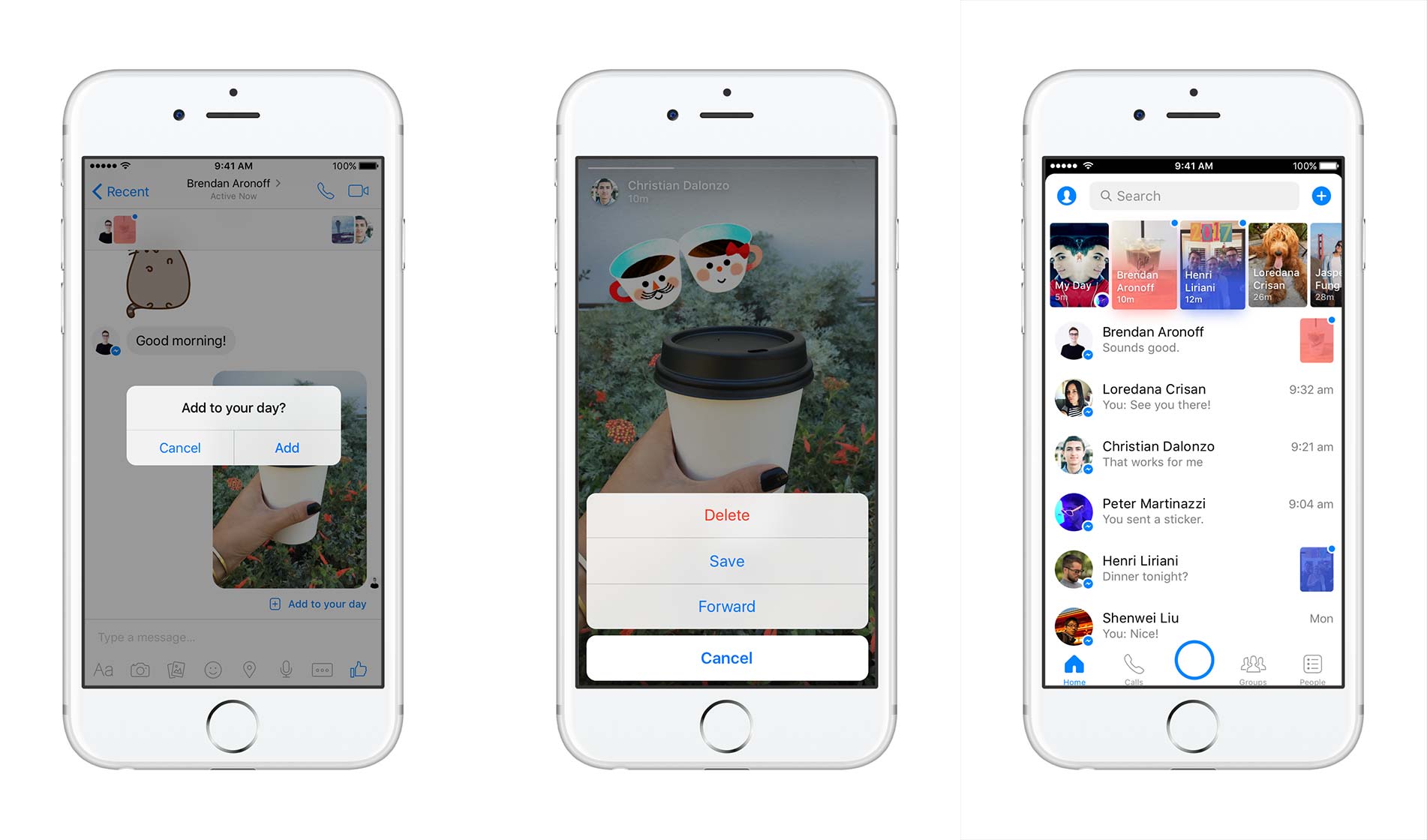
To go along with Messenger’s new built-in camera, Facebook has announced the launch of Messenger Day.
‘Day’ is a feature that allows Messenger users to share photos and videos as they happen, allowing their friends to view and reply to them.
While the feature shares similarities with Snapchat Stories at first glance, Stories yields itself to retelling what you’ve done, where as Day is better suited to the present with “Who’s up for?” and ‘Active Now’ filters.
The two platforms are similar in that a wide variety of filters are available to use with personal photos and videos, and that everything submitted to the platform disappears from Day after 24 hours.
In order to submit photos and videos to Day, users must ensure they’ve updated to the latest version of the Messenger app. Open the Messenger app, and tap the camera, which is currently highlighted with a sun to celebrate the launch of the feature.
Doing this brings users directly to the full-screen camera. Otherwise, users can tap the ‘Add to your Day” button at the top of their inbox to start posting, and snap a quick selfie or take a short video.
For users that are interested in adding art to their post, they can tap the smiley face icon in the top right of their display and then select which icons they’d like to add to their photo or video.
In addition, users can add text by tapping the “Aa” icon, or overlay a drawing by tapping the squiggly line in the corner. From there, users can add their creation directly to their Day.
Users can also add to their Day from a conversation they’re having with a friend or group. After sending a photo or video in Messenger, an ‘Add to your Day’ option now appears.
The world’s biggest social media companies have desperately attempted to mix up their own version of Snapchat’s secret sauce. While attempts have been made by Medium and Twitter, Facebook has been the most aggressive contender with additions like Instagram Stories and Messenger Day.
With Instagram’s Stories feature growing exponentially in use, it’s apparent that Facebook is beginning to make some ground on its much younger competitor, who it actually offered to purchase in 2012 for $3 billion.
At the beginning of January, Asus began rolling out Android 7.0 Nougat to the ZenFone 3. Unfortunately, the company quickly halted the update’s release because of a few bugs that needed to be fixed. It looks like the issues have now finally been resolved, however, as Asus Has announced that the rollout of Nougat has resumed for both the ZE520KL and ZE552KL variants of the ZenFone 3.
The update weighs in at around 1.5GB and brings all the features one would expect from Nougat to the devices. Additionally, the company said it removed apps like Asus Share and PC Suite and separated the ‘Ringtone & Notifications’ volume bar into ‘Ringtone’ and ‘Notification’ bars.
The update will likely reach all Asus ZenFone 3 users within a week.
MobileSyrup’s Rose Behar took a look at the ZenFone 3 when it was first released a few months ago and was impresses with Asus mid-range offering, though she cited bloatware and the phone’s overall garish design as being two major negatives.







 One of those milestones has reprioritized my writing schedule. We moved my dad out of his house of 55 years, and this has left me in possession of a massive family photo archive to manage. There are tens of thousands of photos in all formats – from daguerreotypes to glass plates, to vintage and modern prints, many thousands of slides, negatives, framed prints, scrapbooks and more. There are more than 10,000 images sitting on this cart, and that’s just a part of the archive.
 Here is a small selection of the framed prints we copied.


 Here’s a great post, with a video, about how to fix a flat bike tire, with very few tools. If you’ve been wanting to learn how to fix a flat bike tire, this post plus video should make it a snap.