Shared posts

13 Sep 20:52

Why I coach

Makers Academy is a programming bootcamp. I’ve coached there for the last nine months. I love it.

In this essay, I’ll describe some of my favourite parts of coaching. For each part, I’ll explain how my work supports a learning goal at Makers. And I’ll explain how the environment at Makers supports this learning goal.

Note: we refer to our students as developers.

Giving as little help as possible

At Makers, developers lead their own learning. This lets them follow their curiosity. It lets them learn in their own style. It lets them learn at their own pace.

I support the developers with their self-led learning. Sometimes, a developer may ask me for help. Every problem is a chance for them to learn. I want to avoid robbing them of that chance. I want them to wring the maximum amount of learning from the problem. I try to identify the tiniest nudge that will get them going again. Sometimes, we’ll have a Socratic dialogue. Sometimes, I’ll suggest they diagram their current understanding of their problem to uncover wrong connections.

The environment supports self-led learning. Developers work on challenges that are designed to be rich playgrounds for exploring programming topics and practising programming skills. Developers work on team projects where they choose the what they make and how they organise their work.

Debugging learning processes

In some educational environments, the focus is on accumulating knowledge. The measure of success in these environments is: how much does the learner know about a topic? At Makers, we focus on improving processes. These are the approaches and techniques that a developer uses when learning or programming. Our measure of success is: how much have a learner’s processes improved? This means that a developer arrives at Makers as one person and leaves Makers as a different person.

I help developers improve their processes. For example, I run weekly surgeries. Developers discuss programming struggles they’ve had. A developer often describes their struggle as a problem with a programming concept. Through discussion, we try and uncover the skills and behaviours that are the actual cause of the struggle. A description of a struggle might be: “I find it hard to get RSpec syntax right”. Through discussion, it emerges that the developer is trying to memorise syntax, piece by piece. I might suggest they build their skill in mentally parsing syntax. Or, a description of a struggle might be: “I don’t understand database relations”. Through discussion, it emerges that the developer has spent a lot of time reading. We talk about how it is essential to learn by doing. We talk about how they could build a behaviour where they try stuff out in a REPL.

The environment helps developers improve their processes. Pair programming, group work and retrospectives help them reflect on how their processes could be improved. Skills workshops suggest new processes to try. And working on projects gives developers a chance to practice new processes.

Being a role model

At Makers, we help developers aspire to become better programmers.

I support this in a number of ways. Two examples. A developer asked me what programming language would help him explore functional programming further. I took great pleasure in suggesting Clojure. It’s wonderful to be able to share the things I’m excited about. If a developer asks me for help with a programming problem, I might show them a cool technique. Or, I might talk through the source of my intuition about where to look for the problem. It feels good to share techniques from one craft practitioner to another. Sometimes, a developer will ask how I started making games, or how I got a job at Ableton, or how I made a programming language. It feels great to be able to give them advice.

The environment supports the aspiration to become a better programmer. We recommend books and talks by expert programmers. When pair programming, developers frequently work with people who are better than them. This gives them someone to learn from and a standard to aspire to. By encouraging varied projects (from a virtual reality city-builder to an arithmetic interpreter written in Haskell), the environment becomes a community of developers who inspire each other.

Getting better at learning

At Makers, I spend my whole day steeped in our environment. I get to learn about educational psychology. I get to think about learning all the time. I get to reflect on my processes and improve them.

Every time I help someone learn, I improve my own ability to learn.

Summary

In this essay, I’ve talked about some of our goals at Makers. I’ve talked about how I support these goals. And I’ve talked about how the environment supports these goals.

And here’s my greatest joy. As a coach, I’m a part of the environment. But I also get to design the environment.

Want to help? We’re looking for a new coach.

19 Mar 07:06

Building Communities Through Competition (The Case Of Kaggle)

by Richard Millington

Don’t believe a community is a forum with good questions and helpful responses.

This pervasive mindset limits the potential of your audience.

Kaggle has 500k members. It’s the most important data science community in the world. It’s a huge success. And it’s almost entirely oriented around competitions. Companies post data sets, prizes, and members compete to solve them.

This is entirely different from how most people approach communities.

It’s worth exploring what lies beyond the typical range of community approaches. The fastest growing communities aren’t based around forums, they’re based around competitions, group sharing, and collaboration.

Some people want to be challenged and compete. Some want to feel safe and secure. Some want to share funny photos. Communities don’t need to be text based questions and answers. Explore the wide range of opportunities out there.

If you want to stand out, find an edge you can push.

19 Mar 07:05

A Public-Private Partnership for Gigabit Innovation and Internet Health

by Christopher Lawrence

Mozilla, the National Science Foundation and U.S. Ignite announce $300,000 in grants for gigabit internet projects in Eugene, OR and Lafayette, LA


By Chris Lawrence, VP, Leadership Network

At Mozilla, we believe in a networked approach — leveraging the power of diverse people, pooled expertise and shared values.

This was the approach we took nearly 15 years ago when we first launched Firefox. Our open-source browser was — and is — built by a global network of engineers, designers and open web advocates.

This is also the approach Mozilla takes when working toward its greater mission: keeping the internet healthy. We can’t build a healthy internet — one that cherishes freedom, openness and inclusion — alone. To keep the internet a global public resource, we need a network of individuals and organizations and institutions.

One such partnership is Mozilla’s ongoing collaboration with the National Science Foundation (NSF) and U.S. Ignite. We’re currently offering a $2 million prize for projects that decentralize the web. And together in 2014, we launched the Gigabit Community Fund. We committed to supporting promising projects in gigabit-enabled U.S. cities — projects that use connectivity 250-times normal speeds to make learning more engaging, equitable and impactful.

Today, we’re adding two new cities to the Gigabit Community Fund: Eugene, OR and Lafayette, LA.


Beginning in May 2017, we’re providing a total of $300,000 in grants to projects in both new cities. Applications for grants will open in early summer 2017; applicants can be individuals, nonprofits and for-profits.

We’ll support educators, technologists and community activists in Eugene and Lafayette who are building and beta-testing the emerging technologies that are shaping the web. We’ll fuel projects that leverage gigabit networks to make learning more inclusive and engaging through VR field trips, ultra-high definition classroom collaboration, and real-time cross-city robot battles. (These are all real examples from the existing Mozilla gigabit cities of Austin, Chattanooga and Kansas City.)

We’re also investing in the local communities on the ground in Eugene and Lafayette — and in the makers, technologists, and educators who are passionate about local innovation. Mozilla will bring its Mozilla Network approach to both cities, hosting local events and strengthening connections between individuals, schools, nonprofits, museums, and other organizations.

Video: Learn how the Mozilla Gigabit Community Fund supports innovative local projects across the U.S.

Why Eugene and Lafayette? Mozilla Community Gigabit Fund cities are selected based on a range of criteria, including a widely deployed high-speed fiber network; a developing conversation about digital literacy, access, and innovation; a critical mass of community anchor organizations, including arts and educational organizations; an evolving entrepreneurial community; and opportunities to engage K-12 school systems.

We’re excited to fuel innovation in the communities of Eugene and Lafayette  — and to continue our networked approach with NSF, U.S. Ignite and others, in service of a healthier internet.


The post A Public-Private Partnership for Gigabit Innovation and Internet Health appeared first on The Mozilla Blog.

19 Mar 07:05

Debate heats up over free higher education plan

files/images/LDP_Free_tuition.PNG


Yomiuri Shimbun, Mar 17, 2017


Japan is the latest country considering free higher education. "Hakubun Shimomura, the LDP’ s executive acting secretary general, said at a press conference on Friday that procuring funds for free higher education warrants careful deliberation... A special task force was created within the party on Feb. 15 to discuss the financial aspects of free higher education." This follows  sharp growth in California's free college tuition programs. We're also seeing  more  voices opposed to such plans on the grounds that free tuition only benefits the rich. By that same logic, though, free health care would only benefit the rich, because only the rich can afford health care. Our experience with public health care in Canada, though, proves that the opposite is the case. The poor are the major beneficiaries.

[Link] [Comment]
19 Mar 07:05

JPMorgan Software Does in Seconds What Took Lawyers 360,000 Hours

files/images/20.jpg


Hugh Son, Bloomberg, Mar 17, 2017


Knowledge workers take note: "The program, called COIN, for Contract Intelligence, does the mind-numbing job of interpreting commercial-loan agreements that, until the project went online in June, consumed 360,000 hours of work each year by lawyers and loan officers. The software reviews documents in seconds, is less error-prone and never asks for vacation."

[Link] [Comment]
19 Mar 07:05

Analytics isn’t a thing

files/images/Bb16_PROED_GI_515480254-717x359.png


Mike Sharkey, Blackboard Blog, Mar 17, 2017


By this headline Mike Sharkey doesn't mean that analytics doesn't exist, nor does he mean it isn't something important. Rather, he says, software is defined by the problem it solves, and 'analytics' isn't a type of problem. "Analytics isn’ t a thing. Analytics help solve problems like retention, student success, operational efficiency, or engagement," he writes. He raises this point because 'learning analytics' is dropped from this year's NMC Horizon report." I wouldn’ t say that analytics 'has arrived,' so I was a little surprised that it wasn’ t called out as a specific trend," he said. It wouldn't be the first time a trend simply disappeared in a Horizon report - analytics also vanished in 2015 only to reappear a year later.

[Link] [Comment]
19 Mar 07:05

Suspicious Minds

by Eric Thurm

To call American politics driven by paranoia feels so obvious that it must somehow contain a hidden truth. The President launched his political career by latching onto the racist birther conspiracy. He campaigned on more conspiracies and delights in calling critical reporting “fake news.” At the same time, he regurgitates wild articles from conspiracy sites like InfoWars. Congressional Republicans, following Trump’s lead, have taken to talking about outside agitators and paid protesters when they face criticism.

Meanwhile, evidence of Russian influence on the election and the administration accumulates, but the truth — whatever it is — has been perpetually obscured by tidbits like the faked image of Russian internet activity or the more lurid details of the intelligence dossier prepared on the subject before the election. After Michael Flynn was fired for lying about meeting with the Russian ambassador, the Russian government accused Americans of being paranoid.

To open Facebook or Twitter is to be exposed to frenzied readings of isolated pieces of information, trying to construct the “real story.” Is “President Bannon” pulling the strings? Or is it Jared Kushner? Stephen Miller? Everything they do and everything the President himself tweets is a possible distraction from the real menace, which is constituted by, well, everything else.

What the paranoid is eager to establish as mind-blowing certainty is often already an open secret. The difference between methodical evil and casual, ignorant cruelty is negligible

It’s difficult to imagine a climate more conducive to the growth of paranoia. And why not give in to it? Fear can be a powerful motivator. It can prompt the otherwise apathetic or defeated into a stance of engaged resistance. But it also operates by limiting the sphere of possibility. Paranoia zooms in on a few choice explanations for events and sticks with them no matter what. As the old solutions continue to fail disastrously, paranoia’s attack on imagination is dangerous.

The paranoid’s quest for the “truth” is, after all, a frantic form of reverse engineering. Even before investigating, the conspiracy devotee is convinced of the truth of their suspicions — otherwise how would they know what to look for? Theorists spinning Twitter webs tend to claim they’re “just asking questions,” but people seem to “just ask” questions about things they think they already know — usually secrets explaining the underlying structure of the world. Persisting in the search for “answers” allows the questioner to continue holding their beliefs without doing anything about them, other than continuing to “uncover” more proof about what’s really happening.

In reality, what the paranoid is eager to establish as mind-blowing certainty is often already an open secret. In a conversation with Eve Kosofsky Sedgwick in the 1980s, at the height of the AIDS pandemic — and related conspiracy theorizing about the Reagan administration’s role in the spread of the virus — the sociologist Cindy Patton asked her, “Suppose we were sure of every element of a conspiracy. Supposing we were ever so sure of all those things — what would we know then that we don’t already know?”

Patton’s rhetorical question reframes our obsession with gathering and connecting the elements of a conspiracy: Would it really be so shocking and important to discover the smoking gun that “proved” the Reagan administration didn’t care about HIV or AIDS, and in fact relished the suffering of gay Americans? His government’s non-action and willingness to condemn victims, and the apparently unremarkable deaths of thousands of people, said more than enough. As Sedgwick points out in “Paranoid Reading and Reparative Reading, or, You’re So Paranoid, You Probably Think This Essay is About You,” the difference between methodical evil and casual, ignorant cruelty is negligible.

This distinction between active, planned malice and brutish incompetence has little effect on the victims of oppression, but to the paranoid mind it remains a monumental stumbling block. While an outside observer may (correctly) perceive the paranoid’s argument as tautological, the paranoid writer experiences it as a breakthrough, a “triumphant advance toward truth and vindication.” It’s difficult to overstate how intoxicating this approach can be.

One of the main problems with paranoid thinking, Sedgwick argues, is that it is often incapable, by its very nature, of achieving anything. Trying relentlessly to “prove” the existence of the conspiracy makes it more difficult to respond to genuinely new information — especially if it complicates the paranoid person’s previously existing picture of the intrigue. But it also makes it harder to actually act against the conspiracy (or institutional equivalent). And isn’t that the whole point?

Often, what the paranoid reader regards as conspiracy is simply an institution functioning as intended, as when the Democratic National Committee worked to deny Bernie Sanders the party’s nomination. These efforts can be treated as a conspiracy only if you ignore the party’s creaky, purposefully anti-democratic machinery. Insisting otherwise obfuscates the mechanisms at work in a given instance of injustice and muddles what, exactly, one is fighting against. Assuming some grand conspiracy replaces the real system that must be changed with a fictional cabal of masterminds, infinitely more clever and meticulous than they actually are.

The idea that exposure and outrage lead directly to political action assumes that the public needs to maintain plausible deniability in order to tolerate evil. It doesn’t

If confirmation were found of even deeper ties between Trump and Putin tomorrow, would we really know anything we didn’t already know? Who clicks on links announcing big new breaks in the Trump-Russia investigation or reads a tweetstorm of tenuous accusations to find out new information about the world? These reports no longer seem capable of revealing or describing anything fresh or urgent; instead, they feed into a framework in which news can only deepen our conviction in what we already knew. To consume the news is to enter a psychic hall of mirrors, where the appearance of depth buries the obvious reality.

This isn’t a surprise: It’s the same thing that happens in other cases of excessive paranoid reading. If you look for structural systems of oppression — for instance, racism, sexism, classism, discrimination against LGBTQ people — in any given situation, you will almost certainly find them, because systemic oppression is, by nature, everywhere. Injustice is overwhelming and it resists easy solutions, which is why the paranoid hunt for evidence frequently privileges the symbolic, the representational, and the trivial: It’s easier to extract evidence of ill will from a text than it is to engage with it in the world. The paranoid’s perfect enemy, then, is too powerful to fight and too mysterious to correctly identify.

Political journalism frequently operates on the assumption that evidence of something like blatant racism will have an effect if presented clearly to the public, as if the culprits would of necessity be ashamed. But confronted with a president who asked a black journalist to set up a meeting with the Congressional Black Caucus, pointing out individual instances of rhetorical racism feels silly. In fact, the administration’s supporters delight in the exposure of their bigotry as a means of producing “liberal tears.”

Everyone knows who the president is — who, exactly, are we trying to convince otherwise? What does it mean to “report” the news when very little of the news is actually new? In paranoid reading, the lack of real information is a feature rather than a bug. Sedgwick argues that for the paranoid, violence “must always be presumed or self-assumed — even, where necessary, imposed — simply on the ground that it can never be finally ruled out.” But this assumption is imposed and restated over and over again, making it impossible to move beyond the revelation of violence even when it’s the most obvious thing in the world.

Paranoia is, of course, a long-standing pillar of American politics. Richard Hofstadter’s 1964 essay “The Paranoid Style in American Politics” (which Sedgwick references) tracks the way paranoid politics moved from the fringes to the mainstream, from vague Masonic conspiracies to specific theories about presidents and other public figures in the 1960s. He diagnoses the paranoid’s worldview as transmuting all political antagonisms from ideological clashes or shortsightedness into cold, calculating betrayal.

For the paranoid person, pointing out injustice feels like it should be, must be, enough. As Sedgwick puts it, paranoia places its faith in exposure, meaning that if someone can just see what you see, they’ll understand the conspiracy and become your ally: “Paranoia for all its vaunted suspicion acts as though its work would be accomplished if only it could finally, this time, somehow get its story truly known.” But American liberals bent on exposing the possible machinations of the Trump regime are exposing a different unpleasant truth: that uncovering the conspiracy doesn’t actually do anything.

Everyone knows who the president is — who, exactly, are we trying to convince otherwise? A paranoid reading makes it impossible to move beyond the revelation of violence even when it’s the most obvious thing in the world

The paranoid mind thinks that proving that Jeff Sessions is a racist should have stopped Congress from confirming him and that pointing out Mitch McConnell’s hypocrisy is a decisive rhetorical blow. This is deeply misguided. “For someone to have an unmystified, angry view of large and genuinely systemic oppression,” Sedgwick argues, “does not intrinsically or necessarily enjoin that person to any specific train of epistemological or narrative consequences.” Exposing hypocrisy or corruption can just as easily confirm suspicions of their inescapability. The idea that exposure and outrage lead directly to political action — a view that motivates everything from the obsession over police body cam videos to the obsessive cataloging of false Trump statements — rests on an assumption that the public needs to maintain plausible deniability in the face of evil in order to tolerate it. It doesn’t.

Still, believing that exposing some fatal flaw in your enemies’ logic will save you is very comforting. Sedgwick characterizes paranoia as a “strong theory”: it can account for a vast array of experiences, meaning it totally organizes the way the paranoid person sees the world. Paranoia is defined by an “aversion to surprise,” whereby the paranoiac accounts for the possibility of catastrophe in any given case. It is not surprising that many of the people shocked by Donald Trump’s election have been primed to now adopt a paranoid strategy. They underestimated or willfully ignored the racist and sexist underpinnings of the country and have heightened their paranoid response as a way to declare: Never again! But this wariness in the face of surprise serves only to insulate the paranoid from an unpleasant reaction without doing anything to prevent the affliction.


Recognizing the fundamental role that chaos plays in our own lives is hard to admit, let alone world affairs. Conspiracy is more comforting than complexity, and it’s safer than admitting stupidity or ignorance. The paranoid depends on an assumption of comprehensible, narrative order — even though, as Hofstadter puts it, the morass of history is often “a comedy of errors and a museum of incompetence.”

The paranoid’s presumption of treason over idiocy is, then, a sort of defense mechanism. Whether it’s the comfort of fiction (even Voldemort took over Hogwarts before Harry’s final victory!) or too-easy historical parallels (where is the administration’s equivalent of the Reichstag Fire?), the paranoid hunts for neat similarities to confirm that the future can definitively, coherently, be known.

Acknowledging that somebody could be limited or incompetent rather than actively evil is hard. Different scenarios require different approaches that the paranoid person, by definition, refuses

The appeal of this kind of thinking is powerful. Sedgwick calls paranoia “contagious,” which means the empathy required to understand the paranoid requires the listener to, briefly, assume their mode of thinking. Paranoid reading thrives on seductive, blanketing “what if” questions and the ease with which they can account for all possibilities. And nowhere is paranoia more accessible or easy to fall into than the internet with its tweetstorms and Medium theories, all of which seem just plausible enough to capture unsuspecting readers.

In this light, sharing is more paranoid than informative, Actually believing a Medium essay proves the existence of a coup is less important than the fact that the coup, or something like it, must be happening — and everyone in your social circles need to know it. (Or, at least, to know that you know it.) Paranoia is a tool for building a twisted form of solidarity.

It’s impossible to stamp out paranoia in a linear fashion. Its patterns turn everything into circles, circuits, and circuses, mirroring the sprawl of its elaborate theories — a sprawl that is often aided by the disjointed nature of a tweet or image showing up in your feed. So how can people move past paranoia, or at least step away from it momentarily? Logging off isn’t enough. Paranoia’s embrace will still be there when you come back.

As a remedy, Sedgwick encourages cultivating the capacity for surprise, a mode she calls “reparative reading.” Being open to the possibility of being wrong, or of misinterpreting, or of simply acknowledging that somebody could be limited or incompetent rather than actively evil is hard. It necessitates giving up a warm sense of certainty, and forces the admission that intellectual security is frequently an illusion.

Certainly, the regime doesn’t deserve any credit. But it’s useful to consciously maintain a degree of psychic vulnerability in political debates, especially when we have largely the same goals as our interlocutors. And paranoia isn’t always the worst way to approach the world; it’s just one way to read among many. Different scenarios require different approaches and a degree of self-awareness that the paranoid person, by definition, refuses.

It’s easier than ever to succumb to the temptations of paranoid reading. Our daily consumption of information is scaffolded by algorithmic feeds, and we are given all kinds of incentives to share sensational claims. But that merely makes the choice to read reparatively more important. It may feel obvious to say that people should approach politics with a measure of charity, but it’s such a clear recommendation that there must be a secret truth lurking in it somewhere.

19 Mar 07:05

A Guide for Fat Cyclists

by Average Joe Cyclist

Guide for fat cyclistsMany fat cyclists complain that they experience discrimination, and that is just plain wrong. Everyone has the right to ride a bike; and fat cyclists should not feel pressured to lose weight. That said, there are some extra challenges for plus-sized cyclists, such as finding an appropriate bike and clothing. This post is about how to deal with those challenges, so you can enjoy cycling, regardless of what your scale has to say.

The post A Guide for Fat Cyclists appeared first on Average Joe Cyclist.

19 Mar 07:04

LiquidText 3.0: A Uniquely Digital PDF Experience

by Ryan Christoffel

LiquidText is one of the few apps that feels uniquely built for the iPad. There is currently no desktop version available, nor iPhone version, and though that may be a negative in some ways, the positive side is that every new feature and enhancement is focused exclusively on iPad use. As a PDF reader, LiquidText has always provided tools that make its reading experience something you couldn't get with a physical document. This is perhaps why it was recognized by Apple as the most innovative iPad app of 2015. But today, with version 3.0, LiquidText not only offers a reading experience that's uniquely digital – it does the same with note-taking and annotation. And the Apple Pencil is a big reason for that.

Up until now, developers have added Apple Pencil support to their apps in fairly standard ways – sketching, annotating, note taking. These are all great implementations, and they fit with what the Pencil was designed for: it's primarily a tool for creative professionals.

There's nothing wrong with the way the Pencil has been used up until now, but there's nothing uniquely digital about it either; it has been largely restricted to resembling traditional pen and paper use. Drawing or writing with the Pencil is one of the best computing imitations of a traditional pen and paper. But the iPad Pro and Apple Pencil can do more than that, as LiquidText 3.0 shows.

Before getting into the particularly fun stuff, I'll mention that LiquidText does cover the basic areas of Apple Pencil support by providing pen and highlighter tools. Annotating PDFs is simple; choose your tool, and get to work. The app provides a variety of colors and size options for your drawing tool, including the nice option to save specific colors as favorites. These are important, welcome additions to the app, but they're not anything new or unique. Most quality PDF apps on iPad have had annotation features like these for a while.

What makes LiquidText unique is how it uses the Pencil not just as a tool for annotations, but also as a tool for gestures.

One gesture allows you to link objects together simply by drawing a line from one object to another. You can link things like page numbers, highlights, excerpts, comments, and Ink Boxes (more on those later). Drawing a line connects two such objects, and drawing additional lines creates more connections – there's no limit or rules regarding how many connections you make this way.

Drawing lines to create links between multiple objects.

Drawing lines to create links between multiple objects.

This line gesture enables a number of possible use cases, including the option to create a mind map with a few simple strokes. Links can be made between objects of a single document, or even when working with two documents side-by-side. And once a link is created, each end of that link will contain a button that quickly takes you to its opposite end. It's a very clever, intuitive system.

A second gesture involves drawing shapes around content. Use the Apple Pencil to draw a circle around any area of a document, and on the left edge of the circle a small multidirectional arrow will appear. Tapping and dragging this arrow will allow you to drag away the contents you circled as an excerpt. This newly created excerpt can be dragged to your workspace, or you can make it hover above the rest of the document as a quick reference point.

Step one: Circling part of a document presents a multidirectional arrow.

Step one: Circling part of a document presents a multidirectional arrow.

The excerpt you drag away is a perfect match for its source; it's as if you physically cut out a portion of a piece of paper and pasted it elsewhere. But when you drag the excerpt away, you don't actually remove the content from its source document; instead, a grey filter overlays the original circled space, but the original content remains readable.

Step two: Dragging the circled content into your workspace.

Step two: Dragging the circled content into your workspace.

When you circle and drag away content like this, a link is created between the content's source and the place you drag it to. So while you can move it anywhere you'd like – into a separate document even – tapping the left-facing arrow button next to the excerpt will take you straight back to the link's opposite end.

I've mentioned circling because it's the main way I've used this feature, but the gesture also works with any enclosed shape. This means drawing a box, triangle, or any other full shape will accomplish the same task.

Drawing and highlighting within Ink Boxes.

Drawing and highlighting within Ink Boxes.

In addition to its gesture-based features, LiquidText 3 also adds the option to create Ink Boxes. Essentially, an Ink Box is a comment bubble that's built for ink rather than typing. When you add an Ink Box to a document, a small white box appears, and you can draw or write inside that box without any ink leaving the box's dimensions. You can resize an Ink Box to any size you'd like, change its background color, and move it around anywhere within the document or your workspace.

These features add to the previous Apple Pencil support that LiquidText has had since the Pencil's launch, now categorized under a 'Text Select' option in the ink toolbar that lines the bottom of the screen. Text Select makes it easy to select or highlight a portion of text from a document.

All of the ink features I've mentioned work best with an Apple Pencil, but LiquidText also includes the option to use your finger or any other type of stylus to perform the same gestures and actions. A button at the far right end of the ink toolbar marked 'FingerDraw' will activate this option.

Detailed overviews of all ink features in the help menu.

Detailed overviews of all ink features in the help menu.

The number of different things that can be done with an Apple Pencil and ink can be difficult to keep track of at first, so LiquidText includes a number of brief tutorial videos in its help section.1 These are all well done, and each is short enough that you can reference it several times if need be.


LiquidText is a pro app built exclusively for the iPad. It takes advantage of its platform and the tools that platform provides. It's one thing to create an app that closely resembles the experience of writing with pen and paper; it's another entirely to improve on pen and paper in a uniquely digital way, and that's what this app has done.

LiquidText is a free download on the App Store, but a $9.99 Pro upgrade is necessary to gain the new ink features. That upgrade will also unlock the app's MultiDoc features. Users who previously purchased the MultiDoc In-App Purchase can unlock 3.0's new features for a discounted price of $4.99.


  1. Accessed by tapping the question mark in the top-right area of the screen. ↩︎

Support MacStories Directly

Club MacStories offers exclusive access to extra MacStories content, delivered every week; it’s also a way to support us directly.

Club MacStories will help you discover the best apps for your devices and get the most out of your iPhone, iPad, and Mac. Plus, it’s made in Italy.

Join Now
19 Mar 07:04

The Clamshell iBook G3

by Stephen Hackett

Close your eyes and picture a Mac laptop. It has a small screen in a case unique among a sea of PC notebooks. It runs without a fan, and has impressive battery life. The trackpad is smooth and the keyboard is responsive.

Now open your eyes. Is this what you had in mind?

Let's talk about the original "Clamshell" iBook.

A Portable for Consumers and Educators

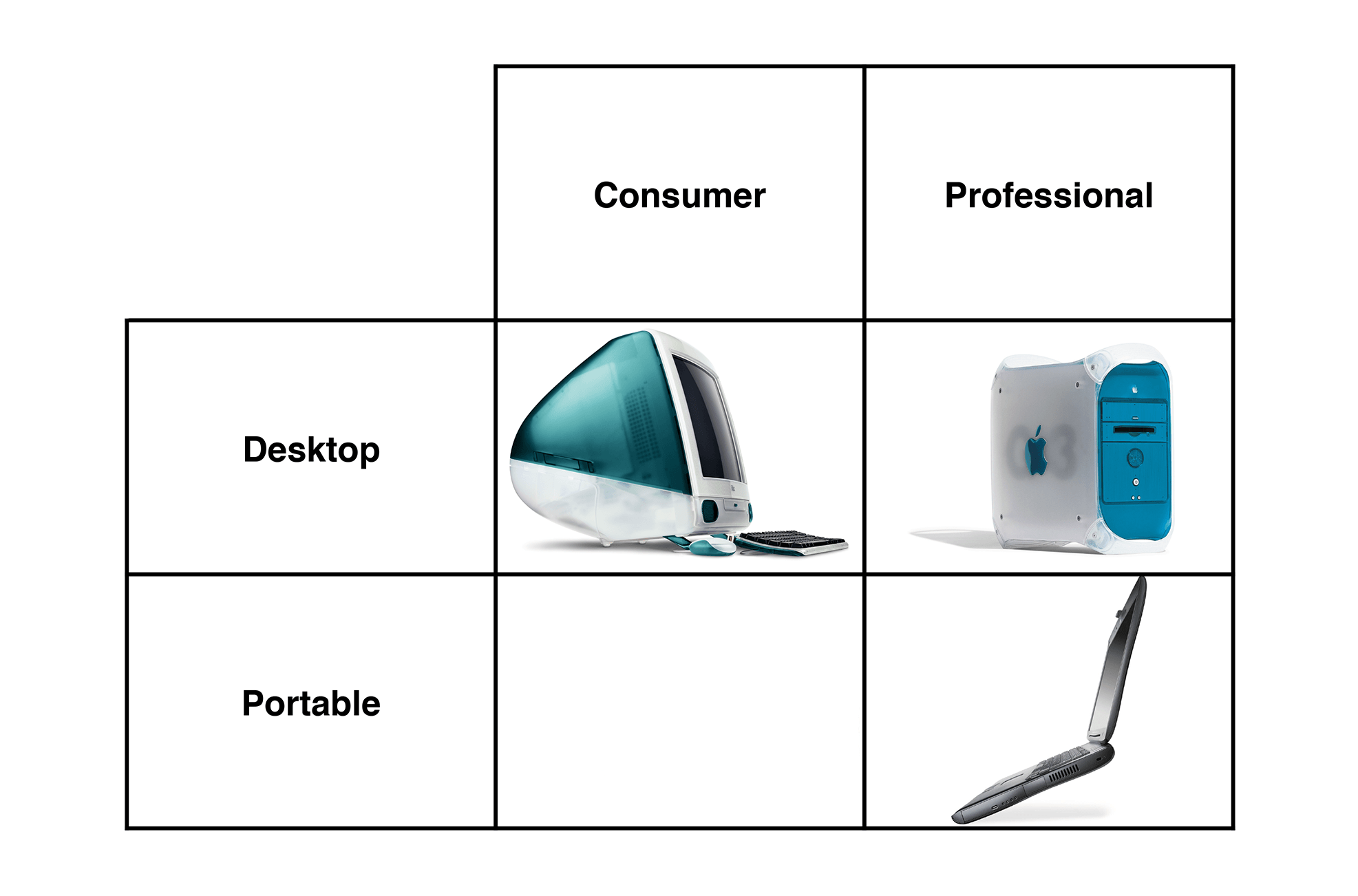
At Macworld New York in July 1999, Steve Jobs walked on stage to complete the famed "Grid of Four" product strategy:

The burden of filling that empty spot would fall to the iBook, a computer designed for consumers and educators, according to Jobs. These users had been asking for an "iMac to Go," a computer with the ease of use and approachability found in the iMac G3.

Jobs delivered.

Built around a 12.1" screen and a 300 MHz G3, this new notebook exuded friendliness. It had a comfortable, full-sized keyboard, a CD-ROM drive, USB and 6 hours of battery life. The real story, however, was about the design.

Instead of metal, the iBook was made of durable white translucent plastic coupled with double-injected rubber around the edges for additional durability and color. The curves this rubber formed, coupled with its bright white interior, earned this computer the nickname of "Clamshell."

The first iBook came in Blueberry and Tangerine, like two of the iMacs of the day. The rubber cut across the lid of the machine, matching along the sides as it swooped to cover the entire bottom of the machine. The trackpad button and Apple logo1 under the screen brought splashes of color to the inside of the notebook.

I think these Macs have more personality than any others. They're fun and youthful, and proved popular with students and home consumers.

It even had a handle.

A Wireless World

It is easy to look at these computers and think that they were just remixed, slower iMacs. That is partially true, but Apple used the first iBook to introduce something brand new to the Mac line: AirPort wireless networking.

To demo this, Jobs was browsing the web on a Tangerine model when he suddenly walked away from the podium. The cameraman followed, and the iBook kept loading the webpage as Jobs walked across the stage.

He then picked up a hula hoop to show the true lack of wires going to the machine:

He even got Phil Schiller to jump off of a platform as the iBook he clutched streamed accelerometer data to the screen:

To date, that's still my favorite moment in an Apple keynote.

The AirPort found in the iBook is primitive compared to today's, of course. It was 802.11b, so it topped out at 11 MBps. It required not only a $299 base station, but a $99 AirPort card that snapped into the iBook under the keyboard.

While it may not be impressive today, this helped put the iBook on the map. AirPort would quickly spread to other Macs, but these orange and blue laptops introduced wireless networking to the world of Mac users.

'iMac to Go, With iMovie'

Following a revision in February 2000 to the original models that included a faster "Special Edition" that came in Graphite, Jobs introduced the second-generation iBook G3.

The new round of machines came with a faster base CPU clocked at 366 MHz. New colors were on tap: a subdued Indigo (seen in that handle photo above) and eye-popping Key Lime that is so bright, any attempts to photograph it usually end in a destroyed camera.

The Key Lime was sold only via the Apple Online Store, a fact that got Jobs booed on stage during the announcement.

In addition to these two models, Jobs announced the iBook Special Edition. Available in Key Lime and Graphite, this model came with a 466 MHz processor, making it the fastest Clamshell to ever ship.

All of these models came with FireWire and iMovie, bringing it into parity with the iMac so many compared it to. No Clamshell can burn DVDs on its own, but Special Edition customers could play them back via the DVD drive found on the more expensive models.

The Clamshell certainly had a fanbase around it, and still does to this day. Apple sold 700,000 of them in the 19 months they were on the market, according to a comment from Jobs as he replaced the machine with the white iBook G3.

In one of the TV ads for the product, Jeff Goldblum asked if it was possible to fall in love with a computer. In a sultry voice, he purred "Oh yes; oooohhh yeeeees."

I'm not sure that's true, but if you want to take a shot at it, you need one of these notebooks. They really are unique.


  1. Sadly, it would be a couple more years until Apple put the logo on the lid right-side up. ↩︎

Support MacStories Directly

Club MacStories offers exclusive access to extra MacStories content, delivered every week; it’s also a way to support us directly.

Club MacStories will help you discover the best apps for your devices and get the most out of your iPhone, iPad, and Mac. Plus, it’s made in Italy.

Join Now
19 Mar 07:03

Crossing the Chasm means the transition from innovators (1st adopters) and early adopters…

by Stowe Boyd

Crossing the Chasm means the transition from innovators (1st adopters) and early adopters (paradoxically the 2nd adopters) to the early majority, and then later on to the late majority and laggards. Yes, every innovation starts with the pre-chasm cadre, who are that core audience. But general adoption requires great overlap with the needs of the majority, specifically the early majority.

19 Mar 07:03

The Panic Economy

by Josh Bernoff

It’s snowing here in New England. And, as always, the local and national news and weather cabals have energized the panic economy, creating not just millions of page views but endless supermarket lines to buy batteries, bread, and milk. (Why bread and milk? No one knows.) As I sit safe and cozy in my home … Continued

The post The Panic Economy appeared first on without bullshit.

19 Mar 07:01

These Weeks in Firefox: Issue 12

by mconley

Highlights

Friends of the Firefox team

Project Updates

Add-ons

Activity Stream

Electrolysis (e10s)

Firefox Core Engineering

  • Flash
    • Running a telemetry experiment this month on 55 (nightly) to see how the Flash-as-click-to-play-by-default behaves, in advance of a 53 release Shield study
  • Crash pings on Nightly 55 and Aurora 54:
    • …are being sent by pingSender;
    • …have content crash pings;
    • …have raw stacks in those crash pings.
    • Building the ability to gather info from that data starts this week.
    • Reminder that FPO is off as of 53.
  • Main shutdown pings are going to be sent via pingSender in 55
  • Beginning work on Update Agent, which will continue downloading an update if the user’s session has ended
  • Updater
    • Simplification of Updater UI aimed at 55
    • Changes for MAR signing are unblocked (compression (LZMA) and cert (SHA-384)), aiming for land by the end of Q1.

Form Autofill

Mobile

  • Shipped Firefox Focus 3.1 with support for 20 new locales!
  • Extended the beta period for Firefox for iOS 7.0 as well as a new beta build for user testing

Platform UI and other Platform Audibles

Privacy/Security

  • Polish work for permission notifications + insecure password warning (live in 52 ?)
  • johannh is working on getting right click + autocomplete/insecure password warning behavior to work correctly for password and username fields
  • nhnt11 is working on a few polish bugs for permissions notifications
  • paolo is fixing regressions (and importantly, bug 1345449 – doorhanger won’t stay open when the browser window is minimized)

Quality of Experience

  • Will soon be handing off most of the Theme API work to the WebExtensions team to allow transitioning to the Photon work.
  • Preferences work is moving along, the patches are looking good and we are going through review cycles now.
  • Continuing to work on performance of importing data from other browsers.
    • Currently looking at a 10 times runtime improvement for bookmark import \o/ ???
    • History import improvements have landed on 54 and uplifted to 53.

Search

Sync / Firefox Accounts

  • The Mobile Bookmarks folder is now visible in the Bookmarks menu bar and toolbar after a successful Sync! This is the result of work done by the Sync and SUMO teams to help make Firefox Sync easier to use.

Test Pilot

  • Page Shot in 54 is on track.
  • Experiments updating this week:
    • Snoozetabs (adding localization and bug fixes)
    • Min Vid (adding better metrics and bug fixes).  History/Upcoming queues coming soon
    • Cliqz v2 (new UI) coming soon

Here are the raw meeting notes that were used to derive this list.

Want to help us build Firefox? Get started here!

Here’s a tool to find some mentored, good first bugs to hack on.

19 Mar 07:01

How to create short link stickers for your best content

by Alex

In yesterday’s Wall Street Journal, I share my favorite hacks for getting more out of conferences — including the trick of making stickers that let me add a short link to my business cards.photo of short link stickers

I love my short link stickers because they give me an immediate way of following up on a conversation. Giving someone a link to something I’ve written that directly relates to our conversation is a lot more compelling than giving them a plain business card. And people seem to get really juiced about the stickers themselves: every time I pull. out my sticker book and start flipping through it for the appropriate link, I hear exclamations of delight.

Since these links and stickers have worked so well for me, I thought I’d share some photos and offer a how-to guide for others who want to follow suit.

Who needs short link stickers?

I created my short link stickers because every conversation I have ultimately turns into tech support, so I constantly found myself writing down the URLs of my favorite blog posts about the sites or services I recommend. But that is just one (weird) use case: anyone who regularly points people to the same few web pages or posts can find these stickers useful.

Here are some other people who might want short link stickers:

  • Writers and journalists: If you’re a writer or journalist, you may have a few publications or stories you share again and again. Create a short link sticker for each of the publications you write for (e.g. http://alexlov.es/wsj) or for your favorite stories (http://alexlov.es/mentors).
    sticker for alexlov.es/reallife

    This sticker links to my TedX talk, so it’s great to share with people who are interested in booking me as a speaker.

  • Sales people: If you have a few web pages, Soda PDFs apps or resources you like to share with people during or after a meeting, create a short link and sticker for each one. You can even roll up multiple web pages onto a single web page (just create a page with a bunch of links) or create a shareable Dropbox folder so you can provide one link for multiple documents.
  • Commentators: I do a lot of media interviews, and every journalist always asks how what to call me and how to describe me. Now I just give them a business card with my http://alexlov.es/hername sticker.
  • Job hunters: Create short links to your LinkedIn profile, a downloadable version of your résumé and examples of your best work. Keep those stickers handy, and if you get asked about specific experiences in an interview, hand over a card with the relevant sticker. Give people links to your best work when you’re sharing cards in other contexts, too.
  • Health professionalsIf you regularly give patients or clients the same pamphlets, or the same links to exercises they need to do, try short link stickers instead. If your patients are anything like me, they’d rather have these resources in digital form, anyhow — they’re harder to lose!
  • Conference speakers and attendees: As you might gather from my WSJ story, I find stickers incredibly useful at conferences, when I’m meeting lots of people. I made a point of creating alexlov.es/SXSW16 stickers last year, which I used at SXSW to let people know about my session, and I also created lots of stickers that linked to content related to my talk.

I’m sure there are many, many other folks who would find short link stickers useful. If you have ideas about how they can work for you or your profession, I’d love to hear them!

Creating short links

To understand your options for creating short links, you need to know that a short link like bit.ly/shortURLS101 consists of two parts: the domain (bit.ly) and the path (shortURLS101). The domain is how all your short links will begin, so you want one that is nice and short; the path is what you’ll create for each individual short link, and will look different each time.

You have three options for creating your short links:

1. Use a standard web-based URL shortener like bitly. This is the easiest option, and if you use bitly itself, has the advantage of making it immediately obvious that your sticker is a short link. A couple of tips:

  • Create your short links while logged into an account on your URL shortening service, so that you create a list of all the links you create. You can use these links to track analytics for your short links (i.e. how often they get clicked) over time.
  • Customize the path for each link so it’s short and memorable. This is essential: a link like http://bit.ly/2nncFhk may be fine when you see it online (and can click on or copy it), but good luck typing it correctly as you read it off a sticker. And creating links with names that relate to the subject matter of your content will help you remember which sticker goes links to which webpage.
  • Make sure you know whether the service you are using is case sensitive. For example, on bitly, if you create the link bit.ly/shortURLS101 someone else can still create the link bit.ly/shortUrls101, and it will go to a completely different place. But on my own link shortener (alexlov.es), capitalization doesn’t matter: those two links would go to the same place.
  • If you want to track who is looking at your links, consider creating multiple short links that point to the same destination. For example, you could create one version of your link (and sticker) that you use when you give to prospective customers, and another for general interest; that way you can tell if this is helping you generate sales leads. Just don’t go crazy creating multiple shortcuts to the same URL or you’ll have trouble remembering which link goes where.

2. Get your own custom domain and use it on a commercial service like bitly. Many URL shortening services, including bitly, will allow you to register your own domain (like alexlov.es) so that it replaces their domain when you use their service. You’d still be using bitly, but each link you create will begin with your domain (alexlov.es) instead of theirs (bit.ly).

If you decide to go this route, there are a couple of things to look for in your domain shortening service provider:

  • Custom namespace. Most URL shortening services make everybody share the same namespace. That means that if someone else has created the short link bit.ly/shortURLS101, you can’t create the link yourna.me/shortURLS101. That’s a drag, because it means you end up with much less flexibility when you’re creating your short links; you’ll get plenty of error messages saying that link or path is already taken. This article from The Next Web recommends ShortSwitch as a service that allows a dedicated namespace, but you’ll want to double-check that whenever and wherever you set up your shortener.
  • Editable links. Very few link shortening services allow you to edit the destination URL after you create a short link, because that would be a recipe for people sharing links that they think go to one place, only to have them later redirected elsewhere.  But I really like having the option to edit where my short links redirect to, in case I have a new and improved piece of content to share — for example, I’ve changed alexlov.es/evernote so that instead of pointing at my very first blog post about Evernote, it now points to a collection of my Evernote posts. Rebrandly seems to be one service that prides itself on allowing you to edit your destination after creating a link.

All the suggestions I make under #1, “Use a standard web-based URL shortener”, also apply here, so please read those tips too.

3. Set up your own URL shortener. This is the approach I use, running the open source YOURLs URL shortening software. I love it, and it’s worked great for me.

I set up YOURLs for myself, on my own server (with some help), but I can’t say it was easy for me.  If these instructions are daunting to you, you can look at one of the many web hosts that now offer YOURLs hosting; that’s what I’d do if I were starting from scratch. I’m afraid I don’t have one to recommend, but you can find one via this link to my very favorite short link service, lmgtfy.com.

Note that you will need to register a new domain to use this option or to get a customized version of a commercial link shortening service. Make sure so choose something short, memorable and easy to read, so people won’t make mistakes when transcribing it. I’m extremely fond of my short-linking domain, alexlov.es, which I got by registering a Spanish domain (.es is for Spanish domains, but you don’t have to be in Spain to register one). The only downside is that people don’t necessarily recognize it as a domain, so I have to explain to them that they can just type in my short link as it appears on the sticker.

Most of the tips I offered above under options #1 and #2 apply here, too, so please do take a look.

Making your stickers

Once you have your URL shortener selected, it’s time to make some links — and some stickers.  Here’s how:

Create a short link for each URLs you frequently share. And from now on, keep a running list of everything you’d like to be able to share, so you have it handy the next time you order stickers.

sticker design for http://bit.ly/VisibleWomen

An example of a sticker image exported from my template and ready for upload to Moo.

Choose your sticker printer. You can print stickers at home using labels you buy at at an office supply store, but I like having mine printed. It’s a lot easier to keep my stickers looking nice when they are contained in a little sticker book, and I suspect that my sticker book is part of what delights people about my stickering process. I order my sticker books from Moo, and I’ve been very happy with the results.

Design your stickers. Moo provides a template for designing your stickers, but it took some experimentation for me to make that work, and I had to give up on the dream of creating my stickers on the Moo site itself. Instead, I created a Photoshop template (get the PSD file here!) that I use to create each sticker as an image: the background layer has my domain, and then I put each short link on a separate layer, flipping the visibility of each layer on when I want to export a PNG of that sticker.  I save all those PNGs in one folder and then upload them to Moo to create my stickers.

Practice stickering your cards. Before you hit the road, figure out where you are going to attach stickers to your card. You’ll want to ensure they adhere properly, and also check that you have a spot to put them where they won’t obscure crucial information. I like to put them on the back of my business cards, where I have a simple headshot.

Using your stickers

Once you have your short link stickers in hand, you’re ready to start wowing people with your stickers — and content. I make a point of carrying my short link sticker book in the same business card wallet I use for my business cards, so it’s always handy when I’m giving someone a card.

I also check my URL shortener periodically to make sure people are actually visiting the links I share. Looking at the top short links I’ve created in the past two years, I can see that a number of my most-clicked links are getting traffic from stickers. (I’ve highlighted the links for which I’ve created stickers, and excluded the top 8 links .) Note that these stats don’t reflect the overall traffic to these web pages, but rather, just the number of times my short link has been used to get there.

analytics from YOURLs show 50+ clicks for many stickered links

Fifty clicks may not seem like a lot, but when you realize that almost all the hits on alexlov.es/2x2s came from people who presumably entered that URL off a sticker, it’s actually an amazing result.  People really do hang onto my business cards, it appears — and adding those short links mean they’re taking the time to look at my work.

Short link stickers have become one of my favorite conference and networking hacks, and I hope that you can now see how they can work for you, too. And of course, if you want to share this post, I have a short link for you: alexlov.es/linkstickers

19 Mar 07:00

Intel, Mobileye, and Smiling Curves

by Ben Thompson

There is a fascinating paragraph in this Wall Street Journal article about Intel’s purchase of Mobileye NV,1 an Advanced Driver Assistance System primarily focused on camera-based collision avoidance and, going forward, autonomous driving:

The considerable premium Intel is willing to pay for Mobileye reflects the enormous value tech companies see in the automation of cars and trucks, said Mike Ramsay, research director at Gartner Inc. It would have been inconceivable a few years ago — it is more than double what the private-equity firm Cerberus Capital Management LLC paid for Chrysler LLC in 2007.

Chrysler LLC is, of course, a car manufacturer, since merged with Fiat; the price it was sold for is about as relevant to Mobileye as the value of a computer OEM to, well, Intel.

The Smiling Curve and PCs

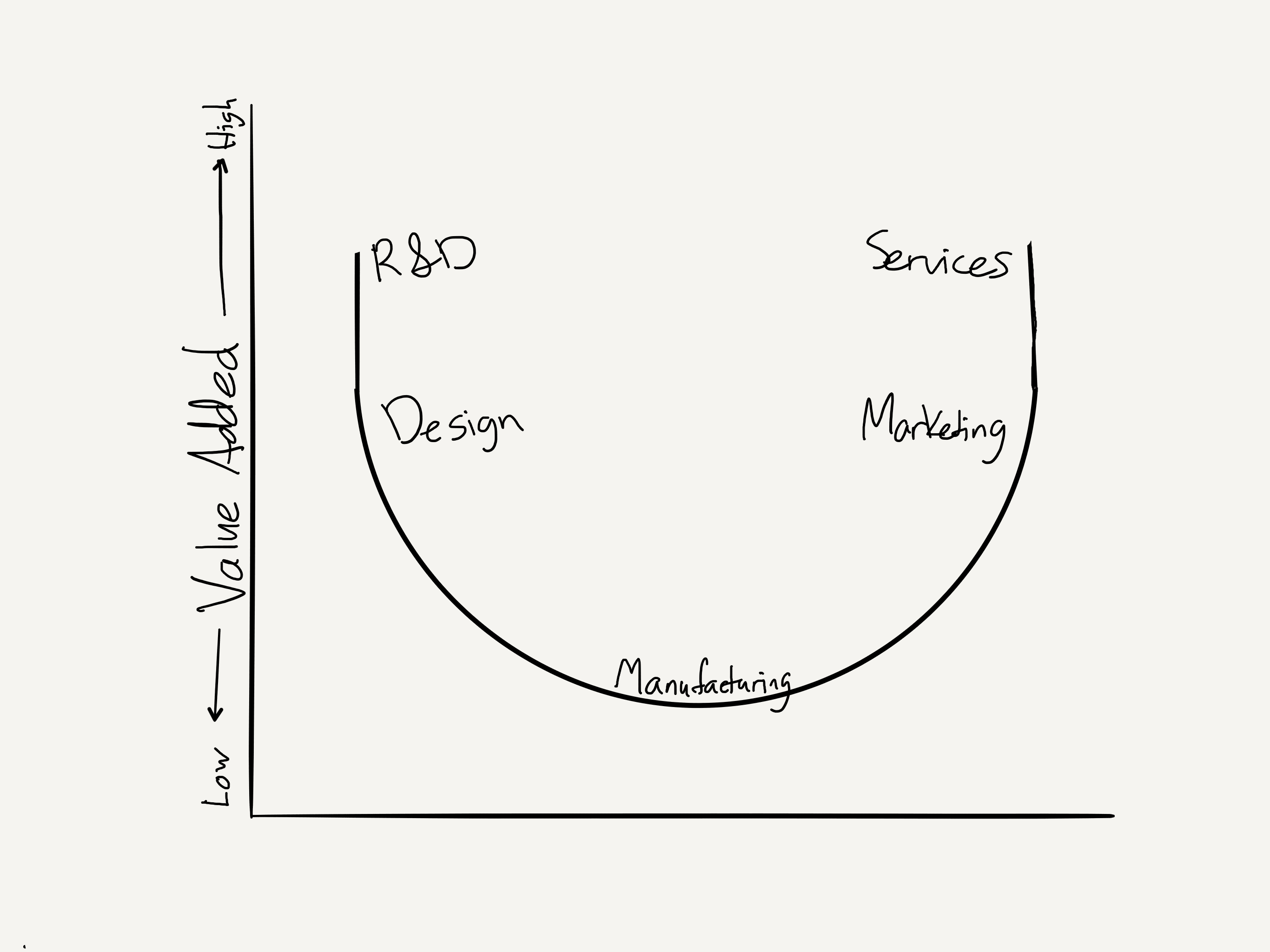
I wrote about The Smiling Curve back in 2014; it is a concept that was coined by one of those computer OEMs, Stan Shih of Acer, in the early 1990s, as a means of explaining why Acer needed to change its business model.

stratechery Year One - 320

Shih explained the curve in his book Me-Too Is Not My Style:

The basic structure of the value-added curve, from left to right on the horizontal axis, are the upper, middle and down stream of an industry, that is, the component production, product assembly and distribution. The vertical axis represents the level of value-added. In terms of market competition type, the left side of the curve is worldwide competition whose success depends on technology, manufacturing and economy of scales. On the right side of the curve is regional competition. Its success depends on brand name, marketing channel and logistic capability.

Every industry has its own value-added curve. Different curves are derived according to different levels of value-added. The major factors in determining the level of value-added are entry barrier and accumulation of capability. In other words, with a higher entry barrier and greater accumulation of capabilities, the value-added will be higher.

Take the computer industry as an example. Microprocessor manufacturing or the establishment of brand name business comes with a higher entry barrier, and requires many years of strength accumulation to achieve progress. However, computer assembly is very easy. That is why no-brand computers are found everywhere in electronic shopping malls.

When Shih coined the concept in 1992, “microprocessor manufacturing” meant Intel: outside of the occasional challenge from AMD, Intel provided one of two parts (along with Windows) of the personal computer that couldn’t be bought elsewhere; the result was one of the most profitable companies of all time.

Note, though, that while a core piece of Intel’s competitive advantage (particularly relative to AMD) was, as Shih noted, the entry barrier of fabrication, Intel’s close connection to Windows — to software — was just as critical. It is operating systems that provide network effects and the tremendous profitability that follows, and operating systems are based on software. In other words, the PC smiling curve looked more like this:

stratechery Year One - 319

Windows and x86 processors were effectively a bundle, and Microsoft and Intel split the profits. Remember, bundling is how you make money, and in this case Intel-based hardware provided Microsoft a vehicle to profit from licensing Windows, while Windows built an unassailable moat for both — at least in PCs.

The Smiling Curve and Phones

Obviously things went much differently for both Microsoft and Intel — and Acer — when it came to smartphones. The overall structure of the industry still fit the smiling curve, but the software was layered on completely differently:

stratechery Year One - 318

Apple used software to bundle together manufacturing (done under contract) and the final product marketed to consumers; over time the company also added components, specifically microprocessors, to the bundle (also built under contract). The result was the most successful product of all time.

Google, meanwhile, made Android free; the bundle, such as there was, was between the operating system and Google’s cloud. The rest of the ecosystem was left to fight it out: distribution and marketing helped Samsung profit on the right, while R&D and manufacturing prowess meant profits for ARM, Samsung, and Qualcomm, along with a host of specialized component suppliers, on the left. Still, no one was as profitable as Intel was in the PC era, because no one had the software bundle.

That said, the role of software was critical: Intel, for example, started out the smartphone race at a performance disadvantage; while the company caught up the ecosystems had already moved on, because too much software was incompatible with x86.

The Smiling Curve and Servers

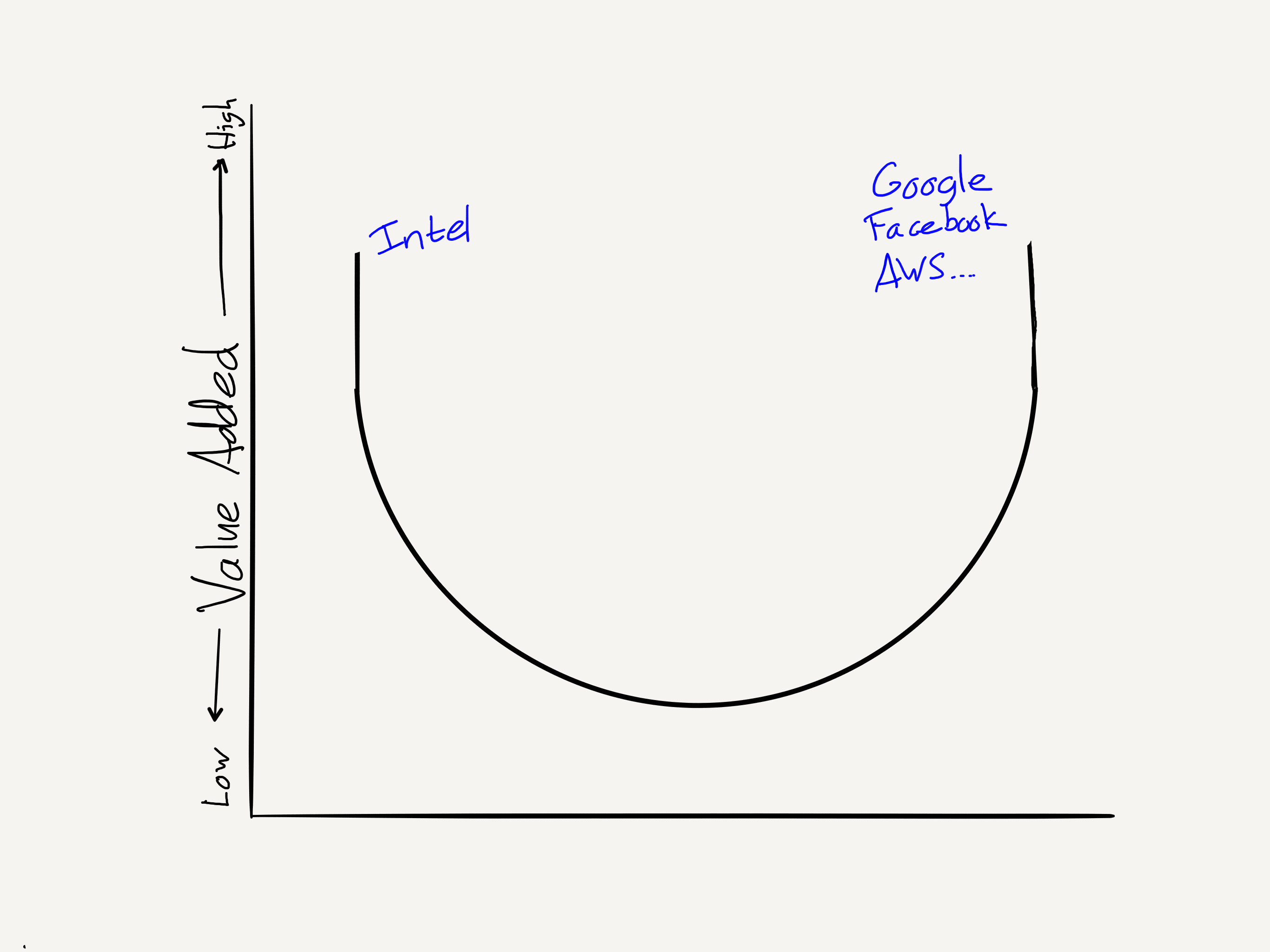
Intel has done better in the cloud:

stratechery Year One - 317

The cloud took the commodification wave that hit PCs to a new extreme: major cloud providers, armed with massive scale and their own reference designs, hired Asian manufacturers directly. The one exception was Intel and its Xeon chips (which themselves undercut purpose-built server processors from companies like Sun and IBM), which continue to be the most important contributors to Intel’s bottom-line.2 Still, the real value in the cloud is on the right, where the software is: Facebook, Google, AWS.

Cars and the Future

A little over a year ago I explained in Cars and the Future that there were three changes happening in the personal transportation industry simultaneously:

  • Drivetrains were changing from the internal combustion engine to electric
  • Car operation was moving from human-based to computer-based (i.e. self-driving cars)
  • Ownership was shifting from individuals to fleets, dispatched by ride-sharing services

As I noted in that piece each of these developments is in some respects independent of the other:

  • Tesla has led the way in electric vehicles, building an amazing brand along the way, but traditional car companies are not far behind. That’s because the drivetrain is a sustaining technology, not a disruptive one: the business model is by and large the same.3
  • Multiple players are working on self-driving cars, including Mobileye; more on them (and Intel) in a bit. Other interested parties are Apple and Google, as well as the traditional car manufacturers — who also have rather mixed motivations. For now, limited self-driving functionality is a high-margin add-on; in the future, it could be their demise (more on this in a moment too)

  • Uber is the biggest player in ride-sharing, at least in most Western countries, although Lyft is lurking should Uber implode; Didi is dominant in China, while Southeast Asia has a number of smaller competitors. The ride-sharing business is a better one than many critics think; in developed markets rides are profitable on a unit basis, and there is negative churn: customers use the services more over time, not less. Competition is fierce, although the lowered customer acquisition costs of being the dominant player are under-appreciated, as well as the impact that has on drawing drivers.

What is interesting is that these three factors can be fit into the smiling curve framework:

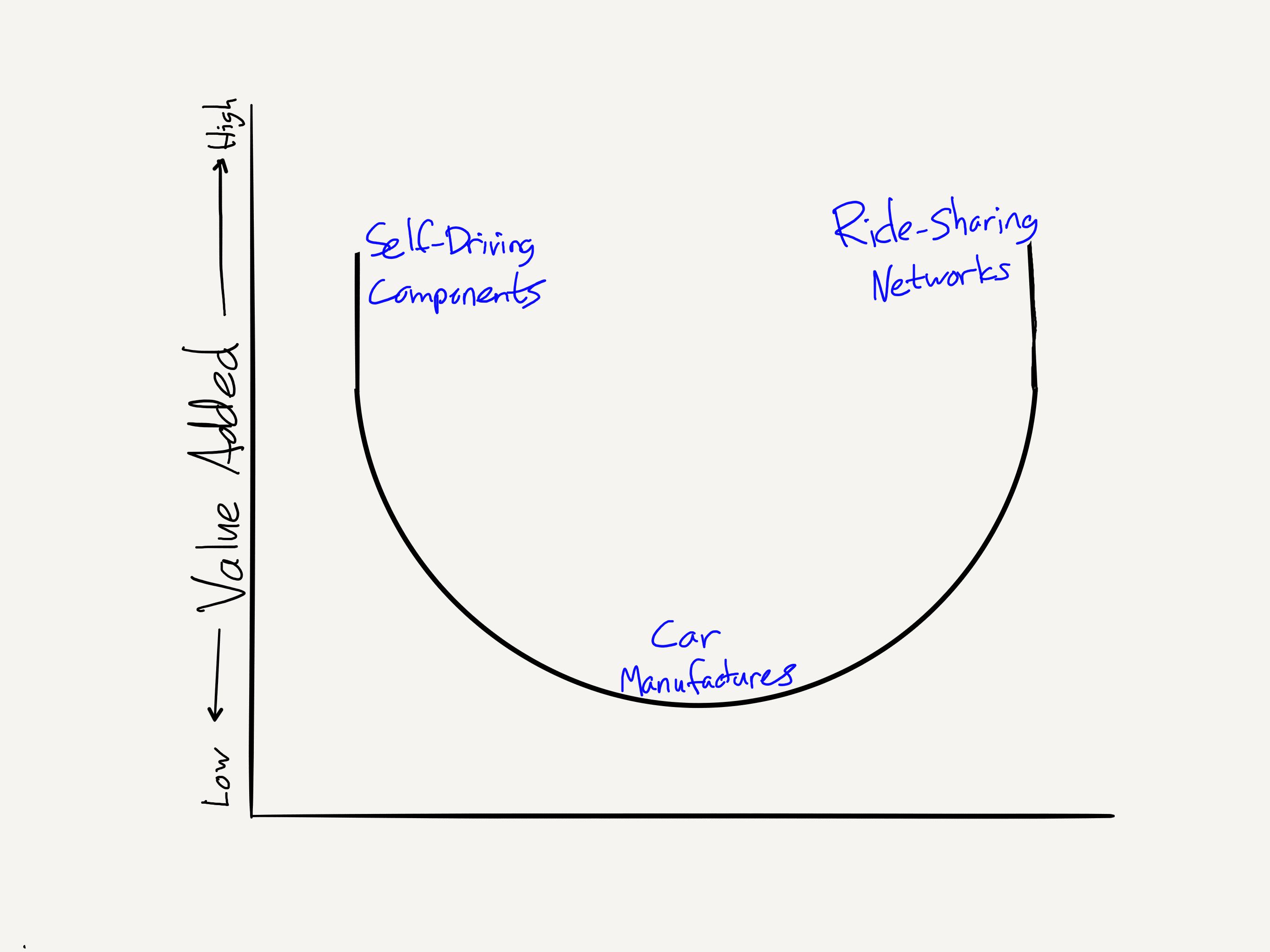
stratechery Year One - 316

This underscores the reality that all three are still very interconnected. More usefully, the smiling curve framework, particularly the lessons learned from the PC, smartphone, and server, also gives insight into how the transportation market may evolve, and explain why Intel made this purchase.

Car Manufacturers: The Bottom of the Smiling Curve

First, while the individual ownership model made it possible to bundle manufacturing and selling to end users (a la Apple in smartphones), said model doesn’t make sense going forward. The truth is that individual car ownership is a massive waste of resources, particularly for the individual: thousands of dollars are spent on an asset that is only used a single-digit percentage of the time and that depreciates rapidly (whether driven or not). The only reason we have such a model is that before the smartphone no other was possible (and the convenience factor of owning one’s own car was so great).

That, though, is no longer the case: in the future self-driving cars, owned and serviced by fleets, can be intelligently dispatched by ride-sharing services, resulting in utilization rates closer to 100% than to zero. Yes, humans will likely still move en masse in the morning and afternoon, but there will be packages and whatnot in the intervening time periods.

Moreover, self-driving cars will be built expressly for said utilization rates; yes, they will wear out, but a focus on longevity and serviceability over comfort and luxury will reduce manufacturers to commodity providers selling to bulk purchasers, not dissimilar to the companies building servers for today’s cloud giants.

That leaves the value for the ends.

Ride-Sharing Networks: The Right of the Smiling Curve

I’ve already written, both in Cars and the Future and Google, Uber, and the Evolution of Transportation-as-a-Service, that Uber’s position (again, barring implosion) is stronger than it seems. Yes, were, say, Waymo (Google’s self-driving car unit) able to instantly deploy self-driving cars at volume the ride-sharing company would be in big trouble, but in reality, even if Waymo decides to field a competitor, building routing capability (a related but still different problem than mapping) and, more importantly, gaining consumer traction will take time — time that Uber has to catch up in self-driving (certainly Waymo’s suit against Uber-acquisition Otto for stealing trade secrets looms large here; I’ll cover this more tomorrow).

The broader point, though, is that the winner (or winners) will look a lot like Uber looks today: most riders will use the same app, because whichever network has the most riders will be able to acquire the most cars, increasing liquidity and thus attracting more riders; indeed, the effects of Aggregation Theory will be even more pronounced when supply is completely commoditized per the point above.

Autonomous Driving Suppliers: The Left of the Smiling Curve

Remember, though, that while consumer-facing products and services get all of the attention, there is a lot of money to be made in components, particularly in an industry governed by the Smiling Curve. What is fascinating about this space is that it is an open question about which components will actually matter:

Hardware: For one, it’s not clear which sensing solution will prove superior: Mobileye’s camera-based approach (which Tesla, after ending its relationship with Mobileye after last year’s fatal car crash, is reproducing), or the Waymo-favored LIDAR approach (also used — allegedly stolen — by Uber). Perhaps it will be both.

Maps: Mapping is particularly critical for Waymo: its self-driving technology relies on super-detailed maps; if your objection is that producing said maps will be difficult, well, imagine telling yourself 15 years ago about Google Street View. Many car manufacturers, meanwhile, are increasingly casting their lot in with HERE, the former Nokia mapping unit (more on this in a moment as well).

Chips: Mobileye makes its own System-on-a-Chip called the EyeQ; selling a camera is meaningless without the capability of determining what is happening in the image. However, the EyeQ specifically and Mobileye generally cannot really compete with Nvidia, the real monster in this space. Nvidia realized a few years ago that its graphics capability, which emphasizes parallel processing, lends itself remarkably well to machine learning and neural network applications. Those, of course, are at the frontier of modern artificial intelligence research — including the sort of artificial intelligence necessary to drive cars. That is why Nvidia’s PX2 chip is in Tesla’s newest vehicles, along with those from a host of other manufacturers.

The real open question is software: Google is writing its own, Apple is apparently writing its own, Tesla is writing its own, Uber is writing its own, and Mobileye is writing its own. The car companies? It’s a mixed bag — and fair to question how good they’ll be at it.

Intel + Mobileye

This is the context for Intel’s acquisition. First off, yes, it is ridiculously expensive. The purchase price of $14.71 billion (once you back out Mobileye’s cash-on-hand) equates to an EBITDA multiple of 118; it helps that Intel is paying with overseas cash, which the company hasn’t paid taxes on. And second, I’ve long argued that society would be better off if companies would simply milk their company-defining products and return the cash to shareholders to invest in new up-and-comers (with the caveat that Intel had one of the greatest pivots of all-time, from memory to microprocessors).

That said, there is a lot to like about this deal for Intel (from Mobileye’s perspective, accepting a 34% premium is a no-brainer). Obviously Intel has chip expertise (although its graphics division lags far behind Nvidia’s); with Mobileye the company adds hardware expertise. It goes deeper than that though: Mobileye and Intel have actually been working together already, with HERE.

In fact, that is understating the situation: Intel bought a 15% ownership stake in HERE earlier this year, and Intel and Mobileye made a deal with BMW last year to build a self-driving car. In short, Intel is assembling the pieces to be a real player in autonomous cars: hardware, maps, chips, software, and strong relationships with car manufacturers.

Indeed, with this acquisition Intel’s greatest strength and greatest weakness is its dominant position with established manufactures: there is the outline of a grand alliance between car manufacturers, HERE maps, and Intel/Mobileye; the only hang-up is that the future of transportation is one in which the car manufacturers are the biggest losers. Companies like Uber or Google, meanwhile, have nothing to lose (well, Uber does, but they seem to grasp the threat).

Regardless, it’s a worthwhile bet for Intel: the company seems determined to not repeat its mistakes in smartphones, and given that the structure of self-driving cars looks more like servers than anything else, it’s a worthwhile space to splurge in.

  1. What a great name. Seriously!
  2. Yes, there continues to be noise about ARM in the data center, most recently Microsoft’s announced commitment to use ARM in its data centers; for now Intel is dominant, and it will take more than a vaporware announcement to change that
  3. Although it should be noted that Teslas are not sold through dealerships
19 Mar 06:59

Create controversy.

by Stowe Boyd

Create controversy.

14 Mar 05:47

wilwheaton: This is beautiful.


wilwheaton:

This is beautiful.

14 Mar 02:42

Tablets and smartwatches: if it's not Apple, it has fallen off the map

by Volker Weber

I completely agree with Marques on this one. Tablets did not become the category that we envisioned and neither have smartwatches. It's either an iPad or an Apple Watch, or it has fallen off the map. That does not mean there aren't any good ones. But they don't matter. Watch the video from 5:12.

14 Mar 02:42

Apple Promotes Sticker Packs with New Video

by John Voorhees

Apple released another installment in its iPhone 7 ‘practically magic’ video series today that celebrates stickers. The spot, called ‘Sticker Fight’ pulls sticker packs out of the Messages app and into the physical world. Set to a single by The Monks called ‘Boys are Boys and Girls are Choice,’ which has a fantastic 60s-style beat, the video features a sticker fight that breaks out across a city with people slapping stickers on each other and practically everything else in the landscape.

Sticker Fight perfectly captures the fun of sticker packs. Every week as we put together the Club MacStories Weekly newsletter, which includes a section called ‘The Album’ highlighting our favorite sticker packs, a sticker fight invariably breaks out as we test them out on each other and other friends. It’s great to see Apple bringing stickers to life and highlighting the iOS 10 feature because they are exactly as depicted, a playful addition to any conversation that often says more in a single sticker than you could ever convey with text.

I’m also impressed by the breadth and depth of the stickers chosen for Apple’s video, which includes 50 different sticker packs drawn from every corner of the iMessage App Store. There are big-name sticker packs like Disney’s Minnie Mouse and Kimoji, but there are just as many fantastic packs from indie artists like MarcyMoji, which we covered previously and The Iconfactory’s Route 66 Stickers, as well as wonderfully weird packs like Shark Head and Nyan Cat.

Here’s a complete list of the 50 sticker packs that appear in ‘Sticker Fight,’ which also has a dedicated page on the App Store.

  • Imoji
  • So Me
  • MarcyMoji By Andrew WILLIAMS
  • Pop Art Collection
  • Essential Stickers by MojiMade
  • Weirdos
  • WSHH Stickers
  • CoachMoji
  • Eat Stuff
  • Jeremyville By Stickpax
  • Major Lazer Stickers
  • Marvel Items of Power
  • Real NYC Stickers
  • Breakfast Stickles
  • Care Bear Rainbows
  • Ellen’s Emoji Exploji
  • Family Guy: The Quest for Stuff
  • Heavy Metal Stickers by Team Rock
  • Iconfactory Route 66 Stickers
  • Kawaii Sushi
  • Kimoji Stickers - Launch Pack
  • Marc Johns By Stickapax
  • Rocky Horror Picture Show
  • South Park
  • Cartoon Comics
  • Cat Stamp
  • Classic Sonic
  • Disney Stickers (Mickey & Friends)
  • DreamWorks Trolls 3D Animated Stickers
  • Garfield Emojis Stickers
  • Germany Sticker Pack by Henry Glendening
  • Halo Stickers
  • Harry Dude
  • Hello Kitty
  • Jordan Keyboard
  • Medieval Monsters
  • Meet the Pink Panther
  • Movesum - Step Counter by Lifesum AB
  • Musicomics by Getty Images Inc
  • Nyan Cat: Lost in Space
  • PBS
  • Popeye “I Yam What I Yam”
  • Power Rangers
  • Powerpuff Girls (Fun PPG Sticker Sampler Pack)
  • Ramen Sticker Pack
  • Shark Head
  • Slicker Stickers
  • The Very Hungry Caterpillar
  • Wurps like Words but Better
  • Zoodles

Support MacStories Directly

Club MacStories offers exclusive access to extra MacStories content, delivered every week; it’s also a way to support us directly.

Club MacStories will help you discover the best apps for your devices and get the most out of your iPhone, iPad, and Mac. Plus, it’s made in Italy.

Join Now
14 Mar 02:42

The “Worldview” of Mozilla

by Mitchell Baker

There are a set of topics that are important to Mozilla and to what we stand for in the world — healthy communities, global communities, multiculturalism, diversity, tolerance, inclusion, empathy, collaboration, technology for shared good and social benefit.  I spoke about them at the Mozilla All Hands in December, if you want to (re)listen to the talk you can find it here.  The sections where I talk about these things are at the beginning, and also starting at about the 14:30 minute mark.

These topics are a key aspect of Mozilla’s worldview.  However, we have not set them out officially as part of who we are, what we stand for and how we describe ourselves publicly.   I’m feeling a deep need to do so.

My goal is to develop a small set of principles about these aspects of Mozilla’s worldview. We have clear principles that Mozilla stands for topics such as security and free and open source software (principles 4 and 7 of the Manifesto).  Similarly clear principles about topic such as global communities and multiculturalism will serve us well as we go forward.  They will also give us guidance as to the scope and public voice of Mozilla, spanning official communications from Mozilla, to the unofficial ways each of us describes Mozilla.

Currently, I’m working on a first draft of the principles.  We are working quickly, as quickly as we can have rich discussions and community-wide participation. If you would like to be involved and can potentially spend some hours reviewing and providing input please sign up here. Jascha and Jane are supporting me in managing this important project.  
I’ll provide updates as we go forward.  

14 Mar 02:42

Neural Networks and Deep Learning

files/images/Deep_Learning.PNG


Michael Nielsen, Mar 16, 2017


Between meetings with notaries today I was wondering to myself whether work had been done on using one neural network to train another neural network. I didn't find the answer (if you know, send me a note!) but I did find this nice guide to neural networks and deep learning. Michael Nielsen explains these a bit differently than I've seen before, but in such a way as to make some things clearer to me, so I felt it was certainly worth passing along. There are also examples you can work though.

[Link] [Comment]
14 Mar 02:42

The (Ongoing) Saga of Comcast

by termie

TL;DR: The company has a multitude of contact methods for me that were entered when I created the service account, but will only contact me to provide account access via methods that I can cannot access unless I already have account access. And they are charging me overage fees in the meantime.

A roommate, under whose name the old cable account was under, moved out. We began paying with a different card.

Comcast enacted a new limit on the amount of data we can use per month, which we hit in the first couple weeks. They charge some additional fees for overages or you can, allegedly, pay a $50 flat rate fee to go back to the old unlimited. In order to add that $50 add-on, it required changing the account, which can only be done by the primary account holder, the roommate who moved out.

So, we call up the roommate, he flies back to San Francisco from Los Angeles for a day to go in-store with me (the only way to make this change, apparently). They close his account, open a new one in my name under a new, alledgedly better, plan. This new plan is part of a bundle that includes telephone service (which we will never use) and I’ve explicitly asked for this unlimited data add-on to be applied (and told it has been). I am sent home with a modem to set up, and I leave the store content.

Fast forward a couple weeks. Housemates begin receiving pop-up warnings that their data usage has hit the limit. That’s surprising as, we’ve added the unlimited data add-on. I head over to Comcast’s website to create my web account to log in, and find that I already have a web account “configured” for my service. I don’t have the password.

After entering in appropriate identifying information associated with the account, the password reset link actually leads to a live-chat. Live chat asks me some more identifying information before sending me an email verification email (which I’ve yet to receive but it’s only been about an hour so far). That email verification email is not, I am told actually my password reset email.

In order to reset my password, I am told, I will need to provide my PIN. After providing one I am informed that in fact my PIN has not been configured. Reminder that at this point they have my name, address, last 4 of social, telephone number and email address already on file from when I created the service account. They say they will need to call me to give me a PIN and have me create a security question.

They proceed to call… the landline they added to my account that is not in use and has no phone plugged into it. When pointing out that they have my primary phone number already in their account they claim there is an FCC rule that prevents them from using it. They never had any issue using my cell phone before when the account was just internet. They’ve also called me on that number 5+ times to get me to take a survey about my instore visit since then.

The other two options for getting a PIN, which, reminder, I would have been able to set up if I had been allowed to create my own web account instead of having it sneakily done for me in-store, are via email at this comcast email account that was setup without my knowledge in store that can only be accessed by logging in with a password I do not have that can only be reset by using the PIN. Or by US Mail in 5 to 7 business days.

The company has a multitude of contact methods for me that were entered when I created the service account, but will only contact me to provide account access via methods that I can cannot access unless I already have account access. And they are charging me overage fees in the meantime.

I’ve sent the content of this blog post to FCC Consumer Complaints along with a bunch of screenshots of our conversation, which I am told is the best way to get Comcast to get a somewhat more powerful representative to get in touch with you.

In the meantime, digging up a working landline phone and a cable to plug in and try when I get home.

Update 1: They called me, on my cell phone, to tell me I owe them money. I explained in short the story above as pertains to letting me into my account to add a payment method. They cold transferred me. New person needs the exact number I owe (dollars and cents) to continue along the process of letting me reset my password (that I never created or was told existed). Obviously I did not write down the exact amount. Person who created my account in-store apparently did not enter in any identifying information. Also, account numbers are considered secrets.

P.S. Wow, this is what got me to write a blog post after multiple years?

14 Mar 02:40

Hamilton

Alexander Hamilton to George Washington, 1792:

When a man unprincipled in private life, desperate in his fortune, bold in his temper, possessed of considerable talents, having the advantage of military habits—despotic in his ordinary demeanour—known to have scoffed in private at the principles of liberty—when such a man is seen to mount the hobby horse of popularity—to join in the cry of danger to liberty—to take every opportunity of embarrassing the General Government & bringing it under suspicion—to flatter and fall in with all the non sense of the zealots of the day—It may justly be suspected that his object is to throw things into confusion that he may “ride the storm and direct the whirlwind.”

Speaking of being “desperate in his fortune,” it’s interesting that Donald Trump has apparently postponed or reneged on his commitment to forego his salary, and to donate payments to his hotels from foreign government to charity.

13 Mar 21:56

Introducing Stormcrow

by Tom McLaughlin

A SaaS company like Dropbox needs to update our systems constantly, at all levels of the stack. When it comes time to tune some piece of infrastructure, roll out a new feature, or set up an A/B test, it’s important that we can make changes and have them hit production fast.

Making a change to our code and then “simply” pushing it is not an option: completing a push to our web servers can take hours, and shipping a new mobile or desktop platform release takes even longer. In any case, a full code deployment can be dangerous because it could introduce new bugs: what we really want is a way to put some configurable “knobs” into our products, which a) give us the flexibility we need and b) can be safely tweaked in near real-time.

To satisfy this need, we built a system called Stormcrow, which allows us to edit and deploy “feature gates.” A feature gate is a configurable code path that calls out to Stormcrow to determine how to proceed. Typical code usage looks like this:

# Here we are in some Dropbox Python code.
# We need to decide whether to show a red button or a blue button to the user.
# Let's ask Stormcrow!
variant = stormcrow.get_variant("feature_x", user=the_user)
if variant == "RED_BUTTON":
  show_red_button()
elif variant == "BLUE_BUTTON"
  show_blue_button()
else:
  show_default_button()

Stormcrow feature gates

  • Are rolled out to production within 10 minutes of being changed.
  • Can be used across all Dropbox systems, from low-level infrastructure to product features on web, desktop or mobile.
  • Provide advanced targeting capabilities, including the ability to segment users based on data in our analytics warehouse.

Building a one-size-fits-all feature gating system like this is tricky, because it needs to be expressive enough to handle all the different use-cases we throw at it on a daily basis yet robust enough to handle Dropbox-scale traffic. The rest of this blog post will describe how the system works and some of our lessons from building it.

Example

Suppose we wanted to run an A/B test to see what button colors are preferred by German users. And further suppose we already know that English speakers prefer blue buttons. In the Stormcrow UI, we might configure the feature like this:

This shows that “German locale users” will be exposed at a rate of 33% RED_BUTTON , 33% BLUE_BUTTON , and 34% CONTROL , and English sessions are set to 100% BLUE_BUTTON. But all other users will receive OFF .

Notice that you can use heterogeneous population types in a given feature: the example uses both a “user” population and a “session” population—the former represents logged-in users only, while the latter represents any visit to our site.

Stormcrow features are built using a sequence of populations which are matched using a fall-through system: first we try to match population 1, and if we fail we fall through to population 2, and so on. As soon as we match a population, we pick a variant to show the user according to the chosen variant mix for that population.

It’s important to note that the variant assignment is stateless. It is randomized by hashing the user’s ID with a seed (the small gray box in the top right). Advanced Stormcrow users can even manipulate the seed to accomplish special behaviors. For example, if you want two different features to assign users the exact same way, you can give them the same seed.

How are populations defined?

To understand how populations work, we need two pieces of vocabulary:

  1. A selector is a code object that’s passed into Stormcrow in order to help it make decisions. We’ve made it so most commonly-used object models can also serve as Stormcrow selectors; for example, the user and session objects can both be used as selectors.
  2. A datafield is a piece of code that takes in one or more selectors and extracts a value of a specified type: either a boolean, a date, a number, a set, or a string. Datafields are then combined using a simple rule engine that allows you to perform boolean logic with them.

Here’s an example of a real datafield, user_email , taken straight from the code:

@dataField(TYPE.STRING, [SELECTOR_NAMES.USER], "The user's email as a string.")
def user_email(**sel):
    return _user(**sel) and _user(**sel).email

The @dataField decorator specifies that this datafield requires a USER object, and will produce a STRING . It also includes a help string so we can make autogenerated documentation. The actual body of the function simply pulls the user’s email out of the object.

Once a datafield is defined, you can use it in a population. Here’s a population which matches users at Gmail and Yahoo domains, except for a couple of excluded addresses, plus tomm@dropbox.com :

Datafields are powerful since they can run arbitrary code in order to fetch a value. Dropbox has a lot of them to support all of our targeting use-cases, and new ones are being added all the time by different teams who need new capabilities.

Hive-based populations: connecting to our analytics data warehouse

Even with the ability to create arbitrary datafields, we face one limitation: we can only gate on information that’s accessible to our server code in some way, i.e., present in an already loaded model or in a database we can query efficiently. But there’s another big source of data at Dropbox: our Hive analytics warehouse. Sometimes a Dropboxer wants to select an arbitrary set of users by writing a HiveQL query, which can draw on all kinds of historical logging and analytics data.

Defining a population in this way is an exercise in moving data around. In order for the population definition to be accessible to Stormcrow, we need to move it out of our analytics warehouse and into a scalable datastore that’s query-able from production code. To do this, we built a data pipeline that runs every day and exports the full set of Hive-based populations for that day into production.

The main disadvantage of this kind of approach is data lag. Unlike a datafield, which always produces up-to-the-minute data, populations based on Hive exports only update on a daily basis. (And sometimes slower, if anything goes wrong with the pipeline.) While this is unacceptable for some kinds of gating, it works great for feature gates where populations change slowly. For example, a product launch to a predefined set of beta users is a good candidate for a Hive-based population.

Hive-based populations represent a fundamental trade-off between expressive power and data freshness: performing feature gating on complex analytics data incurs more lag and data engineering work than gating on commonly accessed data.

Derived populations: building complex populations out of simpler ones

One of Stormcrow’s most powerful features is its ability to define populations not only in terms of rules or queries like above, but also in terms of other populations and features. We call these derived populations. For example, here’s a population that is only matched when a) we match the “Android devices” population and b) we receive variant OFF for the feature recents_web_comments.

This capability solves the problem of complicated rule configurations being copied and pasted again and again throughout the tool. Instead, feature gating at Dropbox aims to build a core set of basic populations, which can be mixed and matched to produce arbitrarily complex targeting. We’ve found in practice that designing derived population hierarchies is very similar to refactoring code.

In fact, you can look at derived populations as a way to replace coded “if” statements to choose between experiments. Rather than write logic of the form “if user is in Experiment A show them thing A, otherwise if they’re in not in Experiment A but are in Experiment B show them thing B…” you can express these relationships directly in the Stormcrow UI.

Selector inferring: making the API easier to use by magically inferring additional information

Like any complicated software system, Dropbox has a number of internal models used in our code. For example, the user model represents a single user account, and the team model represents a Dropbox Business team. The identity model is how we represent paired accounts: it ties together a personal plus a business user model into a single object. All of our models are connected via various one-to-many and many-to-one relationships.

In Dropbox product code, we typically have access to one or more of these models. For developer convenience, it’s nice if Stormcrow understands our model relationships well enough to “infer” extra selectors automatically. For example, a developer may have access to a user object u and want to query some feature which is gated on team information. While they could write

variant = stormcrow.get_variant("team_related_feature", user=u, team=u.get_team())

it is much more convenient if Stormcrow can fill in the details automatically, so the developer only needs to write

variant = stormcrow.get_variant("team_related_feature", user=u)

In Stormcrow we represent Dropbox’s model relationships as a graph which we call the selector inferring graph. In this graph, each node is a model type, and an edge from node A to node B means that we can infer model B from model A. When a Stormcrow call happens, the first thing we do is take the selectors we were given and compute their transitive closure in this graph.

Of course, inferring may introduce a performance cost in the form of extra computation or network calls. To make it more efficient, inferring produces thunks, which are lazily evaluated so that we only compute them if a selector is actually needed to make a gating decision. (See the “Performance dangers” section below for more on the risks of Stormcrow making network calls.)

Here’s our actual selector inferring graph. Each node represents a selector type that Stormcrow knows about. For example, we can see that viewer is a very handy model to have, because we can use it to infer session , team , user , and identity . In addition, the special node (none) represents selectors that can be auto-inferred from “thin air”: for example, the session is always auto-inferred in our server code, so there’s no need to pass any selectors to use it.

We’ve found selector inferring to be a big win for developer convenience, while at the same time being easy to understand. We also have tooling to check that developers don’t make mistakes with which selectors they pass in; see the “Auditing challenges” section.

Deployment: web and internal infrastructure

If you have a large fleet of production servers, how should the feature gating configuration be deployed to them? Keeping feature gating information in a database is the obvious answer, but then you need a network call to retrieve it. Given that there may be a large number of feature gates evaluated on a typical page load on dropbox.com, this can result in a huge numbers of configuration fetches against the database. Even if you mitigate these problems with a carefully designed caching system (using local caching + memcached, for example), the database becomes a single point of failure for the system.

Instead, we deploy a JSON file called stormcrow_config.json to all of our production servers. This deployment simply uses our internal push system and is pushed every time a change is made to Stormcrow configuration.

All of our servers run a background thread called the “Stormcrow loader” which constantly watches the stormcrow_config.json copy on disk, reloading it when it changes. This allows Stormcrow to reload without interruption to the server.

If the configuration file is not found for some reason, Stormcrow has the ability to fall back to direct database access—but this is highly frowned upon for any system that might produce nontrivial amounts of traffic.

Deployment: desktop and mobile

Feature gating on the desktop and mobile platforms is a little different. For these clients, it makes more sense for them to batch request feature and variant information. When they request Stormcrow information from our backend, they receive information like the following:

{
  "feature_a": "VARIANT_X",
  "feature_b": "OFF",
  "feature_c": "CONTROL",
  ...
}

Clients on both kinds of platforms also pass up one or more special selectors containing platform-specific information. Mobile clients pass up a selector providing information on the app being used and on the device itself, and desktop clients pass up a selector with information on the desktop host. As with other selectors, Stormcrow has datafields that can be used to write rules based on these characteristics.

Monitoring

Every Stormcrow feature assignment and exposure is logged to our real-time monitoring system, Vortex. The Stormcrow UI has embedded graphs in it, where users can track the rate of assignments and exposures. For example, the graph below shows three different variants (yellow, blue, and green) and how many users have been exposed to each variant over time. These graphs are also annotated with a vertical line for every time a feature (or a population that the feature depends on) is edited. This allows us to easily see how our edits affect the rates at which different variants are assigned. In this graph, for instance, we can see that the rates of the green and blue variants converged after the first edit (vertical line), and the yellow variant went up. Interestingly, we can also see usage effects not caused by Stormcrow changes, such as the gradual increase of the yellow variant in the middle of the graph.

Users can also click the links at the bottom to drill into the data in more detail, using our in-house tool Vortex or other data exploration tools.

Performance dangers

Because of Stormcrow’s modular datafield design, it’s possible for people at Dropbox to write datafields that are not performant. Often this is done with the best of intentions: someone creates a new datafield which is perfectly safe for their small use-case, but could be used by someone else to send huge amounts of traffic toward a fragile system.

This has taught us an important lesson: avoid database calls or other I/O in the feature gating system!

Instead, one should pass as much information into the system from the caller as possible. This puts the performance onus on the caller, and makes I/O more predictable: if the caller always does the I/O no matter what, then a Stormcrow edit can’t change the performance characteristics of the code.

In an ideal world, Stormcrow would be completely “pure” (in the functional programming sense) and would not perform any I/O at all. We haven’t been able to do this yet for practical reasons: sometimes the necessity of providing a convenient API for the caller means that Stormcrow needs to do some of its own heavy lifting. Sometimes you want to gate on information that lives a database call away, so it makes sense to have the capability to (safely) do this. It helps to have a highly scalable data store like Edgestore around for such tasks.

Auditing challenges

Feature gates are awkward because they aren’t checked into version control: instead, they are a separate piece of state which can change independently of your code. Code pushes at Dropbox happen in a predictable fashion via our “daily push” system (for our backend), or via the release processes for the desktop or mobile platforms. But feature gate edits, by their very nature, can happen at any hour of the day or night. So, it’s important to have good auditing tools so we can track feature-gating related regressions down as fast as possible.

Stormcrow tackles this in the following ways: providing full audit history and by tracking features in our codebase with static analysis.

Audit history is simple enough: we just show a “news feed” style view of all edits to a given feature and population. This feed shows all edits that could affect the given item, including edits to transitive dependencies (which can arise through derived populations).

Static analysis of our codebase is a little more interesting. For this, we run a special service called the Stormcrow Static Analyzer. The static analyzer knows how to clone our code and scan over it, searching for Stormcrow feature usages. For a given feature, it produces two outputs:

  1. A list of all occurrences of the feature in the current master branch.
  2. A “historical view”, showing the commit hashes where the feature entered and/or exited our codebase.

For example, here’s what the static analyzer has to say about a feature called can_see_weathervane :

The static analyzer also performs the important task of making sure the most common variant found in our production code matches up with what our unit tests are testing. It knows how to send “nag” emails to feature owners about this and other issues, such as stale features that aren’t used anymore and should be removed from the codebase.

These tools make it straightforward to track down how a given feature affects our code.

QA and Testing

For manual testing of our features, Stormcrow supports “overrides.” Overrides allow Dropboxers to temporarily put themselves into any feature or population. We also have a notion of “datafield overrides,” which allow you to change a single datafield value. For example, you can force your locale to be German in order to test the German experience.

For unit tests, we run a mock Stormcrow where every feature is given a “default” variant to use in tests. Stormcrow variants can also be overridden by any test. We even have special decorators to say “make sure this test passes under all possible variants.”

Conclusion

Providing a unified feature gating service at Dropbox’s scale involves lots of considerations, from infrastructure issues like data fetching and configuration management all the way up to UI and tooling. We hope this post is useful to people working on their own feature gating systems.

Does your company’s handle feature gating differently? Please let us know in the comments!

Thanks to the following people for help on this post: Mor Katz, Christopher Park, Lee Sheng, Kevin Zhou, Taylor McIntyre.

P.S. Why is this system called Stormcrow? Because this system replaced our previous feature-gating system, which was called Gandalf (“You shall not pass!”). The Lord of the Rings fans will recognize “Stormcrow” as one of Gandalf’s many names. Plus we had a bird thing going on for internal project names at the time.

13 Mar 21:52

City Conversation: Chinatown Debate – Mar 16

by pricetags

For over a decade the city has worked on a revitalization strategy, with millions in grants to preserve historic clan and society buildings, with goals that are hard to object to. But many disagree with the results so far. Is there a way to revitalize Chinatown and keep its special charm?

To discuss the way forward, our presenters are Doris Chow, co-founder of the Youth Collaborative for Chinatown, and architect and urban designer Bruce Haden, who has twice chaired the City’s Urban Design Panel. Then it is your turn to question, observe, and offer your opinions. Please feel free to bring your lunch.


Thursday, 16 March

12:30 – 1:30 pm

SFU Vancouver, Harbour Centre Room 1600 – 515 West Hastings

Registration is not required but seating is limited. Please try to arrive early to ensure a seat.


13 Mar 21:27

Charlie’s Freewheels Trips Part 1

by dandy

Charlie’s FreeWheels is a non-profit organization that teaches young people about bike mechanics through a free Build-a-Bike program for youth between the ages of 12-25.  In addition to teaching youth about building bikes, Charlie’s also provides young people with opportunities to gain confidence riding their bikes through weekly rides and road safety classes.


All Images courtesy of Charlie's Freewheels 

In winter 2017 Charlie’s hosted a series of Winter Field Trips in an effort to introduce young people to different approaches to cycling.  These field trips included a trip to Schön Studio to learn about frame building, Fat Biking with Evergreen Bike Works  in the Don Valley, a trip to Joy Ride 150, and to the Milton Velodrome to watch the provincial races.

This is the first in a two part series on what participants Alma and Betty took away from their experiences participating in this program.


- Alix Aylen, Charlie's Freewheels Interim Executive Director

Alma’s Review

Alma, 16, participated in the Girls & Trans Build-a-Bike program at Charlie’s in 2015.  She built up an awesome purple cruiser that she rides everywhere in the summer time to photograph the city and get outside.  

What are four words to describe a Winter 2017 Charlie's Freewheels Trip?

Breaking your comfort zone.

For the two February weekends that I spent with the Charlie’s staff, both the Don Valley Fat Bike Trip and the Joyride Indoor Bike Park had one thing in common: trying something completely new.

Don't get me wrong, I love riding my bike around the city (when it's not snowing), and I did that during their Summer rides. I had the time of my life then! But bikes with 4 inch wheels? Riding in the snow? Biking without sitting on your bike? Ramps?!  I am proud to say that I answered all of the questions that I had, and these winter experiences were the answer. And now, I have learned how to use 2 new types of bikes!


DON VALLEY FAT BIKING


Travelling with the group to the Brickworks where we met our instructors Alex and John was the day we all went around the Don Valley using Fat Bikes. The weather was warm and we got bikes with these huge wheels- 4 inches wide! At first, I was a little nervous to ride them - the gears on the bikes were totally different from my regular cruiser, but as soon as I learned what to do, I felt really comfortable riding on the fat bike. Although my butt hurt and the back of my clothes were wet because of all the biking through the snow and slush, I loved fat biking! I loved going through the snow and those big wheels made me feel super powerful. The weather was nice enough that we only needed to wear our sweaters. No heavy, bulky winter coats were stopping me from my fun! And like always, Charlie’s staff members don’t care how fast or how slow you bike, they only care that we have a great time. So taking their words into consideration,  I had the best and first fat bike ride of my life, taking my time, crushing the snow, slush and ice, and enjoying the views of the Don Valley around me.

JOYRIDE INDOOR BIKE PARK

Compared to the Don Valley Fat Biking trip, this one gave me a new experience I will never forget. I do not know how to do simple tricks on my bike. Like riding with no hands, and standing while riding my bike. I am that girl who sits on her comfy cruiser seat and happily cruises away. But for this trip, when I saw the bikes at the park, the seats were stooped so low, they were so hard and it was so painful to sit and ride. So when Alex (person who helped us with our Fat bikes, came back the following week to assist us at Joyride) told the group that we have to ride in the bike park by standing on our bikes, I was terrified. I’m telling you, every single person who came on that trip either learned super quickly and/or mastered the art of standing while riding. I swear I thought I was going to hate this trip, because a girl like me couldn’t just stand up on her bike out of nowhere and start going around the ramps. So my savior of that day, Charlie’s staff Alix, taught me how to stand while riding. Yes! I did it; I now know how to ride on a bike while standing up! Although I wasn’t moving quickly to the Intermediate and Advanced level ramps, I was enjoying the curves and the bumps and the ramps in the Beginner section. To me, it felt like I was flying and that these beginner ramps were the most thrilling things ever and this experience at the Joyride Indoor Bike Park is definitely an experience that I won’t forget.

All in all, huge shoutouts to Charlie’s Freewheels Staff for having these free trips that I loved. I dragged my little brother too, who also built a bike at Charlie’s, and he loved them as well! 🙂 But huge thanks to Charlie’s staff because they’re always there, letting me explore and take my time while learning new things, whether it be something small like shifting the gears on a fat bike or it’s learning how to ride a bike while standing. The two Saturday’s that I spent with the Charlie’s crew were definitely two Saturday’s that I will always cherish and remember.

Registration for Charlie’s Spring Build-a-Bike Programs is now open.  Sign up today!

Related Articles

Charlie’s Freewheels Open House this Saturday

Celebrate Car-Free Day with Charlie’s FreeWheels

Charlie’s Pedal Powered Parts Washer


13 Mar 21:20

The Coded Language of For-Profit Colleges

files/images/19.jpg


Tressie McMillan Cottom, The Atlantic, Mar 16, 2017


"For-profit colleges," writes Tressie McMillan Cottom, "target and thrive off of inequality." She calls these examples of "lower ed" - in contrast with higher ed, which is where the more economically successful go. "Flexible solutions, on-demand education, open-access career retraining, reskilling, and upskilling— these are terms that talk about inequality without taking inequality seriously."

[Link] [Comment]
13 Mar 21:20

New leak details the Galaxy S8’s Samsung Experience user interface

by Igor Bonifacic

Despite the seemingly endless amount of Galaxy S8 leaks, we haven’t seen too much of the software that will come with Samsung’s next flagship device.

That changed when SamMobile published screenshots of the S8’s launcher and app icons. The website obtained the images through one of its readers. The reader, according to SamMobile, found the screenshots inside of the Samsung Smart Watch app apk. Multiple websites, including Android Authority, have since been able to confirm the authenticity of the screenshots. And while they aren’t of the highest quality, they do give a good idea of what to expect from the latest version of Samsung’s Android skin.

Galaxy S8 homescreen leak

In this case, it’s clear TouchWiz, now known as Samsung Experience, has come a long way since its early, iPhone-aping days.

It will be interesting to see how intuitive and clean the interface is in actual use, but the modern font and rounded app icons help give the S8’s user interface an appealing modern aesthetic.

Galaxy S8 homescreen leak

We’ll see more of the S8 user interface when Samsung officially announces the Galaxy S8 on March 29th.

Source: SamMobile Via: Android Authority

The post New leak details the Galaxy S8’s Samsung Experience user interface appeared first on MobileSyrup.

13 Mar 21:20

Learning from Lanes: Vancouver’s experience

by pricetags

From the Toronto Star:

Charles Gauthier, president and CEO of the Downtown Vancouver Business Improvement Association (DVBIA), says for years his members had wanted to perk up the city’s back laneways. …

WHAT THEY WANTED: With Vancouver’s sky-rocketing real-estate values, underused alleyways seemed ideal to redevelop for public use. The DVBIA hired HCMA Architecture + Design to redesign three alleyways for the city: the first being south of West Hastings St. between Granville St. and Seymour St. Gauthier says HCMA proposed the redevelopment of the area to the city. It went for it and gave the DVBIA a grant of $100,000, which covered the basic cost of the first laneway, Hastings West Laneway.

WHAT THEY GOT: Architect Paul Fast, from HCMA, says architects went for a ‘Play’ theme to contrast the neighbourhood’s business atmosphere. They pressure-washed the laneway, removed some of the bigger potholes, painted the street with street grade paint, as well as walls and dumpsters, in pink, purple and yellow. Fast says, “The colour scheme we chose was to make this a really bright, welcoming, vibrant space. The yellow was important because the colour palette of the buildings around it is a very grey stone muted colour palette. To get people into this space we had to have this strong punch of colour.”


HOW IT CHANGED THINGS: DVBIA stats show that before the laneway redevelopment, 30 people an hour went through it, now 73 people an hour use it. Six vehicles an hour used to travel through the space, now it’s three vehicles per hour. Also prior to the changes, 75 per cent of people going through the back alley were men and 25 per cent were women. Now it’s 57 per cent men and 43 per cent women. “Women didn’t feel safe walking through the back lane — this has now changed,” says Gauthier, who adds the city doesn’t have to spend as much money servicing the area now.

Full article here.


13 Mar 21:20

Every herring is a word

by Chris Corrigan

Yesterday I spent most of the day honouring people who have worked for decades to preserve and grow the Skwxu7mesh language.  I’m on the advisory board of an organization called Kwi Awt Stelmexw, which supports Skwxumesh language learning and fluency.  Kwi Awt Stelmexw translates roughly as “everyone who is here in the present moment” meaning ancestors and descendants.  It is for these people that we are all doing our work.

There are only a handful of fully fluent Skwu7mesh speakers currently.  When I say a handful, I mean 7.  My friend Khelsilem has been ramping up fluency capacity with an immersion program at Simon Fraser University and we are now about to witness the graduation of that first cohort of 14 people who are well on their way in their fluency journey.

Yesterday Khelsilem hosted a ceremony to honour everyone who had done so much to keep the language alive, and who had brought us to this point where we can build a fluent future.

During the ceremony yesterday several speakers shared their thoughts and a few powerful images came to mind.  Chief Ian Campbell talked about the return of the herring to our inlet, Atl’kitsem (Howe Sound) which has signalled a shift in the story that people have about this place.  People are beginning to harvest herring eggs again using the old practice of placing cedar or hemlock bows in the water and allowing the herring to spawn on them

I reflected that alongside the return of the herring comes the return of the language. Just in the last five or six years as we have seen numbers of these fish increasing, we have also seen the use of the Skwxw7mesh language increasing as well.  It is as if every herring is a word and every language learner is one more bough placed in the water upon which the language can spawn.