Shared posts

19 May 20:21

A genuine medical oddity

by sheppy

My health continues to be an adventure. My neuropathy continues to worsen steadily; I no longer have any significant sensation in many of my toes, and my feet are always in a state of “pins and needles” style numbness. My legs are almost always tingling so hard they burn, or feel like they’re being squeezed in a giant fist, or both. The result is that I have some issues with my feet not always doing exactly what I expect them to be doing, and I don’t usually know exactly where they are.

For example, I have voluntarily stopped driving for the most part, because much of the time, sensation in my feet is so bad that I can’t always tell whether my feet are in the right places. A few times, I’ve found myself pressing the gas and brake pedals together because I didn’t realize my foot was too far to the left.

I also trip on things a lot more than I used to, since my feet wander a bit without my realizing it. On January 2, I tripped over a chair in my office while carrying an old CRT monitor to store it in my supply cabinet. I went down hard on my left knee and landed on the monitor I was carrying, taking it squarely to my chest. My chest was okay, just a little sore, but my knee was badly injured. The swelling was pretty brutal, and it is still trying to finish healing up more than four months later.

Given the increased problems with my leg pain, my neurologist recently had an MRI performed on my lumbar (lower) spine. An instance of severe nerve root compression was found which is possibly contributing to my pain and numbness in my legs. We are working to schedule for them to attempt to inject medication at that location to try to reduce the swelling that’s causing the compression. If successful, that could help temporarily relieve some of my symptoms.

But the neuropathic pain in my neck and shoulders continues as well. There is some discussion of possibly once again looking at using a neurostimulator implant to try to neutralize the pain signals that are being falsely generated. Apparently I’m once again eligible for this after a brief period where my symptoms shifted outside the range of those which are considered appropriate for that type of therapy.

In addition to the neurological issues, I am in the process of scheduling a procedure to repair some vascular leaks in my left leg, which may be responsible for some swelling there that could be in part responsible for some of my leg trouble (although that is increasingly unlikely given other information that’s come to light since we started scheduling that work).

Then you can top all that off with the side effects of all the meds I’m taking. I take at least six medications which have the side effect of “drowsiness” or “fatigue” or “sleepiness.” As a result, I live in a fog most of the time. Mornings and early afternoons are especially difficult. Just keeping awake is a challenge. Being attentive and getting things written is a battle. I make progress, but slowly. Most of my work happens in the afternoons and evenings, squeezed into the time between my meds easing up enough for me to think more clearly and alertly, and time for my family to get together for dinner and other evening activities together.

Balancing work, play, and personal obligations when you have this many medical issues at play is a big job. It’s also exhausting in and of itself. Add the exhaustion and fatigue that come from the pain and the meds, and being me is an adventure indeed.

I appreciate the patience and the help of my coworkers and colleagues more than I can begin to say. Each and every one of you is awesome. I know that my unpredictable work schedule (between having to take breaks because of my pain and the vast number of appointments I have to go to) causes headaches for everyone. But the team has generally adapted to cope with my situation, and that above all else is something I’m incredibly grateful for. It makes my daily agony more bearable. Thank you. Thank you. Thank you.

Thank you.

18 May 21:57

Rust's 2017 roadmap - The Rust Programming Language Blog

18 May 21:57

The $15 minimum wage is good: busting business lobby myths

by Michal Rozworski

With the Ontario government seriously considering raising the minimum wage thanks to the tireless organizing efforts of the $15 and Fairness campaign, the labour movement and thousands of supporters, the business lobby is out fear-mongering in force. Here is a tool for the rest of us to fight back. It’s a collection of 5 myths and facts about raising the minimum wage: clear arguments for why $15 an hour is right for Ontario workers and the Ontario economy. This is an edited version of a section prepared for the Rank and File $15 and Fairness Now! An Organizer’s Handbook for Building a Movement.

MYTH #1: Raising the minimum wage will cost low-wage workers their jobs.

FACT: There is resounding evidence that raising the minimum wage is not a job-killer. Economists doing cutting-edge studies have found that the typical minimum wage increase does not cause major overall job loss. “Job loss is more of a threat than a theory.” For instance, the threat that robots will take our jobs has been made for over 200 years and full-time work is still 40 hours a week or more! The argument that jobs will be shipped offshore fails similarly. As much as business tries, it’s not yet possible to move a barista job halfway around the world. There are still so many jobs that require human labour.

A $15 minimum wage would pump billions of dollars into the pockets of low-wage workers and thus the Ontario economy. Jobs would be created as a result of the new economic activity, compensating for losses incurred by businesses that can only function on poverty wages. As the minimum wage goes up, workers become more valuable to businesses and jobs generally get better. Economists have found that when the minimum wage rises workers get more training and there is less turnover. Businesses put more energy into raising efficiency rather than keeping tabs on workers in poverty. And wages tend to become more equal: wages for managers and other high-paid workers don’t go up as much and businesses spend proportionately more on the lowest-paid.

Most importantly, potential job losses are not the only thing we should care about when the minimum wage goes up. Less poverty, better jobs, higher incomes for the lowest-paid — all of these would far outweigh the impact of a minimal job loss.

MYTH #2: Raising the minimum wage will raise prices.

FACT: Don’t let the business organizations scare you: currency gyrations, oil price shocks, and many other economy-wide factors have much bigger impacts on prices than a fair minimum wage. The last few decades have seen a shrinking share of the economic pie going to wages (especially the wages of the 99%), while the share going to profits grows. Slightly lower profits are just one source to make up for slightly higher wages.

The perfectly free markets of Economics 101 are a myth like the arguments the business press comes up with about the minimum wage. In the real world, companies have significant flexibility in setting prices. McDonald’s or Loblaws are huge players who are not just passively responding to “the market”. So while wages are a cost to business, there is no necessary connection between this higher cost and higher prices, especially if wage increases result from greater worker bargaining power and a more balanced relationship between workers and business.

The numbers back this up. A recent study from the University of California, Berkeley looked at what would happen if New York state raised its minimum wage to $15. It found that any price increases resulting from the higher minimum wage would have a small impact on the normal rate of inflation, adding up to a few tenths of a percentage point. Similarly, cities in the US that have already raised the minimum wage haven’t seen any of the inflationary doom and gloom spread by Bay Street.

MYTH #3: Raising the minimum wage will hurt small business.

FACT: The local economy benefits the most when the minimum wage goes up. When workers who were struggling to make ends meet get a raise, they immediately put their wages to work where they live. With a raise, more and better groceries are suddenly affordable, as is going out to that new restaurant around the corner or an after-school program for a child. Workers benefiting directly from a higher minimum wage are going to spend locally to improve the quality of life for them and their families. A low-wage economy doesn’t just leave workers in poverty, it also suffocates small businesses that can’t afford to cut costs when competing with major corporations.

Not that long ago, child labour was an accepted business practice, but we decided collectively that we do not condone it and business had to adapt. An economy cannot work if more and more people are in poverty. While workers need businesses for their jobs, don’t forget that businesses need workers to buy their products. The 15 and Fairness campaign is a way of saying loudly that paying poverty wages is not a sustainable business model.

A higher minimum wage can produce a vibrant local economy. In Seattle, where the Fight for $15 has been successful and the first substantial wage increases have already come into effect, total wages and employment for low-wage workers went up, and the local economy has flourished.

MYTH #4: Economists are united in their opposition to minimum wage increases.

FACT: While the Chamber of Commerce or CFIB continues to beat their cartoonishly business-friendly drums, many economists are speaking up for low-wage workers. Just a few years ago, over 600 US economists — including seven Nobel Prize winners — signed a letter supporting higher minimum wages, saying they wouldn’t harm the economy.

While it comes down to all the arcane statistics, you don’t need a PhD to see what has happened. Older studies, including Canadian ones that continue to be cited by business-friendly economists, have used out-dated, heavy-handed methods. They failed to isolate minimum wage increases from the bigger booms and busts that affect the economy. A new crop of studies has corrected this mistake and found no clear link between minimum wage hikes and job loss or economic doom. The debate is not a false one between hard-nosed economics and feel-good politics. Today’s economy is struggling to generate enough demand, and economists have said that raising the minimum wage is one good way out of the funk.

Myth #5: $15 minimum wage sounds good but it will never happen.

Fact: The Fight for a $15 minimum wage has already achieved numerous victories. In the United States municipalities like Washington D.C., Seattle, Sea-Tac along with states like New York and California have passed laws raising their minimum wage to $15. In Canada, Alberta has committed to raising its minimum wage to $15 an hour. In total over 17 million people in North America have seen their wages directly or indirectly positively impacted by the Fight for $15 movement.

The movement has faced major opposition from governments, large corporations and rightwing think tanks. When workers stand up together and organize they have shown they can beat the opposition and win a $15 minimum wage. There is only one inevitable fact in the fight for a $15 minimum wage: if we don’t fight, we can never win.

18 May 21:57

Daydream 2.0 makes sharing a centrepiece of Google’s VR experience

by Igor Bonifacic
Daydream 2.0

Later this year, Google will release the next iteration of its Daydream virtual reality platform, the company’s Clay Bavor revealed during the second day of Google I/O 2017.

Dubbed Daydream Euphrates, the update is slated to add a number of new features to Daydream. Specifically, one of Google’s aim with Euphrates is to make it easier for Daydream users to share their VR experience with other people.

To that end, the company plans to allow Daydream users to take advantage of its Google Cast API to stream what they’re seeing in their headset to a TV set. Additionally, the company plans to allow Daydream users to watch YouTube videos in the same virtual space.

Bavor also revealed that the company is working on an API called Seurat — named after the French impressionist painter — that will allow smartphones to render high-fidelity VR scenes in real time.

Google says developers will be able to achieve desktop-level graphics with a mobile GPU. ILMxLAB, a part of Lucasfilm that works on creating VR experiences, was able to take scenes from Rogue One and transport them to virtual reality using the API.

Google says it will reveal additional details about Daydream 2.0 later this year.

Source: Google

The post Daydream 2.0 makes sharing a centrepiece of Google’s VR experience appeared first on MobileSyrup.

18 May 21:57

Recommended on Medium: Designing Slack for everyone

A conversation with Slack’s Accessibility Product Manager George Zamfir

Illustration Josh Cochran

Over the past year, Slack’s accessibility team has made a bunch of improvements to help ensure Slack can be used by everyone, no matter their ability.

So far, the team has released features like support for large text and screen reader improvements on iOS and Android, easier ways to adjust your zoom preferences, and an option to stop animations (like GIFs and animated emojis) from playing automatically. Soon, they’ll release keyboard navigation support for people who use Slack without a mouse.

While they’ve made a lot of progress, George Zamfir, Slack’s Accessibility Product Manager, stresses that there’s a lot more work to do.

In Slack’s Toronto office, we talked to Zamfir about his team’s approach to doing this work across departments, and what he thinks are encouraging trends across the digital accessibility community.

Slack: Why is it important to develop an internal culture that values inclusive design early on?

Zamfir: The attitude we’re adopting at Slack is that building an accessible product makes for a better product overall. When you consider how different the user experience is for a blind person using a screen reader or a person with limited fine motor skills who relies on their keyboard to navigate, it quickly becomes clear that addressing accessibility needs can’t be left to the end of the product development cycle, they have to be factored in from the beginning.

Standard accessibility guidelines are just that: guidelines. They’re the minimum. But we’re not here to check a box, we have to work across the organization to provide the best user experience.

Slack: How do you support a culture where accessibility is a priority?

Zamfir: The thing to remember is that accessibility touches every facet of a product, it’s not just something that one team owns. One of the first things you have to do when you’re building a team is to find the people who are already championing or are interested in accessibility in your organization and support them with knowledge and training. Eventually these champions will become advocates for accessibility within their own teams and disciplines.

Slack: Can you give us some examples?

Zamfir: When I started at Slack, I was fortunate to see there was already awareness and internal support for accessibility from people across disciplines & levels within the organization. In addition to the core team of myself and accessibility engineer Todd Kloots, these people have become advocates and some of them are now an essential part of our team.

Simone Davalos works with the Customer Experience (CE) team and, in addition to supporting customers with disabilities, she also coaches the larger CE team on accessibility, disability and even etiquette tips for communicating with people with disabilities (for example, avoid asking people who use screen readers to send visual aids, like a screenshot). John Fitzgerald (also on the CE team) synthesizes customer feedback and helps us prioritize the most important work.

Kirstyn Torio works on QA and she’s been hard at work testing the new keyboard navigation we’ll be releasing soon. And while she’s doing that, she’s coaching her teammates on how to test features for accessibility.

Then there’s Hubert Florin, a designer who took an early interest in accessibility needs and — of his own accord — changed the color of links in Slack to a darker shade of blue so that it’s easier for people with visual impairments to read in Slack.

This mutually-supportive team structure is ideal because it’s scalable: the more people you identify as champions, the more they’re empowered to pass that knowledge onto team members within their disciplines, which helps to reinforce these principles as teams and the organization grows.

Slack: Outside of Slack you’ve been active in the broader community of digital accessibility practitioners. What are some insights or trends you’re seeing?

Zamfir: When I started accessibility meetups in Toronto a few years back, there wasn’t much cross-industry collaboration. But now we’re seeing organizations that are entirely dedicated to supporting more training, development and certifications in this area, like Teach Access, who partner with academic institutions to train software engineers and designers on accessibility.

Knowing that tech companies often partner with academia to find talent, it’s a very encouraging sign to see as they’re potentially picking from pools of applicants who are already aware and trained on accessibility. It’s a win-win-win.

Slack: May 18th is Global Accessibility Awareness Day. How will Slack participate?

Zamfir: We’re encouraging teams across Slack to stop using a mouse. Try it, even just for one hour. Try navigating a website or app with just your keyboard, like the many people with disabilities do every day, and you’ll learn a lot about why attention to accessibility is so important.

Lima Al-Azzeh is relinquishing her mouse for Global Accessibility Awareness Day.

Got another minute? Check out:


Designing Slack for everyone was originally published in Several People Are Typing — The Official Slack Blog on Medium, where people are continuing the conversation by highlighting and responding to this story.

18 May 21:57

Activity: Confirming the Nixon Witch-Hunt Headline

by mikecaulfield

A fun one for today. President Trump made a comment about a witch-hunt, and then this showed up in my Twitter feed. So, is this a real headline or a fake?

DAHZHXxUMAAzMNW

“Nixon Sees ‘Witch-Hunt’ Insiders Say” by Woodward and Bernstein.

Did this article really run, with this headline? If so, how did you verify it? If not, how did you debunk it?

(This one makes me think we should have a chapter in the book’s field guide about finding old newspaper articles. )

As always, leave your answer in the comments, along with how you got there. For this particular case, if the headline is not fake, write the first line of the newspaper story as proof you found it.


18 May 21:57

Back at Greylock

by Adam Nash

Today, Reid Hoffman shared the news that I’ve rejoined Greylock Partners at an Executive in Residence. I couldn’t be more excited to be back.

This is an unusual step for me, as it is the first time in my twenty-year career that I’ve decided to come back to a firm. Then again, Greylock is an unusual firm.

When I look around Greylock, I recall Warren Buffett’s famous advice* on what to look for in people:

“Somebody once said that in looking for people to hire, you look for three qualities: integrity, intelligence, and energy. And if you don’t have the first, the other two will kill you.”

Early in my time at LinkedIn, I remember Reid Hoffman modifying this a bit:

“You really want to look for people who are smart, trustworthy, and ambitious. Having just two of the three is a problem.”

Deciding who you want work with is one of the most important decisions that you make in your career. Not to embarrass John Lilly, but I think his advice from the New York Times is spot-on:

“…find your tribe. You should look around and figure out whose team you’re on and whose team you’re not on. And for the people whose team you want to be on, you need to invest in those relationships and treat them well and spend time with them.”

When I look around Greylock, I see nothing but people who are smart, ambitious, and trustworthy; people whose team I want to be on. I can’t think of a better environment for me as I explore and look for the next big thing.**

(*) If you are interested in the history of this flavor of advice, this post on Quote Investigator is fascinating. Goes back more than a hundred years to a German General named Kurt von Hammerstein-Equord.

(**) Might be time to re-read my Executive in Residence series from 2012…

18 May 21:57

Suns Out Bikes Out: How To Get You Ebike Ready for Summer!

by Andrea Kopp

A quick guide to dusting off your trusty ride.

Warm weather is coming back, and it’s prime time to ride!
That trusty bike may have become a bit of a rusty bike while it’s been sitting in the garage all winter, so it’s time to dust it off and get it ready to ride smoothly and safely.

Dust it Off Wipe the bike down with a rag to make it look great. If it’s really grimy, a small amount of dish soap and water goes a long way, then dry it with a rag. If you like your bike spotless, bike specific cleaners and brushes are available at your local bike shop. Avoid cleaning your bike with a hose, and if you do make sure never to use high pressure and avoid spraying directly at any area with bearings or electric components.

If you are dusting off your electric bike, now is a good time to give that battery a full charge. Batteries keep their capacity best if they are fully charged at least every few months.

Pump Up Your Tires Your tires are probably squishy after sitting for a long time, so make sure you pump them up to within the range of pressure indicated on the side of the tire (40-80 psi for most Blix bikes). A quality floor pump is the best tool for the job.

Check your Chain Next, you’ll want to lubricate the chain. Wipe it down with a rag first (if there is significant buildup on it, you may want to use some degreaser)  then apply some bike specific chain lubricant. Tri-Flow works well, especially on a rusty chain, or any bike chain lubricant from your bike shop. Do not use regular WD-40 as it damages chains. Apply the lubricant lightly, once or twice around the chain, then backpedal to let the lubricant soak into the chain. Finally, wipe excess lubricant off the outside of the chain.

The Brakes and Shifters Check that your brakes and shifters work well, and use a metric Allen wrench set to make sure bolts are tights. If anything seems off, consider calling your local bike shop to schedule a tune-up. 

Now just grab your helmet and bike lock, and you’re ready to go ride in the sunshine!
18 May 20:20

Tim Cook Interviewed For Global Accessibility Awareness Day

by John Voorhees

Early last year, James Rath, a young filmmaker who was born legally blind, created a video about the impact Apple products have had on his life. That video caught the attention of Apple:

In the ensuing months, Rath’s YouTube career has taken off and he’s become a strong advocate for the blind.

To mark Global Accessibility Awareness Day, Tim Cook spoke with Rath and two other YouTubers, Rikki Poynter and Tatiana Lee about accessibility. Cook and Poynter, who is deaf, discussed closed captioning and how accessibility is a core value at Apple. Lee talked to Cook about the Apple Watch and its ability to track wheelchair use. Rath and Cook explored the history of Apple’s commitment to accessibility and the democratization of technology. The interviews follow the release of a series of videos made by Apple spotlighting the accessibility features of its products.

The interviews, which were filmed in the courtyard at Apple’s Infinite Loop campus are available after the break.


Support MacStories Directly

Club MacStories offers exclusive access to extra MacStories content, delivered every week; it’s also a way to support us directly.

Club MacStories will help you discover the best apps for your devices and get the most out of your iPhone, iPad, and Mac. Plus, it’s made in Italy.

Join Now
18 May 20:20

Humour and friendship most important factors in determining what Canadians watch, says Roku survey

by Sameer Chhabra

In spite of the fact that algorithms from Facebook, Google, and Netflix constantly recommend content to consume, a new survey from entertainment company Roku highlights the importance of human connection.

Roku surveyed 535 Canadian adults between the ages of 18 and 65, and the results reveal that we take some interesting factors into consideration before trusting someone with our next Netflix recommendation.

According to the survey, the number one factor in determining whether Canadians trust the recommendations of someone else is humour.

Approximately 65 percent of Canadians trust the recommendation of someone with whom they share a sense of humour. The second most important factor? Friendship.

Approximately 54 percent of Canadians trust the recommendations of their friends.

Interestingly enough, however, only 17 percent of Canadians trust the recommendations of their partners or significant others to recommend stuff worth watching.

When it comes to political and economical similarities, 26 percent of Canadians said that they trust the opinions of people who share similar social views.

Being from the same town and sharing the same gender as someone else were the least important factors.

What’s also interesting to observe is the fact that algorithmic recommendations from Netflix or Facebook are still less important in determining what people will watch than commercials.

Roughly 52 percent of Canadians said that commercials influence what they watch, while only 35 percent of respondents said that Facebook posts influence what they watch.

As for some other minor revelations from the survey, people are almost twice as likely to recommend television programs and movies than to recommend restaurants and places to travel.

Roku’s infographic below provides some more interesting statistics:

Roku-Streaming-Infographic

The post Humour and friendship most important factors in determining what Canadians watch, says Roku survey appeared first on MobileSyrup.

18 May 20:20

Space Men

by Anna Reser

In the late 1960s, NASA commissioned a report called “Habitability Guidelines and Criteria.” The agency was planning for its new mission after the end of the Apollo program, and planners imagined space stations, maybe even outposts on the moon, that would require long-term habitation by human crews. The longest Apollo mission was only about two weeks, and much more research was required to design and build spacecraft that could sustain human life for months, even years. The Habitability Guidelines and Criteria represent a negotiation between an imaginary future, the hard-edged limits of technology, and the messy needs and wants of human bodies.

The report was prepared by a division of the Garrett Corporation, an aerospace company and NASA contractor. It used anthropometric data and crew questionnaires collected from long-term isolated habitats, like Antarctic stations or nuclear submarines, as well as original research conducted on a number of simulated spacecraft environments imagined by Garrett.

NASA’s Habitability Guidelines helped set out rituals for making new technology, cloaking its irrationality in the Organization Man’s native tongue

Human spaceflight was only two decades old at the time, and though the authors cite an extensive literature on perception and environment, they admit that “the concept of habitability is a vague one.” Spun together with strands of environmental psychology, aesthetic ideas of perceptual richness, and the sometimes-inviolable requirements of fragile, wet human bodies, the report creates a set of design parameters for the future of human spaceflight.

To become real, a certain vision of the future has to be translated from the conceptual to the quantitative, fed through the narrow channels of machine tolerances and minimums, indexed against the hastily standardized limits of human physicality and psychology, and passed through aesthetic and affective filters that can only pretend to timelessness. These processes of abstraction and quantification shape the feel and function of an environment, but they also betray the unconscious biases and cultural ideas of designers and engineers.


The goal of “Habitability Guidelines and Criteria” is to distill a set of assumptions about what counts as a habitable environment into a set of standards that can be used to design future habitats for long-term spaceflight. But the exercise of building criteria for habitability reveals the instability of the concept of habitability itself. Every decision an author might make about interior volumes, waste disposal, variable colored lighting, the number of clean undergarments provided, chips away at the vastness of human life ways until they can be made to fit inside a spacecraft. The derivations of various scales, guides, and standards are extracted in part from a “common-sense” which is highly particular. In the process of generating seemingly objective documents like the Habitability Guidelines, these accidents of history and bias were formalized into official criteria for the inhabitants of the future.

Despite the universal rhetoric of American space programs in the 20th century, the future these programs were supposed to bring about was designed for only a select few. This hidden logic of habitability, which is already vulnerable to unconscious biases, is also applied to human fitness — what counts as a suitable crew member is enumerated in the negative spaces around the report’s recommendations. “Habitability Guidelines and Criteria” was published nearly a decade before the first women and people of color were finally integrated into the astronaut corps. Until then, astronauts were all white men, usually in their mid to late 30s, preferably married, usually with military training, certainly heterosexual and culturally mainstream — and for the earliest missions, all within a few inches of each other in height in order to fit comfortably inside a small single person spacecraft. The Garrett report’s authors acknowledge that because of the limited data available on women, their study only makes superficial recommendations for their habitability; and that cultural differences, while they would be a factor in future missions, were not considered. The authors designed a set of “Habitability Assessment Rating Scales” that “list, one by one, all items common to the habitats of western man,” divided into main areas like “body function and biological support,” and “recreational and leisure time support.” Guidelines for an ideal human habitat in space were based on assumptions about the ways less than half of the world’s population live their lives, accommodating only for male bodies.

The authors of the report would have also presumed that only scientists, pilots, and other specialists would be selected for future missions. In addition to the physical constraints of spacecraft, which limit the kinds of bodies they accommodate, the operation of spacecraft is still considered a highly specialized profession requiring extensive flight training, mission simulation, and scientific training in astronomy and geology. The authors of the Garrett report recommend an added dimension to this rigorous program: “biofeedback training,” which they argue can help space travelers control fluctuations in their autonomic response to stressful situations. If astronauts were trained to “discriminate variations in their EEG alpha rhythm, heart rate, muscle tension, physiological sleep stages, and numerous other internal events,” they would be in a position both to collect data about these fluctuations for further study, and potentially arrest any undesirable autonomic response. Astronauts would be expected to take up the slack for any flaws in the habitability design of their spacecraft, and control their individual adaptation to the environment.

Abstraction and quantification shape the feel and function of an environment, but they also betray the unconscious biases and cultural ideas of designers and engineers

These highly-trained astronauts would be what NASA called the “biotechnology” of the space mission architecture, maintaining the functions of their spacecraft and their own bodies in equal measure. As essential components in the man-machine system of spaceflight, the interface between astronaut bodies and spaceflight technology had to be carefully designed and managed. The interface relies on the self-regulating abilities of the system’s human component, which was coded into a cultivated sense of duty and professional responsibility that the first American astronauts were expected to maintain. This type of trained self-control has a moral connotation in the West — biofeedback training would extend the American credo of individuality and personal responsibility as far as the maintenance of one’s own heart rate and sleep rhythms. Biofeedback training for individual self-regulation was a mechanism for astronauts to convert culturally specific values of work ethic and restraint into an effective, flexible interface with machines. The Habitability report presumes the necessity of such an interface, but its abstracted, quantitative language obscures its origins.

The unspoken moral dimensions of biofeedback training become more obvious when the authors suggest it might be used for “optimizing leisure time,” which should be carefully managed to ensure maximum efficiency, and to avoid laziness and wastefulness. Leisure and recreation are of central concern to the authors, in part because their inherent subjectivity represents a potential loss of control in the carefully designed man-machine system. Reflecting on research from Antarctic stations and nuclear submarines, the study’s authors report that crew members from Antarctic stations spent much more time reminiscing and “telling tall tales” than engaging in the self-betterment activities of reading and study that crews on nuclear submarines tended to prefer. The report describes the failure of Antarctic station crews to engage in constructive leisure as “disintegration.”


Despite its intentions to standardize a timeless vision of the future, the report’s suggestions about maintaining visual interest and aesthetic pleasure place it firmly within the familiar conventions of Cold War design. The mock-up spacecraft designed for the report features wedge-shaped radial chambers arranged around a central cylindrical corridor. The sleeping quarters are divided by segmented, waferlike panels, some painted orange, some goldenrod, or covered with mural images, and each furnished with a complement of rounded, modernist furnishings. One level down, the common wardroom is outfitted with carefully positioned round tables and multi-colored chairs mounted to the floor on posts. The little lazy-susan spaceship, with its missing roof and transparent walls, provides a view of human spaceflight as it was imagined at the end of the 1960s.

In order to fulfill the report’s guideline that “monotony should be avoided under all circumstances” — habituation and boredom are antithetical to habitability and dangerous to mission success — the habitat should be equipped with movable paneling in a variety of colors and textures, variable colored lighting, and a variety of visual stimuli. Two significant mid-century artists, Robert Irwin and Billy Al Bengston, both part of a Los Angeles school of sculptors who pioneered the use of new materials and finishes in their work, contributed appliance designs for possible space habitats, finished in the earthy tones that would come to define interior design in the 1970s. The authors suggest that Calder-like mobiles could be constructed from shaped foam with various finishes; these sculptural objects would be released into the habitat to float freely and disrupt the crew’s vision with presumably pleasurable bursts of visual variety.

Extracting a set of abstract, universal guidelines from the polyphony of human ways of life is the high-tech sigil magic of engineering

The authors note that during the Tektite undersea habitability experiments, an underwater laboratory that collected habitability data from its rotating crews of aquanauts, participants reportedly took great pleasure in watching closed-loop television feeds of life on the surface world. Some participants found the sight of people outside the habitat going about their lives so comforting, and so soothing to the resentment they had built up about their isolation, that many spent their entire leisure periods watching such feeds. The Habitability Guidelines take these observations quite seriously, and recommend that adequate “audiovisual viewers” be provided for crew members to facilitate this viewing of bodies outside the habitat.

The strange tenderness of this image of looking and longing from a distance contrasts with the measures that must be taken to control the interactions of bodies in close proximity. The authors note that noise and odor suppression is most crucial when it prevents crew members from being aware of the activities of their fellows. Still, the crew of this conceptual habitat is viewable from every conceivable angle and in every situation in the report — in their sleeping restraints, entering the wardroom for a meal, hunched over the toilets, showering. Maintaining sensory order on board the spacecraft is essential for crew comfort and wellbeing — the sensation of other bodies must be controllable by individual crew members at all times. Such control, in such a crowded environment, mandates panoptic vision on the part of mission planners, and rigorous self-regulation on the part of the crew. 


Guidelines and design criteria are the intermediate stage between the conceptualization of a technological future and its material realization. Reports like the Habitability Guidelines reveal the contingent nature of our ideas about human life and the future. Both are tinged with the specificity of history, marked by the political and social ideas of their time, dated by their aesthetic sensibilities. Extracting a set of abstract, objective, universal guidelines from the polyphony of human ways of life is the high-tech sigil magic of engineering.

We have become relatively comfortable interrogating the germinal visions of our various futures. Critical science fiction studies and the careful analysis of futurist visionaries and their work has helped us to identify assumptions about who qualifies for the future, and who can be molded into its shape. We are becoming more sophisticated in our critique of fully realized technology and systems, so that we can point out their inadequacies, their built-in biases, and their inherent dangers with facility.

But between these two phases in the technological life cycle is a larval process of quantification undertaken in documents like the Habitability Guidelines. Hidden in these intermediary steps is the codification of the techno-magic, the incantation books that both set out the rituals for making new technology and cloak its subjectivity and irrationality in the Organization Man’s native tongue. No vision for a technological future can be realized without undergoing this process of abstraction and quantitative sculpting, and it is human biases and blind spots that trace out the shape of its carving edges.

18 May 20:19

Masha Gessen reveals how meaning and language are crucial

by Josh Bernoff

Masha Gessen has written a must-read essay in the New York Review of Books. Her thesis is that once politicians and pseudo-journalists have robbed words of their meaning, we damage our shared understanding of reality. And that’s happening right now. Gessen should know; she was a journalist in Russia in the Soviet era. As she … Continued

The post Masha Gessen reveals how meaning and language are crucial appeared first on without bullshit.

18 May 20:19

Twitter Favorites: [brownpau] Has anyone ever responded to photo usage requests with "No freebies, I want an exclusive broadcast contract with ro… https://t.co/ByKzGLbQvD

how now @brownpau
Has anyone ever responded to photo usage requests with "No freebies, I want an exclusive broadcast contract with ro… twitter.com/i/web/status/8…
18 May 20:19

Who Invented the Shopping Cart

by TodayIFoundOut
mkalus shared this story from TodayIFoundOut's YouTube Videos.

From: TodayIFoundOut
Duration: 11:52

→Subscribe for new videos every day!
https://www.youtube.com/user/TodayIFoundOut?sub_confirmation=1
→How "Dick" came to be short for 'Richard': https://youtu.be/BH1NAwwKtcg?list=PLR0XuDegDqP2Acy6g9Ta7hzC0Rr3RDS6q

Never run out of things to say at the water cooler with TodayIFoundOut! Brand new videos 7 days a week!

More from TodayIFoundOut

Who Invented Spoons, Forks, and Knives?
https://youtu.be/JWYnqroiFEg?list=PLR0XuDegDqP0HjtNM-IuWjliZeLoLVNan

Who Invented the Bloody Mary Drink? (and Who is it Really Named After)
https://youtu.be/IrVWhhqieCg?list=PLR0XuDegDqP0HjtNM-IuWjliZeLoLVNan

In this video:

With the emergence of the automobile, home refrigeration, and the supermarket in the early 20th century, retailers soon realized they had a problem – people now were willing to purchase large quantities of food at once, but had no effective means of comfortably carrying everything they wanted around the store. In the early 1930s, the general solution was to have people carry around baskets… Needless to say, something needed to be done. While today the solution to the problem seems obvious, in the 1930s, it wasn’t and it would take about two decades of iterations before the modern shopping cart would finally emerge.

Want the text version?: http://www.todayifoundout.com/index.php/2015/12/invention-shopping-cart/

Sources:

http://www.google.com/patents/US2479530
https://www.gwu.edu/~erpapers/teachinger/glossary/great-depression.cfm
http://great-depression-facts.com/
https://nrf.com/2015/top100-table
http://www.csi.ensmp.fr/working-papers/WP/WP_CSI_006.pdf
https://www.washingtonpost.com/news/business/wp/2014/10/03/why-supermarkets-are-in-trouble/
http://www.todayifoundout.com/index.php/2015/12/invention-shopping-cart/#_ednref1
http://www.todayifoundout.com/index.php/2015/12/invention-shopping-cart/#_ednref2
https://en.wikipedia.org/wiki/Sylvan_Goldman
http://www.nytimes.com/1984/11/27/obituaries/sylvan-n-goldman-86-dies-inventor-of-the-shopping-cart.html
http://www.uh.edu/engines/epi995.htm
http://www.wired.com/2009/06/dayintech_0604/

Image Credit:

https://www.bigstockphoto.com/ru/image-98348495/stock-photo-paper-bags-with-food-isolated-on-white
https://www.bigstockphoto.com/ru/image-171009800/stock-photo-various-groceries-in-shopping-cart-in-grocery-section-of-supermarket
https://www.bigstockphoto.com/ru/image-164913281/stock-photo-3d-illustration-of-at-home-shaped-target-over-black-background-and-one-arrow-in-the-center-with-a-sign-where-it-is-written-the-word-sold-concept-of-real-estate
https://www.bigstockphoto.com/ru/image-46302/stock-photo-%D0%9E%D0%B1%D0%B2%D0%B0%D0%BB-%D1%84%D0%BE%D0%BD%D0%B4%D0%BE%D0%B2%D0%BE%D0%B3%D0%BE-%D1%80%D1%8B%D0%BD%D0%BA%D0%B0
https://www.bigstockphoto.com/ru/image-156638345/stock-photo-close-up-view-of-business-partnership-handshake-concept-two-businessman-handshaking-process-successful-deal-after-great-meeting-horizontal%2C-flare-effect%2C-blurred-background
https://www.bigstockphoto.com/ru/image-154632389/stock-photo-mother-and-daughter-choosing-an-orange-in-a-fruit-store
https://www.bigstockphoto.com/ru/image-149335034/stock-photo-what-is-truth-tray
https://www.bigstockphoto.com/ru/image-174791389/stock-photo-everything-is-fine-smiling-stylish-elderly-female-giving-thumb-up-while-looking-at-camera-against-gray-background-focused-on-hand
https://www.bigstockphoto.com/ru/image-176848861/stock-photo-you-re-hired%21
https://www.bigstockphoto.com/ru/image-88398887/stock-photo-business-presentation-on-corporate-meeting
https://www.bigstockphoto.com/ru/image-122865872/stock-photo-success-concept-success-drawn-on-dark-wall-success-in-multicolor-doodle-design-success-concept-modern-illustration-in-doodle-design-style-of-success-success-business-concept
https://www.bigstockphoto.com/ru/image-133294829/stock-photo-businessman-draws-a-potential-benefit-by-increasing-graph-prosperous-business-economic-and-statistical-graphs-strategic-calculation-and-research-business-idea-business-plan-targeting-success-and-happiness-financial-and-business-concept-back-view
https://www.bigstockphoto.com/ru/image-111011945/stock-photo-legal-concept-the-lawyer-in-red-boxing-gloves
https://www.bigstockphoto.com/ru/image-145515713/stock-photo-light-bulb-with-rays-on-the-black-chalkboard-with-title-idea%21-written-by-white-chalk-light-bulb-idea-business-idea-business-concept-innovation-concept

Music from Jukedeck - create your own at http://jukedeck.com.

18 May 20:19

8 of the most interesting Android O features demoed at Google I/O 2017

by Rose Behar
Android O

At Google’s annual I/O developer conference, the tech giant demonstrated some of the features set to be included in its next-generation operating system, Android O.

While many of the demonstrations were of features that had already come to light with the first developer preview of Android O, there were a few intriguing new additions. The tech giant also shared its vision for the new OS, which centres around the two core focuses of ‘Fluid Experiences’ and ‘Vitals.’

Google demonstrated several features relating to both themes. Under ‘Fluid Experiences,’ the company demoed Picture-in-Picture, Notification Dots, Autofill with Google, Smart Text Selection and the new TensorFlow Lite. Under ‘Vitals,’ the company spoke to battery life, security, start-up time and stability, demonstrating the new Google Play Protect feature among other developer tools.

Autofill with Google

First revealed with the developer preview, Autofill with Google makes filling out forms on mobile easier. It provides apps with the ability to register as a system-wide provider of autofill services.

This means that autofill services will operate much like keyboard apps, which become an integral part of the phone’s essential functions. Google, for instance, will no doubt bring its own autofill expertise to the task and offer an autofill service.

Once chosen, users can navigate to and make changes to their autofill app by heading to settings > ‘Apps & notifications’ > ‘Default apps’ > ‘Autofill app.’

In its demonstration, Google noted that autofill will work in “most” apps, not just in Chrome. Once the user opts in, notes the company, it will help through suggesting usernames, for example, when logging into a social media account.

Google Play Protect

Google Play Protect

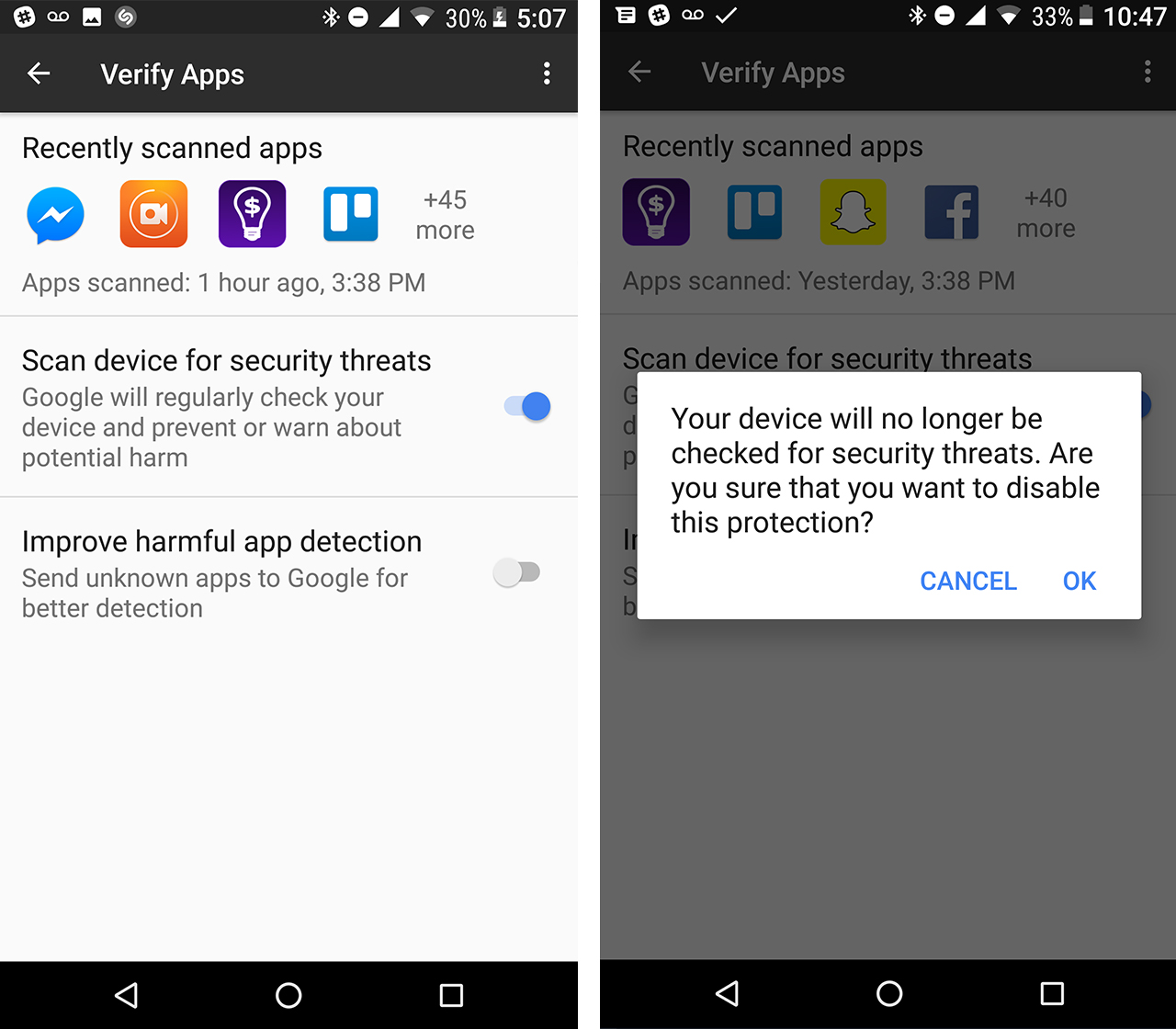
Google Play Protect protects users from mischievous apps. Android O devices run a scan of all of the apps on the device and it will then warn the user if any of the apps are deemed unsafe.

Protect will run the scans periodically and as of right now it doesn’t appear that users can decide when the apps will be scanned nor can users scan all apps at once. To see the apps recently scanned go into settings > ‘Security & Location’ > ‘Verify App.’ There you can see the scanned apps and remove the scanning if wanted.

Battery & performance improvements

As always, with this new iteration of Android, Google promises enhanced performance and battery life. With its focus on ‘Vitals,’ this goal had a particularly prominent place in this year’s I/O.

Among other claims, Google stated that Android O is set to make boot time much faster — twice as fast on a Pixel, in fact — reportedly a result of changes to the operating system’s core.  The company also noted that since too many apps drain the battery in the background, O has “wise limits” for background usage.

Notification badges

Lack of notification badge

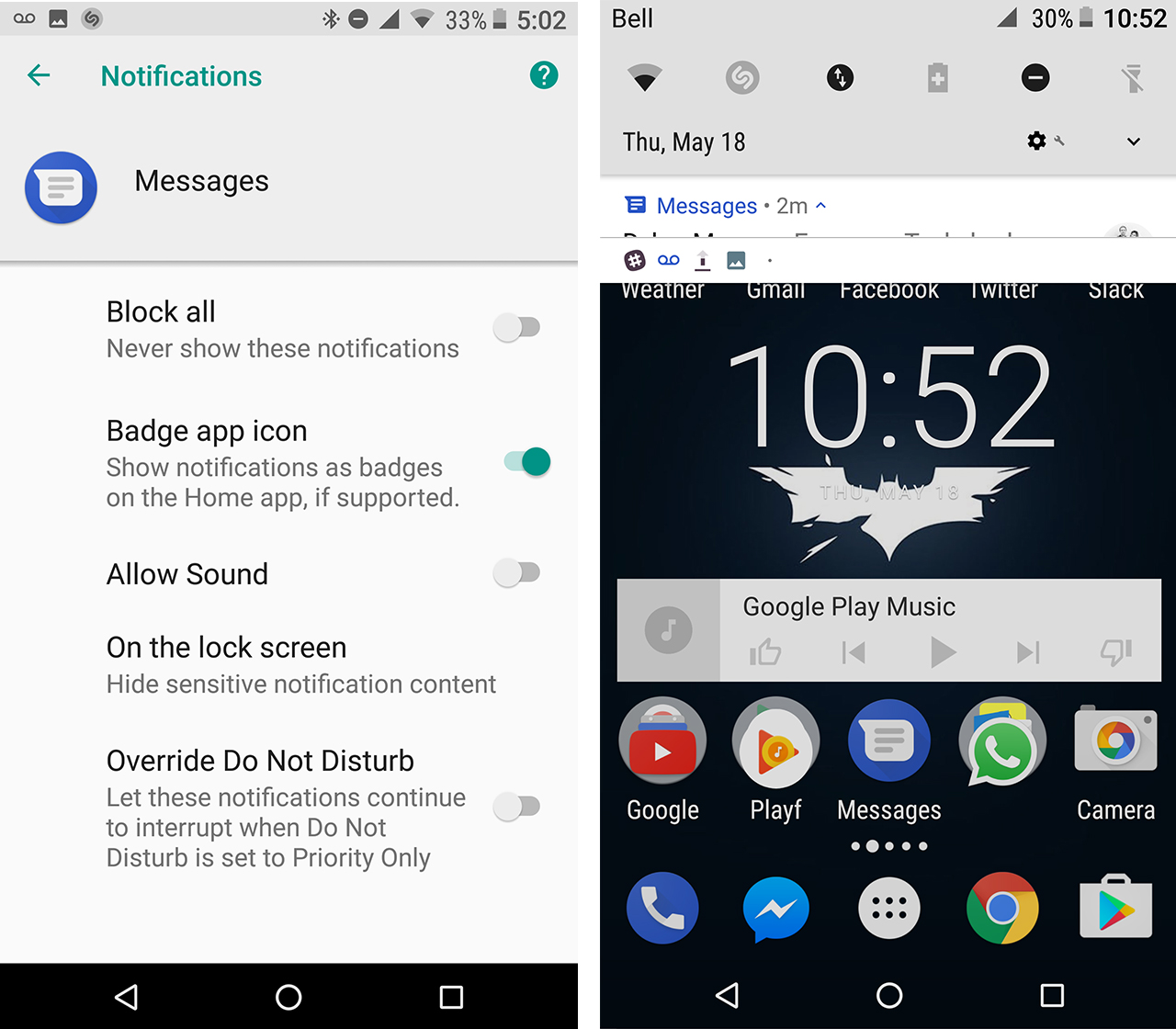
‘Notification Dots’ is what Google calls notification badges, a new installment on Android O shown at the Google I/O 2017. Notification badges will show up on an app if it’s on the home screen. When it arrives, a little dot will appear on an app whenever you receive a new notification.

When the user long presses on the app it will let you peek into the notification. To get rid of the notification dot, simply get rid of the notification in your notification shade. To disable notification dots users can go into their settings, then into their app permissions per each individual app.

‘Settings’ > ‘Apps & Permissions’ > ‘App Info’ > ‘Messenger’ (for example) > ‘App notifications’ > ‘Badge’ app icon

The current build on the Android O Beta shows the notification badge setting, in the app permission, however, the notification dot doesn’t show on the app on the app screen.

This is definitely not the first time we’ve seen notification badges, on Apple’s iPhone and Samsung’s Galaxy devices.

TensorFlow Lite

During the conference, Google announced TensorFlow Lite, a pared-down version of its TensorFlow machine learning technology, designed for mobile. For those unfamiliar, the original TensorFlow is an open-source library of software for machine learning that was developed by the company for the building and training of neural networks.

TensorFlow Lite brings the company’s strong focus on AI to Android mobile platforms, enabling more “fluid experiences” that are based on artificial intelligence in the future. Google says TensorFlow Lite will be available later this year.

Design changeslock screen android O

From our first pass, there appear to be quite a few differences, including raise to wake. When you raise the device it will show the current time and display icons with notifications and if the device is charging. On one Nexus 6P, the notification shade appearance has changed as well. And it’s all in white and grey instead of the black and dark blue from before.

Within the system UI there also some new things that came with the Android O. To get there, head to ‘Settings’ > ‘System’ > ‘System UI.’

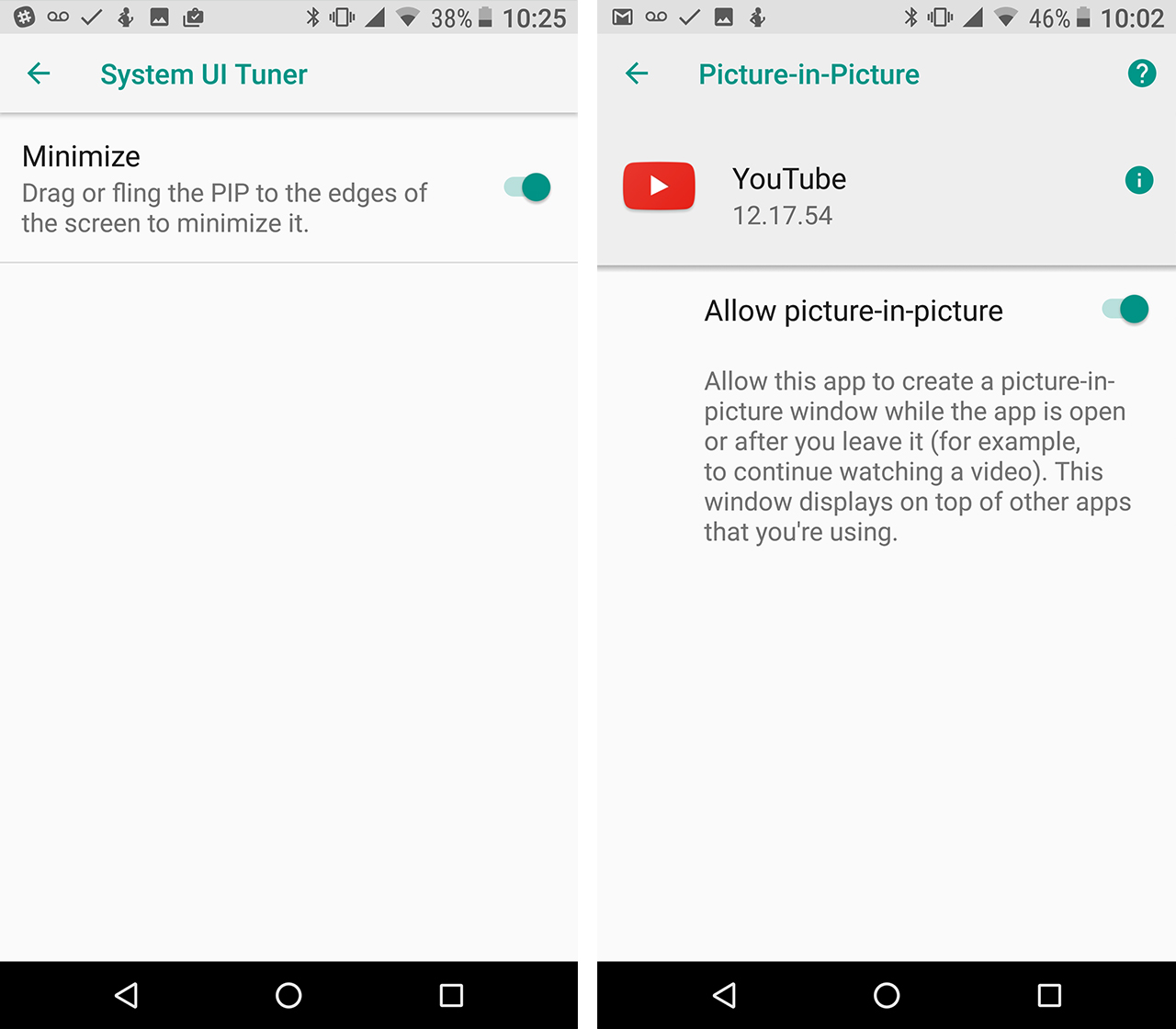
In the UI Tuner, there’s a Picture-in-Picture minimize option which allows those utilizing Picture-in-Picture to drag or fling the window towards the edges of the screen to get rid of it.

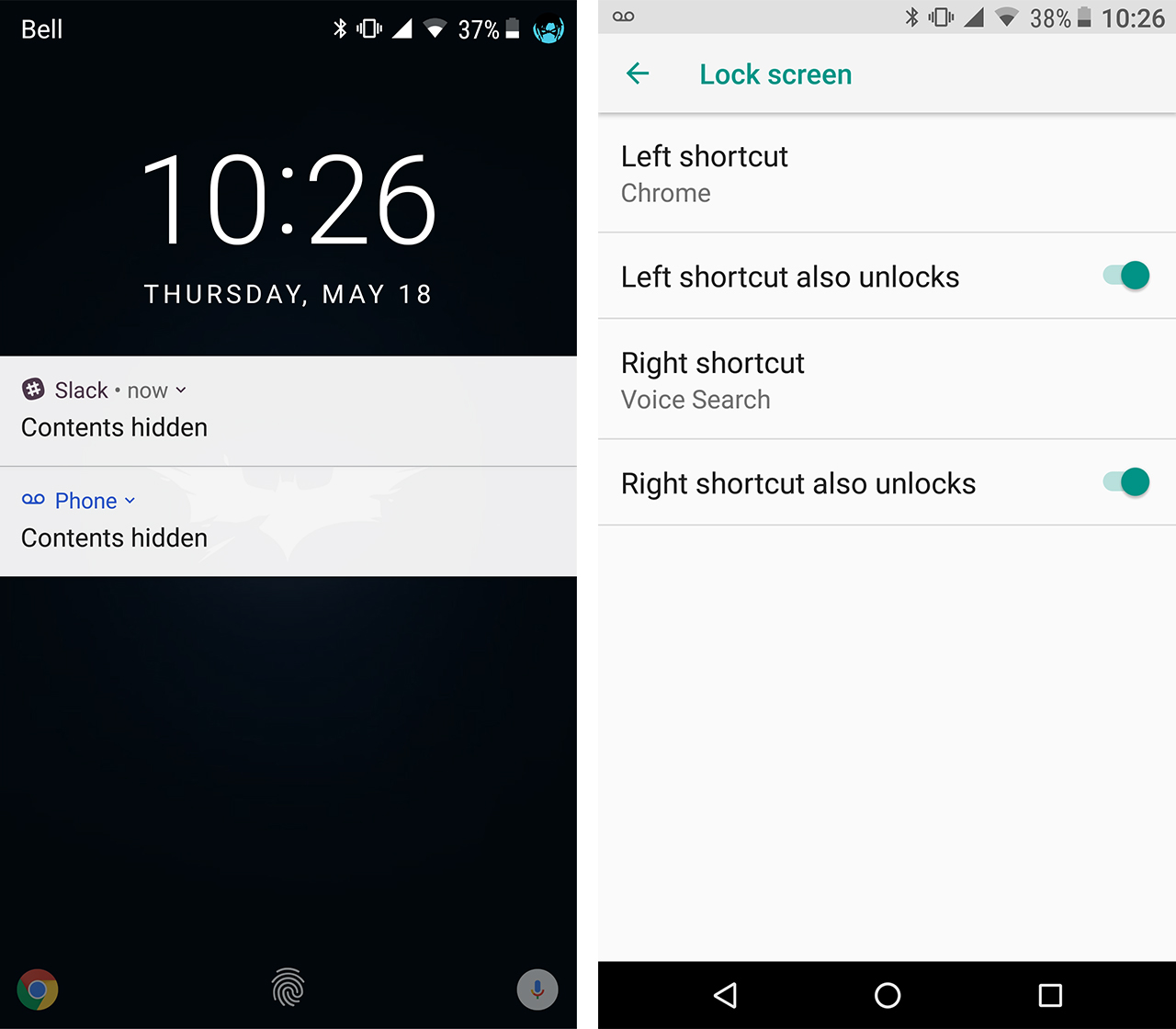
Users can also set shortcuts on the lock screen that will display in the left and right corners. Click on either the left shortcut or right shortcut and the list of apps and other shortcuts, data usage, that would enable the user to see their data usage straight out of the lock screen.

Smart Text Selection

Google also demonstrated a new ‘smart’ form of text selection for copy and paste at I/O. With Smart Text Selection, when a user holds down to select text, a neural network scans and analyzes it in order to automatically select the important part of the text.

For example, if you double-tap on an address, the phone will automatically select the entire address without any other pesky additions from the sentence leading up or prior to it.

Picture-in-picture

Picture-in-Picture on Android O

Picture-in-picture is the ability to play an app in the corner of your screen while using another app. For example, picture-in-picture will allow users to have their YouTube play in a small box in the corner of your their screen while also using another application.

To do it users just have to be watching something on the YouTube app or looking at directions on Google maps and press the home button, that will make a small window. In the settings, the only apps that work with picture-in-picture are YouTube and Chrome. Currently, this feature appears to not be working on the Android O beta. When it does eventually work to remove it ‘Settings’ > ‘Apps & notification’ > ‘App Info’ > ‘YouTube’ (for example), ‘Picture-in-Picture’ > ‘Allow picture-in-picture.’

Bonus: Android Go and new emoji

In addition to all that, Google also announced Android Go, a light-weight configuration of Android targeted at budget devices that launches with Android O. Google says it plans to offer Go with every OS version going forward, as well.

And who could forget? New emoji are coming and the lovable old blob format of Android emoji will soon take its cue to leave, a bittersweet departure.

Users of the Google Pixel, Pixel XL, Nexus 6P and the Nexus 5X can enroll to the Android O beta, here.

What is your most anticipated feature coming in Android O? Let us know in the comments.

The post 8 of the most interesting Android O features demoed at Google I/O 2017 appeared first on MobileSyrup.

18 May 20:19

JSON Feed Version 1

files/images/json_feed_icon.png

Brent Simmons, Manton Reece, May 21, 2017


Icon

I've had a JSON version of OLDaily since 2010 but since nobody was using JSON for feed syndication it didn't really matter. Fast-forward seven years and we have the release of JSON Feed version 1, so I updated my JSON format to match theirs, added the autodiscovery and new icon, and am now among the adopters of the format. You can see my JSON feed at  http://www.downes.ca/news/OLDaily.json  and subscribe to it using your web browser or an (as yet non-existing (but I'll see what I can do)) JSON feed reader. See also this Brent Simmons blog post on JSON feed. [Link] [Comment]

18 May 20:19

Recommended on Medium: Crossing Paths with Chris Cornell and Eddie Vedder on a Seattle Rooftop

I arrived on the roof of a downtown skyscraper to see world record breaking destruction. The Kingdome, a huge concrete structure that housed the Seattle Mariners, Seahawks and SuperSonics for 24 years would be imploded and I was there to take photos. The date was March 26th, 2000.

I had been in Seattle for less than two years and was enamored with the Seattle-ness of the city, including its rock stars. But the only star I expected to see that day was made of concrete.

My friend Jeff worked construction on the building and had access to the roof, which contained about 50 people who all milled about, waiting for the countdown. I set up my camera, drank my coffee and admired the view.

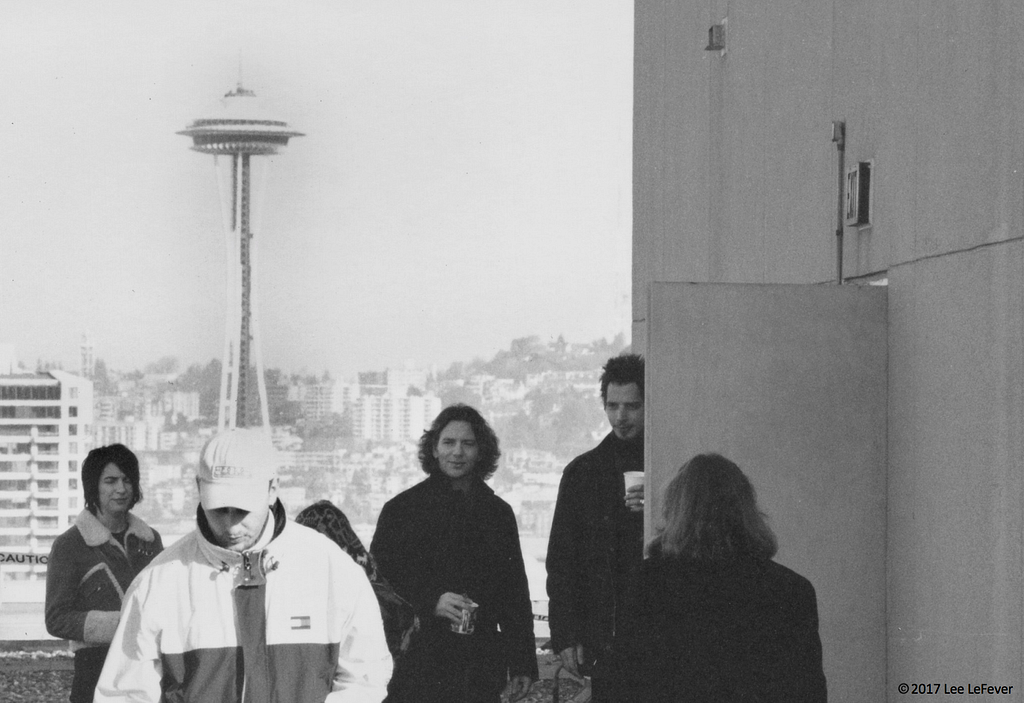
Then someone nearby said “Is that Eddie Vedder? Wait, is that Chris Cornell?” At a glance it was clear. Two of Seattle’s most legendary rock stars were on the roof with us, drinking coffee and waiting. I was stunned.

Eddie Vedder and Chris Cornell, March 2000

Furtive photos had to suffice as I didn’t want to be a typical fan boy. It felt like they were just people on a roof on a fine Sunday morning.

However, I did have an idea that, looking back, I should have acted upon. My plan was to ask them to take a photo of just me with the Space Needle. I think they would have appreciated the novelty. But alas, I let them be.

Eddie Vedder and Chris Cornell, March 2000

In the end, I contained myself and watched the world’s largest building, by volume, ever to be imploded.

https://medium.com/media/dc672231ef174bf418109e25d1887b09/href

As it turned out, this moment of destruction kicked off a series of events that created a foundation for the rest of my life. Later that day, I boarded a plane to Las Vegas for a company conference that Sachi also attended. It was during this conference, in an elevator in the Venetian Hotel that we had our first kiss. For the second time in as many days, I was stunned.

R.I.P. Chris Cornell, a Seattle legend.

Camping on Tuesdays has an infrequent newsletter. I would love to notify you about recent posts. Follow me @leelefever.


Crossing Paths with Chris Cornell and Eddie Vedder on a Seattle Rooftop was originally published in Camping on Tuesdays on Medium, where people are continuing the conversation by highlighting and responding to this story.

18 May 20:19

Home Depot Helping To Speed Up Sears’ Death Spiral

by Laura Northrup
mkalus shared this story from Consumerist.

Sears has been closing stores and selling off real estate to stave off its oft-predicted demise, but these closures and other financial decisions may also be hastening Sears’ end by turning annoyed shoppers into Home Depot customers.

TheStreet reports (warning: auto-play video at that link) that Sears Holdings is cutting its inventory on hand, which could hurt its appliance sales, especially if competitors are fully stocked with more choices.

Home Depot saw this opportunity coming, and has been preparing to drink its venerable competitor’s milkshake by investing in the departments where the two retailers overlap: tools and home appliances.

“We clearly have invested to disproportionately take share in categories that we overlap with key competitors who have been — having their challenges,” President, Chairman, and CEO Craig Menear said during the company’s latest earnings call earlier this week.

That was probably a reference to Sears, but Chief Financial Officer Carol Tomé also pointed out during the same call that another unnamed competitor in appliances (probably hhgregg) is going out of business, which will be good for Home Depot’s sales.

It won’t just be good in the long run, after the liquidation sales are over: Tomé told analysts that shoppers from hhgregg are already making their way to Home Depot instead.

Why? It could be because the shoppers wanted to buy from a store that would still be around a few months after their purchase, or it could be the normal problem with liquidation sales: at first, the deals aren’t so great, and later the selection isn’t so great.

Even if Sears manages to keep going, the fact remains that it has been having problems with some suppliers and even suing one of them.


18 May 20:18

Antarctic Dispatches

by pricetags

While the world shudders at the latest inanity from the Id of Trump, this is what’s really consequential:


Antarctica’s ice sheet may be approaching an unstoppable collapse. We flew there to see how its changes affect the rest of the world.

Four New York Times journalists joined scientists in Antarctica to understand how ice is moving across the continent and sliding into the sea.


Extraordinary graphics here.


18 May 20:18

Android O to reduce boot times and increase performance

by Igor Bonifacic
Android O

While the Android portion of yesterday’s I/O keynote was relatively light on new feature announcements, Google did have one significant surprise for users of its mobile operating system.

During the keynote, the company’s Dave Burke announced that device boot times and app performance are significantly improved in Android O.

According to Google, smartphones and tablets running Android O will reboot twice as fast as compared to the same device on Android Nougat. Google didn’t specify how it achieved this feat. Realistically, most smartphone users, Android or otherwise, don’t reboot their phones too frequently, but given the fact that a reboot is required each time a user updates their phone, it’s still an easy improvement to appreciate.

Google also revealed that applications will function twice as fast on Android O. Once again, the company didn’t reveal how it achieved this feat, nor is it clear how the company measured the gains.

You can download the Android O beta now.

Source: XDA-Developers

The post Android O to reduce boot times and increase performance appeared first on MobileSyrup.

18 May 20:18

Airfoil for macOS Regains Full Apple TV Compatibility

by John Voorhees

When Apple released tvOS 10.2 in late March, it broke audio streaming to the Apple TV from Rogue Amoeba’s macOS app, Airfoil. Since then, Rogue Amoeba has been working on two fronts to restore streaming to the Apple TV. The first results of those efforts were seen last month when Rogue Amoeba released a tvOS app called Airfoil Satellite TV that restored streaming as long as the app was running on your Apple TV.

Today, Rogue Amoeba announced that it has restored full Apple TV streaming functionality to Airfoil for macOS.

We’ve got a great update for Airfoil for Mac today which enables it to once again send audio directly to all versions of the Apple TV. Airfoil for Mac 5.6 is a free update, available immediately by selecting “Check for Update” from the Airfoil menu. We strongly encourage all users to move up to Airfoil 5.6 immediately.

With the Airfoil update, Airfoil Satellite TV is no longer necessary to stream to the Apple TV, but Rogue Amoeba plans to maintain it as a fall-back in case future tvOS updates break Airfoil streaming again.

→ Source: weblog.rogueamoeba.com

18 May 18:10

Twitter Favorites: [counti8] This article about disco in Hong Kong is giving me some of the underpinning context for my dad’s hair in the 70s. https://t.co/vKu5zh5GCA

Karen Quinn Fung 馮皓珍 @counti8
This article about disco in Hong Kong is giving me some of the underpinning context for my dad’s hair in the 70s. i.ci8.ca/2rlM5Y5
18 May 18:10

20% Off Hydration Sale

by noreply@blogger.com (VeloOrange)
Update 5/22/17: The sale has concluded.


It's a million degrees outside and keeping your hydration up is of great importance. You probably don't need to know why you should drink water, so here are some interesting facts about our good friend H2O:
  • 75% of the human brain is water and 50% of a living tree is water.
  • Hot water freezes faster than cool water.
  • Each day, we exhale about 400 ml of water.
  • The first water pipes in the U.S. were made from hollowed logs.
  • It takes about 2,641 gallons of water to make a pair of jeans.
To celebrate the arrival of the warm season, we're offering a 20% off sale on all water bottle cages, bottles, and mounts. This sale applies to both retail and wholesale customers.

From Thursday, May 18th to Sunday, May 21st (11:59pm EST) use the coupon code: THIRST2017.

Here's how to use the code:
  • Add all of the products you want to your cart, just as you normally would.
  • Click on "My Cart" to review your products.
  • Enter the coupon code - THIRST2017 - in the little "discount codes" box in the shopping cart page.
  • Click on "Apply Coupon".
  • Go ahead and check out as normal.
Stay hydrated!

18 May 18:10

My Town, My Way

by Ken Ohrn

Here’s a place where people have changed a little part of their town into something lovely.  An old traffic-calming barrier is now a lush rock garden with a brick walkway through it. In the West End at Bidwell and Pendrell, near Lord Roberts Elementary school.

Aesthetically, only the ugly yellow bollards jar the senses — but then again, they do keep motor vehicle operators from trampling the garden.

Is there, I wonder, any appetite for an Art Deco bollard replacement contest?


18 May 18:10

Crash Course Computer Science with Carrie Anne Philbin

by Alex Bate

Get your teeth into the history of computer science with our Director of Education, Carrie Anne Philbin, and the team at YouTube’s incredible Crash Course channel.

Crash Course Computer Science Preview

Starting February 22nd, Carrie Anne Philbin will be hosting Crash Course Computer Science! In this series, we’re going to trace the origins of our modern computers, take a closer look at the ideas that gave us our current hardware and software, discuss how and why our smart devices just keep getting smarter, and even look towards the future!

The brainchild of Hank and John Green (the latter of whom is responsible for books such as The Fault in Our Stars and all of my resultant heartbroken tears), Crash Course is an educational YouTube channel specialising in courses for school-age tuition support.

As part of the YouTube Orginal Channel Initiative, and with their partners PBS Digital Studios, the team has completed courses in subjects such as physics, hosted by Dr. Shini Somara, astronomy with Phil Plait, and sociology with Nicole Sweeney.

Raspberry Pi Carrie Anne Philbin Crash Course

Oh, and they’ve recently released a new series on computer science with Carrie Anne Philbin , whom you may know as Raspberry Pi’s Director of Education and the host of YouTube’s Geek Gurl Diaries.

Computer Science with Carrie Anne

Covering topics such as RAM, Boolean logic, CPU design , and binary, the course is currently up to episode twelve of its run. Episodes are released every Tuesday, and there are lots more to come.

Crash Course Carrie Anne Philbin Raspberry Pi

Following the fast-paced, visual style of the Crash Course brand, Carrie Anne takes her viewers on a journey from early computing with Lovelace and Babbage through to the modern-day electronics that power our favourite gadgets such as tablets, mobile phones, and small single-board microcomputers…

The response so far

A few members of the Raspberry Pi team recently attended VidCon Europe in Amsterdam to learn more about making video content for our community – and also so I could exist in the same space as the Holy Trinity, albeit briefly.

At VidCon, Carrie Anne took part in an engaging and successful Women in Science panel with Sally Le Page, Viviane Lalande, Hana Shoib, Maddie Moate, and fellow Crash Course presenter Dr. Shini Somara. I could see that Crash Course Computer Science was going down well from the number of people who approached Carrie Anne to thank her for the course, from those who were learning for the first time to people who were rediscovering the subject.

Crash Course Carrie Anne Philbin Raspberry Pi

Take part in the conversation

Join in the conversation! Head over to YouTube, watch Crash Course Computer Science, and join the discussion in the comments.

Crash Course Carrie Anne Philbin Raspberry Pi

You can also follow Crash Course on Twitter for release updates, and subscribe on YouTube to get notifications of new content.

Oh, and who can spot the sneaky Raspberry Pi in the video introduction?

“Cheers!”

Crash Course Computer Science Outtakes

In which Carrie Anne presents a new sing-a-long format and faces her greatest challenge yet – signing off an episode. Want to find Crash Course elsewhere on the internet? Facebook – http://www.facebook.com/YouTubeCrashCourse Twitter – http://www.twitter.com/TheCrashCourse Tumblr – http://thecrashcourse.tumblr.com Support Crash Course on Patreon: http://patreon.com/crashcourse CC Kids: http://www.youtube.com/crashcoursekids Produced in collaboration with PBS Digital Studios: http://youtube.com/pbsdigitalstudios The Latest from PBS Digital Studios: https://www.youtube.com/playlist?list=PL1mtdjDVOoOqJzeaJAV15Tq0tZ1vKj7ZV We’ve got merch!

The post Crash Course Computer Science with Carrie Anne Philbin appeared first on Raspberry Pi.

18 May 17:41

Boring Google

by Ben Thompson

My favorite part of keynotes is always the opening. That is the moment when the CEO comes on stage, not to introduce new products or features, but rather to create the frame within which new products and features will be introduced.

This is why last week’s Microsoft keynote was so interesting: CEO Satya Nadella spent a good 30 minutes on the framing, explaining a new world where the platform that mattered was not a distinct device or a particular cloud, but rather one that ran on all of them. In this framing Microsoft, freed from a parochial focus on its own devices, could be exactly that; the problem, as I noted earlier this week, is that platforms come from products, and Microsoft is still searching for an on-ramp other than Windows.

The opening to Google I/O couldn’t have been more different. There was no grand statement of vision, no mind-bending re-framing of how to think about the broader tech ecosystem, just an affirmation of the importance of artificial intelligence — the dominant theme of last year’s I/O — and how it fit in with Google’s original vision. CEO Sundar Pichai said in his prepared remarks:

It’s been a very busy year since last year, no different from my 13 years at Google. That’s because we’ve been focused ever more on our core mission of organizing the world’s information. And we are doing it for everyone, and we approach it by applying deep computer science and technical insights to solve problems at scale. That approach has served us very, very well. This is what has allowed us to scale up seven of our most important products and platforms to over a billion users…It’s a privilege to serve users at this scale, and this is all because of the growth of mobile and smartphones.

But computing is evolving again. We spoke last year about this important shift in computing, from a mobile-first, to an AI-first approach. Mobile made us re-imagine every product we were working on. We had to take into account that the user interaction model had fundamentally changed, with multitouch, location, identity, payments, and so on. Similarly, in an AI-first world, we are rethinking all our products and applying machine learning and AI to solve user problems, and we are doing this across every one of our products.

Honestly, it was kind of boring.

Google’s Go-to-Market Problem

After last year’s I/O I wrote Google’s Go-To-Market Problem, and it remains very relevant. No company benefited more from the open web than Google: the web not only created the need for Google search, but the fact that all web pages were on an equal footing meant that Google could win simply by being the best — and they did.

Mobile has been much more of a challenge: while Android remains a brilliant strategic move, its dominance is rooted more in its business model than in its quality (that’s not to denigrate its quality in the slightest, particularly the fact that Android runs on so many different kinds of devices at so many different price points). The point of Android — and the payoff today — is that Google services are the default on the vast majority of phones.

The problem, of course, is iOS: Apple has the most valuable customers (from a monetization perspective, to be clear), who mostly don’t bother to use different services than the default Apple ones, even if they are, in isolation, inferior. I wrote in that piece:

Yes, it is likely Apple, Facebook, and Amazon are all behind Google when it comes to machine learning and artificial intelligence — hugely so, in many cases — but it is not a fair fight. Google’s competitors, by virtue of owning the customer, need only be good enough, and they will get better. Google has a far higher bar to clear — it is asking users and in some cases their networks to not only change their behavior but willingly introduce more friction into their lives — and its technology will have to be special indeed to replicate the company’s original success as a business.

To that end, I thought there were three product announcements yesterday that suggested Google is on the right track:

Google Assistant

Google Assistant was first announced last year, but it was only available through the Allo messenger app, Google’s latest attempt to build a social product; the company also pre-announced Google Home, which would not ship until the fall, alongside the Pixel phone. You could see Google’s thinking with all three products:

  • Given that the most important feature of a messaging app is whether or not your friends or family also use it, Google needed a killer feature to get people to even download Allo. Enter Google Assistant.
  • Thanks to the company’s bad bet on Nest, Google was behind Amazon in the home. Google Assistant being smarter than Alexa was the best way to catch up.

  • A problem for Google with voice computing is that it is not clear what the business model might be; one alternative would be to start monetizing through hardware, and so the high-end Pixel phone was differentiated by Google Assistant.

All three approaches suffered from the same flaw: Google Assistant was the means to a strategic goal, not the end. The problem, though, is that unlike search, Google Assistant was not yet established as something people should jump through hoops to get: driving Google Assistant usage needs to be the goal; only then can it be leveraged for something else.

To that end Google has significantly changed its approach over the last 12 months.

  • Google Assistant is now available as its own app, both on Android and iOS. No unwanted messenger app necessary.
  • The Google Assistant SDK will allow Google Assistant to be built in to just about anything. Scott Huffman, the VP of Google Assistant said:

    We think the assistant should be available on all kinds of devices where people might want to ask for help. The new Google Assistant SDK allows any device manufacturer to easily build the Google Assistant into whatever they’re building, speakers, toys, drink-mixing robots, whatever crazy device all of you think up now can incorporate the Google Assistant. We’re working with many of the world’s best consumer brands and their suppliers so keep an eye out for the badge that says “Google Assistant Built-in” when you do your holiday shopping this year.

    This is the exact right approach for a services company.

  • That leads to the Pixel phone: earlier this year Google finally added Google Assistant to Android broadly — built-in, not an app — after having insisted just a few months earlier it was a separate product. The shifting strategy was a big mistake (as, arguably, is the entire program), but at least Google has ended up where they should be: everywhere.

Google Photos

Google Assistant has a long ways to go, but there is a clear picture of what success will look like: Google Photos. Launched only two years ago, Pichai bragged that Photos now has over 500 million active users who upload 1.2 billion photos a day. This is a spectacular number for one very simple reason: Google Photos is not the default photo app for Android1 or iOS. Rather, Google has earned all of those photos simply by being better than the defaults, and the basis of that superiority is Google’s machine learning.

Moreover, much like search, Photos gets better the more data it gets, creating a virtuous cycle: more photos means more data which means a better experience which means more users which means more photos. It is already hard to see other photo applications catching up.

stratechery Year One - 263

Yesterday Google continued to push forward, introducing suggested sharing, shared libraries, and photo books. All utilize vision recognition (for example, you can choose to automatically share pictures of your kids with your significant other) and all make Photos an even better app, which will lead to new users, which will lead to more data.

What is particularly exciting from Google’s perspective is that these updates add a social component: suggested sharing, for example, is self-contained within Google Photos, creating ad hoc private networks with you and your friends. Not only does this help spread Google Photos, it is also a much more viable and sustainable approach to social networking than something like Google Plus. Complex entities like social networks are created through evolution, not top-down design, and they must rely on their creator’s strengths, not weaknesses.

Google Lens

Google Lens was announced as a feature of Google Assistant and Google Photos. From Pichai:

We are clearly at an inflection point with vision, and so today, we are announcing a new initiative called Google Lens. Google Lens is a set of vision-based computing capabilities that can understand what you’re looking at and help you take action based on that information. We’ll ship it first in Google Assistant and Photos, and then other products.

How does it work? If you run into something and you want to know what it is, say a flower, you can invoke Google Lens, point your phone at it and we can tell you what flower it is…Or if you’re walking on a street downtown and you see a set of restaurants across you, you can point your phone, because we know where you are, and we have our Knowledge Graph, and we know what you’re looking at, we can give you the right information in a meaningful way.

As you can see, we are beginning to understand images and videos. All of Google was built because we started understanding text and web pages, so the fact that computers can understand images and videos has profound implications for our core mission.

The profundity cannot be overstated: by bringing the power of search into the physical world, Google is effectively increasing the addressable market of searchable data by a massive amount, and all of that data gets added back into that virtuous cycle. The potential upside is about more than data though: being the point of interaction with the physical world opens the door to many more applications, from things like QR codes to payments.

My one concern is that Google is repeating its previous mistake: that is, seeking to use a new product as a means instead of an end. Limiting Google Lens to Google Assistant and Google Photos risks handicapping Lens’ growth; ideally Lens will be its own app — and thus the foundation for other applications — sooner rather than later.


Make no mistake, none of these opportunities are directly analogous to Google search, particularly the openness of their respective markets or the path to monetization. Google Assistant requires you to open an app instead of using what is built-in (although the Android situation should improve going forward), Photos requires a download instead of the default photos app, and Lens sits on top of both. It’s a far cry from simply setting Google as the home page of your browser, and Google making more money the more people used the Internet.

All three apps, though, are leaning into Google’s strengths:

  • Google Assistant is focused on being available everywhere
  • Google Photos is winning by being better through superior data and machine learning
  • Google Lens is expanding Google’s utility into the physical world

There were other examples too: Google’s focus with VR is building a cross-device platform that delivers an immersive experience at multiple price points, as opposed to Facebook’s integrated high-end approach that makes zero sense for a social network. And, just as Apple invests in chips to make its consumer products better, Google is investing in chips to make its machine learning better.

The Beauty of Boring

This is the culmination of a shift that happened two years ago, at the 2015 Google I/O. As I noted at the time,2 the event was two keynotes in one.

[The first hour was] a veritable smorgasbord of features and programs that [lacked a] unifying vision, just a sense that Google should do them. An operating system for the home? Sure! An Internet of Things language? Bring it on! Android Wear? We have apps! Android Pay? Obviously! A vision for Android? Not necessary!

None of these had a unifying vision, just a sense that Google ought to do them because they’re a big company that ought to do big things.

What was so surprising, though was that the second hour of that keynote was completely different. Pichai gave a lengthy, detailed presentation about machine learning and neural nets, and tied it to Google’s mission, much like he did in yesterday’s introduction. After quoting Pichai’s monologue I wrote:

Note the specificity — it may seem too much for a keynote, but it is absolutely not BS. And no surprise: everything Pichai is talking about is exactly what Google was created to do…The next 30 minutes were awesome: Google Now, particularly Now on Tap, was exceptionally impressive, and Google Photos looks amazing. And, I might add, it has a killer tagline: Gmail for Photos. It’s so easy to be clear when you’re doing exactly what you were meant to do, and what you are the best in the world at.

This is why I think that Pichai’s “boring” opening was a great thing. No, there wasn’t the belligerence of early Google IOs, insisting that Android could take on the iPhone. And no, there wasn’t the grand vision of Nadella last week, or the excitement of an Apple product unveiling. What there was was a sense of certainty and almost comfort: Google is about organizing the world’s information, and given that Pichai believes the future is about artificial intelligence, specifically the machine learning variant that runs on data, that means that Google will succeed in this new world simply by being itself.

That is the best place to be, for a person and for a company.

  1. Google Photos was default for the Pixel, and for more and more Android phones that have come out in the past few months
  2. This is a Daily Update but I have made it publicly available

18 May 17:41

Housing Crisis: The Vienna Alternative

by pricetags

ALTERNATIVES TO THE HOUSING CRISIS: CASE STUDY VIENNA

Using Vienna as a case study, this lecture explores the relationship of affordable housing to urban planning politics and will discuss historic and current housing policies, not least in a critical cross-analysis with the Vancouver case.

Touching upon the re-articulated model function of 1920s Red Vienna, Gabu Heindl will present her approach to combining strong claims (Setzungen) in public planning with a critique of paternalistic governance and with maintaining zones of contact with popular agency.

Click here for more information on the Vienna Model.

Gabu Heindl is an architect/urban planner and theorist in Vienna, Austria. Her practice (GABU Heindl Architecture) specializes in public interventions, cultural and social buildings, urban research and planning. Her current research focuses on a post-foundational theory of planning politics with regard to radical democracy in contemporary urbanism.


Friday, May 19

7:00 pm

Djavad Mowafaghian World Art Centre, Goldcorp Centre for the Arts – 149 West Hastings


18 May 17:41

Android Pay Coming to 10 New Markets; Adds Peer-to-Peer Payments

by Rajesh Pandey
Google today announced that it is expanding Android Pay to 10 more countries, including Brazil, Canada, Russia, Spain, and Taiwan. In addition, the company is also bringing peer-to-peer payments to its mobile payment service. Continue reading →
18 May 17:41

terapid: Gone too soon. Thank you, Chris Cornell. RIP~ 


terapid:

Gone too soon. Thank you, Chris Cornell. 

RIP~ 

18 May 17:41

Note-taking made easier for everyone—redesigning OneNote

by OneNote Team
mkalus shared this story from Office Blogs.

Today, we are excited to announce that we updated the design of OneNote for Windows 10, Mac, iOS, Android and on the web. These design features, rolling out over the coming weeks, include three key areas of focus:

  • Enhancing usability for those who use assistive technologies.
  • Simplifying navigation controls.
  • Creating consistency across devices.

View this video without audio descriptions here.

Enhanced usability for all

As Microsoft CEO Satya Nadella said, “We will focus on designing and building products that our customers love and that are accessible to everyone and built for each of us.” In this update, we focused on making OneNote more usable for those with disabilities—such as vision and mobility impairments. We interviewed hundreds of people and analyzed product telemetry to understand how to improve keyboard shortcuts and the screen reader experience. We’re excited to share a vastly improved user experience in these two areas.

Now you can more easily use OneNote with keyboard shortcuts.

Simplified navigation

We worked with users to learn how we could improve the navigation layout—especially for larger notebooks with more sections. Now, the navigation controls are all in one area on the left-hand side of the app. This allows users to easily switch between their notes and dramatically improves usability with assistive technologies. With the new consolidated and simplified design, screen readers can easily navigate through the app to help those with disabilities. In addition, content is front and center—helping students to focus and avoid distractions.

Screenshot of OneNote’s new design showing the navigation all on the left hand side. The columns are labeled from left to right: Notebooks, Sections, Pages.

Consistency across devices

Today, OneNote users often use a range of devices. Having a cohesive user experience across all screens makes it simple for users to jump from one device to the next. With this update, regardless of what device someone is using, the experience will be the same—allowing users to capture thoughts, jot down notes and get things done more quickly. This update is also exciting for schools, where device variety is increasingly common. Students will now be able to easily transition between their home and school devices, keeping them focused on their school work. Steve Sawczyn, a OneNote user with visual impairments emphasized the benefits, “I love that between devices it just works, so I can focus on taking notes and not logistics. This is truly awesome and empowering.”

Image of OneNote across three different devices: Computer, tablet and phone. Screen shows that OneNote is a consistent experience and available across multiple devices.

OneNote is available with a consistent experience across devices.

The new redesign for OneNote is rolling out for Windows 10, Mac, iOS, Android and on the web over the coming weeks. Check out our help article for support and to learn more about the specifics of OneNote’s update.

To get OneNote for free, leave a suggestion or ask for help, follow these links:

—March Rogers, OneNote director of design

The post Note-taking made easier for everyone—
redesigning OneNote
appeared first on Office Blogs.