Shared posts

20 May 06:58

Seattle in Mourning

We found out yesterday Chris Cornell, Seattle native and soul of Soundgarden, has died. It's looking like a suicide.

I was walking around Seattle last evening with friends, for happier reasons, and it was impossible to ignore the impact of Chris's death on the city. Every pub we entered was playing songs of his, sometimes a little Nirvana sprinkled in because that still hurts too. Temple of the Dog and Soundgarden shirts and jackets were out. The DJs on KEXP were constantly on the verge of tears, talking about Chris, suicide, and playing his music.

As we sat down under some trees you could look up and see the Space Needle lit up. A few minutes later it went dark. Random people gathered on a corner, with a guitar of course, singing songs of his.

On the way home there was a sign hanging from an overpass, the words Say Hello to Heaven painted on.

Chris Cornell will be missed.

20 May 06:57

CRTC leaves Canadian television to fend for itself in Netflix age

mkalus shared this story from The Globe and Mail - Television & Media.

As the chair of Canada’s broadcast regulator rides off into the sunset, he has been tossing a few last coins at the many supplicants who follow him wherever he goes. Cantonese and Punjabi newscasts; measures to slow the loss of local TV; more opportunities for female directors, writers and producers; more flexibility for broadcasters – the benevolent Jean-Pierre Blais, outgoing chair of the Canadian Radio-television and Telecommunications Commission (CRTC), seems to have a little something for most.

He doesn’t leave much of a legacy for himself, however. Once again, his piecemeal approach offers no consistent strategy to address the challenges facing Canadian television production in the Netflix age.

Monday’s CRTC announcement renewing the licences of all the major English and French TV groups for another five years is the last major broadcasting decision on Blais’s watch – his term ends June 17 – and it’s couched as an even-handed political pleaser. Blais has found a way to revive Rogers Media’s multicultural channel OMNI Regional by giving it a spot on basic cable. He has stuck his finger in the dike to protect local news: Broadcasters must now give the CRTC 120 days notice if they plan to close a station and are obligated to broadcast at least six hours of local news every week. And he wants broadcasters to start reporting to the CRTC the number of senior female creatives in the productions they air – a move that may yet shame the male-dominated TV industry into more gender equity.

But the CRTC is also offering the broadcasters “flexibility” on programming requirements by cutting the percentage of their revenues they have to spend on “programs of national interest.” That category includes scripted dramas and comedies, feature documentaries and scripted children’s shows; previously in this area Bell Media and Corus Entertainment were required to spend 8 per cent and 9 per cent respectively but Rogers, because it traditionally did less scripted and more sports, was only required to spend 5 per cent. The new decision reduces everybody to 5.

Similarly, when it came to protecting local news, the CRTC also took a lowest-common-denominator approach: That six-hours-a-week minimum is well below what some larger broadcasters, such as Bell’s CTV, traditionally produce. In an environment where broadcasters find it increasingly difficult to make any money on local news, the floor may rapidly become the ceiling.

Meanwhile, on the scripted side, the guilds that represent the actors, directors and screenwriters who make TV shows have calculated that the decision to go with the lower percentage for dramas, docs and kids will take at least $200-million out of scripted television production over the next five years. The broadcasters still have to spend 30 per cent of their revenues on Canadian programming in general but now they can shift money over to reality or lifestyle shows.

Both Blais and Minister of Canadian Heritage Mélanie Joly have stressed the need for Canadian shows to be internationally competitive. In a news release announcing these licence renewals, the CRTC trumpeted its support for “the creation of diverse, compelling and original Canadian content,” but the move to cut spending on programs of national interest seems calculated to do the reverse – and sends an oddly mixed message.

Previously, Blais has sliced away at Canadian-content quotas, a method of support that is becoming less effective anyway as people watch less linear TV. Specifically, in 2015, the CRTC dropped the content requirements for daytime TV, a move that was justified as a way of letting broadcasters concentrate their money on higher-quality shows in prime time. Yet, this week’s decision actively encourages the broadcasters to shift money out of quality scripted programming toward areas – reality TV, talk TV, lifestyle shows, sports or possibly news and current affairs – that are not considered of “national interest” nor likely to raise international interest either.

Having started by trimming the Canadian programming requirements, Blais is now cutting the money, subtracting from the other side of the equation that is still an effective support for Canadian TV production. Following a decision last fall that reduced the number of Canadian creatives who need to be involved for shows to qualify for investments for certain production funds, this latest move continues a pattern of chipping away at supports randomly without offering a clear vision of what might replace them or where that “compelling and original Canadian content” is going to come from.

As Blais packs up the coffee mugs and family photos, the pressure is now on Joly. She needs to offer clearer solutions in her forthcoming cultural-policy review – and appoint a new CRTC chair who will help carry them out.

Report Typo/Error

Follow Kate Taylor on Twitter: @thatkatetaylor

20 May 06:57

Will Trump be shown the door? What impeachment would mean

mkalus shared this story from The Globe and Mail - U.S. Politics.

The political scientist who correctly predicted the results of every American presidential election in the past three decades is out with a book setting forth the case for impeaching President Donald J. Trump. Meanwhile, this week, Lawrence Tribe, the Harvard Law School professor who taught former president Barack Obama and Supreme Court Justice Elena Kagan, has called for impeaching Mr. Trump because his “conduct strongly suggests that he poses a danger to our system of government.” And a conservative House Republican and a House Democrat breached an important symbolic barrier Wednesday when they separately said the President’s conduct might merit impeachment.

Though Mr. Trump only recently completed his first hundred days in the White House, he may already be only a few major missteps from facing more serious calls for his removal from office. This month alone he has abruptly dismissed FBI Director James Comey, who had been examining possible collusion between Trump advisers and Russian officials during last year’s election; faced an assertion by Mr. Comey the President had asked him in February to shut down the investigation of former national security adviser Michael T. Flynn, who had earlier resigned amid a scandal over his contacts with the Russian ambassador to the United States; and struggled to contain a controversy over sharing classified information, with a Russian diplomat, about a planned Islamic State operation.

Those controversies culminated this week in the appointment of former FBI director Robert Mueller as special counsel to lead an investigation into “any links and/or co-ordination between the Russian government and individuals associated with the campaign of President Donald Trump,” and the empowering of Mr. Mueller to press criminal charges.

Despite talk of impeachment in the air – Democratic Rep. Al Green of Texas is the latest voice, coming, in his case, in the well of the House of Representatives – the truth is that impeachment is a radical step which, by intent and tradition, is reserved for radical departures from respectable political comportment; imposes extreme stresses on the political system; and exacts a high price not only on the president but also on the men and women who undertake the procedure.

“Political figures approach this issue very carefully,” says Ken Gormley, author of The Death of American Virtue, considered the most authoritative account of the events that led to the impeachment of Bill Clinton in 1998. “There are many recourses outside impeachment for people who are upset with a president,” he notes. “Talking about impeachment, getting it to happen in the House, and then having a successful Senate process are separate steps, each very difficult. And they can consume a country and waste a lot of time.”

An artist’s rendering shows the public from above as the U.S. Senate opens the High Court of Impeachment during the trial of president Andrew Johnson on March 13, 1868. Johnson, the first U.S. president to be impeached in the House, kept his job by a single vote in the Senate.

U.S. SENATE HISTORICAL OFFICE/KRT

Presidential impeachment used to be one of those political instruments widely recognized but seldom employed. Only three times have American presidents been put through this ordeal. Only twice have chief executives actually been impeached. And never has a president been removed from office through this process, which requires the equivalent of an indictment by a majority vote of the House and a conviction by two-thirds of the Senate in a trial that would be presided over by another of Prof. Tribe’s former students, Supreme Court Justice John Roberts.

Indeed, a full 130 years passed between the 1868 impeachment of Andrew Johnson, who survived removal by a single vote in the Senate, and the impeachment of Mr. Clinton, who never was in serious danger of conviction in the Democratic-controlled Senate of the time. During those 13 decades – a period extending from Thomas Edison’s application for his first patent to Google’s application for incorporation – presidents from Ulysses S. Grant to Warren G. Harding faced searing questions about their roles in major scandals, and yet no serious steps were taken toward impeaching the 18th and 29th U.S. presidents.

The late historian David E. Kyvig, one of the few academic experts on the issue of impeachment, wrote that the dormancy of impeachment could not endure. “It was often mistakenly written off as comatose, if not completely dead,” he wrote in his 2008 book, The Age of Impeachment, adding that “it was merely slumbering and awaiting the call that would cause it to arise and demonstrate its vitality.”

The resistance of American lawmakers to undertake formal impeachment hearings in 2017 may be eroded by the fact that Congress has already resorted to this procedure twice in the past 44 years: the Clinton impeachment growing out of his relationship with White House intern Monica Lewinsky; and the Richard Nixon episode that grew out of Watergate but stopped after Mr. Nixon resigned his office rather than face certain impeachment, conviction and removal from the White House.

And yet the relative frequency with which impeachment has been employed may make the process seem less forbidding to contemporary political figures.

“This is a formidable process, but it is taken more lightly now than before,” says Michael Les Benedict, Ohio State University historian and author of The Impeachment and Trial of Andrew Johnson, which, since its publication in 1973 – the year before Mr. Nixon’s resignation – has been regarded as the standard account of that first such levelling of charges against an American president. “Impeachment may even have become part of the ordinary lexicon of politics,” says Mr. Benedict. “But the process was never thought about easily, and the word was never bandied about until recently, when it has become easier to contemplate by people who really dislike a president.”

Even so, the mere mentioning of impeachment – still the congressional process that, as a rule, dare not speak its name – by two lawmakers, Representatives Justin Amash, a Michigan Republican, and Ted Deutschland, a Democrat of Florida, in a single day this week was taken as an important political moment, far more significant than the earlier casual invocations of impeachment by two Democrats, Representative Maxine Waters of California and Senator Richard Blumenthal of Connecticut. Just as knowledgeable baseball fans know not to mention that a no-hitter is in progress lest the feat be disrupted, political figures know not to mention impeachment lest the furies be unleashed.

In 1974, as in 1998 and 2017, the effort to define an impeachable crime has been at the centre of the political debate.

Impeachment has its roots in British law, dating to the 14th century, and so was familiar to the men who met in 1787 to recast the country’s government by replacing the failing Articles of Confederation with the Constitution that still provides the contours of the American government. Moreover, several state constitutions in effect at the end of the 18th century provided for impeachment as a remedy for “maladministration” or “corruption” – the concept was well established in the New World when the Constitutional deliberations began.

So it was natural that when these men – the group included George Washington and James Madison, who would become presidents, and Alexander Hamilton, a cerebral political theorist who later became the first secretary of the treasury – began to craft a new Constitution, they included impeachment in their early drafts.

The so-called Framers of the U.S. Constitution included George Washington, the nation’s first president; Alexander Hamilton, the first secretary of the treasury; and James Madison, the fourth president.

ASSOCIATED PRESS; U.S. BUREAU OF ENGRAVING AND PRINTING

Indeed, these Framers, as they became known, debated impeachment even before they decided that the new executive branch of the United States government would be headed by a single president rather than by a council of executors. A report published by the House Judiciary Committee after the effort to impeach Mr. Nixon in 1974 noted that, early in their work, the Framers unanimously endorsed a provision permitting the removal of the executive for “mal-practice or neglect of duty.” Those terms are broad, as is the eventual Constitutional language of “Treason, Bribery, or other High Crimes and Misdemeanors,” and so difficult to pin down that Rep. Gerald Ford of Michigan said during the debate over whether to impeach Supreme Court Justice William O. Douglas, largely for political and personal reasons growing out of his four marriages, that “an impeachable offence is whatever a majority of the House of Representatives considers it to be at a given moment in history.” Mr. Ford, then the minority leader of the House, had no reason in 1970, two years before the Watergate break-in, to foresee that his remarks would echo through the chambers of the Judiciary Committee that initiated an impeachment proceeding against President Nixon – an action that would catapult Mr. Ford himself into the White House.

But the remarks by Mr. Ford – who, in one of the ironies of American politics, represented the very same Grand Rapids, Mich., district now served by Mr. Amash, the GOP lawmaker who raised the spectre of a Trump impeachment – are a reminder that impeachment is as much a political process as it is a legal undertaking. It is possible that the impeachment of Mr. Nixon, the first president in 120 years to face a Congress where both chambers were controlled by the opposition party, might well not have advanced had Republicans held power in the House.

That is a central element in the political calculus affecting Mr. Trump. Although he has few historical or personal ties to the Republican Party, he was the GOP’s presidential nominee in 2016, and the Republicans hold a large (241-194) advantage in the House. The margin is smaller in the Senate (52-48 – if one counts the two Independents as Democrats; they most often vote that way). But the two-thirds requirement for Senate conviction, and thus for the removal of the President, puts the target at 67 votes – a high bar that, today at least, seems out of reach.

The party profiles, and thus the chances for impeaching Mr. Trump and removing him from office, would shift dramatically if the Democrats were to take power in the House following next year’s midterm congressional elections. That would require a Democratic pickup of 24 seats, a formidable swing in voter behaviours given the unusual ideological purity of some current congressional districts. But it is not out of the question; Barack Obama’s Democrats lost 63 seats in the 2010 midterm congressional elections, when his approval ratings were in the general range of Mr. Trump’s today.

More than four decades ago, the House Judiciary Committee, which eventually would approve articles of impeachment against Mr. Nixon, warned against broad application of congressional impeachment authority even as it asserted the right of lawmakers to proceed with actions that could lead to the removal of the president. “The elective character and political role of a President make it difficult to define faithful exercise of his powers in the abstract,” the committee’s report said. “A President must make policy and exercise discretion. This discretion necessarily is broad, especially in emergency situations, but the constitutional duties of a President impose limitations on its exercise.”

DALIN BRINKMAN/GETTY IMAGES

The context of the debate over impeachment in the Constitutional Convention is vital to understanding the origins of this element of the American government.

The delegates met between May and September of 1787 in the very building in Philadelphia where, only 11 years earlier, the Second Continental Congress approved the Declaration of Independence. Both the Declaration of Independence and the Constitution were written as antidotes to the rule of King George III, the goal being to limit the power of any future single ruler. “The Revolution had been fought against the tyranny of a king and his council,” the Judiciary Committee report emphasized, “and the framers sought to build in safeguards against executive abuse and usurpation of power.” The Framers were concerned, however, that, just as executive power could be abused, impeachment, too, could be abused.

Some delegates believed that periodic elections themselves were sufficient guards against tyranny; they had not yet fixed the length of the executive term at four years, and the two-term limit for presidents wasn’t ratified until 1951, after Franklin Roosevelt’s four election victories from 1932 to 1944. But in the only formal test of impeachment in the final version of the Constitution, the provision passed with only two states dissenting.

In The Federalist Papers, the effort by leading American statesmen of the day to explain the Constitution, Alexander Hamilton wrote that impeachment was adopted, for the new form of government, to be a bulwark against what he called the “misconduct of public men, or in other words from the abuse or violation of some public trust.”

The phrase “violation of some public trust” is at the heart of the argument being mustered by Mr. Trump’s opponents as they wish for impeachment proceedings to begin. Their hope was stoked midweek when Mr. Mueller was appointed special counsel.

“We’re in a situation where impeachment is mentioned quite a bit by people who think the President has gone beyond merely proposing and enacting policy that is deeply flawed,” said Mr. Benedict, the authority on the impeachment of Andrew Johnson. “I’m an academic, not a politician, but I still think impeachment is the nuclear bomb of American constitutional politics.”

CHIP SOMODEVILLA/GETTY IMAGES


David Shribman is executive editor of the Pittsburgh Post-Gazette and a former campaign reporter for The New York Times and The Wall Street Journal.


WHAT’S NEXT FOR TRUMP: MORE FROM THE GLOBE

19 May 22:32

The Sigfox Arduino – Part 2 – Program To Send A Message

by Martin

In the first part of this series on the Mkrfox 1200 Arduino that comes with a Sigfox chip and a 2 year network subscription I’ve taken a look at what is required to get going, how to send a first message from the module to the network and how that message can be forwarded to a server on the Internet. In total it was a 30 minutes exercise, i.e. very easy to do. In this part, I’ll have a closer look at the code that is required to accomplish the task.

Setting Up The Software In A Virtual Machine

Like all Arduinos the Mkrfox is programmed in C/C++ in the a very easy to use Arduino graphical development environment (IDE). It doesn’t offer a million bells and whistles as it addresses first-time users and rapid prototyping of ideas. As described in the previous post, installing the IDE, the board support package and a few software libraries only takes a few minutes. As I like to keep my host system clean I installed the Arduino software in a Virtualbox Ubuntu 16.04 guest OS and mapped the USB device that is created when the Mkrfox board is plugged-in into the virtual machine.

For downloading the code, the board is reset by the IDE and restarted with a different USB device and USB ID so one has to map this second USB ID into the virtual machine as well. It is best to automate the process as the IDE is quick to time out if the board is not found quickly after the reset. The second screenshot on the left shows the two fixed USB mappings I’ve created in the Virtualbox manager. I configured the first mapping after connecting the board to the PC for the first time and the second mapping after downloading the code initially failed.

The Code To Send A Sigfox Message

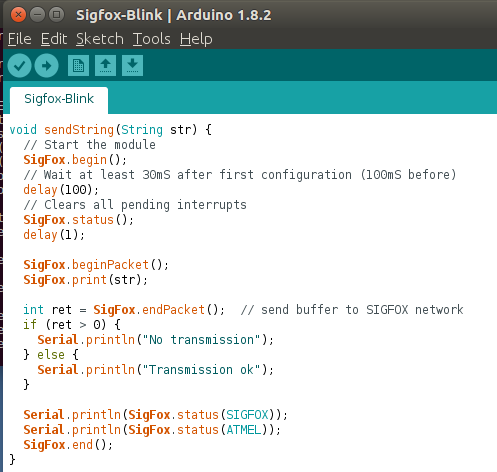
One of the installed libraries contains everything that is required to communicate from the ARM Cortex M0 based microcontroller via a serial SPI interface with the Sigfox chip. The Sigfox library encapsulates all overhead and details of the serial interface so sending a message only requires a few Sigfox library API calls such as Sigfox.begin(), .status(), .beginPacket(), .print(message), .endPacket() and .end().

All of this is again encapsulated in a single function that can be included in a program and hence, sending a message from anywhere in the code can be done with a single function call: ‘sendString(message)’. ‘Message’ is a string variable and the first 12 characters (bytes) contained in the variable are sent over the Sigfox network.

Exploring the Sigfox Library

When you browse the web for Sigfox demo code you’ll find a lot of sources in which ‘AT-commands’ are used to communicate with the Sigfox chip. AT-commands have been a popular method for many decades to communicate from a PC to external modems so it’s not surprising to find it being reused for this application as well. The Sigfox chip used on the Mkrfox board, however, does not use a UART (Universal Asynchronous Transciever) and AT-commands but a more modern SPI interface and command packet approach. If one has used AT commands for decades, the SPI interface looks a bit more complicated and abstract. It doesn’t really matter in practice as it is abstracted by the Arduino Sigfox library anyway. A good thing about this library is that it is also written in C++ so it’s not very difficult to find out how this way of communicating with the Sigfox chip works. The library is actually quite compact but not documented so the datasheets of the SAMD-21 microcontroller that runs the user program and the AT8520E Sigfox module, both from Atmel, are a great help to understand what the library is doing.

Summary

The Arduino folks have made it incredibly easy for programs to send and receive data over the Sigfox network, a single function call is all it takes. Perfect to get things up and running quickly. In the next episode I will take a closer look at how data is sent and received over the Sigfox network so it will become clear why Sigfox messages are limited to a length of 12 bytes and why only a similar amount of data can be received from the network per message as well.

19 May 21:48

3 Reasons why Driving in San Fracisco is Best Avoided

by Thea Adler
Top Challenges of Driving in SF:

Top three reasons Driving in San Francisco is not for the faint of heart

1. Finding Parking
Sometimes it's the little things that slip your mind, like finding parking before your first day of work, yoga class, drinks with a friend. Yet, it's almost certain that this one simple task can cause what feels like eons of agony. A slight exaggeration, it might be. On average it takes about 3.3 minutes to find parking in most major cities, but it can easily take up to 20 minutes if your searching at those crucial times.

2. Paying for Parking
Once you actually find parking in the city, your gonna pay a pretty penny for it. As it is now, parking meter prices are around $12 an hour. Never mind if your considering parking your car in a garage for a monthly fee- which quickly adds up to $4,000 a year.

3. The Brutal Commute Times
As employment and the residual residency in the bay area have grown exponentially in recent years due to tech start-ups, so has the time you spend in your car. Most highways are in constant traffic from 5:30 am to 7:50 pm on weekdays, and its beginning to affect weekend travel times as well. with commute times reaching near that of LA, it's nice to know that it's not just in your head. 

19 May 21:48

IBM ends remote work: but it’s really just another layoff

by Stowe Boyd

Remember: it’s not about geography, or productivity. It’s about bureaucracy.

IBM — which means CEO Ginni Rometty and the senior team — have backed off on the company’s history of remote work, and they are forcing tens of thousands of workers to come to the office, relocating if necessary, instead of working from their home office. They haven’t shared the actual number, which means it’s so large it will stick in the throat.

It smells suspiciously like Yahoo’s move after Marissa Mayer became CEO (see What Marissa Mayer’s ‘no remote work’ dictate means, and Yahoo’s Mayer thinks that remote workers are… too remote), and decreed that a cultural transformation had to happen, and right now, at the failing internet was-once-a-giant. Note that it didn’t succeed at Yahoo, except in a bottomline way.

The stark reality of IBM’s situation — 20 consecutive quarters of falling revenue — does raise the question of the judgment of those making this decision. How do they know that this massive shake up will lead to the end they desire?

IBM, a Pioneer of Remote Work, Calls Workers Back to the Office | John Simons
Big Blue’s leaders want employees to work differently now, said Laurie Friedman, a company spokeswoman. The company has rebuilt design and digital marketing teams to quickly respond to real-time data and customer feedback, collaborations that happen more easily when teams work shoulder to shoulder, Ms. Friedman said, adding that the “vast majority” of IBM’s telecommuters have chosen to join their teams in person.

More likely the underlying principle is that making people come to the office means they can be watched and managed more directly, but that isn’t strongly correlated with better results or increased output. The reality is that the arguments about remote work aren’t about geography: it’s about bureaucracy.

So, where’s the proof?

But they don’t need proof. Rometty and Co. need to point at actions being taken to turn the company’s decline around, so this is likely a smokescreen, and a way to get rid of a bunch of high-priced workers without calling it a layoff.

IBM Sametime, one of the company’s tools to support wherever/whenever work.

The strangest thing is to position old-fashioned 9-to-5 in the office as some advance over what IBM’s been doing. Remember that IBM makes social tools — like Sametime, Verse, and Connections — whose value proposition is that people can work together effectively no matter where they are.

So what are they going to tell their customers now? Forget the tools, have more meetings?

related posts

Originally published at stoweboyd.com.


IBM ends remote work: but it’s really just another layoff was originally published in Work Futures on Medium, where people are continuing the conversation by highlighting and responding to this story.

19 May 21:48

Activity: Evaluate a Website

by mikecaulfield

tim-gunn-gay-rights

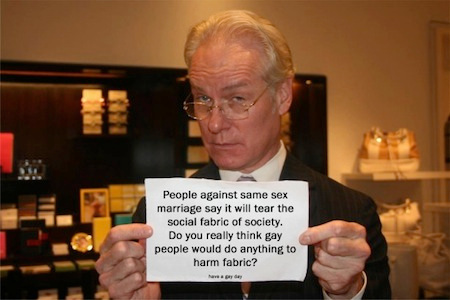
This is Tim Gunn, the star of the Project Runway series, and a gay rights advocate. But is that message he is holding up for real? It looks like it might be another example of sign-faking, where the content of pieces of paper held up by someone are digitally altered.

Now the first step of this project is to find a site where Tim Gunn himself reveals whether the image is real, and whether he actually said that. But that will lead to the next problem — is your source a trustworthy site? So track down Tim Gunn talking about this, then read laterally to determine whether the site you are reading is a legitimate journalistic enterprise or a hoax site. In the comments mention the site you used and the site you used to confirm that site’s legitimacy.

Ready… set… Go!


19 May 18:16

How this guy actually got a job by writing without bullshit

by Josh Bernoff

Authors don’t hear from readers that much. It’s usually “there’s a typo on page 116.” But every once in a while, we get something that reveals that our work actually matters. Here’s what Alex from Amsterdam sent me in an email: Mr. Bernoff, I want to send a letter and give my sincere thanks for the insights … Continued

The post How this guy actually got a job by writing without bullshit appeared first on without bullshit.

19 May 18:16

Boredom is Underrated

by djcoyle

Check out this story of Eric Thames, a washed-up ballplayer who used his time in the Korean league to transform his skills. As this story shows, boredom isn’t a problem; it’s the solution, because it gives you the opportunity to reflect, plan, and build something new.

Eric Thames and the Transformative Power of Boredom

The post Boredom is Underrated appeared first on Daniel Coyle.

19 May 18:16

Here’s our first look at the not-so-exciting Surface Pro 4 refresh

by Igor Bonifacic
Leaked image of Microsoft's new Surface Pro 2-in-1

On Thursday, pre-eminent leaker Evan Blass shared details on Microsoft’s upcoming Surface Pro 4 refresh.

According to Blass, Microsoft will unveil the new two-in-one at its upcoming May 23rd event in Shanghai, China. Moreover, Microsoft reportedly plans to drop the ‘4’ from Surface Pro 4 and will instead refer to the device simply as the ‘Surface Pro’ — it looks Surface chief Panos Panay wasn’t kidding when he said “there’s no such thing” as the Surface Pro 5.

Aside from new pen and keyboard colours that are similar but not identical to the ones Microsoft introduced with the Surface Laptop, there’s not much to see here.

Unfortunately, Blass was either unable or unwilling to share information about the device’s internal specifications. Presumably, however, we’ll see Microsoft update the Surface Pro to add Intel’s latest Kaby Lake processors. He also noted that Microsoft will not announce a new Surface Book device.

You’ll also notice that the new Surface Pro doesn’t feature a USB-C port. For better or worse, Microsoft seems intent on not adopting the next-generation port just yet.

Visit VentureBeat to see additional photos of the device.

Source: VentureBeat

The post Here’s our first look at the not-so-exciting Surface Pro 4 refresh appeared first on MobileSyrup.

19 May 18:16

Socialization of youth (Part 2)

by admin

16

Ideas F. Giddings of the determining role of social coercion formed the basis of his theory of socialization as a “fusion of different elements of the most diverse populations in the homogeneous type» (Giddings, 1897). From his point of view in a society, there are two main types of forces, referred to as «volitional process» and the forces of “artificial selection for a conscious choice.” Giddings believed that a person could not live in itself, to die with the individual life. For centuries society has created man, man transformed. It is a modern interpretation of the sounds Giddings socialization of people as an attempt to adapt to each other (Bows, bows. Electr. Resource).

William James attached great importance to the balance between the claims of the individual and his achievements, as it affects the self-esteem of the individual, leading either to its successful development, or to the disharmonious bifurcation, the rivalry between the individual parties (James, 1991).According to Freud’s psychoanalytic concept of identity is a contradictory unity of three interacting spheres: “It”, “I” and “superego” (Freud, 1989). Freud developed the concept of “safeguards” to ensure the integrity and stability of the individual in the process of socialization. Expanded sociological theory of socialization developed T. Parsons (Parsons, 1964). According to Parsons, socialization is the first means of maintaining social balance. The second tool social control as a way to maintain order among the people. The process of integration of the individual into the social system is carried out through the internalization of accepted norms, when the individual “absorbs” a common value in the process of communicating with the “significant others”. The most important condition of socialization Parsons considers individuals to adapt to the social environment, which leads to the crystallization of the most important differentiated roles in the same individual. The socialization he has an important role school, mitigate the contradictions between the family and the production. The education system can produce a selection of pupils to perform in the future of certain social roles and prepare them for this.

Habermas is the founder of “critical theory of socialization» (Habermas, 1973). In this theory, the process of socialization does not cover the whole man, and only “part” of his personality, which is the social nature of the individual, his social nature, it provides the functioning of society. Another is his “part” enables him to “keep some distance” in relation to the roles of the system prevailing in the society norms, values, t. E. Allows critical of the elements of the social environment, prevents a person to assert himself. According to N. Smelser, socialization has two objectives: to promote the interaction of people on the basis of social roles and ensure the preservation of society through the assimilation of new members in its existing beliefs and patterns of behavior. Successful socialization by Smelser, is caused by three factors: expectations, changes in behavior and the desire to conform (Smelser, 1998).

17

Erickson to describe the development of the individual selects eight successive stages of psychosocial formation of the individual. Each stage of the individual life cycle is characterized by a particular task. Teenage or early adolescence (5th stage) is determined by Erickson as a key step for the acquisition of a sense of identity, when there is the first complete awareness of itself and its place in the world, which ends with a long test themselves in different roles and experimentation in relationships with others. Late adolescence and early adulthood (6th stage) is a transition to solving actual problems of adults, finding a life partner and close ties of friendship, overcoming loneliness Erickson, 1996).

The development of the formation and development of personality problems is conducted from the end of XIX century in Russian sociology. This issue was one of the most important for ethical and subjective school (PL Lavrov and NK Mikhailovsky, NI Kareev). In domestic science have been put forward fruitful ideas and provisions relating to the process of socialization (the concept of public education idea Bakhtin on dialogue as a form of co-existence of the individual, the concept of Vygotsky of the relationship between the individual and the public in the individual the idea of Soviet psychologists about the possibility of correction of deviant development of children, children’s theory of the collective Makarenko et al.).

The post Socialization of youth (Part 2) appeared first on BookRiff.

19 May 18:15

take a moment to stop and let it sink in

by Emily Chang

take a moment to stop and let it sink in

Photo Caption: take a moment to stop and let it sink in

Instagram filter used: Clarendon

View in Instagram ⇒

19 May 18:01

Language learning app Memrise takes top honours at Google’s 2017 Play Awards

by Igor Bonifacic
Google's 2017 Google Play Award Winners

With I/O 2017 winding down, Google has announced the winners of its latest class of Google Play Award winners.

After whittling down a list of 57 finalists, the company has picked the best app or game across 12 different categories. Notable winners include language learning app Memrise, indie darling Mushroom 11, Blizzard’s Hearthstone digital collectible card game and Android mainstay IFTTT (If This, Then That).

See the full list of winners, with accompanying links to download them, below. You can also see the full list of all 57 finalists on Google’s website.

Source: Google Play

The post Language learning app Memrise takes top honours at Google’s 2017 Play Awards appeared first on MobileSyrup.

19 May 18:01

The Disconnected Wind Phone

by Sandy James Planner

img_25332

As reported in City Lab, Otuschi Japan lost ten per cent of its population in the 2011 Tsunami-about 1,600 people perished.

“A resident named Itaru Sasaki had nestled the phone booth in his garden the year before, as a way to ruminate over his cousin’s death. Longing to maintain a relationship with a departed loved one is a deeply relatable desire, but a tricky proposition. “Because my thoughts couldn’t be relayed over a regular phone line,” Sasaki told the Japanese TV channel NHK Sendai. “I wanted them to be carried on the wind.”

“The photographer Alexander McBride Wilson heard the public radio segment and traveled to Otsuchi last fall to photograph kaze no denwa, or “the wind phone,” and the people who use it. To Sasaki, the booth isn’t related to any kind of religion, Wilson says, “but you get the feeling that it’s a bit of a shrine, people who come over are kinds of pilgrims.”  Everyone is welcome to use the telephone booth. And scores of people do.

“The set-up is not dissimilar to an altar for dead relatives that’s common in Buddhist homes, said This American Life producer Miki Meek. It’s “a way to stay in touch, let [departed people] know that they’re still a big part of our family.”

“More than five years after the disaster, cities along the northeastern coast are still working to rebuild, slowly replacing temporary structures with sturdier, more rooted ones. ..As the town rebuilds, girding itself to be resilient in the face of future weather events, Sasaki’s wind phone is a reminder of those most fragile and searing losses that can’t be patched up and won’t be forgotten.”

unnamed-file

19 May 18:01

Friday Funny — When Good Cars Go Bad

by Ken Ohrn

Thanks to the Globe and Mail for this look at postmodern crime, when ransoms and hacking and phishing (oh my) are no longer satisfying to the bot-mind.

Pomo.Car


19 May 18:01

Old and busted: BND-"Hinweise" belasten Saddam Hussein, ...

mkalus shared this story from Fefes Blog.

Old and busted: BND-"Hinweise" belasten Saddam Hussein, dienen als Begründung für Irakkrieg.

New hotness: BND-"Analyse" belastet Baschar al-Assad, dient als Begründung für Syrienkrieg.

Dass überhaupt noch irgendjemand irgendwas glaubt, das aus Richtung des BND kommt!

19 May 18:01

iOS 11: iPad Wishes and Concept Video

by Federico Viticci
iOS 11 for iPad concept.

iOS 11 for iPad concept.

(Full-res)

Once heralded as a promising sign of Apple's renewed commitment to the iPad, iOS 9 has begun to feel like a one-hit wonder.

iOS 9 represented a profound change for Apple's approach to the iPad. After years of stagnation and uninspired imitation of iPhone interface paradigms, iOS 9 allowed the iPad to explore the true potential of its large canvas; for the first time since the original tablet, Apple was creating new iPad-only features rather than adapting them from the iPhone. Split View, Slide Over, and Picture in Picture were drastic departures from the classic iPad interaction model that, however, perfectly fit the device.

As I concluded in my iOS 9 review:

This year, the iPad is getting the first version of iOS truly made for it. After too many unimaginative releases, Apple has understood the capabilities of the iPad's display and its nature of modern portable computer. Free of dogmas and preconceptions of what an iPad ought to be, iOS 9 fundamentally reinvents what an iPad can become going forward.

In a span of six months, the one-two punch of iOS 9 and iPad Pro redefined the concept of portable computer again, setting Apple on a new path for the iPad ecosystem. Or, at least, it seemingly did.

Since late 2015, Apple hasn't had too much to show for the iPad. A smaller version of the iPad Pro was released in early 2016, though the new device mostly adapted features from the bigger version to a more compact form factor, introducing inconsistencies to the iPad line in the process, such as the True Tone display (still exclusive to the 9.7" iPad Pro). iOS 10, while a solid upgrade overall, focused on iPhone users and lifestyle enhancements; for iPad users, iOS 10 was a disappointment that failed to build upon iOS 9. The first iPad Pro – launched in November 2015 – has lingered without updates, raising questions on the actual need for one of its marquee features – the Smart Connector that only Apple and Logitech have supported so far. And amid consistently declining sales, the company's only "new" hardware after the iPad Pro has been a lower-priced and rebranded iPad Air – a solid entry model, but another adaptation.

We haven't seen something truly new, bold, and transformational happen on the iPad platform in nearly two years. It's time for Apple to step up their game and continue pursuing the vision for the future of computing set forth in 2015. There's so much more work to be done with iOS, multitasking, and the redefinition of computing for the multitouch era. The iPad Pro can be a computer for everything, but it needs another leap forward to become the computer for everyone. And that can't happen without a serious reconsideration of its software.

The iPad needs another bold, daring step towards the future. With iOS 11, Apple has an opportunity to pick up where they left off with iOS 9, forging a new direction for the iPad platform.

Every year ahead of WWDC, I collect some of my thoughts about the current state of iOS and consider where Apple could take their software next. I've been doing this for the past several years going back to iOS 6 in 2012. I've referred to these stories as "wishes" because they encapsulate all the aspects I'd like Apple to improve in their mobile OS. Last year, we added a concept video to the mix. This year, I wanted to prepare something different and more specific.

iOS for iPhone is, I believe, at a point of sufficient maturity: aside from particular feature additions, I don't think there's anything fundamentally missing from the iPhone.1 The iPad now bears the proverbial low-hanging fruit of iOS. There are obvious areas of improvement on iOS for iPad, which is, effectively, two years behind its iPhone counterpart. The iPad's lack of meaningful software advancements allows us to explore deeper ideas; thus, in a break with tradition, I decided to focus this year's iOS Wishes exclusively on the iPad and where Apple could take its software next.

Like last year, I collaborated with Sam Beckett to visualize my ideas for iOS 11 on the iPad with a concept video and detailed mockups. This time, instead of showcasing our ideas as standalone concepts, we imagined a "day in the life" theme for the video, showing how enhancements to iOS for iPad would work in practice. Rather than showcasing random bits of possible features, we imagined an underlying task to be accomplished (planning a vacation in Barcelona) and how better iPad software could help.

I've been thinking about some of these ideas since iOS 9 (you can see a thread between my iOS 10 concept and this year's version), while others would be a natural evolution for iOS on the iPad. Once again, Sam was able to visualize everything with a fantastic concept that, I believe, captures the iPad's big-picture potential more accurately than last year.

Below, you'll find our iOS 11 for iPad concept video, followed by an analysis of my iPad wishes with static mockups. I focused on foundational changes to the iPad's software – tentpole features that would affect the entire OS and app ecosystem.

This isn't a prediction of what Apple will announce at WWDC; it's my vision for what the future of the iPad should be.

Making Of: iOS 11 Concept

Exclusively for Club MacStories members, we'll publish a Behind the Scenes look at our iOS 11 concept video in our MacStories Weekly newsletter later this week. We'll cover our approach to this year's iOS wish list, the making of the video, the tools we used, and more.

Club MacStories offers exclusive access to extra MacStories content, delivered every week; it's also a way to support us directly.

You can subscribe here or by tapping the buttons below.


Concept Video

For the best viewing experience, watch the video at 1080p or 4K on YouTube's website or mobile app.

Podcast: Special Connected Episode

We have recorded a special episode of Connected about this concept and iOS 11 for iPad. You can listen to the episode here.


Drag & Drop, System-Wide

Drag & drop is widely regarded as a "legacy feature" that was conceived for mouse cursors and desktop computers, but I always thought it'd work well on the iPad. Direct content manipulation is, after all, the iPad's raison d'être: while on a Mac the cursor is an abstraction of your hand dragging an object across windows, on the iPad your finger could physically swipe across the screen as it holds a selection of content underneath. Existing implementations of drag & drop on iOS have proven the idea's feasibility (see: Safari tabs, iMessage stickers), and I believe a system-wide drag & drop feature would be a natural and powerful complement to iPad multitasking.

On the surface, native drag & drop between iPad apps would feel immediately intuitive. Users could select any piece of content – an image, some text, a link, or a document – and long-press with one finger until the content lifts up and can be dragged away.

Dropping some text onto an app's icon in Split View.

Dropping some text onto an app's icon in Split View.

A grabbed item could be dropped somewhere else in the current app, or users could drag it towards another app in Split View and drop it where they want it to be (spring-loading could be used to navigate across app UIs). Because drag & drop would be fully multitouch-enabled, it wouldn't block the iOS interface: another finger could be used to navigate in a different "drop area" of an app, or a user could keep dragging until the Split View app picker is shown and drop an item onto an app's icon, opening a contextual action menu.

A quick action menu for lines of text dropped on Reminders' icon.

A quick action menu for lines of text dropped on Reminders' icon.

If Apple wants to bring drag & drop to the iPad, I believe they'd do so by eschewing the complexities of the Mac. If drag & drop comes to iOS 11, it needs to be easier, faster, and safer than any desktop alternative. This would require a massive engineering effort and an intelligent design to rethink drag & drop interactions for the touch era and the iPad's UI.

Drag & drop on iOS 11 needs to be easier, faster, and safer than any desktop alternative.

Drag & drop on iOS should never lead to accidental data loss or open app screens that users aren't expecting. By default, dropping an item into another app would create a copy – it wouldn't move it from the original location. In addition, while anything that can be selected by the user should support drag & drop out of the box (within specific format types), iOS 11 apps would have the ability to mark certain items as not available to drag & drop.2 In any case, it should always be clear to the user what can be dragged and where it can be dropped, with a consistent activation gesture and a behavior that doesn't yield surprising results.

This also means building a drag & drop feature that offers high performance on any compatible iPad model. Apple's priority should be to ensure that drag & drop always hits 60 fps when dragging: a selected item must follow the user's fingertip while in drag & drop mode with no latency or perceptible lag. The combination of multitouch and high frame rates would allow drag & drop to work alongside the iOS interface in a natural way – it would feel like a native extension of the user's finger and the iOS selection method. Dragged items would fly across the screen smoothly, and users could still navigate app interfaces (and perhaps even hit the Home button) to drop an item wherever they want.

Native drag & drop between apps would require explicit adoption by third-party developers. There are two problems to consider: dragging an item, and dropping it somewhere else. This means understanding what kind of item the user is dragging (an image, some text, a PDF, etc.) and showing where it can be dropped. What happens, for instance, if the user tries to drop an image into the Safari address bar? What happens if a PDF is dropped onto Tweetbot's compose box?

I imagine that iOS could handle the first set of problems automatically (translating between different file types3), but I suspect that iOS 11 will offer an API that will require developers to support drag & drop by defining what can be dragged, how it can be interpreted, and what can be received as a dropped item in their apps. Moreover, to solve the potential confusion caused by dropping an item into an app that isn't quite sure what to do with it, developers could provide Quick Look extensions to enable the receiver app to preview the dropped item in their context and display a menu with available options.

Alternatively, apps could provide quick action UIs (as extensions) for dropped content that they support. Reminders, for instance, could offer to create new todos for lines of text dragged from another app; Notes could present a dialog to create a new note from image or save it into an existing note.

Overall, most of these are technicalities that Apple figured out decades ago on the desktop.4 The same system could be extended to iOS and modernized for integration with apps and extensions.

Despite the complexities involved, drag & drop increasingly feels like something that needs to come to the iPad. It just makes a lot more sense to be able to directly manipulate and move content around on a large multitouch screen than it does with a cursor and a smaller trackpad. There would be challenges for Apple and developers, but, after Split View and the large iPad Pro, it seems obvious that the next step is to let users manipulate content further and move it anywhere.

Drag & drop on iPad could become the fastest way to share any piece of data between apps. Users wouldn't have to rely on the clipboard or the share sheet to slowly move data between apps anymore. With drag & drop, content would be naturally rearranged and dropped as needed, solving one of the biggest problems of working on the iPad.

Shelf

There are times when you want to save something without necessarily dropping it into an app or sharing it with the clipboard or extensions. For better or worse5, macOS users can drag anything they want to reference later on the desktop (or any other Finder window); iOS has no such area that serves as a holding place for bits of content without an immediate destination. I'd like iOS 11 to bring a Shelf feature to the iPad that would let users clip anything with drag & drop.

The Shelf would sit above apps (both in full-screen mode or Split View) and it'd be revealed automatically when the user is dragging an item towards the top of the screen. The Shelf would come down and display previously saved items as thumbnail previews; by default, new items are dropped into the leftmost side of the Shelf, though users could choose to drop an item between existing ones, or on top of another item to create a folder.

The Shelf.

The Shelf.

(Full-res)

The idea behind the Shelf is to make it as effortless as possible to hold something for later without the cognitive load of deciding which app or extension should receive it right away. The Shelf would be heavily tied to the new drag & drop framework and it'd be inspired by previous implementations (such as the NeXTSTEP shelf) and older desktop apps (examples: DragThing and Yoink). Think of it as a transient dock for temporary clippings, or, even better, as a multi-slot clipboard that can hold a variety of items and be consistently available across apps.

The Shelf would be local to each iPad, and it could hold an infinite number of items; the Shelf would be paginated and users could scroll between multiple pages to find the item they're looking for. Anything could be dropped in the Shelf: from text selections and images to phone numbers and even songs; as long as an item supports drag & drop on iOS 11, the Shelf could hold it for later.

Even in its apparent simplicity, the Shelf would still be a feature for iPad power-users who want a better way to deal with multiple bits of content. As such, the Shelf would require a specific gesture to be activated when users want to pull content from the Shelf and drop it into an app. In our concept, a three-finger swipe opens the Shelf when an item is not being dragged towards it; this gesture wouldn't conflict with scrolling in apps, text cursor movement, or Notification Center. When the user has identified an item they need, they can grab it from the Shelf and insert it into a compatible app.6

While the Shelf would act primarily as a scrollable tray of temporary clippings, it could also support inline actions for previews and other content-specific shortcuts. By tapping an item in the Shelf, iOS 11 would display a custom Quick Look preview with additional information and actions contextual to the selected item.

A contextual menu for an address saved in the Shelf.

A contextual menu for an address saved in the Shelf.

With a Quick Look API, items could embed native actions in their preview. For example, a phone number could be called with an iPhone through Continuity, and Maps locations could be previewed and re-opened in the Maps app. This way, the Shelf would be skewed towards exporting clippings via drag & drop, but manual actions on a per-item basis would also be allowed.

The multi-slot nature of the Shelf, combined with its ease of activation facilitated by drag & drop, would dramatically improve any workflow occurring on the iPad. Students writing essays in Pages could drop images, web links, and other source material in the Shelf and later add them to a document with a few swipes; photographers could assemble assets in the Shelf (either as folders or individual items) and easily import them in a graphic editor; even casual note-taking or email processing could be improved by cutting the time normally involved with moving data back and forth between apps.

The Shelf, along with system-wide drag & drop, would rethink the relationship between users and app content. Apple needs to take advantage of the iPad's large screen to simplify working with bits of content across apps. The Shelf can solve all these problems in a unique, iPad-only way.

New Split View App Picker

As I argued last year, the Split View app picker is the feature that has aged the worst since the launch of iOS 9. Without the ability to manually search for apps or to pin frequently used apps as favorites, the picker has always felt like it had been designed by engineers to ship a barely passable UI at the last minute.

Apple had a chance to rethink the basic traits of the iPad's multitasking interface; instead, they released a shallow, clumsy picker that should have been fixed years ago and that is still with us today.

A redesigned Split View app picker.

A redesigned Split View app picker.

The Split View app picker has to be redesigned from scratch. Building on last year's concept, I envision a picker that would address all the shortcomings of the existing design:

  • The picker would allow users to arrange their most-used apps on a grid, similar to a mini Home screen;
  • There would be an integrated Spotlight option to search for specific apps (or app content) and launch them directly in Split View;
  • The picker could be displayed on either side of Split View, with an option to swap the primary and secondary app (a long-press on the picker "handle" at the top);
  • Recently used apps would still be displayed at the bottom of the picker as cards. Unlike iOS 10, every app – not just the most recently used one – would carry a preview of its last-seen state (like in the system multitasking view);
  • Every app icon/card displayed in the picker would support spring-loading for items passed via drag & drop, enabling users to quickly open files in different apps or insert discrete data into app views;
  • The entire Split View picker UI could be invoked and navigated with an external keyboard, removing the need to touch the screen when an iPad is used on a desk.

A revamped app picker design based on these principles would greatly increase the usability and speed of Split View, but it would also introduce a different set of trade-offs and usability concerns to be addressed by Apple. Specifically, while the picker could be invoked on either side of the screen, it couldn't be shown simultaneously on both sides, as it would cause issues with users attempting to open the same app in two places. Furthermore, I imagine that Apple could dim an app's icon in the Split View grid if the app is already active on the other side.

A dimmed app icon means the app is already in Split View.

A dimmed app icon means the app is already in Split View.

I'm convinced that Split View is the best feature Apple has brought to the iPad in years, but the implementation of its launcher leaves much to be desired. An efficient multitasking UI needs a fast and customizable activation method to be pervasive and scalable; the current Split View misses the mark on all of this. By extending Split View with user-assigned favorites and activation on both sides of the screen, Apple could take the entire iPad multitasking experience to the next level.

Finder

The argument that the iPad doesn't "need a filesystem" lost its validity when Apple introduced document providers in iOS 8 and the iCloud Drive app in iOS 9. iOS already has a visible filesystem, only it's been rebuilt with simplicity in mind for the age of apps so it doesn't expose system information like on macOS. The next logical step for Apple is to turn their scattershot implementation of document pickers and providers into a true Finder layer that can work with every app and be more cohesive and intuitive than what we have today.

A Finder for iOS.

A Finder for iOS.

I'm not proposing that Apple brings the Mac's Finder to iOS, diverting from the app-based approach that has characterized the iPhone and iPad. Instead, I think all the pieces of the current system – iCloud Drive, the document picker, and document providers –should be unified into a single Finder app and system-wide layer available everywhere.

With a dedicated Finder app and Finder view in every app, users would be able to find the files they're looking for with a consistent interface. Developers of third-party apps, on the other hand, could leverage new APIs to more easily offer documents and data to other apps, enabling them to talk to each other and collaborate on documents without resorting to extensions, flaky document providers, or, worse, duplicate copies of the same file.

The first step would be a standalone Finder app that blends iCloud Drive and third-party app storage in a powerful file manager that adopts the best aspects of the desktop Finder.

By default, all user-created files would be stored in a top-level iCloud Drive view, eschewing the notion of local-only storage.7 This would be the evolution of the existing iCloud Drive app (one of the worst apps Apple has shipped on iOS in years) and it'd be the place where users could create folders and organize their files.

The Finder app would have all the features you'd expect from a modern file manager: column and grid views, built-in iCloud sharing with permission controls, tags, versions, saved searches, and even Siri integration. These are features that I also envisioned last year, and I continue to believe that iPad users would only applaud a more serious iCloud Drive and file management UI.

The second step involves apps. In the current implementation of the document picker, apps can either be available as "folders" in iCloud Drive, or they can be opened as external document providers that have their own UIs and sync logic. I think Apple should slowly deprecate standalone document providers in favor of native Finder extensions that would let apps take advantage of the Finder's built-in UI (where Apple has done most of the work) with options to enhance it with sharing/collaboration features and their own sync mechanisms.

Document providers, reimagined as Finder extensions.

Document providers, reimagined as Finder extensions.

An integrated and extensible iOS Finder would accomplish two important goals: it'd let apps become top-level destinations akin to iCloud Drive, and it'd provide a clean and safe way to modify the Finder's interface for each app's needs without having to take users out of the Finder environment and into a separate, less powerful document provider UI.

This way, developers of apps that don't require additional controls could integrate with the Finder and use iCloud Drive as storage8; companies with deeper requirements, such as Dropbox or Microsoft, could still integrate with the familiar, system-wide Finder UI and enhance it for their own services. Ultimately, users would enjoy a consistent, safe, more powerful Finder experience that works with any app rather than having to constantly switch between iCloud Drive, iCloud Drive-enabled apps, and other document providers.

File versions in Finder.

File versions in Finder.

A true Finder for iOS would have ramifications that go beyond a new icon on the Home screen. The Finder would become the new default document picker: instead of a popup listing a bunch of standalone locations, you'd get a full-blown Finder dialog to open files from any folder or app, considerably reducing the time spent remembering where a file can be found. With a new set of APIs and user permissions, iOS 11 could allow apps to more easily open each other's documents in complex (but intuitive) workflows that aren't possible today. And, obviously, automation could play a role in this down the road, opening the door to ideas such as folder-monitoring utilities and file automation either via Workflow or Hazel-like apps.

One of the common misconceptions on iOS is that it doesn't have a file management UI. That stopped being true years ago when Apple launched a new document picker and document providers. iOS has a rudimentary file manager built-in, but its implementation is fragmented, slow, and inconsistent. For the sake of simplicity, Apple ended up creating a system more difficult and prone to errors than the file manager they've offered for decades on the Mac.

With iOS 11, Apple has a chance to rebalance file management with a centralized repository that is inspired by the Mac but still entrenched in the core principles and technologies native to iOS. The iPad needs a single Finder for everything – built atop iOS' vibrant app ecosystem, fully integrated with the Shelf and drag & drop, and without the complexity of the Mac.

Refreshed Design

As you might have noticed from the video and mockups in this story, we've imagined a slightly refreshed iOS design language built on the principles of increased visual feedback, context, and bolder typography.

In my iOS 10 review, I noted that Apple appeared to be experimenting with multiple variations of the iOS interface. From the bold headlines of Apple Music to the use of thicker icons and more tappable buttons, Apple seemed to be slowly moving away from the excessively thin, low-contrast aesthetic of iOS 7 to embrace a more approachable, friendly UI optimized for 3D Touch and sloppy swipes.

A redesigned App Store, inspired by Apple Music.

A redesigned App Store, inspired by Apple Music.

I don't think an Apple Music-style interface would work as a system-wide design for every app, but iOS 11 could borrow some of its underlying criteria and apply them elsewhere. The App Store would be a good candidate for an Apple Music-inspired redesign; the company's storefront is already heavily based on image galleries, product grids, and section titles that would work well alongside the Apple Music style.

Apple could also bring aspects of the watchOS interface to iOS and move beyond the static, inexpressive nature of its UI. Touch-down states for icons and buttons – some of my favorite details of watchOS' design – would add useful context to iOS toolbar icons and menus as well.

Updated icons from our iOS 11 concept.

Updated icons from our iOS 11 concept.

Combined with subtle animations, thicker lines, and a consistent use of colors, app interfaces could become more lively and informative without the need for a major design overhaul.

Other Enhancements

In addition to the major changes I described above, there are more features and improvements I'd like to see in iOS 11 for iPad.

Easier access to frequently used extensions. The share sheet as we know it has run its course: besides discoverability problems for extensions that users don't know how to activate, it's a cumbersome feature in that it always adds a step between hitting the Share icon and performing an action.

With iOS 11, the share sheet should become more flexible and allow users to pin their favorite extensions to app toolbars and other UI elements.

App extensions updated for iOS 11 could include support for a monochrome glyph to be used in "quick access mode". To pin an extension, a user would only have to drag it out of the share sheet and drop it into an empty spot in a toolbar, which would also include built-in controls to re-arrange pinned extensions and reset them (sending them back to the share sheet).9

Imagine having faster access to the 1Password extension in Safari, or a Todoist button in your favorite news reader to save articles for later. The time savings granted by a more flexible share sheet would add up over time. More importantly, they'd enable power users to be more efficient when working with extensions, and they'd also allow developers to stop building their own app integrations just because they don't require the share sheet.

A denser Home screen. I'm still not convinced that putting widgets alongside app icons on the Home screen would be a good idea, but one thing's for certain – the Home screen on the iPad feels like a waste of space.

A more compact Home screen on the 12.9" iPad Pro.

A more compact Home screen on the 12.9" iPad Pro.

(Full-res)

A single Home screen should display more than 25 apps at once on the 12.9" iPad Pro. By moving from 5 apps to 7 apps per row (in landscape), the Home screen would grow to 35 apps on a single screen – a 40% increase over the existing Home screen design. A more compact Home screen would result in less time spent swiping across pages to find apps, and a faster iPad experience overall.

Multiple audio streams. I find it odd that, on its tenth anniversary, iOS still can't deal with concurrent audio streams. In the age of live streams, Let's Plays, and music streaming, being able to keep multiple media streams going at the same time has become the norm on desktop computers, and yet iOS devices still pause background audio when you start watching a video.

I understand why Apple went with this approach years ago, but there's a deeper discussion here about the need for a revamped audio framework with support for simultaneous audio streams on iOS. Besides allowing users to watch silent live streams while listening to other audio, developers of audio apps could use the more robust system for more complex audio workflows as well.

Multiple audio streams in Control Center for iPad.

Multiple audio streams in Control Center for iPad.

The benefits for podcasting and audio mixing apps would be obvious – GarageBand could record audio from Skype calls, while apps like Audiobus could forgo the SDKs they've built to work with simultaneous audio streams. Apple could use the dedicated audio page of Control Center to manage audio sources, which would gain individual playback controls and color highlights to indicate which app is playing audio on iOS 11.

A more versatile Notes. Apple's revamped Notes app was one of the highlights of iOS 9, but, like other features mentioned in this story, it barely received any attention since. In the meantime, capable alternatives to Notes have appeared on the App Store and bigger players such as Evernote and Microsoft have continued to enhance their apps for casual and power users alike.

Free-form sketching and richer links in Notes.

Free-form sketching and richer links in Notes.

I wouldn't change the core structure of Notes, but I'd improve its capabilities on multiple fronts. Apple Pencil users should have an option to sketch anywhere on a note without having to enter a specific drawing screen. This would turn notes into free-form mixes of typed notes and sketches comparable to apps such as Notability and GoodNotes.10 Like the latter, Notes should support handwriting recognition with OCR and make text searchable.11

In addition to individual notes, there should be support for sharing entire folders with other users. Plus, the iOS app should be able to create nested folders like on the Mac, and rich link snippets should be richer than their current implementation – perhaps borrowing from iMessage's superior link previews.

Mail becomes pro and modern. Of all system apps, Mail is the most antiquated one. The market of email clients has changed over the past few years: every major player in this space now offers features such as snoozing, smart folders and saved searches, app integrations, and other functionalities that enhance dealing with email without reinventing the protocol behind it. From Outlook to Spark, Newton, Polymail, and dozens of others, there's clearly demand for apps that modernize and supercharge email.

A Snooze option for messages in Mail.

A Snooze option for messages in Mail.

Apple Mail, on the other hand, feels stuck in the past. Apple has both failed to deliver an iOS version with all the functionalities of their Mac app, and they haven't kept up with innovation happening in other email clients. At the very least, Mail should gain more powerful (and fast) search features with the ability to create smart folders, and Apple should add a snooze option for messages. But if the company is planning a bigger revamp of Mail, they should reconsider the in-app split screen mode that they almost brought to iOS 10 last year, and they should come up with an API to let other iOS apps integrate with Mail to process and save messages elsewhere.

Nobody likes dealing with email, but that doesn't mean the tools we use to manage it should be subpar. There's plenty Apple could bring to Mail if they want to keep up with the competition and offer a modern email experience for iPad users.

iOS 11

iOS 9 was supposed to be a new beginning for the iPad. Two years later, we're still waiting for what comes next. We were given a taste of the future, and left hoping there would be more.

It's time for Apple to go back to the iPad and fulfill the promise of a device that can redefine modern computing. iOS 9 seemed to hint at a different Apple – capable of rethinking fundamental traits of the iPad's software while respecting its legacy and essence. I want to see the same approach and bold vision in iOS 11, with the iPad growing into a computing platform that takes the best features of the Mac and reimagines them for our times. I want to see the iPad ecosystem thrive again, creating new incentives for developers to craft desktop-class apps and for users to invest in the iPad as their primary computer.

iOS 9 was an outstanding update, but there's so much more the iPad can be.

We're ready for something new.


  1. I'd like to see an overall design refresh of the iOS interface, which includes the iPhone, but I don't consider that as missing functionality↩︎
  2. For example, an app like 1Password could disable drag & drop for login items, but allow users to drop text into a secure note. ↩︎
  3. If only Apple had a technology capable of intelligently converting between data formats that could be integrated at a system level... ↩︎
  4. At least since Drag Manager on System 7↩︎
  5. Check out the replies to this question on Twitter for some interesting screenshots. ↩︎
  6. In my mind, an item pulled from the Shelf and dropped into an app shouldn't be automatically deleted from the Shelf as I can see the benefit of dropping the same item in multiple locations. Thus, each item would have to be manually deleted from the Shelf, though we also imagined a 'Delete All' option for quicker Shelf management. ↩︎
  7. Of course, an offline mode should be available for users who aren't always connected to the Internet. There should also be an option to mark important documents as always available for offline access, regardless of the OS' intelligent caching. And, users could turn off iCloud Drive altogether if they can't or don't want to use the service. ↩︎
  8. Apps could also show up in the Finder without having to integrate with iCloud Drive at all – cloud storage and sync would be optional. ↩︎
  9. The 12.9" iPad Pro would have plenty of space for additional buttons in toolbars of apps like Safari when in landscape mode. In Split View and on smaller iPads, there could be an overflow menu to display buttons that don't fit in a single view (just like Safari currently handles bookmarks that don't fit on the screen). ↩︎
  10. This might require backtracking on the previously-backtracked decision to use the Pencil for standard touch navigation, but I think Apple will have to make some changes here eventually. I understand that some users prefer to use their Pencils to control the iOS interface, but I think that could become an option under Accessibility. That way, users who have to deal with RSI issues would still be able to navigate iOS with a Pencil, but others could gain new options and features when a Pencil is detected on the screen, such as drawing anywhere in Notes without having to press a dedicated software button. ↩︎
  11. Egg freckles↩︎

Support MacStories Directly

Club MacStories offers exclusive access to extra MacStories content, delivered every week; it’s also a way to support us directly.

Club MacStories will help you discover the best apps for your devices and get the most out of your iPhone, iPad, and Mac. Plus, it’s made in Italy.

Join Now
19 May 18:01

Attention: Arbutus Greenway Team

by Ken Ohrn

There’s a message for you.

Arbutus.Reaction


19 May 18:01

The multi-sensory experience design of a Harley

by Marek Pawlowski
Harley Davidson's first factory

Part of MEX Inspirations, an ongoing series exploring tangents and their relationship to better experience design.

When asked about Harley Davidson’s enduring appeal, the great grandson of the company’s co-founder uses a vocabulary which suggests he truly understands long-term customer experience results from a multi-sensory feeling rather than a specific product:

“Very early on they created a unique look, a unique sound and they created a unique feel…it’s a magnet, it pulls you in…when people see a Harley…even if they don’t ride…they will say ‘nice Harley’.” — Bill Davidson

I’m not a biker personally. I’d even go so far as to say I’m not especially keen on the noise and dangers of motorbikes.

However, when I heard this story in the BBC series ‘Great American Railroad Journeys’, it resonated with me because of the sense of heritage and brand experience expressed by Bill Davidson, whose great grandfather William A. Davidson co-founded the company in a shed located a stones’ throw from where they’re still based today in Milwaukee, Wisconsin.

In conversation with the show’s presenter Michael Portillo, Davidson goes on to expand on the important connection with a rebellious spirit and the sense of the open road winding across America. These are experiential values which the company can continue to encapsulate in its products and that will outlast any technology.

From series 2, episode 15 of ‘Great America Railroad Journeys‘ on the BBC

Part of MEX Inspirations, an ongoing series exploring tangents and their relationship to better experience design.

19 May 18:00

Why Harvard Business School is under fire

files/images/20170520_BLP514.jpg

The Economist, May 22, 2017


Icon

The Economist not surprisingly rejects the idea that "HBS is responsible for the ills of Western civilisation" but is willing to countenance the idea that it has behaved badly: "It has failed to manage conflicts of interest adequately: for example it gives companies a veto over case studies written about them and academics can be paid by the companies they teach about." The school has failed to diversify and tuitions have increased  30% in five years. But the key point here is that HBS, by virtue of its position, establishes these as  normal business  practice. It makes clear that academic integrity and  ethical behaviour are irrelevant to business. And that's a problem. [Link] [Comment]

19 May 18:00

IBM ends remote work: but it’s really just another layoff

IBM – which means CEO Ginni Rometty and the senior team – have backed off on the company’s history of remote work, and they are forcing tens of thousands of workers to come to the office, relocating if necessary, instead of working from their home office. They haven’t shared the actual number, which means it’s so large it will stick in the throat.

It smells suspiciously like Yahoo’s move after Marissa Mayer became CEO (see What Marissa Mayer’s ‘no remote work’ dictate means, and Yahoo’s Mayer thinks that remote workers are… too remote), and decreed that a cultural transformation had to happen, and right now, at the failing internet was-once-a-giant. Note that it didn’t succeed at Yahoo, except in a bottomline way.

The stark reality of IBM’s situation – 20 consecutive quarters of falling revenue – does raise the question of the judgment of those making this decision. How do they know that this massive shake up will lead to the end they desire? 

IBM, a Pioneer of Remote Work, Calls Workers Back to the Office | John Simons

Big Blue’s leaders want employees to work differently now, said Laurie Friedman, a company spokeswoman. The company has rebuilt design and digital marketing teams to quickly respond to real-time data and customer feedback, collaborations that happen more easily when teams work shoulder to shoulder, Ms. Friedman said, adding that the “vast majority” of IBM’s telecommuters have chosen to join their teams in person.

More likely the underlying principle is that making people come to the office means they can be watched and managed more directly, but that isn’t strongly correlated with better results or increased output. The reality is that the arguments about remote work aren’t about geography: it’s about bureaucracy.

So, where’s the proof?

But they don’t need proof. Rometty and Co. need to point at actions being taken to turn the company’s decline around, so this is likely a smokescreen, and a way to get rid of a bunch of high-priced workers without calling it a layoff.

The strangest thing is to position old-fashioned 9-to-5 in the office as some advance over what IBM’s been doing. Remember that IBM makes social tools – like Sametime, Verse, and Connections – whose value proposition is that people can work together effectively no matter where they are. 

So what are they going to tell their customers now? Forget the tools, have more meetings?

19 May 17:58

The North Sea is a sign of what awaits in the Anthropocene – David Farrier | Aeon Essays

19 May 17:58

Antarctica Is Going Green, And Not In A Good Way

19 May 17:58

The Slash Workers

19 May 17:56

Defining ‘London’

by pricetags

How would Londoners know if they live in the actual city? They probably don’t.


19 May 17:56

Weaponising a teddy bear

by Janina Ander

At primary school, I loved my Tamagotchi: it moved, it beeped, it was almost like I could talk to it! Nowadays, kids can actually have conversations with their toys, and some toys are IoT devices, capable of accessing online services or of interacting with people via the Internet. And so to one of this week’s news stories: using a Raspberry Pi, an eleven-year-old has demonstrated how to weaponise a teddy bear. This has garnered lots of attention, because he did it at a cybersecurity conference in The Hague, and he used the Bluetooth devices of the assembled experts to do it.

AFP news agency on Twitter

Eleven-year-old “cyber ninja” stuns security experts by hacking into their bluetooth devices to manipulate teddy bear #InternetofThings https://t.co/bx9kTbNUcT

Reuben Paul, from Texas, used a Raspberry Pi together with his laptop to download the numbers of audience members’ smartphones. He then proceeded to use a Python program to manipulate his bear, Bob, using one of the numbers he’d accessed, making him blink one of his lights and record an audio message from the audience.

Reuben has quite of bit of digital making experience, and he’s very concerned about the safety risks of IoT devices. “IoT home appliances, things that can be used in our everyday lives, our cars, lights, refrigerators, everything like this that is connected can be used and weaponised to spy on us or harm us,” he told AFP.

Apparently even his father, software security expert Mano Paul, was unaware of just how unsafe IoT toys can be until Reuben “shocked” him by hacking a toy car.

Reuben is using his computer skills for good: he has already founded an organisation to educate children and adults about cybersecurity. Considering that he is also the youngest Shaolin Kung Fu black belt in the US and reportedly has excellent gymnastics skills, I’m getting serious superhero vibes from this kid!

No Title

No Description

And to think that the toys that were around when I was Reuben’s age could be used for nothing more devious than distracting me from class…

The post Weaponising a teddy bear appeared first on Raspberry Pi.

19 May 17:56

Huawei P10 :: First impressions

by Volker Weber

IMG 9844

I asked Huawei to send me a P10 and it arrived today. It took a little while because I had to wait for a matte black one to return to the pool. First impressions:

  1. This is an iPhone knock-off. Excellent build quality. Thin and light.
  2. The EMUI Android shell will take some time getting used to, but it is a high quality experience.
  3. Android 7.0 and Security patch level 2017-03-01 are outdated.
  4. The fingerprint reader is a monster. Extremely fast.

The camera may or may not be Leica, but the first quick sample shots are stunning. The first one brings out the colors larger than life. It's my food for the next 7 days, btw. The second one is wide open aperture with small DoF.

IMG 20170519 143209

IMG 20170519 160006

The biggest adjustment for an iPhone user is that the fingerprint reader is not the home button. Maybe I will find a setting that lets it be the home button. Update: found it!

This will be fun!

19 May 17:56

There’s a nighttime drone light show this weekend in Toronto

by Patrick O'Rourke
Dronez

As part of Toronto’s Culinary Ontario Festival this weekend, the city is also putting on a huge drone light show

Admission is free to the foodie festival, which takes place on the West Island, the section of Ontario Place west of the marina. The event is set to feature food, drinks and of course, drones.

The nighttime drone show takes place on Saturday, May 20th and features 30 flying drones equipped with lights performing choreographed patterns (or as I like to call them, dance moves) in the sky. The presentation has been put together by Toronto startup Arrowonics.

The event’s organizers claim that the drone portion of the culinary festival is the first of its kind in Toronto.

Among a variety of other regulations rules, Transport Canada recently released new rules that prevent drone enthusiasts from practicing their hobby at night. It’s likely that Arrowonics received special permission from the government to put on its remote-controlled airborne light show.

The post There’s a nighttime drone light show this weekend in Toronto appeared first on MobileSyrup.

19 May 17:56

The Real Cost Factors of Affordability

by pricetags

PT readers know that transportation and housing costs have to be combined when conidering affordability – and here’s more illustrated data to show how that’s true in the US – from CityLab.


The importance of transportation costs in this equation—and, more specifically, the role of transit in reducing these costs—comes into clear focus in a series of new reports on city affordability from the Citizens Budget Commission. Take a look at this CBC chart on average annual rent paid by residents of 22 large U.S. metro areas (New York is highlighted because it was the CBC’s primary focus):


By these housing figures alone, you’d expect the cities at the top to be the least affordable, and those at the bottom to be the most. But now here’s the chart of the same 22 cities ranked by location affordability:


Now we see that many of the cities with high housing costs also have the best location affordability—particularly Washington, D.C., San Francisco, New York, Seattle, Boston, and San Jose. Each of these cities is in the top ten for affordability despite also being in the top ten for highest rent. In the case of San Jose, high Silicon Valley incomes offset high local expenses. But the key for the five other cities is being among the least expensive in terms of transportation costs:

More info and charts here.


19 May 17:45

Nintendo Shouldn’t Be Running Nintendo