Shared posts

03 Dec 20:42

Are the Right People Waiting to Hear From You on LinkedIn?

by Wayne Breitbarth

If you owned a retail store and a potential buyer entered your front door, would you ignore him or her? Of course not. Well, that's what many people are doing on LinkedIn, and then they wonder why they aren't getting any quantifiable results from using the site.

Think of your LinkedIn profile as your retail store. As with most retail stores, there's lots of competition for potential buyers and many different ways that people find out about your store before they waltz in the front door.

But once they choose to visit, are you reaching out and saying, "Hi, thanks for visiting; how can I help you?" Trust me on this onefrom my experience, most people aren't doing this.
.

How to welcome people to your "LinkedIn store"

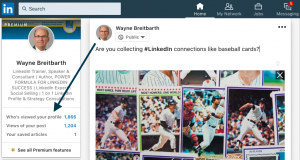
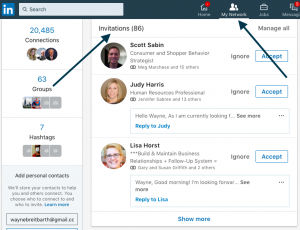
There are two easy ways to recognize potential customers or connectionsWho's Viewed Your Profile and your inbound invitations to connect.

Now, if you're not specifically in sales and are about to stop reading, please reconsider, because let's face itwe're all selling something. If you're not selling products or services, you're selling yourself or your organization every day. If you didn't have something to sell, you probably wouldn't be using LinkedIn.

Here are my best practices for recognizing and approaching potential buyers, particularly those who are in your target market.
.

Who's Viewed Your Profile

View this list often, because if you're using the free account, you can only see the last five people who checked you outand then only the information they've chosen to share with you.

If their headline looks interesting, click through to view their full profile and ask yourself this question: Is there any information here (job experience, education entries, people you have in common, interests, etc.) that resonates with me or would help me to have an interesting conversation with them?" If the answer is "yes," invite them to join your network by using a five-star invitation.
.

Inbound Invitations to Connect

Don't be too quick to hit the Ignore button hereeven if you've never met the person. You don't know why they "walked into your store," so it's worth your time to figure out who they are and how you might be able to help them.

It's best to view your inbound invitations from your Pending Invitations page rather than your mobile device, because you'll have access to a lot more information about the person. On your mobile device you won't be able to see what people you have in common nor can you respond to a message without inviting the person to join your network. Messages are also truncated, so you may miss something important if you don't take the time to read the full message.

My article Is Opportunity Calling You on LinkedIn? will help you understand who to connect with and give you some examples of simple ways to respond when the right person has walked into your store.

If you start executing these best practices, I'm confident you'll begin to quickly identify the hottest prospects and reach out in a way that will improve your chances of success.
.

SPECIAL OFFER

For more simple strategies to improve your LinkedIn ROI, along with a detailed critique of your profile, be sure to take advantage of my limited time offer: a one-hour, one-on-one phone consultation for just $197 (this is a significant reduction off my regular fee).

I will share my computer screen with you during the call and send you a marked-up copy of your profile prior to the call.

Whether you’re using LinkedIn to find your next high-impact customer, raise your organization’s profile, or land the job of your dreams, this session is for you.

There are limited spots available, so don't delay. Book your session today by clicking here.


The post Are the Right People Waiting to Hear From You on LinkedIn? appeared first on Wayne Breitbarth.

03 Dec 20:27

10 Ways to Add Value to Your “Thank You” Page

by Derek Gleason

If you’ve ignored the design and content of your “thank you” page, you’re neglecting:

  • Recent purchasers.
  • New leads.

These are some of the highest value segments of an online audience, yet what most sites decide to show them is an afterthought.

Whether you’re confirming access to a PDF download or thanking someone for a four-figure purchase, there are ways to add value for users—and get more value for your business.

Why choose a thank you page over a thank you message?

Technically, a thank you page is optional. Form submissions or checkout processes can end with a success message delivered on the same page via JavaScript or through a pop-up window.

While a thank you message may be easier to implement (it’s one less page to design), it has drawbacks:

  • Users are left on a conversion page that’s stripped of navigation and calls to action. That’s a virtual guarantee that the user will close out the browser window—the page has nothing else for them.
  • The space for a thank you message is small—often enough to include only the words “thank you” or “success.” Even if you sought to apply one of the strategies below, you’d be limited.

But doesn’t a confirmation email provide the same value as a confirmation page?

KlientBoost differentiates confirmation emails from confirmation pages effectively: “Consider the email to be an extension of the thank you page that outlives the redirect URL.”

While a short-lived experience, a thank you page reaches visitors while they’re still just a click or two away from a sale; a confirmation page places added steps between a recent converter and another conversion.

Note: If you’re delivering the item via email (e.g. PDF download), the user interest in the email may outweigh the user interest in the thank you page, and you should adjust your thank you page strategy accordingly. “Best practices” are a foundation for testing, not a checklist for implementation.

Once you’ve committed to creating a thank you page, here are 10 ways to add value to it:

1. Confirm the transaction.

If your thank you page achieves nothing else, it should at least confirm a successful transaction.

For example, after signing up for a trial of FileMaker, the confirmation screen reiterates exactly what I got (FileMaker Platform Trial) and tells me what I should do next:

filemaker trial thank you page

A Basecamp trial blends a confirmation page with immediate access:

  • I get confirmation that my account is ready.
  • I can see that I’m already on the home screen for my account.
  • I’m offered a brief onboarding video.

basecamp trial confirmation page

For Basecamp—and other SaaS companies offering free trials—getting a customer to start using their trial is a priority.

That need for an efficient shift between transaction and use may explain why FileMaker and Basecamp forego a standard of thank you page design: actually saying “thank you.”

2. Say “thank you.”

A simple “thank you” is a starting point for creating a sense of reciprocity. We feel obligated to give back to those who have given to us. If I’ve just shared my name, email, and phone number, I’ve taken a risk and offered you valuable information. A simple thank you acknowledges that.

On one of CXL’s thank you pages for a guide download, notice the order of operations:

  • Successful conversion confirmed.
  • Visitor thanked.
  • Additional resources offered (more on that later).

When it comes to how to say thanks:

  • Make it from a human. A quick “note” from a member of your team (or the head of your company) feels more authentic than a generic corporate thank you.
  • Make it feel human. Why not add a real image or brief video? This is an opportunity to put a company name with a face.

3. Fend off buyer’s (or subscriber’s) remorse.

For buyers and subscribers, the post-conversion moment is exciting—and nerve-racking. Did you make the right choice? Will your inbox be bombarded? Should you have waited for a sale?

Our psychological default is for “post-purchase rationalization,” a cognitive bias whereby someone who has purchased a product or service overlooks any faults or defects to justify their purchase.

Immediately after a sign-up or purchase, consumers are looking for reasons to feel good about what they just did. A thank you page can reinforce those positive feelings.

After booking a meeting with a representative, Segment immediately reassures users that “You’re in Great Company” and offers several success stories and strong social proof:

(Image source)

Showcasing positive reviews or testimonials can reinforce the consumer belief that a transaction—of cash or personal information—was a good decision.

For non-profits, you can provide a tangible demonstration of a donation’s impact. The World Wildlife Fund includes a video on their thank you page to connect the decision to donate with a positive outcome:

wwf donation thank you page

Another way to fend off buyer’s remorse is to guide users toward their next step. As John Carvalho wrote:

Scientists studying “choice closure” have found that encouraging specific post-purchase behaviors can minimize buyer’s remorse and maximize satisfaction with the decision.

It’s why telling consumers exactly what to expect is critical.

4. Provide clear expectations of what’s next.

Without knowing what to expect, users are left wondering, “What should I do?” Will log-in credentials get emailed to me in a minute? An hour? How do I know when my package is on the way?

Uncertainty about next steps feeds uncertainty about the decision to convert. Which questions do users have immediately after converting? Answer them.

Nielsen Norman Group’s thank you page for an email subscription is effectively a post-signup FAQ page. It answers:

  • How often will I receive your emails?
  • When will I receive them?
  • How do I keep them from going to spam?
  • Is there anything else I need to do?
  • How do I unsubscribe?
  • Where do you store my personal information?

nng email signup thank you page

For purchases, user questions center on order processing. Take this example from Hello Matcha:

  • Users receive confirmation of a successful purchase.
  • An order summary is clearly visible on the right.
  • A secondary call to action (CTA) offers the option to print a receipt.

hello matcha thank you page(Image source)

(Hello Matcha reserves its primary CTA to encourage users to keep shopping and also provides a video about how to make a perfect cup of tea. There are more details on both strategies below.)

In contrast, a bad confirmation page disrupts expectations. After filling out a support ticket for this SaaS product, users are left in the dark:

  • There’s no time frame for the company response to the technical issue; you’re left wondering how long “shortly” will be.
  • There’s a CTA to start a free trial for a product you’ve already purchased, which makes no sense.

saas thank you page

Or, consider this post-reservation page from a hotel:

  • It’s full of cliched promises like a readiness to “make your stay unforgettable.”
  • It suggests that pending visitors contact the hotel but provides no contact information.

hotel confirmation page

For industries like hospitality, the perception of thoughtful and attentive guest service (i.e. hospitality) is essential and, in this example, already breaking down the moment after purchase.

5. Pitch an upsell or cross-sell.

The most direct way to create more value from a thank you page is to win a secondary sale.

When it comes to upsell and cross-sell opportunities on a thank you page, everyone thinks of Amazon, with good reason.

About 35% of all Amazon purchases come from upsells and cross-sells, and “recommended products” succeed 60% of the time.

After ordering some loose-leaf tea, I received a thank you, confirmation of my order, order details, a recommendation for sponsored products, and a laundry list of opportunities to buy something else that was way too long to include as a screenshot:

  • “Buy it again” grocery items
  • Inspired by your browsing history
  • Buy it again
  • Related to items you’ve viewed
  • Recommendations based on your order

amazon thank you page

Why thank you pages work well for upsells

There are a few reasons why upsells on thank you pages work especially well:

  • You’re marketing to users who have just committed to buying from you.
  • Personal information is already stored, easing the path toward a second purchase.

There’s a less obvious reason, too: A thank you page gives you more real estate to make your pitch for the upsell. If you’re offering an upsell at the checkout, you don’t want to disrupt the purchase, which limits how much detail you can include.

On a thank you page, the upsell becomes the primary product, and you can build an ideal landing page for that product, rather than relegating it to a subtle suggestion.

Using promotions to incentivize upsells

If you’re attempting to further incentivize a secondary purchase, consider adding a post-purchase promo code:

promo thank you page

Two considerations:

  1. If you’re trying to incentivize a recurring purchase (e.g. coffee beans), a generic coupon for a discount on any purchase may encourage repeat business.
  2. For less-frequent purchases (e.g. television), a specific discount on an upsell or cross-sell item makes more sense.

6. Offer “anticipatory content.”

Ecommerce purchases still require waiting, even if Amazon has reduced the delay to hours instead of days. A thank you page that links to resources on product usage builds excitement and can improve consumer satisfaction:

  • Does the product require assembly, like a bicycle? Share videos to show users how to avoid common mistakes—and frustration.
  • Is the operation technical, like an espresso maker? Link to content that will help them brew the perfect shot on their first try.
  • Does the product have less-common uses, like a stand mixer? Show the value of meat-grinding or pasta-rolling attachments.

For many companies, this content already exists, but users find it too late, or not all. Highlighting it on a thank you page ensures awareness and gives users something to do while they wait.

Anticipatory content isn’t exclusive to ecommerce, either. Even while you’re waiting for a desktop application to download, there are opportunities to encourage interim engagement:

itunes download thank you page

For ecommerce companies with apps (or SaaS companies with browser-based and mobile app versions), a CTA to download an app makes sense—it facilitates easier purchasing in the future and delivers more data on consumer behavior.

Even if you deliver your product immediately, linking to related resources on a thank you page has the same potential benefits:

  • If someone downloads a PDF, are there supporting videos to deepen engagement?
  • If someone signs up for a webinar, which related blog posts might interest them?

7. Encourage users to create an account.

As we’ve written before, creating an account during checkout creates friction. (For one company, that friction cost them $300 million.) Social logins are one way to balance the user experience with marketing’s insatiable appetite for consumer data.

So, too, is moving the “create an account” CTA to a thank you page. As Baymard defines it, thank you pages are an opportunity to “move form fields from the checkout process to the order confirmation page.”

Post-purchase account setups have several benefits:

  • Account creation doesn’t interfere with the initial sale.
  • Since an account setup suggests the desire for repeat purchasing, it makes more sense after an initial purchase rather than prior to one.
  • Most of the information can be pre-populated from the just-completed checkout.

For SaaS signups, many thank you pages add post-sign-up steps like email verification or account details.

saas signup page flow

A post-sign-up thank you page that takes users directly to the product—like Basecamp does in the prior example—reduces friction and gets more users using the product more quickly. (However, if the goal is to provide access only to more qualified users, that friction may be useful.)

8. Move users through the funnel.

For lead-generation sites, thank you pages are an opportunity to move a prospect through the sales funnel.

You can deliver targeted calls to action by identifying the next logical step. If a prospect has just completed one action, what would move them one step further down the funnel?

For example:

  • Requests an industry research study? Suggest an email list signup.
  • Signs up for the email list? Recommend an upcoming webinar.
  • Downloads product details? Offer a live demo.

After signing up for their email list, Close.io recommends three next steps (as well as social proof), each of which encourages users to move down their sales funnel:

close.io thank you page

9. Ask for referrals.

If you could ask recent purchasers to do one thing, what would it be? Share their experience on social media? Leave a review? Refer a friend?

Offering a “friends” or “colleagues” discount may incentivize sharing and increase referrals. As Dropbox CEO Drew Houston detailed in a presentation, a referral offer that let Dropbox users “earn” 16 extra GBs of storage space drove millions of signups and dramatically reduced customer acquisition costs.

dropbox referral program page

10. Gather customer data.

Post-purchase rationalization suggests that you may not get accurate answers to “Why did you buy?” in a post-purchase survey. That doesn’t mean you can’t ask, but there may be more reliable data to gather from a qualitative survey:

  • Did you consider any alternatives to our product? The answer could encourage you to develop or expand a comparison page.
  • Which questions did you have but couldn’t find answers to? The answer could help you organize or expand product page copy.
  • Anything else you would like to tell us? Find out the unknown unknowns.

Be aware that your results come from a biased sample—you’re asking only recent purchasers. Maximizing your appeal to them may boost sales to that segment, but it may ignore or alienate a much larger pool of potential buyers whose pain points aren’t shared by your current customers.

In short, don’t make post-purchase surveys your sole source of consumer data.

Getting data and improving the experience

Even if you collect basic interest data on your confirmation page, you can improve consumer targeting—and make a better first impression.

Consider the approach taken by ChefSteps: After you sign up for their email list, you’re taken to a thank you page that asks you to highlight three interests:

chefsteps thank you

After choosing three recipe categories, ChefSteps delivers a set of tailored recommendations:

chefsteps thank you page recommendations

From a user’s perspective, this is enticing and helpful. For ChefSteps, it does far more:

  • Delivers a customized experience for new users.
  • Pushes information into their CRM to segment visitors for email follow-ups.
  • Identifies the subset of users interested in sous vide cooking.

Since ChefSteps produces recipe content to support sales of Joule, a sous vide device, they’re able to create a more qualified segment of users right from the start.

Conclusion

What did they want? Did they get it? What will they want next?

The answers to those three questions summarize the ways to add value to a thank you page. Few take the time to answer those questions, even though a confirmation page is one of the only pages on your site that every lead and customer visits.

A thank you page is an opportunity to create near-term value with an upsell or by gathering data to improve targeting. But, more importantly, it’s the first step toward creating long-term value: ensuring that recent converters feel good about their decision and helping them get the most out of their experience with your business.

03 Dec 20:27

Cut Through the Marketing Noise With User-Friendly Tools

by Rick Kranz

You might not be able to name it, but chances are you’ve felt it – another seismic shift in the world of marketing.

Perhaps you’re creating helpful content for your audience, and it feels like no one is noticing. Maybe visitors are viewing and downloading your resources as normal, yet you’re noticing fewer leads convert to customers. Or maybe you’ve only felt the ripples of what’s sure to be the next big wave in marketing.

Either way, what you’re experiencing is likely due to the same ailment: prospects are overwhelmed by the environment we helped create.

And can you blame them? With the millions of how-to blogs, thousands of case studies, and a never-ending sea of ebooks to read, how can anyone possibly take action.

We’re not writing this article to bash inbound marketing. Blogs, whitepapers, and other traditional forms of content marketing are still incredibly valuable. They help establish you as a thought leader, provide valuable insight to prospects and existing customers, and help you differentiate yourself from the competition.

What they’re not so great at is actually cutting through the noise. That’s because people want “solutions,” not “resources.” And one of the most effective ways you can help prospects is by creating tools that immediately help users solve a problem.

What do we mean by a tool?

When we refer to a “tool,” we’re not talking about a checklist or some branded slides. We’re talking about an interactive tool that immediately delivers results. It might not solve every problem a prospect has, but it should provide so much value that a prospect feels immediate relief after using it. In today’s noisy marketplace, few resources actually accomplish this.

That’s because many organizations, especially those who practice inbound and content marketing, have become so occupied in generating content they’ve lost sight of the endgame.

Does your audience really care about having one more whitepaper on a topic you – and every other marketer – has covered a thousand different ways? Of course not! They care about solving their problems as quickly and easily as possible.

Interactive tools are likely the best way to achieve this.

To test this hypothesis, OverGo Studio created the Digital Marketing Tuner – a free resource designed to help organizations analyze and improve their marketing efforts.

In the short time since we launched, the results have been overwhelming. Just weeks after release, it has become one of our most successful lead-gen tools. We look forward to sharing precise metrics with you in the near future, but let’s first look at why tools like this are so effective in cutting through the marketing noise.

How do tools cut through the noise?

Tools aren’t just great at generating leads, they can also help you optimize conversions and shorten sales cycles. But, why are they so much more effective than traditional inbound “resources?”

Let’s look at a few of the big reasons.

With a cleverly designed tool, you can provide value to prospects instantly. Compare this with the old way of doing things. For prospects to really start solving their problems, they’d have to read one or more of your blogs, then likely download a premium content offer, digest the information you provided, then make plans to take their first real action.

Tools allow users to take action immediately, and that accelerates the entire lead nurturing process. In addition to forming relationship faster, functional and actionable resources allow you to create bonds that are much more meaningful. That’s because tools allow you to showcase your expertise and ingenuity in ways that no whitepaper or ebook ever could.

Ten best practices for creating useful tools

Creating useful tools can significantly improve your leads and conversions. Poorly executed tools, on the other hand, can generate more harm than good. This is why it’s vital you observe the following ten best practices when launching a new tool.

1. Understand the commitment

Creating a helpful tool is far more time-intensive than writing a 600-word blog or cranking out another checklist. Keep in mind that the more valuable the tool is, the longer it will likely take to create.

It’s not a bad thing, because there is much less competition. Few competitors are going to be willing to invest the resources into building a tool. And once you have yours established in your industry it is even less appealing for them to do so

2. Ask yourself why?

Before you undertake any serious effort, it’s a good idea to ask yourself “why?” This is one of the most important questions you can ever address, yet it is often one of the most overlooked. This is a big mistake

Asking why doesn’t just assist with big-picture concepts like positioning (as Simon Sinek thoroughly explores in Start With Why), it helps lay the foundation of your tool by defining success, creating decision-making criteria, and clarifying focus (as David Allen covers in Getting Things Done: The Art of Stress-Free Productivity).

3. Provide real value

For your tool to be effective at generating leads and optimizing conversions, it must provide users with real value. If your tool doesn’t do that, then it’s going to hurt your business and not help it. In addition to determining what problem your tool will solve, you must be certain that it’s a problem that merits solving.

Consider the following:

  • What burden would our tool help alleviate?
  • Is this a significant burden that would drive user action?
  • How many people suffer from this problem?
  • Does a solution already exist?
  • What does your tool offer users they can’t get elsewhere?
  • Is the tool in alignment with the product or service you sell? If not, people will use the tool and not even make the connection to become a customer.

4. Do your homework

Developing a meaningful tool is a huge undertaking, and that requires you to do your homework. This is true in terms of the production, marketing, and analyses of your tool. Here are a few of the questions you should research before investing in any tool.

  • What products and services do you need to create the tool?
  • Will it be cheaper or more effective to hire an outside agency to create the tool?
  • What format should the tool take – should it be an app, a desktop program, a website, all three, or none of the above?
  • How much will it cost to maintain your tool and provide needed support?
  • What should you name our tool (factor in both the SEO and stickiness of terms)?
  • How will you advertise, and how much will you spend?
  • What ROI might you expect?

5. Take an iterative approach

It’s been said many times and in many ways, but it bears repeating once more: fail early and fail often. Don’t let perfectionism stand in the way of what could be a huge opportunity for your company.

Your top priority should be to create a working MVP (Minimally Viable Product). No matter how many hours, weeks, and months you dedicate to product development, there will be bugs, hiccups, and headaches along the way. The sooner they’re discovered, the easier and quicker you can solve them.

6. Consider UX

For the tool to be effective, it must be easy to use and understand.

Consider the user experience and how it can be improved. Have others test it, including those who operate outside of your industry. In addition to evaluating UX elements like navigation and functionality, take a close look at the language your using and the recommendations your making. Will these be easily understood by your target audience?

7. Map out your marketing

You didn’t think we were going to make it through an entire article without using the dreaded F-word, did you? That’s right, it’s time to discuss funnels and other components of your marketing strategy — which should be created BEFORE you start coding, clicking, and developing a tool.

Consider the following:

  • How will you efficiently move prospects through the buyer’s journey?
  • How will we position the tool and what will our messaging look like?
  • What type of supporting content will we need (ex: blogs, pillar posts, etc.), and when will these launch?
  • Through what channels will you market the tool?
  • Should you engage in a backlinking strategy, and if so, how will you request links?
  • If we could get users to take one action after using the tool, what would it be?
  • How do we make this action easier for users to take?

8. Stress test the hell out of it

Before you release your tool into the wild, it’s important that it’s properly stress tested. If possible, have every member of your team try to “break it.” Encourage them to use real information/statistics in their entries. This will help you simultaneously identify bugs and gauge the accuracy of the tool.

Encourage testers to submit all types of feedback and thoughts, especially those that might be considered “negative.” If possible, have users submit feedback on an individual level, as this helps reduce the chances of groupthink.

9. Offer support

You will also need to provide users with support for the tool. This will vary greatly based on the functionality and complexity of the resource. Providing an FAQ and offering email support will suffice in most cases. However, more technically demanding tools will likely require greater involvement.

10. Continually evolve

One of the most exciting features of digital tools is that they can evolve. Avoid myopia and create an infrastructure that can be easily updated from the get-go. This will save you many future headaches, and you’ll be happy you invested the time, energy, and resources at the start.

01 Dec 18:18

B2B Reads: Consultative Selling, Mood Marketing, and the Sales Flywheel

by Kailee McKinney

In addition to our Sunday App of the Week feature, we also summarize some of our favorite B2B sales & marketing posts from around the Web each week. We’ll miss a ton of great stuff, so if you found something you think is worth sharing please add it to the comments below.

In Praise Of Pushy Sales People
Sometimes being pushy salesperson has its advantages. Thanks for your thoughts, David Brock.

Consultative Selling May Not Mean What You Think It Means
Some people believe consultative selling means a soft approach, but really it’s just the ability to consult. Great article, Anthony Iannarino.

13 Common Email Marketing Mistakes to Avoid
Despite the growth of digital tactics, such as social media and blogging, email marketing continues to rank as an indispensable channel for any successful content strategy. Here are some mistakes to avoid. Thanks for your insight, Erika Taylor Montgomery.

Replacing the Sales Funnel with the Sales Flywheel
Has the sales funnel died off? Maybe it’s time for the sales flywheel. Thanks for your thoughts, Brian Halligan.

Mood Marketing: How To Emotionally Connect Your Product To Your Audience
A look at incorporating emotion into your marketing strategies, a popular strategy during the holiday season. Great article via Forbes Communication Council.

10 Steps to Set Up Your ABM Program, and 10 Mistakes to Avoid
Some helpful steps to make your ABM succeed and what to avoid. Thanks for the tips, Trisha Winter.

Redefining real time when it comes to data
What does real time really mean in todays digital era? Thanks for your thoughts, Marc Sabatini.

Four Voice Search Tips for B2B Marketers
Some great tips for voice search in B2B Marketing. Via ANAmarketers.

7 Ways to Build Rapport in Sales and Connect with People
Don’t let your sales talks seem contrived, build sincere connections. Thanks for the advice, Mike Schultz.

11 Outdated SEO Tactics You Need to Retire
SEO has evolved over time, here are some things you shouldn’t be doing anymore. Thanks for the tips, Neil Patel.

The post B2B Reads: Consultative Selling, Mood Marketing, and the Sales Flywheel appeared first on Heinz Marketing.

01 Dec 18:07

Your Value Proposition Doesn’t Matter | Sales Strategies

by Colleen Francis
In my community, there is a very big named sales trainer who came out during a presentation recently and said, “Your job as a sales rep is to push your value proposition hard and often enough until the customer either …
Read More »
01 Dec 18:04

The economics and tradeoffs of ad-funded smart city tech

by Arman Tabatabai

In order to have innovative smart city applications, cities first need to build out the connected infrastructure, which can be a costly, lengthy, and politicized process. Third-parties are helping build infrastructure at no cost to cities by paying for projects entirely through advertising placements on the new equipment. I try to dig into the economics of ad-funded smart city projects to better understand what types of infrastructure can be built under an ad-funded model, the benefits the strategy provides to cities, and the non-obvious costs cities have to consider.

Consider this an ongoing discussion about Urban Tech, its intersection with regulation, issues of public service, and other complexities that people have full PHDs on. I’m just a bitter, born-and-bred New Yorker trying to figure out why I’ve been stuck in between subway stops for the last 15 minutes, so please reach out with your take on any of these thoughts: @Arman.Tabatabai@techcrunch.com.

Using ads to fund smart city infrastructure at no cost to cities

When we talk about “Smart Cities”, we tend to focus on these long-term utopian visions of perfectly clean, efficient, IoT-connected cities that adjust to our environment, our movements, and our every desire. Anyone who spent hours waiting for transit the last time the weather turned south can tell you that we’ve got a long way to go.

But before cities can have the snazzy applications that do things like adjust infrastructure based on real-time conditions, cities first need to build out the platform and technology-base that applications can be built on, as McKinsey’s Global Institute explained in an in-depth report released earlier this summer. This means building out the network of sensors, connected devices and infrastructure needed to track city data. 

However, reaching the technological base needed for data gathering and smart communication means building out hard physical infrastructure, which can cost cities a ton and can take forever when dealing with politics and government processes.

Many cities are also dealing with well-documented infrastructure crises. And with limited budgets, local governments need to spend public funds on important things like roads, schools, healthcare and nonsensical sports stadiums which are pretty much never profitable for cities (I’m a huge fan of baseball but I’m not a fan of how we fund stadiums here in the states).

As city infrastructure has become increasingly tech-enabled and digitized, an interesting financing solution has opened up in which smart city infrastructure projects are built by third-parties at no cost to the city and are instead paid for entirely through digital advertising placed on the new infrastructure. 

I know – the idea of a city built on ad-revenue brings back soul-sucking Orwellian images of corporate overlords and logo-paved streets straight out of Blade Runner or Wall-E. Luckily for us, based on our discussions with developers of ad-funded smart city projects, it seems clear that the economics of an ad-funded model only really work for certain types of hard infrastructure with specific attributes – meaning we may be spared from fire hydrants brought to us by Mountain Dew.

While many factors influence the viability of a project, smart infrastructure projects seem to need two attributes in particular for an ad-funded model to make sense. First, the infrastructure has to be something that citizens will engage – and engage a lot – with. You can’t throw a screen onto any object and expect that people will interact with it for more than 3 seconds or that brands will be willing to pay to throw their taglines on it. The infrastructure has to support effective advertising.  

Second, the investment has to be cost-effective, meaning the infrastructure can only cost so much. A third-party that’s willing to build the infrastructure has to believe they have a realistic chance of generating enough ad-revenue to cover the costs of the projects, and likely an amount above that which could lead to a reasonable return. For example, it seems unlikely you’d find someone willing to build a new bridge, front all the costs, and try to fund it through ad-revenue.

When is ad-funding feasible? A case study on kiosks and LinkNYC

A LinkNYC kiosk enabling access to the internet in New York on Saturday, February 20, 2016. Over 7500 kiosks are to be installed replacing stand alone pay phone kiosks providing free wi-fi, internet access via a touch screen, phone charging and free phone calls. The system is to be supported by advertising running on the sides of the kiosks. ( Richard B. Levine) (Photo by Richard Levine/Corbis via Getty Images)

To get a better understanding of the types of smart city hardware that might actually make sense for an ad-funded model, we can look at the engagement levels and cost structures of smart kiosks, and in particular, the LinkNYC project. Smart kiosks – which provide free WiFi, connectivity and real-time services to citizens – have been leading examples of ad-funded smart city projects. Innovative companies like Intersection (developers of the LinkNYC project), SmartLink, IKE, Soofa, and others have been helping cities build out kiosk networks at little-to-no cost to local governments.

LinkNYC provides public access to much of its data on the New York City Open-Data website. Using some back-of-the-envelope math and a hefty number of assumptions, we can try to get to a very rough range of where cost and engagement metrics generally have to fall for an ad-funded model to make sense.

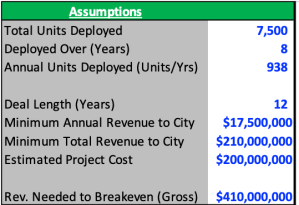
To try and retrace considerations for the developers’ investment decision, let’s first look at the terms of the deal signed with New York back in 2014. The agreement called for a 12-year franchise period, during which at least 7,500 Link kiosks would be deployed across the city in the first eight years at an expected project cost of more than $200 million. As part of its solicitation, the city also required the developers to pay the greater of either a minimum annual payment of at least $17.5 million or 50 percent of gross revenues.

Let’s start with the cost side – based on an estimated project cost of around $200 million for at least 7,500 Links, we can get to an estimated cost per unit of $25,000 – $30,000. It’s important to note that this only accounts for the install costs, as we don’t have data around the other cost buckets that the developers would also be on the hook for, such as maintenance, utility and financing costs.

Source: LinkNYC, NYC.gov, NYCOpenData

Turning to engagement and ad-revenue – let’s assume that the developers signed the deal with the expectations that they could at least breakeven – covering the install costs of the project and minimum payments to the city. And for simplicity, let’s assume that the 7,500 links were going to be deployed at a steady pace of 937-938 units per year (though in actuality the install cadence has been different). In order for the project to breakeven over the 12-year deal period, developers would have to believe each kiosk could generate around $6,400 in annual ad-revenue (undiscounted). 

Source: LinkNYC, NYC.gov, NYCOpenData

The reason the kiosks can generate this revenue (and in reality a lot more) is because they have significant engagement from users. There are currently around 1,750 Links currently deployed across New York. As of November 18th, LinkNYC had over 720,000 weekly subscribers or around 410 weekly subscribers per Link. The kiosks also saw an average of 18 million sessions per week, or 20-25 weekly sessions per subscriber, or around 10,200 weekly sessions per kiosk (seasonality might even make this estimate too low). 

And when citizens do use the kiosks, they use it for a long time! The average session for each Link unit was four minutes and six seconds. The level of engagement makes sense since city-dwellers use these kiosks in time or attention-intensive ways, such making phone calls, getting directions, finding information about the city, or charging their phones.   

The analysis here isn’t perfect, but now we at least have a (very) rough idea of how much smart kiosks cost, how much engagement they see, and the amount of ad-revenue developers would have to believe they could realize at each unit in order to ultimately move forward with deployment. We can use these metrics to help identify what types of infrastructure have similar profiles and where an ad-funded project may make sense.

Bus stations, for example, may cost about $10,000 – $15,000, which is in a similar cost range as smart kiosks. According to the MTA, the NYC bus system sees over 11.2 million riders per week or nearly 700 riders per station per week. Rider wait times can often be five-to-ten minutes in length if not longer. Not to mention bus stations already have experience utilizing advertising to a certain degree.  Projects like bike-share docking stations and EV charging stations also seem to fit similar cost profiles while having high engagement.

And interactions with these types of infrastructure are ones where users may be more receptive to ads, such as an EV charging station where someone is both physically engaging with the equipment and idly looking to kill up sometimes up to 30 minutes of time as they charge up. As a result, more companies are using advertising models to fund projects that fit this mold, like Volta, who uses advertising to offer charging stations free to citizens.

The benefits of ad-funding come with tradeoffs for cities

When it makes sense for cities and third-party developers, advertising-funded smart city infrastructure projects can unlock a tremendous amount of value for a city. The benefits are clear – cities pay nothing, citizens are offered free connectivity and real-time information on local conditions, and smart infrastructure is built and can possibly be used for other smart city applications down the road, such as using locational data tracking to improve city zoning and congestion. 

Yes, ads are usually annoying – but maybe understanding that advertising models only work for specific types of smart city projects may help quell fears that future cities will be covered inch-to-inch in mascots. And ads on projects like LinkNYC promote local businesses and can tap into idiosyncratic conditions and preferences of regional communities – LinkNYC previously used real-time local transit data to display beer ads to subway riders that were facing heavy delays and were probably in need of a drink. 

Like everyone’s family photos from Thanksgiving, the picture here is not all roses, however, and there are a lot of deep-rooted issues that exist under the surface. Third-party developed, advertising-funded infrastructure comes with externalities and less obvious costs that have been fairly criticized and debated at length. 

When infrastructure funding is derived from advertising, concerns arise over whether services will be provided equitably across communities. Many fear that low-income or less-trafficked communities that generate less advertising demand could end up having poor infrastructure and maintenance. 

Even bigger points of contention as of late have been issues around data consent and treatment. I won’t go into much detail on the issue since it’s incredibly complex and warrants its own lengthy dissertation (and many have already been written). 

But some of the major uncertainties and questions cities are trying to answer include: If third-parties pay for, manage and operate smart city projects, who should own data on citizens’ living behavior? How will citizens give consent to provide data when tracking systems are built into the environment around them? How can the data be used? How granular can the data get? How can we assure citizens’ information is secure, especially given the spotty track records some of the major backers of smart city projects have when it comes to keeping our data safe?

The issue of data treatment is one that no one has really figured out yet and many developers are doing their best to work with cities and users to find a reasonable solution. For example, LinkNYC is currently limited by the city in the types of data they can collect. Outside of email addresses, LinkNYC doesn’t ask for or collect personal information and doesn’t sell or share personal data without a court order. The project owners also make much of its collected data publicly accessible online and through annually published transparency reports. As Intersection has deployed similar smart kiosks across new cities, the company has been willing to work through slower launches and pilot programs to create more comfortable policies for local governments.

But consequential decisions related to third-party owned smart infrastructure are only going to become more frequent as cities become increasingly digitized and connected. By having third-parties pay for projects through advertising revenue or otherwise, city budgets can be focused on other vital public services while still building the efficient, adaptive and innovative infrastructure that can help solve some of the largest problems facing civil society. But if that means giving up full control of city infrastructure and information, cities and citizens have to consider whether the benefits are worth the tradeoffs that could come with them. There is a clear price to pay here, even when someone else is footing the bill.

And lastly, some reading while in transit:

01 Dec 18:00

4 Tactics Every B2B Marketer Needs to Embrace

by Wayne St. Amand

jplenio / Pixabay

Over the past decade, many B2B marketers have struggled to adapt to digital transformation, changes in consumer expectations, and mobile-first mind-sets. These factors have also significantly impacted the sales cycle.

Whereas B2C brands focus on engaging individual consumers, B2B companies must engage multiple stakeholders within an organization—from C-level management to user-level personnel—throughout a lengthy sales cycle. This has made B2B marketing much more complex, as companies are forced to identify the right mix of tactics for each role and at each stage in the funnel in order to acquire customers and drive value.

On the flip side, this disruption has also created new ways for B2B marketers to reach and engage with customers and prospects. Here are four key opportunities that B2B marketers must capitalize on in order to succeed in this new era.

Track the Omnichannel Buyer’s Journey

While digital transformation can be disruptive to any area of the business, marketing is one area that cannot afford to fall behind. B2B buyers are everyday consumers too, and they expect to have access to relevant, up-to-date content anywhere, anytime, and on the device of their choosing.

To win their business, B2B marketers must be able to meet these demands and enhance the buyer experience in the moments that matter. But without the ability to track the consumer journey across multiple channels and devices, it’s impossible to assess the value of each interaction or identify the messages and tactics that move prospects closer to conversion.

To be effective, B2B marketers must embrace digital-era technology, such as multi-touch attribution, that accounts for the omnichannel buyer’s journey and measures the influence of each marketing touchpoint on a desired business outcome, such as a form complete or demo request. With a clearer understanding of the touchpoints that drive performance, B2B marketers can make smarter investment decisions that enhance the buyer journey and drive the success metrics they care about most.

Tear Down Marketing Silos

B2B companies are typically very siloed, even within the marketing department. Often times, the technology platforms B2B marketers use to plan, execute, and measure their campaigns operate independently, using different metrics, reports, and taxonomies that make it difficult to see the whole picture.

B2B marketers need the ability to consolidate and normalize data across these siloed systems in order to gain a holistic view of each stakeholder and every marketing interaction leading up to a desired outcome. By consolidating audience and performance data into a single, centralized repository, B2B marketers can analyze and optimize their marketing performance in the context of key audiences.

With a holistic view of what’s working and what’s not for each audience, marketing teams can work together to maximize investment and deliver a better overall experience.

Harness a People-Based Approach

As B2B marketers continue to shift their strategy to build relationships with both executives and end-users, their messages, content, and offers must follow suit. Traditional, one-size-fits-all approaches to marketing and advertising are failing because they don’t consider how complex human behaviors influence what brands and products B2B buyers choose.

To keep pace with buyer demands, brands need to be distinctive and relevant. An audience-driven approach to multi-touch attribution not only provides B2B marketers with a deeper, person-level understanding of who their customers and prospects are and how they behave, but also clear insight into the messages that resonate strongly among executive and user-level personnel. B2B marketers can then use this insight to deliver tailored messages and experiences that meet each individual’s unique needs and preferences.

Measure Brand Engagement

Content marketing has become a popular and effective approach for driving awareness and interest in the B2B sector. Yet many B2B marketers rely on multiple metrics, proxies, and survey-based methods to measure the effectiveness of their content and other branding activities. As a result, they have a difficult time combining these metrics for a holistic understanding of how each channel and tactic impacts brand engagement.

By embracing more advanced, multi-touch attribution approaches to measurement, B2B marketers can incorporate multiple types of brand engagement activities—such as content downloads, landing page visits, first-time website visits, and more—into a single currency. In doing so, marketers can pinpoint which channels and tactics are contributing to brand engagement and make optimizations that drive incremental brand lift.

While B2B organizations can often adapt more slowly than their colleagues in the dynamic B2C landscape, B2B marketers still need to keep up with the pace of change if they want to stay ahead of the competition. By embracing these four strategies, B2B marketers will gain insights into which tactics are producing the maximum benefit for each vital audience and steer their organization toward greater success in today’s digitally focused climate.

01 Dec 18:00

What to Do When Your Business Can’t Scale

by Zach Watson

Free-Photos / Pixabay


At some point, every entrepreneur hits a plateau with their business.

The story usually goes like this: you’ve spend a great deal of time on a product you really think is going to work. Maybe you got funding. Maybe you bootstrapped it. Either way, you’re anxious to see how people react when you launch.

You lose sleep working so hard on your idea, and when you launch, people actually like it! You start to accrue your first customers, they are happy, and they refer more customers and everything is right with the world.

Eight months later, things don’t look so rosy. You’re still getting new customers, but not as quickly as you need to. The revenue and retention numbers aren’t as strong as they need to be. You need to add more people to your team, but you may not have the means to support it yet.

Essentially, you realize that scaling is really hard.

This is one of the most challenging experiences a business leader can have. I know because I’ve been there. Years ago, I was working at a lead generation company, and the same thing happened to me.

I’d spent over a year leading the development and marketing of a web application that connected buyers and sellers of business technology. The early signs were good. But we hit a hard ceiling, and I had to figure out what to do, or the whole thing would fold.

If you’re having trouble scaling your product or service, you’re reading the right article. Here’s how I successfully solved for scale.

First, Study the Data

It’s easy to go into a panic when you realize the thing you’ve spent years of your life building something that might not succeed.

That’s normal. Have a moment of panic if you need to, but remember there are still plenty of factors that you control. Try to focus on those.

Dave Mcclure’s pirate metrics (or AARRR framework) are still extremely useful metrics for SaaS companies in identifying areas of immense impact that are well within your control.

If you’re unfamiliar, I’m referring to

  • Acquisition
  • Activation
  • Retention
  • Referral
  • Revenue

If you look close enough at each of these metrics, you should be able to uncover what’s holding you back from scaling.

Here are a couple of examples of how I utilized this framework to pinpoint the factors preventing my web application from scaling.

Activation, or How to Fix Your Conversion Rate

Activation is a measure of how often people become active customers. For example, in the SaaS world, it’s normal to acquire customers with a free trial, but just because someone signs up for a trial doesn’t mean they’re going to use it.

For me, activation is the most important metric in this framework, because it highlights how effectively you’re converting opportunities into new customers. In a nutshell, it’s the conversion rate for your company.

This was a big issue for me when I was trying to scale my web application project. We were driving a decent amount of traffic to the site, but not enough were converting.

So I did some research, talked to some friends I knew that worked at a good UX design firm, and looked at the Google Analytics data.

Everything pointed to the same conclusion: we needed a better user experience to convert more people.

Overlooking UX design is a mistake that a lot of founders make, and it was something I had to cope with, too. It shouldn’t come as a surprise that better user experience is highly correlated with better conversions and better customer retention.

In my experience, improving the usability and UX design of a product or service is always a good idea. And that’s how it turned out in this scenario as well.

My team worked diligently with our developers and designers to reduce friction and confusion throughout the application’s experience.

It took so time — and a lot of research — but after redesigning the web application, our conversion rate doubled. Not only did we see an increase in the number of people who completed the entire conversion process, but we also saw an increase in the number of people who returned to use the application again.

This all leads to an uptick in revenue, which is, of course, what keeps companies afloat.

Revenue, or Is Your Lifetime Customer Value High Enough?

During the redesign process, I began to think beyond just the application itself and started to examine the broader strategy for the business. In particular, I thought more about our target market.

From the beginning, we were primarily concerned with attracting technology buyers to use the web application to get software recommendations.

But after I investigated that model, I realized that revenue was another metric that could be limiting our ability to scale — in particular, relying purely on increasing our volume of leads to generate more revenue.

There was another target market in the equation: technology vendors.

I was struck by the idea that increasing the number of vendors who purchased leads from us would be a better driver of revenue than only focusing on buyers of business technology. The more vendors we worked with, the greater our lead multiplier, which meant the more each lead was worth.

This immediately raised the average customer lifetime value for the company. Technology vendors would commit to longer engagements, and there was an opportunity to grow the relationship over time.

The point of this story is that when you consider where your revenue comes from, it’s always good to zoom waaay out and make sure that you’re targeting the most high-value customers— or to make sure that there’s not another secondary customer set you should be focusing on.

***

Armed with a higher converting design and a new focus on closing higher value clients, we were able to break through the ceiling and continue to scale the company.

So if you ever find yourself having trouble scaling, remember to look at your data, specifically through the prism of the pirate metrics. That’s where you’ll find the key to breaking through the growth barrier.

01 Dec 18:00

3 Sales Strategies to Be Assertive Without Appearing Aggressive

by jeff@mjhoffman.com (Jeff Hoffman)

Have you ever swallowed a question or backed off from a certain topic for fear of offending your buyer? This happens on sales floors around the world every day. Reps let their qualification questions slide so as not to flare tempers.

But the truth is, salespeople are often more worried about the potential of pissing off prospects than the situation warrants.

Free Download: A Guide to Inbound Selling Best Practices

I find that the ones who obsess over not coming across as pushy often create boundaries for themselves that don't need to exist -- and ultimately kill their effectiveness.

If you're worried about crossing the line from assertive into aggressive, the following three strategies will help you to strike the perfect balance.

Assertive vs. Aggressive

"Assertive" and "aggressive" are sometimes used interchangeably, but there are key differences between these descriptors. Being assertive involves pursuing a desired outcome or stating and standing by an opinion while still being mindful and respectful of the desired outcomes and opinions of others. Aggressiveness, meanwhile, is characterized by relentlessly pursuing your desired outcome while ignoring or attacking the opinions or desires of others.

1. Offer the conclusion, and then the explanation.

Many sales reps think aggressiveness is a voice tone issue. They figure that if they don't sound aggressive, they'll be fine. However, I beg to differ.

You could use the most respectful tone in the world and still come off like a pushy jerk. How? It all comes down to your phrasing. 

Which of the following two options comes off as more presumptive to you?

  • "Who in Procurement is working on this project?"
  • "You know what would be easier -- why don't I just talk to Procurement directly. Who should I contact?"

Even though the salesperson using the second phrase might have a more empathetic voice tone, it's actually the more aggressive question. Providing the explanation before the question comes off as passive-aggressive, because it implies that the salesperson's conclusion -- in this case, talking to Procurement directly -- is not up for debate.

When putting forward a question, don't explain why first. Just ask. The shorter and simpler your questions, the smaller the speed bumps you'll encounter. If your prospect asks for the explanation behind your question, offer it honestly -- but not before they request it.

2. Accept the answer you get (even if you don't like it).

When it comes to offending prospects, the damage is rarely done as a result of the question posed. The damage is done as a result of how the salesperson handles the answer.

Let's say a salesperson asks their buyer "What's your budget for this project?" and the prospect responds, "I don't feel comfortable sharing that with you." Most reps in this situation would think "Uh oh -- I just crossed a line." But from my perspective, if you simply accept the answer and move on to your next question, you show the prospect that you're not afraid to dig deep -- and also that you can take "no" gracefully. And that's precisely the kind of rep buyers want to work with.

The wrong thing to do in this situation? Steamroll past the buyer's response by countering with something along the lines of "Okay, well, would you give me a ballpark?" The prospect already gave you an answer -- and it was that they didn't want to answer. Take the no, and move on. If you don't, you risk being perceived as pushy and aggressive -- exactly the type of rep buyers want to hang up on.

Assertive Communication

Assertive communication can be characterized by a variety or combination of signs, including: stating an opinion or desire clearly and firmly without attacking the other person's, not interrupting others and letting them share their ideas as well, accepting responsibility instead of assigning blame, and stating perceptions instead of accusing and judging. Assertive communication might be awkward in sales, but it absolutely shouldn't be tense, heated, or in conflict.

3. Set the bar early on.

Many times, salespeople will wait until they build rapport with their prospect before asking them "hard" questions. The salesperson reasons that if they can get on friendly terms with the buyer, the buyer will be more willing to open up, and the rep stands less of a chance of pissing off the prospect. 

But there's a problem with this approach, and it has to do with expectation setting. If a salesperson only asks easy questions early on, the "hard" questions later will seem out of context. The buyer might also conclude that the only reason the rep was nice at first was to butter them up -- in other words, the rapport isn't genuine. Far from getting the answers you want, you might just get the anger you were so hoping to avoid.

My rule of thumb is to go heavier earlier. Ask those hard questions before you've provided the prospect with everything they want, such as a demo or a trial. That way, you have some leverage that will help you get the answers you're looking for -- not to mention that you set the expectation that the sales process won't always be 100% comfortable or easy.

If you spend too much time worrying about coming off as aggressive, you probably won't be assertive enough to get the information you need to help prospects. Use these three strategies to stay on the right side of the line, and sell more deals.

To learn more, read our tips for being perceived as a trusted sales advisor.

Inbound Selling How to Close and Negotiate
01 Dec 17:59

The One Social Selling Tactic That Will Guarantee Successful Sales Prospecting

by Tom Martin

Every day you find another article about some new Social Selling tip, trick or tactic to improve your sales prospecting success. So you read, follow and try. But that’s a recipe for sales prospecting failure.

Everyone is asking themselves the same question – “What’s going to change in social selling or sales prospecting?”

“What’s going to change in Social Selling or sales prospecting in general?”

Everyone is looking for the next big thing, the one variable, the one skill, that if they can master it will make their sales prospecting successful.

What’s NOT Going To Change in Social Selling?

Instead of focusing on what will change or has changed in social selling and sales prospecting, flip the question on its head. Ask yourself, “What’s not going to change?” That’s where the real power lies.

“What’s not going to change?”

When you flip the question on its head you start to focus on the constant instead of the change. Because while change is constant, no one can realistically keep up with and master the new and notable forever. At some point, you’re just going to run out of steam, energy and time.

Why?

Because, while a lot of the new and notable will improve your sales prospecting efforts and transform your social selling programs, just as much of it will result in dead ends, failure and frustration. It’s the old adage of taking two steps forward only to to take one step back.

But when you strip away all that change and let yourself focus on the constant… you find the true answer to social sales prospecting success.

The Power Of Traditional Sales Prospecting Tools

While Social Selling is still relatively new in the history of sales prospecting, prospecting itself is as old as commerce. Ever since the first days of people selling their wares to other people in exchange for goods and services or monetary compensation, sellers had to find the buyers.

While the tools used to find those buyers have changed over the years, what made each tool effective hasn’t. It’s really that simple. The one constant, the one thing that hasn’t changed in the history of sale prospecting, isn’t going to change. Whether you’re looking 10 days or 10 years into the future, this one constant will be present, and still the primary driver of successful sales prospecting.

Want to know what it is?

Turning Conversations Into Customers

Conversations. At the heart of all successful sales prospecting is a conversation. At some point, a buyer has to have a conversation with a seller and that seller leverages that conversation to persuade the buyer to buy.

In the beginning, 100% of those conversations were face-to-face. Over the years, as technology has evolved, those conversations transitioned to written text, phone, email, Internet, social media, and video-conference. In the future you may even have a conversation with a hologram version of your buyer or seller. But it will STILL be a conversation.

Great salespeople are conversationalists.

And that is the secret of the most successful salespeople. They’re great conversationalists. They understand the ART and science of conversation. And more importantly, they practice these arts.

They understand that no one wants to be sold. Everyone wants to make a buying decision. So they just talk to potential buyers. They ask questions, they provide answers and most of all they give the sales prospect the information he or she needs to arrive at a buying decision — usually the one that favors the seller.

Do You Want More Social Selling Success?

Focus on conversations. Stop trying to interrupt your sales prospects. Instead of trying to force, or worse, trick them into having a conversation with you via spammy phone, email and social media techniques and tricks, give them a reason to want to say hello.

More on that in a future post.

Till next time… may all of your prospecting be painless.

01 Dec 17:58

11 Lessons on Launching

by Lacy Boggs

rawpixel / Pixabay

Six years into this business, and I’ve lost count of how many launches I’ve been a part of: either in the planning and strategy stages, as a copywriter, as an affiliate, and even doing my own launches.

And in that time, you can’t help but learn a few things.

‘Tis the season to be launching (now through January or February or so) and so I thought I’d share some of the biggest lessons I’ve learned about launching over the years:

1. It’s a numbers game.

This is maybe the most important lesson I’ve learned about launching, and one I wish I could impart to more beginning entrepreneurs. The success of your launch is alllll about the numbers.

If you go with industry-wide averages, only 1–3% of people who see your offer (ie: go through your launch and land on your sales page and get the follow up emails) will actually make a purchase. That 1–3% number is your sales goal. So if you want to make 50 sales, you need 5,000 people to go through your launch with you. (If you missed how to figure percentages like that in math, as I did, you can use percentagecaulculator.net to figure this out.)

If you’ve ever thrown a wedding or big party, people say to expect 50% of people you invite to actually come; you invite a lot more people than you actually expect to turn up. The same is true for your launch: you need exponentially more people to be invited to your launch than actually come to the party.

And that’s where content marketing, advertising, and affiliate promotions come in.

But Lacy, I hear someone in the back saying, couldn’t I have a better conversion rate than 1 percent?!?

Yes, absolutely. But until you have data and can PROVE to me that your conversion rate is better than average, it’s a good idea to stick with the average to figure your numbers. The worst that can happen is that you’ll sell a lot more than you expected!

2. It’s a lot more work than people want to talk about.

You don’t hear as much about “passive income” these days as you did when I first got into the Internet marketing game, but let me just tell you this: there is nothing passive about a launch with a start date and an end date. It is a hell of a lot of work.

(There may be an argument to be made for an evergreen funnel that is passive, but even then, you have to always be monitoring and tweaking the funnel.)

I used to think that launching a 1:many course would be a lot less work than trying to sell 1:1 services, and I was DEAD WRONG. Launching is maybe even MORE work than selling 1:1. Can it be profitable? Absolutely! But don’t let anyone sell you on the idea that it’s easier.

3. A good copywriter can make a big difference.

If you’re launching your first course or working on a really tight budget, I’m not going to try to convince you to hire a copywriter you can’t afford! Use a template, get a lot of feedback, and do your best: you’ll be fine, I promise.

But as you get more sophisticated and your launches get bigger, a skilled copywriter can increase your sales tremendously. Because we’ve studied how this work, we know which psychological buttons to push, and we’re thinking about things you haven’t even considered.

Because it’s our job, not because you suck or anything.

Seriously, we have a woman on our team who has increased people’s conversion rates from emails by double digits. That’s serious $$ at the end of the day.

4. You don’t have to follow a launch “formula.”

There are a million marketers out there who want to sell you their idiot-proof, never-fail, six figure launch formula — and that’s fine. I’m sure most of them work, most of the time. (Assuming you’ve got the numbers at the top of the funnel to make it happen — see point No. 1.)

But the truth is, you don’t have to follow anybody’s formula in order to have a successful launch. I have colleagues and friends who have broken every rule in the book and still had five and six figure launches. I once sent a single email and made over $5,000 “launching” something new.

The point is, don’t get bogged down in trying to figure out the “right” way to launch your thing, or whether you can afford so-and-so’s course on how to launch your thing.

Just launch the thing. Then figure out what went well and do more of that.

5. One launch does not a pattern make.

Another big lesson I’ve learned is that just because something worked (or didn’t work) on your first launch doesn’t mean that it will continue to work (or not work) forever.

It’s important to remember that, for your first launch, you’re likely to reach the early adopters — the people who are excited to try new things. If you remember the customer awareness spectrum, you’re probably reaching the problem aware and aware of you customers with your first launch.

But after a couple of launches, those people are going to start to dry up. You may need to retool your launch content to bring people at earlier stages into the fold.

Or, you may run out of people at the top of your funnel. (NUMBERS again!) You may need to reach a new audience that hasn’t heard from you before.

The point is, what worked today may or may not work tomorrow. Every launch is an experiment, and you have to adjust accordingly.

6. You should *always* be thinking about launching.

OK, that’s a bold statement, but hear me out. In my world, all content marketing must be dedicated to achieving a goal. If you work on a launch model, your goal is almost certainly going to be MOAR LEADS.

All. The. Time.

That means, if you launch your big thing in July, you damn well better be focused on collecting and nurturing leads in January, April, September, and November.

Your content should always be working for you so that you have those big numbers when it comes time to launch and you’re not in a cold panic about how you’re going to get 30,000 people to see your offer in the next six weeks. (True client story.)

The cold hard truth is that if you don’t have money to spend on a massive ad campaign, then your alternative is to spend TIME building up your leads. Which means you have to always be thinking about how your content is going to feed that funnel — even if it’s just in the back of your mind.

7. Bonuses and discounts can work… or make you look desperate.

At some point it became de rigeur to offer a zillion crazy bonuses with your launch, that bring the “value” of the package up way higher than the pricetag. And sometimes that can work.

But sometimes it can make you look ridiculous and desperate.

For example, if you’re trying to convince me that an ebook you’re offering as a bonus is somehow worth $399 just to bump up the value of the package, I’m going to be giving you some serious side-eye. People know how much they usually pay for an ebook. Don’t be weird.

Whenever you offer a bonus or a discount, there should be a REASON attached to it. And no, “just because I’m launching” is not a good enough reason.

I like the “quick decision bonus” that people get for making a commitment within the first 24 or 48 hours. That rewards them for making a decision and helps boost your early numbers.

8. Affiliates only work if you do.

Affiliate marketing seems like such an awesome idea — you get other people to do the selling for you!

But the best affiliate programs work well because the creator (or creator’s team) is deeply involved with the affiliates. The creator writes sales copy, emails, tweets, Facebook posts; she makes herself available for webinars and live streams and interviews; she creates graphics and templates; and she is in CONSTANT communication with her affiliates during the launch to encourage them and support them.

It’s a BIG job.

The other thing to consider is that the typical affiliate payout is around 50% of the retail price. Unless your profit margins are redonkulously high, that’s a really big cut of the pie you’re planning to hand out. If a Facebook ad campaign cost 50% of the retail price, most people would shut that mother down so fast it would make your head spin!

So just be aware that affiliate marketing can work, but you’ve got to work hard and be prepared to pay out to see results.

9. Launching takes more time than you think.

I cannot tell you how many times a perfectly lovely entrepreneur has come to me and said they need help with their launch — which is happening in two weeks. And I cannot tell you how much I hate having to tell that perfectly lovely person that I cannot help them.

Content marketing is a LONG game. In an ideal world, you are planning how your content will support your launch all the time (see No. 6). In the real world, it takes a lot longer than most people think to “ramp up” to a launch.

For example, if we take our numbers from No. 1 and assume you want 50 sales, how long would it take you to get 5,000 people on your email list? I did about that in six months — using only free methods (no paid advertising). Your mileage may vary.

If you’re committed to a launch date and don’t have a way to get to that goal number in the amount of time you have, you’re going to have to adjust your sales expectations.

I used to say you needed a minimum of six weeks for a successful launch. Now I would say that you can launch in six weeks — if you already have all the leads you need. If you need more leads, you need more time (or more money to pay for ads). Simple as that.

And that’s without considering how much time it will take you to create all the collateral — not even the course itself, but the sales page, the emails, the videos, whatever content you’re going to lead with, etc. If you decide to work with a copywriter (see No. 3) she may be booked up or may need a longer lead time than you’re expecting. I would never expect to work with a copywriter and/or a designer for a sales page with less than a month lead time before launch — maybe more.

What about graphics? Photos? Testimonials? Affiliate collateral? Emails? The more involved your launch, the more time you need to prepare.

10. Internet famous people have a lot of help.

One of the worst things about our Internet marketing community is how easy and common it is to compare yourself to the big names out there.

Having been on the back end of some BIG name launches, I can tell you with absolute certainty that these Internet famous people have a LOT of help. Huge teams, launch managers, affiliate managers, sales page designers, customer support teams, videographers, photographers, copywriters — the list goes on and on.

So before you decide that you need a huge, three-video launch with 25 emails and 6 different customer segments, plus a dozen affiliates, remember that you may have less help than your mentors and idols.

And that it’s perfectly OK to scale back.

In fact…

11. The personal touch works really well.

Until you get so big that you’re selling hundreds or thousands of units with every launch (at which point it would be nearly impossible), try personalizing the experience as much as possible.

Track your best leads and send them personal emails. Offer to get on chat or the phone with people to answer questions. Invite people personally and individually and tell them why you think it would be a good fit for them.

The thing is, I think a lot of us are uncomfortable with that kind of “hand selling,” because we’re either uncomfortable tooting our own horn that much, or we’re afraid to be too “salesy.”

But the reality is that when you’re smaller and just starting out (or when you’re selling a very high ticket offer) this is absolutely the way to go. You’ll see much better success than trying to automate everything.

01 Dec 17:57

Data Science for Marketers (Part 3): Predictive vs Prescriptive Analytics

by George Karapalidis

How much would you like to know what your customers are up to and what kind of nudge they need to convert?

Your past data holds answers to likely future outcomes, and predictive intelligence helps you unlock those. While the concept of advanced forecasting isn’t new – the airline industry has been analysing their flight data for years to minimise late arrivals and optimise routes – it is now starting to reach its full potential in the marketing industry.

So far in this series, we’ve looked at how to get your data ready and descriptive v diagnostic analytics. In this third and final chapter, we explain what exactly you can achieve with a mature big data analytics setup.

Predictive analytics giving actionable insights

What is predictive analytics in marketing?

Predictive analytics transforms all the scattered knowledge you have relating to how and why something happened into models, suggesting future actions. By integrating various techniques including data mining, modeling, machine learning (ML) and artificial intelligence (AI), predictive analytics tools transform the data at hand into focused marketing action.

While descriptive analytics helps us learn more about the past, predictive analytics looks into the future, answering the “What will happen if…” questions.

In marketing, that translates to:

Predictive algorithms tell you about the likelihood of a future outcome with scientific accuracy. Big data is a collection of moving parts that can be smartly mixed and matched to model hundreds of different outcomes (negative and positive) that will guide your decision making.

Use cases of predictive analytics in marketing

Predictive intelligence can be applied to back up all sorts of marketing decisions, depending on your targeted area for improvements.

Higher email marketing ROI

Econsultancy’s 2018 Email Census indicates that 58% of marketers were either using or considering using predictive techniques to improve the content of their emails. Specifically, behavior-based personalization has become the key area where predictive analytics is making the most impact. Intelligent email marketing campaigns tend to generate the highest influenced revenue – $5,1 million.

Image: Predictive Intelligence Benchmark Report by Salesforce

Source: Predictive Intelligence Benchmark Report by Salesforce

Predictive analytics allows you to build an intimate rapport with individual customers, rather than large segments. By analysing customers’ historic purchases, demographics and behaviour data, algorithms can suggest when to send follow-up and reactivation emails, what content to include, how to re-engage your customers at the most effective cost and what product recommendations and promo offers to dispatch.

Identify lookalike customer audiences

Predictive analytics adds a scientific dimension to determining similar groups of customers and similar segments in new markets. Your sales teams can pinpoint valuable prospects earlier in buyers’ journeys, prioritise the most valuable accounts for expansion and uncover new prospects that most closely resemble existing customers.

Focused content distribution

Determine what types of content generate the most impact for certain leads and prospects. Predictive analytics allows you to optimise and personalise your content distribution so that each prospect receives the optimal message at the right time. Instead of second-guessing what to send to new prospects, the algorithms will indicate how certain copy will impact customers of certain demographics or behavioural backgrounds, and programmatically distribute relevant content to them, leading to higher conversions.

Predict and optimise customer lifetime value

Estimate the likely lifetime value of new customers by benchmarking them against similar prospects in your system. Similarly, you can predict the likelihood of churn for certain customers. Once your system registers the warning signs, your sales team receives a notification and can take proactive action. Or you can programmatically plug the dangling customer into a personalised churn-prevention campaign.

Comprehensive marketing campaign optimisation

Fine-tuned predictive analytics systems can programmatically streamline all your marketing activities; prioritising the best course of action, launching, pausing and adjusting campaigns depending on their performance, continuously optimising your content distribution and directing you towards untapped opportunities. All your decisions will be backed by data and science, not assumptions and guesswork, diminishing the risks and increasing the ROI of all your actions.

Moving forward: prescriptive analytics

Prescriptive analytics is an emerging area of analysis that leverages both existing data and action/feedback data to guide the decision maker towards a desired outcome. Prescriptive analytics is also predictive in nature since it tries to estimate multiple futures based on your actions and advise on the outcomes before you actually make a decision.

Apart from answering the “what will happen if…?” question, prescriptive analytics also tackles the “what should we do to reach the desired outcome?” component. For instance, “What new keywords should we target this month to grow our search traffic by 30% in 3 months?”

The best example of prescriptive analytics in action is Google’s self-driving cars. The algorithms powering them make millions of predictions during each trip, deciding when, how and how fast the car should move to reach the destination – the same way a human driver does.

Advances in AI, computational modeling, machine learning and reinforcement learning (a sub-division of ML) are bringing prescriptive analytics into the marketing realm. Most businesses, however, are yet to embrace prescriptive analytics solutions (or one of their components such as AI) to guide their daily operations.

Graph: How likely are you to include AI in your marketing over the next 12-18 months?

Image Source

You are more than encouraged to join the progressive AI party as well. The use cases and benefits of prescriptive analytics for marketing will only expand over the next few years.

For sales, prescriptive analytics can help determine the optimal product configurations (premium, high-end, medium and low price offers) by dynamically optimizing service prices depending on customers’ tolerances, preferences and other external factors (e.g. availability, demand). Your teams can know exactly what prospects to call to meet sales targets and what kind of offer to pitch to them.

For marketers, prescriptive analytics can provide a wide-angle view of all marketing activities, help determine the performance of planned campaigns/content type and estimate how different external/internal factors will impact their planned strategies.

Machine learning alone is already experiencing transformational momentum in the marketing realm. And if you want to know where AI and ML are headed in the future and how these technologies can give you a competitive edge today, download our guide for marketers.

What it takes to become a data science-driven organisation

Predictive intelligence generates a 40.38% influence in revenue after 36 months of implementation on average. However, such results assume having a mature predictive analytics culture:

Becoming a data driven business: results assume having a mature predictive analytics culture

Source: RedEye

Your transformations should start with accumulating and assessing your current data. How much data are we we talking about? Typically, a few thousand records showing both positive and negative outcomes should be sufficient to create marketing, sales or product prediction models.

All of your data sets will have to be stitched together in one major data lake. Additionally, you will want to connect some external data streams to it, if your goal is to deploy advanced marketing campaigns based on seasonality, weather, location and so on.

Finally, once you have a well-organised dataset, you can either:

  • Plug your data to a predictive analytics tool and fine-tune the models yourself.
  • Sign up with a data science vendor to create models, algorithms and data visualisations for you.

In both cases, the quality of your data will be crucial for success. Investment in big data and data analytics can seem steep, but making data-driven decisions makes strong commercial sense as we have illustrated over the course of this three part series.

30 Nov 17:56

The 10 Best Google Docs Add-Ons for More Professional Documents

by Neeraj Chand
google-docs-guide-business

Microsoft Word may be the most widely-used word processor, but Google Docs is also gaining rapid popularity. Google Docs allows multiple users to edit the same document. It is also the safer option to create and save a document online using Google Docs than only saving a copy on your computer.

Along with its regular features, Google Docs also supports a host of add-ons to help you properly format a document. These add-ons are found under the Add-ons menu option.

Here are some useful Google Docs add-ons you can use to create professional documents.

1. Doc Builder

doc builder

This feature is used to create snippets and save custom styles. That means you can use it to insert snippets of text that you use regularly. Things like the structure you use to write a particular type of document or the resume template of your choice.

How to Use:

  1. Open a sidebar in your new document.
  2. Select the file you want.
  3. Select Doc Builder from your add-ons menu.
  4. Choose any text, image, formatting etc. from older documents and insert them directly into the new one.

Download: Doc Builder (Free)

2. Page Layout Tool

page layout

Use this add-on to set custom page sizes. You can also use it to set custom margins for your page. Google Docs will ensure that the page size is retained while exporting the document as a PDF.

How to Use:

  1. Go to the add-ons menu
  2. Select Page Layout Tool, and input the size of the page and the margins that you need.

Download: Page Layout (Free)

3. Text Cleaner

text cleaner

This tool is used to remove any unnecessary formatting and clean up a text. If you select Clear Formatting in Google Docs, it will cause all your formatting to be removed. On the other hand, Text Cleaner allows you to remove the formatting only from a selected area. Line breaks and spaces are also removed.

How to Use:

  1. Select the part of the text you want to be cleaned.
  2. Select Text Cleaner from the add-ons menu.
  3. Go to the configure option.
  4. Select the formatting you want to keep or delete and hit save.

Download: Text Cleaner (Free)

4. Code Blocks

code blocks

This can be used to add formatted codes to your document. This feature is particularly useful when you are writing code documentation and want other coders to comment on your work.

How to Use:

  1. Select the code in the document.
  2. Open the Code Blocks sidebar.
  3. Set the language and theme.
  4. You can use Preview to see how the formatted code will look in the text.
  5. Remove the background of the text or keep using it depending on your needs.

Download: Code Blocks (Free)

5. Table Formatter

table formatter

This add-on has over 60 built-in designs and sets of tools to create customizable tables.

How to Use:

  1. Select a part of the table and go to Table Formatter.
  2. You can use Apply for all tables to set all the tables in the same style.
  3. Go to Custom Template and set your specifications for the table with custom border and row designs.
  4. You can split a table very quickly using the Splitting and Merging of Tables add-on.

Download: Table Formatter (Free)

6. Translate

translate

As the name suggests, you can use this add-on to translate blocks of texts in Google Docs. The Translate add-on currently supports English, Spanish, French, German and Japanese with more languages expected to be added soon.

How to Use:

  1. Select the block of text you wish to translate.
  2. Go to Translate in the add-ons menu and select the language you wish to translate your text to.
  3. You can use Translate+ for even more language options to translate to.

Download: Translate (Free)

Note: The application can only be used in Chrome and Safari browsers. You can also add a thesaurus to Google Docs for even more language options.

7. Link Chooser

link chooser

If you are in need of quick navigation to a Google Drive files, you can make use of Link Chooser. This application allows you to have quick access to other files while you are working on a document, like style guides or reference notes.

How to Use:

  1. Run the add-on and select the file or folder that needs to be inserted into your document.
  2. A few seconds later, the original file will be shown to be linked to the document’s title.
  3. Click on the link whenever you need to go back to the linked file for reference.

Download: Link Chooser (Free)

8. DocSecrets

doc secrets

A security application that allows you to use password protection on your document. Once you apply DocSecrets, only you and the people you share the password with will be able to access certain parts of the document and make editions to it.

How to Use:

  1. Enter a password in the side panel of Doc Secrets.
  2. Type whatever secret text you want in the insert field.
  3. To hide existing text, select the text and click Censor Text to hide it.
  4. Share your password with the people of your choice, and they will be able to see the text after installing Doc Secrets on their Google Docs page.

Download: DocSecrets (Free)

Note: This add-on should not be used for sensitive data like financial information since it cannot guarantee total security.

9. Speakd

speakd

It’s basically a text-to-speech application that you can use on your Google Documents. For now, you can only use Speakd to have text read aloud to you by the program. While this add-on is naturally of great use to the visually impaired users, it can also be used by regular users to take a break from staring at the computer screen.

How to Use:

  1. Select the part of the text that you want to be read aloud.
  2. Go to the Speakd option in the add-ons menu and hit play. A robot voice will read the text out to you.

Download: Speakd (Free)

Note: Speakd is not to be confused with the Voice Typing option offered by Google Docs, which allows you to verbally dictate your content and have the program write it out.

10. Lucidchart Diagrams

Use Lucidchart to add all kinds of graphics to your document. This add-on can be a bit difficult to get the hang of at first. While it does make the process of creating charts easier, you will have to go outside of Google Docs to complete the chart.

How to Use:

  1. Place the cursor at the place where you want to insert the diagram.
  2. Go to the Lucidchart app to build the diagram in detail.
  3. Once finished, you can insert the image from the Lucidchart sidebar.

Download: Lucidchart Diagrams (Free)

Creating Better Documents Online

With the help of these add-ons, you will no longer need to go back to Microsoft Word to create your full document and then upload it online to allow your colleagues to see your work and add their input. Google Docs can now be used to create virtually any kind of document that you can create using MS Word.

Add to that the other advantages offered by online document creation, and the scales begin to tip in Google Docs’s favor. Particularly since you are also able to sync with Google Keep, which enables note-taking, search and tagging features.

Read the full article: The 10 Best Google Docs Add-Ons for More Professional Documents

30 Nov 17:56

A Reminder of The Magic of Buyer Empathy

by Elliot Begoun

 Canva.com

I wrote this article a little over a year ago. However, a recent conversation made me think of it and the power of deeply understanding what’s in it for the buyer. Not the consumer, but the person making the decision whether to purchase and stock your product. I offer this as a reminder as to the magic of empathy.


How does your product impact your buyer? Does it align with his or her goals and objectives? Does it help grow the category, or might it cannibalize the sales of other brands?

One of the least leveraged and most powerful tools of the trade is empathy. It’s especially powerful when applied to the buyer. Food founders are passionate about their brand, excited with how it will impact the lives of their consumers. But, what does it mean for the buyer?

Understanding the buyer impact, making that a key part of a go-to-market strategy is vital to achieving the desired distribution gains. Yet, too often, it is overlooked. A brand will have attributes that are particularly attractive to a buyer and should be used as part of the business case presented. A brand may also have aspects that aren’t aligned with a buyer’s needs or wants. Recognizing those is the first step to overcoming objections.

For the purposes of this article, let’s focus on a conventional retail buyer. Just know that these same principles are applicable to a buyer in any channel.

Let’s start with what a buyer’s key motivators are likely to be. The first is category gross profit. A buyer is trying to create that perfect cocktail of products from commodity to premium. The perfect blend produces the ideal balance of velocity and margin that results in a total category gross profit that meets or exceeds her targets.

Closely related to the above is space. At the end of the day, retail grocery is a real estate business. There is a finite amount of linear feet in each category and the buyer’s responsibility is to maximize the production of that space in both revenue and profit. All of course, while meeting the consumers’ expectations and desires.

A growing focus that many buyers have is the need to create an experiential shopping trip for their customers. They are searching for an opportunity to create a treasure hunt, or for a novel item that supports shopper interruption and entertainment.

Although there are many other buyer motivators, in the interest of brevity, I end with promotions. A buyer is responsible for bringing in, managing, and maximizing the promotional dollars. Often the larger brands have firm promotional calendars and a buyer frequently is expected to fill certain promotional blocks in the weekly circular.

So, how does the magic of buyer empathy play in all the above? Let’s explore it in the same order.

An emerging brand must understand how their product fits into the pricing and gross margin architecture of a category. If the product is a premium product sold at a good margin, it could be attractive to a buyer from a penny profit standpoint. If conversely, it is a value price positioned item that cannibalizes from other premium offerings, it could be a threat. Unless, of course, the potential velocity is great enough to offset the penny profit loss of the premium. It’s so critical to understand this interplay. If you don’t, hire someone who does. Because, if you know it prior to meeting with a buyer and have a plan, it can be very beneficial. If you don’t know, it could derail your entire meeting.

The pack-out of a product, the facings per linear foot, and the flexibility of how it can be merchandised all impact buying decisions. If a brand offers an item that allows for more facings per foot, it could be exciting to a buyer. Similarly, if a brand offers its own merchandising solutions such as shippers, racks, etc., that too can be very appealing. It’s a must to understand how your brand at the shelf fits within in the total set and whether that fit is positive or negative. That information is critical prior to a presentation to a buyer.

If a product comes with its own buzz, a cool story, or even some store-level events beyond just demos, a buyer’s ears are likely to perk up. Consider this newly found need to create an experiential shopping trip and how your brand might support those efforts.

Lastly, every brand dreams to get the key promotional periods; holidays, the Super Bowl, and more. There are a lot of promotional periods in a year and a buyer must fill them all with something from their category. Offering a flexible promotional plan and giving a buyer some discretion on when to promote, could earn you hero status. Yes, you might miss the dream periods, but building a relationship with a buyer is usually a great trade-off.

The real lesson here is that before you approach a buyer, prior to any meeting, know, from behind the eyes of that buyer, their key motivators. That knowledge and understanding can do more for growing your brand than most realize. Buyer empathy is magical.

30 Nov 17:54

Revenue Marketing Insights from 80 Marketing Leaders

by kniemisto

What happens when 80 senior marketing leaders come together to talk about revenue marketing and ROI? Amazing insights, that’s what!

At our Marketing Nation Engage event in London, we hosted a series of roundtable sessions with marketers around the region to discuss hot topics of the day. And nothing was hotter than revenue marketing and ROI. Each of the three roundtable sessions was hugely oversubscribed, and we had standing room only for each!

Here’s what marketing leaders find most challenging about revenue marketing and tracking ROI:

Lead Quantity vs. Quality

Sales teams demand more leads but often complain they’re not the right ones. We know that not all leads are equal, and the challenge is measuring quality, as well as quantity. Expectation setting is also important—with increased lead quality often comes a decrease in quantity.

Measuring ROI Across Channels

Most participants used a mix of digital, events, offline, and sales related channels. But seeing performance across those channels is tough and some, like PR and branding, are particularly challenging to measure.

Sales Loves Events

Of course they do—most of the resource effort sits with the marketer! But many wonder if the resulting revenue impact is enough to warrant the effort, especially when events typically make up the majority of many marketing budgets.

What to Measure

So many things are measurable, but what’s the right thing to focus on? Marketing qualified leads (MQLs) were the most common metric and used by almost all participants, but with no direct link to revenue does this go far enough?

Attribution

Last touch is the most common attribution method used, followed by first touch and multi-touch. It’s acknowledged there are flaws with this approach, but no participants use anything more sophisticated at the moment.

Long Sales Cycles

B2B is tough with so many touches and sales cycles that can last years. Tracking and measuring engagement is seen as key to building a picture of the entire process.

Any of these challenges sound familiar? We found the majority of our B2B marketing leaders shared the same challenges and frustrations irrespective of company, industry, or location. What the group also had in common was a desire to move the marketing story forward in the area of ROI, attribution, and revenue marketing. Everyone knows it’s going to make a real difference not just with marketing efficiency and effectiveness. It will also improve sales and marketing alignment, as well as marketing’s perceived value with the rest of the C-suite and the board.

So, what can marketers do to take things to the next stage? Here are some tips from our experts:

Measure Through the Pipeline

Measure beyond leads. Marketing metrics need to focus on key stages across the combined sales and marketing pipeline, including marketing-sourced opportunities and revenue. Synchronizing between marketing automation and CRM will make sure the source data is the same, so there’s no ambiguity.

Engage the Rest of the C-Suite

Measuring marketing returns in terms of revenue helps you speak the same language as the CFO, CEO, and rest of the C-suite. It proves the value of marketing, and having a few revenue metrics can make all the difference.

Capture All Channels

Digital channels are often the easiest to capture but need to be brought into the same picture as email, offline, events, and sales channels for an all-important single customer view. This way you can really see how each part of your marketing mix is performing, as well as getting a view on the lifecycle of each prospect.

Lead Quality Measures

Introduce lead scoring as a measure of lead quality. Using data enrichment is also a good way to provide more information on a lead, as well as lead routing accuracy. Make sure any useful insights about what a prospect has done are shared with sales to help them refine their pitch. Being able to pass better leads to sales teams, at a warmer stage of the buying process, and including relevant insights, should increase conversion rate.

Link Activity Cost to Results

Include costs of activities in your program reporting so you can more easily analyze the cost per lead/cost per marketing-sourced revenue. This way you’ll be able to demonstrate the impact of each dollar of marketing spend. You can also create a measure of non-financial resource. While this is harder to measure empirically, it’s a great way to identify the activities that cost little but take a lot of effort for very little effect.

One Sales and Marketing Process

If you don’t have one already, it’s vital to get one single lead process across sales and marketing. This needs to be agreed by all parties. SLAs are often useful for keeping leads moving and giving full accountability. This leads to one set of metrics for all teams and can be aligned through synching across CRM and MA. Without this, assigning marketing sourced and influenced leads to the sales funnel often becomes a contentious issue.

Different Metrics for Different Audiences

Marketing can be guilty of measuring too much of the wrong thing. Clicks, likes, and downloads may be useful for measuring activity efficiency but revenue, opportunities and leads generally provide a better indicator of pipeline health and future revenue.

Expand Attribution Models

Some attribution is better than none, and we’d always advise marketers to just get started collecting some data. After that, it’s worth considering what the limitations are and how they could be overcome. Use a model that works for your sales cycle. For example, if it’s a long cycle that has a large number of touches, then a U or W shape attribution can make sure the right touches get the significance. And with the right tools set up, this can be easily tweaked and analyzed as required.

Explain it to Sales

Once they understand that marketing shares the same revenue goals and is focused on the same things, the process eases. It may take a while, but there are often benefits to making sales part of the campaign journey rather than just the recipient of leads.

Keep Measuring

Long sales cycles and multi-touch sales processes mean we need to keep measuring results beyond what many marketers actually do. Reports and dashboards can help, but don’t just measure once and stop, as we know the impact of activities often lives on in a longer sales cycle.

Measuring marketing ROI and taking a revenue marketing approach is not always easy. From convincing others to thinking in a different way, to getting the right metrics for the right audience, there’s a lot to think about. It won’t happen overnight, but measurement is something marketers should be improving all the time. In the end, this will increase the attribution of marketing activities, improve accountability, and make ourselves as relevant as possible to the overall business objectives.

The post Revenue Marketing Insights from 80 Marketing Leaders appeared first on Marketo Marketing Blog - Best Practices and Thought Leadership.

30 Nov 17:53

You Ask, I Answer: Local Value-Added Reseller Marketing

by Christopher S Penn

Ava asks, “How can a local reseller market effectively against entrenched brands and big box stores?” Local resellers – like plumbing supply, home decor, electronics, appliance showrooms, etc. – fit in the category of value-added reseller. The key is the value-added part – a reseller is typically more expensive than a big box retail store […]

The post You Ask, I Answer: Local Value-Added Reseller Marketing appeared first on Christopher S. Penn Marketing Blog.

30 Nov 17:52

Perfect Alignment? How Content Marketing Gets All Your People Acting in Concert

by Alistair Norman

ar130405 / Pixabay

According to a new report by the Content Marketing Institute, a good content marketing strategy does more than engage with customers — it fosters stronger relationships within your internal teams, too.

Thanks to your content marketing, your audience have a well-rounded, broadly accurate view of who you are and what you do. They like the way you’re helpful without getting in their faces; you’re on their list of sources when they need information. And your flow of articles, blogs, infographics and slideshares means you’re always marking the route as they trundle down the customer journey.

But there’s another plus to a great content marketing strategy: the effect it has on the people within your walls.

In a new report by the Content Marketing Institute, 81% of top content marketers enthuse about how a documented strategy does more than energise customers.

They believe it brings teams together within your organization, uniting them around your common goals with a sense of shared purpose. And for today’s business model — lean, stripped-back, focussed on core competencies, where what you stand for is as important as what you sell — and that can only be a good thing.

This blog looks deeper into those research findings, teasing out why the right content marketing plan affects your insiders as much as your audience… with some follow-up ideas for applying them.

Perfect alignment: five tips for extending your content marketing strategy inside your organisation

#1: Just have one!

According to one William Gates Senior (father of the Microsoft founder) “90% of success is simply turning up”. The same seems to hold true among content marketers. A major factor in successfully aligning teams around a documented content marketing strategy was… simply to have one written down!

8 out of 10 marketers surveyed believed having a documented content marketing was critical to getting all their people on the same page.

Of course, you’ve got to make sure that strategy is out there, visible to and understood by all departments and teams. That means writing it not in marketing-speak, but in plain language.

Think the Gettysburg Address, or Churchill’s “Fight them on the beaches” speech — a clearly communicated statement of what you plan to do, without faff or fluff.

65% of top names had a documented strategy. Just 14% of the bottom feeders did. Why not join that 65%, by sieving your all-points-covered content marketing strategy into a single sheet of A4 and distributing it around your office?

People work smarter if they know what they’re working for. And of course it encourages them to chat over the cubicle walls — always useful for getting everyone on the same page.

#2: Get C-Suite buy-in as a non-neg

The report supports a second factor for building interdepartmental bonds: backup from management is non-negotiable. Ideally the whole C-level — CEO, CIO, CFO, CMO, and certainly CXO if you’ve got one — but at the very least you need one or two of the organisation’s leaders on your side.

92% of the best content marketers had commitment from the corner office, against barely half (55%) who considered their content marketing subpar.

Who to start with? Go for gold: the CEO. A huge proportion of companies take on the ‘personality’ of their leader: think how much Steve Jobs shaped Apple, or Jamie Dimon feels like JP Morgan. It’s no coincidence both these leaders were known for walking around and talking to junior staff, constantly getting a feel for what’s happening on the ground.

#3: Think communities as well as content

Despite the term ‘social media’ entering its teenage years, most companies of all stripes still limit their content marketing efforts to email (87%) and educational content (77%). That’s great as far as it goes — but turning communication into more of a conversation has even more positive potential.

Imagine opening your written strategy (and even your draft content) up to discussion across your corporate network — inviting questions and having discussions with people from all departments and job functions. Just as communities of customers arise spontaneously around products and services, simply letting people comment on your marketing goals can reveal deep insights about your corporate hive mind.

And who knows? Maybe the janitor or canteen cook is the source of your next brilliant content marketing idea. Great concepts can come from anywhere.

#4: Talk WITH people, not AT them

Related to #3, you probably already realize that shared understanding between people — whether they’re project teams, everyday workmates, or lifelong friends — isn’t a one-off event, but a process maintained over time, in a to-and-fro of snippets and anecdotes.

It’s something your top sales executives have always known. Go with them on a sales call, and you’ll notice they hardly seem to do any ‘selling’ at all. They’ll spend vast chunks of time asking about the customer’s family, sports interests, their new car or their daughter’s school report.

Too few marketers are talking to customers to understand their needs directly. (Just 42% according to the CMI’s report.)

So why not take a leaf out of Joe Salesman’s book — and treat your internal communications as more friendly chat than pronouncements from on high? Just as customers respond to someone they feel is on their level, employees across your organization will feel engaged, intrigued, even flattered about joining a conversation as an equal.

It’s not necessary for everyone to agree; your company, whether it’s three people or 300,000, can present a unified face to the world simply by understanding where everyone’s coming from. So make sure you’re in that 42%, then go further — because when your people are in alignment across silos, your company looks like a coherent whole. Both to customers, and to itself.

#5 And remember there’s a business case

Leading on from #4, don’t forget there’s a real hard benefit to all this warm-and-fuzzy stuff. Companies where all staff sing from the same hymn sheet tend to be more successful against their competitors. They’re trusted by customers, offer friendlier service, enjoy higher staff retention and deeper employee engagement. All this avoids what HubSpot’s Katie Burke calls a ‘can’t-do attitude’.

41% of top names see content marketing as a revenue centre.

So at budget time — preferably, before it arrives — make sure the board appreciates that a good content marketing strategy isn’t a cost; it’s an investment. An investment with genuine, quantifiable ROI to the organization. (A final stat: 68% of good content marketers stated it helped them allocate resources more efficiently, to optimise their results.)

You probably already have a business case for content marketing to your target audience. But there’s a great case to be made for sharing that content internally, too.

That’s the takeout thought — rather, it’s our takeout thought — of the CMI’s B2B Content Marketing Report. Content marketing isn’t just for customers. Every shred of shared understanding, every feeling that you’re on a mutual mission within your company … builds credibility and comfort among your broader audience.

The CMI’s statistics suggest content marketing is a great way to align your teams around your goals with greater energy and purpose.

Takeouts

  • Content marketing can excite your employees as much as your customers
  • Simply having a documented content strategy is a great first step
  • Most of your competitors aren’t using more than email and web pages
  • Turning communication into conversation creates a sense of shared enterprise
  • C-Suite support can supercharge the effectiveness of content marketing/li>
  • Content marketing is a soft skill, but it can deliver hard results
30 Nov 17:50

The Internet of Things is changing how commercial buildings operate — here's where the technology is going

Sprint Smart Buildings 2

  • The Internet of Things is helping to make commercial buildings more energy efficient.
  • One solution is doing so by monitoring usage carefully —where, when, and how much.
  • 5G will make it easier to create smart, efficient buildings.

Many of today's commercial buildings predate modern energy-saving tools and techniques. That means they waste a lot of energy — up to 30% of it, according to the US Environmental Protection Agency.

With climate change becoming more and more of a reality, and the cost of commercial electricity up 43% from 2000 to 2017, it's time to think about how to make our buildings smarter. Thanks to the Internet of Things, we can.

One company is tackling commercial building efficiency on several levels, and it starts with understanding energy usage. The system uses sensors in office buildings and factories to monitor data including occupancy, temperature, lighting, and energy use. It allows executives to monitor how much energy they're using, where, and how.

The system also measures less tangible aspects of buildings. It can gain deeper insights into building usage by using video to monitor things like foot traffic volume and usage based on the time of day. This video tracking not only makes buildings more secure by securing keyless access, but also makes them smarter by using big data and AI analytics to sense the hidden life of the workplace. They can then mold energy usage and improve occupants' everyday experiences by altering workplace layouts and adjusting staff schedules.

IoT in action

This company has already worked with Western Australia's Curtin University to saturate it with sensors and deliver insights that can make its campus smarter, safer, and more sustainable. These sensors tell staff how different facilities like lecture halls and libraries are being used so they can "right-size" room designs and class sizes, better using those spaces and energy resources more often. The data provided by the sensors can even extend sustainability outside the university by helping it cut demand for parking spaces and encourage carpooling. The idea is to allow students to opt into a program that will match them up with other students if the system sees them entering class together and knows they live close to each other.

Inside buildings, executives can integrate the system's IoT sensors with building management systems to control energy-consuming systems like lighting, airflow, and HVAC. Making these IoT-based improvements together is more efficient. Companies can save 30% to 50% of their energy with integrated smart-building systems, compared to just 5% to 15% when upgrading individual systems, according to the American Council for an Energy Efficient Economy.

By connecting to cloud-based analytics systems, companies can build out these efficiencies across multiple facilities, saving costs at scale and contributing to more energy-efficient cities overall.

The next evolution for smart buildings

Boosting efficiency savings is one of the things 5G technology promises to do. And 5G is poised to support the tsunami of new devices that will populate tomorrow's networks — whether that's a smart building or an entire smart city.

Also, 5G is the foundational platform for "fog" computing that marries cloud infrastructure with high-powered computing at the network's edge. This enables 5G-based IoT infrastructures to process data close to its source for fast decision-making, while sending back data to the cloud where necessary to manage multiple buildings as a single ecosystem.

This technology will make it easier to create smart, sustainable buildings by enabling consultants to deploy the right computing power and connectivity in the right place, both inside buildings and out. Edge-based computing devices could process data about water and energy usage in factory production lines and configure equipment to conserve it.

It's about time we updated buildings to learn from what's happening inside and around them. The Department of Energy says that commercial buildings account for 36% of all electricity usage in the US and cost more than $190 billion in energy each year. IoT requires a bit of energy to operate, but it can save much more than that while improving the quality of life for building occupants in the process.

Read the Ultimate 5G Explainer to learn more about how 5G will make commercial buildings more energy efficient.

This post is sponsored by Sprint Business

Join the conversation about this story »

30 Nov 17:50

'Pick-and-shovel' stocks are the best way to get into the marijuana industry, money manager says

by Ethel Jiang

marijuana


High-flying and volatile cannabis stocks have caught the attention of both the Main Street and Wall Street this year, especially as Canada and the Michigan have recently legalized the recreational use of marijuana.

While traders are embracing the opportunities of the "green rush," they should be aware of the high volatility of pot stocks, said Ken Mahoney, CEO of the New-York based Mahoney Asset Management. 

"When there is a lot of excitement about it, I get worried because the valuations are stretched," Mahoney said. "People don’t do enough homework before they invest."

Mahoney, who offers clients retirement solutions, says his experience shows smaller investors always end up in the wrong direction when a new concept comes to the market because there's always a high level of uncertainty. 

"It’s hard to find the ultimate winner," he said. "It's hard to be the stock picker."

So, instead of buying individual cannabis stocks such as Tilray, Aphria, Cronos Group, Aurora Cannabis and Canopy Growth, Mahoney recommends using a "pick-and-shovel" strategy, which involves investing in the underlying technology needed to produce cannabis, rather than in the final product.

According to Mahoney, most weed stocks are new to the market and don't have a record of revenues and profits to support their "outrageous valuations." However, old "pick-and-shovel" companies, which provide solutions, such as fertilizing, real estate, and packaging for marijuana producers, already have a well-established business and can capitalize on the opportunities that cannabis brings.

Below Mahoney gives four stock picks and explains why he likes them:

Innovative Industrial Properties

Ticker: IIPR

Industry: Real Estate

The first marijuana-related real-estate firm to be publicly traded, Innovative Industrial Properties (IIPR) provides real-estate solutions and capital for the medical-use cannabis industry. With big bank and direct equity investments hard to come by due to strong federal laws and regulations, IIPRs sale and leaseback option is becoming increasing popular in the industry. It currently runs over 10 properties and has more than half a dozen growers in operation.


Source: Mahoney Asset Management


Scotts Miracle-Gro

Ticker: SMG

Industry: Growing & Fertilizing

A manufacturing firm with a 150-year history. Scotts Miracle-Gro offers fertilizers, plant foods, seeds, soils and pest controls. SMG purchased of one of the top hydroponic companies in the United States, Sunlight Supply, for $450 million began to develop its presence in the marijuana market.

Coupled with the recent law changes in Canada and some US states legalizing marijuana, its hydroponics business, which is the process of growing any plant, including marijuana, has been improving.

SMG has more than 1,000 retail locations spread across major legal marijuana states in the US, so any soil, fertilizer, pest control, or even simple gardening products bought will most likely fall under the SMG brand.


Source: Mahoney Asset Management


GW Pharmaceuticals

Ticker: GWPH

Industry: Testing & Medical Treatment

A British bio-pharmaceutical company recognized for its use of cannabinoid-based drugs for medical treatments. In 2010, one of its products was approved and used in the UK to help treat multiple sclerosis. But more recently (June 2018), here in the United States, it was the first drug-maker to be approved for a cannabis derived drug by the US Food and Drug Administration.


Source: Mahoney Asset Management


See the rest of the story at Business Insider
30 Nov 17:48

Here’s how the Internet of Things is creating a better airport experience

by Sponsor Post

Sprint airport

  • An efficient airport experience depends on the smooth running of a complex logistics network.
  • IoT solutions are helping airlines and airports better monitor and track assets.
  • The availability of 5G technology could help to further improve customer service and experience.

One piece of luggage that’s gone missing during a coast-to-coast trip. An overbooked flight where passengers are bumped in exchange for cash. A ground service equipment (GSE) vehicle that — because it’s in the wrong place at the wrong time — causes a departure delay at the gate.

The list of things that can go wrong at an airport on any given day is long. In fact, to have passengers step off their flights on time, with their luggage, and happy with the experience, relies on the smooth running of a complex logistics network.

The average flier sees just a small slice of what it takes to run an airport. From baggage handling to security to ongoing airplane maintenance — plus the daily effort that goes into coordinating passengers and employees within these expansive facilities — airport operators have a lot to manage.   
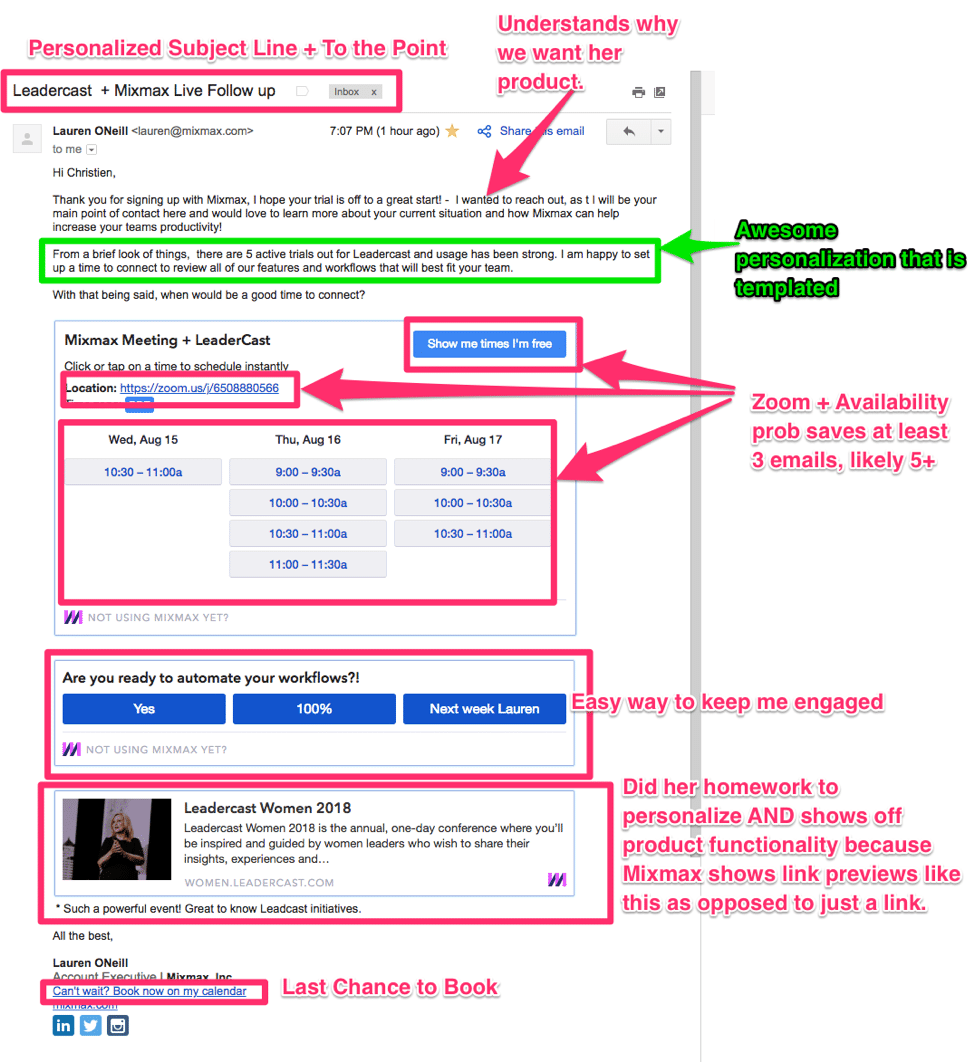
The process isn’t going to get any easier. By 2037, total global air passenger numbers will grow to 8.2 billion. To support that growth, the global aircraft fleet is expected to increase by nearly 50% over the next seven years and, by 2025, encompass more than 34,000 planes.

Managing this rapid growth, while also driving corporate growth, minimizing operational costs, and maintaining profitability will present a host of new challenges for airports. To overcome these hurdles, airports will rely on a combination of smart management techniques, good data analysis, and a state-of-the-art technology infrastructure.

Unsurpassed connectivity has arrived.

With the number of connected devices being used worldwide now exceeding 17 billion — and expected to grow to 22 billion by 2025 — connectivity will become increasingly important for airports that want to streamline their operations. That should be music to the ears of airport operators, all of whom are grappling with some of the highest operating costs of any industry.

Inseego addresses these and other challenges using IoT solutions that help airports monitor and track their assets. Powered by Sprint, the solution also helps airports keep tabs on usage and maintenance.

KLM Dutch Airlines, for example, was dealing with major challenges with its GSE billing — namely because it shares those assets with other airlines. Working with Inseego, the airline digitized its GSE asset usage (through the use of real-time location tracking and IoT) down to the second, and now saves 2,000 hours of lost productivity a year.   

The future is 5G.

Layer 5G and its transmission rates of gigabit speeds, and the proposition gets even sweeter for the modern-day airport, whose main goal is to create an overall better passenger experience. As 5G continues to evolve and go mainstream, the mobile technology will help operators create a technology ecosystem that not only fits their budgets, but that’s also held to the strictest security and safety standards.

For example, though passengers may be inconvenienced by a flight delay or a lost piece of luggage, AI, big data, and machine learning supported by 5G will help airports anticipate and resolve such issues before they turn into major customer service problems.

Intelligent airport networks will also help revolutionize the passenger experience, according to AviationPros, which points to ground operations, security checkpoints, runway monitoring, baggage handling, and building management as just a few of the areas that could be transformed in the near future. Beacons and proximity insights will help streamline operations, for example, while timely data and analytics will deliver higher levels of visibility. At the heart of it all will be intelligent, 5G-enabled wireless networks.

As passenger demand grows and airport fleets increase in size, IoT and 5G usage will grow exponentially, effectively changing the aviation and aerospace industry as we know it. In fact, AviationPros anticipates a flurry of 5G activities over the next 20+ months, with larger commercial availability hitting in 2020 and post-2020. IoT will be used to further personalize passenger experiences with timely alerts and mobile baggage tracking. And as IoT continues to be adopted, operational efficiencies will drastically improve with the implementation of predictive maintenance updates and enhanced analysis of data.

Read the Ultimate 5G Explainer to learn more about how 5G can take air travel and logistics to the next level.

This post is sponsored by Sprint Business.

Join the conversation about this story »

30 Nov 17:40

How to Succeed at Selling Through an Internal Stakeholder

by Sandler Training

David Mattson, President and CEO of Sandler Training, talks about how to rehearse your pitch with a prospect so they can sell your solution internally. If you can't be in an internal meeting, the next best thing is to have a white knight fighting on your behalf. Learn the best practices collected from over a thousand Sandler employees around the world.

30 Nov 17:40

Equipment for Moon Mining Operations are Being Developed

by brian wang
The technology needed for mining water ice on the moon and converting it into fuel is pretty straight forward. Various groups are already making the actual needed hardware. Paragon Space Development...

[[ This is a content summary only. Visit my website for full links, other content, and more! ]]
30 Nov 17:18

How to Improve Call Center Customer Satisfaction With Live Chat

by Kaye Chapman

3dman_eu / Pixabay

If you’ve ever asked somebody to describe their customer support experience with a company’s call center, there’s a good chance they started their answer with a heavy sigh.

As many as 66% of customers are frustrated before they even start talking with a customer service representative on the phone. The reasons behind this are endemic within many call centers – long waiting times, endless phone transfer tag, and of course the dreaded Interactive Voice Response (IVR) menu are often unavoidable when picking up the phone to speak to your average call center.

For any organization concerned with providing good customer experiences, that’s a real problem. All of this creates low customer satisfaction, and low customer satisfaction means churn – as much as 49% of people reported switching to a competitor because of bad customer service. All because your well-meaning call center just happened to operate in a way that customers tend to hate.

But it is possible to improve customer service and shake the stereotype, through tweaking processes and allowing technology, like live chat, to deliver service in ways that customers prefer. Here are some of the ways that chat can help.

Make your call center more efficient

The invention of IVR revolutionized the way call centers handled customer queries. While IVR was groundbreaking in the 80s, technology now gives us opportunities to modernize it, automate it, and take it digital.

Instead of requiring the customer to do the heavy lifting, what if the technology was smart enough to automatically route their query based on attributes it automatically mapped to each customer, ensuring that each customer gets through to the right person with minimal effort on their part? That’s exactly how routing in live chat works.

You can set custom criteria for different types of visitors in your live chat agent console, such as the landing page they arrive on, or the number of times they’ve visited your site before. Chats can then be routed to the most qualified agent based on these criteria. A prospect who is on the pricing page and is a net new customer can be assigned to a different agent compared to a returning customer who’s looking around in the FAQs of your website.

It is 3x more expensive to handle and escalate a customer query than to resolve it on the first point of contact. Routing queries to the most qualified agent in the first instance saves customers the effort of repeatedly explaining their issue to different agents – and increases your First Call Resolution (FCR) rate, no phone transfer tag required. Not all live chat providers offer fully customizable routing capabilities, but the ones who do give your agents an advantage while simultaneously reducing effort for customers.

And it’s been shown that reducing customer effort is one of the most important factors in increasing customer satisfaction. Satisfied customers who get expert answers with low to no effort are much more likely to come back over frustrated ones. Eliminating the need for clunky IVRs and slow manual transfers can play a huge part in making customers happier and allowing them to receive support which feels more automatic, intuitive, and more closely aligned to their needs and expectations.

Reduced wait times

High call volumes and long waiting times can reduce customer satisfaction before a customer even connects to an agent. In fact, only 28% of customers call customer service as their first attempt to solve a problem – most will explore any other avenue to avoid making that call.

With other traditional channels of support, like the phone, agents can only handle one query at a time. Live chat lets support agents handle as many as 3 to 5 queries at once, helping more customers, and reducing wait times. Since many call centers are facing higher call volumes of increasing complexity, providing agents with the tools they need to efficiently handle customer inquiries can ensure that those queries can be handled efficiently without needing to increase headcount.

Efficiencies can also be gained through the features built into the live chat software itself. With live chat, agents get a wealth of tools at their disposal to help them handle queries more effectively. Automatic greetings, canned messages, shortcuts, and customer histories at-a-glance mean that customer inquiries can be answered with accuracy and precision.

Customer support is tough enough without having to defuse unnecessarily irate customers, who might have not been annoyed at the point they got on the phone but certainly will be after having been forced to listen to the same hold music on a loop for an age. When a customer is able to get speedy service and a quick response to their question, your chances of ensuring that customer walks away happy are so much higher. Your agents will certainly be thanking you, too.

Why your call center needs live chat

Modern customers expect easy service on their terms, and with intense competition in many industries, they’re all too happy to walk away to a competitor if they don’t receive it. Customer experience is truly a differentiator for many businesses, who recognize that giving customers the gift of convenience with an easy, frictionless customer experience is paramount to securing customer satisfaction and loyalty.

Live chat provides digital answers for digital audiences, since as many as 57% of customers start online when looking for answers to their questions. In this way, adding chat to your call center ecosystem helps your business meet your customers on the channels they prefer. This allows you to build bridges with customers who hate phoning call centers, giving them a welcome alternative to allow them to receive service instantly, easily, and conveniently.

There’s no need to embody the 1980s stereotype of the inconvenient, difficult and unfriendly call center any longer. Embrace digital convenience and make more customers happier by adding live chat to your call center ecosystem.

Originally published here.

30 Nov 17:03

How to Craft the Perfect Email with High Response Rates

by Michael McEuen

There’s no sugar-coating it: creating new sales opportunities from cold email is hard work. Each email you send competes with ~125 other business emails per day vying for the attention of your customer.

While creating a strong initial intro email is important, most opportunities are opened from follow-up steps – often requiring 7 to 13 touches before a prospect becomes a sales qualified lead.

That’s why it’s crucial to craft compelling and engaging follow-up emails that lead to booked meetings. Let’s break down the anatomy of the perfect follow-up email that generates high response rates:

*actual reply from a prospect revealing why they loved the format of the follow-up email.

1. Add a personalized, to-the-point subject line.

According to Convince & Convert, 35% of recipients open emails based on the subject line alone. That stat alone should give you pause.

Abraham Lincoln once famously said, “Give me six hours to chop down a tree and I will spend the first four sharpening the axe.” If honest Abe was sending an email today, he’d likely spend the majority of the time perfecting his subject line.

It’s important that your subject line is intriguing, to the point, and experiments with personalization: whether it be the person’s name, their company or something they cherish. If you’re stuck or unsure which variation to try, use tools like CoSchedule’s free Headline Analyzer for inspiration.

Example format of a personalized headline: <<company name>> + your company – subject matter

Pro-tip: For campaigns to non-executives, test an emoji in the subject line 🙌. Once taboo in business culture, emojis are becoming more accepted, and in many cases increase email open rates. For example, Experian ran an experiment and saw a 56% higher open rate compared to text only headlines. An emoji is expressive without taking much space and really stands out on mobile.

2. Use rich media to increase engagement.

While products like Slack, Skype, and Google Docs have completely transformed the way we communicate internally with other team members, communication outside of your organization still defaults to email.

Despite many advances since its invention in 1978, many of us still send emails like we’re living in 1997 (the launch of Yahoo Mail) – treating the medium like digital ink on digital paper. However, we often don’t realize that email is powered by HTML, just like web pages, and hold similar power & flexibility.

Many out-of-the-box solutions like Mixmax, Rebel, and Typeform now allow you to add interactivity to your emails, such as polls, forms, buttons, gifs, and videos baked right into the content – as opposed to attachments or outside links.

Adding a poll, for example, can dramatically increase your response rates and lower the apprehension of a sales email.

3. Standardize & test, test, test.

While testing your email content is encouraged, if you don’t have your sales stages mapped out and evaluate the impact of your tests, your pipeline will never become predictable.
It’s important to take a step back and think through:

      • How each email relates to the buyer, and the greater conversation you’ve started.
      • The end goal of each email: is it a reply? A meeting? Or to start a free trial?

Example of a 13-step touchpoint plan – spanning across email, social, and phone calls.

Once your touchpoint plan is mapped out, then you can properly create A/B tests at each email step to better understand the impact of each variation based on that stage’s goal.

If you don’t have email software that automatically tracks the results of your tests, there are several free calculators that will help you determine the winning variation.

4. Leverage automation, but leave room for a human touch.

With ~62% of a sales rep’s day being spent on non-selling tasks, automation software has been a godsend – freeing reps from dull, repetitive data entry, and allowing them to focus on customer conversations. However, fully automated email campaigns can come at a detriment to performance. No customer wants to feel they are part of a one-size-fits-all campaign.
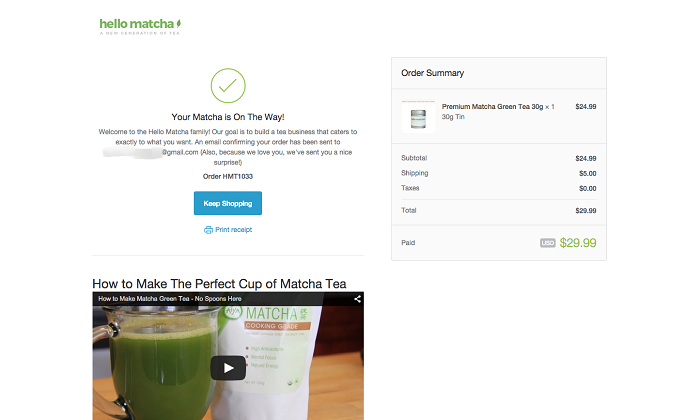
We’ve all had the cringeworthy experience – whether it be an email or LinkedIn InMail – where the message wasn’t even directed to the right job function and clumsily clogged up our inbox. You don’t like feeling like an afterthought, and neither does your customer.

Instead, ensure you have steps in your email sequence or campaign where a human touch and customization is applied.

For example, you can still use automation to create a task to follow up with your customer; while also leveraging a battle-tested template to add structure and tracking to your email. However, you should still apply a personal touch that will make the email authentic.

Some ideas on adding customization:

      • Say congratulations for major milestones: such as company funding, title changes, new product releases, etc.
      • Browse their social profiles and relate to their hobbies, background, and interests. Do you both hike on the weekends, cheer for the same teams, have a weird obsession with Corgis, or graduate from the same university?
      • Relate to their content. Executives and marketers often are required to write, and share their perspective to increase their brand awareness. Take the time to read some of their latest articles and add perspective.

Hours of unforeseen work is poured into each thought piece, and authors generally love to hear people actually read their content.

Conclusion

Crafting the perfect set of cold emails that lead to high reply rates and meetings booked comes down to two aspects: personalization & persistence.

Ensure you’re speaking directly to your customer’s needs, wants and desires by doing your upfront research and adding personalization tokens in your email. Humanize your content whenever possible.

Finally, remember the art of sales is in the follow-up. You often won’t receive a reply or action until 7 or more touches, so plan for the long game, while also adding value at each step (quell the urge to send the “just checking in” email). Good luck!

The post How to Craft the Perfect Email with High Response Rates appeared first on OpenView Labs.

30 Nov 17:03

Digital Sales Strategy in a Customer Centric World

by Warren Knight

In theory, you can sell anything to anyone. But naturally it’s not as simple as that. Customers are well aware these days that they can get a similar (or in the case of products, perhaps identical) offer elsewhere. So it is often the sales experience which will differentiate you from your competitors and get you the sales – and that is shaped by the way you sell.

Understanding your customers’ purchasing journey is key to getting this right. Whatever they are interested in they may well start by finding something online, then window shop to compare prices and decide on the exact product they want to buy. They may then visit store websites or go in-store (especially in the case of fashion purchases, for example, where they are likely to want to try things on for size), before eventually buying either online or in-store.

This video gives a useful example of a fashion purchase journey.

My checkpoints for an effective sales strategy

Whether you are selling products or services, and whatever your target market, there are some basic rules you need to follow for effective sales:

  1. Define your buyer – before anything else, you need to know who your customers are.
  2. To understand your customers’ wants and attitudes, you need to do your research.
  3. Forget about sales, at least at the beginning of the relationship. Make it about them, and what they want (see Brand Attitudes below).
  4. Build rapport before you start trying to sell – give them something first, sell later.
  5. Ask questions, and listen to the answers.
  6. Approach them on their level – inform but don’t patronise, and use the platforms they prefer.
  7. Never forget that you’re selling to a person with individual preferences and quirks.

That last one is possibly the hardest to follow, especially if your business relies on marketing automation and AI, and less on individual sales people.

I wanted to share some thoughts with you about that, to help you gather your own insights into your target markets and their online purchasing habits.

Not all customers shop alike

Understanding the customer purchasing journey for your brand depends on knowing who your customers are. Global Web Index have developed a fascinating infographic, which I’ll break down here to help you understand this in more detail. You can see the complete infographic here.

It follows the key online buying habits of the four main groups:

Shopping across the generations

So who are they?

  • Generation Z: born from 1996 to early 2000s
  • Millennials: people born between 1981 and 1996
  • Generation X: born between 1965 and 1980
  • Baby Boomers: born between 1946 and 1964

Different generations have varying shopping habits, and the way that they use and interact with brands online – consuming and contributing to the data and information available – varies too. It’s important for you to understand this, and to know who your brand’s customers are, so that you can provide the buying experience that incorporates the aspects that they find most important.

Understanding how different age groups shop online

The online buying journey breaks down into three broad stages. Here, I’ll go through each and highlight some of the key ways in which people’s buying preferences differ.

  1. Brand Research

Brand Research

You can see from this that the younger your customer base, the more vital it is that your online experience incorporates both mobile apps and a strong social media presence – including vlogs. Your Gen Z and Millennial customers will turn to others for expert opinions before purchasing. So your brand needs to have a strong following from the brand advocates – whether celebrities or professional bloggers – that they respect.

Google’s Shopping Insights tool also shows you how customers search; and you can use it to get an idea for any brand, product or service. It allows you to break information down by time and location to see where your potential customers are, and their search habits. Continuing the fashion theme, this example shows ASOS data.

  1. Brand Discovery

Brand Discovery

How do your customers learn about your brand, and which media will be more effective?

Unsurprisingly, given their research preferences, online ads and influencer marketing play strongly with Gen Z and Millennials. But if your audience is primarily Baby Boomers, you shouldn’t neglect more ‘traditional’ forms of marketing communication. This age group is still a strong consumer of print media (which covers direct mail, as well as print advertising, magazines etc) and TV advertising.

  1. Purchase

Purchase

Of those who purchase online, 73% (of all age groups) have used a combination of desktop, phone and tablet or other mobile device. The lesson for you? A seamless, device responsive online platform is vital, to allow your customers to switch from one device to another at will. Technologies which enable your brand to follow your customer from device to device are readily available, and your customers will thank you for your investment – in purchases!

Millennials are currently the biggest online shoppers – but remember that Gen Z are true digital natives, and their spending power will increase as they progress into adulthood.

If Boomers are your target, consider that 71% have identified free delivery as important, and compare your service terms to those of your competitors to ensure you’re not missing out.

More insights into how consumers approach online shopping

Do you know what your customers most value about a brand and how loyal they are likely to be?

The specifics will depend on your product or service, of course, but the Global Web Index research has some useful insights into broad attitudes.

Brand Attitudes

The older your customer base (Boomers), the more likely they are to buy on price – looking for the best deals and even avoiding the ‘premium’ versions of products in favour of cheaper options. Millennials are the most likely to value a premium product, or experiment with new products, whilst Gen X are the most brand loyal.

Let’s say your target audience is primarily Boomers, looking for a good deal. But the older generations are also the most likely to value customer service.

Brand Advocacy

So you might get your price point right, but you can’t afford to make the mistake of thinking that because you’re offering a great deal on price they’ll accept a lower level of service!

The biggest lesson here is that, whether you rely on a human salesforce, automated marketing, AI or a combination of everything, your sales process can only ever be as good as the information you have about your customers. The more you know about who they are and what they want, the better able you will be to devise a sales process which builds rapport and relationships, and gets sales.

Originally published here.

30 Nov 16:53

In Examining 27,357 Wins, 95% Of Sales People Did This One Thing!

by David Brock

Over the years, we’ve seen a lot of research, and collected our own data and analytics on what causes sales professionals to win.  We’ve seen certain patterns emerge.  Things like engaging the customer early in their process, ideally being the organization driving their thinking drives higher win rates.  Other areas that one would expect is demonstrating superior value in both the solution and how we engage the customer in their buying process drive higher win rates.  Giving customers new ideas, helping them improve their business drives both win rates and customer loyalty (derived from Gartner Research).

But we’ve found one unusual, compelling piece of data that frankly surprised us.  Over the last 18 years we’ve analyzed 27357 wins.  We found that 95% of the sales people did this one thing before going into the closing call.   They went into the bathroom and pee’d!  (This isn’t Gartner Research, but I’m reasonably certain they wouldn’t disagree.)

That conclusion shocked all of us involved in the research, but clearly, the secret to winning is peeing before the final presentation!  (We are interviewing the other 5 percent to see if they have stronger bladder control or just avoided coffee in the morning.)

Let me pause while you absorb this insight……..

OK, I’m on the rampage about sloppy data analysis, somehow it seems to be in vogue, often cloaked in an AI/ML message from some sales/marketing tools vendor.

Today, I read, “The ideal introductory sales pitch needs to be 9.1 minutes long.  And it can’t be 11.4 minutes long!”  The author went on to describe the analysis of over 127K conversations, discovering if your introductory pitch was 9.1 minutes long you tended to win.  If it was 11.4 minutes long you  tended to lose.

I started wondering, “What if my customer interrupts my carefully crafted 9.1 minute pitch with a question.  If it takes 2.3 minutes for them to ask it and me to answer it, I’ve lost!!!!!”

I continued to struggle with conflicting ideas.  I always thought great sales calls were dialogs, two way, value based conversations.  I thought the more engaged a customer is, the more likely we could navigate their buying process building trust, value, and collaboratively learning.

But the data is clear, we have to do a 9.1 minute pitch!  And we can’t cross that time gap to 11.4 minutes.

I’m certain this sales enablement vendor is doing the math right.  But I’m confused about the conclusions.  Is the 9.1 minute introductory sales pitch causation?  Is it because of that 9.1 minutes we won?  Ironically, the article didn’t focus on the content of that 9.1 minutes, what was presented, and so forth.  The implication in the article was that the win was because of the 9,1 minutes.

Alternatively, it could just be correlation.  Correlation can be very powerful, but it is different than causation.  Understanding causation gives you the secret decoder ring to winning more deals.

We see faux analytics leveraged all the time.  There’s something authoritative about quoting a very large data set, tossing in the word Analytics, getting bonus points for AI/ML, and presenting the single “silver bullet.”  “Do this and you will win.”

In fairness to the vendors leveraging faux analytics, they are responding to the buyers.  Sale/marketing leaders and sales/marketing people want to believe there is a miracle cure or a silver bullet.  If we just do this one thing, we win.

The reality is winning and success is never about just one thing.  It’s about doing the whole job and getting more right than wrong.  And what’s right changes customer by customer and even within their buying process.  And we have to do this deal after deal after deal, consistently, relentlessly.

Which gets us back to Analytics, AI/ML.  The great thing about the emerging technologies is they help us figure out more of what’s right and avoid what’s wrong.  They don’t give us the answers, but they give us greater insights into discovering the answers for the specific situation we are addressing.

High performance selling is tough, it is the thinking person’s profession.  We need to leverage the data as much as we can in guiding our strategies and conversations with customers.  Selling is about doing the whole job–from inciting a customer to change, put order to their chaotic buying process, creating value along the way to helping them solve their problems.  And we can’t do that with just one customer, but with enough that enable us to achieve our goals while we help them achieve theirs.

In short, we have to do everything, leveraging every tool we can, all of the time.  We have execute the whole job relentlessly.

And peeing before your closing call helps….


Afterword:  Matt, you owe me another beer


30 Nov 16:51

Are Our Customer Conversations Substantively Different Than Internal Discussions?

by David Brock

The other day, I published a post, “Are Traditional Selling Skills Even Relevant Anymore?”  It’s generated a lot of great ideas and good discussion on both sides of the topic.

One of the premises I had in the article is that the skills/challenges we face in driving change within our own organizations, and  that those customers have within their organizations are not much different than the conversations/engagement that sales people and buyers have.

They are human to human discussions, with all the same characteristics–disagreements, disinterest, differing points of view, alternative views on potential solutions, fear, confusion, confusion, convincing, negotiation, reaching consensus, trust building, and so forth.  These discussions also have many of the negative aspects that people associate with selling, including feelings of manipulation, politics, self interest over organizational interest, exercise of power and influence, betrayals of trust, and so forth..

Similar pressures exist within organizations.  People driven to achieve their personal goals/objectives, their department’s, their organization’s.  They are driven to do it as efficiently and effectively as possible.  People are measured. compensated, promoted, and terminated based on their effectiveness in achieving their goals.  In many cases, these people have a bonus element, such as achieving certain new product goals, manufacturing deadlines, and so forth.  (Hmmm, this isn’t sounding much different than sales…..)

In fact the phrase, “everyone in the organization is selling…”  The concept has several contexts.  If you take the quality/continuous/agile principles, everyone in the organization has customers they need to support.  Most are internal, some may be external.  Another concept is around change management–sales people are basically change agents and help customers understand and implement change.  But within our own organizations, we have similar needs to drive change and many others act as change agents–only internally.

It seems to me, the skills to effectively/efficiently drive change, learning, innovation and progress within an organization are the same that great sales people leverage in working with customers.

Somehow, it seems there are more similarities in driving internal changes/organizational performance, than differences.  Yet for some reason, we have always treated skills that sales people need as very different than those that are required for success within our own organizations.

It has been argued, the difference in context–that is we are dealing with colleagues internally, versus, sales people dealing with people external to the organization.  But increasingly, that seems less relevant.  Every function in modern organizations have people/organizations external to the company they must deal with and manage.  Procurement, customer service, HR are all easily understood.  But finance has to deal within the financial community, with investors/shareholders, bankers, auditors and others.  Engineering/design/development rely, increasingly, on partnerships and alliances with other organizations.  Manufacturing has complex supply chain management, outsourcing and other relationships.  The more organizations leverage subcontractors and contract employees, the more all functions in the organization leverage social channels in doing their work, the inside/outside differentiation become meaningless.

Perhaps a better approach to skills development for sales people is to focus less on the differences in sales people’s jobs/roles, and look at the similarities with leaders who drive change initiatives, projects within our organizations.  Perhaps, training them together, having them learn from each other can create huge benefit.

Many of the skills critical to sales people are just as critical to our internal leaders.  Skills critical to internal people are just as critical to sales people.

There’s another important side benefit.  By doing integrating much of the skills development we conduct internally with sales skills development, sales people will be learning side by side with the same type of people they will be working with in their customers.  Understanding them, their perspectives, how they get things done, can provide huge understanding for sales people as they work to apply those same skills with customers.

Let me be clear, there will be some programs that need to be very specific for sales, just like there are some that are finance, engineering, manufacturing specific.  But I suspect there are more similarities in skills than differences.

I, also, recognize that internal change/problem solving discussions might be a little easier to initiate  because everyone is in the same organization, there is greater access/visibility, understanding within the organization.  There may be better alignment in goals, culture, values (at least in theory); so there are some important differences with working with customers.

Almost since the inception of sales training and skills development, we have treated it as something different from all the other skills development programs in the organization.  It’s time to look at the similarities and develop the skill sales people need to help customers become more successful.


30 Nov 16:51

This Week’s Big Deal: Should You Have a Sales Enablement Department?

by Alex Rynne
Helping someone up

Last week, Matt Ellis of Seismic Software posed a good question over at Business 2 Community: Who owns sales enablement?

It’s clearer than ever that sales enablement, which we define as “the process of providing the people in your sales organization with information and tools they need to sell more effectively,” is becoming a vital component in any B2B sales strategy. For companies large and small, across all industries, it is essential to implement technologies and collaborative resources that can make teams more efficient and effective.

Adoption of sales enablement solutions has been strikingly swift. The latest CSO Insights Sales Operations Optimization Study found that 59.2% of companies now have a formal sales enablement person, program, or function in place, compared to just 19.2% in 2013.

Falling behind on sales enablement means falling behind the pack. There’s no question that it should be an ongoing organizational priority. The question, as Ellis points out, is who should be in charge of this directive. “In reality,” he writes, “the decision of who owns sales enablement shapes the way your strategy will coalesce and operate.”

Building Structure Around Sales Enablement

Ellis calls out three main players that tend to have responsibility for managing sales enablement. The first two are obvious enough: sales and marketing. The third might catch you off-guard: sales enablement.

“Sales enablement has now reached a point in its development that some organizations are starting to build departments strictly geared towards sales enablement, as well as hire people with titles related to sales enablement,” says Ellis.

Last year on the Salesforce blog, Brian Fravel suggested the rise in sales enablement roles is driven by a trio of factors:

  • Buyers approaching purchases in a new way
  • Content taking center stage
  • Need for sales and marketing alignment

In smaller companies with leaner workforces, hiring someone (or a department of people) to specifically focus on sales enablement may not be feasible. In larger companies with high-volume sales teams and siloed functions, it ought to be a real consideration (if not already a reality).

In either case, it’s worth reflecting on our sales enablement strategies as we forge ahead into 2019.

Achieving Buyer-centric Sales Enablement

As TOPO CEO Scott Albro says, sales enablement comes down to one simple tenet: provide sales with resources the buyer wants. Jim Ninivaggi of Brainshark recently echoed this sentiment at Forbes:

“I believe it's sales enablement’s job to ensure each interaction leaves a positive impression on each individual buyer by addressing that buyer’s unique needs, challenges, role, industry and more,” Ninivaggi wrote.

Regardless of which manager or department is “owning” sales enablement, achieving this kind of consistent buyer-centricity requires collaborative planning and strategizing from many different business units. Marketing does the research and provides the content to help guide buyers through the purchase journey. Customer success or customer service acutely understands the challenges or pains of existing customers. And of course, the sales team regularly interacts with prospects and customers on the frontlines, gaining unique perspective.

All of these voices and more should be present in the sales enablement conversation. One could argue that the “sales enablement department” should really be the entire organization, continually aligning around new ways to deliver value for buyers and innovatively propel business development.

If you’re looking for a way to step up your B2B sales strategy in 2019, we invite you to check out our flagship sales enablement software: Sales Navigator. Our solution features robust functionality for streamlining and synchronizing your sales process.

Whether sales enablement lives with sales, marketing, a combination, or its own department, it’s worth investing in the practice sooner rather than later. Make sales enablement a focal point for 2019 and boost the effectiveness of both your sales and marketing teams.

Make sure you never miss out on the latest big deal in B2B sales by subscribing to the LinkedIn Sales Blog.

30 Nov 16:42

5 Key Steps for Building an Effective Sales Academy [Infographic]

by laura.morrison@richardson.com (Richardson)

If you're looking to grow your skills as a working professional, it can sometimes be tough to find classes and training that meet your needs. After all, you can't go back to graduate school to get a master's degree in sales, and if you work in an industry that evolves rapidly, traditional education might not be particularly useful for you.

Enter academies. Many companies are building academies, which offer training and certifications not just for using products or services, but also for learning how to do a profession well. HubSpot Academy, for example, offers courses, lessons, and certifications about becoming a sales manager, managing leads, and sales enablement.

We partnered with Training Industry to research the critical components of an effective sales academy. We collected responses from more than 300 sales professionals. Their input represents in-the-field insights on how to build a structured system for training and developing a sales team.

Steal HubSpot's sales process with this free sales training course.

The results of the research are important because they reflect what sales professionals will need in order to thrive in the changing landscape of sales. We're already seeing these changes unfold. For example, quality is no longer the selling feature it once was, and more stakeholders complicate the dialogue. Therefore, sales professionals need a more sophisticated and diverse range of skills. An academy structure is critical for meeting these needs because each new concept builds on the last.

Below, we examine the five critical takeaways from the research.

How to Build a Successful Sales Academy

1. You need a structured long game.

Too often, selling is about the current quarter. This short-term focus is understandable given the ticking clock of sales quotas. However, the research found that companies with on-demand training are slightly less effective than those with a structured learning path. The results show that 56% of successful companies use a structured learning path compared to the 49% that use on-demand learning. This finding corresponds with another data point from the research, showing that 63% of successful organizations commit to a long-term focus vs. 41% that choose a short-term path.

These numbers make intuitive sense. As the sales cycle becomes more complex, sales professionals need a diverse skill set. Moreover, solutions are becoming more sophisticated and demand more proficiency from the sales professional. Selling tools are also becoming more expansive and require intensive training. It's not surprising that onboarding has become a 12-month process for many sales professionals today. A short-term focus can have the effect of rushing this process. In fact, efficiency in training, not shortsightedness, can help sales professionals reduce their time to proficiency and deliver on revenue expectations earlier. An investment in long-term training illustrates a commitment that drives low turnaround and sustainment.

2. Winning business means understanding buyer needs.

Effective sales academies deliver relevant skills. Therefore, we asked our boots-on-the-ground sales professionals what skills they believe are critical for winning the sale. The results show that "understanding buyer needs" is the most critical skill, with 77% of participants ranking it as the most important capability. This skill is important because nearly all competitors are prepared to offer effective, affordable, and intuitive solutions. Therefore, value, in today's terms, resides in the details.

Advancements in technology have enabled more players to enter the field. Small competitors can leverage speed and agility to outperform established companies. As a result, customers have more choices and are interested in capabilities that offer more than just economic value. Experts at Bain explain that their "research shows that, with some purchases, considerations, such as whether a product can enhance the buyer's reputation or reduce anxiety, play a large role." To understand these anxieties and reputation needs, sales professionals must explore the details behind the customer's choice to explore a purchase.

Coming in at a close second, 73% of respondents cited "presenting effectively" as a relevant sales skill. This result corresponds to the team selling trend. Solutions today require an increasing number of sales professionals and subject matter experts (SMEs). Therefore, selling teams need to deliver a well-rehearsed presentation so that complex solutions are clear. Teams need fluent transitions, simplified messaging, and defined roles when in front of the customer. In the category of Engaging Buyers, respondents cited "Knowing the Market" and "Targeting Buyers" as key skills. In the category of Growing Relationships, sales professionals identified "Establishing Relationships" and "Becoming a Trusted Advisor" as being critical focus areas within a sales academy.

3. The classroom is still the most popular spot for training.

The sales professionals we surveyed cited classroom training (76%) as the most common modality for learning. In our study, the category of classroom learning included both virtual and in-person styles. In most cases, the preference between in-person or virtual training is a function of the material. For example, in-person training is often better for learning how to handle objections or sell as a team. The reason: learners need the "in-the-moment" experience of role play to develop the skills to navigate these challenges.

Following classroom training, respondents identified on-the-job learning (60%) as the second most common method of learning, followed by coaching/mentoring (42%), internal knowledge base (39%), on-demand e-learning (35%,) and finally, video examples (33%).

Selecting the optimal modality starts with an understanding of the sales professional's environment. For example, field sales professionals are often away from the office pursuing leads. In these cases, a mobile learning solution like on-demand e-learning is best because it doesn't demand time out of the market. Many organizations have discovered that blended training is best because different skills require different styles of engagement.

4. The preferred length of training depends on the format.

We asked sales professionals how long they thought training should take. For those engaged in instructor-led classroom training, the overwhelming response was one day. 75% of respondents indicated that one day is the most effective duration for classroom learning. Only 17% cited two-day training as optimal, and 8% cited three-day training.

When it comes to digital learning modules, sales professionals prefer a shorter duration, as seen by 50% of respondents who indicated that 15-30 minutes is optimal, followed by 33% who stated that 15 minutes or less and 17% who cited that 30 minutes or more as best. This result tracks with academic research, which showed that "shorter training sessions were advantageous because they allowed for more latent, between-session, and post-training learning to emerge." The sophisticated skills required to win the sale today demand more of the learner's cognition than ever before. Therefore, these shorter increments resonate with respondents.

5. Sales professionals want benchmarking.

The ability to benchmark performance against peers was rated as being at least moderately important for 79% of sales professionals. Our results show that 54% of sales professionals believe benchmarking is "very important" and that 25% believe it is "moderately important." Only 20% think it is "not important." Sales professionals, by nature, enjoy healthy competition, and the preference for benchmarking reflects this fact.

Organizations can use benchmarking beyond the peer group. For example, some organizations prefer using cross-industry benchmarks or involving larger data sets to examine results on a segmented basis. In these cases, leaders might review performance within specific territories, roles, or market segments. To work as intended, the benchmarking process must be ongoing and communicated clearly and regularly. Remember, benchmarks can be quantitative and qualitative. Effective leaders often balance the two. Finally, benchmarking serves more than the sales professionals. This practice also equips leaders to ensure consistency across the organization so that everyone is adhering to the same skills.

Over to You

A strong sales academy requires sincere engagement from the sales professionals. Finding this engagement means configuring the academy around the skills that sales professionals consider important.

Leaders can redesign a sales academy at any time. In fact, "mature companies spend 34% more on training and development than their less mature counterparts," according to research from Bersin. These more experienced businesses understand the value of investing in their workforce. The result: "They earn a profit growth three times that of their competitors," according to the same research.

Richardson's research with Training Industry offers the ultimate playbook for redesigning a sales academy that resonates with today's needs. Learn more about the data in the infographic below:

how-to-build-sales-academy-infographic

Start the free Inbound Sales Certification course from HubSpot Academy.

30 Nov 16:42

10 Perfect Google Alerts Alternatives for Your Business

by Anna Bredava

Anything can go viral online. Be it a well-thought-out campaign or an absolutely random post. But of course, not everything that becomes discussed is good for your brand. Think of H&M’s controversial hoodie ads. Monitoring what people say about your brand in real time helps to tackle these issues even before they start.

Google Alerts is a free platform for monitoring the web. But the problem with Google Alerts is that it brings you web mentions only, completely ignoring social media, where most of the buzz happens. Luckily, there are lots of advanced tools that help you not only monitor social media but also spy on your competitors, get influencers and sales prospects. To make your life easier, we’ve tested the best Google Alerts alternatives and have come up with the list of tools to get you started.

1. Awario

Awario collects mentions of your brand(s), industry, competitors, brings you new influencers and sales prospects. The app is great for online reputation management, as it lets you interact with mentions from different sources without leaving the app. All users can set up a Boolean query, which helps collect more precise results. The reports section provides rich analytics such as top influencers, sentiment analysis, reach, etc.

Awario is rather new-to-the-game, but it’s rapidly developing. Most of the Enterprise-level features, such as shareable reports, white labeling, or data export are already implemented into Awario, but the prices are still very affordable.

Pricing: Before purchasing, you have 14 days to try the app. The Starter plan is $29, Pro is $89, Enterprise is $299. Purchasing an annual plan will save you 15%. The app is popular among small- to medium-size businesses.

Available platforms: Twitter, Facebook, Instagram, Google+, YouTube, Reddit, news/blogs, the web.

What users say:

2. Sprout Social

The main purpose of Sprout Social is to create a unified inbox for a company’s social profiles. The platform offers customizable reports, lets you assign tasks to your team members, and schedule publishing. But what’s interesting for us is its monitoring capabilities. Instead of a traditional mention feed, the app’s listening module displays all data in the form of statistics — you can see the performance of your topic in terms of engagement, impressions, and sentiment and check out the demographics for your keywords.

However, Sprout Social doesn’t let you interact with mentions, and users with the basic plan get data from Twitter only.

Pricing: There’s a 30-days free trial. The subscription plans start at $99 per user/month. The corporate plan is $149 per user/month, and Enterprise is $249 per user/month.

Available platforms: Twitter, Instagram, Reddit, YouTube, Tumblr, the web.

What users say:

3. Agorapulse

Agorapulse is a combination of two platforms — one for social listening and one for social media scheduling. With Agorapulse you can interact with people mentioning your brand right from the app. The faster you do this, the more satisfied your (potential) clients are. And for that reason, Agorapulse lets you invite team members and assign mentions to them, which is amazing for big projects or large companies.

Unfortunately, Agorapulse doesn’t offer web monitoring yet.

Pricing: The platform offers 4 plans: Small for $49/month, Medium for $99/month, Large for $199/month, and Enterprise for $299/month. Annual plans will save you up to 35%.

Available platforms: Facebook, Twitter, Instagram, and YouTube.

What users say:

4. Mention

Mention is another social media and web monitoring tool. Mention has a unique set of features, including a handy influencer dashboard and API access. Mention has its own great reports, but with the Insights Center reports become customizable and automatable.

Like Google Alerts, Mention is focused on search in real time – setting up an alert will give you results from the last 24 hours. Historical data is available for users with the Custom plan only. This tool is mostly targeted at enterprise users and agencies, though it has plans for solopreneurs and small business.

Pricing: There’s a freemium version of the platform (which is, however, very limited in the number of available results) and 3 subscription plans. Solo is $29/mo, Starter is $99/mo, and there’s Custom, which price you can get upon request. Purchasing an annual plan saves 15%.

Available platforms: Facebook, Twitter, Instagram, YouTube, Google+, Reddit, news and blogs, the web.

What users say:

5. Social Mention

Social Mention is a great Google Alerts alternative price-wise. This is an absolutely free app which, unlike Google Alerts, tracks social media. The advanced search option enables you to filter the results by sources, date, language, and location.

Although Social Mention doesn’t have a dedicated reports section, its analytics covers things like top users, keywords, hashtags, and sentiment. Social mention has its own scoring method which includes the following attributes:

  • strength — the odds your brand is discussed online;
  • sentiment — the ratio of positive mentions to negative;
  • passion — the likelihood people will talk about your brand repeatedly;
  • reach — the number of unique authors referencing your keywords divided by the total number of mentions.

Social Mention is more of a search engine than a social monitoring application. The fact that you can’t create an account makes it more difficult to track multiple keywords simultaneously and create reports based on historical data. Still, Social Mention may be okay for individuals occasionally tracking their brand performance.

Pricing: The platform is free.

Available platforms: It monitors 100+ social media properties directly including Twitter, Facebook, YouTube, Reddit, Google, etc.

What users say:

6. Talkwalker

Talkwalker is an enterprise-level tool which is perfectly tailored to reputation management. Its social listening product provides exceptional analytics. The most interesting features are real-time text/image analysis and automated reports.

With the free version of the app, you’ll be able to try all the features, but the results can date back up to 7 days only.

Pricing: The Basic plan is $9600 billed yearly. Corporate and Enterprise prices are available on request.

Available platforms: Flickr, Foursquare, SoundCloud, Twitch, Pinterest, and others.

What users say:

7. Brandwatch

Brandwatch is another solution for enterprise customers. The platform consists of 3 separate products: Analytics for online conversations analysis, Vizia for data visualization, and Audiences for better understanding your audience. Brandwatch offers the most comprehensive analytics. Its demographics data includes gender, interests, occupation, and location of your target audience. The tool is pretty customizable, as it gives access to the API and various integrations (including Salesforce, Google Analytics, etc.).

Brandwatch is primarily aimed at agencies, that’s why their software is one of the most expensive of its kind. They don’t provide a free trial, though you can request a demo to see the app in action.

Pricing: All pricing is available on request.

Available platforms: Facebook, Twitter, Instagram, YouTube, Google+, Pinterest, Sina Weibo, VK, QQ, news and blogs, the web.

What users say:

8. Keyhole

Keyhole lets you both automate your posts and track keywords or hashtags on Twitter and Instagram. On top of that, you can monitor brand mentions across blogs and news sites. The tool is equipped with analytics such as sentiment analysis, keyword clouds, and mention maps that display which countries your social mentions come from.

The app is primarily focused on collecting data from Twitter and Instagram. However, the Enterprise plan offers additional Facebook and YouTube analytics.

Pricing: There are five service tiers, so you will need to decide which one works for your business. Keyhole plans start from $199/mo.The Team plan is $349/mo, Corporate is $599/mo, Agency is $999/mo. Price for the Enterprise plan is available on demand.

Available platforms: Twitter, Instagram, YouTube, Facebook, news, and blogs.

What users say:

9. Digimind

Digimind is a social media monitoring app which helps you collect social media and web data and engage with users. Monitoring includes such features as location and country filters, sentiment analysis, and personalized tags. The reporting section of the app offers rich analytics and the possibility to create customizable reports. The platform has a Hootsuite integration.

Pricing: Prices are available upon request.

Available platforms: Twitter, Facebook, blogs, and the web.

What users say:

10. TweetDeck

TweetDeck is the platform for monitoring multiple Twitter accounts and trends. You can create multiple columns for keywords you want to monitor. TweetDeck has the ability to narrow searches down using language, location, engagement, and date filters. You can also add negative keywords and specify authors you want to track.

Pricing: The app is 100% free.

Available platforms: Twitter.

What users say:

In conclusion

At the moment there are over 5,000 tools in the marketing technology sphere. Competition between these tools becomes more and more intense. That’s why the tools continue to get more features, solve more tasks, and cost less, which makes it harder to settle on the right one. So while choosing an alternative to Google Alerts, look into those that will save you more time and solve as many tasks as possible. Don’t forget that data itself isn’t worth anything unless you use it to engage with people who mention your brand or use analytics to help with research and business decisions.

Choose a tool tailored specifically to your company’s needs — whether you need to improve customer success, increase brand awareness, find leads, or all of the above.