Shared posts

22 Aug 15:26

5 Questions to Ask Before Signing a Term Sheet

by Ricky Pelletier

Startups looking for venture capital often struggle to navigate all the different options out there. How do you find the best VC to help turn your startup into a major player? What do good VCs do that the not-so-good ones don’t? Here are five things to look for when evaluating an investment partner.

1. Can they actually measure and predict their performance?

Scott Maxwell, says that if you want to impress a VC, you should be able to predict the performance of your operating model — have a clear understanding of the model, know your warning indicators and benchmark against other competitors.

This should also hold true for VCs. They need to be able to show you the system they use to track their portfolio companies, look for signs of success and warnings and predict what they (and you) can do with this information. This comes from documenting their own real results, measuring an increase in sales, decrease in sales cycles and opening up new markets for their portfolio companies.

2. Are they experts in their field?

A good venture capital firm will employ people who have actually worked in software and led software companies. In other words, they have some real world experience in the market that you operate in and care about. True experts will be able to help you develop go-to-market strategies, create in-depth marketing blueprints, recruit new talent, train your sales team, help with market research and much more.

And, while any VC can say they have value-add teams and experts on staff, there are only a handful of firms that actually follow through. Just as VCs do their due diligence, startups need to check references too. Be sure to speak with a firm’s existing portfolio companies to see if all that talk actually translates into action once the term sheet is signed.

3. Do they provide a quick response?

This may not seem like much, but when you’re trying to run your business and you need help from your VC, you want to know you’ll get the help you need when you need it. If you want to test a VC firm, email someone at the firm (whether that’s the Associate or Partner you’re interacting with or someone on the value-add team) and see if they actually respond. If you email someone in a VC firm, you should be able to get a response back in fairly short order. After all, their goal is to help the portfolio succeed. If they’re not doing that, you really can’t be sure what they’re doing.

4. Do they recognize their weaknesses?

In a recent blog post I noted that one of the five things great entrepreneurs do is recognize their own weaknesses and work to overcome them. They see their problem areas and they’re willing to fix them. It’s the same with a VC. If the VC has a hole or gap in their core competencies, they’ll work to close it up by hiring professionals who have the necessary skills and experience to solve the problem.

5. Finally, are they intellectually curious?

If you’ve never met with a VC, be prepared to answer a lot of questions. A LOT of questions. Think of a time when you were peppered with questions fired at you from all directions. It’s like that, only more intense. They should want to know a lot about you, your company, idea, market, competition and be willing to go beyond the superficial.

As one of my partners, Blake Bartlett, said, “Much of a VC’s time is spent meeting with people who all make big, hairy, heavily-biased claims…Taking everyone at face value is a recipe for disaster — competitors bash their rivals, startups minimize the threat of an incumbent, executives inflate their departments’ achievements and customers can be over-eager early adopters on one hand or stubborn hold-outs on the other…You must ask “why” over and over until you have enough dots to connect.”

When you’re looking for a VC, you’re looking for a partner whose mission will be to help your company grow and succeed. The good ones will help you grow by providing you with as much talent, expertise and work as you can handle. The not-so-good ones won’t. Find a VC that knows what they’re doing, can prove it and has the experience and knowledge to help you meet your goals.

The post 5 Questions to Ask Before Signing a Term Sheet appeared first on OpenView Labs.

20 Aug 15:26

11 Influencing Skills and Principles Used By Successful Sales Teams

by Stuart Leung

The best sales teams are those that know how to influence people. But while certain salespeople have an innate understanding of the skills necessary to persuade potential buyers, there are others who need development in those areas. The good news is that with a basic understanding of certain integral psychological principles, anyone can learn the abilities necessary to achieving success in the sales process. Here are five skills vital in not only influencing a buyer, but sales success.  

Throughout the course of human history, conflicts of the Man vs. Man variety have had the most influence on the development of society. This is especially true when you expand the definition of the word “conflict” to encompass all forms of human interaction.

Even in cases where war and physical violence never come into play, the simple act of communication almost always involves an element of contention. We present our ideas, others present their ideas, and then we struggle against each other’s opinions and experiences in an effort to gain support for our own way of thinking. On paper, this form of conflict may not sound very productive, but the reality is that–thanks to humanity’s innate ability to engage in ideological discourse—we can learn to cooperate, negotiate, persuade and be persuaded.

Think how this applies to your sales team: A sales team’s job is to communicate with the potential customers found by the marketing team, and lead those customers on the journey from interested, to firmly committed to doing business. Sales teams are only able to function due to their capacity to forge human relationships and use those relationships to guide their clients along the path.

In essence, persuasion is the heart of the sales process.

In the last half-century, psychologists have begun to understand that persuasion—though a natural ability for some—can actually be approached scientifically. And, although it isn’t an exact science, it’s worth noting that an overwhelming evidence suggests that most men and women rely on specific ‘shortcuts’ to help them with their critical decision making.

Learning to take advantage of these principles of influence is the first step toward achieving a mastery of the skills at the heart of the sales endeavor. Psychologist Robert B. Cialdini has identified six such principles of influence (as addressed in his book, Influence: The Psychology of Persuasion, published in 1984):

1. Reciprocity: People are more likely to treat others in the same way that they are treated by others. This also means that people are more likely to agree with those to whom they owe favors.

2. Scarcity: People assign value based upon availability. Supply and demand. If something is in shorter supply, people want it more.

3. Authority: People are more willing to follow the suggestions of those who appear credible and authoritative.

4. Consistency: People are more likely to take actions that they have taken before, or to make larger commitments when prefaced by smaller commitments.

5. Liking: People are more likely to agree with those that they admire.

6. Consensus: People are more likely to choose an option that they know that others have chosen as well, particularly when the choice is a difficult one — such as testimonials or customer reviews.

By taking these six principles into account, sales teams can adapt their strategies to better influence potential clients into making long-term commitments.

Of course, doing so takes more than simply understanding what impacts the decision making process in the human mind; it takes an understanding of the real-world application of these principles. Here are five influencing skills that winning sales teams use in order to achieve success.

1. Giving Something for Nothing

Offering a sample of your product or service is a good way to demonstrate to customers the value of what you have to offer. However, even more than that, giving a gift to prospective buyers activates the human drive to pay back favors. This demonstrates the principle of reciprocity, and can have a substantial impact on a company’s sales. In some cases, offering free samples has been known to increase sales by as much as 2000%. Remember, not all samples need to be something physical that can be handed to a customer; trial memberships or demos can be equally valuable (esp. for companies offering services), and a gift with purchase can also inspire present and future business.

2. Offering for a Limited Time Only 

Humans naturally procrastinate, and this is especially obvious when it comes to making difficult decisions. Rather than take the risk of choosing poorly, we often delay making a decision for as long as possible. This makes perfect sense in most cases–after all, good things come to those who wait. However, this natural desire to watch and wait only holds sway while the decision is available for an indefinite period of time. As soon as a deadline is introduced (or more accurately, as soon as a specific offer is designated as being ‘for a limited time only’), decision makers suddenly become much more willing to commit. Human beings tend to assign value to things based upon how available they are. As soon as something becomes ‘limited’ or ‘scarce,’ we instinctively desire it more. In sales, this means that offers that are only available for a limited time are often much more well-received than those that are always available. However, there are limits, because when too many things become scarce, the perceived value drops. In fact, studies of retail sales have shown that if more than approximately 30% of goods offered are designated as scarce or limited, then the effectiveness of this method quickly decreases.

3. Getting Promoted by Experts 

Most customers are well aware that they don’t know everything about your product. This limited knowledge doesn’t necessarily mean they are willing to defer to your expertise, because they recognize you are hardly in any position to be objective. That leaves the customer in need of an impartial and educated third party. This is where experts come into play. When a sales team is able to acquire the endorsement of an expert, then potential customers are much more willing to take a chance on purchasing the product or service. Now, this isn’t to say that you should invent experts, or misrepresent data to suggest that your product is anything more than what it is. On the contrary: You should focus on delivering the best possible product, and then make sure experts have the opportunity to try it. You can also pay to have certain studies done that might lend your product an air of authority, but once again, you should always make sure to remain truthful about the results. If your product can’t impress the experts or deliver facts on its own, then you should be more concerned with improving it than selling it. Also, bear in mind that the word ‘expert’ doesn’t always refer specifically to someone with a PhD or a lifetime of experience; sometimes ‘experts’ are simply everyday people who have had a chance to test the product. A 90% majority of consumers say that their buying decisions are influenced by online reviews, so providing prospective customers with a chance to see what other customers have said about your product is a must.

4. Starting Customers Off Small 

Making a purchase can feel like a big commitment, especially  if the product or service being offered is one that requires some form of ongoing payment. Rather than lock themselves into a commitment that may end up extending far into the future, many prospective customers will choose to err on the side of caution, and not do business at all. On the other hand, if you can introduce your customers to your product by first asking them to make smaller, less significant commitments first, then they’ll be more likely to agree to the bigger commitments later on. This is because people like to appear consistent in what they do and will often (unconsciously) agree to further commitments when initial commitments have already been made. Asking potential clients to sign up for an email newsletter or try a free trial membership is a great way to help establish that pattern of consistency, so that when the time comes to suggest a purchase, your customer will already be in the correct mindset to do business. The proof is in the numbers: Customers who agree to sign up for newsletters spend on average 82% more than those who do not.

Additionally, introducing your customers to small commitments, and then following up on those commitments shows persistence, dedication and faith in your product. Failing to follow up shows none of these things, and only demonstrates to customers how little value you place on what you are offering. This is unfortunate, because almost half of all salespeople fail to follow up with prospective clients.

5. Being Likeable

Good or bad, your customers aren’t simply buying a product or a service: They’re buying the person offering it. Humans are a very social species, which means we often have trouble divorcing the product from the seller in our own minds. Or, as Mark McCormack (founder of International Management Group) famously observed, “All things being equal, people will do business with a friend; all things being unequal, people will still do business with a friend.” The reality is that we generally put less emphasis on how we feel about a product than we do on how we feel about the person who is selling it. Take advantage of this fact by training your sales team to develop their personal skills. Speaking clearly, showing professionalism in dress and grooming, learning how to be an active listener, and knowing how to show respect in words and actions are all soft skills that will more than pay for themselves in increased sales. And, perhaps the most important aspect of likeability is a respect for time. Respect the time that your customers sacrifice in order to hear your sales pitch or research your product, as it is a valuable commodity. When meeting with customers, make sure to keep your sessions brief and to the point, and always be willing to conform to the customer’s schedule.

If you plan on making any sort of proposal, remember that the most memorable part of any presentation is generally the concluding five minutes, so be sure to share your most important information last (and don’t hesitate to cut out the unnecessary parts in the middle to save time).

When mastering these five influencing skills for use in your professional life, don’t neglect the advantages they could be bringing to the other aspects of your life as well. After all, to say that human interaction is based upon conflict may sound harsh, but it is at least partially true. And, it is just as accurate to say that most interaction contains aspects of the buyer-seller relationship as well.

Allow the science of influence to improve the way you interact with others, because whether you’re selling a product, or simply selling your own personality, there’s always a right way to do things.

For tips on getting from click to close faster with your prospects, download the free Salesforce e-book.

20 Aug 15:25

Step Up Your Lead Nurturing Game

by Jeff Coveney

We all know that lead nurturing is a best practice. What are your plans to step up your lead nurturing over the next year? Better segmentation? Check. More targeted content? Check. Interactive content? Check. Those are the standard answers.

How about taking your customer journey to a whole other level? In this two-part post, I’ll explore a few options to elevate your prospect’s journey.

Today, we’ll dive into a strategy that creates a true multichannel conversation to drive results—the integration of direct mail and physical gifting into your lead nurturing process, leveraging a solution from PFL.

Break through the Clutter with Direct Mail and Physical Gifting

d92794c5-5c81-485f-bff2-c10db65abb7c

Engaging consumers through email is essential to driving success. However, breaking through the clutter is sometimes next to impossible with email—hundreds of emails fill the inbox, people go on vacation, spam blockers keep out messages, recipients unsubscribe.

Nurtured leads produce, on average, a 20% increase in sales opportunities versus non-nurtured leads. DemandGen Report

Step in automated direct mail which adds a second dimension to your nurture efforts. If someone isn’t responding electronically, automated direct mail lets marketers reach their audience in another fashion. For example, if a target account is blocking your company’s emails or if the recipient receives 1,000 messages a day, automated direct mail gets the message through.

Of course, if the recipient is engaging with your emails, automated direct mail reinforces the message to optimize the overall results of your campaign. The dual email and direct mail approach creates a true multi-channel process to your automated marketing campaigns.

How Does Automated Direct Mail Work?

Close up of human hands with mail white symbols

Automated direct mail is the integration of direct mail and physical gifting into your marketing automation platform.

For example, five years ago, you would have to painfully send your list to the direct mail company to deliver the gift in a batch-n-blast approach. Or, you would have your Marketing Intern collect names of important leads and ship out gifts from the tchotchke closet.

Today, the sending of the physical gift is as automated as the sending of an email—trackable, measurable, and automated within your marketing automation platform. Information on the item also feeds into your CRM to provide additional intelligence to your Sales team.

For the techie Marketo readers, this direct mail integration is performed via a webhook that triggers the direct mail and brings back delivery information when available.

Not Your Traditional Direct Mail

“62% of customers are more likely to do business with brands after receiving a promotional item”
The Advertising Specialty Institute

Although you can still use the traditional method, I am not talking about old school direct mail pieces like postcards. I’m talking about physical gifts that make an impact when sent in conjunction with your standard nurturing emails.

Let’s dive into a few examples:

The Account Igniter

Account based marketing

How much is your top account worth? Whether you are looking for a door opener or a deeper penetration into an account, the Account Igniter is a high-value, low-risk, high reward automated direct mail program. This campaign is ideal for any Account Based Marketing strategy.

In this program, identify the top 5-10 contacts in your top 100 accounts.

  • Send two emails to promote a demo or test drive.
  • Deliver a remote control to the contact’s physical address with a call to action like “You have the remote, call us to schedule a test drive and we’ll send you the helicopter.”
  • Set a task for the Sales rep to call upon delivery of the remote control.
  • Send an email follow-up.

The Meeting Grabber

MeetingDollarphotoclub_62695416_600

“How do we get more meetings?” is a common request in many organizations. If your organization is trying to boost meetings, The Meeting Grabber is the template you can start with.

The goal is to leverage automated direct mail along with email to generate a meeting for Sales. The Meeting Grabber is an integral piece of the puzzle and allows for marketing to confidently hand-off qualified MQLs to Sales.

Offer Example:

  • When a leads hit MQL, send an email offering an Amazon Kindle for signing up for a demo.
  • After the demo is complete, the system will automatically deliver the Amazon Kindle.

The Nurture Accelerator

Accelerate word on a speedometer for gaining speed in a race or competition where the quickest competitor wins the game

Already have a lead nurturing campaign in place? Improve the conversion by seamlessly adding in automated direct mail. Build the direct mail right into existing nurture tracks to add a new dynamic to the conversation. The big benefit here is the automated direct mail is created in a “set-and-forget” process to deliver the right content at the right time.

  • Touch 1 – Send Welcome email.
  • Touch 2 – Send Link to 3-minute video tour.
  • Touch 3 – Deliver a postcard promoting the eval download.
  • Touch 4 – Send an email promoting the eval download.

The Funnel Driver

Funnel Metrics

If your company has a lead lifecycle process, you are most likely measuring conversion rates between all of your major stages. If you find leads getting stuck at certain stages, try unclogging the funnel by sending automated direct mail.
In this program, automate the process of accelerating leads through the funnel.

  • When a lead reaches a certain age in a bottom-of-the-funnel stage like SQL, send an email in attempt to push it along.
  • Deliver an Ipad sleeve automated direct mail with a call-to-action like, “Purchase within 30 days, get an Ipad.”
  • Set a task for the Sales rep to call upon delivery of the Ipad sleeve.
  • Send an email follow-up.

Customer Advocacy Welcome Kits

Welcome sign

When a prospect becomes a customer, it’s time to begin the process of turning that customer into an advocate.

  • When the Opportunity changes to a status of Won, send the welcome kit to the primary contact in the account.
  • Set a task for the Sales rep to call upon delivery of the kit to thank the new customer for the business.

Track ROI of Automated Direct Mail

directmailreportingexample

Best practice organizations measure the effectiveness of their marketing programs, including automated direct mail. Ensure that every automated direct mail piece contains a call-to-action that drives the recipient to a website or phone number for further action. This will serve as your initial success metric.

Going one step further, track if that automated direct mail leads to a high-level lifecycle success. Answer questions like:

  • Did the recipient respond?
  • How did the automated direct mail influence the funnel?
  • How many deals did the automated direct mail create?
19 Aug 15:52

5 Tools To Use To Manage Your Instagram Account

by Jilly Badanes

If you are starting to take Instagram more seriously, you’re not alone. More brands are spending more time on Instagram and seeing better results than nearly anywhere else on the web.

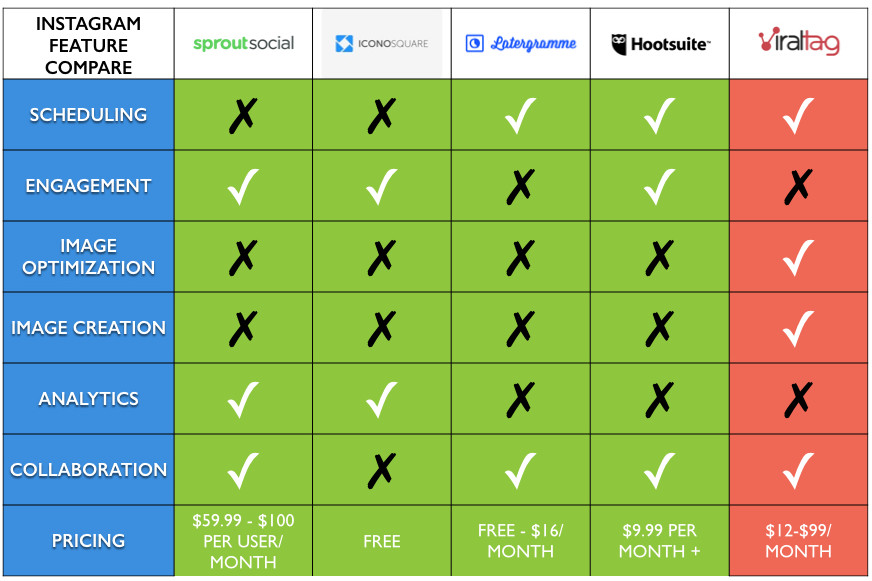
Not surprisingly, many services have popped up to help you better manage your presence there. If you’re looking for support, here are five tools to try out and how they stack up.

Instagram tool chart compare 1.001

Sprout Social

Scheduling: Sprout Social does not offer Instagram scheduling.

Engagement: Limited engagement directly on Instagram. Respond to comments posted to your Instagram features directly from your Sprout Social dashboard.

Image Creation: Sprout Social does not offer image creation tools.

Image Optimization: Sprout Social does not offer image optimization tools.

Analytics: Sprout Social provides basic analytics (comments and # likes) to help you improve your content.

Collaboration: Work with a team to manage a single account. You can add as many Instagram accounts as you like and manage them in the same place.

Pricing: The Deluxe plan is $59 per user/month and allows up to 10 profiles (Sprout Social is integrated with Twitter, Facebook, LinkedIn, and Google+). The Premium plan is $99 per user/month and allows up to 20 profiles. The Team plan is for 3 team members for $500/month for up to 30 profiles.

Iconosquare

Scheduling: No publishing or scheduling.

Engagement: Limited engagement directly on Instagram. Like posts, add and respond to comments posted to your Instagram photos directly from Iconosquare. You can also send private messages.

Image Creation: Iconosquare does not offer image creation tools

Image Optimization: Iconosquare does not offer image optimization tools.

Analytics: Iconosquare provides basic analytics (comments and # likes) to help you improve your content.

Collaboration: You could share your account with other members of your team, but there are no team workflows available.

Pricing: Free

Latergramme

Scheduling: Publish and schedule to Instagram from Latergramme, by going through the Latergramme Instagram mobile app.

Engagement: You can’t like and comment on posts in Instagram, but you are able to find and re-gram photos directly from Latergramme.

Image Creation: Latergramme does not offer image creation tools.

Image Optimization: Latergramme does not offer image optimization tools.

Analytics: Latergramme does not offer any analytics.

Collaboration: Latergramme offers team workflows for 2 people in their premium version.

Pricing: Free to post 30 posts a month and connect up to 2 Instagram accounts. Premium for $16/month — connect 2 Instagram accounts, 2 team members and 250 posts/month.

Hootsuite

Scheduling: Publish and schedule to Instagram from Hootsuite, by going through the Hootsuite Instagram mobile app.

Engagement: View your followers and posts in feeds, and monitor specific hashtags or keywords. However, you are not able to like or comment directly from Hootsuite.

Image Creation: Hootsuite does not offer image creation tools.

Image Optimization: Hootsuite does not offer image optimization tools.

Analytics: Hootsuite does not offer any editing features to improve your image before you post.

Collaboration: Hoostuite offers team workflows so you can collaborate with your team, but maintain a single editor to approve posts before they are scheduled.

Pricing: Free for up to 3 social profiles (Hootsuite is integrated with Facebook, Twitter, LinkedIn, and Google+). The Business plan start at $9.99/month for 50 profiles. The price increases to add more accounts and more team members.

Viraltag

Scheduling: Publish and schedule posts directly to Instagram using the Viraltag Instagram mobile app.

Engagement: Monitor hashtags and keywords, and view your own account. Viraltag does not offer the ability to comment or like directly to Instagram.

Image Creation: Create original designs and visuals to share in Viraltag using Canva.

Image Optimization: Viraltag offers basic editing features so you can crop your images, add filters and text before posting.

Analytics: Viraltag does not offer analytics for Instagram at the moment.

Collaboration: Add as many Instagram apps as you like. Team workflows are available in the business plan, enabling a team to contribute to the same account, with an editor giving approval rights.

Pricing: Pro plan is $29/month and allows for up to 10 social profiles (in addition to Instagram, Viraltag supports Pinterest, Facebook, Twitter, Tumblr, and LinkedIn) and unlimited posting. The business plan is $99/month and allows up to 25 social profiles and team workflows for up to 3 team members.

19 Aug 15:52

The Best Automagical Twitter Following Tools for Your Business

by Chris Abraham

graffiti-637448Over the last few weeks, I have been sharing my tools and processes with you. Now, we’re on to automating Twitter following, following-back, and unfollowing. Most of the tools I have used have made the process semi-automatic because doing everything on automatic broke Twitter’s ToS; however, ManageFlitter drives through the loophole that Twitter left behind by offering a “let someone else do it” called Remote Management, which, if you’re a pro member, really works, though it can get expensive if you get addicted to it’s power. More on that later. Here’s my list:

SocialOomph

socialoomph1I’ll admit that I mostly use SocialOomph for their very handy auto-tweeting tool (I discuss it in detail over here: Your social media marketing automation solution). Before ManageFlitter offered its Remote Management tool and after Twitter shut the door on doing everything with one click, SocialOomph as my go-to when it came to following, following back, and

checkAllI just looked around SocialOomph and it looks like they’ve added a new follow-back function for an extra $6.44/month, so I just joined that up, but the tool isn’t functioning yet — probably a PayPal delay (I’ll let you know what I think when I have a chance to check it out). They call it the SocialOomph Follow-Back & Auto-DM service, though I never recommend doing any auto DMs on Twitter.

It’s really considered poor form, even if you think your one-liner is super-charming and looks totally real, it probably isn’t. Edit: I just checked the Follow-Back & Auto-DM service and it’s semi-automatic and reach follow-back opportunity requires going through their “vet followers” tool.

The tool would be impossibly tedious — and it is — until I installed the Check All plugin for Chrome, which makes the entire process semi-automatic and really very doable — it works like a champ (though Manage Flitter does the same thing automatically using Remote Management, though RM is was more expensive and for $6.44 plus the Check All plugin is pretty darn close — though it is surely not fire-and-forget).

Here’s what I get at $17.97/month as a SocialOomph Professional Subscription (and if I want the SocialOomph Follow-Back & Auto-DM service, I also have to pay $6.44/month):

  • Connect an unlimited number of Twitter accounts to your user account.
  • Schedule as many updates as you want. The 12 tweets per 60 minutes restriction for free members don’t apply to you.
  • Post time-limited updates to Twitter that will automatically be deleted (self-destruct) from your Twitter account after the period of time that you select. Keep your feed clean of out-dated information that can confuse people.
  • Schedule recurring updates, i.e., pre-configure your regular messages / updates / reminders, set them, and forget them.
  • Easily set up alternate tweet text options for your recurring updates, so that your recurring updates don’t publish repetitive text. With each recur the system randomly picks one of your alternate text options to publish.
  • Connect one or more update queue reservoirs to a social account and/or feed more than one social account from an update reservoir. The system drip-feeds the updates to the social accounts. All you need to do is fill the reservoir. You don’t need to worry about scheduling the updates.
  • Bulk upload tweets and schedule them with no effort.
  • Upload and schedule photos for your Twitter account.
  • You still have all the other great things you have with a free account.

ManageFlitter

manageflitterWith the addition of Remote Management, ManageFlitter is a dream. It’s literally outsourced all of the annoying and tedious hours of clicking “accept” and “yes” and “unfollow” and “follow back” and “follow” to someone else, whomever that is.

followRulesMaybe there’s an accept, yes, unfollow, follow back, follow click farm somewhere and there are an infinite number of monkey clicking on an infinite number of follows. I don’t care.

It’s pretty cheap, especially when I consider my time valuable. To me, it’s worth it. $50 for 10,000 “actions” which is to say one follow is an action, one follow-back is an action, one unfollow is an action.

actionsYou can create elaborate follow, unfollow, and block rules and anything that meets these rules is processed automagically just as long as there are an appropriate balance of action ready there for spending on the Remote Management dashboard.

So, I do all kinds of cool things with the powerful search function that ManageFlitter Offers, including popping zip codes into the search function and then queuing up all the folks who show up in the physical and geographic areas I specify so that I follow them all. I can do the same thing with profile mentions, hashtag mentions, keyword terms, and a whole host of things — the limit is your imagination. The only thing it can’t do — none of them can do — is offer you the ability to bulk upload a CSV, EXCEL, or TXT file — or a handy box for copy-paste and submit — with all the @profiles that you want to follow but have collected elsewhere (come on innovative social media tool world! Somebody make this for me, for us! I’d even pay for it, of course — why aren’t you doing it, ManageTwitter? Social Oomph, Crowdfire!?)

Spend some money on ManageFlitter — spend $50 on a subscription and then $50 on trying out the Remote Account Management (RAM) tool. Here’s what I get for my spend, my $49/month ManageFlitter Business subscription:

  • Unfollow people who are not following you back (Freebie plan limited to 200 daily unfollows)
  • Unfollow accounts who are inactive, have no profile image or use a different language to you.
  • Unfollow fake/spam accounts that you follow.
  • Remote Account Management (RAM) – set-up rules to tell us who you want our Account Managers to unfollow or follow for you (additional cost – purchase of actions required)
  • Block (force unfollow) fake/spam accounts that are following you. –
  • Unlimited daily unfollows. –
  • Account Search – search through over 80 million Twitter accounts in seconds – find the right accounts to follow. Improve your odds of reciprocal follows.
  • Tweet Search – Follow or engage with people who have tweeted a hashtag, have included a targeted keyword or mentioned a specific Twitter account (including your competitors!) in their tweet. –
  • Copy other Twitter account’s followers or the accounts they follow. Leverage other Twitter accounts to quickly find targeted people to follow. –
  • Account Analytics – a quick overview of your current account numbers. View a graph of changes to your followers, following, tweets & influence over time.
  • See who and when someone unfollows your Twitter account. –
  • Tweet Analytics Overview – track Tweet keyword volume over time. View individual Tweets driving volume spikes.
  • Email Reports – receive a daily or weekly email report summarizing the most important activity on your Twitter accounts. Receive alerts when high value, verified Twitter accounts follow one of your accounts. – –
  • PowerPost – schedule Tweets for when your followers are most likely to see them. PowerPost guides you to easily select optimal Tweet times using a unique visual approach based on Twitter user engagement data. 1 per day
  • PowerPost Bulk Engagement – schedule and manage posts to multiple users quickly and efficiently. Posts are sent at the time most likely to be read by each person you are contacting.
  • PowerPost Recurring Posts – set posts to be sent out repeatedly over time. Great for infrequent marketing message you want to mix in with your usual content.
  • PowerPost Rotate – access previous PowerPosts for reuse when required. –
  • PowerPost Bulk Import – easily import, schedule and manage a large number of Tweets. – –
  • @Inbox – easily manage a high volume of @replies. Maintain full control over the calibration of your @Inbox – respond only to the most important Tweets. Conversation threads help group related Tweets. – –
  • @Inbox Campaigns – monitor and engage with Tweets based on selected keywords. Great for managing Twitter competitions. – –
  • Permission Management – Isolate your clients’ or departments’ ManageFlitter Twitter account use from each other. Manage permissions for different customers or internal departments. Great for managing a large number of clients under one ManageFlitter account.

CrowdFire

logoI don’t really use Crowdfire that much, though I am still subscribing. What’s most appealing to folks that none of the other platforms I use offer is their mobile apps for iPhone and Android. So, if you’re ever bored or in line and don’t want to spend on ManageFlitter’s awesome but expensive Remote Account Management (RAM) automagical tool, then you can do all the clicking yourself using the very gorgeous and well-programmed app (I’m installing it right now on my Androids, both my oldish Nexus 5 and my ancient Nexus 7 — maybe there are things that the app can do that are way more convenient to me while I am out and about on my phone. Here’s what I get for my $9.99/month Crowdfire PLUTO subscription:

  • Linked Accounts 2
  • Team Members 1
  • Whitelists/Blacklists 10000
  • Unlimited Follows/Unfollows (Twitter)* ?
  • Hide Previously Followed Users ?
  • Remove ‘-via @Crowdfire’ tag from Twitter DMs

Fastfollowerz

g5S5MqG_I only recommend buying Twitter followers if you’re launching a brand new Twitter account. It’s impossible to start up a new business — or even personal — Twitter account without either making a huge spend over at Twitter Ads. Since you can only follow a maximum of 2,000 folks when you just start out, I recommend my clients buy 10,000 followers right away.

This will allow them to quickly break through the arbitrary follow ceiling that Twitter imposes on the newbies. Yes, if you pay Twitter Ads for Followers you will get real followers based on the kind of followers that you specify — and all of those followers will need to follow you — choose you — so it’s an opt-in model.

Buying 10,000 followers from Fastfollowerz is going to be just a technicality, a way of breaking through the ceiling in order to make the tools I went through above more useful. For $99 you can get 10,000 followers; for $30 more, you can specify that the followers should be American.

For another $30, you can get all 10,000 in only 48 hours, if you’ve let this go to the very last moment. When you’re done, and if you’re self-conscious, then you can use ManageFlitter to unfollow all span accounts from your followers once you’ve started to build up your real followership. That’s what I do.

Man, I love ManageFlitter a lot and all the rest as well, but man do I want someone to build an app that gives me the ability to bulk upload a CSV, EXCEL, or TXT file — or a handy box for copy-paste and submit — with all the @profiles that you want to follow but have collected elsewhere. Does this already exist? Can a guy get a break? Please let me know if anyone wants to build this with me.

Anyway, I sure hope that this list has been useful to you. Please let me know what I am missing. I know a lot of people love Tweepi but I have never used it. Do any of you love it? Is there already an app that helps you follow folks that you can bulk and batch upload? Please feel free to let me know in the comments — I really do read them and love them.

Until then, I’m really happy with these tools as they are and recommend them highly. Good luck and Go Git ‘Em Tiger!go git


19 Aug 15:51

38 KPIs Every Sales Manager Should Measure in 2024

by richard.april@repsly.com (Richard April)

Sales managers — and particularly field sales managers — can often feel like they’re trapped in a fog. Without a physical presence in the field, it‘s difficult to keep tabs on their team’s performance.

Instead, they rely heavily on their field representatives to be their eyes and ears. The best way for field managers to gain visibility into their team’s activity is to collect and measure their performance through key performance indicators (KPIs). But it doesn’t take much time researching sales KPIs to see just how many options there are.

As a career marketer, I watch in awe at the impressive relay race that sales teams run. I play a direct role, but I‘m not the one who’s responsible for actually getting the baton across the finish line. I've seen firsthand how easy it is to oversimplify ideas and solutions. The right sales KPIs are your solution.

In this post, I'll explain what KPIs are in sales and all the KPIs and metrics you should measure. I’ll also highlight the latest sales trends from HubSpot’s State of Sales Report and how they could impact your sales KPIs. Read to the end for a free sales KPI template and calculator that you can use to get started measuring your team's performance.

Download the Sales Metrics & KPI Calculator

Table of Contents

What does KPI stand for in sales?

KPI stands for key performance indicators. KPI examples in sales can come in many different forms because they measure specific activities. Sales managers, account managers, sales reps, and even marketers have sales KPIs that they should track.

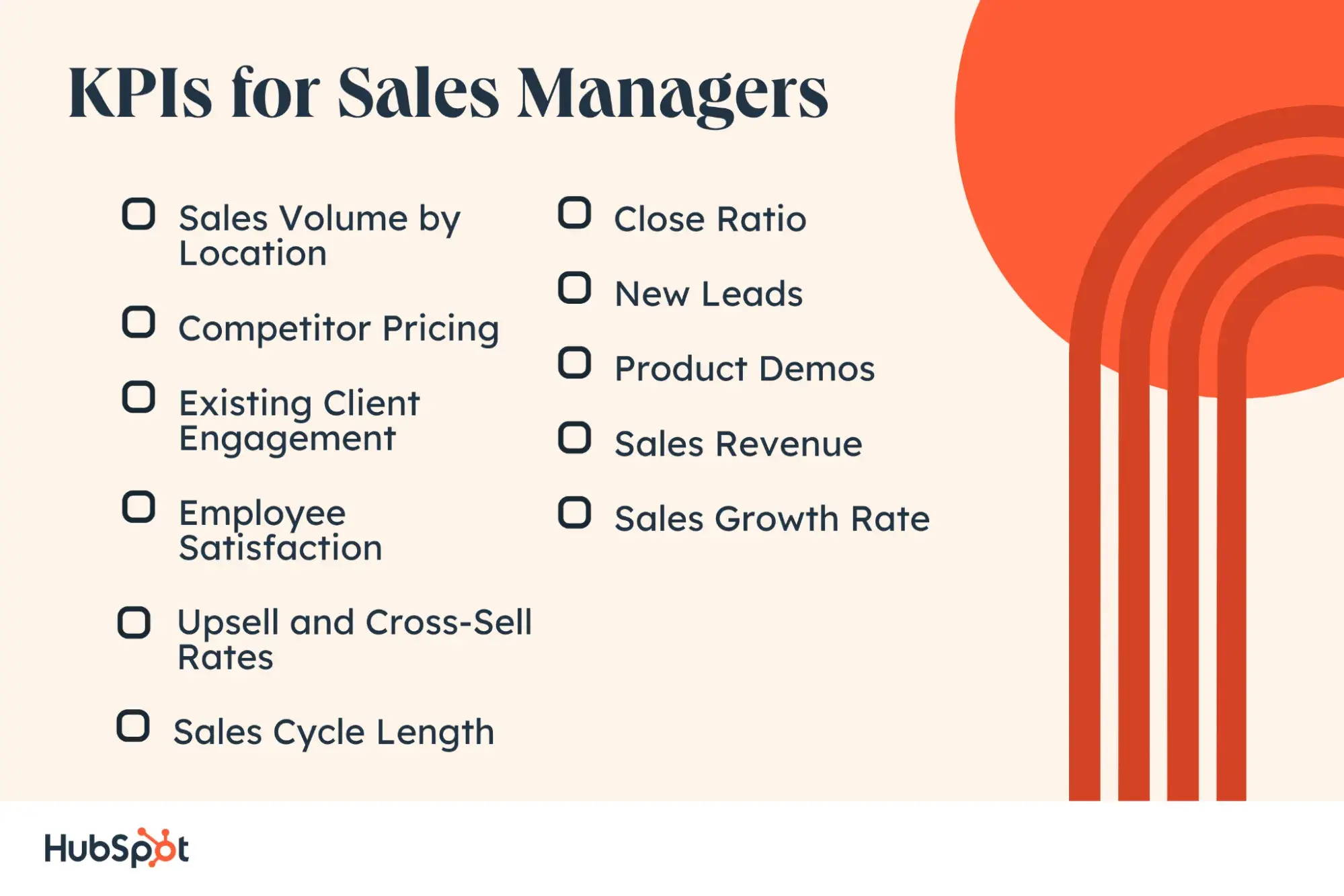
To save you some time, I've narrowed down a list of sample KPIs for sales managers — focusing on the ones I believe are most important to managing field sales teams.

1. Sales Volume by Location

By comparing sales volumes across locations, including physical stores and online transactions, you’ll see where demand for your product is highest and lowest. Then, try to understand why.

I suggest using this information for A/B testing, promotional sales, or samples.

If sales volume is large in region A, perhaps there is a higher demand there, in which case you can focus on customizing certain products and services for that region. Or, if two locations see relatively similar sales volume in January, sales leaders can try implementing a promotional sale in one location and not the other in February to see if it drives sales.

2. Competitor Pricing

While managers and business owners shouldn’t track competitors’ every move, being aware of their pricing can help create a competitive sales strategy. If prices don't differ much, you can consider a price-matching strategy to guarantee your customers the lowest prices — and you the most sales.

Additionally, by keeping track of the average retail price of your products, you can measure the impact of cutting your prices or implementing a promotion.

Pro tip: Make sure you’re training your reps to handle pricing objections appropriately. Try role-play exercises so they're prepared to discuss price without defaulting to discounts.

3. Existing Client Engagement

Maintaining a good rapport with customers after the sale is important to ensure long-term business. Sales reps build trust and maintain good relationships by regularly touching base with their customers. They also get valuable insights into the customer's success with the product and how they can help.

Beyond benefiting your company's business outlook, keeping in touch with clients supports your business’s strategic goals as well — it’s a sales metric that matters.

I recommend asking your salespeople to prioritize customer relationship management by keeping a tally of interactions they have with each of their customers, then comparing the number of touches to the average length of a client relationship.

Example usage: If you notice that your top 10 long-term clients touch base with their sales rep approximately once per quarter, take a deeper look. What do those touch bases look like? How often do reps encounter an issue they're able to help their client solve?

4. Employee Satisfaction

Keeping sales reps motivated improves your bottom line, and there’s a lot that your business can do to inspire your team. Insightful data:

  • 86% of surveyed sales professionals say that sales culture is important to job satisfaction.
  • 88% say that culture is important to meeting sales goals.
  • According to HubSpot research, 67% of sales teams are remote or hybrid.

With a remote workforce, how do you keep your sales force in sync? Do they feel like they‘re part of a team? Do they agree with the sales methods that you’ve implemented?

Pro tip: Employee feedback is crucial to a successful sales culture. KPIs are used not only to measure your team members but also your performance as a manager.

Employee satisfaction can be difficult to quantify, so I suggest using an eNPS survey, along with a few qualifying questions to understand what's making them happy or unhappy, then compare the results against your goal.
KPIs for sales managers

5. Upsell and Cross-Sell Rates

Who are the most qualified leads in your CRM? Your existing customers. According to HubSpot's 2024 Sales Trends Report, 76% of sales professionals shared that over 10% of revenue comes from upselling. Another 68% said that 10% of revenue came from cross-selling efforts.

I recommend having your reps track their upsell and cross-sell numbers, and use that data to figure out whether certain verticals respond well to certain product or service pitches.

Example usage: If reps have good luck selling Feature X to clients with Product Package Y six months into their tenure with you — this might be a worthwhile milestone to add to your sales process.

According to 60% of sales professionals, understanding customer challenges helps them sell to current customers. So, look at why, when, how, what, and to whom your reps are upselling and cross-selling, and adjust your efforts accordingly.

6. Sales Cycle Length

Are some reps closing in three weeks while others are closing in six? What are the respective churn rates six months from onboarding? Analyze what sales cycle length produces the highest number of closed-won business.

Pro tip: Look at how successful those deals are down the line. This is a valuable sales KPI for managers to monitor, but a good manager will look at the whole picture.

For example, you may have a rep who's closing business in record time, but you find that their customers are dissatisfied with your solution and often churn after nine months. In that case, a longer sales cycle yields a healthier business.

HubSpot research says that the majority of sales teams (31% of B2B and 35% of B2C) have two to four touches with a prospect through the sales process. Once you have data on your KPIs, analyze the information to understand why you got those results.

7. Close Ratio

Close ratio measures how efficiently a salesperson or team is closing deals based on the leads they‘ve worked. This metric works in conjunction with system touches to help quantify the effectiveness of your sales team’s outreach strategy.

How to calculate: Divide the number of actual closed deals by the number of lead opportunities the salesperson had during a given time period.

8. New Leads

Lead tracking is essential to ensuring your sales team is seizing every opportunity that comes your company's way. I think the easiest way to do this is to implement a lead tracking system or use a CRM that allows you to capture and monitor leads. HubSpot's Free Lead Management & Tracking Software is a great place to get started.

Tracking new leads allows you to:

  • Assess the effectiveness of lead-generation efforts.
  • Forecast future sales revenue.
  • Analyze conversion rates.
  • Identify which sources/campaigns are generating the most prospects.
  • Allocate resources accordingly.
  • Evaluate the health and growth of the sales pipeline.
  • Set goals for your sales team.
  • Provide performance feedback.
  • Analyze the ROI of different marketing initiatives.
  • Make informed decisions to optimize lead generation.

Your ability to attract qualified leads is the most influential part of your business, and it's the sales KPI that the owner of EDCO Awards and Specialties tracks most closely. “If the number of qualified leads drops, I know I need to revisit my lead-generation activities like content creation, social media engagement, and sales development outreach,” shared Mike Szczesny.

“While closing deals and revenue are obviously critical, without qualified leads coming in the front end of the sales funnel, there will be no deals or revenue to count on the back end. So for any sales team, I would recommend focusing on and prioritizing your ongoing quest for quality leads.”

9. Product Demos

Monitoring product demos allows you to assess the effectiveness of your teams' sales presentations, understand conversion rates, and evaluate the efficiency of the sales process. In my experience, tracking product demos provides valuable feedback on the product itself, helps set benchmarks and goals for the sales team, and ensures consistent and effective presentations.

Sales managers gather valuable training opportunities from demo conversion rate:

  1. Track the number of successful demos.
  2. Analyze the conversion rate from demos to closed deals.
  3. Identify areas for improvement and provide targeted training and coaching.

10. Sales Revenue

Sales revenue, also known as just revenue or sales, refers to the total amount of money generated from sales of products or services within a given period. This is often measured per month, with monthly recurring revenue (MRR) being one of the most-valued sales metrics in business.

This is a crucial KPI to track as it directly reflects the effectiveness of your sales team and the overall success of your business.

Pro tip: Remember that total sales revenue is not the same as profit because your revenue number doesn‘t include expenses. To assess the profitability of sales activities, it’s necessary to calculate the gross profit or net profit by subtracting the associated costs from the sales revenue.

11. Sales Growth Rate

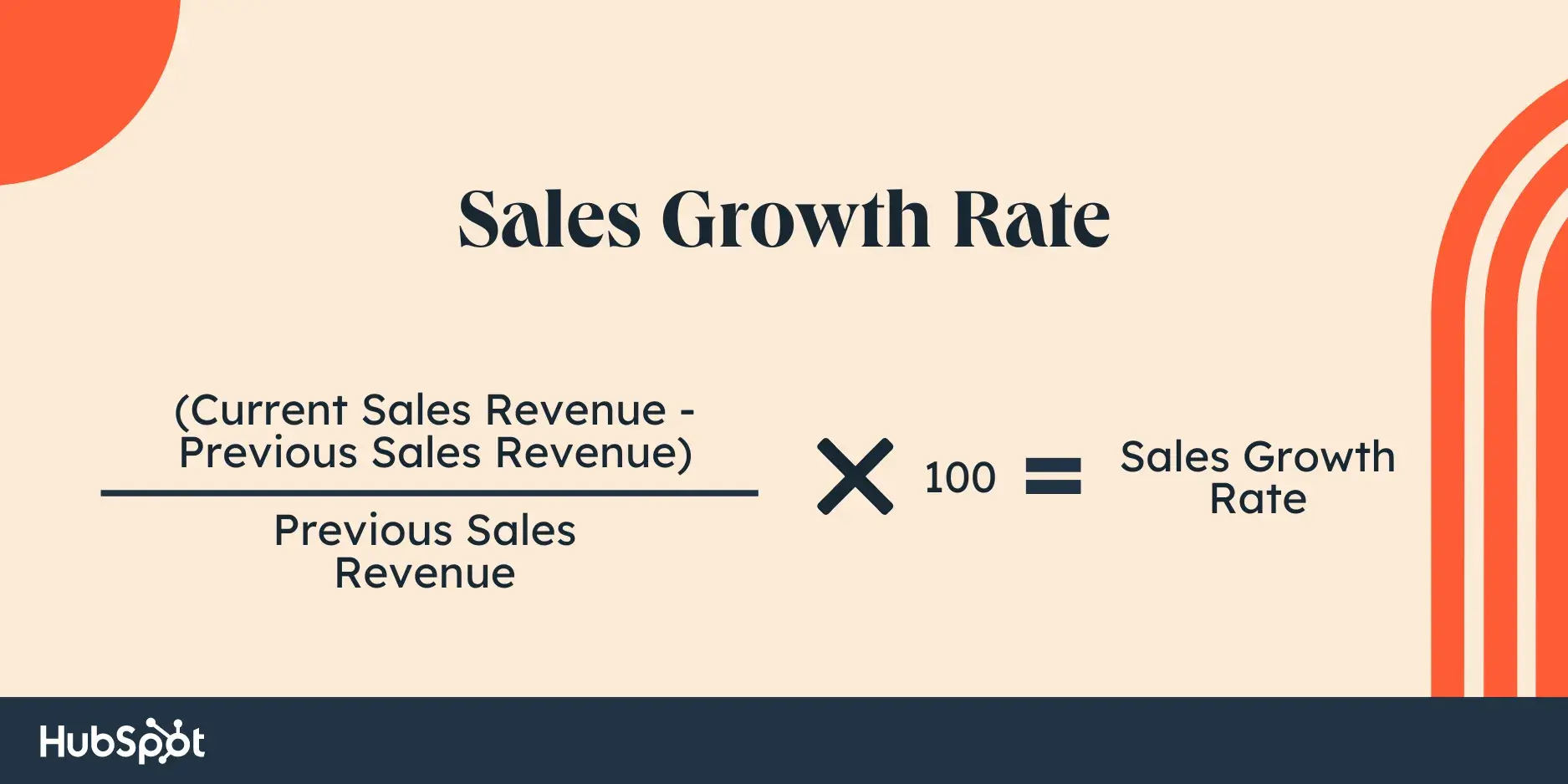
Sales growth rate measures the increase or decrease in sales revenue over a specific period, typically expressed as a percentage (for example, monthly sales growth). It assesses the change in sales performance or revenue generation from one period to another, such as comparing sales quarter over quarter or year over year.

To calculate the sales growth rate, you would use the following formula:
sales growth rate formula

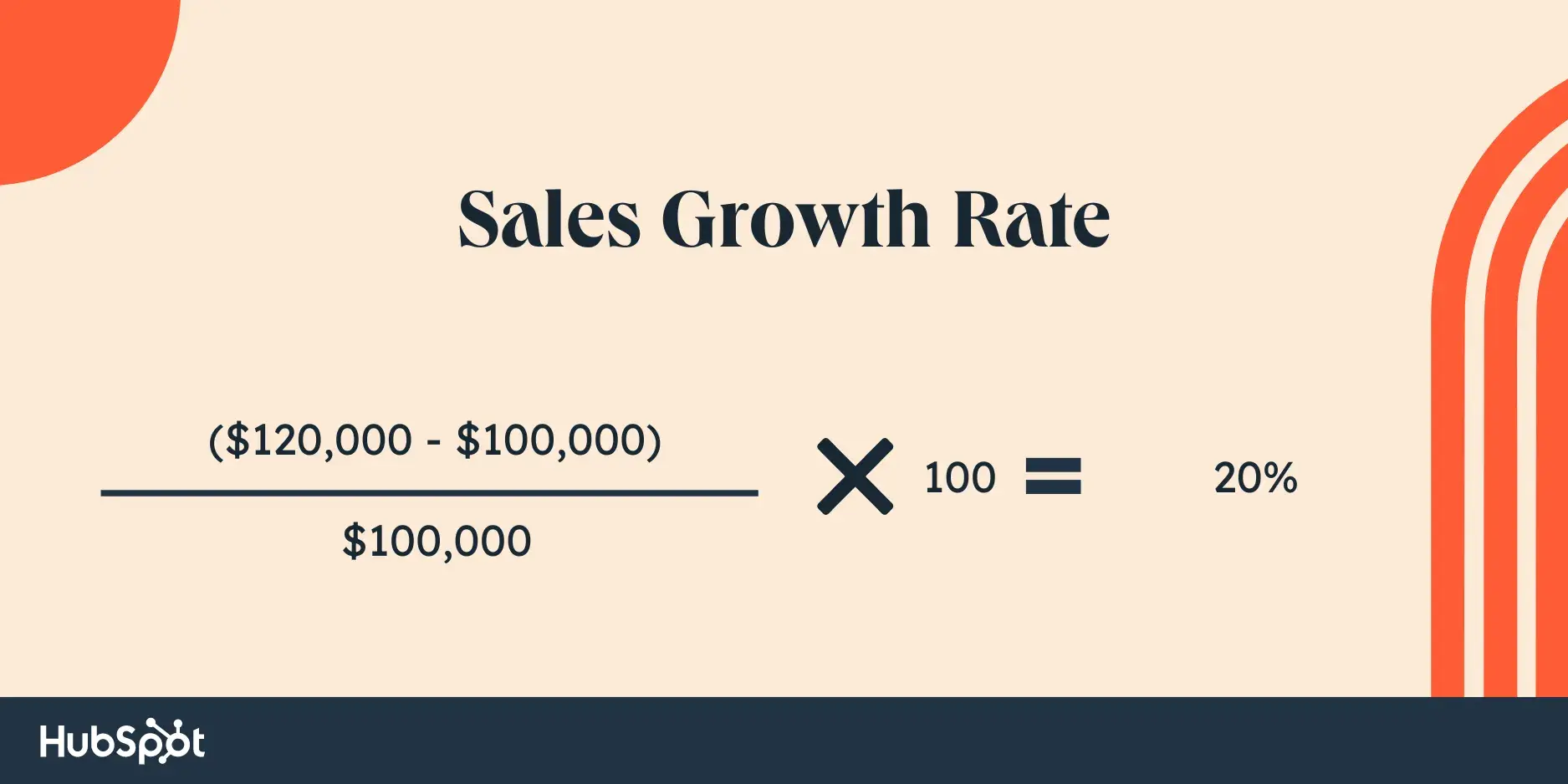
For example, if your company had $100,000 in sales revenue in the previous year and $120,000 in sales revenue in the current year, the sales growth rate would be calculated as:
sales growth rate formula

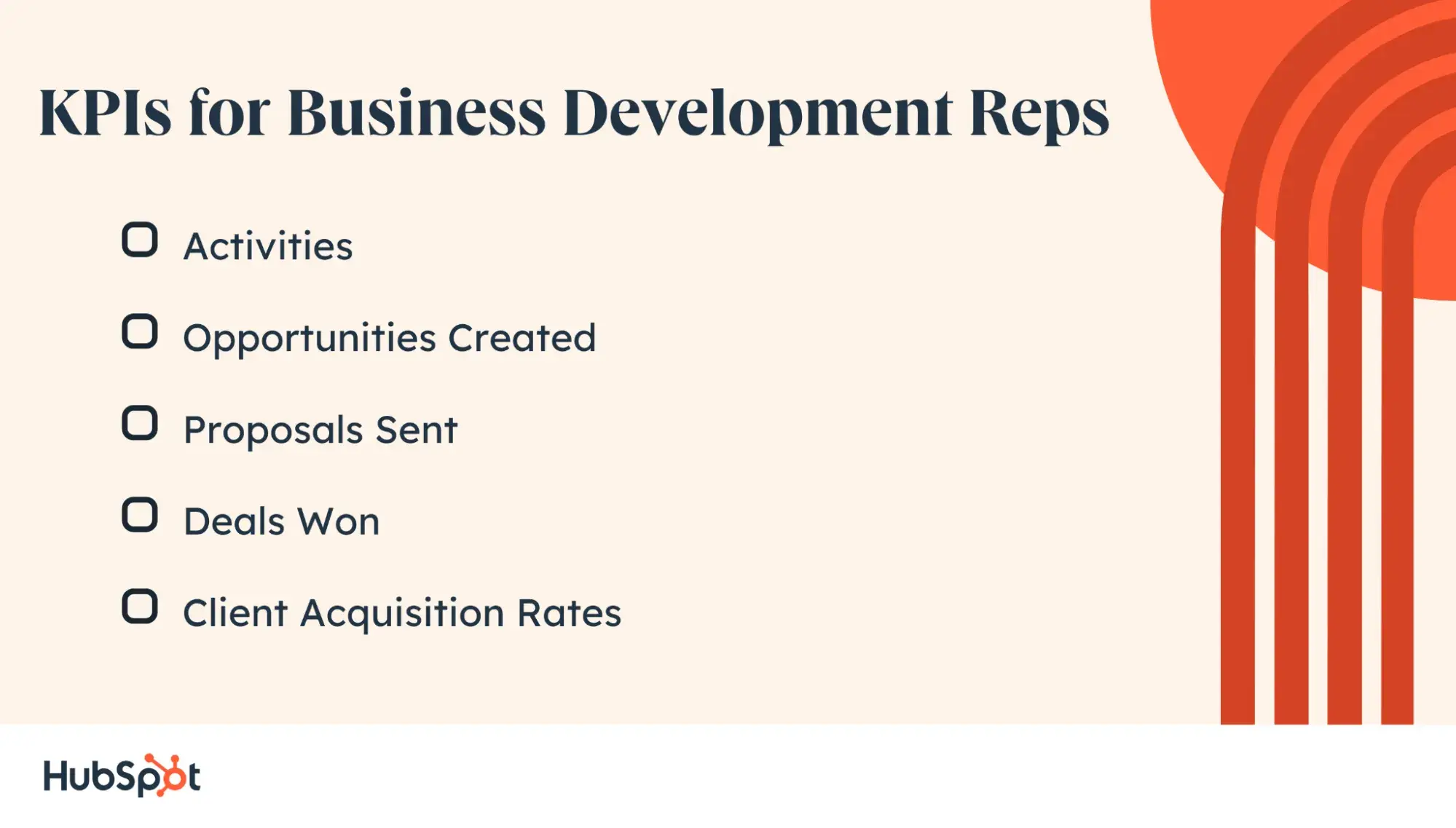
Your business development representatives (BDR) are actively prospecting, often using cold outreach methods. The examples of sales KPIs I collected below can help managers track BDR performance.

1. Activities

The number of BDR sales activities per rep in a set amount of time can give you an idea of their productivity level. You might consider measuring:

  • Number of sales calls.
  • Number of emails.
  • Meetings scheduled.

Keep in mind that this won't tell the whole story. Some reps may focus on quality over quantity. However, it does give you a baseline for measuring productivity.

2. Opportunities Created

This is a metric that managers consistently monitor. Sales activity means nothing unless it results in tangible pipeline growth. For this reason, I’ve found productivity metrics such as sales activity are best compared to the number of opportunities created by the BDR.

You'll get insight into which activities are working best and which reps are generating the most results from their efforts, answering important questions like:

  • How are your salespeople contributing to the expansion of your business in their given territory?
  • Who's reaching their quota?
  • What percentage of your team is hitting their number?
  • Is the quota too high? Too low?

3. Proposals Sent

Whether the BDR nurtures the relationship themselves or hands a prospect to the account manager, the number of proposals sent can give you an indication if BDRs are prospecting to the right people and generating SQLs and opportunities that have a genuine interest.

4. Deals Won

While a BDR isn't responsible for closing business, you want to keep a pulse on how much new business results from your outbound efforts. This sales KPI example monitors the number of deals won per rep and across the rest of the team and can help you make sound decisions when budgeting and reinvesting in sales plays.

5. Client Acquisition Rates

Another commonly used measurement is the rate of client acquisition. Of the new prospects your reps contact, how many convert to customers? It's natural for some salespeople to perform better than others — but if there are large discrepancies between conversion rates, I recommend you dig deeper.

Are lower-performing reps approaching bad-fit prospects? Is there something that over-performers do in sales meetings that others don't?

How to gather and use this data:

  1. Compare conversion rates to the number of prospects a rep reaches out to.
  2. If you find that conversions decrease after a certain number of touches, use that number as a benchmark to prevent your reps from getting burned out or stretched too thin.
  3. Use conversion rates to compare different outreach methods, such as emailing or cold calling, versus pursuing face-to-face interactions.
sales KPI examples for BDRs

Sales account managers are like business development managers, with a crucial difference. Business development reps focus on new business, while account managers nurture current customers.

Account manager KPIs include metrics mentioned elsewhere on this list, like CLV and upsell and cross-sell revenue. I also think it's smart to track the following KPIs for account managers:

1. Reference-Based Clients

Are your clients also advocates for your business? This KPI gives you an answer that points you directly to which customers are helping your team build more revenue through referrals. Tracking this data allows your team to nurture these important customer relationships, and it's extremely powerful.

Backed by data: 66% of sales professionals think existing customers offer the best leads.

You can track this metric with:

  • Social listening.
  • Customer feedback surveys.
  • Embedded surveys in your onboarding process.

2. Customer Satisfaction Score

This KPI is a popular alternative to the net promoter score. Instead of measuring how likely it is for a customer to recommend your product, it measures how pleased they are with your products, services, and more. It's one of the most important customer service KPIs to monitor.

This metric asks customers to rank how satisfied they are on a scale from one to five (or on a scale of angry emoji to heart-eyes emoji):

Sales kpi examples being gathered by a SaaS company

Image Source

I like that this sales KPI is easy to calculate and helps with real-time analysis of customer sentiment. It's also helpful at any stage in the buyer journey. Read more about calculating your customer satisfaction score.

3. Customer Churn Rate

As an account manager, another essential KPI is customer churn rate. This metric is the percentage of customers who cancel or don't make another purchase during a specific time period.

While customer churn will always happen, high churn rates can be a sign of:

  • Wrong product/market fit.
  • Pricing objections.
  • Poor customer experience.

Pro tip: Need help reducing customer churn? I suggest reading this post that offers tips for reducing customer churn.

4. Organic Growth

Sales KPIs like sales cycle length and deals won and lost are useful to gauge overall performance, but organic growth in account management comes from the power of relationship-building.

These KPIs may combine or contrast other KPIs to measure the growth of specific industry or client relationships. For example, say you're comparing new customer sales with returning customer sales. You may also want to compare the specific products and revenue generated by these two groups.

Pro tip: To measure this growth and its value, your business may need to create unique metrics, depending on your clients and processes.

5. Customer Outcomes

Customer outcomes measure how well your team is delivering on customer expectations. Some of these metrics are difficult to measure, and these KPIs may be a combination of qualitative and quantitative metrics.

Quantitative customer outcome KPIs can include:

  • Revenue.
  • Number of support tickets.
  • Time on the platform.
  • Number of subscriptions.

Qualitative customer outcome KPIs can include:

  • Employee comments.
  • Customer emails.
  • Client testimonials.

This combination of KPIs will help you improve both customer outcomes and expectations.

For example, Amazon has a strong reputation for being customer-centric. It also has a long history of using anecdotal data. A quote from Amazon founder Jeff Bezos says that “...when the anecdotes and the data disagree, the anecdotes are usually right. There is something wrong with the way that you are measuring it.”
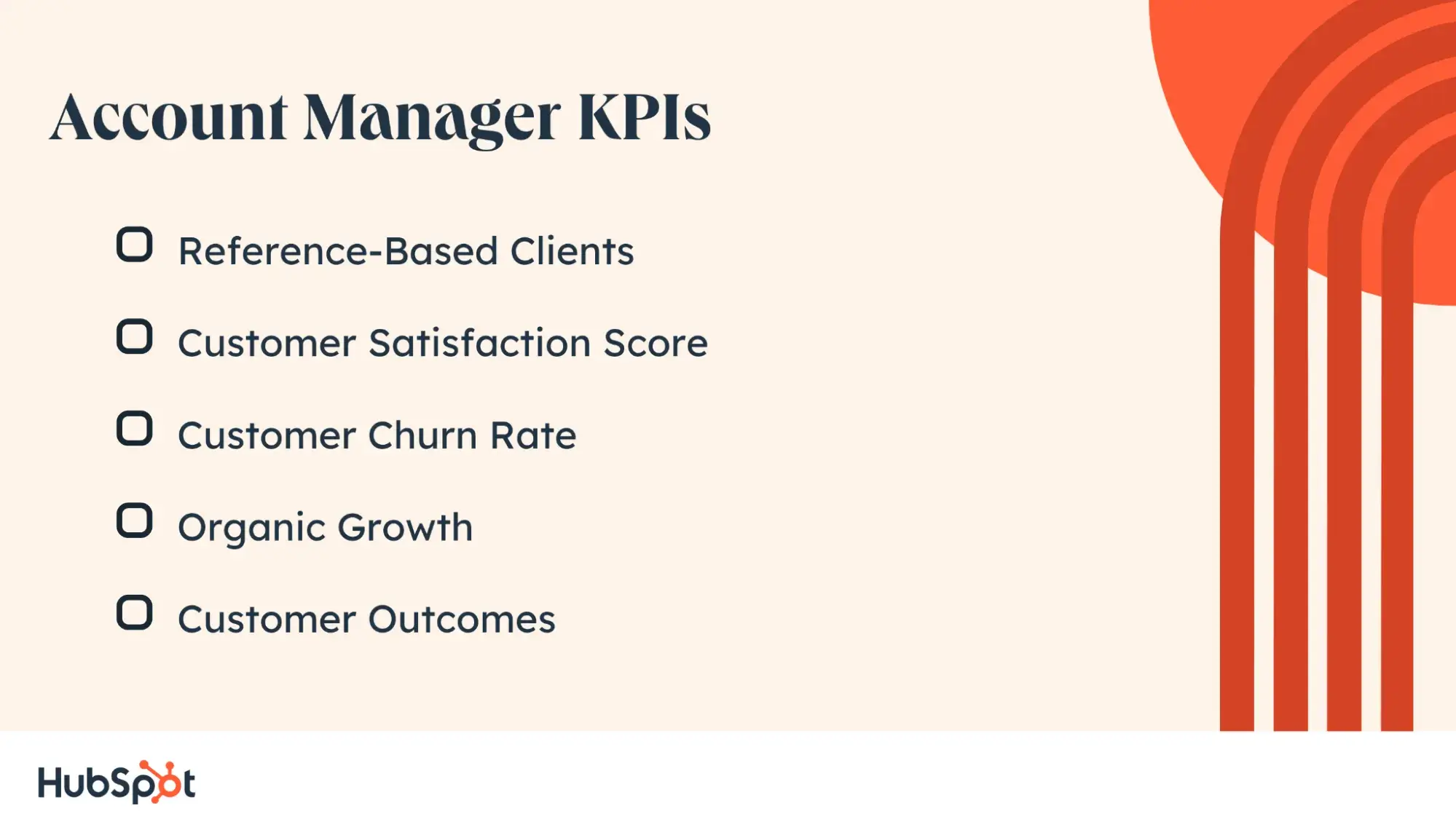
Account Manager sales KPIs

While some of the sales KPI examples in the previous sections may also apply to your sales development representatives, keep in mind that sales development reps (SDRs) primarily respond to inbound leads. For this reason, you should be tracking their performance with these KPIs as well:

1. Average Response Time

If a lead is flagged as qualified by your marketing team, or if that lead indicates interest by filling out a form, there’s no time to waste and no need to keep the lead waiting. I recommend always benchmarking response time and encouraging reps to improve it.

2. Percentage of Leads Followed Up With

Your SDRs should be making contact with all qualified leads. This metric can also give you insight into productivity, bandwidth, and task management.

Tip for managers: If leads are falling through the cracks, assume a neutral position before automatically faulting sales rep productivity. There could be an understandable (and easily addressed) issue sabotaging the pipeline, such as a hiccup with the intake form or a CRM malfunction.

3. Positive vs. Negative Reply Rates

When tracking this KPI, consider all prospect replies through any channel as being binary — the prospect either is or isn’t interested. It’s based on sentiment, not customer acquisition. That’s what differentiates this metric from others.

This is measured at a prospect level, meaning all that matters is the total number of prospects contacted. However, many emails, calls, or other touches it took to contact them aren't reflected in the figure. The metric is expressed as a percentage — so if 50 prospects were contacted and three responded positively, the positive reply rate is 6%.

How SDRs should use this figure: Tag all positive replies and identify trends. This metric can reveal flaws and highlight benefits in aspects of your sales process like outreach cadence, prospecting approach, and channel preferences.

How managers should use this figure: Gain insights into individual processes, and then refine processes for higher conversions.

4. System Touches

A “low touch” sales process is preferred, meaning your salespeople are closing new business efficiently for your company and your consumers. If you review a salesperson’s quarterly numbers and see that they missed their quota and had a high number of touchpoints per closed-lost deals, it might be time to revisit how effective that rep’s strategy is.

Industry trend: Per HubSpot research, a more efficient sales process is a top goal for 29% of sales professionals.

I recommend managers analyze their most successful reps’ average touchpoints. Do their closed-won deals average three video meetings, eight emails, and four phone calls? Ask these reps to share their sales strategies, techniques, and advice to streamline your team's average, collective sales cycle.

5. Meeting Acceptance Rates

Consistently landing appointment acceptances is a mark of an exceptional sales rep. Prospects often try to push meetings off, don’t take them seriously, or just stop responding. If an SDR lands meetings on a regular basis, it means they’re making their prospects prioritize your product or service in their schedules.

How to calculate this rate: Divide the number of meetings a rep schedules by the total number of replies they receive from prospects.

If this rate is low, both sales representatives and managers can leverage this insight:

  • Sales reps: Role-play objection handling.
  • Sales managers: Improve the efficacy of your sales training.

Pro tip: When possible, I recommend gathering this data automatically.

"In a healthy sales organization, managers can keep an eye on overall health and see individual contribution so they can watch for risks or rock stars," shared Sara Lobkovich, principal consultant at Red Currant Collective. “Leverage helpful data that can be automated as much as possible so that sellers can focus on selling, not on data quality and data management!”

6. SQL-to-Customer Conversion Rate

Your SDRs may not have much control over how many sales-qualified leads (SQLs) are generated, but they impact turning those leads into customers. A low SQL-to-customer conversion rate can mean different things:

  1. Low conversion rates across the board can indicate an issue with your lead generation and qualification process.
  2. Low conversion rates with specific reps can help you make decisions about ongoing training and development.

Paula Glynn, director of PixelStorm, says that lead conversion rate is the sales KPI she finds most important, but that sales managers and sales reps look at this number differently.

“Sales reps are focused on bringing in high numbers of closable leads, and sales managers are using the metrics produced by the sales team to fuel the sales pipeline,” Glynn shared. “For me as a manager, I use the sales KPIs to help with bigger-picture things: forecasting and investment. So if ‘X’ number of leads are needed, I need investment to help generate those leads.”

7. Deal Win-Loss Ratio

While SDRs may not be involved in closing the deal, the win/loss ratio can indicate the quality of the experience the prospect had along the way.


For organizations with sales and marketing departments, it can be difficult to measure sales performance. After all, how do you know the handoff is successful? Recent research says that 52% of sales and marketing teams don‘t feel they’re aligned. And 33% of respondents feel that this keeps both teams from reaching their goals.

Here are KPIs that can give you a clue:

1. Percentage of Leads in Each Lifecycle Stage

If you break down leads by lifecycle stage (such as lead, marketing-qualified lead, SQL), you can try to diagnose pipeline issues between the departments.

Marketing is responsible for increasing the percentage of leads that make it to MQL. Then, they hand off to sales. Sales handles turning SQLs into opportunities. But if Sales isn’t getting the right leads, sales numbers will be affected.

2. MQL-to-Customer Conversion Rate

Both Marketing and Sales have an interest in the MQL-to-customer conversion rate. Marketing is invested because they supply the MQLs, and Sales is invested because they turn those MQLs into customers. Raising this number should be a shared objective.

3. Average Length of Customer Lifecycle

The customer lifecycle refers to the different stages a customer goes through on their path to purchase (and beyond). It‘s in an organization's best interest to decrease the time between first impression and first purchase — in theory, that will reduce acquisition cost and generate customers more efficiently.

Marketing and Sales both have a stake in this lifecycle and can continue to iterate improvements to shorten it.

4. Volume of New Opportunities

To achieve alignment between sales and marketing teams, I think tracking the volume of new opportunities is important. Before measuring this KPI, both teams will need to agree on what a new opportunity is.

While there is no universal definition, a sales opportunity is usually a qualified prospect who has a high probability of becoming a customer. The sales pipeline begins with opportunities, which turn into deals and customers.

Marketing and sales must work together to qualify leads and create more opportunities, but alignment isn‘t something that always happens. "In my time as a sales leader, I saw many performance metrics driven among the sales teams that were actually counter-productive to achieving the company’s core goals," shared sales strategist Andee Hart.

“It's important that sales KPIs be 1) aligned with the strategic initiatives of the overall company, 2) drive profitable and sustainable revenue growth, and 3) be aligned with adjacent teams' core competencies.”

5. Cost Per Lead

This metric helps quantify the success of a marketing campaign by measuring how well leads are making their way from marketing to sales. The lower the cost per lead, the more effective the campaign is at bringing in leads for the sales team.

How to calculate: Divide the campaign budget by the number of leads acquired from the campaign.

6. Cost Per Acquisition

From market research to deal closed, cost per acquisition measures every effort a business takes to acquire a new customer and identifies the exact dollar amount that was spent to welcome that new customer on board.

An acquisition may be defined in different ways, such as:

  1. Form fills.
  2. Asset downloads.
  3. Actual deals closed.

By comparing this metric over time, your marketing and sales teams can learn what works and focus on those activities. In turn, the cost per acquisition should decrease, making both teams more efficient at closing new business.

Pro tip: Compare customer acquisition cost to customer lifetime value.

“This ratio provides a clear vision of the ROI for acquiring a new customer,” shared Jayanti Katariya, CEO of Moon Invoice. “A higher ratio indicates more value derived from customers over their lifetime relative to the cost of acquiring them. This ratio is very helpful for subscription-based businesses.”

7. Customer Retention Rate

Just because a customer signed a contract with your company doesn‘t mean you’re done earning their business. Tracking how well your team is meeting the customer's needs is key to customer retention. Customer retention measures how well a business retains its customers and their revenue over time.

While there are several ways you can measure customer retention, I think it's easier to have a single metric to review on a regular basis. You can calculate a single number by measuring customer retention rate with this formula.

8. Average Revenue Per Account

Understanding the average revenue for an account can help your marketing team identify audiences with more relevant campaigns. Your sales team can also use this information to take an account-based selling approach to new prospects with similar business models to accounts with high average revenue.

9. Net Promoter Score (NPS)

Your NPS is a measurement of how likely customers are to recommend your product/service to someone else.

The survey asks participants to rank the likelihood of a recommendation on a scale of 0-10. Their numerical ranking is divided into three categories:

  • Promoters (9-10): They like you — they really like you. Not only will these customers likely renew, but they also won't hesitate to recommend you to friends or colleagues.
  • Passives (7-8): They’re satisfied, but that's about it. Passives feel your product/service is status quo.
  • Detractors (0-6): They don’t like you — they really don't like you. Detractors will likely churn, might tell others to avoid doing business with you, and will do the most damage to your brand.

The cadence of the survey depends on your business and goals. As a rule of thumb, I suggest you start by sending an NPS every three-to-six months.

Pro tip: Don’t send your survey too early to new customers; let them fall in love with you first!

To calculate your score, subtract the percentage of detractors from the percentage of promoters. You can also use this handy NPS formula.

10. Customer Lifetime Value (CLV)

Customer lifetime value indicates the total revenue a business can reasonably expect from a single customer account. It considers a customer’s revenue value, comparing that number to the predicted customer lifespan.

It's a crucial metric to figure out which customer segments or buyer personas will drive the most revenue for a company. The applications aren’t limited to accounting for broad portions of your customer base. The figure can also be used to gauge the value of individual accounts and, in turn, your account managers’ ability to engage existing clients.

Their ability to consistently offer value to their clients can be measured, in large part, by the value they offer back.
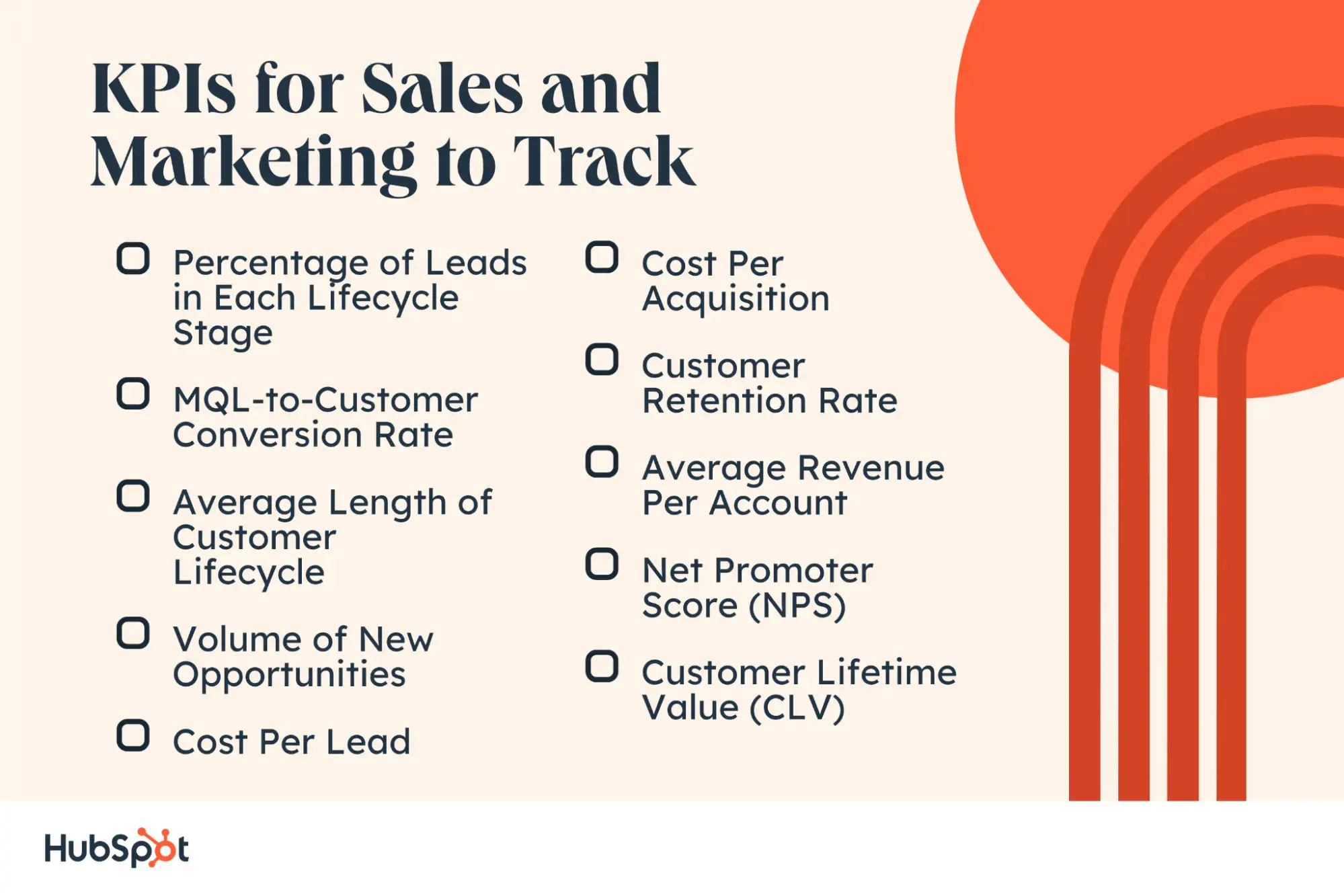
KPIs for sales and marketing to track

Sales KPI Template & Calculator

Free Resource: Sales Metrics Calculator

Sales KPIs offer: Metrics calculator

I know these can be a lot of KPIs to keep track of, and by no means do you need to start measuring each of these next quarter. Below are the best sales metrics to track when you're first starting. All of these metrics can be calculated in this free template.

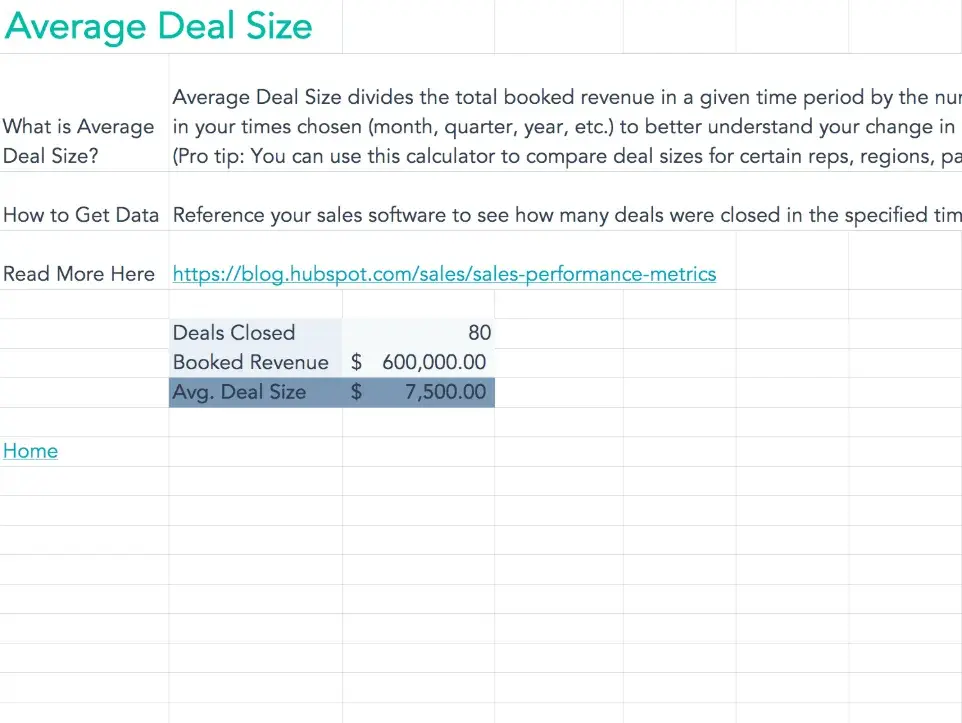
  • Average Deal Size: Measure this metric when you first get started to set a benchmark for future goals.
  • Win Rate: Gauge how many closed-won deals your team is closing.
  • Demo-Close Ratio: Accurately forecast your pipeline by understanding how many demos your sales reps are scheduling.
  • Quota Setting Calculator: Know rather than guess what your team's quota should be next quarter.
  • Commission Calculator: Set up a fair and attainable compensation structure for your team.
  • Customer Acquisition Cost (CAC): See how much it costs your business to bring a customer on board.
  • Customer Lifetime Value (CLV): Determine the value that your customers will bring over the entire time that they do business with you.
  • CAC-to-CLV: A ratio to determine how much it costs to bring a customer on versus the value they bring over time.
  • Revenue by Product: Understand which products bring in the most sales so your team can sell strategically to meet the customers’ and the business’s needs.
  • Customer Retention Rate: Measure how many customers continue doing business with your company over time.
  • Revenue Churn: Measure how many customers stop doing business with your company over time.
  • Employee Turnover Rate: Track how many employees leave the company in a given time period.

Track KPIs That Matter

What's your big takeaway from these sales KPIs? Mine is that no one is ever short of opportunities to improve their sales pipeline.

Avoid the overwhelm by using our Sales Software to help you accelerate revenue growth and streamline your sales process.

Editor's note: This post was originally published in June 2019, and has been updated for comprehensiveness.

19 Aug 15:50

Inbound Marketing 101: Lessons From The Cat Food Aisle

by Chris Horton

A big part of marketing, and of business for that matter, is helping your consumers resolve a want or a need. Yesterday evening I was one such consumer. Let me offer a little background. I live in the outskirts of Minneapolis, where we are in the midst of a massive, multi-year road construction project.  I mention this because the construction has transformed some of our most frequently-traveled multi-lane freeways into single-lane roads teaming with disgruntled commuters, myself included. I had finally gotten home from work after sitting in traffic for over an hour when my wife pointed out that our cat, Oliver, was out of food. After suggesting a number of homespun alternatives (sautéed chicken breasts, fresh tuna, oat bran cereal, milk, fasting, etc.), Oliver’s pleading gaze, coupled with my wife’s furled brow, compelled me to head back into the gridlock to secure a bag of cat food.

Inbound-Marketer-Oliver-the-Cat

Image Courtesy of Oliver the Cat

Reaching the store many minutes later, I was a man on a mission. I was also a living, breathing marketing experiment. I had a specific problem—I needed cat food—and because I had already forgotten which brand my wife told me to buy, I was a clean slate; let the best brand win.

Convenience, Simplicity, Price

At that point, I was focused on three things: convenience, simplicity, and price. I was in a hurry, so I wanted to find a decent cat food at the right price with as little effort as possible. After some time, I located the cat food aisle, where I was confronted with this daunting spectacle:

Inbound-Marketing-101-Lessons-from-the-Cat-Food-Aisle

Faced with innumerable possibilities, my consumer instincts took over. Strolling down the length of the aisle, I let my eyes wander from brand to brand. At first, vibrant colors and interesting packaging jumped out. As my brain’s analytical impulses kicked in, discounted pricing offers and compelling brand titles caught my attention. Then I recalled my original intent: convenience, simplicity, and price.

For me at that moment, convenience translated to size and weight. In my disgruntled state, I wanted to find a cat food that seemed light and easy to tote, logic be damned. Because I wanted a clean conscious and a happy wife, simplicity meant finding a “reputable” cat food that would be a healthy choice for Oliver. Remember, simplicity is the avoidance of complication: a guilty conscious and an angry wife are both complicating factors. Finally, I was interested in price. Hey, the economy is a fickle thing, and writing doesn’t pay what it used to (inside joke to all you writers).

Two broad elements played into my final decision to buy—the tangible and the intangible. For anyone well-versed in rudimentary economics, price was the obvious tangible. Given that I was in a hurry and there were so many choices, my eyes gravitated to the brands that offered price discounts or coupons. In this case, simplicity was a hybrid of tangible and intangible: I scanned the packaging looking for statements and symbols that shouted “this is a healthy choice.” Convenience was an even greater intangible: lighter colors and sleek packaging suggested an easy tote.

For those who might think brand packaging doesn’t matter, let me assure you, it does.

Marketing Takeaways

So what does my journey through the cat food aisle have to do with marketing strategy? Here are a few takeaways:

  • Know Each Segment of Your Target Audience – For the purveyors of cat food, this means recognizing that at least one micro segment of their demographic consists of the harried owner running out at the last minute to purchase food for their starving cat. Though this may seem like a potential throwaway demographic, it’s not. The type of highly informal research I conducted when sitting in the cat aisle is likely all the effort I will ever expend when analyzing cat food (sorry, Oliver). If my cat likes the brand I choose, and my wife doesn’t hit me over the head with a broomstick, I’m likely to purchase it again and again (once accepted at home, it becomes a simple, mindless choice for me to make when at the store). Thus, a one-off impulse purchase becomes a premeditated and reoccurring one. This last point gains further relevance when you factor in that I do the shopping in our house (roughly) half of the time.
  • Figure out What Motivates Them (i.e. wants and needs), and Provide It – In my cat food experience, I was looking for convenience, simplicity, and price. The brand that resolved all three of these won my business.
  • If You’re Not Happy with the Results, Tweak and Refine – For all I know, any number of the brands I passed over in the cat food aisle may have been focused on winning over the “I need to dash out at the last minute and buy food for my cat” demographic. If sales are down or you feel like you’re just not connecting with your audience, don’t throw in the towel. Go back to the drawing board, review your analytics data, meditate on the wants and needs of the likely buyers of your product/service (i.e. your target audience), and refine your message accordingly.

Translating to Inbound Marketing Strategy

Switching from consumer to digital strategist, here’s how I would translate some of the key lessons learned in the cat food isle to help businesses create an effective inbound marketing strategy for the digital age.

To stand out in a sea of products and services, your company needs to build an inbound marketing strategy that looks something like this. First, you must establish a mobile-friendly online presence that communicates your brand’s unique value proposition efficiently and effectively. Then you need to create relevant content that resolves the wants and needs of your target audience, optimize it for search engines (SEO), and promote it over social media. You also need to utilize social, local, mobile (SoLoMo) channels and tools to form deeper connections with your audience—connections that will increase sales conversions and foster long-term brand advocacy. Finally, regardless of success or failure, you need to review the data analytics and elicit external (customer) and internal (sales team/CSR) feedback to constantly refine your message and product/service offerings. It’s a marathon, not a sprint.

Just one man’s perspective from the cat food aisle…

New Call-to-action

19 Aug 15:50

How To Make Differentiation Pay

by Ian

If you’ve been following my recent videos on different approaches to differentiation then by now you should have a stock of ideas for how you can differentiate your business.

Today’s video will show you how to make that differentiation pay. It will show you how to analyse your ideas for differentiation to make sure you have one that can turn into more clients at higher fees.

And it will show you the one big thing you need to do to turn your differentiation ideas into something that will impact clients.

Video Transcript

Hi, it’s Ian here with another five minute marketing tip. I’m back from holiday and we’re rounding off our series on differentiation by looking at how you can make differentiation pay. In other words, how you can take all that differentiation in the marketplace and turn it into more clients at higher fees. I’ll see you after this break.

Hi, welcome back, so how do you make differentiation pay? Well, there are three things you need to do. The first is, that you’ve got to make sure that your differentiation is valuable to your clients and potential clients. Obviously it’s no good if you’re differentiated in a way that they don’t value. In the first video, I gave the example of how when I was working with Gemini and then Cap Gemini. We tried to differentiate in terms of having a collaborative experience with our clients and really partnering with them, which was often in stark contrast to what are the other consulting firms were doing: just kind of flying in, telling them what to do and then disappearing.

The problem was while the shop-floor clients we were working with loved that, the chief executives were more concerned with performance and results, which is how accenture positioned themselves in the marketplace. Their differentiation was much stronger in that respect. In fact, I think we’d have done much better to position ourselves as delivering sustainable results and then backing that up by showing clients that the way we partnered with their team meant they were much more bought into the changes so they would be sustained and we built their skills so they were able to continue to improve, et cetera, et cetera.

Sustainable results is much better positioning for chief executives than just partnering, which is more of a kind of a nice to have for them. You can see that as well in terms of Domino’s. Domino’s is often an example used as a great example of a USP. One of the clear things that Domino’s did was that they identified a unique segment of the market who really valued fast delivery. Their piping hot fresh pizza delivery to your door in thirty minutes or less isn’t valuable to everyone, some people want really nice tasting pizza for example. But Domino’s found there was a segment of the market and it could have been people watching sports games on TV or busy parents who wanted some food quick for their kids. A segment that really valued the fast deliveries so they focused on that. They found a segment of the market to which their differentiation was valuable. Your differentiation doesn’t have to be valuable to everyone, but it has to be valuable to a big enough segment of the market who are willing to pay for it.

Second thing you need to think about is to make sure that your differentiation is sustainable. Again, it’s no good if your differentiation can be easily copied by a competitor because then it won’t last for long. Now to a certain degree, you can rely on inertia, especially if you’re in a smaller business or a local market. Chances are that your competitors won’t spot what you’re doing, realize it’s working and then copy you all that quickly.

Domino’s for example, to use them again, it really doesn’t take all that much to copy fast delivery of pizzas. All it takes is a car or a motorbike but most of their competitors didn’t do it. They didn’t spot it early enough and by the time they did, Domino’s had established a brand name and a reputation for fast delivery, that then was difficult to copy.

Boston Consulting Group, when they first started up for example, they were really the only strategy consulting firm, the very first ones who combined marketing and finance. Again, it took a while before people were able to catch up with that. But over time they had to come up with a more sustainable way of protecting their market position. So for them they had all their proprietary strategic models. So if you wanted to use the Boston Consulting Group Growth Share Matrix, you’re probably best off going to work with Boston Consulting Group. They had their links to Harvard Business School and the professors there. They published regularly and established a reputation through that. They hired the brightest and best from the top business schools so they had the best people. That was much more difficult for people to copy. It took many many years for people to copy them.

You need something similar, you need your differentiation to be based on some kind of internal skills, capabilities, competencies, experience, connections you’ve got that others will find difficult to reproduce. Look internally and make sure however you’re trying to differentiate yourself, it’s going to be sustainable because you’ve got something that delivers that differentiation that others will find difficult to copy. You can’t just rely on their inertia forever.

Now if you haven’t got that, then what you should be doing is working towards doing it. If you can think of a new great position nobody else is differentiating in that way, but you see that it could be relatively easily copied, then do something to make sure it can’t be copied. If you’re the only person focusing on a particular market for now, then do research into that market. Find out what the customers really need. Do publications, write for that market so you establish a market position as being an expert and have all those publications and research that your competitors can’t jut easily copy.

Now the final thing you need, and often the most important thing is you have to be able to communicate that differentiation. It’s very very easy to over estimate how much your clients understand about you and your business and how you’re different. You live in that business every day. Jack Welch used to say you have to repeat the same damn speech too many times because people just don’t take in, they’re bombarded with so many messages that the chance of your message sinking in the first time, or even the second time, the fourth time, the tenth time, is highly unlikely. Usually it’s about the time that you’re completely bored with repeating your message that it’s actually beginning to sink in for the first time to the people you want to get it across to.

When I say you’ve got to repeat that message about your differentiation frequently, I don’t mean you call people or write to them and tell them how you’re different, because they’re just not interested in that. It does mean that you have to have it on your website, your business cards, your Linkedin profile, when you introduce yourself, when other people introduce you when you’re speaking. Make sure you get that differentiation across.

Probably the best way to get your differentiation across is to live it.

Boston Consulting Group for example, they used to publish their thought leadership regularly, which established that they really did have the smartest people working for them. Domino’s took their thirty minute delivery and backed it up with a guarantee, which spoke volumes that they were able to deliver it. They also made sure that the cars, the bikes, and the packaging around the pizzas all had their logos and stuff on it so when you saw them whizzing past, you knew it was Domino’s delivering fast.

You need to do the same thing. Content marketing can be really valuable in this respect for any kind of service or information based business or expertise based business because through content marketing, from blogs, through videos, through email, through establishing a platform, like a podcast for example, you can demonstrate your expertise and obviously the expertise you want to demonstrate is the expertise in the area that you’re claiming differentiation.

If your differentiation is that you know more about the sales and marketing in the pharmaceutical sector than anyone else then obviously if you’re going to do a podcast or a video series, do it about that, don’t do it about other topics you’re interested in. Focus your content marketing on your area of difference.

That’s it for this week, those three areas that are really going to make differentiation pay, make sure it’s valuable, make sure it’s sustainable and communicate it regularly, frequently, and live it. The final key thing really for me, you’ve got to put work into it. Making differentiation pay means not just spending fifteen, thirty minutes brainstorming your differentiation, quickly scribbling it down in a kind of corporate mission statement and hoping that’s going to work for you. You really have to think about it hard, make sure it will pay and then keep communicating it. That takes time and effort, that’s why if you do it, others won’t and you’ll really stand out.

See you soon.

 
Find this video helpful? Subscribe to the More Clients TV channel on youtube to get more of them:

subscribetomctv

The post How To Make Differentiation Pay appeared first on How To Get Clients: Proven Strategies to Win More Clients.

19 Aug 15:49

Encourage Visitors to Spend More time on your Blog with These Formatting Tricks

by Paul Estcott

Encourage Visitors to Spend More time on your Blog With these Formatting Tricks

You’ve spent an entire week crafting the perfect blog post with words & phrases beyond compare. You finally hit the publish button and eagerly await for people to read it. And you wait. One week passes, then two, then three. Before you know it, it’s been a month and nobody has read your article, not to mention liked or shared it. This is enough to send a writer spiralling in despair.

You start to ask yourself: “Was my article not good enough?”,Should I spend even more time on my next piece?” The answer to both of these questions is probably no. In most situations, it’s not your fault. The majority of users will spend less than 10 seconds on a typical web-page. Only a select few will take the time to go through your entire article.

But that doesn’t mean that you can’t entice their appetite for reading with a few simple tricks. I’m sure you’ve seen mediocre articles online that get hundreds, if not thousands, of shares. But why? Recent studies have shown that writing less, and formatting the text so that it becomes easier to read will increase engagement levels and make visitors spend more time on a page.

Example of website with extremely low engagement levels. Approximately 80% of visitors leave after the first 10 seconds.

Why is Text Formatting Important?

According to a 2014 study conducted by Tony Haile of Cartbeat, we have only 15 seconds to capture the reader’s interest. The attention span of internet users has probably become even more fickle lately, especially due to the proliferation of mobile devices and apps. In his study, Tony also added that internet users aren’t reading online content the way we think they are. He believes that webmasters & internet marketers should stop using article views as primary metrics, and start focusing on page engagement and reading time.

Average Time Spent on a Website

Note: Tony Haile defined ‘engagement’ as the amount of time that a user spends actively engaging with his browser (scrolling, typing, navigating etc.).

For those who want to learn how to make a blog or how to run a content-driven business, I believe that the biggest takeaways of the study are the fact that users tend to engage with newsworthy articles better than with evergreen content and that proper article formatting has the power to maintain a reader’s attention for longer periods of time. Luckily, the latter is more or less under your control, and by understanding and applying the best practices used by successful bloggers, it is possible to double the average time that a user spends on your page.

Case Study: Gael Breton of AuthorityHacker managed to grow the traffic on one of his pages by 9275% by re-formatting it.

1. Use Compelling Sub-headings Wisely

Since this is one of the basic rules of article formatting, you would expect bloggers to know how and when to use sub-headings. Surprisingly, most articles I find online have no logical breakup. They’re just an endless stream of dull text. Besides the fact that sub-headings improve the visual aspect of an article and highlight important elements of a page, they also add SEO Value. Search engines like Google give priority to sub-headings.

Headings and Sub-headings formating tips

You should always use the <H1> tag only one time in an article. That’s because it’s the most important element of a page, after the title. Adding multiple H1 tags, or not adding one at all, will lead to indexing problems. Another thing you should keep in mind is the fact that sub-heading tags should always be organized in decreasing order (<H2> then <H3> then <H4>), then repeated if necessary.

As a matter of fact, you should write your Title and sub-headings before you write the actual article. This will make it easier for you to respect a solid structure and will also keep your readers moving through the rest of your content. Keep in mind that the sub-headings should be compelling, not exaggerated. Readers can smell BS coming from a mile away.

2. Check your Dual Readership Path

Since we’re on the topic of sub-headings, I would also like to mention the importance of checking your dual readership path. This is something that most bloggers forget to do, but is extremely important. Basically, you have to read your article again, but only by looking at the text that you are trying to draw attention to (sub-headings, bullet points, emphasized words etc.). Does the article still make sense for someone who simply scans these page elements? Good!

3. Ever Considered Adding a Table of Contents?

Visitors usually skim text because they are not sure if it’s worth their time. Sometimes they are only interested in certain parts of a subject, other times they are looking for new information. Either way, adding a table of contents that gives them more control over what they read and improves navigability might encourage them to spend more time on your page. There are several types of tables of contents, and each of them can work well on your site, so it’s up to you to decide which one you will be using.

Wikipedia-style Table of Contents

  • Image-based table of contents (difficult to create, great for visual impact)
  • Text and link-based table of contents (significantly improve navigability)
  • Typical Wiki-style table of contents (not the best looking, but brilliant in terms of navigability)

4. Add Deep Captions to your Images

Everybody knows that well-placed images increase the visual appeal of an article, so I’m not going to insist on this. But did you know that, after titles and subheadings, captions represent the most-read parts of a page?

A recent study conducted by Kissmetrics revealed that captions are read, on average, 300% more than the article itself. If you’re copy is designed to sell a service or product, you should create a deep caption (2-3 sentences) with your Brand’s name as well as a detailed description of your specific offering. On the other hand, if you are writing how-to articles or guides, complicated visuals can be accompanied by deep captions that put the image into context.

Content Drilldown from AuthorityHacker

A screenshot from an AuthorityHacker case-study on a page they heavily reformatted and promoted on Pinterest to gain more momentum. The result: visitors spent 224% more time on the site, and the bounce rate dropped significantly

5. Spice up your Article with Alternative Forms of Content

There are various forms of content that internet users enjoy consuming: video (which is undoubtedly the most popular type right now), infographics, podcasts, content visualizations, surveys, and interactive content, among others.

Online Video Boom reported by Statista

Image Source: GetResponse via Statista

What you want to do is to alternate between written content and other forms of content. For example, you can embed videos or infographics in your articles to provide added value for your visitors. Give users the option of choosing the format that they want to consume your content in. With some careful planning, you can create rich-media content that you can repurpose as derivative content (e.g. A video’s transcription can be repurposed into a white patter, or as a blog-post on your site).

This type of content is also easier to promote online. The first example that comes to mind would be CopyBlogger, which has recently adopted podcasts. To prevent visitors who preferred reading from leaving, they also created well-formatted transcripts beneath the recording on Rainmaker.fm.

6. Sidebar or No Sidebar?

Conversion Rate Case-Study from Backlinko

Sidebars represent standard features of websites and blogs. The problem is that most webmasters use them without giving them too much thought. Surprisingly, even an optimized side-bar like the one on Backlinko only gets 1.9% clicks on the most important element.

Several case-studies proved that sidebars are nothing but distractions. But before you change the design of your blog completely, I recommend that you investigate with some A/B testing (version A – with the sidebar, version B – without the sidebar).

7. Keep your Posts Narrow

Sue Anne from SuccessfulBlogging recommends a column width of 80 characters or less for blogs. Wide columns might be detracting from your user experience and making the article impossible to read on smaller screen or mobile devices.

8. Break up Your Content Creatively

Images represent the most common solution for breaking up blocks of text. But this doesn’t mean that you should insert an image after every paragraph. Here are a few creative ways for you to break up an article, while also adding more diversity to it:

Embedded Tweet Example

  • Embedded social media elements: are a relatively new concept, so if you plan on using them, now would be the ideal time. From my experience, ‘tweet this’ call-to-actions work best. There are various plugins that you can use to embed social media on your site. Content-wise, I suggest that you use a memorable line, an interesting statistic, or an emotional trigger for your embedded tweet or Facebook post. This will enable you to break-up the text and also get some extra social signals.
  • Keep your paragraphs short and sweet. Blocks of text create the impression that the article is longer than it is. Readers need white space to rest their eyes, and the best way to do this is by breaking up your content in sizeable chunks.

Quotes can be used to break up text

Image Source: QuickSprout

  • Use Quotes: besides breaking up the text, quotes have the added bonus of offering more credibility to your article. I usually quote at least one influencer from my niche when I’m trying to prove a point. Quotes can also be used as part of your marketing strategy. You can contact the influencer referenced in your quote and ask him to share your article (if he liked it), or you could contact him prior to writing your post to find out his opinion on a specific matter.
  • Use relevant links to direct readers to other –preferably the best- articles on your site, or to reference the sources you used while creating the post.
  • Don’t forget about bullet points! Everybody loves bullets, including Google. Naturally, you should include a natural amount of bullet points to summarize certain ideas, or to organize data. They will make your text easier to read and they will also improve SEO. You can also use enhanced bullet points (which can be edited from the HTML code) for a more powerful visual impact.
  • Use bold to highlight important sentences in your text, and Italicize – but only when it’s relevant to your content.

CONCLUSION

The last thing you need to do is to monitor and evaluate why you got the results you did. You can do this by looking at the browser through your visitors’ eyes with software such as Crazy Egg. With this tool, you can create user-behaviour heat-maps that will tell you what type of content they find most engaging, what they are clicking most etc.

Heatmap provided by Crazy Egg

When it comes to page optimization, the testing never ends. If you want to increase user engagement you will have to implement new strategies and monitor their performance. Good luck!

Image Sources: 1, 2, 3

19 Aug 15:48

6 Video Solutions to Common Business Challenges

by Chloe Nosko

Branded videos have the power to be effective throughout most, if not all areas of your business. Contrary to popular belief, there is no ‘one-size-fits-all’ video solution. In fact, there are several types of video, each catering to a specific business challenge. Here are 6 examples of common business problems, and how they can be solved using video:

1. Explainer Video

The problem: Your website is getting enough traffic, but conversions could be improved.

Why it works: Explainer videos spend 60-90 seconds summarizing why your business benefits your target customers. We already know that video is an incredibly effective method of communication, so why not use it to simplify and deliver your value proposition? It acts as the perfect elevator pitch, each and every time.

Where it works: These videos should be embedded in easy-to-find locations on your homepage, or on a specific landing page.

Helpful hint: The messaging in these videos should be enticing, yet straight to the point – no fluff required!

2. Pre-Roll Advertisement

The problem: You want to gain more traffic, or your existing paid ad efforts are not returning positive ROI. 

Why it works: Pre-roll ads harness the power of video into pure advertising form. Adwords and sponsored articles can be a great source of traffic, but your ads are competing with multiple ads all at once. Pre-roll ads are the sole focus of a viewer at the time. The viewer is usually exposed to the ad for a minimum of 15-30 seconds. With text, 15 seconds can’t accomplish much. With video, 15 seconds can deliver an entire targeted pitch. The best part about pre-roll ads is the ability to put your video in front of any specific target you choose!

Where it works: Pre-roll ads are displayed prior to video content selected by the user. Youtube remains an incredibly popular video platform to display pre-roll advertisements.

Helpful hint: If you’re creating both an explainer video and a pre-roll video, use consistent styling between the two in order to improve brand recognition.

3. Brand Culture

The problem: You want to create a certain perception surrounding your brand.

Why it works: With a never-ending supply of competitors, having a strong brand culture is a great way to differentiate yourself from the flock. It provides your viewers with an ‘exclusive’ peek into how your business is run, and can build trust by creating a connection with your team members.

Where it works: These types of videos can be included in blog-posts, about pages, or seasonal newsletters. These videos are effective when shown to an audience that is already somewhat familiar with your brand or industry, so they are not usually homepage-appropriate content.

Helpful hint: A culture video isn’t a sales pitch. Feel free to make it fun (if you want your brand to be perceived as fun, that is).

4. Testimonial Video

The problem: You have a great product/service, but your leads are hesitant to commit. 

Why it works: The ideal viewer of a testimonial video is already well within your sales funnel. These videos are meant to be used as lead nurturing, and aim to gain the trust of your viewer. In a study performed by BrightLocal, 88% of consumers say they trust online reviews as much as personal recommendations.  A testimonial video acts as a primary online review of your product/service.

Where it works: Testimonial videos should be embedded onto product/service landing pages, within lead-nurturing email campaigns, or on the ‘contact’ page on your website.

Helpful hint: The testimonial should be as natural as possible. An infomercial-style testimonial will feel too forced, and may fail to achieve its goal.

5. FAQ Video

The problem: Your service department is swamped with easy-to-answer questions. 

Why it works: If an irate customer is frustrated with your product or service, they probably won’t enjoy sifting through your 100-page help section. Even if they find the proper section, the lengthy text and lack of visual instruction  Videos provide a quick and easy-to-understand visual solution that allows for a simple DIY solution.

Where it works: In case it wasn’t obvious, these belong in the FAQ/Help section. Alternatively, they can be sent to consumers with a purchase acknowledgment via email.

Helpful hint: These aren’t for entertainment purposes. Make these as short and sweet as possible.

6. Training Video

The problem: Your training process is simple, but time is taken away from important tasks to assist with the training process.

Why it works: If you have an intranet, CRM dashboard, or anything that  an employee would require some sort of training for, video is a great way to show them the basics! If they have questions, they can seek out help, but for the initial introduction, video provides an easy and time-efficient way for the trainee to learn. A bonus is that they will get to learn at their own pace, and will be able to refer back to the video at any point should they need to.

Where it works: This is dependent on where your training process is set up. Perhaps a dedicated Dropbox folder or intranet thread.

Helpful hint: Create shorter and focused training videos rather than one large video. If the trainee needs to refer back to something, they’ll find it that much quicker!

19 Aug 15:47

Want More Engagement in Social? Focus on These 5 Things

by Pam McBride

“Engagement” has been a buzzword in the social media marketing space for years, and it has remained part of the vocabulary for a reason: it matters. Measuring success on social can be difficult, especially when attempting to affix a dollar figure. Engagement metrics – retweets, shares, likes, replies, clicks – are not only often easier to see than others, but can lead to a better understanding of your audience and ultimately greater results from your social media efforts.

If you’re looking to increase measurable results through engagement, try incorporating these five activities into your social media strategy.

  1. Provide value

Why are you followers following you on Twitter? Why did your last Facebook fan click “Like”? Chances are, they saw something of value in your content. So, it stands to reason that if you want to keep them engaged and interested, you would continue to provide value.

Too often brands forget that social media is not the “look at how great our brand is” show. They spend a lot of time creating cute photos, witty tweets and on-trend hashtags that represent their brand well… but fail to offer any real value to their fans.

  1. Generate creatives that are relevant to their lives

The creatives that accompany your social posts – from quick-turnaround images with whimsical quotes to campaign-specific promotional shots – must be relevant to your audience’s lives in order to generate those coveted clicks, replies and other engagements.

Think about what your audience is like, from their demographics to their consumer behavior. From there, work with your design team to create an aesthetic and visual that will appeal to them. You might want to create bright, sunny images for family-oriented mothers for instance, or mix whimsical fonts with trending imagery for millennials. Go with what resonates with your audience.

  1. Deliver personalized messaging

As we discovered in a study earlier this year, something as simple as including a user’s first name in a tweet can increase engagement by 20 percent.

Personalization can be difficult – but not impossible – at scale on social media. It can mean taking an extra 5 seconds to include someone’s first name in a reply, or it can mean developing a comprehensive CRM system that tracks, analyzes and presents every bit of data you have about each individual customer. However you do it, it’s worth the extra effort for the big boost in engagement that you will see.

  1. Know where they are in the buyer’s journey

If you’re selling your car to someone who has cash in his hand, ready to buy from you, you should probably give him an easy way to make that purchase. If, instead, he has his hands in his pockets and is kicking the tires, you’re better off giving him some basic information about your car so he can decide whether he is ready to buy.

Knowing what stage of the buying journey your customer is in is crucial to connecting to them. For instance, promotional messages will resonate more with those who are at the evaluation stage, while informational messages are better suited for those in the awareness stage.

  1. Engage them directly

Social media is all about give-and-take. So, instead of sitting back and hoping your fans will engage with your content, reach out and initiate the engagement.

Ask your followers a question, or post a poll on Facebook. Ask for Instagram photos of their favorite vacation spots, or a Vine of their lunch. And don’t forget to respond to each and every fan with a thank you or acknowledgement of their contribution, to show that you’re listening.

By promoting engagement across your social channels, you will develop stronger relationships with, and a better understanding of, you audience. Improved engagement can help all other aspects of your social strategy, so consider making it a priority.

Value-Twitter-Follower-BlogCTA

19 Aug 15:47

Concentrate On One Thing

by Anthony Iannarino

There are so many distractions now that it’s very difficult to give anything your full, undivided attention. No matter how good your intentions, the potential distractions can be overwhelming.

You never remove your smartphone from your hand for any period. If it isn’t in your hand, it’s sitting on your desk next to you, your car seat, or your bedside table. Your laptop is always open, and if you’re like most people, the browser is always open. And if your computer is on with the browser open, chances are your email is open, and so are a few social sites.

Doing good work requires that you concentrate. Whatever you’re doing, do that and nothing else.

Email

If you are processing your email, process your email.

I don’t process my email in the morning until I have done the most important tasks I need to complete. On Mondays and Tuesdays I let a lot of email sit unread while I am doing higher value activities, screening it on my iPhone to delete nonsense and trivialities and responding to anything that is important. But most people can’t wait to get into their email box first thing in the morning (for reasons I don’t understand unless your email is somehow way different than mine).

If you are going to process your email, go ahead and do it completely. Respond to every email that requires a response. Delete all of the emails you don’t need to keep. And archive anything that needs to be archived. Move all of the tasks out and put them on your task manager so you can do them later.

Make email your focus and give it all of your attention. Don’t do anything else while you’re doing it.

Social Media

If you are Tweeting or using some other social platform, do that.

If you are going to go browse through the stream on Facebook and Twitter and Instagram, stop everything and do it. Like whatever you are going to like, retweet whatever you are going to retweet. Update your status with something pithy and original, and hang around a few minutes to reap the rewards that come in the form of likes if you need to.

Give the social channels your full attention. And don’t do anything else while you are doing it. It won’t help you produce the results you want, and it won’t get you paid, but if you are going to spend your time on social, dive in so you can finish it.

Calls

If you are making calls, make them.

If you are going to make your calls, close the browser, turn off the social channels and give yourself over to the phone. Your efficiency will improve, and so will your effectiveness.

Maybe making calls isn’t your work. Whatever your real work is, do that work. If you need to write, write. If you need to create a spreadsheet and analyze numbers, make the spreadsheet and do your work. If you need to complete a report, develop a strategy brief, or whatever it is you do, do that and nothing else.

Human Interactions!

If you are engaging with another human being, be engaged.

When you are with a human being, be completely with them. Put your smartphone down or turn off your notifications (My phone has a do not disturb function. Yours probably does, too). Close the browser, and then close the laptop lid.

Give that person your full, undivided attention without checking your phone, your social stream, or your email. There is nothing in any of these virtual places that won’t still be there when you get back. Human interactions are where the real action is.

If you are honest with yourself, I’ll bet you’re a little bored with the social streams, and a little burned out from trying to keep with all of the pings, dings, and notifications you receive. The truth of the matter is, it’s keeping you from doing good work, and it isn’t helping your real relationships either.

Doing exceptionally great work requires concentration. You can’t produce that quality if you are distracted and dividing your attention across your phone, your laptop, and your real work.

The post Concentrate On One Thing appeared first on The Sales Blog.

19 Aug 15:46

Microsoft’s Bid to Make Outlook More than Email

by Feng Zhu
AUG15_19_121397373

Email as we know it is changing—and so is Microsoft’s strategy for its cornerstone product, Outlook. Last week, the company announced partnerships with third-party companies to integrate additional functionalities—including those from Uber, Yelp, Evernote, PayPal, and Boomerang—into Outlook email. These “add-ins” allow Outlook users to schedule an Uber ride prior to a meeting, for example, or send PayPal money through an email, or easily share information to and from Evernote. Most of the features will be incorporated into Outlook 2013 and Outlook Web for Office 365, with more partnerships likely to come. This announcement suggests a shift towards a platform strategy, whereby Microsoft acts as an intermediary connecting third parties with Outlook users.

Many successful platforms today have experienced this product-to-platform transition. Apple’s iPod started as a music-playing device, until it developed the iTunes music store and App Store to connect content providers and app develops to iPod users. Similarly, Google started with a search engine and then introduced search advertising to connect advertisers to users. So what can Microsoft do to ensure that Outlook’s transition is successful?

Re-brand Outlook. Outlook’s transformation reinforces CEO Satya Nadella’s goal to “reinvent productivity.” With third party integrations, Outlook can center its brand not on a product that sends and receives email, but on an ecosystem of services that enhances productivity overall. Microsoft must selectively choose new partners to align with such an identity and build its ecosystem around this core idea. And it should rebrand Outlook to emphasize its evolving benefits.

Outlook may be able to reinvent its business model as well. Because Microsoft now serves two groups—users and third parties—it does not necessarily need to monetize Outlook by charging users. It could eventually turn to third parties to collect a commission fee each time a service is used. Indeed, this is exactly how many other successful platforms (e.g., app stores) have generated revenue. While a product-based strategy might have worked for Outlook on PC in the past, it may take a more platform-based model to be profitable in the future.

Grow mobile. Outlook’s market share still lags behind the default mobile email clients on iPhone, iPad, and Android. While Outlook is available for free on mobile, so are all of its competitors. This will make it hard for Microsoft to convince users to download the Outlook mobile app from the app store. Drawing users away from these convenient default options requires an entirely different email experience, which third parties could help provide. The more value these third parties offer on mobile, the greater the appeal of Outlook’s app and the more users it can attract.

Of course, mobile devices’ smaller screens make it harder to interface with third party services within email and without a strong value proposition, people may opt to use the corresponding standalone apps instead. Third party integrations must be so seamless and flawless that users prefer to adopt them in their Outlook app workflow. For example, Uber could ping users just before an event listed in their calendars to offer them a ride.

Test the waters. If Outlook builds enough momentum with third parties, we can expect Apple and Google to follow suit. Many third parties will be interested in working with Apple or Google, as they have a greater number of email users. The good news for Microsoft is that it has a first-mover advantage, and can evaluate its platform partnerships to decide which third parties should be acquired, which should be exclusively available on Outlook, and which should be more tightly integrated. Microsoft can use this information to learn about user engagement with third parties before its competitors can and evolve Outlook accordingly.

19 Aug 15:44

How to Position Pricing by Selling Value

by Conner Burt

chess-1

Bobby Fischer used a famous endgame move in chess known as “building a bridge” or the Lucena position; Fischer strategized his moves to build up to the final checkmate.

In sales, positioning pricing is like building a bridge. (But in the end, you get a different kind of check, mate.)

In the famous move, the rook protects the king from being checked by the opponent. Think of value as the rook, and your product as the king. Protect your product (from its competitors) with value. Work together with the prospect to advance the product for the win.

It’s inevitable that the prospect will ask, “What's the price?” or “What kind of discount can we get?” Below are the three guidelines to make sure you don’t get stuck on price, and can sell on value:

Leading Up to Positioning Your Pricing

Before talking budget and pricing, there’s a lot that needs to happen to build rapport, demo effectively, and provide value to your prospect.

First things first, define your value drivers. In other words, when a prospect looks at your pricing page, what makes them want to pay more or less for your product? Is it based on features and functionality, volume, or both? Knowing your value driver will dictate how you explain your product to a new prospect.

Let’s put that into context.

At Lesson.ly, our value driver is features and functionality at three different tiers: Basic, Plus, and Growth. A main value driver in the Growth Package is automation. As such, we tell stories, explain benefits, and discuss use cases for this feature at length. If we fail to position this (and other features) effectively before explaining pricing, we miss opportunity.

Positioning for Value Driver

Once you’ve earned the right to talk budget and pricing, the way you do it is paramount. Think about it. You’ve spent hours establishing what the price should be, what value clients are receiving, and how your pricing relates competitively.

Too often, we see reps do a great job up to the point at which someone asks the cost. Here are a few tips that will help you coach reps on best practices:

  • Start with ranges. Based on what you’ve shared, an investment would be between 10-20k annually, depending on the features and functionality you’d need.
  • PAUSE. This isn’t an old school sales tactic where you present price and let them respond. This is simply taking a breath to let them ask questions before going on a long diatribe.
  • Proceed to explain the key value drivers, tailored to the prospects needs. “You talked about the need to ______. Based on that, I’d guess you’d be best suited for our _____ package because it includes________, _______, and ______.  

Presenting With Confidence 

Fischer was aggressive in his endgame. He was confident in his own moves as well as aware of the possible moves of his opponent. There will always be inherent tension when talking price. Anticipate this. For instance, every rep on your team should be taught the ten most common responses to your pricing model. 

Be confident that your product is worth it. Showing your team real success stories, with real numbers and ROI will aid this confidence.

Though the strategy behind positioning pricing is fundamental, remember that your prospects aren’t pawns. They won’t move just one way or the other. Anticipate every possible move. In the end, everyone involved will feel like kings and queens.

get the free hubspot crm


19 Aug 15:44

China can keep artificially propping up its markets until 2020

by Ben Moshinsky

China stilts

China is spending cash on three fronts to prop itself up.

It's plowing foreign exchange reserves into stabilising its currency, pumping money into the stock market and boosting government stimulus to support economic growth.

It can probably do this at least until 2020, barring any major crises. China needs to buy itself time to transition from rapidly catching up with developed economies to stable, domestic demand-led growth.

So here are the numbers:

China had $3.65 trillion (£2.3 trillion) in foreign-exchange reserves at the end of July. Analysts surveyed by Bloomberg think that it will cost the country around $40 billion (£26 billion) a month to intervene and support its currency. The report cited analysts as saying:

“China has paid and will keep paying relatively significant costs to maintain the yuan’s strength,” including sacrificing exports and using foreign-exchange reserves, China Securities Co. analysts Huang Wentao and Zheng Lingyi said in comments on Aug. 11. “Economic fundamentals don’t support a steady yuan.”

Meanwhile, the stock market is going absolutely bananas. The benchmark Shanghai Composite, fell by more than 5% in early trade today – something that took its losses to more than 11% from Monday’s close. However, it somehow finished the session up by 1.24%.

The Chinese stock boom in the past few years was backed up by debt-fueled share-buying. The debt, or margin, is now dropping sharply as people are waking up to the fact that they can lose more money than they put in. As speculators pull back, the government intervenes.

This chart from Macquarie shows just how high that debt went, relative to other stock booms, and how far it could fall:

China margin

The rate of government buying to keep stocks up isn't disclosed but estimates from Bridgewater Associates put the ammunition available at around $500 billion (£318 billion).

Lastly, the Chinese government just injected nearly $100 billion (£63.7 billion) from its foreign exchange reserves into two policy banks, which lend on state orders to boost the economy.

If China cracks open its piggy bank and spends like this consistently, it will take around five years to exhaust the reserves. These are just rough estimates, and the information to make accurate judgments isn't always available, but it gives a sense of the firepower China has at its disposal. 

Despite this, if China wants people to invest and growth to pick up again then it needs to instill confidence. Blowing its savings propping up markets distorts real prices but doesn't do much to change intrinsic value, which is what long-term investors really look for.

China can buy a lot of time, but credibility is harder to come by.

Join the conversation about this story »

NOW WATCH: The cheapest new Ferrari money can buy is absolutely gorgeous

19 Aug 15:44

The 4 Things Tinder and Sales Have in Common [Infographic]

by leslieye@hubspot.com (Leslie Ye)

Dating and sales. Totally different activities with totally different end goals.

But hang on a second … Have you ever called a date prospect who didn’t call you back? Or met someone you thought would be a great fit who just wasn’t that into you your product?

Hmm … maybe dating and sales aren't that different after all.

In sales as in dating, one of the most important interactions you’ll have is the first time you connect. And with the rise of social selling, it’s increasingly likely your first touch will happen on Twitter, LinkedIn, or Facebook.

The closest parallel to the world of relationships? Online dating. On an online dating site, your first impression of a potential partner will be based on a picture, brief bio, and initial series of back-and-forth messages.

As in social selling, this collection of touchpoints isn’t typically enough to lock down a relationship (or a deal), but it’s enough to start a conversation. And when your initial connection is so fleeting, it’s even more important to get right.

The infographic below from Webquacker dishes out lessons both intrepid online daters and aspiring social sellers can apply to their everyday lives.

On showing appeal: “If your profile lacks any form of appeal, you’re not getting swiped to the right.”

On opening strong: “If you try to connect with a potential buyer, you need to personalize the message.”

On building rapport: “Don’t ask for the meeting straight off the bat.”

On taking it offline: “People will do business with other people if they like you and what you offer is of value to them.”

Got any other tips for social selling (or dating)? Let us know in the comments below.

Free CRM Software by HubSpot

19 Aug 15:44

LinkedIn’s new Lookup app lets you quickly research info about your coworkers

by Ken Yeung
Screen Shot 2015-08-18 at 10.12.27 PM

LinkedIn has released a standalone app aimed at helping you better know your coworkers. Called Lookup, this iOS, desktop, and mobile web app is what the professional social networking company hopes will be the new company directory — and the start of its foray into the enterprise space.

For those with a geographically distributed workforce or medium to large business, LinkedIn Lookup could be helpful. The app was conceived as a solution to the Intranet problem these companies have: existing solutions just aren’t effective.

Screen Shot 2015-08-18 at 10.59.59 PM

Ankit Gupta, cofounder of Pulse and a senior product manager at LinkedIn, told VentureBeat that Lookup isn’t trying to replace the Intranet, but it is all about making it easier to find a particular person in your company and learn more about them. Through the app, you can search people by name, using a photo, or by a particular skill, title, or place of employment.

If you’re thinking that this is just LinkedIn unbundling the search feature from its core app, you’re mistaken. The idea for a standalone app came about from a study that showed users were trying to use LinkedIn’s search just to find information about their coworkers. “There’s unmet demand to make this better and help realize the value proposition,” said Gupta.

In LinkedIn’s core app, if you search for anyone in your company — Joe, for instance — you’ll receive a lot of results with that name. However, Gupta says that Lookup will cut through the noise, find the Joe you’re looking for, and display his profile within a few seconds. If you are looking for someone outside your company, you’ll have to use LinkedIn’s main app.

Screen Shot 2015-08-18 at 11.04.20 PMOnce the app is downloaded, users will enter their work email address before getting sent a verification code. Upon being verified, users will see a directory of all the current employees working at their company (as listed on their LinkedIn profile). But what happens if someone has left a company but hasn’t updated LinkedIn? Gupta shared that any coworker can flag that account, and it will be removed from the company directory.

Lookup’s usefulness comes in when you’re searching for someone but don’t know their name. So if you’re looking for a product manager, type the title within the app, and it should spit out names that fit the bill. Then you have the option of sending that person an email, calling, or texting them. You can also send them a message via LinkedIn (the recipient doesn’t need to have Lookup installed).

Only the public information you’ve shared will be available on Lookup. Gupta told us that the app will pull in data from LinkedIn, but updates made in Lookup will not be pushed back into LinkedIn. Why? Because there are some fields, such as a person’s phone number, that don’t need to be shared with the larger LinkedIn community.

Screen Shot 2015-08-18 at 11.06.43 PMGupta acknowledged that Lookup isn’t going to be suitable for every business: “It’s pretty clear that this app thrives in a large company. When Pulse was smaller, we used a Google Sites page as an Intranet for 25 people. As the team grew, and when there were different departments, it became very clear that people weren’t sitting together and connecting by coincidence. We felt a need for something like this to help us…it’s for the companies that are growing very fast…”

It’s interesting that LinkedIn is addressing a problem within the enterprise. We asked Gupta if this was an indication of future movements, similar to Facebook’s foray into the workplace. He wouldn’t provide specifics, only to say that there’s “lots of opportunity in the future.” However, it’s easy to see how the professional social networking company could be dipping a toe into the water with this move to help organizations better communicate with one another.

Lookup can “evolve into a much bigger player in the [enterprise] space and be a much bigger connective tissue across your employee base,” said Gupta. Right now it fits in with other standalone apps that LinkedIn has for the enterprise, including LinkedIn Elevate and LinkedIn Recruiter.

Although Lookup is available for iOS devices as well as both desktop and mobile Web, an Android version isn’t quite ready yet. It’s coming soon, we’re told. Also Gupta said that if you’re a developer and want to integrate your service with Lookup, LinkedIn is interested in talking about potential updates.

More information:

Powered by VBProfiles


VB's research team is studying web-personalization... Chime in here, and we’ll share the results.


19 Aug 15:43

LinkedIn, Tear Down This Wall!

by Miles Austin

Mr. Weiner, tear down this wall!

Who is Jeff Weiner? The CEO of LinkedIn.

What wall? The wall that is being built around your data within LinkedIn.

“LinkedIn was once my favorite, most recommended tool for sales people. That is no longer the case.” – Miles Austin

Click to tweet

As of last week, I cancelled my paid subscription to LinkedIn. I could not have imagined that just a few years ago. I had a $1,200/year Sales Navigator account and used it extensively for some time. LinkedIn changed things and I decided to move to the minimum level paid account. Then they eliminated the ability to download my own connections, reversing it a few days later with a warning that it will disappear again when they decide to. They changed or removed even more features and so I finally decided to cancel my premium level account.

I was a huge believer in LinkedIn and it’s value. I wrote a book about LinkedIn. I have spoken to conferences, conventions and corporate meetings worldwide about LinkedIn. I have trained thousands of people how to get the most out of LinkedIn. I still believe that LinkedIn has value to the sales person. There is still value in the visibility and “findability” for most users. But the days of viewing LinkedIn as a primary sales tool and platform are definitely winding down at this point. Unless they have a change of heart, I believe that more and more of you will find your time more wisely invested in other tools and platforms. Here are some of my observations and reasons why I make such a claim.

My connections are MY connections. in many cases I opened up my contact database and email accounts to invite them into the network and connect with me. This is my data, this is your data folks.You created the connections with these people. While legally not accurate most likely, I do believe that it is NOT LinkedIn’s data and yet that is exactly how it is being treated.

In order to access this same information, I am expected to pay for that access. No thanks.

The days of LinkedIn Groups being of value are a distant memory in most cases. They have been stripped of functionality for both the members and the group administrator/owner. Most are now nothing but a spam dumping ground. Most of the group managers that I know are fed up with the changes and limitations that have been implemented. Some of the very biggest and most active groups historically on LinkedIn have created groups on Facebook and other platforms from which to serve their members in a manner that allows more interaction and collaboration. Case in point – Viveka Von Rosen has run one of the longest standing groups focused on LinkedIn, and the interaction is dismal when compared with the interactions and engagement she created on the LinkedIn Experts Google+ community. A large LinkedIn Group about LinkedIn is less interactive than a Google+ community about LinkedIn? That makes no sense, except when you realize that group functionality has been severely stripped down and administrative controls are a shell of what used to be available. My most interactive and valuable discussion groups about “social selling” and sales are taking place within Facebook groups. That makes no sense!

Cutting off access to MY data to companies that I want my data integrated with like Nimble and Kitedesk is not acceptable. Give me the option to approve connections to my data to those services and tools that I choose to integrate with. When LinkedIn announced back in May that they are cutting off access to the data from outside tools and services across the board, that was a mistake. Offering CRM integration to only a small handful of enterprise solutions like Salesforce.com and Microsoft Dynamics eliminated many valuable services being provided by third-party companies like Rival IQ, Nimble and many others. If I want to use Act-on as my marketing automation tool and interface it with LinkedIn, I should be able to. CRM is an important tool that every business should be using but most are not able to afford the support and/or costs associated with these enterprise class services they have chosen to partner with.

In the last few days, Salesforce has announced that their integration with LinkedIn is over and that all data, photos and history will be removed from Saleforce records. Here is the email that was received by Salesforce.com customers admin’s recently:

Salesforce drops LinkedIn

There has been clarification from LinkedIn that Julio Viskovich from rFactor received from LinkedIn’s global PR team that said

“If people have been using the Sales Navigator integration with Salesforce, they will still have an extensive view of their LinkedIn information within Salesforce”. Whatever that means.

I received this email from RivalIQ, a service which provides a valuable service to me:

On Monday, August 24th, we will remove historical LinkedIn data from Rival IQ. If you need to run any final reports or download historical data, please do so before next Monday. If you need assistance exporting data, please reply to this mail or contact our support team directly…

As you know, LinkedIn removed API data access for all public company data in early May, and we have been unable to update your LinkedIn data since that time…

Pulse has lost much of it’s effectiveness and value. It’s like if the Wall Street Journal opens up their newspaper for anyone to publish anything they choose. It’s value would drop to zero rapidly. Authors that would receive hundreds to thousands of views to their posts now receive less than a hundred. Commenters are leaving fewer comments than they had previosly.

InMail is not as productive as we have been led to believe. The limits are ridiculous for those even with premium accounts. Before cancelling I was allowed 3 InMails. If I feel the need to contact one of my connections, I should be able to do so without hassle or limits. Make it easy to do so within LinkedIn or I will go elsewhere to do so utilizing tools like Kitedesk, Salesloft, or Nimble.

Continually eliminate functions and features that were helpful. Remember the old Questions and Answers feature. Yes there were a few crazies that spent all day responding with useless answers, but overall many I know found it helpful both for those asking questions and for those answering. It was easier to use that feature than jump out to Quora as an example. There are too many other examples of this but please share the ones that you miss the most in the comments area below the post.

Acquire company after company with innovative solutions that were available to everyone prior to acquisition and then make the functionality disappear in part or entirely in a few months to everyone, or put behind a pay wall in some form. Services like CardMunch, Bizo, Bright, Newsle, Pulse, and the recent Lynda.com buy are examples of companies that were more easily accessed and used prior to acquisition.

What would I like to see LinkedIn do differ­ently?  Tear down the wall of protection.

Click to tweet

Replace it with an inclusive partner community that encourages innovation and partnering.

Deploy the approach that Apple, Google and Salesforce.com have used by creating a marketplace that third-party vendors can connect their services directly to LinkedIn data. Charge the vendors for that capabililty, monitor the quality and set standards by all means. And give me the option as a LinkedIn customer of allowing access to my data with these services. Opt-in on an individual tool basis decided by me, for those tools that meet my need. Make that choice revocable if I change my mind. I think of the way that I have to authorize Hootsuite to work with Twitter, Facebook and Instagram. Or the way BufferApp requires approval to access my account info, but can be revoked at any time. That is how I want to treat access to my LinkedIn data.

Salesforce.com’s App Exchange is a thriving market of companies providing tools and capabilities that extend Salesforce functionality way beyond it’s core, into niches and industries that can only be served by specialists with deep knowledge of the market they serve. Same goes for Google Play and Apple’s App Store. This model works and judging from the growth of each, customers prefer it as well.

I have heard some very smart people say that LinkedIn could crush all CRM vendors if they choose to. Not possible unless and until LinkedIn tears down the walls. Proprietary, walled environments haven’t historically done well in most markets. Ask Microsoft. Tear down the walls and see LinkedIn explode in ways unthinkable previously.

Create a certification program for Trainers, coaches and speakers to go through that will ensure a solid foundation for those training others on the effective use of LinkedIn. I have been involved with at least two of these initiatives within LinkedIn, and both ended in a big fat zero even though they had sponsorship of respected mid-level management within LinkedIn. If someone wants to claim they are a Certified LinkedIn Trainer, make them learn and prove their expertise. Go search for LinkedIn Certified Trainer in Google today and you will see there are over 2,300 results for a title that does not exist anywhere I am aware of.

From my vantage point, LinkedIn will either grow into the long-term winner as the business social platform, or continue to create frustrated, disgruntled, and even angry customers who are begging for an alternative solution.

Mr. Weiner, take down this wall!

Ok, let me have it. Am I off base or am I writing some of what you have been thinking. I am looking forward to your thoughts in the comments below. 

Original article: LinkedIn, Tear Down This Wall!

©2015 Fill the Funnel. All Rights Reserved.

The post LinkedIn, Tear Down This Wall! appeared first on Fill the Funnel.

19 Aug 15:42

The Next Big Marketing Channel: How and Why to Create a Community With Slack

by Aja Frost

Many successful marketing campaigns involve groups. Some companies have their own LinkedIn or Google+ groups, while others stick to participating in relevant groups and chats.

Whichever strategy your company takes, being involved in groups is a great way to find community, engage current audience members and prospective customers, build your brand, add value to your customer’s lives, and keep track of the industry’s climate.

And now, there’s a new alternative when it comes to social media groups: Slack communities.

In this post, we’ll explore what Slack is and how it works and lay out some of the advantages to building out your community on Slack.

Bonus: Buffer has a new Slack community—join here!

slack community

What’s Slack?

Slack is a realtime team messaging app that’s been exploding in popularity lately.

slack growth

Currently, most of the “teams” on the platform belong to the same company. For example, employees of eBay, Urban Outfitters, and Buzzfeed all use it to communicate, collaborate, and build camaraderie.

Slack’s free version is pretty awesome. There’s no time limit, and there’s also no user cap. In other words, even if your company had 700 employees, you could still use Slack for free—forever.

It’s moving beyond the employee group

Even though Slack is meant for enterprises, more and more topic- and interest-themed groups are forming around the platform, according to PandoDaily.

“It’s not just business teams that are using the platform for internal communication. Organizations and individual consumers are flocking to the platform in droves, repurposing Slack as a public or at least external communication forum.”

There are now directories of “open Slack communities,” such as startupstudygroup, #smallbiz, and eComm Talk. These are forums for like-minded professionals to network, pass along valuable information and resources, find partners or employees, and discuss what’s going on in their fields.

slack communities

In other words, they’re pretty similar to the tried-and-true social media groups we know and love.

Why start a Slack community?

So why start a Slack community when so many other types of social media communities already exist? Here are 3 reasons.

More attention, lower competition

For one, if you start a community now, you’ll be able to get in before almost everyone else.

There are around 4 million groups on LinkedIn, but there are less than 200 active and popular open communities on Slack.

You’ll get all the benefits of running a Slack community as you will from running a similar social media group, but with Slack, you’ll have much less competition for members and attention.

High engagement

In addition, Slack drives high engagement. Since it’s a real-time chat platform, users tend to check in more often than most other types of groups. There’s a sense of fun and support you get on Slack that can be tougher to achieve when there’s a lag between posting something and getting a reply.

Slack also allows you to direct message other people in the group for even greater communication possibilities. (On LinkedIn, you can also send messages to other people in your group, though it’s a bit more complicated, which could possibly discourage one-on-one conversations.)

Free to start and run

Finally, Slack groups are free to start and run. Your biggest investment will be time and energy.

Getting started: Choose your topic

Now that we’ve covered why you should start a Slack group, let’s get into how.

First, you need to pick a topic. You might try to go for something fairly broad in order to attract the maximum number of relevant people. The biggest (unofficial) communities on Slack are WordPress, Designer Hangout, and Socket, all of which have fairly wide appeal.

Ideally, the theme should have something to do with your product or service. You’re trying to attract potential customers, so focus on the type of communities they’d be interested in joining. It could work well to go back to your user personas for inspiration.

Let’s say your company builds apps for high school teachers to use in the classroom. First, you want to reach school decision-makers: the people who’d actually buy the app. Second, you’d like to target teachers, who’d convince those decision-makers to buy the app.

So a great theme for your Slack community could be “K-12 Educators,” “Educational Leaders,” or even “Educational Technology.”

The logistics: Creating your community

After figuring out a subject, you’re ready to create your community. Follow this link to do so.

Slack will ask you to provide your team name (which you picked in the last step) and choose a URL. You’ll have the option of changing these at any time. While your team name can be creative, good URLs are generally straight-forward and descriptive.

For example, if you have a content marketing group, you could call your group Content Marketers and make your URL contentmarketing.slack.com.

Once you’ve established your name and URL, your Slack community will be live!

Promoting your community

Invite users with a sign-up form

There’s only one way to join a Slack group: You have to be invited by the administrator.

But how do you know who to invite when building a new community? The best way I’ve found is to create a sign-up form.

I recommend using Typeform, an easy, free service that allows you to create simple forms. (Check out this guide to integrating Typeform and Slack.) Google Forms is another good alternative.

Your questionnaire doesn’t have to be long; it can simply include name, email (which is how you’ll send the invite), why the person is interested in joining, and links to his or her online profiles.

Here’s how Buffer’s Typeform looks for their new Slack community:

Buffer Slack community

Reach out to influencers: Here’s a template

If you choose a popular topic, you might not have to work super hard to attract people to your Slack team.

Owen Williams, a tech writer, describes his experience with Slack:

“Last month, I personally started a public Slack for just talking about tech news and it jumped to 90 users within just a few weeks and almost no effort on my part. As it turns out, people on the internet like a more private place to hangout and chat that isn’t necessarily Twitter.”

Nonetheless, it’s a great idea to develop a plan for drawing in the right type of beginning members. They’ll be setting the tone of the early discussions and inviting more people to join, so they’ll play a huge role in the ultimate success of your Slack community.

A good strategy might be to come up with a list of 20 to 30 influencers in your niche. Once you’ve identified these people, reach out to them via email, LinkedIn, and Twitter, and ask them if they’d be interested in joining your team.

Here’s a template:

Hi Carol,

Although we’ve never spoken, I really enjoy reading your LinkedIn posts about cloud-based software. You stand out as a leader in this field. I just started an open Slack community for cloud software engineers and wanted to personally invite you to join. Your advice and experience would be invaluable, and on your end, you might enjoy our lively group discussions!

Best,

Aja

Share your community on social media

You’ll also want to get users interested through social media. Here’s where relevant hashtags will be invaluable to quickly and easily get your group noticed by the right kinds of people.

You can use Buffer to schedule promotional posts for your group on Twitter, LinkedIn, and Facebook.

Check out this sample tweet:

Do you work in #HR? Join HR Professionals, the open Slack community for those involved with the “people side” of things!

Add your community to Slack directories

Finally, you can publicize your community by adding it to the directories of open Slack groups. To get yours on this Medium list, tweet at its creator, Angela Cois.

To be added to Slack List, another directory, fill out this form.

Channels: Add sub-topics to your community

Now you’ve got users! To make their experience as beneficial as possible, take advantage of Slack’s “channels” features. Each channel is like a sub-topic, so if your community is for social media marketers, you could have separate channels for Instagram, Pinterest, Snapchat, and so on.

Also consider having an “Introductions” channel for new members, a “Resources” channel for sharing helpful tools and links, a “Watercooler” channel for shooting the breeze, and an “HQ” channel for group feedback. (Thanks to the #CreativeTribes for the ideas.)

Moderating: Keep your community friendly

Like with any online forum, you’ll want to make sure your environment is friendly and respectful at all times.

One of the best ways to do that is to create a clear and cohesive policy of what’s expected of your members. I’d suggest banning spam, inappropriate or offensive comments, harassment, and non-stop self-promotion.

However, unlike a LinkedIn group, where every single comment is expected to add value, Slack groups are a little more casual and free-form—so don’t make your rules so strict that you’ll discourage friendly conversation.

To upload your guidelines into Slack, log in, click “Menu” and then “Files,” and then paste the rules into a new post.

Slack add files

Moderating your community for inappropriate behavior is pretty easy. Slack allows you to monitor for the use of certain words or phrases, so you can set notifications for profanity and common slurs. That way, if you get an alert that a user has used one of the terms, you can quickly resolve the situation.

If you notice discussion in one of the channels is flagging, try jump-starting it by introducing an open-ended question, posting a link to a thought-provoking article, or asking a thought leader in your industry to “guest-post.”

Tying it back to your business

Your Slack community will hopefully become an asset to a large group of people. However, for many brands the main goal will be advancing your business.

To do so, you can include links to your company site in your Slack profile. If your colleagues will be joining you on the platform (which would be awesome!), have them do the same.

When it’s relevant, you can point team members to your company’s products or services. You can also link to blog posts, infographics, white papers, or another informative content on your company’s site.

I think it’s super important to only promote your organization when it makes sense. In other words, if there’s a spirited debate about working with hospital administrators, you might not want to jump in and say, “Hey, check out my company’s podcast on how Obamacare will affect your small business!”

In addition, you could set up a channel specifically for giving feedback. This channel would give you and other members the opportunity to test out ideas and get valuable insights into what does and does not resonate with the target audience.

But the biggest way in which Slack will help you with your business goals? Developing solid connections with qualified leads. Chatting with people everyday in an exclusive, yet pretty laid-back, atmosphere is a fantastic way to develop strong relationships.

Measuring success: Some Slack community KPIs

Of course, anytime you launch a new marketing initiative, you want ways to measure its success.

When it comes to Slack communities, there are two different things to track:

  • How active and healthy the community is
  • How your company is benefitting

Let’s start with the first, which is a little easier to quantify. Since you’re the owner of your Slack group, you’ll have access to your team usage stats.

This page will tell you how many messages have been sent on the platform and from where: for example, maybe 55% of your community members’ communication is in groups, and 45% is through direct messages.

Obviously, the more messages your members are sending, the more engaged they are. Track this number every week to see if engagement is declining, maintaining, or increasing. (And don’t forget to take a growing number of users into account!)

Speaking of a growing number of users, you’ll definitely want to focus on how many new people are signing up for your community each week.

Other stats you can track:

  • Mean number of people online at a time
  • How many files your members are uploading (which speaks to how many resources are being shared)
  • How many new members are coming in via referral (in your sign-up process, you can ask how the person heard about your community)

Measuring Slack’s efficacy as a content marketing tool is a little more difficult, but it’s still doable.

You can use a customized link generator (like bit.ly or goo.gl) to shorten the links to your company site. Then, you can see how many people from Slack are clicking through to your pages.

In addition, track how many of your community members are buying your service or product. Since both platforms will collect their email addresses, this should be fairly simple.

slack metrics

While you can’t track how much brand awareness, lift, and loyalty you’re generating with your Slack community, you can see if the customers you gained via Slack stay with your company longer or buy more products than those who you gained via different channels. You can also measure if the content on your site (like your blog posts or white papers) are getting more exposure and engagement.

Have you tried Slack?

If you can, we suggest starting your Slack community as soon as possible. After all, imagine if you’d had the opportunity to create one of the first LinkedIn groups. It’s a little late for LinkedIn, but it’s definitely not too late for Slack.

Have you created or participated in any Slack communities yet? I’d love to hear how it went for you and any tips you might have to share!

Ready to give a Slack community a try? Buffer is starting one now—join here!

19 Aug 15:42

Pick Up Your Momentum! 5 Ways to Fix a Dwindling Sales Call

by Nikita Ovtchinikov

iStock_000062673634_Small

As salespeople, we know that the discovery call (the initial call between a sales rep and a prospect) can make or break a sales cycle. Done well, a discovery call will allow salespeople to gather the intel they need to run an efficient sales cycle (and frankly, even if you’re not in sales you probably can still apply some of these tips in your role). But during this process, salespeople often miss the warning signs—sometimes very small signs—that they may be starting an evaluation (the process of evaluating and purchasing a product) with a person that’s never going to lead to a sale. But, I’m sure we can all agree that there are obvious reasons these warning signs slip by us, whether it’s a lack of experience, or inattentiveness on our part, or only hearing what we want to hear.

But if salespeople are able to recognize some of the warning signs early on, they would be able to:

  • Win more deals: Identifying red flags and addressing them early gives you an advantage over your competitors in the deal.
  • Save time and resources: Demos, follow-up calls, references—all of these activities take time, and if there is little to no chance of a signed contract at the end, then resources are being poured down the drain. It’s much better to focus on deals that have the potential to close.
  • Forecast more accurately: Thorough questioning will make deals much more predictable and further the reputation for reliability of a sales professional. Also, it will spare them from having to explain why a deal they felt great about fell apart mid-flight.

That’s why I’m writing this blog: to help other salespeople in the B2B SaaS sales space recognize the red flags and nip ‘em in the bud before it’s too late. Let’s make the most of our valuable time together!

With that being said, I present to you five red flag responses you’ll hear from prospects followed by questions you should ask them in order to turn the call back around in your favor:

1. “Price is not an issue as long as we see value.”

What this often means: “We are not worried about the price because we haven’t given any thought to actually investing in your solution. We are just doing research and would rather see a custom demo than a recording.”

Questions you, the salesperson, can ask to further qualify the prospect:

  • How are you going to be measuring the value of a solution?
  • Which challenges or goals are you looking to solve for by exploring our solution?
  • Company X (which is similar to you) achieved X, Y, and Z by using our solution. Is this in line with the type of value you are hoping to gain?

2. “We don’t have a set timeline, but we can move quickly.”

What this often means: “This isn’t solving something immediate for us. There is no initiative to have this type of solution implemented.”

Questions you can ask to further qualify the prospect:

  • Why are you looking at something now, rather than next quarter/year?
  • What happens if you do nothing?
  • Do you have other initiatives that would potentially compete for the same resources?
  • When I hear that there is no timeline, it’s often because there isn’t an immediate need. I’m not saying that’s the case here, so do you feel comfortable getting to a decision within (insert your average deal cycle)?

3. “No one else will need to be involved in a demo.”

What this often means: “No one else knows that I’m currently doing this evaluation.”

Questions you can ask to further qualify the prospect:

  • If we proceed and do a product demo and you love what you see, what happens then?
  • Who’s budget would this be coming from, and if it is yours, are you able to sign off on an agreement?
  • If your boss is not going to be on the demo but will be the one signing, how will he/she make his evaluation?
  • Have you ever run an evaluation like this at your current company?

4. “We are not going to share who else we are evaluating.”

What this often means: “We do not trust you to provide valuable insight. We are only evaluating because we have to. We may have already made up our minds about the solution we are buying.”

Questions you can ask to further qualify prospect:

  • The reason I asked who else you are evaluating is because as we go through our product demonstration, I could highlight some of the differences between the solutions. Would you be interested in that?
  • I know there are a lot of vendors in the space and it can be difficult to distinguish between them. On that note, I have some third-party resources I could send over to help you in the evaluation; I would just need your input into which vendors you would like more insight on.
  • If that is the case, and it’s fine that it is, I will go ahead and assume it’s X and Z (pick your two top competitors) and lay out some differentiators between the platforms as we go along to help you distinguish our solutions. Does that sound fair?

5. “I’m going to run this until we hire someone.”

What this often means: “I am a founder/CEO/executive who is extremely busy and realistically do not have the resources to onboard and succeed with most business grade SaaS solutions. I am likely shopping now to prepare for a later date when I have the right team members in place.”

Questions you can ask to further qualify the prospect:

  • Candidly speaking, most of our customers have a dedicated resource to onboard and successfully run our solution. Is it realistic to think that you would have the time to do that given your current responsibilities?
  • Our enablement process requires (X) hours of dedicated time and most customers spend (Y) hours per week running our solution. Is that in line with your expectations?
  • Have you begun the search for the person who will be dedicated to this down the road, and if so, have you found anyone you like yet?

So, what happens when you inevitably come across one or more of these red flag responses during the discovery phase of the sales process? It’s not necessarily a bad thing as long as you are able to drill down and get the answers you need to either disqualify the prospect or gather the right information to execute a successful sales cycle. Having more information than your competition and spending less time chasing deals that will never close will lead to more wins. It’s that simple.

So, to all my fellow salespeople out there, Happy Selling! And if any of you have other examples or stories please share them in the comments section below.

Blog banner

19 Aug 15:41

Why Does User Generated Content Marketing Work

by Juliet Carnoy

Brands that know how to leverage user-generated content to meet their business goals are seeing results. The data is clear, online conversion rates increase 2x when brands market with their customers’ photos. Why does user generated content marketing work? Because your customers prefer and trust visual content that comes from real people.

Pixlee-does-user-generated-content-marketingHere are 3 reasons why marketers see results with user generated content marketing:

1. User Generated Content Is Trustworthy

Customer photos of your products are the purest form of earned media. When a customer posts a post-purchase photo of your product on social media, it’s a 5-star visual review of your brand. In How User Generated Content Marketing is Helping America Discover New, Creative Talent, Andrew Bourque writes, “To unlock the potential of customer photos, marketers need to source content that rises from consumers’ honest love of a brand.” Social media is the next word-of-mouth, and consumers are much more likely to trust visual endorsements from people they know over other forms of advertisements.

2. User Generated Content Is about Relationships

It’s not just about sourcing visual content– it’s about the community your brand is building around your products. Collecting and featuring your customers’ photos creates a two-way dialogue with your fans. This form of brand building stimulates engagement, loyalty, and social amplification. According to Ogilvy research, 80% of a marketing campaign’s impressions come from its social reach. That means there’s actual social media ROI in encouraging your customers to talk and post about your brand.

3. User Generated Content Is Inspiring

If your customers perceive your visual content as compelling, they’re more likely to connect with your company online and offline. Brands that launch creative campaigns and customer photos galleries inspire more engagement and more sales.  Playful campaigns that showcase your customers’ post-purchase experiences and their love for your products incentivize others to explore your brand as well.

There’s tremendous value in leveraging customer photos to develop lasting relationships between your customer and your brand. It’s a proven way to increase engagement and improve your marketing– but it also humanizes and helps to shape a community and lifestyle around your brand.

19 Aug 15:41

The Genius Of Zero-Billion-Dollar Markets

by Christopher Lochhead

Guest author Christopher Lochhead is a cofounding partner of Play Bigger Advisors. He wrote this post with his partners Al Ramadan and Dave Peterson.

Forget the story you might have heard about how Netflix CEO Reed Hastings started the company because he got a $40 late fee from Blockbuster. The real story's even better. 

According to cofounder Marc Randolph, he and Hastings had the idea to start an e-commerce company in a whole new category. They settled on DVDs. The question was whether they could cheaply and safely mail them. In 1997, DVDs were so new they couldn't even find one in a store, so they bought CDs at Tower Records instead. The CDs arrived safely, and they were off to the races tackling DVD rental by mail, a market that was worth zero billion dollars at the time.

That simple and powerful market insight—that people might want to go online, press a button, and get a movie—was the beginning of a whole new category of subscription-movie service and the start of Netflix. 

Hastings refined the model along the way. While Netflix launched with late fees, like Blockbuster, he realized the fee was customer hostile and the growth of the Internet provided the potential to do something different. In 1999, when he introduced a flat monthly subscription for unlimited rentals, the business really took off.

Today Netflix is worth $52 billion, with everyone from HBO to Comcast racing to imitate its model, and it's one of the most important entertainment companies on the planet. Blockbuster is all but a memory.

Don't Tackle Existing Markets—Create New Ones

The path to success in the technology business is almost always an insight that leads to the creation of a whole new approach and a new market category. The history of our industry teaches us that most giant successes come from companies that pioneer what venture capitalist Steve Vassallo calls "zero-billion-dollar categories." 

That means a market that does not currently exist. Before Netflix, there was no category for subscription movies. Before VMware, there was no market for virtualization. GoPro invented the wearable camera and LinkedIn designed and dominates the professional social-networking category.

Entrepreneur and investor Peter Thiel encourages building “the kind of company that is so good at what it does that no other firm can offer a close substitute.” 

That's harder advice to take than it sounds. Every year in the technology industry, hundreds of companies launch thousands of new products. Most of these new products are pointed at existing categories. The thinking here is the bigger the market, the greater the opportunity. While some of these new products will find traction, many won’t. Because the technology industry is generally a winner-take-all game. And once a Category King is crowned, it is almost impossible to dethrone them.

To better understand these dynamics, last summer we began an ongoing research effort. We assembled a team of computer scientists, data scientists and business executives to comb through a variety of data sources to create a fact-based database on the velocity of market capitalization growth.

We examined approximately 26,000 U.S.-headquartered, venture-backed technology companies formed since 2000. We examined their 30,575 fundraising transactions and 69 IPOs with the goal of understanding how they grew in value and how much value in their market categories they captured.

We found that Category Kings typically earn 76 percent of the total market cap in their space, leaving dozens of competitors gnawing on scraps.

The Cautionary Tale Of Bing

In some cases attacking an existing market, with an established leader, is financial arson. Case in point: Microsoft's Bing search engine.

In 2009, Microsoft’s then-CEO, Steve Balmer, launched the product saying that the search market “deserves a good feature war." As you know, it didn’t work. Microsoft has invested more than $10 billion in Bing. Google still rules with 65 percent market share.

If Microsoft cannot beat Google with a $10 billion attack, why do so many tech companies pursue existing categories versus designing new ones? Said another way, who would you rather be—Netflix or Bing?

In spite of this reality, most technology companies attack existing competition, in existing spaces. There is comfort in addressing a known market versus placing a bet on a zero-billion-dollar one. When new technologies or companies fail, CEOs, entrepreneurs, product managers and investors often blame the product or company execution. Shitty products and poor execution of course lead to catastrophe. But history shows that many failures are actually category casualities.

Photo by Shardayyy

19 Aug 15:40

What You Need To Know About Digital Marketing Trends!

by Rosalind Henshell

What You Need To Know About Digital Marketing Trends!What You Need To Know About Digital Marketing Trends!

If there’s one thing you can take for granted about Digital Marketing, it’s that it changes all the time. What worked well six months ago probably doesn’t give you the same results today and if you find something that does work for you right now, chances are in a few months everyone else will have caught on to that too.

Don’t Sell!

Digital Marketing is not about sales. Instead, you need to promote your business more subtly, through offering value to your audience in the form of information, asking questions of what they want and need from you, or answering questions about your industry. The more value you’re providing, the people will pay attention.

Think Mobile!Is Your Website mobile optimised?

As of this year, the UK has more people accessing the internet via mobiles and tablets than via computers. You need to think of ways to get your message to your audience on their phone, and not just hope that they will spontaneously navigate to your website to see what you’re up to. Social Media is a great way to get your business in front of people, particularly on their mobiles.

Personality Counts!

So much has been said about the importance of Social Media, but the most important message that so many brands fail to maximise is that you need to show who you are. You need to be human, not just a machine sending out blog updates twice a week. Let your audience get to know the face behind the brand, use a storytelling kind of style to build up a picture of your brand or products. Also, make sure that even if you are posting your own content on Social Media that you also post a mix of other content too. Tag relevant people or brands, and above all, be consistent!

Re-Think Your Social Media Strategy!

You really can’t underestimate the power of social media, and if you don’t think social media works for your business then you are definitely doing the wrong thing. Even if you had a clear picture of your ideal customer last year and a clear strategy to reach out to that person, as I mentioned earlier the trends change so quickly that you are probably not reaching that ideal customer any more. Are You Social Media SavvyYou also need to keep in mind that social platforms change at the drop of a hat. A year ago no-one had heard of Periscope, but now quick thinking business owners are using it to show their audience live behind the scenes updates and question and answer sessions. Again, this fits in with the culture of showing the personality behind your brand and of course, it’s mobile.

Video Is Becoming Increasingly Important!

Who would have thought a year ago that we’d be saying that video has moved on from Youtube? While YouTube is still the main platform of choice for any video that you want to keep around for a long time, Facebook, Instagram and of course Periscope are all proving to have a strong hold on the rapidly growing Video space.

Worldwide, there are more than 4 billion video views on Facebook every day, and video uploaded directly to Facebook rather than embedded from YouTube will play directly in a user’s newsfeed meaning they get a glimpse of the action to entice them to click through. This has allowed creative thinking businesses to take advantage of the opportunity to grab people’s attention with the first few seconds of footage and entice new fans to their brand.

Periscope offers a different format again, the idea being live video streaming that anyone can join in to watch and ask questions. The video is saved on Periscope for 24 hours, but can also be saved to YouTube if you choose.

Analytics Can See What You’re Missing!Understanding Analytics can help you follow Digital Marketing Trends

With so much going on in the Digital Space and so many different ways to reach your target audience, it is simply impossible to be everywhere at all times. The good news is that your analytics will be able to show you exactly what is working and what isn’t, and you should make sure you monitor everything you do to understand what works, what works better, and where you really need to focus your energies.

Automation Is Your Friend!

Marketing automation is not a new tool, but with the ever growing online tool kit, it really is a huge benefit to take advantage of. Automation means you can schedule your blog posts in advance, have your social media updates go out when the most people will see them and allows great access to tracking tools and statistics that I mentioned above. By automating posts in advance you are also able to free up time as you won’t constantly have to go back and post individual items, you can find and post all your updates at once. Just remember that you still need to comment and reply to your audience, consider logging on at certain times twice a day to respond to any comments or questions that might have cropped up.

You Must Be Eye-Catching!

In order to stand out online, beautiful visuals are now one of the most important criteria to fulfil. Sites such as Pinterest and Instagram are built on images, while pictures and video are the most liked and shared type of post on Facebook. Even business who don’t consider themselves to be image based should invest some time in figuring out a “look” that represents their brand visually.

What Digital Marketing tactics are working best for you at the moment? If you have any favourite tips or insights then let us know in the comments.

We specialise in helping businesses be found online and it’s our businesses to stay on top of Digital Marketing Trends. If you’d like our insider tips on building websites that sell then take advantage of our Free Download!

Power your business with a website that sells

19 Aug 15:26

3 Mistakes to Avoid When Developing a Demand Generation Strategy

by Curran Corrigan

Marketing automation has forever changed the way B2B marketing is conceived and executed. In fact, the shiny new tactical capabilities that a marketing automation platform brings to the table can be so exciting that they often distract from deeper, more strategic planning that is essential for marketing automation to be effective. Well-intentioned CMO’s may find themselves signing for a fancy new marketing automation platform only to wake up 18 months later in the proverbial drip-campaign gutter with little memory of how they got there and little to no attributable revenue to show for it.

shutterstock_306596168

Developing a comprehensive Demand Generation Strategy is not a simple task. The three biggest mistakes a company can make in the development of their strategy are some of the most fundamental. Taking a product-centric approach, failing to conduct due diligence via deep buyer research, and planning in departmental silos can all derail the success of a program.

Product-centric planning-
Contrary to what you might want to believe, your demand generation program isn’t about your company. Customers buy your product because they are facing a unique set of challenges that they have decided you are best suited to help them overcome. Those challenges are what make your company possible, and it is those challenges that your demand generation program should serve. Too many organizations focus all of their energy on why their product is better than a competitor’s, but that type of content only speaks to prospects who have already decided they need your product. By starting with fundamental (customer-focused) pain points, your demand generation program speaks to potential buyers who might not know your product is even a viable solution. This may seem obvious, but separating yourself from the product you spend every day marketing can be the most difficult part of the process.

Assuming you know your buyer-
A buyer-centric Demand Generation Strategy necessitates buyer research. That doesn’t mean sending a survey, or interviewing two or three of your best customers or even asking sales what they think. It means conducting customer interviews in the double digits, workshops with everyone from customer service to sales reps, and utilization of the copious third party research already available. Plan on setting aside several days for your team to review the findings of that research and map out a distinct buying process, as well as the pain points and priorities of buyers in each step of that process. The results will probably surprise you. As mentioned above, it is crucial that you step outside of your organization for the research. Otherwise, you run the risk of bias and missing something significant.

Planning in silos-
The success of a demand generation program is ultimately measured in revenue. A prospect starts in marketing’s world, then crosses to sales, and eventually may come to reside in the domain of customer service. If your Demand Generation Strategy is developed without input from every department involved in your organization, it is doomed from the start. Not only do sales and customer service have valuable insight about buyers, they are crucial stakeholders in the process. If they do not feel involved in the formation of a strategic initiative, they have no incentive to support it. Do more than leverage their experience on the front lines. Checkpoint your research findings and process models with them before the strategy is finalized. Not only will you get valuable feedback, you will give them a sense of ownership in the program. Silos need to be broken down for an effective Demand Generation Strategy.

Although some of this seems obvious, overlooking these key areas can lead to a poorly planned and an under-performing Demand Generation Strategy. Focus on building the strategy, first and use that to guide any and all future programs. Successful demand generation is focused on strategy and all that goes into understanding the buyer…not leading with the technology.

19 Aug 15:26

How to Create a B2B PPC Campaign That Will Generate More Leads

by Elisa Silverman

PPC campaigns are typically associated with B2C e-commerce, but B2B companies shouldn’t overlook them.

Lead nurturing is the critical path for closing B2B sales. Properly done, it leads to higher value sales and closing sales at lower cost. But you can’t nurture a lead you don’t have. This is where a PPC campaign designed to gather potential leads is valuable. The point of a PPC campaign for B2B isn’t to make a sale; it’s to build the all-important email list.

Everyone knows the B2B sales cycle is getting longer. Buyers are more in control of the process and are consuming more content than ever as they do their research. This is despite the fact that, according to Demand Gen’s 2015 Content Preference Survey, most respondents felt they had less time to research and read B2B content. So help them out while you help yourself. When you get them on your email list, your content becomes easier for them to access. It also gives you a greater degree of control over their journey.


The same survey found that 61 percent start their buying process with a plain old web search – meaning, the opportunity is there for a PPC campaign to capture these leads.

Not Just for the “Top of the Funnel”

Ideally, you’ll collect a qualified lead’s email during the TOFU stage. Now you can gently nurture them along the path to purchase. But don’t limit yourself. With the number of people that may be involved in the buying decision, plus the fact that the B2B journey isn’t as linear as it used to be, there are many number of points along the way where an actionable lead can be captured.

Top of the funnel

Any PPC campaign plan requires answering some critical questions. However, a B2B PPC campaign requires two more:

  1. Where in the buyer’s journey is the campaign target? While the typical B2C PPC campaign jumps right to the buy decision phase, the B2B PPC campaign is offering information in exchange for contact information, not closing the sale. So the information being offered needs to align with your target’s place in the buyer’s journey.
  2. What is the scope of the buying decision being made? At its Sirius Demand Summit 2015, SiriusDecisions unveiled its framework of three B2B buying scenarios: Committee, Consensus, and Independent. The varying characteristics of each scenario include dollar value of purchase, number of people involved in decision, nature of the decision process, and the timeframe of the purchase decision. So when you’re identifying the persona you want to attract with your PPC campaign, you need to clarify what role they have in what type of buying scenario.

3 Content Components of a B2B PPC Campaign

As with any PPC campaign, you’ll need ad copy and a landing page. Yet you’re not building these around your product or service. You’re building these around the content that’s the focus of the campaign. The content piece on offer is where you have to start.

Once you’ve clarified your target persona, the stage where they’re at in the buying journey, and what their role is in the buying scenario that likely applies to your product or service – now you can identify what type of information will be most valuable to this person. Ideally you’ve already done this as part of a larger content marketing strategy. If not, you certainly need to do it now.

For example, if your target is at the TOFU stage, you want to offer a webinar or white paper that is addressing the problem they’re trying to solve, rather than focusing on your product or service. If your target is already in the BOFU stage, then you might offer an ROI calculator or case study about what your company sells.

The point is that the central piece of your B2B PPC campaign is content that needs to be enticing enough to induce your target to provide their contact information. From there, you build backwards to design an ad, ad copy, and landing page that attract attention and convince people that want your content.

Designing the Right Form

As with any landing page, the form you create to collect someone’s information has great impact on your conversion rate. You have a couple approaches with a B2B PPC form. The higher value of the content, the more contact information you can collect. The other approach holds that the farther along in the buying process your target is, the more information you want to gather. Collecting more information here serves two purposes: First, it gauges interest level. Second, it helps you qualify the lead.

Landing Page Form

As with any PPC campaign, testing will identify what yields the best results for your goals. Asking only for an email may have a higher conversion rate, but asking for more information may lead to better qualified leads.

This is another reason why understanding where in the buyer’s journey your target is – becomes such critical information when planning your campaign. If your focus is at the TOFU stage, high volume collection of email addresses you can nurture along may be what’s most valuable to you. If you’re looking for BOFU leads ready to talk to sales, then you don’t want to waste your salespeople time having to sift through piles of unqualified leads.

Placing your PPC Campaign in Context

If you already have a piece of high-converting content, you can plan a PPC campaign around it to expand its reach. You can also always create a new piece of content. Either way, lay out your follow-up plan with people who respond to your campaign. You should know, before you roll out your PPC campaign, where you expect to take next the leads that come in from it.

Whether it’s the flow of content you want to push out over the next few months, or quickly sending an email asking for a phone appointment – have a plan. Otherwise, you’re just wasting the money and effort invested in the PPC campaign.

Are you a B2B company that’s run a PPC campaign? What sort of success did you have with it – share in the comment section below.

19 Aug 15:25

4 Tips To Writing Better Calls-To-Action

by Joseph C. Kunz, Jr.

Introduction

Any sell sheet without an effective call-to-action (CTAs) is missing a huge opportunity. These simple yet targeted phrases or links are directly responsible for encouraging your audience to take the next step toward becoming a buyer of your product. Without a call-to-action, your sell sheet will amount to little more than an unprofitable writing exercise. Here are some tips that I have developed from my product marketing experiences that will help improve the response rate to your sell sheet:

Tip #1: Place it strategically

Put your call-to-action in the appropriate place on your sell sheet. On a product’s sell sheet, the CTA will typically be included with the company’s information, and with the physical details of the product. It might be included in a list of items, or in a separate text box, or simply lined-up on the bottom of the page.

Tip #2: Keep it short, simple, and actionable

It doesn’t need to be long or complicated. Keep it as simple as possible. Your buyers don’t have time to be wasting trying to figure our what to do to get more information about your product. On the printed version of your sell sheet, make sure that the links are short and easy to follow, not long and complicated. On the pdf version of your sell sheet, make sure that all of the links are live and clickable.

Tip #3: Don’t just send them to your webpage

On the sell sheets for my books, for example, I simply tell them that my books are available from “B&T” and “Ingram”. Every book buyer at every library, university book store and library, and every bookstore retailer knows exactly what this means, and within minutes can order my books. I also list “Amazon” so that the general public can get more information and buy my books. I also offer an email address for more information, as well as my publisher’s website address. All very simple and effective.

Tip #4: Don’t oversell

Do not appear too aggressive about asking for the sale. You do not want to scare them away. They already know you want to sell your product to them. Instead, your sell sheet should be trying to convince the buyers that you have a great product that they can benefit from. You can accomplish this by making your sell sheet professional looking and polished, having a great product description, including specific details about it, having a connection to major distributors, and an easy and simple way to get more information and buy your product.

Conclusion

An effective call to action is the linchpin of a successful sell sheet. If it is done right it can generate greater sales. Just remember to keep it short, simple, and actionable.

19 Aug 15:25

35 Marketing Tips to Get (or Keep) Your Business Going

by Mandy Edwards

35 Marketing Tips to Get (or Keep) Your Business Going

This will probably be the 100th post of marketing tips you’ll read this month. However, everyone can use a list of good marketing tips to keep them going.

Owning a business and handling your own marketing can be fun, but tiresome as well. There’s no greater rush that promoting a business. Something just gets you excited and ready to shout to the world about your business.

In honor of my 35th birthday, I’m writing posts around that number – 35. So here are 35 great marketing tips to get (or keep) your business going…

1. Know your “why.” Before you start marketing a business, you have to know why you are doing it. Everything has to be intentional. You’re probably thinking, “I’m marketing because I need customers!” Yes, but why are you doing the marketing activities you’ve chosen?

2. Have a plan. Having a marketing plan is a lifesaver, if you go by the seat of your pants, you’ll drown. Your marketing plan will direct you to the right marketing activities and give you something to keep you accountable.

3. Network. Network. Network. Word of mouth is always going to be one of the best forms of marketing. Take the opportunity to go to various events and network with other business owners and the general population. Look at your Chamber for upcoming events.

4. Don’t be afraid to step out of your comfort zone. Putting yourself and your business out there is never easy – you won’t survive if you stay within your protected bubble. You have to pop that and seek out ideas and opportunities to grow as a business owner and to grow your business. Michael Dell once said, “if you’re the smartest person in the room, find another room.” This applies to your comfort zone as well.

5. Use social media, but not every platform. There are only so many hours in the day. Look at what your customers are using and use that. Just because there are lots of social media platforms, that doesn’t mean you have to do them all.

6. Make sure you have a website – and update it often. In the digital age, if your business doesn’t have a website, you are majorly missing out. People will be looking for you on the web – make sure you’re there.

7. Blog. Give people a reason to keep coming back to your website. Blog and give them tips, case studies, your latest products – make sure you keep giving them a reason to visit you on the web.

8. Give your customers great customer service. People will pay more for a product over a lesser-priced one if you continually give them phenomenal customer service. Now, not every business or person is perfect so you may have an off-day, but treat your customers like you’d want to be treated by your favorite business.

9. Run a contest. What better way to get your business more attention? Run a contest and share it on social media. Give away something. People love to win.

10. Develop a Customer Referral Program. Offer existing customers a free product, free month of service, or some other reward for referring new customers. Remember, word-of-mouth is powerful stuff, so friends telling friends about your business is incredibly valuable.

11. Host an Event or Class. This is something I love to do. Plan an event or class to host, then print out flyers and post them on community bulletin boards and online. This is a great way to get the word out about your business.

12. Email marketing. Collect your customer’s email addresses (with permission) and email them about upcoming sales or events. You can even segment these out to target specific people.

13. Don’t be afraid to give something away for free. I’m talking samples, free consultations, free trials – people love to try before they buy.

14. Sponsor something. For ME Marketing, I’m an athletic booster at my daughters’ school. With that, my business name is printed in programs and up on the board at the football field and in the gym. With community or school sponsors you get incredible visibility.

15. Be consistent in your messaging and branding. People need to recognize you no matter where they see you. Also, make sure to spell-check 😉

16. Answer the questions your customers ask. When buyers of any kind begin their journey, they go to Google to ask a question, and they will find an answer. As a marketer, the question becomes: will it be your answer they discover?

17. Understand that marketing is not the same as advertising. You can market your small business in literally hundreds of ways without spending money (aka, advertising), so it pays to know what they are and then eliminate the ones that won’t work, or that you can’t afford, up-front.

18. Make sure you have business cards. This is pretty much a requirement. Without cards, how will someone you meet in person know how to get in touch with you?

19. Get creative with promotional products and give them away. I am a pen person. I use pens from all sorts of businesses, so when I purchased a promotional product for my business, guess what I got? Pens. Koozies work well too. Have something with your business info on it that people will use over and over again.

20. Join your local Chamber of Commerce. As a member of mine, I’ve gotten several opportunities I wouldn’t have had if I wasn’t a member. This is a group of people who are there for the business owner – join and tap into that network of support.

21. Find a way to measure your ROI. Whatever you do, it’s important to measure your efforts so you know what’s working and what isn’t.

22. Be proactive. Don’t wait for your competitors to do something – do it first. This could be a promotion, event, advertising campaign. It’s like what they say – the early bird gets the worm.

23. Balance your online and offline activities. You have to have a presence online but don’t let it suck up all your marketing time and energy. Find a balance between doing the stuff online and offline.

24. Remember – quality over quantity. When marketing, it’s easy to become obsessed with numbers – having the most Facebook fans, having the most people attend an event, etc. Focus on the quality. You could end up with one really good customer who brings in 40% of your sales.

25. Host an online Tweet Chat or a Q&A session. What a great way to connect with your online audience and get new followers! Online sessions are perfect for answering your customer’s questions and really finding out and learning more about your market.

26. Mix it up. Don’t only do TV ads or just do flyers on dorm doors – mix up your marketing efforts. Doing the same thing will get stale and boring over time.

27. Think outside the box. Some of the best marketing ideas came from this kind of thinking. Chick-fil-A cows for example. Who would have put cows with a chicken restaurant?

28. Get creative. Part of marketing is entertaining. Yes, you want to get the message out, but you want to be memorable (see #27).

29. Partner up with other businesses. Form a strategic partnership with businesses that share the same target audience. Sell jewelry? Host a joint event with a retail shop! Own a local coffee shop? Partner with a bakery! The possibilities are endless and this will give you great exposure.

30. Give your business a personality. No one cares for those businesses who are as exciting as a cardboard box. Let your personality as the business owner shine through your business. Examples? See Charmin and their Twitter feed.

31. Focus on the relationship. Marketing to the masses is one thing, but for small businesses, you want to build that relationship with your customer. Send them a birthday card. Tag them on social media. Build a relationship with them and they’ll keep coming back.

32. Use video. Videos don’t have to be costly and they don’t have to be made by professionals. Some of the most famous YouTube accounts are made with iPhones. Brainstorm some ideas for video content with your staff and start uploading!.

33. Make sure your business is mobile-friendly. Make sure that your website is mobile-friendly and make sure it loads quickly on smartphones. Sites that aren’t mobile-friendly are being penalized in mobile searches.

34. Don’t forget your call-to-action! Every point of customer contact in your digital marketing efforts should contain calls-to-action that lead back to your website, a landing page, an opt-in form, and so on. The ultimate goal is some form of conversion, so everything should be designed that way.

35. Have fun. Marketing your business will be one of the most fun things you do. You don’t have to balance any accounting sheets or clean a store-front. Have fun and show the world why you love your business!

Hopefully you will find these tips valuable and use them to keep you going.

Did I leave something out? Share with my your favorite marketing tip below.

19 Aug 15:25

Why Inbound and Inside Sales Experts Think Sales Process is Dead Too

by Dave Kurlan

Sales Process isn't even the only thing that inbound marketers say is dead. They'll have you believing that salespeople are no longer needed, selling is dead, and a consultative approach is dead too. They are basically ready to proclaim that anything selling-related, that they don't really understand or find it necessary to do, is not needed and dead.  

Let's start with my recent Google search for "Sales Process is Dead."  That search turned up these articles on the first page of results:

So who wrote all of these articles?  

One article was written by a sales expert discussing the concept of following the buyer's purchasing process. OK, that's still a sales process and it has some validity if you have weak salespeople that sell to large companies where you can't impact or change anything relative to how they buy.

One article was published in Harvard Business Review and was really about Solution Selling being dead. It isn't dead, but the authors are making a lot of money by saying that and pushing the Challenger Sale!

And the rest were written by marketers who might sell a lot more of their services if they can convince you that sales process is dead. 

The second page of the Google search results was even worse, including proclamations that B2B selling is dead and that field sales is dead. Don't get me wrong. I love and use some of their tools and services and recommend them to clients too. But the key word here is tools. They support and enhance selling. Tools don't replace selling.

There's very little question that everything we know about selling has changed dramatically in the past 5-8 years. I've written about these changes on 5 occasions and even my viewpoint has changed during this time! See:

There is some truth to what inbound marketing experts and inside sales experts are saying relative to the context of who they work with. Certainly, those who work inbound leads only need to follow up and either schedule a call or get the lead to click a button and subscribe. There isn't any complicated selling or sales process to navigate in order for that to work! Many inside salespeople only need to concern themselves with the top of the funnel where scheduling an appointment is their ultimate success.  

The disconnect occurs when salespeople, sales managers, sales leaders, marketing executives and CEOs read the propaganda from the inbound/inside experts and mistakenly believe that it applies to them! There are 10 scenarios where that message does not and will not ever apply to you:

19 Aug 15:24

The Why, What & How of a Lead-to-Revenue Assessment, Part 1 – The Why & What

by Pam Hege

Assessment2_V1

In today’s B2B companies, marketing and sales alignment is critical to success. Proper alignment is the result of a documented, effective, efficient and measurable process for capturing, engaging, nurturing, managing and converting leads into customers.

Unfortunately, few B2B organizations focus on creating, implementing and executing a defined marketing and sales process. Instead, they embrace trendy marketing and sales concepts, ever-evolving marketing channels and the promise of technology to deliver the revenue results they need to grow. When they start falling short on conversions or missing revenue, they simply treat the symptoms of a misaligned or broken lead-to-revenue process—more leads, more sales people, more technology.

Part_1_Callout_CMO_Council_v2Treating the symptoms of poor revenue performance is not going to make it better. Think about all you’ve done in 2015 to improve sales and grow revenue:

  • Launched a new website
  • Increased spending on lead generation
  • Hired a social media marketer
  • Invested in content generation
  • Purchased technology to score and nurture leads
  • Added an SDR team
  • Increased the size of the sales team

Did you improve conversions? Did you hit your sales goals? If you did, have you been able to sustain performance?

Part_1_Callout_MarketingSherpaBuilding a lead-to-revenue process that results in real revenue transformation requires more than temporary remedies. It requires a willingness to look past the symptoms and assess your lead-to-revenue process start-to-finish.

A lead-to-revenue assessment gets at the cause of marketing and sales misalignment, low conversion rates, and poor sales. It delivers a diagnosis and a plan of treatment to improve the health and performance of the lead lifecycle.

Marketing and sales leadership can use the assessment to determine the stages of the buyer’s journey where prospects disengage and disappear. It is a deep dive into key areas of your process:

  • Lead and demand generation
  • Data quality
  • Nurturing workflows
  • Content creation and usage
  • Pipeline management
  • Marketing and sales technology
  • Measurement and reporting

This necessary first step creates a better buying experience and drives real and lasting revenue growth.

So how do you know if your company needs a lead-to-revenue assessment? The truth of the matter is the majority of B2B companies today need help streamlining and optimizing their lead-to-revenue process to hit the marketing and sales goals. Here are a few questions to ask yourself to determine if your company is one of them:

  1. Part_1_Callout_IDCDoes your marketing and sales team have clear direction on managing leads through the funnel and into the pipeline?
  2. Have the number of leads you need to keep your sales team active increased over the past three months?
  3. Is the percentage of leads returned to sales by marketing more than 5 percent?
  4. Are leads disengaging and disappearing before sales can get to them?
  5. Do you have a defined process for the sales team to follow while engaging a lead?

So, before you commit another dollar to marketing, extend those marketing and sales technology agreements, or approve the 2016 hiring plan for sales, commit to assessing your current lead-to-revenue process. Once you do, you’ll have the information you need to diagnose and repair the path to conversion and sustainable revenue growth.

If you are not sure where to start, check out part two of this blog for some suggestions.

19 Aug 15:24

25 Questions Every B2B Sales Professional Should Ask

by Rebecca Johnston-Gilbert

Good sales professionals qualify leads early in the sales process so that they don’t waste time. Great sales professionals make sure prospects gain value from the qualification process. Use questions to help prospects better understand their challenges, needs, obstacles and how to approach the decision process.

If you’ve worked in sales for a while, you’ve probably heard of BANT method developed by IBM. Asking questions related toBudget, Authority, Need and Timing helps you qualify leads. You might have also heard that BANT isn’t enough anymore, and that’s right.

Here’s a fresh take on categorizing qualification questions:

25-Qualification-Questions

Start by recognizing the challenges and needs of the prospect, and then walk through the factors that will affect their purchase decisions.

Tip: The best sales professionals spend more time listening than talking.

CHALLENGES & OBJECTIVES

  • What challenges are you currently facing?
  • What problems are you trying to solve?
  • How long have these challenges affected you?
  • What drove you to consider our solution?
  • What are your objectives for this project? What benefits do you expect, and what would be nice to have?
  • If you could change one aspect of your business right now, what would it be?

DECISION MAKING

  • Which individuals will be involved in the decision-making process? What roles will they play?
  • How can I support you as you involve others in this decision?
  • How have you approached similar decisions in the past? What factors help you make the best decisions as an organization?
  • Are you considering other firms? What do you need to know to make an informed choice between these firms?
  • Which individuals will have the final say on the purchasing decision? What issues are important to them?
  • What obstacles do you foresee in selecting and implementing this product / service?

OBSTACLES

  • How is your company feeling about the future? Are there concerns that will affect your decision?
  • Are there any individuals that may be opposed to this decision? Why?
  • Has your organization invested in a similar solution in the past? What pitfalls or obstacles did you experience?

TIMEFRAME

  • What is driving you to look for a solution now?
  • What is your timeframe for making a decision?
  • What factors will speed-up or slow-down your decision?
  • If there is an existing solution in place, when will that solution / contract expire?
  • When will you have the time and availability to begin an implementation?

BUDGET

  • How will you develop a budget for this project?
  • What factors will affect your budget process?
  • Who is typically involved in the budget process for products like ours?

IMPACT

  • If you don’t invest in a solution at this time, what impact do you expect to the business?
  • What risks have you identified in selecting a solution? How can I better help you understand or mitigate those risks?

Technically this list includes 36 questions, including follow-ups to help your prospect elaborate and expand.

Tip: Whittle this list down as you progress through the sales call…the prospect will naturally cover some of these topics without prompting.

Ask Questions About Your CRM

This article originally appeared on Claritysoft and has been republished with permission.