Shared posts

14 Feb 23:55

What's the Minimum ASP Where Sales Development Makes Sense?

by mattbertuzzi@gmail.com (Matt Bertuzzi)

It’s safe to say that the sales development function is here to stay. Companies, conferences, and careers are being built around the SDR movement. If your average sales price is $100K+, sales development is a no brainer. At $50K, it’s most definitely a yes. But what about $16K? Or $8K? $4K?

There are dozens of threads on Quora about sales development, but none directly answer the question:

What is the minimum ASP where “doing sales development” makes sense?

Even in our Inside Sales AE research and SDR research, we’ve never tackled this specific question. But by combining the two data sets, I think I’ve come up with a pretty good answer. You can follow my math below or skip to the end number here(Note: I’m not commenting on growth versus profitability. See Mark Suster, David Skok, and Danielle Morrill for that.) I’m trying to answer a more straightforward question. If I spend $250K on sales development, by how much should revenues increase?

To get there, we need to step through four questions.

Question1: Do we know that sales development raises revenues?

In The Sales Development Playbook, Trish Bertuzzi argues:

The value of a sales development effort is measured by increased won business per account executive and/or accelerated new customer acquisition. If you increase lead conversion rates, but you aren’t closing more business, what’s the point? Similarly, if your account executives are having twice as many introductory meetings, but aren’t closing more customers, you’re just spinning your wheels.

As a first step, we need to determine if SDR-supported Accounts Executives (AEs) are indeed more productive than AEs without SDR support. Based on our data, the answer is yes. On average, AEs are made 16% more productive with SDR support.

uplift.jpg

At lower ASPs, the uplift is more modest. While at the higher end, it exceeds 20%. The net is clear: SDR-supported AEs are more productive. This is a good start. We know that the SDR can be profitable, now we just need to figure out when.

Question 2: How much does one SDR cost?

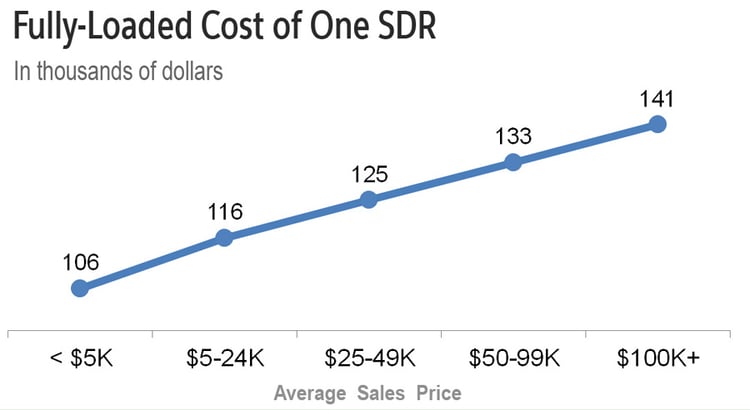
As a first step, I used our SDR Compensation Calculator to determine on-target earnings. I added in 1/8th of a fully-loaded Manger’s compensation (the average ratio is 1 Manager to 8 SDRs). On top of that, I estimated the spend on enablement technologies, skills trainings, healthcare, taxes, HR, and other benefits.

This gave me a range of $106-$141K for fully loaded SDR compensation. Now we know what one SDR costs. But the vast majority of companies don’t have a 1-to-1 SDR-to-AE ratio. Figuring that out is our next step.

fullyloaded-1.jpg

Question 3: What are the SDR-to-Account Executive ratios at different ASPs?

The average ratio is 1 SDR to 2.5 AEs. As sales price rises, SDRs tend to support more AEs as follows:

ratios.jpg

Question 4: By how much does additional AE productivity exceed SDR cost?

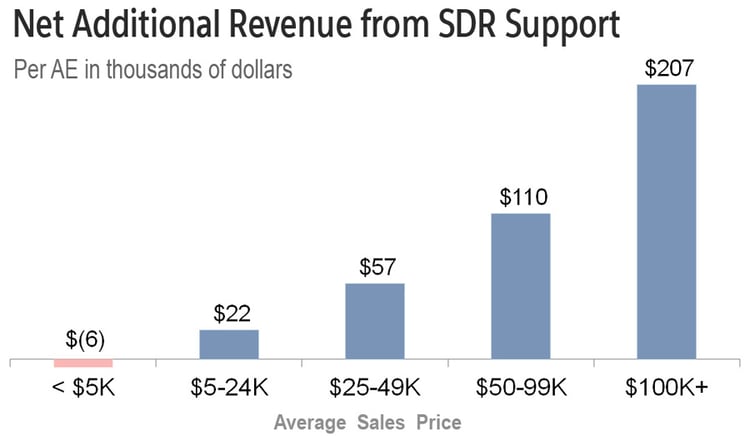
With this is mind, we are able to calculate the fully loaded cost of one AEs share of an SDR. If we take average productivity of an SDR-supported AE and subtract the average productivity of an unsupported AE, we have the gross revenue return. Next, if we subtract the fully loaded cost of one AEs share of an SDR, we have the net return. Here’s where this takes us:

net revenue from SDR

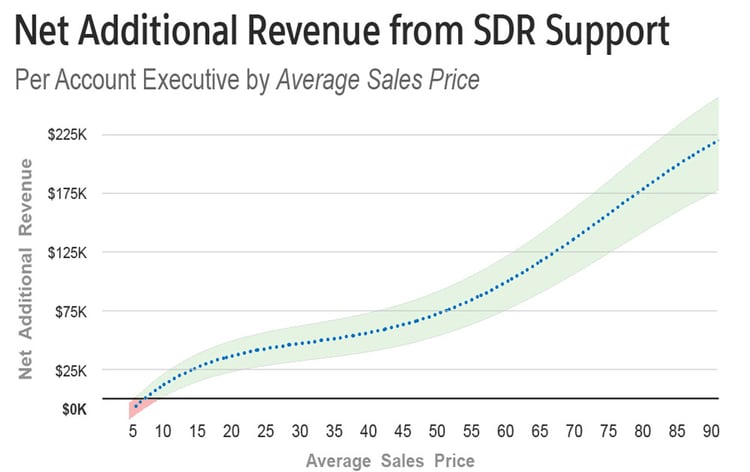
To this point, I’ve been using the average productivity gain from sales development support. Obviously, there is a ton of variation here. I re-ran the numbers at 85%, 100%, and 115% productivity to illustrate the range. 

NET NET: What’s the minimum ASP where sales development makes sense?

Our ranges (85%, 100%, and 115% productivity gain) intersect the no return line between $4K-$11K average sales price.

sales development net net by ASP

All things being equal:

  • An above average SDR team will have a positive return if ASP is higher than $4K
  • An average SDR team will have a positive return if ASP is higher than $8K
  • A below average SDR team will have a positive return if ASP is higher than $11K

I don’t want to dissuade anyone from building sales development. The lesson to be learned here is that the difference between positive/negative ROI at lower ASPs is how effectively you execute.

I’d love to hear how you’re measuring SDR return. Please let me know what you’ve seen in the comments.

18 May 16:50

10 Invoicing Tools to Make Freelancers’ Lives Easier

by Mary Long

Freelancers’ success depends on their organizational skills – both when it comes to finding/delivering work, and especially when it comes to getting paid. After all, “The cornerstone to getting paid is more effective invoicing.” So says freelance financial journalist Miranda Marquit – and she’s right.

There’s a vast array of freelancer-friendly invoicing tools out there, with a variety of features to please every solopreneur:

  • “Easy Pay” integration with PayPal, Quickbooks, etc.
  • Recurring invoices option/automation
  • Template customization and branding options
  • User-friendly phone app
  • Expense reporting
  • Time tracking tool
  • Internationally compatible
  • Price (of course!)

Here are 10 great invoicing tools that keep these features in mind:

  1. Due – Due has done, well, its due diligence when it comes to creating a service that is both sophisticated and intuitive for both freelancers and clients. You can customize just about everything from the design of the invoice to your payment terms, all while safely storing information in the cloud. The “freemium” service allows for 2 free invoices per month while the premium service is $49 annually, or about $4/month. Favorite features: Ability to track partial payments, and simultaneous invoicing for multiple contacts..
  1. FreshBooks – With 5 million users and growing, FreshBooks‘ cloud-based accounting service is a serious contender. They’ve got noteworthy features like a 24/7 “award-winning” support team, a newly designed iOS app, and recently launched card reader technology. They offer a 30-day free trial, and unlimited invoices for a starting rate of $12.95 per month, up to five clients.
  1. Nutcache – For their reasonable price and generous features, Nutcache is quite appealing. The list of included services is impressive, so you should have no trouble finding a package with the features you need. A favorite: Ability to attach and store documents with invoices and estimates. Nutcache’s caters to both individual entrepreneurs and enterprises – so feel free to explode your business. Free accounts offer the basics – recurring invoices and VIP support require a subscription, which starts at $5 per month.
  1. Hiveage – Hiveage, formerly Curdbee, offers unlimited customers and invoices in their free plan. Additional features, like time tracking, cost extra. Don’t like any of their packages? Create your own customized plan starting at $6.95 per month. Favorite feature: Ability to manage multiple teams and businesses from a single account.
  1. Wave – Wave has a niche with the little guy (independent contractors, sole proprietors, or companies with nine employees or less) and for good reason. Mentionable features include the ability to create and send recurring invoices, to see when invoices are viewed, to add messages to your invoices, and to do all of the above for multiple clients at once – for free. However, when it comes to accepting payment from credit cards, they charge the standard rate (2.9% + $0.30 in the US).
  1. Invoicera – Invoicera‘s notable features include ability to add custom fields to invoices, and set your own exchange rate (small business level). They also offer detailed invoicing reports, handy for budgeting. A free plan is available for subscribers with three clients or less, with pricing starting at $19.95 per month for larger client bases.
  1. Zoho – Zoho is easy to understand and free to use if you have 5 clients or less. For those who need more than invoicing, Zoho offers additional tool suites like sales and marketing and human resources – which can all be managed from one account, though each is priced separately. One nice invoicing feature is the option to send retainer invoices for advance payments. Paid plans start at $15 per month.
  1. Harvest – Harvest allows you to quickly create personalized invoices that are compatible with international currency and tax rates. The look of the invoices is super easy to read – for example, you can list your amount due at both the top and bottom of the page. Integration with Forecast, their time planning tool, lets you compare estimates versus actual costs to stay on budget. Four clients or two projects per month are free, with unlimited options available at $12 per month.
  1. Billbooks – With Billbooks‘ cloud-based accounting and invoicing service, you are given the option to pay for invoice “credits” as you go instead of paying a monthly fee. Their abbreviated invoice creation process can be done in less than 60 seconds. You also have the option to customize your dashboard to organize exactly as your brain desires. For up to three invoices per month, the service is free, with credit packages starting at $10 per month.
  1. Simplybill – With the motto “Experience the joy of billing,” Simplybill boasts they’re the “easiest to use” of all online invoicing services. That’s something for you to decide. They offer 40+ template designs, cloud-based storage, simple invoicing tools, and additional features starting at a cool $5 per month.

Freelancers have enough to do without cobbling together DIY invoicing options – especially with so many great tools to choose from. And who has time to sort this all out in any meaningful way? Or you can stick with handwritten tallies, of course. Though your accountant might kill you.

18 May 16:49

[Podcast] Episode 022: How to repurpose your best content for email and beyond

by Tom Tate

Like many marketers, I can get overwhelmed when it comes to producing high-quality content on a consistent basis. That’s why I find the idea of repurposing content so appealing.

If you’ve been following our blog, you’ll remember Monica’s post on repurposing content. I was so inspired by the ideas she compiled, that I wanted to share them with you, our podcast listeners.

In this week’s episode, I discuss the value of repurposing your content – and, more importantly, ways you can start doing it today.

In this episode, you’ll learn:

  • How to find your most successful content
  • Why you should give new life to your high-performing content
  • Where and how to repurpose content
  • An illustrated example on how a single blog post can lead to a new project
  • … and much more!

When you’re a wearer of many hats within your business, creating compelling content often falls on the back burner. (And frankly, it can feel like a chore.) The next time you find yourself under pressure to get new content out the door, try repurposing something you already have.

Take a listen above and let me know your thoughts in the comments.

Here are a few links that were mentioned in the post:

Click here to download this episode directly. (MP3)

Have a question about email marketing? Leave us a message at aweber.com/podcast.

The post [Podcast] Episode 022: How to repurpose your best content for email and beyond appeared first on Email Marketing Tips.

18 May 16:48

Types of Whiteboard Selling & the B2B Sales Process

by Peter Buscemi

Effective Sales Whiteboards are more than a narrative; they are discussion frameworks that support two-way knowledge transfer. While the framework is pragmatic, logical and flows in a step-by-step process, it is flexible to adapt to different situations that may present themselves. Think of the whiteboard selling narrative as a formalized discussion guide that a focus group moderator may use. There is thought to what one will cover, as well as how and when to cover the material. But there is also flexibility to allow for a natural, comfortable conversation with a customer in order to create a shared vision that progresses the sales cycle.

While there are several types of Sales Whiteboards, all must drive to specific next steps and actions that move the sales process forward.

Qualification & Discovery Whiteboards

These whiteboards are used to assess the value of a sales-accepted lead to determine if it meets the criteria in the qualification matrix to be accepted as a qualified sales opportunity. Qualification & Discovery Whiteboards should probe deep enough into a prospect to understand the existing business challenges and desired business outcomes. And, enough insight should be generated to determine if the value proposition can be realized by the prospect.

By uncovering data, information and insights about a prospect’s current business environment and desired business outcomes, Qualification & Discovery Whiteboards set up a Why Change or Solution Whiteboard.

Why Change Whiteboard

Relatively speaking, a small percentage of any market is aware of the need to evolve or transform how they run their business or their business model. This portion of the market is typically referred to as innovators or early adopters. However, even though they are ready, willing and able to buy, they represent only a small fraction of the marketplace.

Some organizations segment the sales department into new business and existing business, and sales reps into hunters (to acquire new logos) and farmers (to service existing customers). Hunters are typically required to provide new insights to customers or to show them new opportunities or new ways to look at old problems. This is so these customers become catalysts or evangelists inside of their organization to change the status quo. Why Change Whiteboards facilitate a structured conversational framework designed to push prospects out of the status quo and understand both the risk of inaction and the benefits of change.

Solution Whiteboard

Solution Whiteboards may be the most frequently used type of whiteboard in the sales process. Solution Whiteboards are a great way to establish a more in-depth dialogue and knowledge transfer around how one’s offering uniquely addresses the prospect’s business need. These whiteboards also display the perceived value or desired business gains and highlight where one has proven success helping customers in similar scenarios.

Solution Whiteboards build on the Qualification & Discovery Whiteboard and the why Change Whiteboard. A Solution Whiteboard specifically addresses what it is, how it is done and how one’s organization does if differently than anyone else — and why that is better.

The outcome of a Solution Whiteboard should be to lay out a shared vision on how one’s solution can uniquely address the prospect’s specific business challenge and provide the desired financial business outcomes.

Competitive Whiteboard

The objective of a Competitive Whiteboard is to clearly and authoritatively demonstrate how one’s solution is superior across a specific set of criteria that are key to the customer’s purchase process criteria. Presales technical resources and subject matter experts are typically included in the Competitive Whiteboard session as customers want to a head-to-head comparison of how one’s solution and organization stacks up to specific competitors.

Business Case Whiteboard

A Business Case Whiteboard is designed to address the customer’s concern for how the cost of the solution can both be justified internally and when the project ROI will be realized. This whiteboard is usually required to be quantitative in nature.

Closing Whiteboard

A Closing Whiteboard is used when the need for the solution has been established, one’s solution is the first choice and it is clear how the investment will more than pay for itself and in a short time horizon. However, someone higher in the organization usually needs to be convinced. Closing Whiteboards often take the form of a consolidated Solution Whiteboard and a Business Case Whiteboard.

Not every opportunity will require every type of whiteboard described above. Creating whiteboards does require time and effort. However, the direct selling model is an expensive way to acquire customers, so every effort should be made to increase both the velocity in the pipeline and the close/won ratio. Whiteboard selling brings a managed, repeatable process to the sales function that is very effective in new customer acquisition. It is a process based on insights, transferring knowledge and changing the status quo.

DOWNLOAD the Sales Pipeline Planning Model Instantly >>

18 May 16:45

3 Excellent Reasons You Should Walk Away from a Sale

by Will Humphries

Walking away from a sale is often counter to the natural instincts of a salesperson. However, any time the long-term return on investment isn’t worth the time and resource allocation, walking away is the best move.

We’ve all done it at some stage in our careers. You’ve spent a lot of time working hard on ensuring you have everything just right, and eventually it dawns on you that this has all been a waste of your valuable time. It’s infuriating right! Not that you’re annoyed with your prospect, but that you’re annoyed with yourself for not realising it earlier.

The trick is to identify common signals of an unprofitable buyer as soon as possible to exit the situation. Often this is the best course of action for you, your company, and the prospective client.

The Buyer is Relentlessly Price-Focused

It is common for a business buyer to enter a purchasing situation looking for the best price. A primary challenge for a value-oriented seller is to shift focus from price to quality, benefits and value.

I would usually say that if the buyer is still focused on price, it is because he or she doesn’t fully understand the value of your solution.

But when a buyer is unwilling to budge on price despite clear differentiation in the quality of your solution, walking away makes sense. It’s not only the fact that if you discount for this buyer once, he will expect it each time. It’s also important that the customer be a profitable one for your company.

Instead, it is usually better to let that buyer experience the drawbacks of a low-end solution as there is always the possibility that he returns to you more aware of the quality-price correlation.

There is No Urgency

Perhaps even more challenging for salespeople is walking away when you feel a sale is still possible. However, that is precisely what is necessary when a buyer is in no hurry to decide and faces no sense of urgency. No amount of coercing from you is going to change their mind.

Willingness to buy is an important qualifying criteria. In selling, you can lean on a sense of urgency by emphasizing the risk-aversion benefits of a swift decision. It all depends upon what industry you work in and your standard sales cycle. As soon as you sense that a buyer isn’t looking to decide soon, turn your focus to more urgent opportunities.

Two good early questions are, “What’s your timeline to make a purchasing decision?” and “When do you plan on having this project up and running?” Ask additional questions about sense of urgency and always ask who else will be involved in the process. If there is no rush, a decision isn’t likely to be coming anytime soon.

Mark it down to return at a later date, but walk away for now.

Walk-away-from-sale

To walk away, your salespeople must think strategically and understand the big picture. Short-sightedness creates transactional approaches.

You Can’t Meet the Requirements

In some cases, your solutions simply don’t align with the needs and requirements of a buyer. Ideally, you avoid this selling situation altogether because of effective prospect targeting. However, sometimes buyers seek you out or you don’t detect concerns until an initial needs assessment.

When you don’t have a solution that meets the buyer’s requirements, there is little to gain by being dishonest or forcing the sale. You could create a transaction, but after the customer realises the solution doesn’t work for them, he will feel ripped off or annoyed, and potentially dissuade others from meeting with you. This can be more damaging for you in the long run.

If a buyer needs a delivery timetable that you can’t meet, don’t say that you can. Explain in writing what you can do and invite him to return if he isn’t able to get that timetable met. Due diligence is always important in this case.

Conclusion

In competitive industries, profitable sales only result when you build long-term relationships that escalate in value. Creating unfavourable transactions to convert deals takes time away from better long-term opportunities.

If you detect a relentlessly price-focused buyer, or one who is unwilling to make a commitment, walking away preserves valuable time and resources. Walking away when the solution doesn’t fit is the right move as well. Above all, never feel bad about walking away from a sale. If your gut tells you it is the right thing to do, it probably is.

18 May 16:44

6 Reasons Tech Sales Jobs Are Hot Right Now

by Kayla Kozan

paris-hilton

1) The Image (Tech Sales Are Sexy Again!)

If you weren’t glued to the TV Monday nights like approximately 6.9 million (yes, million) Americans, you may have missed that this year’s bachelor, Mr. Ben Higgins, is a salesperson at a SaaS company. It would appear that software sales are sexy again! For the reasons above and below, technology sales roles are attracting a more diverse set of talent than ever before. A career once plagued by such an unappealing used-car salesperson stereotype, is starting to turn heads. Universities are building Sales specializations into their curriculums, there are more women than ever in the sales force and the value of a sales job is skyrocketing. Look at you go!

2) Job Satisfaction

Tech sales positions are very unique and come with a ton of perks and benefits that are hard to come by in other careers. With the ability and flexibility to create your own work/life balance, salespeople often report among the highest in job satisfaction research. Tech sales also offer the autonomy to own your territory, making the career very entrepreneurial in its own right.

3) The Demand

Sales is the lifeblood of any company. On average, the sales team is about 30% of the total headcount for larger companies and 40-50% for smaller companies. According to Gartner’s analysis, the sales force is more important than ever because customers are searching for a trustworthy salesperson to help them through their buyer’s journey. Notably, believe it or not, direct interactions with salespeople are still the most influential activity for B2B buyers.

influence reasons

Companies need salespeople and salespeople need something to sell. And that’s not going to change any time soon. In fact, a recent CareerBuilder survey found the top department that companies are increasing their headcount is sales: 36% of companies surveyed planned to increase their sales hiring. Things are looking good!

4) Career Opportunities

Congrats! You’ve got the most versatile career out there. An analysis of millions (yes, millions!) of LinkedIn profiles found that sales is the most common career transition. In a time where individuals are switching jobs more than ever, it is comforting to know that your industry is so transferable. Also, a foundation in sales can lead to some pretty impressive career paths. Did you know 20% of Fortune 500 CEOs started out in sales roles? It’s true. And you can use that one at the water cooler!

5) The Variety

“Tech Sales” often brings up a mental image of a call center, hundreds of salespeople cold calling and trying to sell some outdated software. This could not be further from the truth. Especially in 2016, the variety of products and services that fit under the “tech sales” umbrella is almost unbelievable. The emergence of the SaaS business model has paved the way for hundreds, even thousands, of tech companies to take their piece of the pie. By specializing in technology sales, you are opening yourself up to an unbelievable variety of sales jobs. Whether you find yourself with a classic IBM (one of the top 10 highest paying sales employers), or an attic-based startup entering the fintech market, there will never be a shortage of products and services to sell. You may find yourself selling a new way of doing business.

6) Salary

Let’s be honest, you’re making bank. A technical skill set and nice commission check go hand in hand. Selling isn’t easy, especially tech sales. A job that requires such a versatile set of skills to be successful makes tech salespeople among the highest paid people in a company. According to The Bridge Group’s 2015 survey, the average base salary of a B2B inside sales rep is $60,000 with an average on-target earnings of $118,000; more than twice the median for all other professions. Bonus: data from the Labor Department found that tech sales enjoyed the biggest increase in compensation compared to all other roles: a 6.2% increase. Not bad, not bad at all.

Whether you are considering a tech sales role, or finding the love of your life on reality TV, a job in sales tech is hot and shows no sign of cooling down.

18 May 16:44

2 Questions Every Sales Rep Should Ask Themselves Before Picking Up the Phone

by jeff@mjhoffman.com (Jeff Hoffman)

two-question-sales-call.jpg

When sales reps are prospecting, they often get wrapped up in their inner dialogue:

  • How should I phrase my value proposition to get it just right?
  • Is my elevator pitch up-to-date?
  • What objections am I likely to hear, and how will I handle them?
  • How am I going to build rapport with this contact?

In sales, it’s never a good idea to get too deep into your own head, but it’s particularly dangerous when prospecting. By obsessing over what they’re going to say and how they’re going to say it, sales reps often forget that the entire focus of a sales call is on the buyer -- not the seller.

To bring the focus back where it belongs, I advise reps to ask themselves the following two questions before they pick up the phone: 

  1. Why you?
  2. Why you now? 

These questions might seem simple, but they hold the potential to dramatically change your prospecting approach -- and results. 

Let’s dissect the first question. Another way of thinking about “Why you?” is “Why are you reaching out to this particular person as opposed to somebody (anybody) else in the organization?” If you don’t have a compelling reason, it’s time to go back to the drawing board.

And to be clear, the fact that the contact has a certain title does not qualify as a compelling reason. Behavior that indicates the person might be interested in your product or service does. (If you’re not following your prospects on social media, it’s time to start.)

The second question has to do with timing. Why are you calling this particular person now -- as opposed to last week, next month, or any other time?

The fact that you prefer to do your prospecting on Tuesdays is not a good reason. A trigger event that just happened in the prospect’s world that creates a need for your product or service is. (Never used Google Alerts? Never a better time to set them up.)

The one idea I always try to impart to sales reps seeking to improve their prospecting skills is that above all else, people want to be heard. Buyers aren’t dumb. They know when they’re just a name on your list. By researching prospects thoroughly before you reach out to them and making sure you have a dynamite answer to both of the questions above, you make it clear that you’re interested in them as a person and what they have to say. And that’s what good selling is all about. 

Ready to take your approach to prospecting to the next level? Come see Jeff live in Boston on 5/23 or San Francisco on 6/9 for his award-winning Why You? Why You Now?™ ½ day public workshops.

HubSpot CRM

18 May 16:43

The Need-to-Know About Bottom-of-the-Funnel Marketing Content

by Dan Trefethen

05.10.16BottomFunnelContent-Feature_0.png

Do you have that right content for the bottom of the funnel?

The sales funnel and content. Content and the sales funnel. The two marketing entities are more linked now than ever before, and their relationship is generally made of three different categories.

  1. Top-of-the-funnel content
  2. Middle-of-the-funnel content
  3. Bottom-of-the-funnel content

Top-of-the-funnel content is where your marketing creates awareness, brand identity, and new leads. It’s designed to have the most reach and cover a broader introduction to a product, service, or company.

Middle-of-the-funnel content is where you continue to nurture leads, score them based on engagement, and identify their specific interests in the product. This content is largely for prospects already in your database with known interest.

These two categories get a lot of attention from content creators and demand gen teams tasked to produce as large a number of MQLs (marketing qualified leads) as possible.

However, the final stage of the sales funnel could be considered the most important, because this is where your content actually turns a lead into a customer.

This post will walk through the nuances and different approaches to making high-converting content for this important part of the buyer’s journey.

Understanding Bottom of the Funnel Content

Bottom-of-the-funnel content is marketing material that gives your highly-qualified lead that extra-nudge, the final persuasion, the specific answers to any lingering questions of “is this the right product/ service for my needs?”

Depending on individual program definitions, the bottom of the funnel either converts the lead into a customer (most of the time), or converts the MQL into a sales qualified lead. Either way, the content for this part of the buyer’s journey needs to be both varied and specific.

Varied

Different buyers will be looking for different information personal to their roles and organization’s needs. There can’t be a “one size fits all” piece of content for the bottom of the funnel like there might be for the top of the funnel. Rather, the bottom of the funnel needs many different pieces that can be culled from depending on the prospect.

Specific

The content subjects need to be more granular and close-up than previous higher-funnel content. Think of it as a microscope’s different focuses: 5x view is top of the funnel, 10x view is the middle, and 30x view is the bottom – really looking at how each part of the product works and what it will do for the buyer.

How Do You Know a Lead Is at the Bottom of the Funnel?

Executing a content plan where the entire buyer’s journey is covered requires some specific structures to be in place. Without these structures, you’ll be guessing at who the prospect is, what they are looking for, and if they are even a good fit as a client.

Best practices to successfully knowing where a lead is in the funnel include having the four below pillars.

1. Buyer Personas

Identifying both who your ideal targets are in a broad capacity, and within that broad target – what individual roles make up the team so you know to whom you’re talking and targeting. Knowing this, you can start mapping out the ideal content for each persona within the organization, and when they may want it.

PersonasAndContent.png

2. Marketing Automation

According to InfusionSoft, if you allow more than 30 minutes to pass before following up with an engaged lead, that lead is 21x less likely to turn into a sale.

Having a strong marketing automation system is crucial to connecting your personas with the right content when they are wanting it.

3. Lead Nurture and Scoring Program

Ultimately, this is how you identify a prospect’s position in the funnel. Using your automation system and your personas to guide your prospects as they engage in your content allows you to do two crucial things:

  1. Send increasingly more relevant content based what they have been looking at.
  2. Learn if their needs and organization are the right fit for your product.

If your target buyers are companies with 500 – 1000 employees, then a lead with a company size of 50 employees may not be a good fit.

Even if a lead seems highly engaged with your content, if they are not a good fit as a client you may end up wasting sales efforts, or having quick churn if they become a customer.

“61% of B2B marketers send all leads directly to Sales; however, only 27% of those leads will be qualified.” – MarketingSherpa

4. Customer Relationship Management (CRM)

Once you collect lead contact information and engagement data – this is where it all should live so that your sales teams can have visible insight into qualified leads and current customers. Taking the initiative at the bottom of the funnel is key.

According to Mckinsey, three in five leads at the bottom of the funnel do nothing simply because it’s easier than making a decision.

Subjects and Content Types the Customer Wants

As stated in a post by Kapost, “bottom-of-the-funnel content should prove the value of purchase, and explain how the products and services will be implemented within the organization.”

With that being said, what subjects and content types should make up the bottom of the funnel?

As we already went over, the subjects should be whittled down to highlight very specific functions of the product depending on the lead’s interest. These can include:

  • How-to videos for integration or setups
  • Step-by-step guides for certain parts of the product
  • Case studies highlighting the results of companies with similar goals
  • Use cases that illustrate how this product or service solves x,y, or z
  • ROI calculators that generate individual results based on variables given by the lead
  • Detailed, product-focused blog posts
  • Sales demos

As much as possible, these pieces of content should be made to be easily passed along to internal team members who have a part in the decision-making process.

If your main contact and supporter is a content creator but has to get sign off from their CMO or a more finance-focused team member, that contact will want to have material handy, and easily presentable, to make their case. This tip especially supports the case for ROI calculators, as they present real numbers for the investment.

Sales Teams Want These Things Too

Not only is bottom-of-the-funnel content used by your marketing team to nurture and convert the lead, but once your sales team is working with that lead – they, too, benefit from strong content.

Having an easily navigable resource gallery of customer examples and case studies aids your sales team hugely when they are on a call with a prospect and learning about their specific needs.

Sales Enablement Content

Not to keep harping on the ROI calculator, but it’s a great example of sales-enablement content.

Imagine a member of your sales team is on a call or a demo and they really want to articulate the investment value of the product – what better way to demonstrate than by showing vs. telling. With a ROI calculator, the prospect could give their specific metrics, and see an individual outcome based on those numbers right there on the call.

Another scenario to think of is the “live chat” scenario.

Not all bottom-of-the-funnel leads come from a slow drip campaign, passing through the entire funnel. Some leads skip all those steps, go to the website, see a live chat option, and request a demo right there on the spot. I did that exact thing two weeks ago.

With a fresh lead going directly to sales, it’d be beneficial to gather some key facts about the lead before the demo.

Having a short, but powerful piece of content like an interactive assessment or survey to have that lead engage with before the demo allows essential qualifying data to be learned and helps shape the call focus and depth.

Content tip: Make the content fun and light, or even seasonal. Check out SnapApp’s “Bachelor” themed assessment below to see how to grab key information in an engaging way.

18 May 16:43

LinkedIn Mobile Apps: 5 Minutes Can Make a Big Difference

by Kurt Shaver

ipadDid you know that there are ten (10) LinkedIn mobile apps available for different purposes?

If you are surprised there are so many, you’re not alone. But given LinkedIn’s status as the premiere social network for business and the fact that more than 55% of its traffic comes from mobile devices, you should take some time to get to know them.

Here’s the list of current LinkedIn Mobile apps with the description of what it does:

1. LinkedIn Mobile – Get news and info that matter for your professional day, a daily brief on what’s happening in your network, and a quick way to reach out and keep in touch.

2. LinkedIn Job Search – Search for great jobs. See who you know. Apply in one click.

3. LinkedIn Lookup – The best tool to quickly find, learn about, and contact coworkers. Find coworkers with skills you need to get your job done, or those who have common backgrounds to build new relationships at work.

4. Lynda.com – Learn new skills anytime, anywhere. Get unlimited access to expert-led courses that help advance your career. Start learning on the go with the option to download courses for offline viewing.

5. LinkedIn SlideShare – Learn about any topic quickly from over 18 million presentations, infographics, and videos by top professionals – right at your fingertips

6. LinkedIn Groups – Get into smarter conversations. With LinkedIn Groups, you have access to like-minded professionals and can learn from their experience. It’s like sitting down with the experts in your industry.

7. LinkedIn Pulse – Your daily news, powered by your professional world. Pulse delivers timely and tailored news you need to know, saving you time. See what your peers are reading, and be informed with top industry news.

Premium Apps

8. Linkedin Recruiter – There’s never been an easier way to find and respond to talent on the go. Search and review profiles of potential hires, respond quickly to candidates, and stay organized with projects.

9. LinkedIn Sales Navigator – Find and engage the right prospects with LinkedIn Sales Navigator, wherever you work. Find leads and accounts in your target market, connect or send messages, and get real-time updates.

10. LinkedIn Elevate – Build your reputation by sharing smart content. Discover interesting articles from key people at your company. Share what you think is important – then measure your impact.

Some people have asked whether LinkedIn has too many apps which is a bit like asking if a restaurant has too much choice on its menu. If you don’t want to use them you can stick with the main app – which is still great for the 15 minutes you’re waiting for a plane, the 5 minutes you’re sitting in the car wash, or that 10 minutes you’re left waiting for somebody to meet at lunch.

The others are there to use if and when you need them. At some point, you’re going to need one or another, preferably the recruiting app rather than the job search one.

Aside from the ability to do something productive with that five minutes at the airport, the main app’s interface also offers some great options.

At the bottom left of the app there’s an icon that LinkedIn calls the ‘Me’ view. It provides a quick view of who’s interacted with your content. Another icon is called “My Network”. It is similar to the trigger alerts from the browser “Keep In Touch” feature. I recommend to all my clients that they spend 5 minutes a day using this feature.

This is a tremendous way to just stay in touch with your network. It keeps you up to day on connections’ work anniversaries, mentions in the news, if they’ve been promoted or even if it’s their birthday. And so in just a few seconds you can wish happy birthdays, congratulations on the promotion, or mention that you saw their name in the news. You can do that for four or five people in about a minute so it’s a fast relationship builder.

Watch this video to see how to leverage LinkedIn Mobile.

18 May 16:43

5 Ways Understanding MarTech Can Make Your Career

by David Crane

5Reasons_v0.1.pngTechnology is now pivotal to the marketer’s trade – and has been for some time. And marketers that understand the software and systems available to them (and how they’re continuously evolving) put their companies and careers in a much better position.

This should be self-evident. After all, we’re surrounded with conversations about the expansion of MarTech. Yet, much of this discussion focuses on the changes in the industry itself, rather than individual technology use cases. Researching the latter is increasingly important.

Treating marketing technology (and MarTech vendor) research as a regular part of the job will benefit you and your organization in several ways:

1. Marketing alignment will come easier

For decades, we’ve understood the importance of marketing-sales alignment. In the last few years, however, marketing’s importance has grown substantially, resulting in increased responsibility, bigger budgets, and a division of labor into intra-marketing teams that have in some cases become just as distinct as sales is from accounting.

Each of these individual marketing teams has its own set of systems and tools (often overlapping with the capabilities of adjacent teams’ tech). A seamless flow of data between marketing teams provides myriad benefits, hence why tech integration is so important.

But unless you understand all the technology used by adjacent teams and the values they create, you’ll never achieve the alignment necessary to benefit both your team and the org overall.

On the other hand, if you’re able to suggest initiatives that fix data chokepoints, increase procedural efficiency or boost marketing performance in general, you’ll set yourself apart.

2. It’ll help you make your boss look good

The CMO, Marketing VP or even Chief Marketing Technology Officer depends on the feedback from divisional specialists – marketing ops, demand gen, customer experience, media, etc. (See the interview with Bala Kudaravalli, who specifically states how he checks in with teams on a daily basis).

As one of these sources of feedback, you obviously need to understand the tech you personally use, but the more you can place your insight in the context of the entire MarTech stack the more valuable your information will be to your boss and other marketing execs. And we all know, helping your boss look good is good for your career.

3. You’ll be better prepared for new trends and industry shifts

Areas of growth in specific MarTech categories affect marketing as a whole. This can play out in numerous ways. Think of how social (typically a digital marketing team responsibility) has affected marketing automation (a marketing ops or demand gen responsibility). Or how marketing ops’ adoption of predictive analytics can affect content creation.

In general terms, new technological developments at one end of the marketing spectrum (front-office customer experience to back-office ops) almost always have a ripple effect that carries all the way to the other end.

This effect may be delayed, but the more prepared you are, the easier it’ll be to make adjustments to boost your personal, team and organizational performance.

4. Demand Orchestration will come easier to you and your organization

If you work in demand generation, this reason is especially important for you. As Scott Vaughan wrote in a recent blog post:

“Many of the valuable insights gained from MA- and CRM-enabled lower-funnel activities (lead nurturing and scoring, website personalization, conversion tracking, predictive analytics, etc.) aren’t actionable due to the lack of integration between these activities and top-funnel lead generation. Marketers simply can’t make their insights pay off when the funnel’s data sources remain disconnected….As the next critical layer residing on top of MA and CRM, Demand Orchestration seamlessly applies process automation, systems integration, program execution and data governance to efficiently generate leads, feed pipeline and create customers.”

Obviously, it’s difficult to enable the required tech integration and process alignment throughout the entire funnel (and the media that fuels it) without understanding each system involved. Such understanding will become increasingly expected as marketing orgs endeavor to jump from demand marketing stage to demand orchestration.

Demand_marketing_sophistication_curve-1.png

5. Recruiters will be more attracted to you

You may work in marketing operations and have your marketing automation platform down cold. But when you apply for another position, how do you expect you’ll match up against another candidate who has experience with content marketing systems and media buying software, can speak the language of numerous marketing teams, and will contribute innovative ideas on ways to leverage or integrate systems throughout the organization?

There’s a balancing act between becoming “Jack of all, master of none” and the person who specializes beyond any transferable abilities. But just as Paul Sebastian explained in his article (“5 Technology Skills Every Marketer Needs Today”), marketers of every role will increasingly be expected to understand multiple technologies.

An in-depth understanding of the MarTech industry isn’t easily achieved, but it’s worth the effort. Fifteen minutes of research every day is a good start. Pick a section of the Chiefmartec.com supergraphic, peruse a few of the included vendor websites and read a white paper or two.

If you do this every day or even just a few times a week, your knowledge, value and confidence as a marketer will compound like interest. Your organization will reap the rewards as will your career prospects.

Demand-Generation-Reimagined-White-Paper

18 May 16:42

Quick & Easy Ways to Improve Lead Conversions

by Ryan Malone

quick_and_easy_ways_to_increase_lead_conversions.jpg

Traffic is up, but lead conversion numbers aren’t improving. The end of your reporting period is coming up fast, and you need a quick fix for jump-starting lead conversions. What’s a marketer to do?

Here are some of our favorite quick and easy ways to improve lead conversions on your website:

Choose offers that answer visitors’ next logical questions

Effective lead conversion opportunities provide site visitors a logical next step to their task at hand. So, it goes without saying that ensuring close alignment between page content and the CTA that appears alongside it is a great way to increase conversion rates.

When thinking about what offers to place alongside content, put yourselves in your visitors’ (and personas’) shoes: what would they want to learn about next? What questions are they left with? What is the next logical step they’ll need to know about on the way to purchasing your product or service? Choose content offers that align with the answers to these questions.

Generally speaking, the conversion opportunities you provide visitors should accomplish at least one of the following:

  • Provide an answer to a question posed by page content
  • Take a deeper dive into the topic discussed in page content
  • Give a broader view of how page content fits into the big picture
  • Provide specific solutions or solution strategies to the problem or issue discussed in page content

Do all your offers align with the content on the page where they appear? If not, consider swapping out offers or modifying CTA text to better match page topic.

Place best (and well-aligned offers) in high traffic locations

No, this doesn’t mean at the top of your homepage. Instead, take a look at which of your past blog posts have generated the most traffic and what their conversion rates are. Any post with a conversion rate below 2-3% deserves a new CTA – one specifically aligned to the topic of the blog post. While you certainly don’t have to create a new offer for each of these posts, it’s worth re-doing the copy on the CTAs for some of your more successful offers to better align with the topic of the post you’re optimizing.

Got a post about SEO trends for 2016 and an offer about on-page SEO best practices? Instead of using your generic “Get the On-Page SEO Best Practice Guide,” consider creating CTA copy along the lines of “On-Page SEO In 2016: The Best Practices.” This alternate wording creates a more direct link between the blog post topic and your offer, and can help to increase lead conversions on both the offer and the post. (Just make sure you update your landing page copy to align with your new CTA positioning, as well.)

Match CTA, Landing Page, and Form Messaging

Don’t bait-and-switch your visitors: make sure the copy on your landing pages is as closely aligned as possible with the actual title of the offer you’re hoping they’ll download on the form. This helps to build trust, simplifies the user experience, and makes it more likely visitors will feel comfortable providing their personal information on the form in exchange for your offer.

While it’s important to keep messaging as aligned as possible, don’t do this at the cost of a well-designed CTA or attention-grabbing text. If your offer title is very long, tweak its positioning on your CTA so as to still garner attention without sacrificing a clear and effective design.

Here’s an example of a well-aligned conversion path that uses a variation on the offer name:

cta_lp_alignment_increase_conversion_rates_post.png

A/B test landing page headlines

Not sure how to best position your offer? Another quick and easy way to improve lead conversions is by A/B testing landing page headlines. Create two versions of your offer landing page that both use different headings and page titles, then see which performs best (or, use a built-in landing page testing tool like HubSpot’s).

ab_testing_landing_page_hubspot.png

Once a winner has been determined, deactivate the version with the lower conversion rate. If there isn’t a clear winner or your overall conversion rates are still low, try running your test again with new copy. Test things like positioning the offer for a particular persona, showing the offer title versus benefits of downloading it (i.e. “Executive Guide: Increase Occupancy Rates in 2016” vs. “How to Increase Your Occupancy Rates in 2016”), and so on.

A/B test CTA copy

A/B testing isn’t limited to landing page headlines. To quickly and easily improve lead conversion rates, try testing alternatives to your CTA copy, too. Tweak everything from positioning of an offer (i.e. “free guide” vs. “free eBook” vs. “complementary guide” vs. “complementary eBook”) to the title of the offer itself, to the button design – just be sure that the CTA ultimately still aligns with the offer.

One of the telltale signs of a poorly aligned CTA and landing page is a high click-through rates coupled with a low form submission rate. If you’re seeing this in your numbers, evaluate both the CTA and landing page copy to see where improvements can be made.

Reassess Form Length

Another reason you may see high call-to-action click-through rates coupled with low form submission rates on your landing pages is excessive form length. Your CTAs may be attention-grabbing and your landing page copy compelling, but if your forms are disproportionately long relative to visitors’ perceived value of the offer, or if you’re asking for information they deem too “valuable” (such as phone number or mailing address), visitors may balk at filling out your form and taking the final step to become a contact.

While there isn’t a hard-and-fast rule for how long is too long for a form, length should be correlated with the “value” of the offer. This means that your blog or newsletter subscription landing page should have substantially fewer form fields (say, no more than three to four) than a free product trial page, which would likely have closer to seven to eight (or more) fields. Also keep in mind that not all form questions are created equal: visitors hold some, like mobile phone number or home address, more sacred than others and will be less likely to fill out forms that require this type of information.

Considering shortening your forms? Here are some tips:

  • Make sure each question is truly valuable to collect. Just because you think you might need visitors’ company names down the road doesn’t mean you need to ask for it on every form. If you’re unsure what information is most important, ask your sales reps what’s most valuable for them.
  • If a question is worth including on a form, then it should be marked as a “required” field. This goes both ways: if something isn’t worth making required, then it’s probably not worth including on the form.
  • Use progressive profiling to ensure you’re not asking the same question over and over – and are continually collecting increasingly detailed information about contacts.
  • Auto-fill form fields with information users have already submitted. This cuts down on the total number of fields returning contact will have to fill out on the next form they submit.
  • Avoid “multiple select” checkboxes or radio buttons whenever possible as they make forms visually appear longer than they actually are.

Use Mobile Forms

Notice most of your landing page form submissions are from desktop browsers? Your visitors on mobile phones may be bouncing because your landing pages aren’t optimized for them.

While you can use media queries or contextual marketing to create mobile versions of the entire page, a quick and easy way to accommodate users on their smartphones or tablets is to create mobile-friendly versions of your forms. Try to use no more than three to four form fields, and stay away from things like checkboxes or radio buttons, which can be hard to select on small screens.

If you’re using HubSpot, mobile-friendly forms (and landing pages) are easy to set up with Smart Content:

mobile_forms_increase_conversion_rates_post.png

You can also customize content shown to visitors on tablet-based browsers, as well.

What are some of your favorite, fast, and effective ways to jump-start lead conversions? Let us know in the comments section below.

Guide to generating more leads online

18 May 16:42

The Quick Guide to an Effective SaaS Inbound Marketing Machine

by Aaron Riddle

saasinboundmarketingmachine

You’ve been pushing your idea out to the masses for months (maybe even years in some cases) of your X idea that’s going to solve Y, Z and maybe a few other things for your customers. Your product is developed and now available to the masses, things are going well from a growth perspective (albeit not at the level you are expecting). The search is on to answer the following question: “How come people aren’t as excited about our product as we are?”

You are a modern-day SaaS organization living with modern technology and doing your marketing the wrong way.

Inbound Marketing, first coined in 2005, has grown from being a “nice to have” to an “absolute need” for all types of organizations, especially within the SaaS landscape. With inbound marketing tools, your marketing efforts can be precisely tooled to your target audience, help them progress down your sales funnel and turn them into brand advocates for your organization over time.

While all SaaS organizations are at different stages of inception and market shares within their industries, here’s a quick guide to reference to getting your Inbound Marketing efforts started on the right path:

1. Setting Goals

All of your marketing efforts (especially with inbound) begin with defining your marketing goals to match your business objectives. A great place to start when developing these types of goals is to use SMART goals.

When getting started with SMART goals, keep the acronym in mind at all times:

Specific – Be as specific as possible with numbers and due dates
Measurable – Is this something that is measurable in your organization currently?
Attainable – Is this doable, but also helps to move the dial?
Realistic – Is this realistic with other initiatives going on?
Time-Bound – Has a due date in place

With a firm foundation and a grasp of your business goals, your marketing efforts can begin to help facilitate these goals with ease over time.

However, before any of these goals can be sprung on your teams, you need to begin looking at the current alignment of your marketing and sales staff and identify potential gaps in your current structure.

Aligning Marketing and Sales

Take a second and look at your marketing and sales staff as it sits today. Are they in alignment with one another on their current initiatives? Are they also aligned to the same business goals?

Nothing is more crucial for your inbound marketing efforts than to a sales team on board that gets it and sees the results coming from your staff.

Here are some quick ways to better sales and marketing alignment:

  • Have a formal service level agreement (SLA) in place among your staff. Ensure that both teams are held accountable and everyone is on the same page when it comes to marketing and sales goals. 59% percent of marketing teams surveyed admitted that they do not have an SLA.
  • Define rules and criteria for leads defined as Marketing Qualified (MQL) and Sales Qualified (SQL). 40% percent of those same organizations had yet to define these rules and criteria.

2. Content

blogging-boring-industries

Your goals are now in place and are better aligned amongst your entire organization, now it’s time to look at your content and aligning it to your buyers journey.

Content is the key to any effective inbound marketing strategy and it’s no wonder that a lot of organizations are putting out a vast amount of content these days, making it much more difficult to stand out from the rest.

Brainstorm some content ideas with your team that help to align to your personas during each stage of the buying cycle (Awareness, Consideration, Intent). By starting there and putting your content ideas into each bucket, you can fill in gaps within your content on your website. Better yet, you can recycle some of your previous/high-performing content and repurpose it to get you started on filling gaps quickly in your buyer’s journey.

HubSpot has a great list of content creation tools and resources to help get you started.

3. Resources

Now that your goals and content are all aligned, now you need to better understand who is going to be executing on these objectives. In order to allocate these resources effectively, you need to understand your current budget and if you have the headcount to do so internally, or outsource some of the work off to an agency or freelancers.

Allocating Budget

One of the most strenuous parts of a marketer’s job is allocating budget to their projects. Trying to explain “We need more budget” to marketing (especially with unexpected growth numbers) can be a tough hill to climb, especially in budget-constrained startups and small businesses.

To bringing everyone full circle onto the new initiatives, it’s safe to say that you’ll need a budget that’s ready to be allocated to your new inbound marketing efforts.

In-House or Outsourced Resources?

Within most SaaS startups, there’s a marketing person up to their heels in additional tasks that keep them from their original objective. When looking at Is it something that can be done in-house by internal staff or do you outsource some of these efforts to agencies or freelancers?

HubSpot’s State of Inbound 2015 states that agency partners and freelancers are on the rise for content creation, helping to keep their staff focused on thought leadership and other areas of focus.

4. Tactics

Resources are now in place, and now it’s time to develop some tactics to execute on all of your initiatives.

With your content ideas all lined up and gaps have been discovered in your buyer’s journey for certain personas, you can add tactical measures to your marketing content offers. social media, lead nurturing, conversion paths and much more is needed within your tactics to sustain and push forth a great offer to your audience.

Looking to get your inbound marketing tactics up to speed? There’s a wide range of tools out there to help expedite your efforts.

5. Analytics/Results

marketing-team-characteristics

Your tactics are being executed and the results are starting to take shape. What now are your next steps? What should you be looking at and what should you improve on?
Take a look at a couple of important metrics to measure effective growth:

  • Marketing Qualified Leads (MQLs): While Marketing Qualified Leads may not be as important to your upper management as Sales Qualified Leads (SQLs), this still is a valuable metric for your marketing team to know what’s working and what’s not within your certain channels and offers.
  • Visit to Lead Conversion Rate (VTL): With inbound marketing, you want to know that visitors are converting to the premium content you are developing. Take a look at this metric on the landing pages of your offers and look to increase them if they are below 20%.
  • Opportunities Generated from Marketing: At the end of the day, your team is going to look at how marketing is adding to the sales funnel of your organization. By having the source information to each lead and nurturing them up to opportunity status, you have a wealth of information to further add additional content and strategy to increase your sales opportunities.

What other tips or steps would you add to this guide? I would love to hear your thoughts and comments below!

18 May 16:42

What Are Customers Looking for at the Bottom of the Funnel?

by Kaliegh Moore

05.17.16BottomFunnelCustomers_0.png

At the bottom of the marketing funnel, your leads start taking a hard look at a very specific set of questions and concerns. In order to convert, those questions need to be addressed – and addressed quickly.

Because of this, it’s important to plan out a strategy for addressing those needs at the bottom of the funnel. You’ll want a plan of action that helps you move those low funnel leads right on through to the customer side.

So what are customers looking for at the bottom of the funnel, you might be wondering? In this post, we’ll cover five key areas that address their common questions and concerns.

1. Social Proof That Addresses Their Concerns

Low in the funnel, your leads want clear evidence that proves you can deliver on the things you promise. And they want to hear that from someone other than you. Enter social proof.

Increasingly, review sites like G2 Crowd are becoming more and more browsed and relied upon for low-funnel leads. This gives them the general experience of current or past customers. Make sure you encourage great customer successes to leave their reviews on these sites.

Other social proof comes in the form of testimonials, case studies, and results produced for clients. They not only provide concrete evidence that you can provide real, tangible value for clients, but it also allows them to see for themselves what past customers have to say about working with you.

Take this example from Super Spicy Media, a social media management company. They leverage social proof in the form of testimonials to show how they addressed customer concerns and produced positive results. Promoting these assets to leads in the bottom of the funnel gives them one more reason to stop worrying and to take action.

Image source

2. A Discount or Deal to Overcome Price Objections

For other bottom-of-the-funnel leads, it’s a pricing issue that’s keeping them from converting into a customer. They see the value of what you can provide, but they’re not convinced it’s worth paying the full price tag.

For these customers, a discounted period or free trial can allow them to get hands-on experimentation with your product or service (and to see for themselves the many benefits of your offering.) During this time, customers come to realize the value of the investment in a more long-term relationship with your product.

Unitrends offers cloud-based backup services to enterprise clients, and they use a 30-day free trial to get bottom-of-the-funnel leads interested in using their service for the long-term. Bonus: In collecting form field information up front from mid to low-funnel leads, they ensure they can follow up with them when the time comes and help them convert.

Image source

3. Content That Proves Value Within Their Niche

Potential customers also want to know that you can help them address concerns that are unique to their individual niches. For example, a hair salon owner exploring appointment software wants to see some content that indicates other hair salons are successfully using this particular product.

Highly relevant content (again, like a case study or testimonial) that shows similar businesses’ positive experiences are powerful because they are more tailored to the lead’s individual concerns. It’s not a catch-all – it speaks to more specialized needs.

Kissmetrics does a nice job of this in an in-depth case study with a client in the eCommerce world, Ecwid. They show how their services helped a company working with this highly specialized subject matter used their tools to produce amazing results.

Image source

4. A Demonstration of Authority & Expertise

It’s always a good idea to remind your bottom-of-the-funnel leads of your authority and expertise, as this drives up your ethos with your audience. It’s a basic principle of Rhetoric: Remind your audience that you’re an expert they can trust with proof they can evaluate for themselves.

So how do you do that? Showcase your awards, achievements, press, and praise in a way that convinces leads to follow through and convert.

Mentalist Vinny DePonto has an entire page on his website that indicates his expertise as a performer, and it includes reviews from respected theater publications, praise from past clients, and more.

Image source

5. Quick Follow-Up

Bottom-of-the-funnel leads don’t want to wait around for answers – they need fast responses that address their questions. In fact, data from InfusionSoft shows that If you wait more than 30 minutes, then your lead is 21x less likely to turn into a sale.

Because of this, it’s important to have options like live chat and email support that can help resolve issues for these leads efficiently. Automated emails can also help ensure your potential customers know help is on the way. If someone is having an issue with checkout, your website navigation, etc., these features keep you from losing those leads who are ready to buy.

Nordstrom uses live chat for this very reason. Right from the checkout screen, customers can resolve issues in real time thanks to handy live chat features.

Image source

Address the Concerns and Questions of Bottom-of-the-Funnel Leads

Here’s a quick wrap up and review of what you need to remember for your bottom-of-the-funnel leads:

  1. They want to see social proof
  2. Discounts and free trials can help customers see value
  3. Niche-related content drives up relevancy
  4. Authority proves your expertise (and trustworthiness)
  5. Fast answers are essential

If you can do all of these things, you’ll be on the path to converting more low funnel leads into happy, loyal customers for the long-term.


17 May 17:21

4 Insanely Awesome Opportunities to Work Remotely from Abroad

by Shannon Kaiser
Want to co-work in Barcelona, Prague, Seoul, Bali? Companies are waiting to take you there.
17 May 17:15

Rise of the robot truckers: Self-driving big rigs could be coming soon to a highway near you

by Michael Liedtke, The Associated Press

SAN FRANCISCO — Picture an 18-wheel truck barrelling down the highway with 80,000 pounds of cargo and no one but a robot at the wheel.

To many, that might seem a frightening idea, even at a time when a few dozen of Google’s driverless cars are cruising city streets in California, Texas, Washington and Arizona.

But Anthony Levandowski, a robot-loving engineer who helped steer Google’s self-driving technology, is convinced autonomous big rigs will be the next big thing on the road to a safer transportation system.

Levandowski left Google earlier this year to pursue his vision at Otto, a San Francisco startup the he co-founded with two other former Google employees, Lior Ron and Don Burnette, and another robotics expert, Claire Delaunay.

Otto is aiming to equip trucks with software, sensors, lasers and cameras so they eventually will be able to navigate the more than 220,000 miles of U.S. highways on their own, while a human driver naps in the back of the cab or handles other tasks.

For now, the robot truckers would only take control on the highways, leaving humans to handle the tougher task of wending through city streets. The idea is similar to the automated pilots that fly jets at high altitudes while leaving the takeoffs and landings to humans.

“Our goal is to make trucks drive as humanly as possible, but with the reliability of machines,” Levandowski says.

That objective probably won’t be reached for decades, despite the progress made with automated passenger vehicles over the past five years, predicts Steven Shladover, program manager for mobility at the University of California’s Partners for Advanced Transportation Technology. He maintains that the technology is still a long way from being reliable enough to convince government regulators that a robot can be entrusted to steer a truck travelling at highway speeds without causing a catastrophic accident.

“I don’t want to be on that highway when there is nobody there to take over a truck with 80,000 pounds of cargo and I don’t think I know anyone else who would want to be,” Shladover says. “The consequences of any kind of failure in any component would be too severe.”

Google’s self-driving cars have logged about 1.6 million miles in autonomous mode without being involved in an accident that resulted in a deaths or major injuries. Of the more than 20 accidents involving its self-driving cars Google has accepted the blame for only one — a February collision with a bus in Mountain View, California.

It would be easier to brush off robot trucks as a far-fetched concept if not for Levandowski’s background.

Levandowski has been working on automated driving for more than a decade, starting in 2004 with a self-driving motorcycle called Ghostrider that is now in the Smithsonian’s National Museum of American History. He also designed PriBot, a self-driving Prius that crossed the San Francisco-Oakland Bay Bridge to deliver a pizza in 2008 before Google unveiled its fleet of autonomous cars.

Otto already has assembled a crew of about 40 employees experienced in self-driving cars to transplant the technology to trucks. With former employees from Google, Apple and Tesla Motors, Otto boasts that its team is made up of “some of the sharpest minds in self-driving technology.”

Our goal is to make trucks drive as humanly as possible, but with the reliability of machines.

Although only four months old, Otto already has outfitted three big-rig cabs with its automated technology. The company completed its first extended test of its system on public highways in Nevada during the past weekend.

Otto went to Nevada because California’s self-driving regulations apply only to passenger cars, forbidding the technology from being used on public roads by commercial trucks or any vehicle exceeding 10,000 pounds.

Now, Otto is looking for 1,000 truckers to volunteer to have self-driving kits installed on their cabs, at no cost, to help fine-tune the technology. The volunteer truckers would still be expected to seize the wheel and take control of the truck if the technology fails or the driving conditions make it unsafe to remain in autonomous mode, mirroring the laws governing tests of self-driving cars on public streets and highways.

Otto hasn’t set a timetable for completing its tests, but hopes to eventually retrofit all the U.S. trucks on the road. That would encompass more than 4.7 million trucks, according to the American Trucking Associations.

The startup touts its technology as way to make up for a worsening shortage of truck drivers as more of them retire without enough younger drivers to replace them. Last year, the shortage stood at 47,500 and, unless recent trends change, will rise to nearly 175,000 by 2024, according to the American Trucking Associations.

The trade group hasn’t taken a stand on self-driving technology, but may draw up a policy later this year, said Dave Osiecki, executive vice-president and chief of national advocacy.

“We are paying close attention because this could be huge for trucking in terms of labour costs and safety,” Osiecki says.

Levandowski insists self-driving trucks aren’t as scary as they might sound. Robot truckers are less likely to speed or continue to drive in unsafe conditions than a human, and will never get tired. Between 10 and 20 per cent of the roughly 4,000 fatal accidents in the U.S. each year involving trucks and buses are linked to driver fatigue, based on estimates gathered by the National Academies of Sciences, Engineering and Medicine.

“It’s really silly to have a person steering a truck for eight hours just to keep it between two lines on the highway,” Levandowski says.

17 May 17:09

10 Amazing Data-Driven Infographics (and How to Create your Own!)

by Will Fanguy

Here at Piktochart, we try to showcase and celebrate great infographics. We want you to see the best of the best in the hope that they’ll inspire you and drive you to create something awesome. We’ve got the tools, and we want to help you design the best infographics with them.

Speaking of tools, one of the features in Piktochart people often ask us about is our data import feature. This feature allows you to take data from a spreadsheet on your computer, a Google Spreadsheet, or your SurveyMonkey results and add them directly to your infographic as a chart or graph.

We hear that users know how the data import feature works, but they have a hard time visualizing what their data will look like once it’s added. Users also want to know how they can use data in their infographic to add information without adding clutter.

So with both of those things in mind (great infographics and importing data), we’ve put together a collection of some of the best designed data-driven infographics out there. And at the end of this post, check out our guide to importing your data into an amazing infographic of your own!


This infographic created by Rapolas Jukavicius is a great example of taking less-than-complicated data and designing something amazing. Rapolas has charted the budget of an average college student in visually appealing colors and shapes. This is a great example of taking something as simple as a spreadsheet and making it far more engaging as an infographic.

average-student-finances


In this infographic, data visualization artist W. Bradford Paley showcases the interconnectedness of different areas of science. A networking diagram as complex as this one could be remarkably difficult to follow on paper, but his use of color and layout show areas of emphasis and connections that would be otherwise overlooked in a whitepaper-style presentation.


This infographic portrays a large amount of information and data in a creative compare-and-contrast way. RJ Andrews has organized the daily routines of 16 famous creatives in a familiar, color-coded clock-style presentation. This allows the reader to easily draw comparisons between the schedules of many different people at the same time.


This massive infographic packs in a ton of information (and a solid pun as well!). In addition to the use of color and iconography, information designer Paul Butt also makes use of angles to add dimension to this giant infographic about space travel. Utilizing all of these design elements has allowed Paul to pack a large amount of information into this… space.


Beekeepers have reported losses of nearly 30% of their colonies every year since 2005, and, in their own words, “FFunction made this infographic to help understand the importance of the problem and its effects on our food supply and ecology.” The infographic designers at FFunction made great use of a coordinating color palette and bee-themed vectors to create an attention-grabbing visual element in an effort to bring more attention to this issue. An infographic like this one is much harder to miss than a news article or blog post.

honeybees-full-2


Population density isn’t a topic that gets most people excited. This infographic by LSE Cities takes a look at the subject matter in a way that is more visually engaging, almost to the point of being able to see the cities themselves. The entire series of infographics on urban age cities uses a color palette and layout methodology that is both complex and appealing in its presentation style.


This infographic charts 50 years of rainfall in downtown San Francisco. Data designer Stephen Von Worley wanted to look at the odds of a wetter spring based on past weather, so he compiled data from the National Weather Service and made excellent use of color (in his words, “‘dead grass’ brown and … ‘pooling water’ blue”) to look at the likelyhood of having to mow his lawn more than once a month. 🙂 ig rain


This timeline-style infographic looks at the rise and fall of many of the major online empires of the last 20+ years. Century Link Quote uses an interesting clocklike approach, along with line graphs, to chart the successes and shortcomings of large companies like AltaVista and Yahoo, among others. By layering each company’s timeline on top of the others, the creators of this infographic have made it easier to see how decline in one area can lead to gains in another.


SEOMoz packs a ton of information into this easy-to-follow infographic about the cost of search engine optimization. Segmenting sections with the use of headers and coordinating colors make the information easy to digest while the easy-on-the-eyes palette doesn’t overwhelm the reader with too much visual stimulation.


This gigantic infographic on typography may be my favorite one in this collection. Creative Market has packed in so much information and data that I learn something new every time I read through it. Amongst the timelines and statistics are well-designed examples of typefaces and art that appropriately and engagingly conveys the author’s message. It may be because I’m a bit of a type nerd, but I think this infographic does just about everything right.


After looking through this collection of data-driven infographics, you’re hopefully wondering how Piktochart can help you create your own. Between our selection of templates and our built-in tools for importing data, you’re only a few steps away from making your own beautiful infographic that’s full of data and information!

Your first step should be to start with a template that will showcase your data. We have a few that we recommend, but don’t let that restrict you. All of our templates are customizable to fit your needs.

data infographics

Your next step is to import your data. There are two ways to do this. First, you could use our Survey Monkey integration to seamlessly pull your results into a collection of bar graphs, pie charts, and line graphs.

Your other option is to use the Data import feature. You can use the tool to add your data manually, or you can import a spreadsheet in most of the common formats (CSV, XLS, etc.).

If you use Google’s suite of office apps, you can take advantage of one of my favorite features. You can connect a chart in your presentation to a Google Spreadsheet in your Google Drive.

We call this feature the “Dynamic Data” importer because connecting your chart to a Google spreadsheet allows the chart to change as the data in your Google spreadsheet is updated. There are no additional steps needed on your end. Pretty cool, huh?

how_to_add_a_chart__google_drive_.gif


These are the some of the best data-driven infographics we could find, and we hope they inspired you to make some of your own. Do you have a great data-based infographic that you’d like to share? We’d love to see it! Drop a link in the comments or hit us up on Twitter, and maybe we’ll put together a reader-designed infographic post featuring your work!

17 May 17:07

Why The Facebook Ecosystem Dominates Social Media Budgets {research}

by Jay Baer

Why The Facebook Ecosystem Dominates Social Media Budgets

Facebook (and its sister network, Instagram) are beginning to dominate how social marketers spend their paid amplification budgets.

As we know, paid amplification of social media is more important than ever in this era of disappearing organic reach. As I’ve written about many times, Facebook’s goal is to increase their revenue, not yours, and when they shut off the free impressions spigot they gambled that social marketers would grumble for a while but eventually pay up. And of course, they were right.

The same thing is now playing out over at Instagram, with the new, non-linear timeline just a less-angsty way of saying “you are going to have to pay us to reach your fans on this platform too.”

And guess what? The gambit will work again, and is already succeeding.

Our friends at Social Fresh, organizers of the terrific Social Fresh Conference, recently released a comprehensive new report on how professional social media marketers spend their time, and their money.

Their Future of Social Marketing study surveyed 500+ social media professionals ranging from big brands (like those I interview on my Social Pros podcast) to smaller, scrappy organizations from across the USA.

This research shows precisely how dominant the Facebook ecosystem has become in the paid social media side of the industry:

social-ads-use-monthly-FOS-Social-Fresh

Facebook is a runaway number one as the venue most likely to be getting social ad dollars. Instagram is third, right behind Twitter. Note, however, that Instagram ads opened to all businesses less than seven months before this study was conducted. That’s a quick adoption curve!

Facebook and Instagram will be the most popular venues for paid social in the next year.

And Instagram isn’t going to stay third for long. When asked where they plan to spend the most money in the next year, survey participants were more likely to mention Instagram than Twitter. The data on this particular question is a bit murky because respondents were allowed to select multiple options, but suffice it to say Instagram ads are going to be serious business in short order. 

social-network-future-investment-FOS-Social-Fresh


Why Do Facebook and Instagram Dominate Social Advertising?

Facebook’s role in paid social is easy to fathom: it offers the largest potential audience, and a truly remarkable set of targeting options. Further, many brands invested a lot of energy into the channel in the organic reach days, and don’t want to write it off even though it’s now mostly a pay-to-play scenario with minimal Reliable Reach.

Instagram benefits from it’s association with Facebook in that advertisers can use similar tools to buy ads. But Instagram is also a strictly images platform, with a few videos thrown in here and there. This makes it a very popular advertising option because social media marketers are spending more time creating images than any other type of content. 

content-once-a-month-FOS-Social-Fresh

Further, even though I could argue (and probably will, in a future blog post) that it’s a misguided thesis, most social marketers still value impressions and eyeballs above all else:

social-media-goals-FOS-Social-Fresh

So if awareness is the top goal, and images are the top content type, guess what? Paid Instagram delivers impressions for visuals. 

It will be very interesting to see if other platforms like Snapchat sneak up on Instagram, or if the Facebook + Instagram ecosystem will continue to choke out the other paid social options?

(speaking of Snapchat, you might like our analysis of 5 statistics that show why Snapchat is the platform to watch)

17 May 17:07

Why You’re Not Good at Social Until It Embarrasses You

by Jay Baer

Susan Etlinger - InstagramBig Data. Big Results.

Susan is recognized as one of the most influential voices in Big Data. Not only does she have a TED talk that has been viewed more than one million times, but she is also a member of the board of The Big Boulder Initiative which is an industry organization dedicated to promoting the successful and ethical use of social data.

As we become more and more adept at collecting mass amounts of data from all the different social channels, there eventually comes a time where you need to revisit how that data is analyzed and interpreted.

According to Susan, that time is now.

She has watched the evolution of data and consumer habits and has seen a simultaneous change in how marketers need to interpret the data to keep it relevant. Unfortunately, this change is slow to happen, making analysis paralysis an all too familiar crippling occurrence for many. With her guidance, she will teach you how to utilize your data to become immediately relevant and impactful.

In This Episode

  • Why a plethora of social channels means putting yourself in the consumer’s shoes to figure out what works best
  • How the rise of data scientists leads to a better appreciation and utilization of data
  • Why disambiguation of data means putting the customer first in your analysis
  • How Facebook’s current algorithm allegations leads to a teachable moment on the relationship between humans and algorithms
  • Why the rise of visual content means new opportunities for influencers programs


Quotes From This Episode

“We have to put ourselves in the position of consumers and think about what it’s like to move from channel to channel, device to device, day to day.” —@setlinger

What we don’t think about is how much the landscape has changed in terms of the data that people use every day and the data that we require from them.” —@setlinger

“We need to think about data from a customer point of view in the same way that we think about digital experiences from a customer point of view.” —@setlinger

“We’ve got to be cognizant about data and thoughtful about using our powers for good rather than evil.” —@jaybaer (highlight to tweet)

“We’re all looking at data in some way or another and there’s an expectation that we should be able to make sense of it.” —@setlinger (highlight to tweet)

“There’s a lot more we can know about customers, experiences, and interactions now than in the past.” —@setlinger (highlight to tweet)

“Just because you can measure something doesn’t mean you should.” —adamcb (highlight to tweet)

“People still get stuck in analysis paralysis and it doesn’t matter whether they have three data points or 30 million.” —@setlinger (highlight to tweet)

“People upload and share 1.8 billion images daily.” —@setlinger (highlight to tweet)

“There are so many little trap doors and insider things you need to know about social. There’s a lot you need to know that nobody’s going to give you, and that’s what my passion is now. I try to tell you the stuff you need to know right before you need to know it.” —@setlinger

Resources


The Big Two:

Susan Etlinger

What’s your one tip for becoming a social pro?

There is a lot of advice out there on how to be a social pro, but it’s important to keep in mind that you are still you. Don’t think like a marketer or put on the social pro hat, be yourself and think from your own point of view. Think about your own experience and how that will influence what you would recommend to others.

If you could do a Skype call with any living person, who would it be?

Now that his schedule will be freeing up, Susan would love at least a half hour Skype session with President Barack Obama.

See you next week!

       
17 May 17:06

Using Live Customer Service Exclusively is Costing You Millions

by Blair McNea

Continuity businesses focused on customer retention or customer lifetime value (CLV) are making a BIG change.

Many of these businesses are testing automated systems in front of their live customer service agents. They now know that personalized, status-based automated interactions always make them more money, make their customers happier and always decrease complaints and chargebacks.

Personalized, Status-Based Automated Interactions Improve Profitability

In the course of testing over 19 million customers, 550 brands and 100 merchants and performing more than 2,300 unique customer service optimization tests involving all those customers, we’ve learned a hard and fast rule.

A customer service strategy that deploys split-testing within a status-based, personalized automated interactions first – but also allows for a live customer service option – always beats a live customer service option when comparing apples-to-apples offers.

That’s 2,300 tests with the same outcome.
2,300 – 0. Winning. Every. Time.

Automated interactions which are personalized and based on a customers’ status, will always do five things:

  • Increase revenue per customer
  • Increase customer satisfaction
  • Lower customer service costs
  • Lower refunds
  • Lower chargebacks

For typical health and beauty continuity customers, we see a CLV lift of over $6 per average customer net of the RevGuard cost. Combine that with a typical 23% decrease in chargebacks, and a 31.2% decrease in refunds and you quickly realize how valuable personalized, status-based automated interactions can be, compared to live customer service representative (CSR) interactions.

Why Some Automated Interactions Fail

When you see criticism of automated interaction systems, it usually stems from poor design.

The primary reason for poor performance is that the interactions are:

  • too lengthy – too many options and a long path
  • not personalized – options that are not applicable to the caller’s intent
  • no escape – intentionally difficult to reach a live agent when desired

Clunky systems, with too many choices, can be extremely frustrating for customers. Have you ever been frustrated waiting five minutes on hold only to be re-pitched on a product or service you no longer want – by a live customer service representative (CSR)?

75%+ of customers choose our automated environment over speaking with a live customer service agent.

Statistically, more than 75% of customers chose our automated environment (IVR, Web, Email) over speaking with a live CSR, when they are given the choice at the beginning of their customer service interaction.

75% of Customers Choose Our System Over a Live CSR

To understand this caller behavior, it’s important to understand the psychology of your customers when they’re calling to cancel or to request a refund.

Most customers have a feeling of anxiety and have their defenses up because they know the agent is going to try and talk them out of canceling and might even try and sell them something. Some fear the call might take 15-30 minutes if they need to speak with multiple people to accomplish their cancellation.

Personalized, automated customer interaction systems can reduce anxiety in customers when dealing with customer service issues.

Within an automated environment, the feeling of anxiousness is reduced, and the customer is pleased to know they will be able to complete their action quickly and on their own terms. Creating this environment significantly increases the likelihood of a save sale acceptance or other ideal outcome for the advertiser.

What is Personalized, Status-based Automation and How Does It Work?

The key to a personalized, status-based automated system is integration into a business customer’s customer relationship management (CRM) platform and access to a customer’s characteristics (not credit card), info and status.

Typically, when a customer calls, emails or web interacts with a personalized, status-based system, the system queries the customer record – automatically, based on inbound phone number in the case of IVR – and their status and immediately personalize the message:

“Hello, John Smith”

This is Personalized and confirms to the customer that we know exactly who he is. The confirmation happens in less than 1 ½ seconds.

The system then affirms their status:

“You signed up for our free trial on May1, 2016”

And then provides them with options they can choose, directly related to their status.

“If you want to cancel your trial, press 1”

After “1” is pressed…

“You have the option to keep the trial product and not return it for 50% off the normal billing price. Press 1 if you want to do that.”

This is just one of several tests we run during trial periods for customers.

Customer presses “1”.

“Thank you! A confirmation email is being sent to you now. Goodbye.”

Total time is typically less than 35 seconds. About 1/3rd of the typical hold time for live customer service and about 1/8th the time of a typical live customer service call. In total, about 1/10th the time of a live CSR call.

The Benefits of Personalized, Status-based Interactions Over Live Customer Service

Happy customers. Quick and efficient handling. One of the biggest complaints we hear regarding live call center interactions is the wait time. An automated system can cut that time by 90% (hold time plus live call time), leading to a much more pleasant customer service experience.

But more importantly, more and more people don’t want to talk to a human – as our tests show.

Most customers want to quickly do self-service on their own and move on to the next thing in their life.

More Money. When customers contact a continuity merchant and want to cancel they have primary motivation (cancellation) and secondary motivation (request a refund).

If you satisfy the primary motivation quickly and conveniently, they often no longer feel the impetus for the secondary motivation.

That is why refunds go down but chargebacks also go down, typically 23%! The holy grail for continuity merchants: less refunds and less chargebacks!

Even More Money. When customers get a fast, personalized, status-based interaction they are more likely to select upsell, cross-sell or save options.

Live Customer Service Has a Role, But It’s at The Back of The Line

Will some customers want live customer service? Absolutely.

Some people still use Blackberries or landlines, but it’s a shrinking demographic.

As consumers’ technical aptitude rises and the desire for self service speed becomes more of an expectation, live customer service or old-style, multiple-button, long navigation IVR’s are needed less and less.

As Forrester research says, “Customers (end users) … are increasingly turning to self-service as the easiest path to service resolution.”

Of course, regardless of the process you use – having high quality customer service agents is extremely important for good customer experiences.

Automated Only? No! A Customer Should Always Have a Choice to Speak with a Live CSR

There are companies that do not allow live CSR interactions – as a general rule, we advise strongly against this.

Live CSR interactions can be an important backstop for some customers and, as mentioned earlier, an important first option for about 25% of customers.

Going 100% automated without an option to “zero” out to live customer service -which also includes prominent displaying and usage of 800 numbers on web, email and chat channels – can lead to a disastrous customer service experience.

We’ve found that the right mix is a combination where the personalized, status-based interaction happens first – but customers can hit “0” if they prefer to talk to live agents at any time.

This allows for customers with customer service exceptions, or demographic preferences – older customers i.e.; 70+, prefer live agents more than younger customers – to talk to live CSR’s.

But be wise about this. Track why they are “zeroing out” and then segment that group of customers with a fast, status-based option in the automated system to make their experience more targeted and self-service on the front end.

Call Centers Are Collapsing as a % of Customer Service Interactions

Personalized, status-based communication with IVR, web, email, chat, text and social media is the major trend in customer service.

Why?

Because a growing segment of customers prefer it and don’t have the time or inclination to park on their phone in a hold queue or with a live customer service agent for the next 10 minutes of their life.

Some outsourcing customer call centers tell their clients that the clients’ customers only want to talk to live agents.

As a CEO of a large call center once told me, “We are in the warm body business. We sell warm bodies. Of course, we’re going to tell customers they only need warm bodies!”

In the same way it would be foolish to have 100% automation with no live CSR option, it is equally foolish – and expensive in the form of higher chargebacks, refunds and lower revenues – to use customer service exclusively.

Simple Mathematics

A merchant signing up 1,000 merchants a day, at $6/customer revenue lost, winds up losing nearly $2.2 million in revenue per year by using a “just live customer service” strategy.

$2.2 million lost – just by the numbers. Combine that with poor customer service interactions leading to bad reviews and poor word-of-mouth and you’re looking at lower profit and higher costs to acquire new customers.

Found this interesting? Contact us for a guided tour and a free assessment of your specific customer service operations.

This article was originally posted on the RevGuard blog.

17 May 17:06

5 Ways to Land Your Dream PR Job with LinkedIn

by Natalie Cricenti

Finding a job is often more about who you know than what you know. In a field as competitive as PR, it’s essential to make networking connections if you want to stand out from the crowd. Here are five ways you can use LinkedIn to help you land that coveted PR position:

Complete your profile

If you want recruiters and PR professionals to notice you, then your profile needs to leave a lasting impression. Make sure you have a strong headline that highlights either your current role or how you will add value to a future position. It’s also important to make sure that your profile is complete: Upload a recent picture of yourself, include all relevant work history and education, add your top skills and write a short summary about yourself that showcases your strengths in the workplace, as well as your career goals for the future.

Make yourself easy to find

5 Ways to Land Your Dream PR Job with LinkedInRecruiters on LinkedIn often use keywords to find potential candidates for job openings. Want recruiters to come to you? Then start adding relevant PR keywords to your LinkedIn headline, summary, job descriptions and skills. Need help researching what keywords to use? Take a look at what other PR professionals in the industry are using on their LinkedIn profiles. A few I recommend: public relations, media relations, blogging, press releases and social media.

Target your dream companies

Once your profile is complete, identify where you would like to work. Make a list of your dream PR agencies or companies to work for and follow them all on LinkedIn. This is an easy way to stay up-to-date on their job openings and company news. It’s also helpful to reach out to recruiters and PR professionals who work at these companies. Invite them to connect on LinkedIn and if they accept, introduce yourself! Express your interest in a career in PR and ask if they know of any job openings. Even if the answer is no, you never know when a job may open up down the line, so be sure to stay in touch with any connections you make!

Reach out to your college’s alumni

If you aren’t having any luck connecting with recruiters or PR professionals at your target companies, try reaching out to your college’s alumni network. LinkedIn has a great feature where you can search for alumni based on where they live, where they work and what they do. Once you’ve found a few alumni you’d like to reach out to, shoot them a message and see if they have any advice on how to break into the PR industry. You’d be surprised at how many people are willing to help out a fellow alum!

Join relevant LinkedIn groups

There are many PR groups represented on LinkedIn, such as PRSA, the Publicity Club and CIPR, among others. Join these groups to connect with PR professionals and participate in existing conversations online, or start your own by sharing an interesting industry article. LinkedIn groups can also be useful in finding out about networking events or job openings in your area.

17 May 17:06

How to Turn Your Browser Into a Marketing Tool

by John Jantsch

How to Turn Your Browser Into a Marketing Tool written by John Jantsch read more at Duct Tape Marketing

I use the Chrome browser and judging from the data I get from Google Analytics so do 60.12% of my site visitors.

Chrome is certainly winning the browser war at the moment and this is due in large part to the growing set of tools, plugins, and extensions that extend the power far beyond basic search.

Today, every business owner and marketing can turn their browser into an automatic research, prospecting, and data collection machine by adding a few chrome extensions. (There’s an entire Chrome App store if you want to go crazy, but like all things web related, just because you can add more, doesn’t mean you should and browsing speed might suffer if you get too crazy.)

Here are the ones I rely on.

Similar Web

Similar Web

This free plugin gives you an instant look at things like the traffic rank, traffic sources, social engagement, and online advertising associated with any site.

Now, why would that be interesting?

It’s a great way to make a snap assessment of a competitor – perhaps even identifying a few sources of traffic you could consider mining.

It’s a great way to make a snap assessment of a prospect – let’s say you sell marketing services and want to help drive more traffic or help build SEO – this plugin give you a picture of the state of those elements.

It’s a great way to make a snap assessment about any opportunity – maybe you want to guest post for a site or perhaps someone reached out to talk about a joint venture – this is an easy way to get some data about their online activity.

Wappalyzer

wappalyzer

This tool gives you a snapshot of the technology being used by any site you visit.

Again, why might this matter?

Let’s say you design killer WordPress sites – now you know if they do or don’t use WordPress and what theme they use. (You can usually get this from the code, but this is so much easier.)

It will also tell you if they use a plugin like Yoast SEO for WordPress – if you sell local SEO services this might be a nice clue.

Or maybe you notice that they don’t even have Google Analytics installed – what could that tell you?

You can find out why your competitor’s contact form looks so much better or if they are using Infusionsoft or Hubspot – this might be useful information and might just lead you to finding some better tools.

BuzzSumo

BuzzSumo

This is a great tool for finding the most shared content online on any topic or on any site. It’s great to help round out your own content calendar and find potential guest posts and contributors, but the plugin give you some instant data on sharing behavior for any page you land on, which can be great when assessing competitive content or even potential topics for your own content.

Don’t forget your CRM – there’s a good chance that your CRM tool has a plugin that might make prospecting and adding data easier.

I use few others as well, not for marketing, but for productivity – Buffer for social media management, LastPass for password management, Diigo for online bookmarking, HelloSign to sign documents in GMail and EyeDropper so I can figure out the value of any color on any website.


17 May 17:06

Marketing in the age of disruptors

by Sofia Natal

OgilvyOne The Customer Agency

Key insights from “Connect. The Ogilvy Telco Conference.”

Launched in 2001, the Ogilvy Telco Taskforce connects over 500 Ogilvy staff members working for over 90 telco clients in 50 countries around the world. “Connect. The Ogilvy Telco Conference.” is a bi-annual initiative of the Ogilvy Telco Taskforce. The event recently took place over two days on the top floor of our new Sea Containers building in London. It included more than 25 presentations from speakers inside and outside of Ogilvy.

Here are some of the key themes that were covered:

Anticipating disruption

Only 5% of the total population of the C-Suite are “torchbearers” according to IBM’s Linda Ban. This term describes leading innovators who financially outperform their peers. IBM’s global C-Suite study identifies “Uber syndrome” as the top concern among CxOs, i.e. a fear that their industry will be disrupted by a technology company with a completely different business model.

Innovation influences consumer expectations. Once a single industry has been disrupted – such as transport by Uber – consumers come to expect that same level of immediacy across other sectors, says David Mattin at TrendWatching.

Marketing in the age of disruptors is all about understanding this new consumer, says Ogilvy’s Olivia Rzepczynski. To these individuals, access trumps ownership, and there is more trust in peer-to-peer models than in big business. When it comes to marketing to the modern consumer and their ever-changing expectations, data and context are vital.

Reaching consumers effectively

Jonathan Hopkinson from Huawei believes that one way to fight “Uber syndrome” is to deliver ROADS to consumers: Real-time, On-demand, All-Online, DIY, Social. However, he notes that most regions at present are not satisfied with the ROADS experience.

Oliver Janus from OgilvyOne London demonstrated how, through data visualisation, it is possible to build better customer experiences. OgilvyRED’s Martin Lange also championed data as key to prioritising segments, and personalising engagement.

L2’s Simon Birkenhead cites omnichannel, omnidevice, and omnidata as three key challenges that many telcos are still struggling to overcome, and encourages operators to use the vast amounts of customer data at their disposal to craft more tailored, seamless experiences. The idea of reducing friction was also at the centre of a session by Greg Flory from Bottle Rocket, who drew unflattering parallels between the near-instantaneous service offered by Amazon and the less nimble capabilities of carriers. He points out that to customers, friction is not just about time, but also effort and confusion.

In fact, according to Forrester Research, the majority of brands are delivering “mediocre” customer experiences. This landscape is highly fragmented, say BT’s Dan Ramsay and OgilvyOne’s Ann Higgins, and the best way to unlock total customer value is to craft personal experiences that attract, help, entertain, and connect. This ethos has led to the creation of the David Ogilvy-inspired DAVE (Data-inspired, Always on, Valuable Experiences).

Customer experience is key, but that doesn’t mean that branding, great ideas and storytelling don’t matter anymore.

Paul Smith from Ogilvy EMEA highlighted some of the best (and worst) Telco Creative Award Winners to show how telcos can solve everyday problems, including Singtel’s Project Silverline, which redistributed used smartphones with a simplified interface to make them more user-friendly for senior citizens.

Mary McFarland from Ogilvy Paris spoke about the challenges involved with taking a well-known consumer brand, Vodafone, and creating an enterprise identity for its cloud solutions and broader business capabilities. The solution was to craft a programme around being a “Ready Business,” and build credibility in this area through customers like Amazon.

Christos Latos from OgilvyOne Athens made a case for creating an emotional connection with your audience even in a B2B context, citing the example of OTE which offered free websites and advertising to Greek SMEs, cultivating optimism during a highly strained time. Oliver Tsai from Ogilvy Taiwan showed how changing perceptions around a legacy brand can improve performance. Ogilvy Taiwan took FarEasTone’s slogan “only FET, no distance” to heart and created a campaign all about bringing people closer together, which resonated with Taiwanese consumers, who tend to refrain from overt displays of emotion.

O2’s Daniel Glasemann and OgilvyOne Frankfurt’s Melina Boelen demonstrated how rational topics like pricing, which can be decisive factors but are often “boring” to consumers, can be made more tangible through emotional storytelling.

Content marketing opportunities

After years of speculation, virtual and augmented reality are finally entering the mainstream, posing some exciting opportunities for agencies. In her session, Ginevra Capece from Facebook showcased some of the fully immersive brand content that is being created via Canvas, a new native medium for rich imagery and 360 video. 20% of all mobile time is spent on Facebook, so brands better truly play into the unparalleled engagement opportunities social media offer with creative that makes the most of how consumers use the medium.

In a panel on content marketing, BBC’s Nick Meyern recounted the history of Horizons, ostensibly a branded programme for DuPont, which has established a reputation as a source of trustworthy reporting on important themes such as the environment and global sustainability. The impact of Horizons has resulted in year-on-year uplift in brand perceptions, with DuPont becoming increasingly seen as future facing, a good company and a good partner.

Content marketing offers measurable business results, as exemplified by the Philips Real Time Marketing Centre and the IBM Newsroom.

Both activate social media for results beyond likes, comments and shares – by leveraging not only the tremendous ‘broadcast’ reach of social media, but also their unparalleled targeting power that allows to engage target audiences (including customers) relevantly and drive them through the funnel through sequential storytelling.

Global connectivity

By 2020, another billion people will own mobile devices. But in the developing world, these are more likely to be feature phones than smartphones, which means an entirely different approach to consumer messaging will be necessary.

According to Gustav Praekelt, catering to the needs of this extra billion people is about designing products that they really need. In South Africa, the Praekelt Foundation has launched Momconnect, the country’s first freely available maternal health programme, which offers pregnant women access to important information on HIV/AIDS, all through simple SMS decision trees.

MicroEnsure has made insurance available to 25 million customers across Africa and Asia, changing their lives by protecting the little they have. CEO Richard Leftley explains that this is due to a rich understanding of local context. Collecting personal information is difficult as many of these people might not know their own age, and so MicroEnsure insures people by simply using their mobily phone number as their identity.

An additional consequence of global connectivity, according to Martin Lange, is that a great many people will own smartphones, but will be unable to afford mobile data. In fact, 20% of current smartphone owners already perceive this cost to be a financial burden. Existing trials such as LinkNYC and Project Fi are evidence that free Wi-Fi is increasingly seen as a right, not a privilege; this may well lead to a number of exciting potential partnerships between telcos and brands.

10704119_10152411251646316_405026985313864479_nSofia Natal is a Lead Digital Consultant for OgilvyOne EMEA.

Follow her on Twitter: @sofia_natal

17 May 17:06

3 Simple Actions to Do Every Day to Lead an Amazing Life

by Keenan

Amazing-life


Life has an uncanny knack of getting away from us. For many of us, life leads us; we don’t lead it. Too often, we allow life to take over, moving us from here to there with little control of our destination.  Family, job, friends, bills, it all has a way of putting us on our heels and making us feel as if we’re out of control.

What if we were to do something different to gain that control back?

What if that something or somethings were small, simple, repeatable, but impactful? Wouldn’t that be nice?

Life is unpredictable; you can’t control it. But you can be deliberate on a daily basis.

Every morning, as I drop my daughters off at school, I tell them to have a great day and to; creates something, learn something and share something and it’s from this daily routine that I’ve realized that if we can do those three simple things every day, our life would be amazing.

Repeated every single day, these three simple actions can fundamentally change our day to day life and our life in the long term.

Create Something

When we create something, we are building something new. We’re tapping into our creative mind. Creation requires challenging the status quo. It requires awareness. Creativity requires a connection and ownership to change, to growth and improvement or the act of creativity for the sake of creativity, as in art. When we create something, we’re being additive. We are giving to our workplace, our school, our home, our family, to our friends or society. By creating something every day we’re improving our surroundings and the lives of others around us, no matter how small or how big. Creating is the act of building something and the act of change. Commit to creating something every day; a new process at work, a blog post, a piece of art, a story, a presentation, a new client, a new workflow design, anything. Put yourself in a position where you can create something new every day. It’s how you add to life.

Learn Something

There is nothing you can do that’s as impactful as learning. Our personal development and growth are paramount, yet it’s far too easy to let life get in the way. The day to day becomes our master and learning is an afterthought. To those who look to maximize life, learning is anything but an afterthought. Learning is personal growth and the more we learn, the more we’re capable of, the more opportunities that are opened for us. Learning is the selfish act in this trio, as we are the biggest beneficiaries of learning. The more we learn, the more we grow, the more enriched our lives become.  Learning is the answer to preventing and solving so many of life’s problems. Start looking for ways to deliberately learn every day. Build a learning path. Look for ways you can learn each and every day. Learn how to do something you didn’t know how to do. Learn about something you were unaware of. Learn about history, learn about a new product, learn about your competitors, learn something new about a coworker, your boss or a friend, learn something about your neighborhood or the environment. It’s less about what you learn and more about making sure you learn something new every single day.

Share Something

Giving, it’s a value we all cherish. Few of us would say we give enough. Giving is one of those things we all say we need to do and want to do, but it always seems to end up on the next days list. We just never seem to get around to giving as much as we think we should. With the exception of special events, mothers days, birthdays, and of course Christmas, giving is a crap shoot, and all of us know we can do more. Sharing is giving. It’s a way to acknowledge the presence and importance of others. By sharing regularly, we include others into our lives and validate their value to us. Sharing is inclusive; it connects us to everyone around us. It makes sure we aren’t an island and that we are part of something bigger. When we don’t share, we isolate ourselves, and we are not completely participating in our community, our family or our work. Find time to share every day. Sharing doesn’t mean buying presents, but it can mean sharing an idea you’ve had, sharing a tool, sharing information like an article you read that you think someone could benefit from. It could mean sharing your car to give someone a ride. It could mean buying the coffee for the person behind you in line at Starbucks. Maybe it’s helping on a project that a co-worker is struggling with. Regardless of what it is, look for ways to share every day. It’s good for the soul.

Our lives can get out of control. Days can be overwhelming. It’s too easy to lose our way. But when we commit to creating something, learning something and sharing something every day, it’s a lot harder for the challenges of life to take hold.

Every morning when you wake up, make a commitment to creating, learning and sharing at least one thing. Then when you get home, write down what they were. Were you able to do it? Did you do each one that day? Share what you did with your spouse or friends. Tell them how it felt. Was it hard? Why did you choose the things you did?  Start a streak and see how long you can go without missing a day. Mark each day you did all three on your calendar. Keep it going, you’ll be amazed at how your life will change.

Every day my daughters and I start the day with the reminder,  to create, learn and share. It’s amazing what happens when we do.


17 May 17:05

The 7 Deadly Sins of Sales Email Subject Lines

by lye@hubspot.com (Leslie Ye)

sales-email-subject-line-mistakes.jpg

You’re not supposed to judge a book by its cover, but unfortunately, that’s how prospects assess your sales emails. In a world where people send and receive 215 emails a day, not to mention all the texts, instant messages, and Snapchats, there’s no practical way to manage your inbox besides scanning subject lines for things that seem important (or not).

Which is why subject lines are so important. They’re the barometer by which your email’s relevance will be judged, read, or deleted. And if you make any of the fatal mistakes below, your message will forever be relegated to sales email purgatory: The “Trash” folder.

7 Fatal Sales Email Subject Line Mistakes

1) Your subject line is too long.

A study of over 40 million emails by Boomerang found that email subject lines that were three to four words long received the highest response rates. But don’t swing too far in the other direction -- emails with no subject line at all only saw a 14% response rate.

Short subject lines are also easier to read on mobile. Your subject line is more likely to get cut off the longer it gets, and since you don’t know whether your email will be read on desktop or mobile, stay on the safe side and keep things short.

2) Your subject line is misleading.

If you saw an email with the subject line “Re:”, you’d think you’d spoken with the sender before and you’d probably open it to avoid missing a potentially important message. If you then realized that message was a first-touch prospecting email masquerading as a reply, you’d probably be annoyed. Even if didn’t immediately hit “delete” and found the message mildly interesting, you’d probably have a bad taste in your mouth.

Your prospects feel the same way. Don’t jerk them around or mislead them -- even if you score a quick win, using dishonest tactics is a no-no. Treat your prospects like you’d want to be treated, and always be straightforward and truthful.

3) You forgot to mention a referral.

A good sales referral is golden, and referencing a trusted acquaintance is the email equivalent of the inside track. So if you have a referral from a mutual connection, place it at the front and center of your inbox. Even if your prospect ultimately isn’t interested in making a purchase, highlighting someone they’re familiar with makes it much more likely they’ll take the time to read and respond to your message.

4) Your email is clearly trying to sell something.

I get emails all the time with variations on this subject line: “HubSpot & <company>?”

I open these emails, but literally only because in my capacity as a writer for this blog, I have a vested interest in understanding how sales reps are reaching out to prospects. If I were in any other job, I’d probably send these emails straight to the trash.

Don’t waste valuable subject line real estate referencing your product or your company -- two things your prospect may not have heard of and therefore probably doesn’t care about.

5) Your subject line doesn’t reference the content within the email.

Don’t bury the lede. In sales, there’s absolutely no value in being coy about what you’re offering. So whether you’re sending a study, responding to a question on social media, or providing something else of value to your buyer, be as upfront as possible. Sum up exactly what your prospect will get out of reading your email, then make it the subject line.

6) Your subject line is incredibly generic.

Here’s the reality of sales: If you were able to identify a buyer that seems like a good fit for your business, other sales reps probably have to. If you were able to identify a prospect who’s also an economic buyer, that person probably fields messages from tons of sales reps daily, in addition to all the internal communications she has to deal with. Making something bland like “Checking In” your subject line is a surefire way your message will get lost in the shuffle.

7) Your personalization tokens are broken.

At HubSpot, we’re big fans of personalization. From templates that utilize personalization tokens to actual substantive customization such as targeted advice, you should absolutely be taking advantage of technology and the wealth of information available on the internet to make your sales emails better.

That is … if you do it correctly. Before sending any automated emails to buyers, make sure all your personalization tokens are correct and updated.

Bonus Sin: Not including any personalization.

Like I said, we’re big fans of personalization. In fact, a personalized, buyer-centric sales approach is the only kind we support. Even if your subject line is short, you still have room to personalize -- and that doesn’t just mean including your prospect’s name. Include a tidbit of relevant information, a hook that references the trigger event that spurred you to reach out, or even one of your targeted recommendations in the subject line. Just make sure that you’re being personal and helpful.

Which other subject line sins drive you crazy? Let us know in the comments below.

HubSpot CRM

17 May 17:05

A New Insight Selling Approach? Just Don’t Forget What has Worked in that Past

by Andrea R. Grodnitzky

Part 1 of my series on insight selling reviewed the importance of maintaining a focus on the rest of the pursuit, while part 2 took a quick look at the traps of insight selling. Today, I close out my 3 part series on the risks of insight selling with a post that discusses the value of not only focusing on the dynamics of the new selling environment, but also making sure that you focus on what has worked in that past.

What hasn’t changed in the buying and selling landscape is just as important as what has changed. While buyers are savvy, busy, pressured, risk-averse, and more demanding, they still need guidance to make the best business and personal decisions. Even though customers have unprecedented access to knowledge, they face the difficulty of sorting through what matters most and finding the value among all of the options. More information doesn’t always translate into accurate, clearer understanding; they still need sellers to accurately diagnose their unique situation and identify the best solution to make an informed buying decision that drives the results that they need.

While sellers also have access to more information on the Internet, they still need the information gained through dialogue with the buyer to tailor their solution to differentiate themselves and win business on something other than price. Trust is still the number-one factor in making a buying decision. Sales Professionals must still connect with the customer on a personal and business level, establish credibility, earn the right to ask questions, and gain information about the buyer’s situation to tailor their insights and ideas and ultimately customize a differentiated solution.

Those who are at the pinnacle of selling draw from both mastery of the fundamentals of great consultative selling (asking great questions, connecting solutions to needs, positioning value, etc.) while layering on higher-order consultative skills, such as leveraging insights. To them, it’s all connected — skills, substance, and integrity. They use all of the tools in the toolbox and know which ones to use when. They create value in the buying experience by leveraging insight to help the customer validate, clarify, broaden, and deepen his/her thinking around the true nature of a business issue or how best to  address it in order to reach his/her goals and objectives.

Simply stated, it looks like this:

  • They make the buyer “smarter” without making the buyer feel “stupid”
  • They challenge the buyer’s thinking without challenging the person
  • They are comfortable dealing with conflict when there are opposing viewpoints.
  • They avoid self-serving behaviors that erode trust
  • They use exceptional judgement and emotional intelligence throughout the pursuit and in the moment with the buyer

To learn more about Richardson’s Comprehensive Sales Curriculum and Selling with Insights program, please contact us here.

insight-selling

The post A New Insight Selling Approach? Just Don’t Forget What has Worked in that Past appeared first on Richardson Sales Training and Enablement Blog.

17 May 17:05

8 Ways to Grow Your LinkedIn Advertising Strategy

by Brandon Gains

8-ways-to-grow-your-linkedin-advertising-strategy-1200-8

Boasting 350+ million users worldwide, LinkedIn is a goldmine for marketers willing to establish and test a paid advertising strategy. The business social network’s ad platform allows users to create a variety of ads and selectively target distinct user profiles. The result is that specific content reaches ideal prospects, netting conversions that matter.

This guide will show you how to craft a winning LinkedIn advertising strategy from start to finish. Highlighting how to find your target audience, ways to convert those leads, metrics worth measuring, and the expected ROI for a campaign.

By the time you’re done here, you’ll be confident in your abilities to put a LinkedIn advertising strategy to work for your business.

1. Why Use LinkedIn for Advertising?

LinkedIn is about business, so it’s great for B2B products and services aimed at the professional crowd. If your goal is to increase your visibility in your industry and deliver focused advertisements, this paid channel will be huge for you. After debuting the Pulse and Influencer efforts, the platform has also evolved into a content site, playing host to a professional-grade news feed.

The ability to target users by employer, job title, role, skills, and interests provides adjustable and results-oriented advertising options. Advertising on LinkedIn is quite similar to the platforms provided by Facebook, Twitter and Google. The self-service platform allows you to design different types of ads, create and pursue specific segments and set your bids for specific campaigns. While giving you all the advertising data you need for campaign optimization IE measuring clicks, conversions, and impressions.

Here’s a few questions to keep in mind when starting a LinkedIn ad campaign:

  • What is/are the job title(s) for my target audience?
  • Where does my target audience work?
  • What unique skills/interests does my target audience have?
  • What role does my target audience hold in their company?

2. How to Target Effectively with LinkedIn Advertising

Targeting options for this platform are similar to Facebook and Twitter, but LinkedIn moves beyond the basics and up to the next level. Company size, title, education, industry, and geographic targeting is available.

You might also eliminate specific groups, companies, skills or fields of study from your ad sweep. Say you’re targeting marketers, but don’t want the competition to see your ads – simply omit their name. Maybe you’re growing your mailing list but don’t want a certain set of people to click a free download you’re offering in your ad (because it’s too simple or over their heads). No problem – just eliminate certains skills or positions from the targeting.

1-linkedin-advertising-targeting-example

(Source)

A targeting profile for software designers at software companies in the Bay Area would look like this:

  • Software designers
  • Companies with 51 – 200 employees
  • Software & Development industries
  • In and around the San Francisco Bay Area

2-linkedin-ad-platform-targeting

(Source)

Here’s a visual for a sample software designer audience. While you might be targeting a broad scope of persons, the more granular the audience you decide to pursue, the higher the ROI on the ads will be. Creating separate ad campaigns for users trained in Spotfire and Tableau – with custom ad copy for each – will net higher CTR and more targeted information.

The real value of such variable targeting is being able to run and test multiple campaigns to find what works best. To find your specific audience you might experiment with various targeting scenarios, different copy, landing pages for lead conversion, and CTAs to dial in your ad performance.

Here’s a few segments to think about, using the example of mid-size ad agencies:

Segment 1:

  • Industry: Marketing & Advertising
  • Job Title: Marketing Manager, CMO, VP of Marketing
  • Company: Size: 50 – 200 employees
  • Location: North America, Oceania, England

Segment 2:

  • Company: List (up to) 50 ad agencies you’d like to target
  • Job Category: Marketing; Seniority: CXO, Director, Manager
  • Location: North America, Oceania, England

Segment 3:

  • Function: Marketing; Seniority: CXO, Director, Manager
  • Skills: Digital Marketing
  • Location: North America, England, Netherlands, Oceania
  • Industry: Marketing & Advertising

How wide or narrow the focus of your campaign will be is also a matter of judgment and experimentation. The first set of ads you run could target 50,000 people. But micro-campaigns are also very effective. Running 50 micro-campaigns that target 1,000 people might be better for your product or service offering.

If you find that your audience size ends up being too small, use LinkedIn’s suggested keyword options. Very similar to Google’s keyword recommendations, it’s a means of broadening your scope within relevant demographics. Here’s what happens when you enter “Skills” such as Tableau and Spotfire:

3-linkedin-advertising-segment

(Source)

3. Audience Expansion

There’s an option for what LinkedIn calls Audience Expansion. “Enabling this feature can increase your campaign’s reach by also including members similar to the target audience you’ve selected.”

Unchecking this box will keep your search as targeted as possible. You might like this option for increasing brand awareness, but this can be costly. The pay per click and pay per impression payment model LinkedIn uses could be prohibitive if you’re using the platform to target specific user ranges. We’ll dip into the costs and ROI of LinkedIn advertising in a moment.

But first, let’s look at a successful sponsored ad from CommVault that directly targets their audience:

4-linkedin-sponsored-update-example

(Source)

Attention spans are short, so this single line of text gets right down to the point – the pain point. The emotional appeal of the ad is precise, saying to the viewer: ‘We know your struggle’. The great headline offers five troubleshooting teasers, five easy ways to a solution.

Why it works: This ad empathizes with the prospect’s challenges and then provides the solution.

4. Anatomy of a LinkedIn Ad

Linkedin allows you to create multiple ad variations. Two types of ads are available on LinkedIn: sponsored ads and text ads.

Since your audience isn’t actively looking for you, both ad types are more push than pull. This means that you’ll want to really make ads stand out and capture member’s attention.

Both include:

  • Headline
  • Ad copy
  • Destination URL
  • Thumbnail photo

Headline

Short, punchy copy for headlines is always crucial. Using the title of audience members can also be effective. The headline limit is 25 characters.

Ad copy

Quickly tempt your audience with a value proposition. Free downloads have proven very effective at driving lead generation efforts as well. With a separate landing page established for each ad campaign, you’ll be able to measure results directly from different ad copy. Copy is limited to 75 characters, or two lines.

Destination URL

This can be a LinkedIn page or an external URL. Ideally, an external landing page may be tailored to the LinkedIn members you’re targeting. Creating a channel to steer your ideal audience to will pay off in terms of qualified lead generation. Taking visitors to your homepage is less than optimum. But if you decide to drive traffic to your website, tagging your URLs will allow you to measure the engagement and quality of incoming traffic through analytics.

Image

Pictures of people are ideal, because people like to see people. According to the LinkedIn optimization team, photos of women drive the best click through rates. Simple photos will always be best. Using your brand logo is only recommended if you’re focusing on building brand awareness.

5. Who will see my LinkedIn Text Ads?

These ads will be visible to anyone surfing LinkedIn and the LinkedIn Audience Network partner sites. These partner sites are mostly high-end media sites, some of them are part of the Collective Media ad network and the Doubleclick exchange. Such partners include:

  • The New York Times
  • Business Week
  • CNBC

Here’s an example advertisement:

5-linkedin-display-ad-example-b2b

(Source)

6. The Cost of LinkedIn Advertising

There are two options for setting up ads: cost per click (CPC) and pay per impression (PPM) for every 1,000 views.

For sponsored ads, CPC is best because people don’t click through nearly as much on sponsored posts. But, this is still a great way to develop recognition and brand visibility. LinkedIn will keep the ad up until they hit the money mark, so micro-targeting campaigns are great with sponsored content. Highly targeted ads for smaller audiences (with highly targeted landing pages) will return a much higher ROI.

Switching up the ads at least once a month can help with impressions and improve CTR. New ads always get more attention and experimenting with different headlines and copy can make all the difference in terms of CTR.

CPC ranges from the $2 minimum to around $7 per click. LinkedIn will provide a suggested bid range to reach the top position – some can shoot up to $12. Click prices are established by targeting demands, inventory, and demand for the audience. The minimum daily budget to advertise is $10.

For text ads, PPM is recommended. These ads are great for lead generation. You’ll be able to deliver an incentive to download a free offer or white paper in order to bring prospects into your funnel. Text ads can also piggyback off of sponsored content. After members feel familiar with your brand through sponsored ads, they’ll be more likely to click text ads and become part of your funnel.

If your advertising budget exceeds $25,000 a quarter, access the premium advertising tools LinkedIn has to offer, such as Lead Accelerator, display ads, sponsored groups, and sponsored InMails. These amazing tools offer some very direct channels to target buyers.

7. Click-Through Rates for LinkedIn Ads

LinkedIn cites a good click through rate for sponsored ads at 0.025% – but a great photo and copy can definitely boost that up. Aiming for a CTR of .08% to .10% will leave you in good shape. But .30% is absolutely possible.

Ads that achieve more engagement will be shown more continuously than those receiving little or none. This is how LinkedIn determines if a particular ad is resonating with the audience.

A typical text-ad CTR hovers around 0.005% – 0.020%. That said, this can vary greatly given your targeting, copy, and offer.

Example: Bizible

Targeting a specific industry can really boost CTRs and ROI. Marketing and analytics platform Bizible saw great success in sharing a customer success story and linking to a landing page.

6-linkedin-bizible-sponsored-content-example

(Source)

The ad works well for the audience because it showcases an industry-familiar logo, a complementary product or service, and identifies directly with readers.

The ad performed very well. Bizible says their CTR for industry targeted ads usually sticks around 0.3%, 20% higher than their content download advertisements.

This ad pulled a CTR of .45%.

Takeaway? Targeting verticals with industry specific ads allows you to be very focused in your ad content and create copy that sings to your target audience.

8. Lead Capture with LinkedIn

Two options are available here: a landing page or LinkedIn “Lead Collection.”

7-linkedin-request-to-contact-example

(Source)

After someone requests to contact you about an ad, you receive an email. This is convenient for the user because their browsing goes uninterrupted. It’s great for you because you can immediately send a follow-up email.

We’ve talked about how great it is to set up a separate landing page for each LinkedIn ad. Say you’re like Jacobs & Clevenger and you’re offering an aspirational, free content download to your audience:

8-linkedin-downloadable-content-ad-example

(Source)

A free tool could easily be offered from an existing page on your website. Or perhaps you’re trying out a differing headlines, content, or photos in the different ad campaigns. Separate landing pages running from separate URLs off your site can provide great insights on how best to engage your target audience.

Wrapping Up

With its wealth of business professionals and customizable advertising platform, LinkedIn can be a fantastic paid resource for marketers. With so many variables to target, experimentation is a must. You can generate some serious leads when you dial in a winning combination of content, creative and copy. Be sure to establish proper landing pages or lead tracking through LinkedIn. As well, use analytics on the back end to gauge your ROI and test the conversion quality of your ongoing and separate ad campaigns.

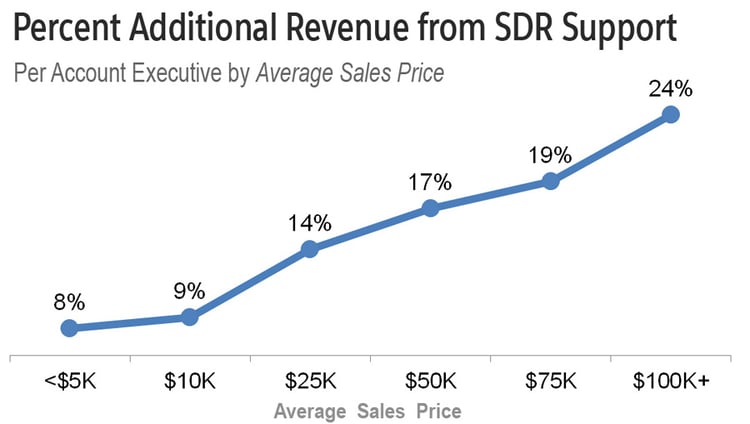
content-upgrade-footer-linkedin-ad-tracking-guide

17 May 17:05

How Vancouver’s runaway real estate became a national problem

by Kevin Carmichael
Vancouver skyline

Vancouver’s skyline. (CC-BY-ND/PoYang)

Vancouver’s flirtation with irrational housing exuberance has become one of the bigger stories of 2016. In February The New Yorker profiled the super-rich kids of the Chinese billionaires and millionaires who are either partially, mostly or wholly responsible for driving the price of an average home in Canada’s third-biggest metropolitan area to more than $1 million. A month later, The Walrus published an article that focused on the perverse effects of surging home prices and stagnant median incomes. Maclean’s this month delivered perhaps the most definitive account of the situation to date, taking the time to explain that Vancouver real-estate prices are subject to forces that go beyond supply, demand and gorgeous views.

Last week, Benjamin Tal, an oft-cited economist at Canadian Imperial Bank of Commerce, kept things going with a note on what could be done to restrain international demand. Tal has put more effort into studying Canada’s housing market than many of his counterparts on Bay Street. In recent years he has explained thoughtfully why Canada’s real-estate boom is different than what occurred in the United States in the years ahead of the financial crisis. Anyone who took his advice and ignored the boomlet in bets on a Great North housing bust is better off for listening. Canadian real-estate prices are being driven by local conditions, making a national calamity of the type that afflicted the U.S. highly unlikely.

So now Tal is digging into those local conditions. His note last week was a reminder that plenty of cities have become a diversification play for extraordinarily rich Asians. (The New Yorker could just as easily have profiled the super-rich Chinese kids of Sydney or London or Los Angeles.) What is unique about Vancouver’s real-estate bubble is the unwillingness of the authorities to do anything about it. Governments in Australia, New Zealand and the United Kingdom all are trying to slow the rush of international capital into local housing markets. Since last year, the only way a non-Australian can own a home in Australia is to redevelop an existing property or build a new one; the individual must also promise the home will be for personal use. New Zealand and the U.K. have both introduced new taxes on capital gains from property.

Tal wrote that at the very least Vancouver (and possibly Toronto) could tax “flipping” by international buyers. “We don’t know how big it is, but we know it’s not constructive,” Tal said of what amounts to speculation. “Applying a flipping tax on foreign investors might be a step in the right direction. It won’t solve the problem, but it might be an effective way to remove the most problematic element of foreign investment in Canadian real estate.”

The remarkable thing about all the reporting and analysis of the Vancouver housing market this year is its consistency. Everyone comments on how authorities such as Canada Mortgage and Housing Corp. only now are starting to gather data on the extent to which international buyers are responsible for the price escalatio—an inexcusable example of bureaucratic inertia and old-fashioned Canadian complacency. Writers and commentators present entirely logical arguments for why a tax or a regulation aimed at levelling the playing field between regular homebuyers and the world’s ultra-rich would be an entirely reasonable response to what clearly is an unusual situation. The reports also dutifully present the self-serving counterpoints of real-estate agents and contractors, who say restrictions would cause the market to buckle, unfairly hurting seniors who are counting on the value of their homes to finance their retirements. Advocates for excessive home prices also point out that construction has become a bigger part of the British Columbia economy, equating any effort to deflate Vancouver’s housing bubble to act of economic sabotage.

Missing from the analysis is any mention of the fundamental flaw in Canada’s regulatory system that allows the debate about Vancouver’s housing market to persist without resolution. In 2013, the International Monetary Fund called on Canada to create a federal entity with a clear mandate to monitor threats to the financial system. The IMF earlier this month scolded Ottawa for so far ignoring its advice.

The Vancouver house-price surge is exactly the sort of thing the independent agency should handle. It is a national issue: everyone knows who will be called on to clean up the mess if it bursts. The banks would feel it and likely would curb lending. CMHC would feel it because it has insured most of the mortgages Vancouverites have used to buy their inflated assets. The only ones who wouldn’t feel it would be the rich Chinese whose goal simply was to collect assets outside the reach of their government.

The term that has been adopted for such oversight is macroprudential regulation. The U.K. takes it so seriously that it invested the Bank of England with the power to deflate any asset-price bubbles that it identifies as threats to the financial system. In Canada, macroprudential policy rests with a group of senior officials in Ottawa called the Senior Advisory Committee. It meets in private and—we’re told—advises the government on what it should do at any given time.

The government is free to ignore this advice, as former prime minister Stephen Harper apparently did ahead of last year’s election. The recent reporting about Vancouver suggests the pressure on politicians to leave housing market alone is intense. The New Yorker noted that even Prime Minister Justin Trudeau has indicated caution in doing anything that would affect the price of many households’ most valuable asset.

This is precisely why an independent macroprudential regulator is so important. Ideally, it would have the power to defuse risks without first having to seek permission from a politician, just as the Bank of Canada sets the benchmark interest rate without input from finance minister. But if that is too much power for governments to yield, then a neutral body could at least identify threats and offer neutral advice on what to do about them. The debate could then take place in Parliament in something closer to real-time, rather than in the pages of magazines after it may already be too late.


MORE ABOUT REAL ESTATE AND THE HOUSING MARKET:

The post How Vancouver’s runaway real estate became a national problem appeared first on Canadian Business - Your Source For Business News.

17 May 17:03

The Instagram Revolution for Small Business

by Sally Falkow

Instagram likes and followers

The internet is everywhere – the mobile revolution has put the Internet into the hands of your customers anywhere, anytime. They browse day or night right on their smartphones. The fact that there are literally tens of millions of users active on places like Instagram means that as a small-to-medium business you can gain not only insights, but leads and customers. And it won’t break the bank. With intelligent use of small business online marketing you can expand your venture quickly.

A Picture is Worth a Thousand Words

The beauty of Instagram is the appeal of visual content. Of course photography-rich businesses have benefited – like the fashion world – but many other companies have found success in the space too. Sports companies, as well as gadgets and tech, have carved successful niches. Artists and interior design businesses do well. Anything that can be translated to images and short video can gain an audience and then sales.

Restaurants and food establishments have excelled using Instagram. The same goes for craft beer or wine. Be inventive, it is not only for models, photographers and people who make clothes. If you’re not an accomplished graphic artist there are easy-to-use tools like PicMonkey and Canva that can help you to make original images.

Test the Market

Using Instagram to test the market is a good way to make sure you are on the right track, either by season or trend. You can even use it to see if people might be interested in what you are marketing or selling. Once you’ve got an audience or followers, sending out an image of the product and waiting to see a response is a good way to not only start a conversation around the item, but to begin lighting the fire that leads to sales.

For example a small business that makes furniture based in Los Angeles had an idea to use reclaimed wood to make tables. They sent out some posts of the wood and the finished product of the table. A few hundred people liked the posts and some comments on the posts remarked they wanted the table. The carpenter immediately sourced more wood, made more tables and set the price higher than he had originally intended as the demand was so strong for the item.

Use Hashtags

#Hashtags are a way for folks to search within Social Media platforms like Twitter and Instagram. Even Facebook now has a # feature.

A #Hashtag groups any posts that have the hashtag together under one banner. For example #table or #woodenfurniture or #handmade would show similar things. Some small businesses use a hashtag like #local #locallymade #honest #realpeople or even the name of the town they are in like #venicebeach or the state like #Oregon and #Arizona.

Using hashtags that are already popular gets your content seen by people interested in that topic. Watch the trending hashtags and see if there is one you can use in your posts. If you find one that is relevant and already ha a high number of posts using it, your content will get seen by more people and, if your content is original and appealing, you’ll get more followers.

Grow my Business

If you are wondering to yourself, “how do I grow my business?” maybe Instagram is the answer. You do not even need a fancy camera, you can post the pictures taken on your iPhone or Smartphone. The filters and editing techniques available to you mean the amount you have to shell out to get maximum impact is minimal compared to the massive advantages of using social media to your advantage

17 May 17:03

5 Easy Facebook Tips to Boost Your Social Media Results

by Susan Friesen

Facebook-on-computer-desktop

Facebook is an entrepreneur and marketer’s dream but let’s face it, it’s getting tougher to stand out from the crowd.

Do you feel frustrated that you spend a lot of time marketing on Facebook and aren’t getting the results you’d like?

Would you like to know ways to use Facebook to grow your mailing list? Would you like some cool strategies to grow your Facebook following?

Let’s dive in – here are some cool tricks to help you grow your leads and sales on Facebook.

  1. Let your Facebook Cover Image Be Your Billboard

    Be creative with your Facebook cover image. Instead of just posting a standard banner or a cute photo of your flower garden, use it to promote your business.

    You can post the schedule to your recent events, your podcast, show a picture of you at work, or promote your newest book or program.

    Switch your Facebook cover image with a greeting for the holidays. You can include your free opt in giveaway, contact info, pricing and calls to action.

    Make your cover image the best size to fit the space: 851px wide by 315px high.

  2. Add information to your Facebook Cover Image Popup

    When you click on your Facebook cover image, you have the ability to add description text to that space.

    Facebook cover image popup text

    It’s a great place to add more information about what they will find on your blog, a freebie they can sign up for, or any other important information you have to share.

    This is an easy lead-generation tool to capture information of your Facebook fans.

  3. Turn Personal Facebook Fans Into Business Facebook Fans

    You can promote your Fanpage URL on your personal profile to get better exposure to your page.

    Do this by doing to your personal page, click the “About” tab, click “Work and Education”, click the “edit” link found in the “options” menu to the right of your Current Company listing (or add one if you don’t already have your company listed there.)

    Where is says “Company”, start typing the name of your business Facebook page and a prompt will appear to hyperlink to your page. Then click the blue “Save Changes” button.

    After you do this go to your Personal profile to test it out. Look on the left where it lists your Company.

    Adding Facebook page URL to personal profile

    When you hover over your company name it should now do a popup for your Business Facebook page.

Get Facebook Fans from your Website or Blog

The Facebook ‘Page Plugin’ makes it easy to convert website visitors into Facebook fans and just takes a few minutes to set up. Facebook will even generate the code for you. here are also WordPress plugins that will do this.

  1. Facebook Widget is one such plug in. These are nice tools where you can choose to show your Facebook fans and customize how the box looks on your website so new visitors can easily join your Facebook fans.
  2. Ditch the Hype – Keep Posts Friendly and Informative

    While Facebook may seem the perfect place to post information about your big sale, think again. The new Facebook algorithm discourages overly promotional posts.

    They key is to write posts that are friendly, informative, entertaining and inspirational.

    To integrate business-related posts as much as possible, you can write an informative blog article about a relevant topic your ideal clients will find of interest and then write a post on your Facebook page and link to that blog article. For extra punch, at the bottom of you blog article, include a call to action to your latest Superstar Program.

    Or you could record a fun tip in a video and share in the video that you have a cool promotion coming up to visit your website for more details.

    Are you an author? Take a crazy picture of you up to your eyeballs in books you are shipping with a post that says “boy these books are flying off the shelves fast, see what everyone is talking about.”

    You want to post shareable content that gets lots of likes, shares and comments so it will have better changes of being seen in your follower’s newsfeed. The trick is to find out what type of posts your followers will find worthy of being shareable.

I hope these Facebook tips help you build your brand reach and business revenue.

And if you’re looking for more in-depth hands-on training, consider joining my monthly Social Blast Membership program specifically designed for entrepreneurs and business owners who want to learn how to use social media and online marketing without wasting a lot of time and effort.

17 May 17:03

When Numbers Lie

by Dave Brock

I was conducting a series of reviews with a team of sales executives. They were struggling to meet their numbers, asked me to spend some time with them. As usual, one of the first things I looked at was their pipeline. I asked them a few questions about win rates, sales cycles, average deal value—they had some answers, but not the kind that make one feel really comfortable.

After a quick review, I said, “You need to dramatically increase the number of opportunities in your pipeline, you aren’t chasing enough high quality deals to achieve your goals, based on your current performance.”

The sales manager replied, “We want to manage to a 3 times coverage model, we know it’s far better to have a 3X coverage model — or less.”

Confused, I asked, “Why? Clearly with that model, you aren’t achieving your goals, so something’s wrong here.”

The manager responded by pulling out a slide from a “Consultant Report.” (I hate it when they do that–file this under “beware of consultants/market researchers spouting numbers.” They are always true, but there are a lot of “but’s” and conditions that accompany the numbers.)

The chart said, “Companies that manage a pipeline of 3X or less had a 32% better close rate!*”

The manager went on to say, “That’s why we believe the pipeline coverage should be 3 times and we are striving for 2 times, it means we won’ t have to generate more leads, we can focus on fewer high quality deals.”

I bet you think I’m making this up.

For me, it was an “aha” moment with this group.

Any number we have, any data we believe, we can’t accept at face value, we have to understand what that data means. If we don’t we can do absolutely disastrous things.

So let me go back to the numbers in that consultant report.

The number of opportunities required in a “healthy pipeline” is determined by a few key pieces of information–pipeline integrity, win rate (Ideally stage to stage conversion rate), sales cycle, average deal size, and velocity.

Just taking a simple model:

  • If I have a 20% win rate, I require a pipeline that has roughly 5 times the number I need to make my goal. So if my goal is $1m, I need a pipeline of $5M.
  • If I have a win rate of 25%, I need a pipeline of $4M—this is actually a 25% improvement in close rate over the 5X pipeline.
  • If I have a win rate of 33%, I need a pipeline of $3M or 3X coverage. This is 33% improvement in close rate than the 4X pipeline, and 66% better close rate than the 5X pipeline.
  • If I have a win rate of 50%, I need a pipeline of $2m or 2X coverage. Again this is a 52.5% improvement in close rate over the 3X model, a 100% improvement over the 4X model, and 150% improvement over the %x model.

Clearly, the consultant report was reporting one of those “Duuuggh Observations.” The higher your win rate, the lower the coverage requirement. Math works, always!

But if you don’t understand what you were looking at, you can make disastrous conclusions. This sales management team had taken that consultant data point completely out of context (in fairness, it was a data point presented to my client by another consultant, which didn’t show the rest of the report.)

The conclusion this team leapt to, mistakenly, was “A 3 times coverage model is much better than a higher coverage model.” They didn’t understand the coverage is determined by win rate and the other factors I outlined. So they were managing to a 3X coverage model when their win rate was significantly less than 33%.

Numbers and data can be our friends, but only if we don’t treat them blindly. We have to understand what drives the numbers and how we leverage them to achieve our goals. The coverage number is an outcome number, it is the result of a number of inputs. Those inputs drive the determination of coverage, not the reverse.

In the case of this company, they had a number of choices to drive performance and reach their goals. They could have improved the skills, capabilities, and execution of the sales team—driving win rates to 33%. Then the 3 times model would have worked for them.

They might improve the quality of the pipeline, by better focus and disqualification–our win rates are always higher when we focus on our sweet spot. In this case, the quality of the deals in the pipeline was pretty good.

They could have abandoned the 3X coverage model, gone to a 4X coverage model, which would have more closely aligned with their win rates. This would mean a step up in both marketing programs (lead gen) and prospecting by the sales people.

There are lot’s of choices, but you have to understand the data, and what drives the data. Companies facing the same dilemma may choose different paths. Basically, we need to assess, “How quickly can we improve the skills/execution of our people? What’s the risk? What’s the cost? How quickly can we drive more into the pipeline, do we have the resource to cover that increase in deals? Do we have the marketing programs, lead gen, prospecting programs that can drive the pipeline volume?”

I suppose I mistitled this post. Numbers are numbers–nothing more. What screws us up is our misinterpretation of the meaning of those numbers.

*In fairness to the research, this data point was taken out of a single slide in a very large research presentation. As happens, this slide has made the rounds of blogs, articles, tweets, and other things–so it was separated from the explanations of what the number means, and what drives that number. The consultant/researcher who developed this is actually a friend who is wickedly smart and is would be horribly distressed by how that single chart is being used.

I do stand by my “beware of consultants bearing numbers” comment, always challenge them, always understand the assumptions, and the caveats. It they are good, they will always be able to support the numbers.