Shared posts

02 Jun 15:50

7 Customer Care Secrets of Dunkin’ Donuts & Chick-fil-A

by Mark Holmes

“When it comes to creating great customer experiences, virtually any business, start-up or nonprofit will profit from the best-insights of Dunkin’ Donuts and Chick-fil-A.”

As two of the kingpins in the quick-serve restaurant business, they both have exceptional brand recognition and exceptional financial performance.

It didn’t happen by accident. It is as intentional as it is strategic to build and sustain a customer-centric business today.

DISCLOSURE: I have spoken at both brands’ international conferences, conducted Webinars, sold my books, licensed my training materials and when engaged consulted on service excellence, employee motivation, retention and creating healthy culture…

Without divulging any trade secrets or confidentiality agreements, I will reveal the tactical approaches they’ve mastered to keep customers coming back. I won’t be telling you anything you couldn’t find out eventually on your own – if you spent the time digging through various articles and books written about their operations. This is my insider’s view..

Backstory: Preparing A Speech For a Big Brand Convention

 Both brands handle millions of customer interactions, delivered by hundreds of thousands of frontline employees who serve up food and beverage items with lightning-speed service. Performance metrics are obsessively implanted into the daily regime.

They do this to ensure consistency of quality, both in food and the guest’s experience. That’s not all to their equation for success, however. Crewmembers are the key!

It can feel like a pressure cooker when you work as a frontline associate (crewmember) for a quick-serve restaurant like Dunkin’ Donuts or Chick-fil-A. I know this first-hand!

To prepare for a Dunkin’ Donuts speech I worked as a crewmember in Oklahoma City for a day. I told the franchisee, “Put me through the paces. I want to do the real work.” I was shown how to make awesome breakfast sandwiches. How to run the register and greet guests, how to run the beverage station, and how to work on the drive-thru. While I couldn’t qualify to perform these jobs (they have hours of training and testing to complete) I did get a feel for the job—and the pressure to perform when long lines form with anxious customers wanting their food and or beverage.

And something totally unexpected happened.

While I was working on the drive-thru with a team leader I got to see how some customers treat frontline employees – in the morning! Whoa! Some customers aren’t very easy to deal with until they get properly caffeinated! Sure made me think twice about how I treat employees when I’m the customer…

When you consider the systems and processes needed to handle millions of guest experiences and do it with excellence, consistently, it’s amazing they can pull it off. Even more remarkable are the people, culture and values that enable the systems to work.

7 Secrets to Dunkin’ Donuts and Chick-fil-A’s Customer Care:

  1. Make the guest’s experience the absolute most important activity. Achieving this requires setting aside other important duties at times, to take care of the guest.
  2. Create a positive, fun and rewarding work culture for associates. Invest in creating a people-first culture and build employee experience around meaningful values. This increases employee recruitment, retention and better guest experience.
  3. Set clear, consistent values and reinforce them regularly. For great food and great service to be achieved, values must be woven into the fabric of each phase of the operation. How a team or individual performs, ultimately results from consistent, clear values reinforced daily across the enterprise, and no one does that better than Chick-fil-A. 
  4. Train, coach, correct, model and reward for excellent guest experience behavior. “What gets rewarded gets done,” is truer today than ever before. Each manager is responsible for the care of each employee. Making employees feel connected and important to the mission is essential. The best managers are relational and good listeners–and rewarding not only correcting behavior is viewed as crucial.
  5. Equip managers for employee care, not just guest care. I’ve remarked in speeches to both Dunkin’ Donuts and Chick-fil-A, “Customers will not be treated as #1 as long as employees feel like they are being treated like #2.”
  6. Manage for results AND relationships. This is not an either/or but a both/and. The best franchisees or operators recognize that maximizing results requires creating positive relationships with people – associates and guests. People over profits… is a popular phrase today, but let’s face it, you better achieve both results and relationships if you want to last in today’s competitive landscape.
  7. Measure the guest’s experience and use it to improve. One main emphasis of my best-selling service book, and an emphasis on my talks for both organizations was, The key to your bottom-line is the frontline giving top-of-the-line service!” Measuring the guest’s experience regularly is as important as measuring financial results.

Consider how your company or firm can improve customer care:

  • Of the seven performance areas above, which ones represent your organization’s greatest strengths?
  • Which areas need the most improvement in your company?
  • Do the improvements fall mainly in customer experiences or employee workplace experiences? Why?

Share this Post

31 May 15:39

Walmart works to close gap between itself and Amazon

by CB Staff

Even after an online spending spree, it may be hard for Walmart to escape the Amazon in the room.

Walmart’s acquisition of Jet.com and brands that appeal to younger shoppers have given it an e-commerce boost as it works to close the gap between itself and the online leader. The world’s largest retailer is betting on essentials like cereal and diapers, and has adjusted its shipping strategy to better compete with Amazon’s Prime program.

But Amazon keeps innovating too, implementing new technology and trying to make shopping more convenient.

Marc Lore, a co-founder of Jet.com who is now head of Walmart’s U.S. online operations, says he’s confident about the company’s momentum and that there’s plenty of room for it to thrive.

“I can tell you we are happy with the moves we are making, and we are happy with the results,” Lore said at the Jet headquarters in Hoboken, New Jersey. “It’s about moving fast. It’s about innovating. And it’s a very big market.” He noted that e-commerce sales industrywide are still growing 15 per cent per year.

Lore led Walmart’s acquisitions of specialty online retailers like ModCloth, Moosejaw and ShoeBuy.com, and said he’s still looking at companies that have expertise in categories where Walmart wants to grow faster.

As Walmart prepares to show off some of its innovations this week before its shareholder meeting, there are signs that things are starting to click.

Sales at Walmart.com rose 63 per cent in the first quarter, up from 29 per cent growth in the previous quarter and marking its fourth straight quarter of increases. Wal,art said most of the increase was not through acquisitions but was fueled by changes in its shipping strategy and a discount for shoppers who pick up their online orders. Walmart.com now offers 50 million products including those from third-party sellers, up from 10 million a year ago. In comparison, Amazon has hundreds of millions of products.

David Spitz, CEO of e-commerce technology company ChannelAdvisor, says for some shoppers it has become ingrained that they start and finish their shopping at Amazon, and the Prime program reinforces that. He said Walmart wasn’t putting a sufficient emphasis on keeping up.

“If anything, the gap was widening,” Spitz said. “Jet.com was intended to be a jolt. Walmart is clearly being more aggressive. There is a sense of urgency, but whether that is enough is the multibillion-dollar question.”

Amazon accounted for 33 per cent of U.S. online sales last year, according to the research firm Euromonitor. Walmart moved into second place ahead of eBay, with 7.8 per cent. Greg Melich, an analyst at research firm Evercore, estimates that Amazon customers spend an average of $800 annually on the site, and members of its $99-a-year Prime program spend on average 2.7 times more than others.

If Amazon’s relationship with Prime members continues to grow, Melich said recently, then Amazon’s path toward Walmart’s 9 per cent of the total U.S. retail market from its current 3 per cent is “reasonable.”

If Lore is worried, he doesn’t acknowledge it.

“We don’t think specifically about Prime at all,” he said. “We think we (have) got a customer base—those customers who want to be able to save money and they want to be able to shop in different ways, whether it be direct-to-home, grocery pickup or going to the physical store.”

Its 4,700 stores are a strength for Walmart, as they buck the larger retail trend in seeing increases in shopper numbers and sales. The discount for store pickup is helping bring shoppers in.

Walmart says even the expansion of stores with curbside pickup for groceries is also helping, since people often realize they forgot an item or two and run into the store. And as rivals like Target struggle to get their grocery departments right, Walmart is placing a priority on essentials like peanut butter, paper towels and fresh produce that shoppers buy often.

Amazon’s stores are mainly showcases for gadgets, or are textbook- and furniture-pickup locations aimed at college students. But it keeps innovating, and it’s testing an Amazon Go convenience store, where sensors track items as shoppers go and there’s no need to check out. Amazon just opened its first bookstore in Manhattan and seventh overall.

Moreover, Amazon also launched two grocery pickup kiosks in Seattle that allow Prime customers to buy fresh items online and pick it up in as little as 15 minutes instead of having them delivered. The service is free, and there’s no order minimum.

Shipping remains intensely competitive. Amazon Prime members in more than 5,000 cities and towns can receive orders the same day or the next, depending on the item and location. Through Prime Now, members in more than 30 cities can get some items in an hour or two.

“We’ve had competition every day of our existence at Amazon and it’s never changed our approach,” Amazon says. “We obsess over customers and the things we believe customers will always care about—low prices, vast selection, and fast delivery.”

Walmart has revamped its shipping program and now offers free, two-day shipping for online orders of its most popular items with a minimum purchase order of $35. Lore says Walmart customers are placing more orders and spending more than before. In April, Walmart launched a service called Easy Reorder where the items shoppers buy with their credit card at a store will pop up on their online account for replenishment.

As more integration happens behind the scenes of Walmart.com and Jet.com, Lore says that over time, Jet’s “smart cart” technology will be integrated into the Walmart site. Jet was built on a real-time pricing algorithm that determines which sellers are the most efficient in value and shipping. It adjusts prices and encourages shoppers to buy certain items for more savings. Walmart says it’s helping people to shop smarter by encouraging them to build an order of $35 and offering extra discounts for store pickups of online orders.

And Lore says the plan is to get to several hundred million products on Walmart’s website over the next few years.

“We want to sell them everything,” Lore said. “The assortment is growing fast,” he said. “But we know in certain categories, we need to make more progress.”

The post Walmart works to close gap between itself and Amazon appeared first on Canadian Business - Your Source For Business News.

31 May 15:39

When You Should and Shouldn’t Choose Free Business Software

by Victor Iryniuk

So you’ve decided to open your own little business. No matter which one that is, you’ll end up managing finances, projects, clients, and co-workers. Thankfully, today there’s almost an unlimited supply of tools and services that can help you with all of that.

However, it’s easy to get lost in so many different apps and services for business, especially when you start considering their price, features and the actual necessity for your rising company. In this guide, we’ve collected some of the key types of tools and services you’ll likely need at the start of your venture.

Price and functionality are often the key decisive factors to choosing one software over another. To help you navigate, the suggestions are broken down into three categories:

  • Free. Solutions that can cover the basic needs of a relatively small company;
  • Pro. Paid services that you might want to invest from the start as the upgrade from a freemium app might be an even pricier one for a growing team;
  • Premium. The best that money can buy. Such tools are an overkill for a starting business, but they are worth keeping in mind if you want to get the full spectrum of services in a certain area.

1. Office suite

A comprehensive office suite is one of the foundations for an effective team collaboration, productivity, and overall business organization. Ideally, it should include not only word processors and spreadsheets, but also provide some communication and contact management options.

Free: WPS Office

It’s difficult to go wrong when choosing a free office suite. While Docs and all other apps in the Google ecosystem are a great choice, they are better for business as a paid G Suite. You obviously need the Internet connection to fully use it, so there are still some advantages to having an offline office suite.

WPS Office is a good choice for everyone who’s used to Microsoft Office because WPS completely mimics it in terms of looks and functionality. It has a great compatibility with MS Office formats and is also available on any platform you might need to use it. As an alternative, if you and your team are exclusively Mac users, iWork is now a free suite, so you might want to check it out if haven’t already.

Pro: G Suite

G Suite (formerly Google Apps for Work) is a comprehensive and affordable office suite for virtually any business. You can pay just $5/month per user for a Basic plan and get a business email addresses, aliases for Gmail, shared online calendars, security and admin controls over the suite and 30GB of file storage in Google Drive.

A viable reason to go for a more pricey plan (“Business” — $10/month per user) is the amount of file storage that would be expanded to 1TB. However, considering that the files created in G Suite apps don’t count towards that quota, 30GB would likely be enough. Keeping all your business activities and collaborations secured in Google’s cloud is one of the most convenient ways to manage a growing online team.

Premium: Office 365

If you want to go full-out and make the deepest dive into the Microsoft ecosystem, that’s what Office 365 Enterprise E3 is for. With an annual commitment to $20/month per user, you get everything that Microsoft has to offer for office productivity.

Office 365 E3 includes a subscription to every online Office app and an installed offline Office on every device you need. You also get an unlimited OneDrive storage space, unlimited inbox, access to a corporate social network, a Teams chat-based workspace, and VoIP tools. Additionally, there’s the top-tier E5 plan which gets you an advanced threat protection, productivity analytics, and data governance, but this would better be an overtime upgrade than an immediate commitment plan.

2. Project management

Knowing who’s doing what and what they should be doing next by is a useful thing otherwise known as project management. Just like with office suites, there’s no shortage of supply on the market, so you can easily find the one system that would keep your team and yourself organized.

Free: Trello

Unlike most project management tools, Trello makes a strong accent on visuals. Arguably, this service embraces the kanban-style workflow like no other app. Trello helps in organizing your work by placing cards (tasks) on a dashboard with the ability to set due dates, add notes, etc. Unfortunately, Trello doesn’t host files, meaning you’ll still have to use some cloud storage solution for files.

There are some limits to a free Trello account, such as a maximum 10MB size for attachments and a limited integration with other services. However, the free plan is a great start for any team that wants to improve its overall productivity.

Pro: Asana

Compared to Trello, Asana presents you both with a kanban-style dashboard and a list view for your projects and tasks. It spots a superb level of integration with emails (letting you add new tasks by emailing them to Asana) and it’s one of the productivity apps recommended by Google so if you rely on its ecosystem and G Suite, the Calendar and Drive integration will be a welcome bonus.

Asana is rather minimalist, but it can be highly effective for creating and updating tasks in one or two clicks, while keyboard shortcuts additionally contribute to it. If your team is up to 15 users, you can use Asana for free, just like Trello. But if you need some additional features, such as unlimited dashboards, custom fields (to make it more fitting to your business) and task dependencies, the $10/month per user price is a justified purchase.

Premium: Basecamp

While Asana is considered to be a rather feature-rich solution, Basecamp surpasses it in many regards. With a price tag of $100/month (not per user), Basecamp sets itself as a productivity hub for your team. It pitches itself as a replacement to many other services your company might be using, such as chats, email clients, calendars and external todo lists.

While other solutions cater to team collaboration, Basecamp is aimed exactly at project management. With advanced permissions management options, Basecamp lets you collaborate with people from outside your team, making it more suitable for agencies. It saves all the history and progress of the project, while also featuring reusable project templates, robust document management (with its own storage) and resources allocation by team skill sets.

3. Internal communication

These tools can help you facilitate electronic communications so that staff can share messages, files, data, or documents more easily, and even partake in voice and video group discussions.

Free: Skype

Skype needs no introduction. Despite the fact that it’s generally losing in popularity to other modern instant messaging tools, Skype remains an effective tool for internal and external communications. What’s great about Skype is that just like with email address, everybody has a Skype account, making it one of the default communication channels with clients.

While free, you can conveniently discuss work matters with teammates, setup group chats, video calls and exchange files. Unfortunately, it has way less in terms of organization features, such as message search history and actual file storage, making other team messengers more preferable.

Pro: Slack

Even as a free service, Slack offers team communication for the 21st century. Once you start using it, it might look like your regular chatting app, but as the time passes you’ll notice that it’s more than just a chat. Slack will quickly become your work and communication hub, storing everything from conversations and occasional todo’s, to reference materials, useful links and design discussions. Everything you add to or share via Slack gets indexed, making it easy to find later by current and future team members.

Slack’s business subscription starts at $8/month per user and removes any searchable message limits, let’s you integrate it with an unlimited amount of apps, expands storage space to 10GB and ramps up security measures. Additionally, you’ll be able to carry out group voice calls, making Slack an effective hub for team collaboration and a supplementary project management tool.

Premium: Basecamp

Admittedly, there’s little reason to go full-out on expensive communication apps when there are enough cheaper alternatives. But if you’ve already decided to use Basecamp as your project management tool, it also provides some good communication options for your team.

Basecamp can replace emails for internal communication, saving messages for people who’ll join your team later. Campfire is Basecamp’s alternative to group chats and direct messaging, so you might want to use it as a single productivity environment, maybe combined with a few other free tools.

4. Accounting

Managing your budget, salaries, finances and revenue is something any company cannot exist without. Almost any free accounting software can handle accounts management, invoicing and sales, but if you need more advanced, automated and multi-department solutions, paying for it becomes nearly mandatory.

Free: Wave

Wave is an accounting software specifically designed for small business owners, contractors and freelancers. Even though it’s free, Wave has a long list of features to help you with tracking expenditures. You can handle customer invoicing, running financial statements, importing credit/debit card transactions, create business reports and more.

There’s no limit on the number of invoices or customers it supports, but Wave is rather limiting when it comes to writing checks — you’ll have to do it manually and then mark checks as paid in Wave (also manually). Unlike paid accounting tools, Wave lacks inventory and commerce features, but it’s a great accounting software for starters.

Pro: QuickBooks Online

QuickBooks is one of the most commonly used accounting tools worldwide. This ensures both compatibility and integration with over 400 business apps you might need in your specific branch of business. QuickBooks covers all accounting activities you throw at it, from preparing tax forms and accepting online payments, to printing out checks and carrying out inventory management.

QuickBooks Plus will cost you $40/month and give you access to over 65 essential reporting options (profit and loss, balance sheets, etc.), inventory tracking, billable time tracking and scheduled payments. Additionally, if you’ll decide on hiring an accounting firm, it’s almost guaranteed that it’ll be familiar with QuickBooks and you’ll be able to provide a limited access to your finances.

Premium: Microsoft Dynamics GP

Going for an enterprise-grade on-premise accounting solution is an overkill for a small business, but this is one of the most comprehensive accounting tools out there. MS Dynamics GP is a tool for companies completely reliant on the Microsoft ecosystem, with databases running on Microsoft SQL which eases the integration.

While a Starter Pack costs $5000 and includes three users, the database conversion from QuickBooks would be not cheaper. So if you’re planning on ultimately using MS Dynamics GP, it’s better to do so from the start. The solution is completely GAAP compliant, meaning that transactions cannot be deleted without any record of activity. This, combined with over 700 standard reports, complete transactions history, and data ownership contributes to a secure and more functional accounting solution.

5. Customer relationship management (CRM)

Customers are the lifeblood of any business. When starting out, each client is a VIP and there’s no problem with keeping tabs on them. But once you start growing and your client base expands, a customer relationship management systems will help you in keeping customer and deals data up to data.

Free: Insightly

The problem with free CRM systems is that you’ll be hard-pressed to find one that gives you everything for free. However, it’s not that hard to cut some corners and find the one that satisfies your client management needs when starting off. Insightly is considered by many as the best free CRM system.

The free account is rather limiting, but for a small sales team, it should be enough. Insightly provides you with 2.5K records, task and project management capabilities, basic mass mailing, reporting and accounting tools integration. Where free plan eventually falls short is once you need to add more users or custom fields to collect more business-specific data.

Pro: NetHunt CRM

Most CRMs are complex and they take time to set up and learn, but NetHunt is different. It’s a good choice for G Suite users as it’s a Gmail-based system, giving it an easy access to the contacts, emails, and files you already have. For a small team, it’s an affordable tool ($25/month per five users) with unlimited records, views, mass mailing and email tracking.

NetHunt’s flexibility makes it suitable for most business activities because you can customize its records with unlimited fields of various types. It’s easy to group clients by various types of data, creating sales pipelines, mass mailing lists and prioritize follow-ups. NetHunt lets you share tasks and emails with everyone in the team to support a business that prioritizes communication via email.

Premium: Salesforce

You can’t enter the realm of CRM without coming across Salesforce. While you can immediately go for it as your primary system, it can be somewhat confusing and complicated unless you have clear business requirements and a strategy prepared. The amount of resources you need to spend on Salesforce is significant, however, once everything is setup and running, the result is worth it.

When you’re ready to pay $300/month per user for the top tier Salesforce Sales Cloud, you get everything a CRM system can offer. In addition to an unlimited account, lead and opportunity tracking, email marketing campaigns and inbox integration, you get such advanced options as territory management, custom app developments and automation, forecasting and up-to-date contacts from data.com.

6. Web hosting

What do you do when you need to look up some information about a certain company? The obvious solution is to check their website. The same thing would happen to you once you enter the market. If you don’t want to take care of your own server to host a site, turning to a web hosting provider is the best choice. Keep in mind that the type of hosting would influence your site traffic capabilities and low speed can negatively reflect on your site SEO rating.

Free: 000webhost.com

Dating back to 2007 and with over 14 million worldwide users, 000webhost.com is a go-to option for a free site web hosting. Unlike many free web hosting providers, 000webhost.com doesn’t display branded ads on your site, has no limit on bandwidth and provides 1.5GB of disk space.

The service guarantees 99.9 percent uptime which should put your worries to ease. The free plan supports PHP and MySQL and offers a basic site builder, which should be enough for most to setup a site and test their web-hosting needs. Even if you’ll face the need to upgrade for better support, more frequent back-ups or more FTP accounts, $5/month is a good price.

Pro: BlueHost

If you’re expecting a high volume of traffic, shared free hosting wouldn’t be enough. This is where a virtual private server (VPS) from BlueHost becomes ideal for hosting your site. With over two million customers, BlueHost is a recommended hosting platform by WordPress and it’s specifically optimized for that.

Depending on the amount of data you’ll be storing, BlueHost’s “Enhanced” $30/month pricing plan gives you 60GB SSD storage, unlimited bandwidth, and enough RAM to expect a stable site. You can add unlimited email addresses and FTP users, install SSL certificates, and even configure backups frequency. This, combined with a one-click website setup, easy-to-use cPanel interface and premium phone support makes BlueHost an optimal solution for your business site.

Premium: HostGator

So you’ve reached a point when your site received thousands of visitors daily and it’s time to consider a dedicated server. HostGator is one of the best-known web hosting companies in the world which offers various VPS and dedicated server solutions. The entry-level dedicated offer starts at $80/month and creeps up to $130/month for some more capable servers.

With unlimited domains, FTP and email accounts, weekly back-ups, full root access and thousands of templates to design your site around, you can create and sustain a site that would effectively represent your company. The powerful hardware with up to 16GB RAM, 4-cores Intel Xeon processors and RAID-1 1TB disks should prevent you from worrying about its performance.

7. Site Analytics

Now that you have a website, do you know how much traffic does it get? Where are the visitors coming from? Are they here because of your ad campaign, email marketing efforts or some influencer writing about you in a popular blog? Web analytics can help you answer those questions and help you in improving site conversion rates, which, in most cases, means more closed deals.

Free: Google Analytics

Google Analytics is a must have tool for virtually any site and, considering it’s free, you have no reason not to use it. After you add its tracking code to your site, you can check the countries your site has been seen in, the comparison between the key traffic drivers, and their key numbers, broken out by day, week, month, or a year.

Google Analytics presents such information via easy-to-read charts and graphs so that even the least tech-savvy individual can feel confident with understanding their information. There are some cons to it (like the limited amount of goals to set and data arriving not in real time), but because of its popularity you can easily master it with help of numerous guides and get the first insights into your web presence activities.

Pro: Clicky

Clicky excels where Google Analytics lacks the most, mainly the real-time data, while its depth is on a comparable level. This might be essential if you’re seeing spikes of visitors from some outside resources.

Clicky spots some additional features that you might find desirable, such as heat maps, bot filters, video and Twitter analytics, as well as site widgets and various alerts. All of this is priced at $10/month per one million page views, making it a viable Google Analytics alternative if those features are something you really want.

Premium: Kissmetrics

Kissmetrics has a different approach to analytics. Instead of putting page views and sessions front and center, Kissmetrics is more suited for e-commerce sites as it monitors each visitor as a customer. Compared to Google Analytics, you can go back to when the client first visited your site and see what he or she has been doing there, what features has been using and what purchases made.

Such data makes it easier to concentrate on the sales funnel and conversions. It’s also more effective at analyzing what sources are driving more paying visitors to your site with revenue reports per each source. If you have a high-traffic website, Kissmetrics won’t be cheap (up to $700/month per 300k events) but it’s eventually worth it if it helps you increase the actual sales.

31 May 15:38

How to price your IPO

by Alex Wilhelm
 If pops are hard to vet, and IPO pricing remains an art-science hybrid, what measuring stick can we use to decide when an IPO did well, versus gains so steep that it probably could have raised a bit more in its flotation? Read More
31 May 15:37

8 Proven Sales Forecasting Methods for Greater Accuracy

by Michael Pici

Getting an accurate sales forecast is almost as important as hitting the revenue target itself. But with so many different sales forecasting methods, how do you know which technique will give you the most accurate view?

According to CSO Insights, 60% of forecasted deals do not actually close. Unsurprisingly, the data also shows that 25% of sales managers are unhappy with their forecast accuracy. Choosing the right forecasting technique can make a huge difference in your ability to accurately predict future revenue.

In this post, I’ll discuss three sales forecasting methods that have proven to be effective for us at HubSpot. In fact, we’ve seen that a combination of all three has actually given us the most accurate predictions.

I’ll give a high-level overview of each method we use, but I also recommend you test and tweak them to fit within your own business model before rolling them out to your teams.

What Are The Three Kinds of Sales Forecasting Techniques?

Forecasting is based on a premise of data requirement and the application of the data in projecting future sales. A sales forecast can only be as good as the data it is based on. Forecasting specialists use three types of sales forecasting techniques in sales forecasting. The forecasting technique is based on the type of input data used in forecasting demand. The three sales forecasting techniques include:

  • Qualitative techniques
  • Time series analysis and projection
  • Causal models

The qualitative technique uses qualitative data while time series analysis focuses on patterns and pattern changes. The causal model relies on highly refined and specific information regarding relationships between system elements.

The variance in the techniques implies that the same type of technique is not appropriate for forecasting sales.

For instance, the time series analysis that relies on historical data may not help forecast the future of a new product that has no history.

So what are the general functions of the three types of sales forecasting techniques?

#1. Qualitative Techniques

Qualitative techniques of sales forecasting models are used when there is limited data available. For example, you can use qualitative techniques when you introduce a new product in the market. There is limited data about the product to use in forecasting the future.

The techniques employ human judgment and rating schemes to use the qualitative information and turn it into quantitative estimates. The objective of the method is to bring together logically and systematically all the judgments and information regarding the factors being estimated.

You can use qualitative techniques where penetration rates and market acceptance of a product are uncertain. You can also use them in new technology areas where you require several inventions to develop a product.

There are five qualitative techniques which include:

Panel consensus

Panel consensus is the simplest technique to use and is mainly used by commercial organizations to forecast the future of their product. It is based on the premise that several experts can make a better forecast than one person in various fields. There is no secrecy in the technique, and communication is allowed between the experts.

Delphi method

The Delphi method is a revenue forecasting model that uses surveys and questionnaires to forecast future sales. The goal of the Delphi method is to forecast the probability of occurrence of events and the likely period of occurrence. Like the panel consensus technique, the Delphi method involves experts and a Delphi coordinator.

Salesforce composite technique

In the sales force composite technique, the company asks its sales personnel to make their forecasts. The assumption is that the sales reps are in direct contact with the customers and other parties in the distribution channel. As such, they can be better informed about the demand for a product.

Buyer’s expectations

In this sales forecasting technique, you survey buying intentions and market intents. If you want a survey of buying intentions, you select a sample of potential buyers and try to get information about their potential purchase of the product in the future. You then extrapolate the information to get the total demand forecast.

Market research

Market research is a conscious procedure of demand forecasting that involves systematic and formal processes. It involves testing hypotheses about the real market.

#2. Time Series Analysis

The Time Series analysis sales forecast technique is used when you have years of data available about a product or product line. You can also use it when you have clear trends and relationships about a product, and they are stable.

The forecaster uses the past data of the product’s performance to get the current performance rate and the change in rate. The acceleration or deceleration of the current rates comprises the basis of forecasting.

A time-series method is a set of chronological ordered points of raw data. A time-series analysis helps to explain:

  • Trends in the data
  • Cyclical performance patterns that repeat any two or three years
  • Any systematic variation or regularity of data in different seasons
  • Growth rates of various trends in data

#3. Causal Models

Causal sales forecasting models are developed when you have enough historical data regarding a product and analysis carried out. The analysis should show the factors you wish to forecast and other economic forces and social-economic factors.

If you want sophisticated sales forecasting models, you should use the causal model. It expresses the relevant causal relationship and can include market survey information and other considerations. The technique can also incorporate the results of a time series analysis.

It considers the dynamics of the flow system and uses predictions of related events such as promotions and strikes.

What Are The Sales Forecasting Methods?

#1. The “Lead Value” Sales Forecasting Method

Concept: This forecast model involves analyzing historical sales data from each of your lead sources. Then, you can use those data points to create a forecast based on the value of each source.

The beginning of a buyer’s journey can tell us a lot about how that journey will end. It’s like a bad romantic comedy. If you’ve seen a few similar movies, you can usually predict how they will end based on a few early, telltale signs.

By assigning a value to each of your lead sources or types, you can get a better sense of the probability for each of those leads to turn into revenue.

For this model, you’ll need the following metrics:

  • Leads per month for the previous time period
  • Lead to customer conversion rate by  lead source
  • Average sales price by source

The Calculations:

Average sales price per lead

To get your average sales price by source you simply have to look at the data set for your entire customer database and bucket them by lead source.

For example, you may find that website leads close at an average of $1,000 per customer, while leads who request a demo close at $1,500 per customer.

If your CRM doesn’t have this reporting functionality, you can export the data into an excel file and quickly get the average sales price from there.

Average Lead Value

To calculate the lead value per source you multiply the average sales price by the average close rate for that source.

Average Lead Value = Average Sales Price * Conversion Rate from lead to customer

For example, if I know my leads from paid advertising spend an average of $2,000 with us and they convert at a rate of 10%, the lead value of each of those leads would be $200.

$2,000 x 10% = $200/lead

Total Number of Leads

To calculate the total number of leads needed in a given time-frame, divide your total revenue goal by your average lead value.

Leads Needed = Desired Revenue / Average Lead Value

Continuing from our example above, let’s assume our sales team needs to hit $100,000 in revenue next month. Since our average lead value is $200, that means we’ll need to generate 500 leads to hit our revenue goal.

100,000 / 200 = 500

Note, you should consult with your marketing team to learn what upcoming initiatives they have planned and where they expect lead flow to come from as lead values vary from channel to channel.

Once you’ve done that math in a spreadsheet, you’ll have something that looks like this:

Sales forecasting models

Considerations:

While this is a great starting point, there are other factors that can alter your end results which must also be considered.

The average sales cycle may vary for each lead source. If you want to use this type of forecast, you should conduct an extra layer of analysis on time to purchase (or sales velocity) and factor it into your forecast.

Other business initiatives might change your conversion rates such as improvements in the sales process, price changes or discounts, etc. Look at a moving average of lead value for each source on a trailing 90 day period to stay current with other business changes.

Marketing may adapt their plans based on learnings or evolving trends. It’s important to stay aligned with them to ensure your expected lead volume and conversion rates are accurate.

Sometimes you may be unable to identify a single lead source. If that’s the case, you can bucket them as ‘other’ and include them in your forecast.

#2. The “Opportunity Creation” Sales Forecasting Method

Concept: This model helps you predict which opportunities are more likely to close based on demographic and behavioral data.

Let’s go back to our Romantic Comedy analogy. It’s often easy to predict what each character will do based on their appearance, and how they behave and interact with each other.

Predicting an opportunity’s likelihood to close is similar. By looking at demographic and behavioral data, we can get a better sense of the probability to close and the expected value of the deal.

The Calculations:

In this model, we look at the characteristics of businesses that have closed deals in the past. Then, we look for the same characteristics in our pool of potential customers.

To illustrate, let me take you through the way we implement this model at HubSpot.

We have found that the simplest way to evaluate an opportunity’s likelihood of closing is to look at the size of the business. For us, the number of employees and annual revenue of a prospect account are solid predictors of our success.

However, there are many other factors that can determine the fate of an opportunity. For example, the role of our contact within the decision-making process, behavioral patterns, and previous interactions with HubSpot all have an effect.

It’s also key to look at the historical data for your most ideal customers: not just those that close but also those that retain and become referrals. These are the types of companies you want to prioritize.

This second layer of analysis is called lead scoring. Usually, Sales and Marketing teams work together to define a lead scoring system and set it up.

At HubSpot, we score our leads between 1-100, with 100 being the best fit. We then group scored leads into buckets called “A, B, C, and D” for ease of use.

Once you have your scoring system in place you can calculate the estimated value of each opportunity in your pipeline.

Expected Value of Opportunity = Average Sale Price * Average Close Rate

Below is a simple forecast of expected value per opportunity based on lead score and company size, with an average sales price of $4,000. For this to work, you need to know the close rates for each of your lead buckets.

Sales forecasting models 2

*marked with green = primary focus

**marked with orange = secondary focus

What I love about this model is that it shows the potential of each individual opportunity which helps my reps prioritize more important opportunities.

Considerations:

For this model to work you need to have well-defined criteria for opportunity creation. However, even with that in place, you’re relying on your sales reps to follow procedure and remain consistent in their administrative activities. So you’ll need to keep an eye on it.

You also have to build an opportunity scoring system or use a program that can automate the process, which can be costly and time-consuming.

Lastly, you need to be able to trust the data your opportunity scoring system uses to assign the score. I recommend testing the new system with one salesperson for a set amount of time before rolling it out to the whole team.

#3. The “Opportunity Stage” Sales Forecasting Method

Concept: Of all the sales forecasting methods in the world, this one is probably the most popular. This model predicts the probability of an opportunity to close based on where the prospect currently is in your sales process.

First, you need to know your average sales cycle. Then, if you have mapped out the stages of your sales process from high-level awareness to a closed deal, you can get a good sense for their likelihood to close within the current forecasting period.

Here’s an example of the deal stages you might use for your sales process and the probability associated with each one:

  • Appointment Scheduled (20%)
  • Qualified to Buy (40%)
  • Presentation Delivered (60%)
  • Contract Sent (90%)
  • Closed Won (100% Won)
  • Closed Lost (0% Lost)

The Calculation:

In this model, you create your forecast for future sales by multiplying the amount of each opportunity by that opportunity’s probability of closing.

Expected Revenue = Deal Amount * Probability to Close

For this forecasting technique to work you will need a well-defined sales process with a detailed outline of the activities that need to happen in order to progress the deal forward towards closed won. Once you define your deal stages you then assign a probability to close for each one.

Below is a template you can use to map out your sales process. You can download an editable version here.
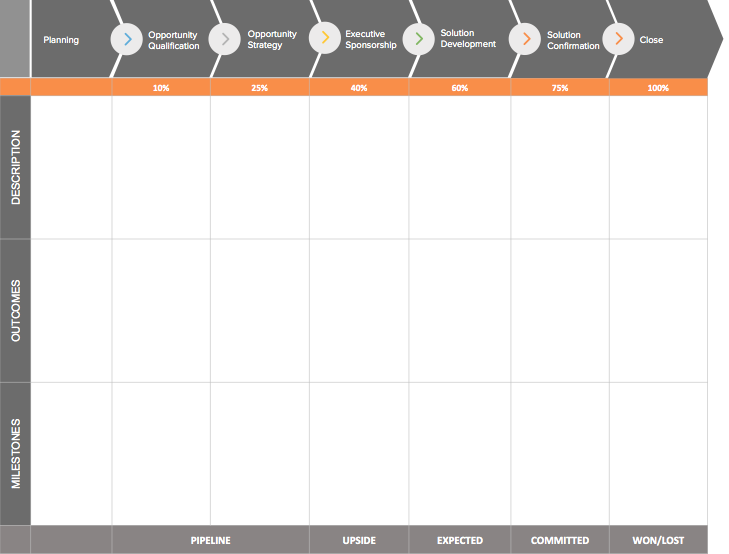
sales forecasting technique for opportunity stages

Here’s how this model should look:

Sales forecasting model opportunity stage

For an accurate forecast, you’ll need a CRM system that allows you to automatically assign the win probability for each stage in the sales cycle.

It’s also a good idea to do a routine check every 6 months to see if your team’s performance is higher, lower or about the same as you anticipated when you initially set the probability. You should adjust the rates as your team becomes more productive and improves their conversion rate.

Considerations:

Old opportunities that have been sitting in your pipeline for months (maybe years) can affect the forecast. Make sure your data is fresh and the opportunities are updated regularly.

The probability factor is critical in this model so look at historical data and calculate it based on the performance of previous opportunities.

You need to have a very well-defined list of actions that need to happen before a deal can be moved into the next stage. Without clear guardrails over this part of the process, you lose accuracy.

#4. Length of Sale Cycle Forecasting

Concept: The length of the sales cycle forecasting method uses data about the time it takes a prospect to convert into a paying customer.

For example, if a sales cycle lasts for six months and your sales rep has been engaging a lead for three months, there is a 50% probability of closing the deal. Forecasting using this method is objective as it doesn’t depend on the emotions of your sales reps.

It is also advantageous as you can use it on a variety of sales cycle sources, so it is a perfect fit for companies that seriously track when customers join their sales pipeline.

Calculation:

To calculate the length of the sale cycle, you need first to decide the starting point. After that, use the following equation:

# of days from the first contact + customer conversion = # of days of combined sales

If you combine the total number of sales for the combined sales by the number of deals closed, you get the average length of the sales cycle for your organization.

Consideration:

Leads could include someone who downloaded an ebook from your website and then asked for a demo months later. As such, they create a second lead that triggers the initial contact with your sales reps.

#5. Intuitive Forecasting

Concept: Your sales guy would be the best person to ask whether the sale will happen or not.

Thus, you can ask your sales rep if they are confident of closing a deal and when. Your sales reps are the closest to your prospects, and they know how things are going. Therefore, the intuitive forecasting method relies upon your trust in the opinion of your prospects.

The most significant downside of the method is that it is subjective. If the sales reps are optimistic, they may provide high estimates, and there is no method to assess the figures.

Calculation:

No formal calculation here, but a sales rep will outline the dollar amount they expect to bring in a particular period with intuitive forecasting. For example, I plan to bring X number of dollars in X number of days.

Consideration:

The sales rep will examine the sales and outline the potential value of the sales. The sales rep should put all factors into consideration before giving the estimates.

#6. Test-Market Analysis Forecasting

Concept: Test-Market Analysis forecasting method enables you to roll your product or service to a particular group of individuals based on their needs. You can move the product to a specific location and see how it performs.

The results from the rollout can then be used to make a more accurate forecast of the future market. The method is ideal for big companies who wish to roll out a new product but want to test the market response.

Calculation:

In this method, you divide the market into two regions to roll out the product. The test market is where you bring the product to the market without advertising.

Then you have the control market where the product is advertised. The difference between the sales in the control market and test market is analyzed. The gap analysis helps forecast the future sales of the product.

Consideration:

The Test-Market method is a quantitative method that requires a considerable investment. It is ideal for launching new products or exploring new markets.

#7. Historical Forecasting

Concept: The historical forecasting method works by taking the previous sales data for a certain period and assuming that your sales will be better.

The problem with the historical forecasting method is it doesn’t put into account the dynamic market changes. For instance, if your competitors ran a promotional campaign, you may notice a decline in your sales.

Calculation:

For instance, if the monthly recurring revenue in June was $30,000. Using this method, you expect the MRR for July will be at least $30,000. Assuming your average year-on-year growth rate is 10%, your MRR for July should be $30,300.

Considerations:

While using the method, you should consider that the market is dynamic and prone to changes.

#8. Multivariable Analysis Forecasting

Concept: If you are looking for the most sophisticated and accurate forecasting method, multivariable analysis forecasting is an excellent pick.

It incorporates factors from other sales forecasting techniques, including opportunity stage forecasting, sales cycle length, and individual rep performance.

Calculation:

The multivariable analysis involves complex mathematics. You require clean data, and your sales reps should track the progress of the deal and activities, or your results will be inaccurate.

For example, you may have two reps working on the same account. The first rep has completed a demo with a prospect for a $20,000 deal. If the rep has a 25% chance of closing the deal, your forecasted amount is $5000. Assuming your second rep has a proposal of a small-sized deal of $8,000 and has a 65% chance of closing the deal, your forecasted amount is 5,200.

The total forecast for this account is: $5,000 + $5,200= $10,200

Considerations:

This forecasting method may be impractical for small businesses as it involves complex maths. Ensure your sales reps track all the deal progresses, or else your results will be inaccurate.

Sales Forecasting Using a CRM System

The table versions of these sales forecasting methods are ideal when you’re just starting out. However, if your organization is more established, the best thing you can do is to customize the reporting section in your CRM.

I’d love to hear how these models work for your business or if you’ve used other sales forecasting methods that have proven to be effective. Drop me a line in the comments below!

The post 8 Proven Sales Forecasting Methods for Greater Accuracy appeared first on Sales Hacker.

31 May 15:37

The Role of Artificial Intelligence in Patient Engagement

by Shauna Leighton

ai-medical-1-origArtificial intelligence (AI) has continued to make major headlines as part of the life sciences industry’s trifecta of recent technology trends, and it’s not hard to see why.

Research published by MarketsandMarkets projected that the healthcare artificial intelligence market is expected to grow from $667.1 million in 2016 to more than $7.9 billion by 2022, a compound annual growth rate of 53 percent over the forecast period. This explains why companies such as IBM and Google are dominating advancements as they develop deep learning techniques that can revolutionize the way diseases are diagnosed, treated, and even prevented.

However, with AI’s success, comes its many challenges.

According to Niall Brennan, former chief data officer at Centers for Medicare and Medicaid Services (CMS), one of the key challenges related to whether or not artificial intelligence and machine learning gain traction is “translating it into something tangible that will resonate with payers and lead them to think about realigning financial incentives” to improve patient outcomes and reduce healthcare costs.

As healthcare organizations start to focus on consumer expectations in response to rising out-of-pocket costs and value-based reimbursements, providers will need to learn how to personalize the patient experience, reduce unnecessary expenditures, and maintain open lines of communication between office visits to keep patients as healthy as possible.

Such a paradigm shift in care delivery will rely heavily on data leveraged from direct and indirect sources to provide a more holistic view of an individual patient. This is why patient engagement, leveraged by Artificial Intelligence, is a viable solution that the healthcare industry needs, and deserves.

When it comes to patient engagement, the promise of AI is to improve the experience by anticipating patient needs, providing faster and more effective outcomes. To successfully optimize AI for patient engagement, life sciences companies should ensure that their strategy includes:

  • Engaging patients with insights that are conversational and contextual, and adjusting based on the situation to respond in real time.
  • Teaming providers with the intelligent guidance of AI so they can provide patients with next-best actions, personalized to them.
  • Empowering patients who want to actively participate and engage in their health with intelligent guidance and support when needed.

AI can certainly play a role for life sciences companies looking to deliver on elevated customer expectations. But recognizing AI’s potential isn’t enough. To derive real value, life sciences companies must carefully examine how the technology will fit into their specific business processes, and how it will affect their patients’ lives overall.

However, AI is only one part of the equation. Those that want to stay relevant in their professions will need to focus on skills and capabilities that artificial intelligence has trouble replicating — understanding, motivating, and interacting with human beings. A smart machine might be able to diagnose an illness and even recommend treatment better than a doctor; however, it takes a person to sit with a patient, understand their life situation, and help determine which treatment plan is optimal.

31 May 15:37

Proof: Influencer Content Can Increase Foot Traffic

by Holly Pavlika

More and more brick and mortar stores are being closed every day. Store traffic and sales are down, impacting many brands and retailers. Ninety percent of all retail is still done in physical stores and, let’s face it, much of the purchase intent starts online. Can online behaviors drive more foot traffic…specifically can influencer content pointed at a specific retailer on behalf of a brand/product increase foot traffic?

Brands are flocking to influencer marketing and there is a demand for proof points to the value of influencer marketing. We sought out a mobile geo-fencing and measurement partner with an eye for examining the behavior of people exposed to influencer content versus an identical unexposed control. Placed, Inc. owns the world’s largest opt-in location panel and specializes in location analytics. The Placed Panelists opt-in and install a mobile app that measures billions of locations consistently in the background while privacy is ensured through Placed’s multi-step processes. Together with Placed data and our first-party audience pixel data, we pursued the idea that the right social content could inspire more in-store visits.

Measuring foot traffic through pixel data, combined with geo-fencing technology, allowed us to tap into the shopper DNA and consumer intelligence that has been lacking in the past. We looked to expose content and weigh the results against an unexposed household. Test households were pixeled upon visiting influencer content pages and then were further cookied to check for overlap with Placed’s opt-in location panel. The Exposed panel’s mobile devices are routinely polled for location (latitude and longitude) i.e. frequency, proximity, and time spent at the target venue, be it a retail store or another event-based locale.

By serving specialized influencer content to the exposed audience, the chance of a consumer taking an action is already notably higher. Tracking the physical path-to-purchase through geo-fencing at a specific retailer provides the solution for justifying influencer content creation that clients have been searching for.

The content not only drives consumers in-store, but also does so in a timely and measurable way. Traditional and digital media struggle to record the actual relationship between content served and foot traffic related to advertising content. This new measurement offering will enhance a brand’s presence among consumers while providing valuable store conversion data.

Our results showed that 48 percent of the exposed group visited the retailer within four days versus only 29 percent in the identical, but unexposed, control group. The positive store conversion rate of 18.2 percent for the Test vs. Control affirmed that influencer campaigns can impact in-store traffic when implemented alongside audience pixel data and this data allows clients to target an audience they know is already interested in their product or brand. This adds another feather in the cap of influencers and their content, making them a valuable part of the marketing mix. It’s time influencer marketing be given a seat at the table and integrated across the marketing mix on both national and local levels.

31 May 15:36

The US dollar isn't living up to expectations

by Alessio de Longis and Jesse Hurwitz, OppenheimerFunds

mud falling

One of our key market views at the turn of the year was that the U.S. dollar, though already significantly overvalued, would continue to appreciate in light of a shifting U.S. policy landscape.

A united Republican Congress and presidency had increased the odds of fiscal stimulus which, coupled with monetary tightening already underway, created the potential for meaningful fiscal and monetary policy divergence between the United States and other major developed countries. As we explained at the time, such a policy mix was likely to boost the greenback against other major currencies.

Five months later, the dollar has instead fallen 3.8% on a trade-weighted basis (Exhibit 1). Below we take stock of what went wrong and what we expect going forward.

Fiscal Expansion: Reality Never Met Expectations

Without a doubt, the largest disappointment has come from fiscal policy. The combination of a border-adjusted corporate income tax, lower tax rates, infrastructure spending and offshore earnings repatriation was expected to attract international capital flows toward U.S. assets, and boost the value of the dollar. However, two major setbacks dramatically reduced the likelihood of meaningful tax reform in 2017:

  1. Healthcare reform needed to come first. Dismantling the Affordable Care Act (ACA) was supposed to provide an easy win and ensure a more favorable baseline federal budget to assess the merits of subsequent tax reforms. The House’s failure to achieve consensus on ACA replacement sharply slowed the legislative agenda. Further, the American Health Care Act (AHCA) that passed the House in early May will need to be rewritten in the Senate before Congress can move onto action on tax reform. The timeframe remains highly uncertain.
  2. The border-adjusted tax (BAT), an integral source of financing lower business tax rates, met strong resistance from important industry lobbies, the administration, Congressional Democrats and key Senate Republicans. The BAT was Speaker Paul Ryan’s “secret sauce” designed to find a large source of offsetting corporate tax revenue that would allow significant tax cuts without widening the budget deficit. Without it, tax cuts that could be passed via the budget reconciliation process (without Democratic support) would have to be much smaller or temporary in nature if they were to widen the deficit.

At this stage, we believe any meaningful progress on tax reform seems postponed to next year and, if it does come to bear, will likely be more modest in scope. While the repatriation of foreign corporate profits is still likely to be included, a border-adjusted corporate tax no longer looks feasible. In addition, while infrastructure investment continues to feature prominently in President Trump’s speeches, the investigation into the Trump campaign and Russian interference in the election threatens to further derail the legislative process.

Monetary Policy: Hiking Cycle Still on Track, at Least for Now

On the other side, the Federal Reserve has proceeded on its tightening cycle in line with expectations, supporting the U.S. dollar via higher interest rate differentials (i.e. carry). In fact, the dollar is one of the highest-yielding currencies across developed markets (Exhibit 2). Today, the critical question is whether the U.S. private sector will be able to sustain its positive growth momentum without the previously anticipated fiscal stimulus. To be sure, growth and inflation data have slowed in recent weeks, posing downside risks to the Fed’s rate projections (Exhibit 3).

Portfolio Implications

In light of these developments, we have reduced our portfolios’ overweight positions in the U.S. dollar over the past few weeks—primarily by trimming currency hedges in the euro. However, we continue to express relative-value views in high-yielding emerging market currencies such as the Turkish lira, Russian ruble and Indian rupee versus their developed-market peers, including the Japanese yen, Swiss franc and Canadian dollar. The framework of policy divergence we laid out earlier this year may still come to pass next year if tax reform becomes a reality. For now, though, we are less optimistic on the dollar over the next six months.

unnamed

unnamed 1

unnamed 2

SEE ALSO: America's government debt isn't a problem right now, but that could change

Join the conversation about this story »

NOW WATCH: China built a $350 million bridge that ends in a dirt field in North Korea

31 May 15:33

3 Branding Goofs That Could Change Your Image

by Liz Papagni

branding goofs

Have you ever seen messaging from a well-known brand that made you shake your head in confusion? Maybe one of your favorite companies released a product or service that just didn’t fit the brand you’ve grown to know and love. A departure from your brand mission and vision could happen if you’re not careful, and the result is always confusion among your buyers and fans.

In most cases, this departure from the brand is an attempt to grow or to stay relevant during changing times. To avoid these mistakes, you must first know what they are. Let’s take a look at some flubs that could change the way your audience perceives your brand.

Inconsistent Messaging

Your brand messaging takes place across several different platforms, from your social media and website to your print materials and videos. In many cases, the differences found on each medium boils down to the people responsible for those individual platforms.

For instance, the writer of your website content may not have any say in the copy used for your advertisements or video scripts. The social media manager might not be aware of the copy used for your retargeting ads. On top of all that, your website designer and graphic designer may be two separate people who have created their own interpretation of your brand’s aesthetic—and the two visuals could differ enough that recipients of your brand message aren’t sure which message is true to your brand.

The solution comes in two parts: first, a style guide that lays out your preferred language choices, fonts, colors, and other imagery. Second, there must be one person directing all messaging that reaches the public. This director may not do all the work, but they should see everything before it goes out, so as to ensure all messaging is consistent and on brand.

Changing With the Times

Trends changes at a blistering pace, and a brand that doesn’t keep up with the times could find themselves woefully out of touch within a short amount of time. Does that mean you need to update your logo and imagery every time the trends change? Absolutely not.

Brands that do adopt the trends as quickly as they change will eventually find themselves without an audience, as buyers struggle to keep up with the changes their favorite brand is making.

Instead, develop something that will stand the test of time. Using every one of the latest trends will make your brand look dated within no time, resulting in yet another brand refresh.

It’s important to approach any brand refresh carefully, and only after fully examining your brand’s effectiveness. If you feel you’ve lost touch with your target audience, then perhaps a brand refresh is in order—just not every six months.

Trading Relevance for Visibility

Reaching a wider audience is any brand’s dream, but you can’t give up everything you stand for to get your fifteen minutes of fame. The problem is, you may not even realize you’re trading relevance for visibility until it’s too late.

Some of the biggest mistakes you can make include major social media faux pas, introducing or attaching your name to confusing products, and participating in guerilla marketing that backfires.

Social media faux pas can happen before you even realize it. Have you read any of the horror stories about companies that jumped on a hashtag bandwagon, only to realize later they were associating their brand with something totally irrelevant? One of the most cringeworthy is the Kenneth Cole Twitter account, where the brand constantly shoves a foot in its mouth. In this case, we think perhaps the brand likes the notoriety too much, but it’s not something other brand should emulate.

As for attaching your brand to the wrong product, look no further than the Fyre Festival debacle. Kendall Jenner is definitely a brand, and her connection to the Fyre Festival as an influencer was damaged—perhaps irreparably, since she also has to deal with the Pepsi commercial fallout, too—when the festival went belly up before it began but after fans had already arrived!

As for a backfiring guerilla marketing campaign, there are probably too many to even mention. Some are excruciating to watch, while others just prompt a grimace. The movie Forgetting Sarah Marshall launched a campaign that irritated every real Sarah Marshall out there, as they installed posters with mean messages to the Sarah Marshall character in the movie. Lines like, “My mother always hated you Sarah Marshall,” and “You suck, Sarah Marshall,” prompted all the actual Sarah Marshalls out there to react with their own posters directed to the creators of the movie.

Your company’s brand is your most invaluable asset. You’ve worked hard to develop this image and to build an audience that understands your values. In all cases, put your brand first. You could avoid some of these crazy mistakes and keep your image intact. That’s a lot more valuable than fifteen minutes of fame.

If you’d like to explore marketing initiatives that don’t put your brand in danger, give us a call!

31 May 15:32

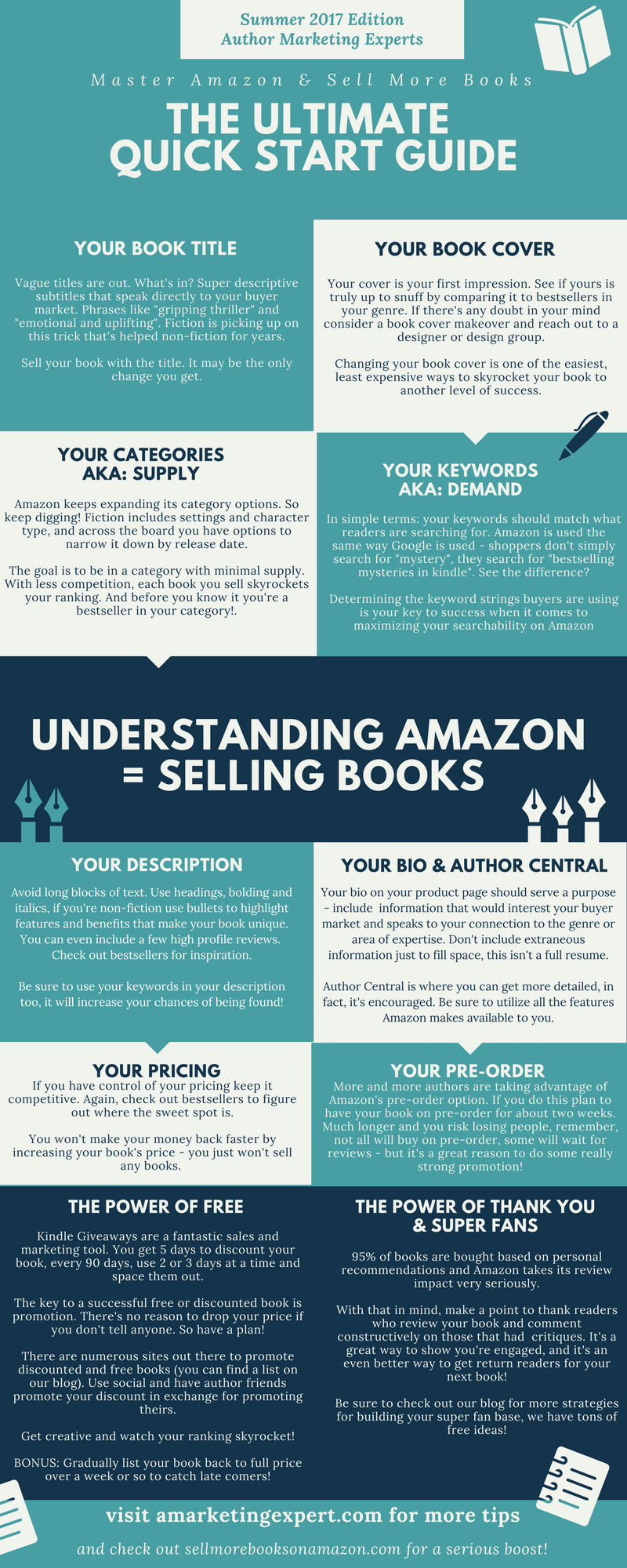
Master Amazon: The Ultimate Quick Start Guide [INFOGRAPHIC]

by Penny Sansevieri

The biggest hurdle we help indie authors tackle: how to be a success, especially in terms of selling more books on Amazon.

And although successful authors take a variety of paths to achieve their goals, there are several basics to keep in mind that will propel you on your way!


The Amazon Quick Start Guide You Must Read! via @bookgal #amazonhacks
Click To Tweet


The business of publishing is not a “set it and forget it” industry. You’ll want to try new things and stay on top of what’s working, but also what’s timely. Are your tactics current? Are there any newsworthy angles that you can focus on? How about keywords — are they reflecting what buyers are using right now to purchase books? Is your book cover strong enough to compete against today’s bestsellers? The basics are crucial – don’t get overconfident – instead be diligent.

I always tell authors to give themselves a check up seasonally to make sure their marketing is both current and timely. In fact, this is key to success on Amazon. And if you’re not sure where to get started, we’re here to help! Below is our just-released Summer 2017 Amazon Quick Start Guide that you can refer back to as often as you need. In fact, you should bookmark this page so you can use it for quick and easy reference.

Here are the basics for getting started on Amazon AND giving your book an overhaul!


Amazon Quick Start Guide | AMarketingExpert.com

Click the Amazon Quick Start Guide to open it in a new tab, then you can click on any section to zoom in!

We hope this Amazon Quick Start Guide has inspired you! Still have questions? Our blog has a lot of additional tips on all of these topics – just do a simple search!


Every author needs my Amazon Quick Start Guide! via @bookgal #amazonhacks
Click To Tweet


If you find yourself asking: How Can I Sell More Books?

Then not only are you not alone, but I can help! To learn more about how you can find out what’s stopping you, visit www.sellmorebooksonamazon.com!

31 May 15:32

5 Proven Growth Strategies for Professional Services Firms

by Lee Frederiksen

We’ve all been in those meetings when ideas for stimulating growth get tossed around. Before you know it, an entirely new growth strategy has emerged and everyone’s moving full speed ahead in hopes of seeing benefits sooner. There’s just one problem: by letting excitement take over, firms often don’t take the time to analyze risks and determine how likely a new growth strategy is to truly be successful.

However, there are a few strategies for growing a company that have been proven to work, time and time again. While every approach has some amount of risk, these strategies can deliver new growth without making dramatic changes to your process. Depending on your situation, one strategy may be a better fit for your firm than another.

Below are five of the most common growth strategies. Let’s go through them one by one, from lowest to highest risk:

1. Increase Market Penetration

This approach involves offering more services to the same client. Since it doesn’t require introducing anything new, it’s a relatively low-risk strategy that can be achieved fairly easily. For instance, let’s say your accounting firm offers auditing services, but few of your clients know about it. By making your current clients aware of your other services, your firm can increase your relevance and get more revenue from a market you’ve already tapped.

Now, it’s important to note that even this conservative growth strategy isn’t without risk. When you depend on a small pool of clients, you can’t afford to lose many of them. Further, convincing your clients to buy additional services can be an uphill battle. As we discovered in our research for our book Inside the Buyer’s Brain, most clients aren’t aware of a provider full range of services. In other words, clients have a tendency to seek out other providers for additional services — service that you offer — because in their minds they don’t associate those services with your firm.

2. Develop New Markets

Another relatively low-risk strategy involves finding new markets for your existing services. This is a common growth strategy in the professional services industry, as many firms seek to roll out their services to as many audiences as possible.

While the concept of “more buyers equals more sales” might seem logical, it has its potential costs, too. It can be time-consuming and costly to educate and nurture new audiences, so your firm runs the risk of underinvesting in potentially valuable markets while overinvesting in those with less opportunity. If you aren’t careful, this approach can dilute your brand and any industry specialization you may have developed.

However, if you approach new markets thoughtfully, this growth strategy can be quite effective. For example, if your law firm currently caters to small businesses, but a new Fortune 500 manufacturing firm is relocating to your area, a large corporate client could be a beneficial growth opportunity.

3. Develop Alternative Distribution Channels

While this strategy is less common in professional services, it can still be effective. By partnering with complementary — but non-competitive — service firms, your firm can widen your reach by leveraging alternative distribution channels. For instance, a firm might partner with a trade association to gain access to their membership. Or a law firm partner might partner with an accounting firm to exchange referrals and even market together.

Because this strategy is fairly rare in the professional services, the biggest risk involves finding the right fit. Developing alternative channels can be costly, so it’s important to consider whether it’s worth the investment — particularly since choosing an alternative distribution channel can damage your brand if it raises credibility issues.

4. Develop New Services

In this strategy, your firm develops an entirely new service to address an underserved market. In a way, most professional services firms do this already. After all, no two clients have the same needs, so they customize their services to the particulars of a client’s situation. But as a market strategy, a firm has to think larger. For instance, an accounting firm might look beyond its traditional tax offering to offer a new service offering — internet security services or financial planning, for example.

Despite its potential to generate significant growth, this strategy comes with a number of risks. For one, developing a new service requires a substantial time investment, which can divert critical attention from the services you already offer. By broadening your service line, your firm also risks becoming a jack-of-all-trades — a generalist that stands for nothing in particular.

Further, it’s important to make sure that any new services fit your brand, don’t cause a conflict of interest, and don’t alienate your referral sources. They should fit naturally into your current portfolio of services so clients and prospects feel confident in your ability to deliver.

5. New Services to New Markets

Rounding out our list is the riskiest growth strategy of all: offering new services to new markets. In addition to the challenge of developing new services, this strategy also involves cultivating a new market. In order to justify the associated risks, the potential opportunity must be substantial.

In some cases, this strategy can be hugely successful. Take one of our clients in the consumer market research field, for example. They had developed a software platform to serve their already-diverse client base. Then they discovered that the software platform could also address a specific problem in the medical research field. They decided to create a new firm catering to medical researchers — which allowed them to take advantage of the opportunity without muddying their brand and confusing their current client base.

Assessing Risks and Determining Strategy

While each of these growth strategies presents certain risks, determining which approach best suits your firm requires assessing your specific situation. For instance, what’s a bigger risk for your particular firm: expanding geographically into new markets or adding new services within your existing markets?

Before you can move forward with any successful growth strategy, you need to gather insights that help you assess those risks. With the right research and careful thinking about your audiences, brand and goals, you can identify a growth strategy that makes the most sense for your firm.

31 May 15:28

Creating an Effective SDR to AE Handoff

by Stephanie Rodriguez

The handoff from a sales development rep to an Account Executive is often likened to a track and field relay race. One runner passes the baton to the next and, boom, he or she takes off. If you’ve seen these races before you know the runner expecting the baton isn’t just waiting around as their teammate reaches them, they are already in motion down the track. They pick up just enough speed for the initial runner to catch them, blindly thrust their hand back to accept the baton, and then surge onward. It is fast, efficient, and most importantly, it preserves the momentum.

An AE should use this “transition in motion” mentality when they are picking up a new account from an SDR. But what first steps should you take to gain momentum and prepare you to make a sale?

Since an SDR guides a prospect through the initial sales cycle, most of an AE’s first steps will revolve around gaining the SDRs knowledge. Here are a few items you can easily check off to get up to speed prior to your first scheduled call with an account.

Complete Your SLA

The Service Level Agreement (SLA) defines the responsibilities of the SDR and the AE within the sales cycle. This agreement is really about holding each other accountable by providing and accepting information to push a sale forward.

Terms will be set for how an SDR should handoff the account. This process will often include creating an opportunity in Salesforce, filling out pre-qualification notes, and scheduling a demo. An AE knows the exact information they should receive and where to find it. Once that information has been exchanges, the AE is now responsible for marking the agreement as complete and facilitating the duration of the deal.

Study the Opportunity Notes

Thanks to your trusted SLA, any new opportunity will already contain qualifying information to get you up to speed. I highly recommend taking a close look at additional opportunity notes your SDR may have left. Opportunity notes can provide crucial details that were mentioned during early correspondence you want to be aware of.

Additionally, with sales engagement platforms like SalesLoft, activity previously logged to a contact will also be in the opportunity. This means you can take a look at previous correspondence and quickly learn any pain points the company may have. You can also see how often communication occurred, whether a person is quick with replies, or if they have a lot of questions. All of this information can help better prepare your personalized sales process.

Listen to Call Recordings

If your SDRs conduct qualifying calls before passing opportunities to AEs, you should dig into the individual call recordings. Notes and information can give you the solid framework of an account, but actually hearing that person speak about their goals and pain points offers the real building blocks you’ll need to make a sale.

Think of it like when a friend recommends a show on Netflix versus you watching the trailer for yourself. You have the gist of what it’s about, but you know nothing of the tone until you catch a glimpse yourself. As an AE you are building a strategic relationship with this person, at the very least you may be able to pick up some ice breaking conversation starters.

These steps will allow you to put your best foot forward. Knowing as much information as possible about a company and your contact’s feelings in regards to his or her role prior to speaking with them provides you a boost in your sales track. Take full advantage of the SDR’s knowledge and efforts with a company and continue your stride to the finish line.


Want to learn about a sales engagement process that works for your role as it relates to Salesforce? Download our newest series, Sales Engagement with Salesforce: The Complete Kit, and discover which works best for your sales development, sales operations, or full cycle sales process.

sales motivation

The post Creating an Effective SDR to AE Handoff appeared first on SalesLoft.

31 May 15:28

Why Should You Monitor Your Sales Reps’ Calls?

by Dan Sincavage

“We have two ears and one mouth, so that we can listen twice as much as we speak.” – Epictetus, Greek philosopher

Call monitoring is possibly one of the best tools that you have as a sales manager. It comes with your CRM integration, and can be done during a call or using a recording of the actual call. The goal is to listen in, assess and correct – and here, we are not just referring to your sales rep.

Monitoring phone calls is not just about keeping an eye on your rep’s work practices and communications skills. Call monitoring benefits your entire business, and can be the catalyst for change.

Benefits of Monitoring Phone Calls 1: For Sales Managers

An immediate benefit of monitoring phone calls is that you get to listen in to your reps as they try to connect with your potential customers. You get a feel of this “intangible” – a key driver in your sales success that is hard to measure. Good relationships are the foundation of a business’ success. When you monitor calls, you can see these relationships develop, or crash and burn.

Of course, monitoring phone calls is a time-consuming task. A sales manager can only do so much in a day, on top of other responsibilities. The best strategy here is to target outliers, or reps who are on top of their game and those who are underperforming.

The take-away from targeted call monitoring is a better understanding of high-yield behaviors. These are behaviors that nurture business relationships, reduce customer attrition rates and encourage customer loyalty. According to Martin Hill Wilson, Director of BrainFood Consulting: “The more that we understand about the detail of the behavior, the more we are able to help people change their own behaviour.”

When you understand these behaviors and know what works, you can then help underperformers do better. Here are a few high-yield behaviors you need to take note of:

  • Script adherence
  • Net promoter score (willingness of customers to recommend your business) techniques
  • Better call handling time and skills
  • Ability to reverse customer attrition
  • Conversational techniques

Call recording is another key CRM integration feature that works hand-in-hand with call monitoring. You can use the recording feature to save outstanding calls, or calls that applied your department’s best practices. Use these calls as training aid to improve your team’s performance. Take note of language and techniques that have consistently received positive responses, and then use these to update your scripts and procedures.

Benefits of Monitoring Phone Calls 2: For Sales Reps

One of the first things that you should let your team know when monitoring phone calls is that it is not about catching them mess up. Call monitoring shouldn’t be viewed as a negative. In fact, it should be integral to your team’s skills development, and approached as a collaborative task, with input from both manager and rep. A sales agent has a lot to gain from call monitoring.

According to Ed Creasey, Consulting Director at NICE Systems, a data recording, analyses and security company: “We need to monitor the top performers as well, because that is where you get the best insight about the best practices and the new behaviors that can really drive the results…. (while focusing) on the bottom performers, as that’s how you move the overall average to get the results that you need.”

As a collaborative task, you and your sales rep can work together in assessing monitored calls. Reflect on the positives and negatives of these calls. Listen to its recording alongside a recording of a “best practices” call and list down key points. Use call monitoring as an opportunity to encourage your reps to improve themselves.

Larry Skowronek, Project Management Vice President at NICE Systems says: “When the agent and the coach go into their meeting, because you’re dealing with all their interactions, the agent doesn’t have the ability to say ‘you happen to have found the one case where I did that, but it only happened once’…. So it removes the ability to blame sample size and allows the coach and the agent to become much more collaborative.”

Benefits of Monitoring Phone Calls 3: For Your Business

Call monitoring gives you an intimate understanding of your user’s experience. Wherever they are in relation to your sales funnel – lead, opportunity or customer – when you monitor phone calls, you begin to understand them more: what they go through as your prospect or client, what their frustrations are when it comes to your product or the support you provide, and what is required from you to keep them as customers.

When it comes to sales, foremost here is having a stronger grasp of what brings them into the fold – what convinces your leads to sign up or buy. Your best sales reps can give you priceless insight on what works. From here, you can implement team-wide training to apply these best practices. Use call monitoring as a starting point for more effective sales teams and watch your revenue grow!

30 May 17:22

This Rolls-Royce might be the most expensive new car ever built

by Benjamin Zhang

Rolls Royce Sweptail

At roughly $3 million, the Bugatti Chiron is one of the most expensive production cars to ever reach showrooms. So, the words "affordable" and "Bugatti" rarely, if ever, occupy real estate in the same sentence. However, that's exactly what happened over the weekend.

On Saturday, Rolls-Royce unveiled a one-off custom build called the Sweptail. At a reported price of nearly $13 million, it is believed to be the most expensive new car ever commissioned, the Telegraph reported.

While it may not be quite as pricey as the most expensive car of all-time — a $38 million Ferrari 250 GTO — the Rolls is still the price of four brand new Bugatti Chirons.

For Rolls-Royce, the Sweptail represents a return to prominence of the brand's time-honored coach-building business.

Rolls Royce Sweptail"Sweptail is the automotive equivalent of Haute Couture," Rolls-Royce Motor Cars director of design, Giles Taylor said in a statement. "It is a Rolls-Royce designed and hand-tailored to fit a specific customer."

And it's the result of four years of work.

According to Rolls, an individual customer approached the company in 2013 and ask them to build a one-of-a-kind motor car inspired by the luxury yachts of the 1920s and 30s.

Rolls Royce SweptaillThe Sweptail's signature feature is a single-piece glass roof that tapers into the car's fastback rear end. It's a design feature that dominates the car's overall silhouette.

Rolls-Royce has not released technical specs of the car. However, the Sweptail is believed to be based on the current generation Phantom platform, which means some version of the company's 6.75 liter, V12 is lurking under the car's long bonnet. 

Rolls Royce Sweptail

SEE ALSO: Here's what it's like to take a $400,000 Rolls-Royce Dawn convertible on a road trip through New Jersey

Join the conversation about this story »

NOW WATCH: This Rolls-Royce Ghost comes with $100K worth of goodies

30 May 17:22

Winning the Team Sale: Chapter 3 – The Director

by Michael Dalis

Without practice, what are your team’s chances of success at a high-stakes sales meeting?

If the stakes are life and death, like they are for the Blue Angels flight demonstration squadron, the question is not whether, but how much you should practice.  Flying multiple 22-ton jets at speeds up to 500 mph, and with as little as 36 inches between them — side-by-side or upside-down — the stakes don’t get higher.  Pilots must have a minimum of 1,250 tactical jet-flight hours.  On top of their individual proficiencies, the squadron practices as a unit on roughly 120 training missions prior to its first Blue Angels performance.

A group sales meeting or pitch is neither a show nor a life-or-death moment.  Yet, the stakes for a group sales meeting are high enough that you’ve asked others to contribute to the effort.  Your “pilots” all bring individual proficiencies, but how much practice do you generally do as a unit prior to an important customer or prospect meeting?

PRACTICING FOR A TEAM SALE

Practice is about application with the intent to improve.  Successful selling squads practice together not because a manager tells them to; effective teams practice as a group because they realize:

  • Without it, they have a random chance of winning, and they’d rather stack the odds.
  • Feedback is essential to strengthen individual contributions and the team’s performance.
  • Repetition reduces anxiety for all members when it counts most: at the sales meeting or pitch.
  • Talking through who is going to cover what section and what pages, while part of getting organized, fails to cover execution.

Leading a team during practice requires a salesperson to play the role of Director, the equivalent of the Blue Angels’ commanding officer.  So, what’s involved?

  1. Commitment: When recruiting for your team, consider how open each member will be to investing time to practice with the team.
  2. Scheduling: Practicing takes a dedicated time and place.  A tele- or video-conference is better than nothing.  In-person practice beats a call because it better simulates the conditions you will face for an in-person sales meeting.
  3. More than talk: Rehearsing requires running through the key parts of your team’s pitch, not “Here’s where I will talk about our capabilities.”  What will each person actually say?
  4. Feedback: Creating a feedback loop is essential to strengthening performance when it counts.  That feedback can come from you, as the team leader, and by facilitating it among team members.  High-performing teams also have access to expert coaching, whether it comes from a manager or an external sales coach.
  5. Trust: For someone to accept and incorporate feedback from others requires an environment of trust.  Suggestions should be shared in the spirit of helping a customer, supporting a colleague, and winning.

THE BOTTOM LINE

Practice improves your team’s chances of winning the best possible outcome at a sales meeting.  The good news is that what you’re aiming for is way easier and safer than orchestrating multiple fighter jets at high speeds and tight tolerances.  If you want to win against able competitors, you need to skillfully play the team’s Director so practice occurs and is managed effectively.

Sound daunting? Leading a team in an effective sales call is straightforward when you approach it methodically. This eBook will show you how to effectively win more deals when teams are required.

Team Selling eBook - Team Director


For more information on Richardson’s Team Selling program visit our site, or contact us at 215.940.9255

The post Winning the Team Sale: Chapter 3 – The Director appeared first on Richardson Sales Training & Enablement Blog.

30 May 17:22

Ethics in Machine Learning - An Opportunity for Startups to Lead

We’ve entered an era when computers can understand speech, computers can synthesize speech, computers can develop music, author encryption algorithms, create novel art, respond to customer support questions, and even generate new summaries and reports from data. Increasingly, humans will struggle to distinguish between computer-generated and human generated. Consequently, here’s an opportunity for startups to lead, not just technologically, but more broadly.

DT is a creative digital agency business based in Australia that developed a prototype that distinguishes between human speech and synthetic speech. Shaped like a hearing aid, the Anti AI AI chills the listener behind the ear using a Peltier device when the onboard TensorFlow model detects computer-generated speech. It’s one of undoubtedly many technologies which will use one machine learning model to detect another machine learning model.

This idea is not new. In the financial world, understanding the trading patterns of high frequency algorithms can generate millions of dollars in profits. Researchers deploy algorithms to reverse engineer those trading patterns.

Security systems have been doing this for decades. Security researchers develop software to search for the signatures left behind by automated exploitation programs.

DT’s clever prototype is one type of response. Develop defensive detection tools to distinguish deception. And the course, those technologies will be critically important.

But I’m hopeful that many machine learning startups who develop novel technologies will also adopt ethics statements. Statements of ethics outline how a company intends to use a particular technology: which uses they deem valid and which they view negatively. Not just words, ethics should also govern the internal operation of the startup, and form part of the key values of the business.

Google’s “Don’t be Evil” mantra encapsulated this notion of ethics for me when I worked there. Given all the data, all the computational power, all the human capital the business had amassed, there were many different opportunities to generate revenue in unsavory ways. “Don’t be evil” and “focus on the user and all else will follow” were two oft-repeated aphorisms in Google’s product management vernacular and they were part of the executives’ drumbeat. These sayings influenced the way we built products and provided simple mnemonics for Google’s values.

In addition to voluntary internal controls, external controls are likely to be written into law. Already the EU has instituted data protection legislation that also implement some notion of a right of explanation. The EU believes citizens have a right to understand why an algorithm categorized the citizen a particular way. I don’t know if these types of laws will come to the US, but for any company doing business in Europe, they cannot be ignored.

All these wonderful new tools and technologies will provide us novel ways to improve our lives. But like any tool, we have to use them properly and responsibly. Defining corporate ethics around these novel technologies is an important part of establishing a startup’s role in the ecosystem and presents an opportunity for thought leadership in the space.

30 May 17:14

Opinion: Change the voting system without a referendum

by Harvey Enchin

You arrive at your neighbour’s house for a friendly game of cards, but at the door he tells you the other players have decided you will have to score twice as many points as anyone else to win the game.  It’s all above board, he tells you, because most of the players voted in favour of the rule. But is this way of making the rules fair? Of course not. No one would agree to play a game on such terms. And yet this is basically the argument from those who say that B.C. cannot have a more democratic voting system without putting it to a public vote. They argue that if the public doesn’t vote on a new voting system, then it won’t be legitimate. But they are wrong, and wrong in a number of ways.

The referendum advocates seem to think that just voting on something makes it democratic. They ignore how white majorities across the American south used their voting power to disenfranchise African Americans for over a century, hardly a democratic outcome. Or how Swiss men used referendums to deny women the vote until 1972. The rules of democracy have to be fair to everyone, not just those who think they benefit from a certain set of rules. This is why the courts struck down B.C.’s electoral map in the 1980s. They said it was unfair because it treated voters unequally, over-representing some and under-representing others. Should that decision have been put to a referendum too? Obviously not.

Referendum proponents focus on voter choice as the key to democratic legitimacy, ignoring what the debate over B.C.’s voting system has been all about. In a nutshell, reformers argue that B.C.’s current voting system is already illegitimate from a democratic point of view. It treats voters unequally, limits party competition, misrepresents what the public has said with their votes, and nearly always allows a minority of voters to gain the majority of the legislative representation and control of the government, a clear violation of the principle of majority rule. Should voters get to ‘choose’ this undemocratic option? Democratic reformers say no.

The basic argument offered up by referendum supporters isn’t even internally consistent. They claim that a new voting system must be approved by a majority of voters to be democratically legitimate. But for everything else, a government with less than a majority of the popular vote can do far more as long as they’ve got a majority of seats. So we need a majority of the voting public to approve this one government policy but not any others? So much for democratic principle.

Referendum proponents also ignore how badly referendums have performed as instruments of public policy making in Canada. Academic research on the recent provincial use of referendums in voting system reform processes has found chronically low levels of public knowledge and engagement, excessive partisanship in the debate, and a high level of media bias combined with low levels of coverage. In most cases, a majority of the public didn’t even know a referendum was being held, let alone what it was about. And these results have been consistent across the different provincial cases. Choosing a policy consultation approach that evidence suggests will fail is hardly responsible or legitimate.

The use of referendums to decide on voting rules is a recent and rather cynical innovation concocted by politicians to stall democratic reform. Few western countries over the past 150 years have gone this route and for a good reason. Voting systems should be designed to accomplish what they need to do in a democracy i.e. represent the voting public fairly. Referendum advocates hide behind lofty sounding principles but are mostly partisan hacks, desperate to maintain B.C.’s unfair voting system at any cost. B.C.’s new government should move quickly to democratize the voting system, and recognize that the ferocious criticism that will emerge is largely coming from the unhappy card players too used to rigging the game in their favour.

Dr. Dennis Pilon is an associate professor at York University and was formerly assistant professor at the University of Victoria.

He is the author of many academic articles on Canadian politics, B.C. politics, and voting system reform. His books include The Politics of Voting: Reforming Canada’s Electoral System and Wrestling with Democracy: Voting Systems as Politics in the Twentieth Century West. He is co-editor (with Michael Howlett and Tracy Summerville) of British Columbia Government and Politics.

30 May 17:12

Designing “Smarter” With Minimalism

by Grace Cole

Sleek, minimal, and clean are words that describe the trends in website design today. Have you ever wondered why web design is leaning this way? Think about social media or visit a big news website filled with advertisements. They’re examples of our incredibly busy and overwhelming world. That’s why minimalism is so popular. In our lifestyle choices and through design, we feel the need to declutter. Smart marketers and designers are delivering just that.

We took this approach when designing our new website. Smart, simple, and easy were the core objectives. Here are a few minimal design principals that inspired our design:

Less is more

Minimalism has impact because it provides fewer options. More isn’t always better. When faced with a million choices, people have to use a lot more mental energy to make a decision. This often means making the wrong decision or none at all. It’s the same reason we say we never have anything to watch on Netflix. There’s so much you could binge on, so how do you choose?

When it comes to a website, that means visitors aren’t finding what they’re looking for or they’re leaving. Minimalism requires restraint. Produce less copy, build fewer pages, include less in your navigation, and limit your calls-to-action. It’s the hardest part. There’s so much you want to say and show your visitors.

So you have to act like the people who build the Netflix algorithm. You have to know what they’re looking for better than they know themselves. Use Google Analytics and Hotjar to gather data from your current visitors. Interview sales to find out what they most often talk to prospects about. Then distill it all into its simplest form.

Give your content (white) space

White space is a way to provide fewer options and ensure focus. Have you ever been in a situation where several people are talking to you at once about different topics? It can be hard to prioritise the conversation and can become an overwhelming experience, ending in a miscommunication. In the case of a website, that means a bounce.

When you give website elements room to breath it allows visitors to focus on what they came for: the content. White space doesn’t necessarily need to be white just empty space between visual elements. On our website, the banners have large images but the text is positioned to the empty or ‘negative space’ to the left. This gives our visitors a focal point and clear direction to keep scrolling.

White space example

When attempting to add white space to your website, consider what your main message is and how you visually want to represent it. Once you know what you want people to focus on, take away elements that don’t contribute to your goal and go from there.

Highlight content with strong typography in a grid

Since minimal design aims to do more with less, you’ll have fewer elements to work with. So how do you create visual interest? The answer is with the message itself. Generally, typography used in minimal designs are typefaces with clean lines and simple strokes. When typefaces are stripped to their simplest form it puts emphasis on the content, not the visual.

When this idea is applied to a website, it allows users to easily digest the content. Since the message is the only thing on the screen, it holds more value when other elements aren’t taking away from it. This approach, combined with the philosophy of white space, can create a sense of hierarchy. It can be used to direct viewers to a call-to-action or the next page.

It can be challenging to design a harmonious layout with only white space and typography to play with. That’s why grids and minimalism are best friends. Grids help create a strong sense of alignment with body copy and headings. They ensure a clean, simple, and consistent design.

Grid and typography example

Be mindful with your color palette

If something doesn’t provide purpose to your design, it doesn’t make the cut! Colour is no exception. Most minimal designs are made up of one or two colors. You typically see black and white because they naturally hold the most contrast between each other. But minimal design doesn’t always need to be monochromatic.

Our website uses a limited palette of black and white. We use our brand color purely for our call-to-actions and navigation. Other colors are introduced through our imagery or interactions. These small pops of color communicate our culture’s energy without being distracting.

When applying this to your own designs, consider what color will be used for and why. Will it be used as an accent or a call-to-action? Will this add or distract from content? Whatever the answer may be, keep it consistent, subtle, and simple.

Minimalism isn’t going anywhere

Minimal design is one of those trends that will never go out of style. The most timeless websites practice these principles. Just look at Google in 2007 and compare it to what you see on today’s homepage (below). The style may be updated, but the content and layout remain. They limited the clickable options on the page and emphasized content with white space. That’s why the user interface doesn’t need to be drastically updated when design trends change.

Minimalism is a way of thinking about your design. You could even call it designing smarter. Try interjecting some of its philosophy into your next project or current website. What could you condense, remove, or simplify until all that’s left is what’s necessary?

30 May 17:12

4 Powerful Pricing Tactics That Have Nothing to Do With Discounts, According to Yocale's CEO

by arash.asli.business@gmail.com (Arash Asli)

Welcome to “The Pipeline” — a weekly column from HubSpot, featuring actionable insight from real sales leaders. This week's installment comes from Arash Asli, CEO of Yocale. Want more “Pipeline” Content? Subscribe to our newsletter.

Research shows there is a weapon you can use to increase your sales performance — a sales strategy that's effective no matter where you work or what you sell. What is this sales strategy, you ask?

Strategically framing your prices. It doesn’t matter if you're operating in the luxury market or if your product is as cheap as chips — it’s how you frame those prices that will influence prospects and accelerate your close rate.

Here, I‘ll discuss four tactics you can use to frame your prices as effectively as possible — without resorting to discounting. Let’s take a look.

Download Now: Free Sales Pricing Strategy Calculator

4 Powerful Pricing Tactics That Have Nothing to Do With Discounts

1. Positioning Time Over Money

Regardless of the price of your product, whether it’s $1 or $1000, focusing on “time” over price can boost sales and customer satisfaction.

In this context, time might equal the promise of frequent and long-term use or hours of the buyer’s life they’ll get back.

According to a study from two Stanford Graduate School of Business researchers, highlighting the experience someone will have with your product is key. They used three different signs to advertise a lemonade stand — one that mentioned time, one that mentioned money, and one that mentioned neither.

The “time” sign attracted twice as many people as the “money” sign — these customers also spent twice as much.

“Ultimately, time is a more scarce resource — once it's gone, it's gone — and therefore more meaningful to us,” Cassie Mogilner, one of the study’s authors, explains. “How we spend our time says so much more about who we are than how we spend our money does.”

When pitching to prospects, talk about the time they’ll spend or save using your solution — not how much they’ll spend.

2. Not Competing on Competitor Pricing

Don’t compete on pricing. A separate study from Stanford found emphasizing your products are priced lower than your competitors usually backfires.

The researchers asked participants to choose between three cameras: A basic, inexpensive camera, a more advanced camera at a mid-priced price point, and an advanced camera at a high one. Far more participants “compromised” by selecting the mid-priced camera when explicitly told to compare the three.

“… Being told to make the comparison made people much more risk averse," the authors note.

When consumers are forced to compare products, they tend to focus on the competitive disadvantages — not your solution’s advantages. So if you catch yourself uttering something like “Our price is 20% lower,” or “Compare our price to Product X’s price,” cut yourself off.

3. Handling the “Price Is Less Everywhere Else” Objection

Two price objections come up frequently: “I can get a better price from competitor Y” and “The price is less everywhere else.”

When you hear these, focus the conversation on your product’s quality. Point out that the better quality, more robust feature set, or greater support provide more than enough value to justify the higher cost. This strategy can actually work when you’re competing against bigger, higher-priced competitors as well.

There are times when people pay more for a product or service — but in those cases, they're paying for the brand name. If your company is a startup, for example, your company most likely doesn’t have the brand recognition to charge the same prices.

In other words, your prices are lower, but the quality is just as high.

4. Highlighting Your Product’s ROI

The only time the price should ever factor into an argument is if the ROI of your product or service far outweighs the price. It’s been proven time and time again that people will pay for quality, regardless of price.

While you don’t want to compete on prices, you do want to compete when it comes to the benefits that you offer that are favorably matched against your competitors. Value is always the key to the customer’s heart, and value applies more to quality than it does to cost.

You can also mention features you’ll be releasing soon — these benefits will make your product seem more desirable, even though they’re not available yet.

Beyond giving discounts, front-line sales representatives can’t typically change or increase their standard prices. However, they can increase customer loyalty with proper employee training. Use these four framing tactics to get the results you want regardless of your product’s cost.


30 May 17:11

Amazon.com Inc shares hit US$1,000 for first time, showing its dominance in e-commerce and cloud tech

by Spencer Soper, Bloomberg News

Amazon.com Inc.’s shares topped US$1,000 for the first time, marking a new milestone for a company wooing investors by dominating online commerce and cloud computing, two industries expected to keep growing as shopping habits change and businesses rethink how they deploy technology.

Amazon shares hit US$1,001.20 in New York Tuesday, up about 40 per cent from a year ago and more than double the 15 per cent gain of the S&P 500 Index in the same period. Investors are thinking about how much further Amazon can grow as it tries to replicate its U.S. success abroad.

The shares will likely push even higher since Amazon is growing so quickly in massive global industries that show no signs of slowing, said John Blackledge, analyst at Cowen and Company LLC, who recently upped his Amazon price target to US$1,125 a share.

“There’s a long runway there,” he said. “The markets Amazon is playing in with global retail and cloud computing are just massive. Things continue to go well and investors are looking for more upside.”

The Seattle company’s US$478 billion market value is double that of Wal-Mart Stores Inc. even though the world’s biggest retailer will have sales three times larger than Amazon’s this year. Investors put more value in Amazon’s web traffic and delivery network than they do in Wal-Mart’s vast store presence because online spending will grow more than four times faster than overall retail spending this year as shoppers continue to shift from stores to websites, according to EMarketer Inc.

The world’s largest online retailer is dominating e-commerce with its US$99-a-year Amazon Prime subscription, which includes delivery discounts, music and video streaming and photo storage that keep shoppers engaged with the website. Seattle-based Amazon had 80 million Prime subscribers in the U.S. as of March 31, an increase of 38 per cent from a year earlier, according to Consumer Intelligence Research Partners. Prime memberships help lock in loyalty, which is critical as competitors such as Wal-Mart enhance their e-commerce offerings to slow Amazon’s momentum.

Amazon has been tackling retail one category at a time, disrupting bookstores and electronics stores first and more recently pushing into apparel and groceries. Its rise has coincided with the decline of prominent retail chains such as Macy’s Inc. and Sears Holdings Corp., which have shuttered stores and laid off workers in response to declining sales. Shopping malls have resorted to hosting concerts and carnivals in empty parking lots to keep customers coming.

Another Amazon advantage is its profitable and fast-growing cloud-computing division Amazon Web Services, which maintains a global network of data centers and rents out storage space and computing functions to clients in a variety of industries, including Netflix Inc. and Airbnb Inc. as well as Capital One Financial Corp. and the federal government. Yelp runs many of its functions on AWS. This year, companies around the world will funnel US$246.8 billion to Amazon and other cloud services providers, according to Gartner, up 18 percent from 2016.

Amazon’s rise has made its founding Chief Executive Officer Jeff Bezos the world’s second wealthiest person, behind only Microsoft Corp. co-founder Bill Gates, according to the Bloomberg Billionaires Index. His ascendancy has won praise from fellow self-made billionaires Warren Buffett and Mark Cuban, owner of the Dallas Mavericks and judge on the television show “Shark Tank.”

“Amazon is worth far more than $1,000 a share,” said Cuban, an Amazon investor. “Consumers always want things at lower prices delivered faster. Amazon uses data better than anyone to achieve those goals for everything it sells. They have a chance to be the most dominant company in the world.”


Bloomberg News

30 May 17:11

A Day in the Life of a Sales Rep: How It Is vs. How It Could Be

by Rachel Serpa

Docurated’s recent State of Sales Productivity study revealed that reps spend just ⅓ of their days actually selling, while the rest of their time is spent on administrative tasks like data entry and reporting. To help put it in perspective, that’s like hiring a taxi driver who spends just 1/3 of his time driving and the remaining 5+ hours of his workday changing tires and drawing maps. Which is just plain weird.

So how does your team spend its time, and how much more productive could they be given the right tools for the job? We’re dissecting a day in the life of a sales rep by examining just some of the tasks they complete on a consistent basis, and offering a glimpse into how much more strategic and successful they could be.

Lead Prioritization

When your reps are handed a list of hundreds of leads or need to source a certain number of prospects, where do they start? While diving in head-first may seem like the mark of a go-getter, it’s definitely not the most efficient tactic, especially given that 50% of sales’ time is wasted on unproductive prospecting.

How It Could Be: Rather than simply providing a list of arbitrary names and emails, give your reps a clear starting point by scoring leads based on their likelihood to close. Despite the amount of time this could save reps, just 44% of companies report using any kind of lead scoring system – which means a major competitive advantage for businesses that are savvy enough to make this happen.

For outbound reps, having a crystal clear picture of the types of leads generating the most value for your business is key – from industry and company size to title and geography. Scientific sales platforms have the ability to quickly codify and analyze a company’s data to provide recommendations as to the exact types of leads sales teams should be reaching out to to achieve their revenue goal.

Communication

As Trish Bertuzzi put it in a recent interview, “If you’re not using a dialer, what are you doing? If your people are still touching phones, what are you even thinking about?” But even for reps using power dialers, there is still plenty of room to optimize. Unless your dialer is fully-integrated with your CRM, your reps have to jump back and forth between these two systems to research the prospect, actually make the call, log it and make notes. And with the average sales rep making 52 calls each day, those little extra tasks can add up to a lot of extra time.

How It Could Be: With an all-in-one sales platform, your reps can call, email and text from within your CRM. All communication is logged and recorded automatically for easy reference at any time. What’s more, reps can easily take notes during or after calls, all within the same user interface. Not only does less back and forth leave your reps more time to prep or make additional calls, but it also helps keep all of your sales conversations organized and in context.

Field Sales

Whether you’re walking door-to-door or flying from meeting to meeting, being a field sales rep comes with its own unique set of challenges. One of the most major is a lack of access to your sales platform – or a mobile CRM experience so terrible that you don’t even want to access it. This means that most of your meetings and interactions are simply “remembered,” or scribbled down on a notepad, at best. And if they do eventually make their way into your CRM, it’s with far less detail. Which of course means little visibility for key stakeholders, as well as lost insights and opportunities.

How It Could Be: In an age where mobile devices represent 65% of digital media time, mobile-first sales platforms definitely exist. What exactly does this mean? It means that not only should your CRM offer the same capabilities and functionality on mobile as it does on desktop, but also that these features should be slightly altered where necessary to actually optimize the mobile experience. This mentality results in route mapping, offline access, one-touch reports and a slew of other features that empower and enable mobile sales reps.

Entering Data

Undoubtedly, data-driven sales organizations are leading the pack when it comes to achieving predictable, repeatable and scalable revenue. However, this success shouldn’t come at the cost of reps. Did you know that 71% of sales reps say they spend too much time on data entry? When you stop to think about all of the call logging, information gathering and note taking they have to do, this number seems much less surprising and simply more ridiculous.

How It Could Be: There are many ways to lessen the burden of data entry on your sales force, the most fundamental of which is to put an established sales process in place. By doing this, you will be forced to predetermine the most important pieces of prospect information needed to move your deals forward. This means that you can then make it as simple and standardized as possible for your reps to capture this information throughout the sales cycle using drop-downs, pick-lists, etc.

Another way to avoid this time trap is to automate as much of the data collection process as possible. This is especially important when it comes to repetitive data entry tasks such as call and email logging. Not only does this free reps up to take on other, more impactful tasks, but it also helps ensure that your sales data is highly accurate and consistent. In fact, high-performing companies are 2x as likely as underperforming companies to describe their sales process as “automated.”

Searching for Status Updates

When you’re one close away from quota and the clock’s ticking, it’s hard not to refresh your email in hopes of a signed contract every 5 seconds. The same mentality applies for checking to see whether any new leads have been assigned to you, or just how many more calls you need to make to catch up to your team. All this eagerness can distract your reps from focusing and continuously disrupt the flow of their days. Not to mention, a watched pot never boils!

How It Could Be: You can’t tell your reps to stop caring about new leads or won deals (horrible idea!), but you can give them a much faster and easier way to monitor progress and stay updated. Automated alerts allow reps to go about their days and trust any major updates to the power of technology. For example, if a new lead is assigned to them, a deal reaches a certain stage or even if an email is opened, reps can receive real-time alerts and take immediate action. One click, visual reports also enable your team to quickly and easily see where they stand.

The $1 Trillion Tip

It’s reported that lost productivity and poorly managed leads cost companies at least $1 trillion every year. Avoid this trap by taking the time to think about what a day in the life of one of your sales reps looks like, and following these 5 tips as necessary. And for more information around how to keep your team happy and successful, download this free white paper: 5 Reasons Why Your Reps Don’t Want to Use CRM (But Should!).

30 May 17:07

31 Closing Phrases to Seal a Sales Deal in 2021

by ebrudner@hubspot.com (Emma Brudner)

Heading into a closing conversation with a prospect is always a nerve-wracking experience. No matter how impressed they seemed during your demo or how enthusiastic your point of contact is, there's always a chance your deal won't pan out.

A prospect might ditch you for a competitor, postpone their decision until the following quarter, ask for a price you can't deliver, or take any other action to stop a sale in its tracks.

While closing a deal rests heavily on the quality of your offering and how well you've executed your sales process up to that point, the closing phrase you use is also a key factor. And that extends beyond the specific closing sentence or question you go with. Your tone, voice, and language throughout the process all have an impact on the prospect as well. Read on to learn the closing phrases you should (and shouldn't) use.

Free Download: 24 Sales Templates for Closing & Negotiating

1. Do your research.

You need to understand both your company's offerings and the nature of your prospect's business to find the solutions that will work best for them. So always conduct thorough research on every angle of the sale throughout the sales process.

Speak with the point of contact and other people at the company in different departments to learn more. This will give you a clearer picture of how the company works and what its objectives are.

2. Set expectations.

Set expectations early in the sales process. And ask your prospect difficult questions about factors like their budget and timeline before providing them with something they want — like a demo or trial. In doing so, you'll qualify the prospect, build a genuine rapport with them, and earn their trust.

3. Tell a story.

Believe it or not, storytelling is one of the most effective ways to make an impression on a prospect. As humans, we remember stories more than other information, but we don’t use logic to process those stories. Guess what else we rarely use logic to do? Make decisions.

As a sales rep, you have limited time to make a final impression on your prospect in the closing phase of the sales process. You’ll want to use this opportunity wisely.

Now, I’m not recommending that you tell an irrelevant story that takes the conversation on a tangent. What I do recommend is that you keep a few types of stories in your back pocket that you can tell when making your final pitch.

90% of the decisions we make are based on emotion rather than logic — so a story is a smart and ethical way to tap into those emotions.

Below are a few types of stories that you can commit to memory and tell relatively quickly.

  • Success Story

Share a story about a client who was similar to the prospect in size, industry, or pain points. Then share the benefits that the company experienced as a result of using your solution.

  • Personal Testimony

If the customer is worried about the reputation of the company, competence of the team, or availability of support if things go wrong, share a personal testimony that you or someone within the company experienced to assure the prospect that they’ll be in good hands.

  • A Quick Aside

I know I mentioned earlier that you shouldn’t go on an unrelated tangent, but occasionally when things are going well between yourself and the prospect, you can use that moment to incorporate humor, emotion, or hope into the conversation. This can be especially effective if you know the prospect is evaluating competitors and you want to stand out.

There are certain words that people remember more than others like “tank”, “door”, and “hand”. These words are hard to include in a natural conversation about sales, but it’s not a difficult task to include some of them in a story to stay at the forefront of your prospect’s mind.

4. Pitch the benefit, not the product.

Have you ever heard the phrase: “People don’t want to buy a quarter-inch drill, they want a quarter-inch hole?" When working with a prospect, the same logic is true. You want to focus on the benefits they’ll receive as a result of doing business with you. Remember, the prospect is not looking to buy what you sell, they’re trying to solve a problem that they have.

5. Handle objections.

If the buyer has any concerns about price or product fit, proactively address their concerns. Listen to them and validate their objections. Then, ask additional clarifying questions and respond thoughtfully.

6. Ask for the sale.

Once you're confident in the solution you're providing to the buyer and their company, it's time to ask for the sale. Make the buyer feel comfortable, but don't be afraid to communicate any urgency you might be feeling to move the deal forward.

7. Arrange next steps.

Gather the contact information for the person responsible for signing the contract and any additional paperwork. Then, set your new customer up for success with resources and information about how to implement their new solution.

It’s always a good idea to make a personal hand-off to the customer success representative who will take over their experience. That way, you know that they won’t fall through the cracks.

Many people consider assumptive selling to be manipulative or aggressive— and they're not totally off-base. If you're not accurate in your conviction that they'll buy, you may actually cause an on-the-fence prospect to walk away.

The key to avoiding those negative feelings is to gauge the prospect’s comfort level throughout the sales conversation. If someone isn't going to buy, the assumptive close won't get them to do a 180 — in other words, this tactic won’t suddenly work if they’re not already interested in what you’re selling.

Assumptive Selling Question Examples

Making an assumptive close can be tricky. You have to word your questions just right so they don’t come across as aggressive. You also don’t want to induce unnecessary stress on your prospect.

Here are some examples of assumptive selling questions and phrases to help you uncover hidden objections.

"When should we get started on implementation?"

Like many assumptive selling questions, this one is aggressive because the prospect will not have actually committed to implementation when the ask happens.

If their mind is already made up, they may respond with a timeframe, in which case, the sale is won. However, if they're pushed too early, they may call out the assumption, which will erode the trust you’ve built up over time.

"When should I have this delivered?"

This is aggressive in the same way as above. If it’s well-timed, you’ll get confirmation of the sale. If the prospect has additional questions, though, asking them about delivery is premature and abrasive.

"Are you going with [X tier] or [Y tier]?"

This might be one of the better assumptive selling questions you can ask— it helps gauge the commitment that they will be making. In a perfect scenario, they'll close the moment you ask. If they're not ready, you still have a concrete number for your pipeline. However, at worst, the prospect may not receive the question well if they're still vetting your product or service.

"Send me [X financial information] and I'll get the paperwork ready now."

This one is probably the worst on the list. On the off chance that they are ready to buy, they may give up their information. However, if they aren't ready to make a purchasing decision at that moment, they are now put in the uncomfortable (and irritating) position of explaining to the sales rep why they don't want to hand over sensitive information.

"Whose name should I make the invoice out to?"

It might be softer than the above, but the same situation applies.

"Do you want [upgrade] with this, too?"

In this scenario, the prospect hasn't yet committed to buying at all — let alone being upgraded.

The assumptive selling technique makes you come across as pushy and self-serving, which isn't the best impression to give when kicking off a business partnership. Instead of this strategy, try these closing phrases. We promise they're more effective (and they won't make you feel like a slimeball).

Use these non-aggressive transition questions to bring the buyer closer to the decision stage. These questions are worded to make the prospect feel comfortable transitioning to a closing conversation without eliminating the sense of urgency.

1. "Is there any reason, if we gave you the product at this price, that you wouldn't do business with our company?"

This one turns salespeople into Jedi mind trick masters. In an Inc. article, Geoffrey James pointed out that if the prospect answers "no" to this question, the rep has indirectly gotten them to agree to the contract. If the answer is "yes," however, the rep has the opportunity to address objections without bringing the deal to a halt.

2. "If we could find a way to deal with [objection], would you sign the contract on [set period in time]?"

Objections often kill deals. But in this case, handling the objection is actually a way of closing the sale. Of course, this depends on the company's ability to resolve the problem by a given date. But if a fix is possible, getting the customer to commit ahead of time is a clever way of turning a con into a pro.

3. "It seems like [product] is a good fit for [company]. What do you think?"

This question automatically makes your prospect think of all the reasons they're interested in buying. Because you end by asking for their opinion, it sounds genuine rather than self-serving. And once they say something like, "Yeah, I think it could really help us with X," you've got the perfect segue into "Great, I'll send over the proposal right now."

4. "Would you like my help?"

This is the closing line espoused by Dave Kurlan in his book Baseline Selling. It's sort of perfect: gentle and friendly without being obscure or weak. Plus, it enforces the rep's image as an advisor rather than a hard-closing salesperson.

5. "If we throw in [freebie], would that convince you to sign the contract today?"

Clearly, this closing technique isn't appropriate for every situation (it's called "selling," after all, not "giving away"). But for important or very large deals, offering an exclusive or time-sensitive add-on to sweeten the pot might be a smart move.

Price discounts could also make sense in competitive markets. However, it's up to management whether they empower reps to make discount or freebie offers on their own. Just be sure to avoid toeing the line of bribery which is illegal in most places and unethical everywhere.

6. "Taking all of your requirements and desires into consideration, I think these two products would work best for you. Would you like to go with [X] or [Y]?"

The rationale behind giving two alternatives is that the prospect will be more inclined to choose one than turn both away (a third option that's been discreetly taken off the table). The rep thus increases their chances of hearing a "yes" to something rather than a "no" to everything.

7. "I'd hate to see [negative consequence] befall your company because you didn't have the right product in place. Do you want to take the crucial step to protect your organization today?"

Fear is a powerful motivator. This closing tactic is most effective in situations where the consequences of not buying will actually harm the business, instead of simply allowing the status quo to continue. It's best to pair this line with external factors, such as new legislation or economic conditions, which prospects can't control.

8. "Why don't you give it/us a try?"

It sounds so simple, doesn't it? The disarming and unassuming quality of this question is precisely why sales expert Brian Tracy recommends it. Phrasing the decision as "giving the product a chance" instead of "making a commitment" downplays the risk and ramps up the rapport.

9. "If you sign the contract today, I can guarantee we can do [special request the buyer asked for]. How does that sound?"

Similar to the second phrase on this list, but with one important caveat. That closing question assumes that the salesperson will resolve a prospect objection before they sign the contract.

This closing technique— called a "rebound close" — promises that the rep will grant a special request after the prospect provides their John Hancock. This critical change in the closing time frame reflects the difference between a deal-killing objection (that other vendors might be able to address) and a special favor (that other vendors will likely be similarly hesitant to grant).

10. "I know you said you need to have a solution in place by [date]. Working backward from that day and factoring in implementation and training time, it looks like we'd need to have a signed contract by [date] in order to meet that deadline. Can you commit to that signing date?"

If you know the prospect has a firm deadline they need to stick to, use it to crank up the urgency. And since you're using the prospect's deadline instead of pulling one out of thin air, this type of reminder-slash-closing line actually helps the buyer instead of unduly pressuring them.

11. "Will you commit to doing business with us today?"

Ah, the old direct ask. Sometimes the simplest closing technique can be best, but other times it can come off as presumptive or pushy. A salesperson has to have a firm command of the situation and a high level of familiarity with their buyer to use this closing line successfully.

12. "Ready to move forward? I can send over the contract right now."

Everyone likes the idea of progress. If prospects associate the purchase with forward momentum, they'll be more likely to commit. This closing line also reduces the friction of buying — the contract is already ready, so all they need to do is sign.

13. "You're interested in X and Y features, right? If we get started today, you'll be up and running by [date]."

Salespeople can encourage their prospects to make a decision by reminding them the sooner they act, the sooner they'll have their new system. Mentioning specific parts of the product doesn't hurt, either — buyers will immediately start picturing how much easier their life will be with the new solution.

14. "What happens next?"

According to sales expert Mike Brooks, "Whenever your prospect begins stalling or providing any other excuse for not acting today, you simply reply with (these) three words."

It might seem crazy to put your prospect in the driver's seat like this — but something's preventing them from buying, and you need to figure it out if you want any shot of getting their business.

15. "If we implement by X date, I estimate you can start seeing ROI by March. That means we'd need to close by X date. Is that enough time for you to make a decision?"

Especially if your prospect needs to prove the value of their purchase to executives, ROI can be a great bargaining chip. If you have the ability to estimate that they'll start to see a return on investment in as little as six months, it might be enough to push them over the edge.

Just make sure you never promise ROI in a given timeframe. You want to set expectations so that they know your estimate is never a guarantee.

16. "Would this be a better fit for your team/budget next quarter? If so, I'm happy to follow up then."

You've probably been there. Your prospect really wants to push the deal through, but it's just not the right time — and it's starting to eat into your time spent on deals further along in the pipeline.

This doesn't mean you should close the book on these prospects. But it might be time to ask them honestly and kindly whether it might be better to revisit this at the beginning of their next budget cycle.

17. "I know X is a really big priority for your team next quarter. If we're able to close by X date, this solution will really be able to help you meet your goals."

When in doubt, remind them of their goals. If you're selling software that automates part of your prospect's widget manufacturing process, and you know they're approaching the holiday season — their busiest and most productive time of year — remind them that if they implement by a certain date, they'll have the help they need to close more business themselves.

Sales Closing Questions

Sales closing questions are used to seal the deal. These questions require direct answers which help sales reps better understand how a prospect is feeling about the deal. An example of a good sales closing question would be, 'It seems like [product] is a good fit for [company]. What do you think?'

Below are a few examples of sales closing questions.

1. "Unless you have any more questions or concerns, I think we're ready to get started."

You're leaving the door open for them to get more information while making it clear where you stand. If you've done your job surfacing and resolving objections throughout the sales process, the buyer will answer with something like, "No, I'm good. I think we're ready, too."

2. "Let's discuss pricing."

With this statement, you transition the conversation from general, abstract topics like ROI and product features into the actual agreement. It's not a very subtle shift, but it works.

3. "Tell me what you’re thinking."

To gauge how ready your prospect is, say this. If they're looking for the metaphorical pen to sign on the dotted line, they'll usually say so. If they're still unsure, you'll hear some hemming and hawing. This gives you the chance to figure out what's holding them back without trying to close too soon.

4. "We can take as long as you'd like, but I know [you've got another meeting at X time, this call is scheduled to wrap up in Y minutes]. With that in mind, maybe we should move to the actual agreement."

While you don't want to rush your prospect too much, reminding them of the ticking clock gives you a good reason to bring up pricing. Notice this response is framed around their schedule. If they want to continue the conversation you're currently having, you can offer to arrange another meeting.

5. "When can we begin [implementation, training, etc.]?"

This question will get the prospect thinking about the end result, even if they haven't committed to purchasing. And their answer will let you know if their timeline for a new solution has changed. If the prospect is stalling, this is one way to continue moving the deal forward by getting the prospect to think ahead.

6. "If I were to send over a contract today, would you feel confident signing?"

Really listen to their answers. If they say, "Yes, but ... " you've encountered an objection, but it's one you can now question further to understand and solve for. This question might also push them to realize they don't have any further concerns and are ready to buy.

Regardless, you'll know where you stand with your prospect once they've answered this closing question.

7. "Have I done enough to earn your business today?"

It's a simple and humbling question. Your prospect will likely try to answer with a paragraph's response, but try holding them to a "yes" or a "no" first. The answer might be, "No," but it will still allow you to dig deeper to understand what objections still exist.

8. "We've been playing phone tag for a while now. Am I right in assuming this isn't a priority for your business at the moment?"

Sometimes, they're just not that into your offer, and that's alright. Know when it's time to stop reaching out, but make sure they haven't just had a lot of their plate.

If your prospect is truly not interested, this question gives them the opportunity to get out. If they've just been a little busy but do see value in your offer, this may give them the push they need to make your conversations a priority.

Seal the Deal Confidently With These Closing Phrases and Tips

Your prospects probably won’t remember exactly what you say, but they will remember how you made them feel. That’s all the reason you need to carefully choose the words and phrases you’ll use throughout the sales process — especially when you’re reaching the final conversations to seal the deal.

The best sales reps strike a delicate balance between eliminating pressure from the sale while maintaining an air of importance and urgency. The phrases and tips outlined in this post will help you find that balance without too much trial and error. For more tips on closing and negotiating deals, download the free templates below and customize them before you close your next deal.

Editor's note: This post was originally published on August 14, 2014 and has been updated for comprehensiveness.

sales plan


30 May 17:07

5 Prescriptions for Accelerating Deal Velocity

by Jared Fuller

One of the more frequently asked questions I receive from sales professionals is if I have tips for accelerating deal velocity. We want to grow faster! Often getting into an account isn’t the problem; it is the lag that happens after submitting a proposal.

All sales reps have been there. Whether you are using inbound or outbound techniques, or a combination of both, it doesn’t matter. The situation is that you’ve made a connection with a prospect, they’ve maybe done a demo, and you’ve sent the proposal. Then, a black hole of unresponsiveness…

The initial gut reaction for most sales people in this situation is “I have to get better at closing.” Everyone can always get better, but that’s not the real problem — it’s just an effect.

Often, later-stage sales cycles are where good deals go to die if deal velocity is not maintained or accelerated. In other words, sometimes the faster you win, the higher your win-rate.

So how do you accelerate the time-to-close? Here are five prescriptions that, if employed effectively, will help you close more deals — because you’re closing them faster.

TIP 1: Perform effective discovery.

Even if the meeting you’ve set is an outbound meeting, keep in mind the buyer’s journey started before you got on the call. Correspondingly, so should your seller’s journey. With an abundance of details, data, and social channels that can be leveraged to learn about companies and employees, don’t show up ignorant of your prospects’ businesses. Start building your buyer profile in Salesforce and filling in key data that you don’t need to ask on the call.

I often hear people diving directly from firmographic profiling into pain points for their initial part of discovery. While discovering pain is essential, don’t jump the gun. The best discovery starts with understanding the inputs for ROI. In other words, what are your prospects’ goals for this month, quarter, etc.? What are the KPIs they measure that impact those goals?

You don’t need to have an ROI calculator for this exercise to be valuable. For instance, if you sell a tool to sales leaders that impacts bottom-of-the-funnel productivity, you can imagine that close rates are essential KPIs for understanding your solution’s impact. Talking candidly about the performance of your prospects’ funnel metrics, KPIs and goals give you insight into what areas of the business can or should be optimized. That’s where the gold is buried — not in the details of their operation, but in the outcomes.

TIP 2: Pain mapping

User Experience experts use a technique called journey mapping when looking to solve issues with end-user experience with a product or service. In sales, we should utilize a similar methodology to discover your prospect’s pain points called pain mapping.

Pain mapping is more nuanced though than it sounds. Great sales reps know how to move from what we refer to as “surface pains” to “core pains.” Surface pains are simple. For example, in PandaDoc’s typically sales discovery process, we’ll often uncover that sales reps are spending too much time creating and delivering sales collateral. While a novel insight, it’s not a core pain — it’s superficial.

This is where great reps STOP and employ the “5 Whys Method.” The 5 Whys Method tells you to stop and ask simply, why? A lot, at least 5x if you couldn’t guess. A great follow up question to uncovering this core pain from the surface pain is “why do you think reps are spending so much time on contracts?” And so on…

The goal is to continually ask why, or some permutation of it, to get to the core of the problem.

Don’t be so quick to jump to the subject of the next question. Spending more time on one question and digging deeper is, again, where the gold lies. As you map the core pain, you finally want to understand the three orders of depth to make pain mapping mutually beneficial to accelerate the deal cycle:

  • What is the problem?
  • What are the impacts?
  • How does this problem make the prospect feel?

The key here is to listen and pick up on a prospect’s emotions. Listen for indicators of hesitation and dive deeper when you hear it.

Are you pressing on a nerve? Pain is emotional, and the impacts of those pains are even more emotional. When you map the pain from the surface to the core, you have real reasons to make a purchase — and not just a logical choice, but an emotional one.

TIP 3: Get to the core value.

Similar to surface and core pains, there are surface values and core values. Continuing our previous example, a surface value may be something like “your reps can reduce data-entry time spent by 50%.” A core value, instead, could be something like “because reps will reduce data-entry time by 50%, we can impact the number of opportunities set by two more opportunities per week.”

You see the difference? Sure the surface value is logical, but the core value is almost emotional. Every sales rep and leader wants to set more opportunities — it drives them. Data entry doesn’t.

The key here is to make your solution a painkiller, not a vitamin. A vitamin is something that can make life easier or is something you should do more of. A painkiller is like physical therapy. It is something you need or have to do to feel better. You can sell more opportunities faster than you can sell less time spent on data entry.

Think of it this way: If you go to the doctor for a severely broken limb (not enough opportunities per rep) and she recommends a heart medication to keep your cardiovascular system in shape (50% less time spent on data entry), you’re not likely to have a positive experience or internalize the importance of the recommendation. Mapping the core pain to the core value will yield faster cycles.

TIP 4: Align buyers on their journeys.

Every company (industry, vertical, etc.) has different core pains and core values. And within each of these companies, there are different personas with different pains and values. Clearly, if you have a one-size-fits-all approach to closing the deal, you’re missing the mark.

More often than not, sales sends some generic pitch collateral to their main contacts, gains interest, then moves to a proposal or contract phase that ignores the reality of the above.

In short, the collateral does not align the different buyers on their journey.

Combating this problem is easier than it sounds. Instead of sending multiple documents (pitch decks, proposals, quotes, contracts) to different personas, combine them into a single document that speaks to the company, the personas, and the deal.

I call the following a “definitive mechanism of alignment and conversion.” This format not only aligns buyers, it anchors the deal to one single piece of collateral to be signed. Based on the $16,000,000,000 closed with PandaDoc last year, here’s the format we’ve found to be most successful:

  • Recap/intro letter: What core pains did you uncover, and why is it important to solve them now.
  • How you’ve helped similar companies: Testimonial or case study on how you’ve helped a similar company in the same space.
  • How you help the buyer personas: What are the core pains to each persona (not the company), and what are the core value for each (e.g., sales operations, sales leadership, marketing, etc.).
  • What happens after they become a customer: Explain your customer success strategy and onboarding.
  • Price: What’s the price, ROI, and total cost of ownership.
  • Agreement: Include the terms (start, end, and renewal info) and a place for electronic signature.
  • Legal addendums: The legalese is important, but don’t lead with this information or separate it into its own contract. Align the buyer’s first then you can provide the legal copy clearly for consumption. Too many people make the mistake of sending a proposal separate to the contract. The finance and decision-making team need to understand not only legal terms of the agreement, but also all the reasons above why this purchase is a sound business decision.

Don’t make buying hard for different personas. Align them with one way to evaluate and close the deal. And then ask for their business and signature. The best and worst case scenarios are pretty good: You either get the deal, or you get the intel as to why they aren’t going to buy right now. In the case of the latter, you can adjust your proposal and close accordingly with the new intel.

TIP 5: Prescriptive closing

I’ve always believed that, in sales, suggestions are worthless but recommendations are invaluable. Continuing our doctor analogy, that’s the difference between a “regimen” and a “prescription.”

Doctors assume that while you may follow their suggested regimen, you almost always will fill and take your prescription. Think about it, how much more likely are you to fill and take a prescription versus following a new regimen?

Friends make suggestions, but experts make recommendations. We’re in the business of making good sales, not in the business of making friends. An ill-fated suggestion from a friend doesn’t have nearly the same impact as a recommendation from an expert.

As a result, when it comes to closing the deal with that “definitive mechanism of alignment and conversion” you need to make the recommendation to sign and shut up… Because the person to speak next loses!

It goes something like this: “To hit those two goals for Q3 we discussed I recommend we get started with onboarding next week. To do that, we need to sign off today. Let’s sign the proposal now and get started,” and shut up.

Are you closing like this today? Really? The problem I often encounter is that the sales rep feels like they are getting more out of the deal than their prospect. If your solution is not total junk, that’s simply not true. If you’re a true expert on your solution, your recommendation is going to provide your buyers exponentially more value than your commission check is to you.

Doctors write and recommend prescriptions because they solve a core pain. In short, sales is in the same business. Discover, map to core pain, align, and prescribe and you’ll be on track to closing more deals faster, just like your doctor.

30 May 17:03

7 Company Culture Examples to Help You Build a High Performance Remote Culture

by Fredi Avila

Never before has company culture been as important as it is today.

In today’s hyper-connected social media environment, we are instantly informed of company culture don’ts (think Uber CEO’s rampant disregard for others and UploadVR’s sex room ) as well as the highly coveted dos (think Ruby Receptionists and Airbnb CEO’s push for a more visible customer feedback experience).

If you are a business owner or high performing executive, it’s almost certain that you want to differentiate your company in order to draw in and keep top talent.

So, what do you need to do to create a strong company culture?

Explore the company culture examples below…

7 keys to building a high-performance remote culture

Fostering a strong company culture in any organization can be challenging, but it’s even more difficult with a remote workforce.

Here are 7 company culture examples that will help you create a high-performance remote culture.

#1 Weekly rituals and a culture of continuous feedback

It’s always important to go beyond the business and have fun.

Weekly sales updates and marketing reports are very important, but have fun with your presentation of these (and other) necessary documents. Celebrate the small wins, and definitely call out all of the people who make such wins possible. A great way to do this is to send out regular emails to the team highlighting “wow” moments, which are moments that truly go above and beyond the regular call of duty.

When it comes to the big wins, make sure to GO BIG! Recognize your employees for providing great service, for receiving positive feedback from clients, and provide your employees with the ability to nominate their colleagues for hard work, great attitudes, and consistent team collaboration.


#2
Over-communicate

In business, it’s best to over-communicate when working with a remote team.

Before we jump into this topic, it bears mentioning that over-communicating does not equal micromanaging. Over-communicating provides clarity meant to inform and instruct while micromanaging seeks to control every part of an event, activity, conversation, task and so on.

It’s difficult to go wrong by repeating, re-repeating and/or clarifying information. When preparing to work with a remote team, keep these four tips in mind:

  • Establish Your Workflow: create and manage enhanced workflows that will move your business forward
  • Create Solid Systems: document all of your processes and systems via training manuals and internal wikis
  • Use Remote Collaboration Tools: harness the capabilities of remote collaboration to stay productive and effective
  • Check In Daily: email your assistant and/or team members with anything from updated instructions that will further streamline your processes and tasks to clarifying expectations to canceling a task altogether and replacing it with another

When working with a remote team it is important to over-communicate and let people know when you:

  • Receive a Project: take a moment to send a reply email saying you received the project, and let others know you understand their communication; this is called ‘closing-the-loop,’ which is a basic component of strong communication
  • Anticipate Completing a Project: when projects aren’t able to be completed quickly (e.g. within the current day), it is a best practice to keep your teammates and managers up-to-date on the progress you are making in addition to the anticipated completion date
  • Have New Information: if you have information on the project that will substantially affect when or how it will be completed, communicate that immediately
  • When a Project is Complete: when you complete the task assigned related to the project, it is important to ‘close-the-loop’ and let the person who is expecting the update know you’ve completed it

#3 The more face time the better

Emailing, instant messaging, texts, and phone calls are great tools for communicating with remote team members. But face time can’t be understated.

Put simply, there is no replacement for in-person collaboration. Yet, video conferencing software can ensure that you maximize your face time, albeit remotely.

The advancements in video conferencing software have made it easy and practical to use video for remote communication. So whenever possible, try to use video conferencing software to connect with clients, partners, colleagues, and prospective clients.


#4 Have a clear and compelling vision for stakeholders

A clear vision that resonates with your employees as well as your clients will drive your business forward. A strong and shared vision gives purpose and guides employees to make decisions that best align with the vision of the company.

In the countries from which we provide virtual assistant services, Prialto’s style of outsourcing is at the leading edge of the industry. That’s because we aren’t just looking for people in seats to answer customer support lines. Instead, we hire and train employees who receive continuous learning in many business processes and high tech tools.

We offer meaningful work supporting North American executives, and a clear path for advancement. Working for Prialto builds marketable international business skills, which are necessary for developing any modern career.

Company Culture Examples.png#5 Creating a culture where everyone has a voice

All the experts agree that autonomy in the work place drives engagement, so why not focus on making it easy for all employees to contribute and share their ideas…?

Allowing employees to have a voice in your organization will generate deeper employee engagement and satisfaction.


#6 Create space for non-work related collaboration

Collaboration is crucial to the success of your organization, so it’s important to make sure you carve out time for team building activities.

Non-work-related activities, like volunteering together can help foster better communication and collaboration amongst your team, which improves overall performance. It also contributes to building a sense of community and belonging, and generates a deep sense of purpose.

volunteer at bradley angle in portland, oregon.jpg

#7 Commit to and prioritize creating a great culture!

This aspect of building a high performing company culture is the most important one of all, since anything short of commitment and prioritization will not take your company’s culture to the next level.

It’s not enough to know you need to work on your company culture. If you don’t have time to implement and manage the process of building an enviable company culture, delegate! This can be accomplished by forming an internal committee, nominating one or two employees to manage the process, or adding this “task” to an existing employee’s job description.

If you’d really like to build a strong company culture that can stand the tests of time, consider hiring someone to specifically manage this aspect of your company. Or hire a virtual assistant to manage your ongoing, repeatable tasks (expense reporting, prospect outreach, calendar scheduling) so you’ll have more time to build your company culture.

CONCLUSION

Creating and maintaining a company culture that leads by example can be a challenge, but resources and examples abound to help you achieve this lofty goal.

30 May 17:03

The Simple Facebook Posting Strategy That Helped us 3x Our Reach and Engagement

by Brian Peters

In October of 2016 we dramatically changed our Facebook posting strategy.

A gradual, but noticeable shift in many social media algorithms and an influx of brand advertising on Facebook meant that it was important for us to either start experimenting or we’d continue to see a decline in organic reach and engagement.

Getting your content seen on Facebook is no small task. Especially when you consider all the content shared to Facebook every 20 minutes:

  • 1 million links are shared
  • 4.86 million photos are uploaded
  • 763,888 status updates are sent out

We needed to make a change.

We cut our posting frequency by more than 50% on Facebook and began to truly focus on quality over quantity. What happened next, even the most optimistic social media manager couldn’t have expected:

Our Facebook reach and engagement began to increase even though we were posting less!

Here are some of the headline stats:

  • Reach has more than tripled from 44,000 to 150,000+ people per week on Facebook
  • Average daily engagements with our Facebook content has risen from ~500 to more than 1,000
  • More and more of our posts are reaching between 5,000-20,000 people (before we made the change, many of our posts were reaching less than 2,000 people)

I’m super excited to share the data behind this growth with you and take you behind the scenes of our latest Facebook posting strategy.

Let’s dive in!

Data: How posting less increased our reach, engagement, and impact

Posts per day

Most of last year (Jan-Oct 2016), we were posting a lot to social media, especially on Facebook. A quick sift through our data shows that we were sharing more than 125 posts across our social media channels (25-40 posts to Facebook alone) on a weekly basis.

Here’s a look a quick our average Facebook Posts per day between January 2016 and April 2017:

Average Facebook Posts Per Day Visualization

Data Source: Buffer

Reach

Part of our thinking was that we could adapt to the ever-changing social media algorithms by simply posting more. It makes sense, right? Theoretically, the more we post, the more that our reach would add up over the course of a week, month, and even the year.

But, what actually happened was quite the opposite. The more we posted to Facebook the less reach we received on each one of our posts. This graph shows the significant drop in reach during our peak posting times (~4 times per day around July/August, 2016):

Average Facebook Daily Reach Visualization

Data Source: Buffer

However, notice what starts to happen right around October 2016. Our Facebook reach begins to increase at nearly the same time that we began to experiment with our Facebook posting strategy. Not only that, but reach continues to grow as we move into 2017 and beyond.

Today, we’re reaching more than 150,000 people per week on Facebook, compared to the 44,000 or so people that we were reaching during most of 2016.

And the fun doesn’t stop there!

Engagement

In addition to reach, our Facebook engagement began to increase at the same pace. This chart shows our average daily engagement since January 2016:

Average Facebook Daily Engagement Graph

Data Source: Buffer

For me, this was a ground-breaking and exciting revelation.

  1. I didn’t have to post as much to Facebook (more on our new Facebook posting strategy below)
  2. It gave me the opportunity to focus on other creative projects like creating videos, launching the Buffer Podcast, and growing our Instagram account.

The other unexpected thing that happened (as the chart above shows) was that the number of posts that reached more than 60,000 people and received more than 2,500 unique engagements nearly doubled. That was a massive shift from 2016 when were only reached more than 60,000 people with a single post once.

However, this next chart is my favorite one of all.

Overall impact

It’s great to have individual data points as a reference, but I wanted to get a big-picture view of what was happening after the Facebook posting strategy change. To do so, I downloaded all Facebook post data using Buffer from January 1, 2016 to April 30, 2017. No small feat!

I then combined the data in Excel and sorted the posts into four reach buckets:

  • 0-1,999
  • 2,000-4,999
  • 5,000-19,999
  • 20,000+

The results were shockingly awesome – here’s a quick look at the data:

Facebook Average Monthly Post Reach (Comparison)

Data Source: Buffer

The most surprising of all was how many posts were reaching less than 2,000 people on a consistent basis before October. Before this point, I hadn’t realized just how poor many of our posts were really performing. The more we posted, the worse they did! Between February and March, more than 100 posts reached less than 2,000 people.

Take a look what happens to the other categories of reach as time goes on. Posts reaching 2,000-5,000 people stay fairly consistent (which is understandable), but posts reaching 5,000-19,999 and 20,000+ gradually begin to increase and are currently trending upward as of today.

In the next few sections, I’d love to share why this was an important (and counterintuitive) change to our Facebook posting strategy as well as exactly what we’re doing today to ensure these results continue.

Why we stopped posting everything to Facebook

Not every post is the right fit for Facebook

As many social media managers know, it’s a consistent challenge to send out lots of quality content to Facebook every single week. There’s the creation process, the copywriting and scheduling, the monitoring, the engagement with your community – the list goes on and on.

Yet intuition tells us that the more we post the more engagement and reach we’ll get. It makes total sense (at least we thought it did!).

Facebook Posting Strategy - Wait, but why

What we found, however, is that the opposite happens with engagement and reach. When trying to fill the queue with content for the simple sake of posting and having a presence on Facebook, content tends to become diluted and lost in the news feed.

For us, posting less didn’t even seem like a viable option at the time. We have a ton of great content going out on the Social and Open Blog each week – were we supposed to stop posting that all-together?

And that’s where we discovered one key distinction in our Facebook posting strategy: Even though our content may be quality (and awesome), not every post is right for Facebook.

Which leads me to our current strategy…

Our current Facebook posting strategy

The big change to our strategy all started with the counter-intuitive realization that:

“Even though our content may be quality (and awesome), not every post is right for Facebook.”

This was quite tough as I wanted to share all of the great things that our team was writing on our blogs. It all deserved to be shared with our community, but it was becoming clear that it was affecting our content across the board. So I established a quick rule-of-thumb question to help decide what I should post to Facebook:

Entertainment + Educational = Edu-tainment

Edu-tainment: Education + Entertainment

I’ve found that generally speaking, the most popular posts across Facebook can be categorized as Edu-tainment. They are either entertaining or educational. For example, silly GIFs might fall into the entertainment category, while data, how-tos, and infographics fall into the educational category.

The best posts of all tend to have a mix of both entertainment and education and those are the ones I’m constantly on the hunt for on social media.

Finding and sharing “Edu-tainment” content is our overarching strategy, which helps clarify everything that should be posted under the following Facebook posting strategies:

One or two posts per day maximum

The main reason why I believe we’re seeing such a dramatic increase in reach and engagement is that we’re only posting one or two pieces of content per day on Facebook.

This serves two valuable purposes:

  1. It forces us to only share the best of the best content because we literally have limited space
  2. It allows the Facebook algorithm to focus on delivering one piece of content (vs. multiple) to our audience

I encourage you to experiment with only posting once or twice per day on Facebook. You might be surprised at how quickly your best content filters to the top. Limiting the quantity of posts encourages a deep focus on posting quality, which sends positive signals to the Facebook algorithm.

Curated content

Another great strategy for us has been posting an increased amount of curated content to our Facebook page. Previously, we used to shy away from curated content because it didn’t directly affect the bottom-line: traffic, subscriptions, sales, etc.

I’ll be the first to admit that I couldn’t have been more off here.

Sorting our Facebook posts by “Most Reach” over the last several months shows exactly the impact it has had on our Page and growth:

Facebook Curated Content Strategy Overview

The posts highlighted in a blue rectangle are all pieces of curated content. In other words, 7 of 11 of our most successful posts throughout the last 14 months are curated (not created by Buffer). These posts have combined to reach more than 750,000 people, averaging to about 107,000 people per post.

Curated content may not “directly” affect our bottom line, but it plays a significant role in reach, engagement (likes, comments, shares) and page growth. Which, in time, allows us to deliver Buffer content – content that does drive the bottom line – to a larger, more engaged audience.

Focusing on brand awareness and engagement

Focusing on brand awareness and engagement vs. driving traffic to our website has become a staple of our strategy as well.

We’ve witnessed a shift in many social media networks over the last year. It used to be that brands and businesses could post links to their blog posts and watch the traffic flow in. And while that’s still the case for many publishers, savvy marketers can benefit from thinking about their content strategy as a whole – focusing on both direct traffic as well as engagement.

Posting content that aims to drive engagement only helps to build an activate Facebook audience. Overtime, that audience will go to you as a trusted source of Edu-tainment. Then, right when you need them most, you can deliver a piece of brand content that will help move the bottom line. Here’s a quick example of a recent engagement-only post:

Facebook Posting Strategy - Engagement Focus

  • Reach: 211,631
  • Likes: 8,362
  • Comments: 281
  • Shares: 872

This post also brought more than 1,000 new Likes to our Page – many of whom continue to Like and engage with our Page today.

Boosted Posts

Last, but not least, I’d love to address how important Facebook boosted posts have been in increasing reach and engagement on our Page. It is worth noting that our daily budget has not changed over the period of the last year. I.e., our reach and engagement did not increase because of an increased advertising budget.

Currently, we spend roughly $40 per day boosting our best-performing content on Facebook.

The only difference between last year and this year is the quality of content that has been available to boost.

https://blog.bufferapp.com/social-media-marketing-budget

Boosting posts takes content that’s already performing well and amplifies it on a huge scale. As that implies, the key is to focus on boosting great content, not necessarily posts that aren’t doing well and “forcing” them with advertising dollars.

Doing so will ensure that your money is spend in the best way possible.

Over to you

Thanks for reading! Have you experienced something similar with reach and engagement on Facebook? Or, maybe you have a few posting strategies that I missed above?

I’d love to continue the conversation with you in the comments below!

What has been the best success you’ve found in terms of a Facebook posting strategy? What are your top tips for increasing reach and engagement on Facebook?

30 May 17:02

How Harley-Davidson Used Artificial Intelligence to Increase New York Sales Leads by 2,930%

by Brad Power
May17-30-564722677

It was winter in New York City and Asaf Jacobi’s Harley-Davidson dealership was selling one or two motorcycles a week. It wasn’t enough.

Jacobi went for a long walk in Riverside Park and happened to bump into Or Shani, CEO of an AI firm, Adgorithms. After discussing Jacobi’s sales woes, Shani, suggested he try out Albert, Adgorithm’s AI-driven marketing platform. It works across digital channels, like Facebook and Google, to measure, and then autonomously optimize, the outcomes of marketing campaigns. Jacobi decided he’d give Albert a one-weekend audition.

That weekend Jacobi sold 15 motorcycles. It was almost twice his all-time summer weekend sales record of eight.

Naturally, Jacobi kept using Albert. His dealership went from getting one qualified lead per day to 40. In the first month, 15% of those new leads were “lookalikes,” meaning that the people calling the dealership to set up a visit resembled previous high-value customers and therefore were more likely to make a purchase. By the third month, the dealership’s leads had increased 2930%, 50% of them lookalikes, leaving Jacobi scrambling to set up a new call center with six new employees to handle all the new business.

While Jacobi had estimated that only 2% of New York City’s population were potential buyers, Albert revealed that his target market was larger – much larger – and began finding customers Jacobi didn’t even know existed.

How did it do that?

AI at Work

Today, Amazon, Facebook, and Google are leading the AI revolution, and that’s given them a huge market advantage over most consumer goods companies and retailers by enabling them to lure customers with highly personalized, targeted advertising, and marketing. However, companies such as Salesforce, IBM, and a host of startups are now beginning to offer AI marketing tools that have become both easier to use (that is, they don’t require hiring expensive data scientists to figure out how to operate the tool and analyze its outputs) and less expensive to acquire, with software-as-a-service (SaaS), pay-as-you-go pricing. And instead of optimizing specific marketing tasks, or working within individual marketing channels, these new tools can handle the entire process across all channels.

In the case of Harley-Davidson, the AI tool, Albert, drove in-store traffic by generating leads, defined as customers who express interest in speaking to a salesperson by filling out a form on the dealership’s website.

Insight Center

Armed with creative content (headlines and visuals) provided by Harley-Davidson, and key performance targets, Albert began by analyzing existing customer data from Jacobi’s customer relationship management (CRM) system to isolate defining characteristics and behaviors of high-value past customers: those who either had completed a purchase, added an item to an online cart, viewed website content, or were among the top 25% in terms of time spent on the website.

Using this information, Albert identified lookalikes who resembled these past customers and created micro segments – small sample groups with whom Albert could run test campaigns before extending its efforts more widely. It used the data gathered through these tests to predict which possible headlines and visual combinations – and thousands of other campaign variables – would most likely convert different audience segments through various digital channels (social media, search, display, and email or SMS).

Once it determined what was working and what wasn’t, Albert scaled the campaigns, autonomously allocating resources from channel to channel, making content recommendations, and so on.

For example, when it discovered that ads with the word “call” – such as, “Don’t miss out on a pre-owned Harley with a great price! Call now!” – performed 447% better than ads containing the word “Buy,” such as, “Buy a pre-owned Harley from our store now!” Albert immediately changed “buy” to “call” in all ads across all relevant channels. The results spoke for themselves. 

The AI Advantage

For Harley-Davidson, AI evaluated what was working across digital channels and what wasn’t, and used what it learned to create more opportunities for conversion. In other words, the system allocated resources only to what had been proven to work, thereby increasing digital marketing ROI. Eliminating guesswork, gathering and analyzing enormous volumes of data, and optimally leveraging the resulting insights is the AI advantage.

Marketers have traditionally used buyer personas – broad behavior-based customer profiles – as guides to find new ones. These personas are created partly out of historic data, and partly by guesswork, gut feel, and the marketers’ experiences. Companies that design their marketing campaigns around personas tend to use similarly blunt tools (such as gross sales) – and more guesswork – to assess what’s worked and what hasn’t.

AI systems don’t need to create personas; they find real customers in the wild by determining what actual online behaviors have the highest probability of resulting in conversions, and then finding potential buyers online who exhibit these behaviors. To determine what worked, AI looks only at performance: Did this specific action increase conversions? Did this keyword generate sales? Did this spend increase ROI?

Even if equipped with digital tools and other marketing technologies, humans can only manage a few hundred keywords at a time, and struggle to apply insights across channels with any precision. Conversely, an AI tool can process millions of interactions a minute, manage hundreds of thousands of keywords, and run tests in silica on thousands of messages and creative variations to predict optimal outcomes.

And AI doesn’t need to sleep, so it can do all this around the clock.

Consequently, AI can determine exactly how much a business should spend, and where, to produce the best results. Rather than base media buying decisions on past performance and gut instincts, AI acts instantly and autonomously, modifying its buying strategy in real-time based the on ever-changing performance parameters of each campaign variable.

Taking the AI Plunge

Because AI is new, and because marketers will be wary of relinquishing control and trusting a black box to make the best decisions about what people will or won’t do, it’s wise to adopt AI tools and systems incrementally, as did Harley-Davidson’s Jacobi. The best way to discover AI’s potential is to run some small, quick, reversible experiments, perhaps within a single geographic territory, brand, or channel.

Within these experiments, it’s important to define key desired performance results; for example, new customers, leads, or an increased return on advertising spending.

When it comes to choosing a tool, know what you want. Some tools focus on a single channel or task, such as optimizing the website content shown to each customer. Others, like IBM’s Watson, offer more general purpose AI tools that need to be customized for specific uses and companies. And still other AI tools produce insights but don’t act on them autonomously.

It’s worth taking the plunge, and, in fact, there’s an early adopter advantage. As Harley’s Jacobi told me, “The system is getting better all the time. The algorithms will continue to be refined. Last year, we tripled our business over the previous year.”

That’s good news for Jacobi and his employees, and not such good news for his competitors.

30 May 17:02

8 Powerful Tips for Going Viral on LinkedIn Pulse

by Nicki Howell

8 Powerful Tips for Going Viral on LinkedIn Pulse

We’ve all heard the story. Somebody publishes a post on LinkedIn, and nearly overnight it goes viral, soliciting massive amounts of traffic, shares, and comments — and, consequently, a sharp spike in both leads and sales. Was it due to skill, luck … or maybe a little of both?

LinkedIn Pulse is proving to be a valuable place to publish content, especially for B2B marketers. In fact, 93 percent of B2B marketers report social media as their No. 1 tactic for content creation and distribution. Plus 79 percent of B2B marketers report that LinkedIn is an effective source for generating B2B leads.

More than 106 million users log on to LinkedIn monthly and actively engage with content. There is a huge opportunity to capitalize on the fact that all these professionals are actively seeking, reading, and sharing content through the platform. But what should you do if you’ve never published a viral post, yet want to boost your odds of capturing attention on a viral scale? Here are a few tips for getting started.

1. Select a winning topic

Not sure how to select a winning topic? If so, don’t worry — research will point you in the right direction. Use specific keywords to explore different themes. For example, let’s say you want to publish an article about content marketing. You can use tools such as BuzzSumo to analyze the most popular posts on LinkedIn, ranked by social shares.

In addition, you can identify influencers in your industry, which helps with promoting your content and increasing your company’s exposure. The results of the research will unveil trends about your target market and what they read and share. For example, perhaps right now people are gravitating toward content about video marketing. If so, you can craft content with a new angle using that proven topic.

Key takeaway: Selecting the right topic is the cornerstone of LinkedIn content success. Don’t trust your gut; instead, rely on research to pick a topic with the greatest chances of going viral.

2. Make more comments

Do you want to boost the odds of your post going viral? If so, after publishing an article, carve out time to reply to comments. LinkedIn’s “top voices” made 10 times more replies and comments to their articles when compared to the average LinkedIn publisher.

For example, check out the article “11 Simple Concepts to Become a Better Leader” that went viral on LinkedIn.

To date, the article has harnessed almost 28,000 likes and well over 300 shares; however, it also has more than 7,500 comments. Replying to every single comment on a popular post may not be possible, but in the beginning, you can reply to most comments to give your article the push it needs to harness attention. As time moves on, replies may be less frequent and more difficult to keep up with.

Key takeaway: Reply to comments after publishing a post to boost engagement and increase the odds of additional exposure.

3. Use posts with proven success

There is some confusion about posting previously published content to LinkedIn Pulse. Will it hurt your SEO rankings? Is it bad for your LinkedIn reputation? And equally important, will it hurt your chances of producing viral content? The answers may surprise you.

Duplicate content essentially takes content that you posted elsewhere, such as your corporate blog, and reposts that content on LinkedIn. This is a good strategy when the content has a proven performance record. For example, consider something that you posted to your blog that has received the highest engagement of all your posts. What should you do next to get that content in front of a larger audience? Here are a few tips for using this strategy successfully:

  • Wait a week after the original content is published to your site before publishing it on LinkedIn. This length of time should provide Google with an opportunity to index the original piece of content first.
  • Use the original article as an outline, and then expand that popular content into a more detailed post. Or take a slightly different angle. For example, if you wrote “The 5 Best Ways to Promote Your Website,” next write “The 5 Worst Ways to Promote Your Website.”
  • Consider including a reference to the original by saying something like “A version of this post originally appeared on XYZ” and then link to the older piece.

Key takeaway: There is not a big penalty for repurposing your content on LinkedIn. As a result, this is a good strategy for leveraging proven content on the LinkedIn platform for greater performance.

4. Engage editors of key sites

Do you want to boost your odds of going viral? If so, you must get the attention of editors of LinkedIn or another relevant site. But how? It’s simple: You must tell them about your amazing content. Here are a few tips:

  • Publish a great post.
  • Tweet the link to your post with “@LinkedInEditors” and include a quick summary of what your article includes.
  • Start engaging with the editors on Twitter, so they get to know your name. Leave comments on posts; share work that they publish to the social media platform.

Key takeaway: Editors may read your content, think that it’s great, and share it with their audiences, boosting the odds of your getting featured on one of their high-visibility channels. But you must first get in front of those editors.

5. Understand LinkedIn channels

LinkedIn channels are essentially categories that LinkedIn members can follow to learn more about topics that interest them. Some of these channels have massive audiences. For example, Leadership and Management has 24.4 million followers, Entrepreneurship has 16.3 million, and Marketing and Advertising has 14.4 million.

Being featured on one of these channels harnesses massive amounts of attention and the momentum that you need to go viral. But how do you get featured?

First, identify the channel on which you would most like to appear. For example, if you’re targeting marketing managers, you’ll probably want to be seen on the Marketing and Advertising channel. Then select your topic with this specific audience in mind. Articles that fit the audience and the channel are more likely to get picked. You can also check out LinkedIn’s editorial calendar, which provides insights into preferred themes for each month.

Key takeaway: Boost the odds of capturing editors’ attention by creating content with a specific LinkedIn channel in mind. Articles featured by the channel can elevate performance levels, moving your results from average to viral.

6. Optimize your headlines and graphics

Headlines and graphics are key to the success of your LinkedIn article. After selecting the right topic, you can draw readers into the content more effectively through a carefully crafted headline. For example, check out this headline titled “Why Steve Jobs Didn’t Listen to His Customers.”

The headline captures attention because it makes an unexpected statement.

Visuals are also proven to capture results. For example, tweets with images receive 150 percent more retweets than those without them. In addition, BuzzSumo analyzed over 1 million articles and found that those with images placed once every 75 to 100 words received double the social media shares than those with fewer visuals.

Key takeaway: Check out featured LinkedIn articles. Can you find commonalities in the headlines? View high-performing articles as a template, using them to inspire your efforts as you create headlines and select visuals.

7. Publish with purpose

You’ve identified the best target audience, a high-performing topic, and a sound strategy for increasing the odds of producing viral content. But an important part of the overall equation is timing. You must get in front of viewers at the precise time of maximum impact. Each social platform is different, of course, so you’ll need to determine the optimal time to publish content on LinkedIn.

According to LinkedIn, the best times to post are between Tuesday and Thursday, in the early morning, at lunchtime, and in the early evening. In addition, there is a sweet spot between 10 a.m. and 11 a.m. on Tuesdays.

Key takeaway: Publish during the times of highest impact, but continue to monitor the results. For example, while most posts may get the best results on Tuesdays between 10 a.m. and 11 a.m., you may have better results on Wednesday evenings. Test to find your particular audience’s sweet spot.

8. Give readers something to do

Publishing a viral post is a great accomplishment, but it’s a lost opportunity if it doesn’t include an action step for the reader. For example, after reading the content, what should the audience do next? Maybe it’s downloading an eBook with powerful marketing insights, which gives you a chance to collect their email addresses and start moving them through the sales funnel. Or it could be something small, such as driving them to your blog to read more. Select an action that fits into your strategic goals for the content.

Key takeaway: Without a call to action, you haven’t truly seized the full opportunity of publishing content to LinkedIn — especially if that content goes viral. Define a call to action for each piece of content that you create for LinkedIn.

Stacking the deck

LinkedIn provides an increasingly large and influential platform for marketers to get their content seen. There is no guarantee that your LinkedIn post will go viral, but you can stack the deck in your favor when you use these tips.

Do you publish content on LinkedIn Pulse? If so, please share your favorite tips and suggestions.

30 May 16:16

Watch Kitty Hawk’s early test pilots learn to love the flying motorbike

by Darrell Etherington
 The Kitty Hawk Flyer is a sort of a flying car except it’s not a car at all – it’s much more like a flying ATV, which is probably more legitimately all-terrain than most. Linguistics aside, it’s a very cool piece of tech that’s backed by Google co-founder Larry Page, and it’s already in the ‘working prototype’ phase of development. Business… Read More

30 May 16:16

The Turing Tumble lets you and your kids build real mechanical computers

by John Biggs
 When the lights go out and the entire world is thrust into the technological nether, we’ll need board games like Turing Tumble. Created programmer Paul Boswell – he’s well known for programming complex games for Texas Instruments calculators – and maker Alyssa Boswell, the Turing Tumble lets you use small parts to create logic flows in order to solve puzzles. Boswell… Read More

30 May 16:16

Intel’s super portable Compute Card could be your real pocket PC

by Darrell Etherington
 Smartphones are already computers in our pockets, but Intel’s new Compute Card turns an actual PC into something you can take with you wherever you go. Equipped with a range of processor options, including an ultra-efficient Celeron, and notebook-class Core i5s, this slab that looks like a USB backup battery is attracting a range of interest from Intel OEM partners hoping to use it… Read More