Shared posts
Cuéntame… lo de Hacienda, Ana Duato

10+ DevOps & SRE resources everyone should check out in the AI age — 2026

This is an updated forward looking post. My original post can still be found here but this one focuses on current resources factoring AI which is everywhere.
This post is about some super resources that I think are interesting around the topics of Site Reliability Engineering and DevOps. Now let’s get into the content.
# 1. Core SRE & DevOps Foundations
Understanding the baseline systems architecture and culture is vital.
- The timeless playlist “class SRE implements DevOps”. It goes into SRE concepts and is very well explained. https://www.youtube.com/playlist?list=PLIivdWyY5sqJrKl7D2u-gmis8h9K66qoj
- Engineering for reliability playlist” Covers monitoring and other principles with demos. ▶️ https://www.youtube.com/playlist?list=PLIivdWyY5sqLOiLXJDlN-wKd0g7hf_9vC
- The Official Google Hubs: Bookmark these landing portals for documentation, architectural frameworks, and quick-start links:
- Google Cloud DevOps Hub
- Google Cloud SRE Hub
# 2— The “SRE books”
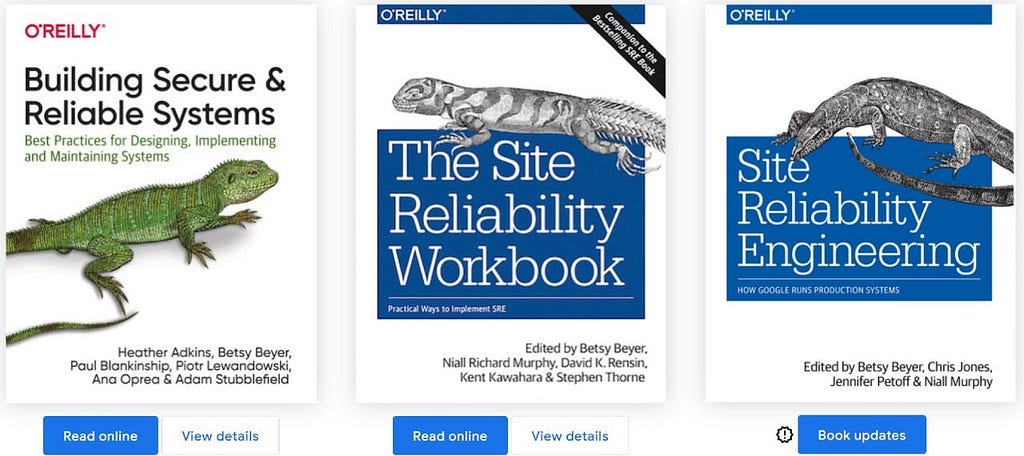
There are 3 very detailed books, you can read them free online here https://sre.google/books/
# 3— Operations in the AI Era & LLM Observability
Operating production software now means managing non-deterministic AI workloads. These resources guide you through debugging, monitoring, and capturing business value in modern software engineering.
- AI in SRE: How Google is Engineering the Future of Reliable Operations https://sre.google/resources/practices-and-processes/ai-engineering-reliable-operations/
- Increasing Business Value with Better IT Operations (white paper) — https://cloud.google.com/resources/sre-it-operations-whitepaper
- Observability for Large Language Models — Understanding & Improving Your Use of LLMs (Book download)— https://www.honeycomb.io/resources/whitepapers/observability-for-llms
- Observability Engineering (Book download)— https://www.honeycomb.io/go/what-is-observability?hstk_creative=807011651024&hstk_campaign=23792840574&hstk_network=googleAds&gad_source=1&gad_campaignid=23792840574&gbraid=0AAAAADG4WvpnrtWlDoKdoR59acfTT4Yf-&gclid=CjwKCAjwrNrQBhBjEiwAoR4VOwkSLw82TF1zktvvPtrXw-_C8RE7ysalcd0BVmZwmppHUbF2JPj2QRoCTEgQAvD_BwE
# 4—DORA (DevOps Research & Assessment)
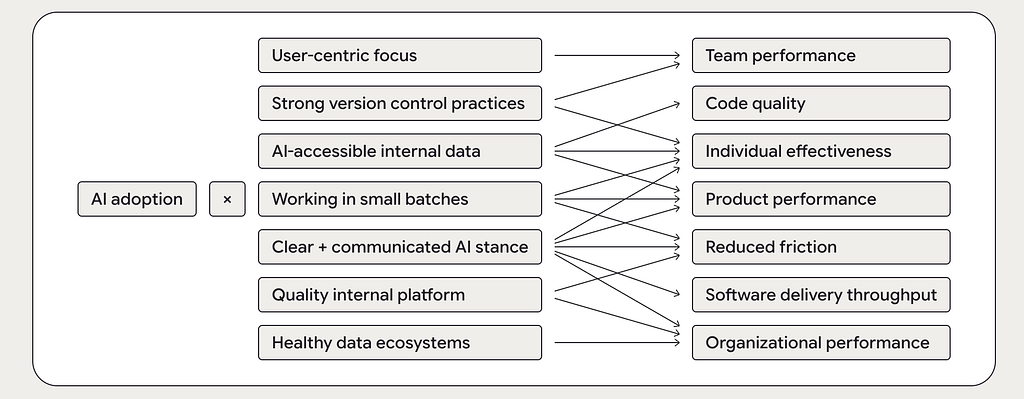
DORA research has been at it a while and also tracks exactly how technical changes — including generative AI — impact organizational velocity and stability.
-
DORA Community Discussions — 2026 playlist :
▶️ https://www.youtube.com/playlist?list=PLMtxeMdO4DaDD3a3jPyPTkiU8mC9xRt8M - DORA website: https://dora.dev/ai/
- 2025 DORA State of AI-assisted Software Development report https://cloud.google.com/resources/content/2025-dora-ai-assisted-software-development-report
-
Previous DORA reports.
https://dora.dev/publications/
# 5 — Continuous Learning & Hands-On Practices
- SREcon26 Americas YouTube playlist ▶️ https://www.youtube.com/playlist?list=PLbRoZ5Rrl5lfnl2qlgWH48uttpkVF4-4R
- Building Software Delivery Pipelines https://www.youtube.com/watch?v=-zMqpvelTig
- Cloud Build labs, hands-on https://cloud.google.com/build/docs#guides
- DevOps SRE learning path https://www.cloudskillsboost.google/paths/20
- (Google) Incident management guide — https://static.googleusercontent.com/media/sre.google/en//static/pdf/IncidentManagementGuide.pdf
- (Google) The evolution of SRE at Google — https://www.usenix.org/publications/loginonline/evolution-sre-google
- SRE Prodcast — https://sre.google/prodcast/
# 6 — Platform Engineering — Check out these blogs
- Google Cloud Blogs DevOps and SRE — https://cloud.google.com/blog/products/devops-sre
- 5 myths about platform engineering: what it is and what it isn’t: https://cloud.google.com/blog/products/application-development/common-myths-about-platform-engineering
- 5 more myths about platform engineering: how it’s built, what it does, and what it doesn’t: https://cloud.google.com/blog/products/application-development/another-five-myths-about-platform-engineering
If you want to ask a question, find out more or share a thought? Please connect with me on LinkedIn and send me a message.
I’ll be in touch
10+ DevOps & SRE resources everyone should check out in the AI age — 2026 was originally published in Google Cloud - Community on Medium, where people are continuing the conversation by highlighting and responding to this story.


La responsabilidad de Alemania
El Gobierno cancela más de 1,1 millones de antecedentes penales en 5 años mediante sistemas automatizados y robotizados

El Gobierno ha cancelado 1.130.335 antecedentes penales en apenas cinco años mediante sistemas automatizados y robotizados del Ministerio de Justicia mientras vinculaba públicamente esos borrados con la obtención de la nacionalidad española y los permisos de residencia.
El salto exponencial coincide con la aceleración masiva de nacionalidades por residencia impulsada por Félix Bolaños: más de 780.000 propuestas de nacionalidad entre agosto de 2022 y enero de 2025 con la utilización de cinco sistemas de robotización e inteligencia artificial administrativa. @eldebate

Ver post completo: El Gobierno cancela más de 1,1 millones de antecedentes penales en 5 años mediante sistemas automatizados y robotizados
Why and how to migrate to a Transit Gateway-attached AWS Network Firewall
AWS Network Firewall now supports native attachment to AWS Transit Gateway. Customers commonly use Transit Gateway to route traffic from Amazon Virtual Private Cloud (Amazon VPC) networks to a centralized inspection VPC (a VPC dedicated to hosting firewall endpoints for traffic inspection) where their network firewall endpoints are deployed. This centralized deployment model reduces the need to have Network Firewall endpoints in each VPC, optimizing costs and providing a centralized point of network security control.
Customers deploying Network Firewall in a centralized deployment model using Transit Gateway have traditionally set up a dedicated inspection VPC with firewall subnets and managed the associated routing to direct traffic through the firewall. With native attachment, Network Firewall attaches directly to Transit Gateway, eliminating the need for the inspection VPC and enabling capabilities such as flexible cost allocation through Transit Gateway metering policies.
In this post, we explain what a Transit Gateway-attached network firewall is, the technical capabilities it unlocks, reasons to migrate to it, and how to perform the migration. For detailed step-by-step guidance on how to perform the migration using Terraform, AWS CloudFormation, or manually in the AWS Management Console, see the accompanying migration guide repository.
What is a Transit Gateway-attached network firewall?
A Transit Gateway-attached network firewall simplifies your network architecture by eliminating the need for a dedicated inspection VPC. Instead of creating an inspection VPC with firewall subnets and configuring the associated routing, you create your network firewall and specify which Transit Gateway instance you want to attach it to. AWS deploys the firewall endpoints into an AWS-managed VPC on your behalf. You don’t own or manage that VPC. From your perspective, the firewall appears as a Transit Gateway network function attachment that you route traffic to, similar to other Transit Gateway attachments.
Why migrate to a Transit Gateway-attached network firewall?
You might want to migrate to a Transit Gateway-attached network firewall for the following reasons:
- Access to flexible cost allocation: With native attachment, you can use Transit Gateway metering policies to charge back account owners for traffic they send through the centralized firewall. Flexible cost allocation for Network Firewall traffic over a Transit Gateway is only available with a Transit Gateway-attached firewall. Without native attachment, you can only allocate Transit Gateway data processing charges, not the Network Firewall charges.
- Reduced architectural complexity: You can eliminate the inspection VPC, leaving one less VPC to manage along with its associated routing tables and subnets.
Preparing for the change
Before migrating to a Transit Gateway-attached network firewall, gather the following information and keep these key considerations in mind.
Prerequisites
When you create your new Transit Gateway-attached network firewall, you will need:
- Transit Gateway ID: The ID of the Transit Gateway instance you will attach your network firewall to.
- Logging configuration: Create a new logging configuration (such as new Amazon CloudWatch log groups) for the new firewall. During migration, you will be running both firewalls simultaneously. Keeping the logs separate simplifies monitoring and troubleshooting each firewall during the migration period. After migration is complete, you can point the new firewall to your existing logging destinations.
- Firewall policy: Create a new firewall policy for the new firewall rather than reusing your existing one. During the migration period, a separate policy lets you make changes to the new firewall’s policy without affecting the existing firewall while both are running simultaneously. After migration is complete, you can attach your existing production policy to the new firewall.
Key considerations
There are some important considerations to address while planning for this change.
- Transit Gateway encryption: Check if you’re using Transit Gateway encryption support. If encryption is enabled and required for your security posture, native attachment to Network Firewall doesn’t currently support this capability. You will need to continue using your current firewall configuration.
- NAT gateway Elastic IPs: If you need to maintain the same public IPs (for example, for partner allowlisting), plan for this during migration. For more information, see the Preserving your NAT gateway Elastic IPs during migration section later in this post.
- Maintenance window: Plan to perform this migration during a dedicated maintenance window. Brief network outages will occur during parts of the process, such as when swapping Transit Gateway route table associations and replacing NAT gateways.
Performing the migration
Leave your existing Network Firewall setup unchanged while setting up the new Transit Gateway-attached firewall. With this approach, you can minimize potential downtime and test the new configuration before migrating production traffic.
The migration process varies depending on your current architecture. The following sections walk through the two most common centralized Network Firewall architectures and the high-level migration process for each. For detailed step-by-step guidance on how to perform the migration using Terraform, CloudFormation, or manually in the console, see the migration guide repository.
Architecture 1: Dedicated inspection VPC with separate egress VPC
In this architecture, shown in the following diagram, you have a dedicated inspection VPC with your network firewall endpoints, and a separate dedicated egress VPC with your NAT gateways.
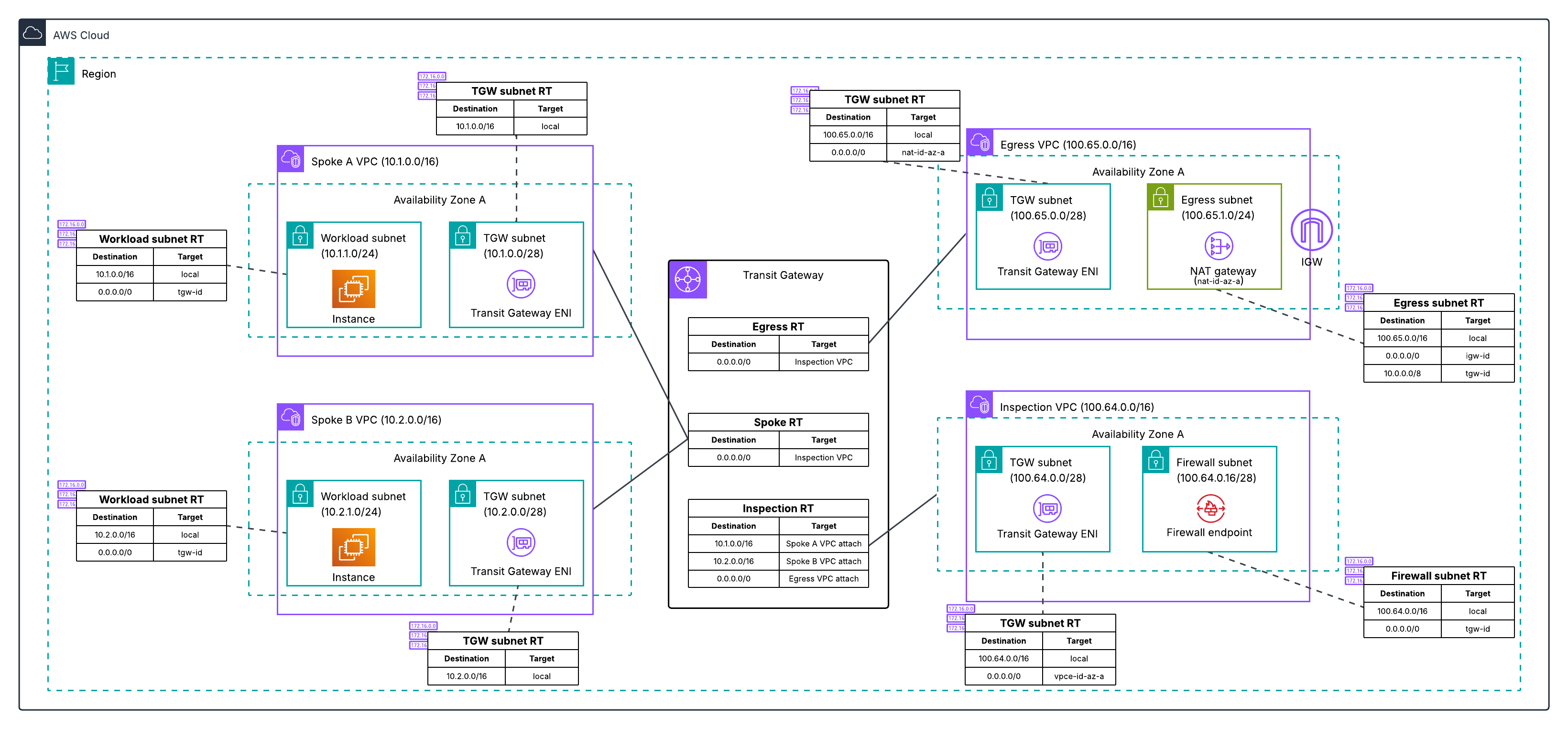
Figure 1: Centralized egress traffic inspection with Network Firewall and Transit Gateway, with inspection and egress separated into two VPCs.
The high-level migration process for this architecture is:
- Deploy a new egress VPC with a temporary NAT gateway. Creating a new VPC lets you leave the existing deployment unchanged while working on the migration.
- Create your new network firewall with native attachment to your Transit Gateway.
- Configure three new Transit Gateway route tables to define the traffic path through the new firewall: an inspection route table (associated with the new firewall), an egress route table (associated with the new egress VPC), and a temporary migrated spoke route table (for testing individual spoke VPCs on the new path).
- Test the new firewall by moving a single spoke VPC to the new path. Verify connectivity and confirm the firewall is inspecting traffic by checking the alert logs for layer 7 (application layer) details. Layer 7 information in the alert logs indicates the firewall is seeing both directions of the traffic flow. If asymmetric routing were occurring, the firewall would only see one direction and would not be able to perform application-layer inspection, so the presence of layer 7 details confirms traffic is flowing symmetrically through the new firewall.
- Migrate the remaining spoke VPCs. You can migrate VPCs incrementally, or when you’re confident in the new firewall deployment, update the default route in your existing spoke route table to point to the new Network Firewall network function attachment, which moves all remaining spokes that share that route table at once.
- Optionally, preserve your original NAT gateway Elastic IPs by re-routing traffic back to your existing egress VPC (see Preserving your NAT gateway Elastic IPs during migration).
- Decommission old resources after you’ve verified that traffic is flowing correctly. Which VPCs you remove depends on whether you preserved your original EIPs (see Preserving your NAT gateway Elastic IPs during migration).
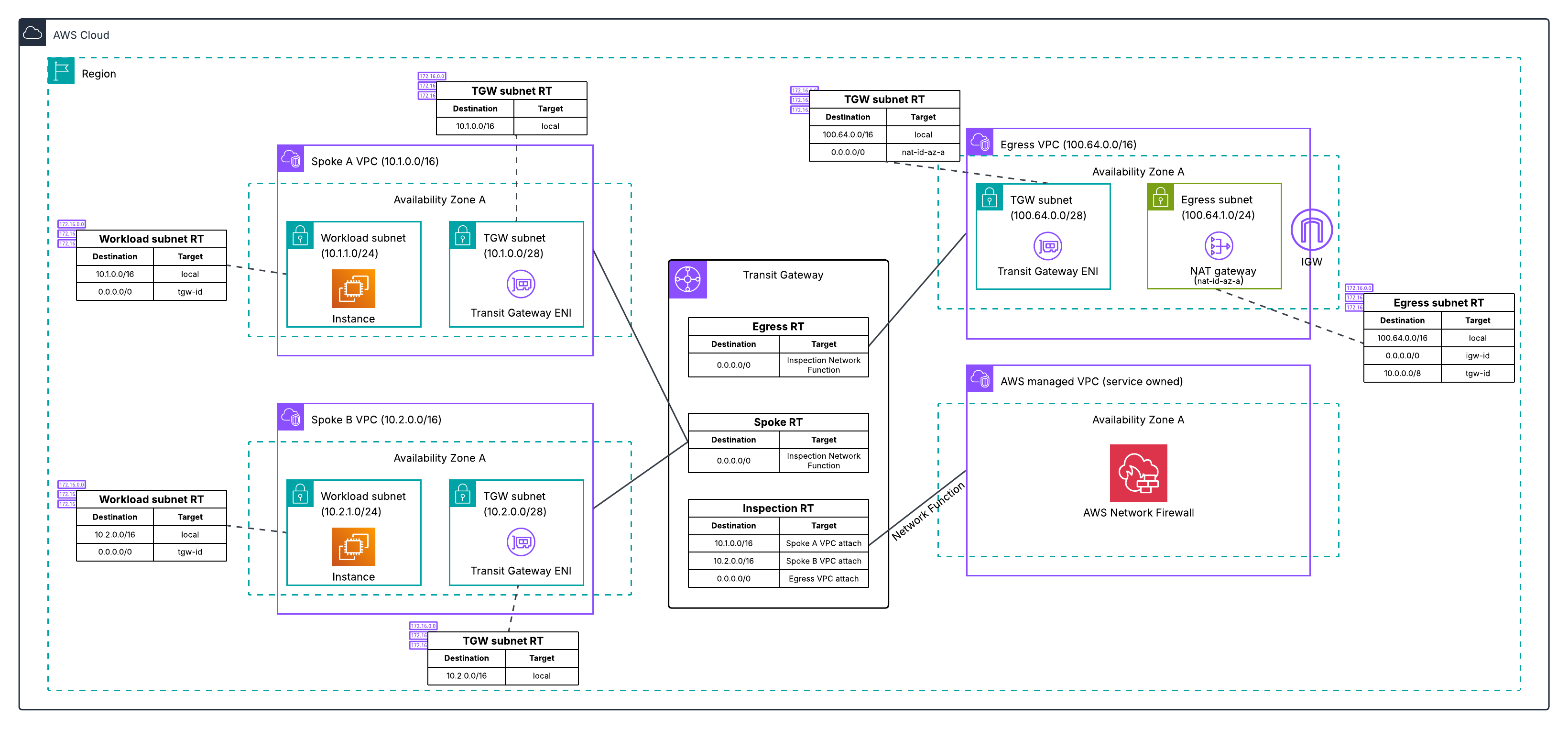
Figure 2: Post-migration architecture for Architecture 1, with the inspection VPC eliminated and traffic flowing through the Transit Gateway-attached Network Firewall to a dedicated egress VPC.
For the complete walkthrough of how to perform this migration:
Architecture 2: Combined inspection and egress VPC
In this architecture, shown in the following diagram, you have a single VPC that contains both your network firewall endpoints and your NAT gateways.
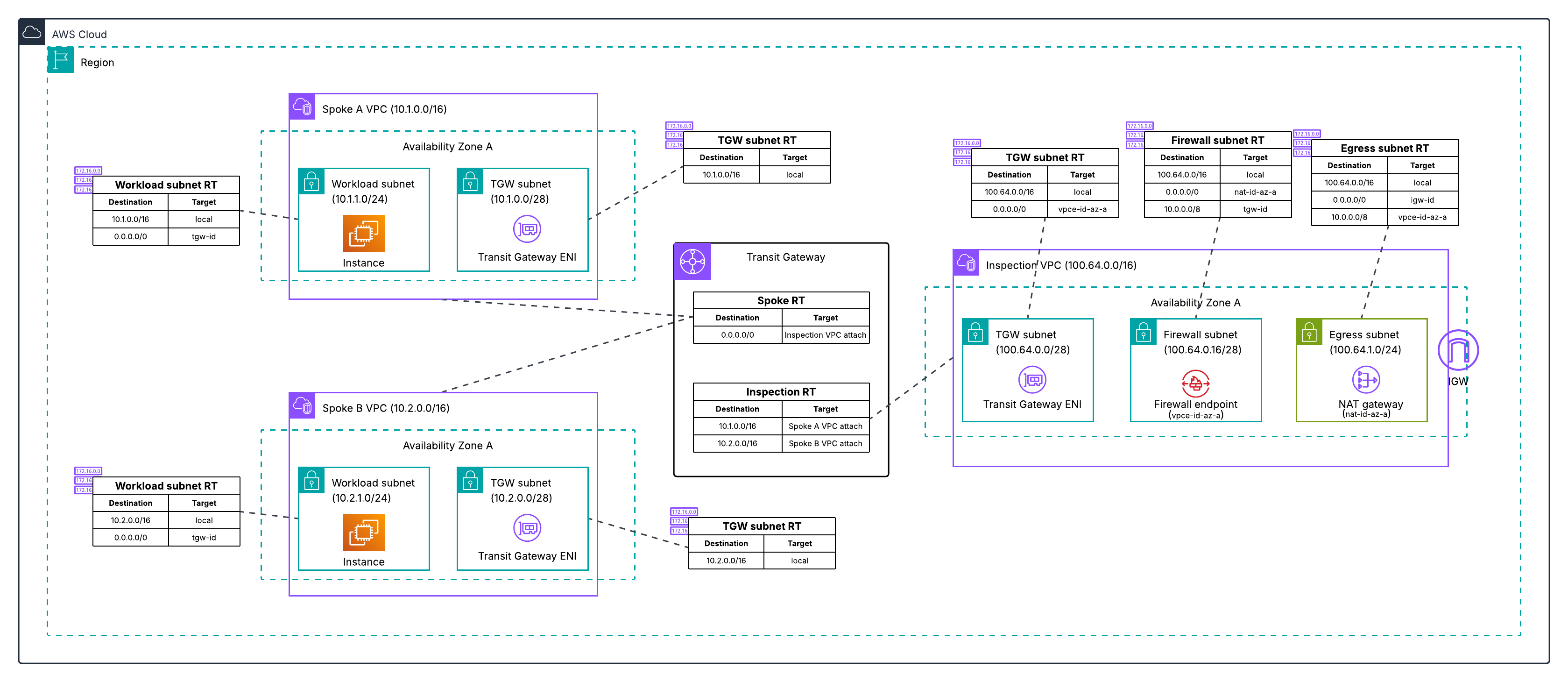
Figure 3: Centralized egress traffic inspection with Network Firewall and Transit Gateway, with inspection and egress combined in one VPC.
The migration process for this architecture follows the same high-level steps as Architecture 1.
- Deploy a new dedicated egress VPC with a temporary NAT gateway. Creating a new VPC lets you leave the existing deployment unchanged while working on the migration.
- Create your new network firewall with native attachment to your Transit Gateway.
- Configure three new Transit Gateway route tables to define the traffic path through the new firewall: an inspection route table, an egress route table, and a temporary migrated spoke route table.
- Test the new firewall by moving a single spoke VPC to the new path. Verify connectivity and confirm the firewall is inspecting traffic by checking the alert logs for layer 7 (application layer) details. Layer 7 information in the alert logs indicates the firewall is seeing both directions of the traffic flow. If asymmetric routing were occurring, the firewall would only see one direction and would not be able to perform application-layer inspection, so the presence of layer 7 details confirms traffic is flowing symmetrically through the new firewall.
- Migrate the remaining spoke VPCs. You can migrate VPCs incrementally, or once you are confident in the new firewall deployment, update the default route in your existing spoke route table to point to the new Network Firewall network function attachment, which moves all remaining spokes that share that route table at once.
- Optionally, preserve your original NAT gateway Elastic IPs by transferring them to the new egress VPC.
- Decommission the old combined VPC after you’ve verified that traffic is flowing correctly.
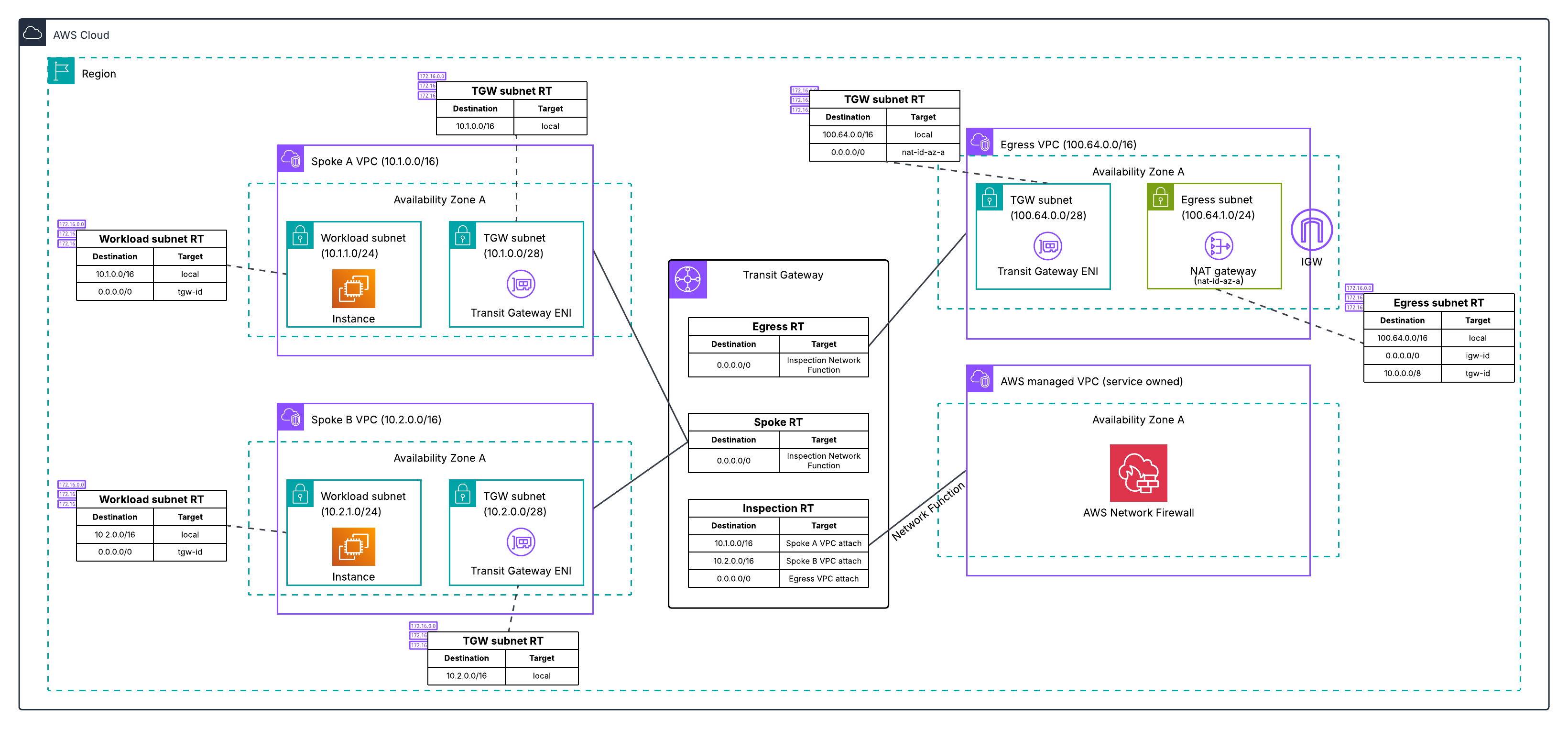
Figure 4: Post-migration architecture for Architecture 2, with the combined VPC eliminated and traffic flowing through the Transit Gateway-attached Network Firewall to a dedicated egress VPC.
For the complete walkthrough of how to perform this migration, see:
Differences between the two migrations
Both architectures deploy the same new resources and use the same phased cutover approach. The differences are in the starting Transit Gateway routing structure (Architecture 1 has three route tables across two VPCs, Architecture 2 has two route tables in one VPC) and what you clean up at the end (two old VPCs instead of one). Both architectures converge to the same end state. For a detailed comparison, see the migration guide repository.
Minimizing downtime and testing your migration
Regardless of which architecture you’re migrating from, follow these best practices to minimize risk.
The migration guide repository includes starting architecture CloudFormation and Terraform templates for both architectures, so you can deploy the exact starting environment in a development or test account and run through the entire migration process before touching production.
Test before you migrate. Create your new Transit Gateway-attached firewall in parallel with your existing setup. Use a test VPC to validate the new configuration. Verify that logging is working correctly and that the firewall alert logs show layer 7 traffic details, which confirms there is no asymmetric routing. Test both allowed and blocked traffic scenarios before migrating production traffic.
Migrate in phases. Start with a single, non-critical workload VPC. Update only that VPC’s routes to use the new firewall attachment. Monitor and verify application behavior and performance with the application owner before proceeding. When planning your migration order, migrate spoke VPCs that have east-west traffic between each other at the same time. During the phased migration, spokes on different firewall paths will have their east-west traffic traverse two stateful firewalls. Because each stateful firewall independently tracks connection state, traffic that enters through one firewall and returns through another appears as untracked, causing the firewalls to drop or incorrectly handle the return traffic. When you’re confident in the new firewall deployment, you can update the default route in your existing spoke route table to point to the new firewall, which moves all remaining spokes that share that route table at once. Keep your old firewall configuration active until all traffic is migrated.
Prepare a rollback plan. Document your current route table configurations before making changes. Keep your existing firewall and inspection VPC active during migration. If issues arise, revert the route table changes to restore the previous configuration. Decommission old resources after you’ve verified applications are operating as expected.
Preserving your NAT gateway Elastic IPs during migration
An important consideration during migration is maintaining your existing NAT gateway Elastic IP addresses. Many organizations have these IPs allowlisted with external partners, third-party services, or in firewall rules. Changing these IPs would require coordination with multiple stakeholders and could disrupt business operations.
During migration, you need both your old and new deployments to operate simultaneously, so you can validate the new setup without impacting production traffic. This means creating temporary NAT gateways with temporary Elastic IPs in the new egress VPC.
After you’ve confirmed the new firewall deployment is stable and production traffic has been successfully migrated, you can restore your original Elastic IPs. The process differs depending on your architecture:
- For Architecture 1 (separate inspection and egress VPCs), your existing egress VPC and its NAT gateways are independent of the inspection VPC being decommissioned. You can keep them by re-associating the existing egress VPC’s Transit Gateway attachment with the new egress route table and updating the inspection route table to route traffic there instead of the temporary egress VPC. This is a Transit Gateway routing change that takes seconds, doesn’t require deleting or creating any NAT gateways, and doesn’t increase in complexity with the number of Availability Zones. After the re-association, you delete the temporary egress VPC.
- For Architecture 2 (combined inspection and egress VPC), the old VPC contains both the firewall endpoints and the NAT gateways. The simplest path is to decommission it and move the Elastic IPs to the new egress VPC. To do this, you delete the old NAT gateways to free the Elastic IPs, then create new NAT gateways in the new egress VPC with the original Elastic IPs. This requires a brief maintenance window while the new NAT gateways provision and must be repeated for each Availability Zone.
For the detailed step-by-step procedure, see the EIP preservation steps in the migration guide repository.
Conclusion
In this post, we explained what a Transit Gateway-attached network firewall is and how it differs from the traditional inspection VPC model, the reasons to migrate including reduced architectural complexity and flexible cost allocation, what to prepare before starting, and the high-level migration process for the two most common centralized inspection architectures. We also covered best practices for minimizing downtime, handling east-west traffic between spokes during phased migration, and preserving your existing NAT gateway Elastic IPs.
With a Transit Gateway-attached network firewall, AWS manages the firewall endpoints and the underlying VPC on your behalf, eliminating the inspection VPC from your architecture and enabling flexible cost allocation through Transit Gateway metering policies. The phased migration approach covered in this post lets you run both firewalls in parallel, validate the new path with a single spoke VPC, and cut over the rest of your traffic when you are ready.
For detailed step-by-step guidance using Terraform, CloudFormation, or the AWS Management Console for both architectures covered in this post, see the migration guide repository. The repository includes starting architecture templates so you can practice the full migration end-to-end in a test account before migrating your production environment.
If you have feedback about this post, submit comments in the Comments section below.

Frank Phillis
Frank is a Senior Solutions Architect (Security) at AWS. He enables customers to get their security architecture right. Frank specializes in cryptography, identity, and incident response. He’s the creator of the popular AWS Incident Response playbooks and regularly speaks at security events. When not thinking about tech, Frank can be found with his family, riding bikes, or making music.

Lawton Pittenger
Lawton is a Worldwide Security Specialist Solutions Architect at AWS, based in New York City. He specializes in helping customers design and implement effective network security controls. At AWS, he works with customers at scale and collaborates closely with service teams to drive continuous improvement in security services based on customer needs and feedback. Outside of work, his interests include skateboarding, snowboarding, and spending time in nature.
How to Build a Hybrid Cloud Platform with Google Cloud Services and On-Premise Kubernetes Infrastructure
In this article, you'll learn how to design and build a secure, scalable hybrid cloud platform that connects your on‑premises Kubernetes infrastructure to Google Cloud Platform. This allows on‑prem apps can consume cloud services (notably GPUs) without brittle long‑lived keys, manual credential management, or risky network patterns.
Who this is for:
-
Platform engineers, SREs, and security-focused cloud architects who operate mixed on‑prem and cloud Kubernetes estates.
-
Teams that need scalable, auditable access from on‑prem workloads to GCP resources (especially GPU instances) while minimizing operational overhead and blast radius.
What you’ll get from this guide:
-
The motivation and economics behind a hybrid approach (why GPUs often push workloads to the cloud).
-
Common pitfalls with service account keys and how “accidental air gaps” occur in real environments.
-
A practical, end‑to‑end pattern that uses Workload Identity Federation to give on‑prem pods short‑lived, auditable access to GCP without embedding keys.
What’s included:
-
Conceptual explanations, security tradeoffs, and operational best practices.
-
Concrete examples and Kubernetes/Terraform artifacts (linked in the GitHub repo at the end of this article) so you can reproduce the setup in your environment.
Read on for the theory, then follow the hands‑on sections to provision GCP resources, configure federation, enforce policies with CEL and Kyverno, and validate secure, scalable GPU access from your on‑prem Kubernetes clusters.
Note: Kubernetes and Terraform artifacts are linked in the GitHub repo at the end of this article.
Table of Contents
Prerequisites
Before following along, you'll need:
-
A Kubernetes cluster that is not GKE (on-premises, bare-metal, or a virtual cluster)
-
A Google Cloud project with the following APIs enabled: IAM, Security Token Service (STS), and Workload Identity
-
Terraform installed and configured
-
Kyverno installed in your cluster
-
Python 3 with
google-cloud-secret-managerandgoogle-cloud-aiplatformlibraries (for the verification steps. Code available in the github repository.) -
kubectlaccess to your cluster
Why Hybrid Cloud Matters
If everything goes right, a hybrid cloud platform lets your on-premises and cloud workloads talk to each other as if they were part of the same network.
There are many practical reasons to run a hybrid cloud setup:
-
Offloading analytics to BigQuery: You keep your analytics apps on-prem for data sovereignty, but pipe large datasets into BigQuery for world-class processing power — without buying extra servers.
-
Creating a unified network with Cloud Interconnect: Using Cloud Interconnect or Cloud VPN, your on-premises datacenter becomes an extension of the Google Cloud Platform (GCP) Virtual Private Cloud (VPC). Your on-prem invoice apps can talk to cloud-based user services with low latency and no public internet exposure.
-
Cost-effective scalability via Cloud Storage: You can use cloud storage as a backend for local apps, storing logs, backups, and historical data while paying only for what you use.
-
Event-driven syncing with Pub/Sub: When something happens on-prem, a message through Cloud Pub/Sub lets cloud services react instantly — no manual polling required.
The Economics of Hybrid: GPUs Changed Everything
Before diving into the technical problem, it's worth understanding why hybrid clouds matter more than ever.
Your organization, like most enterprises, has made significant investments in on-premises datacenters. Servers are bought. Racks are filled. Network infrastructure is paid for. The marginal cost of running one more workload is essentially zero.
Then came the AI wave.
Suddenly every team needs Graphics Processing Units (GPUs). Not one or two — dozens of A100s for training, fleets of inference endpoints, vector databases that need to sit close to the models. GPUs are scarce. Lead times for on-prem GPU hardware stretch into months. Cloud providers have them available in minutes.
The architecture that actually makes economic sense looks like this:
-
The on-prem datacenter handles the bulk of compute — web servers, business logic, databases, batch processing. This is commodity compute you've already paid for.
-
The cloud handles what's scarce — GPU-accelerated inference, model training, AI/ML endpoints. You pay per request, scale on demand, and don't wait six months for hardware.
The cloud isn't a full migration destination — it's an extension for capabilities you can't easily build on-prem.
But those on-prem workloads need to authenticate to cloud services. Every API call from the datacenter to a Vertex AI endpoint, every request to a GPU-powered inference service, every write to Cloud Storage for model artifacts — all of it needs credentials. That's the problem this article solves.
Why Service Account Keys Fail at Scale
Here's a scenario that plays out in thousands of enterprises daily.
A development team needs their on-prem application to write to Google Cloud Storage. The "obvious" solution? Generate a GCP service account key, base64 encode it, store it in a Kubernetes Secret, and mount it in the pod:
apiVersion: v1
kind: Secret
metadata:
  name: gcp-credentials
type: Opaque
data:
  key.json: eyJ0eXBlIjoic2VydmljZV9hY2NvdW50IiwicHJvamVjdF9pZCI6…
This works. It also introduces serious problems:
-
Never expires. That key is valid until someone remembers to rotate it (they won't) or it gets compromised (it will).
-
Can be exfiltrated trivially. Anyone with read access to that namespace can run
kubectl get secret -o yamland walk away with permanent GCP access. -
Has no audit trail for the actual workload. GCP sees "service-account-xyz accessed this bucket" — not "pod frontend-abc-123 in namespace production."
-
Scales terribly. 50 teams × 3 environments × 4 GCP projects = 600 keys to track, rotate, and hope haven't been committed to git.
Security teams know this. That's why many organizations have done the only sensible thing: they have disabled service account key generation entirely.
How the Accidental Air Gap Happens
When you disable key generation, you haven't solved the hybrid cloud platform problem — you've just made it someone else's problem. That someone is usually a platform team staring at a Jira ticket that says "cannot access GCP from on-prem, P1, blocking release."
The result? Your "hybrid cloud platform" isn't hybrid at all. It's two disconnected systems.
Teams resort to building intermediary services, API gateways that proxy requests, or finding creative ways to get keys anyway. None of this is a platform. It's duct tape.
How Workload Identity Federation Bridges the Gap
Every Kubernetes cluster already issues cryptographically signed identity tokens to every pod. And Google Cloud has a service specifically designed to trust those tokens.
This is Workload Identity Federation — and combined with OpenID Connect (OIDC), it's the missing piece that makes hybrid platforms actually work.
The service is quite well named because of the word Federation. it means GCP doesn't store your identity — it agrees to trust identities issued by another system, as long as they can be cryptographically verified. This all works with a very well orchestrated set of steps in the following order:
-
Pod presents its Kubernetes-issued JWT to GCP's STS endpoint.
-
STS verifies the signature against your cluster's public JWKS.
-
STS checks the JWT's claims against the Workload Identity Pool's rules (audience, issuer, CEL conditions).
-
STS returns a short-lived Google access token (typically 1 hour) that the pod uses for API calls.
It is also worth mentioning that Workload Identity Federation is not Kubernetes specific. It works with AWS IAM, Azure AD, GitHub Actions OIDC, and any OIDC-compliant identity provider.
How Kubernetes Identity Works
Every pod with a ServiceAccount gets a JSON Web Token (JWT) automatically mounted at /run/secrets/kubernetes.io/serviceaccount/token. This isn't just an opaque blob — it's a signed assertion of identity:
{
  "iss": "https://kubernetes.default.svc.cluster.local",
  "sub": "system:serviceaccount:production:backend-api",
  "aud": ["https://iam.googleapis.com/..."],
  "kubernetes.io": {
    "namespace": "production",
    "serviceaccount": {
      "name": "backend-api"
    }
  },
  "exp": 1735689600
}
In a JWT, claims are just the key-value pairs inside the token's payload — each one is a claim the issuer is making about the subject. Think of them as facts the token is asserting, signed cryptographically so the verifier can trust them.
The critical insight: this token is created by a set of JSON Web Key Set (JWKS) and is verifiable by anyone who has your cluster's public keys, exposed via the JSON Web Key Set (JWKS) endpoint:
kubectl get --raw /openid/v1/jwks
Google Cloud's Security Token Service (STS) can validate these tokens. No keys are exchanged. No secrets are stored. Just cryptographic proof of identity.
How to Prepare Google Cloud Platform resources
The Workload Identity Pool is a trust boundary — a declaration that says "I accept identities from external sources." The OIDC Provider configures how to validate those identities.
resource "google_iam_workload_identity_pool" "pool" {
  workload_identity_pool_id = "hybrid-platform-pool"
  project                   = "my-project"
}

resource "google_iam_workload_identity_pool_provider" "k8s_provider" {
  project                            = "my-project"
  workload_identity_pool_id          = google_iam_workload_identity_pool.pool.workload_identity_pool_id
  workload_identity_pool_provider_id = "on-prem-cluster"

  attribute_mapping = {
    "google.subject"      = "assertion.sub"
    "attribute.namespace" = "assertion['kubernetes.io']['namespace']"
  }

  attribute_condition = "attribute.namespace in [\"production\", \"staging\"]"

  oidc {
    issuer_uri = "https://kubernetes.default.svc.cluster.local"
    jwks_json  = file("jwks.json")  # Your cluster's public keys
  }
}
Two things to note here:
-
attribute_mappingextracts claims from the Kubernetes JWT and makes them available as GCP attributes. By using `assertion['kubernetes.io']['namespace']`, the namespace is pulled out so you can use it for access control. -
attribute_conditionis where security policy lives. More on this in the next section.
How to Use CEL for Fine-Grained Access Control
The attribute_condition field uses Common Expression Language (CEL). This single line of policy can replace dozens of Identity and Access Management (IAM) bindings:
attribute.namespace in ["production", "staging"]
With this condition, a pod in the kube-system namespace cannot authenticate to GCP at all — the token exchange is rejected before IAM is even consulted.
You can get more sophisticated:
// Only production namespace, and only specific service accounts
attribute.namespace == "production" &&
  attribute.service_account in ["payment-processor", "order-service"]

// Allow staging, but only during business hours
attribute.namespace == "staging" &&
  request.time.getHours("America/New_York") >= 9 &&
  request.time.getHours("America/New_York") < 17
This is defense in depth. Even if someone creates a rogue ServiceAccount or has kubectl access, they cannot authenticate to GCP unless the CEL condition passes. The security boundary is enforced by Google's infrastructure, not by hoping developers follow policy.
How to Inject Credentials Automatically with Kyverno
Having a working identity federation is only half the battle. Your customers and developers shouldn't need to understand OIDC, STS, or credential configuration files. They should deploy their app and have it work.
Before we get to the automation, it's worth pausing on what a credential configuration file actually is — because the name is a little misleading.
A credential configuration file (sometimes called an "external account config" or "ADC config") is a small JSON document that tells Google's client libraries how to obtain a credential at runtime. It is not itself a credential. You'll see the actual file later in this article — it contains no secrets. Just metadata: the Workload Identity Pool audience, the STS token-exchange endpoint, the source token type, and the path on the pod's filesystem where the real (short-lived) Kubernetes ServiceAccount token lives.
Compare that to a traditional service account key:
Service Account Key (key.json) |
Credential Config (credential-configuration.json) |
|
|---|---|---|
| What's inside the file | An RSA private key that is the credential | Instructions for exchanging an external token |
| Lifetime of the secret material | Forever, until manually rotated | Source token rotates automatically (~1h TTL) |
| If the file leaks | Long-lived access to a GCP service account | Useless on its own — points to a token only the pod can read |
| Identity model | Impersonates a GCP service account directly | Federates an external identity into GCP via STS |
| Who handles rotation | A human (or no one) | The Kubernetes API server, transparently |
Both files end up referenced by GOOGLE_APPLICATION_CREDENTIALS and look interchangeable from the application's point of view — but only one of them is dangerous to lose. The credential config file is safe to ship in a ConfigMap precisely because there's nothing to steal.
Having this file in the ConfigMap is half the solution. It actually needs to end up in the workload pods that need access to GCP services. This is where Kyverno comes in. A single ClusterPolicy automatically injects everything a pod needs:
apiVersion: kyverno.io/v1
kind: ClusterPolicy
metadata:
  name: workload-identity-federation
spec:
  rules:
    - name: inject-gcp-credentials
      match:
        any:
          - resources:
              kinds:
                - Deployment
              selector:
                matchLabels:
                  workload-identity-federation: "enabled"
      mutate:
        patchStrategicMerge:
          spec:
            template:
              spec:
                volumes:
                  - name: workload-identity-credential-configuration
                    configMap:
                      name: workload-identity-federation-config
                containers:
                  - (name): "*"
                    volumeMounts:
                      - name: workload-identity-credential-configuration
                        mountPath: /etc/workload-identity
                        readOnly: true
                    env:
                      - name: GOOGLE_APPLICATION_CREDENTIALS
                        value: "/etc/workload-identity/credential-configuration.json"
The above cluster policy does three things:
-
Mounts the configmap inside the containers in the deployment at
/etc/workload-identity. -
Injects an environment variable called
GOOGLE_APPLICATION_CREDENTIALSthat points to the absolute path of the credential config file.
From a developer's perspective, this is their entire integration:
apiVersion: apps/v1
kind: Deployment
metadata:
  name: my-app
  labels:
    workload-identity-federation: "enabled" # That's it.
spec:
  # ... normal deployment spec
The credential configuration file (created by Terraform as a ConfigMap) tells Google's client libraries how to exchange tokens:
{
  "type": "external_account",
  "audience": "//iam.googleapis.com/projects/PROJECT_NUMBER/locations/global/workloadIdentityPools/POOL_ID/providers/PROVIDER_ID",
  "subject_token_type": "urn:ietf:params:oauth:token-type:jwt",
  "token_url": "https://sts.googleapis.com/v1/token",
  "credential_source": {
    "file": "/run/secrets/kubernetes.io/serviceaccount/token"
  }
}
This JSON file is a credential configuration for Google's Workload Identity Federation. It instructs Google Cloud client libraries to obtain cloud access tokens by exchanging a Kubernetes ServiceAccount token (located at /run/secrets/kubernetes.io/serviceaccount/token) for a Google Cloud access token, using an external identity provider configured via a Workload Identity Pool. This allows workloads running outside of GCP, such as on-premises Kubernetes clusters, to authenticate to Google Cloud services without needing to manage long-lived service account keys.
Every Google Cloud SDK and client library understands this format. Python, Go, Java, and Node.js all just work.
How to Grant IAM Permissions to Federated Identities
The service account token that has been trusted by the STS service, also known as a federated identity, need permissions to access resources. You bind IAM roles to the identity pool attributes:
resource "google_project_iam_member" "secret_access" {
  for_each = toset(["production", "staging"])
  project  = "my-project"
  role     = "roles/secretmanager.secretAccessor"
  member   = "principalSet://iam.googleapis.com/projects/\({PROJECT_NUMBER}/locations/global/workloadIdentityPools/\){POOL_ID}/attribute.namespace/${each.value}"
}
This grants Secret Manager access to all pods authenticated from the production or staging namespaces. The principalSet syntax allows matching on attributes. You can also restrict to specific service accounts:
member = "principal://iam.googleapis.com/.../subject/system:serviceaccount:production:payment-processor"
How to Verify the Setup
You can verify the setup with a simple Python script that lists secrets from Secret Manager. This runs inside a pod on your on-premises cluster:
# list_secrets.py - running on-prem, accessing GCP Secret Manager
from google.cloud import secretmanager

def list_secrets(project_id: str):
    """
    List all secrets in a GCP project.

    No credentials are passed explicitly. The google-cloud-secret-manager
    library automatically:
    1. Reads GOOGLE_APPLICATION_CREDENTIALS env var (set by Kyverno)
    2. Loads the credential configuration JSON
    3. Reads the K8s ServiceAccount token from /run/secrets/...
    4. Exchanges it for a GCP access token via STS
    5. Uses that token to call the Secret Manager API
    """
    client = secretmanager.SecretManagerServiceClient()
    parent = f"projects/{project_id}"

    print(f"Secrets in {project_id}:")
    print("-" * 40)

    for secret in client.list_secrets(request={"parent": parent}):
        secret_name = secret.name.split("/")[-1]
        print(f"  - {secret_name}")

    print("-" * 40)
    print("Authentication: Workload Identity Federation")
    print("Credentials: None stored, token exchanged at runtime")

if __name__ == "__main__":
    list_secrets("my-project-id")
Run this inside your labeled pod:
$ kubectl exec -it my-app-xyz -- python list_secrets.py

Secrets in my-project-id:
----------------------------------------
  - database-password
  - api-key-stripe
  - oauth-client-secret
  - ml-model-api-key
----------------------------------------
Authentication: Workload Identity Federation
Credentials: None stored, token exchanged at runtime
No service account key. No secret mounted. Just a Kubernetes ServiceAccount token exchanged for GCP credentials at runtime.
This same pattern works for any GCP service — Secret Manager, Cloud Storage, BigQuery, Pub/Sub, and Vertex AI.
How to Connect On-Prem Apps to Cloud GPUs
Consider a typical flow: an on-prem order processing service needs to call a Vertex AI endpoint for fraud detection. The model runs on GPUs in Google Cloud (you can spin up A100s in minutes, not months). The application logic stays on-prem (you've already paid for that compute).
With the IAM bindings in place, any pod in the allowed namespaces can call Vertex AI:
# fraud_detector.py - running on-prem, calling cloud GPUs
from google.cloud import aiplatform

def check_fraud(transaction: dict) -> float:
    """
    Call a Vertex AI endpoint for fraud detection.

    The model runs on A100 GPUs in Google Cloud.
    This code runs on-prem in the datacenter.

    Authentication is automatic:
    1. Kyverno injected GOOGLE_APPLICATION_CREDENTIALS
    2. The aiplatform SDK reads the credential config
    3. K8s SA token is exchanged for GCP token via STS
    4. Request is authenticated to Vertex AI
    """
    endpoint = aiplatform.Endpoint(
        endpoint_name="projects/my-project/locations/us-central1/endpoints/fraud-model"
    )
    prediction = endpoint.predict(instances=[transaction])
    return prediction.predictions[0]["fraud_score"]


def generate_embeddings(texts: list[str]) -> list[list[float]]:
    """
    Generate text embeddings using a cloud-hosted model.

    Embedding models are GPU-intensive. Running them on-prem
    would require dedicated hardware. In the cloud, you pay per request.
    """
    from vertexai.language_models import TextEmbeddingModel

    model = TextEmbeddingModel.from_pretrained("text-embedding-004")
    embeddings = model.get_embeddings(texts)
    return [e.values for e in embeddings]
The developer doesn't think about authentication at all. They add the label to their deployment, and their on-prem pod can call:
-
Vertex AI endpoints for ML inference on cloud GPUs
-
Cloud Storage for model artifacts and training data
-
BigQuery for feature stores and analytics
-
Pub/Sub for event streaming between environments
-
Secret Manager for API keys and configuration
This is the hybrid platform working as intended.
How to Scale GPU Access with CEL Conditions
CEL conditions become especially powerful when you want to restrict GPU access to specific namespaces. For example, to allow only ML-related namespaces to access Vertex AI:
attribute.namespace in ["ml-inference", "ml-training", "data-science"] &&
  attribute.service_account.startsWith("ml-")
You can also grant different access levels per namespace:
# ML inference namespace gets prediction access
resource "google_project_iam_member" "ml_inference" {
  project = "my-project"
  role    = "roles/aiplatform.user"
  member  = "principalSet://iam.googleapis.com/.../attribute.namespace/ml-inference"
}

# Data science namespace gets full Vertex AI access (for experimentation)
resource "google_project_iam_member" "data_science" {
  project = "my-project"
  role    = "roles/aiplatform.admin"
  member  = "principalSet://iam.googleapis.com/.../attribute.namespace/data-science"
}
The on-prem application teams don't need to know or care about GCP IAM. They deploy to the right namespace, add a label, and the platform handles the rest.
The Security Properties Compared
Here's a side-by-side comparison of the two authentication approaches:
| Property | Service Account Keys | Workload Identity Federation |
|---|---|---|
| Credential lifetime | Until manually rotated (often years) | Short-lived (1 hour for GCP tokens) |
| Exfiltration risk | High — static key can be copied anywhere | Low — token expires quickly |
| Audit trail | Service account name only | Namespace + service account name |
| Key management overhead | 600+ keys at scale | Zero keys to manage |
| Security policy enforcement | Manual / trust-based | Enforced by GCP infrastructure via CEL |
| Developer experience | Copy key, create secret, mount volume | Add one label to the deployment |
The short-lived nature of tokens deserves emphasis. Even in a worst-case scenario where a token is somehow exfiltrated, it expires. Kubernetes ServiceAccount tokens have a configurable lifetime, and the GCP access tokens issued by STS are valid for one hour. A service account key, by contrast, remains valid until someone explicitly rotates it — often years.
The Complete Infrastructure as Code Layout
The entire solution is codified in Terraform, managing both GCP and Kubernetes resources:
workload-identity-federation/
├── providers.tf      # Google + Kubernetes providers
├── locals.tf         # Configuration (namespaces, project ID, etc.)
├── gcp.tf            # Identity pool, provider, IAM bindings
└── kubernetes.tf     # ConfigMap with credential configuration
A single terraform apply:
-
Creates the Workload Identity Pool in GCP
-
Configures the OIDC provider with your cluster's JWKS
-
Sets up IAM bindings for allowed namespaces
-
Creates ConfigMaps in each namespace with the credential configuration
Combined with the Kyverno policy, you get a fully automated pipeline:
New namespace added to allowed list
        │
        ▼
Terraform creates ConfigMap in that namespace
        │
        ▼
Developer deploys with label
        │
        ▼
Kyverno injects credentials automatically
        │
        ▼
Pod authenticates to GCP via OIDC
        │
        ▼
Application accesses GCP services
No tickets. No key requests. No secrets to manage.
How to Run a Proof of Concept with vCluster
To validate this works outside GKE, you can set up a demonstration using vCluster — a virtual Kubernetes cluster that runs inside another Kubernetes cluster. This proves the solution works for any cluster. You can setup vCluster in Docker using vind
# vcluster.yaml
experimental:
  docker:
    nodes:
      - name: worker-1
      - name: worker-2
deploy:
  cni:
    flannel:
      enabled: true
controlPlane:
  distro:
    k8s:
      version: "v1.35.0"
[root@localhost #] vcluster create hybrid --driver docker -f vcluster.yaml
[root@localhost #] kubectl get nodes
hybrid-control-plane   Ready    control-plane   14d   v1.34.0   192.168.107.2   <none>        Debian GNU/Linux 12 (bookworm)   7.0.5-orbstack-00330-ge3df4e19b0a0-dirty   containerd://2.1.3
hybrid-worker          Ready    <none>          14d   v1.34.0   192.168.107.3   <none>        Debian GNU/Linux 12 (bookworm)   7.0.5-orbstack-00330-ge3df4e19b0a0-dirty   containerd://2.1.3
hybrid-worker2         Ready    <none>          14d   v1.34.0   192.168.107.4   <none>        Debian GNU/Linux 12 (bookworm)   7.0.5-orbstack-00330-ge3df4e19b0a0-dirty   containerd://2.1.3
Inside the vCluster, deploy a simple test deployment:
apiVersion: apps/v1
kind: Deployment
metadata:
  name: gcp-test
  labels:
    workload-identity-federation: "enabled"
spec:
  replicas: 1
  selector:
    matchLabels:
      app: gcp-test
  template:
    metadata:
      labels:
        app: gcp-test
    spec:
      containers:
        - name: test
          image: google/cloud-sdk:slim
          command: ["sleep", "infinity"]
Exec into the pod and verify:
$ kubectl exec -it gcp-test-xxx -- bash

# Inside the pod:
\( gcloud auth login --cred-file=\)GOOGLE_APPLICATION_CREDENTIALS
Authenticated with external account credentials for: [principal://iam.googleapis.com/...]

$ gcloud secrets list --project=my-project
NAME                 CREATED
database-password    2024-01-15T10:30:00Z
api-key              2024-01-14T09:15:00Z
No keys. No secrets mounted. Just identity federation working as designed.
Common Issues and How to Solve Them
How to Handle JWKS Retrieval for Air-Gapped Clusters
If your cluster's OIDC discovery endpoint isn't publicly reachable (most on-prem clusters aren't), you need to manually export the JWKS and upload it to GCP:
kubectl get --raw /openid/v1/jwks > jwks.json
This file must be updated if the cluster's signing keys rotate. Set up a periodic job that checks for key changes and updates the Terraform configuration.
How to Fix Issuer URL Mismatches
The iss claim in the Kubernetes token must exactly match the issuer URL configured in the OIDC provider. For clusters using internal DNS:
issuer_uri = "https://kubernetes.default.svc.cluster.local"
This URL doesn't need to be reachable from GCP — the JWKS file provides the validation keys. But it must match what's in the token exactly.
How to Debug Token Exchange Failures
When authentication fails, the error messages can be cryptic. Common causes and fixes:
| Error | Likely Cause | Fix |
|---|---|---|
invalid_grant |
Issuer URL mismatch | Check iss claim in JWT against configured issuer_uri
|
audience mismatch |
Wrong audience in credential config |
Regenerate the credential configuration JSON via Terraform |
CEL condition failed |
Namespace not in allowed list | Add namespace to attribute_condition and re-apply |
JWKS validation failed |
Signing keys have rotated | Re-export JWKS and update Terraform config |
Conclusion
After implementing this setup, on-premises workloads authenticate to Google Cloud exactly like GKE workloads do — without a single long-lived credential. The security team is happy (no keys to audit), developers are happy (just add a label), and the platform team is happy (no more credential management tickets).
Here's what you accomplished in this tutorial:
-
/Understood why service account keys fail at scale and the security risks they introduce
-
Created a Workload Identity Pool and OIDC provider in GCP to trust your cluster's token issuer
-
Used CEL conditions to enforce fine-grained, namespace-level access policies
-
Automated credential injection into pods using a Kyverno ClusterPolicy
-
Bound IAM roles to federated identity attributes — no long-lived keys anywhere
-
Verified the setup by calling GCP APIs (Secret Manager, Vertex AI) from an on-prem pod
-
Proved the solution works on any Kubernetes cluster using vCluster
The technologies used here aren't new. OIDC has been in Kubernetes since version 1.20. Workload Identity Federation has been in GCP for years. Kyverno and Terraform are mature tools. What this tutorial puts together is an end-to-end solution that developers can adopt with minimal effort.
If your organization has disabled service account keys (or should), this is the path forward. Your on-prem and cloud clusters can finally be what they were always meant to be: secure extensions of each other.
The complete implementation is available as a Terraform module with Kyverno policies: github.com/shkatara/hybrid-platform-gcp-workload-identity-federation
If this helps, you can follow me on https://www.linkedin.com/in/shubhamkatara/, https://www.youtube.com/@kubesimplify, https://www.linkedin.com/company/kubesimplify/ and

jello y su ADV
All The President's Men [1976, 720p] Robert Redford, Dustin Hoffman - An Incredible paranoid thriller of the Watergate Scandal
Wiki article: https://en.wikipedia.org/wiki/All_the_President's_Men_(film)
https://slrpnk.net/pictrs/image/22009263-dc7c-4371-ad76-c9a2875d9316.jpeg
Despite 3 Days of the Condor being one of my favorite films, I never got around to watching All The President's Men until a couple days ago.
My god, what I've been missing.
It's truly a masterclass in film making. It's a slow burn, but never feels it. There's always something interesting happening, some new piece of information revealed, tension always building, and acting so damned good I didn't move from the sofa until the end.
There's some really impressive cinematography in this, but something that consistently impressed me was the level of acting of even minor or unnamed side characters, who do virtually as good of a job as the leads in feeling absolutely believable and natural.
If, like me, you just haven't gotten around to this film, I really recommend making it your next watch.
Malestar en la judicatura progresista tras el reparto de nombramientos del CGPJ

El último Pleno del Consejo General del Poder Judicial (CGPJ) ha desatado una profunda crisis interna en los sectores progresistas de la judicatura después de que el bloque conservador se impusiera en la práctica totalidad de los nombramientos discrecionales aprobados este martes. De las catorce plazas judiciales en juego, doce han recaído en perfiles alineados con el sector conservador, frente a únicamente dos designaciones progresistas. El resultado ha generado un fuerte malestar entre jueces y asociaciones de sensibilidad progresista...
etiquetas: cgpj, tribunal supremo, poder judicial, jueces
» noticia original (mundoobrero.es)
Los smartphones Motorola secuestran las aplicaciones de compra para ganar dinero con las ventas

El usuario de Reddit Trypocopris ha revelado que la app "Motorola Smart Feed" monitoriza el acceso a Internet del usuario para reconocer cuándo se abre una app de compras. Si este es el caso, se introduce clandestinamente un código de afiliado en la app para que Motorola reciba posteriormente una comisión por cada venta.
etiquetas: motorola, app, amazon, secuestro, afiliados, smart feed
» noticia original (www.notebookcheck.org)
VÍDEO | Puente estalla y lanza un duro mensaje contra los jueces: la ofensiva para "derribar" al Gobierno
El ministro de Transportes señala las 'coincidencias' en el calendario judicial como prueba de una operación coordinada contra el Ejecutivo de Sánchez y descarta elecciones anticipadas ...
etiquetas: óscar puente, jueces, gobierno, lawfare
» noticia original (www.catalunyapress.es)
He recreado las recetas de 'Listo para comer' de Mercadona para saber cuánto se lleva Juan Roig

La fortuna de unos pocos se construye a base de nuestro tiempo. Así que escogí 7 populares platos preparados de este establecimiento y los preparé en mi cocina como justamente no le gustaría al Sr. Roig que hiciera. El objetivo es comprobar si de verdad compensa dedicarle un tiempo a cocinar o si voy a tener que ir pensando otro uso para mi cocina. Para que la comparativa sea justa y sea un experimento riguroso, he establecido unas condiciones para calcular los costes:
etiquetas: recrea, recetas, listo, comer, mercadona, juan roig, comida
» noticia original (www.directoalpaladar.com)
La Audiencia Nacional anula la absolución de Ana Duato y su marido Miguel Ángel Bernardeau por fraude fiscal

La Sala de Apelación del tribunal especial ordena que se repita el juicio del caso Nummaria contra ambos y con diferentes magistrados.
etiquetas: ana duato, audiencia nacional, absolución, caso nummaria, anulación
» noticia original (www.eldiario.es)
Países Bajos acaba de bloquear que una empresa estadounidense compre la app que los ciudadanos neerlandeses usan para todo. [EN]
El proveedor estadounidense de servicios empresariales Kyndryl intentó adquirir la especialista neerlandesa en cloud Solvinity, pero La Haya ha bloqueado oficialmente la adquisición. Alegando un posible riesgo de seguridad para el interés público del país, la secretaria de Estado de Economía Digital, Willemijn Aerdts, confirmó recientemente la prohibición de la compra. La decisión anticipa una iniciativa potencialmente disruptiva diseñada para seguir impulsando la soberanía europea en el mercado digital.
etiquetas: paises bajos, usa, control
» noticia original (www.techspot.com)
Temporada alta en el Gran Hotel Abismo

La financiación de élites económicas —cuyo objetivo es conseguir una reconfiguración del Estado— y el agotamiento del ciclo populista de izquierdas explica el ascenso de la ultraderecha. La erosión de la socialdemocracia, debilitada por la austeridad, contribuye a ello. La ultraderecha se ha fijado como objetivo a abatir no a la izquierda sino a los conservadores. Uno de los más señalados errores de las izquierdas ante la ola reaccionaria es la asunción de los temas de debate propuestos por las derechas, en especial la ultraderecha
etiquetas: ultraderecha, ángel ferrero
» noticia original (sinpermiso.info)
Fernández Díaz tampoco sabe nada: sólo se enteró de la Kitchen cuando se publicó en la prensa

El exministro del Interior Jorge Fernández Díaz ha declarado en el juicio de Kitchen que la primera vez que escuchó hablar de esta presunta operación parapolicial contra el extesorero del PP, Luis Bárcenas fue cuando apareció publicado en prensa en 2015 o 2016 y ha negado haberse entrometido en operativos policiales o saber acerca de confidentes. El ministro del Interior del primer Gobierno de Mariano Rajoy ha declarado este jueves como acusado en el juicio del caso Kitchen, que enjuicia una presunta operación parapolicial para espiar entre 20
etiquetas: fernández díaz, kitchen, prensa
» noticia original (www.huffingtonpost.es)
¿Por qué el abuso contra los activistas de las flotillas ha generado más condena que el genocidio de Gaza? (Eng)
Alrededor de 430 activistas humanitarios fueron detenidos por el ejército israelí en aguas internacionales los días 18 y 19 de mayo. Las imágenes de los malos tratos que sufrieron circularon rápidamente, y la indignación mundial fue inmediata. La reacción es válida y justificada, pero también plantea interrogantes críticos y posiblemente incómodos.
El silencio como forma de identidad #shorts
#psicologia #silencio #identidad #comunicacion #reflexion #yo #mente #shorts
El Gobierno de EEUU presiona para que se impriman billetes de 250 dólares con la cara de Trump

Coctelero y su ADV
Mario Picazo, meteorólogo, sobre el episodio de calor en España y Europa: "Hace décadas eran pequeñas incursiones de calor primaveral dos o tres días, ahora dura hasta dos semanas"
El calor extremo se ha adelantado de nuevo en España y buena parte de Europa, con temperaturas más propias del verano avanzado que de finales de mayo. Este episodio térmico no solo destaca por los valores alcanzados, sino también por su persistencia, un rasgo que los expertos señalan como una de las señales más claras del clima actual.
La Agencia Estatal de Meteorología (Aemet) ha ido actualizando durante estos días la evolución de un episodio que califica como extraordinario para el mes de mayo. Según el organismo, ya se han registrado valores habituales de julio en el conjunto del país y, con el ascenso térmico, desde el miércoles "el calor será propio de la canícula, el periodo más cálido del año".
La agencia estatal también ha destacado que no se trata solo de un episodio intenso y extendido, sino especialmente duradero. “Es muy notable la persistencia de este episodio cálido: es probable que continúe el calor durante varios días más y, con los pronósticos actualmente disponibles, todavía no se vislumbra una vuelta a la normalidad”.
La advertencia de Mario Picazo
El meteorólogo Mario Picazo ha puesto el foco en la dimensión europea del episodio. Según explica, una dorsal anticiclónica extendida por gran parte del suroeste del continente está dejando anomalías térmicas positivas que, en algunos casos, alcanzan los +15 ºC.
Para Picazo, lo más relevante no es únicamente la magnitud de las temperaturas, sino el tiempo que permanecen instaladas. “Lo llamativo de este episodio no es solo la magnitud, sino también cuánto dura en el tiempo. Lo que hace décadas eran pequeñas incursiones de calor primaveral de dos o tres días, ahora dura hasta dos semanas”, ha explicado el meteorólogo.
Estáis viendo una semana de anomalías térmicas en Europa. El efecto de la dorsal anticiclónica que se extiende por gran parte del suroeste va a dejar anomalias de temperatura positivas que, en algunos casos, alcanzan +15 °C. Lo llamativo de este episodio no es solo la magnitud,… pic.twitter.com/7HvE6hfxHk
— Mario Picazo (@picazomario) May 25, 2026
Picazo define esta persistencia como un clima en modo “enganchado”, con episodios extremos que permanecen activos durante varios días seguidos. Esta duración prolongada es “quizá la señal más evidente del nuevo clima que nada tiene que ver con el de hace unas décadas”. El episodio actual confirma una tendencia que ya preocupa en plena primavera: el calor llega antes, se extiende más y tarda más en desaparecer. España y Europa afrontan así un final de mayo marcado por temperaturas inusuales, récords locales y una sensación creciente de que los episodios cálidos han dejado de ser breves excepciones para convertirse en fenómenos cada vez más persistentes.
Récords de mayo
Entre los datos más llamativos figura el nuevo récord de temperatura máxima para un mes de mayo en Santander, donde se han alcanzado 37,1 ºC. La situación también se ha notado durante la noche, con mínimas inusualmente altas para la época. Según la Aemet, el lunes se batieron récords de mayo en Cáceres, Bilbao y Donostia. En esta última ciudad, el récord se superó por más de 2 ºC dentro de una serie prácticamente centenaria.
Las noches tropicales y las temperaturas cercanas a los 40 ºC en puntos de Andalucía han contribuido a una sensación térmica más propia de pleno verano que de la recta final de la primavera. El fenómeno no se limita a España. La propia Aemet ha señalado que en Inglaterra han informado de temperaturas cercanas a los 35 ºC en Kew Gardens, en el sureste del país. “Supera en 2 °C el registro máximo anterior para este mes. Se trata de un calor excepcional incluso en pleno verano, y estamos a finales de mayo”, ha indicado el organismo.
La Audiencia Nacional anula la absolución de Ana Duato por fraude fiscal y ordena repetir el juicio con otro tribunal
La Audiencia Nacional ha anulado la absolución de Ana Duato y Miguel Ángel Bernardeu por fraude fiscal y ha ordenado repetir el juicio con un tribunal diferente. La Sala de Apelación de la AN ha estimado así íntegramente el recurso presentado por la Abogacía del Estado, en representación de la Agencia Tributaria, contra la sentencia de julio de 2025 que absolvió a ambos acusados de delitos fiscales relacionados con el IRPF.
En una resolución de 389 páginas, la Sala concluye que aquella resolución no justificó “en términos de lógica racional” las razones por las que descartó que existiera fraude o conocimiento de la defraudación.
Los magistrados precisan que no pueden condenar directamente a Duato y Bernardeu, ya que la función de la Sala de Apelación se limita a revisar la motivación de la absolución. Sin embargo, sostienen que el razonamiento de la sentencia recurrida presenta “insuficiencias” que impiden mantener la absolución.
En el caso concreto de Ana Duato, la Sala considera que no se explicó de manera suficiente cómo la actriz podía desconocer la existencia de un fraude cuando percibió ingresos a través de una sociedad instrumental creada con ayuda del asesor fiscal Fernando Peña, un mecanismo que redujo de forma notable su tributación. Según la resolución, entre 2010 y 2012 la actriz ingresó 2,24 millones de euros, pero solo tributó por 896.000 euros tras acogerse a un sistema de renta vitalicia.

La sentencia cuestiona además que el hecho de haber contado con asesoramiento especializado pueda excluir automáticamente la existencia de dolo fiscal (que contribuyente no tenga la intención deliberada ni la voluntad de defraudar a la Hacienda Pública). Frente al argumento de la resolución absolutoria —que destacaba que Duato era “simplemente una actriz” sin conocimientos tributarios específicos—, la Sala recuerda la jurisprudencia consolidada del Tribunal Supremo, según la cual el delito fiscal no exige conocimientos técnicos avanzados, sino el estándar de comprensión de un “ciudadano medio”.
El tribunal también da relevancia a la participación directa de la actriz en la constitución de sociedades y en la firma de contratos vinculados a la cesión de derechos de imagen. A juicio de la Sala, la sentencia anulada no explica de forma coherente cómo esos elementos resultan compatibles con la ausencia de conocimiento sobre la operativa fiscal investigada.
Respecto a Miguel Ángel Bernardeu, productor y guionista de la serie Cuéntame cómo pasó, los magistrados llegan a una conclusión similar. Consideran insuficiente la fundamentación utilizada para descartar la existencia de ocultación o fraude y destacan que los ingresos se canalizaron igualmente a través de sociedades creadas por el propio acusado.

La Sala insiste en que la repetición del juicio no supone un pronunciamiento anticipado sobre la culpabilidad de ninguno de los dos acusados, sino únicamente la constatación de que la motivación de la absolución no supera el “filtro de racionalidad” exigido legalmente.
La resolución también revisa la condena impuesta al asesor fiscal Fernando Peña, considerado cerebro del entramado Nummaria. La Sala rebaja su pena de 80 a 78 años de prisión al declarar prescrito uno de los delitos fiscales por los que había sido condenado y ajustar algunas cuotas defraudadas atribuidas a clientes de su despacho.
No obstante, el tribunal confirma sustancialmente el resto de la condena y valida las pruebas practicadas durante el juicio. Los magistrados mantienen acreditado que Peña diseñó una estructura societaria “artificiosa” destinada a ocultar ingresos y reducir de forma fraudulenta el pago de impuestos mediante sociedades instrumentales y mecanismos de transparencia fiscal.

La Audiencia Nacional ordena además repetir parcialmente el juicio contra Peña, aunque únicamente en la parte relativa a su papel como cooperador necesario en los hechos atribuidos a Duato y Bernardeu.
La sentencia podrá ser recurrida en casación ante el Tribunal Supremo únicamente en lo relativo a la condena de Fernando Peña, pero no respecto a la decisión de repetir el juicio contra la actriz y el productor.
La Psicología de las Personas Perezosas pero Ambiciosas
En este video exploramos la psicología de las personas perezosas pero ambiciosas. Descubrirás por qué la procrastinación no siempre nace de la falta de disciplina, sino de un conflicto interno mucho más profundo: el choque entre la persona que eres hoy y la persona que imaginas que podrías llegar a ser.
Hablaremos sobre el potencial no desarrollado, la culpa silenciosa, la evitación emocional, la preparación eterna, el miedo al fracaso y una de las trampas psicológicas más comunes: enamorarse de la idea de tus metas en lugar del proceso necesario para alcanzarlas.
También veremos cómo la imaginación puede convertirse en una fuente de satisfacción temporal, por qué algunas personas quedan atrapadas soñando durante años y qué ocurre realmente cuando dejamos de esperar el momento perfecto para empezar.
Si alguna vez has sentido que podrías estar haciendo más con tu vida, que sigues posponiendo algo importante o que existe una versión de ti mismo que aún no ha tenido la oportunidad de aparecer, este video es para ti.
-Referencias:
Albert Bandura — Teoría de la Autoeficacia
Timothy Pychyl — Procrastinación como regulación emocional
Fuschia Sirois — Evitación emocional y procrastinación
Carol Dweck — Mentalidad fija y mentalidad de crecimiento
James Clear — Identidad y cambio de hábitos
Atomic Habits
Steven Pressfield — Resistencia psicológica a la acción
-Capítulos:
00:00 El sufrimiento de las personas ambiciosas
01:42 El fantasma de quien podrías llegar a ser
03:26 La adicción psicológica al potencial
05:18 La culpa, la evitación y el conflicto interno
07:12 El verdadero miedo detrás de la ambición
08:48 La única forma de reducir la distancia
⚠️ Este video tiene fines educativos y divulgativos. La información presentada está basada en conceptos de psicología, pero no constituye asesoramiento psicológico, médico ni terapéutico.
#psicología #crecimientopersonal #procrastinacion #saludmental #inteligenciaemocional #desarrollopersonal
Los nuevos milmillonarios de la IA: no la fabrican, sino que la usan (y OpenAI va a por ellos)
Hasta 20 acciones de regalo por abrir cuenta y recargarla con 5.000€ o más
La inteligencia artificial ya había creado una primera hornada de milmillonarios: los que fabrican la infraestructura (chips, centros de datos, modelos frontera como Nvidia, OpenAI o Anthropic). Pero en el último año está apareciendo una segunda hornada radicalmente distinta: gente que se hace de oro no desarrollando la IA, sino aplicándola a sectores concretos. Repasamos tres casos —Harvey (derecho), OpenEvidence (medicina) y Sierra (atención al cliente)— y entramos en el debate de fondo: ¿pueden OpenAI o Anthropic devorar a estas empresas, o tienen ventajas competitivas que ni siquiera el dueño del modelo puede copiar?
💶 En este vídeo menciono un ETF de IA en el que puedes invertir a través de Freedom24: https://freedom24.club/JuanR_Rallo4
🔹 VVSM (VanEck Semiconductor) → Invierte en empresas relacionadas con el sector de los semiconductores. Rentabilidad del 255% durante los últimos tres años.
ÍNDICE
0:20 La primera hornada: los que construyen la infraestructura
1:14 La segunda hornada: los que aplican la IA
1:46 Harvey: la IA para abogados (11.000 M$)
2:39 OpenEvidence: el copiloto médico que vale 12.000 M$
3:54 Sierra: reinventar la atención al cliente (15.000 M$)
5:20 ¿Cómo puede un ahorrador aprovechar el boom de la IA?
5:47 Invertir en IA con ETFs temáticos (Freedom24)
7:38 La gran objeción: ¿tienen los días contados?
9:28 Ventaja 1: los datos en exclusiva (no los públicos)
10:47 Ventaja 2: los costes de cambio del cliente
11:57 Ventaja 3: la reputación y la responsabilidad
12:54 Por qué estas ventajas no son infranqueables
13:33 El mensaje optimista: el emprendimiento se revaloriza
14:42 Conclusión: aprende a surfear la ola
DISCLAIMER
Invertir siempre implica riesgo de pérdida de capital. El valor de las inversiones puede subir o bajar. Las rentabilidades pasadas no garantizan resultados futuros. Antes de invertir, realiza tu propia investigación o consulta con un asesor financiero si lo consideras necesario. Promoción sujeta a términos y condiciones.
La promoción WELCOME está sujeta a términos y condiciones. Las acciones de regalo se asignan aleatoriamente de una selección de valores elegibles, y las acciones de mayor valor se otorgan con menor frecuencia.
This Has Gone Too Far…



– Que me han dicho que usted tiene 4 esposas, ¿cómo es eso? ¿Eso que es según la ley gitana o qué?

– Eso es según el gusto de uno

Ver post completo: – Que me han dicho que usted tiene 4 esposas, ¿cómo es eso? ¿Eso que es según la ley gitana o qué?
José Elías: "Aunque tú lo quieras... nunca vas a ser el único, siempre vas a tener un competidor"
#joseelias #delegar #ignorancia #unico #competidor
"Lo he Dado Todo por Mi Familia" El Sevilla en ESDLB Live sobre El Amor
🎙️ Un show para entender el mundo (o reírnos de él) entre cervezas
Humor irreverente, un tema que da para rayarse, un invitado sorpresa siempre TOP...
Y tú que puedes participar preguntando y si mola tu pregunta, bebes gratis🍻
Nos vemos en MADRID el 25 de junio ;)
🔥 Pronto anunciaremos nuevas fechas: https://www.elsentidodelabirra.com/Venta_Entradas
-----------------------
Nuestras entrevistas se publican en exclusiva en Podimo 👉 go.podimo.com/es/elsentidodelabirra 👈y compartimos 2 fragmentos en YouTube y después de 3 meses las publicamos completas aquí.
¡Suscríbete y activa las notificaciones para no perderte ningún estreno!
-----------
Redes sociales de los invitados:
Instagram: https://www.instagram.com/miguelelsevilla/
-----------
SÍGUENOS EN:
Instagram: https://www.instagram.com/elsentidodelabirra
TikTok: https://www.tiktok.com/@esdlb
X: https://twitter.com/esdlbirra